HarmonyOS 6.1 实战:@Builder contentArea封装了if-else if-else链式条件判断的路由分发逻辑
引言
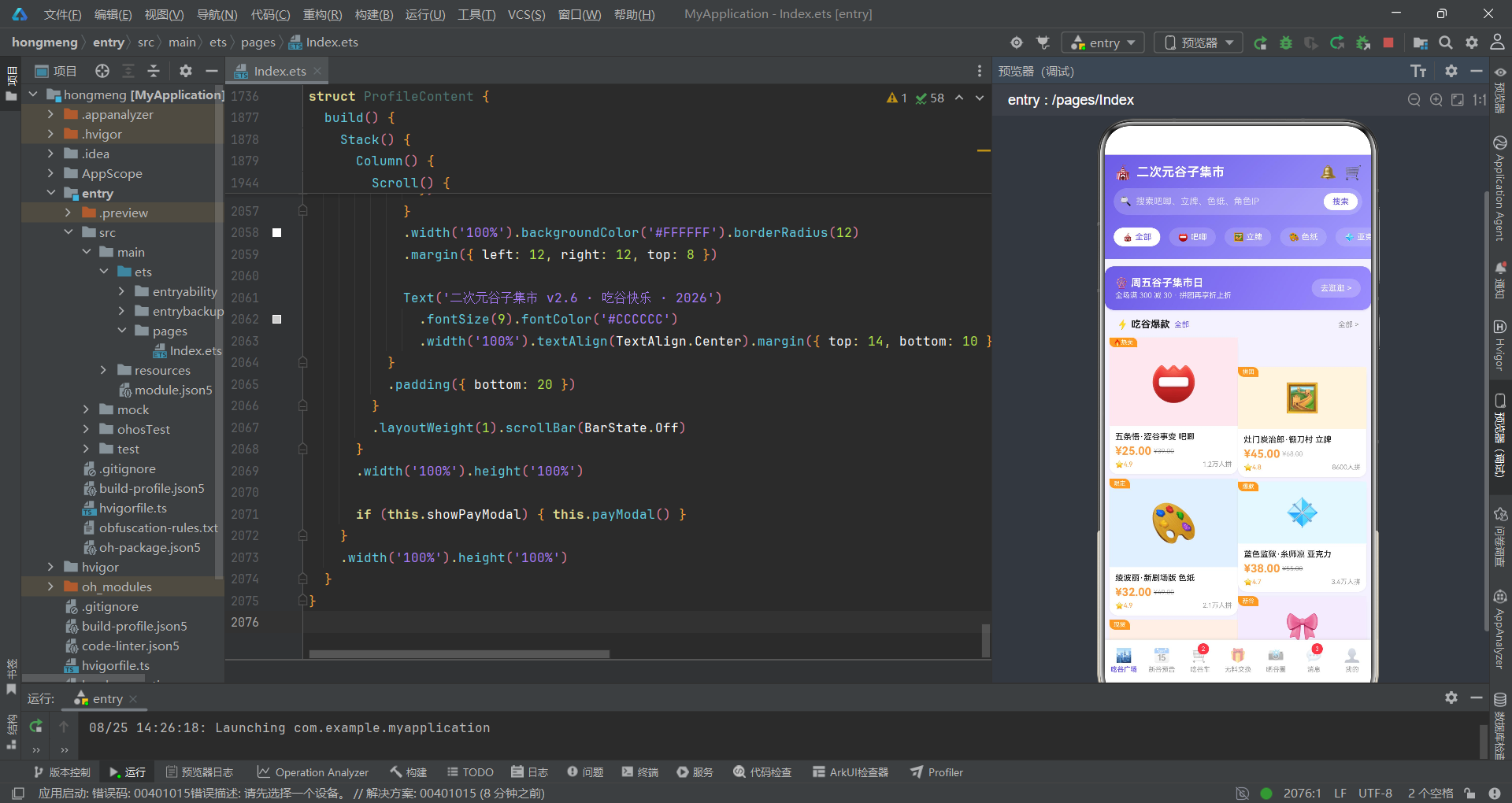
随着二次元文化在中国年轻消费群体中的持续渗透,动漫周边商品(俗称"谷子")的交易需求催生了垂直细分领域的电商社区平台。从吧唧(徽章)、立牌、色纸到亚克力挂件、棉花娃娃,"吃谷"已经从简单的商品购买演化为涵盖拼团成团、新谷预告、无料交换、晒谷社区等多元场景的完整交易生态。本文将深入剖析一个基于HarmonyOS ArkTS声明式UI框架构建的二次元谷子集市应用,该应用以紫蓝渐变为核心视觉语言,融合了拼多多风格的拼团电商模式与二次元社区的社交互动模式,实现了七大功能模块的完整端侧交互体验。
从技术架构层面来看,该应用采用了HarmonyOS ArkTS API 24所提供的声明式开发范式,以@Entry、@Component、@Builder、@State等核心装饰器构建了高度组件化的UI体系。整个应用基于单页面多Tab切换架构,通过activeTab数字索引实现七个主功能模块的路由分发:吃谷广场、新谷预告、吃谷车、无料交换、晒谷圈、消息和我的。与枚举路由不同,该应用使用数字索引(0-6)配合@Builder contentArea和@Builder tabItem两个可复用Builder方法实现Tab切换,入口组件的build方法结构更为精简。应用同时在各Tab组件内部管理弹窗状态,包括商品详情弹窗、加入吃谷车弹窗、发布换物帖弹窗、删除确认弹窗和补款提醒弹窗五大交互场景。
在数据架构设计上,应用采用了"interface接口定义—全局静态数据—工具函数"的分层架构模式。首先通过TypeScript interface定义了PlazaCate、GuziItem、SpecChip、PreorderItem、MonthGroup、CartGroupItem、ExchangeItem、GalleryPost、GridCell、GridRow1、MsgItem、MonthSpend、MyGuziItem、PayOrder、MenuItem1共十五个元数据接口,覆盖了商品、规格、预售、拼团、交换、社区、消息、消费统计和支付订单等全业务实体。随后通过模块级常量数组存放14条谷子商品、10条新谷预告(按3个月分组)、8个拼团、10条换物帖、3条晒谷帖、12条消息、6个月消费数据和2笔待补款订单等丰富数据集。最后定义了fmtPrice、fmtSales、specPrice、specStock、spendBarH、groupPercent、fmtRemain、fmtCount共八个工具函数,封装了价格格式化、销量缩写、规格查找、柱状图高度计算、拼团百分比和倒计时格式化等通用逻辑。
一、接口定义层
1.1 商品与规格接口
应用首先定义了谷子商品和规格的核心数据结构,这是整个电商交易的基础。
interface PlazaCate {
  label: string
  icon: string
}

interface GuziItem {
  id: number
  name: string
  tag: string
  price: number
  originalPrice: number
  sales: number
  icon: string
  bg: string
  category: string
  stock: number
  rating: number
}

interface SpecChip {
  label: string
  price: number
  stock: number
}

interface PreorderItem {
  id: number
  name: string
  series: string
  price: number
  preCount: number
  deadline: string
  icon: string
  bg: string
  tag: string
}

interface MonthGroup {
  month: string
  tip: string
  items: PreorderItem[]
}
PlazaCate定义了广场分类的标签和图标,用于顶部分类胶囊横滑。GuziItem是谷子商品的核心接口,包含id、商品名、标签(如"热卖"“拼团”“限定”)、现价、原价、销量、emoji图标、背景色、分类、库存和评分共十一个字段,是整个应用字段最丰富的接口。SpecChip定义了商品规格选项(如"单只装"“二连装”“全套五入”),每个规格关联独立的价格和库存。PreorderItem定义了新谷预告的商品信息,包含关联系列名、预约人数、开售时间和标签。MonthGroup将多条预售商品按月份分组,包含月份名、提示语和商品数组,用于构建时间线布局。这种嵌套结构设计使得UI层可以通过双层ForEach遍历实现"月份→商品"的层级展示。
1.2 拼团、交换与社区接口
interface CartGroupItem {
  id: number
  name: string
  icon: string
  bg: string
  price: number
  joinedCount: number
  totalCount: number
  endTime: string
  members: string[]
  discount: string
}

interface ExchangeItem {
  id: number
  user: string
  avatar: string
  give: string
  want: string
  note: string
  time: string
  isLeft: boolean
}

interface GalleryPost {
  id: number
  user: string
  avatar: string
  content: string
  likes: number
  comments: number
  isHot: boolean
}

interface GridCell {
  icon: string
  bg: string
  label: string
}

interface GridRow1 {
  cells: GridCell[]
}

interface MsgItem {
  id: number
  title: string
  content: string
  icon: string
  time: string
  unread: boolean
}

interface MonthSpend {
  month: string
  amount: number
}

interface MyGuziItem {
  id: number
  name: string
  icon: string
  bg: string
  value: number
}

interface PayOrder {
  id: number
  title: string
  icon: string
  amount: number
  deadlineText: string
  remainMin: number
}

interface MenuItem1 {
  icon: string
  label: string
  badge: string
}
CartGroupItem定义了吃谷车拼团的核心结构,包含拼团名、已参团人数、总人数、截止时间、参与者头像数组和折扣信息。ExchangeItem是无料交换帖的接口,isLeft布尔值控制帖子的左右对齐方向,实现了类似聊天气泡的左右交替展示效果。GalleryPost定义了晒谷帖的内容结构,isHot标记热门帖子。GridCell和GridRow1是一组嵌套接口,用于构建晒谷圈的三列图片墙宫格。MonthSpend定义了月度消费数据,用于个人中心的消费柱状图。PayOrder定义了待补款订单,包含截止文案和剩余分钟数,用于倒计时渲染。MenuItem1定义了个人中心的功能菜单项,badge字段用于展示角标提示(如"2张"优惠券)。这些接口共同构成了应用完整的数据类型体系,为所有业务场景提供了类型安全保障。
二、设计令牌与全局数据
2.1 紫蓝渐变设计令牌
应用通过模块级常量定义了四组渐变配置,以紫蓝渐变为核心视觉基调。
const MAIN_GRADIENT: LinearGradientOptions = {
  angle: 135,
  colors: [['#6C5CE7', 0.0], ['#A29BFE', 1.0]]
}

const ORANGE_GRADIENT: LinearGradientOptions = {
  angle: 135,
  colors: [['#FF9F43', 0.0], ['#FFC048', 1.0]]
}

const BANNER_GRADIENT: LinearGradientOptions = {
  angle: 120,
  colors: [['#6C5CE7', 0.0], ['#9B8CFF', 1.0]]
}

const TAG_GRADIENT: LinearGradientOptions = {
  angle: 90,
  colors: [['#FF9F43', 0.0], ['#FF7E5F', 1.0]]
}
四组渐变分别对应不同的视觉场景:MAIN_GRADIENT(紫蓝主渐变,从深紫#6C5CE7到浅紫#A29BFE)用于所有Tab的顶部头部区域,形成统一的品牌视觉基调;ORANGE_GRADIENT(橙色渐变,从#FF9F43到#FFC048)用于补款提醒弹窗的头部和操作按钮,以暖色暗示紧迫感;BANNER_GRADIENT(横幅渐变,120度方向,从#6C5CE7到#9B8CFF)用于吃谷广场的促销Banner卡片;TAG_GRADIENT(标签渐变,90度横向,从橙到红#FF7E5F)用于价格标签和强调元素。整体配色策略是紫蓝为主色调(冷色系代表二次元文化),橙色为强调色(暖色系用于价格和紧迫提示),形成冷暖对比的视觉层次。所有渐变均使用LinearGradientOptions类型约束,确保配置参数的类型安全。
2.2 谷子商品与拼团数据
const GUZI_ITEMS: GuziItem[] = [
  { id: 1, name: '五条悟·涩谷事变 吧唧', tag: '🔥热卖', price: 25, originalPrice: 39, sales: 12000, icon: '📛', bg: '#FDE8F0', category: '吧唧', stock: 60, rating: 4.9 },
  { id: 2, name: '灶门炭治郎·锻刀村 立牌', tag: '拼团', price: 45, originalPrice: 68, sales: 8600, icon: '🖼️', bg: '#FFF4E0', category: '立牌', stock: 35, rating: 4.8 },
  { id: 3, name: '绫波丽·新剧场版 色纸', tag: '限定', price: 32, originalPrice: 49, sales: 21000, icon: '🎨', bg: '#E4F0FF', category: '色纸', stock: 88, rating: 4.9 },
  { id: 4, name: '蓝色监狱·糸师凛 亚克力', tag: '爆款', price: 38, originalPrice: 55, sales: 34000, icon: '💠', bg: '#E7F7FF', category: '亚克力', stock: 120, rating: 4.7 },
  { id: 5, name: '星野爱·小豆泥 棉花娃娃', tag: '现货', price: 129, originalPrice: 189, sales: 4600, icon: '🧸', bg: '#FDF0E6', category: '棉花娃娃', stock: 15, rating: 5.0 },
  { id: 6, name: '芙莉莲·勇者组 吧唧托', tag: '新谷', price: 28, originalPrice: 42, sales: 9800, icon: '🎀', bg: '#F3EBFF', category: '吧唧托', stock: 70, rating: 4.8 },
  { id: 7, name: '三丽鸥·库洛米 明信片', tag: '福袋', price: 15, originalPrice: 25, sales: 56000, icon: '💌', bg: '#FBE4FB', category: '明信片', stock: 200, rating: 4.6 },
  { id: 8, name: '五条悟·夏服ver 立牌', tag: '预售', price: 55, originalPrice: 79, sales: 7200, icon: '🖼️', bg: '#E9F6FF', category: '立牌', stock: 40, rating: 4.8 },
  { id: 12, name: '鬼灭·炼狱杏寿郎 吧唧', tag: '绝版', price: 88, originalPrice: 128, sales: 3200, icon: '📛', bg: '#FFEFE0', category: '吧唧', stock: 12, rating: 5.0 },
  { id: 13, name: '孤独摇滚·后藤一里 娃娃', tag: '预售', price: 149, originalPrice: 209, sales: 2100, icon: '🧸', bg: '#FDF2F7', category: '棉花娃娃', stock: 8, rating: 4.9 },
  { id: 14, name: '蓝锁·凪诚士郎 明信片', tag: '特典', price: 12, originalPrice: 20, sales: 42000, icon: '💌', bg: '#EFF9F0', category: '明信片', stock: 300, rating: 4.6 }
]

const SPEC_CHIPS: SpecChip[] = [
  { label: '单只装', price: 25, stock: 60 },
  { label: '二连装', price: 48, stock: 30 },
  { label: '全套五入', price: 118, stock: 8 }
]

const CART_GROUPS: CartGroupItem[] = [
  { id: 1, name: '五条悟 涩谷吧唧拼团', icon: '📛', bg: '#FDE8F0', price: 19, joinedCount: 5, totalCount: 8, endTime: '23:59', members: ['🐱', '🐹', '🐰', '🐻', '🐨'], discount: '团价¥19' },
  { id: 2, name: '芙莉莲 勇者组吧唧拼团', icon: '🎀', bg: '#F3EBFF', price: 22, joinedCount: 3, totalCount: 6, endTime: '22:30', members: ['🐰', '🐱', '🐹'], discount: '团价¥22' },
  { id: 4, name: '阿尼亚 棉花娃娃拼团', icon: '🧸', bg: '#FDF2F7', price: 99, joinedCount: 2, totalCount: 5, endTime: '23:00', members: ['🦊', '🐱'], discount: '团价¥99' },
  { id: 8, name: '炼狱杏寿郎 绝版吧唧团', icon: '📛', bg: '#FFEFE0', price: 68, joinedCount: 1, totalCount: 4, endTime: '18:00', members: ['🦊'], discount: '团价¥68' }
]

const EXCHANGES: ExchangeItem[] = [
  { id: 1, user: '谷子猫猫头', avatar: '🐱', give: '烫金色纸 × 2', want: '咒回吧唧', note: '五条/夏油都行,全新未拆优先', time: '10分钟前', isLeft: true },
  { id: 2, user: '阿宅小星', avatar: '✨', give: '多余吧唧 × 3', want: '芙莉莲色纸', note: '同城优先,可面交互换', time: '25分钟前', isLeft: false },
  { id: 3, user: '咸鱼交换酱', avatar: '🐟', give: '亚克力挂件', want: '棉花娃娃', note: '可加钱补差换,小豆泥可谈', time: '1小时前', isLeft: true },
  { id: 9, user: '吃谷喵', avatar: '🐈', give: '二连吧唧', want: '透卡', note: '可互选款式,私信详聊', time: '前天', isLeft: true },
  { id: 10, user: '阿宅小星', avatar: '✨', give: '蓝锁徽章', want: '明日方舟吧唧', note: '走平台交易更放心', time: '前天', isLeft: false }
]

const PAY_ORDERS: PayOrder[] = [
  { id: 1, title: '五条悟 涩谷吧唧拼团', icon: '📛', amount: 19, deadlineText: '今日 23:59 截止', remainMin: 45 },
  { id: 2, title: '乙骨忧太 烫金色纸拼团', icon: '🎨', amount: 35, deadlineText: '明日 18:00 截止', remainMin: 120 }
]
14条谷子商品数据覆盖了吧唧、立牌、色纸、亚克力、棉花娃娃、吧唧托和明信片七大品类,每条数据都关联了IP角色名(如五条悟、炭治郎、绫波丽等)和标签(热卖、拼团、限定、爆款、绝版等)。商品背景色与品类相关:吧唧用粉色系、立牌用蓝色系、色纸用浅蓝、亚克力用天蓝、棉花娃娃用暖色,通过色彩暗示商品类型。8个拼团数据中joinedCount和totalCount的差值表示还差多少人成团,endTime字段用于倒计时展示。10条换物帖通过isLeft字段控制左右气泡方向,奇数索引为左侧(用户头像在左),偶数索引为右侧(用户头像在右),形成聊天式的交替布局。2笔待补款订单的remainMin字段存储剩余分钟数,用于渲染倒计时数字。
三、工具函数与入口组件
3.1 工具函数集
应用定义了八个工具函数,封装了数据格式化和查找逻辑,在UI渲染中被频繁调用。
function fmtPrice(p: number): string {
  return '¥' + p.toFixed(2)
}

function fmtSales(s: number): string {
  if (s >= 10000) {
    return (s / 10000).toFixed(1) + '万'
  }
  return s.toString()
}

function specPrice(label: string): number {
  for (let i = 0; i < SPEC_CHIPS.length; i++) {
    if (SPEC_CHIPS[i].label === label) {
      return SPEC_CHIPS[i].price
    }
  }
  return 0
}

function specStock(label: string): number {
  for (let i = 0; i < SPEC_CHIPS.length; i++) {
    if (SPEC_CHIPS[i].label === label) {
      return SPEC_CHIPS[i].stock
    }
  }
  return 0
}

function spendBarH(a: number): string {
  return (a / MAX_SPEND * 90).toFixed(0) + 'vp'
}

function groupPercent(j: number, t: number): string {
  return ((j / t) * 100).toFixed(0) + '%'
}

function fmtRemain(m: number): string {
  const h = Math.floor(m / 60)
  const min = m % 60
  return h.toString().padStart(2, '0') + ':' + min.toString().padStart(2, '0')
}

function fmtCount(c: number): string {
  if (c >= 10000) {
    return (c / 10000).toFixed(1) + '万'
  }
  return c.toString()
}
fmtPrice将数字价格格式化为带人民币符号和两位小数的字符串(如19→"¥19.00")。fmtSales和fmtCount都实现了万级缩写,超过一万时转换为"X.X万"格式,但分别用于销量和预约人数的展示。specPrice和specStock通过标签名在SPEC_CHIPS数组中查找对应的规格价格和库存,使用for循环遍历匹配,返回0作为未找到的默认值。spendBarH将消费金额映射到柱状图高度(除以MAX_SPEND再乘以90得到vp高度字符串),是数据可视化的核心计算逻辑。groupPercent计算拼团成团百分比并格式化为"X%"字符串。fmtRemain将剩余分钟数转换为"HH:MM"格式的倒计时字符串,使用padStart(2, '0')确保时和分都是两位数。这些工具函数的设计体现了"关注点分离"原则——将数据格式化逻辑从UI渲染中抽离,使得Builder方法的代码更加简洁。
3.2 入口组件与Tab构建
入口组件采用数字索引路由和可复用Builder方法,构建了精简的Tab切换架构。
@Entry
@Component
struct GuziMarketPage {
  @State activeTab: number = 0

  @Builder contentArea() {
    Column() {
      if (this.activeTab === 0) {
        PlazaContent()
      } else if (this.activeTab === 1) {
        PreorderContent()
      } else if (this.activeTab === 2) {
        CartContent()
      } else if (this.activeTab === 3) {
        ExchangeContent()
      } else if (this.activeTab === 4) {
        GalleryContent()
      } else if (this.activeTab === 5) {
        MessageContent()
      } else {
        ProfileContent()
      }
    }
    .layoutWeight(1)
  }

  @Builder tabItem(icon: string, label: string, tab: number, badge: number) {
    Column() {
      Stack() {
        Text(icon).fontSize(18).opacity(this.activeTab === tab ? 1.0 : 0.45)
        if (badge > 0) {
          Text(badge.toString()).fontSize(8).fontColor('#FFFFFF').backgroundColor('#FF4D4F')
            .borderRadius(7).width(15).height(15).textAlign(TextAlign.Center)
            .position({ x: 13, y: -3 })
        }
      }
      .width(32).height(26)
      Text(label).fontSize(9)
        .fontColor(this.activeTab === tab ? '#6C5CE7' : '#999999')
        .fontWeight(this.activeTab === tab ? FontWeight.Bold : FontWeight.Normal)
        .margin({ top: 1 })
    }
    .layoutWeight(1)
    .alignItems(HorizontalAlign.Center)
    .padding({ top: 4, bottom: 4 })
    .onClick(() => { this.activeTab = tab })
  }

  build() {
    Column() {
      this.contentArea()
      Row() {
        this.tabItem('🏙️', '吃谷广场', 0, 0)
        this.tabItem('📅', '新谷预告', 1, 0)
        this.tabItem('🛒', '吃谷车', 2, 2)
        this.tabItem('🎁', '无料交换', 3, 0)
        this.tabItem('📸', '晒谷圈', 4, 0)
        this.tabItem('💬', '消息', 5, 3)
        this.tabItem('👤', '我的', 6, 0)
      }
      .width('100%')
      .backgroundColor('#FFFFFF')
      .padding({ top: 4, bottom: 6 })
      .shadow({ radius: 8, color: '#1A000000', offsetY: -2 })
    }
    .width('100%').height('100%')
    .backgroundColor('#F4F2FF')
  }
}
入口组件的结构设计非常精炼:@State activeTab管理当前Tab索引(0-6),@Builder contentArea封装了if-else if-else链式条件判断的路由分发逻辑,@Builder tabItem封装了底部Tab项的渲染逻辑。tabItem Builder接收图标、标签、Tab索引和角标数四个参数,激活状态用品牌紫#6C5CE7文字加粗、图标全透明度,非激活用灰色文字和0.45透明度。角标通过badge > 0条件判断,当有未读数时在图标右上角渲染红色圆形角标(position({ x: 13, y: -3 })定位)。build方法只需调用this.contentArea()和七个this.tabItem(...),代码极其简洁。这种Builder复用模式使得入口组件的代码量大幅减少,同时保持了完整的路由和交互功能。
四、吃谷广场与商品详情
4.1 吃谷广场Tab
吃谷广场作为首页Tab,集成了渐变头部、分类胶囊横滑、促销Banner和双列瀑布流商品展示。
@Component
struct PlazaContent {
  @State activeCate: string = '全部'
  @State showDetail: boolean = false
  @State selectedGuzi: GuziItem | null = null
  @State selectedSpec: string = '单只装'
  @State joinedDetail: boolean = false

  @Builder guziCard(item: GuziItem, big: boolean) {
    Column() {
      Stack() {
        Column() {
          Text(item.icon).fontSize(big ? 52 : 38)
        }
        .width('100%').height(big ? 120 : 84)
        .backgroundColor(item.bg)
        .alignItems(HorizontalAlign.Center).justifyContent(FlexAlign.Center)
        if (item.tag !== '') {
          Text(item.tag).fontSize(8).fontColor('#FFFFFF')
            .backgroundColor('#FF9F43')
            .padding({ left: 6, right: 6, top: 2, bottom: 2 })
            .borderRadius({ topRight: 8, bottomLeft: 8 })
            .position({ x: 0, y: 0 })
        }
      }
      .width('100%').height(big ? 120 : 84)

      Column() {
        Text(item.name).fontSize(11).fontWeight(FontWeight.Medium).fontColor('#212121')
          .maxLines(1).textOverflow({ overflow: TextOverflow.Ellipsis }).width('100%')
        Row() {
          Text(fmtPrice(item.price)).fontSize(15).fontWeight(FontWeight.Bold).fontColor('#FF9F43')
          Text(fmtPrice(item.originalPrice)).fontSize(9).fontColor('#BBBBBB')
            .decoration({ type: TextDecorationType.LineThrough }).margin({ left: 3 })
          Column().layoutWeight(1)
        }
        .width('100%').margin({ top: 4 })
        Row() {
          Text('⭐' + item.rating.toString()).fontSize(9).fontColor('#FF9F43')
          Column().layoutWeight(1)
          Text(fmtSales(item.sales) + '人拼').fontSize(9).fontColor('#999999')
        }
        .width('100%').margin({ top: 4 })
      }
      .padding(8).alignItems(HorizontalAlign.Start)
    }
    .width('100%').backgroundColor('#FFFFFF').borderRadius(12)
    .margin({ left: 6, right: 6, top: 6 })
    .shadow({ radius: 6, color: '#0D000000', offsetY: 2 })
    .onClick(() => { this.selectedGuzi = item; this.selectedSpec = '单只装'; this.joinedDetail = false; this.showDetail = true })
  }

  build() {
    Stack() {
      Column() {
        // 渐变头部:电商搜索风
        Column() {
          Row() {
            Text('🎪').fontSize(20)
            Text('二次元谷子集市').fontSize(17).fontWeight(FontWeight.Bold)
              .fontColor('#FFFFFF').margin({ left: 6 })
            Column().layoutWeight(1)
            Text('🔔').fontSize(19).margin({ left: 10 })
            Text('🛒').fontSize(19).margin({ left: 10 })
          }
          .width('100%').padding({ left: 12, right: 12, top: 12 })

          Row() {
            Text('🔍').fontSize(13).margin({ left: 8 })
            Text('搜索吧唧、立牌、色纸、角色IP').fontSize(12).fontColor('rgba(255,255,255,0.7)')
              .margin({ left: 6 })
            Column().layoutWeight(1)
            Text('搜索').fontSize(11).fontColor('#6C5CE7').backgroundColor('#FFFFFF')
              .padding({ left: 12, right: 12, top: 5, bottom: 5 }).borderRadius(12)
              .margin({ right: 6 })
          }
          .height(36).backgroundColor('rgba(255,255,255,0.18)').borderRadius(18)
          .margin({ left: 12, right: 12, top: 10 })

          // 分类胶囊横滑
          Scroll() {
            Row() {
              ForEach(PLAZA_CATES, (c: PlazaCate) => {
                Row() {
                  Text(c.icon).fontSize(11)
                    .fontColor(this.activeCate === c.label ? '#6C5CE7' : '#FFFFFF')
                  Text(c.label).fontSize(11).margin({ left: 3 })
                    .fontColor(this.activeCate === c.label ? '#6C5CE7' : '#FFFFFF')
                }
                .padding({ left: 12, right: 12, top: 6, bottom: 6 })
                .backgroundColor(this.activeCate === c.label ? '#FFFFFF' : 'rgba(255,255,255,0.15)')
                .borderRadius(16)
                .margin({ left: 6, right: 6 })
                .onClick(() => { this.activeCate = c.label })
              })
            }
            .padding({ left: 6, right: 6 })
          }
          .scrollable(ScrollDirection.Horizontal).scrollBar(BarState.Off)
          .height(40).width('100%').margin({ top: 10, bottom: 10 })
        }
        .width('100%').linearGradient(MAIN_GRADIENT)

        Scroll() {
          Column() {
            // 静态banner
            Row() {
              Column() {
                Text('🎡 周五谷子集市日').fontSize(14).fontWeight(FontWeight.Bold)
                  .fontColor('#FFFFFF')
                Text('全场满 300 减 30 · 拼团再享折上折').fontSize(10)
                  .fontColor('rgba(255,255,255,0.85)').margin({ top: 3 })
              }
              .layoutWeight(1).alignItems(HorizontalAlign.Start)
              Text('去逛逛 >').fontSize(11).fontColor('#FFFFFF')
                .backgroundColor('rgba(255,255,255,0.22)')
                .padding({ left: 12, right: 12, top: 6, bottom: 6 }).borderRadius(14)
            }
            .width('100%').padding(14)
            .linearGradient(BANNER_GRADIENT).borderRadius(12)
            .margin({ left: 12, right: 12, top: 10 })
            .shadow({ radius: 6, color: '#336C5CE7', offsetY: 3 })

            // 双列卡片流(大小交替错落)
            Row() {
              Column() {
                this.guziCard(GUZI_ITEMS[0], true)
                this.guziCard(GUZI_ITEMS[2], true)
                this.guziCard(GUZI_ITEMS[4], true)
                this.guziCard(GUZI_ITEMS[6], true)
                this.guziCard(GUZI_ITEMS[8], true)
              }
              .layoutWeight(1).alignItems(HorizontalAlign.Center)
              Column() {
                this.guziCard(GUZI_ITEMS[1], false)
                this.guziCard(GUZI_ITEMS[3], false)
                this.guziCard(GUZI_ITEMS[5], false)
                this.guziCard(GUZI_ITEMS[7], false)
                this.guziCard(GUZI_ITEMS[9], false)
              }
              .layoutWeight(1).alignItems(HorizontalAlign.Center).margin({ top: 40 })
            }
            .width('100%').alignItems(VerticalAlign.Top)
            .padding({ left: 6, right: 6, bottom: 16 })
          }
          .width('100%')
        }
        .layoutWeight(1).scrollBar(BarState.Off)
      }
      .width('100%').height('100%')

      if (this.showDetail) { this.detailModal() }
    }
    .width('100%').height('100%')
  }
}
吃谷广场Tab的头部使用MAIN_GRADIENT紫蓝渐变背景,包含品牌名、通知和购物车图标、搜索栏和分类胶囊横滑。搜索栏使用半透明白色背景(rgba(255,255,255,0.18))的胶囊形态,右侧"搜索"按钮用白色背景紫色文字形成对比。分类胶囊通过ForEach遍历PLAZA_CATES数组渲染8个分类标签,选中分类用白色背景紫色文字、未选中用半透明白色背景白字,点击切换activeCate状态。瀑布流商品展示是该Tab的核心亮点:左列使用big=true(大卡片,图标52vp、高度120vp),右列使用big=false(小卡片,图标38vp、高度84vp),右列额外添加margin({ top: 40 })偏移,实现了大小交替的错落瀑布流效果。guziCard Builder的big参数控制卡片尺寸,标签通过position({ x: 0, y: 0 })定位在卡片左上角,使用borderRadius({ topRight: 8, bottomLeft: 8 })形成不对称圆角标签。点击商品卡片时同时设置selectedGuzi、selectedSpec、joinedDetail三个状态并打开详情弹窗。
4.2 商品详情弹窗
商品详情弹窗采用底部滑出样式,集成了大图展示、规格选择、价格库存和操作按钮。
@Builder modalOverlay(onClose: () => void = () => {}) {
  Column()
    .width('100%').height('100%')
    .backgroundColor('rgba(0,0,0,0.55)')
    .onClick(onClose)
}

@Builder detailModal() {
  Column() {
    this.modalOverlay(() => { this.showDetail = false })
    Column() {
      Stack() {
        Column() {
          Text(this.selectedGuzi?.icon ?? '📛').fontSize(72)
        }
        .width('100%').height(150)
        .backgroundColor(this.selectedGuzi?.bg ?? '#FDE8F0')
        .alignItems(HorizontalAlign.Center).justifyContent(FlexAlign.Center)
        if (this.selectedGuzi?.tag !== '') {
          Text(this.selectedGuzi?.tag ?? '🔥').fontSize(10).fontColor('#FFFFFF')
            .backgroundColor('#FF9F43')
            .padding({ left: 8, right: 8, top: 3, bottom: 3 })
            .borderRadius({ topRight: 10, bottomLeft: 10 })
            .position({ x: 0, y: 0 })
        }
      }
      .width('100%').height(150).borderRadius({ topLeft: 18, topRight: 18 })

      Column() {
        Text(this.selectedGuzi?.name ?? '').fontSize(16).fontWeight(FontWeight.Bold)
          .fontColor('#212121').width('100%')
        Row() {
          Text(fmtPrice(specPrice(this.selectedSpec))).fontSize(22).fontWeight(FontWeight.Bold)
            .fontColor('#FF9F43')
          Text(fmtPrice(this.selectedGuzi?.originalPrice ?? 0)).fontSize(11)
            .fontColor('#BBBBBB')
            .decoration({ type: TextDecorationType.LineThrough }).margin({ left: 6 })
          Column().layoutWeight(1)
          Text('库存 ' + specStock(this.selectedSpec).toString() + ' 件')
            .fontSize(10).fontColor('#999999')
        }
        .width('100%').margin({ top: 8 })

        Row() {
          Text('⭐ ' + (this.selectedGuzi?.rating ?? 0).toString())
            .fontSize(10).fontColor('#FF9F43').backgroundColor('#FFF6E8')
            .padding({ left: 8, right: 8, top: 4, bottom: 4 }).borderRadius(10)
          Text('已拼 ' + fmtSales(this.selectedGuzi?.sales ?? 0) + ' 件')
            .fontSize(10).fontColor('#6C5CE7').backgroundColor('#F0EDFF')
            .padding({ left: 8, right: 8, top: 4, bottom: 4 }).borderRadius(10)
            .margin({ left: 6 })
          Text(this.selectedGuzi?.category ?? '')
            .fontSize(10).fontColor('#888888').backgroundColor('#F5F5F5')
            .padding({ left: 8, right: 8, top: 4, bottom: 4 }).borderRadius(10)
            .margin({ left: 6 })
        }
        .width('100%').margin({ top: 10 })

        Text('选择规格').fontSize(12).fontWeight(FontWeight.Bold).fontColor('#333333')
          .width('100%').margin({ top: 14 })
        Row() {
          ForEach(SPEC_CHIPS, (s: SpecChip) => {
            Column() {
              Text(s.label).fontSize(11)
                .fontColor(this.selectedSpec === s.label ? '#FFFFFF' : '#6C5CE7')
                .fontWeight(this.selectedSpec === s.label ? FontWeight.Bold : FontWeight.Normal)
              Text('¥' + s.price.toString()).fontSize(9)
                .fontColor(this.selectedSpec === s.label ? '#FFFFFF' : '#FF9F43')
                .margin({ top: 2 })
            }
            .padding({ left: 12, right: 12, top: 8, bottom: 8 })
            .backgroundColor(this.selectedSpec === s.label ? '#6C5CE7' : '#F0EDFF')
            .borderRadius(12).margin({ left: 4, right: 4 })
            .alignItems(HorizontalAlign.Center)
            .onClick(() => { this.selectedSpec = s.label })
          })
        }
        .width('100%').margin({ top: 6 })

        if (this.joinedDetail) {
          Row() {
            Text('✅ 已加入吃谷车,去「吃谷车」查看进度').fontSize(11).fontColor('#4CAF50')
          }
          .width('100%').padding({ top: 8, bottom: 8 }).justifyContent(FlexAlign.Center)
          .backgroundColor('#E8F8F0').borderRadius(8).margin({ top: 10 })
        } else {
          Row() {
            Text('加入购物车').fontSize(12).fontColor('#FFFFFF')
              .backgroundColor('#6C5CE7').borderRadius(18)
              .padding({ left: 18, right: 18, top: 10, bottom: 10 })
              .onClick(() => { this.joinedDetail = true })
            Text('立即拼团').fontSize(12).fontColor('#FFFFFF')
              .backgroundColor('#FF9F43').borderRadius(18)
              .padding({ left: 18, right: 18, top: 10, bottom: 10 })
              .margin({ left: 10 })
              .onClick(() => { this.joinedDetail = true })
          }
          .width('100%').justifyContent(FlexAlign.Center).margin({ top: 12, bottom: 8 })
        }
      }
      .padding({ left: 16, right: 16, top: 12, bottom: 16 })
      .alignItems(HorizontalAlign.Start)
    }
    .width('100%').backgroundColor('#FFFFFF')
    .borderRadius({ topLeft: 18, topRight: 18 })
    .position({ x: 0, y: '36%' })
  }
  .width('100%').height('100%').position({ x: 0, y: 0 }).zIndex(999)
}
商品详情弹窗使用position({ x: 0, y: '36%' })从屏幕36%位置开始渲染,形成底部滑出效果。大图区域使用selectedGuzi?.bg动态背景色配合72vp大字号emoji图标,标签通过position定位在左上角。价格区域通过specPrice(this.selectedSpec)工具函数动态获取当前选中规格的价格,原价使用删除线装饰。规格选择区通过ForEach遍历SPEC_CHIPS渲染三个规格选项(单只装、二连装、全套五入),选中规格用品牌紫背景白字、未选中用浅紫背景紫字,每个规格下方显示对应价格。joinedDetail状态控制底部操作区:未加入时显示"加入购物车"(紫色)和"立即拼团"(橙色)双按钮,已加入时显示绿色成功提示条。使用??空值合并运算符处理selectedGuzi可能为null的情况,确保UI不会因空引用崩溃。
五、新谷预告与吃谷车
5.1 新谷预告Tab
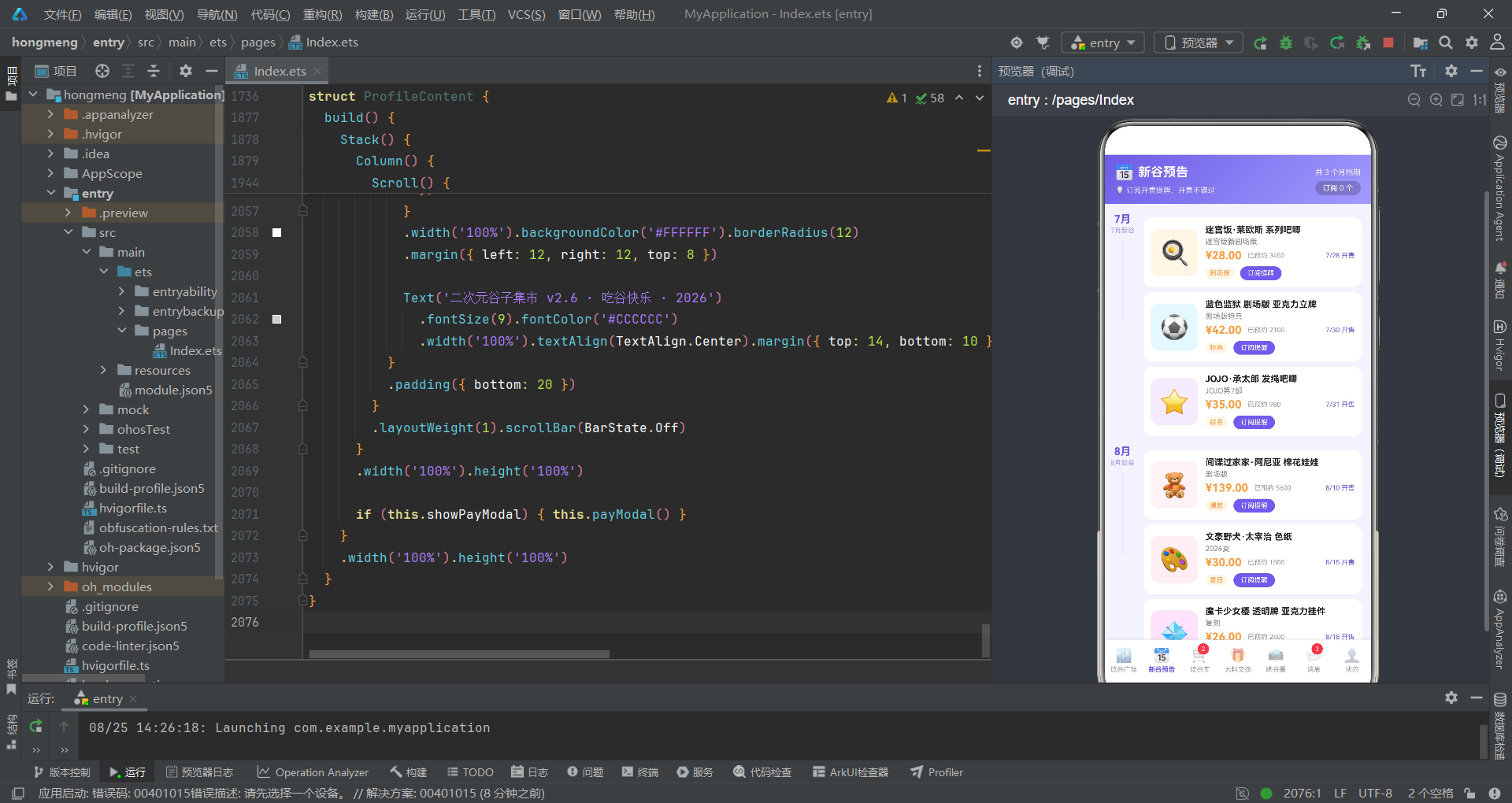
新谷预告Tab通过月份分组时间线布局展示即将开售的谷子商品。
@Component
struct PreorderContent {
  @State subscribedIds: number[] = []
  @State showTip: boolean = false

  @Builder preCard(p: PreorderItem) {
    Row() {
      Column() {
        Text(p.icon).fontSize(32)
      }
      .width(64).height(64).backgroundColor(p.bg).borderRadius(12)
      .alignItems(HorizontalAlign.Center).justifyContent(FlexAlign.Center)

      Column() {
        Row() {
          Text(p.name).fontSize(12).fontWeight(FontWeight.Bold).fontColor('#212121')
            .maxLines(1).textOverflow({ overflow: TextOverflow.Ellipsis }).layoutWeight(1)
          if (this.subscribedIds.indexOf(p.id) >= 0) {
            Text('✓ 已订阅').fontSize(9).fontColor('#FFFFFF').backgroundColor('#6C5CE7')
              .padding({ left: 6, right: 6, top: 2, bottom: 2 }).borderRadius(8)
          }
        }
        .width('100%')

        Text(p.series).fontSize(10).fontColor('#888888').width('100%').margin({ top: 3 })
        Row() {
          Text(fmtPrice(p.price)).fontSize(15).fontWeight(FontWeight.Bold).fontColor('#FF9F43')
          Text('已预约 ' + fmtCount(p.preCount)).fontSize(9).fontColor('#999999').margin({ left: 8 })
          Column().layoutWeight(1)
          Text(p.deadline).fontSize(9).fontColor('#6C5CE7')
        }
        .width('100%').margin({ top: 4 })

        Row() {
          Text(p.tag).fontSize(9).fontColor('#FF9F43').backgroundColor('#FFF6E8')
            .padding({ left: 6, right: 6, top: 2, bottom: 2 }).borderRadius(8)
          Text('订阅提醒').fontSize(9).fontColor('#FFFFFF')
            .backgroundColor(this.subscribedIds.indexOf(p.id) >= 0 ? '#B8B2E8' : '#6C5CE7')
            .padding({ left: 10, right: 10, top: 4, bottom: 4 }).borderRadius(10)
            .margin({ left: 8 })
        }
        .width('100%').margin({ top: 6 })
      }
      .layoutWeight(1).alignItems(HorizontalAlign.Start).padding({ left: 10 })
    }
    .width('100%').padding(10).backgroundColor('#FFFFFF').borderRadius(12)
    .margin({ top: 6 })
    .shadow({ radius: 4, color: '#0D000000', offsetY: 1 })
    .onClick(() => {
      const idx = this.subscribedIds.indexOf(p.id)
      if (idx >= 0) {
        this.subscribedIds.splice(idx, 1)
      } else {
        this.subscribedIds.push(p.id)
      }
    })
  }

  build() {
    Column() {
      Column() {
        Row() {
          Text('📅').fontSize(20)
          Text('新谷预告').fontSize(17).fontWeight(FontWeight.Bold).fontColor('#FFFFFF')
            .margin({ left: 6 })
          Column().layoutWeight(1)
          Text('共 ' + MONTH_GROUPS.length.toString() + ' 个月档期')
            .fontSize(10).fontColor('rgba(255,255,255,0.85)')
        }
        .width('100%').padding({ left: 14, right: 14, top: 12 })
        Row() {
          Text('💡 订阅开售提醒,开售不错过').fontSize(10).fontColor('rgba(255,255,255,0.8)')
            .padding({ top: 6 })
          Column().layoutWeight(1)
          Text('订阅 ' + this.subscribedIds.length.toString() + ' 个')
            .fontSize(10).fontColor('#FFFFFF').backgroundColor('rgba(0,0,0,0.2)')
            .padding({ left: 10, right: 10, top: 4, bottom: 4 }).borderRadius(10)
        }
        .width('100%').padding({ left: 14, right: 14, bottom: 12 })
      }
      .width('100%').linearGradient(MAIN_GRADIENT)

      Scroll() {
        Column() {
          ForEach(MONTH_GROUPS, (g: MonthGroup) => {
            Row() {
              Column() {
                Text(g.month).fontSize(14).fontWeight(FontWeight.Bold).fontColor('#6C5CE7')
                Text(g.tip).fontSize(9).fontColor('#A29BFE').margin({ top: 2 })
                Column().width(2).height(110).backgroundColor('#E6E0FF').margin({ top: 8 })
              }
              .width(48).alignItems(HorizontalAlign.Center)

              Column() {
                ForEach(g.items, (p: PreorderItem) => {
                  this.preCard(p)
                })
              }
              .layoutWeight(1).padding({ left: 4, right: 12 })
            }
            .alignItems(VerticalAlign.Top)
            .margin({ top: 12 })
          })

          Column() {
            Row() {
              Text('📌').fontSize(14)
              Text('开售时间均为北京时间,实际以官谷为准').fontSize(10).fontColor('#888888')
                .margin({ left: 4 })
            }
            .width('100%').justifyContent(FlexAlign.Center)
            .padding({ top: 12, bottom: 12 })
          }
          .width('100%')
        }
        .padding({ bottom: 20 })
      }
      .layoutWeight(1).scrollBar(BarState.Off)
    }
    .width('100%').height('100%')
  }
}
新谷预告Tab的核心亮点是月份分组时间线布局。外层ForEach遍历MONTH_GROUPS数组(3个月份分组),内层ForEach遍历每个分组的items数组渲染商品卡片。时间线通过左侧48vp宽的Column实现:月份大字+提示小字+2vp宽110vp高的紫色竖线(#E6E0FF),竖线连接同月的多个商品卡片形成垂直时间轴。每个商品卡片的订阅功能通过subscribedIds数组管理:点击卡片时通过indexOf查找是否已订阅,已订阅则splice移除、未订阅则push添加。已订阅状态通过右上角的"✓ 已订阅"紫色标签和底部"订阅提醒"按钮变为浅紫#B8B2E8色来双重提示。头部统计栏实时显示当前订阅总数(this.subscribedIds.length.toString()),数据驱动更新。
5.2 吃谷车Tab
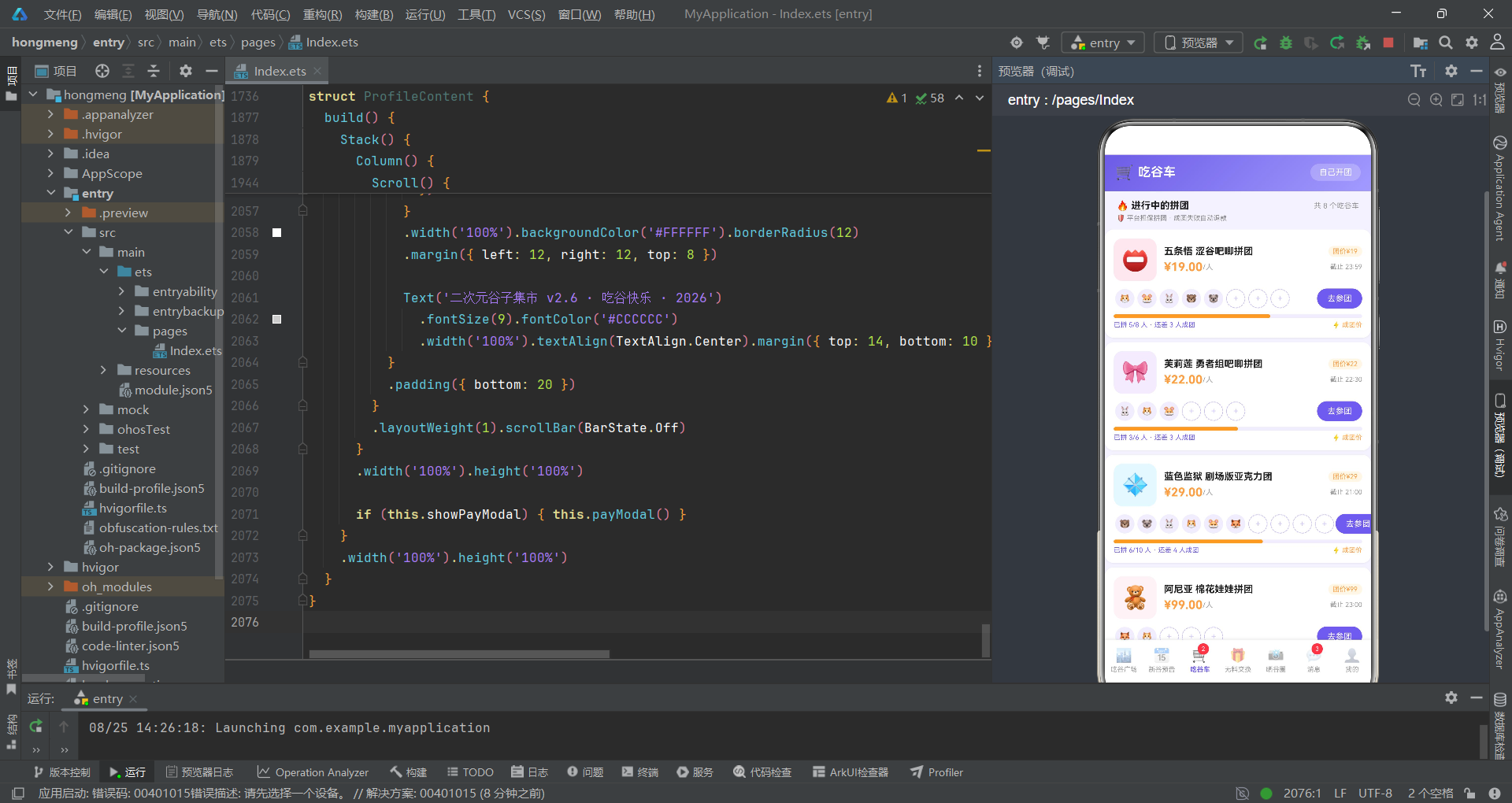
吃谷车Tab展示了进行中的拼团列表和加入拼团弹窗,是拼团交易的核心组件。
@Component
struct CartContent {
  @State showCartModal: boolean = false
  @State selectedGroup: CartGroupItem | null = null
  @State cartQty: number = 1
  @State cartNote: string = ''
  @State joinedCart: boolean = false

  @Builder groupCard(g: CartGroupItem) {
    Column() {
      Row() {
        Column() {
          Text(g.icon).fontSize(30)
        }
        .width(58).height(58).backgroundColor(g.bg).borderRadius(12)
        .alignItems(HorizontalAlign.Center).justifyContent(FlexAlign.Center)

        Column() {
          Row() {
            Text(g.name).fontSize(13).fontWeight(FontWeight.Bold).fontColor('#212121')
              .maxLines(1).textOverflow({ overflow: TextOverflow.Ellipsis }).layoutWeight(1)
            Text(g.discount).fontSize(9).fontColor('#FF9F43').backgroundColor('#FFF6E8')
              .padding({ left: 6, right: 6, top: 2, bottom: 2 }).borderRadius(8)
          }
          .width('100%')
          Row() {
            Text(fmtPrice(g.price)).fontSize(16).fontWeight(FontWeight.Bold).fontColor('#FF9F43')
            Text('/人').fontSize(10).fontColor('#999999')
            Column().layoutWeight(1)
            Text('截止 ' + g.endTime).fontSize(9).fontColor('#999999')
          }
          .width('100%').margin({ top: 4 })
        }
        .layoutWeight(1).alignItems(HorizontalAlign.Start).padding({ left: 10 })
      }
      .width('100%')

      // 成员头像槽位(空槽灰色虚线圆)
      Row() {
        ForEach([0, 1, 2, 3, 4, 5, 6, 7, 8, 9, 10, 11], (i: number) => {
          if (i < g.totalCount) {
            Column() {
              if (i < g.joinedCount) {
                Text(g.members[i % g.members.length]).fontSize(12)
                  .width(26).height(26).borderRadius(13).backgroundColor('#F0EDFF')
                  .textAlign(TextAlign.Center)
              } else {
                Column() {
                  Text('+').fontSize(12).fontColor('#C9C4F0')
                }
                .width(26).height(26).borderRadius(13)
                .border({ width: 1, color: '#C9C4F0' })
                .borderStyle(BorderStyle.Dashed)
                .alignItems(HorizontalAlign.Center).justifyContent(FlexAlign.Center)
              }
            }
            .margin({ left: 2, right: 2 })
          }
        })
        Column().layoutWeight(1)
        Text('去参团').fontSize(11).fontColor('#FFFFFF')
          .backgroundColor('#6C5CE7')
          .padding({ left: 14, right: 14, top: 7, bottom: 7 }).borderRadius(14)
          .onClick(() => {
            this.selectedGroup = g
            this.cartQty = 1
            this.cartNote = ''
            this.joinedCart = false
            this.showCartModal = true
          })
      }
      .width('100%').margin({ top: 10 })

      // 成团进度条
      Row() {
        Column()
          .width(groupPercent(g.joinedCount, g.totalCount))
          .height(5).backgroundColor('#FF9F43').borderRadius(3)
        Column().layoutWeight(1)
      }
      .width('100%').height(5).backgroundColor('#F0EDFF').borderRadius(3).margin({ top: 8 })

      Row() {
        Text('已拼 ' + g.joinedCount.toString() + '/' + g.totalCount.toString() + ' 人 · 还差 ' +
          (g.totalCount - g.joinedCount).toString() + ' 人成团')
          .fontSize(9).fontColor('#6C5CE7').layoutWeight(1)
        Text('⚡ 成团价').fontSize(9).fontColor('#FF9F43')
      }
      .width('100%').margin({ top: 4 })
    }
    .width('100%').padding(12).backgroundColor('#FFFFFF').borderRadius(12)
    .margin({ left: 12, right: 12, top: 6 })
    .shadow({ radius: 5, color: '#0D000000', offsetY: 2 })
  }
}
吃谷车Tab的拼团卡片核心亮点是成员头像槽位设计。通过ForEach遍历一个0-11的数字数组,使用if (i < g.totalCount)条件判断当前槽位是否在总人数范围内,再用if (i < g.joinedCount)判断该槽位是否已被占用。已占用的槽位显示成员头像(通过g.members[i % g.members.length]取模获取头像emoji,防止数组越界),未占用的槽位显示虚线边框的"+"号占位符(borderStyle(BorderStyle.Dashed)),形成直观的拼团进度可视化。成团进度条通过groupPercent(g.joinedCount, g.totalCount)计算百分比宽度,橙色填充在浅紫轨道中。点击"去参团"按钮时同时重置四个状态(selectedGroup、cartQty、cartNote、joinedCart)并打开拼团弹窗,确保每次打开弹窗时表单都是初始状态。
六、无料交换与晒谷圈
6.1 无料交换Tab
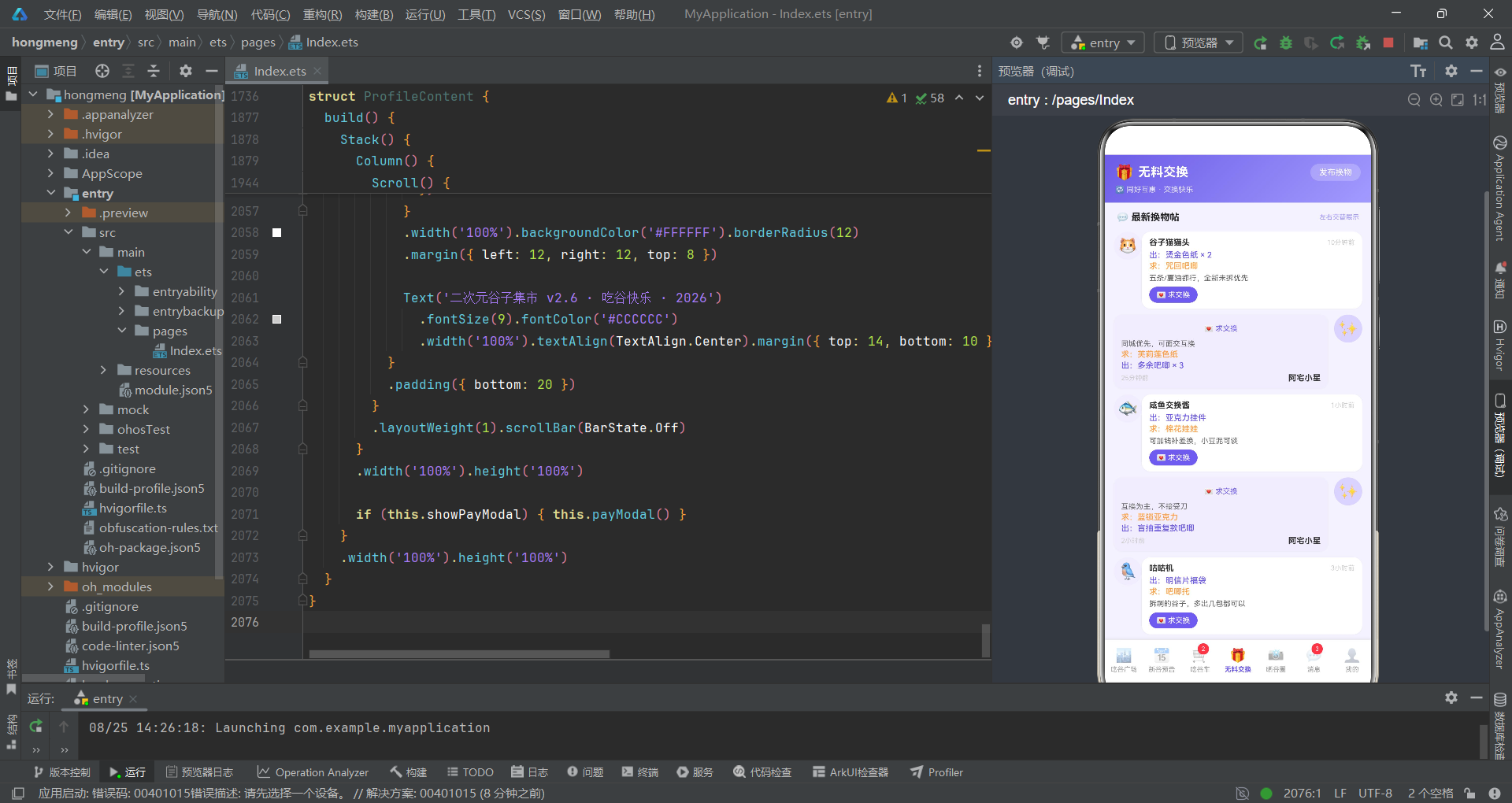
无料交换Tab通过左右交替的气泡布局展示换物帖,并支持发布换物帖的表单弹窗。
@Component
struct ExchangeContent {
  @State showEditModal: boolean = false
  @State formTitle: string = ''
  @State formGive: string = ''
  @State formWant: string = ''
  @State formDesc: string = ''
  @State published: boolean = false
  @State requestedIds: number[] = []

  @Builder exchangeCard(e: ExchangeItem) {
    Row() {
      if (e.isLeft) {
        Column() {
          Text(e.avatar).fontSize(22)
        }
        .width(38).height(38).borderRadius(19).backgroundColor('#F0EDFF')
        .alignItems(HorizontalAlign.Center).justifyContent(FlexAlign.Center)

        Column() {
          Row() {
            Text(e.user).fontSize(11).fontWeight(FontWeight.Bold).fontColor('#333333')
            Column().layoutWeight(1)
            Text(e.time).fontSize(9).fontColor('#CCCCCC')
          }
          .width('100%')
          Text('出:' + e.give).fontSize(11).fontColor('#6C5CE7').fontWeight(FontWeight.Medium)
            .width('100%').margin({ top: 4 })
          Text('求:' + e.want).fontSize(11).fontColor('#FF9F43').fontWeight(FontWeight.Medium)
            .width('100%').margin({ top: 2 })
          Text(e.note).fontSize(10).fontColor('#666666').width('100%').margin({ top: 4 })
          Row() {
            Text(this.requestedIds.indexOf(e.id) >= 0 ? '✅ 已请求交换' : '💌 求交换')
              .fontSize(10)
              .fontColor(this.requestedIds.indexOf(e.id) >= 0 ? '#4CAF50' : '#FFFFFF')
              .backgroundColor(this.requestedIds.indexOf(e.id) >= 0 ? '#E8F8F0' : '#6C5CE7')
              .padding({ left: 10, right: 10, top: 5, bottom: 5 }).borderRadius(12)
              .onClick(() => {
                if (this.requestedIds.indexOf(e.id) < 0) {
                  this.requestedIds.push(e.id)
                }
              })
          }
          .width('100%').margin({ top: 6 })
        }
        .layoutWeight(1).padding({ left: 10, right: 10, top: 8, bottom: 8 })
        .backgroundColor('#FFFFFF').borderRadius(12)
        .shadow({ radius: 3, color: '#0A000000', offsetY: 1 })
      } else {
        Column() {
          Text(this.requestedIds.indexOf(e.id) >= 0 ? '✅ 已请求交换' : '💌 求交换')
            .fontSize(10)
            .fontColor(this.requestedIds.indexOf(e.id) >= 0 ? '#4CAF50' : '#6C5CE7')
            .backgroundColor(this.requestedIds.indexOf(e.id) >= 0 ? '#E8F8F0' : '#F0EDFF')
            .padding({ left: 10, right: 10, top: 5, bottom: 5 }).borderRadius(12)
            .onClick(() => {
              if (this.requestedIds.indexOf(e.id) < 0) {
                this.requestedIds.push(e.id)
              }
            })
          Text(e.note).fontSize(10).fontColor('#666666').width('100%').margin({ top: 4 })
          Text('求:' + e.want).fontSize(11).fontColor('#FF9F43').fontWeight(FontWeight.Medium)
            .width('100%').margin({ top: 2 })
          Text('出:' + e.give).fontSize(11).fontColor('#6C5CE7').fontWeight(FontWeight.Medium)
            .width('100%').margin({ top: 2 })
          Row() {
            Text(e.time).fontSize(9).fontColor('#CCCCCC')
            Column().layoutWeight(1)
            Text(e.user).fontSize(11).fontWeight(FontWeight.Bold).fontColor('#333333')
          }
          .width('100%').margin({ top: 4 })
        }
        .layoutWeight(1).padding({ left: 10, right: 10, top: 8, bottom: 8 })
        .backgroundColor('#F0EDFF').borderRadius(12)
        .shadow({ radius: 3, color: '#0A000000', offsetY: 1 })

        Column() {
          Text(e.avatar).fontSize(22)
        }
        .width(38).height(38).borderRadius(19).backgroundColor('#D9D2FF')
        .alignItems(HorizontalAlign.Center).justifyContent(FlexAlign.Center)
        .margin({ left: 8 })
      }
    }
    .width('100%').alignItems(VerticalAlign.Top)
    .padding({ left: 12, right: 12, top: 8 })
  }
}
无料交换Tab的exchangeCard Builder通过e.isLeft条件判断实现了左右交替的聊天气泡布局。当isLeft为true时,头像在左侧、内容卡片在右侧(白色背景),信息排列顺序为用户名→给出→求换→备注→求交换按钮。当isLeft为false时,布局镜像翻转:内容卡片在左侧(浅紫背景#F0EDFF)、头像在右侧(深紫背景#D9D2FF),信息排列顺序也相应反转(求交换按钮→备注→求换→给出→时间+用户名)。这种镜像布局设计使得换物帖列表呈现出聊天对话般的视觉效果,增强了社交互动感。求交换按钮通过requestedIds数组管理状态:点击时push当前帖子id到数组,已请求时按钮变为绿色"✅ 已请求交换",未请求时为紫色"💌 求交换"。发布换物帖弹窗包含标题、给出谷子、想换谷子和补充描述四个表单字段,通过@State变量实时同步输入内容。
6.2 晒谷圈Tab
晒谷圈Tab展示了热门帖子卡片和三列图片墙宫格,支持点赞和删除交互。
@Component
struct GalleryContent {
  @State showDeleteModal: boolean = false
  @State deletedPostIds: number[] = []
  @State likedIds: number[] = []

  @Builder hotPostCard(p: GalleryPost) {
    Column() {
      Row() {
        Column() {
          Text(p.avatar).fontSize(20)
        }
        .width(36).height(36).borderRadius(18).backgroundColor('#F0EDFF')
        .alignItems(HorizontalAlign.Center).justifyContent(FlexAlign.Center)

        Column() {
          Row() {
            Text(p.user).fontSize(12).fontWeight(FontWeight.Bold).fontColor('#333333')
            Text('🔥 热帖').fontSize(9).fontColor('#FFFFFF').backgroundColor('#FF9F43')
              .padding({ left: 5, right: 5, top: 2, bottom: 2 }).borderRadius(6)
              .margin({ left: 6 })
          }
          Text('刚刚发布 · 二次元谷圈').fontSize(9).fontColor('#BBBBBB').margin({ top: 2 })
        }
        .layoutWeight(1).alignItems(HorizontalAlign.Start).padding({ left: 8 })

        Text('🗑️').fontSize(16).fontColor('#CCCCCC')
          .onClick(() => { this.showDeleteModal = true })
      }
      .width('100%')

      Text(p.content).fontSize(12).fontColor('#333333').width('100%').margin({ top: 10 })

      Row() {
        ForEach(GALLERY_GRID[0].cells, (c: GridCell) => {
          Column() {
            Text(c.icon).fontSize(26)
          }
          .layoutWeight(1).height(64).backgroundColor(c.bg).borderRadius(8)
          .alignItems(HorizontalAlign.Center).justifyContent(FlexAlign.Center)
          .margin({ left: 3, right: 3 })
        })
      }
      .width('100%').margin({ top: 10 })

      Row() {
        Text(this.likedIds.indexOf(p.id) >= 0 ? '❤️ ' + (p.likes + 1).toString() : '🤍 ' + p.likes.toString())
          .fontSize(11).fontColor(this.likedIds.indexOf(p.id) >= 0 ? '#FF4D4F' : '#888888')
          .backgroundColor('#F5F5F5').borderRadius(14)
          .padding({ left: 12, right: 12, top: 6, bottom: 6 })
          .onClick(() => {
            if (this.likedIds.indexOf(p.id) < 0) {
              this.likedIds.push(p.id)
            }
          })
        Text('💬 ' + p.comments.toString()).fontSize(11).fontColor('#888888')
          .backgroundColor('#F5F5F5').borderRadius(14)
          .padding({ left: 12, right: 12, top: 6, bottom: 6 })
          .margin({ left: 8 })
        Column().layoutWeight(1)
        Text('查看全部 >').fontSize(10).fontColor('#A29BFE')
      }
      .width('100%').margin({ top: 10 })
    }
    .width('100%').padding(12).backgroundColor('#FFFFFF').borderRadius(12)
    .margin({ left: 12, right: 12, top: 10 })
    .shadow({ radius: 6, color: '#0D000000', offsetY: 2 })
  }

  @Builder GridRow1(r: GridRow1) {
    Row() {
      ForEach(r.cells, (c: GridCell) => {
        Column() {
          Text(c.icon).fontSize(24)
          Text(c.label).fontSize(9).fontColor('#555555').margin({ top: 4 })
        }
        .layoutWeight(1).padding({ top: 12, bottom: 12 })
        .backgroundColor('#FFFFFF').borderRadius(10)
        .alignItems(HorizontalAlign.Center)
        .margin({ left: 5, right: 5, top: 8 })
        .shadow({ radius: 3, color: '#0A000000', offsetY: 1 })
      })
    }
    .width('100%').padding({ left: 7, right: 7 })
  }
}
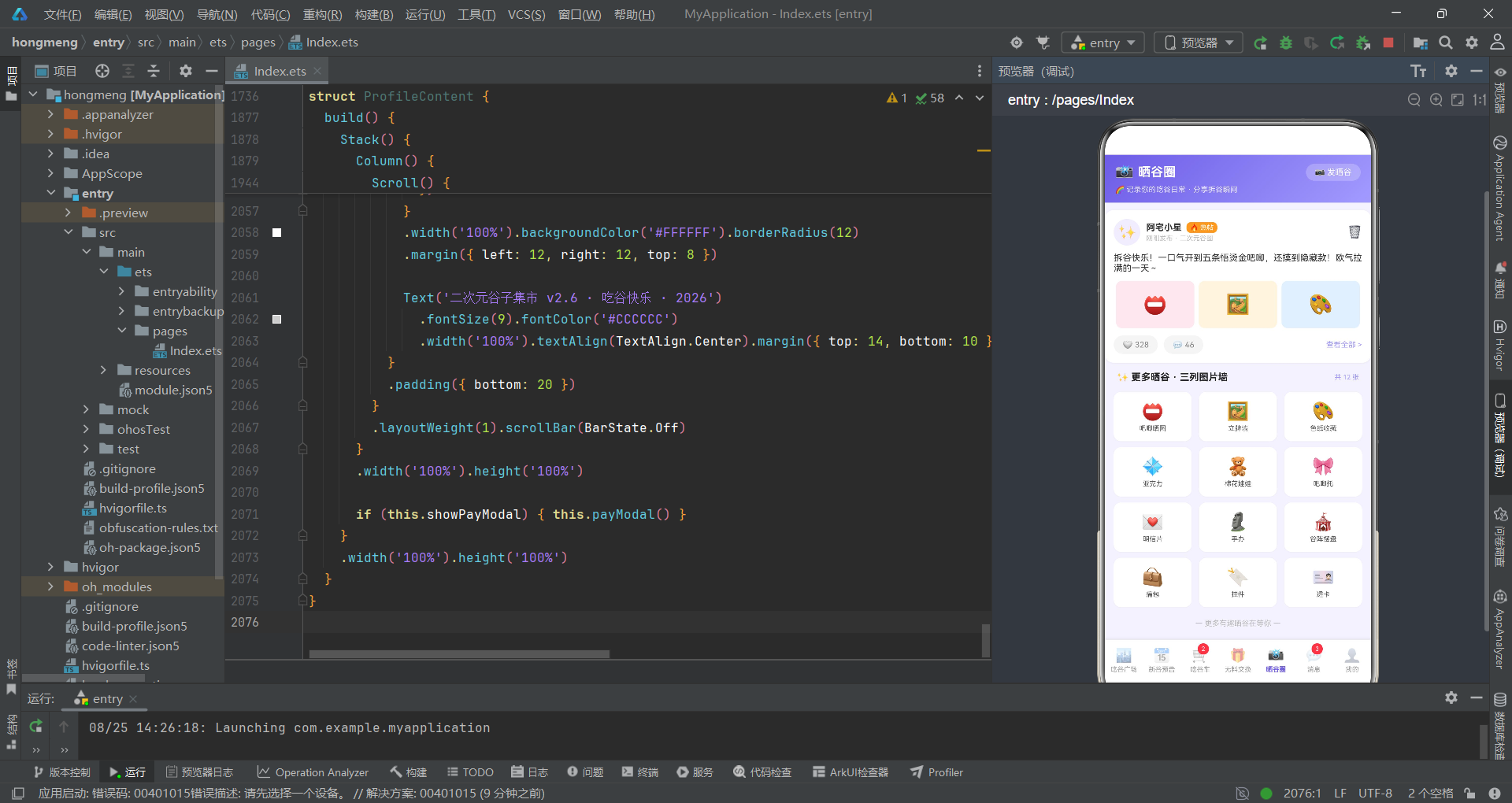
晒谷圈Tab的热门帖子卡片集成了用户信息、热帖标签、帖子内容、三列图片预览和互动按钮。图片预览区通过ForEach遍历GALLERY_GRID[0].cells(嵌套GridRow1接口的cells数组)渲染三个GridCell,每个cell包含图标和背景色,以等分宽度展示。点赞按钮通过likedIds数组管理状态:未点赞时显示"🤍"空心心和原始点赞数,点赞后显示"❤️"实心心和+1的点赞数,文字颜色从灰色变为红色#FF4D4F。删除按钮触发删除确认弹窗,确认后通过deletedPostIds.push(GALLERY_POSTS[0].id)记录已删除帖子id,UI层通过if (this.deletedPostIds.length > 0)条件判断显示"该热帖已删除"提示。三列图片墙通过ForEach遍历GALLERY_GRID数组(4行3列),每行通过GridRow1 Builder渲染三个GridCell(图标+标签),形成完整的图片墙宫格布局。
七、应用交互流程
以下流程图展示了应用的主要交互路径和各Tab组件的状态管理关系:
流程图清晰展示了应用的状态驱动架构:每个Tab组件内部独立管理自己的弹窗状态和交互状态,入口组件仅负责Tab路由分发。各Tab通过数组(subscribedIds、requestedIds、likedIds、deletedPostIds)管理多选交互状态,通过布尔值(joinedDetail、joinedCart、published)管理单次操作状态,通过对象引用(selectedGuzi、selectedGroup、selectedOrder)管理弹窗选中数据。这种"Tab内自治"的状态管理模式减少了入口组件的复杂度,每个Tab组件都是自包含的交互单元。
八、消息中心与个人中心
8.1 消息中心Tab
消息中心Tab按系统通知、交易消息和互动消息三类分组展示消息列表。
@Component
struct MessageContent {
  @State clearedIds: number[] = []
  @State readAll: boolean = false

  @Builder msgCard(m: MsgItem) {
    Row() {
      Stack() {
        Column() {
          Text(m.icon).fontSize(20)
        }
        .width(44).height(44).backgroundColor('#F0EDFF').borderRadius(22)
        .alignItems(HorizontalAlign.Center).justifyContent(FlexAlign.Center)

        if (m.unread && this.clearedIds.indexOf(m.id) < 0) {
          Column().width(9).height(9).backgroundColor('#FF4D4F').borderRadius(5)
            .position({ x: 34, y: 0 })
        }
      }
      .width(46).height(46)

      Column() {
        Row() {
          Text(m.title).fontSize(13).fontWeight(FontWeight.Bold).fontColor('#212121')
            .layoutWeight(1)
          Text(m.time).fontSize(9).fontColor('#CCCCCC')
        }
        .width('100%')
        Text(m.content).fontSize(11).fontColor('#666666')
          .maxLines(1).textOverflow({ overflow: TextOverflow.Ellipsis })
          .width('100%').margin({ top: 3 })
      }
      .layoutWeight(1).alignItems(HorizontalAlign.Start).padding({ left: 12 })
    }
    .width('100%').padding(12).backgroundColor('#FFFFFF').borderRadius(12)
    .margin({ left: 12, right: 12, top: 6 })
    .shadow({ radius: 4, color: '#0D000000', offsetY: 1 })
    .onClick(() => {
      if (this.clearedIds.indexOf(m.id) < 0) {
        this.clearedIds.push(m.id)
      }
    })
  }

  @Builder sectionTitle(icon: string, title: string, count: number) {
    Row() {
      Text(icon).fontSize(13)
      Text(title).fontSize(12).fontWeight(FontWeight.Bold).fontColor('#212121').margin({ left: 4 })
      Text(count.toString() + ' 条').fontSize(9).fontColor('#A29BFE').margin({ left: 6 })
      Column().layoutWeight(1)
      if (count > 0) {
        Text(this.readAll || this.clearedIds.length >= count ? '已读' : '未读')
          .fontSize(9).fontColor('#6C5CE7')
      }
    }
    .width('100%').padding({ left: 16, right: 16, top: 14, bottom: 4 })
  }

  build() {
    Column() {
      Column() {
        Row() {
          Text('💬').fontSize(20)
          Text('消息中心').fontSize(17).fontWeight(FontWeight.Bold).fontColor('#FFFFFF')
            .margin({ left: 6 })
          Column().layoutWeight(1)
          Text('全部已读').fontSize(11).fontColor('#FFFFFF')
            .backgroundColor('rgba(255,255,255,0.22)')
            .padding({ left: 12, right: 12, top: 5, bottom: 5 }).borderRadius(12)
            .onClick(() => {
              this.readAll = true
              for (let i = 0; i < SYSTEM_MSGS.length; i++) {
                this.clearedIds.push(SYSTEM_MSGS[i].id)
              }
              for (let j = 0; j < TRADE_MSGS.length; j++) {
                this.clearedIds.push(TRADE_MSGS[j].id)
              }
              for (let k = 0; k < INTERACT_MSGS.length; k++) {
                this.clearedIds.push(INTERACT_MSGS[k].id)
              }
            })
        }
        .width('100%').padding({ left: 14, right: 14, top: 12, bottom: 14 })
      }
      .width('100%').linearGradient(MAIN_GRADIENT)

      Scroll() {
        Column() {
          this.sectionTitle('🔔', '系统通知', SYSTEM_MSGS.length)
          ForEach(SYSTEM_MSGS, (m: MsgItem) => {
            this.msgCard(m)
          })

          this.sectionTitle('💰', '交易消息', TRADE_MSGS.length)
          ForEach(TRADE_MSGS, (m: MsgItem) => {
            this.msgCard(m)
          })

          this.sectionTitle('🌟', '互动消息', INTERACT_MSGS.length)
          ForEach(INTERACT_MSGS, (m: MsgItem) => {
            this.msgCard(m)
          })
        }
        .padding({ bottom: 20 })
      }
      .layoutWeight(1).scrollBar(BarState.Off)
    }
    .width('100%').height('100%')
  }
}
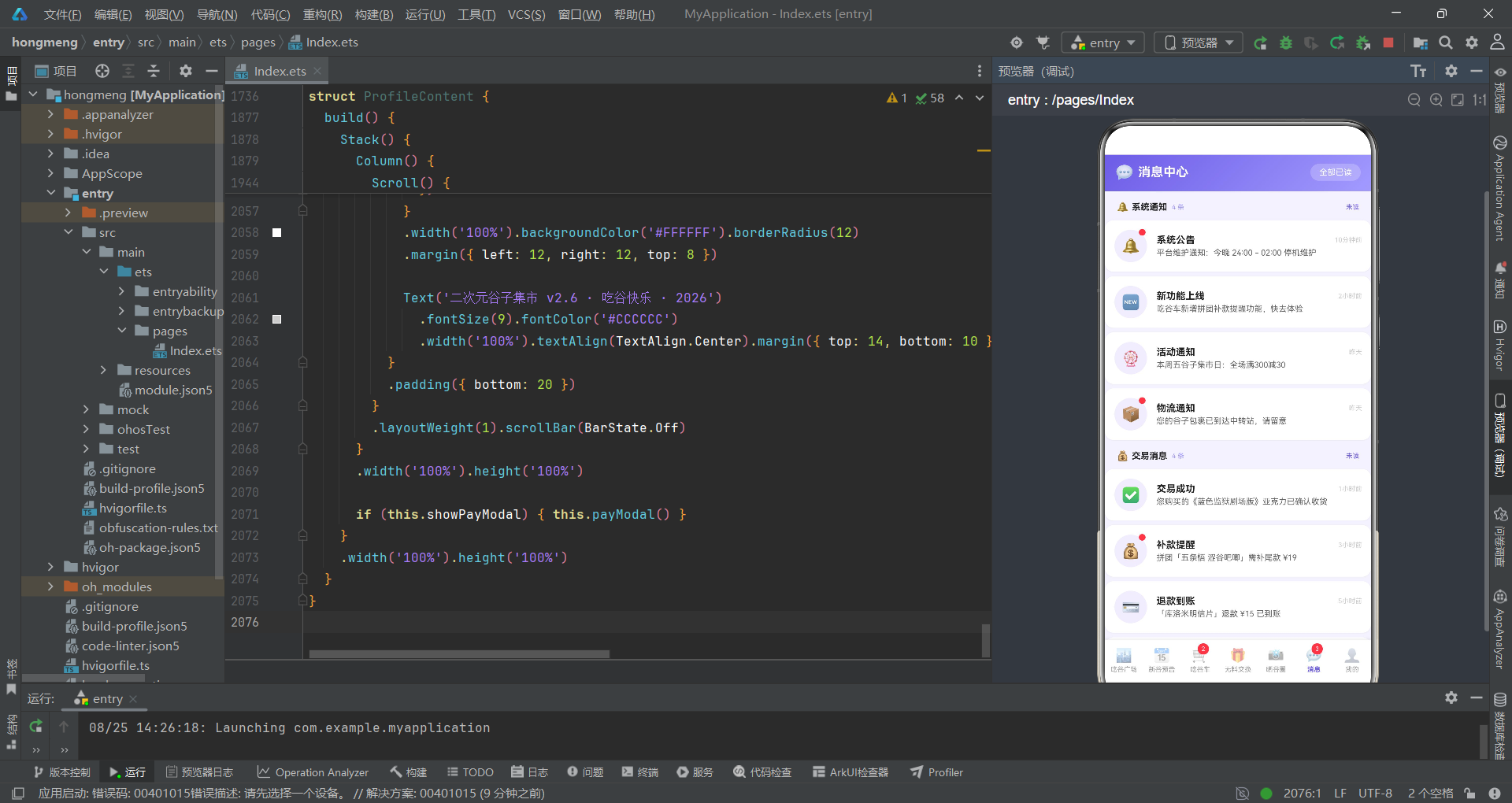
消息中心Tab的消息卡片使用Stack容器叠加头像和未读红点:未读消息右上角通过position({ x: 34, y: 0 })定位一个9x9vp的红色圆点,点击消息卡片时将消息idpush到clearedIds数组,红点通过this.clearedIds.indexOf(m.id) < 0条件判断隐藏。"全部已读"按钮通过三个for循环将三组消息的id全部push到clearedIds数组,同时设置readAll为true,实现一键清除所有未读标记。分组标题通过sectionTitle Builder渲染,包含图标、标题、消息条数和已读/未读状态,其中已读状态通过this.readAll || this.clearedIds.length >= count复合条件判断。消息内容使用maxLines(1)单行省略显示,避免长内容破坏列表布局。
8.2 个人中心Tab
个人中心Tab集成了用户资料卡、消费柱状图、我的谷子横滑、待补款订单和功能菜单。
@Component
struct ProfileContent {
  @State showPayModal: boolean = false
  @State payMethod: string = 'alipay'
  @State selectedOrder: PayOrder | null = null

  @Builder payModal() {
    Column() {
      this.modalOverlay(() => { this.showPayModal = false })
      Column() {
        Column() {
          Text('⏰').fontSize(40).margin({ top: 16 })
          Text('补款提醒').fontSize(18).fontWeight(FontWeight.Bold).fontColor('#FFFFFF')
            .margin({ top: 4 })
          Text('拼团即将超时,请尽快补款').fontSize(10).fontColor('rgba(255,255,255,0.85)')
            .margin({ top: 4 })
        }
        .width('100%').linearGradient(ORANGE_GRADIENT)
        .borderRadius({ topLeft: 16, topRight: 16 })
        .padding({ bottom: 18 })

        Column() {
          Row() {
            Column() {
              Text(this.selectedOrder?.icon ?? '📛').fontSize(28)
            }
            .width(52).height(52).backgroundColor('#FFF6E8').borderRadius(12)
            .alignItems(HorizontalAlign.Center).justifyContent(FlexAlign.Center)

            Column() {
              Text(this.selectedOrder?.title ?? '').fontSize(13).fontWeight(FontWeight.Bold)
                .fontColor('#212121')
              Text(this.selectedOrder?.deadlineText ?? '').fontSize(10).fontColor('#FF9F43')
                .margin({ top: 3 })
            }
            .layoutWeight(1).alignItems(HorizontalAlign.Start).padding({ left: 10 })
          }
          .width('100%').margin({ top: 14 })

          // 左侧倒计时 + 右侧金额
          Row() {
            Column() {
              Text('剩余时间').fontSize(9).fontColor('#888888')
              Row() {
                Text(fmtRemain(this.selectedOrder?.remainMin ?? 0).substring(0, 2))
                  .fontSize(18).fontWeight(FontWeight.Bold).fontColor('#FFFFFF')
                  .width(30).height(30).backgroundColor('#FF9F43').borderRadius(6)
                  .textAlign(TextAlign.Center)
                Text(':').fontSize(16).fontWeight(FontWeight.Bold).fontColor('#FF9F43')
                  .margin({ left: 2, right: 2 })
                Text(fmtRemain(this.selectedOrder?.remainMin ?? 0).substring(3, 5))
                  .fontSize(18).fontWeight(FontWeight.Bold).fontColor('#FFFFFF')
                  .width(30).height(30).backgroundColor('#FF9F43').borderRadius(6)
                  .textAlign(TextAlign.Center)
              }
              .margin({ top: 4 })
            }
            .layoutWeight(1).alignItems(HorizontalAlign.Center)

            Column() {
              Text('需补金额').fontSize(9).fontColor('#888888')
              Text(fmtPrice(this.selectedOrder?.amount ?? 0))
                .fontSize(24).fontWeight(FontWeight.Bold).fontColor('#FF9F43')
                .margin({ top: 4 })
            }
            .layoutWeight(1).alignItems(HorizontalAlign.Center)
          }
          .width('100%').backgroundColor('#FFF9F0').borderRadius(10)
          .padding({ top: 12, bottom: 12 }).margin({ top: 12 })

          Text('选择支付方式').fontSize(11).fontColor('#888888').width('100%').margin({ top: 12 })
          Row() {
            Row() {
              Text('🅰️').fontSize(14)
              Text('支付宝').fontSize(12).margin({ left: 4 })
                .fontColor(this.payMethod === 'alipay' ? '#FFFFFF' : '#333333')
            }
            .padding({ left: 14, right: 14, top: 8, bottom: 8 })
            .backgroundColor(this.payMethod === 'alipay' ? '#1677FF' : '#F5F5F5')
            .borderRadius(14)
            .onClick(() => { this.payMethod = 'alipay' })

            Row() {
              Text('💚').fontSize(14)
              Text('微信支付').fontSize(12).margin({ left: 4 })
                .fontColor(this.payMethod === 'wechat' ? '#FFFFFF' : '#333333')
            }
            .padding({ left: 14, right: 14, top: 8, bottom: 8 })
            .backgroundColor(this.payMethod === 'wechat' ? '#07C160' : '#F5F5F5')
            .borderRadius(14)
            .margin({ left: 8 })
            .onClick(() => { this.payMethod = 'wechat' })
          }
          .width('100%').margin({ top: 6 })

          Text('立即补款').fontSize(14).fontColor('#FFFFFF')
            .backgroundColor('#FF9F43').borderRadius(22)
            .padding({ left: 56, right: 56, top: 11, bottom: 11 })
            .margin({ top: 14, bottom: 16 })
            .onClick(() => { this.showPayModal = false })
        }
        .padding({ left: 16, right: 16 })
      }
      .width('86%').backgroundColor('#FFFFFF').borderRadius(16)
      .alignItems(HorizontalAlign.Center)
      .position({ x: '7%', y: '22%' })
    }
    .width('100%').height('100%').position({ x: 0, y: 0 }).zIndex(999)
  }

  build() {
    Stack() {
      Column() {
        // 个人资料渐变卡
        Column() {
          Row() {
            Column() {
              Text('✨').fontSize(30)
            }
            .width(56).height(56).backgroundColor('rgba(255,255,255,0.28)').borderRadius(28)
            .alignItems(HorizontalAlign.Center).justifyContent(FlexAlign.Center)

            Column() {
              Row() {
                Text('阿宅小星').fontSize(17).fontWeight(FontWeight.Bold).fontColor('#FFFFFF')
                Text('LV.8').fontSize(9).fontColor('#FFFFFF').backgroundColor('rgba(0,0,0,0.25)')
                  .padding({ left: 6, right: 6, top: 2, bottom: 2 }).borderRadius(8)
                  .margin({ left: 8 })
              }
              Text('已吃谷 236 件 · 本命五条悟 & 芙莉莲')
                .fontSize(10).fontColor('rgba(255,255,255,0.9)').margin({ top: 4 })
            }
            .layoutWeight(1).alignItems(HorizontalAlign.Start).padding({ left: 12 })
          }
          .width('100%').padding({ left: 16, right: 16, top: 14 })

          // 数据统计行
          Row() {
            Column() {
              Text('236').fontSize(18).fontWeight(FontWeight.Bold).fontColor('#FFFFFF')
              Text('收藏谷子').fontSize(9).fontColor('rgba(255,255,255,0.85)').margin({ top: 2 })
            }
            .layoutWeight(1).alignItems(HorizontalAlign.Center)
            .onClick(() => { this.showPayModal = false })

            Column() {
              Text('2').fontSize(18).fontWeight(FontWeight.Bold).fontColor('#FFD9B3')
              Text('待补款').fontSize(9).fontColor('rgba(255,255,255,0.85)').margin({ top: 2 })
            }
            .layoutWeight(1).alignItems(HorizontalAlign.Center)
            .onClick(() => {
              this.selectedOrder = PAY_ORDERS[0]
              this.payMethod = 'alipay'
              this.showPayModal = true
            })
          }
          .width('100%').margin({ top: 8 })
          .backgroundColor('rgba(255,255,255,0.12)')
        }
        .width('100%').linearGradient(MAIN_GRADIENT)

        Scroll() {
          Column() {
            // 近6月吃谷消费柱状图
            Column() {
              Row() {
                Text('📊 近6月吃谷消费').fontSize(13).fontWeight(FontWeight.Bold)
                  .fontColor('#212121')
                Column().layoutWeight(1)
                Text('本月 ¥1050').fontSize(10).fontColor('#FF9F43')
              }
              .width('100%').padding({ left: 14, right: 14, top: 12, bottom: 8 })

              Row() {
                ForEach(SPEND_DATA, (s: MonthSpend) => {
                  Column() {
                    Text(s.amount.toString()).fontSize(9).fontColor('#6C5CE7')
                    Column()
                      .width(22)
                      .height(spendBarH(s.amount))
                      .backgroundColor(s.amount >= 900 ? '#FF9F43' : '#A29BFE')
                      .borderRadius({ topLeft: 5, topRight: 5 })
                    Text(s.month).fontSize(9).fontColor('#888888').margin({ top: 3 })
                  }
                  .layoutWeight(1).alignItems(HorizontalAlign.Center)
                })
              }
              .width('100%').padding({ left: 10, right: 10, bottom: 12 })
            }
            .width('100%').backgroundColor('#FFFFFF').borderRadius(12)
            .margin({ left: 12, right: 12, top: 8 })

            // 功能菜单
            Column() {
              ForEach(MY_MENUS, (m: MenuItem1) => {
                Column() {
                  Row() {
                    Text(m.icon).fontSize(18)
                    Text(m.label).fontSize(12).fontColor('#333333').margin({ left: 10 })
                    Column().layoutWeight(1)
                    if (m.badge !== '') {
                      Text(m.badge).fontSize(9).fontColor('#FF9F43')
                        .backgroundColor('#FFF6E8')
                        .padding({ left: 6, right: 6, top: 2, bottom: 2 }).borderRadius(8)
                    }
                    Text('>').fontSize(13).fontColor('#CCCCCC').margin({ left: 8 })
                  }
                  .width('100%').padding({ left: 16, right: 16, top: 13, bottom: 13 })
                  if (m.label !== '客服中心') {
                    Divider().color('#F5F5F5').margin({ left: 16, right: 16 })
                  }
                }
                .width('100%')
              })
            }
            .width('100%').backgroundColor('#FFFFFF').borderRadius(12)
            .margin({ left: 12, right: 12, top: 8 })
          }
          .padding({ bottom: 20 })
        }
        .layoutWeight(1).scrollBar(BarState.Off)
      }
      .width('100%').height('100%')

      if (this.showPayModal) { this.payModal() }
    }
    .width('100%').height('100%')
  }
}
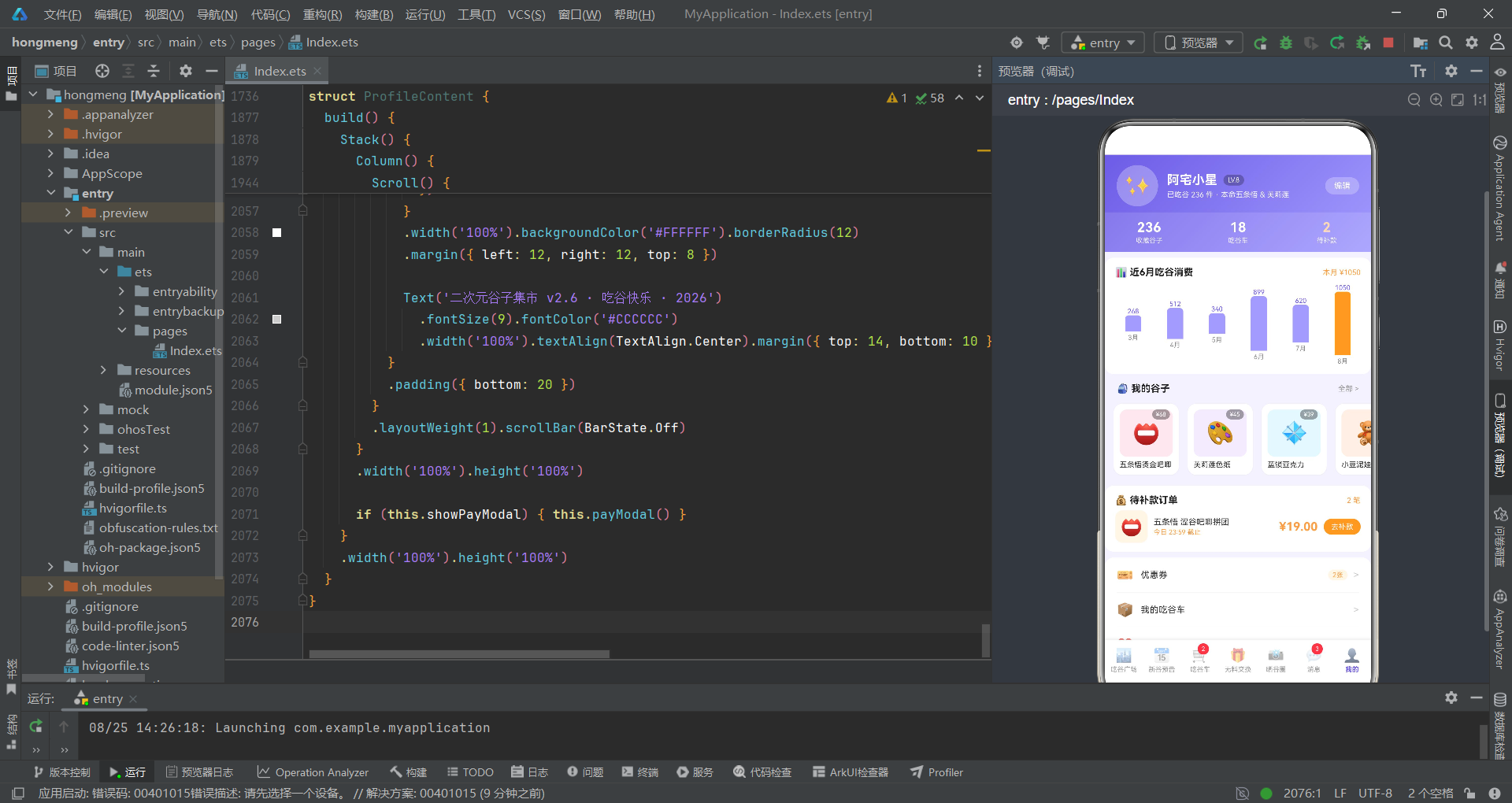
补款提醒弹窗是该Tab的核心交互组件,头部使用ORANGE_GRADIENT橙色渐变配合时钟emoji和紧迫文案,形成时间警示氛围。倒计时区域通过fmtRemain工具函数将剩余分钟数格式化为"HH:MM"字符串,再通过substring(0, 2)和substring(3, 5)分别提取时和分,渲染在两个独立的橙色方块中,中间用冒号分隔,模拟数字时钟的视觉效果。支付方式选择区提供支付宝(蓝色#1677FF)和微信支付(绿色#07C160)两个选项,选中时背景变为对应品牌色、文字变白,未选中时灰色背景。消费柱状图通过spendBarH(s.amount)工具函数计算柱子高度(金额映射到vp高度),消费超过900元用橙色#FF9F43、低于900用浅紫#A29BFE,通过颜色区分高消费月份。功能菜单列表通过ForEach遍历MY_MENUS渲染6个菜单项,每项包含图标、标签、角标和右箭头,菜单项之间使用Divider分隔(最后一项"客服中心"不显示分隔线)。待补款统计区的数字使用橙色#FFD9B3突出,点击触发补款弹窗。
九、技术点对比
| 技术维度 | 实现方案 | 特点分析 | 适用场景 |
|---|---|---|---|
| Tab路由 | 数字索引+@Builder复用 | contentArea和tabItem两个Builder封装路由和渲染 | 七Tab多模块应用 |
| 空值处理 | ??空值合并运算符 | 处理selectedGuzi等可能为null的对象引用 | 可选对象的安全访问 |
| 多选状态 | 数组+indexOf管理 | subscribedIds/requestedIds/likedIds数组追踪选中项 | 订阅/点赞/请求交换 |
| 瀑布流 | big参数+margin偏移 | 左列大卡片右列小卡片+40vp偏移实现错落 | 电商商品双列展示 |
| 气泡布局 | isLeft条件+镜像翻转 | 根据布尔值切换头像和内容卡片的左右位置 | 聊天式换物帖展示 |
| 成员槽位 | ForEach+双重条件判断 | 已占用显示头像、未占用显示虚线占位符 | 拼团进度可视化 |
| 倒计时 | fmtRemain+substring | 分钟转HH:MM字符串后截取时和分分别渲染 | 支付倒计时显示 |
| 数据可视化 | spendBarH函数+动态vp高度 | 金额映射到vp高度字符串,超阈值变色 | 消费柱状图 |
| 进度条 | groupPercent函数+百分比宽度 | 计算百分比转为字符串作为Column宽度 | 拼团成团进度 |
| 全部已读 | 三组for循环push | 遍历三组消息数组将id全部加入clearedIds | 一键已读消息 |
安装DevEco Studio程序

选择目标安装目录:

设置环境变量,但是需要重启一下:

新建一个空白模板:

设置API为24的模板项目:
初始化项目,自动下载相关依赖:

完整代码:
// ============================================================================
// 拼多多风格·二次元谷子集市
// 动漫周边"吃谷"交易社区:吧唧/立牌/色纸/亚克力/棉花娃娃等谷子买卖
// 拼团"吃谷车"/无料交换/晒谷社区
// 配色:二次元紫蓝渐变 主色 #6C5CE7→#A29BFE / 强调橙 #FF9F43 / 背景 #F4F2FF
// ============================================================================
// ============================ Interface 定义 ================================
interface PlazaCate {
label: string
icon: string
}
interface GuziItem {
id: number
name: string
tag: string
price: number
originalPrice: number
sales: number
icon: string
bg: string
category: string
stock: number
rating: number
}
interface SpecChip {
label: string
price: number
stock: number
}
interface PreorderItem {
id: number
name: string
series: string
price: number
preCount: number
deadline: string
icon: string
bg: string
tag: string
}
interface MonthGroup {
month: string
tip: string
items: PreorderItem[]
}
interface CartGroupItem {
id: number
name: string
icon: string
bg: string
price: number
joinedCount: number
totalCount: number
endTime: string
members: string[]
discount: string
}
interface ExchangeItem {
id: number
user: string
avatar: string
give: string
want: string
note: string
time: string
isLeft: boolean
}
interface GalleryPost {
id: number
user: string
avatar: string
content: string
likes: number
comments: number
isHot: boolean
}
interface GridCell {
icon: string
bg: string
label: string
}
interface GridRow1 {
cells: GridCell[]
}
interface MsgItem {
id: number
title: string
content: string
icon: string
time: string
unread: boolean
}
interface MonthSpend {
month: string
amount: number
}
interface MyGuziItem {
id: number
name: string
icon: string
bg: string
value: number
}
interface PayOrder {
id: number
title: string
icon: string
amount: number
deadlineText: string
remainMin: number
}
interface MenuItem1 {
icon: string
label: string
badge: string
}
// ============================ 设计令牌 ================================
const MAIN_GRADIENT: LinearGradientOptions = {
angle: 135,
colors: [['#6C5CE7', 0.0], ['#A29BFE', 1.0]]
}
const ORANGE_GRADIENT: LinearGradientOptions = {
angle: 135,
colors: [['#FF9F43', 0.0], ['#FFC048', 1.0]]
}
const BANNER_GRADIENT: LinearGradientOptions = {
angle: 120,
colors: [['#6C5CE7', 0.0], ['#9B8CFF', 1.0]]
}
const TAG_GRADIENT: LinearGradientOptions = {
angle: 90,
colors: [['#FF9F43', 0.0], ['#FF7E5F', 1.0]]
}
// ============================ 广场分类 ================================
const PLAZA_CATES: PlazaCate[] = [
{ label: '全部', icon: '🎪' },
{ label: '吧唧', icon: '📛' },
{ label: '立牌', icon: '🖼️' },
{ label: '色纸', icon: '🎨' },
{ label: '亚克力', icon: '💠' },
{ label: '棉花娃娃', icon: '🧸' },
{ label: '吧唧托', icon: '🎀' },
{ label: '明信片', icon: '💌' }
]
// ============================ 谷子商品数据 ================================
const GUZI_ITEMS: GuziItem[] = [
{ id: 1, name: '五条悟·涩谷事变 吧唧', tag: '🔥热卖', price: 25, originalPrice: 39, sales: 12000, icon: '📛', bg: '#FDE8F0', category: '吧唧', stock: 60, rating: 4.9 },
{ id: 2, name: '灶门炭治郎·锻刀村 立牌', tag: '拼团', price: 45, originalPrice: 68, sales: 8600, icon: '🖼️', bg: '#FFF4E0', category: '立牌', stock: 35, rating: 4.8 },
{ id: 3, name: '绫波丽·新剧场版 色纸', tag: '限定', price: 32, originalPrice: 49, sales: 21000, icon: '🎨', bg: '#E4F0FF', category: '色纸', stock: 88, rating: 4.9 },
{ id: 4, name: '蓝色监狱·糸师凛 亚克力', tag: '爆款', price: 38, originalPrice: 55, sales: 34000, icon: '💠', bg: '#E7F7FF', category: '亚克力', stock: 120, rating: 4.7 },
{ id: 5, name: '星野爱·小豆泥 棉花娃娃', tag: '现货', price: 129, originalPrice: 189, sales: 4600, icon: '🧸', bg: '#FDF0E6', category: '棉花娃娃', stock: 15, rating: 5.0 },
{ id: 6, name: '芙莉莲·勇者组 吧唧托', tag: '新谷', price: 28, originalPrice: 42, sales: 9800, icon: '🎀', bg: '#F3EBFF', category: '吧唧托', stock: 70, rating: 4.8 },
{ id: 7, name: '三丽鸥·库洛米 明信片', tag: '福袋', price: 15, originalPrice: 25, sales: 56000, icon: '💌', bg: '#FBE4FB', category: '明信片', stock: 200, rating: 4.6 },
{ id: 8, name: '五条悟·夏服ver 立牌', tag: '预售', price: 55, originalPrice: 79, sales: 7200, icon: '🖼️', bg: '#E9F6FF', category: '立牌', stock: 40, rating: 4.8 },
{ id: 9, name: '明日方舟·德克萨斯 吧唧', tag: '补货', price: 22, originalPrice: 35, sales: 18000, icon: '📛', bg: '#EAEAFF', category: '吧唧', stock: 90, rating: 4.7 },
{ id: 10, name: '咒回·乙骨忧太 烫金色纸', tag: '烫金', price: 45, originalPrice: 68, sales: 6400, icon: '🎨', bg: '#FFF0F5', category: '色纸', stock: 50, rating: 4.9 },
{ id: 11, name: '排球少年·及川彻 亚克力', tag: '活动', price: 35, originalPrice: 52, sales: 15000, icon: '💠', bg: '#E0F7FA', category: '亚克力', stock: 75, rating: 4.8 },
{ id: 12, name: '鬼灭·炼狱杏寿郎 吧唧', tag: '绝版', price: 88, originalPrice: 128, sales: 3200, icon: '📛', bg: '#FFEFE0', category: '吧唧', stock: 12, rating: 5.0 },
{ id: 13, name: '孤独摇滚·后藤一里 娃娃', tag: '预售', price: 149, originalPrice: 209, sales: 2100, icon: '🧸', bg: '#FDF2F7', category: '棉花娃娃', stock: 8, rating: 4.9 },
{ id: 14, name: '蓝锁·凪诚士郎 明信片', tag: '特典', price: 12, originalPrice: 20, sales: 42000, icon: '💌', bg: '#EFF9F0', category: '明信片', stock: 300, rating: 4.6 }
]
const SPEC_CHIPS: SpecChip[] = [
{ label: '单只装', price: 25, stock: 60 },
{ label: '二连装', price: 48, stock: 30 },
{ label: '全套五入', price: 118, stock: 8 }
]
// ============================ 新谷预告数据 ================================
const MONTH_GROUPS: MonthGroup[] = [
{
month: '7月',
tip: '7月新谷',
items: [
{ id: 1, name: '迷宫饭·莱欧斯 系列吧唧', series: '迷宫饭新剧场版', price: 28, preCount: 3450, deadline: '7/28 开售', icon: '🍳', bg: '#FFF6E8', tag: '剧场版' },
{ id: 2, name: '蓝色监狱 剧场版 亚克力立牌', series: '剧场版特典', price: 42, preCount: 2100, deadline: '7/30 开售', icon: '⚽', bg: '#E7F7FF', tag: '特典' },
{ id: 3, name: 'JOJO·承太郎 发绳吧唧', series: 'JOJO第7部', price: 35, preCount: 980, deadline: '7/31 开售', icon: '⭐', bg: '#F3EBFF', tag: '联名' }
]
},
{
month: '8月',
tip: '8月新谷',
items: [
{ id: 4, name: '间谍过家家·阿尼亚 棉花娃娃', series: '剧场版', price: 139, preCount: 5600, deadline: '8/10 开售', icon: '🧸', bg: '#FDF2F7', tag: '爆款' },
{ id: 5, name: '文豪野犬·太宰治 色纸', series: '2026夏', price: 30, preCount: 1500, deadline: '8/15 开售', icon: '🎨', bg: '#FFF0F5', tag: '夏日' },
{ id: 6, name: '魔卡少女樱 透明牌 亚克力挂件', series: '复刻', price: 26, preCount: 2400, deadline: '8/18 开售', icon: '💠', bg: '#FBE4FB', tag: '复刻' },
{ id: 7, name: '咒术回战·夏油杰 吧唧', series: '怀玉篇', price: 25, preCount: 3100, deadline: '8/22 开售', icon: '📛', bg: '#EAEAFF', tag: '怀玉' }
]
},
{
month: '9月',
tip: '9月新谷',
items: [
{ id: 8, name: '排球少年 垃圾场决战 全套吧唧', series: '剧场版', price: 168, preCount: 4200, deadline: '9/5 开售', icon: '🏐', bg: '#FFEFE0', tag: '全套' },
{ id: 9, name: '电锯人·玛奇玛 立牌', series: '电次生日', price: 58, preCount: 1300, deadline: '9/12 开售', icon: '🖼️', bg: '#FFF4E0', tag: '生日' },
{ id: 10, name: '进击的巨人·兵长 手办钥匙扣', series: '完结篇', price: 49, preCount: 870, deadline: '9/20 开售', icon: '🔑', bg: '#EFEFEF', tag: '完结' }
]
}
]
// ============================ 吃谷车拼团数据 ================================
const CART_GROUPS: CartGroupItem[] = [
{ id: 1, name: '五条悟 涩谷吧唧拼团', icon: '📛', bg: '#FDE8F0', price: 19, joinedCount: 5, totalCount: 8, endTime: '23:59', members: ['🐱', '🐹', '🐰', '🐻', '🐨'], discount: '团价¥19' },
{ id: 2, name: '芙莉莲 勇者组吧唧拼团', icon: '🎀', bg: '#F3EBFF', price: 22, joinedCount: 3, totalCount: 6, endTime: '22:30', members: ['🐰', '🐱', '🐹'], discount: '团价¥22' },
{ id: 3, name: '蓝色监狱 剧场版亚克力团', icon: '💠', bg: '#E7F7FF', price: 29, joinedCount: 6, totalCount: 10, endTime: '21:00', members: ['🐻', '🐨', '🐰', '🐱', '🐹', '🦊'], discount: '团价¥29' },
{ id: 4, name: '阿尼亚 棉花娃娃拼团', icon: '🧸', bg: '#FDF2F7', price: 99, joinedCount: 2, totalCount: 5, endTime: '23:00', members: ['🦊', '🐱'], discount: '团价¥99' },
{ id: 5, name: '库洛米 周边福袋拼团', icon: '💌', bg: '#FBE4FB', price: 12, joinedCount: 4, totalCount: 8, endTime: '20:30', members: ['🐹', '🐰', '🐻', '🐱'], discount: '团价¥12' },
{ id: 6, name: '乙骨忧太 烫金色纸拼团', icon: '🎨', bg: '#FFF0F5', price: 35, joinedCount: 7, totalCount: 12, endTime: '19:00', members: ['🐰', '🐻', '🐨', '🦊', '🐱', '🐹', '🐼'], discount: '团价¥35' },
{ id: 7, name: '及川彻 亚克力拼团', icon: '💠', bg: '#E0F7FA', price: 28, joinedCount: 3, totalCount: 6, endTime: '22:00', members: ['🐼', '🐨', '🐰'], discount: '团价¥28' },
{ id: 8, name: '炼狱杏寿郎 绝版吧唧团', icon: '📛', bg: '#FFEFE0', price: 68, joinedCount: 1, totalCount: 4, endTime: '18:00', members: ['🦊'], discount: '团价¥68' }
]
// ============================ 无料交换数据 ================================
const EXCHANGES: ExchangeItem[] = [
{ id: 1, user: '谷子猫猫头', avatar: '🐱', give: '烫金色纸 × 2', want: '咒回吧唧', note: '五条/夏油都行,全新未拆优先', time: '10分钟前', isLeft: true },
{ id: 2, user: '阿宅小星', avatar: '✨', give: '多余吧唧 × 3', want: '芙莉莲色纸', note: '同城优先,可面交互换', time: '25分钟前', isLeft: false },
{ id: 3, user: '咸鱼交换酱', avatar: '🐟', give: '亚克力挂件', want: '棉花娃娃', note: '可加钱补差换,小豆泥可谈', time: '1小时前', isLeft: true },
{ id: 4, user: '阿宅小星', avatar: '✨', give: '盲抽重复款吧唧', want: '蓝锁亚克力', note: '互换为主,不接受刀', time: '2小时前', isLeft: false },
{ id: 5, user: '咕咕机', avatar: '🐦', give: '明信片福袋', want: '吧唧托', note: '拆剩的谷子,多出几包都可以', time: '3小时前', isLeft: true },
{ id: 6, user: '阿宅小星', avatar: '✨', give: '三丽鸥文件夹', want: '吧唧夹', note: '全新未拆,包邮互换', time: '4小时前', isLeft: false },
{ id: 7, user: '谷仓鼠', avatar: '🐹', give: '全套吧唧(重复款)', want: '小豆泥娃娃', note: '支持补差,走平台交易', time: '昨天', isLeft: true },
{ id: 8, user: '阿宅小星', avatar: '✨', give: '咒回立牌', want: '排球立牌', note: '成色要好,带盒互换', time: '昨天', isLeft: false },
{ id: 9, user: '吃谷喵', avatar: '🐈', give: '二连吧唧', want: '透卡', note: '可互选款式,私信详聊', time: '前天', isLeft: true },
{ id: 10, user: '阿宅小星', avatar: '✨', give: '蓝锁徽章', want: '明日方舟吧唧', note: '走平台交易更放心', time: '前天', isLeft: false }
]
// ============================ 晒谷圈数据 ================================
const GALLERY_POSTS: GalleryPost[] = [
{ id: 1, user: '阿宅小星', avatar: '✨', content: '拆谷快乐!一口气开到五条悟烫金吧唧,还摸到隐藏款!欧气拉满的一天~', likes: 328, comments: 46, isHot: true },
{ id: 2, user: '谷子猫猫头', avatar: '🐱', content: '吧唧墙终于贴满了,全是夏油杰!', likes: 156, comments: 18, isHot: false },
{ id: 3, user: '咸鱼交换酱', avatar: '🐟', content: '今日谷阵摆盘,色纸配吧唧托绝了', likes: 89, comments: 12, isHot: false }
]
const GALLERY_GRID: GridRow1[] = [
{
cells: [
{ icon: '📛', bg: '#FDE8F0', label: '吧唧晒图' },
{ icon: '🖼️', bg: '#FFF4E0', label: '立牌墙' },
{ icon: '🎨', bg: '#E4F0FF', label: '色纸收藏' }
]
},
{
cells: [
{ icon: '💠', bg: '#E7F7FF', label: '亚克力' },
{ icon: '🧸', bg: '#FDF0E6', label: '棉花娃娃' },
{ icon: '🎀', bg: '#F3EBFF', label: '吧唧托' }
]
},
{
cells: [
{ icon: '💌', bg: '#FBE4FB', label: '明信片' },
{ icon: '🗿', bg: '#EFEFEF', label: '手办' },
{ icon: '🎪', bg: '#FFF0E0', label: '谷阵摆盘' }
]
},
{
cells: [
{ icon: '👜', bg: '#E8F8F0', label: '痛包' },
{ icon: '🔖', bg: '#FDF2F7', label: '挂件' },
{ icon: '🪪', bg: '#EFF3FF', label: '透卡' }
]
}
]
// ============================ 消息数据 ================================
const SYSTEM_MSGS: MsgItem[] = [
{ id: 1, title: '系统公告', content: '平台维护通知:今晚 24:00 - 02:00 停机维护', icon: '🔔', time: '10分钟前', unread: true },
{ id: 2, title: '新功能上线', content: '吃谷车新增拼团补款提醒功能,快去体验', icon: '🆕', time: '2小时前', unread: false },
{ id: 3, title: '活动通知', content: '本周五谷子集市日:全场满300减30', icon: '🎡', time: '昨天', unread: false },
{ id: 4, title: '物流通知', content: '您的谷子包裹已到达中转站,请留意', icon: '📦', time: '昨天', unread: true }
]
const TRADE_MSGS: MsgItem[] = [
{ id: 5, title: '交易成功', content: '您购买的《蓝色监狱剧场版》亚克力已确认收货', icon: '✅', time: '1小时前', unread: false },
{ id: 6, title: '补款提醒', content: '拼团「五条悟 涩谷吧唧」需补尾款 ¥19', icon: '💰', time: '3小时前', unread: true },
{ id: 7, title: '退款到账', content: '「库洛米明信片」退款 ¥15 已到账', icon: '💳', time: '5小时前', unread: false },
{ id: 8, title: '砍价成功', content: '卖家已接受您的砍价 ¥8,请尽快付款', icon: '🤝', time: '6小时前', unread: true }
]
const INTERACT_MSGS: MsgItem[] = [
{ id: 9, title: '收到点赞', content: '谷仓鼠 赞了您的晒谷帖「拆谷快乐!」', icon: '👍', time: '20分钟前', unread: true },
{ id: 10, title: '新评论', content: '咕咕机 评论了您的帖子:同款吧唧 +1', icon: '💬', time: '40分钟前', unread: true },
{ id: 11, title: '关注通知', content: '吃谷喵 关注了您', icon: '🌟', time: '1小时前', unread: false },
{ id: 12, title: '拼团邀请', content: '谷子猫猫头 邀请您加入「乙骨忧太 色纸团」', icon: '🎉', time: '2小时前', unread: false }
]
// ============================ 我的页面数据 ================================
const SPEND_DATA: MonthSpend[] = [
{ month: '3月', amount: 268 },
{ month: '4月', amount: 512 },
{ month: '5月', amount: 340 },
{ month: '6月', amount: 899 },
{ month: '7月', amount: 620 },
{ month: '8月', amount: 1050 }
]
const MAX_SPEND: number = 1100
const MY_GUZI: MyGuziItem[] = [
{ id: 1, name: '五条悟烫金吧唧', icon: '📛', bg: '#FDE8F0', value: 68 },
{ id: 2, name: '芙莉莲色纸', icon: '🎨', bg: '#F3EBFF', value: 45 },
{ id: 3, name: '蓝锁亚克力', icon: '💠', bg: '#E7F7FF', value: 39 },
{ id: 4, name: '小豆泥娃娃', icon: '🧸', bg: '#FDF0E6', value: 129 },
{ id: 5, name: '库洛米明信片', icon: '💌', bg: '#FBE4FB', value: 15 },
{ id: 6, name: '及川彻立牌', icon: '🖼️', bg: '#E0F7FA', value: 35 },
{ id: 7, name: '德克萨斯吧唧', icon: '📛', bg: '#EAEAFF', value: 22 },
{ id: 8, name: '炼狱杏寿郎吧唧', icon: '📛', bg: '#FFEFE0', value: 88 }
]
const PAY_ORDERS: PayOrder[] = [
{ id: 1, title: '五条悟 涩谷吧唧拼团', icon: '📛', amount: 19, deadlineText: '今日 23:59 截止', remainMin: 45 },
{ id: 2, title: '乙骨忧太 烫金色纸拼团', icon: '🎨', amount: 35, deadlineText: '明日 18:00 截止', remainMin: 120 }
]
const MY_MENUS: MenuItem1[] = [
{ icon: '🎫', label: '优惠券', badge: '2张' },
{ icon: '📦', label: '我的吃谷车', badge: '' },
{ icon: '❤️', label: '我的收藏', badge: '' },
{ icon: '📍', label: '地址管理', badge: '' },
{ icon: '📊', label: '吃谷账单', badge: '' },
{ icon: '💬', label: '客服中心', badge: '' }
]
// ============================ 工具函数 ================================
function fmtPrice(p: number): string {
return '¥' + p.toFixed(2)
}
function fmtSales(s: number): string {
if (s >= 10000) {
return (s / 10000).toFixed(1) + '万'
}
return s.toString()
}
function specPrice(label: string): number {
for (let i = 0; i < SPEC_CHIPS.length; i++) {
if (SPEC_CHIPS[i].label === label) {
return SPEC_CHIPS[i].price
}
}
return 0
}
function specStock(label: string): number {
for (let i = 0; i < SPEC_CHIPS.length; i++) {
if (SPEC_CHIPS[i].label === label) {
return SPEC_CHIPS[i].stock
}
}
return 0
}
function spendBarH(a: number): string {
return (a / MAX_SPEND * 90).toFixed(0) + 'vp'
}
function groupPercent(j: number, t: number): string {
return ((j / t) * 100).toFixed(0) + '%'
}
function fmtRemain(m: number): string {
const h = Math.floor(m / 60)
const min = m % 60
return h.toString().padStart(2, '0') + ':' + min.toString().padStart(2, '0')
}
function fmtCount(c: number): string {
if (c >= 10000) {
return (c / 10000).toFixed(1) + '万'
}
return c.toString()
}
// ============================ 入口页面 ================================
@Entry
@Component
struct GuziMarketPage {
@State activeTab: number = 0
@Builder contentArea() {
Column() {
if (this.activeTab === 0) {
PlazaContent()
} else if (this.activeTab === 1) {
PreorderContent()
} else if (this.activeTab === 2) {
CartContent()
} else if (this.activeTab === 3) {
ExchangeContent()
} else if (this.activeTab === 4) {
GalleryContent()
} else if (this.activeTab === 5) {
MessageContent()
} else {
ProfileContent()
}
}
.layoutWeight(1)
}
@Builder tabItem(icon: string, label: string, tab: number, badge: number) {
Column() {
Stack() {
Text(icon).fontSize(18).opacity(this.activeTab === tab ? 1.0 : 0.45)
if (badge > 0) {
Text(badge.toString()).fontSize(8).fontColor('#FFFFFF').backgroundColor('#FF4D4F')
.borderRadius(7).width(15).height(15).textAlign(TextAlign.Center)
.position({ x: 13, y: -3 })
}
}
.width(32).height(26)
Text(label).fontSize(9)
.fontColor(this.activeTab === tab ? '#6C5CE7' : '#999999')
.fontWeight(this.activeTab === tab ? FontWeight.Bold : FontWeight.Normal)
.margin({ top: 1 })
}
.layoutWeight(1)
.alignItems(HorizontalAlign.Center)
.padding({ top: 4, bottom: 4 })
.onClick(() => { this.activeTab = tab })
}
build() {
Column() {
this.contentArea()
Row() {
this.tabItem('🏙️', '吃谷广场', 0, 0)
this.tabItem('📅', '新谷预告', 1, 0)
this.tabItem('🛒', '吃谷车', 2, 2)
this.tabItem('🎁', '无料交换', 3, 0)
this.tabItem('📸', '晒谷圈', 4, 0)
this.tabItem('💬', '消息', 5, 3)
this.tabItem('👤', '我的', 6, 0)
}
.width('100%')
.backgroundColor('#FFFFFF')
.padding({ top: 4, bottom: 6 })
.shadow({ radius: 8, color: '#1A000000', offsetY: -2 })
}
.width('100%').height('100%')
.backgroundColor('#F4F2FF')
}
}
// ============================ Tab1:吃谷广场 ================================
@Component
struct PlazaContent {
@State activeCate: string = '全部'
@State showDetail: boolean = false
@State selectedGuzi: GuziItem | null = null
@State selectedSpec: string = '单只装'
@State joinedDetail: boolean = false
@Builder modalOverlay(onClose: () => void = () => {}) {
Column()
.width('100%').height('100%')
.backgroundColor('rgba(0,0,0,0.55)')
.onClick(onClose)
}
// 弹框1:谷子详情(底部滑出样式:大图+规格chip+价格+库存)
@Builder detailModal() {
Column() {
this.modalOverlay(() => { this.showDetail = false })
Column() {
Stack() {
Column() {
Text(this.selectedGuzi?.icon ?? '📛').fontSize(72)
}
.width('100%').height(150)
.backgroundColor(this.selectedGuzi?.bg ?? '#FDE8F0')
.alignItems(HorizontalAlign.Center).justifyContent(FlexAlign.Center)
if (this.selectedGuzi?.tag !== '') {
Text(this.selectedGuzi?.tag ?? '🔥').fontSize(10).fontColor('#FFFFFF')
.backgroundColor('#FF9F43')
.padding({ left: 8, right: 8, top: 3, bottom: 3 })
.borderRadius({ topRight: 10, bottomLeft: 10 })
.position({ x: 0, y: 0 })
}
}
.width('100%').height(150).borderRadius({ topLeft: 18, topRight: 18 })
Column() {
Text(this.selectedGuzi?.name ?? '').fontSize(16).fontWeight(FontWeight.Bold)
.fontColor('#212121').width('100%')
Row() {
Text(fmtPrice(specPrice(this.selectedSpec))).fontSize(22).fontWeight(FontWeight.Bold)
.fontColor('#FF9F43')
Text(fmtPrice(this.selectedGuzi?.originalPrice ?? 0)).fontSize(11)
.fontColor('#BBBBBB')
.decoration({ type: TextDecorationType.LineThrough }).margin({ left: 6 })
Column().layoutWeight(1)
Text('库存 ' + specStock(this.selectedSpec).toString() + ' 件')
.fontSize(10).fontColor('#999999')
}
.width('100%').margin({ top: 8 })
Row() {
Text('⭐ ' + (this.selectedGuzi?.rating ?? 0).toString())
.fontSize(10).fontColor('#FF9F43').backgroundColor('#FFF6E8')
.padding({ left: 8, right: 8, top: 4, bottom: 4 }).borderRadius(10)
Text('已拼 ' + fmtSales(this.selectedGuzi?.sales ?? 0) + ' 件')
.fontSize(10).fontColor('#6C5CE7').backgroundColor('#F0EDFF')
.padding({ left: 8, right: 8, top: 4, bottom: 4 }).borderRadius(10)
.margin({ left: 6 })
Text(this.selectedGuzi?.category ?? '')
.fontSize(10).fontColor('#888888').backgroundColor('#F5F5F5')
.padding({ left: 8, right: 8, top: 4, bottom: 4 }).borderRadius(10)
.margin({ left: 6 })
}
.width('100%').margin({ top: 10 })
Text('选择规格').fontSize(12).fontWeight(FontWeight.Bold).fontColor('#333333')
.width('100%').margin({ top: 14 })
Row() {
ForEach(SPEC_CHIPS, (s: SpecChip) => {
Column() {
Text(s.label).fontSize(11)
.fontColor(this.selectedSpec === s.label ? '#FFFFFF' : '#6C5CE7')
.fontWeight(this.selectedSpec === s.label ? FontWeight.Bold : FontWeight.Normal)
Text('¥' + s.price.toString()).fontSize(9)
.fontColor(this.selectedSpec === s.label ? '#FFFFFF' : '#FF9F43')
.margin({ top: 2 })
}
.padding({ left: 12, right: 12, top: 8, bottom: 8 })
.backgroundColor(this.selectedSpec === s.label ? '#6C5CE7' : '#F0EDFF')
.borderRadius(12).margin({ left: 4, right: 4 })
.alignItems(HorizontalAlign.Center)
.onClick(() => { this.selectedSpec = s.label })
})
}
.width('100%').margin({ top: 6 })
Row() {
Text('🚚 拼团包邮 · 48小时内发货').fontSize(10).fontColor('#999999')
Column().layoutWeight(1)
Text('七天无理由退换').fontSize(10).fontColor('#999999')
}
.width('100%').margin({ top: 12 })
if (this.joinedDetail) {
Row() {
Text('✅ 已加入吃谷车,去「吃谷车」查看进度').fontSize(11).fontColor('#4CAF50')
}
.width('100%').padding({ top: 8, bottom: 8 }).justifyContent(FlexAlign.Center)
.backgroundColor('#E8F8F0').borderRadius(8).margin({ top: 10 })
} else {
Row() {
Text('加入购物车').fontSize(12).fontColor('#FFFFFF')
.backgroundColor('#6C5CE7').borderRadius(18)
.padding({ left: 18, right: 18, top: 10, bottom: 10 })
.onClick(() => { this.joinedDetail = true })
Text('立即拼团').fontSize(12).fontColor('#FFFFFF')
.backgroundColor('#FF9F43').borderRadius(18)
.padding({ left: 18, right: 18, top: 10, bottom: 10 })
.margin({ left: 10 })
.onClick(() => { this.joinedDetail = true })
}
.width('100%').justifyContent(FlexAlign.Center).margin({ top: 12, bottom: 8 })
}
}
.padding({ left: 16, right: 16, top: 12, bottom: 16 })
.alignItems(HorizontalAlign.Start)
}
.width('100%').backgroundColor('#FFFFFF')
.borderRadius({ topLeft: 18, topRight: 18 })
.position({ x: 0, y: '36%' })
}
.width('100%').height('100%').position({ x: 0, y: 0 }).zIndex(999)
}
@Builder guziCard(item: GuziItem, big: boolean) {
Column() {
Stack() {
Column() {
Text(item.icon).fontSize(big ? 52 : 38)
}
.width('100%').height(big ? 120 : 84)
.backgroundColor(item.bg)
.alignItems(HorizontalAlign.Center).justifyContent(FlexAlign.Center)
if (item.tag !== '') {
Text(item.tag).fontSize(8).fontColor('#FFFFFF')
.backgroundColor('#FF9F43')
.padding({ left: 6, right: 6, top: 2, bottom: 2 })
.borderRadius({ topRight: 8, bottomLeft: 8 })
.position({ x: 0, y: 0 })
}
}
.width('100%').height(big ? 120 : 84)
Column() {
Text(item.name).fontSize(11).fontWeight(FontWeight.Medium).fontColor('#212121')
.maxLines(1).textOverflow({ overflow: TextOverflow.Ellipsis }).width('100%')
Row() {
Text(fmtPrice(item.price)).fontSize(15).fontWeight(FontWeight.Bold).fontColor('#FF9F43')
Text(fmtPrice(item.originalPrice)).fontSize(9).fontColor('#BBBBBB')
.decoration({ type: TextDecorationType.LineThrough }).margin({ left: 3 })
Column().layoutWeight(1)
}
.width('100%').margin({ top: 4 })
Row() {
Text('⭐' + item.rating.toString()).fontSize(9).fontColor('#FF9F43')
Column().layoutWeight(1)
Text(fmtSales(item.sales) + '人拼').fontSize(9).fontColor('#999999')
}
.width('100%').margin({ top: 4 })
}
.padding(8).alignItems(HorizontalAlign.Start)
}
.width('100%').backgroundColor('#FFFFFF').borderRadius(12)
.margin({ left: 6, right: 6, top: 6 })
.shadow({ radius: 6, color: '#0D000000', offsetY: 2 })
.onClick(() => { this.selectedGuzi = item; this.selectedSpec = '单只装'; this.joinedDetail = false; this.showDetail = true })
}
build() {
Stack() {
Column() {
// 渐变头部:电商搜索风
Column() {
Row() {
Text('🎪').fontSize(20)
Text('二次元谷子集市').fontSize(17).fontWeight(FontWeight.Bold)
.fontColor('#FFFFFF').margin({ left: 6 })
Column().layoutWeight(1)
Text('🔔').fontSize(19).margin({ left: 10 })
Text('🛒').fontSize(19).margin({ left: 10 })
}
.width('100%').padding({ left: 12, right: 12, top: 12 })
Row() {
Text('🔍').fontSize(13).margin({ left: 8 })
Text('搜索吧唧、立牌、色纸、角色IP').fontSize(12).fontColor('rgba(255,255,255,0.7)')
.margin({ left: 6 })
Column().layoutWeight(1)
Text('搜索').fontSize(11).fontColor('#6C5CE7').backgroundColor('#FFFFFF')
.padding({ left: 12, right: 12, top: 5, bottom: 5 }).borderRadius(12)
.margin({ right: 6 })
}
.height(36).backgroundColor('rgba(255,255,255,0.18)').borderRadius(18)
.margin({ left: 12, right: 12, top: 10 })
// 分类胶囊横滑
Scroll() {
Row() {
ForEach(PLAZA_CATES, (c: PlazaCate) => {
Row() {
Text(c.icon).fontSize(11)
.fontColor(this.activeCate === c.label ? '#6C5CE7' : '#FFFFFF')
Text(c.label).fontSize(11).margin({ left: 3 })
.fontColor(this.activeCate === c.label ? '#6C5CE7' : '#FFFFFF')
}
.padding({ left: 12, right: 12, top: 6, bottom: 6 })
.backgroundColor(this.activeCate === c.label ? '#FFFFFF' : 'rgba(255,255,255,0.15)')
.borderRadius(16)
.margin({ left: 6, right: 6 })
.onClick(() => { this.activeCate = c.label })
})
}
.padding({ left: 6, right: 6 })
}
.scrollable(ScrollDirection.Horizontal).scrollBar(BarState.Off)
.height(40).width('100%').margin({ top: 10, bottom: 10 })
}
.width('100%').linearGradient(MAIN_GRADIENT)
Scroll() {
Column() {
// 静态banner
Row() {
Column() {
Text('🎡 周五谷子集市日').fontSize(14).fontWeight(FontWeight.Bold)
.fontColor('#FFFFFF')
Text('全场满 300 减 30 · 拼团再享折上折').fontSize(10)
.fontColor('rgba(255,255,255,0.85)').margin({ top: 3 })
}
.layoutWeight(1).alignItems(HorizontalAlign.Start)
Text('去逛逛 >').fontSize(11).fontColor('#FFFFFF')
.backgroundColor('rgba(255,255,255,0.22)')
.padding({ left: 12, right: 12, top: 6, bottom: 6 }).borderRadius(14)
}
.width('100%').padding(14)
.linearGradient(BANNER_GRADIENT).borderRadius(12)
.margin({ left: 12, right: 12, top: 10 })
.shadow({ radius: 6, color: '#336C5CE7', offsetY: 3 })
Row() {
Text('⚡ 吃谷爆款').fontSize(13).fontWeight(FontWeight.Bold).fontColor('#212121')
Text(this.activeCate).fontSize(10).fontColor('#6C5CE7').margin({ left: 6 })
Column().layoutWeight(1)
Text('全部 >').fontSize(10).fontColor('#999999')
}
.width('100%').padding({ left: 16, right: 16, top: 12, bottom: 4 })
// 双列卡片流(大小交替错落)
Row() {
Column() {
this.guziCard(GUZI_ITEMS[0], true)
this.guziCard(GUZI_ITEMS[2], true)
this.guziCard(GUZI_ITEMS[4], true)
this.guziCard(GUZI_ITEMS[6], true)
this.guziCard(GUZI_ITEMS[8], true)
this.guziCard(GUZI_ITEMS[10], true)
this.guziCard(GUZI_ITEMS[12], true)
}
.layoutWeight(1).alignItems(HorizontalAlign.Center)
Column() {
Column() {
this.guziCard(GUZI_ITEMS[1], false)
this.guziCard(GUZI_ITEMS[3], false)
this.guziCard(GUZI_ITEMS[5], false)
this.guziCard(GUZI_ITEMS[7], false)
this.guziCard(GUZI_ITEMS[9], false)
this.guziCard(GUZI_ITEMS[11], false)
this.guziCard(GUZI_ITEMS[13], false)
}
.width('100%')
}
.layoutWeight(1).alignItems(HorizontalAlign.Center).margin({ top: 40 })
}
.width('100%').alignItems(VerticalAlign.Top)
.padding({ left: 6, right: 6, bottom: 16 })
}
.width('100%')
}
.layoutWeight(1).scrollBar(BarState.Off)
}
.width('100%').height('100%')
if (this.showDetail) { this.detailModal() }
}
.width('100%').height('100%')
}
}
// ============================ Tab2:新谷预告 ================================
@Component
struct PreorderContent {
@State subscribedIds: number[] = []
@State showTip: boolean = false
@Builder preCard(p: PreorderItem) {
Row() {
Column() {
Text(p.icon).fontSize(32)
}
.width(64).height(64).backgroundColor(p.bg).borderRadius(12)
.alignItems(HorizontalAlign.Center).justifyContent(FlexAlign.Center)
Column() {
Row() {
Text(p.name).fontSize(12).fontWeight(FontWeight.Bold).fontColor('#212121')
.maxLines(1).textOverflow({ overflow: TextOverflow.Ellipsis }).layoutWeight(1)
if (this.subscribedIds.indexOf(p.id) >= 0) {
Text('✓ 已订阅').fontSize(9).fontColor('#FFFFFF').backgroundColor('#6C5CE7')
.padding({ left: 6, right: 6, top: 2, bottom: 2 }).borderRadius(8)
}
}
.width('100%')
Text(p.series).fontSize(10).fontColor('#888888').width('100%').margin({ top: 3 })
Row() {
Text(fmtPrice(p.price)).fontSize(15).fontWeight(FontWeight.Bold).fontColor('#FF9F43')
Text('已预约 ' + fmtCount(p.preCount)).fontSize(9).fontColor('#999999').margin({ left: 8 })
Column().layoutWeight(1)
Text(p.deadline).fontSize(9).fontColor('#6C5CE7')
}
.width('100%').margin({ top: 4 })
Row() {
Text(p.tag).fontSize(9).fontColor('#FF9F43').backgroundColor('#FFF6E8')
.padding({ left: 6, right: 6, top: 2, bottom: 2 }).borderRadius(8)
Text('订阅提醒').fontSize(9).fontColor('#FFFFFF')
.backgroundColor(this.subscribedIds.indexOf(p.id) >= 0 ? '#B8B2E8' : '#6C5CE7')
.padding({ left: 10, right: 10, top: 4, bottom: 4 }).borderRadius(10)
.margin({ left: 8 })
}
.width('100%').margin({ top: 6 })
}
.layoutWeight(1).alignItems(HorizontalAlign.Start).padding({ left: 10 })
}
.width('100%').padding(10).backgroundColor('#FFFFFF').borderRadius(12)
.margin({ top: 6 })
.shadow({ radius: 4, color: '#0D000000', offsetY: 1 })
.onClick(() => {
const idx = this.subscribedIds.indexOf(p.id)
if (idx >= 0) {
this.subscribedIds.splice(idx, 1)
} else {
this.subscribedIds.push(p.id)
}
})
}
build() {
Column() {
Column() {
Row() {
Text('📅').fontSize(20)
Text('新谷预告').fontSize(17).fontWeight(FontWeight.Bold).fontColor('#FFFFFF')
.margin({ left: 6 })
Column().layoutWeight(1)
Text('共 ' + MONTH_GROUPS.length.toString() + ' 个月档期')
.fontSize(10).fontColor('rgba(255,255,255,0.85)')
}
.width('100%').padding({ left: 14, right: 14, top: 12 })
Row() {
Text('💡 订阅开售提醒,开售不错过').fontSize(10).fontColor('rgba(255,255,255,0.8)')
.padding({ top: 6 })
Column().layoutWeight(1)
Text('订阅 ' + this.subscribedIds.length.toString() + ' 个')
.fontSize(10).fontColor('#FFFFFF').backgroundColor('rgba(0,0,0,0.2)')
.padding({ left: 10, right: 10, top: 4, bottom: 4 }).borderRadius(10)
}
.width('100%').padding({ left: 14, right: 14, bottom: 12 })
}
.width('100%').linearGradient(MAIN_GRADIENT)
Scroll() {
Column() {
// 按月份分组的时间线
ForEach(MONTH_GROUPS, (g: MonthGroup) => {
Row() {
Column() {
Text(g.month).fontSize(14).fontWeight(FontWeight.Bold).fontColor('#6C5CE7')
Text(g.tip).fontSize(9).fontColor('#A29BFE').margin({ top: 2 })
Column().width(2).height(110).backgroundColor('#E6E0FF').margin({ top: 8 })
}
.width(48).alignItems(HorizontalAlign.Center)
Column() {
ForEach(g.items, (p: PreorderItem) => {
this.preCard(p)
})
}
.layoutWeight(1).padding({ left: 4, right: 12 })
}
.alignItems(VerticalAlign.Top)
.margin({ top: 12 })
})
Column() {
Row() {
Text('📌').fontSize(14)
Text('开售时间均为北京时间,实际以官谷为准').fontSize(10).fontColor('#888888')
.margin({ left: 4 })
}
.width('100%').justifyContent(FlexAlign.Center)
.padding({ top: 12, bottom: 12 })
}
.width('100%')
}
.padding({ bottom: 20 })
}
.layoutWeight(1).scrollBar(BarState.Off)
}
.width('100%').height('100%')
}
}
// ============================ Tab3:吃谷车 ================================
@Component
struct CartContent {
@State showCartModal: boolean = false
@State selectedGroup: CartGroupItem | null = null
@State cartQty: number = 1
@State cartNote: string = ''
@State joinedCart: boolean = false
@Builder modalOverlay(onClose: () => void = () => {}) {
Column()
.width('100%').height('100%')
.backgroundColor('rgba(0,0,0,0.55)')
.onClick(onClose)
}
// 弹框2:加入吃谷车(数量stepper + 备注输入 + 预估费用明细)
@Builder cartModal() {
Column() {
this.modalOverlay(() => { this.showCartModal = false })
Column() {
Row() {
Text('🛒 加入吃谷车').fontSize(16).fontWeight(FontWeight.Bold).fontColor('#212121')
Column().layoutWeight(1)
Text('✕').fontSize(18).fontColor('#999999')
.onClick(() => { this.showCartModal = false })
}
.width('100%').padding({ left: 16, right: 16, top: 14, bottom: 10 })
Divider().color('#F0F0F0')
---
## 总结
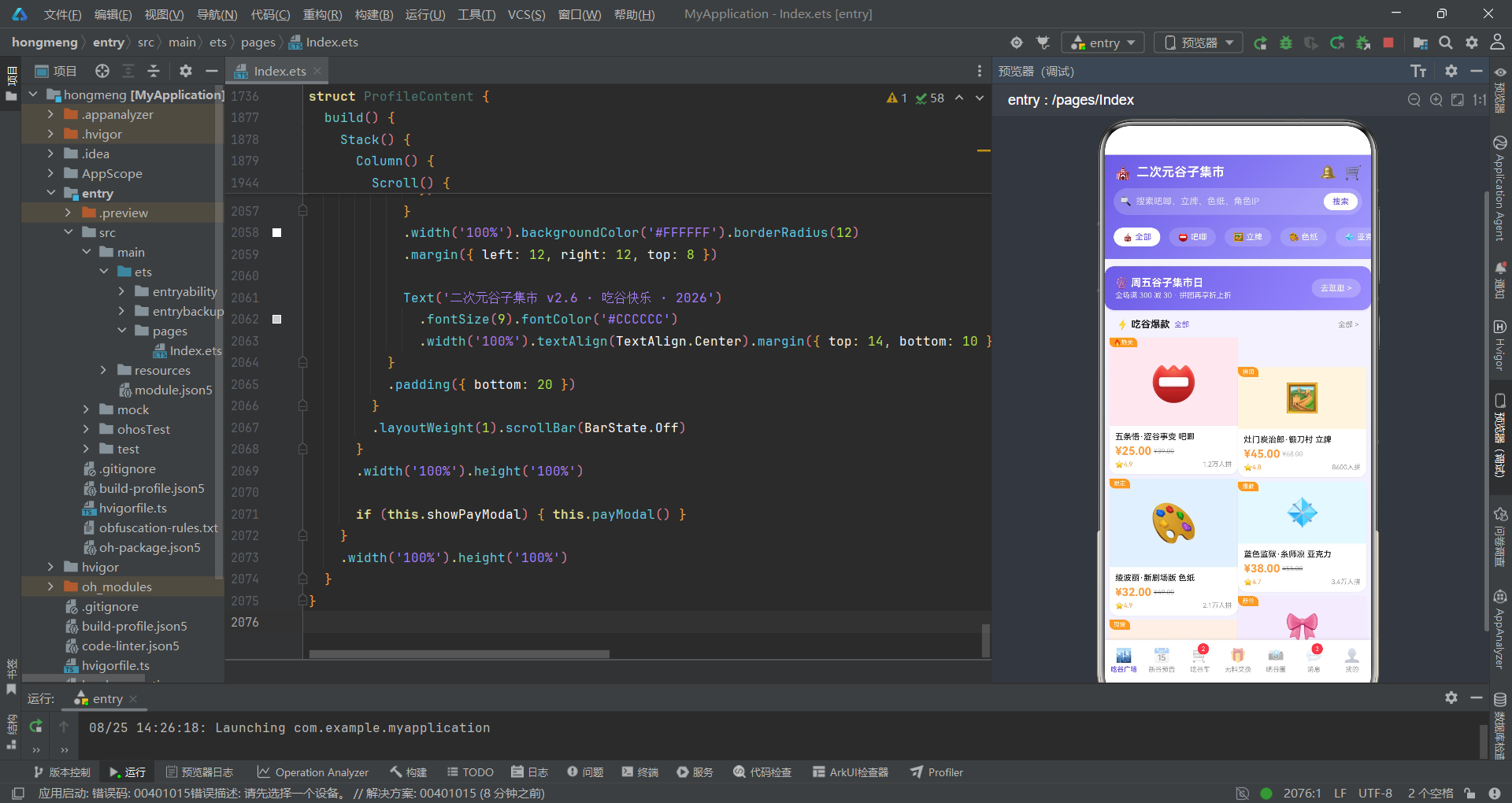
本文深入剖析了一个基于HarmonyOS ArkTS声明式UI框架的二次元谷子集市应用的完整实现。从十五个interface接口定义到四组渐变设计令牌,从十四条谷子商品到八组拼团、十条换物帖、三组消息等全局数据集,从八个工具函数到入口组件的Builder复用路由,从吃谷广场的瀑布流到新谷预告的时间线、从吃谷车的成员槽位到无料交换的气泡布局、从晒谷圈的点赞交互到消息中心的全部已读、从个人中心的消费柱状图到补款弹窗的倒计时,整个应用展现了HarmonyOS声明式开发范式在二次元垂直电商社区场景下的设计能力。应用通过@State的状态追踪实现了数据驱动的自动重渲染,通过@Builder方法实现了Tab路由和Tab项的代码复用,通过空值合并运算符实现了可选对象的安全访问,通过数组+indexOf模式实现了多选交互状态管理。
从业务设计角度看,该应用巧妙地将拼多多风格的拼团电商模式(吃谷车拼团、成团进度、补款提醒)与二次元社区的内容互动模式(新谷预告订阅、无料交换、晒谷圈点赞)融合为一体。七大Tab覆盖了二次元谷子用户的完整交易和社交链条:吃谷广场(搜索+分类+Banner+瀑布流商品)、新谷预告(月份时间线+订阅提醒)、吃谷车(成员槽位+进度条+参团弹窗)、无料交换(左右气泡+发布表单+求交换)、晒谷圈(热帖+图片墙+点赞删除)、消息中心(三组分类+全部已读+未读红点)和个人中心(资料卡+消费图表+谷子横滑+补款+菜单)。紫蓝渐变为主色调贯穿全应用,橙色为强调色用于价格和紧迫提示,形成了二次元文化的视觉识别体系。每个Tab都集成了独特的UI设计:大小交替的错落瀑布流、月份分组的垂直时间线、虚线占位的成员槽位、镜像翻转的聊天气泡、双数字方块的倒计时时钟,展现了丰富的UI创新力。
从工程实践角度看,该应用采用了"interface→设计令牌→全局数据→工具函数→入口→Tab组件→弹窗"的分层代码组织结构,每一层都有明确的职责边界。特别值得关注的几个设计亮点:入口组件使用`@Builder contentArea`和`@Builder tabItem`两个可复用Builder方法将路由逻辑和Tab渲染逻辑封装,使得build方法极其精简;商品详情弹窗使用`??`空值合并运算符处理`selectedGuzi`可能为null的所有属性访问,确保UI在未选中商品时不会崩溃;吃谷车的成员槽位通过双重条件判断(`i < g.totalCount`和`i < g.joinedCount`)实现了已占用和未占用槽位的差异化渲染,使用`BorderStyle.Dashed`虚线边框标识空槽位;无料交换的`exchangeCard` Builder通过`isLeft`布尔值实现完整的镜像布局翻转(头像位置、背景色、信息排列顺序全部镜像),使得左右交替的气泡效果仅需一个Builder即可完成;补款弹窗的倒计时通过`fmtRemain`函数格式化后使用`substring`截取时和分分别渲染在独立方块中,模拟了数字时钟的视觉效果。对于希望深入学习HarmonyOS ArkTS声明式UI开发的开发者而言,该应用的Builder复用模式、空值安全处理、多选状态管理、镜像布局和倒计时渲染都具有直接的参考价值。

讨论HarmonyOS开发技术,专注于API与组件、DevEco Studio、测试、元服务和应用上架分发等。
更多推荐

 4
4 0
0- 0


 已为社区贡献37条内容

所有评论(0)