基于HarmonyOS ArkTS API 24 GroupsTab接收onInvite和onDelete两个回调传递选中组局对象
引言
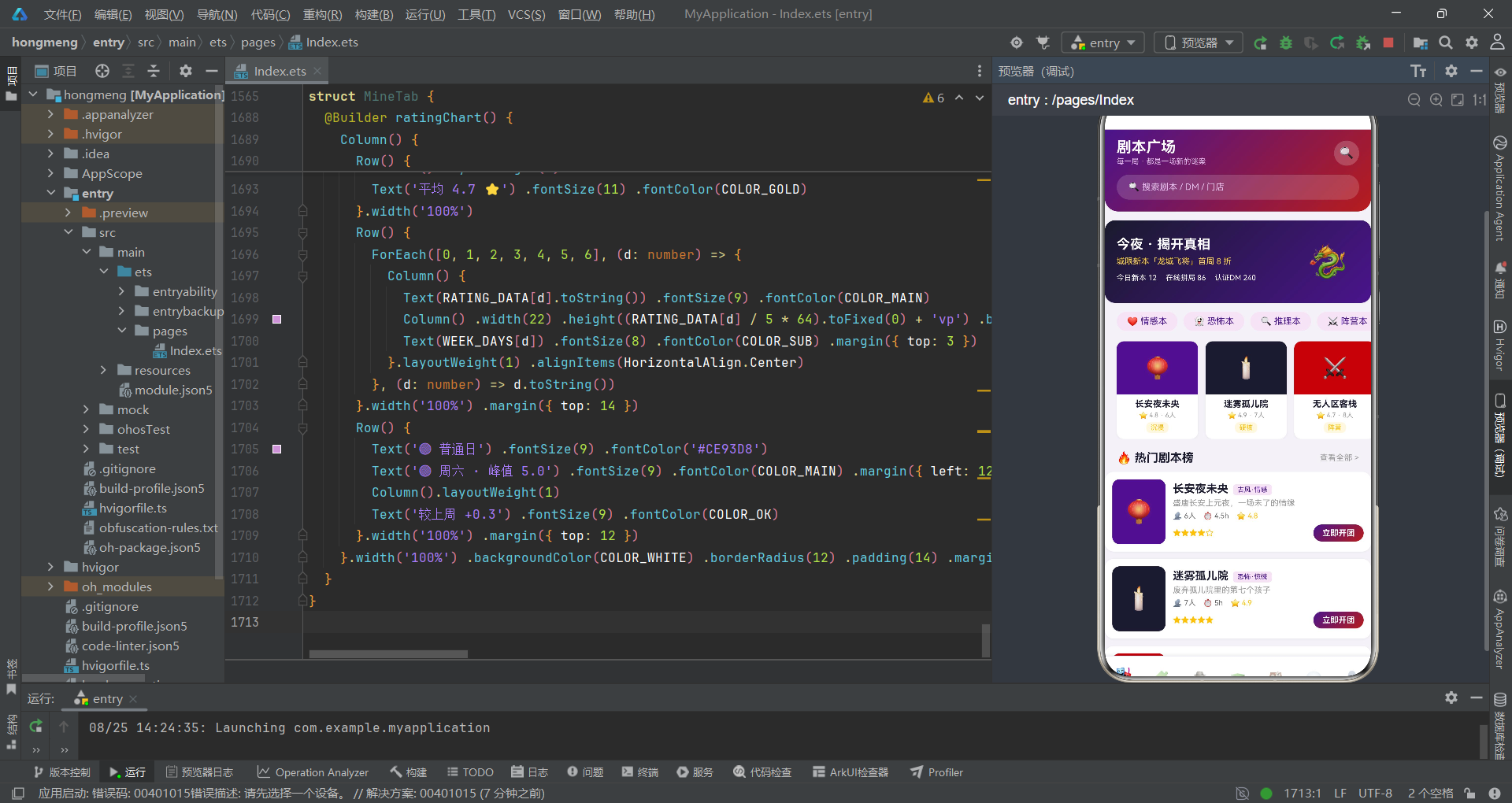
剧本杀作为近年来兴起的线下沉浸式社交娱乐活动,已经从单纯的游戏形式演化为涵盖剧本浏览、组局拼车、DM预约、门店探店、消息通知等完整服务链条的平台型业务。本文将深入剖析一个基于HarmonyOS ArkTS声明式UI框架构建的剧本杀拼局平台应用,该应用融合了拼多多风格的社交拼团模式与剧本杀垂直社区的内容运营模式,以悬疑紫、血色红、暗金色为核心视觉语言,实现了七大功能模块的完整端侧交互体验。
从技术架构层面来看,该应用采用了HarmonyOS ArkTS API 24所提供的声明式开发范式,以@Entry、@Component、@Builder、@State、@Observed等核心装饰器构建了高度组件化的UI体系。整个应用基于单页面多Tab切换架构,通过MainTab枚举实现七个主功能模块的路由分发:剧本广场、组局拼车、DM列表、剧本类型、门店探店、消息中心和个人中心。每个Tab对应一个独立的@Component结构体组件,各组件之间通过回调函数(如onOpenDetail、onInvite、onDelete、onBook、onEditDm)实现跨组件通信。应用同时管理五个弹窗状态,覆盖组局邀请、剧本预约、解散确认、DM编辑和剧本详情等交互场景。
在数据架构设计上,应用采用了"interface接口定义—@Observed观察者模型—全局静态数据"三层架构模式。首先通过TypeScript interface定义了StatusMeta、FuncMeta、MsgTabMeta等辅助元数据接口,随后使用@Observed装饰器将ScriptItem、GroupItem、DmItem、TypeItem、StoreItem、MsgItem、RankItem七大核心数据模型包装为可观察对象。与简单赋值方式不同,每个模型类都通过全参数constructor构造函数初始化,确保对象创建时所有属性一次性完成赋值。最后通过模块级常量数组存放12条剧本、6条组局、8位DM、6家门店、7条消息、8条热度排行等丰富数据集,为UI组件提供充足的数据驱动素材。
一、接口定义与数据模型层
1.1 辅助接口定义
应用首先通过interface定义了辅助性的元数据结构,用于状态标签、功能宫格和消息分类等场景。
/** 组局状态元信息 */
interface StatusMeta {
  label: string
  color: string
  bg: string
}

/** 功能宫格项元信息 */
interface FuncMeta {
  icon: string
  label: string
  color: string
}

/** 消息分类元信息 */
interface MsgTabMeta {
  label: string
  icon: string
}
StatusMeta接口定义了组局状态的三要素:标签文本、文字颜色和背景颜色,用于统一管理不同状态(招募中、即将开局、已满员)的视觉表现。FuncMeta定义了个人中心功能宫格的图标、标签和品牌色。MsgTabMeta定义了消息分类Tab的标签和图标。这些接口虽然结构简单,但为后续的字典映射和数组遍历提供了统一的类型约束,避免了any类型的滥用。
1.2 @Observed核心数据模型
应用使用@Observed装饰器创建了七个核心可观察数据模型,每个模型都采用全参数constructor模式。
/** 剧本 */
@Observed export class ScriptItem {
  id: number
  name: string
  type: string
  players: string
  difficulty: number
  duration: string
  cover: string
  bgColor: string
  rating: number
  tags: string[]
  desc: string

  constructor(id: number, name: string, type: string, players: string, difficulty: number,
    duration: string, cover: string, bgColor: string, rating: number, tags: string[], desc: string) {
    this.id = id
    this.name = name
    this.type = type
    this.players = players
    this.difficulty = difficulty
    this.duration = duration
    this.cover = cover
    this.bgColor = bgColor
    this.rating = rating
    this.tags = tags
    this.desc = desc
  }
}

/** 组局 */
@Observed export class GroupItem {
  id: number
  scriptName: string
  store: string
  time: string
  total: number
  current: number
  price: number
  status: string
  avatars: string[]

  constructor(id: number, scriptName: string, store: string, time: string, total: number,
    current: number, price: number, status: string, avatars: string[]) {
    this.id = id
    this.scriptName = scriptName
    this.store = store
    this.time = time
    this.total = total
    this.current = current
    this.price = price
    this.status = status
    this.avatars = avatars
  }
}

/** DM(主持人) */
@Observed export class DmItem {
  id: number
  name: string
  avatar: string
  rating: number
  games: number
  level: string
  specialty: string[]
  desc: string

  constructor(id: number, name: string, avatar: string, rating: number, games: number,
    level: string, specialty: string[], desc: string) {
    this.id = id
    this.name = name
    this.avatar = avatar
    this.rating = rating
    this.games = games
    this.level = level
    this.specialty = specialty
    this.desc = desc
  }
}

/** 门店 */
@Observed export class StoreItem {
  id: number
  name: string
  distance: string
  rating: number
  address: string
  price: number
  rooms: number
  tags: string[]

  constructor(id: number, name: string, distance: string, rating: number, address: string,
    price: number, rooms: number, tags: string[]) {
    this.id = id
    this.name = name
    this.distance = distance
    this.rating = rating
    this.address = address
    this.price = price
    this.rooms = rooms
    this.tags = tags
  }
}

/** 消息 */
@Observed export class MsgItem {
  id: number
  kind: number
  title: string
  content: string
  time: string
  icon: string
  unread: boolean

  constructor(id: number, kind: number, title: string, content: string,
    time: string, icon: string, unread: boolean) {
    this.id = id
    this.kind = kind
    this.title = title
    this.content = content
    this.time = time
    this.icon = icon
    this.unread = unread
  }
}

/** 剧本热度排行 */
@Observed export class RankItem {
  id: number
  name: string
  heat: number
  trend: string

  constructor(id: number, name: string, heat: number, trend: string) {
    this.id = id
    this.name = name
    this.heat = heat
    this.trend = trend
  }
}

/** 剧本类型 */
@Observed export class TypeItem {
  id: number
  name: string
  icon: string
  count: number
  color: string

  constructor(id: number, name: string, icon: string, count: number, color: string) {
    this.id = id
    this.name = name
    this.icon = icon
    this.count = count
    this.color = color
  }
}
@Observed装饰器使得这些类实例的属性变更能够被ArkUI框架自动追踪。ScriptItem模型包含了剧本的完整信息:类型标签、人数、难度系数(1-5)、时长、封面emoji、背景色、评分、标签数组和描述文本。GroupItem记录了组局信息:关联剧本名、门店、时间、总人数和当前人数、拼局价格、状态标识和参与者头像数组。DmItem描述了DM主持人的专业信息:评分、开本次数、等级(金/银/铜牌)、擅长类型数组和自我介绍。全参数constructor模式确保了对象创建时所有属性同时赋值,避免了部分属性遗漏导致的undefined问题。每个模型都通过export导出,使得其他模块文件也可以引用这些类型。
二、设计令牌与状态字典
2.1 悬疑风设计令牌
应用通过模块级常量定义了完整的视觉令牌系统,以悬疑暗黑风格为核心视觉基调。
const MYSTERY_GRADIENT: LinearGradientOptions = {
  angle: 135,
  colors: [['#4A148C', 0.0], ['#B71C1C', 1.0]]
}

const DARK_GRADIENT: LinearGradientOptions = {
  angle: 135,
  colors: [['#1A1A2E', 0.0], ['#4A148C', 1.0]]
}

const GOLD_GRADIENT: LinearGradientOptions = {
  angle: 135,
  colors: [['#FFC107', 0.0], ['#B71C1C', 1.0]]
}

const COLOR_MAIN: string = '#4A148C'
const COLOR_BLOOD: string = '#B71C1C'
const COLOR_GOLD: string = '#FFC107'
const COLOR_DARK: string = '#1A1A2E'
const COLOR_LIGHT: string = '#F3E5F5'
const COLOR_WHITE: string = '#FFFFFF'
const COLOR_WARN: string = '#E53935'
const COLOR_OK: string = '#4CAF50'
const COLOR_TEXT: string = '#1A1A2E'
const COLOR_SUB: string = '#999999'
const CARD_SHADOW: ShadowOptions = { radius: 6, color: '#0D000000', offsetY: 2 }
三组渐变配置分别对应三种场景氛围:MYSTERY_GRADIENT(悬疑紫红渐变,从深紫#4A148C到血色红#B71C1C)用于组局邀请、确认预约等核心操作按钮;DARK_GRADIENT(暗夜渐变,从极暗#1A1A2E到深紫#4A148C)用于组局拼车、消息中心等暗系头部;GOLD_GRADIENT(暗金渐变,从金色#FFC107到血色红#B71C1C)用于DM列表头部和保存操作。颜色常量采用语义命名:COLOR_MAIN为品牌主色(深紫)、COLOR_BLOOD为强调色(血红)、COLOR_GOLD为点缀色(暗金)、COLOR_DARK为暗背景色。CARD_SHADOW定义了统一的卡片阴影参数,通过ShadowOptions类型约束,确保所有卡片的投影效果一致。
2.2 状态字典与工具函数
/** 组局状态字典(Record 值为 interface) */
const STATUS_META: Record<string, StatusMeta> = {
  'recruit': { label: '招募中', color: '#B71C1C', bg: '#FFEBEE' },
  'ready': { label: '即将开局', color: '#4A148C', bg: '#F3E5F5' },
  'full': { label: '已满员', color: '#4CAF50', bg: '#E8F5E9' }
}

/** 难度星级(1-5) */
function starsOf(level: number): string {
  let s: string = ''
  for (let i = 0; i < 5; i++) {
    s += i < level ? '★' : '☆'
  }
  return s
}

/** 进度百分比 */
function pctOf(cur: number, total: number): number {
  if (total <= 0) {
    return 0
  }
  return Math.round(cur / total * 100)
}
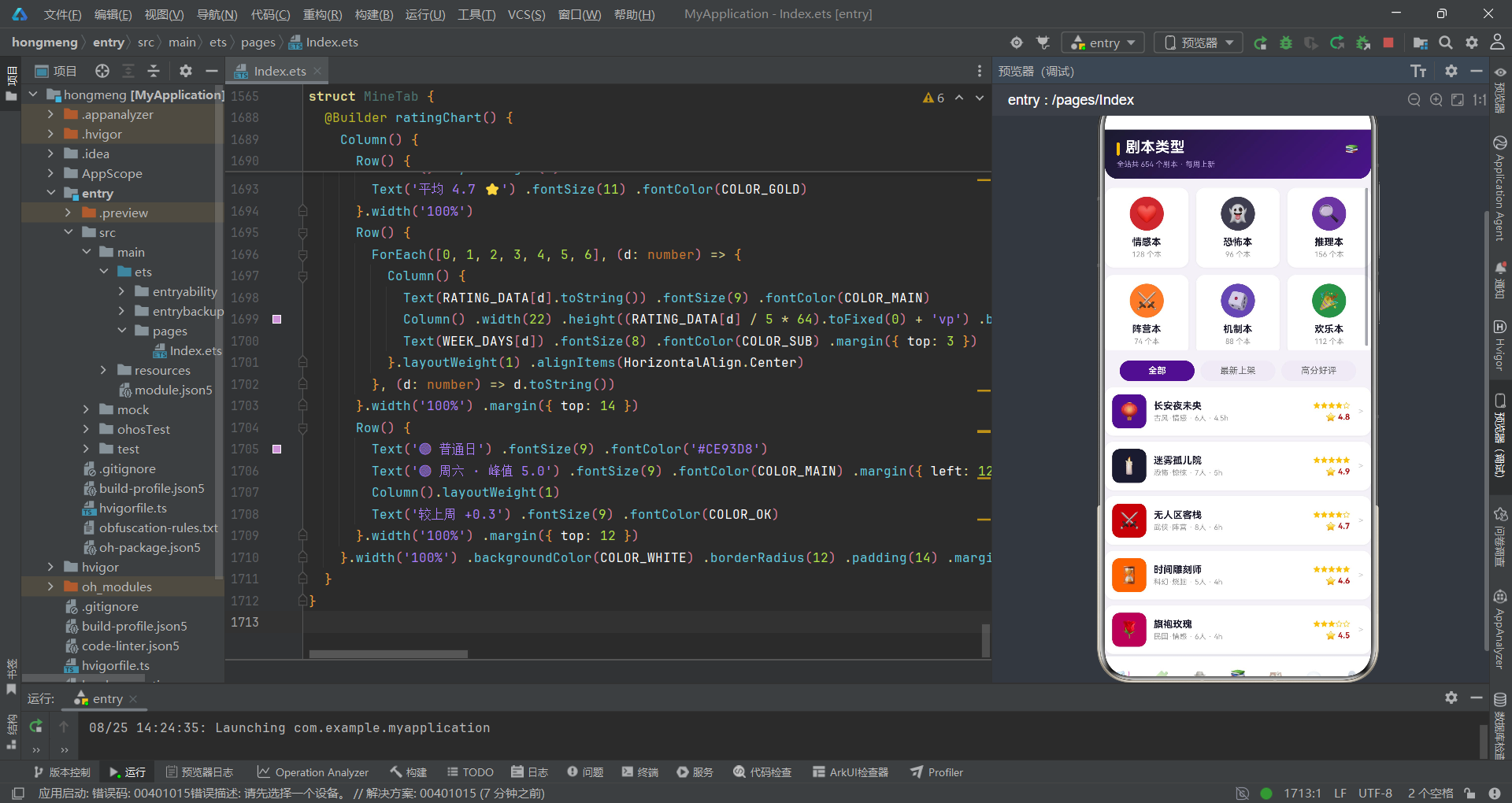
STATUS_META是一个关键的字典常量,使用Record<string, StatusMeta>类型将组局状态字符串(recruit/ready/full)映射到包含标签、文字色和背景色的完整视觉配置。这种字典映射模式使得UI层只需通过STATUS_META[g.status].label即可获取状态显示文本,无需在渲染逻辑中编写冗长的if-else条件判断。starsOf函数通过循环拼接实心星(★)和空心星(☆)字符实现1-5星难度可视化,简洁而高效。pctOf函数计算当前值占总值的百分比并四舍五入,用于渲染组局进度条,同时处理了分母为零的边界情况。
三、全局业务数据
3.1 剧本与类型数据
应用通过模块级常量数组预置了大量业务数据,以下展示剧本和类型数据集。
const SCRIPTS: ScriptItem[] = [
  new ScriptItem(1, '长安夜未央', '古风·情感', '6人', 4, '4.5h', '🏮', '#4A148C', 4.8, ['沉浸', '换装'], '盛唐长安上元夜,一场未了的情缘'),
  new ScriptItem(2, '迷雾孤儿院', '恐怖·惊悚', '7人', 5, '5h', '🕯️', '#1A1A2E', 4.9, ['硬核', '吓哭了'], '废弃孤儿院里的第七个孩子'),
  new ScriptItem(3, '无人区客栈', '武侠·阵营', '8人', 4, '6h', '⚔️', '#B71C1C', 4.7, ['阵营', '机制'], '大漠孤烟直,客栈里谁是内鬼'),
  new ScriptItem(4, '时间雕刻师', '科幻·烧脑', '5人', 5, '4h', '⏳', '#FF6F00', 4.6, ['高能', '反转'], '三次时间循环里藏着同一个凶手'),
  new ScriptItem(5, '旗袍玫瑰', '民国·情感', '6人', 3, '4h', '🌹', '#AD1457', 4.5, ['催泪', '女性'], '百乐门歌女的最后一封信'),
  new ScriptItem(6, '雾都疑云', '推理·本格', '6人', 5, '5h', '🎩', '#37474F', 4.9, ['本格', '密室'], '伦敦浓雾中的开膛手再临'),
  new ScriptItem(7, '山神祭', '神话·机制', '7人', 4, '5h', '⛩️', '#6A1B9A', 4.4, ['欢乐', '阵营'], '村庄祭祀夜的献祭游戏'),
  new ScriptItem(8, '午夜电台', '都市·惊悚', '5人', 4, '3.5h', '📻', '#8E0000', 4.3, ['短频', '刺激'], '深夜电台的最后一通来电'),
  new ScriptItem(9, '谜屿沉船', '海战·推理', '8人', 3, '4.5h', '🚢', '#1565C0', 4.2, ['新手', '欢乐'], '巨轮沉没前的十二个小时'),
  new ScriptItem(10, '长夜将尽', '现代·情感', '6人', 3, '4h', '🌙', '#4527A0', 4.7, ['治愈', '哭崩'], '谢谢你陪我走到天亮'),
  new ScriptItem(11, '龙城飞将', '历史·还原', '7人', 5, '6h', '🐉', '#7B0000', 4.8, ['还原', '史诗'], '十二道金牌背后的惊天真相'),
  new ScriptItem(12, '糖果屋童话', '欢乐·变格', '5人', 2, '3h', '🍬', '#FF8F00', 4.1, ['萌新', '爆笑'], '童话镇连环失窃案调查')
]

const TYPE_LIST: TypeItem[] = [
  new TypeItem(1, '情感本', '❤️', 128, '#B71C1C'),
  new TypeItem(2, '恐怖本', '👻', 96, '#1A1A2E'),
  new TypeItem(3, '推理本', '🔍', 156, '#4A148C'),
  new TypeItem(4, '阵营本', '⚔️', 74, '#FF6F00'),
  new TypeItem(5, '机制本', '🎲', 88, '#4527A0'),
  new TypeItem(6, '欢乐本', '🎉', 112, '#2E7D32')
]

const RANK_LIST: RankItem[] = [
  new RankItem(1, '迷雾孤儿院', 9820, '↑'),
  new RankItem(2, '无人区客栈', 8756, '↑'),
  new RankItem(3, '长安夜未央', 8102, '↓'),
  new RankItem(4, '雾都疑云', 7345, '↑'),
  new RankItem(5, '龙城飞将', 6521, '↓'),
  new RankItem(6, '旗袍玫瑰', 5890, '↑'),
  new RankItem(7, '时间雕刻师', 5234, '↑'),
  new RankItem(8, '山神祭', 4987, '↓')
]
12条剧本数据通过new ScriptItem(...)构造函数创建,每条数据包含id、剧本名、类型标签、人数、难度系数、时长、封面emoji、背景色、评分、标签和简介。背景色与剧本主题紧密关联:恐怖本用极暗色#1A1A2E、武侠本用血色红#B71C1C、古风本用品牌紫#4A148C、科幻本用橙色#FF6F00,通过色彩暗示剧本氛围。6种剧本类型(情感、恐怖、推理、阵营、机制、欢乐)各自关联一种品牌色和emoji图标,同时标注了全站该类型剧本的数量。8条热度排行数据包含热度数值和趋势箭头(↑/↓),用于DM列表Tab的热门剧本横滑展示。
3.2 组局、DM与门店数据
const GROUPS: GroupItem[] = [
  new GroupItem(1, '迷雾孤儿院', '荒村古宅·旗舰店', '周六 19:00', 7, 7, 88, 'full',
    ['🕵️', '🧙', '🦊', '👑', '🎭', '🧛', '🧟']),
  new GroupItem(2, '无人区客栈', '大漠孤烟剧本社', '周日 14:00', 8, 6, 78, 'recruit',
    ['🕵️', '🧙', '🦊', '👑', '🎭', '🧛']),
  new GroupItem(3, '长安夜未央', '老城根文化街馆', '周五 19:30', 6, 4, 68, 'recruit',
    ['🕵️', '🧙', '🦊', '👑']),
  new GroupItem(4, '雾都疑云', '雾都推理馆', '周六 13:30', 6, 6, 98, 'ready',
    ['🕵️', '🧙', '🦊', '👑', '🎭', '🧛']),
  new GroupItem(5, '龙城飞将', '城南客栈', '周日 18:00', 7, 3, 108, 'recruit',
    ['🕵️', '🧙', '🦊']),
  new GroupItem(6, '旗袍玫瑰', '百乐门怀旧馆', '周六 20:00', 6, 5, 88, 'ready',
    ['🕵️', '🧙', '🦊', '👑', '🎭'])
]

const DMS: DmItem[] = [
  new DmItem(1, '夜枭', '🦉', 4.9, 1286, '金牌DM', ['恐怖', '推理', '还原'], '全场氛围拉满的恐怖大师'),
  new DmItem(2, '白鸦', '🕊️', 4.8, 1024, '金牌DM', ['情感', '沉浸'], '刀人于无形的情感本天花板'),
  new DmItem(3, '阿喵', '🐱', 4.8, 976, '银牌DM', ['欢乐', '萌新'], '气氛担当,欢乐本之王'),
  new DmItem(4, '老K', '🎩', 4.7, 864, '银牌DM', ['阵营', '机制'], '算无遗策的阵营操盘手'),
  new DmItem(5, '月见', '🌙', 4.7, 753, '银牌DM', ['古风', '情感'], '古风沉浸戏骨,台词十级'),
  new DmItem(6, '铁蛋', '🪓', 4.6, 688, '铜牌DM', ['恐怖', '刺激'], '吓哭过37个玩家的男人'),
  new DmItem(7, '小鹿', '🦌', 4.5, 512, '铜牌DM', ['新手', '治愈'], '新手友好,耐心满分'),
  new DmItem(8, '灰烬', '🔥', 4.5, 467, '铜牌DM', ['硬核', '还原'], '细节控的噩梦,硬核之神')
]

const STORES: StoreItem[] = [
  new StoreItem(1, '荒村古宅·旗舰店', '0.8km', 4.9, '城南文创园B栋3层', 68, 12, ['恐怖主题房', '换装区', '免费停车']),
  new StoreItem(2, '大漠孤烟剧本社', '1.2km', 4.8, '万达广场3楼3040', 58, 8, ['阵营大桌', '饮品畅饮']),
  new StoreItem(3, '雾都推理馆', '2.5km', 4.9, '老城根文化街17号', 88, 10, ['本格密室房', '静音包间']),
  new StoreItem(4, '百乐门怀旧馆', '3.8km', 4.7, '中山路11号老洋房', 78, 9, ['民国换装', '演出厅']),
  new StoreItem(5, '谜屿空间', '5.2km', 4.6, '高新区创业大厦2层', 48, 6, ['新本快', '学生优惠']),
  new StoreItem(6, '山神祭·实景店', '6.4km', 4.8, '河东民俗村东门', 98, 15, ['实景搜证', '大型阵营'])
]

const MSGS: MsgItem[] = [
  new MsgItem(1, 0, '拼局成功', '「无人区客栈」周日场已满员,记得准时到店', '2分钟前', '🎮', true),
  new MsgItem(2, 0, '组局邀请', '夜枭邀请你加入「迷雾孤儿院」恐怖局(缺2人)', '26分钟前', '📨', true),
  new MsgItem(3, 0, '开局提醒', '「旗袍玫瑰」将于30分钟后开局,请提前到店', '2天前', '🔔', false),
  new MsgItem(4, 1, '预约提醒', '你预约的DM「月见」今晚19:30有空档可锁定', '3小时前', '⏰', false),
  new MsgItem(5, 1, '系统公告', '本周新本上架:龙城飞将(城限)· 首周8折', '昨天', '📢', false),
  new MsgItem(6, 2, '点赞通知', '白鸦赞了你的探店笔记「荒村古宅」', '1小时前', '👍', false),
  new MsgItem(7, 2, '新粉丝', '小鹿关注了你,快去回关一起拼局吧', '昨天', '🌟', false)
]
6条组局数据中,status字段使用’recruit’/‘ready’/'full’三种字符串值,与STATUS_META字典的key一一对应,实现了数据与视觉配置的解耦。avatars数组存储了参与者头像emoji,用于渲染重叠头像列表。8位DM数据按等级分为金牌(前2位)、银牌(3-5位)和铜牌(6-8位),评分从4.9递减到4.5,specialty数组记录每位DM擅长的剧本类型。6家门店数据包含距离、评分、地址、人均价格、主题房间数和特色标签。7条消息数据通过kind字段(0/1/2)区分为组局通知、系统消息和互动消息三类,unread布尔值标记未读状态,用于消息Tab的分类筛选和未读计数。
四、@Entry入口组件
4.1 入口组件状态管理
@Entry组件是整个应用的根节点,管理着Tab路由状态、五个弹窗开关和各弹窗的选中数据。
enum MainTab {
  SQUARE,
  GROUP,
  DM,
  TYPE,
  STORE,
  MSG,
  MINE
}

@Entry
@Component
struct MurderMysteryPage {
  @State activeTab: MainTab = MainTab.SQUARE
  // 弹框开关
  @State showInvite: boolean = false
  @State showBooking: boolean = false
  @State showDelete: boolean = false
  @State showEditDm: boolean = false
  @State showDetail: boolean = false
  // 选中数据
  @State selectedScript: ScriptItem = SCRIPTS[0]
  @State selectedGroup: GroupItem = GROUPS[0]
  @State editingDm: DmItem = DMS[0]
  // 组局邀请弹框
  @State selectedRole: string = ROLES[0]
  // 剧本预约弹框
  @State selectedSession: number = 0
  @State bookCount: number = 4
  @State selectedDmIdx: number = 0
  // 编辑DM弹框
  @State editName: string = ''
  @State editDesc: string = ''
  @State editTypeIdx: number = 0
  @State editAvatar: string = '🎭'

  build() {
    Stack() {
      Column() {
        if (this.activeTab === MainTab.SQUARE) {
          SquareTab({
            onOpenDetail: (s: ScriptItem) => {
              this.selectedScript = s
              this.showDetail = true
            }
          })
        } else if (this.activeTab === MainTab.GROUP) {
          GroupsTab({
            onInvite: (g: GroupItem) => {
              this.selectedGroup = g
              this.showInvite = true
            },
            onDelete: (g: GroupItem) => {
              this.selectedGroup = g
              this.showDelete = true
            }
          })
        } else if (this.activeTab === MainTab.DM) {
          DmTab({
            onBook: () => {
              this.showBooking = true
            },
            onEditDm: (d: DmItem) => {
              this.editingDm = d
              this.editName = d.name
              this.editDesc = d.desc
              this.editAvatar = d.avatar
              this.showEditDm = true
            }
          })
        } else if (this.activeTab === MainTab.TYPE) {
          TypesTab({
            onOpenDetail: (s: ScriptItem) => {
              this.selectedScript = s
              this.showDetail = true
            }
          })
        } else if (this.activeTab === MainTab.STORE) {
          StoresTab({
            onBook: () => {
              this.showBooking = true
            }
          })
        } else if (this.activeTab === MainTab.MSG) {
          MsgsTab()
        } else {
          MineTab()
        }
        this.bottomTabBar()
      }.width('100%').height('100%')

      if (this.showInvite) {
        this.inviteModal()
      }
      if (this.showBooking) {
        this.bookingModal()
      }
      if (this.showDelete) {
        this.deleteModal()
      }
      if (this.showEditDm) {
        this.editDmModal()
      }
      if (this.showDetail) {
        this.detailModal()
      }
    }.width('100%').height('100%').backgroundColor('#F4F1F8')
  }
入口组件通过@State管理了十六个状态变量,分为三类:弹窗开关(5个布尔值)、选中数据(3个对象引用)和弹窗内部状态(8个编辑/选择状态)。build()方法使用Stack容器叠加内容区和弹窗层,内容区通过if-else if-else链式判断根据activeTab值渲染对应Tab组件。值得注意的是,各Tab组件通过回调函数接收外部事件:SquareTab接收onOpenDetail回调传递选中剧本对象;GroupsTab接收onInvite和onDelete两个回调传递选中组局对象;DmTab接收onBook和onEditDm回调,后者在触发时同时完成DM数据的初始化赋值(name、desc、avatar),确保编辑弹窗打开时表单字段已有初始值。这种"回调触发+状态初始化"的模式确保了弹窗打开时数据一致性。
4.2 底部Tab栏与通用遮罩
@Builder bottomTabBar() {
  Column() {
    Divider().color('#EDE7F6').strokeWidth(1)
    Row() {
      this.bottomTabItem('🎭', '剧本广场', MainTab.SQUARE)
      this.bottomTabItem('🧩', '组局拼车', MainTab.GROUP)
      this.bottomTabItem('🕵️', 'DM列表', MainTab.DM)
      this.bottomTabItem('📚', '剧本类型', MainTab.TYPE)
      this.bottomTabItem('🏚️', '门店探店', MainTab.STORE)
      this.bottomTabItem('💬', '消息', MainTab.MSG)
      this.bottomTabItem('👤', '我的', MainTab.MINE)
    }.width('100%').height(54).alignItems(VerticalAlign.Bottom)
  }.width('100%').backgroundColor(COLOR_WHITE).shadow({ radius: 10, color: '#14000000', offsetY: -2 })
}

@Builder bottomTabItem(icon: string, label: string, tab: MainTab) {
  Column() {
    Text(icon).fontSize(18).fontColor(COLOR_DARK).opacity(this.activeTab === tab ? 1.0 : 0.45)
    Text(label).fontSize(8).fontColor(this.activeTab === tab ? COLOR_MAIN : '#999999')
      .fontWeight(this.activeTab === tab ? FontWeight.Bold : FontWeight.Normal).margin({ top: 1 })
    if (this.activeTab === tab) {
      Column().width(14).height(3).backgroundColor(COLOR_MAIN).borderRadius(2).margin({ top: 2 })
    }
  }.layoutWeight(1).alignItems(HorizontalAlign.Center).padding({ top: 4, bottom: 4 })
  .onClick(() => {
    this.activeTab = tab
  })
}

@Builder modalOverlay(onClose: () => void) {
  Column().width('100%').height('100%').backgroundColor('rgba(0,0,0,0.5)').onClick(onClose)
}
底部Tab栏通过Divider分隔线配合Row水平布局七个Tab项,使用alignItems(VerticalAlign.Bottom)确保所有Tab项底部对齐。每个Tab项通过bottomTabItem Builder构建,激活状态用品牌紫色文字加粗+底部紫色指示条标识,非激活状态用0.45透明度和灰色文字。modalOverlay是通用遮罩Builder,接收onClose回调函数,点击半透明黑色遮罩触发弹窗关闭。七个Tab的图标都使用了与剧本杀主题相关的emoji:🎭面具代表剧本广场、🧩拼图代表组局拼车、🕵️侦探代表DM列表、📚书本代表剧本类型、🏚️破屋代表门店探店、💬对话代表消息、👤人像代表个人中心。
五、弹窗交互系统
5.1 组局邀请弹窗
组局邀请弹窗采用底部抽屉样式,集成了组局信息卡、角色选择、拼局统计和发送邀请功能。
@Builder inviteModal() {
  Column() {
    this.modalOverlay(() => {
      this.showInvite = false
    })
    Column() {
      Column().width(36).height(4).borderRadius(2).backgroundColor('#E0E0E0').margin({ top: 10 })
      Text('🎮 发起组局邀请').fontSize(18).fontWeight(FontWeight.Bold).fontColor(COLOR_DARK).margin({ top: 12 })
      // 组局信息卡
      Row() {
        Column() {
          Text('🕯️').fontSize(24)
        }.width(44).height(44).borderRadius(10).backgroundColor('#1A1A2E').justifyContent(FlexAlign.Center)
        Column() {
          Text(this.selectedGroup.scriptName).fontSize(15).fontWeight(FontWeight.Bold).fontColor(COLOR_DARK)
          Text('📍 ' + this.selectedGroup.store).fontSize(10).fontColor(COLOR_SUB).margin({ top: 2 })
        }.alignItems(HorizontalAlign.Start).margin({ left: 10 })
        Column().layoutWeight(1)
        Text(STATUS_META[this.selectedGroup.status].label).fontSize(10)
          .fontColor(STATUS_META[this.selectedGroup.status].color)
          .backgroundColor(STATUS_META[this.selectedGroup.status].bg)
          .padding({ left: 8, right: 8, top: 3, bottom: 3 }).borderRadius(8)
      }.width('100%').padding(10).backgroundColor('#F7F4FB').borderRadius(12).margin({ top: 14 })

      Text('选择你的角色').fontSize(13).fontWeight(FontWeight.Bold).fontColor(COLOR_DARK).margin({ top: 16 })
      Flex({ wrap: FlexWrap.Wrap }) {
        ForEach(ROLES, (r: string) => {
          Text(r).fontSize(12)
            .fontColor(this.selectedRole === r ? COLOR_WHITE : COLOR_MAIN)
            .backgroundColor(this.selectedRole === r ? COLOR_MAIN : COLOR_LIGHT)
            .padding({ left: 14, right: 14, top: 6, bottom: 6 }).borderRadius(14)
            .margin({ right: 8, bottom: 8 })
            .onClick(() => {
              this.selectedRole = r
            })
        }, (r: string) => r)
      }.width('100%').margin({ top: 8 })

      Row() {
        Column() {
          Text('拼局人数').fontSize(10).fontColor(COLOR_SUB)
          Text(this.selectedGroup.current.toString() + '/' + this.selectedGroup.total.toString() + ' 人')
            .fontSize(14).fontWeight(FontWeight.Bold).fontColor(COLOR_MAIN).margin({ top: 3 })
        }.alignItems(HorizontalAlign.Start)
        Column().layoutWeight(1)
        Column() {
          Text('开局时间').fontSize(10).fontColor(COLOR_SUB)
          Text(this.selectedGroup.time).fontSize(14).fontWeight(FontWeight.Bold)
            .fontColor(COLOR_BLOOD).margin({ top: 3 })
        }.alignItems(HorizontalAlign.Start)
        Column().layoutWeight(1)
        Column() {
          Text('拼局价格').fontSize(10).fontColor(COLOR_SUB)
          Text('¥' + this.selectedGroup.price.toString() + '/人').fontSize(14)
            .fontWeight(FontWeight.Bold).fontColor(COLOR_GOLD).margin({ top: 3 })
        }.alignItems(HorizontalAlign.Start)
      }.width('100%').padding(12).backgroundColor(COLOR_WHITE).borderRadius(12)
        .border({ width: 1, color: '#EDE7F6' }).margin({ top: 6 })

      Text('🚀 发送组局邀请').fontSize(15).fontWeight(FontWeight.Bold).fontColor(COLOR_WHITE)
        .width('100%').textAlign(TextAlign.Center).padding({ top: 12, bottom: 12 })
        .linearGradient(MYSTERY_GRADIENT).borderRadius(22).margin({ top: 16 })
        .onClick(() => {
          this.showInvite = false
        })
    }.width('100%').backgroundColor(COLOR_WHITE).borderRadius({ topLeft: 20, topRight: 20 })
      .padding({ left: 16, right: 16, bottom: 24 }).alignItems(HorizontalAlign.Center)
  }.width('100%').height('100%').justifyContent(FlexAlign.End).position({ x: 0, y: 0 }).zIndex(999)
}
组局邀请弹窗使用justifyContent(FlexAlign.End)将内容区推至屏幕底部,配合borderRadius({ topLeft: 20, topRight: 20 })的圆角处理,形成标准的底部抽屉交互样式。顶部的小灰条(36x4vp)是底部抽屉的标志性拖拽提示。角色选择区使用Flex({ wrap: FlexWrap.Wrap })实现自动换行的标签列表,选中角色用品牌紫背景白字、未选中用浅紫背景紫字。组局统计区使用三列等分布局展示拼局人数、开局时间和拼局价格,三个数据分别用品牌紫、血色红和暗金色,通过色彩语义区分数据类型。状态标签通过STATUS_META[this.selectedGroup.status]字典查找获取label、color和bg三要素,一行代码完成视觉配置。
5.2 剧本预约与详情弹窗
剧本预约弹窗是应用中功能最丰富的弹窗,集成了剧本信息、场次选择、门店定位、人数步进和DM选择。
@Builder bookingModal() {
  Column() {
    this.modalOverlay(() => {
      this.showBooking = false
    })
    Column() {
      Row() {
        Text('📅 剧本预约').fontSize(17).fontWeight(FontWeight.Bold).fontColor(COLOR_DARK)
        Column().layoutWeight(1)
        Text('✕').fontSize(15).fontColor(COLOR_SUB).padding(6)
          .onClick(() => {
            this.showBooking = false
          })
      }.width('100%').padding(16)

      Scroll() {
        Column() {
          // 剧本信息
          Row() {
            Column() {
              Text(this.selectedScript.cover).fontSize(24)
            }.width(44).height(44).borderRadius(10).backgroundColor(this.selectedScript.bgColor)
              .justifyContent(FlexAlign.Center)
            Column() {
              Text(this.selectedScript.name).fontSize(14).fontWeight(FontWeight.Bold).fontColor(COLOR_DARK)
              Text(this.selectedScript.type + ' · ' + this.selectedScript.players + ' · ' + this.selectedScript.duration)
                .fontSize(10).fontColor(COLOR_SUB).margin({ top: 2 })
            }.alignItems(HorizontalAlign.Start).margin({ left: 10 })
            Column().layoutWeight(1)
            Text('⭐ ' + this.selectedScript.rating.toString()).fontSize(12).fontColor(COLOR_GOLD)
          }.width('100%').padding(10).backgroundColor('#F7F4FB').borderRadius(12)

          Text('场次选择').fontSize(13).fontWeight(FontWeight.Bold).fontColor(COLOR_DARK).margin({ top: 14 })
          Flex({ wrap: FlexWrap.Wrap }) {
            ForEach(SESSIONS, (ss: string, i: number) => {
              Text(ss).fontSize(12)
                .fontColor(this.selectedSession === i ? COLOR_WHITE : COLOR_MAIN)
                .backgroundColor(this.selectedSession === i ? COLOR_MAIN : COLOR_LIGHT)
                .padding({ left: 12, right: 12, top: 6, bottom: 6 }).borderRadius(12)
                .margin({ right: 8, bottom: 8 })
                .onClick(() => {
                  this.selectedSession = i
                })
            }, (ss: string) => ss)
          }.width('100%').margin({ top: 8 })

          Row() {
            Text('📍 荒村古宅·旗舰店').fontSize(12).fontColor(COLOR_DARK)
            Column().layoutWeight(1)
            Text('0.8km').fontSize(10).fontColor(COLOR_MAIN)
          }.width('100%').padding(10).backgroundColor(COLOR_WHITE).borderRadius(10)
            .border({ width: 1, color: '#EDE7F6' }).margin({ top: 6 })

          // 人数步进
          Row() {
            Text('拼局人数').fontSize(13).fontWeight(FontWeight.Bold).fontColor(COLOR_DARK)
            Column().layoutWeight(1)
            Text('−').fontSize(18).fontColor(COLOR_MAIN).width(28).height(28).textAlign(TextAlign.Center)
              .backgroundColor(COLOR_LIGHT).borderRadius({ topLeft: 14, bottomLeft: 14 })
              .onClick(() => {
                if (this.bookCount > 3) {
                  this.bookCount -= 1
                }
              })
            Text('  ' + this.bookCount.toString() + ' 人  ').fontSize(13).fontWeight(FontWeight.Bold)
              .fontColor(COLOR_DARK).height(28).textAlign(TextAlign.Center).backgroundColor('#FAF7FD')
            Text('+').fontSize(18).fontColor(COLOR_WHITE).width(28).height(28).textAlign(TextAlign.Center)
              .backgroundColor(COLOR_MAIN).borderRadius({ topRight: 14, bottomRight: 14 })
              .onClick(() => {
                if (this.bookCount < 8) {
                  this.bookCount += 1
                }
              })
          }.width('100%').margin({ top: 14 })

          Text('选择DM').fontSize(13).fontWeight(FontWeight.Bold).fontColor(COLOR_DARK).margin({ top: 14 })
          Scroll() {
            Column() {
              ForEach(DMS, (dm: DmItem, i: number) => {
                Row() {
                  Column() {
                    Text(dm.avatar).fontSize(18)
                  }.width(34).height(34).borderRadius(17).backgroundColor(COLOR_LIGHT)
                    .justifyContent(FlexAlign.Center)
                  Column() {
                    Text(dm.name + ' · ' + dm.level).fontSize(12).fontWeight(FontWeight.Bold).fontColor(COLOR_DARK)
                    Text('⭐ ' + dm.rating.toString() + ' · 开本 ' + dm.games.toString())
                      .fontSize(10).fontColor(COLOR_SUB).margin({ top: 2 })
                  }.alignItems(HorizontalAlign.Start).margin({ left: 8 })
                  Column().layoutWeight(1)
                  Text('✓').fontSize(14).fontWeight(FontWeight.Bold).fontColor(COLOR_WHITE)
                    .width(22).height(22).textAlign(TextAlign.Center)
                    .backgroundColor(COLOR_MAIN).borderRadius(11)
                    .opacity(this.selectedDmIdx === i ? 1 : 0)
                }.width('100%').padding(8).borderRadius(10)
                .border({
                  width: 1,
                  color: this.selectedDmIdx === i ? COLOR_MAIN : '#F0ECF4'
                }).margin({ bottom: 8 })
                .onClick(() => {
                  this.selectedDmIdx = i
                })
              }, (dm: DmItem) => 'bk' + dm.id.toString())
            }.width('100%')
          }.constraintSize({ maxHeight: 168 }).margin({ top: 8 })
        }.width('100%').padding({ left: 16, right: 16, bottom: 8 })
      }.constraintSize({ maxHeight: '52%' }).scrollBar(BarState.Off)

      // 底部确认
      Row() {
        Column() {
          Text('¥' + (this.bookCount * 88).toString()).fontSize(18).fontWeight(FontWeight.Bold).fontColor(COLOR_BLOOD)
          Text('合计 · ' + this.bookCount.toString() + '人').fontSize(10).fontColor(COLOR_SUB).margin({ top: 2 })
        }.alignItems(HorizontalAlign.Start)
        Column().layoutWeight(1)
        Text('确认预约').fontSize(15).fontWeight(FontWeight.Bold).fontColor(COLOR_WHITE)
          .padding({ left: 32, right: 32, top: 11, bottom: 11 })
          .linearGradient(MYSTERY_GRADIENT).borderRadius(22)
          .onClick(() => {
            this.showBooking = false
          })
      }.width('100%').padding(16).borderRadius({ bottomLeft: 16, bottomRight: 16 })
    }.width('88%').backgroundColor(COLOR_WHITE).borderRadius(16).alignItems(HorizontalAlign.Start)
  }.width('100%').height('100%').justifyContent(FlexAlign.Center).position({ x: 0, y: 0 }).zIndex(999)
}
剧本预约弹窗的核心亮点是人数步进器和DM选择列表的交互实现。人数步进器由减号按钮、数值显示区和加号按钮三部分组成,减号按钮用浅紫背景紫字,加号按钮用品牌紫背景白字,形成主次区分。步进范围限制在3-8人之间,通过if (this.bookCount > 3)和if (this.bookCount < 8)条件判断防止越界。DM选择列表使用ForEach遍历8位DM数据,每行显示头像、姓名等级和评分开本数,右侧的选中标记✓通过opacity(this.selectedDmIdx === i ? 1 : 0)控制显隐。底部确认区动态计算总价(this.bookCount * 88),即人数乘以单人拼局价88元。整个弹窗的中间内容区使用Scroll包裹并限制constraintSize({ maxHeight: '52%' }),确保弹窗在小屏设备上不会溢出屏幕。
5.3 剧本详情弹窗
@Builder detailModal() {
  Column() {
    this.modalOverlay(() => {
      this.showDetail = false
    })
    Column() {
      // 封面头部
      Column() {
        Text(this.selectedScript.cover).fontSize(46)
        Text(this.selectedScript.name).fontSize(19).fontWeight(FontWeight.Bold).fontColor(COLOR_WHITE).margin({ top: 8 })
        Text(this.selectedScript.type + ' · ' + this.selectedScript.players + ' · ' + this.selectedScript.duration)
          .fontSize(11).fontColor('#E1BEE7').margin({ top: 4 })
        Row() {
          Text(starsOf(this.selectedScript.difficulty)).fontSize(13).fontColor(COLOR_GOLD)
          Text(' 难度 ' + this.selectedScript.difficulty.toString() + '.0').fontSize(10).fontColor('#E1BEE7').margin({ left: 6 })
          Text('⭐ ' + this.selectedScript.rating.toString()).fontSize(11).fontColor(COLOR_GOLD).margin({ left: 10 })
        }.margin({ top: 8 })
      }.width('100%').linearGradient(DARK_GRADIENT)
        .padding({ top: 22, bottom: 18 }).alignItems(HorizontalAlign.Center)
        .borderRadius({ topLeft: 16, topRight: 16 })

      Scroll() {
        Column() {
          // 基本信息
          Row() {
            Column() {
              Text('👥 ' + this.selectedScript.players).fontSize(11).fontColor(COLOR_DARK)
            }.layoutWeight(1).alignItems(HorizontalAlign.Center)
            Column() {
              Text('⏱ ' + this.selectedScript.duration).fontSize(11).fontColor(COLOR_DARK)
            }.layoutWeight(1).alignItems(HorizontalAlign.Center)
            Column() {
              Text('🔥 热度 ' + (this.selectedScript.id * 817 + 4100).toString()).fontSize(11).fontColor(COLOR_DARK)
            }.layoutWeight(1).alignItems(HorizontalAlign.Center)
          }.width('100%').padding({ top: 12, bottom: 12 }).backgroundColor('#F7F4FB').borderRadius(10)

          // 标签
          Row() {
            ForEach(this.selectedScript.tags, (t: string) => {
              Text('# ' + t).fontSize(10).fontColor(COLOR_MAIN).backgroundColor(COLOR_LIGHT)
                .padding({ left: 8, right: 8, top: 3, bottom: 3 }).borderRadius(8).margin({ right: 8 })
            }, (t: string) => t)
          }.width('100%').margin({ top: 12 })

          Text('📖 剧本简介').fontSize(13).fontWeight(FontWeight.Bold).fontColor(COLOR_DARK).margin({ top: 14 })
          Text(this.selectedScript.desc + '。封闭空间、错综的人物关系与层层反转,'
            + '带你走进一场沉浸式悬疑推理之旅。线索交织处,真相只有一个。')
            .fontSize(11).fontColor('#666666').lineHeight(18).margin({ top: 6 })

          Text('🎭 角色介绍').fontSize(13).fontWeight(FontWeight.Bold).fontColor(COLOR_DARK).margin({ top: 14 })
          Column() {
            ForEach(DETAIL_ROLES, (r: string, i: number) => {
              Row() {
                Text((i + 1).toString()).fontSize(11).fontWeight(FontWeight.Bold).fontColor(COLOR_WHITE)
                  .width(18).height(18).textAlign(TextAlign.Center)
                  .backgroundColor(COLOR_MAIN).borderRadius(9)
                Text(r).fontSize(11).fontColor('#666666').margin({ left: 8 })
                Column().layoutWeight(1)
                Text('可选').fontSize(9).fontColor(COLOR_OK).backgroundColor('#E8F5E9')
                  .padding({ left: 6, right: 6, top: 2, bottom: 2 }).borderRadius(6)
              }.width('100%').padding({ top: 6, bottom: 6 })
            }, (r: string) => r)
          }.width('100%').margin({ top: 6 })
        }.width('100%').padding(16)
      }.constraintSize({ maxHeight: '46%' }).scrollBar(BarState.Off)

      // 底部操作
      Row() {
        Column() {
          Text('¥88').fontSize(19).fontWeight(FontWeight.Bold).fontColor(COLOR_BLOOD)
          Text('拼局价/人').fontSize(9).fontColor(COLOR_SUB).margin({ top: 2 })
        }.alignItems(HorizontalAlign.Start)
        Column().layoutWeight(1)
        Text('⚡ 立即开团').fontSize(15).fontWeight(FontWeight.Bold).fontColor(COLOR_WHITE)
          .padding({ left: 34, right: 34, top: 11, bottom: 11 })
          .linearGradient(MYSTERY_GRADIENT).borderRadius(22)
          .onClick(() => {
            this.showDetail = false
            this.showBooking = true
          })
      }.width('100%').padding(16)
    }.width('88%').backgroundColor(COLOR_WHITE).borderRadius(16).alignItems(HorizontalAlign.Start)
  }.width('100%').height('100%').justifyContent(FlexAlign.Center).position({ x: 0, y: 0 }).zIndex(999)
}
剧本详情弹窗的封面头部使用linearGradient(DARK_GRADIENT)渲染暗夜渐变背景,封面emoji以46vp大字号居中展示,配合剧本名、类型信息和难度星级营造沉浸式悬疑氛围。难度星级通过starsOf(this.selectedScript.difficulty)工具函数生成,将1-5的数字转换为直观的星级符号。基本信息区以三列等分布局展示人数、时长和热度,其中热度值通过this.selectedScript.id * 817 + 4100公式动态计算,为每条剧本生成差异化的热度数值。角色介绍列表通过ForEach遍历DETAIL_ROLES数组,每行包含序号圆圈、角色描述和"可选"标签。底部"立即开团"按钮通过先关闭详情弹窗再打开预约弹窗的方式实现了弹窗间的链式跳转。
5.4 删除确认与DM编辑弹窗
@Builder deleteModal() {
  Column() {
    this.modalOverlay(() => {
      this.showDelete = false
    })
    Column() {
      Column() {
        Text('⚠️').fontSize(34)
      }.width(60).height(60).borderRadius(30).backgroundColor('#FFEBEE')
        .justifyContent(FlexAlign.Center).margin({ top: 20 })
      Text('解散该组局?').fontSize(17).fontWeight(FontWeight.Bold).fontColor(COLOR_DARK).margin({ top: 12 })
      Text('解散后全体拼友将收到通知,本操作不可撤销').fontSize(11).fontColor(COLOR_SUB).margin({ top: 6 })

      Column() {
        Row() {
          Text('剧本').fontSize(11).fontColor(COLOR_SUB)
          Column().layoutWeight(1)
          Text(this.selectedGroup.scriptName).fontSize(11).fontWeight(FontWeight.Bold).fontColor(COLOR_DARK)
        }.width('100%')
        Row() {
          Text('门店').fontSize(11).fontColor(COLOR_SUB)
          Column().layoutWeight(1)
          Text(this.selectedGroup.store).fontSize(11).fontColor(COLOR_DARK)
        }.width('100%').margin({ top: 6 })
        Row() {
          Text('时间').fontSize(11).fontColor(COLOR_SUB)
          Column().layoutWeight(1)
          Text(this.selectedGroup.time).fontSize(11).fontColor(COLOR_BLOOD)
        }.width('100%').margin({ top: 6 })
      }.width('100%').padding(12).backgroundColor('#FFF8F8').borderRadius(10)
        .border({ width: 1, color: '#FFCDD2' }).margin({ top: 14 })

      Row() {
        Text('再想想').fontSize(14).fontWeight(FontWeight.Bold).fontColor('#666666')
          .layoutWeight(1).textAlign(TextAlign.Center).padding({ top: 11, bottom: 11 })
          .backgroundColor('#F5F5F5').borderRadius(20)
          .onClick(() => { this.showDelete = false })
        Column().width(12)
        Text('确认解散').fontSize(14).fontWeight(FontWeight.Bold).fontColor(COLOR_WHITE)
          .layoutWeight(1).textAlign(TextAlign.Center).padding({ top: 11, bottom: 11 })
          .backgroundColor(COLOR_WARN).borderRadius(20)
          .onClick(() => { this.showDelete = false })
      }.width('100%').margin({ top: 18 })
    }.width('78%').backgroundColor(COLOR_WHITE).borderRadius(16)
      .padding({ left: 18, right: 18, bottom: 20 }).alignItems(HorizontalAlign.Center)
  }.width('100%').height('100%').justifyContent(FlexAlign.Center).position({ x: 0, y: 0 }).zIndex(999)
}

@Builder editDmModal() {
  Column() {
    this.modalOverlay(() => {
      this.showEditDm = false
    })
    Column() {
      Text('✏️ 编辑DM资料').fontSize(17).fontWeight(FontWeight.Bold).fontColor(COLOR_DARK).margin({ top: 18 })

      Text('选择头像').fontSize(12).fontColor(COLOR_SUB).margin({ top: 14 })
      Scroll() {
        Row() {
          ForEach(EMOJI_AVATARS, (a: string) => {
            Column() {
              Text(a).fontSize(20).fontColor(COLOR_DARK)
            }.width(44).height(44).borderRadius(22)
              .backgroundColor(this.editAvatar === a ? COLOR_LIGHT : '#F7F7F7')
              .border({ width: this.editAvatar === a ? 2 : 0, color: COLOR_MAIN })
              .justifyContent(FlexAlign.Center).margin({ right: 10 })
              .onClick(() => { this.editAvatar = a })
          }, (a: string) => a)
        }.padding({ left: 2, right: 2 })
      }.scrollable(ScrollDirection.Horizontal).scrollBar(BarState.Off).margin({ top: 8 })

      TextInput({ placeholder: '请输入DM名称', text: this.editName }).fontSize(13).fontColor(COLOR_DARK)
        .placeholderColor('#BDBDBD').backgroundColor('#F5F3F7').borderRadius(10).height(42).margin({ top: 14 })
        .onChange((v: string) => { this.editName = v })

      Text('擅长类型').fontSize(12).fontColor(COLOR_SUB).margin({ top: 12 })
      Flex({ wrap: FlexWrap.Wrap }) {
        ForEach(TYPE_LIST, (t: TypeItem, i: number) => {
          Text(t.icon + ' ' + t.name).fontSize(11)
            .fontColor(this.editTypeIdx === i ? COLOR_WHITE : COLOR_MAIN)
            .backgroundColor(this.editTypeIdx === i ? COLOR_MAIN : COLOR_LIGHT)
            .padding({ left: 10, right: 10, top: 5, bottom: 5 }).borderRadius(12).margin({ right: 8, bottom: 8 })
            .onClick(() => { this.editTypeIdx = i })
        }, (t: TypeItem) => t.id.toString())
      }.width('100%').margin({ top: 6 })

      TextArea({ placeholder: '一句话介绍自己(40字以内)', text: this.editDesc }).fontSize(12)
        .fontColor(COLOR_DARK).placeholderColor('#BDBDBD').backgroundColor('#F5F3F7')
        .borderRadius(10).height(64).margin({ top: 10 })
        .onChange((v: string) => { this.editDesc = v })

      Text('保存资料').fontSize(15).fontWeight(FontWeight.Bold).fontColor(COLOR_WHITE)
        .width('100%').textAlign(TextAlign.Center).padding({ top: 11, bottom: 11 })
        .linearGradient(GOLD_GRADIENT).borderRadius(22).margin({ top: 16 })
        .onClick(() => { this.showEditDm = false })
    }.width('88%').backgroundColor(COLOR_WHITE).borderRadius(16)
      .padding({ left: 18, right: 18, bottom: 20 }).alignItems(HorizontalAlign.Start)
  }.width('100%').height('100%').justifyContent(FlexAlign.Center).position({ x: 0, y: 0 }).zIndex(999)
}
删除确认弹窗采用居中红色警示风格:顶部圆形红色背景的警告图标、标题用暗色加粗、副标题灰色小字提示不可撤销。组局信息预览区使用浅红背景#FFF8F8和红色边框#FFCDD2,时间字段用血色红强调。底部"再想想"和"确认解散"双按钮以等分布局并排,取消按钮灰色背景、"确认解散"用警示红色COLOR_WARN。DM编辑弹窗集成了头像横滑选择、名称输入框、擅长类型标签选择和自我介绍多行输入。头像选择区使用Scroll横向滚动展示6个emoji头像选项,选中头像通过2px品牌紫边框和浅紫背景突出。名称和描述使用TextInput和TextArea组件,通过onChange回调实时同步到@State变量。保存按钮使用GOLD_GRADIENT暗金渐变,与DM列表Tab的紫金风头部形成视觉呼应。
六、Tab组件实现
6.1 剧本广场Tab
剧本广场Tab集成了悬疑风头部、Banner大卡、类型标签横滑、热门剧本横滑和剧本卡片列表。
@Component
struct SquareTab {
  onOpenDetail: (s: ScriptItem) => void = (s: ScriptItem) => {}

  build() {
    Column() {
      this.squareHeader()
      Scroll() {
        Column() {
          this.bannerCard()
          this.typeTagRow()
          this.hotScriptRow()
          Row() {
            Text('🔥 热门剧本榜').fontSize(16).fontWeight(FontWeight.Bold).fontColor(COLOR_DARK)
            Column().layoutWeight(1)
            Text('查看全部 >').fontSize(11).fontColor(COLOR_SUB)
          }.width('100%').padding({ left: 16, right: 16, top: 16 })
          ForEach(SCRIPTS, (s: ScriptItem) => {
            this.scriptCard(s)
          }, (s: ScriptItem) => s.id.toString())
        }.width('100%').padding({ bottom: 16 })
      }.layoutWeight(1).scrollBar(BarState.Off)
    }.width('100%').height('100%')
  }

  @Builder squareHeader() {
    Column() {
      Row() {
        Column() {
          Text('剧本广场').fontSize(20).fontWeight(FontWeight.Bold).fontColor(COLOR_WHITE)
          Text('每一局 · 都是一场新的谜案').fontSize(10).fontColor('#E1BEE7').margin({ top: 2 })
        }.alignItems(HorizontalAlign.Start)
        Column().layoutWeight(1)
        Column() {
          Text('🔍').fontSize(16)
        }.width(34).height(34).borderRadius(17).backgroundColor('rgba(255,255,255,0.2)')
          .justifyContent(FlexAlign.Center)
      }.width('100%').alignItems(VerticalAlign.Bottom)
      Row() {
        Text('🔍 搜索剧本 / DM / 门店').fontSize(12).fontColor('#E1BEE7').padding({ left: 16 })
      }.width('100%').height(34).backgroundColor('rgba(255,255,255,0.16)').borderRadius(17).margin({ top: 12 })
    }.width('100%').linearGradient(MYSTERY_GRADIENT)
      .padding({ left: 16, right: 16, top: 12, bottom: 16 })
      .borderRadius({ bottomLeft: 18, bottomRight: 18 })
  }

  @Builder bannerCard() {
    Stack() {
      Column().width('100%').height(112).linearGradient(DARK_GRADIENT).borderRadius(14)
      Column() {
        Text('今夜 · 揭开真相').fontSize(18).fontWeight(FontWeight.Bold).fontColor(COLOR_WHITE)
        Text('城限新本「龙城飞将」首周 8 折').fontSize(11).fontColor('#FFD54F').margin({ top: 6 })
        Row() {
          Text('今日新本 12').fontSize(10).fontColor(COLOR_WHITE)
          Text('在线拼局 86').fontSize(10).fontColor(COLOR_WHITE).margin({ left: 12 })
          Text('认证DM 240').fontSize(10).fontColor(COLOR_WHITE).margin({ left: 12 })
        }.margin({ top: 10 })
      }.alignItems(HorizontalAlign.Start).padding({ left: 16 }).position({ x: 0, y: 22 })
      Text('🐉').fontSize(44).position({ x: '76%', y: 30 })
    }.width('100%').height(112).borderRadius(14).margin({ top: 12 }).shadow(CARD_SHADOW)
  }

  @Builder scriptCard(s: ScriptItem) {
    Row() {
      Column() {
        Text(s.cover).fontSize(30)
      }.width(72).height(88).borderRadius(10).backgroundColor(s.bgColor)
        .justifyContent(FlexAlign.Center).alignSelf(ItemAlign.Start)
      Column() {
        Row() {
          Text(s.name).fontSize(15).fontWeight(FontWeight.Bold).fontColor(COLOR_DARK)
          Text(s.type).fontSize(9).fontColor(COLOR_MAIN).backgroundColor(COLOR_LIGHT)
            .padding({ left: 6, right: 6, top: 2, bottom: 2 }).borderRadius(4).margin({ left: 6 })
        }.alignItems(VerticalAlign.Bottom)
        Text(s.desc).fontSize(11).fontColor(COLOR_SUB).margin({ top: 4 })
          .maxLines(1).textOverflow({ overflow: TextOverflow.Ellipsis })
        Row() {
          Text('👥 ' + s.players).fontSize(10).fontColor('#666666')
          Text('⏱ ' + s.duration).fontSize(10).fontColor('#666666').margin({ left: 10 })
          Text('⭐ ' + s.rating.toString()).fontSize(10).fontColor(COLOR_GOLD).margin({ left: 10 })
        }.margin({ top: 5 })
        Row() {
          Text(starsOf(s.difficulty)).fontSize(11).fontColor(COLOR_GOLD)
          Column().layoutWeight(1)
          Text('立即开团').fontSize(11).fontWeight(FontWeight.Bold).fontColor(COLOR_WHITE)
            .padding({ left: 12, right: 12, top: 5, bottom: 5 })
            .linearGradient(MYSTERY_GRADIENT).borderRadius(12)
            .onClick(() => { this.onOpenDetail(s) })
        }.width('100%').margin({ top: 6 })
      }.layoutWeight(1).alignItems(HorizontalAlign.Start).margin({ left: 10 })
    }.width('100%').backgroundColor(COLOR_WHITE).borderRadius(12)
      .padding(10).margin({ left: 16, right: 16, top: 10 }).shadow(CARD_SHADOW)
      .onClick(() => { this.onOpenDetail(s) })
  }
}
剧本广场Tab的头部使用MYSTERY_GRADIENT悬疑紫红渐变背景,底部圆角borderRadius({ bottomLeft: 18, bottomRight: 18 })形成品牌头部风格,搜索栏使用半透明白色背景的胶囊形态。Banner大卡使用Stack容器叠加DARK_GRADIENT暗夜渐变背景和内容层,通过position定位将龙emoji放置在右侧,左侧文字内容包含促销标题、折扣信息和三组统计数据。剧本卡片是Tab的核心组件,左侧封面区使用数据中的bgColor作为背景色,右侧信息区包含剧本名+类型标签、单行省略的描述、人数时长评分统计行和难度星级+开团按钮。难度星级通过starsOf(s.difficulty)生成,与评分数字形成双重可视化表达。"立即开团"按钮使用MYSTERY_GRADIENT渐变背景,点击触发onOpenDetail回调打开剧本详情弹窗。
6.2 组局拼车Tab
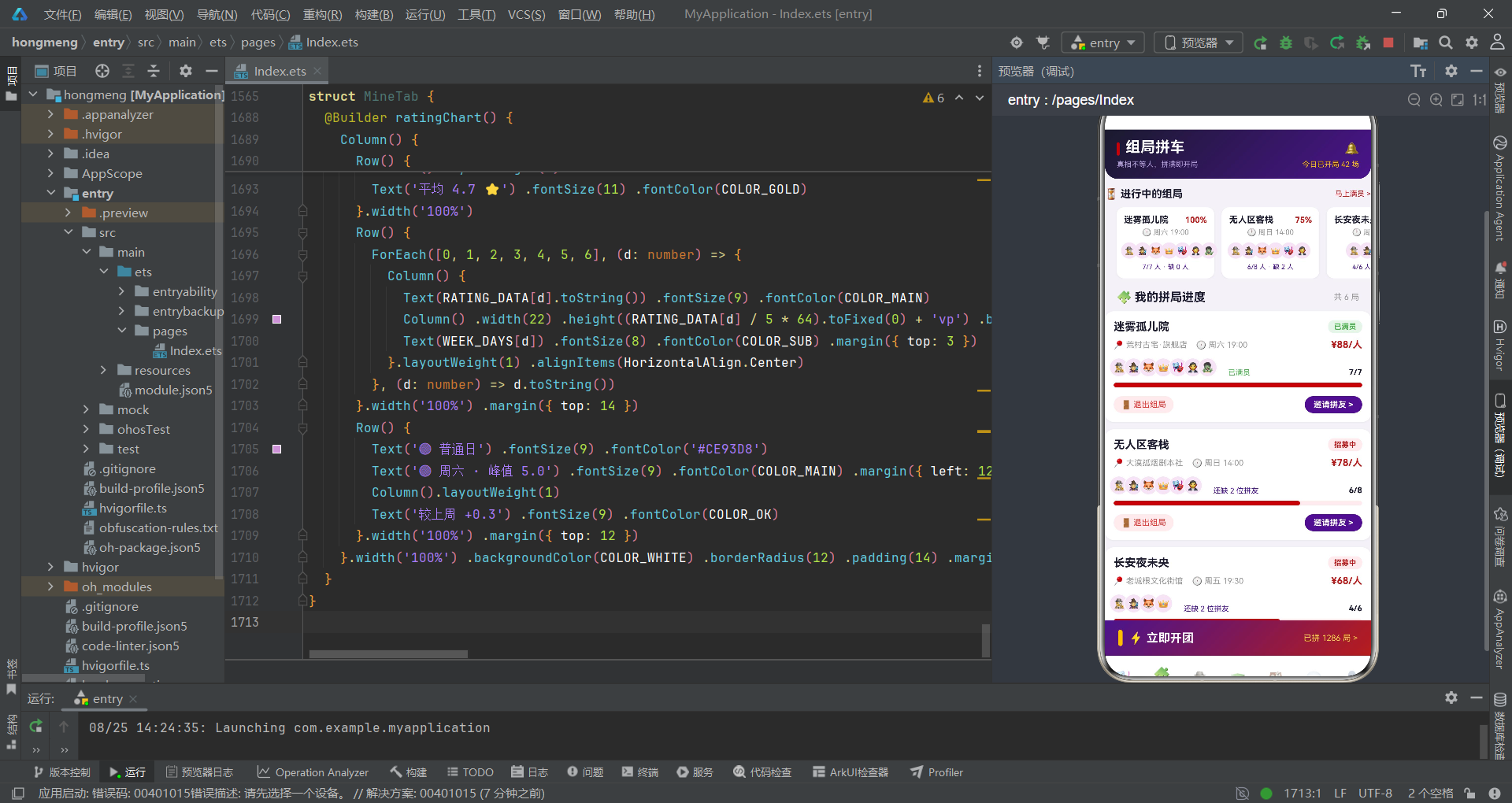
组局拼车Tab集成了暗黑风头部、进行中组局横滑和拼局进度卡列表。
@Component
struct GroupsTab {
  onInvite: (g: GroupItem) => void = (g: GroupItem) => {}
  onDelete: (g: GroupItem) => void = (g: GroupItem) => {}

  build() {
    Column() {
      this.groupsHeader()
      Scroll() {
        Column() {
          this.ongoingRow()
          Row() {
            Text('🧩 我的拼局进度').fontSize(16).fontWeight(FontWeight.Bold).fontColor(COLOR_DARK)
            Column().layoutWeight(1)
            Text('共 ' + GROUPS.length.toString() + ' 局').fontSize(11).fontColor(COLOR_SUB)
          }.width('100%').padding({ left: 16, right: 16, top: 16 })
          ForEach(GROUPS, (g: GroupItem) => {
            this.progressCard(g)
          }, (g: GroupItem) => g.id.toString())
        }.width('100%').padding({ bottom: 16 })
      }.layoutWeight(1).scrollBar(BarState.Off)
      this.bigOpenButton()
    }.width('100%').height('100%')
  }

  @Builder progressCard(g: GroupItem) {
    Column() {
      Row() {
        Text(g.scriptName).fontSize(15).fontWeight(FontWeight.Bold).fontColor(COLOR_DARK)
        Column().layoutWeight(1)
        Text(STATUS_META[g.status].label).fontSize(10).fontWeight(FontWeight.Bold)
          .fontColor(STATUS_META[g.status].color)
          .backgroundColor(STATUS_META[g.status].bg)
          .padding({ left: 8, right: 8, top: 3, bottom: 3 }).borderRadius(8)
      }.width('100%')

      Row() {
        Text('📍 ' + g.store).fontSize(11).fontColor(COLOR_SUB)
        Text('🕐 ' + g.time).fontSize(11).fontColor(COLOR_SUB).margin({ left: 12 })
        Column().layoutWeight(1)
        Text('¥' + g.price.toString() + '/人').fontSize(13).fontWeight(FontWeight.Bold).fontColor(COLOR_BLOOD)
      }.width('100%').margin({ top: 8 })

      // 拼友头像
      Row() {
        Row() {
          ForEach(g.avatars, (a: string) => {
            Column() {
              Text(a).fontSize(13)
            }.width(26).height(26).borderRadius(13).backgroundColor(COLOR_LIGHT)
              .border({ width: 1, color: COLOR_WHITE })
              .justifyContent(FlexAlign.Center).margin({ left: -6 })
          }, (a: string) => 'p' + g.id.toString() + a)
        }.alignItems(VerticalAlign.Bottom)
        Text((g.total - g.current > 0) ? ' 还缺 ' + (g.total - g.current).toString() + ' 位拼友'
          : ' 已满员').fontSize(10)
          .fontColor((g.total - g.current > 0) ? COLOR_MAIN : COLOR_OK).margin({ left: 12 })
        Column().layoutWeight(1)
        Text(g.current.toString() + '/' + g.total.toString()).fontSize(11)
          .fontWeight(FontWeight.Bold).fontColor(COLOR_DARK)
      }.width('100%').margin({ top: 10 }).alignItems(VerticalAlign.Bottom)

      // 进度条
      Row() {
        Column().width(pctOf(g.current, g.total) + '%').height(6)
          .backgroundColor(COLOR_BLOOD).borderRadius(3)
        Column().layoutWeight(1)
      }.width('100%').height(6).backgroundColor('#FFEBEE').borderRadius(3).margin({ top: 8 })

      Row() {
        Text('🚪 退出组局').fontSize(11).fontColor(COLOR_WARN)
          .padding({ left: 10, right: 10, top: 5, bottom: 5 })
          .backgroundColor('#FFEBEE').borderRadius(12)
          .onClick(() => { this.onDelete(g) })
        Column().layoutWeight(1)
        Text('邀请拼友 >').fontSize(11).fontWeight(FontWeight.Bold).fontColor(COLOR_WHITE)
          .padding({ left: 12, right: 12, top: 5, bottom: 5 })
          .backgroundColor(COLOR_MAIN).borderRadius(12)
          .onClick(() => { this.onInvite(g) })
      }.width('100%').margin({ top: 12 })
    }.width('100%').backgroundColor(COLOR_WHITE).borderRadius(12)
      .padding(12).margin({ left: 16, right: 16, top: 10 }).shadow(CARD_SHADOW)
  }

  @Builder bigOpenButton() {
    Row() {
      Column().width(6).height(22).borderRadius(3).backgroundColor(COLOR_GOLD)
      Text('⚡ 立即开团').fontSize(16).fontWeight(FontWeight.Bold).fontColor(COLOR_WHITE).margin({ left: 8 })
      Column().layoutWeight(1)
      Text('已拼 1286 局 >').fontSize(11).fontColor('#FFD54F')
    }.width('100%').padding({ left: 18, right: 18, top: 13, bottom: 13 })
      .linearGradient(MYSTERY_GRADIENT)
      .onClick(() => { this.onInvite(GROUPS[0]) })
  }
}
拼局进度卡是该Tab的核心组件,顶部通过STATUS_META[g.status]字典查找获取状态标签的三要素配置。拼友头像使用margin({ left: -6 })实现负边距重叠效果,配合1px白色边框形成清晰的头像分离。进度条通过pctOf(g.current, g.total)计算百分比宽度,用血色红COLOR_BLOOD填充在浅红#FFEBEE轨道中。"退出组局"和"邀请拼友"双操作按钮分别触发onDelete和onInvite回调,退出按钮用警示红色文字和浅红背景,邀请按钮用品牌紫背景白字。底部大按钮使用MYSTERY_GRADIENT渐变填充,左侧暗金色竖条装饰,点击后默认打开第一条组局的邀请弹窗。
七、应用交互流程
以下流程图展示了应用的主要交互路径和组件间通信关系:
流程图清晰展示了应用的双层通信架构:Tab路由层通过activeTab枚举分发到七个Tab组件,弹窗交互层通过回调函数从Tab组件向入口组件传递选中数据和操作意图,入口组件统一管理弹窗的显示与隐藏。弹窗间存在链式跳转关系(详情→预约),形成了完整的用户操作闭环。
八、DM列表与门店探店Tab
8.1 DM列表Tab
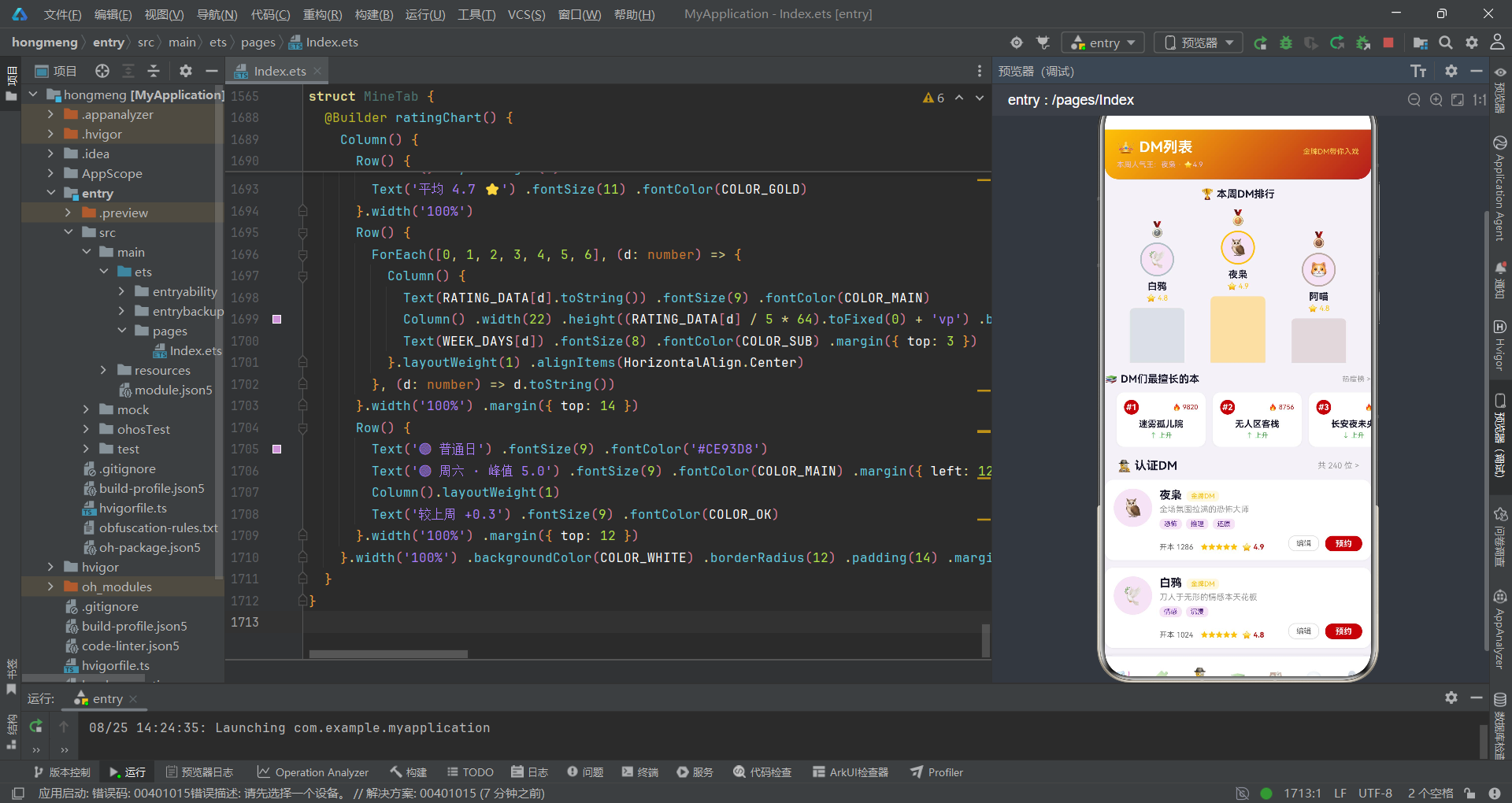
DM列表Tab集成了紫金风头部、排行领奖台、擅长剧本横滑和DM评分卡片列表。
@Component
struct DmTab {
  onBook: () => void = () => {}
  onEditDm: (d: DmItem) => void = (d: DmItem) => {}

  build() {
    Column() {
      this.dmHeader()
      Scroll() {
        Column() {
          this.rankPodium()
          this.dmSpecialtyRow()
          Row() {
            Text('🕵️ 认证DM').fontSize(16).fontWeight(FontWeight.Bold).fontColor(COLOR_DARK)
            Column().layoutWeight(1)
            Text('共 240 位 >').fontSize(11).fontColor(COLOR_SUB)
          }.width('100%').padding({ left: 16, right: 16, top: 16 })
          ForEach(DMS, (d: DmItem) => {
            this.dmCard(d)
          }, (d: DmItem) => d.id.toString())
        }.width('100%').padding({ bottom: 16 })
      }.layoutWeight(1).scrollBar(BarState.Off)
    }.width('100%').height('100%')
  }

  @Builder rankPodium() {
    Column() {
      Text('🏆 本周DM排行').fontSize(14).fontWeight(FontWeight.Bold).fontColor(COLOR_DARK).margin({ top: 12 })
      Row() {
        this.podiumItem(DMS[1], '🥈', '#B0BEC5', 74)
        this.podiumItem(DMS[0], '🥇', '#FFC107', 90)
        this.podiumItem(DMS[2], '🥉', '#BCAAA4', 60)
      }.width('100%').alignItems(VerticalAlign.Bottom).padding({ top: 12 })
    }.width('100%').padding({ left: 16, right: 16 })
  }

  @Builder podiumItem(d: DmItem, medal: string, color: string, barHeight: number) {
    Column() {
      Text(medal).fontSize(20)
      Column() {
        Text(d.avatar).fontSize(22)
      }.width(46).height(46).borderRadius(23).backgroundColor(COLOR_LIGHT)
        .border({ width: 2, color: color }).justifyContent(FlexAlign.Center).margin({ top: 6 })
      Text(d.name).fontSize(13).fontWeight(FontWeight.Bold).fontColor(COLOR_DARK).margin({ top: 6 })
      Text('⭐ ' + d.rating.toString()).fontSize(10).fontColor(COLOR_GOLD).margin({ top: 2 })
      Column().width(74).height(barHeight).backgroundColor(color).opacity(0.35)
        .borderRadius({ topLeft: 6, topRight: 6 }).margin({ top: 8 })
    }.layoutWeight(1).alignItems(HorizontalAlign.Center)
    .onClick(() => { this.onEditDm(d) })
  }

  @Builder dmCard(d: DmItem) {
    Row() {
      Column() {
        Text(d.avatar).fontSize(24)
      }.width(52).height(52).borderRadius(26).backgroundColor(COLOR_LIGHT)
        .justifyContent(FlexAlign.Center).alignSelf(ItemAlign.Start)
      Column() {
        Row() {
          Text(d.name).fontSize(15).fontWeight(FontWeight.Bold).fontColor(COLOR_DARK)
          Text(d.level).fontSize(9).fontColor(COLOR_GOLD).backgroundColor('#FFF8E1')
            .padding({ left: 6, right: 6, top: 2, bottom: 2 }).borderRadius(6).margin({ left: 6 })
        }.alignItems(VerticalAlign.Bottom)
        Text(d.desc).fontSize(11).fontColor(COLOR_SUB).margin({ top: 4 })
          .maxLines(1).textOverflow({ overflow: TextOverflow.Ellipsis })
        Row() {
          ForEach(d.specialty, (sp: string) => {
            Text(sp).fontSize(9).fontColor(COLOR_MAIN).backgroundColor(COLOR_LIGHT)
              .padding({ left: 6, right: 6, top: 2, bottom: 2 }).borderRadius(6).margin({ right: 6 })
          }, (sp: string) => sp)
        }.margin({ top: 6 })
        Row() {
          Text('开本 ' + d.games.toString()).fontSize(10).fontColor('#666666')
          Text(starsOf(5)).fontSize(10).fontColor(COLOR_GOLD).margin({ left: 10 })
          Text('⭐ ' + d.rating.toString()).fontSize(10).fontWeight(FontWeight.Bold)
            .fontColor(COLOR_BLOOD).margin({ left: 6 })
          Column().layoutWeight(1)
          Text('编辑').fontSize(10).fontColor('#666666')
            .padding({ left: 10, right: 10, top: 4, bottom: 4 }).borderRadius(10)
            .border({ width: 1, color: '#E0E0E0' }).margin({ right: 8 })
            .onClick(() => { this.onEditDm(d) })
          Text('预约').fontSize(11).fontWeight(FontWeight.Bold).fontColor(COLOR_WHITE)
            .padding({ left: 14, right: 14, top: 4, bottom: 4 }).backgroundColor(COLOR_BLOOD).borderRadius(10)
            .onClick(() => { this.onBook() })
        }.width('100%').margin({ top: 8 }).alignItems(VerticalAlign.Bottom)
      }.layoutWeight(1).alignItems(HorizontalAlign.Start).margin({ left: 10 })
    }.width('100%').backgroundColor(COLOR_WHITE).borderRadius(12)
      .padding(12).margin({ left: 16, right: 16, top: 10 }).shadow(CARD_SHADOW)
  }
}
DM列表Tab的排行领奖台是一个视觉亮点,通过podiumItem Builder接收DM对象、奖牌emoji、边框颜色和柱子高度四个参数,构建出金银铜三柱领奖台效果。中间的金牌DM柱子最高(90vp),左侧银牌74vp,右侧铜牌60vp,通过alignItems(VerticalAlign.Bottom)实现底部对齐。柱子使用opacity(0.35)半透明效果,与边框颜色一致。DM评分卡片是该Tab的核心列表项,包含头像、姓名+等级标签、一句话介绍(单行省略)、擅长类型标签行和底部统计操作行。底部操作行同时展示开本次数、五星符号(starsOf(5)固定渲染五星)、评分数字、编辑按钮和预约按钮。编辑按钮用边框样式形成次要操作,预约按钮用血色红背景白字形成主要操作,操作层级分明。
8.2 门店探店Tab
门店探店Tab集成了地图卡和门店卡片列表,是线下服务场景的核心入口。
@Component
struct StoresTab {
  onBook: () => void = () => {}

  build() {
    Column() {
      this.storesHeader()
      Scroll() {
        Column() {
          this.mapCard()
          Row() {
            Text('🏭 门店列表').fontSize(16).fontWeight(FontWeight.Bold).fontColor(COLOR_DARK)
            Column().layoutWeight(1)
            Text('按距离排序 ⌄').fontSize(11).fontColor(COLOR_MAIN)
          }.width('100%').padding({ left: 16, right: 16, top: 16 })
          ForEach(STORES, (st: StoreItem) => {
            this.storeCard(st)
          }, (st: StoreItem) => st.id.toString())
        }.width('100%').padding({ bottom: 16 })
      }.layoutWeight(1).scrollBar(BarState.Off)
    }.width('100%').height('100%')
  }

  @Builder mapCard() {
    Stack() {
      Column().width('100%').height(180).linearGradient(DARK_GRADIENT).borderRadius(14)
      Column().width('72%').height(2).backgroundColor('rgba(255,255,255,0.14)').position({ x: '14%', y: '38%' })
      Column().width(2).height('58%').backgroundColor('rgba(255,255,255,0.14)').position({ x: '46%', y: '16%' })
      Column().width(2).height('42%').backgroundColor('rgba(255,255,255,0.10)').position({ x: '74%', y: '40%' })
      Text('🏚️').fontSize(20).position({ x: '18%', y: '20%' })
      Text('🏮').fontSize(20).position({ x: '52%', y: '52%' })
      Text('🎭').fontSize(20).position({ x: '70%', y: '18%' })
      Text('🕯️').fontSize(20).position({ x: '32%', y: '60%' })
      Text('⚔️').fontSize(20).position({ x: '80%', y: '56%' })
      Column() {
        Text('🌙 今晚想去哪家店?').fontSize(12).fontWeight(FontWeight.Bold).fontColor(COLOR_WHITE)
        Text('附近 6 家门店 · 最近 0.8km').fontSize(9).fontColor('#B39DDB').margin({ top: 3 })
      }.alignItems(HorizontalAlign.Start).padding(10)
        .backgroundColor('rgba(26,26,46,0.82)').borderRadius(10).position({ x: '6%', y: '64%' })
      Text('🎯').fontSize(18).position({ x: '44%', y: '8%' })
    }.width('100%').height(180).borderRadius(14).margin({ top: 12 }).shadow(CARD_SHADOW)
  }

  @Builder storeCard(st: StoreItem) {
    Column() {
      Row() {
        Stack() {
          Column().width(84).height(64).linearGradient(DARK_GRADIENT).borderRadius(10)
          Text('🏚️').fontSize(28)
        }.width(84).height(64).borderRadius(10).alignSelf(ItemAlign.Start)
        Column() {
          Row() {
            Text(st.name).fontSize(14).fontWeight(FontWeight.Bold).fontColor(COLOR_DARK).maxLines(1)
            Column().layoutWeight(1)
            Text(st.distance).fontSize(10).fontColor(COLOR_MAIN).backgroundColor(COLOR_LIGHT)
              .padding({ left: 6, right: 6, top: 2, bottom: 2 }).borderRadius(8)
          }.width('100%')
          Row() {
            Text(starsOf(5)).fontSize(10).fontColor(COLOR_GOLD)
            Text('⭐ ' + st.rating.toString()).fontSize(10).fontWeight(FontWeight.Bold)
              .fontColor(COLOR_BLOOD).margin({ left: 4 })
            Text('🚪 ' + st.rooms.toString() + ' 间主题房').fontSize(10).fontColor('#666666').margin({ left: 10 })
          }.margin({ top: 4 })
          Text('📍 ' + st.address).fontSize(10).fontColor(COLOR_SUB).margin({ top: 4 }).maxLines(1)
          Row() {
            ForEach(st.tags, (t: string) => {
              Text(t).fontSize(9).fontColor(COLOR_MAIN).backgroundColor(COLOR_LIGHT)
                .padding({ left: 6, right: 6, top: 2, bottom: 2 }).borderRadius(6).margin({ right: 6 })
            }, (t: string) => t)
          }.margin({ top: 6 })
        }.layoutWeight(1).alignItems(HorizontalAlign.Start).margin({ left: 10 })
      }.width('100%')

      Row() {
        Text('¥' + st.price.toString()).fontSize(16).fontWeight(FontWeight.Bold).fontColor(COLOR_BLOOD)
        Text('/人起').fontSize(9).fontColor(COLOR_SUB).margin({ left: 2 })
        Text('门市价¥' + (st.price + 30).toString()).fontSize(9).fontColor('#BDBDBD')
          .decoration({ type: TextDecorationType.LineThrough }).margin({ left: 8 })
        Column().layoutWeight(1)
        Text('预约场次').fontSize(11).fontWeight(FontWeight.Bold).fontColor(COLOR_WHITE)
          .padding({ left: 14, right: 14, top: 5, bottom: 5 })
          .linearGradient(MYSTERY_GRADIENT).borderRadius(12)
          .onClick(() => { this.onBook() })
      }.width('100%').margin({ top: 10 }).alignItems(VerticalAlign.Bottom)
    }.width('100%').backgroundColor(COLOR_WHITE).borderRadius(12)
      .padding(12).margin({ left: 16, right: 16, top: 10 }).shadow(CARD_SHADOW)
  }
}
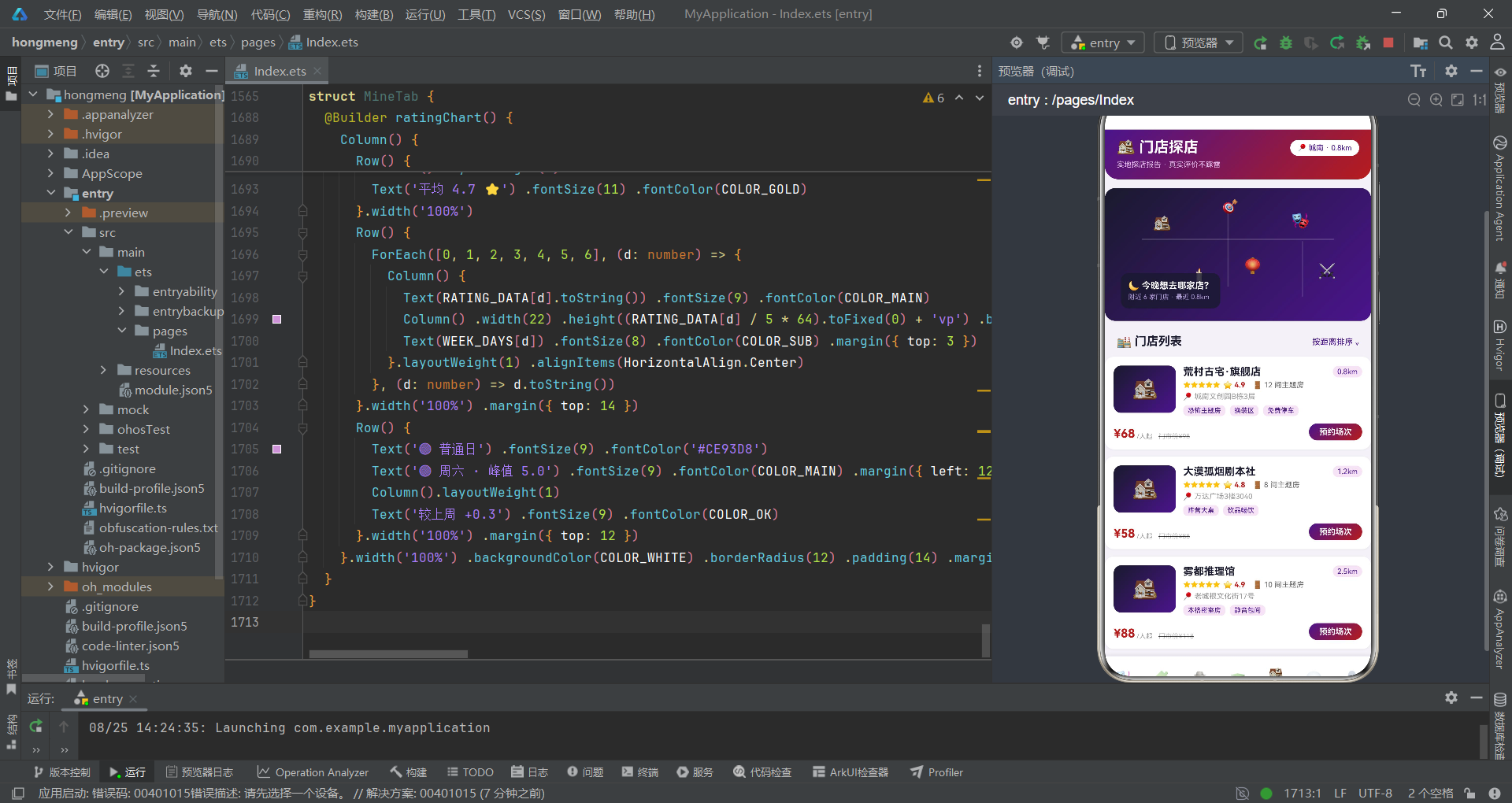
地图卡是该Tab的视觉亮点,使用Stack容器叠加暗夜渐变背景和多个position定位的元素来模拟地图效果。半透明白色线条(横线和竖线)模拟地图的网格线,5个emoji图标(🏚️🏮🎭🕯️⚔️)通过position定位散布在"地图"上表示门店位置,🎯图标定位在地图上方模拟用户当前位置。左下角的深色半透明信息卡显示门店统计。门店卡片列表的封面区使用DARK_GRADIENT暗夜渐变配合🏚️emoji,与地图卡保持一致的暗黑视觉风格。价格区域展示了门市价和拼局价的对比,门市价通过st.price + 30计算并使用删除线装饰,形成价格优惠的视觉暗示。"预约场次"按钮使用MYSTERY_GRADIENT渐变,触发onBook回调打开预约弹窗。
九、消息中心与个人中心Tab
8.1 消息中心Tab
消息中心Tab实现了消息分类切换和消息列表筛选。
@Component
struct MsgsTab {
  @State msgType: number = 0

  msgsOf(): MsgItem[] {
    return MSGS.filter((m: MsgItem) => m.kind === this.msgType)
  }

  unreadCount(kind: number): number {
    return MSGS.filter((m: MsgItem) => m.kind === kind && m.unread).length
  }

  build() {
    Column() {
      this.msgsHeader()
      this.msgSegBar()
      Scroll() {
        Column() {
          ForEach(this.msgsOf(), (m: MsgItem) => {
            this.msgRow(m)
          }, (m: MsgItem) => 't' + this.msgType.toString() + '-' + m.id.toString())
          Text('—— 没有更多消息了 ——').fontSize(10).fontColor('#CCCCCC').margin({ top: 20 })
        }.width('100%').padding({ bottom: 16 })
      }.layoutWeight(1).scrollBar(BarState.Off)
    }.width('100%').height('100%')
  }

  @Builder msgSegBar() {
    Row() {
      ForEach(MSG_TABS, (t: MsgTabMeta, i: number) => {
        Column() {
          Text(t.icon + ' ' + t.label).fontSize(12)
            .fontWeight(this.msgType === i ? FontWeight.Bold : FontWeight.Normal)
            .fontColor(this.msgType === i ? COLOR_WHITE : '#666666')
          if (this.unreadCount(i) > 0) {
            Text(this.unreadCount(i).toString()).fontSize(8).fontColor(COLOR_WHITE)
              .backgroundColor(COLOR_WARN).padding({ left: 5, right: 5, top: 1, bottom: 1 })
              .borderRadius(8).margin({ top: 3 })
          }
        }.layoutWeight(1).height(46).justifyContent(FlexAlign.Center)
          .alignItems(HorizontalAlign.Center)
          .backgroundColor(this.msgType === i ? COLOR_MAIN : COLOR_WHITE)
          .onClick(() => { this.msgType = i })
      }, (t: MsgTabMeta) => t.label)
    }.width('100%').margin({ top: 10, left: 16, right: 16 }).borderRadius(12).shadow(CARD_SHADOW)
  }

  @Builder msgRow(m: MsgItem) {
    Row() {
      Column() {
        Text(m.icon).fontSize(18)
      }.width(42).height(42).borderRadius(21)
        .backgroundColor(m.kind === 0 ? '#FFEBEE' : (m.kind === 1 ? COLOR_LIGHT : '#E8F5E9'))
        .justifyContent(FlexAlign.Center).alignSelf(ItemAlign.Start)
      Column() {
        Row() {
          Text(m.title).fontSize(13).fontWeight(FontWeight.Bold).fontColor(COLOR_DARK)
          Text('●').fontSize(8).fontColor(COLOR_WARN).margin({ left: 6 }).opacity(m.unread ? 1 : 0)
          Column().layoutWeight(1)
          Text(m.time).fontSize(9).fontColor(COLOR_SUB)
        }.width('100%')
        Text(m.content).fontSize(11).fontColor('#666666').margin({ top: 4 })
          .maxLines(2).textOverflow({ overflow: TextOverflow.Ellipsis })
      }.layoutWeight(1).alignItems(HorizontalAlign.Start).margin({ left: 10 })
      Text(' >').fontSize(12).fontColor('#CCCCCC').alignSelf(ItemAlign.Center)
    }.width('100%').backgroundColor(COLOR_WHITE).borderRadius(12)
      .padding(12).margin({ left: 16, right: 16, top: 8 }).shadow(CARD_SHADOW)
  }
}
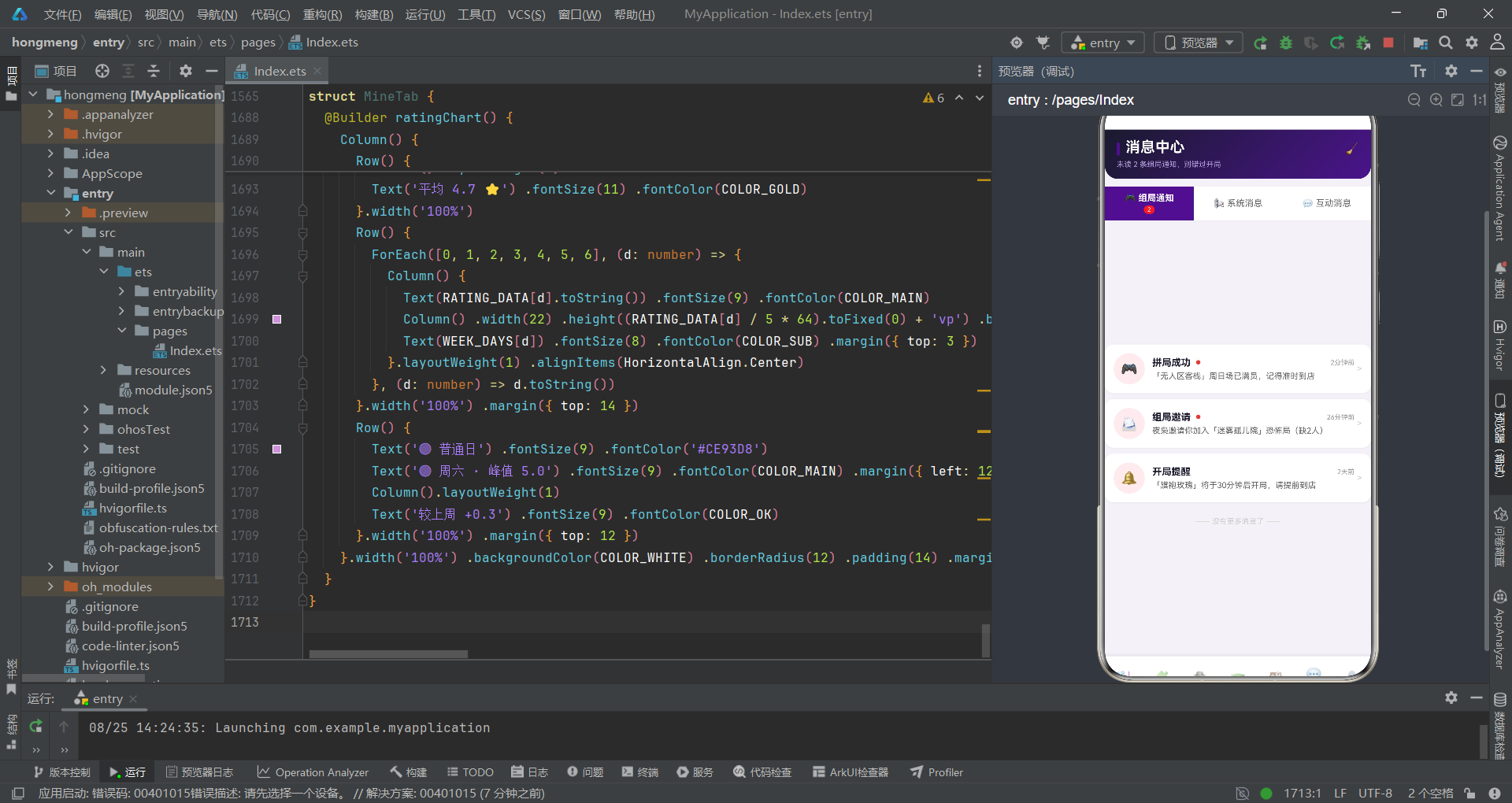
消息中心Tab通过@State msgType管理当前选中的消息分类(0=组局通知、1=系统消息、2=互动消息),msgsOf()方法使用Array.filter根据当前分类筛选消息列表,unreadCount()方法计算指定分类的未读消息数。消息分类切换栏使用三列等分布局,激活分类用品牌紫背景白字加粗,非激活用白色背景灰色文字。未读消息数通过红色COLOR_WARN背景的小标签显示在分类文字下方。消息行的头像背景色根据kind值差异化设置:组局通知用浅红、系统消息用浅紫、互动消息用浅绿,形成视觉分类提示。未读消息标题旁的红色圆点通过opacity(m.unread ? 1 : 0)控制显隐。
8.2 个人中心Tab
个人中心Tab集成了渐变个人头部、组局记录横滑、剧本收藏、功能宫格和DM评分柱状图。
@Component
struct MineTab {
  build() {
    Column() {
      this.mineHeader()
      Scroll() {
        Column() {
          this.myGroupsRow()
          this.favSection()
          this.funcGrid()
          this.ratingChart()
        }.width('100%').padding({ bottom: 16 })
      }.layoutWeight(1).scrollBar(BarState.Off)
    }.width('100%').height('100%')
  }

  @Builder mineHeader() {
    Column() {
      Row() {
        Column() {
          Text('🕵️').fontSize(30)
        }.width(62).height(62).borderRadius(31)
          .backgroundColor('rgba(255,255,255,0.22)')
          .border({ width: 2, color: COLOR_GOLD }).justifyContent(FlexAlign.Center)
        Column() {
          Row() {
            Text('夜行侦探').fontSize(18).fontWeight(FontWeight.Bold).fontColor(COLOR_WHITE)
            Text('VIP3').fontSize(9).fontWeight(FontWeight.Bold).fontColor(COLOR_DARK)
              .backgroundColor(COLOR_GOLD).padding({ left: 6, right: 6, top: 2, bottom: 2 })
              .borderRadius(6).margin({ left: 8 })
          }.alignItems(VerticalAlign.Bottom)
          Text('ID: 881726 · 加入 428 天').fontSize(10).fontColor('#E1BEE7').margin({ top: 4 })
        }.alignItems(HorizontalAlign.Start).margin({ left: 12 })
        Column().layoutWeight(1)
        Text('⚙️').fontSize(18).fontColor(COLOR_WHITE)
      }.width('100%').alignItems(VerticalAlign.Bottom)

      Row() {
        Column() {
          Text('23').fontSize(17).fontWeight(FontWeight.Bold).fontColor(COLOR_GOLD)
          Text('拼局').fontSize(10).fontColor('#E1BEE7').margin({ top: 2 })
        }.layoutWeight(1).alignItems(HorizontalAlign.Center)
        Column().width(1).height(26).backgroundColor('rgba(255,255,255,0.25)')
        Column() {
          Text('45').fontSize(17).fontWeight(FontWeight.Bold).fontColor(COLOR_GOLD)
          Text('收藏').fontSize(10).fontColor('#E1BEE7').margin({ top: 2 })
        }.layoutWeight(1).alignItems(HorizontalAlign.Center)
        Column().width(1).height(26).backgroundColor('rgba(255,255,255,0.25)')
        Column() {
          Text('4.9').fontSize(17).fontWeight(FontWeight.Bold).fontColor(COLOR_GOLD)
          Text('我的评分').fontSize(10).fontColor('#E1BEE7').margin({ top: 2 })
        }.layoutWeight(1).alignItems(HorizontalAlign.Center)
        Column().width(1).height(26).backgroundColor('rgba(255,255,255,0.25)')
        Column() {
          Text('6').fontSize(17).fontWeight(FontWeight.Bold).fontColor(COLOR_GOLD)
          Text('优惠券').fontSize(10).fontColor('#E1BEE7').margin({ top: 2 })
        }.layoutWeight(1).alignItems(HorizontalAlign.Center)
      }.width('100%').padding({ top: 18, bottom: 6 })
    }.width('100%').linearGradient(MYSTERY_GRADIENT).padding({ left: 16, right: 16, top: 24, bottom: 12 })
  }

  @Builder ratingChart() {
    Column() {
      Row() {
        Text('📊 我的DM评分 · 近7天').fontSize(14).fontWeight(FontWeight.Bold).fontColor(COLOR_DARK)
        Column().layoutWeight(1)
        Text('平均 4.7 ⭐').fontSize(11).fontColor(COLOR_GOLD)
      }.width('100%')
      Row() {
        ForEach([0, 1, 2, 3, 4, 5, 6], (d: number) => {
          Column() {
            Text(RATING_DATA[d].toString()).fontSize(9).fontColor(COLOR_MAIN)
            Column().width(22).height((RATING_DATA[d] / 5 * 64).toFixed(0) + 'vp')
              .backgroundColor(d === 4 ? COLOR_MAIN : '#CE93D8')
              .borderRadius({ topLeft: 4, topRight: 4 })
            Text(WEEK_DAYS[d]).fontSize(8).fontColor(COLOR_SUB).margin({ top: 3 })
          }.layoutWeight(1).alignItems(HorizontalAlign.Center)
        }, (d: number) => d.toString())
      }.width('100%').margin({ top: 14 })
      Row() {
        Text('🟣 普通日').fontSize(9).fontColor('#CE93D8')
        Text('🟣 周六 · 峰值 5.0').fontSize(9).fontColor(COLOR_MAIN).margin({ left: 12 })
        Column().layoutWeight(1)
        Text('较上周 +0.3').fontSize(9).fontColor(COLOR_OK)
      }.width('100%').margin({ top: 12 })
    }.width('100%').backgroundColor(COLOR_WHITE).borderRadius(12)
      .padding(14).margin({ left: 16, right: 16, top: 14 }).shadow(CARD_SHADOW)
  }
}
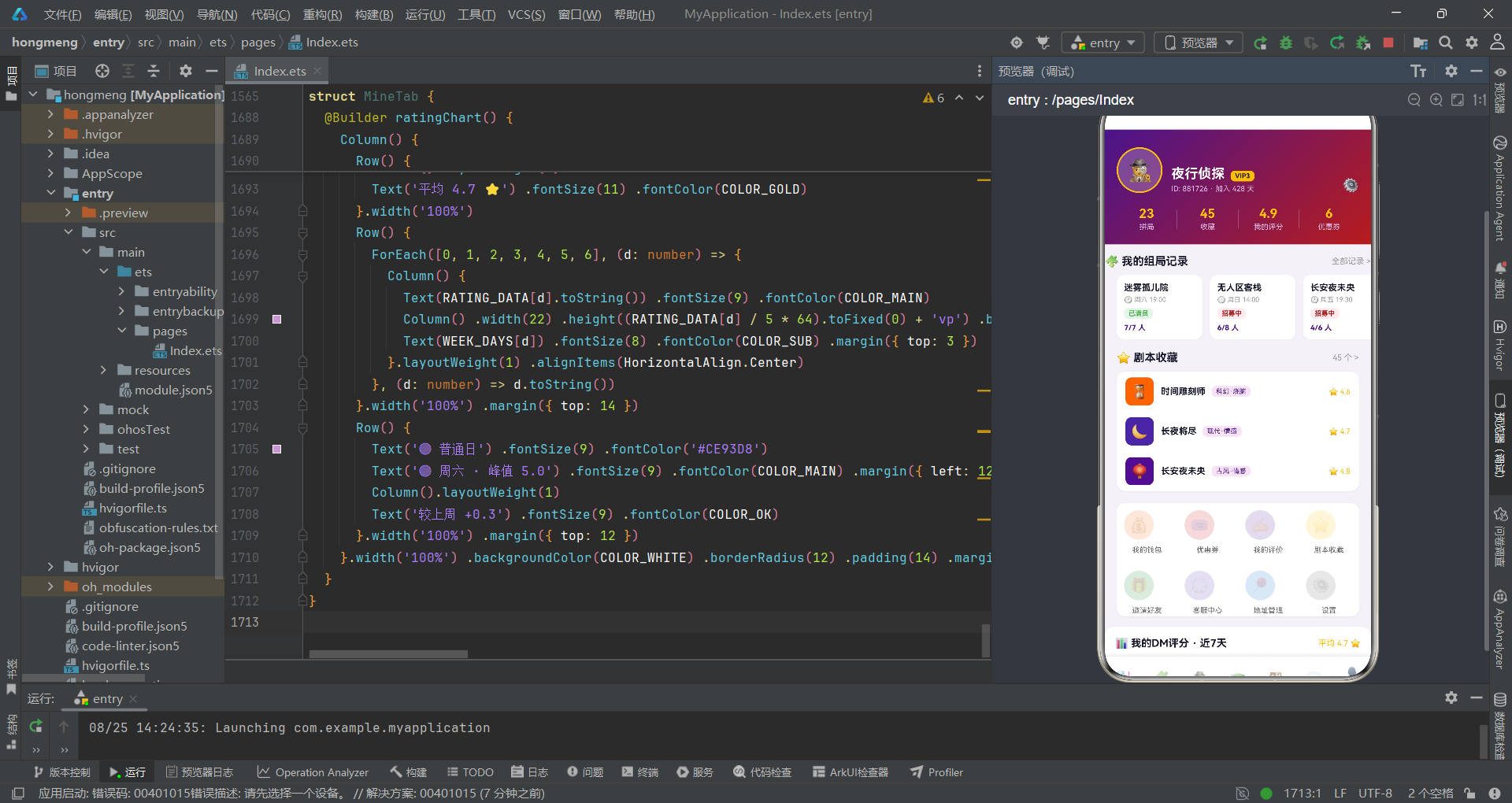
个人中心Tab的头部使用MYSTERY_GRADIENT悬疑紫红渐变背景,侦探emoji头像用暗金色2px边框圆形包裹,VIP3等级标签用暗金背景暗色文字。四列统计区(拼局、收藏、评分、优惠券)使用等分布局,列间用1px半透明白色竖线分隔,数据用暗金色加粗展示。DM评分柱状图使用7天数据(RATING_DATA数组),柱子高度通过RATING_DATA[d] / 5 * 64计算(评分5分制映射到64vp高度),周六(索引4)的柱子用品牌紫深色COLOR_MAIN突出峰值5.0,其余用浅紫#CE93D8。底部图例行展示了普通日和峰值的色彩说明,以及周环比数据。
十、技术点对比
| 技术维度 | 实现方案 | 特点分析 | 适用场景 |
|---|---|---|---|
| 状态管理 | @State + @Observed | 十六个@State变量统一管理弹窗状态和选中数据 | 多弹窗复杂交互 |
| 组件通信 | 回调函数+状态初始化 | 回调触发时同步完成数据初始化赋值 | 弹窗表单预填充 |
| 状态字典 | Record<string, interface> | 字符串key映射到interface值的视觉配置 | 多状态视觉管理 |
| 数据模型 | @Observed全参数constructor | 所有属性通过构造函数一次性赋值,避免undefined | 强类型数据初始化 |
| 弹窗布局 | FlexAlign.End/Center | 底部抽屉用End,居中弹窗用Center | 多弹窗样式区分 |
| 标签换行 | Flex(FlexWrap.Wrap) | 自动换行的标签胶囊列表 | 角色选择、类型筛选 |
| 步进交互 | onClick+条件判断 | 加减按钮通过条件判断限制范围 | 人数选择器 |
| 领奖台 | Row+Bottom对齐+动态高度 | 三柱不同高度的领奖台视觉效果 | 排行榜展示 |
| 地图模拟 | Stack+position定位 | 多个定位元素叠加模拟地图场景 | 简易地图可视化 |
| 数据可视化 | Column动态高度vp | 评分值映射到vp高度渲染柱状图 | 统计图表展示 |
安装DevEco Studio程序

选择目标安装目录:

设置环境变量,但是需要重启一下:

新建一个空白模板:

设置API为24的模板项目:
初始化项目,自动下载相关依赖:

完整代码:
/**
 * ============================================================
 *  拼多多风格 · 剧本杀拼局(单文件 ArkTS 页面)
 *  场景:剧本杀组局 + DM预约 + 门店探店平台
 *  风格:悬疑紫 #4A148C / 血色红 #B71C1C / 暗金 #FFC107 / 暗底 #1A1A2E
 *  结构:interface → @Observed 数据模型 → 设计令牌 → 全局数据 →
 *        工具函数 → Tab枚举 → @Entry 入口 → 各Tab组件 → 5个弹框
 * ============================================================
 */

// ==================== interface 定义 ====================

/** 组局状态元信息 */
interface StatusMeta {
  label: string
  color: string
  bg: string
}

/** 功能宫格项元信息 */
interface FuncMeta {
  icon: string
  label: string
  color: string
}

/** 消息分类元信息 */
interface MsgTabMeta {
  label: string
  icon: string
}

// ==================== @Observed 数据模型 ====================

/** 剧本 */
@Observed export class ScriptItem {
  id: number
  name: string
  type: string
  players: string
  difficulty: number
  duration: string
  cover: string
  bgColor: string
  rating: number
  tags: string[]
  desc: string

  constructor(id: number, name: string, type: string, players: string, difficulty: number,
    duration: string, cover: string, bgColor: string, rating: number, tags: string[], desc: string) {
    this.id = id
    this.name = name
    this.type = type
    this.players = players
    this.difficulty = difficulty
    this.duration = duration
    this.cover = cover
    this.bgColor = bgColor
    this.rating = rating
    this.tags = tags
    this.desc = desc
  }
}

/** 组局 */
@Observed export class GroupItem {
  id: number
  scriptName: string
  store: string
  time: string
  total: number
  current: number
  price: number
  status: string
  avatars: string[]

  constructor(id: number, scriptName: string, store: string, time: string, total: number,
    current: number, price: number, status: string, avatars: string[]) {
    this.id = id
    this.scriptName = scriptName
    this.store = store
    this.time = time
    this.total = total
    this.current = current
    this.price = price
    this.status = status
    this.avatars = avatars
  }
}

/** DM(主持人) */
@Observed export class DmItem {
  id: number
  name: string
  avatar: string
  rating: number
  games: number
  level: string
  specialty: string[]
  desc: string

  constructor(id: number, name: string, avatar: string, rating: number, games: number,
    level: string, specialty: string[], desc: string) {
    this.id = id
    this.name = name
    this.avatar = avatar
    this.rating = rating
    this.games = games
    this.level = level
    this.specialty = specialty
    this.desc = desc
  }
}

/** 剧本类型 */
@Observed export class TypeItem {
  id: number
  name: string
  icon: string
  count: number
  color: string

  constructor(id: number, name: string, icon: string, count: number, color: string) {
    this.id = id
    this.name = name
    this.icon = icon
    this.count = count
    this.color = color
  }
}

/** 门店 */
@Observed export class StoreItem {
  id: number
  name: string
  distance: string
  rating: number
  address: string
  price: number
  rooms: number
  tags: string[]

  constructor(id: number, name: string, distance: string, rating: number, address: string,
    price: number, rooms: number, tags: string[]) {
    this.id = id
    this.name = name
    this.distance = distance
    this.rating = rating
    this.address = address
    this.price = price
    this.rooms = rooms
    this.tags = tags
  }
}

/** 消息 */
@Observed export class MsgItem {
  id: number
  kind: number
  title: string
  content: string
  time: string
  icon: string
  unread: boolean

  constructor(id: number, kind: number, title: string, content: string,
    time: string, icon: string, unread: boolean) {
    this.id = id
    this.kind = kind
    this.title = title
    this.content = content
    this.time = time
    this.icon = icon
    this.unread = unread
  }
}

/** 剧本热度排行 */
@Observed export class RankItem {
  id: number
  name: string
  heat: number
  trend: string

  constructor(id: number, name: string, heat: number, trend: string) {
    this.id = id
    this.name = name
    this.heat = heat
    this.trend = trend
  }
}

// ==================== 设计令牌 ====================

const MYSTERY_GRADIENT: LinearGradientOptions = {
  angle: 135,
  colors: [['#4A148C', 0.0], ['#B71C1C', 1.0]]
}

const DARK_GRADIENT: LinearGradientOptions = {
  angle: 135,
  colors: [['#1A1A2E', 0.0], ['#4A148C', 1.0]]
}

const GOLD_GRADIENT: LinearGradientOptions = {
  angle: 135,
  colors: [['#FFC107', 0.0], ['#B71C1C', 1.0]]
}

const COLOR_MAIN: string = '#4A148C'
const COLOR_BLOOD: string = '#B71C1C'
const COLOR_GOLD: string = '#FFC107'
const COLOR_DARK: string = '#1A1A2E'
const COLOR_LIGHT: string = '#F3E5F5'
const COLOR_WHITE: string = '#FFFFFF'
const COLOR_WARN: string = '#E53935'
const COLOR_OK: string = '#4CAF50'
const COLOR_TEXT: string = '#1A1A2E'
const COLOR_SUB: string = '#999999'
const CARD_SHADOW: ShadowOptions = { radius: 6, color: '#0D000000', offsetY: 2 }

/** 组局状态字典(Record 值为 interface) */
const STATUS_META: Record<string, StatusMeta> = {
  'recruit': { label: '招募中', color: '#B71C1C', bg: '#FFEBEE' },
  'ready': { label: '即将开局', color: '#4A148C', bg: '#F3E5F5' },
  'full': { label: '已满员', color: '#4CAF50', bg: '#E8F5E9' }
}

// ==================== 工具函数 ====================

/** 难度星级(1-5) */
function starsOf(level: number): string {
  let s: string = ''
  for (let i = 0; i < 5; i++) {
    s += i < level ? '★' : '☆'
  }
  return s
}

/** 进度百分比 */
function pctOf(cur: number, total: number): number {
  if (total <= 0) {
    return 0
  }
  return Math.round(cur / total * 100)
}

// ==================== 底部Tab枚举 ====================

enum MainTab {
  SQUARE,
  GROUP,
  DM,
  TYPE,
  STORE,
  MSG,
  MINE
}

// ==================== 全局数据:剧本(12条) ====================

const SCRIPTS: ScriptItem[] = [
  new ScriptItem(1, '长安夜未央', '古风·情感', '6人', 4, '4.5h', '🏮', '#4A148C', 4.8, ['沉浸', '换装'], '盛唐长安上元夜,一场未了的情缘'),
  new ScriptItem(2, '迷雾孤儿院', '恐怖·惊悚', '7人', 5, '5h', '🕯️', '#1A1A2E', 4.9, ['硬核', '吓哭了'], '废弃孤儿院里的第七个孩子'),
  new ScriptItem(3, '无人区客栈', '武侠·阵营', '8人', 4, '6h', '⚔️', '#B71C1C', 4.7, ['阵营', '机制'], '大漠孤烟直,客栈里谁是内鬼'),
  new ScriptItem(4, '时间雕刻师', '科幻·烧脑', '5人', 5, '4h', '⏳', '#FF6F00', 4.6, ['高能', '反转'], '三次时间循环里藏着同一个凶手'),
  new ScriptItem(5, '旗袍玫瑰', '民国·情感', '6人', 3, '4h', '🌹', '#AD1457', 4.5, ['催泪', '女性'], '百乐门歌女的最后一封信'),
  new ScriptItem(6, '雾都疑云', '推理·本格', '6人', 5, '5h', '🎩', '#37474F', 4.9, ['本格', '密室'], '伦敦浓雾中的开膛手再临'),
  new ScriptItem(7, '山神祭', '神话·机制', '7人', 4, '5h', '⛩️', '#6A1B9A', 4.4, ['欢乐', '阵营'], '村庄祭祀夜的献祭游戏'),
  new ScriptItem(8, '午夜电台', '都市·惊悚', '5人', 4, '3.5h', '📻', '#8E0000', 4.3, ['短频', '刺激'], '深夜电台的最后一通来电'),
  new ScriptItem(9, '谜屿沉船', '海战·推理', '8人', 3, '4.5h', '🚢', '#1565C0', 4.2, ['新手', '欢乐'], '巨轮沉没前的十二个小时'),
  new ScriptItem(10, '长夜将尽', '现代·情感', '6人', 3, '4h', '🌙', '#4527A0', 4.7, ['治愈', '哭崩'], '谢谢你陪我走到天亮'),
  new ScriptItem(11, '龙城飞将', '历史·还原', '7人', 5, '6h', '🐉', '#7B0000', 4.8, ['还原', '史诗'], '十二道金牌背后的惊天真相'),
  new ScriptItem(12, '糖果屋童话', '欢乐·变格', '5人', 2, '3h', '🍬', '#FF8F00', 4.1, ['萌新', '爆笑'], '童话镇连环失窃案调查')
]

// ==================== 全局数据:剧本类型(6种) ====================

const TYPE_LIST: TypeItem[] = [
  new TypeItem(1, '情感本', '❤️', 128, '#B71C1C'),
  new TypeItem(2, '恐怖本', '👻', 96, '#1A1A2E'),
  new TypeItem(3, '推理本', '🔍', 156, '#4A148C'),
  new TypeItem(4, '阵营本', '⚔️', 74, '#FF6F00'),
  new TypeItem(5, '机制本', '🎲', 88, '#4527A0'),
  new TypeItem(6, '欢乐本', '🎉', 112, '#2E7D32')
]

// ==================== 全局数据:剧本热度排行(8条) ====================

const RANK_LIST: RankItem[] = [
  new RankItem(1, '迷雾孤儿院', 9820, '↑'),
  new RankItem(2, '无人区客栈', 8756, '↑'),
  new RankItem(3, '长安夜未央', 8102, '↓'),
  new RankItem(4, '雾都疑云', 7345, '↑'),
  new RankItem(5, '龙城飞将', 6521, '↓'),
  new RankItem(6, '旗袍玫瑰', 5890, '↑'),
  new RankItem(7, '时间雕刻师', 5234, '↑'),
  new RankItem(8, '山神祭', 4987, '↓')
]

// ==================== 全局数据:我的功能宫格(8项) ====================

const MY_FUNCS: FuncMeta[] = [
  { icon: '💰', label: '我的钱包', color: '#FF6F00' },
  { icon: '🎟️', label: '优惠券', color: '#B71C1C' },
  { icon: '✍️', label: '我的评价', color: '#4A148C' },
  { icon: '⭐', label: '剧本收藏', color: '#FFC107' },
  { icon: '🎁', label: '邀请好友', color: '#2E7D32' },
  { icon: '🎧', label: '客服中心', color: '#4527A0' },
  { icon: '📍', label: '地址管理', color: '#1565C0' },
  { icon: '⚙️', label: '设置', color: '#616161' }
]

// ==================== 全局数据:组局(6条) ====================

const GROUPS: GroupItem[] = [
  new GroupItem(1, '迷雾孤儿院', '荒村古宅·旗舰店', '周六 19:00', 7, 7, 88, 'full',
    ['🕵️', '🧙', '🦊', '👑', '🎭', '🧛', '🧟']),
  new GroupItem(2, '无人区客栈', '大漠孤烟剧本社', '周日 14:00', 8, 6, 78, 'recruit',
    ['🕵️', '🧙', '🦊', '👑', '🎭', '🧛']),
  new GroupItem(3, '长安夜未央', '老城根文化街馆', '周五 19:30', 6, 4, 68, 'recruit',
    ['🕵️', '🧙', '🦊', '👑']),
  new GroupItem(4, '雾都疑云', '雾都推理馆', '周六 13:30', 6, 6, 98, 'ready',
    ['🕵️', '🧙', '🦊', '👑', '🎭', '🧛']),
  new GroupItem(5, '龙城飞将', '城南客栈', '周日 18:00', 7, 3, 108, 'recruit',
    ['🕵️', '🧙', '🦊']),
  new GroupItem(6, '旗袍玫瑰', '百乐门怀旧馆', '周六 20:00', 6, 5, 88, 'ready',
    ['🕵️', '🧙', '🦊', '👑', '🎭'])
]

// ==================== 全局数据:DM(8位) ====================

const DMS: DmItem[] = [
  new DmItem(1, '夜枭', '🦉', 4.9, 1286, '金牌DM', ['恐怖', '推理', '还原'], '全场氛围拉满的恐怖大师'),
  new DmItem(2, '白鸦', '🕊️', 4.8, 1024, '金牌DM', ['情感', '沉浸'], '刀人于无形的情感本天花板'),
  new DmItem(3, '阿喵', '🐱', 4.8, 976, '银牌DM', ['欢乐', '萌新'], '气氛担当,欢乐本之王'),
  new DmItem(4, '老K', '🎩', 4.7, 864, '银牌DM', ['阵营', '机制'], '算无遗策的阵营操盘手'),
  new DmItem(5, '月见', '🌙', 4.7, 753, '银牌DM', ['古风', '情感'], '古风沉浸戏骨,台词十级'),
  new DmItem(6, '铁蛋', '🪓', 4.6, 688, '铜牌DM', ['恐怖', '刺激'], '吓哭过37个玩家的男人'),
  new DmItem(7, '小鹿', '🦌', 4.5, 512, '铜牌DM', ['新手', '治愈'], '新手友好,耐心满分'),
  new DmItem(8, '灰烬', '🔥', 4.5, 467, '铜牌DM', ['硬核', '还原'], '细节控的噩梦,硬核之神')
]

// ==================== 全局数据:门店(6家) ====================

const STORES: StoreItem[] = [
  new StoreItem(1, '荒村古宅·旗舰店', '0.8km', 4.9, '城南文创园B栋3层', 68, 12, ['恐怖主题房', '换装区', '免费停车']),
  new StoreItem(2, '大漠孤烟剧本社', '1.2km', 4.8, '万达广场3楼3040', 58, 8, ['阵营大桌', '饮品畅饮']),
  new StoreItem(3, '雾都推理馆', '2.5km', 4.9, '老城根文化街17号', 88, 10, ['本格密室房', '静音包间']),
  new StoreItem(4, '百乐门怀旧馆', '3.8km', 4.7, '中山路11号老洋房', 78, 9, ['民国换装', '演出厅']),
  new StoreItem(5, '谜屿空间', '5.2km', 4.6, '高新区创业大厦2层', 48, 6, ['新本快', '学生优惠']),
  new StoreItem(6, '山神祭·实景店', '6.4km', 4.8, '河东民俗村东门', 98, 15, ['实景搜证', '大型阵营'])
]

// ==================== 全局数据:消息(7条) ====================

const MSGS: MsgItem[] = [
  new MsgItem(1, 0, '拼局成功', '「无人区客栈」周日场已满员,记得准时到店', '2分钟前', '🎮', true),
  new MsgItem(2, 0, '组局邀请', '夜枭邀请你加入「迷雾孤儿院」恐怖局(缺2人)', '26分钟前', '📨', true),
  new MsgItem(3, 0, '开局提醒', '「旗袍玫瑰」将于30分钟后开局,请提前到店', '2天前', '🔔', false),
  new MsgItem(4, 1, '预约提醒', '你预约的DM「月见」今晚19:30有空档可锁定', '3小时前', '⏰', false),
  new MsgItem(5, 1, '系统公告', '本周新本上架:龙城飞将(城限)· 首周8折', '昨天', '📢', false),
  new MsgItem(6, 2, '点赞通知', '白鸦赞了你的探店笔记「荒村古宅」', '1小时前', '👍', false),
  new MsgItem(7, 2, '新粉丝', '小鹿关注了你,快去回关一起拼局吧', '昨天', '🌟', false)
]

// ==================== 全局数据:弹框与图表配置 ====================

/** 组局角色 */
const ROLES: string[] = ['冷面侦探', '红衣女子', '说书人', '更夫', '绣娘', '账房先生']

/** 预约场次 */
const SESSIONS: string[] = ['14:00 午场', '17:30 黄昏场', '20:00 夜场', '22:30 深夜场']

/** 头像emoji池 */
const EMOJI_AVATARS: string[] = ['🎭', '🕵️', '🧙', '🦊', '👑', '🧛']

/** 消息分类 */
const MSG_TABS: MsgTabMeta[] = [
  { label: '组局通知', icon: '🎮' },
  { label: '系统消息', icon: '📢' },
  { label: '互动消息', icon: '💬' }
]

/** 剧本详情角色介绍 */
const DETAIL_ROLES: string[] = ['冷面侦探(男)· 全程视角', '红衣女子(女)· 情感线核心', '说书人(不限)· 信息枢纽', '更夫(男)· 关键证人', '绣娘(女)· 隐藏支线']

/** DM评分图表:近7天 */
const RATING_DATA: number[] = [4.2, 4.5, 4.8, 4.6, 4.9, 5.0, 4.7]

/** 近7天星期 */
const WEEK_DAYS: string[] = ['周一', '周二', '周三', '周四', '周五', '周六', '周日']

/** 筛选模式 */
const FILTER_MODES: string[] = ['全部', '最新上架', '高分好评']

// ==================== @Entry 入口组件 ====================

@Entry
@Component
struct MurderMysteryPage {
  @State activeTab: MainTab = MainTab.SQUARE
  // 弹框开关
  @State showInvite: boolean = false
  @State showBooking: boolean = false
  @State showDelete: boolean = false
  @State showEditDm: boolean = false
  @State showDetail: boolean = false
  // 选中数据
  @State selectedScript: ScriptItem = SCRIPTS[0]
  @State selectedGroup: GroupItem = GROUPS[0]
  @State editingDm: DmItem = DMS[0]
  // 组局邀请弹框
  @State selectedRole: string = ROLES[0]
  // 剧本预约弹框
  @State selectedSession: number = 0
  @State bookCount: number = 4
  @State selectedDmIdx: number = 0
  // 编辑DM弹框
  @State editName: string = ''
  @State editDesc: string = ''
  @State editTypeIdx: number = 0
  @State editAvatar: string = '🎭'

  build() {
    Stack() {
      Column() {
        if (this.activeTab === MainTab.SQUARE) {
          SquareTab({
            onOpenDetail: (s: ScriptItem) => {
              this.selectedScript = s
              this.showDetail = true
            }
          })
        } else if (this.activeTab === MainTab.GROUP) {
          GroupsTab({
            onInvite: (g: GroupItem) => {
              this.selectedGroup = g
              this.showInvite = true
            },
            onDelete: (g: GroupItem) => {
              this.selectedGroup = g
              this.showDelete = true
            }
          })
        } else if (this.activeTab === MainTab.DM) {
          DmTab({
            onBook: () => {
              this.showBooking = true
            },
            onEditDm: (d: DmItem) => {
              this.editingDm = d
              this.editName = d.name
              this.editDesc = d.desc
              this.editAvatar = d.avatar
              this.showEditDm = true
            }
          })
        } else if (this.activeTab === MainTab.TYPE) {
          TypesTab({
            onOpenDetail: (s: ScriptItem) => {
              this.selectedScript = s
              this.showDetail = true
            }
          })
        } else if (this.activeTab === MainTab.STORE) {
          StoresTab({
            onBook: () => {
              this.showBooking = true
            }
          })
        } else if (this.activeTab === MainTab.MSG) {
          MsgsTab()
        } else {
          MineTab()
        }
        this.bottomTabBar()
      }.width('100%') .height('100%')

      if (this.showInvite) {
        this.inviteModal()
      }
      if (this.showBooking) {
        this.bookingModal()
      }
      if (this.showDelete) {
        this.deleteModal()
      }
      if (this.showEditDm) {
        this.editDmModal()
      }
      if (this.showDetail) {
        this.detailModal()
      }
    }.width('100%') .height('100%') .backgroundColor('#F4F1F8')
  }

  // ---------- 底部Tab栏 ----------
  @Builder bottomTabBar() {
    Column() {
      Divider() .color('#EDE7F6') .strokeWidth(1)
      Row() {
        this.bottomTabItem('🎭', '剧本广场', MainTab.SQUARE)
        this.bottomTabItem('🧩', '组局拼车', MainTab.GROUP)
        this.bottomTabItem('🕵️', 'DM列表', MainTab.DM)
        this.bottomTabItem('📚', '剧本类型', MainTab.TYPE)
        this.bottomTabItem('🏚️', '门店探店', MainTab.STORE)
        this.bottomTabItem('💬', '消息', MainTab.MSG)
        this.bottomTabItem('👤', '我的', MainTab.MINE)
      }.width('100%') .height(54) .alignItems(VerticalAlign.Bottom)
    }.width('100%') .backgroundColor(COLOR_WHITE) .shadow({ radius: 10, color: '#14000000', offsetY: -2 })
  }

  @Builder bottomTabItem(icon: string, label: string, tab: MainTab) {
    Column() {
      Text(icon) .fontSize(18) .fontColor(COLOR_DARK) .opacity(this.activeTab === tab ? 1.0 : 0.45)
      Text(label) .fontSize(8) .fontColor(this.activeTab === tab ? COLOR_MAIN : '#999999') .fontWeight(this.activeTab === tab ? FontWeight.Bold : FontWeight.Normal) .margin({ top: 1 })
      if (this.activeTab === tab) {
        Column() .width(14) .height(3) .backgroundColor(COLOR_MAIN) .borderRadius(2) .margin({ top: 2 })
      }
    }.layoutWeight(1) .alignItems(HorizontalAlign.Center) .padding({ top: 4, bottom: 4 })
    .onClick(() => {
      this.activeTab = tab
    })
  }

  // ---------- 通用遮罩 ----------
  @Builder modalOverlay(onClose: () => void) {
    Column() .width('100%') .height('100%') .backgroundColor('rgba(0,0,0,0.5)') .onClick(onClose)
  }

  // ---------- 弹框1:组局邀请(底部抽屉样式) ----------
  @Builder inviteModal() {
    Column() {
      this.modalOverlay(() => {
        this.showInvite = false
      })
      Column() {
        Column() .width(36) .height(4) .borderRadius(2) .backgroundColor('#E0E0E0') .margin({ top: 10 })
        Text('🎮 发起组局邀请') .fontSize(18) .fontWeight(FontWeight.Bold) .fontColor(COLOR_DARK) .margin({ top: 12 })
        // 组局信息卡
        Row() {
          Column() {
            Text('🕯️') .fontSize(24)
          }.width(44) .height(44) .borderRadius(10) .backgroundColor('#1A1A2E') .justifyContent(FlexAlign.Center)
          Column() {
            Text(this.selectedGroup.scriptName) .fontSize(15) .fontWeight(FontWeight.Bold) .fontColor(COLOR_DARK)
            Text('📍 ' + this.selectedGroup.store) .fontSize(10) .fontColor(COLOR_SUB) .margin({ top: 2 })
          }.alignItems(HorizontalAlign.Start) .margin({ left: 10 })
          Column().layoutWeight(1)
          Text(STATUS_META[this.selectedGroup.status].label) .fontSize(10) .fontColor(STATUS_META[this.selectedGroup.status].color) .backgroundColor(STATUS_META[this.selectedGroup.status].bg) .padding({ left: 8, right: 8, top: 3, bottom: 3 }) .borderRadius(8)
        }.width('100%') .padding(10) .backgroundColor('#F7F4FB') .borderRadius(12) .margin({ top: 14 })

        Text('选择你的角色') .fontSize(13) .fontWeight(FontWeight.Bold) .fontColor(COLOR_DARK) .margin({ top: 16 })
        Flex({ wrap: FlexWrap.Wrap }) {
          ForEach(ROLES, (r: string) => {
            Text(r) .fontSize(12) .fontColor(this.selectedRole === r ? COLOR_WHITE : COLOR_MAIN) .backgroundColor(this.selectedRole === r ? COLOR_MAIN : COLOR_LIGHT) .padding({ left: 14, right: 14, top: 6, bottom: 6 }) .borderRadius(14) .margin({ right: 8, bottom: 8 })
              .onClick(() => {
                this.selectedRole = r
              })
          }, (r: string) => r)
        }.width('100%') .margin({ top: 8 })

        Row() {
          Column() {
            Text('拼局人数') .fontSize(10) .fontColor(COLOR_SUB)
            Text(this.selectedGroup.current.toString() + '/' + this.selectedGroup.total.toString() + ' 人') .fontSize(14) .fontWeight(FontWeight.Bold) .fontColor(COLOR_MAIN) .margin({ top: 3 })
          }.alignItems(HorizontalAlign.Start)
          Column().layoutWeight(1)
          Column() {
            Text('开局时间') .fontSize(10) .fontColor(COLOR_SUB)
            Text(this.selectedGroup.time) .fontSize(14) .fontWeight(FontWeight.Bold) .fontColor(COLOR_BLOOD) .margin({ top: 3 })
          }.alignItems(HorizontalAlign.Start)
          Column().layoutWeight(1)
          Column() {
            Text('拼局价格') .fontSize(10) .fontColor(COLOR_SUB)
            Text('¥' + this.selectedGroup.price.toString() + '/人') .fontSize(14) .fontWeight(FontWeight.Bold) .fontColor(COLOR_GOLD) .margin({ top: 3 })
          }.alignItems(HorizontalAlign.Start)
        }.width('100%') .padding(12) .backgroundColor(COLOR_WHITE) .borderRadius(12) .border({ width: 1, color: '#EDE7F6' }) .margin({ top: 6 })

        Text('🚀 发送组局邀请') .fontSize(15) .fontWeight(FontWeight.Bold) .fontColor(COLOR_WHITE) .width('100%') .textAlign(TextAlign.Center) .padding({ top: 12, bottom: 12 }) .linearGradient(MYSTERY_GRADIENT) .borderRadius(22) .margin({ top: 16 })
          .onClick(() => {
            this.showInvite = false
          })
      }.width('100%') .backgroundColor(COLOR_WHITE) .borderRadius({ topLeft: 20, topRight: 20 }) .padding({ left: 16, right: 16, bottom: 24 }) .alignItems(HorizontalAlign.Center)
    }.width('100%') .height('100%') .justifyContent(FlexAlign.End) .position({ x: 0, y: 0 }) .zIndex(999)
  }

  // ---------- 弹框3:删除组局(红色警示小窗样式) ----------
  @Builder deleteModal() {
    Column() {
      this.modalOverlay(() => {
        this.showDelete = false
      })
      Column() {
        Column() {
          Text('⚠️') .fontSize(34)
        }.width(60) .height(60) .borderRadius(30) .backgroundColor('#FFEBEE') .justifyContent(FlexAlign.Center) .margin({ top: 20 })
        Text('解散该组局?') .fontSize(17) .fontWeight(FontWeight.Bold) .fontColor(COLOR_DARK) .margin({ top: 12 })
        Text('解散后全体拼友将收到通知,本操作不可撤销') .fontSize(11) .fontColor(COLOR_SUB) .margin({ top: 6 })

        Column() {
          Row() {
            Text('剧本') .fontSize(11) .fontColor(COLOR_SUB)
            Column().layoutWeight(1)
            Text(this.selectedGroup.scriptName) .fontSize(11) .fontWeight(FontWeight.Bold) .fontColor(COLOR_DARK)
          }.width('100%')
          Row() {
            Text('门店') .fontSize(11) .fontColor(COLOR_SUB)
            Column().layoutWeight(1)
            Text(this.selectedGroup.store) .fontSize(11) .fontColor(COLOR_DARK)
          }.width('100%') .margin({ top: 6 })
          Row() {
            Text('时间') .fontSize(11) .fontColor(COLOR_SUB)
            Column().layoutWeight(1)
            Text(this.selectedGroup.time) .fontSize(11) .fontColor(COLOR_BLOOD)
          }.width('100%') .margin({ top: 6 })
        }.width('100%') .padding(12) .backgroundColor('#FFF8F8') .borderRadius(10) .border({ width: 1, color: '#FFCDD2' }) .margin({ top: 14 })

        Row() {
          Text('再想想') .fontSize(14) .fontWeight(FontWeight.Bold) .fontColor('#666666') .layoutWeight(1) .textAlign(TextAlign.Center) .padding({ top: 11, bottom: 11 }) .backgroundColor('#F5F5F5') .borderRadius(20)
            .onClick(() => {
              this.showDelete = false
            })
          Column().width(12)
          Text('确认解散') .fontSize(14) .fontWeight(FontWeight.Bold) .fontColor(COLOR_WHITE) .layoutWeight(1) .textAlign(TextAlign.Center) .padding({ top: 11, bottom: 11 }) .backgroundColor(COLOR_WARN) .borderRadius(20)
            .onClick(() => {
              this.showDelete = false
            })
        }.width('100%') .margin({ top: 18 })
      }.width('78%') .backgroundColor(COLOR_WHITE) .borderRadius(16) .padding({ left: 18, right: 18, bottom: 20 }) .alignItems(HorizontalAlign.Center)
    }.width('100%') .height('100%') .justifyContent(FlexAlign.Center) .position({ x: 0, y: 0 }) .zIndex(999)
  }

  // ---------- 弹框2:剧本预约(居中表单样式) ----------
  @Builder bookingModal() {
    Column() {
      this.modalOverlay(() => {
        this.showBooking = false
      })
      Column() {
        Row() {
          Text('📅 剧本预约') .fontSize(17) .fontWeight(FontWeight.Bold) .fontColor(COLOR_DARK)
          Column().layoutWeight(1)
          Text('✕') .fontSize(15) .fontColor(COLOR_SUB) .padding(6)
            .onClick(() => {
              this.showBooking = false
            })
        }.width('100%') .padding(16)

        Scroll() {
          Column() {
            // 剧本信息
            Row() {
              Column() {
                Text(this.selectedScript.cover) .fontSize(24)
              }.width(44) .height(44) .borderRadius(10) .backgroundColor(this.selectedScript.bgColor) .justifyContent(FlexAlign.Center)
              Column() {
                Text(this.selectedScript.name) .fontSize(14) .fontWeight(FontWeight.Bold) .fontColor(COLOR_DARK)
                Text(this.selectedScript.type + ' · ' + this.selectedScript.players + ' · ' + this.selectedScript.duration) .fontSize(10) .fontColor(COLOR_SUB) .margin({ top: 2 })
              }.alignItems(HorizontalAlign.Start) .margin({ left: 10 })
              Column().layoutWeight(1)
              Text('⭐ ' + this.selectedScript.rating.toString()) .fontSize(12) .fontColor(COLOR_GOLD)
            }.width('100%') .padding(10) .backgroundColor('#F7F4FB') .borderRadius(12)

            Text('场次选择') .fontSize(13) .fontWeight(FontWeight.Bold) .fontColor(COLOR_DARK) .margin({ top: 14 })
            Flex({ wrap: FlexWrap.Wrap }) {
              ForEach(SESSIONS, (ss: string, i: number) => {
                Text(ss) .fontSize(12) .fontColor(this.selectedSession === i ? COLOR_WHITE : COLOR_MAIN) .backgroundColor(this.selectedSession === i ? COLOR_MAIN : COLOR_LIGHT) .padding({ left: 12, right: 12, top: 6, bottom: 6 }) .borderRadius(12) .margin({ right: 8, bottom: 8 })
                  .onClick(() => {
                    this.selectedSession = i
                  })
              }, (ss: string) => ss)
            }.width('100%') .margin({ top: 8 })

            Row() {
              Text('📍 荒村古宅·旗舰店') .fontSize(12) .fontColor(COLOR_DARK)
              Column().layoutWeight(1)
              Text('0.8km') .fontSize(10) .fontColor(COLOR_MAIN)
            }.width('100%') .padding(10) .backgroundColor(COLOR_WHITE) .borderRadius(10) .border({ width: 1, color: '#EDE7F6' }) .margin({ top: 6 })

            // 人数步进
            Row() {
              Text('拼局人数') .fontSize(13) .fontWeight(FontWeight.Bold) .fontColor(COLOR_DARK)
              Column().layoutWeight(1)
              Text('−') .fontSize(18) .fontColor(COLOR_MAIN) .width(28) .height(28) .textAlign(TextAlign.Center) .backgroundColor(COLOR_LIGHT) .borderRadius({ topLeft: 14, bottomLeft: 14 })
                .onClick(() => {
                  if (this.bookCount > 3) {
                    this.bookCount -= 1
                  }
                })
              Text('  ' + this.bookCount.toString() + ' 人  ') .fontSize(13) .fontWeight(FontWeight.Bold) .fontColor(COLOR_DARK) .height(28) .textAlign(TextAlign.Center) .backgroundColor('#FAF7FD')
              Text('+') .fontSize(18) .fontColor(COLOR_WHITE) .width(28) .height(28) .textAlign(TextAlign.Center) .backgroundColor(COLOR_MAIN) .borderRadius({ topRight: 14, bottomRight: 14 })
                .onClick(() => {
                  if (this.bookCount < 8) {
                    this.bookCount += 1
                  }
                })
            }.width('100%') .margin({ top: 14 })

            Text('选择DM') .fontSize(13) .fontWeight(FontWeight.Bold) .fontColor(COLOR_DARK) .margin({ top: 14 })
            Scroll() {
              Column() {
                ForEach(DMS, (dm: DmItem, i: number) => {
                  Row() {
                    Column() {
                      Text(dm.avatar) .fontSize(18)
                    }.width(34) .height(34) .borderRadius(17) .backgroundColor(COLOR_LIGHT) .justifyContent(FlexAlign.Center)
                    Column() {
                      Text(dm.name + ' · ' + dm.level) .fontSize(12) .fontWeight(FontWeight.Bold) .fontColor(COLOR_DARK)
                      Text('⭐ ' + dm.rating.toString() + ' · 开本 ' + dm.games.toString()) .fontSize(10) .fontColor(COLOR_SUB) .margin({ top: 2 })
                    }.alignItems(HorizontalAlign.Start) .margin({ left: 8 })
                    Column().layoutWeight(1)
                    Text('✓') .fontSize(14) .fontWeight(FontWeight.Bold) .fontColor(COLOR_WHITE) .width(22) .height(22) .textAlign(TextAlign.Center) .backgroundColor(COLOR_MAIN) .borderRadius(11) .opacity(this.selectedDmIdx === i ? 1 : 0)
                  }.width('100%') .padding(8) .borderRadius(10)
                  .border({
                    width: 1,
                    color: this.selectedDmIdx === i ? COLOR_MAIN : '#F0ECF4'
                  }).margin({ bottom: 8 })
                  .onClick(() => {
                    this.selectedDmIdx = i
                  })
                }, (dm: DmItem) => 'bk' + dm.id.toString())
              }.width('100%')
            }.constraintSize({ maxHeight: 168 }) .margin({ top: 8 })
          }.width('100%') .padding({ left: 16, right: 16, bottom: 8 })
        }.constraintSize({ maxHeight: '52%' }) .scrollBar(BarState.Off)

        // 底部确认
        Row() {
          Column() {
            Text('¥' + (this.bookCount * 88).toString()) .fontSize(18) .fontWeight(FontWeight.Bold) .fontColor(COLOR_BLOOD)
            Text('合计 · ' + this.bookCount.toString() + '人') .fontSize(10) .fontColor(COLOR_SUB) .margin({ top: 2 })
          }.alignItems(HorizontalAlign.Start)
          Column().layoutWeight(1)
          Text('确认预约') .fontSize(15) .fontWeight(FontWeight.Bold) .fontColor(COLOR_WHITE) .padding({ left: 32, right: 32, top: 11, bottom: 11 }) .linearGradient(MYSTERY_GRADIENT) .borderRadius(22)
            .onClick(() => {
              this.showBooking = false
            })
        }.width('100%') .padding(16) .borderRadius({ bottomLeft: 16, bottomRight: 16 })
      }.width('88%') .backgroundColor(COLOR_WHITE) .borderRadius(16) .alignItems(HorizontalAlign.Start)
    }.width('100%') .height('100%') .justifyContent(FlexAlign.Center) .position({ x: 0, y: 0 }) .zIndex(999)
  }

  // ---------- 弹框4:编辑DM资料(居中编辑表单样式) ----------
  @Builder editDmModal() {
    Column() {
      this.modalOverlay(() => {
        this.showEditDm = false
      })
      Column() {
        Text('✏️ 编辑DM资料') .fontSize(17) .fontWeight(FontWeight.Bold) .fontColor(COLOR_DARK) .margin({ top: 18 })

        Text('选择头像') .fontSize(12) .fontColor(COLOR_SUB) .margin({ top: 14 })
        Scroll() {
          Row() {
            ForEach(EMOJI_AVATARS, (a: string) => {
              Column() {
                Text(a) .fontSize(20) .fontColor(COLOR_DARK)
              }.width(44) .height(44) .borderRadius(22) .backgroundColor(this.editAvatar === a ? COLOR_LIGHT : '#F7F7F7') .border({ width: this.editAvatar === a ? 2 : 0, color: COLOR_MAIN }) .justifyContent(FlexAlign.Center) .margin({ right: 10 })
              .onClick(() => {
                this.editAvatar = a
              })
            }, (a: string) => a)
          }.padding({ left: 2, right: 2 })
        }.scrollable(ScrollDirection.Horizontal) .scrollBar(BarState.Off) .margin({ top: 8 })

        TextInput({ placeholder: '请输入DM名称', text: this.editName }) .fontSize(13) .fontColor(COLOR_DARK) .placeholderColor('#BDBDBD') .backgroundColor('#F5F3F7') .borderRadius(10) .height(42) .margin({ top: 14 })
          .onChange((v: string) => {
            this.editName = v
          })

        Text('擅长类型') .fontSize(12) .fontColor(COLOR_SUB) .margin({ top: 12 })
        Flex({ wrap: FlexWrap.Wrap }) {
          ForEach(TYPE_LIST, (t: TypeItem, i: number) => {
            Text(t.icon + ' ' + t.name) .fontSize(11) .fontColor(this.editTypeIdx === i ? COLOR_WHITE : COLOR_MAIN) .backgroundColor(this.editTypeIdx === i ? COLOR_MAIN : COLOR_LIGHT) .padding({ left: 10, right: 10, top: 5, bottom: 5 }) .borderRadius(12) .margin({ right: 8, bottom: 8 })
              .onClick(() => {
                this.editTypeIdx = i
              })
          }, (t: TypeItem) => t.id.toString())
        }.width('100%') .margin({ top: 6 })

        TextArea({ placeholder: '一句话介绍自己(40字以内)', text: this.editDesc }) .fontSize(12) .fontColor(COLOR_DARK) .placeholderColor('#BDBDBD') .backgroundColor('#F5F3F7') .borderRadius(10) .height(64) .margin({ top: 10 })
          .onChange((v: string) => {
            this.editDesc = v
          })

        Text('保存资料') .fontSize(15) .fontWeight(FontWeight.Bold) .fontColor(COLOR_WHITE) .width('100%') .textAlign(TextAlign.Center) .padding({ top: 11, bottom: 11 }) .linearGradient(GOLD_GRADIENT) .borderRadius(22) .margin({ top: 16 })
          .onClick(() => {
            this.showEditDm = false
          })
      }.width('88%') .backgroundColor(COLOR_WHITE) .borderRadius(16) .padding({ left: 18, right: 18, bottom: 20 }) .alignItems(HorizontalAlign.Start)
    }.width('100%') .height('100%') .justifyContent(FlexAlign.Center) .position({ x: 0, y: 0 }) .zIndex(999)
  }

  // ---------- 弹框5:剧本详情(大图详情样式) ----------
  @Builder detailModal() {
    Column() {
      this.modalOverlay(() => {
        this.showDetail = false
      })
      Column() {
        // 封面头部
        Column() {
          Text(this.selectedScript.cover) .fontSize(46)
          Text(this.selectedScript.name) .fontSize(19) .fontWeight(FontWeight.Bold) .fontColor(COLOR_WHITE) .margin({ top: 8 })
          Text(this.selectedScript.type + ' · ' + this.selectedScript.players + ' · ' + this.selectedScript.duration) .fontSize(11) .fontColor('#E1BEE7') .margin({ top: 4 })
          Row() {
            Text(starsOf(this.selectedScript.difficulty)) .fontSize(13) .fontColor(COLOR_GOLD)
            Text(' 难度 ' + this.selectedScript.difficulty.toString() + '.0') .fontSize(10) .fontColor('#E1BEE7') .margin({ left: 6 })
            Text('⭐ ' + this.selectedScript.rating.toString()) .fontSize(11) .fontColor(COLOR_GOLD) .margin({ left: 10 })
          }.margin({ top: 8 })
        }.width('100%') .linearGradient(DARK_GRADIENT) .padding({ top: 22, bottom: 18 }) .alignItems(HorizontalAlign.Center) .borderRadius({ topLeft: 16, topRight: 16 })

        Scroll() {
          Column() {
            // 基本信息
            Row() {
              Column() {
                Text('👥 ' + this.selectedScript.players) .fontSize(11) .fontColor(COLOR_DARK)
              }.layoutWeight(1) .alignItems(HorizontalAlign.Center)
              Column() {
                Text('⏱ ' + this.selectedScript.duration) .fontSize(11) .fontColor(COLOR_DARK)
              }.layoutWeight(1) .alignItems(HorizontalAlign.Center)
              Column() {
                Text('🔥 热度 ' + (this.selectedScript.id * 817 + 4100).toString()) .fontSize(11) .fontColor(COLOR_DARK)
              }.layoutWeight(1) .alignItems(HorizontalAlign.Center)
            }.width('100%') .padding({ top: 12, bottom: 12 }) .backgroundColor('#F7F4FB') .borderRadius(10)


    })
  }
总结
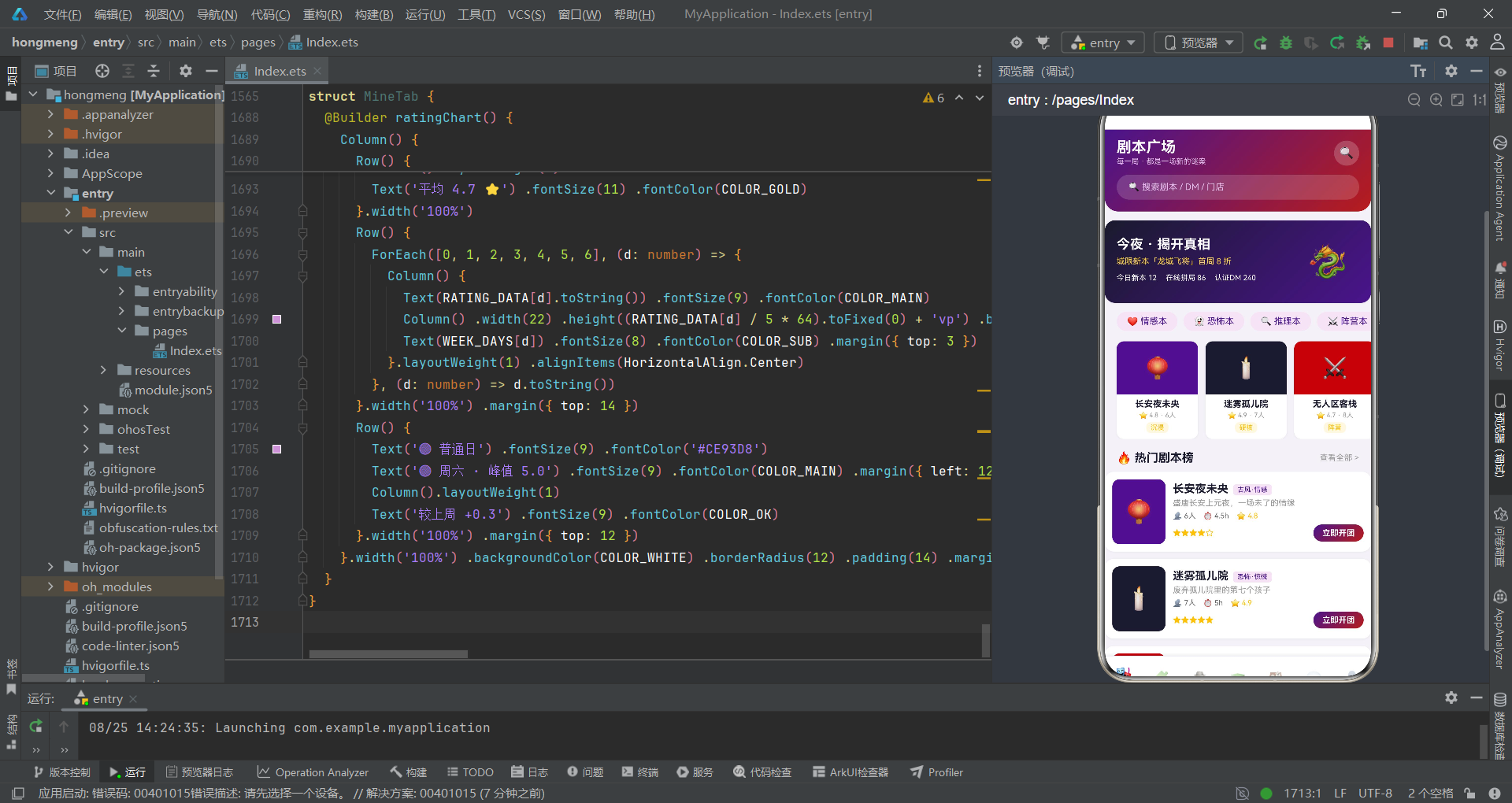
本文深入剖析了一个基于HarmonyOS ArkTS声明式UI框架的剧本杀拼局平台应用的完整实现。从辅助接口定义到七大@Observed数据模型,从悬疑风设计令牌到状态字典映射,从十二条剧本数据到六条组局、八位DM、六家门店等全局数据集,从入口组件的十六个状态变量到七Tab子组件实现,从五个弹窗交互到领奖台、地图卡、步进器、柱状图等特色UI组件,整个应用展现了HarmonyOS声明式开发范式在悬疑风垂直业务场景下的设计能力。应用通过@State/@Observed的状态追踪机制实现了数据驱动的自动重渲染,通过回调函数参数实现了父子组件间的松耦合通信,通过STATUS_META状态字典实现了状态视觉配置的解耦管理,通过@Builder方法实现了通用UI组件的代码复用。
从业务设计角度看,该应用巧妙地将剧本杀的沉浸式社交娱乐属性与拼多多风格的拼团模式融合为一体。七大Tab覆盖了剧本杀用户的完整服务链条:剧本广场(Banner+类型横滑+剧本卡片列表)、组局拼车(进行中横滑+进度卡+开团大按钮)、DM列表(领奖台+擅长本横滑+评分卡片)、剧本类型(类型宫格+筛选条+筛选列表)、门店探店(地图卡+门店列表)、消息中心(分类切换+消息行列表)和个人中心(统计头部+组局记录+收藏+功能宫格+评分图表)。悬疑紫红暗金的视觉语言贯穿全应用,从头部渐变到按钮配色,从进度条到领奖台,形成了一致的沉浸式氛围。每个Tab都集成了多种UI组件类型,从横向滚动列表到Grid宫格,从柱状图到领奖台,从Flex换行标签到步进选择器,展现了丰富的UI表现力。
从工程实践角度看,该应用采用了"interface→@Observed model→设计令牌→全局数据→工具函数→枚举→入口→Tab组件→弹窗"的分层代码组织结构,每一层都有明确的职责边界。特别值得关注的几个设计亮点:STATUS_META状态字典使用Record类型将状态字符串映射到包含三要素的interface值,使得UI层一行代码即可完成状态视觉配置;全参数constructor模式确保了所有@Observed模型在创建时属性完整赋值;回调函数在触发时同步完成状态初始化赋值(如onEditDm回调中同时设置name、desc、avatar),确保弹窗打开时表单字段已有初始值;领奖台组件通过参数化Builder(接收DM对象、奖牌emoji、颜色和高度四个参数)实现了金银铜三柱的灵活配置。对于希望深入学习HarmonyOS ArkTS声明式UI开发的开发者而言,该应用的状态字典设计、弹窗链式跳转、步进交互和领奖台布局都具有直接的参考价值。

讨论HarmonyOS开发技术,专注于API与组件、DevEco Studio、测试、元服务和应用上架分发等。
更多推荐

 5
5 0
0- 0


 已为社区贡献37条内容

所有评论(0)