HarmonyOS ArkTS API 24赛博霓虹电竞外设电商应用全栈架构深度解析——HarmonyOS 6.1.1声明式UI与深色主题实战
深色主题(Dark Theme)不仅是一种视觉风格选择,更是降低OLED屏幕功耗、减少视觉疲劳的工程优化策略。在赛博朋克美学中,深色背景配合高饱和度的霓虹强调色,能够营造出强烈的科技感与沉浸感。
ArkTS的@Builder装饰器提供了一种将UI构建逻辑提取为可复用方法的能力,它不同于函数组件——@Builder方法在编译期被内联到调用处,既保持了代码的可读性,又避免了运行时的额外开销。
在电商品类管理中,轴体颜色映射是一种将业务语义编码为视觉信号的设计模式——磁轴用紫色、红轴用粉色、光轴用青色——用户只需扫一眼标签颜色就能识别键盘的轴体类型。
引言
电竞外设桌搭站是一款面向机械键盘爱好者、客制化玩家和电竞参赛者的垂直电商平台。应用以赛博朋克2077的视觉语言为灵感,采用紫色(#7B2FBE)与青色(#00C2FF)作为双主色调,搭配深黑背景(#0F1222),营造出暗黑霓虹的沉浸式数字空间。应用覆盖了键盘整机、键帽套装、桌搭方案、电竞赛事和个人装备库五大业务模块,为电竞玩家提供从选购到参赛的一站式服务。
从技术架构层面来看,该应用采用HarmonyOS ArkTS声明式开发范式,由一个入口组件和六个功能子组件构成。每个子组件管理自身的状态集合,通过入口组件的activeTab索引进行条件渲染切换。应用大量使用了linearGradient线性渐变来构建霓虹光效背景,通过shadow属性实现发光投影,配合setInterval驱动的颜色循环动画,实现了RGB灯效的视觉模拟。深色主题的色彩体系使用了二级卡片色(card2: #232A4A)来区分卡片层次,在纯黑背景上形成微妙的纵深关系。
从业务设计层面来看,应用的数据模型涵盖了键盘商品(RgItem)、键帽(RgKeycap)、桌搭方案(RgDesk)、电竞赛事(RgTourney)、订单(RgOrder)、收藏(RgFav)、轴体热度统计(RgCount)和用户档案(RgProfile)共八个实体。键盘列表包含十六款产品,涵盖了磁轴、Gasket结构、红轴、茶轴、光轴、青轴等多种轴体类型,价格从259元的极简配列到1999元的全铝客制化套件,覆盖了入门到旗舰的完整价格带。键帽列表包含十款产品,涵盖了OEM、SA、XDA、Cherry、原厂等多种高度规格。
一、赛博霓虹色彩体系与数据模型
应用首先定义了一套赛博朋克风格的深色色彩调色板,使用interface约束所有颜色字段:
interface ColorPalette {
  purple: string;
  purpleDeep: string;
  cyan: string;
  cyanLight: string;
  bg: string;
  card: string;
  card2: string;
  text: string;
  textSub: string;
  textHint: string;
  line: string;
  danger: string;
  success: string;
  pink: string;
  white: string;
}

const RG: ColorPalette = {
  purple: '#7B2FBE',
  purpleDeep: '#3A1260',
  cyan: '#00C2FF',
  cyanLight: '#7FE7FF',
  bg: '#0F1222',
  card: '#1A1F38',
  card2: '#232A4A',
  text: '#EDF2FF',
  textSub: '#9AA3C7',
  textHint: '#5B6488',
  line: '#2C3560',
  danger: '#FF4D6D',
  success: '#3DF2A8',
  pink: '#FF6BCB',
  white: '#FFFFFF'
};
赛博霓虹色彩体系的设计精妙之处在于三色霓虹策略——紫色(#7B2FBE)代表磁轴和客制化的深度感,青色(#00C2FF)代表科技与速度的锐利感,粉色(#FF6BCB)代表个性与潮流的活力感。背景色采用了接近纯黑的深蓝(#0F1222),主卡片色(#1A1F38)和二级卡片色(#232A4A)通过明度的微妙差异形成层次。文字色从亮白到深灰形成三级梯度,确保在深色背景上的可读性。
深色主题的色彩设计需要特别注意对比度。WCAG无障碍标准建议文字与背景的对比度至少达到4.5:1。本应用中主文字色#EDF2FF与背景#0F1222的对比度约为15:1,远超标准要求;提示色#5B6488与背景的对比度约为3:1,适用于非关键信息的展示。
数据模型方面,键盘商品实体定义了九个核心字段:
interface RgItem {
  id: number;
  name: string;
  axis: string;
  price: number;
  oldPrice: number;
  layout: string;
  light: string;
  hot: number;
  percent: number;
}

const RG_ITEMS: RgItem[] = [
  { id: 1, name: '极光Pro·磁轴电竞键盘', axis: '磁轴', price: 899, oldPrice: 1099, layout: '75% 配列', light: 'RGB 全域', hot: 986, percent: 98 },
  { id: 2, name: '霓虹65·客制化套件', axis: 'Gasket', price: 1299, oldPrice: 1599, layout: '65% 配列', light: '下灯位 RGB', hot: 921, percent: 96 },
  { id: 9, name: '战神PRO·电竞旗舰', axis: '磁轴 RT', price: 1599, oldPrice: 1999, layout: '75% 配列', light: 'RGB 全彩', hot: 999, percent: 99 },
  { id: 14, name: '极夜·全铝坨坨', axis: 'Gasket', price: 1999, oldPrice: 2499, layout: '60% 配列', light: 'RGB 底光', hot: 745, percent: 95 },
  { id: 16, name: '战术模块·可拆分', axis: '青轴', price: 799, oldPrice: 999, layout: '分裂 65', light: 'RGB 分区', hot: 698, percent: 92 }
];
键盘数据模型新增了axis(轴体类型)、layout(配列布局)、light(灯光规格)和hot(热度值)四个电竞外设特有的字段。hot字段是一个数值型热度指标,与百分比型的percent字段形成互补——前者用于排序展示绝对热度,后者用于好评率的展示。十六款键盘覆盖了75%、65%、TKL 87键、100%全尺寸、68键、40%极简、96%、分裂65等多种配列,以及磁轴、Gasket、红轴、茶轴、光轴、青轴、矮轴等多种轴体类型。
二、轴体颜色映射与工具函数
电竞外设应用中一个独特的设计是轴体颜色映射——通过轴体名称中的关键字匹配对应的主题色,使得用户能够通过标签颜色快速识别键盘的轴体特性。
function rgAxisColor(a: string): string {
  if (a.indexOf('磁轴') >= 0) {
    return RG.purple;
  }
  if (a.indexOf('红') >= 0 || a.indexOf('线性') >= 0) {
    return RG.pink;
  }
  if (a.indexOf('茶') >= 0 || a.indexOf('段落') >= 0) {
    return '#FFB74D';
  }
  if (a.indexOf('光') >= 0) {
    return RG.cyan;
  }
  if (a.indexOf('青') >= 0) {
    return '#7FE7FF';
  }
  return RG.textSub;
}
轴体颜色映射遵循了电竞社区的视觉约定:磁轴用紫色(代表精准与专业),红轴用粉色(代表轻触与快速),茶轴用橙色(代表段落与平衡),光轴用青色(代表速度与科技),青轴用浅青色(代表清脆与节奏)。这种颜色编码使得用户在浏览键盘列表时,无需阅读文字就能通过标签颜色快速识别轴体类型,大幅提升了信息获取效率。
颜色映射函数在电商UI中是一种高频调用的纯函数——每个商品卡片渲染时都会调用一次。在ArkTS中,纯函数没有副作用,不依赖外部状态,编译器可以进行内联优化。即便列表有数十个商品,颜色映射的开销也几乎可以忽略。
其他工具函数的设计与前述应用类似,但针对电竞场景做了适配:
function rgStatusColor(s: string): string {
  if (s === '已签收' || s === '已报名') {
    return RG.success;
  }
  if (s === '运输中' || s === '待安装') {
    return RG.cyan;
  }
  if (s === '退款中') {
    return RG.danger;
  }
  return RG.textHint;
}

function rgFilterItems(axis: string): RgItem[] {
  if (axis === '全部轴体') {
    return RG_ITEMS;
  }
  return RG_ITEMS.filter((o: RgItem) => o.axis === axis);
}
订单状态颜色映射新增了"已报名"和"待安装"两个电竞特有的状态。筛选函数rgFilterItems采用精确匹配策略——与汉服应用的模糊匹配不同,轴体筛选需要精确匹配轴体名称,因为"磁轴"和"磁轴 RT"是不同的轴体细分类型。
三、入口组件与底部导航
入口组件RgbApp与国风应用的结构相似,但在视觉细节上做了赛博风格的适配:
@Entry
@Component
struct RgbApp {
  @State activeTab: number = 0;

  @Builder
  headerBar(title: string) {
    Row() {
      Column() {
        Text(title)
          .fontSize(22)
          .fontWeight(FontWeight.Bold)
          .fontColor(RG.text)
      }
      .alignItems(HorizontalAlign.Start)
      .layoutWeight(1)

      Text('⚡')
        .fontSize(18)
        .margin({ right: 12 })
      Text('🛒')
        .fontSize(18)
        .margin({ right: 4 })
    }
    .width('100%')
    .padding({ left: 16, right: 16, top: 12, bottom: 12 })
    .backgroundColor(RG.bg)
  }

  @Builder
  bottomBar() {
    Row() {
      ForEach(RG_TABS, (tb: RgTab, ti: number) => {
        Column() {
          Text(tb.icon)
            .fontSize(this.activeTab === ti ? 20 : 17)
            .fontColor(this.activeTab === ti ? RG.cyan : RG.textHint)
          Text(tb.label)
            .fontSize(this.activeTab === ti ? 12 : 10)
            .fontWeight(this.activeTab === ti ? FontWeight.Bold : FontWeight.Normal)
            .fontColor(this.activeTab === ti ? RG.cyan : RG.textHint)
            .margin({ top: 2 })
        }
        .layoutWeight(1)
        .padding({ top: 6, bottom: 6 })
        .onClick(() => {
          this.activeTab = ti;
        })
      }, (tb: RgTab) => tb.key)
    }
    .width('100%')
    .height(58)
    .backgroundColor(RG.card)
    .border({ width: { top: 1 }, color: RG.line })
  }
底部导航栏的页签激活色从国风应用的朱红色(#B03A2E)变更为赛博青色(#00C2FF),与整体的深色霓虹主题保持一致。六个页签的图标全部采用电竞风格的emoji:🕹️(首页)、⌨️(键盘)、🧩(键帽)、🖥️(桌搭)、🏆(赛事)、👾(我的)。
在深色主题中,页签的激活状态需要使用高饱和度的强调色才能形成足够的视觉对比。青色#00C2FF在深蓝背景上的亮度差约为65%,能够清晰地标识当前页签位置。相比之下,低饱和度的灰色在深色背景上几乎无法区分激活与未激活状态。
四、首页Tab——霓虹横幅与键盘演示动画
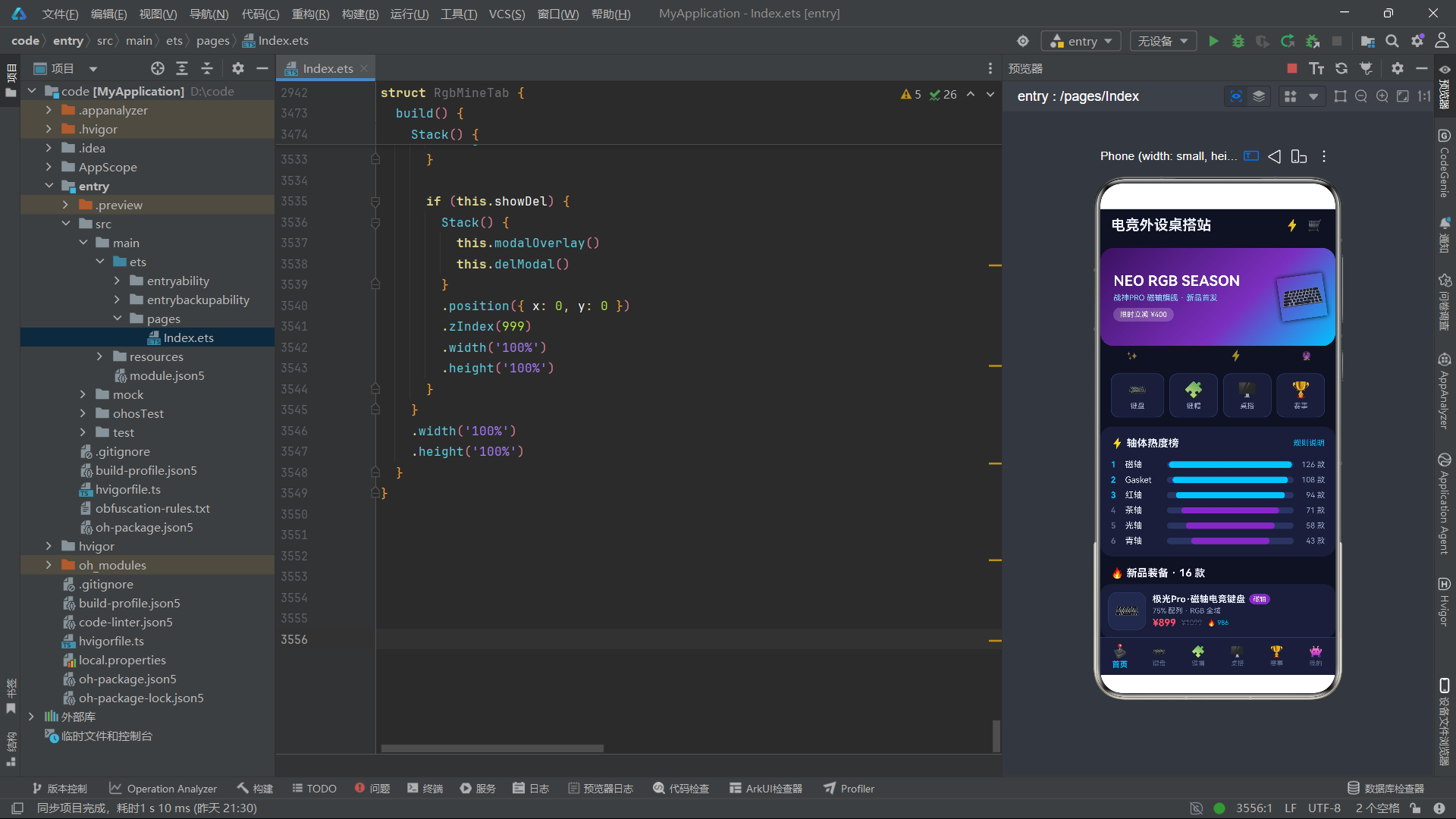
首页是电竞外设应用的展示窗口,集成了霓虹横幅、发光动效条、分类宫格、轴体热度榜和上新装备列表五个核心模块。
@Component
struct RgbHomeTab {
  @State showDetail: boolean = false;
  @State selItem: number = 0;
  @State showRankTip: boolean = false;
  @State favorited: boolean = false;
  @State glowColor: string = '#00C2FF';
  @State glowOn: boolean = false;
  @State neonIdx: number = 0;
  timerId: number = -1;

  aboutToAppear(): void {
    this.timerId = setInterval(() => {
      let colors = ['#00C2FF', '#7B2FBE', '#FF6BCB', '#3DF2A8'];
      this.neonIdx = (this.neonIdx + 1) % colors.length;
      this.glowColor = colors[this.neonIdx];
      this.glowOn = !this.glowOn;
    }, 800);
  }
首页组件管理了七个状态变量,其中glowColor和neonIdx是RGB灯效的核心驱动状态。定时器每800毫秒执行一次,在青色、紫色、粉色、绿色四种霓虹色之间循环切换,glowColor更新后会通过shadow属性投射出对应颜色的发光效果,模拟RGB灯带的颜色循环。
  @Builder
  neonBanner() {
    Stack() {
      Column()
        .width('100%')
        .height(150)
        .borderRadius(20)
        .linearGradient({
          angle: 135,
          colors: [[RG.purpleDeep, 0], [RG.purple, 0.6], [RG.cyan, 1]]
        })
      Row() {
        Column() {
          Text('NEO RGB SEASON')
            .fontSize(22)
            .fontWeight(FontWeight.Bold)
            .fontColor(RG.white)
          Text('战神PRO 磁轴旗舰 · 新品首发')
            .fontSize(12)
            .fontColor(RG.cyanLight)
            .margin({ top: 6 })
          Text('限时立减 ¥400')
            .fontSize(11)
            .fontColor(RG.white)
            .padding({ left: 10, right: 10, top: 4, bottom: 4 })
            .backgroundColor('#33FFFFFF')
            .borderRadius(10)
            .margin({ top: 8 })
        }
        .alignItems(HorizontalAlign.Start)
        .layoutWeight(1)
        Text('⌨️')
          .fontSize(56)
          .opacity(0.95)
          .rotate({ angle: -8 })
          .shadow({ radius: 18, color: RG.glowColor, offsetY: 0 })
      }
      .width('100%')
      .padding({ left: 20, right: 16 })
    }
    .width('100%')
    .height(150)
    .margin({ top: 10, left: 16, right: 16 })
  }
霓虹横幅是该应用的视觉核心。它使用linearGradient以135度角从深紫(#3A1260)渐变到紫色(#7B2FBE)再到青色(#00C2FF),形成从左下到右上的三色霓虹渐变。横幅右侧的键盘emoji通过shadow属性投射出glowColor颜色的发光——由于glowColor每800毫秒在四种颜色间循环,横幅上的键盘投影会呈现出RGB灯效般的颜色变换。rotate({ angle: -8 })使键盘略微倾斜,增加了动感。
shadow属性在ArkTS中不仅用于投影效果,更可以通过设置color参数实现发光效果——当radius值较大且offsetY为0时,shadow会在元素四周形成均匀的彩色光晕,完美模拟霓虹灯的发光质感。
五、键盘演示板与背光模拟
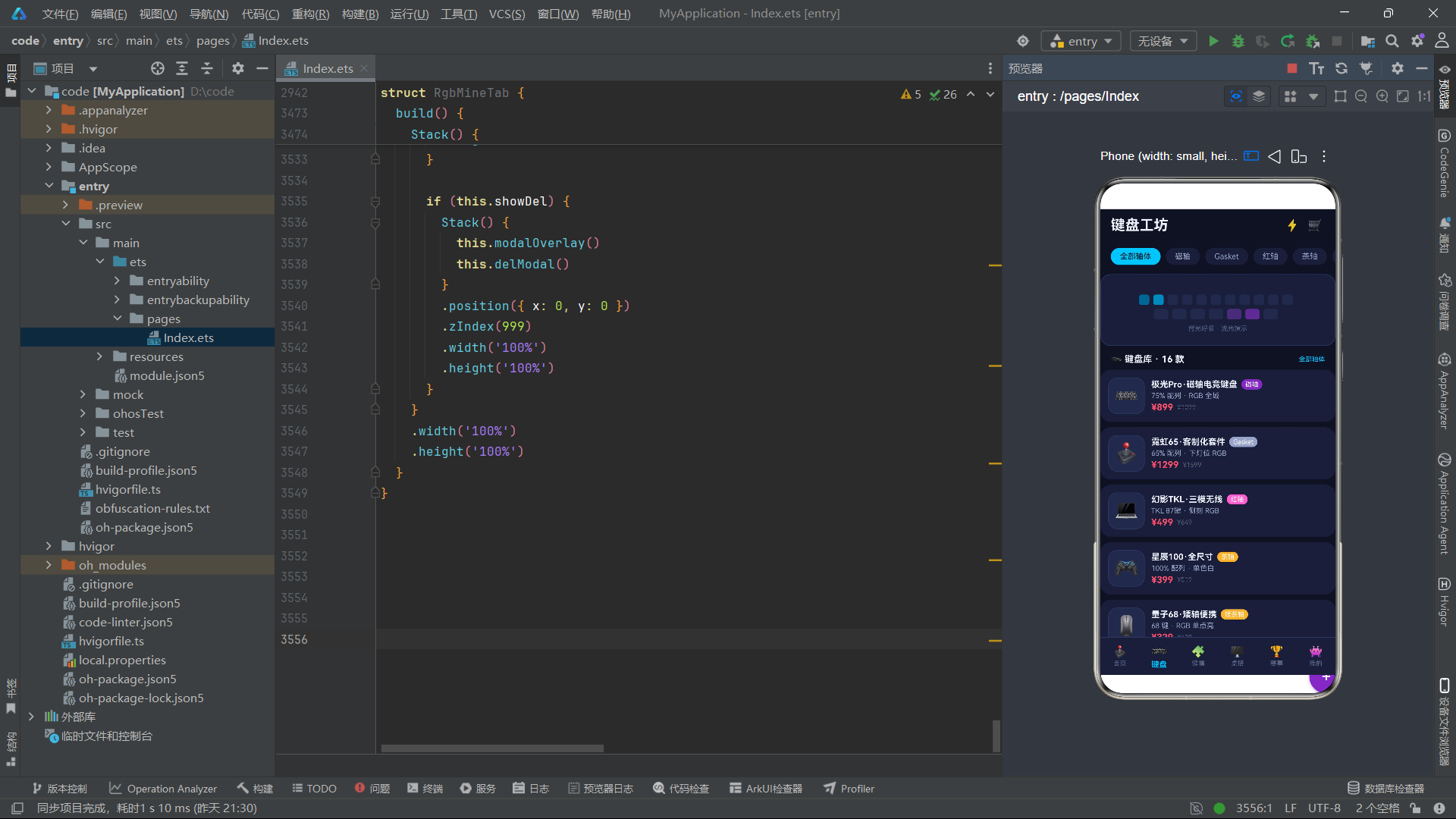
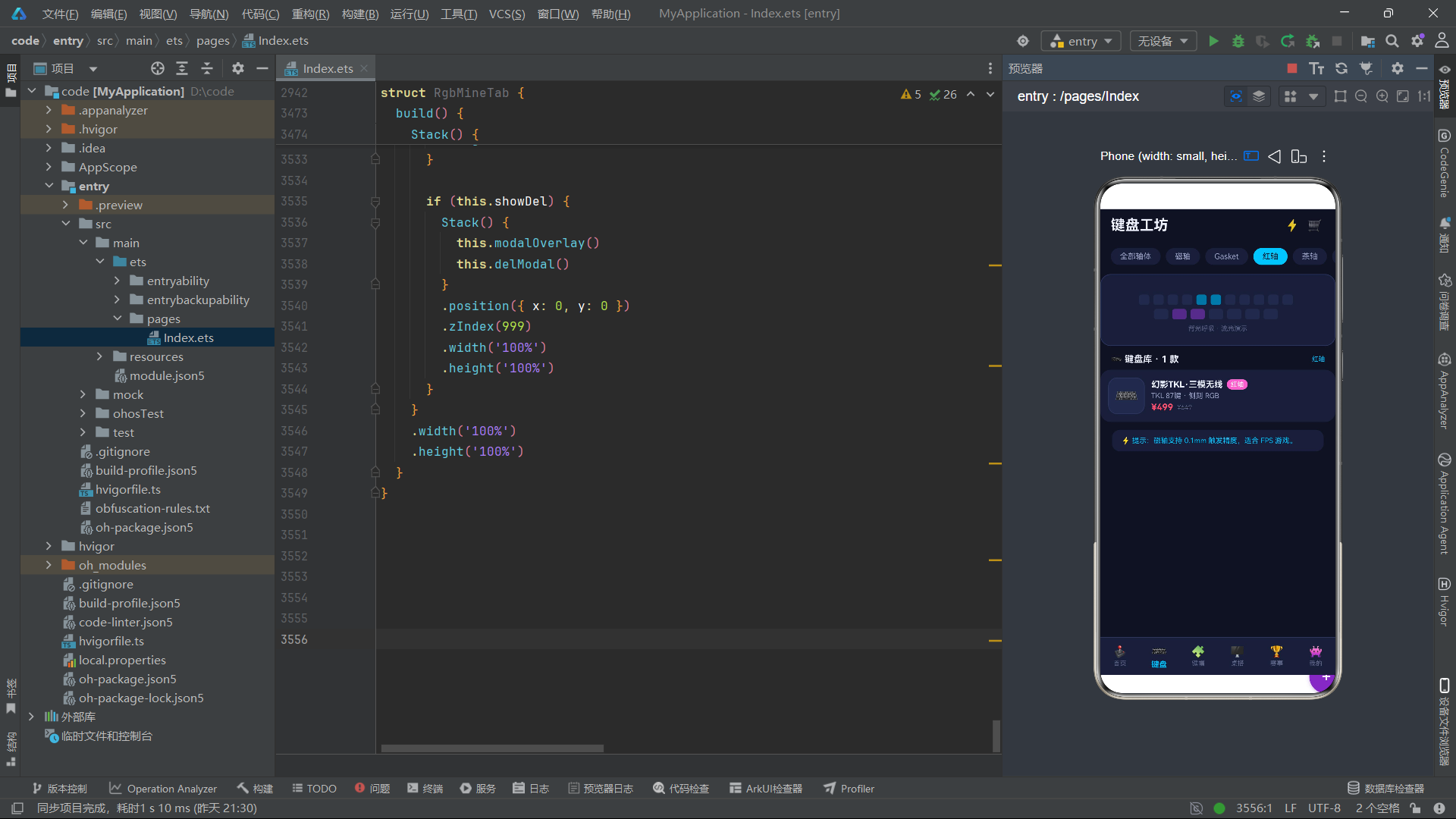
键盘Tab中有一个独特的键盘演示板组件,通过动画模拟了RGB背光的呼吸效果:
  @Builder
  kbBoard() {
    Stack() {
      Column()
        .width('100%')
        .height(110)
        .borderRadius(16)
        .backgroundColor(RG.card)
        .border({ width: 1, color: RG.line })

      Column() {
        Row() {
          ForEach([0, 1, 2, 3, 4, 5, 6, 7, 8, 9, 10], (ki: number) => {
            Column()
              .width(16)
              .height(16)
              .borderRadius(4)
              .backgroundColor(ki === this.keyStep % 11 ? RG.cyan : RG.card2)
              .margin({ right: 6 })
              .animation({ duration: 500 })
          }, (ki: number) => ki + '')
        }
        .margin({ top: 10 })

        Row() {
          ForEach([0, 1, 2, 3, 4, 5, 6], (ki: number) => {
            Column()
              .width(22)
              .height(16)
              .borderRadius(4)
              .backgroundColor((ki + 3) % 7 === this.keyStep % 7 ? RG.purple : RG.card2)
              .margin({ right: 6 })
              .animation({ duration: 500 })
          }, (ki: number) => ki + '')
        }
        .margin({ top: 6 })

        Text('背光呼吸 · 流光演示')
          .fontSize(10)
          .fontColor(RG.textHint)
          .margin({ top: 8 })
      }
      .justifyContent(FlexAlign.Center)
    }
    .width('100%')
    .height(110)
    .margin({ left: 16, right: 16, top: 10 })
  }
键盘演示板使用ForEach渲染了两行"键帽"方块——第一行11个16x16的小方块代表数字键行,第二行7个22x16的方块代表字母键行。通过keyStep状态变量(每600毫秒递增一次),每个方块的颜色在青色和暗色之间交替变化,形成"逐键点亮"的流光效果。第一行的亮键索引为keyStep % 11,第二行的亮键索引为(keyStep + 3) % 7——这种偏移设计使得两行的亮键不会同步移动,呈现出更自然的流光韵律。
这种键盘背光模拟是纯CSS/声明式UI实现的——无需Canvas绘图或WebGL渲染,仅通过
ForEach+条件背景色+animation属性动画,就实现了逼真的RGB背光流光效果。这体现了ArkTS声明式UI在构建复杂视觉效果时的简洁性。
六、轴体热度榜与分类宫格
  @Builder
  axisRank() {
    Column() {
      Row() {
        Text('⚡ 轴体热度榜')
          .fontSize(16)
          .fontWeight(FontWeight.Bold)
          .fontColor(RG.text)
        Column().layoutWeight(1)
        Text('规则说明')
          .fontSize(12)
          .fontColor(RG.cyan)
          .onClick(() => {
            this.showRankTip = true;
          })
      }
      .width('100%')
      .margin({ bottom: 8 })

      ForEach(RG_COUNTS, (ct: RgCount, ci: number) => {
        Row() {
          Text(ci + 1 + '')
            .fontSize(13)
            .fontWeight(FontWeight.Bold)
            .fontColor(ci < 3 ? RG.cyan : RG.textHint)
            .width(22)
          Text(ct.name)
            .fontSize(13)
            .fontColor(RG.text)
            .width(64)
          Stack() {
            Row()
              .width('100%')
              .height(10)
              .backgroundColor(RG.line)
              .borderRadius(5)
            Row()
              .width(rgBar(ct.percent))
              .height(10)
              .backgroundColor(ci < 3 ? RG.cyan : RG.purple)
              .borderRadius(5)
          }
          .layoutWeight(1)
          .height(10)

          Text(ct.count + ' 款')
            .fontSize(12)
            .fontColor(RG.textSub)
            .width(48)
            .textAlign(TextAlign.End)
        }
        .width('100%')
        .margin({ top: 8 })
      }, (ct: RgCount) => ct.name)
    }
    .width('100%')
    .padding(16)
    .backgroundColor(RG.card)
    .borderRadius(18)
    .margin({ left: 16, right: 16, top: 14 })
  }
轴体热度榜展示了六种轴体的热度排名——磁轴以97%的热度位居榜首,Gasket结构以91%紧随其后。前三名使用青色高亮,其余使用紫色,与整体的赛博霓虹色彩体系保持一致。进度条的背景色使用RG.line(#2C3560),在深色卡片上形成了低调但可辨的轨道效果。
七、键帽Tab——高度分类与网格陈列
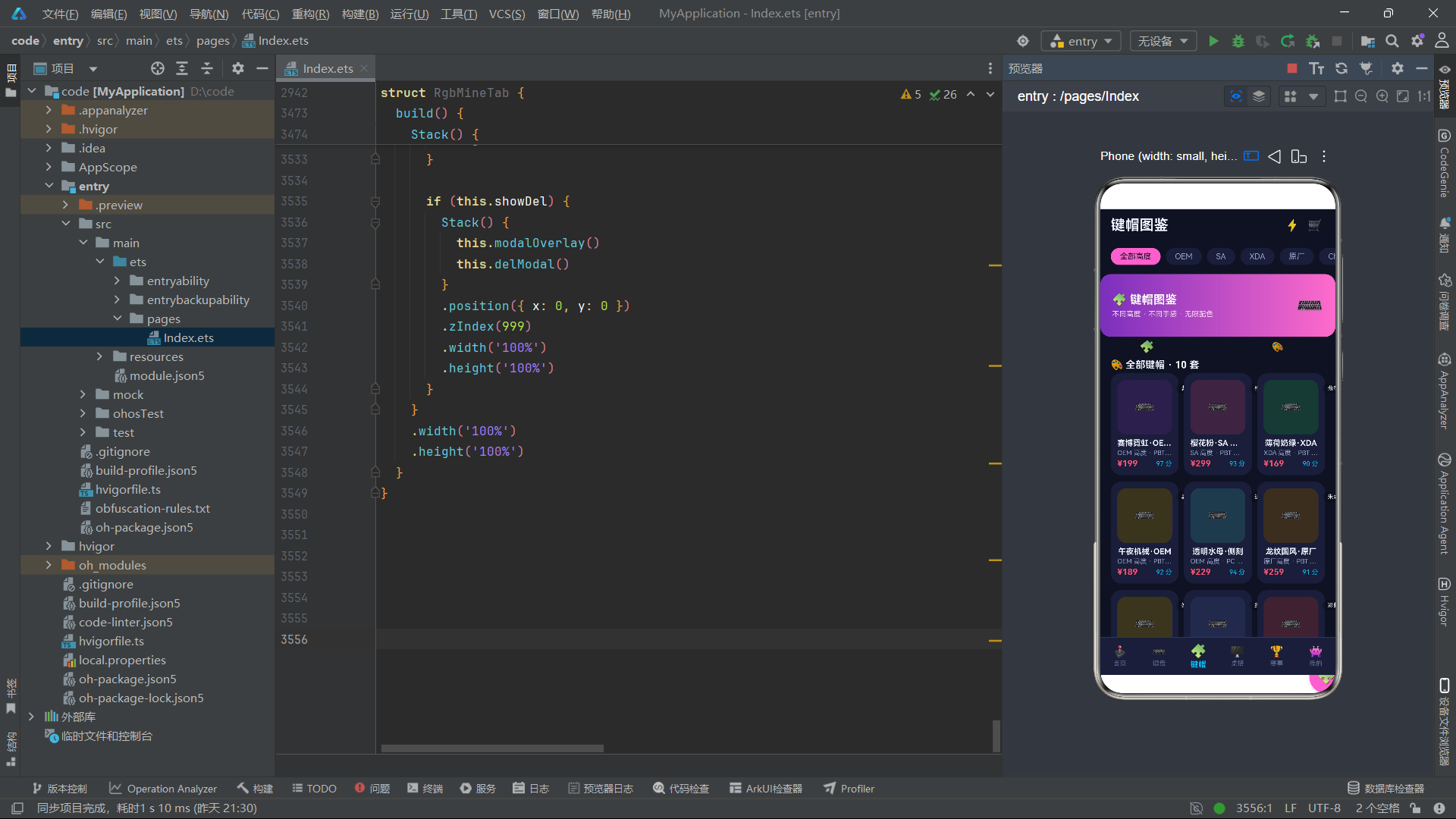
键帽Tab使用三列网格布局展示键帽产品,配合高度分类筛选条和旋转动效:
@Component
struct RgbKeycapTab {
  @State caps: RgKeycap[] = RG_KEYCAPS.slice();
  @State curProfile: string = '全部高度';
  @State showDetail: boolean = false;
  @State showAdd: boolean = false;
  @State showDel: boolean = false;
  @State selId: number = 0;
  @State delId: number = 0;
  @State editName: string = '';
  @State editMaterial: string = '';
  @State spinIdx: number = 0;
  timerId: number = -1;
  profileList: string[] = ['全部高度', 'OEM', 'SA', 'XDA', '原厂', 'Cherry'];
键帽组件管理了九个状态变量,其中curProfile用于高度筛选,spinIdx驱动旋转动效。profileList定义了六种键帽高度分类——OEM是最高常见的球面键帽,SA是高球帽,XDA是平顶矮帽,原厂是Cherry原厂高度,Cherry是经典球面高度。
  @Builder
  spinEffect() {
    Row() {
      Text('🧩')
        .fontSize(18)
        .rotate({ angle: this.spinIdx * 30 })
        .animation({ duration: 600 })
        .margin({ left: 60 })
      Text('🎨')
        .fontSize(14)
        .rotate({ angle: -this.spinIdx * 24 })
        .animation({ duration: 600 })
        .margin({ left: 180 })
    }
    .width('100%')
    .height(30)
  }
旋转动效使用两个emoji以不同的旋转系数实现——键帽emoji以spinIdx * 30度旋转,调色板emoji以-spinIdx * 24度反向旋转。两个元素的反向旋转形成了一种"齿轮咬合"的视觉趣味感,为枯燥的列表页面增添了动效活力。
rotate属性接受{ angle: number }参数,正值表示顺时针旋转,负值表示逆时针旋转。通过为不同元素设置不同的旋转系数和方向,可以创造出丰富的联动动效——这种设计在游戏化UI中尤为常见。
  @Builder
  capCard(cp: RgKeycap, idx: number) {
    Column() {
      Stack() {
        Column() {
          Text('⌨️')
            .fontSize(26)
        }
        .width('100%')
        .height(84)
        .backgroundColor(rgCapBg(idx))
        .borderRadius(14)
        .justifyContent(FlexAlign.Center)

        Text(cp.color)
          .fontSize(9)
          .fontColor(RG.white)
          .padding({ left: 8, right: 8, top: 2, bottom: 2 })
          .backgroundColor('#33000000')
          .borderRadius(8)
          .position({ x: 90, y: 6 })
      }
      .width('100%')
      .height(84)

      Text(cp.name)
        .fontSize(12)
        .fontWeight(FontWeight.Bold)
        .fontColor(RG.text)
        .margin({ top: 6 })
        .maxLines(1)
        .textOverflow({ overflow: TextOverflow.Ellipsis })
      Text(cp.profile + ' · ' + cp.material)
        .fontSize(10)
        .fontColor(RG.textSub)
        .margin({ top: 2 })
        .maxLines(1)
        .textOverflow({ overflow: TextOverflow.Ellipsis })
      Row() {
        Text(rgPrice(cp.price))
          .fontSize(13)
          .fontWeight(FontWeight.Bold)
          .fontColor(RG.danger)
        Column().layoutWeight(1)
        Text(cp.percent + ' 分')
          .fontSize(10)
          .fontColor(RG.cyan)
      }
      .width('100%')
      .margin({ top: 3 })
    }
    .width('100%')
    .padding(10)
    .backgroundColor(RG.card)
    .borderRadius(16)
    .onClick(() => {
      this.selId = cp.id;
      this.editName = cp.name;
      this.editMaterial = cp.material;
      this.showDetail = true;
    })
  }
键帽卡片使用Stack层叠布局——底层是一个84高度的有色背景容器,使用rgCapBg函数根据索引返回不同的深色背景色(如#2A1F4A深紫、#1F3A34深青等),形成多彩的键帽底座效果。右上角通过position定位叠加了一个半透明的配色标签,标注键帽的颜色名称(如"紫青渐层"、"樱粉"等)。
function rgCapBg(idx: number): string {
  let bgs = ['#2A1F4A', '#3A2440', '#1F3A34', '#3A3420', '#243A4A', '#3A2F20', '#3A3520', '#232A4A', '#3A2330', '#2F2F3A'];
  return bgs[idx % bgs.length];
}
rgCapBg函数定义了十种深色背景色,覆盖了紫色系、青色系、绿色系、棕色系、蓝色系等多种暗色调,为每张键帽卡片提供了独特的底色。这种"索引取色"的设计使得网格中的每张卡片都有不同的色调,视觉上丰富多彩但不失统一性——所有底色都保持了相似的明度和饱和度,确保整体风格的一致。
八、桌搭Tab——RGB灯效模拟与方案管理
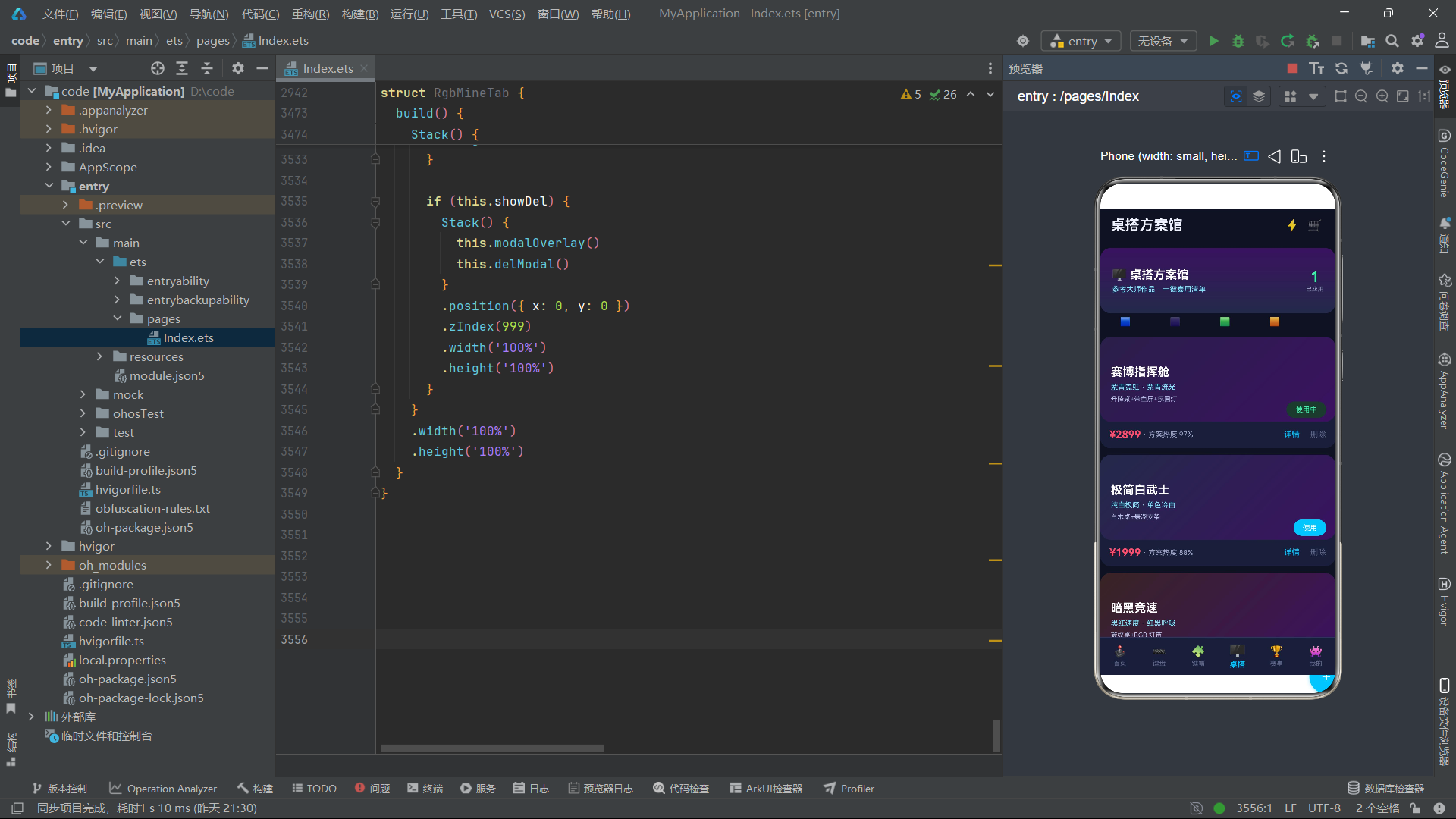
桌搭Tab展示了六种预设的桌面搭配方案,每个方案都有独立的RGB灯效动画和"一键套用"功能。
@Component
struct RgbDeskTab {
  @State desks: RgDesk[] = RG_DESKS.slice();
  @State applied: number = 1;
  @State showDetail: boolean = false;
  @State showAdd: boolean = false;
  @State showDel: boolean = false;
  @State selId: number = 0;
  @State delId: number = 0;
  @State editName: string = '';
  @State editParts: string = '';
  @State rgbStep: number = 0;
  @State rgbColor: string = '#00C2FF';
  timerId: number = -1;

  aboutToAppear(): void {
    this.timerId = setInterval(() => {
      let colors = ['#00C2FF', '#7B2FBE', '#FF6BCB', '#3DF2A8', '#FFB74D'];
      this.rgbStep = (this.rgbStep + 1) % colors.length;
      this.rgbColor = colors[this.rgbStep];
    }, 900);
  }
桌搭组件的特色在于rgbStep和rgbColor双状态驱动的RGB灯效模拟。定时器每900毫秒在五种颜色(青、紫、粉、绿、橙)间循环,通过rgbLine构建器渲染四个色块emoji,每个色块根据rgbStep的不同余数条件控制透明度,形成RGB灯带的效果:
  @Builder
  rgbLine() {
    Row() {
      Text('🟦')
        .fontSize(13)
        .opacity(this.rgbStep % 2 === 0 ? 1 : 0.4)
        .animation({ duration: 800 })
        .margin({ left: 30 })
      Text('🟪')
        .fontSize(13)
        .opacity(this.rgbStep % 2 === 1 ? 1 : 0.4)
        .animation({ duration: 800 })
        .margin({ left: 60 })
      Text('🟩')
        .fontSize(13)
        .opacity(this.rgbStep % 3 === 0 ? 1 : 0.4)
        .animation({ duration: 800 })
        .margin({ left: 60 })
      Text('🟧')
        .fontSize(13)
        .opacity(this.rgbStep % 4 === 0 ? 1 : 0.4)
        .animation({ duration: 800 })
        .margin({ left: 60 })
    }
    .width('100%')
    .height(26)
  }
四个色块通过不同的余数条件(%2、%3、%4)实现非同步的明暗交替,模拟了真实RGB灯带的"追逐"效果——每个色块在不同的时刻亮起或暗下,形成波浪式的光流动画。这种使用不同模数实现非同步动画的技巧,是声明式UI中实现复杂节奏感的经典手法。
九、赛事Tab——报名流程与加载动效
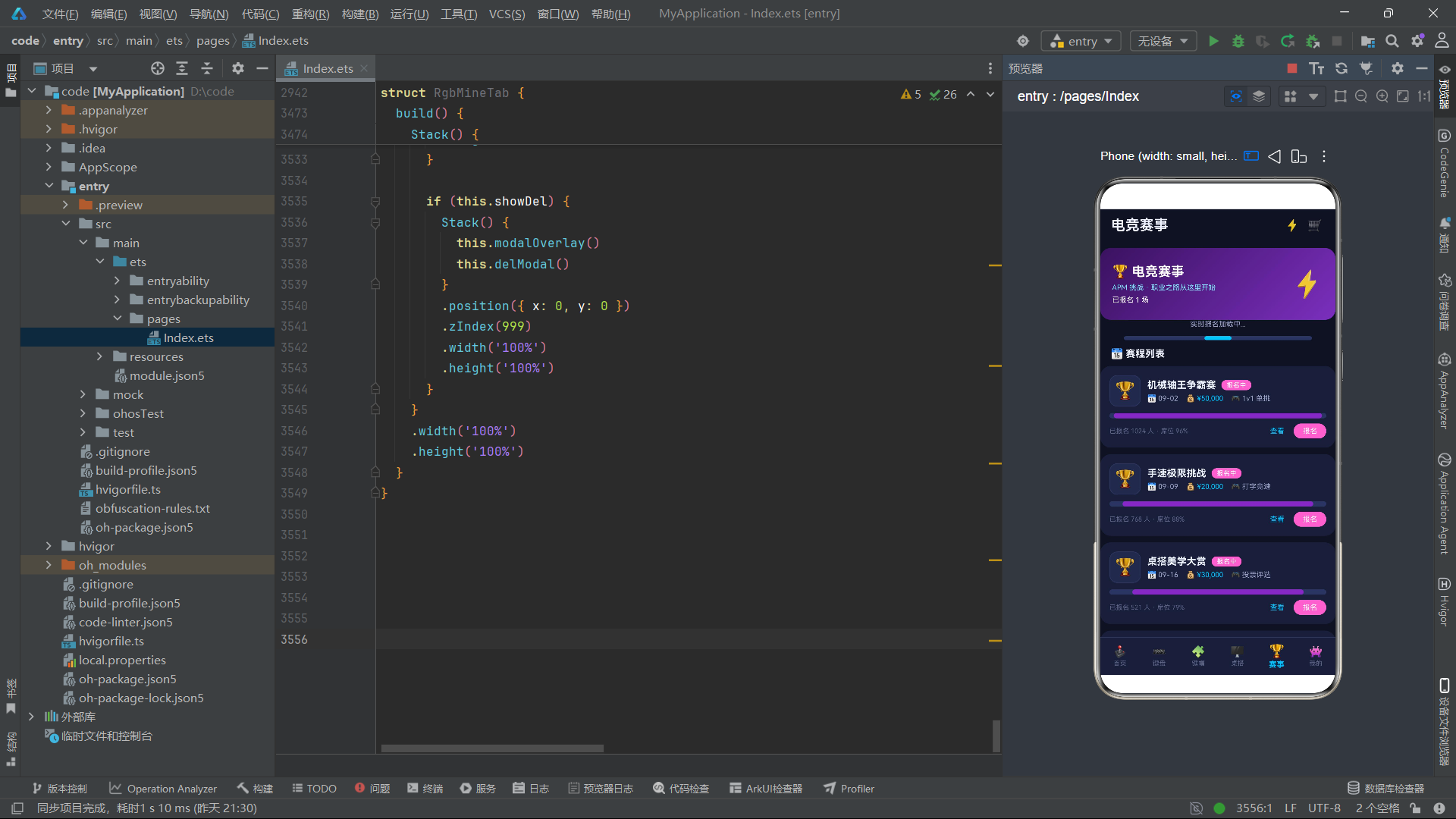
赛事Tab展示了六场电竞赛事,包括机械轴王争霸赛、手速极限挑战等。该Tab有一个独特的加载进度条动效:
  @Builder
  loadingLine() {
    Stack() {
      Row()
        .width('100%')
        .height(6)
        .backgroundColor(RG.line)
        .borderRadius(3)
      Row()
        .width(rgBar(this.loadStep * 20))
        .height(6)
        .backgroundColor(RG.cyan)
        .borderRadius(3)
        .animation({ duration: 450 })
    }
    .width('80%')
    .height(6)
    .margin({ top: 12 })
  }
加载进度条通过loadStep状态变量(每500毫秒递增,在0-4之间循环)驱动宽度变化——rgBar(this.loadStep * 20)将0-4的步进值转换为0%-80%的宽度字符串。由于loadStep在到达4后会重置为0,进度条会呈现出"从0加载到80%再回弹"的循环效果,模拟了"实时报名数据加载中"的视觉反馈。
在电竞应用中,加载动效不仅仅是视觉装饰——它传达了"数据正在实时更新"的心理暗示。赛事报名数据频繁变化,通过一个持续循环的加载条,用户会感知到报名人数在不断刷新,增强了信息的时效性和可信度。
十、个人中心——能量条与装备库
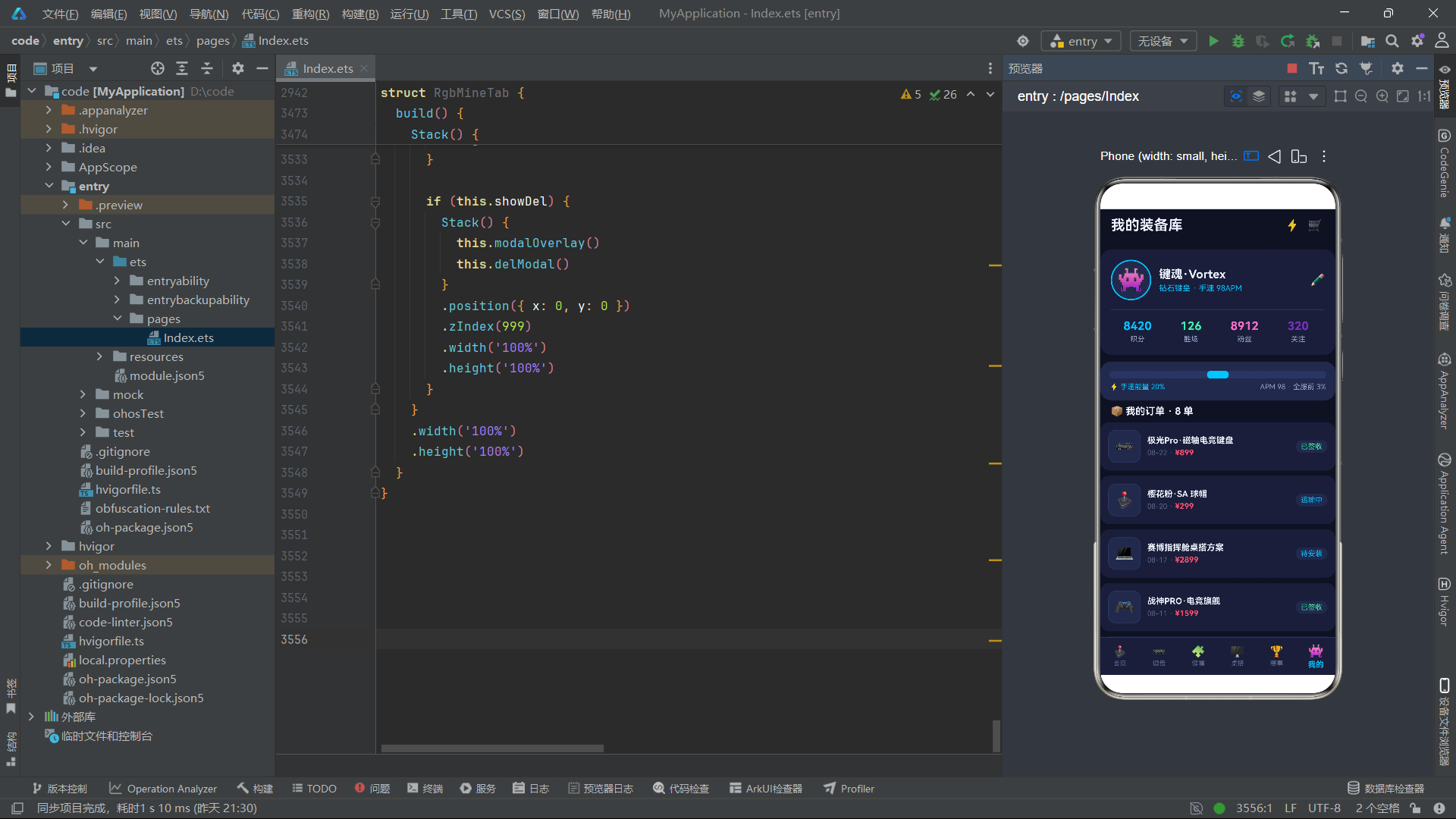
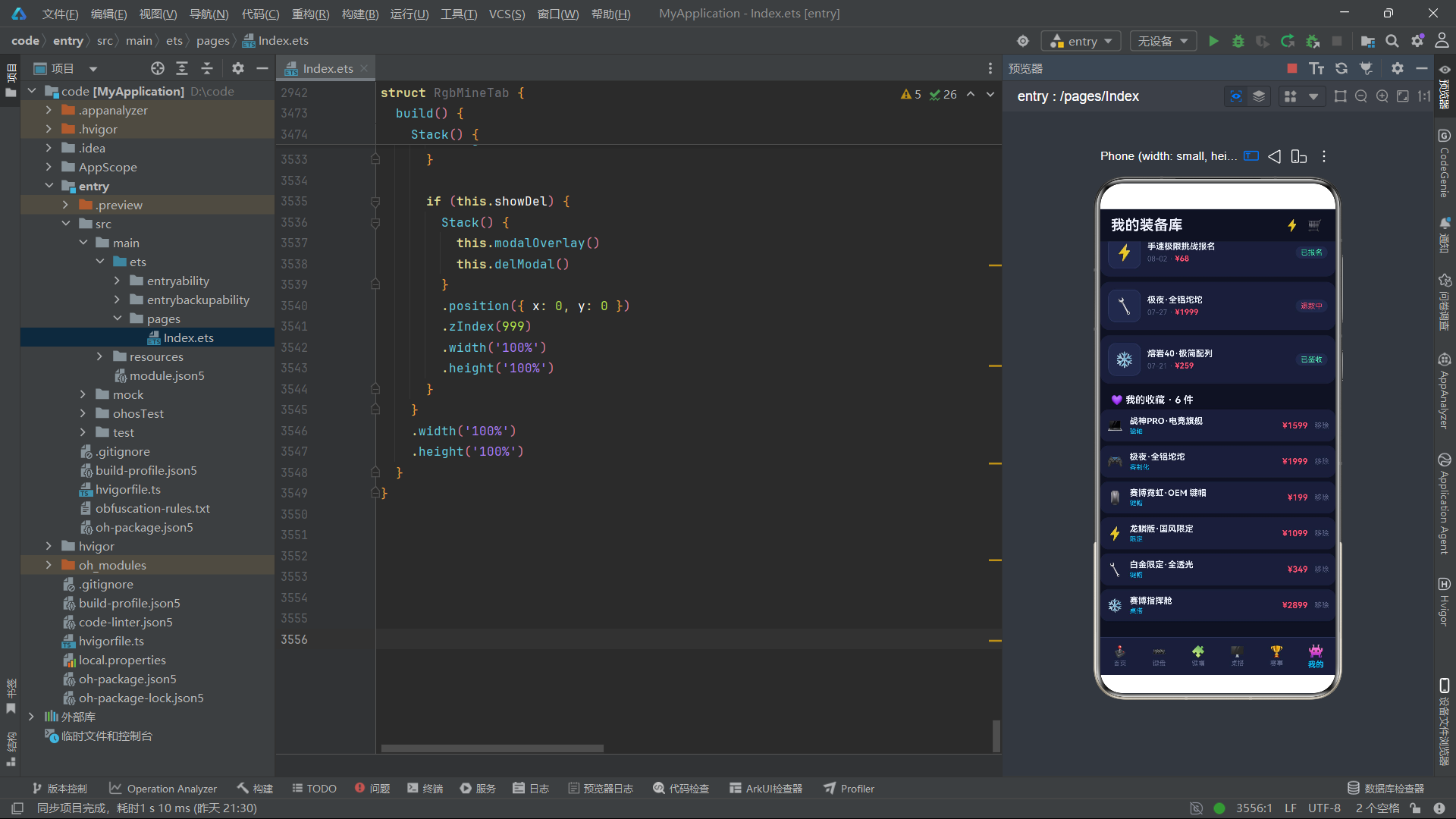
个人中心Tab集成了用户档案、手速能量条、订单管理和收藏管理。其中能量条是该Tab的视觉亮点:
  @Builder
  powerBar() {
    Column() {
      Stack() {
        Row()
          .width('100%')
          .height(12)
          .backgroundColor(RG.line)
          .borderRadius(6)
        Row()
          .width(rgBar(this.powerStep * 10))
          .height(12)
          .backgroundColor(RG.cyan)
          .borderRadius(6)
          .animation({ duration: 280 })
      }
      .width('100%')
      .height(12)

      Row() {
        Text('⚡ 手速能量 ' + this.powerStep * 10 + '%')
          .fontSize(11)
          .fontColor(RG.cyan)
        Column().layoutWeight(1)
        Text('APM 98 · 全服前 3%')
          .fontSize(11)
          .fontColor(RG.textSub)
      }
      .width('100%')
      .margin({ top: 6 })
    }
    .width('100%')
    .padding(14)
    .backgroundColor(RG.card2)
    .borderRadius(16)
    .margin({ left: 16, right: 16, top: 10 })
  }
能量条通过powerStep状态变量(每300毫秒递增,在0-9之间循环)驱动,宽度从0%到90%线性增长,到达90%后重置为0%。280毫秒的动画时长使得每次步进都有一个平滑的过渡。能量条右侧显示"APM 98 · 全服前 3%"的固定文本,将电竞数据(APM即每分钟操作数)与游戏化视觉(能量条)结合在一起。
能量条的设计是电竞文化的典型映射——将玩家的手速数据可视化为一个动态增长的能量条,既满足了数据展示的功能需求,又通过游戏化的视觉语言增强了用户的代入感和竞技激励。
十一、核心业务流程
以下是电竞外设应用从用户浏览到完成赛事报名的完整业务流程:
技术点对比
| 技术维度 | 实现方式 | 设计优势 | 适用场景 |
|---|---|---|---|
| 深色主题 | 三级背景色体系(bg/card/card2) | 在纯黑背景上通过明度差形成层次纵深 | 电竞、夜间模式等深色风格应用 |
| 霓虹发光 | shadow属性+颜色循环状态 |
通过彩色投影模拟RGB灯效发光质感 | 品牌横幅、焦点元素的视觉强化 |
| RGB灯效模拟 | setInterval+多色数组循环+opacity交替 |
用纯声明式UI实现灯带流光效果 | 装饰性动效、氛围营造 |
| 颜色映射 | 轴体名称关键字匹配对应主题色 | 业务语义视觉化编码,快速识别 | 标签着色、分类标识 |
| 键盘演示 | ForEach+条件背景色+animation |
无需Canvas即实现逐键点亮流光 | 产品功能演示、交互预览 |
| 网格陈列 | Grid+columnsTemplate('1fr 1fr 1fr') |
三列均分网格,适配不同屏幕宽度 | 键帽、配饰等小尺寸商品展示 |
| 能量条动效 | 状态步进+线性宽度增长+animation |
游戏化数据可视化,增强代入感 | 竞技数据展示、进度反馈 |
| 旋转动效 | rotate属性+正负系数差异 |
双元素反向旋转形成齿轮联动感 | 装饰性趣味动效 |
| 加载进度条 | 循环步进+宽度百分比+animation |
模拟实时数据更新的视觉反馈 | 赛事报名、动态数据加载 |
| 颜色背景池 | 索引取色函数+深色色调数组 | 统一明度饱和度的多彩底色分配 | 网格卡片底色多样化 |
安装DevEco Studio程序

选择目标安装目录:

设置环境变量,但是需要重启一下:

新建一个空白模板:

设置API为24的模板项目:
初始化项目,自动下载相关依赖:

完整代码:
interface RgTab {
key: string;
label: string;
icon: string;
}
interface RgItem {
id: number;
name: string;
axis: string;
price: number;
oldPrice: number;
layout: string;
light: string;
hot: number;
percent: number;
}
interface RgKeycap {
id: number;
name: string;
profile: string;
price: number;
material: string;
color: string;
percent: number;
}
interface RgDesk {
id: number;
name: string;
theme: string;
price: number;
parts: string;
rgb: string;
percent: number;
}
interface RgTourney {
id: number;
name: string;
date: string;
prize: string;
mode: string;
sign: number;
percent: number;
}
interface RgOrder {
id: number;
name: string;
date: string;
price: number;
status: string;
}
interface RgFav {
id: number;
name: string;
price: number;
tag: string;
}
interface RgCount {
name: string;
count: number;
percent: number;
}
interface RgProfile {
nick: string;
rank: string;
points: number;
win: number;
fans: number;
follows: number;
}
interface ColorPalette {
purple: string;
purpleDeep: string;
cyan: string;
cyanLight: string;
bg: string;
card: string;
card2: string;
text: string;
textSub: string;
textHint: string;
line: string;
danger: string;
success: string;
pink: string;
white: string;
}
const RG: ColorPalette = {
purple: '#7B2FBE',
purpleDeep: '#3A1260',
cyan: '#00C2FF',
cyanLight: '#7FE7FF',
bg: '#0F1222',
card: '#1A1F38',
card2: '#232A4A',
text: '#EDF2FF',
textSub: '#9AA3C7',
textHint: '#5B6488',
line: '#2C3560',
danger: '#FF4D6D',
success: '#3DF2A8',
pink: '#FF6BCB',
white: '#FFFFFF'
};
const RG_TABS: RgTab[] = [
{ key: 'home', label: '首页', icon: '🕹️' },
{ key: 'kb', label: '键盘', icon: '⌨️' },
{ key: 'cap', label: '键帽', icon: '🧩' },
{ key: 'desk', label: '桌搭', icon: '🖥️' },
{ key: 'tj', label: '赛事', icon: '🏆' },
{ key: 'mine', label: '我的', icon: '👾' }
];
const RG_ITEMS: RgItem[] = [
{ id: 1, name: '极光Pro·磁轴电竞键盘', axis: '磁轴', price: 899, oldPrice: 1099, layout: '75% 配列', light: 'RGB 全域', hot: 986, percent: 98 },
{ id: 2, name: '霓虹65·客制化套件', axis: 'Gasket', price: 1299, oldPrice: 1599, layout: '65% 配列', light: '下灯位 RGB', hot: 921, percent: 96 },
{ id: 3, name: '幻影TKL·三模无线', axis: '红轴', price: 499, oldPrice: 649, layout: 'TKL 87键', light: '侧刻 RGB', hot: 875, percent: 94 },
{ id: 4, name: '星辰100·全尺寸', axis: '茶轴', price: 399, oldPrice: 519, layout: '100% 配列', light: '单色白', hot: 703, percent: 89 },
{ id: 5, name: '量子68·矮轴便携', axis: '矮茶轴', price: 329, oldPrice: 429, layout: '68 键', light: 'RGB 单点亮', hot: 654, percent: 87 },
{ id: 6, name: '赛博87·光轴快银', axis: '光轴', price: 599, oldPrice: 749, layout: '87 键', light: 'RGB 动态', hot: 812, percent: 93 },
{ id: 7, name: '熔岩40·极简配列', axis: '线性', price: 259, oldPrice: 339, layout: '40% 配列', light: '无光', hot: 448, percent: 82 },
{ id: 8, name: '冰刃96·旋钮版', axis: '冰薄荷', price: 549, oldPrice: 699, layout: '96% 配列', light: 'RGB 流光', hot: 766, percent: 91 },
{ id: 9, name: '战神PRO·电竞旗舰', axis: '磁轴 RT', price: 1599, oldPrice: 1999, layout: '75% 配列', light: 'RGB 全彩', hot: 999, percent: 99 },
{ id: 10, name: '水墨Gasket·静音版', axis: '静音茶', price: 699, oldPrice: 879, layout: '87 键', light: '单色暖白', hot: 589, percent: 88 },
{ id: 11, name: '像素风·复古打字机', axis: '段落轴', price: 469, oldPrice: 599, layout: '84 键', light: '无光', hot: 512, percent: 86 },
{ id: 12, name: '疾风70·超轻量', axis: '矮红轴', price: 379, oldPrice: 479, layout: '70% 配列', light: 'RGB', hot: 634, percent: 90 },
{ id: 13, name: '龙鳞版·国风限定', axis: '金龙轴', price: 1099, oldPrice: 1399, layout: '98 键', light: 'RGB 祥云灯', hot: 888, percent: 97 },
{ id: 14, name: '极夜·全铝坨坨', axis: 'Gasket', price: 1999, oldPrice: 2499, layout: '60% 配列', light: 'RGB 底光', hot: 745, percent: 95 },
{ id: 15, name: '萌宠40·奶油风', axis: '轻音轴', price: 299, oldPrice: 389, layout: '40% 配列', light: 'RGB 柔光', hot: 623, percent: 89 },
{ id: 16, name: '战术模块·可拆分', axis: '青轴', price: 799, oldPrice: 999, layout: '分裂 65', light: 'RGB 分区', hot: 698, percent: 92 }
];
const RG_KEYCAPS: RgKeycap[] = [
{ id: 1, name: '赛博霓虹·OEM 键帽', profile: 'OEM 高度', price: 199, material: 'PBT 二色', color: '紫青渐层', percent: 97 },
{ id: 2, name: '樱花粉·SA 球帽', profile: 'SA 高度', price: 299, material: 'PBT 热升华', color: '樱粉', percent: 93 },
{ id: 3, name: '薄荷奶绿·XDA', profile: 'XDA 高度', price: 169, material: 'PBT 二色', color: '薄荷绿', percent: 90 },
{ id: 4, name: '午夜机械·OEM', profile: 'OEM 高度', price: 189, material: 'PBT 五面热升华', color: '黑金', percent: 92 },
{ id: 5, name: '透明水母·侧刻', profile: 'OEM 高度', price: 229, material: 'PC 全透', color: '透明白', percent: 94 },
{ id: 6, name: '龙纹国风·原厂', profile: '原厂高度', price: 259, material: 'PBT 热升华', color: '朱金', percent: 91 },
{ id: 7, name: '芝士奶黄·Cherry', profile: 'Cherry 高度', price: 179, material: 'PBT 二色', color: '奶黄', percent: 88 },
{ id: 8, name: '暗夜骑士·PBT', profile: 'OEM 高度', price: 159, material: 'PBT 二色', color: '纯黑', percent: 87 },
{ id: 9, name: '糖果轰炸·个性套装', profile: 'OEM 高度', price: 129, material: 'ABS 透光', color: '彩虹', percent: 89 },
{ id: 10, name: '白金限定·全透光', profile: '原厂高度', price: 349, material: 'PBT+PC', color: '白金', percent: 96 }
];
const RG_DESKS: RgDesk[] = [
{ id: 1, name: '赛博指挥舱', theme: '紫青霓虹', price: 2899, parts: '升降桌+带鱼屏+氛围灯', rgb: '紫青流光', percent: 97 },
{ id: 2, name: '极简白武士', theme: '纯白极简', price: 1999, parts: '白木桌+悬浮支架', rgb: '单色冷白', percent: 88 },
{ id: 3, name: '暗黑竞速', theme: '黑红速度', price: 2499, parts: '碳纹桌+RGB 灯带', rgb: '红黑呼吸', percent: 92 },
{ id: 4, name: '奶油治愈系', theme: '奶黄温柔', price: 1699, parts: '圆角桌+软萌摆件', rgb: '暖黄柔光', percent: 90 },
{ id: 5, name: '赛博朋克2077', theme: '黄黑警告', price: 3299, parts: '工业铁架+三屏', rgb: '警示黄闪', percent: 95 },
{ id: 6, name: '森林办公局', theme: '原木自然', price: 2199, parts: '实木桌+绿植角', rgb: '暖白自然', percent: 84 }
];
const RG_TOURNEYS: RgTourney[] = [
{ id: 1, name: '机械轴王争霸赛', date: '09-02', prize: '¥50,000', mode: '1v1 单挑', sign: 1024, percent: 96 },
{ id: 2, name: '手速极限挑战', date: '09-09', prize: '¥20,000', mode: '打字竞速', sign: 768, percent: 88 },
{ id: 3, name: '桌搭美学大赏', date: '09-16', prize: '¥30,000', mode: '投票评选', sign: 521, percent: 79 },
{ id: 4, name: '职业战队邀请赛', date: '09-23', prize: '¥100,000', mode: '5v5 团队', sign: 32, percent: 95 },
{ id: 5, name: '客制化拼装大赛', date: '09-30', prize: '¥15,000', mode: '限时拼装', sign: 300, percent: 72 },
{ id: 6, name: '秋季校园联赛', date: '10-07', prize: '¥8,000', mode: '3v3 团队', sign: 450, percent: 83 }
];
const RG_ORDERS: RgOrder[] = [
{ id: 3001, name: '极光Pro·磁轴电竞键盘', date: '08-22', price: 899, status: '已签收' },
{ id: 3002, name: '樱花粉·SA 球帽', date: '08-20', price: 299, status: '运输中' },
{ id: 3003, name: '赛博指挥舱桌搭方案', date: '08-17', price: 2899, status: '待安装' },
{ id: 3004, name: '战神PRO·电竞旗舰', date: '08-11', price: 1599, status: '已签收' },
{ id: 3005, name: '透明水母·侧刻键帽', date: '08-07', price: 229, status: '待付款' },
{ id: 3006, name: '手速极限挑战报名', date: '08-02', price: 68, status: '已报名' },
{ id: 3007, name: '极夜·全铝坨坨', date: '07-27', price: 1999, status: '退款中' },
{ id: 3008, name: '熔岩40·极简配列', date: '07-21', price: 259, status: '已签收' }
];
const RG_FAVS: RgFav[] = [
{ id: 1, name: '战神PRO·电竞旗舰', price: 1599, tag: '磁轴' },
{ id: 2, name: '极夜·全铝坨坨', price: 1999, tag: '客制化' },
{ id: 3, name: '赛博霓虹·OEM 键帽', price: 199, tag: '键帽' },
{ id: 4, name: '龙鳞版·国风限定', price: 1099, tag: '限定' },
{ id: 5, name: '白金限定·全透光', price: 349, tag: '键帽' },
{ id: 6, name: '赛博指挥舱', price: 2899, tag: '桌搭' }
];
const RG_COUNTS: RgCount[] = [
{ name: '磁轴', count: 126, percent: 97 },
{ name: 'Gasket', count: 108, percent: 91 },
{ name: '红轴', count: 94, percent: 86 },
{ name: '茶轴', count: 71, percent: 77 },
{ name: '光轴', count: 58, percent: 70 },
{ name: '青轴', count: 43, percent: 62 }
];
const RG_PROFILE: RgProfile = {
nick: '键魂·Vortex',
rank: '钻石键皇 · 手速 98APM',
points: 8420,
win: 126,
fans: 8912,
follows: 320
};
function rgBar(p: number): string {
let v = p;
if (v > 100) {
v = 100;
}
return v + '%';
}
function rgPrice(p: number): string {
return '¥' + p;
}
function rgStatusColor(s: string): string {
if (s === '已签收' || s === '已报名') {
return RG.success;
}
if (s === '运输中' || s === '待安装') {
return RG.cyan;
}
if (s === '退款中') {
return RG.danger;
}
return RG.textHint;
}
function rgAxisColor(a: string): string {
if (a.indexOf('磁轴') >= 0) {
return RG.purple;
}
if (a.indexOf('红') >= 0 || a.indexOf('线性') >= 0) {
return RG.pink;
}
if (a.indexOf('茶') >= 0 || a.indexOf('段落') >= 0) {
return '#FFB74D';
}
if (a.indexOf('光') >= 0) {
return RG.cyan;
}
if (a.indexOf('青') >= 0) {
return '#7FE7FF';
}
return RG.textSub;
}
function rgIcon(idx: number): string {
let icons = ['⌨️', '🕹️', '💻', '🎮', '🖱️', '⚡', '🔧', '❄️', '👑', '🤫', '📠', '🌪️', '🐉', '🪨', '🐾', '🧬'];
return icons[idx % icons.length];
}
@Entry
@Component
struct RgbApp {
@State activeTab: number = 0;
@Builder
headerBar(title: string) {
Row() {
Column() {
Text(title)
.fontSize(22)
.fontWeight(FontWeight.Bold)
.fontColor(RG.text)
}
.alignItems(HorizontalAlign.Start)
.layoutWeight(1)
Text('⚡')
.fontSize(18)
.margin({ right: 12 })
Text('🛒')
.fontSize(18)
.margin({ right: 4 })
}
.width('100%')
.padding({ left: 16, right: 16, top: 12, bottom: 12 })
.backgroundColor(RG.bg)
}
@Builder
bottomBar() {
Row() {
ForEach(RG_TABS, (tb: RgTab, ti: number) => {
Column() {
Text(tb.icon)
.fontSize(this.activeTab === ti ? 20 : 17)
.fontColor(this.activeTab === ti ? RG.cyan : RG.textHint)
Text(tb.label)
.fontSize(this.activeTab === ti ? 12 : 10)
.fontWeight(this.activeTab === ti ? FontWeight.Bold : FontWeight.Normal)
.fontColor(this.activeTab === ti ? RG.cyan : RG.textHint)
.margin({ top: 2 })
}
.layoutWeight(1)
.padding({ top: 6, bottom: 6 })
.onClick(() => {
this.activeTab = ti;
})
}, (tb: RgTab) => tb.key)
}
.width('100%')
.height(58)
.backgroundColor(RG.card)
.border({ width: { top: 1 }, color: RG.line })
}
build() {
Column() {
if (this.activeTab === 0) {
this.headerBar('电竞外设桌搭站')
} else if (this.activeTab === 1) {
this.headerBar('键盘工坊')
} else if (this.activeTab === 2) {
this.headerBar('键帽图鉴')
} else if (this.activeTab === 3) {
this.headerBar('桌搭方案馆')
} else if (this.activeTab === 4) {
this.headerBar('电竞赛事')
} else {
this.headerBar('我的装备库')
}
Column() {
if (this.activeTab === 0) {
RgbHomeTab()
} else if (this.activeTab === 1) {
RgbKeyboardTab()
} else if (this.activeTab === 2) {
RgbKeycapTab()
} else if (this.activeTab === 3) {
RgbDeskTab()
} else if (this.activeTab === 4) {
RgbTourneyTab()
} else {
RgbMineTab()
}
}
.layoutWeight(1)
this.bottomBar()
}
.width('100%')
.height('100%')
.backgroundColor(RG.bg)
}
}
@Component
struct RgbHomeTab {
@State showDetail: boolean = false;
@State selItem: number = 0;
@State showRankTip: boolean = false;
@State favorited: boolean = false;
@State glowColor: string = '#00C2FF';
@State glowOn: boolean = false;
@State neonIdx: number = 0;
timerId: number = -1;
aboutToAppear(): void {
this.timerId = setInterval(() => {
let colors = ['#00C2FF', '#7B2FBE', '#FF6BCB', '#3DF2A8'];
this.neonIdx = (this.neonIdx + 1) % colors.length;
this.glowColor = colors[this.neonIdx];
this.glowOn = !this.glowOn;
}, 800);
}
aboutToDisappear(): void {
if (this.timerId >= 0) {
clearInterval(this.timerId);
}
}
@Builder
modalOverlay() {
Column()
.width('100%')
.height('100%')
.backgroundColor('#AA05060F')
}
@Builder
neonBanner() {
Stack() {
Column()
.width('100%')
.height(150)
.borderRadius(20)
.linearGradient({
angle: 135,
colors: [[RG.purpleDeep, 0], [RG.purple, 0.6], [RG.cyan, 1]]
})
Row() {
Column() {
Text('NEO RGB SEASON')
.fontSize(22)
.fontWeight(FontWeight.Bold)
.fontColor(RG.white)
Text('战神PRO 磁轴旗舰 · 新品首发')
.fontSize(12)
.fontColor(RG.cyanLight)
.margin({ top: 6 })
Text('限时立减 ¥400')
.fontSize(11)
.fontColor(RG.white)
.padding({ left: 10, right: 10, top: 4, bottom: 4 })
.backgroundColor('#33FFFFFF')
.borderRadius(10)
.margin({ top: 8 })
}
.alignItems(HorizontalAlign.Start)
.layoutWeight(1)
Text('⌨️')
.fontSize(56)
.opacity(0.95)
.rotate({ angle: -8 })
.shadow({ radius: 18, offsetY: 0 })
}
.width('100%')
.padding({ left: 20, right: 16 })
}
.width('100%')
.height(150)
.margin({ top: 10, left: 16, right: 16 })
}
@Builder
glowBar() {
Row() {
Text('✨')
.fontSize(14)
.opacity(this.glowOn ? 1 : 0.3)
.animation({ duration: 700 })
.margin({ left: 40 })
Text('⚡')
.fontSize(16)
.opacity(this.glowOn ? 0.3 : 1)
.animation({ duration: 700 })
.margin({ left: 140 })
Text('🔮')
.fontSize(13)
.opacity(this.glowOn ? 1 : 0.4)
.animation({ duration: 700 })
.margin({ left: 90 })
}
.width('100%')
.height(30)
}
@Builder
catGrid() {
Row() {
Column() {
Text('⌨️')
.fontSize(24)
Text('键盘')
.fontSize(11)
.fontColor(RG.textSub)
.margin({ top: 4 })
}
.layoutWeight(1)
.padding({ top: 10, bottom: 10 })
.backgroundColor(RG.card)
.border({ width: 1, color: RG.line })
.borderRadius(12)
Column() {
Text('🧩')
.fontSize(24)
Text('键帽')
.fontSize(11)
.fontColor(RG.textSub)
.margin({ top: 4 })
}
.layoutWeight(1)
.margin({ left: 8 })
.padding({ top: 10, bottom: 10 })
.backgroundColor(RG.card)
.border({ width: 1, color: RG.line })
.borderRadius(12)
Column() {
Text('🖥️')
.fontSize(24)
Text('桌搭')
.fontSize(11)
.fontColor(RG.textSub)
.margin({ top: 4 })
}
.layoutWeight(1)
.margin({ left: 8 })
.padding({ top: 10, bottom: 10 })
.backgroundColor(RG.card)
.border({ width: 1, color: RG.line })
.borderRadius(12)
Column() {
Text('🏆')
.fontSize(24)
Text('赛事')
.fontSize(11)
.fontColor(RG.textSub)
.margin({ top: 4 })
}
.layoutWeight(1)
.margin({ left: 8 })
.padding({ top: 10, bottom: 10 })
.backgroundColor(RG.card)
.border({ width: 1, color: RG.line })
.borderRadius(12)
}
.width('100%')
.padding({ left: 16, right: 16, top: 12 })
}
@Builder
axisRank() {
Column() {
Row() {
Text('⚡ 轴体热度榜')
.fontSize(16)
.fontWeight(FontWeight.Bold)
.fontColor(RG.text)
Column().layoutWeight(1)
Text('规则说明')
.fontSize(12)
.fontColor(RG.cyan)
.onClick(() => {
this.showRankTip = true;
})
}
.width('100%')
.margin({ bottom: 8 })
ForEach(RG_COUNTS, (ct: RgCount, ci: number) => {
Row() {
Text(ci + 1 + '')
.fontSize(13)
.fontWeight(FontWeight.Bold)
.fontColor(ci < 3 ? RG.cyan : RG.textHint)
.width(22)
Text(ct.name)
.fontSize(13)
.fontColor(RG.text)
.width(64)
Stack() {
Row()
.width('100%')
.height(10)
.backgroundColor(RG.line)
.borderRadius(5)
Row()
.width(rgBar(ct.percent))
.height(10)
.backgroundColor(ci < 3 ? RG.cyan : RG.purple)
.borderRadius(5)
}
.layoutWeight(1)
.height(10)
Text(ct.count + ' 款')
.fontSize(12)
.fontColor(RG.textSub)
.width(48)
.textAlign(TextAlign.End)
}
.width('100%')
.margin({ top: 8 })
}, (ct: RgCount) => ct.name)
}
.width('100%')
.padding(16)
.backgroundColor(RG.card)
.borderRadius(18)
.margin({ left: 16, right: 16, top: 14 })
}
@Builder
newCard(it: RgItem, idx: number) {
Row() {
Column() {
Text(rgIcon(idx))
.fontSize(32)
}
.width(58)
.height(58)
.backgroundColor(RG.card2)
.border({ width: 1, color: RG.line })
.borderRadius(14)
.justifyContent(FlexAlign.Center)
Column() {
Row() {
Text(it.name)
.fontSize(14)
.fontWeight(FontWeight.Bold)
.fontColor(RG.text)
Text(it.axis)
.fontSize(10)
.fontColor(RG.white)
.padding({ left: 6, right: 6, top: 2, bottom: 2 })
.backgroundColor(rgAxisColor(it.axis))
.borderRadius(8)
.margin({ left: 6 })
}
Text(it.layout + ' · ' + it.light)
.fontSize(11)
.fontColor(RG.textSub)
.margin({ top: 3 })
Row() {
Text(rgPrice(it.price))
.fontSize(15)
.fontWeight(FontWeight.Bold)
.fontColor(RG.danger)
Text(rgPrice(it.oldPrice))
.fontSize(11)
.fontColor(RG.textHint)
.decoration({ type: TextDecorationType.LineThrough })
.margin({ left: 8 })
Text('🔥 ' + it.hot)
.fontSize(10)
.fontColor(RG.cyan)
.margin({ left: 8 })
}
.margin({ top: 3 })
}
.alignItems(HorizontalAlign.Start)
.layoutWeight(1)
.margin({ left: 10 })
}
.width('100%')
.padding(12)
.backgroundColor(RG.card)
.borderRadius(16)
.margin({ left: 16, right: 16, top: 8 })
.onClick(() => {
this.selItem = it.id;
this.favorited = false;
this.showDetail = true;
})
}
@Builder
detailModal() {
Column() {
Column() {
Text(RG_ITEMS[this.selItem - 1].name)
.fontSize(19)
.fontWeight(FontWeight.Bold)
.fontColor(RG.text)
Text(RG_ITEMS[this.selItem - 1].layout + ' · ' + RG_ITEMS[this.selItem - 1].light)
.fontSize(12)
.fontColor(RG.textSub)
.margin({ top: 6 })
Row() {
Column() {
Text('轴体')
.fontSize(11)
.fontColor(RG.textHint)
Text(RG_ITEMS[this.selItem - 1].axis)
.fontSize(14)
.fontWeight(FontWeight.Bold)
.fontColor(rgAxisColor(RG_ITEMS[this.selItem - 1].axis))
.margin({ top: 4 })
}
.layoutWeight(1)
.alignItems(HorizontalAlign.Center)
Column() {
Text('热度')
.fontSize(11)
.fontColor(RG.textHint)
Text(RG_ITEMS[this.selItem - 1].hot + '')
.fontSize(14)
.fontWeight(FontWeight.Bold)
.fontColor(RG.cyan)
.margin({ top: 4 })
}
.layoutWeight(1)
.alignItems(HorizontalAlign.Center)
Column() {
Text('好评')
.fontSize(11)
.fontColor(RG.textHint)
Text(RG_ITEMS[this.selItem - 1].percent + '%')
.fontSize(14)
.fontWeight(FontWeight.Bold)
.fontColor(RG.success)
.margin({ top: 4 })
}
.layoutWeight(1)
.alignItems(HorizontalAlign.Center)
}
.width('100%')
.padding({ top: 12, bottom: 12 })
.backgroundColor(RG.card2)
.borderRadius(12)
.margin({ top: 12 })
Row() {
Text('赛博价')
.fontSize(12)
.fontColor(RG.textHint)
Text(rgPrice(RG_ITEMS[this.selItem - 1].price))
.fontSize(22)
.fontWeight(FontWeight.Bold)
.fontColor(RG.danger)
.margin({ left: 8 })
Text(rgPrice(RG_ITEMS[this.selItem - 1].oldPrice))
.fontSize(12)
.fontColor(RG.textHint)
.decoration({ type: TextDecorationType.LineThrough })
.margin({ left: 8 })
}
.width('100%')
.margin({ top: 12 })
Row() {
Text(this.favorited ? '♥ 已收藏' : '♡ 收藏')
.fontSize(13)
.fontColor(this.favorited ? RG.pink : RG.cyan)
.padding({ left: 18, right: 18, top: 8, bottom: 8 })
.border({ width: 1, color: this.favorited ? RG.pink : RG.cyan })
.borderRadius(18)
.onClick(() => {
this.favorited = !this.favorited;
})
Column().layoutWeight(1)
Text('立即抢购')
.fontSize(13)
.fontColor(RG.white)
.padding({ left: 18, right: 18, top: 8, bottom: 8 })
.backgroundColor(RG.purple)
.borderRadius(18)
.onClick(() => {
this.showDetail = false;
})
}
.width('100%')
.margin({ top: 14 })
}
.width('88%')
.padding(18)
.backgroundColor(RG.card)
.borderRadius(20)
.constraintSize({ maxHeight: '80%' })
}
.width('100%')
.height('100%')
.justifyContent(FlexAlign.Center)
}
@Builder
rankTipModal() {
Column() {
Column() {
Text('📊 轴体榜规则')
.fontSize(18)
.fontWeight(FontWeight.Bold)
.fontColor(RG.text)
Text('按轴体品类下在售键盘的人气值加权统计:')
.fontSize(12)
.fontColor(RG.textSub)
.margin({ top: 10 })
Text('收藏 +1 · 试打预约 +3 · 下单 +8 · 评测 +5')
.fontSize(13)
.fontColor(RG.cyan)
.margin({ top: 8 })
Text('榜首轴体将进入「职业选手认证」通道。')
.fontSize(12)
.fontColor(RG.textSub)
.margin({ top: 8 })
Text('知道了')
.fontSize(14)
.fontColor(RG.white)
.padding({ left: 32, right: 32, top: 9, bottom: 9 })
.backgroundColor(RG.purple)
.borderRadius(20)
.margin({ top: 16 })
.onClick(() => {
this.showRankTip = false;
})
}
.width('84%')
.padding(20)
.backgroundColor(RG.card)
.borderRadius(20)
}
.width('100%')
.height('100%')
.justifyContent(FlexAlign.Center)
}
build() {
Stack() {
Column() {
Scroll() {
Column() {
this.neonBanner()
this.glowBar()
this.catGrid()
this.axisRank()
Text('🔥 新品装备 · 16 款')
.fontSize(16)
.fontWeight(FontWeight.Bold)
.fontColor(RG.text)
.margin({ left: 16, right: 16, top: 16 })
.alignSelf(ItemAlign.Start)
ForEach(RG_ITEMS, (it: RgItem, ii: number) => {
this.newCard(it, ii)
}, (it: RgItem) => it.id + '')
}
.width('100%')
.padding({ bottom: 20 })
}
.scrollable(ScrollDirection.Vertical)
.scrollBar(BarState.Off)
.width('100%')
}
.width('100%')
.height('100%')
if (this.showDetail) {
Stack() {
this.modalOverlay()
this.detailModal()
}
.position({ x: 0, y: 0 })
.zIndex(999)
.width('100%')
.height('100%')
}
if (this.showRankTip) {
Stack() {
this.modalOverlay()
this.rankTipModal()
}
.position({ x: 0, y: 0 })
.zIndex(999)
.width('100%')
.height('100%')
}
}
.width('100%')
.height('100%')
}
}
function rgFilterItems(axis: string): RgItem[] {
if (axis === '全部轴体') {
return RG_ITEMS;
}
return RG_ITEMS.filter((o: RgItem) => o.axis === axis);
}
function rgPriceNum(s: string): number {
let v = parseInt(s);
if (Number.isNaN(v)) {
return 0;
}
return v;
}
@Component
struct RgbKeyboardTab {
@State curAxis: string = '全部轴体';
@State items: RgItem[] = RG_ITEMS.slice();
@State showDetail: boolean = false;
@State showAdd: boolean = false;
@State showDel: boolean = false;
@State selId: number = 0;
@State delId: number = 0;
@State editName: string = '';
@State editPrice: string = '';
@State editAxis: string = '红轴';
@State keyStep: number = 0;
timerId: number = -1;
axisList: string[] = ['全部轴体', '磁轴', 'Gasket', '红轴', '茶轴', '光轴', '青轴', '矮茶轴'];
aboutToAppear(): void {
this.timerId = setInterval(() => {
this.keyStep = (this.keyStep + 1) % 6;
}, 600);
}
aboutToDisappear(): void {
if (this.timerId >= 0) {
clearInterval(this.timerId);
}
}
@Builder
modalOverlay() {
Column()
.width('100%')
.height('100%')
.backgroundColor('#AA05060F')
}
@Builder
axisBar() {
Scroll() {
Row() {
ForEach(this.axisList, (ax: string, ai: number) => {
Text(ax)
.fontSize(12)
.fontColor(this.curAxis === ax ? RG.bg : RG.textSub)
.padding({ left: 14, right: 14, top: 6, bottom: 6 })
.backgroundColor(this.curAxis === ax ? RG.cyan : RG.card)
.borderRadius(15)
.margin({ right: 8 })
.onClick(() => {
this.curAxis = ax;
})
}, (ax: string) => ax)
}
.width('100%')
}
.scrollable(ScrollDirection.Horizontal)
.scrollBar(BarState.Off)
.width('100%')
.padding({ left: 16, right: 16, top: 10, bottom: 4 })
}
@Builder
kbBoard() {
Stack() {
Column()
.width('100%')
.height(110)
.borderRadius(16)
.backgroundColor(RG.card)
.border({ width: 1, color: RG.line })
Column() {
Row() {
ForEach([0, 1, 2, 3, 4, 5, 6, 7, 8, 9, 10], (ki: number) => {
Column()
.width(16)
.height(16)
.borderRadius(4)
.backgroundColor(ki === this.keyStep % 11 ? RG.cyan : RG.card2)
.margin({ right: 6 })
.animation({ duration: 500 })
}, (ki: number) => ki + '')
}
.margin({ top: 10 })
Row() {
ForEach([0, 1, 2, 3, 4, 5, 6], (ki: number) => {
Column()
.width(22)
.height(16)
.borderRadius(4)
.backgroundColor((ki + 3) % 7 === this.keyStep % 7 ? RG.purple : RG.card2)
.margin({ right: 6 })
.animation({ duration: 500 })
}, (ki: number) => ki + '')
}
.margin({ top: 6 })
Text('背光呼吸 · 流光演示')
.fontSize(10)
.fontColor(RG.textHint)
.margin({ top: 8 })
}
.justifyContent(FlexAlign.Center)
}
.width('100%')
.height(110)
.margin({ left: 16, right: 16, top: 10 })
}
@Builder
kbCard(it: RgItem, idx: number) {
Row() {
Column() {
Text(rgIcon(idx))
.fontSize(30)
}
.width(56)
.height(56)
.backgroundColor(RG.card2)
.border({ width: 1, color: RG.line })
.borderRadius(14)
.justifyContent(FlexAlign.Center)
Column() {
Row() {
Text(it.name)
.fontSize(13)
.fontWeight(FontWeight.Bold)
.fontColor(RG.text)
.maxLines(1)
.textOverflow({ overflow: TextOverflow.Ellipsis })
Text(it.axis)
.fontSize(10)
.fontColor(RG.white)
.padding({ left: 6, right: 6, top: 2, bottom: 2 })
.backgroundColor(rgAxisColor(it.axis))
.borderRadius(8)
.margin({ left: 6 })
}
Text(it.layout + ' · ' + it.light)
.fontSize(11)
.fontColor(RG.textSub)
.margin({ top: 3 })
Row() {
Text(rgPrice(it.price))
.fontSize(14)
.fontWeight(FontWeight.Bold)
.fontColor(RG.danger)
Text(rgPrice(it.oldPrice))
.fontSize(10)
.fontColor(RG.textHint)
.decoration({ type: TextDecorationType.LineThrough })
.margin({ left: 6 })
}
.margin({ top: 3 })
}
.alignItems(HorizontalAlign.Start)
.layoutWeight(1)
.margin({ left: 10 })
}
.width('100%')
.padding(12)
.backgroundColor(RG.card)
.borderRadius(16)
.margin({ left: 16, right: 16, top: 8 })
.onClick(() => {
this.selId = it.id;
this.editName = it.name;
this.editPrice = it.price + '';
this.editAxis = it.axis;
this.showDetail = true;
})
}
@Builder
detailModal() {
Column() {
Column() {
Text('✏️ 键盘档案')
.fontSize(17)
.fontWeight(FontWeight.Bold)
.fontColor(RG.text)
Text('键盘名称')
.fontSize(12)
.fontColor(RG.textSub)
.margin({ top: 12 })
.alignSelf(ItemAlign.Start)
TextInput({ placeholder: '键盘名称', text: this.editName })
.fontSize(13)
.height(40)
.backgroundColor(RG.card2)
.borderRadius(10)
.onChange((v: string) => {
this.editName = v;
})
Text('价格(元)')
.fontSize(12)
.fontColor(RG.textSub)
.margin({ top: 10 })
.alignSelf(ItemAlign.Start)
TextInput({ placeholder: '价格', text: this.editPrice })
.fontSize(13)
.height(40)
.backgroundColor(RG.card2)
.borderRadius(10)
.onChange((v: string) => {
this.editPrice = v;
})
Text('轴体类型')
.fontSize(12)
.fontColor(RG.textSub)
.margin({ top: 10 })
.alignSelf(ItemAlign.Start)
Row() {
ForEach(['磁轴', '红轴', '茶轴', '光轴'], (ax: string, ai: number) => {
Text(ax)
.fontSize(11)
.fontColor(this.editAxis === ax ? RG.bg : RG.textSub)
.padding({ left: 12, right: 12, top: 5, bottom: 5 })
.backgroundColor(this.editAxis === ax ? RG.cyan : RG.card2)
.borderRadius(12)
.margin({ right: 8 })
.onClick(() => {
this.editAxis = ax;
})
}, (ax: string) => ax)
}
.width('100%')
.margin({ top: 6 })
Row() {
Text('删除')
.fontSize(13)
.fontColor(RG.danger)
.padding({ left: 20, right: 20, top: 8, bottom: 8 })
.border({ width: 1, color: RG.danger })
.borderRadius(18)
.onClick(() => {
this.delId = this.selId;
this.showDetail = false;
this.showDel = true;
})
Column().layoutWeight(1)
Text('保存修改')
.fontSize(13)
.fontColor(RG.white)
.padding({ left: 20, right: 20, top: 8, bottom: 8 })
.backgroundColor(RG.purple)
.borderRadius(18)
.onClick(() => {
this.items = this.items.map((o: RgItem) => {
if (o.id === this.selId) {
let np = rgPriceNum(this.editPrice);
return { id: o.id, name: this.editName, axis: this.editAxis, price: np, oldPrice: o.oldPrice, layout: o.layout, light: o.light, hot: o.hot, percent: o.percent };
}
return o;
});
this.showDetail = false;
})
}
.width('100%')
.margin({ top: 16 })
}
.width('86%')
.padding(18)
.backgroundColor(RG.card)
.borderRadius(20)
.constraintSize({ maxHeight: '82%' })
}
.width('100%')
.height('100%')
.justifyContent(FlexAlign.Center)
}
@Builder
addModal() {
Column() {
Column() {
Text('➕ 上架新键盘')
.fontSize(17)
.fontWeight(FontWeight.Bold)
.fontColor(RG.text)
Text('键盘名称')
.fontSize(12)
.fontColor(RG.textSub)
.margin({ top: 12 })
.alignSelf(ItemAlign.Start)
TextInput({ placeholder: '例如:脉冲 88' })
.fontSize(13)
.height(40)
.backgroundColor(RG.card2)
.borderRadius(10)
.onChange((v: string) => {
this.editName = v;
})
Row() {
Column() {
Text('价格')
.fontSize(12)
.fontColor(RG.textSub)
.margin({ bottom: 6 })
.alignSelf(ItemAlign.Start)
TextInput({ placeholder: '0', text: this.editPrice })
.fontSize(13)
.height(40)
.backgroundColor(RG.card2)
.borderRadius(10)
.onChange((v: string) => {
this.editPrice = v;
})
}
.layoutWeight(1)
Column() {
Text('轴体')
.fontSize(12)
.fontColor(RG.textSub)
.margin({ bottom: 6 })
.alignSelf(ItemAlign.Start)
Text(this.editAxis)
.fontSize(13)
.fontColor(RG.cyan)
.height(40)
.width('100%')
.backgroundColor(RG.card2)
.borderRadius(10)
.textAlign(TextAlign.Center)
.onClick(() => {
let axes = ['磁轴', '红轴', '茶轴', '光轴', '青轴', 'Gasket'];
let now = axes.indexOf(this.editAxis);
this.editAxis = axes[(now + 1) % axes.length];
})
}
.layoutWeight(1)
.margin({ left: 10 })
}
.width('100%')
.margin({ top: 10 })
Row() {
Text('取消')
.fontSize(13)
.fontColor(RG.textSub)
.padding({ left: 20, right: 20, top: 8, bottom: 8 })
.border({ width: 1, color: RG.line })
.borderRadius(18)
.onClick(() => {
this.showAdd = false;
})
Column().layoutWeight(1)
Text('确认上架')
.fontSize(13)
.fontColor(RG.white)
.padding({ left: 20, right: 20, top: 8, bottom: 8 })
.backgroundColor(RG.cyan)
.borderRadius(18)
.onClick(() => {
let newId = this.items.length + 300;
let np = rgPriceNum(this.editPrice);
this.items.push({ id: newId, name: this.editName === '' ? '自定义键盘' : this.editName, axis: this.editAxis, price: np, oldPrice: np, layout: '客制化', light: 'RGB', hot: 300, percent: 82 });
this.items = this.items.slice();
this.showAdd = false;
this.editName = '';
this.editPrice = '';
})
}
.width('100%')
.margin({ top: 16 })
}
.width('86%')
.padding(18)
.backgroundColor(RG.card)
.borderRadius(20)
}
.width('100%')
.height('100%')
.justifyContent(FlexAlign.Center)
}
@Builder
delModal() {
Column() {
Column() {
Text('🗑️ 下架键盘')
.fontSize(18)
.fontWeight(FontWeight.Bold)
.fontColor(RG.danger)
Text('确定下架「' + this.getItemName(this.delId) + '」吗?')
.fontSize(13)
.fontColor(RG.textSub)
.margin({ top: 10 })
Row() {
Text('再想想')
.fontSize(13)
.fontColor(RG.textSub)
.padding({ left: 22, right: 22, top: 8, bottom: 8 })
.border({ width: 1, color: RG.line })
.borderRadius(18)
.onClick(() => {
this.showDel = false;
})
Column().layoutWeight(1)
Text('确认下架')
.fontSize(13)
.fontColor(RG.white)
.padding({ left: 22, right: 22, top: 8, bottom: 8 })
.backgroundColor(RG.danger)
.borderRadius(18)
.onClick(() => {
this.items = this.items.filter((o: RgItem) => o.id !== this.delId);
this.showDel = false;
})
}
.width('100%')
.margin({ top: 18 })
}
.width('84%')
.padding(20)
.backgroundColor(RG.card)
.borderRadius(20)
}
.width('100%')
.height('100%')
.justifyContent(FlexAlign.Center)
}
getItemName(id: number): string {
for (let i = 0; i < this.items.length; i++) {
if (this.items[i].id === id) {
return this.items[i].name;
}
}
return '';
}
@Builder
floatAdd() {
Column() {
Text('+')
.fontSize(26)
.fontColor(RG.white)
}
.width(52)
.height(52)
.backgroundColor(RG.purple)
.borderRadius(26)
.justifyContent(FlexAlign.Center)
.position({ x: 320, y: 640 })
.shadow({ radius: 14, color: '#667B2FBE', offsetY: 4 })
.onClick(() => {
this.showAdd = true;
})
}
build() {
Stack() {
Column() {
this.axisBar()
Scroll() {
Column() {
this.kbBoard()
Row() {
Text('⌨️ 键盘库 · ' + rgFilterItems(this.curAxis).length + ' 款')
.fontSize(14)
.fontWeight(FontWeight.Bold)
.fontColor(RG.text)
Column().layoutWeight(1)
Text(this.curAxis)
.fontSize(10)
.fontColor(RG.cyan)
}
.width('100%')
.padding({ left: 16, right: 16 })
.margin({ top: 12 })
ForEach(rgFilterItems(this.curAxis), (it: RgItem, ii: number) => {
this.kbCard(it, ii)
}, (it: RgItem) => it.id + '')
Text('⚡ 提示:磁轴支持 0.1mm 触发精度,适合 FPS 游戏。')
.fontSize(11)
.fontColor(RG.cyan)
.padding({ left: 14, right: 14, top: 10, bottom: 10 })
.margin({ left: 16, right: 16, top: 12 })
.backgroundColor(RG.card)
.borderRadius(12)
.width('90%')
}
.width('100%')
.padding({ bottom: 80 })
}
.scrollable(ScrollDirection.Vertical)
.scrollBar(BarState.Off)
.width('100%')
}
.width('100%')
.height('100%')
this.floatAdd()
if (this.showDetail) {
Stack() {
this.modalOverlay()
this.detailModal()
}
.position({ x: 0, y: 0 })
.zIndex(999)
.width('100%')
.height('100%')
}
if (this.showAdd) {
Stack() {
this.modalOverlay()
this.addModal()
}
.position({ x: 0, y: 0 })
.zIndex(999)
.width('100%')
.height('100%')
}
if (this.showDel) {
Stack() {
this.modalOverlay()
this.delModal()
}
.position({ x: 0, y: 0 })
.zIndex(999)
.width('100%')
.height('100%')
}
}
.width('100%')
.height('100%')
}
}
function rgCapBg(idx: number): string {
let bgs = ['#2A1F4A', '#3A2440', '#1F3A34', '#3A3420', '#243A4A', '#3A2F20', '#3A3520', '#232A4A', '#3A2330', '#2F2F3A'];
return bgs[idx % bgs.length];
}
@Component
struct RgbKeycapTab {
@State caps: RgKeycap[] = RG_KEYCAPS.slice();
@State curProfile: string = '全部高度';
@State showDetail: boolean = false;
@State showAdd: boolean = false;
@State showDel: boolean = false;
@State selId: number = 0;
@State delId: number = 0;
@State editName: string = '';
@State editMaterial: string = '';
@State spinIdx: number = 0;
timerId: number = -1;
profileList: string[] = ['全部高度', 'OEM', 'SA', 'XDA', '原厂', 'Cherry'];
aboutToAppear(): void {
this.timerId = setInterval(() => {
this.spinIdx = (this.spinIdx + 1) % 4;
}, 700);
}
aboutToDisappear(): void {
if (this.timerId >= 0) {
clearInterval(this.timerId);
}
}
@Builder
modalOverlay() {
Column()
.width('100%')
.height('100%')
.backgroundColor('#AA05060F')
}
@Builder
profileBar() {
Scroll() {
Row() {
ForEach(this.profileList, (pf: string, pi: number) => {
Text(pf)
.fontSize(12)
.fontColor(this.curProfile === pf ? RG.bg : RG.textSub)
.padding({ left: 14, right: 14, top: 6, bottom: 6 })
.backgroundColor(this.curProfile === pf ? RG.pink : RG.card)
.borderRadius(15)
.margin({ right: 8 })
.onClick(() => {
this.curProfile = pf;
})
}, (pf: string) => pf)
}
.width('100%')
}
.scrollable(ScrollDirection.Horizontal)
.scrollBar(BarState.Off)
.width('100%')
.padding({ left: 16, right: 16, top: 10, bottom: 4 })
}
@Builder
capCard(cp: RgKeycap, idx: number) {
Column() {
Stack() {
Column() {
Text('⌨️')
.fontSize(26)
}
.width('100%')
.height(84)
.backgroundColor(rgCapBg(idx))
.borderRadius(14)
.justifyContent(FlexAlign.Center)
Text(cp.color)
.fontSize(9)
.fontColor(RG.white)
.padding({ left: 8, right: 8, top: 2, bottom: 2 })
.backgroundColor('#33000000')
.borderRadius(8)
.position({ x: 90, y: 6 })
}
.width('100%')
.height(84)
Text(cp.name)
.fontSize(12)
.fontWeight(FontWeight.Bold)
.fontColor(RG.text)
.margin({ top: 6 })
.maxLines(1)
.textOverflow({ overflow: TextOverflow.Ellipsis })
Text(cp.profile + ' · ' + cp.material)
.fontSize(10)
.fontColor(RG.textSub)
.margin({ top: 2 })
.maxLines(1)
.textOverflow({ overflow: TextOverflow.Ellipsis })
Row() {
Text(rgPrice(cp.price))
.fontSize(13)
.fontWeight(FontWeight.Bold)
.fontColor(RG.danger)
Column().layoutWeight(1)
Text(cp.percent + ' 分')
.fontSize(10)
.fontColor(RG.cyan)
}
.width('100%')
.margin({ top: 3 })
}
.width('100%')
.padding(10)
.backgroundColor(RG.card)
.borderRadius(16)
.onClick(() => {
this.selId = cp.id;
this.editName = cp.name;
this.editMaterial = cp.material;
this.showDetail = true;
})
}
@Builder
spinEffect() {
Row() {
Text('🧩')
.fontSize(18)
.rotate({ angle: this.spinIdx * 30 })
.animation({ duration: 600 })
.margin({ left: 60 })
Text('🎨')
.fontSize(14)
.rotate({ angle: -this.spinIdx * 24 })
.animation({ duration: 600 })
.margin({ left: 180 })
}
.width('100%')
.height(30)
}
@Builder
detailModal() {
Column() {
Column() {
Text('🧩 键帽档案')
.fontSize(17)
.fontWeight(FontWeight.Bold)
.fontColor(RG.text)
Text('键帽名称')
.fontSize(12)
.fontColor(RG.textSub)
.margin({ top: 12 })
.alignSelf(ItemAlign.Start)
TextInput({ placeholder: '键帽名称', text: this.editName })
.fontSize(13)
.height(40)
.backgroundColor(RG.card2)
.borderRadius(10)
.onChange((v: string) => {
this.editName = v;
})
Text('材质工艺')
.fontSize(12)
.fontColor(RG.textSub)
.margin({ top: 10 })
.alignSelf(ItemAlign.Start)
TextInput({ placeholder: '材质工艺', text: this.editMaterial })
.fontSize(13)
.height(40)
.backgroundColor(RG.card2)
.borderRadius(10)
.onChange((v: string) => {
this.editMaterial = v;
})
Row() {
Column() {
Text('高度')
.fontSize(11)
.fontColor(RG.textHint)
Text(this.getCapProfile(this.selId))
.fontSize(13)
.fontWeight(FontWeight.Bold)
.fontColor(RG.pink)
.margin({ top: 4 })
}
.layoutWeight(1)
.alignItems(HorizontalAlign.Start)
Column() {
Text('配色')
.fontSize(11)
.fontColor(RG.textHint)
Text(this.getCapColor(this.selId))
.fontSize(13)
.fontWeight(FontWeight.Bold)
.fontColor(RG.cyan)
.margin({ top: 4 })
}
.alignItems(HorizontalAlign.End)
}
.width('100%')
.padding({ top: 10, bottom: 10 })
.backgroundColor(RG.card2)
.borderRadius(12)
.margin({ top: 12 })
Row() {
Text('删除')
.fontSize(13)
.fontColor(RG.danger)
.padding({ left: 20, right: 20, top: 8, bottom: 8 })
.border({ width: 1, color: RG.danger })
.borderRadius(18)
.onClick(() => {
this.delId = this.selId;
this.showDetail = false;
this.showDel = true;
})
Column().layoutWeight(1)
Text('保存修改')
.fontSize(13)
.fontColor(RG.white)
.padding({ left: 20, right: 20, top: 8, bottom: 8 })
.backgroundColor(RG.pink)
.borderRadius(18)
.onClick(() => {
this.caps = this.caps.map((o: RgKeycap) => {
if (o.id === this.selId) {
return { id: o.id, name: this.editName, profile: o.profile, price: o.price, material: this.editMaterial, color: o.color, percent: o.percent };
}
return o;
});
this.showDetail = false;
})
}
.width('100%')
.margin({ top: 16 })
}
.width('86%')
.padding(18)
.backgroundColor(RG.card)
.borderRadius(20)
}
.width('100%')
.height('100%')
.justifyContent(FlexAlign.Center)
}
@Builder
addModal() {
Column() {
Column() {
Text('➕ 上新键帽')
.fontSize(17)
.fontWeight(FontWeight.Bold)
.fontColor(RG.text)
Text('键帽名称')
.fontSize(12)
.fontColor(RG.textSub)
.margin({ top: 12 })
.alignSelf(ItemAlign.Start)
TextInput({ placeholder: '例如:星际迷航·键帽' })
.fontSize(13)
.height(40)
.backgroundColor(RG.card2)
.borderRadius(10)
.onChange((v: string) => {
this.editName = v;
})
Text('材质工艺')
.fontSize(12)
.fontColor(RG.textSub)
.margin({ top: 10 })
.alignSelf(ItemAlign.Start)
TextInput({ placeholder: '例如:PBT 二色' })
.fontSize(13)
.height(40)
.backgroundColor(RG.card2)
.borderRadius(10)
.onChange((v: string) => {
this.editMaterial = v;
})
Row() {
Text('取消')
.fontSize(13)
.fontColor(RG.textSub)
.padding({ left: 20, right: 20, top: 8, bottom: 8 })
.border({ width: 1, color: RG.line })
.borderRadius(18)
.onClick(() => {
this.showAdd = false;
})
Column().layoutWeight(1)
Text('确认上新')
.fontSize(13)
.fontColor(RG.white)
.padding({ left: 20, right: 20, top: 8, bottom: 8 })
.backgroundColor(RG.cyan)
.borderRadius(18)
.onClick(() => {
let nid = this.caps.length + 40;
this.caps.push({ id: nid, name: this.editName === '' ? '新键帽' : this.editName, profile: 'OEM 高度', price: 149, material: this.editMaterial === '' ? 'PBT' : this.editMaterial, color: '自定义', percent: 85 });
this.caps = this.caps.slice();
this.showAdd = false;
this.editName = '';
this.editMaterial = '';
})
}
.width('100%')
.margin({ top: 16 })
}
.width('86%')
.padding(18)
.backgroundColor(RG.card)
.borderRadius(20)
}
.width('100%')
.height('100%')
.justifyContent(FlexAlign.Center)
}
@Builder
delModal() {
Column() {
Column() {
Text('🗑️ 移除键帽')
.fontSize(18)
.fontWeight(FontWeight.Bold)
.fontColor(RG.danger)
Text('确定移除「' + this.getCapName(this.delId) + '」?')
.fontSize(13)
.fontColor(RG.textSub)
.margin({ top: 10 })
Row() {
Text('取消')
.fontSize(13)
.fontColor(RG.textSub)
.padding({ left: 22, right: 22, top: 8, bottom: 8 })
.border({ width: 1, color: RG.line })
.borderRadius(18)
.onClick(() => {
this.showDel = false;
})
Column().layoutWeight(1)
Text('确认移除')
.fontSize(13)
.fontColor(RG.white)
.padding({ left: 22, right: 22, top: 8, bottom: 8 })
.backgroundColor(RG.danger)
.borderRadius(18)
.onClick(() => {
this.caps = this.caps.filter((o: RgKeycap) => o.id !== this.delId);
this.showDel = false;
})
}
.width('100%')
.margin({ top: 18 })
}
.width('84%')
.padding(20)
.backgroundColor(RG.card)
.borderRadius(20)
}
.width('100%')
.height('100%')
.justifyContent(FlexAlign.Center)
}
getCapName(id: number): string {
for (let i = 0; i < this.caps.length; i++) {
if (this.caps[i].id === id) {
return this.caps[i].name;
}
}
return '';
}
getCapProfile(id: number): string {
for (let i = 0; i < this.caps.length; i++) {
if (this.caps[i].id === id) {
return this.caps[i].profile;
}
}
return '';
}
getCapColor(id: number): string {
for (let i = 0; i < this.caps.length; i++) {
if (this.caps[i].id === id) {
return this.caps[i].color;
}
}
return '';
}
@Builder
floatAdd() {
Column() {
Text('🧩')
.fontSize(22)
.fontColor(RG.white)
}
.width(52)
.height(52)
.backgroundColor(RG.pink)
.borderRadius(26)
.justifyContent(FlexAlign.Center)
.position({ x: 320, y: 640 })
.shadow({ radius: 14, color: '#66FF6BCB', offsetY: 4 })
.onClick(() => {
this.showAdd = true;
})
}
build() {
Stack() {
Column() {
this.profileBar()
Scroll() {
Column() {
Stack() {
Column()
.width('100%')
.height(96)
.borderRadius(16)
.linearGradient({
angle: 90,
colors: [[RG.purple, 0], [RG.pink, 1]]
})
Row() {
Column() {
Text('🧩 键帽图鉴')
.fontSize(18)
.fontWeight(FontWeight.Bold)
.fontColor(RG.white)
Text('不同高度 · 不同手感 · 无限配色')
.fontSize(11)
.fontColor('#F2D9EC')
.margin({ top: 5 })
}
.alignItems(HorizontalAlign.Start)
.layoutWeight(1)
Text('⌨️')
.fontSize(34)
.margin({ right: 18 })
}
.width('100%')
.padding({ left: 18 })
}
.width('100%')
.height(96)
.margin({ left: 16, right: 16, top: 10 })
this.spinEffect()
Text('🎨 全部键帽 · ' + this.caps.length + ' 套')
.fontSize(15)
.fontWeight(FontWeight.Bold)
.fontColor(RG.text)
.margin({ left: 16, right: 16, top: 4 })
.alignSelf(ItemAlign.Start)
Grid() {
ForEach(this.caps, (cp: RgKeycap, ci: number) => {
GridItem() {
this.capCard(cp, ci)
}
}, (cp: RgKeycap) => cp.id + '')
}
.columnsTemplate('1fr 1fr 1fr')
.columnsGap(8)
.rowsGap(10)
.width('100%')
.padding({ left: 16, right: 16, top: 4, bottom: 80 })
}
.width('100%')
.padding({ bottom: 4 })
}
.scrollable(ScrollDirection.Vertical)
.scrollBar(BarState.Off)
.width('100%')
}
.width('100%')
.height('100%')
this.floatAdd()
if (this.showDetail) {
Stack() {
this.modalOverlay()
this.detailModal()
}
.position({ x: 0, y: 0 })
.zIndex(999)
.width('100%')
.height('100%')
}
if (this.showAdd) {
Stack() {
this.modalOverlay()
this.addModal()
}
.position({ x: 0, y: 0 })
.zIndex(999)
.width('100%')
.height('100%')
}
if (this.showDel) {
Stack() {
this.modalOverlay()
this.delModal()
}
.position({ x: 0, y: 0 })
.zIndex(999)
.width('100%')
.height('100%')
}
}
.width('100%')
.height('100%')
}
}
function rgDeskBg(idx: number): string {
let bgs = ['#2A1F4A', '#232A4A', '#3A2424', '#3A3520', '#3A3420', '#1F3A34'];
return bgs[idx % bgs.length];
}
@Component
struct RgbDeskTab {
@State desks: RgDesk[] = RG_DESKS.slice();
@State applied: number = 1;
@State showDetail: boolean = false;
@State showAdd: boolean = false;
@State showDel: boolean = false;
@State selId: number = 0;
@State delId: number = 0;
@State editName: string = '';
@State editParts: string = '';
@State rgbStep: number = 0;
@State rgbColor: string = '#00C2FF';
timerId: number = -1;
aboutToAppear(): void {
this.timerId = setInterval(() => {
let colors = ['#00C2FF', '#7B2FBE', '#FF6BCB', '#3DF2A8', '#FFB74D'];
this.rgbStep = (this.rgbStep + 1) % colors.length;
this.rgbColor = colors[this.rgbStep];
}, 900);
}
aboutToDisappear(): void {
if (this.timerId >= 0) {
clearInterval(this.timerId);
}
}
@Builder
modalOverlay() {
Column()
.width('100%')
.height('100%')
.backgroundColor('#AA05060F')
}
@Builder
deskCard(dk: RgDesk, idx: number) {
Column() {
Stack() {
Column()
.width('100%')
.height(130)
.borderRadius(16)
.linearGradient({
angle: 135,
colors: [[rgDeskBg(idx), 0], [RG.purpleDeep, 1]]
})
Row() {
Column() {
Text(dk.name)
.fontSize(18)
.fontWeight(FontWeight.Bold)
.fontColor(RG.white)
Text(dk.theme + ' · ' + dk.rgb)
.fontSize(11)
.fontColor(RG.cyanLight)
.margin({ top: 6 })
Text(dk.parts)
.fontSize(10)
.fontColor('#B9C2E8')
.margin({ top: 6 })
}
.alignItems(HorizontalAlign.Start)
.layoutWeight(1)
Column() {
Text(this.applied === dk.id ? '使用中' : '使用')
.fontSize(11)
.fontColor(this.applied === dk.id ? RG.success : RG.white)
.padding({ left: 14, right: 14, top: 6, bottom: 6 })
.backgroundColor(this.applied === dk.id ? '#223A2F' : RG.cyan)
.borderRadius(14)
.onClick(() => {
this.applied = dk.id;
})
}
.alignItems(HorizontalAlign.End)
.height('100%')
.justifyContent(FlexAlign.End)
.margin({ right: 14, bottom: 12 })
}
.width('100%')
.height('100%')
.padding({ left: 16, top: 14 })
}
.width('100%')
.height(130)
Row() {
Text(rgPrice(dk.price))
.fontSize(16)
.fontWeight(FontWeight.Bold)
.fontColor(RG.danger)
Text(' · 方案热度 ' + dk.percent + '%')
.fontSize(11)
.fontColor(RG.textSub)
Column().layoutWeight(1)
Text('详情')
.fontSize(12)
.fontColor(RG.cyan)
.onClick(() => {
this.selId = dk.id;
this.editName = dk.name;
this.editParts = dk.parts;
this.showDetail = true;
})
Text('删除')
.fontSize(12)
.fontColor(RG.textHint)
.margin({ left: 16 })
.onClick(() => {
this.delId = dk.id;
this.showDel = true;
})
}
.width('100%')
.padding({ left: 14, right: 14, top: 10, bottom: 12 })
}
.width('100%')
.backgroundColor(RG.card)
.borderRadius(16)
.margin({ left: 16, right: 16, top: 10 })
}
@Builder
rgbLine() {
Row() {
Text('🟦')
.fontSize(13)
.opacity(this.rgbStep % 2 === 0 ? 1 : 0.4)
.animation({ duration: 800 })
.margin({ left: 30 })
Text('🟪')
.fontSize(13)
.opacity(this.rgbStep % 2 === 1 ? 1 : 0.4)
.animation({ duration: 800 })
.margin({ left: 60 })
Text('🟩')
.fontSize(13)
.opacity(this.rgbStep % 3 === 0 ? 1 : 0.4)
.animation({ duration: 800 })
.margin({ left: 60 })
Text('🟧')
.fontSize(13)
.opacity(this.rgbStep % 4 === 0 ? 1 : 0.4)
.animation({ duration: 800 })
.margin({ left: 60 })
}
.width('100%')
.height(26)
}
@Builder
detailModal() {
Column() {
Column() {
Text('🖥️ 桌搭方案')
.fontSize(17)
.fontWeight(FontWeight.Bold)
.fontColor(RG.text)
Text('方案名称')
.fontSize(12)
.fontColor(RG.textSub)
.margin({ top: 12 })
.alignSelf(ItemAlign.Start)
TextInput({ placeholder: '方案名称', text: this.editName })
.fontSize(13)
.height(40)
.backgroundColor(RG.card2)
.borderRadius(10)
.onChange((v: string) => {
this.editName = v;
})
Text('组件清单')
.fontSize(12)
.fontColor(RG.textSub)
.margin({ top: 10 })
.alignSelf(ItemAlign.Start)
TextInput({ placeholder: '组件清单', text: this.editParts })
.fontSize(13)
.height(40)
.backgroundColor(RG.card2)
.borderRadius(10)
.onChange((v: string) => {
this.editParts = v;
})
Row() {
Column() {
Text('主题')
.fontSize(11)
.fontColor(RG.textHint)
Text(this.getDeskTheme(this.selId))
.fontSize(13)
.fontWeight(FontWeight.Bold)
.fontColor(RG.pink)
.margin({ top: 4 })
}
.layoutWeight(1)
.alignItems(HorizontalAlign.Start)
Column() {
Text('RGB 方案')
.fontSize(11)
.fontColor(RG.textHint)
Text(this.getDeskRgb(this.selId))
.fontSize(13)
.fontWeight(FontWeight.Bold)
.fontColor(RG.cyan)
.margin({ top: 4 })
}
.layoutWeight(1)
.alignItems(HorizontalAlign.End)
}
.width('100%')
.padding({ top: 10, bottom: 10 })
.backgroundColor(RG.card2)
.borderRadius(12)
.margin({ top: 12 })
Row() {
Text('保存修改')
.fontSize(13)
.fontColor(RG.white)
.padding({ left: 20, right: 20, top: 8, bottom: 8 })
.backgroundColor(RG.purple)
.borderRadius(18)
.onClick(() => {
this.desks = this.desks.map((o: RgDesk) => {
if (o.id === this.selId) {
return { id: o.id, name: this.editName, theme: o.theme, price: o.price, parts: this.editParts, rgb: o.rgb, percent: o.percent };
}
return o;
});
this.showDetail = false;
})
Column().layoutWeight(1)
Text('关闭')
.fontSize(13)
.fontColor(RG.textSub)
.padding({ left: 20, right: 20, top: 8, bottom: 8 })
.border({ width: 1, color: RG.line })
.borderRadius(18)
.onClick(() => {
this.showDetail = false;
})
}
.width('100%')
.margin({ top: 16 })
}
.width('86%')
.padding(18)
.backgroundColor(RG.card)
.borderRadius(20)
}
.width('100%')
.height('100%')
.justifyContent(FlexAlign.Center)
}
@Builder
addModal() {
Column() {
Column() {
Text('➕ 新建桌搭')
.fontSize(17)
.fontWeight(FontWeight.Bold)
.fontColor(RG.text)
Text('方案名称')
.fontSize(12)
.fontColor(RG.textSub)
.margin({ top: 12 })
.alignSelf(ItemAlign.Start)
TextInput({ placeholder: '例如:电竞斜塔' })
.fontSize(13)
.height(40)
.backgroundColor(RG.card2)
.borderRadius(10)
.onChange((v: string) => {
this.editName = v;
})
Text('组件清单')
.fontSize(12)
.fontColor(RG.textSub)
.margin({ top: 10 })
.alignSelf(ItemAlign.Start)
TextInput({ placeholder: '例如:转角桌+双屏' })
.fontSize(13)
.height(40)
.backgroundColor(RG.card2)
.borderRadius(10)
.onChange((v: string) => {
this.editParts = v;
})
Row() {
Text('取消')
.fontSize(13)
.fontColor(RG.textSub)
.padding({ left: 20, right: 20, top: 8, bottom: 8 })
.border({ width: 1, color: RG.line })
.borderRadius(18)
.onClick(() => {
this.showAdd = false;
})
Column().layoutWeight(1)
Text('发布方案')
.fontSize(13)
.fontColor(RG.white)
.padding({ left: 20, right: 20, top: 8, bottom: 8 })
.backgroundColor(RG.cyan)
.borderRadius(18)
.onClick(() => {
let nid = this.desks.length + 60;
this.desks.push({ id: nid, name: this.editName === '' ? '我的新桌搭' : this.editName, theme: '自定义', price: 1599, parts: this.editParts === '' ? '待配置' : this.editParts, rgb: 'RGB 自定义', percent: 80 });
this.desks = this.desks.slice();
this.showAdd = false;
this.editName = '';
this.editParts = '';
})
}
.width('100%')
.margin({ top: 16 })
}
.width('86%')
.padding(18)
.backgroundColor(RG.card)
.borderRadius(20)
}
.width('100%')
.height('100%')
.justifyContent(FlexAlign.Center)
}
@Builder
delModal() {
Column() {
Column() {
Text('🗑️ 删除方案')
.fontSize(18)
.fontWeight(FontWeight.Bold)
.fontColor(RG.danger)
Text('确定删除「' + this.getDeskName(this.delId) + '」?')
.fontSize(13)
.fontColor(RG.textSub)
.margin({ top: 10 })
Row() {
Text('取消')
.fontSize(13)
.fontColor(RG.textSub)
.padding({ left: 22, right: 22, top: 8, bottom: 8 })
.border({ width: 1, color: RG.line })
.borderRadius(18)
.onClick(() => {
this.showDel = false;
})
Column().layoutWeight(1)
Text('确认删除')
.fontSize(13)
.fontColor(RG.white)
.padding({ left: 22, right: 22, top: 8, bottom: 8 })
.backgroundColor(RG.danger)
.borderRadius(18)
.onClick(() => {
this.desks = this.desks.filter((o: RgDesk) => o.id !== this.delId);
this.showDel = false;
})
}
.width('100%')
.margin({ top: 18 })
}
.width('84%')
.padding(20)
.backgroundColor(RG.card)
.borderRadius(20)
}
.width('100%')
.height('100%')
.justifyContent(FlexAlign.Center)
}
getDeskName(id: number): string {
for (let i = 0; i < this.desks.length; i++) {
if (this.desks[i].id === id) {
return this.desks[i].name;
}
}
return '';
}
getDeskTheme(id: number): string {
for (let i = 0; i < this.desks.length; i++) {
if (this.desks[i].id === id) {
return this.desks[i].theme;
}
}
return '';
}
getDeskRgb(id: number): string {
for (let i = 0; i < this.desks.length; i++) {
if (this.desks[i].id === id) {
return this.desks[i].rgb;
}
}
return '';
}
@Builder
floatAdd() {
Column() {
Text('+')
.fontSize(26)
.fontColor(RG.white)
}
.width(52)
.height(52)
.backgroundColor(RG.cyan)
.borderRadius(26)
.justifyContent(FlexAlign.Center)
.position({ x: 320, y: 640 })
.shadow({ radius: 14, color: '#6600C2FF', offsetY: 4 })
.onClick(() => {
this.showAdd = true;
})
}
build() {
Stack() {
Column() {
Scroll() {
Column() {
Stack() {
Column()
.width('100%')
.height(100)
.borderRadius(16)
.linearGradient({
angle: 0,
colors: [[RG.card2, 0], [RG.purpleDeep, 1]]
})
Row() {
Column() {
Text('🖥️ 桌搭方案馆')
.fontSize(18)
.fontWeight(FontWeight.Bold)
.fontColor(RG.white)
Text('参考大师作品 · 一键套用清单')
.fontSize(11)
.fontColor(RG.cyanLight)
.margin({ top: 5 })
}
.alignItems(HorizontalAlign.Start)
.layoutWeight(1)
Column() {
Text(this.applied + '')
.fontSize(22)
.fontWeight(FontWeight.Bold)
.fontColor(RG.success)
Text('已应用')
.fontSize(9)
.fontColor(RG.textSub)
}
.margin({ right: 18 })
}
.width('100%')
.padding({ left: 18 })
}
.width('100%')
.height(100)
.margin({ left: 16, right: 16, top: 10 })
this.rgbLine()
ForEach(this.desks, (dk: RgDesk, di: number) => {
this.deskCard(dk, di)
}, (dk: RgDesk) => dk.id + '')
}
.width('100%')
.padding({ bottom: 24 })
}
.scrollable(ScrollDirection.Vertical)
.scrollBar(BarState.Off)
.width('100%')
}
.width('100%')
.height('100%')
this.floatAdd()
if (this.showDetail) {
Stack() {
this.modalOverlay()
this.detailModal()
}
.position({ x: 0, y: 0 })
.zIndex(999)
.width('100%')
.height('100%')
}
if (this.showAdd) {
Stack() {
this.modalOverlay()
this.addModal()
}
.position({ x: 0, y: 0 })
.zIndex(999)
.width('100%')
.height('100%')
}
if (this.showDel) {
Stack() {
this.modalOverlay()
this.delModal()
}
.position({ x: 0, y: 0 })
.zIndex(999)
.width('100%')
.height('100%')
}
}
.width('100%')
.height('100%')
}
}
@Component
struct RgbTourneyTab {
@State tourneys: RgTourney[] = RG_TOURNEYS.slice();
@State joined: number[] = [6];
@State showDetail: boolean = false;
@State showJoin: boolean = false;
@State selId: number = 0;
@State loadStep: number = 0;
timerId: number = -1;
aboutToAppear(): void {
this.timerId = setInterval(() => {
this.loadStep = (this.loadStep + 1) % 5;
}, 500);
}
aboutToDisappear(): void {
if (this.timerId >= 0) {
clearInterval(this.timerId);
}
}
@Builder
modalOverlay() {
Column()
.width('100%')
.height('100%')
.backgroundColor('#AA05060F')
}
@Builder
loadingLine() {
Stack() {
Row()
.width('100%')
.height(6)
.backgroundColor(RG.line)
.borderRadius(3)
Row()
.width(rgBar(this.loadStep * 20))
.height(6)
.backgroundColor(RG.cyan)
.borderRadius(3)
.animation({ duration: 450 })
}
.width('80%')
.height(6)
.margin({ top: 12 })
}
@Builder
tourneyCard(tj: RgTourney, idx: number) {
Column() {
Row() {
Column() {
Text('🏆')
.fontSize(26)
}
.width(48)
.height(48)
.backgroundColor(RG.card2)
.border({ width: 1, color: RG.line })
.borderRadius(12)
.justifyContent(FlexAlign.Center)
Column() {
Row() {
Text(tj.name)
.fontSize(15)
.fontWeight(FontWeight.Bold)
.fontColor(RG.text)
Text(this.joined.indexOf(tj.id) >= 0 ? '已报名' : '报名中')
.fontSize(10)
.fontColor(this.joined.indexOf(tj.id) >= 0 ? RG.success : RG.white)
.padding({ left: 8, right: 8, top: 2, bottom: 2 })
.backgroundColor(this.joined.indexOf(tj.id) >= 0 ? '#223A2F' : RG.pink)
.borderRadius(8)
.margin({ left: 8 })
}
Row() {
Text('📅 ' + tj.date)
.fontSize(11)
.fontColor(RG.textSub)
Text('💰 ' + tj.prize)
.fontSize(11)
.fontColor(RG.cyan)
.margin({ left: 12 })
Text('🎮 ' + tj.mode)
.fontSize(11)
.fontColor(RG.textSub)
.margin({ left: 12 })
}
.margin({ top: 5 })
}
.alignItems(HorizontalAlign.Start)
.layoutWeight(1)
.margin({ left: 10 })
}
.width('100%')
Stack() {
Row()
.width('100%')
.height(8)
.backgroundColor(RG.line)
.borderRadius(4)
Row()
.width(rgBar(tj.percent))
.height(8)
.backgroundColor(this.joined.indexOf(tj.id) >= 0 ? RG.success : RG.purple)
.borderRadius(4)
}
.width('100%')
.height(8)
.margin({ top: 10 })
Row() {
Text('已报名 ' + tj.sign + ' 人 · 席位 ' + tj.percent + '%')
.fontSize(10)
.fontColor(RG.textHint)
Column().layoutWeight(1)
Text('查看')
.fontSize(11)
.fontColor(RG.cyan)
.onClick(() => {
this.selId = tj.id;
this.showDetail = true;
})
Text('报名')
.fontSize(11)
.fontColor(RG.white)
.padding({ left: 14, right: 14, top: 5, bottom: 5 })
.backgroundColor(RG.pink)
.borderRadius(12)
.margin({ left: 14 })
.onClick(() => {
if (this.joined.indexOf(tj.id) < 0) {
this.selId = tj.id;
this.showJoin = true;
}
})
}
.width('100%')
.margin({ top: 8 })
}
.width('100%')
.padding(14)
.backgroundColor(RG.card)
.borderRadius(16)
.margin({ left: 16, right: 16, top: 10 })
}
@Builder
detailModal() {
Column() {
Column() {
Text('🏆 赛事详情')
.fontSize(17)
.fontWeight(FontWeight.Bold)
.fontColor(RG.text)
Text(this.getTjName(this.selId))
.fontSize(16)
.fontWeight(FontWeight.Bold)
.fontColor(RG.pink)
.margin({ top: 10 })
Row() {
Column() {
Text('日期')
.fontSize(11)
.fontColor(RG.textHint)
Text(this.getTjDate(this.selId))
.fontSize(13)
.fontColor(RG.text)
.margin({ top: 4 })
}
.layoutWeight(1)
.alignItems(HorizontalAlign.Start)
Column() {
Text('奖金')
.fontSize(11)
.fontColor(RG.textHint)
Text(this.getTjPrize(this.selId))
.fontSize(13)
.fontWeight(FontWeight.Bold)
.fontColor(RG.cyan)
.margin({ top: 4 })
}
.layoutWeight(1)
.alignItems(HorizontalAlign.Center)
Column() {
Text('赛制')
.fontSize(11)
.fontColor(RG.textHint)
Text(this.getTjMode(this.selId))
.fontSize(13)
.fontColor(RG.text)
.margin({ top: 4 })
}
.layoutWeight(1)
.alignItems(HorizontalAlign.End)
}
.width('100%')
.padding({ top: 10, bottom: 10 })
.backgroundColor(RG.card2)
.borderRadius(12)
.margin({ top: 12 })
Text('报名费 ¥68 · 海选线上 · 决赛线下(上海电竞中心)')
.fontSize(11)
.fontColor(RG.textSub)
.margin({ top: 10 })
Row() {
Text('关闭')
.fontSize(13)
.fontColor(RG.textSub)
.padding({ left: 20, right: 20, top: 8, bottom: 8 })
.border({ width: 1, color: RG.line })
.borderRadius(18)
.onClick(() => {
this.showDetail = false;
})
Column().layoutWeight(1)
Text(this.joined.indexOf(this.selId) >= 0 ? '已报名 ✓' : '立即报名')
.fontSize(13)
.fontColor(this.joined.indexOf(this.selId) >= 0 ? RG.success : RG.white)
.padding({ left: 20, right: 20, top: 8, bottom: 8 })
.backgroundColor(this.joined.indexOf(this.selId) >= 0 ? '#223A2F' : RG.pink)
.borderRadius(18)
.onClick(() => {
if (this.joined.indexOf(this.selId) < 0) {
this.showDetail = false;
this.showJoin = true;
} else {
this.showDetail = false;
}
})
}
.width('100%')
.margin({ top: 16 })
}
.width('86%')
.padding(18)
.backgroundColor(RG.card)
.borderRadius(20)
}
.width('100%')
.height('100%')
.justifyContent(FlexAlign.Center)
}
@Builder
joinModal() {
Column() {
Column() {
Text('📝 确认报名')
.fontSize(18)
.fontWeight(FontWeight.Bold)
.fontColor(RG.text)
Text('「' + this.getTjName(this.selId) + '」')
.fontSize(14)
.fontWeight(FontWeight.Bold)
.fontColor(RG.pink)
.margin({ top: 10 })
Text('报名费 ¥68 · 参赛即送 3 天赛博会员')
.fontSize(12)
.fontColor(RG.textSub)
.margin({ top: 8 })
Row() {
Text('再想想')
.fontSize(13)
.fontColor(RG.textSub)
.padding({ left: 22, right: 22, top: 8, bottom: 8 })
.border({ width: 1, color: RG.line })
.borderRadius(18)
.onClick(() => {
this.showJoin = false;
})
Column().layoutWeight(1)
Text('确认报名')
.fontSize(13)
.fontColor(RG.white)
.padding({ left: 22, right: 22, top: 8, bottom: 8 })
.backgroundColor(RG.pink)
.borderRadius(18)
.onClick(() => {
this.joined.push(this.selId);
this.tourneys = this.tourneys.map((o: RgTourney) => {
if (o.id === this.selId) {
return { id: o.id, name: o.name, date: o.date, prize: o.prize, mode: o.mode, sign: o.sign + 1, percent: o.percent };
}
return o;
});
this.showJoin = false;
})
}
.width('100%')
.margin({ top: 18 })
}
.width('84%')
.padding(20)
.backgroundColor(RG.card)
.borderRadius(20)
}
.width('100%')
.height('100%')
.justifyContent(FlexAlign.Center)
}
getTjName(id: number): string {
for (let i = 0; i < this.tourneys.length; i++) {
if (this.tourneys[i].id === id) {
return this.tourneys[i].name;
}
}
return '';
}
getTjDate(id: number): string {
for (let i = 0; i < this.tourneys.length; i++) {
if (this.tourneys[i].id === id) {
return this.tourneys[i].date;
}
}
return '';
}
getTjPrize(id: number): string {
for (let i = 0; i < this.tourneys.length; i++) {
if (this.tourneys[i].id === id) {
return this.tourneys[i].prize;
}
}
return '';
}
getTjMode(id: number): string {
for (let i = 0; i < this.tourneys.length; i++) {
if (this.tourneys[i].id === id) {
return this.tourneys[i].mode;
}
}
return '';
}
build() {
Stack() {
Column() {
Scroll() {
Column() {
Stack() {
Column()
.width('100%')
.height(110)
.borderRadius(16)
.linearGradient({
angle: 135,
colors: [[RG.purpleDeep, 0], [RG.purple, 1]]
})
Row() {
Column() {
Text('🏆 电竞赛事')
.fontSize(20)
.fontWeight(FontWeight.Bold)
.fontColor(RG.white)
Text('APM 挑战 · 职业之路从这里开始')
.fontSize(11)
.fontColor(RG.cyanLight)
.margin({ top: 6 })
Text('已报名 ' + this.joined.length + ' 场')
.fontSize(11)
.fontColor(RG.white)
.margin({ top: 6 })
}
.alignItems(HorizontalAlign.Start)
.layoutWeight(1)
Text('⚡')
.fontSize(40)
.margin({ right: 18 })
}
.width('100%')
.padding({ left: 18 })
}
.width('100%')
.height(110)
.margin({ top: 10, left: 16, right: 16 })
Column() {
Text('实时报名加载中...')
.fontSize(11)
.fontColor(RG.textSub)
this.loadingLine()
}
.width('100%')
.alignItems(HorizontalAlign.Center)
Text('📅 赛程列表')
.fontSize(15)
.fontWeight(FontWeight.Bold)
.fontColor(RG.text)
.margin({ left: 16, right: 16, top: 12 })
.alignSelf(ItemAlign.Start)
ForEach(this.tourneys, (tj: RgTourney, ti: number) => {
this.tourneyCard(tj, ti)
}, (tj: RgTourney) => tj.id + '')
}
.width('100%')
.padding({ bottom: 24 })
}
.scrollable(ScrollDirection.Vertical)
.scrollBar(BarState.Off)
.width('100%')
}
.width('100%')
.height('100%')
if (this.showDetail) {
Stack() {
this.modalOverlay()
this.detailModal()
}
.position({ x: 0, y: 0 })
.zIndex(999)
.width('100%')
.height('100%')
}
if (this.showJoin) {
Stack() {
this.modalOverlay()
this.joinModal()
}
.position({ x: 0, y: 0 })
.zIndex(999)
.width('100%')
.height('100%')
}
}
.width('100%')
.height('100%')
}
}
@Component
struct RgbMineTab {
@State orders: RgOrder[] = RG_ORDERS.slice();
@State favs: RgFav[] = RG_FAVS.slice();
@State showOrder: boolean = false;
@State showEdit: boolean = false;
@State showDel: boolean = false;
@State selOrder: number = 0;
@State delOrder: number = 0;
Text('取消')
.fontSize(13)
.fontColor(RG.textSub)
.padding({ left: 22, right: 22, top: 8, bottom: 8 })
.border({ width: 1, color: RG.line })
.borderRadius(18)
.onClick(() => {
this.showDel = false;
})
Column().layoutWeight(1)
Text('确认删除')
.fontSize(13)
.fontColor(RG.white)
.padding({ left: 22, right: 22, top: 8, bottom: 8 })
.backgroundColor(RG.danger)
.borderRadius(18)
.onClick(() => {
this.orders = this.orders.filter((o: RgOrder) => o.id !== this.delOrder);
this.showDel = false;
})
}
.width('100%')
.margin({ top: 18 })
}
.width('84%')
.padding(20)
.backgroundColor(RG.card)
.borderRadius(20)
}
.width('100%')
.height('100%')
.justifyContent(FlexAlign.Center)
}
getOrderName(id: number): string {
for (let i = 0; i < this.orders.length; i++) {
if (this.orders[i].id === id) {
return this.orders[i].name;
}
}
return '';
}
getOrderPrice(id: number): number {
for (let i = 0; i < this.orders.length; i++) {
if (this.orders[i].id === id) {
return this.orders[i].price;
}
}
return 0;
}
getOrderDate(id: number): string {
for (let i = 0; i < this.orders.length; i++) {
if (this.orders[i].id === id) {
return this.orders[i].date;
}
}
return '';
}
getOrderStatus(id: number): string {
for (let i = 0; i < this.orders.length; i++) {
if (this.orders[i].id === id) {
return this.orders[i].status;
}
}
return '';
}
@Builder
favRow(fv: RgFav, idx: number) {
Row() {
Text(rgIcon(idx + 2))
.fontSize(20)
Column() {
Text(fv.name)
.fontSize(13)
.fontWeight(FontWeight.Bold)
.fontColor(RG.text)
Text(fv.tag)
.fontSize(10)
.fontColor(RG.cyan)
.margin({ top: 2 })
}
.alignItems(HorizontalAlign.Start)
.layoutWeight(1)
.margin({ left: 10 })
Text(rgPrice(fv.price))
.fontSize(13)
.fontWeight(FontWeight.Bold)
.fontColor(RG.danger)
Text('移除')
.fontSize(11)
.fontColor(RG.textHint)
.margin({ left: 10 })
.onClick(() => {
this.favs = this.favs.filter((o: RgFav, oi: number) => oi !== idx);
})
}
.width('100%')
.padding(10)
.backgroundColor(RG.card)
.borderRadius(12)
.margin({ left: 16, right: 16, top: 6 })
}
build() {
Stack() {
Column() {
Scroll() {
Column() {
this.profileCard()
this.powerBar()
Text('📦 我的订单 · ' + this.orders.length + ' 单')
.fontSize(15)
.fontWeight(FontWeight.Bold)
.fontColor(RG.text)
.margin({ left: 16, right: 16, top: 8 })
.alignSelf(ItemAlign.Start)
ForEach(this.orders, (od: RgOrder, oi: number) => {
this.orderCard(od, oi)
}, (od: RgOrder) => od.id + '')
Text('💜 我的收藏 · ' + this.favs.length + ' 件')
.fontSize(15)
.fontWeight(FontWeight.Bold)
.fontColor(RG.text)
.margin({ left: 16, right: 16, top: 16 })
.alignSelf(ItemAlign.Start)
ForEach(this.favs, (fv: RgFav, fi: number) => {
this.favRow(fv, fi)
}, (fv: RgFav) => fv.id + '')
}
.width('100%')
.padding({ bottom: 24 })
}
.scrollable(ScrollDirection.Vertical)
.scrollBar(BarState.Off)
.width('100%')
}
.width('100%')
.height('100%')
if (this.showOrder) {
Stack() {
this.modalOverlay()
this.orderModal()
}
.position({ x: 0, y: 0 })
.zIndex(999)
.width('100%')
.height('100%')
}
if (this.showEdit) {
Stack() {
this.modalOverlay()
this.editModal()
}
.position({ x: 0, y: 0 })
.zIndex(999)
.width('100%')
.height('100%')
}
if (this.showDel) {
Stack() {
this.modalOverlay()
this.delModal()
}
.position({ x: 0, y: 0 })
.zIndex(999)
.width('100%')
.height('100%')
}
}
.width('100%')
.height('100%')
}
}
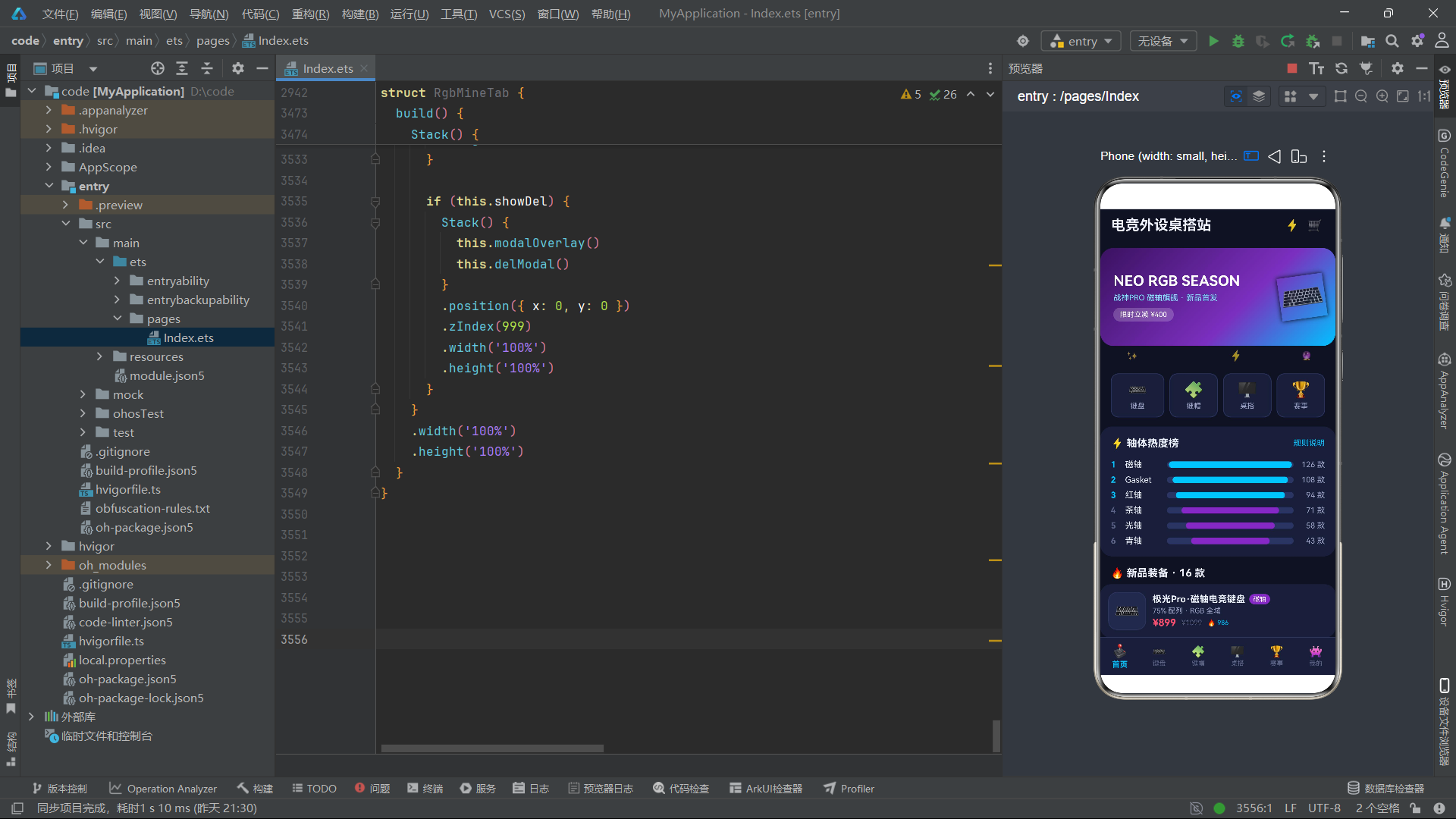
总结
本文深度解析了一款赛博霓虹风格的电竞外设电商应用的技术架构与实现细节。从深色主题的三级背景色体系到霓虹发光的shadow色彩循环,从轴体颜色映射的语义编码到键盘演示板的逐键流光,从RGB灯带的非同步交替到手速能量条的游戏化可视化,每一个技术点都体现了ArkTS声明式UI在构建电竞风格界面时的强大表现力。
该应用的设计亮点在于将电竞文化元素深度融入UI交互——轴体颜色映射让用户一眼识别键盘特性,键盘背光演示让用户直观感受RGB灯效,手速能量条将APM数据可视化为游戏化进度条,加载进度条模拟了实时报名数据的持续更新。这些设计不是简单的视觉装饰,而是将业务语义编码为视觉信号,让界面本身成为信息传递的媒介。

讨论HarmonyOS开发技术,专注于API与组件、DevEco Studio、测试、元服务和应用上架分发等。
更多推荐

 1
1 0
0- 0


 已为社区贡献8条内容

所有评论(0)