基于HarmonyOS API 24的潮玩车模收藏馆应用开发实战:赛道红曜黑金主题下的ArkTS声明式UI架构与交互设计全解析
在移动互联网与智能终端深度融合的今天,HarmonyOS 6.1.1以其跨设备协同能力和分布式架构设计为开发者提供了全新的平台底座。作为HarmonyOS应用开发的核心语言,ArkTS在API 24版本中进一步强化了声明式UI范式的表达能力,使得复杂业务场景下的界面构建变得更加高效与优雅。本文将以一款潮玩车模收藏馆应用为切入点,深入剖析从类型系统设计、色彩主题管理、数据驱动渲染到动画交互实现的完整技术链路。
声明式UI的核心思想在于"状态驱动视图"——开发者只需描述界面在任何给定状态下的样子,框架自动处理状态变化时的视图更新。这一理念在ArkTS中通过@State、@Builder、@Component等装饰器得到了淋漓尽致的体现。对于车模收藏这种包含大量商品展示、筛选交互、弹窗操作的场景,声明式范式大幅简化了状态管理的复杂度,使开发者能将更多精力投入到业务逻辑与用户体验的打磨中。
本文将逐段分析源码中的关键实现细节,涵盖接口定义、配色方案、纯函数工具集、主组件架构、标签页切换机制、计时器动画驱动、模态弹窗体系以及CRUD数据操作等核心技术点。通过流程图梳理整体架构,借助对比表格总结设计决策,力求为HarmonyOS开发者提供一份可复用的技术参考。
一、类型系统设计:接口驱动的数据模型
在HarmonyOS ArkTS开发中,接口(interface)是构建类型安全数据模型的基石。本应用通过一系列精心设计的接口,为车模收藏馆的业务领域建立了完整的类型约束体系。
interface RcTab {
  key: string;
  label: string;
  icon: string;
}

interface RcCar {
  id: number;
  name: string;
  brand: string;
  scale: string;
  series: string;
  year: number;
  price: number;
  oldPrice: number;
  limited: number;
  hot: number;
  percent: number;
}

interface RcMod {
  id: number;
  name: string;
  fit: string;
  price: number;
  oldPrice: number;
  hot: number;
  percent: number;
}

interface RcRace {
  id: number;
  name: string;
  date: string;
  place: string;
  fee: number;
  level: string;
  sign: number;
  percent: number;
}

interface RcOrder {
  id: number;
  name: string;
  date: string;
  price: number;
  status: string;
}

interface RcFav {
  id: number;
  name: string;
  price: number;
  tag: string;
}

interface RcCount {
  name: string;
  count: number;
  percent: number;
}

interface RcProfile {
  nick: string;
  rank: string;
  points: number;
  cars: number;
  orders: number;
  coins: number;
}
上述代码定义了八个核心业务接口。RcTab描述底部导航标签的结构,包含键值、标签文本和图标。RcCar是应用最核心的实体类型,涵盖了车模的名称、品牌、比例、系列、年份、价格、原价、限量编号、热度和百分比等十个维度的信息。RcMod封装改装件数据,RcRace描述赛道活动信息,RcOrder记录订单状态,RcFav表示收藏条目,RcCount用于统计图表的数据结构,RcProfile则承载会员档案信息。
接口设计的核心原则是"单一职责"——每个接口只描述一个业务实体的结构,不混杂不相关的字段。这种设计使得类型系统清晰可读,在后续的组件开发中能够精确地约束数据流向。
此外,应用还定义了一个统一的颜色调色板接口,将所有色彩值集中管理:
interface ColorPalette {
  main: string;
  mainDeep: string;
  gold: string;
  black: string;
  bg: string;
  card: string;
  ink: string;
  sub: string;
  hint: string;
  line: string;
  danger: string;
  success: string;
  white: string;
  silver: string;
}

const RC: ColorPalette = {
  main: '#D62828',
  mainDeep: '#8F1515',
  gold: '#C9A227',
  black: '#1C1C20',
  bg: '#F1F2F4',
  card: '#FFFFFF',
  ink: '#1C1C20',
  sub: '#5C6066',
  hint: '#A8ACB4',
  line: '#E3E5E8',
  danger: '#C0392B',
  success: '#2E7D32',
  white: '#FFFFFF',
  silver: '#9AA0A6'
};
赛道红(#D62828)作为主色调,搭配曜岩黑(#1C1C20)和竞速金(#C9A227),营造出强烈的赛车氛围。这种集中式的配色管理方案带来了三个显著优势:一是主题一致性得到保障,所有组件引用同一套色彩常量;二是后期换肤只需修改一处配置;三是避免了硬编码颜色值带来的维护噩梦。
二、静态数据与配置常量
在声明式UI架构中,静态数据通常以常量数组的形式定义在组件外部,通过引用传递给组件渲染。本应用的数据层设计体现了对业务领域的深刻理解。
const RC_TABS: RcTab[] = [
  { key: 'home', label: '首页', icon: '🏁' },
  { key: 'car', label: '车模', icon: '🚗' },
  { key: 'mod', label: '改装', icon: '🔧' },
  { key: 'race', label: '赛道', icon: '🏎️' },
  { key: 'collect', label: '收藏', icon: '🏆' },
  { key: 'mine', label: '我的', icon: '👨' }
];

const RC_CARS: RcCar[] = [
  { id: 1, name: '法拉利 F40 · 红鬃烈马', brand: '法拉利', scale: '1:18', series: '传奇超跑', year: 1987, price: 2680, oldPrice: 3180, limited: 199, hot: 999, percent: 99 },
  { id: 2, name: '保时捷 911 GT3 RS', brand: '保时捷', scale: '1:18', series: '公路赛车', year: 2018, price: 1980, oldPrice: 2380, limited: 399, hot: 954, percent: 96 },
  { id: 3, name: '兰博基尼 Countach', brand: '兰博基尼', scale: '1:18', series: '楔形始祖', year: 1974, price: 2280, oldPrice: 2680, limited: 299, hot: 921, percent: 95 },
  // ...更多车模数据
];

const RC_MODS: RcMod[] = [
  { id: 1, name: '锻造轮毂 · 五辐曜金', fit: '适配 1:18', price: 268, oldPrice: 328, hot: 956, percent: 92 },
  { id: 2, name: '碳纤维大尾翼', fit: '通用 1:18', price: 158, oldPrice: 198, hot: 912, percent: 88 },
  // ...更多改装件数据
];

const RC_RACES: RcRace[] = [
  { id: 1, name: '卡丁车体验赛', date: '08-27', place: '上海国际赛车场', fee: 299, level: '新手友好', sign: 128, percent: 85 },
  { id: 2, name: '直线加速赛', date: '09-03', place: '北京金港赛道', fee: 199, level: '全民可报', sign: 96, percent: 72 },
  // ...更多赛事数据
];
数据常量的设计遵循了"领域驱动"的原则——每个数组对应一个业务领域实体,字段命名直白地反映业务含义。例如RC_CARS中的scale字段表示车模比例(1:18或1:24),limited字段表示限量编号总数,hot字段表示热度值。这种设计使得后续的筛选、排序、统计操作都能通过简洁的函数式调用完成。
应用还定义了大量的选项配置常量,用于弹窗中的选择器:
const RC_COLORS: string[] = ['赛道红', '曜岩黑', '竞速黄', '银石白'];
const RC_DEPOSITS: string[] = ['500 定金', '1000 定金', '全额'];
const RC_STORES: string[] = ['上海旗舰店', '北京国贸店', '深圳湾店'];
const RC_SLOTS: string[] = ['上午 10-12', '下午 14-16', '晚场 18-20'];
const RC_FITS: string[] = ['通用 1:18', '通用 1:24', '全比例'];
const RC_INSTALLS: string[] = ['到店安装', '自行改装'];
const RC_GROUPS: string[] = ['新手组', '进阶组', '硬核组'];
const RC_INSURES: string[] = ['基础保险', '全额保险'];
const RC_TERMS: string[] = ['月卡', '季卡', '年卡'];
const RC_PAYS: string[] = ['微信', '支付宝', '积分抵扣'];
const RC_CITYS: string[] = ['上海市', '北京市', '深圳市', '杭州市'];
const RC_LIGHTS: string[] = ['冷白灯', '暖黄灯', 'RGB 流光'];
const RC_ALLOYS: string[] = ['曜金五辐', '哑光黑', '银石抛光'];
这些选项常量集中管理了应用中所有下拉选择、标签切换的数据源。将它们提取为顶层常量而非组件内局部变量,有利于后续的国际化替换和远程配置化改造。
三、纯函数工具集:数据查询与转换的核心
ArkTS支持在组件外部定义纯函数,这些函数不依赖任何组件状态,接收输入参数并返回确定的输出。本应用的工具函数设计体现了函数式编程的思想。
function rcBar(p: number): string {
  let v = p > 100 ? 100 : p;
  return v + '%';
}

function rcIcon(idx: number): string {
  let icons = ['🏎️', '🏁', '🔧', '🛞', '💨', '🏆', '🧯', '🎽', '🛡️', '📦', '🗿', '⚡', '🚀', '🌀', '🎤', '🕶️'];
  return icons[idx % icons.length];
}

function rcBg(idx: number): string {
  let list = ['#FDEBEB', '#F1F2F4', '#FBF3E0', '#EFEFEF'];
  return list[idx % list.length];
}

function rcScaleColor(s: string): string {
  if (s === '1:18') {
    return RC.main;
  }
  if (s === '1:24') {
    return RC.gold;
  }
  return RC.silver;
}
rcBar函数将百分比值约束在0-100范围内并拼接百分号,用于进度条的宽度计算。rcIcon函数通过取模运算循环返回图标数组中的元素,确保每个车模都能获得一个图标。rcBg函数同理返回循环背景色。rcScaleColor函数根据车模比例返回对应的主题色——1:18用赛道红、1:24用竞速金、其他用银石色,这种颜色编码使用户能一眼区分不同比例的车模。
数据查询函数群则封装了对RC_CARS、RC_MODS、RC_RACES数组的查找逻辑:
function rcTopCars(): RcCar[] {
return RC_CARS.slice(0, 5);
}
function rcCartItems(): RcOrder[] {
return RC_ORDERS.slice(0, 3);
}
function rcFilterCars(list: RcCar[], t: string): RcCar[] {
if (t === '全部比例') {
return list;
}
return list.filter((o: RcCar) => o.scale === t);
}
function rcCarNameById(id: number): string {
let arr = RC_CARS.filter((o: RcCar) => o.id === id);
if (arr.length > 0) {
return arr[0].name;
}
return '该车模';
}
function rcCarPriceById(id: number): number {
let arr = RC_CARS.filter((o: RcCar) => o.id === id);
if (arr.length > 0) {
return arr[0].price;
}
return 0;
}
纯函数的最大优势在于可测试性和可组合性。这些函数不产生副作用,相同的输入永远产生相同的输出,使得它们可以在任何组件中安全调用而无需担心状态污染。在HarmonyOS的声明式UI中,纯函数常用于build方法内的数据转换,确保渲染结果的确定性。
rcCarNameById、rcCarPriceById、rcCarScaleById、rcCarBrandById等"按ID查询"函数采用了一致的设计模式:先通过filter获取匹配数组,再判断长度后返回首个元素的对应字段。这种模式虽然简单,但在ArkTS的类型系统中保证了类型安全,避免了空指针异常。
四、主组件架构:入口组件与标签导航
应用的主入口组件RcApp采用了经典的"头部+内容+底部导航"三段式布局,通过@State管理的activeTab状态驱动条件渲染。
@Entry
@Component
struct RcApp {
  @State activeTab: number = 0;

  @Builder
  headerBar(title: string) {
    Stack() {
      Row()
        .width('100%')
        .height(4)
        .linearGradient({
          angle: 90,
          colors: [[RC.main, 0], [RC.black, 0.6], [RC.gold, 1]]
        })

      Row() {
        Column() {
          Text(title)
            .fontSize(21)
            .fontWeight(FontWeight.Bold)
            .fontColor(RC.ink)
          Text('RACING CLUB · 车模收藏馆')
            .fontSize(10)
            .fontColor(RC.hint)
            .margin({ top: 2 })
        }
        .alignItems(HorizontalAlign.Start)
        .layoutWeight(1)

        Text('🏁')
          .fontSize(18)
          .margin({ right: 12 })
        Text('🛒')
          .fontSize(18)
          .margin({ right: 4 })
      }
      .width('100%')
      .padding({ left: 16, right: 16, top: 10, bottom: 12 })
    }
    .width('100%')
    .backgroundColor(RC.bg)
  }

  @Builder
  bottomBar() {
    Row() {
      ForEach(RC_TABS, (tb: RcTab, ti: number) => {
        Column() {
          Text(tb.icon)
            .fontSize(this.activeTab === ti ? 20 : 17)
            .fontColor(this.activeTab === ti ? RC.main : RC.hint)
          Text(tb.label)
            .fontSize(this.activeTab === ti ? 12 : 10)
            .fontWeight(this.activeTab === ti ? FontWeight.Bold : FontWeight.Normal)
            .fontColor(this.activeTab === ti ? RC.main : RC.hint)
            .margin({ top: 2 })
        }
        .layoutWeight(1)
        .padding({ top: 6, bottom: 6 })
        .onClick(() => {
          this.activeTab = ti;
        })
      }, (tb: RcTab) => tb.key)
    }
    .width('100%')
    .height(58)
    .backgroundColor(RC.card)
    .border({ width: { top: 1 }, color: RC.line })
  }

  build() {
    Column() {
      if (this.activeTab === 0) {
        this.headerBar('潮玩车模收藏馆')
      } else if (this.activeTab === 1) {
        this.headerBar('车模展厅')
      } else if (this.activeTab === 2) {
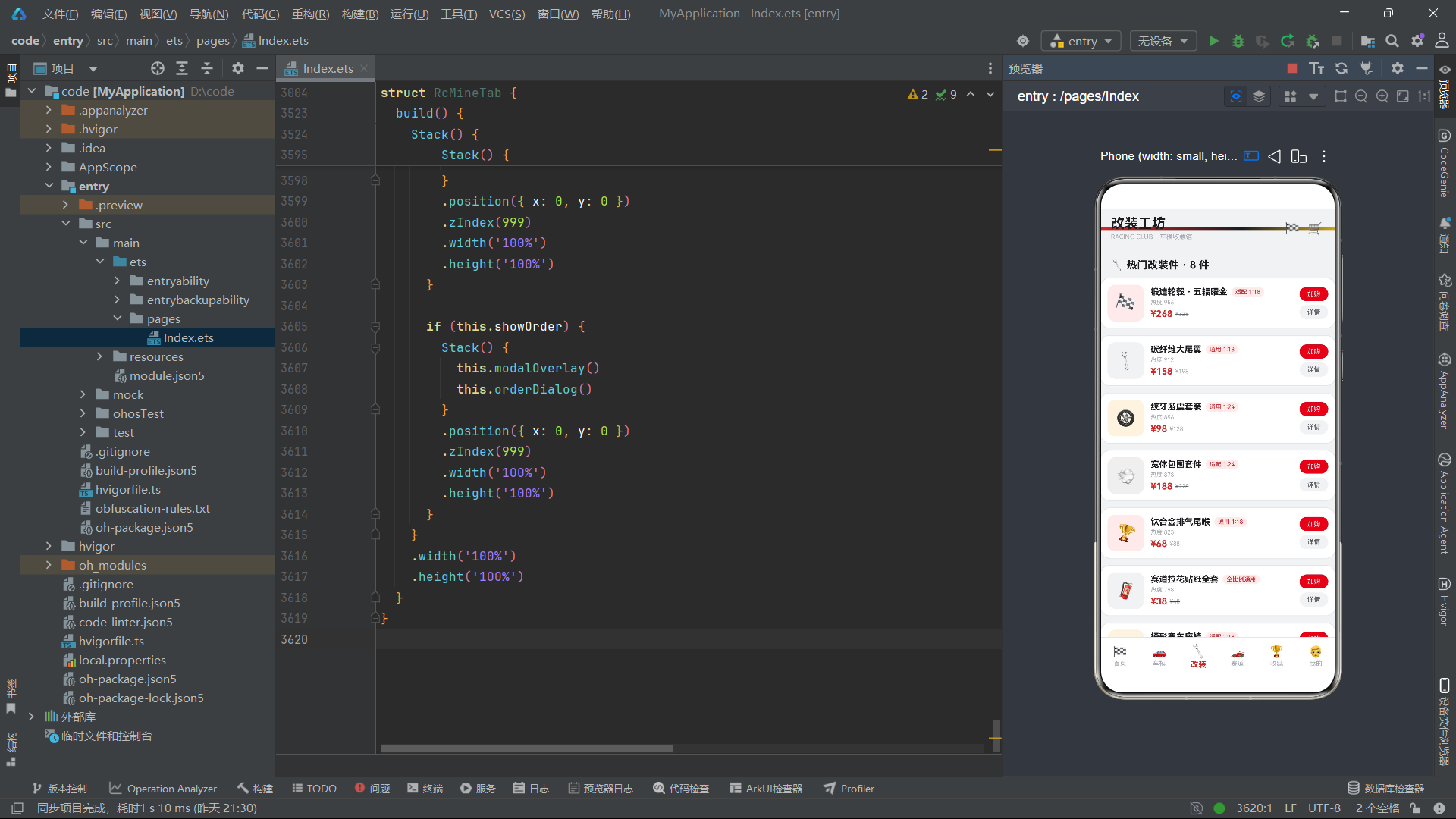
        this.headerBar('改装工坊')
      } else if (this.activeTab === 3) {
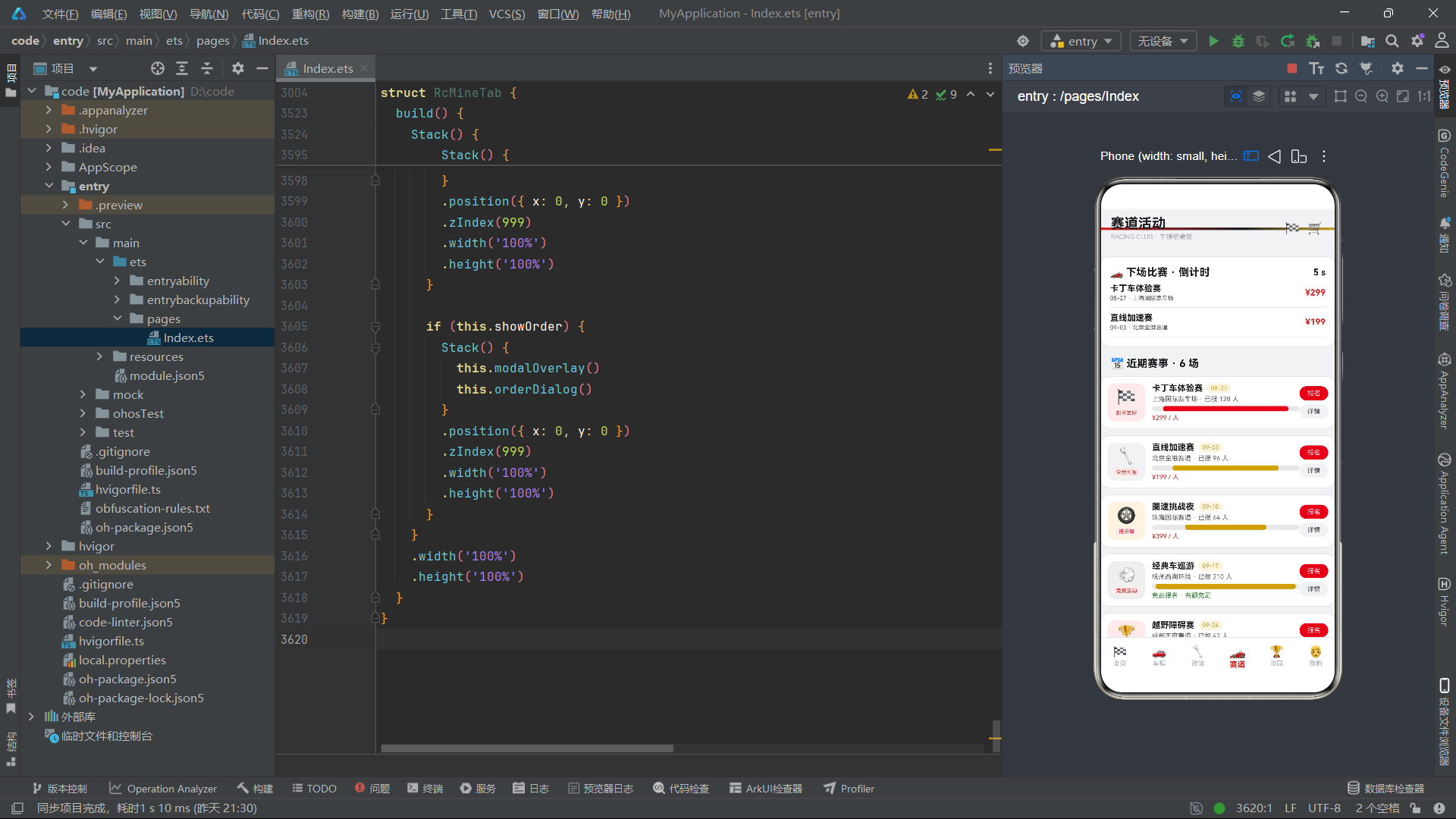
        this.headerBar('赛道活动')
      } else if (this.activeTab === 4) {
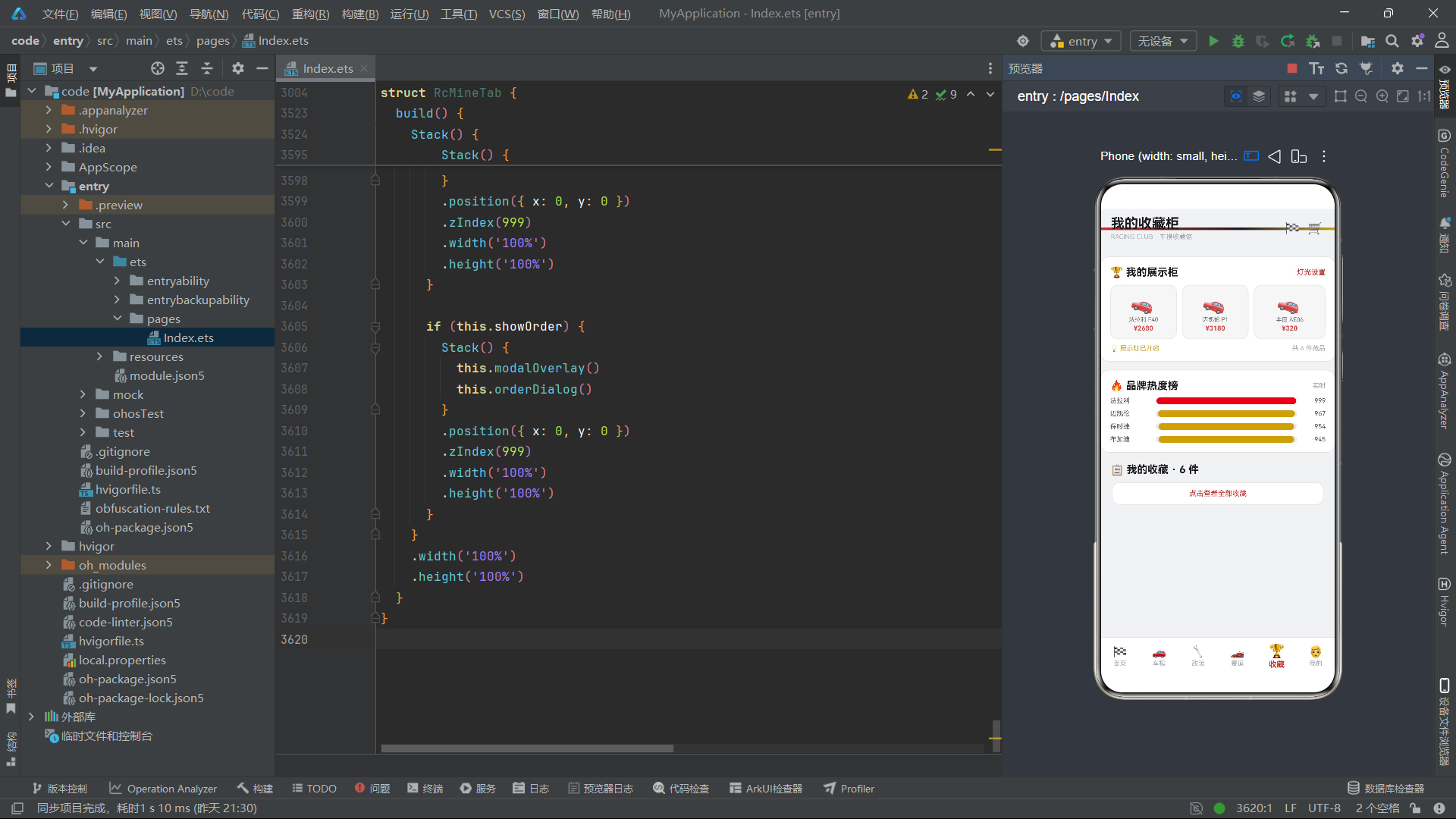
        this.headerBar('我的收藏柜')
      } else {
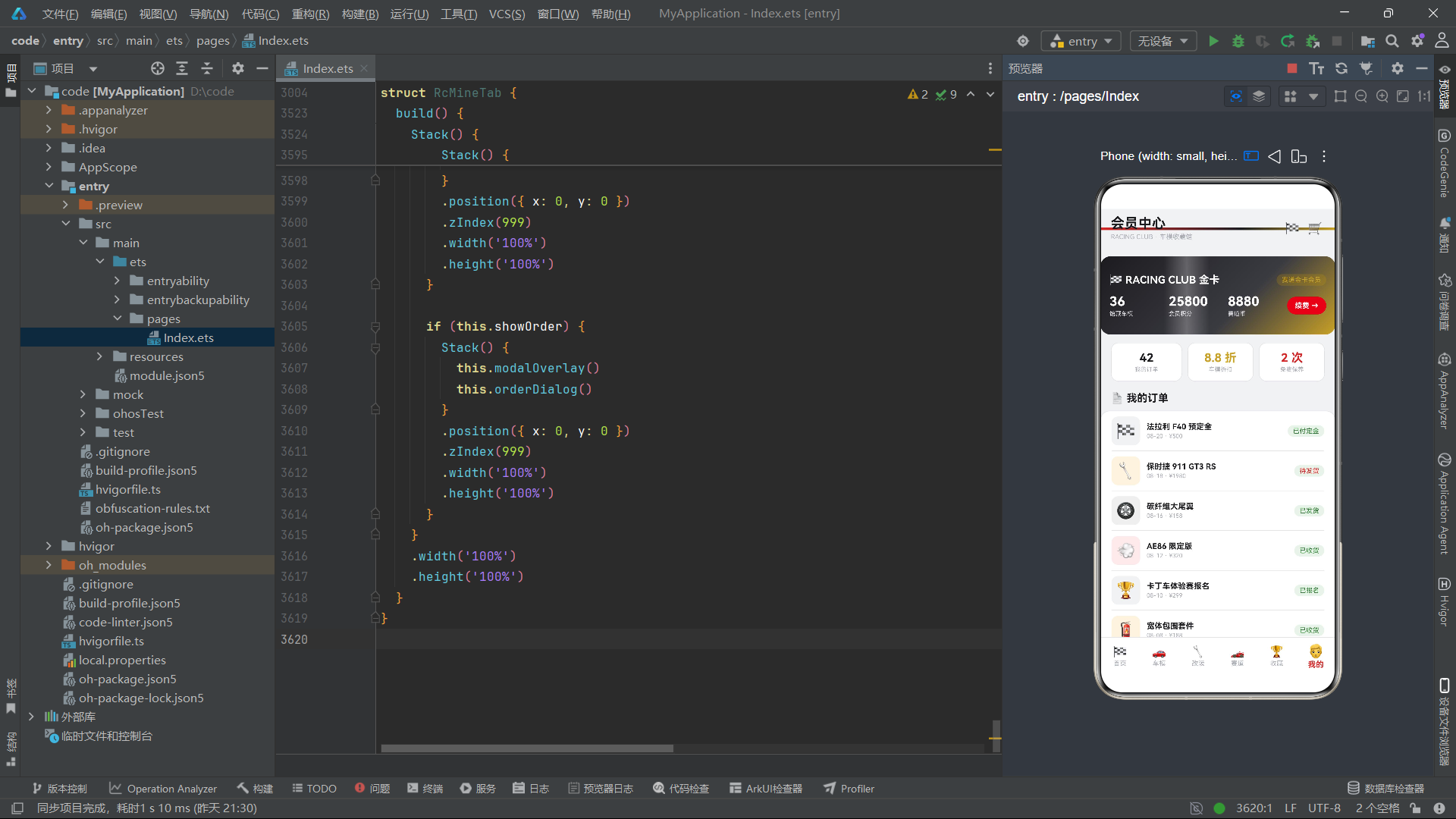
        this.headerBar('会员中心')
      }

      Column() {
        if (this.activeTab === 0) {
          RcHomeTab()
        } else if (this.activeTab === 1) {
          RcCarTab()
        } else if (this.activeTab === 2) {
          RcModTab()
        } else if (this.activeTab === 3) {
          RcRaceTab()
        } else if (this.activeTab === 4) {
          RcCollectTab()
        } else {
          RcMineTab()
        }
      }
      .layoutWeight(1)

      this.bottomBar()
    }
    .width('100%')
    .height('100%')
    .backgroundColor(RC.bg)
  }
}
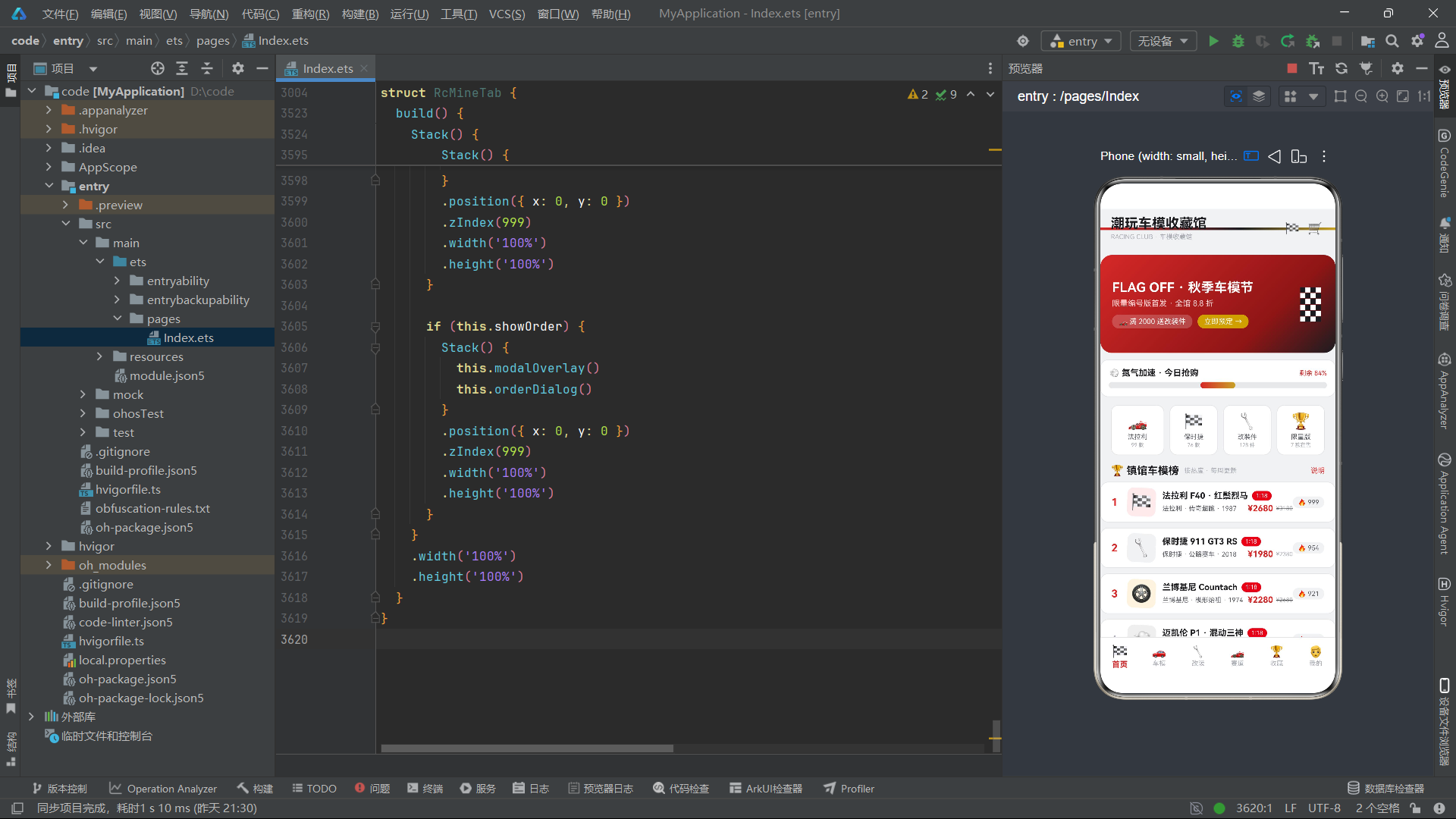
headerBar构建器顶部有一条4像素高的渐变装饰条,使用linearGradient从赛道红过渡到曜岩黑再到竞速金,形成强烈的视觉品牌标识。底部导航栏通过ForEach遍历RC_TABS数组渲染六个标签项,每个项的图标大小、字体粗细和颜色都根据activeTab状态动态变化——选中项的图标为20像素并使用主色,未选中项为17像素并使用提示色。
标签切换的核心机制是@State activeTab的值变化触发build方法重新执行,条件渲染(if-else if链)确保只有对应索引的子组件被实例化。ArkTS的条件渲染采用"创建-销毁"策略,切换标签时旧组件被销毁释放资源,新组件被创建并挂载,因此每个Tab组件的aboutToAppear和aboutToDisappear生命周期回调能正确执行定时器的启停。
五、首页Tab:动画驱动的沉浸式体验
首页Tab(RcHomeTab)是应用的信息聚合中心,集成了赛事横幅、氮气加速进度条、品牌网格、热门榜单、新车到店等多个模块,并通过计时器驱动多种动画效果。
@Component
struct RcHomeTab {
  @State showOrder: boolean = false;
  @State selCar: number = 1;
  @State carColor: string = '赛道红';
  @State deposit: string = '500 定金';
  @State showTip: boolean = false;
  @State showPick: boolean = false;
  @State pickDate: string = '08-26';
  @State pickStore: string = '上海旗舰店';
  @State pickSlot: string = '下午 14-16';
  @State flagSwing: boolean = false;
  @State nitro: number = 0;
  timerId: number = -1;

  aboutToAppear(): void {
    this.timerId = setInterval(() => {
      this.flagSwing = !this.flagSwing;
      this.nitro = this.nitro + 4;
      if (this.nitro > 100) {
        this.nitro = 0;
      }
    }, 200);
  }

  aboutToDisappear(): void {
    if (this.timerId >= 0) {
      clearInterval(this.timerId);
    }
  }
组件在aboutToAppear中创建了一个200毫秒间隔的定时器,同时驱动两个动画状态:flagSwing在true/false之间切换,用于旗帜摆动和图标旋转效果;nitro从0递增到100后归零,模拟氮气加速进度条的循环填充。
定时器管理是HarmonyOS组件开发中的重要课题。aboutToAppear中创建的定时器必须在aboutToDisappear中清除,否则组件销毁后定时器仍会执行,导致对已释放组件的状态更新,引发内存泄漏或运行时崩溃。本应用在timerId上初始化为-1,清除前判断是否大于等于0,这是一种防御性编程的好实践。
赛事横幅的渐变背景是首页的视觉焦点:
@Builder
raceBanner() {
  Stack() {
    Column()
      .width('100%')
      .height(150)
      .borderRadius(18)
      .linearGradient({
        angle: 135,
        colors: [[RC.main, 0], [RC.mainDeep, 0.7], [RC.black, 1]]
      })

    Row() {
      Column() {
        Text('FLAG OFF · 秋季车模节')
          .fontSize(20)
          .fontWeight(FontWeight.Bold)
          .fontColor(RC.white)
        Text('限量编号版首发 · 全馆 8.8 折')
          .fontSize(12)
          .fontColor('#FFD9D9')
          .margin({ top: 6 })
        Row() {
          Text('🏎️ 满 2000 送改装件')
            .fontSize(11)
            .fontColor(RC.white)
            .padding({ left: 10, right: 10, top: 4, bottom: 4 })
            .backgroundColor('#33FFFFFF')
            .borderRadius(10)
          Text('立即预定 →')
            .fontSize(11)
            .fontColor(RC.white)
            .padding({ left: 10, right: 10, top: 4, bottom: 4 })
            .backgroundColor(RC.gold)
            .borderRadius(10)
            .margin({ left: 8 })
            .onClick(() => {
              this.selCar = 1;
              this.showOrder = true;
            })
        }
        .margin({ top: 10 })
      }
      .alignItems(HorizontalAlign.Start)
      .layoutWeight(1)

      Column() {
        ForEach(RC_FLAG, (sq: number, si: number) => {
          Row() {
            ForEach([0, 1, 2, 3], (ci: number, cj: number) => {
              Column()
                .width(8)
                .height(8)
                .backgroundColor((si + ci) % 2 === 0 ? RC.black : RC.white)
            }, (ci: number) => ci + '')
          }
          .width(32)
          .justifyContent(FlexAlign.SpaceBetween)
          .margin({ top: 1 })
        }, (sq: number) => sq + '')
      }
      .margin({ right: 8 })
    }
    .width('100%')
    .padding({ left: 18, right: 14 })
  }
  .width('100%')
  .height(150)
  .margin({ top: 10, left: 16, right: 16 })
}
横幅使用135度角的线性渐变,从赛道红过渡到深红再到曜岩黑,形成深邃的立体感。右侧的方格旗图案通过双层嵌套ForEach渲染——外层遍历6行,内层遍历4列,通过(si+ci)%2判断使用黑色还是白色,实现了经典的赛车格子旗视觉效果。
这种纯代码绘制图案的方式体现了声明式UI的灵活性——不需要任何图片资源,仅通过组件的排列组合就能实现复杂的视觉元素。在HarmonyOS的轻量级应用场景中,这种方案既减小了包体积,又保证了渲染性能。
热门榜单中的车模图标使用了flagSwing状态驱动的旋转动画:
Text(rcIcon(it.id))
  .fontSize(26)
  .backgroundColor(rcBg(ix))
  .borderRadius(10)
  .width(44)
  .height(44)
  .textAlign(TextAlign.Center)
  .rotate({ angle: this.flagSwing ? 6 : -4 })
  .animation({ duration: 400 })
rotate属性根据flagSwing的布尔值在6度和-4度之间切换,配合animation设置400毫秒的过渡时长,形成了持续的左右摆动效果。这种"布尔翻转+animation"的动画模式是ArkTS中最简洁的循环动画实现方案。
六、车模展厅Tab:筛选、图表与CRUD操作
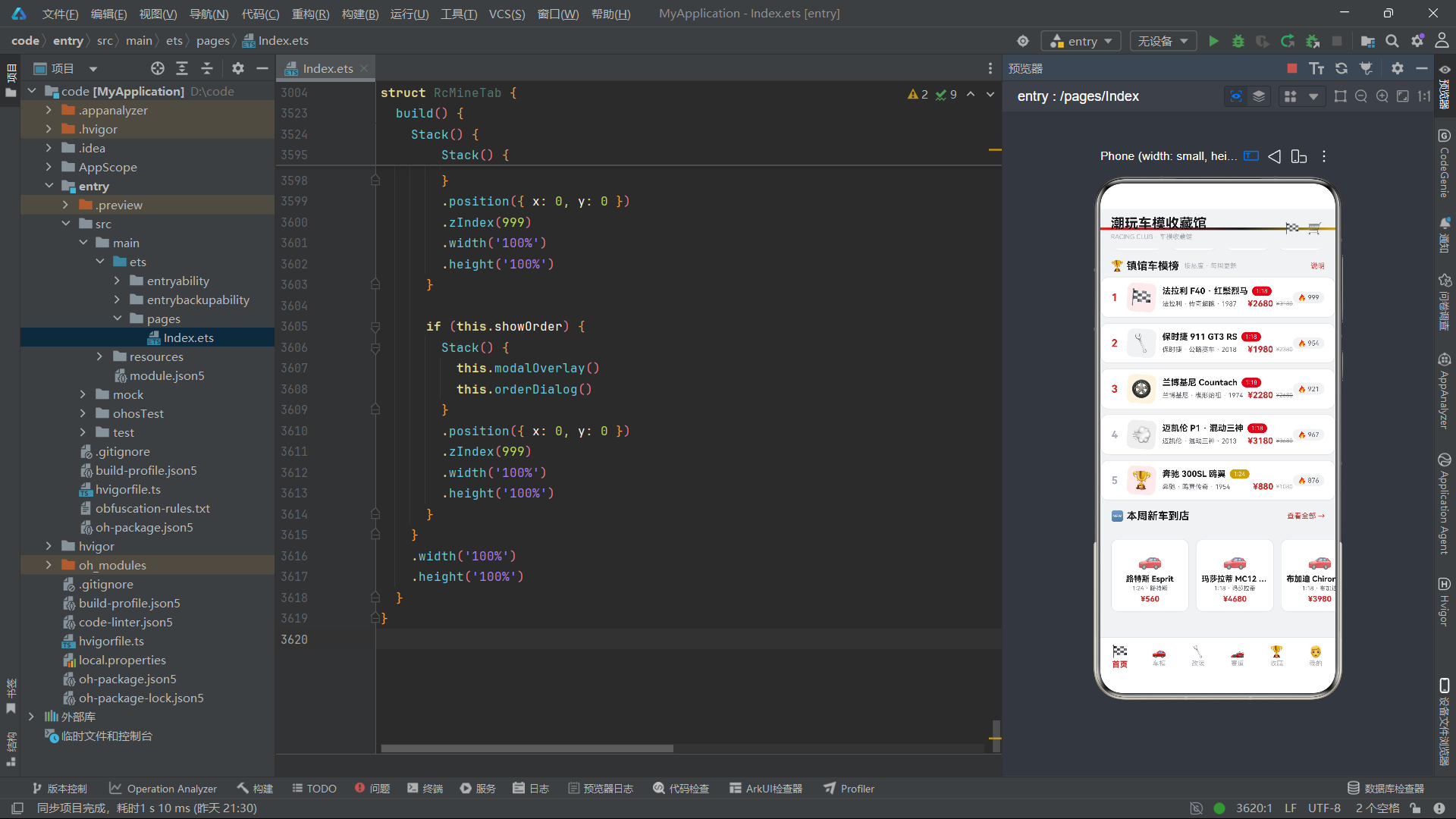
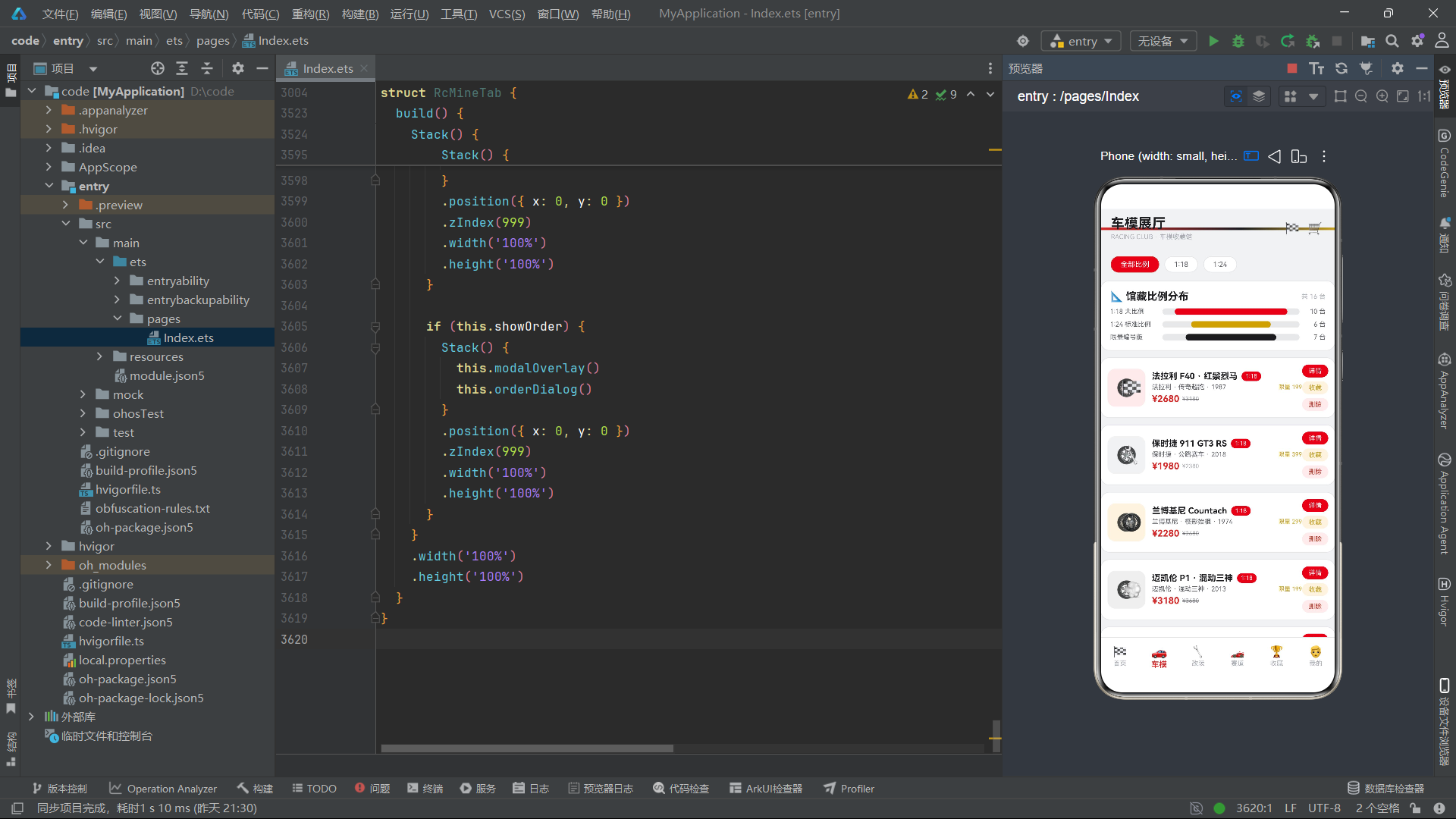
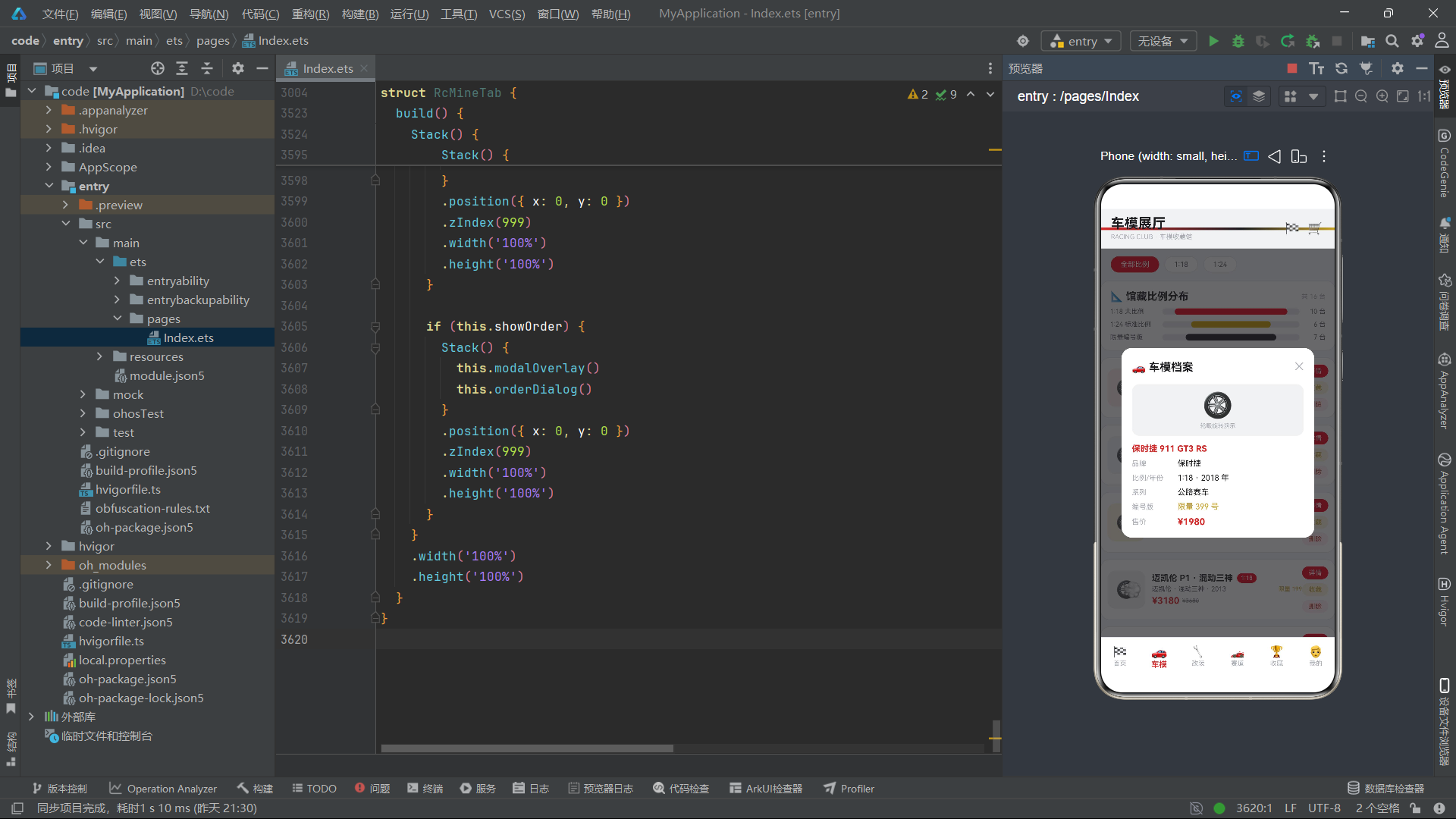
车模展厅Tab(RcCarTab)展示了完整的数据管理能力,包括比例筛选、馆藏分布图表、车模卡片列表以及详情/收藏/下架三个弹窗操作。
@Component
struct RcCarTab {
  @State curScale: string = '全部比例';
  @State carList: RcCar[] = RC_CARS.slice();
  @State showInfo: boolean = false;
  @State showFav: boolean = false;
  @State showDel: boolean = false;
  @State selId: number = 1;
  @State faved: boolean = false;
  @State wheelSpin: number = 0;
  @State wheelDir: number = 1;
  timerId: number = -1;

  aboutToAppear(): void {
    this.timerId = setInterval(() => {
      if (this.wheelSpin > 360) {
        this.wheelDir = -1;
      }
      if (this.wheelSpin < 0) {
        this.wheelDir = 1;
      }
      this.wheelSpin = this.wheelSpin + this.wheelDir * 18;
    }, 100);
  }

  aboutToDisappear(): void {
    if (this.timerId >= 0) {
      clearInterval(this.timerId);
    }
  }
wheelSpin状态驱动轮毂旋转动画,wheelDir控制旋转方向。当角度超过360度时反转方向为-1,低于0度时反转回1,实现来回摆动的效果。这种"角度值+方向变量"的模式比简单的布尔翻转更加灵活,能够实现非对称的摆动范围。
馆藏比例分布图表通过ForEach遍历RC_SCALES数据渲染条形图:
@Builder
scaleChart() {
  Column() {
    Row() {
      Text('📐 馆藏比例分布')
        .fontSize(16)
        .fontWeight(FontWeight.Bold)
        .fontColor(RC.ink)
      Column().layoutWeight(1)
      Text('共 ' + this.carList.length + ' 台')
        .fontSize(10)
        .fontColor(RC.hint)
    }
    .width('100%')

    ForEach(RC_SCALES, (sc: RcCount, si: number) => {
      Row() {
        Text(sc.name)
          .fontSize(10)
          .fontColor(RC.sub)
          .width(80)
        Stack() {
          Row()
            .width('100%')
            .height(10)
            .backgroundColor('#E7E8EA')
            .borderRadius(5)
          Row()
            .width(rcBar(sc.percent))
            .height(10)
            .backgroundColor(si === 0 ? RC.main : si === 1 ? RC.gold : RC.black)
            .borderRadius(5)
        }
        .layoutWeight(1)
        .height(10)
        Text(sc.count + ' 台')
          .fontSize(10)
          .fontColor(RC.sub)
          .width(40)
          .textAlign(TextAlign.End)
      }
      .width('100%')
      .margin({ top: 8 })
    }, (sc: RcCount) => sc.name)
  }
  .width('100%')
  .padding(14)
  .backgroundColor(RC.card)
  .border({ width: 1, color: RC.line })
  .borderRadius(14)
  .margin({ top: 12, left: 16, right: 16 })
}
Stack层叠布局实现了进度条效果——底层是灰色的满宽条,上层是根据百分比宽度着色的前景条。三层条件运算符(si === 0 ? RC.main : si === 1 ? RC.gold : RC.black)为不同比例段分配不同颜色,使图表具备视觉层次感。
下架操作通过不可变数组的filter方法实现:
Text('确认下架')
  .fontSize(13)
  .fontWeight(FontWeight.Bold)
  .fontColor(RC.white)
  .layoutWeight(1)
  .textAlign(TextAlign.Center)
  .padding({ top: 10, bottom: 10 })
  .backgroundColor(RC.danger)
  .borderRadius(18)
  .margin({ left: 10 })
  .onClick(() => {
    this.carList = this.carList.filter((o: RcCar) => o.id !== this.selId);
    this.showDel = false;
  })
ArkTS中@State修饰的数组应使用不可变更新模式——即通过filter、map、concat等方法返回新数组并重新赋值,而非直接操作原数组。这是因为声明式UI的响应式系统通过引用比较检测变化,直接修改数组元素不会触发视图更新。filter方法生成排除目标项的新数组并赋值给carList,框架检测到引用变化后自动重新渲染列表。
七、改装工坊Tab与赛道活动Tab
改装工坊Tab(RcModTab)展示了改装件的列表与加购流程。加购弹窗集成了适配比例选择、轮毂配色、数量调节和安装方式四个维度的选项,其中数量调节器通过简单的加减逻辑实现:
Text('-')
  .fontSize(16)
  .fontColor(RC.main)
  .width(26)
  .height(26)
  .textAlign(TextAlign.Center)
  .backgroundColor(RC.bg)
  .borderRadius(13)
  .onClick(() => {
    if (this.modNum > 1) {
      this.modNum = this.modNum - 1;
    }
  })
Text(this.modNum + '')
  .fontSize(13)
  .fontColor(RC.ink)
  .width(36)
  .textAlign(TextAlign.Center)
Text('+')
  .fontSize(16)
  .fontColor(RC.main)
  .width(26)
  .height(26)
  .textAlign(TextAlign.Center)
  .backgroundColor(RC.bg)
  .borderRadius(13)
  .onClick(() => {
    this.modNum = this.modNum + 1;
  })
减号按钮加入了下限保护(modNum > 1),防止数量降至零以下。合计金额通过rcModPriceById函数实时计算,体现了纯函数在状态驱动UI中的即时响应能力。
赛道活动Tab(RcRaceTab)包含一个倒计时组件,通过定时器每秒递减:
aboutToAppear(): void {
  this.timerId = setInterval(() => {
    this.countdown = this.countdown - 1;
    if (this.countdown < 1) {
      this.countdown = 5;
    }
  }, 1000);
}
倒计时数值在UI中通过条件样式呈现紧迫感:
Text(this.countdown + ' s')
  .fontSize(14)
  .fontWeight(FontWeight.Bold)
  .fontColor(this.countdown <= 2 ? RC.main : RC.ink)
  .opacity(this.countdown <= 2 ? 0.5 : 1)
  .animation({ duration: 500 })
当倒计时小于等于2秒时,文字变为赛道红并半透明,配合500毫秒动画形成闪烁效果,模拟赛车发车前的倒计时紧张氛围。
八、收藏柜Tab:灯光效果与转盘动画
收藏柜Tab(RcCollectTab)是应用的视觉亮点,通过灯光切换和旋转展示台效果模拟实体展示柜的体验。
@Component
struct RcCollectTab {
  @State showLight: boolean = false;
  @State showFav: boolean = false;
  @State lightMode: string = '冷白灯';
  @State favList: RcFav[] = RC_FAVS.slice();
  @State lightOn: boolean = false;
  @State turntable: number = 0;
  timerId: number = -1;

  aboutToAppear(): void {
    this.timerId = setInterval(() => {
      this.lightOn = !this.lightOn;
      this.turntable = this.turntable + 10;
      if (this.turntable > 360) {
        this.turntable = 0;
      }
    }, 250);
  }
lightOn布尔值控制展示灯光的开关,turntable数值驱动车模图标的旋转。展示柜卡片中的每个车模根据lightOn状态切换背景色和边框色:
ForEach(rcFavCars(), (fc: RcFav, fi: number) => {
  Column() {
    Text('🚗')
      .fontSize(28)
      .rotate({ angle: this.turntable })
      .animation({ duration: 250 })
    Text(fc.name)
      .fontSize(9)
      .fontColor(RC.sub)
      .maxLines(1)
      .textOverflow({ overflow: TextOverflow.Ellipsis })
      .margin({ top: 4 })
    Text('¥' + fc.price)
      .fontSize(10)
      .fontWeight(FontWeight.Bold)
      .fontColor(RC.main)
      .margin({ top: 2 })
  }
  .layoutWeight(1)
  .padding({ top: 10, bottom: 10 })
  .backgroundColor(this.lightOn ? '#FFFDF5' : RC.bg)
  .border({ width: 1, color: this.lightOn ? '#F0E4C0' : RC.line })
  .borderRadius(12)
  .margin({ right: fi < 2 ? 8 : 0 })
  .opacity(this.lightOn ? 1 : 0.82)
  .animation({ duration: 300 })
}, (fc: RcFav) => fc.id + '')
灯光开启时背景色变为暖色调(#FFFDF5),边框变为暖金色(#F0E4C0),不透明度为1;灯光关闭时恢复灰调背景和普通边框,不透明度降为0.82。配合300毫秒的动画过渡,形成了逼真的灯光开关效果。车模图标通过rotate属性跟随turntable值旋转,模拟展示柜中转盘的旋转展示。
这种"物理世界隐喻"的UI设计理念在HarmonyOS应用中值得推崇——通过代码模拟现实物体的行为特征(灯光、旋转、材质),使用户在数字界面中获得接近实体操作的感知体验。ArkTS的animation API为这种设计提供了低成本的实现途径。
九、会员中心Tab:金卡光泽动画与订单管理
会员中心Tab(RcMineTab)通过光泽扫过动画营造高级感,并集成了金卡续费、收货地址管理、订单列表等功能。
@Builder
goldCard() {
  Stack() {
    Column()
      .width('100%')
      .height(120)
      .borderRadius(16)
      .linearGradient({
        angle: 135,
        colors: [[RC.black, 0], ['#3A3A42', 0.6], [RC.gold, 1]]
      })

    Row()
      .width(70)
      .height('100%')
      .linearGradient({
        angle: 90,
        colors: [['#00FFFFFF', 0], ['#44FFFFFF', 0.5], ['#00FFFFFF', 1]]
      })
      .translate({ x: this.glowX })
      .animation({ duration: 150 })

    Column() {
      Row() {
        Text('🏁 RACING CLUB 金卡')
          .fontSize(16)
          .fontWeight(FontWeight.Bold)
          .fontColor(RC.white)
        Column().layoutWeight(1)
        Text(RC_PROFILE.rank)
          .fontSize(10)
          .fontColor(RC.gold)
          .padding({ left: 8, right: 8, top: 3, bottom: 3 })
          .backgroundColor('#33C9A227')
          .borderRadius(9)
      }
      .width('100%')

      Row() {
        Column() {
          Text(RC_PROFILE.cars + '')
            .fontSize(20)
            .fontWeight(FontWeight.Bold)
            .fontColor(RC.white)
          Text('馆藏车模')
            .fontSize(9)
            .fontColor('#E8E8EC')
            .margin({ top: 2 })
        }
        .alignItems(HorizontalAlign.Start)
        .layoutWeight(1)
        // ...积分和赛道币列
      }
      .width('100%')
      .margin({ top: 12 })
    }
    .width('100%')
    .height('100%')
    .padding(14)
    .justifyContent(FlexAlign.Center)
  }
  .width('100%')
  .height(120)
  .margin({ top: 12, left: 16, right: 16 })
}
金卡背景使用135度渐变从曜岩黑过渡到深灰再到竞速金,营造金属质感。光泽扫过效果通过一个70像素宽的白色渐变Row实现——它的渐变从透明到半透明白再到透明,模拟一道光带。通过定时器驱动的glowX状态不断改变其translate X位置,形成从左到右扫过的光泽动画。
光泽扫过是移动端UI中常见的高级感效果,通常用于VIP卡、优惠券、加载指示等场景。ArkTS的实现方案简洁高效:一个渐变层叠在卡片上方,通过translate属性动画移动位置。150毫秒的动画时长确保了流畅的视觉过渡。
十、模态弹窗体系:overlay模式与条件渲染
应用中的所有弹窗采用统一的"overlay + 条件渲染"模式,通过Stack层叠布局将弹窗内容覆盖在主界面之上。
build() {
  Stack() {
    Column() {
      // 主内容
    }
    .width('100%')
    .height('100%')

    if (this.showOrder) {
      Stack() {
        this.modalOverlay()
        this.orderDialog()
      }
      .position({ x: 0, y: 0 })
      .zIndex(999)
      .width('100%')
      .height('100%')
    }

    if (this.showTip) {
      Stack() {
        this.modalOverlay()
        this.tipDialog()
      }
      .position({ x: 0, y: 0 })
      .zIndex(999)
      .width('100%')
      .height('100%')
    }
  }
  .width('100%')
  .height('100%')
}
modalOverlay是一个全屏半透明遮罩层,backgroundColor设置为#AA1C1C20(前缀AA表示约67%透明度的曜岩黑色)。每个弹窗由一个外层Stack包裹遮罩和内容,通过zIndex(999)确保浮于所有内容之上。条件渲染的if语句确保弹窗只在对应状态为true时才出现在组件树中。
这种弹窗架构的优势在于:一是状态管理简单,每个弹窗只需一个boolean状态控制显隐;二是组件生命周期完整,弹窗内容在每次显示时重新创建、隐藏时销毁,避免了状态残留;三是性能优化良好,隐藏的弹窗不占用渲染资源。需要注意的是,如果弹窗内有TextInput等需要保持焦点的组件,频繁创建销毁可能导致输入状态丢失,此时应考虑使用visibility属性替代条件渲染。
十一、数据操作模式总结
应用中涉及三种核心数据操作模式,均采用不可变更新策略:
新增操作使用concat方法:
this.items = this.items.concat([newItem]);
编辑操作使用map方法:
this.items = this.items.map((o: BeerItem) => {
  if (o.id === this.selId) {
    return { id: o.id, name: this.editName.length > 0 ? this.editName : o.name, /* ... */ };
  }
  return o;
});
删除操作使用filter方法:
this.carList = this.carList.filter((o: RcCar) => o.id !== this.selId);
三种操作的核心思想一致:不修改原数组的任何元素,而是生成一个全新的数组并赋值给@State变量。ArkTS的响应式系统检测到数组引用变化后,自动触发依赖该状态的build方法重新执行,更新视图。这种模式虽然在每次操作时都需要创建新数组,但在中小规模数据量下性能完全可接受,且代码可读性和可维护性远优于直接索引修改。
应用架构流程图
技术对比表
| 技术维度 | 实现方案 | 设计优势 | 适用场景 | 注意事项 |
|---|---|---|---|---|
| 状态管理 | @State装饰器 | 自动追踪依赖、响应式更新 | 组件内部状态 | 仅追踪一层引用变化,需不可变更新 |
| 组件复用 | @Builder构建器 | 提取UI片段为可复用函数 | 弹窗、卡片等重复结构 | 不能独立使用,需在组件内调用 |
| 导航架构 | if-else条件渲染 | 简单直接、组件生命周期完整 | 标签数少于10的场景 | 切换时重建组件,不适合重状态页 |
| 动画实现 | 定时器+状态翻转 | 灵活控制、可自定义曲线 | 循环动画、进度动画 | 必须在aboutToDisappear清除定时器 |
| 配色管理 | 集中式ColorPalette | 一致性强、易维护换肤 | 所有应用 | 需接口约束,避免硬编码 |
| 数据查询 | 纯函数filter+索引访问 | 类型安全、无副作用 | 中小规模数据查找 | 大数据量建议预建Map索引 |
| 列表渲染 | ForEach+keyGenerator | 高效diff、自动复用 | 任意列表场景 | key需唯一且稳定 |
| 弹窗体系 | Stack+overlay+zIndex | 简单直观、生命周期完整 | 模态对话框 | 频繁显隐可能丢失输入焦点 |
| 数据更新 | concat/map/filter | 不可变更新、引用变化可追踪 | CRUD操作 | 每次生成新数组,大数据量需注意性能 |
| 图表绘制 | Stack层叠+百分比宽度 | 零依赖、纯代码绘制 | 简单条形图、进度条 | 复杂图表仍需图表库 |
| 渐变效果 | linearGradient属性 | 一行代码实现多色渐变 | 背景、装饰条 | 颜色断点需合理设置 |
安装DevEco Studio程序

选择目标安装目录:

设置环境变量,但是需要重启一下:

新建一个空白模板:

设置API为24的模板项目:
初始化项目,自动下载相关依赖:

完整代码:
interface RcTab {
key: string;
label: string;
icon: string;
}
interface RcCar {
id: number;
name: string;
brand: string;
scale: string;
series: string;
year: number;
price: number;
oldPrice: number;
limited: number;
hot: number;
percent: number;
}
interface RcMod {
id: number;
name: string;
fit: string;
price: number;
oldPrice: number;
hot: number;
percent: number;
}
interface RcRace {
id: number;
name: string;
date: string;
place: string;
fee: number;
level: string;
sign: number;
percent: number;
}
interface RcOrder {
id: number;
name: string;
date: string;
price: number;
status: string;
}
interface RcFav {
id: number;
name: string;
price: number;
tag: string;
}
interface RcCount {
name: string;
count: number;
percent: number;
}
interface RcProfile {
nick: string;
rank: string;
points: number;
cars: number;
orders: number;
coins: number;
}
interface ColorPalette {
main: string;
mainDeep: string;
gold: string;
black: string;
bg: string;
card: string;
ink: string;
sub: string;
hint: string;
line: string;
danger: string;
success: string;
white: string;
silver: string;
}
const RC: ColorPalette = {
main: '#D62828',
mainDeep: '#8F1515',
gold: '#C9A227',
black: '#1C1C20',
bg: '#F1F2F4',
card: '#FFFFFF',
ink: '#1C1C20',
sub: '#5C6066',
hint: '#A8ACB4',
line: '#E3E5E8',
danger: '#C0392B',
success: '#2E7D32',
white: '#FFFFFF',
silver: '#9AA0A6'
};
const RC_TABS: RcTab[] = [
{ key: 'home', label: '首页', icon: '🏁' },
{ key: 'car', label: '车模', icon: '🚗' },
{ key: 'mod', label: '改装', icon: '🔧' },
{ key: 'race', label: '赛道', icon: '🏎️' },
{ key: 'collect', label: '收藏', icon: '🏆' },
{ key: 'mine', label: '我的', icon: '👨' }
];
const RC_CARS: RcCar[] = [
{ id: 1, name: '法拉利 F40 · 红鬃烈马', brand: '法拉利', scale: '1:18', series: '传奇超跑', year: 1987, price: 2680, oldPrice: 3180, limited: 199, hot: 999, percent: 99 },
{ id: 2, name: '保时捷 911 GT3 RS', brand: '保时捷', scale: '1:18', series: '公路赛车', year: 2018, price: 1980, oldPrice: 2380, limited: 399, hot: 954, percent: 96 },
{ id: 3, name: '兰博基尼 Countach', brand: '兰博基尼', scale: '1:18', series: '楔形始祖', year: 1974, price: 2280, oldPrice: 2680, limited: 299, hot: 921, percent: 95 },
{ id: 4, name: '迈凯伦 P1 · 混动三神', brand: '迈凯伦', scale: '1:18', series: '混动三神', year: 2013, price: 3180, oldPrice: 3680, limited: 199, hot: 967, percent: 97 },
{ id: 5, name: '奔驰 300SL 鸥翼', brand: '奔驰', scale: '1:24', series: '鸥翼传奇', year: 1954, price: 880, oldPrice: 1080, limited: 999, hot: 876, percent: 93 },
{ id: 6, name: '福特 GT40 · 勒芒之王', brand: '福特', scale: '1:18', series: '勒芒之王', year: 1966, price: 2580, oldPrice: 2980, limited: 249, hot: 899, percent: 94 },
{ id: 7, name: '丰田 AE86 · 豆腐店战车', brand: '丰田', scale: '1:24', series: '头文字D', year: 1983, price: 320, oldPrice: 420, limited: 1999, hot: 988, percent: 98 },
{ id: 8, name: '日产 GT-R R34', brand: '日产', scale: '1:24', series: '东瀛战神', year: 1999, price: 480, oldPrice: 580, limited: 899, hot: 932, percent: 95 },
{ id: 9, name: '宝马 M3 E30 · 四缸王者', brand: '宝马', scale: '1:18', series: 'M 系列', year: 1986, price: 1580, oldPrice: 1880, limited: 349, hot: 845, percent: 92 },
{ id: 10, name: '本田 NSX · 日本国宝', brand: '本田', scale: '1:18', series: 'JDM 神车', year: 1990, price: 1380, oldPrice: 1680, limited: 499, hot: 812, percent: 91 },
{ id: 11, name: '路特斯 Esprit', brand: '路特斯', scale: '1:24', series: '007 潜水艇', year: 1976, price: 560, oldPrice: 660, limited: 749, hot: 654, percent: 87 },
{ id: 12, name: '玛莎拉蒂 MC12 · 限量天价', brand: '玛莎拉蒂', scale: '1:18', series: '限量天价', year: 2004, price: 4680, oldPrice: 5280, limited: 99, hot: 978, percent: 98 },
{ id: 13, name: '布加迪 Chiron · 极速之王', brand: '布加迪', scale: '1:18', series: '极速之王', year: 2016, price: 3980, oldPrice: 4480, limited: 149, hot: 945, percent: 96 },
{ id: 14, name: '斯巴鲁 22B · 蓝色精灵', brand: '斯巴鲁', scale: '1:24', series: '拉力战神', year: 1998, price: 580, oldPrice: 680, limited: 649, hot: 788, percent: 90 },
{ id: 15, name: '雷克萨斯 LFA · 声浪绝唱', brand: '雷克萨斯', scale: '1:18', series: '声浪绝唱', year: 2010, price: 3480, oldPrice: 3980, limited: 199, hot: 920, percent: 95 },
{ id: 16, name: '阿斯顿·马丁 DB5', brand: '阿斯顿马丁', scale: '1:24', series: '007 座驾', year: 1963, price: 760, oldPrice: 880, limited: 849, hot: 723, percent: 89 }
];
const RC_MODS: RcMod[] = [
{ id: 1, name: '锻造轮毂 · 五辐曜金', fit: '适配 1:18', price: 268, oldPrice: 328, hot: 956, percent: 92 },
{ id: 2, name: '碳纤维大尾翼', fit: '通用 1:18', price: 158, oldPrice: 198, hot: 912, percent: 88 },
{ id: 3, name: '绞牙避震套装', fit: '通用 1:24', price: 98, oldPrice: 128, hot: 856, percent: 84 },
{ id: 4, name: '宽体包围套件', fit: '适配 1:24', price: 188, oldPrice: 228, hot: 878, percent: 86 },
{ id: 5, name: '钛合金排气尾喉', fit: '通用 1:18', price: 68, oldPrice: 88, hot: 823, percent: 81 },
{ id: 6, name: '赛道拉花贴纸全套', fit: '全比例通用', price: 38, oldPrice: 48, hot: 798, percent: 78 },
{ id: 7, name: '桶形赛车座椅', fit: '适配 1:18', price: 128, oldPrice: 158, hot: 867, percent: 85 },
{ id: 8, name: '陶瓷刹车盘套装', fit: '通用 1:18', price: 88, oldPrice: 108, hot: 834, percent: 83 }
];
const RC_RACES: RcRace[] = [
{ id: 1, name: '卡丁车体验赛', date: '08-27', place: '上海国际赛车场', fee: 299, level: '新手友好', sign: 128, percent: 85 },
{ id: 2, name: '直线加速赛', date: '09-03', place: '北京金港赛道', fee: 199, level: '全民可报', sign: 96, percent: 72 },
{ id: 3, name: '圈速挑战夜', date: '09-10', place: '珠海国际赛道', fee: 399, level: '进阶组', sign: 64, percent: 55 },
{ id: 4, name: '经典车巡游', date: '09-17', place: '杭州西湖环线', fee: 0, level: '免费活动', sign: 210, percent: 95 },
{ id: 5, name: '越野障碍赛', date: '09-24', place: '成都天府赛道', fee: 359, level: '硬核组', sign: 42, percent: 40 },
{ id: 6, name: '冬季漂移营', date: '10-08', place: '哈尔滨冰上场地', fee: 499, level: '高手组', sign: 18, percent: 30 }
];
const RC_ORDERS: RcOrder[] = [
{ id: 1, name: '法拉利 F40 预定金', date: '08-20', price: 500, status: '已付定金' },
{ id: 2, name: '保时捷 911 GT3 RS', date: '08-18', price: 1980, status: '待发货' },
{ id: 3, name: '碳纤维大尾翼', date: '08-16', price: 158, status: '已发货' },
{ id: 4, name: 'AE86 限定版', date: '08-12', price: 320, status: '已收货' },
{ id: 5, name: '卡丁车体验赛报名', date: '08-10', price: 299, status: '已报名' },
{ id: 6, name: '宽体包围套件', date: '08-08', price: 188, status: '已收货' },
{ id: 7, name: '圈速挑战夜报名', date: '08-05', price: 399, status: '待付款' },
{ id: 8, name: '法拉利 F40 尾款', date: '08-01', price: 2180, status: '待支付' }
];
const RC_FAVS: RcFav[] = [
{ id: 1, name: '法拉利 F40', price: 2680, tag: '红鬃烈马' },
{ id: 2, name: '迈凯伦 P1', price: 3180, tag: '混动三神' },
{ id: 3, name: '丰田 AE86', price: 320, tag: '豆腐店战车' },
{ id: 4, name: '玛莎拉蒂 MC12', price: 4680, tag: '限量天价' },
{ id: 5, name: '布加迪 Chiron', price: 3980, tag: '极速之王' },
{ id: 6, name: '保时捷 911 GT3 RS', price: 1980, tag: '公路赛车' }
];
const RC_SCALES: RcCount[] = [
{ name: '1:18 大比例', count: 10, percent: 82 },
{ name: '1:24 标准比例', count: 6, percent: 58 },
{ name: '限量编号版', count: 7, percent: 66 }
];
const RC_BRANDS: RcCount[] = [
{ name: '法拉利', count: 999, percent: 99 },
{ name: '迈凯伦', count: 967, percent: 97 },
{ name: '保时捷', count: 954, percent: 96 },
{ name: '布加迪', count: 945, percent: 96 }
];
const RC_PROFILE: RcProfile = {
nick: '夜战八方',
rank: '赛道金卡会员',
points: 25800,
cars: 36,
orders: 42,
coins: 8880
};
const RC_COLORS: string[] = ['赛道红', '曜岩黑', '竞速黄', '银石白'];
const RC_DEPOSITS: string[] = ['500 定金', '1000 定金', '全额'];
const RC_STORES: string[] = ['上海旗舰店', '北京国贸店', '深圳湾店'];
const RC_SLOTS: string[] = ['上午 10-12', '下午 14-16', '晚场 18-20'];
const RC_FITS: string[] = ['通用 1:18', '通用 1:24', '全比例'];
const RC_INSTALLS: string[] = ['到店安装', '自行改装'];
const RC_GROUPS: string[] = ['新手组', '进阶组', '硬核组'];
const RC_INSURES: string[] = ['基础保险', '全额保险'];
const RC_TERMS: string[] = ['月卡', '季卡', '年卡'];
const RC_PAYS: string[] = ['微信', '支付宝', '积分抵扣'];
const RC_CITYS: string[] = ['上海市', '北京市', '深圳市', '杭州市'];
const RC_LIGHTS: string[] = ['冷白灯', '暖黄灯', 'RGB 流光'];
const RC_ALLOYS: string[] = ['曜金五辐', '哑光黑', '银石抛光'];
const RC_FLAG: number[] = [0, 1, 2, 3, 4, 5];
const RC_PICK_DATES: string[] = ['08-26', '08-27', '08-28'];
const RC_SCALE_CHIPS: string[] = ['全部比例', '1:18', '1:24'];
const RC_SIGN_DATES: string[] = ['08-27', '09-03', '09-10'];
function rcBar(p: number): string {
let v = p > 100 ? 100 : p;
return v + '%';
}
function rcIcon(idx: number): string {
let icons = ['🏎️', '🏁', '🔧', '🛞', '💨', '🏆', '🧯', '🎽', '🛡️', '📦', '🗿', '⚡', '🚀', '🌀', '🎤', '🕶️'];
return icons[idx % icons.length];
}
function rcBg(idx: number): string {
let list = ['#FDEBEB', '#F1F2F4', '#FBF3E0', '#EFEFEF'];
return list[idx % list.length];
}
function rcScaleColor(s: string): string {
if (s === '1:18') {
return RC.main;
}
if (s === '1:24') {
return RC.gold;
}
return RC.silver;
}
function rcTopCars(): RcCar[] {
return RC_CARS.slice(0, 5);
}
function rcCartItems(): RcOrder[] {
return RC_ORDERS.slice(0, 3);
}
function rcFilterCars(list: RcCar[], t: string): RcCar[] {
if (t === '全部比例') {
return list;
}
return list.filter((o: RcCar) => o.scale === t);
}
function rcCarNameById(id: number): string {
let arr = RC_CARS.filter((o: RcCar) => o.id === id);
if (arr.length > 0) {
return arr[0].name;
}
return '该车模';
}
function rcCarPriceById(id: number): number {
let arr = RC_CARS.filter((o: RcCar) => o.id === id);
if (arr.length > 0) {
return arr[0].price;
}
return 0;
}
function rcCarScaleById(id: number): string {
let arr = RC_CARS.filter((o: RcCar) => o.id === id);
if (arr.length > 0) {
return arr[0].scale;
}
return '1:18';
}
function rcCarBrandById(id: number): string {
let arr = RC_CARS.filter((o: RcCar) => o.id === id);
if (arr.length > 0) {
return arr[0].brand;
}
return '未知';
}
function rcModNameById(id: number): string {
let arr = RC_MODS.filter((o: RcMod) => o.id === id);
if (arr.length > 0) {
return arr[0].name;
}
return '该改装件';
}
function rcModPriceById(id: number): number {
let arr = RC_MODS.filter((o: RcMod) => o.id === id);
if (arr.length > 0) {
return arr[0].price;
}
return 0;
}
function rcRaceNameById(id: number): string {
let arr = RC_RACES.filter((o: RcRace) => o.id === id);
if (arr.length > 0) {
return arr[0].name;
}
return '该赛事';
}
function rcTermPrice(t: string): number {
if (t === '月卡') {
return 39;
}
if (t === '季卡') {
return 99;
}
return 299;
}
@Entry
@Component
struct RcApp {
@State activeTab: number = 0;
@Builder
headerBar(title: string) {
Stack() {
Row()
.width('100%')
.height(4)
.linearGradient({
angle: 90,
colors: [[RC.main, 0], [RC.black, 0.6], [RC.gold, 1]]
})
Row() {
Column() {
Text(title)
.fontSize(21)
.fontWeight(FontWeight.Bold)
.fontColor(RC.ink)
Text('RACING CLUB · 车模收藏馆')
.fontSize(10)
.fontColor(RC.hint)
.margin({ top: 2 })
}
.alignItems(HorizontalAlign.Start)
.layoutWeight(1)
Text('🏁')
.fontSize(18)
.margin({ right: 12 })
Text('🛒')
.fontSize(18)
.margin({ right: 4 })
}
.width('100%')
.padding({ left: 16, right: 16, top: 10, bottom: 12 })
}
.width('100%')
.backgroundColor(RC.bg)
}
@Builder
bottomBar() {
Row() {
ForEach(RC_TABS, (tb: RcTab, ti: number) => {
Column() {
Text(tb.icon)
.fontSize(this.activeTab === ti ? 20 : 17)
.fontColor(this.activeTab === ti ? RC.main : RC.hint)
Text(tb.label)
.fontSize(this.activeTab === ti ? 12 : 10)
.fontWeight(this.activeTab === ti ? FontWeight.Bold : FontWeight.Normal)
.fontColor(this.activeTab === ti ? RC.main : RC.hint)
.margin({ top: 2 })
}
.layoutWeight(1)
.padding({ top: 6, bottom: 6 })
.onClick(() => {
this.activeTab = ti;
})
}, (tb: RcTab) => tb.key)
}
.width('100%')
.height(58)
.backgroundColor(RC.card)
.border({ width: { top: 1 }, color: RC.line })
}
build() {
Column() {
if (this.activeTab === 0) {
this.headerBar('潮玩车模收藏馆')
} else if (this.activeTab === 1) {
this.headerBar('车模展厅')
} else if (this.activeTab === 2) {
this.headerBar('改装工坊')
} else if (this.activeTab === 3) {
this.headerBar('赛道活动')
} else if (this.activeTab === 4) {
this.headerBar('我的收藏柜')
} else {
this.headerBar('会员中心')
}
Column() {
if (this.activeTab === 0) {
RcHomeTab()
} else if (this.activeTab === 1) {
RcCarTab()
} else if (this.activeTab === 2) {
RcModTab()
} else if (this.activeTab === 3) {
RcRaceTab()
} else if (this.activeTab === 4) {
RcCollectTab()
} else {
RcMineTab()
}
}
.layoutWeight(1)
this.bottomBar()
}
.width('100%')
.height('100%')
.backgroundColor(RC.bg)
}
}
@Component
struct RcHomeTab {
@State showOrder: boolean = false;
@State selCar: number = 1;
@State carColor: string = '赛道红';
@State deposit: string = '500 定金';
@State showTip: boolean = false;
@State showPick: boolean = false;
@State pickDate: string = '08-26';
@State pickStore: string = '上海旗舰店';
@State pickSlot: string = '下午 14-16';
@State flagSwing: boolean = false;
@State nitro: number = 0;
timerId: number = -1;
aboutToAppear(): void {
this.timerId = setInterval(() => {
this.flagSwing = !this.flagSwing;
this.nitro = this.nitro + 4;
if (this.nitro > 100) {
this.nitro = 0;
}
}, 200);
}
aboutToDisappear(): void {
if (this.timerId >= 0) {
clearInterval(this.timerId);
}
}
@Builder
modalOverlay() {
Column()
.width('100%')
.height('100%')
.backgroundColor('#AA1C1C20')
}
@Builder
raceBanner() {
Stack() {
Column()
.width('100%')
.height(150)
.borderRadius(18)
.linearGradient({
angle: 135,
colors: [[RC.main, 0], [RC.mainDeep, 0.7], [RC.black, 1]]
})
Row() {
Column() {
Text('FLAG OFF · 秋季车模节')
.fontSize(20)
.fontWeight(FontWeight.Bold)
.fontColor(RC.white)
Text('限量编号版首发 · 全馆 8.8 折')
.fontSize(12)
.fontColor('#FFD9D9')
.margin({ top: 6 })
Row() {
Text('🏎️ 满 2000 送改装件')
.fontSize(11)
.fontColor(RC.white)
.padding({ left: 10, right: 10, top: 4, bottom: 4 })
.backgroundColor('#33FFFFFF')
.borderRadius(10)
Text('立即预定 →')
.fontSize(11)
.fontColor(RC.white)
.padding({ left: 10, right: 10, top: 4, bottom: 4 })
.backgroundColor(RC.gold)
.borderRadius(10)
.margin({ left: 8 })
.onClick(() => {
this.selCar = 1;
this.showOrder = true;
})
}
.margin({ top: 10 })
}
.alignItems(HorizontalAlign.Start)
.layoutWeight(1)
Column() {
ForEach(RC_FLAG, (sq: number, si: number) => {
Row() {
ForEach([0, 1, 2, 3], (ci: number, cj: number) => {
Column()
.width(8)
.height(8)
.backgroundColor((si + ci) % 2 === 0 ? RC.black : RC.white)
}, (ci: number) => ci + '')
}
.width(32)
.justifyContent(FlexAlign.SpaceBetween)
.margin({ top: 1 })
}, (sq: number) => sq + '')
}
.margin({ right: 8 })
}
.width('100%')
.padding({ left: 18, right: 14 })
}
.width('100%')
.height(150)
.margin({ top: 10, left: 16, right: 16 })
}
@Builder
nitroBar() {
Column() {
Row() {
Text('💨 氮气加速 · 今日抢购')
.fontSize(13)
.fontWeight(FontWeight.Bold)
.fontColor(RC.ink)
Column().layoutWeight(1)
Text('剩余 ' + (100 - this.nitro) + '%')
.fontSize(10)
.fontColor(RC.main)
}
.width('100%')
Stack() {
Row()
.width('100%')
.height(10)
.backgroundColor('#E7E8EA')
.borderRadius(5)
Row()
.width(rcBar(this.nitro))
.height(10)
.linearGradient({
angle: 90,
colors: [[RC.main, 0], [RC.gold, 1]]
})
.borderRadius(5)
}
.width('100%')
.height(10)
.margin({ top: 6 })
}
.width('100%')
.padding(12)
.backgroundColor(RC.card)
.border({ width: 1, color: RC.line })
.borderRadius(12)
.margin({ top: 10, left: 16, right: 16 })
}
@Builder
brandGrid() {
Row() {
Column() {
Text('🏎️')
.fontSize(24)
Text('法拉利')
.fontSize(10)
.fontColor(RC.sub)
.margin({ top: 4 })
Text('99 款')
.fontSize(8)
.fontColor(RC.hint)
.margin({ top: 2 })
}
.layoutWeight(1)
.padding({ top: 10, bottom: 10 })
.backgroundColor(RC.card)
.border({ width: 1, color: RC.line })
.borderRadius(12)
Column() {
Text('🏁')
.fontSize(24)
Text('保时捷')
.fontSize(10)
.fontColor(RC.sub)
.margin({ top: 4 })
Text('76 款')
.fontSize(8)
.fontColor(RC.hint)
.margin({ top: 2 })
}
.layoutWeight(1)
.margin({ left: 8 })
.padding({ top: 10, bottom: 10 })
.backgroundColor(RC.card)
.border({ width: 1, color: RC.line })
.borderRadius(12)
Column() {
Text('🔧')
.fontSize(24)
Text('改装件')
.fontSize(10)
.fontColor(RC.sub)
.margin({ top: 4 })
Text('128 件')
.fontSize(8)
.fontColor(RC.hint)
.margin({ top: 2 })
}
.layoutWeight(1)
.margin({ left: 8 })
.padding({ top: 10, bottom: 10 })
.backgroundColor(RC.card)
.border({ width: 1, color: RC.line })
.borderRadius(12)
Column() {
Text('🏆')
.fontSize(24)
Text('限量版')
.fontSize(10)
.fontColor(RC.sub)
.margin({ top: 4 })
Text('7 款在售')
.fontSize(8)
.fontColor(RC.hint)
.margin({ top: 2 })
}
.layoutWeight(1)
.margin({ left: 8 })
.padding({ top: 10, bottom: 10 })
.backgroundColor(RC.card)
.border({ width: 1, color: RC.line })
.borderRadius(12)
}
.width('100%')
.padding({ left: 16, right: 16, top: 12 })
}
@Builder
hotList() {
Column() {
Row() {
Text('🏆 镇馆车模榜')
.fontSize(16)
.fontWeight(FontWeight.Bold)
.fontColor(RC.ink)
Text('按热度 · 每周更新')
.fontSize(10)
.fontColor(RC.hint)
.margin({ left: 8 })
Column().layoutWeight(1)
Text('说明')
.fontSize(11)
.fontColor(RC.main)
.onClick(() => {
this.showTip = true;
})
}
.width('100%')
.padding({ left: 16, right: 16, top: 14 })
ForEach(rcTopCars(), (it: RcCar, ix: number) => {
Row() {
Text(ix + 1 + '')
.fontSize(16)
.fontWeight(FontWeight.Bold)
.fontColor(ix < 3 ? RC.main : RC.hint)
.width(24)
Text(rcIcon(it.id))
.fontSize(26)
.backgroundColor(rcBg(ix))
.borderRadius(10)
.width(44)
.height(44)
.textAlign(TextAlign.Center)
.rotate({ angle: this.flagSwing ? 6 : -4 })
.animation({ duration: 400 })
Column() {
Row() {
Text(it.name)
.fontSize(13)
.fontWeight(FontWeight.Bold)
.fontColor(RC.ink)
.maxLines(1)
.textOverflow({ overflow: TextOverflow.Ellipsis })
Text(it.scale)
.fontSize(9)
.fontColor(RC.white)
.padding({ left: 6, right: 6, top: 2, bottom: 2 })
.backgroundColor(rcScaleColor(it.scale))
.borderRadius(8)
.margin({ left: 6 })
}
.width('100%')
Row() {
Text(it.brand + ' · ' + it.series + ' · ' + it.year)
.fontSize(10)
.fontColor(RC.sub)
Column().layoutWeight(1)
Text('¥' + it.price)
.fontSize(13)
.fontWeight(FontWeight.Bold)
.fontColor(RC.main)
Text('¥' + it.oldPrice)
.fontSize(9)
.fontColor(RC.hint)
.decoration({ type: TextDecorationType.LineThrough })
.margin({ left: 4 })
}
.width('100%')
.margin({ top: 4 })
}
.alignItems(HorizontalAlign.Start)
.layoutWeight(1)
.margin({ left: 10 })
Text('🔥 ' + it.hot)
.fontSize(10)
.fontColor(RC.sub)
.padding({ left: 8, right: 8, top: 3, bottom: 3 })
.backgroundColor(RC.bg)
.borderRadius(10)
.onClick(() => {
this.selCar = it.id;
this.showOrder = true;
})
}
.width('100%')
.padding({ left: 16, right: 16, top: 8, bottom: 8 })
.backgroundColor(RC.card)
.border({ width: 1, color: RC.line })
.borderRadius(12)
.margin({ top: 8, left: 16, right: 16 })
}, (it: RcCar) => it.id + '')
}
.width('100%')
}
@Builder
newArrival() {
Column() {
Row() {
Text('🆕 本周新车到店')
.fontSize(16)
.fontWeight(FontWeight.Bold)
.fontColor(RC.ink)
Column().layoutWeight(1)
Text('查看全部 →')
.fontSize(11)
.fontColor(RC.main)
}
.width('100%')
.padding({ left: 16, right: 16, top: 14, bottom: 8 })
Scroll() {
Row() {
ForEach(rcNewCars(), (c: RcCar, ci: number) => {
Column() {
Text('🚗')
.fontSize(30)
.opacity(this.flagSwing ? 1 : 0.75)
Text(c.name)
.fontSize(12)
.fontWeight(FontWeight.Bold)
.fontColor(RC.ink)
.maxLines(1)
.textOverflow({ overflow: TextOverflow.Ellipsis })
.margin({ top: 6 })
Text(c.scale + ' · ' + c.brand)
.fontSize(9)
.fontColor(RC.sub)
.margin({ top: 2 })
Text('¥' + c.price)
.fontSize(12)
.fontWeight(FontWeight.Bold)
.fontColor(RC.main)
.margin({ top: 4 })
}
.width(120)
.padding({ top: 12, bottom: 12, left: 8, right: 8 })
.backgroundColor(RC.card)
.border({ width: 1, color: RC.line })
.borderRadius(12)
.margin({ right: 10 })
.onClick(() => {
this.selCar = c.id;
this.showOrder = true;
})
}, (c: RcCar) => c.id + '')
}
.padding({ left: 16, right: 6 })
}
.scrollable(ScrollDirection.Horizontal)
.scrollBar(BarState.Off)
.width('100%')
.height(148)
}
.width('100%')
}
@Builder
orderDialog() {
Column() {
Row() {
Text('🏎️ 车模预定')
.fontSize(17)
.fontWeight(FontWeight.Bold)
.fontColor(RC.ink)
Column().layoutWeight(1)
Text('✕')
.fontSize(16)
.fontColor(RC.hint)
.onClick(() => {
this.showOrder = false;
})
}
.width('100%')
Text(rcCarNameById(this.selCar) + ' · ' + rcCarScaleById(this.selCar))
.fontSize(13)
.fontWeight(FontWeight.Bold)
.fontColor(RC.main)
.width('100%')
.padding({ top: 12, bottom: 10 })
Text('颜色')
.fontSize(11)
.fontColor(RC.sub)
.width('100%')
Row() {
ForEach(RC_COLORS, (cl: string, ci: number) => {
Text(cl)
.fontSize(11)
.fontColor(this.carColor === cl ? RC.white : RC.sub)
.padding({ left: 10, right: 10, top: 5, bottom: 5 })
.backgroundColor(this.carColor === cl ? RC.main : RC.bg)
.borderRadius(12)
.margin({ right: 8 })
.onClick(() => {
this.carColor = cl;
})
}, (cl: string) => cl)
}
.width('100%')
.margin({ top: 6 })
Text('定金方案')
.fontSize(11)
.fontColor(RC.sub)
.width('100%')
.margin({ top: 10 })
Row() {
ForEach(RC_DEPOSITS, (dp: string, di: number) => {
Text(dp)
.fontSize(11)
.fontColor(this.deposit === dp ? RC.white : RC.sub)
.padding({ left: 10, right: 10, top: 5, bottom: 5 })
.backgroundColor(this.deposit === dp ? RC.main : RC.bg)
.borderRadius(12)
.margin({ right: 8 })
.onClick(() => {
this.deposit = dp;
})
}, (dp: string) => dp)
}
.width('100%')
.margin({ top: 6 })
Row() {
Text('限编号版')
.fontSize(11)
.fontColor(RC.sub)
Column().layoutWeight(1)
Text(rcCarLimitedById(this.selCar) + ' / 编号随机')
.fontSize(11)
.fontWeight(FontWeight.Bold)
.fontColor(RC.gold)
}
.width('100%')
.margin({ top: 12 })
Text('确认预定 · 到店付尾款')
.fontSize(13)
.fontWeight(FontWeight.Bold)
.fontColor(RC.white)
.width('100%')
.textAlign(TextAlign.Center)
.padding({ top: 10, bottom: 10 })
.backgroundColor(RC.main)
.borderRadius(20)
.margin({ top: 14 })
.onClick(() => {
this.showOrder = false;
})
}
.width('86%')
.padding(16)
.backgroundColor(RC.card)
.borderRadius(16)
.shadow({ radius: 24, color: '#331C1C20', offsetY: 8 })
}
@Builder
tipDialog() {
Column() {
Text('📋 榜单说明')
.fontSize(16)
.fontWeight(FontWeight.Bold)
.fontColor(RC.ink)
Text('榜单按浏览量、收藏量、成交热度综合计算,每周一更新。限量版车模以实际编号为准,不支持指定编号。')
.fontSize(11)
.fontColor(RC.sub)
.lineHeight(18)
.margin({ top: 10 })
Text('知道了')
.fontSize(13)
.fontWeight(FontWeight.Bold)
.fontColor(RC.white)
.width('100%')
.textAlign(TextAlign.Center)
.padding({ top: 9, bottom: 9 })
.backgroundColor(RC.main)
.borderRadius(18)
.margin({ top: 14 })
.onClick(() => {
this.showTip = false;
})
}
.width('78%')
.padding(16)
.backgroundColor(RC.card)
.borderRadius(16)
}
@Builder
pickDialog() {
Column() {
Column() {
Row() {
Text('🚗 到店提车预约')
.fontSize(17)
.fontWeight(FontWeight.Bold)
.fontColor(RC.ink)
Column().layoutWeight(1)
Text('✕')
.fontSize(16)
.fontColor(RC.hint)
.onClick(() => {
this.showPick = false;
})
}
.width('100%')
.padding({ bottom: 8 })
Text('日期')
.fontSize(11)
.fontColor(RC.sub)
.width('100%')
.margin({ top: 4 })
Row() {
ForEach(RC_PICK_DATES, (dt: string, di: number) => {
Text(dt)
.fontSize(11)
.fontColor(this.pickDate === dt ? RC.white : RC.sub)
.padding({ left: 12, right: 12, top: 5, bottom: 5 })
.backgroundColor(this.pickDate === dt ? RC.main : RC.bg)
.borderRadius(12)
.margin({ right: 8 })
.onClick(() => {
this.pickDate = dt;
})
}, (dt: string) => dt)
}
.width('100%')
.margin({ top: 6 })
Text('门店')
.fontSize(11)
.fontColor(RC.sub)
.width('100%')
.margin({ top: 10 })
Row() {
ForEach(RC_STORES, (st: string, si: number) => {
Text(st)
.fontSize(11)
.fontColor(this.pickStore === st ? RC.white : RC.sub)
.padding({ left: 10, right: 10, top: 5, bottom: 5 })
.backgroundColor(this.pickStore === st ? RC.main : RC.bg)
.borderRadius(12)
.margin({ right: 8 })
.onClick(() => {
this.pickStore = st;
})
}, (st: string) => st)
}
.width('100%')
.margin({ top: 6 })
Text('时段')
.fontSize(11)
.fontColor(RC.sub)
.width('100%')
.margin({ top: 10 })
Row() {
ForEach(RC_SLOTS, (sl: string, si: number) => {
Text(sl)
.fontSize(11)
.fontColor(this.pickSlot === sl ? RC.white : RC.sub)
.padding({ left: 10, right: 10, top: 5, bottom: 5 })
.backgroundColor(this.pickSlot === sl ? RC.main : RC.bg)
.borderRadius(12)
.margin({ right: 8 })
.onClick(() => {
this.pickSlot = sl;
})
}, (sl: string) => sl)
}
.width('100%')
.margin({ top: 6 })
Text('确认预约 · 凭码到店')
.fontSize(13)
.fontWeight(FontWeight.Bold)
.fontColor(RC.white)
.width('100%')
.textAlign(TextAlign.Center)
.padding({ top: 10, bottom: 10 })
.backgroundColor(RC.main)
.borderRadius(20)
.margin({ top: 12 })
.onClick(() => {
this.showPick = false;
})
}
.width('100%')
.padding(16)
.backgroundColor(RC.card)
.borderRadius({ topLeft: 18, topRight: 18 })
}
.width('100%')
.justifyContent(FlexAlign.End)
.height('100%')
}
build() {
Stack() {
Column() {
Scroll() {
Column() {
this.raceBanner()
this.nitroBar()
this.brandGrid()
this.hotList()
this.newArrival()
}
.width('100%')
.padding({ bottom: 20 })
}
.scrollable(ScrollDirection.Vertical)
.scrollBar(BarState.Off)
.width('100%')
}
.width('100%')
.height('100%')
if (this.showOrder) {
Stack() {
this.modalOverlay()
this.orderDialog()
}
.position({ x: 0, y: 0 })
.zIndex(999)
.width('100%')
.height('100%')
}
if (this.showTip) {
Stack() {
this.modalOverlay()
this.tipDialog()
}
.position({ x: 0, y: 0 })
.zIndex(999)
.width('100%')
.height('100%')
}
if (this.showPick) {
Stack() {
this.modalOverlay()
this.pickDialog()
}
.position({ x: 0, y: 0 })
.zIndex(999)
.width('100%')
.height('100%')
}
}
.width('100%')
.height('100%')
}
}
function rcCarLimitedById(id: number): number {
let arr = RC_CARS.filter((o: RcCar) => o.id === id);
if (arr.length > 0) {
return arr[0].limited;
}
return 0;
}
function rcNewCars(): RcCar[] {
return RC_CARS.slice(10);
}
function rcBoardRaces(): RcRace[] {
return RC_RACES.slice(0, 2);
}
@Component
struct RcCarTab {
@State curScale: string = '全部比例';
@State carList: RcCar[] = RC_CARS.slice();
@State showInfo: boolean = false;
@State showFav: boolean = false;
@State showDel: boolean = false;
@State selId: number = 1;
@State faved: boolean = false;
@State wheelSpin: number = 0;
@State wheelDir: number = 1;
timerId: number = -1;
aboutToAppear(): void {
this.timerId = setInterval(() => {
if (this.wheelSpin > 360) {
this.wheelDir = -1;
}
if (this.wheelSpin < 0) {
this.wheelDir = 1;
}
this.wheelSpin = this.wheelSpin + this.wheelDir * 18;
}, 100);
}
aboutToDisappear(): void {
if (this.timerId >= 0) {
clearInterval(this.timerId);
}
}
@Builder
modalOverlay() {
Column()
.width('100%')
.height('100%')
.backgroundColor('#AA1C1C20')
}
@Builder
scaleChips() {
Row() {
ForEach(RC_SCALE_CHIPS, (sc: string, si: number) => {
Text(sc)
.fontSize(11)
.fontColor(this.curScale === sc ? RC.white : RC.sub)
.padding({ left: 14, right: 14, top: 5, bottom: 5 })
.backgroundColor(this.curScale === sc ? RC.main : RC.card)
.border({ width: 1, color: this.curScale === sc ? RC.main : RC.line })
.borderRadius(14)
.margin({ right: 8 })
.onClick(() => {
this.curScale = sc;
})
}, (sc: string) => sc)
}
.width('100%')
.padding({ left: 16, right: 16, top: 12 })
}
@Builder
scaleChart() {
Column() {
Row() {
Text('📐 馆藏比例分布')
.fontSize(16)
.fontWeight(FontWeight.Bold)
.fontColor(RC.ink)
Column().layoutWeight(1)
Text('共 ' + this.carList.length + ' 台')
.fontSize(10)
.fontColor(RC.hint)
}
.width('100%')
ForEach(RC_SCALES, (sc: RcCount, si: number) => {
Row() {
Text(sc.name)
.fontSize(10)
.fontColor(RC.sub)
.width(80)
Stack() {
Row()
.width('100%')
.height(10)
.backgroundColor('#E7E8EA')
.borderRadius(5)
Row()
.width(rcBar(sc.percent))
.height(10)
.backgroundColor(si === 0 ? RC.main : si === 1 ? RC.gold : RC.black)
.borderRadius(5)
}
.layoutWeight(1)
.height(10)
Text(sc.count + ' 台')
.fontSize(10)
.fontColor(RC.sub)
.width(40)
.textAlign(TextAlign.End)
}
.width('100%')
.margin({ top: 8 })
}, (sc: RcCount) => sc.name)
}
.width('100%')
.padding(14)
.backgroundColor(RC.card)
.border({ width: 1, color: RC.line })
.borderRadius(14)
.margin({ top: 12, left: 16, right: 16 })
}
@Builder
carCard(it: RcCar, ix: number) {
Row() {
Stack() {
Text('🛞')
.fontSize(26)
.opacity(0.9)
.rotate({ angle: this.wheelSpin })
.animation({ duration: 100 })
Text(rcIcon(it.id))
.fontSize(26)
.translate({ x: 8 })
}
.backgroundColor(rcBg(ix))
.borderRadius(12)
.width(58)
.height(58)
Column() {
Row() {
Text(it.name)
.fontSize(13)
.fontWeight(FontWeight.Bold)
.fontColor(RC.ink)
.maxLines(1)
.textOverflow({ overflow: TextOverflow.Ellipsis })
Text(it.scale)
.fontSize(9)
.fontColor(RC.white)
.padding({ left: 6, right: 6, top: 2, bottom: 2 })
.backgroundColor(rcScaleColor(it.scale))
.borderRadius(8)
.margin({ left: 6 })
}
.width('100%')
Row() {
Text(it.brand + ' · ' + it.series + ' · ' + it.year)
.fontSize(10)
.fontColor(RC.sub)
Column().layoutWeight(1)
Text('限量 ' + it.limited)
.fontSize(9)
.fontColor(RC.gold)
}
.width('100%')
.margin({ top: 3 })
Row() {
Text('¥' + it.price)
.fontSize(14)
.fontWeight(FontWeight.Bold)
.fontColor(RC.main)
Text('¥' + it.oldPrice)
.fontSize(9)
.fontColor(RC.hint)
.decoration({ type: TextDecorationType.LineThrough })
.margin({ left: 4 })
}
.width('100%')
.margin({ top: 4 })
}
.alignItems(HorizontalAlign.Start)
.layoutWeight(1)
.margin({ left: 10 })
Column() {
Text('详情')
.fontSize(10)
.fontColor(RC.white)
.padding({ left: 10, right: 10, top: 4, bottom: 4 })
.backgroundColor(RC.main)
.borderRadius(10)
.onClick(() => {
this.selId = it.id;
this.showInfo = true;
})
Text('收藏')
.fontSize(10)
.fontColor(RC.gold)
.padding({ left: 10, right: 10, top: 4, bottom: 4 })
.backgroundColor('#FBF3E0')
.borderRadius(10)
.margin({ top: 6 })
.onClick(() => {
this.selId = it.id;
this.showFav = true;
})
Text('删除')
.fontSize(10)
.fontColor(RC.danger)
.padding({ left: 10, right: 10, top: 4, bottom: 4 })
.backgroundColor('#FDECEC')
.borderRadius(10)
.margin({ top: 6 })
.onClick(() => {
this.selId = it.id;
this.showDel = true;
})
}
}
.width('100%')
.padding(10)
.backgroundColor(RC.card)
.border({ width: 1, color: RC.line })
.borderRadius(14)
.margin({ top: 10, left: 16, right: 16 })
}
@Builder
carInfoDialog() {
Column() {
Row() {
Text('🚗 车模档案')
.fontSize(17)
.fontWeight(FontWeight.Bold)
.fontColor(RC.ink)
Column().layoutWeight(1)
Text('✕')
.fontSize(16)
.fontColor(RC.hint)
.onClick(() => {
this.showInfo = false;
})
}
.width('100%')
Row() {
Column() {
Text('🛞')
.fontSize(38)
.rotate({ angle: this.wheelSpin })
.animation({ duration: 100 })
Text('轮毂旋转演示')
.fontSize(9)
.fontColor(RC.hint)
.margin({ top: 4 })
}
.width('100%')
.padding({ top: 10, bottom: 10 })
.justifyContent(FlexAlign.Center)
.backgroundColor(RC.bg)
.borderRadius(12)
.margin({ top: 12 })
}
.width('100%')
Text(rcCarNameById(this.selId))
.fontSize(13)
.fontWeight(FontWeight.Bold)
.fontColor(RC.main)
.width('100%')
.margin({ top: 12 })
Row() {
Text('品牌')
.fontSize(11)
.fontColor(RC.hint)
.width(70)
Text(rcCarBrandById(this.selId))
.fontSize(12)
.fontColor(RC.ink)
.layoutWeight(1)
}
.width('100%')
.margin({ top: 8 })
Row() {
Text('比例/年份')
.fontSize(11)
.fontColor(RC.hint)
.width(70)
Text(rcCarScaleById(this.selId) + ' · ' + rcCarYearById(this.selId) + ' 年')
.fontSize(12)
.fontColor(RC.ink)
.layoutWeight(1)
}
.width('100%')
.margin({ top: 8 })
Row() {
Text('系列')
.fontSize(11)
.fontColor(RC.hint)
.width(70)
Text(rcCarSeriesById(this.selId))
.fontSize(12)
.fontColor(RC.ink)
.layoutWeight(1)
}
.width('100%')
.margin({ top: 8 })
Row() {
Text('编号版')
.fontSize(11)
.fontColor(RC.hint)
.width(70)
Text('限量 ' + rcCarLimitedById(this.selId) + ' 号')
.fontSize(12)
.fontColor(RC.gold)
.layoutWeight(1)
}
.width('100%')
.margin({ top: 8 })
Row() {
Text('售价')
.fontSize(11)
.fontColor(RC.hint)
.width(70)
Text('¥' + rcCarPriceById(this.selId))
.fontSize(14)
.fontWeight(FontWeight.Bold)
.fontColor(RC.main)
.layoutWeight(1)
}
.width('100%')
.margin({ top: 8 })
}
.width('82%')
.padding(16)
.backgroundColor(RC.card)
.borderRadius(16)
}
@Builder
favDialog() {
Column() {
Text(this.faved ? '⭐ 已收藏' : '☆ 加入收藏')
.fontSize(17)
.fontWeight(FontWeight.Bold)
.fontColor(RC.ink)
Text(rcCarNameById(this.selId) + ' 将加入我的收藏柜,可随时在「收藏」页查看。')
.fontSize(11)
.fontColor(RC.sub)
.lineHeight(18)
.margin({ top: 10 })
.textAlign(TextAlign.Center)
Row() {
Text('取消')
.fontSize(13)
.fontWeight(FontWeight.Bold)
.fontColor(RC.sub)
.layoutWeight(1)
.textAlign(TextAlign.Center)
.padding({ top: 10, bottom: 10 })
.backgroundColor(RC.bg)
.borderRadius(18)
.onClick(() => {
this.showFav = false;
})
Text('确认收藏')
.fontSize(13)
.fontWeight(FontWeight.Bold)
.fontColor(RC.white)
.layoutWeight(1)
.textAlign(TextAlign.Center)
.padding({ top: 10, bottom: 10 })
.backgroundColor(RC.gold)
.borderRadius(18)
.margin({ left: 10 })
.onClick(() => {
this.faved = true;
this.showFav = false;
})
}
.width('100%')
.margin({ top: 14 })
}
.width('80%')
.padding(16)
.backgroundColor(RC.card)
.borderRadius(16)
}
@Builder
delCarDialog() {
Column() {
Text('🗑️ 确认下架?')
.fontSize(17)
.fontWeight(FontWeight.Bold)
.fontColor(RC.ink)
Text(rcCarNameById(this.selId) + ' 将从「车模展厅」移除,下架后不可恢复。')
.fontSize(11)
.fontColor(RC.sub)
.lineHeight(18)
.margin({ top: 10 })
.textAlign(TextAlign.Center)
Row() {
Text('再想想')
.fontSize(13)
.fontWeight(FontWeight.Bold)
.fontColor(RC.sub)
.layoutWeight(1)
.textAlign(TextAlign.Center)
.padding({ top: 10, bottom: 10 })
.backgroundColor(RC.bg)
.borderRadius(18)
.onClick(() => {
this.showDel = false;
})
Text('确认下架')
.fontSize(13)
.fontWeight(FontWeight.Bold)
.fontColor(RC.white)
.layoutWeight(1)
.textAlign(TextAlign.Center)
.padding({ top: 10, bottom: 10 })
.backgroundColor(RC.danger)
.borderRadius(18)
.margin({ left: 10 })
.onClick(() => {
this.carList = this.carList.filter((o: RcCar) => o.id !== this.selId);
this.showDel = false;
})
}
.width('100%')
.margin({ top: 14 })
}
.width('80%')
.padding(16)
.backgroundColor(RC.card)
.borderRadius(16)
}
build() {
Stack() {
Column() {
Scroll() {
Column() {
this.scaleChips()
this.scaleChart()
ForEach(rcFilterCars(this.carList, this.curScale), (it: RcCar, ix: number) => {
this.carCard(it, ix)
}, (it: RcCar) => it.id + '')
}
.width('100%')
.padding({ bottom: 20 })
}
.scrollable(ScrollDirection.Vertical)
.scrollBar(BarState.Off)
.width('100%')
}
.width('100%')
.height('100%')
if (this.showInfo) {
Stack() {
this.modalOverlay()
this.carInfoDialog()
}
.position({ x: 0, y: 0 })
.zIndex(999)
.width('100%')
.height('100%')
}
if (this.showFav) {
Stack() {
this.modalOverlay()
this.favDialog()
}
.position({ x: 0, y: 0 })
.zIndex(999)
.width('100%')
.height('100%')
}
if (this.showDel) {
Stack() {
this.modalOverlay()
this.delCarDialog()
}
.position({ x: 0, y: 0 })
.zIndex(999)
.width('100%')
.height('100%')
}
}
.width('100%')
.height('100%')
}
}
function rcCarYearById(id: number): number {
let arr = RC_CARS.filter((o: RcCar) => o.id === id);
if (arr.length > 0) {
return arr[0].year;
}
return 1990;
}
function rcCarSeriesById(id: number): string {
let arr = RC_CARS.filter((o: RcCar) => o.id === id);
if (arr.length > 0) {
return arr[0].series;
}
return '未知';
}
@Component
struct RcModTab {
@State showBuy: boolean = false;
@State showInfo: boolean = false;
@State selModId: number = 1;
@State modFit: string = '通用 1:18';
@State modNum: number = 1;
@State install: string = '到店安装';
@State alloy: string = '曜金五辐';
@State spinOn: boolean = false;
timerId: number = -1;
aboutToAppear(): void {
this.timerId = setInterval(() => {
this.spinOn = !this.spinOn;
}, 700);
}
aboutToDisappear(): void {
if (this.timerId >= 0) {
clearInterval(this.timerId);
}
}
@Builder
modalOverlay() {
Column()
.width('100%')
.height('100%')
.backgroundColor('#AA1C1C20')
}
@Builder
modCard(it: RcMod, ix: number) {
Row() {
Column() {
Text(rcIcon(it.id))
.fontSize(24)
.rotate({ angle: this.spinOn ? 20 : -8 })
.animation({ duration: 700 })
}
.width(56)
.height(56)
.justifyContent(FlexAlign.Center)
.backgroundColor(rcBg(ix))
.borderRadius(12)
Column() {
Row() {
Text(it.name)
.fontSize(13)
.fontWeight(FontWeight.Bold)
.fontColor(RC.ink)
.maxLines(1)
.textOverflow({ overflow: TextOverflow.Ellipsis })
Text(it.fit)
.fontSize(9)
.fontColor(RC.main)
.padding({ left: 6, right: 6, top: 2, bottom: 2 })
.backgroundColor('#FDECEC')
.borderRadius(8)
.margin({ left: 6 })
}
.width('100%')
Row() {
Text('热度 ' + it.hot)
.fontSize(9)
.fontColor(RC.hint)
}
.width('100%')
.margin({ top: 3 })
Row() {
Text('¥' + it.price)
.fontSize(14)
.fontWeight(FontWeight.Bold)
.fontColor(RC.main)
Text('¥' + it.oldPrice)
.fontSize(9)
.fontColor(RC.hint)
.decoration({ type: TextDecorationType.LineThrough })
.margin({ left: 4 })
}
.width('100%')
.margin({ top: 4 })
}
.alignItems(HorizontalAlign.Start)
.layoutWeight(1)
.margin({ left: 10 })
Column() {
Text('加购')
.fontSize(10)
.fontColor(RC.white)
.padding({ left: 12, right: 12, top: 5, bottom: 5 })
.backgroundColor(RC.main)
.borderRadius(11)
.onClick(() => {
this.selModId = it.id;
this.modNum = 1;
this.showBuy = true;
})
Text('详情')
.fontSize(10)
.fontColor(RC.sub)
.padding({ left: 12, right: 12, top: 5, bottom: 5 })
.backgroundColor(RC.bg)
.borderRadius(11)
.margin({ top: 6 })
.onClick(() => {
this.selModId = it.id;
this.showInfo = true;
})
}
}
.width('100%')
.padding(10)
.backgroundColor(RC.card)
.border({ width: 1, color: RC.line })
.borderRadius(14)
.margin({ top: 10, left: 16, right: 16 })
}
@Builder
buyDialog() {
Column() {
Row() {
Text('🛒 改装件加购')
.fontSize(17)
.fontWeight(FontWeight.Bold)
.fontColor(RC.ink)
Column().layoutWeight(1)
Text('✕')
.fontSize(16)
.fontColor(RC.hint)
.onClick(() => {
this.showBuy = false;
})
}
.width('100%')
Text(rcModNameById(this.selModId))
.fontSize(13)
.fontWeight(FontWeight.Bold)
.fontColor(RC.main)
.width('100%')
.margin({ top: 12 })
Text('适配比例')
.fontSize(11)
.fontColor(RC.sub)
.width('100%')
.margin({ top: 10 })
Row() {
ForEach(RC_FITS, (ft: string, fi: number) => {
Text(ft)
.fontSize(11)
.fontColor(this.modFit === ft ? RC.white : RC.sub)
.padding({ left: 10, right: 10, top: 5, bottom: 5 })
.backgroundColor(this.modFit === ft ? RC.main : RC.bg)
.borderRadius(12)
.margin({ right: 8 })
.onClick(() => {
this.modFit = ft;
})
}, (ft: string) => ft)
}
.width('100%')
.margin({ top: 6 })
Text('轮毂配色')
.fontSize(11)
.fontColor(RC.sub)
.width('100%')
.margin({ top: 10 })
Row() {
ForEach(RC_ALLOYS, (al: string, ai: number) => {
Text(al)
.fontSize(11)
.fontColor(this.alloy === al ? RC.white : RC.sub)
.padding({ left: 10, right: 10, top: 5, bottom: 5 })
.backgroundColor(this.alloy === al ? RC.main : RC.bg)
.borderRadius(12)
.margin({ right: 8 })
.onClick(() => {
this.alloy = al;
})
}, (al: string) => al)
}
.width('100%')
.margin({ top: 6 })
Row() {
Text('数量')
.fontSize(11)
.fontColor(RC.sub)
Column().layoutWeight(1)
Text('-')
.fontSize(16)
.fontColor(RC.main)
.width(26)
.height(26)
.textAlign(TextAlign.Center)
.backgroundColor(RC.bg)
.borderRadius(13)
.onClick(() => {
if (this.modNum > 1) {
this.modNum = this.modNum - 1;
}
})
Text(this.modNum + '')
.fontSize(13)
.fontColor(RC.ink)
.width(36)
.textAlign(TextAlign.Center)
Text('+')
.fontSize(16)
.fontColor(RC.main)
.width(26)
.height(26)
.textAlign(TextAlign.Center)
.backgroundColor(RC.bg)
.borderRadius(13)
.onClick(() => {
this.modNum = this.modNum + 1;
})
}
.width('100%')
.margin({ top: 12 })
Text('安装方式')
.fontSize(11)
.fontColor(RC.sub)
.width('100%')
.margin({ top: 10 })
Row() {
ForEach(RC_INSTALLS, (ins: string, ii: number) => {
Text(ins)
.fontSize(11)
.fontColor(this.install === ins ? RC.white : RC.sub)
.padding({ left: 10, right: 10, top: 5, bottom: 5 })
.backgroundColor(this.install === ins ? RC.main : RC.bg)
.borderRadius(12)
.margin({ right: 8 })
.onClick(() => {
this.install = ins;
})
}, (ins: string) => ins)
}
.width('100%')
.margin({ top: 6 })
Row() {
Text('合计')
.fontSize(11)
.fontColor(RC.sub)
Column().layoutWeight(1)
Text('¥' + (rcModPriceById(this.selModId) * this.modNum))
.fontSize(16)
.fontWeight(FontWeight.Bold)
.fontColor(RC.main)
}
.width('100%')
.margin({ top: 12 })
Text('确认加购 · 到店安装免工时')
.fontSize(13)
.fontWeight(FontWeight.Bold)
.fontColor(RC.white)
.width('100%')
.textAlign(TextAlign.Center)
.padding({ top: 10, bottom: 10 })
.backgroundColor(RC.main)
.borderRadius(20)
.margin({ top: 14 })
.onClick(() => {
this.showBuy = false;
})
}
.width('86%')
.padding(16)
.backgroundColor(RC.card)
.borderRadius(16)
.shadow({ radius: 24, color: '#331C1C20', offsetY: 8 })
}
@Builder
modInfoDialog() {
Column() {
Row() {
Text('🔧 改装件档案')
.fontSize(17)
.fontWeight(FontWeight.Bold)
.fontColor(RC.ink)
Column().layoutWeight(1)
Text('✕')
.fontSize(16)
.fontColor(RC.hint)
.onClick(() => {
this.showInfo = false;
})
}
.width('100%')
Text(rcModNameById(this.selModId))
.fontSize(13)
.fontWeight(FontWeight.Bold)
.fontColor(RC.main)
.width('100%')
.margin({ top: 12 })
Row() {
Text('适配')
.fontSize(11)
.fontColor(RC.hint)
.width(70)
Text(rcModFitById(this.selModId))
.fontSize(12)
.fontColor(RC.ink)
.layoutWeight(1)
}
.width('100%')
.margin({ top: 8 })
Row() {
Text('热度')
.fontSize(11)
.fontColor(RC.hint)
.width(70)
Text(rcModHotById(this.selModId) + '')
.fontSize(12)
.fontColor(RC.ink)
.layoutWeight(1)
}
.width('100%')
.margin({ top: 8 })
Row() {
Text('售价')
.fontSize(11)
.fontColor(RC.hint)
.width(70)
Text('¥' + rcModPriceById(this.selModId))
.fontSize(14)
.fontWeight(FontWeight.Bold)
.fontColor(RC.main)
.layoutWeight(1)
}
.width('100%')
.margin({ top: 8 })
Text('改装后支持二手置换评估')
.fontSize(11)
.fontWeight(FontWeight.Bold)
.fontColor(RC.success)
.width('100%')
.textAlign(TextAlign.Center)
.padding({ top: 8, bottom: 8 })
.backgroundColor('#EAF3EA')
.borderRadius(10)
.margin({ top: 12 })
}
.width('82%')
.padding(16)
.backgroundColor(RC.card)
.borderRadius(16)
}
build() {
Stack() {
Column() {
Scroll() {
Column() {
Text('🔧 热门改装件 · ' + RC_MODS.length + ' 件')
.fontSize(16)
.fontWeight(FontWeight.Bold)
.fontColor(RC.ink)
.margin({ left: 16, right: 16, top: 16 })
.alignSelf(ItemAlign.Start)
ForEach(RC_MODS, (it: RcMod, ix: number) => {
this.modCard(it, ix)
}, (it: RcMod) => it.id + '')
}
.width('100%')
.padding({ bottom: 20 })
}
.scrollable(ScrollDirection.Vertical)
.scrollBar(BarState.Off)
.width('100%')
}
.width('100%')
.height('100%')
if (this.showBuy) {
Stack() {
this.modalOverlay()
this.buyDialog()
}
.position({ x: 0, y: 0 })
.zIndex(999)
.width('100%')
.height('100%')
}
if (this.showInfo) {
Stack() {
this.modalOverlay()
this.modInfoDialog()
}
.position({ x: 0, y: 0 })
.zIndex(999)
.width('100%')
.height('100%')
}
}
.width('100%')
.height('100%')
}
}
function rcModFitById(id: number): string {
let arr = RC_MODS.filter((o: RcMod) => o.id === id);
if (arr.length > 0) {
return arr[0].fit;
}
return '未知';
}
function rcModHotById(id: number): number {
let arr = RC_MODS.filter((o: RcMod) => o.id === id);
if (arr.length > 0) {
return arr[0].hot;
}
return 0;
}
@Component
struct RcRaceTab {
@State showSign: boolean = false;
@State showInfo: boolean = false;
@State selRaceId: number = 1;
@State raceDate: string = '08-27';
@State group: string = '新手组';
@State raceNum: number = 1;
@State insure: string = '基础保险';
@State countdown: number = 5;
timerId: number = -1;
aboutToAppear(): void {
this.timerId = setInterval(() => {
this.countdown = this.countdown - 1;
if (this.countdown < 1) {
this.countdown = 5;
}
}, 1000);
}
aboutToDisappear(): void {
if (this.timerId >= 0) {
clearInterval(this.timerId);
}
}
@Builder
modalOverlay() {
Column()
.width('100%')
.height('100%')
.backgroundColor('#AA1C1C20')
}
}
if (this.showAddr) {
Stack() {
this.modalOverlay()
this.addrDialog()
}
.position({ x: 0, y: 0 })
.zIndex(999)
.width('100%')
.height('100%')
}
if (this.showOrder) {
Stack() {
this.modalOverlay()
this.orderDialog()
}
.position({ x: 0, y: 0 })
.zIndex(999)
.width('100%')
.height('100%')
}
}
.width('100%')
.height('100%')
}
}
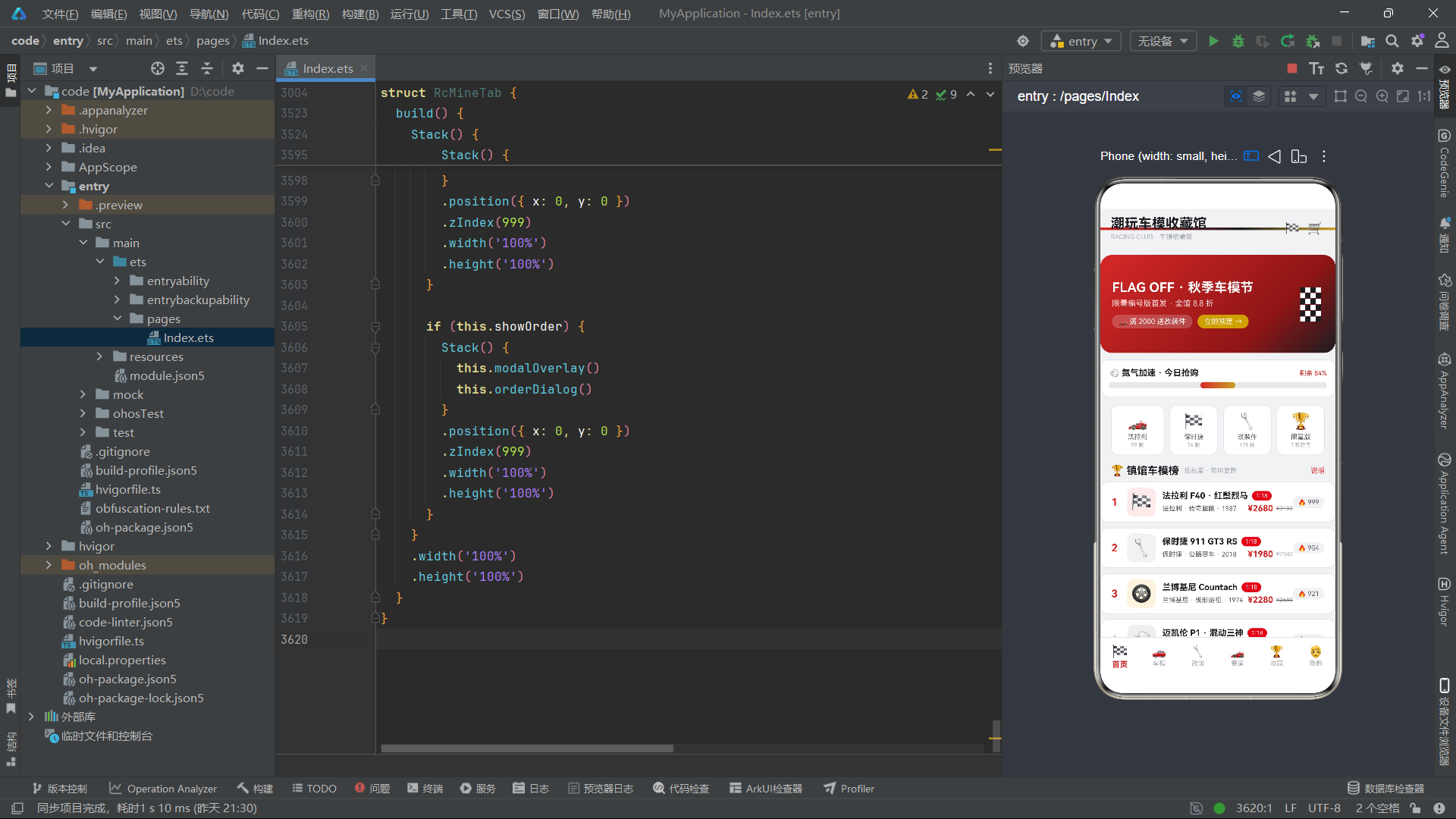
总结
本文以一款潮玩车模收藏馆应用为载体,系统性地剖析了基于HarmonyOS API 24的ArkTS声明式UI开发实践。从接口定义到数据常量配置,从纯函数工具集到主组件架构,从动画驱动到弹窗体系,每一个技术环节都体现了声明式范式在复杂业务场景下的适应性和表达力。
应用的核心架构决策可以归纳为三个层面:数据层通过interface约束类型、通过const数组提供数据源、通过纯函数封装查询逻辑;状态层通过@State管理组件内部状态、通过不可变更新模式触发响应式渲染;视图层通过@Builder提取可复用UI片段、通过条件渲染实现标签切换和弹窗显隐、通过定时器驱动循环动画。
在HarmonyOS 6.1.1的平台上,ArkTS的声明式UI范式已经展现出成熟的工程能力。对于开发者而言,掌握"状态驱动视图"的思维方式、理解不可变更新的必要性、熟悉定时器与动画的配合使用,是构建高质量应用的关键基石。希望本文的技术分析能够为HarmonyOS生态的开发实践提供有价值的参考。

讨论HarmonyOS开发技术,专注于API与组件、DevEco Studio、测试、元服务和应用上架分发等。
更多推荐
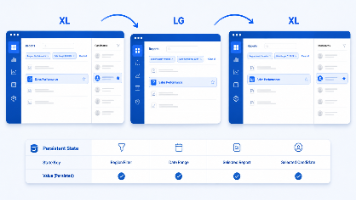


 0
0 0
0- 0


 已为社区贡献1条内容

所有评论(0)