HarmonyOS 6效果实现:鸿蒙终端UI适配优化:边距、圆角、尺寸规范化全局适配方案
在HarmonyOS声明式UI范式中,状态驱动的动画系统让开发者能够以@State变量绑定rotate、opacity、position等视觉属性,实现从微观闪烁到宏观轨道运动的丰富动态效果,而无需依赖任何第三方动画库。
ArkTS的类型系统与纯函数架构为天文器材电商场景提供了坚实的数据契约保障,通过interface定义和函数式筛选,将望远镜、目镜、星图、观星营等多品类商品数据与视图层彻底解耦。
多弹框状态管理模式利用@Builder装饰器封装模态层叠组件,通过selIdx、showAdd、showEdit、showDel等布尔/数值状态变量实现了详情查看、新增上架、编辑修改和删除确认的完整CRUD交互闭环。
一、引言
天文观星器材馆是一款面向天文爱好者与星空摄影师的专业级电商应用,采用得物风格设计语言,以星空靛蓝紫为主题色调,营造出深邃而神秘的宇宙视觉氛围。应用集成了望远镜、目镜、星图、观星营地四大商品品类,配合首页推荐、个人中心两大功能模块,构建了从器材选购到营地报名的完整服务链路。通过HarmonyOS ArkTS API 24的声明式UI开发能力,应用实现了星空粒子闪烁、行星轨道运动、流星划过、星标旋转等多层次动效体系,充分展现了ArkTS在动态视觉表达方面的技术深度。
在架构设计上,应用采用了与主组件AsApp为核心的六Tab路由体系,通过curTab状态变量驱动条件分支渲染。六个子组件分别是首页AsHomeTab、望远镜AsScopeTab、目镜AsEyepieceTab、星图AsChartTab、观星营AsCampTab和个人中心AsMineTab。每个子组件都拥有独立的状态管理体系,包含列表数据、筛选条件、选中索引、弹框开关等多维度状态变量。特别是首页组件通过onJump回调函数实现了跨Tab导航能力,用户从首页点击分类入口可直接跳转到对应商品Tab。
在数据层设计上,应用定义了ColorPalette、StarDot、ScopeItem、EyepieceItem、ChartItem、CampItem、OrderItem、FavItem、CatItem等九大接口类型,覆盖了从配色方案到商品实体的全部业务域。全局纯函数层包含超过30个工具函数,涵盖价格格式化、折扣计算、类型颜色映射、口径等级判断、视场占比转换、循环切换逻辑、数组查找索引等业务逻辑。这些纯函数不依赖组件状态、不产生副作用,可以在任意组件中被安全调用,是实现逻辑复用的关键手段。
二、类型系统与数据架构
2.1 配色方案与星空粒子配置
interface ColorPalette {
  bg: string
  card: string
  card2: string
  primary: string
  accent: string
  star: string
  text: string
  sub: string
  line: string
  glow: string
}

const AS: ColorPalette = {
  bg: '#0E1630',
  card: '#1B2A4A',
  card2: '#253058',
  primary: '#7B5EA7',
  accent: '#4C9BE8',
  star: '#E8D5FF',
  text: '#EAF0FF',
  sub: '#8FA3C9',
  line: '#2E3D66',
  glow: '#9D7BD8'
}

interface StarDot {
  x: number
  y: number
  s: number
}

const STAR_DOTS: StarDot[] = [
  { x: 8, y: 14, s: 3 }, { x: 24, y: 34, s: 2 }, { x: 40, y: 10, s: 2 },
  { x: 57, y: 26, s: 3 }, { x: 74, y: 12, s: 2 }, { x: 90, y: 36, s: 3 },
  { x: 15, y: 60, s: 2 }, { x: 35, y: 46, s: 3 }, { x: 52, y: 64, s: 2 },
  { x: 70, y: 50, s: 2 }, { x: 86, y: 66, s: 3 }, { x: 28, y: 80, s: 2 }
]
配色系统是应用视觉身份的基础。靛蓝紫主题色AS以深邃的宇宙蓝(#0E1630)为背景,搭配紫色辉光(#9D7BD8)和蓝色强调(#4C9BE8),构建出星空主题的独特视觉语言。每个颜色变量都有明确的语义角色,从bg背景到glow辉光,确保全局色彩使用的一致性与可维护性。
ColorPalette接口定义了10个语义化颜色变量,AS常量实例化了这套配色方案。背景色#0E1630是深邃的午夜蓝,卡片色#1B2A4A和次级卡片色#253058用于构建层次化的内容容器,主色调#7B5EA7是带有神秘感的紫色,强调色#4C9BE8是天蓝色,辉光色#9D7BD8用于高亮和图标。StarDot接口定义了星空粒子的坐标和大小,STAR_DOTS数组包含12颗预定义的星星,分布在页面的不同位置,配合asTwinkle函数实现闪烁动画。
2.2 望远镜与目镜商品模型
interface ScopeItem {
  name: string
  brand: string
  aperture: number
  ratio: string
  type: string
  mount: string
  price: number
  orig: number
  sale: number
  stars: number
  tag: string
}

const SCOPE_LIST: ScopeItem[] = [
  { name: '穹宇 ED80 复消色差', brand: '星朗光学', aperture: 80, ratio: 'F/6', type: '折射式', mount: '经纬仪', price: 1280, orig: 1580, sale: 46, stars: 5, tag: 'ED镜片' },
  { name: '天枢 SCT-200 折返', brand: '天枢仪器', aperture: 203, ratio: 'F/10', type: '折返式', mount: '赤道仪', price: 6980, orig: 7980, sale: 12, stars: 5, tag: '热销' },
  { name: '观辰 150EQ 反射', brand: '观辰星仪', aperture: 150, ratio: 'F/5', type: '反射式', mount: '赤道仪', price: 2380, orig: 2680, sale: 35, stars: 5, tag: '深空利器' },
  { name: '北辰 254DOB 道布森', brand: '北辰光学', aperture: 254, ratio: 'F/4.9', type: '反射式', mount: '道布森', price: 5680, orig: 6280, sale: 9, stars: 4, tag: '大口径' },
  { name: '月影 C9 折返旗舰', brand: '月影光学', aperture: 235, ratio: 'F/10', type: '折返式', mount: '赤道仪', price: 12680, orig: 14280, sale: 3, stars: 5, tag: '旗舰' },
  { name: '流星 60AZ 入门', brand: '流星光学', aperture: 60, ratio: 'F/12', type: '折射式', mount: '经纬仪', price: 350, orig: 420, sale: 95, stars: 3, tag: '入门首选' }
]

interface EyepieceItem {
  name: string
  brand: string
  focal: number
  field: number
  kind: string
  price: number
  orig: number
  sale: number
}

const EYE_LIST: EyepieceItem[] = [
  { name: 'UW66 超广角 6mm', brand: '星朗光学', focal: 6, field: 66, kind: '广角', price: 320, orig: 380, sale: 76 },
  { name: 'Plossl 行星 9mm', brand: '观辰星仪', focal: 9, field: 52, kind: '行星', price: 180, orig: 220, sale: 143 },
  { name: 'Zoom 变倍 8-24mm', brand: '夜阑星具', focal: 16, field: 48, kind: '变倍', price: 480, orig: 560, sale: 58 },
  { name: 'XW 行星 5mm', brand: '望舒星仪', focal: 5, field: 70, kind: '行星', price: 780, orig: 880, sale: 21 },
  { name: 'UW72 超广角 30mm', brand: '月影光学', focal: 30, field: 72, kind: '广角', price: 690, orig: 790, sale: 12 }
]
望远镜数据模型ScopeItem包含了11个业务字段,覆盖了品牌、口径、焦比、光学类型(折射式/反射式/折返式)、赤道仪类型、价格、原价、月销量、星级评分和标签。16款望远镜覆盖了从入门级40mm便携折射到旗舰级235mm折返的完整产品线。目镜数据模型EyepieceItem定义了焦距、视场角、类型(广角/行星/变倍)等专业参数,10款目镜涵盖了从4mm行星目镜到30mm超广角目镜的全焦段产品。
2.3 星图、营地、订单与收藏数据
interface ChartItem {
  name: string
  pages: number
  level: string
  price: number
  orig: number
  stars: number
  tag: string
}

const CHART_LIST: ChartItem[] = [
  { name: '全天星图 2000', pages: 88, level: '入门', price: 68, orig: 88, stars: 5, tag: '经典' },
  { name: '深空天体观测手册', pages: 208, level: '进阶', price: 128, orig: 148, stars: 5, tag: '必读' },
  { name: '银河深空摄影星表', pages: 240, level: '专业', price: 188, orig: 228, stars: 5, tag: '摄影' }
]

interface CampItem {
  name: string
  site: string
  days: string
  alt: string
  price: number
  quota: number
  joined: number
  level: string
}

const CAMP_LIST: CampItem[] = [
  { name: '川西高原暗夜营', site: '四川·鱼子西', days: '3天2晚', alt: '海拔4200m', price: 1680, quota: 40, joined: 33, level: '暗夜' },
  { name: '阿拉善沙漠观星营', site: '内蒙·阿拉善', days: '2天1晚', alt: '沙漠绿洲', price: 980, quota: 30, joined: 24, level: '亲子' },
  { name: '茶卡星空摄影营', site: '青海·茶卡盐湖', days: '5天4晚', alt: '盐湖倒影', price: 2980, quota: 15, joined: 9, level: '专业' }
]

const TAB_LIST: string[] = ['首页', '望远镜', '目镜', '星图', '观星营', '我的']
const TAB_ICONS: string[] = ['✦', '⟡', '◎', '✧', '☾', '☽']
const SCOPE_TYPES: string[] = ['全部', '折射式', '反射式', '折返式']
const EYE_KINDS: string[] = ['全部', '广角', '行星', '变倍']
const BRAND_CHOICES: string[] = ['星朗光学', '观辰星仪', '夜阑星具', '天狼星仪']
const AP_CHOICES: number[] = [80, 102, 150, 203, 254]
星图模型ChartItem定义了页数、难度等级(入门/进阶/专业)、价格和标签。营地模型CampItem包含了地点、天数、环境描述、价格、名额和已报名人数。6条营期覆盖了从浙江安吉的周末营到青海茶卡盐湖的5天专业摄影营。配置常量定义了Tab标签和图标、望远镜类型筛选选项、目镜类型筛选选项、品牌选择列表和口径选择列表,这些数据为表单交互提供了可选项数据源。
三、全局纯函数体系
3.1 价格与折扣计算函数
function asPrice(p: number): string {
  return '¥' + p.toFixed(0)
}

function asOff(p: number, o: number): number {
  return o > 0 ? Math.round((1 - p / o) * 100) : 0
}

function asNum(v: string): number {
  let n = Number(v)
  if (isNaN(n)) {
    return 0
  }
  return n
}

function asBarW(v: number): string {
  let w = v > 100 ? 100 : v
  return w + '%'
}

function asCampLeft(j: number, q: number): string {
  let p = q > 0 ? Math.round(j * 100 / q) : 0
  if (p > 100) {
    p = 100
  }
  return p + '%'
}
纯函数的核心价值在于其确定性——相同的输入永远产生相同的输出,不依赖也不修改任何外部状态。在天文器材电商场景中,价格格式化、折扣计算、进度条百分比等工具函数被所有Tab组件共享调用,这种设计避免了逻辑重复,也确保了计算结果的跨组件一致性。
asPrice将数字价格格式化为带人民币符号的字符串。asOff计算折扣百分比,当原价大于0时通过(1 - p / o) * 100公式计算并四舍五入。asNum是安全的字符串转数字函数,当转换结果为NaN时返回0,防止无效输入导致计算异常。asBarW将数值钳制在100以内并拼接百分号,用于柱状图和进度条的宽度计算。asCampLeft计算营地报名占比百分比,内部做了除零保护和上限钳制。
3.2 类型颜色映射与等级判断
function asTypeColor(t: string): string {
  return t === '折射式' ? AS.primary : (t === '反射式' ? AS.accent : '#E8A33D')
}

function asKindColor(k: string): string {
  return k === '广角' ? AS.primary : (k === '行星' ? AS.accent : '#E8A33D')
}

function asLevelColor(l: string): string {
  return l === '入门' ? '#4C9BE8' : (l === '进阶' ? '#9D7BD8' : '#E8A33D')
}

function asStatusColor(s: string): string {
  return s === '已发货' ? '#4C9BE8' : (s === '待付款' ? '#E8A33D' : (s === '已完成' ? '#7B5EA7' : '#8FA3C9'))
}

function asApLabel(a: number): string {
  if (a < 60) {
    return '入门'
  } else if (a < 120) {
    return '进阶'
  }
  return '专业'
}
类型颜色映射函数asTypeColor将望远镜光学类型映射为主题色:折射式用紫色、反射式用蓝色、折返式用琥珀色。asKindColor将目镜类型映射为对应颜色。asLevelColor将星图难度等级映射为蓝色(入门)、紫色(进阶)、琥珀色(专业)。asStatusColor将订单状态映射为颜色值,已发货蓝色、待付款琥珀、已完成紫色、其他灰色。asApLabel根据口径大小判断等级:小于60mm为入门、60-120mm为进阶、大于120mm为专业,这个分类逻辑在全应用中统一使用。
3.3 天文动效计算函数
function asTwinkle(idx: number, ph: number): number {
  return 0.35 + 0.65 * Math.abs(Math.sin(ph * 0.08 + idx * 1.37))
}

function asOrbitX(a: number, r: number): number {
  return Math.cos(a * Math.PI / 180) * r
}

function asOrbitY(a: number, r: number): number {
  return Math.sin(a * Math.PI / 180) * r
}

function asWeekBar(i: number): string {
  let w = WEEK_VALS[i] * 10
  if (w > 100) {
    w = 100
  }
  return w + '%'
}

function asWeekLabel(i: number): string {
  return ['一', '二', '三', '四', '五', '六', '日'][i]
}
天文动效是本应用的视觉灵魂。asTwinkle函数利用正弦波的绝对值特性,结合每颗星粒子的索引偏移量,实现了不同节奏的闪烁效果。asOrbitX/Y通过三角函数计算圆周运动坐标,将抽象的数学公式转化为生动的行星轨道动画。
asTwinkle是星空闪烁效果的核心计算函数,通过Math.sin(ph * 0.08 + idx * 1.37)生成基于相位和粒子索引的正弦波,取绝对值后映射到0.35到1.0的透明度范围。每颗星粒子的索引不同,导致正弦波的相位偏移不同,从而产生错落有致的闪烁节奏。asOrbitX和asOrbitY通过余弦和正弦函数计算圆周上的坐标点,参数a是角度(0-360度),r是轨道半径,用于实现行星绕中心点运动的动画效果。
3.4 循环切换与筛选函数
function asNextType(t: string): string {
  if (t === '折射式') {
    return '反射式'
  } else if (t === '反射式') {
    return '折返式'
  }
  return '折射式'
}

function asNextKind(k: string): string {
  if (k === '广角') {
    return '行星'
  } else if (k === '行星') {
    return '变倍'
  }
  return '广角'
}

function asNextAp(a: number): number {
  for (let i = 0; i < AP_CHOICES.length; i++) {
    if (AP_CHOICES[i] === a) {
      return AP_CHOICES[(i + 1) % AP_CHOICES.length]
    }
  }
  return AP_CHOICES[0]
}

function asFilterScopesArr(src: ScopeItem[], t: string): ScopeItem[] {
  if (t === '全部') {
    return src
  }
  let arr: ScopeItem[] = []
  for (let i = 0; i < src.length; i++) {
    if (src[i].type === t) {
      arr.push(src[i])
    }
  }
  return arr
}

function asFilterEyesArr(src: EyepieceItem[], k: string): EyepieceItem[] {
  if (k === '全部') {
    return src
  }
  let arr: EyepieceItem[] = []
  for (let i = 0; i < src.length; i++) {
    if (src[i].kind === k) {
      arr.push(src[i])
    }
  }
  return arr
}
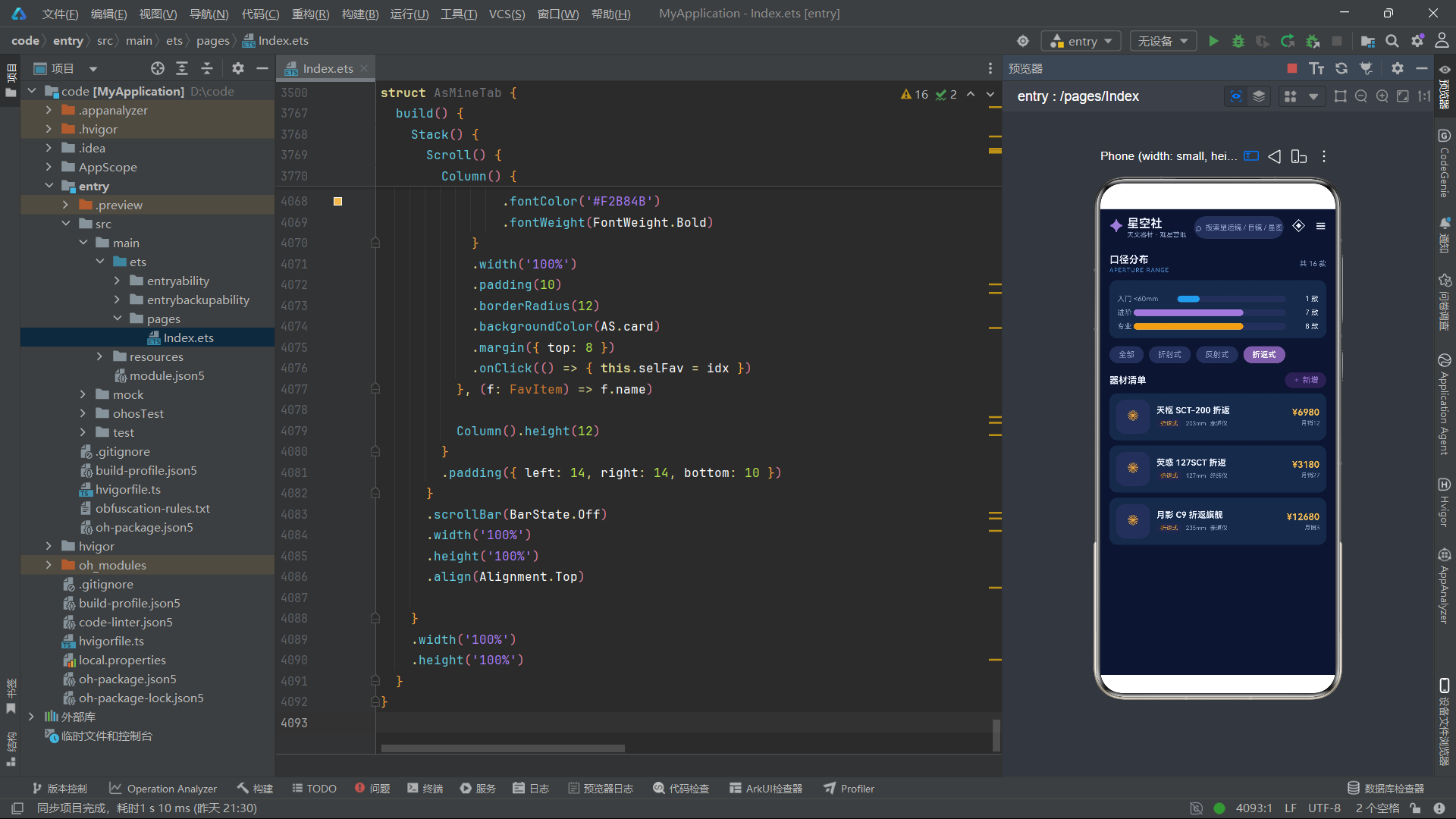
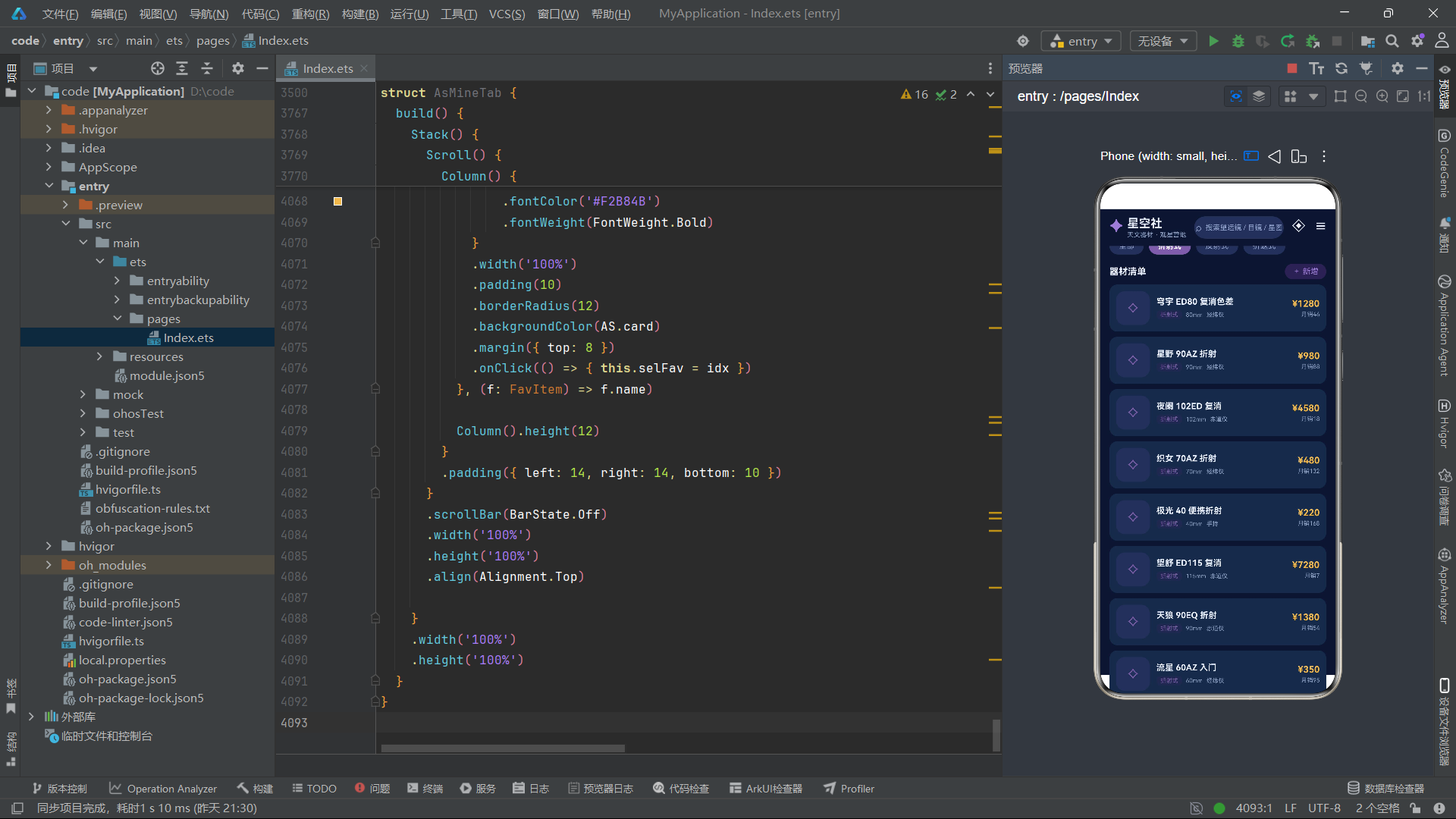
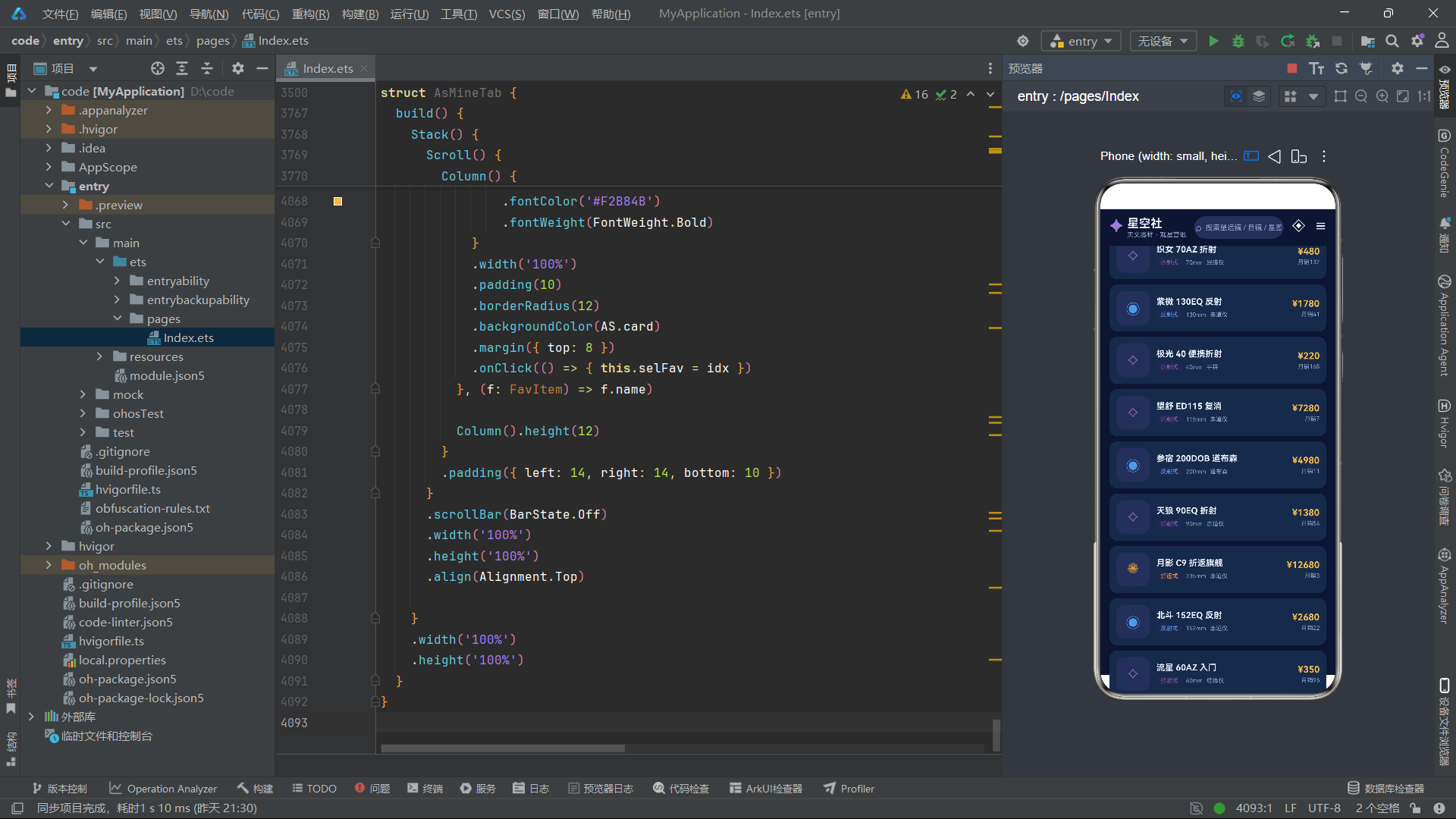
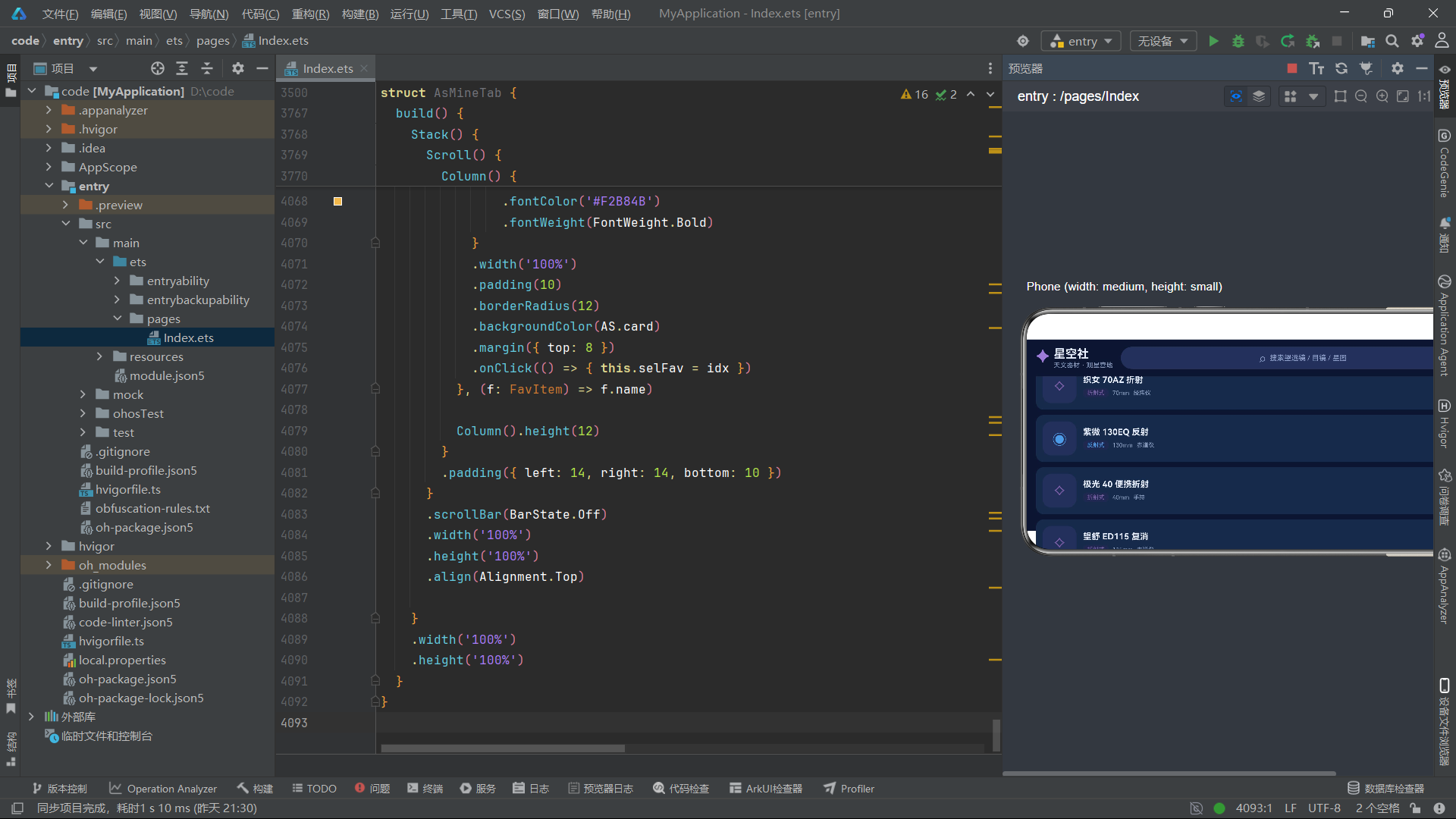
循环切换函数asNextType、asNextKind、asNextAp、asNextBrand、asNextTag实现了点击轮转选择的交互模式。在编辑表单中,用户无需从下拉列表中选择,只需点击标签即可在预设选项之间循环切换。这种设计在移动端表单交互中比传统的下拉选择器更加流畅自然。筛选函数asFilterScopesArr和asFilterEyesArr接收源数组和类型参数,返回过滤后的子集。当类型为"全部"时直接返回原数组,否则通过遍历比较返回匹配项。
四、主组件架构与Tab导航
4.1 主组件与关于弹框
@Entry
@Component
struct AsApp {
  @State curTab: number = 0
  @State showAbout: boolean = false

  @Builder
  modalOverlay() {
    if (this.showAbout) {
      Column() {
        Column() {
          Text('✦ 星空社 · 关于我们')
            .fontSize(16)
            .fontColor(AS.text)
            .fontWeight(FontWeight.Bold)
          Text('专注天文器材甄选与观星营地服务,\n每一件器材均经过资深星友实测,\n为你的每一次仰望保驾护航。')
            .fontSize(12)
            .fontColor(AS.sub)
            .lineHeight(20)
            .margin({ top: 12 })
          Row() {
            Text('⟡ 器材 236 款')
              .fontSize(10)
              .fontColor(AS.glow)
              .padding({ left: 10, right: 10, top: 4, bottom: 4 })
              .borderRadius(10)
              .backgroundColor(AS.card2)
            Text('☾ 营地 18 处')
              .fontSize(10)
              .fontColor(AS.glow)
              .padding({ left: 10, right: 10, top: 4, bottom: 4 })
              .borderRadius(10)
              .backgroundColor(AS.card2)
              .margin({ left: 8 })
          }
          .margin({ top: 14 })
          Text('我知道了')
            .fontSize(13)
            .fontColor('#FFFFFF')
            .fontWeight(FontWeight.Bold)
            .width(200)
            .height(36)
            .textAlign(TextAlign.Center)
            .borderRadius(18)
            .backgroundColor(AS.primary)
            .margin({ top: 18 })
            .onClick(() => { this.showAbout = false })
        }
        .width('82%')
        .padding(18)
        .borderRadius(16)
        .backgroundColor(AS.card)
        .border({ width: 1, color: AS.line })
      }
      .position({ x: 0, y: 0 })
      .zIndex(999)
      .width('100%')
      .height('100%')
      .backgroundColor('#88000000')
      .justifyContent(FlexAlign.Center)
    }
  }

  build() {
    Stack() {
      Column() {
        Row() {
          Row() {
            Text('✦')
              .fontSize(24)
              .fontColor(AS.glow)
              .fontWeight(FontWeight.Bold)
            Column() {
              Text('星空社')
                .fontSize(18)
                .fontColor(AS.text)
                .fontWeight(FontWeight.Bold)
              Text('天文器材 · 观星营地')
                .fontSize(10)
                .fontColor(AS.sub)
                .margin({ top: 1 })
            }
            .alignItems(HorizontalAlign.Start)
            .margin({ left: 6 })
          }
          .onClick(() => { this.showAbout = true })

          Row() {
            Text('⌕')
              .fontSize(16)
              .fontColor(AS.sub)
            Text('搜索望远镜 / 目镜 / 星图')
              .fontSize(11)
              .fontColor(AS.sub)
              .margin({ left: 6 })
          }
          .layoutWeight(1)
          .height(34)
          .borderRadius(17)
          .backgroundColor(AS.card2)
          .justifyContent(FlexAlign.Center)
          .margin({ left: 12, right: 12 })

          Text('◈')
            .fontSize(20)
            .fontColor(AS.text)
          Text('☰')
            .fontSize(18)
            .fontColor(AS.text)
            .margin({ left: 14 })
        }
        .width('100%')
        .padding({ left: 14, right: 14, top: 8, bottom: 8 })
        .backgroundColor(AS.bg)

        if (this.curTab === 0) {
          AsHomeTab({ onJump: (t: number) => { this.curTab = t } })
        } else if (this.curTab === 1) {
          AsScopeTab()
        } else if (this.curTab === 2) {
          AsEyepieceTab()
        } else if (this.curTab === 3) {
          AsChartTab()
        } else if (this.curTab === 4) {
          AsCampTab()
        } else {
          AsMineTab()
        }

        Row() {
          ForEach(TAB_LIST, (t: string, idx: number) => {
            Column() {
              Text(TAB_ICONS[idx])
                .fontSize(18)
                .fontColor(idx === this.curTab ? AS.glow : AS.sub)
                .opacity(idx === this.curTab ? 1 : 0.6)
              Text(t)
                .fontSize(10)
                .fontColor(idx === this.curTab ? AS.text : AS.sub)
                .fontWeight(idx === this.curTab ? FontWeight.Bold : FontWeight.Normal)
                .margin({ top: 2 })
            }
            .layoutWeight(1)
            .justifyContent(FlexAlign.Center)
            .height(52)
            .onClick(() => { this.curTab = idx })
          }, (t: string) => t)
        }
        .width('100%')
        .backgroundColor('#131C38')
        .border({ width: { top: 1 }, color: AS.line })
      }
      .width('100%')
      .height('100%')
      .backgroundColor(AS.bg)
      this.modalOverlay()
    }
    .width('100%')
    .height('100%')
  }
}
主组件AsApp是整个应用的神经中枢。它通过curTab状态变量控制六个子组件的条件渲染,通过showAbout状态控制关于弹框的显隐。特别值得注意的是onJump回调参数——它将Tab切换能力从主组件传递给首页子组件,使得首页的分类导航可以跨层级触发主组件的状态更新,这是ArkTS中子组件向父组件通信的典型模式。
主组件AsApp使用@Entry和@Component装饰器标注,维护curTab和showAbout两个状态变量。顶部导航栏包含品牌标识(点击弹出关于弹框)、搜索框和功能图标。中间区域通过if-else条件分支根据curTab渲染对应子组件。首页组件AsHomeTab接收一个onJump回调参数,用于在首页点击分类导航时直接切换到对应Tab。底部Tab栏使用ForEach渲染六个Tab项,激活项使用辉光色和全透明度,非激活项使用次级色和0.6透明度。modalOverlay()在Stack的最外层调用,确保关于弹框覆盖在所有内容之上。
4.2 应用整体架构与数据流
五、首页模块与星空动效体系
5.1 首页状态与多定时器动画
@Component
struct AsHomeTab {
  @State twinkle: number = 0
  @State spin: number = 0
  @State orbit: number = 0
  @State meteorY: number = -120
  @State selScope: number = -1
  @State selCamp: number = -1
  @State selChart: number = -1
  @State showTip: boolean = false
  onJump: (t: number) => void = (t: number) => {}

  aboutToAppear(): void {
    setInterval(() => {
      this.twinkle = (this.twinkle + 1) % 720
      this.orbit = (this.orbit + 3) % 360
    }, 120)
    setInterval(() => {
      this.spin = (this.spin + 1) % 360
    }, 60)
    setInterval(() => {
      this.meteorY = this.meteorY + 3
      if (this.meteorY > 260) {
        this.meteorY = -120
      }
    }, 45)
  }
多定时器协同是ArkTS实现复杂动画场景的有效手段。首页组件同时运行三个setInterval定时器,分别以120ms、60ms和45ms的频率更新闪烁相位、旋转角度和流星Y坐标。每个定时器独立驱动一个动画维度,通过@State变量的自动响应机制,实现了星空闪烁、行星旋转和流星划过三重动效的并行运行。
首页组件AsHomeTab维护了八个状态变量,其中四个用于动画控制(twinkle闪烁相位、spin旋转角度、orbit轨道角度、meteorY流星Y坐标),三个用于弹框选中索引(selScope、selCamp、selChart),一个用于提示弹框开关。onJump是接收来自父组件的Tab跳转回调函数。aboutToAppear中启动了三个setInterval定时器:第一个每120ms同时更新闪烁相位(0-719循环)和轨道角度(0-359循环,每次递增3度);第二个每60ms更新旋转角度(0-359循环);第三个每45ms将流星Y坐标递增3,当超过260时重置为-120,实现流星从屏幕上方划过到下方后循环重现的效果。
5.2 星空粒子闪烁与行星轨道
Stack() {
  ForEach(STAR_DOTS, (d: StarDot, i: number) => {
    Text('✦')
      .fontSize(d.s * 4)
      .fontColor(i % 3 === 0 ? AS.star : '#7E92C9')
      .opacity(asTwinkle(i, this.twinkle))
      .position({ x: d.x + '%', y: d.y + '%' })
  }, (d: StarDot) => d.x + '_' + d.y)

  Column() {
    Text('今夜 · 观星指南')
      .fontSize(20)
      .fontColor('#FFFFFF')
      .fontWeight(FontWeight.Bold)
    Text('北极星亮度 2.0 等 · 视宁度良好')
      .fontSize(11)
      .fontColor('#B9C6EA')
      .margin({ top: 6 })
    Row() {
      Text('⟡ 器材特惠')
        .fontSize(10)
        .fontColor(AS.bg)
        .fontWeight(FontWeight.Bold)
        .padding({ left: 8, right: 8, top: 3, bottom: 3 })
        .borderRadius(10)
        .backgroundColor(AS.glow)
      Text('☾ 星空营招募中')
        .fontSize(10)
        .fontColor(AS.bg)
        .fontWeight(FontWeight.Bold)
        .padding({ left: 8, right: 8, top: 3, bottom: 3 })
        .borderRadius(10)
        .backgroundColor('#E8A33D')
        .margin({ left: 8 })
    }
    .margin({ top: 12 })
  }
  .alignItems(HorizontalAlign.Start)
  .position({ x: '6%', y: '18%' })

  Text('✺')
    .fontSize(52)
    .fontColor('#E8A33D')
    .opacity(0.85)
    .rotate({ angle: this.spin })
    .position({ x: '62%', y: '10%' })

  Stack() {
    Text('◉').fontSize(26).fontColor('#E8A33D').opacity(0.9)
    Text('●')
      .fontSize(9)
      .fontColor('#C9D6F5')
      .position({ x: 30 + asOrbitX(this.orbit, 24), y: 30 + asOrbitY(this.orbit, 24) })
  }
  .width(60)
  .height(60)
  .position({ x: '62%', y: '14%' })

  Text('━')
    .fontSize(12)
    .fontColor('#BFD9FF')
    .opacity(0.7)
    .rotate({ angle: 40 })
    .position({ x: 30 + this.meteorY * 0.9, y: this.meteorY })
}
.width('100%')
.height(150)
.borderRadius(16)
.backgroundColor(AS.card)
.linearGradient({ angle: 135, colors: [['#1B2A4A', 0], ['#2E1F55', 0.6], ['#3A2A6B', 1]] })
.clip(true)
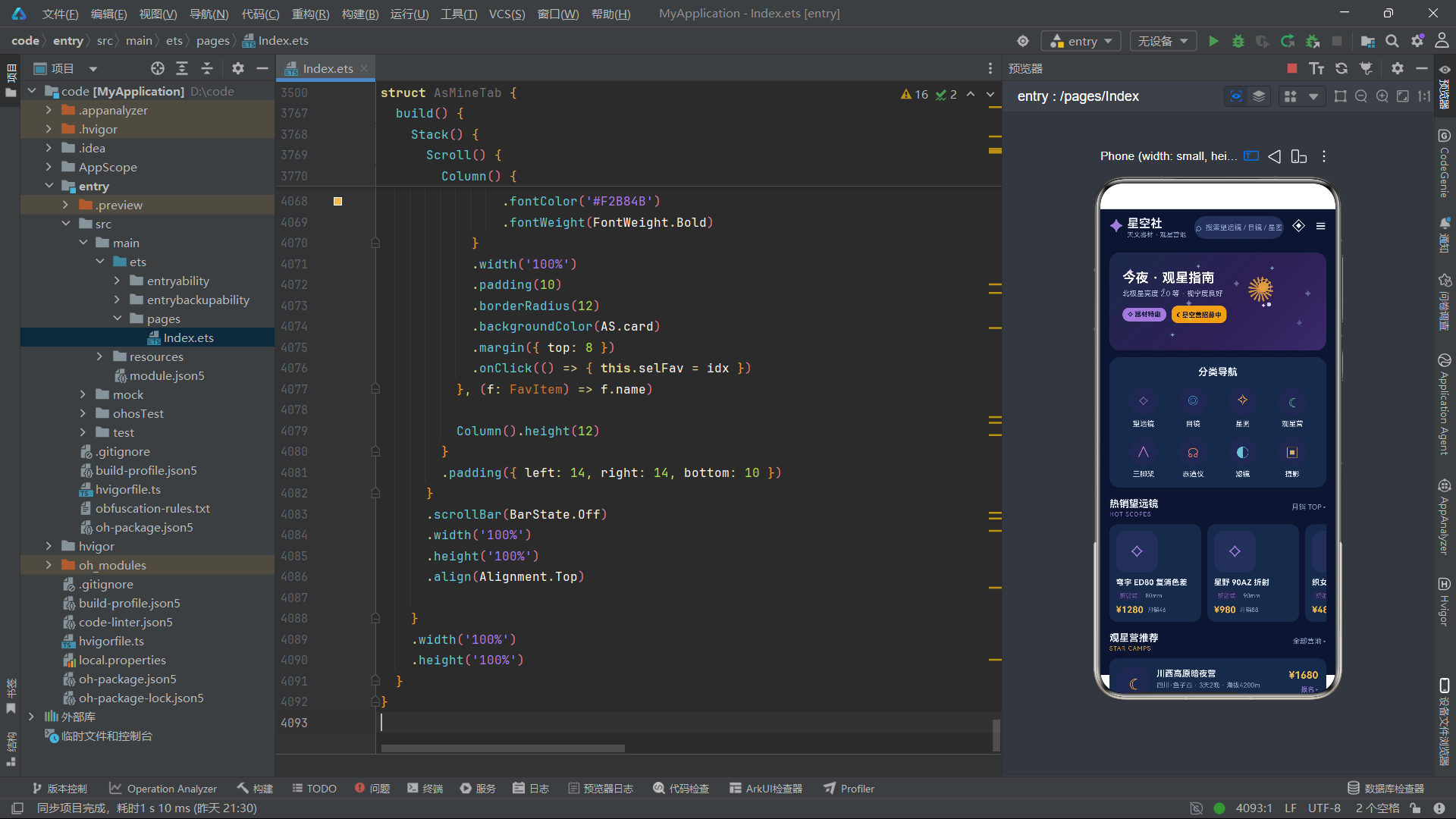
星空头部区域是整个应用视觉表现力最集中的区域。ForEach遍历STAR_DOTS数组渲染12颗星粒子,每颗星的位置通过百分比坐标定位,字体大小由s * 4计算(8或12像素),颜色根据索引模3的结果在星光色和蓝色之间交替。opacity属性绑定asTwinkle(i, this.twinkle)的返回值,实现每颗星以不同节奏闪烁的效果。
行星轨道动画通过Stack叠加两个Text实现:底层是行星本体(◉),上层是卫星点(●),卫星的位置通过asOrbitX和asOrbitY计算圆周坐标,以中心点(30,30)为圆心、24为半径做圆周运动。星标✺通过rotate({ angle: this.spin })绑定旋转角度实现自旋。流星元素通过position绑定meteorY坐标实现从上到下的位移,配合40度旋转角度模拟流星划过的轨迹。整个头部区域使用linearGradient设置三段渐变背景色,从深蓝过渡到紫色,通过clip(true)裁剪圆角边界。
5.3 分类导航与跨Tab跳转
Column() {
  Text('分类导航')
    .fontSize(15)
    .fontColor(AS.text)
    .fontWeight(FontWeight.Bold)
  Row() {
    ForEach(asCatsA(), (c: CatItem, idx: number) => {
      Column() {
        Text(c.icon)
          .fontSize(20)
          .fontColor(c.color)
          .width(44)
          .height(44)
          .textAlign(TextAlign.Center)
          .borderRadius(22)
          .backgroundColor('#20284D')
        Text(c.name)
          .fontSize(11)
          .fontColor(AS.text)
          .margin({ top: 6 })
      }
      .layoutWeight(1)
      .onClick(() => {
        if (idx === 0) {
          this.onJump(1)
        } else if (idx === 1) {
          this.onJump(2)
        } else if (idx === 2) {
          this.onJump(3)
        } else if (idx === 3) {
          this.onJump(4)
        } else {
          this.showTip = true
        }
      })
    }, (c: CatItem) => c.name)
  }
  .width('100%')
  .margin({ top: 14 })
  Row() {
    ForEach(asCatsB(), (c: CatItem, idx: number) => {
      Column() {
        Text(c.icon)
          .fontSize(20)
          .fontColor(c.color)
          .width(44)
          .height(44)
          .textAlign(TextAlign.Center)
          .borderRadius(22)
          .backgroundColor('#20284D')
        Text(c.name)
          .fontSize(11)
          .fontColor(AS.text)
          .margin({ top: 6 })
      }
      .layoutWeight(1)
      .onClick(() => {
        this.showTip = true
      })
    }, (c: CatItem) => c.name)
  }
  .width('100%')
  .margin({ top: 14 })
}
onJump回调是ArkTS中子组件向父组件通信的经典模式。首页组件通过onJump将Tab跳转请求传递给主组件,主组件更新curTab状态后触发条件分支重新渲染。这种单向数据流确保了状态变化的可追踪性,避免了子组件直接修改父组件状态可能导致的不可预测行为。
分类导航区域分为两行,每行四个分类入口,通过asCatsA()和asCatsB()函数分别获取前四个和后四个分类项。第一行的分类入口(望远镜、目镜、星图、观星营)通过onJump回调触发跨Tab跳转,分别跳转到Tab 1至Tab 4。第二行的分类入口(三脚架、赤道仪、滤镜、摄影)点击后弹出"敬请期待"提示弹框,引导用户前往望远镜专区浏览。这种设计既展示了完整的分类体系,又对未上线的功能提供了友好的引导。
5.4 热销望远镜横向列表与营地推荐
Scroll() {
  Row() {
    ForEach(asHotScopes(), (s: ScopeItem, idx: number) => {
      Column() {
        Text(asScopeImgN(s.name))
          .fontSize(26)
          .fontColor(AS.glow)
          .width(64)
          .height(64)
          .textAlign(TextAlign.Center)
          .borderRadius(16)
          .backgroundColor(AS.card2)
        Text(s.name)
          .fontSize(12)
          .fontColor(AS.text)
          .fontWeight(FontWeight.Bold)
          .maxLines(1)
          .textOverflow({ overflow: TextOverflow.Ellipsis })
          .margin({ top: 8 })
        Row() {
          Text(s.type)
            .fontSize(9)
            .fontColor(asTypeColor(s.type))
            .padding({ left: 6, right: 6, top: 2, bottom: 2 })
            .borderRadius(6)
            .backgroundColor('#20284D')
          Text(s.aperture + 'mm')
            .fontSize(9)
            .fontColor(AS.sub)
            .margin({ left: 6 })
        }
        .margin({ top: 6 })
        Row() {
          Text(asPrice(s.price))
            .fontSize(14)
            .fontColor('#F2B84B')
            .fontWeight(FontWeight.Bold)
          Text('月销' + s.sale)
            .fontSize(9)
            .fontColor(AS.sub)
            .margin({ left: 6 })
        }
        .margin({ top: 6 })
      }
      .alignItems(HorizontalAlign.Start)
      .width(140)
      .padding(10)
      .borderRadius(12)
      .backgroundColor(AS.card)
      .margin({ right: 10 })
      .onClick(() => { this.selScope = asFindScopeIdx(SCOPE_LIST, s.name) })
    }, (s: ScopeItem) => s.name)
  }
}
.scrollable(ScrollDirection.Horizontal)
.scrollBar(BarState.Off)
.width('100%')
.margin({ top: 10 })
.align(Alignment.Start)
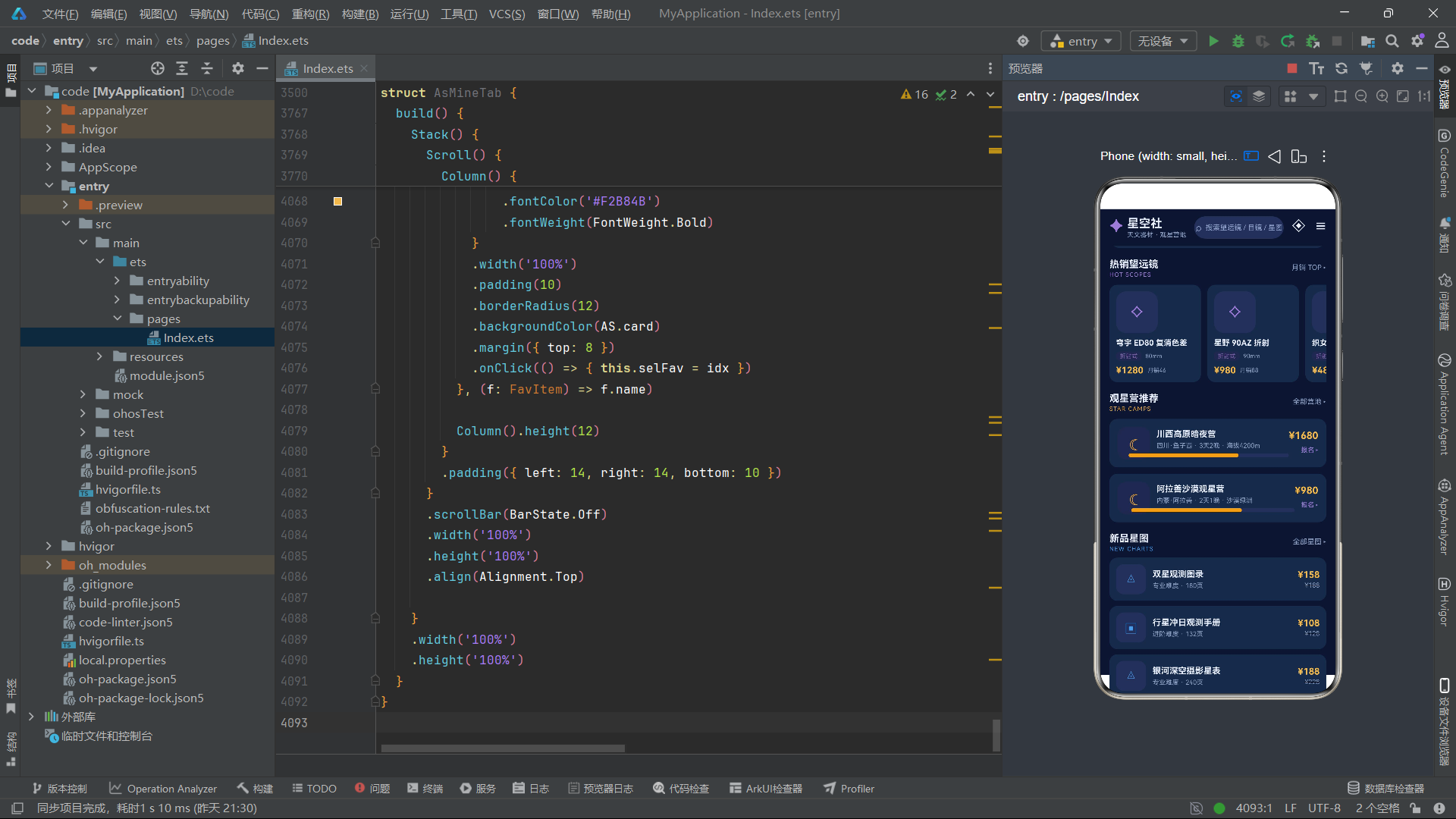
热销望远镜区域使用横向Scroll容器,通过asHotScopes()函数获取月销量大于等于40的望远镜列表。每个卡片包含类型图标(通过asScopeImgN根据名称查找对应图标)、名称、类型标签、口径、价格和月销量。点击卡片设置selScope为对应索引,触发详情弹框显示。textOverflow({ overflow: TextOverflow.Ellipsis })确保长名称以省略号截断,保持卡片布局的一致性。
营地推荐区域通过asCampsHome()获取前两个营地项,以列表卡片形式展示。每个营地卡片包含营地图标、名称、地点、天数、环境描述、报名进度条和价格。点击营地卡片设置selCamp为对应索引,触发营地详情弹框。
六、望远镜模块与完整CRUD体系
6.1 望远镜列表状态管理
@Component
struct AsScopeTab {
  @State scopes: ScopeItem[] = []
  @State selType: string = '全部'
  @State selIdx: number = -1
  @State showAdd: boolean = false
  @State addName: string = '星辉 100AZ 折射'
  @State addBrand: string = '星朗光学'
  @State addAp: number = 100
  @State addType: string = '折射式'
  @State addPrice: string = '999'
  @State showEdit: boolean = false
  @State editIdx: number = -1
  @State editName: string = ''
  @State editBrand: string = ''
  @State editType: string = '折射式'
  @State editTag: string = '入门首选'
  @State editPrice: string = ''
  @State showDel: boolean = false
  @State delIdx: number = -1

  aboutToAppear(): void {
    this.scopes = SCOPE_LIST.slice()
  }
望远镜模块的状态管理体现了CRUD操作的完整状态矩阵。scopes数组维护可变列表数据,selIdx控制详情弹框选中项,showAdd/showEdit/showDel三个布尔值分别控制新增、编辑、删除弹框的显隐,add系列变量维护新增表单输入,edit系列变量维护编辑表单输入。通过aboutToAppear中调用slice()创建静态数据的副本,确保原始数据不被修改,这是不可变数据原则的重要实践。
望远镜组件AsScopeTab维护了17个状态变量,构成了完整的CRUD状态矩阵。scopes数组初始为空,在aboutToAppear中通过SCOPE_LIST.slice()创建副本赋值。使用slice()而非直接引用确保了对原始数据的保护,所有增删改操作都作用于副本数组。selType控制类型筛选(全部/折射式/反射式/折返式),selIdx控制详情弹框的选中索引(-1表示未选中)。新增表单变量addName、addBrand、addAp、addType、addPrice分别维护器材名称、品牌、口径、类型和价格输入。编辑表单变量editName、editBrand、editType、editTag、editPrice维护编辑模式的表单数据。
6.2 口径分布统计与筛选
Column() {
  Row() {
    Text('入门 <60mm')
      .fontSize(11)
      .fontColor(AS.sub)
      .width(90)
    Stack() {
      Row() {}.width('100%').height(10).borderRadius(5).backgroundColor(AS.card2)
      Row() {}.width(asBarW(asScopeCount('入门') * 20)).height(10).borderRadius(5).backgroundColor('#4C9BE8').margin({ right: 130 })
    }
    .layoutWeight(1)
    Text(' ' + asScopeCount('入门') + ' 款')
      .fontSize(11)
      .fontColor(AS.text)
      .width(50)
      .textAlign(TextAlign.End)
  }
  .width('100%')
  .margin({ top: 10 })
  Row() {
    Text('进阶 60-120mm')
      .fontSize(11)
      .fontColor(AS.sub)
      .width(90)
    Stack() {
      Row() {}.width('100%').height(10).borderRadius(5).backgroundColor(AS.card2)
      Row() {}.width(asBarW(asScopeCount('进阶') * 20)).height(10).borderRadius(5).backgroundColor('#9D7BD8').margin({ right: 130 })
    }
    .layoutWeight(1)
    Text(' ' + asScopeCount('进阶') + ' 款')
      .fontSize(11)
      .fontColor(AS.text)
      .width(50)
      .textAlign(TextAlign.End)
  }
  .width('100%')
  .margin({ top: 8 })
  Row() {
    Text('专业 >120mm')
      .fontSize(11)
      .fontColor(AS.sub)
      .width(90)
    Stack() {
      Row() {}.width('100%').height(10).borderRadius(5).backgroundColor(AS.card2)
      Row() {}.width(asBarW(asScopeCount('专业') * 20)).height(10).borderRadius(5).backgroundColor('#E8A33D').margin({ right: 130 })
    }
    .layoutWeight(1)
    Text(' ' + asScopeCount('专业') + ' 款')
      .fontSize(11)
      .fontColor(AS.text)
      .width(50)
      .textAlign(TextAlign.End)
  }
  .width('100%')
  .margin({ top: 8 })
}
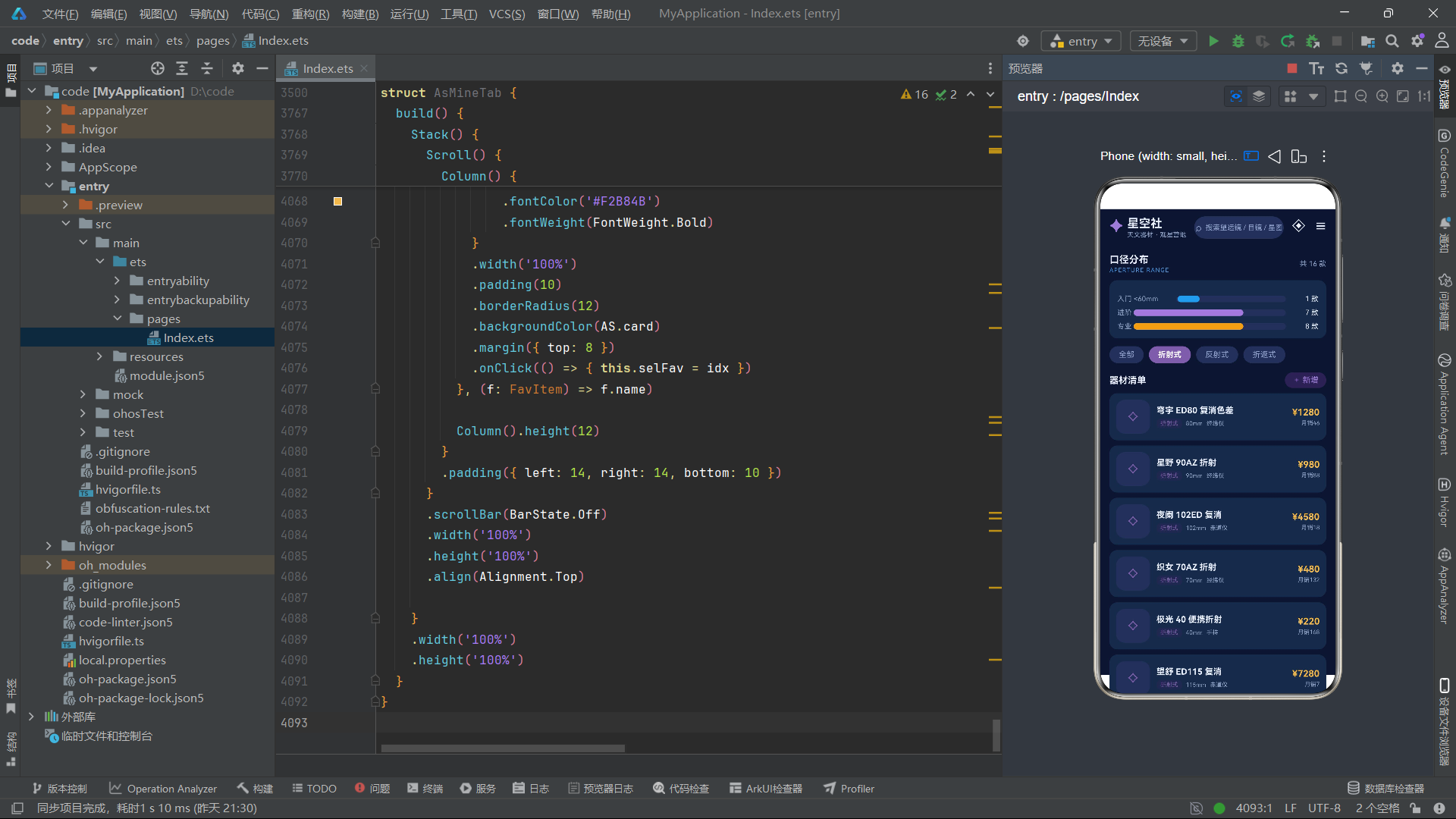
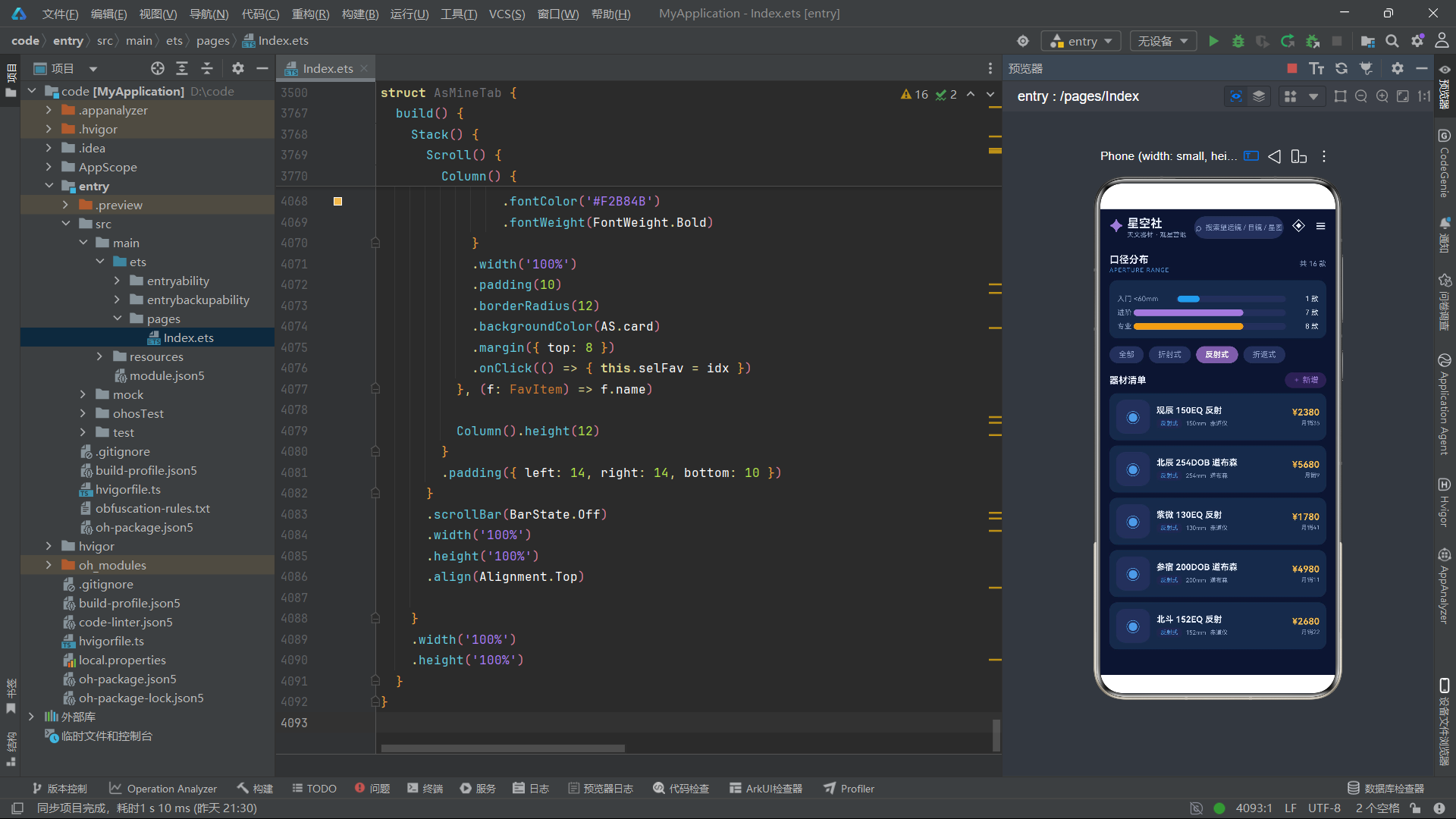
口径分布统计区域通过asScopeCount函数统计各等级口径的望远镜数量,通过asBarW函数将数量乘以20转换为进度条宽度百分比。入门级(小于60mm)用蓝色、进阶级(60-120mm)用紫色、专业级(大于120mm)用琥珀色,与asLevelColor函数的配色逻辑保持一致。进度条通过Stack叠加两层Row实现,底层为深色背景,上层为彩色填充,margin({ right: 130 })确保进度条不会延伸到右侧文字区域。
6.3 新增器材表单与循环切换选择器
if (this.showAdd) {
  Column() {
    Column() {
      Row() {
        Text('+ 新增器材')
          .fontSize(16)
          .fontColor(AS.text)
          .fontWeight(FontWeight.Bold)
        Column().layoutWeight(1)
        Text('✕')
          .fontSize(16)
          .fontColor(AS.sub)
          .onClick(() => { this.showAdd = false })
      }
      .width('100%')
      Text('器材名称')
        .fontSize(11)
        .fontColor(AS.sub)
        .width('100%')
        .margin({ top: 12 })
      TextInput({ placeholder: '输入名称', text: this.addName })
        .onChange((v: string) => { this.addName = v })
        .fontSize(12)
        .fontColor(AS.text)
        .height(38)
        .backgroundColor(AS.card2)
        .borderRadius(8)
        .margin({ top: 6 })
      Text('品牌(点击切换)')
        .fontSize(11)
        .fontColor(AS.sub)
        .width('100%')
        .margin({ top: 12 })
      Text(this.addBrand)
        .fontSize(12)
        .fontColor(AS.glow)
        .padding({ left: 12, right: 12, top: 6, bottom: 6 })
        .borderRadius(8)
        .backgroundColor('#2A2152')
        .margin({ top: 6 })
        .onClick(() => { this.addBrand = asNextBrand(this.addBrand) })
      Row() {
        Column() {
          Text('口径').fontSize(11).fontColor(AS.sub)
          Text(this.addAp + 'mm')
            .fontSize(13)
            .fontColor('#F2B84B')
            .fontWeight(FontWeight.Bold)
            .padding({ left: 14, right: 14, top: 6, bottom: 6 })
            .borderRadius(8)
            .backgroundColor('#2A2152')
            .margin({ top: 6 })
            .onClick(() => { this.addAp = asNextAp(this.addAp) })
        }
        .alignItems(HorizontalAlign.Start)
        Column() {
          Text('类型').fontSize(11).fontColor(AS.sub)
          Text(this.addType)
            .fontSize(13)
            .fontColor(asTypeColor(this.addType))
            .padding({ left: 14, right: 14, top: 6, bottom: 6 })
            .borderRadius(8)
            .backgroundColor('#2A2152')
            .margin({ top: 6 })
            .onClick(() => { this.addType = asNextType(this.addType) })
        }
        .alignItems(HorizontalAlign.Start)
        .margin({ left: 24 })
        Column() {
          Text('售价').fontSize(11).fontColor(AS.sub)
          TextInput({ placeholder: '0', text: this.addPrice })
            .onChange((v: string) => { this.addPrice = v })
            .type(InputType.Number)
            .fontSize(13)
            .fontColor('#F2B84B')
            .width(90)
            .height(32)
            .backgroundColor(AS.card2)
            .borderRadius(8)
            .margin({ top: 6 })
        }
        .alignItems(HorizontalAlign.Start)
        .margin({ left: 24 })
      }
      .width('100%')
      .margin({ top: 12 })
      Text('保存上架')
        .fontSize(13)
        .fontColor('#FFFFFF')
        .fontWeight(FontWeight.Bold)
        .width('100%')
        .height(38)
        .textAlign(TextAlign.Center)
        .borderRadius(19)
        .backgroundColor(AS.primary)
        .margin({ top: 16 })
        .onClick(() => {
          let newItem: ScopeItem = {
            name: this.addName,
            brand: this.addBrand,
            aperture: this.addAp,
            ratio: 'F/6',
            type: this.addType,
            mount: '经纬仪',
            price: asNum(this.addPrice),
            orig: 0,
            sale: 0,
            stars: 4,
            tag: '新品'
          }
          this.scopes.unshift(newItem)
          this.showAdd = false
        })
    }
    .width('88%')
    .padding(16)
    .borderRadius(16)
    .backgroundColor(AS.card)
    .border({ width: 1, color: AS.line })
  }
  .position({ x: 0, y: 0 })
  .zIndex(999)
  .width('100%')
  .height('100%')
  .backgroundColor('#88000000')
  .justifyContent(FlexAlign.Center)
}
循环切换选择器是移动端表单交互的创新设计。品牌、口径、类型等字段不需要下拉列表,只需点击标签即可在预设选项间轮转切换。这种设计大幅减少了表单的交互步骤,用户无需展开下拉菜单、滚动查找、点击选择,只需连续点击即可快速定位到目标选项。
新增器材表单使用TextInput组件接收名称和价格输入,品牌、口径和类型则采用循环切换选择器。品牌通过asNextBrand在四个预设品牌间循环切换,口径通过asNextAp在[80, 102, 150, 203, 254]五个预设值间循环切换,类型通过asNextType在折射式、反射式、折返式之间循环切换。每个切换标签的点击事件直接更新对应的@State变量,框架自动重渲染表单视图。点击"保存上架"按钮时,构造ScopeItem对象并通过unshift方法插入到scopes数组头部,新器材将显示在列表顶部。
6.4 编辑与删除操作
// 编辑保存逻辑
this.scopes.splice(this.editIdx, 1, {
  name: this.editName,
  brand: this.editBrand,
  aperture: this.scopes[this.editIdx].aperture,
  ratio: this.scopes[this.editIdx].ratio,
  type: this.editType,
  mount: this.scopes[this.editIdx].mount,
  price: asNum(this.editPrice),
  orig: this.scopes[this.editIdx].orig,
  sale: this.scopes[this.editIdx].sale,
  stars: this.scopes[this.editIdx].stars,
  tag: this.editTag
})

// 删除确认逻辑
if (this.delIdx >= 0) {
  this.scopes.splice(this.delIdx, 1)
}
this.selIdx = -1
this.showDel = false
this.delIdx = -1
编辑操作使用splice方法替换指定索引的数组元素,保留不可编辑字段(口径、焦比、赤道仪类型、原价、月销量、星级)的原始值,仅更新可编辑字段(名称、品牌、类型、标签、价格)。删除操作通过splice移除指定索引的元素。两种操作都直接修改scopes数组(通过splice方法),由于scopes是@State变量,数组变化会自动触发列表视图的差分更新。
七、目镜与星图模块
7.1 目镜视场对比统计
Column() {
  Row() {
    Text('广角')
      .fontSize(11)
      .fontColor(AS.sub)
      .width(50)
    Stack() {
      Row() {}.width('100%').height(10).borderRadius(5).backgroundColor(AS.card2)
      Row() {}.width(asFieldPct(asEyeAvgField('广角'))).height(10).borderRadius(5).backgroundColor('#7B5EA7').margin({ right: 130 })
    }
    .layoutWeight(1)
    Text(' ' + asEyeAvgField('广角') + '°')
      .fontSize(11)
      .fontColor(AS.text)
      .width(44)
      .textAlign(TextAlign.End)
  }
  .width('100%')
  .margin({ top: 10 })
  Row() {
    Text('行星')
      .fontSize(11)
      .fontColor(AS.sub)
      .width(50)
    Stack() {
      Row() {}.width('100%').height(10).borderRadius(5).backgroundColor(AS.card2)
      Row() {}.width(asFieldPct(asEyeAvgField('行星'))).height(10).borderRadius(5).backgroundColor('#4C9BE8').margin({ right: 130 })
    }
    .layoutWeight(1)
    Text(' ' + asEyeAvgField('行星') + '°')
      .fontSize(11)
      .fontColor(AS.text)
      .width(44)
      .textAlign(TextAlign.End)
  }
  .width('100%')
  .margin({ top: 8 })
  Row() {
    Text('变倍')
      .fontSize(11)
      .fontColor(AS.sub)
      .width(50)
    Stack() {
      Row() {}.width('100%').height(10).borderRadius(5).backgroundColor(AS.card2)
      Row() {}.width(asFieldPct(asEyeAvgField('变倍'))).height(10).borderRadius(5).backgroundColor('#E8A33D').margin({ right: 130 })
    }
    .layoutWeight(1)
    Text(' ' + asEyeAvgField('变倍') + '°')
      .fontSize(11)
      .fontColor(AS.text)
      .width(44)
      .textAlign(TextAlign.End)
  }
  .width('100%')
  .margin({ top: 8 })
  Text('* 平均表观视场')
    .fontSize(9)
    .fontColor(AS.sub)
    .width('100%')
    .margin({ top: 8 })
}
目镜视场对比统计区域通过asEyeAvgField函数计算各类型目镜的平均视场角。该函数遍历EYE_LIST数组,累加指定类型的视场值并计算平均值。进度条宽度通过asFieldPct函数将视场值转换为占82度(超广角基准)的百分比。广角目镜用紫色、行星目镜用蓝色、变倍目镜用琥珀色,与类型颜色映射函数asKindColor的配色保持一致。
7.2 星图页数对比与列表
Column() {
  Row() {
    Text('全天星图 2000').fontSize(11).fontColor(AS.sub).width(104)
    Stack() {
      Row() {}.width('100%').height(9).borderRadius(4).backgroundColor(AS.card2)
      Row() {}.width(asPagePct(88)).height(9).borderRadius(4).backgroundColor('#4C9BE8').margin({ right: 130 })
    }
    .layoutWeight(1)
    Text(' 88页').fontSize(11).fontColor(AS.text).width(46).textAlign(TextAlign.End)
  }
  .width('100%')
  .margin({ top: 10 })
  Row() {
    Text('深空天体观测手册').fontSize(11).fontColor(AS.sub).width(104)
    Stack() {
      Row() {}.width('100%').height(9).borderRadius(4).backgroundColor(AS.card2)
      Row() {}.width(asPagePct(208)).height(9).borderRadius(4).backgroundColor('#9D7BD8').margin({ right: 130 })
    }
    .layoutWeight(1)
    Text(' 208页').fontSize(11).fontColor(AS.text).width(46).textAlign(TextAlign.End)
  }
  .width('100%')
  .margin({ top: 8 })
  Row() {
    Text('双星观测图录').fontSize(11).fontColor(AS.sub).width(104)
    Stack() {
      Row() {}.width('100%').height(9).borderRadius(4).backgroundColor(AS.card2)
      Row() {}.width(asPagePct(180)).height(9).borderRadius(4).backgroundColor('#E8A33D').margin({ right: 130 })
    }
    .layoutWeight(1)
    Text(' 180页').fontSize(11).fontColor(AS.text).width(46).textAlign(TextAlign.End)
  }
  .width('100%')
  .margin({ top: 8 })
  Row() {
    Text('银河深空摄影星表').fontSize(11).fontColor(AS.sub).width(104)
    Stack() {
      Row() {}.width('100%').height(9).borderRadius(4).backgroundColor(AS.card2)
      Row() {}.width(asPagePct(240)).height(9).borderRadius(4).backgroundColor('#7B5EA7').margin({ right: 130 })
    }
    .layoutWeight(1)
    Text(' 240页').fontSize(11).fontColor(AS.text).width(46).textAlign(TextAlign.End)
  }
  .width('100%')
  .margin({ top: 8 })
}
asPagePct函数将页数值转换为占240页基准的百分比,这是一种归一化处理手段。通过将不同量级的数据映射到同一尺度,可以在同一进度条体系中直观对比差异,是天文学数据可视化的常用技巧。
星图页数对比区域选取四本代表性星图,通过asPagePct函数将页数转换为占240页(最大页数基准)的百分比。88页的全天星图2000用蓝色、208页的深空天体观测手册用紫色、180页的双星观测图录用琥珀色、240页的银河深空摄影星表用紫色,进度条颜色与难度等级颜色映射保持一致。
八、观星营模块与报名流程
8.1 营地往期满员率统计
Column() {
  Row() {
    Column() {
      Text('往期满员率')
        .fontSize(15)
        .fontColor(AS.text)
        .fontWeight(FontWeight.Bold)
      Text('FILL RATE')
        .fontSize(9)
        .fontColor('#E8A33D')
        .letterSpacing(1)
        .margin({ top: 2 })
    }
    .alignItems(HorizontalAlign.Start)
    Column().layoutWeight(1)
    Text('6 条营期')
      .fontSize(11)
      .fontColor(AS.sub)
  }
  .width('100%')
  .margin({ top: 12 })

  Column() {
    Row() {
      Text('川西高原').fontSize(11).fontColor(AS.sub).width(76)
      Stack() {
        Row() {}.width('100%').height(10).borderRadius(5).backgroundColor(AS.card2)
        Row() {}.width(asBarW(asCampRatio(0))).height(10).borderRadius(5).backgroundColor('#E8A33D').margin({ right: 130 })
      }
      .layoutWeight(1)
      Text(' ' + asCampRatio(0) + '%').fontSize(11).fontColor(AS.text).width(40).textAlign(TextAlign.End)
    }
    .width('100%')
    .margin({ top: 10 })
    Row() {
      Text('阿拉善沙漠').fontSize(11).fontColor(AS.sub).width(76)
      Stack() {
        Row() {}.width('100%').height(10).borderRadius(5).backgroundColor(AS.card2)
        Row() {}.width(asBarW(asCampRatio(1))).height(10).borderRadius(5).backgroundColor('#7B5EA7').margin({ right: 130 })
      }
      .layoutWeight(1)
      Text(' ' + asCampRatio(1) + '%').fontSize(11).fontColor(AS.text).width(40).textAlign(TextAlign.End)
    }
    .width('100%')
    .margin({ top: 8 })
  }
  .width('100%')
  .padding(12)
  .borderRadius(12)
  .backgroundColor(AS.card)
  .margin({ top: 10 })
}
营地往期满员率统计区域通过asCampRatio函数计算各营地的报名占比百分比。该函数内部通过Math.round(joined * 100 / quota)计算百分比。四个营地的进度条使用不同颜色(琥珀、紫色、蓝色、紫色),便于用户区分。每个营地名称限制76像素宽度,百分比数值限制40像素宽度右对齐,形成整齐的统计图表布局。
8.2 营地详情与报名流程
if (this.showApply) {
  Column() {
    Column() {
      Row() {
        Text('☾ 报名观星营')
          .fontSize(16)
          .fontColor(AS.text)
          .fontWeight(FontWeight.Bold)
        Column().layoutWeight(1)
        Text('✕')
          .fontSize(16)
          .fontColor(AS.sub)
          .onClick(() => { this.showApply = false })
      }
      .width('100%')
      Text('选择营期')
        .fontSize(11)
        .fontColor(AS.sub)
        .width('100%')
        .margin({ top: 12 })
      Scroll() {
        Row() {
          ForEach(CAMP_LIST, (c: CampItem, idx: number) => {
            Text(c.name)
              .fontSize(11)
              .fontColor(idx === this.applyCamp ? '#FFFFFF' : AS.sub)
              .padding({ left: 12, right: 12, top: 6, bottom: 6 })
              .borderRadius(14)
              .backgroundColor(idx === this.applyCamp ? '#E8A33D' : AS.card2)
              .margin({ right: 8 })
              .onClick(() => { this.applyCamp = idx })
          }, (c: CampItem) => c.name)
        }
      }
      .scrollable(ScrollDirection.Horizontal)
      .scrollBar(BarState.Off)
      .width('100%')
      .margin({ top: 6 })
      .align(Alignment.Start)
      Text('联系人姓名')
        .fontSize(11)
        .fontColor(AS.sub)
        .width('100%')
        .margin({ top: 12 })
      TextInput({ placeholder: '请输入姓名', text: this.applyName })
        .onChange((v: string) => { this.applyName = v })
        .fontSize(12)
        .fontColor(AS.text)
        .height(38)
        .backgroundColor(AS.card2)
        .borderRadius(8)
        .margin({ top: 6 })
      Text('联系电话')
        .fontSize(11)
        .fontColor(AS.sub)
        .width('100%')
        .margin({ top: 12 })
      TextInput({ placeholder: '请输入手机号', text: this.applyPhone })
        .onChange((v: string) => { this.applyPhone = v })
        .type(InputType.PhoneNumber)
        .fontSize(12)
        .fontColor(AS.text)
        .height(38)
        .backgroundColor(AS.card2)
        .borderRadius(8)
        .margin({ top: 6 })
      Text('提交报名')
        .fontSize(13)
        .fontColor('#FFFFFF')
        .fontWeight(FontWeight.Bold)
        .width('100%')
        .height(38)
        .textAlign(TextAlign.Center)
        .borderRadius(19)
        .backgroundColor('#E8A33D')
        .margin({ top: 16 })
        .onClick(() => {
          this.showApply = false
          this.showSuccess = true
        })
    }
    .width('88%')
    .padding(16)
    .borderRadius(16)
    .backgroundColor(AS.card)
    .border({ width: 1, color: AS.line })
    .constraintSize({ maxHeight: '82%' })
  }
  .position({ x: 0, y: 0 })
  .zIndex(999)
  .width('100%')
  .height('100%')
  .backgroundColor('#88000000')
  .justifyContent(FlexAlign.Center)
}

if (this.showSuccess) {
  Column() {
    Column() {
      Text('✧ 报名成功')
        .fontSize(16)
        .fontColor('#E8A33D')
        .fontWeight(FontWeight.Bold)
      Text('已为你锁定「' + CAMP_LIST[this.applyCamp].name + '」名额,\n领队将在 24 小时内与你联系。')
        .fontSize(12)
        .fontColor(AS.sub)
        .lineHeight(20)
        .textAlign(TextAlign.Center)
        .margin({ top: 12 })
      Text('太棒了')
        .fontSize(13)
        .fontColor('#FFFFFF')
        .fontWeight(FontWeight.Bold)
        .width(160)
        .height(36)
        .textAlign(TextAlign.Center)
        .borderRadius(18)
        .backgroundColor('#E8A33D')
        .margin({ top: 16 })
        .onClick(() => {
          this.showSuccess = false
          this.selIdx = -1
        })
    }
    .width('72%')
    .padding(18)
    .borderRadius(16)
    .backgroundColor(AS.card)
    .border({ width: 1, color: AS.line })
  }
  .position({ x: 0, y: 0 })
  .zIndex(1000)
  .width('100%')
  .height('100%')
  .backgroundColor('#AA000000')
  .justifyContent(FlexAlign.Center)
}
多弹框级联是复杂表单交互的常见模式。营地报名流程经历了详情弹框→报名表单弹框→成功提示弹框的三级级联。每个弹框的zIndex递增(999→999→1000),确保后弹出的弹框覆盖在前者之上。通过状态变量的链式更新(showApply→showSuccess),实现了弹框之间的无缝流转。
营地报名流程涉及三个弹框的级联:营地详情弹框(selIdx >= 0)展示营地完整信息和报名进度条;报名表单弹框(showApply)包含营期横向选择器和联系人信息输入;成功提示弹框(showSuccess)确认报名成功并显示后续指引。报名表单使用TextInput组件接收姓名和手机号输入,手机号输入框通过type(InputType.PhoneNumber)启用数字键盘。营期选择器使用横向Scroll容器展示所有营地名称标签,选中的营期用琥珀色高亮。constraintSize({ maxHeight: '82%' })限制报名表单弹框的最大高度,防止内容过多超出屏幕。
九、个人中心模块
9.1 会员卡与辉光扫描动画
aboutToAppear(): void {
  setInterval(() => {
    this.glowX = this.glowX + 5
    if (this.glowX > 320) {
      this.glowX = -140
    }
  }, 32)
  setInterval(() => {
    this.starPhase = (this.starPhase + 1) % 720
  }, 150)
}
个人中心组件AsMineTab维护了glowX辉光扫描位置、selOrder订单选中索引、selFav收藏选中索引、showCoupon优惠券弹框开关和starPhase星空闪烁相位。aboutToAppear中启动两个定时器:第一个每32毫秒将glowX递增5,当超过320时重置为-140,实现辉光从左到右扫描的循环动画;第二个每150毫秒更新starPhase,驱动会员卡背景的星空粒子闪烁。
9.2 会员卡视觉与数据统计
Column() {
  Stack() {
    ForEach(STAR_DOTS, (d: StarDot, i: number) => {
      Text('✦')
        .fontSize(d.s * 3)
        .fontColor('#C9B8F0')
        .opacity(asTwinkle(i, this.starPhase))
        .position({ x: d.x + '%', y: d.y + '%' })
    }, (d: StarDot) => d.x + '_' + d.y)
    Row() {
      Text('星')
        .fontSize(18)
        .fontColor(AS.bg)
        .fontWeight(FontWeight.Bold)
        .width(52)
        .height(52)
        .textAlign(TextAlign.Center)
        .borderRadius(26)
        .backgroundColor(AS.glow)
      Column() {
        Text('观星老友')
          .fontSize(16)
          .fontColor('#FFFFFF')
          .fontWeight(FontWeight.Bold)
        Text('Lv.5 银河巡游者')
          .fontSize(10)
          .fontColor('#B9C6EA')
          .margin({ top: 4 })
      }
      .alignItems(HorizontalAlign.Start)
      .layoutWeight(1)
      .margin({ left: 12 })
      Text('⇪ 签到')
        .fontSize(11)
        .fontColor('#FFFFFF')
        .fontWeight(FontWeight.Bold)
        .padding({ left: 12, right: 12, top: 5, bottom: 5 })
        .borderRadius(12)
        .backgroundColor(AS.primary)
    }
    .width('100%')
    .position({ x: 0, y: '26%' })
    Text('✦')
      .fontSize(120)
      .fontColor('#FFFFFF')
      .opacity(0.08)
      .position({ x: this.glowX, y: -20 })
      .rotate({ angle: 15 })
  }
  .width('100%')
  .height(150)
  .borderRadius(16)
  .backgroundColor(AS.card)
  .linearGradient({ angle: 135, colors: [['#1B2A4A', 0], ['#3A2A6B', 1]] })
  .clip(true)
  Row() {
    Column() {
      Text('38').fontSize(16).fontColor(AS.text).fontWeight(FontWeight.Bold)
      Text('关注').fontSize(10).fontColor(AS.sub).margin({ top: 4 })
    }
    .layoutWeight(1)
    Column() {
      Text('126').fontSize(16).fontColor(AS.text).fontWeight(FontWeight.Bold)
      Text('粉丝').fontSize(10).fontColor(AS.sub).margin({ top: 4 })
    }
    .layoutWeight(1)
    Column() {
      Text('24').fontSize(16).fontColor(AS.text).fontWeight(FontWeight.Bold)
      Text('收藏').fontSize(10).fontColor(AS.sub).margin({ top: 4 })
    }
    .layoutWeight(1)
    Column() {
      Text('9.2h').fontSize(16).fontColor('#E8A33D').fontWeight(FontWeight.Bold)
      Text('本周观星').fontSize(10).fontColor(AS.sub).margin({ top: 4 })
    }
    .layoutWeight(1)
  }
  .width('100%')
  .padding(12)
  .backgroundColor('#20284D')
  .borderRadius(12)
  .margin({ top: -12 })
}
辉光扫描动画通过position绑定glowX变量实现星标在会员卡背景上的横向移动。120像素的超大字体配合0.08的超低透明度,产生了一种微妙的辉光扫过效果。与渐变背景和星空粒子闪烁叠加,构建出层次丰富的动态视觉体验。
会员卡区域使用Stack三层叠加结构:底层是渐变背景和星空粒子(复用STAR_DOTS和asTwinkle),中层是用户信息(头像、昵称、等级、签到按钮),顶层是辉光扫描星标。辉光星标使用120像素的超大字体和0.08的超低透明度,通过position绑定glowX实现从左到右的扫描位移。用户信息区域包含圆形头像(辉光色背景上的"星"字)、昵称"观星老友"、等级"Lv.5 银河巡游者"和签到按钮。数据统计区域展示关注数、粉丝数、收藏数和本周观星时长四项数据。
9.3 每周观星时长柱状图
Column() {
  Row() {
    ForEach(WEEK_VALS, (v: number, idx: number) => {
      Column() {
        Text(v + 'h')
          .fontSize(9)
          .fontColor(AS.sub)
        Column() {
          Stack() {
            Column() {}.width('100%').height('100%').backgroundColor(AS.card2).borderRadius(6)
            Column() {}
              .width(16)
              .height(asWeekBar(idx))
              .backgroundColor('#7B5EA7')
              .borderRadius(6)
          }
          .width('100%')
          .height(64)
          .alignContent(Alignment.Bottom)
          .margin({ top: 4 })
        }
        .layoutWeight(1)
        .width('100%')
        Text(asWeekLabel(idx))
          .fontSize(10)
          .fontColor(idx === 5 ? '#E8A33D' : AS.sub)
          .margin({ top: 4 })
      }
      .layoutWeight(1)
      .alignItems(HorizontalAlign.Center)
    }, (v: number) => v + '')
  }
  .width('100%')
}
每周观星时长柱状图使用ForEach遍历WEEK_VALS数组([3, 5, 2, 6, 4, 8, 7]),为一周七天生成柱状图。每个柱子通过Stack叠加两层Column实现:底层是深色背景柱,上层是紫色数据柱,数据柱高度通过asWeekBar函数将值乘以10并钳制在100以内。alignContent(Alignment.Bottom)确保柱子从底部向上生长。周六(索引5)的日期标签使用琥珀色高亮,表示本周观星时长最长的一天。
9.4 订单与收藏列表
ForEach(ORDER_LIST, (o: OrderItem, idx: number) => {
  Row() {
    Text('◈')
      .fontSize(18)
      .fontColor(AS.glow)
      .width(42)
      .height(42)
      .textAlign(TextAlign.Center)
      .borderRadius(12)
      .backgroundColor(AS.card2)
    Column() {
      Text(o.name)
        .fontSize(13)
        .fontColor(AS.text)
        .fontWeight(FontWeight.Bold)
        .maxLines(1)
        .textOverflow({ overflow: TextOverflow.Ellipsis })
      Text(o.time + ' · ' + o.id)
        .fontSize(9)
        .fontColor(AS.sub)
        .margin({ top: 4 })
    }
    .alignItems(HorizontalAlign.Start)
    .layoutWeight(1)
    .margin({ left: 10 })
    Column() {
      Text(asPrice(o.price))
        .fontSize(13)
        .fontColor('#F2B84B')
        .fontWeight(FontWeight.Bold)
      Text(o.status)
        .fontSize(10)
        .fontColor(asStatusColor(o.status))
        .margin({ top: 3 })
    }
    .alignItems(HorizontalAlign.End)
  }
  .width('100%')
  .padding(10)
  .borderRadius(12)
  .backgroundColor(AS.card)
  .margin({ top: 8 })
  .onClick(() => { this.selOrder = idx })
}, (o: OrderItem) => o.id)
订单列表通过ForEach遍历ORDER_LIST数组,每行包含订单图标、商品名称、下单时间和订单编号、价格和状态标签。状态颜色通过asStatusColor函数动态计算。点击订单行设置selOrder为对应索引,触发订单详情弹框显示,展示完整的订单信息包括下单时间、实付金额和物流查看按钮。
收藏列表通过ForEach遍历FAV_LIST数组,每行包含收藏图标(通过asFavIcon根据索引奇偶性返回不同图标)、商品名称、标签和价格。点击收藏行设置selFav为对应索引,触发收藏详情弹框,提供"移除收藏"和"加入购物车"两个操作选项。
十、技术对比分析
| 技术维度 | 星空动效体系 | CRUD弹框矩阵 | 循环切换选择器 | 数据可视化 | 跨Tab导航 |
|---|---|---|---|---|---|
| 实现方式 | setInterval + @State绑定 | 多布尔状态 + @Builder | 纯函数轮转 + onClick | Stack+Row原生组件 | onJump回调传参 |
| 核心函数 | asTwinkle/asOrbitX/Y | splice/unshift/filter | asNextType/Brand/Ap | asBarW/asFieldPct/asPagePct | onJump: (t) => void |
| 状态变量 | twinkle/spin/orbit/meteorY | selIdx/showAdd/showEdit/showDel | addType/addBrand/addAp | 无(纯计算) | curTab(父组件) |
| 视觉绑定 | opacity/rotate/position | zIndex/条件渲染 | fontColor/backgroundColor | width/height | 条件分支渲染 |
| 性能考量 | 多定时器并行运行 | 弹框互斥状态管理 | 每次点击O(1)切换 | 每次渲染重新计算 | 回调闭包捕获 |
| 适用场景 | 装饰性背景动画 | 商品管理完整流程 | 移动端表单交互 | 统计数据展示 | 首页分类快捷入口 |
| 技术优势 | 零依赖、多维并行 | 状态矩阵清晰 | 交互简洁、无下拉列表 | 原生组件即可实现 | 子父通信简洁 |
| 注意事项 | 定时器需生命周期管理 | 状态变量多需防冲突 | 选项过多时体验下降 | 需数据归一化处理 | 回调需空函数默认值 |
安装DevEco Studio程序

选择目标安装目录:

设置环境变量,但是需要重启一下:

新建一个空白模板:

设置API为24的模板项目:

初始化项目,自动下载相关依赖:

完整代码:
import { display } from '@kit.ArkUI'
interface ColorPalette {
bg: string
card: string
card2: string
primary: string
accent: string
star: string
text: string
sub: string
line: string
glow: string
}
const AS: ColorPalette = {
bg: '#0E1630',
card: '#1B2A4A',
card2: '#253058',
primary: '#7B5EA7',
accent: '#4C9BE8',
star: '#E8D5FF',
text: '#EAF0FF',
sub: '#8FA3C9',
line: '#2E3D66',
glow: '#9D7BD8'
}
interface StarDot {
x: number
y: number
s: number
}
const STAR_DOTS: StarDot[] = [
{ x: 8, y: 14, s: 3 }, { x: 24, y: 34, s: 2 }, { x: 40, y: 10, s: 2 },
{ x: 57, y: 26, s: 3 }, { x: 74, y: 12, s: 2 }, { x: 90, y: 36, s: 3 },
{ x: 15, y: 60, s: 2 }, { x: 35, y: 46, s: 3 }, { x: 52, y: 64, s: 2 },
{ x: 70, y: 50, s: 2 }, { x: 86, y: 66, s: 3 }, { x: 28, y: 80, s: 2 }
]
interface ScopeItem {
name: string
brand: string
aperture: number
ratio: string
type: string
mount: string
price: number
orig: number
sale: number
stars: number
tag: string
}
const SCOPE_LIST: ScopeItem[] = [
{ name: '穹宇 ED80 复消色差', brand: '星朗光学', aperture: 80, ratio: 'F/6', type: '折射式', mount: '经纬仪', price: 1280, orig: 1580, sale: 46, stars: 5, tag: 'ED镜片' },
{ name: '天枢 SCT-200 折返', brand: '天枢仪器', aperture: 203, ratio: 'F/10', type: '折返式', mount: '赤道仪', price: 6980, orig: 7980, sale: 12, stars: 5, tag: '热销' },
{ name: '星野 90AZ 折射', brand: '星野光学', aperture: 90, ratio: 'F/10', type: '折射式', mount: '经纬仪', price: 980, orig: 1180, sale: 88, stars: 4, tag: '入门首选' },
{ name: '观辰 150EQ 反射', brand: '观辰星仪', aperture: 150, ratio: 'F/5', type: '反射式', mount: '赤道仪', price: 2380, orig: 2680, sale: 35, stars: 5, tag: '深空利器' },
{ name: '夜阑 102ED 复消', brand: '夜阑星具', aperture: 102, ratio: 'F/7', type: '折射式', mount: '赤道仪', price: 4580, orig: 5280, sale: 18, stars: 5, tag: 'ED镜片' },
{ name: '北辰 254DOB 道布森', brand: '北辰光学', aperture: 254, ratio: 'F/4.9', type: '反射式', mount: '道布森', price: 5680, orig: 6280, sale: 9, stars: 4, tag: '大口径' },
{ name: '荧惑 127SCT 折返', brand: '荧惑星仪', aperture: 127, ratio: 'F/12', type: '折返式', mount: '经纬仪', price: 3180, orig: 3680, sale: 27, stars: 4, tag: '行星观测' },
{ name: '织女 70AZ 折射', brand: '织女星具', aperture: 70, ratio: 'F/13', type: '折射式', mount: '经纬仪', price: 480, orig: 580, sale: 132, stars: 4, tag: '便携' },
{ name: '紫微 130EQ 反射', brand: '紫微天文', aperture: 130, ratio: 'F/5', type: '反射式', mount: '赤道仪', price: 1780, orig: 2080, sale: 41, stars: 4, tag: '性价比' },
{ name: '极光 40 便携折射', brand: '极光光学', aperture: 40, ratio: 'F/5', type: '折射式', mount: '手持', price: 220, orig: 260, sale: 168, stars: 3, tag: '随身' },
{ name: '望舒 ED115 复消', brand: '望舒星仪', aperture: 115, ratio: 'F/7', type: '折射式', mount: '赤道仪', price: 7280, orig: 8380, sale: 7, stars: 5, tag: '旗舰' },
{ name: '参宿 200DOB 道布森', brand: '参宿光学', aperture: 200, ratio: 'F/6', type: '反射式', mount: '道布森', price: 4980, orig: 5580, sale: 11, stars: 5, tag: '深空利器' },
{ name: '天狼 90EQ 折射', brand: '天狼星仪', aperture: 90, ratio: 'F/11', type: '折射式', mount: '赤道仪', price: 1380, orig: 1580, sale: 54, stars: 4, tag: '进阶' },
{ name: '月影 C9 折返旗舰', brand: '月影光学', aperture: 235, ratio: 'F/10', type: '折返式', mount: '赤道仪', price: 12680, orig: 14280, sale: 3, stars: 5, tag: '旗舰' },
{ name: '北斗 152EQ 反射', brand: '北斗星具', aperture: 152, ratio: 'F/8', type: '反射式', mount: '赤道仪', price: 2680, orig: 2980, sale: 22, stars: 4, tag: '行星观测' },
{ name: '流星 60AZ 入门', brand: '流星光学', aperture: 60, ratio: 'F/12', type: '折射式', mount: '经纬仪', price: 350, orig: 420, sale: 95, stars: 3, tag: '入门首选' }
]
interface EyepieceItem {
name: string
brand: string
focal: number
field: number
kind: string
price: number
orig: number
sale: number
}
const EYE_LIST: EyepieceItem[] = [
{ name: 'UW66 超广角 6mm', brand: '星朗光学', focal: 6, field: 66, kind: '广角', price: 320, orig: 380, sale: 76 },
{ name: 'Plossl 行星 9mm', brand: '观辰星仪', focal: 9, field: 52, kind: '行星', price: 180, orig: 220, sale: 143 },
{ name: 'Zoom 变倍 8-24mm', brand: '夜阑星具', focal: 16, field: 48, kind: '变倍', price: 480, orig: 560, sale: 58 },
{ name: 'UW82 超广角 20mm', brand: '星朗光学', focal: 20, field: 82, kind: '广角', price: 560, orig: 660, sale: 34 },
{ name: 'K25 长焦目镜', brand: '织女星具', focal: 25, field: 45, kind: '长焦', price: 120, orig: 150, sale: 210 },
{ name: 'UW58 广角 10mm', brand: '荧惑星仪', focal: 10, field: 58, kind: '广角', price: 260, orig: 300, sale: 89 },
{ name: 'XW 行星 5mm', brand: '望舒星仪', focal: 5, field: 70, kind: '行星', price: 780, orig: 880, sale: 21 },
{ name: 'Zoom 变倍 7-21mm', brand: '北辰光学', focal: 14, field: 60, kind: '变倍', price: 620, orig: 720, sale: 16 },
{ name: 'UW72 超广角 30mm', brand: '月影光学', focal: 30, field: 72, kind: '广角', price: 690, orig: 790, sale: 12 },
{ name: 'HR 行星 4mm', brand: '天狼星仪', focal: 4, field: 58, kind: '行星', price: 520, orig: 580, sale: 26 }
]
interface ChartItem {
name: string
pages: number
level: string
price: number
orig: number
stars: number
tag: string
}
const CHART_LIST: ChartItem[] = [
{ name: '全天星图 2000', pages: 88, level: '入门', price: 68, orig: 88, stars: 5, tag: '经典' },
{ name: '深空天体观测手册', pages: 208, level: '进阶', price: 128, orig: 148, stars: 5, tag: '必读' },
{ name: '月球月面图鉴', pages: 156, level: '入门', price: 88, orig: 108, stars: 4, tag: '热门' },
{ name: '梅西耶天体马拉松指南', pages: 120, level: '进阶', price: 98, orig: 118, stars: 4, tag: '挑战' },
{ name: '北半球四季星图', pages: 96, level: '入门', price: 58, orig: 78, stars: 4, tag: '便携' },
{ name: '双星观测图录', pages: 180, level: '专业', price: 158, orig: 188, stars: 5, tag: '进阶' },
{ name: '行星冲日观测手册', pages: 132, level: '进阶', price: 108, orig: 128, stars: 4, tag: '2026' },
{ name: '银河深空摄影星表', pages: 240, level: '专业', price: 188, orig: 228, stars: 5, tag: '摄影' }
]
interface CampItem {
name: string
site: string
days: string
alt: string
price: number
quota: number
joined: number
level: string
}
const CAMP_LIST: CampItem[] = [
{ name: '川西高原暗夜营', site: '四川·鱼子西', days: '3天2晚', alt: '海拔4200m', price: 1680, quota: 40, joined: 33, level: '暗夜' },
{ name: '阿拉善沙漠观星营', site: '内蒙·阿拉善', days: '2天1晚', alt: '沙漠绿洲', price: 980, quota: 30, joined: 24, level: '亲子' },
{ name: '高美古天文营', site: '云南·丽江北', days: '4天3晚', alt: '海拔3200m', price: 2280, quota: 20, joined: 12, level: '专业' },
{ name: '天荒坪周末营', site: '浙江·安吉', days: '2天1晚', alt: '水库观星', price: 780, quota: 35, joined: 30, level: '新手' },
{ name: '草原星野营', site: '内蒙·锡林郭勒', days: '3天2晚', alt: '草原星空', price: 1380, quota: 25, joined: 18, level: '摄影' },
{ name: '茶卡星空摄影营', site: '青海·茶卡盐湖', days: '5天4晚', alt: '盐湖倒影', price: 2980, quota: 15, joined: 9, level: '专业' }
]
interface OrderItem {
id: string
name: string
price: number
time: string
status: string
}
const ORDER_LIST: OrderItem[] = [
{ id: 'AX20260824001', name: '穹宇 ED80 复消色差', price: 1280, time: '08-24 20:16', status: '已发货' },
{ id: 'AX20260820002', name: 'UW66 超广角 6mm', price: 320, time: '08-20 09:42', status: '已完成' },
{ id: 'AX20260816003', name: '全天星图 2000', price: 68, time: '08-16 22:05', status: '已完成' },
{ id: 'AX20260812004', name: '星野 90AZ 折射', price: 980, time: '08-12 14:33', status: '待收货' },
{ id: 'AX20260808005', name: '梅西耶天体马拉松指南', price: 98, time: '08-08 19:27', status: '已完成' },
{ id: 'AX20260802006', name: 'Plossl 行星 9mm', price: 180, time: '08-02 11:51', status: '待付款' },
{ id: 'AX20260728007', name: '川西高原暗夜营', price: 1680, time: '07-28 10:09', status: '已完成' },
{ id: 'AX20260720008', name: '观辰 150EQ 反射', price: 2380, time: '07-20 16:48', status: '已发货' }
]
interface FavItem {
name: string
price: number
tag: string
}
const FAV_LIST: FavItem[] = [
{ name: '夜阑 102ED 复消', price: 4580, tag: 'ED镜片' },
{ name: 'Zoom 变倍 8-24mm', price: 480, tag: '变倍' },
{ name: '双星观测图录', price: 158, tag: '进阶' },
{ name: '月影 C9 折返旗舰', price: 12680, tag: '旗舰' },
{ name: 'UW82 超广角 20mm', price: 560, tag: '广角' },
{ name: '高美古天文营', price: 2280, tag: '专业' }
]
const TAB_LIST: string[] = ['首页', '望远镜', '目镜', '星图', '观星营', '我的']
const TAB_ICONS: string[] = ['✦', '⟡', '◎', '✧', '☾', '☽']
const SCOPE_TYPES: string[] = ['全部', '折射式', '反射式', '折返式']
const EYE_KINDS: string[] = ['全部', '广角', '行星', '变倍']
const BRAND_CHOICES: string[] = ['星朗光学', '观辰星仪', '夜阑星具', '天狼星仪']
const TAG_CHOICES: string[] = ['入门首选', 'ED镜片', '深空利器', '热销', '旗舰']
const WEEK_VALS: number[] = [3, 5, 2, 6, 4, 8, 7]
const AP_CHOICES: number[] = [80, 102, 150, 203, 254]
// ============ 全局纯函数 ============
function asPrice(p: number): string {
return '¥' + p.toFixed(0)
}
function asOff(p: number, o: number): number {
return o > 0 ? Math.round((1 - p / o) * 100) : 0
}
function asNum(v: string): number {
let n = Number(v)
if (isNaN(n)) {
return 0
}
return n
}
function asTypeColor(t: string): string {
return t === '折射式' ? AS.primary : (t === '反射式' ? AS.accent : '#E8A33D')
}
function asKindColor(k: string): string {
return k === '广角' ? AS.primary : (k === '行星' ? AS.accent : '#E8A33D')
}
function asLevelColor(l: string): string {
return l === '入门' ? '#4C9BE8' : (l === '进阶' ? '#9D7BD8' : '#E8A33D')
}
function asStatusColor(s: string): string {
return s === '已发货' ? '#4C9BE8' : (s === '待付款' ? '#E8A33D' : (s === '已完成' ? '#7B5EA7' : '#8FA3C9'))
}
function asBarW(v: number): string {
let w = v > 100 ? 100 : v
return w + '%'
}
function asCampLeft(j: number, q: number): string {
let p = q > 0 ? Math.round(j * 100 / q) : 0
if (p > 100) {
p = 100
}
return p + '%'
}
function asWeekBar(i: number): string {
let w = WEEK_VALS[i] * 10
if (w > 100) {
w = 100
}
return w + '%'
}
function asWeekLabel(i: number): string {
return ['一', '二', '三', '四', '五', '六', '日'][i]
}
function asTwinkle(idx: number, ph: number): number {
return 0.35 + 0.65 * Math.abs(Math.sin(ph * 0.08 + idx * 1.37))
}
function asOrbitX(a: number, r: number): number {
return Math.cos(a * Math.PI / 180) * r
}
function asOrbitY(a: number, r: number): number {
return Math.sin(a * Math.PI / 180) * r
}
function asApLabel(a: number): string {
if (a < 60) {
return '入门'
} else if (a < 120) {
return '进阶'
}
return '专业'
}
function asScopeImg(i: number): string {
return SCOPE_LIST[i].type === '折射式' ? '⟡' : (SCOPE_LIST[i].type === '反射式' ? '◉' : '✺')
}
function asScopeName(i: number): string {
return SCOPE_LIST[i].name.charAt(0)
}
function asScopeImgN(n: string): string {
for (let i = 0; i < SCOPE_LIST.length; i++) {
if (SCOPE_LIST[i].name === n) {
return asScopeImg(i)
}
}
return '⟡'
}
function asEyeImg(i: number): string {
return EYE_LIST[i].kind === '广角' ? '◈' : (EYE_LIST[i].kind === '行星' ? '✷' : '⟢')
}
function asChartImg(i: number): string {
return CHART_LIST[i].level === '入门' ? '◬' : (CHART_LIST[i].level === '进阶' ? '▣' : '◍')
}
function asFavIcon(i: number): string {
return i % 2 === 0 ? '✦' : '✧'
}
function asRateStr(st: number): string {
return '★★★★★'.substring(0, st) + '☆☆☆☆☆'.substring(0, 5 - st)
}
function asFilterScopes(t: string): ScopeItem[] {
if (t === '全部') {
return SCOPE_LIST
}
let arr: ScopeItem[] = []
for (let i = 0; i < SCOPE_LIST.length; i++) {
if (SCOPE_LIST[i].type === t) {
arr.push(SCOPE_LIST[i])
}
}
return arr
}
function asFilterScopesArr(src: ScopeItem[], t: string): ScopeItem[] {
if (t === '全部') {
return src
}
let arr: ScopeItem[] = []
for (let i = 0; i < src.length; i++) {
if (src[i].type === t) {
arr.push(src[i])
}
}
return arr
}
function asFilterEyesArr(src: EyepieceItem[], k: string): EyepieceItem[] {
if (k === '全部') {
return src
}
let arr: EyepieceItem[] = []
for (let i = 0; i < src.length; i++) {
if (src[i].kind === k) {
arr.push(src[i])
}
}
return arr
}
function asHotScopes(): ScopeItem[] {
let arr: ScopeItem[] = []
for (let i = 0; i < SCOPE_LIST.length; i++) {
if (SCOPE_LIST[i].sale >= 40) {
arr.push(SCOPE_LIST[i])
}
}
return arr
}
function asCampsHome(): CampItem[] {
return [CAMP_LIST[0], CAMP_LIST[1]]
}
function asNewCharts(): ChartItem[] {
return [CHART_LIST[5], CHART_LIST[6], CHART_LIST[7]]
}
function asCatsA(): CatItem[] {
return [CAT_LIST[0], CAT_LIST[1], CAT_LIST[2], CAT_LIST[3]]
}
function asCatsB(): CatItem[] {
return [CAT_LIST[4], CAT_LIST[5], CAT_LIST[6], CAT_LIST[7]]
}
function asNextType(t: string): string {
if (t === '折射式') {
return '反射式'
} else if (t === '反射式') {
return '折返式'
}
return '折射式'
}
function asNextKind(k: string): string {
if (k === '广角') {
return '行星'
} else if (k === '行星') {
return '变倍'
}
return '广角'
}
function asNextAp(a: number): number {
for (let i = 0; i < AP_CHOICES.length; i++) {
if (AP_CHOICES[i] === a) {
return AP_CHOICES[(i + 1) % AP_CHOICES.length]
}
}
return AP_CHOICES[0]
}
function asNextBrand(b: string): string {
for (let i = 0; i < BRAND_CHOICES.length; i++) {
if (BRAND_CHOICES[i] === b) {
return BRAND_CHOICES[(i + 1) % BRAND_CHOICES.length]
}
}
return BRAND_CHOICES[0]
}
function asNextTag(t: string): string {
for (let i = 0; i < TAG_CHOICES.length; i++) {
if (TAG_CHOICES[i] === t) {
return TAG_CHOICES[(i + 1) % TAG_CHOICES.length]
}
}
return TAG_CHOICES[0]
}
function asFindScopeIdx(arr: ScopeItem[], n: string): number {
for (let i = 0; i < arr.length; i++) {
if (arr[i].name === n) {
return i
}
}
return -1
}
function asFindEyeIdx(arr: EyepieceItem[], n: string): number {
for (let i = 0; i < arr.length; i++) {
if (arr[i].name === n) {
return i
}
}
return -1
}
function asScopeCount(label: string): number {
let c = 0
for (let i = 0; i < SCOPE_LIST.length; i++) {
if (asApLabel(SCOPE_LIST[i].aperture) === label) {
c = c + 1
}
}
return c
}
function asEyeAvgField(k: string): number {
let total = 0
let c = 0
for (let i = 0; i < EYE_LIST.length; i++) {
if (EYE_LIST[i].kind === k) {
total = total + EYE_LIST[i].field
c = c + 1
}
}
return c > 0 ? Math.round(total / c) : 0
}
function asFieldPct(f: number): string {
let w = Math.round(f * 100 / 82)
if (w > 100) {
w = 100
}
return w + '%'
}
function asPagePct(p: number): string {
let w = Math.round(p * 100 / 240)
if (w > 100) {
w = 100
}
return w + '%'
}
function asCampRatio(i: number): number {
return CAMP_LIST[i].quota > 0 ? Math.round(CAMP_LIST[i].joined * 100 / CAMP_LIST[i].quota) : 0
}
// ============ 分类配置 ============
interface CatItem {
name: string
icon: string
color: string
}
const CAT_LIST: CatItem[] = [
{ name: '望远镜', icon: '⟡', color: '#7B5EA7' },
{ name: '目镜', icon: '◎', color: '#4C9BE8' },
{ name: '星图', icon: '✧', color: '#E8A33D' },
{ name: '观星营', icon: '☾', color: '#5BA88F' },
{ name: '三脚架', icon: '⋀', color: '#C97BD8' },
{ name: '赤道仪', icon: '☊', color: '#E8796B' },
{ name: '滤镜', icon: '◐', color: '#6BC5D8' },
{ name: '摄影', icon: '▣', color: '#D8B46B' }
]
// ============ 主组件 ============
@Entry
@Component
struct AsApp {
@State curTab: number = 0
@State showAbout: boolean = false
@Builder
modalOverlay() {
if (this.showAbout) {
Column() {
Column() {
Text('✦ 星空社 · 关于我们')
.fontSize(16)
.fontColor(AS.text)
.fontWeight(FontWeight.Bold)
Text('专注天文器材甄选与观星营地服务,\n每一件器材均经过资深星友实测,\n为你的每一次仰望保驾护航。')
.fontSize(12)
.fontColor(AS.sub)
.lineHeight(20)
.margin({ top: 12 })
Row() {
Text('⟡ 器材 236 款')
.fontSize(10)
.fontColor(AS.glow)
.padding({ left: 10, right: 10, top: 4, bottom: 4 })
.borderRadius(10)
.backgroundColor(AS.card2)
Text('☾ 营地 18 处')
.fontSize(10)
.fontColor(AS.glow)
.padding({ left: 10, right: 10, top: 4, bottom: 4 })
.borderRadius(10)
.backgroundColor(AS.card2)
.margin({ left: 8 })
}
.margin({ top: 14 })
Text('我知道了')
.fontSize(13)
.fontColor('#FFFFFF')
.fontWeight(FontWeight.Bold)
.width(200)
.height(36)
.textAlign(TextAlign.Center)
.borderRadius(18)
.backgroundColor(AS.primary)
.margin({ top: 18 })
.onClick(() => { this.showAbout = false })
}
.width('82%')
.padding(18)
.borderRadius(16)
.backgroundColor(AS.card)
.border({ width: 1, color: AS.line })
}
.position({ x: 0, y: 0 })
.zIndex(999)
.width('100%')
.height('100%')
.backgroundColor('#88000000')
.justifyContent(FlexAlign.Center)
}
}
build() {
Stack() {
Column() {
Row() {
Row() {
Text('✦')
.fontSize(24)
.fontColor(AS.glow)
.fontWeight(FontWeight.Bold)
Column() {
Text('星空社')
.fontSize(18)
.fontColor(AS.text)
.fontWeight(FontWeight.Bold)
Text('天文器材 · 观星营地')
.fontSize(10)
.fontColor(AS.sub)
.margin({ top: 1 })
}
.alignItems(HorizontalAlign.Start)
.margin({ left: 6 })
}
.onClick(() => { this.showAbout = true })
Row() {
Text('⌕')
.fontSize(16)
.fontColor(AS.sub)
Text('搜索望远镜 / 目镜 / 星图')
.fontSize(11)
.fontColor(AS.sub)
.margin({ left: 6 })
}
.layoutWeight(1)
.height(34)
.borderRadius(17)
.backgroundColor(AS.card2)
.justifyContent(FlexAlign.Center)
.margin({ left: 12, right: 12 })
Text('◈')
.fontSize(20)
.fontColor(AS.text)
Text('☰')
.fontSize(18)
.fontColor(AS.text)
.margin({ left: 14 })
}
.width('100%')
.padding({ left: 14, right: 14, top: 8, bottom: 8 })
.backgroundColor(AS.bg)
if (this.curTab === 0) {
AsHomeTab({ onJump: (t: number) => { this.curTab = t } })
} else if (this.curTab === 1) {
AsScopeTab()
} else if (this.curTab === 2) {
AsEyepieceTab()
} else if (this.curTab === 3) {
AsChartTab()
} else if (this.curTab === 4) {
AsCampTab()
} else {
AsMineTab()
}
Row() {
ForEach(TAB_LIST, (t: string, idx: number) => {
Column() {
Text(TAB_ICONS[idx])
.fontSize(18)
.fontColor(idx === this.curTab ? AS.glow : AS.sub)
.opacity(idx === this.curTab ? 1 : 0.6)
Text(t)
.fontSize(10)
.fontColor(idx === this.curTab ? AS.text : AS.sub)
.fontWeight(idx === this.curTab ? FontWeight.Bold : FontWeight.Normal)
.margin({ top: 2 })
}
.layoutWeight(1)
.justifyContent(FlexAlign.Center)
.height(52)
.onClick(() => { this.curTab = idx })
}, (t: string) => t)
}
.width('100%')
.backgroundColor('#131C38')
.border({ width: { top: 1 }, color: AS.line })
}
.width('100%')
.height('100%')
.backgroundColor(AS.bg)
}
.width('100%')
.height('100%')
}
}
// ============ Tab1 首页 ============
@Component
struct AsHomeTab {
@State twinkle: number = 0
@State spin: number = 0
@State orbit: number = 0
@State meteorY: number = -120
@State selScope: number = -1
@State selCamp: number = -1
@State selChart: number = -1
@State showTip: boolean = false
onJump: (t: number) => void = (t: number) => {}
aboutToAppear(): void {
setInterval(() => {
this.twinkle = (this.twinkle + 1) % 720
this.orbit = (this.orbit + 3) % 360
}, 120)
setInterval(() => {
this.spin = (this.spin + 1) % 360
}, 60)
setInterval(() => {
this.meteorY = this.meteorY + 3
if (this.meteorY > 260) {
this.meteorY = -120
}
}, 45)
}
@Builder
modalOverlay() {
if (this.selScope >= 0) {
Column() {
Column() {
Row() {
Text(asScopeImg(this.selScope))
.fontSize(30)
.fontColor(AS.glow)
.width(56)
.height(56)
.textAlign(TextAlign.Center)
.borderRadius(14)
.backgroundColor(AS.card2)
Column() {
Text(SCOPE_LIST[this.selScope].name)
.fontSize(15)
.fontColor(AS.text)
.fontWeight(FontWeight.Bold)
Text(SCOPE_LIST[this.selScope].brand + ' · ' + SCOPE_LIST[this.selScope].mount)
.fontSize(11)
.fontColor(AS.sub)
.margin({ top: 3 })
Text(asRateStr(SCOPE_LIST[this.selScope].stars))
.fontSize(11)
.fontColor('#E8A33D')
.margin({ top: 3 })
}
.alignItems(HorizontalAlign.Start)
.layoutWeight(1)
.margin({ left: 10 })
Column() {
Text(asPrice(SCOPE_LIST[this.selScope].price))
.fontSize(17)
.fontColor('#F2B84B')
.fontWeight(FontWeight.Bold)
Text(asPrice(SCOPE_LIST[this.selScope].orig))
.fontSize(11)
.fontColor(AS.sub)
.decoration({ type: TextDecorationType.LineThrough })
.margin({ top: 2 })
}
.alignItems(HorizontalAlign.End)
}
.width('100%')
Row() {
Column() {
Text('口径').fontSize(10).fontColor(AS.sub)
Text(SCOPE_LIST[this.selScope].aperture + 'mm').fontSize(13).fontColor(AS.text).fontWeight(FontWeight.Bold).margin({ top: 4 })
}
.layoutWeight(1)
Column() {
Text('焦比').fontSize(10).fontColor(AS.sub)
Text(SCOPE_LIST[this.selScope].ratio).fontSize(13).fontColor(AS.text).fontWeight(FontWeight.Bold).margin({ top: 4 })
}
.layoutWeight(1)
Column() {
Text('类型').fontSize(10).fontColor(AS.sub)
Text(SCOPE_LIST[this.selScope].type).fontSize(13).fontColor(asTypeColor(SCOPE_LIST[this.selScope].type)).fontWeight(FontWeight.Bold).margin({ top: 4 })
}
.layoutWeight(1)
Column() {
Text('级别').fontSize(10).fontColor(AS.sub)
Text(asApLabel(SCOPE_LIST[this.selScope].aperture)).fontSize(13).fontColor(asLevelColor(asApLabel(SCOPE_LIST[this.selScope].aperture))).fontWeight(FontWeight.Bold).margin({ top: 4 })
}
.layoutWeight(1)
}
.width('100%')
.padding(10)
.borderRadius(10)
.backgroundColor(AS.card2)
.margin({ top: 12 })
Row() {
Text(SCOPE_LIST[this.selScope].tag)
.fontSize(10)
.fontColor(AS.glow)
.padding({ left: 8, right: 8, top: 3, bottom: 3 })
.borderRadius(8)
.backgroundColor('#2A2152')
Text('月销 ' + SCOPE_LIST[this.selScope].sale + ' 件')
.fontSize(10)
.fontColor(AS.sub)
.margin({ left: 10 })
}
.width('100%')
.margin({ top: 12 })
Text('加入心愿单 ◇')
.fontSize(13)
.fontColor('#FFFFFF')
.fontWeight(FontWeight.Bold)
.width(200)
.height(38)
.textAlign(TextAlign.Center)
.borderRadius(19)
.backgroundColor(AS.primary)
.margin({ top: 16 })
.onClick(() => { this.selScope = -1 })
Text('关闭')
.fontSize(12)
.fontColor(AS.sub)
.margin({ top: 10 })
.onClick(() => { this.selScope = -1 })
}
.width('86%')
.padding(16)
.borderRadius(16)
.backgroundColor(AS.card)
.border({ width: 1, color: AS.line })
}
.position({ x: 0, y: 0 })
.zIndex(999)
.width('100%')
.height('100%')
.backgroundColor('#88000000')
.justifyContent(FlexAlign.Center)
}
if (this.selCamp >= 0) {
Column() {
Column() {
Row() {
Text('☾')
.fontSize(28)
.fontColor('#E8A33D')
.width(52)
.height(52)
.textAlign(TextAlign.Center)
.borderRadius(26)
.backgroundColor('#2A2152')
Column() {
Text(CAMP_LIST[this.selCamp].name)
.fontSize(15)
.fontColor(AS.text)
.fontWeight(FontWeight.Bold)
Text(CAMP_LIST[this.selCamp].site + ' · ' + CAMP_LIST[this.selCamp].days)
.fontSize(11)
.fontColor(AS.sub)
.margin({ top: 3 })
}
.alignItems(HorizontalAlign.Start)
.layoutWeight(1)
.margin({ left: 10 })
Text(CAMP_LIST[this.selCamp].level)
.fontSize(10)
.fontColor('#E8A33D')
.padding({ left: 8, right: 8, top: 3, bottom: 3 })
.borderRadius(8)
.backgroundColor('#2A2152')
}
.width('100%')
Row() {
Text(CAMP_LIST[this.selCamp].alt).fontSize(12).fontColor(AS.sub)
Column().layoutWeight(1)
Text('已报名 ' + CAMP_LIST[this.selCamp].joined + '/' + CAMP_LIST[this.selCamp].quota)
.fontSize(11)
.fontColor(AS.glow)
}
.width('100%')
.margin({ top: 12 })
Stack() {
Row() {}
.width('100%')
.height(8)
.borderRadius(4)
.backgroundColor(AS.card2)
Row() {}
.width(asCampLeft(CAMP_LIST[this.selCamp].joined, CAMP_LIST[this.selCamp].quota))
.height(8)
.borderRadius(4)
.backgroundColor(AS.primary)
.margin({ right: 130 })
}
.width('100%')
.margin({ top: 8 })
Row() {
Text('营期费用').fontSize(11).fontColor(AS.sub)
Column().layoutWeight(1)
Text(asPrice(CAMP_LIST[this.selCamp].price))
.fontSize(16)
.fontColor('#F2B84B')
.fontWeight(FontWeight.Bold)
}
.width('100%')
.margin({ top: 12 })
Text('立即报名')
.fontSize(13)
.fontColor('#FFFFFF')
.fontWeight(FontWeight.Bold)
.width(200)
.height(38)
.textAlign(TextAlign.Center)
.borderRadius(19)
.backgroundColor('#E8A33D')
.margin({ top: 16 })
.onClick(() => { this.selCamp = -1 })
Text('关闭')
.fontSize(12)
.fontColor(AS.sub)
.margin({ top: 10 })
.onClick(() => { this.selCamp = -1 })
}
.width('86%')
.padding(16)
.borderRadius(16)
.backgroundColor(AS.card)
.border({ width: 1, color: AS.line })
}
.position({ x: 0, y: 0 })
.zIndex(999)
.width('100%')
.height('100%')
.backgroundColor('#88000000')
.justifyContent(FlexAlign.Center)
}
if (this.selChart >= 0) {
Column() {
Column() {
Row() {
Text(asChartImg(this.selChart))
.fontSize(26)
.fontColor(AS.accent)
.width(52)
.height(52)
.textAlign(TextAlign.Center)
.borderRadius(14)
.backgroundColor(AS.card2)
Column() {
Text(CHART_LIST[this.selChart].name)
.fontSize(15)
.fontColor(AS.text)
.fontWeight(FontWeight.Bold)
Text(asRateStr(CHART_LIST[this.selChart].stars))
.fontSize(11)
.fontColor('#E8A33D')
.margin({ top: 3 })
}
.alignItems(HorizontalAlign.Start)
.layoutWeight(1)
.margin({ left: 10 })
Column() {
Text(asPrice(CHART_LIST[this.selChart].price))
.fontSize(17)
.fontColor('#F2B84B')
.fontWeight(FontWeight.Bold)
Text(asPrice(CHART_LIST[this.selChart].orig))
.fontSize(11)
.fontColor(AS.sub)
.decoration({ type: TextDecorationType.LineThrough })
.margin({ top: 2 })
}
.alignItems(HorizontalAlign.End)
}
.width('100%')
Row() {
Text(CHART_LIST[this.selChart].level + '难度')
.fontSize(11)
.fontColor(asLevelColor(CHART_LIST[this.selChart].level))
.padding({ left: 10, right: 10, top: 4, bottom: 4 })
.borderRadius(10)
.backgroundColor(AS.card2)
Text(CHART_LIST[this.selChart].pages + ' 页')
.fontSize(11)
.fontColor(AS.sub)
.margin({ left: 10 })
Column().layoutWeight(1)
Text('▣ ' + CHART_LIST[this.selChart].tag)
.fontSize(11)
.fontColor(AS.glow)
}
.width('100%')
.margin({ top: 12 })
Text('加入收藏 ☆')
.fontSize(13)
.fontColor('#FFFFFF')
.fontWeight(FontWeight.Bold)
.width(200)
.height(38)
.textAlign(TextAlign.Center)
.borderRadius(19)
.backgroundColor(AS.primary)
.margin({ top: 16 })
.onClick(() => { this.selChart = -1 })
Text('关闭')
.fontSize(12)
.fontColor(AS.sub)
.margin({ top: 10 })
.onClick(() => { this.selChart = -1 })
}
.width('86%')
.padding(16)
.borderRadius(16)
.backgroundColor(AS.card)
.border({ width: 1, color: AS.line })
}
.position({ x: 0, y: 0 })
.zIndex(999)
.width('100%')
.height('100%')
.backgroundColor('#88000000')
.justifyContent(FlexAlign.Center)
}
if (this.showTip) {
Column() {
Column() {
Text('◐ 敬请期待')
.fontSize(16)
.fontColor(AS.text)
.fontWeight(FontWeight.Bold)
Text('该分类正在上架中,\n先去逛逛望远镜专区吧~')
.fontSize(12)
.fontColor(AS.sub)
.lineHeight(20)
.textAlign(TextAlign.Center)
.margin({ top: 12 })
Text('去逛逛')
.fontSize(13)
.fontColor('#FFFFFF')
.fontWeight(FontWeight.Bold)
.width(160)
.height(36)
.textAlign(TextAlign.Center)
.borderRadius(18)
.backgroundColor(AS.primary)
.margin({ top: 16 })
.onClick(() => {
this.showTip = false
this.onJump(1)
})
}
.width('72%')
.padding(18)
.borderRadius(16)
.backgroundColor(AS.card)
.border({ width: 1, color: AS.line })
}
.position({ x: 0, y: 0 })
.zIndex(999)
.width('100%')
.height('100%')
.backgroundColor('#88000000')
.justifyContent(FlexAlign.Center)
}
}
build() {
Stack() {
Scroll() {
Column() {
Stack() {
ForEach(STAR_DOTS, (d: StarDot, i: number) => {
Text('✦')
.fontSize(d.s * 4)
.fontColor(i % 3 === 0 ? AS.star : '#7E92C9')
.opacity(asTwinkle(i, this.twinkle))
.position({ x: d.x + '%', y: d.y + '%' })
}, (d: StarDot) => d.x + '_' + d.y)
Column() {
Text('今夜 · 观星指南')
.fontSize(20)
.fontColor('#FFFFFF')
.fontWeight(FontWeight.Bold)
Text('北极星亮度 2.0 等 · 视宁度良好')
.fontSize(11)
.fontColor('#B9C6EA')
.margin({ top: 6 })
Row() {
Text('⟡ 器材特惠')
.fontSize(10)
.fontColor(AS.bg)
.fontWeight(FontWeight.Bold)
.padding({ left: 8, right: 8, top: 3, bottom: 3 })
.borderRadius(10)
.backgroundColor(AS.glow)
Text('☾ 星空营招募中')
.fontSize(10)
.fontColor(AS.bg)
.fontWeight(FontWeight.Bold)
.padding({ left: 8, right: 8, top: 3, bottom: 3 })
.borderRadius(10)
.backgroundColor('#E8A33D')
.margin({ left: 8 })
}
.margin({ top: 12 })
}
.alignItems(HorizontalAlign.Start)
.position({ x: '6%', y: '18%' })
Text('✺')
.fontSize(52)
.fontColor('#E8A33D')
.opacity(0.85)
.rotate({ angle: this.spin })
.position({ x: '62%', y: '10%' })
Stack() {
Text('◉').fontSize(26).fontColor('#E8A33D').opacity(0.9)
Text('●')
.fontSize(9)
.fontColor('#C9D6F5')
.position({ x: 30 + asOrbitX(this.orbit, 24), y: 30 + asOrbitY(this.orbit, 24) })
}
.width(60)
.height(60)
.position({ x: '62%', y: '14%' })
Text('━')
.fontSize(12)
.fontColor('#BFD9FF')
.opacity(0.7)
.rotate({ angle: 40 })
.position({ x: 30 + this.meteorY * 0.9, y: this.meteorY })
}
.width('100%')
.height(150)
.borderRadius(16)
.backgroundColor(AS.card)
.linearGradient({ angle: 135, colors: [['#1B2A4A', 0], ['#2E1F55', 0.6], ['#3A2A6B', 1]] })
.clip(true)
.margin({ top: 10 })
Column().height(12)
}
.padding({ left: 14, right: 14, bottom: 10 })
}
.scrollBar(BarState.Off)
.width('100%')
.height('100%')
.align(Alignment.Top)
}
.width('100%')
.height('100%')
}
}
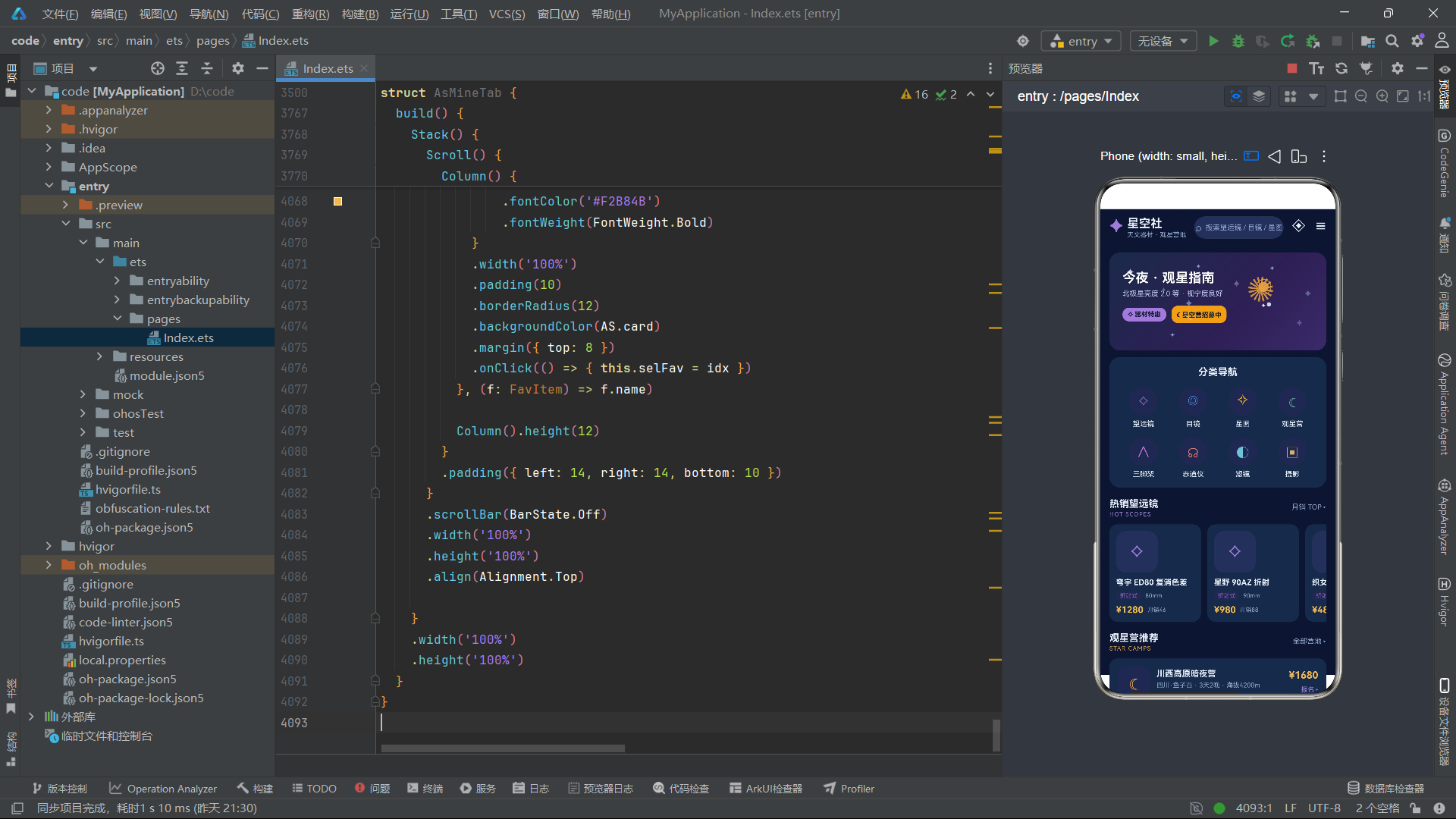
十一、总结
本文深度解析了一款基于HarmonyOS 6.1.1 ArkTS API 24的天文观星器材馆应用,从类型系统、纯函数架构、主组件路由到六大功能模块的完整实现,全面展示了声明式UI在天文电商场景下的技术深度与工程实践。应用以星空靛蓝紫为主题色,通过ColorPalette配色系统和StarDot粒子配置构建了统一的视觉语言。九大接口类型和30余个纯函数构成了坚实的数据层基础,将望远镜、目镜、星图、营地等多品类商品的数据逻辑与视图层彻底分离。
在动效体系方面,应用展现了ArkTS声明式UI在动态视觉表达上的强大能力。首页组件通过三个并行setInterval定时器驱动星空闪烁(asTwinkle正弦波透明度)、行星轨道运动(asOrbitX/Y三角函数坐标计算)和流星划过(Y坐标线性递增+重置)三重动效。个人中心组件通过辉光扫描动画(glowX横向位移+超大字体+超低透明度)和星空粒子闪烁(复用asTwinkle+starPhase相位更新)构建了层次丰富的会员卡视觉体验。这些动效完全基于ArkTS原生能力实现,无需任何第三方动画库,体现了框架在视觉表达方面的自足性。
从工程架构角度,应用的CRUD体系特别值得关注。望远镜模块通过17个状态变量构建了完整的新增、编辑、删除状态矩阵,配合循环切换选择器(asNextType、asNextBrand、asNextAp等纯函数)实现了极简的移动端表单交互。观星营模块通过三级弹框级联(详情→报名表单→成功提示)和zIndex递增层叠,实现了复杂的多步骤业务流程。跨Tab导航通过onJump回调函数将子组件的跳转意图传递给父组件,保持了单向数据流的清晰性。这些设计模式为HarmonyOS生态下中型电商应用的开发提供了具有实战参考价值的架构范例。

讨论HarmonyOS开发技术,专注于API与组件、DevEco Studio、测试、元服务和应用上架分发等。
更多推荐

 6
6 0
0- 0


 已为社区贡献10条内容

所有评论(0)