HarmonyOS 6效果实现:petBarW和petProteinW函数分别计算柱状图和蛋白质条的宽度百分比,通过Math.max确保最小宽度值,避免极小数值导致视觉不可见
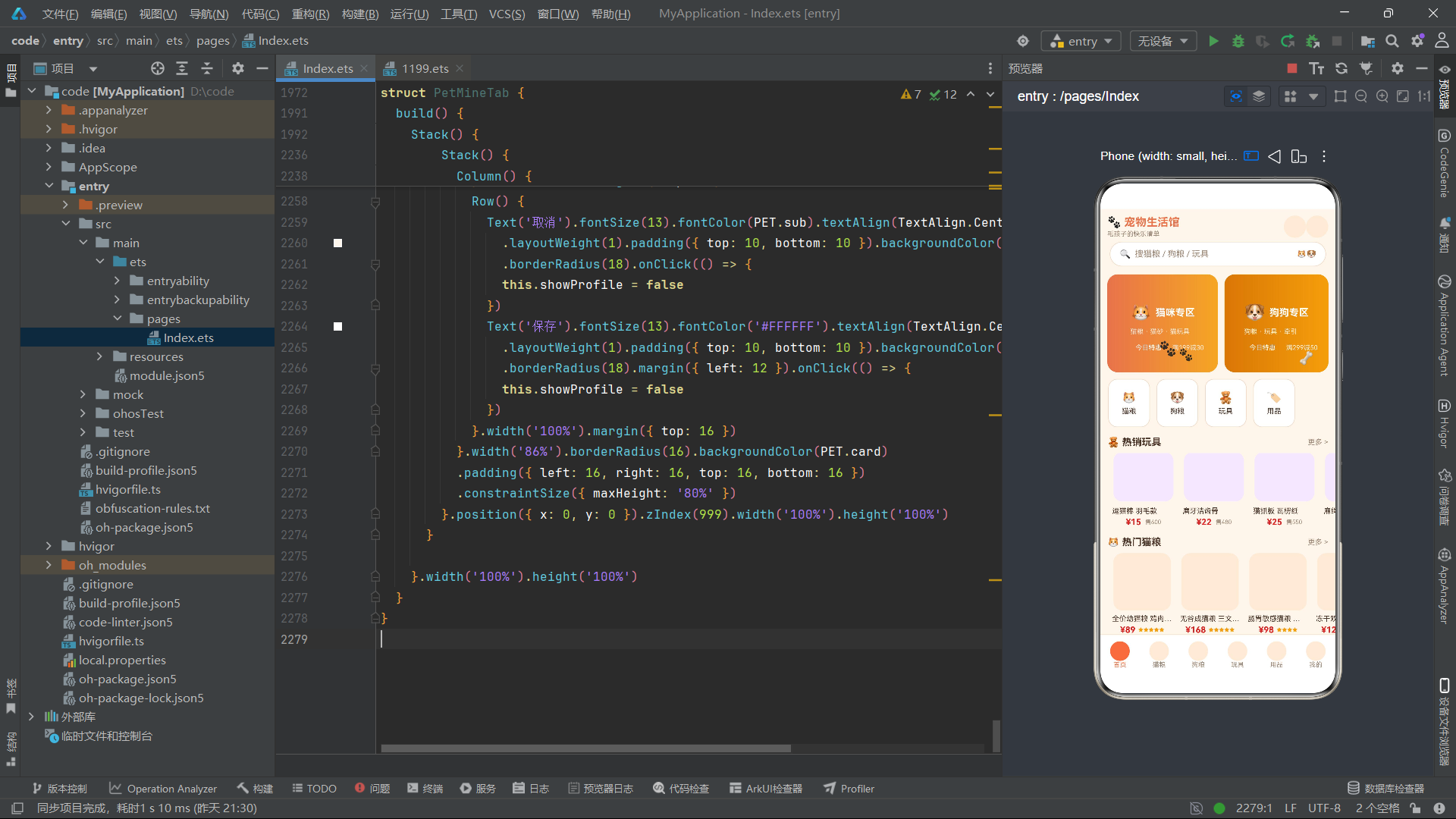
在移动端电商领域,HarmonyOS 6.1.1的ArkTS声明式UI框架以其独特的组件化架构和响应式状态管理,为垂直品类应用开发提供了全新的工程范式。本篇博文以一个宠物用品电商应用为案例,系统性地剖析了从TypeScript强类型接口设计、纯函数业务逻辑分层,到@State响应式状态驱动、@Builder装饰器复用、ForEach列表渲染、Stack层叠布局、linearGradient渐变装饰等ArkUI核心能力在真实业务场景中的落地实践。
该应用采用得物风格设计语言与暖橙奶油主题色彩体系,将宠物商品划分为猫粮、狗粮、玩具、用品四大核心品类,通过模块化组件拆分实现了首页推荐流、分类筛选、蛋白质含量对比、价格区间分布统计、销量排行榜、商品详情弹窗、新增/编辑/删除CRUD全链路、会员卡光泽特效、月度消费柱状图等完整的电商功能矩阵,并通过setInterval定时器驱动的爪印漫步、尾巴旋转摆动、商品卡弹跳浮动等宠物主题微动效,为界面注入了生动活泼的动态体验。
全文将从色彩主题体系与数据接口建模、纯函数工具函数层、六大功能组件逐段拆解、CRUD状态管理模式与弹窗交互体系、宠物主题动画引擎五个维度展开深度代码分析,配合mermaid架构流程图与多维度技术对比表格,为HarmonyOS ArkTS开发者提供一份可复用的垂直电商应用开发参考指南。
一、引言
随着宠物经济的蓬勃发展,宠物用品垂直电商应用已成为移动端重要的消费场景之一。在HarmonyOS 6.1.1平台上,ArkTS声明式UI框架凭借其强类型安全、组件化开发模式、高效的状态管理机制以及丰富的UI装饰器体系,为构建此类功能密集型的电商应用提供了坚实的技术基础。本应用以"宠物生活馆"为核心产品定位,采用得物风格的设计语言,通过暖橙色与奶油白的主题色彩搭配,营造出温馨可爱的视觉氛围,同时承载了从商品浏览、筛选、搜索到详情查看、购物管理、个人中心的完整电商业务闭环。
在技术架构层面,应用采用了数据驱动的开发范式。首先,通过TypeScript接口(interface)定义了CatFoodItem、DogFoodItem、ToyItem、SupplyItem、OrderItem、FavItem等六大业务数据模型,确保了类型安全性和数据结构的一致性。其次,所有业务逻辑——包括价格格式化、折扣计算、销量缩写、蛋白质条宽度计算、状态颜色映射、品类颜色映射、商品筛选过滤、索引查找、最大值求解等——均被抽取为独立的纯函数,实现了UI层与逻辑层的彻底解耦。最后,通过@Entry和@Component装饰器将应用拆分为PetApp主入口组件和PetHomeTab、PetCatTab、PetDogTab、PetToyTab、PetSupplyTab、PetMineTab六大功能组件,每个组件独立管理自身状态和UI渲染逻辑。
在交互设计层面,应用实现了深度的动态视觉体验。通过aboutToAppear生命周期钩子中注册的setInterval定时器,以100ms或80ms为间隔驱动@State状态变量的持续递增,进而触发translate位移、rotate旋转等属性动画,实现了猫咪专区卡片中爪印🐾的横向漫步效果、狗狗专区骨头🦴的旋转摆动效果、热销玩具商品的弹跳浮动效果、会员卡光泽扫过特效等多层次微动效。同时,每个品类Tab均实现了完整的CRUD操作流程,通过showDetail/showAdd/showEdit/showDel等布尔状态变量控制Stack层叠弹窗的显示与隐藏,配合position绝对定位、zIndex层级控制和constraintSize最大高度约束,构建了功能完备的模态对话框交互体系。
二、色彩主题体系与数据接口建模
2.1 色彩调色板设计
应用首先定义了一个ColorPalette接口来规范全局色彩系统,通过PET常量对象统一管理所有颜色值。这种集中式色彩管理方案确保了整个应用的视觉一致性,同时也便于后期主题切换和色彩调整。
interface ColorPalette {
  bg: string
  card: string
  card2: string
  primary: string
  accent: string
  star: string
  text: string
  sub: string
  line: string
  glow: string
}

const PET: ColorPalette = {
  bg: '#FFF6EC',
  card: '#FFFFFF',
  card2: '#FDEBD8',
  primary: '#E8734A',
  accent: '#F5A623',
  star: '#F59E0B',
  text: '#4A3428',
  sub: '#A08A78',
  line: '#F0DCC9',
  glow: '#D95F2B'
}
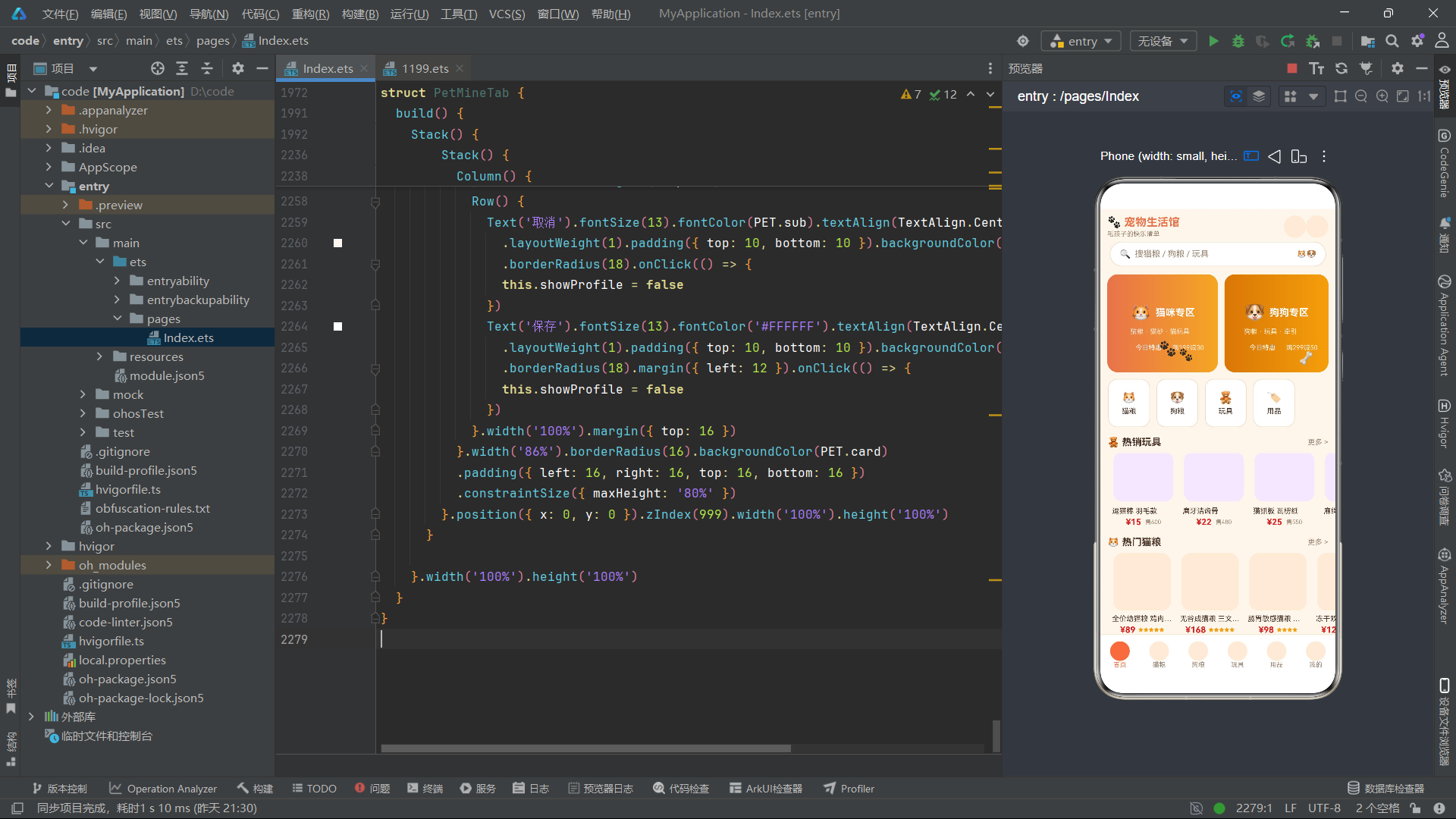
上述代码定义了十一个语义化的色彩字段:bg代表页面背景色(暖奶油白)、card代表卡片背景色(纯白)、card2代表次级卡片背景色(浅橙)、primary代表主色调(暖橙红)、accent代表强调色(金黄色)、star代表星级评分色(琥珀色)、text代表主文本色(深棕)、sub代表辅助文本色(灰棕)、line代表分割线色(浅米色)、glow代表光泽特效色(深橙红)。> 这种基于语义命名而非视觉描述的色彩变量定义方式,是大型前端项目的最佳实践之一,它使得色彩变更只需修改一处常量定义即可全局生效,极大降低了维护成本。
2.2 商品数据接口体系
应用为四大商品品类分别定义了强类型的TypeScript接口,每个接口都包含了品名、品牌、重量、价格、原价、销量、评分等通用字段,同时根据品类特性增加了差异化的专属字段。
interface CatFoodItem {
  name: string
  brand: string
  weight: number
  price: number
  orig: number
  sale: number
  stars: number
  protein: number
}

interface DogFoodItem {
  name: string
  brand: string
  weight: number
  price: number
  orig: number
  sale: number
  stars: number
  age: string
}

interface ToyItem {
  name: string
  type: string
  price: number
  orig: number
  sale: number
  tag: string
}

interface SupplyItem {
  name: string
  type: string
  price: number
  orig: number
  sale: number
  tag: string
}

interface OrderItem {
  id: string
  name: string
  price: number
  date: string
  status: string
}

interface FavItem {
  name: string
  type: string
  price: number
}
CatFoodItem接口独有protein(蛋白质含量)字段,用于蛋白质对比图的数值渲染;DogFoodItem接口独有age(适用犬龄)字段,用于犬龄筛选和标签显示;ToyItem和SupplyItem接口共有type和tag字段,分别表示商品类型和特性标签;OrderItem接口定义了订单编号、品名、价格、日期和物流状态;FavItem接口则精简为品名、类型和价格三个字段。这种根据业务需求差异化定义接口字段的设计方式,避免了过度抽象导致的类型冗余,使得每个数据模型都能精准匹配其对应的UI渲染需求。
在ArkTS中,interface定义的接口不仅可以用于类型约束,还可以作为ForEach列表渲染时itemGenerator回调函数的参数类型注解,编译器会在编译阶段进行类型检查,有效防止运行时类型错误。
2.3 模拟数据集与常量定义
应用通过const关键字定义了多组静态数据数组和常量配置,作为整个应用的初始数据源。以下代码展示了猫粮商品列表和分类常量的定义。
const CATFOOD_LIST: CatFoodItem[] = [
  { name: '全价幼猫粮 鸡肉味 1.8kg', brand: '麦富迪', weight: 1800, price: 89, orig: 109, sale: 520, stars: 5, protein: 32 },
  { name: '无谷成猫粮 三文鱼 2kg', brand: '渴望', weight: 2000, price: 168, orig: 198, sale: 380, stars: 5, protein: 40 },
  { name: '肠胃敏感猫粮 1.5kg', brand: '皇家', weight: 1500, price: 98, orig: 118, sale: 310, stars: 4, protein: 30 },
  { name: '冻干双拼猫粮 2.5kg', brand: '网易严选', weight: 2500, price: 129, orig: 149, sale: 450, stars: 5, protein: 36 },
  { name: '全价绝育猫粮 2kg', brand: '冠能', weight: 2000, price: 118, orig: 138, sale: 220, stars: 4, protein: 33 },
  { name: '室内去毛球猫粮 1.8kg', brand: '比瑞吉', weight: 1800, price: 88, orig: 105, sale: 190, stars: 4, protein: 30 },
  { name: '幼猫羊奶粉粮 800g', brand: '卫仕', weight: 800, price: 68, orig: 82, sale: 260, stars: 4, protein: 28 },
  { name: '全价鲜肉猫粮 2kg', brand: '高爷家', weight: 2000, price: 139, orig: 159, sale: 330, stars: 5, protein: 42 },
  { name: '布偶猫专用粮 2kg', brand: '诚实一口', weight: 2000, price: 158, orig: 178, sale: 140, stars: 5, protein: 38 },
  { name: '高蛋白增肥猫粮 1.5kg', brand: '纽顿', weight: 1500, price: 108, orig: 128, sale: 170, stars: 4, protein: 44 }
]

const PET_TABS: string[] = ['首页', '猫粮', '狗粮', '玩具', '用品', '我的']
const PET_TAB_ICONS: string[] = ['🏠', '🐱', '🐶', '🧸', '🏷️', '👤']

const HERO_CATS: HeroCat[] = [
  { name: '猫粮', icon: '🐱', desc: '幼猫成猫全价粮、冻干双拼、肠胃呵护' },
  { name: '狗粮', icon: '🐶', desc: '全犬种粮、幼犬奶糕、老年关节呵护' },
  { name: '玩具', icon: '🧸', desc: '逗猫棒、磨牙骨、漏食益智、互动激光' },
  { name: '用品', icon: '🏷️', desc: '猫砂、喂食器、窝具、牵引、出行装备' }
]
const CATFOOD_FILTER: string[] = ['全部', '幼猫', '成猫', '绝育']
const DOG_FILTER: string[] = ['全部', '幼犬', '成犬', '小型', '大型']
const TOY_FILTER: string[] = ['全部', '猫玩具', '狗玩具', '咬胶', '互动']
const SUPPLY_FILTER: string[] = ['全部', '猫砂', '喂食', '窝具', '牵引']
const MONTH_VALS: number[] = [52, 88, 45, 132, 76, 108]
const MONTH_LABELS: string[] = ['3月', '4月', '5月', '6月', '7月', '8月']
数据集中涵盖了麦富迪、渴望、皇家、网易严选、冠能、比瑞吉、卫仕、高爷家、诚实一口、纽顿等十个真实宠物粮品牌,每条数据都包含了完整的商品信息。PET_TABS和PET_TAB_ICONS定义了底部导航栏的六个标签项及其对应的Emoji图标。HERO_CATS定义了首页分类胶囊的四个入口项,每项包含名称、图标和描述文案。四个FILTER数组分别为猫粮、狗粮、玩具和用品提供了筛选标签集。MONTH_VALS和MONTH_LABELS则为个人中心页的月度消费柱状图提供了数据源。
三、纯函数工具函数层
3.1 格式化与计算函数
应用将所有数据格式化和业务计算逻辑抽取为独立的纯函数,这些函数不依赖任何组件状态,接收输入参数并返回计算结果,确保了逻辑的可测试性和可复用性。
function petPrice(p: number): string {
  return '¥' + p
}

function petOff(orig: number, price: number): string {
  return Math.round((orig - price) / orig * 100) + '%'
}

function petNum(n: number): string {
  return n > 1000 ? (n / 1000).toFixed(1) + 'k' : '' + n
}

function petBarW(v: number, max: number): string {
  return Math.max(10, Math.round(v / max * 100)) + '%'
}

function petProteinW(p: number): string {
  return Math.max(8, Math.round(p / 45 * 100)) + '%'
}

function petMonthBar(v: number): string {
  return Math.max(6, Math.round(v / 132 * 100)) + '%'
}
petPrice函数将数字价格格式化为带人民币符号的字符串。petOff函数计算折扣百分比,通过原价与现价的差值除以原价再取整得到折扣力度。petNum函数实现了销量数字的智能缩写,超过1000时以k为单位保留一位小数显示。petBarW和petProteinW函数分别计算柱状图和蛋白质条的宽度百分比,通过Math.max确保最小宽度值,避免极小数值导致视觉不可见。petMonthBar函数则以132为基准值计算月度消费柱状图的高度比例。
纯函数的核心优势在于其确定性——相同的输入永远产生相同的输出,不产生副作用。在ArkTS声明式UI中,纯函数可以在ForEach的itemGenerator或build方法中安全调用,无需担心状态污染或渲染副作用问题。
3.2 颜色映射函数
应用通过一系列颜色映射函数,将业务状态和品类信息转换为对应的色彩值,实现了数据驱动的动态着色。
function petStatusColor(s: string): string {
  if (s === '已签收') {
    return '#16A34A'
  }
  if (s === '运输中') {
    return '#E8734A'
  }
  if (s === '待发货') {
    return '#D97706'
  }
  return '#DC2626'
}

function petTypeColor(t: string): string {
  if (t === '猫玩具' || t === '猫粮') {
    return '#E8734A'
  }
  if (t === '狗玩具' || t === '狗粮') {
    return '#D97706'
  }
  if (t === '咬胶') {
    return '#B45309'
  }
  if (t === '互动') {
    return '#7C3AED'
  }
  return '#64748B'
}

function petFavColor(t: string): string {
  if (t === '猫粮') {
    return '#E8734A'
  }
  if (t === '狗粮') {
    return '#D97706'
  }
  if (t === '玩具') {
    return '#7C3AED'
  }
  return '#0891B2'
}
petStatusColor函数将订单物流状态映射为四种颜色:已签收为绿色、运输中为暖橙色、待发货为琥珀色、退款中等异常状态为红色。petTypeColor函数将商品类型映射为五色方案:猫类商品为暖橙红、狗类商品为深琥珀色、咬胶为棕色、互动类为紫色、默认为石板灰。petFavColor函数则将收藏夹中的商品类型映射为四色方案,为收藏列表的类型标签提供差异化着色。> 这种基于字符串条件判断的色彩映射方式,在ArkTS中比switch语句更为简洁直观,且每个分支都通过return提前退出,避免了fall-through问题。
3.3 筛选过滤与索引查找函数
应用为四大品类分别实现了独立的筛选过滤函数和索引查找函数,这些函数采用for循环遍历数组的方式实现数据过滤和查找逻辑。
function petFilterCats(arr: CatFoodItem[], t: string): CatFoodItem[] {
  let out: CatFoodItem[] = []
  for (let i = 0; i < arr.length; i++) {
    if (t === '全部') {
      out.push(arr[i])
    } else if (t === '幼猫' && arr[i].name.indexOf('幼') >= 0) {
      out.push(arr[i])
    } else if (t === '绝育' && arr[i].name.indexOf('绝育') >= 0) {
      out.push(arr[i])
    } else if (t === '成猫' && arr[i].name.indexOf('幼') < 0 && arr[i].name.indexOf('绝育') < 0) {
      out.push(arr[i])
    }
  }
  return out
}

function petFilterDogs(arr: DogFoodItem[], t: string): DogFoodItem[] {
  let out: DogFoodItem[] = []
  for (let i = 0; i < arr.length; i++) {
    if (t === '全部' || arr[i].age === t) {
      out.push(arr[i])
    }
  }
  return out
}

function petFilterToys(arr: ToyItem[], t: string): ToyItem[] {
  let out: ToyItem[] = []
  for (let i = 0; i < arr.length; i++) {
    if (t === '全部' || arr[i].type === t) {
      out.push(arr[i])
    }
  }
  return out
}

function petFindCatIdx(arr: CatFoodItem[], n: string): number {
  for (let i = 0; i < arr.length; i++) {
    if (arr[i].name === n) {
      return i
    }
  }
  return 0
}
petFilterCats函数针对猫粮品类的筛选逻辑较为特殊——幼猫和绝育通过品名中是否包含"幼"或"绝育"关键字来判断,成猫则是排除了前两者的剩余项。petFilterDogs和petFilterToys函数则通过精确匹配age或type字段进行筛选,逻辑更为简洁。petFindCatIdx等索引查找函数通过遍历数组比对品名来定位商品索引,找不到时返回0作为默认值,确保后续数组访问的安全性。
3.4 统计聚合与动画计算函数
应用还实现了一系列统计聚合函数和动画参数计算函数,用于数据可视化和动态效果驱动。
function petMaxProtein(arr: CatFoodItem[]): number {
  let m = 1
  for (let i = 0; i < arr.length; i++) {
    if (arr[i].protein > m) {
      m = arr[i].protein
    }
  }
  return m
}

function petHotToys(): ToyItem[] {
  let out: ToyItem[] = []
  for (let i = 0; i < TOY_LIST.length; i++) {
    if (TOY_LIST[i].sale >= 450) {
      out.push(TOY_LIST[i])
    }
  }
  return out
}

function petTopOrders(): OrderItem[] {
  return [ORDER_LIST[0], ORDER_LIST[1], ORDER_LIST[3]]
}

function petGlowX(i: number): string {
  return ((i * 4) % 70) + '%'
}

function petPawX(w: number): string {
  return (((w * 2) % 120) / 120 * 60) + '%'
}

function petTailR(w: number, i: number): number {
  return Math.sin(w / 8 + i * 1.3) * 14
}

function petBounceY(w: number, i: number): number {
  return -Math.abs(Math.sin(w / 10 + i * 1.1)) * 8
}
petMaxProtein和petMaxSale函数通过遍历数组寻找最大值,用于柱状图的基准值计算。petHotToys函数筛选销量大于等于450的玩具作为热销商品。petTopOrders函数直接返回订单列表中第0、1、3项作为首页展示订单。> 动画计算函数中,petGlowX通过模运算实现光泽位置在0%-70%区间内循环移动;petPawX通过更复杂的模运算和映射实现爪印在60%宽度内的往返漫步;petTailR和petBounceY则利用Math.sin三角函数的周期性,生成自然的旋转摆动和弹跳浮动动画曲线,其中petBounceY通过Math.abs确保Y轴偏移始终为负值(向上弹跳),再取反获得向下重力效果。
四、主入口组件与底部导航架构
4.1 PetApp主入口组件
应用的主入口组件PetApp通过@Entry和@Component装饰器声明,负责管理底部导航栏的当前选中索引和搜索框文本,并根据cur状态值渲染对应的功能Tab组件。
@Entry
@Component
struct PetApp {
  @State cur: number = 0
  @State search: string = ''

  @Builder modalOverlay() {
    Column() {}.width('100%').height('100%').backgroundColor('#664A2E1E')
  }

  build() {
    Stack() {
      Column() {
        Row() {
          Column() {
            Text('🐾 宠物生活馆').fontSize(17).fontWeight(FontWeight.Bold).fontColor(PET.primary)
            Text('毛孩子的快乐清单').fontSize(10).fontColor(PET.sub).margin({ top: 2 })
          }.alignItems(HorizontalAlign.Start).layoutWeight(1)
          Column() {}.width(34).height(34).borderRadius(17).backgroundColor(PET.card2)
          Column() {}.width(34).height(34).borderRadius(17).backgroundColor(PET.card2)
        }.width('94%').padding({ top: 10, bottom: 6 })
        Row() {
          Text('🔍').fontSize(14).margin({ right: 6 })
          Text('搜猫粮 / 狗粮 / 玩具').fontSize(13).fontColor(PET.sub)
          Column().layoutWeight(1)
          Text('🐱🐶').fontSize(12)
        }.width('92%').height(38).borderRadius(19).backgroundColor(PET.card)
        .padding({ left: 14, right: 14 }).border({ width: 1, color: PET.line })
        Column() {
          if (this.cur === 0) {
            PetHomeTab()
          } else if (this.cur === 1) {
            PetCatTab()
          } else if (this.cur === 2) {
            PetDogTab()
          } else if (this.cur === 3) {
            PetToyTab()
          } else if (this.cur === 4) {
            PetSupplyTab()
          } else {
            PetMineTab()
          }
        }.layoutWeight(1)
        Row() {
          ForEach(PET_TABS, (t: string, i: number) => {
            Column() {
              Column() {}.width(30).height(30).borderRadius(15)
              .backgroundColor(this.cur === i ? PET.primary : PET.card2)
              Text(t).fontSize(10).fontColor(this.cur === i ? PET.primary : PET.sub)
            }.layoutWeight(1).onClick(() => {
              this.cur = i
            })
          }, (t: string) => t)
        }.width('100%').height(62).backgroundColor(PET.card)
        .border({ width: { top: 1 }, color: PET.line })
      }.width('100%').height('100%')
    }.width('100%').height('100%').backgroundColor(PET.bg)
  }
}
组件内部定义了两个@State响应式状态变量:cur记录当前选中的Tab索引(默认为0即首页),search存储搜索框文本内容。build方法通过Stack作为根布局容器,内部嵌套Column实现垂直排列:顶部是应用标题栏(包含"🐾 宠物生活馆"品牌名和"毛孩子的快乐清单"副标题,右侧两个圆形占位头像),中间是搜索框Row(包含搜索图标、占位提示文本和右侧猫咪狗狗Emoji),核心内容区通过if-else条件判断根据cur值渲染PetHomeTab、PetCatTab、PetDogTab、PetToyTab、PetSupplyTab或PetMineTab组件,底部是导航栏Row。底部导航栏通过ForEach遍历PET_TABS数组渲染六个Tab项,每个Tab项包含一个30x30的圆形指示器(选中时为主色调橙色,未选中时为浅橙色card2)和标签文字,点击时通过onClick回调更新cur状态触发页面切换。
在ArkTS声明式UI中,@State装饰的状态变量发生变化时,框架会自动触发build方法的重新执行,进而更新依赖该状态的UI组件。这种数据驱动视图的范式使得开发者无需手动调用setState或invalidate,极大地简化了状态管理的复杂度。
五、首页推荐流组件深度解析
5.1 双头像卡片与分类胶囊
PetHomeTab组件是应用的首页,承载了双头像推荐卡片、分类胶囊横滑、热销玩具横滑、热门猫粮横滑和领券Banner五大核心模块,同时通过setInterval驱动wave状态变量实现动画效果。
@Component
struct PetHomeTab {
  @State wave: number = 0
  @State showCoupon: boolean = false
  @State showHero: boolean = false
  @State heroIdx: number = 0
  @State showToy: boolean = false
  @State toyIdx: number = 0
  @State showCat: boolean = false
  @State catIdx: number = 0

  aboutToAppear(): void {
    setInterval(() => {
      this.wave = this.wave + 1
    }, 100)
  }
组件定义了七个@State状态变量:wave作为动画驱动计数器,showCoupon/showHero/showToy/showCat控制四个弹窗的显隐,heroIdx/toyIdx/catIdx记录当前弹窗展示的商品索引。aboutToAppear生命周期钩子在组件创建时注册setInterval定时器,以100ms间隔持续递增wave值,触发所有依赖wave的UI属性重新计算和渲染。
        Row() {
          Stack() {
            Column() {
              Row() {
                Text('🐱').fontSize(26)
                Text('猫咪专区').fontSize(15).fontWeight(FontWeight.Bold)
                  .fontColor('#FFFFFF').margin({ left: 6 })
              }
              Text('猫粮 · 猫砂 · 猫玩具').fontSize(10).fontColor('#FFE8D6')
                .margin({ top: 8 })
              Row() {
                Text('今日特惠').fontSize(10).fontColor('#FFFFFF')
                  .backgroundColor('#00000026').borderRadius(10)
                  .padding({ left: 8, right: 8, top: 3, bottom: 3 })
                Text('满199减30').fontSize(10).fontColor('#FFE8D6').margin({ left: 8 })
              }.margin({ top: 10 })
            }.alignItems(HorizontalAlign.Start).margin({ left: 14, top: 14 })
            Text('🐾').fontSize(22)
              .translate({ x: petPawX(this.wave) })
              .margin({ left: 12, top: 78 })
            Text('🐾').fontSize(18)
              .translate({ x: petPawX(this.wave + 18) })
              .margin({ left: 60, top: 96 })
          }.layoutWeight(1).height(150).borderRadius(16)
          .linearGradient({
            angle: 90,
            colors: [['#E8734A', 0], ['#F5A623', 1]]
          }).clip(true)
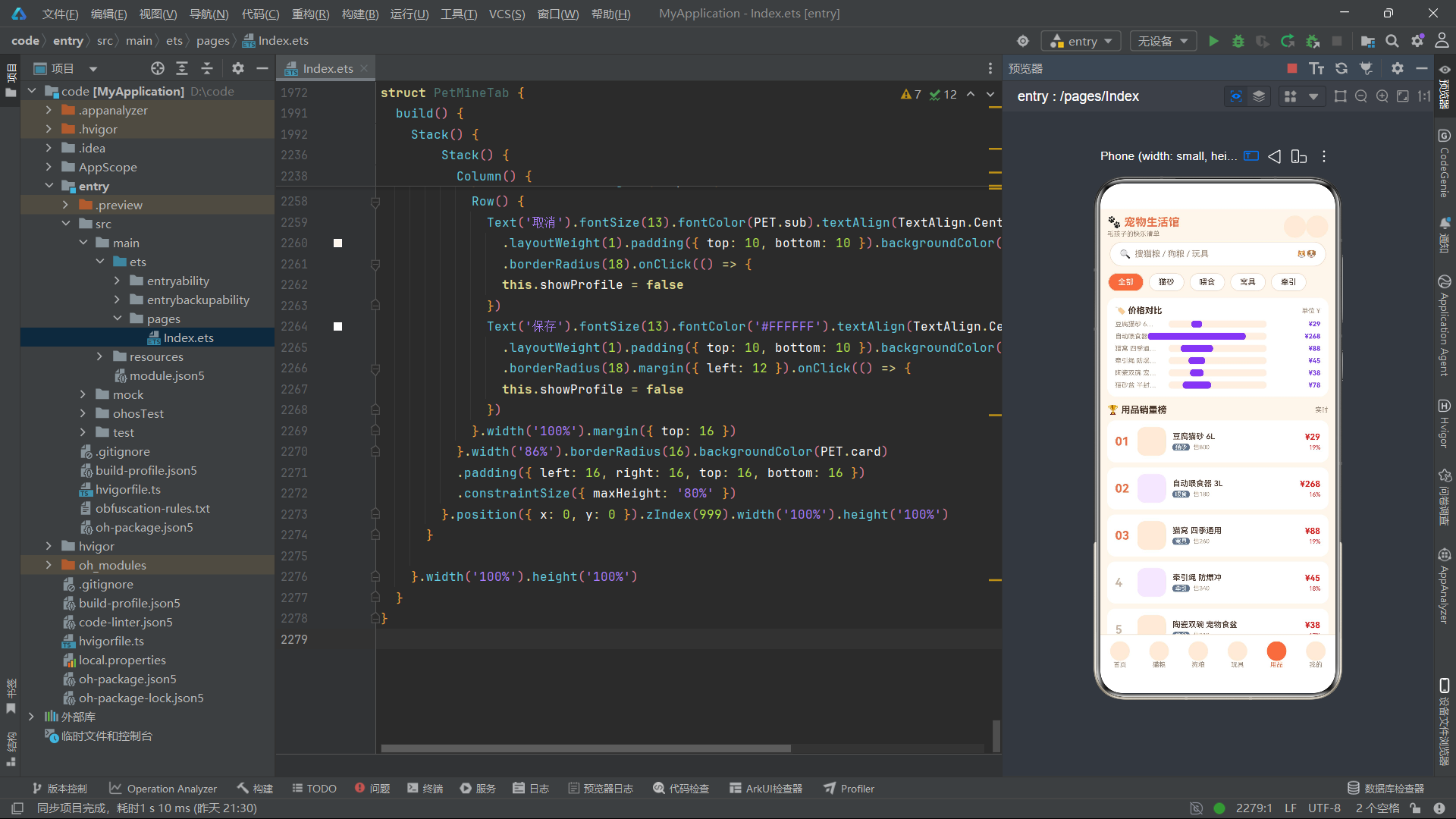
双头像卡片采用Row横向排列两个Stack容器,每个Stack内部通过linearGradient设置从暖橙红到金黄色的90度线性渐变背景,配合clip(true)实现圆角裁剪。猫咪专区卡片内层叠了内容Column和两个爪印🐾Text元素,爪印通过translate({ x: petPawX(this.wave) })实现横向位移动画——petPawX函数根据wave值计算位移百分比,使爪印在卡片内往返漫步。> linearGradient是ArkUI提供的关键UI装饰能力,通过angle指定渐变角度,colors数组指定色标位置,能够轻松实现品牌化的渐变背景效果,是电商应用视觉设计的重要手段。
5.2 横向滚动列表与领券Banner
首页还包含热销玩具和热门猫粮两个横向滚动列表,以及领券Banner入口。
          Scroll() {
            Row() {
              ForEach(petHotToys(), (t: ToyItem) => {
                Column() {
                  Column() {}.width(92).height(76).borderRadius(14).backgroundColor('#F3E8FF')
                  .translate({ y: petBounceY(this.wave, 0) })
                  Text(t.name).fontSize(11).fontColor(PET.text).margin({ top: 6 })
                    .maxLines(1).textOverflow({ overflow: TextOverflow.Ellipsis }).width(96)
                  Row() {
                    Text(petPrice(t.price)).fontSize(13).fontWeight(FontWeight.Bold)
                      .fontColor('#DC2626')
                    Text('售' + petNum(t.sale)).fontSize(9).fontColor(PET.sub).margin({ left: 6 })
                  }.margin({ top: 3 })
                }.width(108).onClick(() => {
                  this.toyIdx = petFindToyIdx(TOY_LIST, t.name)
                  this.showToy = true
                })
              }, (t: ToyItem) => t.name)
            }.padding({ left: 12, right: 12 })
          }.scrollable(ScrollDirection.Horizontal).scrollBar(BarState.Off)
          .align(Alignment.Start).width('100%').margin({ top: 8 })
横向滚动列表通过Scroll组件包裹Row容器,设置scrollable(ScrollDirection.Horizontal)启用水平滚动,scrollBar(BarState.Off)隐藏滚动条。ForEach遍历petHotToys()返回的热销玩具数据,每个商品卡片包含商品图占位Column、品名Text(通过maxLines(1)和textOverflow限制单行省略显示)、价格和销量Row。商品图占位区通过translate({ y: petBounceY(this.wave, 0) })实现弹跳浮动动画效果。点击商品卡片时,通过petFindToyIdx查找索引并设置showToy为true触发详情弹窗显示。领券Banner则采用Row布局,左侧为礼物Emoji和文案Column,右侧为领取按钮Text,整体使用浅橙背景和圆角设计,点击后触发showCoupon弹窗。
5.3 首页弹窗体系
首页实现了四种弹窗:领券弹窗、分类介绍弹窗、玩具详情弹窗和猫粮详情弹窗,均通过Stack层叠布局和position绝对定位实现模态覆盖。
      if (this.showCat) {
        Stack() {
          Column() {
            Column() {}.width('100%').height(92).borderRadius(12).backgroundColor('#FDEBD8')
            Text(CATFOOD_LIST[this.catIdx].name).fontSize(15).fontWeight(FontWeight.Bold)
              .fontColor(PET.text).margin({ top: 10 })
            Row() {
              Text(petPrice(CATFOOD_LIST[this.catIdx].price)).fontSize(18)
                .fontWeight(FontWeight.Bold).fontColor('#DC2626')
              Text(petPrice(CATFOOD_LIST[this.catIdx].orig)).fontSize(11).fontColor(PET.sub)
                .decoration({ type: TextDecorationType.LineThrough }).margin({ left: 8 })
              Text('蛋白 ' + CATFOOD_LIST[this.catIdx].protein + '%').fontSize(10)
                .fontColor('#FFFFFF').backgroundColor(PET.accent).borderRadius(4)
                .padding({ left: 4, right: 4 }).margin({ left: 8 })
            }.margin({ top: 8 })
            Text(petStarStr(CATFOOD_LIST[this.catIdx].stars) + '  ' +
              CATFOOD_LIST[this.catIdx].brand).fontSize(11).fontColor(PET.star)
              .margin({ top: 8 })
            Text('关闭').fontSize(13).fontColor('#FFFFFF').width('100%')
              .textAlign(TextAlign.Center).padding({ top: 10, bottom: 10 })
              .backgroundColor(PET.primary).borderRadius(20).margin({ top: 14 }).onClick(() => {
              this.showCat = false
            })
          }.width('84%').borderRadius(16).backgroundColor(PET.card)
          .padding({ left: 16, right: 16, top: 16, bottom: 16 })
          .constraintSize({ maxHeight: '80%' })
        }.position({ x: 0, y: 0 }).zIndex(999).width('100%').height('100%')
      }
猫粮详情弹窗通过if (this.showCat)条件渲染,外层Stack通过position({ x: 0, y: 0 })和zIndex(999)实现全屏覆盖层。内层Column为弹窗主体,宽度84%,圆角16,白色背景,通过constraintSize({ maxHeight: ‘80%’ })限制最大高度。弹窗内容包含商品图占位区、品名、价格行(现价、原价划线价、蛋白质标签)、星级评分和品牌信息、关闭按钮。> decoration({ type: TextDecorationType.LineThrough })是ArkUI的文本装饰能力,用于实现原价划线效果,是电商应用中常见的价格对比展示手段。弹窗的关闭逻辑通过onClick回调将showCat设为false,触发条件渲染分支移除弹窗DOM。
六、猫粮品类Tab与CRUD全链路
6.1 筛选胶囊与蛋白质对比图
PetCatTab组件实现了猫粮品类的完整功能,包括筛选胶囊、蛋白质含量对比图、商品列表、以及详情/新增/编辑/删除四个弹窗。
@Component
struct PetCatTab {
  @State cats: CatFoodItem[] = []
  @State filter: string = '全部'
  @State selIdx: number = -1
  @State showDetail: boolean = false
  @State showAdd: boolean = false
  @State addName: string = '全价鸡肉猫粮 1.8kg'
  @State addBrand: string = '麦富迪'
  @State addWeight: string = '1800'
  @State addPrice: string = '88'
  @State addProtein: string = '32'
  @State showEdit: boolean = false
  @State editIdx: number = -1
  @State editName: string = ''
  @State editPrice: string = ''
  @State editProtein: string = ''
  @State showDel: boolean = false
  @State delIdx: number = -1

  aboutToAppear(): void {
    this.cats = CATFOOD_LIST.slice()
  }
组件定义了十五个@State状态变量:cats存储可变的猫粮数据数组(通过aboutToAppear中的slice()方法复制CATFOOD_LIST常量,确保CRUD操作不影响原始数据),filter记录当前筛选标签,selIdx记录详情弹窗展示的商品索引,showDetail/showAdd/showEdit/showDel控制四个弹窗显隐,addName/addBrand/addWeight/addPrice/addProtein存储新增表单的输入值,editIdx/editName/editPrice/editProtein存储编辑表单的索引和输入值,delIdx记录待删除的商品索引。
          Column() {
            Row() {
              Text('🥩 蛋白质含量对比').fontSize(13).fontWeight(FontWeight.Bold)
                .fontColor(PET.text)
              Column().layoutWeight(1)
              Text('单位 %').fontSize(10).fontColor(PET.sub)
            }.width('100%')
            ForEach(this.cats.slice(0, 6), (f: CatFoodItem) => {
              Row() {
                Text(f.name.length > 6 ? f.name.substring(0, 6) + '…' : f.name).fontSize(10)
                  .fontColor(PET.sub).width(78).maxLines(1)
                Stack() {
                  Column() {}.width('100%').height(11).borderRadius(5).backgroundColor('#FDF0E3')
                  Column() {}.width(petProteinW(f.protein)).height(11).borderRadius(5)
                  .linearGradient({
                    angle: 90,
                    colors: [['#E8734A', 0], ['#F5A623', 1]]
                  }).margin({ right: 64 })
                }.width(150).height(11).margin({ left: 4 })
                Column().layoutWeight(1)
                Text(f.protein + '%').fontSize(10).fontWeight(FontWeight.Bold)
                  .fontColor('#E8734A').width(36).textAlign(TextAlign.End)
              }.width('100%').margin({ top: 7 })
            }, (f: CatFoodItem) => f.name)
          }.width('94%').borderRadius(14).backgroundColor(PET.card)
          .padding({ left: 12, right: 12, top: 12, bottom: 12 }).margin({ top: 10 })
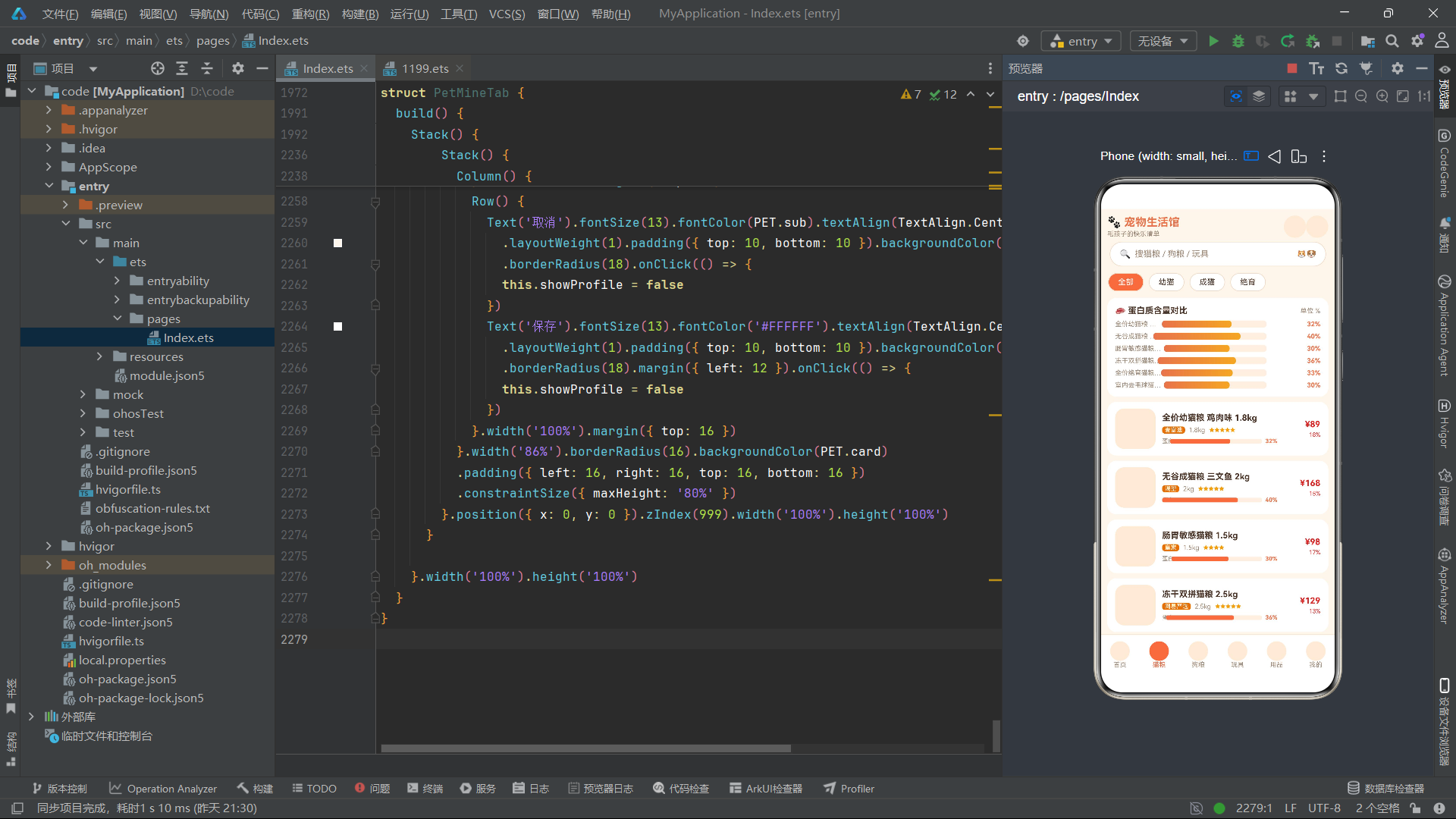
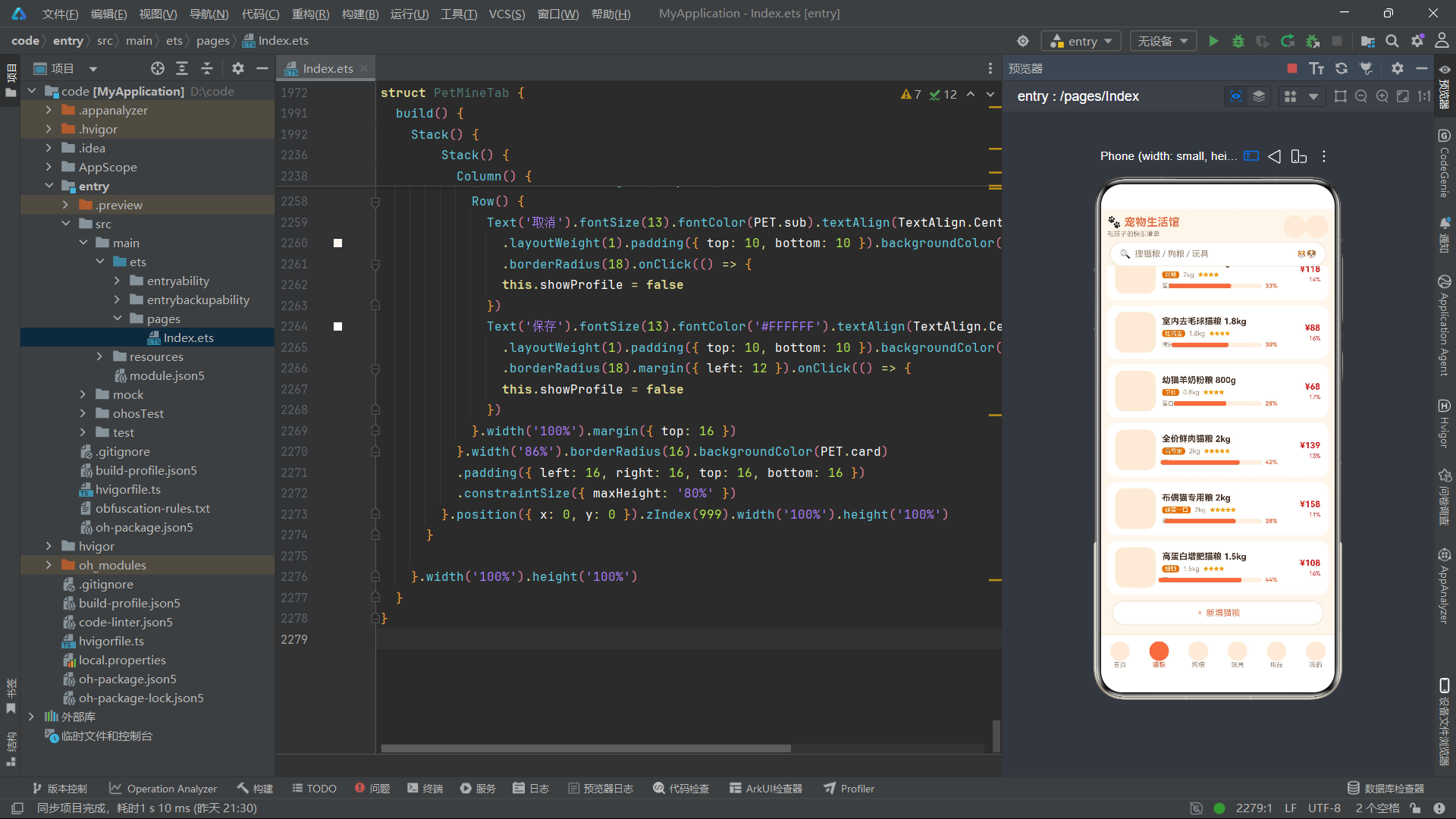
蛋白质含量对比图通过ForEach遍历cats数组前6项,每行渲染一个Stack容器,内层包含两个Column:底层为浅色背景条,上层为根据petProteinW函数计算宽度的渐变色进度条。品名通过substring(0, 6)截取前6个字符并添加省略号,确保列宽一致。> 这种通过Stack层叠两个Column实现进度条的方式,是ArkUI中实现数据可视化条形图的经典模式——底层Column提供轨道背景,上层Column通过动态宽度百分比填充进度,配合linearGradient渐变装饰实现美观的进度可视化效果。
6.2 商品列表渲染与详情弹窗
猫粮商品列表通过ForEach遍历petFilterCats(this.cats, this.filter)的筛选结果,每项渲染为一个带圆角白色背景的Row卡片。
          ForEach(petFilterCats(this.cats, this.filter), (f: CatFoodItem) => {
            Row() {
              Column() {}.width(62).height(62).borderRadius(14).backgroundColor('#FDEBD8')
              Column() {
                Text(f.name).fontSize(13).fontWeight(FontWeight.Bold).fontColor(PET.text)
                  .maxLines(1).textOverflow({ overflow: TextOverflow.Ellipsis }).width(190)
                Row() {
                  Text(f.brand).fontSize(9).fontColor('#FFFFFF').backgroundColor('#D97706')
                    .borderRadius(4).padding({ left: 4, right: 4 })
                  Text(f.weight / 1000 + 'kg').fontSize(10).fontColor(PET.sub).margin({ left: 6 })
                  Text(petStarStr(f.stars)).fontSize(8).fontColor(PET.star).margin({ left: 6 })
                }.margin({ top: 5 })
                Row() {
                  Text('蛋白').fontSize(9).fontColor(PET.sub)
                  Stack() {
                    Column() {}.width('100%').height(7).borderRadius(3)
                    .backgroundColor('#FDF0E3')
                    Column() {}.width(petProteinW(f.protein)).height(7).borderRadius(3)
                    .backgroundColor('#E8734A').margin({ right: 60 })
                  }.width(130).height(7).margin({ left: 5 })
                  Text(f.protein + '%').fontSize(9).fontWeight(FontWeight.Bold)
                    .fontColor('#E8734A').margin({ left: 5 })
                }.margin({ top: 6 })
              }.alignItems(HorizontalAlign.Start).margin({ left: 10 }).layoutWeight(1)
              Column() {
                Text(petPrice(f.price)).fontSize(13).fontWeight(FontWeight.Bold)
                  .fontColor('#DC2626')
                Text(petOff(f.orig, f.price)).fontSize(9).fontColor('#DC2626').margin({ top: 3 })
              }.alignItems(HorizontalAlign.End)
            }.width('94%').borderRadius(14).backgroundColor(PET.card)
            .padding({ left: 12, right: 12, top: 10, bottom: 10 }).margin({ top: 8 })
            .onClick(() => {
              this.selIdx = petFindCatIdx(this.cats, f.name)
              this.showDetail = true
            })
          }, (f: CatFoodItem) => f.name)
每个商品卡片包含左侧商品图占位区、中间信息区和右侧价格区三部分。信息区展示了品名(通过maxLines和textOverflow实现单行省略)、品牌标签(金色背景白色文字)、重量(自动除以1000转换为kg单位)、星级评分(通过petStarStr函数将数字转换为★字符)、以及一个迷你蛋白质进度条。> petStarStr函数通过for循环将数字评分转换为对应数量的★字符,是ArkTS中实现星级展示的简洁方案。点击卡片时通过petFindCatIdx查找索引并打开详情弹窗。
6.3 新增弹窗与表单交互
新增弹窗通过TextInput组件收集用户输入的商品信息,并通过push方法将新数据添加到cats数组。
      if (this.showAdd) {
        Stack() {
          Column() {
            Text('➕ 新增猫粮').fontSize(16).fontWeight(FontWeight.Bold).fontColor(PET.text)
            Text('名称').fontSize(11).fontColor(PET.sub).width('100%').margin({ top: 14 })
            TextInput({ placeholder: '请输入猫粮名称', text: this.addName }).fontSize(13).height(40)
              .backgroundColor('#FDF6EC').borderRadius(8).onChange((v: string) => {
              this.addName = v
            }).margin({ top: 4 })
            Row() {
              Column() {
                Text('品牌').fontSize(11).fontColor(PET.sub).width('100%')
                TextInput({ placeholder: '品牌', text: this.addBrand }).fontSize(13).height(40)
                  .backgroundColor('#FDF6EC').borderRadius(8).onChange((v: string) => {
                  this.addBrand = v
                }).margin({ top: 4 }).width('100%')
              }.layoutWeight(1)
              Column() {
                Text('净含量 g').fontSize(11).fontColor(PET.sub).width('100%')
                TextInput({ placeholder: '1800', text: this.addWeight }).fontSize(13).height(40)
                  .backgroundColor('#FDF6EC').borderRadius(8).onChange((v: string) => {
                  this.addWeight = v
                }).margin({ top: 4 }).width('100%')
              }.layoutWeight(1).margin({ left: 10 })
            }.width('100%').margin({ top: 12 })
            Row() {
              Text('取消').fontSize(13).fontColor(PET.sub).textAlign(TextAlign.Center)
                .layoutWeight(1).padding({ top: 10, bottom: 10 }).backgroundColor('#FDF6EC')
                .borderRadius(18).onClick(() => {
                this.showAdd = false
              })
              Text('保存').fontSize(13).fontColor('#FFFFFF').textAlign(TextAlign.Center)
                .layoutWeight(1).padding({ top: 10, bottom: 10 }).backgroundColor(PET.primary)
                .borderRadius(18).margin({ left: 12 }).onClick(() => {
                if (this.addName.length > 0) {
                  this.cats.push({
                    name: this.addName,
                    brand: this.addBrand,
                    weight: Number(this.addWeight),
                    price: Number(this.addPrice),
                    orig: Math.round(Number(this.addPrice) * 1.22),
                    sale: 0,
                    stars: 4,
                    protein: Number(this.addProtein)
                  })
                }
                this.showAdd = false
              })
            }.width('100%').margin({ top: 16 })
          }.width('86%').borderRadius(16).backgroundColor(PET.card)
          .padding({ left: 16, right: 16, top: 16, bottom: 16 })
          .constraintSize({ maxHeight: '86%' })
        }.position({ x: 0, y: 0 }).zIndex(999).width('100%').height('100%')
      }
新增弹窗通过TextInput组件的onChange回调实时更新对应的@State变量。表单包含名称、品牌、净含量、价格和蛋白质五个输入字段,其中品牌和净含量、价格和蛋白质分别通过Row+layoutWeight实现双列并排布局。保存按钮的onClick回调中,首先校验addName非空,然后通过this.cats.push()方法向数组追加新商品对象。> 新增商品的原价orig通过Math.round(Number(this.addPrice) * 1.22)自动计算——即现价的1.22倍取整,销量sale初始化为0,评分stars默认为4星。这种自动计算原价的策略简化了用户输入,同时保证了折扣展示的合理性。保存后通过设置showAdd为false关闭弹窗,由于cats是@State变量,push操作会触发UI自动刷新列表。
6.4 编辑弹窗与数据替换
编辑弹窗与新增弹窗结构类似,但保存逻辑采用数组替换而非追加方式,以确保@State变量的响应式更新。
              Text('保存修改').fontSize(13).fontColor('#FFFFFF').textAlign(TextAlign.Center)
                .layoutWeight(1).padding({ top: 10, bottom: 10 }).backgroundColor(PET.primary)
                .borderRadius(18).margin({ left: 12 }).onClick(() => {
                let arr = this.cats.slice()
                arr[this.editIdx] = {
                  name: this.editName,
                  brand: this.cats[this.editIdx].brand,
                  weight: this.cats[this.editIdx].weight,
                  price: Number(this.editPrice),
                  orig: Math.round(Number(this.editPrice) * 1.22),
                  sale: this.cats[this.editIdx].sale,
                  stars: this.cats[this.editIdx].stars,
                  protein: Number(this.editProtein)
                }
                this.cats = arr
                this.showEdit = false
              })
编辑保存逻辑的关键在于先通过let arr = this.cats.slice()创建数组副本,然后在副本上通过arr[this.editIdx] = {…}替换指定索引的元素,最后通过this.cats = arr整体赋值。> 这种"复制-修改-整体替换"的模式是ArkTS中更新@State数组元素的标准做法。直接通过this.cats[this.editIdx] = {…}修改数组元素虽然语法上可行,但无法保证框架检测到变化;而通过整体替换数组引用,则能确保@State装饰器捕获到引用变化并触发UI重新渲染。编辑操作只修改了名称、价格和蛋白质三个字段,品牌、重量、销量和评分保持原值不变,原价orig根据新价格重新计算。
6.5 删除确认弹窗
删除操作通过二次确认弹窗实现,防止用户误删商品。
      if (this.showDel) {
        Stack() {
          Column() {
            Text('⚠️').fontSize(34)
            Text('确认下架该猫粮?').fontSize(15).fontWeight(FontWeight.Bold)
              .fontColor(PET.text).margin({ top: 8 })
            Text('「' + this.cats[this.delIdx].name + '」删除后不可恢复')
              .fontSize(11).fontColor(PET.sub).margin({ top: 6 }).textAlign(TextAlign.Center)
            Row() {
              Text('保留').fontSize(13).fontColor(PET.sub).textAlign(TextAlign.Center)
                .layoutWeight(1).padding({ top: 10, bottom: 10 }).backgroundColor('#FDF6EC')
                .borderRadius(18).onClick(() => {
                this.showDel = false
              })
              Text('确认下架').fontSize(13).fontColor('#FFFFFF').textAlign(TextAlign.Center)
                .layoutWeight(1).padding({ top: 10, bottom: 10 }).backgroundColor('#DC2626')
                .borderRadius(18).margin({ left: 12 }).onClick(() => {
                this.cats.splice(this.delIdx, 1)
                this.showDel = false
              })
            }.width('100%').margin({ top: 16 })
          }.width('78%').borderRadius(16).backgroundColor(PET.card)
          .padding({ left: 16, right: 16, top: 18, bottom: 16 })
          .constraintSize({ maxHeight: '70%' })
        }.position({ x: 0, y: 0 }).zIndex(999).width('100%').height('100%')
      }
删除确认弹窗展示了⚠️警告图标、确认提示文案和商品名称。底部提供"保留"(浅色背景)和"确认下架"(红色背景)两个操作按钮。> this.cats.splice(this.delIdx, 1)是ArkTS中删除数组指定位置元素的标准方法,splice会直接修改原数组并触发@State的响应式更新。与编辑操作需要整体替换数组引用不同,splice和push方法能够被ArkUI框架的数组代理(Array Proxy)正确拦截,从而自动触发UI刷新。删除操作完成后立即关闭弹窗。
七、狗粮品类Tab与双列网格布局
7.1 价格区间分布统计图
PetDogTab组件的特色在于价格区间分布统计图和双列网格布局。价格区间统计通过petRangeCount函数实现区间计数。
function petRangeCount(arr: DogFoodItem[], lo: number, hi: number): number {
  let c = 0
  for (let i = 0; i < arr.length; i++) {
    if (arr[i].price >= lo && arr[i].price <= hi) {
      c = c + 1
    }
  }
  return c
}
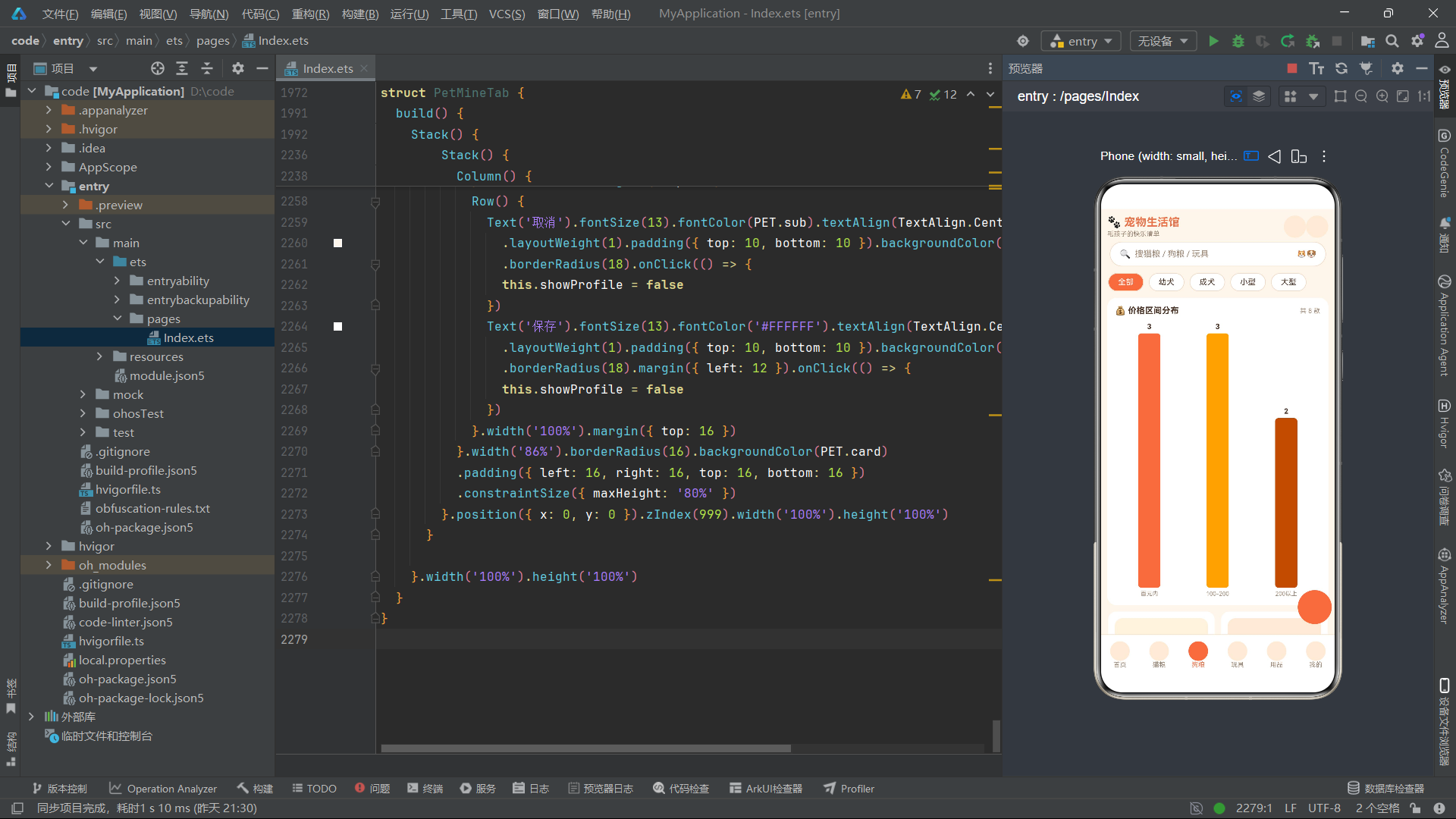
该函数接收数组、下界和上界三个参数,遍历数组统计价格落在[lo, hi]区间内的商品数量。在UI渲染中,通过petRangeCount(this.dogs, 0, 100)、petRangeCount(this.dogs, 100, 200)和petRangeCount(this.dogs, 200, 9999)三次调用,分别统计百元以内、100-200元和200元以上三个价格区间的商品数量,并通过竖柱图可视化展示。
          Row() {
            Column() {
              Text('' + petRangeCount(this.dogs, 0, 100)).fontSize(11)
                .fontWeight(FontWeight.Bold).fontColor(PET.text)
              Column() {}.width(34).height(petBarW(petRangeCount(this.dogs, 0, 100), 4))
              .borderRadius(5).backgroundColor('#E8734A').margin({ top: 4 })
              Text('百元内').fontSize(9).fontColor(PET.sub).margin({ top: 4 })
            }.layoutWeight(1).alignItems(HorizontalAlign.Center)
            Column() {
              Text('' + petRangeCount(this.dogs, 100, 200)).fontSize(11)
                .fontWeight(FontWeight.Bold).fontColor(PET.text)
              Column() {}.width(34).height(petBarW(petRangeCount(this.dogs, 100, 200), 4))
              .borderRadius(5).backgroundColor('#F5A623').margin({ top: 4 })
              Text('100-200').fontSize(9).fontColor(PET.sub).margin({ top: 4 })
            }.layoutWeight(1).alignItems(HorizontalAlign.Center)
            Column() {
              Text('' + petRangeCount(this.dogs, 200, 9999)).fontSize(11)
                .fontWeight(FontWeight.Bold).fontColor(PET.text)
              Column() {}.width(34).height(petBarW(petRangeCount(this.dogs, 200, 9999), 4))
              .borderRadius(5).backgroundColor('#B45309').margin({ top: 4 })
              Text('200以上').fontSize(9).fontColor(PET.sub).margin({ top: 4 })
            }.layoutWeight(1).alignItems(HorizontalAlign.Center)
          }.width('100%').margin({ top: 10 }).alignItems(VerticalAlign.Bottom)
三个区间柱子采用Row横向排列,每个柱子为Column结构,从上到下依次为数量文本、柱状条Column和区间标签文本。柱状条高度通过petBarW函数计算——以4为最大基准值,将区间商品数量映射为百分比高度。三个柱子使用渐变的橙色调(#E8734A、#F5A623、#B45309)区分区间。> Row设置alignItems(VerticalAlign.Bottom)使三根柱子底部对齐,形成标准的竖柱图视觉效果。这种完全通过UI组件嵌套实现的数据可视化方案,无需引入第三方图表库,在ArkTS框架中即可满足基础的统计图表需求。
7.2 双列网格布局
狗粮商品列表采用Grid组件实现双列网格布局,相比其他Tab的单列列表,双列布局能更高效地利用屏幕空间。
        Grid() {
          ForEach(petFilterDogs(this.dogs, this.filter), (d: DogFoodItem) => {
            GridItem() {
              Column() {
                Column() {}.width('100%').height(84).borderRadius(12)
                .backgroundColor(d.age === '幼犬' ? '#FDEBD8' : '#FDF3E0')
                Text(d.name).fontSize(12).fontWeight(FontWeight.Bold).fontColor(PET.text)
                  .maxLines(1).textOverflow({ overflow: TextOverflow.Ellipsis })
                  .width('100%').margin({ top: 6 })
                Row() {
                  Text(d.age).fontSize(9).fontColor('#FFFFFF').backgroundColor('#D97706')
                    .borderRadius(4).padding({ left: 4, right: 4 })
                  Text(d.brand).fontSize(9).fontColor(PET.sub).margin({ left: 5 })
                  Column().layoutWeight(1)
                  Text(petStarStr(d.stars)).fontSize(7).fontColor(PET.star)
                }.width('100%').margin({ top: 5 })
                Row() {
                  Text(petPrice(d.price)).fontSize(14).fontWeight(FontWeight.Bold)
                    .fontColor('#DC2626')
                  Text(petOff(d.orig, d.price)).fontSize(9).fontColor('#DC2626')
                    .margin({ left: 4 })
                  Column().layoutWeight(1)
                  Text(petNum(d.sale) + '人买').fontSize(9).fontColor(PET.sub)
                }.width('100%').margin({ top: 5 })
              }.width('100%').borderRadius(12).backgroundColor(PET.card).padding(10)
              .onClick(() => {
                this.selIdx = petFindDogIdx(this.dogs, d.name)
                this.showDetail = true
              })
            }
          }, (d: DogFoodItem) => d.name)
        }.columnsTemplate('1fr 1fr').columnsGap(10).rowsGap(10)
        .layoutWeight(1).scrollBar(BarState.Off).width('100%')
        .padding({ left: 12, right: 12, top: 10, bottom: 10 })
Grid组件通过columnsTemplate(‘1fr 1fr’)设置为两列等宽模板,columnsGap(10)和rowsGap(10)分别设置列间距和行间距。每个GridItem包裹一个Column卡片,包含商品图占位区(根据犬龄动态设置不同浅色背景)、品名、犬龄标签+品牌+星级信息行、价格+折扣+销量信息行。> columnsTemplate属性是ArkUI Grid组件的核心能力,通过CSS Grid模板字符串定义列布局规则,'1fr 1fr’表示两列等分剩余空间。layoutWeight(1)使Grid占据剩余高度,配合scrollBar(BarState.Off)实现无滚动条的网格滚动区域。
7.3 底部悬浮新增按钮
狗粮Tab的另一个特色是底部悬浮的新增按钮,通过position绝对定位固定在右下角。
      Column() {}.width(52).height(52).borderRadius(26).backgroundColor(PET.primary)
      .position({ x: '84%', y: '88%' }).zIndex(998).onClick(() => {
        this.showAdd = true
      })
悬浮按钮为52x52的圆形(通过borderRadius(26)实现),主色调橙色背景,通过position({ x: ‘84%’, y: ‘88%’ })定位在屏幕右下角区域。zIndex(998)确保按钮浮于内容之上但低于弹窗层(999)。点击后触发showAdd弹窗。> 这种通过position绝对定位实现的FAB(Floating Action Button)模式,是Material Design和HarmonyOS应用中常见的快捷操作入口设计,能够在不占用布局空间的前提下提供便捷的功能触达。
八、玩具品类Tab与动画驱动列表
8.1 销量竖柱图排行
PetToyTab组件的特色在于销量竖柱图排行榜和带弹跳动画的商品大卡列表。
          Column() {
            Row() {
              Text('📈 热销榜 TOP6').fontSize(13).fontWeight(FontWeight.Bold).fontColor(PET.text)
              Column().layoutWeight(1)
              Text('按件').fontSize(10).fontColor(PET.sub)
            }.width('100%')
            Row() {
              ForEach(this.toys.slice(0, 6), (t: ToyItem, i: number) => {
                Column() {
                  Text(petNum(t.sale)).fontSize(9).fontColor(PET.sub)
                  Column() {}.width(22).height(petBarW(t.sale, petMaxSale(this.toys)))
                  .borderRadius(4).backgroundColor(i % 2 === 0 ? '#E8734A' : '#F5A623')
                  .margin({ top: 4 })
                  Text(t.name.substring(0, 2)).fontSize(8).fontColor(PET.sub).margin({ top: 4 })
                }.layoutWeight(1).alignItems(HorizontalAlign.Center)
              }, (t: ToyItem) => t.name)
            }.width('100%').margin({ top: 8 }).alignItems(VerticalAlign.Bottom)
          }.width('94%').borderRadius(14).backgroundColor(PET.card)
          .padding({ left: 12, right: 12, top: 12, bottom: 12 }).margin({ top: 10 })
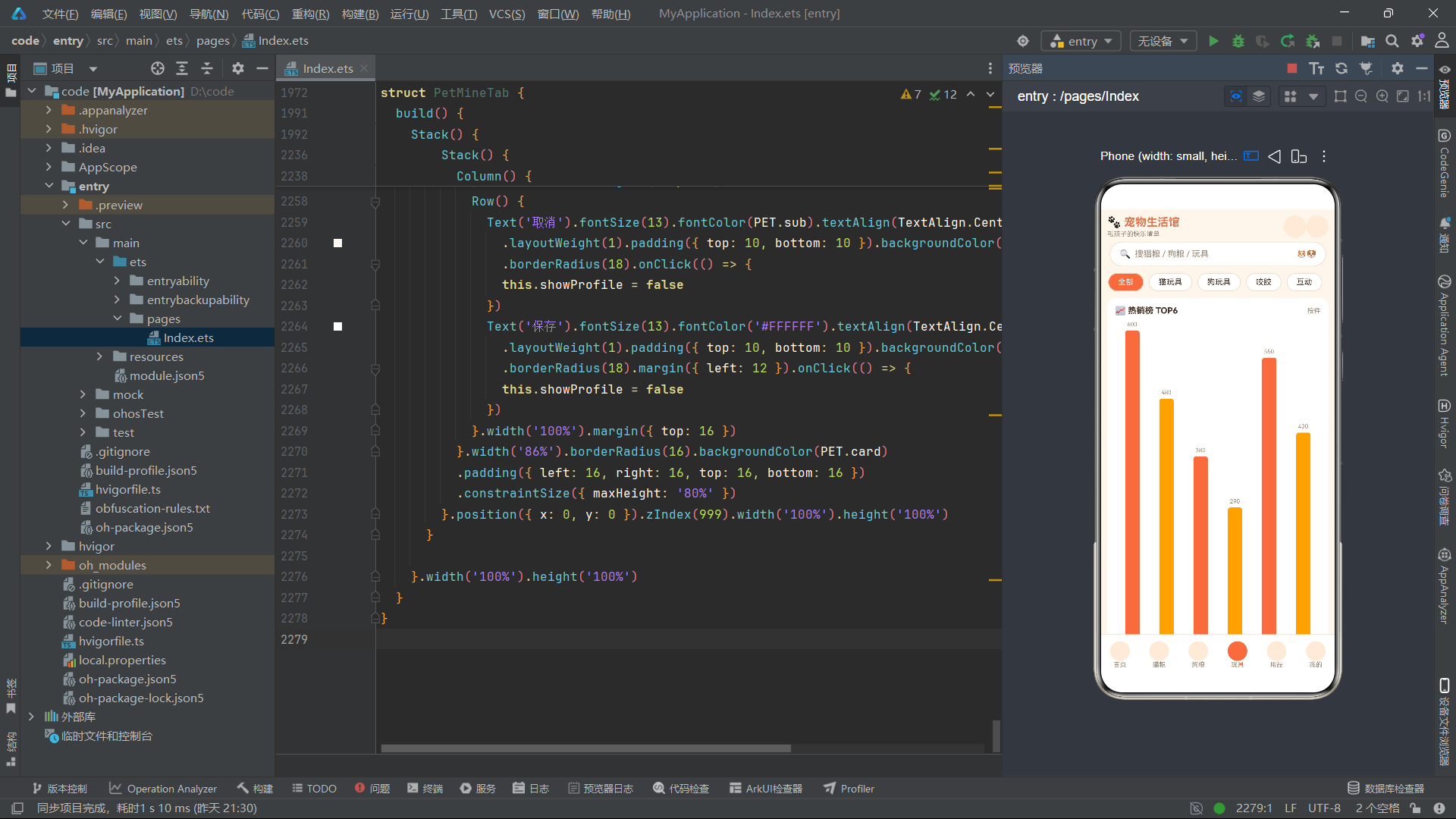
热销榜TOP6通过ForEach遍历toys数组前6项,每个柱子为Column结构,包含销量数值、柱状条和品名前两字符标签。柱状条高度通过petBarW(t.sale, petMaxSale(this.toys))计算——以petMaxSale函数返回的最大销量值为基准,将当前销量映射为百分比高度。> 柱状条颜色通过i % 2 === 0 ? ‘#E8734A’ : '#F5A623’交替使用两种橙色调,形成视觉节奏感。petMaxSale函数在此处作为petBarW的max参数传入,体现了纯函数组合调用的设计模式——一个函数的输出直接作为另一个函数的输入参数。
8.2 弹跳动画商品卡片
玩具商品列表的每张卡片都带有弹跳浮动动画效果,通过translate属性实现。
          ForEach(petFilterToys(this.toys, this.filter), (t: ToyItem, i: number) => {
            Row() {
              Column() {}.width(90).height(90).borderRadius(16)
              .backgroundColor(i % 2 === 0 ? '#F3E8FF' : '#FDEBD8')
              .translate({ y: petBounceY(this.wave, i) })
              Column() {
                Text(t.name).fontSize(14).fontWeight(FontWeight.Bold).fontColor(PET.text)
                Row() {
                  Text(t.type).fontSize(9).fontColor('#FFFFFF')
                    .backgroundColor(petTypeColor(t.type)).borderRadius(4)
                    .padding({ left: 4, right: 4 })
                  Text(t.tag).fontSize(9).fontColor('#B45309')
                    .backgroundColor('#FEF3C7').borderRadius(4)
                    .padding({ left: 4, right: 4 }).margin({ left: 6 })
                }.margin({ top: 5 })
                Text('已售 ' + petNum(t.sale) + ' 件').fontSize(10).fontColor(PET.sub)
                  .margin({ top: 5 })
                Row() {
                  Text(petPrice(t.price)).fontSize(15).fontWeight(FontWeight.Bold)
                    .fontColor('#DC2626')
                  Text(petOff(t.orig, t.price)).fontSize(9).fontColor('#DC2626')
                    .margin({ left: 6 })
                  Column().layoutWeight(1)
                  Text('查看').fontSize(10).fontColor('#FFFFFF')
                    .padding({ left: 14, right: 14, top: 5, bottom: 5 })
                    .backgroundColor(petTypeColor(t.type)).borderRadius(12)
                }.margin({ top: 6 })
              }.alignItems(HorizontalAlign.Start).margin({ left: 12 }).layoutWeight(1)
            }.width('94%').borderRadius(14).backgroundColor(PET.card)
            .padding({ left: 12, right: 12, top: 10, bottom: 10 }).margin({ top: 8 })
            .onClick(() => {
              this.selIdx = petFindToyIdx(this.toys, t.name)
              this.showDetail = true
            })
          }, (t: ToyItem) => t.name)
商品图占位区通过translate({ y: petBounceY(this.wave, i) })实现弹跳浮动动画。petBounceY函数接收wave计数器和当前索引i两个参数,通过-Math.abs(Math.sin(w / 10 + i * 1.1)) * 8计算Y轴偏移量——Math.sin的周期性使偏移呈正弦波动,Math.abs确保始终为正值后取反获得向上偏移,乘以8控制最大浮动幅度。索引i乘以1.1作为相位偏移,使不同卡片的浮动节奏产生差异,避免所有卡片同时弹跳的机械感。> 商品类型标签通过petTypeColor函数动态着色——猫玩具为暖橙红、狗玩具为深琥珀色、咬胶为棕色、互动类为紫色,实现了数据驱动的视觉差异化。每张卡片右下角的"查看"按钮也使用相同的类型色,形成色彩呼应。
九、用品品类Tab与价格对比排行
9.1 价格对比条形图
PetSupplyTab组件实现了用品品类的价格对比横向条形图和销量排行榜列表。
          Column() {
            Row() {
              Text('🏷️ 价格对比').fontSize(13).fontWeight(FontWeight.Bold).fontColor(PET.text)
              Column().layoutWeight(1)
              Text('单位 ¥').fontSize(10).fontColor(PET.sub)
            }.width('100%')
            ForEach(this.supplies.slice(0, 6), (s: SupplyItem) => {
              Row() {
                Text(s.name.length > 6 ? s.name.substring(0, 6) + '…' : s.name).fontSize(10)
                  .fontColor(PET.sub).width(78).maxLines(1)
                Stack() {
                  Column() {}.width('100%').height(11).borderRadius(5)
                  .backgroundColor('#FDF0E3')
                  Column() {}.width(petBarW(s.price, petMaxSupplyPrice(this.supplies)))
                  .height(11).borderRadius(5).backgroundColor('#7C3AED')
                  .margin({ right: 64 })
                }.width(150).height(11).margin({ left: 4 })
                Column().layoutWeight(1)
                Text(petPrice(s.price)).fontSize(10).fontWeight(FontWeight.Bold)
                  .fontColor('#7C3AED').width(48).textAlign(TextAlign.End)
              }.width('100%').margin({ top: 7 })
            }, (s: SupplyItem) => s.name)
          }.width('94%').borderRadius(14).backgroundColor(PET.card)
          .padding({ left: 12, right: 12, top: 12, bottom: 12 }).margin({ top: 10 })
价格对比图与猫粮Tab的蛋白质对比图结构类似,但颜色方案改为紫色(#7C3AED),基准值通过petMaxSupplyPrice函数获取当前用品列表中的最高价格。每行包含截取后的品名、Stack层叠进度条和右对齐的价格文本。> 用品Tab的进度条使用紫色而非橙色系,这是应用设计中的色彩区分策略——不同品类使用不同的主题色,帮助用户在视觉上快速区分当前所处的内容区域。petMaxSupplyPrice函数与petMaxProtein和petMaxSale函数逻辑一致,体现了工具函数层的模式复用。
9.2 销量排行榜列表
用品排行榜列表通过序号、商品图、品名和价格的组合展示排名信息。
          ForEach(this.supplies, (s: SupplyItem, i: number) => {
            Row() {
              Text(i < 3 ? '0' + (i + 1) : '' + (i + 1)).fontSize(18)
                .fontWeight(FontWeight.Bold).width(34)
                .fontColor(i < 3 ? '#E8734A' : '#C9B8A8')
              Column() {}.width(44).height(44).borderRadius(12)
              .backgroundColor(i % 2 === 0 ? '#FDEBD8' : '#F3E8FF')
              Column() {
                Text(s.name).fontSize(12).fontWeight(FontWeight.Medium).fontColor(PET.text)
                  .maxLines(1).textOverflow({ overflow: TextOverflow.Ellipsis })
                Row() {
                  Text(s.type).fontSize(9).fontColor('#FFFFFF')
                    .backgroundColor(petTypeColor(s.type)).borderRadius(4)
                    .padding({ left: 4, right: 4 })
                  Text('售' + petNum(s.sale)).fontSize(9).fontColor(PET.sub).margin({ left: 6 })
                }.margin({ top: 4 })
              }.alignItems(HorizontalAlign.Start).margin({ left: 10 }).layoutWeight(1)
              Column() {
                Text(petPrice(s.price)).fontSize(13).fontWeight(FontWeight.Bold)
                  .fontColor('#DC2626')
                Text(petOff(s.orig, s.price)).fontSize(9).fontColor('#DC2626').margin({ top: 3 })
              }.alignItems(HorizontalAlign.End)
            }.width('94%').borderRadius(12).backgroundColor(PET.card)
            .padding({ left: 12, right: 12, top: 10, bottom: 10 }).margin({ top: 8 })
            .onClick(() => {
              this.selIdx = petFindSupplyIdx(this.supplies, s.name)
              this.showDetail = true
            })
          }, (s: SupplyItem) => s.name)
排行榜前三名序号使用’0’前缀格式(01、02、03)并显示为暖橙色,其余名次为灰色。商品图占位区通过i % 2 === 0交替使用两种浅色背景。每个卡片包含品名、类型标签(通过petTypeColor动态着色)、销量、价格和折扣信息。> 排行榜列表是电商应用的核心转化场景,通过序号大小和色彩的视觉引导,将用户注意力聚焦到排名靠前的商品上。前三名的橙色高亮设计是典型的"Top 3"视觉强调策略,在电商、榜单类应用中广泛使用。
十、个人中心Tab与会员卡特效
10.1 会员卡光泽扫过特效
PetMineTab组件的个人中心页面包含了会员卡、月度消费柱状图、订单列表、收藏列表和功能入口五大模块,其中会员卡的光泽扫过特效是最具视觉冲击力的动画设计。
  aboutToAppear(): void {
    setInterval(() => {
      this.glow = this.glow + 1
    }, 80)
  }
组件的aboutToAppear钩子以80ms间隔递增glow状态变量,驱动光泽特效动画。
          Stack() {
            Column() {
              Row() {
                Text('🐾').fontSize(18)
                Text('铲屎官黑金卡').fontSize(15).fontWeight(FontWeight.Bold)
                  .fontColor('#FFFFFF').margin({ left: 6 })
                Column().layoutWeight(1)
                Text('LV.8').fontSize(11).fontColor('#FFE8D6').backgroundColor('#00000026')
                  .borderRadius(10).padding({ left: 8, right: 8, top: 2, bottom: 2 })
              }.width('100%')
              Text('「毛孩子健康 · 铲屎官快乐」').fontSize(11).fontColor('#FFE8D6')
                .margin({ top: 10 })
              Row() {
                Column() {
                  Text('积分').fontSize(9).fontColor('#FFE8D6')
                  Text('12,580').fontSize(15).fontWeight(FontWeight.Bold)
                    .fontColor('#FFFFFF').margin({ top: 3 })
                }.layoutWeight(1)
                Column() {
                  Text('优惠券').fontSize(9).fontColor('#FFE8D6')
                  Text('8 张').fontSize(15).fontWeight(FontWeight.Bold)
                    .fontColor('#FFFFFF').margin({ top: 3 })
                }.layoutWeight(1)
                Column() {
                  Text('投喂次数').fontSize(9).fontColor('#FFE8D6')
                  Text('96 次').fontSize(15).fontWeight(FontWeight.Bold)
                    .fontColor('#FFFFFF').margin({ top: 3 })
                }.layoutWeight(1)
              }.width('100%').margin({ top: 12 })
            }.alignItems(HorizontalAlign.Start).margin({ left: 16, top: 14 })
            Column() {}.width(46).height(130).borderRadius(23)
            .backgroundColor('#66FFFFFF')
            .rotate({ angle: 18 }).position({ x: petGlowX(this.glow) })
          }.width('94%').height(120).borderRadius(16)
          .linearGradient({
            angle: 90,
            colors: [['#E8734A', 0], ['#F5A623', 1]]
          }).margin({ top: 10 }).clip(true)
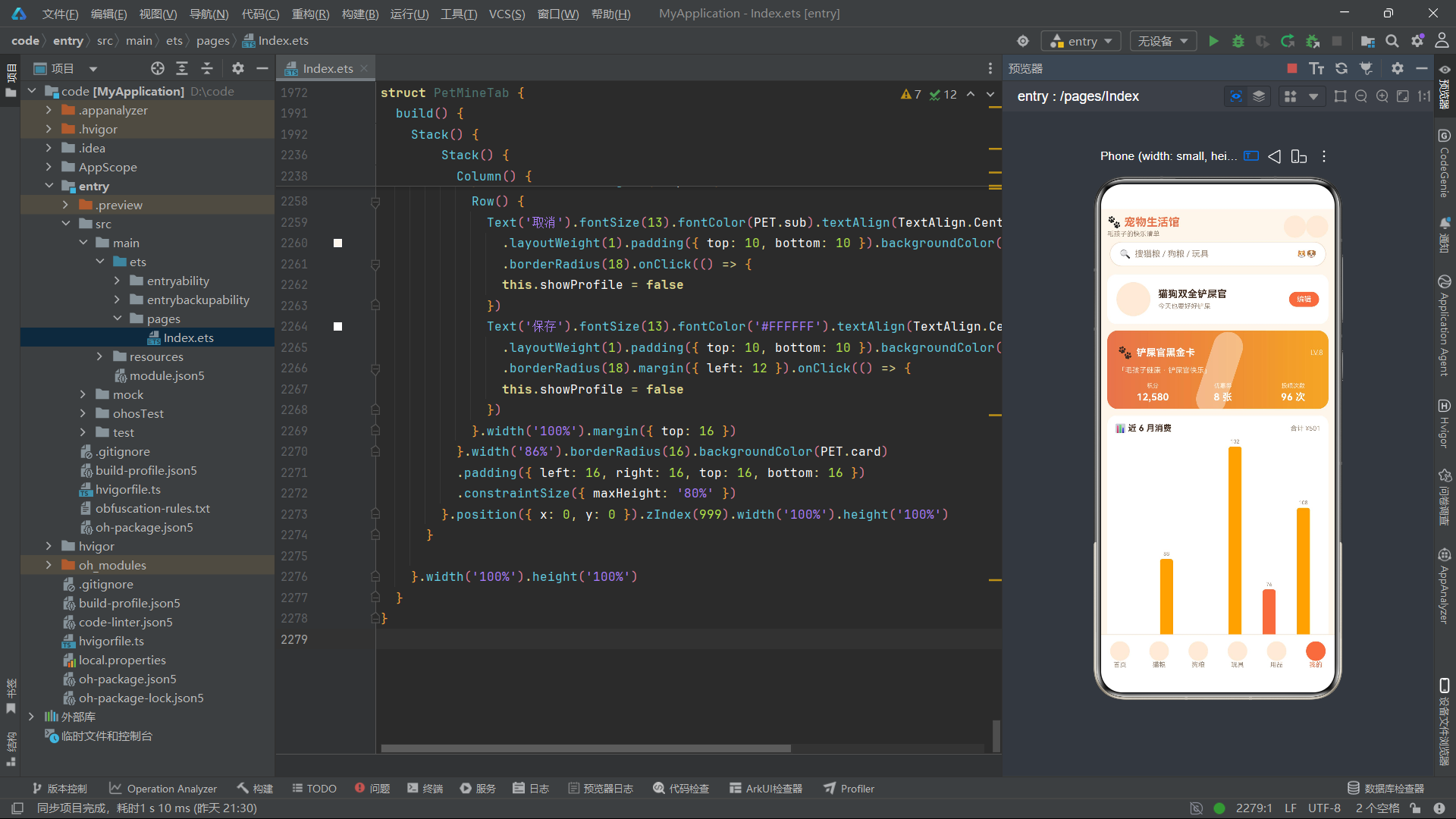
会员卡采用Stack层叠布局,底层是Column内容区(包含卡名、等级标签、积分/优惠券/投喂次数三栏数据),上层是一个46x130的半透明白色Column作为光泽条。光泽条通过rotate({ angle: 18 })旋转18度形成倾斜光束效果,通过position({ x: petGlowX(this.glow) })实现横向位置动画。petGlowX函数通过((i * 4) % 70)计算位置百分比,使光泽条在0%-70%范围内循环移动,模拟光线扫过卡面的效果。整个卡片通过linearGradient设置暖橙到金黄的渐变背景,配合clip(true)实现圆角裁剪。> 会员卡光泽扫过特效是应用中最具技术亮点的动画设计之一,通过半透明矩形+旋转+位移动画的组合,以极低的代码成本实现了类似信用卡反光的高级视觉效果。80ms的更新间隔配合4%的步进值,使光泽移动速度适中,既有动态感又不会过快导致视觉干扰。
10.2 月度消费柱状图
个人中心页还包含近6个月的消费柱状图,通过MONTH_VALS和MONTH_LABELS常量驱动渲染。
          Column() {
            Row() {
              Text('📊 近 6 月消费').fontSize(13).fontWeight(FontWeight.Bold).fontColor(PET.text)
              Column().layoutWeight(1)
              Text('合计 ¥501').fontSize(10).fontColor(PET.sub)
            }.width('100%')
            Row() {
              ForEach(MONTH_VALS, (v: number, i: number) => {
                Column() {
                  Text('' + v).fontSize(8).fontColor(PET.sub)
                  Column() {}.width(20).height(petMonthBar(v)).borderRadius(4)
                  .backgroundColor(i % 2 === 0 ? '#E8734A' : '#F5A623').margin({ top: 3 })
                  Text(MONTH_LABELS[i]).fontSize(9).fontColor(PET.sub).margin({ top: 3 })
                }.layoutWeight(1).alignItems(HorizontalAlign.Center)
              }, (v: number) => '' + v)
            }.width('100%').margin({ top: 8 }).alignItems(VerticalAlign.Bottom)
          }.width('94%').borderRadius(14).backgroundColor(PET.card)
          .padding({ left: 12, right: 12, top: 12, bottom: 12 }).margin({ top: 10 })
月度消费柱状图通过ForEach遍历MONTH_VALS数组,每个柱子为Column结构,包含消费金额、柱状条和月份标签。柱状条高度通过petMonthBar(v)计算——以132为基准值,将月度消费映射为百分比高度,并通过Math.max(6, …)确保最小高度。> ForEach的keyGenerator使用’’ + v将数字转换为字符串作为唯一键,当月度消费值不重复时可以正常工作。柱状条颜色交替使用#E8734A和#F5A623两种橙色调,与整个应用的暖色主题保持一致。
10.3 订单与收藏列表
个人中心页还展示了订单列表和收藏列表,通过ForEach遍历petTopOrders()返回的订单和FAV_LIST收藏数据。
          Column() {
            ForEach(petTopOrders(), (o: OrderItem) => {
              Row() {
                Column() {}.width(40).height(40).borderRadius(10).backgroundColor('#FDEBD8')
                Column() {
                  Text(o.name).fontSize(12).fontColor(PET.text)
                    .maxLines(1).textOverflow({ overflow: TextOverflow.Ellipsis })
                  Text(o.date + ' · ' + o.id.substring(2, 10)).fontSize(9).fontColor(PET.sub)
                    .margin({ top: 3 })
                }.alignItems(HorizontalAlign.Start).margin({ left: 10 }).layoutWeight(1)
                Column() {
                  Text(petPrice(o.price)).fontSize(12).fontWeight(FontWeight.Bold)
                    .fontColor('#DC2626')
                  Text(o.status).fontSize(9).fontColor(petStatusColor(o.status)).margin({ top: 3 })
                }.alignItems(HorizontalAlign.End)
              }.width('100%').padding({ left: 10, right: 10, top: 9, bottom: 9 })
              .border({ width: { bottom: 1 }, color: PET.line })
              .onClick(() => {
                this.orderIdx = petFindOrderIdx(ORDER_LIST, o.id)
                this.showOrder = true
              })
            }, (o: OrderItem) => o.id)
          }.width('94%').borderRadius(14).backgroundColor(PET.card).padding({ top: 6 })
          .margin({ top: 8 })
订单列表每项包含商品图占位、品名+日期+订单号信息、价格+状态三部分。订单号通过o.id.substring(2, 10)截取中间8位显示,物流状态通过petStatusColor函数动态着色。> border({ width: { bottom: 1 }, color: PET.line })通过指定方向性的border宽度,仅在每项底部绘制分割线,是ArkUI中实现列表分割线的轻量方案,无需额外的Divider组件。点击订单项打开订单详情弹窗,展示完整的订单号、商品名、金额、下单日期和物流状态。
10.4 资料编辑弹窗
个人中心页的资料编辑弹窗通过TextInput收集昵称和个性签名,并提供爱宠类型多选标签。
      if (this.showProfile) {
        Stack() {
          Column() {
            Text('👤 资料编辑').fontSize(16).fontWeight(FontWeight.Bold).fontColor(PET.text)
            Text('昵称').fontSize(11).fontColor(PET.sub).width('100%').margin({ top: 14 })
            TextInput({ placeholder: '昵称', text: this.nick }).fontSize(13).height(40)
              .backgroundColor('#FDF6EC').borderRadius(8).onChange((v: string) => {
              this.nick = v
            }).margin({ top: 4 })
            Text('个性签名').fontSize(11).fontColor(PET.sub).width('100%').margin({ top: 12 })
            TextInput({ placeholder: '签名', text: this.motto }).fontSize(13).height(40)
              .backgroundColor('#FDF6EC').borderRadius(8).onChange((v: string) => {
              this.motto = v
            }).margin({ top: 4 })
            Text('爱宠类型').fontSize(11).fontColor(PET.sub).width('100%').margin({ top: 12 })
            Row() {
              ForEach(petDogFilterChips(), (t: string) => {
                Text(t).fontSize(11).fontColor('#FFFFFF').backgroundColor(PET.accent)
                  .borderRadius(12).padding({ left: 12, right: 12, top: 5, bottom: 5 })
                  .margin({ right: 8 })
              }, (t: string) => t)
            }.width('100%').margin({ top: 4 })
            Row() {
              Text('取消').fontSize(13).fontColor(PET.sub).textAlign(TextAlign.Center)
                .layoutWeight(1).padding({ top: 10, bottom: 10 }).backgroundColor('#FDF6EC')
                .borderRadius(18).onClick(() => {
                this.showProfile = false
              })
              Text('保存').fontSize(13).fontColor('#FFFFFF').textAlign(TextAlign.Center)
                .layoutWeight(1).padding({ top: 10, bottom: 10 }).backgroundColor(PET.primary)
                .borderRadius(18).margin({ left: 12 }).onClick(() => {
                this.showProfile = false
              })
            }.width('100%').margin({ top: 16 })
          }.width('86%').borderRadius(16).backgroundColor(PET.card)
          .padding({ left: 16, right: 16, top: 16, bottom: 16 })
          .constraintSize({ maxHeight: '80%' })
        }.position({ x: 0, y: 0 }).zIndex(999).width('100%').height('100%')
      }
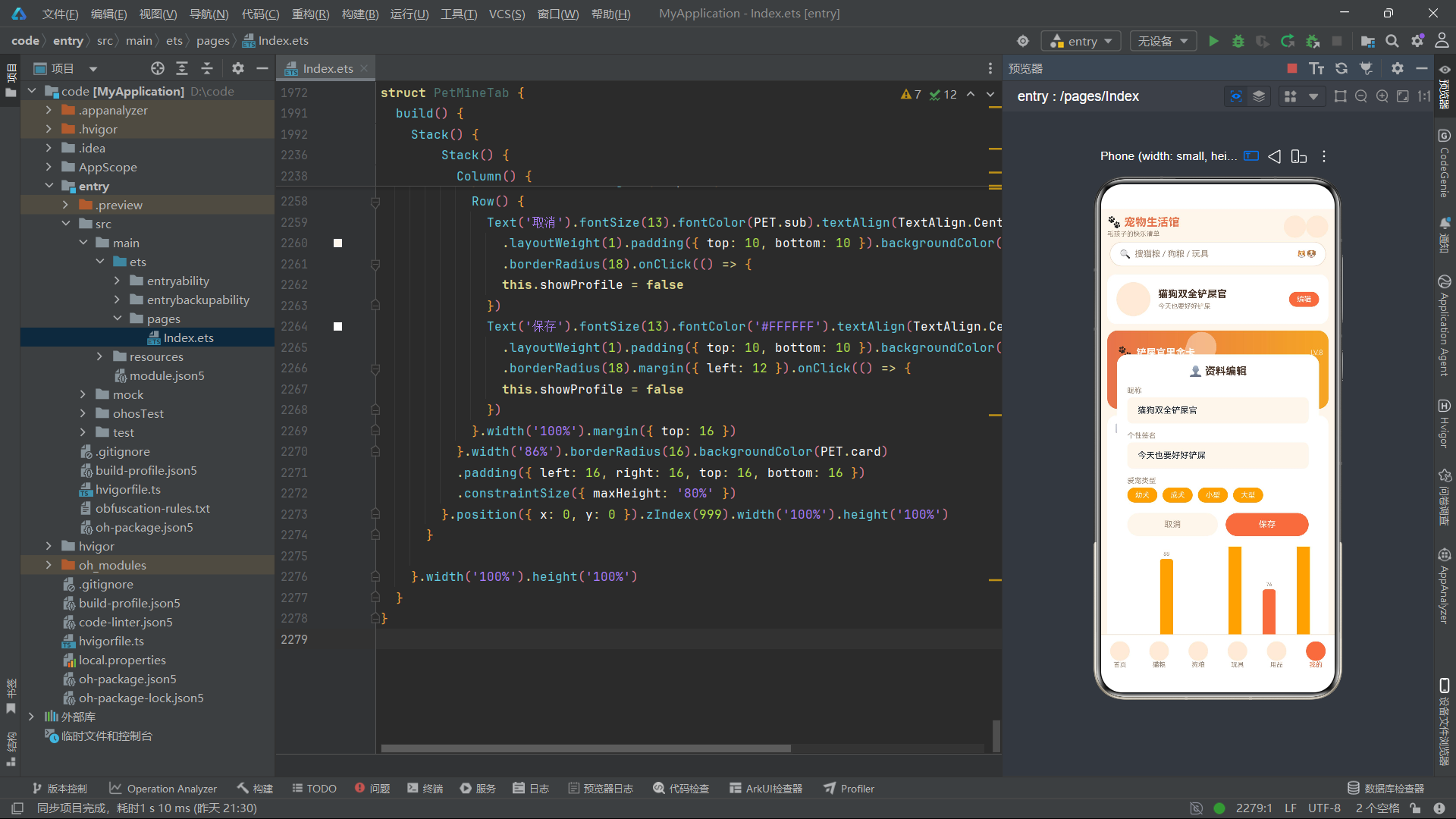
资料编辑弹窗包含昵称输入框、个性签名输入框和爱宠类型标签组。昵称和签名通过TextInput的onChange回调实时更新this.nick和this.motto状态变量。> 爱宠类型标签通过ForEach遍历petDogFilterChips()返回的[‘幼犬’, ‘成犬’, ‘小型’, ‘大型’]四个标签,每个标签为固定样式的金色背景Text,这里复用了狗粮Tab的筛选标签数据源,体现了函数复用的设计思路。保存按钮仅关闭弹窗而不执行额外逻辑,因为昵称和签名已经通过onChange实时绑定到@State变量,界面会自动反映最新值。
十一、应用架构流程图
以下流程图展示了应用的整体架构和组件间数据流转关系。
十二、技术点对比表格
以下表格对比了应用中使用的关键ArkUI技术能力及其在业务场景中的具体应用。
| 技术能力 | ArkTS/ArkUI实现方式 | 业务应用场景 | 技术优势 |
|---|---|---|---|
| @State响应式状态 | @State装饰器声明组件内部状态变量 | cur导航索引、filter筛选标签、show*弹窗显隐、wave/glow动画计数器 | 数据变更自动触发UI刷新,无需手动调用invalidate |
| @Component组件化 | @Component装饰器+struct声明独立组件 | PetHomeTab/PetCatTab/PetDogTab/PetToyTab/PetSupplyTab/PetMineTab六大功能组件 | 组件隔离状态和逻辑,提升代码可维护性和复用性 |
| @Entry入口声明 | @Entry装饰器标记应用根组件 | PetApp作为应用唯一入口 | 标识应用渲染起点,由框架自动加载和挂载 |
| @Builder构建器 | @Builder装饰器声明可复用UI构建函数 | modalOverlay遮罩层构建器,统一弹窗背景样式 | 提取公共UI逻辑,减少重复代码 |
| ForEach列表渲染 | ForEach(arr, itemGenerator, keyGenerator)遍历数组渲染 | 商品列表、筛选标签、导航栏、柱状图、订单收藏列表 | 高效的列表diff算法,支持动态增删 |
| Stack层叠布局 | Stack容器内多个子组件Z轴层叠 | 弹窗覆盖层、进度条轨道+填充、会员卡内容+光泽条 | 实现模态弹窗、进度条、特效层叠的标配方案 |
| linearGradient渐变 | .linearGradient({angle, colors})线性渐变装饰 | 双头像卡片背景、蛋白质进度条、会员卡背景 | 一行代码实现品牌化渐变效果 |
| translate位移动画 | .translate({x, y})属性位移 | 爪印漫步petPawX、商品弹跳petBounceY | 配合setInterval实现持续位移动画 |
| rotate旋转动画 | .rotate({angle})属性旋转 | 骨头摆动petTailR、光泽条倾斜18度 | 配合Math.sin实现自然周期摆动 |
| position绝对定位 | .position({x, y})绝对定位 | 弹窗全屏覆盖、FAB悬浮按钮 | 脱离文档流精确定位,实现浮层效果 |
| zIndex层级控制 | .zIndex(999)设置Z轴层级 | 弹窗层999、FAB按钮998 | 控制层叠顺序,确保弹窗浮于内容之上 |
| constraintSize约束 | .constraintSize({maxHeight})最大尺寸约束 | 所有弹窗主体的最大高度限制 | 防止内容过多溢出屏幕,保证弹窗可用性 |
| clip裁剪 | .clip(true)裁剪超出边界内容 | 渐变卡片圆角裁剪、会员卡光泽裁剪 | 配合borderRadius实现渐变圆角效果 |
| scrollable滚动方向 | Scroll.scrollable(ScrollDirection.Horizontal) | 分类胶囊横滑、热销玩具横滑、热门猫粮横滑 | 控制滚动方向,实现水平滑动列表 |
| columnsTemplate网格模板 | Grid.columnsTemplate(‘1fr 1fr’)列模板 | 狗粮双列网格布局 | CSS Grid模板定义列数和等分比例 |
| TextInput输入框 | TextInput({placeholder, text}).onChange | 新增/编辑表单、资料编辑、昵称签名输入 | 双向数据绑定,onChange实时回调 |
| border方向性边框 | .border({width: {bottom: 1}, color}) | 订单列表分割线、导航栏顶部边框 | 指定方向设置边框,实现轻量分割线 |
| decoration文本装饰 | .decoration({type: LineThrough}) | 原价划线展示 | 实现删除线、下划线等文本装饰效果 |
| textOverflow溢出处理 | .maxLines(1).textOverflow({overflow: Ellipsis}) | 商品品名单行省略显示 | 控制文本溢出行为,保证布局整洁 |
| setInterval定时器 | aboutToAppear中注册setInterval递增@State | wave动画驱动(100ms)、glow光泽驱动(80ms) | 实现持续动画效果的轻量方案 |
| interface接口建模 | TypeScript interface定义数据结构 | CatFoodItem/DogFoodItem/ToyItem等六大接口 | 编译期类型检查,防止运行时类型错误 |
| slice数组复制 | arr.slice()创建数组浅拷贝 | aboutToAppear初始化数据、编辑操作副本修改 | 隔离原始数据,安全操作可变副本 |
| push/splice数组操作 | arr.push(item)追加/splice(idx,1)删除 | 新增商品push、删除商品splice | 原生数组方法被ArkUI代理拦截,自动触发刷新 |
安装DevEco Studio程序

选择目标安装目录:

设置环境变量,但是需要重启一下:

新建一个空白模板:

设置API为24的模板项目:

初始化项目,自动下载相关依赖:

完整代码:
import { display } from '@kit.ArkUI'

interface ColorPalette {
  bg: string
  card: string
  card2: string
  primary: string
  accent: string
  star: string
  text: string
  sub: string
  line: string
  glow: string
}

const PET: ColorPalette = {
  bg: '#FFF6EC',
  card: '#FFFFFF',
  card2: '#FDEBD8',
  primary: '#E8734A',
  accent: '#F5A623',
  star: '#F59E0B',
  text: '#4A3428',
  sub: '#A08A78',
  line: '#F0DCC9',
  glow: '#D95F2B'
}

interface CatFoodItem {
  name: string
  brand: string
  weight: number
  price: number
  orig: number
  sale: number
  stars: number
  protein: number
}

const CATFOOD_LIST: CatFoodItem[] = [
  { name: '全价幼猫粮 鸡肉味 1.8kg', brand: '麦富迪', weight: 1800, price: 89, orig: 109, sale: 520, stars: 5, protein: 32 },
  { name: '无谷成猫粮 三文鱼 2kg', brand: '渴望', weight: 2000, price: 168, orig: 198, sale: 380, stars: 5, protein: 40 },
  { name: '肠胃敏感猫粮 1.5kg', brand: '皇家', weight: 1500, price: 98, orig: 118, sale: 310, stars: 4, protein: 30 },
  { name: '冻干双拼猫粮 2.5kg', brand: '网易严选', weight: 2500, price: 129, orig: 149, sale: 450, stars: 5, protein: 36 },
  { name: '全价绝育猫粮 2kg', brand: '冠能', weight: 2000, price: 118, orig: 138, sale: 220, stars: 4, protein: 33 },
  { name: '室内去毛球猫粮 1.8kg', brand: '比瑞吉', weight: 1800, price: 88, orig: 105, sale: 190, stars: 4, protein: 30 },
  { name: '幼猫羊奶粉粮 800g', brand: '卫仕', weight: 800, price: 68, orig: 82, sale: 260, stars: 4, protein: 28 },
  { name: '全价鲜肉猫粮 2kg', brand: '高爷家', weight: 2000, price: 139, orig: 159, sale: 330, stars: 5, protein: 42 },
  { name: '布偶猫专用粮 2kg', brand: '诚实一口', weight: 2000, price: 158, orig: 178, sale: 140, stars: 5, protein: 38 },
  { name: '高蛋白增肥猫粮 1.5kg', brand: '纽顿', weight: 1500, price: 108, orig: 128, sale: 170, stars: 4, protein: 44 }
]

interface DogFoodItem {
  name: string
  brand: string
  weight: number
  price: number
  orig: number
  sale: number
  stars: number
  age: string
}

const DOGFOOD_LIST: DogFoodItem[] = [
  { name: '全价成犬粮 牛肉味 10kg', brand: '麦富迪', weight: 10000, price: 168, orig: 198, sale: 420, stars: 5, age: '成犬' },
  { name: '幼犬奶糕粮 2kg', brand: '皇家', weight: 2000, price: 88, orig: 105, sale: 300, stars: 4, age: '幼犬' },
  { name: '大型犬专用粮 15kg', brand: '冠能', weight: 15000, price: 218, orig: 248, sale: 160, stars: 5, age: '大型' },
  { name: '小型犬冻干粮 2kg', brand: '网易严选', weight: 2000, price: 98, orig: 115, sale: 340, stars: 5, age: '小型' },
  { name: '无谷低敏狗粮 6kg', brand: '渴望', weight: 6000, price: 268, orig: 298, sale: 120, stars: 5, age: '全犬' },
  { name: '泰迪贵宾专用粮 1.5kg', brand: '比瑞吉', weight: 1500, price: 78, orig: 92, sale: 280, stars: 4, age: '小型' },
  { name: '老年犬关节粮 3kg', brand: '卫仕', weight: 3000, price: 128, orig: 148, sale: 90, stars: 4, age: '老年' },
  { name: '柴犬专用狗粮 2kg', brand: '诚实一口', weight: 2000, price: 118, orig: 138, sale: 130, stars: 4, age: '中型' }
]

interface ToyItem {
  name: string
  type: string
  price: number
  orig: number
  sale: number
  tag: string
}

const TOY_LIST: ToyItem[] = [
  { name: '逗猫棒 羽毛款', type: '猫玩具', price: 15, orig: 19, sale: 600, tag: '热销' },
  { name: '磨牙洁齿骨', type: '咬胶', price: 22, orig: 28, sale: 480, tag: '耐咬' },
  { name: '激光逗猫笔', type: '互动', price: 29, orig: 36, sale: 380, tag: '互动' },
  { name: '漏食球 藏食玩具', type: '互动', price: 35, orig: 42, sale: 290, tag: '益智' },
  { name: '猫抓板 瓦楞纸', type: '猫玩具', price: 25, orig: 30, sale: 550, tag: '耐磨' },
  { name: '狗狗发声球', type: '狗玩具', price: 18, orig: 22, sale: 420, tag: '发声' },
  { name: '飞盘 耐咬款', type: '狗玩具', price: 32, orig: 39, sale: 260, tag: '户外' },
  { name: '电动老鼠 逗猫', type: '猫玩具', price: 45, orig: 55, sale: 210, tag: '电动' },
  { name: '麻绳结 磨牙绳', type: '咬胶', price: 12, orig: 15, sale: 500, tag: '耐咬' },
  { name: '慢食嗅闻垫', type: '互动', price: 35, orig: 42, sale: 190, tag: '益智' }
]

interface SupplyItem {
  name: string
  type: string
  price: number
  orig: number
  sale: number
  tag: string
}

const SUPPLY_LIST: SupplyItem[] = [
  { name: '豆腐猫砂 6L', type: '猫砂', price: 29, orig: 36, sale: 800, tag: '除臭' },
  { name: '自动喂食器 3L', type: '喂食', price: 268, orig: 318, sale: 180, tag: '智能' },
  { name: '猫窝 四季通用', type: '窝具', price: 88, orig: 108, sale: 260, tag: '保暖' },
  { name: '牵引绳 防爆冲', type: '牵引', price: 45, orig: 55, sale: 340, tag: '安全' },
  { name: '陶瓷双碗 宠物食盆', type: '食盆', price: 38, orig: 46, sale: 310, tag: '防滑' },
  { name: '猫砂盆 半封闭', type: '猫砂', price: 78, orig: 95, sale: 220, tag: '大号' },
  { name: '宠物饮水机 2L', type: '喂食', price: 158, orig: 188, sale: 150, tag: '静音' },
  { name: '航空箱 托运', type: '出行', price: 128, orig: 148, sale: 95, tag: '便携' }
]

interface OrderItem {
  id: string
  name: string
  price: number
  date: string
  status: string
}

const ORDER_LIST: OrderItem[] = [
  { id: 'CW20260821001', name: '全价幼猫粮 鸡肉味 1.8kg', price: 89, date: '08-21', status: '已签收' },
  { id: 'CW20260816002', name: '自动喂食器 3L', price: 268, date: '08-16', status: '运输中' },
  { id: 'CW20260812003', name: '逗猫棒 羽毛款', price: 15, date: '08-12', status: '已签收' },
  { id: 'CW20260805004', name: '豆腐猫砂 6L', price: 29, date: '08-05', status: '待发货' },
  { id: 'CW20260730005', name: '激光逗猫笔', price: 29, date: '07-30', status: '已签收' },
  { id: 'CW20260724006', name: '无谷成猫粮 三文鱼 2kg', price: 168, date: '07-24', status: '退款中' }
]

interface FavItem {
  name: string
  type: string
  price: number
}

const FAV_LIST: FavItem[] = [
  { name: '全价鲜肉猫粮 2kg', type: '猫粮', price: 139 },
  { name: '冻干双拼猫粮 2.5kg', type: '猫粮', price: 129 },
  { name: '自动喂食器 3L', type: '用品', price: 268 },
  { name: '狗狗发声球', type: '玩具', price: 18 },
  { name: '无谷低敏狗粮 6kg', type: '狗粮', price: 268 },
  { name: '猫抓板 瓦楞纸', type: '玩具', price: 25 }
]

const PET_TABS: string[] = ['首页', '猫粮', '狗粮', '玩具', '用品', '我的']
const PET_TAB_ICONS: string[] = ['🏠', '🐱', '🐶', '🧸', '🏷️', '👤']

interface HeroCat {
  name: string
  icon: string
  desc: string
}

const HERO_CATS: HeroCat[] = [
  { name: '猫粮', icon: '🐱', desc: '幼猫成猫全价粮、冻干双拼、肠胃呵护' },
  { name: '狗粮', icon: '🐶', desc: '全犬种粮、幼犬奶糕、老年关节呵护' },
  { name: '玩具', icon: '🧸', desc: '逗猫棒、磨牙骨、漏食益智、互动激光' },
  { name: '用品', icon: '🏷️', desc: '猫砂、喂食器、窝具、牵引、出行装备' }
]
const CATFOOD_FILTER: string[] = ['全部', '幼猫', '成猫', '绝育']
const DOG_FILTER: string[] = ['全部', '幼犬', '成犬', '小型', '大型']
const TOY_FILTER: string[] = ['全部', '猫玩具', '狗玩具', '咬胶', '互动']
const SUPPLY_FILTER: string[] = ['全部', '猫砂', '喂食', '窝具', '牵引']
const MONTH_VALS: number[] = [52, 88, 45, 132, 76, 108]
const MONTH_LABELS: string[] = ['3月', '4月', '5月', '6月', '7月', '8月']

function petPrice(p: number): string {
  return '¥' + p
}

function petOff(orig: number, price: number): string {
  return Math.round((orig - price) / orig * 100) + '%'
}

function petNum(n: number): string {
  return n > 1000 ? (n / 1000).toFixed(1) + 'k' : '' + n
}

function petBarW(v: number, max: number): string {
  return Math.max(10, Math.round(v / max * 100)) + '%'
}

function petProteinW(p: number): string {
  return Math.max(8, Math.round(p / 45 * 100)) + '%'
}

function petStatusColor(s: string): string {
  if (s === '已签收') {
    return '#16A34A'
  }
  if (s === '运输中') {
    return '#E8734A'
  }
  if (s === '待发货') {
    return '#D97706'
  }
  return '#DC2626'
}

function petTypeColor(t: string): string {
  if (t === '猫玩具' || t === '猫粮') {
    return '#E8734A'
  }
  if (t === '狗玩具' || t === '狗粮') {
    return '#D97706'
  }
  if (t === '咬胶') {
    return '#B45309'
  }
  if (t === '互动') {
    return '#7C3AED'
  }
  return '#64748B'
}

function petFavColor(t: string): string {
  if (t === '猫粮') {
    return '#E8734A'
  }
  if (t === '狗粮') {
    return '#D97706'
  }
  if (t === '玩具') {
    return '#7C3AED'
  }
  return '#0891B2'
}

function petImg(n: string): string {
  return n.charAt(0)
}

function petStarStr(s: number): string {
  let out = ''
  for (let i = 0; i < s; i++) {
    out = out + '★'
  }
  return out
}

function petFilterCats(arr: CatFoodItem[], t: string): CatFoodItem[] {
  let out: CatFoodItem[] = []
  for (let i = 0; i < arr.length; i++) {
    if (t === '全部') {
      out.push(arr[i])
    } else if (t === '幼猫' && arr[i].name.indexOf('幼') >= 0) {
      out.push(arr[i])
    } else if (t === '绝育' && arr[i].name.indexOf('绝育') >= 0) {
      out.push(arr[i])
    } else if (t === '成猫' && arr[i].name.indexOf('幼') < 0 && arr[i].name.indexOf('绝育') < 0) {
      out.push(arr[i])
    }
  }
  return out
}

function petFilterDogs(arr: DogFoodItem[], t: string): DogFoodItem[] {
  let out: DogFoodItem[] = []
  for (let i = 0; i < arr.length; i++) {
    if (t === '全部' || arr[i].age === t) {
      out.push(arr[i])
    }
  }
  return out
}

function petFilterToys(arr: ToyItem[], t: string): ToyItem[] {
  let out: ToyItem[] = []
  for (let i = 0; i < arr.length; i++) {
    if (t === '全部' || arr[i].type === t) {
      out.push(arr[i])
    }
  }
  return out
}

function petFilterSupplies(arr: SupplyItem[], t: string): SupplyItem[] {
  let out: SupplyItem[] = []
  for (let i = 0; i < arr.length; i++) {
    if (t === '全部' || arr[i].type === t) {
      out.push(arr[i])
    }
  }
  return out
}

function petMaxProtein(arr: CatFoodItem[]): number {
  let m = 1
  for (let i = 0; i < arr.length; i++) {
    if (arr[i].protein > m) {
      m = arr[i].protein
    }
  }
  return m
}

function petMaxSale(arr: ToyItem[]): number {
  let m = 1
  for (let i = 0; i < arr.length; i++) {
    if (arr[i].sale > m) {
      m = arr[i].sale
    }
  }
  return m
}

function petHotToys(): ToyItem[] {
  let out: ToyItem[] = []
  for (let i = 0; i < TOY_LIST.length; i++) {
    if (TOY_LIST[i].sale >= 450) {
      out.push(TOY_LIST[i])
    }
  }
  return out
}

function petTopOrders(): OrderItem[] {
  return [ORDER_LIST[0], ORDER_LIST[1], ORDER_LIST[3]]
}

function petFindCatIdx(arr: CatFoodItem[], n: string): number {
  for (let i = 0; i < arr.length; i++) {
    if (arr[i].name === n) {
      return i
    }
  }
  return 0
}

function petFindDogIdx(arr: DogFoodItem[], n: string): number {
  for (let i = 0; i < arr.length; i++) {
    if (arr[i].name === n) {
      return i
    }
  }
  return 0
}

function petFindToyIdx(arr: ToyItem[], n: string): number {
  for (let i = 0; i < arr.length; i++) {
    if (arr[i].name === n) {
      return i
    }
  }
  return 0
}

function petFindSupplyIdx(arr: SupplyItem[], n: string): number {
  for (let i = 0; i < arr.length; i++) {
    if (arr[i].name === n) {
      return i
    }
  }
  return 0
}

function petFindOrderIdx(arr: OrderItem[], id: string): number {
  for (let i = 0; i < arr.length; i++) {
    if (arr[i].id === id) {
      return i
    }
  }
  return 0
}

function petMonthBar(v: number): string {
  return Math.max(6, Math.round(v / 132 * 100)) + '%'
}

function petGlowX(i: number): string {
  return ((i * 4) % 70) + '%'
}

function petPawX(w: number): string {
  return (((w * 2) % 120) / 120 * 60) + '%'
}

function petTailR(w: number, i: number): number {
  return Math.sin(w / 8 + i * 1.3) * 14
}

function petBounceY(w: number, i: number): number {
  return -Math.abs(Math.sin(w / 10 + i * 1.1)) * 8
}


            Row() {
              ForEach(petDogFilterChips(), (t: string) => {
                Text(t).fontSize(11).fontColor('#FFFFFF').backgroundColor(PET.accent)
                  .borderRadius(12).padding({ left: 12, right: 12, top: 5, bottom: 5 })
                  .margin({ right: 8 })
              }, (t: string) => t)
            }.width('100%').margin({ top: 4 })
            Row() {
              Text('取消').fontSize(13).fontColor(PET.sub).textAlign(TextAlign.Center)
                .layoutWeight(1).padding({ top: 10, bottom: 10 }).backgroundColor('#FDF6EC')
                .borderRadius(18).onClick(() => {
                this.showProfile = false
              })
              Text('保存').fontSize(13).fontColor('#FFFFFF').textAlign(TextAlign.Center)
                .layoutWeight(1).padding({ top: 10, bottom: 10 }).backgroundColor(PET.primary)
                .borderRadius(18).margin({ left: 12 }).onClick(() => {
                this.showProfile = false
              })
            }.width('100%').margin({ top: 16 })
          }.width('86%').borderRadius(16).backgroundColor(PET.card)
          .padding({ left: 16, right: 16, top: 16, bottom: 16 })
          .constraintSize({ maxHeight: '80%' })
        }.position({ x: 0, y: 0 }).zIndex(999).width('100%').height('100%')
      }

    }.width('100%').height('100%')
  }
}
十三、总结
本文通过对一个基于HarmonyOS 6.1.1 ArkTS声明式UI框架开发的宠物用品电商应用的逐段代码深度解析,全面展示了ArkUI在垂直电商领域的工程实践能力。从ColorPalette色彩调色板的集中式色彩管理,到CatFoodItem、DogFoodItem、ToyItem、SupplyItem、OrderItem、FavItem六大TypeScript接口的差异化数据建模,再到petPrice、petOff、petNum、petBarW、petProteinW、petStatusColor、petTypeColor、petFilterCats、petFindCatIdx、petGlowX、petPawX、petTailR、petBounceY等二十余个纯函数构成的工具函数层,应用实现了数据定义、业务逻辑、UI渲染三个层次的彻底解耦,体现了良好的架构分层思想。
在组件化架构方面,应用通过@Entry和@Component装饰器将功能拆分为PetApp主入口和PetHomeTab、PetCatTab、PetDogTab、PetToyTab、PetSupplyTab、PetMineTab六大功能组件,每个组件通过@State管理内部状态,通过aboutToAppear生命周期钩子初始化数据和注册定时器,通过build方法声明式描述UI结构。六大Tab覆盖了首页推荐流(双头像卡片、分类胶囊、横滑列表、领券Banner)、猫粮品类(蛋白质对比图、筛选胶囊、CRUD全链路)、狗粮品类(价格区间分布统计、双列Grid网格、FAB悬浮按钮)、玩具品类(销量竖柱图、弹跳动画卡片)、用品品类(价格对比条形图、排行榜列表)和个人中心(会员卡光泽特效、月度消费柱状图、订单收藏列表)等完整的电商功能矩阵。每个品类的CRUD操作通过showDetail/showAdd/showEdit/showDel四个布尔状态变量控制Stack层叠弹窗的显隐,配合push追加、slice+替换编辑、splice删除等数组操作方式,实现了功能完备的商品管理闭环。
在动态视觉体验方面,应用通过setInterval定时器以80ms-100ms间隔递增wave和glow状态变量,驱动translate位移、rotate旋转等属性动画,实现了爪印商品弹跳浮动、会员卡光泽扫过四类宠物主题微动效。配合linearGradient渐变装饰、clip圆角裁剪、position绝对定位、zIndex层级控制等ArkUI核心能力,应用在保证功能完备性的同时,营造了温馨可爱的暖橙奶油主题视觉氛围。纯函数工具层的格式化计算、颜色映射、筛选过滤、索引查找、统计聚合和动画参数计算六大类函数,为UI层提供了可测试、可复用的业务逻辑支撑。总体而言,该应用展示了HarmonyOS ArkTS在数据驱动视图、组件化开发、响应式状态管理、声明式UI描述、动态动画效果等方面的综合能力,为垂直品类移动电商应用的开发提供了一份可参考的工程实践范本。

讨论HarmonyOS开发技术,专注于API与组件、DevEco Studio、测试、元服务和应用上架分发等。
更多推荐


 6
6 0
0- 0


 已为社区贡献14条内容

所有评论(0)