HarmonyOS 6效果实现:snMonthBar 用于月度消费柱状图,基础 30 加上归一化的 70,最大值时柱条高度接近满格
在冰雪运动蓬勃发展的时代背景下,单板滑雪装备的数字化零售正在经历从粗放式展示向精细化运营的转型。本文将以一个覆盖单板、雪服、雪镜、雪鞋四大品类的全功能电商应用为切入点,深度拆解 HarmonyOS ArkTS 声明式 UI 框架在复杂业务场景下的工程实践——从主题色系定义、数据模型设计、纯函数工具层,到六标签底部导航、数据可视化柱状图、多层弹窗堆叠管理以及商品增删改查全流程,全面展示 ArkTS 在构建大型零售应用时的架构能力与表达力。
引言
冰雪产业的应用开发面临着独特的挑战:装备参数维度丰富(板长、硬度、防水指数、透光率等)、品类差异显著(单板与雪镜的展示逻辑完全不同)、交互模式多样(筛选、排序、详情、编辑需要无缝切换)。HarmonyOS 6.1.1 搭载的 ArkTS 声明式 UI 框架,以其状态驱动的视图更新机制、组件化的模块拆分能力以及类型安全的 TypeScript 超集语法,为这类复杂业务提供了优雅的工程解决方案。
本文分析的雪线单板装备店(SNOWLINE)应用,是一个覆盖单板、雪服、雪镜、雪鞋全品类的专业滑雪装备电商平台。应用采用底部六标签导航架构,分别为首页推荐、单板专区、雪服专区、雪镜专区、雪鞋专区和个人中心。每个品专区页均配备独立的筛选体系、数据可视化图表和 CRUD 弹窗,个人中心则整合了会员卡、消费统计、收藏与订单管理。整篇源码约 4000 行,是研究 ArkTS 大型应用架构设计的优质样本。
一、主题色系定义与冰雪视觉语言
1.1 SNTheme 主题接口设计
应用首先定义了一个 SNTheme 接口,用于统一管理全局视觉色系。冰雪主题需要传递清冷、通透、专业的视觉感受,因此选用了冰蓝、青绿、暖橙三色作为核心色调。
interface SNTheme {
  bg: string;
  primary: string;
  accent: string;
  card: string;
  text: string;
  line: string;
  glow: string;
}

const SN: SNTheme = {
  bg: '#EAF4FB',
  primary: '#2E86C1',
  accent: '#0FA3A6',
  card: '#FFFFFF',
  text: '#17324F',
  line: '#D3E6F3',
  glow: '#3FB8D8'
};
这段代码的核心设计思路是将所有颜色值收敛到一个类型安全的接口对象中。bg 代表冰蓝极浅的背景色 #EAF4FB,营造出雪地般的通透感;primary 选用深海蓝 #2E86C1,作为按钮、选中态和主要交互元素的主色;accent 使用青绿色 #0FA3A6,用于辅助强调和次级按钮;card 是纯白卡片底色 #FFFFFF,与背景形成层次;text 选用深蓝黑 #17324F,保证文字在浅色背景上的高对比度可读性;line 是极浅蓝的分隔线色 #D3E6F3,细腻而不突兀;glow 则是用于光效和渐变终止点的亮青色 #3FB8D8。
通过将颜色集中在 SN 常量对象中,全应用所有组件均通过 SN.primary、SN.accent 等方式引用颜色,确保了视觉风格的高度一致性。当需要切换主题时(例如夏季限定主题),只需替换 SN 对象的值即可实现全应用换肤,体现了声明式 UI 数据驱动视图的核心优势。
1.2 颜色映射函数体系
除了静态主题色,应用还为不同品类的商品定义了动态颜色映射函数。这些函数接收商品属性字符串,返回对应的语义化颜色值,使得每种商品类型都有专属的视觉标识。
function snTypeColor(t: string): string {
  if (t === '野雪板') {
    return '#3D7E9A';
  }
  if (t === '公园板') {
    return '#0FA3A6';
  }
  if (t === '竞速板') {
    return '#2E86C1';
  }
  return '#8FA3B3';
}

function snLensColor(l: string): string {
  if (l === '变光镜片') {
    return '#7C4DFF';
  }
  if (l === '球面镜片') {
    return '#0FA3A6';
  }
  if (l === '增光镜片') {
    return '#F5A623';
  }
  if (l === '镀膜镜片') {
    return '#2E86C1';
  }
  return '#8FA3B3';
}

function snFavColor(t: string): string {
  if (t === '单板') {
    return '#2E86C1';
  }
  if (t === '雪服') {
    return '#E2723B';
  }
  if (t === '雪镜') {
    return '#7C4DFF';
  }
  return '#0FA3A6';
}

function snStatusColor(s: string): string {
  if (s === '已发货') {
    return '#E2723B';
  }
  return '#8FA3B3';
}
这组颜色映射函数体现了面向领域的设计思维。snTypeColor 将单板的四大类型——野雪板映射为深湖蓝、公园板映射为青绿、竞速板映射为主蓝色——使消费者在浏览列表时能够通过颜色快速区分板型。snLensColor 为雪镜的四种镜片类型分配了紫色、青色、橙色和蓝色,其中变光镜片使用高识别度的紫色 #7C4DFF,暗示其高科技属性。snFavColor 为收藏列表的不同品类分配颜色标签。snStatusColor 则区分订单状态,已发货使用暖橙色提醒关注。
这种将业务语义编码为颜色的做法,使得界面信息密度大幅提升——用户无需阅读文字,仅凭颜色即可获取商品分类信息,这是冰雪装备这种多品类场景下的重要 UX 策略。
二、六大数据模型与商品信息建模
2.1 BoardItem 单板数据结构
单板是雪线装备店的核心品类,其数据模型需要覆盖板名、品牌、类型、板长、硬度、价格、原价、销量和星级九个维度。
interface BoardItem {
  name: string;
  brand: string;
  type: string;
  len: number;
  flex: number;
  price: number;
  orig: number;
  sale: number;
  stars: number;
}
name 存储商品名称如"极光全山板 PRO",brand 记录品牌如"BURTON",type 是分类标签取值为"全能板"“公园板”“野雪板”"竞速板"之一。len 是板长(单位 cm),典型值在 146-168 之间,越长适合越大的体重和更快的速度。flex 是硬度评级(1-10),3-4 为软板适合新手和公园动作,5-6 为中等硬度适合进阶,7-9 为硬板适合竞速和刻滑。price 和 orig 分别记录现价和原价,sale 是累计销量,stars 是用户评分(4.5-4.9)。
2.2 JacketItem 雪服数据结构
雪服的数据模型与单板截然不同,其核心参数是防水指数和保暖等级。
interface JacketItem {
  name: string;
  brand: string;
  water: number;
  warm: number;
  price: number;
  orig: number;
  sale: number;
  stars: number;
}
water 是防水指数,单位 mm,范围从 5000 到 20000。5000mm 可应对小雪,10000mm 适合中等降雪,15000mm 以上可应对暴雪环境,20000mm 是专业级防水。warm 是保暖等级(0-100),60 以下为轻薄款,70-85 为标准款,90 以上为极寒款。这两个参数是雪服选购的决策核心,应用在筛选和详情页中均给予突出展示。
2.3 GoggleItem 雪镜数据结构
雪镜的关键参数是镜片类型和透光率(VLT),这直接决定了雪镜适用的天气条件。
interface GoggleItem {
  name: string;
  brand: string;
  lens: string;
  vt: number;
  price: number;
  orig: number;
  sale: number;
  stars: number;
}
lens 记录镜片类型,取值为"变光镜片"“球面镜片”“增光镜片”“柱面镜片”"镀膜镜片"之一。vt 是透光率(Visible Light Transmission),单位为百分比,范围 35%-72%。VLT 低于 40% 适合强光晴天,40%-55% 适合多云,55% 以上适合阴天和夜场。应用在详情页中根据 vt 值智能推荐使用场景。
2.4 BootItem 雪鞋数据结构
雪鞋的关键参数是硬度和扣具数量,硬度决定了支撑力和响应速度。
interface BootItem {
  name: string;
  brand: string;
  flex: number;
  buckle: number;
  price: number;
  orig: number;
  sale: number;
  stars: number;
}
flex 是硬度值(3-9),3-4 为软鞋适合新手和公园,5-6 为中等适合进阶,7-9 为硬鞋适合竞速和刻滑。buckle 是扣具组数(2-4),更多扣具意味着更精细的贴合调节。
2.5 OrderItem 与 FavItem 辅助模型
订单和收藏使用更精简的数据结构,仅保留展示和交易所需的核心字段。
interface OrderItem {
  name: string;
  time: string;
  num: number;
  status: string;
  price: number;
}

interface FavItem {
  name: string;
  price: number;
  type: string;
}
OrderItem 包含订单名、下单时间、购买数量、物流状态和实付金额。status 取值为"已发货"或"已完成",通过前述 snStatusColor 函数映射为不同颜色标签。FavItem 仅保留名称、价格和品类,用于个人中心收藏列表的快速展示。
三、商品数据集与品牌矩阵
3.1 单板数据集
应用预置了十款覆盖四大板型的单板数据,品牌涵盖 BURTON、NITRO、CAPITA、FISCHER、DECATHLON、JONES、SALOMON、KESSLER、NIDECKER、ROME 十个国际品牌。
const SN_BOARDS: BoardItem[] = [
  { name: '极光全山板 PRO', brand: 'BURTON', type: '全能板', len: 158, flex: 5, price: 4680, orig: 5980, sale: 932, stars: 4.9 },
  { name: '雪线公园板', brand: 'NITRO', type: '公园板', len: 152, flex: 4, price: 3290, orig: 3980, sale: 715, stars: 4.8 },
  { name: '粉雪野雪板', brand: 'CAPITA', type: '野雪板', len: 162, flex: 6, price: 5290, orig: 6280, sale: 388, stars: 4.9 },
  { name: '竞速回转板', brand: 'FISCHER', type: '竞速板', len: 165, flex: 8, price: 6880, orig: 7980, sale: 156, stars: 4.7 },
  { name: '初雪练习板', brand: 'DECATHLON', type: '全能板', len: 148, flex: 3, price: 1680, orig: 1990, sale: 1280, stars: 4.6 },
  { name: '冰川宽板', brand: 'JONES', type: '野雪板', len: 160, flex: 7, price: 5980, orig: 6980, sale: 264, stars: 4.8 },
  { name: '自由式软板', brand: 'SALOMON', type: '公园板', len: 150, flex: 4, price: 2990, orig: 3580, sale: 596, stars: 4.7 },
  { name: '刻滑竞技板', brand: 'KESSLER', type: '竞速板', len: 168, flex: 9, price: 7580, orig: 8680, sale: 98, stars: 4.9 },
  { name: '城市通勤板', brand: 'NIDECKER', type: '全能板', len: 155, flex: 4, price: 2180, orig: 2680, sale: 866, stars: 4.5 },
  { name: '女款轻盈板', brand: 'ROME', type: '全能板', len: 146, flex: 3, price: 2680, orig: 3180, sale: 442, stars: 4.8 }
];
数据设计上兼顾了价格梯度(从 1680 元入门到 7580 元竞技顶级)和销量分布(从 98 件的刻滑板到 1280 件的入门板),使得价格对比图表和销量排行均具有真实的视觉层次。价格梯度跨越 4.5 倍,硬度覆盖 3-9 的全谱系,板长覆盖 146-168cm 的全尺寸范围,这是一个经过精心设计的演示数据集。
3.2 雪服、雪镜与雪鞋数据集
雪服预置了八款,品牌从迪卡侬到 Moncler,防水指数从 5000 到 20000mm,价格从 599 到 12800 元。雪镜预置了八款,透光率从 35% 到 72%,覆盖从强光到夜场的全场景。雪鞋预置了六款,硬度从 3 到 9,扣具从 2 到 4 组。
const SN_JACKETS: JacketItem[] = [
  { name: '极地三合一雪服', brand: 'ARC\'TERYX', water: 20000, warm: 90, price: 5680, orig: 6880, sale: 621, stars: 4.9 },
  { name: '极光滑雪羽绒', brand: 'MONCLER', water: 10000, warm: 95, price: 12800, orig: 14800, sale: 87, stars: 4.9 },
  // ... 共8款
];

const SN_GOGGLES: GoggleItem[] = [
  { name: '极光变色雪镜', brand: 'OAKLEY', lens: '变光镜片', vt: 42, price: 2280, orig: 2680, sale: 738, stars: 4.9 },
  { name: '夜场增光镜', brand: 'ANON', lens: '增光镜片', vt: 68, price: 1280, orig: 1580, sale: 615, stars: 4.7 },
  // ... 共8款
];

const SN_BOOTS: BootItem[] = [
  { name: '极速双扣雪鞋', brand: 'BURTON', flex: 7, buckle: 4, price: 3280, orig: 3980, sale: 468, stars: 4.9 },
  { name: '竞速硬壳雪鞋', brand: 'FISCHER', flex: 9, buckle: 4, price: 4280, orig: 4980, sale: 132, stars: 4.8 },
  // ... 共6款
];
每个数据集都体现了该品类的参数特点:雪服强调防水和保暖的二维矩阵,雪镜突出透光率与适用场景的对应关系,雪鞋则聚焦硬度等级与目标人群的映射。这些差异化参数在 UI 层面被转化为不同类型的可视化图表,使得每个品专区页都有独特的视觉特征。
四、纯函数工具层:格式化、计算与动画驱动
4.1 格式化函数组
应用定义了一组纯函数用于数据格式化,这些函数无副作用、可复用,是 UI 层与数据层之间的转换桥梁。
function snPrice(p: number): string {
  return '¥' + p.toString();
}

function snOff(o: number, p: number): number {
  return Math.round((1 - p / o) * 100);
}

function snNum(n: number): string {
  return n > 999 ? (n / 1000).toFixed(1) + 'k' : n.toString();
}

function snImg(n: string): string {
  return n.charAt(0);
}
snPrice 将数字价格格式化为带人民币符号的字符串。snOff 计算折扣百分比,公式为 (1 - 现价/原价) * 100,例如原价 5980 现价 4680,折扣为 (1 - 4680/5980) * 100 ≈ 22,即约 22% 的降幅。snNum 实现了千位缩写,超过 999 的数字显示为 x.xk 格式(如 1280 显示为 1.3k),这在紧凑的列表卡片中节省了宝贵的横向空间。snImg 取商品名称的首字作为图片占位符,在无真实图片资源的情况下提供了简洁的视觉替代方案。
4.2 柱状图宽度计算函数
数据可视化是本应用的核心特色之一,每个品专区页都配备了不同类型的图表。这些图表的柱条宽度均由纯函数计算得出。
function snBarW(v: number, max: number): number {
  return Math.round(46 + v / max * 46);
}

function snVtW(v: number): number {
  return Math.round(20 + v * 0.8);
}

function snFlexW(v: number): number {
  return Math.round(10 + v * 8);
}

function snMonthBar(v: number, max: number): number {
  return Math.round(30 + v / max * 70);
}
snBarW 用于单板价格对比图,基础宽度 46% 加上按最大值归一化的 46%,使得最贵的单板柱条宽度接近 92%,最便宜的也不低于 46%,保证了视觉对比的清晰度。snVtW 用于雪镜透光率图,公式 20 + vt * 0.8,透光率 72% 时宽度为 77.6%,透光率 35% 时宽度为 48%,线性映射直观。snFlexW 用于硬度展示,10 + flex * 8,硬度 9 时宽度 82%,硬度 3 时宽度 34%。snMonthBar 用于月度消费柱状图,基础 30 加上归一化的 70,最大值时柱条高度接近满格。
这些函数的设计哲学是"归一化映射 + 基础偏移":通过除以最大值实现归一化,再加上一个基础偏移量避免最小值时柱条过短不可见。这是一种在移动端有限屏幕空间内最大化数据表达力的实用策略。
4.3 筛选与过滤函数
每个品类都配备了专属的筛选函数,根据用户选择的标签过滤商品列表。
function snBoardFilter(arr: BoardItem[], t: string): BoardItem[] {
  let r: BoardItem[] = [];
  if (t === '全部') {
    return arr;
  }
  for (let i = 0; i < arr.length; i++) {
    if (arr[i].type === t) {
      r.push(arr[i]);
    }
  }
  return r;
}

function snJacketFilter(arr: JacketItem[], w: string): JacketItem[] {
  let r: JacketItem[] = [];
  if (w === '全部') {
    return arr;
  }
  for (let i = 0; i < arr.length; i++) {
    if (arr[i].water >= parseInt(w)) {
      r.push(arr[i]);
    }
  }
  return r;
}

function snBootFilter(arr: BootItem[], f: string): BootItem[] {
  let r: BootItem[] = [];
  if (f === '全部') {
    return arr;
  }
  for (let i = 0; i < arr.length; i++) {
    if (arr[i].flex >= parseInt(f.charAt(2)) && arr[i].flex <= parseInt(f.charAt(4))) {
      r.push(arr[i]);
    }
  }
  return r;
}
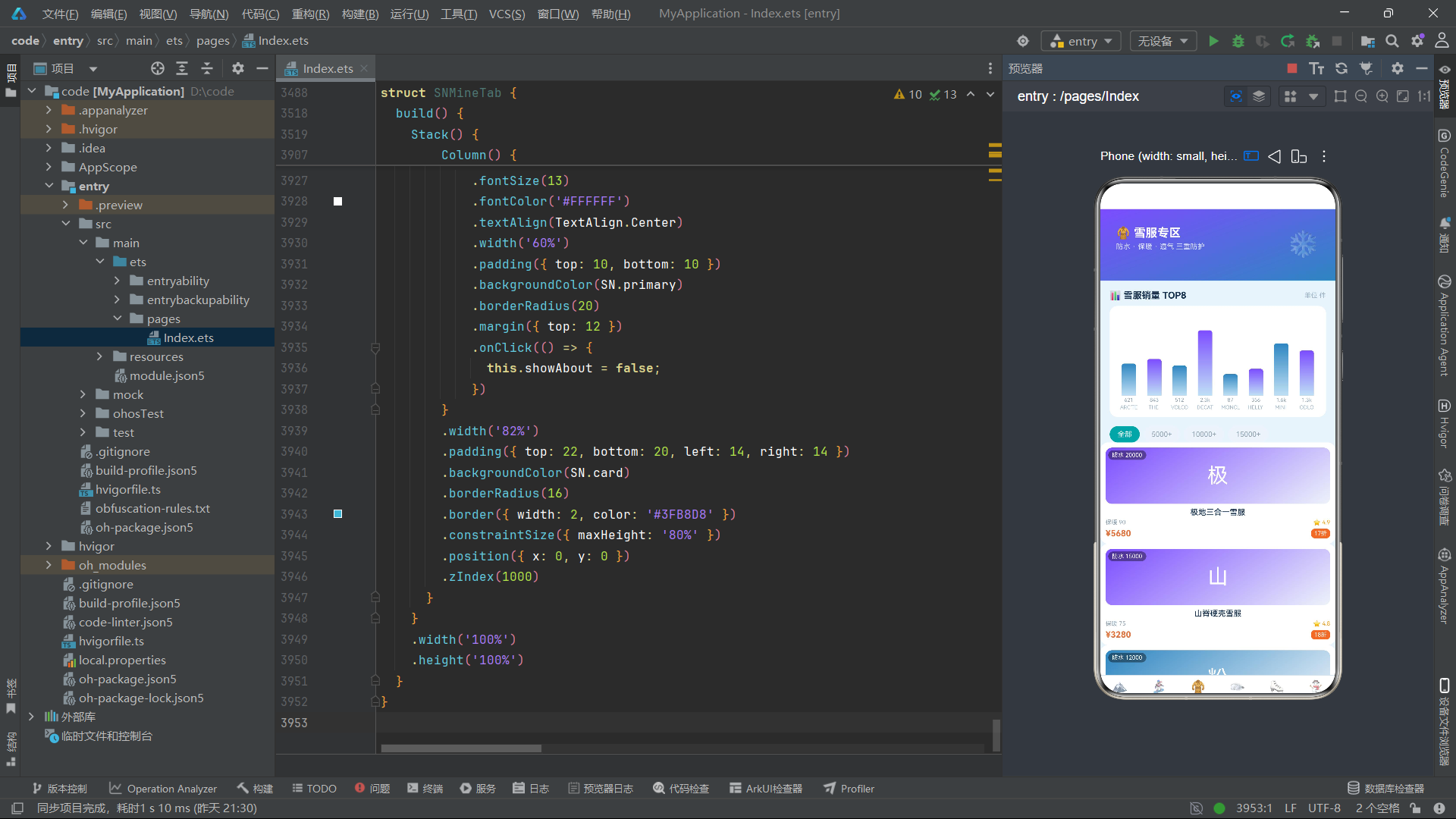
snBoardFilter 按板型精确匹配,选择"公园板"则只返回 type 为"公园板"的商品。snJacketFilter 按防水指数阈值筛选,选择"10000+“则返回 water 大于等于 10000 的雪服。snBootFilter 的设计最为巧妙——筛选标签格式为"软硬 3-4”,通过 f.charAt(2) 取出下限"3",f.charAt(4) 取出上限"4",然后进行区间筛选。这种基于字符串位置解析的方案虽然简洁,但依赖于标签格式的严格约定,体现了在轻量级应用中以约定代替配置的实用主义。
4.4 动画驱动函数
应用实现了多种微动画效果,包括雪花飘落、星光闪烁、波浪浮动和卡片摇摆,均由 setInterval 定时器驱动的纯函数计算。
function snSnowY(w: number, i: number): number {
  return (w * 3 + i * 29) % 118;
}

function snSnowX(i: number): number {
  return 12 + i * 36;
}

function snTwinkle(w: number, i: number): number {
  let v: number = (w + i * 7) % 12;
  return v < 6 ? 0.35 + v * 0.1 : 0.95 - (v - 6) * 0.1;
}

function snFloatY(w: number, i: number): number {
  let v: number = (w + i * 13) % 20;
  return v < 10 ? v : 20 - v;
}

function snShineO(w: number): number {
  let v: number = w % 16;
  return v < 8 ? 0.25 + v * 0.08 : 0.89 - (v - 8) * 0.08;
}

function snSwingX(w: number, i: number): number {
  let v: number = (w + i * 11) % 12;
  return v < 6 ? -4 + v * 1.3 : 3.8 - (v - 6) * 1.3;
}
snSnowY 计算雪花在 banner 中的 Y 坐标,公式 (w * 3 + i * 29) % 118 中 w 是持续递增的时间计数器,i 是雪花索引。随着 w 递增,每片雪花以不同速度(由 i 决定)向下移动,取模 118 使得雪花在 118 像素范围内循环飘落。snSnowX 计算雪花 X 坐标,固定间距 36 像素排列。
snTwinkle 实现星光闪烁效果,通过分段线性函数生成 0.35-0.95 之间周期变化的透明度值。snShineO 用于会员卡的光泽流动效果,公式 w % 16 生成 0-15 的周期,前半段递增到 0.89 后半段递减回 0.25,模拟光泽扫过的视觉效果。snSwingX 用于雪鞋列表卡片的摇摆微动画,使列表项在 -4 到 3.8 像素范围内水平摆动,增加列表的活力感。
这些函数的共同特点是利用取模运算(%)生成周期性变化,通过不同的乘数和偏移使每个动画元素拥有独立的节奏,避免了所有元素同步运动带来的机械感。这是在不依赖动画框架的情况下,用纯数学函数实现丰富微动画的精彩实践。
五、主入口组件 SNApp 与六标签导航
5.1 入口组件结构
SNApp 是应用的根组件,使用 @Entry 和 @Component 装饰器声明为入口自定义组件,负责管理全局 Tab 索引状态和底部导航栏渲染。
@Entry
@Component
struct SNApp {
  @State tab: number = 0;
  @State tick: number = 0;
  tabs: string[] = ['首页', '单板', '雪服', '雪镜', '雪鞋', '我的'];
  icons: string[] = ['🏔️', '🏂', '🧥', '🥽', '⛸️', '⛄'];

  aboutToAppear(): void {
    setInterval(() => {
      this.tick = this.tick + 1;
    }, 400);
  }

  @Builder
  modalOverlay() {
    Column()
      .width('100%')
      .height('100%')
      .backgroundColor('#99000000')
      .position({ x: 0, y: 0 })
      .zIndex(999)
  }

  build() {
    Stack() {
      Column() {
        if (this.tab === 0) {
          SNHomeTab()
        } else if (this.tab === 1) {
          SNBoardTab()
        } else if (this.tab === 2) {
          SNJacketTab()
        } else if (this.tab === 3) {
          SNGoggleTab()
        } else if (this.tab === 4) {
          SNBootTab()
        } else {
          SNMineTab()
        }
        Row() {
          ForEach(this.tabs, (t: string, i: number) => {
            Column() {
              Text(this.icons[i])
                .fontSize(19)
                .opacity(this.tab === i ? 1 : 0.55)
              Text(t)
                .fontSize(10)
                .fontColor(this.tab === i ? SN.primary : '#9DB4C8')
                .fontWeight(this.tab === i ? FontWeight.Bold : FontWeight.Normal)
            }
            .layoutWeight(1)
            .padding({ top: 6, bottom: 6 })
            .onClick(() => {
              this.tab = i;
            })
          }, (t: string, i: number) => i.toString() + t)
        }
        .width('100%')
        .backgroundColor(SN.card)
        .border({ width: { top: 1 }, color: SN.line })
      }
      .width('100%')
      .height('100%')
      .backgroundColor(SN.bg)

      this.modalOverlay()
    }
    .width('100%')
    .height('100%')
  }
}
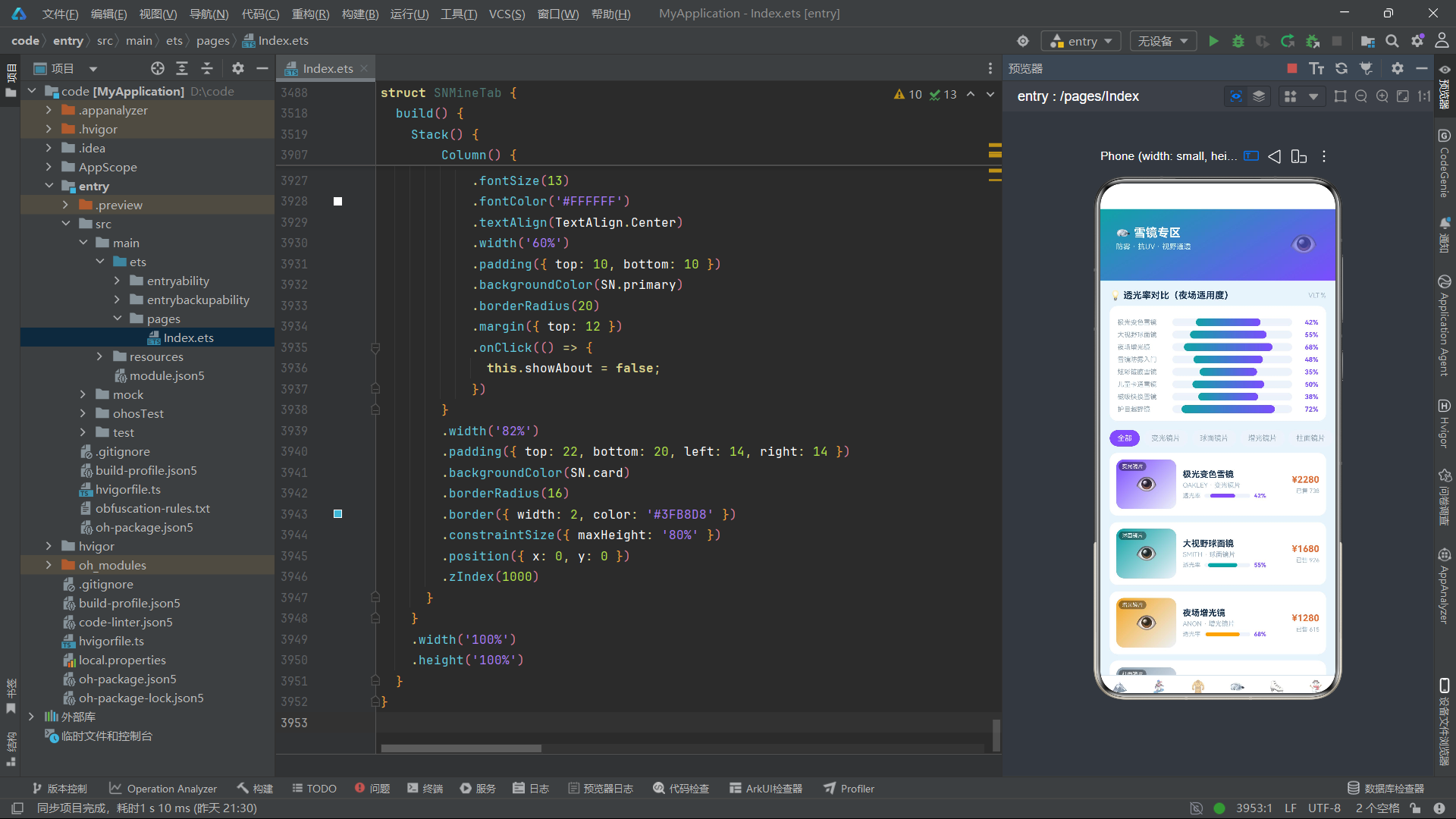
这段代码是整个应用的骨架。@State tab 是核心状态变量,初始值为 0(首页),通过 if-else 链式条件渲染实现六个 Tab 页面的切换。@State tick 是全局动画驱动计数器,每 400 毫秒递增一次,虽然 tick 本身不直接参与渲染,但它的存在演示了 aboutToAppear 生命周期钩子中启动定时器的标准模式。
tabs 和 icons 数组定义了导航栏的六个标签项及其 Emoji 图标。导航栏使用 Row + ForEach + layoutWeight(1) 的经典等分布局,每个 Tab 项平分宽度。选中态通过 opacity、fontColor 和 fontWeight 三个属性同步变化——选中时图标完全不透明、文字使用主色加粗,未选中时半透明、灰色常规字重。
modalOverlay 是一个 @Builder 修饰的模态遮罩构建器,生成一个半透明黑色背景层(#99000000),通过 zIndex(999) 确保遮罩位于内容之上但弹窗之下。这个 Builder 被所有子组件复用,实现了弹窗遮罩的统一定义。
build 方法的整体结构是 Stack 包裹 Column,Column 内部先渲染当前 Tab 页面再渲染底部导航栏,外层 Stack 叠加模态遮罩。这种"内容 + 导航 + 遮罩"的三层结构是电商应用导航框架的标准范式。
六、首页推荐 SNHomeTab:信息流与四弹窗体系
6.1 雪山 Banner 与飘雪动画
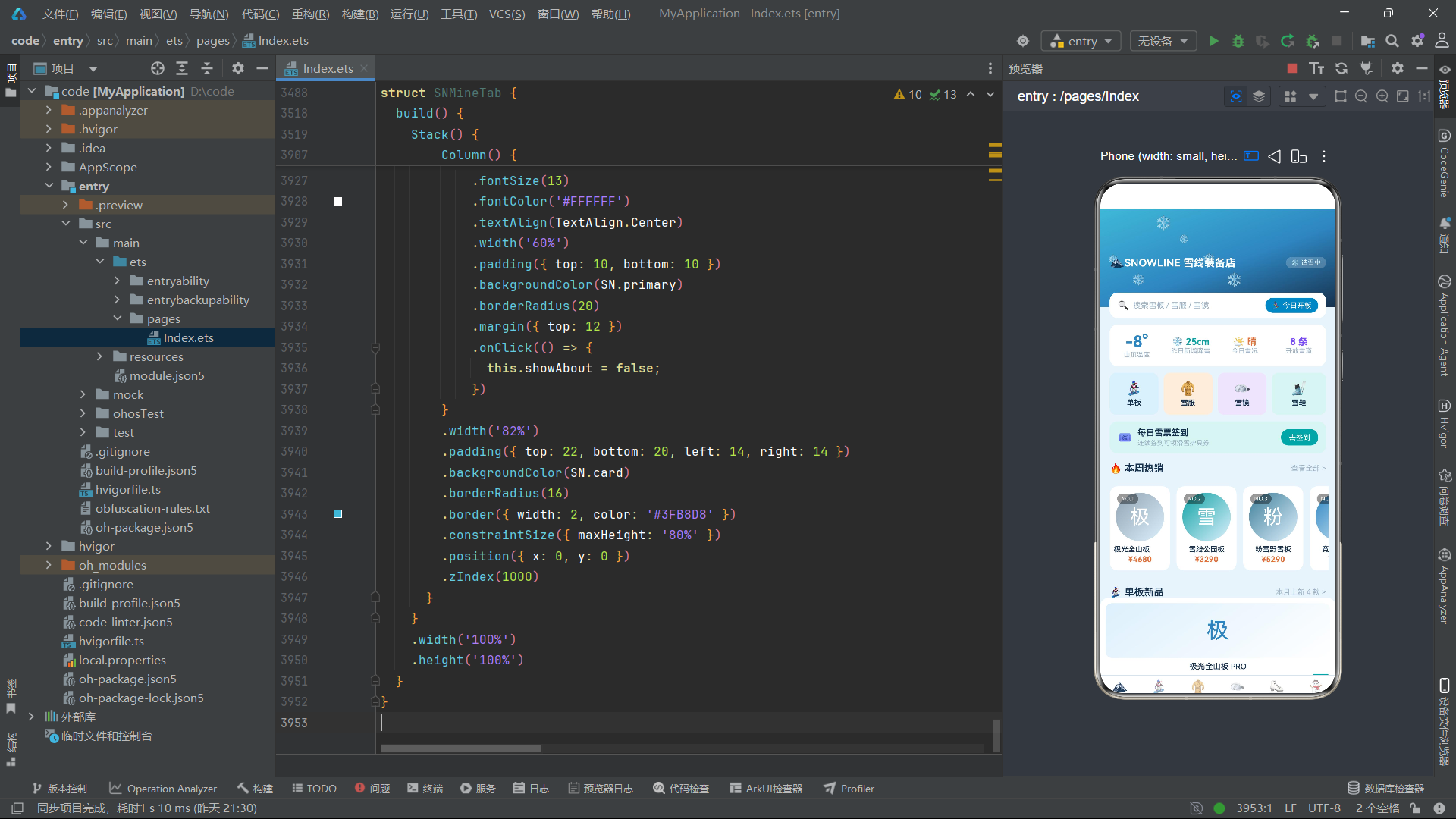
首页顶部是一个 150 像素高的雪山横幅,融合了渐变背景、飘雪粒子和品牌信息。
Stack() {
  Column()
    .width('100%')
    .height(150)
    .linearGradient({
      angle: 160,
      colors: [['#3FB8D8', 0], ['#2E86C1', 0.55], ['#16324F', 1]]
    })
  ForEach([0, 1, 2, 3, 4, 5], (i: number) => {
    Text('❄')
      .fontSize(13 + (i % 3) * 4)
      .fontColor('#EAF8FF')
      .opacity(0.85)
      .position({ x: snSnowX(i), y: snSnowY(this.snow, i) })
  }, (i: number) => i.toString())
  Row() {
    Text('🏔️')
      .fontSize(18)
    Text('SNOWLINE 雪线装备店')
      .fontSize(16)
      .fontColor('#FFFFFF')
      .fontWeight(FontWeight.Bold)
    Column().layoutWeight(1)
    Text('❄ 造雪中')
      .fontSize(10)
      .fontColor('#DDF0FC')
      .padding({ left: 8, right: 8, top: 3, bottom: 3 })
      .backgroundColor('#33FFFFFF')
      .borderRadius(10)
  }
  .width('92%')
  .margin({ top: 14 })
}
.width('100%')
Banner 使用三色渐变:从顶部亮青 #3FB8D8 经中部海蓝 #2E86C1 过渡到底部深蓝黑 #16324F,模拟从天空到雪山的视觉层次。六片雪花通过 ForEach 渲染,每片的 Y 坐标由 snSnowY(this.snow, i) 实时计算——this.snow 在 aboutToAppear 中每 200 毫秒递增一次,驱动雪花持续下落。雪花大小通过 13 + (i % 3) * 4 产生 13/17/21 三种字号,模拟近大远小的透视效果。
品牌信息行使用 Column().layoutWeight(1) 实现左右分离布局——左侧品牌名和 Logo,右侧"造雪中"状态标签。这种用空白 Column 占位实现两端对齐的技巧在 ArkTS 中极为常见。
6.2 雪场天气卡
天气卡以四列等分布局展示山顶温度、新增降雪、今日雪况和开放雪道数量。
Row() {
  Column() {
    Text('-8°')
      .fontSize(24)
      .fontColor(SN.primary)
      .fontWeight(FontWeight.Bold)
    Text('山顶温度')
      .fontSize(10)
      .fontColor('#9DB4C8')
  }
  .layoutWeight(1)
  Column() {
    Text('❄ 25cm')
      .fontSize(14)
      .fontColor(SN.accent)
      .fontWeight(FontWeight.Bold)
    Text('昨日新增降雪')
      .fontSize(10)
      .fontColor('#9DB4C8')
  }
  .layoutWeight(1)
  Column() {
    Text('🌤️ 晴')
      .fontSize(14)
      .fontColor('#E2723B')
      .fontWeight(FontWeight.Bold)
    Text('今日雪况')
      .fontSize(10)
      .fontColor('#9DB4C8')
  }
  .layoutWeight(1)
  Column() {
    Text('8 条')
      .fontSize(14)
      .fontColor('#7C4DFF')
      .fontWeight(FontWeight.Bold)
    Text('开放雪道')
      .fontSize(10)
      .fontColor('#9DB4C8')
  }
  .layoutWeight(1)
}
.width('92%')
.padding({ top: 12, bottom: 12 })
.backgroundColor(SN.card)
.borderRadius(12)
.margin({ top: 10 })
.onClick(() => {
  this.showWeather = true;
})
四列分别使用主色蓝、青绿、暖橙和紫色作为数值颜色,对应温度、降雪、天气和雪道四个维度。每个数值下方配以 10 号灰色说明文字,形成"大数值 + 小标签"的信息卡片范式。点击天气卡触发 showWeather 弹窗,展示更详细的雪场信息。
6.3 签到横幅与签到弹窗
签到功能是电商用户留存的核心运营手段,应用实现了完整的签到交互流程。
Row() {
  Text(this.signed ? '✅' : '🎟️')
    .fontSize(18)
  Column() {
    Text(this.signed ? '今日已签到' : '每日雪票签到')
      .fontSize(13)
      .fontColor(SN.text)
      .fontWeight(FontWeight.Bold)
    Text(this.signed ? '已获得 88 积分' : '连续签到可领滑雪护具券')
      .fontSize(10)
      .fontColor('#9DB4C8')
      .margin({ top: 2 })
  }
  .margin({ left: 8 })
  .alignItems(HorizontalAlign.Start)
  Column().layoutWeight(1)
  Text(this.signed ? '已签' : '去签到')
    .fontSize(11)
    .fontColor('#FFFFFF')
    .padding({ left: 12, right: 12, top: 6, bottom: 6 })
    .backgroundColor(this.signed ? '#9DB4C8' : SN.accent)
    .borderRadius(12)
    .onClick(() => {
      this.showSign = true;
    })
}
.width('92%')
.padding({ left: 12, right: 12, top: 10, bottom: 10 })
.backgroundColor('#DDF4F2')
.borderRadius(12)
.margin({ top: 10 })
签到横幅通过 this.signed 状态变量实现"未签到"和"已签到"两种视图状态的双向切换。未签到时显示"🎟️"图标、"每日雪票签到"标题、"去签到"青色按钮;已签到后切换为"✅"图标、"今日已签到"标题、"已签"灰色按钮。这种基于布尔状态的条件渲染是 ArkTS 声明式 UI 的核心能力——开发者只需描述每种状态对应的视图,框架自动处理状态切换时的 DOM 更新。
签到弹窗展示了连续签到天数和积分发放信息:
if (this.showSign) {
  this.modalOverlay()
  Column() {
    Text('🎟️')
      .fontSize(36)
    Text('每日雪票签到')
      .fontSize(17)
      .fontColor(SN.text)
      .fontWeight(FontWeight.Bold)
      .margin({ top: 8 })
    Text(this.signed ? '今日已完成签到,已发放 88 积分到账户' : '签到成功 +88 积分,连续 7 天再送护具券')
      .fontSize(11)
      .fontColor('#9DB4C8')
      .margin({ top: 6 })
    Row() {
      Text('📅')
        .fontSize(16)
      Text('连续签到 3 天')
        .fontSize(12)
        .fontColor(SN.text)
        .margin({ left: 6 })
      Column().layoutWeight(1)
      Text('🔥 3 天')
        .fontSize(11)
        .fontColor('#E2723B')
        .fontWeight(FontWeight.Bold)
    }
    .width('88%')
    .padding(10)
    .backgroundColor('#DDF4F2')
    .borderRadius(10)
    .margin({ top: 12 })
    Row() {
      Text('关闭')
        .fontSize(13)
        .fontColor('#FFFFFF')
        .textAlign(TextAlign.Center)
        .layoutWeight(1)
        .padding({ top: 10, bottom: 10 })
        .backgroundColor('#9DB4C8')
        .borderRadius(20)
        .onClick(() => {
          this.showSign = false;
        })
      Text(this.signed ? '已领取' : '立即签到')
        .fontSize(13)
        .fontColor('#FFFFFF')
        .textAlign(TextAlign.Center)
        .layoutWeight(1)
        .padding({ top: 10, bottom: 10 })
        .backgroundColor(this.signed ? '#9DB4C8' : SN.primary)
        .borderRadius(20)
        .margin({ left: 10 })
        .onClick(() => {
          this.signed = true;
          this.showSign = false;
        })
    }
    .width('88%')
    .margin({ top: 14 })
  }
  .width('82%')
  .padding({ top: 22, bottom: 20, left: 14, right: 14 })
  .backgroundColor(SN.card)
  .borderRadius(16)
  .border({ width: 2, color: SN.accent })
  .constraintSize({ maxHeight: '80%' })
  .position({ x: 0, y: 0 })
  .zIndex(1000)
}
弹窗的结构遵循应用统一的弹窗设计规范:modalOverlay() 提供半透明遮罩(zIndex(999)),弹窗内容 Column 通过 zIndex(1000) 浮于遮罩之上,使用 border、borderRadius(16) 和 constraintSize({ maxHeight: '80%' }) 确保弹窗在小屏设备上不超出视口。点击"立即签到"后,this.signed 被设为 true,this.showSign 被设为 false,触发签到横幅和弹窗内容同时更新。
6.4 优惠券弹窗
优惠券弹窗展示了两种面额的满减券,通过 got 数组跟踪已领取状态。
if (this.showCoupon) {
  this.modalOverlay()
  Column() {
    Text('🎁')
      .fontSize(36)
    Text('雪季优惠券')
      .fontSize(17)
      .fontColor(SN.text)
      .fontWeight(FontWeight.Bold)
      .margin({ top: 8 })
    Text('券包全场通用,雪季期间有效')
      .fontSize(11)
      .fontColor('#9DB4C8')
      .margin({ top: 4 })
    Column() {
      Row() {
        Text('¥100')
          .fontSize(20)
          .fontColor(SN.primary)
          .fontWeight(FontWeight.Bold)
        Column() {
          Text('满 1000 可用')
            .fontSize(11)
            .fontColor(SN.text)
            .fontWeight(FontWeight.Medium)
          Text('单板雪服通用')
            .fontSize(9)
            .fontColor('#9DB4C8')
            .margin({ top: 2 })
        }
        .margin({ left: 10 })
        .alignItems(HorizontalAlign.Start)
        Column().layoutWeight(1)
        Text(this.got.indexOf(0) >= 0 ? '已领' : '领取')
          .fontSize(11)
          .fontColor('#FFFFFF')
          .padding({ left: 12, right: 12, top: 5, bottom: 5 })
          .backgroundColor(this.got.indexOf(0) >= 0 ? '#9DB4C8' : SN.accent)
          .borderRadius(10)
          .onClick(() => {
            let arr: number[] = this.got.slice();
            if (arr.indexOf(0) < 0) {
              arr.push(0);
            }
            this.got = arr;
          })
      }
      .width('100%')
      .padding(10)
      .backgroundColor('#DDF0FC')
      .borderRadius(10)
      .margin({ bottom: 8 })
      // 第二张券 ¥50 同理...
    }
    .width('88%')
    .margin({ top: 12 })
  }
}
优惠券的领取状态管理是此段的精妙之处。@State got: number[] 是一个数组,存储已领取券的索引。判断某券是否已领取使用 this.got.indexOf(0) >= 0(索引 0 对应 ¥100 券)。领取操作通过 this.got.slice() 创建数组副本,push 新索引后整体赋值回 this.got,触发 ArkTS 的数组状态监听更新。这种"不可变更新"模式是声明式框架中处理数组状态的标准范式——直接 push 不会触发状态更新,必须创建新数组引用。
6.5 雪场天气弹窗与教练约课弹窗
天气弹窗展示了更详细的四维数据(气温、降雪、风速、雪质),并附带了雪道开放状态的文字说明。教练约课弹窗则展示了上午、下午、晚间三个时段的 1v1 私教课程和价格。这两个弹窗的结构与签到弹窗一致,差异仅在内容数据,体现了弹窗组件的高度复用性。
6.6 热门装备横向滚动与单板新品网格
首页的商品展示分为横向滚动热门区和纵向网格新品区。
Scroll() {
  Row() {
    ForEach(snHotTop(), (b: BoardItem, i: number) => {
      Column() {
        Stack() {
          Column()
            .width(74)
            .height(74)
            .borderRadius(37)
            .linearGradient({
              angle: 135,
              colors: [[snTypeColor(b.type), 0], ['#DDF0FC', 1]]
            })
          Text(snImg(b.name))
            .fontSize(30)
            .fontColor('#FFFFFF')
          Text('NO.' + (i + 1).toString())
            .fontSize(9)
            .fontColor('#FFFFFF')
            .padding({ left: 6, right: 6, top: 2, bottom: 2 })
            .backgroundColor('#66000000')
            .borderRadius(8)
            .position({ x: 2, y: 2 })
        }
        Text(b.name)
          .fontSize(11)
          .fontColor(SN.text)
          .fontWeight(FontWeight.Medium)
          .maxLines(1)
          .margin({ top: 6 })
        Text(snPrice(b.price))
          .fontSize(12)
          .fontColor('#E2723B')
          .fontWeight(FontWeight.Bold)
          .margin({ top: 2 })
      }
      .width(92)
      .padding({ top: 10, bottom: 10, left: 6, right: 6 })
      .backgroundColor(SN.card)
      .borderRadius(12)
      .margin({ right: 10 })
    }, (b: BoardItem, i: number) => i.toString() + b.name)
  }
  .padding({ left: 4, right: 4 })
}
.scrollable(ScrollDirection.Horizontal)
.scrollBar(BarState.Off)
.width('94%')
.height(150)
.margin({ top: 8 })
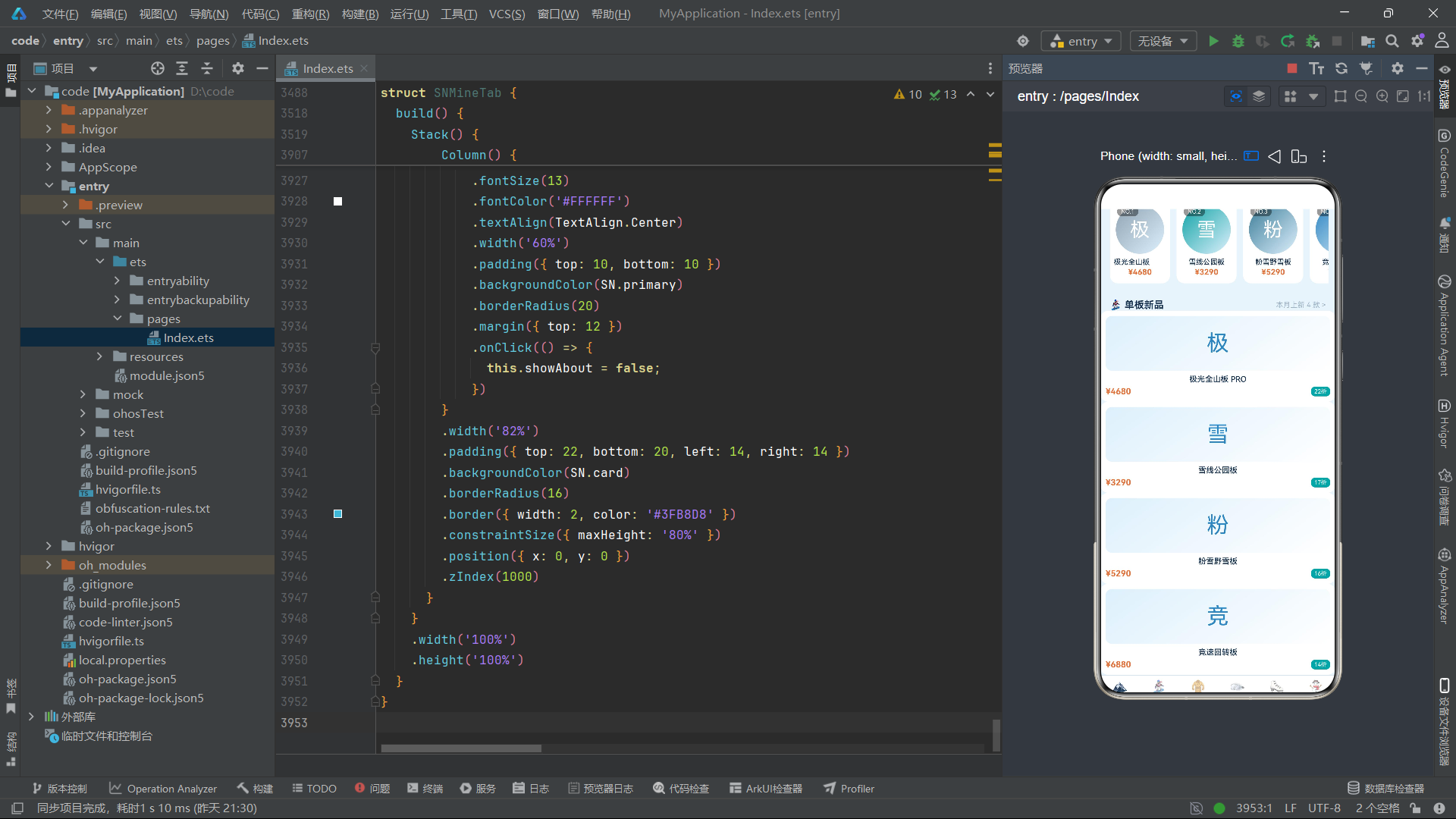
横向滚动区展示前 5 款热销单板,每款以圆形渐变图标 + 排名标签 + 商品名 + 价格的紧凑卡片形式呈现。ScrollDirection.Horizontal 启用水平滚动,BarState.Off 隐藏滚动条保持视觉简洁。排名标签 NO.1 到 NO.5 通过 position 定位在卡片左上角,使用半透明黑色背景增强可读性。
新品区使用 Grid 组件实现两列网格布局:
Grid() {
  ForEach(snFilterBoards(SN_BOARDS).slice(0, 4), (b: BoardItem) => {
    Column() {
      Stack() {
        Column()
          .width('100%')
          .height(84)
          .borderRadius(10)
          .linearGradient({
            angle: 145,
            colors: [['#DDF0FC', 0], ['#FFFFFF', 1]]
          })
        Text(snImg(b.name))
          .fontSize(34)
          .fontColor(SN.primary)
      }
      .width('100%')
      Text(b.name)
        .fontSize(12)
        .fontColor(SN.text)
        .fontWeight(FontWeight.Medium)
        .maxLines(1)
        .margin({ top: 6 })
      Row() {
        Text(snPrice(b.price))
          .fontSize(13)
          .fontColor('#E2723B')
          .fontWeight(FontWeight.Bold)
        Column().layoutWeight(1)
        Text(snOff(b.orig, b.price).toString() + '折')
          .fontSize(9)
          .fontColor('#FFFFFF')
          .padding({ left: 5, right: 5, top: 2, bottom: 2 })
          .backgroundColor(SN.accent)
          .borderRadius(6)
      }
      .width('100%')
      .margin({ top: 4 })
    }
    .padding(8)
    .backgroundColor(SN.card)
    .borderRadius(12)
  }, (b: BoardItem) => b.name)
}
.columnsTemplate('1fr 1fr')
.columnsGap(10)
.rowsGap(10)
.width('92%')
.height(420)
columnsTemplate('1fr 1fr') 定义两列等宽网格,columnsGap(10) 和 rowsGap(10) 设置行列间距。每张卡片包含渐变图片占位区、商品名、价格行和折扣标签。折扣标签通过 snOff(b.orig, b.price) 计算降价百分比并显示为"xx折"格式。
七、单板专区 SNBoardTab:价格对比图与全流程 CRUD
7.1 价格对比柱状图
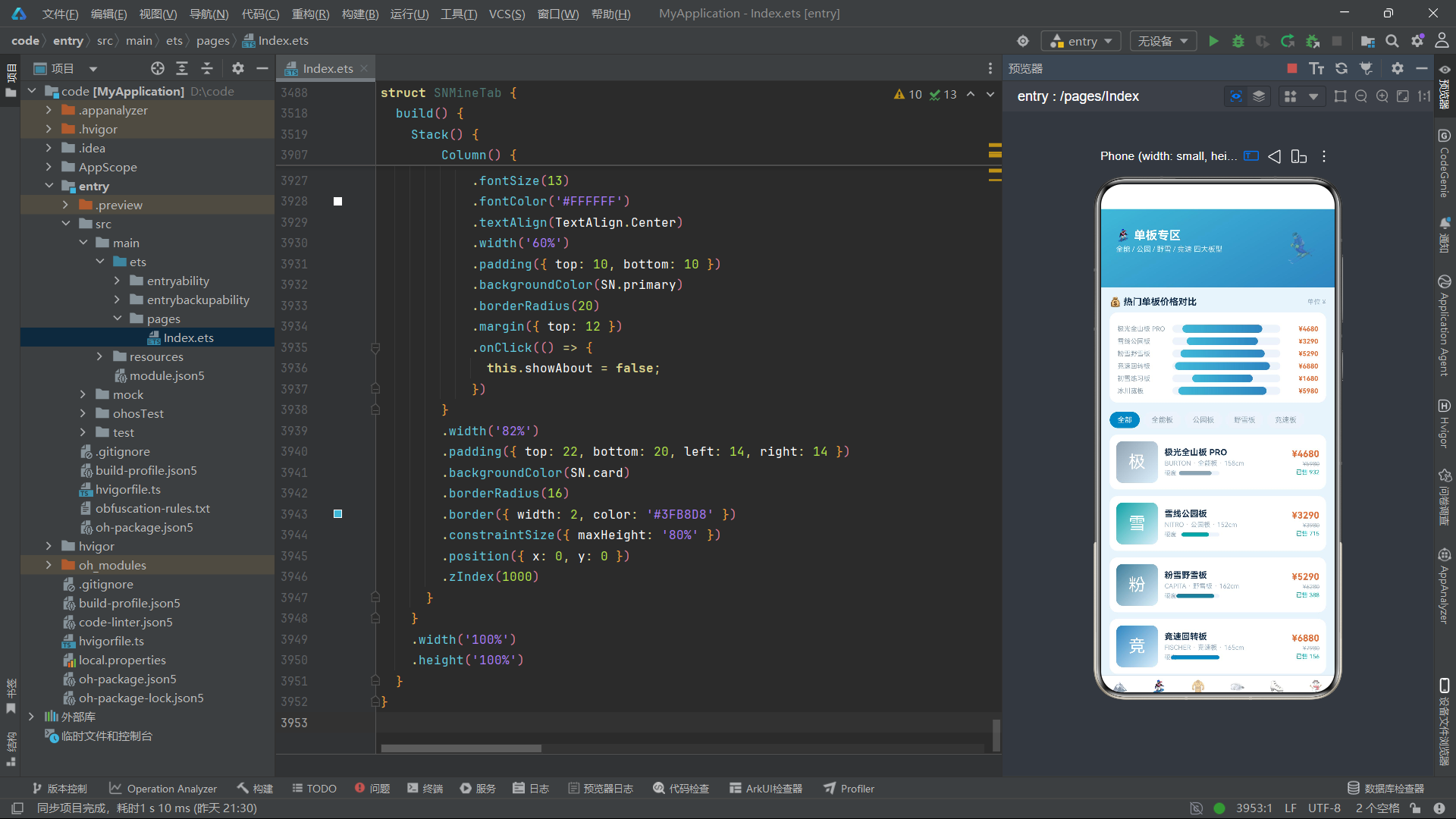
单板专区页以横向柱状图展示 TOP6 单板的价格对比,这是应用数据可视化的核心实现。
Column() {
  ForEach(snBoardTop(this.boards), (b: BoardItem) => {
    Row() {
      Text(b.name)
        .fontSize(10)
        .fontColor('#8FA3B3')
        .width(84)
        .maxLines(1)
      Stack() {
        Row()
          .width('100%')
          .height(12)
          .backgroundColor('#EDF3FA')
          .borderRadius(6)
        Row()
          .width(snBarW(b.price, snMaxBoard(this.boards)).toString() + '%')
          .height(12)
          .linearGradient({
            angle: 90,
            colors: [['#3FB8D8', 0], ['#2E86C1', 1]]
          })
          .borderRadius(6)
          .margin({ right: 12 })
      }
      .layoutWeight(1)
      .height(12)
      Text(snPrice(b.price))
        .fontSize(10)
        .fontColor('#E2723B')
        .fontWeight(FontWeight.Bold)
        .width(58)
        .textAlign(TextAlign.End)
    }
    .width('100%')
    .margin({ top: 7 })
  }, (b: BoardItem) => b.name)
}
.width('92%')
.padding(12)
.backgroundColor(SN.card)
.borderRadius(12)
.margin({ top: 8 })
柱状图的实现采用了 Stack 叠加的双 Row 方案:底层 Row 宽度 100%、浅灰背景 #EDF3FA 作为轨道;上层 Row 宽度由 snBarW(b.price, snMaxBoard(this.boards)) 计算得出,使用蓝青渐变填充。这种用 Stack 叠加实现进度条/柱状图的技巧在 ArkTS 中是最常见的数据可视化方案,无需引入图表库即可实现简洁直观的条形图。
snMaxBoard 函数遍历数组找出最大价格值作为归一化基准,确保最贵的单板(如 7580 元的刻滑竞技板)柱条最长,最便宜的(如 1680 元的初雪练习板)柱条最短,形成直观的价格梯度对比。每个柱条右侧标注价格数值,使用暖橙色 #E2723B 突出。
7.2 类型筛选 Chip 组
筛选 Chip 组使用 ForEach 渲染五种板型选项,选中态通过颜色反转实现视觉反馈。
Row() {
  ForEach(snBoardTypeChips(), (t: string, i: number) => {
    Text(t)
      .fontSize(11)
      .fontColor(this.typeIdx === i ? '#FFFFFF' : '#8FA3B3')
      .padding({ left: 12, right: 12, top: 6, bottom: 6 })
      .backgroundColor(this.typeIdx === i ? SN.primary : '#EDF3FA')
      .borderRadius(14)
      .margin({ right: 6 })
      .onClick(() => {
        this.typeIdx = i;
      })
  }, (t: string) => t)
}
.width('92%')
.margin({ top: 14 })
snBoardTypeChips() 返回 ['全部', '全能板', '公园板', '野雪板', '竞速板'] 五个选项。选中时文字白色、背景为主色蓝;未选中时文字灰色、背景浅蓝灰。borderRadius(14) 配合 padding 形成药丸形 Chip。点击更新 this.typeIdx,触发下方列表通过 snBoardFilter(this.boards, snBoardTypeChips()[this.typeIdx]) 重新过滤渲染。
7.3 单板列表项与硬度可视化
列表项整合了商品图标、名称品牌、硬度进度条和价格销量信息。
ForEach(snBoardFilter(this.boards, snBoardTypeChips()[this.typeIdx]), (b: BoardItem) => {
  Row() {
    Stack() {
      Column()
        .width(64)
        .height(64)
        .borderRadius(10)
        .linearGradient({
          angle: 135,
          colors: [[snTypeColor(b.type), 0], ['#DDF0FC', 1]]
        })
      Text(snImg(b.name))
        .fontSize(26)
        .fontColor('#FFFFFF')
    }
    Column() {
      Text(b.name)
        .fontSize(13)
        .fontColor(SN.text)
        .fontWeight(FontWeight.Bold)
      Text(b.brand + ' · ' + b.type + ' · ' + b.len.toString() + 'cm')
        .fontSize(10)
        .fontColor('#9DB4C8')
        .margin({ top: 3 })
      Row() {
        Text('硬度')
          .fontSize(9)
          .fontColor('#9DB4C8')
        Stack() {
          Row()
            .width(60)
            .height(6)
            .backgroundColor('#EDF3FA')
            .borderRadius(3)
          Row()
            .width(snFlexW(b.flex).toString())
            .height(6)
            .backgroundColor(snTypeColor(b.type))
            .borderRadius(3)
            .margin({ right: 14 })
        }
        .width(60)
        .height(6)
        .margin({ left: 6 })
      }
      .margin({ top: 4 })
    }
    .layoutWeight(1)
    .margin({ left: 10 })
    .alignItems(HorizontalAlign.Start)
    Column() {
      Text(snPrice(b.price))
        .fontSize(14)
        .fontColor('#E2723B')
        .fontWeight(FontWeight.Bold)
      Text(snPrice(b.orig))
        .fontSize(9)
        .fontColor('#9DB4C8')
        .decoration({ type: TextDecorationType.LineThrough })
        .margin({ top: 2 })
      Text('已售 ' + snNum(b.sale))
        .fontSize(9)
        .fontColor(SN.accent)
        .margin({ top: 2 })
    }
    .alignItems(HorizontalAlign.End)
  }
  .width('92%')
  .padding(10)
  .backgroundColor(SN.card)
  .borderRadius(12)
  .margin({ top: 10 })
  .onClick(() => {
    this.selectedBoard = b;
    this.showDetail = true;
  })
}, (b: BoardItem) => b.name)
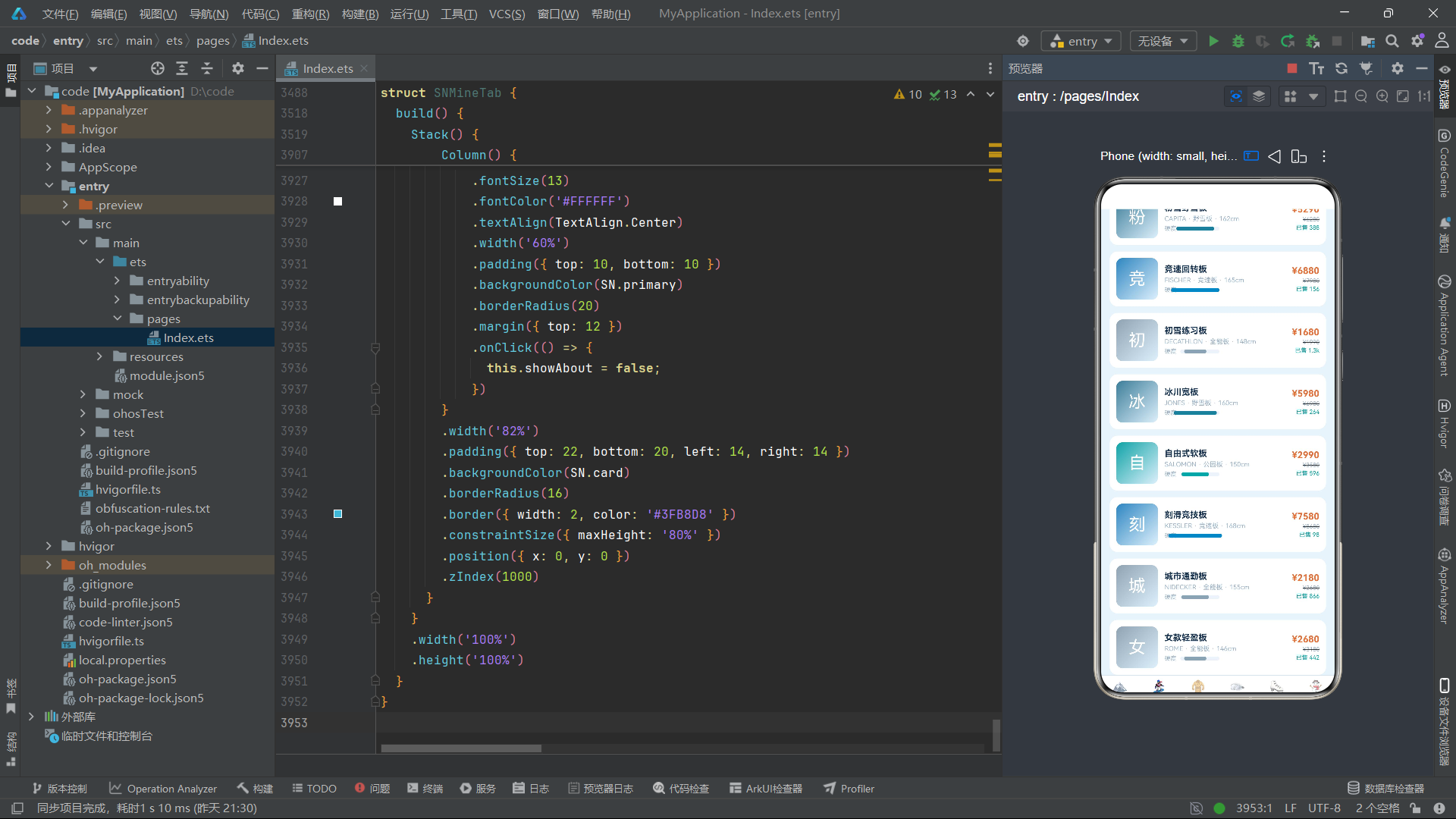
列表项的布局分为左中右三段:左侧 64x64 渐变图标(颜色由板型决定),中间商品信息(名称、品牌型号板长、硬度进度条),右侧价格区(现价、原价删除线、销量)。硬度进度条同样是 Stack 叠加双 Row 方案,宽度由 snFlexW(b.flex) 计算(10 + flex * 8),颜色与板型色一致。原价使用 TextDecorationType.LineThrough 删除线效果,是电商应用中标识折扣的标准做法。点击列表项设置 selectedBoard 并打开详情弹窗。
7.4 详情弹窗与编辑弹窗
详情弹窗展示选中单板的完整参数,并提供删除、编辑、关闭三个操作入口。
if (this.showDetail && this.selectedBoard !== null) {
  this.modalOverlay()
  Column() {
    Stack() {
      Column()
        .width('100%')
        .height(90)
        .borderRadius(12)
        .linearGradient({
          angle: 135,
          colors: [[snTypeColor(this.selectedBoard!.type), 0], ['#DDF0FC', 1]]
        })
      Text(snImg(this.selectedBoard!.name))
        .fontSize(40)
        .fontColor('#FFFFFF')
    }
    .width('100%')
    Text(this.selectedBoard!.name)
      .fontSize(18)
      .fontColor(SN.text)
      .fontWeight(FontWeight.Bold)
      .margin({ top: 10 })
    Text(this.selectedBoard!.brand + ' · ' + this.selectedBoard!.type + ' · 板长 ' + this.selectedBoard!.len.toString() + 'cm')
      .fontSize(11)
      .fontColor('#9DB4C8')
      .margin({ top: 4 })
    Row() {
      Text('⭐ ' + this.selectedBoard!.stars.toString())
        .fontSize(12)
        .fontColor('#F5A623')
        .fontWeight(FontWeight.Bold)
      Text(' 已售 ' + snNum(this.selectedBoard!.sale))
        .fontSize(11)
        .fontColor('#9DB4C8')
    }
    .margin({ top: 6 })
    Row() {
      Column() {
        Text(snPrice(this.selectedBoard!.price))
          .fontSize(20)
          .fontColor('#E2723B')
          .fontWeight(FontWeight.Bold)
        Text(snPrice(this.selectedBoard!.orig))
          .fontSize(11)
          .fontColor('#9DB4C8')
          .decoration({ type: TextDecorationType.LineThrough })
          .margin({ top: 2 })
      }
      .layoutWeight(1)
      .alignItems(HorizontalAlign.Start)
      Column() {
        Text('硬度 ' + this.selectedBoard!.flex.toString() + '/10')
          .fontSize(12)
          .fontColor(SN.text)
          .fontWeight(FontWeight.Medium)
        Text('适合 ' + (this.selectedBoard!.flex >= 7 ? '进阶/竞速' : this.selectedBoard!.flex >= 5 ? '进阶' : '新手入门'))
          .fontSize(10)
          .fontColor('#9DB4C8')
          .margin({ top: 2 })
      }
      .alignItems(HorizontalAlign.End)
    }
    .width('100%')
    .padding(10)
    .backgroundColor('#EDF3FA')
    .borderRadius(10)
    .margin({ top: 10 })
    Row() {
      Text('删除')
        .fontSize(13)
        .fontColor('#FFFFFF')
        .textAlign(TextAlign.Center)
        .layoutWeight(1)
        .padding({ top: 10, bottom: 10 })
        .backgroundColor('#E2723B')
        .borderRadius(20)
        .onClick(() => {
          this.showDetail = false;
          this.showDel = true;
        })
      Text('编辑')
        .fontSize(13)
        .fontColor('#FFFFFF')
        .textAlign(TextAlign.Center)
        .layoutWeight(1)
        .padding({ top: 10, bottom: 10 })
        .backgroundColor(SN.primary)
        .borderRadius(20)
        .margin({ left: 10 })
        .onClick(() => {
          this.eName = this.selectedBoard!.name;
          this.eBrand = this.selectedBoard!.brand;
          this.ePrice = this.selectedBoard!.price.toString();
          this.showDetail = false;
          this.showEdit = true;
        })
      Text('关闭')
        .fontSize(13)
        .fontColor('#FFFFFF')
        .textAlign(TextAlign.Center)
        .layoutWeight(1)
        .padding({ top: 10, bottom: 10 })
        .backgroundColor('#9DB4C8')
        .borderRadius(20)
        .margin({ left: 10 })
        .onClick(() => {
          this.showDetail = false;
        })
    }
    .width('100%')
    .margin({ top: 12 })
  }
  .width('84%')
  .padding(16)
  .backgroundColor(SN.card)
  .borderRadius(16)
  .border({ width: 2, color: snTypeColor(this.selectedBoard!.type) })
  .constraintSize({ maxHeight: '80%' })
  .position({ x: 0, y: 0 })
  .zIndex(1000)
}
详情弹窗的顶部图片区使用与列表项相同的板型色渐变,保证视觉关联性。参数区分为左右两列:左侧价格区(现价大字 + 原价删除线),右侧硬度区(硬度值/10 + 适合人群文字推荐)。推荐文字通过嵌套三元运算符实现:硬度大于等于 7 显示"进阶/竞速",大于等于 5 显示"进阶",否则显示"新手入门",体现了根据参数智能推荐的专业导购能力。
编辑弹窗提供了三个 TextInput 输入框,分别编辑名称、品牌和价格:
if (this.showEdit) {
  this.modalOverlay()
  Column() {
    Text('✏️ 编辑单板')
      .fontSize(17)
      .fontColor(SN.text)
      .fontWeight(FontWeight.Bold)
    Text('修改「' + this.eName + '」信息')
      .fontSize(11)
      .fontColor('#9DB4C8')
      .margin({ top: 4 })
    Column() {
      Text('名称')
        .fontSize(11)
        .fontColor('#8FA3B3')
      TextInput({ placeholder: '名称', text: this.eName })
        .fontSize(12)
        .height(36)
        .backgroundColor('#EDF3FA')
        .borderRadius(8)
        .margin({ top: 4 })
        .onChange((v: string) => {
          this.eName = v;
        })
    }
    .width('100%')
    .alignItems(HorizontalAlign.Start)
    .margin({ top: 10 })
    // 品牌和价格输入框同理...
    Row() {
      Text('取消')
        .onClick(() => { this.showEdit = false; })
      Text('保存修改')
        .onClick(() => {
          let it: BoardItem = { name: this.eName, brand: this.eBrand, type: this.selectedBoard!.type, len: this.selectedBoard!.len, flex: this.selectedBoard!.flex, price: parseInt(this.ePrice), orig: this.selectedBoard!.orig, sale: this.selectedBoard!.sale, stars: this.selectedBoard!.stars };
          this.boards.splice(snFindBoardIdx(this.boards, this.selectedBoard!.name), 1, it);
          this.showEdit = false;
        })
    }
  }
}
编辑保存逻辑的核心是 splice 替换操作:this.boards.splice(snFindBoardIdx(this.boards, this.selectedBoard!.name), 1, it) 先通过 snFindBoardIdx 按名称查找索引,然后用新构造的 BoardItem 对象替换原位置的元素。splice 的第三个参数 it 是替换值,实现了原地更新。由于 this.boards 是 @State 数组,splice 操作会触发 ArkTS 的数组变更监听,自动重新渲染列表。
7.5 新增与删除弹窗
新增弹窗的结构与编辑弹窗类似,但初始值预设了默认值(“雪线新款全能板”、“SNOWLINE”、“2980”),提交时构造新 BoardItem 并 push 到数组末尾。删除弹窗则是二次确认弹窗,确认后通过 splice 移除选中项并置空 selectedBoard。
// 新增确认
let it: BoardItem = { name: this.nName, brand: this.nBrand, type: '全能板', len: 155, flex: 5, price: parseInt(this.nPrice), orig: parseInt(this.nPrice) + 600, sale: 0, stars: 4.5 };
this.boards.push(it);
this.showAdd = false;

// 删除确认
this.boards.splice(snFindBoardIdx(this.boards, this.selectedBoard!.name), 1);
this.selectedBoard = null;
this.showDel = false;
新增时原价自动在现价基础上加 600,销量初始为 0,星级预设 4.5,这是一种简化的默认值策略。删除时需要先通过 snFindBoardIdx 定位元素索引再 splice 移除,同时将 selectedBoard 置空避免悬空引用。
八、雪服专区 SNJacketTab:柱状图与网格布局
8.1 销量 TOP8 竖向柱状图
雪服专区使用竖向柱状图展示销量排名,与单板的横向柱条图形成视觉差异化。
Column() {
  Row() {
    ForEach(snJacketTop(this.jackets), (j: JacketItem, i: number) => {
      Column() {
        Column()
          .width(22)
          .height(snMonthBar(j.sale, snMaxJacket(this.jackets)))
          .linearGradient({
            angle: 180,
            colors: [[i % 2 === 0 ? '#2E86C1' : '#7C4DFF', 0], ['#BFE0F5', 1]]
          })
          .borderRadius({ topLeft: 4, topRight: 4 })
        Text(snNum(j.sale))
          .fontSize(8)
          .fontColor('#8FA3B3')
          .margin({ top: 2 })
        Text(j.brand)
          .fontSize(8)
          .fontColor('#9DB4C8')
          .maxLines(1)
          .width(30)
          .textAlign(TextAlign.Center)
          .margin({ top: 2 })
      }
      .layoutWeight(1)
      .height(150)
      .justifyContent(FlexAlign.End)
    }, (j: JacketItem, i: number) => i.toString() + j.name)
  }
  .width('100%')
  .height(150)
}
竖向柱状图的实现与横向截然不同。每个柱条是一个 Column,高度由 snMonthBar(j.sale, snMaxJacket(this.jackets)) 计算(30 + sale/max * 70,范围 30-100 像素)。柱条使用 angle: 180 的从上到下渐变,偶数索引用蓝色渐变,奇数索引用紫色渐变,形成交替的视觉节奏。justifyContent(FlexAlign.End) 使柱条在 150 像素高的容器中底部对齐,模拟从地面向上生长的柱状图效果。柱条下方依次标注销量缩写和品牌名,形成完整的"柱条 + 数值 + 标签"三行信息层。
8.2 防水筛选与雪服网格
雪服筛选 Chip 组使用 snJacketWaterChips() 返回的 ['全部', '5000+', '10000+', '15000+'] 四档防水阈值。筛选函数 snJacketFilter 通过 parseInt(w) 将"10000+"解析为数字 10000 进行比较。
网格布局使用 columnsTemplate('1fr 1fr') 两列,每张卡片展示渐变图片区(颜色由防水指数决定,15000 以上用紫色标识高端)、防水标签、商品名、保暖星级和价格行。与单板列表的横向 Row 布局不同,雪服使用 Grid 垂直排列,更适合展示需要较多信息空间的服装品类。
九、雪镜专区 SNGoggleTab:透光率图与横向大卡
9.1 透光率对比图
雪镜专区的透光率图采用与单板价格图类似的横向柱条方案,但颜色映射使用镜片类型色。
Column() {
  ForEach(snGoggleTop(this.goggles), (g: GoggleItem) => {
    Row() {
      Text(g.name)
        .fontSize(10)
        .fontColor('#8FA3B3')
        .width(84)
        .maxLines(1)
      Stack() {
        Row()
          .width('100%')
          .height(12)
          .backgroundColor('#EDF3FA')
          .borderRadius(6)
        Row()
          .width(snVtW(g.vt).toString() + '%')
          .height(12)
          .linearGradient({
            angle: 90,
            colors: [['#0FA3A6', 0], ['#7C4DFF', 1]]
          })
          .borderRadius(6)
          .margin({ right: 12 })
      }
      .layoutWeight(1)
      .height(12)
      Text(g.vt.toString() + '%')
        .fontSize(10)
        .fontColor('#7C4DFF')
        .fontWeight(FontWeight.Bold)
        .width(40)
        .textAlign(TextAlign.End)
    }
    .width('100%')
    .margin({ top: 7 })
  }, (g: GoggleItem) => g.name)
}
柱条宽度由 snVtW(g.vt) 计算(20 + vt * 0.8),透光率 72% 时宽度 77.6%,35% 时宽度 48%。渐变从青色到紫色,与雪镜的高科技调性呼应。右侧标注透光率百分比数值,使用紫色突出。
9.2 雪镜横向大卡列表
雪镜列表项采用横向大卡布局,与单板列表项的结构类似但增加了透光率进度条。
ForEach(snGoggleFilter(this.goggles, snGoggleLensChips()[this.lensIdx]), (g: GoggleItem) => {
  Row() {
    Stack() {
      Column()
        .width(92)
        .height(76)
        .borderRadius(12)
        .linearGradient({
          angle: 135,
          colors: [[snLensColor(g.lens), 0], ['#EDF3FA', 1]]
        })
      Text('👁')
        .fontSize(30)
        .opacity(0.9)
      Text(g.lens)
        .fontSize(8)
        .fontColor('#FFFFFF')
        .padding({ left: 5, right: 5, top: 2, bottom: 2 })
        .backgroundColor('#66000000')
        .borderRadius(6)
        .position({ x: 4, y: 4 })
    }
    Column() {
      Text(g.name)
        .fontSize(13)
        .fontColor(SN.text)
        .fontWeight(FontWeight.Bold)
      Text(g.brand + ' · ' + g.lens)
        .fontSize(10)
        .fontColor('#9DB4C8')
        .margin({ top: 3 })
      Row() {
        Text('透光率')
          .fontSize(9)
          .fontColor('#9DB4C8')
        Stack() {
          Row()
            .width(70)
            .height(6)
            .backgroundColor('#EDF3FA')
            .borderRadius(3)
          Row()
            .width(snVtW(g.vt).toString() + '%')
            .height(6)
            .backgroundColor(snLensColor(g.lens))
            .borderRadius(3)
            .margin({ right: 14 })
        }
        .width(70)
        .height(6)
        .margin({ left: 6 })
        Text(g.vt.toString() + '%')
          .fontSize(9)
          .fontColor('#7C4DFF')
          .fontWeight(FontWeight.Bold)
          .margin({ left: 6 })
      }
      .margin({ top: 5 })
    }
    .layoutWeight(1)
    .margin({ left: 10 })
    .alignItems(HorizontalAlign.Start)
    Column() {
      Text(snPrice(g.price))
        .fontSize(14)
        .fontColor('#E2723B')
        .fontWeight(FontWeight.Bold)
      Text('已售 ' + snNum(g.sale))
        .fontSize(9)
        .fontColor('#9DB4C8')
        .margin({ top: 4 })
    }
    .alignItems(HorizontalAlign.End)
  }
  .width('92%')
  .padding(10)
  .backgroundColor(SN.card)
  .borderRadius(12)
  .margin({ top: 10 })
  .onClick(() => {
    this.selectedGoggle = g;
    this.showDetail = true;
  })
}, (g: GoggleItem) => g.name)
雪镜大卡的左侧图片区尺寸为 92x76,比单板的 64x64 更大,因为雪镜产品需要更大的视觉展示空间。图片上叠加了镜片类型标签(如"变光镜片"),使用半透明黑色背景的角标形式。透光率进度条的宽度同样是 snVtW(g.vt) 的百分比,颜色使用 snLensColor(g.lens) 与镜片类型色一致,实现了图表与列表的视觉统一。
雪镜详情弹窗中包含智能推荐逻辑,根据透光率自动推荐使用场景:
Text(this.selectedGoggle!.vt >= 60 ? '适合夜场 / 阴天使用,视野增亮明显。' : this.selectedGoggle!.vt >= 45 ? '适合晴好天气使用,防眩光效果好。' : '适合强光环境,镀膜抗眩光。')
这段三元嵌套实现了三档推荐:VLT 大于等于 60% 推荐夜场/阴天,45%-60% 推荐晴天,低于 45% 推荐强光环境。这种基于参数的智能文案推荐是电商导购功能的专业化体现。
十、雪鞋专区 SNBootTab:硬度排行与摇摆动画
10.1 硬度对比图与排行榜
雪鞋专区使用横向柱条图展示硬度对比,颜色从橙到红的渐变呼应了硬度的"热"感。
Column() {
  ForEach(snBootTop(this.boots), (b: BootItem) => {
    Row() {
      Text(b.name)
        .fontSize(10)
        .fontColor('#8FA3B3')
        .width(84)
        .maxLines(1)
      Stack() {
        Row()
          .width('100%')
          .height(12)
          .backgroundColor('#EDF3FA')
          .borderRadius(6)
        Row()
          .width(snFlexW(b.flex).toString() + '%')
          .height(12)
          .linearGradient({
            angle: 90,
            colors: [['#F5A623', 0], ['#E2723B', 1]]
          })
          .borderRadius(6)
          .margin({ right: 12 })
      }
      .layoutWeight(1)
      .height(12)
      Text(b.flex.toString())
        .fontSize(10)
        .fontColor('#E2723B')
        .fontWeight(FontWeight.Bold)
        .width(26)
        .textAlign(TextAlign.End)
    }
    .width('100%')
    .margin({ top: 7 })
  }, (b: BootItem) => b.name)
}
硬度柱条使用 snFlexW(b.flex) 计算宽度(10 + flex * 8),渐变从金黄 #F5A623 到暖橙 #E2723B,传递硬度越高越"火热"的视觉隐喻。
排行榜列表项的前三名使用奖杯图标和橙色排名徽章:
ForEach(snBootFilter(this.boots, snBootFlexChips()[this.flexIdx]), (b: BootItem, i: number) => {
  Row() {
    Stack() {
      Text((i + 1).toString())
        .fontSize(18)
        .fontColor(i < 3 ? '#FFFFFF' : '#8FA3B3')
        .fontWeight(FontWeight.Bold)
        .width(30)
        .height(30)
        .textAlign(TextAlign.Center)
        .backgroundColor(i < 3 ? '#E2723B' : '#EDF3FA')
        .borderRadius(15)
      if (i < 3) {
        Text('🏆')
          .fontSize(10)
          .position({ x: 20, y: -4 })
      }
    }
    // 商品信息...
  }
  .width('92%')
  .padding(10)
  .backgroundColor(SN.card)
  .borderRadius(12)
  .margin({ top: 10 })
  .translate({ x: snSwingX(this.wave, i), y: 0 })
  .onClick(() => {
    this.selectedBoot = b;
    this.showDetail = true;
  })
}, (b: BootItem, i: number) => i.toString() + b.name)
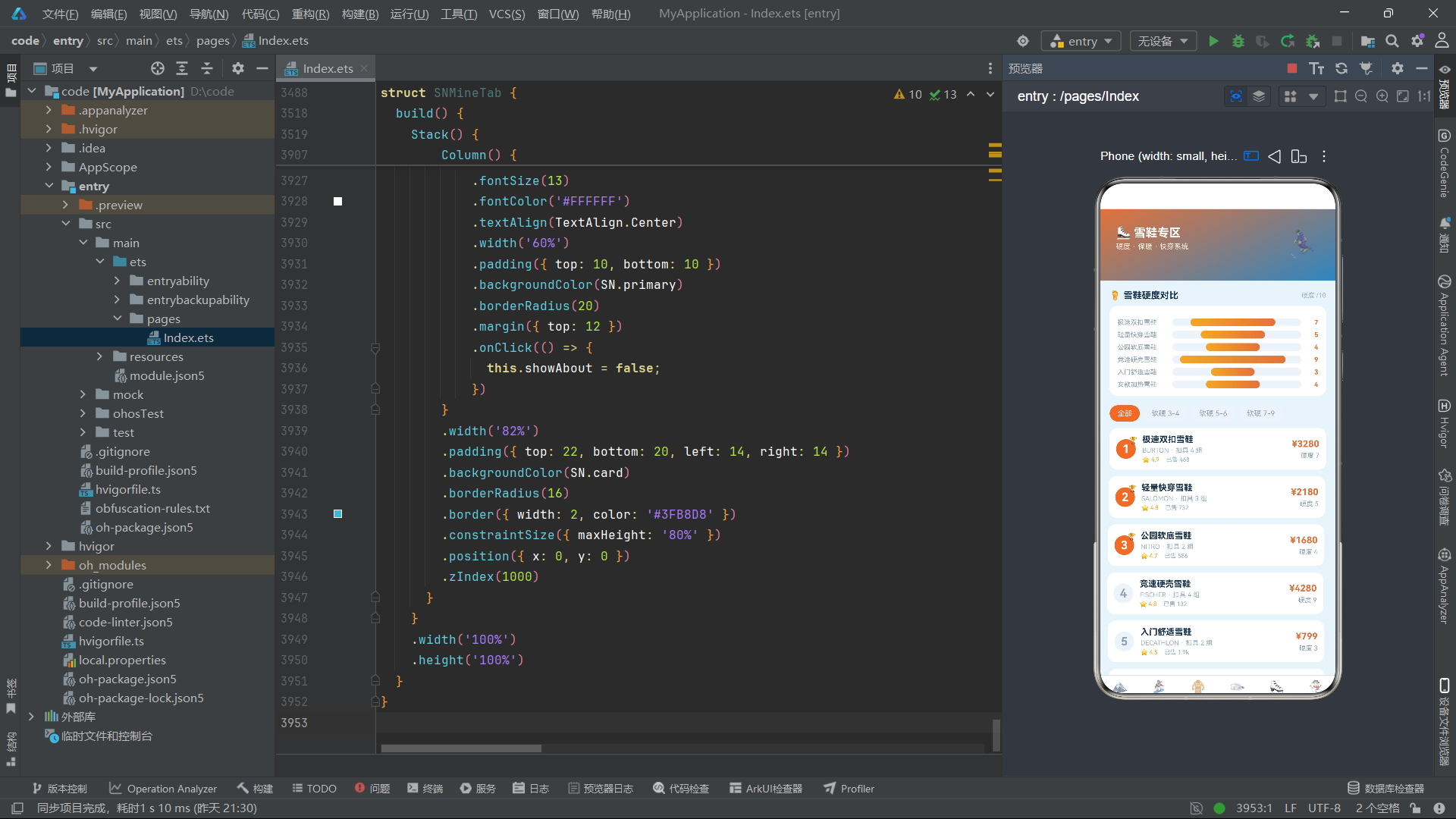
排名徽章是 30x30 的圆形,前三名使用橙色背景和白色数字,并在右上角叠加 🏆 奖杯图标(通过 position 定位)。第四名及以后使用浅灰背景和灰色数字。列表项通过 .translate({ x: snSwingX(this.wave, i), y: 0 }) 实现水平摇摆微动画——this.wave 每 250 毫秒递增,snSwingX 计算出 -4 到 3.8 像素的水平偏移量,使列表项产生轻微的左右摆动效果,增加了排行榜的活力感。
雪鞋详情弹窗同样包含适合人群的智能推荐:
Text(this.selectedBoot!.flex >= 7 ? '竞速 / 刻滑' : this.selectedBoot!.flex >= 5 ? '进阶滑行' : '新手入门')
十一、个人中心 SNMineTab:会员卡、消费图表与信息管理
11.1 会员卡与光泽动画
个人中心顶部是一张渐变会员卡,配有光泽流动动画效果。
Stack() {
  Column()
    .width('100%')
    .height(150)
    .borderRadius(16)
    .linearGradient({
      angle: 140,
      colors: [['#16324F', 0], ['#2E86C1', 0.6], ['#3FB8D8', 1]]
    })
  Stack() {
    Row()
      .width('100%')
      .height(60)
      .rotate({ angle: 18 })
      .linearGradient({
        angle: 90,
        colors: [['#00FFFFFF', 0], ['#55FFFFFF', 1]]
      })
      .opacity(snShineO(this.wave))
      .position({ x: 0, y: 30 })
  }
  .width('100%')
  .height(150)
  Column() {
    Row() {
      Text('⛄')
        .fontSize(30)
      Text('SNOWLINE 雪线会员')
        .fontSize(16)
        .fontColor('#FFFFFF')
        .fontWeight(FontWeight.Bold)
        .margin({ left: 8 })
      Column().layoutWeight(1)
      Text('铂金卡')
        .fontSize(10)
        .fontColor('#16324F')
        .fontWeight(FontWeight.Bold)
        .padding({ left: 8, right: 8, top: 3, bottom: 3 })
        .backgroundColor('#DDF0FC')
        .borderRadius(10)
    }
    .width('88%')
    Text(this.nick + ' · 雪季卡会员')
      .fontSize(12)
      .fontColor('#DDF0FC')
      .width('88%')
      .margin({ top: 10 })
    Row() {
      Text('积分 12880')
        .fontSize(13)
        .fontColor('#FFFFFF')
        .fontWeight(FontWeight.Bold)
      Text('  ·  雪票 6 张')
        .fontSize(12)
        .fontColor('#DDF0FC')
      Column().layoutWeight(1)
      Text('已省 ¥2680')
        .fontSize(12)
        .fontColor('#F5A623')
        .fontWeight(FontWeight.Bold)
    }
    .width('88%')
    .margin({ top: 8 })
  }
  .width('100%')
  .height(150)
  .justifyContent(FlexAlign.Center)
}
.width('92%')
.margin({ top: 12 })
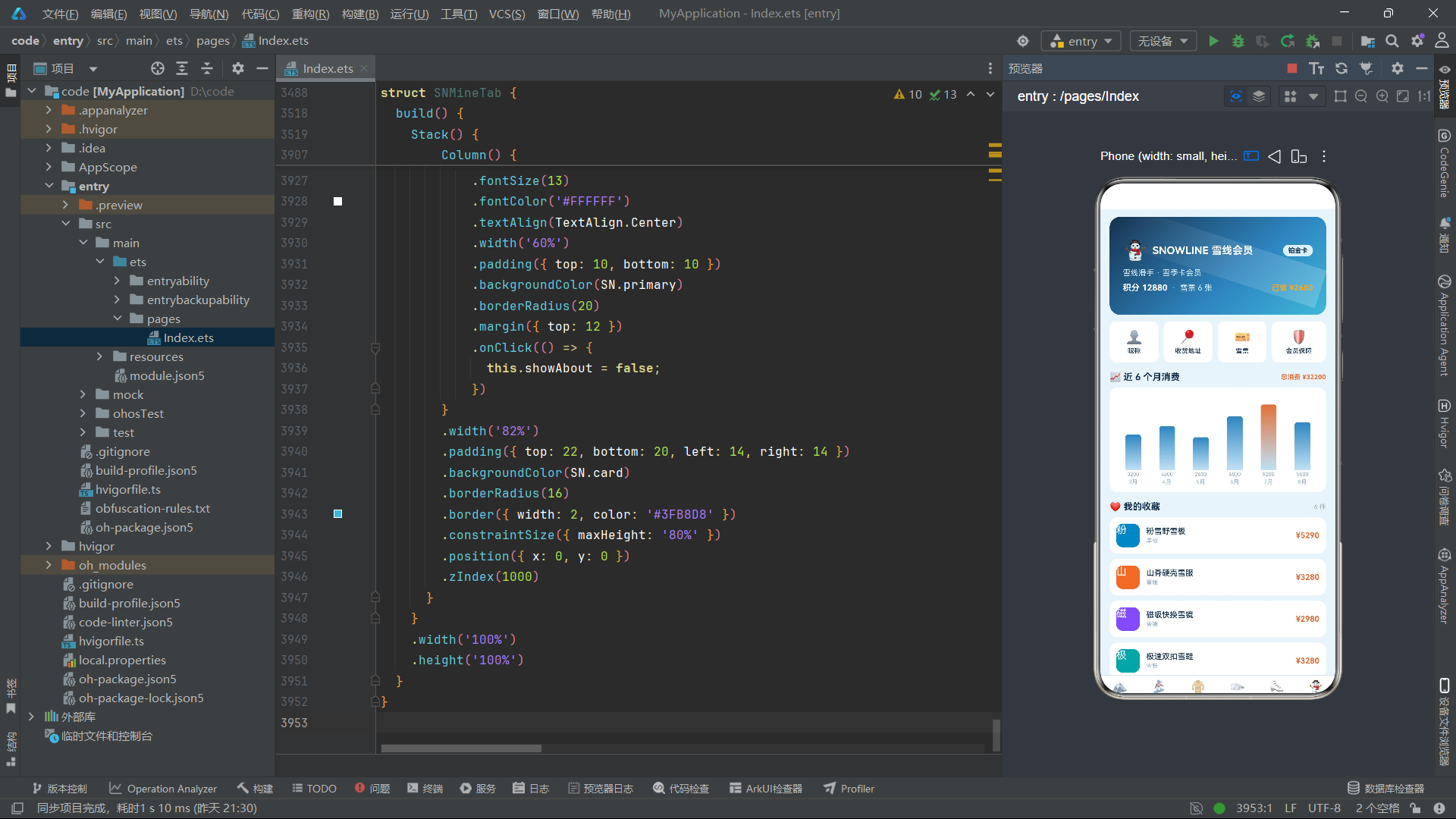
会员卡的三层 Stack 结构是整段代码的精华。第一层是深海蓝到亮青的三色渐变背景卡片。第二层是一个旋转 18 度的半透明白色渐变条,其透明度由 snShineO(this.wave) 动态计算——this.wave 每 300 毫秒递增,snShineO 生成 0.25 到 0.89 之间周期变化的透明度值,使白色光条产生从暗到亮再到暗的流动光泽效果,模拟信用卡镭射光波。第三层是会员信息内容,包括品牌 Logo、"铂金卡"标签、用户昵称、积分/雪票/已省金额三列数据。
11.2 月度消费柱状图
个人中心展示近 6 个月的消费数据柱状图,使用与雪服销量图类似的竖向柱条方案。
Column() {
  Row() {
    ForEach(this.months, (m: string, i: number) => {
      Column() {
        Column()
          .width(24)
          .height(snMonthBar(this.monthData[i], 9200))
          .linearGradient({
            angle: 180,
            colors: [[i === 4 ? '#E2723B' : '#2E86C1', 0], ['#BFE0F5', 1]]
          })
          .borderRadius({ topLeft: 4, topRight: 4 })
        Text(this.monthData[i].toString())
          .fontSize(8)
          .fontColor('#8FA3B3')
          .margin({ top: 2 })
        Text(m)
          .fontSize(9)
          .fontColor('#9DB4C8')
          .margin({ top: 2 })
      }
      .layoutWeight(1)
      .height(140)
      .justifyContent(FlexAlign.End)
    }, (m: string, i: number) => i.toString() + m)
  }
  .width('100%')
  .height(140)
}
月份数据 monthData: number[] = [3200, 4800, 2600, 6800, 9200, 5600] 展示了从 3 月到 8 月的消费变化,7 月(索引 4)消费最高(9200 元),因此柱条使用橙色突出显示,其余月份使用蓝色渐变。snMonthBar(this.monthData[i], 9200) 以最大值 9200 为归一化基准计算柱条高度,最高柱条接近满格,最低柱条也有约 50 像素的高度。
11.3 收藏列表与订单列表
收藏列表使用 ForEach 遍历 SN_FAVS 数组,每项展示品类色块、商品名首字图标、商品名、品类标签和价格。订单列表展示订单名、下单时间、数量、金额和状态标签。
// 收藏列表
ForEach(this.favs, (f: FavItem) => {
  Row() {
    Column()
      .width(36)
      .height(36)
      .borderRadius(10)
      .backgroundColor(snFavColor(f.type))
    Text(snImg(f.name))
      .fontSize(16)
      .fontColor('#FFFFFF')
      .position({ x: 0, y: 0 })
    Column() {
      Text(f.name)
        .fontSize(12)
        .fontColor(SN.text)
        .fontWeight(FontWeight.Medium)
      Text(f.type)
        .fontSize(9)
        .fontColor('#9DB4C8')
        .margin({ top: 2 })
    }
    .layoutWeight(1)
    .margin({ left: 10 })
    .alignItems(HorizontalAlign.Start)
    Text(snPrice(f.price))
      .fontSize(12)
      .fontColor('#E2723B')
      .fontWeight(FontWeight.Bold)
  }
  .width('92%')
  .padding(10)
  .backgroundColor(SN.card)
  .borderRadius(12)
  .margin({ top: 8 })
}, (f: FavItem) => f.name)

// 订单列表
ForEach(this.orders, (o: OrderItem) => {
  Row() {
    Column() {
      Text(o.name)
        .fontSize(12)
        .fontColor(SN.text)
        .fontWeight(FontWeight.Medium)
        .maxLines(1)
      Text(o.time + ' · 数量 ' + o.num.toString())
        .fontSize(9)
        .fontColor('#9DB4C8')
        .margin({ top: 3 })
    }
    .layoutWeight(1)
    .alignItems(HorizontalAlign.Start)
    Column() {
      Text(snPrice(o.price))
        .fontSize(12)
        .fontColor('#E2723B')
        .fontWeight(FontWeight.Bold)
      Text(o.status)
        .fontSize(9)
        .fontColor('#FFFFFF')
        .padding({ left: 6, right: 6, top: 2, bottom: 2 })
        .backgroundColor(snStatusColor(o.status))
        .borderRadius(8)
        .margin({ top: 3 })
    }
    .alignItems(HorizontalAlign.End)
  }
  .width('92%')
  .padding(10)
  .backgroundColor(SN.card)
  .borderRadius(12)
  .margin({ top: 8 })
}, (o: OrderItem) => o.name)
收藏列表的色块通过 snFavColor(f.type) 根据品类返回不同颜色——单板蓝、雪服橙、雪镜紫、雪鞋青——使收藏列表的色彩形成品类维度的视觉分类。订单列表的状态标签通过 snStatusColor(o.status) 区分"已发货"(橙色)和"已完成"(灰色),使消费者一眼定位需要关注的订单。
11.4 昵称修改与地址修改弹窗
个人中心提供了三个弹窗:昵称修改、收货地址修改和关于信息。昵称修改弹窗使用 TextInput 绑定 this.nick 状态,保存后即时更新到会员卡显示。地址修改弹窗同理,额外展示了当前地址的实时预览。
if (this.showNick) {
  this.modalOverlay()
  Column() {
    Text('👤 修改昵称')
      .fontSize(17)
      .fontColor(SN.text)
      .fontWeight(FontWeight.Bold)
    Text('昵称将展示在会员卡与评价中')
      .fontSize(11)
      .fontColor('#9DB4C8')
      .margin({ top: 4 })
    TextInput({ placeholder: '请输入昵称', text: this.nick })
      .fontSize(13)
      .height(40)
      .backgroundColor('#EDF3FA')
      .borderRadius(8)
      .width('100%')
      .margin({ top: 12 })
      .onChange((v: string) => {
        this.nick = v;
      })
    Row() {
      Text('取消')
        .onClick(() => { this.showNick = false; })
      Text('保存')
        .onClick(() => { this.showNick = false; })
    }
  }
}
TextInput 的 onChange 回调实时更新 this.nick,由于 nick 是 @State 变量,输入时会员卡上的昵称显示也会同步变化,这是 ArkTS 双向数据绑定的直观体现。关于弹窗则展示了品牌简介、版本号和客服热线,是一个纯信息展示弹窗。
十二、应用架构流程图
上图完整展示了应用从入口组件到六个 Tab 页面、再到各页面内部功能模块的层次结构。可以清晰看到每个品专区页都遵循"数据图表 + 筛选 + 列表 + CRUD 弹窗"的统一架构模式,但每个页面的图表类型、筛选维度和列表布局都根据品类特点做了差异化设计,体现了"统一框架 + 差异表达"的工程哲学。
十三、核心技术特性对比
| 技术维度 | 首页 SNHomeTab | 单板 SNBoardTab | 雪服 SNJacketTab | 雪镜 SNGoggleTab | 雪鞋 SNBootTab | 我的 SNMineTab |
|---|---|---|---|---|---|---|
| 核心数据模型 | BoardItem | BoardItem | JacketItem | GoggleItem | BootItem | OrderItem/FavItem |
| 数据可视化 | 无(展示为主) | 横向价格柱条图 | 竖向销量柱状图 | 横向透光率柱条图 | 横向硬度柱条图 | 竖向月度消费图 |
| 图表函数 | 无 | snBarW + snMaxBoard | snMonthBar + snMaxJacket | snVtW | snFlexW | snMonthBar |
| 筛选维度 | 无 | 板型(精确匹配) | 防水指数(阈值比较) | 镜片类型(精确匹配) | 硬度区间(范围比较) | 无 |
| 列表布局 | 横向滚动+网格 | 纵向Row列表 | 两列Grid网格 | 纵向Row大卡 | 纵向排行榜列表 | 纵向Row列表 |
| 动画效果 | 雪花飘落(200ms) | 无 | 无 | 无 | 摇摆动画(250ms) | 光泽流动(300ms) |
| 弹窗数量 | 4个(签到/券/天气/教练) | 4个(详情/新增/编辑/删除) | 3个(详情/新增/删除) | 4个(详情/新增/编辑/删除) | 3个(详情/新增/删除) | 3个(昵称/地址/关于) |
| CRUD支持 | 无 | 增删改查全流程 | 增删查 | 增删改查全流程 | 增删查 | 无 |
| 智能推荐 | 无 | 硬度→适合人群 | 无 | VLT→使用场景 | 硬度→适合人群 | 无 |
| 颜色映射 | cColors数组 | snTypeColor | water阈值色 | snLensColor | 无 | snFavColor/snStatusColor |
| 纯函数调用数 | 6+ | 8+ | 7+ | 8+ | 7+ | 5+ |
| Banner渐变 | 三色蓝青(160°) | 双色青蓝(150°) | 紫蓝(160°) | 青紫(150°) | 橙蓝(155°) | 深蓝青(140°) |
安装DevEco Studio程序

选择目标安装目录:

设置环境变量,但是需要重启一下:

新建一个空白模板:

设置API为24的模板项目:

初始化项目,自动下载相关依赖:

完整代码:
// 底部 6 tab:首页 / 单板 / 雪服 / 雪镜 / 雪鞋 / 我的

interface SNTheme {
  bg: string;
  primary: string;
  accent: string;
  card: string;
  text: string;
  line: string;
  glow: string;
}

interface BoardItem {
  name: string;
  brand: string;
  type: string;
  len: number;
  flex: number;
  price: number;
  orig: number;
  sale: number;
  stars: number;
}

interface JacketItem {
  name: string;
  brand: string;
  water: number;
  warm: number;
  price: number;
  orig: number;
  sale: number;
  stars: number;
}

interface GoggleItem {
  name: string;
  brand: string;
  lens: string;
  vt: number;
  price: number;
  orig: number;
  sale: number;
  stars: number;
}

interface BootItem {
  name: string;
  brand: string;
  flex: number;
  buckle: number;
  price: number;
  orig: number;
  sale: number;
  stars: number;
}

interface OrderItem {
  name: string;
  time: string;
  num: number;
  status: string;
  price: number;
}

interface FavItem {
  name: string;
  price: number;
  type: string;
}

const SN: SNTheme = {
  bg: '#EAF4FB',
  primary: '#2E86C1',
  accent: '#0FA3A6',
  card: '#FFFFFF',
  text: '#17324F',
  line: '#D3E6F3',
  glow: '#3FB8D8'
};

const SN_BOARDS: BoardItem[] = [
  { name: '极光全山板 PRO', brand: 'BURTON', type: '全能板', len: 158, flex: 5, price: 4680, orig: 5980, sale: 932, stars: 4.9 },
  { name: '雪线公园板', brand: 'NITRO', type: '公园板', len: 152, flex: 4, price: 3290, orig: 3980, sale: 715, stars: 4.8 },
  { name: '粉雪野雪板', brand: 'CAPITA', type: '野雪板', len: 162, flex: 6, price: 5290, orig: 6280, sale: 388, stars: 4.9 },
  { name: '竞速回转板', brand: 'FISCHER', type: '竞速板', len: 165, flex: 8, price: 6880, orig: 7980, sale: 156, stars: 4.7 },
  { name: '初雪练习板', brand: 'DECATHLON', type: '全能板', len: 148, flex: 3, price: 1680, orig: 1990, sale: 1280, stars: 4.6 },
  { name: '冰川宽板', brand: 'JONES', type: '野雪板', len: 160, flex: 7, price: 5980, orig: 6980, sale: 264, stars: 4.8 },
  { name: '自由式软板', brand: 'SALOMON', type: '公园板', len: 150, flex: 4, price: 2990, orig: 3580, sale: 596, stars: 4.7 },
  { name: '刻滑竞技板', brand: 'KESSLER', type: '竞速板', len: 168, flex: 9, price: 7580, orig: 8680, sale: 98, stars: 4.9 },
  { name: '城市通勤板', brand: 'NIDECKER', type: '全能板', len: 155, flex: 4, price: 2180, orig: 2680, sale: 866, stars: 4.5 },
  { name: '女款轻盈板', brand: 'ROME', type: '全能板', len: 146, flex: 3, price: 2680, orig: 3180, sale: 442, stars: 4.8 }
];

const SN_JACKETS: JacketItem[] = [
  { name: '极地三合一雪服', brand: 'ARC\'TERYX', water: 20000, warm: 90, price: 5680, orig: 6880, sale: 621, stars: 4.9 },
  { name: '山脊硬壳雪服', brand: 'THE NORTH FACE', water: 15000, warm: 75, price: 3280, orig: 3980, sale: 843, stars: 4.8 },
  { name: '粉雪连体雪服', brand: 'VOLCOM', water: 12000, warm: 82, price: 2880, orig: 3480, sale: 512, stars: 4.7 },
  { name: '城市通勤棉服', brand: 'DECATHLON', water: 8000, warm: 70, price: 799, orig: 999, sale: 2310, stars: 4.5 },
  { name: '极光滑雪羽绒', brand: 'MONCLER', water: 10000, warm: 95, price: 12800, orig: 14800, sale: 87, stars: 4.9 },
  { name: '越野轻量雪服', brand: 'HELLY HANSEN', water: 18000, warm: 68, price: 4280, orig: 4980, sale: 356, stars: 4.8 },
  { name: '儿童防寒雪服', brand: 'MINI SKI', water: 6000, warm: 85, price: 599, orig: 799, sale: 1650, stars: 4.6 },
  { name: '竞技贴身速干', brand: 'ODLO', water: 5000, warm: 60, price: 680, orig: 880, sale: 1288, stars: 4.7 }
];

const SN_GOGGLES: GoggleItem[] = [
  { name: '极光变色雪镜', brand: 'OAKLEY', lens: '变光镜片', vt: 42, price: 2280, orig: 2680, sale: 738, stars: 4.9 },
  { name: '大视野球面镜', brand: 'SMITH', lens: '球面镜片', vt: 55, price: 1680, orig: 2080, sale: 926, stars: 4.8 },
  { name: '夜场增光镜', brand: 'ANON', lens: '增光镜片', vt: 68, price: 1280, orig: 1580, sale: 615, stars: 4.7 },
  { name: '雪镜防雾入门', brand: 'DECATHLON', lens: '柱面镜片', vt: 48, price: 399, orig: 499, sale: 2380, stars: 4.5 },
  { name: '炫彩镀膜雪镜', brand: 'DRAGON', lens: '镀膜镜片', vt: 35, price: 1980, orig: 2380, sale: 423, stars: 4.8 },
  { name: '儿童卡通雪镜', brand: 'KIDSKI', lens: '柱面镜片', vt: 50, price: 259, orig: 329, sale: 1520, stars: 4.6 },
  { name: '磁吸快换雪镜', brand: 'OAKLEY', lens: '变光镜片', vt: 38, price: 2980, orig: 3480, sale: 288, stars: 4.9 },
  { name: '护目越野镜', brand: 'UVEX', lens: '增光镜片', vt: 72, price: 880, orig: 1080, sale: 512, stars: 4.7 }
];

const SN_BOOTS: BootItem[] = [
  { name: '极速双扣雪鞋', brand: 'BURTON', flex: 7, buckle: 4, price: 3280, orig: 3980, sale: 468, stars: 4.9 },
  { name: '轻量快穿雪鞋', brand: 'SALOMON', flex: 5, buckle: 3, price: 2180, orig: 2580, sale: 732, stars: 4.8 },
  { name: '公园软底雪鞋', brand: 'NITRO', flex: 4, buckle: 2, price: 1680, orig: 2080, sale: 586, stars: 4.7 },
  { name: '竞速硬壳雪鞋', brand: 'FISCHER', flex: 9, buckle: 4, price: 4280, orig: 4980, sale: 132, stars: 4.8 },
  { name: '入门舒适雪鞋', brand: 'DECATHLON', flex: 3, buckle: 2, price: 799, orig: 999, sale: 1860, stars: 4.5 },
  { name: '女款加热雪鞋', brand: 'ROME', flex: 4, buckle: 3, price: 2680, orig: 3180, sale: 296, stars: 4.8 }
];

const SN_ORDERS: OrderItem[] = [
  { name: '极光全山板 PRO', time: '2026-08-12', num: 1, status: '已发货', price: 4680 },
  { name: '极光变色雪镜', time: '2026-08-10', num: 2, status: '已完成', price: 4560 },
  { name: '极地三合一雪服', time: '2026-08-06', num: 1, status: '已发货', price: 5680 },
  { name: '雪镜防雾入门', time: '2026-07-28', num: 3, status: '已完成', price: 1197 },
  { name: '轻量快穿雪鞋', time: '2026-07-15', num: 1, status: '已完成', price: 2180 },
  { name: '城市通勤棉服', time: '2026-06-30', num: 2, status: '已完成', price: 1598 }
];

const SN_FAVS: FavItem[] = [
  { name: '粉雪野雪板', price: 5290, type: '单板' },
  { name: '山脊硬壳雪服', price: 3280, type: '雪服' },
  { name: '磁吸快换雪镜', price: 2980, type: '雪镜' },
  { name: '极速双扣雪鞋', price: 3280, type: '雪鞋' },
  { name: '极光滑雪羽绒', price: 12800, type: '雪服' },
  { name: '刻滑竞技板', price: 7580, type: '单板' }
];

// ---------- 全局纯函数 ----------

function snPrice(p: number): string {
  return '¥' + p.toString();
}

function snOff(o: number, p: number): number {
  return Math.round((1 - p / o) * 100);
}

function snNum(n: number): string {
  return n > 999 ? (n / 1000).toFixed(1) + 'k' : n.toString();
}

function snBarW(v: number, max: number): number {
  return Math.round(46 + v / max * 46);
}

function snVtW(v: number): number {
  return Math.round(20 + v * 0.8);
}

function snFlexW(v: number): number {
  return Math.round(10 + v * 8);
}

function snMonthBar(v: number, max: number): number {
  return Math.round(30 + v / max * 70);
}

function snStatusColor(s: string): string {
  if (s === '已发货') {
    return '#E2723B';
  }
  return '#8FA3B3';
}

function snTypeColor(t: string): string {
  if (t === '野雪板') {
    return '#3D7E9A';
  }
  if (t === '公园板') {
    return '#0FA3A6';
  }
  if (t === '竞速板') {
    return '#2E86C1';
  }
  return '#8FA3B3';
}

function snLensColor(l: string): string {
  if (l === '变光镜片') {
    return '#7C4DFF';
  }
  if (l === '球面镜片') {
    return '#0FA3A6';
  }
  if (l === '增光镜片') {
    return '#F5A623';
  }
  if (l === '镀膜镜片') {
    return '#2E86C1';
  }
  return '#8FA3B3';
}

function snFavColor(t: string): string {
  if (t === '单板') {
    return '#2E86C1';
  }
  if (t === '雪服') {
    return '#E2723B';
  }
  if (t === '雪镜') {
    return '#7C4DFF';
  }
  return '#0FA3A6';
}

function snImg(n: string): string {
  return n.charAt(0);
}

function snFilterBoards(arr: BoardItem[]): BoardItem[] {
  return arr;
}

function snFilterJackets(arr: JacketItem[]): JacketItem[] {
  return arr;
}

function snFilterGoggles(arr: GoggleItem[]): GoggleItem[] {
  return arr;
}

function snFilterBoots(arr: BootItem[]): BootItem[] {
  return arr;
}

function snBoardTop(arr: BoardItem[]): BoardItem[] {
  return arr.slice(0, 6);
}

function snJacketTop(arr: JacketItem[]): JacketItem[] {
  return arr.slice(0, 8);
}

function snGoggleTop(arr: GoggleItem[]): GoggleItem[] {
  return arr.slice(0, 8);
}

function snBootTop(arr: BootItem[]): BootItem[] {
  return arr.slice(0, 6);
}

function snHotTop(): BoardItem[] {
  return SN_BOARDS.slice(0, 5);
}

function snMaxBoard(arr: BoardItem[]): number {
  let m: number = 0;
  for (let i = 0; i < arr.length; i++) {
    if (arr[i].price > m) {
      m = arr[i].price;
    }
  }
  return m;
}

function snMaxJacket(arr: JacketItem[]): number {
  let m: number = 0;
  for (let i = 0; i < arr.length; i++) {
    if (arr[i].sale > m) {
      m = arr[i].sale;
    }
  }
  return m;
}

function snMaxGoggle(arr: GoggleItem[]): number {
  let m: number = 0;
  for (let i = 0; i < arr.length; i++) {
    if (arr[i].sale > m) {
      m = arr[i].sale;
    }
  }
  return m;
}

function snMaxBoot(arr: BootItem[]): number {
  let m: number = 0;
  for (let i = 0; i < arr.length; i++) {
    if (arr[i].price > m) {
      m = arr[i].price;
    }
  }
  return m;
}

function snMaxHot(): number {
  let m: number = 0;
  for (let i = 0; i < SN_BOARDS.length; i++) {
    if (SN_BOARDS[i].sale > m) {
      m = SN_BOARDS[i].sale;
    }
  }
  return m;
}

function snBoardTypeChips(): string[] {
  return ['全部', '全能板', '公园板', '野雪板', '竞速板'];
}

function snJacketWaterChips(): string[] {
  return ['全部', '5000+', '10000+', '15000+'];
}

function snGoggleLensChips(): string[] {
  return ['全部', '变光镜片', '球面镜片', '增光镜片', '柱面镜片'];
}

function snBootFlexChips(): string[] {
  return ['全部', '软硬 3-4', '软硬 5-6', '软硬 7-9'];
}

function snBoardFilter(arr: BoardItem[], t: string): BoardItem[] {
  let r: BoardItem[] = [];
  if (t === '全部') {
    return arr;
  }
  for (let i = 0; i < arr.length; i++) {
    if (arr[i].type === t) {
      r.push(arr[i]);
    }
  }
  return r;
}

function snJacketFilter(arr: JacketItem[], w: string): JacketItem[] {
  let r: JacketItem[] = [];
  if (w === '全部') {
    return arr;
  }
  for (let i = 0; i < arr.length; i++) {
    if (arr[i].water >= parseInt(w)) {
      r.push(arr[i]);
    }
  }
  return r;
}

function snGoggleFilter(arr: GoggleItem[], l: string): GoggleItem[] {
  let r: GoggleItem[] = [];
  if (l === '全部') {
    return arr;
  }
  for (let i = 0; i < arr.length; i++) {
    if (arr[i].lens === l) {
      r.push(arr[i]);
    }
  }
  return r;
}

function snBootFilter(arr: BootItem[], f: string): BootItem[] {
  let r: BootItem[] = [];
  if (f === '全部') {
    return arr;
  }
  for (let i = 0; i < arr.length; i++) {
    if (arr[i].flex >= parseInt(f.charAt(2)) && arr[i].flex <= parseInt(f.charAt(4))) {
      r.push(arr[i]);
    }
  }
  return r;
}

function snSnowY(w: number, i: number): number {
  return (w * 3 + i * 29) % 118;
}

function snSnowX(i: number): number {
  return 12 + i * 36;
}

function snTwinkle(w: number, i: number): number {
  let v: number = (w + i * 7) % 12;
  return v < 6 ? 0.35 + v * 0.1 : 0.95 - (v - 6) * 0.1;
}

function snFloatY(w: number, i: number): number {
  let v: number = (w + i * 13) % 20;
  return v < 10 ? v : 20 - v;
}

function snRipple(w: number, i: number): number {
  let v: number = (w + i * 5) % 10;
  return 1 - v / 10;
}

function snShineO(w: number): number {
  let v: number = w % 16;
  return v < 8 ? 0.25 + v * 0.08 : 0.89 - (v - 8) * 0.08;
}

function snSwingX(w: number, i: number): number {
  let v: number = (w + i * 11) % 12;
  return v < 6 ? -4 + v * 1.3 : 3.8 - (v - 6) * 1.3;
}

function snFindBoardIdx(arr: BoardItem[], name: string): number {
  for (let i = 0; i < arr.length; i++) {
    if (arr[i].name === name) {
      return i;
    }
  }
  return 0;
}

function snFindJacketIdx(arr: JacketItem[], name: string): number {
  for (let i = 0; i < arr.length; i++) {
    if (arr[i].name === name) {
      return i;
    }
  }
  return 0;
}

function snFindGoggleIdx(arr: GoggleItem[], name: string): number {
  for (let i = 0; i < arr.length; i++) {
    if (arr[i].name === name) {
      return i;
    }
  }
  return 0;
}

function snFindBootIdx(arr: BootItem[], name: string): number {
  for (let i = 0; i < arr.length; i++) {
    if (arr[i].name === name) {
      return i;
    }
  }
  return 0;
}

function snFindOrderIdx(arr: OrderItem[], name: string): number {
  for (let i = 0; i < arr.length; i++) {
    if (arr[i].name === name) {
      return i;
    }
  }
  return 0;
}

// ---------- 主组件 ----------

@Entry
@Component
struct SNApp {
  @State tab: number = 0;
  @State tick: number = 0;
  tabs: string[] = ['首页', '单板', '雪服', '雪镜', '雪鞋', '我的'];
  icons: string[] = ['🏔️', '🏂', '🧥', '🥽', '⛸️', '⛄'];

  aboutToAppear(): void {
    setInterval(() => {
      this.tick = this.tick + 1;
    }, 400);
  }

  @Builder
  modalOverlay() {
    Column()
      .width('100%')
      .height('100%')
      .backgroundColor('#99000000')
      .position({ x: 0, y: 0 })

          .margin({ top: 8 })
          Column() {
            Text('价格')
              .fontSize(11)
              .fontColor('#8FA3B3')
            TextInput({ placeholder: '价格', text: this.nPrice })
              .fontSize(12)
              .height(36)
              .backgroundColor('#EDF3FA')
              .borderRadius(8)
              .margin({ top: 4 })
              .onChange((v: string) => {
                this.nPrice = v;
              })

        }
        .width('82%')
        .padding({ top: 22, bottom: 20, left: 14, right: 14 })
        .backgroundColor(SN.card)
        .borderRadius(16)
        .border({ width: 2, color: '#3FB8D8' })
        .constraintSize({ maxHeight: '80%' })
        .position({ x: 0, y: 0 })
        .zIndex(1000)
      }
    }
    .width('100%')
    .height('100%')
  }
}
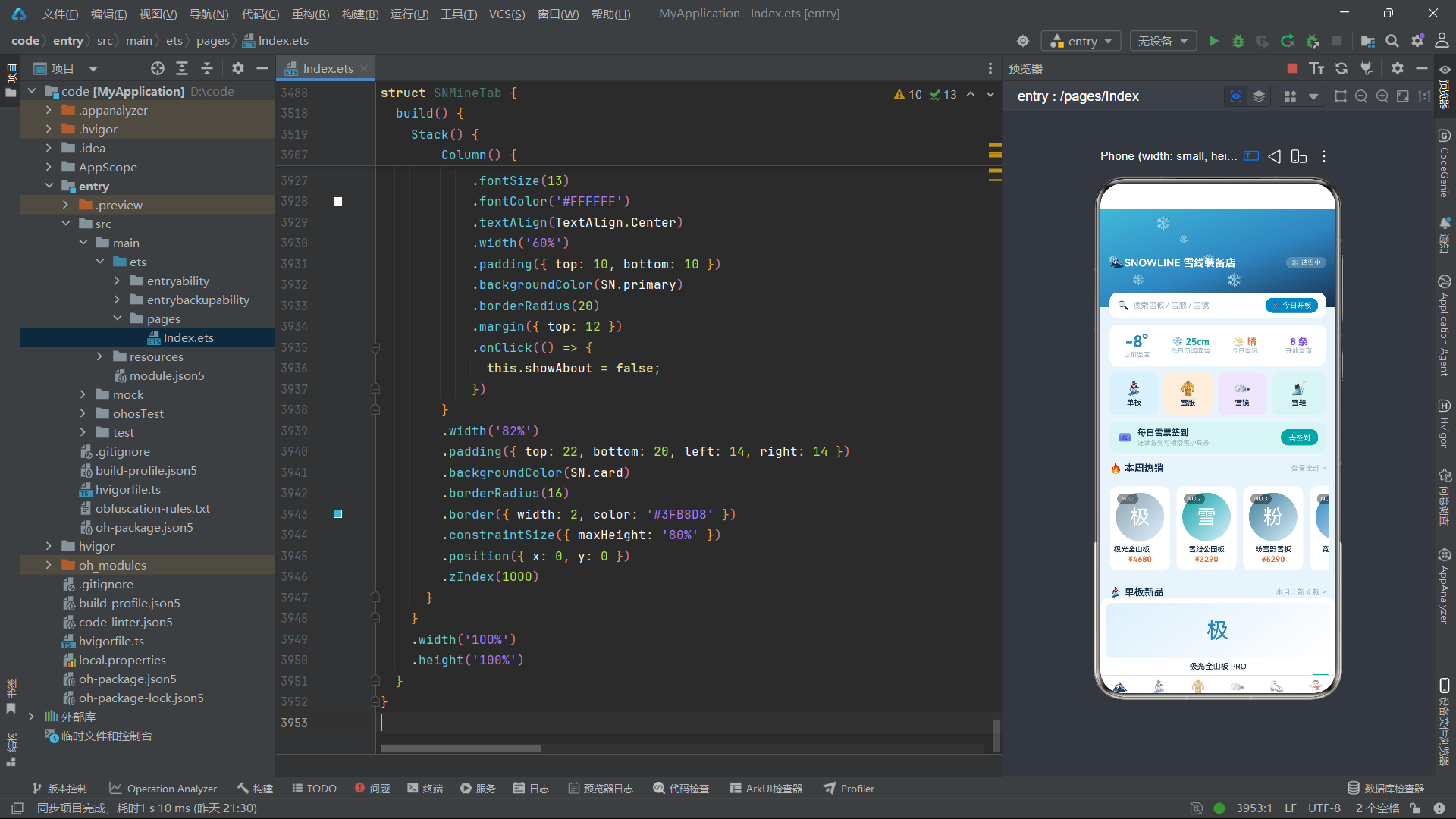
十四、总结
本文完整剖析了雪线单板装备店(SNOWLINE)这一基于 HarmonyOS ArkTS API 24 声明式 UI 框架构建的全品类滑雪装备电商应用。从 4000 行源码中提炼出以下核心技术实践:
第一,主题色系的接口化设计。通过 SNTheme 接口和 SN 常量对象,将七个语义化颜色字段收敛为全局唯一的颜色来源,配合四个颜色映射函数(snTypeColor、snLensColor、snFavColor、snStatusColor),实现了"静态主题 + 动态语义色"的双层颜色管理体系。这种设计不仅保证了视觉一致性,还为未来主题切换预留了扩展点。
第二,六大数据模型的差异化建模。BoardItem、JacketItem、GoggleItem、BootItem、OrderItem、FavItem 六个接口分别针对不同品类的核心参数建模——单板的板长/硬度、雪服的防水/保暖、雪镜的透光率/镜片类型、雪鞋的硬度/扣具——每个模型都精准捕捉了该品类的选购决策维度,避免了"一刀切"通用模型的信息冗余或缺失。
第三,纯函数工具层的系统化建设。应用定义了超过 30 个纯函数,覆盖格式化(snPrice/snOff/snNum)、图表计算(snBarW/snVtW/snFlexW/snMonthBar)、筛选过滤(snBoardFilter/snJacketFilter/snGoggleFilter/snBootFilter)、动画驱动(snSnowY/snShineO/snSwingX)四大类别。这些函数无副作用、可独立测试、可跨组件复用,是应用业务逻辑与视图渲染之间的解耦层。
第四,数据可视化的无库实现。应用在四个品专区页和个中心各实现了不同类型的图表——横向柱条图、竖向柱状图、进度条——全部使用 Stack 叠加双 Row 的原生组件方案实现,未引入任何第三方图表库。通过归一化函数将数据映射为百分比宽度/高度,再配合渐变色和 borderRadius,以极低的依赖实现了直观的数据可视化效果。
第五,弹窗管理的统一范式。全应用共 21 个弹窗(首页 4 + 单板 4 + 雪服 3 + 雪镜 4 + 雪鞋 3 + 我的 3),全部采用 modalOverlay() Builder 生成遮罩 + Column 内容体的统一结构,通过 zIndex(999/1000) 管理层叠顺序,constraintSize({ maxHeight: '80%' }) 保证小屏适配,position 和 border 实现视觉聚焦。这种统一范式使弹窗的创建、展示和关闭逻辑高度一致,降低了维护成本。
第六,CRUD 全流程的数组状态管理。单板和雪镜专区页实现了完整的增删改查流程,核心操作是 push(新增)、splice 替换(编辑)、splice 移除(删除)三种数组操作。配合 snFindBoardIdx 等查找函数按名称定位索引,实现了不依赖数据库的本地数据管理。每次数组操作都通过创建副本(slice())或直接调用变更方法触发 ArkTS 的状态监听,自动更新视图。
第七,微动画的数学函数驱动。应用实现了雪花飘落、会员卡光泽流动、雪鞋列表摇摆三种微动画,均由 setInterval 定时器递增计数器,配合取模运算(%)生成周期性变化的数值,再映射为 opacity、position 或 translate 属性值。这种方案无需动画框架,仅用纯数学函数就实现了丰富的动态效果,展示了 ArkTS 在轻量级动画场景下的表达能力。

讨论HarmonyOS开发技术,专注于API与组件、DevEco Studio、测试、元服务和应用上架分发等。
更多推荐


 5
5 0
0- 0


 已为社区贡献8条内容

所有评论(0)