基于HarmonyOS API 24的ArkTS手造眼镜工坊多模块商城与声明式动效深度解析——HarmonyOS 6.1.1声明式UI实战
声明式UI的核心不在于"画出界面",而在于"描述状态与界面的映射关系"。当状态变化时,框架自动驱动视图刷新,开发者只需关注数据流向与业务逻辑,而不必手动操作DOM节点。这一范式转变使得复杂交互界面的维护成本大幅降低。
在HarmonyOS ArkTS体系中,组件化不是可选项而是基础设施。每一个struct对应一个独立的可复用UI单元,通过@State、@Prop、@Builder等装饰器实现状态管理与视图构建的解耦。这种设计让大型应用的模块拆分变得清晰而自然。
动效体验是区分"能用"与"好用"的分水岭。通过setInterval驱动的波形函数与translate/opacity属性的联动,开发者可以在不引入额外动画框架的前提下,实现呼吸、浮动、闪烁等细腻的微交互效果,使界面从静态走向"活"的状态。
引言
随着移动端电商应用日益成熟,用户对购物界面的视觉品质和交互流畅度提出了更高的要求。传统的命令式UI开发模式在应对复杂列表、动态筛选、多层级弹窗等场景时,往往陷入状态同步困难、代码臃肿难以维护的困境。HarmonyOS ArkTS以声明式UI为核心,提供了一套从数据模型定义、组件化构建到状态驱动的完整方案,使得开发者能够以更简洁的代码表达更复杂的界面逻辑。本文以一个手造眼镜工坊商城为例,深入剖析其架构设计、数据流管理、动效实现及业务模块拆分策略。
该商城应用覆盖了镜架选购、光学镜片选配、墨镜展示、配件管理及个人中心五大业务模块,每个模块均具备独立的列表渲染、分类筛选、详情弹窗和增删改操作能力。在技术层面,应用采用了接口驱动的数据模型定义方式,通过interface明确约束各实体的字段类型;利用函数式工具集封装颜色映射、进度条宽度和波形动画等通用逻辑;以struct组件为单元实现模块解耦,通过@State管理组件内部状态,利用条件渲染控制弹窗的显示与隐藏。整体架构清晰、职责分明,是ArkTS声明式UI在垂直电商场景下的典型实践。
在视觉设计上,应用采用玳瑁棕为主色调,搭配复古墨绿与奶油白形成温暖而沉稳的手工匠人风格。背景色、卡片色、文字色、分割线色等均通过统一的Theme常量对象集中管理,确保全应用色彩一致性。动效方面,通过sin/cos波形函数配合60ms间隔的定时器,实现了图标浮动、透明度闪烁、进度条脉冲、弹跳偏移等多种微动画,为静态的商品列表注入了生命力。这些设计细节共同塑造了一个兼具功能完整性与视觉表现力的高品质电商界面。
一、主题色彩体系与数据模型定义
在ArkTS应用开发中,良好的主题管理和数据模型定义是整个应用的基石。本应用首先通过interface定义了主题色对象EyTheme,集中管理背景色、主色、强调色、卡片色、文字色、辅助色、分割线色和辉光色八个维度。随后用const常量EY实例化该接口,确保所有组件引用统一的色彩标准。这种设计使得未来主题切换或暗色模式适配只需修改一处常量定义即可全局生效。
interface EyTheme {
  bg: string
  primary: string
  accent: string
  card: string
  text: string
  sub: string
  line: string
  glow: string
}

const EY: EyTheme = {
  bg: '#FAF6EF',
  primary: '#7A4A2B',
  accent: '#3E5C4B',
  card: '#FFFFFF',
  text: '#33261C',
  sub: '#9A8B7A',
  line: '#EADFCE',
  glow: '#C9A227'
}
主题常量定义完成后,紧接着是核心业务实体的接口声明。应用为镜框、镜片、墨镜、配件、订单、收藏和月度消费分别定义了独立的interface,每个接口严格约束字段名称与类型。例如EyFrame包含id、名称、品牌、材质、框型、重量、适配脸型、价格、销量、热度、标签等十一个字段,EyLens则包含折射率、颜色色值、好评率等光学领域特有属性。这些接口不仅服务于编译期类型检查,更构成了整个应用数据流转的契约层。
interface EyFrame {
  id: number
  name: string
  brand: string
  material: string
  shape: string
  weight: number
  face: string
  price: number
  sold: number
  heat: number
  tag: string
}

interface EyLens {
  id: number
  name: string
  type: string
  color: string
  colorHex: string
  refractive: number
  price: number
  sold: number
  rate: number
}

interface EySun {
  id: number
  name: string
  brand: string
  tint: string
  uv: string
  price: number
  sold: number
  heat: number
}
接口驱动的数据模型在ArkTS中不仅是类型安全的保障,更是团队协作的契约。当后端API返回的字段与前端interface定义不一致时,编译器会立即报错,将数据层的问题拦截在开发阶段而非暴露在生产环境。
数据模型的interface定义完成后,应用以const数组的形式初始化了各模块的模拟数据集。EY_FRAMES包含十款不同材质和框型的镜架数据,从意大利板材圆框到β钛半框轻羽,覆盖了鹅蛋脸、心形脸、方脸等多种脸型适配。EY_LENS涵盖防蓝光、离焦防控、变色、偏光、染色等光学镜片品类,并附带折射率和色值信息。EY_SUN、EY_ACC分别存储墨镜和配件数据,EY_ORDERS、EY_FAVS、EY_MONTHS则服务于个人中心模块的订单列表、心愿清单和消费趋势展示。
const EY_FRAMES: EyFrame[] = [
  { id: 1, name: '手造板材圆框 F-01', brand: '玳瑁堂', material: '意大利板材', shape: '圆形', weight: 18, face: '鹅蛋脸', price: 899, sold: 3210, heat: 96, tag: '手工打磨' },
  { id: 2, name: 'β钛半框轻羽 K-22', brand: '镜研社', material: 'β钛合金', shape: '半框', weight: 9, face: '所有脸型', price: 1280, sold: 2540, heat: 92, tag: '9g 超轻' },
  { id: 3, name: '复古猫眼醋酸 M-77', brand: '玳瑁堂', material: '醋酸纤维', shape: '猫眼', weight: 21, face: '心形脸', price: 760, sold: 1890, heat: 88, tag: '复古尖货' },
  { id: 4, name: 'TR90 方框灵动 T-05', brand: '轻野', material: 'TR90', shape: '方框', weight: 12, face: '圆脸', price: 328, sold: 5120, heat: 94, tag: '学生党' },
  { id: 5, name: '飞行员钛金镜 A-08', brand: '镜研社', material: '纯钛', shape: '飞行员', weight: 14, face: '方脸', price: 1680, sold: 980, heat: 85, tag: '商务款' }
]

const EY_LENS: EyLens[] = [
  { id: 1, name: '防蓝光非球面 1.60', type: '防蓝光', color: '浅琥珀', colorHex: '#E8C77E', refractive: 1.60, price: 380, sold: 4210, rate: 4.8 },
  { id: 2, name: '全焦离焦控度 1.67', type: '离焦防控', color: '透明', colorHex: '#F2F5F3', refractive: 1.67, price: 1580, sold: 1320, rate: 4.9 },
  { id: 3, name: '变色驾驶片 1.56', type: '变色', color: '灰变', colorHex: '#8C9BA5', refractive: 1.56, price: 460, sold: 2890, rate: 4.7 },
  { id: 4, name: '偏光墨镜片 1.59', type: '偏光', color: '墨绿', colorHex: '#3E5C4B', refractive: 1.59, price: 520, sold: 3320, rate: 4.8 }
]

const EY_TABS: EyTab[] = [
  { name: '首页', icon: '🏠' },
  { name: '镜框', icon: '👓' },
  { name: '镜片', icon: '🔍' },
  { name: '墨镜', icon: '🕶' },
  { name: '配件', icon: '🧰' },
  { name: '我的', icon: '👤' }
]
二、工具函数与颜色映射体系
在数据模型之上,应用构建了一套覆盖价格格式化、进度条计算、颜色映射和波形动画的工具函数集。这些函数采用纯函数设计,不依赖外部状态,输入确定则输出确定,便于测试和复用。eyPrice函数将数字价格格式化为带千位分隔符的中文货币字符串;eyBarW和eyVBarH分别计算水平进度条百分比宽度和垂直柱状图像素高度;eyRefrW将镜片折射率映射为0-100%的进度值,直观展示镜片厚薄程度。
function eyPrice(p: number): string {
  return '¥' + p.toLocaleString()
}

function eyBarW(v: number, maxV: number): string {
  let r: number = Math.round(v * 100 / maxV)
  if (r > 100) {
    r = 100
  }
  return r.toString() + '%'
}

function eyRefrW(r: number): string {
  return Math.round((r - 1.5) / (1.74 - 1.5) * 100).toString() + '%'
}

function eyVBarH(v: number, maxV: number): number {
  let h: number = Math.round(v * 90 / maxV)
  if (h < 12) {
    h = 12
  }
  return h
}
颜色映射是本应用视觉表现的核心机制之一。eyMaterialColor根据材质关键词返回对应色值:含"钛"返回钢灰色,含"TR90"返回金色,含"醋酸"或"板材"返回棕色。eyShapeColor、eyTypeColor、eyTintColor、eyKindColor、eyStatusColor则分别针对框型、镜片类型、墨镜镀色、配件类别和订单状态进行颜色映射。这些函数将业务语义转化为视觉色彩,使得不同分类的商品在列表中一眼可辨。
function eyMaterialColor(m: string): string {
  if (m.indexOf('钛') >= 0) {
    return '#6B7B8C'
  }
  if (m.indexOf('TR90') >= 0) {
    return '#C9A227'
  }
  if (m.indexOf('醋酸') >= 0 || m.indexOf('板材') >= 0) {
    return '#7A4A2B'
  }
  return '#3E5C4B'
}

function eyShapeColor(s: string): string {
  if (s === '圆形') {
    return '#B5651D'
  }
  if (s === '方框') {
    return '#3E5C4B'
  }
  if (s === '猫眼') {
    return '#A34A6E'
  }
  if (s === '飞行员') {
    return '#4A6B8A'
  }
  return '#7A4A2B'
}

function eyFaceTip(f: string): string {
  if (f === '圆脸') {
    return '方框/猫眼更显轮廓'
  }
  if (f === '心形脸') {
    return '梨形/大框平衡额头'
  }
  if (f === '方脸') {
    return '圆框/飞行员柔化线条'
  }
  if (f === '长脸') {
    return '粗框/玳瑁纹缩短比例'
  }
  return '百搭脸型任意选'
}
颜色映射函数的本质是"业务语义到视觉编码的转换器"。在眼镜行业,材质、框型、脸型适配等信息如果仅以文字呈现,用户需要逐行阅读才能理解;而通过颜色编码,这些信息在列表滚动时即可被快速感知,大幅降低了认知负荷。
三、波形动画函数与定时器驱动机制
本应用的动效系统完全基于数学波形函数构建,不依赖任何外部动画库。核心思路是通过setInterval以60ms间隔递增wave状态变量,再将wave值传入sin/cos波形函数计算位移、透明度或缩放比例,最终绑定到组件的translate、opacity等属性上。eyFloatY实现上下浮动效果,eyBlink控制透明度闪烁,eyPulse产生0-1之间的脉冲值,eyBounceY实现向下弹跳偏移,eySwingX产生水平摇摆,eyShineO控制光泽透明度。
function eyFloatY(w: number, i: number): number {
  return Math.sin(w * 0.09 + i * 1.3) * 6
}

function eyShineO(w: number): number {
  return 0.35 + 0.25 * Math.sin(w * 0.05)
}

function eyBlink(w: number): number {
  let v: number = Math.abs(Math.sin(w * 0.12))
  if (v < 0.3) {
    return 0.3
  }
  return v
}

function eySwingX(w: number, i: number): number {
  return Math.sin(w * 0.07 + i * 0.9) * 5
}

function eyPulse(w: number): number {
  return 0.5 + 0.5 * Math.sin(w * 0.1)
}

function eyBounceY(w: number, i: number): number {
  return -Math.abs(Math.sin(w * 0.08 + i * 0.7)) * 5
}
波形函数的参数设计蕴含着精细的节奏控制。以eyFloatY为例,w * 0.09控制基础振荡频率,i * 1.3为列表中每个元素引入相位差,使得同一时刻不同元素处于波形的不同位置,产生"波浪"般的群体动效。eyBlink通过Math.abs确保透明度始终为正值,并通过0.3的下限阈值避免元素完全消失。eyPulse利用0.5 + 0.5 * sin将正弦波的[-1,1]范围映射到[0,1]范围,适用于进度条填充比例等需要非负值的场景。
// 在组件中的使用方式
aboutToAppear() {
  this.timerId = setInterval(() => {
    this.wave += 1
  }, 60)
}

aboutToDisappear() {
  if (this.timerId >= 0) {
    clearInterval(this.timerId)
  }
}

// 绑定到UI属性
Text('👓')
  .fontSize(34)
  .position({ x: '78%', y: 12 })
  .translate({ y: eyFloatY(this.wave, 0) })
  .opacity(eyBlink(this.wave))
定时器生命周期管理是ArkTS动效开发中容易忽视的关键点。aboutToAppear中启动定时器,aboutToDisappear中必须清理,否则组件销毁后定时器仍在运行,会导致内存泄漏和无效渲染。这种"创建-清理"配对模式与Android的onResume/onPause或iOS的viewWillAppear/viewDidDisappear异曲同工。
四、主入口组件与底部导航架构
应用的主入口由@Entry和@Component装饰的EyApp结构体承担。该组件持有tabIdx状态变量,通过条件渲染在六个子组件之间切换:EyHomeTab、EyFrameTab、EyLensTab、EySunTab、EyAccTab和EyMineTab。底部导航栏通过ForEach遍历EY_TABS数组渲染六个Tab项,每个Tab项包含图标和名称两行文字,点击时更新tabIdx触发视图刷新。当前选中的Tab文字颜色变为主色EY.primary,未选中则为辅助色EY.sub。
@Entry
@Component
struct EyApp {
  @State tabIdx: number = 0

  build() {
    Stack() {
      Column() {
        Row() {
          Column() {
            Text('手造眼镜工坊')
              .fontSize(19)
              .fontColor('#FAF6EF')
              .fontWeight(FontWeight.Bold)
            Text('EYE ATELIER · 手工镜架 28 天打磨')
              .fontSize(9)
              .fontColor('#D9C9A8')
              .margin({ top: 2 })
          }
          .alignItems(HorizontalAlign.Start)
          .layoutWeight(1)

          Text('🔍')
            .fontSize(18)
            .width(34)
            .height(34)
            .textAlign(TextAlign.Center)
            .backgroundColor('#8A5A36')
            .borderRadius(17)
            .fontColor('#FAF6EF')

          Text('🛒')
            .fontSize(16)
            .width(34)
            .height(34)
            .textAlign(TextAlign.Center)
            .backgroundColor('#8A5A36')
            .borderRadius(17)
            .margin({ left: 8 })
        }
        .width('100%')
        .padding({ left: 16, right: 16, top: 10, bottom: 10 })
        .backgroundColor(EY.primary)

        Row() {
          Text('🔎 验光数据一键导入 · 免费试戴 3 副')
            .fontSize(11)
            .fontColor('#E8D9BC')
            .layoutWeight(1)
          Text('查看 ›')
            .fontSize(10)
            .fontColor('#C9A227')
        }
        .width('100%')
        .padding({ left: 16, right: 16, top: 6, bottom: 6 })
        .backgroundColor('#5E381F')

        Column() {
          if (this.tabIdx === 0) {
            EyHomeTab()
          } else if (this.tabIdx === 1) {
            EyFrameTab()
          } else if (this.tabIdx === 2) {
            EyLensTab()
          } else if (this.tabIdx === 3) {
            EySunTab()
          } else if (this.tabIdx === 4) {
            EyAccTab()
          } else {
            EyMineTab()
          }
        }
        .layoutWeight(1)
        .width('100%')

        Row() {
          ForEach(EY_TABS, (t: EyTab, idx: number) => {
            Column() {
              Text(t.icon)
                .fontSize(18)
              Text(t.name)
                .fontSize(9)
                .fontColor(this.tabIdx === idx ? EY.primary : EY.sub)
                .margin({ top: 2 })
            }
            .width('16%')
            .onClick(() => {
              this.tabIdx = idx
            })
          }, (t: EyTab) => t.name)
        }
        .width('100%')
        .padding({ top: 6, bottom: 8 })
        .backgroundColor(EY.card)
        .border({ width: { top: 1 }, color: EY.line })
      }
      .width('100%')
      .height('100%')
    }
    .width('100%')
    .height('100%')
    .backgroundColor(EY.bg)
  }
}
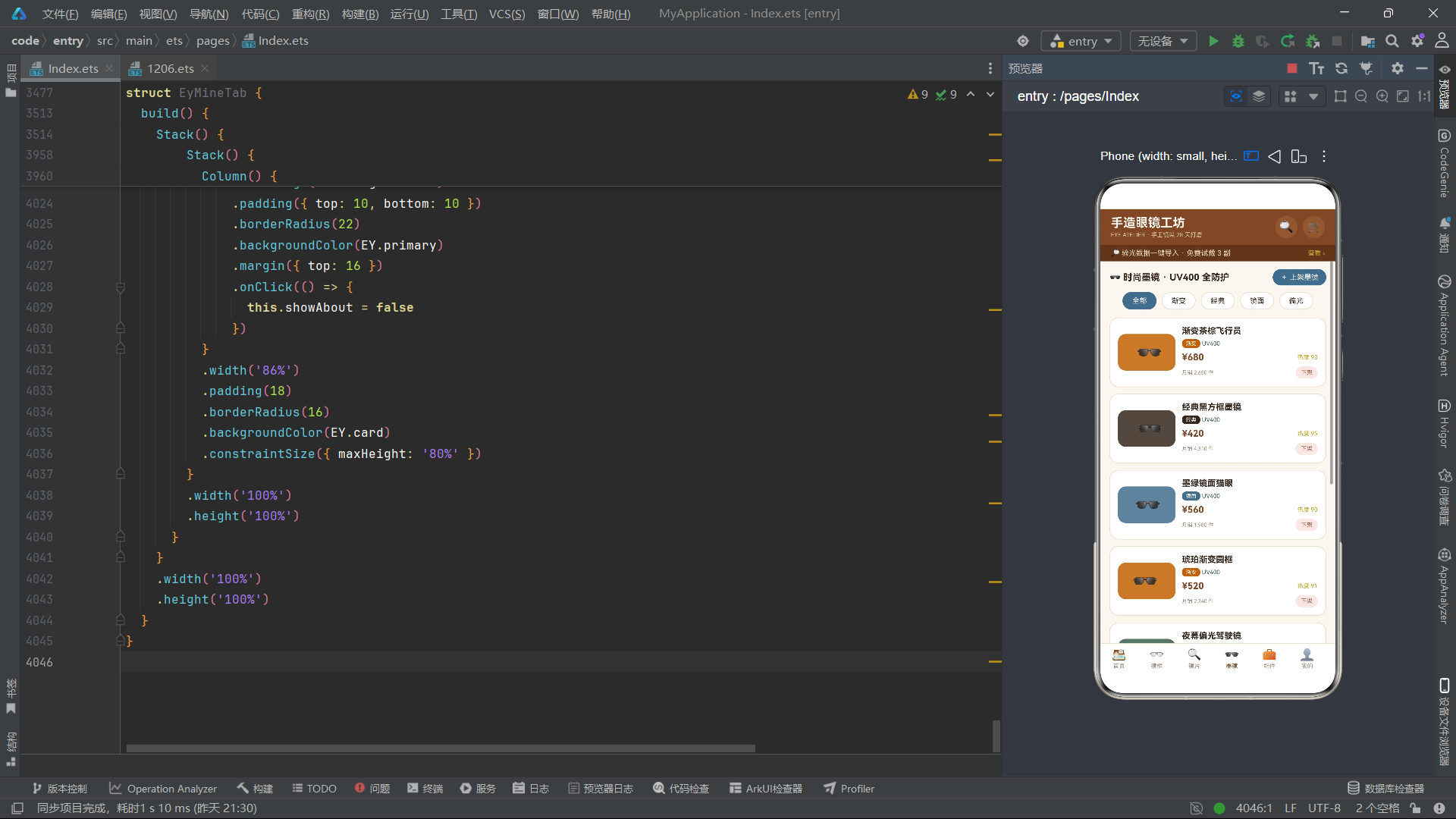
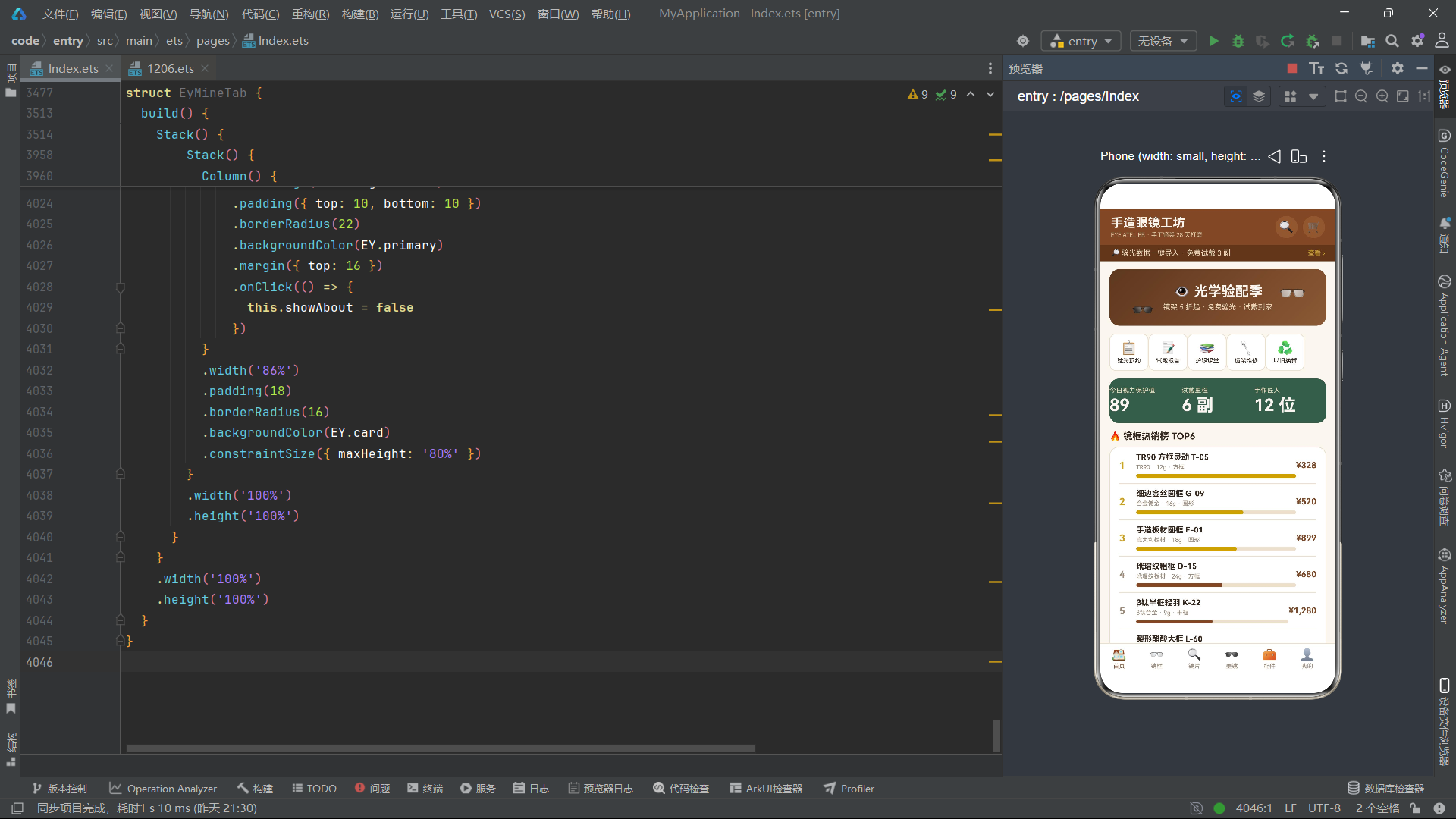
主入口组件的布局结构采用Stack-Column-Row的嵌套层次。最外层Stack作为根容器,内部Column垂直排列三大部分:顶部标题栏(含品牌名称和搜索/购物车图标)、功能提示条、内容区域和底部导航栏。内容区域通过layoutWeight(1)占据剩余空间,确保底部导航栏始终固定在屏幕底部。这种布局模式是移动端应用的经典结构,通过layoutWeight实现弹性高度分配,避免内容溢出导致导航栏被推移。
五、首页模块与多弹窗交互系统
EyHomeTab是应用的首页组件,集成了品牌Banner、功能入口宫格、数据统计卡片、热销排行榜、墨镜轮播和优惠券领取等六大功能区。该组件维护了wave动画状态和四个布尔型弹窗状态:showExam(验光预约)、showReport(试戴报告)、showCoupon(优惠券)和showClass(护眼课堂)。通过@Builder装饰器定义了modalOverlay方法作为统一的遮罩层构建器,在四个弹窗中复用,点击遮罩时同时关闭所有弹窗。
@Component
struct EyHomeTab {
  @State wave: number = 0
  @State timerId: number = -1
  @State showExam: boolean = false
  @State showReport: boolean = false
  @State showCoupon: boolean = false
  @State showClass: boolean = false

  aboutToAppear() {
    this.timerId = setInterval(() => {
      this.wave += 1
    }, 60)
  }

  aboutToDisappear() {
    if (this.timerId >= 0) {
      clearInterval(this.timerId)
    }
  }

  @Builder
  modalOverlay() {
    Column()
      .width('100%')
      .height('100%')
      .backgroundColor('rgba(51,38,28,0.55)')
      .position({ x: 0, y: 0 })
      .zIndex(999)
      .onClick(() => {
        this.showExam = false
        this.showReport = false
        this.showCoupon = false
        this.showClass = false
      })
  }
首页Banner区域采用Stack叠加布局,底层是带linearGradient渐变背景的Column容器,上层通过position绝对定位放置浮动眼镜图标。图标绑定eyFloatY实现上下浮动,eyBlink控制透明度闪烁,营造出"眼镜在空中轻盈飘动"的视觉效果。功能入口宫格通过ForEach渲染五个按钮(验光预约、试戴报告、护眼课堂、镜架维修、以旧换新),点击时根据按钮名称切换对应的弹窗状态为true。
build() {
  Stack() {
    Scroll() {
      Column() {
        Stack() {
          Column() {
            Text('👁 光学验配季')
              .fontSize(21)
              .fontWeight(FontWeight.Bold)
              .fontColor('#FAF6EF')
            Text('镜架 5 折起 · 免费验光 · 试戴到家')
              .fontSize(11)
              .fontColor('#E8D9BC')
              .margin({ top: 5 })
          }
          .width('100%')
          .padding({ top: 22, bottom: 22 })
          .borderRadius(16)
          .backgroundColor('#7A4A2B')
          .linearGradient({
            angle: 135,
            colors: [['#5E381F', 0], ['#7A4A2B', 0.6], ['#8A5A36', 1]]
          })

          Text('👓')
            .fontSize(34)
            .position({ x: '78%', y: 12 })
            .translate({ y: eyFloatY(this.wave, 0) })
            .opacity(eyBlink(this.wave))

          Text('🕶')
            .fontSize(28)
            .position({ x: '10%', y: 52 })
            .translate({ y: eyFloatY(this.wave, 2) })
            .opacity(eyBlink(this.wave + 30))
        }
        .width('100%')
        .margin({ bottom: 12 })

        Row() {
          ForEach(['验光预约', '试戴报告', '护眼课堂', '镜架维修', '以旧换新'], (s: string) => {
            Column() {
              Text(s === '验光预约' ? '📋' : (s === '试戴报告' ? '📝' : (s === '护眼课堂' ? '📚' : (s === '镜架维修' ? '🔧' : '♻️'))))
                .fontSize(20)
              Text(s)
                .fontSize(9)
                .fontColor(EY.text)
                .margin({ top: 3 })
            }
            .width('18%')
            .padding({ top: 9, bottom: 9 })
            .borderRadius(10)
            .backgroundColor(EY.card)
            .border({ width: 1, color: EY.line })
            .onClick(() => {
              if (s === '验光预约') {
                this.showExam = true
              } else if (s === '试戴报告') {
                this.showReport = true
              } else if (s === '护眼课堂') {
                this.showClass = true
              }
            })
          }, (s: string) => s)
        }
        .width('100%')
        .margin({ bottom: 12 })
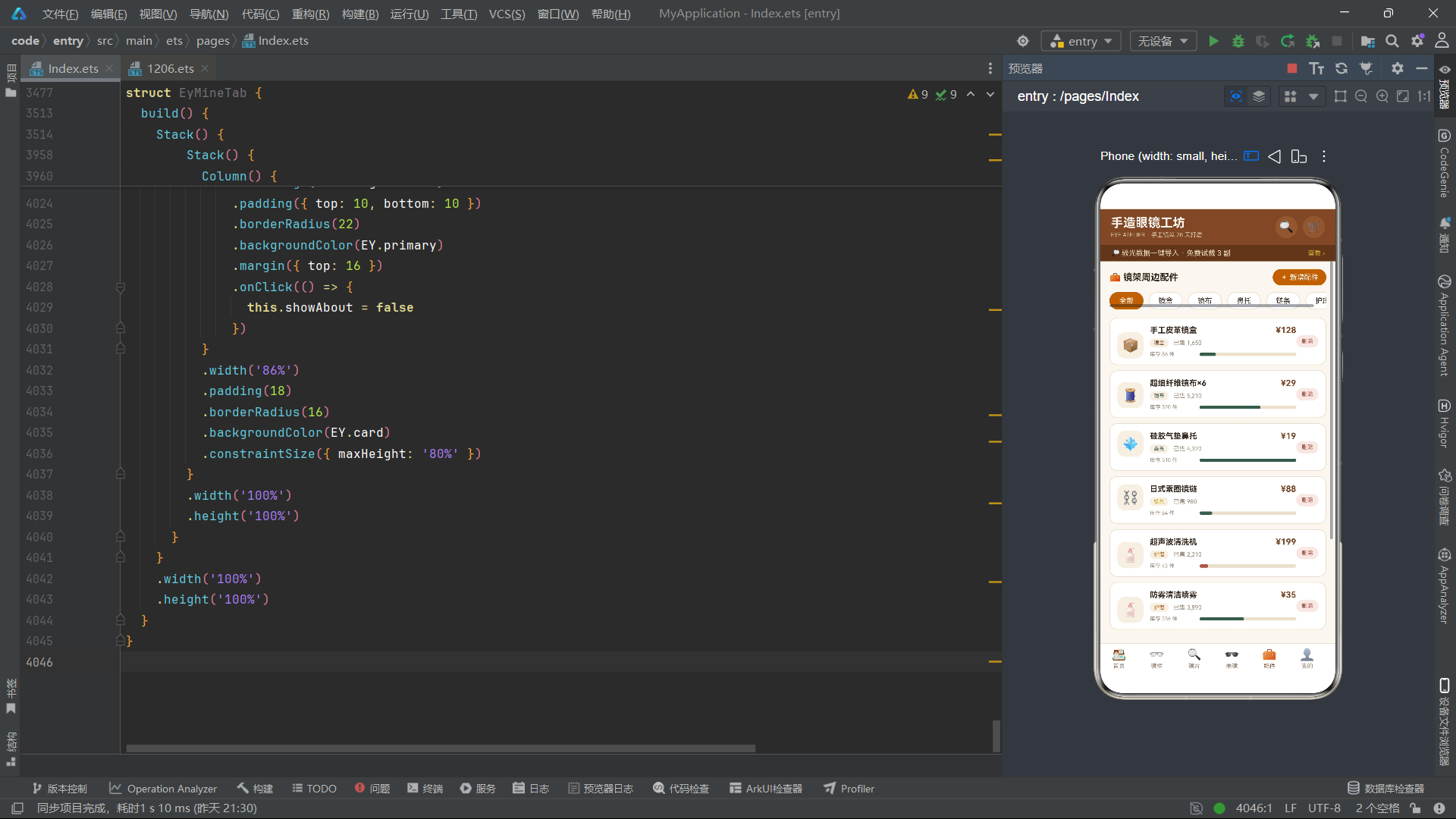
@Builder装饰器是ArkTS中实现UI片段复用的重要机制。与独立struct组件不同,@Builder方法没有自己的状态,它直接访问宿主组件的this上下文。这使得modalOverlay这样的通用遮罩可以在多个弹窗中共享,而不必为每个弹窗重复编写遮罩代码。
首页的弹窗系统通过条件渲染实现。以验光预约弹窗为例,当showExam为true时,Stack容器内同时渲染modalOverlay遮罩和预约表单Column。表单包含门店选择、日期时段选择、验光类型选择和提交按钮,每个表单项采用独立的Card样式容器,背景色为#F5EFE3,形成层次分明的表单结构。constraintSize({ maxHeight: ‘80%’ })限制弹窗最大高度,防止内容过多时超出屏幕。点击提交按钮将showExam设为false,触发条件渲染移除弹窗。
if (this.showExam) {
  Stack() {
    this.modalOverlay()
    Column() {
      Text('📋 验光预约')
        .fontSize(16)
        .fontWeight(FontWeight.Bold)
        .fontColor(EY.text)
      Text('到店享医学验光 · 20 分钟出数据')
        .fontSize(10)
        .fontColor(EY.sub)
        .margin({ top: 4 })

      Column() {
        Text('预约门店')
          .fontSize(10)
          .fontColor(EY.sub)
        Row() {
          Text('安福路手造旗舰店')
            .fontSize(13)
            .fontColor(EY.text)
            .layoutWeight(1)
          Text('更换 ›')
            .fontSize(10)
            .fontColor(EY.primary)
        }
        .margin({ top: 6 })
      }
      .width('100%')
      .padding(10)
      .borderRadius(10)
      .backgroundColor('#F5EFE3')
      .margin({ top: 14 })

      Column() {
        Text('预约日期')
          .fontSize(10)
          .fontColor(EY.sub)
        Row() {
          ForEach(['周六 10:00', '周六 14:00', '周日 10:00'], (t: string) => {
            Text(t)
              .fontSize(10)
              .fontColor(EY.text)
              .padding({ left: 10, right: 10, top: 6, bottom: 6 })
              .borderRadius(8)
              .backgroundColor('#F5EFE3')
              .margin({ right: 6 })
          }, (t: string) => t)
        }
        .margin({ top: 6 })
      }
      .width('100%')
      .padding(10)
      .borderRadius(10)
      .backgroundColor('#F5EFE3')
      .margin({ top: 8 })

      Text('提交预约')
        .fontSize(13)
        .fontColor('#FAF6EF')
        .width('100%')
        .textAlign(TextAlign.Center)
        .padding({ top: 10, bottom: 10 })
        .borderRadius(22)
        .backgroundColor(EY.primary)
        .margin({ top: 16 })
        .onClick(() => {
          this.showExam = false
        })
    }
    .width('86%')
    .padding(18)
    .borderRadius(16)
    .backgroundColor(EY.card)
    .constraintSize({ maxHeight: '80%' })
  }
  .width('100%')
  .height('100%')
  .justifyContent(FlexAlign.Center)
}
六、镜架列表模块与CRUD交互
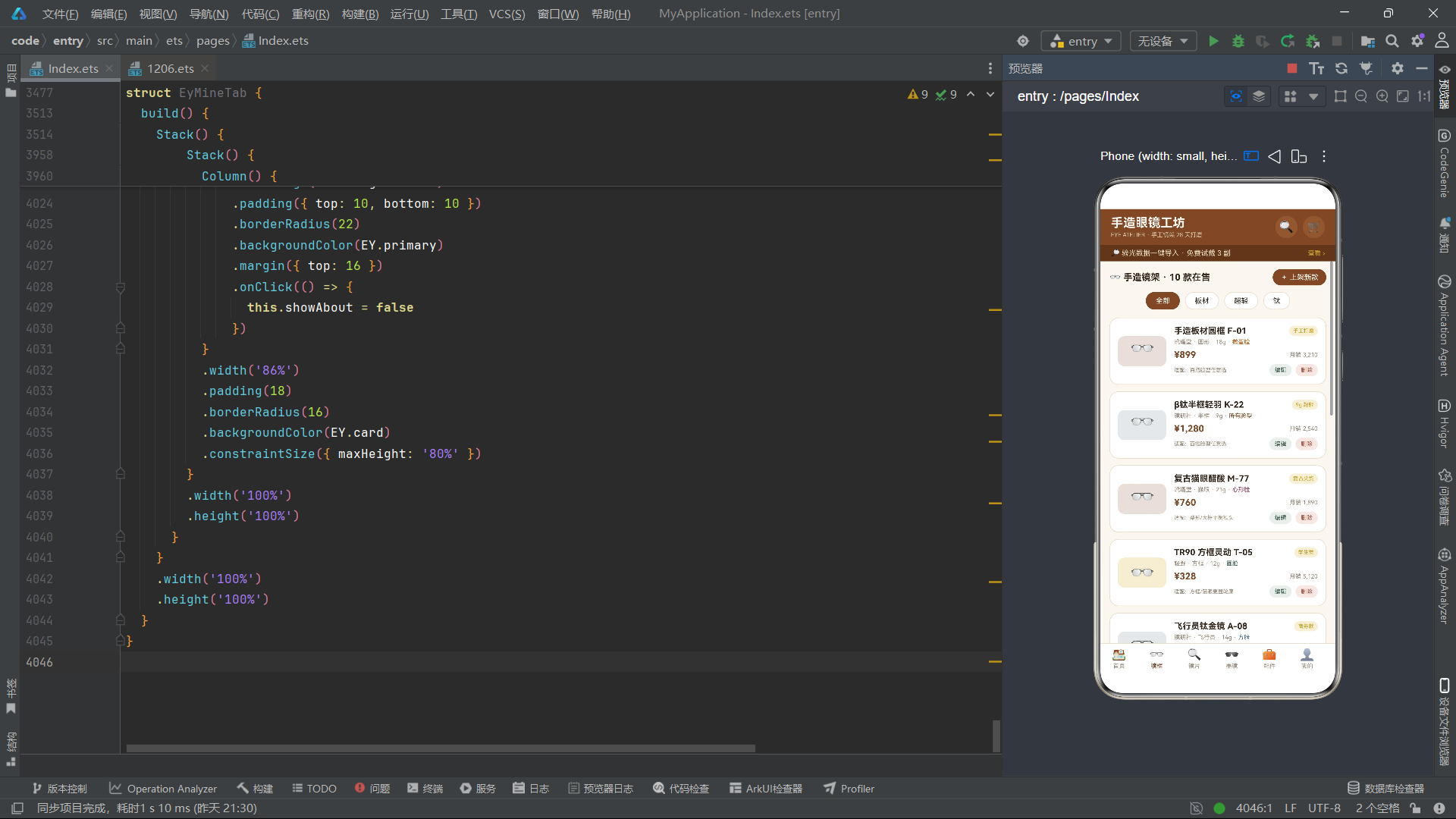
EyFrameTab组件是应用中最核心的商品管理模块,实现了镜架列表的筛选、查看详情、上架新款、编辑信息和删除移除等完整CRUD操作。组件维护了chips筛选标签数组、chipIdx当前选中索引、frames当前显示列表、以及showDetail/showAdd/showEdit/showDel四个弹窗状态。筛选逻辑通过eyFrameFilter函数实现,支持按"全部"、“板材”、“超轻”、"钛"四种条件过滤,其中"超轻"条件额外判断weight <= 12。
@Component
struct EyFrameTab {
  @State wave: number = 0
  @State timerId: number = -1
  @State chips: string[] = ['全部', '板材', '超轻', '钛']
  @State chipIdx: number = 0
  @State frames: EyFrame[] = EY_FRAMES.slice()
  @State showDetail: boolean = false
  @State showAdd: boolean = false
  @State showEdit: boolean = false
  @State showDel: boolean = false
  @State selIdx: number = 0
  @State inName: string = ''
  @State inBrand: string = ''
  @State inWeight: string = ''

  aboutToAppear() {
    this.timerId = setInterval(() => {
      this.wave += 1
    }, 60)
  }

  aboutToDisappear() {
    if (this.timerId >= 0) {
      clearInterval(this.timerId)
    }
  }
列表项的渲染采用Stack-Row嵌套结构。左侧是74x46像素的色块图标区域,背景色由eyMaterialColor根据材质返回,叠加emoji眼镜图标并绑定eyBounceY弹跳动画。右侧是商品信息区域,包含名称+标签行、品牌+框型+重量+脸型行、价格+月销行和适配提示+编辑/删除按钮行。每个列表项通过onClick触发showDetail弹窗,编辑和删除按钮则分别触发showEdit和showDel弹窗。筛选用Scroll+Row+ForEach横向排列标签,选中态用主色背景,未选中态用卡片色背景。
Column() {
  ForEach(this.frames, (f: EyFrame, i: number) => {
    Stack() {
      Row() {
        Stack() {
          Column()
            .width(74)
            .height(46)
            .borderRadius(10)
            .backgroundColor(eyMaterialColor(f.material))
            .opacity(0.18)
          Text('👓')
            .fontSize(30)
            .translate({ y: eyBounceY(this.wave, i) })
        }
        .width(74)
        .height(46)

        Column() {
          Row() {
            Text(f.name)
              .fontSize(13)
              .fontWeight(FontWeight.Bold)
              .fontColor(EY.text)
              .layoutWeight(1)
              .maxLines(1)
            Text(f.tag)
              .fontSize(8)
              .fontColor('#C9A227')
              .padding({ left: 6, right: 6, top: 3, bottom: 3 })
              .borderRadius(8)
              .backgroundColor('#F7EFD8')
          }
          Row() {
            Text(f.brand)
              .fontSize(9)
              .fontColor(EY.sub)
            Text(' · ' + f.shape + ' · ' + f.weight + 'g')
              .fontSize(9)
              .fontColor(EY.sub)
            Text(' · ' + f.face)
              .fontSize(9)
              .fontColor(eyShapeColor(f.shape))
          }
          .margin({ top: 4 })

          Row() {
            Text(eyPrice(f.price))
              .fontSize(14)
              .fontWeight(FontWeight.Bold)
              .fontColor(EY.primary)
              .layoutWeight(1)
            Text('月销 ' + f.sold.toLocaleString())
              .fontSize(9)
              .fontColor(EY.sub)
          }
          .margin({ top: 6 })

          Row() {
            Text('适配:' + eyFaceTip(f.face))
              .fontSize(8)
              .fontColor(EY.sub)
              .layoutWeight(1)
              .maxLines(1)
            Text('编辑')
              .fontSize(9)
              .fontColor(EY.accent)
              .padding({ left: 8, right: 8, top: 4, bottom: 4 })
              .borderRadius(10)
              .backgroundColor('#EAF0EC')
              .onClick(() => {
                this.selIdx = i
                this.inName = f.name
                this.inBrand = f.brand
                this.inWeight = f.weight.toString()
                this.showEdit = true
              })
            Text('删除')
              .fontSize(9)
              .fontColor('#A65B4B')
              .padding({ left: 8, right: 8, top: 4, bottom: 4 })
              .borderRadius(10)
              .backgroundColor('#F6E8E4')
              .margin({ left: 6 })
              .onClick(() => {
                this.selIdx = i
                this.showDel = true
              })
          }
          .margin({ top: 6 })
        }
        .alignItems(HorizontalAlign.Start)
        .layoutWeight(1)
        .margin({ left: 12 })
      }
      .width('100%')
      .padding(12)
      .borderRadius(14)
      .backgroundColor(EY.card)
      .border({ width: 1, color: EY.line })
      .onClick(() => {
        this.selIdx = i
        this.showDetail = true
      })
    }
    .width('100%')
    .margin({ bottom: 10 })
  }, (f: EyFrame) => f.id.toString() + f.name)
}
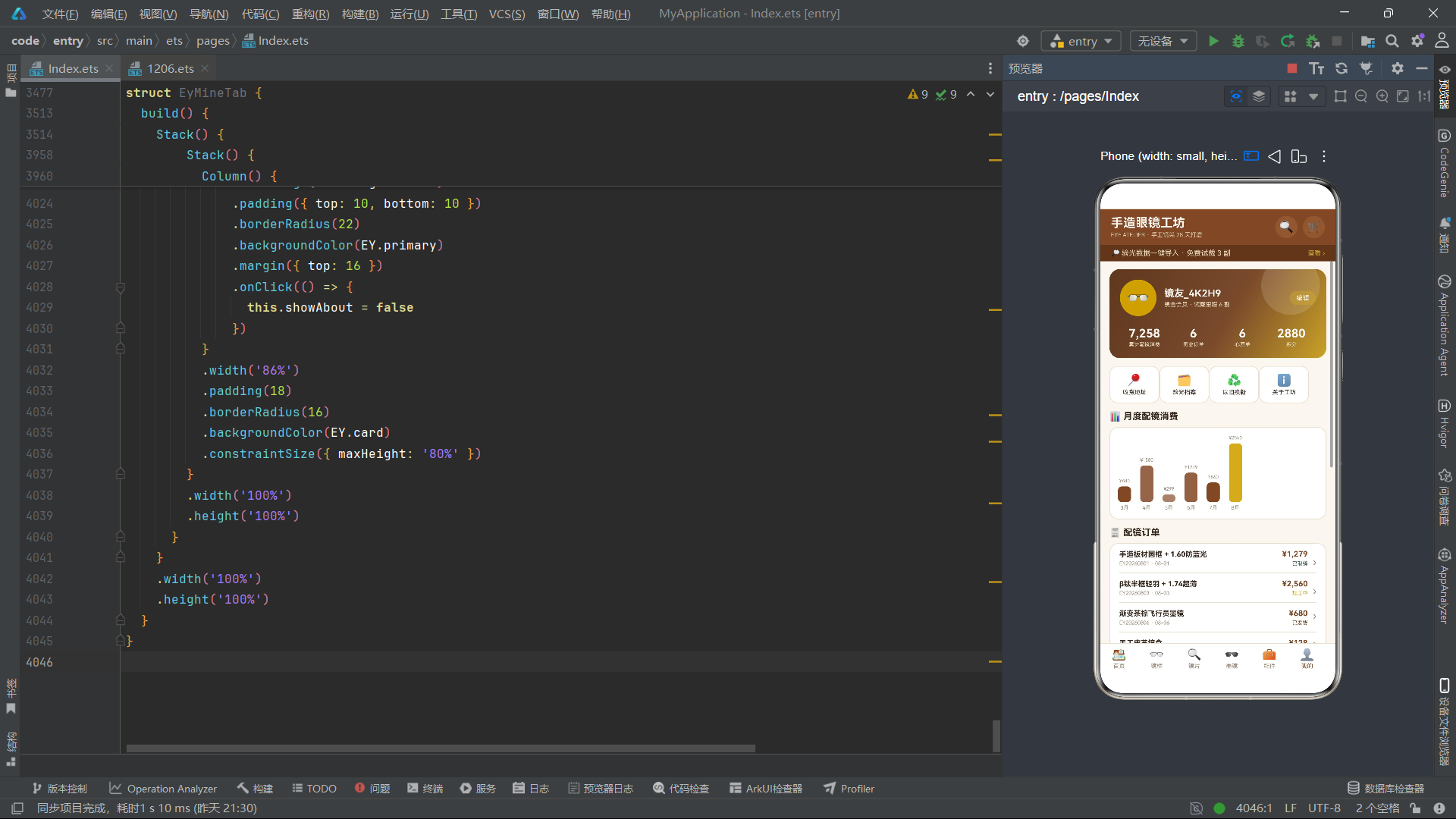
上架新款弹窗包含三个TextInput输入框(名称、品牌、重量),确认上架时构造新的EyFrame对象push到EY_FRAMES数组,并重新调用eyFrameFilter刷新当前筛选列表。编辑弹窗在打开时将当前选中项的数据预填到输入框,保存时直接修改EY_FRAMES数组的对应字段。删除弹窗展示待删商品信息,确认时通过splice移除数组元素。三个操作均通过修改原始数据数组后重新执行筛选来刷新视图,体现了"数据驱动视图"的声明式UI核心理念。
// 上架新款确认逻辑
Text('确认上架')
  .fontSize(13)
  .fontColor('#FAF6EF')
  .layoutWeight(1)
  .textAlign(TextAlign.Center)
  .padding({ top: 10, bottom: 10 })
  .borderRadius(20)
  .backgroundColor(EY.primary)
  .onClick(() => {
    let it: EyFrame = {
      id: EY_FRAMES.length + 1,
      name: this.inName === '' ? '未命名新款' : this.inName,
      brand: this.inBrand === '' ? '自营手造' : this.inBrand,
      material: '意大利板材',
      shape: '圆形',
      weight: isNaN(parseInt(this.inWeight)) ? 18 : parseInt(this.inWeight),
      face: '所有脸型',
      price: 699,
      sold: 0,
      heat: 70,
      tag: '新品'
    }
    EY_FRAMES.push(it)
    this.frames = eyFrameFilter(EY_FRAMES, this.chips[this.chipIdx])
    this.showAdd = false
  })

// 编辑保存逻辑
Text('保存修改')
  .onClick(() => {
    EY_FRAMES[this.selIdx].name = this.inName === '' ? EY_FRAMES[this.selIdx].name : this.inName
    EY_FRAMES[this.selIdx].brand = this.inBrand === '' ? EY_FRAMES[this.selIdx].brand : this.inBrand
    EY_FRAMES[this.selIdx].weight = isNaN(parseInt(this.inWeight)) ? EY_FRAMES[this.selIdx].weight : parseInt(this.inWeight)
    this.frames = eyFrameFilter(EY_FRAMES, this.chips[this.chipIdx])
    this.showEdit = false
  })

// 删除确认逻辑
Text('确认移除')
  .onClick(() => {
    EY_FRAMES.splice(this.selIdx, 1)
    this.frames = eyFrameFilter(EY_FRAMES, this.chips[this.chipIdx])
    this.showDel = false
  })
七、镜片色板网格与折射率可视化
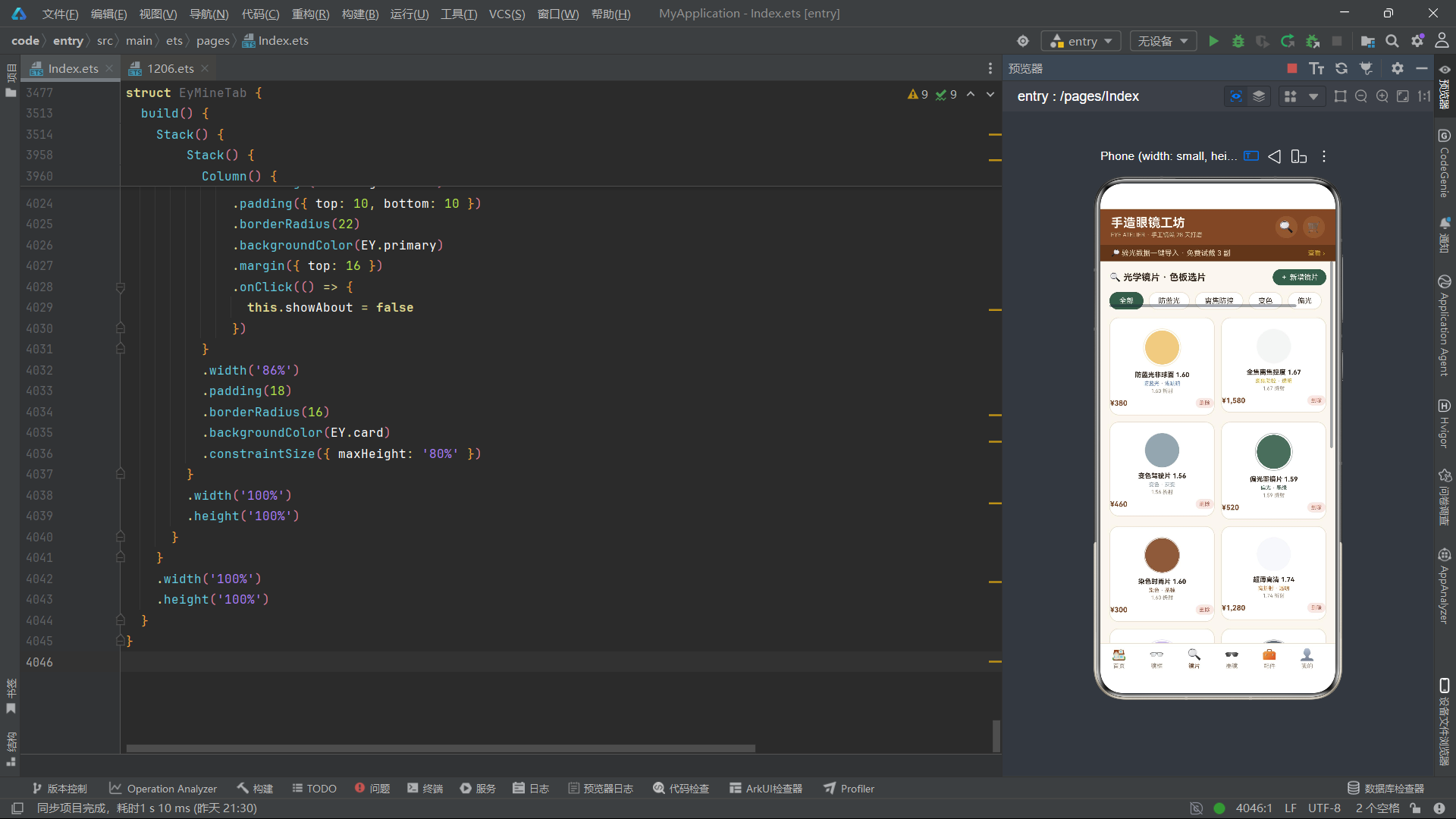
EyLensTab模块采用了与镜架列表完全不同的布局策略——Flex换行网格。通过Flex({ wrap: FlexWrap.Wrap, justifyContent: FlexAlign.SpaceBetween })实现两列均分的色板卡片布局,每张卡片宽度为48.5%。卡片核心视觉元素是一个52x52的圆形色块,颜色取自镜片的colorHex字段,并在外层叠加一个随eyPulse波动的环形边框,形成"呼吸脉冲"的视觉效果。这种设计将光学镜片的颜色属性从文字描述提升为直观的视觉色卡。
Flex({ wrap: FlexWrap.Wrap, justifyContent: FlexAlign.SpaceBetween }) {
  ForEach(this.lens, (l: EyLens, i: number) => {
    Column() {
      Stack() {
        Column()
          .width(52)
          .height(52)
          .borderRadius(26)
          .backgroundColor(l.colorHex)
          .opacity(0.9)
        Column()
          .width(52 + Math.round(eyPulse(this.wave + i * 20) * 6))
          .height(52 + Math.round(eyPulse(this.wave + i * 20) * 6))
          .borderRadius((52 + Math.round(eyPulse(this.wave + i * 20) * 6)) / 2)
          .border({ width: 1, color: l.colorHex })
          .opacity(0.4)
      }
      .margin({ top: 6 })

      Text(l.name)
        .fontSize(10)
        .fontWeight(FontWeight.Bold)
        .fontColor(EY.text)
        .margin({ top: 7 })
        .maxLines(1)

      Text(l.type + ' · ' + l.color)
        .fontSize(8)
        .fontColor(eyTypeColor(l.type))
        .margin({ top: 3 })

      Text('1.' + (l.refractive * 100).toFixed(0).slice(-2) + ' 折射')
        .fontSize(8)
        .fontColor(EY.sub)
        .margin({ top: 2 })

      Row() {
        Text(eyPrice(l.price))
          .fontSize(11)
          .fontWeight(FontWeight.Bold)
          .fontColor(EY.primary)
          .layoutWeight(1)
        Text('删除')
          .fontSize(8)
          .fontColor('#A65B4B')
          .padding({ left: 6, right: 6, top: 3, bottom: 3 })
          .borderRadius(8)
          .backgroundColor('#F6E8E4')
          .onClick(() => {
            this.selIdx = i
            this.showDel = true
          })
      }
      .margin({ top: 6 })
      .width('100%')
    }
    .width('48.5%')
    .padding({ top: 10, bottom: 10 })
    .borderRadius(14)
    .backgroundColor(EY.card)
    .border({ width: 1, color: EY.line })
    .alignItems(HorizontalAlign.Center)
    .margin({ bottom: 10 })
  }, (l: EyLens) => l.id.toString() + l.name)
}
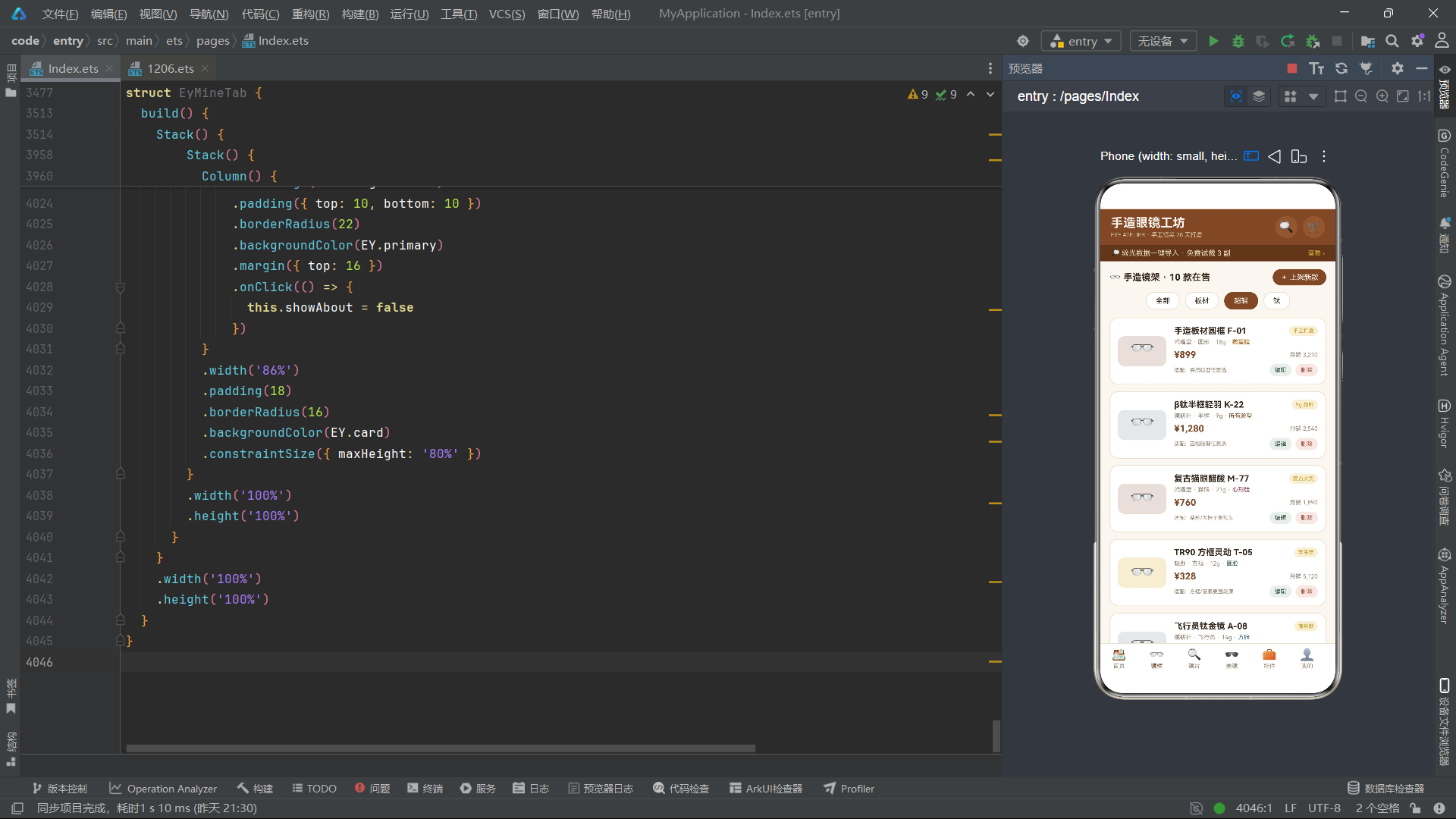
折射率对比区域通过eyRefrW函数将1.56-1.74的折射率范围映射为0-100%的进度条宽度,用户可以直观比较不同镜片的厚薄程度。月销量柱状图通过eyVBarH函数将销量数据转化为柱状图高度,每根柱子的透明度绑定eyBlink实现闪烁效果。这两个可视化区域共同构成了镜片模块的数据分析面板,将原本枯燥的参数表格转化为生动直观的图表展示。
八、个人中心模块与数据聚合展示
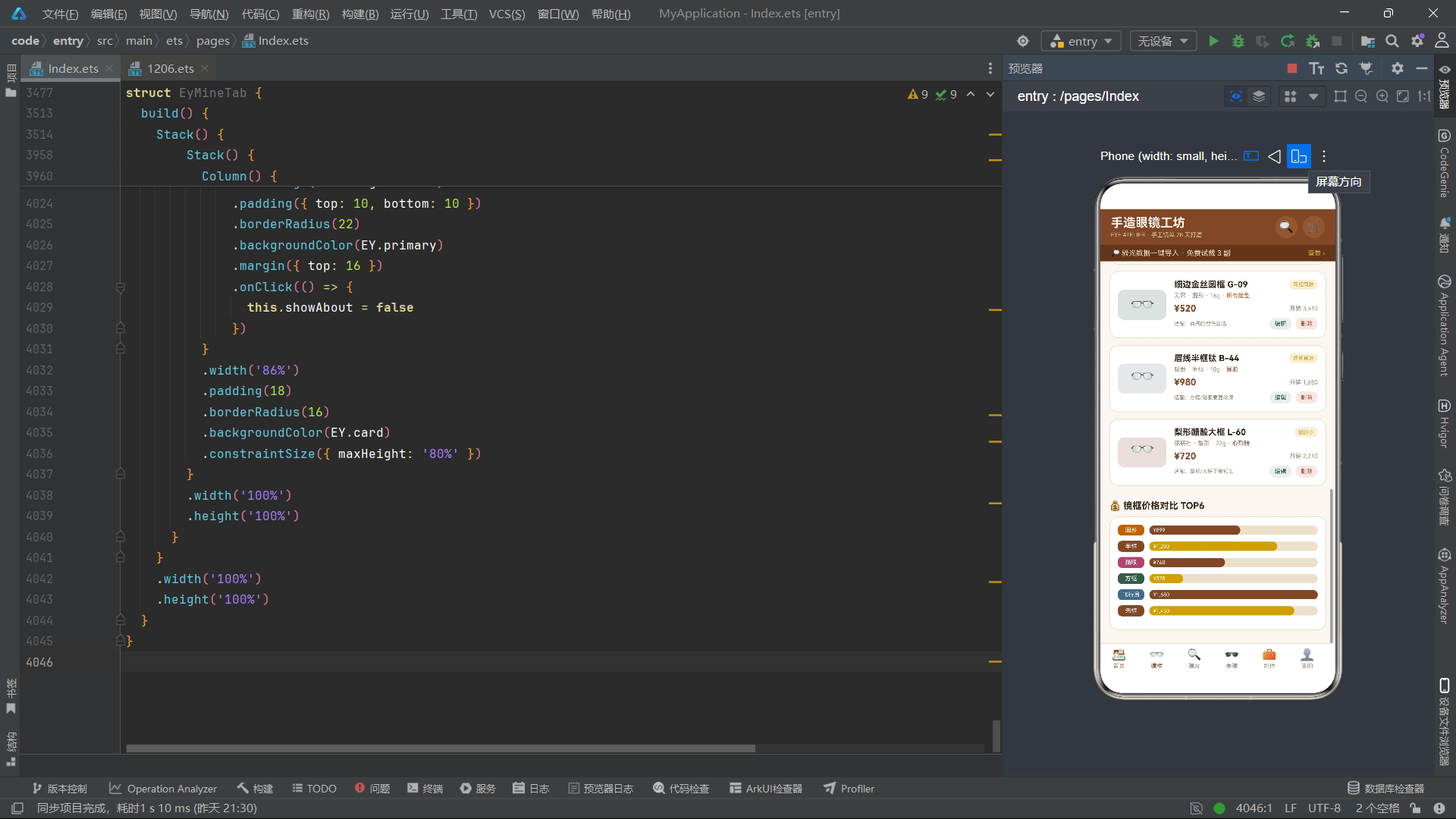
EyMineTab是个人中心模块,集成了用户信息卡片、功能宫格、消费趋势图、订单列表和心愿清单五大区域。用户信息卡片采用Stack叠加布局,底层是带linearGradient渐变背景的个人信息区,上层通过position定位一个90x90的圆形光泽元素,透明度由eyShineO波形函数控制,模拟"会员徽章反光"的效果。信息区展示头像、昵称、会员等级,以及累计消费、历史订单、心愿单和积分四项数据统计。
@Component
struct EyMineTab {
  @State wave: number = 0
  @State timerId: number = -1
  @State showNick: boolean = false
  @State showAddr: boolean = false
  @State showAbout: boolean = false
  @State inNick: string = ''
  @State inAddr: string = ''

  build() {
    Stack() {
      Scroll() {
        Column() {
          Stack() {
            Column() {
              Row() {
                Column() {
                  Text('👓')
                    .fontSize(28)
                    .width(56)
                    .height(56)
                    .textAlign(TextAlign.Center)
                    .borderRadius(28)
                    .backgroundColor('#C9A227')
                }
                Column() {
                  Text('镜友_4K2H9')
                    .fontSize(15)
                    .fontWeight(FontWeight.Bold)
                    .fontColor('#FAF6EF')
                  Text('黑金会员 · 试戴里程 6 副')
                    .fontSize(9)
                    .fontColor('#E8D9BC')
                    .margin({ top: 3 })
                }
                .alignItems(HorizontalAlign.Start)
                .layoutWeight(1)
                .margin({ left: 12 })

                Text('编辑')
                  .fontSize(10)
                  .fontColor('#FAF6EF')
                  .padding({ left: 10, right: 10, top: 5, bottom: 5 })
                  .borderRadius(12)
                  .backgroundColor('rgba(201,162,39,0.35)')
                  .onClick(() => {
                    this.inNick = ''
                    this.showNick = true
                  })
              }
              .width('100%')

              Row() {
                Column() {
                  Text(eyTotalPay().toLocaleString())
                    .fontSize(18)
                    .fontWeight(FontWeight.Bold)
                    .fontColor('#FAF6EF')
                  Text('累计配镜消费')
                    .fontSize(8)
                    .fontColor('#E8D9BC')
                    .margin({ top: 2 })
                }
                .layoutWeight(1)
                // ... 其他统计项
              }
              .width('100%')
              .margin({ top: 16 })
            }
            .width('100%')
            .padding(16)
            .borderRadius(16)
            .linearGradient({
              angle: 120,
              colors: [['#5E381F', 0], ['##7A4A2B', 0.55], ['#C9A227', 1]]
            })

            Column()
              .width(90)
              .height(90)
              .borderRadius(45)
              .backgroundColor('#FAF6EF')
              .opacity(eyShineO(this.wave) * 0.3)
              .position({ x: '70%', y: -20 })
          }
          .width('100%')
          .margin({ bottom: 12 })
月度消费趋势图通过ForEach遍历EY_MONTHS数组,为每个月份渲染一个垂直柱状图。柱子高度由eyVBarH函数计算,当月(i === 5)使用金色#C9A227,其他月份使用棕色#7A4A2B。透明度绑定eyBlink实现轻微闪烁。订单列表通过ForEach遍历EY_ORDERS,每项展示订单名称、编号、日期、金额和状态,状态颜色由eyStatusColor函数返回。心愿清单通过eyBlink控制整体透明度产生柔和的呼吸效果。
Column() {
  Row({ space: 14 }) {
    ForEach(EY_MONTHS, (mm: EyMonth, i: number) => {
      Column() {
        Text('¥' + mm.pay)
          .fontSize(7)
          .fontColor(EY.sub)
        Column()
          .width(20)
          .height(eyVBarH(mm.pay, 2560))
          .borderRadius(6)
          .backgroundColor(i === 5 ? '#C9A227' : '#7A4A2B')
          .opacity(0.55 + 0.45 * eyBlink(this.wave + i * 20))
          .margin({ top: 4 })
        Text(mm.m)
          .fontSize(8)
          .fontColor(EY.sub)
          .margin({ top: 4 })
      }
      .alignItems(HorizontalAlign.Center)
    }, (mm: EyMonth) => mm.m)
  }
  .width('100%')
  .alignItems(VerticalAlign.Bottom)
}
九、应用核心流程
十、技术要点对比分析
| 技术维度 | 实现方式 | 优势分析 | 适用场景 |
|---|---|---|---|
| 状态管理 | @State装饰器 | 组件内状态变化自动驱动视图刷新,无需手动调用render | 组件内部交互状态如弹窗开关、选中索引 |
| 组件解耦 | @Component + struct | 每个模块独立维护状态和生命周期,互不干扰 | 多Tab页面的大型应用模块拆分 |
| UI片段复用 | @Builder装饰器 | 遮罩层等通用UI片段在组件内复用,避免代码重复 | 弹窗遮罩、通用加载指示器 |
| 动效驱动 | setInterval + 波形函数 | 无需引入动画框架,纯数学函数实现细腻微交互 | 图标浮动、透明度闪烁、进度脉冲 |
| 数据过滤 | 纯函数 filter | 输入确定输出确定,与UI状态解耦,易于测试 | 商品列表分类筛选 |
| 颜色映射 | 条件分支函数 | 将业务语义转化为视觉编码,列表滚动即可快速辨识 | 材质/框型/状态等分类着色 |
| 列表渲染 | ForEach + keyGenerator | 通过唯一key优化diff算法,支持增删改后精准更新 | 商品列表、订单列表、心愿清单 |
| 弹窗管理 | 条件渲染 if + Stack | 状态为true时渲染弹窗,false时自动移除,无需额外管理 | 详情弹窗、表单弹窗、确认弹窗 |
| 表单输入 | TextInput + onChange | 双向绑定输入值到状态变量,提交时读取状态构造数据 | 上架新款、编辑信息、修改昵称 |
| 数据可视化 | Row/Column进度条 | 用原生容器模拟进度条和柱状图,不依赖图表库 | 销量对比、折射率展示、消费趋势 |
| 主题管理 | interface + const 常量 | 集中定义色彩体系,全应用引用统一标准 | 品牌色彩一致性与未来主题切换 |
| 生命周期 | aboutToAppear/Disappear | 定时器创建与清理配对,防止内存泄漏 | 所有使用定时器的动效组件 |
安装DevEco Studio程序

选择目标安装目录:

设置环境变量,但是需要重启一下:

新建一个空白模板:

设置API为24的模板项目:
初始化项目,自动下载相关依赖:

完整代码:
interface EyTheme {
bg: string
primary: string
accent: string
card: string
text: string
sub: string
line: string
glow: string
}
const EY: EyTheme = {
bg: '#FAF6EF',
primary: '#7A4A2B',
accent: '#3E5C4B',
card: '#FFFFFF',
text: '#33261C',
sub: '#9A8B7A',
line: '#EADFCE',
glow: '#C9A227'
}
interface EyFrame {
id: number
name: string
brand: string
material: string
shape: string
weight: number
face: string
price: number
sold: number
heat: number
tag: string
}
interface EyLens {
id: number
name: string
type: string
color: string
colorHex: string
refractive: number
price: number
sold: number
rate: number
}
interface EySun {
id: number
name: string
brand: string
tint: string
uv: string
price: number
sold: number
heat: number
}
interface EyAcc {
id: number
name: string
kind: string
price: number
sold: number
stock: number
}
interface EyOrder {
id: string
name: string
amount: number
status: string
date: string
}
interface EyFav {
name: string
kind: string
price: number
}
interface EyMonth {
m: string
pay: number
}
interface EyTab {
name: string
icon: string
}
const EY_FRAMES: EyFrame[] = [
{ id: 1, name: '手造板材圆框 F-01', brand: '玳瑁堂', material: '意大利板材', shape: '圆形', weight: 18, face: '鹅蛋脸', price: 899, sold: 3210, heat: 96, tag: '手工打磨' },
{ id: 2, name: 'β钛半框轻羽 K-22', brand: '镜研社', material: 'β钛合金', shape: '半框', weight: 9, face: '所有脸型', price: 1280, sold: 2540, heat: 92, tag: '9g 超轻' },
{ id: 3, name: '复古猫眼醋酸 M-77', brand: '玳瑁堂', material: '醋酸纤维', shape: '猫眼', weight: 21, face: '心形脸', price: 760, sold: 1890, heat: 88, tag: '复古尖货' },
{ id: 4, name: 'TR90 方框灵动 T-05', brand: '轻野', material: 'TR90', shape: '方框', weight: 12, face: '圆脸', price: 328, sold: 5120, heat: 94, tag: '学生党' },
{ id: 5, name: '飞行员钛金镜 A-08', brand: '镜研社', material: '纯钛', shape: '飞行员', weight: 14, face: '方脸', price: 1680, sold: 980, heat: 85, tag: '商务款' },
{ id: 6, name: '无框悬浮钻切 N-31', brand: '无界', material: '不锈钢', shape: '无框', weight: 11, face: '鹅蛋脸', price: 1450, sold: 1320, heat: 83, tag: '极简' },
{ id: 7, name: '玳瑁纹粗框 D-15', brand: '玳瑁堂', material: '玳瑁纹板材', shape: '方框', weight: 24, face: '长脸', price: 680, sold: 2760, heat: 90, tag: '文艺范' },
{ id: 8, name: '细边金丝圆框 G-09', brand: '无界', material: '合金镀金', shape: '圆形', weight: 16, face: '所有脸型', price: 520, sold: 3410, heat: 89, tag: '网红同款' },
{ id: 9, name: '眉线半框钛 B-44', brand: '轻野', material: 'β钛合金', shape: '半框', weight: 10, face: '圆脸', price: 980, sold: 1650, heat: 86, tag: '通勤首选' },
{ id: 10, name: '梨形醋酸大框 L-60', brand: '镜研社', material: '醋酸纤维', shape: '梨形', weight: 22, face: '心形脸', price: 720, sold: 2210, heat: 87, tag: '显脸小' }
]
const EY_LENS: EyLens[] = [
{ id: 1, name: '防蓝光非球面 1.60', type: '防蓝光', color: '浅琥珀', colorHex: '#E8C77E', refractive: 1.60, price: 380, sold: 4210, rate: 4.8 },
{ id: 2, name: '全焦离焦控度 1.67', type: '离焦防控', color: '透明', colorHex: '#F2F5F3', refractive: 1.67, price: 1580, sold: 1320, rate: 4.9 },
{ id: 3, name: '变色驾驶片 1.56', type: '变色', color: '灰变', colorHex: '#8C9BA5', refractive: 1.56, price: 460, sold: 2890, rate: 4.7 },
{ id: 4, name: '偏光墨镜片 1.59', type: '偏光', color: '墨绿', colorHex: '#3E5C4B', refractive: 1.59, price: 520, sold: 3320, rate: 4.8 },
{ id: 5, name: '染色时尚片 1.60', type: '染色', color: '茶棕', colorHex: '#7A4A2B', refractive: 1.60, price: 300, sold: 2110, rate: 4.6 },
{ id: 6, name: '超薄高清 1.74', type: '高折射', color: '透明', colorHex: '#F5F7FA', refractive: 1.74, price: 1280, sold: 1560, rate: 4.9 },
{ id: 7, name: '防蓝光 Pro 1.67', type: '防蓝光', color: '浅紫', colorHex: '#C4B5E8', refractive: 1.67, price: 680, sold: 3050, rate: 4.8 },
{ id: 8, name: '感光变色灰 1.60', type: '变色', color: '深灰变', colorHex: '#5A6470', refractive: 1.60, price: 540, sold: 1980, rate: 4.7 }
]
const EY_SUN: EySun[] = [
{ id: 1, name: '渐变茶棕飞行员', brand: '玳瑁堂', tint: '渐变', uv: 'UV400', price: 680, sold: 2650, heat: 93 },
{ id: 2, name: '经典黑方框墨镜', brand: '无界', tint: '经典', uv: 'UV400', price: 420, sold: 4310, heat: 95 },
{ id: 3, name: '墨绿镜面猫眼', brand: '镜研社', tint: '镜面', uv: 'UV400', price: 560, sold: 1980, heat: 90 },
{ id: 4, name: '琥珀渐变圆框', brand: '玳瑁堂', tint: '渐变', uv: 'UV400', price: 520, sold: 2340, heat: 91 },
{ id: 5, name: '夜幕偏光驾驶镜', brand: '轻野', tint: '偏光', uv: 'UV400', price: 460, sold: 3120, heat: 92 },
{ id: 6, name: '金丝茶色复古镜', brand: '无界', tint: '经典', uv: 'UV400', price: 380, sold: 2870, heat: 88 }
]
const EY_ACC: EyAcc[] = [
{ id: 1, name: '手工皮革镜盒', kind: '镜盒', price: 128, sold: 1650, stock: 86 },
{ id: 2, name: '超细纤维镜布×6', kind: '镜布', price: 29, sold: 5210, stock: 320 },
{ id: 3, name: '硅胶气垫鼻托', kind: '鼻托', price: 19, sold: 4320, stock: 510 },
{ id: 4, name: '日式素圈镜链', kind: '链条', price: 88, sold: 980, stock: 64 },
{ id: 5, name: '超声波清洗机', kind: '护理', price: 199, sold: 2210, stock: 45 },
{ id: 6, name: '防雾清洁喷雾', kind: '护理', price: 35, sold: 3890, stock: 236 }
]
const EY_ORDERS: EyOrder[] = [
{ id: 'EY20260801', name: '手造板材圆框 + 1.60防蓝光', amount: 1279, status: '已取镜', date: '08-01' },
{ id: 'EY20260803', name: 'β钛半框轻羽 + 1.74超薄', amount: 2560, status: '加工中', date: '08-03' },
{ id: 'EY20260806', name: '渐变茶棕飞行员墨镜', amount: 680, status: '已发货', date: '08-06' },
{ id: 'EY20260811', name: '手工皮革镜盒', amount: 128, status: '已完成', date: '08-11' },
{ id: 'EY20260815', name: '全焦离焦控度片', amount: 1580, status: '待付款', date: '08-15' },
{ id: 'EY20260819', name: '金丝茶色复古镜', amount: 380, status: '已发货', date: '08-19' }
]
const EY_FAVS: EyFav[] = [
{ name: '复古猫眼醋酸 M-77', kind: '镜框', price: 760 },
{ name: '全焦离焦控度 1.67', kind: '镜片', price: 1580 },
{ name: '墨绿镜面猫眼', kind: '墨镜', price: 560 },
{ name: '超声波清洗机', kind: '配件', price: 199 },
{ name: '细边金丝圆框 G-09', kind: '镜框', price: 520 },
{ name: '日式素圈镜链', kind: '配件', price: 88 }
]
const EY_MONTHS: EyMonth[] = [
{ m: '3月', pay: 680 },
{ m: '4月', pay: 1580 },
{ m: '5月', pay: 299 },
{ m: '6月', pay: 1279 },
{ m: '7月', pay: 860 },
{ m: '8月', pay: 2560 }
]
const EY_TABS: EyTab[] = [
{ name: '首页', icon: '🏠' },
{ name: '镜框', icon: '👓' },
{ name: '镜片', icon: '🔍' },
{ name: '墨镜', icon: '🕶' },
{ name: '配件', icon: '🧰' },
{ name: '我的', icon: '👤' }
]
function eyPrice(p: number): string {
return '¥' + p.toLocaleString()
}
function eyOff(p: number): string {
return '满' + Math.floor(p / 2) + '减' + Math.floor(p / 10)
}
function eyBarW(v: number, maxV: number): string {
let r: number = Math.round(v * 100 / maxV)
if (r > 100) {
r = 100
}
return r.toString() + '%'
}
function eyRefrW(r: number): string {
return Math.round((r - 1.5) / (1.74 - 1.5) * 100).toString() + '%'
}
function eyVBarH(v: number, maxV: number): number {
let h: number = Math.round(v * 90 / maxV)
if (h < 12) {
h = 12
}
return h
}
function eyMaterialColor(m: string): string {
if (m.indexOf('钛') >= 0) {
return '#6B7B8C'
}
if (m.indexOf('TR90') >= 0) {
return '#C9A227'
}
if (m.indexOf('醋酸') >= 0 || m.indexOf('板材') >= 0) {
return '#7A4A2B'
}
return '#3E5C4B'
}
function eyShapeColor(s: string): string {
if (s === '圆形') {
return '#B5651D'
}
if (s === '方框') {
return '#3E5C4B'
}
if (s === '猫眼') {
return '#A34A6E'
}
if (s === '飞行员') {
return '#4A6B8A'
}
return '#7A4A2B'
}
function eyTypeColor(t: string): string {
if (t === '防蓝光') {
return '#5B7DB1'
}
if (t === '离焦防控') {
return '#C9A227'
}
if (t === '变色') {
return '#8C9BA5'
}
if (t === '偏光') {
return '#3E5C4B'
}
if (t === '染色') {
return '#7A4A2B'
}
return '#B5651D'
}
function eyTintColor(t: string): string {
if (t === '渐变') {
return '#B5651D'
}
if (t === '镜面') {
return '#4A6B8A'
}
if (t === '偏光') {
return '#3E5C4B'
}
return '#33261C'
}
function eyKindColor(k: string): string {
if (k === '镜盒') {
return '#7A4A2B'
}
if (k === '镜布' || k === '鼻托') {
return '#3E5C4B'
}
if (k === '链条') {
return '#C9A227'
}
return '#B5651D'
}
function eyStatusColor(s: string): string {
if (s === '已取镜' || s === '已完成') {
return '#3E5C4B'
}
if (s === '加工中' || s === '待付款') {
return '#C9A227'
}
return '#7A4A2B'
}
function eyFrameFilter(arr: EyFrame[], m: string): EyFrame[] {
let r: EyFrame[] = []
for (let i = 0; i < arr.length; i++) {
if (m === '全部' || arr[i].material.indexOf(m.replace('以下', '').replace('超轻', '')) >= 0 || (m === '超轻' && arr[i].weight <= 12)) {
r.push(arr[i])
}
}
return r
}
function eyLensFilter(arr: EyLens[], t: string): EyLens[] {
let r: EyLens[] = []
for (let i = 0; i < arr.length; i++) {
if (t === '全部' || arr[i].type === t) {
r.push(arr[i])
}
}
return r
}
function eySunFilter(arr: EySun[], t: string): EySun[] {
let r: EySun[] = []
for (let i = 0; i < arr.length; i++) {
if (t === '全部' || arr[i].tint === t) {
r.push(arr[i])
}
}
return r
}
function eyAccFilter(arr: EyAcc[], k: string): EyAcc[] {
let r: EyAcc[] = []
for (let i = 0; i < arr.length; i++) {
if (k === '全部' || arr[i].kind === k) {
r.push(arr[i])
}
}
return r
}
function eyFrameTop(): EyFrame[] {
let src: EyFrame[] = EY_FRAMES.slice()
src.sort((a: EyFrame, b: EyFrame) => b.sold - a.sold)
return src.slice(0, 6)
}
function eyHotTop(): EySun[] {
let src: EySun[] = EY_SUN.slice()
src.sort((a: EySun, b: EySun) => b.heat - a.heat)
return src
}
function eyMaxSold(arr: EyFrame[]): number {
let m: number = 1
for (let i = 0; i < arr.length; i++) {
if (arr[i].sold > m) {
m = arr[i].sold
}
}
return m
}
function eyMaxPrice(): number {
let m: number = 1
for (let i = 0; i < EY_FRAMES.length; i++) {
if (EY_FRAMES[i].price > m) {
m = EY_FRAMES[i].price
}
}
return m
}
function eyTotalPay(): number {
let s: number = 0
for (let i = 0; i < EY_MONTHS.length; i++) {
s += EY_MONTHS[i].pay
}
return s
}
function eyFloatY(w: number, i: number): number {
return Math.sin(w * 0.09 + i * 1.3) * 6
}
function eyShineO(w: number): number {
return 0.35 + 0.25 * Math.sin(w * 0.05)
}
function eyBlink(w: number): number {
let v: number = Math.abs(Math.sin(w * 0.12))
if (v < 0.3) {
return 0.3
}
return v
}
function eySwingX(w: number, i: number): number {
return Math.sin(w * 0.07 + i * 0.9) * 5
}
function eyPulse(w: number): number {
return 0.5 + 0.5 * Math.sin(w * 0.1)
}
function eyBounceY(w: number, i: number): number {
return -Math.abs(Math.sin(w * 0.08 + i * 0.7)) * 5
}
function eyFaceTip(f: string): string {
if (f === '圆脸') {
return '方框/猫眼更显轮廓'
}
if (f === '心形脸') {
return '梨形/大框平衡额头'
}
if (f === '方脸') {
return '圆框/飞行员柔化线条'
}
if (f === '长脸') {
return '粗框/玳瑁纹缩短比例'
}
return '百搭脸型任意选'
}
@Entry
@Component
struct EyApp {
@State tabIdx: number = 0
build() {
Stack() {
Column() {
Row() {
Column() {
Text('手造眼镜工坊')
.fontSize(19)
.fontColor('#FAF6EF')
.fontWeight(FontWeight.Bold)
Text('EYE ATELIER · 手工镜架 28 天打磨')
.fontSize(9)
.fontColor('#D9C9A8')
.margin({ top: 2 })
}
.alignItems(HorizontalAlign.Start)
.layoutWeight(1)
Text('🔍')
.fontSize(18)
.width(34)
.height(34)
.textAlign(TextAlign.Center)
.backgroundColor('#8A5A36')
.borderRadius(17)
.fontColor('#FAF6EF')
Text('🛒')
.fontSize(16)
.width(34)
.height(34)
.textAlign(TextAlign.Center)
.backgroundColor('#8A5A36')
.borderRadius(17)
.margin({ left: 8 })
}
.width('100%')
.padding({ left: 16, right: 16, top: 10, bottom: 10 })
.backgroundColor(EY.primary)
Row() {
Text('🔎 验光数据一键导入 · 免费试戴 3 副')
.fontSize(11)
.fontColor('#E8D9BC')
.layoutWeight(1)
Text('查看 ›')
.fontSize(10)
.fontColor('#C9A227')
}
.width('100%')
.padding({ left: 16, right: 16, top: 6, bottom: 6 })
.backgroundColor('#5E381F')
Column() {
if (this.tabIdx === 0) {
EyHomeTab()
} else if (this.tabIdx === 1) {
EyFrameTab()
} else if (this.tabIdx === 2) {
EyLensTab()
} else if (this.tabIdx === 3) {
EySunTab()
} else if (this.tabIdx === 4) {
EyAccTab()
} else {
EyMineTab()
}
}
.layoutWeight(1)
.width('100%')
Row() {
ForEach(EY_TABS, (t: EyTab, idx: number) => {
Column() {
Text(t.icon)
.fontSize(18)
Text(t.name)
.fontSize(9)
.fontColor(this.tabIdx === idx ? EY.primary : EY.sub)
.margin({ top: 2 })
}
.width('16%')
.onClick(() => {
this.tabIdx = idx
})
}, (t: EyTab) => t.name)
}
.width('100%')
.padding({ top: 6, bottom: 8 })
.backgroundColor(EY.card)
.border({ width: { top: 1 }, color: EY.line })
}
.width('100%')
.height('100%')
}
.width('100%')
.height('100%')
.backgroundColor(EY.bg)
}
}
@Component
struct EyHomeTab {
@State wave: number = 0
@State timerId: number = -1
@State showExam: boolean = false
@State showReport: boolean = false
@State showCoupon: boolean = false
@State showClass: boolean = false
aboutToAppear() {
this.timerId = setInterval(() => {
this.wave += 1
}, 60)
}
aboutToDisappear() {
if (this.timerId >= 0) {
clearInterval(this.timerId)
}
}
@Builder
modalOverlay() {
Column()
.width('100%')
.height('100%')
.backgroundColor('rgba(51,38,28,0.55)')
.position({ x: 0, y: 0 })
.zIndex(999)
.onClick(() => {
this.showExam = false
this.showReport = false
this.showCoupon = false
this.showClass = false
})
}
build() {
Stack() {
Scroll() {
Column() {
Stack() {
Column() {
Text('👁 光学验配季')
.fontSize(21)
.fontWeight(FontWeight.Bold)
.fontColor('#FAF6EF')
Text('镜架 5 折起 · 免费验光 · 试戴到家')
.fontSize(11)
.fontColor('#E8D9BC')
.margin({ top: 5 })
}
.width('100%')
.padding({ top: 22, bottom: 22 })
.borderRadius(16)
.backgroundColor('#7A4A2B')
.linearGradient({
angle: 135,
colors: [['#5E381F', 0], ['#7A4A2B', 0.6], ['#8A5A36', 1]]
})
Text('👓')
.fontSize(34)
.position({ x: '78%', y: 12 })
.translate({ y: eyFloatY(this.wave, 0) })
.opacity(eyBlink(this.wave))
Text('🕶')
.fontSize(28)
.position({ x: '10%', y: 52 })
.translate({ y: eyFloatY(this.wave, 2) })
.opacity(eyBlink(this.wave + 30))
}
.width('100%')
.margin({ bottom: 12 })
Row() {
ForEach(['验光预约', '试戴报告', '护眼课堂', '镜架维修', '以旧换新'], (s: string) => {
Column() {
Text(s === '验光预约' ? '📋' : (s === '试戴报告' ? '📝' : (s === '护眼课堂' ? '📚' : (s === '镜架维修' ? '🔧' : '♻️'))))
.fontSize(20)
Text(s)
.fontSize(9)
.fontColor(EY.text)
.margin({ top: 3 })
}
.width('18%')
.padding({ top: 9, bottom: 9 })
.borderRadius(10)
.backgroundColor(EY.card)
.border({ width: 1, color: EY.line })
.onClick(() => {
if (s === '验光预约') {
this.showExam = true
} else if (s === '试戴报告') {
this.showReport = true
} else if (s === '护眼课堂') {
this.showClass = true
}
})
}, (s: string) => s)
}
.width('100%')
.margin({ bottom: 12 })
Row() {
Column() {
Text('今日视力保护值')
.fontSize(10)
.fontColor('#E8D9BC')
Text((88 + Math.round(eyPulse(this.wave) * 5)).toString())
.fontSize(26)
.fontWeight(FontWeight.Bold)
.fontColor('#FAF6EF')
.margin({ top: 2 })
}
.alignItems(HorizontalAlign.Start)
.layoutWeight(1)
Column() {
Text('试戴里程')
.fontSize(10)
.fontColor('#E8D9BC')
Text('6 副')
.fontSize(26)
.fontWeight(FontWeight.Bold)
.fontColor('#FAF6EF')
.margin({ top: 2 })
}
.alignItems(HorizontalAlign.Start)
.layoutWeight(1)
Column() {
Text('手作匠人')
.fontSize(10)
.fontColor('#E8D9BC')
Text('12 位')
.fontSize(26)
.fontWeight(FontWeight.Bold)
.fontColor('#FAF6EF')
.margin({ top: 2 })
}
.alignItems(HorizontalAlign.Start)
.layoutWeight(1)
}
.width('100%')
.padding({ top: 12, bottom: 12 })
.borderRadius(14)
.backgroundColor('#3E5C4B')
.margin({ bottom: 12 })
Text('🔥 镜框热销榜 TOP6')
.fontSize(14)
.fontWeight(FontWeight.Bold)
.fontColor(EY.text)
.width('100%')
.margin({ bottom: 8 })
Column() {
ForEach(eyFrameTop(), (f: EyFrame, i: number) => {
Row() {
Text((i + 1).toString())
.fontSize(15)
.fontWeight(FontWeight.Bold)
.fontColor(i < 3 ? '#C9A227' : EY.sub)
.width(26)
Column() {
Text(f.name)
.fontSize(12)
.fontWeight(FontWeight.Bold)
.fontColor(EY.text)
Row() {
Text(f.material)
.fontSize(9)
.fontColor(EY.sub)
Text(' · ' + f.weight + 'g · ' + f.shape)
.fontSize(9)
.fontColor(EY.sub)
}
.margin({ top: 3 })
Stack({ alignContent: Alignment.Start }) {
Row()
.width('100%')
.height(6)
.borderRadius(3)
.backgroundColor(EY.line)
Row()
.width(eyBarW(f.sold, 5120))
.height(6)
.borderRadius(3)
.backgroundColor(i < 3 ? '#C9A227' : '#7A4A2B')
}
.width('100%')
.margin({ top: 5 })
}
.alignItems(HorizontalAlign.Start)
.layoutWeight(1)
Text(eyPrice(f.price))
.fontSize(13)
.fontWeight(FontWeight.Bold)
.fontColor(EY.primary)
}
.width('100%')
.padding({ top: 8, bottom: 8 })
.border({ width: { bottom: 1 }, color: EY.line })
}, (f: EyFrame) => f.id.toString())
}
.width('100%')
.padding({ left: 14, right: 14 })
.borderRadius(14)
.backgroundColor(EY.card)
.border({ width: 1, color: EY.line })
.margin({ bottom: 12 })
Text('🕶 墨镜热度榜')
.fontSize(14)
.fontWeight(FontWeight.Bold)
.fontColor(EY.text)
.width('100%')
.margin({ bottom: 8 })
Scroll() {
Row({ space: 10 }) {
ForEach(eyHotTop(), (s: EySun, i: number) => {
Column() {
Text('🕶')
.fontSize(30)
.translate({ x: eySwingX(this.wave, i) })
Text(s.name)
.fontSize(10)
.fontWeight(FontWeight.Bold)
.fontColor(EY.text)
.margin({ top: 5 })
.maxLines(1)
Text(s.tint + ' · ' + s.uv)
.fontSize(8)
.fontColor(EY.sub)
.margin({ top: 2 })
Text(eyPrice(s.price))
.fontSize(11)
.fontWeight(FontWeight.Bold)
.fontColor(EY.primary)
.margin({ top: 3 })
}
.width(112)
.padding({ top: 10, bottom: 10 })
.borderRadius(12)
.backgroundColor(EY.card)
.border({ width: 1, color: EY.line })
.alignItems(HorizontalAlign.Center)
}, (s: EySun) => s.id.toString())
}
}
.scrollable(ScrollDirection.Horizontal)
.width('100%')
.margin({ bottom: 12 })
Row() {
Column() {
Text('🎟 验配季优惠券')
.fontSize(14)
.fontWeight(FontWeight.Bold)
.fontColor(EY.text)
Text('镜架镜片通用的三档神券')
.fontSize(10)
.fontColor(EY.sub)
.margin({ top: 4 })
}
.alignItems(HorizontalAlign.Start)
.layoutWeight(1)
Text('领取')
.fontSize(11)
.fontColor('#FAF6EF')
.padding({ left: 14, right: 14, top: 6, bottom: 6 })
.borderRadius(13)
.backgroundColor(EY.primary)
.onClick(() => {
this.showCoupon = true
})
}
.width('100%')
.padding(14)
.borderRadius(14)
.backgroundColor(EY.card)
.border({ width: 1, color: EY.line })
.margin({ bottom: 20 })
}
.padding({ left: 14, right: 14, top: 12 })
.alignItems(HorizontalAlign.Start)
}
.scrollable(ScrollDirection.Vertical)
.width('100%')
.height('100%')
if (this.showExam) {
Stack() {
this.modalOverlay()
Column() {
Text('📋 验光预约')
.fontSize(16)
.fontWeight(FontWeight.Bold)
.fontColor(EY.text)
Text('到店享医学验光 · 20 分钟出数据')
.fontSize(10)
.fontColor(EY.sub)
.margin({ top: 4 })
Column() {
Text('预约门店')
.fontSize(10)
.fontColor(EY.sub)
Row() {
Text('安福路手造旗舰店')
.fontSize(13)
.fontColor(EY.text)
.layoutWeight(1)
Text('更换 ›')
.fontSize(10)
.fontColor(EY.primary)
}
.margin({ top: 6 })
}
.width('100%')
.padding(10)
.borderRadius(10)
.backgroundColor('#F5EFE3')
.margin({ top: 14 })
Column() {
Text('预约日期')
.fontSize(10)
.fontColor(EY.sub)
Row() {
ForEach(['周六 10:00', '周六 14:00', '周日 10:00'], (t: string) => {
Text(t)
.fontSize(10)
.fontColor(EY.text)
.padding({ left: 10, right: 10, top: 6, bottom: 6 })
.borderRadius(8)
.backgroundColor('#F5EFE3')
.margin({ right: 6 })
}, (t: string) => t)
}
.margin({ top: 6 })
}
.width('100%')
.padding(10)
.borderRadius(10)
.backgroundColor('#F5EFE3')
.margin({ top: 8 })
Column() {
Text('验光类型')
.fontSize(10)
.fontColor(EY.sub)
Row() {
Text('青少年防控验光')
.fontSize(12)
.fontColor(EY.primary)
.layoutWeight(1)
Text('已选')
.fontSize(10)
.fontColor('#C9A227')
}
.margin({ top: 6 })
Row() {
Text('成人综合验光(免费)')
.fontSize(12)
.fontColor(EY.text)
.layoutWeight(1)
Text('选择')
.fontSize(10)
.fontColor(EY.sub)
}
.margin({ top: 8 })
}
.width('100%')
.padding(10)
.borderRadius(10)
.backgroundColor('#F5EFE3')
.margin({ top: 8 })
Text('提交预约')
.fontSize(13)
.fontColor('#FAF6EF')
.width('100%')
.textAlign(TextAlign.Center)
.padding({ top: 10, bottom: 10 })
.borderRadius(22)
.backgroundColor(EY.primary)
.margin({ top: 16 })
.onClick(() => {
this.showExam = false
})
}
.width('86%')
.padding(18)
.borderRadius(16)
.backgroundColor(EY.card)
.constraintSize({ maxHeight: '80%' })
}
.width('100%')
.height('100%')
}
if (this.showReport) {
Stack() {
this.modalOverlay()
Column() {
Text('📝 试戴报告')
.fontSize(16)
.fontWeight(FontWeight.Bold)
.fontColor(EY.text)
Text('上周试戴 6 副 · 生成适配建议')
.fontSize(10)
.fontColor(EY.sub)
.margin({ top: 4 })
Column() {
Row() {
Text('细边金丝圆框 G-09')
.fontSize(12)
.fontColor(EY.text)
.layoutWeight(1)
Text('匹配 92%')
.fontSize(11)
.fontWeight(FontWeight.Bold)
.fontColor('#3E5C4B')
}
Stack({ alignContent: Alignment.Start }) {
Row()
.width('100%')
.height(6)
.borderRadius(3)
.backgroundColor(EY.line)
Row()
.width('92%')
.height(6)
.borderRadius(3)
.backgroundColor('#3E5C4B')
}
.width('100%')
.margin({ top: 6 })
}
.width('100%')
.padding(10)
.borderRadius(10)
.backgroundColor('#F5EFE3')
.margin({ top: 14 })
Column() {
Row() {
Text('β钛半框轻羽 K-22')
.fontSize(12)
.fontColor(EY.text)
.layoutWeight(1)
Text('匹配 85%')
.fontSize(11)
.fontWeight(FontWeight.Bold)
.fontColor('#C9A227')
}
Stack({ alignContent: Alignment.Start }) {
Row()
.width('100%')
.height(6)
.borderRadius(3)
.backgroundColor(EY.line)
Row()
.width('85%')
.height(6)
.borderRadius(3)
.backgroundColor('#C9A227')
}
.width('100%')
.margin({ top: 6 })
}
.width('100%')
.padding(10)
.borderRadius(10)
.backgroundColor('#F5EFE3')
.margin({ top: 8 })
Column() {
Text('AI 脸型结论:鹅蛋脸')
.fontSize(12)
.fontWeight(FontWeight.Bold)
.fontColor(EY.primary)
Text(eyFaceTip('鹅蛋脸'))
.fontSize(10)
.fontColor(EY.sub)
.margin({ top: 5 })
}
.width('100%')
.padding(10)
.borderRadius(10)
.backgroundColor('#F5EFE3')
.margin({ top: 8 })
Text('知道了')
.fontSize(13)
.fontColor('#FAF6EF')
.width('100%')
.textAlign(TextAlign.Center)
.padding({ top: 10, bottom: 10 })
.borderRadius(22)
.backgroundColor(EY.accent)
.margin({ top: 16 })
.onClick(() => {
this.showReport = false
})
}
.width('86%')
.padding(18)
.borderRadius(16)
.backgroundColor(EY.card)
.constraintSize({ maxHeight: '80%' })
}
.width('100%')
.height('100%')
}
if (this.showCoupon) {
Stack() {
this.modalOverlay()
Column() {
Text('🎟 验配季神券')
.fontSize(16)
.fontWeight(FontWeight.Bold)
.fontColor(EY.text)
Text('镜架 + 镜片同购更划算')
.fontSize(10)
.fontColor(EY.sub)
.margin({ top: 4 })
Column() {
Row() {
Text('¥200')
.fontSize(22)
.fontWeight(FontWeight.Bold)
.fontColor('#C9A227')
Column() {
Text('满 1000 可用 · 全镜架通用')
.fontSize(11)
.fontColor(EY.text)
Text('有效期至 09-30')
.fontSize(9)
.fontColor(EY.sub)
.margin({ top: 2 })
}
.alignItems(HorizontalAlign.Start)
.layoutWeight(1)
.margin({ left: 10 })
.translate({ y: eyFloatY(this.wave, 1) })
.opacity(eyBlink(this.wave + 10))
}
}
.width('100%')
.padding(12)
.borderRadius(12)
.backgroundColor('#F5EFE3')
.border({ width: 1, color: '#C9A227' })
.margin({ top: 14 })
Column() {
Row() {
Text('¥500')
.fontSize(22)
.fontWeight(FontWeight.Bold)
.fontColor('#7A4A2B')
Column() {
Text('满 2500 可用 · 钛架专用')
.fontSize(11)
.fontColor(EY.text)
Text('有效期至 09-30')
.fontSize(9)
.fontColor(EY.sub)
.margin({ top: 2 })
}
.alignItems(HorizontalAlign.Start)
.layoutWeight(1)
.margin({ left: 10 })
}
}
.width('100%')
.padding(12)
.borderRadius(12)
.backgroundColor('#F5EFE3')
.border({ width: 1, color: '#7A4A2B' })
.margin({ top: 8 })
Column() {
Row() {
Text('¥80')
.fontSize(22)
.fontWeight(FontWeight.Bold)
.fontColor('#3E5C4B')
Column() {
Text('满 300 可用 · 配件护理')
.fontSize(11)
.fontColor(EY.text)
Text('有效期至 09-15')
.fontSize(9)
.fontColor(EY.sub)
.margin({ top: 2 })
}
.alignItems(HorizontalAlign.Start)
.layoutWeight(1)
.margin({ left: 10 })
}
}
.width('100%')
.padding(12)
.borderRadius(12)
.backgroundColor('#F5EFE3')
.border({ width: 1, color: '#3E5C4B' })
.margin({ top: 8 })
Text('一键领取全部')
.fontSize(13)
.fontColor('#FAF6EF')
.width('100%')
.textAlign(TextAlign.Center)
.padding({ top: 10, bottom: 10 })
.borderRadius(22)
.backgroundColor('#C9A227')
.margin({ top: 16 })
.onClick(() => {
this.showCoupon = false
})
}
.width('86%')
.padding(18)
.borderRadius(16)
.backgroundColor(EY.card)
.constraintSize({ maxHeight: '80%' })
}
.width('100%')
.height('100%')
}
if (this.showClass) {
Stack() {
this.modalOverlay()
Column() {
Text('📚 护眼课堂')
.fontSize(16)
.fontWeight(FontWeight.Bold)
.fontColor(EY.text)
Text('每天 3 分钟 · 科学用眼')
.fontSize(10)
.fontColor(EY.sub)
.margin({ top: 4 })
Column() {
Row() {
Text('🧑💻')
.fontSize(20)
Column() {
Text('20-20-20 法则')
.fontSize(12)
.fontWeight(FontWeight.Bold)
.fontColor(EY.text)
Text('每 20 分钟看 6 米外 20 秒')
.fontSize(9)
.fontColor(EY.sub)
.margin({ top: 3 })
}
.alignItems(HorizontalAlign.Start)
.layoutWeight(1)
.margin({ left: 10 })
}
}
.width('100%')
.padding(12)
.borderRadius(12)
.backgroundColor('#F5EFE3')
.margin({ top: 14 })
Column() {
Row() {
Text('🌞')
.fontSize(20)
Column() {
Text('户外光照防控')
.fontSize(12)
.fontWeight(FontWeight.Bold)
.fontColor(EY.text)
Text('每日户外 2 小时延缓近视')
.fontSize(9)
.fontColor(EY.sub)
.margin({ top: 3 })
}
.alignItems(HorizontalAlign.Start)
.layoutWeight(1)
.margin({ left: 10 })
}
}
.width('100%')
.padding(12)
.borderRadius(12)
.backgroundColor('#F5EFE3')
.margin({ top: 8 })
Column() {
Row() {
Text('💡')
.fontSize(20)
Column() {
Text('屏幕亮度匹配')
.fontSize(12)
.fontWeight(FontWeight.Bold)
.fontColor(EY.text)
Text('亮度与环境光 1:1 最舒适')
.fontSize(9)
.fontColor(EY.sub)
.margin({ top: 3 })
}
.alignItems(HorizontalAlign.Start)
.layoutWeight(1)
.margin({ left: 10 })
}
}
.width('100%')
.padding(12)
.borderRadius(12)
.backgroundColor('#F5EFE3')
.margin({ top: 8 })
Text('开始今日打卡')
.fontSize(13)
.fontColor('#FAF6EF')
.width('100%')
.textAlign(TextAlign.Center)
.padding({ top: 10, bottom: 10 })
.borderRadius(22)
.backgroundColor(EY.accent)
.margin({ top: 16 })
.onClick(() => {
this.showClass = false
})
}
.width('86%')
.padding(18)
.borderRadius(16)
.backgroundColor(EY.card)
.constraintSize({ maxHeight: '80%' })
}
.width('100%')
.height('100%')
}
}
.width('100%')
.height('100%')
}
}
@Component
struct EyFrameTab {
@State wave: number = 0
@State timerId: number = -1
@State chips: string[] = ['全部', '板材', '超轻', '钛']
@State chipIdx: number = 0
@State frames: EyFrame[] = EY_FRAMES.slice()
@State showDetail: boolean = false
@State showAdd: boolean = false
@State showEdit: boolean = false
@State showDel: boolean = false
@State selIdx: number = 0
@State inName: string = ''
@State inBrand: string = ''
@State inWeight: string = ''
aboutToAppear() {
this.timerId = setInterval(() => {
this.wave += 1
}, 60)
}
aboutToDisappear() {
if (this.timerId >= 0) {
clearInterval(this.timerId)
}
}
@Builder
modalOverlay() {
Column()
.width('100%')
.height('100%')
.backgroundColor('rgba(51,38,28,0.55)')
.position({ x: 0, y: 0 })
.zIndex(999)
.onClick(() => {
this.showDetail = false
this.showAdd = false
this.showEdit = false
this.showDel = false
})
}
build() {
Stack() {
Scroll() {
Column() {
Row() {
Text('👓 手造镜架 · ' + this.frames.length + ' 款在售')
.fontSize(14)
.fontWeight(FontWeight.Bold)
.fontColor(EY.text)
.layoutWeight(1)
Text('+ 上架新款')
.fontSize(11)
.fontColor('#FAF6EF')
.padding({ left: 12, right: 12, top: 6, bottom: 6 })
.borderRadius(14)
.backgroundColor(EY.primary)
.onClick(() => {
this.inName = ''
this.inBrand = ''
this.inWeight = ''
this.showAdd = true
})
}
.width('100%')
.margin({ bottom: 10 })
Scroll() {
Row({ space: 8 }) {
ForEach(this.chips, (c: string, i: number) => {
Text(c)
.fontSize(11)
.fontColor(this.chipIdx === i ? '#FAF6EF' : EY.text)
.padding({ left: 14, right: 14, top: 6, bottom: 6 })
.borderRadius(16)
.backgroundColor(this.chipIdx === i ? EY.primary : EY.card)
.border({ width: 1, color: this.chipIdx === i ? EY.primary : EY.line })
.onClick(() => {
this.chipIdx = i
this.frames = eyFrameFilter(EY_FRAMES, c)
})
}, (c: string) => c)
}
}
.scrollable(ScrollDirection.Horizontal)
.width('100%')
.margin({ bottom: 12 })
Column() {
ForEach(this.frames, (f: EyFrame, i: number) => {
Stack() {
Row() {
Stack() {
Column()
.width(74)
.height(46)
.borderRadius(10)
.backgroundColor(eyMaterialColor(f.material))
.opacity(0.18)
Text('👓')
.fontSize(30)
.translate({ y: eyBounceY(this.wave, i) })
}
.width(74)
.height(46)
Column() {
Row() {
Text(f.name)
.fontSize(13)
.fontWeight(FontWeight.Bold)
.fontColor(EY.text)
.layoutWeight(1)
.maxLines(1)
Text(f.tag)
.fontSize(8)
.fontColor('#C9A227')
.padding({ left: 6, right: 6, top: 3, bottom: 3 })
.borderRadius(8)
.backgroundColor('#F7EFD8')
}
Row() {
Text(f.brand)
.fontSize(9)
.fontColor(EY.sub)
Text(' · ' + f.shape + ' · ' + f.weight + 'g')
.fontSize(9)
.fontColor(EY.sub)
Text(' · ' + f.face)
.fontSize(9)
.fontColor(eyShapeColor(f.shape))
}
.margin({ top: 4 })
Row() {
Text(eyPrice(f.price))
.fontSize(14)
.fontWeight(FontWeight.Bold)
.fontColor(EY.primary)
.layoutWeight(1)
Text('月销 ' + f.sold.toLocaleString())
.fontSize(9)
.fontColor(EY.sub)
}
.margin({ top: 6 })
Row() {
Text('适配:' + eyFaceTip(f.face))
.fontSize(8)
.fontColor(EY.sub)
.layoutWeight(1)
.maxLines(1)
Text('编辑')
.fontSize(9)
.fontColor(EY.accent)
.padding({ left: 8, right: 8, top: 4, bottom: 4 })
.borderRadius(10)
.backgroundColor('#EAF0EC')
.onClick(() => {
this.selIdx = i
this.inName = f.name
this.inBrand = f.brand
this.inWeight = f.weight.toString()
this.showEdit = true
})
Text('删除')
.fontSize(9)
.fontColor('#A65B4B')
.padding({ left: 8, right: 8, top: 4, bottom: 4 })
.borderRadius(10)
.backgroundColor('#F6E8E4')
.margin({ left: 6 })
.onClick(() => {
this.selIdx = i
this.showDel = true
})
}
.margin({ top: 6 })
}
.alignItems(HorizontalAlign.Start)
.layoutWeight(1)
.margin({ left: 12 })
}
.width('100%')
.padding(12)
.borderRadius(14)
.backgroundColor(EY.card)
.border({ width: 1, color: EY.line })
.onClick(() => {
this.selIdx = i
this.showDetail = true
})
}
.width('100%')
.margin({ bottom: 10 })
}, (f: EyFrame) => f.id.toString() + f.name)
}
.width('100%')
.margin({ bottom: 12 })
Text('💰 镜框价格对比 TOP6')
.fontSize(14)
.fontWeight(FontWeight.Bold)
.fontColor(EY.text)
.width('100%')
.margin({ bottom: 8 })
Column() {
ForEach(EY_FRAMES.slice(0, 6), (f: EyFrame, i: number) => {
Row() {
Text(f.shape)
.fontSize(9)
.fontColor(EY.card)
.width(40)
.textAlign(TextAlign.Center)
.padding({ top: 3, bottom: 3 })
.borderRadius(6)
.backgroundColor(eyShapeColor(f.shape))
Stack({ alignContent: Alignment.Start }) {
Row()
.width('100%')
.height(14)
.borderRadius(7)
.backgroundColor(EY.line)
Row()
.width(eyBarW(f.price, eyMaxPrice()))
.height(14)
.borderRadius(7)
.backgroundColor(i % 2 === 0 ? '#7A4A2B' : '#C9A227')
Text(eyPrice(f.price))
.fontSize(8)
.fontColor('#FAF6EF')
.padding({ left: 6 })
}
.layoutWeight(1)
.margin({ left: 8 })
}
.width('100%')
.margin({ bottom: 8 })
}, (f: EyFrame) => f.id.toString())
}
.width('100%')
.padding(12)
.borderRadius(14)
.backgroundColor(EY.card)
.border({ width: 1, color: EY.line })
.margin({ bottom: 20 })
}
.padding({ left: 14, right: 14, top: 12 })
.alignItems(HorizontalAlign.Start)
}
.scrollable(ScrollDirection.Vertical)
.width('100%')
.height('100%')
if (this.showDetail) {
Stack() {
this.modalOverlay()
Column() {
Text('👓 ' + EY_FRAMES[this.selIdx].name)
.fontSize(15)
.fontWeight(FontWeight.Bold)
.fontColor(EY.text)
Text(EY_FRAMES[this.selIdx].brand + ' · ' + EY_FRAMES[this.selIdx].tag)
.fontSize(10)
.fontColor(EY.sub)
.margin({ top: 4 })
Column() {
Row() {
Text('镜架材质')
.fontSize(10)
.fontColor(EY.sub)
.layoutWeight(1)
Text(EY_FRAMES[this.selIdx].material)
.fontSize(11)
.fontColor(EY.text)
}
Row() {
Text('框型')
.fontSize(10)
.fontColor(EY.sub)
.layoutWeight(1)
Text(EY_FRAMES[this.selIdx].shape)
.fontSize(11)
.fontColor(eyShapeColor(EY_FRAMES[this.selIdx].shape))
}
.margin({ top: 8 })
Row() {
Text('裸镜重量')
.fontSize(10)
.fontColor(EY.sub)
.layoutWeight(1)
Text(EY_FRAMES[this.selIdx].weight + ' g')
.fontSize(11)
.fontColor(EY.text)
}
.margin({ top: 8 })
Row() {
Text('适配脸型')
.fontSize(10)
.fontColor(EY.sub)
.layoutWeight(1)
Text(EY_FRAMES[this.selIdx].face)
.fontSize(11)
.fontColor(EY.primary)
}
.margin({ top: 8 })
Row() {
Text('热度指数')
.fontSize(10)
.fontColor(EY.sub)
.layoutWeight(1)
Text(EY_FRAMES[this.selIdx].heat + ' / 100')
.fontSize(11)
.fontWeight(FontWeight.Bold)
.fontColor('#C9A227')
}
.margin({ top: 8 })
}
.width('100%')
.padding(12)
.borderRadius(12)
.backgroundColor('#F5EFE3')
.margin({ top: 14 })
Stack({ alignContent: Alignment.Start }) {
Row()
.width('100%')
.height(8)
.borderRadius(4)
.backgroundColor(EY.line)
Row()
.width(EY_FRAMES[this.selIdx].heat + '%')
.height(8)
.borderRadius(4)
.backgroundColor('#C9A227')
.opacity(eyBlink(this.wave))
}
.width('100%')
.margin({ top: 10 })
Text('加入试戴清单')
.fontSize(13)
.fontColor('#FAF6EF')
.width('100%')
.textAlign(TextAlign.Center)
.padding({ top: 10, bottom: 10 })
.borderRadius(22)
.backgroundColor(EY.primary)
.margin({ top: 14 })
.onClick(() => {
this.showDetail = false
})
}
.width('86%')
.padding(18)
.borderRadius(16)
.backgroundColor(EY.card)
.constraintSize({ maxHeight: '80%' })
}
.width('100%')
.height('100%')
}
if (this.showAdd) {
Stack() {
this.modalOverlay()
Column() {
Text('+ 上架新款镜框')
.fontSize(16)
.fontWeight(FontWeight.Bold)
.fontColor(EY.text)
Text('上架后进入手造排产队列')
.fontSize(10)
.fontColor(EY.sub)
.margin({ top: 4 })
Column() {
Text('镜框名称')
.fontSize(10)
.fontColor(EY.sub)
TextInput({ placeholder: '如:手造板材圆框 F-02', text: this.inName })
.fontSize(12)
.height(38)
.margin({ top: 6 })
.onChange((v: string) => {
this.inName = v
})
}
.width('100%')
.margin({ top: 14 })
Column() {
Text('品牌')
.fontSize(10)
.fontColor(EY.sub)
TextInput({ placeholder: '如:玳瑁堂', text: this.inBrand })
.fontSize(12)
.height(38)
.margin({ top: 6 })
.onChange((v: string) => {
this.inBrand = v
})
}
.width('100%')
.margin({ top: 10 })
Column() {
Text('重量(g)')
.fontSize(10)
.fontColor(EY.sub)
TextInput({ placeholder: '如:16', text: this.inWeight })
.fontSize(12)
.height(38)
.margin({ top: 6 })
.onChange((v: string) => {
this.inWeight = v
})
}
.width('100%')
.margin({ top: 10 })
Row() {
Text('取消')
.fontSize(13)
.fontColor(EY.sub)
.layoutWeight(1)
.textAlign(TextAlign.Center)
.padding({ top: 10, bottom: 10 })
.borderRadius(20)
.backgroundColor('#F5EFE3')
.onClick(() => {
this.showAdd = false
})
Column()
.width(12)
Text('确认上架')
.fontSize(13)
.fontColor('#FAF6EF')
.layoutWeight(1)
.textAlign(TextAlign.Center)
.padding({ top: 10, bottom: 10 })
.borderRadius(20)
.backgroundColor(EY.primary)
.onClick(() => {
let it: EyFrame = {
id: EY_FRAMES.length + 1,
name: this.inName === '' ? '未命名新款' : this.inName,
brand: this.inBrand === '' ? '自营手造' : this.inBrand,
material: '意大利板材',
shape: '圆形',
weight: isNaN(parseInt(this.inWeight)) ? 18 : parseInt(this.inWeight),
face: '所有脸型',
price: 699,
sold: 0,
heat: 70,
tag: '新品'
}
EY_FRAMES.push(it)
this.frames = eyFrameFilter(EY_FRAMES, this.chips[this.chipIdx])
this.showAdd = false
})
}
.width('100%')
.margin({ top: 16 })
}
.width('86%')
.padding(18)
.borderRadius(16)
.backgroundColor(EY.card)
.constraintSize({ maxHeight: '80%' })
}
.width('100%')
.height('100%')
}
if (this.showEdit) {
Stack() {
this.modalOverlay()
Column() {
Text('✏️ 编辑镜框信息')
.fontSize(16)
.fontWeight(FontWeight.Bold)
.fontColor(EY.text)
Text('当前:' + EY_FRAMES[this.selIdx].name)
.fontSize(10)
.fontColor(EY.sub)
.margin({ top: 4 })
Column() {
Text('镜框名称')
.fontSize(10)
.fontColor(EY.sub)
TextInput({ placeholder: '输入新名称', text: this.inName })
.fontSize(12)
.height(38)
.margin({ top: 6 })
.onChange((v: string) => {
this.inName = v
})
}
.width('100%')
.margin({ top: 14 })
Column() {
Text('品牌')
.fontSize(10)
.fontColor(EY.sub)
TextInput({ placeholder: '输入新品牌', text: this.inBrand })
.fontSize(12)
.height(38)
.margin({ top: 6 })
.onChange((v: string) => {
this.inBrand = v
})
}
.width('100%')
.margin({ top: 10 })
Column() {
Text('重量(g)')
.fontSize(10)
.fontColor(EY.sub)
TextInput({ placeholder: '输入新重量', text: this.inWeight })
.fontSize(12)
.height(38)
.margin({ top: 6 })
.onChange((v: string) => {
this.inWeight = v
})
}
.width('100%')
.margin({ top: 10 })
Row() {
Text('取消')
.fontSize(13)
.fontColor(EY.sub)
.layoutWeight(1)
.textAlign(TextAlign.Center)
.padding({ top: 10, bottom: 10 })
.borderRadius(20)
.backgroundColor('#F5EFE3')
.onClick(() => {
this.showEdit = false
})
Column()
.width(12)
Text('保存修改')
.fontSize(13)
.fontColor('#FAF6EF')
.layoutWeight(1)
.textAlign(TextAlign.Center)
.padding({ top: 10, bottom: 10 })
.borderRadius(20)
.backgroundColor(EY.accent)
.onClick(() => {
EY_FRAMES[this.selIdx].name = this.inName === '' ? EY_FRAMES[this.selIdx].name : this.inName
EY_FRAMES[this.selIdx].brand = this.inBrand === '' ? EY_FRAMES[this.selIdx].brand : this.inBrand
EY_FRAMES[this.selIdx].weight = isNaN(parseInt(this.inWeight)) ? EY_FRAMES[this.selIdx].weight : parseInt(this.inWeight)
this.frames = eyFrameFilter(EY_FRAMES, this.chips[this.chipIdx])
this.showEdit = false
})
}
.width('100%')
.margin({ top: 16 })
}
.width('86%')
.padding(18)
.borderRadius(16)
.backgroundColor(EY.card)
.constraintSize({ maxHeight: '80%' })
}
.width('100%')
.height('100%')
}
if (this.showDel) {
Stack() {
this.modalOverlay()
Column() {
Text('🗑 移除镜框')
.fontSize(16)
.fontWeight(FontWeight.Bold)
.fontColor(EY.text)
Text('确认将以下镜框从在售列表移除?')
.fontSize(10)
.fontColor(EY.sub)
.margin({ top: 6 })
Column() {
Text(EY_FRAMES[this.selIdx].name)
.fontSize(13)
.fontWeight(FontWeight.Bold)
.fontColor('#A65B4B')
Text(EY_FRAMES[this.selIdx].material + ' · ' + EY_FRAMES[this.selIdx].weight + 'g · ' + eyPrice(EY_FRAMES[this.selIdx].price))
.fontSize(10)
.fontColor(EY.sub)
.margin({ top: 5 })
}
.width('100%')
.padding(12)
.borderRadius(12)
.backgroundColor('#F6E8E4')
.margin({ top: 14 })
Row() {
Text('取消')
.fontSize(13)
.fontColor(EY.sub)
.layoutWeight(1)
.textAlign(TextAlign.Center)
.padding({ top: 10, bottom: 10 })
.borderRadius(20)
.backgroundColor('#F5EFE3')
.onClick(() => {
this.showDel = false
})
Column()
.width(12)
Text('确认移除')
.fontSize(13)
.fontColor('#FAF6EF')
.layoutWeight(1)
.textAlign(TextAlign.Center)
.padding({ top: 10, bottom: 10 })
.borderRadius(20)
.backgroundColor('#A65B4B')
.onClick(() => {
EY_FRAMES.splice(this.selIdx, 1)
this.frames = eyFrameFilter(EY_FRAMES, this.chips[this.chipIdx])
this.showDel = false
})
}
.width('100%')
.margin({ top: 16 })
}
.width('86%')
.padding(18)
.borderRadius(16)
.backgroundColor(EY.card)
.constraintSize({ maxHeight: '80%' })
}
.width('100%')
.height('100%')
}
}
.width('100%')
.height('100%')
}
}
@Component
struct EyLensTab {
@State wave: number = 0
@State timerId: number = -1
@State chips: string[] = ['全部', '防蓝光', '离焦防控', '变色', '偏光', '染色']
@State chipIdx: number = 0
@State lens: EyLens[] = EY_LENS.slice()
@State showDetail: boolean = false
@State showAdd: boolean = false
@State showDel: boolean = false
@State selIdx: number = 0
@State inName: string = ''
@State inPrice: string = ''
aboutToAppear() {
this.timerId = setInterval(() => {
this.wave += 1
}, 60)
}
aboutToDisappear() {
if (this.timerId >= 0) {
clearInterval(this.timerId)
}
}
@Builder
modalOverlay() {
Column()
.width('100%')
.height('100%')
.backgroundColor('rgba(51,38,28,0.55)')
.position({ x: 0, y: 0 })
.zIndex(999)
.onClick(() => {
this.showDetail = false
this.showAdd = false
this.showDel = false
})
}
build() {
Stack() {
Scroll() {
Column() {
Row() {
Text('🔍 光学镜片 · 色板选片')
.fontSize(14)
.fontWeight(FontWeight.Bold)
.fontColor(EY.text)
.layoutWeight(1)
Text('+ 新增镜片')
.fontSize(11)
.fontColor('#FAF6EF')
.padding({ left: 12, right: 12, top: 6, bottom: 6 })
.borderRadius(14)
.backgroundColor(EY.accent)
.onClick(() => {
this.inName = ''
this.inPrice = ''
this.showAdd = true
})
}
.width('100%')
.margin({ bottom: 10 })
Scroll() {
Row({ space: 8 }) {
ForEach(this.chips, (c: string, i: number) => {
Text(c)
.fontSize(11)
.fontColor(this.chipIdx === i ? '#FAF6EF' : EY.text)
.padding({ left: 14, right: 14, top: 6, bottom: 6 })
.borderRadius(16)
.backgroundColor(this.chipIdx === i ? EY.accent : EY.card)
.border({ width: 1, color: this.chipIdx === i ? EY.accent : EY.line })
.onClick(() => {
this.chipIdx = i
this.lens = eyLensFilter(EY_LENS, c)
})
}, (c: string) => c)
}
}
.scrollable(ScrollDirection.Horizontal)
.width('100%')
.margin({ bottom: 12 })
Flex({ wrap: FlexWrap.Wrap, justifyContent: FlexAlign.SpaceBetween }) {
ForEach(this.lens, (l: EyLens, i: number) => {
Column() {
Stack() {
Column()
.width(52)
.height(52)
.borderRadius(26)
.backgroundColor(l.colorHex)
.opacity(0.9)
Column()
.width(52 + Math.round(eyPulse(this.wave + i * 20) * 6))
.height(52 + Math.round(eyPulse(this.wave + i * 20) * 6))
.borderRadius((52 + Math.round(eyPulse(this.wave + i * 20) * 6)) / 2)
.border({ width: 1, color: l.colorHex })
.opacity(0.4)
}
.margin({ top: 6 })
Text(l.name)
.fontSize(10)
.fontWeight(FontWeight.Bold)
.fontColor(EY.text)
.margin({ top: 7 })
.maxLines(1)
Text(l.type + ' · ' + l.color)
.fontSize(8)
.fontColor(eyTypeColor(l.type))
.margin({ top: 3 })
Text('1.' + (l.refractive * 100).toFixed(0).slice(-2) + ' 折射')
.fontSize(8)
.fontColor(EY.sub)
.margin({ top: 2 })
Row() {
Text(eyPrice(l.price))
.fontSize(11)
.fontWeight(FontWeight.Bold)
.fontColor(EY.primary)
.layoutWeight(1)
Text('删除')
.fontSize(8)
.fontColor('#A65B4B')
.padding({ left: 6, right: 6, top: 3, bottom: 3 })
.borderRadius(8)
.backgroundColor('#F6E8E4')
.onClick(() => {
this.selIdx = i
this.showDel = true
})
}
.margin({ top: 6 })
.width('100%')
}
.width('48.5%')
.padding({ top: 10, bottom: 10 })
.borderRadius(14)
.backgroundColor(EY.card)
.border({ width: 1, color: EY.line })
.alignItems(HorizontalAlign.Center)
.margin({ bottom: 10 })
.onClick(() => {
this.selIdx = i
this.showDetail = true
})
}, (l: EyLens) => l.id.toString() + l.name)
}
.width('100%')
.margin({ bottom: 12 })
Text('📐 折射率与厚薄对比')
.fontSize(14)
.fontWeight(FontWeight.Bold)
.fontColor(EY.text)
.width('100%')
.margin({ bottom: 8 })
Column() {
ForEach(EY_LENS, (l: EyLens, i: number) => {
Row() {
Text(l.refractive.toFixed(2))
.fontSize(10)
.fontWeight(FontWeight.Bold)
.fontColor(EY.card)
.width(46)
.textAlign(TextAlign.Center)
.padding({ top: 4, bottom: 4 })
.borderRadius(8)
.backgroundColor(eyTypeColor(l.type))
Stack({ alignContent: Alignment.Start }) {
Row()
.width('100%')
.height(16)
.borderRadius(8)
.backgroundColor(EY.line)
Row()
.width(eyRefrW(l.refractive))
.height(16)
.borderRadius(8)
.backgroundColor(l.colorHex)
Text(l.name)
.fontSize(8)
.fontColor('#33261C')
.padding({ left: 6 })
.maxLines(1)
}
.width('86%')
.padding(18)
.borderRadius(16)
.backgroundColor(EY.card)
.constraintSize({ maxHeight: '80%' })
}
.width('100%')
.height('100%')
}
}
.width('100%')
.height('100%')
}
}
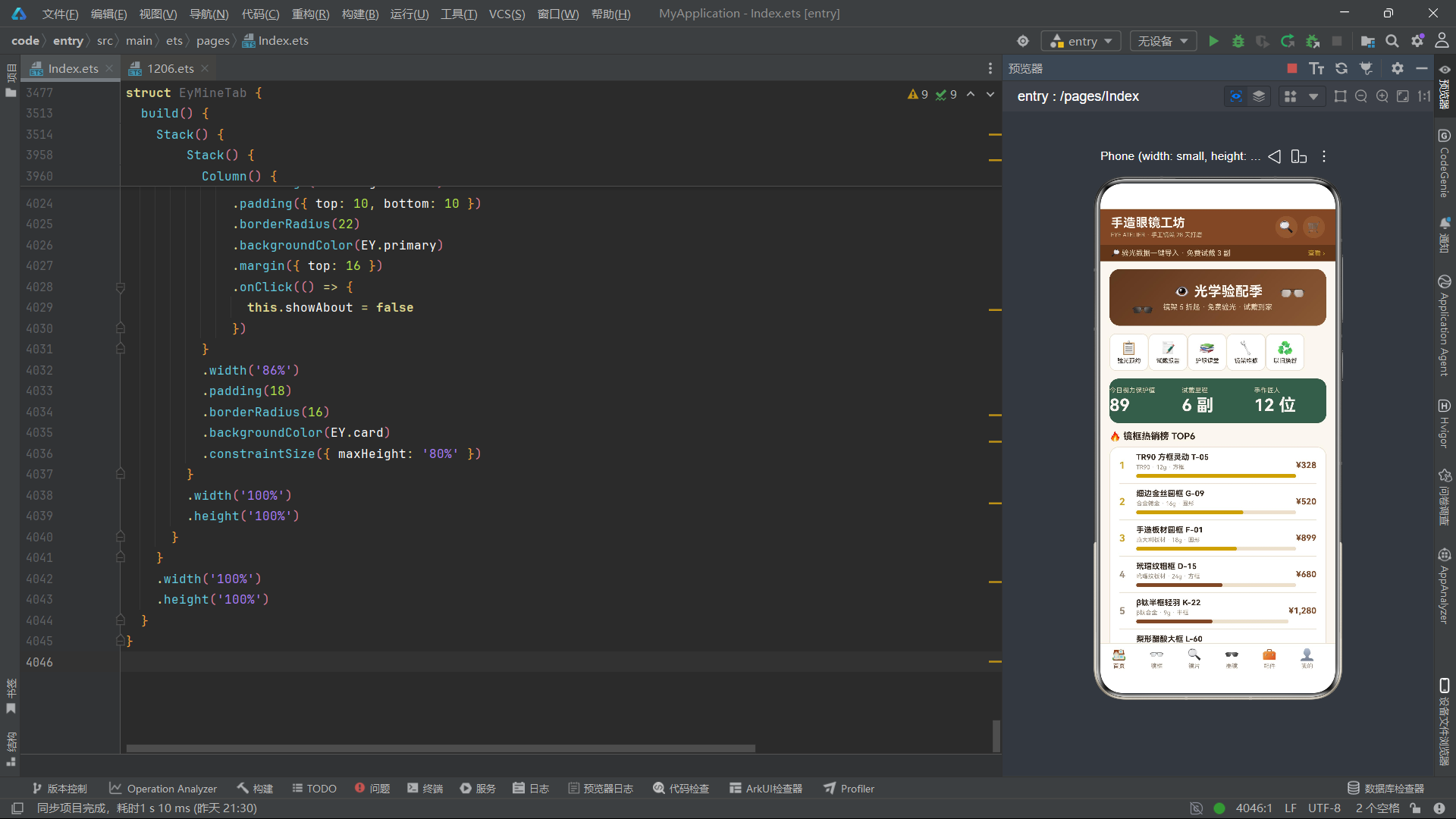
总结
本文以一个手造眼镜工坊商城为载体,系统剖析了HarmonyOS ArkTS在垂直电商场景下的声明式UI开发实践。从EyTheme主题常量定义到EyFrame、EyLens等接口驱动的数据模型,从eyPrice、eyBarW等纯函数工具集到eyFloatY、eyBlink等波形动画函数,应用构建了一套从数据层到视觉层的完整技术链路。六大业务模块(首页、镜架、镜片、墨镜、配件、个人中心)通过struct组件实现解耦,每个模块独立维护状态和生命周期,通过@State驱动的条件渲染管理弹窗,通过ForEach+keyGenerator优化列表更新性能。
在动效设计方面,应用展现了"轻量级高表现力"的动画策略。所有动画均基于sin/cos波形函数和60ms间隔的setInterval构建,不引入任何外部动画库。通过精心设计的参数(频率系数、相位差、振幅、下限阈值),实现了浮动、闪烁、脉冲、弹跳、摇摆、光泽六种微交互效果。这些动效不仅增强了界面的"活感",更重要的是通过视觉反馈引导用户关注重要信息——例如热销榜前三名使用金色高亮、库存不足时进度条变红、订单状态通过颜色即时辨识。这种"动效服务于信息传达"的设计理念值得借鉴。
数据驱动视图(修改数组自动刷新列表)、组件化解耦(struct作为独立可复用单元)、状态管理集中化(@State管理组件内状态、条件渲染控制弹窗)。EyFrameTab的CRUD操作流程尤其具有代表性——上架时push到数组、编辑时直接修改字段、删除时splice移除元素,每次操作后重新执行filter函数刷新当前筛选视图。这种"操作原始数据 → 自动触发视图更新"的模式,正是声明式UI相比命令式UI最本质的优势所在。对于希望深入掌握HarmonyOS ArkTS声明式UI开发的工程师而言,本应用的数据模型设计、工具函数封装、动效实现和模块拆分策略提供了极具参考价值的实战范例。

讨论HarmonyOS开发技术,专注于API与组件、DevEco Studio、测试、元服务和应用上架分发等。
更多推荐
 4
4 0
0- 0


 已为社区贡献74条内容

所有评论(0)