基于HarmonyOS API 24的ArkTS二手滑雪装备集市应用多模块架构与声明式UI深度解析——HarmonyOS 6.1.1声明式UI实战
引言
随着冬季运动的持续升温,滑雪已成为越来越多人热衷的户外活动。然而,专业滑雪装备的价格门槛较高,一套完整的单板或双板装备动辄数千元,许多入门爱好者和进阶滑手都倾向于通过二手交易渠道获取高性价比的器材。本项目旨在构建一个功能完善的二手滑雪装备集市应用,涵盖雪板、雪鞋、雪镜、雪服、护具等多品类装备的浏览、发布、租赁与课程报名等全链路业务场景。应用采用转转App风格的交互设计,以冰雪蓝白配色营造清爽专业的视觉氛围,为雪友提供沉浸式的装备交易体验。
在技术架构层面,本应用基于HarmonyOS声明式UI开发范式构建,采用ArkTS语言进行开发。整个应用由一个入口组件(@Entry @Component)驱动,通过@State装饰器管理的响应式状态变量体系实现页面切换、弹窗控制和数据筛选等核心交互逻辑。应用内部通过@Builder装饰器定义了超过20个独立的UI构建函数,实现了Header头部、Banner横幅、商品卡片、Tab页面、底部导航栏以及多种业务弹窗的高度模块化拆分。每个Builder函数职责单一、边界清晰,既便于维护又能保证渲染性能的最优控制。
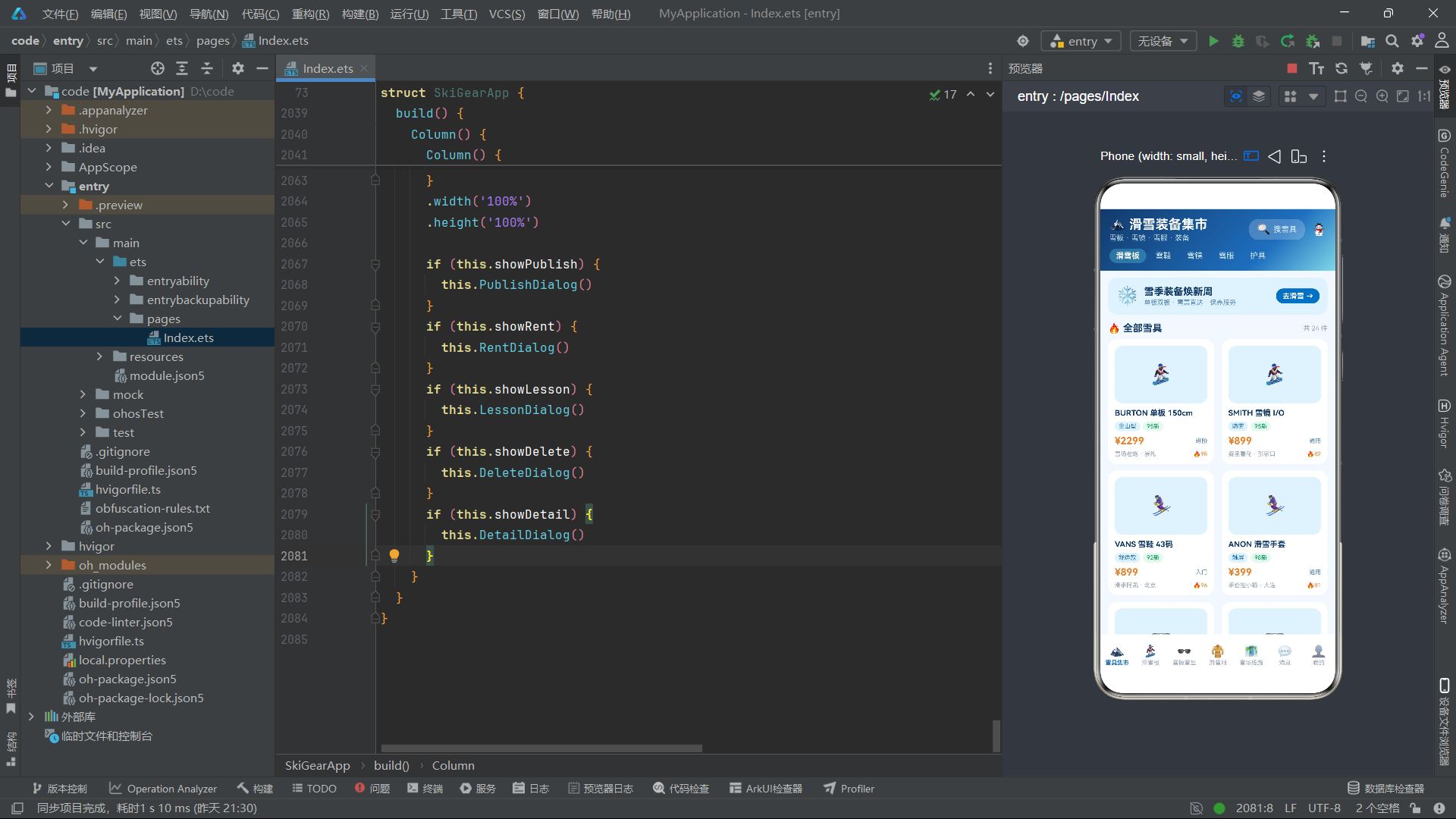
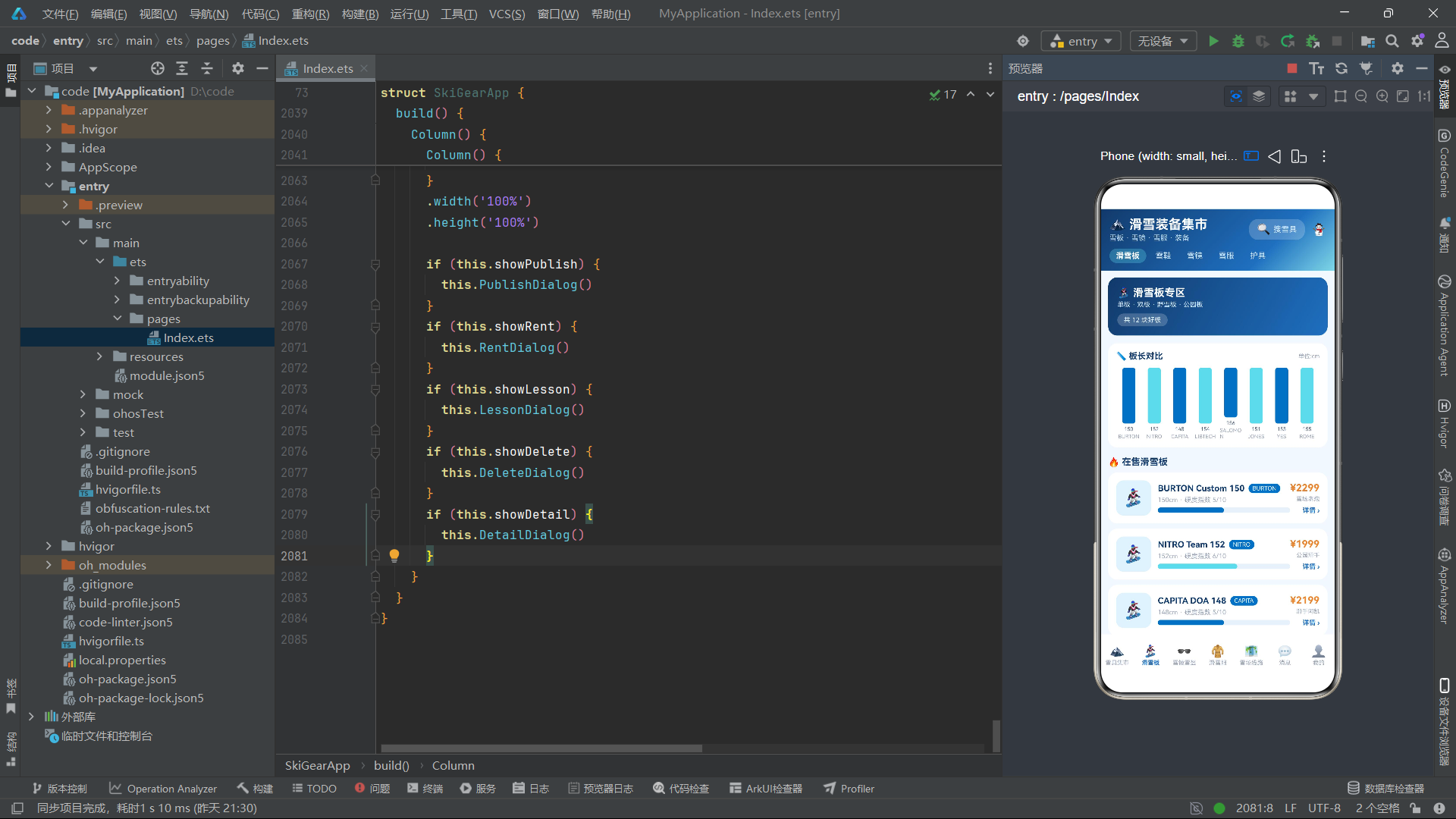
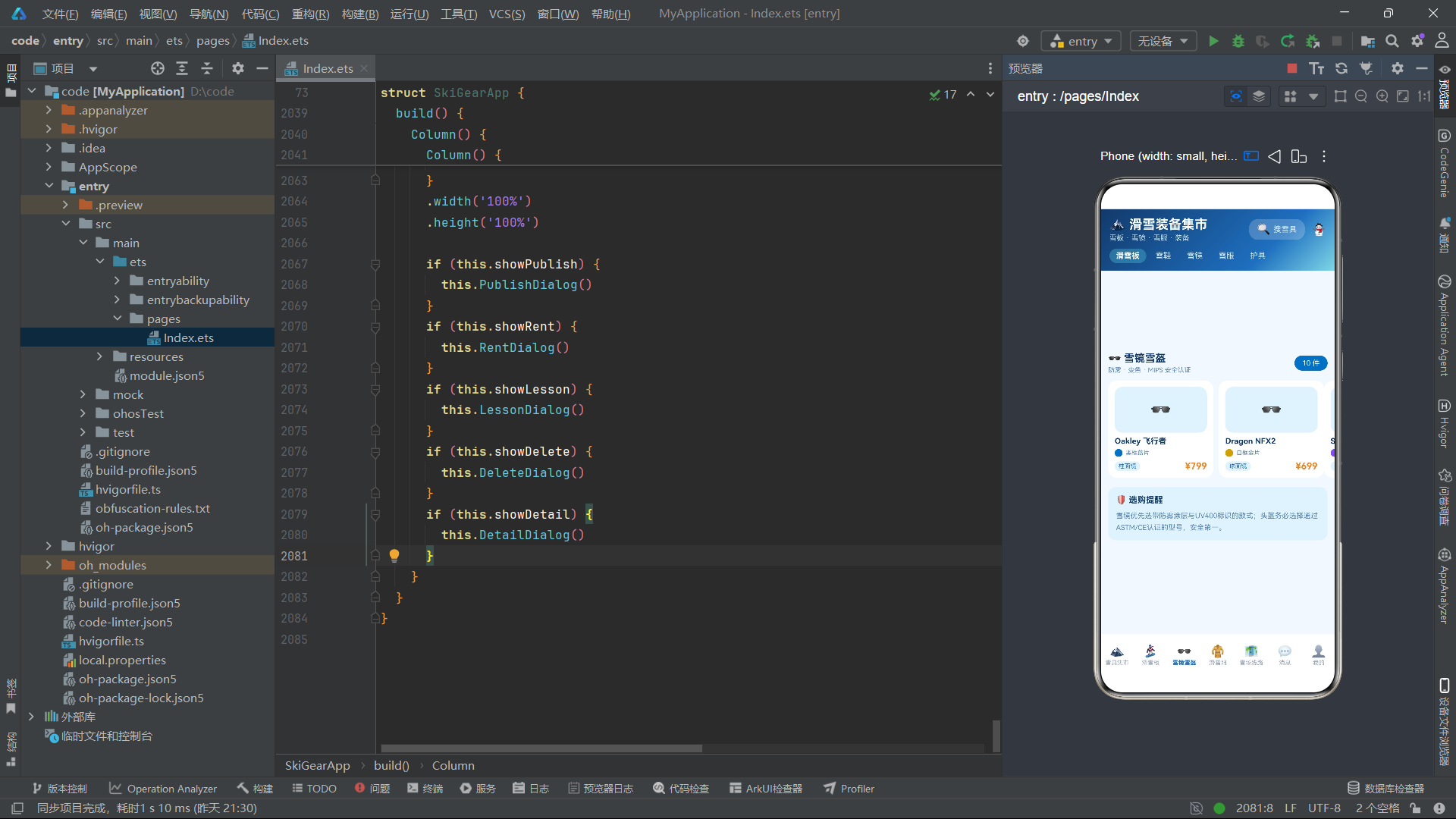
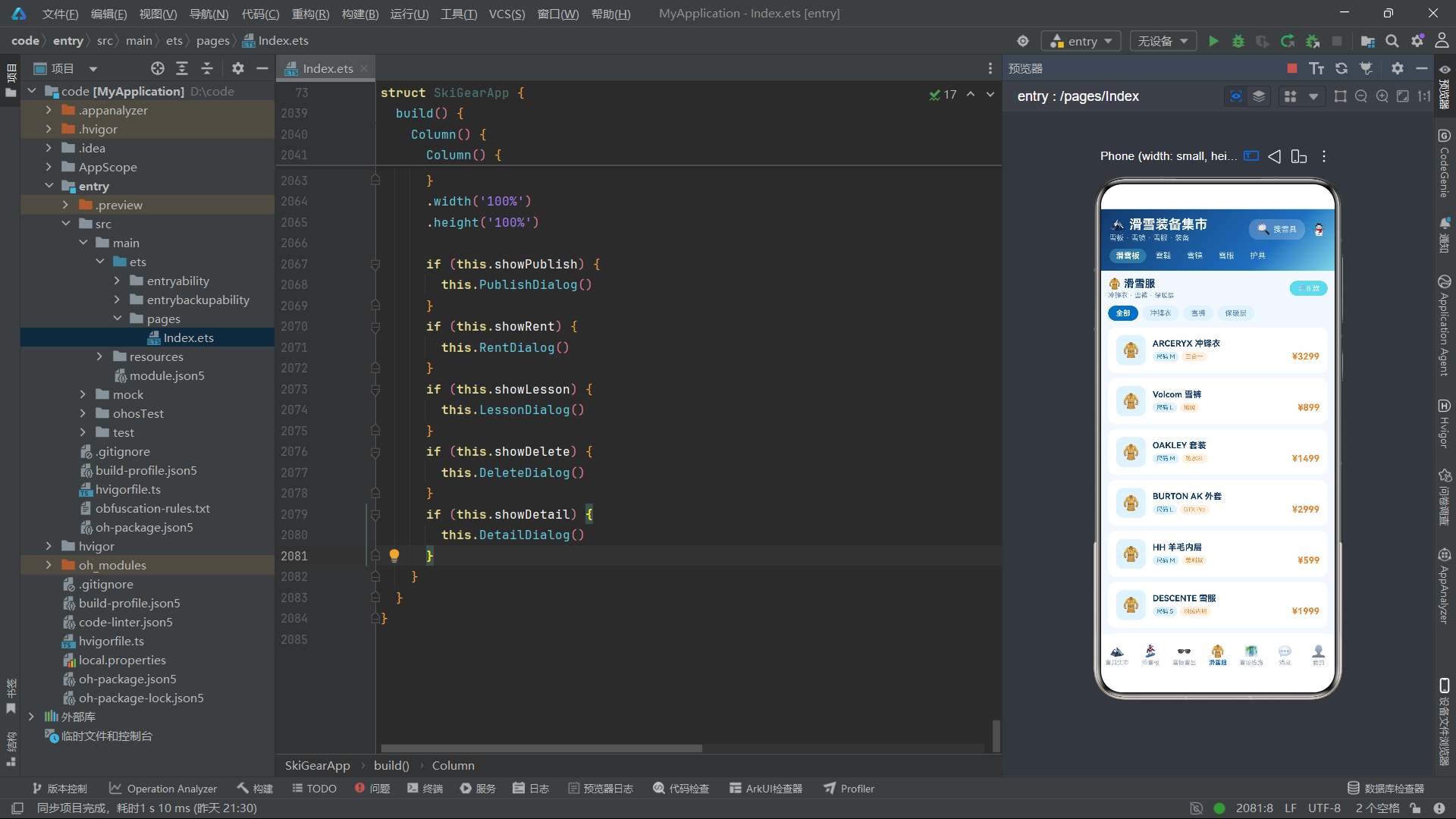
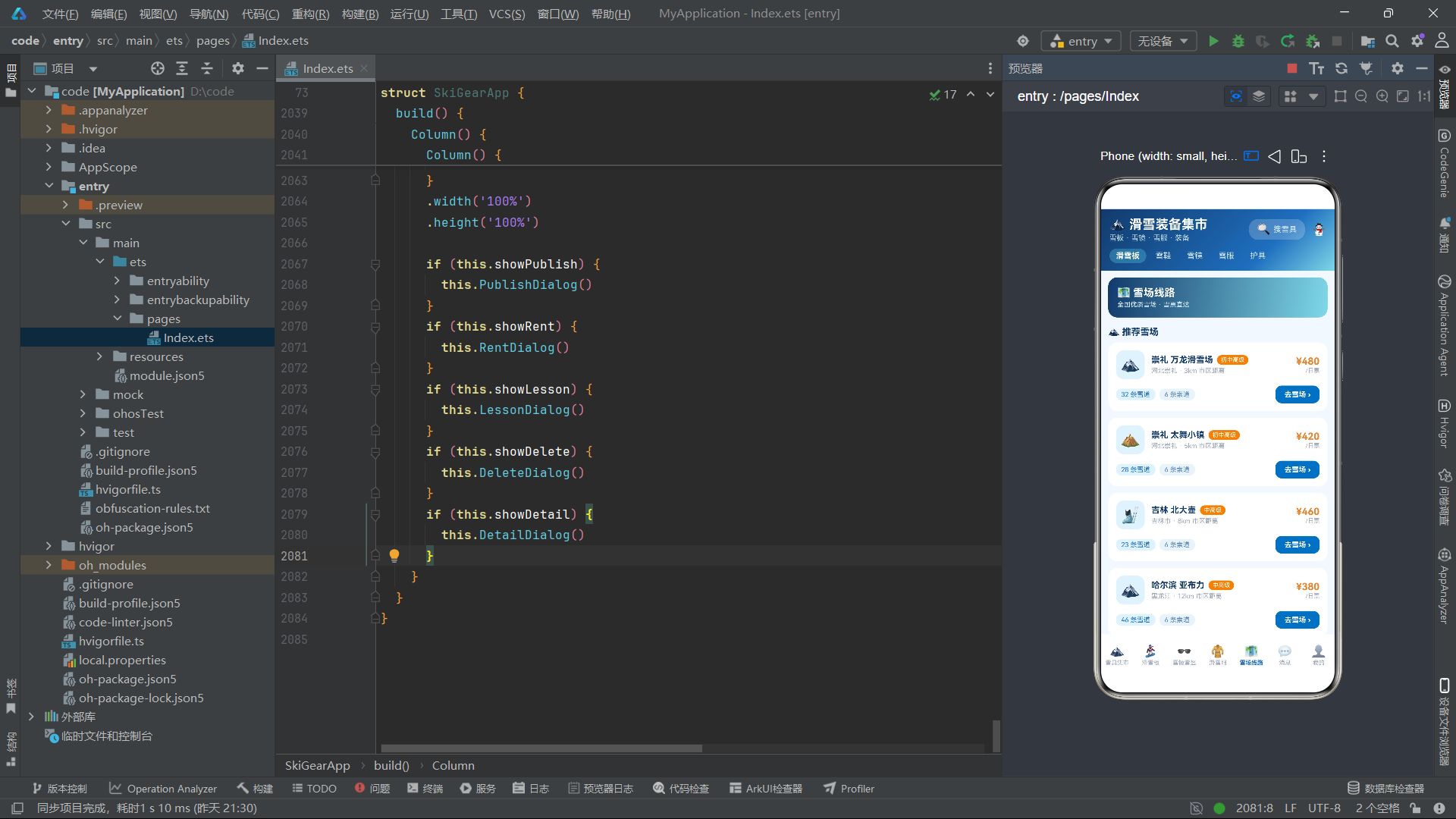
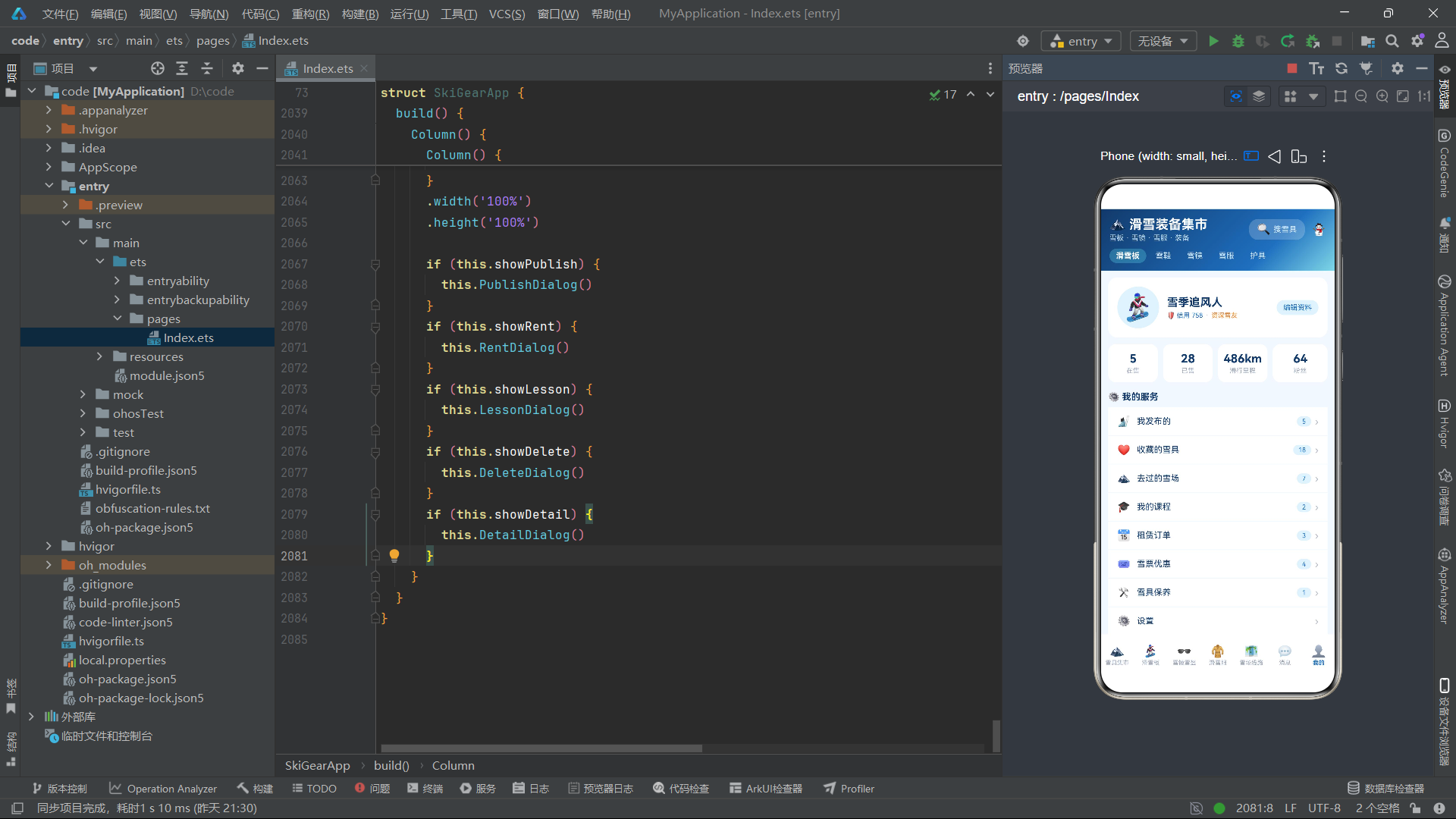
在业务设计层面,应用围绕"集市浏览—品类筛选—详情查看—发布/租赁/课程—消息管理—个人中心"这一核心用户旅程展开。七个Tab页面分别承载不同的业务模块,其中集市页面采用双列瀑布流布局展示24件雪具商品,滑雪板页面通过柱状图可视化对比不同板长,雪镜页面以网格式色彩卡片呈现产品多样性,滑雪服页面集成课程推荐,雪场线路页面提供全国优质雪场导航。多弹窗系统是本应用的另一大亮点,发布弹窗、租赁弹窗、课程弹窗、删除弹窗和详情弹窗各司其职,通过布尔状态变量控制显示与隐藏,构成了完整的交互闭环。
逐段代码分析
一、数据模型与接口定义
本应用首先定义了七个接口类型,用于规范各业务模块的数据结构。这些接口是整个应用的类型基础,确保了数据在组件间传递时的类型安全性。
interface SkiGear {
  name: string
  cate: string
  cond: string
  price: number
  orig: number
  tag: string
  seller: string
  city: string
  hot: number
  level: string
}

interface BoardItem {
  name: string
  brand: string
  len: number
  flex: number
  price: number
  seller: string
}

interface GoggleItem {
  name: string
  type: string
  color: string
  price: number
  seller: string
  colorHex: string
}

interface ResortItem {
  name: string
  city: string
  level: string
  runs: number
  lift: number
  price: number
  distance: number
}
SkiGear接口是集市主页面使用的核心数据类型,包含名称、分类、成色、售价、原价、标签、卖家、城市、热度和等级等十个字段,覆盖了二手装备交易所需的全部信息维度。BoardItem专注于滑雪板品类,额外定义了板长(len)和硬度指数(flex)两个专业参数。GoggleItem的特色在于包含colorHex字段,用于在UI中动态渲染雪镜的色卡样块。ResortItem则定义了雪场数据结构,包含雪道数量、索道数量和市区距离等实用信息。每个接口都经过精心设计,字段命名简洁且语义明确,与UI展示需求一一对应。
二、组件状态管理与数据初始化
入口组件SkiGearApp通过@State和private成员构建了完整的状态管理体系。状态变量驱动着页面的交互逻辑,而私有数据数组则为各Tab页面提供丰富的展示内容。
@Entry
@Component
struct SkiGearApp {
  @State currentIndex: number = 0
  @State pulse: boolean = true
  @State showPublish: boolean = false
  @State showRent: boolean = false
  @State showLesson: boolean = false
  @State showDelete: boolean = false
  @State showDetail: boolean = false
  @State selected: BoardItem | null = null
  @State publishCate: number = 0
  @State publishCond: number = 0
  @State rentDays: number = 3
  @State rentType: number = 0
  @State lessonLevel: number = 0
  @State msgFilter: number = 0
  @State gearFilter: number = 0
  @State delName: string = ''
  @State publishName: string = ''
  @State publishPrice: string = ''

  private tabNames: string[] = ['雪具集市', '滑雪板', '雪镜雪盔', '滑雪服', '雪场线路', '消息', '我的']
currentIndex控制当前激活的Tab索引,配合底部导航栏实现七页面切换。showPublish、showRent、showLesson、showDelete、showDetail五个布尔变量分别管理五个弹窗的显示状态,这种一一对应的设计模式使得弹窗逻辑清晰可控。pulse状态变量是一个全局动画驱动器,在多个Builder函数中被引用,用于控制价格数字的脉动缩放效果和Banner中雪花图标的呼吸动画。selected变量类型为BoardItem | null联合类型,用于在详情弹窗中传递当前选中的滑雪板数据。rentDays控制租赁天数并驱动总费用计算,gearFilter和msgFilter分别管理集市筛选和消息过滤的当前选中状态。
三、辅助方法与空值安全处理
组件内定义了多个辅助方法,用于从可能为null的selected对象中安全提取数据,体现了ArkTS对空值安全的严谨要求。
  selName(): string {
    if (this.selected === null) {
      return ''
    }
    return this.selected.name
  }

  selBrand(): string {
    if (this.selected === null) {
      return ''
    }
    return this.selected.brand
  }

  selPrice(): string {
    if (this.selected === null) {
      return ''
    }
    return this.selected.price.toString()
  }

  selFlex(): number {
    if (this.selected === null) {
      return 0
    }
    return this.selected.flex
  }

  maxHot(): number {
    let m: number = 1
    for (let i = 0; i < this.gears.length; i++) {
      if (this.gears[i].hot > m) {
        m = this.gears[i].hot
      }
    }
    return m
  }

  maxLen(): number {
    let m: number = 1
    for (let i = 0; i < this.boards.length; i++) {
      if (this.boards[i].len > m) {
        m = this.boards[i].len
      }
    }
    return m
  }
selName、selBrand、selPrice和selFlex四个方法均采用相同的空值保护模式:先检查this.selected是否为null,若为空则返回空字符串或零值,否则提取对应字段。这种设计确保了详情弹窗在未选中任何商品时不会因空引用而崩溃。maxHot和maxLen方法通过遍历数据数组求最大值,前者用于集市页面的热度归一化计算,后者用于滑雪板页面的板长对比柱状图比例计算。这些方法虽然逻辑简单,但作为数据预处理的桥梁,在UI渲染过程中扮演着不可或缺的角色。
四、主头部与筛选导航栏构建
MainHeader构建器定义了应用的顶部头部区域,包含标题、搜索入口和分类筛选标签,并采用线性渐变营造冰雪氛围。
  @Builder
  MainHeader() {
    Column() {
      Row() {
        Column() {
          Text('🏔️ 滑雪装备集市')
            .fontSize(20)
            .fontWeight(FontWeight.Bold)
            .fontColor('#FFFFFF')
          Text('雪板 · 雪镜 · 雪服 · 装备')
            .fontSize(11)
            .fontColor('#C5E1F5')
            .margin({ top: 2 })
        }
        .alignItems(HorizontalAlign.Start)
        .layoutWeight(1)

        Row() {
          Text('🔍')
            .fontSize(17)
            .fontColor('#FFFFFF')
          Text('搜雪具')
            .fontSize(12)
            .fontColor('#D3E9FA')
            .margin({ left: 4 })
        }
        .padding({ left: 12, right: 12, top: 6, bottom: 6 })
        .backgroundColor('#33FFFFFF')
        .borderRadius(14)
        .margin({ right: 10 })

        Text('⛄')
          .fontSize(18)
          .fontColor('#FFFFFF')
      }
      .width('100%')

      Row() {
        ForEach(['滑雪板', '雪鞋', '雪镜', '雪服', '护具'], (c: string, idx: number) => {
          Text(c)
            .fontSize(12)
            .fontColor(this.gearFilter === idx ? '#FFFFFF' : '#D3E9FA')
            .fontWeight(this.gearFilter === idx ? FontWeight.Bold : FontWeight.Normal)
            .padding({ left: 10, right: 10, top: 4, bottom: 4 })
            .backgroundColor(this.gearFilter === idx ? '#4D7FD8E8' : '#00000000')
            .borderRadius(12)
            .margin({ right: 4 })
            .onClick(() => {
              this.gearFilter = idx
            })
        }, (c: string) => c)
        Column().layoutWeight(1)
      }
      .width('100%')
      .margin({ top: 10 })
    }
    .width('100%')
    .padding({ top: 12, left: 14, right: 14, bottom: 12 })
    .linearGradient({
      angle: 135,
      colors: [['#123A6B', 0], ['#1E6FBF', 0.7], ['#7FD8E8', 1]]
    })
  }
头部区域分为上下两层。上层采用Row布局,左侧标题区域通过layoutWeight(1)占据剩余空间,中间搜索框使用半透明白色背景(#33FFFFFF)营造磨砂玻璃质感,右侧放置用户头像图标。下层筛选栏通过ForEach渲染五个品类标签,每个标签的样式根据gearFilter状态动态切换:选中时使用加粗白色字体和半透明蓝色背景,未选中时使用浅蓝色字体和透明背景。点击标签触发gearFilter状态更新,声明式UI框架自动驱动标签样式重新渲染。整个头部通过linearGradient设置135度渐变,从深蓝(#123A6B)过渡到冰雪蓝(#7FD8E8),形成强烈的冰雪视觉识别度。
五、横幅动画与装备卡片构建
SkiBanner构建器实现了呼吸动画横幅,GearCard定义了集市页面的装备商品卡片,两者共同构成了集市的主要内容展示区域。
  @Builder
  SkiBanner() {
    Row() {
      Row() {
        Text('❄️')
          .fontSize(28)
          .scale(this.pulse ? 1.2 : 0.9)
          .animation({ duration: 900, iterations: -1, curve: Curve.EaseInOut, playMode: PlayMode.Alternate })
        Column() {
          Text('雪季装备焕新周')
            .fontSize(15)
            .fontWeight(FontWeight.Bold)
            .fontColor('#123A6B')
          Text('单板双板 · 雪票直达 · 保养服务')
            .fontSize(10)
            .fontColor('#5A87B8')
            .margin({ top: 2 })
        }
        .alignItems(HorizontalAlign.Start)
        .layoutWeight(1)
        .margin({ left: 8 })
        Text('去滑雪 →')
          .fontSize(11)
          .fontColor('#FFFFFF')
          .fontWeight(FontWeight.Bold)
          .padding({ left: 10, right: 10, top: 5, bottom: 5 })
          .backgroundColor('#1E6FBF')
          .borderRadius(12)
      }
      .width('100%')
      .padding(12)
      .backgroundColor('#E3F2FD')
      .borderRadius(14)
    }
    .width('100%')
    .margin({ top: 10 })
  }

  @Builder
  GearCard(item: SkiGear, idx: number) {
    Column() {
      Column() {
        Text(idx % 4 === 0 ? '🏂' : (idx % 4 === 1 ? '⛷️' : (idx % 4 === 2 ? '🕶️' : '🧥')))
          .fontSize(30)
      }
      .width('100%')
      .height(88)
      .justifyContent(FlexAlign.Center)
      .backgroundColor('#E3F2FD')
      .borderRadius(12)

      Text(item.name)
        .fontSize(12)
        .fontWeight(FontWeight.Bold)
        .fontColor('#123A6B')
        .maxLines(1)
        .textOverflow({ overflow: TextOverflow.Ellipsis })
        .width('100%')
        .margin({ top: 8 })

      Row() {
        Text(item.tag)
          .fontSize(9)
          .fontColor('#1E6FBF')
          .padding({ left: 6, right: 6, top: 2, bottom: 2 })
          .backgroundColor('#E3F2FD')
          .borderRadius(8)
        Text(item.cond)
          .fontSize(9)
          .fontColor('#00A65A')
          .padding({ left: 6, right: 6, top: 2, bottom: 2 })
          .backgroundColor('#E8F8F0')
          .borderRadius(8)
          .margin({ left: 4 })
      }
      .width('100%')
      .margin({ top: 6 })

      Row() {
        Text('¥' + item.price.toString())
          .fontSize(15)
          .fontWeight(FontWeight.Bold)
          .fontColor('#E8852E')
          .scale(this.pulse ? 1.08 : 1)
          .animation({ duration: 1000, iterations: -1, curve: Curve.EaseInOut, playMode: PlayMode.Alternate })
        Column().layoutWeight(1)
        Text(item.level)
          .fontSize(9)
          .fontColor('#5A87B8')
      }
      .width('100%')
      .margin({ top: 6 })

      Row() {
        Text(item.seller + ' · ' + item.city)
          .fontSize(9)
          .fontColor('#9AA5B8')
        Column().layoutWeight(1)
        Text('🔥' + item.hot.toString())
          .fontSize(9)
          .fontColor('#E8852E')
      }
      .width('100%')
      .margin({ top: 6 })
    }
    .width('100%')
    .padding(10)
    .backgroundColor('#FFFFFF')
    .borderRadius(14)
    .margin({ bottom: 10 })
    .onClick(() => {
      this.delName = item.name
      this.showDelete = true
    })
  }
SkiBanner中的雪花图标通过scale属性绑定this.pulse布尔值,在1.2和0.9之间交替缩放,配合animation修饰器的900毫秒EaseInOut曲线和PlayMode.Alternate模式,实现了无限循环的呼吸效果。GearCard采用Emoji图标作为商品图片的替代,通过idx % 4取模运算在四种雪具图标间轮换。卡片包含标签、成色、价格、热度四个信息层级,价格数字同样绑定pulse实现脉动动画。文本溢出通过maxLines(1)和textOverflow({ overflow: TextOverflow.Ellipsis })实现省略号截断,保证卡片高度一致性。点击卡片触发删除弹窗,通过this.delName传递商品名称。
六、集市页面双列瀑布流布局
Tab1Market构建器实现了集市主页面,采用双列布局展示商品列表,并集成横幅、发布按钮等功能元素。
  @Builder
  Tab1Market() {
    Scroll() {
      Column() {
        this.SkiBanner()

        Row() {
          Text('🔥 全部雪具')
            .fontSize(15)
            .fontWeight(FontWeight.Bold)
            .fontColor('#123A6B')
          Column().layoutWeight(1)
          Text('共 ' + this.gears.length.toString() + ' 件')
            .fontSize(10)
            .fontColor('#9AA5B8')
        }
        .width('100%')
        .margin({ top: 12, bottom: 8 })

        Row() {
          Column() {
            ForEach(this.gears.slice(0, 12), (item: SkiGear, idx: number) => {
              this.GearCard(item, idx)
            }, (item: SkiGear) => item.name)
          }
          .layoutWeight(1)
          .margin({ right: 6 })

          Column() {
            ForEach(this.gears.slice(12), (item: SkiGear, idx: number) => {
              this.GearCard(item, idx + 12)
            }, (item: SkiGear) => item.name)
          }
          .layoutWeight(1)
          .margin({ left: 6 })
        }
        .width('100%')
        .alignItems(VerticalAlign.Top)

        Row() {
          Text('📤 发布雪具')
            .fontSize(13)
            .fontWeight(FontWeight.Bold)
            .fontColor('#FFFFFF')
            .textAlign(TextAlign.Center)
            .width('100%')
            .padding({ top: 13, bottom: 13 })
            .backgroundColor('#1E6FBF')
            .borderRadius(12)
            .onClick(() => {
              this.showPublish = true
            })
        }
        .width('100%')
        .margin({ top: 4 })
      }
      .width('100%')
      .padding({ left: 12, right: 12, bottom: 20 })
    }
    .width('100%')
    .height('100%')
    .scrollBar(BarState.Off)
    .backgroundColor('#F2F8FF')
  }
集市页面的核心布局策略是通过this.gears.slice(0, 12)和this.gears.slice(12)将24件商品分为两组,分别放入两个等宽的Column容器中,形成双列瀑布流效果。两个Column均设置layoutWeight(1)实现等宽分布,通过margin设置6像素间距。外层Row的alignItems(VerticalAlign.Top)确保两列从顶部对齐。ForEach的第三个参数提供了基于商品名称的键值生成函数,确保列表渲染的高效更新。scrollBar(BarState.Off)隐藏滚动条,配合backgroundColor('#F2F8FF')的雪白背景色营造沉浸式浏览体验。底部的发布按钮以全宽蓝色块呈现,点击后设置showPublish为true触发发布弹窗。
七、滑雪板专区与板长柱状图可视化
BoardCard定义了滑雪板列表卡片,Tab2Board构建了滑雪板专区页面,其中包含一个独特的板长对比柱状图组件。
  @Builder
  BoardCard(item: BoardItem, idx: number) {
    Row() {
      Column() {
        Text('🏂')
          .fontSize(26)
      }
      .width(54)
      .height(54)
      .justifyContent(FlexAlign.Center)
      .backgroundColor('#E3F2FD')
      .borderRadius(12)

      Column() {
        Row() {
          Text(item.name)
            .fontSize(13)
            .fontWeight(FontWeight.Bold)
            .fontColor('#123A6B')
          Text(item.brand)
            .fontSize(9)
            .fontColor('#FFFFFF')
            .padding({ left: 6, right: 6, top: 2, bottom: 2 })
            .backgroundColor('#1E6FBF')
            .borderRadius(8)
            .margin({ left: 6 })
        }
        .width('100%')

        Text(item.len.toString() + 'cm · 硬度指数 ' + item.flex.toString() + '/10')
          .fontSize(10)
          .fontColor('#9AA5B8')
          .width('100%')
          .margin({ top: 4 })

        Stack({ alignContent: Alignment.Start }) {
          Column()
            .width('100%')
            .height(8)
            .backgroundColor('#E8F1FA')
            .borderRadius(4)
          Column()
            .width((item.flex / 10 * 100).toString() + '%')
            .height(8)
            .backgroundColor(idx % 2 === 0 ? '#1E6FBF' : '#7FD8E8')
            .borderRadius(4)
        }
        .width('100%')
        .margin({ top: 6 })
      }
      .alignItems(HorizontalAlign.Start)
      .layoutWeight(1)
      .margin({ left: 10 })

      Column() {
        Text('¥' + item.price.toString())
          .fontSize(15)
          .fontWeight(FontWeight.Bold)
          .fontColor('#E8852E')
          .scale(this.pulse ? 1.08 : 1)
          .animation({ duration: 900, iterations: -1, curve: Curve.EaseInOut, playMode: PlayMode.Alternate })
        Text(item.seller)
          .fontSize(9)
          .fontColor('#9AA5B8')
          .margin({ top: 3 })
        Text('详情 ›')
          .fontSize(10)
          .fontColor('#1E6FBF')
          .fontWeight(FontWeight.Bold)
          .margin({ top: 6 })
          .onClick(() => {
            this.selected = item
            this.showDetail = true
          })
      }
      .alignItems(HorizontalAlign.End)
    }
    .width('100%')
    .padding(12)
    .backgroundColor('#FFFFFF')
    .borderRadius(14)
    .margin({ bottom: 8 })
  }
BoardCard中最值得关注的技术点是使用Stack容器实现进度条效果。Stack({ alignContent: Alignment.Start })使子元素从左端对齐,底层放置一个width('100%')的灰色背景条,上层放置一个宽度为(item.flex / 10 * 100).toString() + '%'的蓝色前景条,通过百分比宽度实现硬度指数的可视化展示。交替使用idx % 2切换前景条颜色,增强视觉层次感。点击"详情"链接时,将当前item赋值给this.selected并触发详情弹窗,这种将选中数据暂存于状态变量的方式,是ArkTS中跨Builder传递数据的标准范式。
板长对比柱状图的实现更为巧妙,它通过layoutWeight实现柱状高度的自适应:
        Column() {
          Row() {
            Text('📏 板长对比')
              .fontSize(13)
              .fontWeight(FontWeight.Bold)
              .fontColor('#123A6B')
            Column().layoutWeight(1)
            Text('单位:cm')
              .fontSize(9)
              .fontColor('#9AA5B8')
          }
          .width('100%')
          .margin({ bottom: 10 })

          Row() {
            ForEach(this.boards.slice(0, 8), (b: BoardItem, idx: number) => {
              Column() {
                Column()
                  .layoutWeight(b.len / 160)
                  .width(20)
                  .backgroundColor(idx % 2 === 0 ? '#1E6FBF' : '#7FD8E8')
                  .borderRadius(4)
                Text(b.len.toString())
                  .fontSize(8)
                  .fontColor('#5A6B85')
                  .margin({ top: 4 })
                Text(b.brand)
                  .fontSize(8)
                  .fontColor('#9AA5B8')
                  .margin({ top: 2 })
              }
              .justifyContent(FlexAlign.End)
              .alignItems(HorizontalAlign.Center)
              .layoutWeight(1)
            }, (b: BoardItem) => b.name)
          }
          .width('100%')
          .height(110)
          .alignItems(VerticalAlign.Bottom)
        }
        .width('100%')
        .padding(12)
        .backgroundColor('#FFFFFF')
        .borderRadius(14)
        .margin({ top: 12 })
每个柱状条通过layoutWeight(b.len / 160)设置权重值,板长越大权重越高,柱条越高。父容器固定高度为110,外层Row的alignItems(VerticalAlign.Bottom)确保所有柱条从底部对齐生长。柱条下方依次显示数值和品牌名,通过justifyContent(FlexAlign.End)使柱条在Column内部底部对齐。这种利用layoutWeight实现数据可视化条形图的方式,无需引入图表库即可完成轻量级的数据可视化,充分体现了声明式UI布局的灵活性。
八、雪镜卡片与网格布局
雪镜页面采用网格布局展示产品,每个卡片包含色卡样块,直观呈现雪镜颜色信息。
  @Builder
  GoggleCard(item: GoggleItem, idx: number) {
    Column() {
      Column() {
        Text('🕶️')
          .fontSize(26)
      }
      .width('100%')
      .height(70)
      .justifyContent(FlexAlign.Center)
      .backgroundColor('#E3F2FD')
      .borderRadius(12)

      Text(item.name)
        .fontSize(12)
        .fontWeight(FontWeight.Bold)
        .fontColor('#123A6B')
        .maxLines(1)
        .textOverflow({ overflow: TextOverflow.Ellipsis })
        .width('100%')
        .margin({ top: 6 })

      Row() {
        Column()
          .width(12)
          .height(12)
          .backgroundColor(item.colorHex)
          .borderRadius(6)
        Text(item.color)
          .fontSize(9)
          .fontColor('#5A87B8')
          .margin({ left: 5 })
      }
      .width('100%')
      .margin({ top: 5 })

      Row() {
        Text(item.type)
          .fontSize(9)
          .fontColor('#1E6FBF')
          .padding({ left: 6, right: 6, top: 2, bottom: 2 })
          .backgroundColor('#E3F2FD')
          .borderRadius(8)
        Column().layoutWeight(1)
        Text('¥' + item.price.toString())
          .fontSize(14)
          .fontWeight(FontWeight.Bold)
          .fontColor('#E8852E')
      }
      .width('100%')
      .margin({ top: 6 })
    }
    .width('48%')
    .padding(10)
    .backgroundColor('#FFFFFF')
    .borderRadius(14)
    .margin({ right: idx % 2 === 0 ? 8 : 0, bottom: 10 })
  }
GoggleCard设置宽度为48%,配合外层Row的flexWrap(FlexWrap.Wrap)实现每行两张卡片的网格效果。卡片中的色卡样块通过Column().backgroundColor(item.colorHex)动态渲染,将数据中的十六进制颜色值直接映射为UI颜色。margin的right值通过idx % 2判断奇偶来控制间距:偶数索引卡片右侧留8像素间距,奇数索引不留间距,实现紧凑的网格排列。这种通过索引取模控制边距的模式在ArkTS列表布局中非常实用,避免了引入Grid容器的额外复杂度。
九、消息列表与未读状态渲染
消息页面通过条件渲染区分已读和未读消息,并实现了消息过滤切换功能。
  @Builder
  Tab6Msg() {
    Column() {
      Row() {
        ForEach(['全部消息', '未读'], (t: string, idx: number) => {
          Column() {
            Text(t)
              .fontSize(14)
              .fontWeight(this.msgFilter === idx ? FontWeight.Bold : FontWeight.Normal)
              .fontColor(this.msgFilter === idx ? '#1E6FBF' : '#9AA5B8')
            Column()
              .width(16)
              .height(3)
              .backgroundColor(this.msgFilter === idx ? '#1E6FBF' : '#00000000')
              .borderRadius(2)
              .margin({ top: 4 })
          }
          .margin({ right: 24 })
          .onClick(() => {
            this.msgFilter = idx
          })
        }, (t: string) => t)
        Column().layoutWeight(1)
        Text('清空')
          .fontSize(11)
          .fontColor('#9AA5B8')
      }
      .width('100%')
      .padding({ left: 14, right: 14, top: 10, bottom: 8 })
      .backgroundColor('#FFFFFF')

      Scroll() {
        Column() {
          ForEach(this.msgs, (m: MsgItem, idx: number) => {
            Row() {
              Column() {
                Text(idx % 4 === 0 ? '🏂' : (idx % 4 === 1 ? '💬' : (idx % 4 === 2 ? '🔔' : '⛷️')))
                  .fontSize(20)
              }
              .width(44)
              .height(44)
              .justifyContent(FlexAlign.Center)
              .backgroundColor(idx % 4 === 0 ? '#E3F2FD' : (idx % 4 === 1 ? '#E8F8F0' : '#FFF3E6'))
              .borderRadius(22)

              Column() {
                Row() {
                  Text(m.name)
                    .fontSize(13)
                    .fontWeight(FontWeight.Bold)
                    .fontColor('#123A6B')
                  Column().layoutWeight(1)
                  Text(m.time)
                    .fontSize(10)
                    .fontColor('#B0B8C8')
                }
                .width('100%')

                Text(m.text)
                  .fontSize(11)
                  .fontColor('#5A87B8')
                  .maxLines(1)
                  .textOverflow({ overflow: TextOverflow.Ellipsis })
                  .width('100%')
                  .margin({ top: 4 })
              }
              .alignItems(HorizontalAlign.Start)
              .layoutWeight(1)
              .margin({ left: 10 })

              if (m.unread) {
                Column()
                  .width(8)
                  .height(8)
                  .backgroundColor('#E8852E')
                  .borderRadius(4)
              } else {
                Column()
                  .width(8)
                  .height(8)
                  .backgroundColor('#00000000')
                  .borderRadius(4)
              }
            }
            .width('100%')
            .padding(12)
            .backgroundColor(m.unread ? '#F7FBFF' : '#FFFFFF')
            .margin({ bottom: 1 })
          }, (m: MsgItem) => m.name + m.time)
        }
        .width('100%')
        .padding({ bottom: 20 })
      }
      .width('100%')
      .layoutWeight(1)
      .scrollBar(BarState.Off)
    }
    .width('100%')
    .height('100%')
  }
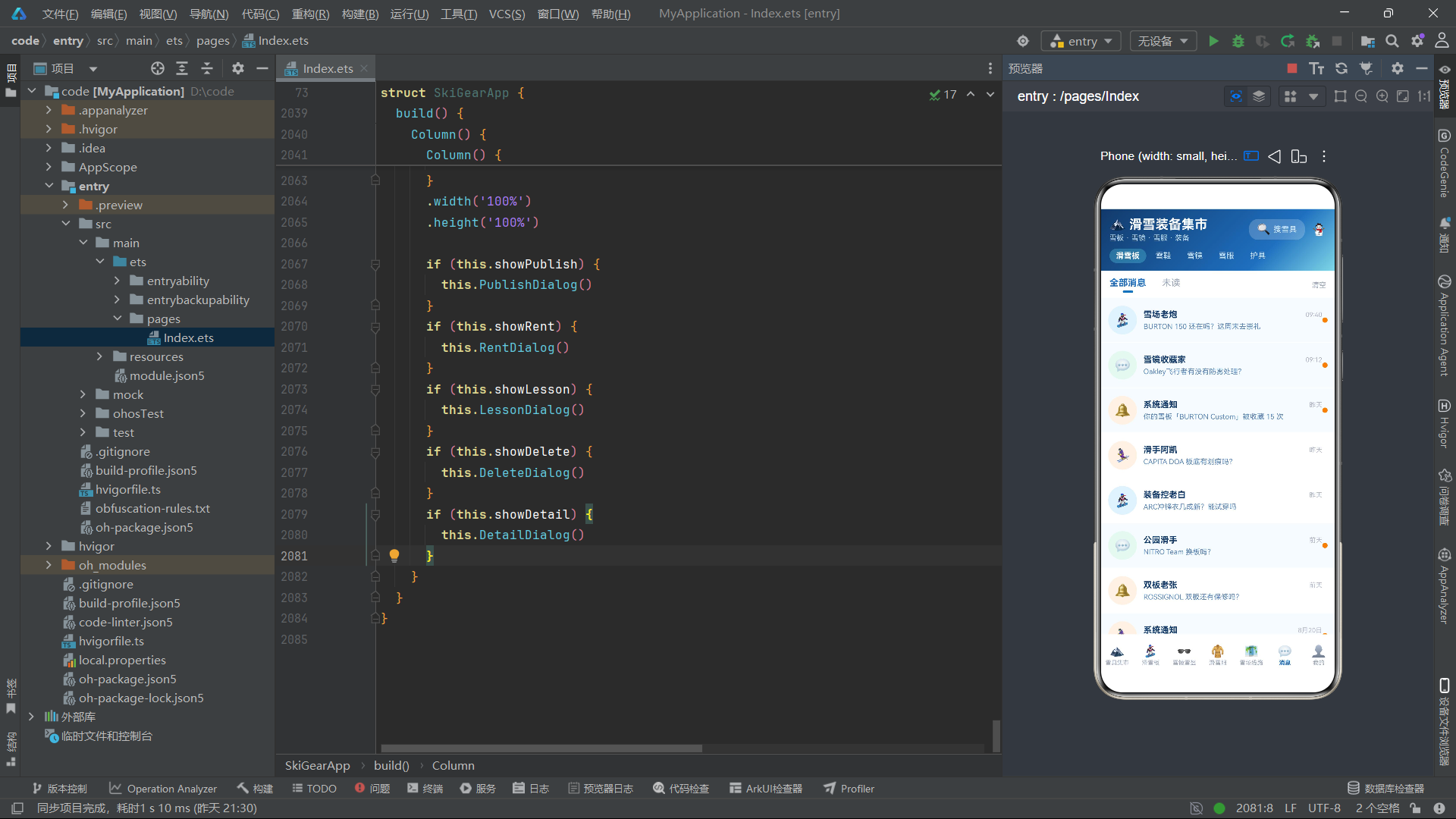
消息列表的核心技术点是使用if...else条件渲染实现未读小红点的显示控制。当m.unread为true时渲染橙色圆点,否则渲染透明圆点,保持布局占位一致以避免消息项高度跳变。每个消息项的背景色也根据未读状态切换:未读消息使用极浅蓝(#F7FBFF),已读消息使用纯白。头像区域的图标和背景色通过idx % 4取模进行四种轮换,增加视觉丰富度。ForEach的键值函数使用m.name + m.time组合键,确保即使同名消息也能正确区分。顶部Tab切换通过msgFilter状态变量控制选中样式,选中标签下方显示3像素高的指示条。
十、发布弹窗与表单交互
发布弹窗实现了完整的商品发布表单,包含名称输入、分类选择、成色选择和价格输入四个交互模块。
  @Builder
  PublishDialog() {
    Column() {
      Column() {
        Column() {
          Text('📦 发布雪具')
            .fontSize(16)
            .fontWeight(FontWeight.Bold)
            .fontColor('#123A6B')
          Text('让闲置雪具陪更多人上雪道')
            .fontSize(10)
            .fontColor('#9AA5B8')
            .margin({ top: 2 })
        }
        .width('100%')
        .alignItems(HorizontalAlign.Start)

        Text('雪具名称')
          .fontSize(11)
          .fontWeight(FontWeight.Bold)
          .fontColor('#5A87B8')
          .width('100%')
          .margin({ top: 12 })

        Row() {
          Text(this.publishName === '' ? '如:BURTON 单板 150cm' : this.publishName)
            .fontSize(12)
            .fontColor(this.publishName === '' ? '#C0C6D2' : '#123A6B')
          Column().layoutWeight(1)
          Text('✏️')
            .fontSize(13)
            .fontColor('#1E6FBF')
        }
        .width('100%')
        .padding(10)
        .backgroundColor('#F2F8FF')
        .borderRadius(10)
        .margin({ top: 6 })
        .onClick(() => {
          this.publishName = 'NITRO 单板 152cm'
        })

        Text('分类')
          .fontSize(11)
          .fontWeight(FontWeight.Bold)
          .fontColor('#5A87B8')
          .width('100%')
          .margin({ top: 12 })

        Row() {
          ForEach(['滑雪板', '雪鞋', '雪镜', '雪服', '护具'], (c: string, idx: number) => {
            Text(c)
              .fontSize(11)
              .fontColor(this.publishCate === idx ? '#FFFFFF' : '#5A87B8')
              .padding({ left: 12, right: 12, top: 6, bottom: 6 })
              .backgroundColor(this.publishCate === idx ? '#1E6FBF' : '#E3F2FD')
              .borderRadius(10)
              .margin({ right: 6 })
              .onClick(() => {
                this.publishCate = idx
              })
          }, (c: string) => c)
          Column().layoutWeight(1)
        }
        .width('100%')
        .margin({ top: 6 })

        Text('期望价格')
          .fontSize(11)
          .fontWeight(FontWeight.Bold)
          .fontColor('#5A87B8')
          .width('100%')
          .margin({ top: 12 })

        Row() {
          Text('¥')
            .fontSize(15)
            .fontWeight(FontWeight.Bold)
            .fontColor('#E8852E')
          Text(this.publishPrice === '' ? '请输入价格' : this.publishPrice)
            .fontSize(15)
            .fontWeight(FontWeight.Bold)
            .fontColor(this.publishPrice === '' ? '#C0C6D2' : '#E8852E')
            .margin({ left: 4 })
          Column().layoutWeight(1)
          Text('智能估价')
            .fontSize(10)
            .fontColor('#1E6FBF')
            .padding({ left: 10, right: 10, top: 5, bottom: 5 })
            .backgroundColor('#E3F2FD')
            .borderRadius(10)
            .onClick(() => {
              this.publishPrice = '1999'
            })
        }
        .width('100%')
        .padding(10)
        .backgroundColor('#FFF3E6')
        .borderRadius(10)
        .margin({ top: 6 })

        Row() {
          Text('取消')
            .fontSize(13)
            .fontColor('#9AA5B8')
            .textAlign(TextAlign.Center)
            .layoutWeight(1)
            .padding({ top: 12, bottom: 12 })
            .backgroundColor('#E3F2FD')
            .borderRadius(12)
            .onClick(() => {
              this.showPublish = false
            })
          Text('确认发布')
            .fontSize(13)
            .fontWeight(FontWeight.Bold)
            .fontColor('#FFFFFF')
            .textAlign(TextAlign.Center)
            .layoutWeight(1)
            .padding({ top: 12, bottom: 12 })
            .backgroundColor('#1E6FBF')
            .borderRadius(12)
            .margin({ left: 10 })
            .onClick(() => {
              this.showPublish = false
              this.publishName = ''
              this.publishPrice = ''
            })
        }
        .width('100%')
        .margin({ top: 16 })
      }
      .width('100%')
      .padding(16)
      .backgroundColor('#FFFFFF')
      .borderRadius(16)
      .onClick((event: ClickEvent) => {
        event.stopPropagation()
      })
    }
    .width('100%')
    .height('100%')
    .justifyContent(FlexAlign.End)
    .backgroundColor('#66000000')
    .onClick(() => {
      this.showPublish = false
    })
  }
发布弹窗的交互设计非常完整。名称输入区域使用占位文本模式,当publishName为空时显示灰色提示文字,点击后填入示例值模拟用户输入。分类选择采用标签组模式,五个标签通过publishCate状态变量控制选中样式。价格输入区域提供了"智能估价"快捷按钮,点击后自动填入建议价格。弹窗底部的取消和确认按钮均通过onClick设置回调:取消按钮关闭弹窗,确认按钮关闭弹窗并清空表单数据。弹窗最外层设置了半透明黑色遮罩(#66000000),点击遮罩关闭弹窗,而内部内容区域通过event.stopPropagation()阻止事件冒泡,防止点击内容时误关弹窗。这种事件冒泡控制是ArkTS弹窗设计的标准范式。
十一、租赁弹窗与动态费用计算
租赁弹窗实现了天数选择器、套餐选择和实时费用计算功能,是应用中动态计算逻辑最密集的弹窗。
  @Builder
  RentDialog() {
    Column() {
      Column() {
        Row() {
          Text('🎿 雪具租赁')
            .fontSize(16)
            .fontWeight(FontWeight.Bold)
            .fontColor('#123A6B')
          Column().layoutWeight(1)
          Text('✕')
            .fontSize(16)
            .fontColor('#B0B8C8')
            .onClick(() => {
              this.showRent = false
            })
        }
        .width('100%')

        Text('租赁套餐')
          .fontSize(11)
          .fontWeight(FontWeight.Bold)
          .fontColor('#5A87B8')
          .width('100%')
          .margin({ top: 12 })

        Row() {
          ForEach(['雪板+鞋', '全套装备', '仅雪板'], (r: string, idx: number) => {
            Text(r)
              .fontSize(11)
              .fontColor(this.rentType === idx ? '#FFFFFF' : '#5A87B8')
              .padding({ left: 12, right: 12, top: 6, bottom: 6 })
              .backgroundColor(this.rentType === idx ? '#1E6FBF' : '#E3F2FD')
              .borderRadius(10)
              .margin({ right: 6 })
              .onClick(() => {
                this.rentType = idx
              })
          }, (r: string) => r)
          Column().layoutWeight(1)
        }
        .width('100%')
        .margin({ top: 6 })

        Text('租赁天数')
          .fontSize(11)
          .fontWeight(FontWeight.Bold)
          .fontColor('#5A87B8')
          .width('100%')
          .margin({ top: 12 })

        Row() {
          Text('−')
            .fontSize(18)
            .fontColor('#5A87B8')
            .width(34)
            .height(34)
            .textAlign(TextAlign.Center)
            .backgroundColor('#E3F2FD')
            .borderRadius(10)
            .onClick(() => {
              if (this.rentDays > 1) {
                this.rentDays = this.rentDays - 1
              }
            })
          Text(this.rentDays.toString() + ' 天')
            .fontSize(16)
            .fontWeight(FontWeight.Bold)
            .fontColor('#123A6B')
            .width(70)
            .textAlign(TextAlign.Center)
          Text('+')
            .fontSize(18)
            .fontColor('#FFFFFF')
            .width(34)
            .height(34)
            .textAlign(TextAlign.Center)
            .backgroundColor('#1E6FBF')
            .borderRadius(10)
            .onClick(() => {
              this.rentDays = this.rentDays + 1
            })
          Column().layoutWeight(1)
        }
        .width('100%')
        .margin({ top: 6 })

        Column() {
          Row() {
            Text('单日租金')
              .fontSize(11)
              .fontColor('#5A87B8')
            Column().layoutWeight(1)
            Text('¥150/天')
              .fontSize(11)
              .fontColor('#123A6B')
          }
          .width('100%')
          .margin({ top: 8 })
          Row() {
            Text('押金')
              .fontSize(11)
              .fontColor('#5A87B8')
            Column().layoutWeight(1)
            Text('¥1000 可退')
              .fontSize(11)
              .fontColor('#123A6B')
          }
          .width('100%')
          .margin({ top: 6 })
          Row() {
            Text('总费用')
              .fontSize(11)
              .fontColor('#5A87B8')
            Column().layoutWeight(1)
            Text('¥' + (this.rentDays * 150).toString())
              .fontSize(20)
              .fontWeight(FontWeight.Bold)
              .fontColor('#E8852E')
              .scale(this.pulse ? 1.08 : 1)
              .animation({ duration: 800, iterations: -1, curve: Curve.EaseInOut, playMode: PlayMode.Alternate })
          }
          .width('100%')
          .margin({ top: 8 })
        }
        .width('100%')
        .padding(12)
        .backgroundColor('#F2F8FF')
        .borderRadius(12)
        .margin({ top: 12 })

        Text('立即租赁')
          .fontSize(13)
          .fontWeight(FontWeight.Bold)
          .fontColor('#FFFFFF')
          .textAlign(TextAlign.Center)
          .width('100%')
          .padding({ top: 12, bottom: 12 })
          .backgroundColor('#1E6FBF')
          .borderRadius(12)
          .margin({ top: 14 })
          .onClick(() => {
            this.showRent = false
          })
      }
      .width('88%')
      .constraintSize({ maxHeight: '80%' })
      .padding(16)
      .backgroundColor('#FFFFFF')
      .borderRadius(16)
      .onClick((event: ClickEvent) => {
        event.stopPropagation()
      })
    }
    .width('100%')
    .height('100%')
    .justifyContent(FlexAlign.Center)
    .backgroundColor('#66000000')
    .onClick(() => {
      this.showRent = false
    })
  }
天数选择器通过减号和加号按钮实现,减号按钮包含if (this.rentDays > 1)的保护逻辑,防止天数减到零或负数。总费用通过模板字符串'¥' + (this.rentDays * 150).toString()实时计算,当rentDays状态变化时,声明式UI框架自动触发Text组件重新渲染,实现费用的即时更新。总费用数字还绑定了pulse脉动动画,以800毫秒间隔在1.08倍和1.0倍缩放间交替,吸引用户关注价格。弹窗内部内容区设置width('88%')和constraintSize({ maxHeight: '80%' }),确保在不同屏幕尺寸下弹窗比例适中且不超出可视区域。
十二、主页面构建与弹窗挂载
build方法是整个组件的入口构建函数,负责组装头部、页面内容和底部导航,并在最外层挂载所有弹窗。
  build() {
    Column() {
      this.MainHeader()
      Column() {
        if (this.currentIndex === 0) {
          this.Tab1Market()
        } else if (this.currentIndex === 1) {
          this.Tab2Board()
        } else if (this.currentIndex === 2) {
          this.Tab3Goggle()
        } else if (this.currentIndex === 3) {
          this.Tab4Suit()
        } else if (this.currentIndex === 4) {
          this.Tab5Resort()
        } else if (this.currentIndex === 5) {
          this.Tab6Msg()
        } else {
          this.Tab7Mine()
        }
      }
      .width('100%')
      .layoutWeight(1)
      this.BottomBar()
    }
    .width('100%')
    .height('100%')

    if (this.showPublish) {
      this.PublishDialog()
    }
    if (this.showRent) {
      this.RentDialog()
    }
    if (this.showLesson) {
      this.LessonDialog()
    }
    if (this.showDelete) {
      this.DeleteDialog()
    }
    if (this.showDetail) {
      this.DetailDialog()
    }
  }
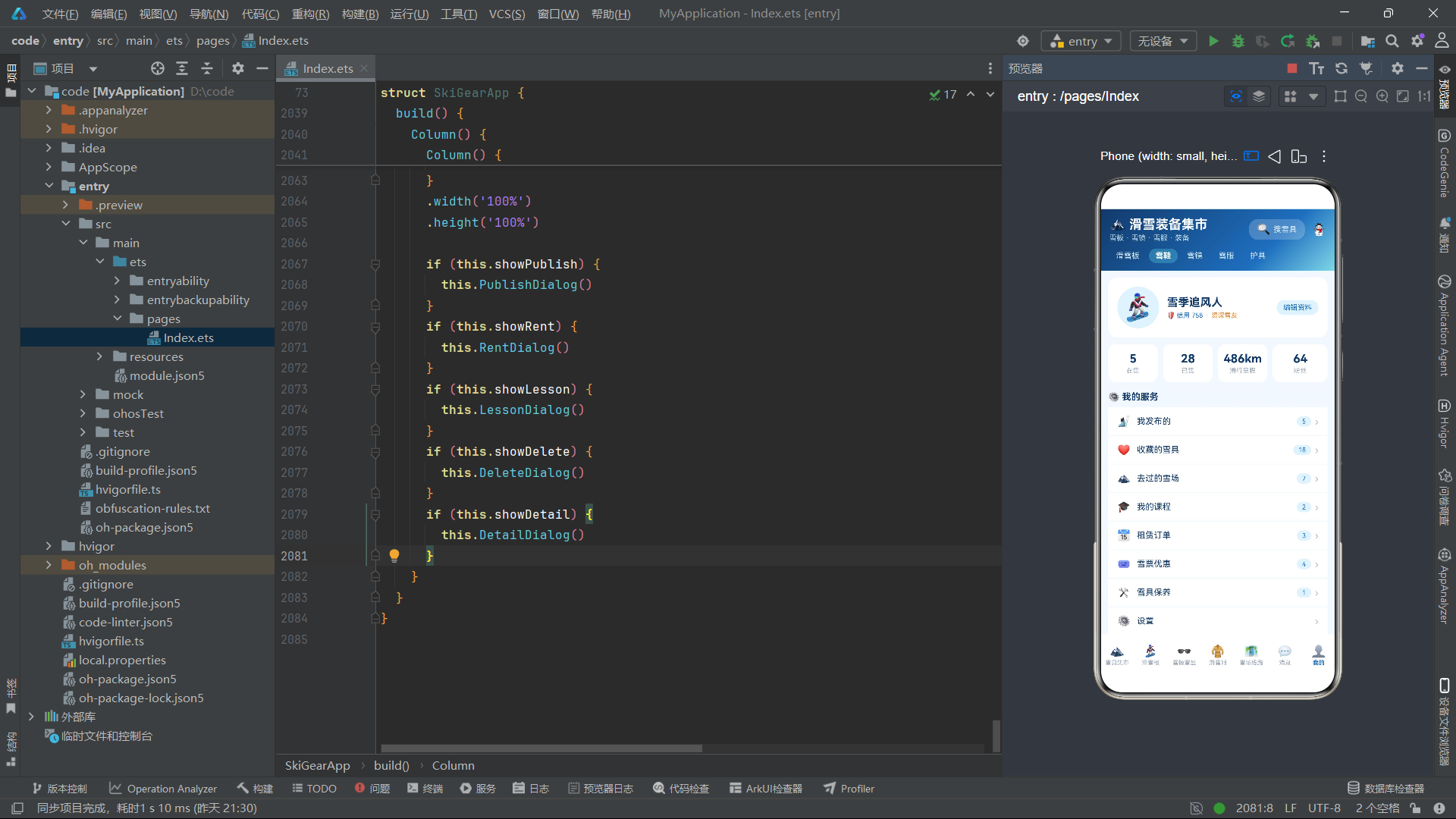
build方法的结构分为两个层次。第一层是一个Column容器,从上到下依次渲染MainHeader头部、页面内容区和BottomBar底部导航。页面内容区通过if...else if链式条件判断,根据currentIndex的值选择渲染对应的Tab页面Builder。内容区设置layoutWeight(1)占据头部和底栏之间的所有剩余空间。第二层是五个独立的if条件语句,分别检查五个弹窗状态变量,当某个状态为true时在顶层渲染对应的弹窗组件。这种将弹窗挂载在主Column之外的设计,使得弹窗能够覆盖整个屏幕,不受主布局约束。由于弹窗使用绝对定位性质的全屏遮罩,后渲染的弹窗自然覆盖在先渲染的弹窗之上,实现了弹窗层叠的正确顺序。
流程图
技术点对比表格
| 技术点 | 实现方式 | 关键API/装饰器 | 优势特点 | 适用场景 |
|---|---|---|---|---|
| 状态管理 | @State装饰器 | @State、private | 响应式驱动UI更新,变量变更自动重渲染 | 页面索引切换、弹窗显隐控制、表单数据绑定 |
| UI模块化 | @Builder装饰器 | @Builder | 函数级复用,职责单一,降低代码耦合 | 头部、卡片、弹窗、Tab页面等独立UI单元 |
| 列表渲染 | ForEach组件 | ForEach、slice | 支持键值生成函数,高效Diff更新 | 商品列表、消息列表、菜单列表 |
| 条件渲染 | if…else语句 | if、else if、else | 按需渲染,减少不必要的组件树 | Tab页面切换、弹窗挂载、未读标记显示 |
| 动画效果 | animation修饰器 | scale、animation、PlayMode.Alternate | 无限循环呼吸动画,无需定时器 | 价格脉动、图标缩放、Banner动效 |
| 线性渐变 | linearGradient | linearGradient、angle、colors | 多色渐变背景,提升视觉品质 | 头部背景、专区标题、弹窗遮罩 |
| 布局权重 | layoutWeight | layoutWeight、FlexAlign | 比例分配空间,自适应布局 | 等宽双列、进度条、柱状图 |
| 滚动控制 | Scroll容器 | Scroll、scrollBar、BarState.Off | 内容溢出可滚动,隐藏滚动条 | 长列表页面、弹窗内容区 |
| 文本溢出 | maxLines + textOverflow | maxLines、TextOverflow.Ellipsis | 单行截断省略号,保持布局一致 | 商品名称、消息预览、标题文本 |
| 事件冒泡控制 | stopPropagation | ClickEvent、stopPropagation | 阻止事件穿透,精确控制点击区域 | 弹窗遮罩点击、弹窗内容区域 |
| 网格布局 | flexWrap + 宽度百分比 | FlexWrap.Wrap、width(‘48%’) | 无需Grid容器,轻量实现网格 | 雪镜卡片、配件卡片双列展示 |
| 空值安全 | 联合类型 + null检查 | Type | null、if判断 |
编译时类型安全,运行时空值保护 | 详情弹窗数据提取、selected对象访问 |
安装DevEco Studio程序

选择目标安装目录:

设置环境变量,但是需要重启一下:

新建一个空白模板:

设置API为24的模板项目:
初始化项目,自动下载相关依赖:

完整代码:
// 二手滑雪单板装备站 —— 转转App风格
// 冰雪蓝白风:深蓝 #123A6B / 冰雪蓝 #1E6FBF / 冰川青 #7FD8E8 / 雪白 #F2F8FF
interface SkiGear {
name: string
cate: string
cond: string
price: number
orig: number
tag: string
seller: string
city: string
hot: number
level: string
}
interface BoardItem {
name: string
brand: string
len: number
flex: number
price: number
seller: string
}
interface GoggleItem {
name: string
type: string
color: string
price: number
seller: string
colorHex: string
}
interface SuitItem {
name: string
size: string
warm: string
price: number
seller: string
}
interface ResortItem {
name: string
city: string
level: string
runs: number
lift: number
price: number
distance: number
}
interface MsgItem {
name: string
text: string
time: string
unread: boolean
}
interface MyMenu {
icon: string
name: string
count: number
}
interface StatItem {
label: string
value: string
}
@Entry
@Component
struct SkiGearApp {
@State currentIndex: number = 0
@State pulse: boolean = true
@State showPublish: boolean = false
@State showRent: boolean = false
@State showLesson: boolean = false
@State showDelete: boolean = false
@State showDetail: boolean = false
@State selected: BoardItem | null = null
@State publishCate: number = 0
@State publishCond: number = 0
@State rentDays: number = 3
@State rentType: number = 0
@State lessonLevel: number = 0
@State msgFilter: number = 0
@State gearFilter: number = 0
@State delName: string = ''
@State publishName: string = ''
@State publishPrice: string = ''
private tabNames: string[] = ['雪具集市', '滑雪板', '雪镜雪盔', '滑雪服', '雪场线路', '消息', '我的']
private gears: SkiGear[] = [
{ name: 'BURTON 单板 150cm', cate: '滑雪板', cond: '95新', price: 2299, orig: 3899, tag: '全山型', seller: '雪场老炮', city: '崇礼', hot: 98, level: '进阶' },
{ name: 'VANS 雪鞋 43码', cate: '雪鞋', cond: '92新', price: 899, orig: 1599, tag: '舒适款', seller: '滑手阿凯', city: '北京', hot: 96, level: '入门' },
{ name: 'Oakley 飞行者雪镜', cate: '雪镜', cond: '98新', price: 799, orig: 1299, tag: '柱面镜', seller: '雪镜收藏家', city: '沈阳', hot: 94, level: '通用' },
{ name: 'ARC'TERYX 冲锋衣', cate: '滑雪服', cond: '93新', price: 3299, orig: 5999, tag: 'GTX', seller: '装备控老白', city: '哈尔滨', hot: 92, level: '进阶' },
{ name: 'SALOMON 固定器', cate: '固定器', cond: '95新', price: 999, orig: 1699, tag: '全山', seller: '雪具店退役', city: '长春', hot: 90, level: '通用' },
{ name: 'ROSSIGNOL 双板 165cm', cate: '双板', cond: '9成新', price: 1899, orig: 3299, tag: '回转', seller: '双板老张', city: '乌鲁木齐', hot: 89, level: '进阶' },
{ name: 'NITRO 单板 152cm', cate: '滑雪板', cond: '94新', price: 1999, orig: 3499, tag: '公园', seller: '公园滑手', city: '天津', hot: 88, level: '进阶' },
{ name: 'GIRO 滑雪头盔', cate: '头盔', cond: '97新', price: 599, orig: 999, tag: 'MIPS', seller: '安全第一', city: '石家庄', hot: 87, level: '通用' },
{ name: 'Volcom 滑雪裤', cate: '滑雪服', cond: '95新', price: 899, orig: 1599, tag: '防水', seller: '雪裤控阿力', city: '太原', hot: 86, level: '通用' },
{ name: 'BURTON 雪鞋 42码', cate: '雪鞋', cond: '93新', price: 1099, orig: 1899, tag: 'BOA', seller: 'BOA爱好者', city: '呼和浩特', hot: 85, level: '入门' },
{ name: 'Dragon 雪镜 NFX2', cate: '雪镜', cond: '96新', price: 699, orig: 1199, tag: '球面镜', seller: '雪镜收藏家', city: '沈阳', hot: 84, level: '通用' },
{ name: 'CAPITA 单板 148cm', cate: '滑雪板', cond: '92新', price: 2199, orig: 3799, tag: '全山', seller: '滑手阿凯', city: '北京', hot: 83, level: '进阶' },
{ name: 'SMITH 雪镜 I/O', cate: '雪镜', cond: '95新', price: 899, orig: 1499, tag: '防雾', seller: '雾里看花', city: '张家口', hot: 82, level: '通用' },
{ name: 'ANON 滑雪手套', cate: '配件', cond: '98新', price: 399, orig: 699, tag: '触屏', seller: '手套控小杨', city: '大连', hot: 81, level: '通用' },
{ name: 'ELAN 双板 158cm', cate: '双板', cond: '91新', price: 1599, orig: 2799, tag: '全能', seller: '双板老张', city: '乌鲁木齐', hot: 80, level: '入门' },
{ name: 'DC 雪鞋 41码', cate: '雪鞋', cond: '94新', price: 699, orig: 1199, tag: '软鞋', seller: '滑手小孟', city: '济南', hot: 79, level: '入门' },
{ name: 'LIBTECH 单板 154cm', cate: '滑雪板', cond: '93新', price: 2599, orig: 4499, tag: 'C2', seller: '波浪板玩家', city: '青岛', hot: 78, level: '进阶' },
{ name: 'OAKLEY 滑雪服套装', cate: '滑雪服', cond: '9成新', price: 1499, orig: 2599, tag: '套装', seller: '装备控老白', city: '哈尔滨', hot: 77, level: '通用' },
{ name: 'K2 固定器 后绑', cate: '固定器', cond: '96新', price: 799, orig: 1399, tag: '后绑', seller: '雪具店退役', city: '长春', hot: 76, level: '通用' },
{ name: 'GOSKI 滑雪板包', cate: '配件', cond: '全新', price: 299, orig: 499, tag: '防撞', seller: '出行达人', city: '西安', hot: 75, level: '通用' },
{ name: 'UNION 固定器 Legacy', cate: '固定器', cond: '94新', price: 899, orig: 1499, tag: '舒适', seller: '公园滑手', city: '天津', hot: 74, level: '进阶' },
{ name: 'POC 滑雪护臀', cate: '护具', cond: '97新', price: 349, orig: 599, tag: 'D3O', seller: '安全第一', city: '石家庄', hot: 73, level: '通用' },
{ name: 'SMITH 滑雪头盔 2024', cate: '头盔', cond: '95新', price: 799, orig: 1399, tag: '透气', seller: '头等大事', city: '郑州', hot: 72, level: '通用' },
{ name: 'BURTON 雪镜 单板款', cate: '雪镜', cond: '92新', price: 549, orig: 949, tag: '变色', seller: '雾里看花', city: '张家口', hot: 71, level: '通用' }
]
private boards: BoardItem[] = [
{ name: 'BURTON Custom 150', brand: 'BURTON', len: 150, flex: 5, price: 2299, seller: '雪场老炮' },
{ name: 'NITRO Team 152', brand: 'NITRO', len: 152, flex: 6, price: 1999, seller: '公园滑手' },
{ name: 'CAPITA DOA 148', brand: 'CAPITA', len: 148, flex: 5, price: 2199, seller: '滑手阿凯' },
{ name: 'LIBTECH TRS 154', brand: 'LIBTECH', len: 154, flex: 4, price: 2599, seller: '波浪板玩家' },
{ name: 'SALOMON Huck 156', brand: 'SALOMON', len: 156, flex: 7, price: 1899, seller: '雪具店退役' },
{ name: 'JONES Frontier 151', brand: 'JONES', len: 151, flex: 4, price: 2099, seller: '野雪玩家' },
{ name: 'YES Greats 153', brand: 'YES', len: 153, flex: 5, price: 2299, seller: '公园滑手' },
{ name: 'ROME Agent 155', brand: 'ROME', len: 155, flex: 6, price: 1799, seller: '雪场老炮' },
{ name: 'GNU Head Space 149', brand: 'GNU', len: 149, flex: 4, price: 1999, seller: '波浪板玩家' },
{ name: 'DC Ply 152', brand: 'DC', len: 152, flex: 3, price: 1299, seller: '滑手小孟' },
{ name: 'RIDE Warpig 150', brand: 'RIDE', len: 150, flex: 5, price: 2199, seller: '野雪玩家' },
{ name: 'BATALEON Evil Twin 154', brand: 'BATALEON', len: 154, flex: 5, price: 2399, seller: '公园滑手' }
]
private goggles: GoggleItem[] = [
{ name: 'Oakley 飞行者', type: '柱面镜', color: '黑框蓝片', price: 799, seller: '雪镜收藏家', colorHex: '#1E6FBF' },
{ name: 'Dragon NFX2', type: '球面镜', color: '白框金片', price: 699, seller: '雪镜收藏家', colorHex: '#C9A227' },
{ name: 'SMITH I/O', type: '柱面镜', color: '黑框紫片', price: 899, seller: '雾里看花', colorHex: '#7C4DFF' },
{ name: 'BURTON 单板款', type: '球面镜', color: '迷彩框', price: 549, seller: '雾里看花', colorHex: '#4A5D3A' },
{ name: 'GIRO 滑雪镜', type: '柱面镜', color: '红框粉片', price: 649, seller: '安全第一', colorHex: '#FF2D95' },
{ name: 'ANON M4', type: '磁吸球面', color: '白框灰片', price: 1299, seller: '雪具店退役', colorHex: '#8A8FA3' },
{ name: 'VOLCOM 雪镜', type: '柱面镜', color: '蓝框银片', price: 449, seller: '雪裤控阿力', colorHex: '#1E6FBF' },
{ name: 'SMITH Squad', type: '柱面镜', color: '黑框绿片', price: 499, seller: '头等大事', colorHex: '#00A65A' },
{ name: 'POC Obex', type: '球面镜', color: '橙框金片', price: 999, seller: '装备控老白', colorHex: '#E8852E' },
{ name: 'SALOMON Skyline', type: '柱面镜', color: '黑框红片', price: 599, seller: '雪具店退役', colorHex: '#FF4D6A' }
]
private suits: SuitItem[] = [
{ name: 'ARC'TERYX 冲锋衣', size: 'M', warm: '三合一', price: 3299, seller: '装备控老白' },
{ name: 'Volcom 雪裤', size: 'L', warm: '加绒', price: 899, seller: '雪裤控阿力' },
{ name: 'OAKLEY 套装', size: 'M', warm: '防水3L', price: 1499, seller: '装备控老白' },
{ name: 'BURTON AK 外套', size: 'L', warm: 'GTX Pro', price: 2999, seller: '雪场老炮' },
{ name: 'HH 羊毛内层', size: 'M', warm: '美利奴', price: 599, seller: '保暖控小暖' },
{ name: 'DESCENTE 雪服', size: 'S', warm: '羽绒内胆', price: 1999, seller: '雪具店退役' },
{ name: 'NIKE ACG 雪夹克', size: 'XL', warm: '防风', price: 1299, seller: '滑手阿凯' },
{ name: 'Helly Hansen 雪裤', size: 'M', warm: '防水2L', price: 1099, seller: '保暖控小暖' }
]
private resorts: ResortItem[] = [
{ name: '崇礼 万龙滑雪场', city: '河北崇礼', level: '初中高级', runs: 32, lift: 6, price: 480, distance: 3 },
{ name: '崇礼 太舞小镇', city: '河北崇礼', level: '初中高级', runs: 28, lift: 6, price: 420, distance: 5 },
{ name: '吉林 北大壶', city: '吉林市', level: '中高级', runs: 23, lift: 6, price: 460, distance: 8 },
{ name: '哈尔滨 亚布力', city: '黑龙江', level: '中高级', runs: 46, lift: 6, price: 380, distance: 12 },
{ name: '北京 南山滑雪场', city: '北京密云', level: '初中级', runs: 21, lift: 5, price: 320, distance: 1 },
{ name: '张家口 云顶乐园', city: '河北张家口', level: '中高级', runs: 41, lift: 6, price: 520, distance: 4 },
{ name: '新疆 将军山', city: '阿勒泰', level: '中高级', runs: 36, lift: 6, price: 300, distance: 15 },
{ name: '沈阳 东北亚', city: '辽宁沈阳', level: '初中级', runs: 18, lift: 4, price: 260, distance: 2 }
]
private msgs: MsgItem[] = [
{ name: '雪场老炮', text: 'BURTON 150 还在吗?这周末去崇礼', time: '09:40', unread: true },
{ name: '雪镜收藏家', text: 'Oakley飞行者有没有防雾处理?', time: '09:12', unread: true },
{ name: '系统通知', text: '你的雪板「BURTON Custom」被收藏 15 次', time: '昨天', unread: true },
{ name: '滑手阿凯', text: 'CAPITA DOA 板底有划痕吗?', time: '昨天', unread: false },
{ name: '装备控老白', text: 'ARC冲锋衣几成新?能试穿吗', time: '昨天', unread: false },
{ name: '公园滑手', text: 'NITRO Team 换板吗?', time: '前天', unread: true },
{ name: '双板老张', text: 'ROSSIGNOL 双板还有保修吗?', time: '前天', unread: false },
{ name: '系统通知', text: '本周雪季新手营报名开始啦', time: '8月20日', unread: true },
{ name: '安全第一', text: 'GIRO头盔是MIPS版吗?', time: '8月19日', unread: false },
{ name: '雾里看花', text: 'SMITH I/O 雪镜镜片几成新?', time: '8月18日', unread: false },
{ name: '雪裤控阿力', text: 'Volcom雪裤有尺码表吗?', time: '8月17日', unread: true },
{ name: '滑手小孟', text: 'DC雪鞋 BOA线正常吗?', time: '8月16日', unread: false }
]
private menus: MyMenu[] = [
{ icon: '🎿', name: '我发布的', count: 5 },
{ icon: '❤️', name: '收藏的雪具', count: 18 },
{ icon: '🏔️', name: '去过的雪场', count: 7 },
{ icon: '🎓', name: '我的课程', count: 2 },
{ icon: '📅', name: '租赁订单', count: 3 },
{ icon: '🎟️', name: '雪票优惠', count: 4 },
{ icon: '🛠️', name: '雪具保养', count: 1 },
{ icon: '⚙️', name: '设置', count: 0 }
]
private stats: StatItem[] = [
{ label: '在售', value: '5' },
{ label: '已售', value: '28' },
{ label: '滑行里程', value: '486km' },
{ label: '粉丝', value: '64' }
]
selName(): string {
if (this.selected === null) {
return ''
}
return this.selected.name
}
selBrand(): string {
if (this.selected === null) {
return ''
}
return this.selected.brand
}
selPrice(): string {
if (this.selected === null) {
return ''
}
return this.selected.price.toString()
}
selFlex(): number {
if (this.selected === null) {
return 0
}
return this.selected.flex
}
maxHot(): number {
let m: number = 1
for (let i = 0; i < this.gears.length; i++) {
if (this.gears[i].hot > m) {
m = this.gears[i].hot
}
}
return m
}
maxLen(): number {
let m: number = 1
for (let i = 0; i < this.boards.length; i++) {
if (this.boards[i].len > m) {
m = this.boards[i].len
}
}
return m
}
@Builder
MainHeader() {
Column() {
Row() {
Column() {
Text('🏔️ 滑雪装备集市')
.fontSize(20)
.fontWeight(FontWeight.Bold)
.fontColor('#FFFFFF')
Text('雪板 · 雪镜 · 雪服 · 装备')
.fontSize(11)
.fontColor('#C5E1F5')
.margin({ top: 2 })
}
.alignItems(HorizontalAlign.Start)
.layoutWeight(1)
Row() {
Text('🔍')
.fontSize(17)
.fontColor('#FFFFFF')
Text('搜雪具')
.fontSize(12)
.fontColor('#D3E9FA')
.margin({ left: 4 })
}
.padding({ left: 12, right: 12, top: 6, bottom: 6 })
.backgroundColor('#33FFFFFF')
.borderRadius(14)
.margin({ right: 10 })
Text('⛄')
.fontSize(18)
.fontColor('#FFFFFF')
}
.width('100%')
Row() {
ForEach(['滑雪板', '雪鞋', '雪镜', '雪服', '护具'], (c: string, idx: number) => {
Text(c)
.fontSize(12)
.fontColor(this.gearFilter === idx ? '#FFFFFF' : '#D3E9FA')
.fontWeight(this.gearFilter === idx ? FontWeight.Bold : FontWeight.Normal)
.padding({ left: 10, right: 10, top: 4, bottom: 4 })
.backgroundColor(this.gearFilter === idx ? '#4D7FD8E8' : '#00000000')
.borderRadius(12)
.margin({ right: 4 })
.onClick(() => {
this.gearFilter = idx
})
}, (c: string) => c)
Column().layoutWeight(1)
}
.width('100%')
.margin({ top: 10 })
}
.width('100%')
.padding({ top: 12, left: 14, right: 14, bottom: 12 })
.linearGradient({
angle: 135,
colors: [['#123A6B', 0], ['#1E6FBF', 0.7], ['#7FD8E8', 1]]
})
}
@Builder
SkiBanner() {
Row() {
Row() {
Text('❄️')
.fontSize(28)
.scale(this.pulse ? 1.2 : 0.9)
.animation({ duration: 900, iterations: -1, curve: Curve.EaseInOut, playMode: PlayMode.Alternate })
Column() {
Text('雪季装备焕新周')
.fontSize(15)
.fontWeight(FontWeight.Bold)
.fontColor('#123A6B')
Text('单板双板 · 雪票直达 · 保养服务')
.fontSize(10)
.fontColor('#5A87B8')
.margin({ top: 2 })
}
.alignItems(HorizontalAlign.Start)
.layoutWeight(1)
.margin({ left: 8 })
Text('去滑雪 →')
.fontSize(11)
.fontColor('#FFFFFF')
.fontWeight(FontWeight.Bold)
.padding({ left: 10, right: 10, top: 5, bottom: 5 })
.backgroundColor('#1E6FBF')
.borderRadius(12)
}
.width('100%')
.padding(12)
.backgroundColor('#E3F2FD')
.borderRadius(14)
}
.width('100%')
.margin({ top: 10 })
}
@Builder
GearCard(item: SkiGear, idx: number) {
Column() {
Column() {
Text(idx % 4 === 0 ? '🏂' : (idx % 4 === 1 ? '⛷️' : (idx % 4 === 2 ? '🕶️' : '🧥')))
.fontSize(30)
}
.width('100%')
.height(88)
.justifyContent(FlexAlign.Center)
.backgroundColor('#E3F2FD')
.borderRadius(12)
Text(item.name)
.fontSize(12)
.fontWeight(FontWeight.Bold)
.fontColor('#123A6B')
.maxLines(1)
.textOverflow({ overflow: TextOverflow.Ellipsis })
.width('100%')
.margin({ top: 8 })
Row() {
Text(item.tag)
.fontSize(9)
.fontColor('#1E6FBF')
.padding({ left: 6, right: 6, top: 2, bottom: 2 })
.backgroundColor('#E3F2FD')
.borderRadius(8)
Text(item.cond)
.fontSize(9)
.fontColor('#00A65A')
.padding({ left: 6, right: 6, top: 2, bottom: 2 })
.backgroundColor('#E8F8F0')
.borderRadius(8)
.margin({ left: 4 })
}
.width('100%')
.margin({ top: 6 })
Row() {
Text('¥' + item.price.toString())
.fontSize(15)
.fontWeight(FontWeight.Bold)
.fontColor('#E8852E')
.scale(this.pulse ? 1.08 : 1)
.animation({ duration: 1000, iterations: -1, curve: Curve.EaseInOut, playMode: PlayMode.Alternate })
Column().layoutWeight(1)
Text(item.level)
.fontSize(9)
.fontColor('#5A87B8')
}
.width('100%')
.margin({ top: 6 })
Row() {
Text(item.seller + ' · ' + item.city)
.fontSize(9)
.fontColor('#9AA5B8')
Column().layoutWeight(1)
Text('🔥' + item.hot.toString())
.fontSize(9)
.fontColor('#E8852E')
}
.width('100%')
.margin({ top: 6 })
}
.width('100%')
.padding(10)
.backgroundColor('#FFFFFF')
.borderRadius(14)
.margin({ bottom: 10 })
.onClick(() => {
this.delName = item.name
this.showDelete = true
})
}
@Builder
Tab1Market() {
Scroll() {
Column() {
this.SkiBanner()
Row() {
Text('🔥 全部雪具')
.fontSize(15)
.fontWeight(FontWeight.Bold)
.fontColor('#123A6B')
Column().layoutWeight(1)
Text('共 ' + this.gears.length.toString() + ' 件')
.fontSize(10)
.fontColor('#9AA5B8')
}
.width('100%')
.margin({ top: 12, bottom: 8 })
Row() {
Column() {
ForEach(this.gears.slice(0, 12), (item: SkiGear, idx: number) => {
this.GearCard(item, idx)
}, (item: SkiGear) => item.name)
}
.layoutWeight(1)
.margin({ right: 6 })
Column() {
ForEach(this.gears.slice(12), (item: SkiGear, idx: number) => {
this.GearCard(item, idx + 12)
}, (item: SkiGear) => item.name)
}
.layoutWeight(1)
.margin({ left: 6 })
}
.width('100%')
.alignItems(VerticalAlign.Top)
Row() {
Text('📤 发布雪具')
.fontSize(13)
.fontWeight(FontWeight.Bold)
.fontColor('#FFFFFF')
.textAlign(TextAlign.Center)
.width('100%')
.padding({ top: 13, bottom: 13 })
.backgroundColor('#1E6FBF')
.borderRadius(12)
.onClick(() => {
this.showPublish = true
})
}
.width('100%')
.margin({ top: 4 })
}
.width('100%')
.padding({ left: 12, right: 12, bottom: 20 })
}
.width('100%')
.height('100%')
.scrollBar(BarState.Off)
.backgroundColor('#F2F8FF')
}
@Builder
BoardCard(item: BoardItem, idx: number) {
Row() {
Column() {
Text('🏂')
.fontSize(26)
}
.width(54)
.height(54)
.justifyContent(FlexAlign.Center)
.backgroundColor('#E3F2FD')
.borderRadius(12)
Column() {
Row() {
Text(item.name)
.fontSize(13)
.fontWeight(FontWeight.Bold)
.fontColor('#123A6B')
Text(item.brand)
.fontSize(9)
.fontColor('#FFFFFF')
.padding({ left: 6, right: 6, top: 2, bottom: 2 })
.backgroundColor('#1E6FBF')
.borderRadius(8)
.margin({ left: 6 })
}
.width('100%')
Text(item.len.toString() + 'cm · 硬度指数 ' + item.flex.toString() + '/10')
.fontSize(10)
.fontColor('#9AA5B8')
.width('100%')
.margin({ top: 4 })
Stack({ alignContent: Alignment.Start }) {
Column()
.width('100%')
.height(8)
.backgroundColor('#E8F1FA')
.borderRadius(4)
Column()
.width((item.flex / 10 * 100).toString() + '%')
.height(8)
.backgroundColor(idx % 2 === 0 ? '#1E6FBF' : '#7FD8E8')
.borderRadius(4)
}
.width('100%')
.margin({ top: 6 })
}
.alignItems(HorizontalAlign.Start)
.layoutWeight(1)
.margin({ left: 10 })
Column() {
Text('¥' + item.price.toString())
.fontSize(15)
.fontWeight(FontWeight.Bold)
.fontColor('#E8852E')
.scale(this.pulse ? 1.08 : 1)
.animation({ duration: 900, iterations: -1, curve: Curve.EaseInOut, playMode: PlayMode.Alternate })
Text(item.seller)
.fontSize(9)
.fontColor('#9AA5B8')
.margin({ top: 3 })
Text('详情 ›')
.fontSize(10)
.fontColor('#1E6FBF')
.fontWeight(FontWeight.Bold)
.margin({ top: 6 })
.onClick(() => {
this.selected = item
this.showDetail = true
})
}
.alignItems(HorizontalAlign.End)
}
.width('100%')
.padding(12)
.backgroundColor('#FFFFFF')
.borderRadius(14)
.margin({ bottom: 8 })
}
@Builder
Tab2Board() {
Scroll() {
Column() {
Column() {
Text('🏂 滑雪板专区')
.fontSize(16)
.fontWeight(FontWeight.Bold)
.fontColor('#FFFFFF')
Text('单板 · 双板 · 野雪板 · 公园板')
.fontSize(10)
.fontColor('#D3E9FA')
.margin({ top: 3 })
Row() {
Text('共 ' + this.boards.length.toString() + ' 块好板')
.fontSize(10)
.fontColor('#E3F2FD')
.padding({ left: 10, right: 10, top: 4, bottom: 4 })
.backgroundColor('#33FFFFFF')
.borderRadius(10)
.margin({ top: 8 })
}
}
.width('100%')
.alignItems(HorizontalAlign.Start)
.padding(14)
.linearGradient({
angle: 120,
colors: [['#123A6B', 0], ['#1E6FBF', 1]]
})
.borderRadius(14)
.margin({ top: 10 })
Column() {
Row() {
Text('📏 板长对比')
.fontSize(13)
.fontWeight(FontWeight.Bold)
.fontColor('#123A6B')
Column().layoutWeight(1)
Text('单位:cm')
.fontSize(9)
.fontColor('#9AA5B8')
}
.width('100%')
.margin({ bottom: 10 })
Row() {
ForEach(this.boards.slice(0, 8), (b: BoardItem, idx: number) => {
Column() {
Column()
.layoutWeight(b.len / 160)
.width(20)
.backgroundColor(idx % 2 === 0 ? '#1E6FBF' : '#7FD8E8')
.borderRadius(4)
Text(b.len.toString())
.fontSize(8)
.fontColor('#5A6B85')
.margin({ top: 4 })
Text(b.brand)
.fontSize(8)
.fontColor('#9AA5B8')
.margin({ top: 2 })
}
.justifyContent(FlexAlign.End)
.alignItems(HorizontalAlign.Center)
.layoutWeight(1)
}, (b: BoardItem) => b.name)
}
.width('100%')
.height(110)
.alignItems(VerticalAlign.Bottom)
}
.width('100%')
.padding(12)
.backgroundColor('#FFFFFF')
.borderRadius(14)
.margin({ top: 12 })
Text('🔥 在售滑雪板')
.fontSize(14)
.fontWeight(FontWeight.Bold)
.fontColor('#123A6B')
.width('100%')
.margin({ top: 14, bottom: 8 })
ForEach(this.boards, (item: BoardItem, idx: number) => {
this.BoardCard(item, idx)
}, (item: BoardItem) => item.name)
}
.width('100%')
.padding({ left: 12, right: 12, bottom: 20 })
}
.width('100%')
.height('100%')
.scrollBar(BarState.Off)
.backgroundColor('#F2F8FF')
}
@Builder
GoggleCard(item: GoggleItem, idx: number) {
Column() {
Column() {
Text('🕶️')
.fontSize(26)
}
.width('100%')
.height(70)
.justifyContent(FlexAlign.Center)
.backgroundColor('#E3F2FD')
.borderRadius(12)
Text(item.name)
.fontSize(12)
.fontWeight(FontWeight.Bold)
.fontColor('#123A6B')
.maxLines(1)
.textOverflow({ overflow: TextOverflow.Ellipsis })
.width('100%')
.margin({ top: 6 })
Row() {
Column()
.width(12)
.height(12)
.backgroundColor(item.colorHex)
.borderRadius(6)
Text(item.color)
.fontSize(9)
.fontColor('#5A87B8')
.margin({ left: 5 })
}
.width('100%')
.margin({ top: 5 })
Row() {
Text(item.type)
.fontSize(9)
.fontColor('#1E6FBF')
.padding({ left: 6, right: 6, top: 2, bottom: 2 })
.backgroundColor('#E3F2FD')
.borderRadius(8)
Column().layoutWeight(1)
Text('¥' + item.price.toString())
.fontSize(14)
.fontWeight(FontWeight.Bold)
.fontColor('#E8852E')
}
.width('100%')
.margin({ top: 6 })
}
.width('48%')
.padding(10)
.backgroundColor('#FFFFFF')
.borderRadius(14)
.margin({ right: idx % 2 === 0 ? 8 : 0, bottom: 10 })
}
@Builder
Tab3Goggle() {
Scroll() {
Column() {
Row() {
Column() {
Text('🕶️ 雪镜雪盔')
.fontSize(16)
.fontWeight(FontWeight.Bold)
.fontColor('#123A6B')
Text('防雾 · 变色 · MIPS 安全认证')
.fontSize(10)
.fontColor('#5A87B8')
.margin({ top: 3 })
}
.alignItems(HorizontalAlign.Start)
.layoutWeight(1)
Text(this.goggles.length.toString() + ' 件')
.fontSize(11)
.fontColor('#FFFFFF')
.padding({ left: 12, right: 12, top: 5, bottom: 5 })
.backgroundColor('#1E6FBF')
.borderRadius(12)
}
.width('100%')
.margin({ top: 10, bottom: 10 })
Row() {
ForEach(this.goggles, (item: GoggleItem, idx: number) => {
this.GoggleCard(item, idx)
}, (item: GoggleItem) => item.name)
}
.width('100%')
.flexWrap(FlexWrap.Wrap)
Column() {
Row() {
Text('🛡️ 选购提醒')
.fontSize(13)
.fontWeight(FontWeight.Bold)
.fontColor('#123A6B')
Column().layoutWeight(1)
}
.width('100%')
Text('雪镜优先选带防雾涂层与UV400标识的款式;头盔务必选择通过ASTM/CE认证的型号,安全第一。')
.fontSize(11)
.fontColor('#5A87B8')
.lineHeight(18)
.width('100%')
.margin({ top: 6 })
}
.width('100%')
.padding(12)
.backgroundColor('#E3F2FD')
.borderRadius(12)
.margin({ top: 4, bottom: 10 })
}
.width('100%')
.padding({ left: 12, right: 12, bottom: 20 })
}
.width('100%')
.height('100%')
.scrollBar(BarState.Off)
.backgroundColor('#F2F8FF')
}
@Builder
SuitRow(item: SuitItem, idx: number) {
Row() {
Column() {
Text('🧥')
.fontSize(22)
}
.width(46)
.height(46)
.justifyContent(FlexAlign.Center)
.backgroundColor('#E3F2FD')
.borderRadius(12)
Column() {
Text(item.name)
.fontSize(13)
.fontWeight(FontWeight.Bold)
.fontColor('#123A6B')
Row() {
Text('尺码 ' + item.size)
.fontSize(9)
.fontColor('#1E6FBF')
.padding({ left: 6, right: 6, top: 2, bottom: 2 })
.backgroundColor('#E3F2FD')
.borderRadius(8)
Text(item.warm)
.fontSize(9)
.fontColor('#E8852E')
.padding({ left: 6, right: 6, top: 2, bottom: 2 })
.backgroundColor('#FFF3E6')
.borderRadius(8)
.margin({ left: 4 })
Column().layoutWeight(1)
Text('¥' + item.price.toString())
.fontSize(14)
.fontWeight(FontWeight.Bold)
.fontColor('#E8852E')
}
.width('100%')
.margin({ top: 4 })
}
.alignItems(HorizontalAlign.Start)
.layoutWeight(1)
.margin({ left: 10 })
}
.width('100%')
.padding(12)
.backgroundColor('#FFFFFF')
.borderRadius(12)
.margin({ bottom: 8 })
}
@Builder
Tab4Suit() {
Scroll() {
Column() {
Row() {
Column() {
Text('🧥 滑雪服')
.fontSize(16)
.fontWeight(FontWeight.Bold)
.fontColor('#123A6B')
Text('冲锋衣 · 雪裤 · 保暖层')
.fontSize(10)
.fontColor('#5A87B8')
.margin({ top: 3 })
}
.alignItems(HorizontalAlign.Start)
.layoutWeight(1)
Text('❄️' + this.suits.length.toString() + ' 款')
.fontSize(11)
.fontColor('#FFFFFF')
.padding({ left: 12, right: 12, top: 5, bottom: 5 })
.backgroundColor('#7FD8E8')
.borderRadius(12)
}
.width('100%')
.margin({ top: 10, bottom: 10 })
Row() {
ForEach(['全部', '冲锋衣', '雪裤', '保暖层'], (s: string, idx: number) => {
Text(s)
.fontSize(11)
.fontColor(this.lessonLevel === idx ? '#FFFFFF' : '#5A87B8')
.fontWeight(this.lessonLevel === idx ? FontWeight.Bold : FontWeight.Normal)
.padding({ left: 12, right: 12, top: 5, bottom: 5 })
.backgroundColor(this.lessonLevel === idx ? '#1E6FBF' : '#E3F2FD')
.borderRadius(12)
.margin({ right: 6 })
.onClick(() => {
this.lessonLevel = idx
})
}, (s: string) => s)
Column().layoutWeight(1)
}
.width('100%')
.margin({ bottom: 10 })
ForEach(this.suits, (item: SuitItem, idx: number) => {
this.SuitRow(item, idx)
}, (item: SuitItem) => item.name)
Row() {
Text('🎓 滑雪课程')
.fontSize(14)
.fontWeight(FontWeight.Bold)
.fontColor('#123A6B')
.layoutWeight(1)
Text('查看全部 ›')
.fontSize(10)
.fontColor('#1E6FBF')
.onClick(() => {
this.showLesson = true
})
}
.width('100%')
.margin({ top: 6, bottom: 8 })
Row() {
Column() {
Text('入门体验课')
.fontSize(12)
.fontWeight(FontWeight.Bold)
.fontColor('#123A6B')
Text('2h · 双板/单板任选')
.fontSize(9)
.fontColor('#5A87B8')
.margin({ top: 3 })
Text('¥399')
.fontSize(14)
.fontWeight(FontWeight.Bold)
.fontColor('#E8852E')
.margin({ top: 5 })
}
.alignItems(HorizontalAlign.Start)
.layoutWeight(1)
.padding(12)
.backgroundColor('#FFFFFF')
.borderRadius(12)
.margin({ right: 6 })
.onClick(() => {
this.showLesson = true
})
Column() {
Text('进阶提升营')
.fontSize(12)
.fontWeight(FontWeight.Bold)
.fontColor('#123A6B')
Text('3天 · 小班教学')
.fontSize(9)
.fontColor('#5A87B8')
.margin({ top: 3 })
Text('¥1299')
.fontSize(14)
.fontWeight(FontWeight.Bold)
.fontColor('#E8852E')
.margin({ top: 5 })
}
.alignItems(HorizontalAlign.Start)
.layoutWeight(1)
.padding(12)
.backgroundColor('#FFFFFF')
.borderRadius(12)
.margin({ left: 6 })
.onClick(() => {
this.showLesson = true
})
}
.width('100%')
.margin({ bottom: 10 })
}
.width('100%')
.padding({ left: 12, right: 12, bottom: 20 })
}
.width('100%')
.height('100%')
.scrollBar(BarState.Off)
.backgroundColor('#F2F8FF')
}
@Builder
ResortCard(item: ResortItem, idx: number) {
Column() {
Row() {
Column() {
Text(idx % 3 === 0 ? '🏔️' : (idx % 3 === 1 ? '⛰️' : '🎿'))
.fontSize(24)
}
.width(44)
.height(44)
.justifyContent(FlexAlign.Center)
.backgroundColor('#E3F2FD')
.borderRadius(12)
Column() {
Row() {
Text(item.name)
.fontSize(13)
.fontWeight(FontWeight.Bold)
.fontColor('#123A6B')
Text(item.level)
.fontSize(9)
.fontColor('#FFFFFF')
.padding({ left: 6, right: 6, top: 2, bottom: 2 })
.backgroundColor(item.level.indexOf('高级') >= 0 ? '#E8852E' : (item.level.indexOf('中级') >= 0 ? '#1E6FBF' : '#00A65A'))
.borderRadius(8)
.margin({ left: 6 })
}
.width('100%')
Text(item.city + ' · ' + item.distance.toString() + 'km 市区距离')
.fontSize(10)
.fontColor('#9AA5B8')
.width('100%')
.margin({ top: 3 })
}
.alignItems(HorizontalAlign.Start)
.layoutWeight(1)
.margin({ left: 10 })
Column() {
Text('¥' + item.price.toString())
.fontSize(15)
.fontWeight(FontWeight.Bold)
.fontColor('#E8852E')
Text('/日票')
.fontSize(9)
.fontColor('#9AA5B8')
}
.alignItems(HorizontalAlign.End)
}
.width('100%')
Row() {
Text(item.runs.toString() + ' 条雪道')
.fontSize(10)
.fontColor('#1E6FBF')
.padding({ left: 8, right: 8, top: 3, bottom: 3 })
.backgroundColor('#E3F2FD')
.borderRadius(8)
Text(item.lift.toString() + ' 条索道')
.fontSize(10)
.fontColor('#5A87B8')
.padding({ left: 8, right: 8, top: 3, bottom: 3 })
.backgroundColor('#EAF3FA')
.borderRadius(8)
.margin({ left: 6 })
Column().layoutWeight(1)
Text('去雪场 ›')
.fontSize(11)
.fontWeight(FontWeight.Bold)
.fontColor('#FFFFFF')
.padding({ left: 14, right: 14, top: 7, bottom: 7 })
.backgroundColor('#1E6FBF')
.borderRadius(10)
.onClick(() => {
this.showRent = true
})
}
.width('100%')
.margin({ top: 10 })
}
.width('100%')
.padding(12)
.backgroundColor('#FFFFFF')
.borderRadius(14)
.margin({ bottom: 10 })
}
@Builder
Tab5Resort() {
Scroll() {
Column() {
Column() {
Text('🗺️ 雪场线路')
.fontSize(16)
.fontWeight(FontWeight.Bold)
.fontColor('#FFFFFF')
Text('全国优质雪场 · 雪票直达')
.fontSize(10)
.fontColor('#D3E9FA')
.margin({ top: 3 })
}
.width('100%')
.alignItems(HorizontalAlign.Start)
.padding(14)
.linearGradient({
angle: 100,
colors: [['#123A6B', 0], ['#7FD8E8', 1]]
})
.borderRadius(14)
.margin({ top: 10 })
Text('🏔️ 推荐雪场')
.fontSize(14)
.fontWeight(FontWeight.Bold)
.fontColor('#123A6B')
.width('100%')
.margin({ top: 14, bottom: 8 })
ForEach(this.resorts, (item: ResortItem, idx: number) => {
this.ResortCard(item, idx)
}, (item: ResortItem) => item.name)
}
.width('100%')
.padding({ left: 12, right: 12, bottom: 20 })
}
.width('100%')
.height('100%')
.scrollBar(BarState.Off)
.backgroundColor('#F2F8FF')
}
@Builder
Tab6Msg() {
Column() {
Row() {
ForEach(['全部消息', '未读'], (t: string, idx: number) => {
Column() {
Text(t)
.fontSize(14)
.fontWeight(this.msgFilter === idx ? FontWeight.Bold : FontWeight.Normal)
.fontColor(this.msgFilter === idx ? '#1E6FBF' : '#9AA5B8')
Column()
.width(16)
.height(3)
.backgroundColor(this.msgFilter === idx ? '#1E6FBF' : '#00000000')
.borderRadius(2)
.margin({ top: 4 })
}
.margin({ right: 24 })
.onClick(() => {
this.msgFilter = idx
})
}, (t: string) => t)
Column().layoutWeight(1)
Text('清空')
.fontSize(11)
.fontColor('#9AA5B8')
}
.width('100%')
.padding({ left: 14, right: 14, top: 10, bottom: 8 })
.backgroundColor('#FFFFFF')
Scroll() {
Column() {
ForEach(this.msgs, (m: MsgItem, idx: number) => {
Row() {
Column() {
Text(idx % 4 === 0 ? '🏂' : (idx % 4 === 1 ? '💬' : (idx % 4 === 2 ? '🔔' : '⛷️')))
.fontSize(20)
}
.width(44)
.height(44)
.justifyContent(FlexAlign.Center)
.backgroundColor(idx % 4 === 0 ? '#E3F2FD' : (idx % 4 === 1 ? '#E8F8F0' : '#FFF3E6'))
.borderRadius(22)
Column() {
Row() {
Text(m.name)
.fontSize(13)
.fontWeight(FontWeight.Bold)
.fontColor('#123A6B')
Column().layoutWeight(1)
Text(m.time)
.fontSize(10)
.fontColor('#B0B8C8')
}
.width('100%')
Text(m.text)
.fontSize(11)
.fontColor('#5A87B8')
.maxLines(1)
.textOverflow({ overflow: TextOverflow.Ellipsis })
.width('100%')
.margin({ top: 4 })
}
.alignItems(HorizontalAlign.Start)
.layoutWeight(1)
.margin({ left: 10 })
if (m.unread) {
Column()
.width(8)
.height(8)
.backgroundColor('#E8852E')
.borderRadius(4)
} else {
Column()
.width(8)
.height(8)
.backgroundColor('#00000000')
.borderRadius(4)
}
}
.width('100%')
.padding(12)
.backgroundColor(m.unread ? '#F7FBFF' : '#FFFFFF')
.margin({ bottom: 1 })
}, (m: MsgItem) => m.name + m.time)
}
.width('100%')
.padding({ bottom: 20 })
}
.width('100%')
.layoutWeight(1)
.scrollBar(BarState.Off)
}
.width('100%')
.height('100%')
}
@Builder
Tab7Mine() {
Scroll() {
Column() {
Row() {
Column() {
Text('🏂')
.fontSize(40)
}
.width(64)
.height(64)
.justifyContent(FlexAlign.Center)
.backgroundColor('#E3F2FD')
.borderRadius(32)
Column() {
Text('雪季追风人')
.fontSize(17)
.fontWeight(FontWeight.Bold)
.fontColor('#123A6B')
Row() {
Text('🛡️ 信用 758')
.fontSize(10)
.fontColor('#1E6FBF')
Text('·')
.fontSize(10)
.fontColor('#B0B8C8')
.margin({ left: 4 })
Text('资深雪友')
.fontSize(10)
.fontColor('#E8852E')
.margin({ left: 4 })
}
.margin({ top: 4 })
}
.alignItems(HorizontalAlign.Start)
.layoutWeight(1)
.margin({ left: 12 })
Text('编辑资料')
.fontSize(11)
.fontColor('#1E6FBF')
.padding({ left: 10, right: 10, top: 5, bottom: 5 })
.backgroundColor('#E3F2FD')
.borderRadius(12)
}
.width('100%')
.padding(14)
.backgroundColor('#FFFFFF')
.borderRadius(14)
.margin({ top: 10 })
Row() {
ForEach(this.stats, (s: StatItem, idx: number) => {
Column() {
Text(s.value)
.fontSize(18)
.fontWeight(FontWeight.Bold)
.fontColor('#123A6B')
Text(s.label)
.fontSize(10)
.fontColor('#9AA5B8')
.margin({ top: 2 })
}
.layoutWeight(1)
.padding({ top: 12, bottom: 12 })
.backgroundColor('#FFFFFF')
.borderRadius(12)
.margin({ right: idx === this.stats.length - 1 ? 0 : 8 })
}, (s: StatItem) => s.label)
}
.width('100%')
.margin({ top: 10 })
Text('⚙️ 我的服务')
.fontSize(14)
.fontWeight(FontWeight.Bold)
.fontColor('#123A6B')
.width('100%')
.margin({ top: 14, bottom: 8 })
ForEach(this.menus, (m: MyMenu, idx: number) => {
Row() {
Text(m.icon)
.fontSize(16)
Text(m.name)
.fontSize(13)
.fontColor('#123A6B')
.margin({ left: 10 })
Column().layoutWeight(1)
if (m.count > 0) {
Text(m.count.toString())
.fontSize(10)
.fontColor('#1E6FBF')
.padding({ left: 8, right: 8, top: 2, bottom: 2 })
.backgroundColor('#E3F2FD')
.borderRadius(10)
}
Text('›')
.fontSize(15)
.fontColor('#B0B8C8')
.margin({ left: 6 })
}
.width('100%')
.padding({ left: 14, right: 14, top: 12, bottom: 12 })
.backgroundColor('#FFFFFF')
.margin({ bottom: 1 })
.onClick(() => {
this.publishName = m.name
})
}, (m: MyMenu) => m.name)
}
.width('100%')
.padding({ left: 12, right: 12, bottom: 20 })
}
.width('100%')
.height('100%')
.scrollBar(BarState.Off)
.backgroundColor('#F2F8FF')
}
@Builder
BottomBar() {
Row() {
ForEach(this.tabNames, (t: string, idx: number) => {
Column() {
Text(idx === 0 ? '🏔️' : (idx === 1 ? '🏂' : (idx === 2 ? '🕶️' : (idx === 3 ? '🧥' : (idx === 4 ? '🗺️' : (idx === 5 ? '💬' : '👤'))))))
.fontSize(18)
Text(t)
.fontSize(9)
.fontColor(this.currentIndex === idx ? '#1E6FBF' : '#9AA5B8')
.fontWeight(this.currentIndex === idx ? FontWeight.Bold : FontWeight.Normal)
.margin({ top: 2 })
}
.layoutWeight(1)
.padding({ top: 8, bottom: 6 })
.onClick(() => {
this.currentIndex = idx
})
}, (t: string) => t)
}
.width('100%')
.height(62)
.backgroundColor('#FFFFFF')
}
@Builder
PublishDialog() {
Column() {
Column() {
Column() {
Text('📦 发布雪具')
.fontSize(16)
.fontWeight(FontWeight.Bold)
.fontColor('#123A6B')
Text('让闲置雪具陪更多人上雪道')
.fontSize(10)
.fontColor('#9AA5B8')
.margin({ top: 2 })
}
.width('100%')
.alignItems(HorizontalAlign.Start)
Text('雪具名称')
.fontSize(11)
.fontWeight(FontWeight.Bold)
.fontColor('#5A87B8')
.width('100%')
.margin({ top: 12 })
Row() {
Text(this.publishName === '' ? '如:BURTON 单板 150cm' : this.publishName)
.fontSize(12)
.fontColor(this.publishName === '' ? '#C0C6D2' : '#123A6B')
Column().layoutWeight(1)
Text('✏️')
.fontSize(13)
.fontColor('#1E6FBF')
}
.width('100%')
.padding(10)
.backgroundColor('#F2F8FF')
.borderRadius(10)
.margin({ top: 6 })
.onClick(() => {
this.publishName = 'NITRO 单板 152cm'
})
Text('分类')
.fontSize(11)
.fontWeight(FontWeight.Bold)
.fontColor('#5A87B8')
.width('100%')
.margin({ top: 12 })
Row() {
ForEach(['滑雪板', '雪鞋', '雪镜', '雪服', '护具'], (c: string, idx: number) => {
Text(c)
.fontSize(11)
.fontColor(this.publishCate === idx ? '#FFFFFF' : '#5A87B8')
.padding({ left: 12, right: 12, top: 6, bottom: 6 })
.backgroundColor(this.publishCate === idx ? '#1E6FBF' : '#E3F2FD')
.borderRadius(10)
.margin({ right: 6 })
.onClick(() => {
this.publishCate = idx
})
}, (c: string) => c)
Column().layoutWeight(1)
}
.width('100%')
.margin({ top: 6 })
Text('成色')
.fontSize(11)
.fontWeight(FontWeight.Bold)
.fontColor('#5A87B8')
.width('100%')
.margin({ top: 12 })
Row() {
ForEach(['全新', '98新', '95新', '9成新'], (c: string, idx: number) => {
Text(c)
.fontSize(11)
.fontColor(this.publishCond === idx ? '#FFFFFF' : '#5A87B8')
.padding({ left: 12, right: 12, top: 6, bottom: 6 })
.backgroundColor(this.publishCond === idx ? '#E8852E' : '#FFF3E6')
.borderRadius(10)
.margin({ right: 6 })
.onClick(() => {
this.publishCond = idx
})
}, (c: string) => c)
Column().layoutWeight(1)
}
.width('100%')
.margin({ top: 6 })
Text('期望价格')
.fontSize(11)
.fontWeight(FontWeight.Bold)
.fontColor('#5A87B8')
.width('100%')
.margin({ top: 12 })
Row() {
Text('¥')
.fontSize(15)
.fontWeight(FontWeight.Bold)
.fontColor('#E8852E')
Text(this.publishPrice === '' ? '请输入价格' : this.publishPrice)
.fontSize(15)
.fontWeight(FontWeight.Bold)
.fontColor(this.publishPrice === '' ? '#C0C6D2' : '#E8852E')
.margin({ left: 4 })
Column().layoutWeight(1)
Text('智能估价')
.fontSize(10)
.fontColor('#1E6FBF')
.padding({ left: 10, right: 10, top: 5, bottom: 5 })
.backgroundColor('#E3F2FD')
.borderRadius(10)
.onClick(() => {
this.publishPrice = '1999'
})
}
.width('100%')
.padding(10)
.backgroundColor('#FFF3E6')
.borderRadius(10)
.margin({ top: 6 })
Row() {
Text('取消')
.fontSize(13)
.fontColor('#9AA5B8')
.textAlign(TextAlign.Center)
.layoutWeight(1)
.padding({ top: 12, bottom: 12 })
.backgroundColor('#E3F2FD')
.borderRadius(12)
.onClick(() => {
this.showPublish = false
})
Text('确认发布')
.fontSize(13)
.fontWeight(FontWeight.Bold)
.fontColor('#FFFFFF')
.textAlign(TextAlign.Center)
.layoutWeight(1)
.padding({ top: 12, bottom: 12 })
.backgroundColor('#1E6FBF')
.borderRadius(12)
.margin({ left: 10 })
.onClick(() => {
this.showPublish = false
this.publishName = ''
this.publishPrice = ''
})
}
.width('100%')
.margin({ top: 16 })
}
.width('100%')
.padding(16)
.backgroundColor('#FFFFFF')
.borderRadius(16)
.onClick((event: ClickEvent) => {
event.stopPropagation()
})
}
.width('100%')
.height('100%')
.justifyContent(FlexAlign.End)
.backgroundColor('#66000000')
.onClick(() => {
this.showPublish = false
})
}
@Builder
RentDialog() {
Column() {
Column() {
Row() {
Text('🎿 雪具租赁')
.fontSize(16)
.fontWeight(FontWeight.Bold)
.fontColor('#123A6B')
Column().layoutWeight(1)
Text('✕')
.fontSize(16)
.fontColor('#B0B8C8')
.onClick(() => {
this.showRent = false
})
}
.width('100%')
Text('租赁套餐')
.fontSize(11)
.fontWeight(FontWeight.Bold)
.fontColor('#5A87B8')
.width('100%')
.margin({ top: 12 })
Row() {
ForEach(['雪板+鞋', '全套装备', '仅雪板'], (r: string, idx: number) => {
Text(r)
.fontSize(11)
.fontColor(this.rentType === idx ? '#FFFFFF' : '#5A87B8')
.padding({ left: 12, right: 12, top: 6, bottom: 6 })
.backgroundColor(this.rentType === idx ? '#1E6FBF' : '#E3F2FD')
.borderRadius(10)
.margin({ right: 6 })
.onClick(() => {
this.rentType = idx
})
}, (r: string) => r)
Column().layoutWeight(1)
}
.width('100%')
.margin({ top: 6 })
Text('租赁天数')
.fontSize(11)
.fontWeight(FontWeight.Bold)
.fontColor('#5A87B8')
.width('100%')
.margin({ top: 12 })
Row() {
Text('−')
.fontSize(18)
.fontColor('#5A87B8')
.width(34)
.height(34)
.textAlign(TextAlign.Center)
.backgroundColor('#E3F2FD')
.borderRadius(10)
.onClick(() => {
if (this.rentDays > 1) {
this.rentDays = this.rentDays - 1
}
})
Text(this.rentDays.toString() + ' 天')
.fontSize(16)
.fontWeight(FontWeight.Bold)
.fontColor('#123A6B')
.width(70)
.textAlign(TextAlign.Center)
Text('+')
.fontSize(18)
.fontColor('#FFFFFF')
.width(34)
.height(34)
.textAlign(TextAlign.Center)
.backgroundColor('#1E6FBF')
.borderRadius(10)
.onClick(() => {
this.rentDays = this.rentDays + 1
})
Column().layoutWeight(1)
}
.width('100%')
.margin({ top: 6 })
Column() {
Row() {
Text('单日租金')
.fontSize(11)
.fontColor('#5A87B8')
Column().layoutWeight(1)
Text('¥150/天')
.fontSize(11)
.fontColor('#123A6B')
}
.width('100%')
.margin({ top: 8 })
Row() {
Text('押金')
.fontSize(11)
.fontColor('#5A87B8')
Column().layoutWeight(1)
Text('¥1000 可退')
.fontSize(11)
.fontColor('#123A6B')
}
.width('100%')
.margin({ top: 6 })
Row() {
Text('总费用')
.fontSize(11)
.fontColor('#5A87B8')
Column().layoutWeight(1)
Text('¥' + (this.rentDays * 150).toString())
.fontSize(20)
.fontWeight(FontWeight.Bold)
.fontColor('#E8852E')
.scale(this.pulse ? 1.08 : 1)
.animation({ duration: 800, iterations: -1, curve: Curve.EaseInOut, playMode: PlayMode.Alternate })
}
.width('100%')
.margin({ top: 8 })
}
.width('100%')
.padding(12)
.backgroundColor('#F2F8FF')
.borderRadius(12)
.margin({ top: 12 })
Text('立即租赁')
.fontSize(13)
.fontWeight(FontWeight.Bold)
.fontColor('#FFFFFF')
.textAlign(TextAlign.Center)
.width('100%')
.padding({ top: 12, bottom: 12 })
.backgroundColor('#1E6FBF')
.borderRadius(12)
.margin({ top: 14 })
.onClick(() => {
this.showRent = false
})
}
.width('88%')
.constraintSize({ maxHeight: '80%' })
.padding(16)
.backgroundColor('#FFFFFF')
.borderRadius(16)
.onClick((event: ClickEvent) => {
event.stopPropagation()
})
}
.width('100%')
.height('100%')
.justifyContent(FlexAlign.Center)
.backgroundColor('#66000000')
.onClick(() => {
this.showRent = false
})
}
@Builder
LessonDialog() {
Column() {
Column() {
Row() {
Text('🎓 滑雪课报名')
.fontSize(16)
.fontWeight(FontWeight.Bold)
.fontColor('#123A6B')
Column().layoutWeight(1)
Text('✕')
.fontSize(16)
.fontColor('#B0B8C8')
.onClick(() => {
this.showLesson = false
})
}
.width('100%')
Text('选择课程')
.fontSize(11)
.fontWeight(FontWeight.Bold)
.fontColor('#5A87B8')
.width('100%')
.margin({ top: 12 })
Row() {
ForEach(['入门体验', '进阶提升', '野雪特训'], (r: string, idx: number) => {
Text(r)
.fontSize(11)
.fontColor(this.lessonLevel === idx ? '#FFFFFF' : '#5A87B8')
.padding({ left: 12, right: 12, top: 6, bottom: 6 })
.backgroundColor(this.lessonLevel === idx ? '#E8852E' : '#FFF3E6')
.borderRadius(10)
.margin({ right: 6 })
.onClick(() => {
this.lessonLevel = idx
})
}, (r: string) => r)
Column().layoutWeight(1)
}
.width('100%')
.margin({ top: 6 })
Text('学员信息')
.fontSize(11)
.fontWeight(FontWeight.Bold)
.fontColor('#5A87B8')
.width('100%')
.margin({ top: 12 })
Column() {
Row() {
Text('姓名')
.fontSize(11)
.fontColor('#9AA5B8')
Column().layoutWeight(1)
Text('陈雪友')
.fontSize(11)
.fontColor('#123A6B')
}
.width('100%')
Row() {
Text('身高体重')
.fontSize(11)
.fontColor('#9AA5B8')
Column().layoutWeight(1)
Text('175cm / 68kg')
.fontSize(11)
.fontColor('#123A6B')
}
.width('100%')
.margin({ top: 8 })
Row() {
Text('是否零基础')
.fontSize(11)
.fontColor('#9AA5B8')
Column().layoutWeight(1)
Text('是 · 首次滑雪')
.fontSize(11)
.fontColor('#E8852E')
}
.width('100%')
.margin({ top: 8 })
}
.width('100%')
.padding(12)
.backgroundColor('#F2F8FF')
.borderRadius(12)
.margin({ top: 6 })
Row() {
Text('课程时间')
.fontSize(11)
.fontColor('#5A87B8')
Column().layoutWeight(1)
Text('本周六 09:00-11:00')
.fontSize(11)
.fontWeight(FontWeight.Bold)
.fontColor('#123A6B')
}
.width('100%')
.padding({ left: 2, right: 2 })
.margin({ top: 12 })
Text('确认报名')
.fontSize(13)
.fontWeight(FontWeight.Bold)
.fontColor('#FFFFFF')
.textAlign(TextAlign.Center)
.width('100%')
.padding({ top: 12, bottom: 12 })
.backgroundColor('#1E6FBF')
.borderRadius(12)
.margin({ top: 14 })
.onClick(() => {
this.showLesson = false
})
}
.width('88%')
.constraintSize({ maxHeight: '80%' })
.padding(16)
.backgroundColor('#FFFFFF')
.borderRadius(16)
.onClick((event: ClickEvent) => {
event.stopPropagation()
})
}
.width('100%')
.height('100%')
.justifyContent(FlexAlign.Center)
.backgroundColor('#66000000')
.onClick(() => {
this.showLesson = false
})
}
@Builder
DeleteDialog() {
Column() {
Column() {
Column() {
Text('🗑️')
.fontSize(34)
Text('确认删除该雪具?')
.fontSize(15)
.fontWeight(FontWeight.Bold)
.fontColor('#123A6B')
.margin({ top: 8 })
Text('「' + this.delName + '」删除后不可恢复')
.fontSize(11)
.fontColor('#9AA5B8')
.margin({ top: 6 })
}
.width('100%')
Row() {
Text('再想想')
.fontSize(13)
.fontColor('#9AA5B8')
.textAlign(TextAlign.Center)
.layoutWeight(1)
.padding({ top: 12, bottom: 12 })
.backgroundColor('#E3F2FD')
.borderRadius(12)
.margin({ top: 16 })
.onClick(() => {
this.showDelete = false
})
Text('确认删除')
.fontSize(13)
.fontWeight(FontWeight.Bold)
.fontColor('#FFFFFF')
.textAlign(TextAlign.Center)
.layoutWeight(1)
.padding({ top: 12, bottom: 12 })
.backgroundColor('#E8852E')
.borderRadius(12)
.margin({ top: 16, left: 10 })
.onClick(() => {
this.showDelete = false
this.delName = ''
})
}
.width('100%')
}
.width('82%')
.padding(18)
.backgroundColor('#FFFFFF')
.borderRadius(16)
.onClick((event: ClickEvent) => {
event.stopPropagation()
})
}
.width('100%')
.height('100%')
.justifyContent(FlexAlign.Center)
.backgroundColor('#66000000')
.onClick(() => {
this.showDelete = false
})
}
@Builder
DetailDialog() {
Column() {
Column() {
Row() {
Text('🏂 雪板详情')
.fontSize(16)
.fontWeight(FontWeight.Bold)
.fontColor('#123A6B')
Column().layoutWeight(1)
Text('✕')
.fontSize(16)
.fontColor('#B0B8C8')
.onClick(() => {
this.showDetail = false
})
}
.width('100%')
.padding({ top: 12, bottom: 12 })
Column() {
Text('🏂')
.fontSize(44)
Text(this.selName())
.fontSize(15)
.fontWeight(FontWeight.Bold)
.fontColor('#123A6B')
.textAlign(TextAlign.Center)
.margin({ top: 8 })
Text(this.selBrand() + ' 品牌 · 全山板')
.fontSize(11)
.fontColor('#9AA5B8')
.margin({ top: 4 })
}
.width('100%')
.padding({ top: 20, bottom: 20 })
.backgroundColor('#F2F8FF')
.borderRadius(14)
Column() {
Row() {
Text('板长')
.fontSize(12)
.fontColor('#5A87B8')
Column().layoutWeight(1)
Text(this.selected === null ? '' : this.selected.len.toString() + ' cm')
.fontSize(12)
.fontColor('#123A6B')
}
.width('100%')
.margin({ top: 12 })
Row() {
Text('硬度指数')
.fontSize(12)
.fontColor('#5A87B8')
Column().layoutWeight(1)
Text(this.selFlex().toString() + ' / 10')
.fontSize(12)
.fontColor('#123A6B')
}
.width('100%')
.margin({ top: 8 })
Row() {
Text('适合滑行')
.fontSize(12)
.fontColor('#5A87B8')
Column().layoutWeight(1)
Text(this.selFlex() >= 6 ? '高速 · 刻滑' : (this.selFlex() >= 4 ? '全山 · 公园' : '入门 · 粉雪'))
.fontSize(12)
.fontColor('#123A6B')
}
.width('100%')
.margin({ top: 8 })
Row() {
Text('出售价')
.fontSize(12)
.fontColor('#5A87B8')
Column().layoutWeight(1)
Text('¥' + this.selPrice())
.fontSize(18)
.fontWeight(FontWeight.Bold)
.fontColor('#E8852E')
.scale(this.pulse ? 1.08 : 1)
.animation({ duration: 900, iterations: -1, curve: Curve.EaseInOut, playMode: PlayMode.Alternate })
}
.width('100%')
.margin({ top: 8 })
Row() {
Text('卖家')
.fontSize(12)
.fontColor('#5A87B8')
Column().layoutWeight(1)
Text(this.selected === null ? '' : this.selected.seller)
.fontSize(12)
.fontColor('#123A6B')
}
.width('100%')
.margin({ top: 8 })
}
.width('100%')
.padding({ left: 12, right: 12, bottom: 8 })
Row() {
Text('删除')
.fontSize(13)
.fontColor('#E8852E')
.textAlign(TextAlign.Center)
.layoutWeight(1)
.padding({ top: 12, bottom: 12 })
.backgroundColor('#FFF3E6')
.borderRadius(12)
.onClick(() => {
this.showDetail = false
this.delName = this.selName()
this.showDelete = true
})
Text('租赁同款')
.fontSize(13)
.fontWeight(FontWeight.Bold)
.fontColor('#FFFFFF')
.textAlign(TextAlign.Center)
.layoutWeight(1)
.padding({ top: 12, bottom: 12 })
.backgroundColor('#1E6FBF')
.borderRadius(12)
.margin({ left: 10 })
.onClick(() => {
this.showDetail = false
this.showRent = true
})
}
.width('100%')
.margin({ top: 10 })
}
.width('86%')
.height('92%')
.padding({ left: 16, right: 16, bottom: 16 })
.backgroundColor('#FFFFFF')
.borderRadius(16)
.onClick((event: ClickEvent) => {
event.stopPropagation()
})
}
.width('100%')
.height('100%')
.justifyContent(FlexAlign.End)
.alignItems(HorizontalAlign.End)
.backgroundColor('#66000000')
.onClick(() => {
this.showDetail = false
})
}
build() {
Column() {
this.MainHeader()
Column() {
if (this.currentIndex === 0) {
this.Tab1Market()
} else if (this.currentIndex === 1) {
this.Tab2Board()
} else if (this.currentIndex === 2) {
this.Tab3Goggle()
} else if (this.currentIndex === 3) {
this.Tab4Suit()
} else if (this.currentIndex === 4) {
this.Tab5Resort()
} else if (this.currentIndex === 5) {
this.Tab6Msg()
} else {
this.Tab7Mine()
}
}
.width('100%')
.layoutWeight(1)
this.BottomBar()
}
.width('100%')
.height('100%')
if (this.showPublish) {
this.PublishDialog()
}
if (this.showRent) {
this.RentDialog()
}
if (this.showLesson) {
this.LessonDialog()
}
if (this.showDelete) {
this.DeleteDialog()
}
if (this.showDetail) {
this.DetailDialog()
}
}
}
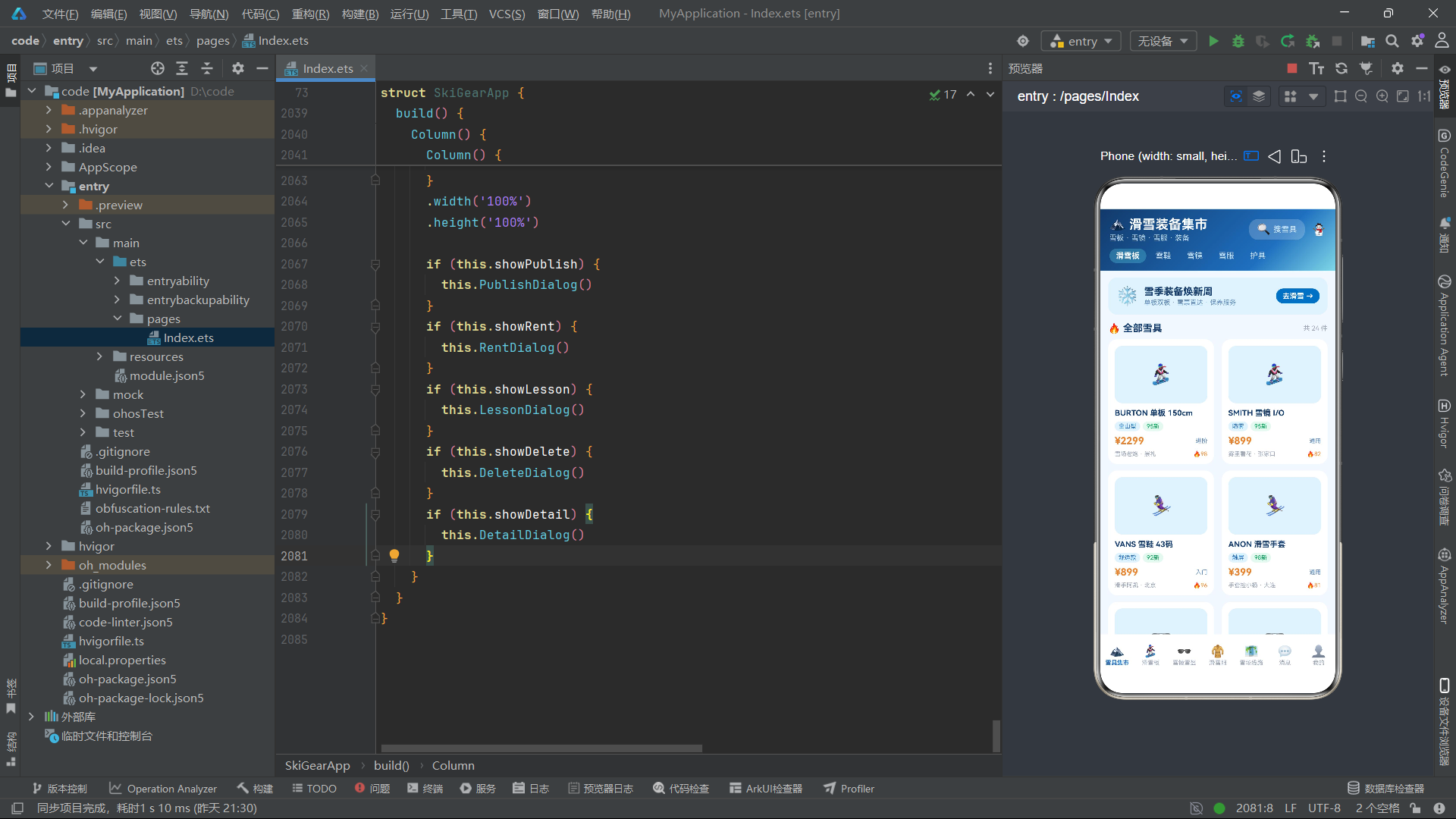
总结
本文详细解析了一个基于HarmonyOS声明式UI的二手滑雪装备集市应用的完整源码实现。从数据模型定义到组件状态管理,从UI构建器拆分到弹窗交互系统,应用展示了ArkTS语言在构建复杂业务场景下的全栈能力。七个Tab页面各具特色——集市页面的双列瀑布流、滑雪板页面的柱状图可视化、雪镜页面的色卡网格、雪服页面的课程推荐、雪场线路页面的导航卡片——共同构成了一个功能完整的垂直领域交易应用。
在技术实现层面,应用充分运用了ArkTS的核心特性。@State响应式状态管理确保了UI与数据的实时同步,@Builder模块化构建实现了UI代码的高效复用,ForEach列表渲染配合键值生成函数保证了列表更新的性能。animation修饰器配合pulse布尔变量驱动的呼吸动画贯穿全局,为价格数字、Banner图标等元素注入了活力。Stack容器实现的进度条、layoutWeight实现的柱状图、flexWrap实现的网格布局,都展示了声明式UI在数据可视化方面的灵活性。if…else条件渲染不仅用于Tab切换和弹窗挂载,还巧妙地用于未读标记和样式切换,体现了条件渲染在交互设计中的核心地位。
从架构设计角度看,应用采用单组件驱动的模式,所有逻辑集中在SkiGearApp一个@Component中,通过@State变量和@Builder函数的合理拆分实现模块化。这种架构在中等复杂度的应用中具有开发效率高、状态共享方便、调试链路短的优势。五个弹窗通过独立的布尔状态变量控制,配合event.stopPropagation()实现精确的事件冒泡管理,构成了完整的交互闭环。build方法作为唯一的渲染入口,通过两层条件语句实现了页面切换和弹窗挂载的分离,保证了渲染层次和层叠顺序的正确性。整体而言,该应用的源码结构清晰、技术点覆盖全面,是学习HarmonyOS声明式UI开发的优秀实践案例。

讨论HarmonyOS开发技术,专注于API与组件、DevEco Studio、测试、元服务和应用上架分发等。
更多推荐

 1
1 0
0- 0


 已为社区贡献74条内容

所有评论(0)