HarmonyOS 6.1 实战:数据驱动视图精准渲染:结构化数据源绑定、局部刷新拦截与无效渲染过滤机制
从设备总控到场景模式,从电器商城到能耗统计,从智能提醒到家庭成员管理——本文以一套完整的ArkTS智能家居联控应用为例,深度解析HarmonyOS ArkTS API 24在IoT智能家居场景下的组件化架构、设备状态管理、场景自动化、能耗可视化、家庭成员权限控制等核心技术实现。
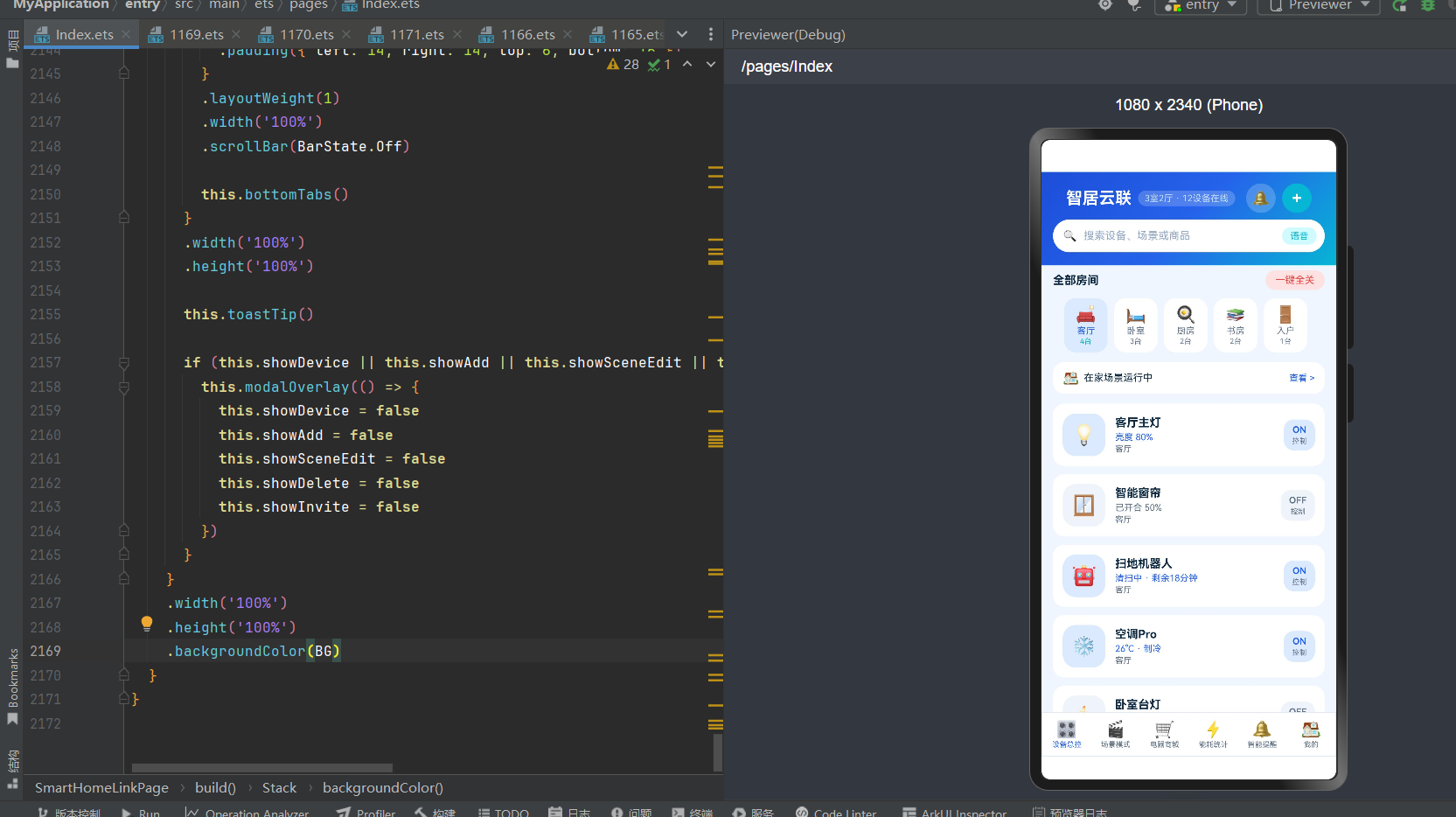
一、引言
智能家居已经从概念走向普及,但市场上的智能家居App普遍存在几个痛点:设备品牌碎片化导致控制入口分散、场景自动化配置复杂、能耗数据不透明、家庭成员权限管理粗糙。用户需要一个统一、简洁、可视化的智能家居联控平台。
本应用(智居云联 SmartHome Link)以"蓝青科技风"为视觉基调,打造集设备总控、场景模式、电器商城、能耗统计、智能提醒、我的六大模块于一体的智能家居全链路联控平台。12台智能设备覆盖客厅、卧室、厨房、书房、入户五大房间,7种自动化场景一键执行,10款智能好物在线选购,分设备能耗排行与近6月电费可视化,9条智能提醒分级管理,4位家庭成员权限精细控制。
本文将从架构设计、色彩系统、数据模型、六大Tab页面、五种弹框交互、核心技术特性等维度,完整解析这套应用的ArkTS实现。
二、整体架构
应用采用@Entry struct SmartHomeLinkPage单入口架构,通过@State currentTab控制六大Tab切换,所有页面均以@Builder方法形式定义。
架构层次:
- 状态层:25+个
@State变量,涵盖Tab切换、房间筛选、弹框显隐、设备开关、亮度调节、添加设备、场景编辑、权限选择、提醒已读、购物车、Toast提示 - 数据层:12台设备、7个场景、10款商品、8项能耗、6月电费、9条提醒、4位家庭成员、5个房间、6种添加设备类型、6种场景动作、3种角色、4种权限
- 视图层:headerBar头部 + 6个Tab Builder + bottomTabs底部导航 + modalOverlay弹框统一入口 + 5种弹框Builder + toastTip轻提示
- 工具层:2个全局纯函数(levelColor提醒等级映射、deviceStatusColor设备状态映射)
弹框采用统一的modalOverlay分发机制,通过5个布尔状态showDevice/showAdd/showSceneEdit/showDelete/showInvite控制,底部滑出式(设备控制)与居中卡式(添加设备/场景编辑/删除确认/邀请成员)两种形态并存。轻提示toastTip独立于弹框层,用于操作反馈。
三、色彩系统:蓝青科技风与智能生活
智能家居的视觉语言应该是"科技感、清爽、可信赖"。本应用的色彩系统围绕这一理念构建:
主色体系(蓝青科技风):
PRIMARY #2563EB:主蓝,用于头部渐变、Tab选中态、按钮、进度条、开关开启态——代表科技与可信赖PRIMARY_LIGHT #DBEAFE:浅蓝,用于设备开启态背景、选中态chip、权限选中——主色的柔和版本CYAN #06B6D4:青色,用于头部渐变终止色、添加设备按钮、语音标签、月度环形进度——代表智能与活力CYAN_LIGHT #CFFAFE:浅青,用于语音标签背景
基础色:
BG #F0F6FF:淡蓝背景,营造清爽的科技氛围CARD #FFFFFF:纯白卡片TEXT #0F2A43:深蓝主文字TEXT_SUB #64748B:灰蓝次要文字LINE #E2E8F0:浅灰分割线TAG_BG #EFF4FB:淡蓝标签背景
状态色:
RED #EF4444:红色,用于删除、高优先级提醒、一键全关、用电超标GREEN #22C55E:绿色,用于设备在线、成员在线ORANGE #F59E0B:橙色,用于中优先级提醒、能耗超标
通过levelColor()全局函数将提醒等级(高/中/低)映射为红/橙/绿,通过deviceStatusColor()将设备状态(在线开启/在线关闭/离线)映射为主蓝/灰蓝,确保状态视觉全应用一致。
四、数据模型
应用定义了10个接口,覆盖智能家居全链路:
核心实体:
DeviceItem设备(id/name/icon/room/online/on/value/kind)——12台设备,含灯/窗帘/扫地机/空调/净化器/加湿器/门锁/烟感/插座/投影/灯带SceneItem场景(id/name/icon/desc/c1/c2/active/runs)——7个场景,每个场景有专属渐变色MallItem商品(id/name/icon/price/origin/tag/sold/color)——10款智能好物EnergyItem能耗(id/name/icon/kwh/maxKwh)——8项设备能耗BillMonth月度电费(month/fee/maxFee)——6月电费数据
提醒与成员:
AlertItem提醒(id/title/desc/icon/level/time/read)——9条提醒,分高/中/低三级FamilyItem家庭成员(id/name/icon/role/devices/online)——4位成员,含管理员/成员角色RoomItem房间(name/icon/count/color)——5个房间ActionItem动作项(name/icon/picked)——添加设备类型/场景动作
五、Tab0 设备总控
设备总控是应用的核心控制页,由五个层次构成:
1. 房间筛选横滑:5个房间(客厅/卧室/厨房/书房/入户)chip横滑,选中态为浅蓝底蓝字,显示房间图标+名称+设备数量,点击筛选对应房间设备。
2. 在家场景运行条:白色卡片,显示"🏠 在家场景运行中"+查看按钮,点击跳转到场景模式Tab。
3. 设备列表:12台设备标准卡片,每台含:
- 左侧52×52圆角图标块(开启态浅蓝底,关闭态淡灰底)
- 中间设备名+当前值(如"亮度80%““26°C·制冷”)+房间名(离线显示”·离线")
- 右侧ON/OFF控制按钮(开启态浅蓝底蓝字,关闭态淡灰底),点击弹出设备控制面板
设备状态通过deviceStatusColor()函数映射:在线开启显示主蓝色当前值,在线关闭显示灰蓝色,离线显示灰蓝色并标注离线。
4. 一键全关:顶部右侧红色"一键全关"按钮,点击下发全屋断电指令并弹出Toast提示。
六、Tab1 场景模式
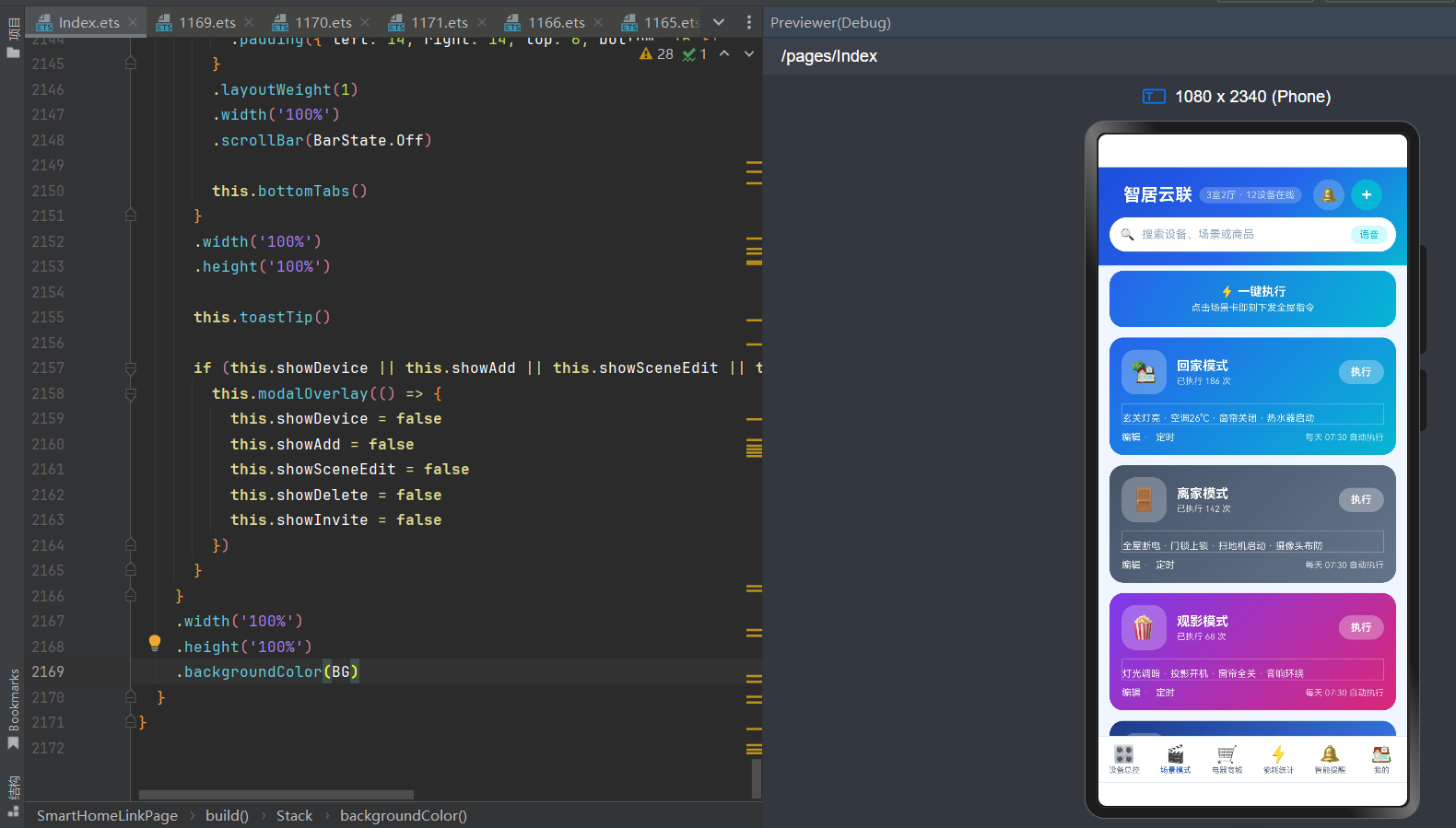
场景模式是智能家居的自动化核心,由两个层次构成:
1. 一键执行头部:蓝青渐变卡片,显示"⚡ 一键执行"+“点击场景卡即刻下发全屋指令”。
2. 场景卡片列表:7个场景(回家/离家/观影/睡眠/起床/聚会/阅读),每个场景为独立渐变色卡片(通过c1/c2构建135度线性渐变),含:
- 场景图标(52×52白色半透明圆角块)
- 场景名+已执行次数
- 执行/运行中按钮(白色半透明背景)
- 场景描述(如"玄关灯亮·空调26°C·窗帘关闭·热水器启动")
- 编辑·定时+每天07:30自动执行
点击"执行"按钮即刻下发全屋指令,场景状态切换为"运行中";点击卡片底部弹出场景编辑弹框,可修改场景名称、执行动作、触发方式。
七、Tab2 电器商城
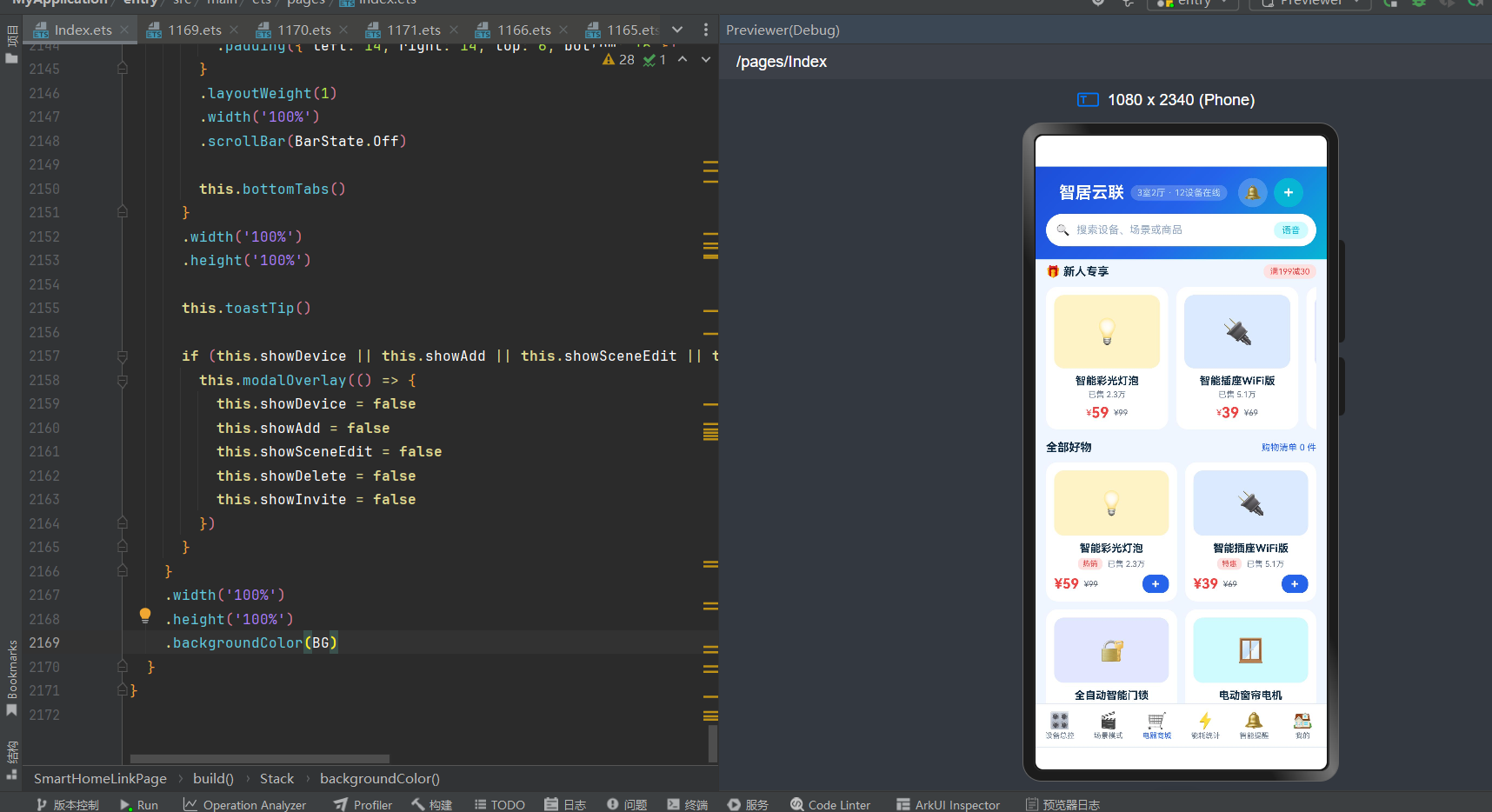
电器商城是智能好物的选购入口,由三个层次构成:
1. 新人专享条:显示"🎁 新人专享"+"满199减30"红色标签。
2. 横滑精选商品:4款精选商品(智能彩光灯泡/智能插座/智能门锁/电动窗帘)大卡横滑,每卡含商品色块(90高,商品专属浅色背景)+商品名+已售+价格(红色大字+划线原价)。
3. 双列商品列表:10款商品按奇偶分双列排列,每卡含:
- 商品色块(80高,专属浅色背景)
- 商品名
- 标签(热销/特惠/新品/补贴/爆款/必备)+已售
- 价格行(红色价格+划线原价++加购按钮)
- 购物车计数实时更新,点击加购弹出Toast提示
八、Tab3 能耗统计
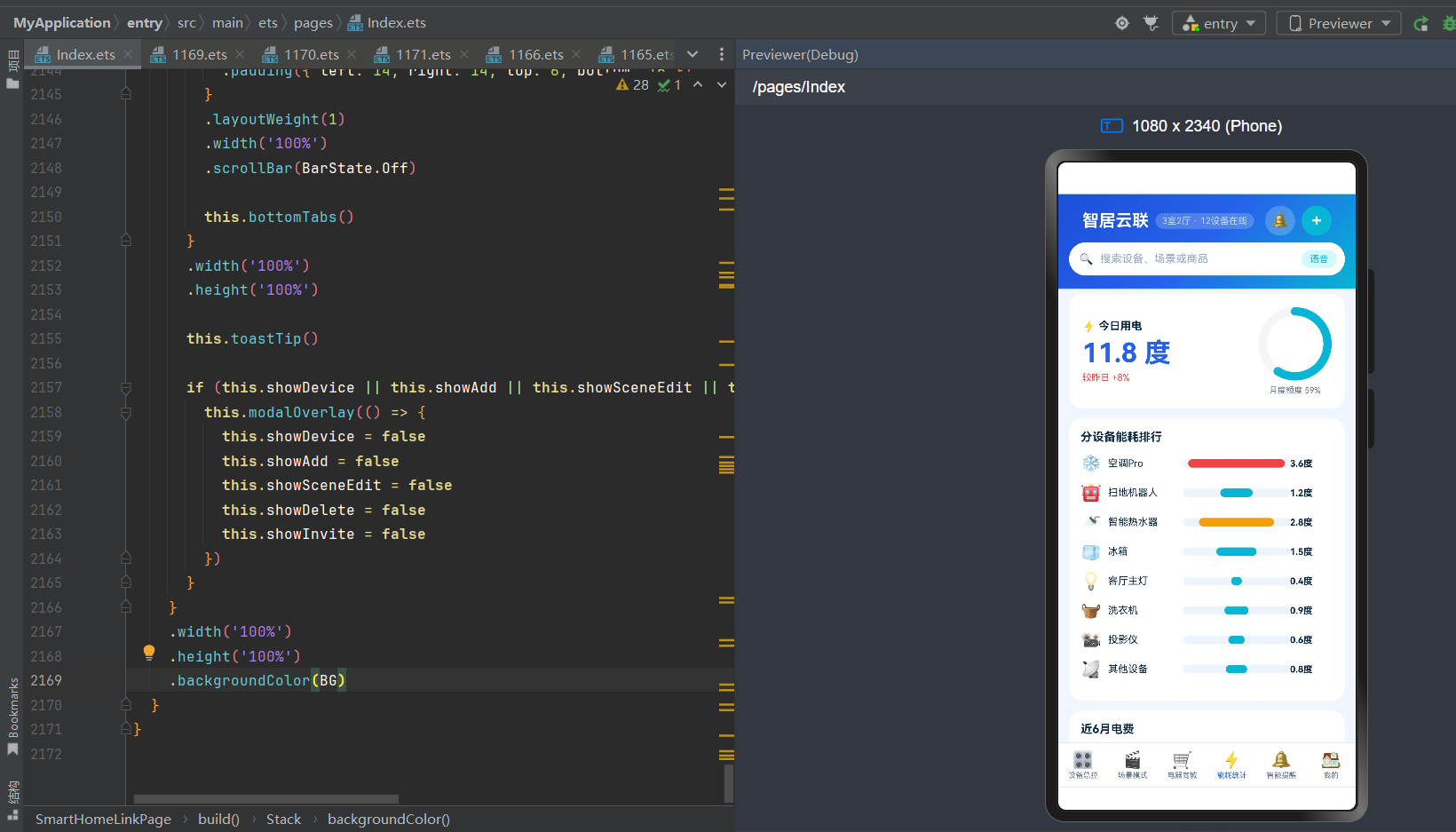
能耗统计是智能家居的数据可视化核心,由三个层次构成:
1. 今日用电概览:白色卡片,左侧显示"⚡ 今日用电"+“11.8度”(蓝色32号大字)+“较昨日+8%”(红色),右侧显示月度额度环形进度(Progress Ring组件,59%,青色)。
2. 分设备能耗排行:8项设备能耗横向进度条,每项含设备图标+名称+进度条(按kwh/maxKwh比例填充,>3度红色、>1.5度橙色、其他青色)+度数。空调Pro以3.6度位居榜首。
3. 近6月电费柱状图:6个月电费柱状图(3月¥96/4月¥82/5月¥74/6月¥108/7月¥156/8月¥143),超过100元的月份用红色柱子,其他用蓝色,底部提示"💡 夏季空调用电占比47%,建议26°C节能模式"。
九、Tab4 智能提醒
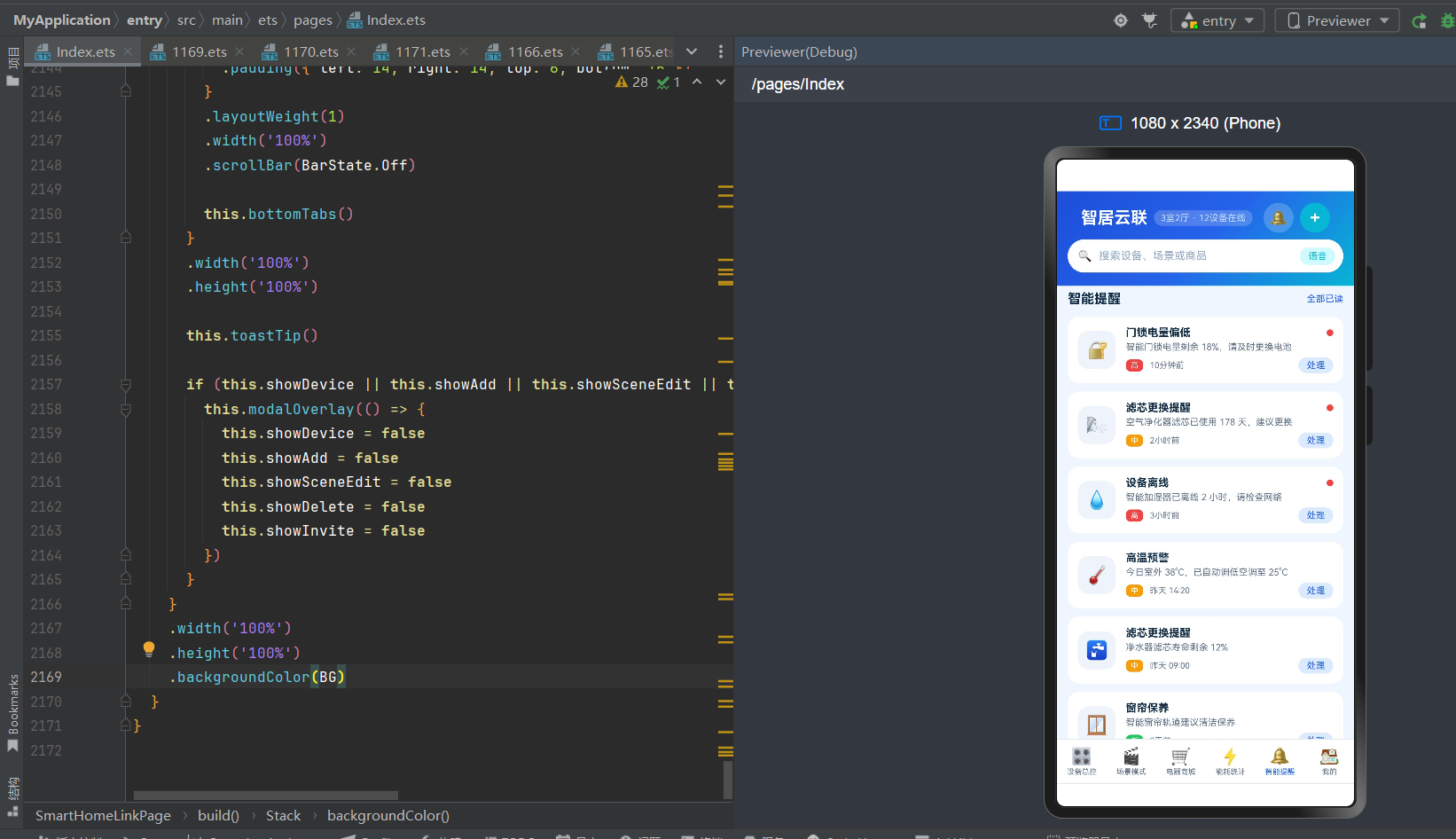
智能提醒是设备维护与安全告警中心,由两个层次构成:
1. 全部已读:顶部右侧"全部已读"按钮,点击标记所有提醒为已读。
2. 提醒列表:9条提醒卡片,每条含:
- 左侧46×46图标块(淡灰底)
- 中间提醒标题+描述+等级标签(高/中/低,通过levelColor映射红/橙/绿)+时间+处理按钮
- 未读提醒右上角显示红色圆点
- 点击提醒或"处理"按钮标记为已读(加入alertRead数组)
提醒覆盖:门锁电量偏低、滤芯更换、设备离线、高温预警、窗帘保养、用电报告、版本更新、安防提醒等,高优先级提醒(门锁/离线/安防)用红色标签突出。
十、Tab5 我的
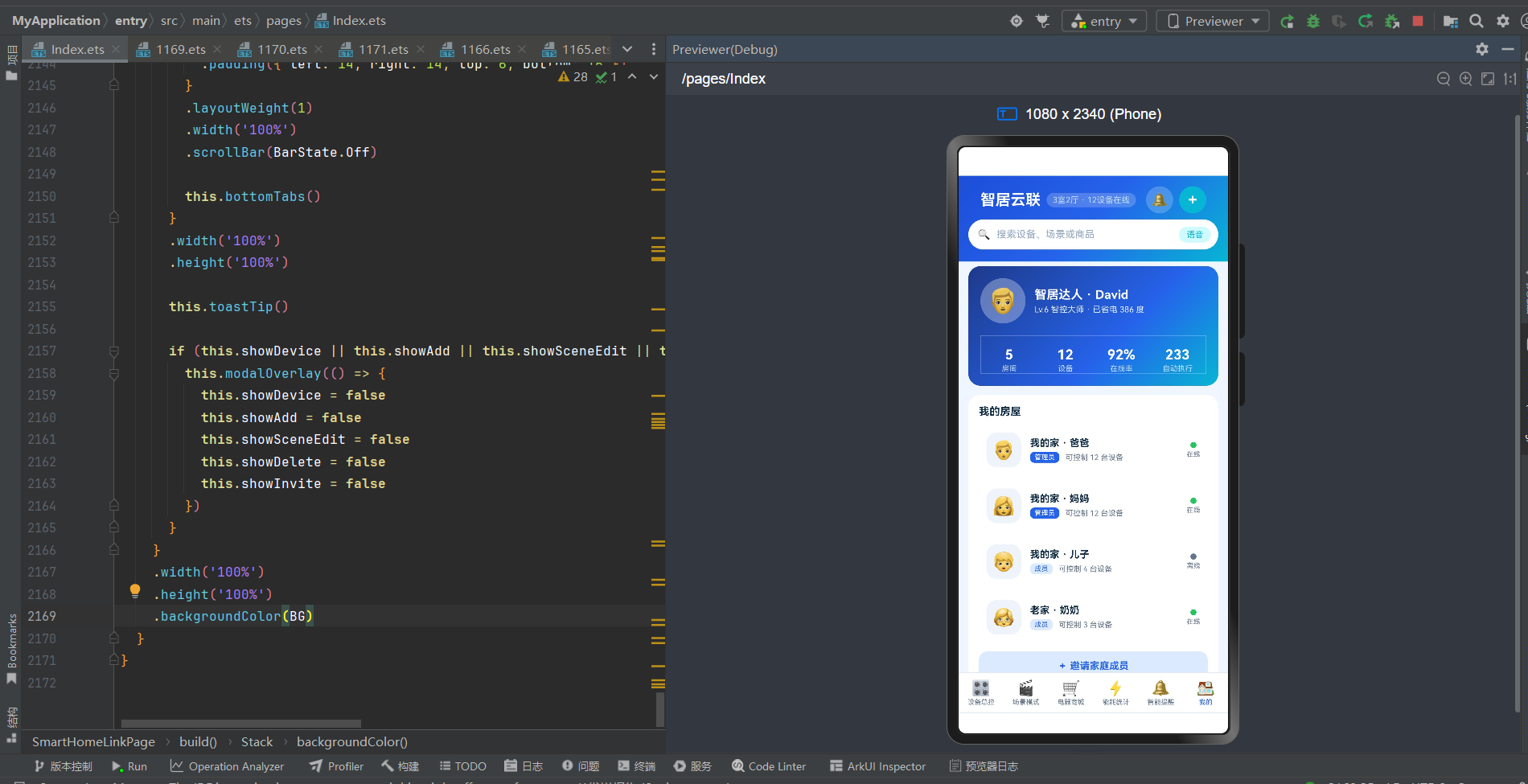
个人中心是账户与家庭管理核心,由四个层次构成:
1. 用户信息面板:蓝青渐变背景,含头像+昵称"智居达人·David"+等级"Lv.6智控大师·已省电386度";下方四格统计(5房间/12设备/92%在线率/233自动执行)。
2. 我的房屋:4位家庭成员列表(爸爸/妈妈管理员、儿子成员、老家奶奶成员),每位含头像+昵称+角色标签(管理员蓝底/成员浅蓝底)+可控制设备数+在线状态(绿色/灰色圆点);底部"+邀请家庭成员"按钮,点击弹出邀请弹框。
3. 功能入口:删除设备(红色图标,点击弹出删除确认弹框)、网关设置(显示v2.4.1)、客服中心。
十一、五种弹框
应用设计了五种弹框,覆盖智能家居全流程交互:
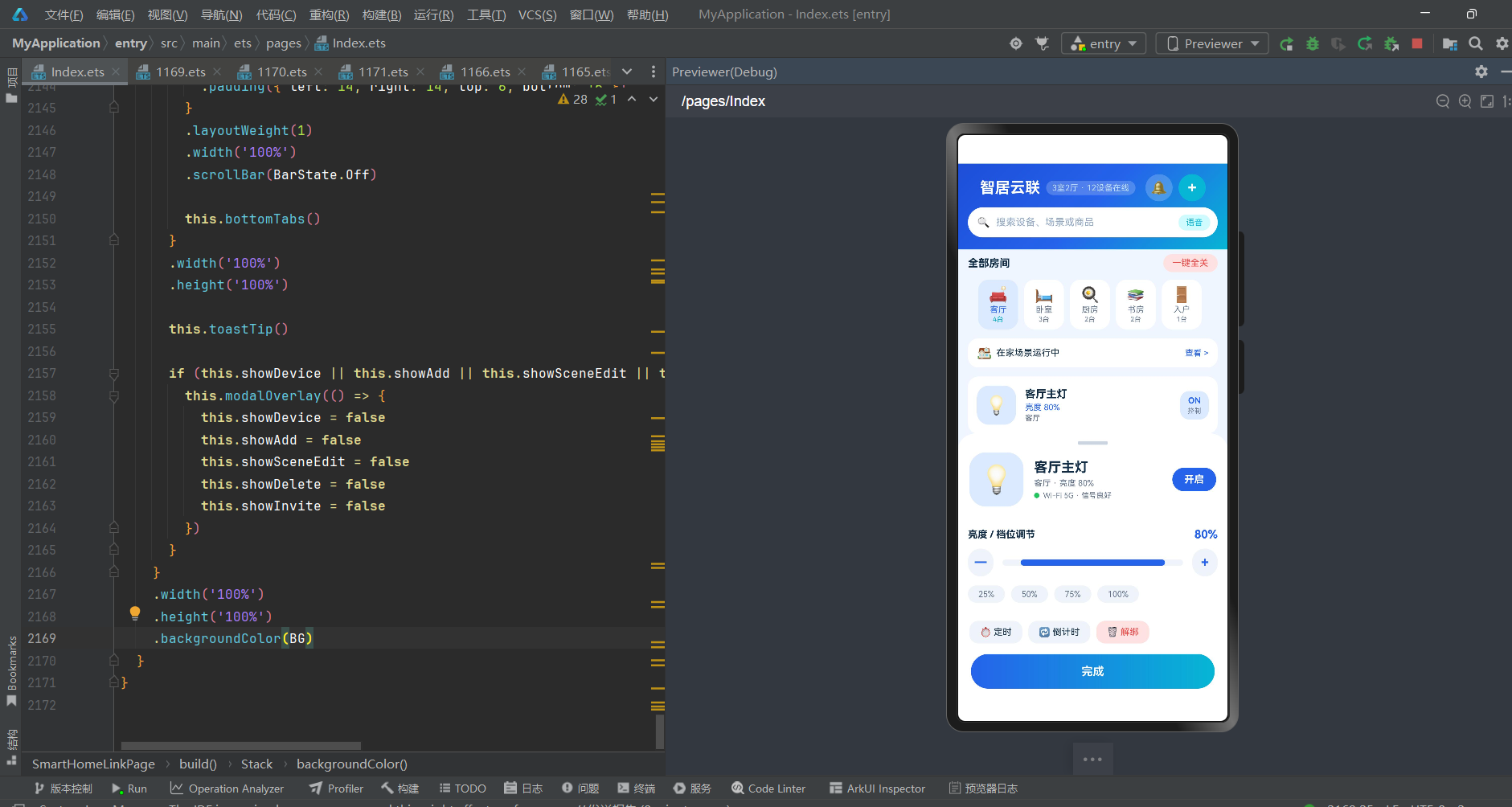
弹框1:设备控制面板(底部滑出)——点击设备ON/OFF按钮触发。内容包括:设备图标+名称+房间+当前值+Wi-Fi信号状态;开关按钮(开启态蓝底白字);亮度/档位调节(-/进度条/++25%/50%/75%/100%快捷档位);定时/倒计时/解绑三个操作按钮;完成按钮(蓝青渐变)。
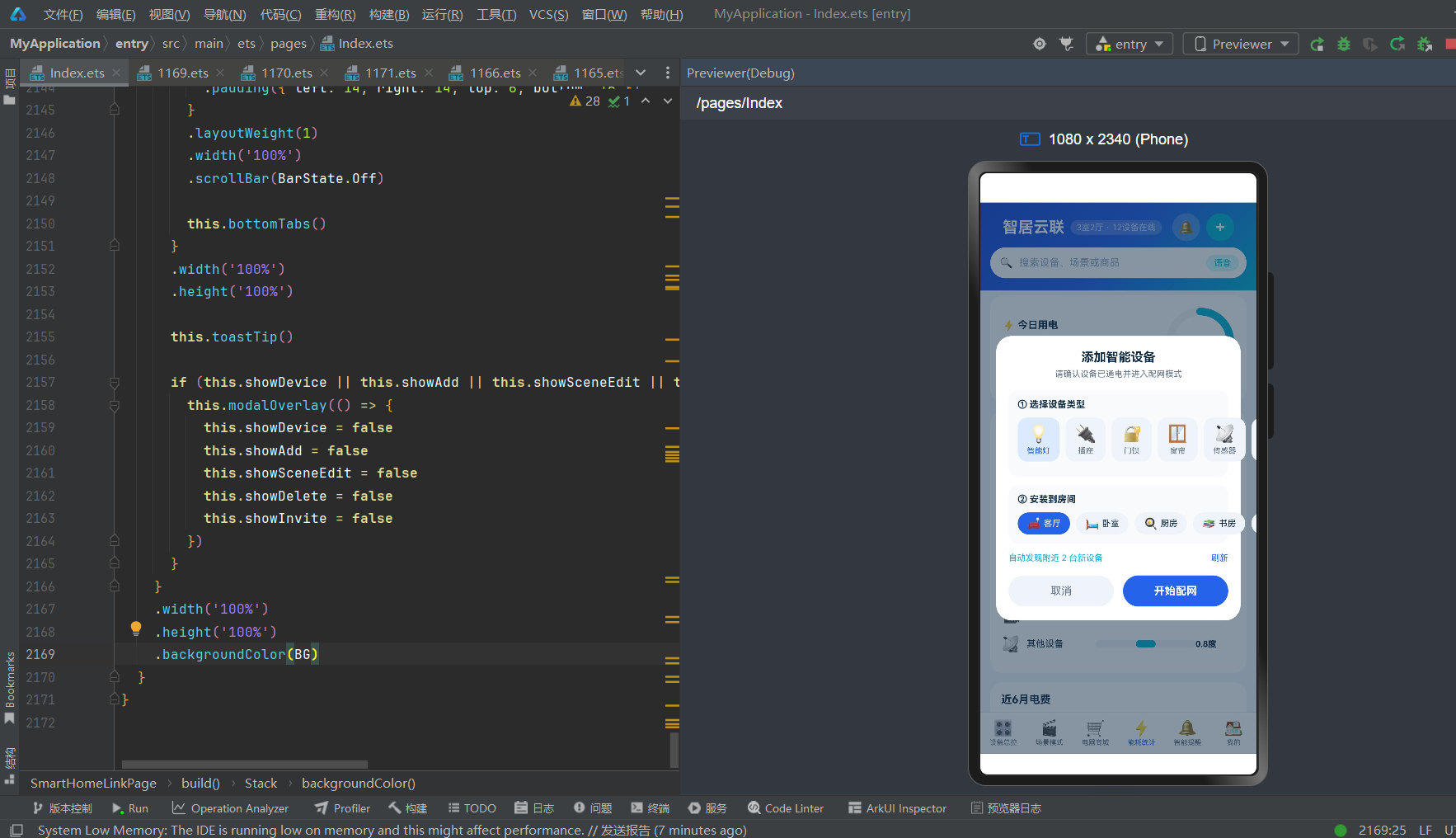
弹框2:添加设备(居中卡)——点击头部+按钮触发。两步流程:①选择设备类型(6种chip:智能灯/插座/门锁/窗帘/传感器/扫地机);②安装到房间(5个房间chip);自动发现附近2台新设备+刷新按钮;取消/开始配网双按钮。
弹框3:场景编辑(居中卡)——点击场景卡底部触发。内容包括:场景名称(可编辑切换);执行动作多选(6种:开灯/关灯/空调/窗帘/音乐/播报);触发方式单选(一键点击/定时执行/传感器触发);取消/保存场景双按钮。
弹框4:删除设备确认(小号居中警示)——点击删除设备入口触发。⚠️图标+确认标题+删除后果说明(自动化规则/定时任务/历史数据将被清空且不可恢复)+取消/确认删除双按钮(确认红色)。
弹框5:家庭成员邀请(居中卡)——点击邀请家庭成员触发。内容包括:昵称输入;分配角色(3种:管理员/成员/访客,带图标);权限多选(4种:设备控制/场景管理/查看能耗/接收提醒,已选显示蓝色✓);复制邀请链接/发送邀请双按钮。
十二、核心技术特性
本应用的核心技术亮点在于设备状态驱动的UI渲染和场景自动化的可视化配置两大设计模式:
1. 设备状态映射:deviceStatusColor(d)全局函数根据设备online和on状态返回主蓝/灰蓝,统一控制设备卡片当前值文字颜色,确保开启/关闭/离线三态视觉一致。
2. 提醒等级色标:levelColor(level)将高/中/低三级提醒映射为红/橙/绿,在提醒卡片等级标签中统一使用,用户一眼识别紧急程度。
3. 房间筛选机制:通过roomFilter状态控制设备列表筛选,roomFilter===0显示全部,其他值按房间名过滤,ForEach中嵌套if条件实现动态筛选。
4. 场景专属渐变色:每个SceneItem包含c1/c2两个颜色字段,通过linearGradient({angle:135, colors:[[s.c1,0],[s.c2,1]]})构建专属渐变卡片,7个场景7种配色,视觉区分度高。
5. 能耗三色阈值:分设备能耗进度条根据kwh值动态变色——>3度红色(高能耗)、>1.5度橙色(中能耗)、其他青色(低能耗),用户一眼识别耗电大户。
6. 月度电费超标标记:近6月电费柱状图中,超过100元的月份用红色柱子,其他用蓝色,夏季用电高峰一目了然。
7. 家庭成员权限矩阵:通过permPicks数组存储已选权限索引,pickPerm(i)函数切换选中状态,角色与权限双层控制实现精细的家庭权限管理。
8. Toast轻提示:独立于弹框层的toastTip Builder,通过toast状态控制显隐,操作反馈不打断用户流程,2秒后自动消失(本实现中通过状态切换控制)。
十三、同类对比
| 维度 | 通用智能家居App | 本应用(智居云联) |
|---|---|---|
| 设备控制 | 品牌分散入口 | 统一12设备总控+房间筛选 |
| 场景自动化 | 配置复杂隐藏深 | 7场景一键执行+可视化编辑 |
| 能耗数据 | 仅总用电量 | 分设备排行+6月柱状图+三色阈值 |
| 提醒管理 | 混合列表无分级 | 高/中/低三级色标+未读红点 |
| 家庭权限 | 简单成员管理 | 角色+权限矩阵精细控制 |
| 视觉风格 | 通用白绿 | 蓝青科技风+场景专属渐变 |
| 设备配网 | 品牌专属流程 | 统一6类型+房间分配+自动发现 |
本应用的核心差异化在于将智能家居的"控制-自动化-数据-安全"全链路数据化可视化——设备状态不是文字而是色标,场景不是隐藏配置而是渐变卡片,能耗不是数字而是三色进度条,权限不是开关而是角色+权限矩阵。
十四、完整代码结构总览
1171.ets
├── 数据结构(10个interface)
├── 设计令牌(14个const:蓝青色系+基础色+状态色)
├── 静态数据(12+个数组:12设备+7场景+10商品+8能耗+6月电费+9提醒+4成员+5房间+6设备类型+6场景动作+3角色+4权限)
├── 全局纯函数(2个:levelColor/deviceStatusColor)
└── SmartHomeLinkPage组件
    ├── 25+ @State状态
    ├── 4个方法(toggleDevice/markRead/pickPerm/showToast)
    ├── build()入口 + modalOverlay()弹框分发 + toastTip()轻提示
    ├── headerBar()头部 + bottomTabs()底部导航
    ├── 6个Tab Builder(tabDevice/tabScene/tabMall/tabEnergy/tabAlert/tabMine)
    └── 5种弹框Builder(deviceOverlay/addOverlay/sceneEditOverlay/deleteOverlay/inviteOverlay)
十五、开发环境搭建
15.1 环境要求
DevEco Studio 5.0+(支持ArkTS API 24)、HarmonyOS SDK API 24、Node.js 18+、至少8GB内存。
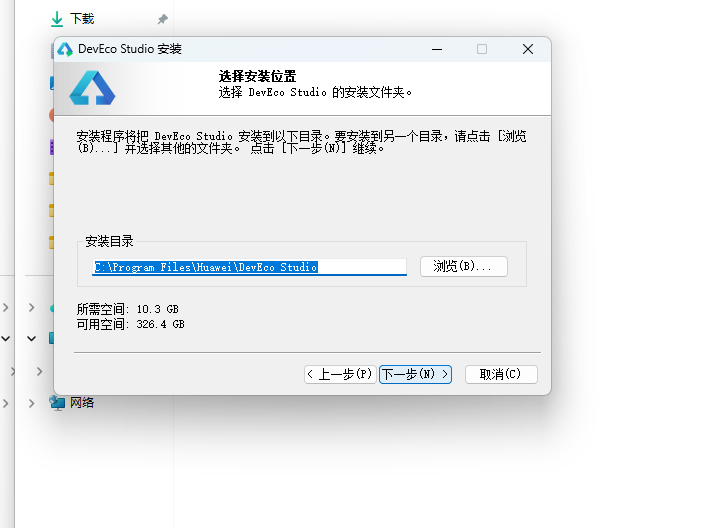
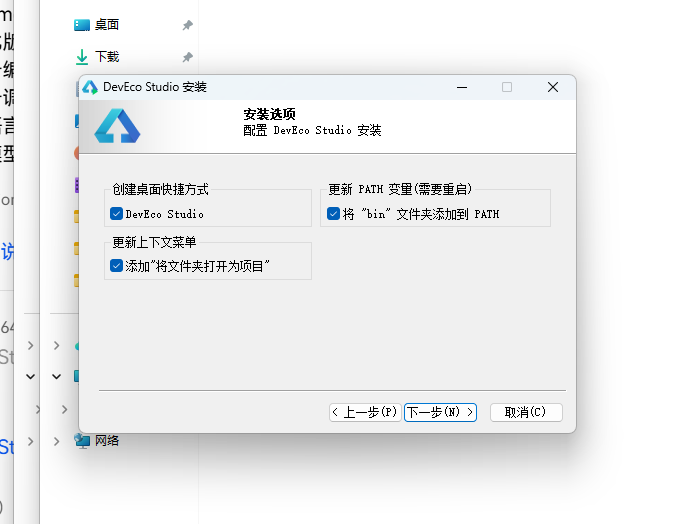
15.2 安装DevEco Studio
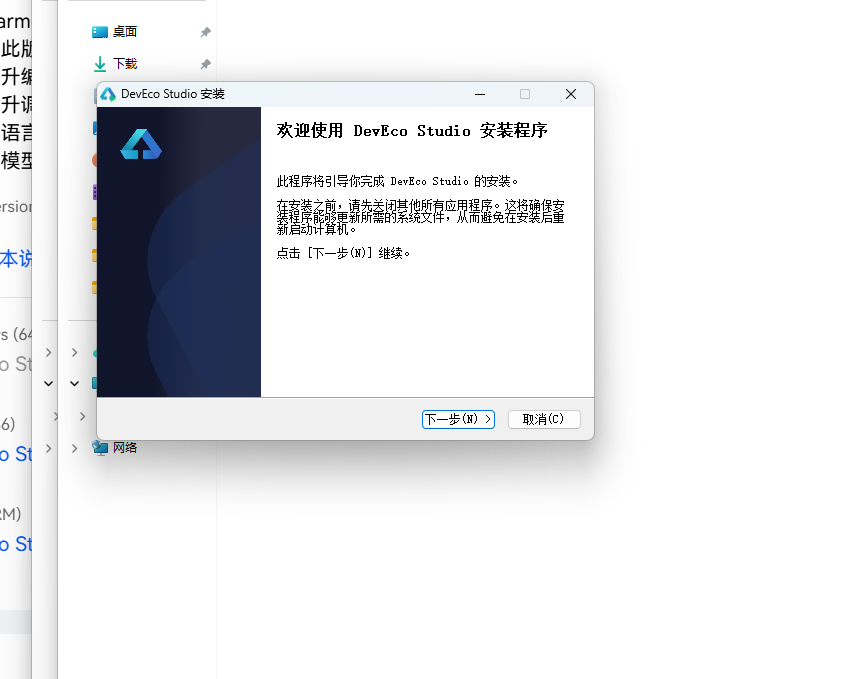
从华为开发者官网下载最新版本,运行安装包,选择安装路径,勾选"创建桌面快捷方式",点击安装。
15.3 配置SDK
首次启动后进入File > Settings > HarmonyOS SDK,勾选API 24及以上版本,点击Apply等待下载完成。
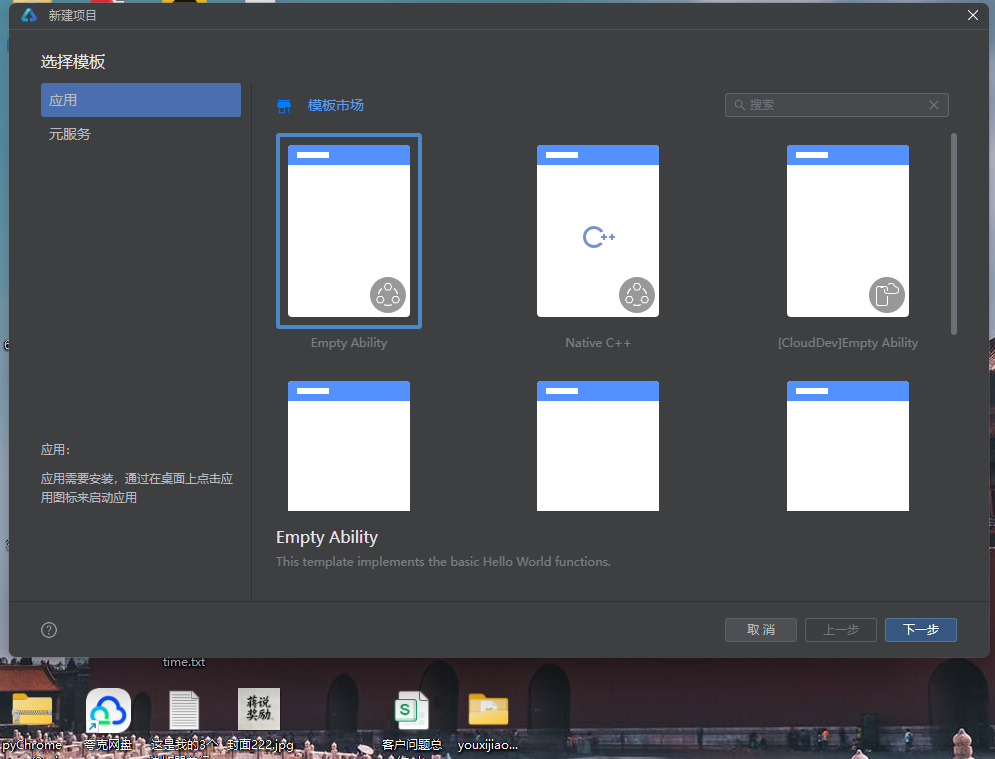
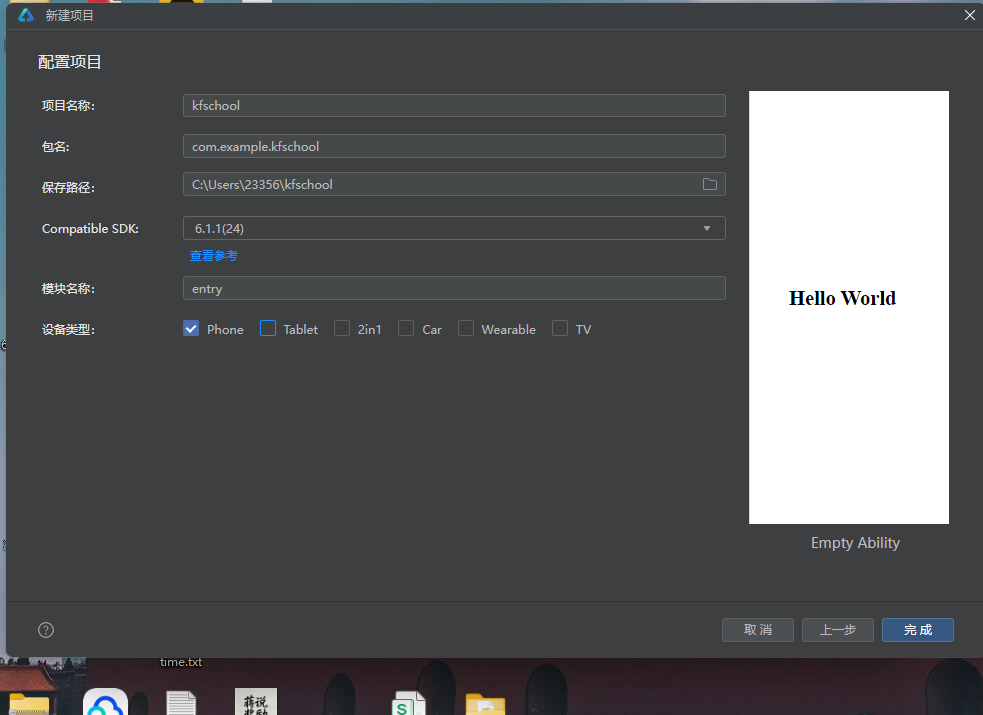
15.4 创建项目
选择Create Project > Empty Ability,配置项目名称、包名、保存路径,选择Compile SDK为API 24,点击Finish。
15.5 运行应用
将1171.ets代码替换到entry/src/main/ets/pages/Index.ets,连接HarmonyOS设备或启动模拟器,点击运行按钮预览。
15.6 预览调试
DevEco Studio提供实时预览功能,编辑器右侧打开Previewer面板,支持多设备尺寸预览、深色模式切换、组件树inspect等调试能力。
十六、总结展望
本文完整解析了基于HarmonyOS ArkTS API 24的智能家居联控平台(智居云联 SmartHome Link),从蓝青科技风色彩系统、设备状态三态映射、7场景一键自动化、分设备能耗三色可视化、高/中/低提醒分级,到六大Tab页面、五种弹框交互、家庭成员角色+权限矩阵,展现了ArkTS在IoT智能家居场景下的完整工程实践。
核心价值:
- 统一控制入口:12台设备5个房间统一管理,房间筛选快速定位,一键全关便捷操作
- 场景自动化可视化:7个场景专属渐变卡片一键执行,场景编辑弹框可视化配置动作与触发方式
- 能耗数据透明化:分设备排行+6月柱状图+三色阈值,用户一眼识别耗电大户,节能建议精准
- 安全提醒分级化:高/中/低三级色标,未读红点提示,门锁/离线/安防等高优先级提醒突出显示
- 家庭权限精细化:管理员/成员/访客三角色+设备控制/场景管理/查看能耗/接收提醒四权限,满足多成员家庭需求
未来可扩展:
- 接入真实IoT设备SDK,实现设备实时状态同步与远程控制
- 场景自动化支持条件触发(温度/湿度/光照/人体感应)与多条件组合
- 能耗统计接入电力公司API,实现实时电费查询与节能建议AI推荐
- 语音控制接入智能音箱,支持自然语言设备控制与场景执行
- 家庭成员邀请支持面对面扫码+链接分享+短信邀请多渠道
智居云联,让智能家居真正做到"一键掌控、数据透明、安全可靠"。
附录:完整源码
// 智居云联 SmartHome Link —— 智能家居联控场景
// 6 Tab:设备总控 / 场景模式 / 电器商城 / 能耗统计 / 智能提醒 / 我的
// 5 弹框:设备控制面板 / 添加设备 / 场景编辑 / 删除设备确认 / 家庭成员邀请

interface DeviceItem { id: number; name: string; icon: string; room: string; online: boolean; on: boolean; value: string; kind: string }
interface SceneItem { id: number; name: string; icon: string; desc: string; c1: string; c2: string; active: boolean; runs: number }
interface MallItem { id: number; name: string; icon: string; price: number; origin: number; tag: string; sold: string; color: string }
interface EnergyItem { id: number; name: string; icon: string; kwh: number; maxKwh: number }
interface BillMonth { month: string; fee: number; maxFee: number }
interface AlertItem { id: number; title: string; desc: string; icon: string; level: string; time: string; read: boolean }
interface FamilyItem { id: number; name: string; icon: string; role: string; devices: number; online: boolean }
interface RoomItem { name: string; icon: string; count: number; color: string }
interface ActionItem { name: string; icon: string; picked: boolean }

const BG: string = '#F0F6FF'
const CARD: string = '#FFFFFF'
const PRIMARY: string = '#2563EB'
const PRIMARY_LIGHT: string = '#DBEAFE'
const CYAN: string = '#06B6D4'
const CYAN_LIGHT: string = '#CFFAFE'
const TEXT: string = '#0F2A43'
const TEXT_SUB: string = '#64748B'
const LINE: string = '#E2E8F0'
const RED: string = '#EF4444'
const GREEN: string = '#22C55E'
const ORANGE: string = '#F59E0B'
const TAG_BG: string = '#EFF4FB'

const TAB_LABELS: string[] = ['设备总控', '场景模式', '电器商城', '能耗统计', '智能提醒', '我的']
const TAB_ICONS: string[] = ['🎛️', '🎬', '🛒', '⚡', '🔔', '🏠']

const DEVICES: DeviceItem[] = [
{ id: 1, name: '客厅主灯', icon: '💡', room: '客厅', online: true, on: true, value: '亮度 80%', kind: 'light' },
{ id: 2, name: '智能窗帘', icon: '🪟', room: '客厅', online: true, on: false, value: '已开合 50%', kind: 'curtain' },
{ id: 3, name: '扫地机器人', icon: '🤖', room: '客厅', online: true, on: true, value: '清扫中 · 剩余18分钟', kind: 'robot' },
{ id: 4, name: '空调Pro', icon: '❄️', room: '客厅', online: true, on: true, value: '26°C · 制冷', kind: 'ac' },
{ id: 5, name: '卧室台灯', icon: '🕯️', room: '卧室', online: true, on: false, value: '亮度 0%', kind: 'light' },
{ id: 6, name: '空气净化器', icon: '🌬️', room: '卧室', online: true, on: true, value: 'PM2.5 优', kind: 'purifier' },
{ id: 7, name: '智能加湿器', icon: '💧', room: '卧室', online: false, on: false, value: '离线 2 小时', kind: 'humidifier' },
{ id: 8, name: '智能门锁', icon: '🔐', room: '入户', online: true, on: true, value: '已上锁 · 电量 72%', kind: 'lock' },
{ id: 9, name: '厨房烟感', icon: '💨', room: '厨房', online: true, on: true, value: '一切正常', kind: 'sensor' },
{ id: 10, name: '智能插座', icon: '🔌', room: '厨房', online: true, on: false, value: '已断电', kind: 'plug' },
{ id: 11, name: '书房投影', icon: '📽️', room: '书房', online: true, on: false, value: '待机中', kind: 'projector' },
{ id: 12, name: '氛围灯带', icon: '🌈', room: '书房', online: true, on: true, value: '16色 · 呼吸模式', kind: 'light' }
]

const SCENES: SceneItem[] = [
{ id: 1, name: '回家模式', icon: '🏡', desc: '玄关灯亮 · 空调26°C · 窗帘关闭 · 热水器启动', c1: '#2563EB', c2: '#06B6D4', active: true, runs: 186 },
{ id: 2, name: '离家模式', icon: '🚪', desc: '全屋断电 · 门锁上锁 · 扫地机启动 · 摄像头布防', c1: '#475569', c2: '#64748B', active: false, runs: 142 },
{ id: 3, name: '观影模式', icon: '🍿', desc: '灯光调暗 · 投影开机 · 窗帘全关 · 音响环绕', c1: '#7C3AED', c2: '#DB2777', active: false, runs: 68 },
{ id: 4, name: '睡眠模式', icon: '🌙', desc: '全屋熄灯 · 空调静音 · 门锁反锁 · 加湿器开', c1: '#1E3A8A', c2: '#3B82F6', active: false, runs: 233 },
{ id: 5, name: '起床模式', icon: '☀️', desc: '窗帘缓开 · 播放音乐 · 台灯渐亮 · 热水备好', c1: '#F59E0B', c2: '#EF4444', active: false, runs: 121 },
{ id: 6, name: '聚会模式', icon: '🎉', desc: '灯带律动 · 音响MAX · 窗帘开 · 空调强劲', c1: '#EC4899', c2: '#8B5CF6', active: false, runs: 34 },
{ id: 7, name: '阅读模式', icon: '📖', desc: '台灯暖光 · 灯带关闭 · 空调静音 · 白噪音', c1: '#D97706', c2: '#FBBF24', active: false, runs: 89 }
]

const MALL: MallItem[] = [
{ id: 1, name: '智能彩光灯泡', icon: '💡', price: 59, origin: 99, tag: '热销', sold: '2.3万', color: '#FEF3C7' },
{ id: 2, name: '智能插座WiFi版', icon: '🔌', price: 39, origin: 69, tag: '特惠', sold: '5.1万', color: '#DBEAFE' },
{ id: 3, name: '全自动智能门锁', icon: '🔐', price: 1599, origin: 2299, tag: '新品', sold: '1200+', color: '#E0E7FF' },
{ id: 4, name: '电动窗帘电机', icon: '🪟', price: 399, origin: 599, tag: '补贴', sold: '8600+', color: '#CFFAFE' },
{ id: 5, name: '扫拖一体机器人', icon: '🤖', price: 1899, origin: 2799, tag: '爆款', sold: '9800+', color: '#FCE7F3' },
{ id: 6, name: '温湿度传感器', icon: '🌡️', price: 69, origin: 109, tag: '特惠', sold: '1.7万', color: '#D1FAE5' },
{ id: 7, name: '智能音箱Pro', icon: '🔊', price: 249, origin: 349, tag: '热销', sold: '3.4万', color: '#FDE8E4' },
{ id: 8, name: '人体存在传感器', icon: '📡', price: 129, origin: 199, tag: '新品', sold: '5600+', color: '#EDE9FE' },
{ id: 9, name: '智能晾衣架', icon: '🧺', price: 899, origin: 1299, tag: '补贴', sold: '4300+', color: '#E0F2FE' },
{ id: 10, name: '烟雾报警器', icon: '💨', price: 119, origin: 179, tag: '必备', sold: '2.9万', color: '#FEF9C3' }
]

const ENERGY: EnergyItem[] = [
{ id: 1, name: '空调Pro', icon: '❄️', kwh: 3.6, maxKwh: 4 },
{ id: 2, name: '扫地机器人', icon: '🤖', kwh: 1.2, maxKwh: 4 },
{ id: 3, name: '智能热水器', icon: '🚿', kwh: 2.8, maxKwh: 4 },
{ id: 4, name: '冰箱', icon: '🧊', kwh: 1.5, maxKwh: 4 },
{ id: 5, name: '客厅主灯', icon: '💡', kwh: 0.4, maxKwh: 4 },
{ id: 6, name: '洗衣机', icon: '🧺', kwh: 0.9, maxKwh: 4 },
{ id: 7, name: '投影仪', icon: '📽️', kwh: 0.6, maxKwh: 4 },
{ id: 8, name: '其他设备', icon: '📡', kwh: 0.8, maxKwh: 4 }
]

const BILLS: BillMonth[] = [
{ month: '3月', fee: 96, maxFee: 100 },
{ month: '4月', fee: 82, maxFee: 100 },
{ month: '5月', fee: 74, maxFee: 100 },
{ month: '6月', fee: 108, maxFee: 100 },
{ month: '7月', fee: 156, maxFee: 100 },
{ month: '8月', fee: 143, maxFee: 100 }
]

const ALERTS: AlertItem[] = [
{ id: 1, title: '门锁电量偏低', desc: '智能门锁电量剩余 18%,请及时更换电池', icon: '🔐', level: '高', time: '10分钟前', read: false },
{ id: 2, title: '滤芯更换提醒', desc: '空气净化器滤芯已使用 178 天,建议更换', icon: '🌬️', level: '中', time: '2小时前', read: false },
{ id: 3, title: '设备离线', desc: '智能加湿器已离线 2 小时,请检查网络', icon: '💧', level: '高', time: '3小时前', read: false },
{ id: 4, title: '高温预警', desc: '今日室外 38°C,已自动调低空调至 25°C', icon: '🌡️', level: '中', time: '昨天 14:20', read: true },
{ id: 5, title: '滤芯更换提醒', desc: '净水器滤芯寿命剩余 12%', icon: '🚰', level: '中', time: '昨天 09:00', read: true },
{ id: 6, title: '窗帘保养', desc: '智能窗帘轨道建议清洁保养', icon: '🪟', level: '低', time: '3天前', read: true },
{ id: 7, title: '用电报告', desc: '上周用电 38.6 度,环比下降 12%', icon: '⚡', level: '低', time: '4天前', read: true },
{ id: 8, title: '版本更新', desc: '网关固件 v2.4.1 可更新,优化响应速度', icon: '🔄', level: '低', time: '5天前', read: true },
{ id: 9, title: '安防提醒', desc: '昨天 22:30 检测到客厅有人活动', icon: '📹', level: '高', time: '6天前', read: true }
]

const FAMILY: FamilyItem[] = [
{ id: 1, name: '我的家 · 爸爸', icon: '👨', role: '管理员', devices: 12, online: true },
{ id: 2, name: '我的家 · 妈妈', icon: '👩', role: '管理员', devices: 12, online: true },
{ id: 3, name: '我的家 · 儿子', icon: '👦', role: '成员', devices: 4, online: false },
{ id: 4, name: '老家 · 奶奶', icon: '👵', role: '成员', devices: 3, online: true }
]

const ROOMS: RoomItem[] = [
{ name: '客厅', icon: '🛋️', count: 4, color: '#DBEAFE' },
{ name: '卧室', icon: '🛏️', count: 3, color: '#E0F2FE' },
{ name: '厨房', icon: '🍳', count: 2, color: '#D1FAE5' },
{ name: '书房', icon: '📚', count: 2, color: '#FCE7F3' },
{ name: '入户', icon: '🚪', count: 1, color: '#FEF3C7' }
]

const ADD_TYPES: ActionItem[] = [
{ name: '智能灯', icon: '💡', picked: true },
{ name: '插座', icon: '🔌', picked: false },
{ name: '门锁', icon: '🔐', picked: false },
{ name: '窗帘', icon: '🪟', picked: false },
{ name: '传感器', icon: '📡', picked: false },
{ name: '扫地机', icon: '🤖', picked: false }
]

const SCENE_ACTIONS: ActionItem[] = [
{ name: '开灯', icon: '💡', picked: true },
{ name: '关灯', icon: '🌚', picked: false },
{ name: '空调', icon: '❄️', picked: true },
{ name: '窗帘', icon: '🪟', picked: false },
{ name: '音乐', icon: '🎵', picked: false },
{ name: '播报', icon: '📢', picked: false }
]

const ROLES: string[] = ['管理员', '成员', '访客']
const PERMS: string[] = ['设备控制', '场景管理', '查看能耗', '接收提醒']

function levelColor(level: string): string {
if (level === '高') { return RED }
if (level === '中') { return ORANGE }
return GREEN
}

function deviceStatusColor(d: DeviceItem): string {
if (!d.online) { return TEXT_SUB }
if (d.on) { return PRIMARY }
return TEXT_SUB
}

@Entry struct SmartHomeLinkPage {
@State currentTab: number = 0
@State roomFilter: number = 0
@State showDevice: boolean = false
@State showAdd: boolean = false
@State showSceneEdit: boolean = false
@State showDelete: boolean = false
@State showInvite: boolean = false
@State selDevice: number = 0
@State deviceOn: boolean = true
@State brightness1: number = 80
@State addType: number = 0
@State addRoom: number = 0
@State sceneName: string = '夜间模式'
@State sceneTrigger: number = 0
@State editAction: number = 0
@State permPick: number = 0
@State permPicks: number[] = [0, 2]
@State alertRead: number[] = []
@State sceneActive: number = 0
@State mallCart: number = 0
@State toast: string = ''

toggleDevice(id: number): void {
this.selDevice = id
this.deviceOn = DEVICES[id - 1].on
this.brightness1 = 80
this.showDevice = true
}

markRead(id: number): void {
this.alertRead = this.alertRead.concat([id])
}

pickPerm(i: number): void {
if (this.permPicks.indexOf(i) >= 0) {
this.permPicks = this.permPicks.filter((n: number) => n !== i)
} else {
this.permPicks = this.permPicks.concat([i])
}
}

showToast(msg: string): void {
this.toast = msg
}

@Builder
headerBar() {
Column() {
Row() {
Text('智居云联').fontSize(20).fontWeight(FontWeight.Bold).fontColor('#FFFFFF')
Text('3室2厅 · 12设备在线').fontSize(11).fontColor('#BFDBFE').padding({ left: 8, right: 8, top: 3, bottom: 3 }).backgroundColor('rgba(255,255,255,0.2)').borderRadius(10).margin({ left: 8 })
Row().layoutWeight(1)
Row() { Text('🔔').fontSize(18).onClick(() => { this.currentTab = 4 }) }.width(36).height(36).borderRadius(18).backgroundColor('rgba(255,255,255,0.2)').justifyContent(FlexAlign.Center).margin({ right: 8 })
Row() { Text('+').fontSize(20).fontColor('#FFFFFF').fontWeight(FontWeight.Bold) }.width(36).height(36).borderRadius(18).backgroundColor(CYAN).justifyContent(FlexAlign.Center).onClick(() => { this.showAdd = true })
}.width('100%').padding({ left: 16, right: 16, top: 4, bottom: 8 })
Row() {
Text('🔍').fontSize(14).margin({ left: 12 })
Text('搜索设备、场景或商品').fontSize(13).fontColor('#93A8C4').margin({ left: 8 })
Row().layoutWeight(1)
Text('语音').fontSize(11).fontColor(CYAN).padding({ left: 10, right: 10, top: 4, bottom: 4 }).backgroundColor(CYAN_LIGHT).borderRadius(10).margin({ right: 10 })
}.width('100%').height(40).backgroundColor('#FFFFFF').borderRadius(20).margin({ bottom: 10 })
}.width('100%').padding({ left: 14, right: 14, top: 10, bottom: 6 }).linearGradient({ angle: 135, colors: [['#1D4ED8', 0], ['#2563EB', 0.5], ['#06B6D4', 1]] })
}

@Builder
tabDevice() {
Column() {
Row() {
Text('全部房间').fontSize(14).fontWeight(FontWeight.Bold).fontColor(TEXT).layoutWeight(1)
Text('一键全关').fontSize(12).fontColor(RED).padding({ left: 12, right: 12, top: 5, bottom: 5 }).backgroundColor('#FEE2E2').borderRadius(12).onClick(() => { this.showToast('已下发全屋断电指令') })
}.width('100%').margin({ bottom: 10 })
Scroll() {
Row() {
ForEach(ROOMS, (r: RoomItem, i: number) => {
Column() {
Text(r.icon).fontSize(20)
Text(r.name).fontSize(11).fontColor(this.roomFilter === i ? PRIMARY : TEXT_SUB).margin({ top: 2 })
Text(r.count + '台').fontSize(9).fontColor(this.roomFilter === i ? CYAN : TEXT_SUB).margin({ top: 1 })
}.padding({ left: 14, right: 14, top: 8, bottom: 8 }).backgroundColor(this.roomFilter === i ? PRIMARY_LIGHT : CARD).borderRadius(14).margin({ right: 8 }).onClick(() => { this.roomFilter = i })
}, (r: RoomItem) => 'room' + r.name)
}
}.scrollable(ScrollDirection.Horizontal).width('100%').margin({ bottom: 12 })
Column() {
Row() {
Text('🏠').fontSize(16)
Text('在家场景运行中').fontSize(12).fontColor(TEXT).margin({ left: 6 })
Row().layoutWeight(1)
Text(' 查看 >').fontSize(11).fontColor(PRIMARY).onClick(() => { this.currentTab = 1 })
}.width('100%').padding({ left: 12, right: 12, top: 10, bottom: 10 })
}.width('100%').backgroundColor(CARD).borderRadius(14).margin({ bottom: 12 })
ForEach(DEVICES, (d: DeviceItem) => {
if (this.roomFilter === 0 || d.room === ROOMS[this.roomFilter - 1].name) {
Row() {
Column() { Text(d.icon).fontSize(24) }.width(52).height(52).borderRadius(16).backgroundColor(d.on ? PRIMARY_LIGHT : TAG_BG).justifyContent(FlexAlign.Center)
Column() {
Text(d.name).fontSize(14).fontWeight(FontWeight.Bold).fontColor(TEXT)
Text(d.value).fontSize(11).fontColor(deviceStatusColor(d)).margin({ top: 3 })
Text(d.room + (d.online ? '' : ' · 离线')).fontSize(10).fontColor(TEXT_SUB).margin({ top: 2 })
}.alignItems(HorizontalAlign.Start).layoutWeight(1).margin({ left: 12 })
Column() {
if (d.online) {
Text(d.on ? 'ON' : 'OFF').fontSize(11).fontWeight(FontWeight.Bold).fontColor(d.on ? PRIMARY : TEXT_SUB)
Text('控制').fontSize(9).fontColor(TEXT_SUB).margin({ top: 2 })
} else { Text('离线').fontSize(11).fontColor(TEXT_SUB) }
}.padding({ left: 10, right: 10, top: 6, bottom: 6 }).backgroundColor(d.online && d.on ? PRIMARY_LIGHT : TAG_BG).borderRadius(12).onClick(() => { this.toggleDevice(d.id) })
}.width('100%').padding(12).backgroundColor(CARD).borderRadius(14).margin({ bottom: 10 }).onClick(() => { this.toggleDevice(d.id) })
}
}, (d: DeviceItem) => 'dev' + d.id + this.roomFilter)
}.width('100%')
}

@Builder
tabScene() {
Column() {
Column() {
Text('⚡ 一键执行').fontSize(14).fontWeight(FontWeight.Bold).fontColor('#FFFFFF')
Text('点击场景卡即刻下发全屋指令').fontSize(11).fontColor('#E0F2FE').margin({ top: 4 })
}.width('100%').padding({ top: 16, bottom: 16 }).linearGradient({ angle: 120, colors: [['#2563EB', 0], ['#06B6D4', 1]] }).borderRadius(16).margin({ bottom: 12 })
ForEach(SCENES, (s: SceneItem) => {
Column() {
Row() {
Column() { Text(s.icon).fontSize(26) }.width(52).height(52).borderRadius(16).backgroundColor('rgba(255,255,255,0.25)').justifyContent(FlexAlign.Center)
Column() {
Text(s.name).fontSize(15).fontWeight(FontWeight.Bold).fontColor('#FFFFFF')
Text('已执行 ' + s.runs + ' 次').fontSize(10).fontColor('rgba(255,255,255,0.8)').margin({ top: 3 })
}.alignItems(HorizontalAlign.Start).layoutWeight(1).margin({ left: 12 })
Text(this.sceneActive === s.id ? '运行中' : '执行').fontSize(12).fontWeight(FontWeight.Bold).fontColor('#FFFFFF').padding({ left: 14, right: 14, top: 7, bottom: 7 }).backgroundColor('rgba(255,255,255,0.3)').borderRadius(14).onClick(() => { this.sceneActive = s.id })
}.width('100%')
Row() { Text(s.desc).fontSize(11).fontColor('rgba(255,255,255,0.9)').layoutWeight(1) }.width('100%').margin({ top: 10 }).padding({ top: 10 }).border({ width: 1, color: 'rgba(255,255,255,0.25)' })
Row() {
Text('编辑').fontSize(11).fontColor('#FFFFFF')
Text(' · ').fontSize(11).fontColor('rgba(255,255,255,0.6)')
Text('定时').fontSize(11).fontColor('#FFFFFF').margin({ left: 6 })
Row().layoutWeight(1)
Text('每天 07:30 自动执行').fontSize(10).fontColor('rgba(255,255,255,0.75)')
}.width('100%').margin({ top: 8 }).onClick(() => { this.sceneName = s.name; this.showSceneEdit = true })
}.width('100%').padding(14).borderRadius(16).margin({ bottom: 12 }).linearGradient({ angle: 135, colors: [[s.c1, 0], [s.c2, 1]] })
}, (s: SceneItem) => 'scene' + s.id + this.sceneActive)
}.width('100%')
}

@Builder
tabMall() {
Column() {
Row() {
Text('🎁 新人专享').fontSize(14).fontWeight(FontWeight.Bold).fontColor(TEXT).layoutWeight(1)
Text('满199减30').fontSize(10).fontColor(RED).padding({ left: 8, right: 8, top: 3, bottom: 3 }).backgroundColor('#FEE2E2').borderRadius(8)
}.width('100%').margin({ bottom: 10 })
Scroll() {
Row() {
ForEach(MALL, (m: MallItem) => {
if (m.id <= 4) {
Column() {
Row() { Text(m.icon).fontSize(30) }.width('100%').height(90).backgroundColor(m.color).borderRadius(12).justifyContent(FlexAlign.Center)
Text(m.name).fontSize(13).fontWeight(FontWeight.Bold).fontColor(TEXT).margin({ top: 8 })
Text('已售 ' + m.sold).fontSize(10).fontColor(TEXT_SUB).margin({ top: 3 })
Row() {
Text('¥').fontSize(11).fontColor(RED)
Text(m.price.toFixed(0)).fontSize(18).fontWeight(FontWeight.Bold).fontColor(RED)
Text('¥' + m.origin.toFixed(0)).fontSize(10).fontColor(TEXT_SUB).decoration({ type: TextDecorationType.LineThrough }).margin({ left: 6 })
}.margin({ top: 6 })
}.width(150).padding(10).backgroundColor(CARD).borderRadius(14).margin({ right: 10 }).onClick(() => { this.mallCart = this.mallCart + 1; this.showToast(m.name + ' 已加入清单') })
}
}, (m: MallItem) => 'mallh' + m.id)
}
}.scrollable(ScrollDirection.Horizontal).width('100%').margin({ bottom: 14 })
Row() {
Text('全部好物').fontSize(14).fontWeight(FontWeight.Bold).fontColor(TEXT).layoutWeight(1)
Text('购物清单 ' + this.mallCart + ' 件').fontSize(11).fontColor(PRIMARY).onClick(() => { this.showToast('清单:' + this.mallCart + ' 件商品') })
}.width('100%').margin({ bottom: 10 })
Row() {
Column() {
ForEach(MALL, (m: MallItem) => {
if (m.id % 2 === 1) {
Column() {
Row() { Text(m.icon).fontSize(28) }.width('100%').height(80).backgroundColor(m.color).borderRadius(12).justifyContent(FlexAlign.Center)
Text(m.name).fontSize(13).fontWeight(FontWeight.Bold).fontColor(TEXT).margin({ top: 8 })
Row() {
Text(m.tag).fontSize(9).fontColor(RED).padding({ left: 6, right: 6, top: 2, bottom: 2 }).backgroundColor('#FEE2E2').borderRadius(6)
Text('已售 ' + m.sold).fontSize(10).fontColor(TEXT_SUB).margin({ left: 6 })
}.margin({ top: 4 })
Row() {
Text('¥' + m.price.toFixed(0)).fontSize(17).fontWeight(FontWeight.Bold).fontColor(RED)
Text('¥' + m.origin.toFixed(0)).fontSize(10).fontColor(TEXT_SUB).decoration({ type: TextDecorationType.LineThrough }).margin({ left: 6 })
Row().layoutWeight(1)
Text('+').fontSize(16).fontWeight(FontWeight.Bold).fontColor('#FFFFFF').padding({ left: 8, right: 8, top: 2, bottom: 2 }).backgroundColor(PRIMARY).borderRadius(10).onClick(() => { this.mallCart = this.mallCart + 1 })
}.width('100%').margin({ top: 6 })
}.width('100%').padding(10).backgroundColor(CARD).borderRadius(14).margin({ bottom: 10 }).onClick(() => { this.mallCart = this.mallCart + 1 })
}
}, (m: MallItem) => 'mallL' + m.id + this.mallCart)
}.layoutWeight(1).margin({ right: 5 })
Column() {
ForEach(MALL, (m: MallItem) => {
if (m.id % 2 === 0) {
Column() {
Row() { Text(m.icon).fontSize(28) }.width('100%').height(80).backgroundColor(m.color).borderRadius(12).justifyContent(FlexAlign.Center)
Text(m.name).fontSize(13).fontWeight(FontWeight.Bold).fontColor(TEXT).margin({ top: 8 })
Row() {
Text(m.tag).fontSize(9).fontColor(RED).padding({ left: 6, right: 6, top: 2, bottom: 2 }).backgroundColor('#FEE2E2').borderRadius(6)
Text('已售 ' + m.sold).fontSize(10).fontColor(TEXT_SUB).margin({ left: 6 })
}.margin({ top: 4 })
Row() {
Text('¥' + m.price.toFixed(0)).fontSize(17).fontWeight(FontWeight.Bold).fontColor(RED)
Text('¥' + m.origin.toFixed(0)).fontSize(10).fontColor(TEXT_SUB).decoration({ type: TextDecorationType.LineThrough }).margin({ left: 6 })
Row().layoutWeight(1)
Text('+').fontSize(16).fontWeight(FontWeight.Bold).fontColor('#FFFFFF').padding({ left: 8, right: 8, top: 2, bottom: 2 }).backgroundColor(PRIMARY).borderRadius(10).onClick(() => { this.mallCart = this.mallCart + 1 })
}.width('100%').margin({ top: 6 })
}.width('100%').padding(10).backgroundColor(CARD).borderRadius(14).margin({ bottom: 10 }).onClick(() => { this.mallCart = this.mallCart + 1 })
}
}, (m: MallItem) => 'mallR' + m.id + this.mallCart)
}.layoutWeight(1).margin({ left: 5 })
}.width('100%')
}.width('100%')
}

@Builder
tabEnergy() {
Column() {
Row() {
Column() {
Text('⚡ 今日用电').fontSize(13).fontWeight(FontWeight.Bold).fontColor(TEXT)
Text('11.8 度').fontSize(32).fontWeight(FontWeight.Bold).fontColor(PRIMARY).margin({ top: 6 })
Text('较昨日 +8%').fontSize(11).fontColor(RED).margin({ top: 4 })
}.alignItems(HorizontalAlign.Start).layoutWeight(1)
Column() {
Progress({ value: 59, total: 100, type: ProgressType.Ring }).width(88).height(88).color(CYAN).style({ strokeWidth: 10 })
Text('月度额度 59%').fontSize(10).fontColor(TEXT_SUB).margin({ top: 6 })
}.alignItems(HorizontalAlign.Center)
}.width('100%').padding(16).backgroundColor(CARD).borderRadius(16).margin({ bottom: 12 })
Column() {
Text('分设备能耗排行').fontSize(14).fontWeight(FontWeight.Bold).fontColor(TEXT).width('100%').margin({ bottom: 12 })
ForEach(ENERGY, (e: EnergyItem) => {
Row() {
Text(e.icon).fontSize(20)
Text(e.name).fontSize(12).fontColor(TEXT).width(90).margin({ left: 8 })
Column() { Column().width((e.kwh / e.maxKwh) * 100 + '%').height(10).borderRadius(5).backgroundColor(e.kwh > 3 ? RED : (e.kwh > 1.5 ? ORANGE : CYAN)) }.layoutWeight(1).height(10).backgroundColor(TAG_BG).borderRadius(5).justifyContent(FlexAlign.Start)
Text(e.kwh.toFixed(1) + '度').fontSize(11).fontWeight(FontWeight.Bold).fontColor(TEXT).width(52)
}.width('100%').margin({ bottom: 12 })
}, (e: EnergyItem) => 'energy' + e.id)
}.width('100%').padding(14).backgroundColor(CARD).borderRadius(16).margin({ bottom: 12 })
Column() {
Text('近6月电费').fontSize(14).fontWeight(FontWeight.Bold).fontColor(TEXT).width('100%').margin({ bottom: 14 })
Row() {
ForEach(BILLS, (b: BillMonth) => {
Column() {
Text('¥' + b.fee.toFixed(0)).fontSize(10).fontColor(b.fee > 100 ? RED : TEXT_SUB).margin({ bottom: 4 })
Column().width(22).height((b.fee / b.maxFee) * 110).borderRadius(6).backgroundColor(b.fee > 100 ? RED : PRIMARY)
Text(b.month).fontSize(10).fontColor(TEXT_SUB).margin({ top: 6 })
}.layoutWeight(1).alignItems(HorizontalAlign.Center)
}, (b: BillMonth) => 'bill' + b.month)
}.width('100%').alignItems(VerticalAlign.Bottom)
Row() { Text('💡 夏季空调用电占比 47%,建议 26°C 节能模式').fontSize(10).fontColor(TEXT_SUB).layoutWeight(1) }.width('100%').margin({ top: 12 }).padding({ top: 10 }).border({ width: 1, color: LINE })
}.width('100%').padding(14).backgroundColor(CARD).borderRadius(16)
}.width('100%')
}

@Builder
tabAlert() {
Column() {
Row() {
Text('智能提醒').fontSize(16).fontWeight(FontWeight.Bold).fontColor(TEXT).layoutWeight(1)
Text('全部已读').fontSize(11).fontColor(PRIMARY).onClick(() => { this.alertRead = [1, 2, 3, 4, 5, 6, 7, 8, 9] })
}.width('100%').margin({ bottom: 12 })
ForEach(ALERTS, (a: AlertItem) => {
Row() {
Column() { Text(a.icon).fontSize(22) }.width(46).height(46).borderRadius(14).backgroundColor(TAG_BG).justifyContent(FlexAlign.Center)
Column() {
Row() {
Text(a.title).fontSize(13).fontWeight(FontWeight.Bold).fontColor(TEXT).layoutWeight(1)
if (this.alertRead.indexOf(a.id) < 0 && !a.read) { Circle().width(8).height(8).fill(RED) }
}.width('100%')
Text(a.desc).fontSize(11).fontColor(TEXT_SUB).margin({ top: 3 })
Row() {
Text(a.level).fontSize(9).fontColor('#FFFFFF').padding({ left: 6, right: 6, top: 2, bottom: 2 }).backgroundColor(levelColor(a.level)).borderRadius(6)
Text(a.time).fontSize(10).fontColor(TEXT_SUB).margin({ left: 8 })
Row().layoutWeight(1)
Text('处理').fontSize(11).fontColor(PRIMARY).padding({ left: 10, right: 10, top: 3, bottom: 3 }).backgroundColor(PRIMARY_LIGHT).borderRadius(10).onClick(() => { this.markRead(a.id) })
}.width('100%').margin({ top: 6 })
}.alignItems(HorizontalAlign.Start).layoutWeight(1).margin({ left: 12 })
}.width('100%').padding(12).backgroundColor(CARD).borderRadius(14).margin({ bottom: 10 }).onClick(() => { this.markRead(a.id) })
}, (a: AlertItem) => 'alert' + a.id + this.alertRead.length)
}.width('100%')
}

@Builder
tabMine() {
Column() {
Column() {
Row() {
Column() { Text('👨').fontSize(32) }.width(60).height(60).borderRadius(30).backgroundColor('rgba(255,255,255,0.3)').justifyContent(FlexAlign.Center)
Column() {
Text('智居达人 · David').fontSize(16).fontWeight(FontWeight.Bold).fontColor('#FFFFFF')
Text('Lv.6 智控大师 · 已省电 386 度').fontSize(11).fontColor('#DBEAFE').margin({ top: 4 })
}.alignItems(HorizontalAlign.Start).layoutWeight(1).margin({ left: 12 })
}.width('100%')
Row() {
Column() { Text('5').fontSize(18).fontWeight(FontWeight.Bold).fontColor('#FFFFFF'); Text('房间').fontSize(10).fontColor('#BFDBFE').margin({ top: 2 }) }.layoutWeight(1)
Column() { Text('12').fontSize(18).fontWeight(FontWeight.Bold).fontColor('#FFFFFF'); Text('设备').fontSize(10).fontColor('#BFDBFE').margin({ top: 2 }) }.layoutWeight(1)
Column() { Text('92%').fontSize(18).fontWeight(FontWeight.Bold).fontColor('#FFFFFF'); Text('在线率').fontSize(10).fontColor('#BFDBFE').margin({ top: 2 }) }.layoutWeight(1)
Column() { Text('233').fontSize(18).fontWeight(FontWeight.Bold).fontColor('#FFFFFF'); Text('自动执行').fontSize(10).fontColor('#BFDBFE').margin({ top: 2 }) }.layoutWeight(1)
}.width('100%').margin({ top: 16 }).padding({ top: 14 }).border({ width: 1, color: 'rgba(255,255,255,0.25)' })
}.width('100%').padding(16).borderRadius(16).linearGradient({ angle: 135, colors: [['#1E3A8A', 0], ['#2563EB', 0.6], ['#06B6D4', 1]] }).margin({ bottom: 12 })
Column() {
Text('我的房屋').fontSize(14).fontWeight(FontWeight.Bold).fontColor(TEXT).width('100%').margin({ bottom: 10 })
ForEach(FAMILY, (f: FamilyItem) => {
Row() {
Column() { Text(f.icon).fontSize(24) }.width(46).height(46).borderRadius(14).backgroundColor(TAG_BG).justifyContent(FlexAlign.Center)
Column() {
Text(f.name).fontSize(13).fontWeight(FontWeight.Bold).fontColor(TEXT)
Row() {
Text(f.role).fontSize(9).fontColor(f.role === '管理员' ? '#FFFFFF' : PRIMARY).padding({ left: 6, right: 6, top: 2, bottom: 2 }).backgroundColor(f.role === '管理员' ? PRIMARY : PRIMARY_LIGHT).borderRadius(6)
Text('可控制 ' + f.devices + ' 台设备').fontSize(10).fontColor(TEXT_SUB).margin({ left: 8 })
}.margin({ top: 4 })
}.alignItems(HorizontalAlign.Start).layoutWeight(1).margin({ left: 12 })
Column() {
Circle().width(8).height(8).fill(f.online ? GREEN : TEXT_SUB)
Text(f.online ? '在线' : '离线').fontSize(9).fontColor(TEXT_SUB).margin({ top: 3 })
}
}.width('100%').padding(10).backgroundColor(CARD).borderRadius(12).margin({ bottom: 8 })
}, (f: FamilyItem) => 'fam' + f.id)
Row() { Text('+ 邀请家庭成员').fontSize(13).fontWeight(FontWeight.Bold).fontColor(PRIMARY) }.width('100%').padding(12).backgroundColor(PRIMARY_LIGHT).borderRadius(12).justifyContent(FlexAlign.Center).margin({ top: 4 }).onClick(() => { this.showInvite = true })
}.width('100%').padding(14).backgroundColor(CARD).borderRadius(16).margin({ bottom: 12 })
Column() {
Row() {
Text('🗑️').fontSize(18)
Text('删除设备').fontSize(13).fontColor(TEXT).margin({ left: 10 }).layoutWeight(1)
Text('>').fontSize(14).fontColor(TEXT_SUB)
}.width('100%').padding(14).backgroundColor(CARD).borderRadius(12).margin({ bottom: 8 }).onClick(() => { this.showDelete = true })
Row() {
Text('⚙️').fontSize(18)
Text('网关设置').fontSize(13).fontColor(TEXT).margin({ left: 10 }).layoutWeight(1)
Text('v2.4.1').fontSize(11).fontColor(TEXT_SUB)
}.width('100%').padding(14).backgroundColor(CARD).borderRadius(12).margin({ bottom: 8 }).onClick(() => { this.showToast('网关运行正常') })
Row() {
Text('📞').fontSize(18)
Text('客服中心').fontSize(13).fontColor(TEXT).margin({ left: 10 }).layoutWeight(1)
Text('>').fontSize(14).fontColor(TEXT_SUB)
}.width('100%').padding(14).backgroundColor(CARD).borderRadius(12).onClick(() => { this.showToast('客服工作时间 9:00-21:00') })
}.width('100%')
}.width('100%')
}

@Builder
bottomTabs() {
Row() {
ForEach(TAB_LABELS, (label: string, i: number) => {
Column() {
Text(TAB_ICONS[i]).fontSize(20)
Text(label).fontSize(9).fontColor(this.currentTab === i ? PRIMARY : TEXT_SUB).margin({ top: 2 })
}.layoutWeight(1).alignItems(HorizontalAlign.Center).padding({ top: 8, bottom: 8 }).onClick(() => { this.currentTab = i })
}, (label: string) => 'tab' + label)
}.width('100%').backgroundColor(CARD).border({ width: 1, color: LINE })
}

@Builder
deviceOverlay(onClose: () => void = () => {}) {
Column() {
Row() { Column().width(40).height(5).borderRadius(3).backgroundColor('#CBD5E1') }.width('100%').justifyContent(FlexAlign.Center).padding({ top: 10, bottom: 10 })
Row() {
Column() { Text(DEVICES[this.selDevice > 0 ? this.selDevice - 1 : 0].icon).fontSize(36) }.width(72).height(72).borderRadius(22).backgroundColor(PRIMARY_LIGHT).justifyContent(FlexAlign.Center)
Column() {
Text(DEVICES[this.selDevice > 0 ? this.selDevice - 1 : 0].name).fontSize(18).fontWeight(FontWeight.Bold).fontColor(TEXT)
Text(DEVICES[this.selDevice > 0 ? this.selDevice - 1 : 0].room + ' · ' + DEVICES[this.selDevice > 0 ? this.selDevice - 1 : 0].value).fontSize(11).fontColor(TEXT_SUB).margin({ top: 4 })
Row() { Circle().width(7).height(7).fill(GREEN); Text('Wi-Fi 5G · 信号良好').fontSize(10).fontColor(TEXT_SUB).margin({ left: 5 }) }.margin({ top: 4 })
}.alignItems(HorizontalAlign.Start).layoutWeight(1).margin({ left: 14 })
Row() { Text(this.deviceOn ? '开启' : '关闭').fontSize(13).fontWeight(FontWeight.Bold).fontColor(this.deviceOn ? '#FFFFFF' : TEXT_SUB) }.padding({ left: 16, right: 16, top: 8, bottom: 8 }).backgroundColor(this.deviceOn ? PRIMARY : TAG_BG).borderRadius(16).onClick(() => { this.deviceOn = !this.deviceOn })
}.width('100%').padding({ left: 16, right: 16 })
Column() {
Row() {
Text('亮度 / 档位调节').fontSize(13).fontWeight(FontWeight.Bold).fontColor(TEXT).layoutWeight(1)
Text(this.brightness1 + '%').fontSize(15).fontWeight(FontWeight.Bold).fontColor(PRIMARY)
}.width('100%').margin({ bottom: 10 })
Row() {
Text('-').fontSize(18).fontWeight(FontWeight.Bold).fontColor(PRIMARY).padding(8).backgroundColor(TAG_BG).borderRadius(20).onClick(() => { if (this.brightness1 > 10) { this.brightness1 = this.brightness1 - 10 } })
Column() { Column().width(this.brightness1 + '%').height(8).borderRadius(4).backgroundColor(PRIMARY) }.layoutWeight(1).height(8).backgroundColor(TAG_BG).borderRadius(4).margin({ left: 12, right: 12 })
Text('+').fontSize(18).fontWeight(FontWeight.Bold).fontColor(PRIMARY).padding(8).backgroundColor(TAG_BG).borderRadius(20).onClick(() => { if (this.brightness1 < 100) { this.brightness1 = this.brightness1 + 10 } })
}.width('100%')
Row() {
ForEach(['25%', '50%', '75%', '100%'], (v: string, i: number) => {
Text(v).fontSize(11).fontColor(TEXT_SUB).padding({ left: 14, right: 14, top: 5, bottom: 5 }).backgroundColor(TAG_BG).borderRadius(12).margin({ right: 8 }).onClick(() => { this.brightness1 = (i + 1) * 25 })
}, (v: string) => 'bk' + v)
}.width('100%').margin({ top: 12 })
}.width('100%').padding(14).backgroundColor(CARD).borderRadius(14).margin({ top: 14, bottom: 10 })
Row() {
Text('⏱ 定时').fontSize(12).fontColor(TEXT).padding({ left: 14, right: 14, top: 8, bottom: 8 }).backgroundColor(TAG_BG).borderRadius(12).onClick(() => { this.showToast('已添加 22:00 定时关闭') })
Text('🔁 倒计时').fontSize(12).fontColor(TEXT).padding({ left: 14, right: 14, top: 8, bottom: 8 }).backgroundColor(TAG_BG).borderRadius(12).margin({ left: 8 }).onClick(() => { this.showToast('已开启 30 分钟倒计时') })
Text('🗑 解绑').fontSize(12).fontColor(RED).padding({ left: 14, right: 14, top: 8, bottom: 8 }).backgroundColor('#FEE2E2').borderRadius(12).margin({ left: 8 }).onClick(() => { onClose(); this.showDelete = true })
Row().layoutWeight(1)
}.width('100%').padding({ left: 16, right: 16 })
Row() { Text('完成').fontSize(15).fontWeight(FontWeight.Bold).fontColor('#FFFFFF') }.width('90%').height(46).borderRadius(23).justifyContent(FlexAlign.Center).linearGradient({ angle: 90, colors: [['#2563EB', 0], ['#06B6D4', 1]] }).margin({ top: 14, bottom: 16 }).onClick(() => { onClose() })
}.width('100%').backgroundColor('#FFFFFF').borderRadius({ topLeft: 24, topRight: 24 })
}

@Builder
addOverlay(onClose: () => void = () => {}) {
Column() {
Text('添加智能设备').fontSize(16).fontWeight(FontWeight.Bold).fontColor(TEXT).margin({ top: 18, bottom: 6 })
Text('请确认设备已通电并进入配网模式').fontSize(11).fontColor(TEXT_SUB)
Column() {
Text('① 选择设备类型').fontSize(12).fontWeight(FontWeight.Bold).fontColor(TEXT).width('100%').margin({ bottom: 10 })
Row() {
ForEach(ADD_TYPES, (t: ActionItem, i: number) => {
Column() {
Text(t.icon).fontSize(22)
Text(t.name).fontSize(10).fontColor(this.addType === i ? PRIMARY : TEXT_SUB).margin({ top: 3 })
}.padding({ left: 12, right: 12, top: 8, bottom: 8 }).backgroundColor(this.addType === i ? PRIMARY_LIGHT : TAG_BG).borderRadius(12).margin({ right: 8, bottom: 8 }).onClick(() => { this.addType = i })
}, (t: ActionItem) => 'at' + t.name)
}.width('100%')
}.width('100%').padding(12).backgroundColor('#F8FAFC').borderRadius(14).margin({ top: 14 })
Column() {
Text('② 安装到房间').fontSize(12).fontWeight(FontWeight.Bold).fontColor(TEXT).width('100%').margin({ bottom: 10 })
Row() {
ForEach(ROOMS, (r: RoomItem, i: number) => {
Row() {
Text(r.icon).fontSize(14)
Text(r.name).fontSize(11).fontColor(this.addRoom === i ? '#FFFFFF' : TEXT).margin({ left: 4 })
}.padding({ left: 12, right: 12, top: 6, bottom: 6 }).backgroundColor(this.addRoom === i ? PRIMARY : TAG_BG).borderRadius(14).margin({ right: 8 }).onClick(() => { this.addRoom = i })
}, (r: RoomItem) => 'ar' + r.name)
}.width('100%')
}.width('100%').padding(12).backgroundColor('#F8FAFC').borderRadius(14).margin({ top: 10 })
Row() {
Text('自动发现附近 2 台新设备').fontSize(11).fontColor(CYAN).layoutWeight(1)
Text('刷新').fontSize(11).fontColor(PRIMARY).onClick(() => { this.showToast('正在扫描附近设备…') })
}.width('100%').margin({ top: 12 })
Row() {
Text('取消').fontSize(14).fontColor(TEXT_SUB).layoutWeight(1).padding({ top: 12, bottom: 12 }).textAlign(TextAlign.Center).backgroundColor(TAG_BG).borderRadius(22).margin({ right: 6 }).onClick(() => { onClose() })
Text('开始配网').fontSize(14).fontWeight(FontWeight.Bold).fontColor('#FFFFFF').layoutWeight(1).padding({ top: 12, bottom: 12 }).textAlign(TextAlign.Center).backgroundColor(PRIMARY).borderRadius(22).margin({ left: 6 }).onClick(() => { onClose(); this.showToast('配网中,约需 30 秒') })
}.width('100%').margin({ top: 16, bottom: 18 })
}.width('88%').backgroundColor('#FFFFFF').borderRadius(20).padding({ left: 16, right: 16 })
}

@Builder
sceneEditOverlay(onClose: () => void = () => {}) {
Column() {
Text('编辑场景').fontSize(16).fontWeight(FontWeight.Bold).fontColor(TEXT).margin({ top: 18 })
Column() {
Text('场景名称').fontSize(12).fontColor(TEXT_SUB).width('100%').margin({ bottom: 6 })
Row() {
Text(this.sceneName).fontSize(14).fontColor(TEXT).layoutWeight(1)
Text('✏️').fontSize(14).onClick(() => { this.sceneName = this.sceneName === '夜间模式' ? '夜读模式' : '夜间模式' })
}.width('100%').padding({ left: 12, right: 12, top: 10, bottom: 10 }).backgroundColor('#F8FAFC').borderRadius(10)
}.width('100%').margin({ top: 14 })
Column() {
Text('执行动作(可多选)').fontSize(12).fontColor(TEXT_SUB).width('100%').margin({ bottom: 8 })
Row() {
ForEach(SCENE_ACTIONS, (a: ActionItem, i: number) => {
Row() {
Text(a.icon).fontSize(14)
Text(a.name).fontSize(11).fontColor(this.editAction === i ? '#FFFFFF' : TEXT).margin({ left: 4 })
}.padding({ left: 12, right: 12, top: 7, bottom: 7 }).backgroundColor(this.editAction === i ? PRIMARY : TAG_BG).borderRadius(14).margin({ right: 8, bottom: 8 }).onClick(() => { this.editAction = i })
}, (a: ActionItem) => 'sa' + a.name)
}.width('100%')
}.width('100%').padding(12).backgroundColor('#F8FAFC').borderRadius(14).margin({ top: 10 })
Column() {
Text('触发方式').fontSize(12).fontColor(TEXT_SUB).width('100%').margin({ bottom: 8 })
Row() {
ForEach(['一键点击', '定时执行', '传感器触发'], (t: string, i: number) => {
Row() {
Circle().width(14).height(14).fill(this.sceneTrigger === i ? PRIMARY : '#CBD5E1')
Text(t).fontSize(12).fontColor(TEXT).margin({ left: 6 })
}.padding({ right: 16 }).onClick(() => { this.sceneTrigger = i })
}, (t: string) => 'trg' + t)
}.width('100%')
}.width('100%').padding(12).backgroundColor('#F8FAFC').borderRadius(14).margin({ top: 10 })
Row() {
Text('取消').fontSize(14).fontColor(TEXT_SUB).layoutWeight(1).padding({ top: 12, bottom: 12 }).textAlign(TextAlign.Center).backgroundColor(TAG_BG).borderRadius(22).margin({ right: 6 }).onClick(() => { onClose() })
Text('保存场景').fontSize(14).fontWeight(FontWeight.Bold).fontColor('#FFFFFF').layoutWeight(1).padding({ top: 12, bottom: 12 }).textAlign(TextAlign.Center).backgroundColor(PRIMARY).borderRadius(22).margin({ left: 6 }).onClick(() => { onClose(); this.showToast('场景已保存') })
}.width('100%').margin({ top: 16, bottom: 18 })
}.width('88%').backgroundColor('#FFFFFF').borderRadius(20).padding({ left: 16, right: 16 })
}

@Builder
deleteOverlay(onClose: () => void = () => {}) {
Column() {
Column() { Text('⚠️').fontSize(34) }.width(60).height(60).borderRadius(30).backgroundColor('#FEE2E2').justifyContent(FlexAlign.Center).margin({ top: 20 })
Text('确认删除设备?').fontSize(16).fontWeight(FontWeight.Bold).fontColor(TEXT).margin({ top: 12 })
Text('删除后该设备的所有自动化规则、定时任务和历史数据将被清空,且不可恢复。').fontSize(12).fontColor(TEXT_SUB).textAlign(TextAlign.Center).margin({ top: 8, bottom: 16 })
Row() {
Text('取消').fontSize(14).fontColor(TEXT_SUB).layoutWeight(1).padding({ top: 10, bottom: 10 }).textAlign(TextAlign.Center).backgroundColor(TAG_BG).borderRadius(20).margin({ right: 5 }).onClick(() => { onClose() })
Text('确认删除').fontSize(14).fontWeight(FontWeight.Bold).fontColor('#FFFFFF').layoutWeight(1).padding({ top: 10, bottom: 10 }).textAlign(TextAlign.Center).backgroundColor(RED).borderRadius(20).margin({ left: 5 }).onClick(() => { onClose(); this.showToast('设备已删除') })
}.width('100%').margin({ bottom: 18 })
}.width('76%').backgroundColor('#FFFFFF').borderRadius(18).padding({ left: 18, right: 18 })
}

@Builder
inviteOverlay(onClose: () => void = () => {}) {
Column() {
Text('邀请家庭成员').fontSize(16).fontWeight(FontWeight.Bold).fontColor(TEXT).margin({ top: 18 })
Text('通过链接或面对面邀请家人共同管理智能家居').fontSize(11).fontColor(TEXT_SUB).margin({ top: 4 })
Column() {
Text('昵称').fontSize(12).fontColor(TEXT_SUB).width('100%').margin({ bottom: 6 })
Text('请输入成员昵称').fontSize(13).fontColor(TEXT_SUB).padding({ left: 12, right: 12, top: 10, bottom: 10 }).backgroundColor('#F8FAFC').borderRadius(10).width('100%')
}.width('100%').margin({ top: 14 })
Column() {
Text('分配角色').fontSize(12).fontColor(TEXT_SUB).width('100%').margin({ bottom: 8 })
Row() {
ForEach(ROLES, (r: string, i: number) => {
Column() {
Text(i === 0 ? '👑' : (i === 1 ? '🙋' : '👋')).fontSize(18)
Text(r).fontSize(11).fontColor(this.permPick === i ? PRIMARY : TEXT_SUB).margin({ top: 3 })
}.padding({ left: 18, right: 18, top: 10, bottom: 10 }).backgroundColor(this.permPick === i ? PRIMARY_LIGHT : TAG_BG).borderRadius(14).margin({ right: 8 }).onClick(() => { this.permPick = i })
}, (r: string) => 'role' + r)
}.width('100%')
}.width('100%').padding(12).backgroundColor('#F8FAFC').borderRadius(14).margin({ top: 10 })
Column() {
Text('权限(可多选)').fontSize(12).fontColor(TEXT_SUB).width('100%').margin({ bottom: 8 })
Row() {
ForEach(PERMS, (p: string, i: number) => {
Row() {
if (this.permPicks.indexOf(i) >= 0) { Text('✓').fontSize(11).fontColor('#FFFFFF').padding(2).backgroundColor(PRIMARY).borderRadius(8) } else { Circle().width(14).height(14).fill('#CBD5E1') }
Text(p).fontSize(11).fontColor(TEXT).margin({ left: 6 })
}.padding({ right: 12 }).onClick(() => { this.pickPerm(i) })
}, (p: string) => 'perm' + p)
}.width('100%')
}.width('100%').padding(12).backgroundColor('#F8FAFC').borderRadius(14).margin({ top: 10 })
Row() {
Text('复制邀请链接').fontSize(13).fontColor(TEXT_SUB).padding({ top: 10, bottom: 10 }).layoutWeight(1).textAlign(TextAlign.Center).backgroundColor(TAG_BG).borderRadius(20).margin({ right: 5 }).onClick(() => { this.showToast('链接已复制') })
Text('发送邀请').fontSize(13).fontWeight(FontWeight.Bold).fontColor('#FFFFFF').padding({ top: 10, bottom: 10 }).layoutWeight(1).textAlign(TextAlign.Center).backgroundColor(PRIMARY).borderRadius(20).margin({ left: 5 }).onClick(() => { onClose(); this.showToast('邀请已发送') })
}.width('100%').margin({ top: 16, bottom: 18 })
}.width('88%').backgroundColor('#FFFFFF').borderRadius(20).padding({ left: 16, right: 16 })
}

@Builder
toastTip() {
if (this.toast !== '') {
Column() {
Text(this.toast).fontSize(13).fontColor('#FFFFFF').padding({ left: 18, right: 18, top: 10, bottom: 10 }).backgroundColor('rgba(15,42,67,0.85)').borderRadius(20)
}.width('100%').justifyContent(FlexAlign.Center).margin({ top: 120 })
}
}

@Builder
modalOverlay(onClose: () => void = () => {}) {
Column() {
if (this.showDevice) {
Column() {
Row().layoutWeight(1).width('100%').onClick(() => { onClose() })
this.deviceOverlay(() => { this.showDevice = false })
}.width('100%').height('100%')
} else if (this.showAdd) {
Column() { this.addOverlay(() => { this.showAdd = false }) }.width('100%').height('100%').justifyContent(FlexAlign.Center).backgroundColor('rgba(15,42,67,0.5)').onClick(() => { this.showAdd = false })
} else if (this.showSceneEdit) {
Column() { this.sceneEditOverlay(() => { this.showSceneEdit = false }) }.width('100%').height('100%').justifyContent(FlexAlign.Center).backgroundColor('rgba(15,42,67,0.5)').onClick(() => { this.showSceneEdit = false })
} else if (this.showDelete) {
Column() { this.deleteOverlay(() => { this.showDelete = false }) }.width('100%').height('100%').justifyContent(FlexAlign.Center).backgroundColor('rgba(15,42,67,0.5)').onClick(() => { this.showDelete = false })
} else if (this.showInvite) {
Column() { this.inviteOverlay(() => { this.showInvite = false }) }.width('100%').height('100%').justifyContent(FlexAlign.Center).backgroundColor('rgba(15,42,67,0.5)').onClick(() => { this.showInvite = false })
}
}.width('100%').height('100%')
}

build() {
Stack() {
Column() {
this.headerBar()
Scroll() {
Column() {
if (this.currentTab === 0) { this.tabDevice() }
else if (this.currentTab === 1) { this.tabScene() }
else if (this.currentTab === 2) { this.tabMall() }
else if (this.currentTab === 3) { this.tabEnergy() }
else if (this.currentTab === 4) { this.tabAlert() }
else { this.tabMine() }
}.width('100%').padding({ left: 14, right: 14, top: 6, bottom: 16 })
}.layoutWeight(1).width('100%').scrollBar(BarState.Off)
this.bottomTabs()
}.width('100%').height('100%')
this.toastTip()
if (this.showDevice || this.showAdd || this.showSceneEdit || this.showDelete || this.showInvite) {
this.modalOverlay(() => {
this.showDevice = false
this.showAdd = false
this.showSceneEdit = false
this.showDelete = false
this.showInvite = false
})
}
}.width('100%').height('100%').backgroundColor(BG)
}
}
nt(FlexAlign.Center).backgroundColor(‘rgba(15,42,67,0.5)’).onClick(() => { this.showInvite = false })
}
}.width(‘100%’).height(‘100%’)
}
build() {
Stack() {
Column() {
this.headerBar()
Scroll() {
Column() {
if (this.currentTab === 0) { this.tabDevice() }
else if (this.currentTab === 1) { this.tabScene() }
else if (this.currentTab === 2) { this.tabMall() }
else if (this.currentTab === 3) { this.tabEnergy() }
else if (this.currentTab === 4) { this.tabAlert() }
else { this.tabMine() }
}.width(‘100%’).padding({ left: 14, right: 14, top: 6, bottom: 16 })
}.layoutWeight(1).width(‘100%’).scrollBar(BarState.Off)
this.bottomTabs()
}.width(‘100%’).height(‘100%’)
this.toastTip()
if (this.showDevice || this.showAdd || this.showSceneEdit || this.showDelete || this.showInvite) {
this.modalOverlay(() => {
this.showDevice = false
this.showAdd = false
this.showSceneEdit = false
this.showDelete = false
this.showInvite = false
})
}
}.width(‘100%’).height(‘100%’).backgroundColor(BG)
}
}

讨论HarmonyOS开发技术,专注于API与组件、DevEco Studio、测试、元服务和应用上架分发等。
更多推荐
 6
6 0
0- 0


 已为社区贡献9条内容

所有评论(0)