HarmonyOS 6 ArkUI - Math.max(12, Math.round(p / 30)) 的计算方式,将价格映射为柱状图高度百分比
当我们拂去源码表层的注释尘埃,一座精心规划的 ArkTS 声明式 UI 遗迹便逐渐露出真容。它不是杂乱堆砌的代码废墟,而是一座由接口地层、静态数据地层、工具函数地层和组件地层层层叠加而成的结构化石。
每一个 @Builder 装饰器都是一座出土的祭祀台,每一组 @State 标记都是被陶封在状态容器中的活性标本。考古学的使命不是炫耀发现,而是还原设计者的思维路径。
在这片荧光紫与柠檬黄交织的代码遗址中,我们试图解读远古开发者在 Tab 布局、抽屉弹层、数据可视化等处留下的工具痕迹与演进脉络。
引言:遗址概况与发掘背景
陆冲滑板(Land Surfskate)作为一种融合冲浪与街头滑板文化的运动形态,近年来在城市青年群体中迅速扩散。本次发掘的代码遗迹正是一座围绕陆冲滑板教学、装备商城、地形图鉴、挑战赛等业务场景构建的 HarmonyOS ArkTS 应用。从地层堆积来看,该遗址属于 ArkTS 声明式 UI 文化的成熟期产物,使用了 @Entry、@Component、@Builder、@State、@Prop 等典型的装饰器符号体系。
从技术年代学角度判定,该代码层使用了 HarmonyOS ArkTS API 24 所提供的声明式开发范式。遗址中大量出现 linearGradient、bindSheet、bindContentCover、ForEach、Scroll 等典型器物组合,表明其构建者已熟练掌握 ArkUI 的响应式布局与状态驱动渲染技术。遗址整体以一个 @Entry 主入口组件为祭祀中心,周围环绕七个 @Component 子组件,形成典型的"中心-卫星"聚落结构。
从配色考古学角度分析,遗址中反复出现三种特征性色料:荧光紫 #7C4DFF、柠檬黄 #FFEB3B、沥青黑 #263238。这三种色料在不同地层中以不同比例混合,构成了整个应用视觉体系的色彩指纹。荧光紫多用于头部渐变、选中态背景与主操作按钮;柠檬黄多用于辅助操作按钮与选中态高亮;沥青黑则作为文字主色与深色渐变终端。这种配色策略暗示了一种"高对比、强视觉冲击"的设计意图,与陆冲滑板运动本身的街头潮流属性高度吻合。
第一地层:接口定义区——类型的陶范
考古学家在遗址最底层出土了一组接口定义。这些接口如同陶范一般,为后续的数据地层和组件地层预先塑造了形状与轮廓。在 ArkTS 文化中,接口(interface)是类型系统的基石,它规定了数据标本的形态规范。
interface TabCard183 {
  icon: string
  label: string
  sub: string
}

interface Trick183 {
  id: number
  name: string
  cat: string
  level: number
  learners: number
  tip: string
}

interface Deck183 {
  id: number
  name: string
  brand: string
  width: string
  flex: string
  price: number
  sold: number
  tag: string
}

interface Spot183 {
  id: number
  name: string
  area: string
  ground: string
  crowd: number
  light: string
  rating: number
}

interface Record183 {
  id: number
  date: string
  spot: string
  minutes: number
  tricks: number
  falls: number
}
从这组出土的接口陶范中,我们可以清晰地辨认出五个核心业务实体:TabCard183 定义了导航卡片的形态,Trick183 定义了滑板招式条目,Deck183 定义了板面商品,Spot183 定义了滑行地形,Record183 定义了滑行日志。每个接口都遵循了"唯一标识符 id + 语义属性字段"的标准化形制,这是 ArkTS 数据建模文化中的典型范式。
值得注意的是,Trick183 接口中包含了 level(难度等级)和 learners(学习人数)两个量化字段,表明设计者在最初规划时就已经预见了数据可视化展示的需求。Deck183 中的 sold(销量)与 tag(标签)字段则暗示了装备商城需要支持排序与标签筛选的功能演进。这些字段如同陶范上的纹饰,虽不起眼,却预示了后续地层中将要成型的器物形态。
在考古地层学中,最底层的遗物往往揭示了一个聚落最初的规划意图。这组接口定义说明,该应用在设计之初就确立了"多实体、强类型、数据驱动"的架构方向。
继续向下发掘,我们还出土了 Challenge183(挑战赛)、Post183(社区动态)、CatStat183(分类统计)、FlexPct183(弹性占比)、LevelRow183(能力维度)等接口陶范。这些接口的出土范围远远超出了简单的"教学+商城"二元结构,表明这是一个功能复合度相当高的应用遗址。尤其是 LevelRow183 中 val 与 max 的分离设计,暗示了一种可扩展的进度度量体系。
第二地层:静态数据区——凝固的数据标本
在接口地层之上,考古队发现了一层厚重的静态数据堆积。这些以 const 常量形式封存的数据数组,如同被封印在琥珀中的标本,完整保存了应用运行时的数据快照。
const TABS183: TabCard183[] = [
  { icon: '🛹', label: '教学', sub: '招式库' },
  { icon: '🎒', label: '装备', sub: '板面商城' },
  { icon: '📍', label: '地形', sub: '板点图鉴' },
  { icon: '📈', label: '记录', sub: '滑行数据' },
  { icon: '🏆', label: '挑战', sub: '周赛' },
  { icon: '👥', label: '圈子', sub: '滑友圈' },
  { icon: '👤', label: '我的', sub: '主页' }
]

const TRICKS183: Trick183[] = [
  { id: 1, name: 'Carving 压弯', cat: '基础', level: 1, learners: 12860, tip: '重心放前脚,肩膀先转' },
  { id: 2, name: 'Pumping 泵道加速', cat: '基础', level: 2, learners: 9420, tip: '弧底伸直,弧顶下蹲' },
  { id: 3, name: 'Power Slide 横刹', cat: '进阶', level: 3, learners: 6780, tip: '后脚蹬出,重心压低' },
  { id: 4, name: 'Snake 蛇形绕桩', cat: '基础', level: 2, learners: 8130, tip: '视线引领,脚跟交替压' },
  { id: 5, name: 'Switch 反脚滑行', cat: '进阶', level: 3, learners: 4560, tip: '先慢速找回脚感' },
  { id: 6, name: 'Boneless 手抓板跳', cat: '高阶', level: 4, learners: 2140, tip: '后手抓板心,前脚先落地' },
  { id: 7, name: 'No comply 180', cat: '高阶', level: 4, learners: 1870, tip: '前脚踩地弹出转体' },
  { id: 8, name: 'Shuvit 尾翘转板', cat: '进阶', level: 3, learners: 5320, tip: '后脚点尾,人原地起' },
  { id: 9, name: 'Peter Pan 彼得潘', cat: '高阶', level: 5, learners: 960, tip: '跨步 dancing,节奏先行' }
]
TABS183 标本出土了七个导航卡片条目,每个条目由 icon(emoji 图标)、label(主标签)、sub(副标签)三部分组成。这组数据直接对应了遗址中"顶部横向滚动大卡片 tab"的导航结构,七个 tab 覆盖了从教学到个人主页的完整业务链路。从命名学角度分析,"教学-装备-地形-记录-挑战-圈子-我的"的排列顺序暗示了一种从"学习"到"实践"再到"社交"的用户旅程设计。
TRICKS183 标本则出土了九条招式数据,覆盖了从入门级 Carving 压弯(level: 1)到大神级 Peter Pan 彼得潘(level: 5)的完整难度谱系。每条数据都附带了 tip 字段,这是实操要领的文字提示。从 learners 字段的数值分布来看,呈现出典型的"入门多、高阶少"的长尾分布特征——基础招式有上万学习者,而高阶招式不足千人。这种数据分布真实反映了陆冲滑板运动的学习曲线。
静态数据地层是考古的宝库。它不仅保存了业务数据,更凝固了设计者对领域知识的理解深度。
tip字段的存在说明开发者不是在"造轮子",而是真正深入了陆冲滑板的专业语境。
在这一地层中,考古队还出土了 DECKS183(8 条板面商品)、SPOTS183(6 个滑行地形)、RECORDS183(6 条滑行日志)、CHALLENGES183(4 个挑战赛)、POSTS183(6 条社区动态)、CAT_STATS183(3 条分类统计)、FLEX_PCT183(4 条弹性占比)、LEVEL_ROWS183(4 条能力维度)等数据标本。这些标本的数量虽然不大,但每个都经过精心填充,字段值具有高度的真实感和业务连贯性。
第三地层:工具函数区——加工场遗迹
在数据地层与组件地层之间,考古队发现了一处工具函数加工场遗迹。这些函数是原始数据与 UI 组件之间的"加工车间",负责将粗糙的数据矿石打磨成可直接渲染的色值、百分比和文字标签。
function lvlC183(l: number): string {
  if (l <= 1) {
    return '#42A5F5'
  }
  if (l <= 2) {
    return '#26A69A'
  }
  if (l <= 3) {
    return '#FFCA28'
  }
  if (l <= 4) {
    return '#FF7043'
  }
  return '#E53935'
}

function lvlName183(l: number): string {
  if (l <= 1) {
    return '入门'
  }
  if (l <= 2) {
    return '简单'
  }
  if (l <= 3) {
    return '进阶'
  }
  if (l <= 4) {
    return '高难'
  }
  return '大神'
}

function lvlStar183(l: number): string {
  return '★'.repeat(l)
}

function priceH183(p: number): string {
  return Math.max(12, Math.round(p / 30)) + '%'
}

function crowdBar183(c: number): string {
  return c + '%'
}

function crowdC183(c: number): string {
  if (c >= 70) {
    return '#E53935'
  }
  if (c >= 40) {
    return '#FFCA28'
  }
  return '#26A69A'
}
lvlC183 函数是这一加工场中最具代表性的器物。它接收一个难度等级数值,返回对应的色值——从入门的蓝色 #42A5F5 到大神的红色 #E53935,构成了一条完整的"冷暖渐进"色阶链。这种将业务语义映射为视觉语义的函数,在考古学上可归类为"语义-视觉转换器"。
工具函数加工场是代码遗址中最容易被忽视、却最能体现工程素养的地层。它们的存在说明设计者选择了"将展示逻辑从组件中抽离"的策略,使得组件地层更加轻量、可维护。
crowdC183 函数同样值得关注:它将拥挤度数值映射为三档色值——70 以上为红色(拥挤)、40 以上为黄色(适中)、40 以下为青绿色(空旷)。这种"三档阈值"映射模式在遗址中被反复使用,构成了该应用色彩语义体系的基本规则之一。deckTagC183 函数则将标签语义映射为色值——"销量王"和"新手上"映射为荧光紫、"口碑王"和"进口"映射为沥青黑、其他映射为橙色。这些映射规则虽然简单,却构成了整个应用视觉一致性的基石。
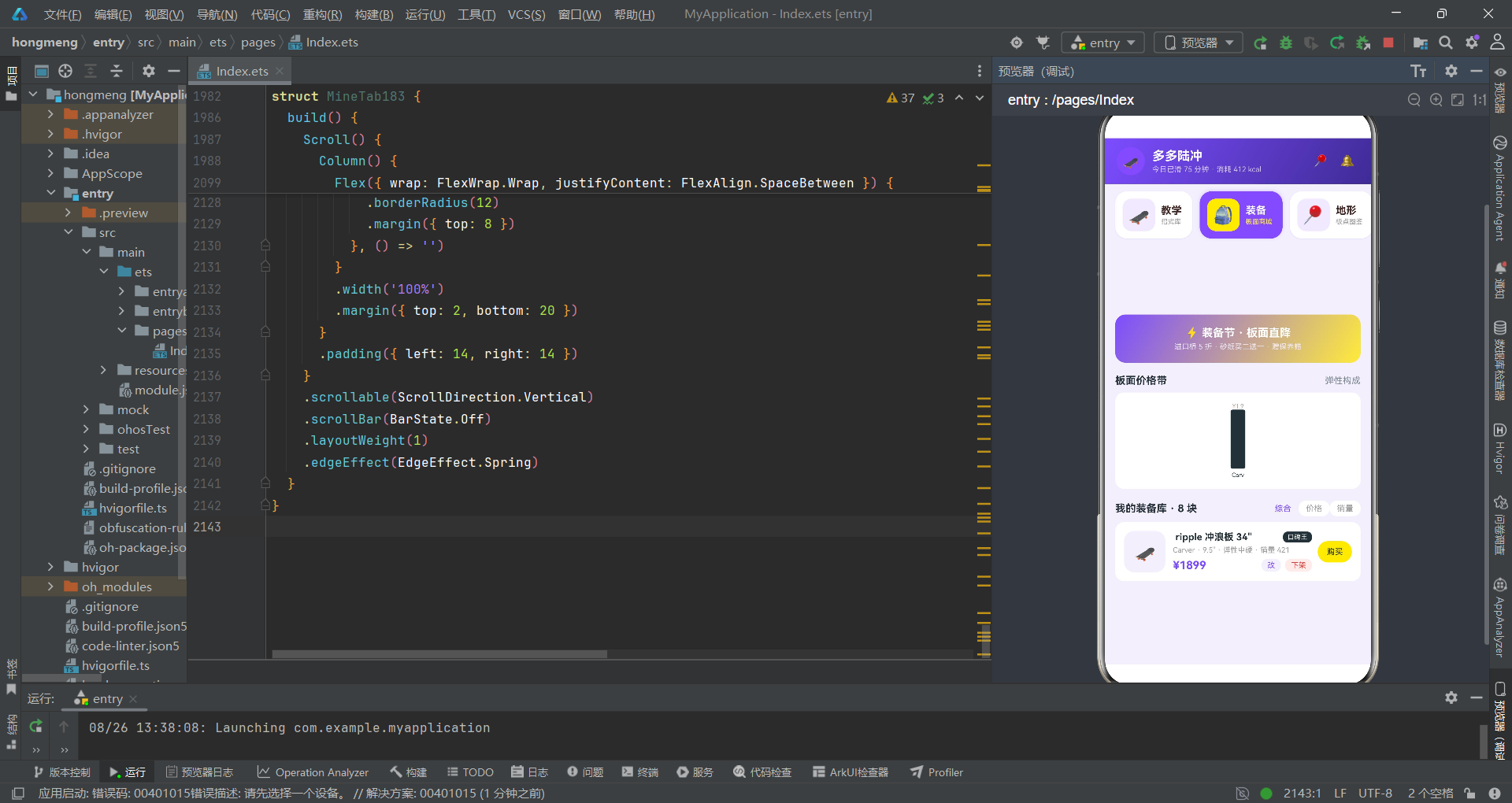
priceH183 函数采用了 Math.max(12, Math.round(p / 30)) 的计算方式,将价格映射为柱状图高度百分比。Math.max 的下限保护机制体现了开发者的防御性编程意识——确保即使价格极低,柱状图也保持最小可见高度。这种细节在考古学上被称为"工具磨损痕迹",虽然微小,却能还原使用者的操作习惯。
第四地层:主入口组件——祭祀中心
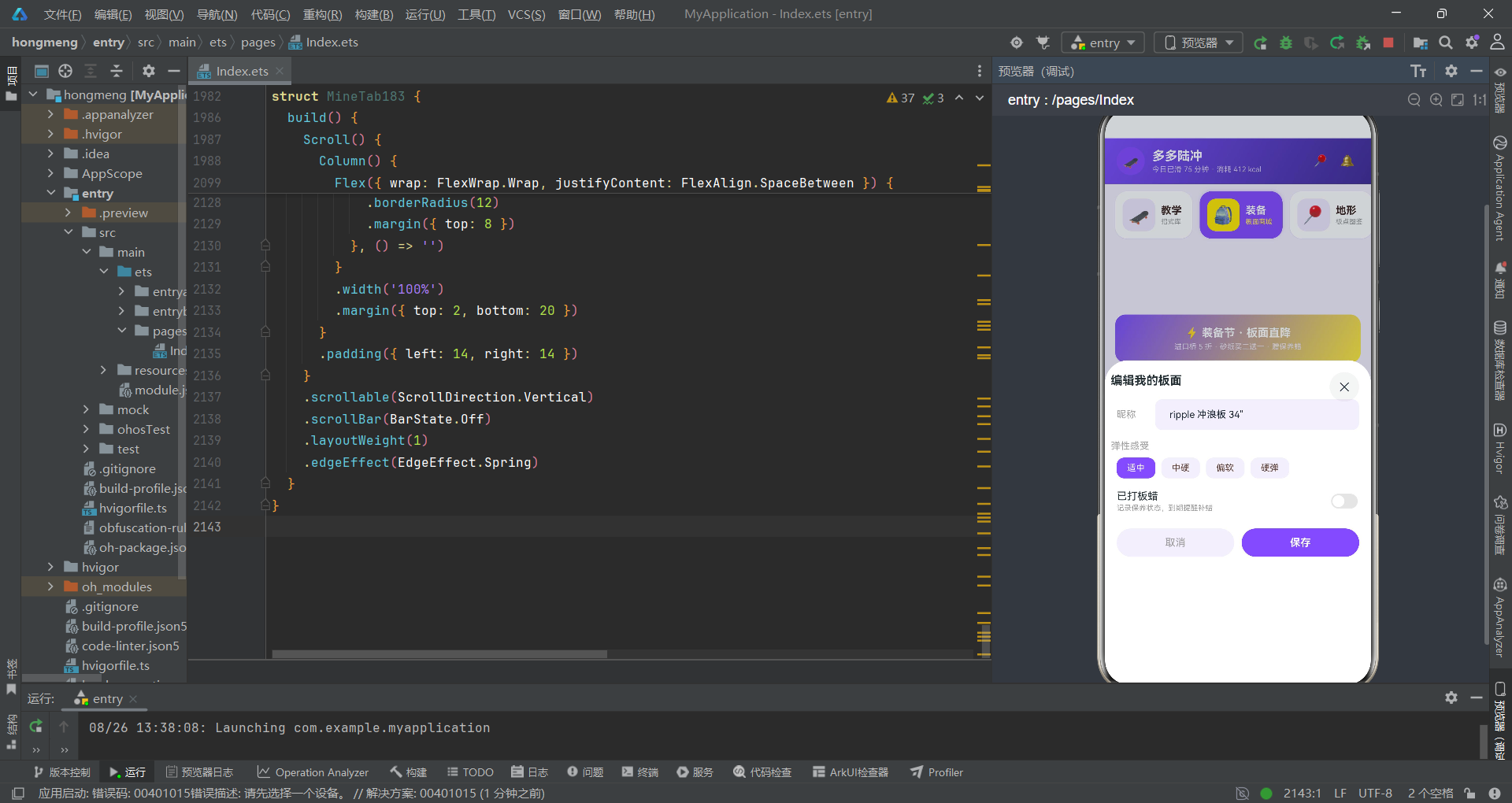
越过工具函数地层,考古队终于抵达了遗址的核心区域——主入口组件 Page183。这是整个应用遗迹的祭祀中心,所有导航、弹层、状态管理都从这里发号施令。
@Entry
@Component
struct Page183 {
  @State currentTab: number = 0
  // 购买板面抽屉
  @State showBuySheet: boolean = false
  @State selDeck: Deck183 = DECKS183[0]
  @State gritIdx: number = 1
  @State truckAdd: boolean = true
  @State buyNum: number = 1
  // 发布视频抽屉
  @State showPostSheet: boolean = false
  @State postTrickIdx: number = 0
  @State postSpot: string = ''
  @State postPublic: boolean = true
  @State posts: Post183[] = POSTS183
  // 编辑装备抽屉
  @State showEditSheet: boolean = false
  @State editDeck: Deck183 = DECKS183[0]
  @State editName: string = ''
  @State editFlexIdx: number = 0
  @State editWax: boolean = false
  @State decks: Deck183[] = DECKS183
  // 删除记录居中
  @State showDelDialog: boolean = false
  @State delDeck: Deck183 = DECKS183[0]
  @State delOrders: boolean = true
  // 地形详情居中
  @State showSpotDialog: boolean = false
  @State selSpot: Spot183 = SPOTS183[0]

  @Builder
  header183() {
    Column() {
      Row() {
        Column() {
          Text('🛹')
            .fontSize(18)
        }
        .width(38)
        .height(38)
        .borderRadius(19)
        .backgroundColor('#7C4DFF')
        .justifyContent(FlexAlign.Center)
        .alignItems(HorizontalAlign.Center)

        Column() {
          Text('多多陆冲')
            .fontSize(17)
            .fontWeight(FontWeight.Bold)
            .fontColor('#FFFFFF')
          Text('今日已滑 75 分钟 · 消耗 412 kcal')
            .fontSize(10)
            .fontColor('#D1C4E9')
            .margin({ top: 2 })
        }
        .alignItems(HorizontalAlign.Start)
        .margin({ left: 10 })

        Text('')
          .layoutWeight(1)
        Text('📍')
          .fontSize(16)
          .fontColor('#FFFFFF')
          .padding(6)
        Text('🔔')
          .fontSize(16)
          .fontColor('#FFFFFF')
          .padding(6)
          .margin({ left: 4 })
      }
      .width('100%')
      .alignItems(VerticalAlign.Center)
    }
    .width('100%')
    .padding({ left: 16, right: 16, top: 12, bottom: 12 })
    .linearGradient({ angle: 120, colors: [['#7C4DFF', 0.0], ['#3F2B96', 1.0]] })
  }
主组件的状态地层是整个遗址最密集的"陶器堆积区"。考古队在此处出土了不下二十件 @State 标记的状态陶器,它们被按照业务功能分组排列:购买板面抽屉状态组、发布视频抽屉状态组、编辑装备抽屉状态组、删除确认居中状态组、地形详情居中状态组。每一组都以 show 布尔值作为"开关器皿",配合对应的实体数据状态共同构成一个完整的弹层状态包。
这种"布尔开关 + 实体数据"的状态编组模式,是 ArkTS 声明式 UI 文化中管理弹层(Sheet/Cover)的经典范式。它说明设计者已经从命令式编程的"直接控制视图"思维,进化到了"状态驱动视图"的声明式思维。
header183 Builder 是主组件出土的第一件 UI 器物。它采用了 linearGradient 渐变装饰,从荧光紫 #7C4DFF 渐变到深紫 #3F2B96,倾角为 120 度。头部内部布局采用了 Row 嵌套 Column 的经典结构:左侧是 38x38 的圆角图标容器,中间是应用名称与运动数据,右侧是位置与通知图标。layoutWeight(1) 的空 Text 充当了弹性间隔器,将左右两部分推至两端——这是 ArkUI 布局文化中的典型技巧。
第五地层:导航卡片——横滑遗迹
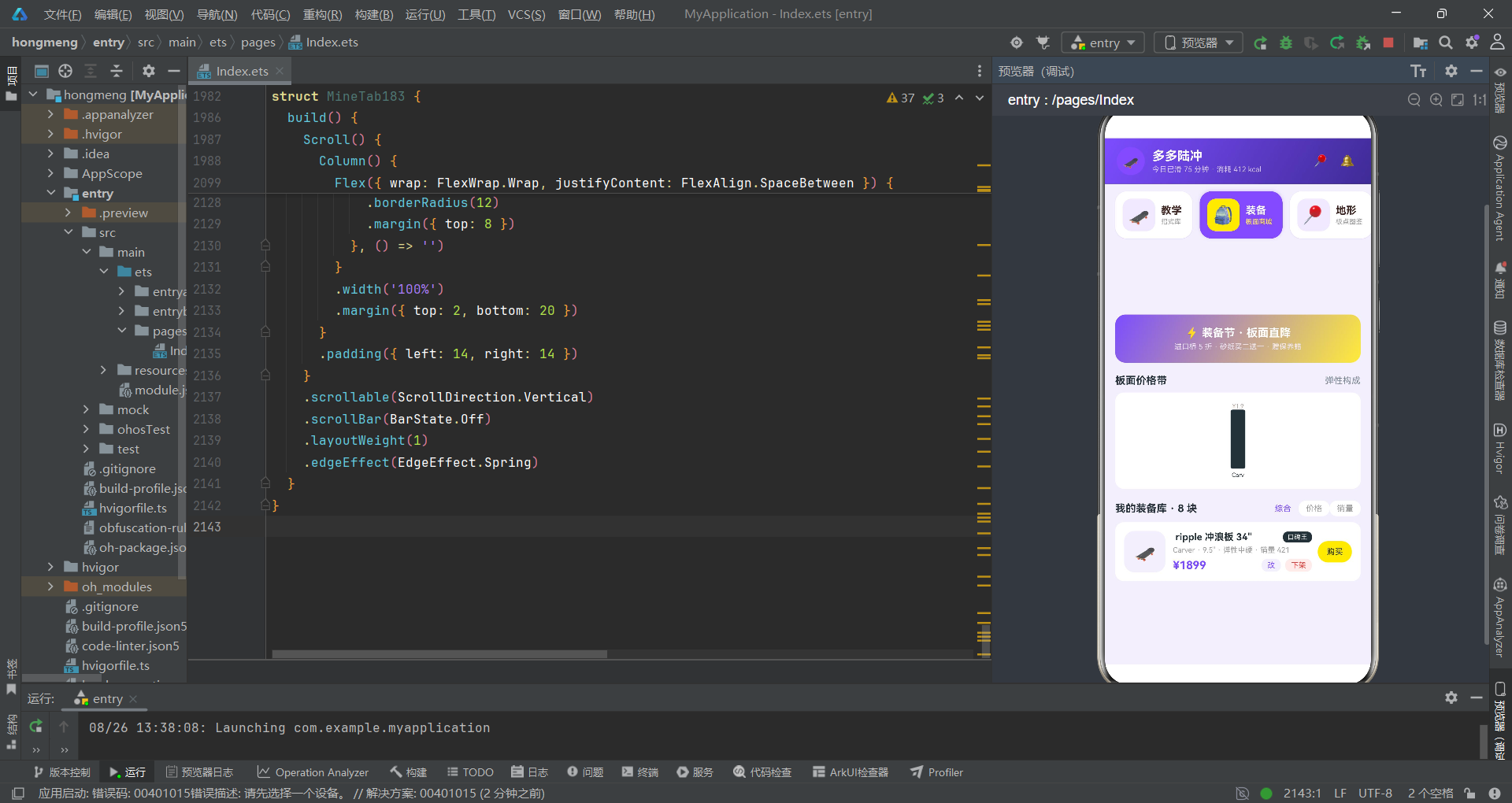
在头部之下,考古队出土了一组横向滚动的导航卡片遗迹。这是该遗址最具辨识度的器物组合之一。
@Builder
navCards183() {
  Scroll() {
    Row({ space: 10 }) {
      ForEach(TABS183, (t: TabCard183, idx: number) => {
        Row() {
          Column() {
            Text(t.icon)
              .fontSize(24)
          }
          .width(44)
          .height(44)
          .borderRadius(12)
          .backgroundColor(this.currentTab === idx ? '#FFEB3B' : 'rgba(124,77,255,0.12)')
          .justifyContent(FlexAlign.Center)
          .alignItems(HorizontalAlign.Center)

          Column() {
            Text(t.label)
              .fontSize(14)
              .fontWeight(FontWeight.Bold)
              .fontColor(this.currentTab === idx ? '#FFFFFF' : '#3E2723')
            Text(t.sub)
              .fontSize(9)
              .fontColor(this.currentTab === idx ? '#FFEB3B' : '#9E9E9E')
              .margin({ top: 2 })
          }
          .alignItems(HorizontalAlign.Start)
          .margin({ left: 8 })
        }
        .padding({ left: 10, right: 14, top: 10, bottom: 10 })
        .borderRadius(16)
        .backgroundColor(this.currentTab === idx ? '#7C4DFF' : '#FFFFFF')
        .shadow({ radius: this.currentTab === idx ? 12 : 2, color: 'rgba(124,77,255,0.25)', offsetY: this.currentTab === idx ? -3 : 1 })
        .alignItems(VerticalAlign.Center)
        .onClick(() => {
          this.currentTab = idx
        })
      }, (t: TabCard183) => t.label)
    }
    .padding({ left: 14, right: 14, top: 10, bottom: 10 })
  }
  .scrollable(ScrollDirection.Horizontal)
  .scrollBar(BarState.Off)
  .width('100%')
  .backgroundColor('#F3EFFC')
}
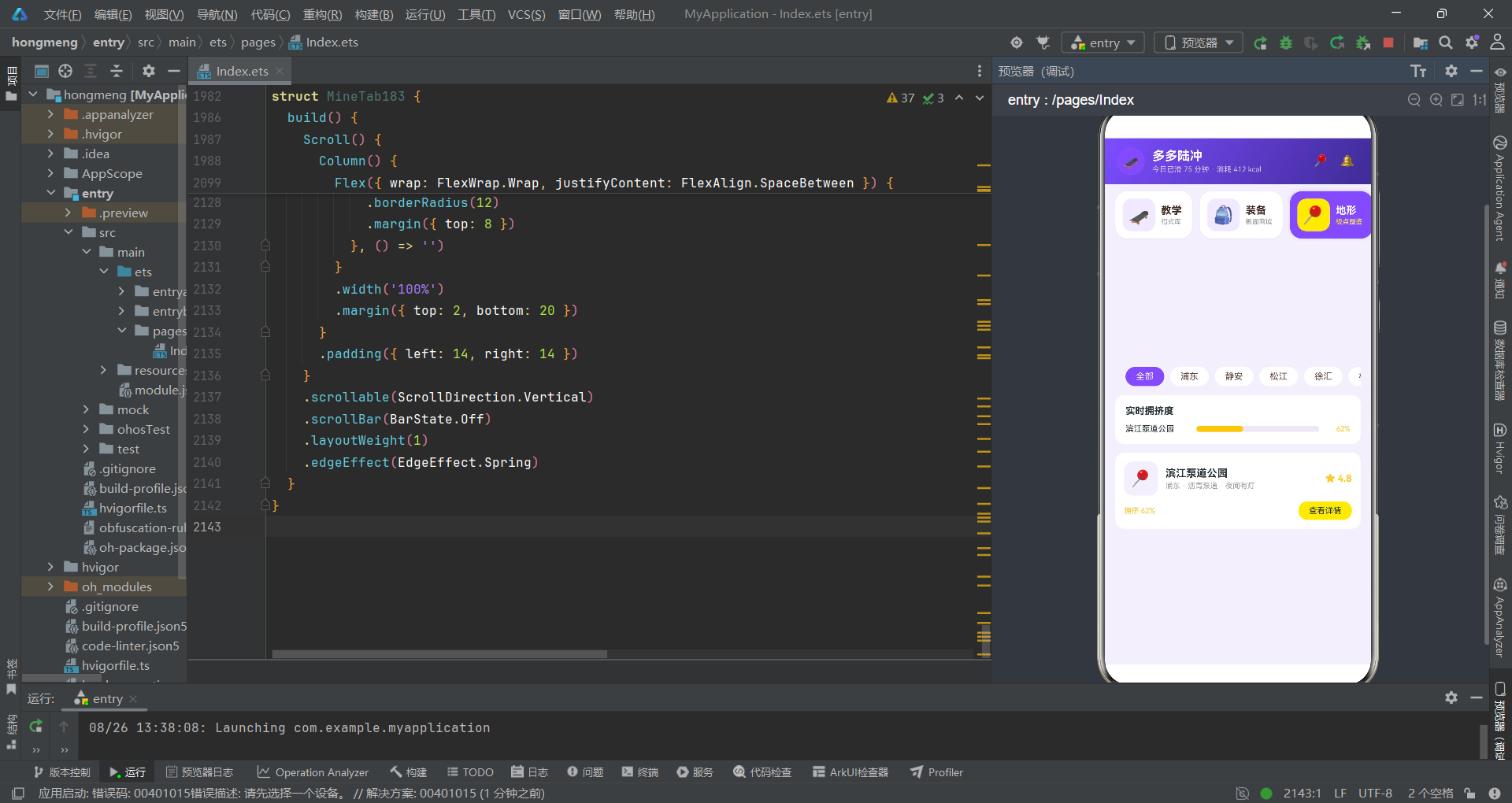
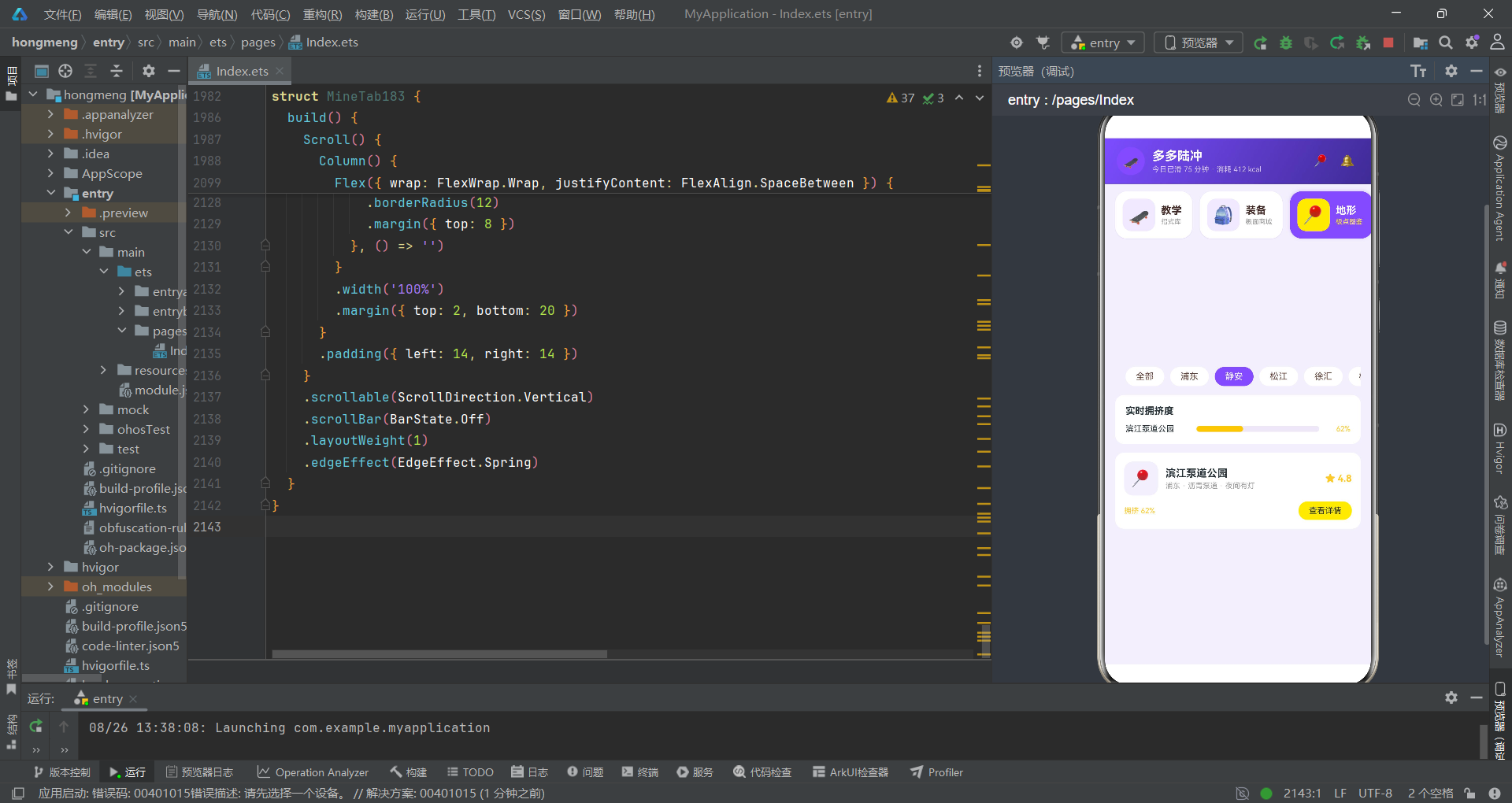
这组导航卡片遗迹使用了 Scroll + Row + ForEach 的三件套组合,构成了横向滚动选择器。每张卡片内部采用了"图标容器 + 文字组"的双段式结构。最引人注目的考古特征是选中态的视觉变化——当 this.currentTab === idx 为真时,卡片背景变为荧光紫 #7C4DFF,文字变为白色 #FFFFFF,副标签变为柠檬黄 #FFEB3B,阴影半径增大至 12,Y 轴偏移变为 -3(上浮效果)。
这种"选中即上浮、即变色、即投光"的三重视觉反馈机制,表明设计者对用户交互反馈有着高度敏感的审美意识。shadow 属性中 offsetY: -3 的负值偏移是一个关键的考古线索——它使选中卡片产生"浮起"的视觉效果,与未选中卡片的 offsetY: 1(下沉)形成鲜明对比。这种"上浮/下沉"的二元对立,在视觉上强化了"当前选中"与"未选中"的状态区分。
横向滚动导航是移动端 UI 考古中的常见器型。但此处的创新在于:卡片不是简单的文字标签,而是包含图标、主标签、副标签的三段式复合卡片。这种"信息密度更高"的导航设计,在 Tab 数量较多(7 个)时能有效降低用户的认知负荷。
第六地层:抽屉弹层——叠压的交互遗迹
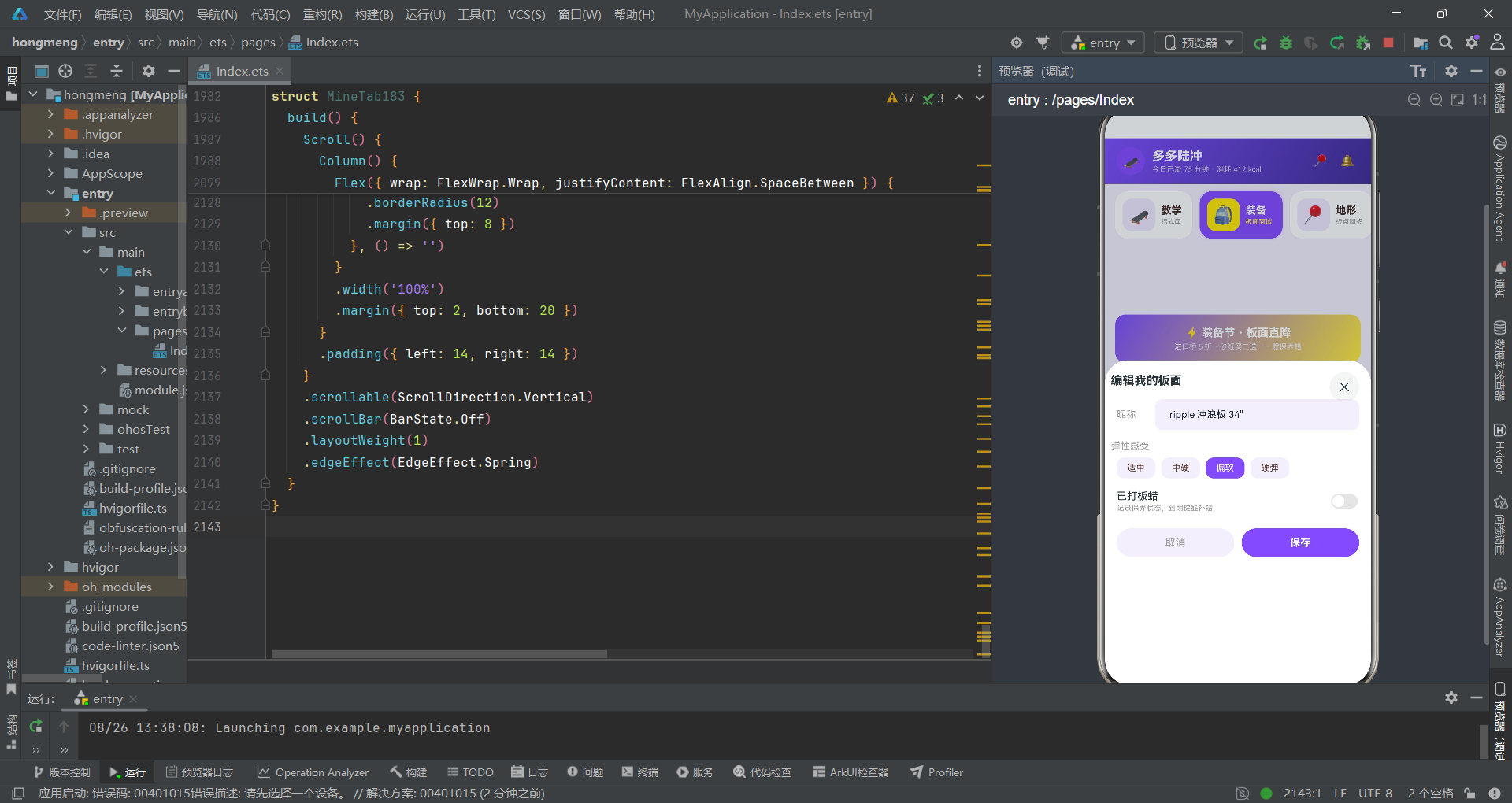
深入遗址内部,考古队发现了四组 @Builder 修饰的抽屉弹层遗迹:buySheet183(购买板面)、postSheet183(发布视频)、editSheet183(编辑装备)以及两组 @Builder 修饰的居中弹窗:delDialog183(删除确认)、spotDialog183(地形详情)。这些弹层在主组件的 build() 方法中通过 bindSheet 和 bindContentCover 被绑定到视图树。
@Builder
buySheet183() {
  Column() {
    Row() {
      Column() {
        Text('🛹')
          .fontSize(24)
      }
      .width(52)
      .height(52)
      .borderRadius(14)
      .backgroundColor('#F3EFFC')
      .justifyContent(FlexAlign.Center)
      .alignItems(HorizontalAlign.Center)

      Column() {
        Text(this.selDeck.name)
          .fontSize(15)
          .fontWeight(FontWeight.Bold)
          .fontColor('#263238')
        Text(this.selDeck.brand + ' · ' + this.selDeck.width + ' · 弹性' + this.selDeck.flex)
          .fontSize(11)
          .fontColor('#9E9E9E')
          .margin({ top: 3 })
      }
      .alignItems(HorizontalAlign.Start)
      .margin({ left: 10 })

      Text('')
        .layoutWeight(1)
      Text('¥' + this.selDeck.price)
        .fontSize(17)
        .fontWeight(FontWeight.Bold)
        .fontColor('#7C4DFF')
    }
    .width('100%')
    .padding(16)

    Divider()
      .color('#EDE7F6')
      .margin({ left: 16, right: 16 })

    Text('砂纸目数')
      .fontSize(13)
      .fontWeight(FontWeight.Bold)
      .fontColor('#263238')
      .width('100%')
      .margin({ top: 14, left: 16 })

    Row({ space: 8 }) {
      ForEach(['粗 60', '中 80', '细 100'], (g: string, i: number) => {
        Text(g)
          .fontSize(12)
          .fontColor(this.gritIdx === i ? '#263238' : '#9E9E9E')
          .padding({ left: 14, right: 14, top: 7, bottom: 7 })
          .borderRadius(10)
          .backgroundColor(this.gritIdx === i ? '#FFEB3B' : '#F3EFFC')
          .onClick(() => {
            this.gritIdx = i
          })
      }, (g: string) => g)
    }
    .width('100%')
    .margin({ top: 8 })
    .padding({ left: 16, right: 16 })

    Row() {
      Column() {
        Text('加购陆冲桥(前桥)')
          .fontSize(14)
          .fontColor('#263238')
        Text('C7 弹簧桥 +¥420 · 玩法更冲浪')
          .fontSize(10)
          .fontColor('#9E9E9E')
          .margin({ top: 2 })
      }
      .alignItems(HorizontalAlign.Start)

      Text('')
        .layoutWeight(1)
      Toggle({ type: ToggleType.Switch, isOn: this.truckAdd })
        .selectedColor('#7C4DFF')
        .onChange((on: boolean) => {
          this.truckAdd = on
        })
    }
    .width('100%')
    .margin({ top: 16 })
    .padding({ left: 16, right: 16 })

    Row() {
      Text('合计')
        .fontSize(13)
        .fontColor('#9E9E9E')
      Text('¥' + (this.selDeck.price * this.buyNum + (this.truckAdd ? 420 : 0) + this.gritIdx * 10))
        .fontSize(18)
        .fontWeight(FontWeight.Bold)
        .fontColor('#7C4DFF')
        .margin({ left: 8 })
      Text('')
        .layoutWeight(1)
      Text('立即下单')
        .fontSize(15)
        .fontWeight(FontWeight.Bold)
        .fontColor('#263238')
        .padding({ left: 30, right: 30, top: 11, bottom: 11 })
        .borderRadius(22)
        .backgroundColor('#FFEB3B')
        .onClick(() => {
          this.showBuySheet = false
        })
    }
    .width('100%')
    .margin({ top: 18 })
    .padding({ left: 16, right: 16, bottom: 24 })
  }
  .width('100%')
  .backgroundColor('#FFFFFF')
  .borderRadius({ topLeft: 18, topRight: 18 })
}
buySheet183 是四组抽屉中结构最复杂的一件器物。它出土了商品信息行、分割线、砂纸目数选择器、加购开关、数量调节器、合计行与下单按钮等六个功能段。这些段落自上而下依次排列,构成了完整的购买流程。
其中,合计金额的计算公式 (this.selDeck.price * this.buyNum + (this.truckAdd ? 420 : 0) + this.gritIdx * 10) 是一处关键的算法遗迹。它揭示了三种价格变量的叠加逻辑:基础板面价格乘以数量、加购桥的固定费用(条件开关)、砂纸目数的差价(索引乘以 10)。this.gritIdx * 10 的差价计算暗示了砂纸目数越高价格越贵的定价策略——索引 0(粗 60)不加价,索引 1(中 80)加 10 元,索引 2(细 100)加 20 元。
抽屉弹层是 ArkTS 应用考古中的"交互化石"。它们保存了用户操作流程的完整路径。从合计计算公式中,我们可以逆推出设计者对价格体系的精确建模。
spotDialog183 居中弹窗则出土了另一种弹层形态。它使用 bindContentCover 绑定,与 bindSheet 的底部弹出不同,它以居中模态形式覆盖屏幕。弹窗内部出土了渐变头图、三栏数据展示(拥挤度、评分、灯光)、适配建议列表和双按钮操作区。渐变头图使用了 linearGradient 从荧光紫渐变到沥青黑 [['#7C4DFF', 0.0], ['#263238', 1.0]],倾角 135 度,这种对角线渐变在视觉上产生了"从品牌色到深邃色"的空间纵深感。
第七地层:子组件聚落——卫星遗迹
在主组件祭祀中心的外围,考古队发掘出七座子组件聚落遗迹。每座聚落对应一个 Tab 页面,各自独立管理内部状态,通过回调函数与主组件通信。
@Component
struct TrickTab183 {
  @State catIdx: number = 0

  build() {
    Scroll() {
      Column() {
        Row({ space: 8 }) {
          ForEach(['全部', '基础', '进阶', '高阶'], (c: string, i: number) => {
            Text(c)
              .fontSize(12)
              .fontColor(this.catIdx === i ? '#263238' : '#5D4037')
              .padding({ left: 14, right: 14, top: 6, bottom: 6 })
              .borderRadius(14)
              .backgroundColor(this.catIdx === i ? '#FFEB3B' : '#FFFFFF')
              .onClick(() => {
                this.catIdx = i
              })
          }, (c: string) => c)
        }
        .width('100%')

        Row() {
          Text('招式难度分布')
            .fontSize(14)
            .fontWeight(FontWeight.Bold)
            .fontColor('#263238')
          Text('')
            .layoutWeight(1)
          Text('单位:万人次学过')
            .fontSize(9)
            .fontColor('#B0A199')
        }
        .width('100%')
        .margin({ top: 14 })

        Row({ space: 12 }) {
          ForEach(CAT_STATS183, (c: CatStat183) => {
            Column() {
              Text(c.count + '')
                .fontSize(9)
                .fontColor('#B0A199')
              Column() {
                Text('')
                  .width('100%')
                  .height('100%')
                  .borderRadius(3)
                  .backgroundColor(c.color)
              }
              .width(26)
              .height(76)
              .justifyContent(FlexAlign.End)
              .backgroundColor('#EDE7F6')
              .borderRadius(3)

              Text(c.cat)
                .fontSize(10)
                .fontColor('#263238')
                .margin({ top: 4 })
            }
            .layoutWeight(1)
            .alignItems(HorizontalAlign.Center)
          }, (c: CatStat183) => c.cat)
        }
        .width('100%')
        .padding(14)
        .backgroundColor('#FFFFFF')
        .borderRadius(12)
        .margin({ top: 8 })

        Column({ space: 10 }) {
          ForEach(TRICKS183, (t: Trick183) => {
            Row() {
              Column() {
                Text(lvlStar183(t.level))
                  .fontSize(14)
                  .fontColor(lvlC183(t.level))
                Text(lvlName183(t.level))
                  .fontSize(9)
                  .fontColor(lvlC183(t.level))
                  .margin({ top: 2 })
              }
              .width(56)
              .alignItems(HorizontalAlign.Center)

              Column() {
                Row() {
                  Text(t.name)
                    .fontSize(14)
                    .fontWeight(FontWeight.Bold)
                    .fontColor('#263238')
                    .layoutWeight(1)
                  Text(t.cat)
                    .fontSize(9)
                    .fontColor('#FFFFFF')
                    .padding({ left: 6, right: 6, top: 2, bottom: 2 })
                    .borderRadius(6)
                    .backgroundColor(lvlC183(t.level))
                }
                .width('100%')

                Text('💡 ' + t.tip)
                  .fontSize(11)
                  .fontColor('#7B8794')
                  .margin({ top: 4 })
                  .maxLines(1)
                  .textOverflow({ overflow: TextOverflow.Ellipsis })

                Row() {
                  Row() {
                    Text('')
                      .width(crowdBar183(Math.min(100, Math.round(t.learners / 130))))
                      .height(4)
                      .borderRadius(2)
                      .backgroundColor(lvlC183(t.level))
                  }
                  .width(96)
                  .height(4)
                  .borderRadius(2)
                  .backgroundColor('#EDE7F6')

                  Text((t.learners / 10000).toFixed(1) + ' 万人学过')
                    .fontSize(10)
                    .fontColor('#B0A199')
                    .margin({ left: 8 })
                }
                .margin({ top: 6 })
              }
              .layoutWeight(1)
              .alignItems(HorizontalAlign.Start)
              .margin({ left: 10 })
            }
            .width('100%')
            .padding(12)
            .backgroundColor('#FFFFFF')
            .borderRadius(12)
            .alignItems(VerticalAlign.Center)
          }, () => '')
        }
        .margin({ top: 10, bottom: 20 })
      }
      .padding({ left: 14, right: 14 })
    }
    .scrollable(ScrollDirection.Vertical)
    .scrollBar(BarState.Off)
    .layoutWeight(1)
    .edgeEffect(EdgeEffect.Spring)
  }
}
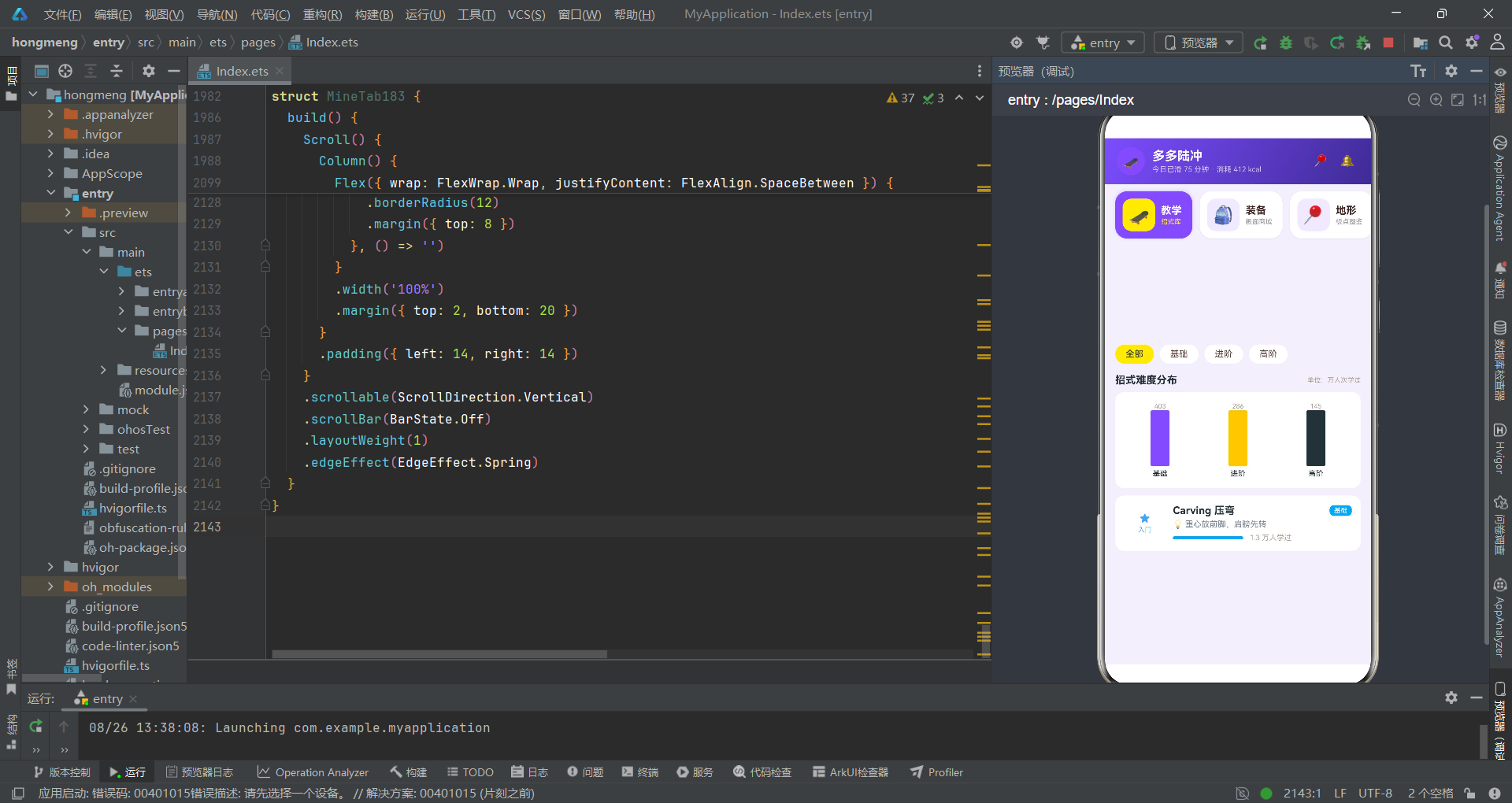
TrickTab183 聚落是第一座被发掘的卫星遗迹。它出土了分类筛选器、招式难度分布柱状图和招式列表三件主要器物。柱状图使用了 Column 嵌套 Text('') 的"空容器填色"技法——外层 Column 设置固定高度 76 和背景色 #EDE7F6,内层 Text('') 设置 width('100%') 和 height('100%') 并填充分类色。通过 justifyContent(FlexAlign.End) 将内层容器推至底部,实现了"自下而上"的柱状增长效果。
"空容器填色"是 ArkTS 声明式 UI 文化中实现柱状图的经典技法。它利用了 Flex 布局的对齐属性,在不使用 Canvas 或第三方图表库的情况下,以纯声明式语法实现了数据可视化。这种"零依赖可视化"的策略体现了 ArkUI 框架的布局能力已足够强大。
招式列表中出土了 lvlStar183、lvlC183、lvlName183 三个工具函数的实际调用痕迹。这三个函数在此处被组合使用,将一个 level 数值转化为星级字符串、色值和文字标签三种视觉表达。学习者人数的进度条计算 crowdBar183(Math.min(100, Math.round(t.learners / 130))) 揭示了一个比例缩放策略——将学习者数量除以 130 并限制在 100 以内,映射为 96 像素宽进度条的填充百分比。
第八地层:子组件通信——回调化石
在发掘子组件聚落时,考古队注意到了一种特殊的"通信化石"——回调函数。这些回调函数在主组件中定义,通过组件构造参数传递给子组件,实现了子到父的事件向上传递。
if (this.currentTab === 1) {
  DeckTab183({
    decks: this.decks,
    onBuy: (d: Deck183) => {
      this.selDeck = d
      this.showBuySheet = true
    },
    onEdit: (d: Deck183) => {
      this.editDeck = d
      this.editName = d.name
      this.editFlexIdx = 0
      this.showEditSheet = true
    },
    onDel: (d: Deck183) => {
      this.delDeck = d
      this.showDelDialog = true
    }
  })
}
这是主组件 build() 方法中出土的 DeckTab183 实例化代码片段。它向子组件传递了 decks(装备数据数组)和三个回调函数 onBuy、onEdit、onDel。每个回调函数都执行"设置选中数据 + 打开对应弹层"的两步操作。这种模式构成了该应用"子组件触发 -> 主组件响应 -> 弹层展示"的事件流。
在 ArkTS 装饰器文化中,子组件通过
@Prop或普通参数接收数据,通过回调函数向上传递事件。这种"数据向下、事件向上"的单向数据流,是声明式 UI 框架的核心通信法则。该遗址完整地实践了这一法则。
在 DeckTab183 子组件的定义中,考古队出土了 @Prop decks: Deck183[] 的单向同步标记和 onBuy、onEdit、onDel 三个默认值为空函数的回调声明。@Prop 装饰器确保了装备数据的单向同步——主组件的 decks 状态变化会自动同步到子组件,但子组件不能反向修改。当用户在子组件中点击"购买"按钮时,触发的是 this.onBuy(d) 回调调用,事件被向上传递给主组件处理。
第九地层:bindSheet 与 bindContentCover——弹层绑定遗迹
在主组件 build() 方法的尾部,考古队发现了弹层绑定的集中区域。这是整个遗址的"出口处",所有弹层状态在此处被绑定到视图树。
build() {
  Column() {
    this.header183()
    this.navCards183()

    if (this.currentTab === 0) {
      TrickTab183()
    }
    if (this.currentTab === 1) {
      DeckTab183({
        decks: this.decks,
        onBuy: (d: Deck183) => {
          this.selDeck = d
          this.showBuySheet = true
        },
        onEdit: (d: Deck183) => {
          this.editDeck = d
          this.editName = d.name
          this.editFlexIdx = 0
          this.showEditSheet = true
        },
        onDel: (d: Deck183) => {
          this.delDeck = d
          this.showDelDialog = true
        }
      })
    }
    // ... 其他 Tab 条件渲染
  }
  .width('100%')
  .height('100%')
  .backgroundColor('#F3EFFC')
  .bindSheet($$this.showBuySheet, this.buySheet183(), {
    height: 520,
    dragBar: true,
    showClose: true,
    backgroundColor: '#FFFFFF'
  })
  .bindSheet($$this.showPostSheet, this.postSheet183(), {
    height: 560,
    dragBar: true,
    showClose: true,
    backgroundColor: '#FFFFFF'
  })
  .bindSheet($$this.showEditSheet, this.editSheet183(), {
    height: 440,
    dragBar: true,
    showClose: true,
    backgroundColor: '#FFFFFF'
  })
  .bindContentCover($$this.showDelDialog, this.delDialog183(), {
  })
  .bindContentCover($$this.showSpotDialog, this.spotDialog183(), {
  })
}
这处遗迹出土了三种关键器物:$$this.showBuySheet 的双向绑定符号 $$、bindSheet 的底部抽屉绑定和 bindContentCover 的全屏覆盖绑定。$$ 语法是 ArkTS 双向绑定文化的标志符号,它将布尔状态变量与弹层的显示/隐藏状态建立双向同步——状态变化触发弹层显隐,弹层的用户关闭操作也反向更新状态。
bindSheet 配置中的 height 参数揭示了三种弹层的高度差异:购买抽屉 520px、发布视频抽屉 560px、编辑装备抽屉 440px。这种差异化高度配置说明设计者根据每个弹层的内容量进行了精确的尺寸规划。dragBar: true 和 showClose: true 的配置则表明抽屉支持拖拽关闭和按钮关闭两种交互方式。
bindSheet和bindContentCover的出土,标志着该应用采用了"抽屉 + 居中模态"的二元弹层策略。抽屉用于需要用户填写表单的交互场景(购买、编辑、发布),居中模态用于信息展示和确认操作(详情、删除确认)。这种弹层分工策略体现了对用户注意力管理的深思熟虑。
发掘流程图:遗址数据流
第十地层:数据可视化遗迹——柱状图与进度条
在多个子组件聚落中,考古队反复出土了两种数据可视化器物:柱状图和横向进度条。这些器物虽然构造简单,却在遗址中被高频复用,构成了该应用数据展示的基本视觉语言。
// 柱状图遗迹 - 价格带展示
Row({ space: 12 }) {
  ForEach(DECKS183.slice(0, 6), (d: Deck183) => {
    Column() {
      Text('¥' + Math.round(d.price / 100) / 10)
        .fontSize(8)
        .fontColor('#B0A199')
      Column() {
        Text('')
          .width('100%')
          .height('100%')
          .borderRadius(3)
          .backgroundColor(deckTagC183(d.tag))
      }
      .width(20)
      .height(80)
      .justifyContent(FlexAlign.End)
      .backgroundColor('#EDE7F6')
      .borderRadius(3)

      Text(d.brand.slice(0, 4))
        .fontSize(8)
        .fontColor('#263238')
        .margin({ top: 4 })
    }
    .layoutWeight(1)
    .alignItems(HorizontalAlign.Center)
  }, () => '')
}

// 横向进度条遗迹 - 能力雷达
Row() {
  Text(r.name)
    .fontSize(11)
    .fontColor('#263238')
    .width(64)
  Row() {
    Text('')
      .width(valBar183(r))
      .height(8)
      .borderRadius(4)
      .backgroundColor('#7C4DFF')
  }
  .layoutWeight(1)
  .height(8)
  .borderRadius(4)
  .backgroundColor('#EDE7F6')

  Text(r.val + '/' + r.max)
    .fontSize(10)
    .fontColor('#7B8794')
    .margin({ left: 8 })
    .width(48)
    .textAlign(TextAlign.End)
}
柱状图遗迹使用了外层 Column 固定高度 + 内层 Text('') 百分比填充的构造方式。justifyContent(FlexAlign.End) 是关键的考古标记——它使内层填充容器从底部开始增长,实现了"自下而上"的柱状效果。进度条遗迹则使用了外层 Row 固定宽度 + 内层 Text('') 百分比宽度的构造方式,valBar183 函数将能力值转化为百分比字符串。两种可视化器物虽然形态不同,却共享同一种"空容器 + 填充物"的设计理念。
遗址对比:技术器物分类表
| 器物类别 | 出土地层 | 功能描述 | 考古特征 |
|---|---|---|---|
| interface 接口定义 | 第一地层 | 定义业务实体类型规范 | 9 组接口,涵盖 Tab、招式、板面、地形、记录等 |
| const 静态数据 | 第二地层 | 提供运行时数据快照 | 10 组常量数组,字段真实感强 |
| function 工具函数 | 第三地层 | 数据加工与语义映射 | 8 个函数,覆盖色值、百分比、文字标签 |
| @State 状态管理 | 第四地层 | 主组件状态容器 | 20+ 状态变量,按弹层功能分组 |
| @Builder 构建器 | 第四至六地层 | 可复用 UI 片段 | 6 个 Builder,涵盖头部、导航、弹层 |
| bindSheet 抽屉绑定 | 第九地层 | 底部弹出式交互层 | 3 个抽屉,差异化高度配置 |
| bindContentCover 覆盖绑定 | 第九地层 | 居中模态交互层 | 2 个弹窗,详情与删除确认 |
| @Component 子组件 | 第七地层 | Tab 页面独立组件 | 7 个子组件,各管内部状态 |
| @Prop 单向同步 | 第八地层 | 父子组件数据传递 | 装备数组、动态数组单向同步 |
| 回调函数通信 | 第八地层 | 子组件向父组件传递事件 | onBuy/onEdit/onDel 三组回调 |
| linearGradient 渐变 | 全遗址 | 视觉装饰与品牌色应用 | 头部、弹窗头图、促销横幅 |
| ForEach 列表渲染 | 全遗址 | 数组数据渲染为 UI 列表 | 遍历静态数据与状态数据 |
| 空容器填色柱状图 | 多地层 | 零依赖数据可视化 | Column+Text 双层结构 |
| 横向进度条 | 多地层 | 比例数据可视化 | Row+Text 双层结构 |
安装DevEco Studio程序

选择目标安装目录:

设置环境变量,但是需要重启一下:

新建一个空白模板:

设置API为24的模板项目:

初始化项目,自动下载相关依赖:

完整代码:
// 场景:陆冲滑板教学 + 装备商城 + 地形图鉴 + 挑战赛
// 配色:荧光紫 #7C4DFF × 柠檬黄 #FFEB3B × 沥青黑 #263238
// Tab 布局:顶部横向滚动大卡片 tab(88px 高卡片,选中整卡紫底黄字 + 阴影上浮)
// ============ 接口定义 ============
interface TabCard183 {
icon: string
label: string
sub: string
}
interface Trick183 {
id: number
name: string
cat: string
level: number
learners: number
tip: string
}
interface Deck183 {
id: number
name: string
brand: string
width: string
flex: string
price: number
sold: number
tag: string
}
interface Spot183 {
id: number
name: string
area: string
ground: string
crowd: number
light: string
rating: number
}
interface Record183 {
id: number
date: string
spot: string
minutes: number
tricks: number
falls: number
}
interface Challenge183 {
id: number
name: string
prize: string
days: string
joined: number
hot: number
}
interface Post183 {
id: number
user: string
avatar: string
text: string
trick: string
likes: number
time: string
}
interface CatStat183 {
cat: string
count: number
color: string
}
interface FlexPct183 {
name: string
pct: number
color: string
}
interface LevelRow183 {
name: string
val: number
max: number
}
// ============ 静态数据 ============
const TABS183: TabCard183[] = [
{ icon: '🛹', label: '教学', sub: '招式库' },
{ icon: '🎒', label: '装备', sub: '板面商城' },
{ icon: '📍', label: '地形', sub: '板点图鉴' },
{ icon: '📈', label: '记录', sub: '滑行数据' },
{ icon: '🏆', label: '挑战', sub: '周赛' },
{ icon: '👥', label: '圈子', sub: '滑友圈' },
{ icon: '👤', label: '我的', sub: '主页' }
]
const TRICKS183: Trick183[] = [
{ id: 1, name: 'Carving 压弯', cat: '基础', level: 1, learners: 12860, tip: '重心放前脚,肩膀先转' },
{ id: 2, name: 'Pumping 泵道加速', cat: '基础', level: 2, learners: 9420, tip: '弧底伸直,弧顶下蹲' },
{ id: 3, name: 'Power Slide 横刹', cat: '进阶', level: 3, learners: 6780, tip: '后脚蹬出,重心压低' },
{ id: 4, name: 'Snake 蛇形绕桩', cat: '基础', level: 2, learners: 8130, tip: '视线引领,脚跟交替压' },
{ id: 5, name: 'Switch 反脚滑行', cat: '进阶', level: 3, learners: 4560, tip: '先慢速找回脚感' },
{ id: 6, name: 'Boneless 手抓板跳', cat: '高阶', level: 4, learners: 2140, tip: '后手抓板心,前脚先落地' },
{ id: 7, name: 'No comply 180', cat: '高阶', level: 4, learners: 1870, tip: '前脚踩地弹出转体' },
{ id: 8, name: 'Shuvit 尾翘转板', cat: '进阶', level: 3, learners: 5320, tip: '后脚点尾,人原地起' },
{ id: 9, name: 'Peter Pan 彼得潘', cat: '高阶', level: 5, learners: 960, tip: '跨步 dancing,节奏先行' }
]
const DECKS183: Deck183[] = [
{ id: 1, name: ' ripple 冲浪板 34"', brand: 'Carver', width: '9.5"', flex: '中硬', price: 1899, sold: 421, tag: '口碑王' },
{ id: 2, name: '水星陆冲板 32"', brand: 'Backwave', width: '9.0"', flex: '中等', price: 799, sold: 1863, tag: '销量王' },
{ id: 3, name: 'Yow 用意板 33"', brand: 'YOW', width: '9.25"', flex: '偏硬', price: 1580, sold: 652, tag: '进口' },
{ id: 4, name: '夜光蒲公英板', brand: '本土潮玩', width: '8.75"', flex: '偏软', price: 529, sold: 2310, tag: '夜光' },
{ id: 5, name: '全枫木 dancer 46"', brand: 'Loaded', width: '10.0"', flex: '弹韧', price: 2680, sold: 158, tag: '长板' },
{ id: 6, name: '入门枫木 31"', brand: '板柿多多', width: '8.5"', flex: '适中', price: 299, sold: 5682, tag: '新手上' },
{ id: 7, name: '碳纤轻量 35"', brand: 'Swelltech', width: '9.5"', flex: '硬弹', price: 2280, sold: 96, tag: '轻量' },
{ id: 8, name: '国潮狮舞限定', brand: '本土潮玩', width: '9.0"', flex: '中等', price: 659, sold: 1042, tag: '限定' }
]
const SPOTS183: Spot183[] = [
{ id: 1, name: '滨江泵道公园', area: '浦东', ground: '沥青泵道', crowd: 62, light: '夜间有灯', rating: 4.8 },
{ id: 2, name: '老城碗池场', area: '静安', ground: '混凝土碗池', crowd: 45, light: '日间为主', rating: 4.6 },
{ id: 3, name: '大学城广场', area: '松江', ground: '花岗岩平地', crowd: 30, light: '路灯到 22 点', rating: 4.3 },
{ id: 4, name: '滑板主题街区', area: '徐汇', ground: '砖面街区', crowd: 78, light: '夜间有灯', rating: 4.7 },
{ id: 5, name: '滨江波浪道', area: '杨浦', ground: '沥青波浪', crowd: 38, light: '日间为主', rating: 4.5 },
{ id: 6, name: '地下车库板场', area: '普陀', ground: '环氧地坪', crowd: 22, light: '室内恒亮', rating: 4.4 }
]
const RECORDS183: Record183[] = [
{ id: 1, date: '10-11', spot: '滨江泵道公园', minutes: 75, tricks: 14, falls: 2 },
{ id: 2, date: '10-09', spot: '大学城广场', minutes: 50, tricks: 9, falls: 1 },
{ id: 3, date: '10-06', spot: '滑板主题街区', minutes: 95, tricks: 18, falls: 4 },
{ id: 4, date: '10-03', spot: '老城碗池场', minutes: 60, tricks: 7, falls: 3 },
{ id: 5, date: '09-29', spot: '滨江波浪道', minutes: 40, tricks: 11, falls: 0 },
{ id: 6, date: '09-26', spot: '滨江泵道公园', minutes: 85, tricks: 16, falls: 2 }
]
const CHALLENGES183: Challenge183[] = [
{ id: 1, name: '30 天 Pumping 打卡', prize: '定制桥钉', days: '剩 12 天', joined: 3268, hot: 92 },
{ id: 2, name: '横刹距离挑战', prize: '轴承套装', days: '剩 5 天', joined: 1584, hot: 85 },
{ id: 3, name: '蛇形绕桩竞速', prize: '板面 5 折券', days: '进行中', joined: 962, hot: 74 },
{ id: 4, name: 'Dancing 影像赛', prize: '品牌年签', days: '剩 21 天', joined: 476, hot: 68 }
]
const POSTS183: Post183[] = [
{ id: 1, user: '浪里白条', avatar: '🦈', text: '今天终于连过 10 个桩了!蛇形越来越顺', trick: 'Snake 蛇形绕桩', likes: 231, time: '2 小时前' },
{ id: 2, user: '小饼干', avatar: '🍪', text: '横刹 3 米达成,摔了五次值得', trick: 'Power Slide 横刹', likes: 486, time: '5 小时前' },
{ id: 3, user: '老周', avatar: '🧢', text: '泵道一小时,pumping 找到节奏感了', trick: 'Pumping 泵道加速', likes: 158, time: '昨天' },
{ id: 4, user: '阿紫', avatar: '💜', text: '反脚滑行初体验,同手同脚警告', trick: 'Switch 反脚滑行', likes: 320, time: '昨天' },
{ id: 5, user: '板柿多多', avatar: '🛹', text: '新国潮狮舞板到货,砂纸都舍不得踩', trick: '开箱', likes: 542, time: '2 天前' },
{ id: 6, user: '夜滑侠', avatar: '🌙', text: '夜光板刷街,回头率百分百', trick: 'Carving 压弯', likes: 274, time: '3 天前' }
]
const CAT_STATS183: CatStat183[] = [
{ cat: '基础', count: 403, color: '#7C4DFF' },
{ cat: '进阶', count: 286, color: '#FFCA28' },
{ cat: '高阶', count: 145, color: '#263238' }
]
const FLEX_PCT183: FlexPct183[] = [
{ name: '适中', pct: 38, color: '#7C4DFF' },
{ name: '中硬', pct: 27, color: '#FFCA28' },
{ name: '偏软', pct: 18, color: '#42A5F5' },
{ name: '硬弹', pct: 17, color: '#263238' }
]
const LEVEL_ROWS183: LevelRow183[] = [
{ name: '平衡感', val: 78, max: 100 },
{ name: '压弯流畅', val: 66, max: 100 },
{ name: '泵道节奏', val: 52, max: 100 },
{ name: '横刹控制', val: 41, max: 100 }
]
const MEDALS183: string[] = ['🥇', '🥈', '🥉', '🏅']
// ============ 全局工具函数 ============
function lvlC183(l: number): string {
if (l <= 1) {
return '#42A5F5'
}
if (l <= 2) {
return '#26A69A'
}
if (l <= 3) {
return '#FFCA28'
}
if (l <= 4) {
return '#FF7043'
}
return '#E53935'
}
function lvlName183(l: number): string {
if (l <= 1) {
return '入门'
}
if (l <= 2) {
return '简单'
}
if (l <= 3) {
return '进阶'
}
if (l <= 4) {
return '高难'
}
return '大神'
}
function lvlStar183(l: number): string {
return '★'.repeat(l)
}
function priceH183(p: number): string {
return Math.max(12, Math.round(p / 30)) + '%'
}
function crowdBar183(c: number): string {
return c + '%'
}
function crowdC183(c: number): string {
if (c >= 70) {
return '#E53935'
}
if (c >= 40) {
return '#FFCA28'
}
return '#26A69A'
}
function deckTagC183(t: string): string {
if (t === '销量王' || t === '新手上') {
return '#7C4DFF'
}
if (t === '口碑王' || t === '进口') {
return '#263238'
}
return '#FF7043'
}
function valBar183(r: LevelRow183): string {
return Math.round(r.val / r.max * 100) + '%'
}
// ============ 主页面 ============
@Entry
@Component
struct Page183 {
@State currentTab: number = 0
// 购买板面抽屉
@State showBuySheet: boolean = false
@State selDeck: Deck183 = DECKS183[0]
@State gritIdx: number = 1
@State truckAdd: boolean = true
@State buyNum: number = 1
// 发布视频抽屉
@State showPostSheet: boolean = false
@State postTrickIdx: number = 0
@State postSpot: string = ''
@State postPublic: boolean = true
@State posts: Post183[] = POSTS183
// 编辑装备抽屉
@State showEditSheet: boolean = false
@State editDeck: Deck183 = DECKS183[0]
@State editName: string = ''
@State editFlexIdx: number = 0
@State editWax: boolean = false
@State decks: Deck183[] = DECKS183
// 删除记录居中
@State showDelDialog: boolean = false
@State delDeck: Deck183 = DECKS183[0]
@State delOrders: boolean = true
// 地形详情居中
@State showSpotDialog: boolean = false
@State selSpot: Spot183 = SPOTS183[0]
@Builder
header183() {
Column() {
Row() {
Column() {
Text('🛹')
.fontSize(18)
}
.width(38)
.height(38)
.borderRadius(19)
.backgroundColor('#7C4DFF')
.justifyContent(FlexAlign.Center)
.alignItems(HorizontalAlign.Center)
Column() {
Text('多多陆冲')
.fontSize(17)
.fontWeight(FontWeight.Bold)
.fontColor('#FFFFFF')
Text('今日已滑 75 分钟 · 消耗 412 kcal')
.fontSize(10)
.fontColor('#D1C4E9')
.margin({ top: 2 })
}
.alignItems(HorizontalAlign.Start)
.margin({ left: 10 })
Text('')
.layoutWeight(1)
Text('📍')
.fontSize(16)
.fontColor('#FFFFFF')
.padding(6)
Text('🔔')
.fontSize(16)
.fontColor('#FFFFFF')
.padding(6)
.margin({ left: 4 })
}
.width('100%')
.alignItems(VerticalAlign.Center)
}
.width('100%')
.padding({ left: 16, right: 16, top: 12, bottom: 12 })
.linearGradient({ angle: 120, colors: [['#7C4DFF', 0.0], ['#3F2B96', 1.0]] })
}
@Builder
navCards183() {
Scroll() {
Row({ space: 10 }) {
ForEach(TABS183, (t: TabCard183, idx: number) => {
Row() {
Column() {
Text(t.icon)
.fontSize(24)
}
.width(44)
.height(44)
.borderRadius(12)
.backgroundColor(this.currentTab === idx ? '#FFEB3B' : 'rgba(124,77,255,0.12)')
.justifyContent(FlexAlign.Center)
.alignItems(HorizontalAlign.Center)
Column() {
Text(t.label)
.fontSize(14)
.fontWeight(FontWeight.Bold)
.fontColor(this.currentTab === idx ? '#FFFFFF' : '#3E2723')
Text(t.sub)
.fontSize(9)
.fontColor(this.currentTab === idx ? '#FFEB3B' : '#9E9E9E')
.margin({ top: 2 })
}
.alignItems(HorizontalAlign.Start)
.margin({ left: 8 })
}
.padding({ left: 10, right: 14, top: 10, bottom: 10 })
.borderRadius(16)
.backgroundColor(this.currentTab === idx ? '#7C4DFF' : '#FFFFFF')
.shadow({ radius: this.currentTab === idx ? 12 : 2, color: 'rgba(124,77,255,0.25)', offsetY: this.currentTab === idx ? -3 : 1 })
.alignItems(VerticalAlign.Center)
.onClick(() => {
this.currentTab = idx
})
}, (t: TabCard183) => t.label)
}
.padding({ left: 14, right: 14, top: 10, bottom: 10 })
}
.scrollable(ScrollDirection.Horizontal)
.scrollBar(BarState.Off)
.width('100%')
.backgroundColor('#F3EFFC')
}
// ============ 购买板面抽屉 ============
@Builder
buySheet183() {
Column() {
Row() {
Column() {
Text('🛹')
.fontSize(24)
}
.width(52)
.height(52)
.borderRadius(14)
.backgroundColor('#F3EFFC')
.justifyContent(FlexAlign.Center)
.alignItems(HorizontalAlign.Center)
Column() {
Text(this.selDeck.name)
.fontSize(15)
.fontWeight(FontWeight.Bold)
.fontColor('#263238')
Text(this.selDeck.brand + ' · ' + this.selDeck.width + ' · 弹性' + this.selDeck.flex)
.fontSize(11)
.fontColor('#9E9E9E')
.margin({ top: 3 })
}
.alignItems(HorizontalAlign.Start)
.margin({ left: 10 })
Text('')
.layoutWeight(1)
Text('¥' + this.selDeck.price)
.fontSize(17)
.fontWeight(FontWeight.Bold)
.fontColor('#7C4DFF')
}
.width('100%')
.padding(16)
Divider()
.color('#EDE7F6')
.margin({ left: 16, right: 16 })
Text('砂纸目数')
.fontSize(13)
.fontWeight(FontWeight.Bold)
.fontColor('#263238')
.width('100%')
.margin({ top: 14, left: 16 })
Row({ space: 8 }) {
ForEach(['粗 60', '中 80', '细 100'], (g: string, i: number) => {
Text(g)
.fontSize(12)
.fontColor(this.gritIdx === i ? '#263238' : '#9E9E9E')
.padding({ left: 14, right: 14, top: 7, bottom: 7 })
.borderRadius(10)
.backgroundColor(this.gritIdx === i ? '#FFEB3B' : '#F3EFFC')
.onClick(() => {
this.gritIdx = i
})
}, (g: string) => g)
}
.width('100%')
.margin({ top: 8 })
.padding({ left: 16, right: 16 })
Row() {
Column() {
Text('加购陆冲桥(前桥)')
.fontSize(14)
.fontColor('#263238')
Text('C7 弹簧桥 +¥420 · 玩法更冲浪')
.fontSize(10)
.fontColor('#9E9E9E')
.margin({ top: 2 })
}
.alignItems(HorizontalAlign.Start)
Text('')
.layoutWeight(1)
Toggle({ type: ToggleType.Switch, isOn: this.truckAdd })
.selectedColor('#7C4DFF')
.onChange((on: boolean) => {
this.truckAdd = on
})
}
.width('100%')
.margin({ top: 16 })
.padding({ left: 16, right: 16 })
Row() {
Text('数量')
.fontSize(14)
.fontColor('#263238')
Text('')
.layoutWeight(1)
Text('−')
.fontSize(18)
.fontColor(this.buyNum > 1 ? '#7C4DFF' : '#D1C4E9')
.padding({ left: 12, right: 12 })
.onClick(() => {
if (this.buyNum > 1) {
this.buyNum -= 1
}
})
Text(this.buyNum + ' 块')
.fontSize(15)
.fontWeight(FontWeight.Bold)
.fontColor('#7C4DFF')
Text('+')
.fontSize(18)
.fontColor('#7C4DFF')
.padding({ left: 12, right: 12 })
.onClick(() => {
if (this.buyNum < 4) {
this.buyNum += 1
}
})
}
.width('100%')
.margin({ top: 14 })
.padding({ left: 16, right: 16 })
Row() {
Text('合计')
.fontSize(13)
.fontColor('#9E9E9E')
Text('¥' + (this.selDeck.price * this.buyNum + (this.truckAdd ? 420 : 0) + this.gritIdx * 10))
.fontSize(18)
.fontWeight(FontWeight.Bold)
.fontColor('#7C4DFF')
.margin({ left: 8 })
Text('')
.layoutWeight(1)
Text('立即下单')
.fontSize(15)
.fontWeight(FontWeight.Bold)
.fontColor('#263238')
.padding({ left: 30, right: 30, top: 11, bottom: 11 })
.borderRadius(22)
.backgroundColor('#FFEB3B')
.onClick(() => {
this.showBuySheet = false
})
}
.width('100%')
.margin({ top: 18 })
.padding({ left: 16, right: 16, bottom: 24 })
}
.width('100%')
.backgroundColor('#FFFFFF')
.borderRadius({ topLeft: 18, topRight: 18 })
}
// ============ 发布视频抽屉 ============
@Builder
postSheet183() {
Column() {
Text('发布滑行视频')
.fontSize(16)
.fontWeight(FontWeight.Bold)
.fontColor('#263238')
.width('100%')
.margin({ top: 18, left: 16 })
Text('招式标签')
.fontSize(13)
.fontColor('#9E9E9E')
.width('100%')
.margin({ top: 14, left: 16 })
Scroll() {
Row({ space: 8 }) {
ForEach(TRICKS183, (t: Trick183, i: number) => {
Text(t.name)
.fontSize(11)
.fontColor(this.postTrickIdx === i ? '#263238' : '#5D4037')
.padding({ left: 10, right: 10, top: 6, bottom: 6 })
.borderRadius(12)
.backgroundColor(this.postTrickIdx === i ? '#FFEB3B' : '#F3EFFC')
.onClick(() => {
this.postTrickIdx = i
})
}, () => '')
}
.padding({ left: 16, right: 16 })
}
.scrollable(ScrollDirection.Horizontal)
.scrollBar(BarState.Off)
.width('100%')
.margin({ top: 8 })
Row() {
Text('板点')
.fontSize(13)
.fontColor('#9E9E9E')
.width(52)
TextInput({ text: this.postSpot, placeholder: '写下滑行地点,如滨江泵道公园' })
.fontSize(13)
.height(42)
.backgroundColor('#F3EFFC')
.borderRadius(10)
.onChange((v: string) => {
this.postSpot = v
})
.layoutWeight(1)
}
.width('100%')
.margin({ top: 16 })
.padding({ left: 16, right: 16 })
.alignItems(VerticalAlign.Center)
Row() {
Column() {
Text('公开到滑友圈')
.fontSize(14)
.fontColor('#263238')
Text('关闭则仅自己可见')
.fontSize(10)
.fontColor('#9E9E9E')
.margin({ top: 2 })
}
.alignItems(HorizontalAlign.Start)
Text('')
.layoutWeight(1)
Toggle({ type: ToggleType.Switch, isOn: this.postPublic })
.selectedColor('#7C4DFF')
.onChange((on: boolean) => {
this.postPublic = on
})
}
.width('100%')
.margin({ top: 16 })
.padding({ left: 16, right: 16 })
Row({ space: 10 }) {
Text('取消')
.fontSize(14)
.fontColor('#9E9E9E')
.layoutWeight(1)
.textAlign(TextAlign.Center)
.padding({ top: 11, bottom: 11 })
.borderRadius(22)
.backgroundColor('#F3EFFC')
.onClick(() => {
this.showPostSheet = false
})
Text('发布')
.fontSize(14)
.fontWeight(FontWeight.Bold)
.fontColor('#263238')
.layoutWeight(1)
.textAlign(TextAlign.Center)
.padding({ top: 11, bottom: 11 })
.borderRadius(22)
.backgroundColor('#FFEB3B')
.onClick(() => {
if (this.postPublic) {
this.posts.unshift({ id: this.posts.length + 100, user: '我', avatar: '🛹', text: this.postSpot + ' 的新记录!', trick: TRICKS183[this.postTrickIdx].name, likes: 0, time: '刚刚' })
}
this.showPostSheet = false
})
}
.width('100%')
.margin({ top: 22 })
.padding({ left: 16, right: 16, bottom: 26 })
}
.width('100%')
.backgroundColor('#FFFFFF')
.borderRadius({ topLeft: 18, topRight: 18 })
}
// ============ 编辑装备抽屉 ============
@Builder
editSheet183() {
Column() {
Text('编辑我的板面')
.fontSize(16)
.fontWeight(FontWeight.Bold)
.fontColor('#263238')
.width('100%')
.margin({ top: 18, left: 16 })
Row() {
Text('昵称')
.fontSize(13)
.fontColor('#9E9E9E')
.width(52)
TextInput({ text: this.editName, placeholder: '给板起个名字' })
.fontSize(13)
.height(42)
.backgroundColor('#F3EFFC')
.borderRadius(10)
.onChange((v: string) => {
this.editName = v
})
.layoutWeight(1)
}
.width('100%')
.margin({ top: 16 })
.padding({ left: 16, right: 16 })
.alignItems(VerticalAlign.Center)
Text('弹性感受')
.fontSize(13)
.fontColor('#9E9E9E')
.width('100%')
.margin({ top: 14, left: 16 })
Row({ space: 8 }) {
ForEach(FLEX_PCT183, (f: FlexPct183, i: number) => {
Text(f.name)
.fontSize(12)
.fontColor(this.editFlexIdx === i ? '#FFFFFF' : '#5D4037')
.padding({ left: 14, right: 14, top: 7, bottom: 7 })
.borderRadius(10)
.backgroundColor(this.editFlexIdx === i ? '#7C4DFF' : '#F3EFFC')
.onClick(() => {
this.editFlexIdx = i
})
}, (f: FlexPct183) => f.name)
}
.width('100%')
.margin({ top: 8 })
.padding({ left: 16, right: 16 })
Row() {
Column() {
Text('已打板蜡')
.fontSize(14)
.fontColor('#263238')
Text('记录保养状态,到期提醒补蜡')
.fontSize(10)
.fontColor('#9E9E9E')
.margin({ top: 2 })
}
.alignItems(HorizontalAlign.Start)
Text('')
.layoutWeight(1)
Toggle({ type: ToggleType.Switch, isOn: this.editWax })
.selectedColor('#FFCA28')
.onChange((on: boolean) => {
this.editWax = on
})
}
.width('100%')
.margin({ top: 16 })
.padding({ left: 16, right: 16 })
Row({ space: 10 }) {
Text('取消')
.fontSize(14)
.fontColor('#9E9E9E')
.layoutWeight(1)
.textAlign(TextAlign.Center)
.padding({ top: 11, bottom: 11 })
.borderRadius(22)
.backgroundColor('#F3EFFC')
.onClick(() => {
this.showEditSheet = false
})
Text('保存')
.fontSize(14)
.fontWeight(FontWeight.Bold)
.fontColor('#FFFFFF')
.layoutWeight(1)
.textAlign(TextAlign.Center)
.padding({ top: 11, bottom: 11 })
.borderRadius(22)
.backgroundColor('#7C4DFF')
.onClick(() => {
this.editDeck.flex = FLEX_PCT183[this.editFlexIdx].name
this.showEditSheet = false
})
}
.width('100%')
.margin({ top: 22 })
.padding({ left: 16, right: 16, bottom: 26 })
}
.width('100%')
.backgroundColor('#FFFFFF')
.borderRadius({ topLeft: 18, topRight: 18 })
}
// ============ 删除确认居中 ============
@Builder
delDialog183() {
Column() {
Column() {
Text('🗑️')
.fontSize(30)
}
.width(64)
.height(64)
.borderRadius(32)
.backgroundColor('#F3EFFC')
.justifyContent(FlexAlign.Center)
.alignItems(HorizontalAlign.Center)
.margin({ top: 24 })
Text('下架这块板?')
.fontSize(17)
.fontWeight(FontWeight.Bold)
.fontColor('#263238')
.margin({ top: 14 })
Text(this.delDeck.name + ' · ' + this.delDeck.brand)
.fontSize(12)
.fontColor('#9E9E9E')
.margin({ top: 6 })
Text('下架后将从装备库移除,回收报价 ¥' + Math.round(this.delDeck.price * 0.55))
.fontSize(12)
.fontColor('#7C4DFF')
.margin({ top: 10 })
.padding({ left: 14, right: 14, top: 8, bottom: 8 })
.borderRadius(10)
.backgroundColor('#F3EFFC')
Row() {
Text('同时删除关联订单')
.fontSize(13)
.fontColor('#263238')
Text('')
.layoutWeight(1)
Toggle({ type: ToggleType.Switch, isOn: this.delOrders })
.selectedColor('#FF7043')
.onChange((on: boolean) => {
this.delOrders = on
})
}
.width('86%')
.margin({ top: 16 })
Row({ space: 12 }) {
Text('再想想')
.fontSize(14)
.fontColor('#9E9E9E')
.layoutWeight(1)
.textAlign(TextAlign.Center)
.padding({ top: 11, bottom: 11 })
.borderRadius(22)
.backgroundColor('#F3EFFC')
.onClick(() => {
this.showDelDialog = false
})
Text('确认下架')
.fontSize(14)
.fontWeight(FontWeight.Bold)
.fontColor('#FFFFFF')
.layoutWeight(1)
.textAlign(TextAlign.Center)
.padding({ top: 11, bottom: 11 })
.borderRadius(22)
.backgroundColor('#E53935')
.onClick(() => {
this.decks = this.decks.filter((d: Deck183) => d.id !== this.delDeck.id)
this.showDelDialog = false
})
}
.width('86%')
.margin({ top: 20, bottom: 26 })
}
.width('88%')
.backgroundColor('#FFFFFF')
.borderRadius(18)
}
// ============ 地形详情居中 ============
@Builder
spotDialog183() {
Column() {
Column() {
Text('📍')
.fontSize(34)
Text(this.selSpot.name)
.fontSize(17)
.fontWeight(FontWeight.Bold)
.fontColor('#FFFFFF')
.margin({ top: 6 })
Text(this.selSpot.area + ' · ' + this.selSpot.ground)
.fontSize(11)
.fontColor('#D1C4E9')
.margin({ top: 4 })
}
.width('100%')
.padding({ top: 24, bottom: 20 })
.linearGradient({ angle: 135, colors: [['#7C4DFF', 0.0], ['#263238', 1.0]] })
.borderRadius({ topLeft: 18, topRight: 18 })
Row() {
Column() {
Text(this.selSpot.crowd + '%')
.fontSize(16)
.fontWeight(FontWeight.Bold)
.fontColor(crowdC183(this.selSpot.crowd))
Text('当前拥挤度')
.fontSize(10)
.fontColor('#9E9E9E')
.margin({ top: 2 })
}
.layoutWeight(1)
.alignItems(HorizontalAlign.Center)
Column() {
Text(this.selSpot.rating + '')
.fontSize(16)
.fontWeight(FontWeight.Bold)
.fontColor('#FFCA28')
Text('板友评分')
.fontSize(10)
.fontColor('#9E9E9E')
.margin({ top: 2 })
}
.layoutWeight(1)
.alignItems(HorizontalAlign.Center)
Column() {
Text(this.selSpot.light)
.fontSize(12)
.fontWeight(FontWeight.Bold)
.fontColor('#263238')
Text('灯光条件')
.fontSize(10)
.fontColor('#9E9E9E')
.margin({ top: 2 })
}
.layoutWeight(1)
.alignItems(HorizontalAlign.Center)
}
.width('100%')
.padding({ top: 14, bottom: 14 })
.backgroundColor('#F3EFFC')
.margin({ top: 10 })
Text('适配建议')
.fontSize(13)
.fontWeight(FontWeight.Bold)
.fontColor('#263238')
.width('100%')
.margin({ top: 14, left: 16 })
Column({ space: 8 }) {
ForEach([['推荐招式', 'Carving / Pumping / Power Slide'], ['推荐时段', '工作日 19:00 后人最少'], ['场地提示', '碗池区需佩戴护具进入']], (r: string[]) => {
Row() {
Text(r[0])
.fontSize(11)
.fontColor('#FFFFFF')
.padding({ left: 10, right: 10, top: 4, bottom: 4 })
.borderRadius(8)
.backgroundColor('#7C4DFF')
Text(r[1])
.fontSize(12)
.fontColor('#263238')
.margin({ left: 10 })
}
.width('100%')
}, (r: string[]) => r[0])
}
.width('100%')
.padding({ left: 16, right: 16 })
.margin({ top: 8 })
Row({ space: 12 }) {
Text('导航前往')
.fontSize(14)
.fontColor('#263238')
.layoutWeight(1)
.textAlign(TextAlign.Center)
.padding({ top: 11, bottom: 11 })
.borderRadius(22)
.backgroundColor('#FFEB3B')
.onClick(() => {
this.showSpotDialog = false
})
Text('收藏板点')
.fontSize(14)
.fontWeight(FontWeight.Bold)
.fontColor('#FFFFFF')
.layoutWeight(1)
.textAlign(TextAlign.Center)
.padding({ top: 11, bottom: 11 })
.borderRadius(22)
.backgroundColor('#7C4DFF')
.onClick(() => {
this.showSpotDialog = false
})
}
.width('92%')
.margin({ top: 18, bottom: 22 })
}
.width('88%')
.backgroundColor('#FFFFFF')
.borderRadius(18)
.constraintSize({ maxHeight: '85%' })
}
build() {
Column() {
this.header183()
this.navCards183()
if (this.currentTab === 0) {
TrickTab183()
}
if (this.currentTab === 1) {
DeckTab183({
decks: this.decks,
onBuy: (d: Deck183) => {
this.selDeck = d
this.showBuySheet = true
},
onEdit: (d: Deck183) => {
this.editDeck = d
this.editName = d.name
this.editFlexIdx = 0
this.showEditSheet = true
},
onDel: (d: Deck183) => {
this.delDeck = d
this.showDelDialog = true
}
})
}
if (this.currentTab === 2) {
SpotTab183({
onDetail: (s: Spot183) => {
this.selSpot = s
this.showSpotDialog = true
}
})
}
if (this.currentTab === 3) {
RecordTab183()
}
if (this.currentTab === 4) {
ChallengeTab183()
}
if (this.currentTab === 5) {
CircleTab183({
posts: this.posts,
onPost: () => {
this.showPostSheet = true
}
})
}
if (this.currentTab === 6) {
MineTab183({
decks: this.decks,
onPost: () => {
this.showPostSheet = true
}
})
}
}
.width('100%')
.height('100%')
.backgroundColor('#F3EFFC')
.bindSheet($$this.showBuySheet, this.buySheet183(), {
height: 520,
dragBar: true,
showClose: true,
backgroundColor: '#FFFFFF'
})
.bindSheet($$this.showPostSheet, this.postSheet183(), {
height: 560,
dragBar: true,
showClose: true,
backgroundColor: '#FFFFFF'
})
.bindSheet($$this.showEditSheet, this.editSheet183(), {
height: 440,
dragBar: true,
showClose: true,
backgroundColor: '#FFFFFF'
})
.bindContentCover($$this.showDelDialog, this.delDialog183(), {
})
.bindContentCover($$this.showSpotDialog, this.spotDialog183(), {
})
}
}
// ============ Tab1 教学 ============
@Component
struct TrickTab183 {
@State catIdx: number = 0
build() {
Scroll() {
Column() {
Row({ space: 8 }) {
ForEach(['全部', '基础', '进阶', '高阶'], (c: string, i: number) => {
Text(c)
.fontSize(12)
.fontColor(this.catIdx === i ? '#263238' : '#5D4037')
.padding({ left: 14, right: 14, top: 6, bottom: 6 })
.borderRadius(14)
.backgroundColor(this.catIdx === i ? '#FFEB3B' : '#FFFFFF')
.onClick(() => {
this.catIdx = i
})
}, (c: string) => c)
}
.width('100%')
Row() {
Text('招式难度分布')
.fontSize(14)
.fontWeight(FontWeight.Bold)
.fontColor('#263238')
Text('')
.layoutWeight(1)
Text('单位:万人次学过')
.fontSize(9)
.fontColor('#B0A199')
}
.width('100%')
.margin({ top: 14 })
Row({ space: 12 }) {
ForEach(CAT_STATS183, (c: CatStat183) => {
Column() {
Text(c.count + '')
.fontSize(9)
.fontColor('#B0A199')
Column() {
Text('')
.width('100%')
.height('100%')
.borderRadius(3)
.backgroundColor(c.color)
}
.width(26)
.height(76)
.justifyContent(FlexAlign.End)
.backgroundColor('#EDE7F6')
.borderRadius(3)
Text(c.cat)
.fontSize(10)
.fontColor('#263238')
.margin({ top: 4 })
}
.layoutWeight(1)
.alignItems(HorizontalAlign.Center)
}, (c: CatStat183) => c.cat)
}
.width('100%')
.padding(14)
.backgroundColor('#FFFFFF')
.borderRadius(12)
.margin({ top: 8 })
Column({ space: 10 }) {
ForEach(TRICKS183, (t: Trick183) => {
Row() {
Column() {
Text(lvlStar183(t.level))
.fontSize(14)
.fontColor(lvlC183(t.level))
Text(lvlName183(t.level))
.fontSize(9)
.fontColor(lvlC183(t.level))
.margin({ top: 2 })
}
.width(56)
.alignItems(HorizontalAlign.Center)
Column() {
Row() {
Text(t.name)
.fontSize(14)
.fontWeight(FontWeight.Bold)
.fontColor('#263238')
.layoutWeight(1)
Text(t.cat)
.fontSize(9)
.fontColor('#FFFFFF')
.padding({ left: 6, right: 6, top: 2, bottom: 2 })
.borderRadius(6)
.backgroundColor(lvlC183(t.level))
}
.width('100%')
Text('💡 ' + t.tip)
.fontSize(11)
.fontColor('#7B8794')
.margin({ top: 4 })
.maxLines(1)
.textOverflow({ overflow: TextOverflow.Ellipsis })
Row() {
Row() {
Text('')
.width(crowdBar183(Math.min(100, Math.round(t.learners / 130))))
.height(4)
.borderRadius(2)
.backgroundColor(lvlC183(t.level))
}
.width(96)
.height(4)
.borderRadius(2)
.backgroundColor('#EDE7F6')
Text((t.learners / 10000).toFixed(1) + ' 万人学过')
.fontSize(10)
.fontColor('#B0A199')
.margin({ left: 8 })
}
.margin({ top: 6 })
}
.layoutWeight(1)
.alignItems(HorizontalAlign.Start)
.margin({ left: 10 })
}
.width('100%')
.padding(12)
.backgroundColor('#FFFFFF')
.borderRadius(12)
.alignItems(VerticalAlign.Center)
}, () => '')
}
.margin({ top: 10, bottom: 20 })
}
.padding({ left: 14, right: 14 })
}
.scrollable(ScrollDirection.Vertical)
.scrollBar(BarState.Off)
.layoutWeight(1)
.edgeEffect(EdgeEffect.Spring)
}
}
// ============ Tab2 装备 ============
@Component
struct DeckTab183 {
@Prop decks: Deck183[]
@State sortIdx: number = 0
onBuy: (d: Deck183) => void = () => {}
onEdit: (d: Deck183) => void = () => {}
onDel: (d: Deck183) => void = () => {}
build() {
Scroll() {
Column() {
Column() {
Text('⚡ 装备节 · 板面直降')
.fontSize(15)
.fontWeight(FontWeight.Bold)
.fontColor('#FFFFFF')
Text('进口桥 5 折 · 砂纸买二送一 · 赠保养蜡')
.fontSize(10)
.fontColor('#EDE7F6')
.margin({ top: 4 })
}
.width('100%')
.padding(16)
.linearGradient({ angle: 120, colors: [['#7C4DFF', 0.0], ['#FFEB3B', 1.0]] })
.borderRadius(14)
Row() {
Text('板面价格带')
.fontSize(14)
.fontWeight(FontWeight.Bold)
.fontColor('#263238')
Text('')
.layoutWeight(1)
Text('弹性构成')
.fontSize(12)
.fontColor('#7B8794')
}
.width('100%')
.margin({ top: 16 })
Row({ space: 12 }) {
ForEach(DECKS183.slice(0, 6), (d: Deck183) => {
Column() {
Text('¥' + Math.round(d.price / 100) / 10)
.fontSize(8)
.fontColor('#B0A199')
Column() {
Text('')
.width('100%')
.height('100%')
.borderRadius(3)
.backgroundColor(deckTagC183(d.tag))
}
.width(20)
.height(80)
.justifyContent(FlexAlign.End)
.backgroundColor('#EDE7F6')
.borderRadius(3)
Text(d.brand.slice(0, 4))
.fontSize(8)
.fontColor('#263238')
.margin({ top: 4 })
}
.layoutWeight(1)
.alignItems(HorizontalAlign.Center)
}, () => '')
}
.width('100%')
.padding(14)
.backgroundColor('#FFFFFF')
.borderRadius(12)
.margin({ top: 8 })
Row() {
Text('我的装备库 · ' + this.decks.length + ' 块')
.fontSize(14)
.fontWeight(FontWeight.Bold)
.fontColor('#263238')
Text('')
.layoutWeight(1)
ForEach(['综合', '价格', '销量'], (s: string, i: number) => {
Text(s)
.fontSize(11)
.fontColor(this.sortIdx === i ? '#7C4DFF' : '#9E9E9E')
.padding({ left: 10, right: 10, top: 4, bottom: 4 })
.borderRadius(10)
.backgroundColor(this.sortIdx === i ? '#F3EFFC' : '#FFFFFF')
.onClick(() => {
this.sortIdx = i
})
}, (s: string) => s)
}
.width('100%')
.margin({ top: 16 })
Column({ space: 10 }) {
ForEach(this.decks, (d: Deck183) => {
Row() {
Column() {
Text('🛹')
.fontSize(24)
}
.width(56)
.height(56)
.borderRadius(14)
.backgroundColor('#F3EFFC')
.justifyContent(FlexAlign.Center)
.alignItems(HorizontalAlign.Center)
Column() {
Row() {
Text(d.name)
.fontSize(13)
.fontWeight(FontWeight.Bold)
.fontColor('#263238')
.layoutWeight(1)
.maxLines(1)
.textOverflow({ overflow: TextOverflow.Ellipsis })
Text(d.tag)
.fontSize(9)
.fontColor('#FFFFFF')
.padding({ left: 6, right: 6, top: 2, bottom: 2 })
.borderRadius(6)
.backgroundColor(deckTagC183(d.tag))
}
.width('100%')
Text(d.brand + ' · ' + d.width + ' · 弹性' + d.flex + ' · 销量 ' + d.sold)
.fontSize(10)
.fontColor('#9E9E9E')
.margin({ top: 4 })
Row() {
Text('¥' + d.price)
.fontSize(15)
.fontWeight(FontWeight.Bold)
.fontColor('#7C4DFF')
Text('')
.layoutWeight(1)
Text('改')
.fontSize(10)
.fontColor('#7C4DFF')
.padding({ left: 8, right: 8, top: 3, bottom: 3 })
.borderRadius(8)
.backgroundColor('#F3EFFC')
.onClick(() => {
this.onEdit(d)
})
Text('下架')
.fontSize(10)
.fontColor('#E53935')
.padding({ left: 8, right: 8, top: 3, bottom: 3 })
.borderRadius(8)
.backgroundColor('#FDECEA')
.margin({ left: 6 })
.onClick(() => {
this.onDel(d)
})
}
.width('100%')
.margin({ top: 6 })
}
.layoutWeight(1)
.alignItems(HorizontalAlign.Start)
.margin({ left: 10 })
Text('购买')
.fontSize(11)
.fontColor('#263238')
.padding({ left: 12, right: 12, top: 8, bottom: 8 })
.borderRadius(14)
.backgroundColor('#FFEB3B')
.margin({ left: 8 })
.onClick(() => {
this.onBuy(d)
})
}
.width('100%')
.padding(12)
.backgroundColor('#FFFFFF')
.borderRadius(12)
.alignItems(VerticalAlign.Center)
}, () => '')
}
.margin({ top: 8, bottom: 20 })
}
.padding({ left: 14, right: 14 })
}
.scrollable(ScrollDirection.Vertical)
.scrollBar(BarState.Off)
.layoutWeight(1)
.edgeEffect(EdgeEffect.Spring)
}
}
// ============ Tab3 地形 ============
@Component
struct SpotTab183 {
@State areaIdx: number = 0
onDetail: (s: Spot183) => void = () => {}
build() {
Scroll() {
Column() {
Scroll() {
Row({ space: 8 }) {
ForEach(['全部', '浦东', '静安', '松江', '徐汇', '杨浦', '普陀'], (a: string, i: number) => {
Text(a)
.fontSize(12)
.fontColor(this.areaIdx === i ? '#FFFFFF' : '#5D4037')
.padding({ left: 14, right: 14, top: 6, bottom: 6 })
.borderRadius(14)
.backgroundColor(this.areaIdx === i ? '#7C4DFF' : '#FFFFFF')
.onClick(() => {
this.areaIdx = i
})
}, (a: string) => a)
}
.padding({ left: 14, right: 14 })
}
.scrollable(ScrollDirection.Horizontal)
.scrollBar(BarState.Off)
.width('100%')
Column() {
Text('实时拥挤度')
.fontSize(13)
.fontWeight(FontWeight.Bold)
.fontColor('#263238')
.width('100%')
Column({ space: 8 }) {
ForEach(SPOTS183, (s: Spot183) => {
Row() {
Text(s.name)
.fontSize(11)
.fontColor('#263238')
.width(96)
Row() {
Text('')
.width(crowdBar183(100 - s.crowd))
.height(8)
.borderRadius(4)
.backgroundColor(crowdC183(s.crowd))
}
.layoutWeight(1)
.height(8)
.borderRadius(4)
.backgroundColor('#EDE7F6')
Text(s.crowd + '%')
.fontSize(10)
.fontColor(crowdC183(s.crowd))
.margin({ left: 8 })
.width(34)
.textAlign(TextAlign.End)
}
.width('100%')
.alignItems(VerticalAlign.Center)
}, () => '')
}
.margin({ top: 10 })
}
.width('100%')
.padding(14)
.backgroundColor('#FFFFFF')
.borderRadius(12)
.margin({ top: 12 })
Column({ space: 10 }) {
ForEach(SPOTS183, (s: Spot183) => {
Column() {
Row() {
Column() {
Text('📍')
.fontSize(22)
}
.width(46)
.height(46)
.borderRadius(12)
.backgroundColor('#F3EFFC')
.justifyContent(FlexAlign.Center)
.alignItems(HorizontalAlign.Center)
Column() {
Text(s.name)
.fontSize(14)
.fontWeight(FontWeight.Bold)
.fontColor('#263238')
Text(s.area + ' · ' + s.ground + ' · ' + s.light)
.fontSize(10)
.fontColor('#9E9E9E')
.margin({ top: 3 })
}
.alignItems(HorizontalAlign.Start)
.layoutWeight(1)
.margin({ left: 10 })
Text('★ ' + s.rating)
.fontSize(13)
.fontWeight(FontWeight.Bold)
.fontColor('#FFCA28')
}
.width('100%')
.alignItems(VerticalAlign.Center)
Row() {
Text('拥挤 ' + s.crowd + '%')
.fontSize(10)
.fontColor(crowdC183(s.crowd))
Text('')
.layoutWeight(1)
Text('查看详情')
.fontSize(11)
.fontColor('#263238')
.padding({ left: 14, right: 14, top: 6, bottom: 6 })
.borderRadius(12)
.backgroundColor('#FFEB3B')
.onClick(() => {
this.onDetail(s)
})
}
.width('100%')
.margin({ top: 8 })
}
.width('100%')
.padding(12)
.backgroundColor('#FFFFFF')
.borderRadius(12)
}, () => '')
}
.margin({ top: 12, bottom: 20 })
}
.padding({ left: 14, right: 14 })
}
.scrollable(ScrollDirection.Vertical)
.scrollBar(BarState.Off)
.layoutWeight(1)
.edgeEffect(EdgeEffect.Spring)
}
}
// ============ Tab4 记录 ============
@Component
struct RecordTab183 {
build() {
Scroll() {
Column() {
Row({ space: 10 }) {
Column() {
Text('405')
.fontSize(20)
.fontWeight(FontWeight.Bold)
.fontColor('#7C4DFF')
Text('本月分钟')
.fontSize(10)
.fontColor('#9E9E9E')
.margin({ top: 2 })
}
.layoutWeight(1)
.alignItems(HorizontalAlign.Center)
.padding({ top: 14, bottom: 14 })
.backgroundColor('#FFFFFF')
.borderRadius(12)
Column() {
Text('75')
.fontSize(20)
.fontWeight(FontWeight.Bold)
.fontColor('#FFCA28')
Text('完成招式')
.fontSize(10)
.fontColor('#9E9E9E')
.margin({ top: 2 })
}
.layoutWeight(1)
.alignItems(HorizontalAlign.Center)
.padding({ top: 14, bottom: 14 })
.backgroundColor('#FFFFFF')
.borderRadius(12)
Column() {
Text('12')
.fontSize(20)
.fontWeight(FontWeight.Bold)
.fontColor('#FF7043')
Text('摔跤次数')
.fontSize(10)
.fontColor('#9E9E9E')
.margin({ top: 2 })
}
.layoutWeight(1)
.alignItems(HorizontalAlign.Center)
.padding({ top: 14, bottom: 14 })
.backgroundColor('#FFFFFF')
.borderRadius(12)
}
.width('100%')
Column() {
Text('能力雷达(横条版)')
.fontSize(13)
.fontWeight(FontWeight.Bold)
.fontColor('#263238')
.width('100%')
Column({ space: 10 }) {
ForEach(LEVEL_ROWS183, (r: LevelRow183) => {
Row() {
Text(r.name)
.fontSize(11)
.fontColor('#263238')
.width(64)
Row() {
Text('')
.width(valBar183(r))
.height(8)
.borderRadius(4)
.backgroundColor('#7C4DFF')
}
.layoutWeight(1)
.height(8)
.borderRadius(4)
.backgroundColor('#EDE7F6')
Text(r.val + '/' + r.max)
.fontSize(10)
.fontColor('#7B8794')
.margin({ left: 8 })
.width(48)
.textAlign(TextAlign.End)
}
.width('100%')
.alignItems(VerticalAlign.Center)
}, (r: LevelRow183) => r.name)
}
.margin({ top: 12 })
}
.width('100%')
.padding(14)
.backgroundColor('#FFFFFF')
.borderRadius(12)
.margin({ top: 12 })
Text('滑行日志')
.fontSize(14)
.fontWeight(FontWeight.Bold)
.fontColor('#263238')
.width('100%')
.margin({ top: 16 })
Column({ space: 10 }) {
ForEach(RECORDS183, (r: Record183) => {
Row() {
Column() {
Text(r.date)
.fontSize(12)
.fontWeight(FontWeight.Bold)
.fontColor('#7C4DFF')
Text(r.minutes + ' 分钟')
.fontSize(9)
.fontColor('#9E9E9E')
.margin({ top: 2 })
}
.width(64)
.alignItems(HorizontalAlign.Center)
Column() {
Text(r.spot)
.fontSize(13)
.fontWeight(FontWeight.Bold)
.fontColor('#263238')
Row() {
Text('招式 ' + r.tricks + ' 个')
.fontSize(10)
.fontColor('#26A69A')
.padding({ left: 6, right: 6, top: 2, bottom: 2 })
.borderRadius(6)
.backgroundColor('#E0F2F1')
Text('摔 ' + r.falls + ' 次')
.fontSize(10)
.fontColor(r.falls > 2 ? '#E53935' : '#9E9E9E')
.padding({ left: 6, right: 6, top: 2, bottom: 2 })
.borderRadius(6)
.backgroundColor('#FDECEA')
.margin({ left: 6 })
}
.margin({ top: 4 })
}
.layoutWeight(1)
.alignItems(HorizontalAlign.Start)
.margin({ left: 10 })
Text('🔥')
.fontSize(16)
}
.width('100%')
.padding(12)
.backgroundColor('#FFFFFF')
.borderRadius(12)
.alignItems(VerticalAlign.Center)
}, () => '')
}
.margin({ top: 8, bottom: 20 })
}
.padding({ left: 14, right: 14 })
}
.scrollable(ScrollDirection.Vertical)
.scrollBar(BarState.Off)
.layoutWeight(1)
.edgeEffect(EdgeEffect.Spring)
}
}
// ============ Tab5 挑战 ============
@Component
struct ChallengeTab183 {
@State joinIdx: number = -1
build() {
Scroll() {
Column() {
Column() {
Text('🏆 周挑战赛')
.fontSize(16)
.fontWeight(FontWeight.Bold)
.fontColor('#FFFFFF')
Text('完赛抽板面 · 周一刷新榜单')
.fontSize(11)
.fontColor('#FFEB3B')
.margin({ top: 4 })
}
.width('100%')
.padding(18)
.linearGradient({ angle: 120, colors: [['#263238', 0.0], ['#7C4DFF', 1.0]] })
.borderRadius(14)
Text('进行中的挑战')
.fontSize(14)
.fontWeight(FontWeight.Bold)
.fontColor('#263238')
.width('100%')
.margin({ top: 16 })
Column({ space: 10 }) {
ForEach(CHALLENGES183, (c: Challenge183, i: number) => {
Column() {
Row() {
Text(MEDALS183[i])
.fontSize(22)
Column() {
Text(c.name)
.fontSize(14)
.fontWeight(FontWeight.Bold)
.fontColor('#263238')
Text('奖品:' + c.prize + ' · ' + c.days)
.fontSize(10)
.fontColor('#9E9E9E')
.margin({ top: 3 })
}
.alignItems(HorizontalAlign.Start)
.layoutWeight(1)
.margin({ left: 10 })
Column() {
Text(c.joined + '')
.fontSize(13)
.fontWeight(FontWeight.Bold)
.fontColor('#7C4DFF')
Text('已参加')
.fontSize(9)
.fontColor('#9E9E9E')
}
.alignItems(HorizontalAlign.Center)
.margin({ left: 6 })
}
.width('100%')
.alignItems(VerticalAlign.Center)
Row() {
Row() {
Text('')
.width(crowdBar183(c.hot))
.height(6)
.borderRadius(3)
.backgroundColor('#FFCA28')
}
.layoutWeight(1)
.height(6)
.borderRadius(3)
.backgroundColor('#EDE7F6')
Text('热度 ' + c.hot)
.fontSize(9)
.fontColor('#B0A199')
.margin({ left: 8 })
Text('')
.layoutWeight(1)
Text(this.joinIdx === i ? '已报名' : '报名')
.fontSize(11)
.fontColor(this.joinIdx === i ? '#FFFFFF' : '#263238')
.padding({ left: 16, right: 16, top: 6, bottom: 6 })
.borderRadius(12)
.backgroundColor(this.joinIdx === i ? '#7C4DFF' : '#FFEB3B')
.onClick(() => {
this.joinIdx = this.joinIdx === i ? -1 : i
})
}
.width('100%')
.margin({ top: 10 })
}
.width('100%')
.padding(12)
.backgroundColor('#FFFFFF')
.borderRadius(12)
}, () => '')
}
.margin({ top: 8 })
Text('上周榜单 TOP4')
.fontSize(14)
.fontWeight(FontWeight.Bold)
.fontColor('#263238')
.width('100%')
.margin({ top: 16 })
Column({ space: 8 }) {
ForEach(POSTS183.slice(0, 4), (p: Post183, i: number) => {
Row() {
Text(MEDALS183[i])
.fontSize(18)
Text(p.user)
.fontSize(13)
.fontWeight(FontWeight.Bold)
.fontColor('#263238')
.margin({ left: 8 })
Text(p.trick)
.fontSize(10)
.fontColor('#9E9E9E')
.margin({ left: 8 })
.layoutWeight(1)
Text(p.likes + ' 赞')
.fontSize(11)
.fontColor('#7C4DFF')
}
.width('100%')
.padding(12)
.backgroundColor('#FFFFFF')
.borderRadius(12)
.alignItems(VerticalAlign.Center)
}, () => '')
}
.margin({ top: 8, bottom: 20 })
}
.padding({ left: 14, right: 14 })
}
.scrollable(ScrollDirection.Vertical)
.scrollBar(BarState.Off)
.layoutWeight(1)
.edgeEffect(EdgeEffect.Spring)
}
}
// ============ Tab6 圈子 ============
@Component
struct CircleTab183 {
@Prop posts: Post183[]
@State likedId: number = -1
onPost: () => void = () => {}
build() {
Scroll() {
Column() {
Row() {
Column() {
Text('👥 ' + this.posts.length + ' 条新动态')
.fontSize(14)
.fontWeight(FontWeight.Bold)
.fontColor('#263238')
Text('本周最热:Peter Pan 彼得潘')
.fontSize(10)
.fontColor('#9E9E9E')
.margin({ top: 2 })
}
.alignItems(HorizontalAlign.Start)
.layoutWeight(1)
Text('+ 发视频')
.fontSize(12)
.fontColor('#263238')
.padding({ left: 14, right: 14, top: 8, bottom: 8 })
.borderRadius(14)
.backgroundColor('#FFEB3B')
.onClick(() => {
this.onPost()
})
}
.width('100%')
Column({ space: 10 }) {
ForEach(this.posts, (p: Post183) => {
Column() {
Row() {
Text(p.avatar)
.fontSize(24)
Column() {
Text(p.user)
.fontSize(13)
.fontWeight(FontWeight.Bold)
.fontColor('#263238')
Text(p.time + ' · ' + p.trick)
.fontSize(10)
.fontColor('#9E9E9E')
.margin({ top: 2 })
}
.alignItems(HorizontalAlign.Start)
.layoutWeight(1)
.margin({ left: 10 })
Text(this.likedId === p.id ? '⚡' : '💜')
.fontSize(20)
.onClick(() => {
this.likedId = this.likedId === p.id ? -1 : p.id
})
}
.width('100%')
.alignItems(VerticalAlign.Center)
Text(p.text)
.fontSize(12)
.fontColor('#5D4037')
.margin({ top: 8 })
.width('100%')
Row() {
Text('▶ 视频封面 · 00:23')
.fontSize(10)
.fontColor('#7C4DFF')
.padding({ left: 10, right: 10, top: 8, bottom: 8 })
.borderRadius(8)
.backgroundColor('#F3EFFC')
Text('')
.layoutWeight(1)
Text(p.likes + ' 赞')
.fontSize(11)
.fontColor('#9E9E9E')
}
.width('100%')
.margin({ top: 8 })
}
.width('100%')
.padding(12)
.backgroundColor('#FFFFFF')
.borderRadius(12)
}, () => '')
}
.margin({ top: 10, bottom: 20 })
}
.padding({ left: 14, right: 14 })
}
.scrollable(ScrollDirection.Vertical)
.scrollBar(BarState.Off)
.layoutWeight(1)
.edgeEffect(EdgeEffect.Spring)
}
}
// ============ Tab7 我的 ============
@Component
struct MineTab183 {
@Prop decks: Deck183[]
onPost: () => void = () => {}
build() {
Scroll() {
Column() {
Row() {
Column() {
Text('🛹')
.fontSize(28)
}
.width(62)
.height(62)
.borderRadius(31)
.backgroundColor('#FFEB3B')
.justifyContent(FlexAlign.Center)
.alignItems(HorizontalAlign.Center)
Column() {
Text('板柿多多')
.fontSize(17)
.fontWeight(FontWeight.Bold)
.fontColor('#FFFFFF')
Text('陆冲 1 年 · ' + this.decks.length + ' 块板 · 街区常客')
.fontSize(11)
.fontColor('#D1C4E9')
.margin({ top: 4 })
}
.alignItems(HorizontalAlign.Start)
.margin({ left: 12 })
Text('')
.layoutWeight(1)
Text('Lv.5')
.fontSize(12)
.fontWeight(FontWeight.Bold)
.fontColor('#263238')
.padding({ left: 12, right: 12, top: 5, bottom: 5 })
.borderRadius(12)
.backgroundColor('#FFEB3B')
}
.width('100%')
.padding(18)
.linearGradient({ angle: 135, colors: [['#7C4DFF', 0.0], ['#263238', 1.0]] })
.borderRadius(16)
.alignItems(VerticalAlign.Center)
Row({ space: 8 }) {
Column() {
Text('405')
.fontSize(16)
.fontWeight(FontWeight.Bold)
.fontColor('#7C4DFF')
Text('滑行分钟')
.fontSize(9)
.fontColor('#9E9E9E')
.margin({ top: 2 })
}
.layoutWeight(1)
.alignItems(HorizontalAlign.Center)
.padding({ top: 12, bottom: 12 })
.backgroundColor('#FFFFFF')
.borderRadius(12)
Column() {
Text('26')
.fontSize(16)
.fontWeight(FontWeight.Bold)
.fontColor('#FFCA28')
Text('发布视频')
.fontSize(9)
.fontColor('#9E9E9E')
.margin({ top: 2 })
}
.layoutWeight(1)
.alignItems(HorizontalAlign.Center)
.padding({ top: 12, bottom: 12 })
.backgroundColor('#FFFFFF')
.borderRadius(12)
Column() {
Text('386')
.fontSize(16)
.fontWeight(FontWeight.Bold)
.fontColor('#FF7043')
Text('获赞')
.fontSize(9)
.fontColor('#9E9E9E')
.margin({ top: 2 })
}
.layoutWeight(1)
.alignItems(HorizontalAlign.Center)
.padding({ top: 12, bottom: 12 })
.backgroundColor('#FFFFFF')
.borderRadius(12)
}
.width('100%')
.margin({ top: 12 })
Row() {
Text('我的板面墙')
.fontSize(14)
.fontWeight(FontWeight.Bold)
.fontColor('#263238')
Text('')
.layoutWeight(1)
Text('管理')
.fontSize(11)
.fontColor('#7C4DFF')
.onClick(() => {
this.onPost()
})
}
.width('100%')
.margin({ top: 16 })
Flex({ wrap: FlexWrap.Wrap, justifyContent: FlexAlign.SpaceBetween }) {
ForEach(this.decks, (d: Deck183) => {
Column() {
Column() {
Text('🛹')
.fontSize(26)
}
.width('100%')
.height(70)
.borderRadius(10)
.backgroundColor('#F3EFFC')
.justifyContent(FlexAlign.Center)
.alignItems(HorizontalAlign.Center)
Text(d.name)
.fontSize(10)
.fontColor('#263238')
.margin({ top: 5 })
.maxLines(1)
.textOverflow({ overflow: TextOverflow.Ellipsis })
Text('¥' + d.price)
.fontSize(10)
.fontWeight(FontWeight.Bold)
.fontColor('#7C4DFF')
.margin({ top: 2 })
}
.width('31%')
.padding(8)
.backgroundColor('#FFFFFF')
.borderRadius(12)
.margin({ top: 8 })
}, () => '')
}
.width('100%')
.margin({ top: 2, bottom: 20 })
}
.padding({ left: 14, right: 14 })
}
.scrollable(ScrollDirection.Vertical)
.scrollBar(BarState.Off)
.layoutWeight(1)
.edgeEffect(EdgeEffect.Spring)
}
}
总结
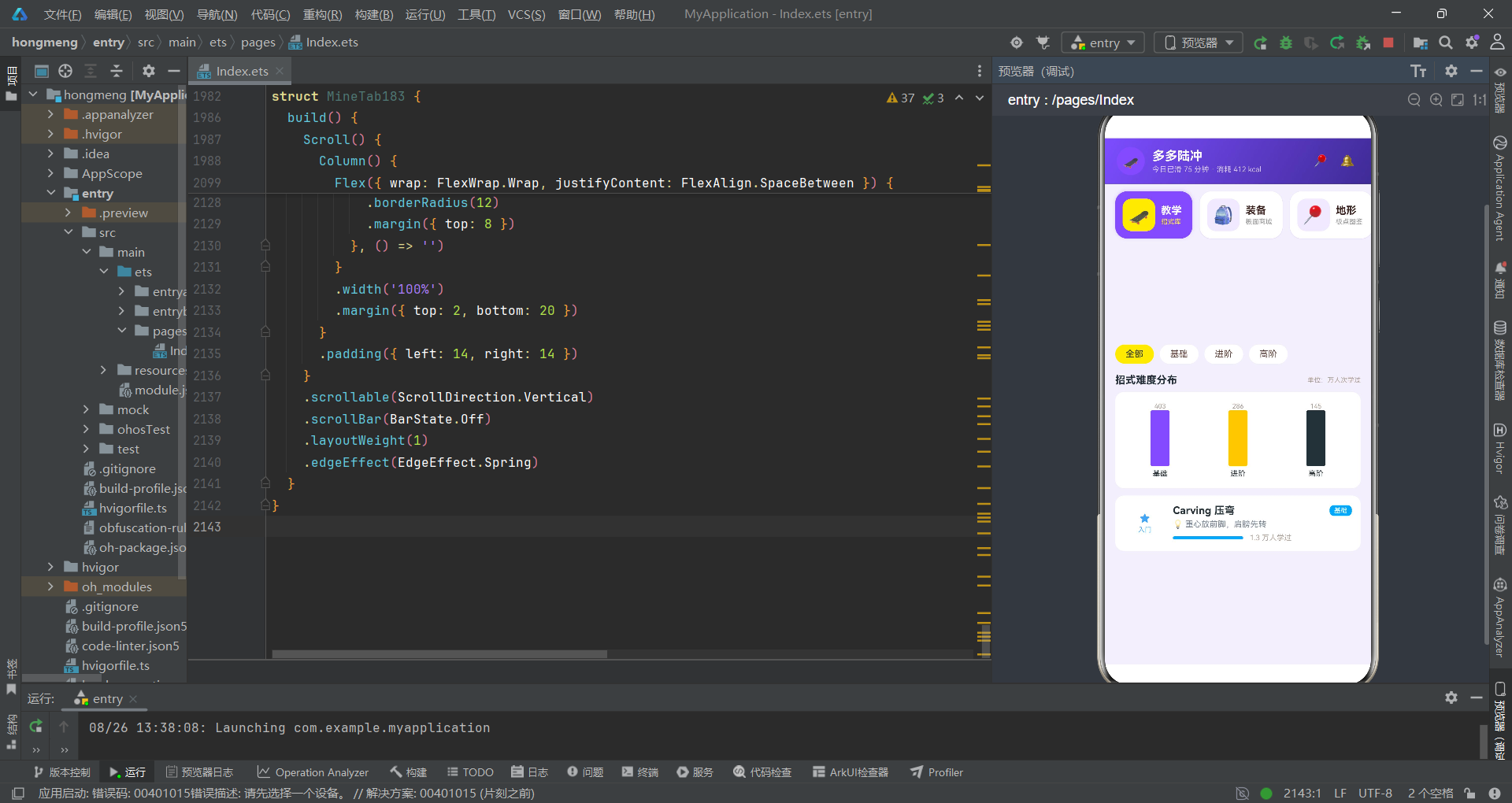
接口定义、静态数据、工具函数、主入口组件、导航卡片、抽屉弹层、子组件聚落、回调通信和弹层绑定等完整的器物组合。这些器物共同构成了一个功能完备的 ArkTS 声明式 UI 应用遗址,涵盖了教学展示、装备商城、地形图鉴、滑行记录、挑战赛、社区互动和个人主页七大业务板块。
最底层的接口地层奠定了类型规范,其上的数据地层提供了业务内容,再往上的工具函数地层完成了数据加工,最终在组件地层中形成了可交互的 UI 界面。这种"自下而上、分层叠加"的代码组织方式,是 ArkTS 声明式 UI 文化的典型聚落形态。每一层都为上一层提供服务,每一层都依赖下一层的基础设施,形成了高内聚、低耦合的工程结构。
"选中即上浮"的导航卡片、"空容器填色"的柱状图、"双向绑定"的弹层管理、"回调向上"的组件通信等技术选择,都指向同一个设计哲学:以最小的代码复杂度实现最大的交互丰富度。荧光紫与柠檬黄的高对比配色策略,更强化了这种"视觉先行、交互为王"的产品意图。这座代码遗迹不仅是一个功能完整的应用标本,更是 HarmonyOS ArkTS 声明式 UI 开发范式的一份珍贵考古档案。

讨论HarmonyOS开发技术,专注于API与组件、DevEco Studio、测试、元服务和应用上架分发等。
更多推荐
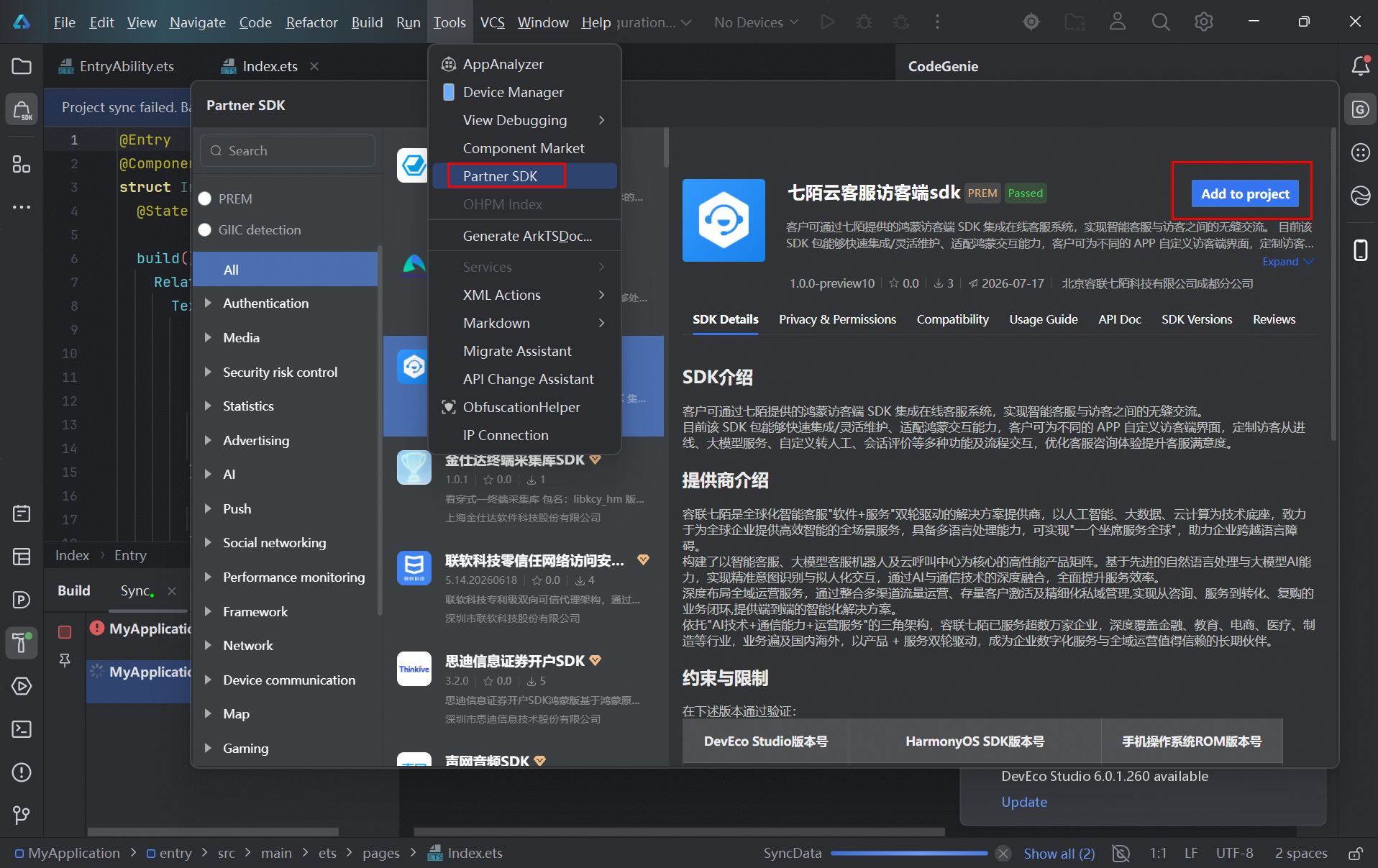

 5
5 0
0- 0


 已为社区贡献99条内容

所有评论(0)