基于HarmonyOS ArkTS API 24 boolean类型字段(如seen)在UI渲染中常用于条件分支(if判断),是控制渲染逻辑的重要数据位
棋道者,以黑白论天下,以方寸定乾坤。观鸟图鉴系统者,亦如一局棋——开局以顶部2×3宫格Tab定势,中盘以ForEach循环渲染列阵,手筋以bindSheet抽屉与bindContentCover居中弹框巧变,收官以@State状态管理锁胜。每一步落子皆有其法,每一处定式皆有其理。正如《棋经十三篇》所云:"博弈之道,贵乎严谨。"本文将以围棋解说之视角,逐手拆解此HarmonyOS ArkTS观鸟应用的每一步棋路。
棋局之美,在于布局之宏大与手筋之精巧兼备。本系统以晨雾蓝(#01579B)为黑子之深沉,以芦苇金为白子之明亮,在HarmonyOS 6.1.1的棋盘上展开了一幅"图鉴—装备—鸟点—记录—活动—我的"六路并进的全局对弈。六个Tab如六处星位,三抽屉如三处打入,双居中弹框如两处要点——每一步都是经过深思的落子。
技术之弈,重在全局观与局部手筋的配合。@Entry是棋盘的天元,一切始于斯;@State是棋手的思考,每变必应;@Builder是定式,可复用的棋形;ForEach是循环打挂,以数据驱动棋面铺展;bindSheet和bindContentCover是不同的打入方式——前者半深半浅如轻吊,后者全覆盖如厚势。善弈者必先审局,本系统之局,乃一"六路宫格+三抽屉+双居中"的标准棋形。
引言:开局之前——应用背景与技术棋盘之总览
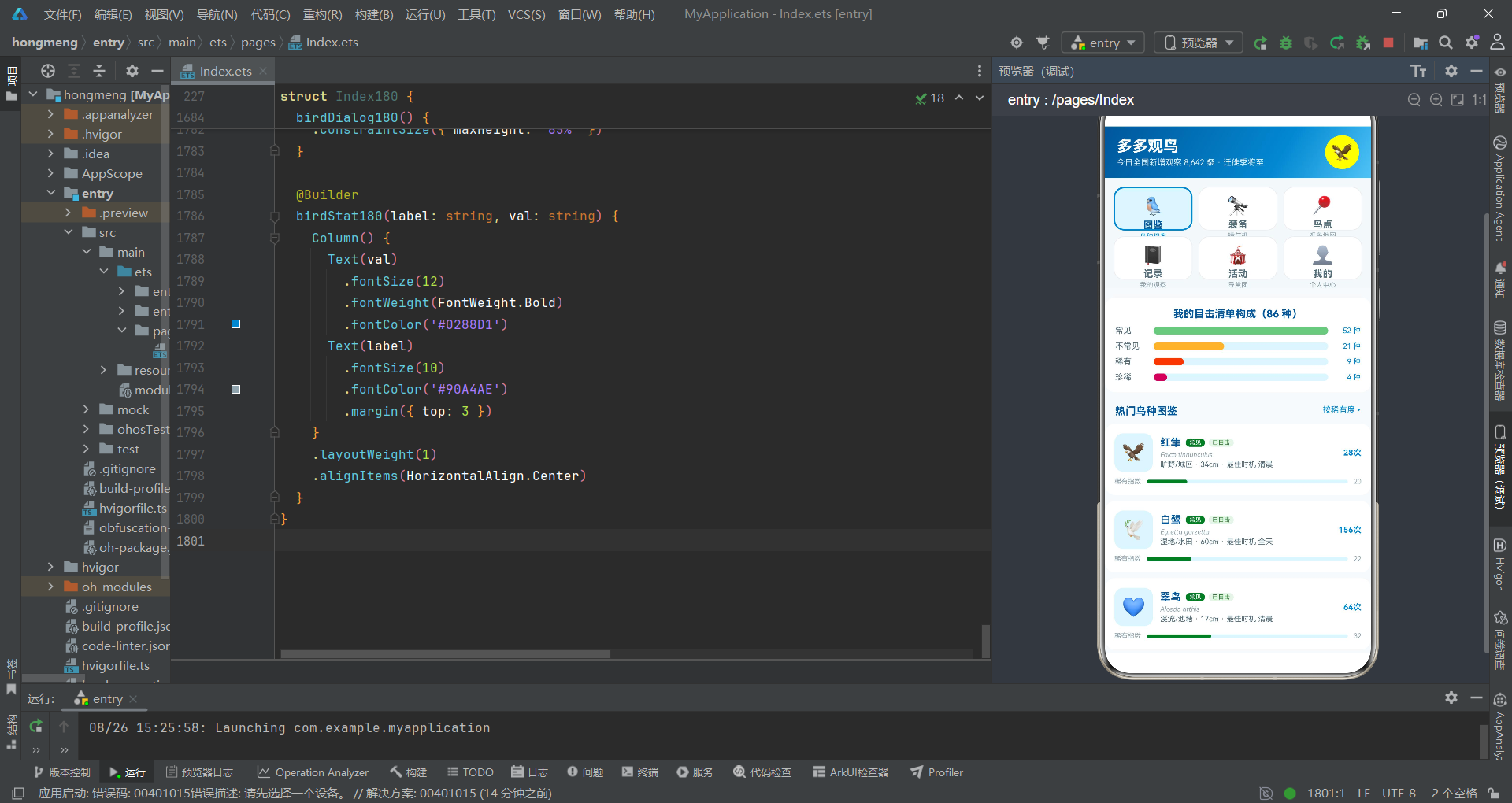
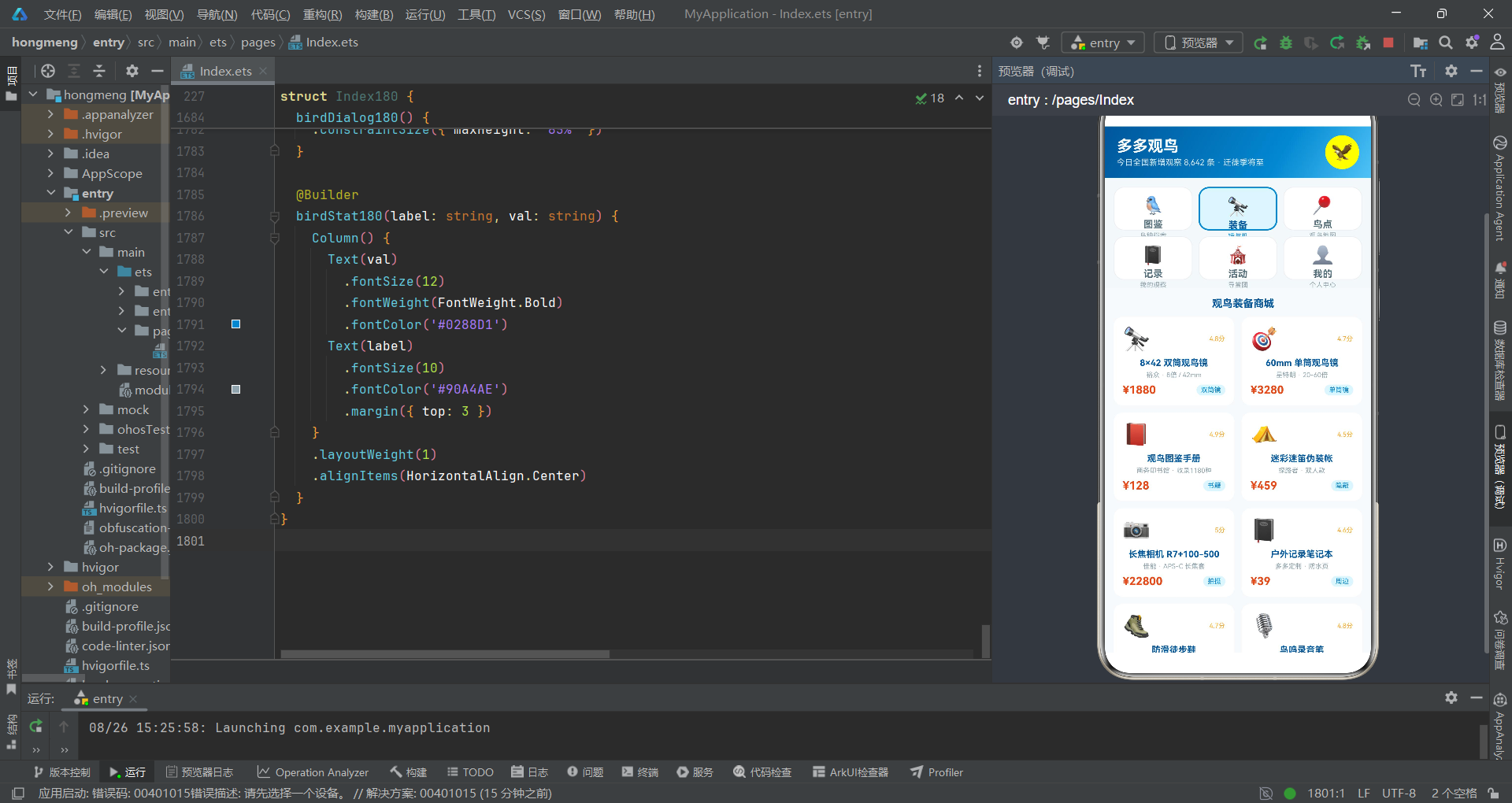
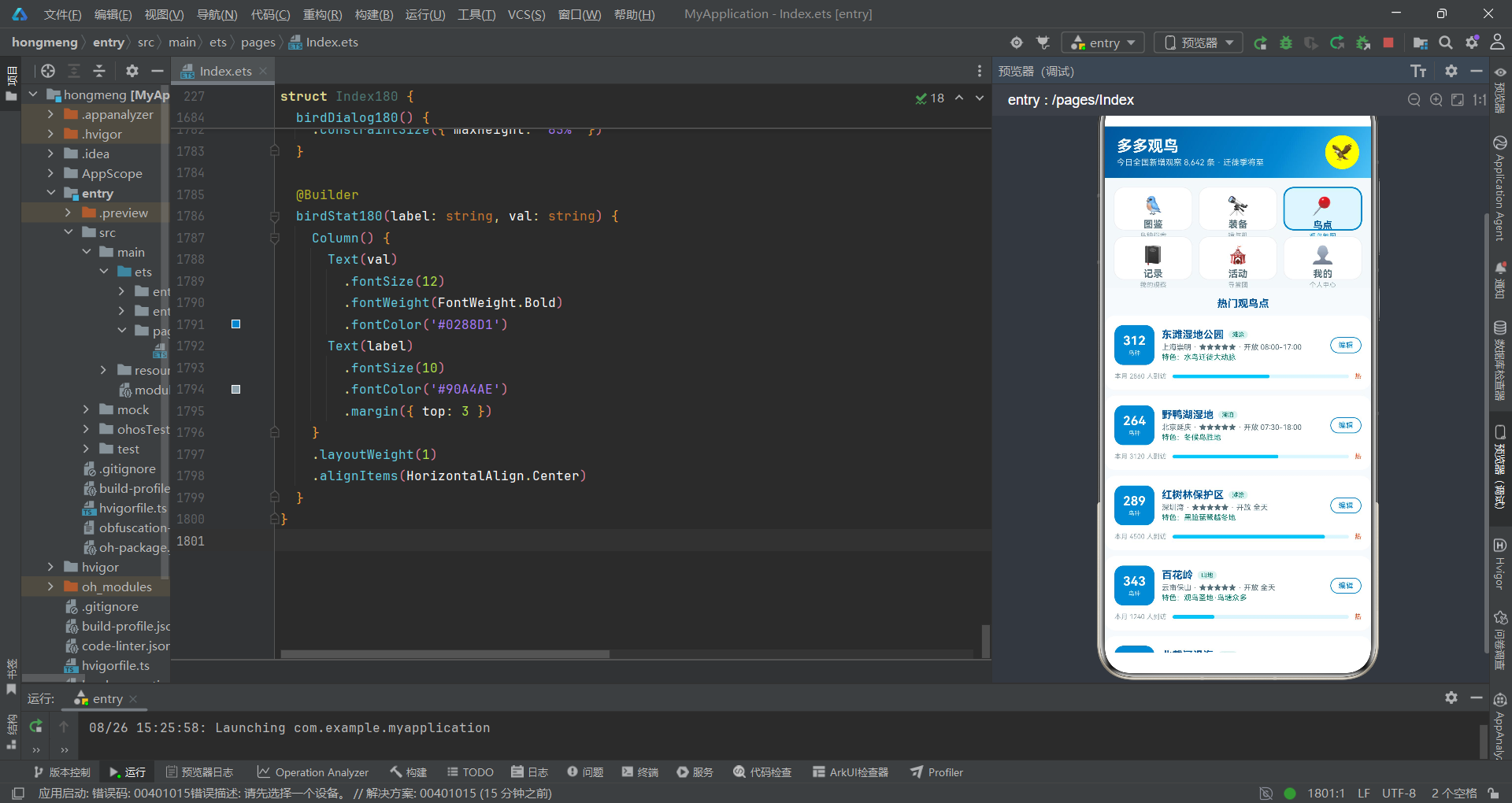
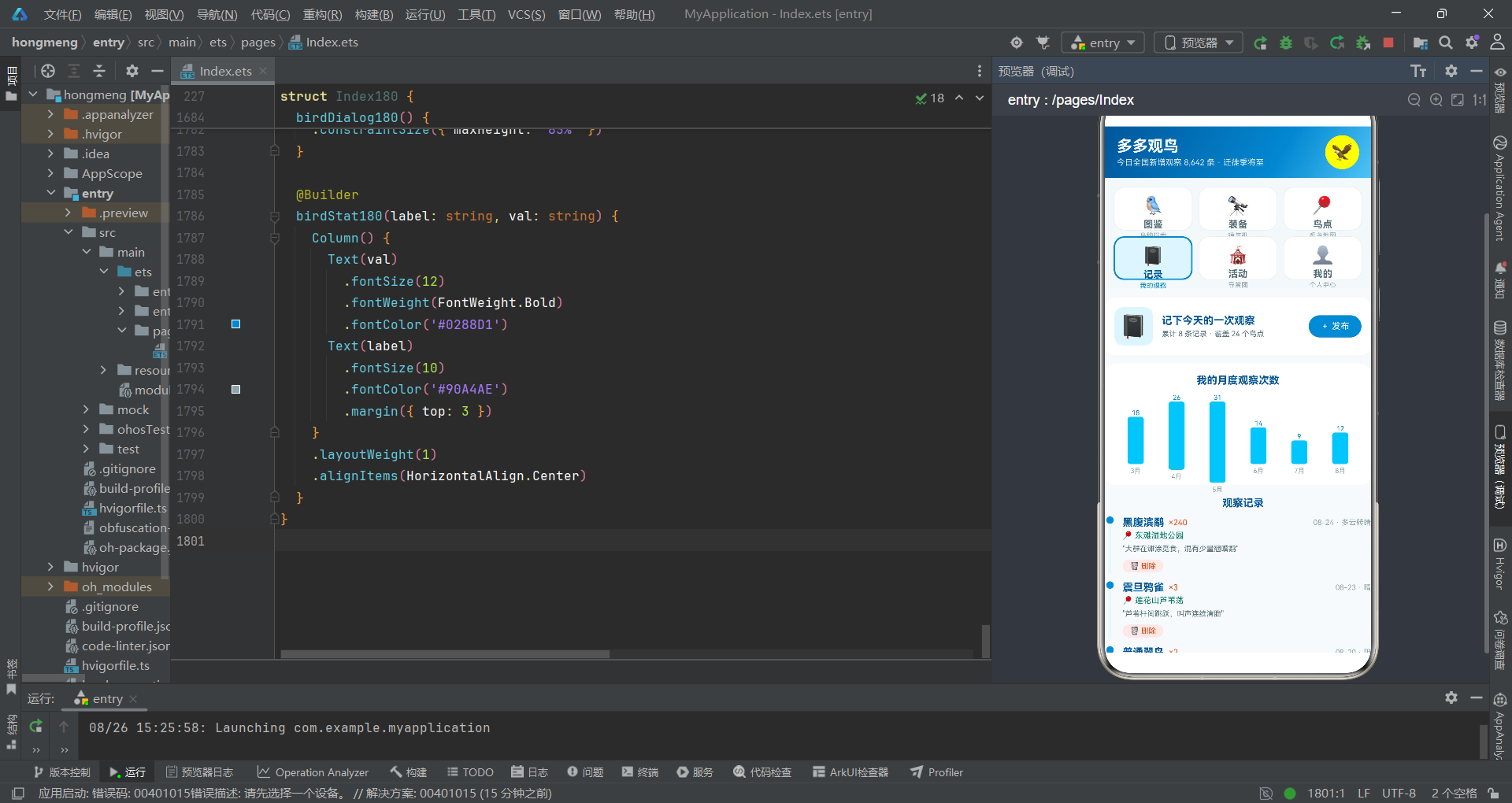
在HarmonyOS 6.1.1的生态棋盘上,ArkTS声明式开发范式如同一套全新的棋规——以组件为棋子,以状态为棋手思路,以build方法为棋谱,在方寸屏幕之间展开对弈。本系统——多多观鸟应用,正是在这一棋规下进行的一局精彩对弈。它不仅仅是一个观鸟记录工具,更是一个集鸟种图鉴、装备商城、观鸟点地图、观察记录、导赏活动和个人中心于一体的综合性自然观察平台。
从技术棋盘来看,此应用的核心结构以@Entry装饰器标记的入口组件为天元——一切渲染从这里开始。页面采用Column纵向布局,分为三路:顶部头部、中部宫格Tab导航和内容区。与底部Tab导航的棋形不同,本系统选择了顶部2×3宫格Tab布局——这种布局如围棋中的"三连星"布阵,六个Tab均匀分布在两行三列的网格中,每个Tab不仅有图标和标签,还有副文字描述,信息密度更高,视觉层次更丰富。
从对弈策略来看,该系统采用了"三抽屉+双居中"的弹框组合。三个bindSheet抽屉分别处理购买装备、发布观察记录和编辑观鸟点——这是"打入"战术,从底部斜入,半模态展示,不阻断主棋局。两个bindContentCover居中弹框分别处理删除记录确认和鸟种图鉴详情——这是"要点",全模态覆盖,要求棋手(用户)集中注意力做出关键决策。两种弹框配合使用,如同围棋中"打入"与"要点"的交替运用,攻守兼备。
从棋盘配色来看,系统采用晨雾蓝(#01579B)作为主色调,如同棋盘上的黑子——沉稳、深厚、主导全局。辅以浅蓝(#0288D1)、雾蓝(#4FC3F7)和淡蓝(#D7E8F5)等过渡色,形成蓝色系的层次变化。点缀色为芦苇金(#F9A825)和橙红(#E64A19),如同棋盘上的白子——明亮、醒目、引导视线。蓝金配色的整体效果如晨雾中芦苇荡的色调——朦胧中带有金色光芒,与观鸟主题高度契合。
第一手:开局——接口定义与数据模型之星位布局
围棋开局讲究"金角银边草肚皮",先占角位再展边。在ArkTS中,接口定义就是开局时的星位——它定义了数据的形态结构,是后续所有棋路的基础。
1.1 宫格Tab与鸟种接口之占角定式
interface GridTab180 {
  icon: string
  label: string
  sub: string
}

interface Bird180 {
  id: number
  name: string
  latin: string
  rarity: string
  rarityScore: number
  habitat: string
  size: string
  bestTime: string
  icon: string
  color: string
  seen: boolean
  count: number
}

interface Gear180 {
  id: number
  name: string
  brand: string
  price: number
  kind: string
  spec: string
  icon: string
  stock: number
  score: number
}
开局第一手,观察接口定义。GridTab180定义了宫格Tab的数据结构——与普通Tab不同,它多了一个sub(副文字描述)字段,这正是2×3宫格Tab的信息优势所在:每个Tab不仅有图标和标签,还有一句话描述,如"鸟种档案"“镜与机”"观鸟地图"等,信息传达更精确。
Bird180是鸟种数据的核心结构——它包含了鸟名、拉丁学名、稀有度、稀有指数、栖息地、体型、最佳观察时间、图标、主题色、是否已目击和目击次数等十余个字段。特别值得注意的是seen布尔字段和rarityScore数值字段——前者用于区分"已目击"和"去加新"两种状态,后者用于绘制稀有度横条图。这两个字段如同棋局中的"厚薄"判断——seen是定性(已见/未见),rarityScore是定量(具体指数值),两者配合实现精准的视觉呈现。
Gear180定义了观鸟装备的数据结构——包含名称、品牌、价格、类型、规格、图标、库存和评分。score字段是装备评价的量化指标,在UI中以"X.X分"的形式显示,用金色字体标注,引导用户选择高评分装备。
在ArkTS中,
interface关键字定义的数据结构如同围棋中的"定式"——经过验证的固定棋形,可靠且可复用。接口中的字段类型标注是"棋规"——一旦确定便需遵守,编译器会检查所有数据是否符合接口定义的类型契约。boolean类型字段(如seen)在UI渲染中常用于条件分支(if判断),是控制渲染逻辑的重要数据位。
1.2 观鸟点与记录接口之边线展开
interface Spot180 {
  id: number
  name: string
  city: string
  birds: number
  visitors: number
  star: number
  type: string
  feature: string
  open: string
}

interface Record180 {
  id: number
  date: string
  spot: string
  bird: string
  number: number
  weather: string
  note: string
}

interface Event180 {
  id: number
  name: string
  date: string
  place: string
  joins: number
  kind: string
}

interface Buddy180 {
  id: number
  user: string
  avatar: string
  time: string
  text: string
  bird: string
  spot: string
  likes: number
  liked: boolean
}
继续展开边线,Spot180定义了观鸟点结构——包含鸟种数、访客数、星级、类型、特色和开放时间。birds和visitors两个数值字段分别用于显示鸟种数量和绘制访客热度横条。star字段用于星级评价(5星或4星)。
Record180是观察记录结构——包含日期、地点、鸟种、数量、天气和笔记。weather字段是自由文本,记录观察当天的天气状况,为观鸟数据提供环境上下文。note字段是用户手写的观察细节,如"大群在滩涂觅食,混有少量翘嘴鹬",这些笔记为科学观察提供了宝贵的第一手资料。
Event180是观鸟活动结构——包含活动名称、日期、地点、报名人数和类型。kind字段标注活动性质(导赏、监测、调查、比赛、摄影、培训),在UI中以彩色标签形式展示,帮助用户快速识别活动类型。
Buddy180是鸟友动态结构——与乐评结构类似,包含liked和likes字段用于点赞交互。bird和spot字段将动态与具体鸟种和观鸟点关联,形成"人-鸟-地"的三维信息网络。
1.3 统计接口与常量数据之棋子就位
interface MonthCount180 {
  month: string
  count: number
}

interface RarityRow180 {
  level: string
  birds: number
  color: string
}

const GTABS_180: GridTab180[] = [
  { icon: '🐦', label: '图鉴', sub: '鸟种档案' },
  { icon: '🔭', label: '装备', sub: '镜与机' },
  { icon: '📍', label: '鸟点', sub: '观鸟地图' },
  { icon: '📓', label: '记录', sub: '我的观察' },
  { icon: '🎪', label: '活动', sub: '导赏团' },
  { icon: '👤', label: '我的', sub: '个人中心' }
]

const BIRDS_180: Bird180[] = [
  { id: 1, name: '红隼', latin: 'Falco tinnunculus', rarity: '常见', rarityScore: 20, habitat: '旷野/城区', size: '34cm', bestTime: '清晨', icon: '🦅', color: '#D84315', seen: true, count: 28 },
  { id: 2, name: '白鹭', latin: 'Egretta garzetta', rarity: '常见', rarityScore: 22, habitat: '湿地/水田', size: '60cm', bestTime: '全天', icon: '🕊', color: '#78909C', seen: true, count: 156 },
  { id: 3, name: '翠鸟', latin: 'Alcedo atthis', rarity: '常见', rarityScore: 32, habitat: '溪流/池塘', size: '17cm', bestTime: '清晨', icon: '💙', color: '#0288D1', seen: true, count: 64 },
  { id: 4, name: '震旦鸦雀', latin: 'Paradoxornis heudei', rarity: '稀有', rarityScore: 78, habitat: '芦苇荡', size: '18cm', bestTime: '清晨', icon: '🌾', color: '#F9A825', seen: true, count: 9 },
  { id: 5, name: '朱鹮', latin: 'Nipponia nippon', rarity: '珍稀', rarityScore: 95, habitat: '稻田/溪流', size: '79cm', bestTime: '傍晚', icon: '🌸', color: '#EC407A', seen: false, count: 0 }
]
MonthCount180和RarityRow180是两个统计图表接口——前者用于月度观察次数柱状图,后者用于稀有度构成横条图。RarityRow180包含color字段,用于直接指定横条颜色,实现数据到颜色的直接映射。
GTABS_180定义了6个宫格Tab常量——每个Tab包含图标emoji、标签和副描述。6个Tab分为两行三列,构成2×3的宫格布局。这种布局如围棋中的"三连星"——三列均匀分布,两行高低搭配,既美观又实用。
BIRDS_180预置了10种鸟类数据,从常见的红隼、白鹭到珍稀的朱鹮、黑脸琵鹭。每种鸟都有完整的拉丁学名、栖息地、体型和最佳观察时间。seen字段区分已目击和未目击——前4种已目击(seen=true),朱鹮等珍稀鸟种尚未目击(seen=false),在UI中以"已目击"绿色标签和"去加新"橙色文字区分。
const在ArkTS中声明常量,如同棋盘上已经落下的棋子——位置固定不可移动。这些常量数据为UI渲染提供了初始"棋面",后续通过@State变量引用和修改。注意BIRDS_180数组中的对象都是字面量对象——虽然数组引用不可变,但数组内容可以通过@State变量进行动态修改(如点赞计数变化)。
第二手:定式——工具函数之棋形复用
围棋定式是经过千锤百炼的固定棋形,在特定局面下可重复使用。在ArkTS中,工具函数就是"定式"——定义一次,多处复用。
2.1 稀有度与访客横条函数之厚薄判断
// 稀有度横条
function rarityBar180(rarityScore: number): string {
  return rarityScore + '%'
}

// 鸟点访客横条(最大 5200)
function visitorsBar180(visitors: number): string {
  return (visitors * 100 / 5200).toFixed(1) + '%'
}

// 月度记录柱高(最大 31)
function monthH180(count: number): string {
  return (count * 100 / 31).toFixed(1) + '%'
}

// 装备价格柱高(最大 22800 映射)
function gearH180(price: number): string {
  return (price * 100 / 22800).toFixed(1) + '%'
}
这组函数都是"数值到百分比字符串"的转换定式。rarityBar180最简单——直接将稀有指数数值加上%后缀(因为rarityScore本身就是0-100的百分比值)。visitorsBar180以最大访客数5200为基准进行归一化计算。monthH180以最大月度记录31次为基准。gearH180以最高装备价格22800为基准。
在围棋中,“厚薄"是判断棋形强弱的重要概念——厚实则安全,薄弱则危险。这些归一化函数就如同"厚薄判断”——将不同量纲的数据统一映射到0-100%的百分比区间,使得柱状图和横条能够以统一的视觉语言呈现。toFixed(1)保留一位小数,保证百分比值既精确又不冗长。
toFixed是JavaScript Number对象的原型方法,在ArkTS中同样适用。它将数字四舍五入到指定小数位并返回字符串。注意返回值是字符串类型——加上%后缀后直接赋值给UI组件的width或height属性。ArkUI的布局系统接受百分比字符串作为尺寸值,这是实现动态柱状图的核心机制。
2.2 颜色与星级映射函数之形势判断
// 稀有度色
function rarityColor180(rarity: string): string {
  if (rarity === '常见') {
    return '#2E7D32'
  }
  if (rarity === '不常见') {
    return '#F9A825'
  }
  if (rarity === '稀有') {
    return '#E64A19'
  }
  return '#C2185B'
}

// 鸟点星级
function stars180(star: number): string {
  if (star >= 5) {
    return '★★★★★'
  }
  return '★★★★☆'
}
rarityColor180是稀有度到颜色的映射定式——常见映射为绿色(#2E7D32,安全色),不常见映射为金色(#F9A825,注意色),稀有映射为橙红色(#E64A19,警示色),珍稀映射为粉紫色(#C2185B,珍贵色)。这种颜色语义如围棋中的"形势判断"——通过颜色直观传达鸟种的稀有程度,帮助用户快速识别重点目标。
stars180是星级映射函数——5星及以上返回满星字符串,4星返回四星半字符串。这个函数在多处使用——鸟点列表、装备评分等场景都用到了星级评价。
在ArkTS中,普通函数使用
function关键字声明,可以在组件外部定义,被多个组件共享调用。这类函数不依赖组件状态,是纯函数——如同围棋定式,在相同局面下总是给出相同的应手。颜色映射函数在整个系统中被ForEach循环中的多个UI元素调用,实现了代码的高度复用。
第三手:布局——入口组件与状态管理之大模样构建
围棋布局阶段讲究"大模样"——快速展开,占据广阔空间。在ArkTS中,@Entry和@Component的入口声明以及@State状态变量声明,就是构建应用"大模样"的关键。
3.1 入口组件之天元落子
@Entry
@Component
struct Index180 {
  @State curTab: number = 0
  @State showGearSheet: boolean = false
  @State showPostSheet: boolean = false
  @State showSpotSheet: boolean = false
  @State showDelDialog: boolean = false
  @State showBirdDialog: boolean = false
  @State selGear: Gear180 = GEARS_180[0]
  @State selSpot: Spot180 = SPOTS_180[0]
  @State selBird: Bird180 = BIRDS_180[0]
  @State delRecIdx: number = 0
  @State gearQty: number = 1
  @State gearInsurance: boolean = true
  @State postBirdName: string = ''
  @State postNumber: number = 1
  @State postPublic: boolean = true
  @State postWeatherIdx: number = 0
  @State records: Record180[] = RECORDS_180
  @State buddies: Buddy180[] = BUDDIES_180
  @State weatherOptions: string[] = ['晴', '多云', '阴', '小雨', '大风']
天元落子——@Entry是ArkTS的入口装饰器,标记该组件为页面入口组件。整个页面的渲染从这里开始,如同棋盘的天元,是一切棋路的中心。@Component装饰器用于声明一个自定义组件——被它标记的struct结构体就是一个可复用的UI组件。
@State是ArkTS状态管理装饰器,当被标记的状态变量发生变化时,会自动触发依赖该状态的UI组件重新渲染。这是ArkTS声明式UI的核心机制——数据驱动视图。@State变量如同棋手的思考——每一步变化都会反映到棋面上。每个@State变量都有明确的类型标注和初始值,类型覆盖了number、boolean、string、对象和数组等多种数据形态。
审视这组状态变量,可以将其分为三大类。第一类是"导航状态"——curTab控制当前显示的Tab页面,初始值为0(图鉴页面),通过宫格Tab点击改变。第二类是"弹框状态"——五个布尔变量分别控制五个弹框的显示与隐藏。第三类是"业务数据状态"——选中的装备(selGear)、选中的鸟点(selSpot)、选中的鸟种(selBird)、购买数量(gearQty)、是否加购保险(gearInsurance)、发布鸟种名称(postBirdName)等。
特别值得注意的是records和buddies两个数组型状态——records管理观察记录列表,需要在发布新记录时通过splice方法向前插入数据;buddies管理鸟友动态列表,需要支持点赞操作。这些操作都修改了数组内容,需要通过@State触发UI重新渲染。
3.2 build方法之三路布阵
  build() {
    Column() {
      // ===== 自然纪录风头部 =====
      Column() {
        Row() {
          Column() {
            Text('多多观鸟')
              .fontSize(21)
              .fontWeight(FontWeight.Bold)
              .fontColor('#FFFFFF')
            Text('今日全国新增观察 8,642 条 · 迁徙季将至')
              .fontSize(11)
              .fontColor('#D7E8F5')
              .margin({ top: 3 })
          }
          .alignItems(HorizontalAlign.Start)
          .layoutWeight(1)

          Column() {
            Text('🦅')
              .fontSize(24)
          }
          .width(46)
          .height(46)
          .borderRadius(23)
          .backgroundColor('#FFFFFF22')
          .justifyContent(FlexAlign.Center)
        }
        .width('100%')
        .padding({ left: 16, right: 16, top: 12, bottom: 12 })
      }
      .width('100%')
      .linearGradient({
        angle: 120,
        colors: [['#01579B', 0.0], ['#0288D1', 0.65], ['#4FC3F7', 1.0]]
      })
build方法是ArkTS组件的核心——每个@Component都必须实现它,返回组件的UI结构。这里最外层的Column将页面分为三路:头部、宫格Tab导航和内容区。头部使用linearGradient设置120度渐变背景——从#01579B(深蓝)到#0288D1(中蓝)再到#4FC3F7(浅蓝),模拟晨雾从浓到淡的渐变效果,与"晨雾蓝"的主题高度契合。
Text是ArkUI的基础文本组件,用于显示文字内容。它支持链式调用设置字体大小(fontSize)、字重(fontWeight)、颜色(fontColor)和外边距(margin)等属性。头部使用白色字体(#FFFFFF)显示标题,副标题使用淡蓝色(#D7E8F5),在蓝色渐变背景上形成清晰的视觉层次。
linearGradient是ArkUI提供线性渐变背景的关键方法,参数包括angle(渐变角度)和colors(颜色和位置数组)。数组中每项是[颜色, 位置]的元组,位置范围0.0-1.0。120度渐变从左下到右上,模拟光线从地平线升起的自然效果。#FFFFFF22是带alpha透明度的白色,22表示约13%不透明度,在深色背景上形成柔和的图标底色。
3.3 宫格Tab导航之2×3星位布阵
      // ===== 2×3 宫格 Tab =====
      Grid() {
        ForEach(GTABS_180, (t: GridTab180, idx?: number) => {
          GridItem() {
            Column() {
              Text(t.icon)
                .fontSize(24)
              Text(t.label)
                .fontSize(13)
                .fontWeight(FontWeight.Bold)
                .fontColor(this.curTab === idx ? '#01579B' : '#546E7A')
                .margin({ top: 4 })
              Text(t.sub)
                .fontSize(9)
                .fontColor(this.curTab === idx ? '#0288D1' : '#90A4AE')
                .margin({ top: 2 })
            }
            .width('100%')
            .padding({ top: 10, bottom: 10 })
            .borderRadius(14)
            .backgroundColor(this.curTab === idx ? '#E1F5FE' : '#FFFFFF')
            .border({ width: this.curTab === idx ? 2 : 1, color: this.curTab === idx ? '#0288D1' : '#ECEFF1' })
            .shadow({
              radius: this.curTab === idx ? 8 : 2,
              color: this.curTab === idx ? '#0288D133' : '#0000000A',
              offsetY: 2
            })
            .onClick(() => {
              this.curTab = idx === undefined ? 0 : idx
            })
          }
        }, (t: GridTab180) => t.label)
      }
      .columnsTemplate('1fr 1fr 1fr')
      .rowsTemplate('1fr 1fr')
      .width('100%')
      .height(150)
      .padding(12)
      .columnsGap(8)
      .rowsGap(8)
      .backgroundColor('#F4F8FB')
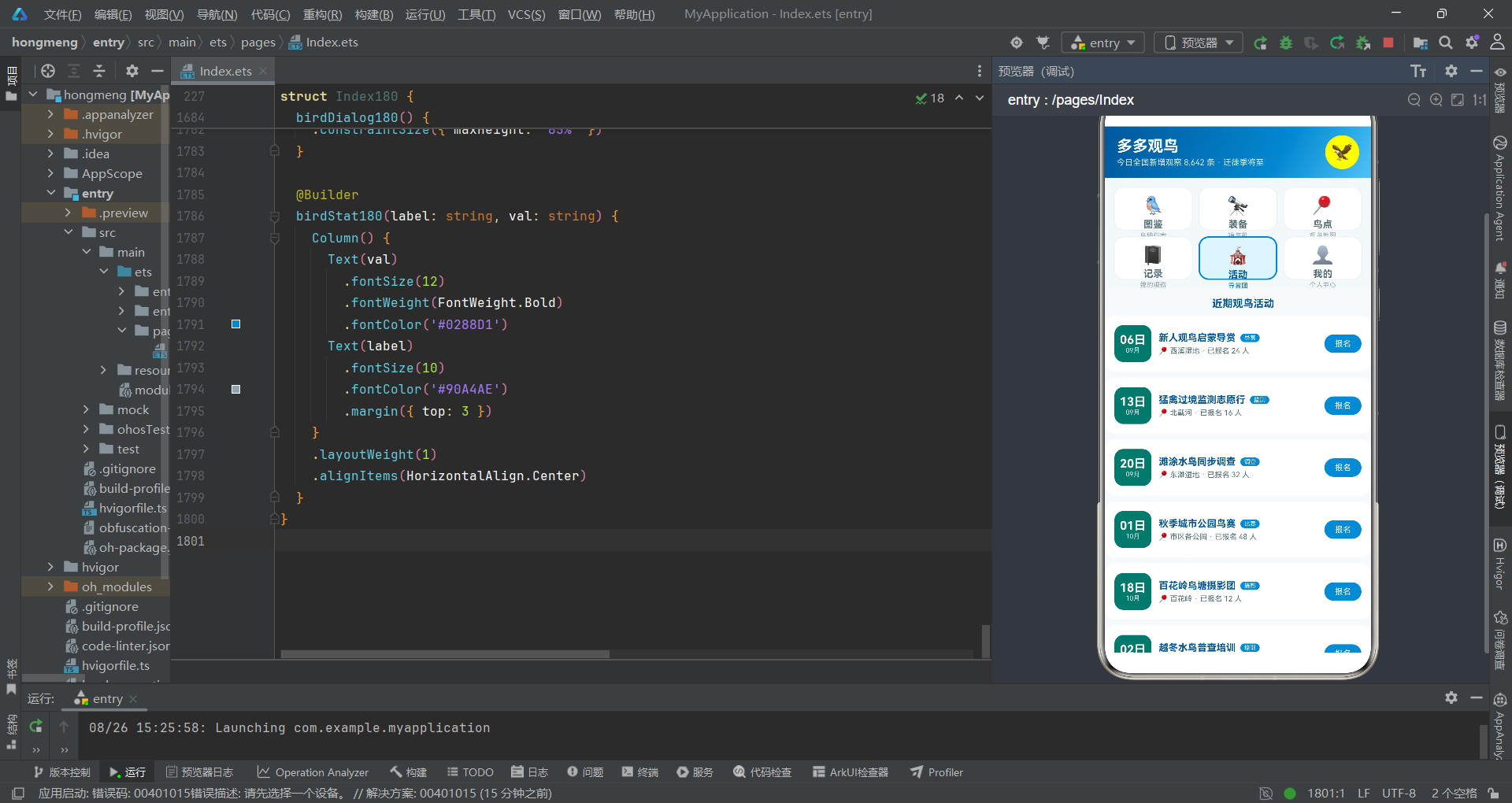
宫格Tab导航是本系统的核心布局特色——使用Grid组件创建2×3的六格布局。Grid是ArkUI提供的网格布局容器组件,通过columnsTemplate('1fr 1fr 1fr')定义三列等宽,rowsTemplate('1fr 1fr')定义两行等高,形成标准的2×3宫格。
GridItem是ArkUI提供的网格项组件,必须作为Grid的直接子组件使用。每个Tab通过ForEach遍历GTABS_180数组生成,包含三层文字:图标(emoji,24号字)、标签(13号粗体)和副描述(9号细体)。选中状态和未选中状态通过this.curTab === idx条件判断动态切换——选中时背景色为浅蓝(#E1F5FE)、边框为蓝色2px粗线、阴影半径8(突出效果);未选中时背景色为白色、边框为灰色1px细线、阴影半径2(平淡效果)。
Grid是ArkUI提供的网格布局容器组件,columnsTemplate和rowsTemplate使用fr单位定义行列比例。columnsGap和rowsGap设置网格间距。shadow方法设置组件阴影效果,参数包括模糊半径、颜色和偏移量——选中Tab的阴影半径8配合蓝色阴影颜色,营造出"浮起"的视觉效果,如同棋盘上被拈起准备落下的棋子。
3.4 内容区条件分支之棋路推演
      // ===== 内容区 =====
      Scroll() {
        Column() {
          if (this.curTab === 0) {
            this.birdTab180()
          }
          if (this.curTab === 1) {
            this.gearTab180()
          }
          if (this.curTab === 2) {
            this.spotTab180()
          }
          if (this.curTab === 3) {
            this.recordTab180()
          }
          if (this.curTab === 4) {
            this.eventTab180()
          }
          if (this.curTab === 5) {
            this.mineTab180()
          }
        }
        .width('100%')
      }
      .layoutWeight(1)
      .scrollBar(BarState.Off)
      .backgroundColor('#F7FAFC')
    }
    .width('100%')
    .height('100%')
内容区使用Scroll组件包裹,Scroll是ArkUI提供的滚动容器组件。六个if条件语句实现Tab切换——当curTab等于0时调用birdTab180()构建图鉴页面,等于1时调用gearTab180()构建装备页面,以此类推。
if/else条件渲染是ArkUI提供的基础控制流,用于根据条件决定是否渲染某段UI。当curTab状态变化时,ArkTS框架会自动重新执行build方法,渲染新的Tab内容。@Builder用于定义可复用的UI构建函数,被@Builder装饰的方法返回一段UI结构,可以在build方法中直接调用。每个Tab页面都是一个独立的@Builder方法。
第四手:打入——弹框系统之斜入战术
围棋中的"打入"是在对方势力范围内安插棋子,此处使用bindSheet和bindContentCover实现深度交互,如同棋局中的打入战术。
4.1 三抽屉一居中之弹框绑定
    .bindSheet($$this.showGearSheet, this.gearSheet180(), {
      height: 540,
      dragBar: true,
      showClose: true,
      backgroundColor: '#FFFFFF'
    })
    .bindSheet($$this.showPostSheet, this.postSheet180(), {
      height: 560,
      dragBar: true,
      showClose: true,
      backgroundColor: '#FFFFFF'
    })
    .bindSheet($$this.showSpotSheet, this.spotSheet180(), {
      height: 520,
      dragBar: true,
      showClose: true,
      backgroundColor: '#FFFFFF'
    })
    .bindContentCover($$this.showDelDialog, this.delDialog180(), {
    })
    .bindContentCover($$this.showBirdDialog, this.birdDialog180(), {
    })
本系统绑定了三个bindSheet抽屉和两个bindContentCover居中弹框。三个抽屉分别处理:购买装备(高度540vp)、发布观察记录(高度560vp)和编辑观鸟点(高度520vp)。两个居中弹框分别处理:删除记录确认和鸟种图鉴详情。
bindSheet是ArkUI提供的半模态抽屉弹框组件——从底部滑出,高度可自定义,支持拖拽关闭。bindContentCover是ArkUI提供的全屏模态覆盖弹框组件——以居中弹窗形式覆盖在当前页面上方。
$$this.showGearSheet是ArkTS的双向绑定语法——$$前缀表示将状态变量与弹框的显示状态进行双向绑定。当状态变量为true时弹框显示,为false时弹框隐藏。弹框内部的关闭操作也会自动将状态变量设为false。bindSheet和bindContentCover的区别在于交互层级——前者是半模态的,后者是全模态的。
4.2 购买装备抽屉之手筋拆解
  // ===== 弹框1:购买装备(抽屉) =====
  @Builder
  gearSheet180() {
    Column() {
      Text('购买装备')
        .fontSize(17)
        .fontWeight(FontWeight.Bold)
        .fontColor('#01579B')
        .margin({ top: 6 })

      Row() {
        Text(this.selGear.icon)
          .fontSize(38)
          .width(72)
          .height(72)
          .backgroundColor('#E1F5FE')
          .borderRadius(12)
          .textAlign(TextAlign.Center)

        Column() {
          Text(this.selGear.name)
            .fontSize(14)
            .fontWeight(FontWeight.Bold)
            .fontColor('#01579B')
          Text(this.selGear.brand + ' · ' + this.selGear.spec + ' · 评分 ' + this.selGear.score)
            .fontSize(10)
            .fontColor('#90A4AE')
            .margin({ top: 4 })
          Text('¥' + this.selGear.price)
            .fontSize(17)
            .fontWeight(FontWeight.Bold)
            .fontColor('#E64A19')
            .margin({ top: 4 })
        }
        .alignItems(HorizontalAlign.Start)
        .layoutWeight(1)
        .margin({ left: 12 })
      }
      .width('100%')
      .margin({ top: 14 })

      Text('数量(库存 ' + this.selGear.stock + ')')
        .fontSize(13)
        .fontWeight(FontWeight.Bold)
        .fontColor('#01579B')
        .margin({ top: 16 })
      Row() {
        Text('-')
          .fontSize(16)
          .fontColor('#0288D1')
          .width(34)
          .height(34)
          .borderRadius(17)
          .backgroundColor('#E1F5FE')
          .textAlign(TextAlign.Center)
          .onClick(() => {
            if (this.gearQty > 1) {
              this.gearQty -= 1
            }
          })
        Text(this.gearQty + ' 件')
          .fontSize(14)
          .fontWeight(FontWeight.Bold)
          .fontColor('#01579B')
          .width(80)
          .textAlign(TextAlign.Center)
        Text('+')
          .fontSize(16)
          .fontColor('#FFFFFF')
          .width(34)
          .height(34)
          .borderRadius(17)
          .backgroundColor('#0288D1')
          .textAlign(TextAlign.Center)
          .onClick(() => {
            if (this.gearQty < this.selGear.stock) {
              this.gearQty += 1
            }
          })
      }
      .margin({ top: 10 })

      Row() {
        Text('加购一年意外保 · ¥49')
          .fontSize(13)
          .fontColor('#01579B')
          .layoutWeight(1)
        Toggle({ type: ToggleType.Switch, isOn: this.gearInsurance })
          .selectedColor('#0288D1')
          .onChange((on: boolean) => {
            this.gearInsurance = on
          })
      }
      .width('100%')
      .margin({ top: 16 })

      Row() {
        Text('合计 ¥' + (this.selGear.price * this.gearQty + (this.gearInsurance ? 49 : 0)))
          .fontSize(18)
          .fontWeight(FontWeight.Bold)
          .fontColor('#E64A19')
          .layoutWeight(1)
        Text('立即购买')
          .fontSize(14)
          .fontColor('#FFFFFF')
          .backgroundColor('#0288D1')
          .borderRadius(22)
          .padding({ left: 30, right: 30, top: 10, bottom: 10 })
          .onClick(() => {
            this.showGearSheet = false
          })
      }
      .width('100%')
      .margin({ top: 22 })
    }
    .width('100%')
    .padding(20)
    .alignItems(HorizontalAlign.Start)
  }
购买装备抽屉的棋路分析:顶部展示装备图标和信息,中间是数量选择器("-数字+"三段式),底部是保险选项和合计金额。数量选择器的减号按钮检查gearQty > 1防止数量降至零以下,加号按钮检查gearQty < this.selGear.stock防止超过库存上限。合计金额通过表达式this.selGear.price * this.gearQty + (this.gearInsurance ? 49 : 0)动态计算——基础价乘数量加上保险费(如果勾选),体现了ArkTS在UI中直接使用表达式的能力。
Toggle是ArkUI提供的开关组件,支持滑动开关(Switch)和勾选框(Checkbox)两种类型。ToggleType.Switch指定为滑动开关样式,isOn绑定初始状态,selectedColor设置开启时的主题色,onChange回调在状态变化时更新变量。onClick是ArkUI的事件绑定方法,用于响应用户点击操作。
4.3 发布观察记录抽屉之打入续盘
  // ===== 弹框2:发布观察记录(抽屉) =====
  @Builder
  postSheet180() {
    Column() {
      Text('发布观察记录')
        .fontSize(17)
        .fontWeight(FontWeight.Bold)
        .fontColor('#01579B')
        .margin({ top: 6 })

      Text('鸟种名称')
        .fontSize(13)
        .fontWeight(FontWeight.Bold)
        .fontColor('#01579B')
        .margin({ top: 16 })
      TextInput({ placeholder: '如:震旦鸦雀', text: this.postBirdName })
        .fontSize(13)
        .backgroundColor('#E1F5FE')
        .borderRadius(10)
        .padding({ left: 12, right: 12 })
        .height(44)
        .margin({ top: 8 })
        .onChange((v: string) => {
          this.postBirdName = v
        })

      Text('天气')
        .fontSize(13)
        .fontWeight(FontWeight.Bold)
        .fontColor('#01579B')
        .margin({ top: 14 })
      Row() {
        ForEach(this.weatherOptions, (w: string, idx?: number) => {
          Text(w)
            .fontSize(11)
            .fontColor(this.postWeatherIdx === idx ? '#FFFFFF' : '#546E7A')
            .backgroundColor(this.postWeatherIdx === idx ? '#0288D1' : '#E1F5FE')
            .borderRadius(10)
            .padding({ left: 12, right: 12, top: 6, bottom: 6 })
            .margin({ right: 8, top: 6 })
            .onClick(() => {
              this.postWeatherIdx = idx === undefined ? 0 : idx
            })
        }, (w: string) => w)
      }
      .width('100%')

      Text('数量')
        .fontSize(13)
        .fontWeight(FontWeight.Bold)
        .fontColor('#01579B')
        .margin({ top: 14 })
      Row() {
        Text('-')
          .fontSize(15)
          .fontColor('#0288D1')
          .width(32)
          .height(32)
          .borderRadius(16)
          .backgroundColor('#E1F5FE')
          .textAlign(TextAlign.Center)
          .onClick(() => {
            if (this.postNumber > 1) {
              this.postNumber -= 1
            }
          })
        Text(this.postNumber + ' 只')
          .fontSize(14)
          .fontWeight(FontWeight.Bold)
          .fontColor('#01579B')
          .width(80)
          .textAlign(TextAlign.Center)
        Text('+')
          .fontSize(15)
          .fontColor('#FFFFFF')
          .width(32)
          .height(32)
          .borderRadius(16)
          .backgroundColor('#0288D1')
          .textAlign(TextAlign.Center)
          .onClick(() => {
            if (this.postNumber < 500) {
              this.postNumber += 1
            }
          })
      }
      .margin({ top: 10 })

      Row() {
        Text('同步分享到鸟友圈')
          .fontSize(13)
          .fontColor('#01579B')
          .layoutWeight(1)
        Toggle({ type: ToggleType.Switch, isOn: this.postPublic })
          .selectedColor('#0288D1')
          .onChange((on: boolean) => {
            this.postPublic = on
          })
      }
      .width('100%')
      .margin({ top: 16 })

      Row() {
        Text('取消')
          .fontSize(13)
          .fontColor('#546E7A')
          .backgroundColor('#E1F5FE')
          .borderRadius(20)
          .padding({ left: 24, right: 24, top: 9, bottom: 9 })
          .onClick(() => {
            this.showPostSheet = false
          })
        Text('保存记录')
          .fontSize(13)
          .fontColor('#FFFFFF')
          .backgroundColor('#0288D1')
          .borderRadius(20)
          .padding({ left: 24, right: 24, top: 9, bottom: 9 })
          .margin({ left: 12 })
          .onClick(() => {
            if (this.postBirdName.length > 0) {
              this.records.splice(0, 0, {
                id: 100 + this.records.length, date: '08-25', spot: '西溪湿地',
                bird: this.postBirdName, number: this.postNumber,
                weather: this.weatherOptions[this.postWeatherIdx],
                note: '刚发布的新记录,待补充观察细节'
              })
            }
            this.showPostSheet = false
          })
      }
      .margin({ top: 26 })
    }
    .width('100%')
    .padding(20)
    .alignItems(HorizontalAlign.Start)
  }
发布观察记录抽屉包含鸟种名称输入(TextInput)、天气选择(ForEach遍历天气选项数组)、数量选择器、分享开关和保存按钮。保存按钮的onClick中使用了splice方法——this.records.splice(0, 0, {...})在数组开头插入新记录,新记录的id通过100 + this.records.length生成唯一值。这种"向前插入"确保最新记录显示在列表顶部。
TextInput是ArkUI提供的文本输入组件,支持placeholder(占位提示文字)和text(当前文本值)属性。onChange回调在文本变化时更新状态变量。splice是JavaScript数组的原生方法,在ArkTS中同样可用——splice(0, 0, item)表示在索引0处删除0个元素并插入新元素,实现数组头部插入。
第五手:中盘——图鉴页面之ForEach循环列阵
围棋中盘是最激烈的战斗阶段,双方在棋盘各处展开争夺。在ArkTS中,ForEach循环渲染就是中盘的列阵——通过数据驱动批量生成UI组件。
5.1 稀有度构成横条之形势判断
  // ===== Tab1 图鉴 =====
  @Builder
  birdTab180() {
    Column() {
      // 稀有度构成横条
      Column() {
        Text('我的目击清单构成(86 种)')
          .fontSize(14)
          .fontWeight(FontWeight.Bold)
          .fontColor('#01579B')
        ForEach(RARITY_ROWS_180, (r: RarityRow180) => {
          Row() {
            Text(r.level)
              .fontSize(11)
              .fontColor('#546E7A')
              .width(52)
            Row() {
              Text('')
                .height(10)
                .width((r.birds * 100 / 52).toFixed(1) + '%')
                .backgroundColor(r.color)
                .borderRadius(5)
            }
            .layoutWeight(1)
            .height(10)
            .backgroundColor('#E1F5FE')
            .borderRadius(5)

            Text(r.birds + ' 种')
              .fontSize(10)
              .fontColor('#0288D1')
              .width(44)
              .textAlign(TextAlign.End)
          }
          .width('100%')
          .margin({ top: 8 })
        }, (r: RarityRow180) => r.level)
      }
      .width('100%')
      .padding(14)
      .backgroundColor('#FFFFFF')
      .borderRadius(14)
      .margin({ left: 12, right: 12, top: 12 })
      .shadow({ radius: 3, color: '#01579B14', offsetY: 2 })
稀有度构成横条使用ForEach遍历RARITY_ROWS_180数组,为每个稀有度等级生成一行横条。每行包含:等级标签(左侧固定宽度52)、进度条(中间弹性宽度,内层Text组件的宽度通过(r.birds * 100 / 52).toFixed(1) + '%'动态计算——以常见鸟种数52为基准进行归一化)、数量标签(右侧固定宽度44)。进度条使用双层结构——外层Row作为背景轨道(浅蓝色#E1F5FE),内层Text作为填充条(对应稀有度颜色),实现进度条效果。
ForEach是ArkUI提供的循环渲染组件,用于根据数据列表生成UI组件。它接收三个参数:数据源数组、渲染函数和键值生成函数。渲染函数为每个数据项生成对应的UI组件。键值生成函数为每个项生成唯一标识——当数据变化时,框架通过键值判断哪些项需要更新,实现高效的差分渲染。
5.2 鸟种列表之ForEach与条件渲染
      ForEach(BIRDS_180, (b: Bird180) => {
        Column() {
          Row() {
            Column() {
              Text(b.icon)
                .fontSize(26)
            }
            .width(52)
            .height(52)
            .borderRadius(12)
            .backgroundColor('#E1F5FE')
            .justifyContent(FlexAlign.Center)

            Column() {
              Row() {
                Text(b.name)
                  .fontSize(14)
                  .fontWeight(FontWeight.Bold)
                  .fontColor('#01579B')
                Text(b.rarity)
                  .fontSize(8)
                  .fontColor('#FFFFFF')
                  .backgroundColor(rarityColor180(b.rarity))
                  .borderRadius(6)
                  .padding({ left: 5, right: 5, top: 1, bottom: 1 })
                  .margin({ left: 6 })
                if (b.seen) {
                  Text('已目击')
                    .fontSize(8)
                    .fontColor('#2E7D32')
                    .backgroundColor('#E8F5E9')
                    .borderRadius(6)
                    .padding({ left: 5, right: 5, top: 1, bottom: 1 })
                    .margin({ left: 5 })
                }
              }
              Text(b.latin)
                .fontSize(9)
                .fontColor('#90A4AE')
                .fontStyle(FontStyle.Italic)
                .margin({ top: 3 })
              Text(b.habitat + ' · ' + b.size + ' · 最佳时机 ' + b.bestTime)
                .fontSize(10)
                .fontColor('#546E7A')
                .margin({ top: 2 })
            }
            .alignItems(HorizontalAlign.Start)
            .layoutWeight(1)
            .margin({ left: 10 })

            Column() {
              Text(b.seen ? b.count + '次' : '去加新')
                .fontSize(11)
                .fontWeight(FontWeight.Bold)
                .fontColor(b.seen ? '#0288D1' : '#E64A19')
            }
          }
          .width('100%')

          Row() {
            Text('稀有指数')
              .fontSize(9)
              .fontColor('#90A4AE')
            Row() {
              Text('')
                .height(5)
                .width(rarityBar180(b.rarityScore))
                .backgroundColor(rarityColor180(b.rarity))
                .borderRadius(3)
            }
            .layoutWeight(1)
            .height(5)
            .backgroundColor('#E1F5FE')
            .borderRadius(3)
            .margin({ left: 8, right: 8 })
            Text(b.rarityScore + '')
              .fontSize(9)
              .fontColor('#90A4AE')
          }
          .width('100%')
          .margin({ top: 8 })
        }
        .width('100%')
        .padding(13)
        .backgroundColor('#FFFFFF')
        .borderRadius(14)
        .margin({ left: 12, right: 12, top: 8 })
        .shadow({ radius: 3, color: '#0000000A', offsetY: 2 })
        .onClick(() => {
          this.selBird = b
          this.showBirdDialog = true
        })
      }, (b: Bird180) => b.id.toString())
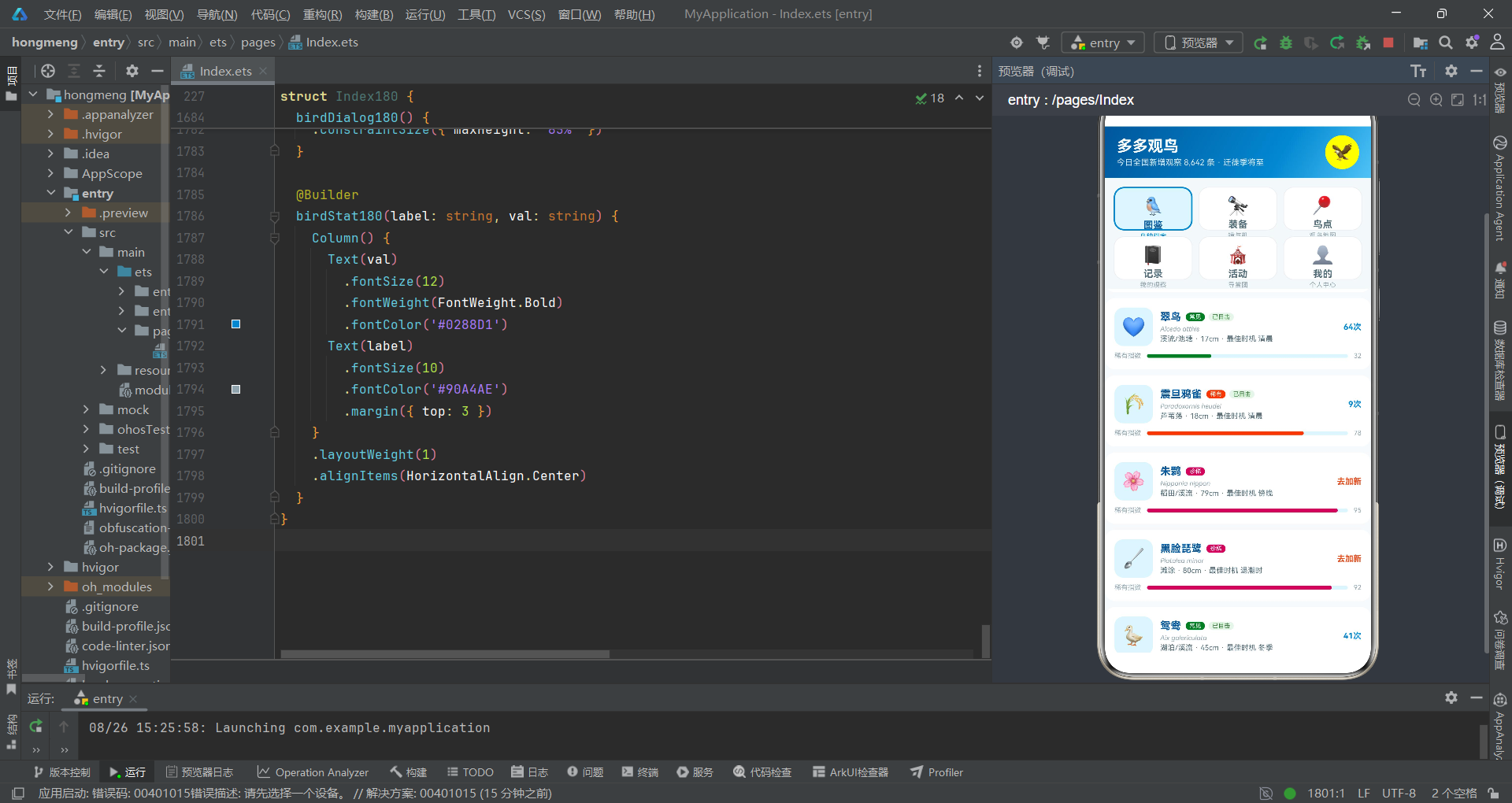
鸟种列表是图鉴页面的核心——使用ForEach遍历BIRDS_180数组,为每个鸟种生成一个卡片。卡片包含三层信息:第一层是基本信息(图标、鸟名、稀有度标签、拉丁学名、栖息地/体型/最佳时机);第二层是状态标识(if (b.seen)条件渲染"已目击"绿色标签,未目击则显示"去加新"橙色文字);第三层是稀有指数横条(双层结构,内层宽度通过rarityBar180(b.rarityScore)动态计算)。
特别值得注意的是if (b.seen)条件渲染——只在鸟种已被目击时才显示"已目击"标签。这是ArkUI if/else条件渲染在ForEach中的典型应用——不是所有数据项都渲染相同的UI结构,而是根据数据字段值动态决定渲染内容。
fontStyle(FontStyle.Italic)设置文本为斜体——拉丁学名使用斜体是生物学命名法的国际惯例。if条件渲染在ForEach中实现了"差异化渲染"——不同数据项可以渲染不同的UI结构。onClick点击鸟种卡片时设置selBird并打开图鉴详情居中弹框,形成"列表->详情"的导航流。
第六手:收官——记录页面之时间轴与状态管理
围棋收官阶段讲究"先手官子"和"后手官子"的区分,每一步都要精打细算。在ArkTS中,记录页面的时间轴渲染和数据状态管理就是收官阶段的精细操作。
6.1 观察记录时间轴之官子次序
  // ===== Tab4 记录 =====
  @Builder
  recordTab180() {
    Column() {
      // 发布按钮卡
      Row() {
        Column() {
          Text('📓')
            .fontSize(30)
        }
        .width(52)
        .height(52)
        .borderRadius(12)
        .backgroundColor('#E1F5FE')
        .justifyContent(FlexAlign.Center)

        Column() {
          Text('记下今天的一次观察')
            .fontSize(14)
            .fontWeight(FontWeight.Bold)
            .fontColor('#01579B')
          Text('累计 ' + this.records.length + ' 条记录 · 覆盖 24 个鸟点')
            .fontSize(10)
            .fontColor('#546E7A')
            .margin({ top: 4 })
        }
        .alignItems(HorizontalAlign.Start)
        .layoutWeight(1)
        .margin({ left: 12 })

        Text('+ 发布')
          .fontSize(12)
          .fontColor('#FFFFFF')
          .backgroundColor('#0288D1')
          .borderRadius(16)
          .padding({ left: 16, right: 16, top: 8, bottom: 8 })
          .onClick(() => {
            this.postBirdName = ''
            this.postNumber = 1
            this.postPublic = true
            this.postWeatherIdx = 0
            this.showPostSheet = true
          })
      }
      .width('100%')
      .padding(13)
      .backgroundColor('#FFFFFF')
      .borderRadius(14)
      .margin({ left: 12, right: 12, top: 12 })
      .shadow({ radius: 3, color: '#0000000A', offsetY: 2 })
记录页面顶部是发布按钮卡——左侧图标,中间标题和统计信息(this.records.length动态显示记录总数),右侧"发布"按钮。发布按钮的onClick中重置所有发布相关状态(清空鸟种名称、重置数量为1、重置天气索引为0、开启分享),然后打开发布抽屉。这种"先重置再打开"的模式如同围棋收官时的"先手官子"——先处理好自己的状态再发起行动。
6.2 时间轴之ForEach与索引条件渲染
      // 记录时间轴
      Text('观察记录')
        .fontSize(14)
        .fontWeight(FontWeight.Bold)
        .fontColor('#01579B')
        .margin({ left: 14, top: 16 })

      ForEach(this.records, (r: Record180, idx?: number) => {
        Row() {
          Column() {
            Text('')
              .width(10)
              .height(10)
              .borderRadius(5)
              .backgroundColor('#0288D1')
            if (idx !== this.records.length - 1) {
              Text('')
                .width(2)
                .height(66)
                .backgroundColor('#E1F5FE')
                .margin({ top: 2 })
            }
          }
          .alignItems(HorizontalAlign.Center)
          .width(14)

          Column() {
            Row() {
              Text(r.bird)
                .fontSize(14)
                .fontWeight(FontWeight.Bold)
                .fontColor('#01579B')
              Text('×' + r.number)
                .fontSize(11)
                .fontColor('#E64A19')
                .margin({ left: 6 })
              Text(r.date + ' · ' + r.weather)
                .fontSize(10)
                .fontColor('#90A4AE')
                .layoutWeight(1)
                .textAlign(TextAlign.End)
            }
            .width('100%')
            Text('📍 ' + r.spot)
              .fontSize(11)
              .fontColor('#00796B')
              .margin({ top: 3 })
            Text('"' + r.note + '"')
              .fontSize(10)
              .fontColor('#546E7A')
              .margin({ top: 3 })
              .lineHeight(15)
            Row() {
              Text('🗑 删除')
                .fontSize(10)
                .fontColor('#E64A19')
                .backgroundColor('#FBE9E7')
                .borderRadius(10)
                .padding({ left: 10, right: 10, top: 3, bottom: 3 })
                .margin({ top: 6 })
                .onClick(() => {
                  this.delRecIdx = idx === undefined ? 0 : idx
                  this.showDelDialog = true
                })
            }
            .margin({ top: 2 })
          }
          .alignItems(HorizontalAlign.Start)
          .layoutWeight(1)
          .margin({ left: 10 })
        }
        .width('100%')
        .margin({ top: 10 })
        .alignItems(VerticalAlign.Top)
      }, (r: Record180) => r.id.toString())
时间轴使用ForEach遍历this.records数组,每条记录左侧渲染一个圆点(10×10圆形蓝色标记)和连接线(2×66竖线浅蓝色)。特别精妙的是if (idx !== this.records.length - 1)条件——只在非最后一条记录时才渲染连接线,确保最后一条记录没有多余的下延线段。这是ForEach中利用索引值进行条件渲染的典型案例。
ForEach的渲染函数可以接收第二个参数idx——当前项的索引(可选参数,类型为number,可能为undefined)。通过idx可以判断当前项是否为最后一项、第一项等位置信息,实现差异化渲染。AlignItems(VerticalAlign.Top)确保时间轴的圆点和内容从顶部对齐。
第七手:鸟友动态之点赞交互——打挂与提子
围棋中的"打挂"是威胁对方棋子,"提子"是吃掉对方棋子。在ArkTS中,点赞交互就如同打挂——通过修改状态数据触发UI变化。
      ForEach(this.buddies, (bd: Buddy180) => {
        Column() {
          Row() {
            Text(bd.avatar)
              .fontSize(28)
              .width(40)
              .height(40)
              .backgroundColor('#E1F5FE')
              .borderRadius(20)
              .textAlign(TextAlign.Center)

            Column() {
              Text(bd.user)
                .fontSize(13)
                .fontWeight(FontWeight.Bold)
                .fontColor('#01579B')
              Text(bd.time + ' · ' + bd.spot)
                .fontSize(9)
                .fontColor('#90A4AE')
                .margin({ top: 2 })
            }
            .alignItems(HorizontalAlign.Start)
            .layoutWeight(1)
            .margin({ left: 10 })

            Column() {
              Text(bd.liked ? '🐦' : '🤍')
                .fontSize(18)
              Text(bd.likes + '')
                .fontSize(9)
                .fontColor(bd.liked ? '#0288D1' : '#90A4AE')
            }
            .onClick(() => {
              this.buddies = this.buddies.map((item: Buddy180) => {
                if (item.id === bd.id) {
                  let nb: Buddy180 = {
                    id: item.id, user: item.user, avatar: item.avatar, time: item.time,
                    text: item.text, bird: item.bird, spot: item.spot,
                    likes: item.liked ? item.likes - 1 : item.likes + 1, liked: !item.liked
                  }
                  return nb
                }
                return item
              })
            })
          }
          .width('100%')

          Text('目击 ' + bd.bird + ':' + bd.text)
            .fontSize(12)
            .fontColor('#455A64')
            .lineHeight(18)
            .margin({ top: 8 })
        }
        .width('100%')
        .padding(13)
        .backgroundColor('#FFFFFF')
        .borderRadius(14)
        .margin({ left: 12, right: 12, top: 8 })
        .shadow({ radius: 3, color: '#0000000A', offsetY: 2 })
      }, (bd: Buddy180) => bd.id.toString() + (bd.liked ? 'L' : 'U'))
鸟友动态的点赞交互与乐评点赞逻辑完全一致——使用map方法遍历数组,匹配bd.id的项创建新对象并翻转liked状态和增减likes计数。注意ForEach的键值函数:(bd: Buddy180) => bd.id.toString() + (bd.liked ? 'L' : 'U')——键值拼接了liked状态,确保状态变化时键值同步变化,触发精准的差分渲染。
map是JavaScript数组的高阶函数,在ArkTS中同样可用。它对数组每个元素执行回调函数,返回一个新数组。在状态管理中,通过map生成全新对象数组并赋值给@State变量,是触发UI更新的标准做法——直接修改对象属性不会触发ArkTS的状态感知,必须创建新引用。
棋局推演流程图
第八手:我的页面之收官总览
  // ===== Tab6 我的 =====
  @Builder
  mineTab180() {
    Column() {
      // 观鸟人卡
      Column() {
        Row() {
          Column() {
            Text('🦉')
              .fontSize(40)
          }
          .width(60)
          .height(60)
          .borderRadius(30)
          .backgroundColor('#FFFFFF22')
          .justifyContent(FlexAlign.Center)

          Column() {
            Text('苇荡听风')
              .fontSize(17)
              .fontWeight(FontWeight.Bold)
              .fontColor('#FFFFFF')
            Text('观鸟 3 年 · 目击 86 种 · 足迹 24 个鸟点')
              .fontSize(11)
              .fontColor('#D7E8F5')
              .margin({ top: 4 })
          }
          .alignItems(HorizontalAlign.Start)
          .layoutWeight(1)
          .margin({ left: 12 })
        }
        .width('100%')
      }
      .width('100%')
      .padding(16)
      .borderRadius(16)
      .linearGradient({
        angle: 135,
        colors: [['#01579B', 0.0], ['#0288D1', 1.0]]
      })
      .margin({ left: 12, right: 12, top: 12 })
      .shadow({ radius: 8, color: '#01579B33', offsetY: 4 })

      // 年度数据
      Row() {
        Column() {
          Text('86')
            .fontSize(17)
            .fontWeight(FontWeight.Bold)
            .fontColor('#0288D1')
          Text('年度鸟种')
            .fontSize(10)
            .fontColor('#90A4AE')
            .margin({ top: 2 })
        }
        .layoutWeight(1)
        .alignItems(HorizontalAlign.Center)

        Column() {
          Text('110')
            .fontSize(17)
            .fontWeight(FontWeight.Bold)
            .fontColor('#0288D1')
          Text('观察次数')
            .fontSize(10)
            .fontColor('#90A4AE')
            .margin({ top: 2 })
        }
        .layoutWeight(1)
        .alignItems(HorizontalAlign.Center)

        Column() {
          Text('9')
            .fontSize(17)
            .fontWeight(FontWeight.Bold)
            .fontColor('#0288D1')
          Text('加新数量')
            .fontSize(10)
            .fontColor('#90A4AE')
            .margin({ top: 2 })
        }
        .layoutWeight(1)
        .alignItems(HorizontalAlign.Center)
      }
      .width('100%')
      .padding(14)
      .backgroundColor('#FFFFFF')
      .borderRadius(14)
      .margin({ left: 12, right: 12, top: 12 })
      .shadow({ radius: 3, color: '#0000000A', offsetY: 2 })
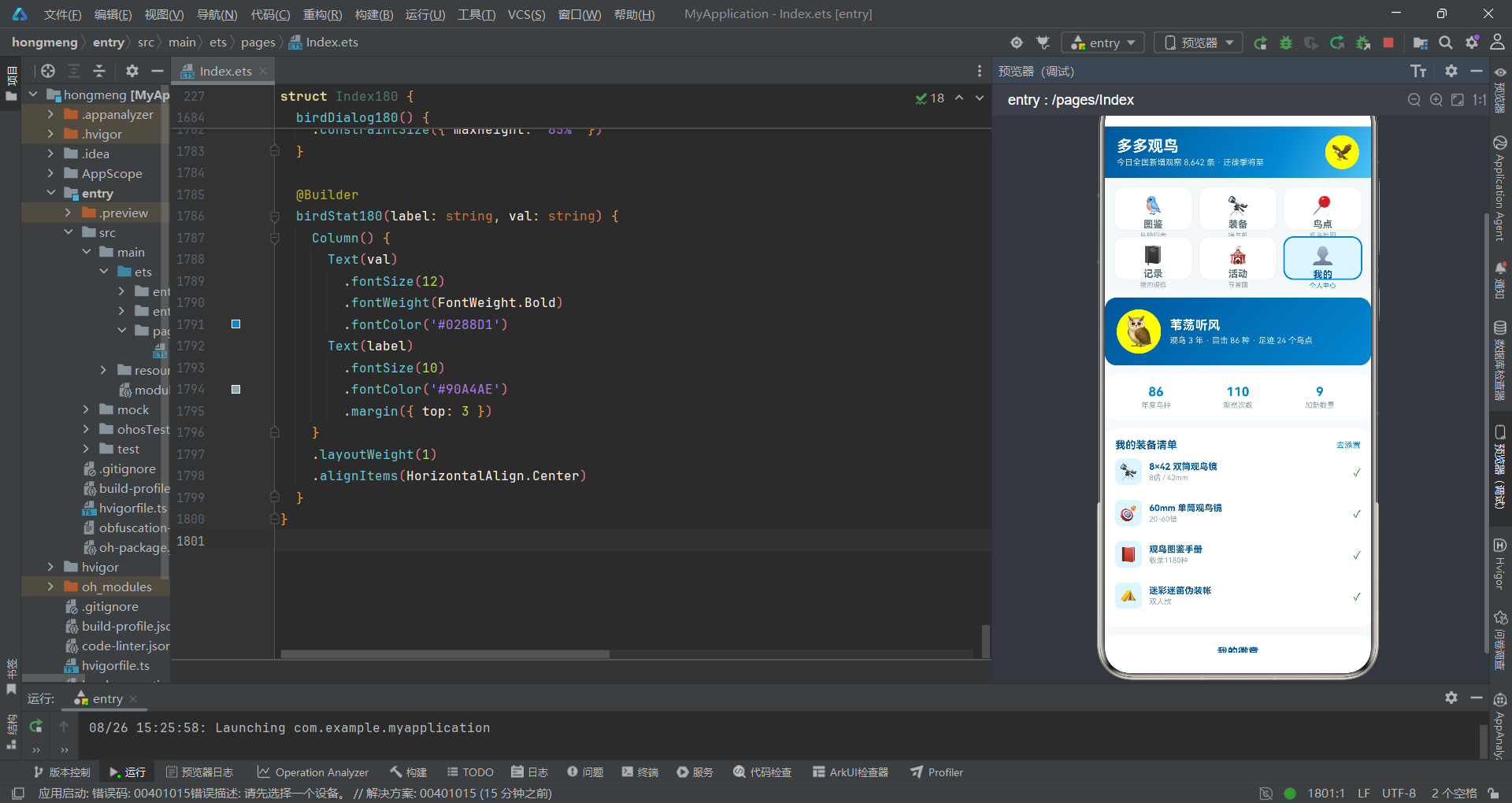
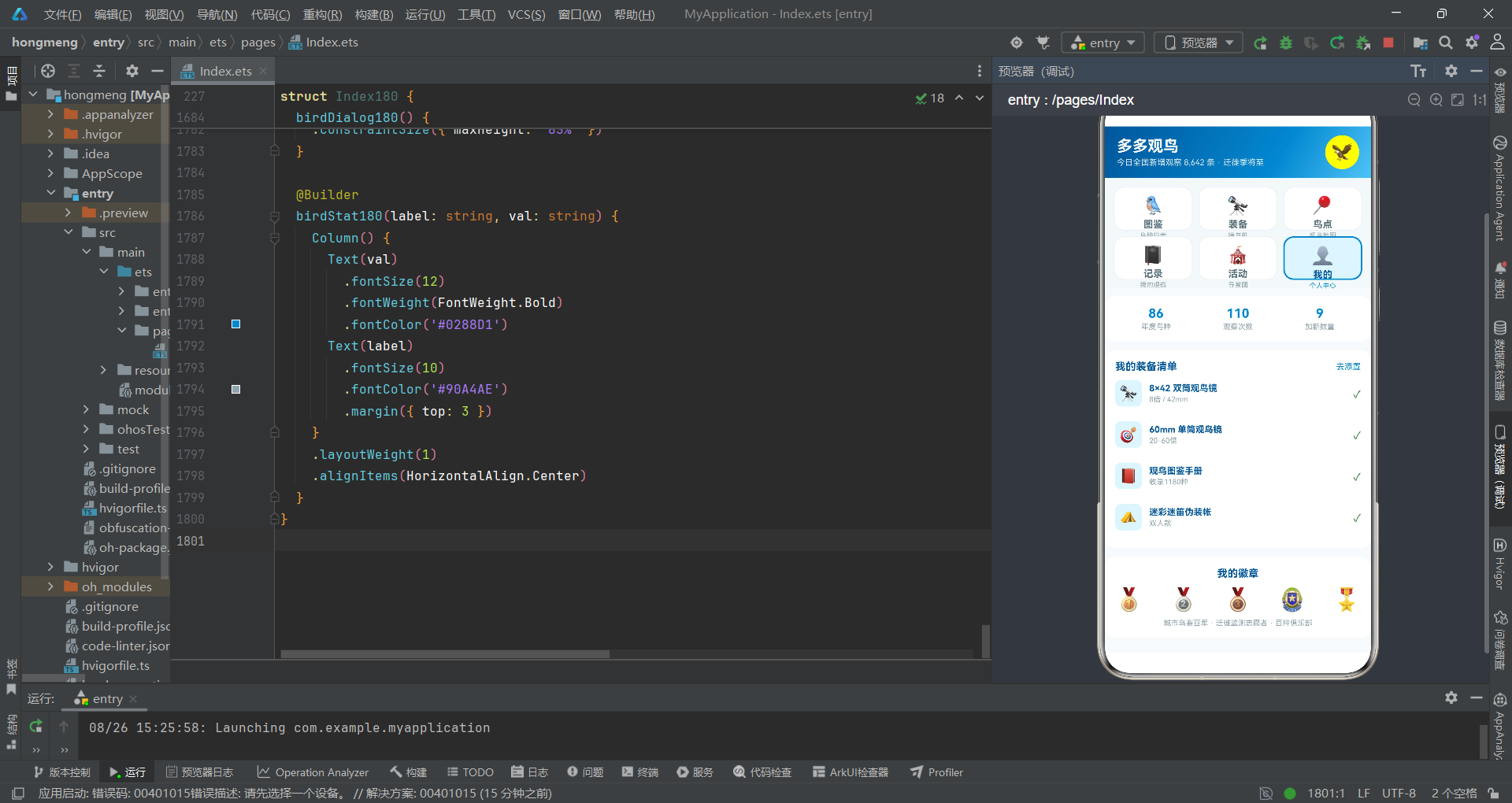
"我的"页面使用linearGradient设置135度蓝色渐变背景的观鸟人卡片——从#01579B到#0288D1,与头部渐变呼应但方向不同(135度vs120度),形成视觉变化。年度数据使用三等分Row布局(每个Column使用layoutWeight(1)),展示年度鸟种数、观察次数和加新数量三项核心统计。
linearGradient的angle参数控制渐变方向——135度从左上到右下,120度从左下到右上。同一应用中不同位置使用不同角度的渐变,可以避免视觉单调。layoutWeight(1)使三个统计项等宽排列,实现三等分布局效果。
技术点对比表格
下表对本系统涉及的核心ArkTS/ArkUI技术点进行系统对比:
| 技术点 | 类别 | 作用描述 | 使用场景 | 棋局类比 |
|---|---|---|---|---|
| @Entry | 装饰器 | 标记页面入口组件 | 页面根组件 | 天元——棋盘中心 |
| @Component | 装饰器 | 声明自定义组件 | 所有可复用UI组件 | 棋子——可复用单元 |
| @State | 状态管理 | 变化触发UI更新 | curTab、弹框开关、选中对象 | 棋手思考——变则应 |
| @Builder | UI构建 | 定义可复用UI函数 | Tab页面、弹框内容 | 定式——可复用棋形 |
| ForEach | 循环渲染 | 根据数据列表生成UI | 鸟种列表、Tab导航、记录列表 | 列阵——批量布局 |
| if/else | 条件渲染 | 根据条件决定渲染分支 | Tab切换、已目击标签、时间轴线 | 打挂——条件应手 |
| Column | 布局容器 | 纵向排列子元素 | 页面结构、卡片内部 | 竖线——纵向棋路 |
| Row | 布局容器 | 横向排列子元素 | 头部布局、标签行、统计行 | 横线——横向棋路 |
| Grid | 网格布局 | 多列网格容器 | 2×3宫格Tab、装备双列 | 星位——网格布阵 |
| GridItem | 网格项 | Grid的子项 | 每个Tab格、每个装备卡 | 交点——网格点位 |
| Scroll | 滚动容器 | 内容超出可滚动 | 内容区、弹框内部 | 长气——延伸棋路 |
| Text | 基础组件 | 显示文本 | 标题、标签、数字 | 棋面文字——标注 |
| Toggle | 交互组件 | 开关切换 | 保险选项、分享开关 | 提子——吃与不吃 |
| TextInput | 输入组件 | 文本输入框 | 鸟种名称、鸟点贴士 | 落子——用户输入 |
| bindSheet | 弹框组件 | 半模态抽屉弹框 | 购买、发布、编辑抽屉 | 打入——斜入战术 |
| bindContentCover | 弹框组件 | 全模态覆盖弹框 | 删除确认、图鉴详情 | 要点——关键位置 |
| linearGradient | 样式方法 | 线性渐变背景 | 头部、观鸟人卡片 | 厚势——渐变气场 |
| layoutWeight | 布局属性 | 弹性分配空间 | 头部左右、统计三等分 | 均分——势力均衡 |
| shadow | 样式方法 | 设置阴影 | 卡片悬浮、选中Tab | 厚薄——视觉层次 |
| cachedCount | 性能优化 | 预渲染项数 | Grid装备列表 | 先手——预判布局 |
| $$this | 双向绑定 | 状态与弹框双向同步 | bindSheet和bindContentCover | 双方应手——同步对弈 |
| splice | 数组方法 | 插入/删除数组元素 | 发布记录时头部插入 | 接收——新子落位 |
| map | 数组方法 | 生成新数组 | 点赞交互生成新对象 | 复盘——重新推演 |
| fontStyle | 样式属性 | 设置斜体 | 拉丁学名 | 变着——特殊棋形 |
安装DevEco Studio程序

选择目标安装目录:

设置环境变量,但是需要重启一下:

新建一个空白模板:

设置API为24的模板项目:

初始化项目,自动下载相关依赖:

完整代码:
// Tab 布局:顶部 2行×3列宫格 tab(图标 + 副文字描述,选中橙色描边)
// 弹框:购买装备(抽屉) / 发布观察记录(抽屉) / 编辑观鸟点(抽屉) / 删除记录(居中) / 鸟种图鉴详情(居中)
interface GridTab180 {
icon: string
label: string
sub: string
}
interface Bird180 {
id: number
name: string
latin: string
rarity: string
rarityScore: number
habitat: string
size: string
bestTime: string
icon: string
color: string
seen: boolean
count: number
}
interface Gear180 {
id: number
name: string
brand: string
price: number
kind: string
spec: string
icon: string
stock: number
score: number
}
interface Spot180 {
id: number
name: string
city: string
birds: number
visitors: number
star: number
type: string
feature: string
open: string
}
interface Record180 {
id: number
date: string
spot: string
bird: string
number: number
weather: string
note: string
}
interface Event180 {
id: number
name: string
date: string
place: string
joins: number
kind: string
}
interface Buddy180 {
id: number
user: string
avatar: string
time: string
text: string
bird: string
spot: string
likes: number
liked: boolean
}
interface MonthCount180 {
month: string
count: number
}
interface RarityRow180 {
level: string
birds: number
color: string
}
const GTABS_180: GridTab180[] = [
{ icon: '🐦', label: '图鉴', sub: '鸟种档案' },
{ icon: '🔭', label: '装备', sub: '镜与机' },
{ icon: '📍', label: '鸟点', sub: '观鸟地图' },
{ icon: '📓', label: '记录', sub: '我的观察' },
{ icon: '🎪', label: '活动', sub: '导赏团' },
{ icon: '👤', label: '我的', sub: '个人中心' }
]
const BIRDS_180: Bird180[] = [
{ id: 1, name: '红隼', latin: 'Falco tinnunculus', rarity: '常见', rarityScore: 20, habitat: '旷野/城区', size: '34cm', bestTime: '清晨', icon: '🦅', color: '#D84315', seen: true, count: 28 },
{ id: 2, name: '白鹭', latin: 'Egretta garzetta', rarity: '常见', rarityScore: 22, habitat: '湿地/水田', size: '60cm', bestTime: '全天', icon: '🕊', color: '#78909C', seen: true, count: 156 },
{ id: 3, name: '翠鸟', latin: 'Alcedo atthis', rarity: '常见', rarityScore: 32, habitat: '溪流/池塘', size: '17cm', bestTime: '清晨', icon: '💙', color: '#0288D1', seen: true, count: 64 },
{ id: 4, name: '震旦鸦雀', latin: 'Paradoxornis heudei', rarity: '稀有', rarityScore: 78, habitat: '芦苇荡', size: '18cm', bestTime: '清晨', icon: '🌾', color: '#F9A825', seen: true, count: 9 },
{ id: 5, name: '朱鹮', latin: 'Nipponia nippon', rarity: '珍稀', rarityScore: 95, habitat: '稻田/溪流', size: '79cm', bestTime: '傍晚', icon: '🌸', color: '#EC407A', seen: false, count: 0 },
{ id: 6, name: '黑脸琵鹭', latin: 'Platalea minor', rarity: '珍稀', rarityScore: 92, habitat: '滩涂', size: '80cm', bestTime: '退潮时', icon: '🥄', color: '#455A64', seen: false, count: 0 },
{ id: 7, name: '鸳鸯', latin: 'Aix galericulata', rarity: '常见', rarityScore: 35, habitat: '湖泊/溪流', size: '45cm', bestTime: '冬季', icon: '🦆', color: '#E91E63', seen: true, count: 41 },
{ id: 8, name: '戴胜', latin: 'Upupa epops', rarity: '常见', rarityScore: 38, habitat: '草地/林缘', size: '28cm', bestTime: '上午', icon: '👑', color: '#FB8C00', seen: true, count: 22 },
{ id: 9, name: '蓝喉蜂虎', latin: 'Merops viridis', rarity: '稀有', rarityScore: 72, habitat: '河岸沙地', size: '28cm', bestTime: '夏季午后', icon: '💎', color: '#3949AB', seen: true, count: 6 },
{ id: 10, name: '仙八色鸫', latin: 'Pitta nympha', rarity: '珍稀', rarityScore: 88, habitat: '湿润林地', size: '20cm', bestTime: '迁徙季', icon: '🌈', color: '#7B1FA2', seen: false, count: 0 }
]
const GEARS_180: Gear180[] = [
{ id: 1, name: '8×42 双筒观鸟镜', brand: '裕众', price: 1880, kind: '双筒镜', spec: '8倍 / 42mm', icon: '🔭', stock: 23, score: 4.8 },
{ id: 2, name: '60mm 单筒观鸟镜', brand: '星特朗', price: 3280, kind: '单筒镜', spec: '20-60倍', icon: '🎯', stock: 14, score: 4.7 },
{ id: 3, name: '观鸟图鉴手册', brand: '商务印书馆', price: 128, kind: '书籍', spec: '收录1180种', icon: '📕', stock: 210, score: 4.9 },
{ id: 4, name: '迷彩迷笛伪装帐', brand: '探路者', price: 459, kind: '隐蔽', spec: '双人款', icon: '⛺', stock: 18, score: 4.5 },
{ id: 5, name: '长焦相机 R7+100-500', brand: '佳能', price: 22800, kind: '拍摄', spec: 'APS-C 长焦套', icon: '📷', stock: 5, score: 5.0 },
{ id: 6, name: '户外记录笔记本', brand: '多多定制', price: 39, kind: '周边', spec: '防水页', icon: '📓', stock: 620, score: 4.6 },
{ id: 7, name: '防滑徒步鞋', brand: '凯乐石', price: 699, kind: '穿着', spec: '防水透湿', icon: '🥾', stock: 47, score: 4.7 },
{ id: 8, name: '鸟鸣录音笔', brand: 'Zoom', price: 1290, kind: '录制', spec: '指向性麦', icon: '🎙', stock: 11, score: 4.8 },
{ id: 9, name: '便携三脚架', brand: '思锐', price: 588, kind: '配件', spec: '碳纤维1.2kg', icon: '🦵', stock: 33, score: 4.4 },
{ id: 10, name: '观鸟马甲多口袋', brand: '多多定制', price: 189, kind: '穿着', spec: '12口袋', icon: '🦺', stock: 95, score: 4.5 }
]
const SPOTS_180: Spot180[] = [
{ id: 1, name: '东滩湿地公园', city: '上海崇明', birds: 312, visitors: 2860, star: 5, type: '滩涂', feature: '水鸟迁徙大动脉', open: '08:00-17:00' },
{ id: 2, name: '野鸭湖湿地', city: '北京延庆', birds: 264, visitors: 3120, star: 5, type: '湖泊', feature: '冬候鸟胜地', open: '07:30-18:00' },
{ id: 3, name: '红树林保护区', city: '深圳湾', birds: 289, visitors: 4500, star: 5, type: '滩涂', feature: '黑脸琵鹭越冬地', open: '全天' },
{ id: 4, name: '百花岭', city: '云南保山', birds: 343, visitors: 1240, star: 5, type: '山地', feature: '观鸟圣地·鸟塘众多', open: '全天' },
{ id: 5, name: '北戴河沿海', city: '河北秦皇岛', birds: 415, visitors: 1980, star: 5, type: '海岸', feature: '春季猛禽过境', open: '全天' },
{ id: 6, name: '莲花山芦苇荡', city: '江苏盐城', birds: 187, visitors: 860, star: 4, type: '芦苇', feature: '震旦鸦雀栖息地', open: '07:00-18:00' },
{ id: 7, name: '西溪湿地', city: '杭州', birds: 176, visitors: 5200, star: 4, type: '湿地', feature: '城市观鸟首选', open: '08:00-17:30' },
{ id: 8, name: '草海自然保护区', city: '贵州威宁', birds: 246, visitors: 940, star: 5, type: '高原湖泊', feature: '黑颈鹤越冬', open: '08:30-17:00' }
]
const RECORDS_180: Record180[] = [
{ id: 1, date: '08-24', spot: '东滩湿地公园', bird: '黑腹滨鹬', number: 240, weather: '多云转晴', note: '大群在滩涂觅食,混有少量翘嘴鹬' },
{ id: 2, date: '08-23', spot: '莲花山芦苇荡', bird: '震旦鸦雀', number: 3, weather: '晴', note: '芦苇杆间跳跃,叫声连续清脆' },
{ id: 3, date: '08-20', spot: '西溪湿地', bird: '普通翠鸟', number: 2, weather: '阴', note: '定点悬停捕鱼,光线一般拍糊了' },
{ id: 4, date: '08-18', spot: '北戴河沿海', bird: '红脚隼', number: 37, weather: '晴', note: '迁徙过境高峰,群盘旋后向南' },
{ id: 5, date: '08-15', spot: '野鸭湖湿地', bird: '白琵鹭', number: 12, weather: '晴', note: '浅水区扫食,距离约120米' },
{ id: 6, date: '08-11', spot: '百花岭', bird: '血雉', number: 6, weather: '小雨', note: '晨间鸟塘出现,雌雄同群' },
{ id: 7, date: '08-08', spot: '红树林保护区', bird: '蓝翡翠', number: 1, weather: '晴', note: '单独一只停在红树枝头' },
{ id: 8, date: '08-05', spot: '草海自然保护区', bird: '紫水鸡', number: 4, weather: '多云', note: '水草间游动,紫色羽色明显' }
]
const EVENTS_180: Event180[] = [
{ id: 1, name: '新人观鸟启蒙导赏', date: '09-06', place: '西溪湿地', joins: 24, kind: '导赏' },
{ id: 2, name: '猛禽过境监测志愿行', date: '09-13', place: '北戴河', joins: 16, kind: '监测' },
{ id: 3, name: '滩涂水鸟同步调查', date: '09-20', place: '东滩湿地', joins: 32, kind: '调查' },
{ id: 4, name: '秋季城市公园鸟赛', date: '10-01', place: '市区各公园', joins: 48, kind: '比赛' },
{ id: 5, name: '百花岭鸟塘摄影团', date: '10-18', place: '百花岭', joins: 12, kind: '摄影' },
{ id: 6, name: '越冬水鸟普查培训', date: '11-02', place: '线上+野鸭湖', joins: 60, kind: '培训' }
]
const BUDDIES_180: Buddy180[] = [
{ id: 1, user: '芦苇守望者', avatar: '🌾', time: '15分钟前', text: '今天莲花山加新成功!震旦鸦雀一家三口在眼前跳了十分钟', bird: '震旦鸦雀', spot: '莲花山芦苇荡', likes: 66, liked: false },
{ id: 2, user: '长焦老兵', avatar: '📷', time: '1小时前', text: '蹲了三个早晨,终于拍到清晰的蓝喉蜂虎入水瞬间', bird: '蓝喉蜂虎', spot: '红树林保护区', likes: 94, liked: true },
{ id: 3, user: '勺嘴遇见', avatar: '🥄', time: '3小时前', text: '退潮后的滩涂太热闹了,数了数黑腹滨鹬至少五百只起步', bird: '黑腹滨鹬', spot: '东滩湿地公园', likes: 51, liked: false },
{ id: 4, user: '高山血雉', avatar: '🏔', time: '6小时前', text: '百花岭的鸟塘果然名不虚传,一上午收获23种', bird: '血雉', spot: '百花岭', likes: 78, liked: false },
{ id: 5, user: '城市听鸟人', avatar: '👂', time: '昨天', text: '不用望远镜,光靠叫声就在小区里数出了11种鸟', bird: '强脚树莺', spot: '自家小区', likes: 62, liked: false },
{ id: 6, user: '湿地小学生', avatar: '🎒', time: '昨天', text: '第一次参加导赏团,原来白鹭和大白鹭不是一种!', bird: '大白鹭', spot: '西溪湿地', likes: 45, liked: false }
]
const MONTH_COUNTS_180: MonthCount180[] = [
{ month: '3月', count: 18 },
{ month: '4月', count: 26 },
{ month: '5月', count: 31 },
{ month: '6月', count: 14 },
{ month: '7月', count: 9 },
{ month: '8月', count: 12 }
]
const RARITY_ROWS_180: RarityRow180[] = [
{ level: '常见', birds: 52, color: '#81C784' },
{ level: '不常见', birds: 21, color: '#FFB74D' },
{ level: '稀有', birds: 9, color: '#E64A19' },
{ level: '珍稀', birds: 4, color: '#C2185B' }
]
// 稀有度横条
function rarityBar180(rarityScore: number): string {
return rarityScore + '%'
}
// 鸟点访客横条(最大 5200)
function visitorsBar180(visitors: number): string {
return (visitors * 100 / 5200).toFixed(1) + '%'
}
// 月度记录柱高(最大 31)
function monthH180(count: number): string {
return (count * 100 / 31).toFixed(1) + '%'
}
// 装备价格柱高(最大 22800 映射)
function gearH180(price: number): string {
return (price * 100 / 22800).toFixed(1) + '%'
}
// 稀有度色
function rarityColor180(rarity: string): string {
if (rarity === '常见') {
return '#2E7D32'
}
if (rarity === '不常见') {
return '#F9A825'
}
if (rarity === '稀有') {
return '#E64A19'
}
return '#C2185B'
}
// 鸟点星级
function stars180(star: number): string {
if (star >= 5) {
return '★★★★★'
}
return '★★★★☆'
}
@Entry
@Component
struct Index180 {
@State curTab: number = 0
@State showGearSheet: boolean = false
@State showPostSheet: boolean = false
@State showSpotSheet: boolean = false
@State showDelDialog: boolean = false
@State showBirdDialog: boolean = false
@State selGear: Gear180 = GEARS_180[0]
@State selSpot: Spot180 = SPOTS_180[0]
@State selBird: Bird180 = BIRDS_180[0]
@State delRecIdx: number = 0
@State gearQty: number = 1
@State gearInsurance: boolean = true
@State postBirdName: string = ''
@State postNumber: number = 1
@State postPublic: boolean = true
@State postWeatherIdx: number = 0
@State records: Record180[] = RECORDS_180
@State buddies: Buddy180[] = BUDDIES_180
@State weatherOptions: string[] = ['晴', '多云', '阴', '小雨', '大风']
build() {
Column() {
// ===== 自然纪录风头部 =====
Column() {
Row() {
Column() {
Text('多多观鸟')
.fontSize(21)
.fontWeight(FontWeight.Bold)
.fontColor('#FFFFFF')
Text('今日全国新增观察 8,642 条 · 迁徙季将至')
.fontSize(11)
.fontColor('#D7E8F5')
.margin({ top: 3 })
}
.alignItems(HorizontalAlign.Start)
.layoutWeight(1)
Column() {
Text('🦅')
.fontSize(24)
}
.width(46)
.height(46)
.borderRadius(23)
.backgroundColor('#FFFFFF22')
.justifyContent(FlexAlign.Center)
}
.width('100%')
.padding({ left: 16, right: 16, top: 12, bottom: 12 })
}
.width('100%')
.linearGradient({
angle: 120,
colors: [['#01579B', 0.0], ['#0288D1', 0.65], ['#4FC3F7', 1.0]]
})
// ===== 2×3 宫格 Tab =====
Grid() {
ForEach(GTABS_180, (t: GridTab180, idx?: number) => {
GridItem() {
Column() {
Text(t.icon)
.fontSize(24)
Text(t.label)
.fontSize(13)
.fontWeight(FontWeight.Bold)
.fontColor(this.curTab === idx ? '#01579B' : '#546E7A')
.margin({ top: 4 })
Text(t.sub)
.fontSize(9)
.fontColor(this.curTab === idx ? '#0288D1' : '#90A4AE')
.margin({ top: 2 })
}
.width('100%')
.padding({ top: 10, bottom: 10 })
.borderRadius(14)
.backgroundColor(this.curTab === idx ? '#E1F5FE' : '#FFFFFF')
.border({ width: this.curTab === idx ? 2 : 1, color: this.curTab === idx ? '#0288D1' : '#ECEFF1' })
.shadow({
radius: this.curTab === idx ? 8 : 2,
color: this.curTab === idx ? '#0288D133' : '#0000000A',
offsetY: 2
})
.onClick(() => {
this.curTab = idx === undefined ? 0 : idx
})
}
}, (t: GridTab180) => t.label)
}
.columnsTemplate('1fr 1fr 1fr')
.rowsTemplate('1fr 1fr')
.width('100%')
.height(150)
.padding(12)
.columnsGap(8)
.rowsGap(8)
.backgroundColor('#F4F8FB')
// ===== 内容区 =====
Scroll() {
Column() {
if (this.curTab === 0) {
this.birdTab180()
}
if (this.curTab === 1) {
this.gearTab180()
}
if (this.curTab === 2) {
this.spotTab180()
}
if (this.curTab === 3) {
this.recordTab180()
}
if (this.curTab === 4) {
this.eventTab180()
}
if (this.curTab === 5) {
this.mineTab180()
}
}
.width('100%')
}
.layoutWeight(1)
.scrollBar(BarState.Off)
.backgroundColor('#F7FAFC')
}
.width('100%')
.height('100%')
.bindSheet($$this.showGearSheet, this.gearSheet180(), {
height: 540,
dragBar: true,
showClose: true,
backgroundColor: '#FFFFFF'
})
.bindSheet($$this.showPostSheet, this.postSheet180(), {
height: 560,
dragBar: true,
showClose: true,
backgroundColor: '#FFFFFF'
})
.bindSheet($$this.showSpotSheet, this.spotSheet180(), {
height: 520,
dragBar: true,
showClose: true,
backgroundColor: '#FFFFFF'
})
.bindContentCover($$this.showDelDialog, this.delDialog180(), {
})
.bindContentCover($$this.showBirdDialog, this.birdDialog180(), {
})
}
// ===== Tab1 图鉴 =====
@Builder
birdTab180() {
Column() {
// 稀有度构成横条
Column() {
Text('我的目击清单构成(86 种)')
.fontSize(14)
.fontWeight(FontWeight.Bold)
.fontColor('#01579B')
ForEach(RARITY_ROWS_180, (r: RarityRow180) => {
Row() {
Text(r.level)
.fontSize(11)
.fontColor('#546E7A')
.width(52)
Row() {
Text('')
.height(10)
.width((r.birds * 100 / 52).toFixed(1) + '%')
.backgroundColor(r.color)
.borderRadius(5)
}
.layoutWeight(1)
.height(10)
.backgroundColor('#E1F5FE')
.borderRadius(5)
Text(r.birds + ' 种')
.fontSize(10)
.fontColor('#0288D1')
.width(44)
.textAlign(TextAlign.End)
}
.width('100%')
.margin({ top: 8 })
}, (r: RarityRow180) => r.level)
}
.width('100%')
.padding(14)
.backgroundColor('#FFFFFF')
.borderRadius(14)
.margin({ left: 12, right: 12, top: 12 })
.shadow({ radius: 3, color: '#01579B14', offsetY: 2 })
// 鸟种列表
Row() {
Text('热门鸟种图鉴')
.fontSize(14)
.fontWeight(FontWeight.Bold)
.fontColor('#01579B')
.layoutWeight(1)
Text('按稀有度 ▾')
.fontSize(11)
.fontColor('#0288D1')
}
.width('100%')
.padding({ left: 14, right: 14, top: 16 })
ForEach(BIRDS_180, (b: Bird180) => {
Column() {
Row() {
Column() {
Text(b.icon)
.fontSize(26)
}
.width(52)
.height(52)
.borderRadius(12)
.backgroundColor('#E1F5FE')
.justifyContent(FlexAlign.Center)
Column() {
Row() {
Text(b.name)
.fontSize(14)
.fontWeight(FontWeight.Bold)
.fontColor('#01579B')
Text(b.rarity)
.fontSize(8)
.fontColor('#FFFFFF')
.backgroundColor(rarityColor180(b.rarity))
.borderRadius(6)
.padding({ left: 5, right: 5, top: 1, bottom: 1 })
.margin({ left: 6 })
if (b.seen) {
Text('已目击')
.fontSize(8)
.fontColor('#2E7D32')
.backgroundColor('#E8F5E9')
.borderRadius(6)
.padding({ left: 5, right: 5, top: 1, bottom: 1 })
.margin({ left: 5 })
}
}
Text(b.latin)
.fontSize(9)
.fontColor('#90A4AE')
.fontStyle(FontStyle.Italic)
.margin({ top: 3 })
Text(b.habitat + ' · ' + b.size + ' · 最佳时机 ' + b.bestTime)
.fontSize(10)
.fontColor('#546E7A')
.margin({ top: 2 })
}
.alignItems(HorizontalAlign.Start)
.layoutWeight(1)
.margin({ left: 10 })
Column() {
Text(b.seen ? b.count + '次' : '去加新')
.fontSize(11)
.fontWeight(FontWeight.Bold)
.fontColor(b.seen ? '#0288D1' : '#E64A19')
}
}
.width('100%')
Row() {
Text('稀有指数')
.fontSize(9)
.fontColor('#90A4AE')
Row() {
Text('')
.height(5)
.width(rarityBar180(b.rarityScore))
.backgroundColor(rarityColor180(b.rarity))
.borderRadius(3)
}
.layoutWeight(1)
.height(5)
.backgroundColor('#E1F5FE')
.borderRadius(3)
.margin({ left: 8, right: 8 })
Text(b.rarityScore + '')
.fontSize(9)
.fontColor('#90A4AE')
}
.width('100%')
.margin({ top: 8 })
}
.width('100%')
.padding(13)
.backgroundColor('#FFFFFF')
.borderRadius(14)
.margin({ left: 12, right: 12, top: 8 })
.shadow({ radius: 3, color: '#0000000A', offsetY: 2 })
.onClick(() => {
this.selBird = b
this.showBirdDialog = true
})
}, (b: Bird180) => b.id.toString())
}
.width('100%')
.padding({ bottom: 20 })
}
// ===== Tab2 装备 =====
@Builder
gearTab180() {
Column() {
Text('观鸟装备商城')
.fontSize(14)
.fontWeight(FontWeight.Bold)
.fontColor('#01579B')
.margin({ left: 14, top: 12 })
// 装备双列
Grid() {
ForEach(GEARS_180, (g: Gear180) => {
GridItem() {
Column() {
Row() {
Text(g.icon)
.fontSize(30)
Text(g.score + '分')
.fontSize(9)
.fontColor('#F9A825')
}
.width('100%')
.justifyContent(FlexAlign.SpaceBetween)
Text(g.name)
.fontSize(12)
.fontWeight(FontWeight.Bold)
.fontColor('#01579B')
.maxLines(2)
.textOverflow({ overflow: TextOverflow.Ellipsis })
.margin({ top: 8 })
Text(g.brand + ' · ' + g.spec)
.fontSize(9)
.fontColor('#90A4AE')
.margin({ top: 4 })
Row() {
Text('¥' + g.price)
.fontSize(15)
.fontWeight(FontWeight.Bold)
.fontColor('#E64A19')
.layoutWeight(1)
Text(g.kind)
.fontSize(9)
.fontColor('#0288D1')
.backgroundColor('#E1F5FE')
.borderRadius(8)
.padding({ left: 6, right: 6, top: 2, bottom: 2 })
}
.width('100%')
.margin({ top: 6 })
}
.width('100%')
.padding(12)
.backgroundColor('#FFFFFF')
.borderRadius(12)
.shadow({ radius: 3, color: '#0000000A', offsetY: 2 })
.onClick(() => {
this.selGear = g
this.gearQty = 1
this.gearInsurance = true
this.showGearSheet = true
})
}
}, (g: Gear180) => g.id.toString())
}
.columnsTemplate('1fr 1fr')
.rowsGap(10)
.columnsGap(10)
.width('100%')
.height(1050)
.padding({ left: 12, right: 12, top: 10 })
.cachedCount(2)
// 价格柱状图
Column() {
Text('装备价格对比(元,对数感示意)')
.fontSize(14)
.fontWeight(FontWeight.Bold)
.fontColor('#01579B')
Row() {
ForEach(GEARS_180.slice(0, 6), (g: Gear180) => {
Column() {
Text(g.price + '')
.fontSize(8)
.fontColor('#E64A19')
Text('')
.width(18)
.height(gearH180(g.price))
.backgroundColor('#0288D1')
.borderRadius(4)
Text(g.kind)
.fontSize(8)
.fontColor('#90A4AE')
.margin({ top: 4 })
.maxLines(1)
}
.layoutWeight(1)
.alignItems(HorizontalAlign.Center)
.justifyContent(FlexAlign.End)
}, (g: Gear180) => g.id.toString())
}
.width('100%')
.height(110)
.alignItems(VerticalAlign.Bottom)
.margin({ top: 10 })
}
.width('100%')
.padding(14)
.backgroundColor('#FFFFFF')
.borderRadius(14)
.margin({ left: 12, right: 12, top: 14, bottom: 20 })
.shadow({ radius: 3, color: '#0000000A', offsetY: 2 })
}
.width('100%')
}
// ===== Tab3 鸟点 =====
@Builder
spotTab180() {
Column() {
Text('热门观鸟点')
.fontSize(14)
.fontWeight(FontWeight.Bold)
.fontColor('#01579B')
.margin({ left: 14, top: 12 })
ForEach(SPOTS_180, (s: Spot180) => {
Column() {
Row() {
Column() {
Text(s.birds + '')
.fontSize(17)
.fontWeight(FontWeight.Bold)
.fontColor('#FFFFFF')
Text('鸟种')
.fontSize(8)
.fontColor('#D7E8F5')
.margin({ top: 2 })
}
.width(54)
.height(54)
.borderRadius(12)
.backgroundColor('#0288D1')
.justifyContent(FlexAlign.Center)
Column() {
Row() {
Text(s.name)
.fontSize(14)
.fontWeight(FontWeight.Bold)
.fontColor('#01579B')
Text(s.type)
.fontSize(8)
.fontColor('#00796B')
.backgroundColor('#E0F2F1')
.borderRadius(6)
.padding({ left: 5, right: 5, top: 1, bottom: 1 })
.margin({ left: 6 })
}
Text(s.city + ' · ' + stars180(s.star) + ' · 开放 ' + s.open)
.fontSize(10)
.fontColor('#546E7A')
.margin({ top: 3 })
Text('特色:' + s.feature)
.fontSize(10)
.fontColor('#00796B')
.margin({ top: 2 })
}
.alignItems(HorizontalAlign.Start)
.layoutWeight(1)
.margin({ left: 10 })
Column() {
Text('编辑')
.fontSize(10)
.fontColor('#0288D1')
.border({ width: 1, color: '#0288D1' })
.borderRadius(12)
.padding({ left: 10, right: 10, top: 4, bottom: 4 })
}
.onClick(() => {
this.selSpot = s
this.showSpotSheet = true
})
}
.width('100%')
Row() {
Text('本月 ' + s.visitors + ' 人到访')
.fontSize(9)
.fontColor('#90A4AE')
Row() {
Text('')
.height(5)
.width(visitorsBar180(s.visitors))
.backgroundColor('#4FC3F7')
.borderRadius(3)
}
.layoutWeight(1)
.height(5)
.backgroundColor('#E1F5FE')
.borderRadius(3)
.margin({ left: 8, right: 8 })
Text('热')
.fontSize(9)
.fontColor('#E64A19')
}
.width('100%')
.margin({ top: 10 })
}
.width('100%')
.padding(13)
.backgroundColor('#FFFFFF')
.borderRadius(14)
.margin({ left: 12, right: 12, top: 8 })
.shadow({ radius: 3, color: '#0000000A', offsetY: 2 })
.onClick(() => {
this.selSpot = s
this.showSpotSheet = true
})
}, (s: Spot180) => s.id.toString())
}
.width('100%')
.padding({ bottom: 20 })
}
// ===== Tab4 记录 =====
@Builder
recordTab180() {
Column() {
// 发布按钮卡
Row() {
Column() {
Text('📓')
.fontSize(30)
}
.width(52)
.height(52)
.borderRadius(12)
.backgroundColor('#E1F5FE')
.justifyContent(FlexAlign.Center)
Column() {
Text('记下今天的一次观察')
.fontSize(14)
.fontWeight(FontWeight.Bold)
.fontColor('#01579B')
Text('累计 ' + this.records.length + ' 条记录 · 覆盖 24 个鸟点')
.fontSize(10)
.fontColor('#546E7A')
.margin({ top: 4 })
}
.alignItems(HorizontalAlign.Start)
.layoutWeight(1)
.margin({ left: 12 })
Text('+ 发布')
.fontSize(12)
.fontColor('#FFFFFF')
.backgroundColor('#0288D1')
.borderRadius(16)
.padding({ left: 16, right: 16, top: 8, bottom: 8 })
.onClick(() => {
this.postBirdName = ''
this.postNumber = 1
this.postPublic = true
this.postWeatherIdx = 0
this.showPostSheet = true
})
}
.width('100%')
.padding(13)
.backgroundColor('#FFFFFF')
.borderRadius(14)
.margin({ left: 12, right: 12, top: 12 })
.shadow({ radius: 3, color: '#0000000A', offsetY: 2 })
// 月度记录柱状图
Column() {
Text('我的月度观察次数')
.fontSize(14)
.fontWeight(FontWeight.Bold)
.fontColor('#01579B')
Row() {
ForEach(MONTH_COUNTS_180, (m: MonthCount180) => {
Column() {
Text(m.count + '')
.fontSize(9)
.fontColor('#0288D1')
Text('')
.width(22)
.height(monthH180(m.count))
.backgroundColor('#4FC3F7')
.borderRadius(4)
Text(m.month)
.fontSize(9)
.fontColor('#90A4AE')
.margin({ top: 4 })
}
.layoutWeight(1)
.alignItems(HorizontalAlign.Center)
.justifyContent(FlexAlign.End)
}, (m: MonthCount180) => m.month)
}
.width('100%')
.height(110)
.alignItems(VerticalAlign.Bottom)
.margin({ top: 10 })
}
.width('100%')
.padding(14)
.backgroundColor('#FFFFFF')
.borderRadius(14)
.margin({ left: 12, right: 12, top: 12 })
.shadow({ radius: 3, color: '#0000000A', offsetY: 2 })
// 记录时间轴
Text('观察记录')
.fontSize(14)
.fontWeight(FontWeight.Bold)
.fontColor('#01579B')
.margin({ left: 14, top: 16 })
ForEach(this.records, (r: Record180, idx?: number) => {
Row() {
Column() {
Text('')
.width(10)
.height(10)
.borderRadius(5)
.backgroundColor('#0288D1')
if (idx !== this.records.length - 1) {
Text('')
.width(2)
.height(66)
.backgroundColor('#E1F5FE')
.margin({ top: 2 })
}
}
.alignItems(HorizontalAlign.Center)
.width(14)
Column() {
Row() {
Text(r.bird)
.fontSize(14)
.fontWeight(FontWeight.Bold)
.fontColor('#01579B')
Text('×' + r.number)
.fontSize(11)
.fontColor('#E64A19')
.margin({ left: 6 })
Text(r.date + ' · ' + r.weather)
.fontSize(10)
.fontColor('#90A4AE')
.layoutWeight(1)
.textAlign(TextAlign.End)
}
.width('100%')
Text('📍 ' + r.spot)
.fontSize(11)
.fontColor('#00796B')
.margin({ top: 3 })
Text('"' + r.note + '"')
.fontSize(10)
.fontColor('#546E7A')
.margin({ top: 3 })
.lineHeight(15)
Row() {
Text('🗑 删除')
.fontSize(10)
.fontColor('#E64A19')
.backgroundColor('#FBE9E7')
.borderRadius(10)
.padding({ left: 10, right: 10, top: 3, bottom: 3 })
.margin({ top: 6 })
.onClick(() => {
this.delRecIdx = idx === undefined ? 0 : idx
this.showDelDialog = true
})
}
.margin({ top: 2 })
}
.alignItems(HorizontalAlign.Start)
.layoutWeight(1)
.margin({ left: 10 })
}
.width('100%')
.margin({ top: 10 })
.alignItems(VerticalAlign.Top)
}, (r: Record180) => r.id.toString())
}
.width('100%')
.padding({ bottom: 20 })
}
// ===== Tab5 活动 =====
@Builder
eventTab180() {
Column() {
Text('近期观鸟活动')
.fontSize(14)
.fontWeight(FontWeight.Bold)
.fontColor('#01579B')
.margin({ left: 14, top: 12 })
ForEach(EVENTS_180, (e: Event180) => {
Column() {
Row() {
Column() {
Text(e.date.substring(3, 5) + '日')
.fontSize(16)
.fontWeight(FontWeight.Bold)
.fontColor('#FFFFFF')
Text(e.date.substring(0, 2) + '月')
.fontSize(9)
.fontColor('#D7E8F5')
}
.width(50)
.height(50)
.borderRadius(12)
.backgroundColor('#00796B')
.justifyContent(FlexAlign.Center)
Column() {
Row() {
Text(e.name)
.fontSize(13)
.fontWeight(FontWeight.Bold)
.fontColor('#01579B')
.maxLines(1)
.textOverflow({ overflow: TextOverflow.Ellipsis })
Text(e.kind)
.fontSize(8)
.fontColor('#FFFFFF')
.backgroundColor('#0288D1')
.borderRadius(6)
.padding({ left: 5, right: 5, top: 1, bottom: 1 })
.margin({ left: 6 })
}
Text('📍 ' + e.place + ' · 已报名 ' + e.joins + ' 人')
.fontSize(10)
.fontColor('#546E7A')
.margin({ top: 4 })
}
.alignItems(HorizontalAlign.Start)
.layoutWeight(1)
.margin({ left: 10 })
Text('报名')
.fontSize(11)
.fontColor('#FFFFFF')
.backgroundColor('#0288D1')
.borderRadius(14)
.padding({ left: 14, right: 14, top: 6, bottom: 6 })
}
.width('100%')
}
.width('100%')
.padding(13)
.backgroundColor('#FFFFFF')
.borderRadius(14)
.margin({ left: 12, right: 12, top: 8 })
.shadow({ radius: 3, color: '#0000000A', offsetY: 2 })
}, (e: Event180) => e.id.toString())
// 鸟友动态
Text('鸟友动态')
.fontSize(14)
.fontWeight(FontWeight.Bold)
.fontColor('#01579B')
.margin({ left: 14, top: 18 })
ForEach(this.buddies, (bd: Buddy180) => {
Column() {
Row() {
Text(bd.avatar)
.fontSize(28)
.width(40)
.height(40)
.backgroundColor('#E1F5FE')
.borderRadius(20)
.textAlign(TextAlign.Center)
Column() {
Text(bd.user)
.fontSize(13)
.fontWeight(FontWeight.Bold)
.fontColor('#01579B')
Text(bd.time + ' · ' + bd.spot)
.fontSize(9)
.fontColor('#90A4AE')
.margin({ top: 2 })
}
.alignItems(HorizontalAlign.Start)
.layoutWeight(1)
.margin({ left: 10 })
Column() {
Text(bd.liked ? '🐦' : '🤍')
.fontSize(18)
Text(bd.likes + '')
.fontSize(9)
.fontColor(bd.liked ? '#0288D1' : '#90A4AE')
}
.onClick(() => {
this.buddies = this.buddies.map((item: Buddy180) => {
if (item.id === bd.id) {
let nb: Buddy180 = {
id: item.id, user: item.user, avatar: item.avatar, time: item.time,
text: item.text, bird: item.bird, spot: item.spot,
likes: item.liked ? item.likes - 1 : item.likes + 1, liked: !item.liked
}
return nb
}
return item
})
})
}
.width('100%')
Text('目击 ' + bd.bird + ':' + bd.text)
.fontSize(12)
.fontColor('#455A64')
.lineHeight(18)
.margin({ top: 8 })
}
.width('100%')
.padding(13)
.backgroundColor('#FFFFFF')
.borderRadius(14)
.margin({ left: 12, right: 12, top: 8 })
.shadow({ radius: 3, color: '#0000000A', offsetY: 2 })
}, (bd: Buddy180) => bd.id.toString() + (bd.liked ? 'L' : 'U'))
}
.width('100%')
.padding({ bottom: 20 })
}
// ===== Tab6 我的 =====
@Builder
mineTab180() {
Column() {
// 观鸟人卡
Column() {
Row() {
Column() {
Text('🦉')
.fontSize(40)
}
.width(60)
.height(60)
.borderRadius(30)
.backgroundColor('#FFFFFF22')
.justifyContent(FlexAlign.Center)
Column() {
Text('苇荡听风')
.fontSize(17)
.fontWeight(FontWeight.Bold)
.fontColor('#FFFFFF')
Text('观鸟 3 年 · 目击 86 种 · 足迹 24 个鸟点')
.fontSize(11)
.fontColor('#D7E8F5')
.margin({ top: 4 })
}
.alignItems(HorizontalAlign.Start)
.layoutWeight(1)
.margin({ left: 12 })
}
.width('100%')
}
.width('100%')
.padding(16)
.borderRadius(16)
.linearGradient({
angle: 135,
colors: [['#01579B', 0.0], ['#0288D1', 1.0]]
})
.margin({ left: 12, right: 12, top: 12 })
.shadow({ radius: 8, color: '#01579B33', offsetY: 4 })
// 年度数据
Row() {
Column() {
Text('86')
.fontSize(17)
.fontWeight(FontWeight.Bold)
.fontColor('#0288D1')
Text('年度鸟种')
.fontSize(10)
.fontColor('#90A4AE')
.margin({ top: 2 })
}
.layoutWeight(1)
.alignItems(HorizontalAlign.Center)
Column() {
Text('110')
.fontSize(17)
.fontWeight(FontWeight.Bold)
.fontColor('#0288D1')
Text('观察次数')
.fontSize(10)
.fontColor('#90A4AE')
.margin({ top: 2 })
}
.layoutWeight(1)
.alignItems(HorizontalAlign.Center)
Column() {
Text('9')
.fontSize(17)
.fontWeight(FontWeight.Bold)
.fontColor('#0288D1')
Text('加新数量')
.fontSize(10)
.fontColor('#90A4AE')
.margin({ top: 2 })
}
.layoutWeight(1)
.alignItems(HorizontalAlign.Center)
}
.width('100%')
.padding(14)
.backgroundColor('#FFFFFF')
.borderRadius(14)
.margin({ left: 12, right: 12, top: 12 })
.shadow({ radius: 3, color: '#0000000A', offsetY: 2 })
// 装备清单
Column() {
Row() {
Text('我的装备清单')
.fontSize(14)
.fontWeight(FontWeight.Bold)
.fontColor('#01579B')
.layoutWeight(1)
Text('去添置')
.fontSize(11)
.fontColor('#0288D1')
}
.width('100%')
ForEach(GEARS_180.slice(0, 4), (g: Gear180) => {
Row() {
Text(g.icon)
.fontSize(20)
.width(36)
.height(36)
.backgroundColor('#E1F5FE')
.borderRadius(8)
.textAlign(TextAlign.Center)
Column() {
Text(g.name)
.fontSize(12)
.fontWeight(FontWeight.Bold)
.fontColor('#01579B')
Text(g.spec)
.fontSize(10)
.fontColor('#90A4AE')
.margin({ top: 2 })
}
.alignItems(HorizontalAlign.Start)
.layoutWeight(1)
.margin({ left: 10 })
Text('✓')
.fontSize(14)
.fontColor('#2E7D32')
}
.width('100%')
.padding({ top: 10, bottom: 10 })
}, (g: Gear180) => 'o' + g.id)
}
.width('100%')
.padding(14)
.backgroundColor('#FFFFFF')
.borderRadius(14)
.margin({ left: 12, right: 12, top: 12 })
.shadow({ radius: 3, color: '#0000000A', offsetY: 2 })
// 徽章墙
Column() {
Text('我的徽章')
.fontSize(14)
.fontWeight(FontWeight.Bold)
.fontColor('#01579B')
Row() {
Text('🥇')
.fontSize(30)
Text('🥈')
.fontSize(30)
Text('🥉')
.fontSize(30)
Text('🏅')
.fontSize(30)
Text('🎖')
.fontSize(30)
}
.width('100%')
.justifyContent(FlexAlign.SpaceBetween)
.margin({ top: 10 })
Text('城市鸟赛亚军 · 迁徙监测志愿者 · 百种俱乐部')
.fontSize(10)
.fontColor('#90A4AE')
.margin({ top: 8 })
}
.width('100%')
.padding(14)
.backgroundColor('#FFFFFF')
.borderRadius(14)
.margin({ left: 12, right: 12, top: 12, bottom: 20 })
.shadow({ radius: 3, color: '#0000000A', offsetY: 2 })
}
.width('100%')
}
// ===== 弹框1:购买装备(抽屉) =====
@Builder
gearSheet180() {
Column() {
Text('购买装备')
.fontSize(17)
.fontWeight(FontWeight.Bold)
.fontColor('#01579B')
.margin({ top: 6 })
Row() {
Text(this.selGear.icon)
.fontSize(38)
.width(72)
.height(72)
.backgroundColor('#E1F5FE')
.borderRadius(12)
.textAlign(TextAlign.Center)
Column() {
Text(this.selGear.name)
.fontSize(14)
.fontWeight(FontWeight.Bold)
.fontColor('#01579B')
Text(this.selGear.brand + ' · ' + this.selGear.spec + ' · 评分 ' + this.selGear.score)
.fontSize(10)
.fontColor('#90A4AE')
.margin({ top: 4 })
Text('¥' + this.selGear.price)
.fontSize(17)
.fontWeight(FontWeight.Bold)
.fontColor('#E64A19')
.margin({ top: 4 })
}
.alignItems(HorizontalAlign.Start)
.layoutWeight(1)
.margin({ left: 12 })
}
.width('100%')
.margin({ top: 14 })
Text('数量(库存 ' + this.selGear.stock + ')')
.fontSize(13)
.fontWeight(FontWeight.Bold)
.fontColor('#01579B')
.margin({ top: 16 })
Row() {
Text('-')
.fontSize(16)
.fontColor('#0288D1')
.width(34)
.height(34)
.borderRadius(17)
.backgroundColor('#E1F5FE')
.textAlign(TextAlign.Center)
.onClick(() => {
if (this.gearQty > 1) {
this.gearQty -= 1
}
})
Text(this.gearQty + ' 件')
.fontSize(14)
.fontWeight(FontWeight.Bold)
.fontColor('#01579B')
.width(80)
.textAlign(TextAlign.Center)
Text('+')
.fontSize(16)
.fontColor('#FFFFFF')
.width(34)
.height(34)
.borderRadius(17)
.backgroundColor('#0288D1')
.textAlign(TextAlign.Center)
.onClick(() => {
if (this.gearQty < this.selGear.stock) {
this.gearQty += 1
}
})
}
.margin({ top: 10 })
Row() {
Text('加购一年意外保 · ¥49')
.fontSize(13)
.fontColor('#01579B')
.layoutWeight(1)
Toggle({ type: ToggleType.Switch, isOn: this.gearInsurance })
.selectedColor('#0288D1')
.onChange((on: boolean) => {
this.gearInsurance = on
})
}
.width('100%')
.margin({ top: 16 })
Row() {
Text('合计 ¥' + (this.selGear.price * this.gearQty + (this.gearInsurance ? 49 : 0)))
.fontSize(18)
.fontWeight(FontWeight.Bold)
.fontColor('#E64A19')
.layoutWeight(1)
Text('立即购买')
.fontSize(14)
.fontColor('#FFFFFF')
.backgroundColor('#0288D1')
.borderRadius(22)
.padding({ left: 30, right: 30, top: 10, bottom: 10 })
.onClick(() => {
this.showGearSheet = false
})
}
.width('100%')
.margin({ top: 22 })
}
.width('100%')
.padding(20)
.alignItems(HorizontalAlign.Start)
}
// ===== 弹框2:发布观察记录(抽屉) =====
@Builder
postSheet180() {
Column() {
Text('发布观察记录')
.fontSize(17)
.fontWeight(FontWeight.Bold)
.fontColor('#01579B')
.margin({ top: 6 })
Text('鸟种名称')
.fontSize(13)
.fontWeight(FontWeight.Bold)
.fontColor('#01579B')
.margin({ top: 16 })
TextInput({ placeholder: '如:震旦鸦雀', text: this.postBirdName })
.fontSize(13)
.backgroundColor('#E1F5FE')
.borderRadius(10)
.padding({ left: 12, right: 12 })
.height(44)
.margin({ top: 8 })
.onChange((v: string) => {
this.postBirdName = v
})
Text('天气')
.fontSize(13)
.fontWeight(FontWeight.Bold)
.fontColor('#01579B')
.margin({ top: 14 })
Row() {
ForEach(this.weatherOptions, (w: string, idx?: number) => {
Text(w)
.fontSize(11)
.fontColor(this.postWeatherIdx === idx ? '#FFFFFF' : '#546E7A')
.backgroundColor(this.postWeatherIdx === idx ? '#0288D1' : '#E1F5FE')
.borderRadius(10)
.padding({ left: 12, right: 12, top: 6, bottom: 6 })
.margin({ right: 8, top: 6 })
.onClick(() => {
this.postWeatherIdx = idx === undefined ? 0 : idx
})
}, (w: string) => w)
}
.width('100%')
Text('数量')
.fontSize(13)
.fontWeight(FontWeight.Bold)
.fontColor('#01579B')
.margin({ top: 14 })
Row() {
Text('-')
.fontSize(15)
.fontColor('#0288D1')
.width(32)
.height(32)
.borderRadius(16)
.backgroundColor('#E1F5FE')
.textAlign(TextAlign.Center)
.onClick(() => {
if (this.postNumber > 1) {
this.postNumber -= 1
}
})
Text(this.postNumber + ' 只')
.fontSize(14)
.fontWeight(FontWeight.Bold)
.fontColor('#01579B')
.width(80)
.textAlign(TextAlign.Center)
Text('+')
.fontSize(15)
.fontColor('#FFFFFF')
.width(32)
.height(32)
.borderRadius(16)
.backgroundColor('#0288D1')
.textAlign(TextAlign.Center)
.onClick(() => {
if (this.postNumber < 500) {
this.postNumber += 1
}
})
}
.margin({ top: 10 })
Row() {
Text('同步分享到鸟友圈')
.fontSize(13)
.fontColor('#01579B')
.layoutWeight(1)
Toggle({ type: ToggleType.Switch, isOn: this.postPublic })
.selectedColor('#0288D1')
.onChange((on: boolean) => {
this.postPublic = on
})
}
.width('100%')
.margin({ top: 16 })
Row() {
Text('取消')
.fontSize(13)
.fontColor('#546E7A')
.backgroundColor('#E1F5FE')
.borderRadius(20)
.padding({ left: 24, right: 24, top: 9, bottom: 9 })
.onClick(() => {
this.showPostSheet = false
})
Text('保存记录')
.fontSize(13)
.fontColor('#FFFFFF')
.backgroundColor('#0288D1')
.borderRadius(20)
.padding({ left: 24, right: 24, top: 9, bottom: 9 })
.margin({ left: 12 })
.onClick(() => {
if (this.postBirdName.length > 0) {
this.records.splice(0, 0, {
id: 100 + this.records.length, date: '08-25', spot: '西溪湿地',
bird: this.postBirdName, number: this.postNumber,
weather: this.weatherOptions[this.postWeatherIdx],
note: '刚发布的新记录,待补充观察细节'
})
}
this.showPostSheet = false
})
}
.margin({ top: 26 })
}
.width('100%')
.padding(20)
.alignItems(HorizontalAlign.Start)
}
// ===== 弹框3:编辑观鸟点(抽屉) =====
@Builder
spotSheet180() {
Column() {
Text('编辑鸟点信息')
.fontSize(17)
.fontWeight(FontWeight.Bold)
.fontColor('#01579B')
.margin({ top: 6 })
Column() {
Text(this.selSpot.name + '(' + this.selSpot.city + ')')
.fontSize(14)
.fontWeight(FontWeight.Bold)
.fontColor('#01579B')
Text('已收录鸟种 ' + this.selSpot.birds + ' 种 · ' + stars180(this.selSpot.star))
.fontSize(11)
.fontColor('#546E7A')
.margin({ top: 4 })
}
.width('100%')
.padding(12)
.backgroundColor('#E1F5FE')
.borderRadius(12)
.margin({ top: 14 })
Text('补充观鸟贴士')
.fontSize(13)
.fontWeight(FontWeight.Bold)
.fontColor('#01579B')
.margin({ top: 16 })
TextInput({ placeholder: '如:东南角观鸟屋视野最佳,涨潮前1小时到' })
.fontSize(13)
.backgroundColor('#E1F5FE')
.borderRadius(10)
.padding({ left: 12, right: 12 })
.height(44)
.margin({ top: 8 })
Text('到访季节偏好')
.fontSize(13)
.fontWeight(FontWeight.Bold)
.fontColor('#01579B')
.margin({ top: 16 })
Row() {
Text('春季迁徙')
.fontSize(11)
.fontColor('#FFFFFF')
.backgroundColor('#0288D1')
.borderRadius(10)
.padding({ left: 12, right: 12, top: 6, bottom: 6 })
.margin({ right: 8 })
Text('夏季留鸟')
.fontSize(11)
.fontColor('#546E7A')
.backgroundColor('#E1F5FE')
.borderRadius(10)
.padding({ left: 12, right: 12, top: 6, bottom: 6 })
.margin({ right: 8 })
Text('秋季猛禽')
.fontSize(11)
.fontColor('#546E7A')
.backgroundColor('#E1F5FE')
.borderRadius(10)
.padding({ left: 12, right: 12, top: 6, bottom: 6 })
.margin({ right: 8 })
Text('冬季水鸟')
.fontSize(11)
.fontColor('#546E7A')
.backgroundColor('#E1F5FE')
.borderRadius(10)
.padding({ left: 12, right: 12, top: 6, bottom: 6 })
}
.margin({ top: 10 })
Row() {
Text('设为常用鸟点')
.fontSize(13)
.fontColor('#01579B')
.layoutWeight(1)
Toggle({ type: ToggleType.Switch, isOn: true })
.selectedColor('#0288D1')
}
.width('100%')
.margin({ top: 16 })
Row() {
Text('放弃')
.fontSize(13)
.fontColor('#546E7A')
.backgroundColor('#E1F5FE')
.borderRadius(20)
.padding({ left: 24, right: 24, top: 9, bottom: 9 })
.onClick(() => {
this.showSpotSheet = false
})
Text('保存')
.fontSize(13)
.fontColor('#FFFFFF')
.backgroundColor('#0288D1')
.borderRadius(20)
.padding({ left: 28, right: 28, top: 9, bottom: 9 })
.margin({ left: 12 })
.onClick(() => {
this.showSpotSheet = false
})
}
.margin({ top: 26 })
}
.width('100%')
.padding(20)
.alignItems(HorizontalAlign.Start)
}
// ===== 弹框4:删除记录(居中) =====
@Builder
delDialog180() {
Column() {
Text('🗑')
.fontSize(38)
.margin({ top: 22 })
Text('删除这条观察记录?')
.fontSize(16)
.fontWeight(FontWeight.Bold)
.fontColor('#01579B')
.margin({ top: 8 })
Text('「' + this.records[this.delRecIdx].bird + ' ×' + this.records[this.delRecIdx].number + '」删除后,年度鸟种统计将同步扣减,无法恢复。')
.fontSize(12)
.fontColor('#90A4AE')
.textAlign(TextAlign.Center)
.lineHeight(18)
.margin({ top: 10, left: 24, right: 24 })
Row() {
Text('取消')
.fontSize(14)
.fontColor('#546E7A')
.backgroundColor('#E1F5FE')
.borderRadius(22)
.padding({ left: 28, right: 28, top: 10, bottom: 10 })
.onClick(() => {
this.showDelDialog = false
})
Text('确认删除')
.fontSize(14)
.fontColor('#FFFFFF')
.backgroundColor('#E64A19')
.borderRadius(22)
.padding({ left: 28, right: 28, top: 10, bottom: 10 })
.margin({ left: 12 })
.onClick(() => {
this.records.splice(this.delRecIdx, 1)
this.showDelDialog = false
})
}
.margin({ top: 22 })
}
.width('86%')
.backgroundColor('#FFFFFF')
.borderRadius(18)
.constraintSize({ maxHeight: '85%' })
.alignItems(HorizontalAlign.Center)
.padding({ bottom: 22 })
}
// ===== 弹框5:鸟种图鉴详情(居中) =====
@Builder
birdDialog180() {
Column() {
Column() {
Text(this.selBird.icon)
.fontSize(50)
.margin({ top: 12 })
Text(this.selBird.name)
.fontSize(19)
.fontWeight(FontWeight.Bold)
.fontColor('#FFFFFF')
.margin({ top: 6 })
Text(this.selBird.latin)
.fontSize(11)
.fontColor('#D7E8F5')
.fontStyle(FontStyle.Italic)
.margin({ top: 3, bottom: 14 })
}
.width('100%')
.borderRadius({ topLeft: 18, topRight: 18 })
.linearGradient({
angle: 135,
colors: [['#01579B', 0.0], ['#0288D1', 1.0]]
})
Scroll() {
Column() {
Row() {
this.birdStat180('体长', this.selBird.size)
this.birdStat180('稀有度', this.selBird.rarity)
this.birdStat180('目击次数', this.selBird.count + ' 次')
}
.width('100%')
.margin({ top: 14 })
Text('栖息环境:' + this.selBird.habitat)
.fontSize(12)
.fontColor('#455A64')
.margin({ top: 12 })
Text('最佳观察时机')
.fontSize(13)
.fontWeight(FontWeight.Bold)
.fontColor('#01579B')
.margin({ top: 12 })
Row() {
Text('🕐 ' + this.selBird.bestTime)
.fontSize(11)
.fontColor('#00796B')
.backgroundColor('#E0F2F1')
.borderRadius(10)
.padding({ left: 10, right: 10, top: 5, bottom: 5 })
.margin({ right: 8 })
Text('🔭 建议使用 8×42 双筒')
.fontSize(11)
.fontColor('#00796B')
.backgroundColor('#E0F2F1')
.borderRadius(10)
.padding({ left: 10, right: 10, top: 5, bottom: 5 })
}
.margin({ top: 8 })
Text('观察笔记')
.fontSize(13)
.fontWeight(FontWeight.Bold)
.fontColor('#01579B')
.margin({ top: 12 })
Text('性情警觉但领域性强,常在固定栖位停留,耐心等待往往比追逐更有效。注意与近似种的翼斑与虹膜差异。')
.fontSize(11)
.fontColor('#546E7A')
.lineHeight(17)
.margin({ top: 6 })
Text(this.selBird.seen ? '✓ 已收入我的目击清单' : '尚未目击,去鸟点加新吧!')
.fontSize(12)
.fontWeight(FontWeight.Bold)
.fontColor(this.selBird.seen ? '#2E7D32' : '#E64A19')
.margin({ top: 14 })
Text('关闭图鉴')
.fontSize(13)
.fontColor('#FFFFFF')
.backgroundColor('#0288D1')
.borderRadius(22)
.padding({ left: 34, right: 34, top: 10, bottom: 10 })
.margin({ top: 14, bottom: 16 })
.onClick(() => {
this.showBirdDialog = false
})
}
.width('100%')
.padding({ left: 18, right: 18 })
}
.constraintSize({ maxHeight: 330 })
.scrollBar(BarState.Off)
}
.width('88%')
.backgroundColor('#FFFFFF')
.borderRadius(18)
.constraintSize({ maxHeight: '85%' })
}
@Builder
birdStat180(label: string, val: string) {
Column() {
Text(val)
.fontSize(12)
.fontWeight(FontWeight.Bold)
.fontColor('#0288D1')
Text(label)
.fontSize(10)
.fontColor('#90A4AE')
.margin({ top: 3 })
}
.layoutWeight(1)
.alignItems(HorizontalAlign.Center)
}
}
总结
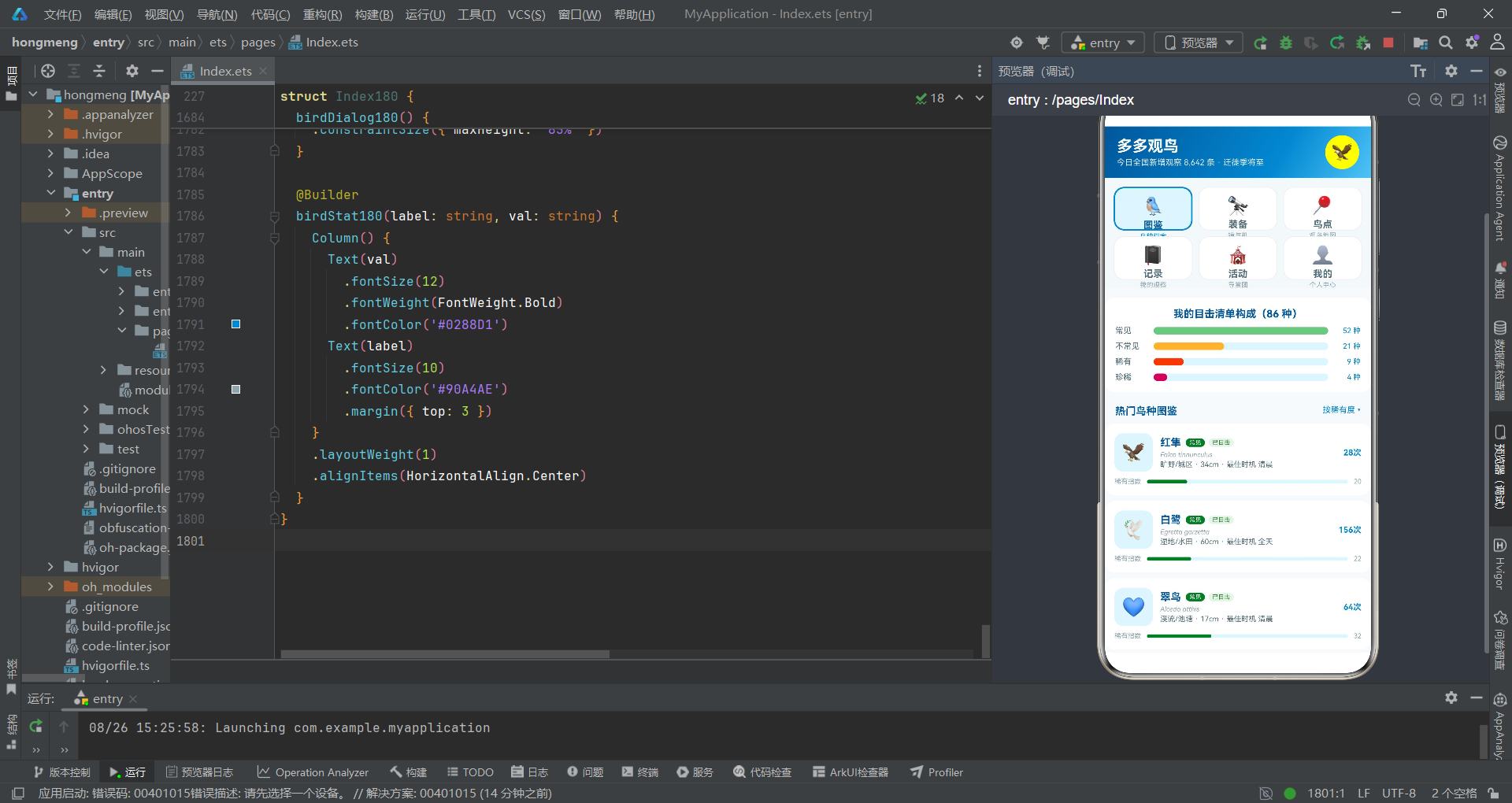
一、开局布局之全局观
本观鸟图鉴系统以顶部2×3宫格Tab为开局布阵,在HarmonyOS 6.1.1的棋盘上展开了一幅"图鉴—装备—鸟点—记录—活动—我的"六路并进的全局对弈。与传统的底部Tab导航相比,宫格Tab的信息密度更高——每个Tab不仅有图标和标签,还有副文字描述,用户在选择Tab之前就能了解每个Tab的功能定位。这种布局选择如围棋中的"三连星"布阵——不急于抢占边角,而是均匀分布在中央,形成全局影响力。
二、中盘手筋之弹框配合
系统的弹框系统采用"三抽屉+双居中"的配合策略。三个bindSheet抽屉处理日常操作(购买装备、发布记录、编辑鸟点),如围棋中的"打入"——斜入对方阵地但不切断主棋路;两个bindContentCover居中弹框处理关键决策(删除确认、图鉴详情),如围棋中的"要点"——占据关键位置,要求对手(用户)全神贯注。两种弹框的配合使用,实现了交互轻重分层的设计目标。
三、收官精细之状态管理
系统的状态管理在收官阶段展现了精细的控制力。发布记录时使用splice在数组头部插入新数据,确保最新记录显示在列表顶部;点赞交互时使用map生成全新对象数组,确保ArkTS状态感知系统能检测到引用变化触发重新渲染;ForEach的键值函数拼接liked状态(如bd.id.toString() + (bd.liked ? 'L' : 'U')),确保状态变化时键值同步更新。这些精细操作如同围棋收官时的"先手官子"——每一步都经过深思熟虑,确保最终胜势。
四、棋形复用之定式积累
系统的代码复用通过多种机制实现。工具函数(如rarityColor180、rarityBar180等)是跨组件复用的"定式"——定义一次,多处调用。@Builder方法是组件内复用的"棋形"——每个Tab页面和弹框都是独立的Builder方法,在build中按需调用。ForEach的循环渲染是数据驱动复用的"列阵"——同一套渲染逻辑适用于不同数据项。这些复用机制层层叠叠,如同围棋定式的积累——越多越厚,运用越灵活。整局棋从开局到收官,每一步都体现了HarmonyOS ArkTS声明式开发范式的精妙之处。

讨论HarmonyOS开发技术,专注于API与组件、DevEco Studio、测试、元服务和应用上架分发等。
更多推荐



 4
4 0
0- 0


 已为社区贡献99条内容

所有评论(0)