HarmonyOS 6.1 实战:箭头函数与三元运算符应用() => { this.curTab = t.key; }等价于function() { this.curTab = t.key; }
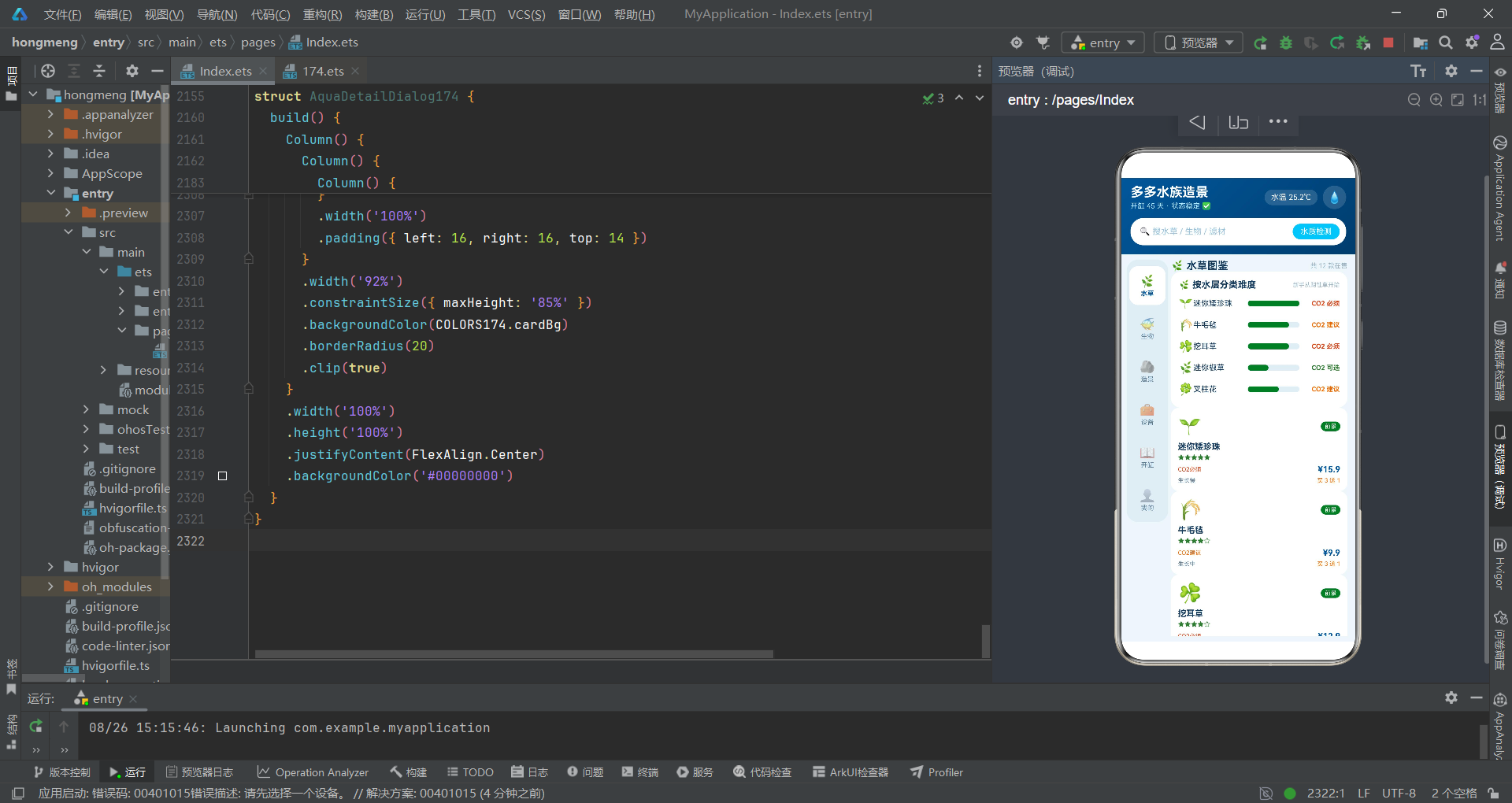
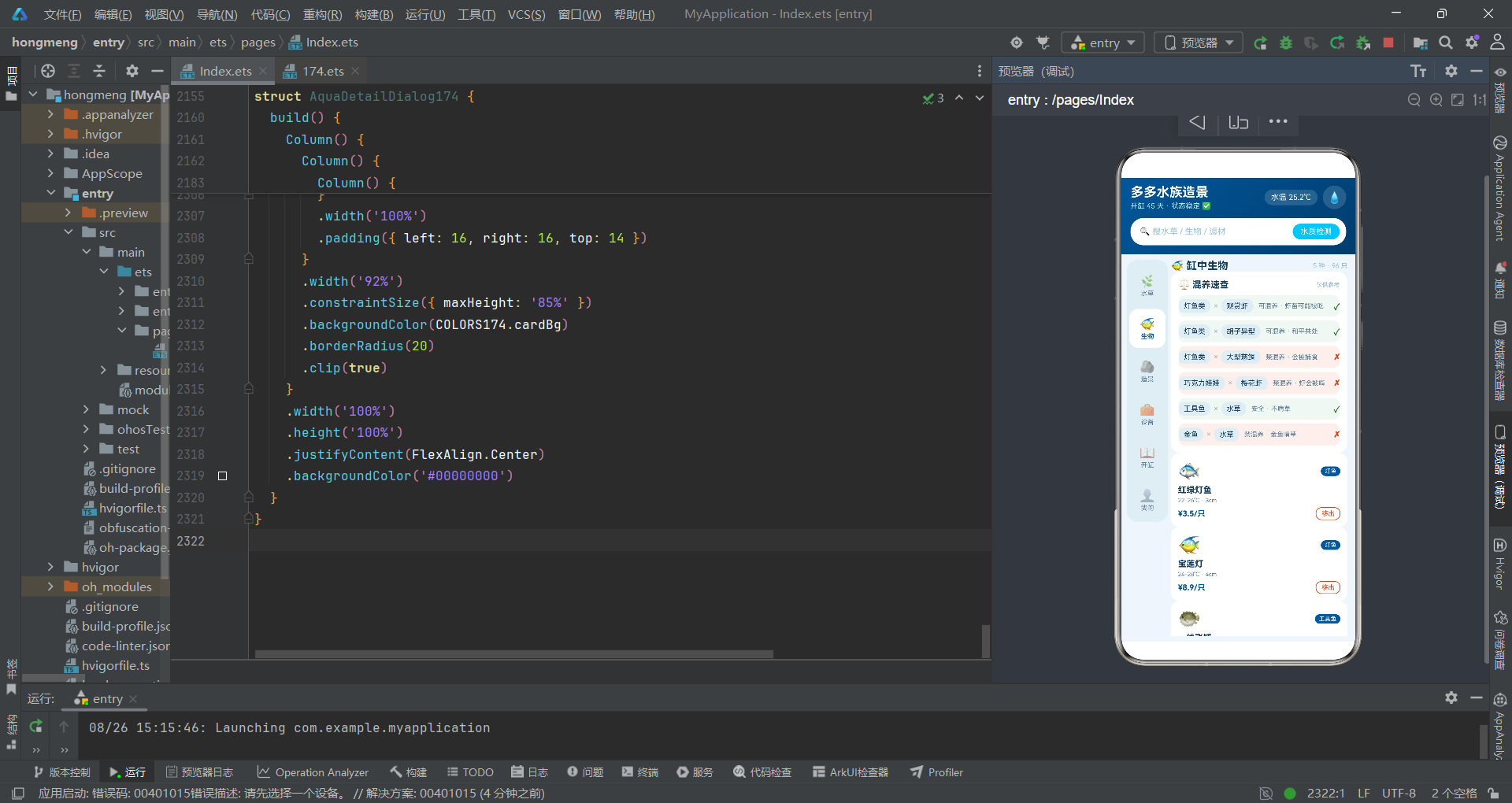
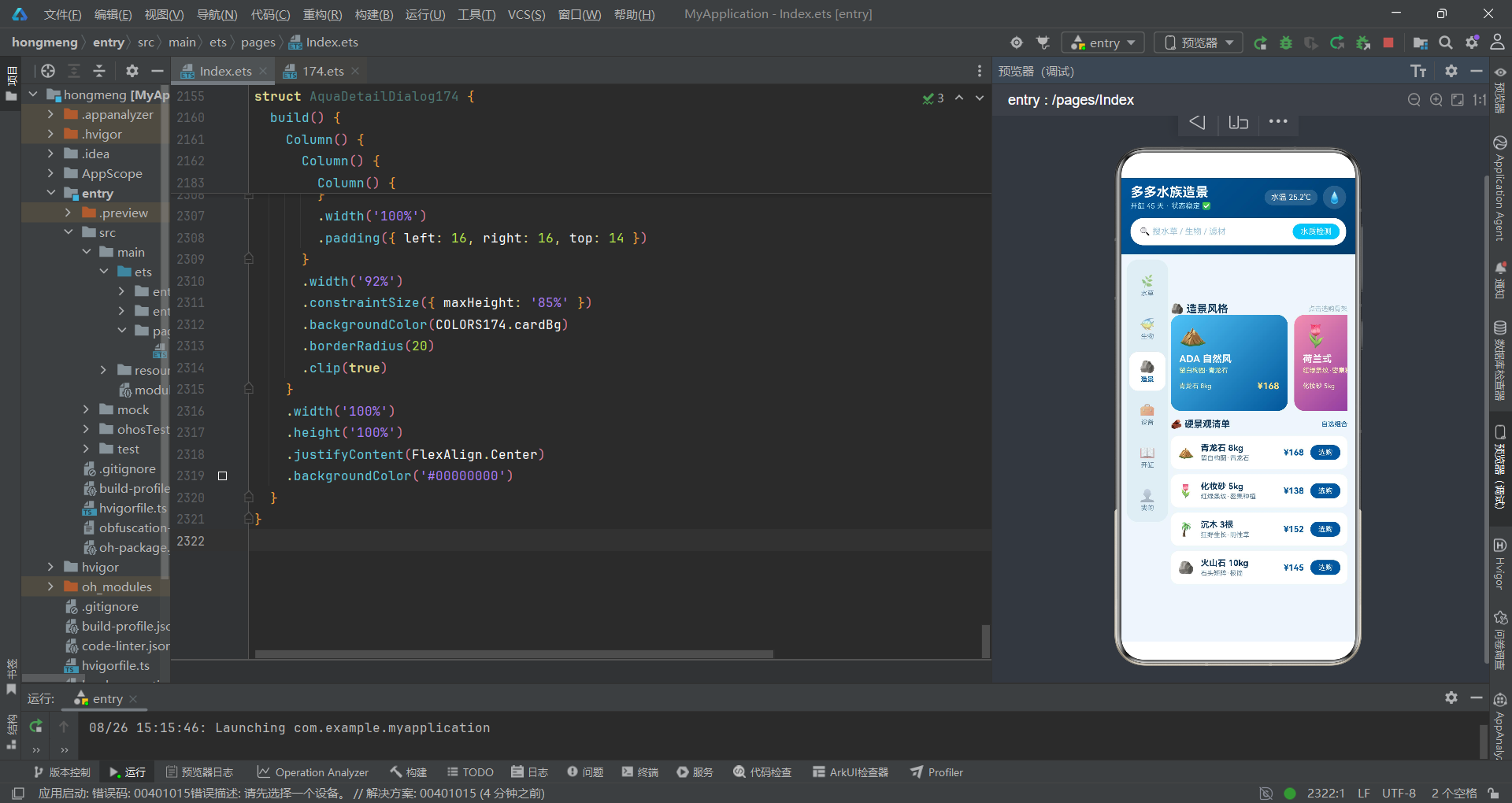
尊敬的指挥官,欢迎来到本次战术推演的作战指挥中心。今天我们将以军事推演的视角,对一个基于HarmonyOS 6.1.1 ArkTS API 24构建的水族造景管理系统进行全方位的战术拆解与兵力部署分析。该系统代号为"多多水族造景·草缸玩家的后花园",是一个典型的拼多多风格电商管理应用,采用深海蓝与水草绿的伪装涂装,通过左侧竖排Tab导航与右侧内容区构成了一个杂志式布局的作战指挥界面。
在本轮兵棋推演中,我们将该应用程序视为一个完整的作战体系,其中色彩配置接口视为后勤保障体系的数据标准化协议,水草数据、生物数据、混养规则、造景风格、设备清单、开缸步骤、水质参数和订单记录分别视为不同兵种的兵力编制表,而各个@Component装饰的结构体则视为独立战术单元。整个推演将从战略层(架构设计)、战役层(组件协作)和战术层(代码实现)三个维度逐层展开,力求让指挥官对HarmonyOS ArkTS声明式UI的组件化开发范式有深入的战场认知。
本次推演的核心作战目标包括:第一,解析TypeScript接口在HarmonyOS ArkTS中的数据建模能力,理解静态类型系统如何为作战数据提供刚性约束;第二,分析@Entry与@Component装饰器的战术分工,掌握页面入口与子组件的指挥关系;第三,拆解@State状态管理机制在响应式UI中的情报传递链路;第四,研究@Builder装饰器的战术模板复用能力;第五,剖析bindSheet与bindContentCover两大模态弹窗的战场遮断与火力覆盖机制。请各位指挥官做好战斗准备,推演正式开始。
第一战区:后勤数据标准化协议——ColorPalette174色彩接口与COLORS174常量部署
1.1 作战背景:色彩情报的标准化编码
在任何军事行动中,统一的通信协议和标识系统是确保各兵种协同作战的基础。在水族造景管理系统的设计中,开发者首先建立了一套完整的色彩标准化协议,这就是ColorPalette174接口及其对应的COLORS174常量。这一设计思路与军事上的"作战标图规范"异曲同工——通过统一的颜色编码体系,确保所有战术单元在视觉呈现上保持一致的伪装涂装和敌我识别标准。
interface ColorPalette174 {
  deep: string;
  deepDark: string;
  aqua: string;
  plant: string;
  plantLight: string;
  bg: string;
  cardBg: string;
  textMain: string;
  textSub: string;
  textHint: string;
  border: string;
  danger: string;
  white: string;
  orange: string;
  purple: string;
}
1.2 战术解析:interface关键字与TypeScript接口的知识点
在上述代码中,interface关键字是TypeScript语言的核心特性之一,它属于HarmonyOS ArkTS的静态类型系统的重要组成部分。interface用于定义一个对象类型的契约(Contract),规定了该类型对象必须包含哪些属性以及每个属性的类型。在军事术语中,这相当于一份"兵力装备标准表"——任何部队只要宣称自己符合ColorPalette174标准,就必须携带表中所列的全部15项色彩装备,且每项装备的类型必须是指定的string类型。
接口定义中的每个属性都使用属性名: 类型;的语法格式。例如deep: string;表示该属性名为deep,类型为字符串。这种声明的军事意义在于:它为深海蓝主色建立了一个标准化的命名锚点,后续所有战术单元引用这个色彩时,都可以通过COLORS174.deep来获取具体值'#01579B',而不是在各处硬编码颜色值。这与军事上的"统一弹药口径"原则完全一致——避免了不同部队使用不同规格弹药导致的混乱。
1.3 兵力部署:COLORS174常量的具体配置
const COLORS174: ColorPalette174 = {
  deep: '#01579B',
  deepDark: '#003D6E',
  aqua: '#4FC3F7',
  plant: '#2E7D32',
  plantLight: '#A5D6A7',
  bg: '#EFF6FA',
  cardBg: '#FFFFFF',
  textMain: '#123A5C',
  textSub: '#5C7F99',
  textHint: '#9DB8C9',
  border: '#DCEAF2',
  danger: '#D84315',
  white: '#FFFFFF',
  orange: '#EF6C00',
  purple: '#6A1B9A'
};
这里使用了const关键字声明了一个不可变常量COLORS174,并通过类型标注ColorPalette174将其绑定到前面定义的接口类型上。const在军事推演中相当于"不可撤回的作战命令"——一旦部署,该常量的引用不可被重新赋值。冒号后的ColorPalette174是TypeScript的类型标注(Type Annotation),它告诉编译器:COLORS174这个常量必须严格符合ColorPalette174接口定义的形状(Shape),即必须包含全部15个字符串属性。
从色彩战术来看,这套配色体系构建了一个层次分明的作战伪装体系:deep(#01579B深海蓝)和deepDark(#003D6E深蓝暗调)构成了主战场背景色,模拟深海水域环境;aqua(#4FC3F7水蓝)作为辅助色用于高亮和交互反馈;plant(#2E7D32水草绿)和plantLight(#A5D6A7浅水草绿)用于表示植被相关的正面信息;danger(#D84315警示橙红)用于标记危险或禁止操作;orange(#EF6C00)和purple(#6A1B9A)分别用于中等级别警告和特殊标记。文本色彩分为三级——textMain为主力文字色、textSub为次要描述色、textHint为辅助提示色——形成了清晰的情报传达层级。
第二战区:导航兵种编制——TabItem174接口与TABS174侧边导航兵力部署
2.1 作战意图:六路分兵的战术导航体系
在军事行动中,清晰的指挥层级和导航路径是确保兵力有序投送的关键。该系统设计了六个战术方向,分别对应水草管理、生物管理、造景管理、设备管理、开缸日志和个人中心。这种设计类似于一个合成营下辖六个专业化连队,每个连队负责不同的作战领域,通过统一的侧边导航栏进行兵力调度。
interface TabItem174 {
  key: string;
  icon: string;
  label: string;
}

const TABS174: TabItem174[] = [
  { key: 'plant', icon: '🌿', label: '水草' },
  { key: 'life', icon: '🐠', label: '生物' },
  { key: 'scape', icon: '🪨', label: '造景' },
  { key: 'gear', icon: '🧰', label: '设备' },
  { key: 'start', icon: '📖', label: '开缸' },
  { key: 'mine', icon: '👤', label: '我的' }
];
2.2 战术解析:数组类型标注与对象字面量
在TabItem174接口定义中,我们看到了与ColorPalette174相同interface声明模式,但属性数量精简为三个:key(键值标识)、icon(图标符号)、label(显示文字)。这三个属性构成了导航兵种的基本编制——每个导航项需要一个唯一标识用于战术区分,一个图标用于快速视觉识别,一个文字标签用于精确语义传达。
在TABS174常量的声明中,类型标注TabItem174[]是一个新的知识点。在TypeScript中,类型[]是数组类型的声明语法,表示该变量是一个元素类型为TabItem174的数组。这相当于军事上的"编制表"——TABS174不是一个单独的战术单元,而是一个包含六个同型单元的建制序列。方括号[]紧跟在类型名之后,是TypeScript最常用的数组声明方式,与泛型形式Array<TabItem174>完全等价。
每个数组元素使用对象字面量(Object Literal)语法{ key: 'plant', icon: '🌿', label: '水草' }创建。对象字面量用花括号包裹键值对,键和值之间用冒号分隔,不同属性之间用逗号分隔。由于TABS174被标注为TabItem174[]类型,编译器会检查每个对象字面量是否严格符合接口定义——如果缺少任何一个属性或属性类型不匹配,都会在编译期报错。这种静态类型检查在军事上的意义是"装备验收"——确保每个进入序列的战术单元都携带了规定数量的规定装备。
2.3 兵力序列分析:六路作战方向的战术定位
从六个导航项的分布来看,开发者采用了由"物资管理"到"作战执行"再到"后勤保障"的兵力编排序:
- 水草(plant):植被兵力管理,对应前景草、中景草、后景草的部署
- 生物(life):水生动物兵力管理,包含观赏鱼、工具鱼、虾类等
- 造景(scape):战场工事构建,对应ADA自然风、荷兰式等造景风格
- 设备(gear):武器装备采购,对应过滤、灯光、碳源、温控等设备
- 开缸(start):作战时间线管理,对应开缸45天的进度追踪
- 我的(mine):个人后勤中心,对应鱼缸档案、订单记录
这种排列方式体现了从"前线作战物资"到"后方指挥管理"的渐进式兵力调度逻辑。
第三战区:水草兵种数据——PlantItem174接口与PLANTS174兵力花名册
3.1 作战序列:十二种水草兵力的详细编制
水草是该作战体系中最核心的兵力组成部分。开发者通过PlantItem174接口定义了水草兵种的完整属性编制,并在PLANTS174常量中部署了十二种水草的详细兵力信息。
interface PlantItem174 {
  name: string;
  icon: string;
  layer: string;
  level: number;
  co2: string;
  price: number;
  growth: string;
}

const PLANTS174: PlantItem174[] = [
  { name: '迷你矮珍珠', icon: '🌱', layer: '前景', level: 5, co2: '必须', price: 15.9, growth: '慢' },
  { name: '牛毛毡', icon: '🌾', layer: '前景', level: 4, co2: '建议', price: 9.9, growth: '中' },
  { name: '挖耳草', icon: '☘️', layer: '前景', level: 4, co2: '必须', price: 12.9, growth: '慢' },
  { name: '迷你椒草', icon: '🌿', layer: '前景', level: 2, co2: '可选', price: 8.9, growth: '慢' },
  { name: '叉柱花', icon: '🍀', layer: '前景', level: 3, co2: '建议', price: 11.5, growth: '中' },
  { name: '宫廷草', icon: '🎋', layer: '中景', level: 2, co2: '建议', price: 6.9, growth: '快' },
  { name: '粉虎耳', icon: '🌸', layer: '中景', level: 4, co2: '必须', price: 18.9, growth: '中' },
  { name: '喷泉太阳', icon: '💧', layer: '中景', level: 5, co2: '必须', price: 25.9, growth: '慢' },
  { name: '绿温蒂椒草', icon: '🌿', layer: '中景', level: 1, co2: '无需', price: 5.9, growth: '慢' },
  { name: '绿菊', icon: '🌼', layer: '后景', level: 2, co2: '建议', price: 7.9, growth: '快' },
  { name: '大红叶', icon: '🍁', layer: '后景', level: 4, co2: '必须', price: 19.9, growth: '中' },
  { name: '绿松尾', icon: '🌲', layer: '后景', level: 3, co2: '建议', price: 9.5, growth: '快' }
];
3.2 战术解析:number类型与多兵种属性建模
PlantItem174接口定义了七个属性,其中引入了一个新的数据类型——number。在TypeScript中,number是原始类型(Primitive Type)之一,用于表示所有数字值,包括整数和浮点数。在此接口中,level属性(难度等级,1-5的整数)和price属性(价格,浮点数如15.9)都使用number类型。从军事角度看,level相当于该兵种的"作战难度评级"——1级为新兵可操作,5级为需要精锐部队才能驾驭;price则相当于"兵力采购成本",用于后勤预算管理。
layer(水层位置)和growth(生长速度)使用string类型而非number,这是一个值得注意的战术决策。虽然可以将其编码为数字枚举,但开发者选择了更具可读性的中文字符串值(‘前景’、‘中景’、‘后景’、‘慢’、‘中’、‘快’),这相当于在军事标识中使用"步兵营"、"装甲营"这样的语义化番号,而非纯数字编号,提高了情报的可读性。
3.3 兵力纵深分析:前中后三线部署体系
从PLANTS174的十二种水草兵力分布来看,开发者构建了一个前中后三线的纵深防御体系:
前线(前景层):部署了迷你矮珍珠、牛毛毡、挖耳草、迷你椒草、叉柱花五种低矮型水草,这些兵力负责在缸底铺设"地毯式防线"。其中迷你矮珍珠和挖耳草的level为5(最高难度)、co2要求为"必须",属于精锐部队,需要高强度的后勤保障(强光+CO2钢瓶)才能维持战斗力。
中线(中景层):部署了宫廷草、粉虎耳、喷泉太阳、绿温蒂椒草四种中型水草,作为主战力量。喷泉太阳level为5且co2必须,是造价最贵(25.9元)的精锐;而绿温蒂椒草level仅为1且co2无需,是性价比最高的"轻步兵"。
后线(后景层):部署了绿菊、大红叶、绿松尾三种高大型水草,作为背景遮挡力量。大红叶level为4且co2必须,是一种有色彩的精锐部队。
第四战区:水生动物兵种——LifeItem174接口与LIVES174生物序列
4.1 作战序列:十二种水生动物的兵力配置
在水草兵力之外,系统还部署了水生动物兵力,构成了完整的生态作战体系。LifeItem174接口定义了生物兵种的七个属性,LIVES174常量记录了十二种水生动物的详细信息。
interface LifeItem174 {
  name: string;
  icon: string;
  temp: string;
  size: string;
  price: number;
  mix: string;
  type: string;
}

const LIVES174: LifeItem174[] = [
  { name: '红绿灯鱼', icon: '🐟', temp: '22-26℃', size: '3cm', price: 3.5, mix: '群游温和', type: '灯鱼' },
  { name: '宝莲灯', icon: '🐠', temp: '24-28℃', size: '4cm', price: 8.9, mix: '群游温和', type: '灯鱼' },
  { name: '一线飞狐', icon: '🐡', temp: '24-26℃', size: '5cm', price: 6.5, mix: '吃黑毛藻', type: '工具鱼' },
  { name: '小猴飞狐', icon: '🐒', temp: '24-26℃', size: '4cm', price: 7.9, mix: '除藻猛将', type: '工具鱼' },
  { name: '黑壳虾', icon: '🦐', temp: '20-26℃', size: '3cm', price: 1.2, mix: '清洁残饵', type: '工具虾' },
  { name: '樱花虾', icon: '🌸', temp: '22-26℃', size: '2.5cm', price: 3.0, mix: '除藻观赏', type: '观赏虾' },
  { name: '极火虾', icon: '🔥', temp: '22-26℃', size: '2.5cm', price: 4.5, mix: '除藻观赏', type: '观赏虾' },
  { name: '巧克力娃娃', icon: '🍫', temp: '24-28℃', size: '3cm', price: 15.0, mix: '吃螺能手', type: '工具鱼' },
  { name: '金苔鼠', icon: '🧹', temp: '22-26℃', size: '6cm', price: 5.5, mix: '玻璃除藻', type: '工具鱼' },
  { name: '胡子大帆', icon: '🐋', temp: '24-28℃', size: '8cm', price: 22.0, mix: '夜行除藻', type: '异型鱼' },
  { name: '蓝眼灯', icon: '✨', temp: '24-28℃', size: '3cm', price: 5.5, mix: '夜晚蓝眼', type: '灯鱼' },
  { name: '玻璃拉拉', icon: '🫧', temp: '24-28℃', size: '4cm', price: 9.9, mix: '通体透明', type: '观赏鱼' }
];
4.2 战术解析:多维度属性的兵种特征建模
LifeItem174接口的属性设计体现了多维度的兵种特征建模。temp(温度适应范围)使用字符串类型存储如"22-26℃"这样的范围值,这在军事上相当于"作战环境适应区间"——指明该兵种在什么温度条件下能保持最佳战斗力。size(体型尺寸)存储如"3cm"的值,相当于"装备规格"。mix(混养特性)存储如"群游温和"、“吃黑毛藻"等行为特征描述,相当于"战术特长”。type(分类)存储如"灯鱼"、“工具鱼”、“工具虾”、“观赏虾”、“异型鱼”、"观赏鱼"等兵种分类。
这种用字符串而非枚举来存储分类信息的设计,在军事上相当于使用"步兵"、“炮兵”、“装甲兵"这样的语义化兵种名称,而非数字代码。其优势在于情报直接可读,劣势在于缺乏编译期类型检查——如果误将type写为"灯雨”(错别字),编译器不会报错。在更严格的军事信息系统中,通常会使用枚举(enum)来替代字符串,但在HarmonyOS ArkTS的前端展示场景中,字符串的可读性优势往往更重要。
4.3 兵种协同分析:工具鱼与观赏鱼的战术搭配
从LIVES174的十二种生物兵力来看,开发者构建了一个功能互补的兵种体系:
- 灯鱼类(3种):红绿灯鱼、宝莲灯、蓝眼灯——主力观赏兵力,负责"群游展示"任务,体型小(3-4cm),价格低(3.5-8.9元),适合大规模编队部署
- 工具鱼类(4种):一线飞狐、小猴飞狐、巧克力娃娃、金苔鼠——特种作战兵力,分别执行"吃黑毛藻"、“除藻猛将”、“吃螺能手”、"玻璃除藻"等专项任务
- 工具虾(1种):黑壳虾——最低成本的清洁兵力(1.2元/只),执行"清洁残饵"任务
- 观赏虾(2种):樱花虾、极火虾——兼具除藻和观赏双重功能的兵力
- 异型鱼(1种):胡子大帆——夜行特种兵力(22.0元),体型最大(8cm),执行夜间除藻任务
- 观赏鱼(1种):玻璃拉拉——通体透明的特种展示兵力
第五战区:混养交战规则——MixRule174接口与MIX_RULES174作战条令
5.1 作战条令:六条混养规则的火力兼容性矩阵
在水族作战中,不同兵种之间的兼容性是一个关键情报。某些兵种可以安全协同作战,而另一些则存在"误伤"风险。开发者通过MixRule174接口建立了混养规则数据库。
interface MixRule174 {
  a: string;
  b: string;
  ok: boolean;
  note: string;
}

const MIX_RULES174: MixRule174[] = [
  { a: '灯鱼类', b: '观赏虾', ok: true, note: '可混养 · 虾苗可能被吃' },
  { a: '灯鱼类', b: '胡子异型', ok: true, note: '可混养 · 和平共处' },
  { a: '灯鱼类', b: '大型慈鲷', ok: false, note: '禁混养 · 会被捕食' },
  { a: '巧克力娃娃', b: '樱花虾', ok: false, note: '禁混养 · 虾会被啃' },
  { a: '工具鱼', b: '水草', ok: true, note: '安全 · 不啃草' },
  { a: '金鱼', b: '水草', ok: false, note: '禁混养 · 金鱼啃草' }
];
5.2 战术解析:boolean类型与二元决策建模
MixRule174接口引入了一个新的原始类型——boolean。在TypeScript中,boolean类型只有两个值:true和false。这在军事推演中相当于"交战许可/禁令"的二元决策——ok为true表示两种兵力可以协同部署,ok为false表示禁止混编。boolean类型是构建条件判断逻辑的基础,后续在UI渲染中会通过r.ok ? '✓' : '✗'这样的三元运算符来决定显示对勾还是叉号。
note属性的设计也很精妙——它不仅给出"可以"或"不可以"的结论,还提供了战术注意事项。例如"可混养·虾苗可能被吃"表示虽然可以混养,但存在虾苗被灯鱼捕食的风险,需要指挥官知晓并酌情决策。这种设计在军事上相当于"交战规则(Rules of Engagement, ROE)"的附带说明,提供了决策所需的上下文情报。
5.3 交战规则分析:三组安全与三组禁令
从六条混养规则来看,战场态势如下:
安全协同(3条):灯鱼类与观赏虾可以混养(但虾苗有风险)、灯鱼类与胡子异型可以和平共处、工具鱼与水草安全兼容。这三条规则构成了"主力观赏兵力+清洁兵力+植被防线"的标准协同体系。
禁混养(3条):灯鱼类与大型慈鲷禁止混养(会被捕食)、巧克力娃娃与樱花虾禁止混养(虾会被啃)、金鱼与水草禁止混养(金鱼啃草)。这三条规则标记了战场上的"敌我识别禁区"——某些兵种搭配会导致一方遭受损失。
第六战区:造景工事体系——ScapeStyle174接口与SCAPES174工事模板
6.1 工事模板:四种造景风格的战场构筑方案
造景是水族管理系统中的"战场工事构建"环节。开发者通过ScapeStyle174接口定义了四种标准化工事模板,每种模板包含风格名称、描述、石材清单、价格和渐变色配置。
interface ScapeStyle174 {
  name: string;
  icon: string;
  desc: string;
  rocks: string;
  price: number;
  colorA: string;
  colorB: string;
}

const SCAPES174: ScapeStyle174[] = [
  { name: 'ADA 自然风', icon: '⛰', desc: '留白构图·青龙石', rocks: '青龙石 8kg', price: 168, colorA: '#4FC3F7', colorB: '#01579B' },
  { name: '荷兰式', icon: '🌷', desc: '红绿条纹·密集种植', rocks: '化妆砂 5kg', price: 138, colorA: '#F48FB1', colorB: '#6A1B9A' },
  { name: '丛林风', icon: '🌴', desc: '狂野生长·阴性草', rocks: '沉木 3根', price: 152, colorA: '#A5D6A7', colorB: '#2E7D32' },
  { name: '岩组风', icon: '🪨', desc: '石头矩阵·极简', rocks: '火山石 10kg', price: 145, colorA: '#FFB74D', colorB: '#EF6C00' }
];
6.3 战术解析:colorA与colorB的双色渐变战术
ScapeStyle174接口的一个亮点是引入了colorA和colorB两个色彩属性。这两个属性不是用于UI文本或边框,而是作为linearGradient渐变效果的起止色使用。在后续的UI渲染中,每个造景风格卡片会使用linearGradient({ angle: 135, colors: [[s.colorA, 0.0], [s.colorB, 1.0]] })来生成一对角线渐变背景。
这种设计在军事上相当于"战术伪装涂装方案"——每种造景风格有自己独特的双色渐变涂装:ADA自然风使用水蓝到深海蓝(模拟自然水域)、荷兰式使用粉红到紫色(模拟郁金香花田)、丛林风使用浅绿到深绿(模拟丛林)、岩组风使用橙色到深橙(模拟火山岩)。这使得用户在浏览时能够通过颜色快速区分不同的工事方案。
第七战区:武器装备体系——GearItem174接口与GEARS174装备清单
7.1 装备序列:十二种设备的作战保障体系
设备是维持整个作战体系运转的武器装备。GearItem174接口定义了设备的六个属性,GEARS174常量部署了十二种设备的详细信息。
interface GearItem174 {
  name: string;
  icon: string;
  watt: number;
  price: number;
  cat: string;
  stock: number;
}

const GEARS174: GearItem174[] = [
  { name: '森森 603B 过滤桶', icon: '🔄', watt: 15, price: 268, cat: '过滤', stock: 45 },
  { name: '创星 ATMan 333', icon: '⚙️', watt: 20, price: 388, cat: '过滤', stock: 30 },
  { name: '尼特利 AT5 灯', icon: '💡', watt: 45, price: 699, cat: '灯光', stock: 18 },
  { name: '千寻 A系列 灯', icon: '🔆', watt: 32, price: 459, cat: '灯光', stock: 26 },
  { name: '迪瑞 CO2 钢瓶', icon: '💨', watt: 0, price: 328, cat: '碳源', stock: 22 },
  { name: '电磁阀+记泡器', icon: '🫧', watt: 2, price: 88, cat: '碳源', stock: 60 },
  { name: '伊罕 加热棒 200W', icon: '🌡', watt: 200, price: 158, cat: '温控', stock: 35 },
  { name: '变频加热棒 100W', icon: '🔥', watt: 100, price: 96, cat: '温控', stock: 48 },
  { name: 'ADA 美妆砂', icon: '⏳', watt: 0, price: 89, cat: '底床', stock: 80 },
  { name: '尼特利泥 9L', icon: '🟤', watt: 0, price: 128, cat: '底床', stock: 55 },
  { name: '蛋白棉过滤器', icon: '🧪', watt: 0, price: 68, cat: '过滤', stock: 72 },
  { name: '定时插座', icon: '⏲', watt: 1, price: 29, cat: '温控', stock: 120 }
];
7.2 战术解析:watt属性与能耗战术评估
GearItem174接口中的watt(功率)属性是设备兵种的关键战术参数。它表示设备的耗电功率,单位为瓦特(W)。在后续的UI渲染中,watt值会被传入wattH174函数计算为柱状图高度百分比,用于功耗对比可视化。cat(分类)属性将设备分为’过滤’、‘灯光’、‘碳源’、‘温控’、'底床’五大兵种。stock(库存)属性用于后勤补给状态监控。
值得注意的是,过滤和底床类设备的watt值为0或很低(如ADA美妆砂watt为0、电磁阀watt为2),而灯光和温控类设备的watt值较高(如AT5灯watt为45、加热棒watt为200)。这种差异在功耗对比图中会形成鲜明的视觉对比——高功耗设备会显示为橙色柱状条(g.watt >= 100 ? COLORS174.orange : COLORS174.aqua),低功耗设备显示为水蓝色柱状条。
7.3 装备序列分析:五大兵种的火力配置
从GEARS174的十二种设备来看,五大兵种的配置如下:
- 过滤兵种(3种):森森603B(268元/15W)、创星ATMan 333(388元/20W)、蛋白棉过滤器(68元/3W)——负责水质净化
- 灯光兵种(2种):尼特利AT5(699元/45W)、千寻A系列(459元/32W)——负责光合作用支援
- 碳源兵种(2种):迪瑞CO2钢瓶(328元/0W)、电磁阀+记泡器(88元/2W)——负责碳源补给
- 温控兵种(3种):伊罕加热棒200W(158元/200W)、变频加热棒100W(96元/100W)、定时插座(29元/1W)——负责温度控制
- 底床兵种(2种):ADA美妆砂(89元/0W)、尼特利泥9L(128元/0W)——负责底床铺设
第八战区:开缸作战时间线——StartStep174接口与START_STEPS174作战进度
8.1 作战进度:七步开缸的战役时间轴
开缸是水族管理系统中的"战役发起"阶段,开发者通过StartStep174接口建立了七步作战时间线,记录从D1到D45的完整开缸过程。
interface StartStep174 {
  day: string;
  title: string;
  desc: string;
  done: boolean;
}

const START_STEPS174: StartStep174[] = [
  { day: 'D1', title: '铺泥造景', desc: '底床+硬景观搭建', done: true },
  { day: 'D1', title: '注水种草', desc: '缓慢注水防浑水', done: true },
  { day: 'D7', title: '换水一周', desc: '每天换 1/3 防暴藻', done: true },
  { day: 'D14', title: '硝化初建', desc: '加菌粉降氨氮', done: true },
  { day: 'D21', title: '暴藻高发', desc: '控灯 6 小时黑壳大军', done: false },
  { day: 'D30', title: '入虾工具鱼', desc: '藻类稳定后进生物', done: false },
  { day: 'D45', title: '系统稳定', desc: '正式进入日常维护', done: false }
];
8.2 战术解析:done属性与作战进度追踪
StartStep174接口中的done属性(boolean类型)是作战进度追踪的核心标志位。done为true表示该作战步骤已完成,为false表示尚未执行。在后续的UI渲染中,done值将影响时间轴节点的颜色(done为绿色、未完成为灰色)和文字颜色(done为主力色、未完成为次要色),形成清晰的战场进度可视化。
8.3 战役阶段分析:四个阶段七步走的作战节奏
从七步时间线来看,开缸战役分为四个阶段:
- D1发起阶段:铺泥造景+注水种草,完成底床铺设和初始植被部署
- D7巩固阶段:每天换1/3水防止暴藻,进行水质稳定作战
- D14生化建立阶段:添加硝化细菌建立初步生化系统
- D21-D45稳定阶段:经历暴藻高发期(控灯+黑壳虾除藻)、入生物(虾和工具鱼)、最终系统稳定
第九战区:水质情报侦察——ParamItem174接口与PARAMS174侦察数据
9.1 情报侦察:五项水质参数的战场态势监控
水质检测是水族管理系统的"情报侦察"环节。ParamItem174接口定义了水质参数的四个属性,PARAMS174常量记录了五项关键水质数据。
interface ParamItem174 {
  name: string;
  value: string;
  pct: number;
  status: string;
}

const PARAMS174: ParamItem174[] = [
  { name: 'NO3 硝酸盐', value: '12 mg/L', pct: 60, status: '正常' },
  { name: 'KH 硬度', value: '4 dKH', pct: 50, status: '正常' },
  { name: 'pH 酸碱度', value: '6.6', pct: 66, status: '偏酸' },
  { name: '水温', value: '25.2℃', pct: 58, status: '理想' },
  { name: 'PO4 磷酸盐', value: '0.8 mg/L', pct: 40, status: '偏低' }
];
9.2 战术解析:pct属性与情报可视化
ParamItem174接口的pct属性(number类型,百分比数值)用于驱动进度条的可视化宽度。在后续UI渲染中,Text('').width(p.pct + '%')会根据pct值设置进度条填充宽度。status属性决定进度条颜色——"正常"和"理想"为绿色、其他为橙色,通过paramC174函数实现颜色映射。
第十战区:后勤订单追踪——OrderItem174接口与ORDERS174补给记录
10.1 后勤补给:五条订单的物资追踪记录
订单记录是水族管理系统的"后勤补给追踪"模块。OrderItem174接口定义了订单的五个属性,ORDERS174常量记录了五条订单信息。
interface OrderItem174 {
  name: string;
  icon: string;
  price: number;
  status: string;
  date: string;
}

const ORDERS174: OrderItem174[] = [
  { name: '尼特利 AT5 灯', icon: '💡', price: 699, status: '已发货', date: '08-24' },
  { name: '黑壳虾 100 只', icon: '🦐', price: 45, status: '已完成', date: '08-18' },
  { name: '青龙石 8kg', icon: '🪨', price: 96, status: '已完成', date: '08-10' },
  { name: 'CO2 钢瓶套装', icon: '💨', price: 388, status: '待评价', date: '08-01' },
  { name: '宫廷草 5 丛', icon: '🎋', price: 34.5, status: '已完成', date: '07-25' }
];
10.2 战术解析:status属性与补给状态分级
OrderItem174接口的status属性使用字符串存储订单状态——‘已发货’、‘已完成’、‘待评价’。在后续UI渲染中,status值将决定状态标签的颜色:'已发货’显示为橙色(警示色,表示物资在途中需要关注),其他状态显示为绿色(安全色,表示已完成的补给)。这种颜色编码在军事上相当于"补给状态灯"——橙色闪烁表示运输中、绿色常亮表示已到位。
第十一战区:战术工具函数集群——六大辅助函数的火力支援体系
11.1 函数集群:六项战术支援工具
在主体作战力量之外,开发者还部署了六个辅助函数,构成战术支援体系。这些函数不直接渲染UI,而是为UI组件提供颜色计算、格式转换等支援服务。
function layerC174(l: string): string {
  if (l === '前景') {
    return COLORS174.plant;
  }
  if (l === '中景') {
    return COLORS174.orange;
  }
  return COLORS174.deep;
}
layerC174函数解析
layerC174是一个接收string参数、返回string的函数((l: string): string)。它的战术职能是根据水草的水层位置返回对应的颜色值——前景草返回绿色(COLORS174.plant)、中景草返回橙色(COLORS174.orange)、后景草返回深海蓝(COLORS174.deep)。函数使用if条件判断语句进行分支,当参数l匹配’前景’时返回绿色并退出函数,匹配’中景’时返回橙色并退出,都不匹配时返回深海蓝作为默认值。这种"前-中-后"三色编码体系在军事上相当于"三线阵地的伪装色标准"。
co2C174函数解析
function co2C174(c: string): string {
  if (c === '必须') {
    return COLORS174.danger;
  }
  if (c === '建议') {
    return COLORS174.orange;
  }
  return COLORS174.plant;
}
co2C174函数的战术职能是根据CO2需求等级返回颜色——"必须"返回警示红(COLORS174.danger,表示高后勤依赖)、"建议"返回橙色(COLORS174.orange,表示中等依赖)、其他返回绿色(COLORS174.plant,表示无依赖)。这是一个三级火力支援等级编码系统。
mixOkC174函数解析
function mixOkC174(ok: boolean): string {
  if (ok) {
    return COLORS174.plant;
  }
  return COLORS174.danger;
}
mixOkC174函数接收boolean参数ok,返回对应的颜色——true返回绿色(安全)、false返回红色(危险)。这是一个最简单的二元决策函数,相当于"交通灯"系统——绿灯通行、红灯禁止。
paramC174函数解析
function paramC174(s: string): string {
  if (s === '正常' || s === '理想') {
    return COLORS174.plant;
  }
  return COLORS174.orange;
}
paramC174函数引入了一个新的运算符——逻辑或运算符||。在条件判断if (s === '正常' || s === '理想')中,||连接两个相等比较表达式,只要其中任一为true,整个条件即为true。这在军事上相当于"满足任一安全状态即判为正常"的情报评估规则。===是严格相等运算符,它不仅比较值还比较类型,是TypeScript中最安全的比较方式。
wattH174函数解析
function wattH174(w: number): string {
  if (w <= 0) {
    return '4%';
  }
  let r = Math.round(w / 200 * 100);
  if (r < 12) {
    r = 12;
  }
  return r + '%';
}
wattH174函数是六个辅助函数中最复杂的,它接收number参数w(功率瓦特数),返回字符串(百分比高度值)。函数逻辑分为三步:第一步,如果w小于等于0(无功耗设备),直接返回’4%'作为最小高度;第二步,使用Math.round()对w / 200 * 100的计算结果取整——以200W为满量程,计算功率占比百分比;第三步,如果结果小于12%,强制设为12%作为最小可视高度。这里引入了let关键字(声明可变变量)、Math.round()(数学取整函数)、<=(小于等于运算符)和算术运算符等新知识点。let与const的区别在于let声明的变量可以被重新赋值(如r = 12),相当于军事上的"可修订命令"。
levelStars174函数解析
function levelStars174(n: number): string {
  let s = '';
  for (let i = 0; i < 5; i++) {
    s += (i < n) ? '★' : '☆';
  }
  return s;
}
levelStars174函数接收number参数n(难度等级1-5),返回一个包含5个星形字符的字符串。函数使用了for循环语句for (let i = 0; i < 5; i++)——初始化let i = 0、条件i < 5、递增i++(i每次加1),循环体执行5次。在循环体内,使用+=复合赋值运算符和三元运算符(i < n) ? '★' : '☆'——当i小于n时添加实心星,否则添加空心星。例如n=3时,结果为"★★★☆☆"。for循环在军事上相当于"按编制序列逐个检阅"的作业流程。
第十二战区:总指挥部——@Entry @Component AquaMain174主指挥所
12.1 作战指挥所:页面入口与主组件架构
现在我们进入整个作战体系的核心——AquaMain174主指挥所。这个组件使用了两个关键装饰器:@Entry和@Component,构成了HarmonyOS ArkTS应用的页面入口。
@Entry
@Component
struct AquaMain174 {
  @State curTab: string = 'plant';
  @State showBuyGear: boolean = false;
  @State showStartGuide: boolean = false;
  @State showEditTank: boolean = false;
  @State showDeleteLife: boolean = false;
  @State showDetail: boolean = false;
  @State gearName: string = '森森 603B 过滤桶';
  @State tankName: string = '客厅 60 草缸';
  @State lifeName: string = '红绿灯鱼';
  @State detailName: string = '迷你矮珍珠';
  @State detailIcon: string = '🌱';

  @Builder
  pageHeader() {
    // ... 页面头部构建代码
  }

  // ... 其他@Builder方法和build()方法
}
12.2 战术解析:@Entry装饰器——页面入口标识
@Entry是HarmonyOS ArkTS中最重要的装饰器之一。它标记在struct之前,表示该组件是一个页面入口组件(Page Entry Component)。在HarmonyOS应用中,每个页面必须有且只有一个@Entry标记的组件作为根节点。从军事角度看,@Entry相当于"指挥所标识旗"——标识这是整个战区的最高指挥节点,所有其他子组件都从属于它。
@Entry装饰的组件会被系统自动注册为页面,当用户导航到该页面时,系统会创建该组件的实例并渲染其build()方法返回的UI树。没有@Entry的@Component组件只能作为子组件被其他组件引用,不能独立成为页面。
12.3 战术解析:@Component装饰器——自定义组件声明
@Component装饰器用于声明一个自定义组件(Custom Component)。在HarmonyOS ArkTS中,所有UI组件都必须用@Component标记。被@Component装饰的struct会获得以下能力:可以拥有@State、@Prop、@Link等状态管理装饰器;可以定义@Builder方法;必须实现build()方法来描述UI结构。
@Component与struct关键字配合使用——struct是TypeScript/JavaScript中用于定义类似类(Class-like)结构的语法,但在ArkTS中,struct被赋予了特殊的声明式UI语义。struct内的成员变量可以声明为状态变量(使用@State等装饰器),成员方法可以声明为构建方法(使用@Builder装饰器)。
12.4 战术解析:@State装饰器——响应式状态管理
@State是HarmonyOS ArkTS状态管理体系中最基础的状态装饰器。被@State标记的变量成为"响应式状态变量"——当其值发生变化时,所有引用该变量的UI部分会自动重新渲染。
从AquaMain174的11个@State变量来看,它们分为三类:
导航状态:curTab: string = 'plant'——当前激活的Tab页签,初始值为’plant’(水草页)。当用户点击侧边导航栏的某个Tab时,curTab的值会改变,触发build()方法中的if/else条件分支重新执行,显示对应的Tab内容。
弹窗状态:showBuyGear、showStartGuide、showEditTank、showDeleteLife、showDetail——五个boolean状态变量,分别控制五个模态弹窗的显示/隐藏。初始值均为false(不显示)。当设为true时触发弹窗弹出,设为false时弹窗关闭。
数据传递状态:gearName、tankName、lifeName、detailName、detailIcon——五个string状态变量,用于在主组件和子组件/弹窗之间传递数据。例如当用户点击某个水草卡片时,该水草的名称和图标会被赋值给detailName和detailIcon,然后showDetail设为true弹出详情弹窗。
@State的军事意义在于它建立了"情报自动分发机制"——一旦情报(状态值)更新,所有依赖该情报的作战单元(UI部分)会自动收到新情报并做出响应,无需手动通知。这是HarmonyOS声明式UI的核心设计理念——数据驱动视图(Data-Driven View)。
12.5 战术解析:@Builder装饰器——可复用UI构建模板
@Builder装饰器用于定义一个可复用的UI构建方法。被@Builder标记的方法可以在组件内被多次调用,每次调用都会在调用位置渲染对应的UI结构。从军事角度看,@Builder相当于"标准战术预案"——预定义好的战术动作模板,可以在需要时快速调用执行。
AquaMain174中定义了六个@Builder方法:
pageHeader()——页面头部构建,包含标题、水温标签、搜索栏sideTabBar()——侧边导航栏构建,使用ForEach渲染六个Tab项buyGearSheet()——购买设备底部弹窗的内容构建startGuideDialog()——开缸向导对话框的内容构建editTankSheet()——编辑缸档案底部弹窗的内容构建deleteLifeDialog()——移出生物确认对话框的内容构建detailDialog()——物品详情对话框的内容构建
12.6 pageHeader()的战术解析:头部指挥所的构建细节
@Builder
pageHeader() {
  Column() {
    Row() {
      Column() {
        Text('多多水族造景')
          .fontSize(20)
          .fontWeight(FontWeight.Bold)
          .fontColor(COLORS174.white)
        Text('开缸 45 天 · 状态稳定 ✅')
          .fontSize(11)
          .fontColor('#B3E5FC')
          .margin({ top: 3 })
      }
      .alignItems(HorizontalAlign.Start)
      .layoutWeight(1)

      Text('水温 25.2℃')
        .fontSize(12)
        .fontColor(COLORS174.white)
        .padding({ left: 10, right: 10, top: 5, bottom: 5 })
        .borderRadius(12)
        .backgroundColor('#26FFFFFF')
        .margin({ right: 8 })
      Text('💧')
        .fontSize(18)
        .width(36)
        .height(36)
        .textAlign(TextAlign.Center)
        .borderRadius(18)
        .backgroundColor('#26FFFFFF')
    }
    .width('100%')

    // 搜索栏部分...
  }
  .width('100%')
  .padding({ left: 14, right: 14, top: 10, bottom: 14 })
  .linearGradient({
    angle: 135,
    colors: [[COLORS174.deep, 0.0], [COLORS174.deepDark, 1.0]]
  })
}
这段代码涉及多个HarmonyOS ArkTS UI组件和属性的知识点:
Column与Row组件:Column是垂直线性布局容器(子元素从上到下排列),Row是水平线性布局容器(子元素从左到右排列)。在军事上,Column相当于"纵队"队形,Row相当于"横队"队形。通过嵌套Column和Row,可以构建出复杂的二维布局。
Text组件:Text是最基础的文本展示组件,用于显示字符串内容。通过链式方法调用可以设置各种样式属性——.fontSize(20)设置字号为20vp(virtual pixels,鸿蒙的虚拟像素单位)、.fontWeight(FontWeight.Bold)设置字重为粗体、.fontColor(COLORS174.white)设置文字颜色为白色。
链式方法调用:ArkTS UI组件采用声明式链式调用语法——每个样式方法返回组件自身,允许多个方法调用连缀在一起。例如Text('xxx').fontSize(20).fontWeight(FontWeight.Bold).fontColor('#fff')。
alignItems(HorizontalAlign.Start):设置Column内子元素的水平对齐方式为起始端对齐(左对齐)。HorizontalAlign是一个枚举类型,包含Start、Center、End三个值。
layoutWeight(1):设置组件的布局权重为1。在Row或Column中,layoutWeight决定组件在剩余空间中的分配比例。设置layoutWeight(1)的组件会占满剩余空间,相当于军事上的"占领阵地"。
padding与margin:padding设置组件的内边距(内容与边框之间的距离),margin设置组件的外边距(组件与其他元素之间的距离)。两者都接受对象参数{ left, right, top, bottom },分别设置四个方向的间距值。
borderRadius:设置圆角半径。例如.borderRadius(12)创建12vp半径的圆角,.borderRadius(18)创建半圆形圆角。在军事上,圆角相当于"柔化防御工事"的视觉效果。
backgroundColor:设置背景色。'#26FFFFFF'是带Alpha通道的十六进制颜色——26是Alpha值(十六进制的26=十进制的38,约15%透明度),FFFFFF是白色。这创建了一个半透明白色背景。
linearGradient:这是ArkTS的线性渐变背景属性,接受一个对象参数{ angle, colors }。angle设置渐变角度(135度表示从左上到右下方向),colors是一个数组,包含多个[颜色, 位置]元组——[COLORS174.deep, 0.0]表示在起点(0%位置)使用深海蓝色,[COLORS174.deepDark, 1.0]表示在终点(100%位置)使用深蓝暗色。这创建了一个从深海蓝到深蓝暗调的对角线渐变,模拟深海水域的视觉效果。
12.7 sideTabBar()的战术解析:侧边导航栏的ForEach渲染
@Builder
sideTabBar() {
  Column() {
    ForEach(TABS174, (t: TabItem174) => {
      Column() {
        Text(t.icon)
          .fontSize(19)
          .opacity(this.curTab === t.key ? 1 : 0.55)
        Text(t.label)
          .fontSize(10)
          .fontWeight(this.curTab === t.key ? FontWeight.Bold : FontWeight.Normal)
          .fontColor(this.curTab === t.key ? COLORS174.deep : COLORS174.textSub)
          .margin({ top: 2 })
      }
      .width('100%')
      .alignItems(HorizontalAlign.Center)
      .padding({ top: 12, bottom: 12 })
      .borderRadius(14)
      .backgroundColor(this.curTab === t.key ? '#FFFFFF' : '#00000000')
      .margin({ top: 6 })
      .onClick(() => {
        this.curTab = t.key;
      })
    }, (t: TabItem174) => t.key)
  }
  .width(64)
  .padding({ top: 4, bottom: 4, left: 4, right: 4 })
  .backgroundColor('#E2EDF4')
  .borderRadius(18)
}
ForEach的知识点
ForEach是HarmonyOS ArkTS中用于循环渲染列表数据的核心组件。它接收三个参数:第一个是数据源数组(TABS174),第二个是项目渲染函数(接收每个元素并返回UI描述),第三个是键值生成函数(接收每个元素并返回唯一键值字符串)。
ForEach的工作原理类似于军事上的"按编制表展开部队"——将一个建制序列(数组)中的每个单位(元素)按照统一的模板(渲染函数)展开部署到战场上(UI树中)。第三个参数(键值生成函数)(t: TabItem174) => t.key用于为每个渲染项生成唯一标识,当数据变化时,ForEach通过键值来判断哪些项需要更新、哪些需要删除、哪些需要新增,这相当于"部队番号识别系统"。
箭头函数与三元运算符
代码中使用了大量箭头函数(Arrow Function)() => { ... }和三元运算符条件 ? 值A : 值B。箭头函数是TypeScript/JavaScript中定义函数的简洁语法,() => { this.curTab = t.key; }等价于function() { this.curTab = t.key; }。三元运算符用于条件赋值——this.curTab === t.key ? 1 : 0.55表示如果当前Tab等于该项的key则透明度为1(不透明),否则为0.55(半透明)。
onClick事件处理
.onClick(() => { this.curTab = t.key; })是ArkTS的事件绑定语法。onClick方法接收一个箭头函数作为事件回调,当用户点击该组件时执行。这里点击后会修改this.curTab的值——由于curTab是@State变量,其值变化会触发UI自动重新渲染,更新选中状态的视觉效果。这展示了@State响应式状态管理的工作流程:用户交互 -> 修改状态 -> UI自动更新。
opacity透明度属性
.opacity(this.curTab === t.key ? 1 : 0.55)设置组件透明度。opacity接收0到1之间的数值——1表示完全不透明,0表示完全透明,0.55表示55%不透明度。这里用透明度区分选中态和未选中态,是一种比颜色变化更微妙的视觉层次设计。
12.8 build()方法的战术解析:主指挥所的作战部署图
build() {
  Column() {
    this.pageHeader()

    Row() {
      this.sideTabBar()

      Column() {
        if (this.curTab === 'plant') {
          PlantTab174({
            onDetail: (n: string, ic: string): void => {
              this.detailName = n;
              this.detailIcon = ic;
              this.showDetail = true;
            }
          })
        } else if (this.curTab === 'life') {
          LifeTab174({
            onDetail: (n: string, ic: string): void => {
              this.detailName = n;
              this.detailIcon = ic;
              this.showDetail = true;
            },
            onDelete: (n: string): void => {
              this.lifeName = n;
              this.showDeleteLife = true;
            }
          })
        } else if (this.curTab === 'scape') {
          ScapeTab174({
            onBuy: (n: string): void => {
              this.gearName = n;
              this.showBuyGear = true;
            }
          })
        } else if (this.curTab === 'gear') {
          GearTab174({
            onBuy: (n: string): void => {
              this.gearName = n;
              this.showBuyGear = true;
            }
          })
        } else if (this.curTab === 'start') {
          StartTab174({
            onGuide: (): void => {
              this.showStartGuide = true;
            }
          })
        } else {
          MineTab174({
            onDetail: (n: string, ic: string): void => {
              this.detailName = n;
              this.detailIcon = ic;
              this.showDetail = true;
            },
            onEdit: (n: string): void => {
              this.tankName = n;
              this.showEditTank = true;
            }
          })
        }
      }
      .layoutWeight(1)
      .width('100%')
      .height('100%')
    }
    .width('100%')
    .layoutWeight(1)
    .padding({ left: 8, right: 8, top: 8, bottom: 8 })
    .alignItems(VerticalAlign.Top)
  }
  .width('100%')
  .height('100%')
  .backgroundColor(COLORS174.bg)
  .bindSheet($$this.showBuyGear, this.buyGearSheet(), {
    height: 600,
    dragBar: true,
    showClose: true,
    backgroundColor: COLORS174.cardBg
  })
  .bindSheet($$this.showEditTank, this.editTankSheet(), {
    height: 520,
    dragBar: true,
    showClose: true,
    backgroundColor: COLORS174.cardBg
  })
  .bindContentCover($$this.showStartGuide, this.startGuideDialog(), {
  })
  .bindContentCover($$this.showDeleteLife, this.deleteLifeDialog(), {
  })
  .bindContentCover($$this.showDetail, this.detailDialog(), {
  })
}
12.9 build()方法的知识点深度解析
build()方法:每个@Component组件必须实现build()方法,这是ArkTS声明式UI的核心入口。build()方法返回一个描述UI结构的组件树。在军事上,build()相当于"作战部署图"——它完整描述了该指挥所下辖的所有兵力部署位置和编成关系。
if/else条件渲染:ArkTS支持在build()方法内使用if/else语句进行条件渲染。当this.curTab === 'plant'为true时,渲染PlantTab174组件;当为’life’时,渲染LifeTab174组件,以此类推。if/else条件渲染是ArkTS的声明式UI控制流语法,与命令式编程中的if/else语义一致——根据条件选择执行路径。当条件表达式的值变化时(如curTab从’plant’变为’life’),ArkTS框架会自动销毁旧条件分支的UI并创建新条件分支的UI。
子组件实例化与参数传递:PlantTab174({ onDetail: (n: string, ic: string): void => { ... } })展示了ArkTS子组件的实例化语法。子组件通过组件名({ 属性名: 值 })的方式创建,参数以对象字面量形式传递。这里传递的onDetail是一个回调函数——当子组件内部需要触发详情弹窗时,会调用这个函数,将名称和图标参数传递回父组件。这种设计在军事上相当于"战术通信频道"——子组件通过回调函数向上级汇报情况,上级接收情报后做出决策(修改状态变量、弹出弹窗)。
**双向绑定语法∗∗:‘双向绑定语法**:`双向绑定语法∗∗:‘this.showBuyGear是ArkTS的特殊语法——‘前缀表示双向绑定(Two−WayBinding)。bindSheet的第一个参数需要接收一个boolean状态的引用,当弹窗内部关闭时(用户拖拽关闭或点击关闭按钮),bindSheet会自动将状态变量设为false。使用‘`前缀表示双向绑定(Two-Way Binding)。bindSheet的第一个参数需要接收一个boolean状态的引用,当弹窗内部关闭时(用户拖拽关闭或点击关闭按钮),bindSheet会自动将状态变量设为false。使用`‘前缀表示双向绑定(Two−WayBinding)。bindSheet的第一个参数需要接收一个boolean状态的引用,当弹窗内部关闭时(用户拖拽关闭或点击关闭按钮),bindSheet会自动将状态变量设为false。使用‘`语法绑定的状态变量,其值变化是双向的——父组件修改状态会打开弹窗,弹窗内部关闭会修改状态。在军事上,这相当于"双向通信链路"——上级可以下达命令(打开弹窗),下级也可以向上报告(关闭弹窗),状态在两端保持同步。
bindSheet与bindContentCover:这是ArkTS的两种模态弹窗绑定方式。bindSheet绑定的是底部滑出面板(Bottom Sheet),支持设置高度、拖拽条、关闭按钮等属性。bindContentCover绑定的是全屏覆盖层(Content Cover),通常用于对话框或全屏模态页面。两者的战术区别在于:bindSheet是"半身掩体"——只覆盖屏幕下半部分,上方仍可见;bindContentCover是"全屏烟幕"——完全覆盖底层内容。
12.10 五个弹窗的战术配置分析
从bindSheet和bindContentCover的配置来看,开发者根据弹窗的战术用途选择了不同的绑定方式:
- bindSheet(showBuyGear, height: 600):购买设备面板,高度600vp,从底部滑出,支持拖拽关闭——这是一个"半屏作战面板",适合需要操作但不需全屏的场景
- bindSheet(showEditTank, height: 520):编辑缸档案面板,高度520vp——比购买面板矮80vp,因为编辑表单内容较少
- bindContentCover(showStartGuide):开缸向导对话框,全屏覆盖——这是"全屏作战命令",需要用户专注完成向导流程
- bindContentCover(showDeleteLife):移出生物确认对话框,全屏覆盖——这是"全屏确认请求",用于危险操作的二次确认
- bindContentCover(showDetail):物品详情对话框,全屏覆盖——这是"全屏情报展示",用于展示详细物品信息
第十三战区:水草战术单元——@Component PlantTab174的植被作战模块
13.1 PlantTab174组件架构与回调函数
@Component
struct PlantTab174 {
  onDetail: (n: string, ic: string) => void = () => {};
PlantTab174是一个子组件(没有@Entry),它通过声明onDetail成员变量来接收父组件传递的回调函数。这里的onDetail: (n: string, ic: string) => void = () => {};是一个函数类型的成员变量——类型标注为(n: string, ic: string) => void(接收两个string参数、返回void的函数类型),默认值为空函数() => {}。这种设计在军事上相当于"预留通信频道"——子组件声明了一个回调接口,等待父组件在实例化时填充具体的通信实现。
13.2 layerCard()@Builder的难度对比图渲染
@Builder
layerCard() {
  Column() {
    Row() {
      Text('🌿 按水层分类难度')
        .fontSize(14)
        .fontWeight(FontWeight.Bold)
        .fontColor(COLORS174.textMain)
      Text('')
        .layoutWeight(1)
      Text('新手从阴性草开始')
        .fontSize(9)
        .fontColor(COLORS174.textHint)
    }
    .width('100%')

    Column() {
      ForEach(PLANTS174, (p: PlantItem174, idx: number) => {
        if (idx < 5) {
          Row() {
            Text(p.icon)
              .fontSize(18)
            Text(p.name)
              .fontSize(12)
              .fontColor(COLORS174.textMain)
              .width(84)

            Row() {
              Text('')
                .width(p.level * 20 + '%')
                .height(9)
                .borderRadius(5)
                .backgroundColor(layerC174(p.layer))
            }
            .width('100%')
            .layoutWeight(1)
            .height(9)
            .borderRadius(5)
            .backgroundColor('#E2EDF4')
            .justifyContent(FlexAlign.Start)
            .clip(true)

            Text('CO2 ' + p.co2)
              .fontSize(10)
              .fontWeight(FontWeight.Bold)
              .fontColor(co2C174(p.co2))
              .width(62)
              .textAlign(TextAlign.End)
          }
          .width('100%')
          .margin({ top: 6, bottom: 6 })
        }
      }, (p: PlantItem174) => 'diff' + p.name)
    }
    .width('100%')
    .margin({ top: 4 })
  }
  .width('100%')
  .padding(12)
  .backgroundColor(COLORS174.cardBg)
  .borderRadius(16)
}
ForEach的index参数与条件渲染
在ForEach(PLANTS174, (p: PlantItem174, idx: number) => {...})中,渲染函数的第二个参数idx是当前元素的索引值(从0开始)。这是一个常用的ForEach用法——通过索引进行条件渲染if (idx < 5),只显示前5种水草(前景草)。键值生成函数(p: PlantItem174) => 'diff' + p.name通过在名称前加前缀’diff’来确保键值在该卡片中的唯一性(因为后续还有另一个ForEach也遍历PLANTS174,需要不同前缀来区分)。
进度条的实现原理
代码中的进度条实现是一个值得深入分析的知识点。进度条由两层Row嵌套实现:外层Row作为背景轨道,使用backgroundColor('#E2EDF4')设置浅灰色背景;内层使用一个空Text组件Text('')作为填充条,其宽度通过p.level * 20 + '%'动态计算——level为1时宽度为20%,level为5时宽度为100%。
外层Row的.justifyContent(FlexAlign.Start)设置子元素从起始端排列,.clip(true)启用裁剪——确保内层填充条不会超出外层容器的圆角边界。这是ArkTS中实现进度条的经典模式:外层固定容器+内层动态填充。
字符串拼接运算符
'CO2 ' + p.co2使用了+运算符进行字符串拼接。在TypeScript中,当+运算符的操作数之一为字符串时,+执行字符串拼接而非数字加法。'CO2 ' + p.co2会将CO2需求值拼接到"CO2 “前缀之后,生成如"CO2 必须”、"CO2 建议"等显示文本。
13.3 build()方法的水草卡片网格渲染
PlantTab174的build()方法使用Scroll+Column+ForEach构建了一个可滚动的垂直列表,每个水草项渲染为一个包含图标、名称、难度星级、CO2标签、价格和促销信息的卡片。其中levelStars174(p.level)函数调用生成星级文本,onClick(() => { this.onDetail(p.name, p.icon); })绑定点击事件——点击卡片时调用父组件传入的onDetail回调,将水草名称和图标传递给父组件。
Scroll组件的.scrollable(ScrollDirection.Vertical)设置垂直滚动方向,.scrollBar(BarState.Off)隐藏滚动条——这创建了无滚动条的可滚动区域,视觉更简洁。ScrollDirection是一个枚举类型,包含Vertical(垂直)、Horizontal(水平)等值。BarState也是一个枚举,包含On(显示)、Off(隐藏)、Auto(自动)等值。
第十四战区:生物战术单元——@Component LifeTab174的水生动物作战模块
14.1 LifeTab174组件架构与双回调接口
@Component
struct LifeTab174 {
  onDetail: (n: string, ic: string) => void = () => {};
  onDelete: (n: string) => void = () => {};
LifeTab174声明了两个回调函数成员变量——onDetail和onDelete。这相当于"双频道通信":onDetail用于点击卡片查看详情,onDelete用于点击"移出"按钮触发删除确认。两个回调的函数类型不同:onDetail接收两个string参数(名称和图标),onDelete只接收一个string参数(名称),体现了不同战术行动所需情报的差异。
14.2 mixCard()@Builder的混养规则渲染
mixCard()使用ForEach渲染MIX_RULES174中的六条混养规则。每条规则渲染为一个Row,包含A方名称、叉号、B方名称、说明文字和对错标记。规则的背景色根据ok值动态变化——r.ok ? '#F1F8F2' : '#FDF0EB',绿色背景表示安全混养,橙红色背景表示禁止混养。对错标记Text(r.ok ? '✓' : '✗')显示绿色对勾或红色叉号。
14.3 build()方法的生物卡片与移出操作
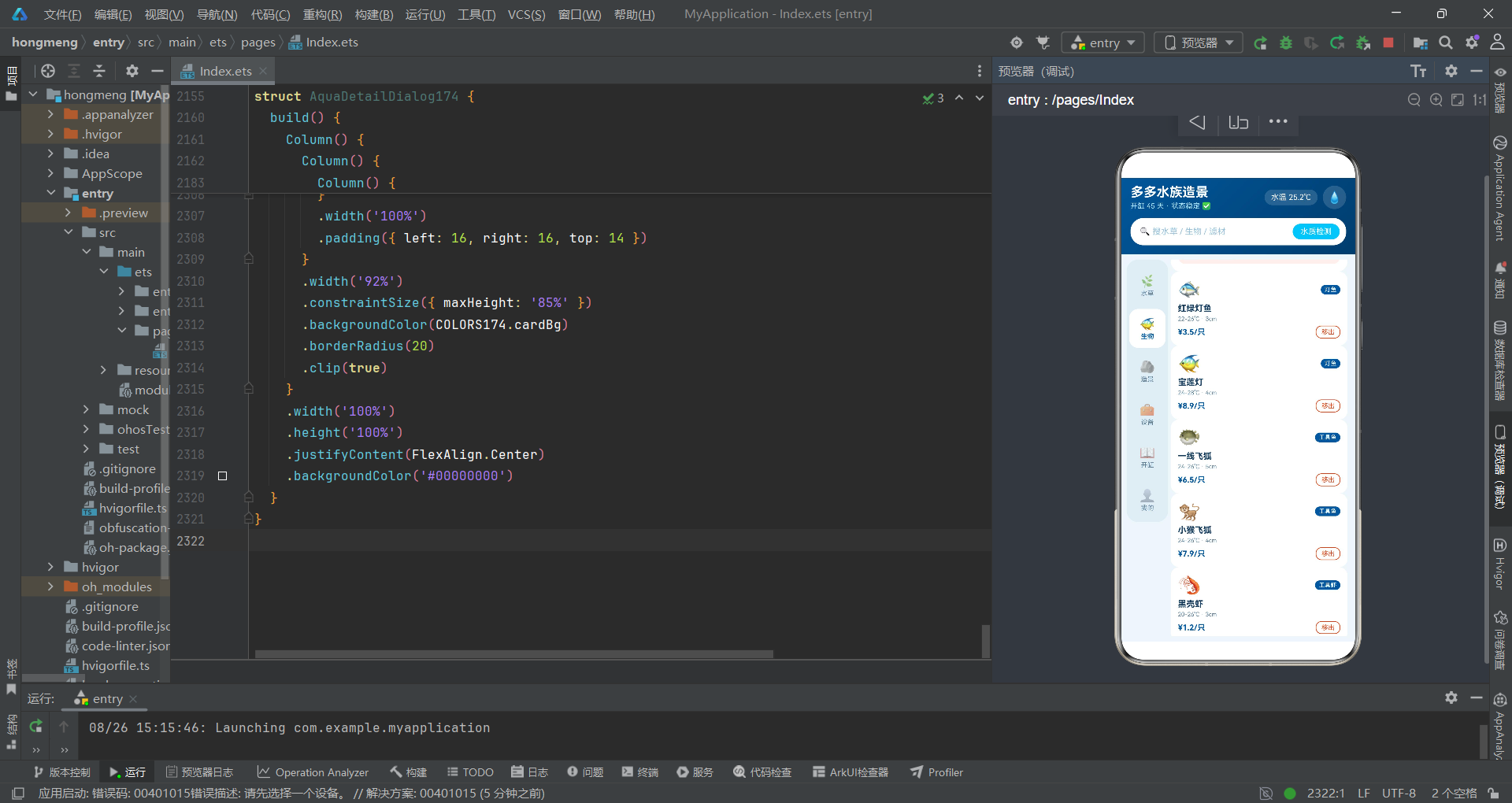
LifeTab174的build()方法渲染十二种水生动物的卡片列表。每张卡片包含图标、类型标签、名称、温度尺寸信息和价格。卡片的右下角有一个带边框的"移出"按钮——.border({ width: 1, color: COLORS174.danger })设置1vp宽的红色边框,点击后调用onDelete回调。.maxLines(1)和.textOverflow({ overflow: TextOverflow.Ellipsis })是文本溢出处理——限制最大行数为1行,超出部分显示省略号。这在军事上相当于"情报摘要截断"——当情报过长时自动截断并添加省略标记。
第十五战区:造景工事单元——@Component ScapeTab174的战场构筑模块
15.1 ScapeTab174组件架构与购买回调
ScapeTab174是一个负责展示造景风格的子组件,通过onBuy回调将选购信息传递给父组件。
15.2 styleCard()@Builder的横向滚动造景卡片
@Builder
styleCard() {
  Scroll() {
    Row() {
      ForEach(SCAPES174, (s: ScapeStyle174) => {
        Column() {
          Text(s.icon)
            .fontSize(34)
          Text(s.name)
            .fontSize(15)
            .fontWeight(FontWeight.Bold)
            .fontColor(COLORS174.white)
            .margin({ top: 6 })
          Text(s.desc)
            .fontSize(10)
            .fontColor('#FFFFFFB3')
            .margin({ top: 3 })
          Row() {
            Text(s.rocks)
              .fontSize(10)
              .fontColor('#FFFFFFCC')
            Text('')
              .layoutWeight(1)
            Text('¥' + s.price)
              .fontSize(14)
              .fontWeight(FontWeight.Bold)
              .fontColor('#FFE082')
          }
          .width('100%')
          .margin({ top: 10 })
        }
        .width(180)
        .height(148)
        .padding(13)
        .alignItems(HorizontalAlign.Start)
        .borderRadius(16)
        .linearGradient({
          angle: 135,
          colors: [[s.colorA, 0.0], [s.colorB, 1.0]]
        })
        .margin({ right: 10 })
        .onClick(() => {
          this.onBuy(s.rocks);
        })
      }, (s: ScapeStyle174) => s.name)
    }
    .width('100%')
  }
  .scrollable(ScrollDirection.Horizontal)
  .scrollBar(BarState.Off)
  .width('100%')
}
styleCard()使用了横向Scroll容器——.scrollable(ScrollDirection.Horizontal)设置水平滚动方向。这创建了一个横向滑动的造景风格展示区,每种风格渲染为一个180vp宽、148vp高的彩色卡片,使用该风格专属的colorA/colorB双色渐变作为背景。卡片的文字使用白色和半透明白色('#FFFFFFB3'是70%不透明白色,'#FFFFFFCC'是80%不透明白色),确保在彩色渐变背景上的可读性。价格'#FFE082'使用浅黄色突出显示。
15.3 build()方法的硬景观选购清单
ScapeTab174的build()方法在横向卡片下方,还渲染了一个垂直列表式的硬景观选购清单。每项包含图标、石材名称、描述、价格和"选购"按钮。选购按钮使用backgroundColor(COLORS174.deep)深海蓝背景和白色文字,点击后调用onBuy回调。
第十六战区:设备装备单元——@Component GearTab174的装备采购模块
16.1 GearTab174组件架构与分类筛选
@Component
struct GearTab174 {
  @State selCat: string = '全部';
  onBuy: (n: string) => void = () => {};
GearTab174是所有子组件中唯一拥有自己@State状态的——selCat: string = '全部'。这说明子组件也可以拥有局部的响应式状态。selCat用于设备分类筛选,初始值为’全部’。当用户点击分类标签时,selCat的值会改变,触发UI重新渲染。
16.2 catRow()@Builder的分类标签栏
catRow()使用横向Scroll+ForEach渲染六个分类标签:‘全部’、‘过滤’、‘灯光’、‘碳源’、‘温控’、‘底床’。每个标签的选中态通过三元运算符控制——选中的标签使用深海蓝背景和白色文字,未选中使用白色背景和次要文字色。点击标签时修改selCat状态,触发UI更新。
16.3 wattCard()@Builder的功耗柱状对比图
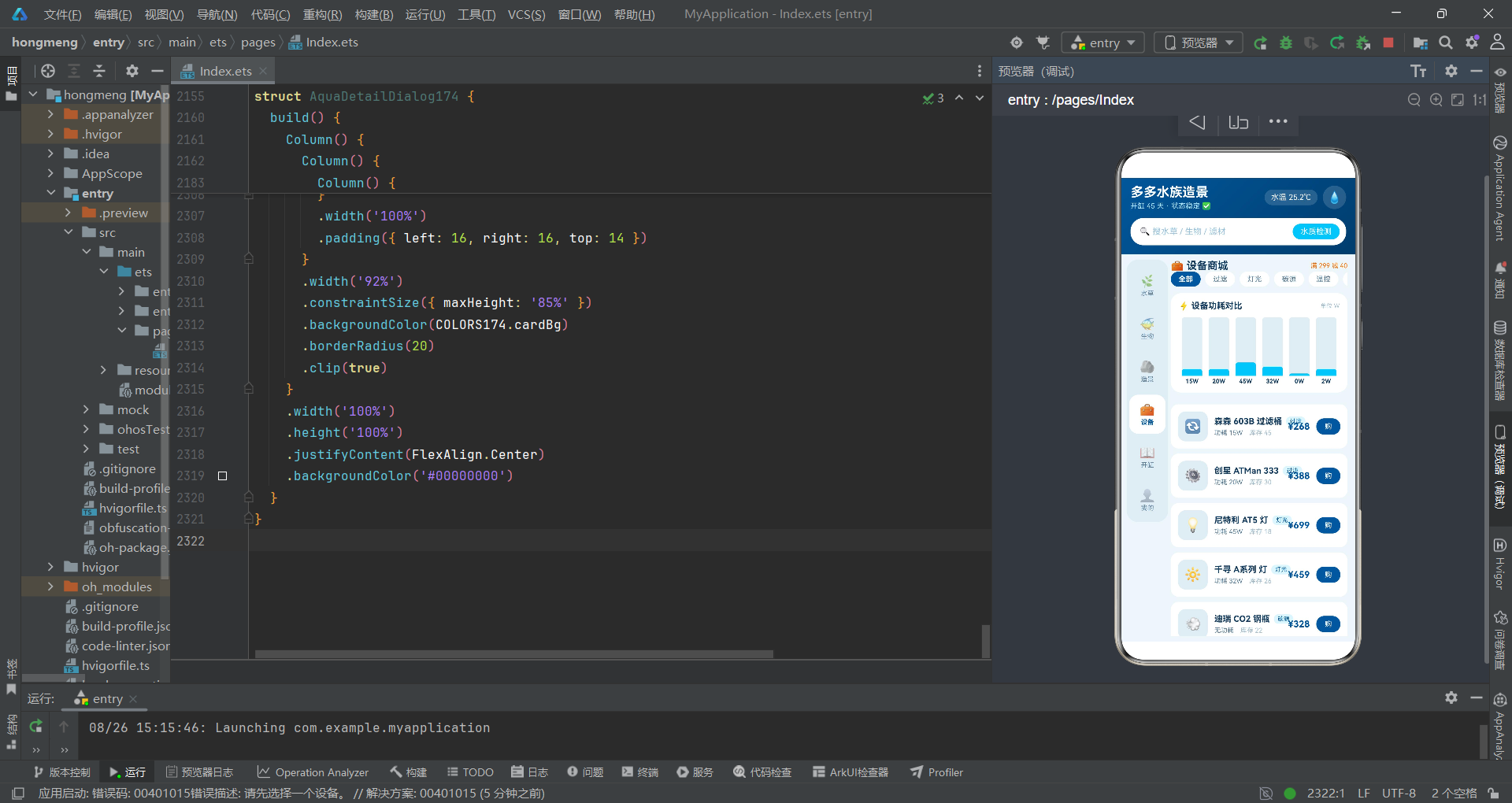
wattCard()是一个精心设计的数据可视化组件。它使用ForEach遍历GEARS174的前6种设备,为每种设备渲染一个柱状条。柱状条的高度通过wattH174函数计算——wattH174(g.watt)根据功率值返回百分比高度字符串。柱状条的颜色根据功率值判断——g.watt >= 100 ? COLORS174.orange : COLORS174.aqua,100W以上的设备显示橙色柱(高能耗警示),以下显示水蓝色柱(正常能耗)。
这个柱状图的实现使用了嵌套Column结构:外层Column高度固定90vp作为图表区域,内层Column的高度通过.height(wattH174(g.watt))动态设置。外层使用.justifyContent(FlexAlign.End)将内层柱状条推到底部对齐,模拟柱状图从底部生长的效果。.clip(true)确保柱状条不会超出圆角边界。
16.4 build()方法的设备列表渲染
GearTab174的build()方法在分类标签和功耗图之后,渲染了完整的设备列表。每项设备卡片包含图标、名称、分类标签、功耗信息、库存、价格和购买按钮。分类标签使用.backgroundColor('#E1F5FE')浅蓝色背景和深海蓝文字,形成"装备类型徽章"效果。购买按钮点击后调用onBuy回调,将设备名称传递给父组件触发购买弹窗。
第十七战区:开缸日志单元——@Component StartTab174的作战进度模块
17.1 StartTab174组件架构与向导回调
@Component
struct StartTab174 {
  onGuide: () => void = () => {};
StartTab174通过onGuide回调(无参数函数)通知父组件打开开缸向导对话框。
17.2 paramCard()@Builder的水质参数进度图
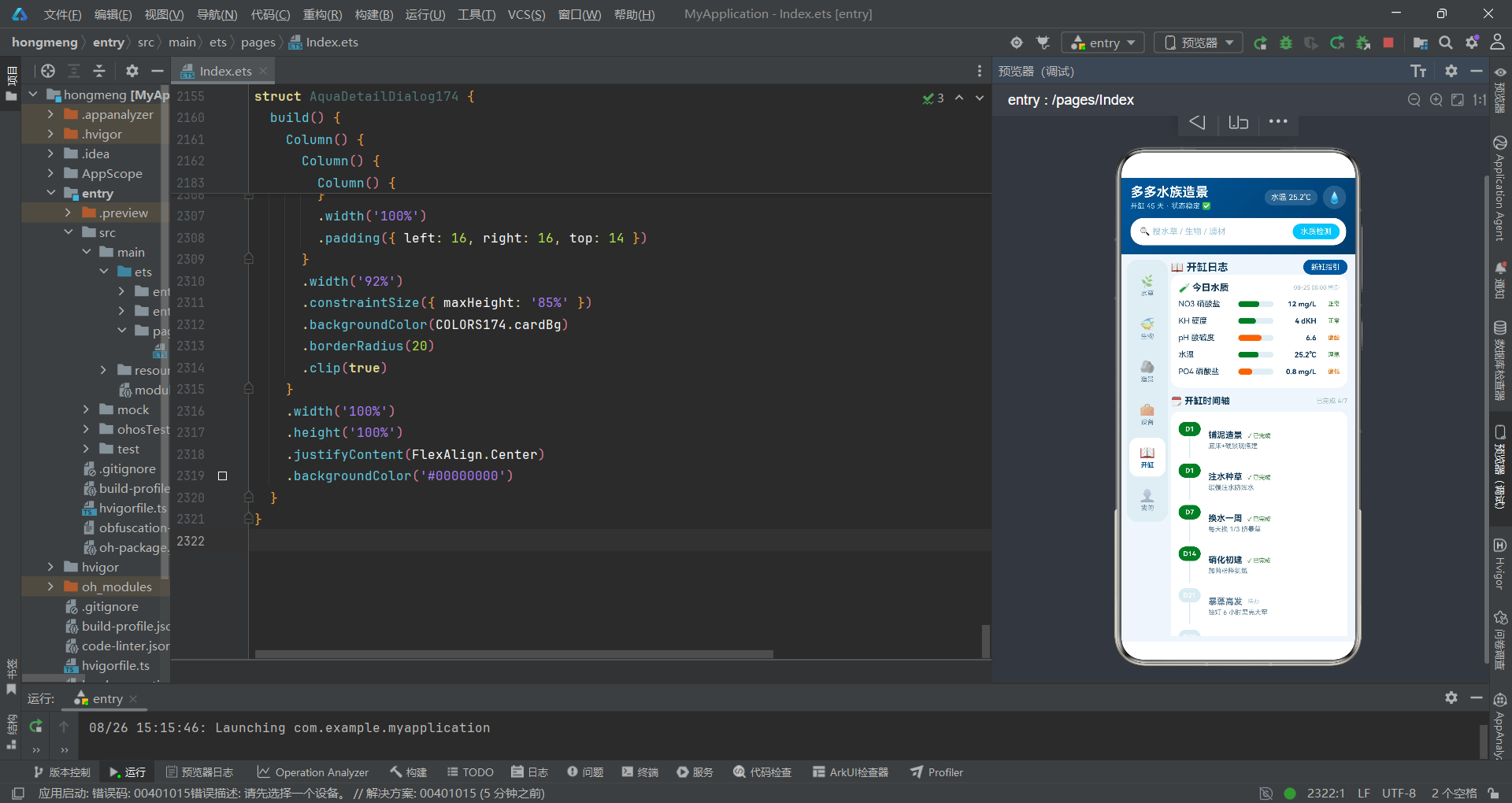
paramCard()渲染了五项水质参数的进度条列表。每项参数渲染为一个Row,包含参数名称(固定宽度92vp)、进度条、数值和状态标签。进度条使用与layerCard相同的双层Row结构——外层灰色背景轨道+内层动态宽度填充条。填充条颜色通过paramC174函数根据状态值动态计算——"正常"和"理想"返回绿色,其他返回橙色。
17.3 build()方法的开缸时间轴与维护提醒
StartTab174的build()方法构建了三个主要模块:水质参数卡片、开缸时间轴和维护提醒列表。
开缸时间轴使用ForEach渲染START_STEPS174中的七个步骤。每个步骤渲染为一个Row,左侧是日期标签和连接线,右侧是步骤标题和描述。日期标签的背景色根据done值变化——done为true使用绿色(COLORS174.plant),done为false使用灰色(COLORS174.border)。连接线的高度通过条件表达式idx < START_STEPS174.length - 1 ? 34 : 0控制——最后一个步骤不显示连接线(高度为0),其他步骤显示34vp高的连接线,形成连续的时间轴效果。.length是TypeScript中获取数组长度的属性,这是基本的数组操作知识点。
维护提醒使用ForEach渲染四条字符串数组['今天换水 1/3 · 约 20L', '周四修剪前景草', '周六清洗过滤棉(用原水)', '周日补充铁肥 5ml']。每条提醒渲染为一个Row,包含铃铛图标和文字,背景使用浅蓝色'#E8F4FA',形成情报提醒卡片的视觉效果。
第十八战区:个人中心单元——@Component MineTab174的后勤管理模块
18.1 MineTab174组件架构与双回调
@Component
struct MineTab174 {
  onDetail: (n: string, ic: string) => void = () => {};
  onEdit: (n: string) => void = () => {};
MineTab174声明了两个回调——onDetail用于查看鱼缸详情,onEdit用于编辑缸档案。这两个回调对应了"查看"和"编辑"两种不同的作战行动。
18.2 build()方法的用户信息卡与鱼缸档案
MineTab174的build()方法构建了多个模块:用户信息卡片、鱼缸档案列表和设备订单列表。
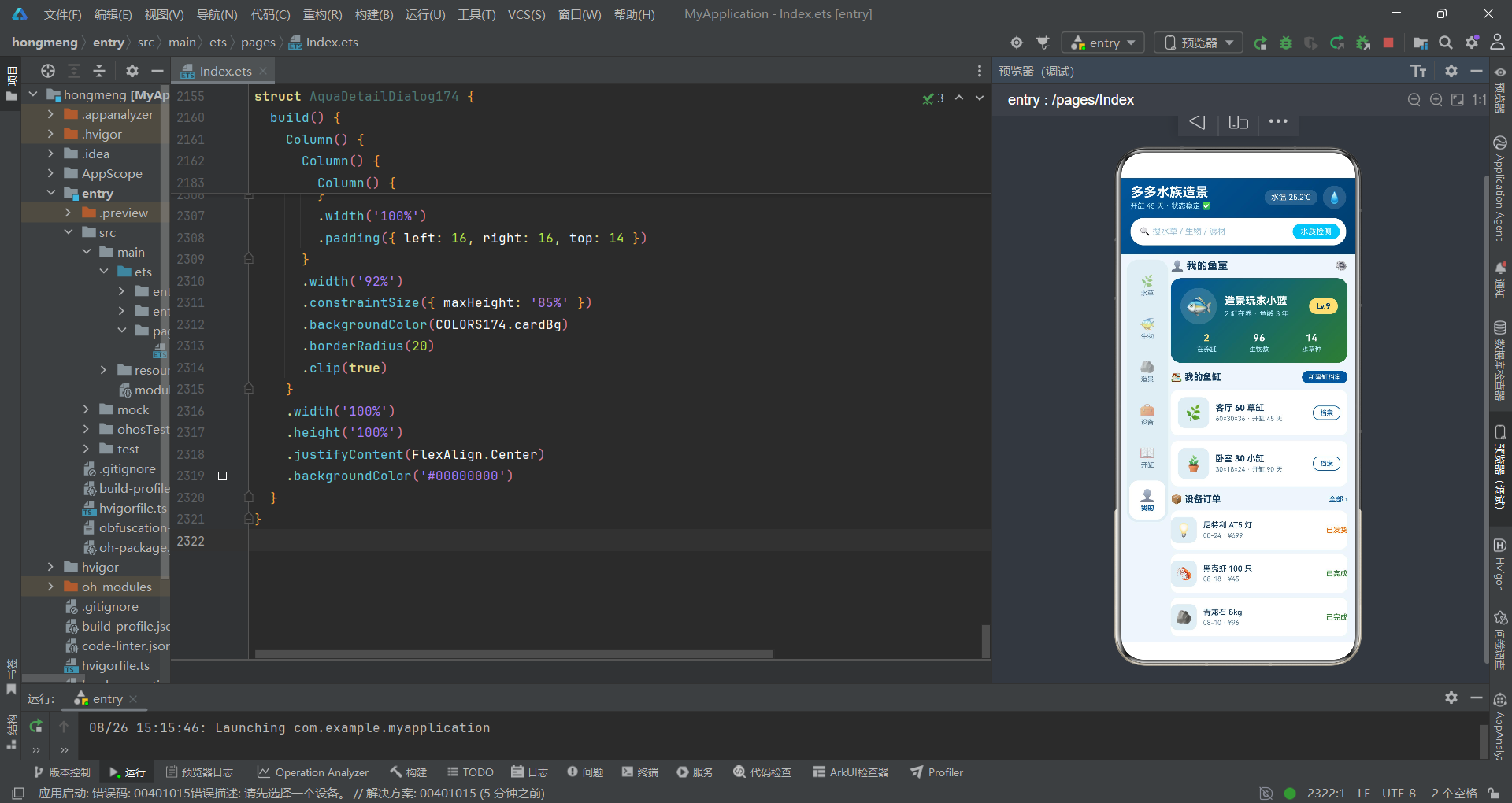
用户信息卡片使用linearGradient创建了从深海蓝到水草绿的渐变背景,模拟"从水域到植被"的视觉效果。卡片内使用Row布局水平排列了用户头像、用户名信息(含鱼龄)和等级标签。等级标签Lv.9使用backgroundColor('#FFE082')金黄色背景和深蓝色文字,形成"军衔徽章"效果。卡片下方使用ForEach渲染了三个统计项(在养缸、生物数、水草种),使用layoutWeight(1)均分宽度。
鱼缸档案列表使用ForEach遍历一个二维数组[['客厅 60 草缸', '60×30×36 · 开缸 45 天', '🌿'], ['卧室 30 小缸', '30×18×24 · 开缸 90 天', '🪴']]。这里的ForEach数据源是一个字符串数组的数组(string[][]),每个元素是一个包含三个字符串的数组——名称、描述、图标。渲染函数(t: string[]) => {...}接收一个string数组作为参数,通过t[0]、t[1]、t[2]索引访问数组元素。这展示了ForEach对不同数据结构的适配能力。
设备订单列表使用ForEach渲染ORDERS174中的五条订单记录。每条订单的右侧显示状态标签,状态颜色根据status值动态变化——o.status === '已发货' ? COLORS174.orange : COLORS174.plant,已发货显示橙色(运输中需要关注),其他状态显示绿色(已完成)。这是一个简单的条件颜色映射,没有使用辅助函数,而是直接在三元运算符中处理。
第十九战区:装备采购面板——@Component GearBuySheet174的采购作战模块
19.1 GearBuySheet174组件架构与局部状态
@Component
struct GearBuySheet174 {
  gearName: string = '';
  onClose: () => void = () => {};
  @State selSet: string = '单机';
  @State count: number = 1;
  @State needInstall: boolean = false;
GearBuySheet174接收两个父组件传递的参数:gearName(设备名称)和onClose(关闭回调)。同时拥有三个局部@State状态:selSet(套装选择,默认’单机’)、count(数量,默认1)、needInstall(是否需要上门安装,默认false)。这三个状态都是用户在购买面板中可以交互修改的——选择套装、调整数量、切换安装选项。
19.2 build()方法的采购面板构建
GearBuySheet174的build()方法构建了一个完整的购买流程面板,包含:设备信息卡、套装选择标签、数量调节器、安装选项和结算栏。
数量调节器由减号按钮、数字显示和加号按钮组成。减号按钮的点击事件包含条件保护:if (this.count > 1) { this.count = this.count - 1; }——只有当count大于1时才执行减1操作,防止数量降至0。加号按钮无限制条件,直接this.count = this.count + 1。这种设计在军事上相当于"兵力增减控制"——可以增兵但兵力不能为零。
结算栏的价格计算使用了复合表达式:this.count * 268 + (this.needInstall ? 60 : 0)。这里268是设备单价(硬编码),this.needInstall ? 60 : 0表示如果需要安装则加60元安装费。整个表达式先计算数量乘以单价的商品总额,再加上条件性的安装费,得到最终合计金额。这是一个将@State状态变量参与运行时计算的典型例子——当count或needInstall变化时,合计金额会自动重新计算并更新显示。
第二十战区:开缸向导对话框——@Component StartGuideDialog174的作战规划模块
20.1 StartGuideDialog174组件架构
@Component
struct StartGuideDialog174 {
  onCancel: () => void = () => {};
  onStart: () => void = () => {};
  @State selTank: string = '60 标准缸';
  @State selBudget: string = '入门 ¥800';
StartGuideDialog174是一个全屏覆盖的对话框组件,接收onCancel(取消)和onStart(开始)两个回调。拥有两个@State状态:selTank(缸体尺寸选择,默认’60 标准缸’)和selBudget(预算档位选择,默认’入门 ¥800’)。
20.2 build()方法的三步向导流程
StartGuideDialog174的build()方法构建了一个三步选择流程:第一步选择缸体尺寸(30小缸/60标准缸/90进阶缸),第二步选择预算档位(入门¥800/进阶¥2000/发烧¥5000),第三步生成清单。每步都使用ForEach渲染选项标签,选中态通过深海蓝(缸体)或水草绿(预算)背景区分。
底部的取消和开始按钮使用layoutWeight(1)的空Text分隔,形成左右分布布局。取消按钮使用边框样式(border({ width: 1, color: COLORS174.border })),开始按钮使用实心背景样式——这在军事上相当于"撤退"和"进攻"两种行动的不同视觉编码。
20.3 全屏覆盖层的布局技巧
.width('100%')
.height('100%')
.justifyContent(FlexAlign.Center)
.backgroundColor('#00000000')
StartGuideDialog174的最外层Column设置了100%宽高和居中对齐(justifyContent(FlexAlign.Center)),使内部的内容卡片在屏幕中央显示。backgroundColor('#00000000')设置完全透明背景——虽然bindContentCover会自动提供遮罩层,但显式设置透明背景是一种防御性编程习惯。内部的卡片容器使用.width('86%')控制内容宽度,形成对话框居中浮动的效果。
第二十一战区:编辑缸档案面板——@Component EditTankSheet174的档案管理模块
21.1 EditTankSheet174组件架构与aboutToAppear生命周期
@Component
struct EditTankSheet174 {
  tankName: string = '';
  onClose: () => void = () => {};
  @State tankTitle: string = '';
  @State selLight: string = '8小时';
  @State selFreq: string = '每周2次';

  aboutToAppear(): void {
    this.tankTitle = this.tankName;
  }
EditTankSheet174引入了一个新的知识点——aboutToAppear()生命周期方法。在HarmonyOS ArkTS中,@Component组件有一组生命周期回调方法,aboutToAppear是其中最常用的一个。它在组件创建后、build()方法执行前被调用,用于初始化状态变量。这里的this.tankTitle = this.tankName;将父组件传入的缸名赋值给本地状态变量tankTitle,作为TextInput的初始值。这在军事上相当于"部队展开前的最后准备阶段"——在正式投入战斗前完成初始状态设置。
21.2 TextInput组件的知识点
TextInput({ placeholder: '给鱼缸起个名字', text: this.tankTitle })
  .fontSize(14)
  .height(44)
  .padding({ left: 12 })
  .borderRadius(10)
  .backgroundColor('#E2EDF4')
  .onChange((v: string) => {
    this.tankTitle = v;
  })
  .margin({ top: 8 })
TextInput是HarmonyOS ArkTS中的文本输入组件,用于接收用户输入。它通过参数对象{ placeholder, text }配置——placeholder是占位提示文字(输入框为空时显示的灰色提示),text是输入框的初始文本内容。
.onChange((v: string) => { this.tankTitle = v; })绑定文本变化事件——当用户输入文字时,每次按键都会触发onChange回调,参数v是当前的输入文本。这里将v赋值给@State变量tankTitle,实现了输入内容的响应式状态同步。这是ArkTS表单交互的基本模式:用户输入 -> onChange回调 -> 修改@State -> UI更新。
21.3 build()方法的编辑表单构建
EditTankSheet174的build()方法构建了一个完整的编辑表单,包含:缸名输入框、灯光时长选择(6/8/10小时)、换水频率选择(每周1次/每周2次/每月1次)和保存/取消按钮。灯光时长使用深海蓝背景标记选中态,换水频率使用水草绿背景标记选中态——两种不同的选中色在视觉上区分了不同的配置类别。
第二十二战区:移出生物确认——@Component DeleteLifeDialog174的作战确认模块
22.1 DeleteLifeDialog174组件架构
@Component
struct DeleteLifeDialog174 {
  lifeName: string = '';
  onCancel: () => void = () => {};
  onConfirm: () => void = () => {};
  @State removeFromList: boolean = true;
DeleteLifeDialog174是一个全屏覆盖的确认对话框,接收lifeName(要移出的生物名称)、onCancel(取消)和onConfirm(确认)三个参数。拥有一个@State状态removeFromList(是否同步删除喂养提醒,默认true)。
22.2 build()方法的确认对话框构建
DeleteLifeDialog174的build()方法构建了一个居中浮动的确认对话框,包含:鱼图标、标题、确认描述文字、复选项和两个操作按钮。
复选项使用Text(this.removeFromList ? '☑️' : '⬜')显示不同图标——选中显示勾选框图标,未选中显示空方框图标。点击切换this.removeFromList = !this.removeFromList,这里使用了逻辑非运算符!——将布尔值取反。这是实现切换开关效果的经典模式。
确认移出按钮使用backgroundColor(COLORS174.danger)警示红色背景,与取消按钮的边框样式形成对比。这种红色按钮在军事上相当于"执行危险作战行动"的最终确认——通过醒目的颜色警示用户该操作的不可逆性。
第二十三战区:物品详情对话框——@Component AquaDetailDialog174的情报展示模块
23.1 AquaDetailDialog174组件架构
@Component
struct AquaDetailDialog174 {
  itemName: string = '';
  itemIcon: string = '';
  onClose: () => void = () => {};
AquaDetailDialog174接收itemName(物品名称)、itemIcon(物品图标)和onClose(关闭)三个参数,没有自己的@State状态——它是一个纯展示型对话框。
23.2 build()方法的详情展示构建
AquaDetailDialog174的build()方法构建了最复杂的对话框内容,包含:渐变头部(物品图标+造景推荐标签)、物品名称与参数、养护参数列表、造景提示文字、玩家评价列表和操作按钮。
渐变头部使用linearGradient({ angle: 135, colors: [[COLORS174.aqua, 0.0], [COLORS174.deepDark, 1.0]] })创建从水蓝到深蓝暗调的渐变,与pageHeader()的深海蓝渐变形成呼应。
constraintSize约束尺寸是本对话框引入的一个新知识点。.constraintSize({ maxHeight: '85%' })设置组件的最大高度为85%——这确保对话框内容不会超出屏幕高度的85%,即使内容很长也会受到高度约束。constraintSize接受一个对象参数{ minWidth, maxWidth, minHeight, maxHeight },分别设置四个方向的尺寸约束。在军事上,这相当于"作战区域边界限制"——确保部队不会超出指定的行动范围。
clip裁剪.clip(true)启用组件裁剪——当子组件内容超出父组件边界时,超出部分被裁剪隐藏。这里与constraintSize配合使用,确保对话框圆角内的内容不会溢出圆角边界。
lineHeight行高.lineHeight(19)设置文本行高为19vp。行高大于字号时,行间会出现额外的间距,提高多行文本的可读性。这在军事上相当于"情报排版的行间距规范"——确保多行文字之间有足够间距,便于快速阅读。
23.3 收藏与购买按钮的战术布局
对话框底部的收藏和购买按钮使用layoutWeight(1)的空Text分隔,形成左右分布。收藏按钮使用边框样式border({ width: 1, color: COLORS174.deep }),购买按钮使用实心背景backgroundColor(COLORS174.deep)。这种"边框+实心"的按钮组合在军事上相当于"备选方案+主攻方案"的视觉编码——边框按钮是次级操作,实心按钮是主级操作。
第二十四战区:作战推演流程图——系统架构兵力调度全景
24.1 战术推演流程图
24.2 兵力调度链路解析
从上述流程图可以清晰看到整个作战体系的兵力调度链路:
纵向指挥链:数据层(COLORS174等常量)提供底层情报支援 -> 支援层(六大辅助函数)进行情报加工 -> 战术层(六六子组件)执行具体作战任务 -> 指挥层(AquaMain174)统一调度 -> 弹窗层(五大模态组件)处理特殊作战需求。
横向通信链:战术层的子组件通过回调函数(onDetail、onDelete、onBuy、onGuide、onEdit)向上级指挥所汇报战术情况,指挥所接收情报后修改@State状态变量,触发bindSheet/bindContentCover弹出相应的模态弹窗。这种"下级汇报->上级决策->弹窗响应"的通信模式,构成了完整的指挥闭环。
第二十五战区:战术技术对比分析表——核心知识点综合评估
25.1 核心装饰器/关键字战术对比表
| 序号 | 知识点 | 类别 | 战术职能 | 军事类比 | 使用次数 | 代码示例 |
|---|---|---|---|---|---|---|
| 1 | @Entry | 装饰器 | 标记页面入口组件 | 指挥所标识旗 | 1次 | @Entry struct AquaMain174 |
| 2 | @Component | 装饰器 | 声明自定义组件 | 部队番号认证 | 9次 | @Component struct PlantTab174 |
| 3 | @State | 装饰器 | 响应式状态变量 | 情报自动分发系统 | 20+次 | @State curTab: string = 'plant' |
| 4 | @Builder | 装饰器 | 可复用UI构建模板 | 标准战术预案 | 10次 | @Builder pageHeader() |
| 5 | struct | 关键字 | 声明组件结构体 | 部队建制单位 | 9次 | struct AquaMain174 |
| 6 | interface | 关键字 | 定义接口类型契约 | 兵力装备标准表 | 10次 | interface ColorPalette174 |
| 7 | const | 关键字 | 声明不可变常量 | 不可撤回命令 | 10次 | const COLORS174: ColorPalette174 |
| 8 | let | 关键字 | 声明可变变量 | 可修订命令 | 3次 | let r = Math.round(...) |
| 9 | for | 关键字 | 循环语句 | 按编制逐个检阅 | 1次 | for (let i = 0; i < 5; i++) |
| 10 | if/else | 关键字 | 条件判断 | 战术分支决策 | 30+次 | if (this.curTab === 'plant') |
| 11 | function | 关键字 | 声明函数 | 战术支援单元 | 6次 | function layerC174(l: string) |
| 12 | return | 关键字 | 返回值 | 情报上报 | 6次 | return COLORS174.plant |
25.2 UI组件与属性战术对比表
| 序号 | 组件/属性 | 类别 | 战术职能 | 军事类比 | 关键参数 |
|---|---|---|---|---|---|
| 1 | Column | 布局组件 | 垂直线性布局 | 纵队队形 | .alignItems(HorizontalAlign.Start) |
| 2 | Row | 布局组件 | 水平线性布局 | 横队队形 | .justifyContent(FlexAlign.Start) |
| 3 | Text | 显示组件 | 文本展示 | 情报标语牌 | .fontSize().fontWeight().fontColor() |
| 4 | TextInput | 交互组件 | 文本输入 | 情报录入终端 | placeholder, text, onChange |
| 5 | Scroll | 容器组件 | 可滚动区域 | 可移动侦察区域 | .scrollable(ScrollDirection.Vertical) |
| 6 | ForEach | 渲染组件 | 列表循环渲染 | 按编制表展开 | (数据源, 渲染函数, 键值函数) |
| 7 | linearGradient | 样式属性 | 线性渐变背景 | 伪装涂装方案 | { angle, colors: [[色, 位], [色, 位]] } |
| 8 | layoutWeight | 布局属性 | 布局权重 | 占领阵地 | layoutWeight(1) |
| 9 | bindSheet | 弹窗属性 | 底部滑出面板 | 半身掩体 | $$this.state, builder, { height } |
| 10 | bindContentCover | 弹窗属性 | 全屏覆盖层 | 全屏烟幕 | $$this.state, builder, {} |
| 11 | padding/margin | 间距属性 | 内/外边距 | 阵地间隔 | { left, right, top, bottom } |
| 12 | borderRadius | 外观属性 | 圆角半径 | 柔化工事 | borderRadius(16) |
| 13 | opacity | 外观属性 | 透明度 | 隐蔽等级 | opacity(0.55) |
| 14 | clip | 外观属性 | 裁剪溢出 | 边界管控 | clip(true) |
| 15 | constraintSize | 约束属性 | 尺寸约束 | 行动区域限制 | { maxHeight: '85%' } |
| 16 | onClick | 事件属性 | 点击事件 | 触发作战行动 | () => { ... } |
| 17 | onChange | 事件属性 | 值变化事件 | 情报实时同步 | (v: string) => { ... } |
| 18 | aboutToAppear | 生命周期 | 组件创建后初始化 | 部队展开前准备 | 无参数,返回void |
25.3 TypeScript类型系统战术对比表
| 序号 | 类型 | 类别 | 战术职能 | 代码示例 |
|---|---|---|---|---|
| 1 | string | 原始类型 | 字符串文本 | name: string = '红绿灯鱼' |
| 2 | number | 原始类型 | 数值(整数/浮点) | price: number = 15.9 |
| 3 | boolean | 原始类型 | 布尔值(true/false) | done: boolean = true |
| 4 | void | 特殊类型 | 无返回值 | onClose: () => void |
| 5 | 类型[] | 数组类型 | 元素数组 | PlantItem174[] |
| 6 | (参数) => 返回 | 函数类型 | 函数签名 | (n: string) => void |
| 7 | 接口名 | 接口类型 | 对象形状契约 | ColorPalette174 |
| 8 | 枚举.值 | 枚举类型 | 预定义常量集 | FontWeight.Bold |
25.4 弹窗绑定方式战术对比表
| 序号 | 绑定方式 | 弹窗类型 | 覆盖范围 | 战术用途 | 代码示例 |
|---|---|---|---|---|---|
| 1 | bindSheet | 底部面板 | 屏幕下半部分 | 半屏作战面板 | 购买设备、编辑档案 |
| 2 | bindContentCover | 全屏覆盖 | 整个屏幕 | 全屏作战命令 | 开缸向导、移出确认、详情展示 |
| 3 | $$语法 | 双向绑定 | 状态同步 | 双向通信链路 | $$this.showBuyGear |
25.5 六大辅助函数战术对比表
| 序号 | 函数名 | 参数类型 | 返回类型 | 战术职能 | 核心逻辑 |
|---|---|---|---|---|---|
| 1 | layerC174 | string | string | 水层颜色编码 | 前景→绿、中景→橙、后景→蓝 |
| 2 | co2C174 | string | string | CO2等级色码 | 必须→红、建议→橙、其他→绿 |
| 3 | mixOkC174 | boolean | string | 混养兼容色码 | true→绿、false→红 |
| 4 | paramC174 | string | string | 水质状态色码 | 正常/理想→绿、其他→橙 |
| 5 | wattH174 | number | string | 功耗柱状高度 | w/200*100%,最小12% |
| 6 | levelStars174 | number | string | 难度星级文本 | 5星循环,实心/空心 |
25.6 数据模型接口战术对比表
| 序号 | 接口名 | 属性数 | 属性类型分布 | 兵种类型 | 数据量 |
|---|---|---|---|---|---|
| 1 | ColorPalette174 | 15 | 全string | 色彩标准协议 | 1组 |
| 2 | TabItem174 | 3 | 全string | 导航编制 | 6项 |
| 3 | PlantItem174 | 7 | 5string+2number | 水草兵力 | 12项 |
| 4 | LifeItem174 | 7 | 6string+1number | 生物兵力 | 12项 |
| 5 | MixRule174 | 4 | 3string+1boolean | 混养条令 | 6项 |
| 6 | ScapeStyle174 | 7 | 全string+2number | 工事模板 | 4项 |
| 7 | GearItem174 | 6 | 3string+3number | 装备清单 | 12项 |
| 8 | StartStep174 | 4 | 3string+1boolean | 开缸进度 | 7项 |
| 9 | ParamItem174 | 4 | 2string+2number | 水质情报 | 5项 |
| 10 | OrderItem174 | 5 | 4string+1number | 补给订单 | 5项 |
第二十六战区:战役总结与战后复盘
26.1 架构设计复盘
经过对174号源文件的完整战术推演,我们可以对该水族造景管理系统的架构设计进行全面的战后复盘。该系统采用了一个@Entry主组件(AquaMain174)作为总指挥所,下辖六个@Component子组件(PlantTab174、LifeTab174、ScapeTab174、GearTab174、StartTab174、MineTab174)作为战术执行单元,再加上五个@Component模态弹窗组件(GearBuySheet174、StartGuideDialog174、EditTankSheet174、DeleteLifeDialog174、AquaDetailDialog174)作为特殊作战支援力量,共计十二个组件构成了完整的作战体系。
这种"1+6+5"的组件架构体现了HarmonyOS ArkTS声明式UI的组件化设计理念:主组件负责全局状态管理和子组件调度,子组件负责具体业务逻辑的UI渲染,弹窗组件负责模态交互场景。通过@State状态变量和回调函数的双向通信机制,各层组件之间建立了高效的信息传递链路——父组件通过@State控制子组件的显示逻辑,子组件通过回调函数向父组件上报战术情况。
26.2 数据驱动复盘
该系统的数据层包含十个TypeScript接口和对应的常量数组,涵盖了色彩协议、导航编制、水草兵力、生物兵力、混养条令、工事模板、装备清单、开缸进度、水质情报和补给订单共十大类作战数据。这些数据通过interface定义了严格的类型契约,确保了数据在编译期的类型安全性。十个辅助函数(实际六个)提供了数据到视觉呈现的转换服务——颜色编码、高度计算、星级生成等,实现了数据与表现的解耦。
整个系统充分体现了HarmonyOS声明式UI"数据驱动视图"的核心设计理念:@State状态变量的变化自动触发UI重新渲染,用户交互通过onClick/onChange事件修改状态,状态的修改自动反映到视图层。这种设计模式使得开发者只需关注"状态是什么"和"UI长什么样",而无需手动管理DOM更新——框架自动处理了状态到视图的映射。这在军事上相当于"自动化的指挥控制系统"——指挥官只需下达命令(修改状态),部队(UI)会自动调整部署。
安装DevEco Studio程序

选择目标安装目录:

设置环境变量,但是需要重启一下:

新建一个空白模板:

设置API为24的模板项目:

初始化项目,自动下载相关依赖:

完整代码:
// 多多水族造景 · 草缸玩家的后花园
// 拼多多风格:深海蓝 × 水草绿,左侧竖排 Tab + 右侧内容区(杂志式布局)
interface ColorPalette174 {
deep: string;
deepDark: string;
aqua: string;
plant: string;
plantLight: string;
bg: string;
cardBg: string;
textMain: string;
textSub: string;
textHint: string;
border: string;
danger: string;
white: string;
orange: string;
purple: string;
}
const COLORS174: ColorPalette174 = {
deep: '#01579B',
deepDark: '#003D6E',
aqua: '#4FC3F7',
plant: '#2E7D32',
plantLight: '#A5D6A7',
bg: '#EFF6FA',
cardBg: '#FFFFFF',
textMain: '#123A5C',
textSub: '#5C7F99',
textHint: '#9DB8C9',
border: '#DCEAF2',
danger: '#D84315',
white: '#FFFFFF',
orange: '#EF6C00',
purple: '#6A1B9A'
};
interface TabItem174 {
key: string;
icon: string;
label: string;
}
const TABS174: TabItem174[] = [
{ key: 'plant', icon: '🌿', label: '水草' },
{ key: 'life', icon: '🐠', label: '生物' },
{ key: 'scape', icon: '🪨', label: '造景' },
{ key: 'gear', icon: '🧰', label: '设备' },
{ key: 'start', icon: '📖', label: '开缸' },
{ key: 'mine', icon: '👤', label: '我的' }
];
interface PlantItem174 {
name: string;
icon: string;
layer: string;
level: number;
co2: string;
price: number;
growth: string;
}
const PLANTS174: PlantItem174[] = [
{ name: '迷你矮珍珠', icon: '🌱', layer: '前景', level: 5, co2: '必须', price: 15.9, growth: '慢' },
{ name: '牛毛毡', icon: '🌾', layer: '前景', level: 4, co2: '建议', price: 9.9, growth: '中' },
{ name: '挖耳草', icon: '☘️', layer: '前景', level: 4, co2: '必须', price: 12.9, growth: '慢' },
{ name: '迷你椒草', icon: '🌿', layer: '前景', level: 2, co2: '可选', price: 8.9, growth: '慢' },
{ name: '叉柱花', icon: '🍀', layer: '前景', level: 3, co2: '建议', price: 11.5, growth: '中' },
{ name: '宫廷草', icon: '🎋', layer: '中景', level: 2, co2: '建议', price: 6.9, growth: '快' },
{ name: '粉虎耳', icon: '🌸', layer: '中景', level: 4, co2: '必须', price: 18.9, growth: '中' },
{ name: '喷泉太阳', icon: '💧', layer: '中景', level: 5, co2: '必须', price: 25.9, growth: '慢' },
{ name: '绿温蒂椒草', icon: '🌿', layer: '中景', level: 1, co2: '无需', price: 5.9, growth: '慢' },
{ name: '绿菊', icon: '🌼', layer: '后景', level: 2, co2: '建议', price: 7.9, growth: '快' },
{ name: '大红叶', icon: '🍁', layer: '后景', level: 4, co2: '必须', price: 19.9, growth: '中' },
{ name: '绿松尾', icon: '🌲', layer: '后景', level: 3, co2: '建议', price: 9.5, growth: '快' }
];
interface LifeItem174 {
name: string;
icon: string;
temp: string;
size: string;
price: number;
mix: string;
type: string;
}
const LIVES174: LifeItem174[] = [
{ name: '红绿灯鱼', icon: '🐟', temp: '22-26℃', size: '3cm', price: 3.5, mix: '群游温和', type: '灯鱼' },
{ name: '宝莲灯', icon: '🐠', temp: '24-28℃', size: '4cm', price: 8.9, mix: '群游温和', type: '灯鱼' },
{ name: '一线飞狐', icon: '🐡', temp: '24-26℃', size: '5cm', price: 6.5, mix: '吃黑毛藻', type: '工具鱼' },
{ name: '小猴飞狐', icon: '🐒', temp: '24-26℃', size: '4cm', price: 7.9, mix: '除藻猛将', type: '工具鱼' },
{ name: '黑壳虾', icon: '🦐', temp: '20-26℃', size: '3cm', price: 1.2, mix: '清洁残饵', type: '工具虾' },
{ name: '樱花虾', icon: '🌸', temp: '22-26℃', size: '2.5cm', price: 3.0, mix: '除藻观赏', type: '观赏虾' },
{ name: '极火虾', icon: '🔥', temp: '22-26℃', size: '2.5cm', price: 4.5, mix: '除藻观赏', type: '观赏虾' },
{ name: '巧克力娃娃', icon: '🍫', temp: '24-28℃', size: '3cm', price: 15.0, mix: '吃螺能手', type: '工具鱼' },
{ name: '金苔鼠', icon: '🧹', temp: '22-26℃', size: '6cm', price: 5.5, mix: '玻璃除藻', type: '工具鱼' },
{ name: '胡子大帆', icon: '🐋', temp: '24-28℃', size: '8cm', price: 22.0, mix: '夜行除藻', type: '异型鱼' },
{ name: '蓝眼灯', icon: '✨', temp: '24-28℃', size: '3cm', price: 5.5, mix: '夜晚蓝眼', type: '灯鱼' },
{ name: '玻璃拉拉', icon: '🫧', temp: '24-28℃', size: '4cm', price: 9.9, mix: '通体透明', type: '观赏鱼' }
];
interface MixRule174 {
a: string;
b: string;
ok: boolean;
note: string;
}
const MIX_RULES174: MixRule174[] = [
{ a: '灯鱼类', b: '观赏虾', ok: true, note: '可混养 · 虾苗可能被吃' },
{ a: '灯鱼类', b: '胡子异型', ok: true, note: '可混养 · 和平共处' },
{ a: '灯鱼类', b: '大型慈鲷', ok: false, note: '禁混养 · 会被捕食' },
{ a: '巧克力娃娃', b: '樱花虾', ok: false, note: '禁混养 · 虾会被啃' },
{ a: '工具鱼', b: '水草', ok: true, note: '安全 · 不啃草' },
{ a: '金鱼', b: '水草', ok: false, note: '禁混养 · 金鱼啃草' }
];
interface ScapeStyle174 {
name: string;
icon: string;
desc: string;
rocks: string;
price: number;
colorA: string;
colorB: string;
}
const SCAPES174: ScapeStyle174[] = [
{ name: 'ADA 自然风', icon: '⛰', desc: '留白构图·青龙石', rocks: '青龙石 8kg', price: 168, colorA: '#4FC3F7', colorB: '#01579B' },
{ name: '荷兰式', icon: '🌷', desc: '红绿条纹·密集种植', rocks: '化妆砂 5kg', price: 138, colorA: '#F48FB1', colorB: '#6A1B9A' },
{ name: '丛林风', icon: '🌴', desc: '狂野生长·阴性草', rocks: '沉木 3根', price: 152, colorA: '#A5D6A7', colorB: '#2E7D32' },
{ name: '岩组风', icon: '🪨', desc: '石头矩阵·极简', rocks: '火山石 10kg', price: 145, colorA: '#FFB74D', colorB: '#EF6C00' }
];
interface GearItem174 {
name: string;
icon: string;
watt: number;
price: number;
cat: string;
stock: number;
}
const GEARS174: GearItem174[] = [
{ name: '森森 603B 过滤桶', icon: '🔄', watt: 15, price: 268, cat: '过滤', stock: 45 },
{ name: '创星 ATMan 333', icon: '⚙️', watt: 20, price: 388, cat: '过滤', stock: 30 },
{ name: '尼特利 AT5 灯', icon: '💡', watt: 45, price: 699, cat: '灯光', stock: 18 },
{ name: '千寻 A系列 灯', icon: '🔆', watt: 32, price: 459, cat: '灯光', stock: 26 },
{ name: '迪瑞 CO2 钢瓶', icon: '💨', watt: 0, price: 328, cat: '碳源', stock: 22 },
{ name: '电磁阀+记泡器', icon: '🫧', watt: 2, price: 88, cat: '碳源', stock: 60 },
{ name: '伊罕 加热棒 200W', icon: '🌡', watt: 200, price: 158, cat: '温控', stock: 35 },
{ name: '变频加热棒 100W', icon: '🔥', watt: 100, price: 96, cat: '温控', stock: 48 },
{ name: 'ADA 美妆砂', icon: '⏳', watt: 0, price: 89, cat: '底床', stock: 80 },
{ name: '尼特利泥 9L', icon: '🟤', watt: 0, price: 128, cat: '底床', stock: 55 },
{ name: '蛋白棉过滤器', icon: '🧪', watt: 3, price: 68, cat: '过滤', stock: 72 },
{ name: '定时插座', icon: '⏲', watt: 1, price: 29, cat: '温控', stock: 120 }
];
interface StartStep174 {
day: string;
title: string;
desc: string;
done: boolean;
}
const START_STEPS174: StartStep174[] = [
{ day: 'D1', title: '铺泥造景', desc: '底床+硬景观搭建', done: true },
{ day: 'D1', title: '注水种草', desc: '缓慢注水防浑水', done: true },
{ day: 'D7', title: '换水一周', desc: '每天换 1/3 防暴藻', done: true },
{ day: 'D14', title: '硝化初建', desc: '加菌粉降氨氮', done: true },
{ day: 'D21', title: '暴藻高发', desc: '控灯 6 小时黑壳大军', done: false },
{ day: 'D30', title: '入虾工具鱼', desc: '藻类稳定后进生物', done: false },
{ day: 'D45', title: '系统稳定', desc: '正式进入日常维护', done: false }
];
interface ParamItem174 {
name: string;
value: string;
pct: number;
status: string;
}
const PARAMS174: ParamItem174[] = [
{ name: 'NO3 硝酸盐', value: '12 mg/L', pct: 60, status: '正常' },
{ name: 'KH 硬度', value: '4 dKH', pct: 50, status: '正常' },
{ name: 'pH 酸碱度', value: '6.6', pct: 66, status: '偏酸' },
{ name: '水温', value: '25.2℃', pct: 58, status: '理想' },
{ name: 'PO4 磷酸盐', value: '0.8 mg/L', pct: 40, status: '偏低' }
];
interface OrderItem174 {
name: string;
icon: string;
price: number;
status: string;
date: string;
}
const ORDERS174: OrderItem174[] = [
{ name: '尼特利 AT5 灯', icon: '💡', price: 699, status: '已发货', date: '08-24' },
{ name: '黑壳虾 100 只', icon: '🦐', price: 45, status: '已完成', date: '08-18' },
{ name: '青龙石 8kg', icon: '🪨', price: 96, status: '已完成', date: '08-10' },
{ name: 'CO2 钢瓶套装', icon: '💨', price: 388, status: '待评价', date: '08-01' },
{ name: '宫廷草 5 丛', icon: '🎋', price: 34.5, status: '已完成', date: '07-25' }
];
function layerC174(l: string): string {
if (l === '前景') {
return COLORS174.plant;
}
if (l === '中景') {
return COLORS174.orange;
}
return COLORS174.deep;
}
function co2C174(c: string): string {
if (c === '必须') {
return COLORS174.danger;
}
if (c === '建议') {
return COLORS174.orange;
}
return COLORS174.plant;
}
function mixOkC174(ok: boolean): string {
if (ok) {
return COLORS174.plant;
}
return COLORS174.danger;
}
function paramC174(s: string): string {
if (s === '正常' || s === '理想') {
return COLORS174.plant;
}
return COLORS174.orange;
}
function wattH174(w: number): string {
if (w <= 0) {
return '4%';
}
let r = Math.round(w / 200 * 100);
if (r < 12) {
r = 12;
}
return r + '%';
}
function levelStars174(n: number): string {
let s = '';
for (let i = 0; i < 5; i++) {
s += (i < n) ? '★' : '☆';
}
return s;
}
@Entry
@Component
struct AquaMain174 {
@State curTab: string = 'plant';
@State showBuyGear: boolean = false;
@State showStartGuide: boolean = false;
@State showEditTank: boolean = false;
@State showDeleteLife: boolean = false;
@State showDetail: boolean = false;
@State gearName: string = '森森 603B 过滤桶';
@State tankName: string = '客厅 60 草缸';
@State lifeName: string = '红绿灯鱼';
@State detailName: string = '迷你矮珍珠';
@State detailIcon: string = '🌱';
@Builder
pageHeader() {
Column() {
Row() {
Column() {
Text('多多水族造景')
.fontSize(20)
.fontWeight(FontWeight.Bold)
.fontColor(COLORS174.white)
Text('开缸 45 天 · 状态稳定 ✅')
.fontSize(11)
.fontColor('#B3E5FC')
.margin({ top: 3 })
}
.alignItems(HorizontalAlign.Start)
.layoutWeight(1)
Text('水温 25.2℃')
.fontSize(12)
.fontColor(COLORS174.white)
.padding({ left: 10, right: 10, top: 5, bottom: 5 })
.borderRadius(12)
.backgroundColor('#26FFFFFF')
.margin({ right: 8 })
Text('💧')
.fontSize(18)
.width(36)
.height(36)
.textAlign(TextAlign.Center)
.borderRadius(18)
.backgroundColor('#26FFFFFF')
}
.width('100%')
Row() {
Text('🔍 搜水草 / 生物 / 滤材')
.fontSize(13)
.fontColor('#9BC4DD')
Text('')
.layoutWeight(1)
Text('水质检测')
.fontSize(12)
.fontColor(COLORS174.white)
.padding({ left: 12, right: 12, top: 5, bottom: 5 })
.borderRadius(13)
.backgroundColor(COLORS174.aqua)
}
.width('100%')
.padding({ left: 14, right: 10, top: 9, bottom: 9 })
.borderRadius(20)
.backgroundColor(COLORS174.white)
.margin({ top: 12 })
}
.width('100%')
.padding({ left: 14, right: 14, top: 10, bottom: 14 })
.linearGradient({
angle: 135,
colors: [[COLORS174.deep, 0.0], [COLORS174.deepDark, 1.0]]
})
}
@Builder
sideTabBar() {
Column() {
ForEach(TABS174, (t: TabItem174) => {
Column() {
Text(t.icon)
.fontSize(19)
.opacity(this.curTab === t.key ? 1 : 0.55)
Text(t.label)
.fontSize(10)
.fontWeight(this.curTab === t.key ? FontWeight.Bold : FontWeight.Normal)
.fontColor(this.curTab === t.key ? COLORS174.deep : COLORS174.textSub)
.margin({ top: 2 })
}
.width('100%')
.alignItems(HorizontalAlign.Center)
.padding({ top: 12, bottom: 12 })
.borderRadius(14)
.backgroundColor(this.curTab === t.key ? '#FFFFFF' : '#00000000')
.margin({ top: 6 })
.onClick(() => {
this.curTab = t.key;
})
}, (t: TabItem174) => t.key)
}
.width(64)
.padding({ top: 4, bottom: 4, left: 4, right: 4 })
.backgroundColor('#E2EDF4')
.borderRadius(18)
}
@Builder
buyGearSheet() {
GearBuySheet174({
gearName: this.gearName,
onClose: (): void => {
this.showBuyGear = false;
}
})
}
@Builder
startGuideDialog() {
StartGuideDialog174({
onCancel: (): void => {
this.showStartGuide = false;
},
onStart: (): void => {
this.showStartGuide = false;
}
})
}
@Builder
editTankSheet() {
EditTankSheet174({
tankName: this.tankName,
onClose: (): void => {
this.showEditTank = false;
}
})
}
@Builder
deleteLifeDialog() {
DeleteLifeDialog174({
lifeName: this.lifeName,
onCancel: (): void => {
this.showDeleteLife = false;
},
onConfirm: (): void => {
this.showDeleteLife = false;
}
})
}
@Builder
detailDialog() {
AquaDetailDialog174({
itemName: this.detailName,
itemIcon: this.detailIcon,
onClose: (): void => {
this.showDetail = false;
}
})
}
build() {
Column() {
this.pageHeader()
Row() {
this.sideTabBar()
Column() {
if (this.curTab === 'plant') {
PlantTab174({
onDetail: (n: string, ic: string): void => {
this.detailName = n;
this.detailIcon = ic;
this.showDetail = true;
}
})
} else if (this.curTab === 'life') {
LifeTab174({
onDetail: (n: string, ic: string): void => {
this.detailName = n;
this.detailIcon = ic;
this.showDetail = true;
},
onDelete: (n: string): void => {
this.lifeName = n;
this.showDeleteLife = true;
}
})
} else if (this.curTab === 'scape') {
ScapeTab174({
onBuy: (n: string): void => {
this.gearName = n;
this.showBuyGear = true;
}
})
} else if (this.curTab === 'gear') {
GearTab174({
onBuy: (n: string): void => {
this.gearName = n;
this.showBuyGear = true;
}
})
} else if (this.curTab === 'start') {
StartTab174({
onGuide: (): void => {
this.showStartGuide = true;
}
})
} else {
MineTab174({
onDetail: (n: string, ic: string): void => {
this.detailName = n;
this.detailIcon = ic;
this.showDetail = true;
},
onEdit: (n: string): void => {
this.tankName = n;
this.showEditTank = true;
}
})
}
}
.layoutWeight(1)
.width('100%')
.height('100%')
}
.width('100%')
.layoutWeight(1)
.padding({ left: 8, right: 8, top: 8, bottom: 8 })
.alignItems(VerticalAlign.Top)
}
.width('100%')
.height('100%')
.backgroundColor(COLORS174.bg)
.bindSheet($$this.showBuyGear, this.buyGearSheet(), {
height: 600,
dragBar: true,
showClose: true,
backgroundColor: COLORS174.cardBg
})
.bindSheet($$this.showEditTank, this.editTankSheet(), {
height: 520,
dragBar: true,
showClose: true,
backgroundColor: COLORS174.cardBg
})
.bindContentCover($$this.showStartGuide, this.startGuideDialog(), {
})
.bindContentCover($$this.showDeleteLife, this.deleteLifeDialog(), {
})
.bindContentCover($$this.showDetail, this.detailDialog(), {
})
}
}
@Component
struct PlantTab174 {
onDetail: (n: string, ic: string) => void = () => {};
@Builder
layerCard() {
Column() {
Row() {
Text('🌿 按水层分类难度')
.fontSize(14)
.fontWeight(FontWeight.Bold)
.fontColor(COLORS174.textMain)
Text('')
.layoutWeight(1)
Text('新手从阴性草开始')
.fontSize(9)
.fontColor(COLORS174.textHint)
}
.width('100%')
Column() {
ForEach(PLANTS174, (p: PlantItem174, idx: number) => {
if (idx < 5) {
Row() {
Text(p.icon)
.fontSize(18)
Text(p.name)
.fontSize(12)
.fontColor(COLORS174.textMain)
.width(84)
Row() {
Text('')
.width(p.level * 20 + '%')
.height(9)
.borderRadius(5)
.backgroundColor(layerC174(p.layer))
}
.width('100%')
.layoutWeight(1)
.height(9)
.borderRadius(5)
.backgroundColor('#E2EDF4')
.justifyContent(FlexAlign.Start)
.clip(true)
Text('CO2 ' + p.co2)
.fontSize(10)
.fontWeight(FontWeight.Bold)
.fontColor(co2C174(p.co2))
.width(62)
.textAlign(TextAlign.End)
}
.width('100%')
.margin({ top: 6, bottom: 6 })
}
}, (p: PlantItem174) => 'diff' + p.name)
}
.width('100%')
.margin({ top: 4 })
}
.width('100%')
.padding(12)
.backgroundColor(COLORS174.cardBg)
.borderRadius(16)
}
build() {
Scroll() {
Column() {
Row() {
Text('🌿 水草图鉴')
.fontSize(16)
.fontWeight(FontWeight.Bold)
.fontColor(COLORS174.textMain)
Text('')
.layoutWeight(1)
Text('共 12 款在售')
.fontSize(10)
.fontColor(COLORS174.textHint)
}
.width('100%')
this.layerCard()
Column() {
ForEach(PLANTS174, (p: PlantItem174) => {
Column() {
Row() {
Text(p.icon)
.fontSize(30)
Text('')
.layoutWeight(1)
Text(p.layer)
.fontSize(9)
.fontColor(COLORS174.white)
.padding({ left: 6, right: 6, top: 2, bottom: 2 })
.borderRadius(8)
.backgroundColor(layerC174(p.layer))
}
.width('100%')
Text(p.name)
.fontSize(13)
.fontWeight(FontWeight.Bold)
.fontColor(COLORS174.textMain)
.width('100%')
.margin({ top: 6 })
Text(levelStars174(p.level))
.fontSize(10)
.fontColor(layerC174(p.layer))
.width('100%')
.margin({ top: 3 })
Row() {
Text('CO2' + p.co2)
.fontSize(9)
.fontColor(co2C174(p.co2))
Text('')
.layoutWeight(1)
Text('¥' + p.price)
.fontSize(13)
.fontWeight(FontWeight.Bold)
.fontColor(COLORS174.deep)
}
.width('100%')
.margin({ top: 5 })
Row() {
Text('生长' + p.growth)
.fontSize(9)
.fontColor(COLORS174.textSub)
Text('')
.layoutWeight(1)
Text('买 3 送 1')
.fontSize(9)
.fontColor(COLORS174.orange)
}
.width('100%')
.margin({ top: 4 })
}
.padding(11)
.backgroundColor(COLORS174.cardBg)
.borderRadius(13)
.alignItems(HorizontalAlign.Start)
.onClick(() => {
this.onDetail(p.name, p.icon);
})
}, (p: PlantItem174) => p.name)
}
Text('')
.fontSize(1)
.height(14)
}
.width('100%')
.padding({ left: 4, right: 4 })
}
.scrollable(ScrollDirection.Vertical)
.scrollBar(BarState.Off)
.width('100%')
.height('100%')
}
}
@Component
struct LifeTab174 {
onDetail: (n: string, ic: string) => void = () => {};
onDelete: (n: string) => void = () => {};
@Builder
mixCard() {
Column() {
Row() {
Text('⚖️ 混养速查')
.fontSize(14)
.fontWeight(FontWeight.Bold)
.fontColor(COLORS174.textMain)
Text('')
.layoutWeight(1)
Text('仅供参考')
.fontSize(9)
.fontColor(COLORS174.textHint)
}
.width('100%')
Column() {
ForEach(MIX_RULES174, (r: MixRule174) => {
Row() {
Text(r.a)
.fontSize(11)
.fontColor(COLORS174.textMain)
.padding({ left: 8, right: 8, top: 4, bottom: 4 })
.borderRadius(9)
.backgroundColor('#E2EDF4')
Text('×')
.fontSize(12)
.fontColor(COLORS174.textHint)
.margin({ left: 5, right: 5 })
Text(r.b)
.fontSize(11)
.fontColor(COLORS174.textMain)
.padding({ left: 8, right: 8, top: 4, bottom: 4 })
.borderRadius(9)
.backgroundColor('#E2EDF4')
Text(r.note)
.fontSize(10)
.fontColor(COLORS174.textSub)
.layoutWeight(1)
.margin({ left: 8 })
.maxLines(1)
.textOverflow({ overflow: TextOverflow.Ellipsis })
Text(r.ok ? '✓' : '✗')
.fontSize(13)
.fontWeight(FontWeight.Bold)
.fontColor(mixOkC174(r.ok))
}
.width('100%')
.padding({ top: 6, bottom: 6 })
.backgroundColor(r.ok ? '#F1F8F2' : '#FDF0EB')
.borderRadius(10)
.margin({ top: 6 })
}, (r: MixRule174) => r.a + r.b)
}
.width('100%')
.margin({ top: 2 })
}
.width('100%')
.padding(12)
.backgroundColor(COLORS174.cardBg)
.borderRadius(16)
}
build() {
Scroll() {
Column() {
Row() {
Text('🐠 缸中生物')
.fontSize(16)
.fontWeight(FontWeight.Bold)
.fontColor(COLORS174.textMain)
Text('')
.layoutWeight(1)
Text('5 种 · 96 只')
.fontSize(10)
.fontColor(COLORS174.textHint)
}
.width('100%')
this.mixCard()
Column() {
ForEach(LIVES174, (l: LifeItem174) => {
Column() {
Row() {
Text(l.icon)
.fontSize(28)
Text('')
.layoutWeight(1)
Text(l.type)
.fontSize(9)
.fontColor(COLORS174.white)
.padding({ left: 6, right: 6, top: 2, bottom: 2 })
.borderRadius(8)
.backgroundColor(COLORS174.deep)
}
.width('100%')
Text(l.name)
.fontSize(13)
.fontWeight(FontWeight.Bold)
.fontColor(COLORS174.textMain)
.width('100%')
.margin({ top: 5 })
Text(l.temp + ' · ' + l.size)
.fontSize(9)
.fontColor(COLORS174.textSub)
.width('100%')
.margin({ top: 3 })
Row() {
Text('¥' + l.price + '/只')
.fontSize(12)
.fontWeight(FontWeight.Bold)
.fontColor(COLORS174.deep)
Text('')
.layoutWeight(1)
Text('移出')
.fontSize(10)
.fontColor(COLORS174.danger)
.padding({ left: 8, right: 8, top: 3, bottom: 3 })
.borderRadius(9)
.border({ width: 1, color: COLORS174.danger })
.onClick(() => {
this.onDelete(l.name);
})
}
.width('100%')
.margin({ top: 5 })
}
.padding(11)
.backgroundColor(COLORS174.cardBg)
.borderRadius(13)
.alignItems(HorizontalAlign.Start)
.onClick(() => {
this.onDetail(l.name, l.icon);
})
}, (l: LifeItem174) => l.name)
}
Text('')
.fontSize(1)
.height(14)
}
.width('100%')
.padding({ left: 4, right: 4 })
}
.scrollable(ScrollDirection.Vertical)
.scrollBar(BarState.Off)
.width('100%')
.height('100%')
}
}
@Component
struct ScapeTab174 {
onBuy: (n: string) => void = () => {};
@Builder
styleCard() {
Scroll() {
Row() {
ForEach(SCAPES174, (s: ScapeStyle174) => {
Column() {
Text(s.icon)
.fontSize(34)
Text(s.name)
.fontSize(15)
.fontWeight(FontWeight.Bold)
.fontColor(COLORS174.white)
.margin({ top: 6 })
Text(s.desc)
.fontSize(10)
.fontColor('#FFFFFFB3')
.margin({ top: 3 })
Row() {
Text(s.rocks)
.fontSize(10)
.fontColor('#FFFFFFCC')
Text('')
.layoutWeight(1)
Text('¥' + s.price)
.fontSize(14)
.fontWeight(FontWeight.Bold)
.fontColor('#FFE082')
}
.width('100%')
.margin({ top: 10 })
}
.width(180)
.height(148)
.padding(13)
.alignItems(HorizontalAlign.Start)
.borderRadius(16)
.linearGradient({
angle: 135,
colors: [[s.colorA, 0.0], [s.colorB, 1.0]]
})
.margin({ right: 10 })
.onClick(() => {
this.onBuy(s.rocks);
})
}, (s: ScapeStyle174) => s.name)
}
.width('100%')
}
.scrollable(ScrollDirection.Horizontal)
.scrollBar(BarState.Off)
.width('100%')
}
build() {
Scroll() {
Column() {
Row() {
Text('🪨 造景风格')
.fontSize(16)
.fontWeight(FontWeight.Bold)
.fontColor(COLORS174.textMain)
Text('')
.layoutWeight(1)
Text('点击选购骨架')
.fontSize(10)
.fontColor(COLORS174.textHint)
}
.width('100%')
this.styleCard()
Row() {
Text('🧱 硬景观清单')
.fontSize(14)
.fontWeight(FontWeight.Bold)
.fontColor(COLORS174.textMain)
Text('')
.layoutWeight(1)
Text('自选组合')
.fontSize(10)
.fontColor(COLORS174.deep)
}
.width('100%')
.margin({ top: 12 })
Column() {
ForEach(SCAPES174, (s: ScapeStyle174) => {
Row() {
Text(s.icon)
.fontSize(20)
Column() {
Text(s.rocks)
.fontSize(13)
.fontWeight(FontWeight.Bold)
.fontColor(COLORS174.textMain)
Text(s.desc)
.fontSize(10)
.fontColor(COLORS174.textSub)
.margin({ top: 2 })
}
.alignItems(HorizontalAlign.Start)
.layoutWeight(1)
.margin({ left: 10 })
Text('¥' + s.price)
.fontSize(13)
.fontWeight(FontWeight.Bold)
.fontColor(COLORS174.deep)
.margin({ right: 10 })
Text('选购')
.fontSize(11)
.fontColor(COLORS174.white)
.padding({ left: 12, right: 12, top: 5, bottom: 5 })
.borderRadius(11)
.backgroundColor(COLORS174.deep)
.onClick(() => {
this.onBuy(s.rocks);
})
}
.width('100%')
.padding(11)
.backgroundColor(COLORS174.cardBg)
.borderRadius(12)
.margin({ top: 8 })
}, (s: ScapeStyle174) => 'list' + s.name)
}
.width('100%')
.margin({ top: 2 })
Text('')
.fontSize(1)
.height(14)
}
.width('100%')
.padding({ left: 4, right: 4 })
}
.scrollable(ScrollDirection.Vertical)
.scrollBar(BarState.Off)
.width('100%')
.height('100%')
}
}
@Component
struct GearTab174 {
@State selCat: string = '全部';
onBuy: (n: string) => void = () => {};
@Builder
catRow() {
Scroll() {
Row() {
ForEach(['全部', '过滤', '灯光', '碳源', '温控', '底床'], (c: string) => {
Text(c)
.fontSize(11)
.fontColor(this.selCat === c ? COLORS174.white : COLORS174.textSub)
.fontWeight(this.selCat === c ? FontWeight.Bold : FontWeight.Normal)
.padding({ left: 12, right: 12, top: 5, bottom: 5 })
.borderRadius(13)
.backgroundColor(this.selCat === c ? COLORS174.deep : '#FFFFFF')
.margin({ right: 7 })
.onClick(() => {
this.selCat = c;
})
}, (c: string) => c)
}
.width('100%')
}
.scrollable(ScrollDirection.Horizontal)
.scrollBar(BarState.Off)
.width('100%')
}
@Builder
wattCard() {
Column() {
Row() {
Text('⚡ 设备功耗对比')
.fontSize(13)
.fontWeight(FontWeight.Bold)
.fontColor(COLORS174.textMain)
Text('')
.layoutWeight(1)
Text('单位 W'
)
.fontSize(9)
.fontColor(COLORS174.textHint)
}
.width('100%')
Row() {
ForEach(GEARS174, (g: GearItem174, idx: number) => {
if (idx < 6) {
Column() {
Column() {
Text('')
.width('100%')
.height(wattH174(g.watt))
.borderRadius({ topLeft: 4, topRight: 4 })
.backgroundColor(g.watt >= 100 ? COLORS174.orange : COLORS174.aqua)
}
.width('76%')
.height(90)
.justifyContent(FlexAlign.End)
.backgroundColor('#E2EDF4')
.borderRadius({ topLeft: 4, topRight: 4 })
.clip(true)
Text(g.watt + 'W')
.fontSize(9)
.fontWeight(FontWeight.Bold)
.fontColor(COLORS174.textMain)
.margin({ top: 3 })
}
.layoutWeight(1)
.alignItems(HorizontalAlign.Center)
}
}, (g: GearItem174) => 'w' + g.name)
}
.width('100%')
.margin({ top: 10 })
}
.width('100%')
.padding(12)
.backgroundColor(COLORS174.cardBg)
.borderRadius(16)
.margin({ top: 10 })
}
build() {
Scroll() {
Column() {
Row() {
Text('🧰 设备商城')
.fontSize(16)
.fontWeight(FontWeight.Bold)
.fontColor(COLORS174.textMain)
Text('')
.layoutWeight(1)
Text('满 299 减 40')
.fontSize(10)
.fontColor(COLORS174.orange)
}
.width('100%')
this.catRow()
this.wattCard()
Column() {
ForEach(GEARS174, (g: GearItem174) => {
Row() {
Text(g.icon)
.fontSize(21)
.width(46)
.height(46)
.textAlign(TextAlign.Center)
.borderRadius(12)
.backgroundColor('#E2EDF4')
Column() {
Row() {
Text(g.name)
.fontSize(13)
.fontWeight(FontWeight.Bold)
.fontColor(COLORS174.textMain)
Text(g.cat)
.fontSize(9)
.fontColor(COLORS174.deep)
.padding({ left: 6, right: 6, top: 2, bottom: 2 })
.borderRadius(7)
.backgroundColor('#E1F5FE')
.margin({ left: 6 })
}
Row() {
Text(g.watt > 0 ? '功耗 ' + g.watt + 'W' : '无功耗')
.fontSize(10)
.fontColor(COLORS174.textSub)
Text('库存 ' + g.stock)
.fontSize(10)
.fontColor(COLORS174.textHint)
.margin({ left: 10 })
}
.margin({ top: 4 })
}
.alignItems(HorizontalAlign.Start)
.layoutWeight(1)
.margin({ left: 10 })
Text('¥' + g.price)
.fontSize(14)
.fontWeight(FontWeight.Bold)
.fontColor(COLORS174.deep)
.margin({ right: 10 })
Text('购')
.fontSize(11)
.fontColor(COLORS174.white)
.padding({ left: 13, right: 13, top: 6, bottom: 6 })
.borderRadius(12)
.backgroundColor(COLORS174.deep)
.onClick(() => {
this.onBuy(g.name);
})
}
.width('100%')
.padding(11)
.backgroundColor(COLORS174.cardBg)
.borderRadius(12)
.margin({ top: 8 })
}, (g: GearItem174) => 'g' + g.name)
}
.width('100%')
.margin({ top: 10 })
Text('')
.fontSize(1)
.height(14)
}
.width('100%')
.padding({ left: 4, right: 4 })
}
.scrollable(ScrollDirection.Vertical)
.scrollBar(BarState.Off)
.width('100%')
.height('100%')
}
}
@Component
struct StartTab174 {
onGuide: () => void = () => {};
@Builder
paramCard() {
Column() {
Row() {
Text('🧪 今日水质')
.fontSize(14)
.fontWeight(FontWeight.Bold)
.fontColor(COLORS174.textMain)
Text('')
.layoutWeight(1)
Text('08-25 08:00 检测'
)
.fontSize(9)
.fontColor(COLORS174.textHint)
}
.width('100%')
Column() {
ForEach(PARAMS174, (p: ParamItem174) => {
Row() {
Text(p.name)
.fontSize(12)
.fontColor(COLORS174.textMain)
.width(92)
Row() {
Text('')
.width(p.pct + '%')
.height(9)
.borderRadius(5)
.backgroundColor(paramC174(p.status))
}
.width('100%')
.layoutWeight(1)
.height(9)
.borderRadius(5)
.backgroundColor('#E2EDF4')
.justifyContent(FlexAlign.Start)
.clip(true)
Text(p.value)
.fontSize(11)
.fontWeight(FontWeight.Bold)
.fontColor(COLORS174.textMain)
.width(66)
.textAlign(TextAlign.End)
Text(p.status)
.fontSize(9)
.fontColor(paramC174(p.status))
.width(36)
.textAlign(TextAlign.End)
}
.width('100%')
.margin({ top: 6, bottom: 6 })
}, (p: ParamItem174) => p.name)
}
.width('100%')
.margin({ top: 4 })
}
.width('100%')
.padding(12)
.backgroundColor(COLORS174.cardBg)
.borderRadius(16)
}
build() {
Scroll() {
Column() {
Row() {
Text('📖 开缸日志')
.fontSize(16)
.fontWeight(FontWeight.Bold)
.fontColor(COLORS174.textMain)
Text('')
.layoutWeight(1)
Text('新缸指引')
.fontSize(11)
.fontColor(COLORS174.white)
.padding({ left: 12, right: 12, top: 5, bottom: 5 })
.borderRadius(12)
.backgroundColor(COLORS174.deep)
.onClick(() => {
this.onGuide();
})
}
.width('100%')
this.paramCard()
Row() {
Text('🗓 开缸时间轴')
.fontSize(14)
.fontWeight(FontWeight.Bold)
.fontColor(COLORS174.textMain)
Text('')
.layoutWeight(1)
Text('已完成 4/7')
.fontSize(10)
.fontColor(COLORS174.textHint)
}
.width('100%')
.margin({ top: 12 })
Column() {
ForEach(START_STEPS174, (s: StartStep174, idx: number) => {
Row() {
Column() {
Text(s.day)
.fontSize(10)
.fontWeight(FontWeight.Bold)
.fontColor(COLORS174.white)
.width(34)
.height(22)
.textAlign(TextAlign.Center)
.borderRadius(11)
.backgroundColor(s.done ? COLORS174.plant : COLORS174.border)
Text('')
.width(2)
.height(idx < START_STEPS174.length - 1 ? 34 : 0)
.backgroundColor(COLORS174.border)
}
.alignItems(HorizontalAlign.Center)
Column() {
Row() {
Text(s.title)
.fontSize(13)
.fontWeight(FontWeight.Bold)
.fontColor(s.done ? COLORS174.textMain : COLORS174.textSub)
Text(s.done ? '✓ 已完成' : '待办')
.fontSize(9)
.fontColor(s.done ? COLORS174.plant : COLORS174.textHint)
.margin({ left: 8 })
}
Text(s.desc)
.fontSize(10)
.fontColor(COLORS174.textSub)
.margin({ top: 3 })
}
.alignItems(HorizontalAlign.Start)
.layoutWeight(1)
.margin({ left: 12 })
}
.width('100%')
.padding({ top: 4, bottom: 4 })
}, (s: StartStep174) => s.day + s.title)
}
.width('100%')
.padding(12)
.backgroundColor(COLORS174.cardBg)
.borderRadius(14)
.margin({ top: 8 })
Row() {
Text('💡 维护提醒')
.fontSize(14)
.fontWeight(FontWeight.Bold)
.fontColor(COLORS174.textMain)
Text('')
.layoutWeight(1)
}
.width('100%')
.margin({ top: 12 })
Column() {
ForEach(['今天换水 1/3 · 约 20L', '周四修剪前景草', '周六清洗过滤棉(用原水)', '周日补充铁肥 5ml'], (t: string) => {
Row() {
Text('🔔')
.fontSize(14)
Text(t)
.fontSize(12)
.fontColor(COLORS174.textMain)
.margin({ left: 8 })
}
.width('100%')
.padding({ top: 9, bottom: 9 })
.borderRadius(10)
.backgroundColor('#E8F4FA')
.margin({ top: 6 })
}, (t: string) => t)
}
.width('100%')
.margin({ top: 4 })
Text('')
.fontSize(1)
.height(14)
}
.width('100%')
.padding({ left: 4, right: 4 })
}
.scrollable(ScrollDirection.Vertical)
.scrollBar(BarState.Off)
.width('100%')
.height('100%')
}
}
@Component
struct MineTab174 {
onDetail: (n: string, ic: string) => void = () => {};
onEdit: (n: string) => void = () => {};
build() {
Scroll() {
Column() {
Row() {
Text('👤 我的鱼室')
.fontSize(16)
.fontWeight(FontWeight.Bold)
.fontColor(COLORS174.textMain)
Text('')
.layoutWeight(1)
Text('⚙️')
.fontSize(15)
}
.width('100%')
Column() {
Row() {
Text('🐟')
.fontSize(34)
.width(56)
.height(56)
.textAlign(TextAlign.Center)
.borderRadius(28)
.backgroundColor('#26FFFFFF')
Column() {
Text('造景玩家小蓝')
.fontSize(16)
.fontWeight(FontWeight.Bold)
.fontColor(COLORS174.white)
Text('2 缸在养 · 鱼龄 3 年')
.fontSize(11)
.fontColor('#B3E5FC')
.margin({ top: 4 })
}
.alignItems(HorizontalAlign.Start)
.layoutWeight(1)
.margin({ left: 12 })
Text('Lv.9')
.fontSize(12)
.fontWeight(FontWeight.Bold)
.fontColor(COLORS174.deepDark)
.padding({ left: 11, right: 11, top: 5, bottom: 5 })
.borderRadius(11)
.backgroundColor('#FFE082')
}
.width('100%')
Row() {
ForEach(['在养缸', '生物数', '水草种'], (s: string) => {
Column() {
if (s === '在养缸') {
Text('2')
.fontSize(15)
.fontWeight(FontWeight.Bold)
.fontColor('#FFE082')
} else if (s === '生物数') {
Text('96')
.fontSize(15)
.fontWeight(FontWeight.Bold)
.fontColor(COLORS174.white)
} else {
Text('14')
.fontSize(15)
.fontWeight(FontWeight.Bold)
.fontColor(COLORS174.white)
}
Text(s)
.fontSize(10)
.fontColor('#B3E5FC')
.margin({ top: 3 })
}
.layoutWeight(1)
.alignItems(HorizontalAlign.Center)
}, (s: string) => s)
}
.width('100%')
.margin({ top: 12 })
}
.width('100%')
.padding(15)
.borderRadius(16)
.linearGradient({
angle: 135,
colors: [[COLORS174.deep, 0.0], [COLORS174.plant, 1.0]]
})
.margin({ top: 10 })
Row() {
Text('🏠 我的鱼缸')
.fontSize(14)
.fontWeight(FontWeight.Bold)
.fontColor(COLORS174.textMain)
Text('')
.layoutWeight(1)
Text('新建缸档案')
.fontSize(10)
.fontColor(COLORS174.white)
.padding({ left: 10, right: 10, top: 4, bottom: 4 })
.borderRadius(10)
.backgroundColor(COLORS174.deep)
.onClick(() => {
this.onEdit('新建鱼缸');
})
}
.width('100%')
.margin({ top: 12 })
Column() {
ForEach([['客厅 60 草缸', '60×30×36 · 开缸 45 天', '🌿'], ['卧室 30 小缸', '30×18×24 · 开缸 90 天', '🪴']], (t: string[]) => {
Row() {
Text(t[2])
.fontSize(24)
.width(48)
.height(48)
.textAlign(TextAlign.Center)
.borderRadius(12)
.backgroundColor('#E2EDF4')
Column() {
Text(t[0])
.fontSize(13)
.fontWeight(FontWeight.Bold)
.fontColor(COLORS174.textMain)
Text(t[1])
.fontSize(10)
.fontColor(COLORS174.textSub)
.margin({ top: 3 })
}
.alignItems(HorizontalAlign.Start)
.layoutWeight(1)
.margin({ left: 10 })
Text('档案')
.fontSize(10)
.fontColor(COLORS174.deep)
.padding({ left: 10, right: 10, top: 4, bottom: 4 })
.borderRadius(9)
.border({ width: 1, color: COLORS174.deep })
.onClick(() => {
this.onEdit(t[0]);
})
}
.width('100%')
.padding(11)
.backgroundColor(COLORS174.cardBg)
.borderRadius(12)
.margin({ top: 8 })
.onClick(() => {
this.onDetail(t[0], t[2]);
})
}, (t: string[]) => t[0])
}
.width('100%')
.margin({ top: 2 })
Row() {
Text('📦 设备订单')
.fontSize(14)
.fontWeight(FontWeight.Bold)
.fontColor(COLORS174.textMain)
Text('')
.layoutWeight(1)
Text('全部 ›')
.fontSize(11)
.fontColor(COLORS174.deep)
}
.width('100%')
.margin({ top: 12 })
Column() {
ForEach(ORDERS174, (o: OrderItem174) => {
Row() {
Text(o.icon)
.fontSize(20)
.width(40)
.height(40)
.textAlign(TextAlign.Center)
.borderRadius(10)
.backgroundColor('#E2EDF4')
Column() {
Text(o.name)
.fontSize(12)
.fontWeight(FontWeight.Medium)
.fontColor(COLORS174.textMain)
Text(o.date + ' · ¥' + o.price)
.fontSize(10)
.fontColor(COLORS174.textSub)
.margin({ top: 3 })
}
.alignItems(HorizontalAlign.Start)
.layoutWeight(1)
.margin({ left: 10 })
Text(o.status)
.fontSize(11)
.fontColor(o.status === '已发货' ? COLORS174.orange : COLORS174.plant)
.fontWeight(FontWeight.Medium)
}
.width('100%')
.padding({ top: 10, bottom: 10 })
.borderRadius(12)
.backgroundColor(COLORS174.cardBg)
.margin({ top: 7 })
}, (o: OrderItem174) => o.name)
}
.width('100%')
.margin({ top: 2 })
Text('')
.fontSize(1)
.height(14)
}
.width('100%')
.padding({ left: 4, right: 4 })
}
.scrollable(ScrollDirection.Vertical)
.scrollBar(BarState.Off)
.width('100%')
.height('100%')
}
}
@Component
struct GearBuySheet174 {
gearName: string = '';
onClose: () => void = () => {};
@State selSet: string = '单机';
@State count: number = 1;
@State needInstall: boolean = false;
build() {
Column() {
Row() {
Text('🧰 购买设备')
.fontSize(18)
.fontWeight(FontWeight.Bold)
.fontColor(COLORS174.textMain)
Text('')
.layoutWeight(1)
Text('顺丰包邮')
.fontSize(10)
.fontColor(COLORS174.white)
.padding({ left: 8, right: 8, top: 3, bottom: 3 })
.borderRadius(8)
.backgroundColor(COLORS174.deep)
}
.width('100%')
Row() {
Text('⚙️')
.fontSize(30)
Column() {
Text(this.gearName)
.fontSize(15)
.fontWeight(FontWeight.Bold)
.fontColor(COLORS174.textMain)
Text('官方正品 · 一年质保 · 坏了包换')
.fontSize(10)
.fontColor(COLORS174.textSub)
.margin({ top: 4 })
}
.alignItems(HorizontalAlign.Start)
.layoutWeight(1)
.margin({ left: 12 })
}
.width('100%')
.padding(12)
.backgroundColor('#E8F4FA')
.borderRadius(14)
.margin({ top: 12 })
Text('套装选择')
.fontSize(13)
.fontWeight(FontWeight.Bold)
.fontColor(COLORS174.textMain)
.width('100%')
.margin({ top: 14 })
Row() {
ForEach(['单机', '含滤材', '全套'], (s: string) => {
Text(s)
.fontSize(12)
.fontColor(this.selSet === s ? COLORS174.white : COLORS174.textSub)
.fontWeight(this.selSet === s ? FontWeight.Bold : FontWeight.Normal)
.padding({ left: 15, right: 15, top: 6, bottom: 6 })
.borderRadius(14)
.backgroundColor(this.selSet === s ? COLORS174.deep : '#E2EDF4')
.margin({ right: 8 })
.onClick(() => {
this.selSet = s;
})
}, (s: string) => s)
}
.width('100%')
.justifyContent(FlexAlign.Start)
.margin({ top: 8 })
Text('数量')
.fontSize(13)
.fontWeight(FontWeight.Bold)
.fontColor(COLORS174.textMain)
.width('100%')
.margin({ top: 14 })
Row() {
Text('-')
.fontSize(18)
.fontColor(this.count > 1 ? COLORS174.textMain : COLORS174.textHint)
.width(32)
.height(32)
.textAlign(TextAlign.Center)
.borderRadius(8)
.backgroundColor('#E2EDF4')
.onClick(() => {
if (this.count > 1) {
this.count = this.count - 1;
}
})
Text(this.count + '')
.fontSize(15)
.fontWeight(FontWeight.Bold)
.fontColor(COLORS174.textMain)
.width(48)
.textAlign(TextAlign.Center)
Text('+')
.fontSize(18)
.fontColor(COLORS174.deep)
.width(32)
.height(32)
.textAlign(TextAlign.Center)
.borderRadius(8)
.backgroundColor('#D2E9F7')
.onClick(() => {
this.count = this.count + 1;
})
}
.width('100%')
.justifyContent(FlexAlign.Start)
.margin({ top: 6 })
Row() {
Column() {
Text(this.needInstall ? '预约上门安装' : '自行安装')
.fontSize(13)
.fontWeight(FontWeight.Medium)
.fontColor(COLORS174.textMain)
Text(this.needInstall ? '师傅上门接管路 +¥60' : '含图文安装指引')
.fontSize(10)
.fontColor(COLORS174.textSub)
.margin({ top: 3 })
}
.alignItems(HorizontalAlign.Start)
.layoutWeight(1)
Text(this.needInstall ? '已预约' : '未预约')
.fontSize(12)
.fontWeight(FontWeight.Bold)
.fontColor(this.needInstall ? COLORS174.orange : COLORS174.textHint)
.padding({ left: 13, right: 13, top: 6, bottom: 6 })
.borderRadius(12)
.backgroundColor(this.needInstall ? '#FFF3E0' : '#E2EDF4')
.onClick(() => {
this.needInstall = !this.needInstall;
})
}
.width('100%')
.padding(12)
.backgroundColor('#F5FAFD')
.borderRadius(12)
.margin({ top: 14 })
Text('')
.layoutWeight(1)
Row() {
Column() {
Text('合计')
.fontSize(10)
.fontColor(COLORS174.textSub)
Text('¥' + (this.count * 268 + (this.needInstall ? 60 : 0)))
.fontSize(18)
.fontWeight(FontWeight.Bold)
.fontColor(COLORS174.deep)
.margin({ top: 2 })
}
.alignItems(HorizontalAlign.Start)
Text('')
.layoutWeight(1)
Text('去结算')
.fontSize(15)
.fontColor(COLORS174.white)
.fontWeight(FontWeight.Bold)
.padding({ left: 34, right: 34, top: 11, bottom: 11 })
.borderRadius(22)
.backgroundColor(COLORS174.deep)
.onClick(() => {
this.onClose();
})
}
.width('100%')
.margin({ top: 14 })
Text('')
.fontSize(1)
.height(8)
}
.width('100%')
.padding({ left: 16, right: 16, top: 18 })
.backgroundColor(COLORS174.cardBg)
}
}
@Component
struct StartGuideDialog174 {
onCancel: () => void = () => {};
onStart: () => void = () => {};
@State selTank: string = '60 标准缸';
@State selBudget: string = '入门 ¥800';
build() {
Column() {
Column() {
Text('📖')
.fontSize(38)
Text('新缸开缸向导')
.fontSize(18)
.fontWeight(FontWeight.Bold)
.fontColor(COLORS174.textMain)
.margin({ top: 8 })
Text('三步生成你的开缸清单')
.fontSize(12)
.fontColor(COLORS174.textSub)
.margin({ top: 6 })
Text('第一步 · 缸体尺寸')
.fontSize(13)
.fontWeight(FontWeight.Bold)
.fontColor(COLORS174.textMain)
.width('100%')
.margin({ top: 14 })
Row() {
ForEach(['30 小缸', '60 标准缸', '90 进阶缸'], (t: string) => {
Text(t)
.fontSize(12)
.fontColor(this.selTank === t ? COLORS174.white : COLORS174.textSub)
.fontWeight(this.selTank === t ? FontWeight.Bold : FontWeight.Normal)
.padding({ left: 12, right: 12, top: 6, bottom: 6 })
.borderRadius(13)
.backgroundColor(this.selTank === t ? COLORS174.deep : '#E2EDF4')
.margin({ right: 8 })
.onClick(() => {
this.selTank = t;
})
}, (t: string) => t)
}
.width('100%')
.justifyContent(FlexAlign.Start)
.margin({ top: 8 })
Text('第二步 · 预算档位')
.fontSize(13)
.fontWeight(FontWeight.Bold)
.fontColor(COLORS174.textMain)
.width('100%')
.margin({ top: 14 })
Row() {
ForEach(['入门 ¥800', '进阶 ¥2000', '发烧 ¥5000'], (b: string) => {
Text(b)
.fontSize(12)
.fontColor(this.selBudget === b ? COLORS174.white : COLORS174.textSub)
.fontWeight(this.selBudget === b ? FontWeight.Bold : FontWeight.Normal)
.padding({ left: 12, right: 12, top: 6, bottom: 6 })
.borderRadius(13)
.backgroundColor(this.selBudget === b ? COLORS174.plant : '#E2EDF4')
.margin({ right: 8 })
.onClick(() => {
this.selBudget = b;
})
}, (b: string) => b)
}
.width('100%')
.justifyContent(FlexAlign.Start)
.margin({ top: 8 })
Text('第三步 · 生成清单')
.fontSize(13)
.fontWeight(FontWeight.Bold)
.fontColor(COLORS174.textMain)
.width('100%')
.margin({ top: 14 })
Text('缸体+底床+过滤+灯光+CO2+温控\n按档位自动匹配 12 项必买清单')
.fontSize(11)
.fontColor(COLORS174.textSub)
.lineHeight(18)
.width('100%')
.margin({ top: 6 })
Row() {
Text('取消')
.fontSize(14)
.fontColor(COLORS174.textSub)
.padding({ left: 26, right: 26, top: 10, bottom: 10 })
.borderRadius(20)
.border({ width: 1, color: COLORS174.border })
.onClick(() => {
this.onCancel();
})
Text('')
.layoutWeight(1)
Text('生成开缸清单')
.fontSize(14)
.fontColor(COLORS174.white)
.fontWeight(FontWeight.Bold)
.padding({ left: 24, right: 24, top: 10, bottom: 10 })
.borderRadius(20)
.backgroundColor(COLORS174.deep)
.onClick(() => {
this.onStart();
})
}
.width('100%')
.margin({ top: 16 })
}
.width('86%')
.padding({ left: 18, right: 18, top: 22, bottom: 18 })
.backgroundColor(COLORS174.cardBg)
.borderRadius(18)
}
.width('100%')
.height('100%')
.justifyContent(FlexAlign.Center)
.backgroundColor('#00000000')
}
}
@Component
struct EditTankSheet174 {
tankName: string = '';
onClose: () => void = () => {};
@State tankTitle: string = '';
@State selLight: string = '8小时';
@State selFreq: string = '每周2次';
aboutToAppear(): void {
this.tankTitle = this.tankName;
}
build() {
Column() {
Row() {
Text('🏠 编辑缸档案')
.fontSize(18)
.fontWeight(FontWeight.Bold)
.fontColor(COLORS174.textMain)
Text('')
.layoutWeight(1)
Text('保存'
)
.fontSize(13)
.fontColor(COLORS174.white)
.padding({ left: 16, right: 16, top: 7, bottom: 7 })
.borderRadius(16)
.backgroundColor(COLORS174.deep)
.onClick(() => {
this.onClose();
})
}
.width('100%')
Text('缸名')
.fontSize(13)
.fontWeight(FontWeight.Bold)
.fontColor(COLORS174.textMain)
.width('100%')
.margin({ top: 16 })
TextInput({ placeholder: '给鱼缸起个名字', text: this.tankTitle })
.fontSize(14)
.height(44)
.padding({ left: 12 })
.borderRadius(10)
.backgroundColor('#E2EDF4')
.onChange((v: string) => {
this.tankTitle = v;
})
.margin({ top: 8 })
Text('灯光时长')
.fontSize(13)
.fontWeight(FontWeight.Bold)
.fontColor(COLORS174.textMain)
.width('100%')
.margin({ top: 16 })
Row() {
ForEach(['6小时', '8小时', '10小时'], (l: string) => {
Text(l)
.fontSize(12)
.fontColor(this.selLight === l ? COLORS174.white : COLORS174.textSub)
.fontWeight(this.selLight === l ? FontWeight.Bold : FontWeight.Normal)
.padding({ left: 15, right: 15, top: 6, bottom: 6 })
.borderRadius(14)
.backgroundColor(this.selLight === l ? COLORS174.deep : '#E2EDF4')
.margin({ right: 8 })
.onClick(() => {
this.selLight = l;
})
}, (l: string) => l)
}
.width('100%')
.justifyContent(FlexAlign.Start)
.margin({ top: 8 })
Text('换水频率')
.fontSize(13)
.fontWeight(FontWeight.Bold)
.fontColor(COLORS174.textMain)
.width('100%')
.margin({ top: 16 })
Row() {
ForEach(['每周1次', '每周2次', '每月1次'], (f: string) => {
Text(f)
.fontSize(12)
.fontColor(this.selFreq === f ? COLORS174.white : COLORS174.textSub)
.fontWeight(this.selFreq === f ? FontWeight.Bold : FontWeight.Normal)
.padding({ left: 15, right: 15, top: 6, bottom: 6 })
.borderRadius(14)
.backgroundColor(this.selFreq === f ? COLORS174.plant : '#E2EDF4')
.margin({ right: 8 })
.onClick(() => {
this.selFreq = f;
})
}, (f: string) => f)
}
.width('100%')
.justifyContent(FlexAlign.Start)
.margin({ top: 8 })
Text('调整后维护日历将自动重排')
.fontSize(10)
.fontColor(COLORS174.textHint)
.width('100%')
.margin({ top: 10 })
Text('')
.layoutWeight(1)
Row() {
Text('取消')
.fontSize(14)
.fontColor(COLORS174.textSub)
.padding({ left: 28, right: 28, top: 10, bottom: 10 })
.borderRadius(20)
.border({ width: 1, color: COLORS174.border })
.onClick(() => {
this.onClose();
})
Text('')
.layoutWeight(1)
Text('保存档案')
.fontSize(14)
.fontColor(COLORS174.white)
.fontWeight(FontWeight.Bold)
.padding({ left: 28, right: 28, top: 10, bottom: 10 })
.borderRadius(20)
.backgroundColor(COLORS174.deepDark)
.onClick(() => {
this.onClose();
})
}
.width('100%')
.margin({ top: 14 })
Text('')
.fontSize(1)
.height(8)
}
.width('100%')
.padding({ left: 16, right: 16, top: 18 })
.backgroundColor(COLORS174.cardBg)
}
}
@Component
struct DeleteLifeDialog174 {
lifeName: string = '';
onCancel: () => void = () => {};
onConfirm: () => void = () => {};
@State removeFromList: boolean = true;
build() {
Column() {
Column() {
Text('🐠')
.fontSize(38)
Text('移出生物确认')
.fontSize(18)
.fontWeight(FontWeight.Bold)
.fontColor(COLORS174.textMain)
.margin({ top: 8 })
Text('确定要将「' + this.lifeName + '」移出鱼缸清单吗?')
.fontSize(13)
.fontColor(COLORS174.textSub)
.margin({ top: 10 })
.textAlign(TextAlign.Center)
Row() {
Text(this.removeFromList ? '☑️' : '⬜')
.fontSize(15)
Text('同步删除喂养提醒')
.fontSize(12)
.fontColor(COLORS174.textMain)
.margin({ left: 6 })
}
.width('100%')
.padding({ top: 10, bottom: 10 })
.backgroundColor('#F5FAFD')
.borderRadius(10)
.justifyContent(FlexAlign.Start)
.margin({ top: 14 })
.onClick(() => {
this.removeFromList = !this.removeFromList;
})
Row() {
Text('取消')
.fontSize(14)
.fontColor(COLORS174.textSub)
.padding({ left: 26, right: 26, top: 10, bottom: 10 })
.borderRadius(20)
.border({ width: 1, color: COLORS174.border })
.onClick(() => {
this.onCancel();
})
Text('')
.layoutWeight(1)
Text('确认移出')
.fontSize(14)
.fontColor(COLORS174.white)
.fontWeight(FontWeight.Bold)
.padding({ left: 26, right: 26, top: 10, bottom: 10 })
.borderRadius(20)
.backgroundColor(COLORS174.danger)
.onClick(() => {
this.onConfirm();
})
}
.width('100%')
.margin({ top: 16 })
}
.width('86%')
.padding({ left: 18, right: 18, top: 22, bottom: 18 })
.backgroundColor(COLORS174.cardBg)
.borderRadius(18)
}
.width('100%')
.height('100%')
.justifyContent(FlexAlign.Center)
.backgroundColor('#00000000')
}
}
@Component
struct AquaDetailDialog174 {
itemName: string = '';
itemIcon: string = '';
onClose: () => void = () => {};
build() {
Column() {
Column() {
Row() {
Text(this.itemIcon)
.fontSize(44)
Text('')
.layoutWeight(1)
Text('造景推荐'
)
.fontSize(12)
.fontColor(COLORS174.white)
.padding({ left: 10, right: 10, top: 4, bottom: 4 })
.borderRadius(12)
.backgroundColor('#33FFFFFF')
}
.width('100%')
.padding({ left: 16, right: 16, top: 20, bottom: 20 })
.linearGradient({
angle: 135,
colors: [[COLORS174.aqua, 0.0], [COLORS174.deepDark, 1.0]]
})
Column() {
Text(this.itemName)
.fontSize(19)
.fontWeight(FontWeight.Bold)
.fontColor(COLORS174.textMain)
.width('100%')
Row() {
Text('难度 ★★★☆☆')
.fontSize(11)
.fontColor(COLORS174.plant)
Text('CO2 建议')
.fontSize(11)
.fontColor(COLORS174.orange)
.margin({ left: 12 })
Text('')
.layoutWeight(1)
Text('¥15.9/丛')
.fontSize(14)
.fontWeight(FontWeight.Bold)
.fontColor(COLORS174.deep)
}
.width('100%')
.margin({ top: 8 })
Text('养护参数')
.fontSize(14)
.fontWeight(FontWeight.Bold)
.fontColor(COLORS174.textMain)
.width('100%')
.margin({ top: 12 })
Column() {
ForEach([['光照', '中高光 40cm 悬吊'], ['水温', '22-26℃ 最佳'], ['底床', '细泥 2-3cm'], ['施肥', '每周铁肥 5ml']], (r: string[]) => {
Row() {
Text(r[0])
.fontSize(12)
.fontColor(COLORS174.textSub)
.width(48)
Text(r[1])
.fontSize(12)
.fontColor(COLORS174.textMain)
.layoutWeight(1)
}
.width('100%')
.padding({ top: 6, bottom: 6 })
.backgroundColor('#F5FAFD')
.borderRadius(8)
.margin({ top: 5 })
}, (r: string[]) => 'p' + r[0])
}
.width('100%')
.margin({ top: 6 })
Text('造景提示')
.fontSize(14)
.fontWeight(FontWeight.Bold)
.fontColor(COLORS174.textMain)
.width('100%')
.margin({ top: 12 })
Text('分丛镊植间距 2cm,成毯后每月修剪一次维持地毯厚度,与迷你椒草混植更耐看。')
.fontSize(12)
.fontColor(COLORS174.textSub)
.lineHeight(19)
.width('100%')
.margin({ top: 6 })
Text('玩家评价')
.fontSize(14)
.fontWeight(FontWeight.Bold)
.fontColor(COLORS174.textMain)
.width('100%')
.margin({ top: 12 })
Column() {
ForEach(['草缸老船长', '开缸三个月', '灯鱼爱好者'], (u: string) => {
Row() {
Text(u)
.fontSize(12)
.fontWeight(FontWeight.Bold)
.fontColor(COLORS174.textMain)
Text('')
.layoutWeight(1)
Text('★★★★☆')
.fontSize(10)
.fontColor(COLORS174.orange)
}
.width('100%')
.margin({ top: 6 })
}, (u: string) => u)
}
.width('100%')
.margin({ top: 4 })
Text('')
.layoutWeight(1)
Row() {
Text('收藏')
.fontSize(13)
.fontColor(COLORS174.deepDark)
.padding({ left: 24, right: 24, top: 10, bottom: 10 })
.borderRadius(20)
.border({ width: 1, color: COLORS174.deep })
Text('')
.layoutWeight(1)
Text('立即购买')
.fontSize(14)
.fontColor(COLORS174.white)
.fontWeight(FontWeight.Bold)
.padding({ left: 28, right: 28, top: 10, bottom: 10 })
.borderRadius(20)
.backgroundColor(COLORS174.deep)
.onClick(() => {
this.onClose();
})
}
.width('100%')
.margin({ top: 14 })
Text('')
.fontSize(1)
.height(8)
}
.width('100%')
.padding({ left: 16, right: 16, top: 14 })
}
.width('92%')
.constraintSize({ maxHeight: '85%' })
.backgroundColor(COLORS174.cardBg)
.borderRadius(20)
.clip(true)
}
.width('100%')
.height('100%')
.justifyContent(FlexAlign.Center)
.backgroundColor('#00000000')
}
}
26.3 总结:
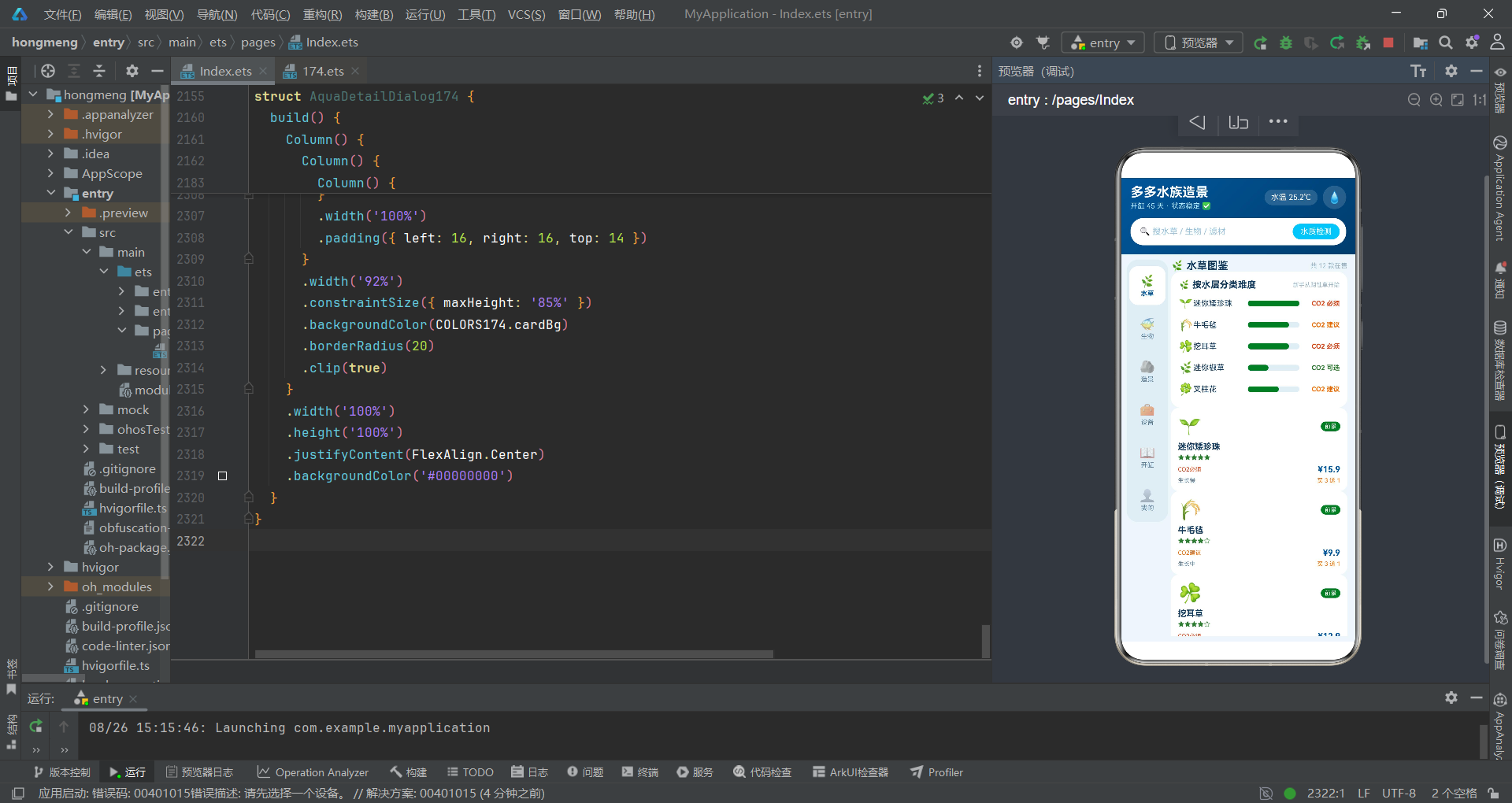
从技术要点来看,该系统综合运用了HarmonyOS ArkTS API 24的核心能力:@Entry/@Component/@State/@Builder四大装饰器构成了组件化开发的基石;if/else条件渲染实现了基于状态的动态UI切换;ForEach循环渲染实现了列表数据的高效展示;bindSheet/bindContentCover两种模态弹窗满足了不同的交互需求;linearGradient渐变、layoutWeight权重布局、clip裁剪、constraintSize约束等样式属性丰富了视觉表现力;aboutToAppear生命周期回调提供了组件初始化的时机控制;$$双向绑定语法简化了弹窗状态管理。这些技术要点的综合运用,构成了一套完整的HarmonyOS ArkTS声明式UI开发范式,对类似复杂业务场景的应用开发具有重要的参考价值。

讨论HarmonyOS开发技术,专注于API与组件、DevEco Studio、测试、元服务和应用上架分发等。
更多推荐



 5
5 0
0- 0


 已为社区贡献33条内容

所有评论(0)