HarmonyOS 6效果实现:@Builder装饰的方法和bindSheet/bindContentCover模态弹窗负责菜品的最终呈现与食客互动
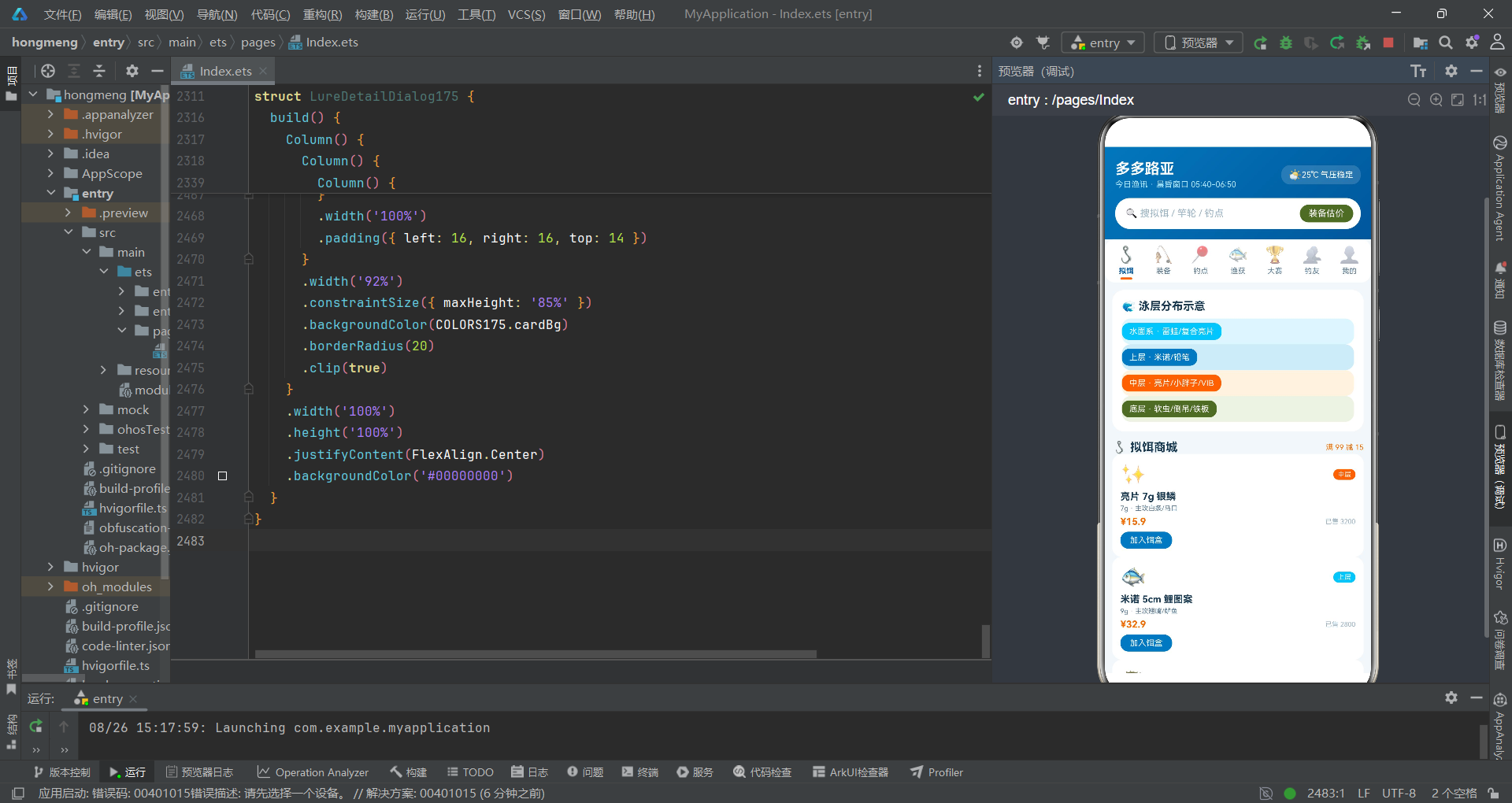
各位学员好,欢迎来到今天的HarmonyOS ArkTS声明式UI烹饪教学课堂。我是你们的烹饪导师,今天要带大家一起制作一道名为"多多路亚钓鱼·淡水微物玩家的装备库"的完整菜品。这道菜属于拼多多风格菜系,采用湖蓝与军绿的配色搭配,以顶部图标宫格导航配合二级横滑Tab作为摆盘骨架,整道菜的视觉效果清新利落,如同在湖畔支起钓竿时那一份从容与专注。
在正式开始烹饪之前,让我们先了解这道菜的整体架构。本菜品由三大烹饪层次构成:底层是"食材准备区"——十三个TypeScript接口与对应的常量数组构成了丰富的食材库,涵盖色彩调味料、导航菜单、拟饵食材、装备食材、钓点食材、渔获记录、活跃度数据、赛事信息、排行榜数据、社交动态和订单记录共十一大类;中层是"灶台操作区"——九个@Component装饰的结构体如同九口灶台,各自负责不同的烹饪工序;上层是"摆盘装饰区"——@Builder装饰的方法和bindSheet/bindContentCover模态弹窗负责菜品的最终呈现与食客互动。三层结构通过@State状态管理和回调函数实现了食材从备料到上桌的完整流转链路。
本节课的教学目标包括五个方面:第一,掌握TypeScript接口如何为食材定义标准化的配方规格;第二,理解@Entry与@Component装饰器在厨房分工中的不同角色;第三,学习@State状态变量如何像温度计一样实时监控火候变化;第四,研究@Builder装饰器如何像预制菜谱一样实现烹饪步骤的复用;第五,剖析bindSheet和bindContentCover两种上菜方式的特点与适用场景。请各位学员系好围裙,准备好烹饪工具,我们的厨艺课正式开始。
第一课:调味料配方标准化——ColorPalette175色彩接口与COLORS175调味料柜
1.1 教学要点:调味料的命名与分类
在任何一个专业厨房中,调味料的标准化管理是确保菜品口味一致性的基础。调味料乱放、名称不统一,会导致每次炒出来的味道都不一样。在我们的HarmonyOS ArkTS厨房中,开发者首先建立了一套完整的调味料配方标准,这就是ColorPalette175接口及其对应的COLORS175常量。
interface ColorPalette175 {
  lake: string;
  lakeDeep: string;
  lakeLight: string;
  army: string;
  armyDeep: string;
  warn: string;
  bg: string;
  cardBg: string;
  textMain: string;
  textSub: string;
  textHint: string;
  border: string;
  danger: string;
  white: string;
  sand: string;
  purple: string;
}
1.2 知识点详解:interface关键字——食材规格定义书
在上述代码中,interface是TypeScript语言提供的类型定义工具,它的作用是定义一种对象的数据结构契约。在烹饪教学中,我们可以将interface理解为"食材规格定义书"——它规定了某种食材必须具备哪些属性,每个属性是什么类型。ColorPalette175接口定义了16个属性,每个属性都是string类型,这意味着任何被标注为ColorPalette175类型的对象都必须携带这16个调味料标签。
interface定义中的语法格式是属性名: 类型;,例如lake: string;表示该属性名为lake(湖蓝),类型为string(字符串)。这种声明的烹饪意义在于:它为湖蓝主色调建立了一个标准化的命名锚点。后续所有灶台在引用这种调味料时,都可以通过COLORS175.lake来取用具体值'#0277BD',而不是在每个灶台上随意写入颜色值。这就像专业厨房中每瓶调味料都贴有标准标签一样——盐就是盐、糖就是糖,不会因为厨师换了就搞混。
1.3 知识点详解:const关键字与类型标注——调味料柜的部署
const COLORS175: ColorPalette175 = {
  lake: '#0277BD',
  lakeDeep: '#01579B',
  lakeLight: '#81D4FA',
  army: '#556B2F',
  armyDeep: '#33691E',
  warn: '#EF6C00',
  bg: '#F2F7FA',
  cardBg: '#FFFFFF',
  textMain: '#1A3A52',
  textSub: '#5F7E96',
  textHint: '#9FB6C6',
  border: '#DDE9F1',
  danger: '#C62828',
  white: '#FFFFFF',
  sand: '#FFCC80',
  purple: '#6A1B9A'
};
这里使用了const关键字声明了一个不可变常量COLORS175,并通过: ColorPalette175类型标注将其绑定到接口定义。const在烹饪中相当于"封存的调味料柜"——一旦部署好,里面的调味料排列方式就固定不变,不会被厨师随意挪动。冒号后的ColorPalette175是TypeScript的类型标注,它告诉编译器:COLORS175这个常量必须严格符合ColorPalette175接口定义的结构——必须包含全部16个字符串属性,少一个都不行。
1.4 调味料风味分析
从烹饪的角度来看,这套16色调味料体系构建了层次分明的风味体系:
- 湖蓝系(3种):lake(#0277BD主湖蓝)、lakeDeep(#01579B深湖蓝)、lakeLight(#81D4FA浅湖蓝)——构成主菜基调,模拟湖水环境,从浅到深形成水深感
- 军绿系(2种):army(#556B2F军绿)、armyDeep(#33691E深军绿)——构成辅助味型,用于标签和自然元素,模拟草地/植被环境
- 警示系(2种):warn(#EF6C00橙色)、danger(#C62828红色)——构成辣味/刺激味型,用于价格、警告和危险操作
- 中性系(4种):bg(背景色)、cardBg(卡片白)、white(纯白)、border(边框灰)——构成底味,用于画布和容器
- 文字系(3种):textMain(深蓝主文)、textSub(灰蓝副文)、textHint(浅灰提示)——构成情报层级,三级灰度区分信息重要性
- 特殊系(2种):sand(#FFCC80沙色)、purple(#6A1B9A紫色)——构成点缀味型,用于等级徽章和特殊标记
第二课:菜单设计——TabItem175接口与TABS175导航菜单
2.1 教学要点:七道菜品的菜单编排
在专业餐厅中,菜单的编排决定了食客的点餐路径和用餐体验。本菜品设计了七道菜的导航菜单,分别对应拟饵、装备、钓点、渔获、大赛、钓友和个人中心七个功能区域。
interface TabItem175 {
  key: string;
  icon: string;
  label: string;
}

const TABS175: TabItem175[] = [
  { key: 'lure', icon: '🪝', label: '拟饵' },
  { key: 'gear', icon: '🎣', label: '装备' },
  { key: 'spot', icon: '📍', label: '钓点' },
  { key: 'catch', icon: '🐟', label: '渔获' },
  { key: 'match', icon: '🏆', label: '大赛' },
  { key: 'buddy', icon: '👥', label: '钓友' },
  { key: 'mine', icon: '👤', label: '我的' }
];
2.2 知识点详解:数组类型声明语法
在TABS175常量的声明中,类型标注TabItem175[]是TypeScript的数组类型声明语法。在属性名后紧跟方括号[],表示该变量是一个包含TabItem175类型元素的数组。这相当于烹饪中的"菜单册"——TABS175不是一个单独的菜品,而是一份包含七道同规格菜品的完整菜单。方括号[]是TypeScript最常用的数组声明方式,与泛型写法Array<TabItem175>完全等价,两种写法可以互换。
2.3 知识点详解:对象字面量语法
每个数组元素使用对象字面量{ key: 'lure', icon: '🪝', label: '拟饵' }创建。对象字面量用花括号包裹多个键值对,键和值之间用冒号分隔,属性之间用逗号分隔。由于TABS175被标注为TabItem175[]类型,TypeScript编译器会检查每个对象字面量是否严格符合接口定义——如果缺少key属性或icon类型不是string,编译期就会报错。这种检查在烹饪中相当于"出品前的质检"——确保每道菜上桌前都符合配方标准。
2.4 菜单品鉴:七道菜的风味搭配
从七道菜的排列顺序来看,开发者采用了从"核心食材"到"社交体验"的渐进式编排:
- 第一道·拟饵(lure):核心食材区,展示12种拟饵商品,是整道菜的主料
- 第二道·装备(gear):厨具区,展示竿/轮/线/辅四大类12种装备
- 第三道·钓点(spot):产地区,记录8个钓鱼地点的详细信息
- 第四道·渔获(catch):成果展示区,记录8条渔获成果
- 第五道·大赛(match):竞技区,展示5场赛事和6人排行榜
- 第六道·钓友(buddy):社交区,展示6条钓友圈动态
- 第七道·我的(mine):个人中心,展示饵盒和订单
第三课:主料配方——LureItem175接口与LURES175拟饵食材库
3.1 教学要点:十二种拟饵的配方详解
拟饵是这道菜最核心的食材。开发者通过LureItem175接口定义了拟饵食材的七个属性配方,并在LURES175常量中部署了十二种拟饵的详细食材信息。
interface LureItem175 {
  name: string;
  icon: string;
  layer: string;
  weight: string;
  price: number;
  sold: number;
  target: string;
}

const LURES175: LureItem175[] = [
  { name: '亮片 7g 银鳞', icon: '✨', layer: '中层', weight: '7g', price: 15.9, sold: 3200, target: '白条/马口' },
  { name: '米诺 5cm 鲤图案', icon: '🐟', layer: '上层', weight: '9g', price: 32.9, sold: 2800, target: '翘嘴/鲈鱼' },
  { name: '小胖子 CRANK', icon: '🐡', layer: '中层', weight: '10g', price: 28.9, sold: 2600, target: '翘嘴' },
  { name: '德州软虫', icon: '🪱', layer: '底层', weight: '8g', price: 12.9, sold: 4100, target: '黑鱼/鲈鱼' },
  { name: '倒吊虾', icon: '🦐', layer: '底层', weight: '5g', price: 10.9, sold: 3900, target: '鲈鱼' },
  { name: 'VIB 12g 远投', icon: '⚡', layer: '全层', weight: '12g', price: 25.9, sold: 2100, target: '翘嘴' },
  { name: '铁板 3g 微物', icon: '🔩', layer: '全层', weight: '3g', price: 9.9, sold: 4600, target: '白条' },
  { name: '小胖子 虾色', icon: '🦐', layer: '中层', weight: '8g', price: 26.9, sold: 1900, target: '鲈鱼' },
  { name: '悬浮米诺', icon: '🎯', layer: '上层', weight: '11g', price: 45.9, sold: 1500, target: '翘嘴' },
  { name: '雷蛙 黑鱼版', icon: '🐸', layer: '水面', weight: '14g', price: 18.9, sold: 3300, target: '黑鱼' },
  { name: '复合亮片', icon: '🌀', layer: '水面', weight: '10g', price: 22.9, sold: 2700, target: '黑鱼/鲈鱼' },
  { name: '面条虫 5寸', icon: '🪱', layer: '底层', weight: '6g', price: 8.9, sold: 5100, target: '鲈鱼' }
];
3.2 知识点详解:number类型在食材计量中的应用
LureItem175接口定义了七个属性,其中引入了number类型——这是TypeScript的原始数据类型之一,用于表示所有数字值(包括整数和浮点数)。在此接口中,price属性(价格,如15.9)和sold属性(已售数量,如3200)都使用number类型。从烹饪角度看,price相当于"食材采购单价"、sold相当于"食材销量热度"——这两个数值型属性为后续的UI展示提供了数据驱动的可视化基础。
3.3 知识点详解:字符串属性的语义化设计
layer(泳层)、weight(重量)、target(目标鱼)使用string类型而非number。虽然可以将其编码为数字枚举(如layer: 1表示上层、2表示中层),但开发者选择了更具可读性的中文字符串值。这种设计就像在菜谱中写"盐1茶匙"而不是"调料3号5克"——语义化的描述让任何接手的厨师都能立刻理解含义,无需查阅编码对照表。
3.4 食材分层分析:水层深浅与烹饪火候的对应
从十二种拟饵的layer属性分布来看,开发者构建了一个从水面到水底的五层食材体系:
- 水面系(2种):雷蛙、复合亮片——在水面制造动静吸引掠食鱼,如同大火爆炒
- 上层(2种):米诺、悬浮米诺——在水面下30cm左右游动,如同中火翻炒
- 中层(3种):亮片、小胖子CRANK、小胖子虾色——在中间水层搜索,如同中火慢炖
- 底层(3种):德州软虫、倒吊虾、面条虫——贴底跳跃,如同小火慢煨
- 全层(2种):VIB、铁板——可覆盖所有水层,如同万能火候
第四课:厨具配方——GearItem175接口与GEARS175装备库
4.1 教学要点:十二种厨具的规格详解
装备是支撑整道菜制作的厨具。开发者通过GearItem175接口定义了装备的六个属性,GEARS175常量部署了十二种装备。
interface GearItem175 {
  name: string;
  icon: string;
  spec: string;
  price: number;
  cat: string;
  score: number;
}

const GEARS175: GearItem175[] = [
  { name: '泛用直柄竿 L 调', icon: '🎣', spec: '1.98m · 5-12g', price: 399, cat: '竿', score: 92 },
  { name: '微物竿 UL 调', icon: '🎣', spec: '1.68m · 1-5g', price: 359, cat: '竿', score: 94 },
  { name: '雷强竿 H 调', icon: '💥', spec: '2.28m · 15-40g', price: 529, cat: '竿', score: 90 },
  { name: '纺车轮 1000 型', icon: '⚙️', spec: '5.0:1 · 4kg', price: 449, cat: '轮', score: 93 },
  { name: '纺车轮 2500 型', icon: '⚙️', spec: '5.6:1 · 7kg', price: 529, cat: '轮', score: 91 },
  { name: '水滴轮 微物', icon: '🎯', spec: '7.3:1 · 6kg', price: 699, cat: '轮', score: 95 },
  { name: 'PE 线 0.8号', icon: '🧵', spec: '150m · 8编', price: 89, cat: '线', score: 88 },
  { name: '碳素前导 3号', icon: '🔗', spec: '50m · 耐磨', price: 45, cat: '线', score: 87 },
  { name: '路亚包 12 格', icon: '🎒', spec: '硬壳 · 防水', price: 159, cat: '辅', score: 90 },
  { name: '控鱼器+路亚钳', icon: '🩹', spec: '钛合金套装', price: 129, cat: '辅', score: 92 },
  { name: '探鱼器便携', icon: '📡', spec: '80m 测深', price: 499, cat: '辅', score: 89 },
  { name: '钓鱼服 防晒', icon: '👕', spec: 'UPF50+ 冰感', price: 139, cat: '辅', score: 91 }
];
4.2 知识点详解:spec属性的复合字符串设计
GearItem175接口中的spec属性使用字符串存储复合规格信息,如'1.98m · 5-12g'。这里使用中点分隔符·将多个规格参数(长度和重量范围)组合在一个字符串中。在烹饪中,这相当于"食材规格标签"——一块牛排上标注"300g · M5等级 · 谷饲200天",将多个维度的信息压缩在一行文字中,便于快速读取。
4.3 知识点详解:score属性的口碑评分系统
score属性(number类型)是装备的口碑评分,范围为87-95分。这个分数在后续的UI渲染中会被scoreBar175函数转换为进度条宽度——(s - 70) + '%',即将分数减去70后加上百分号。例如score=92对应进度条宽度为22%。这种"减去基准值再计算比例"的做法,在烹饪中相当于"去掉基础分后的加分项可视化"——不是从0开始展示,而是从70分基准线开始展示加分部分。
4.4 厨具分类分析:四大类厨具的配置
从GEARS175的十二种装备来看,四大类厨具的配置如下:
- 竿类(3种):泛用直柄竿L调(399元/92分)、微物竿UL调(359元/94分)、雷强竿H调(529元/90分)——对应三种不同场景的"主厨刀"
- 轮类(3种):纺车轮1000型(449元/93分)、纺车轮2500型(529元/91分)、水滴轮微物(699元/95分)——对应三种"搅拌器"
- 线类(2种):PE线0.8号(89元/88分)、碳素前导3号(45元/87分)——对应"连接线材"
- 辅类(4种):路亚包、控鱼器、探鱼器、钓鱼服——对应"辅助工具"
第五课:产地配方——SpotItem175接口与SPOTS175钓点食材库
5.1 教学要点:八种钓点的风味地图
钓点是决定食材品质的产地信息。开发者通过SpotItem175接口定义了钓点的七个属性,SPOTS175常量记录了八个钓点的详细产地信息。
interface SpotItem175 {
  name: string;
  icon: string;
  dist: string;
  depth: string;
  fish: string;
  score: number;
  wind: string;
}

const SPOTS175: SpotItem175[] = [
  { name: '城东水库北湾', icon: '🏞', dist: '12km', depth: '3-6m', fish: '翘嘴/白条', score: 92, wind: '东南风2级' },
  { name: '西河滚水坝下', icon: '🌊', dist: '8km', depth: '1-3m', fish: '马口/白条', score: 88, wind: '东风3级' },
  { name: '南湖公园栈桥', icon: '🌉', dist: '3km', depth: '2-4m', fish: '鲈鱼/翘嘴', score: 85, wind: '微风' },
  { name: '野塘荷叶区', icon: '🪷', dist: '15km', depth: '0.5-2m', fish: '黑鱼', score: 90, wind: '南风2级' },
  { name: '北江支流回水湾', icon: '🏝', dist: '22km', depth: '2-5m', fish: '翘嘴/鳜鱼', score: 87, wind: '北风3级' },
  { name: '电站尾水区', icon: '⚡', dist: '18km', depth: '3-8m', fish: '翘嘴', score: 89, wind: '西风2级' },
  { name: '养殖场排水口', icon: '🚰', dist: '10km', depth: '1-2m', fish: '罗非/黑鱼', score: 82, wind: '微风' },
  { name: '山塘石壁湾', icon: '⛰', dist: '26km', depth: '4-9m', fish: '鳜鱼/鲈鱼', score: 86, wind: '山风2级' }
];
5.2 知识点详解:多维度的产地信息建模
SpotItem175接口的属性设计体现了产地信息的多个维度:dist(距离)相当于食材的"运输里程"、depth(水深)相当于"土壤深度"、fish(目标鱼种)相当于"特产鱼种"、score(评分)相当于"产地等级"、wind(风向风力)相当于"微气候条件"。这五个维度共同构成了一个完整的产地风味地图。
5.3 知识点详解:depth属性的区间值表示
depth属性使用字符串存储如"3-6m"这样的区间值。这种区间表示法在烹饪中相当于"火候范围"——不是写"中火",而是写"中火到中大火之间",提供了更精确的操作指导。后续depthBar175函数会根据不同的depth值返回不同的进度条宽度百分比,用于水深对比图可视化。
第六课:成品记录——CatchItem175接口与CATCHES175渔获档案
6.1 教学要点:八条渔获的成品档案
渔获记录是这道菜的成品展示——每一次成功出鱼就像一道完成的菜品。开发者通过CatchItem175接口定义了渔获的六个属性,CATCHES175常量记录了八条渔获信息。
interface CatchItem175 {
  fish: string;
  icon: string;
  length: string;
  weight: string;
  lure: string;
  spot: string;
  date: string;
}

const CATCHES175: CatchItem175[] = [
  { fish: '翘嘴鲌', icon: '🐟', length: '62cm', weight: '2.8kg', lure: '悬浮米诺', spot: '城东水库北湾', date: '08-24' },
  { fish: '大口黑鲈', icon: '🐟', length: '45cm', weight: '1.6kg', lure: '德州软虫', spot: '南湖公园栈桥', date: '08-22' },
  { fish: '马口鱼', icon: '🐠', length: '21cm', weight: '0.15kg', lure: '亮片 7g', spot: '西河滚水坝下', date: '08-20' },
  { fish: '黑鱼', icon: '🐍', length: '55cm', weight: '1.9kg', lure: '雷蛙', spot: '野塘荷叶区', date: '08-17' },
  { fish: '白条', icon: '🎣', length: '18cm', weight: '0.08kg', lure: '铁板 3g', spot: '西河滚水坝下', date: '08-15' },
  { fish: '鳜鱼', icon: '🐡', length: '38cm', weight: '1.1kg', lure: '倒吊虾', spot: '北江支流回水湾', date: '08-12' },
  { fish: '翘嘴鲌', icon: '🐟', length: '48cm', weight: '1.5kg', lure: 'VIB 12g', spot: '电站尾水区', date: '08-08' },
  { fish: '大口黑鲈', icon: '🐟', length: '52cm', weight: '2.2kg', lure: '小胖子', spot: '山塘石壁湾', date: '08-03' }
];
6.2 知识点详解:全字符串属性的档案设计
CatchItem175接口的六个属性全部使用string类型——包括length和weight也使用字符串(如’62cm’、‘2.8kg’)而非纯数字。这种设计在烹饪中相当于"成品标签"——标签上写"62cm/2.8kg"而不是"62/2.8",保留了单位信息的完整性,便于直接展示。如果使用number类型,则在UI渲染时需要额外拼接单位字符串,而使用string则可以直接显示。
6.3 成品档案分析:鱼种与用饵的对应关系
从八条渔获记录可以分析出"什么饵钓什么鱼"的配方规律:
- 悬浮米诺 -> 翘嘴鲌 62cm/2.8kg
- 德州软虫 -> 大口黑鲈 45cm/1.6kg
- 亮片7g -> 马口鱼 21cm/0.15kg
- 雷蛙 -> 黑鱼 55cm/1.9kg
- 铁板3g -> 白条 18cm/0.08kg
- 倒吊虾 -> 鳜鱼 38cm/1.1kg
- VIB 12g -> 翘嘴鲌 48cm/1.5kg
- 小胖子 -> 大口黑鲈 52cm/2.2kg
第七课:火候监测——FishActive175接口与FISH_ACTIVE175活跃度数据
7.1 教学要点:五种鱼的活跃度火候表
鱼类的活跃度就像烹饪中的火候——什么时候鱼最活跃就什么时候下竿。开发者通过FishActive175接口定义了活跃度的两个属性,FISH_ACTIVE175常量记录了五种鱼的晨昏活跃度数据。
interface FishActive175 {
  fish: string;
  dawn: number;
}

const FISH_ACTIVE175: FishActive175[] = [
  { fish: '翘嘴', dawn: 92 },
  { fish: '黑鱼', dawn: 78 },
  { fish: '鲈鱼', dawn: 70 },
  { fish: '马口', dawn: 84 },
  { fish: '鳜鱼', dawn: 66 }
];
7.2 知识点详解:精简接口的设计哲学
FishActive175接口只有两个属性——fish和dawn,是所有接口中最精简的。这种"少即是多"的设计哲学在烹饪中相当于"极简调味"——有时候只需要盐和胡椒就能调出最佳风味。dawn属性使用number类型存储活跃度百分比(0-100),后续会被actBar175函数转换为进度条宽度。
7.3 火候分析:五种鱼的晨昏活跃度排序
从FISH_ACTIVE175的数据来看,五种鱼的晨昏活跃度排序为:翘嘴(92%)> 马口(84%)> 黑鱼(78%)> 鲈鱼(70%)> 鳜鱼(66%)。这意味着晨昏窗口期出钓翘嘴的命中率最高,而鳜鱼相对不活跃。这就像不同食材需要不同的火候——翘嘴适合"大火快炒"(高活跃期快速出鱼),鳜鱼适合"小火慢炖"(低活跃期耐心守候)。
第八课:赛事配方——MatchItem175/RankItem175接口与赛事排行榜数据
8.1 教学要点:赛事菜单与排行榜
开发者通过两个接口分别定义了赛事信息和排行榜数据。
interface MatchItem175 {
  name: string;
  date: string;
  place: string;
  prize: string;
  joined: number;
}

const MATCHES175: MatchItem175[] = [
  { name: '秋季城市路亚联赛', date: '09-20', place: '城东水库', prize: '¥20000', joined: 128 },
  { name: '微物白条计时赛', date: '09-06', place: '西河坝下', prize: '装备礼包', joined: 86 },
  { name: '雷强黑鱼单尾赛', date: '09-13', place: '野塘区', prize: '¥8000', joined: 64 },
  { name: '鲈鱼精确投抛赛', date: '10-01', place: '南湖公园', prize: '¥5000', joined: 52 },
  { name: '冬季翘嘴船赛', date: '12-12', place: '北江湾', prize: '¥30000', joined: 40 }
];

interface RankItem175 {
  name: string;
  pts: number;
  best: string;
}

const RANKS175: RankItem175[] = [
  { name: '溪流猎手', pts: 2860, best: '翘嘴 78cm' },
  { name: '雷强老炮', pts: 2720, best: '黑鱼 71cm' },
  { name: '微物小飞', pts: 2450, best: '马口 26cm' },
  { name: '深水雷达', pts: 2310, best: '鳜鱼 49cm' },
  { name: '岸抛侠', pts: 2180, best: '翘嘴 65cm' },
  { name: '夜钓灯', pts: 2060, best: '鲈鱼 58cm' }
];
8.2 知识点详解:prize属性的条件判断设计
MatchItem175接口的prize属性使用string类型存储奖品信息——有的以¥开头(如’¥20000’),有的不含金额符号(如’装备礼包’)。后续prizeC175函数会通过p.indexOf('¥') === 0判断奖品是否含金额,并返回不同颜色。这种设计在烹饪中相当于"根据食材类型选择不同的摆盘方式"——含金额的奖品用橙色(暖色调)突出、不含金额的用军绿色(自然色调)展示。
8.3 知识点详解:排行榜的pts积分设计
RankItem175接口的pts属性(number类型)是选手的赛季积分,范围为2060-2860分。这个数值在UI中直接显示为r.pts + '分'——通过字符串拼接将数字转换为带"分"后缀的显示文本。在烹饪中,这相当于"评分卡上的分数"——评委给出的分数直接写在卡片上,后面跟上"分"字让含义一目了然。
第九课:社交配方——PostItem175接口与POSTS175钓友圈动态
9.1 教学要点:六条社交动态的配方
钓友圈动态是这道菜的"食客点评"环节。PostItem175接口定义了动态的六个属性,POSTS175常量记录了六条钓友圈动态。
interface PostItem175 {
  user: string;
  avatar: string;
  text: string;
  likes: number;
  comments: number;
  time: string;
}

const POSTS175: PostItem175[] = [
  { user: '溪流猎手', avatar: '🎯', text: '今早窗口期 40 分钟三连杆,悬浮米诺停顿必中!', likes: 428, comments: 66, time: '2小时前' },
  { user: '微物小飞', avatar: '🪰', text: '3g 铁板钓白条就是机关枪,一小时 47 尾', likes: 312, comments: 48, time: '4小时前' },
  { user: '雷强老炮', avatar: '🐸', text: '雷蛙炸水那一瞬间,多巴胺直接拉满', likes: 566, comments: 92, time: '6小时前' },
  { user: '夜钓灯', avatar: '🌙', text: '夜翘要贴结构搜,VIB 慢收跳底有效', likes: 289, comments: 41, time: '8小时前' },
  { user: '深水雷达', avatar: '📡', text: '倒吊虾轻拖十克铅,鳜鱼直接锁喉', likes: 345, comments: 53, time: '10小时前' },
  { user: '岸抛侠', avatar: '🏹', text: '2 点后风停了口也停,提前收竿保平安', likes: 198, comments: 30, time: '12小时前' }
];
9.2 知识点详解:社交数据的互动指标建模
PostItem175接口的likes和comments属性使用number类型存储互动数据——点赞数和评论数。这两个数值型属性在UI中会直接显示为'💬 ' + p.comments这样的文本,通过字符串拼接将数字嵌入显示文本。这种设计在烹饪中相当于"菜品旁标注的热度指标"——“点赞428"就像"好评率98%”,是食客选择菜品的参考数据。
9.3 点评内容分析:六条动态的技术含量
从六条钓友圈动态的内容来看,每条都包含实用的钓鱼技巧:
- 溪流猎手分享了"悬浮米诺停顿必中"的技巧
- 微物小飞分享了"3g铁板钓白条一小时47尾"的效率
- 雷强老炮分享了雷蛙炸水的视觉冲击体验
- 夜钓灯分享了"夜翘贴结构搜+VIB慢收跳底"的夜钓技巧
- 深水雷达分享了"倒吊虾轻拖十克铅"的鳜鱼技巧
- 岸抛侠分享了"风停口停"的经验判断
第十课:订单配方——OrderItem175接口与ORDERS175补给记录
10.1 教学要点:五条订单的补给记录
订单记录是厨房的"采购记录"。OrderItem175接口定义了订单的五个属性,ORDERS175常量记录了五条订单信息。
interface OrderItem175 {
  name: string;
  icon: string;
  price: number;
  status: string;
  date: string;
}

const ORDERS175: OrderItem175[] = [
  { name: '悬浮米诺 × 2', icon: '🎯', price: 91.8, status: '已发货', date: '08-23' },
  { name: 'PE线 0.8号', icon: '🧵', price: 89, status: '已完成', date: '08-14' },
  { name: '微物竿 UL', icon: '🎣', price: 359, status: '已完成', date: '08-05' },
  { name: '雷蛙 × 3', icon: '🐸', price: 56.7, status: '待评价', date: '07-30' },
  { name: '控鱼器套装', icon: '🩹', price: 129, status: '已完成', date: '07-22' }
];
10.2 知识点详解:status属性的条件颜色映射
OrderItem175接口的status属性使用字符串存储订单状态——‘已发货’、‘已完成’、‘待评价’。在后续UI渲染中,status值决定状态标签的颜色:o.status === '已发货' ? COLORS175.warn : COLORS175.army——已发货显示橙色(运输中需要关注),已完成/待评价显示军绿色(已到位)。这种颜色编码在烹饪中相当于"食材到货状态灯"——橙色表示在途、绿色表示已入库。
第十一课:调味函数——五大辅助函数的调味技巧
11.1 教学要点:五种调味函数
在主体烹饪工序之外,开发者还部署了五个辅助函数,构成调味工具箱。这些函数不直接炒菜(渲染UI),而是为菜品提供颜色计算、进度条转换等调味服务。
layerC175函数:泳层调味
function layerC175(l: string): string {
  if (l === '上层' || l === '水面') {
    return '#4FC3F7';
  }
  if (l === '中层') {
    return COLORS175.warn;
  }
  if (l === '底层') {
    return COLORS175.army;
  }
  return COLORS175.purple;
}
layerC175函数接收string参数(泳层名称),返回对应的颜色字符串。函数使用多个if条件判断进行分支:上层/水面返回水蓝色(#4FC3F7)、中层返回橙色(COLORS175.warn)、底层返回军绿色(COLORS175.army)、其他返回紫色(COLORS175.purple)。这里引入了逻辑或运算符||——l === '上层' || l === '水面'表示只要满足任一条件即为true。在烹饪中,这相当于"根据食材所在的水层选择对应的调味色"——水面用浅色、中层用暖色、底层用绿色。
actBar175函数:活跃度进度
function actBar175(n: number): string {
  return n + '%';
}
actBar175函数是五个函数中最简洁的——接收number参数n,返回n + '%'字符串。这里使用了字符串拼接运算——当number类型与string类型用+连接时,number会被自动转换为字符串然后拼接。例如n=92时返回’92%'。在烹饪中,这相当于"把数字火候加上百分号"的格式化操作。
scoreBar175函数:评分进度
function scoreBar175(s: number): string {
  return (s - 70) + '%';
}
scoreBar175函数接收number参数s(评分),返回(s - 70) + '%'。先执行算术减法s - 70,再将结果与’%‘拼接。例如s=92时返回’22%’。这种"减去70再取百分比"的设计在烹饪中相当于"只展示超出基准分的加分部分"——不显示从0到70的基础分,只展示70分以上的加分区间,使进度条的视觉效果更有区分度。
depthBar175函数:水深进度
function depthBar175(d: string): number {
  if (d === '3-8m') { return 90; }
  if (d === '4-9m') { return 100; }
  if (d === '3-6m') { return 70; }
  if (d === '2-5m') { return 60; }
  if (d === '2-4m') { return 50; }
  if (d === '1-3m') { return 36; }
  if (d === '1-2m') { return 26; }
  return 15;
}
depthBar175函数是五个函数中分支最多的——接收string参数d(水深区间),返回number类型的百分比数值。函数使用7个if条件判断,为每个水深区间返回不同的进度条宽度。注意这个函数返回的是number而非string,与actBar175和scoreBar175不同。在后续UI中调用时需要depthBar175(s.depth) + '%'手动拼接百分号。在烹饪中,这相当于"根据食材的深度选择不同的容器高度"——深水区用高容器、浅水区用矮容器。
prizeC175函数:奖品调味
function prizeC175(p: string): string {
  if (p.indexOf('¥') === 0) {
    return COLORS175.warn;
  }
  return COLORS175.army;
}
prizeC175函数接收string参数p(奖品描述),返回颜色。函数使用了indexOf方法——p.indexOf('¥')查找字符串p中’¥’符号的位置索引。如果’¥’在开头位置(索引0),返回橙色(COLORS175.warn,表示有奖金的奖品用暖色调突出);否则返回军绿色(COLORS175.army,表示实物奖品用自然色调)。indexOf是JavaScript/TypeScript中String对象的内置方法,返回指定子串在字符串中首次出现的位置索引,找不到时返回-1。在烹饪中,这相当于"根据奖品类型选择不同的标签颜色"——有金额的用金色标签、实物的用绿色标签。
第十二课:总厨办——@Entry @Component LureMain175主厨房
12.1 教学要点:页面入口与主厨房架构
现在我们进入整个厨房的核心——LureMain175主厨房。这个组件使用了@Entry和@Component两个关键装饰器,构成了HarmonyOS ArkTS应用的页面入口。
@Entry
@Component
struct LureMain175 {
  @State curTab: string = 'lure';
  @State showBuyLure: boolean = false;
  @State showPost: boolean = false;
  @State showEditSpot: boolean = false;
  @State showDelete: boolean = false;
  @State showDetail: boolean = false;
  @State lureName: string = '亮片 7g 银鳞';
  @State spotName: string = '城东水库北湾';
  @State catchName: string = '翘嘴鲌 62cm';
  @State detailName: string = '亮片 7g 银鳞';
  @State detailIcon: string = '✨';
12.2 知识点详解:@Entry装饰器——厨房标识牌
@Entry装饰器标记在struct之前,表示该组件是页面入口组件。在HarmonyOS应用中,每个页面有且只有一个@Entry组件作为根节点。在烹饪教学中,@Entry相当于"厨房标识牌"——标识这是整个餐厅的主厨房,所有其他灶台都从属于它。没有@Entry的@Component组件只能作为子灶台被其他厨房引用,不能独立成为页面。
12.3 知识点详解:@Component装饰器——灶台认证
@Component装饰器用于声明一个自定义组件。被@Component装饰的struct获得以下能力:可以使用@State等状态装饰器、可以定义@Builder方法、必须实现build()方法。struct关键字在ArkTS中被赋予了声明式UI的语义——struct内的成员变量可以成为状态变量,成员方法可以成为构建方法。
12.4 知识点详解:@State装饰器——火候温度计
@State是ArkTS状态管理体系中最基础的状态装饰器。被@State标记的变量成为"响应式状态变量"——当其值变化时,所有引用该变量的UI部分会自动重新渲染。从LureMain175的11个@State变量来看,分为三类:
菜单状态:curTab: string = 'lure'——当前激活的菜单项,初始值为’lure’(拟饵页)。当用户点击导航菜单时,curTab值改变,触发build()方法中的if/else重新执行,显示对应灶台的内容。
上菜状态:showBuyLure、showPost、showEditSpot、showDelete、showDetail——五个boolean状态变量,分别控制五个模态弹窗的显示/隐藏。初始值均为false(不上菜),设为true时弹出对应的上菜面板。
传菜状态:lureName、spotName、catchName、detailName、detailIcon——五个string状态变量,用于在主厨房和子灶台/弹窗之间传递食材信息。
@State的烹饪意义在于"火候自动监控"——一旦火候(状态值)变化,所有依赖该火候的灶台(UI部分)会自动调整,无需厨师手动通知每个灶台。这是HarmonyOS声明式UI的核心设计理念——数据驱动视图。
12.5 知识点详解:@Builder装饰器——预制菜谱
@Builder装饰器用于定义可复用的UI构建方法。被@Builder标记的方法可以在组件内被多次调用。LureMain175定义了七个@Builder方法:
pageHeader()——页面头部构建(标题+天气+搜索栏)iconNav()——顶部图标导航构建buyLureSheet()——购买拟饵弹窗内容postSheet()——晒渔获弹窗内容editSpotSheet()——编辑钓点弹窗内容deleteDialog()——删除确认弹窗内容detailDialog()——物品详情弹窗内容
12.6 pageHeader()的烹饪详解
@Builder
pageHeader() {
  Column() {
    Row() {
      Column() {
        Text('多多路亚')
          .fontSize(20)
          .fontWeight(FontWeight.Bold)
          .fontColor(COLORS175.white)
        Text('今日渔讯 · 晨昏窗口 05:40-06:50')
          .fontSize(11)
          .fontColor('#B3E5FC')
          .margin({ top: 3 })
      }
      .alignItems(HorizontalAlign.Start)
      .layoutWeight(1)

      Row() {
        Text('🌤')
          .fontSize(14)
        Text('25℃ 气压稳定')
          .fontSize(11)
          .fontColor(COLORS175.white)
      }
      .padding({ left: 10, right: 10, top: 5, bottom: 5 })
      .borderRadius(12)
      .backgroundColor('#26FFFFFF')
    }
    .width('100%')
    .margin({ top: 8 })

    // 搜索栏部分...
  }
  .width('100%')
  .padding({ left: 14, right: 14, top: 10, bottom: 14 })
  .linearGradient({
    angle: 135,
    colors: [[COLORS175.lake, 0.0], [COLORS175.lakeDeep, 1.0]]
  })
}
这段代码涉及的烹饪知识点:
Column与Row容器:Column是垂直排列的容器(像蒸笼一样层叠摆放),Row是水平排列的容器(像托盘一样并排摆放)。通过嵌套Column和Row,可以构建出复杂的二维布局结构。
Text组件:Text是文本展示组件,用于显示字符串。通过链式方法设置样式——.fontSize(20)设置字号、.fontWeight(FontWeight.Bold)设置粗体、.fontColor(COLORS175.white)设置白色文字。FontWeight是一个枚举类型,包含Normal(正常)、Bold(粗体)等值。
alignItems(HorizontalAlign.Start):设置Column内子元素的水平对齐为左对齐。HorizontalAlign枚举包含Start、Center、End三个值。
layoutWeight(1):设置布局权重为1,使组件占满剩余空间。在烹饪中相当于"占满剩余的托盘空间"。
padding与margin:padding设置内边距(内容与边框间距),margin设置外边距(组件与其他元素间距)。两者都接受{ left, right, top, bottom }对象参数。
linearGradient:线性渐变背景属性,接受{ angle, colors }对象。angle=135表示从左上到右下方向,colors数组包含起止色[[COLORS175.lake, 0.0], [COLORS175.lakeDeep, 1.0]]——起点使用湖蓝、终点使用深湖蓝,创建水深感渐变。
12.7 iconNav()的烹饪详解——顶部图标导航
@Builder
iconNav() {
  Row() {
    ForEach(TABS175, (t: TabItem175) => {
      Column() {
        Text(t.icon)
          .fontSize(22)
          .opacity(this.curTab === t.key ? 1 : 0.55)
        Text(t.label)
          .fontSize(10)
          .fontWeight(this.curTab === t.key ? FontWeight.Bold : FontWeight.Normal)
          .fontColor(this.curTab === t.key ? COLORS175.lakeDeep : COLORS175.textSub)
          .margin({ top: 3 })
        Text('')
          .width(16)
          .height(3)
          .borderRadius(2)
          .backgroundColor(this.curTab === t.key ? COLORS175.warn : '#00000000')
          .margin({ top: 3 })
      }
      .layoutWeight(1)
      .alignItems(HorizontalAlign.Center)
      .padding({ top: 8, bottom: 4 })
      .onClick(() => {
        this.curTab = t.key;
      })
    }, (t: TabItem175) => t.key)
  }
  .width('100%')
  .backgroundColor(COLORS175.white)
  .borderRadius(14)
  .padding({ left: 4, right: 4 })
}
ForEach的知识点
ForEach是ArkTS中循环渲染列表数据的核心组件。它接收三个参数:数据源数组(TABS175)、项目渲染函数(接收每个元素返回UI描述)、键值生成函数(返回唯一标识字符串)。ForEach的工作原理就像"按菜单批量出品"——将菜单中每道菜按照统一的出品标准展开到餐桌上。
opacity透明度属性
.opacity(this.curTab === t.key ? 1 : 0.55)设置组件透明度。opacity接收0到1之间的数值——1表示完全不透明,0.55表示55%不透明度。选中态用完全不透明、未选中态用半透明,这是一种比颜色变化更柔和的视觉层次设计。
选中指示条的设计
导航项底部有一个Text('').width(16).height(3)的空文本组件作为选中指示条——选中时背景色为COLORS175.warn(橙色),未选中时为'#00000000'(完全透明)。这种用空Text+背景色实现的指示条是ArkTS中轻量级装饰元素的常见实现方式。
12.8 build()方法的烹饪详解——主厨房的出品流程
build() {
  Column() {
    this.pageHeader()
    this.iconNav()

    Column() {
      if (this.curTab === 'lure') {
        LureTab175({
          onBuy: (n: string): void => {
            this.lureName = n;
            this.showBuyLure = true;
          },
          onDetail: (n: string, ic: string): void => {
            this.detailName = n;
            this.detailIcon = ic;
            this.showDetail = true;
          }
        })
      } else if (this.curTab === 'gear') {
        GearTab175({
          onDetail: (n: string, ic: string): void => {
            this.detailName = n;
            this.detailIcon = ic;
            this.showDetail = true;
          }
        })
      } else if (this.curTab === 'spot') {
        SpotTab175({
          onEdit: (n: string): void => {
            this.spotName = n;
            this.showEditSpot = true;
          }
        })
      } else if (this.curTab === 'catch') {
        CatchTab175({
          onPost: (): void => {
            this.showPost = true;
          },
          onDelete: (n: string): void => {
            this.catchName = n;
            this.showDelete = true;
          }
        })
      } else if (this.curTab === 'match') {
        MatchTab175()
      } else if (this.curTab === 'buddy') {
        BuddyTab175()
      } else {
        MineTab175({
          onDetail: (n: string, ic: string): void => {
            this.detailName = n;
            this.detailIcon = ic;
            this.showDetail = true;
          }
        })
      }
    }
    .width('100%')
    .layoutWeight(1)
  }
  .width('100%')
  .height('100%')
  .backgroundColor(COLORS175.bg)
  .bindSheet($$this.showBuyLure, this.buyLureSheet(), {
    height: 600, dragBar: true, showClose: true, backgroundColor: COLORS175.cardBg
  })
  .bindSheet($$this.showPost, this.postSheet(), {
    height: 620, dragBar: true, showClose: true, backgroundColor: COLORS175.cardBg
  })
  .bindSheet($$this.showEditSpot, this.editSpotSheet(), {
    height: 520, dragBar: true, showClose: true, backgroundColor: COLORS175.cardBg
  })
  .bindContentCover($$this.showDelete, this.deleteDialog(), {})
  .bindContentCover($$this.showDetail, this.detailDialog(), {})
}
build()方法
每个@Component组件必须实现build()方法,这是声明式UI的核心入口。build()返回一个描述UI结构的组件树。在烹饪中,build()相当于"厨房出品流程图"——完整描述了从备料到上桌的全流程。
if/else条件渲染
ArkTS支持在build()内使用if/else进行条件渲染。当curTab的值变化时,ArkTS框架会自动销毁旧条件分支的UI并创建新分支的UI。这就像根据客人点的不同菜品切换不同的灶台。
子组件实例化与回调函数
LureTab175({ onBuy: (n: string): void => { ... }, onDetail: (n: string, ic: string): void => { ... } })展示了子组件实例化语法。参数以对象字面量形式传递,onBuy和onDetail是回调函数——子灶台通过这些函数向主厨房汇报情况,主厨房接收情报后做出决策(修改状态、弹出弹窗)。这种设计在烹饪中相当于"灶台与主厨房的通信频道"——灶台通过回调汇报"客人点了什么菜",主厨房接收后安排对应的上菜流程。
$$双向绑定语法
$$this.showBuyLure是ArkTS的特殊语法——$$前缀表示双向绑定。bindSheet的第一个参数需要接收boolean状态引用,当弹窗内部关闭时,bindSheet会自动将状态变量设为false。使用$$绑定的状态,父组件可以打开弹窗,弹窗内部也可以关闭自己,状态在两端保持同步。在烹饪中,这相当于"双向对讲机"——主厨房可以下令上菜(打开弹窗),服务员也可以报告菜已上完(关闭弹窗)。
bindSheet与bindContentCover——两种上菜方式
- bindSheet:底部滑出面板,支持设置height(高度)、dragBar(拖拽条)、showClose(关闭按钮)。适用于需要操作但不需全屏的场景——像"半身餐车"从厨房滑出。三个bindSheet分别设置了不同高度:600vp(购买拟饵)、620vp(晒渔获)、520vp(编辑钓点)。
- bindContentCover:全屏覆盖层,用于对话框或全屏模态。适用于需要专注操作的场景——像"全屏上菜台"完全覆盖桌面。两个bindContentCover分别用于删除确认和详情展示。
第十三课:拟饵灶台——@Component LureTab175的烹饪详解
13.1 教学要点:拟饵灶台的双回调接口
@Component
struct LureTab175 {
  onBuy: (n: string) => void = () => {};
  onDetail: (n: string, ic: string) => void = () => {};
LureTab175声明了两个回调函数——onBuy(购买)和onDetail(查看详情)。两个回调的函数类型不同:onBuy接收一个string参数(拟饵名称),onDetail接收两个string参数(名称和图标)。这种设计就像灶台上有两个"点菜铃"——一个通向购买流程、一个通向详情展示。
13.2 layerCard()的烹饪详解——泳层分布示意图
@Builder
layerCard() {
  Column() {
    Text('🌊 泳层分布示意')
      .fontSize(15)
      .fontWeight(FontWeight.Bold)
      .fontColor(COLORS175.textMain)
      .width('100%')

    Column() {
      Row() {
        Text('水面系 · 雷蛙/复合亮片')
          .fontSize(11)
          .fontColor(COLORS175.white)
          .padding({ left: 10, right: 10, top: 5, bottom: 5 })
          .borderRadius(10)
          .backgroundColor('#4FC3FA')
      }
      .width('100%')
      .padding({ top: 6, bottom: 6 })
      .borderRadius(12)
      .backgroundColor('#E1F5FE')
      // ... 上层、中层、底层类似结构
    }
    .width('100%')
    .margin({ top: 8 })
  }
  .width('100%')
  .padding(13)
  .backgroundColor(COLORS175.cardBg)
  .borderRadius(16)
  .margin({ top: 10 })
}
layerCard()构建了一个泳层分布示意图,从上到下依次展示水面系、上层、中层、底层四个泳层。每个泳层使用不同的背景色——水面系用浅蓝(#E1F5FE+#4FC3FA标签)、上层用稍深蓝(#D3EBF7+COLORS175.lake标签)、中层用橙色系(#FFF3E0+COLORS175.warn标签)、底层用绿色系(#EDF3E4+COLORS175.army标签)。这种从浅到深的颜色渐变模拟了水域从水面到水底的视觉层次,就像在剖面图中展示不同水深的食材分布。
13.3 build()的烹饪详解——拟饵商品列表
LureTab175的build()方法使用Scroll+Column+ForEach构建可滚动的拟饵商品列表。每个拟饵卡片包含图标、泳层标签、名称、重量/目标鱼信息、价格/销量和"加入饵盒"按钮。maxLines(1)和textOverflow({ overflow: TextOverflow.Ellipsis })限制文本最多1行,超出显示省略号——这就像菜品名称太长时自动截断并加"…",保持卡片视觉整洁。
“加入饵盒"按钮使用backgroundColor(COLORS175.lake)湖蓝色背景,点击后调用onBuy回调。整个卡片也可点击(onClick),点击后调用onDetail回调查看详情。这种"整个卡片可点击+内部按钮也可点击"的设计在烹饪中相当于"整道菜可以查看详情+菜里的某个配料可以单独点购”。
第十四课:装备灶台——@Component GearTab175的烹饪详解
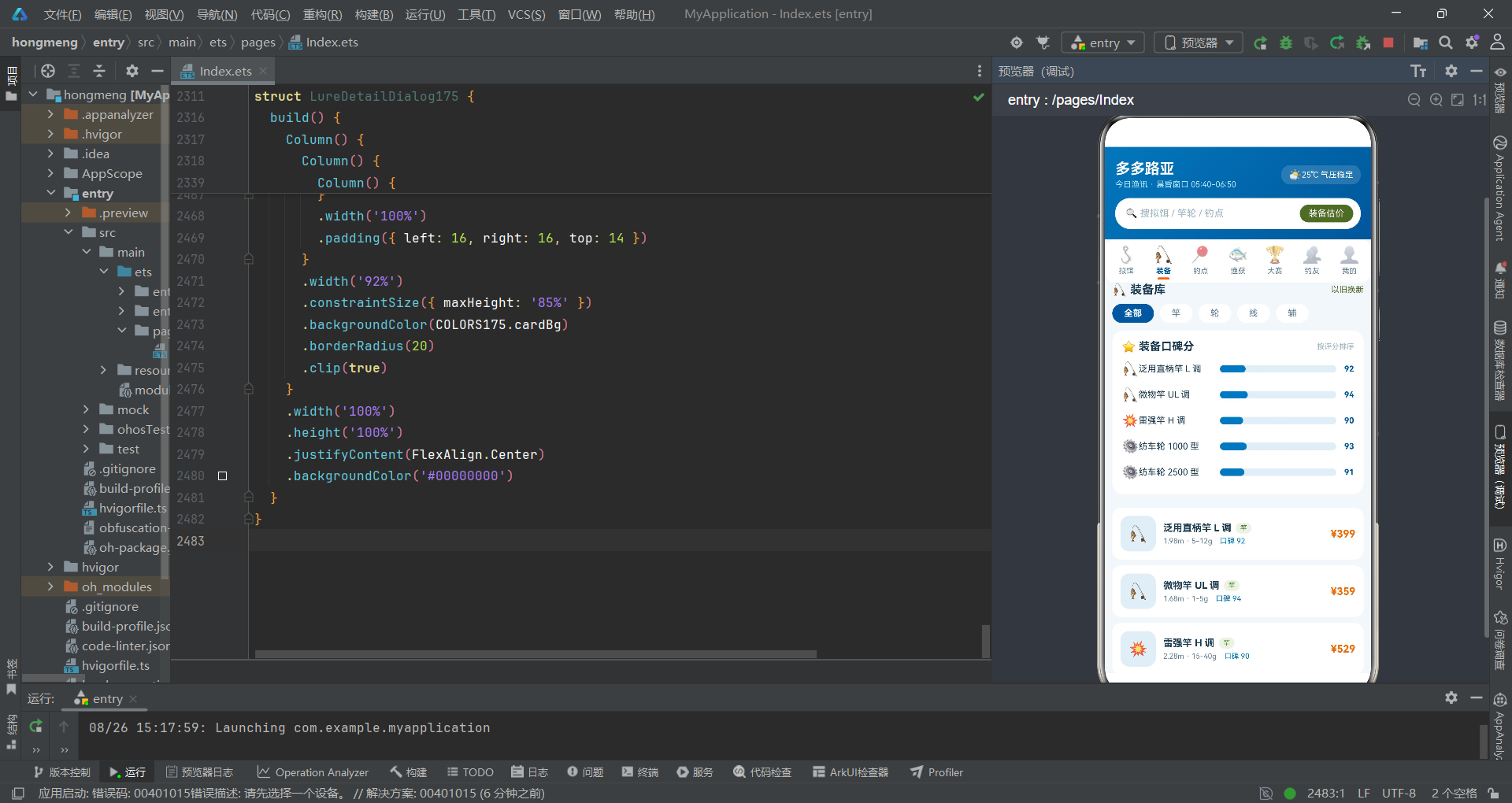
14.1 教学要点:装备灶台的分类筛选
@Component
struct GearTab175 {
  @State selCat: string = '全部';
  onDetail: (n: string, ic: string) => void = () => {};
GearTab175拥有自己的@State状态selCat(当前选中的分类,默认’全部’),以及onDetail回调。selCat用于装备分类筛选,当用户点击不同分类标签时,selCat值改变,触发UI更新。这是子组件拥有局部状态的典型例子——就像每个灶台可以有自己的"火候调节旋钮"。
14.2 catRow()的烹饪详解——分类标签栏
catRow()使用横向Scroll+ForEach渲染五个分类标签:‘全部’、‘竿’、‘轮’、‘线’、‘辅’。选中态使用COLORS175.lakeDeep(深湖蓝)背景+白色文字,未选中使用白色背景+灰色文字。点击标签修改selCat状态,实现分类切换。
14.3 scoreCard()的烹饪详解——口碑评分对比图
scoreCard()使用ForEach遍历GEARS175的前5种装备,为每种装备渲染一个水平进度条。进度条宽度通过scoreBar175函数计算——scoreBar175(g.score)将评分减去70后加上百分号。进度条使用COLORS175.lake(湖蓝色)填充,背景为浅灰色(#E3EFF6)。这种"减去基准分"的进度条设计让90分和95分的视觉差异更明显——如果从0开始显示,92分和95分的进度条几乎一样长。
14.4 build()的烹饪详解——装备列表
GearTab175的build()方法在分类标签和评分图之后,渲染完整的装备列表。每项装备卡片包含图标、名称、分类标签、规格、口碑分和价格。分类标签使用backgroundColor('#EDF3E4')浅绿色背景和COLORS175.armyDeep深军绿文字,形成"装备类型徽章"效果。价格使用COLORS175.warn(橙色)突出显示——在烹饪中,橙色就像"价格标签上的醒目色",让食客一眼看到成本。
第十五课:钓点灶台——@Component SpotTab175的烹饪详解
15.1 教学要点:钓点灶台与编辑回调
SpotTab175通过onEdit回调将钓点名称传递给父组件,触发编辑钓点弹窗。
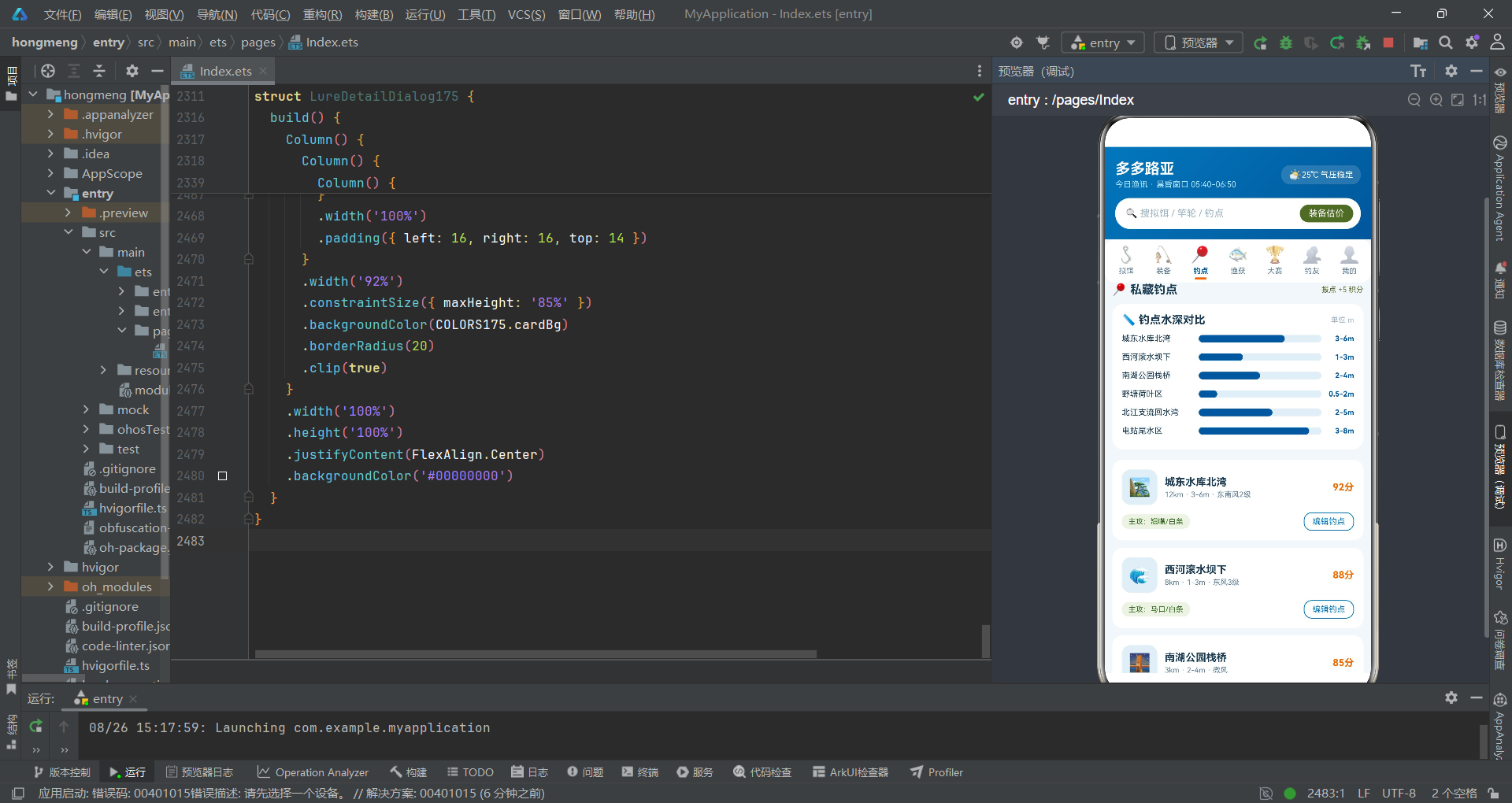
15.2 depthCard()的烹饪详解——水深对比图
depthCard()使用ForEach遍历SPOTS175的前6个钓点,为每个钓点渲染一个水平进度条。进度条宽度通过depthBar175函数计算——该函数根据水深区间字符串返回不同的数值百分比。进度条使用COLORS175.lakeDeep(深湖蓝)填充,模拟水深度。这种可视化让食客一眼就能比较不同钓点的水深——就像在菜单上用柱状图标注每道菜的辣度等级。
15.3 build()的烹饪详解——钓点列表
SpotTab175的build()方法构建了钓点信息列表。每个钓点卡片包含图标、名称、距离/水深/风向信息、评分和"编辑钓点"按钮。评分使用COLORS175.warn(橙色)加"分"后缀显示。主攻鱼种标签使用浅绿色背景+深军绿文字,形成"鱼种标签"效果。"编辑钓点"按钮使用边框样式(border({ width: 1, color: COLORS175.lake })),点击后调用onEdit回调。
第十六课:渔获灶台——@Component CatchTab175的烹饪详解
16.1 教学要点:渔获灶台的双回调
CatchTab175声明了onPost(晒渔获)和onDelete(删除渔获)两个回调,分别对应"上菜"和"撤盘"两种操作。
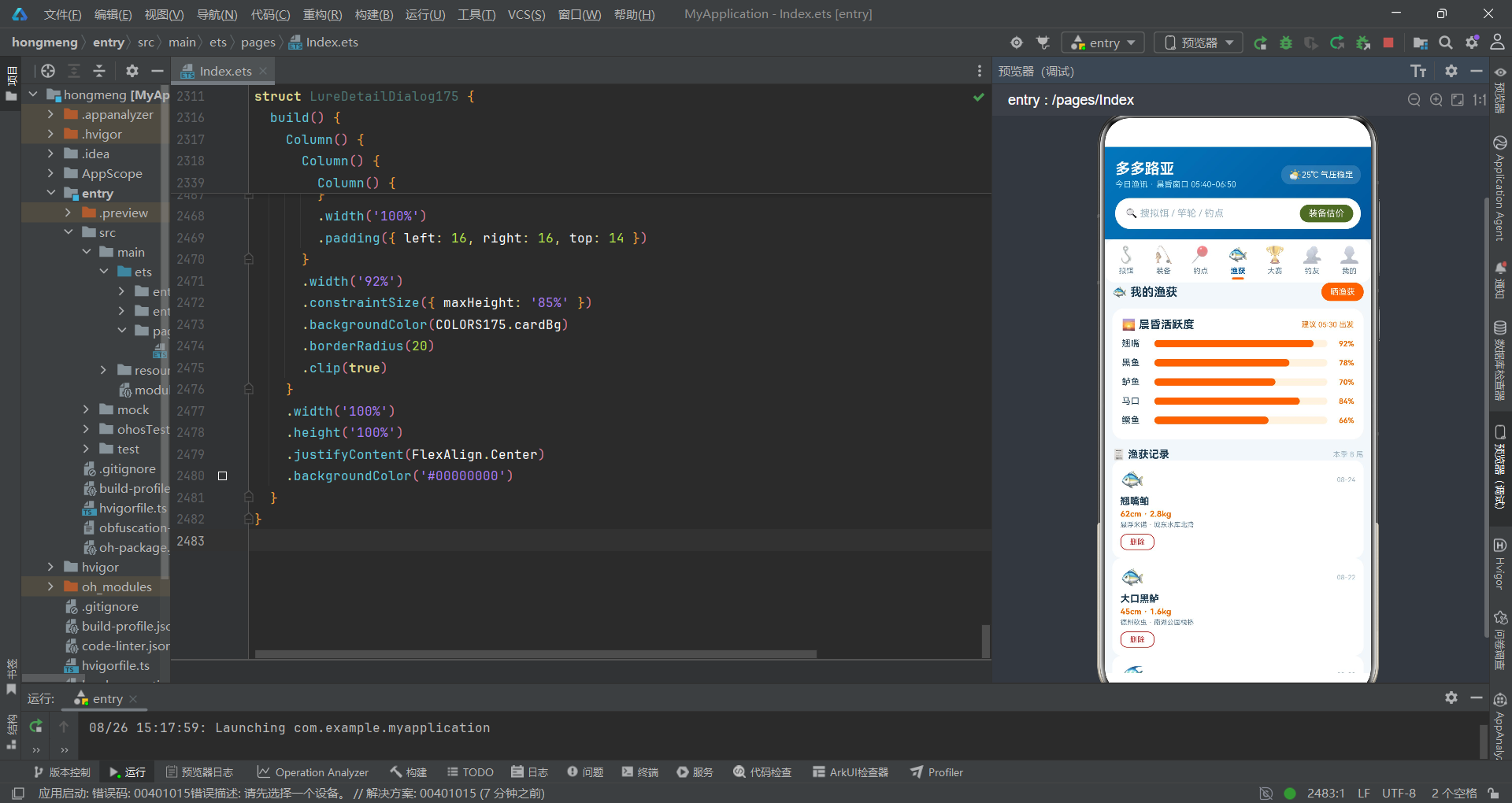
16.2 activeCard()的烹饪详解——晨昏活跃度图
activeCard()使用ForEach渲染FISH_ACTIVE175中五种鱼的活跃度进度条。进度条宽度通过actBar175函数计算——直接将活跃度数值加上百分号。进度条使用COLORS175.warn(橙色)填充,背景为浅橙色(#FFF3E0),形成"火候指示器"的视觉效果。标题"晨昏活跃度"和副标题"建议05:30出发"提供了出钓时间建议——就像菜谱上标注"最佳食用温度"。
16.3 build()的烹饪详解——渔获记录列表
CatchTab175的build()方法构建了渔获记录列表。每条记录卡片包含鱼图标、日期、鱼名、体长/体重、用饵/钓点和删除按钮。"晒渔获"按钮使用COLORS175.warn橙色背景,点击后调用onPost回调弹出晒渔获面板。删除按钮使用COLORS175.danger红色边框,点击后调用onDelete回调——传入的参数是c.fish + ' ' + c.length,将鱼名和体长拼接为一个字符串作为删除目标标识。
第十七课:赛事灶台——@Component MatchTab175的烹饪详解
17.1 教学要点:无回调的独立灶台
MatchTab175是少数没有回调函数的子组件——它只展示赛事和排行榜信息,不需要与主厨房交互。这就像"展示柜"——只供观赏,不参与烹饪流程。
17.2 build()的烹饪详解——赛事列表与排行榜
MatchTab175的build()方法构建了两个模块:赛事列表和赛季积分榜。
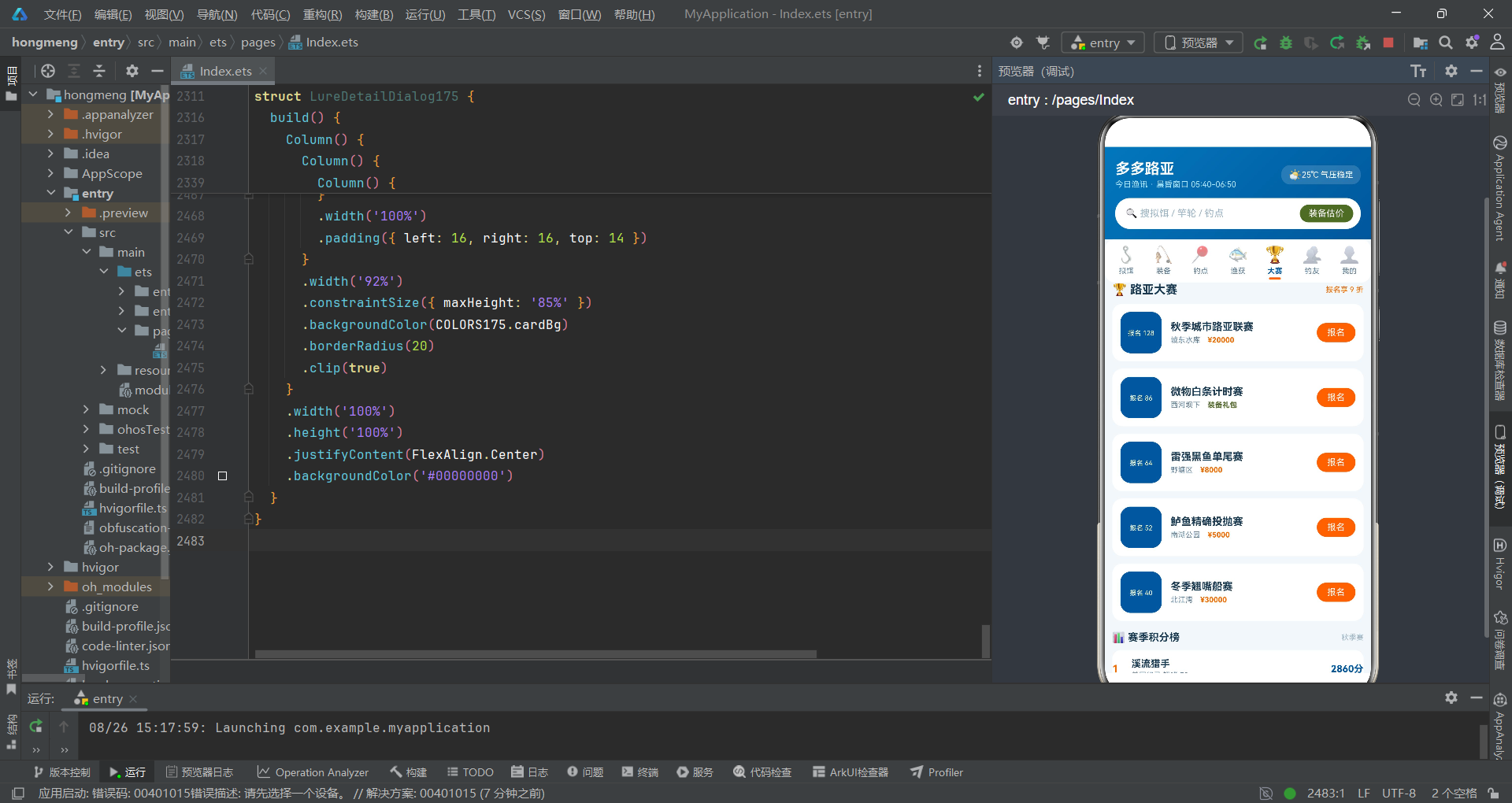
赛事列表使用ForEach渲染MATCHES175中的五场赛事。每场赛事的左侧是一个56vp×56vp的深湖蓝方块,显示日期(通过m.date.slice(5, 10)截取日期字符串的第5到第10位——如’09-20’从’2026-09-20’中截取月日部分)。slice是String对象的内置方法,接收起始和结束索引参数,返回字符串的子串。右侧显示赛事名称、地点和奖品——奖品颜色通过prizeC175函数动态计算。
赛季积分榜使用ForEach渲染RANKS175中的六位选手。排名序号通过(idx + 1)计算(idx从0开始,加1得到1-6的排名)。前三名(idx < 3)的序号使用COLORS175.warn橙色突出,其他使用灰色。这就像"领奖台"——前三名用金色标注、其他用普通色。
第十八课:钓友灶台——@Component BuddyTab175的烹饪详解
18.1 教学要点:数组状态与点赞交互
@Component
struct BuddyTab175 {
  @State liked: boolean[] = [false, false, false, false, false, false];
BuddyTab175引入了一个重要的知识点——@State liked: boolean[]。这是一个布尔数组类型的状态变量,初始值为六个false。数组中的每个元素对应一条动态的点赞状态——false表示未点赞、true表示已点赞。当用户点击点赞按钮时,通过this.liked[idx] = !this.liked[idx]切换对应索引的值。这里使用了数组索引访问语法this.liked[idx]——方括号内的idx是元素索引,从0开始。
18.2 build()的烹饪详解——钓友圈动态列表
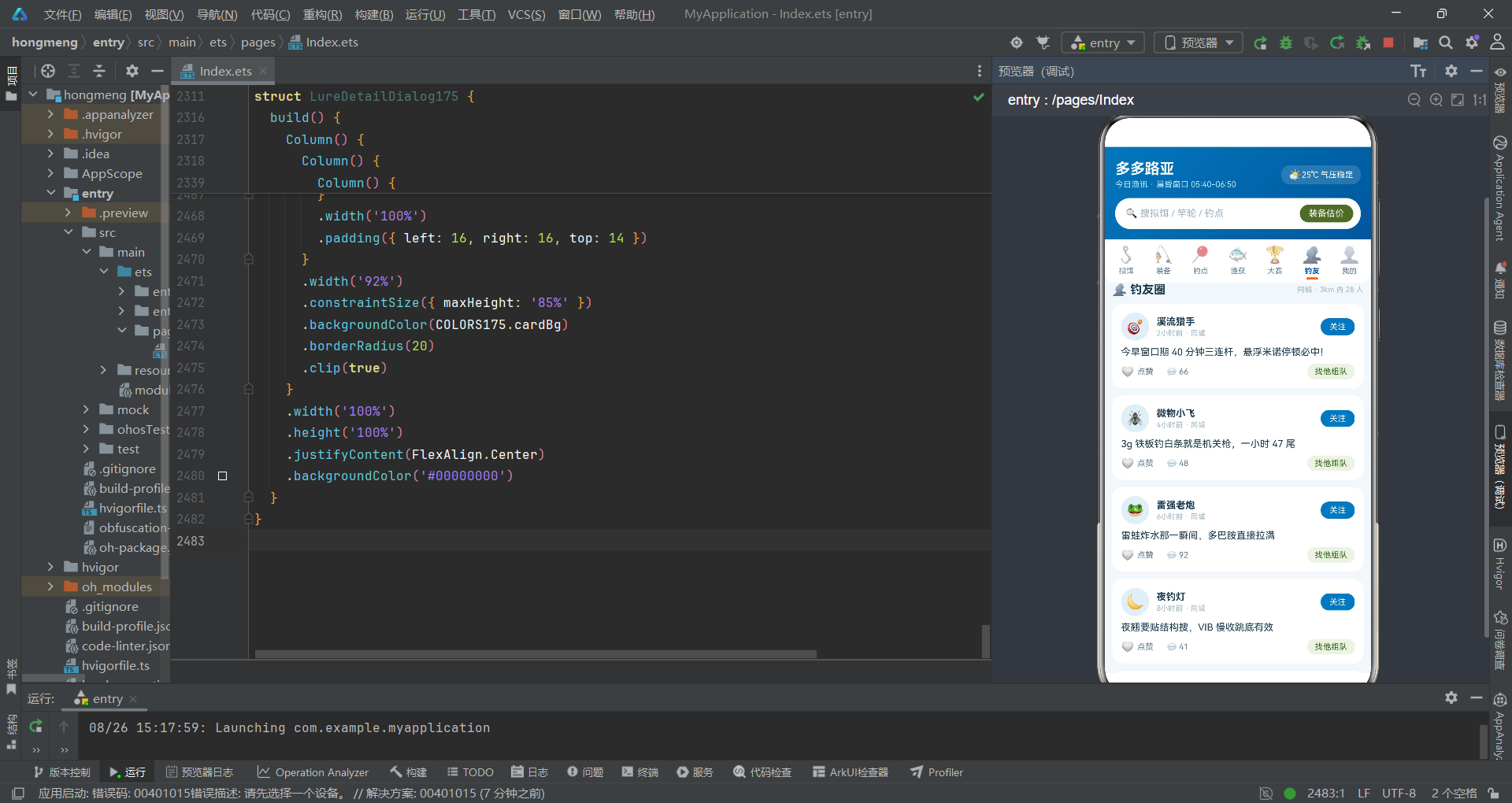
BuddyTab175的build()方法使用ForEach渲染POSTS175中的六条动态。每条动态卡片包含头像、用户名、发布时间、动态文字、点赞/评论/组队按钮。
点赞按钮的显示通过this.liked[idx]控制——已点赞显示’❤️’红心和"已赞"文字(COLORS175.danger红色),未点赞显示’🤍’白心和"点赞"文字(COLORS175.textSub灰色)。点击后切换this.liked[idx]的值,由于liked是@State数组,其元素变化会触发UI重新渲染。这里有一个技术细节:ArkTS的@State对数组元素的修改需要通过索引赋值来触发响应式更新。
"找他组队"按钮使用COLORS175.armyDeep深军绿文字+浅绿色背景(#EDF3E4),形成"自然风格"的社交互动按钮。
第十九课:个人灶台——@Component MineTab175的烹饪详解
19.1 教学要点:个人主页与饵盒展示
MineTab175通过onDetail回调将拟饵信息传递给父组件触发详情弹窗。
19.2 build()的烹饪详解——钓手主页与饵盒
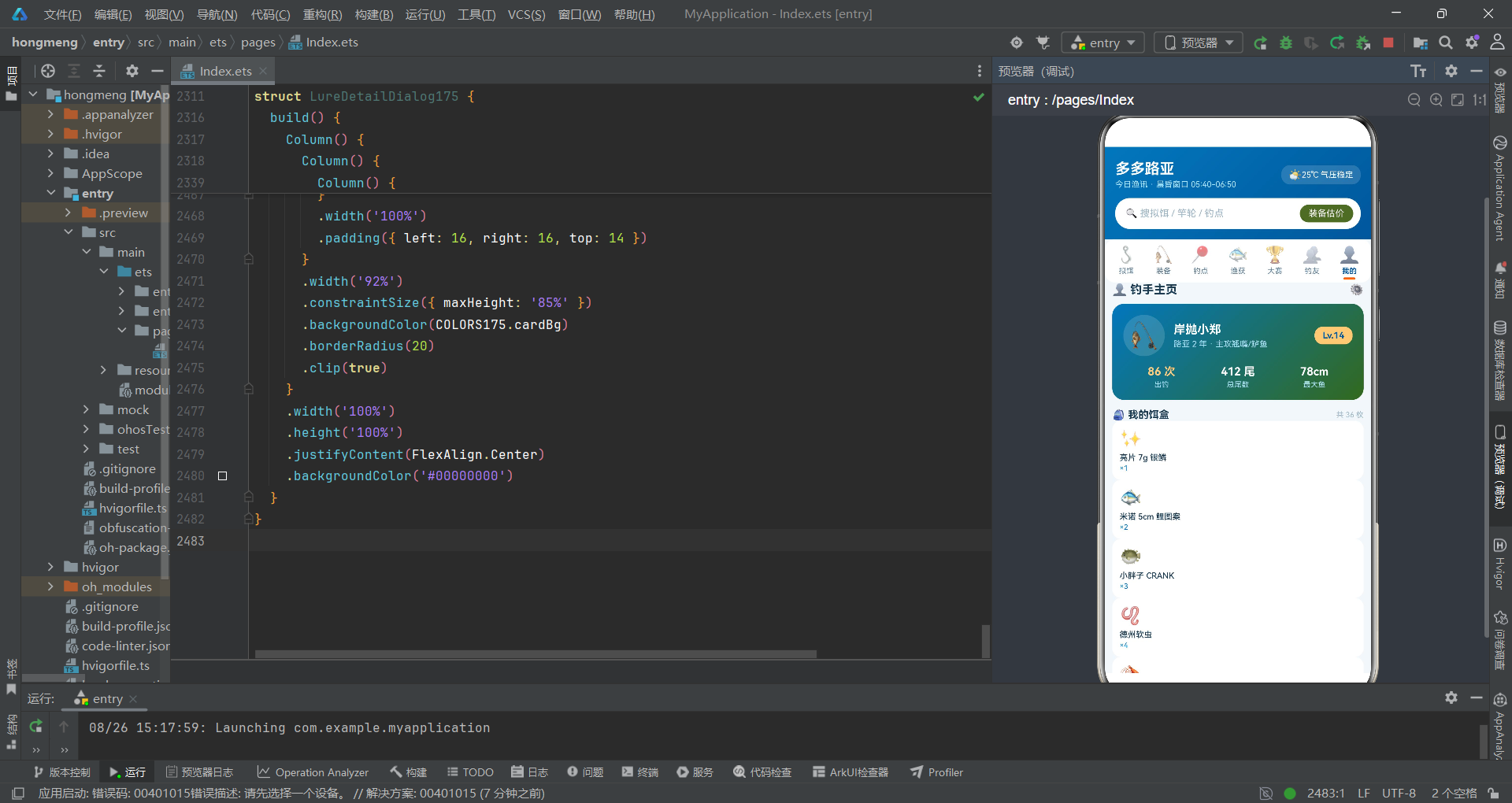
MineTab175的build()方法构建了多个模块:钓手信息卡、饵盒网格和装备订单。
钓手信息卡使用linearGradient创建了从湖蓝到深军绿的渐变背景——colors: [[COLORS175.lake, 0.0], [COLORS175.armyDeep, 1.0]],模拟"从湖水到草地"的视觉效果。等级标签Lv.14使用backgroundColor('#FFCC80')沙色背景+深湖蓝文字,形成"等级徽章"效果。
饵盒网格使用ForEach遍历LURES175的前8种拟饵,通过if (idx < 8)限制显示数量。每个饵盒项显示图标、名称和数量'×' + (idx % 4 + 1)——这里使用了取模运算符%,idx % 4的结果是0-3的循环值,加1后得到1-4的数量。这就像"食材库存标签"——第1项×1、第2项×2、第3项×3、第4项×4、第5项又回到×1,形成循环计数。
装备订单使用ForEach渲染ORDERS175中的五条订单。状态颜色根据status值动态变化——o.status === '已发货' ? COLORS175.warn : COLORS175.army,已发货显示橙色、其他显示军绿色。
第二十课:购买面板——@Component LureBuySheet175的烹饪详解
20.1 教学要点:拟饵购买面板的局部状态
@Component
struct LureBuySheet175 {
  lureName: string = '';
  onClose: () => void = () => {};
  @State selColor: string = '银鳞';
  @State count: number = 2;
  @State withBox: boolean = true;
LureBuySheet175接收lureName和onClose两个父组件参数,同时拥有三个局部@State:selColor(色号选择,默认’银鳞’)、count(数量,默认2)、withBox(是否含饵盒,默认true)。
20.2 build()的烹饪详解——购买流程面板
build()方法构建了完整的购买面板:拟饵信息卡、色号选择、数量调节、饵盒选项和结算栏。
色号选择使用ForEach渲染四个色号标签:‘银鳞’、‘金鳞’、‘红头白’、‘夜光’。选中态使用COLORS175.lake湖蓝背景。
数量调节器的减号按钮有条件保护if (this.count > 1),防止数量降至0以下。加号按钮无限制条件。
结算栏的价格计算this.count * 15.9——将数量乘以单价15.9(硬编码),得到合计金额。当count或withBox变化时,合计金额自动重新计算。
第二十一课:晒渔获面板——@Component PostCatchSheet175的烹饪详解
21.1 教学要点:渔获发布表单与InputType
@Component
struct PostCatchSheet175 {
  onClose: () => void = () => {};
  @State selFish: string = '翘嘴鲌';
  @State lengthInput: string = '62';
  @State weightInput: string = '2.8';
  @State released: boolean = true;
PostCatchSheet175拥有四个局部状态:selFish(鱼种选择)、lengthInput(体长输入)、weightInput(体重输入)、released(是否放流,默认true)。
21.2 知识点详解:InputType.Number——数字键盘
TextInput({ placeholder: '如 62', text: this.lengthInput })
  .fontSize(14)
  .height(42)
  .padding({ left: 10 })
  .borderRadius(10)
  .backgroundColor('#E8F2F8')
  .type(InputType.Number)
  .onChange((v: string) => {
    this.lengthInput = v;
  })
这里引入了一个新的知识点——.type(InputType.Number)。InputType是ArkTS中TextInput组件的输入类型枚举,包含Normal(普通文本)、Number(数字)、Phone(电话号码)、Email(邮箱)等值。设置为Number类型时,系统会弹出数字键盘,方便用户输入数值。在烹饪中,这相当于"指定计量工具"——输入体长体重时用数字秤而非文字标签。
21.3 build()的烹饪详解——渔获发布表单
build()方法构建了完整的发布表单:鱼种选择(翘嘴鲌/大口黑鲈/黑鱼/鳜鱼)、体长和体重双列输入、用饵与钓点输入、放流选项和发布按钮。
放流选项使用this.released ? '已放流 🌊' : '已入护'切换显示文字。放流按钮使用COLORS175.army军绿色背景+#EDF3E4浅绿底色,强调"可持续作钓"的环保理念。!this.released逻辑非运算符切换布尔值——就像"翻面"操作,正面是放流、反面是留鱼。
第二十二课:编辑钓点面板——@Component EditSpotSheet175的烹饪详解
22.1 教学要点:aboutToAppear生命周期与开关组件
@Component
struct EditSpotSheet175 {
  spotName: string = '';
  onClose: () => void = () => {};
  @State spotTitle: string = '';
  @State selWater: string = '静水';
  @State isPublic: boolean = false;

  aboutToAppear(): void {
    this.spotTitle = this.spotName;
  }
EditSpotSheet175引入了aboutToAppear()生命周期方法——在组件创建后、build()执行前被调用,用于初始化状态。这里将父组件传入的spotName赋值给本地状态spotTitle,作为TextInput的初始值。在烹饪中,这相当于"灶台开火前的预热"——在正式烹饪前先把初始食材准备好。
22.2 知识点详解:自定义开关组件的实现
Row() {
  Text('')
    .width(18)
    .height(18)
    .borderRadius(9)
    .backgroundColor(this.isPublic ? COLORS175.warn : COLORS175.textHint)
    .margin({ left: this.isPublic ? 16 : 2 })
}
.width(36)
.height(22)
.borderRadius(11)
.backgroundColor(this.isPublic ? '#FFF3E0' : '#E8F2F8')
.justifyContent(FlexAlign.Start)
.onClick(() => {
  this.isPublic = !this.isPublic;
})
这段代码实现了一个自定义的开关组件——没有使用系统Switch组件,而是用Row+Text+条件样式手动搭建。开关由一个36vp宽的外层Row(轨道)和一个18vp宽的内层Text(滑块)组成。当isPublic为true时:轨道背景为浅橙色(#FFF3E0)、滑块背景为橙色(COLORS175.warn)、滑块左边距为16vp(推到右侧)。当isPublic为false时:轨道背景为浅蓝色(#E8F2F8)、滑块背景为灰色(COLORS175.textHint)、滑块左边距为2vp(停在左侧)。
.margin({ left: this.isPublic ? 16 : 2 })是开关效果的关键——通过动态改变左边距实现滑块左右滑动。这种"用margin实现位移"的技巧在ArkTS中常用于自定义开关组件。
第二十三课:删除确认对话框——@Component LureDeleteDialog175的烹饪详解
23.1 教学要点:确认对话框与复选选项
@Component
struct LureDeleteDialog175 {
  targetName: string = '';
  onCancel: () => void = () => {};
  onConfirm: () => void = () => {};
  @State alsoDel: boolean = false;
LureDeleteDialog175接收targetName(删除目标名称)、onCancel(取消)和onConfirm(确认)三个参数,拥有一个@State状态alsoDel(是否同时删除钓友圈动态,默认false)。
23.2 build()的烹饪详解——删除确认对话框
build()方法构建了一个居中浮动的确认对话框,包含删除图标、标题、确认描述、复选项和两个操作按钮。
复选项使用Text(this.alsoDel ? '☑️' : '⬜')显示不同图标——选中显示勾选框、未选中显示空方框。点击切换this.alsoDel = !this.alsoDel。
确认删除按钮使用backgroundColor(COLORS175.danger)红色背景,与取消按钮的边框样式形成对比。红色按钮在烹饪中相当于"高温警示"——提醒用户该操作不可逆。
第二十四课:详情对话框——@Component LureDetailDialog175的烹饪详解
24.1 教学要点:详情展示与多模块布局
LureDetailDialog175接收itemName、itemIcon和onClose三个参数,没有自己的@State——它是一个纯展示型对话框,就像"菜品展示卡"只供观赏不需操作。
24.2 build()的烹饪详解——详情展示对话框
build()方法构建了最复杂的对话框内容,包含:渐变头部、物品名称与参数标签、操作手法文字、适用场景列表、钓友评价列表和操作按钮。
渐变头部使用linearGradient({ angle: 135, colors: [[COLORS175.lakeLight, 0.0], [COLORS175.lakeDeep, 1.0]] })创建从浅湖蓝到深湖蓝的渐变——与pageHeader()的湖蓝渐变形成呼应。
操作手法文字使用多行文本——'• 匀速收线配合轻抽停顿\n• 停顿半秒最易触发咬口\n• 阳光好用银色,阴天换金色'。\n是换行转义字符,使文本分成三行显示。.lineHeight(20)设置行高为20vp,确保多行文本之间有舒适间距。
适用场景列表使用ForEach遍历二维数组[['目标鱼', '白条 / 马口 / 小翘嘴'], ['季节', '四季通用,夏秋最佳'], ['标点', '缓流区 / 汇水湾 / 结构边']]——每个元素是一个string数组,通过r[0]和r[1]访问键和值。
constraintSize与clip——.constraintSize({ maxHeight: '85%' })限制对话框最大高度为屏幕的85%,.clip(true)裁剪溢出内容。这两者配合确保对话框内容很长时不会超出屏幕边界。
第二十五课:烹饪流程图——系统架构全流程示意
25.1 烹饪流程图
25.2 烹饪链路解析
从流程图可以清晰看到整个菜品的烹饪链路:
纵向烹饪链:食材区(COLORS175等常量)提供底层食材 -> 调味区(五大函数)进行食材加工 -> 灶台区(七个子组件)执行具体烹饪 -> 主厨房(LureMain175)统一调度 -> 上菜区(五大模态组件)完成最终出品。
横向通信链:灶台区的子组件通过回调函数(onBuy、onDetail、onEdit、onPost、onDelete)向主厨房汇报烹饪情况,主厨房接收后修改@State状态变量,触发bindSheet/bindContentCover弹出对应的上菜面板。这种"灶台汇报->主厨房决策->上菜响应"的通信模式,构成了完整的烹饪闭环。
第二十六课:配方对比表——核心知识点综合评估
26.1 核心装饰器/关键字烹饪对比表
| 序号 | 知识点 | 类别 | 烹饪职能 | 厨房类比 | 使用次数 | 代码示例 |
|---|---|---|---|---|---|---|
| 1 | @Entry | 装饰器 | 标记页面入口 | 厨房标识牌 | 1次 | @Entry struct LureMain175 |
| 2 | @Component | 装饰器 | 声明自定义组件 | 灶台认证 | 9次 | @Component struct LureTab175 |
| 3 | @State | 装饰器 | 响应式状态变量 | 火候温度计 | 20+次 | @State curTab: string = 'lure' |
| 4 | @Builder | 装饰器 | 可复用UI构建模板 | 预制菜谱 | 7次 | @Builder pageHeader() |
| 5 | struct | 关键字 | 声明组件结构体 | 灶台建制 | 9次 | struct LureMain175 |
| 6 | interface | 关键字 | 定义接口类型契约 | 食材规格定义书 | 11次 | interface ColorPalette175 |
| 7 | const | 关键字 | 声明不可变常量 | 封存调味料柜 | 11次 | const COLORS175: ColorPalette175 |
| 8 | function | 关键字 | 声明函数 | 调味工具 | 5次 | function layerC175(l: string) |
| 9 | if/else | 关键字 | 条件判断 | 火候分支选择 | 30+次 | if (this.curTab === 'lure') |
| 10 | return | 关键字 | 返回值 | 调味出品 | 5次 | return COLORS175.warn |
| 11 | aboutToAppear | 生命周期 | 组件初始化 | 灶台预热 | 1次 | aboutToAppear(): void |
| 12 | void | 类型 | 无返回值 | 空手出品 | 10+次 | onClose: () => void |
26.2 UI组件与属性烹饪对比表
| 序号 | 组件/属性 | 类别 | 烹饪职能 | 厨房类比 | 关键参数 |
|---|---|---|---|---|---|
| 1 | Column | 布局组件 | 垂直排列 | 蒸笼层叠 | .alignItems(HorizontalAlign.Start) |
| 2 | Row | 布局组件 | 水平排列 | 托盘并排 | .justifyContent(FlexAlign.Start) |
| 3 | Text | 显示组件 | 文本展示 | 菜品标签 | .fontSize().fontWeight().fontColor() |
| 4 | TextInput | 交互组件 | 文本输入 | 食材录入台 | placeholder, text, type, onChange |
| 5 | Scroll | 容器组件 | 可滚动区域 | 旋转餐台 | .scrollable(ScrollDirection.Vertical) |
| 6 | ForEach | 渲染组件 | 列表循环渲染 | 按菜单批量出品 | (数据源, 渲染函数, 键值函数) |
| 7 | linearGradient | 样式属性 | 线性渐变背景 | 酱汁淋面 | { angle, colors: [[色, 位]] } |
| 8 | layoutWeight | 布局属性 | 布局权重 | 占满剩余托盘 | layoutWeight(1) |
| 9 | bindSheet | 弹窗属性 | 底部滑出面板 | 半身餐车 | $$this.state, builder, { height } |
| 10 | bindContentCover | 弹窗属性 | 全屏覆盖层 | 全屏上菜台 | $$this.state, builder, {} |
| 11 | opacity | 外观属性 | 透明度 | 雾化效果 | opacity(0.55) |
| 12 | clip | 外观属性 | 裁剪溢出 | 修边裁剪 | clip(true) |
| 13 | constraintSize | 约束属性 | 尺寸约束 | 容器限高 | { maxHeight: '85%' } |
| 14 | InputType | 枚举类型 | 输入类型 | 计量工具选择 | InputType.Number |
| 15 | maxLines | 文本属性 | 最大行数 | 文字截断控制 | maxLines(1) |
| 16 | textOverflow | 文本属性 | 溢出处理 | 省略标记 | { overflow: TextOverflow.Ellipsis } |
26.3 TypeScript类型系统烹饪对比表
| 序号 | 类型 | 类别 | 烹饪职能 | 代码示例 |
|---|---|---|---|---|
| 1 | string | 原始类型 | 字符串文本 | name: string = '亮片 7g' |
| 2 | number | 原始类型 | 数值 | price: number = 15.9 |
| 3 | boolean | 原始类型 | 布尔值 | done: boolean = true |
| 4 | void | 特殊类型 | 无返回值 | onClose: () => void |
| 5 | 类型[] | 数组类型 | 元素数组 | LureItem175[] |
| 6 | boolean[] | 布尔数组 | 布尔值序列 | liked: boolean[] = [false, ...] |
| 7 | (参数) => 返回 | 函数类型 | 函数签名 | (n: string) => void |
| 8 | 枚举.值 | 枚举类型 | 预定义常量 | FontWeight.Bold |
26.4 弹窗绑定方式烹饪对比表
| 序号 | 绑定方式 | 弹窗类型 | 覆盖范围 | 烹饪用途 | 高度设置 |
|---|---|---|---|---|---|
| 1 | bindSheet | 底部面板 | 屏幕下半部 | 购买/发布/编辑面板 | 600/620/520vp |
| 2 | bindContentCover | 全屏覆盖 | 整个屏幕 | 删除确认/详情展示 | 无固定高度 |
| 3 | $$语法 | 双向绑定 | 状态同步 | 双向对讲机 | 自动同步 |
26.5 五大辅助函数烹饪对比表
| 序号 | 函数名 | 参数类型 | 返回类型 | 烹饪职能 | 核心逻辑 |
|---|---|---|---|---|---|
| 1 | layerC175 | string | string | 泳层调味色 | 上层/水面→蓝、中层→橙、底层→绿 |
| 2 | actBar175 | number | string | 活跃度进度条 | n + ‘%’ |
| 3 | scoreBar175 | number | string | 评分进度条 | (s - 70) + ‘%’ |
| 4 | depthBar175 | string | number | 水深进度数值 | 7个区间映射7个百分比 |
| 5 | prizeC175 | string | string | 奖品调味色 | indexOf(‘¥’)===0 ? 橙 : 绿 |
26.6 数据模型接口烹饪对比表
| 序号 | 接口名 | 属性数 | 类型分布 | 食材类型 | 数据量 |
|---|---|---|---|---|---|
| 1 | ColorPalette175 | 16 | 全string | 调味料配方 | 1组 |
| 2 | TabItem175 | 3 | 全string | 菜单项 | 7项 |
| 3 | LureItem175 | 7 | 4string+2number+1string | 拟饵食材 | 12项 |
| 4 | GearItem175 | 6 | 3string+2number+1string | 装备厨具 | 12项 |
| 5 | SpotItem175 | 7 | 5string+1number+1string | 钓点产地 | 8项 |
| 6 | CatchItem175 | 6 | 全string | 渔获成品 | 8项 |
| 7 | FishActive175 | 2 | 1string+1number | 活跃度火候 | 5项 |
| 8 | MatchItem175 | 5 | 4string+1number | 赛事菜单 | 5项 |
| 9 | RankItem175 | 3 | 2string+1number | 排行榜 | 6项 |
| 10 | PostItem175 | 6 | 4string+2number | 社交点评 | 6项 |
| 11 | OrderItem175 | 5 | 4string+1number | 采购订单 | 5项 |
第二十七课:教学总结与课后复盘
27.1 架构设计复盘
经过对175号源文件的完整烹饪教学,我们可以对该路亚钓鱼装备管理系统的架构设计进行全面的课后复盘。该系统采用了一个@Entry主组件(LureMain175)作为主厨房,下辖七个@Component子组件(LureTab175、GearTab175、SpotTab175、CatchTab175、MatchTab175、BuddyTab175、MineTab175)作为七大灶台,再加上五个@Component模态弹窗组件(LureBuySheet175、PostCatchSheet175、EditSpotSheet175、LureDeleteDialog175、LureDetailDialog175)作为五种上菜方式,共计十二个组件构成了完整的烹饪体系。
这种"1+7+5"的组件架构体现了HarmonyOS ArkTS声明式UI的组件化设计理念:主组件负责全局状态管理和子组件调度,子组件负责具体业务逻辑的UI渲染,弹窗组件负责模态交互场景。通过@State状态变量和回调函数的双向通信机制,各层组件之间建立了高效的信息传递链路——父组件通过@State控制子组件的显示逻辑,子组件通过回调函数向父组件上报烹饪情况。
27.2 数据驱动复盘
该系统的数据层包含十一个TypeScript接口和对应的常量数组,涵盖了色彩调味料、菜单项、拟饵食材、装备厨具、钓点产地、渔获成品、活跃度火候、赛事菜单、排行榜、社交点评和采购订单共十一大类食材数据。这些数据通过interface定义了严格的类型契约,确保了数据在编译期的类型安全性。五个辅助函数提供了数据到视觉呈现的转换服务——泳层颜色映射、活跃度进度、评分进度、水深进度和奖品颜色,实现了数据与表现的解耦。
整个系统充分体现了HarmonyOS声明式UI"数据驱动视图"的核心设计理念:@State状态变量的变化自动触发UI重新渲染,用户交互通过onClick/onChange事件修改状态,状态的修改自动反映到视图层。这种设计模式使得开发者只需关注"状态是什么"和"UI长什么样",而无需手动管理DOM更新——框架自动处理了状态到视图的映射。这在烹饪中相当于"自动温控烤箱"——厨师只需设定温度(状态),烤箱(框架)会自动调整火力(UI更新),无需手动看火。
安装DevEco Studio程序

选择目标安装目录:

设置环境变量,但是需要重启一下:

新建一个空白模板:

设置API为24的模板项目:

初始化项目,自动下载相关依赖:

完整代码:
// 多多路亚钓鱼 · 淡水微物玩家的装备库
// 拼多多风格:湖蓝 × 军绿,顶部图标宫格导航 + 二级横滑 Tab
interface ColorPalette175 {
lake: string;
lakeDeep: string;
lakeLight: string;
army: string;
armyDeep: string;
warn: string;
bg: string;
cardBg: string;
textMain: string;
textSub: string;
textHint: string;
border: string;
danger: string;
white: string;
sand: string;
purple: string;
}
const COLORS175: ColorPalette175 = {
lake: '#0277BD',
lakeDeep: '#01579B',
lakeLight: '#81D4FA',
army: '#556B2F',
armyDeep: '#33691E',
warn: '#EF6C00',
bg: '#F2F7FA',
cardBg: '#FFFFFF',
textMain: '#1A3A52',
textSub: '#5F7E96',
textHint: '#9FB6C6',
border: '#DDE9F1',
danger: '#C62828',
white: '#FFFFFF',
sand: '#FFCC80',
purple: '#6A1B9A'
};
interface TabItem175 {
key: string;
icon: string;
label: string;
}
const TABS175: TabItem175[] = [
{ key: 'lure', icon: '🪝', label: '拟饵' },
{ key: 'gear', icon: '🎣', label: '装备' },
{ key: 'spot', icon: '📍', label: '钓点' },
{ key: 'catch', icon: '🐟', label: '渔获' },
{ key: 'match', icon: '🏆', label: '大赛' },
{ key: 'buddy', icon: '👥', label: '钓友' },
{ key: 'mine', icon: '👤', label: '我的' }
];
interface LureItem175 {
name: string;
icon: string;
layer: string;
weight: string;
price: number;
sold: number;
target: string;
}
const LURES175: LureItem175[] = [
{ name: '亮片 7g 银鳞', icon: '✨', layer: '中层', weight: '7g', price: 15.9, sold: 3200, target: '白条/马口' },
{ name: '米诺 5cm 鲤图案', icon: '🐟', layer: '上层', weight: '9g', price: 32.9, sold: 2800, target: '翘嘴/鲈鱼' },
{ name: '小胖子 CRANK', icon: '🐡', layer: '中层', weight: '10g', price: 28.9, sold: 2600, target: '翘嘴' },
{ name: '德州软虫', icon: '🪱', layer: '底层', weight: '8g', price: 12.9, sold: 4100, target: '黑鱼/鲈鱼' },
{ name: '倒吊虾', icon: '🦐', layer: '底层', weight: '5g', price: 10.9, sold: 3900, target: '鲈鱼' },
{ name: 'VIB 12g 远投', icon: '⚡', layer: '全层', weight: '12g', price: 25.9, sold: 2100, target: '翘嘴' },
{ name: '铁板 3g 微物', icon: '🔩', layer: '全层', weight: '3g', price: 9.9, sold: 4600, target: '白条' },
{ name: '小胖子 虾色', icon: '🦐', layer: '中层', weight: '8g', price: 26.9, sold: 1900, target: '鲈鱼' },
{ name: '悬浮米诺', icon: '🎯', layer: '上层', weight: '11g', price: 45.9, sold: 1500, target: '翘嘴' },
{ name: '雷蛙 黑鱼版', icon: '🐸', layer: '水面', weight: '14g', price: 18.9, sold: 3300, target: '黑鱼' },
{ name: '复合亮片', icon: '🌀', layer: '水面', weight: '10g', price: 22.9, sold: 2700, target: '黑鱼/鲈鱼' },
{ name: '面条虫 5寸', icon: '🪱', layer: '底层', weight: '6g', price: 8.9, sold: 5100, target: '鲈鱼' }
];
interface GearItem175 {
name: string;
icon: string;
spec: string;
price: number;
cat: string;
score: number;
}
const GEARS175: GearItem175[] = [
{ name: '泛用直柄竿 L 调', icon: '🎣', spec: '1.98m · 5-12g', price: 399, cat: '竿', score: 92 },
{ name: '微物竿 UL 调', icon: '🎣', spec: '1.68m · 1-5g', price: 359, cat: '竿', score: 94 },
{ name: '雷强竿 H 调', icon: '💥', spec: '2.28m · 15-40g', price: 529, cat: '竿', score: 90 },
{ name: '纺车轮 1000 型', icon: '⚙️', spec: '5.0:1 · 4kg', price: 449, cat: '轮', score: 93 },
{ name: '纺车轮 2500 型', icon: '⚙️', spec: '5.6:1 · 7kg', price: 529, cat: '轮', score: 91 },
{ name: '水滴轮 微物', icon: '🎯', spec: '7.3:1 · 6kg', price: 699, cat: '轮', score: 95 },
{ name: 'PE 线 0.8号', icon: '🧵', spec: '150m · 8编', price: 89, cat: '线', score: 88 },
{ name: '碳素前导 3号', icon: '🔗', spec: '50m · 耐磨', price: 45, cat: '线', score: 87 },
{ name: '路亚包 12 格', icon: '🎒', spec: '硬壳 · 防水', price: 159, cat: '辅', score: 90 },
{ name: '控鱼器+路亚钳', icon: '🩹', spec: '钛合金套装', price: 129, cat: '辅', score: 92 },
{ name: '探鱼器便携', icon: '📡', spec: '80m 测深', price: 499, cat: '辅', score: 89 },
{ name: '钓鱼服 防晒', icon: '👕', spec: 'UPF50+ 冰感', price: 139, cat: '辅', score: 91 }
];
interface SpotItem175 {
name: string;
icon: string;
dist: string;
depth: string;
fish: string;
score: number;
wind: string;
}
const SPOTS175: SpotItem175[] = [
{ name: '城东水库北湾', icon: '🏞', dist: '12km', depth: '3-6m', fish: '翘嘴/白条', score: 92, wind: '东南风2级' },
{ name: '西河滚水坝下', icon: '🌊', dist: '8km', depth: '1-3m', fish: '马口/白条', score: 88, wind: '东风3级' },
{ name: '南湖公园栈桥', icon: '🌉', dist: '3km', depth: '2-4m', fish: '鲈鱼/翘嘴', score: 85, wind: '微风' },
{ name: '野塘荷叶区', icon: '🪷', dist: '15km', depth: '0.5-2m', fish: '黑鱼', score: 90, wind: '南风2级' },
{ name: '北江支流回水湾', icon: '🏝', dist: '22km', depth: '2-5m', fish: '翘嘴/鳜鱼', score: 87, wind: '北风3级' },
{ name: '电站尾水区', icon: '⚡', dist: '18km', depth: '3-8m', fish: '翘嘴', score: 89, wind: '西风2级' },
{ name: '养殖场排水口', icon: '🚰', dist: '10km', depth: '1-2m', fish: '罗非/黑鱼', score: 82, wind: '微风' },
{ name: '山塘石壁湾', icon: '⛰', dist: '26km', depth: '4-9m', fish: '鳜鱼/鲈鱼', score: 86, wind: '山风2级' }
];
interface CatchItem175 {
fish: string;
icon: string;
length: string;
weight: string;
lure: string;
spot: string;
date: string;
}
const CATCHES175: CatchItem175[] = [
{ fish: '翘嘴鲌', icon: '🐟', length: '62cm', weight: '2.8kg', lure: '悬浮米诺', spot: '城东水库北湾', date: '08-24' },
{ fish: '大口黑鲈', icon: '🐟', length: '45cm', weight: '1.6kg', lure: '德州软虫', spot: '南湖公园栈桥', date: '08-22' },
{ fish: '马口鱼', icon: '🐠', length: '21cm', weight: '0.15kg', lure: '亮片 7g', spot: '西河滚水坝下', date: '08-20' },
{ fish: '黑鱼', icon: '🐍', length: '55cm', weight: '1.9kg', lure: '雷蛙', spot: '野塘荷叶区', date: '08-17' },
{ fish: '白条', icon: '🎣', length: '18cm', weight: '0.08kg', lure: '铁板 3g', spot: '西河滚水坝下', date: '08-15' },
{ fish: '鳜鱼', icon: '🐡', length: '38cm', weight: '1.1kg', lure: '倒吊虾', spot: '北江支流回水湾', date: '08-12' },
{ fish: '翘嘴鲌', icon: '🐟', length: '48cm', weight: '1.5kg', lure: 'VIB 12g', spot: '电站尾水区', date: '08-08' },
{ fish: '大口黑鲈', icon: '🐟', length: '52cm', weight: '2.2kg', lure: '小胖子', spot: '山塘石壁湾', date: '08-03' }
];
interface FishActive175 {
fish: string;
dawn: number;
}
const FISH_ACTIVE175: FishActive175[] = [
{ fish: '翘嘴', dawn: 92 },
{ fish: '黑鱼', dawn: 78 },
{ fish: '鲈鱼', dawn: 70 },
{ fish: '马口', dawn: 84 },
{ fish: '鳜鱼', dawn: 66 }
];
interface MatchItem175 {
name: string;
date: string;
place: string;
prize: string;
joined: number;
}
const MATCHES175: MatchItem175[] = [
{ name: '秋季城市路亚联赛', date: '09-20', place: '城东水库', prize: '¥20000', joined: 128 },
{ name: '微物白条计时赛', date: '09-06', place: '西河坝下', prize: '装备礼包', joined: 86 },
{ name: '雷强黑鱼单尾赛', date: '09-13', place: '野塘区', prize: '¥8000', joined: 64 },
{ name: '鲈鱼精确投抛赛', date: '10-01', place: '南湖公园', prize: '¥5000', joined: 52 },
{ name: '冬季翘嘴船赛', date: '12-12', place: '北江湾', prize: '¥30000', joined: 40 }
];
interface RankItem175 {
name: string;
pts: number;
best: string;
}
const RANKS175: RankItem175[] = [
{ name: '溪流猎手', pts: 2860, best: '翘嘴 78cm' },
{ name: '雷强老炮', pts: 2720, best: '黑鱼 71cm' },
{ name: '微物小飞', pts: 2450, best: '马口 26cm' },
{ name: '深水雷达', pts: 2310, best: '鳜鱼 49cm' },
{ name: '岸抛侠', pts: 2180, best: '翘嘴 65cm' },
{ name: '夜钓灯', pts: 2060, best: '鲈鱼 58cm' }
];
interface PostItem175 {
user: string;
avatar: string;
text: string;
likes: number;
comments: number;
time: string;
}
const POSTS175: PostItem175[] = [
{ user: '溪流猎手', avatar: '🎯', text: '今早窗口期 40 分钟三连杆,悬浮米诺停顿必中!', likes: 428, comments: 66, time: '2小时前' },
{ user: '微物小飞', avatar: '🪰', text: '3g 铁板钓白条就是机关枪,一小时 47 尾', likes: 312, comments: 48, time: '4小时前' },
{ user: '雷强老炮', avatar: '🐸', text: '雷蛙炸水那一瞬间,多巴胺直接拉满', likes: 566, comments: 92, time: '6小时前' },
{ user: '夜钓灯', avatar: '🌙', text: '夜翘要贴结构搜,VIB 慢收跳底有效', likes: 289, comments: 41, time: '8小时前' },
{ user: '深水雷达', avatar: '📡', text: '倒吊虾轻拖十克铅,鳜鱼直接锁喉', likes: 345, comments: 53, time: '10小时前' },
{ user: '岸抛侠', avatar: '🏹', text: '2 点后风停了口也停,提前收竿保平安', likes: 198, comments: 30, time: '12小时前' }
];
interface OrderItem175 {
name: string;
icon: string;
price: number;
status: string;
date: string;
}
const ORDERS175: OrderItem175[] = [
{ name: '悬浮米诺 × 2', icon: '🎯', price: 91.8, status: '已发货', date: '08-23' },
{ name: 'PE线 0.8号', icon: '🧵', price: 89, status: '已完成', date: '08-14' },
{ name: '微物竿 UL', icon: '🎣', price: 359, status: '已完成', date: '08-05' },
{ name: '雷蛙 × 3', icon: '🐸', price: 56.7, status: '待评价', date: '07-30' },
{ name: '控鱼器套装', icon: '🩹', price: 129, status: '已完成', date: '07-22' }
];
function layerC175(l: string): string {
if (l === '上层' || l === '水面') {
return '#4FC3F7';
}
if (l === '中层') {
return COLORS175.warn;
}
if (l === '底层') {
return COLORS175.army;
}
return COLORS175.purple;
}
function actBar175(n: number): string {
return n + '%';
}
function scoreBar175(s: number): string {
return (s - 70) + '%';
}
function depthBar175(d: string): number {
if (d === '3-8m') {
return 90;
}
if (d === '4-9m') {
return 100;
}
if (d === '3-6m') {
return 70;
}
if (d === '2-5m') {
return 60;
}
if (d === '2-4m') {
return 50;
}
if (d === '1-3m') {
return 36;
}
if (d === '1-2m') {
return 26;
}
return 15;
}
function prizeC175(p: string): string {
if (p.indexOf('¥') === 0) {
return COLORS175.warn;
}
return COLORS175.army;
}
@Entry
@Component
struct LureMain175 {
@State curTab: string = 'lure';
@State showBuyLure: boolean = false;
@State showPost: boolean = false;
@State showEditSpot: boolean = false;
@State showDelete: boolean = false;
@State showDetail: boolean = false;
@State lureName: string = '亮片 7g 银鳞';
@State spotName: string = '城东水库北湾';
@State catchName: string = '翘嘴鲌 62cm';
@State detailName: string = '亮片 7g 银鳞';
@State detailIcon: string = '✨';
@Builder
pageHeader() {
Column() {
Row() {
Column() {
Text('多多路亚')
.fontSize(20)
.fontWeight(FontWeight.Bold)
.fontColor(COLORS175.white)
Text('今日渔讯 · 晨昏窗口 05:40-06:50')
.fontSize(11)
.fontColor('#B3E5FC')
.margin({ top: 3 })
}
.alignItems(HorizontalAlign.Start)
.layoutWeight(1)
Row() {
Text('🌤')
.fontSize(14)
Text('25℃ 气压稳定')
.fontSize(11)
.fontColor(COLORS175.white)
}
.padding({ left: 10, right: 10, top: 5, bottom: 5 })
.borderRadius(12)
.backgroundColor('#26FFFFFF')
}
.width('100%')
.margin({ top: 8 })
Row() {
Text('🔍 搜拟饵 / 竿轮 / 钓点')
.fontSize(13)
.fontColor(COLORS175.textHint)
Text('')
.layoutWeight(1)
Text('装备估价')
.fontSize(12)
.fontColor(COLORS175.white)
.padding({ left: 12, right: 12, top: 5, bottom: 5 })
.borderRadius(13)
.backgroundColor(COLORS175.army)
}
.width('100%')
.padding({ left: 14, right: 10, top: 9, bottom: 9 })
.borderRadius(20)
.backgroundColor(COLORS175.white)
.margin({ top: 12 })
}
.width('100%')
.padding({ left: 14, right: 14, top: 10, bottom: 14 })
.linearGradient({
angle: 135,
colors: [[COLORS175.lake, 0.0], [COLORS175.lakeDeep, 1.0]]
})
}
@Builder
iconNav() {
Row() {
ForEach(TABS175, (t: TabItem175) => {
Column() {
Text(t.icon)
.fontSize(22)
.opacity(this.curTab === t.key ? 1 : 0.55)
Text(t.label)
.fontSize(10)
.fontWeight(this.curTab === t.key ? FontWeight.Bold : FontWeight.Normal)
.fontColor(this.curTab === t.key ? COLORS175.lakeDeep : COLORS175.textSub)
.margin({ top: 3 })
Text('')
.width(16)
.height(3)
.borderRadius(2)
.backgroundColor(this.curTab === t.key ? COLORS175.warn : '#00000000')
.margin({ top: 3 })
}
.layoutWeight(1)
.alignItems(HorizontalAlign.Center)
.padding({ top: 8, bottom: 4 })
.onClick(() => {
this.curTab = t.key;
})
}, (t: TabItem175) => t.key)
}
.width('100%')
.backgroundColor(COLORS175.white)
.borderRadius(14)
.padding({ left: 4, right: 4 })
}
@Builder
buyLureSheet() {
LureBuySheet175({
lureName: this.lureName,
onClose: (): void => {
this.showBuyLure = false;
}
})
}
@Builder
postSheet() {
PostCatchSheet175({
onClose: (): void => {
this.showPost = false;
}
})
}
@Builder
editSpotSheet() {
EditSpotSheet175({
spotName: this.spotName,
onClose: (): void => {
this.showEditSpot = false;
}
})
}
@Builder
deleteDialog() {
LureDeleteDialog175({
targetName: this.catchName,
onCancel: (): void => {
this.showDelete = false;
},
onConfirm: (): void => {
this.showDelete = false;
}
})
}
@Builder
detailDialog() {
LureDetailDialog175({
itemName: this.detailName,
itemIcon: this.detailIcon,
onClose: (): void => {
this.showDetail = false;
}
})
}
build() {
Column() {
this.pageHeader()
this.iconNav()
Column() {
if (this.curTab === 'lure') {
LureTab175({
onBuy: (n: string): void => {
this.lureName = n;
this.showBuyLure = true;
},
onDetail: (n: string, ic: string): void => {
this.detailName = n;
this.detailIcon = ic;
this.showDetail = true;
}
})
} else if (this.curTab === 'gear') {
GearTab175({
onDetail: (n: string, ic: string): void => {
this.detailName = n;
this.detailIcon = ic;
this.showDetail = true;
}
})
} else if (this.curTab === 'spot') {
SpotTab175({
onEdit: (n: string): void => {
this.spotName = n;
this.showEditSpot = true;
}
})
} else if (this.curTab === 'catch') {
CatchTab175({
onPost: (): void => {
this.showPost = true;
},
onDelete: (n: string): void => {
this.catchName = n;
this.showDelete = true;
}
})
} else if (this.curTab === 'match') {
MatchTab175()
} else if (this.curTab === 'buddy') {
BuddyTab175()
} else {
MineTab175({
onDetail: (n: string, ic: string): void => {
this.detailName = n;
this.detailIcon = ic;
this.showDetail = true;
}
})
}
}
.width('100%')
.layoutWeight(1)
}
.width('100%')
.height('100%')
.backgroundColor(COLORS175.bg)
.bindSheet($$this.showBuyLure, this.buyLureSheet(), {
height: 600,
dragBar: true,
showClose: true,
backgroundColor: COLORS175.cardBg
})
.bindSheet($$this.showPost, this.postSheet(), {
height: 620,
dragBar: true,
showClose: true,
backgroundColor: COLORS175.cardBg
})
.bindSheet($$this.showEditSpot, this.editSpotSheet(), {
height: 520,
dragBar: true,
showClose: true,
backgroundColor: COLORS175.cardBg
})
.bindContentCover($$this.showDelete, this.deleteDialog(), {
})
.bindContentCover($$this.showDetail, this.detailDialog(), {
})
}
}
@Component
struct LureTab175 {
onBuy: (n: string) => void = () => {};
onDetail: (n: string, ic: string) => void = () => {};
@Builder
layerCard() {
Column() {
Text('🌊 泳层分布示意')
.fontSize(15)
.fontWeight(FontWeight.Bold)
.fontColor(COLORS175.textMain)
.width('100%')
Column() {
Row() {
Text('水面系 · 雷蛙/复合亮片')
.fontSize(11)
.fontColor(COLORS175.white)
.padding({ left: 10, right: 10, top: 5, bottom: 5 })
.borderRadius(10)
.backgroundColor('#4FC3FA')
}
.width('100%')
.padding({ top: 6, bottom: 6 })
.borderRadius(12)
.backgroundColor('#E1F5FE')
Row() {
Text('上层 · 米诺/铅笔')
.fontSize(11)
.fontColor(COLORS175.white)
.padding({ left: 10, right: 10, top: 5, bottom: 5 })
.borderRadius(10)
.backgroundColor(COLORS175.lake)
}
.width('100%')
.padding({ top: 6, bottom: 6 })
.borderRadius(12)
.backgroundColor('#D3EBF7')
Row() {
Text('中层 · 亮片/小胖子/VIB')
.fontSize(11)
.fontColor(COLORS175.white)
.padding({ left: 10, right: 10, top: 5, bottom: 5 })
.borderRadius(10)
.backgroundColor(COLORS175.warn)
}
.width('100%')
.padding({ top: 6, bottom: 6 })
.borderRadius(12)
.backgroundColor('#FFF3E0')
Row() {
Text('底层 · 软虫/倒吊/铁板')
.fontSize(11)
.fontColor(COLORS175.white)
.padding({ left: 10, right: 10, top: 5, bottom: 5 })
.borderRadius(10)
.backgroundColor(COLORS175.army)
}
.width('100%')
.padding({ top: 6, bottom: 6 })
.borderRadius(12)
.backgroundColor('#EDF3E4')
}
.width('100%')
.margin({ top: 8 })
}
.width('100%')
.padding(13)
.backgroundColor(COLORS175.cardBg)
.borderRadius(16)
.margin({ top: 10 })
}
build() {
Scroll() {
Column() {
this.layerCard()
Row() {
Text('🪝 拟饵商城')
.fontSize(16)
.fontWeight(FontWeight.Bold)
.fontColor(COLORS175.textMain)
Text('')
.layoutWeight(1)
Text('满 99 减 15')
.fontSize(10)
.fontColor(COLORS175.warn)
}
.width('100%')
.margin({ top: 12 })
Column() {
ForEach(LURES175, (l: LureItem175) => {
Column() {
Row() {
Text(l.icon)
.fontSize(28)
Text('')
.layoutWeight(1)
Text(l.layer)
.fontSize(9)
.fontColor(COLORS175.white)
.padding({ left: 6, right: 6, top: 2, bottom: 2 })
.borderRadius(8)
.backgroundColor(layerC175(l.layer))
}
.width('100%')
Text(l.name)
.fontSize(13)
.fontWeight(FontWeight.Bold)
.fontColor(COLORS175.textMain)
.maxLines(1)
.textOverflow({ overflow: TextOverflow.Ellipsis })
.width('100%')
.margin({ top: 6 })
Text(l.weight + ' · 主攻' + l.target)
.fontSize(9)
.fontColor(COLORS175.textSub)
.maxLines(1)
.textOverflow({ overflow: TextOverflow.Ellipsis })
.width('100%')
.margin({ top: 3 })
Row() {
Text('¥' + l.price)
.fontSize(13)
.fontWeight(FontWeight.Bold)
.fontColor(COLORS175.warn)
Text('')
.layoutWeight(1)
Text('已售 ' + l.sold)
.fontSize(9)
.fontColor(COLORS175.textHint)
}
.width('100%')
.margin({ top: 5 })
Text('加入饵盒')
.fontSize(11)
.fontColor(COLORS175.white)
.padding({ left: 13, right: 13, top: 5, bottom: 5 })
.borderRadius(11)
.backgroundColor(COLORS175.lake)
.margin({ top: 6 })
.onClick(() => {
this.onBuy(l.name);
})
}
.padding(11)
.backgroundColor(COLORS175.cardBg)
.borderRadius(13)
.alignItems(HorizontalAlign.Start)
.onClick(() => {
this.onDetail(l.name, l.icon);
})
}, (l: LureItem175) => l.name)
}
Text('')
.fontSize(1)
.height(14)
}
.width('100%')
.padding({ left: 10, right: 10 })
}
.scrollable(ScrollDirection.Vertical)
.scrollBar(BarState.Off)
.width('100%')
.height('100%')
}
}
@Component
struct GearTab175 {
@State selCat: string = '全部';
onDetail: (n: string, ic: string) => void = () => {};
@Builder
catRow() {
Scroll() {
Row() {
ForEach(['全部', '竿', '轮', '线', '辅'], (c: string) => {
Text(c)
.fontSize(12)
.fontColor(this.selCat === c ? COLORS175.white : COLORS175.textSub)
.fontWeight(this.selCat === c ? FontWeight.Bold : FontWeight.Normal)
.padding({ left: 16, right: 16, top: 6, bottom: 6 })
.borderRadius(15)
.backgroundColor(this.selCat === c ? COLORS175.lakeDeep : '#FFFFFF')
.margin({ right: 8 })
.onClick(() => {
this.selCat = c;
})
}, (c: string) => c)
}
.width('100%')
}
.scrollable(ScrollDirection.Horizontal)
.scrollBar(BarState.Off)
.width('100%')
.margin({ top: 10 })
}
@Builder
scoreCard() {
Column() {
Row() {
Text('⭐ 装备口碑分')
.fontSize(15)
.fontWeight(FontWeight.Bold)
.fontColor(COLORS175.textMain)
Text('')
.layoutWeight(1)
Text('按评分排序'
)
.fontSize(10)
.fontColor(COLORS175.textHint)
}
.width('100%')
Column() {
ForEach(GEARS175, (g: GearItem175, idx: number) => {
if (idx < 5) {
Row() {
Text(g.icon)
.fontSize(18)
Text(g.name)
.fontSize(12)
.fontColor(COLORS175.textMain)
.width(110)
Row() {
Text('')
.width(scoreBar175(g.score))
.height(10)
.borderRadius(5)
.backgroundColor(COLORS175.lake)
}
.width('100%')
.layoutWeight(1)
.height(10)
.borderRadius(5)
.backgroundColor('#E3EFF6')
.justifyContent(FlexAlign.Start)
.clip(true)
Text(g.score + '')
.fontSize(11)
.fontWeight(FontWeight.Bold)
.fontColor(COLORS175.lakeDeep)
.width(24)
.textAlign(TextAlign.End)
}
.width('100%')
.margin({ top: 7, bottom: 7 })
}
}, (g: GearItem175) => 'sc' + g.name)
}
.width('100%')
.margin({ top: 4 })
}
.width('100%')
.padding(13)
.backgroundColor(COLORS175.cardBg)
.borderRadius(16)
.margin({ top: 10 })
}
build() {
Scroll() {
Column() {
Row() {
Text('🎣 装备库')
.fontSize(16)
.fontWeight(FontWeight.Bold)
.fontColor(COLORS175.textMain)
Text('')
.layoutWeight(1)
Text('以旧换新'
)
.fontSize(11)
.fontColor(COLORS175.army)
}
.width('100%')
this.catRow()
this.scoreCard()
Column() {
ForEach(GEARS175, (g: GearItem175) => {
Row() {
Text(g.icon)
.fontSize(21)
.width(48)
.height(48)
.textAlign(TextAlign.Center)
.borderRadius(12)
.backgroundColor('#E3EFF6')
Column() {
Row() {
Text(g.name)
.fontSize(13)
.fontWeight(FontWeight.Bold)
.fontColor(COLORS175.textMain)
Text(g.cat)
.fontSize(9)
.fontColor(COLORS175.armyDeep)
.padding({ left: 6, right: 6, top: 2, bottom: 2 })
.borderRadius(7)
.backgroundColor('#EDF3E4')
.margin({ left: 6 })
}
Row() {
Text(g.spec)
.fontSize(10)
.fontColor(COLORS175.textSub)
Text('口碑 ' + g.score)
.fontSize(10)
.fontColor(COLORS175.lake)
.margin({ left: 10 })
}
.margin({ top: 4 })
}
.alignItems(HorizontalAlign.Start)
.layoutWeight(1)
.margin({ left: 10 })
Text('¥' + g.price)
.fontSize(14)
.fontWeight(FontWeight.Bold)
.fontColor(COLORS175.warn)
}
.width('100%')
.padding(11)
.backgroundColor(COLORS175.cardBg)
.borderRadius(12)
.margin({ top: 8 })
.onClick(() => {
this.onDetail(g.name, g.icon);
})
}, (g: GearItem175) => 'gear' + g.name)
}
.width('100%')
.margin({ top: 10 })
Text('')
.fontSize(1)
.height(14)
}
.width('100%')
.padding({ left: 10, right: 10 })
}
.scrollable(ScrollDirection.Vertical)
.scrollBar(BarState.Off)
.width('100%')
.height('100%')
}
}
@Component
struct SpotTab175 {
onEdit: (n: string) => void = () => {};
@Builder
depthCard() {
Column() {
Row() {
Text('📏 钓点水深对比')
.fontSize(15)
.fontWeight(FontWeight.Bold)
.fontColor(COLORS175.textMain)
Text('')
.layoutWeight(1)
Text('单位 m'
)
.fontSize(10)
.fontColor(COLORS175.textHint)
}
.width('100%')
Column() {
ForEach(SPOTS175, (s: SpotItem175, idx: number) => {
if (idx < 6) {
Row() {
Text(s.name)
.fontSize(11)
.fontColor(COLORS175.textMain)
.width(104)
Row() {
Text('')
.width(depthBar175(s.depth) + '%')
.height(10)
.borderRadius(5)
.backgroundColor(COLORS175.lakeDeep)
}
.width('100%')
.layoutWeight(1)
.height(10)
.borderRadius(5)
.backgroundColor('#E3EFF6')
.justifyContent(FlexAlign.Start)
.clip(true)
Text(s.depth)
.fontSize(10)
.fontWeight(FontWeight.Bold)
.fontColor(COLORS175.lakeDeep)
.width(44)
.textAlign(TextAlign.End)
}
.width('100%')
.margin({ top: 6, bottom: 6 })
}
}, (s: SpotItem175) => 'dp' + s.name)
}
.width('100%')
.margin({ top: 4 })
}
.width('100%')
.padding(13)
.backgroundColor(COLORS175.cardBg)
.borderRadius(16)
.margin({ top: 10 })
}
build() {
Scroll() {
Column() {
Row() {
Text('📍 私藏钓点')
.fontSize(16)
.fontWeight(FontWeight.Bold)
.fontColor(COLORS175.textMain)
Text('')
.layoutWeight(1)
Text('报点 +5 积分'
)
.fontSize(10)
.fontColor(COLORS175.army)
}
.width('100%')
this.depthCard()
Column() {
ForEach(SPOTS175, (s: SpotItem175) => {
Column() {
Row() {
Text(s.icon)
.fontSize(24)
.width(48)
.height(48)
.textAlign(TextAlign.Center)
.borderRadius(12)
.backgroundColor('#E3EFF6')
Column() {
Text(s.name)
.fontSize(14)
.fontWeight(FontWeight.Bold)
.fontColor(COLORS175.textMain)
Text(s.dist + ' · ' + s.depth + ' · ' + s.wind)
.fontSize(10)
.fontColor(COLORS175.textSub)
.margin({ top: 3 })
}
.alignItems(HorizontalAlign.Start)
.layoutWeight(1)
.margin({ left: 10 })
Text(s.score + '分')
.fontSize(13)
.fontWeight(FontWeight.Bold)
.fontColor(COLORS175.warn)
}
.width('100%')
Row() {
Text('主攻:' + s.fish)
.fontSize(10)
.fontColor(COLORS175.armyDeep)
.padding({ left: 9, right: 9, top: 4, bottom: 4 })
.borderRadius(9)
.backgroundColor('#EDF3E4')
Text('')
.layoutWeight(1)
Text('编辑钓点')
.fontSize(11)
.fontColor(COLORS175.lake)
.padding({ left: 11, right: 11, top: 5, bottom: 5 })
.borderRadius(11)
.border({ width: 1, color: COLORS175.lake })
.onClick(() => {
this.onEdit(s.name);
})
}
.width('100%')
.margin({ top: 10 })
}
.width('100%')
.padding(13)
.backgroundColor(COLORS175.cardBg)
.borderRadius(14)
.margin({ top: 10 })
}, (s: SpotItem175) => 'spot' + s.name)
}
.width('100%')
.margin({ top: 4 })
Text('')
.fontSize(1)
.height(14)
}
.width('100%')
.padding({ left: 10, right: 10 })
}
.scrollable(ScrollDirection.Vertical)
.scrollBar(BarState.Off)
.width('100%')
.height('100%')
}
}
@Component
struct CatchTab175 {
onPost: () => void = () => {};
onDelete: (n: string) => void = () => {};
@Builder
activeCard() {
Column() {
Row() {
Text('🌅 晨昏活跃度')
.fontSize(15)
.fontWeight(FontWeight.Bold)
.fontColor(COLORS175.textMain)
Text('')
.layoutWeight(1)
Text('建议 05:30 出发'
)
.fontSize(10)
.fontColor(COLORS175.warn)
}
.width('100%')
Column() {
ForEach(FISH_ACTIVE175, (f: FishActive175) => {
Row() {
Text(f.fish)
.fontSize(12)
.fontColor(COLORS175.textMain)
.width(44)
Row() {
Text('')
.width(actBar175(f.dawn))
.height(10)
.borderRadius(5)
.backgroundColor(COLORS175.warn)
}
.width('100%')
.layoutWeight(1)
.height(10)
.borderRadius(5)
.backgroundColor('#FFF3E0')
.justifyContent(FlexAlign.Start)
.clip(true)
Text(f.dawn + '%')
.fontSize(10)
.fontWeight(FontWeight.Bold)
.fontColor(COLORS175.warn)
.width(36)
.textAlign(TextAlign.End)
}
.width('100%')
.margin({ top: 6, bottom: 6 })
}, (f: FishActive175) => f.fish)
}
.width('100%')
.margin({ top: 4 })
}
.width('100%')
.padding(13)
.backgroundColor(COLORS175.cardBg)
.borderRadius(16)
.margin({ top: 10 })
}
build() {
Scroll() {
Column() {
Row() {
Text('🐟 我的渔获')
.fontSize(16)
.fontWeight(FontWeight.Bold)
.fontColor(COLORS175.textMain)
Text('')
.layoutWeight(1)
Text('晒渔获'
)
.fontSize(11)
.fontColor(COLORS175.white)
.padding({ left: 12, right: 12, top: 6, bottom: 6 })
.borderRadius(12)
.backgroundColor(COLORS175.warn)
.onClick(() => {
this.onPost();
})
}
.width('100%')
this.activeCard()
Row() {
Text('🧾 渔获记录')
.fontSize(14)
.fontWeight(FontWeight.Bold)
.fontColor(COLORS175.textMain)
Text('')
.layoutWeight(1)
Text('本季 8 尾'
)
.fontSize(10)
.fontColor(COLORS175.textHint)
}
.width('100%')
.margin({ top: 12 })
Column() {
ForEach(CATCHES175, (c: CatchItem175) => {
Column() {
Row() {
Text(c.icon)
.fontSize(26)
Text('')
.layoutWeight(1)
Text(c.date)
.fontSize(9)
.fontColor(COLORS175.textHint)
}
.width('100%')
Text(c.fish)
.fontSize(13)
.fontWeight(FontWeight.Bold)
.fontColor(COLORS175.textMain)
.width('100%')
.margin({ top: 6 })
Text(c.length + ' · ' + c.weight)
.fontSize(11)
.fontColor(COLORS175.warn)
.fontWeight(FontWeight.Bold)
.width('100%')
.margin({ top: 3 })
Text(c.lure + ' · ' + c.spot)
.fontSize(9)
.fontColor(COLORS175.textSub)
.maxLines(1)
.textOverflow({ overflow: TextOverflow.Ellipsis })
.width('100%')
.margin({ top: 3 })
Text('删除')
.fontSize(10)
.fontColor(COLORS175.danger)
.padding({ left: 12, right: 12, top: 4, bottom: 4 })
.borderRadius(9)
.border({ width: 1, color: COLORS175.danger })
.margin({ top: 7 })
.onClick(() => {
this.onDelete(c.fish + ' ' + c.length);
})
}
.padding(11)
.backgroundColor(COLORS175.cardBg)
.borderRadius(13)
.alignItems(HorizontalAlign.Start)
}, (c: CatchItem175) => 'ct' + c.date + c.fish)
}
Text('')
.fontSize(1)
.height(14)
}
.width('100%')
.padding({ left: 10, right: 10 })
}
.scrollable(ScrollDirection.Vertical)
.scrollBar(BarState.Off)
.width('100%')
.height('100%')
}
}
@Component
struct MatchTab175 {
build() {
Scroll() {
Column() {
Row() {
Text('🏆 路亚大赛')
.fontSize(16)
.fontWeight(FontWeight.Bold)
.fontColor(COLORS175.textMain)
Text('')
.layoutWeight(1)
Text('报名享 9 折'
)
.fontSize(10)
.fontColor(COLORS175.warn)
}
.width('100%')
Column() {
ForEach(MATCHES175, (m: MatchItem175) => {
Row() {
Column() {
Text(m.date.slice(5, 10))
.fontSize(15)
.fontWeight(FontWeight.Bold)
.fontColor(COLORS175.white)
Text('报名 ' + m.joined)
.fontSize(9)
.fontColor('#FFFFFFCC')
.margin({ top: 2 })
}
.width(56)
.height(56)
.justifyContent(FlexAlign.Center)
.alignItems(HorizontalAlign.Center)
.borderRadius(14)
.backgroundColor(COLORS175.lakeDeep)
Column() {
Text(m.name)
.fontSize(14)
.fontWeight(FontWeight.Bold)
.fontColor(COLORS175.textMain)
Row() {
Text(m.place)
.fontSize(10)
.fontColor(COLORS175.textSub)
Text(m.prize)
.fontSize(10)
.fontWeight(FontWeight.Bold)
.fontColor(prizeC175(m.prize))
.margin({ left: 10 })
}
.margin({ top: 4 })
}
.alignItems(HorizontalAlign.Start)
.layoutWeight(1)
.margin({ left: 12 })
Text('报名')
.fontSize(12)
.fontColor(COLORS175.white)
.padding({ left: 14, right: 14, top: 6, bottom: 6 })
.borderRadius(13)
.backgroundColor(COLORS175.warn)
}
.width('100%')
.padding(11)
.backgroundColor(COLORS175.cardBg)
.borderRadius(14)
.margin({ top: 10 })
}, (m: MatchItem175) => m.name)
}
.width('100%')
Row() {
Text('📊 赛季积分榜')
.fontSize(14)
.fontWeight(FontWeight.Bold)
.fontColor(COLORS175.textMain)
Text('')
.layoutWeight(1)
Text('秋季赛'
)
.fontSize(10)
.fontColor(COLORS175.textHint)
}
.width('100%')
.margin({ top: 14 })
Column() {
ForEach(RANKS175, (r: RankItem175, idx: number) => {
Row() {
Text((idx + 1) + '')
.fontSize(14)
.fontWeight(FontWeight.Bold)
.fontColor(idx < 3 ? COLORS175.warn : COLORS175.textHint)
.width(26)
Column() {
Text(r.name)
.fontSize(13)
.fontWeight(FontWeight.Bold)
.fontColor(COLORS175.textMain)
Text('单尾纪录 ' + r.best)
.fontSize(10)
.fontColor(COLORS175.textSub)
.margin({ top: 2 })
}
.alignItems(HorizontalAlign.Start)
.layoutWeight(1)
Text(r.pts + '分')
.fontSize(13)
.fontWeight(FontWeight.Bold)
.fontColor(COLORS175.lakeDeep)
}
.width('100%')
.padding({ top: 11, bottom: 11 })
.backgroundColor(COLORS175.cardBg)
.borderRadius(12)
.margin({ top: 7 })
}, (r: RankItem175) => 'rk' + r.name)
}
.width('100%')
.margin({ top: 2 })
Text('')
.fontSize(1)
.height(14)
}
.width('100%')
.padding({ left: 10, right: 10 })
}
.scrollable(ScrollDirection.Vertical)
.scrollBar(BarState.Off)
.width('100%')
.height('100%')
}
}
@Component
struct BuddyTab175 {
@State liked: boolean[] = [false, false, false, false, false, false];
build() {
Scroll() {
Column() {
Row() {
Text('👥 钓友圈')
.fontSize(16)
.fontWeight(FontWeight.Bold)
.fontColor(COLORS175.textMain)
Text('')
.layoutWeight(1)
Text('同城 · 3km 内 28 人'
)
.fontSize(10)
.fontColor(COLORS175.textHint)
}
.width('100%')
Column() {
ForEach(POSTS175, (p: PostItem175, idx: number) => {
Column() {
Row() {
Text(p.avatar)
.fontSize(19)
.width(38)
.height(38)
.textAlign(TextAlign.Center)
.borderRadius(19)
.backgroundColor('#E3EFF6')
Column() {
Text(p.user)
.fontSize(13)
.fontWeight(FontWeight.Bold)
.fontColor(COLORS175.textMain)
Text(p.time + ' · 同城'
)
.fontSize(10)
.fontColor(COLORS175.textHint)
.margin({ top: 2 })
}
.alignItems(HorizontalAlign.Start)
.layoutWeight(1)
.margin({ left: 10 })
Text('关注')
.fontSize(11)
.fontColor(COLORS175.white)
.padding({ left: 12, right: 12, top: 5, bottom: 5 })
.borderRadius(11)
.backgroundColor(COLORS175.lake)
}
.width('100%')
Text(p.text)
.fontSize(13)
.fontColor(COLORS175.textMain)
.width('100%')
.margin({ top: 8 })
Row() {
Row() {
Text(this.liked[idx] ? '❤️' : '🤍')
.fontSize(14)
Text(this.liked[idx] ? '已赞' : '点赞')
.fontSize(11)
.fontColor(this.liked[idx] ? COLORS175.danger : COLORS175.textSub)
.margin({ left: 4 })
}
.onClick(() => {
this.liked[idx] = !this.liked[idx];
})
Text('💬 ' + p.comments)
.fontSize(11)
.fontColor(COLORS175.textSub)
.margin({ left: 18 })
Text('')
.layoutWeight(1)
Text('找他组队')
.fontSize(11)
.fontColor(COLORS175.armyDeep)
.padding({ left: 10, right: 10, top: 4, bottom: 4 })
.borderRadius(10)
.backgroundColor('#EDF3E4')
}
.width('100%')
.margin({ top: 8 })
}
.width('100%')
.padding(12)
.backgroundColor(COLORS175.cardBg)
.borderRadius(14)
.margin({ top: 10 })
}, (p: PostItem175) => p.user)
}
.width('100%')
Text('')
.fontSize(1)
.height(14)
}
.width('100%')
.padding({ left: 10, right: 10 })
}
.scrollable(ScrollDirection.Vertical)
.scrollBar(BarState.Off)
.width('100%')
.height('100%')
}
}
@Component
struct MineTab175 {
onDetail: (n: string, ic: string) => void = () => {};
build() {
Scroll() {
Column() {
Row() {
Text('👤 钓手主页')
.fontSize(16)
.fontWeight(FontWeight.Bold)
.fontColor(COLORS175.textMain)
Text('')
.layoutWeight(1)
Text('⚙️')
.fontSize(15)
}
.width('100%')
Column() {
Row() {
Text('🎣')
.fontSize(34)
.width(56)
.height(56)
.textAlign(TextAlign.Center)
.borderRadius(28)
.backgroundColor('#26FFFFFF')
Column() {
Text('岸抛小郑')
.fontSize(16)
.fontWeight(FontWeight.Bold)
.fontColor(COLORS175.white)
Text('路亚 2 年 · 主攻翘嘴/鲈鱼'
)
.fontSize(11)
.fontColor('#B3E5FC')
.margin({ top: 4 })
}
.alignItems(HorizontalAlign.Start)
.layoutWeight(1)
.margin({ left: 12 })
Text('Lv.14')
.fontSize(12)
.fontWeight(FontWeight.Bold)
.fontColor(COLORS175.lakeDeep)
.padding({ left: 11, right: 11, top: 5, bottom: 5 })
.borderRadius(11)
.backgroundColor('#FFCC80')
}
.width('100%')
Row() {
ForEach(['出钓', '总尾数', '最大鱼'], (s: string) => {
Column() {
if (s === '出钓') {
Text('86 次')
.fontSize(15)
.fontWeight(FontWeight.Bold)
.fontColor('#FFCC80')
} else if (s === '总尾数') {
Text('412 尾')
.fontSize(15)
.fontWeight(FontWeight.Bold)
.fontColor(COLORS175.white)
} else {
Text('78cm')
.fontSize(15)
.fontWeight(FontWeight.Bold)
.fontColor(COLORS175.white)
}
Text(s)
.fontSize(10)
.fontColor('#B3E5FC')
.margin({ top: 3 })
}
.layoutWeight(1)
.alignItems(HorizontalAlign.Center)
}, (s: string) => s)
}
.width('100%')
.margin({ top: 12 })
}
.width('100%')
.padding(15)
.borderRadius(16)
.linearGradient({
angle: 135,
colors: [[COLORS175.lake, 0.0], [COLORS175.armyDeep, 1.0]]
})
.margin({ top: 10 })
Row() {
Text('🎒 我的饵盒')
.fontSize(14)
.fontWeight(FontWeight.Bold)
.fontColor(COLORS175.textMain)
Text('')
.layoutWeight(1)
Text('共 36 枚'
)
.fontSize(10)
.fontColor(COLORS175.textHint)
}
.width('100%')
.margin({ top: 12 })
Column() {
ForEach(LURES175, (l: LureItem175, idx: number) => {
if (idx < 8) {
Column() {
Text(l.icon)
.fontSize(24)
Text(l.name)
.fontSize(11)
.fontWeight(FontWeight.Medium)
.fontColor(COLORS175.textMain)
.maxLines(1)
.textOverflow({ overflow: TextOverflow.Ellipsis })
.width('100%')
.margin({ top: 5 })
Text('×' + (idx % 4 + 1))
.fontSize(10)
.fontColor(COLORS175.lake)
.margin({ top: 2 })
}
.padding(10)
.backgroundColor(COLORS175.cardBg)
.borderRadius(12)
.alignItems(HorizontalAlign.Start)
.onClick(() => {
this.onDetail(l.name, l.icon);
})
}
}, (l: LureItem175) => 'box' + l.name)
}
Row() {
Text('📦 装备订单')
.fontSize(14)
.fontWeight(FontWeight.Bold)
.fontColor(COLORS175.textMain)
Text('')
.layoutWeight(1)
Text('全部 ›')
.fontSize(11)
.fontColor(COLORS175.lake)
}
.width('100%')
.margin({ top: 14 })
Column() {
ForEach(ORDERS175, (o: OrderItem175) => {
Row() {
Text(o.icon)
.fontSize(20)
.width(40)
.height(40)
.textAlign(TextAlign.Center)
.borderRadius(10)
.backgroundColor('#E3EFF6')
Column() {
Text(o.name)
.fontSize(12)
.fontWeight(FontWeight.Medium)
.fontColor(COLORS175.textMain)
Text(o.date + ' · ¥' + o.price)
.fontSize(10)
.fontColor(COLORS175.textSub)
.margin({ top: 3 })
}
.alignItems(HorizontalAlign.Start)
.layoutWeight(1)
.margin({ left: 10 })
Text(o.status)
.fontSize(11)
.fontColor(o.status === '已发货' ? COLORS175.warn : COLORS175.army)
.fontWeight(FontWeight.Medium)
}
.width('100%')
.padding({ top: 10, bottom: 10 })
.borderRadius(12)
.backgroundColor(COLORS175.cardBg)
.margin({ top: 7 })
}, (o: OrderItem175) => 'od' + o.name)
}
.width('100%')
.margin({ top: 2 })
Text('')
.fontSize(1)
.height(14)
}
.width('100%')
.padding({ left: 10, right: 10 })
}
.scrollable(ScrollDirection.Vertical)
.scrollBar(BarState.Off)
.width('100%')
.height('100%')
}
}
@Component
struct LureBuySheet175 {
lureName: string = '';
onClose: () => void = () => {};
@State selColor: string = '银鳞';
@State count: number = 2;
@State withBox: boolean = true;
build() {
Column() {
Row() {
Text('🪝 购买拟饵')
.fontSize(18)
.fontWeight(FontWeight.Bold)
.fontColor(COLORS175.textMain)
Text('')
.layoutWeight(1)
Text('断钩免费换'
)
.fontSize(10)
.fontColor(COLORS175.white)
.padding({ left: 8, right: 8, top: 3, bottom: 3 })
.borderRadius(8)
.backgroundColor(COLORS175.warn)
}
.width('100%')
Row() {
Text('✨')
.fontSize(30)
Column() {
Text(this.lureName)
.fontSize(15)
.fontWeight(FontWeight.Bold)
.fontColor(COLORS175.textMain)
Text('锋利三本钩 · 环保涂层 · 泳姿稳定'
)
.fontSize(10)
.fontColor(COLORS175.textSub)
.margin({ top: 4 })
}
.alignItems(HorizontalAlign.Start)
.layoutWeight(1)
.margin({ left: 12 })
}
.width('100%')
.padding(12)
.backgroundColor('#E8F2F8')
.borderRadius(14)
.margin({ top: 12 })
Text('色号选择')
.fontSize(13)
.fontWeight(FontWeight.Bold)
.fontColor(COLORS175.textMain)
.width('100%')
.margin({ top: 14 })
Row() {
ForEach(['银鳞', '金鳞', '红头白', '夜光'], (c: string) => {
Text(c)
.fontSize(12)
.fontColor(this.selColor === c ? COLORS175.white : COLORS175.textSub)
.fontWeight(this.selColor === c ? FontWeight.Bold : FontWeight.Normal)
.padding({ left: 13, right: 13, top: 6, bottom: 6 })
.borderRadius(14)
.backgroundColor(this.selColor === c ? COLORS175.lake : '#E8F2F8')
.margin({ right: 8 })
.onClick(() => {
this.selColor = c;
})
}, (c: string) => c)
}
.width('100%')
.justifyContent(FlexAlign.Start)
.margin({ top: 8 })
Text('数量(送饵盒)')
.fontSize(13)
.fontWeight(FontWeight.Bold)
.fontColor(COLORS175.textMain)
.width('100%')
.margin({ top: 14 })
Row() {
Text('-')
.fontSize(18)
.fontColor(this.count > 1 ? COLORS175.textMain : COLORS175.textHint)
.width(32)
.height(32)
.textAlign(TextAlign.Center)
.borderRadius(8)
.backgroundColor('#E8F2F8')
.onClick(() => {
if (this.count > 1) {
this.count = this.count - 1;
}
})
Text(this.count + ' 枚')
.fontSize(14)
.fontWeight(FontWeight.Bold)
.fontColor(COLORS175.textMain)
.width(60)
.textAlign(TextAlign.Center)
Text('+')
.fontSize(18)
.fontColor(COLORS175.lake)
.width(32)
.height(32)
.textAlign(TextAlign.Center)
.borderRadius(8)
.backgroundColor('#D3EBF7')
.onClick(() => {
this.count = this.count + 1;
})
}
.width('100%')
.justifyContent(FlexAlign.Start)
.margin({ top: 6 })
Row() {
Column() {
Text(this.withBox ? '含硬壳饵盒' : '仅拟饵')
.fontSize(13)
.fontWeight(FontWeight.Medium)
.fontColor(COLORS175.textMain)
Text(this.withBox ? '满 3 枚赠防水饵盒' : '满 3 枚可领赠品')
.fontSize(10)
.fontColor(COLORS175.textSub)
.margin({ top: 3 })
}
.alignItems(HorizontalAlign.Start)
.layoutWeight(1)
Text(this.withBox ? '已领取' : '未领取')
.fontSize(12)
.fontWeight(FontWeight.Bold)
.fontColor(this.withBox ? COLORS175.army : COLORS175.textHint)
.padding({ left: 13, right: 13, top: 6, bottom: 6 })
.borderRadius(12)
.backgroundColor(this.withBox ? '#EDF3E4' : '#E8F2F8')
.onClick(() => {
this.withBox = !this.withBox;
})
}
.width('100%')
.padding(12)
.backgroundColor('#F6FAFD')
.borderRadius(12)
.margin({ top: 14 })
Text('')
.layoutWeight(1)
Row() {
Column() {
Text('合计')
.fontSize(10)
.fontColor(COLORS175.textSub)
Text('¥' + (this.count * 15.9))
.fontSize(18)
.fontWeight(FontWeight.Bold)
.fontColor(COLORS175.warn)
.margin({ top: 2 })
}
.alignItems(HorizontalAlign.Start)
Text('')
.layoutWeight(1)
Text('去结算')
.fontSize(15)
.fontColor(COLORS175.white)
.fontWeight(FontWeight.Bold)
.padding({ left: 34, right: 34, top: 11, bottom: 11 })
.borderRadius(22)
.backgroundColor(COLORS175.lakeDeep)
.onClick(() => {
this.onClose();
})
}
.width('100%')
.margin({ top: 14 })
Text('')
.fontSize(1)
.height(8)
}
.width('100%')
.padding({ left: 16, right: 16, top: 18 })
.backgroundColor(COLORS175.cardBg)
}
}
@Component
struct PostCatchSheet175 {
onClose: () => void = () => {};
@State selFish: string = '翘嘴鲌';
@State lengthInput: string = '62';
@State weightInput: string = '2.8';
@State released: boolean = true;
build() {
Column() {
Row() {
Text('🐟 晒渔获')
.fontSize(18)
.fontWeight(FontWeight.Bold)
.fontColor(COLORS175.textMain)
Text('')
.layoutWeight(1)
Text('发布'
)
.fontSize(13)
.fontColor(COLORS175.white)
.padding({ left: 16, right: 16, top: 7, bottom: 7 })
.borderRadius(16)
.backgroundColor(COLORS175.warn)
.onClick(() => {
this.onClose();
})
}
.width('100%')
Text('鱼种')
.fontSize(13)
.fontWeight(FontWeight.Bold)
.fontColor(COLORS175.textMain)
.width('100%')
.margin({ top: 14 })
Row() {
ForEach(['翘嘴鲌', '大口黑鲈', '黑鱼', '鳜鱼'], (f: string) => {
Text(f)
.fontSize(12)
.fontColor(this.selFish === f ? COLORS175.white : COLORS175.textSub)
.fontWeight(this.selFish === f ? FontWeight.Bold : FontWeight.Normal)
.padding({ left: 13, right: 13, top: 6, bottom: 6 })
.borderRadius(14)
.backgroundColor(this.selFish === f ? COLORS175.lakeDeep : '#E8F2F8')
.margin({ right: 8 })
.onClick(() => {
this.selFish = f;
})
}, (f: string) => f)
}
.width('100%')
.justifyContent(FlexAlign.Start)
.margin({ top: 8 })
Row() {
Column() {
Text('体长 cm')
.fontSize(12)
.fontWeight(FontWeight.Bold)
.fontColor(COLORS175.textMain)
TextInput({ placeholder: '如 62', text: this.lengthInput })
.fontSize(14)
.height(42)
.padding({ left: 10 })
.borderRadius(10)
.backgroundColor('#E8F2F8')
.type(InputType.Number)
.onChange((v: string) => {
this.lengthInput = v;
})
.margin({ top: 6 })
}
.alignItems(HorizontalAlign.Start)
.layoutWeight(1)
Column() {
Text('体重 kg')
.fontSize(12)
.fontWeight(FontWeight.Bold)
.fontColor(COLORS175.textMain)
TextInput({ placeholder: '如 2.8', text: this.weightInput })
.fontSize(14)
.height(42)
.padding({ left: 10 })
.borderRadius(10)
.backgroundColor('#E8F2F8')
.type(InputType.Number)
.onChange((v: string) => {
this.weightInput = v;
})
.margin({ top: 6 })
}
.alignItems(HorizontalAlign.Start)
.layoutWeight(1)
.margin({ left: 10 })
}
.width('100%')
.margin({ top: 14 })
Text('用饵与钓点')
.fontSize(13)
.fontWeight(FontWeight.Bold)
.fontColor(COLORS175.textMain)
.width('100%')
.margin({ top: 14 })
TextInput({ placeholder: '悬浮米诺 · 城东水库北湾' })
.fontSize(14)
.height(42)
.padding({ left: 10 })
.borderRadius(10)
.backgroundColor('#E8F2F8')
.margin({ top: 8 })
Row() {
Column() {
Text(this.released ? '已放流 🌊' : '已入护')
.fontSize(13)
.fontWeight(FontWeight.Medium)
.fontColor(COLORS175.textMain)
Text(this.released ? '放流记录计入生态积分' : '留大放小,可持续作钓')
.fontSize(10)
.fontColor(COLORS175.textSub)
.margin({ top: 3 })
}
.alignItems(HorizontalAlign.Start)
.layoutWeight(1)
Text(this.released ? '✓ 放流' : '留鱼')
.fontSize(12)
.fontWeight(FontWeight.Bold)
.fontColor(this.released ? COLORS175.army : COLORS175.textHint)
.padding({ left: 13, right: 13, top: 6, bottom: 6 })
.borderRadius(12)
.backgroundColor(this.released ? '#EDF3E4' : '#E8F2F8')
.onClick(() => {
this.released = !this.released;
})
}
.width('100%')
.padding(12)
.backgroundColor('#F6FAFD')
.borderRadius(12)
.margin({ top: 14 })
Text('')
.layoutWeight(1)
Row() {
Text('取消')
.fontSize(14)
.fontColor(COLORS175.textSub)
.padding({ left: 28, right: 28, top: 10, bottom: 10 })
.borderRadius(20)
.border({ width: 1, color: COLORS175.border })
.onClick(() => {
this.onClose();
})
Text('')
.layoutWeight(1)
Text('发布渔获')
.fontSize(14)
.fontColor(COLORS175.white)
.fontWeight(FontWeight.Bold)
.padding({ left: 28, right: 28, top: 10, bottom: 10 })
.borderRadius(20)
.backgroundColor(COLORS175.lakeDeep)
.onClick(() => {
this.onClose();
})
}
.width('100%')
.margin({ top: 14 })
Text('')
.fontSize(1)
.height(8)
}
.width('100%')
.padding({ left: 16, right: 16, top: 18 })
.backgroundColor(COLORS175.cardBg)
}
}
@Component
struct EditSpotSheet175 {
spotName: string = '';
onClose: () => void = () => {};
@State spotTitle: string = '';
@State selWater: string = '静水';
@State isPublic: boolean = false;
aboutToAppear(): void {
this.spotTitle = this.spotName;
}
build() {
Column() {
Row() {
Text('📍 编辑钓点')
.fontSize(18)
.fontWeight(FontWeight.Bold)
.fontColor(COLORS175.textMain)
Text('')
.layoutWeight(1)
Text('保存'
)
.fontSize(13)
.fontColor(COLORS175.white)
.padding({ left: 16, right: 16, top: 7, bottom: 7 })
.borderRadius(16)
.backgroundColor(COLORS175.lake)
.onClick(() => {
this.onClose();
})
}
.width('100%')
Text('钓点名称')
.fontSize(13)
.fontWeight(FontWeight.Bold)
.fontColor(COLORS175.textMain)
.width('100%')
.margin({ top: 16 })
TextInput({ placeholder: '给钓点起个名', text: this.spotTitle })
.fontSize(14)
.height(44)
.padding({ left: 12 })
.borderRadius(10)
.backgroundColor('#E8F2F8')
.onChange((v: string) => {
this.spotTitle = v;
})
.margin({ top: 8 })
Text('水情类型')
.fontSize(13)
.fontWeight(FontWeight.Bold)
.fontColor(COLORS175.textMain)
.width('100%')
.margin({ top: 16 })
Row() {
ForEach(['静水', '流水', '回水湾'], (w: string) => {
Text(w)
.fontSize(12)
.fontColor(this.selWater === w ? COLORS175.white : COLORS175.textSub)
.fontWeight(this.selWater === w ? FontWeight.Bold : FontWeight.Normal)
.padding({ left: 15, right: 15, top: 6, bottom: 6 })
.borderRadius(14)
.backgroundColor(this.selWater === w ? COLORS175.lakeDeep : '#E8F2F8')
.margin({ right: 8 })
.onClick(() => {
this.selWater = w;
})
}, (w: string) => w)
}
.width('100%')
.justifyContent(FlexAlign.Start)
.margin({ top: 8 })
Row() {
Column() {
Text(this.isPublic ? '公开钓点' : '私藏钓点')
.fontSize(13)
.fontWeight(FontWeight.Medium)
.fontColor(COLORS175.textMain)
Text(this.isPublic ? '钓友圈可见,报点得积分' : '仅自己可见,保护鱼窝')
.fontSize(10)
.fontColor(COLORS175.textSub)
.margin({ top: 3 })
}
.alignItems(HorizontalAlign.Start)
.layoutWeight(1)
Row() {
Text('')
.width(18)
.height(18)
.borderRadius(9)
.backgroundColor(this.isPublic ? COLORS175.warn : COLORS175.textHint)
.margin({ left: this.isPublic ? 16 : 2 })
}
.width(36)
.height(22)
.borderRadius(11)
.backgroundColor(this.isPublic ? '#FFF3E0' : '#E8F2F8')
.justifyContent(FlexAlign.Start)
.onClick(() => {
this.isPublic = !this.isPublic;
})
}
.width('100%')
.padding(13)
.backgroundColor('#F6FAFD')
.borderRadius(13)
.margin({ top: 14 })
Text('')
.layoutWeight(1)
Row() {
Text('取消')
.fontSize(14)
.fontColor(COLORS175.textSub)
.padding({ left: 28, right: 28, top: 10, bottom: 10 })
.borderRadius(20)
.border({ width: 1, color: COLORS175.border })
.onClick(() => {
this.onClose();
})
Text('')
.layoutWeight(1)
Text('保存钓点')
.fontSize(14)
.fontColor(COLORS175.white)
.fontWeight(FontWeight.Bold)
.padding({ left: 28, right: 28, top: 10, bottom: 10 })
.borderRadius(20)
.backgroundColor(COLORS175.lakeDeep)
.onClick(() => {
this.onClose();
})
}
.width('100%')
.margin({ top: 14 })
Text('')
.fontSize(1)
.height(8)
}
.width('100%')
.padding({ left: 16, right: 16, top: 18 })
.backgroundColor(COLORS175.cardBg)
}
}
@Component
struct LureDeleteDialog175 {
targetName: string = '';
onCancel: () => void = () => {};
onConfirm: () => void = () => {};
@State alsoDel: boolean = false;
build() {
Column() {
Column() {
Text('🗑️')
.fontSize(38)
Text('删除渔获记录')
.fontSize(18)
.fontWeight(FontWeight.Bold)
.fontColor(COLORS175.textMain)
.margin({ top: 8 })
Text('确定要删除「' + this.targetName + '」吗?')
.fontSize(13)
.fontColor(COLORS175.textSub)
.margin({ top: 10 })
.textAlign(TextAlign.Center)
Row() {
Text(this.alsoDel ? '☑️' : '⬜')
.fontSize(15)
Text('同时删除钓友圈的晒图动态')
.fontSize(12)
.fontColor(COLORS175.textMain)
.margin({ left: 6 })
}
.width('100%')
.padding({ top: 10, bottom: 10 })
.backgroundColor('#F6FAFD')
.borderRadius(10)
.justifyContent(FlexAlign.Start)
.margin({ top: 14 })
.onClick(() => {
this.alsoDel = !this.alsoDel;
})
Row() {
Text('取消')
.fontSize(14)
.fontColor(COLORS175.textSub)
.padding({ left: 26, right: 26, top: 10, bottom: 10 })
.borderRadius(20)
.border({ width: 1, color: COLORS175.border })
.onClick(() => {
this.onCancel();
})
Text('')
.layoutWeight(1)
Text('确认删除')
.fontSize(14)
.fontColor(COLORS175.white)
.fontWeight(FontWeight.Bold)
.padding({ left: 26, right: 26, top: 10, bottom: 10 })
.borderRadius(20)
.backgroundColor(COLORS175.danger)
.onClick(() => {
this.onConfirm();
})
}
.width('100%')
.margin({ top: 16 })
}
.width('86%')
.padding({ left: 18, right: 18, top: 22, bottom: 18 })
.backgroundColor(COLORS175.cardBg)
.borderRadius(18)
}
.width('100%')
.height('100%')
.justifyContent(FlexAlign.Center)
.backgroundColor('#00000000')
}
}
@Component
struct LureDetailDialog175 {
itemName: string = '';
itemIcon: string = '';
onClose: () => void = () => {};
build() {
Column() {
Column() {
Row() {
Text(this.itemIcon)
.fontSize(44)
Text('')
.layoutWeight(1)
Text('已售 3200+'
)
.fontSize(12)
.fontColor(COLORS175.white)
.padding({ left: 10, right: 10, top: 4, bottom: 4 })
.borderRadius(12)
.backgroundColor('#33FFFFFF')
}
.width('100%')
.padding({ left: 16, right: 16, top: 20, bottom: 20 })
.linearGradient({
angle: 135,
colors: [[COLORS175.lakeLight, 0.0], [COLORS175.lakeDeep, 1.0]]
})
Column() {
Text(this.itemName)
.fontSize(19)
.fontWeight(FontWeight.Bold)
.fontColor(COLORS175.textMain)
.width('100%')
Row() {
Text('中层搜索'
)
.fontSize(11)
.fontColor(COLORS175.white)
.padding({ left: 8, right: 8, top: 3, bottom: 3 })
.borderRadius(8)
.backgroundColor(COLORS175.warn)
Text('7g 远投'
)
.fontSize(11)
.fontColor(COLORS175.textSub)
.margin({ left: 10 })
Text('')
.layoutWeight(1)
Text('¥15.9/枚')
.fontSize(14)
.fontWeight(FontWeight.Bold)
.fontColor(COLORS175.warn)
}
.width('100%')
.margin({ top: 8 })
Text('操作手法')
.fontSize(14)
.fontWeight(FontWeight.Bold)
.fontColor(COLORS175.textMain)
.width('100%')
.margin({ top: 12 })
Text('• 匀速收线配合轻抽停顿\n• 停顿半秒最易触发咬口\n• 阳光好用银色,阴天换金色')
.fontSize(12)
.fontColor(COLORS175.textSub)
.lineHeight(20)
.width('100%')
.margin({ top: 6 })
Text('适用场景')
.fontSize(14)
.fontWeight(FontWeight.Bold)
.fontColor(COLORS175.textMain)
.width('100%')
.margin({ top: 12 })
Column() {
ForEach([['目标鱼', '白条 / 马口 / 小翘嘴'], ['季节', '四季通用,夏秋最佳'], ['标点', '缓流区 / 汇水湾 / 结构边']], (r: string[]) => {
Row() {
Text(r[0])
.fontSize(12)
.fontColor(COLORS175.textSub)
.width(48)
Text(r[1])
.fontSize(12)
.fontColor(COLORS175.textMain)
.layoutWeight(1)
}
.width('100%')
.padding({ top: 6, bottom: 6 })
.backgroundColor('#F6FAFD')
.borderRadius(8)
.margin({ top: 5 })
}, (r: string[]) => 'lr' + r[0])
}
.width('100%')
.margin({ top: 6 })
Text('钓友评价')
.fontSize(14)
.fontWeight(FontWeight.Bold)
.fontColor(COLORS175.textMain)
.width('100%')
.margin({ top: 12 })
Column() {
ForEach(['溪流猎手', '微物小飞', '岸抛侠'], (u: string) => {
Row() {
Text(u)
.fontSize(12)
.fontWeight(FontWeight.Bold)
.fontColor(COLORS175.textMain)
Text('')
.layoutWeight(1)
Text('★★★★★')
.fontSize(10)
.fontColor(COLORS175.warn)
}
.width('100%')
.margin({ top: 6 })
}, (u: string) => 'rv' + u)
}
.width('100%')
.margin({ top: 4 })
Text('')
.layoutWeight(1)
Row() {
Text('收藏')
.fontSize(13)
.fontColor(COLORS175.lakeDeep)
.padding({ left: 24, right: 24, top: 10, bottom: 10 })
.borderRadius(20)
.border({ width: 1, color: COLORS175.lake })
Text('')
.layoutWeight(1)
Text('加入饵盒')
.fontSize(14)
.fontColor(COLORS175.white)
.fontWeight(FontWeight.Bold)
.padding({ left: 28, right: 28, top: 10, bottom: 10 })
.borderRadius(20)
.backgroundColor(COLORS175.warn)
.onClick(() => {
this.onClose();
})
}
.width('100%')
.margin({ top: 14 })
Text('')
.fontSize(1)
.height(8)
}
.width('100%')
.padding({ left: 16, right: 16, top: 14 })
}
.width('92%')
.constraintSize({ maxHeight: '85%' })
.backgroundColor(COLORS175.cardBg)
.borderRadius(20)
.clip(true)
}
.width('100%')
.height('100%')
.justifyContent(FlexAlign.Center)
.backgroundColor('#00000000')
}
}
27.3 总结:
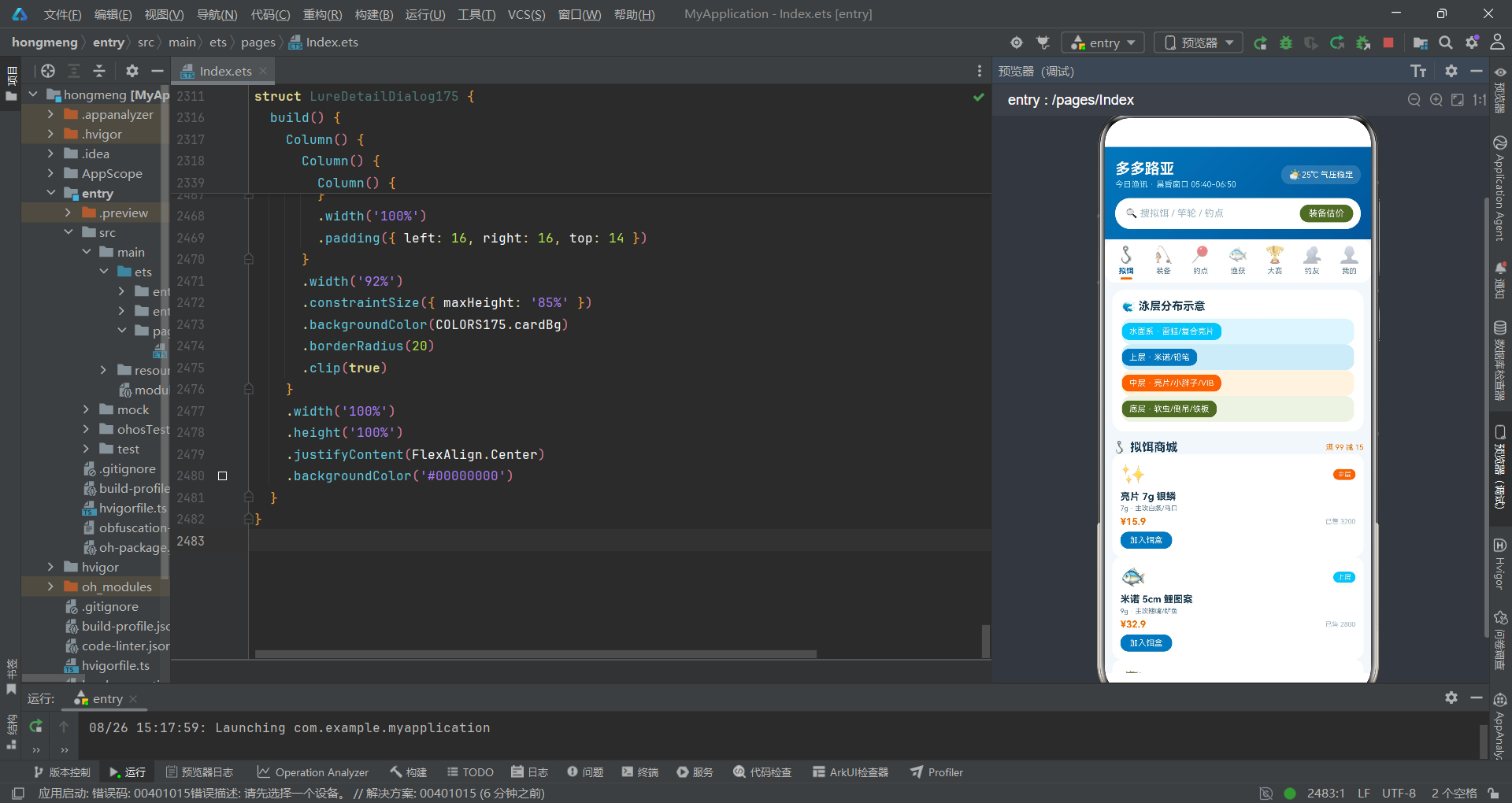
从技术要点来看,该系统综合运用了HarmonyOS ArkTS API 24的核心能力:@Entry/@Component/@State/@Builder四大装饰器构成了组件化开发的基石;if/else条件渲染实现了基于状态的动态UI切换;ForEach循环渲染实现了列表数据的高效展示;bindSheet/bindContentCover两种模态弹窗满足了不同的上菜需求;linearGradient渐变、layoutWeight权重布局、clip裁剪、constraintSize约束等样式属性丰富了视觉表现力;aboutToAppear生命周期回调提供了组件初始化的时机控制;$$双向绑定语法简化了弹窗状态管理;InputType.Number提供了数字输入优化;boolean数组状态实现了批量点赞交互;indexOf方法实现了字符串前缀判断;slice方法实现了日期字符串截取。

讨论HarmonyOS开发技术,专注于API与组件、DevEco Studio、测试、元服务和应用上架分发等。
更多推荐

 4
4 0
0- 0


 已为社区贡献33条内容

所有评论(0)