HarmonyOS 6效果实现:Grid 布局设计columnsGap(2) 和 rowsGap(2) 设置了间距,borderRadius(12) 统一了圆角风格
一、评审背景与评审范围
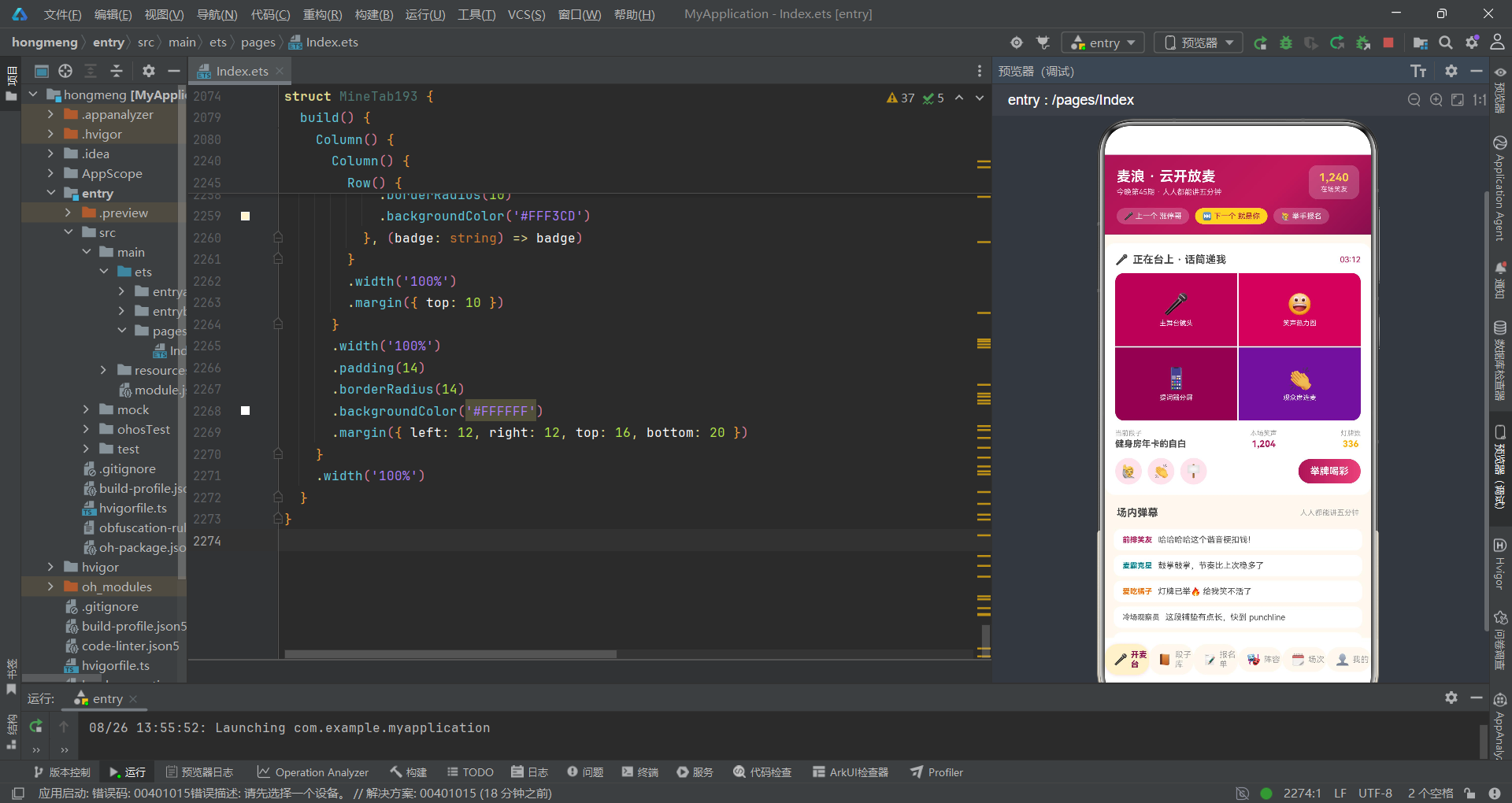
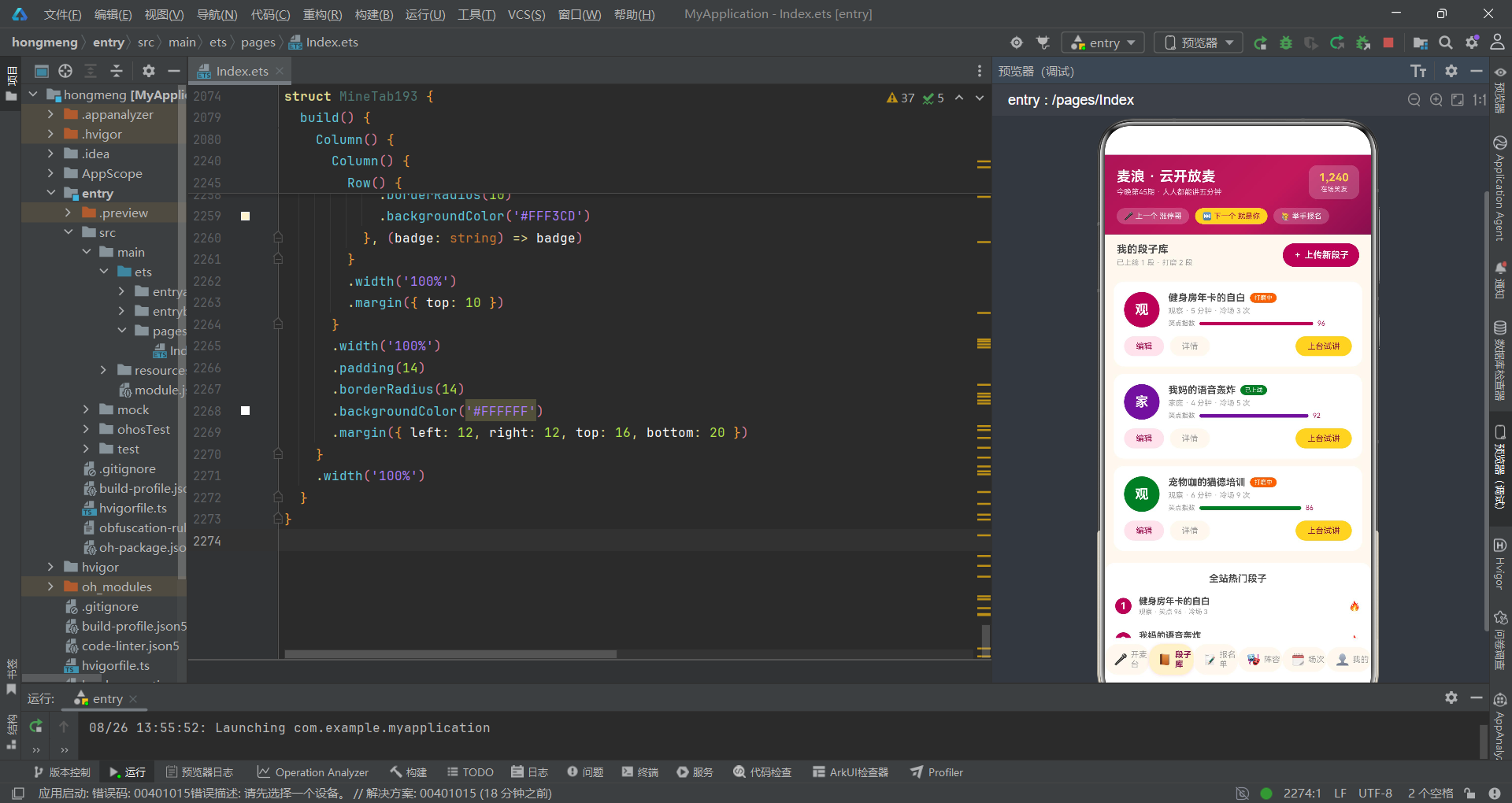
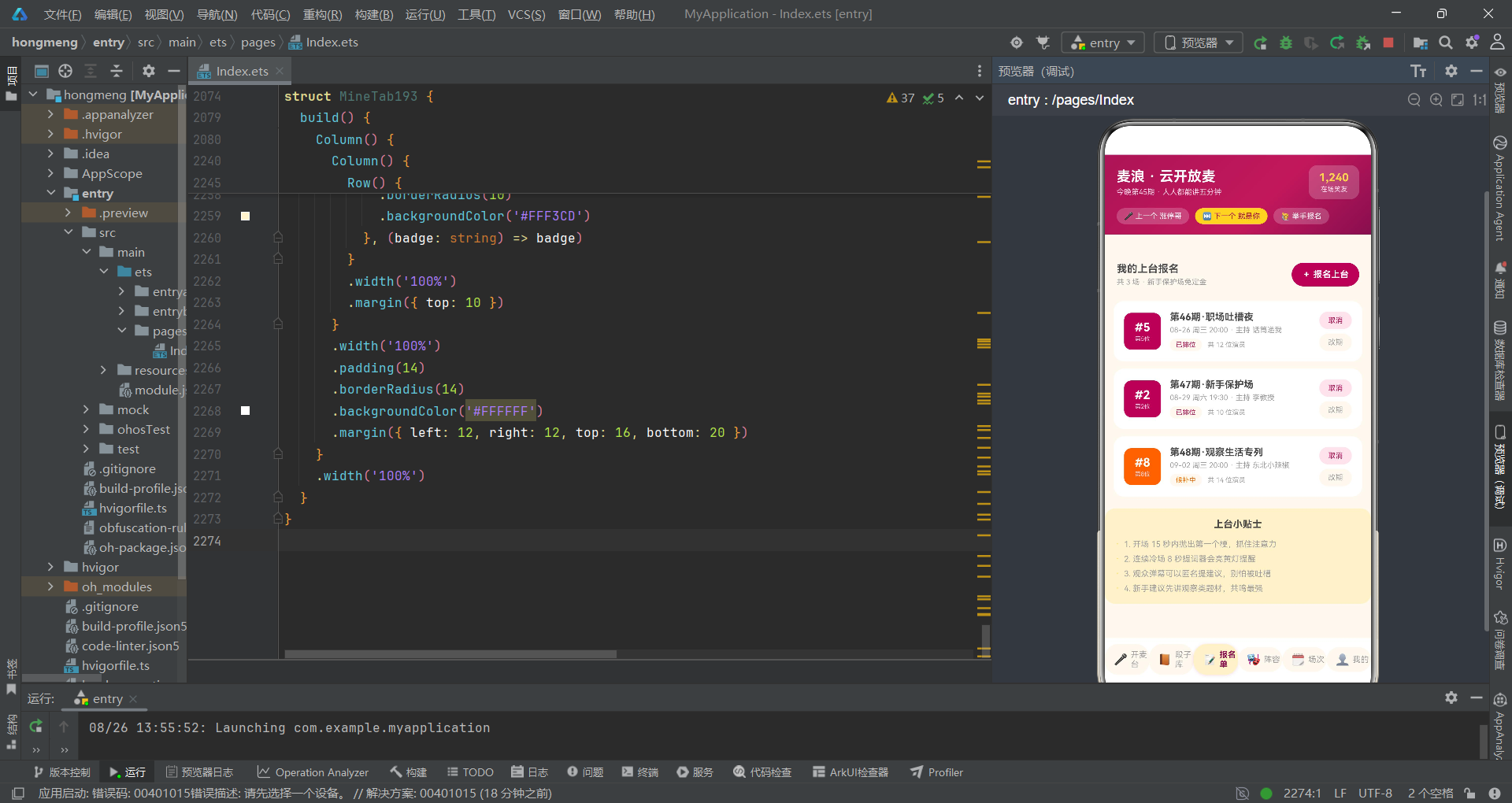
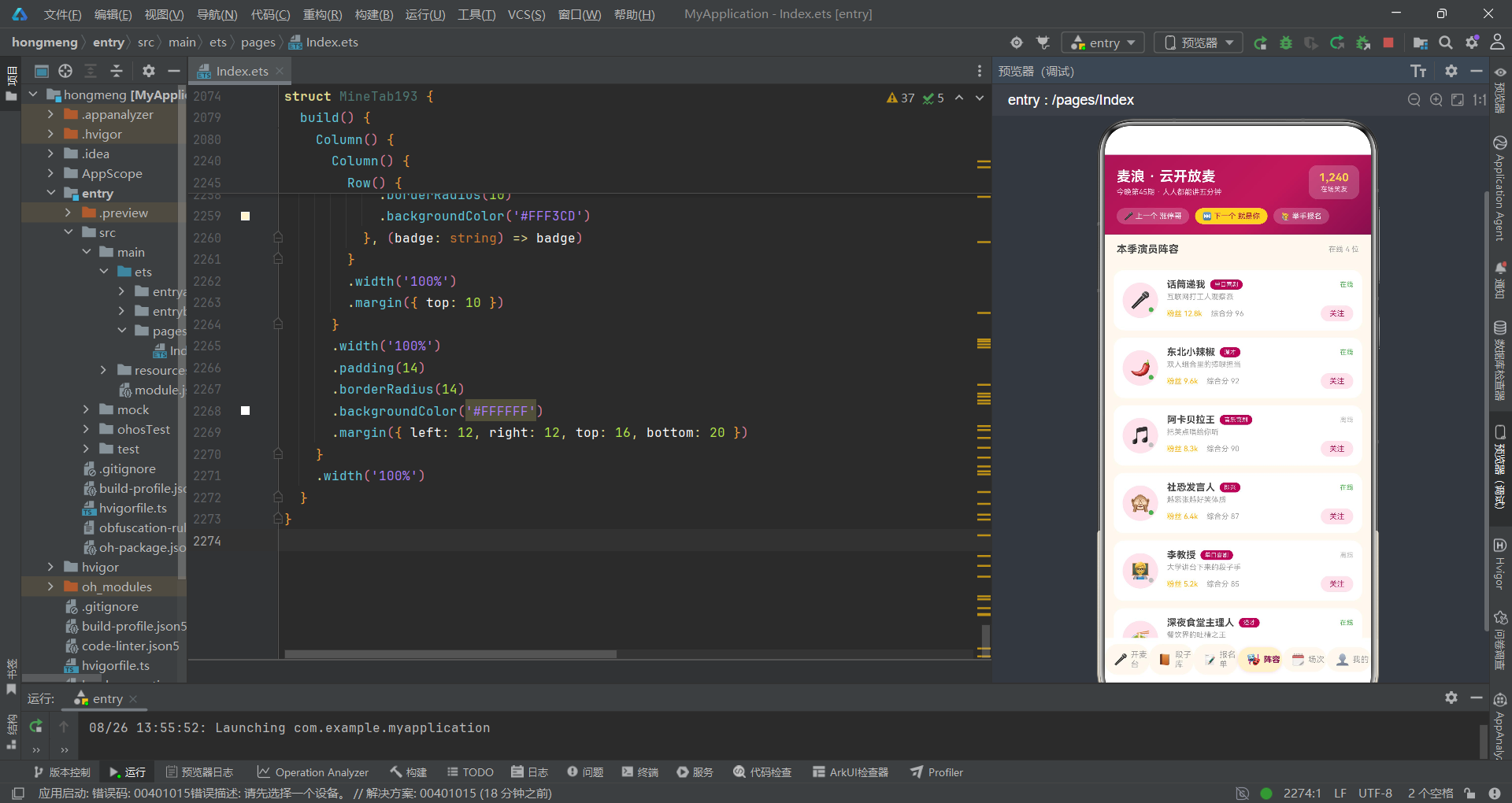
本次架构评审的对象是一个基于 HarmonyOS ArkTS API 24 开发的线上脱口秀开放麦直播间应用。该应用实现了喜剧爱好者通过视频会议室上台讲段子、观众连麦喝彩、举灯牌、投笑点等核心功能。从架构角度来看,该应用涵盖了六个主功能页面(开麦台、段子库、报名单、阵容、场次、我的),五个弹层(报名上台抽屉、上传段子抽屉、编辑段子抽屉、删除报名居中弹窗、段子详情居中弹窗),以及七个独立组件和四个工具函数。
评审组认为,该应用在业务复杂度和组件粒度上具有代表性。全文件共计约 2273 行 ArkTS 代码,定义了九个接口、十二组常量数据、七个组件结构体、四个独立函数,以及五个 @Builder 构建器。这种规模的单文件应用在 HarmonyOS 生态中并不罕见,但从架构评审的严谨标准来看,单文件承载过多职责本身就是一个值得讨论的架构决策。
评审组将围绕以下六个维度展开审查:状态管理的粒度与膨胀风险、组件拆分的合理性与边界清晰度、弹层路由的统一管控策略、数据流的单向性与不可变性、UI 一致性模式的抽象与复用、以及整体可维护性与可扩展性。每个维度将给出明确的"通过"、"有条件通过"或"驳回(需返工)"结论,并附改进建议。
二、接口定义层评审:类型契约的完整性与规范性
2.1 接口定义概览
评审组首先审查接口定义层。该应用在文件顶部定义了九个接口,覆盖了标签项、段子、演员、报名、弹幕、笑点峰值、风格占比、人气榜、演出记录等全部业务实体。这些接口构成了应用的数据契约层,是后续组件通信和状态管理的基础。
interface TabItem193 {
  name: string;
  icon: string;
  dot: boolean;
}

interface Joke193 {
  id: string;
  title: string;
  topic: string;
  minutes: number;
  laugh: number;
  cold: number;
  state: string;
  color: string;
}

interface Player193 {
  id: string;
  name: string;
  style: string;
  intro: string;
  fans: number;
  scores: number;
  emoji: string;
  online: boolean;
}

interface Signup193 {
  id: string;
  date: string;
  week: string;
  time: string;
  theme: string;
  host: string;
  order: number;
  total: number;
  state: string;
}
2.2 评审意见:类型完整性——通过
评审组认为,接口定义的完整度值得肯定。每个业务实体都拥有独立的接口定义,字段命名清晰且语义明确。例如 Joke193 接口不仅包含标题和主题,还涵盖了时长、笑点指数、冷场次数、状态和颜色,形成了完整的段子领域模型。Signup193 接口则包含了日期、星期、时间、主题、主持人、排位序号、总人数和状态,充分表达了报名这一业务场景的全部信息维度。
从架构评审的角度来看,接口定义的完整性直接决定了组件间通信的精确度。当 JokeTab193 组件接收 jokes: Joke193[] 作为属性时,调用方和被调用方对数据结构的理解是完全对齐的,不存在模糊地带。这种契约式设计是良好架构的基础。
2.3 评审意见:命名规范——有条件通过
评审组注意到,所有接口和常量均采用 193 作为后缀(如 Joke193、TABS193、JOKES193)。这种命名策略的积极面在于避免了跨文件命名冲突,在单文件应用场景下有一定的合理性。然而,从长期可维护性角度评审,这种"文件号后缀"的命名方式存在以下问题:
第一,当应用规模增长、需要拆分为多文件时,后缀 193 将失去意义并成为迁移障碍。第二,接口名 Joke193 在语义上不如 Joke 或 ComedyJoke 清晰,后缀携带的上下文信息(文件编号)与类型本身的语义无关。第三,如果两个文件中都有 Joke193 和 Joke194,在跨组件引用时容易造成认知混乱。
改进建议:建议在项目初期即采用领域驱动的命名方式,如 Joke、JokeItem、JokeEntity,通过模块化路径而非编号后缀来避免命名冲突。
三、状态管理架构评审:膨胀风险与隔离策略
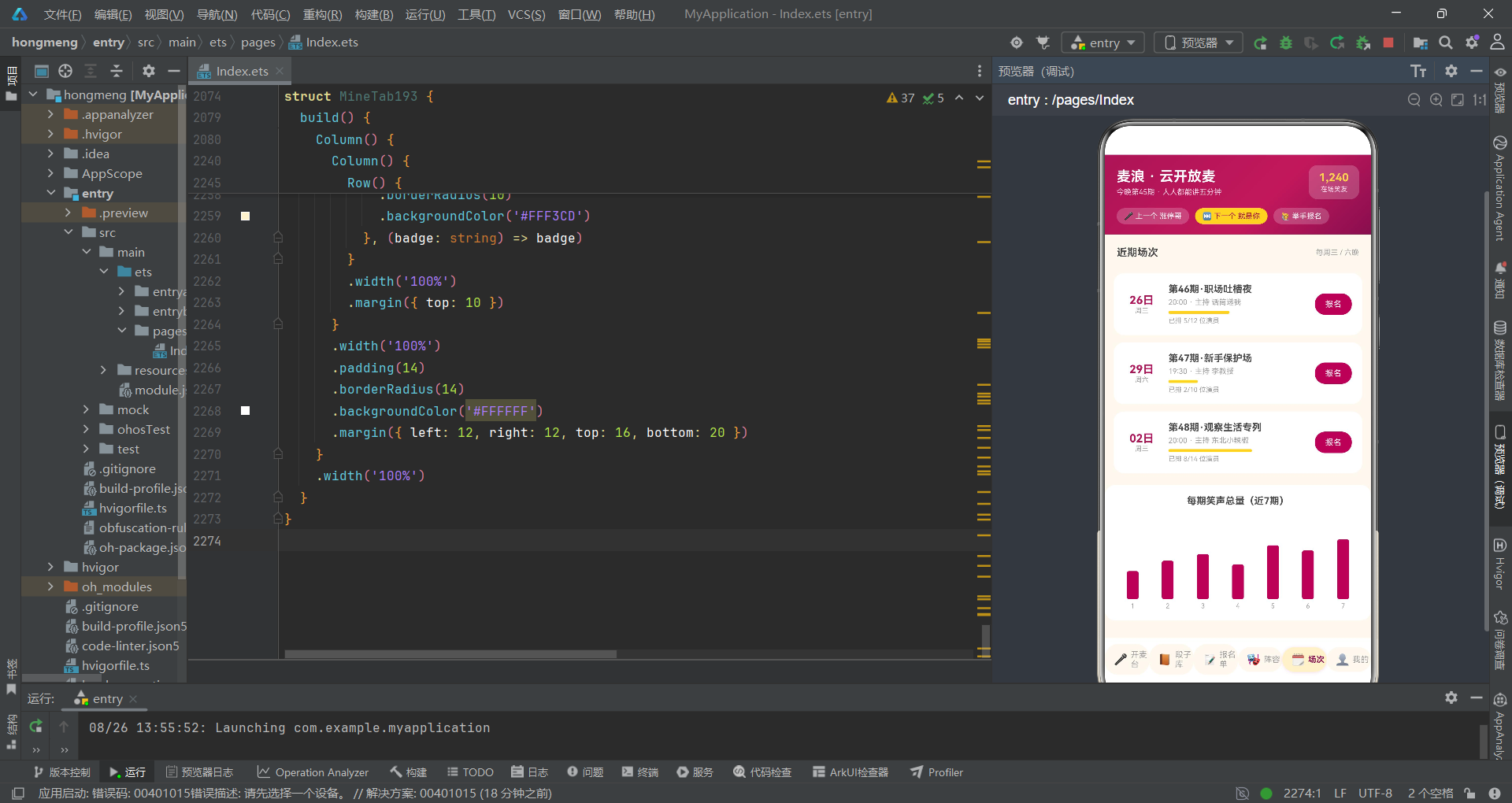
3.1 主组件状态清单审查
评审组对 Index193 主组件的状态声明进行了逐项审查。该组件声明了十九个 @State 变量,这是本次评审中最为关键的架构决策点之一:
@Entry
@Component
struct Index193 {
  @State curTab: number = 0;
  @State showSignupSheet: boolean = false;
  @State showUploadSheet: boolean = false;
  @State showEditSheet: boolean = false;
  @State showDelDialog: boolean = false;
  @State showDetailDialog: boolean = false;
  @State styleIdx: number = 0;
  @State topicIdx: number = 0;
  @State gradeIdx: number = 0;
  @State duration: number = 5;
  @State scriptOn: boolean = true;
  @State instrumentOn: boolean = false;
  @State publicOn: boolean = true;
  @State warnOn: boolean = true;
  @State refundOn: boolean = true;
  @State editIdx: number = 0;
  @State delIdx: number = 0;
  @State detailIdx: number = 0;
  @State mySignups: Signup193[] = SIGNUPS193;
  @State myJokes: Joke193[] = [
    { id: 'mj1', title: '健身房年卡的自白', topic: '观察', minutes: 5, laugh: 96, cold: 3, state: '打磨中', color: '#AD1457' },
    { id: 'mj2', title: '我妈的语音轰炸', topic: '家庭', minutes: 4, laugh: 92, cold: 5, state: '已上线', color: '#6A1B9A' },
    { id: 'mj3', title: '宠物咖的猫德培训', topic: '观察', minutes: 6, laugh: 86, cold: 9, state: '打磨中', color: '#2E732D' }
  ];
}
3.2 评审意见:状态分类——通过
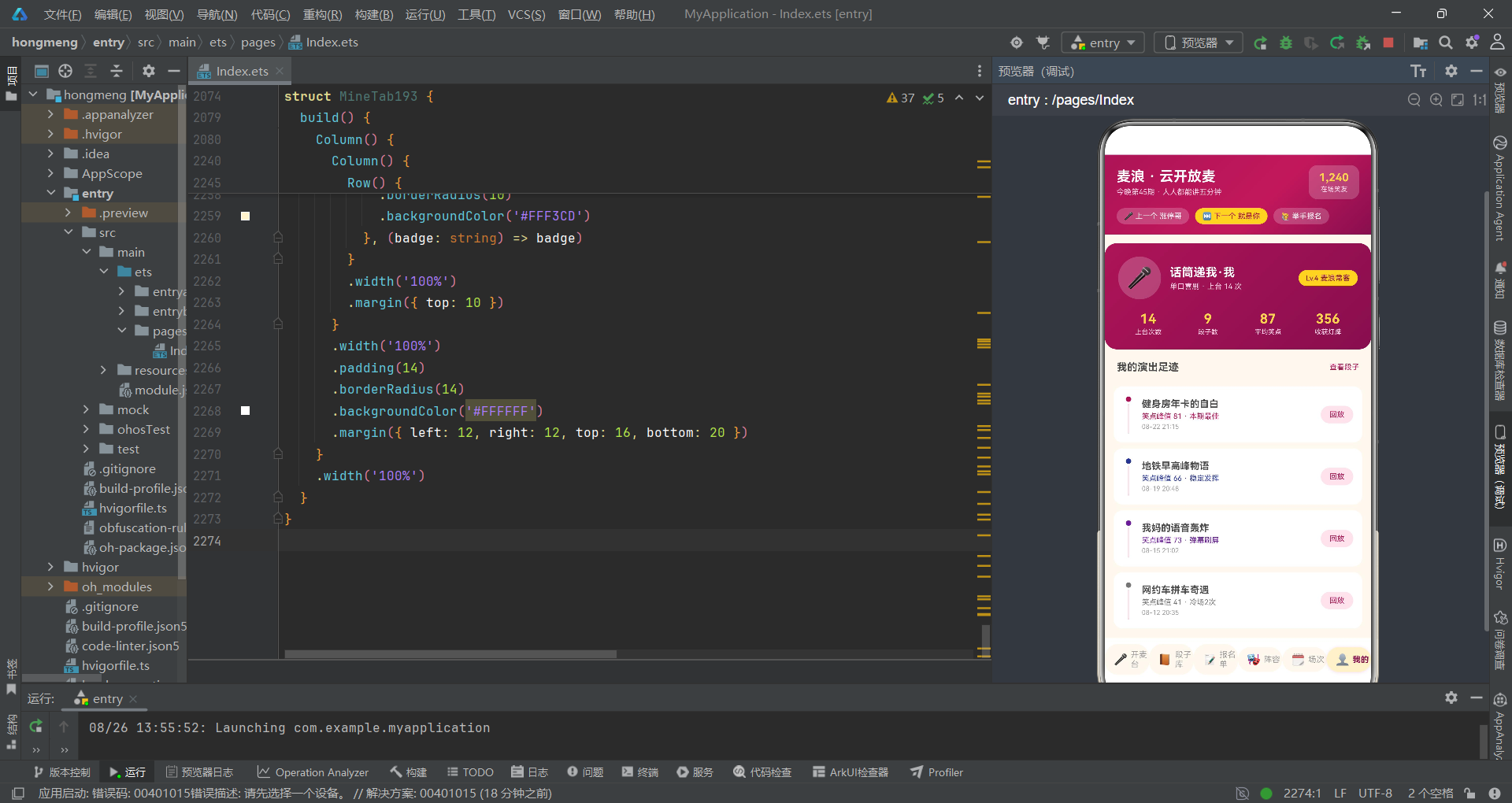
评审组首先对这十九个状态变量进行分类审查,将其归为四类:
| 状态分类 | 变量 | 数量 | 评审结论 |
|---|---|---|---|
| 页面导航状态 | curTab | 1 | 通过,单一导航变量是标准做法 |
| 弹层可见性状态 | showSignupSheet, showUploadSheet, showEditSheet, showDelDialog, showDetailDialog | 5 | 有条件通过,见3.3节 |
| 弹层内部表单状态 | styleIdx, topicIdx, gradeIdx, duration, scriptOn, instrumentOn, publicOn, warnOn, refundOn | 9 | 驳回,需隔离,见3.4节 |
| 弹层操作上下文 | editIdx, delIdx, detailIdx | 3 | 有条件通过,见3.5节 |
| 业务数据状态 | mySignups, myJokes | 2 | 通过,符合不可变更新模式 |
3.3 评审意见:弹层可见性状态——有条件通过
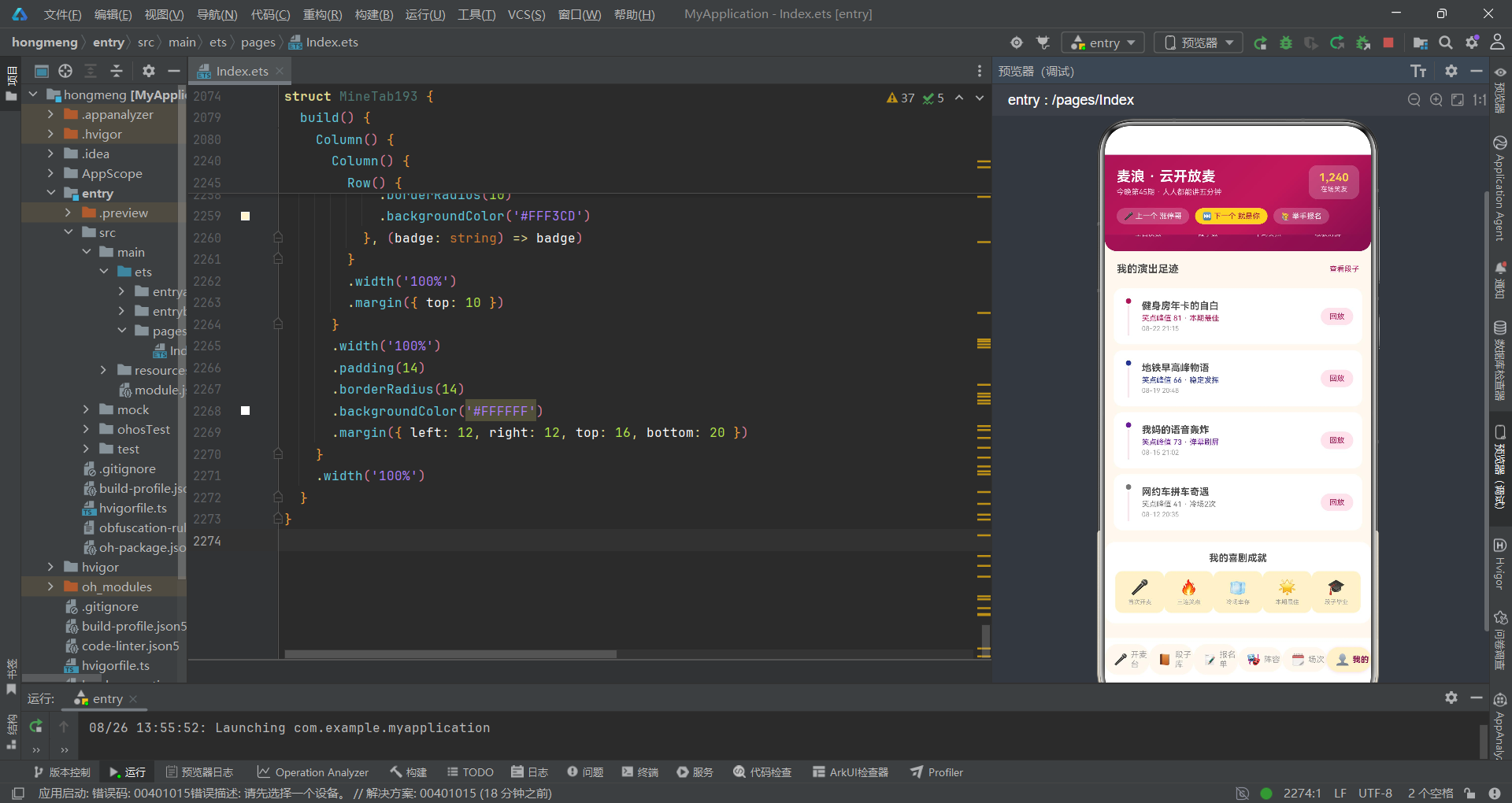
五个布尔变量用于控制五个弹层的显隐。评审组认为,在弹层数量较少(5个)的场景下,使用独立的布尔变量是可接受的方案,且代码可读性较好。每个 bindSheet 和 bindContentCover 绑定的目标变量明确,不存在歧义。
然而,评审组需要指出一个潜在风险:当弹层数量从 5 个增长到 10 个以上时,这种"一弹层一布尔"的模式将导致状态变量快速膨胀。更可扩展的方案是使用枚举或联合类型:
// 改进建议:枚举式弹层管理
type SheetType193 = 'none' | 'signup' | 'upload' | 'edit' | 'del' | 'detail';
@State currentSheet: SheetType193 = 'none';
这种方案下,任何时刻只有一个弹层可见(通过枚举值天然互斥),减少了状态组合的非法空间。
3.4 评审意见:弹层内部表单状态——驳回(需返工)
这是本次评审中最为严重的架构问题。九个表单相关状态(styleIdx, topicIdx, gradeIdx, duration, scriptOn, instrumentOn, publicOn, warnOn, refundOn)被直接声明在主组件 Index193 中,但它们仅在各自的弹层 Builder 内部使用。
从架构评审的角度来看,这违反了状态最小暴露原则。这些状态的生命周期应与弹层绑定——当弹层关闭时,相关表单状态应当被重置或销毁。而当前的实现中,这些状态常驻于主组件的生命周期内,存在以下风险:
第一,状态污染。当用户在"报名上台"弹层中设置了 styleIdx = 2(即兴)和 duration = 7,关闭后打开"上传段子"弹层时,topicIdx 虽然独立,但 duration 的值仍然是 7,可能导致用户困惑。第二,并发限制。如果未来需要同时打开多个弹层(虽然当前 bindSheet 可能不支持),这些共享状态将产生冲突。第三,认知负担。主组件承担了不属于自身职责的表单状态管理,违反了单一职责原则。
改进建议:将每个弹层抽取为独立的 @Component 组件,内部自行管理表单状态,仅通过回调与父组件通信。例如:
@Component
struct SignupSheet193 {
  @State styleIdx: number = 0;
  @State duration: number = 5;
  @State scriptOn: boolean = true;
  @State instrumentOn: boolean = false;
  onSubmit: (style: number, duration: number, script: boolean, instrument: boolean) => void = () => {};
  build() { /* ... */ }
}
3.5 评审意见:弹层操作上下文索引——有条件通过
editIdx、delIdx、detailIdx 三个变量用于在打开弹层时传递操作目标的索引。评审组认为,在弹层与列表分离的场景下,使用索引变量传递上下文是 ArkTS 中常见的模式(因为 bindSheet 的 Builder 无法直接接收参数)。
但评审组需要指出一个潜在缺陷:当列表数据在弹层打开期间发生变化(例如异步删除了一个元素),索引可能指向错误的数据项。更安全的方案是使用 id 而非索引:
// 改进建议:使用 id 替代 index
@State editJokeId: string = '';
// 在回调中传递 id 而非 idx
onEdit: (id: string) => { this.editJokeId = id; this.showEditSheet = true; }
3.6 评审意见:业务数据状态更新——通过
评审组对 mySignups 和 myJokes 的更新模式进行了重点审查,确认其严格遵循了不可变更新原则:
// 删除报名:使用 filter 返回新数组
this.mySignups = this.mySignups.filter((s: Signup193, i: number) => i !== this.delIdx);

// 编辑段子:使用 map 返回新数组
this.myJokes = this.myJokes.map((j: Joke193, i: number) => {
  if (i === this.editIdx) {
    return {
      id: j.id, title: j.title, topic: TOPICS193[this.topicIdx],
      minutes: this.duration, laugh: j.laugh, cold: j.cold,
      state: j.state, color: j.color
    };
  }
  return j;
});
评审组对这一实现给予通过评价。使用 filter 和 map 进行不可变数组操作是 ArkTS @State 响应式系统的正确用法——直接修改数组元素(如 this.myJokes[0].title = '新标题')在 ArkTS 中不会触发 UI 更新,而通过生成新数组确保引用变化,才能正确驱动 ForEach 重新渲染。这是本次评审中最为规范的架构决策之一。
四、组件拆分架构评审:边界清晰度与通信契约
4.1 组件树结构审查
评审组对应用的组件树进行了完整梳理。主入口 Index193 作为根组件,根据 curTab 状态值条件渲染六个子组件,并通过五个 @Builder 方法构建弹层内容:
Index193 (根组件, @Entry)
├── LiveTab193       (开麦台 - 直播间主界面)
├── JokeTab193       (段子库 - 段子管理)
├── SignupTab193     (报名单 - 上台报名管理)
├── LineupTab193     (阵容 - 演员列表)
├── ShowTab193       (场次 - 近期演出安排)
├── MineTab193       (我的 - 个人中心)
├── signupSheet193() (Builder - 报名上台弹层)
├── uploadSheet193() (Builder - 上传段子弹层)
├── editSheet193()   (Builder - 编辑段子弹层)
├── delDialog193()   (Builder - 删除报名弹层)
└── detailDialog193()(Builder - 段子详情弹层)
4.2 评审意见:子组件拆分——通过
评审组认为,六个 Tab 页面各自拆分为独立的 @Component 是正确的架构决策。每个子组件拥有独立的 build() 方法,职责边界清晰:
LiveTab193负责直播间实时界面(舞台镜头、弹幕、笑点峰值、互动按钮)JokeTab193负责段子库管理(个人段子列表、热门段子排行)SignupTab193负责上台报名管理(报名列表、小贴士)LineupTab193负责演员阵容展示(演员列表、人气榜)ShowTab193负责场次管理(近期场次、笑声总量统计)MineTab193负责个人中心(用户信息、演出足迹、成就徽章)
这种拆分方式使得每个组件的代码量控制在 100-200 行之间,可读性和可维护性均达标。
4.3 评审意见:组件通信契约——通过
评审组审查了子组件与父组件之间的通信方式,确认其采用了 ArkTS 标准的"属性下行 + 回调上行"模式:
// JokeTab193 组件定义
@Component
struct JokeTab193 {
  jokes: Joke193[] = [];              // 属性下行:父组件传入段子数据
  onUpload: () => void = () => {};   // 回调上行:触发上传弹层
  onEdit: (idx: number) => void = () => {};    // 回调上行:触发编辑
  onDetail: (idx: number) => void = () => {}; // 回调上行:触发详情

  build() {
    // ...
    Text('编辑')
      .onClick(() => {
        this.onEdit(i);  // 通过回调通知父组件
      })
  }
}

// 父组件 Index193 中的调用
JokeTab193({
  jokes: this.myJokes,           // 下行属性
  onUpload: () => {
    this.showUploadSheet = true; // 上行回调处理
  },
  onEdit: (idx: number) => {
    this.editIdx = idx;
    this.showEditSheet = true;
  },
  onDetail: (idx: number) => {
    this.detailIdx = idx;
    this.showDetailDialog = true;
  }
})
评审组对这一通信模式给予通过评价。父组件通过属性将数据下传给子组件,子组件通过回调函数将用户操作事件上报给父组件,父组件再根据事件更新状态(如打开弹层)。这种单向数据流确保了状态的可追溯性——所有状态变更都集中在父组件中,子组件是无状态的(或仅管理自身局部 UI 状态),便于调试和维护。
4.4 评审意见:弹层使用 Builder 而非 Component——有条件通过
评审组注意到,五个弹层使用了 @Builder 方法而非独立的 @Component。这是一个架构决策的权衡点:
@Builder 的优势在于可以直接访问宿主组件的 this 上下文,无需通过属性传参即可读写 @State 变量。这在弹层需要频繁操作主组件状态(如关闭弹层、更新数据)时减少了样板代码。
但 @Builder 的劣势同样明显:它无法拥有独立的状态(这正是第 3.4 节中表单状态膨胀问题的根源),且无法复用。如果未来需要在其他页面中展示相同的"报名上台"弹层,@Builder 方法无法跨组件复用。
改进建议:对于包含表单逻辑的弹层(signupSheet193、uploadSheet193、editSheet193),建议抽取为独立 @Component;对于纯展示型弹层(delDialog193、detailDialog193),使用 @Builder 可接受。
五、弹层路由架构评审:bindSheet 与 bindContentCover 的选择策略
5.1 弹层绑定策略审查
评审组对根组件 build() 方法末尾的弹层绑定进行了审查:
build() {
  Column() {
    // ... 主要内容 ...
  }
  .width('100%')
  .height('100%')
  .backgroundColor('#FFF8F0')
  .bindSheet($$this.showSignupSheet, this.signupSheet193(), {
    height: 580,
    dragBar: true,
    showClose: false,
    backgroundColor: '#FFFFFF'
  })
  .bindSheet($$this.showUploadSheet, this.uploadSheet193(), {
    height: 560,
    dragBar: true,
    showClose: false,
    backgroundColor: '#FFFFFF'
  })
  .bindSheet($$this.showEditSheet, this.editSheet193(), {
    height: 540,
    dragBar: true,
    showClose: false,
    backgroundColor: '#FFFFFF'
  })
  .bindContentCover($$this.showDelDialog, this.delDialog193(), {
  })
  .bindContentCover($$this.showDetailDialog, this.detailDialog193(), {
  })
}
5.2 评审意见:弹层类型选择——通过
评审组确认,应用正确地区分了两种弹层类型:
- 抽屉式弹层(
bindSheet):用于"报名上台"、“上传段子”、“编辑段子”——这些场景需要用户填写表单,抽屉从底部滑出,符合用户对"输入操作"的交互预期。dragBar: true允许用户拖拽关闭,showClose: false隐藏了关闭按钮,强制用户通过提交或取消按钮完成操作,防止误关闭丢失数据。 - 居中弹窗(
bindContentCover):用于"删除报名确认"、“段子详情”——这些场景是确认型或展示型,居中弹窗遮挡全屏内容,引导用户聚焦当前操作。
评审组认为,这种弹层类型的选择与业务语义高度匹配,给予通过评价。
5.3 评审意见:$$ 双向绑定语法——通过
评审组确认,所有弹层绑定均使用了 $$this.showXxx 双向绑定语法。$$ 是 ArkTS 特有的双向绑定操作符,它使得弹层内部的关闭行为(如用户点击遮罩或拖拽关闭)能够自动同步回 @State 变量,无需在弹层 Builder 内部手动设置 this.showXxx = false。
这一设计减少了状态不一致的风险。如果使用普通 this.showXxx(单向绑定),当用户通过拖拽关闭弹层时,@State 变量不会自动更新为 false,导致下次打开弹层时可能出现状态残留。$$ 绑定从根本上避免了这一问题。
六、数据层架构评审:常量数据与工具函数的组织
6.1 常量数据组织审查
评审组审查了应用中的十二组常量数据定义。这些常量位于文件顶部,在接口定义之后、组件定义之前,构成了应用的"静态数据层":
const TABS193: TabItem193[] = [
  { name: '开麦台', icon: '🎤', dot: true },
  { name: '段子库', icon: '📙', dot: false },
  { name: '报名单', icon: '📝', dot: true },
  { name: '阵容', icon: '🎭', dot: false },
  { name: '场次', icon: '🗓️', dot: false },
  { name: '我的', icon: '👤', dot: false }
];

const JOKES193: Joke193[] = [
  { id: 'j1', title: '健身房年卡的自白', topic: '观察', minutes: 5, laugh: 96, cold: 3, state: '打磨中', color: '#AD1457' },
  // ...
];

const SIGNUPS193: Signup193[] = [
  { id: 'g1', date: '08-26', week: '周三', time: '20:00', theme: '第46期·职场吐槽夜', host: '话筒递我', order: 5, total: 12, state: '已排位' },
  // ...
];
6.2 评审意见:数据与视图分离——通过
评审组认为,将静态数据(段子库、演员阵容、报名记录、弹幕、笑点峰值等)以 const 数组形式定义在组件外部,是正确的架构决策。这种"数据与视图分离"的模式有以下优势:
第一,数据定义集中管理,便于维护和更新。第二,组件通过属性接收数据,不直接引用全局常量(除了 JokeTab193 和 ShowTab193 等纯展示组件直接引用 JOKES193、SIGNUPS193 等)。第三,当未来需要将静态数据替换为 API 接口数据时,只需修改数据来源,组件代码无需改动。
但评审组需要指出,部分组件(如 LineupTab193、ShowTab193)直接引用了全局常量 PLAYERS193、SIGNUPS193、PEAKS193,而非通过属性接收。这在当前静态数据场景下没有问题,但如果未来这些数据变为动态获取,这些组件需要修改为通过属性传参。建议在项目初期即统一通过属性传参,保持组件的纯粹性。
6.3 评审意见:工具函数设计——通过
评审组审查了四个独立函数:stateColor193、signupStateColor193``onlineCount193、onlinePlayers193:
function stateColor193(s: string): string {
  if (s === '已上线') {
    return '#2E7D32';
  }
  if (s === '打磨中') {
    return '#EF6C00';
  }
  return '#757575';
}

function signupStateColor193(s: string): string {
  if (s === '已排位') {
    return '#AD1457';
  }
  return '#EF6C00';
}

function onlineCount193(jokes: Joke193[]): number {
  let cnt: number = 0;
  for (let i = 0; i < jokes.length; i++) {
    if (jokes[i].state === '已上线') {
      cnt += 1;
    }
  }
  return cnt;
}

function onlinePlayers193(): number {
  let cnt: number = 0;
  for (let i = 0; i < PLAYERS193.length; i++) {
    if (PLAYERS193[i].online) {
      cnt += 1;
    }
  }
  return cnt;
}
评审组对这些函数的设计给予通过评价。前两个函数是"状态到颜色"的映射函数,将业务状态(已上线/打磨中/冷冻室)映射为视觉颜色,这种将视觉逻辑与业务状态解耦的设计是良好实践。后两个函数是纯计算函数,接收数据返回统计结果,无副作用,易于测试。
改进建议:stateColor193 和 signupStateColor193 可以考虑使用 Map 或对象字面量替代 if-else 链,以提升可扩展性:
const STATE_COLOR_MAP193: Record<string, string> = {
  '已上线': '#2E7D32',
  '打磨中': '#EF6C00',
  '冷冻室': '#757575'
};
function stateColor193(s: string): string {
  return STATE_COLOR_MAP193[s] ?? '#757575';
}
七、UI 一致性模式评审:重复模式的抽象与复用
7.1 重复 UI 模式审查
评审组在通读全部代码后,识别出多处高度重复的 UI 构建模式。这些重复模式虽然在功能上不影响正确性,但从架构一致性角度值得审查。
7.2 评审意见:抽屉弹层拖拽条——有条件通过
三个 bindSheet 弹层(signupSheet193、uploadSheet193、editSheet193)的顶部都包含完全相同的拖拽条实现:
// 三个 Builder 中完全相同的代码
Row() {
  Text('')
    .width(36)
    .height(4)
    .borderRadius(2)
    .backgroundColor('#E8DCC8')
}
.width('100%')
.justifyContent(FlexAlign.Center)
.margin({ top: 10 })
评审组认为,这种三处重复的代码应抽取为一个 @Builder 函数:
@Builder
sheetDragBar193() {
  Row() {
    Text('').width(36).height(4).borderRadius(2).backgroundColor('#E8DCC8')
  }
  .width('100%')
  .justifyContent(FlexAlign.Center)
  .margin({ top: 10 })
}
7.3 评审意见:选项 Chip 组件——有条件通过
评审组发现,多个弹层中存在高度相似的"选项 Chip"模式——一组可选择的标签,点击切换选中状态,选中时背景色和文字色变化:
// signupSheet193 中的风格选择
ForEach(STYLES_CHIPS193, (s: string, i: number) => {
  Text(s)
    .fontSize(12)
    .fontColor(i === this.styleIdx ? '#FFFFFF' : '#AD1457')
    .padding({ left: 14, right: 14, top: 7, bottom: 7 })
    .borderRadius(16)
    .backgroundColor(i === this.styleIdx ? '#AD1457' : '#FCE4EC')
    .margin({ right: 8 })
    .onClick(() => { this.styleIdx = i; })
}, (s: string) => s)

// uploadSheet193 中的主题选择
ForEach(TOPICS193, (t: string, i: number) => {
  Text(t)
    .fontSize(12)
    .fontColor(i === this.topicIdx ? '#FFFFFF' : '#AD1457')
    .padding({ left: 14, right: 14, top: 7, bottom: 7 })
    .borderRadius(16)
    .backgroundColor(i === this.topicIdx ? '#AD1457' : '#FCE4EC')
    .margin({ right: 8 })
    .onClick(() => { this.topicIdx = i; })
}, (t: string) => t)

// uploadSheet193 中的等级选择
ForEach(GRADE193, (g: string, i: number) => {
  Text(g)
    .fontSize(12)
    .fontColor(i === this.gradeIdx ? '#880E4F' : '#9E9E9E')
    .padding({ left: 14, right: 14, top: 7, bottom: 7 })
    .borderRadius(16)
    .backgroundColor(i === this.gradeIdx ? '#FFD54F' : '#FFF8F0')
    .margin({ right: 8 })
    .onClick(() => { this.gradeIdx = i; })
}, (g: string) => g)
这三段代码的结构几乎完全一致,仅在数据源、选中索引变量、选中/未选中颜色三处不同。评审组建议抽取为通用 Chip 选择器组件:
@Component
struct ChipSelector193 {
  options: string[] = [];
  selectedIndex: number = 0;
  selectedColor: string = '#AD1457';
  unselectedColor: string = '#FCE4EC';
  selectedFontColor: string = '#FFFFFF';
  unselectedFontColor: string = '#AD1457';
  onChange: (idx: number) => void = () => {};

  build() {
    Row() {
      ForEach(this.options, (opt: string, i: number) => {
        Text(opt)
          .fontSize(12)
          .fontColor(i === this.selectedIndex ? this.selectedFontColor : this.unselectedFontColor)
          .padding({ left: 14, right: 14, top: 7, bottom: 7 })
          .borderRadius(16)
          .backgroundColor(i === this.selectedIndex ? this.selectedColor : this.unselectedColor)
          .margin({ right: 8 })
          .onClick(() => { this.onChange(i); })
      }, (opt: string) => opt)
    }
  }
}
7.4 评审意见:柱状图实现——有条件通过
评审组发现,笑点峰值的柱状图在 LiveTab193、detailDialog193 和 ShowTab193 三处出现,且实现方式高度相似:
// LiveTab193 中的笑点峰值图
ForEach(PEAKS193, (p: Peak193) => {
  Column() {
    Text(p.cnt + '')
      .fontSize(8)
      .fontColor('#9E9E9E')
    Text('')
      .width(16)
      .height(p.cnt)
      .borderRadius(3)
      .backgroundColor(p.round === '5' ? '#FFD54F' : '#AD1457')
    Text(p.round)
      .fontSize(9)
      .fontColor('#9E9E9E')
      .margin({ top: 4 })
  }
  .layoutWeight(1)
  .alignItems(HorizontalAlign.Center)
}, (p: Peak193) => p.round)
三处实现仅在数据源键名、颜色策略、宽度等细节上不同,整体结构完全一致。建议抽取为通用的 BarChart193 组件。
八、底部 Tab 导航架构评审:状态联动与视觉反馈
8.1 底部 Tab 导航审查
评审组审查了底部 Tab 导航的实现:
Column() {
  Row() {
    ForEach(TABS193, (t: TabItem193, idx: number) => {
      Column() {
        Row() {
          Text(t.icon)
            .fontSize(15)
          Text(t.name)
            .fontSize(11)
            .fontWeight(idx === this.curTab ? FontWeight.Bold : FontWeight.Normal)
            .fontColor(idx === this.curTab ? '#880E4F' : '#9E9E9E')
            .margin({ left: 4 })
        }
        .padding({ left: 12, right: 12, top: 8, bottom: 8 })
        .borderRadius(18)
        .backgroundColor(idx === this.curTab ? '#FFF3CD' : '#FFF8F0')
        .shadow({
          radius: idx === this.curTab ? 10 : 0,
          color: idx === this.curTab ? '#26AD1457' : '#00000000',
          offsetY: 2
        })
      }
      .layoutWeight(1)
      .alignItems(HorizontalAlign.Center)
      .onClick(() => {
        this.curTab = idx;
      })
    }, (t: TabItem193, idx: number) => t.name + idx)
  }
  .width('100%')
  .padding({ top: 8, bottom: 8 })
  .backgroundColor('#FFFFFF')
}
8.2 评审意见:Tab 选中态视觉联动——通过
评审组对 Tab 的选中态视觉联动设计给予通过评价。选中 Tab 项通过四个维度区分于未选中项:字重加粗(FontWeight.Bold)、文字颜色变深(#880E4F)、背景色变化(#FFF3CD 淡黄底)、阴影浮起(radius: 10)。这种多维度的视觉反馈确保了用户对当前页面的明确感知。
特别值得注意的是 ForEach 的键值函数使用 t.name + idx,确保了 Tab 项的唯一标识。如果仅使用 t.name,当两个 Tab 同名时会产生冲突。加上 idx 是安全做法。
8.3 评审意见:条件渲染策略——通过
评审组审查了 Tab 内容区的条件渲染策略:
Scroll() {
  Column() {
    if (this.curTab === 0) {
      LiveTab193({ onSignup: () => { this.showSignupSheet = true; } })
    }
    if (this.curTab === 1) {
      JokeTab193({ jokes: this.myJokes, onUpload: () => { /*...*/ }, onEdit: (idx) => { /*...*/ }, onDetail: (idx) => { /*...*/ } })
    }
    // ... 其余 Tab
  }
  .width('100%')
}
.layoutWeight(1)
.scrollBar(BarState.Off)
.backgroundColor('#FFF8F0')
评审组认为,使用 if 条件渲染而非 visibility 控制可见性是正确的决策。if 条件渲染在 Tab 切换时会销毁不可见 Tab 的组件树,释放内存;而 visibility: none 仅隐藏视觉但保留组件树和状态。对于 Tab 页面这种"同一时刻只展示一个"的场景,条件渲染是更高效的选择。
但评审组需要提示一个副作用:条件渲染意味着 Tab 切换时子组件的内部状态(如 LiveTab193 的 cheerOn 和 handUp)会被重置。如果需要保持状态,需要将状态下提到父组件,或使用 visibility 方案。当前实现中子组件状态均为局部 UI 临时状态,重置不影响业务逻辑,因此条件渲染是合理选择。
九、直播间组件架构评审:Grid 布局与互动状态
9.1 LiveTab193 组件审查
评审组对直播间主界面 LiveTab193 进行了详细审查。该组件是应用的核心交互界面,包含舞台镜头网格、弹幕区、笑点峰值图和互动按钮:
@Component
struct LiveTab193 {
  onSignup: () => void = () => {};
  @State cheerOn: boolean = false;
  @State handUp: boolean = false;

  build() {
    Column() {
      // 舞台区域
      Column() {
        Row() {
          Text('🎤')
          Text('正在台上 · 话筒递我')
          Text('03:12')
        }
        // 四宫格镜头
        Grid() {
          GridItem() { /* 主舞台镜头 */ }
          GridItem() { /* 笑声热力图 */ }
          GridItem() { /* 提词器分屏 */ }
          GridItem() { /* 观众席连麦 */ }
        }
        .columnsTemplate('1fr 1fr')
        .rowsTemplate('1fr 1fr')
        .height(200)
        // 互动按钮行
        Row() {
          Text('🙋').onClick(() => { this.handUp = !this.handUp; })
          Text('👏')
          Text('🪧')
          Text(this.cheerOn ? '🎉 已喝彩' : '举牌喝彩')
            .onClick(() => { this.cheerOn = !this.cheerOn; })
        }
      }
      // 弹幕区
      // 笑点峰值图
      // 风格占比图
    }
  }
}
9.2 评审意见:局部状态管理——通过
评审组注意到 LiveTab193 自身管理了两个局部状态:cheerOn(是否已喝彩)和 handUp(是否已举手)。这两个状态仅在直播间界面内使用,不影响其他 Tab 页面或弹层。
评审组对这一决策给予通过评价。将仅与单个组件相关的状态下沉到组件内部,而非上提到父组件,符合"状态就近原则"。如果将 cheerOn 和 handUp 也放到 Index193 中,将进一步加剧第 3.4 节指出的状态膨胀问题。LiveTab193 正确地将自身交互状态保持在组件内部。
9.3 评审意见:Grid 布局设计——通过
四宫格镜头布局使用了 Grid 组件的 columnsTemplate('1fr 1fr') 和 rowsTemplate('1fr 1fr'),将容器均匀分为 2x2 网格。评审组认为这是展示多路视频画面的合理布局方式。columnsGap(2) 和 rowsGap(2) 设置了间距,borderRadius(12) 统一了圆角风格。
十、编辑操作数据流评审:不可变更新的正确性验证
10.1 编辑段子数据流追踪
评审组对"编辑段子"这一操作的完整数据流进行了端到端追踪,以验证状态更新的正确性:
第一步:用户点击"编辑"按钮
在 JokeTab193 组件中,每个段子卡片底部有"编辑"按钮:
Text('编辑')
  .fontSize(11)
  .fontColor('#AD1457')
  .padding({ left: 16, right: 16, top: 7, bottom: 7 })
  .borderRadius(14)
  .backgroundColor('#FCE4EC')
  .onClick(() => {
    this.onEdit(i);  // i 是当前段子在列表中的索引
  })
第二步:回调上行至父组件
onEdit 回调在父组件 Index193 中被定义为设置 editIdx 并打开编辑弹层:
JokeTab193({
  jokes: this.myJokes,
  onEdit: (idx: number) => {
    this.editIdx = idx;
    this.showEditSheet = true;
  },
  // ...
})
第三步:编辑弹层展示当前数据
editSheet193 Builder 通过 this.editIdx 索引读取当前编辑的段子标题:
Text(this.editIdx < this.myJokes.length ? this.myJokes[this.editIdx].title : '-')
  .fontSize(13)
  .fontColor('#4A4A4A')
第四步:用户修改后保存
保存按钮的 onClick 执行不可变更新:
.onClick(() => {
  this.myJokes = this.myJokes.map((j: Joke193, i: number) => {
    if (i === this.editIdx) {
      return {
        id: j.id, title: j.title, topic: TOPICS193[this.topicIdx],
        minutes: this.duration, laugh: j.laugh, cold: j.cold,
        state: j.state, color: j.color
      };
    }
    return j;
  });
  this.showEditSheet = false;
})
10.2 评审意见:数据流正确性——通过
评审组对这一数据流给予通过评价。整条链路严格遵循了单向数据流原则:子组件通过回调上报事件 -> 父组件更新状态 -> 状态变更驱动 UI 重渲染。map 函数生成新数组确保了 @State 的响应式触发,编辑后的段子数据通过属性下行重新传递给 JokeTab193,驱动 ForEach 重新渲染段子列表。
10.3 评审意见:边界检查——通过
评审组注意到,编辑弹层在读取数据时使用了边界检查:this.editIdx < this.myJokes.length ? this.myJokes[this.editIdx].title : '-'。这种防御性编程防止了索引越界导致的运行时错误,是一个良好的工程实践。同样的边界检查在 delDialog193 和 detailDialog193 中也有体现。
十一、删除操作数据流评审:filter 模式的正确性
11.1 删除报名数据流追踪
评审组同样对"取消报名"操作的数据流进行了追踪:
// 删除确认弹层中的确认按钮
Text('确认取消')
  .onClick(() => {
    this.mySignups = this.mySignups.filter((s: Signup193, i: number) => i !== this.delIdx);
    this.showDelDialog = false;
  })
11.2 评审意见:filter 不可变删除——通过
评审组确认,使用 filter 生成新数组(排除被删除的元素)是 ArkTS 中删除 @State 数组元素的正确方式。这种方式确保了数组引用的变化,触发 ForEach 的 Diff 机制正确识别元素移除并更新 UI。
如果使用 splice 直接修改原数组,在 ArkTS 中可能不会触发 UI 更新(因为数组引用未变),导致界面与数据不同步。评审组确认本应用在删除和编辑两处操作中均严格使用了不可变更新模式,这是值得肯定的最佳实践。
十二、架构流程图
十三、架构评审总结对比表
| 评审维度 | 评审对象 | 评审结论 | 核心发现 | 改进建议优先级 |
|---|---|---|---|---|
| 接口定义 | 九个业务实体接口 | 通过 | 类型完整,字段语义清晰 | 命名后缀改为领域驱动命名 |
| 状态管理-导航 | curTab 单变量 | 通过 | 单一导航变量是标准做法 | 无需改进 |
| 状态管理-弹层显隐 | 五个布尔变量 | 有条件通过 | 弹层少时可行,多时膨胀 | 改用枚举式弹层管理 |
| 状态管理-表单 | 九个表单状态 | 驳回(需返工) | 表单状态常驻主组件,违反隔离原则 | 抽取弹层为独立组件,内部管理表单状态 |
| 状态管理-索引上下文 | editIdx/delIdx/detailIdx | 有条件通过 | 索引传参在数据变动时可能失效 | 改用 id 替代 index |
| 状态管理-数据更新 | mySignups/myJokes | 通过 | 严格使用 filter/map 不可变更新 | 无需改进 |
| 组件拆分 | 六个 Tab 子组件 | 通过 | 职责边界清晰,代码量适中 | 无需改进 |
| 组件通信 | 属性下行+回调上行 | 通过 | 单向数据流,状态可追溯 | 无需改进 |
| 弹层实现方式 | @Builder 方法 | 有条件通过 | 表单弹层无法独立管理状态 | 表单弹层改为独立 @Component |
| 弹层类型选择 | bindSheet/bindContentCover | 通过 | 抽屉用于输入,居中用于确认/展示 | 无需改进 |
| 双向绑定语法 | $$this.showXxx | 通过 | 自动同步弹层关闭状态 | 无需改进 |
| 数据与视图分离 | const 常量数据层 | 通过 | 静态数据集中管理 | 部分组件直接引用全局常量,建议统一属性传参 |
| 工具函数 | 四个纯函数 | 通过 | 无副作用,状态映射解耦 | if-else 链可改为 Map 查表 |
| UI 一致性-拖拽条 | 三处重复实现 | 有条件通过 | 代码重复 | 抽取通用 @Builder |
| UI 一致性-Chip选择器 | 三处高度相似 | 有条件通过 | 结构重复,仅颜色不同 | 抽取 ChipSelector 组件 |
| UI 一致性-柱状图 | 三处高度相似 | 有条件通过 | 图表逻辑重复 | 抽取 BarChart 组件 |
| Tab 导航 | 底部六 Tab | 通过 | 多维度视觉反馈,条件渲染释放内存 | 无需改进 |
| 局部状态管理 | LiveTab193 的 cheerOn/handUp | 通过 | 状态下沉到组件内部,符合就近原则 | 无需改进 |
| 数据流-编辑 | map 不可变更新 | 通过 | 端到端单向数据流正确 | 无需改进 |
| 数据流-删除 | filter 不可变删除 | 通过 | 正确触发 ForEach 重渲染 | 无需改进 |
| 边界检查 | 索引越界防护 | 通过 | 防御性编程到位 | 无需改进 |
十四、评审总结与改进路线图
14.1 总体评价
评审组经过对麦浪·云开放麦应用代码的逐层审查,给出有条件通过的总体结论。该应用在以下架构决策上表现优秀:接口定义完整规范、子组件拆分粒度合理、组件通信遵循单向数据流原则、业务数据更新严格采用不可变模式、弹层类型选择与业务语义匹配、Tab 导航条件渲染策略正确。这些决策构成了应用架构的坚实骨架。
然而,评审组也识别出三个需要改进的架构问题。第一,表单状态膨胀问题——九个仅在弹层内部使用的表单状态被声明在主组件中,违反了状态隔离原则,这是本次评审中最为严重的问题,评审结论为"驳回(需返工)"。第二,重复 UI 模式未抽象——拖拽条、Chip 选择器、柱状图三组 UI 模式在多处重复出现,影响代码的 DRY 性。第三,命名规范需优化——编号后缀的命名方式在长期维护中可能成为障碍。
14.2 改进路线图
评审组建议按照以下优先级实施改进:
高优先级(P0,立即执行):将三个包含表单逻辑的 @Builder 弹层(signupSheet193、uploadSheet193、editSheet193)重构为独立的 @Component,将表单状态(styleIdx、topicIdx、gradeIdx、duration、scriptOn、instrumentOn、publicOn、warnOn、refundOn)下沉到各自组件内部,通过回调将最终结果上报父组件。这一改进将主组件的状态变量从十九个减少到十个,显著降低状态管理复杂度。
中优先级(P1,迭代执行):抽取三个通用组件——ChipSelector193(选项 Chip 选择器)、BarChart193(柱状图)、sheetDragBar193(拖拽条 Builder),消除代码重复。同时将 stateColor193 和 signupStateColor193 的 if-else 链改为 Map 查表方式。
低优先级(P2,长期规划):将文件按功能模块拆分为多个文件(如 live/、joke/、signup/ 等目录),将编号后缀命名改为领域驱动命名,将部分组件对全局常量的直接引用改为属性传参,为未来接入 API 数据做准备。
安装DevEco Studio程序

选择目标安装目录:

设置环境变量,但是需要重启一下:

新建一个空白模板:

设置API为24的模板项目:

初始化项目,自动下载相关依赖:

完整代码:
// 场景:喜剧爱好者通过视频会议室上台讲段子,观众连麦喝彩、举灯牌、投笑点
// 配色:幕布玫红 #AD1457 × 聚光柠檬黄 #FFD54F × 暖白 #FFF8F0
// Tab布局:底部6 tab「对话气泡」导航(选中淡黄气泡底+阴影浮起,未选中纯文字)
// 弹框:报名上台(抽屉)/上传段子(抽屉)/编辑段子(抽屉)/删除报名(居中)/段子详情(居中)
interface TabItem193 {
name: string;
icon: string;
dot: boolean;
}
interface Joke193 {
id: string;
title: string;
topic: string;
minutes: number;
laugh: number;
cold: number;
state: string;
color: string;
}
interface Player193 {
id: string;
name: string;
style: string;
intro: string;
fans: number;
scores: number;
emoji: string;
online: boolean;
}
interface Signup193 {
id: string;
date: string;
week: string;
time: string;
theme: string;
host: string;
order: number;
total: number;
state: string;
}
interface Chat193 {
id: string;
user: string;
text: string;
color: string;
}
interface Peak193 {
round: string;
cnt: number;
}
interface StyleShare193 {
label: string;
w: number;
c: string;
}
interface PopPlayer193 {
name: string;
pct: number;
color: string;
}
interface ShowLog193 {
id: string;
date: string;
joke: string;
effect: string;
color: string;
}
const TABS193: TabItem193[] = [
{ name: '开麦台', icon: '🎤', dot: true },
{ name: '段子库', icon: '📙', dot: false },
{ name: '报名单', icon: '📝', dot: true },
{ name: '阵容', icon: '🎭', dot: false },
{ name: '场次', icon: '🗓️', dot: false },
{ name: '我的', icon: '👤', dot: false }
];
const JOKES193: Joke193[] = [
{ id: 'j1', title: '健身房年卡的自白', topic: '观察', minutes: 5, laugh: 96, cold: 3, state: '打磨中', color: '#AD1457' },
{ id: 'j2', title: '我妈的语音轰炸', topic: '家庭', minutes: 4, laugh: 92, cold: 5, state: '已上线', color: '#6A1B9A' },
{ id: 'j3', title: '产品经理修仙记', topic: '职场', minutes: 7, laugh: 88, cold: 8, state: '已上线', color: '#00838F' },
{ id: 'j4', title: '相亲角的经济学', topic: '情感', minutes: 5, laugh: 84, cold: 11, state: '打磨中', color: '#EF6C00' },
{ id: 'j5', title: '地铁早高峰物语', topic: '观察', minutes: 4, laugh: 90, cold: 6, state: '已上线', color: '#283593' },
{ id: 'j6', title: '宠物咖的猫德培训', topic: '观察', minutes: 6, laugh: 86, cold: 9, state: '打磨中', color: '#2E7D32' },
{ id: 'j7', title: '网约车拼车奇遇', topic: '观察', minutes: 5, laugh: 82, cold: 13, state: '冷冻室', color: '#757575' },
{ id: 'j8', title: '减肥路上的糖衣炮弹', topic: '情感', minutes: 4, laugh: 89, cold: 7, state: '已上线', color: '#C2185B' }
];
const PLAYERS193: Player193[] = [
{ id: 'p1', name: '话筒递我', style: '单口喜剧', intro: '互联网打工人观察派', fans: 12800, scores: 96, emoji: '🎤', online: true },
{ id: 'p2', name: '东北小辣椒', style: '漫才', intro: '双人组合里的捧哏担当', fans: 9600, scores: 92, emoji: '🌶️', online: true },
{ id: 'p3', name: '阿卡贝拉王', style: '音乐喜剧', intro: '把笑点唱给你听', fans: 8300, scores: 90, emoji: '🎵', online: false },
{ id: 'p4', name: '社恐发言人', style: '即兴', intro: '越紧张越好笑体质', fans: 6400, scores: 87, emoji: '🙈', online: true },
{ id: 'p5', name: '李教授', style: '单口喜剧', intro: '大学讲台下来的段子手', fans: 5200, scores: 85, emoji: '🧑🏫', online: false },
{ id: 'p6', name: '深夜食堂主理人', style: '漫才', intro: '餐饮界的吐槽之王', fans: 4100, scores: 83, emoji: '🍜', online: true }
];
const SIGNUPS193: Signup193[] = [
{ id: 'g1', date: '08-26', week: '周三', time: '20:00', theme: '第46期·职场吐槽夜', host: '话筒递我', order: 5, total: 12, state: '已排位' },
{ id: 'g2', date: '08-29', week: '周六', time: '19:30', theme: '第47期·新手保护场', host: '李教授', order: 2, total: 10, state: '已排位' },
{ id: 'g3', date: '09-02', week: '周三', time: '20:00', theme: '第48期·观察生活专列', host: '东北小辣椒', order: 8, total: 14, state: '候补中' }
];
const CHATS193: Chat193[] = [
{ id: 'c1', user: '前排笑友', text: '哈哈哈哈这个谐音梗扣钱!', color: '#AD1457' },
{ id: 'c2', user: '麦霸克星', text: '鼓掌鼓掌,节奏比上次稳多了', color: '#00838F' },
{ id: 'c3', user: '爱吃橘子', text: '灯牌已举🔥 给我笑不活了', color: '#EF6C00' },
{ id: 'c4', user: '冷场观察员', text: '这段铺垫有点长,快到 punchline', color: '#757575' },
{ id: 'c5', user: '开放麦常客', text: '新来的朋友别害羞,人人都能讲', color: '#6A1B9A' },
{ id: 'c6', user: '尾巴', text: '笑点+1+1+1 已连击三次', color: '#283593' }
];
const PEAKS193: Peak193[] = [
{ round: '1', cnt: 38 },
{ round: '2', cnt: 52 },
{ round: '3', cnt: 61 },
{ round: '4', cnt: 47 },
{ round: '5', cnt: 73 },
{ round: '6', cnt: 66 },
{ round: '7', cnt: 81 }
];
const STYLES193: StyleShare193[] = [
{ label: '单口', w: 42, c: '#AD1457' },
{ label: '漫才', w: 24, c: '#EC407A' },
{ label: '即兴', w: 18, c: '#FFD54F' },
{ label: '音乐', w: 16, c: '#8D6E63' }
];
const POPPLAYERS193: PopPlayer193[] = [
{ name: '话筒递我', pct: 96, color: '#AD1457' },
{ name: '东北小辣椒', pct: 88, color: '#EC407A' },
{ name: '阿卡贝拉王', pct: 80, color: '#FFB300' },
{ name: '社恐发言人', pct: 71, color: '#00838F' },
{ name: '李教授', pct: 64, color: '#6A1B9A' },
{ name: '深夜食堂', pct: 55, color: '#8D6E63' }
];
const SHOWLOGS193: ShowLog193[] = [
{ id: 's1', date: '08-22 21:15', joke: '健身房年卡的自白', effect: '笑点峰值 81 · 本期最佳', color: '#AD1457' },
{ id: 's2', date: '08-19 20:48', joke: '地铁早高峰物语', effect: '笑点峰值 66 · 稳定发挥', color: '#283593' },
{ id: 's3', date: '08-15 21:02', joke: '我妈的语音轰炸', effect: '笑点峰值 73 · 弹幕刷屏', color: '#6A1B9A' },
{ id: 's4', date: '08-12 20:35', joke: '网约车拼车奇遇', effect: '笑点峰值 41 · 冷场2次', color: '#757575' }
];
const TOPICS193: string[] = ['职场', '家庭', '情感', '观察'];
const STYLES_CHIPS193: string[] = ['单口', '漫才', '即兴', '音乐喜剧', '默剧'];
const GRADE193: string[] = ['试讲', '开放麦', '商演级'];
function stateColor193(s: string): string {
if (s === '已上线') {
return '#2E7D32';
}
if (s === '打磨中') {
return '#EF6C00';
}
return '#757575';
}
function signupStateColor193(s: string): string {
if (s === '已排位') {
return '#AD1457';
}
return '#EF6C00';
}
@Entry
@Component
struct Index193 {
@State curTab: number = 0;
@State showSignupSheet: boolean = false;
@State showUploadSheet: boolean = false;
@State showEditSheet: boolean = false;
@State showDelDialog: boolean = false;
@State showDetailDialog: boolean = false;
@State styleIdx: number = 0;
@State topicIdx: number = 0;
@State gradeIdx: number = 0;
@State duration: number = 5;
@State scriptOn: boolean = true;
@State instrumentOn: boolean = false;
@State publicOn: boolean = true;
@State warnOn: boolean = true;
@State refundOn: boolean = true;
@State editIdx: number = 0;
@State delIdx: number = 0;
@State detailIdx: number = 0;
@State mySignups: Signup193[] = SIGNUPS193;
@State myJokes: Joke193[] = [
{ id: 'mj1', title: '健身房年卡的自白', topic: '观察', minutes: 5, laugh: 96, cold: 3, state: '打磨中', color: '#AD1457' },
{ id: 'mj2', title: '我妈的语音轰炸', topic: '家庭', minutes: 4, laugh: 92, cold: 5, state: '已上线', color: '#6A1B9A' },
{ id: 'mj3', title: '宠物咖的猫德培训', topic: '观察', minutes: 6, laugh: 86, cold: 9, state: '打磨中', color: '#2E7D32' }
];
build() {
Column() {
Column() {
Row() {
Column() {
Text('麦浪 · 云开放麦')
.fontSize(19)
.fontWeight(FontWeight.Bold)
.fontColor('#FFFFFF')
Text('今晚第45期 · 人人都能讲五分钟')
.fontSize(10)
.fontColor('#FFD9E6')
.margin({ top: 4 })
}
.alignItems(HorizontalAlign.Start)
Text('')
.layoutWeight(1)
Column() {
Text('1,240')
.fontSize(15)
.fontWeight(FontWeight.Bold)
.fontColor('#FFD54F')
Text('在场笑友')
.fontSize(9)
.fontColor('#FFD9E6')
.margin({ top: 2 })
}
.alignItems(HorizontalAlign.Center)
.padding({ left: 14, right: 14, top: 8, bottom: 8 })
.borderRadius(12)
.backgroundColor('#33FFFFFF')
}
.width('100%')
Row() {
ForEach(['🎤 上一个 涨停哥', '⏭️ 下一个 就是你', '🙋 举手报名'], (chip: string, i: number) => {
Text(chip)
.fontSize(10)
.fontColor(i === 1 ? '#AD1457' : '#FFFFFF')
.padding({ left: 10, right: 10, top: 5, bottom: 5 })
.borderRadius(12)
.backgroundColor(i === 1 ? '#FFD54F' : '#33FFFFFF')
.margin({ right: 8 })
.onClick(() => {
if (i === 2) {
this.showSignupSheet = true;
}
})
}, (chip: string) => chip)
}
.width('100%')
.margin({ top: 12 })
}
.width('100%')
.padding({ left: 16, right: 16, top: 14, bottom: 14 })
.linearGradient({
angle: 135,
colors: [['#AD1457', 0], ['#C2185B', 0.6], ['#880E4F', 1]]
})
Scroll() {
Column() {
if (this.curTab === 0) {
LiveTab193({
onSignup: () => {
this.showSignupSheet = true;
}
})
}
if (this.curTab === 1) {
JokeTab193({
jokes: this.myJokes,
onUpload: () => {
this.showUploadSheet = true;
},
onEdit: (idx: number) => {
this.editIdx = idx;
this.showEditSheet = true;
},
onDetail: (idx: number) => {
this.detailIdx = idx;
this.showDetailDialog = true;
}
})
}
if (this.curTab === 2) {
SignupTab193({
signups: this.mySignups,
onSignup: () => {
this.showSignupSheet = true;
},
onDel: (idx: number) => {
this.delIdx = idx;
this.showDelDialog = true;
}
})
}
if (this.curTab === 3) {
LineupTab193()
}
if (this.curTab === 4) {
ShowTab193({
onSignup: () => {
this.showSignupSheet = true;
}
})
}
if (this.curTab === 5) {
MineTab193({
logs: SHOWLOGS193,
onDetail: () => {
this.detailIdx = 0;
this.showDetailDialog = true;
}
})
}
}
.width('100%')
}
.layoutWeight(1)
.scrollBar(BarState.Off)
.backgroundColor('#FFF8F0')
Column() {
Row() {
ForEach(TABS193, (t: TabItem193, idx: number) => {
Column() {
Row() {
Text(t.icon)
.fontSize(15)
Text(t.name)
.fontSize(11)
.fontWeight(idx === this.curTab ? FontWeight.Bold : FontWeight.Normal)
.fontColor(idx === this.curTab ? '#880E4F' : '#9E9E9E')
.margin({ left: 4 })
}
.padding({ left: 12, right: 12, top: 8, bottom: 8 })
.borderRadius(18)
.backgroundColor(idx === this.curTab ? '#FFF3CD' : '#FFF8F0')
.shadow({
radius: idx === this.curTab ? 10 : 0,
color: idx === this.curTab ? '#26AD1457' : '#00000000',
offsetY: 2
})
}
.layoutWeight(1)
.alignItems(HorizontalAlign.Center)
.onClick(() => {
this.curTab = idx;
})
}, (t: TabItem193, idx: number) => t.name + idx)
}
.width('100%')
.padding({ top: 8, bottom: 8 })
.backgroundColor('#FFFFFF')
}
.width('100%')
}
.width('100%')
.height('100%')
.backgroundColor('#FFF8F0')
.bindSheet($$this.showSignupSheet, this.signupSheet193(), {
height: 580,
dragBar: true,
showClose: false,
backgroundColor: '#FFFFFF'
})
.bindSheet($$this.showUploadSheet, this.uploadSheet193(), {
height: 560,
dragBar: true,
showClose: false,
backgroundColor: '#FFFFFF'
})
.bindSheet($$this.showEditSheet, this.editSheet193(), {
height: 540,
dragBar: true,
showClose: false,
backgroundColor: '#FFFFFF'
})
.bindContentCover($$this.showDelDialog, this.delDialog193(), {
})
.bindContentCover($$this.showDetailDialog, this.detailDialog193(), {
})
}
@Builder
signupSheet193() {
Column() {
Row() {
Text('')
.width(36)
.height(4)
.borderRadius(2)
.backgroundColor('#E8DCC8')
}
.width('100%')
.justifyContent(FlexAlign.Center)
.margin({ top: 10 })
Text('报名上台开麦')
.fontSize(17)
.fontWeight(FontWeight.Bold)
.fontColor('#4A4A4A')
.margin({ top: 12 })
Column() {
Text('艺名')
.fontSize(12)
.fontColor('#9E9E9E')
Row() {
Text('请输入舞台艺名(选填)')
.fontSize(13)
.fontColor('#C0B5A8')
Text('')
.layoutWeight(1)
}
.width('100%')
.padding(12)
.borderRadius(10)
.backgroundColor('#FFF8F0')
.margin({ top: 8 })
}
.width('100%')
.margin({ top: 16 })
.alignItems(HorizontalAlign.Start)
Column() {
Text('表演风格')
.fontSize(12)
.fontColor('#9E9E9E')
Row() {
ForEach(STYLES_CHIPS193, (s: string, i: number) => {
Text(s)
.fontSize(12)
.fontColor(i === this.styleIdx ? '#FFFFFF' : '#AD1457')
.padding({ left: 14, right: 14, top: 7, bottom: 7 })
.borderRadius(16)
.backgroundColor(i === this.styleIdx ? '#AD1457' : '#FCE4EC')
.margin({ right: 8 })
.onClick(() => {
this.styleIdx = i;
})
}, (s: string) => s)
}
.margin({ top: 8 })
}
.width('100%')
.margin({ top: 16 })
.alignItems(HorizontalAlign.Start)
Column() {
Text('时长(分钟)')
.fontSize(12)
.fontColor('#9E9E9E')
Row() {
Text('−')
.fontSize(18)
.fontColor('#AD1457')
.width(34)
.height(34)
.textAlign(TextAlign.Center)
.borderRadius(17)
.backgroundColor('#FCE4EC')
.onClick(() => {
if (this.duration > 3) {
this.duration -= 1;
}
})
Text(this.duration + ' 分钟')
.fontSize(16)
.fontWeight(FontWeight.Bold)
.fontColor('#4A4A4A')
.layoutWeight(1)
.textAlign(TextAlign.Center)
Text('+')
.fontSize(18)
.fontColor('#AD1457')
.width(34)
.height(34)
.textAlign(TextAlign.Center)
.borderRadius(17)
.backgroundColor('#FCE4EC')
.onClick(() => {
if (this.duration < 8) {
this.duration += 1;
}
})
}
.width('100%')
.margin({ top: 8 })
}
.width('100%')
.margin({ top: 16 })
.alignItems(HorizontalAlign.Start)
Row() {
Column() {
Text('带稿上台')
.fontSize(13)
.fontColor('#4A4A4A')
Text('提词器将同步到你的分屏')
.fontSize(10)
.fontColor('#9E9E9E')
.margin({ top: 2 })
}
.alignItems(HorizontalAlign.Start)
Text('')
.layoutWeight(1)
Toggle({ type: ToggleType.Switch, isOn: this.scriptOn })
.onChange((on: boolean) => {
this.scriptOn = on;
})
}
.width('100%')
.margin({ top: 18 })
Row() {
Column() {
Text('自备乐器/道具')
.fontSize(13)
.fontColor('#4A4A4A')
Text('音乐喜剧与默剧建议开启')
.fontSize(10)
.fontColor('#9E9E9E')
.margin({ top: 2 })
}
.alignItems(HorizontalAlign.Start)
Text('')
.layoutWeight(1)
Toggle({ type: ToggleType.Switch, isOn: this.instrumentOn })
.onChange((on: boolean) => {
this.instrumentOn = on;
})
}
.width('100%')
.margin({ top: 14 })
Row() {
Text('提交报名')
.fontSize(15)
.fontWeight(FontWeight.Bold)
.fontColor('#FFFFFF')
.textAlign(TextAlign.Center)
.width('100%')
.padding({ top: 13, bottom: 13 })
.borderRadius(22)
.linearGradient({
angle: 90,
colors: [['#AD1457', 0], ['#EC407A', 1]]
})
}
.width('100%')
.margin({ top: 20 })
.onClick(() => {
this.showSignupSheet = false;
})
}
.width('100%')
.padding({ left: 20, right: 20, bottom: 24 })
.constraintSize({ maxHeight: '85%' })
}
@Builder
uploadSheet193() {
Column() {
Row() {
Text('')
.width(36)
.height(4)
.borderRadius(2)
.backgroundColor('#E8DCC8')
}
.width('100%')
.justifyContent(FlexAlign.Center)
.margin({ top: 10 })
Text('上传新段子')
.fontSize(17)
.fontWeight(FontWeight.Bold)
.fontColor('#4A4A4A')
.margin({ top: 12 })
Column() {
Text('段子标题')
.fontSize(12)
.fontColor('#9E9E9E')
Row() {
Text('一句话概括你的段子(选填)')
.fontSize(13)
.fontColor('#C0B5A8')
Text('')
.layoutWeight(1)
}
.width('100%')
.padding(12)
.borderRadius(10)
.backgroundColor('#FFF8F0')
.margin({ top: 8 })
}
.width('100%')
.margin({ top: 16 })
.alignItems(HorizontalAlign.Start)
Column() {
Text('主题标签')
.fontSize(12)
.fontColor('#9E9E9E')
Row() {
ForEach(TOPICS193, (t: string, i: number) => {
Text(t)
.fontSize(12)
.fontColor(i === this.topicIdx ? '#FFFFFF' : '#AD1457')
.padding({ left: 14, right: 14, top: 7, bottom: 7 })
.borderRadius(16)
.backgroundColor(i === this.topicIdx ? '#AD1457' : '#FCE4EC')
.margin({ right: 8 })
.onClick(() => {
this.topicIdx = i;
})
}, (t: string) => t)
}
.margin({ top: 8 })
}
.width('100%')
.margin({ top: 16 })
.alignItems(HorizontalAlign.Start)
Column() {
Text('段子等级')
.fontSize(12)
.fontColor('#9E9E9E')
Row() {
ForEach(GRADE193, (g: string, i: number) => {
Text(g)
.fontSize(12)
.fontColor(i === this.gradeIdx ? '#880E4F' : '#9E9E9E')
.padding({ left: 14, right: 14, top: 7, bottom: 7 })
.borderRadius(16)
.backgroundColor(i === this.gradeIdx ? '#FFD54F' : '#FFF8F0')
.margin({ right: 8 })
.onClick(() => {
this.gradeIdx = i;
})
}, (g: string) => g)
}
.margin({ top: 8 })
}
.width('100%')
.margin({ top: 16 })
.alignItems(HorizontalAlign.Start)
Row() {
Column() {
Text('公开到段子库')
.fontSize(13)
.fontColor('#4A4A4A')
Text('其他笑友可见并收藏')
.fontSize(10)
.fontColor('#9E9E9E')
.margin({ top: 2 })
}
.alignItems(HorizontalAlign.Start)
Text('')
.layoutWeight(1)
Toggle({ type: ToggleType.Switch, isOn: this.publicOn })
.onChange((on: boolean) => {
this.publicOn = on;
})
}
.width('100%')
.margin({ top: 18 })
Row() {
Text('存入段子库')
.fontSize(15)
.fontWeight(FontWeight.Bold)
.fontColor('#880E4F')
.textAlign(TextAlign.Center)
.width('100%')
.padding({ top: 13, bottom: 13 })
.borderRadius(22)
.backgroundColor('#FFD54F')
}
.width('100%')
.margin({ top: 20 })
.onClick(() => {
this.showUploadSheet = false;
})
}
.width('100%')
.padding({ left: 20, right: 20, bottom: 24 })
.constraintSize({ maxHeight: '85%' })
}
@Builder
editSheet193() {
Column() {
Row() {
Text('')
.width(36)
.height(4)
.borderRadius(2)
.backgroundColor('#E8DCC8')
}
.width('100%')
.justifyContent(FlexAlign.Center)
.margin({ top: 10 })
Text('编辑段子')
.fontSize(17)
.fontWeight(FontWeight.Bold)
.fontColor('#4A4A4A')
.margin({ top: 12 })
Column() {
Text('段子标题')
.fontSize(12)
.fontColor('#9E9E9E')
Row() {
Text(this.editIdx < this.myJokes.length ? this.myJokes[this.editIdx].title : '-')
.fontSize(13)
.fontColor('#4A4A4A')
Text('')
.layoutWeight(1)
}
.width('100%')
.padding(12)
.borderRadius(10)
.backgroundColor('#FFF8F0')
.margin({ top: 8 })
}
.width('100%')
.margin({ top: 16 })
.alignItems(HorizontalAlign.Start)
Column() {
Text('主题标签')
.fontSize(12)
.fontColor('#9E9E9E')
Row() {
ForEach(TOPICS193, (t: string, i: number) => {
Text(t)
.fontSize(12)
.fontColor(i === this.topicIdx ? '#FFFFFF' : '#AD1457')
.padding({ left: 14, right: 14, top: 7, bottom: 7 })
.borderRadius(16)
.backgroundColor(i === this.topicIdx ? '#AD1457' : '#FCE4EC')
.margin({ right: 8 })
.onClick(() => {
this.topicIdx = i;
})
}, (t: string) => t)
}
.margin({ top: 8 })
}
.width('100%')
.margin({ top: 16 })
.alignItems(HorizontalAlign.Start)
Column() {
Text('时长(分钟)')
.fontSize(12)
.fontColor('#9E9E9E')
Row() {
Text('−')
.fontSize(18)
.fontColor('#AD1457')
.width(34)
.height(34)
.textAlign(TextAlign.Center)
.borderRadius(17)
.backgroundColor('#FCE4EC')
.onClick(() => {
if (this.duration > 3) {
this.duration -= 1;
}
})
Text(this.duration + ' 分钟')
.fontSize(16)
.fontWeight(FontWeight.Bold)
.fontColor('#4A4A4A')
.layoutWeight(1)
.textAlign(TextAlign.Center)
Text('+')
.fontSize(18)
.fontColor('#AD1457')
.width(34)
.height(34)
.textAlign(TextAlign.Center)
.borderRadius(17)
.backgroundColor('#FCE4EC')
.onClick(() => {
if (this.duration < 8) {
this.duration += 1;
}
})
}
.width('100%')
.margin({ top: 8 })
}
.width('100%')
.margin({ top: 16 })
.alignItems(HorizontalAlign.Start)
Row() {
Column() {
Text('冷场预警提醒')
.fontSize(13)
.fontColor('#4A4A4A')
Text('连续 8 秒无笑点将在提词器提示')
.fontSize(10)
.fontColor('#9E9E9E')
.margin({ top: 2 })
}
.alignItems(HorizontalAlign.Start)
Text('')
.layoutWeight(1)
Toggle({ type: ToggleType.Switch, isOn: this.warnOn })
.onChange((on: boolean) => {
this.warnOn = on;
})
}
.width('100%')
.margin({ top: 18 })
Row() {
Text('取消')
.fontSize(14)
.fontColor('#9E9E9E')
.textAlign(TextAlign.Center)
.layoutWeight(1)
.padding({ top: 13, bottom: 13 })
.borderRadius(22)
.backgroundColor('#FFF8F0')
Text('保存修改')
.fontSize(14)
.fontWeight(FontWeight.Bold)
.fontColor('#FFFFFF')
.textAlign(TextAlign.Center)
.layoutWeight(1.6)
.padding({ top: 13, bottom: 13 })
.borderRadius(22)
.margin({ left: 10 })
.linearGradient({
angle: 90,
colors: [['#AD1457', 0], ['#EC407A', 1]]
})
}
.width('100%')
.margin({ top: 20 })
.onClick(() => {
this.myJokes = this.myJokes.map((j: Joke193, i: number) => {
if (i === this.editIdx) {
return {
id: j.id, title: j.title, topic: TOPICS193[this.topicIdx],
minutes: this.duration, laugh: j.laugh, cold: j.cold,
state: j.state, color: j.color
};
}
return j;
});
this.showEditSheet = false;
})
}
.width('100%')
.padding({ left: 20, right: 20, bottom: 24 })
.constraintSize({ maxHeight: '85%' })
}
@Builder
delDialog193() {
Column() {
Text('🎪')
.fontSize(34)
.margin({ top: 22 })
Text('取消上台报名')
.fontSize(17)
.fontWeight(FontWeight.Bold)
.fontColor('#4A4A4A')
.margin({ top: 8 })
Text('本期名额紧张,取消后你的排位将让给候补笑友')
.fontSize(12)
.fontColor('#9E9E9E')
.textAlign(TextAlign.Center)
.margin({ top: 8 })
Row() {
Column() {
Text('报名场次')
.fontSize(10)
.fontColor('#9E9E9E')
Text(this.delIdx < this.mySignups.length ? this.mySignups[this.delIdx].theme : '-')
.fontSize(12)
.fontWeight(FontWeight.Bold)
.fontColor('#4A4A4A')
.margin({ top: 4 })
}
.alignItems(HorizontalAlign.Start)
.layoutWeight(1)
Column() {
Text('当前排位')
.fontSize(10)
.fontColor('#9E9E9E')
Text(this.delIdx < this.mySignups.length ? '#' + this.mySignups[this.delIdx].order : '-')
.fontSize(12)
.fontWeight(FontWeight.Bold)
.fontColor('#AD1457')
.margin({ top: 4 })
}
.alignItems(HorizontalAlign.Start)
.layoutWeight(1)
}
.width('100%')
.padding(12)
.borderRadius(12)
.backgroundColor('#FFF8F0')
.margin({ top: 16 })
Row() {
Text('退还报名定金 ¥15')
.fontSize(12)
.fontColor('#4A4A4A')
Text('')
.layoutWeight(1)
Toggle({ type: ToggleType.Switch, isOn: this.refundOn })
.onChange((on: boolean) => {
this.refundOn = on;
})
}
.width('100%')
.margin({ top: 14 })
Row() {
Text('再想想')
.fontSize(14)
.fontColor('#9E9E9E')
.textAlign(TextAlign.Center)
.layoutWeight(1)
.padding({ top: 12, bottom: 12 })
.borderRadius(20)
.backgroundColor('#FFF8F0')
.onClick(() => {
this.showDelDialog = false;
})
Text('确认取消')
.fontSize(14)
.fontWeight(FontWeight.Bold)
.fontColor('#FFFFFF')
.textAlign(TextAlign.Center)
.layoutWeight(1.4)
.padding({ top: 12, bottom: 12 })
.borderRadius(20)
.margin({ left: 10 })
.backgroundColor('#AD1457')
.onClick(() => {
this.mySignups = this.mySignups.filter((s: Signup193, i: number) => i !== this.delIdx);
this.showDelDialog = false;
})
}
.width('100%')
.margin({ top: 18 })
}
.width('86%')
.padding({ left: 18, right: 18, bottom: 20 })
.borderRadius(16)
.backgroundColor('#FFFFFF')
}
@Builder
detailDialog193() {
Column() {
Column() {
Text('🎤')
.fontSize(40)
Text(this.detailIdx < this.myJokes.length ? this.myJokes[this.detailIdx].title : JOKES193[0].title)
.fontSize(17)
.fontWeight(FontWeight.Bold)
.fontColor('#FFFFFF')
.margin({ top: 6 })
Text(this.detailIdx < this.myJokes.length ? this.myJokes[this.detailIdx].topic + ' · ' + this.myJokes[this.detailIdx].state : JOKES193[0].topic + ' · ' + JOKES193[0].state)
.fontSize(11)
.fontColor('#FFD9E6')
.margin({ top: 4 })
}
.width('100%')
.padding({ top: 22, bottom: 18 })
.borderRadius({ topLeft: 16, topRight: 16 })
.linearGradient({
angle: 135,
colors: [['#AD1457', 0], ['#880E4F', 1]]
})
Column() {
Row() {
Column() {
Text('笑点指数')
.fontSize(10)
.fontColor('#9E9E9E')
Text((this.detailIdx < this.myJokes.length ? this.myJokes[this.detailIdx].laugh : JOKES193[0].laugh) + '')
.fontSize(15)
.fontWeight(FontWeight.Bold)
.fontColor('#AD1457')
.margin({ top: 4 })
}
.layoutWeight(1)
Column() {
Text('冷场次数')
.fontSize(10)
.fontColor('#9E9E9E')
Text((this.detailIdx < this.myJokes.length ? this.myJokes[this.detailIdx].cold : JOKES193[0].cold) + '')
.fontSize(15)
.fontWeight(FontWeight.Bold)
.fontColor('#EF6C00')
.margin({ top: 4 })
}
.layoutWeight(1)
Column() {
Text('时长')
.fontSize(10)
.fontColor('#9E9E9E')
Text((this.detailIdx < this.myJokes.length ? this.myJokes[this.detailIdx].minutes : JOKES193[0].minutes) + '′')
.fontSize(15)
.fontWeight(FontWeight.Bold)
.fontColor('#4A4A4A')
.margin({ top: 4 })
}
.layoutWeight(1)
Column() {
Text('状态')
.fontSize(10)
.fontColor('#9E9E9E')
Text(this.detailIdx < this.myJokes.length ? this.myJokes[this.detailIdx].state : JOKES193[0].state)
.fontSize(13)
.fontWeight(FontWeight.Bold)
.fontColor(stateColor193(this.detailIdx < this.myJokes.length ? this.myJokes[this.detailIdx].state : JOKES193[0].state))
.margin({ top: 5 })
}
.layoutWeight(1)
}
.width('100%')
Text('笑点节奏(按分钟)')
.fontSize(12)
.fontWeight(FontWeight.Bold)
.fontColor('#4A4A4A')
.margin({ top: 16 })
Row() {
ForEach(PEAKS193, (p: Peak193) => {
Column() {
Text('')
.width(14)
.height(p.cnt)
.borderRadius(3)
.backgroundColor(p.round === '5' ? '#FFD54F' : '#EC407A')
Text(p.round)
.fontSize(8)
.fontColor('#9E9E9E')
.margin({ top: 3 })
}
.layoutWeight(1)
.alignItems(HorizontalAlign.Center)
}, (p: Peak193) => p.round)
}
.width('100%')
.height(100)
.alignItems(VerticalAlign.Bottom)
.margin({ top: 10 })
Text('近期演出记录')
.fontSize(12)
.fontWeight(FontWeight.Bold)
.fontColor('#4A4A4A')
.margin({ top: 14 })
Column() {
ForEach(SHOWLOGS193, (s: ShowLog193) => {
Row() {
Text('●')
.fontSize(8)
.fontColor(s.color)
.margin({ top: 4 })
Column() {
Text(s.effect)
.fontSize(11)
.fontColor('#4A4A4A')
Text(s.date)
.fontSize(9)
.fontColor('#9E9E9E')
.margin({ top: 2 })
}
.margin({ left: 8 })
.alignItems(HorizontalAlign.Start)
Text('')
.layoutWeight(1)
}
.width('100%')
.padding({ top: 6, bottom: 6 })
}, (s: ShowLog193) => s.id)
}
.width('100%')
.margin({ top: 6 })
}
.width('100%')
.padding({ left: 18, right: 18, top: 14, bottom: 18 })
Row() {
Text('关闭')
.fontSize(14)
.fontColor('#9E9E9E')
.textAlign(TextAlign.Center)
.layoutWeight(1)
.padding({ top: 12, bottom: 12 })
.borderRadius(20)
.backgroundColor('#FFF8F0')
Text('报名讲这段')
.fontSize(14)
.fontWeight(FontWeight.Bold)
.fontColor('#880E4F')
.textAlign(TextAlign.Center)
.layoutWeight(1.4)
.padding({ top: 12, bottom: 12 })
.borderRadius(20)
.margin({ left: 10 })
.backgroundColor('#FFD54F')
}
.width('100%')
.padding({ left: 18, right: 18, bottom: 18 })
.onClick(() => {
this.showDetailDialog = false;
})
}
.width('86%')
.borderRadius(16)
.backgroundColor('#FFFFFF')
.constraintSize({ maxHeight: '85%' })
}
}
@Component
struct LiveTab193 {
onSignup: () => void = () => {
};
@State cheerOn: boolean = false;
@State handUp: boolean = false;
build() {
Column() {
Column() {
Row() {
Text('🎤')
.fontSize(14)
Text('正在台上 · 话筒递我')
.fontSize(14)
.fontWeight(FontWeight.Bold)
.fontColor('#4A4A4A')
.margin({ left: 6 })
Text('')
.layoutWeight(1)
Text('03:12')
.fontSize(11)
.fontColor('#AD1457')
}
.width('100%')
Grid() {
GridItem() {
Column() {
Text('🎤')
.fontSize(28)
Text('主舞台镜头')
.fontSize(9)
.fontColor('#FFFFFF')
.margin({ top: 4 })
}
.width('100%')
.height('100%')
.justifyContent(FlexAlign.Center)
.backgroundColor('#AD1457')
}
GridItem() {
Column() {
Text('😀')
.fontSize(28)
Text('笑声热力图')
.fontSize(9)
.fontColor('#FFFFFF')
.margin({ top: 4 })
}
.width('100%')
.height('100%')
.justifyContent(FlexAlign.Center)
.backgroundColor('#C2185B')
}
GridItem() {
Column() {
Text('📱')
.fontSize(28)
Text('提词器分屏')
.fontSize(9)
.fontColor('#FFFFFF')
.margin({ top: 4 })
}
.width('100%')
.height('100%')
.justifyContent(FlexAlign.Center)
.backgroundColor('#880E4F')
}
GridItem() {
Column() {
Text('👏')
.fontSize(28)
Text('观众席连麦')
.fontSize(9)
.fontColor('#FFFFFF')
.margin({ top: 4 })
}
.width('100%')
.height('100%')
.justifyContent(FlexAlign.Center)
.backgroundColor('#6A1B9A')
}
}
.columnsTemplate('1fr 1fr')
.rowsTemplate('1fr 1fr')
.width('100%')
.height(200)
.borderRadius(12)
.columnsGap(2)
.rowsGap(2)
.margin({ top: 10 })
Row() {
Column() {
Text('当前段子')
.fontSize(9)
.fontColor('#9E9E9E')
Text('健身房年卡的自白')
.fontSize(12)
.fontWeight(FontWeight.Bold)
.fontColor('#4A4A4A')
.margin({ top: 2 })
}
.alignItems(HorizontalAlign.Start)
Text('')
.layoutWeight(1)
Column() {
Text('本场笑声')
.fontSize(9)
.fontColor('#9E9E9E')
Text('1,204')
.fontSize(12)
.fontWeight(FontWeight.Bold)
.fontColor('#AD1457')
.margin({ top: 2 })
}
.alignItems(HorizontalAlign.Center)
Text('')
.layoutWeight(1)
Column() {
Text('灯牌数')
.fontSize(9)
.fontColor('#9E9E9E')
Text('336')
.fontSize(12)
.fontWeight(FontWeight.Bold)
.fontColor('#FFB300')
.margin({ top: 2 })
}
.alignItems(HorizontalAlign.Center)
}
.width('100%')
.margin({ top: 12 })
Row() {
Text('🙋')
.fontSize(17)
.width(36)
.height(36)
.textAlign(TextAlign.Center)
.borderRadius(18)
.backgroundColor(this.handUp ? '#FFD54F' : '#FCE4EC')
.onClick(() => {
this.handUp = !this.handUp;
})
Text('👏')
.fontSize(17)
.width(36)
.height(36)
.textAlign(TextAlign.Center)
.borderRadius(18)
.backgroundColor('#FCE4EC')
.margin({ left: 8 })
Text('🪧')
.fontSize(17)
.width(36)
.height(36)
.textAlign(TextAlign.Center)
.borderRadius(18)
.backgroundColor('#FCE4EC')
.margin({ left: 8 })
Text('')
.layoutWeight(1)
Text(this.cheerOn ? '🎉 已喝彩' : '举牌喝彩')
.fontSize(13)
.fontWeight(FontWeight.Bold)
.fontColor('#FFFFFF')
.padding({ left: 16, right: 16, top: 9, bottom: 9 })
.borderRadius(18)
.linearGradient({
angle: 90,
colors: [['#AD1457', 0], ['#EC407A', 1]]
})
.onClick(() => {
this.cheerOn = !this.cheerOn;
})
}
.width('100%')
.margin({ top: 12 })
}
.width('100%')
.padding(14)
.borderRadius(14)
.backgroundColor('#FFFFFF')
.margin({ left: 12, right: 12, top: 12 })
Row() {
Text('场内弹幕')
.fontSize(14)
.fontWeight(FontWeight.Bold)
.fontColor('#4A4A4A')
Text('')
.layoutWeight(1)
Text(this.handUp ? '你已举手,等待主持人邀请' : '人人都能讲五分钟')
.fontSize(10)
.fontColor(this.handUp ? '#AD1457' : '#9E9E9E')
}
.width('100%')
.padding({ left: 16, right: 16 })
.margin({ top: 16 })
Column() {
ForEach(CHATS193, (c: Chat193) => {
Row() {
Text(c.user)
.fontSize(10)
.fontWeight(FontWeight.Bold)
.fontColor(c.color)
Text(c.text)
.fontSize(11)
.fontColor('#4A4A4A')
.margin({ left: 8 })
.layoutWeight(1)
}
.width('100%')
.padding({ left: 12, right: 12, top: 8, bottom: 8 })
.borderRadius(10)
.backgroundColor('#FFFFFF')
.margin({ top: 6 })
}, (c: Chat193) => c.id)
}
.width('100%')
.padding({ left: 12, right: 12 })
.margin({ top: 8 })
Column() {
Text('本场各轮笑点峰值')
.fontSize(13)
.fontWeight(FontWeight.Bold)
.fontColor('#4A4A4A')
Row() {
ForEach(PEAKS193, (p: Peak193) => {
Column() {
Text(p.cnt + '')
.fontSize(8)
.fontColor('#9E9E9E')
Text('')
.width(16)
.height(p.cnt)
.borderRadius(3)
.backgroundColor(p.round === '5' ? '#FFD54F' : '#AD1457')
Text(p.round)
.fontSize(9)
.fontColor('#9E9E9E')
.margin({ top: 4 })
}
.layoutWeight(1)
.alignItems(HorizontalAlign.Center)
}, (p: Peak193) => p.round)
}
.width('100%')
.height(120)
.alignItems(VerticalAlign.Bottom)
.margin({ top: 10 })
}
.width('100%')
.padding(14)
.borderRadius(14)
.backgroundColor('#FFFFFF')
.margin({ left: 12, right: 12, top: 16 })
Column() {
Text('本季风格占比')
.fontSize(13)
.fontWeight(FontWeight.Bold)
.fontColor('#4A4A4A')
Row() {
ForEach(STYLES193, (s: StyleShare193) => {
Column() {
}
.layoutWeight(s.w)
.height(10)
.backgroundColor(s.c)
}, (s: StyleShare193) => s.label)
}
.width('100%')
.clip(true)
.borderRadius(5)
.margin({ top: 10 })
Row() {
ForEach(STYLES193, (s: StyleShare193) => {
Row() {
Text('●')
.fontSize(8)
.fontColor(s.c)
Text(s.label + ' ' + s.w + '%')
.fontSize(9)
.fontColor('#9E9E9E')
.margin({ left: 4 })
}
.margin({ right: 10 })
}, (s: StyleShare193) => s.label)
}
.width('100%')
.margin({ top: 8 })
}
.width('100%')
.padding(14)
.borderRadius(14)
.backgroundColor('#FFFFFF')
.margin({ left: 12, right: 12, top: 12, bottom: 20 })
}
.width('100%')
}
}
@Component
struct JokeTab193 {
jokes: Joke193[] = [];
onUpload: () => void = () => {
};
onEdit: (idx: number) => void = () => {
};
onDetail: (idx: number) => void = () => {
};
build() {
Column() {
Row() {
Column() {
Text('我的段子库')
.fontSize(14)
.fontWeight(FontWeight.Bold)
.fontColor('#4A4A4A')
Text('已上线 ' + onlineCount193(this.jokes) + ' 段 · 打磨 ' + (this.jokes.length - onlineCount193(this.jokes)) + ' 段')
.fontSize(10)
.fontColor('#9E9E9E')
.margin({ top: 4 })
}
.alignItems(HorizontalAlign.Start)
Text('')
.layoutWeight(1)
Text('+ 上传新段子')
.fontSize(12)
.fontWeight(FontWeight.Bold)
.fontColor('#FFFFFF')
.padding({ left: 14, right: 14, top: 9, bottom: 9 })
.borderRadius(16)
.backgroundColor('#AD1457')
.onClick(() => {
this.onUpload();
})
}
.width('100%')
.padding({ left: 16, right: 16 })
.margin({ top: 12 })
Column() {
ForEach(this.jokes, (j: Joke193, i: number) => {
Column() {
Row() {
Text(j.topic.charAt(0))
.fontSize(18)
.fontWeight(FontWeight.Bold)
.fontColor('#FFFFFF')
.width(48)
.height(48)
.textAlign(TextAlign.Center)
.borderRadius(24)
.backgroundColor(j.color)
Column() {
Row() {
Text(j.title)
.fontSize(13)
.fontWeight(FontWeight.Bold)
.fontColor('#4A4A4A')
Text(j.state)
.fontSize(8)
.fontColor('#FFFFFF')
.padding({ left: 6, right: 6, top: 2, bottom: 2 })
.borderRadius(8)
.backgroundColor(stateColor193(j.state))
.margin({ left: 6 })
}
Text(j.topic + ' · ' + j.minutes + ' 分钟 · 冷场 ' + j.cold + ' 次')
.fontSize(10)
.fontColor('#9E9E9E')
.margin({ top: 4 })
Row() {
Text('笑点指数')
.fontSize(9)
.fontColor('#9E9E9E')
Text('')
.width(j.laugh * 1.6)
.height(5)
.borderRadius(3)
.backgroundColor(j.color)
.margin({ left: 6 })
Text(j.laugh + '')
.fontSize(9)
.fontColor('#AD1457')
.margin({ left: 6 })
Text('')
.layoutWeight(1)
}
.width('100%')
.margin({ top: 6 })
}
.layoutWeight(1)
.margin({ left: 12 })
.alignItems(HorizontalAlign.Start)
}
.width('100%')
Row() {
Text('编辑')
.fontSize(11)
.fontColor('#AD1457')
.padding({ left: 16, right: 16, top: 7, bottom: 7 })
.borderRadius(14)
.backgroundColor('#FCE4EC')
.onClick(() => {
this.onEdit(i);
})
Text('详情')
.fontSize(11)
.fontColor('#9E9E9E')
.padding({ left: 16, right: 16, top: 7, bottom: 7 })
.borderRadius(14)
.backgroundColor('#FFF8F0')
.margin({ left: 8 })
.onClick(() => {
this.onDetail(i);
})
Text('')
.layoutWeight(1)
Text('上台试讲')
.fontSize(11)
.fontColor('#880E4F')
.padding({ left: 16, right: 16, top: 7, bottom: 7 })
.borderRadius(14)
.backgroundColor('#FFD54F')
.margin({ left: 8 })
}
.width('100%')
.margin({ top: 12 })
}
.width('100%')
.padding(14)
.borderRadius(14)
.backgroundColor('#FFFFFF')
.margin({ top: 10 })
}, (j: Joke193) => j.id)
}
.width('100%')
.padding({ left: 12, right: 12 })
.margin({ top: 10 })
Column() {
Text('全站热门段子')
.fontSize(13)
.fontWeight(FontWeight.Bold)
.fontColor('#4A4A4A')
Column() {
ForEach(JOKES193, (j: Joke193, i: number) => {
Row() {
Text((i + 1) + '')
.fontSize(13)
.fontWeight(FontWeight.Bold)
.fontColor(i < 3 ? '#FFFFFF' : '#9E9E9E')
.width(22)
.height(22)
.textAlign(TextAlign.Center)
.borderRadius(11)
.backgroundColor(i < 3 ? '#AD1457' : '#FCE4EC')
Column() {
Text(j.title)
.fontSize(12)
.fontWeight(FontWeight.Bold)
.fontColor('#4A4A4A')
Text(j.topic + ' · 笑点 ' + j.laugh + ' · 冷场 ' + j.cold)
.fontSize(9)
.fontColor('#9E9E9E')
.margin({ top: 2 })
}
.layoutWeight(1)
.margin({ left: 10 })
.alignItems(HorizontalAlign.Start)
Text('🔥')
.fontSize(13)
}
.width('100%')
.padding({ top: 8, bottom: 8 })
.margin({ top: 4 })
}, (j: Joke193) => 'hot' + j.id)
}
.width('100%')
.margin({ top: 4 })
}
.width('100%')
.padding(14)
.borderRadius(14)
.backgroundColor('#FFFFFF')
.margin({ left: 12, right: 12, top: 16, bottom: 20 })
}
.width('100%')
}
}
function onlineCount193(jokes: Joke193[]): number {
let cnt: number = 0;
for (let i = 0; i < jokes.length; i++) {
if (jokes[i].state === '已上线') {
cnt += 1;
}
}
return cnt;
}
@Component
struct SignupTab193 {
signups: Signup193[] = [];
onSignup: () => void = () => {
};
onDel: (idx: number) => void = () => {
};
build() {
Column() {
Row() {
Column() {
Text('我的上台报名')
.fontSize(14)
.fontWeight(FontWeight.Bold)
.fontColor('#4A4A4A')
Text('共 ' + this.signups.length + ' 场 · 新手保护场免定金')
.fontSize(10)
.fontColor('#9E9E9E')
.margin({ top: 4 })
}
.alignItems(HorizontalAlign.Start)
Text('')
.layoutWeight(1)
Text('+ 报名上台')
.fontSize(12)
.fontWeight(FontWeight.Bold)
.fontColor('#FFFFFF')
.padding({ left: 14, right: 14, top: 9, bottom: 9 })
.borderRadius(16)
.backgroundColor('#AD1457')
.onClick(() => {
this.onSignup();
})
}
.width('100%')
.padding({ left: 16, right: 16 })
.margin({ top: 12 })
Column() {
ForEach(this.signups, (s: Signup193, i: number) => {
Column() {
Row() {
Column() {
Text('#' + s.order)
.fontSize(16)
.fontWeight(FontWeight.Bold)
.fontColor('#FFFFFF')
Text('第' + s.order + '位')
.fontSize(8)
.fontColor('#FFD9E6')
.margin({ top: 2 })
}
.width(50)
.height(50)
.justifyContent(FlexAlign.Center)
.borderRadius(10)
.backgroundColor(s.state === '已排位' ? '#AD1457' : '#EF6C00')
Column() {
Text(s.theme)
.fontSize(13)
.fontWeight(FontWeight.Bold)
.fontColor('#4A4A4A')
Text(s.date + ' ' + s.week + ' ' + s.time + ' · 主持 ' + s.host)
.fontSize(10)
.fontColor('#9E9E9E')
.margin({ top: 4 })
Row() {
Text(s.state)
.fontSize(9)
.fontColor(signupStateColor193(s.state))
.padding({ left: 8, right: 8, top: 3, bottom: 3 })
.borderRadius(8)
.backgroundColor('#FFF8F0')
Text('共 ' + s.total + ' 位演员')
.fontSize(9)
.fontColor('#9E9E9E')
.margin({ left: 8 })
}
.margin({ top: 6 })
}
.layoutWeight(1)
.margin({ left: 12 })
.alignItems(HorizontalAlign.Start)
Column() {
Text('取消')
.fontSize(10)
.fontColor('#AD1457')
.padding({ left: 12, right: 12, top: 6, bottom: 6 })
.borderRadius(12)
.backgroundColor('#FCE4EC')
.onClick(() => {
this.onDel(i);
})
Text('改期')
.fontSize(10)
.fontColor('#9E9E9E')
.padding({ left: 12, right: 12, top: 6, bottom: 6 })
.borderRadius(12)
.backgroundColor('#FFF8F0')
.margin({ top: 6 })
}
}
.width('100%')
}
.width('100%')
.padding(14)
.borderRadius(14)
.backgroundColor('#FFFFFF')
.margin({ top: 10 })
}, (s: Signup193) => s.id)
}
.width('100%')
.padding({ left: 12, right: 12 })
.margin({ top: 10 })
Column() {
Text('上台小贴士')
.fontSize(13)
.fontWeight(FontWeight.Bold)
.fontColor('#4A4A4A')
Column() {
ForEach(['1. 开场 15 秒内抛出第一个梗,抓住注意力', '2. 连续冷场 8 秒提词器会亮黄灯提醒', '3. 观众弹幕可以匿名提建议,别怕被吐槽', '4. 新手建议先讲观察类题材,共鸣最强'], (tip: string) => {
Row() {
Text('·')
.fontSize(12)
.fontColor('#FFD54F')
Text(tip)
.fontSize(11)
.fontColor('#9E9E9E')
.margin({ left: 6 })
}
.width('100%')
.margin({ top: 6 })
}, (tip: string) => tip)
}
.width('100%')
.margin({ top: 6 })
}
.width('100%')
.padding(14)
.borderRadius(14)
.backgroundColor('#FFF3CD')
.margin({ left: 12, right: 12, top: 16, bottom: 20 })
}
.width('100%')
}
}
@Component
struct LineupTab193 {
build() {
Column() {
Row() {
Text('本季演员阵容')
.fontSize(14)
.fontWeight(FontWeight.Bold)
.fontColor('#4A4A4A')
Text('')
.layoutWeight(1)
Text('在线 ' + onlinePlayers193() + ' 位')
.fontSize(10)
.fontColor('#9E9E9E')
}
.width('100%')
.padding({ left: 16, right: 16 })
.margin({ top: 12 })
Column() {
ForEach(PLAYERS193, (p: Player193) => {
Row() {
Stack() {
Text(p.emoji)
.fontSize(22)
.width(48)
.height(48)
.textAlign(TextAlign.Center)
.borderRadius(24)
.backgroundColor('#FCE4EC')
Text('●')
.fontSize(9)
.fontColor(p.online ? '#4CAF50' : '#BDBDBD')
.position({ x: 34, y: 32 })
}
.width(48)
.height(48)
Column() {
Row() {
Text(p.name)
.fontSize(13)
.fontWeight(FontWeight.Bold)
.fontColor('#4A4A4A')
Text(p.style)
.fontSize(8)
.fontColor('#FFFFFF')
.padding({ left: 6, right: 6, top: 2, bottom: 2 })
.borderRadius(8)
.backgroundColor('#AD1457')
.margin({ left: 6 })
Text('')
.layoutWeight(1)
Text(p.online ? '在线' : '离线')
.fontSize(9)
.fontColor(p.online ? '#4CAF50' : '#BDBDBD')
}
.width('100%')
Text(p.intro)
.fontSize(10)
.fontColor('#9E9E9E')
.margin({ top: 3 })
Row() {
Text('粉丝 ' + (p.fans / 1000).toFixed(1) + 'k')
.fontSize(10)
.fontColor('#FFB300')
Text('综合分 ' + p.scores)
.fontSize(10)
.fontColor('#9E9E9E')
.margin({ left: 12 })
Text('')
.layoutWeight(1)
Text('关注')
.fontSize(10)
.fontColor('#AD1457')
.padding({ left: 12, right: 12, top: 5, bottom: 5 })
.borderRadius(12)
.backgroundColor('#FCE4EC')
}
.width('100%')
.margin({ top: 6 })
}
.layoutWeight(1)
.margin({ left: 12 })
.alignItems(HorizontalAlign.Start)
}
.width('100%')
.padding(12)
.borderRadius(14)
.backgroundColor('#FFFFFF')
.margin({ top: 10 })
}, (p: Player193) => p.id)
}
.width('100%')
.padding({ left: 12, right: 12 })
.margin({ top: 10 })
Column() {
Text('演员人气榜')
.fontSize(13)
.fontWeight(FontWeight.Bold)
.fontColor('#4A4A4A')
Column() {
ForEach(POPPLAYERS193, (p: PopPlayer193) => {
Row() {
Text(p.name)
.fontSize(11)
.fontColor('#4A4A4A')
.width(72)
Text('')
.width(p.pct + '%')
.height(8)
.borderRadius(4)
.backgroundColor(p.color)
Text(p.pct + '')
.fontSize(9)
.fontColor('#9E9E9E')
.margin({ left: 8 })
Text('')
.layoutWeight(1)
}
.width('100%')
.margin({ top: 8 })
}, (p: PopPlayer193) => p.name)
}
.width('100%')
.margin({ top: 6 })
}
.width('100%')
.padding(14)
.borderRadius(14)
.backgroundColor('#FFFFFF')
.margin({ left: 12, right: 12, top: 16, bottom: 20 })
}
.width('100%')
}
}
function onlinePlayers193(): number {
let cnt: number = 0;
for (let i = 0; i < PLAYERS193.length; i++) {
if (PLAYERS193[i].online) {
cnt += 1;
}
}
return cnt;
}
@Component
struct ShowTab193 {
onSignup: () => void = () => {
};
build() {
Column() {
Row() {
Text('近期场次')
.fontSize(14)
.fontWeight(FontWeight.Bold)
.fontColor('#4A4A4A')
Text('')
.layoutWeight(1)
Text('每周三 / 六晚')
.fontSize(10)
.fontColor('#9E9E9E')
}
.width('100%')
.padding({ left: 16, right: 16 })
.margin({ top: 12 })
Column() {
ForEach(SIGNUPS193, (s: Signup193) => {
Row() {
Column() {
Text(s.date.split('-')[1] + '日')
.fontSize(15)
.fontWeight(FontWeight.Bold)
.fontColor('#AD1457')
Text(s.week)
.fontSize(9)
.fontColor('#9E9E9E')
}
.width(48)
.alignItems(HorizontalAlign.Center)
Column() {
Text(s.theme)
.fontSize(13)
.fontWeight(FontWeight.Bold)
.fontColor('#4A4A4A')
Text(s.time + ' · 主持 ' + s.host)
.fontSize(10)
.fontColor('#9E9E9E')
.margin({ top: 4 })
Row() {
Text('')
.width((s.order / s.total) * 100 + '%')
.height(4)
.borderRadius(2)
.backgroundColor('#FFD54F')
}
.width('100%')
.margin({ top: 6 })
Text('已排 ' + s.order + '/' + s.total + ' 位演员')
.fontSize(9)
.fontColor('#9E9E9E')
.margin({ top: 4 })
}
.layoutWeight(1)
.margin({ left: 12 })
.alignItems(HorizontalAlign.Start)
Text('报名')
.fontSize(11)
.fontColor('#FFFFFF')
.padding({ left: 14, right: 14, top: 8, bottom: 8 })
.borderRadius(14)
.backgroundColor('#AD1457')
.onClick(() => {
this.onSignup();
})
}
.width('100%')
.padding(14)
.borderRadius(14)
.backgroundColor('#FFFFFF')
.margin({ top: 10 })
}, (s: Signup193) => 'show' + s.id)
}
.width('100%')
.padding({ left: 12, right: 12 })
.margin({ top: 10 })
Column() {
Text('每期笑声总量(近7期)')
.fontSize(13)
.fontWeight(FontWeight.Bold)
.fontColor('#4A4A4A')
Row() {
ForEach(PEAKS193, (p: Peak193) => {
Column() {
Text('')
.width(16)
.height(p.cnt)
.borderRadius(3)
.backgroundColor('#AD1457')
Text(p.round)
.fontSize(9)
.fontColor('#9E9E9E')
.margin({ top: 4 })
}
.layoutWeight(1)
.alignItems(HorizontalAlign.Center)
}, (p: Peak193) => 'bar' + p.round)
}
.width('100%')
.height(130)
.alignItems(VerticalAlign.Bottom)
.margin({ top: 10 })
}
.width('100%')
.padding(14)
.borderRadius(14)
.backgroundColor('#FFFFFF')
.margin({ left: 12, right: 12, top: 16, bottom: 20 })
}
.width('100%')
}
}
@Component
struct MineTab193 {
logs: ShowLog193[] = [];
onDetail: () => void = () => {
};
build() {
Column() {
Column() {
Row() {
Text('🎤')
.fontSize(28)
.width(58)
.height(58)
.textAlign(TextAlign.Center)
.borderRadius(29)
.backgroundColor('#33FFFFFF')
Column() {
Text('话筒递我·我')
.fontSize(16)
.fontWeight(FontWeight.Bold)
.fontColor('#FFFFFF')
Text('单口喜剧 · 上台 14 次')
.fontSize(10)
.fontColor('#FFD9E6')
.margin({ top: 4 })
}
.margin({ left: 12 })
.alignItems(HorizontalAlign.Start)
Text('')
.layoutWeight(1)
Text('Lv.4 麦浪常客')
.fontSize(10)
.fontColor('#880E4F')
.padding({ left: 10, right: 10, top: 5, bottom: 5 })
.borderRadius(12)
.backgroundColor('#FFD54F')
}
.width('100%')
Row() {
Column() {
Text('14')
.fontSize(18)
.fontWeight(FontWeight.Bold)
.fontColor('#FFD54F')
Text('上台次数')
.fontSize(9)
.fontColor('#FFD9E6')
.margin({ top: 2 })
}
.layoutWeight(1)
Column() {
Text('9')
.fontSize(18)
.fontWeight(FontWeight.Bold)
.fontColor('#FFD54F')
Text('段子数')
.fontSize(9)
.fontColor('#FFD9E6')
.margin({ top: 2 })
}
.layoutWeight(1)
Column() {
Text('87')
.fontSize(18)
.fontWeight(FontWeight.Bold)
.fontColor('#FFD54F')
Text('平均笑点')
.fontSize(9)
.fontColor('#FFD9E6')
.margin({ top: 2 })
}
.layoutWeight(1)
Column() {
Text('356')
.fontSize(18)
.fontWeight(FontWeight.Bold)
.fontColor('#FFD54F')
Text('收获灯牌')
.fontSize(9)
.fontColor('#FFD9E6')
.margin({ top: 2 })
}
.layoutWeight(1)
}
.width('100%')
.margin({ top: 16 })
}
.width('100%')
.padding(18)
.borderRadius(16)
.linearGradient({
angle: 135,
colors: [['#AD1457', 0], ['#880E4F', 1]]
})
.margin({ left: 12, right: 12, top: 12 })
Row() {
Text('我的演出足迹')
.fontSize(14)
.fontWeight(FontWeight.Bold)
.fontColor('#4A4A4A')
Text('')
.layoutWeight(1)
Text('查看段子')
.fontSize(10)
.fontColor('#AD1457')
.onClick(() => {
this.onDetail();
})
}
.width('100%')
.padding({ left: 16, right: 16 })
.margin({ top: 16 })
Column() {
ForEach(this.logs, (l: ShowLog193) => {
Row() {
Column() {
Text('●')
.fontSize(10)
.fontColor(l.color)
Text('')
.width(2)
.layoutWeight(1)
.backgroundColor('#F3E0E6')
}
.width(16)
.height(52)
Column() {
Text(l.joke)
.fontSize(13)
.fontWeight(FontWeight.Bold)
.fontColor('#4A4A4A')
Text(l.effect)
.fontSize(10)
.fontColor(l.color)
.margin({ top: 3 })
Text(l.date)
.fontSize(9)
.fontColor('#9E9E9E')
.margin({ top: 3 })
}
.layoutWeight(1)
.margin({ left: 10 })
.alignItems(HorizontalAlign.Start)
Text('回放')
.fontSize(10)
.fontColor('#AD1457')
.padding({ left: 12, right: 12, top: 6, bottom: 6 })
.borderRadius(12)
.backgroundColor('#FCE4EC')
}
.width('100%')
.padding(12)
.borderRadius(12)
.backgroundColor('#FFFFFF')
.margin({ top: 8 })
}, (l: ShowLog193) => l.id)
}
.width('100%')
.padding({ left: 12, right: 12 })
.margin({ top: 10 })
Column() {
Text('我的喜剧成就')
.fontSize(13)
.fontWeight(FontWeight.Bold)
.fontColor('#4A4A4A')
Row() {
ForEach(['🎤 首次开麦', '🔥 三连笑点', '🧊 冷场幸存', '🌟 本期最佳', '🎓 段子毕业'], (badge: string) => {
Column() {
Text(badge.split(' ')[0])
.fontSize(20)
Text(badge.split(' ')[1])
.fontSize(8)
.fontColor('#9E9E9E')
.margin({ top: 4 })
}
.layoutWeight(1)
.alignItems(HorizontalAlign.Center)
.padding({ top: 10, bottom: 10 })
.borderRadius(10)
.backgroundColor('#FFF3CD')
}, (badge: string) => badge)
}
.width('100%')
.margin({ top: 10 })
}
.width('100%')
.padding(14)
.borderRadius(14)
.backgroundColor('#FFFFFF')
.margin({ left: 12, right: 12, top: 16, bottom: 20 })
}
.width('100%')
}
}
14.3 总结:
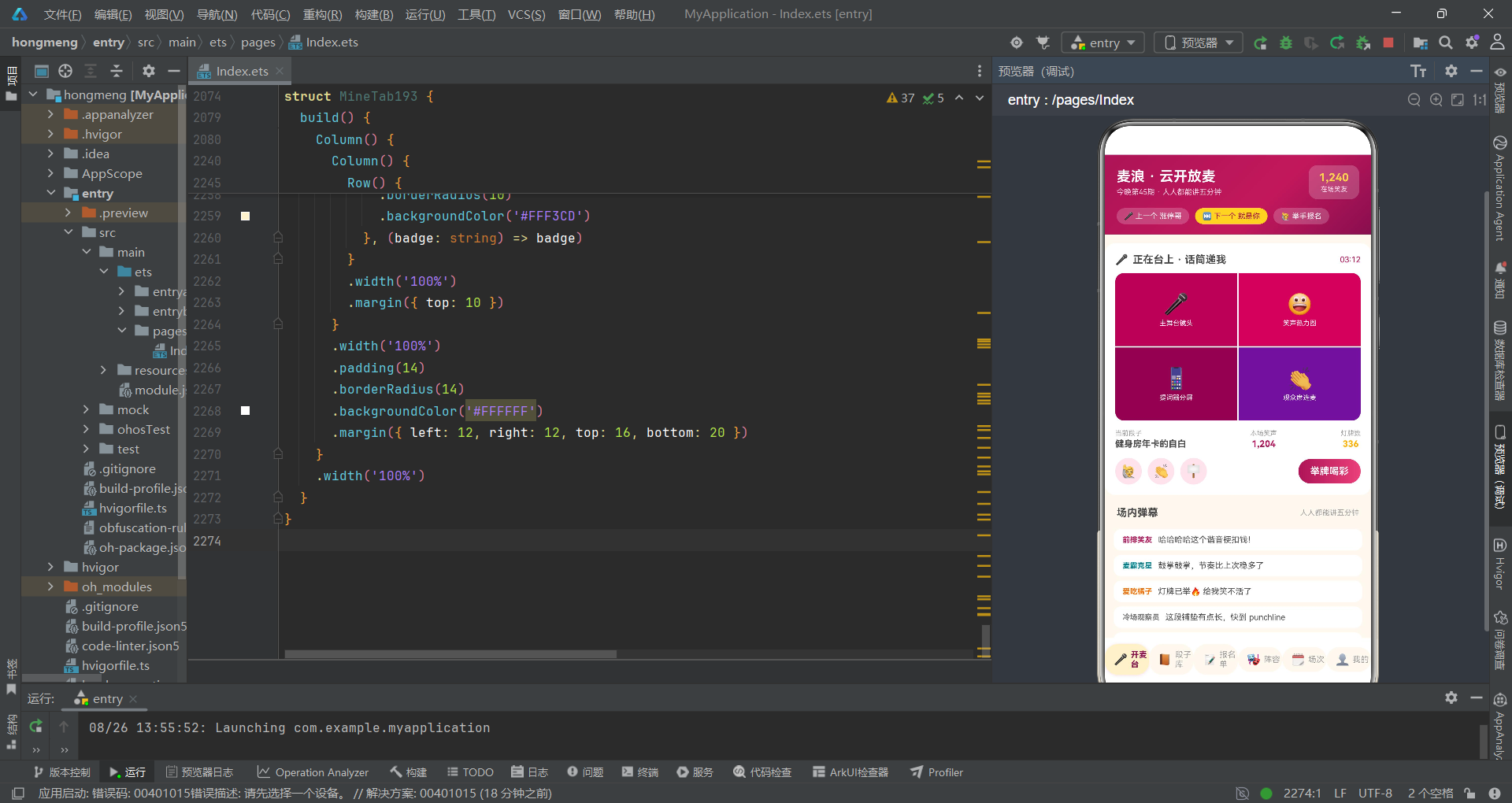
从架构评审的视角来看,这段代码展现了开发者对 ArkTS 声明式 UI 范式的良好理解——不可变更新、单向数据流、条件渲染、双向绑定等核心概念运用得当。主要改进空间集中在状态管理的精细度和 UI 模式的抽象复用上。这些问题在应用初期影响有限,但随着功能增长将逐步放大其维护成本。评审组建议在下一迭代中优先解决 P0 级别的表单状态隔离问题,为应用的可持续演进奠定更好的架构基础。

讨论HarmonyOS开发技术,专注于API与组件、DevEco Studio、测试、元服务和应用上架分发等。
更多推荐
 10
10 0
0- 0


 已为社区贡献35条内容

所有评论(0)