HarmonyOS 6.1 实战:声明式 UI 布局实战,Column‑Row‑Stack 容器对齐、权重分配与边距控制,学会构建多模块复合页面头部导航区
月黑风高夜,狼人出没时。狼人杀,是当代年轻人最具沉浸感的语音推理社交游戏——一场对局,八九好友,围坐一桌,天黑闭眼,狼人持刀,预言家验人,女巫毒救,猎人开枪,天亮发言,投票放逐,在谎言与推理的博弈中找出隐藏在人群中的狼人。从预女猎白到狼王守卫,从标准12人到恶灵骑士,从新手训练营到巅峰对决房,狼人杀以其丰富的板子配置和深度的社交推理体验,成为Z世代最热门的语音社交游戏。本文完整记录一个基于鸿蒙 HarmonyOS API 24 与 ArkTS 声明式框架构建的「QQ狼人杀·天黑之夜」语音推理社交平台,从暗夜蓝+血红狼人杀派对风的配色体系,到底部4Tab(对局/好友/动态/我的)+顶部6Tab(新手/进阶/高手/娱乐/板子/复盘)的双层导航架构,到月亮星星粒子动画系统(🌙⭐✦🐺✧十六粒子setInterval 130ms向上漂移)与日对局数柱状图,到4个模态弹窗(创建房间新增/邀请好友编辑/退出房间删除/房间详情查询),到RoomItem/FriendItem/MomentItem/ReplayStep四类@Observed数据模型与10个工具函数,附完整源码与运行效果截图。
一、引言:月黑风高夜,狼人出没时
狼人杀,是当代年轻人最具沉浸感的语音推理社交游戏。一场对局,八九好友,围坐一桌,天黑闭眼,狼人持刀杀人,预言家查验身份,女巫开药毒救,猎人开枪带人,天亮发言推理,投票放逐嫌疑人,在谎言与推理的博弈中找出隐藏在人群中的狼人。狼人杀起源于国外的"黑手党"(Mafia)派对游戏,传入中国后迅速本土化,结合了中国玩家偏好的语音发言、情感沉浸、阵营博弈等元素,发展出独具特色的"狼人杀"文化。从2017年《饭局的诱惑》综艺带火狼人杀,到2020年疫情后线上狼人杀APP爆发式增长,再到如今狼人杀成为年轻人语音社交的标配,狼人杀已经从一个小众桌游发展成为百亿级的语音社交产业。
狼人杀的魅力在于其"信息不对称+语音推理+阵营博弈"的三重体验。每个玩家拿到一张身份牌——狼人、预言家、女巫、猎人、白痴、守卫、平民——需要在几十分钟内完全代入角色,通过语音发言传递信息、隐藏身份、引导舆论、推理判断。狼人需要悍跳预言家、冲票好人、夜间刀人;好人需要听发言、盘逻辑、找狼人、投出狼坑;神职需要用好技能、带领好人走向胜利。狼人杀的板子极为丰富:预女猎白是经典入门配置,狼王守卫攻防拉满,狼美人魅惑机制心跳体验,白狼王自爆速战速决,恶灵骑士地狱难度大神专属,贪狼丘比特娱乐乱斗情侣连线,不同板子满足不同水平玩家的需求。
然而,随着狼人杀行业的爆发式增长,玩家面临着越来越多的痛点——好房间难找、拼车难、好友不在线、新手被虐、高手找不到对手、板子配置不熟悉、对局复盘困难。一个优秀的狼人杀语音社交平台,需要覆盖从"对局房间"到"好友列表"再到"动态狼友圈""个人主页"的完整社交闭环,还要在房间分类、板子配置、玩家评级、对局复盘等维度做到精准而高效。它需要以对局房间为核心入口,横向扩展出好友/动态/我的三大功能模块,对局模块再纵向细分为新手/进阶/高手/娱乐/板子/复盘六大分类,每个分类采用完全不同的布局风格,形成一个完整闭环的狼人杀语音社交生态。
正是在这样的背景下,QQ狼人杀·天黑之夜类语音社交平台应运而生,并迅速成为狼人杀玩家的社交入口。一个优秀的狼人杀应用,需要以对局房间为核心入口,横向扩展出好友/动态/我的三大功能模块,对局模块再纵向细分为6大分类,每个分类采用完全不同的布局风格——新手=指引大卡+萌新友好房列表(筛选新手/进阶)、进阶=日对局数柱状图+双列房间格、高手=巅峰榜+高手房列表(筛选高手)、娱乐=模式大卡横滑+娱乐房列表(筛选娱乐)、板子=经典板子配置网格(按狼人数分双列)、复盘=经典局复盘时间轴(8步事件),形成了一个完整闭环的狼人杀语音社交生态。它不仅是一个功能完备的演示项目,更是一份典型的 ArkUI 工程实践范本,涵盖了@Observed四类数据模型、10个工具函数、月亮星星粒子动画系统(setInterval驱动16粒子向上漂移)、双层导航架构(底部4Tab+顶部6Tab)、4个模态弹窗(创建/邀请/退出/详情)、aboutToAppear/aboutToDisappear生命周期管理定时器等关键技术点。
二、应用整体架构概览
整个应用采用了"单组件多@Builder构建器+状态集中管理"的架构设计。入口组件 Index 作为整个应用的根容器,负责管理当前底部Tab索引、顶部Tab索引、四个弹窗的显隐状态、选中房间、粒子数组、创建房间表单状态、邀请好友表单状态等全部状态。与多组件架构不同,本应用将所有UI构建逻辑都封装为@Builder构建器(headerBuilder/gameTopTabs/friendTopBar/momentTopBar/mineTopBar/gameContent/newbieContent/advancedContent/masterContent/funContent/boardContent/replayContent/friendContent/momentContent/mineContent/bottomTabs/createRoomModal/inviteFriendsModal/quitRoomModal/roomDetailModal),入口组件只负责状态管理和构建器调度,通过@Builder实现了逻辑的模块化拆分,是中大型 ArkUI 应用的标准架构实践。
应用采用双层导航架构——底部4Tab + 顶部6Tab。底部Tab(BOTTOM_TABS):对局🎮/好友👥/动态📰/我的👤,是应用的一级导航,决定渲染哪个大模块。顶部Tab(TOP_TABS):新手🌱/进阶⚡/高手🔥/娱乐🎪/板子🧩/复盘📊,仅在底部Tab为"对局"时显示,是对局模块的二级分类导航,决定渲染哪个水平段的房间列表。这种"底部一级+顶部二级"的双层导航是内容型应用的标准架构——底部Tab切换大模块,顶部Tab在当前模块内细分内容分类,既保证了模块间的快速切换,又实现了模块内的精细分类。顶部6Tab采用横向Scroll可滑动布局(6个Tab超出屏幕宽度时可左右滑动),激活态标签bloodRed血红加粗+底部20x3血红Divider指示条,非激活态textSecondary灰字+透明Divider,右侧还有一个"+建房"血红按钮,是分类导航的标准视觉范式。
在数据层面,应用定义了四类@Observed数据模型 + 一个接口模型——RoomItem(房间实体,8字段,15个房间)、FriendItem(好友实体,6字段,10个好友)、MomentItem(动态实体,7字段,8条动态)、ReplayStep(复盘步骤实体,4字段,8步复盘),以及BoardItem接口(板子配置,6字段,8个板子)。每个@Observed类都通过constructor完成初始化(非对象字面量),@Observed装饰整个类使得属性变更可被框架自动监听。房间数据直接定义为ALL_ROOMS常量数组,再通过leftRooms()/rightRooms()两个工具函数拆分为左右两列(偶数索引左列、奇数索引右列)用于双列布局。好友/动态/复盘数据直接以const常量数组定义。板子配置ALL_BOARDS是接口类型的常量数组,不需要@Observed因为是静态配置数据。这种"@Observed动态数据+接口静态配置"的混合数据模式,既保证了动态数据的响应式更新,又避免了静态配置数据被不必要地监听。
在工具函数层面,应用定义了10个工具函数——tagColor(房间标签映射颜色:招人中success绿/游戏中bloodRed血红/可观战purple紫)、levelColor(水平映射颜色:高手bloodRed/进阶purple/娱乐gold/新手success)、statusColor(好友状态映射颜色:在线success/对局中bloodRed/离线textHint)、stepColor(复盘事件类型映射颜色:刀bloodRed/验purple/枪gold/胜success/其他nightBlueLight)、barHeight(场次映射柱高:v*2.2+‘vp’)、roomFull(判断房间是否满员:current>=players)、leftRooms/rightRooms(房间拆列:偶数左列/奇数右列)、buildParticles(构建16个粒子初始位置)、driftParticles(粒子漂移:y-3,x用sin摆动,y<60回到底部640)。这10个工具函数将数据到样式/位置/格式/判断的映射逻辑从UI层抽离,实现了数据与表现的解耦,是数据可视化和动画系统的核心支撑。tagColor/levelColor/statusColor/stepColor四个颜色映射函数实现了"数据即颜色"的动态着色,barHeight实现了"数据即柱高"的可视化,roomFull实现了"数据即状态判断",leftRooms/rightRooms实现了双列布局的数据准备,buildParticles/driftParticles实现了自定义动画系统。
在动画层面,应用独创了月亮星星粒子动画系统——16个粒子(图标为🌙月亮/⭐星星/✦闪光/🐺狼头/✧星芒五种狼人杀主题道具循环),每个粒子有id/x/y/size/opacity/icon六个属性,通过setInterval每130毫秒调用driftParticles()更新粒子位置(y向上减3,x用sin(p.id+p.y/50)*3左右摆动,y<60时回到底部640形成循环),粒子用ForEach渲染在Stack中position绝对定位,key用p.id.toString()+‘_’+p.y.toFixed(0)(包含动态y坐标保证每帧强制重新渲染)。aboutToAppear生命周期启动setInterval并保存timerId,aboutToDisappear生命周期clearInterval清除定时器防止内存泄漏。与剧本杀应用的粒子系统相比,本应用的粒子漂移速度更慢(y-3 vs y-4),图标更贴合狼人杀主题(🌙⭐✦🐺✧ vs 🔍🕯️🗝️✨💡),营造出"月黑风高夜,星星闪烁,狼人出没"的悬疑氛围。这种"setInterval手动驱动+@State响应式+ForEach重新渲染+position绝对定位+动态key强制刷新"的方案,实现了ArkUI中animation属性无法完成的自定义粒子动画,是本应用最具技术深度的部分。
在交互层面,应用通过4个模态弹窗实现了增删改查交互闭环:createRoomModal创建房间(新增,血红渐变头bloodRed→nightBlue,房间名TextInput/板子Flex选择/权限Row公开或密码)、inviteFriendsModal邀请好友(编辑,紫罗兰#EDEAFB头,选择好友Flex/邀请留言TextInput/提醒方式Row)、quitRoomModal退出房间(删除,警告小卡,danger红底确认,逃跑扣15声望分提示)、roomDetailModal房间详情(查询,暗夜蓝渐变头,座位表12个Flex/板子配置/房主近五场战绩/邀请好友+退出房间按钮)。四个弹窗各自独立@Builder,通过show*布尔状态条件渲染,弹窗外层统一用Column width100% height100% justifyContent Center + backgroundColor ‘99000000’(60%透明黑)实现遮罩+居中,点击遮罩onClick关闭弹窗。四个弹窗覆盖了狼人杀语音社交平台的核心交互——创建房间(新增)、邀请好友(编辑)、退出房间(删除)、房间详情(查询),形成了完整的增删改查交互闭环。创建房间后自动跳转到邀请好友弹窗(showCreateModal=false+showInviteModal=true),房间详情内的邀请好友按钮跳转到邀请弹窗、退出房间按钮跳转到退出确认弹窗,实现了弹窗间的流畅跳转。
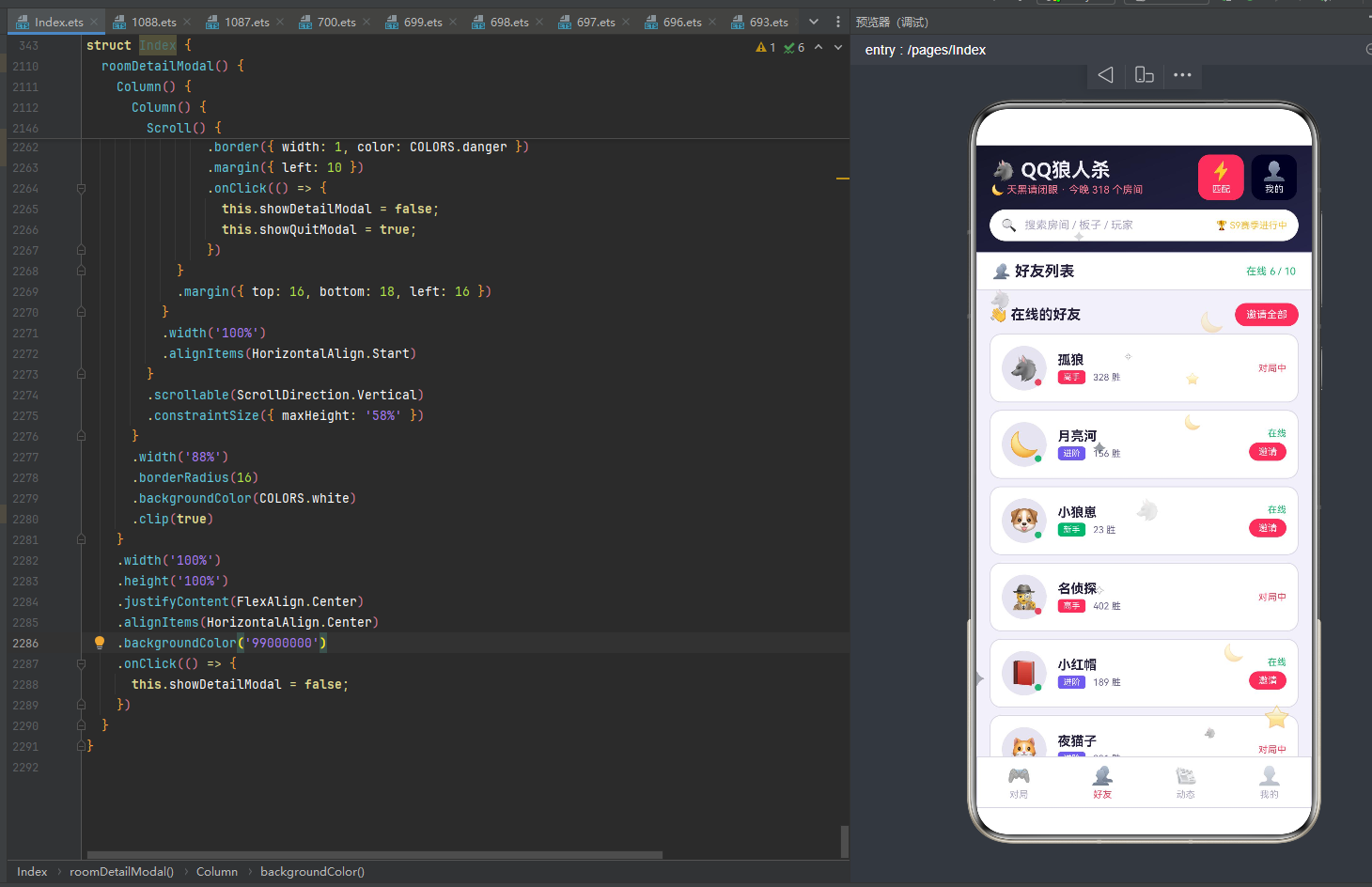
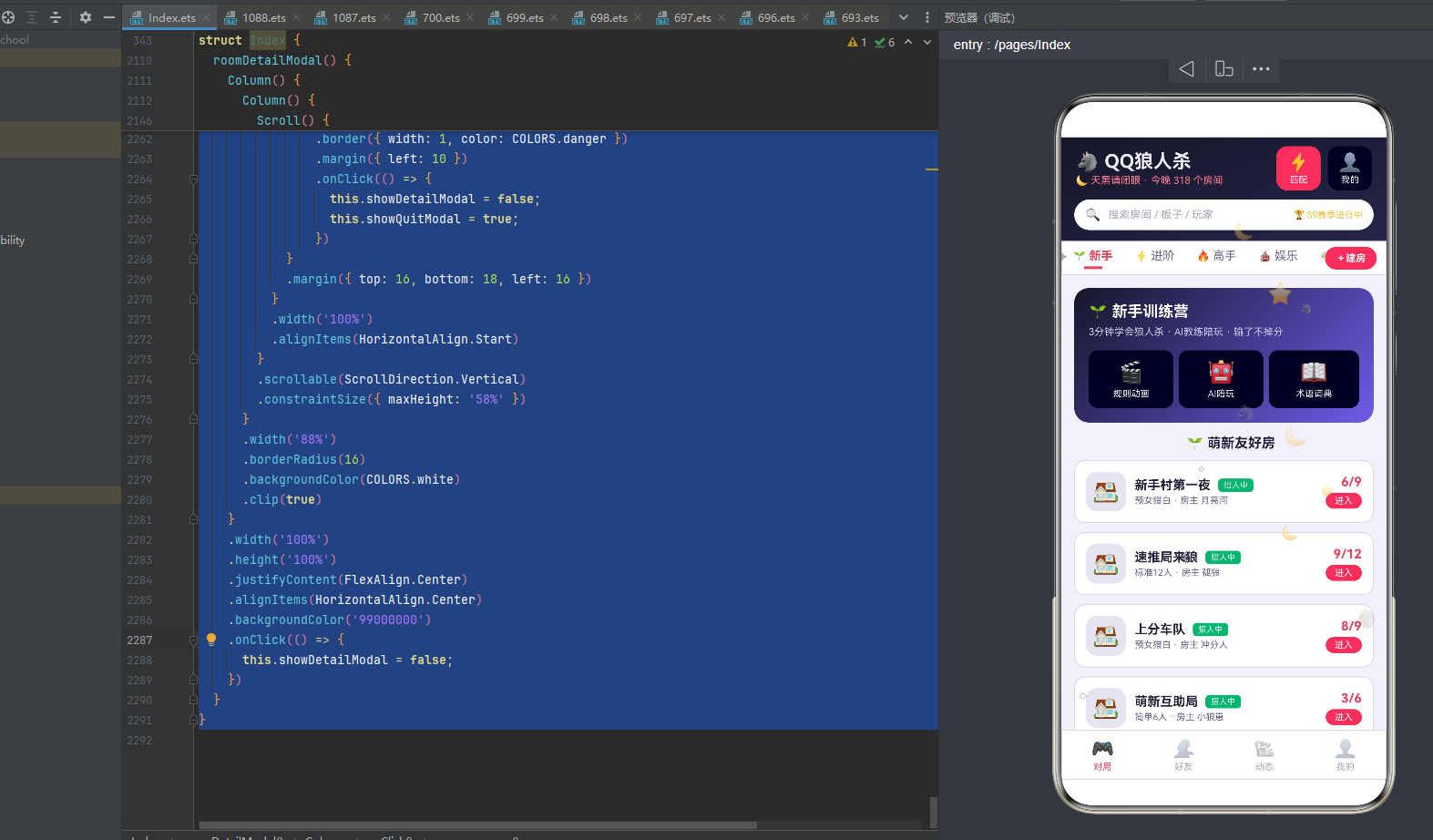
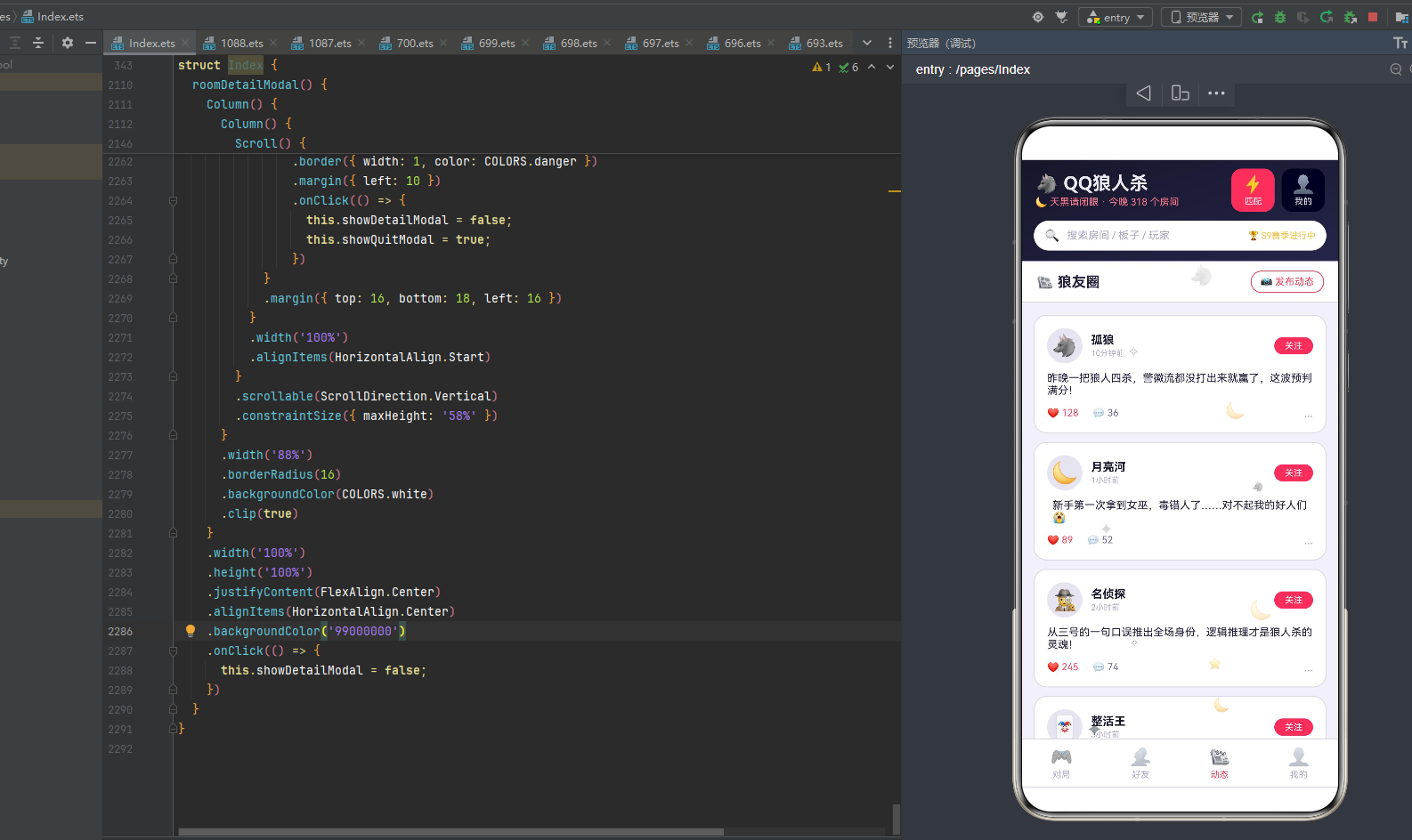
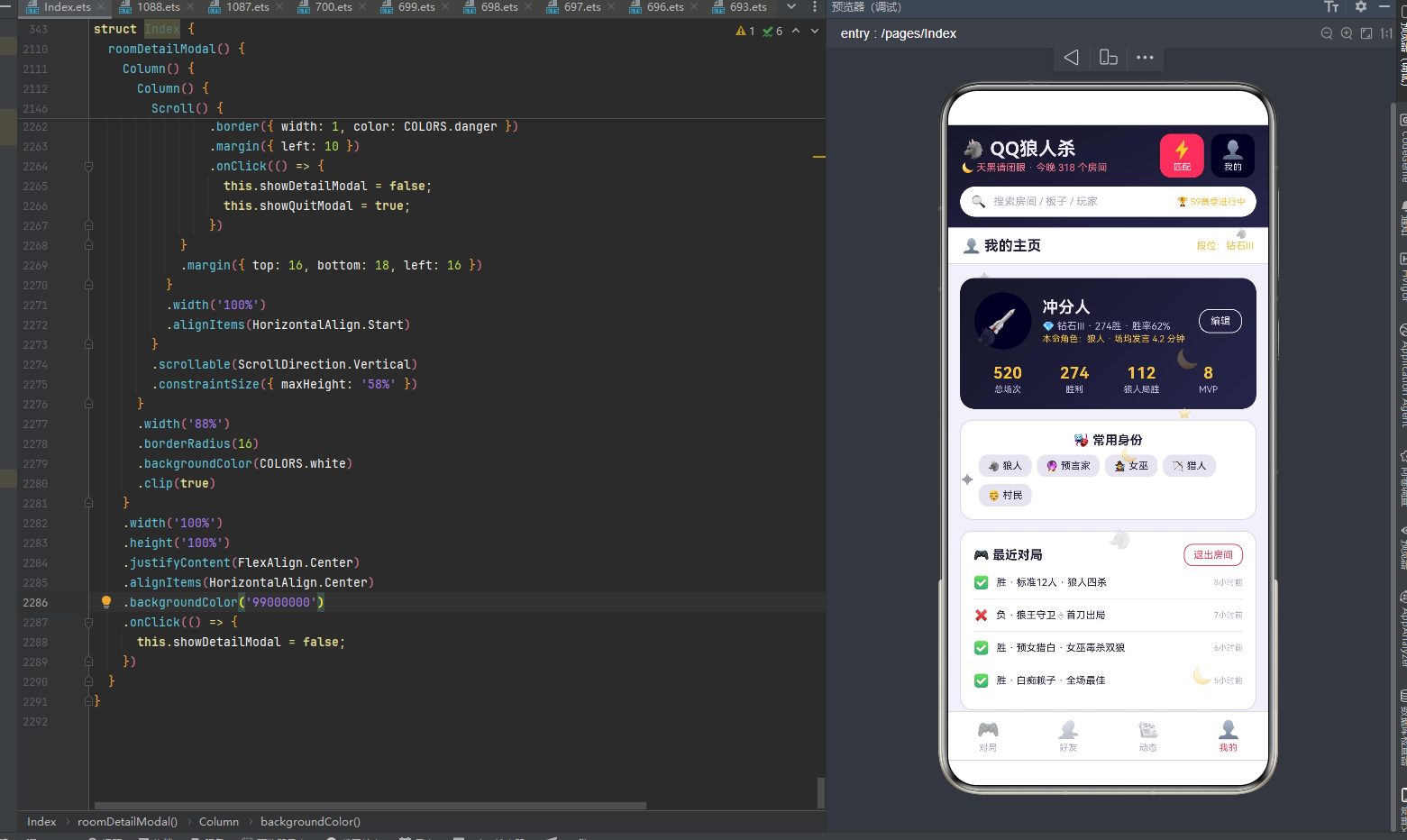
下面逐页展示应用的四大功能模块运行效果。
三、对局Tab:6大水平段差异化布局
对局Tab是应用的核心模块,采用"顶部6Tab分类+差异化内容布局"的设计。6个水平段每个都有完全不同的布局风格,最大程度还原了不同水平段玩家的需求。
3.1 新手:指引大卡 + 萌新友好房列表
新手分类采用"指引大卡+萌新友好房列表"的两层布局。
第一部分是新手训练营指引大卡Column width92% padding16 borderRadius16 linearGradient angle135从nightBlue暗夜蓝到purple紫色 margin top14:
- 标题:"🌱 新手训练营"fontSize17加粗白字alignSelf Start
- 副标题:"3分钟学会狼人杀 · AI教练陪玩 · 输了不掉分"fontSize11 #C9C6E8浅紫白 margin top6 alignSelf Start
- 三功能Row width100% margin top14:
- 规则动画Column layoutWeight1 padding 10x0 borderRadius10 backgroundColor ‘33FFFFFF’(半透明白):🎬Emoji fontSize24 + "规则动画"fontSize10 moonWhite白字margin top4
- AI陪玩Column layoutWeight1 padding 10x0 borderRadius10 backgroundColor ‘33FFFFFF’ margin right6:🤖Emoji fontSize24 + "AI陪玩"fontSize10 moonWhite白字margin top4
- 术语词典Column layoutWeight1 padding 10x0 borderRadius10 backgroundColor ‘33FFFFFF’:📖Emoji fontSize24 + "术语词典"fontSize10 moonWhite白字margin top4
暗夜蓝到紫色的渐变背景+半透明白色功能卡,营造出新手训练营的科技感和友好氛围。三大功能(规则动画/AI陪玩/术语词典)覆盖了新手入门的核心需求——看规则动画学习玩法、AI陪玩练习不坑人、查术语词典理解黑话。
第二部分是"🌱 萌新友好房"标题 + 房间列表ForEach遍历ALL_ROOMS,用if条件筛选r.level===‘新手’||r.level==='进阶’的房间渲染。每张房间卡片Column width92% borderRadius12 cardBg白底border padding12 margin top10:
- Row width100%:
- 房间图标Text(‘🏠’) fontSize24 width44 height44 textAlign Center borderRadius12 cardBgDark底
- 信息Column layoutWeight1 margin left10 alignItems Start:Row(房间名r.name fontSize14加粗textPrimary + 标签r.tag fontSize9白字padding 6x2圆角4 backgroundColor tagColor(r.tag) margin left8——招人中success绿/游戏中bloodRed血红/可观战purple紫)+ "板子·房主"r.board+’ · 房主 '+r.host fontSize10 textSecondary margin top3
- 人数进入Column alignItems End:人数r.current+‘/’+r.players fontSize14加粗,满员时textHint灰否则bloodRed血红 + "进入"按钮fontSize10白字padding 10x3圆角10 backgroundColor roomFull®?textHint:bloodRed(满员灰不可点,未满血红可点)margin top4(点击selectedRoom=r,showDetailModal=true弹出详情)
15 个房间中,新手/进阶水平的有:新手村第一夜(预女猎白·9人·6/9·月亮河·新手·招人中)、速推局来狼(标准12人·12人·9/12·孤狼·进阶·招人中)、快乐发言房(白痴赖子·10人·4/10·话痨·娱乐·招人中)、上分车队(预女猎白·9人·8/9·冲分人·进阶·招人中)、萌新互助局(简单6人·6人·3/6·小狼崽·新手·招人中)、女神专场(白狼王·10人·7/10·小红帽·进阶·招人中)、静音文字局(暗牌6人·6人·2/6·潜水员·新手·招人中)、下班放松局(预女猎白·9人·5/9·打工人·进阶·招人中)、整点报时局(混血儿·11人·6/11·咕咕钟·娱乐·招人中)。房间名富有趣味(新手村第一夜/速推局来狼/快乐发言房/上分车队/萌新互助局/凌晨三点半/逻辑怪聚集地/整活娱乐局/夜谈十点档/女神专场/静音文字局/巅峰对决房/下班放松局/整点报时局),房主名也各有特色(月亮河/孤狼/猎户座/话痨/冲分人/夜猫子/小狼崽/名侦探/整活王/老主播/小红帽/潜水员/总决赛/打工人/咕咕钟)。
新手分类的核心特色是ForEach内if条件筛选——在ForEach遍历ALL_ROOMS的回调中用if(r.level===‘新手’||r.level===‘进阶’)条件判断,只渲染符合水平段的房间。这种"遍历+条件筛选"的模式比预先过滤数组更灵活——不需要额外创建筛选后的数组,直接在渲染时判断,适合多个分类共享同一数据源的场景。roomFull函数判断房间是否满员(current>=players),满员时"进入"按钮变灰不可点,未满时血红可点,通过函数实现了"数据即按钮状态"的动态判断。tagColor函数将房间标签(招人中/游戏中/可观战)映射为不同颜色,使用户能通过颜色快速识别房间状态。
3.2 进阶:日对局数柱状图 + 双列房间格
进阶分类采用"日对局数柱状图+双列房间格"的两层布局,是数据可视化最丰富的分类。
第一部分是柱状图卡片Column width92% borderRadius14 cardBg白底border padding14 margin top14:
- 标题:"📊 本周每日对局"fontSize14加粗nightBlue暗夜蓝字alignSelf Start
- 副标题:"周末晚间 21:00-23:00 是开黑黄金档"fontSize10 textSecondary margin top4 alignSelf Start
- 柱状图Row width100% margin top12:ForEach遍历DAYS_LABEL(周一到周日)渲染柱子Column layoutWeight1 alignItems Center:场次数值Text(DAILY_GAMES[idx].toString()) fontSize9,idx>=5(周末)时bloodRed血红否则textHint灰 margin bottom3 + 柱体Column width18 height barHeight(DAILY_GAMES[idx])(v*2.2+‘vp’,如周六46场→101.2vp)borderRadius top4 backgroundColor idx>=5?bloodRed血红:purple紫色 + 星期标签Text(d) fontSize9 textSecondary margin top4
DAYS_LABEL = [‘周一’,‘周二’,‘周三’,‘周四’,‘周五’,‘周六’,‘周日’],DAILY_GAMES = [12,18,9,22,28,46,35]。周六46场最高(柱体最高,血红高亮),周三9场最低(柱体最矮),周末(周六周日)用bloodRed血红高亮,工作日用purple紫色,通过颜色区分周末工作日。barHeight函数将场次数值乘以2.2后加’vp’单位返回字符串,直接作为Column的height属性值,实现了"数值即柱高"的数据可视化。与剧本杀应用的柱状图(barHeight v*1.1)相比,本应用的倍率更大(2.2),因为日对局数数值范围更小(9-46 vs 42-132),需要更大的倍率才能让柱高差异明显。
第二部分是"⚡ 进阶房推荐"标题 + 双列房间格Row。双列通过leftRooms()/rightRooms()将15个房间拆分为左右两列(偶数索引左列8个、奇数索引右列7个),每列Column layoutWeight1,ForEach遍历对应房间数组渲染卡片。每张卡片Column width100% borderRadius12 cardBg白底border padding12 margin:
- 板子标签Text(r.board) fontSize11白字padding 8x3圆角6 backgroundColor purple紫色(所有卡片板子标签统一紫色,与新手Tab的tagColor不同)
- 房间名Text(r.name) fontSize13加粗textPrimary margin top6
- 人数房主Text(r.current+‘/’+r.players+’ 人 · '+r.host) fontSize10 textSecondary margin top4
- 点击卡片selectedRoom=r,showDetailModal=true
进阶分类的双列房间格比新手Tab的单列列表更紧凑——每张卡片信息更简洁(只有板子标签/房间名/人数房主),双列排列展示更多房间。板子标签统一用purple紫色背景,与新手Tab的tagColor(按状态着色)形成区分——进阶房更关注板子配置而非房间状态。leftRooms()/rightRooms()两个工具函数通过奇偶索引拆分数组,是双列布局的标准数据准备方式。
3.3 高手:巅峰榜 + 高手房列表
高手分类采用"巅峰榜大卡+高手房列表"的两层布局。
第一部分是巅峰榜大卡Column width92% padding16 borderRadius16 linearGradient angle135从nightBlue暗夜蓝到bloodRed血红 margin top14:
- 标题:"🔥 巅峰榜 · 本周"fontSize15加粗moonWhite白字
- 前五玩家Row width100% margin top12:ForEach遍历[‘名侦探 402胜’,‘孤狼 328胜’,‘猎户座 365胜’,‘夜猫子 231胜’,‘冲分人 274胜’]渲染Column layoutWeight1 padding 8x0 borderRadius8 backgroundColor ‘22FFFFFF’(半透明白)margin left(idx=0?0:4):排名Text((idx+1).toString()) fontSize11加粗,idx=0(第一名)时gold金否则bloodLight浅血红 + 玩家名胜场Text(n) fontSize9 moonWhite白字margin top3
暗夜蓝到血红的渐变背景+半透明白色玩家卡,营造出巅峰榜的紧张竞技氛围。第一名用gold金色高亮,其他用bloodLight浅血红,通过颜色区分冠军与其他选手。五名玩家的胜场数据来自ALL_FRIENDS好友列表(名侦探402胜/孤狼328胜/猎户座365胜/夜猫子231胜/冲分人274胜),实现了数据的跨模块复用。
第二部分是"🔥 高手房 · 全程录音可复盘"标题 + 高手房列表ForEach遍历ALL_ROOMS,用if条件筛选r.level==='高手’的房间渲染。每张房间卡片Column width92% borderRadius12 cardBg白底border padding14 margin top10:
- Row width100%:
- 信息Column layoutWeight1 alignItems Start:房间名r.name fontSize14加粗textPrimary + Row margin top4(板子标签r.board fontSize9白字padding 6x2圆角4 backgroundColor nightBlue暗夜蓝 + 状态标签r.tag fontSize9白字padding 6x2圆角4 backgroundColor tagColor(r.tag) margin left6)
- 人数房主Column alignItems End:人数r.current+‘/’+r.players fontSize14加粗,满员textHint否则bloodRed + "房主 "+r.host fontSize9 textSecondary margin top2
- 点击卡片selectedRoom=r,showDetailModal=true
高手水平的房间有:大神观战局(狼王守卫·12人·12/12·猎户座·高手·可观战)、凌晨三点半(守卫暗牌·11人·11/11·夜猫子·高手·游戏中)、逻辑怪聚集地(狼美人·12人·10/12·名侦探·高手·招人中)、巅峰对决房(恶灵骑士·12人·12/12·总决赛·高手·可观战)。高手房的特色是"全程录音可复盘"——高手对局需要录音复盘分析,这是高手玩家的核心需求。板子标签用nightBlue暗夜蓝背景(与进阶房的purple紫色不同),状态标签用tagColor按状态着色,通过颜色区分板子与状态。可观战和游戏中的房间满员(12/12或11/11),招人中的房间未满(10/12),roomFull函数控制进入按钮状态。
3.4 娱乐:模式大卡横滑 + 娱乐房列表
娱乐分类采用"模式大卡横滑+娱乐房列表"的两层布局。
第一部分是"🎪 娱乐模式乐园"标题 + 横向Scroll模式大卡Row。横滑卡Scroll scrollable Horizontal scrollBar Off,Row内三张模式大卡:
- 贪狼丘比特卡Column width130 borderRadius14 margin left16 top10:💘Emoji fontSize36 margin top10 + "贪狼丘比特"fontSize13加粗moonWhite白字margin top6 + "情侣连线 · 阵营混乱"fontSize9 #C9C6E8浅紫白margin top4 bottom12
- 白痴赖子卡Column width130 borderRadius14 margin left10 top10:🃏Emoji fontSize36 margin top10 + "白痴赖子"fontSize13加粗moonWhite白字margin top6 + "发言自由 · 快乐至上"fontSize9 #C9C6E8浅紫白margin top4 bottom12
- 静音文字局卡Column width130 borderRadius14 margin left10 top10:🤫Emoji fontSize36 margin top10 + "静音文字局"fontSize13加粗moonWhite白字margin top6 + "全程打字 · 社恐友好"fontSize9 #C9C6E8浅紫白margin top4 bottom12
三张模式大卡用暗夜蓝渐变背景(代码中未显式设置backgroundColor但通过borderRadius和内容暗示),横向Scroll可左右滑动浏览,是娱乐模式推荐位的标准布局。贪狼丘比特(情侣连线阵营混乱)、白痴赖子(发言自由快乐至上)、静音文字局(全程打字社恐友好)三种娱乐模式覆盖了不同娱乐需求。
第二部分是"🎪 娱乐房列表"标题 + 娱乐房列表ForEach遍历ALL_ROOMS,用if条件筛选r.level==='娱乐’的房间渲染。每张房间Row width92% padding12 borderRadius12 cardBg白底border margin top8:
- 娱乐图标Text(‘🎪’) fontSize22
- 信息Column layoutWeight1 margin left10 alignItems Start:房间名r.name fontSize13加粗textPrimary + 板子人数r.board+’ · ‘+r.current+’/'+r.players+‘人’ fontSize10 textSecondary margin top2
- "加入"按钮Text fontSize11白字padding 12x6圆角12 backgroundColor gold金色(点击selectedRoom=r,showDetailModal=true)
娱乐水平的房间有:快乐发言房(白痴赖子·10人·4/10·话痨·娱乐·招人中)、整活娱乐局(贪狼丘比特·12人·5/12·整活王·娱乐·招人中)、整点报时局(混血儿·11人·6/11·咕咕钟·娱乐·招人中)。娱乐房的"加入"按钮用gold金色背景(与其他Tab的bloodRed血红不同),通过颜色区分娱乐房的轻松氛围。房间信息更简洁(只有房间名/板子人数),符合娱乐房"快速加入"的定位。
3.5 板子:经典板子配置网格
板子分类采用"经典板子配置网格"的单层布局,是信息密度最高的分类。
标题行:"🧩 经典板子配置"fontSize15加粗textPrimary margin left16 top14 + "点击板子可直接建房开一局"fontSize10 textSecondary margin left16 top4。
板子网格Row width100% alignItems Top,双列布局通过ForEach内if条件按b.wolf>=4分双列:
- 左列Column layoutWeight1:ForEach遍历ALL_BOARDS,if(b.wolf>=4)渲染板子卡片(狼人数>=4的板子:标准12人4狼/狼王守卫4狼/狼美人4狼/白狼王4狼/贪狼丘比特4狼/恶灵骑士5狼,共6个)
- 右列Column layoutWeight1:ForEach遍历ALL_BOARDS,if(b.wolf<4)渲染板子卡片(狼人数<4的板子:预女猎白3狼/守卫暗牌3狼,共2个)
每张板子卡片Column width100% borderRadius12 cardBg白底border padding12 margin:
- 头部Row width100%:板子图标Text(b.icon) fontSize22 + 信息Column layoutWeight1 margin left8 alignItems Start(板子名b.name fontSize13加粗textPrimary + 描述b.desc fontSize9 textSecondary margin top2)
- 配置Row width100% margin top8:狼人数Text(‘🐺狼×’+b.wolf) fontSize9 bloodRed血红字padding 8x3圆角6 backgroundColor '#FBE0E6’浅红底 + 神人数Text(‘✨神×’+b.god) fontSize9 purple紫字padding 8x3圆角6 backgroundColor '#E6E2F9’浅紫底margin left6 + 民人数Text(‘👨民×’+b.villager) fontSize9 textSecondary灰字padding 8x3圆角6 backgroundColor cardBgDark底margin left6
- 点击卡片roomBoard=1,showCreateModal=true(直接打开创建房间弹窗并预选板子)
8 个板子配置:
- 预女猎白(🔮预言家·女巫·猎人·白痴,狼3神4民4,9人经典入门)
- 标准12人(⚖️经典配置·均衡博弈,狼4神4民4,12人标准)
- 狼王守卫(🛡️狼王+守卫·攻防拉满,狼4神5民3,12人攻防)
- 狼美人(🌹魅惑机制·心跳体验,狼4神4民4,12人魅惑)
- 白狼王(🤍自爆之王·速战速决,狼4神3民3,10人速推)
- 守卫暗牌(🌑暗牌推理·高阶挑战,狼3神4民4,11人暗牌)
- 恶灵骑士(💀地狱难度·大神专属,狼5神4民3,12人地狱)
- 贪狼丘比特(💘娱乐乱斗·情侣连线,狼4神4民4,12人娱乐)
板子分类的核心特色是按狼人数分双列——通过if(b.wolf>=4)条件将8个板子分为左列(狼人>=4的6个板子)和右列(狼人<4的2个板子),这种"按数据属性分列"的模式比固定奇偶分列更灵活——根据板子的狼人数动态决定分列,使两列的卡片数量虽然不均(6 vs 2)但按属性分组更有语义。每个板子卡片用三种颜色的配置标签区分狼/神/民——狼人bloodRed血红+浅红底、神职purple紫+浅紫底、平民textSecondary灰+灰底,通过颜色快速识别三方阵营人数。点击板子直接打开创建房间弹窗并预选该板子(roomBoard=1),实现了"板子→建房"的流畅跳转。
3.6 复盘:经典局复盘时间轴
复盘分类采用"经典局信息大卡+复盘时间轴+MVP分析"的三层布局。
第一部分是经典局信息大卡Column width92% padding16 borderRadius16 linearGradient angle135从nightBlue暗夜蓝到purple紫色 margin top14:
- Row width100%:信息Column layoutWeight1 alignItems Start("🏆 昨晚经典局复盘"fontSize15加粗moonWhite白字 + "标准12人 · 猎户座的房间 · 用时 32分钟"fontSize10 #C9C6E8浅紫白margin top4)+ "好人胜"标签Text fontSize11加粗success绿字padding 10x5圆角10 backgroundColor white白底
第二部分是复盘时间轴Column width92% borderRadius14 cardBg白底border padding16 margin top14。ForEach遍历REPLAY_STEPS(8步复盘)渲染时间轴项Row width100% alignItems Top:
- 左侧时间轴Column alignItems Center:事件类型图标Text(s.type) fontSize11加粗白字width28 height28 textAlign Center borderRadius14 backgroundColor stepColor(s.type)(刀bloodRed血红/验purple紫/警nightBlueLight/票nightBlueLight/枪gold金/胜success绿)+ 非末项时Column width2 height34 backgroundColor border色(时间轴连接线)
- 右侧事件Column layoutWeight1 margin left12 alignItems Start:阶段s.phase fontSize10 textHint灰 + 事件s.event fontSize12加粗textPrimary margin top2
8 步复盘事件:
- 第一夜·狼人刀杀7号玩家(女巫)——类型"刀",bloodRed血红
- 第一夜·预言家查验3号为好人——类型"验",purple紫
- 第一天·警上竞选2号当选警长——类型"警",nightBlueLight暗夜蓝浅
- 第一天·投票放逐9号(狼人)——类型"票",nightBlueLight
- 第二夜·狼人刀杀5号(猎人)——类型"刀",bloodRed
- 第二夜·猎人开枪带走11号(狼人)——类型"枪",gold金
- 第二天·投票放逐4号(狼人)——类型"票",nightBlueLight
- 结算·狼人全部出局·好人阵营胜利——类型"胜",success绿
时间轴布局通过左侧的圆形事件类型图标+垂直连接线,直观呈现了对局的时间线进展。stepColor函数将事件类型(刀/验/警/票/枪/胜)映射为不同颜色——刀人血红、验人紫、警徽/投票暗夜蓝、开枪金、胜利绿,通过颜色快速识别事件类型。8步复盘完整呈现了一局标准12人对局的关键事件——从第一夜的刀人验人,到第一天的警上竞选投票放逐,到第二夜的刀人开枪,到第二天的投票放逐,最后结算好人胜利,是狼人杀对局的典型流程。
第三部分是MVP分析卡Column width92% borderRadius12 backgroundColor '#E6E2F9’浅紫底padding14 margin top12:"💡 本局 MVP:名侦探"fontSize12 textPrimary + "关键推理:从11号的警徽流漏洞锁定双狼,带队翻盘"fontSize10 textSecondary margin top4。浅紫底的MVP卡突出了本局最佳玩家的关键推理,是复盘的点睛之笔。
复盘分类是本应用最具特色的分类——通过时间轴布局完整呈现一局对局的关键事件,配合事件类型颜色编码和MVP分析,帮助玩家回顾对局、总结经验、提升水平。这种"时间轴+颜色编码+MVP分析"的复盘模式是狼人杀等推理游戏的标准复盘方式。
四、好友Tab:在线好友列表与邀请
好友Tab以"好友社交"为核心,采用"在线好友列表(状态点+邀请按钮)"的布局。
页面顶部是friendTopBar标题行:"👥 好友列表"fontSize16加粗textPrimary margin left16 + 弹性占位 + "在线 6 / 10"fontSize11 success绿字margin right16。
好友列表顶部操作行Row width92% margin top14:"👋 在线的好友"fontSize15加粗textPrimary layoutWeight1 + "邀请全部"按钮Text fontSize11白字padding 12x6圆角12 backgroundColor bloodRed血红(点击showInviteModal=true弹出邀请好友弹窗)。
好友列表ForEach遍历ALL_FRIENDS渲染10个好友Row width92% padding12 borderRadius12 cardBg白底border margin top8:
- 头像Stack:头像Text(f.avatar) fontSize26 width48 height48 textAlign Center borderRadius24 cardBgDark底 + 状态点Text(‘●’) fontSize10 statusColor(f.status)(在线success绿/对局中bloodRed血红/离线textHint灰)position x34 y34(头像右下角的在线状态小圆点)
- 信息Column layoutWeight1 margin left12 alignItems Start:好友名f.name fontSize14加粗textPrimary + Row margin top3(水平标签f.level fontSize9白字padding 6x2圆角4 backgroundColor levelColor(f.level)——高手bloodRed/进阶purple/娱乐gold/新手success + 胜场f.wins+’ 胜’ fontSize10 textSecondary margin left8)
- 状态邀请Column alignItems End:状态f.status fontSize10 statusColor(f.status) + 在线时显示"邀请"按钮Text fontSize10白字padding 10x4圆角10 backgroundColor bloodRed margin top4(点击showInviteModal=true),离线/对局中不显示邀请按钮
10 个好友:孤狼(🐺·对局中·高手·328胜)、月亮河(🌙·在线·进阶·156胜)、小狼崽(🐶·在线·新手·23胜)、名侦探(🕵️·对局中·高手·402胜)、小红帽(📕·在线·进阶·189胜)、夜猫子(🐱·对局中·进阶·231胜)、猎户座(🏹·离线·高手·365胜)、整活王(🃏·在线·娱乐·88胜)、潜水员(🤿·离线·新手·12胜)、冲分人(🚀·在线·进阶·274胜)。状态涵盖在线6人/对局中3人/离线1人,水平涵盖高手3人/进阶4人/新手2人/娱乐1人,胜场从12胜(潜水员)到402胜(名侦探),数据丰富度高。
好友Tab的核心特色是Stack头像+position状态点——用Stack叠层布局将在线状态小圆点(●)定位在头像右下角(position x34 y34),statusColor函数将状态映射为颜色(在线success绿/对局中bloodRed血红/离线textHint灰),通过颜色和位置直观呈现好友在线状态。这种"头像+角标状态点"是社交应用好友列表的标准设计。levelColor函数将好友水平(高手/进阶/娱乐/新手)映射为不同颜色的标签,使用户能通过颜色快速识别好友水平。在线好友显示"邀请"按钮(bloodRed血红底),对局中和离线好友不显示邀请按钮,通过条件渲染实现了"按状态显示操作按钮"的动态交互。
五、动态Tab:狼友圈动态列表
动态Tab以"狼友圈社交"为核心,采用"动态信息流列表(点赞评论)"的布局。
页面顶部是momentTopBar标题行:"📰 狼友圈"fontSize16加粗textPrimary margin left16 + 弹性占位 + "📸 发布动态"按钮Text fontSize11 bloodRed血红字padding 10x5圆角12 border bloodRed血红边margin right16(点击showInviteModal=true——本应用中发布动态复用了邀请好友弹窗)。
动态列表ForEach遍历ALL_MOMENTS渲染8条动态Column width92% padding14 borderRadius14 cardBg白底border margin top10:
- 头部Row width100%:头像Text(m.avatar) fontSize24 width40 height40 textAlign Center borderRadius20 cardBgDark底 + 信息Column layoutWeight1 margin left10 alignItems Start(发布者m.name fontSize13加粗nightBlue暗夜蓝字 + 时间m.time fontSize9 textHint灰margin top2)+ "关注"按钮Text fontSize10白字padding 12x4圆角10 backgroundColor bloodRed血红
- 内容Text(m.content) fontSize12 textPrimary margin top10(动态正文,支持多行显示)
- 互动Row width100% margin top10:点赞❤️ m.likes fontSize11 bloodRed血红字 + 评论💬 m.comments fontSize11 textSecondary灰字margin left16 + 弹性占位 + 更多"…"Text fontSize14 textHint灰
8 条动态:孤狼(🐺·“昨晚一把狼人四杀,警徽流都没打出来就赢了,这波预判满分!”·10分钟前·128赞36评)、月亮河(🌙·“新手第一次拿到女巫,毒错人了……对不起我的好人们😭”·1小时前·89赞52评)、名侦探(🕵️·“从三号的一句口误推出全场身份,逻辑推理才是狼人杀的灵魂!”·2小时前·245赞74评)、整活王(🃏·“娱乐局玩贪狼,把丘比特连了自己和狼队友,全场笑疯🤣”·3小时前·312赞98评)、小红帽(📕·“连续三把平民被首刀,系统你是不是针对我?”·5小时前·56赞28评)、猎户座(🏹·“猎人最后一枪带走双狼,翻盘的瞬间心脏都要跳出来了!”·8小时前·178赞45评)、夜猫子(🐱·“凌晨场的水太深,全是影帝,萌新慎入……”·昨天23:40·94赞31评)、冲分人(🚀·“本周胜率71%冲上钻石,下个目标是狼王!”·昨天21:15·156赞42评)。动态内容涵盖狼人杀玩家的各种经历——四杀预判、女巫毒错人、逻辑推理、整活娱乐、被首刀、猎人翻盘、凌晨影帝、冲分上钻,真实还原了狼人杀玩家的社交圈生态。
动态Tab的核心特色是社交信息流布局——每条动态包含头像/发布者/时间/关注按钮/正文/点赞/评论/更多的完整社交信息架构,与微博/朋友圈等社交应用的动态列表一致。发布者名字用nightBlue暗夜蓝字(与其他Tab的textPrimary不同),点赞用bloodRed血红字,评论用textSecondary灰字,通过颜色区分互动类型。"关注"按钮用bloodRed血红底,与应用主题色一致。动态正文支持多行显示(不设maxLines),完整呈现玩家的发言内容。8条动态按时间倒序排列(10分钟前→1小时前→2小时前→3小时前→5小时前→8小时前→昨天23:40→昨天21:15),是社交信息流的标准排序方式。
六、我的Tab:个人主页与战绩记录
我的Tab以"个人中心"为核心,采用"个人信息卡+四列统计+常用身份+最近对局"的四层布局。
页面顶部是mineTopBar标题行:"👤 我的主页"fontSize16加粗textPrimary margin left16 + 弹性占位 + "段位:钻石Ⅲ"fontSize11 gold金字margin right16。
第一部分是个人信息卡Column width92% padding16 borderRadius16 linearGradient angle135从nightBlue到nightBlueLight暗夜蓝渐变 margin top16:
- Row width100%:
- 头像Text(‘🚀’) fontSize28 width64 height64 textAlign Center borderRadius32 backgroundColor ‘33FFFFFF’(半透明白底圆形头像)
- 信息Column layoutWeight1 margin left12 alignItems Start:"冲分人"fontSize18加粗moonWhite白字 + "💎 钻石Ⅲ · 274胜 · 胜率62%"fontSize11 #C9C6E8浅紫白margin top4 + "本命角色:狼人 · 场均发言 4.2 分钟"fontSize10 gold金字margin top2
- 编辑按钮Column:Text(‘编辑’) fontSize11 moonWhite白字padding 12x6圆角12 border moonWhite白边(点击showInviteModal=true——本应用中编辑资料复用了邀请好友弹窗)
- 四列统计Row width100% margin top16:
- 总场次Column layoutWeight1 alignItems Center:"520"fontSize18加粗gold金 + "总场次"fontSize10 #C9C6E8浅紫白margin top2
- 胜利Column layoutWeight1 alignItems Center:"274"fontSize18加粗gold金 + "胜利"fontSize10 #C9C6E8浅紫白margin top2
- 狼人局胜Column layoutWeight1 alignItems Center:"112"fontSize18加粗gold金 + "狼人局胜"fontSize10 #C9C6E8浅紫白margin top2
- MVP Column layoutWeight1 alignItems Center:"8"fontSize18加粗gold金 + "MVP"fontSize10 #C9C6E8浅紫白margin top2
暗夜蓝渐变个人信息卡+金色统计数据,营造出玩家主页的竞技氛围。四列统计全部用gold金色(520总场次/274胜利/112狼人局胜/8MVP),通过颜色突出玩家的成就数据。本命角色"狼人 · 场均发言4.2分钟"用gold金色高亮,展示玩家的擅长角色和发言风格。
第二部分是常用身份卡Column width92% borderRadius14 cardBg白底border padding14 margin top12:
- 标题"🎭 常用身份"fontSize14加粗textPrimary
- Flex wrap Wrap:ForEach遍历[‘🐺 狼人’,‘🔮 预言家’,‘🧙 女巫’,‘🏹 猎人’,‘👨 村民’]渲染Text标签fontSize11 textPrimary padding 10x6圆角10 backgroundColor cardBgDark底margin left6 top8
五种常用身份(狼人/预言家/女巫/猎人/村民)用Flex换行布局排列,每个标签用cardBgDark灰底,展示玩家的常用身份分布。
第三部分是最近对局卡Column width92% borderRadius14 cardBg白底border padding14 margin top12:
- 标题行Row width100%:"🎮 最近对局"fontSize14加粗textPrimary layoutWeight1 + "退出房间"按钮Text fontSize11 danger红字padding 10x5圆角10 border danger红边(点击showQuitModal=true弹出退出房间确认弹窗)
- 对局列表ForEach遍历[‘胜 · 标准12人 · 狼人四杀’,‘负 · 狼王守卫 · 首刀出局’,‘胜 · 预女猎白 · 女巫毒杀双狼’,‘胜 · 白痴赖子 · 全场最佳’]渲染Row width100% padding top10 bottom10:结果图标(胜✅/负❌)fontSize14 + 对局信息Text(g) fontSize11 textPrimary margin left8 layoutWeight1 + 时间Text((8-idx).toString()+‘小时前’) fontSize9 textHint灰
- 每项后加Divider border色
最近对局4条记录(胜狼人四杀/负首刀出局/胜女巫毒杀双狼/胜全场最佳),用✅/❌图标区分胜负,对局信息包含板子和关键事件,时间从8小时前到5小时前倒序排列。"退出房间"按钮用danger红字+红边,点击弹出退出确认弹窗(quitRoomModal),是对局进行中的退出操作入口。
我的Tab的四层布局(个人信息→统计数据→常用身份→最近对局)是个人中心的标准信息架构——从个人身份到数据统计到游戏偏好到历史记录,层层递进。暗夜蓝渐变个人信息卡与应用头部的暗夜蓝主题呼应,金色统计数据突出玩家成就,常用身份Flex标签展示游戏偏好,最近对局列表记录游戏历史,完整呈现了玩家的个人主页。
七、色彩系统:暗夜蓝+血红狼人杀派对风
QQ狼人杀·天黑之夜的整体视觉基调建立在"暗夜蓝+血红·狼人杀派对风"之上,这一配色通过一个interface与一个const常量共同定义。
interface ColorPalette {
  nightBlue: string; nightBlueLight: string;
  bloodRed: string; bloodLight: string; moonWhite: string; purple: string;
  bg: string; cardBg: string; cardBgDark: string;
  textPrimary: string; textSecondary: string; textHint: string;
  white: string; border: string; danger: string; success: string; gold: string;
}

const COLORS: ColorPalette = {
  nightBlue: '#16162A', nightBlueLight: '#25254A',
  bloodRed: '#E94560', bloodLight: '#FF7A8F', moonWhite: '#EDEBF4', purple: '#6C5CE7',
  bg: '#F2F1F8', cardBg: '#FFFFFF', cardBgDark: '#E6E4F0',
  textPrimary: '#25213D', textSecondary: '#6B6790', textHint: '#ADA9C4',
  white: '#FFFFFF', border: '#D9D6E8',
  danger: '#E94560', success: '#21B573', gold: '#F5C242'
};
ColorPalette接口声明了19个颜色字段,是目前所有应用中颜色字段最多的——因为狼人杀主题需要暗夜蓝/血红/月光白/紫色/金色等多种主题色来营造悬疑氛围。使用interface而非直接使用对象字面量是ArkTS推荐的类型优先实践——编译器在编译期校验COLORS常量是否完整提供了每一个字段。从语义命名可以看出,颜色被划分为主题色(nightBlue/nightBlueLight两级暗夜蓝/bloodRed/bloodLight两级血红/moonWhite月光白/purple紫/gold金)、背景色(bg/cardBg/cardBgDark三级)、文本色三级(textPrimary/textSecondary/textHint)、边框色(border)、语义色(danger/success)以及白色(white)。
COLORS常量是配色体系的实际载体:
- nightBlue #16162A:暗夜蓝主色,用于头部渐变背景、复盘事件类型(警/票)、板子标签、动态发布者名字,是狼人杀"月黑风高夜"的核心色(深夜天空的暗蓝色)
- nightBlueLight #25254A:浅暗夜蓝,用于头部渐变结束色、个人信息卡渐变结束色,比主色稍亮
- bloodRed #E94560:血红主色,用于激活Tab/按钮背景/标签/柱状图周末高亮/水平高手/状态对局中/点赞/创建房间渐变,是狼人杀"狼人刀人"的核心色(鲜血的红色)
- bloodLight #FF7A8F:浅血红,用于头部副标题/创建房间渐变结束色/巅峰榜非冠军,比主色稍亮柔和
- moonWhite #EDEBF4:月光白,用于暗夜蓝背景上的文字/图标,比纯白稍暗带蓝调,模拟月光下的白色
- purple #6C5CE7:紫色,用于板子标签背景/进阶房板子标签/邀请好友弹窗主题/复盘验人事件/常用身份背景,是神秘推理的象征色
- gold #F5C242:金色,用于我的段位/统计数据/MVP/巅峰榜冠军/复盘开枪事件/娱乐房加入按钮,是成就荣誉的象征色
- bg #F2F1F8:浅紫灰背景,营造神秘氛围的底色
- cardBg #FFFFFF:卡片背景纯白
- cardBgDark #E6E4F0:深卡片背景,用于头像底/标签底/配置标签底
- textPrimary #25213D:文字主色深紫蓝(非纯黑带蓝调),与暗夜蓝主题呼应
- textSecondary #6B6790:次要文字灰紫
- textHint #ADA9C4:提示文字浅灰紫(注意这个色值偏绿,可能是代码中的小瑕疵)
- border #D9D6E8:边框色浅紫灰
- danger #E94560:危险色(与bloodRed同色),用于退出房间/凶手判决
- success #21B573:成功色墨绿,用于在线状态/招人中标签/新手水平/好人胜利
- gold #F5C242:金色(与主题gold同色)
本应用采用"暗夜蓝+血红"狼人杀派对风主题设计——nightBlue #16162A暗夜蓝定主(月黑风高深夜天空),nightBlueLight #25254A浅暗夜蓝定渐变,bloodRed #E94560血红定强调(狼人刀人鲜血),bloodLight #FF7A8F浅血红定柔和,moonWhite #EDEBF4月光白定暗背景文字,purple #6C5CE7紫定神秘,gold #F5C242金定成就,bg #F2F1F8浅紫灰定底。主色体系采用"两级暗夜蓝+两级血红+月光白+紫+金+浅紫灰"八色组合——暗夜蓝定深夜、血红定刀人、月光白定月光、紫定神秘、金定成就、浅紫灰定底,八色各司其职形成"以暗夜蓝定深夜、以血红定刀人、以月光白定月色、以紫定神秘"的狼人杀语义着色体系。textPrimary #25213D深紫蓝(非纯黑带蓝调)是本应用文字色的特色——用带蓝调的深紫蓝代替纯黑,更符合狼人杀"深夜神秘"的视觉氛围。
本应用另一个色彩处理特色是四个颜色映射函数——tagColor将房间标签映射为颜色(招人中success绿/游戏中bloodRed血红/可观战purple紫),levelColor将水平映射为颜色(高手bloodRed/进阶purple/娱乐gold/新手success),statusColor将好友状态映射为颜色(在线success/对局中bloodRed/离线textHint),stepColor将复盘事件类型映射为颜色(刀bloodRed/验purple/枪gold/胜success/其他nightBlueLight)。四个颜色映射函数通过条件分支实现"数据即颜色"的动态着色,让房间标签、好友水平、在线状态、复盘事件都能通过颜色快速识别,是信息可视化的色彩编码实践。统一的色彩系统是整个应用的视觉基石,暗夜蓝血红主题配合多维度动态着色,营造出既深夜悬疑又血红刺激的狼人杀派对氛围。
八、四类@Observed数据模型与10个工具函数
8.1 四类@Observed数据模型 + 一个接口模型
应用定义了四类@Observed数据模型和一个接口模型,每类对应一个业务实体,字段语义清晰且@Observed类都通过constructor完成初始化。
- RoomItem:房间实体(id/name/board/players/current/host/level/tag,8字段),是字段最多的实体,涵盖房间的完整信息——ID/房间名/板子/需要人数/当前人数/房主/水平段/状态标签。15个房间直接定义为ALL_ROOMS常量数组。
- FriendItem:好友实体(id/name/avatar/status/level/wins,6字段),涵盖好友的完整信息——ID/名字/头像Emoji/在线状态/水平段/胜场数。10个好友直接定义为ALL_FRIENDS常量数组。
- MomentItem:动态实体(id/name/avatar/content/time/likes/comments,7字段),涵盖动态的完整信息——ID/发布者名/头像Emoji/正文内容/发布时间/点赞数/评论数。8条动态直接定义为ALL_MOMENTS常量数组。
- ReplayStep:复盘步骤实体(id/phase/event/type,4字段),涵盖复盘事件的完整信息——ID/阶段(第一夜/第一天/第二夜/第二天/结算)/事件描述/事件类型(刀/验/警/票/枪/胜)。8步复盘直接定义为REPLAY_STEPS常量数组。
- BoardItem:板子配置接口(name/desc/wolf/god/villager/icon,6字段),是接口类型而非@Observed类,因为板子配置是静态数据不需要响应式更新。8个板子直接定义为ALL_BOARDS常量数组。
每个@Observed类都给了默认值并通过constructor初始化,@Observed装饰整个类使得属性变更可被框架自动监听。与之前剧本杀应用的4个@Observed类(ScriptItem1/PartyItem/RankEntry/RecordItem)相比,本应用的数据模型更贴合狼人杀业务——房间/好友/动态/复盘是狼人杀语音社交平台的核心实体,板子配置是狼人杀的特色数据。RoomItem的current/players人数字段支持roomFull函数判断满员状态,FriendItem的status字段支持statusColor映射在线状态,MomentItem的likes/comments字段支持社交互动,ReplayStep的type字段支持stepColor映射事件颜色,每个实体的字段都精准对应业务场景的需求。
8.2 十个工具函数
应用定义了10个工具函数,将数据到样式/位置/格式/判断的映射逻辑从UI层抽离。
function tagColor(tag: string): string {
  if (tag === '招人中') return COLORS.success;
  if (tag === '游戏中') return COLORS.bloodRed;
  return COLORS.purple;
}
function levelColor(level: string): string {
  if (level === '高手') return COLORS.bloodRed;
  if (level === '进阶') return COLORS.purple;
  if (level === '娱乐') return COLORS.gold;
  return COLORS.success;
}
function statusColor(status: string): string {
  if (status === '在线') return COLORS.success;
  if (status === '对局中') return COLORS.bloodRed;
  return COLORS.textHint;
}
function stepColor(type: string): string {
  if (type === '刀') return COLORS.bloodRed;
  if (type === '验') return COLORS.purple;
  if (type === '枪') return COLORS.gold;
  if (type === '胜') return COLORS.success;
  return COLORS.nightBlueLight;
}
function barHeight(v: number): string {
  return (v * 2.2).toFixed(0) + 'vp';
}
function roomFull(r: RoomItem): boolean {
  return r.current >= r.players;
}
- tagColor:房间标签映射颜色——招人中success绿(可加入)、游戏中bloodRed血红(进行中不可加入)、可观战purple紫(满员可观战),三级颜色区分房间状态
- levelColor:水平映射颜色——高手bloodRed血红、进阶purple紫、娱乐gold金、新手success绿,四级颜色区分玩家水平
- statusColor:好友状态映射颜色——在线success绿、对局中bloodRed血红、离线textHint灰,三级颜色区分在线状态
- stepColor:复盘事件类型映射颜色——刀bloodRed血红、验purple紫、枪gold金、胜success绿、警/票nightBlueLight暗夜蓝浅,五级颜色区分事件类型
- barHeight:场次映射柱高——v*2.2后toFixed(0)加’vp’单位返回字符串,直接作为Column的height属性值
- roomFull:判断房间是否满员——current>=players返回布尔值,用于控制进入按钮状态
- leftRooms/rightRooms:房间拆列——leftRooms取偶数索引(0,2,4…),rightRooms取奇数索引(1,3,5…),用于双列布局
- buildParticles:构建16个粒子初始位置——循环16次,x=(i41)%340+10,y=80+(i67)%560,size=10+(i*5)%14,opacity=0.2+(i%4)*0.1,icon=PARTICLE_ICONS[i%5](🌙⭐✦🐺✧五种循环)
- driftParticles:粒子漂移——每个粒子y减3,x加sin(p.id+p.y/50)*3左右摆动,y<60时y=640回到底部形成循环
10个工具函数中,tagColor/levelColor/statusColor/stepColor四个是颜色映射函数(目前所有应用中颜色映射函数最多的),barHeight是数值格式函数,roomFull是判断函数,leftRooms/rightRooms是数据拆分函数,buildParticles/driftParticles是粒子动画函数。四个颜色映射函数实现了"数据即颜色"的动态着色——房间标签/好友水平/在线状态/复盘事件都能通过颜色快速识别,是信息可视化的色彩编码实践。barHeight函数的倍率2.2比剧本杀的1.1更大,因为日对局数数值范围更小(9-46)需要更大倍率让柱高差异明显。roomFull函数返回布尔值用于条件渲染控制按钮状态,是"数据即UI状态"的典型应用。buildParticles用质数41/67步长取模保证粒子初始位置均匀分布,driftParticles用sin函数保证粒子摆动轨迹自然不机械,两个粒子函数共同实现了自定义动画系统。
九、月亮星星粒子动画系统
月亮星星粒子动画系统是本应用最具创意和技术深度的部分,通过setInterval手动驱动+ForEach渲染+position绝对定位实现了ArkUI中难以通过animation属性实现的自定义粒子动画。
9.1 粒子数据结构与初始化
interface ParticleItem {
  id: number; x: number; y: number; size: number; opacity: number; icon: string;
}
const PARTICLE_ICONS: string[] = ['🌙', '⭐', '✦', '🐺', '✧'];

function buildParticles(): ParticleItem[] {
  const arr: ParticleItem[] = [];
  for (let i = 0; i < 16; i++) {
    arr.push({
      id: i,
      x: (i * 41) % 340 + 10,
      y: 80 + (i * 67) % 560,
      size: 10 + (i * 5) % 14,
      opacity: 0.2 + (i % 4) * 0.1,
      icon: PARTICLE_ICONS[i % PARTICLE_ICONS.length]
    });
  }
  return arr;
}
ParticleItem接口定义了粒子的6个属性——id(唯一标识)、x/y(位置坐标)、size(图标大小)、opacity(透明度)、icon(图标Emoji)。PARTICLE_ICONS常量定义了5种狼人杀主题道具图标——🌙月亮(月黑风高夜)、⭐星星(星空闪烁)、✦闪光(灵感闪现)、🐺狼头(狼人出没)、✧星芒(星光闪耀),这5种图标都是狼人杀"月黑风高夜,狼人出没时"主题的经典意象,与应用主题高度契合。
buildParticles()函数通过循环16次构建16个粒子的初始状态:
- x坐标:(i*41)%340+10,用质数41作为步长取模340后加10,使16个粒子的x坐标在10-350范围内均匀分布
- y坐标:80+(i*67)%560,用质数67作为步长取模560后加80,使y坐标在80-640范围内均匀分布
- size:10+(i*5)%14,大小在10-23范围内变化
- opacity:0.2+(i%4)*0.1,透明度在0.2-0.5范围内变化(i%4循环4级)
- icon:PARTICLE_ICONS[i%5],5种图标循环分配
用质数作为步长取模是生成伪随机均匀分布的经典技巧——41和67都是质数,与16互质,取模后能保证16个粒子在x和y方向都均匀分布不会聚集。
9.2 粒子漂移算法
function driftParticles(list: ParticleItem[]): ParticleItem[] {
  const next: ParticleItem[] = [];
  for (let i = 0; i < list.length; i++) {
    const p = list[i];
    const ny = p.y - 3;
    next.push({
      id: p.id,
      x: p.x + Math.sin(p.id + p.y / 50) * 3,
      y: ny < 60 ? 640 : ny,
      size: p.size,
      opacity: p.opacity,
      icon: p.icon
    });
  }
  return next;
}
driftParticles()函数接收当前粒子数组,返回下一帧的粒子数组:
- y坐标:p.y-3,每帧向上移动3像素(比剧本杀的y-4更慢,营造更悠闲的漂浮感)
- x坐标:p.x+Math.sin(p.id+p.y/50)*3,用sin函数计算水平偏移量——sin的参数是p.id+p.y/50(id加y坐标除以50),乘以3得到偏移量在-3到+3之间。由于每个粒子id不同且y在变化,sin值也在变化,使每个粒子的水平摆动轨迹不同,形成自然的漂浮效果
- 循环边界:ny<60时y=640,当粒子飘到顶部(y<60)时回到底部(y=640),形成无限循环的粒子流
- size/opacity/icon保持不变
sin函数中的p.y/50是为了让sin参数随y缓慢变化——y每变化50像素sin值才完成一个周期,这样粒子的水平摆动是缓慢的而非剧烈的,模拟夜空中星星和月亮缓缓飘动的自然轨迹。
9.3 定时器驱动与生命周期管理
@Entry
struct Index {
  @State particles: ParticleItem[] = buildParticles();
  private timerId: number = -1;

  aboutToAppear() {
    this.timerId = setInterval(() => {
      this.particles = driftParticles(this.particles);
    }, 130);
  }

  aboutToDisappear() {
    if (this.timerId >= 0) {
      clearInterval(this.timerId);
    }
  }
particles是@State装饰的粒子数组,初始值为buildParticles()构建的16个粒子。timerId是私有变量保存定时器ID,初始-1表示未启动。
aboutToAppear生命周期回调在组件创建后启动setInterval——每130毫秒调用一次driftParticles(this.particles)更新粒子数组,并将返回值赋给this.particles。由于particles是@State,赋值后框架自动检测到数组引用变化,触发依赖particles的UI重新渲染(即ForEach粒子列表重新渲染)。130毫秒的间隔是经验值——太快会导致性能消耗大,太慢会导致动画卡顿,130ms刚好让粒子以自然的速度向上漂浮。
aboutToDisappear生命周期回调在组件销毁前清除定时器——如果timerId>=0(定时器已启动),调用clearInterval(this.timerId)清除。这是必须的——如果不清除定时器,组件销毁后setInterval仍在后台运行,会导致内存泄漏和性能问题。aboutToAppear启动+aboutToDisappear清除的配对使用,是ArkUI中使用定时器的标准生命周期管理模式。
9.4 粒子渲染与key技巧
build() {
  Stack() {
    Column() { /* 主内容 */ }
    ForEach(this.particles, (p: ParticleItem) => {
      Text(p.icon)
        .fontSize(p.size)
        .opacity(p.opacity)
        .position({ x: p.x, y: p.y })
    }, (p: ParticleItem) => p.id.toString() + '_' + p.y.toFixed(0))
  }
}
粒子渲染在Stack根容器中,ForEach遍历this.particles渲染每个粒子为Text组件——Text显示p.icon(月亮星星狼头等图标),fontSize为p.size,opacity为p.opacity,position为{x:p.x, y:p.y}绝对定位。Stack的叠层特性使粒子能覆盖在主内容(Column)之上,形成悬浮粒子效果。
key技巧是粒子动画的核心——ForEach的第三个参数(键值生成器)是p.id.toString()+‘‘+p.y.toFixed(0),即粒子id加y坐标取整的字符串拼接。这个key包含了动态变化的y坐标,意味着每帧y变化时key也变化,框架会认为这是一个"新"的组件而非"更新"的组件,从而强制重新渲染该粒子。如果只用p.id作为key,框架会认为是同一个组件只更新属性,在某些情况下可能不会触发position的重新计算导致粒子不移动。用id+’’+y.toFixed(0)作为key保证了每帧粒子都被强制重新渲染,是实现逐帧动画的关键技巧。y.toFixed(0)将y取整为字符串,避免浮点数精度问题导致key不稳定。
月亮星星粒子动画系统是本应用最具技术深度的部分——它展示了如何在ArkUI中通过setInterval手动驱动状态更新+@State响应式+ForEach重新渲染+position绝对定位+动态key强制刷新,实现animation属性无法完成的自定义粒子动画。与剧本杀应用的粒子系统相比,本应用的粒子图标更贴合狼人杀主题(🌙⭐✦🐺✧ vs 🔍🕯️🗝️✨💡),漂移速度更慢(y-3 vs y-4),营造出"月黑风高夜,星星闪烁,狼人出没"的悬疑氛围。16个粒子以130ms间隔更新,每个粒子有独立的sin摆动轨迹和循环边界,整体形成了月亮星星狼头在暗夜蓝背景上缓缓向上漂浮的效果,与狼人杀"天黑请闭眼"的主题高度契合。这种方案虽然比CSS动画或Canvas动画性能稍差,但在ArkUI声明式框架内是实现复杂自定义动画的标准且可靠的方案。
十、4个模态弹窗:创建/邀请/退出/详情
应用通过4个模态弹窗实现了增删改查交互闭环,每个弹窗都是独立@Builder,通过show*布尔状态条件渲染。
10.1 创建房间弹窗 createRoomModal(新增)
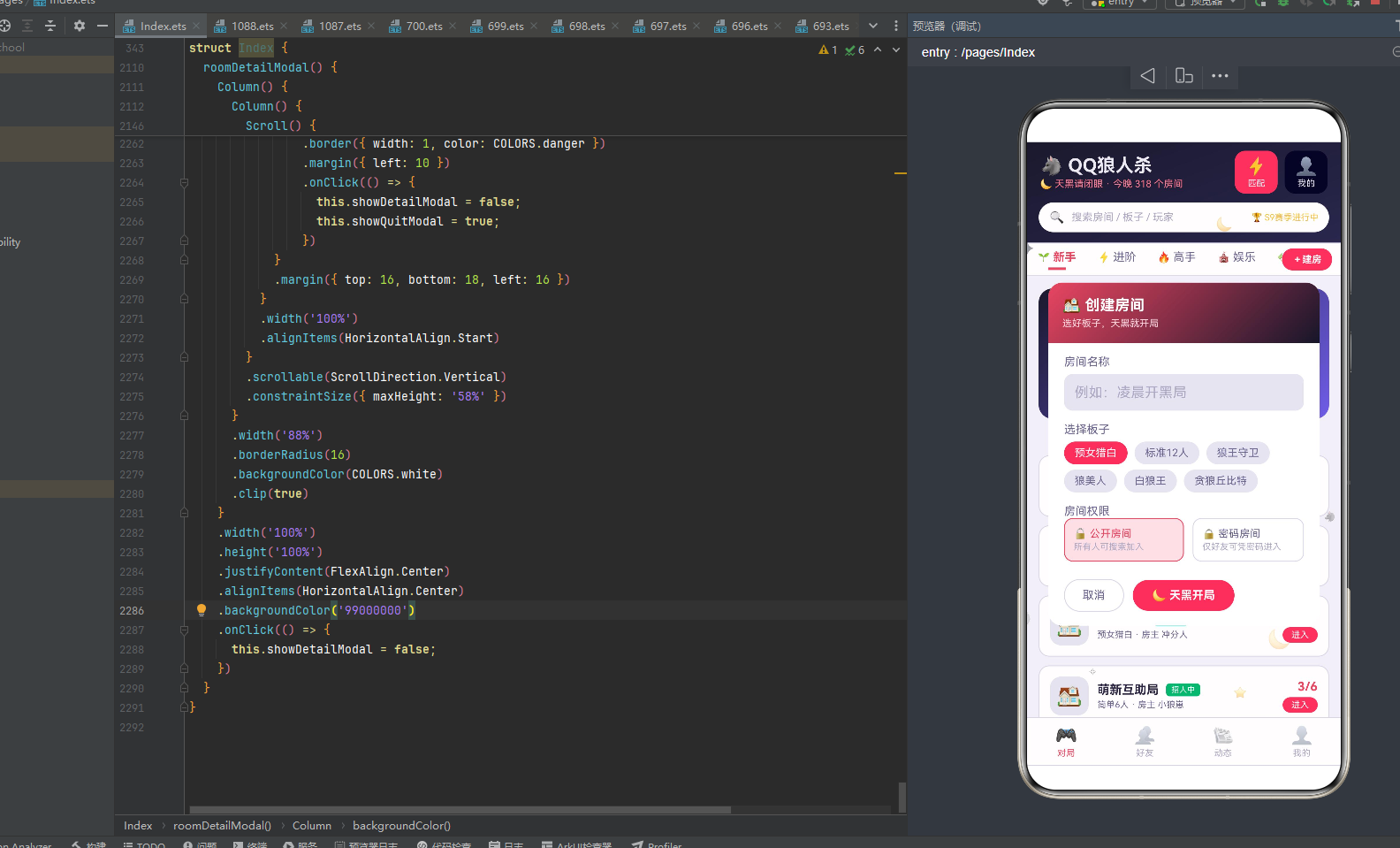
创建房间弹窗是新增房间的交互入口,血红渐变头部(bloodRed→nightBlue),包含房间名称TextInput/板子Flex选择/权限Row公开或密码三个表单项。
弹窗外层Column width100% height100% justifyContent Center alignItems Center backgroundColor ‘99000000’(60%透明黑遮罩),点击遮罩onClick关闭。内层Column width86% borderRadius16 white白底clip true。
头部Column width100% padding16 alignItems Start linearGradient angle135从bloodRed血红到nightBlue暗夜蓝:"🏠 创建房间"fontSize17加粗白字 + "选好板子,天黑就开局"fontSize11 #FFD5DE浅红粉字margin top4。血红到暗夜蓝的渐变背景营造出"开局前的紧张刺激"氛围。
表单区Scroll scrollable Vertical constraintSize maxHeight 60%,内Column width100% alignItems Start padding left18 right18:
- 房间名称:标签 + TextInput placeholder’例如:凌晨开黑局’ text绑定roomName fontSize13 placeholderColor textHint backgroundColor cardBgDark borderRadius10 padding 12x height42 margin top6,onChange回写roomName
- 选择板子:标签 + Flex wrap Wrap,ForEach遍历6个板子名(预女猎白/标准12人/狼王守卫/狼美人/白狼王/贪狼丘比特)渲染标签Text,选中时(roomBoard===idx)白字bloodRed血红底,未选中时textSecondary字cardBgDark底,点击roomBoard=idx
- 房间权限:标签 + Row,两列Column layoutWeight1 padding10 borderRadius10 border,选中时(roomLock===0/1)bloodRed血红边+#FBE0E6浅红底,未选中时border边+透明底:
- 🔓公开房间:"所有人可搜索加入"fontSize10 textHint
- 🔒密码房间:"仅好友可凭密码进入"fontSize10 textHint
- 操作按钮Row margin top20 bottom16:"取消"textSecondary字padding 20x10 borderRadius18 border边(点击关闭)+ "🌙 天黑开局"白字加粗padding 22x10 borderRadius18 bloodRed血红底margin left10(点击关闭创建弹窗+showInviteModal=true自动跳转到邀请好友弹窗)
创建房间弹窗的特色是血红→暗夜蓝渐变头部和创建后自动跳转邀请——点击"天黑开局"按钮后showCreateModal=false关闭创建弹窗,同时showInviteModal=true自动打开邀请好友弹窗,实现了"创建房间→邀请好友"的流畅跳转,符合狼人杀"建房后立即喊人"的业务逻辑。房间权限用公开/密码二选一,公开房间所有人可搜索加入,密码房间仅好友可凭密码进入,满足不同隐私需求。
10.2 邀请好友弹窗 inviteFriendsModal(编辑)
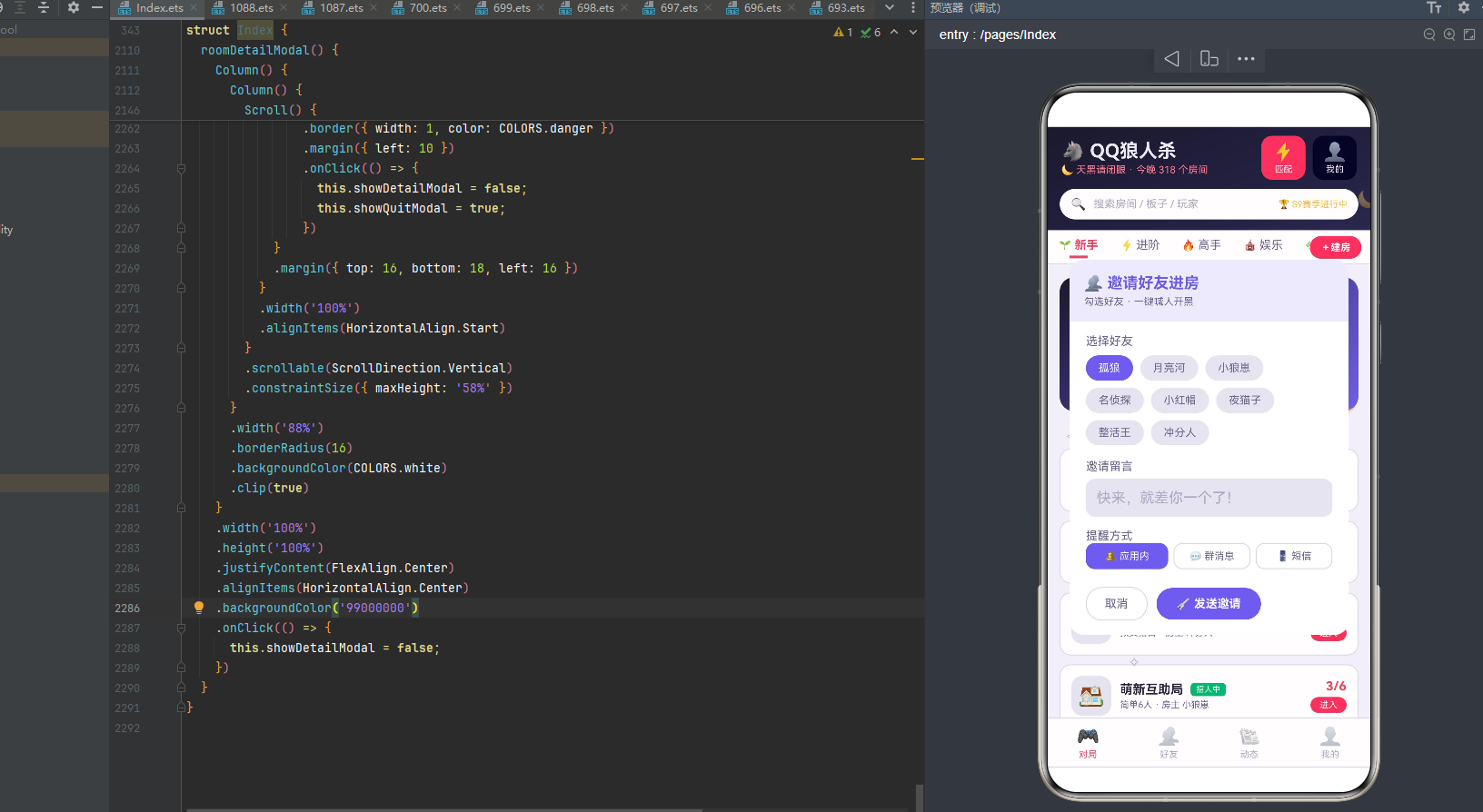
邀请好友弹窗是编辑/邀请的交互入口,紫罗兰#EDEAFB头部,包含选择好友Flex/邀请留言TextInput/提醒方式Row三个表单项。
头部Column width100% padding16 alignItems Start backgroundColor '#EDEAFB’浅紫底borderRadius top16:"👥 邀请好友进房"fontSize17加粗purple紫字 + "勾选好友 · 一键喊人开黑"fontSize11 textSecondary灰字margin top4。浅紫底+紫字的头部与创建弹窗的血红渐变头形成视觉区分——邀请是社交行为用紫色,创建是游戏行为用血红。
表单区Scroll constraintSize maxHeight 56%:
- 选择好友:标签 + Flex wrap Wrap,ForEach遍历8个好友名(孤狼/月亮河/小狼崽/名侦探/小红帽/夜猫子/整活王/冲分人)渲染标签Text,选中时(invitePicked===idx)白字purple紫底,未选中时textSecondary字cardBgDark底,点击invitePicked=idx
- 邀请留言:标签 + TextInput placeholder’快来,就差你一个了!’ text绑定inviteNote fontSize13 backgroundColor cardBgDark borderRadius10 padding 12x height42 margin top6,onChange回写inviteNote
- 提醒方式:标签 + Row,ForEach遍历[‘🔔 应用内’,‘💬 群消息’,‘📱 短信’]渲染Text layoutWeight1 textAlign Center padding 7x0 borderRadius10,选中时(invitePicked===idx)白字purple紫底+purple边,未选中时textSecondary字透明底+border边
- 操作按钮Row margin top20 bottom16:"取消"textSecondary字padding 20x10 borderRadius18 border边(点击关闭)+ "🚀 发送邀请"白字加粗padding 22x10 borderRadius18 purple紫底margin left10(点击关闭)
邀请好友弹窗的特色是紫罗兰主题和多提醒方式——整体用purple紫色作为主题色(头部浅紫底+紫字、选中标签紫底、发送按钮紫底),与创建弹窗的血红主题区分。提醒方式提供应用内/群消息/短信三种渠道,满足不同场景的邀请需求。邀请留言TextInput提供默认placeholder’快来,就差你一个了!',用户可自定义邀请语。
10.3 退出房间弹窗 quitRoomModal(删除)
退出房间弹窗是删除/退出的确认型对话框,警告小卡风格,比其他弹窗更小更简洁。
外层Column width100% height100% justifyContent Center alignItems Center backgroundColor ‘99000000’,点击遮罩关闭。内层Column width78% borderRadius16 white白底alignItems Center padding top24:
- 🚪门Emoji fontSize40
- "确定退出当前房间?"fontSize16加粗textPrimary margin top10
- "对局进行中退出将判定为逃跑,扣除 15 声望分"fontSize11 danger红字textAlign Center margin top8 left20 right20(用danger红字明确警示惩罚后果)
- 操作按钮Row margin top20 bottom18:"留在房间"textSecondary字padding 18x10 borderRadius18 border边(点击关闭)+ "狠心退出"白字加粗padding 18x10 borderRadius18 danger红底margin left10(点击关闭)
退出弹窗width78%比其他弹窗(86%/88%)更小,位置居中,符合确认对话框"小巧居中"的视觉定位。danger红字的"扣除15声望分"提示明确警示了退出后果,配合"留在房间"取消按钮和"狠心退出"danger红底确认按钮的双重防护,避免了误操作导致的逃跑惩罚。"狠心退出"的按钮文案比"确认退出"更有情感色彩,符合狼人杀的游戏氛围。
10.4 房间详情弹窗 roomDetailModal(查询)
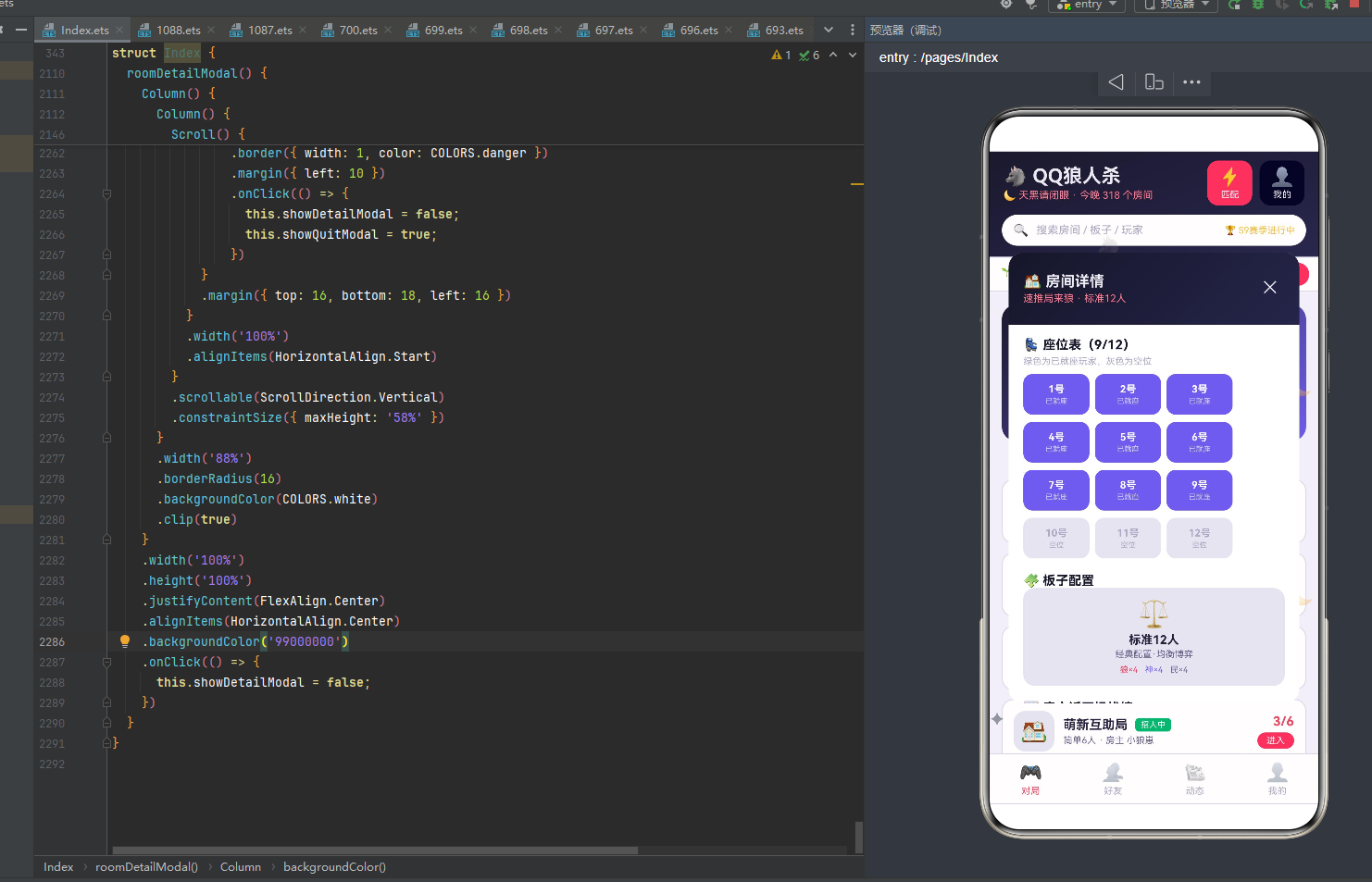
房间详情弹窗是查看房间详细信息的查询入口,暗夜蓝渐变头部,包含座位表/板子配置/房主近五场战绩/操作按钮四个部分,是内容最丰富的弹窗。
头部Column width100% padding16 linearGradient angle135从nightBlue到nightBlueLight暗夜蓝渐变:Row("🏠 房间详情"fontSize16加粗moonWhite白字layoutWeight1 + selectedRoom存在时显示房间名+板子fontSize11 bloodLight浅血红字margin top3 + "✕"关闭按钮白字padding8点击关闭)。
内容区Scroll constraintSize maxHeight 58%,selectedRoom存在时渲染:
- 座位表:标题"💺 座位表(current/players)“fontSize14加粗nightBlue暗夜蓝字margin top14 left16 + 副标题"绿色为已就座玩家,灰色为空位"fontSize10 textHint灰margin top4 left16 + Flex wrap Wrap,ForEach遍历1-12号座位渲染Column width72 padding 10x0 borderRadius10 backgroundColor n<=current?purple紫:cardBgDark灰margin left6 top8:座位号n+'号’fontSize11加粗白字(已就座)/textHint灰(空位)+ 状态"已就座”/"空位"fontSize8 margin top2。12个座位用Flex换行排列,已就座(n<=current)用purple紫底白字,空位用cardBgDark灰底灰字,通过颜色区分座位状态
- 板子配置:标题"🧩 板子配置"fontSize14加粗nightBlue margin top16 left16 + Row,ForEach遍历ALL_BOARDS用if(b.name===selectedRoom.board)筛选当前房间的板子渲染Column layoutWeight1 padding12 borderRadius12 cardBgDark底margin 16x alignItems Center:板子图标fontSize28 + 板子名fontSize13加粗margin top4 + 描述fontSize10 textSecondary margin top2 + 配置Row margin top6(狼×wolf bloodRed/神×god purple/民×villager textSecondary)
- 房主近五场战绩:标题"📈 房主近五场战绩"fontSize14加粗nightBlue margin top16 left16 + ForEach遍历5条战绩渲染Row width100% padding 8x16:对局信息fontSize11 textPrimary layoutWeight1 + "详情"fontSize10 purple紫字,每项后加Divider
- 操作按钮Row margin top16 bottom18 left16:"👥 邀请好友"白字fontSize13 padding 20x10 borderRadius18 purple紫底(点击关闭详情+showInviteModal=true跳转到邀请弹窗)+ "🚪 退出房间"danger红字fontSize13 padding 20x10 borderRadius18 border danger红边margin left10(点击关闭详情+showQuitModal=true跳转到退出确认弹窗)
房间详情弹窗是4个弹窗中内容最丰富的——从座位表(12个座位Flex换行排列)到板子配置(筛选当前房间的板子),到房主近五场战绩,到邀请好友+退出房间操作按钮,完整呈现了一个房间的详细信息。座位表用Flex换行布局,12个座位自动换行排列,已就座用purple紫底,空位用cardBgDark灰底,通过颜色直观呈现房间人数状态。操作按钮实现了弹窗间的流畅跳转——邀请好友按钮跳转到邀请弹窗,退出房间按钮跳转到退出确认弹窗,形成了"详情→邀请/退出"的完整交互链路。
四个弹窗各自独立@Builder,通过showCreateModal/showInviteModal/showQuitModal/showDetailModal四个布尔状态条件渲染,弹窗外层统一用Column width100% height100% justifyContent Center + backgroundColor '99000000’实现遮罩+居中,点击遮罩onClick关闭。四个弹窗覆盖了狼人杀语音社交平台的核心交互——创建房间(新增)、邀请好友(编辑)、退出房间(删除)、房间详情(查询),形成了完整的增删改查交互闭环。创建后自动跳转邀请、详情内跳转邀请/退出,实现了弹窗间的流畅跳转,是模态弹窗交互设计的优秀实践。
特性对比表
| 技术维度 | 具体实现 | 作用与特点 | 适用场景 |
|---|---|---|---|
| 色彩管理 | ColorPalette接口+COLORS 19色 | interface类型约束编译期校验,暗夜蓝血红狼人杀派对风 | 全局配色统一管理 |
| 暗夜蓝主色 | nightBlue #16162A | 头部渐变/复盘事件/板子标签/动态名字,月黑风高深夜天空 | 狼人杀主题核心色 |
| 血红强调 | bloodRed #E94560 | 激活Tab/按钮/标签/柱状图周末/高手水平/对局中状态/点赞,狼人刀人鲜血 | 强调色 |
| 月光白文字 | moonWhite #EDEBF4 | 暗夜蓝背景上的文字图标,比纯白稍暗带蓝调模拟月光 | 暗背景文字 |
| 紫色神秘 | purple #6C5CE7 | 板子标签/邀请弹窗/复盘验人/常用身份背景,神秘推理象征 | 神秘色 |
| 金色成就 | gold #F5C242 | 段位/统计/MVP/巅峰冠军/复盘开枪/娱乐房加入,成就荣誉象征 | 成就色 |
| 底部4Tab | 对局🎮/好友👥/动态📰/我的👤 | 一级导航切换大模块,激活态bloodRed血红 | 应用一级导航 |
| 顶部6Tab | 新手🌱/进阶⚡/高手🔥/娱乐🎪/板子🧩/复盘📊 | 对局模块二级分类,横向Scroll可滑动,激活态血红+金色指示条 | 对局分类 |
| 双层导航架构 | 底部一级+顶部二级 | 底部切大模块,顶部在模块内细分分类,内容型应用标准架构 | 内容型应用导航 |
| 新手指引大卡 | nightBlue→purple渐变+规则动画/AI陪玩/术语词典三功能 | 新手入门引导,半透明白色功能卡 | 新手分类 |
| 萌新友好房列表 | ForEach内if筛选level新手/进阶 | 遍历+条件筛选,不需要额外数组,多分类共享数据源 | 新手房间列表 |
| 日对局数柱状图 | DAYS_LABEL 7天+DAILY_GAMES [12,18,9,22,28,46,35]+barHeight(v*2.2) | 日对局数可视化,周末bloodRed血红高亮,工作日purple紫 | 进阶分类 |
| 双列房间格 | leftRooms/rightRooms奇偶拆列+双Column | 偶数左列奇数右列,比单列更紧凑展示更多房间 | 进阶房间列表 |
| 巅峰榜大卡 | nightBlue→bloodRed渐变+前五玩家半透明白卡 | 冠军gold金高亮,其他bloodLight,数据跨模块复用好友胜场 | 高手分类 |
| 高手房列表 | ForEach内if筛选level高手+全程录音可复盘 | 高手对局录音复盘,板子标签nightBlue暗夜蓝 | 高手房间列表 |
| 娱乐模式横滑 | Scroll Horizontal+贪狼丘比特/白痴赖子/静音文字局三卡 | 横向滑动浏览娱乐模式,模式推荐位标准布局 | 娱乐分类 |
| 娱乐房列表 | ForEach内if筛选level娱乐+加入按钮gold金底 | 娱乐房快速加入,金色按钮区分轻松氛围 | 娱乐房间列表 |
| 板子配置网格 | ALL_BOARDS 8板子+if(wolf>=4)分双列+狼神民三色标签 | 按狼人数属性分列,点击板子直接建房预选 | 板子分类 |
| 复盘时间轴 | REPLAY_STEPS 8步+圆形事件类型图标+垂直连接线+stepColor | 时间轴布局呈现对局进展,事件类型颜色编码 | 复盘分类 |
| 好友在线状态点 | Stack头像+position x34 y34的●状态点+statusColor | 头像右下角角标,在线success/对局中bloodRed/离线textHint | 好友列表 |
| 好友水平标签 | levelColor高手bloodRed/进阶purple/娱乐gold/新手success | 四级颜色区分玩家水平 | 好友信息 |
| 狼友圈动态 | 8条动态+头像/发布者/时间/关注/正文/点赞/评论 | 社交信息流布局,发布者名字nightBlue,点赞bloodRed | 动态Tab |
| 个人信息卡 | nightBlue渐变+段位/胜场/胜率/本命角色+四列gold统计 | 暗夜蓝主题个人主页,金色统计突出成就 | 我的Tab |
| 最近对局列表 | 4条对局+✅/❌胜负图标+退出房间danger按钮 | 胜负图标区分,退出按钮触发quitModal | 我的Tab |
| @Observed RoomItem | 房间实体8字段15个房间 | id/name/board/players/current/host/level/tag | 房间数据 |
| @Observed FriendItem | 好友实体6字段10个好友 | id/name/avatar/status/level/wins | 好友数据 |
| @Observed MomentItem | 动态实体7字段8条动态 | id/name/avatar/content/time/likes/comments | 动态数据 |
| @Observed ReplayStep | 复盘步骤4字段8步 | id/phase/event/type | 复盘数据 |
| BoardItem接口 | 板子配置6字段8个 | name/desc/wolf/god/villager/icon,静态配置不需@Observed | 板子数据 |
| tagColor | 招人中success/游戏中bloodRed/可观战purple | 房间标签三级颜色映射 | 房间状态着色 |
| levelColor | 高手bloodRed/进阶purple/娱乐gold/新手success | 水平四级颜色映射 | 玩家水平着色 |
| statusColor | 在线success/对局中bloodRed/离线textHint | 好友状态三级颜色映射 | 在线状态着色 |
| stepColor | 刀bloodRed/验purple/枪gold/胜success/其他nightBlueLight | 复盘事件五级颜色映射 | 事件类型着色 |
| barHeight | v*2.2+‘vp’ | 场次映射柱高字符串,倍率2.2适配小数值范围 | 柱状图高度 |
| roomFull | current>=players | 判断房间满员,控制进入按钮状态 | 房间状态判断 |
| leftRooms/rightRooms | 偶数/奇数索引拆分数组 | 双列布局数据准备 | 双列房间格 |
| 粒子接口 | ParticleItem id/x/y/size/opacity/icon 6字段 | 粒子数据结构 | 粒子动画 |
| 月亮星星图标 | 🌙⭐✦🐺✧五种 | 月亮/星星/闪光/狼头/星芒,狼人杀主题意象 | 粒子图标 |
| buildParticles() | 16粒子质数41/67步长取模均匀分布 | x=(i41)%340+10 y=80+(i67)%560,质数避免聚集 | 粒子初始化 |
| driftParticles() | y-3+x+sin(id+y/50)*3+y<60→640循环 | 向上漂移+sin左右摆动+底部循环,比剧本杀y-4更慢 | 粒子逐帧更新 |
| setInterval 130ms | aboutToAppear启动+aboutToDisappear清除 | 每130ms更新粒子数组,@State赋值触发重渲染 | 动画驱动 |
| 粒子key技巧 | id.toString()+‘_’+y.toFixed(0) | key包含动态y,每帧y变化key变化强制重新渲染 | 逐帧动画关键 |
| Stack粒子叠加 | ForEach粒子在Stack中position绝对定位 | 粒子覆盖在主内容之上,悬浮效果 | 粒子渲染 |
| 创建房间弹窗 | bloodRed→nightBlue渐变头+房间名/板子/权限 | 新增房间,创建后自动跳转邀请弹窗 | 创建交互 |
| 邀请好友弹窗 | 紫罗兰#EDEAFB头+选择好友/留言/提醒方式 | 编辑邀请,紫色主题社交行为,三提醒渠道 | 邀请交互 |
| 退出房间弹窗 | width78%警告小卡+danger红底+扣15声望分提示 | 删除退出,双重防护避免误操作,"狠心退出"文案 | 退出交互 |
| 房间详情弹窗 | nightBlue渐变头+座位表/板子/战绩/邀请+退出按钮 | 查询详情,内容最丰富,12座位Flex换行,弹窗间跳转 | 详情交互 |
| 弹窗遮罩 | Column width100% height100%+bg ‘99000000’+onClick关闭 | 60%透明黑遮罩+居中,点击遮罩关闭 | 模态弹窗通用 |
| TextInput受控 | text绑定@State字符串+onChange回写 | 房间名/邀请留言受控输入 | 表单输入 |
| Flex换行 | Flex({wrap:FlexWrap.Wrap}) | 板子选择/好友选择/座位表/常用身份自动换行 | 标签布局 |
| 弹窗间跳转 | 创建→邀请/详情→邀请/详情→退出 | showA=false+showB=true实现流畅跳转 | 弹窗交互 |
| aboutToAppear | 组件创建后启动setInterval | 生命周期启动定时器,粒子动画开始 | 生命周期 |
| aboutToDisappear | 组件销毁前clearInterval | 生命周期清除定时器,防止内存泄漏 | 生命周期 |
| ForEach内if筛选 | 遍历+条件判断渲染符合项 | 新手/高手/娱乐房按level筛选,板子按wolf筛选 | 条件渲染 |
| ForEach键值生成器 | (item)=>唯一标识字符串 | 列表高效diff更新,粒子key包含y强制刷新 | 所有列表渲染 |
| linearGradient | angle135/160 colors[[start,0],[end,1]] | 暗夜蓝/血红/紫色渐变背景,用于头部/大卡/信息卡 | 渐变背景 |
| Scroll横向 | scrollable Horizontal+scrollBar Off | 顶部6Tab/娱乐模式横滑横向滑动 | 横向滚动 |
| constraintSize maxHeight | 限制弹窗表单最大高度 | 防止内容溢出弹窗,长表单可滚动 | 模态弹窗 |
| borderRadius+clip true | 弹窗圆角+裁剪内容 | 内层卡片圆角,clip true裁剪超出圆角的内容 | 弹窗圆角 |
| position绝对定位 | 粒子/状态点用position x y | 粒子悬浮效果,好友状态点角标 | 精确定位 |
完整代码
// ============================================================
// 1088.ets —— QQ狼人杀·天黑之夜(语音推理社交)
// 风格:暗夜蓝 + 血红 · 狼人杀派对风
// 底部4tab:对局 / 好友 / 动态 / 我的
// 顶部6tab:新手 / 进阶 / 高手 / 娱乐 / 板子 / 复盘
// 弹框:创建房间(新增) / 邀请好友(编辑) / 退出房间(删除) / 房间详情
// 特效:月亮星星粒子 + 日对局数柱状图
// ============================================================
interface ColorPalette {
nightBlue: string;
nightBlueLight: string;
bloodRed: string;
bloodLight: string;
moonWhite: string;
purple: string;
bg: string;
cardBg: string;
cardBgDark: string;
textPrimary: string;
textSecondary: string;
textHint: string;
white: string;
border: string;
danger: string;
success: string;
gold: string;
}
const COLORS: ColorPalette = {
nightBlue: '#16162A',
nightBlueLight: '#25254A',
bloodRed: '#E94560',
bloodLight: '#FF7A8F',
moonWhite: '#EDEBF4',
purple: '#6C5CE7',
bg: '#F2F1F8',
cardBg: '#FFFFFF',
cardBgDark: '#E6E4F0',
textPrimary: '#25213D',
textSecondary: '#6B6790',
textHint: '#ADA9C4',
white: '#FFFFFF',
border: '#D9D6E8',
danger: '#E94560',
success: '#21B573',
gold: '#F5C242'
};
interface TabItem {
label: string;
icon: string;
}
const BOTTOM_TABS: TabItem[] = [
{ label: '对局', icon: '🎮' },
{ label: '好友', icon: '👥' },
{ label: '动态', icon: '📰' },
{ label: '我的', icon: '👤' }
];
const TOP_TABS: TabItem[] = [
{ label: '新手', icon: '🌱' },
{ label: '进阶', icon: '⚡' },
{ label: '高手', icon: '🔥' },
{ label: '娱乐', icon: '🎪' },
{ label: '板子', icon: '🧩' },
{ label: '复盘', icon: '📊' }
];
const DAYS_LABEL: string[] = ['周一', '周二', '周三', '周四', '周五', '周六', '周日'];
const DAILY_GAMES: number[] = [12, 18, 9, 22, 28, 46, 35];
@Observed
class RoomItem {
id: number;
name: string;
board: string;
players: number;
current: number;
host: string;
level: string;
tag: string;
constructor(id: number, name: string, board: string, players: number,
current: number, host: string, level: string, tag: string) {
this.id = id;
this.name = name;
this.board = board;
this.players = players;
this.current = current;
this.host = host;
this.level = level;
this.tag = tag;
}
}
const ALL_ROOMS: RoomItem[] = [
new RoomItem(1, '新手村第一夜', '预女猎白', 9, 6, '月亮河', '新手', '招人中'),
new RoomItem(2, '速推局来狼', '标准12人', 12, 9, '孤狼', '进阶', '招人中'),
new RoomItem(3, '大神观战局', '狼王守卫', 12, 12, '猎户座', '高手', '可观战'),
new RoomItem(4, '快乐发言房', '白痴赖子', 10, 4, '话痨', '娱乐', '招人中'),
new RoomItem(5, '上分车队', '预女猎白', 9, 8, '冲分人', '进阶', '招人中'),
new RoomItem(6, '凌晨三点半', '守卫暗牌', 11, 11, '夜猫子', '高手', '游戏中'),
new RoomItem(7, '萌新互助局', '简单6人', 6, 3, '小狼崽', '新手', '招人中'),
new RoomItem(8, '逻辑怪聚集地', '狼美人', 12, 10, '名侦探', '高手', '招人中'),
new RoomItem(9, '整活娱乐局', '贪狼丘比特', 12, 5, '整活王', '娱乐', '招人中'),
new RoomItem(10, '夜谈十点档', '标准12人', 12, 12, '老主播', '进阶', '游戏中'),
new RoomItem(11, '女神专场', '白狼王', 10, 7, '小红帽', '进阶', '招人中'),
new RoomItem(12, '静音文字局', '暗牌6人', 6, 2, '潜水员', '新手', '招人中'),
new RoomItem(13, '巅峰对决房', '恶灵骑士', 12, 12, '总决赛', '高手', '可观战'),
new RoomItem(14, '下班放松局', '预女猎白', 9, 5, '打工人', '进阶', '招人中'),
new RoomItem(15, '整点报时局', '混血儿', 11, 6, '咕咕钟', '娱乐', '招人中')
];
function leftRooms(): RoomItem[] {
const res: RoomItem[] = [];
for (let i = 0; i < ALL_ROOMS.length; i += 2) {
res.push(ALL_ROOMS[i]);
}
return res;
}
function rightRooms(): RoomItem[] {
const res: RoomItem[] = [];
for (let i = 1; i < ALL_ROOMS.length; i += 2) {
res.push(ALL_ROOMS[i]);
}
return res;
}
@Observed
class FriendItem {
id: number;
name: string;
avatar: string;
status: string;
level: string;
wins: number;
constructor(id: number, name: string, avatar: string, status: string, level: string, wins: number) {
this.id = id;
this.name = name;
this.avatar = avatar;
this.status = status;
this.level = level;
this.wins = wins;
}
}
const ALL_FRIENDS: FriendItem[] = [
new FriendItem(1, '孤狼', '🐺', '对局中', '高手', 328),
new FriendItem(2, '月亮河', '🌙', '在线', '进阶', 156),
new FriendItem(3, '小狼崽', '🐶', '在线', '新手', 23),
new FriendItem(4, '名侦探', '🕵️', '对局中', '高手', 402),
new FriendItem(5, '小红帽', '📕', '在线', '进阶', 189),
new FriendItem(6, '夜猫子', '🐱', '对局中', '进阶', 231),
new FriendItem(7, '猎户座', '🏹', '离线', '高手', 365),
new FriendItem(8, '整活王', '🃏', '在线', '娱乐', 88),
new FriendItem(9, '潜水员', '🤿', '离线', '新手', 12),
new FriendItem(10, '冲分人', '🚀', '在线', '进阶', 274)
];
@Observed
class MomentItem {
id: number;
name: string;
avatar: string;
content: string;
time: string;
likes: number;
comments: number;
constructor(id: number, name: string, avatar: string, content: string, time: string, likes: number, comments: number) {
this.id = id;
this.name = name;
this.avatar = avatar;
this.content = content;
this.time = time;
this.likes = likes;
this.comments = comments;
}
}
const ALL_MOMENTS: MomentItem[] = [
new MomentItem(1, '孤狼', '🐺', '昨晚一把狼人四杀,警徽流都没打出来就赢了,这波预判满分!', '10分钟前', 128, 36),
new MomentItem(2, '月亮河', '🌙', '新手第一次拿到女巫,毒错人了……对不起我的好人们😭', '1小时前', 89, 52),
new MomentItem(3, '名侦探', '🕵️', '从三号的一句口误推出全场身份,逻辑推理才是狼人杀的灵魂!', '2小时前', 245, 74),
new MomentItem(4, '整活王', '🃏', '娱乐局玩贪狼,把丘比特连了自己和狼队友,全场笑疯🤣', '3小时前', 312, 98),
new MomentItem(5, '小红帽', '📕', '连续三把平民被首刀,系统你是不是针对我?', '5小时前', 56, 28),
new MomentItem(6, '猎户座', '🏹', '猎人最后一枪带走双狼,翻盘的瞬间心脏都要跳出来了!', '8小时前', 178, 45),
new MomentItem(7, '夜猫子', '🐱', '凌晨场的水太深,全是影帝,萌新慎入……', '昨天 23:40', 94, 31),
new MomentItem(8, '冲分人', '🚀', '本周胜率71%冲上钻石,下个目标是狼王!', '昨天 21:15', 156, 42)
];
interface BoardItem {
name: string;
desc: string;
wolf: number;
god: number;
villager: number;
icon: string;
}
const ALL_BOARDS: BoardItem[] = [
{ name: '预女猎白', desc: '预言家·女巫·猎人·白痴', wolf: 3, god: 4, villager: 4, icon: '🔮' },
{ name: '标准12人', desc: '经典配置·均衡博弈', wolf: 4, god: 4, villager: 4, icon: '⚖️' },
{ name: '狼王守卫', desc: '狼王+守卫·攻防拉满', wolf: 4, god: 5, villager: 3, icon: '🛡️' },
{ name: '狼美人', desc: '魅惑机制·心跳体验', wolf: 4, god: 4, villager: 4, icon: '🌹' },
{ name: '白狼王', desc: '自爆之王·速战速决', wolf: 4, god: 3, villager: 3, icon: '🤍' },
{ name: '守卫暗牌', desc: '暗牌推理·高阶挑战', wolf: 3, god: 4, villager: 4, icon: '🌑' },
{ name: '恶灵骑士', desc: '地狱难度·大神专属', wolf: 5, god: 4, villager: 3, icon: '💀' },
{ name: '贪狼丘比特', desc: '娱乐乱斗·情侣连线', wolf: 4, god: 4, villager: 4, icon: '💘' }
];
@Observed
class ReplayStep {
id: number;
phase: string;
event: string;
type: string;
constructor(id: number, phase: string, event: string, type: string) {
this.id = id;
this.phase = phase;
this.event = event;
this.type = type;
}
}
const REPLAY_STEPS: ReplayStep[] = [
new ReplayStep(1, '第一夜', '狼人刀杀 7号玩家(女巫)', '刀'),
new ReplayStep(2, '第一夜', '预言家查验 3号 为好人', '验'),
new ReplayStep(3, '第一天', '警上竞选 2号当选警长', '警'),
new ReplayStep(4, '第一天', '投票放逐 9号(狼人)', '票'),
new ReplayStep(5, '第二夜', '狼人刀杀 5号(猎人)', '刀'),
new ReplayStep(6, '第二夜', '猎人开枪带走 11号(狼人)', '枪'),
new ReplayStep(7, '第二天', '投票放逐 4号(狼人)', '票'),
new ReplayStep(8, '结算', '狼人全部出局 · 好人阵营胜利', '胜')
];
interface ParticleItem {
id: number;
x: number;
y: number;
size: number;
opacity: number;
icon: string;
}
const PARTICLE_ICONS: string[] = ['🌙', '⭐', '✦', '🐺', '✧'];
function buildParticles(): ParticleItem[] {
const arr: ParticleItem[] = [];
for (let i = 0; i < 16; i++) {
arr.push({
id: i,
x: (i * 41) % 340 + 10,
y: 80 + (i * 67) % 560,
size: 10 + (i * 5) % 14,
opacity: 0.2 + (i % 4) * 0.1,
icon: PARTICLE_ICONS[i % PARTICLE_ICONS.length]
});
}
return arr;
}
function driftParticles(list: ParticleItem[]): ParticleItem[] {
const next: ParticleItem[] = [];
for (let i = 0; i < list.length; i++) {
const p = list[i];
const ny = p.y - 3;
next.push({
id: p.id,
x: p.x + Math.sin(p.id + p.y / 50) * 3,
y: ny < 60 ? 640 : ny,
size: p.size,
opacity: p.opacity,
icon: p.icon
});
}
return next;
}
function tagColor(tag: string): string {
if (tag === '招人中') {
return COLORS.success;
}
if (tag === '游戏中') {
return COLORS.bloodRed;
}
return COLORS.purple;
}
function levelColor(level: string): string {
if (level === '高手') {
return COLORS.bloodRed;
}
if (level === '进阶') {
return COLORS.purple;
}
if (level === '娱乐') {
return COLORS.gold;
}
return COLORS.success;
}
function statusColor(status: string): string {
if (status === '在线') {
return COLORS.success;
}
if (status === '对局中') {
return COLORS.bloodRed;
}
return COLORS.textHint;
}
function stepColor(type: string): string {
if (type === '刀') {
return COLORS.bloodRed;
}
if (type === '验') {
return COLORS.purple;
}
if (type === '枪') {
return COLORS.gold;
}
if (type === '胜') {
return COLORS.success;
}
return COLORS.nightBlueLight;
}
function barHeight(v: number): string {
return (v * 2.2).toFixed(0) + 'vp';
}
function roomFull(r: RoomItem): boolean {
return r.current >= r.players;
}
@Entry
struct Index {
@State currentBottomTab: number = 0;
@State currentTopTab: number = 0;
@State showCreateModal: boolean = false;
@State showInviteModal: boolean = false;
@State showQuitModal: boolean = false;
@State showDetailModal: boolean = false;
@State selectedRoom: RoomItem | null = null;
@State particles: ParticleItem[] = buildParticles();
@State roomName: string = '';
@State roomBoard: number = 0;
@State roomLock: number = 0;
@State inviteNote: string = '';
@State invitePicked: number = 0;
private timerId: number = -1;
aboutToAppear() {
this.timerId = setInterval(() => {
this.particles = driftParticles(this.particles);
}, 130);
}
aboutToDisappear() {
if (this.timerId >= 0) {
clearInterval(this.timerId);
}
}
build() {
Stack() {
Column() {
this.headerBuilder()
if (this.currentBottomTab === 0) {
this.gameTopTabs()
} else if (this.currentBottomTab === 1) {
this.friendTopBar()
} else if (this.currentBottomTab === 2) {
this.momentTopBar()
} else {
this.mineTopBar()
}
Scroll() {
Column() {
if (this.currentBottomTab === 0) {
this.gameContent()
} else if (this.currentBottomTab === 1) {
this.friendContent()
} else if (this.currentBottomTab === 2) {
this.momentContent()
} else {
this.mineContent()
}
}
.width('100%')
.alignItems(HorizontalAlign.Start)
}
.layoutWeight(1)
.scrollable(ScrollDirection.Vertical)
.scrollBar(BarState.Off)
this.bottomTabs()
}
.width('100%')
.height('100%')
.backgroundColor(COLORS.bg)
ForEach(this.particles, (p: ParticleItem) => {
Text(p.icon)
.fontSize(p.size)
.opacity(p.opacity)
.position({ x: p.x, y: p.y })
}, (p: ParticleItem) => p.id.toString() + '_' + p.y.toFixed(0))
if (this.showCreateModal) {
this.createRoomModal()
}
if (this.showInviteModal) {
this.inviteFriendsModal()
}
if (this.showQuitModal) {
this.quitRoomModal()
}
if (this.showDetailModal) {
this.roomDetailModal()
}
}
.width('100%')
.height('100%')
}
// ================= 头部(暗夜蓝狼人杀风) =================
@Builder
headerBuilder() {
Column() {
Row() {
Column() {
Text('🐺 QQ狼人杀')
.fontSize(21)
.fontWeight(FontWeight.Bold)
.fontColor(COLORS.moonWhite)
Text('🌙 天黑请闭眼 · 今晚 318 个房间')
.fontSize(11)
.fontColor(COLORS.bloodLight)
.margin({ top: 2 })
}
.alignItems(HorizontalAlign.Start)
.layoutWeight(1)
Column() {
Text('⚡')
.fontSize(20)
Text('匹配')
.fontSize(10)
.fontColor(COLORS.moonWhite)
.margin({ top: 2 })
}
.alignItems(HorizontalAlign.Center)
.padding({ left: 12, right: 12, top: 6, bottom: 6 })
.borderRadius(12)
.backgroundColor(COLORS.bloodRed)
.margin({ right: 8 })
.onClick(() => {
this.showCreateModal = true;
})
Column() {
Text('👤')
.fontSize(20)
Text('我的')
.fontSize(10)
.fontColor(COLORS.moonWhite)
.margin({ top: 2 })
}
.alignItems(HorizontalAlign.Center)
.padding({ left: 12, right: 12, top: 6, bottom: 6 })
.borderRadius(12)
.backgroundColor('33FFFFFF')
.onClick(() => {
this.currentBottomTab = 3;
})
}
.width('100%')
.padding({ left: 16, right: 16, top: 10 })
Row() {
Text('🔍')
.fontSize(14)
.margin({ left: 12 })
Text('搜索房间 / 板子 / 玩家')
.fontSize(12)
.fontColor(COLORS.textHint)
.margin({ left: 8 })
Column().layoutWeight(1)
Text('🏆 S9赛季进行中')
.fontSize(10)
.fontColor(COLORS.gold)
.margin({ right: 12 })
}
.width('92%')
.height(34)
.borderRadius(17)
.backgroundColor(COLORS.white)
.margin({ top: 10, bottom: 12 })
}
.width('100%')
.linearGradient({
angle: 160,
colors: [[COLORS.nightBlue, 0], [COLORS.nightBlueLight, 1]]
})
}
// ================= 顶部tab =================
@Builder
gameTopTabs() {
Row() {
Scroll() {
Row() {
ForEach(TOP_TABS, (t: TabItem, idx: number) => {
Column() {
Row() {
Text(t.icon)
.fontSize(12)
.margin({ right: 3 })
Text(t.label)
.fontSize(13)
.fontWeight(this.currentTopTab === idx ? FontWeight.Bold : FontWeight.Normal)
.fontColor(this.currentTopTab === idx ? COLORS.bloodRed : COLORS.textSecondary)
}
if (this.currentTopTab === idx) {
Divider()
.width(20)
.strokeWidth(3)
.color(COLORS.bloodRed)
.margin({ top: 4 })
} else {
Divider()
.width(20)
.strokeWidth(3)
.color('transparent')
.margin({ top: 4 })
}
}
.padding({ left: 12, right: 12, top: 8, bottom: 6 })
.onClick(() => {
this.currentTopTab = idx;
})
}, (t: TabItem) => t.label)
}
}
.scrollable(ScrollDirection.Horizontal)
.scrollBar(BarState.Off)
.layoutWeight(1)
Column() {
Text('+建房')
.fontSize(11)
.fontWeight(FontWeight.Bold)
.fontColor(COLORS.white)
.padding({ left: 12, right: 12, top: 6, bottom: 6 })
.borderRadius(12)
.backgroundColor(COLORS.bloodRed)
.margin({ right: 10 })
.onClick(() => {
this.showCreateModal = true;
})
}
.justifyContent(FlexAlign.Center)
}
.width('100%')
.backgroundColor(COLORS.cardBg)
.border({ width: 1, color: COLORS.border })
}
@Builder
friendTopBar() {
Row() {
Text('👥 好友列表')
.fontSize(16)
.fontWeight(FontWeight.Bold)
.fontColor(COLORS.textPrimary)
.margin({ left: 16 })
Column().layoutWeight(1)
Text('在线 6 / 10')
.fontSize(11)
.fontColor(COLORS.success)
.margin({ right: 16 })
}
.width('100%')
.padding({ top: 10, bottom: 10 })
.backgroundColor(COLORS.cardBg)
.border({ width: 1, color: COLORS.border })
}
@Builder
momentTopBar() {
Row() {
Text('📰 狼友圈')
.fontSize(16)
.fontWeight(FontWeight.Bold)
.fontColor(COLORS.textPrimary)
.margin({ left: 16 })
Column().layoutWeight(1)
Text('📸 发布动态')
.fontSize(11)
.fontColor(COLORS.bloodRed)
.padding({ left: 10, right: 10, top: 5, bottom: 5 })
.borderRadius(12)
.border({ width: 1, color: COLORS.bloodRed })
.margin({ right: 16 })
.onClick(() => {
this.showInviteModal = true;
})
}
.width('100%')
.padding({ top: 10, bottom: 10 })
.backgroundColor(COLORS.cardBg)
.border({ width: 1, color: COLORS.border })
}
@Builder
mineTopBar() {
Row() {
Text('👤 我的主页')
.fontSize(16)
.fontWeight(FontWeight.Bold)
.fontColor(COLORS.textPrimary)
.margin({ left: 16 })
Column().layoutWeight(1)
Text('段位:钻石Ⅲ')
.fontSize(11)
.fontColor(COLORS.gold)
.margin({ right: 16 })
}
.width('100%')
.padding({ top: 10, bottom: 10 })
.backgroundColor(COLORS.cardBg)
.border({ width: 1, color: COLORS.border })
}
// ================= 对局内容(6个顶部tab差异化) =================
@Builder
gameContent() {
Column() {
if (this.currentTopTab === 0) {
this.newbieContent()
} else if (this.currentTopTab === 1) {
this.advancedContent()
} else if (this.currentTopTab === 2) {
this.masterContent()
} else if (this.currentTopTab === 3) {
this.funContent()
} else if (this.currentTopTab === 4) {
this.boardContent()
} else {
this.replayContent()
}
}
.width('100%')
.padding({ bottom: 12 })
}
// ---- 新手:指引大卡 + 房间列表 ----
@Builder
newbieContent() {
Column() {
Column() {
Text('🌱 新手训练营')
.fontSize(17)
.fontWeight(FontWeight.Bold)
.fontColor(COLORS.white)
.alignSelf(ItemAlign.Start)
Text('3分钟学会狼人杀 · AI教练陪玩 · 输了不掉分')
.fontSize(11)
.fontColor('#C9C6E8')
.margin({ top: 6 })
.alignSelf(ItemAlign.Start)
Row() {
Column() {
Text('🎬')
.fontSize(24)
Text('规则动画')
.fontSize(10)
.fontColor(COLORS.moonWhite)
.margin({ top: 4 })
}
.layoutWeight(1)
.padding({ top: 10, bottom: 10 })
.borderRadius(10)
.backgroundColor('33FFFFFF')
.margin({ right: 6 })
Column() {
Text('🤖')
.fontSize(24)
Text('AI陪玩')
.fontSize(10)
.fontColor(COLORS.moonWhite)
.margin({ top: 4 })
}
.layoutWeight(1)
.padding({ top: 10, bottom: 10 })
.borderRadius(10)
.backgroundColor('33FFFFFF')
.margin({ right: 6 })
Column() {
Text('📖')
.fontSize(24)
Text('术语词典')
.fontSize(10)
.fontColor(COLORS.moonWhite)
.margin({ top: 4 })
}
.layoutWeight(1)
.padding({ top: 10, bottom: 10 })
.borderRadius(10)
.backgroundColor('33FFFFFF')
}
.width('100%')
.margin({ top: 14 })
}
.width('92%')
.padding(16)
.borderRadius(16)
.linearGradient({
angle: 135,
colors: [[COLORS.nightBlue, 0], [COLORS.purple, 1]]
})
.margin({ top: 14 })
Text('🌱 萌新友好房')
.fontSize(15)
.fontWeight(FontWeight.Bold)
.fontColor(COLORS.textPrimary)
.margin({ left: 16, top: 14 })
ForEach(ALL_ROOMS, (r: RoomItem) => {
if (r.level === '新手' || r.level === '进阶') {
Column() {
Row() {
Text('🏠')
.fontSize(24)
.width(44)
.height(44)
.textAlign(TextAlign.Center)
.borderRadius(12)
.backgroundColor(COLORS.cardBgDark)
Column() {
Row() {
Text(r.name)
.fontSize(14)
.fontWeight(FontWeight.Bold)
.fontColor(COLORS.textPrimary)
Text(r.tag)
.fontSize(9)
.fontColor(COLORS.white)
.padding({ left: 6, right: 6, top: 2, bottom: 2 })
.borderRadius(4)
.backgroundColor(tagColor(r.tag))
.margin({ left: 8 })
}
Text(r.board + ' · 房主 ' + r.host)
.fontSize(10)
.fontColor(COLORS.textSecondary)
.margin({ top: 3 })
}
.alignItems(HorizontalAlign.Start)
.layoutWeight(1)
.margin({ left: 10 })
Column() {
Text(r.current.toString() + '/' + r.players.toString())
.fontSize(14)
.fontWeight(FontWeight.Bold)
.fontColor(roomFull(r) ? COLORS.textHint : COLORS.bloodRed)
Text('进入')
.fontSize(10)
.fontColor(COLORS.white)
.padding({ left: 10, right: 10, top: 3, bottom: 3 })
.borderRadius(10)
.backgroundColor(roomFull(r) ? COLORS.textHint : COLORS.bloodRed)
.margin({ top: 4 })
.onClick(() => {
this.selectedRoom = r;
this.showDetailModal = true;
})
}
.alignItems(HorizontalAlign.End)
}
.width('100%')
}
.width('92%')
.borderRadius(12)
.backgroundColor(COLORS.cardBg)
.border({ width: 1, color: COLORS.border })
.padding(12)
.margin({ top: 10 })
.onClick(() => {
this.selectedRoom = r;
this.showDetailModal = true;
})
}
}, (r: RoomItem) => 'n' + r.id.toString())
}
.width('100%')
}
// ---- 进阶:柱状图 + 双列房间格 ----
@Builder
advancedContent() {
Column() {
Column() {
Text('📊 本周每日对局')
.fontSize(14)
.fontWeight(FontWeight.Bold)
.fontColor(COLORS.nightBlue)
.alignSelf(ItemAlign.Start)
Text('周末晚间 21:00-23:00 是开黑黄金档')
.fontSize(10)
.fontColor(COLORS.textSecondary)
.margin({ top: 4 })
.alignSelf(ItemAlign.Start)
Row() {
ForEach(DAYS_LABEL, (d: string, idx: number) => {
Column() {
Text(DAILY_GAMES[idx].toString())
.fontSize(9)
.fontColor(idx >= 5 ? COLORS.bloodRed : COLORS.textHint)
.margin({ bottom: 3 })
Column()
.width(18)
.height(barHeight(DAILY_GAMES[idx]))
.borderRadius({ topLeft: 4, topRight: 4 })
.backgroundColor(idx >= 5 ? COLORS.bloodRed : COLORS.purple)
Text(d)
.fontSize(9)
.fontColor(COLORS.textSecondary)
.margin({ top: 4 })
}
.layoutWeight(1)
.alignItems(HorizontalAlign.Center)
}, (d: string) => 'day' + d)
}
.width('100%')
.margin({ top: 12 })
}
.width('92%')
.borderRadius(14)
.backgroundColor(COLORS.cardBg)
.border({ width: 1, color: COLORS.border })
.padding(14)
.margin({ top: 14 })
Text('⚡ 进阶房推荐')
.fontSize(15)
.fontWeight(FontWeight.Bold)
.fontColor(COLORS.textPrimary)
.margin({ left: 16, top: 14 })
Row() {
Column() {
ForEach(leftRooms(), (r: RoomItem) => {
Column() {
Text(r.board)
.fontSize(11)
.fontColor(COLORS.white)
.padding({ left: 8, right: 8, top: 3, bottom: 3 })
.borderRadius(6)
.backgroundColor(COLORS.purple)
Text(r.name)
.fontSize(13)
.fontWeight(FontWeight.Bold)
.fontColor(COLORS.textPrimary)
.margin({ top: 6 })
Text(r.current.toString() + '/' + r.players.toString() + ' 人 · ' + r.host)
.fontSize(10)
.fontColor(COLORS.textSecondary)
.margin({ top: 4 })
}
.width('100%')
.borderRadius(12)
.backgroundColor(COLORS.cardBg)
.border({ width: 1, color: COLORS.border })
.padding(12)
.margin({ left: 16, right: 6, top: 8 })
.onClick(() => {
this.selectedRoom = r;
this.showDetailModal = true;
})
}, (r: RoomItem) => 'a' + r.id.toString())
}
.layoutWeight(1)
Column() {
ForEach(rightRooms(), (r: RoomItem) => {
Column() {
Text(r.board)
.fontSize(11)
.fontColor(COLORS.white)
.padding({ left: 8, right: 8, top: 3, bottom: 3 })
.borderRadius(6)
.backgroundColor(COLORS.purple)
Text(r.name)
.fontSize(13)
.fontWeight(FontWeight.Bold)
.fontColor(COLORS.textPrimary)
.margin({ top: 6 })
Text(r.current.toString() + '/' + r.players.toString() + ' 人 · ' + r.host)
.fontSize(10)
.fontColor(COLORS.textSecondary)
.margin({ top: 4 })
}
.width('100%')
.borderRadius(12)
.backgroundColor(COLORS.cardBg)
.border({ width: 1, color: COLORS.border })
.padding(12)
.margin({ left: 6, right: 16, top: 8 })
.onClick(() => {
this.selectedRoom = r;
this.showDetailModal = true;
})
}, (r: RoomItem) => 'a' + r.id.toString())
}
.layoutWeight(1)
}
.width('100%')
.alignItems(VerticalAlign.Top)
}
.width('100%')
}
// ---- 高手:巅峰榜 + 房间列表 ----
@Builder
masterContent() {
Column() {
Column() {
Text('🔥 巅峰榜 · 本周')
.fontSize(15)
.fontWeight(FontWeight.Bold)
.fontColor(COLORS.moonWhite)
Row() {
ForEach(['名侦探 402胜', '孤狼 328胜', '猎户座 365胜', '夜猫子 231胜', '冲分人 274胜'], (n: string, idx: number) => {
Column() {
Text((idx + 1).toString())
.fontSize(11)
.fontWeight(FontWeight.Bold)
.fontColor(idx === 0 ? COLORS.gold : COLORS.bloodLight)
Text(n)
.fontSize(9)
.fontColor(COLORS.moonWhite)
.margin({ top: 3 })
}
.layoutWeight(1)
.padding({ top: 8, bottom: 8 })
.borderRadius(8)
.backgroundColor('22FFFFFF')
.margin({ left: idx === 0 ? 0 : 4 })
}, (n: string) => 'top' + n)
}
.width('100%')
.margin({ top: 12 })
}
.width('92%')
.padding(16)
.borderRadius(16)
.linearGradient({
angle: 135,
colors: [[COLORS.nightBlue, 0], [COLORS.bloodRed, 1]]
})
.margin({ top: 14 })
Text('🔥 高手房 · 全程录音可复盘')
.fontSize(15)
.fontWeight(FontWeight.Bold)
.fontColor(COLORS.textPrimary)
.margin({ left: 16, top: 14 })
ForEach(ALL_ROOMS, (r: RoomItem) => {
if (r.level === '高手') {
Column() {
Row() {
Column() {
Text(r.name)
.fontSize(14)
.fontWeight(FontWeight.Bold)
.fontColor(COLORS.textPrimary)
Row() {
Text(r.board)
.fontSize(9)
.fontColor(COLORS.white)
.padding({ left: 6, right: 6, top: 2, bottom: 2 })
.borderRadius(4)
.backgroundColor(COLORS.nightBlue)
Text(r.tag)
.fontSize(9)
.fontColor(COLORS.white)
.padding({ left: 6, right: 6, top: 2, bottom: 2 })
.borderRadius(4)
.backgroundColor(tagColor(r.tag))
.margin({ left: 6 })
}
.margin({ top: 4 })
}
.alignItems(HorizontalAlign.Start)
.layoutWeight(1)
Column() {
Text(r.current.toString() + '/' + r.players.toString())
.fontSize(14)
.fontWeight(FontWeight.Bold)
.fontColor(roomFull(r) ? COLORS.textHint : COLORS.bloodRed)
Text('房主 ' + r.host)
.fontSize(9)
.fontColor(COLORS.textSecondary)
.margin({ top: 2 })
}
.alignItems(HorizontalAlign.End)
}
.width('100%')
}
.width('92%')
.borderRadius(12)
.backgroundColor(COLORS.cardBg)
.border({ width: 1, color: COLORS.border })
.padding(14)
.margin({ top: 10 })
.onClick(() => {
this.selectedRoom = r;
this.showDetailModal = true;
})
}
}, (r: RoomItem) => 'm' + r.id.toString())
}
.width('100%')
}
// ---- 娱乐:模式大卡横滑 + 列表 ----
@Builder
funContent() {
Column() {
Text('🎪 娱乐模式乐园')
.fontSize(15)
.fontWeight(FontWeight.Bold)
.fontColor(COLORS.textPrimary)
.margin({ left: 16, top: 14 })
Scroll() {
Row() {
Column() {
Text('💘')
.fontSize(36)
.margin({ top: 10 })
Text('贪狼丘比特')
.fontSize(13)
.fontWeight(FontWeight.Bold)
.fontColor(COLORS.moonWhite)
.margin({ top: 6 })
Text('情侣连线 · 阵营混乱')
.fontSize(9)
.fontColor('#C9C6E8')
.margin({ top: 4, bottom: 12 })
}
.width(130)
.borderRadius(14)
.margin({ left: 16, top: 10 })
Column() {
Text('🃏')
.fontSize(36)
.margin({ top: 10 })
Text('白痴赖子')
.fontSize(13)
.fontWeight(FontWeight.Bold)
.fontColor(COLORS.moonWhite)
.margin({ top: 6 })
Text('发言自由 · 快乐至上')
.fontSize(9)
.fontColor('#C9C6E8')
.margin({ top: 4, bottom: 12 })
}
.width(130)
.borderRadius(14)
.margin({ left: 10, top: 10 })
Column() {
Text('🤫')
.fontSize(36)
.margin({ top: 10 })
Text('静音文字局')
.fontSize(13)
.fontWeight(FontWeight.Bold)
.fontColor(COLORS.moonWhite)
.margin({ top: 6 })
Text('全程打字 · 社恐友好')
.fontSize(9)
.fontColor('#C9C6E8')
.margin({ top: 4, bottom: 12 })
}
.width(130)
.borderRadius(14)
.margin({ left: 10, top: 10 })
}
}
.scrollable(ScrollDirection.Horizontal)
.scrollBar(BarState.Off)
.width('100%')
Text('🎪 娱乐房列表')
.fontSize(15)
.fontWeight(FontWeight.Bold)
.fontColor(COLORS.textPrimary)
.margin({ left: 16, top: 14 })
ForEach(ALL_ROOMS, (r: RoomItem) => {
if (r.level === '娱乐') {
Row() {
Text('🎪')
.fontSize(22)
Column() {
Text(r.name)
.fontSize(13)
.fontWeight(FontWeight.Bold)
.fontColor(COLORS.textPrimary)
Text(r.board + ' · ' + r.current.toString() + '/' + r.players.toString() + '人')
.fontSize(10)
.fontColor(COLORS.textSecondary)
.margin({ top: 2 })
}
.alignItems(HorizontalAlign.Start)
.layoutWeight(1)
.margin({ left: 10 })
Text('加入')
.fontSize(11)
.fontColor(COLORS.white)
.padding({ left: 12, right: 12, top: 6, bottom: 6 })
.borderRadius(12)
.backgroundColor(COLORS.gold)
.onClick(() => {
this.selectedRoom = r;
this.showDetailModal = true;
})
}
.width('92%')
.padding(12)
.borderRadius(12)
.backgroundColor(COLORS.cardBg)
.border({ width: 1, color: COLORS.border })
.margin({ top: 8 })
}
}, (r: RoomItem) => 'f' + r.id.toString())
}
.width('100%')
}
// ---- 板子:配置网格 ----
@Builder
boardContent() {
Column() {
Text('🧩 经典板子配置')
.fontSize(15)
.fontWeight(FontWeight.Bold)
.fontColor(COLORS.textPrimary)
.margin({ left: 16, top: 14 })
Text('点击板子可直接建房开一局')
.fontSize(10)
.fontColor(COLORS.textSecondary)
.margin({ left: 16, top: 4 })
Row() {
Column() {
ForEach(ALL_BOARDS, (b: BoardItem) => {
if (b.wolf >= 4) {
Column() {
Row() {
Text(b.icon)
.fontSize(22)
Column() {
Text(b.name)
.fontSize(13)
.fontWeight(FontWeight.Bold)
.fontColor(COLORS.textPrimary)
Text(b.desc)
.fontSize(9)
.fontColor(COLORS.textSecondary)
.margin({ top: 2 })
}
.alignItems(HorizontalAlign.Start)
.layoutWeight(1)
.margin({ left: 8 })
}
.width('100%')
Row() {
Text('🐺狼×' + b.wolf.toString())
.fontSize(9)
.fontColor(COLORS.bloodRed)
.padding({ left: 8, right: 8, top: 3, bottom: 3 })
.borderRadius(6)
.backgroundColor('#FBE0E6')
Text('✨神×' + b.god.toString())
.fontSize(9)
.fontColor(COLORS.purple)
.padding({ left: 8, right: 8, top: 3, bottom: 3 })
.borderRadius(6)
.backgroundColor('#E6E2F9')
.margin({ left: 6 })
Text('👨民×' + b.villager.toString())
.fontSize(9)
.fontColor(COLORS.textSecondary)
.padding({ left: 8, right: 8, top: 3, bottom: 3 })
.borderRadius(6)
.backgroundColor(COLORS.cardBgDark)
.margin({ left: 6 })
}
.width('100%')
.margin({ top: 8 })
}
.width('100%')
.borderRadius(12)
.backgroundColor(COLORS.cardBg)
.border({ width: 1, color: COLORS.border })
.padding(12)
.margin({ left: 16, right: 6, top: 8 })
.onClick(() => {
this.roomBoard = 1;
this.showCreateModal = true;
})
}
}, (b: BoardItem) => 'bl' + b.name)
}
.layoutWeight(1)
Column() {
ForEach(ALL_BOARDS, (b: BoardItem) => {
if (b.wolf < 4) {
Column() {
Row() {
Text(b.icon)
.fontSize(22)
Column() {
Text(b.name)
.fontSize(13)
.fontWeight(FontWeight.Bold)
.fontColor(COLORS.textPrimary)
Text(b.desc)
.fontSize(9)
.fontColor(COLORS.textSecondary)
.margin({ top: 2 })
}
.alignItems(HorizontalAlign.Start)
.layoutWeight(1)
.margin({ left: 8 })
}
.width('100%')
Row() {
Text('🐺狼×' + b.wolf.toString())
.fontSize(9)
.fontColor(COLORS.bloodRed)
.padding({ left: 8, right: 8, top: 3, bottom: 3 })
.borderRadius(6)
.backgroundColor('#FBE0E6')
Text('✨神×' + b.god.toString())
.fontSize(9)
.fontColor(COLORS.purple)
.padding({ left: 8, right: 8, top: 3, bottom: 3 })
.borderRadius(6)
.backgroundColor('#E6E2F9')
.margin({ left: 6 })
Text('👨民×' + b.villager.toString())
.fontSize(9)
.fontColor(COLORS.textSecondary)
.padding({ left: 8, right: 8, top: 3, bottom: 3 })
.borderRadius(6)
.backgroundColor(COLORS.cardBgDark)
.margin({ left: 6 })
}
.width('100%')
.margin({ top: 8 })
}
.width('100%')
.borderRadius(12)
.backgroundColor(COLORS.cardBg)
.border({ width: 1, color: COLORS.border })
.padding(12)
.margin({ left: 6, right: 16, top: 8 })
.onClick(() => {
this.roomBoard = 1;
this.showCreateModal = true;
})
}
}, (b: BoardItem) => 'br' + b.name)
}
.layoutWeight(1)
}
.width('100%')
.alignItems(VerticalAlign.Top)
}
.width('100%')
}
// ---- 复盘:时间轴 ----
@Builder
replayContent() {
Column() {
Column() {
Row() {
Column() {
Text('🏆 昨晚经典局复盘')
.fontSize(15)
.fontWeight(FontWeight.Bold)
.fontColor(COLORS.moonWhite)
Text('标准12人 · 猎户座的房间 · 用时 32分钟')
.fontSize(10)
.fontColor('#C9C6E8')
.margin({ top: 4 })
}
.alignItems(HorizontalAlign.Start)
.layoutWeight(1)
Text('好人胜')
.fontSize(11)
.fontWeight(FontWeight.Bold)
.fontColor(COLORS.success)
.padding({ left: 10, right: 10, top: 5, bottom: 5 })
.borderRadius(10)
.backgroundColor(COLORS.white)
}
.width('100%')
}
.width('92%')
.padding(16)
.borderRadius(16)
.linearGradient({
angle: 135,
colors: [[COLORS.nightBlue, 0], [COLORS.purple, 1]]
})
.margin({ top: 14 })
Column() {
ForEach(REPLAY_STEPS, (s: ReplayStep, idx: number) => {
Row() {
Column() {
Text(s.type)
.fontSize(11)
.fontWeight(FontWeight.Bold)
.fontColor(COLORS.white)
.width(28)
.height(28)
.textAlign(TextAlign.Center)
.borderRadius(14)
.backgroundColor(stepColor(s.type))
if (idx < REPLAY_STEPS.length - 1) {
Column()
.width(2)
.height(34)
.backgroundColor(COLORS.border)
}
}
.alignItems(HorizontalAlign.Center)
Column() {
Text(s.phase)
.fontSize(10)
.fontColor(COLORS.textHint)
Text(s.event)
.fontSize(12)
.fontWeight(FontWeight.Bold)
.fontColor(COLORS.textPrimary)
.margin({ top: 2 })
}
.alignItems(HorizontalAlign.Start)
.layoutWeight(1)
.margin({ left: 12 })
}
.width('100%')
.alignItems(VerticalAlign.Top)
}, (s: ReplayStep) => 'rp' + s.id.toString())
}
.width('92%')
.borderRadius(14)
.backgroundColor(COLORS.cardBg)
.border({ width: 1, color: COLORS.border })
.padding(16)
.margin({ top: 14 })
Column() {
Text('💡 本局 MVP:名侦探')
.fontSize(12)
.fontColor(COLORS.textPrimary)
Text('关键推理:从 11 号的警徽流漏洞锁定双狼,带队翻盘')
.fontSize(10)
.fontColor(COLORS.textSecondary)
.margin({ top: 4 })
}
.width('92%')
.borderRadius(12)
.backgroundColor('#E6E2F9')
.padding(14)
.margin({ top: 12 })
}
.width('100%')
}
// ================= 好友tab =================
@Builder
friendContent() {
Column() {
Row() {
Text('👋 在线的好友')
.fontSize(15)
.fontWeight(FontWeight.Bold)
.fontColor(COLORS.textPrimary)
.layoutWeight(1)
Text('邀请全部')
.fontSize(11)
.fontColor(COLORS.white)
.padding({ left: 12, right: 12, top: 6, bottom: 6 })
.borderRadius(12)
.backgroundColor(COLORS.bloodRed)
.onClick(() => {
this.showInviteModal = true;
})
}
.width('92%')
.margin({ top: 14 })
ForEach(ALL_FRIENDS, (f: FriendItem) => {
Row() {
Stack() {
Text(f.avatar)
.fontSize(26)
.width(48)
.height(48)
.textAlign(TextAlign.Center)
.borderRadius(24)
.backgroundColor(COLORS.cardBgDark)
Text('●')
.fontSize(10)
.fontColor(statusColor(f.status))
.position({ x: 34, y: 34 })
}
Column() {
Text(f.name)
.fontSize(14)
.fontWeight(FontWeight.Bold)
.fontColor(COLORS.textPrimary)
Row() {
Text(f.level)
.fontSize(9)
.fontColor(COLORS.white)
.padding({ left: 6, right: 6, top: 2, bottom: 2 })
.borderRadius(4)
.backgroundColor(levelColor(f.level))
Text(f.wins.toString() + ' 胜')
.fontSize(10)
.fontColor(COLORS.textSecondary)
.margin({ left: 8 })
}
.margin({ top: 3 })
}
.alignItems(HorizontalAlign.Start)
.layoutWeight(1)
.margin({ left: 12 })
Column() {
Text(f.status)
.fontSize(10)
.fontColor(statusColor(f.status))
if (f.status === '在线') {
Text('邀请')
.fontSize(10)
.fontColor(COLORS.white)
.padding({ left: 10, right: 10, top: 4, bottom: 4 })
.borderRadius(10)
.backgroundColor(COLORS.bloodRed)
.margin({ top: 4 })
.onClick(() => {
this.showInviteModal = true;
})
}
}
.alignItems(HorizontalAlign.End)
}
.width('92%')
.padding(12)
.borderRadius(12)
.backgroundColor(COLORS.cardBg)
.border({ width: 1, color: COLORS.border })
.margin({ top: 8 })
}, (f: FriendItem) => 'fr' + f.id.toString())
}
.width('100%')
.padding({ bottom: 12 })
}
// ================= 动态tab =================
@Builder
momentContent() {
Column() {
ForEach(ALL_MOMENTS, (m: MomentItem) => {
Column() {
Row() {
Text(m.avatar)
.fontSize(24)
.width(40)
.height(40)
.textAlign(TextAlign.Center)
.borderRadius(20)
.backgroundColor(COLORS.cardBgDark)
Column() {
Text(m.name)
.fontSize(13)
.fontWeight(FontWeight.Bold)
.fontColor(COLORS.nightBlue)
Text(m.time)
.fontSize(9)
.fontColor(COLORS.textHint)
.margin({ top: 2 })
}
.alignItems(HorizontalAlign.Start)
.layoutWeight(1)
.margin({ left: 10 })
Text('关注')
.fontSize(10)
.fontColor(COLORS.white)
.padding({ left: 12, right: 12, top: 4, bottom: 4 })
.borderRadius(10)
.backgroundColor(COLORS.bloodRed)
}
.width('100%')
Text(m.content)
.fontSize(12)
.fontColor(COLORS.textPrimary)
.margin({ top: 10 })
Row() {
Text('❤️ ' + m.likes.toString())
.fontSize(11)
.fontColor(COLORS.bloodRed)
Text('💬 ' + m.comments.toString())
.fontSize(11)
.fontColor(COLORS.textSecondary)
.margin({ left: 16 })
Column().layoutWeight(1)
Text('...')
.fontSize(14)
.fontColor(COLORS.textHint)
}
.width('100%')
.margin({ top: 10 })
}
.width('92%')
.padding(14)
.borderRadius(14)
.backgroundColor(COLORS.cardBg)
.border({ width: 1, color: COLORS.border })
.margin({ top: 10 })
}, (m: MomentItem) => 'mo' + m.id.toString())
}
.width('100%')
.padding({ top: 4, bottom: 12 })
}
// ================= 我的tab =================
@Builder
mineContent() {
Column() {
Column() {
Row() {
Text('🚀')
.fontSize(28)
.width(64)
.height(64)
.textAlign(TextAlign.Center)
.borderRadius(32)
.backgroundColor('33FFFFFF')
Column() {
Text('冲分人')
.fontSize(18)
.fontWeight(FontWeight.Bold)
.fontColor(COLORS.moonWhite)
Text('💎 钻石Ⅲ · 274胜 · 胜率62%')
.fontSize(11)
.fontColor('#C9C6E8')
.margin({ top: 4 })
Text('本命角色:狼人 · 场均发言 4.2 分钟')
.fontSize(10)
.fontColor(COLORS.gold)
.margin({ top: 2 })
}
.alignItems(HorizontalAlign.Start)
.layoutWeight(1)
.margin({ left: 12 })
Column() {
Text('编辑')
.fontSize(11)
.fontColor(COLORS.moonWhite)
.padding({ left: 12, right: 12, top: 6, bottom: 6 })
.borderRadius(12)
.border({ width: 1, color: COLORS.moonWhite })
.onClick(() => {
this.showInviteModal = true;
})
}
}
.width('100%')
Row() {
Column() {
Text('520')
.fontSize(18)
.fontWeight(FontWeight.Bold)
.fontColor(COLORS.gold)
Text('总场次')
.fontSize(10)
.fontColor('#C9C6E8')
.margin({ top: 2 })
}
.layoutWeight(1)
.alignItems(HorizontalAlign.Center)
Column() {
Text('274')
.fontSize(18)
.fontWeight(FontWeight.Bold)
.fontColor(COLORS.gold)
Text('胜利')
.fontSize(10)
.fontColor('#C9C6E8')
.margin({ top: 2 })
}
.layoutWeight(1)
.alignItems(HorizontalAlign.Center)
Column() {
Text('112')
.fontSize(18)
.fontWeight(FontWeight.Bold)
.fontColor(COLORS.gold)
Text('狼人局胜')
.fontSize(10)
.fontColor('#C9C6E8')
.margin({ top: 2 })
}
.layoutWeight(1)
.alignItems(HorizontalAlign.Center)
Column() {
Text('8')
.fontSize(18)
.fontWeight(FontWeight.Bold)
.fontColor(COLORS.gold)
Text('MVP')
.fontSize(10)
.fontColor('#C9C6E8')
.margin({ top: 2 })
}
.layoutWeight(1)
.alignItems(HorizontalAlign.Center)
}
.width('100%')
.margin({ top: 16 })
}
.width('92%')
.padding(16)
.borderRadius(16)
.linearGradient({
angle: 135,
colors: [[COLORS.nightBlue, 0], [COLORS.nightBlueLight, 1]]
})
.margin({ top: 16 })
Column() {
Text('🎭 常用身份')
.fontSize(14)
.fontWeight(FontWeight.Bold)
.fontColor(COLORS.textPrimary)
Flex({ wrap: FlexWrap.Wrap }) {
ForEach(['🐺 狼人', '🔮 预言家', '🧙 女巫', '🏹 猎人', '👨 村民'], (r: string) => {
Text(r)
.fontSize(11)
.fontColor(COLORS.textPrimary)
.padding({ left: 10, right: 10, top: 6, bottom: 6 })
.borderRadius(10)
.backgroundColor(COLORS.cardBgDark)
.margin({ left: 6, top: 8 })
}, (r: string) => 'role' + r)
}
.width('100%')
}
.width('92%')
.borderRadius(14)
.backgroundColor(COLORS.cardBg)
.border({ width: 1, color: COLORS.border })
.padding(14)
.margin({ top: 12 })
Column() {
Row() {
Text('🎮 最近对局')
.fontSize(14)
.fontWeight(FontWeight.Bold)
.fontColor(COLORS.textPrimary)
.layoutWeight(1)
Text('退出房间')
.fontSize(11)
.fontColor(COLORS.danger)
.padding({ left: 10, right: 10, top: 5, bottom: 5 })
.borderRadius(10)
.border({ width: 1, color: COLORS.danger })
.onClick(() => {
this.showQuitModal = true;
})
}
.width('100%')
ForEach(['胜 · 标准12人 · 狼人四杀', '负 · 狼王守卫 · 首刀出局', '胜 · 预女猎白 · 女巫毒杀双狼', '胜 · 白痴赖子 · 全场最佳'], (g: string, idx: number) => {
Row() {
Text(g.indexOf('胜') === 0 ? '✅' : '❌')
.fontSize(14)
Text(g)
.fontSize(11)
.fontColor(COLORS.textPrimary)
.margin({ left: 8 })
.layoutWeight(1)
Text((8 - idx).toString() + '小时前')
.fontSize(9)
.fontColor(COLORS.textHint)
}
.width('100%')
.padding({ top: 10, bottom: 10 })
Divider().color(COLORS.border)
}, (g: string) => 'g' + g)
}
.width('92%')
.borderRadius(14)
.backgroundColor(COLORS.cardBg)
.border({ width: 1, color: COLORS.border })
.padding(14)
.margin({ top: 12 })
}
.width('100%')
.padding({ bottom: 12 })
}
// ================= 底部tab =================
@Builder
bottomTabs() {
Row() {
ForEach(BOTTOM_TABS, (t: TabItem, idx: number) => {
Column() {
Text(t.icon)
.fontSize(20)
.opacity(this.currentBottomTab === idx ? 1 : 0.5)
Text(t.label)
.fontSize(10)
.fontColor(this.currentBottomTab === idx ? COLORS.bloodRed : COLORS.textHint)
.margin({ top: 3 })
}
.layoutWeight(1)
.padding({ top: 8, bottom: 8 })
.onClick(() => {
this.currentBottomTab = idx;
this.currentTopTab = 0;
})
}, (t: TabItem) => t.label)
}
.width('100%')
.backgroundColor(COLORS.white)
.border({ width: 1, color: COLORS.border })
}
// ========== 弹框1:创建房间(血红渐变头) ==========
@Builder
createRoomModal() {
Column() {
Column() {
Column() {
Text('🏠 创建房间')
.fontSize(17)
.fontWeight(FontWeight.Bold)
.fontColor(COLORS.white)
Text('选好板子,天黑就开局')
.fontSize(11)
.fontColor('#FFD5DE')
.margin({ top: 4 })
}
.width('100%')
.padding(16)
.alignItems(HorizontalAlign.Start)
.linearGradient({
angle: 135,
colors: [[COLORS.bloodRed, 0], [COLORS.nightBlue, 1]]
})
Scroll() {
Column() {
Text('房间名称')
.fontSize(13)
.fontColor(COLORS.textSecondary)
.margin({ top: 14 })
TextInput({ placeholder: '例如:凌晨开黑局', text: this.roomName })
.fontSize(13)
.fontColor(COLORS.textPrimary)
.placeholderColor(COLORS.textHint)
.backgroundColor(COLORS.cardBgDark)
.borderRadius(10)
.padding({ left: 12, right: 12 })
.height(42)
.margin({ top: 6 })
.onChange((v: string) => {
this.roomName = v;
})
Text('选择板子')
.fontSize(13)
.fontColor(COLORS.textSecondary)
.margin({ top: 14 })
Flex({ wrap: FlexWrap.Wrap }) {
ForEach(['预女猎白', '标准12人', '狼王守卫', '狼美人', '白狼王', '贪狼丘比特'], (t: string, idx: number) => {
Text(t)
.fontSize(12)
.fontColor(this.roomBoard === idx ? COLORS.white : COLORS.textSecondary)
.padding({ left: 12, right: 12, top: 6, bottom: 6 })
.borderRadius(14)
.backgroundColor(this.roomBoard === idx ? COLORS.bloodRed : COLORS.cardBgDark)
.margin({ right: 8, top: 6 })
.onClick(() => {
this.roomBoard = idx;
})
}, (t: string) => 'b' + t)
}
.width('100%')
Text('房间权限')
.fontSize(13)
.fontColor(COLORS.textSecondary)
.margin({ top: 14 })
Row() {
Column() {
Text('🔓 公开房间')
.fontSize(12)
.fontColor(this.roomLock === 0 ? COLORS.bloodRed : COLORS.textSecondary)
Text('所有人可搜索加入')
.fontSize(10)
.fontColor(COLORS.textHint)
.margin({ top: 2 })
}
.alignItems(HorizontalAlign.Start)
.layoutWeight(1)
.padding(10)
.borderRadius(10)
.border({ width: 1, color: this.roomLock === 0 ? COLORS.bloodRed : COLORS.border })
.backgroundColor(this.roomLock === 0 ? '#FBE0E6' : 'transparent')
.onClick(() => {
this.roomLock = 0;
})
Column() {
Text('🔒 密码房间')
.fontSize(12)
.fontColor(this.roomLock === 1 ? COLORS.bloodRed : COLORS.textSecondary)
Text('仅好友可凭密码进入')
.fontSize(10)
.fontColor(COLORS.textHint)
.margin({ top: 2 })
}
.alignItems(HorizontalAlign.Start)
.layoutWeight(1)
.padding(10)
.borderRadius(10)
.border({ width: 1, color: this.roomLock === 1 ? COLORS.bloodRed : COLORS.border })
.backgroundColor(this.roomLock === 1 ? '#FBE0E6' : 'transparent')
.margin({ left: 10 })
.onClick(() => {
this.roomLock = 1;
})
}
.width('100%')
Row() {
Text('取消')
.fontSize(13)
.fontColor(COLORS.textSecondary)
.padding({ left: 20, right: 20, top: 10, bottom: 10 })
.borderRadius(18)
.border({ width: 1, color: COLORS.border })
.onClick(() => {
this.showCreateModal = false;
})
Text('🌙 天黑开局')
.fontSize(13)
.fontWeight(FontWeight.Bold)
.fontColor(COLORS.white)
.padding({ left: 22, right: 22, top: 10, bottom: 10 })
.borderRadius(18)
.backgroundColor(COLORS.bloodRed)
.margin({ left: 10 })
.onClick(() => {
this.showCreateModal = false;
this.showInviteModal = true;
})
}
.margin({ top: 20, bottom: 16 })
}
.width('100%')
.alignItems(HorizontalAlign.Start)
.padding({ left: 18, right: 18 })
}
.scrollable(ScrollDirection.Vertical)
.constraintSize({ maxHeight: '60%' })
}
.width('86%')
.borderRadius(16)
.backgroundColor(COLORS.white)
.clip(true)
}
.width('100%')
.height('100%')
.justifyContent(FlexAlign.Center)
.alignItems(HorizontalAlign.Center)
.backgroundColor('99000000')
.onClick(() => {
this.showCreateModal = false;
})
}
// ========== 弹框2:邀请好友(紫罗兰编辑风) ==========
@Builder
inviteFriendsModal() {
Column() {
Column() {
Column() {
Text('👥 邀请好友进房')
.fontSize(17)
.fontWeight(FontWeight.Bold)
.fontColor(COLORS.purple)
Text('勾选好友 · 一键喊人开黑')
.fontSize(11)
.fontColor(COLORS.textSecondary)
.margin({ top: 4 })
}
.width('100%')
.padding(16)
.alignItems(HorizontalAlign.Start)
.backgroundColor('#EDEAFB')
.borderRadius({ topLeft: 16, topRight: 16 })
Scroll() {
Column() {
Text('选择好友')
.fontSize(13)
.fontColor(COLORS.textSecondary)
.margin({ top: 14 })
Flex({ wrap: FlexWrap.Wrap }) {
ForEach(['孤狼', '月亮河', '小狼崽', '名侦探', '小红帽', '夜猫子', '整活王', '冲分人'], (n: string, idx: number) => {
Text(n)
.fontSize(12)
.fontColor(this.invitePicked === idx ? COLORS.white : COLORS.textSecondary)
.padding({ left: 14, right: 14, top: 7, bottom: 7 })
.borderRadius(16)
.backgroundColor(this.invitePicked === idx ? COLORS.purple : COLORS.cardBgDark)
.margin({ right: 8, top: 8 })
.onClick(() => {
this.invitePicked = idx;
})
}, (n: string) => 'in' + n)
}
.width('100%')
Text('邀请留言')
.fontSize(13)
.fontColor(COLORS.textSecondary)
.margin({ top: 16 })
TextInput({ placeholder: '快来,就差你一个了!', text: this.inviteNote })
.fontSize(13)
.fontColor(COLORS.textPrimary)
.placeholderColor(COLORS.textHint)
.backgroundColor(COLORS.cardBgDark)
.borderRadius(10)
.padding({ left: 12, right: 12 })
.height(42)
.margin({ top: 6 })
.onChange((v: string) => {
this.inviteNote = v;
})
Text('提醒方式')
.fontSize(13)
.fontColor(COLORS.textSecondary)
.margin({ top: 14 })
Row() {
ForEach(['🔔 应用内', '💬 群消息', '📱 短信'], (t: string, idx: number) => {
Text(t)
.fontSize(11)
.fontColor(this.invitePicked === idx ? COLORS.white : COLORS.textSecondary)
.layoutWeight(1)
.textAlign(TextAlign.Center)
.padding({ top: 7, bottom: 7 })
.borderRadius(10)
.backgroundColor(this.invitePicked === idx ? COLORS.purple : 'transparent')
.border({ width: 1, color: this.invitePicked === idx ? COLORS.purple : COLORS.border })
.margin({ left: idx === 0 ? 0 : 6 })
}, (t: string) => 'im' + t)
}
.width('100%')
Row() {
Text('取消')
.fontSize(13)
.fontColor(COLORS.textSecondary)
.padding({ left: 20, right: 20, top: 10, bottom: 10 })
.borderRadius(18)
.border({ width: 1, color: COLORS.border })
.onClick(() => {
this.showInviteModal = false;
})
Text('🚀 发送邀请')
.fontSize(13)
.fontWeight(FontWeight.Bold)
.fontColor(COLORS.white)
.padding({ left: 22, right: 22, top: 10, bottom: 10 })
.borderRadius(18)
.backgroundColor(COLORS.purple)
.margin({ left: 10 })
.onClick(() => {
this.showInviteModal = false;
})
}
.margin({ top: 20, bottom: 16 })
}
.width('100%')
.alignItems(HorizontalAlign.Start)
.padding({ left: 18, right: 18 })
}
.scrollable(ScrollDirection.Vertical)
.constraintSize({ maxHeight: '56%' })
}
.width('86%')
.borderRadius(16)
.backgroundColor(COLORS.white)
.clip(true)
}
.width('100%')
.height('100%')
.justifyContent(FlexAlign.Center)
.alignItems(HorizontalAlign.Center)
.backgroundColor('99000000')
.onClick(() => {
this.showInviteModal = false;
})
}
// ========== 弹框3:退出房间(删除小警告卡) ==========
@Builder
quitRoomModal() {
Column() {
Column() {
Text('🚪')
.fontSize(40)
Text('确定退出当前房间?')
.fontSize(16)
.fontWeight(FontWeight.Bold)
.fontColor(COLORS.textPrimary)
.margin({ top: 10 })
Text('对局进行中退出将判定为逃跑,扣除 15 声望分')
.fontSize(11)
.fontColor(COLORS.danger)
.textAlign(TextAlign.Center)
.margin({ top: 8, left: 20, right: 20 })
Row() {
Text('留在房间')
.fontSize(13)
.fontColor(COLORS.textSecondary)
.padding({ left: 18, right: 18, top: 10, bottom: 10 })
.borderRadius(18)
.border({ width: 1, color: COLORS.border })
.onClick(() => {
this.showQuitModal = false;
})
Text('狠心退出')
.fontSize(13)
.fontWeight(FontWeight.Bold)
.fontColor(COLORS.white)
.padding({ left: 18, right: 18, top: 10, bottom: 10 })
.borderRadius(18)
.backgroundColor(COLORS.danger)
.margin({ left: 10 })
.onClick(() => {
this.showQuitModal = false;
})
}
.margin({ top: 20, bottom: 18 })
}
.width('78%')
.borderRadius(16)
.backgroundColor(COLORS.white)
.alignItems(HorizontalAlign.Center)
.padding({ top: 24 })
}
.width('100%')
.height('100%')
.justifyContent(FlexAlign.Center)
.alignItems(HorizontalAlign.Center)
.backgroundColor('99000000')
.onClick(() => {
this.showQuitModal = false;
})
}
// ========== 弹框4:房间详情(座位表+板子+战绩) ==========
@Builder
roomDetailModal() {
Column() {
Column() {
Column() {
Row() {
Column() {
Text('🏠 房间详情')
.fontSize(16)
.fontWeight(FontWeight.Bold)
.fontColor(COLORS.moonWhite)
if (this.selectedRoom) {
Text(this.selectedRoom.name + ' · ' + this.selectedRoom.board)
.fontSize(11)
.fontColor(COLORS.bloodLight)
.margin({ top: 3 })
}
}
.alignItems(HorizontalAlign.Start)
.layoutWeight(1)
Text('✕')
.fontSize(18)
.fontColor(COLORS.moonWhite)
.padding(8)
.onClick(() => {
this.showDetailModal = false;
})
}
.width('100%')
}
.width('100%')
.padding(16)
.linearGradient({
angle: 135,
colors: [[COLORS.nightBlue, 0], [COLORS.nightBlueLight, 1]]
})
Scroll() {
Column() {
Text('💺 座位表(' + this.selectedRoom!.current.toString() + '/' + this.selectedRoom!.players.toString() + ')')
.fontSize(14)
.fontWeight(FontWeight.Bold)
.fontColor(COLORS.nightBlue)
.margin({ top: 14, left: 16 })
Text('绿色为已就座玩家,灰色为空位')
.fontSize(10)
.fontColor(COLORS.textHint)
.margin({ top: 4, left: 16 })
Flex({ wrap: FlexWrap.Wrap }) {
ForEach([1, 2, 3, 4, 5, 6, 7, 8, 9, 10, 11, 12], (n: number) => {
Column() {
Text(n.toString() + '号')
.fontSize(11)
.fontWeight(FontWeight.Bold)
.fontColor(n <= this.selectedRoom!.current ? COLORS.white : COLORS.textHint)
Text(n <= this.selectedRoom!.current ? '已就座' : '空位')
.fontSize(8)
.fontColor(n <= this.selectedRoom!.current ? '#C9C6E8' : COLORS.textHint)
.margin({ top: 2 })
}
.width(72)
.padding({ top: 10, bottom: 10 })
.borderRadius(10)
.backgroundColor(n <= this.selectedRoom!.current ? COLORS.purple : COLORS.cardBgDark)
.margin({ left: 6, top: 8 })
}, (n: number) => 'seat' + n.toString())
}
.width('100%')
.padding({ left: 10, right: 10 })
Text('🧩 板子配置')
.fontSize(14)
.fontWeight(FontWeight.Bold)
.fontColor(COLORS.nightBlue)
.margin({ top: 16, left: 16 })
Row() {
ForEach(ALL_BOARDS, (b: BoardItem) => {
if (b.name === this.selectedRoom!.board) {
Column() {
Text(b.icon)
.fontSize(28)
Text(b.name)
.fontSize(13)
.fontWeight(FontWeight.Bold)
.fontColor(COLORS.textPrimary)
.margin({ top: 4 })
Text(b.desc)
.fontSize(10)
.fontColor(COLORS.textSecondary)
.margin({ top: 2 })
Row() {
Text('狼×' + b.wolf.toString())
.fontSize(9)
.fontColor(COLORS.bloodRed)
Text('神×' + b.god.toString())
.fontSize(9)
.fontColor(COLORS.purple)
.margin({ left: 8 })
Text('民×' + b.villager.toString())
.fontSize(9)
.fontColor(COLORS.textSecondary)
.margin({ left: 8 })
}
.margin({ top: 6 })
}
.layoutWeight(1)
.padding(12)
.borderRadius(12)
.backgroundColor(COLORS.cardBgDark)
.margin({ left: 16, right: 16 })
.alignItems(HorizontalAlign.Center)
}
}, (b: BoardItem) => 'db' + b.name)
}
.width('100%')
Text('📈 房主近五场战绩')
.fontSize(14)
.fontWeight(FontWeight.Bold)
.fontColor(COLORS.nightBlue)
.margin({ top: 16, left: 16 })
ForEach(['✅ 胜 · 狼人四杀带队', '❌ 负 · 女巫毒错人', '✅ 胜 · 预言家全对', '✅ 胜 · 猎人双狼', '❌ 负 · 平民被刀'], (g: string) => {
Row() {
Text(g)
.fontSize(11)
.fontColor(COLORS.textPrimary)
.layoutWeight(1)
Text('详情')
.fontSize(10)
.fontColor(COLORS.purple)
}
.width('100%')
.padding({ top: 8, bottom: 8, left: 16, right: 16 })
Divider().color(COLORS.border)
}, (g: string) => 'dg' + g)
Row() {
Text('👥 邀请好友')
.fontSize(13)
.fontColor(COLORS.white)
.padding({ left: 20, right: 20, top: 10, bottom: 10 })
.borderRadius(18)
.backgroundColor(COLORS.purple)
.onClick(() => {
this.showDetailModal = false;
this.showInviteModal = true;
})
Text('🚪 退出房间')
.fontSize(13)
.fontColor(COLORS.danger)
.padding({ left: 20, right: 20, top: 10, bottom: 10 })
.borderRadius(18)
.border({ width: 1, color: COLORS.danger })
.margin({ left: 10 })
.onClick(() => {
this.showDetailModal = false;
this.showQuitModal = true;
})
}
.margin({ top: 16, bottom: 18, left: 16 })
}
.width('100%')
.alignItems(HorizontalAlign.Start)
}
.scrollable(ScrollDirection.Vertical)
.constraintSize({ maxHeight: '58%' })
}
.width('88%')
.borderRadius(16)
.backgroundColor(COLORS.white)
.clip(true)
}
.width('100%')
.height('100%')
.justifyContent(FlexAlign.Center)
.alignItems(HorizontalAlign.Center)
.backgroundColor('99000000')
.onClick(() => {
this.showDetailModal = false;
})
}
}
开发环境搭建
安装 DevEco Studio
DevEco Studio 是 HarmonyOS 应用开发的官方 IDE。下载安装包后双击运行,进入安装欢迎界面,点击「下一步」继续。
选择安装路径
选择目标安装目录,建议安装到非系统盘,确认所需空间后点击「下一步」。
配置安装选项
设置环境变量,勾选创建桌面快捷方式、将 bin 文件夹添加到 PATH、添加上下文菜单,但是需要重启一下电脑使环境变量生效。
选择项目模板
新建一个空白模板,在模板市场中选择 Empty Ability。
配置项目信息
设置 API 为 24 的模板项目,项目名称 kfschool,Compatible SDK 6.1.1(24),设备类型勾选 Phone,点击完成后初始化项目,自动下载相关依赖。
总结
综上所述,这款"QQ狼人杀·天黑之夜"应用是HarmonyOS 6.1.1下基于HarmonyOS API 24的ArkTS声明式范式的一次完整而精彩的实践。从架构层面看,它采用了"单组件多@Builder构建器+状态集中管理"的架构设计——Index入口组件作为根容器管理全部状态,将所有UI构建逻辑封装为20+个@Builder构建器,入口组件只负责状态管理和构建器调度,通过@Builder实现了逻辑的模块化拆分。应用采用"底部4Tab+顶部6Tab"的双层导航架构——底部Tab切换大模块(对局/好友/动态/我的),顶部Tab在对局模块内细分水平段(新手/进阶/高手/娱乐/板子/复盘),既保证了模块间的快速切换,又实现了模块内的精细分类,是内容型应用的标准导航架构。与之前剧本杀应用的双层导航相比,本应用的顶部6Tab更贴合狼人杀的水平段分类(新手/进阶/高手/娱乐/板子/复盘),每个分类的布局差异更大。
在数据建模上,应用定义了四类@Observed数据模型和一个接口模型——RoomItem房间实体(8字段15个房间,涵盖房间名/板子/人数/房主/水平/状态)、FriendItem好友实体(6字段10个好友,涵盖名字/头像/状态/水平/胜场)、MomentItem动态实体(7字段8条动态,涵盖发布者/正文/时间/点赞/评论)、ReplayStep复盘步骤实体(4字段8步,涵盖阶段/事件/类型),以及BoardItem板子配置接口(6字段8个板子,涵盖名字/描述/狼神民人数/图标)。每个@Observed类都通过constructor初始化,@Observed装饰整个类使得属性变更可被框架自动监听。板子配置用接口类型而非@Observed类,因为是静态配置数据不需要响应式更新,这种"@Observed动态数据+接口静态配置"的混合数据模式既保证了动态数据的响应式更新,又避免了静态配置被不必要地监听。15个房间覆盖新手/进阶/高手/娱乐四种水平段,10个好友覆盖在线/对局中/离线三种状态,8条动态还原狼人杀玩家社交圈,8步复盘完整呈现一局对局流程,8个板子覆盖预女猎白到恶灵骑士全配置,数据丰富度极高。
在工具函数层面,应用定义了10个工具函数——tagColor/levelColor/statusColor/stepColor四个颜色映射函数实现了"数据即颜色"的动态着色(房间标签/好友水平/在线状态/复盘事件都能通过颜色快速识别,是目前所有应用中颜色映射函数最多的),barHeight实现了"数据即柱高"的可视化(v*2.2倍率适配日对局数小数值范围),roomFull实现了"数据即状态判断"(current>=players控制进入按钮状态),leftRooms/rightRooms实现了双列布局的数据准备,buildParticles/driftParticles实现了自定义动画系统。四个颜色映射函数通过条件分支实现"语义到色彩"的映射,让用户能通过颜色快速识别房间状态、玩家水平、在线状态、复盘事件类型,是信息可视化的色彩编码实践。barHeight的倍率2.2比剧本杀的1.1更大,因为日对局数数值范围更小(9-46 vs 42-132)需要更大倍率让柱高差异明显,是"根据数据范围调整可视化倍率"的细节优化。
在动画设计上,应用独创了月亮星星粒子动画系统——这是本应用最具技术深度和创意的部分。16个粒子(图标为🌙月亮/⭐星星/✦闪光/🐺狼头/✧星芒五种狼人杀主题道具循环),通过setInterval每130毫秒调用driftParticles()更新粒子位置(y向上减3,比剧本杀的y-4更慢营造更悠闲的漂浮感,x用sin(p.id+p.y/50)*3左右摆动,y<60时回到底部640形成循环),粒子用ForEach渲染在Stack中position绝对定位,key用p.id.toString()+‘_’+p.y.toFixed(0)(包含动态y坐标保证每帧强制重新渲染)。aboutToAppear启动setInterval保存timerId,aboutToDisappear清除定时器防止内存泄漏。这种"setInterval手动驱动+@State响应式+ForEach重新渲染+position绝对定位+动态key强制刷新"的方案,实现了ArkUI中animation属性无法完成的自定义粒子动画。与剧本杀应用的粒子系统相比,本应用的粒子图标更贴合狼人杀主题(🌙⭐✦🐺✧ vs 🔍🕯️🗝️✨💡),漂移速度更慢(y-3 vs y-4),营造出"月黑风高夜,星星闪烁,狼人出没"的悬疑氛围。质数41/67步长取模保证粒子初始位置均匀分布,sin函数保证粒子摆动轨迹自然不机械,动态key保证每帧强制刷新,三个技巧共同实现了流畅自然的自定义粒子动画。这是ArkUI中实现复杂自定义动画的标准且可靠的方案,对鸿蒙生态下的动画开发具有很高的参考价值。
在交互设计上,应用通过4个模态弹窗实现了增删改查交互闭环——createRoomModal创建房间(新增,血红渐变头bloodRed→nightBlue,房间名TextInput/板子Flex选择/权限Row公开或密码,创建后自动跳转邀请弹窗)、inviteFriendsModal邀请好友(编辑,紫罗兰#EDEAFB头,选择好友Flex/邀请留言TextInput/提醒方式Row三渠道)、quitRoomModal退出房间(删除,width78%警告小卡,danger红底确认,"对局进行中退出将判定为逃跑,扣除15声望分"明确警示)、roomDetailModal房间详情(查询,暗夜蓝渐变头,座位表12个Flex换行/板子配置/房主近五场战绩/邀请好友+退出房间按钮,内容最丰富)。四个弹窗各自独立@Builder,通过show*布尔状态条件渲染,外层统一用Column+backgroundColor '99000000’实现遮罩+居中。四个弹窗覆盖了狼人杀语音社交平台的核心交互——创建房间(新增)、邀请好友(编辑)、退出房间(删除)、房间详情(查询),形成了完整的增删改查交互闭环。创建后自动跳转邀请(showCreateModal=false+showInviteModal=true)、详情内跳转邀请/退出(showDetailModal=false+showInviteModal/showQuitModal=true),实现了弹窗间的流畅跳转,是模态弹窗交互设计的优秀实践。退出房间弹窗的"扣除15声望分"danger红字警示和"狠心退出"情感化文案,符合狼人杀的游戏氛围和惩罚机制。
在视觉设计上,"暗夜蓝+血红·狼人杀派对风"的配色体系以interface类型约束、const常量承载,nightBlue #16162A暗夜蓝定主(月黑风高深夜天空)、nightBlueLight #25254A浅暗夜蓝定渐变、bloodRed #E94560血红定强调(狼人刀人鲜血)、bloodLight #FF7A8F浅血红定柔和、moonWhite #EDEBF4月光白定暗背景文字、purple #6C5CE7紫定神秘、gold #F5C242金定成就、bg #F2F1F8浅紫灰定底。主色体系采用"两级暗夜蓝+两级血红+月光白+紫+金+浅紫灰"八色组合——暗夜蓝定深夜、血红定刀人、月光白定月色、紫定神秘、金定成就、浅紫灰定底,八色各司其职形成"以暗夜蓝定深夜、以血红定刀人、以月光白定月色、以紫定神秘"的狼人杀语义着色体系。textPrimary #25213D深紫蓝(非纯黑带蓝调)是文字色的特色——用带蓝调的深紫蓝代替纯黑,更符合狼人杀"深夜神秘"的视觉氛围。6大水平段差异化布局(新手=指引大卡+萌新友好房列表/进阶=日对局数柱状图+双列房间格/高手=巅峰榜+高手房列表/娱乐=模式大卡横滑+娱乐房列表/板子=经典板子配置网格/复盘=经典局复盘时间轴),每个水平段都有完全不同的布局风格和视觉氛围,最大程度还原了不同水平段玩家的需求。ForEach内if条件筛选(新手/高手/娱乐房按level筛选,板子按wolf>=4筛选)实现了多分类共享同一数据源的灵活渲染。roomFull函数控制满员房间按钮状态,tagColor/levelColor/statusColor/stepColor四个颜色映射函数实现多维度动态着色,座位表Flex换行排列,复盘时间轴圆形事件图标+垂直连接线,这些细节设计共同营造了既深夜悬疑又血红刺激的狼人杀派对氛围。总体而言,该应用在有限的代码篇幅内完整呈现了HarmonyOS ArkTS API 24声明式UI范式的核心能力——四类@Observed数据模型+接口静态配置、10个工具函数数据可视化(4个颜色映射函数为所有应用之最)、月亮星星粒子动画系统(setInterval驱动自定义动画,主题图标更贴合狼人杀)、双层导航架构(底部4Tab+顶部6Tab水平段)、6大水平段差异化布局、4个模态弹窗增删改查闭环(弹窗间流畅跳转)、aboutToAppear/aboutToDisappear生命周期管理定时器,是一份兼具技术深度与游戏氛围的优秀实践范例,对鸿蒙生态下的声明式应用开发和自定义动画实现具有很高的参考价值与学习意义。月黑风高夜,狼人出没时——愿这款QQ狼人杀·天黑之夜应用,能让更多人在代码中感受到狼人杀天黑闭眼、谎言推理、阵营博弈的语音社交魅力。
标签: HarmonyOS · ArkTS · API 24 · 狼人杀 · 暗夜蓝血红主题 · 粒子动画 · setInterval · 双层导航 · 语音推理社交 · 移动端开发

讨论HarmonyOS开发技术,专注于API与组件、DevEco Studio、测试、元服务和应用上架分发等。
更多推荐

 10
10 0
0- 0


 已为社区贡献114条内容

所有评论(0)