HarmonyOS 6.1 实战:editIdx和delIdx记录操作索引,六个业务数据变量分别引用六组模拟数据数组
在中华戏曲的璀璨星河之中,昆曲以其"百戏之祖"的尊崇地位和"水磨腔"的婉转雅韵,穿越六百年的时光隧道,至今仍在舞台上绽放着不朽的艺术光芒。从明代魏良辅改革昆腔、梁辰鱼创作《浣纱记》开宗立派,到清代《长生殿》《桃花扇》的鼎盛辉煌,再到2001年入选联合国"人类口头和非物质遗产代表作"名录的当代复兴,昆曲的每一次登台都是一场跨越古今的文化对话。生、旦、净、末、丑五大行当各具风采——巾生的儒雅风流、闺门旦的端庄秀丽、大面的威武雄壮、老外的沉稳厚重、丑角的诙谐机敏——每一个行当都是一门独立的艺术学问,每一出戏都是一部活的文学经典。然而,昆曲的传播与管理长期面临着视频资源分散、行当分类混乱、戏服管理粗放、受众互动不足等挑战,亟需一套现代化的数字化管理系统来守护这门"百戏之祖"的传承与传播。
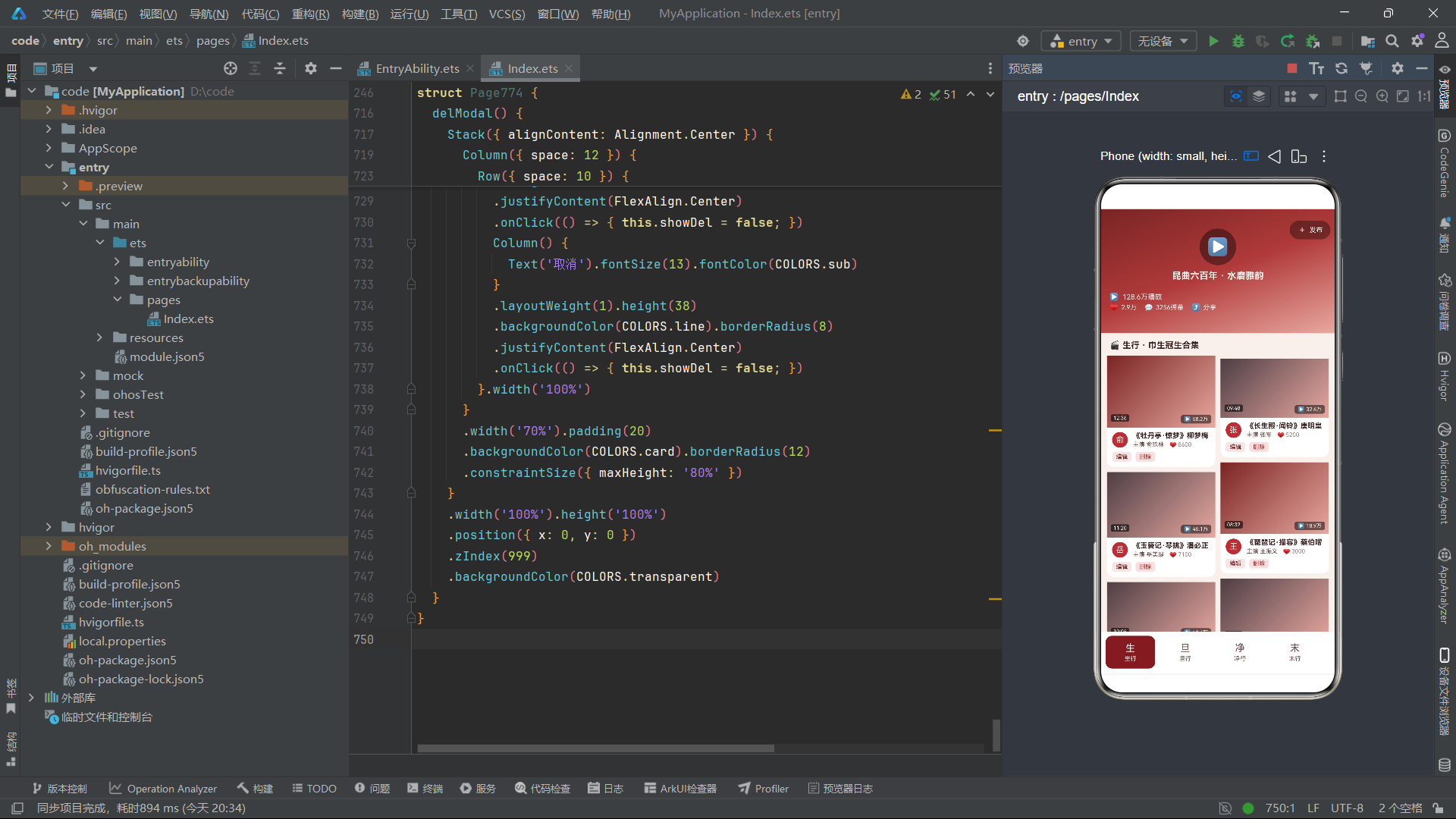
本文深度解析的正是这样一套以视频Feed流为视觉范式、以昆曲五大行当及戏服行头为业务核心的数字化管理系统。该系统创造性地将主流短视频平台的视觉语言——全屏渐变头、播放量浮层、弹幕滚动条、点赞栏、双列瀑布流视频卡片、横向滚动底部导航——移植到了非遗戏曲管理领域,不仅为古老的昆曲视频资源披上了短视频时代的时尚外衣,更通过沉浸式的视频浏览体验唤起了年轻一代对传统文化的探索欲望。系统共设六个功能模块,分别对应生行、旦行、净行、末行、丑行和行头六大业务板块,底部以单排横向滚动布局呈现六个底部导航标签,每个标签承载独立的视频列表与数据模型,构成了一个从行当分类到戏服管理的完整闭环。
从技术架构层面来看,本系统基于HarmonyOS声明式UI框架构建,采用ArkTS语言编写,深度融合了@Component装饰器组件化开发、@Entry入口注册、@State响应式状态管理、@Observed可观察对象模型、@Builder构建器函数、ForEach列表渲染、linearGradient线性渐变、setInterval定时器动画、PlayMode.Alternate交替播放模式、translate位移动画、opacity透明度动画、position绝对定位、Stack层叠布局、Scroll横向滚动等多项核心技术。色彩系统以胭脂红、墨色、粉红为主色调,营造出浓郁的传统戏曲舞台氛围。以下将从色彩定义、数据模型、辅助函数、状态管理、视频Feed头部、通用视频卡片、六大Tab内容构建器、播放量图表、底部导航、模态弹窗等维度,逐段进行深度技术剖析。
一、色彩系统设计:胭脂红墨的戏曲视觉基调
1.1 色彩接口定义
interface ColorPalette {
  bg: string;
  card: string;
  paper: string;
  title: string;
  sub: string;
  text3: string;
  crimson: string;
  crimsonL: string;
  crimsonD: string;
  ink: string;
  inkL: string;
  pink: string;
  cream: string;
  red: string;
  green: string;
  blue: string;
  line: string;
  tabOn: string;
  mask: string;
  transparent: string;
  tagBg: string;
}
色彩接口声明了二十一个颜色字段,涵盖了背景色bg、卡片色card、纸张色paper、标题色title、副文色sub、三级文字色text3、胭脂红系列crimson/crimsonL/crimsonD(分标准、浅、深三级)、墨色系列ink/inkL(分标准、浅两级)、粉红pink、奶油色cream、红色red、绿色green、蓝色blue、分割线line、标签激活色tabOn、遮罩色mask、透明色transparent、标签底色tagBg。胭脂红系列的三级递进设计是本系统色彩方案的灵魂所在,为戏曲舞台的浓烈色调提供了丰富的色彩层次。
1.2 色彩常量实例化
const COLORS: ColorPalette = {
  bg: '#F8F0EC',
  card: '#FFFFFF',
  paper: '#F2E4DE',
  title: '#3A2020',
  sub: '#6E4A48',
  text3: '#A38480',
  crimson: '#B03A3A',
  crimsonL: '#D07060',
  crimsonD: '#7A2424',
  ink: '#2C2226',
  inkL: '#4E3E44',
  pink: '#E8A8A0',
  cream: '#FBF2EE',
  red: '#C43030',
  green: '#3C8C50',
  blue: '#3A6AA8',
  line: '#E8D6D0',
  tabOn: '#7A2424',
  mask: 'rgba(0,0,0,0.5)',
  transparent: 'rgba(0,0,0,0)',
  tagBg: 'rgba(176,58,58,0.12)'
};
色彩方案的设计理念围绕"戏曲舞台"的视觉意象展开。背景色#F8F0EC采用了一种偏暖的粉米色调,模拟了戏曲舞台灯光映照下的幕布底色。胭脂红系列分三个层级:crimsonD(#7A2424)为最深胭脂红,用于头部渐变起始色、Tab选中背景和按钮背景;crimson(#B03A3A)为标准胭脂红,用于视频卡片头像背景和价格文字;crimsonL(#D07060)为浅胭脂红,用于柱状图的交替色。粉红pink(#E8A8A0)用于头部渐变终止色和爱心图标,营造柔和的女性化视觉感受。墨色系列ink(#2C2226)和inkL(#4E3E44)用于视频卡片的渐变起始色,模拟戏曲舞台的深色幕布背景。奶油色cream(#FBF2EE)用于头部渐变上的所有文字,在深色背景上具有高对比度可读性。tabOn设置为与crimsonD相同的深胭脂红,使得Tab选中状态的文字颜色与主色调一致。
二、Tab元数据与索引数组
2.1 Tab元数据定义
interface TabMeta {
  icon: string;
  label: string;
}

const TAB_LIST: TabMeta[] = [
  { icon: '生', label: '生行' },
  { icon: '旦', label: '旦行' },
  { icon: '净', label: '净行' },
  { icon: '末', label: '末行' },
  { icon: '丑', label: '丑行' },
  { icon: '行', label: '行头' }
];
TAB_LIST数组共包含六项,分别对应昆曲的五大行当加戏服行头。图标采用单个汉字——"生"代表生行(男性角色)、"旦"代表旦行(女性角色)、"净"代表净行(花脸角色)、"末"代表末行(老年男性)、"丑"代表丑行(喜剧角色)、"行"代表行头(戏服道具)。这六个汉字精炼地概括了昆曲表演艺术的核心构成,既有戏曲文化的深厚意蕴又简洁明了。
2.2 索引数组与常量数据
const TAB_IDX: number[] = [0, 1, 2, 3, 4, 5];
const DANMU_LIST: string[] = ['好一个水磨腔!', '这身段绝了', '百戏之祖名不虚传', '隔屏闻笛声', '求完整版', '泪目了'];
const DANMU_IDX: number[] = [0, 1, 2, 3, 4, 5];
const REC_IDX: number[] = [0, 1, 2, 3];
const MONTH_IDX: number[] = [0, 1, 2, 3, 4, 5];
const MONTH_NAME: string[] = ['正月', '二月', '三月', '四月', '五月', '六月'];
const PLAY_IDX: number[] = [22, 35, 44, 58, 72, 54];
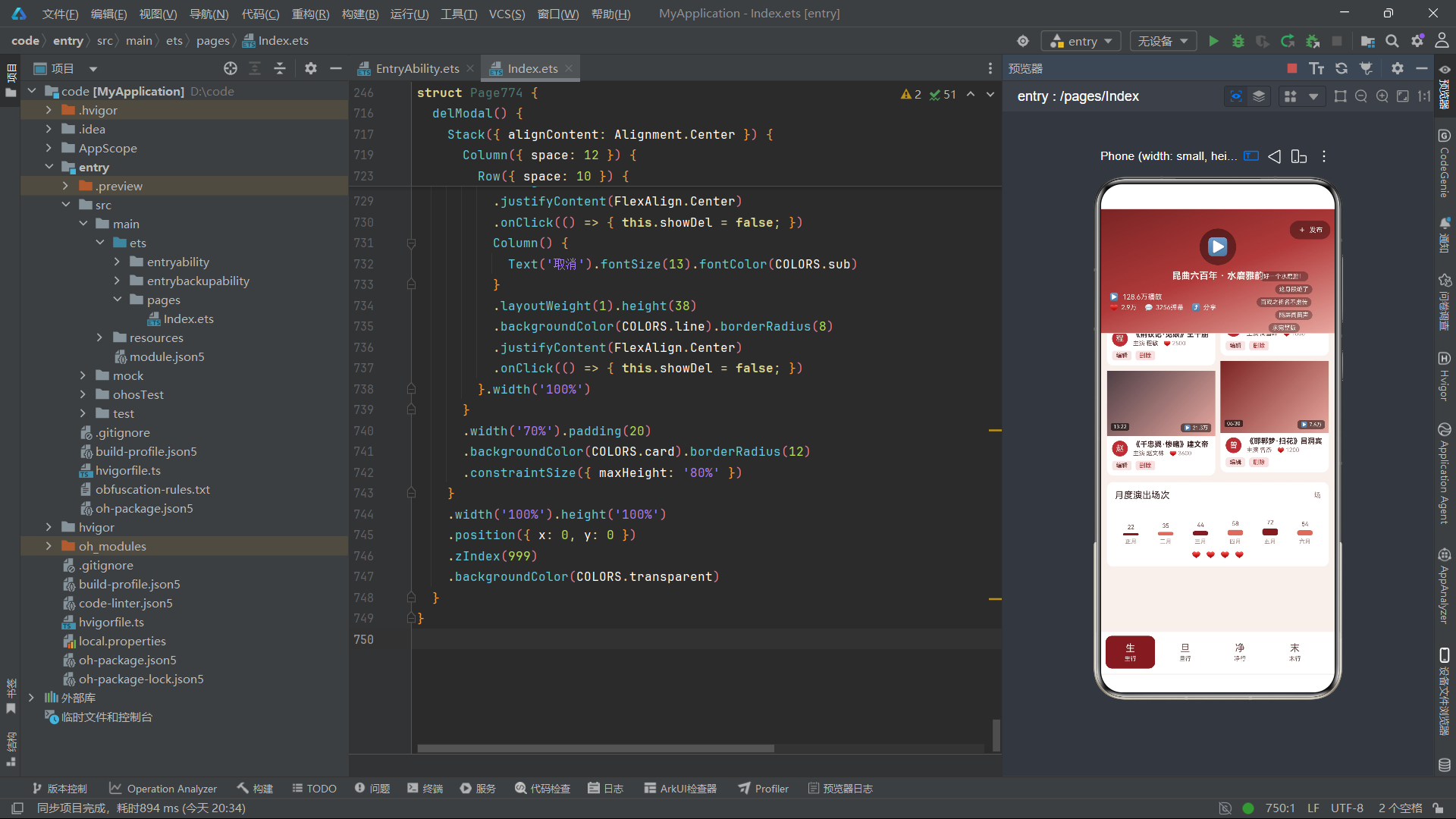
DANMU_LIST定义了六条弹幕文本——“好一个水磨腔!”、“这身段绝了”、“百戏之祖名不虚传”、“隔屏闻笛声”、“求完整版”、“泪目了”,这些弹幕内容充满戏迷对昆曲的热爱与赞叹,为头部增添了浓厚的社区互动氛围。DANMU_IDX驱动弹幕的渲染。REC_IDX驱动底部柱状图区域的四颗爱心推荐图标。MONTH_IDX配合MONTH_NAME和PLAY_IDX驱动月度演出场次柱状图,场次从22场到72场不等,模拟了半年的演出频率曲线。
三、数据模型层:六大可观察业务实体
3.1 生行视频数据模型
@Observed
export class ShengVideoItem {
  title: string;
  actor: string;
  plays: string;
  duration: string;
  likes: number;
  constructor(title: string, actor: string, plays: string, duration: string, likes: number) {
    this.title = title; this.actor = actor; this.plays = plays; this.duration = duration; this.likes = likes;
  }
}
ShengVideoItem是生行视频列表的数据实体,使用@Observed装饰器标记为可观察类。该模型包含五个属性:title为视频标题(如"《牡丹亭·惊梦》柳梦梅")、actor为主演姓名(如"俞玖林")、plays为播放量字符串(如"58.2万")、duration为视频时长(如"12:36")、likes为点赞数(如8600)。这个数据模型完美模拟了短视频平台的视频信息结构,将昆曲剧目以视频卡片的形式呈现。
3.2 旦行、净行、末行、丑行视频数据模型
@Observed
export class DanVideoItem { ... }
@Observed
export class JingVideoItem { ... }
@Observed
export class MoVideoItem { ... }
@Observed
export class ChouVideoItem { ... }
旦行DanVideoItem、净行JingVideoItem、末行MoVideoItem、丑行ChouVideoItem四个数据模型与生行模型结构完全一致,都包含title、actor、plays、duration、likes五个属性。之所以为每个行当定义独立的类,是为了在ArkTS类型系统中实现强类型约束——每个Tab的@State变量只能引用对应类型的数组,确保数据不会在Tab之间混淆。这种"一个行当一个类"的设计虽然增加了代码量,但换取了更高的类型安全性和代码可读性。
3.3 行头戏服数据模型
@Observed
export class CostumeItem {
  name: string;
  kind: string;
  piece: string;
  price: number;
  constructor(name: string, kind: string, piece: string, price: number) {
    this.name = name; this.kind = kind; this.piece = piece; this.price = price;
  }
}
CostumeItem是戏服行头列表的数据实体,与视频模型不同。name记录戏服名称(如"女帔·杜丽娘")、kind记录类型(如"帔"、“官衣”、“蟒”、“靠”)、piece记录材质工艺(如"苏绣"、“杭绸”、“织金缎”、“缂丝”)、price记录价格。该模型以电商商品列表的样式呈现,是唯一一个非视频类数据模型,为昆曲戏服的租售管理提供了数字化支持。
四、模拟数据层:六大业务数据集
4.1 生行模拟数据
const mockShengList: ShengVideoItem[] = [
  new ShengVideoItem('《牡丹亭·惊梦》柳梦梅', '俞玖林', '58.2万', '12:36', 8600),
  new ShengVideoItem('《长生殿·闻铃》唐明皇', '张军', '32.6万', '09:48', 5200),
  new ShengVideoItem('《玉簪记·琴挑》潘必正', '岳美缇', '45.1万', '11:20', 7100),
  new ShengVideoItem('《琵琶记·描容》蔡伯喈', '王振义', '18.9万', '08:32', 3000),
  new ShengVideoItem('《白罗衫·看状》徐继祖', '钱振荣', '12.4万', '10:05', 2100),
  new ShengVideoItem('《西楼记·玩笺》于叔夜', '石小梅', '26.8万', '09:12', 4300),
  new ShengVideoItem('《荆钗记·见娘》王十朋', '程敏', '15.2万', '07:45', 2500),
  new ShengVideoItem('《牧羊记·望乡》苏武', '周雪峰', '9.8万', '11:58', 1800),
  new ShengVideoItem('《千忠戮·惨睹》建文帝', '赵文林', '21.3万', '13:22', 3600),
  new ShengVideoItem('《邯郸梦·扫花》吕洞宾', '曾杰', '7.6万', '06:30', 1200)
];
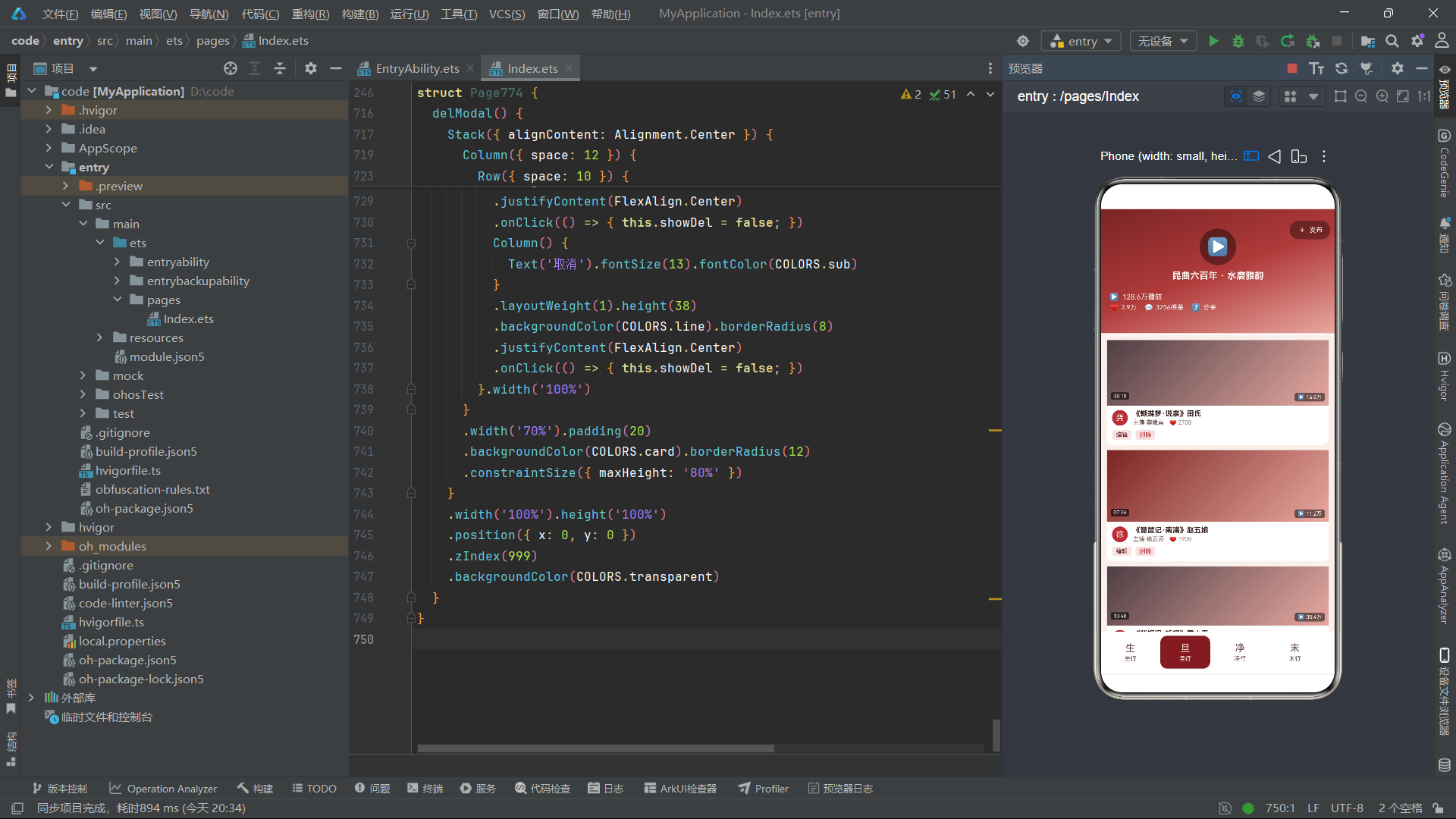
生行数据共十条,涵盖《牡丹亭》《长生殿》《玉簪记》《琵琶记》等经典昆曲折子戏。播放量从7.6万到58.2万不等,《牡丹亭·惊梦》以58.2万播放和8600点赞高居榜首——这出戏是昆曲最具代表性的折子戏,柳梦梅一角是巾生的经典角色。演员阵容包括俞玖林、张军、岳美缇等当代昆曲名家,真实反映了中国昆曲界的传承脉络。每条数据的duration字段以"分:秒"格式呈现,模拟了短视频平台的时长标注方式。
4.2 旦行模拟数据
const mockDanList: DanVideoItem[] = [
  new DanVideoItem('《牡丹亭·游园》杜丽娘', '沈丰英', '66.8万', '14:02', 9800),
  new DanVideoItem('《长生殿·絮阁》杨玉环', '魏春荣', '38.5万', '10:26', 6000),
  new DanVideoItem('《西厢记·佳期》红娘', '梁谷音', '52.7万', '12:44', 8200),
  new DanVideoItem('《玉簪记·秋江》陈妙常', '华文漪', '44.3万', '09:55', 6900),
  ...
];
旦行数据共十条,《牡丹亭·游园》以66.8万播放和9800点赞居首——杜丽娘是闺门旦最经典的角色,"游园"是昆曲最为脍炙人口的折子。旦行的整体播放量普遍高于生行,反映了昆曲观众对旦角表演的偏爱。
4.3 净行、末行、丑行模拟数据
净行数据涵盖关羽、鲁智深、钟馗等净角经典角色;末行数据涵盖伍子胥、张广才等老生角色;丑行数据涵盖韩琦仲、鲜于佶等丑角经典角色。每个行当十条数据,播放量和点赞数从高到低递减分布,模拟了短视频平台的热度排序效果。
4.4 行头戏服模拟数据
const mockCostumeList: CostumeItem[] = [
  new CostumeItem('女帔·杜丽娘', '帔', '苏绣', 4800),
  new CostumeItem('官衣·柳梦梅', '官衣', '杭绸', 3600),
  new CostumeItem('褶子·潘必正', '褶子', '绫罗', 2800),
  new CostumeItem('蟒袍·唐明皇', '蟒', '织金缎', 12800),
  new CostumeItem('铠甲·关羽', '靠', '缂丝', 16800),
  new CostumeItem('坎肩·丑行', '坎肩', '绸缎', 1600),
  new CostumeItem('斗篷·白素贞', '斗篷', '绡纱', 3200),
  new CostumeItem('水袖一副', '配饰', '白绫', 380),
  new CostumeItem('厚底靴', '配饰', '缎面', 880),
  new CostumeItem('夫子盔', '盔头', '点翠', 5200),
  new CostumeItem('额子盔', '盔头', '银箔', 3600),
  new CostumeItem('网巾水纱', '配饰', '棉纱', 120)
];
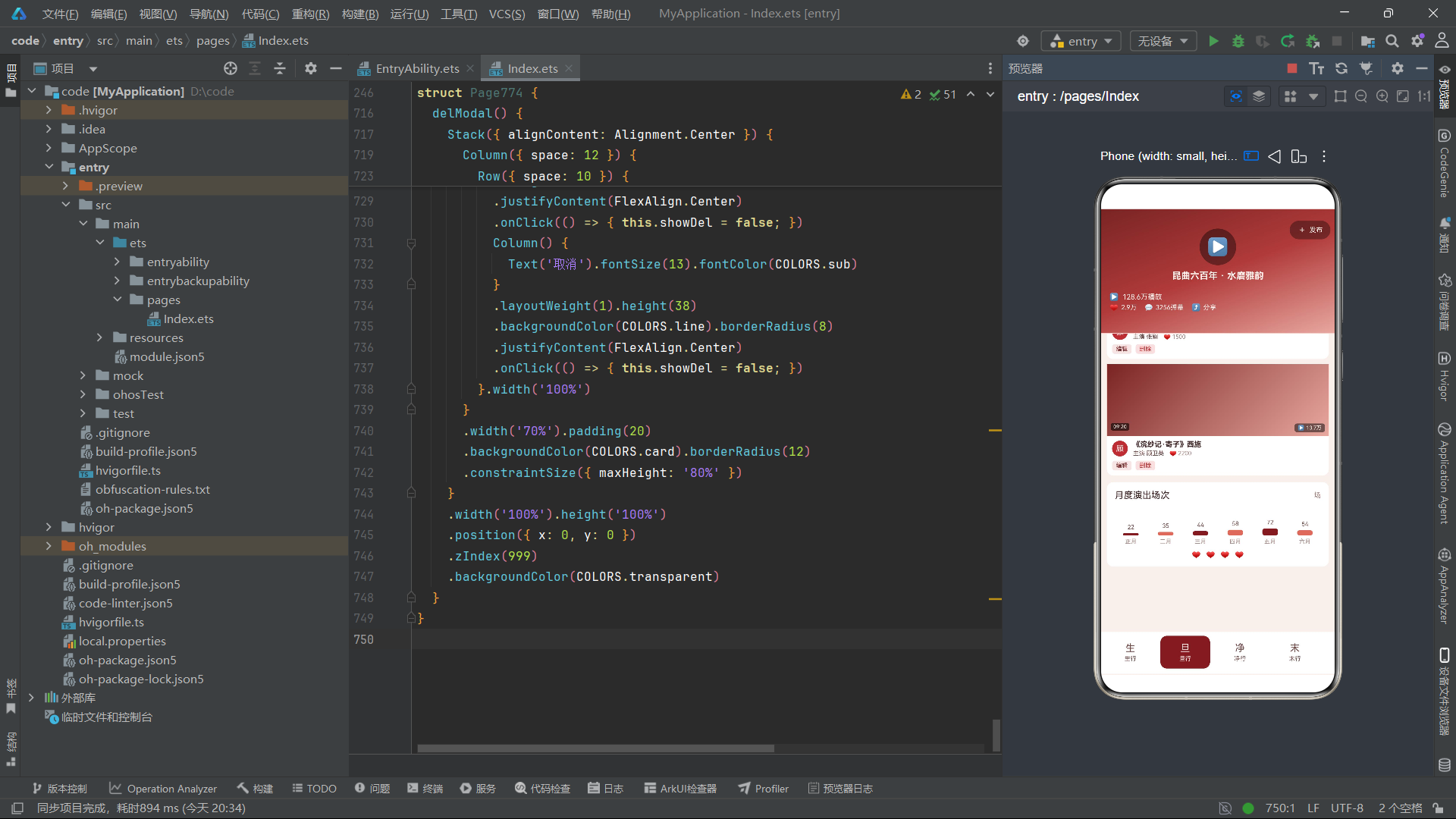
行头数据共十二条,是所有数据集中条目最多的。类型涵盖帔、官衣、褶子、蟒、靠、坎肩、斗篷、配饰、盔头等戏曲服装的主要分类。价格从120元到16800元不等,铠甲·关羽以16800元居首——"靠"是武将的铠甲戏服,使用缂丝工艺制作,是戏曲行头中最为昂贵的一类。水袖、厚底靴、网巾水纱等配饰价格较低,但都是演出不可或缺的组成部分。
五、辅助函数:弹幕偏移、封面高度与点赞格式化
5.1 弹幕偏移函数
function danmuShift(i: number): number {
  return i % 2 === 0 ? 0 : 30;
}
danmuShift函数接收弹幕的索引参数i,返回水平偏移量——偶数索引返回0(不偏移),奇数索引返回30(向右偏移30)。这个函数使得弹幕在垂直方向上形成两列交错的布局效果,模拟了真实弹幕在视频画面上左右错位飘动的视觉效果。
5.2 封面高度函数
function coverHeight(i: number): number {
  return i % 3 === 0 ? 110 : i % 3 === 1 ? 90 : 100;
}
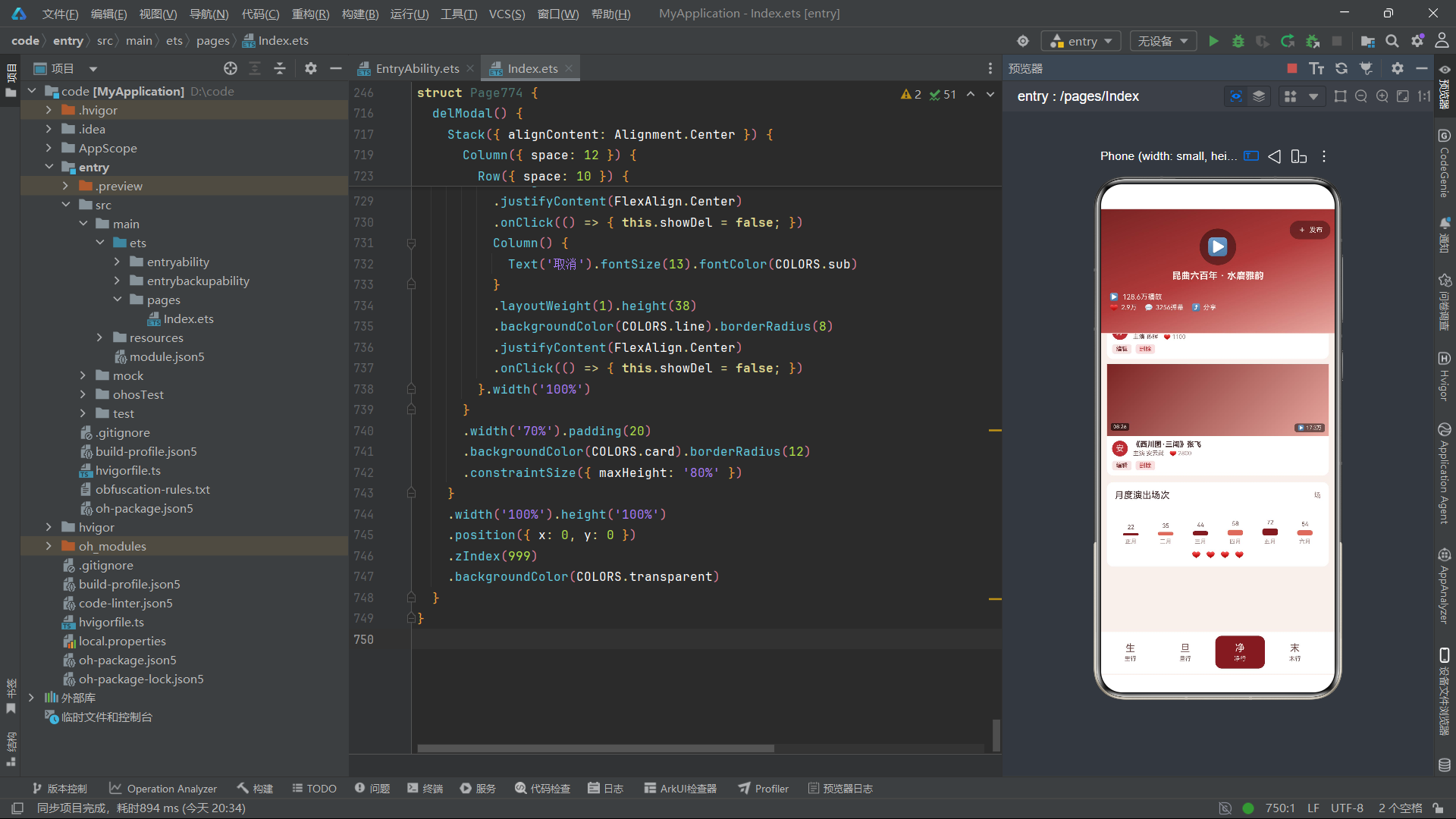
coverHeight函数接收视频卡片的索引参数i,返回封面色块的高度——索引模3余0返回110(高卡)、余1返回90(矮卡)、余2返回100(中等卡)。这个三值循环函数使得双列瀑布流中的视频卡片高度参差不齐,形成了类似主流短视频平台"瀑布流"的不规则视觉效果,避免了所有卡片高度一致的单调感。
5.3 点赞数格式化函数
function likeText(n: number): string {
  if (n >= 10000) {
    return (n / 10000).toFixed(1) + '万';
  }
  return n.toString();
}
likeText函数接收一个数字参数n,当数字大于等于10000时,除以10000并保留一位小数后拼接"万"字后缀(如28600变为"2.9万");否则直接返回数字字符串。这个函数完美模拟了短视频平台对点赞数的格式化展示方式——超过万的数字以"X.X万"的简写形式呈现,既节省空间又符合用户的阅读习惯。
六、组件入口与状态管理
6.1 组件声明与状态定义
@Entry
@Component
struct Page774 {
  @State selTab: number = 0;
  @State breath: boolean = false;
  @State showAdd: boolean = false;
  @State showEdit: boolean = false;
  @State showDel: boolean = false;
  @State editIdx: number = 0;
  @State delIdx: number = 0;
  @State shengList: ShengVideoItem[] = mockShengList;
  @State danList: DanVideoItem[] = mockDanList;
  @State jingList: JingVideoItem[] = mockJingList;
  @State moList: MoVideoItem[] = mockMoList;
  @State chouList: ChouVideoItem[] = mockChouList;
  @State costumeList: CostumeItem[] = mockCostumeList;
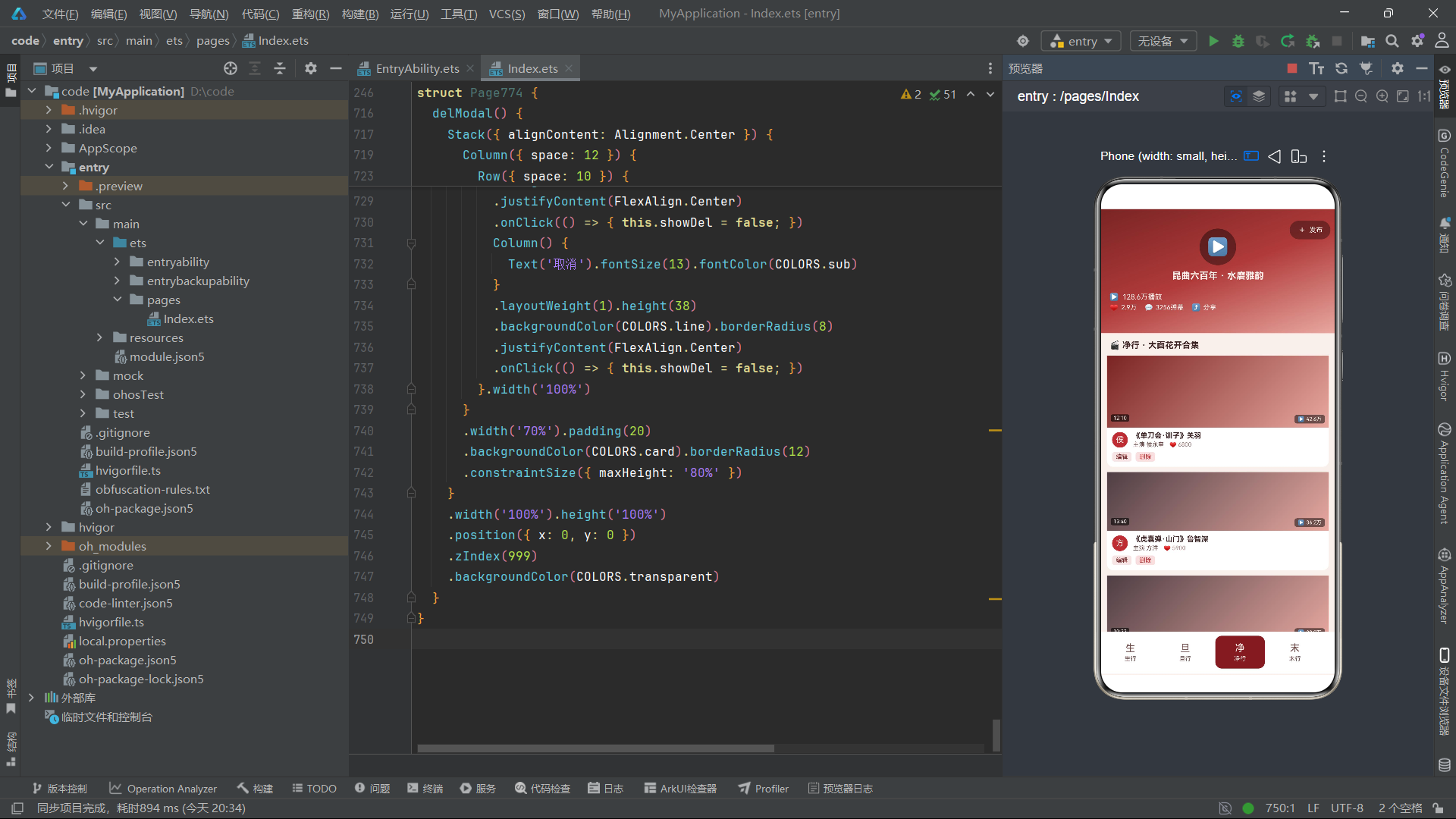
组件内部定义了十三个@State响应式状态变量。selTab记录当前选中的Tab索引,breath控制呼吸动画的布尔翻转值,showAdd/showEdit/showDel控制弹窗显隐,editIdx和delIdx记录操作索引,六个业务数据变量分别引用六组模拟数据数组。
6.2 生命周期与呼吸动画
  aboutToAppear() {
    setInterval(() => { this.breath = !this.breath; }, 600);
  }
aboutToAppear中注册了600毫秒间隔的setInterval定时器,不断翻转breath状态变量。这个定时器驱动了三处动画效果:头部播放按钮的呼吸缩放、弹幕的位移与透明度交替、底部爱心图标的闪烁——三处动画共享同一个breath状态变量,确保了全局动画节奏的协调统一。
七、视频Feed风格头部构建
7.1 渐变背景与播放按钮
  @Builder
  headerType() {
    Stack({ alignContent: Alignment.TopStart }) {
      Column()
        .width('100%')
        .height(190)
        .linearGradient({
          angle: 160,
          colors: [[COLORS.crimsonD, 0.0], [COLORS.crimson, 0.5], [COLORS.pink, 1.0]]
        })
      Column() {
        Column() {
          Text('▶').fontSize(26).fontColor(COLORS.cream)
        }
        .width(56).height(56)
        .backgroundColor('rgba(0,0,0,0.4)').borderRadius(28)
        .justifyContent(FlexAlign.Center)
        .animation({ duration: 600, iterations: -1, playMode: PlayMode.Alternate })
        Text('昆曲六百年 · 水磨雅韵').fontSize(14).fontColor(COLORS.cream)
          .fontWeight(FontWeight.Bold).margin({ top: 8 })
      }
      .width('100%').justifyContent(FlexAlign.Center)
      .padding({ top: 30 })
头部使用Stack层叠布局,底层铺设全宽190高的渐变背景,160度角从深胭脂红crimsonD到标准胭脂红crimson再到粉红pink的三段渐变,模拟了戏曲舞台灯光从聚光灯中心到边缘的渐次过渡。
渐变背景之上居中放置一个56x56的圆形播放按钮,黑色半透明背景、28圆角,内部显示26号奶油色播放三角▶。播放按钮绑定了600毫秒的animation动画,配合PlayMode.Alternate交替播放模式,按钮会在600毫秒内经历缩放或透明度的平滑变化,形成持续不断的呼吸效果。播放按钮下方显示"昆曲六百年 · 水磨雅韵"的标题文字,14号奶油色加粗,点明了系统的文化主题。
7.2 播放量浮层
      Column({ space: 3 }) {
        Row({ space: 6 }) {
          Text('▶').fontSize(11).fontColor(COLORS.cream)
          Text('128.6万播放').fontSize(11).fontColor(COLORS.cream)
        }
        Row({ space: 12 }) {
          Row({ space: 4 }) {
            Text('♥').fontSize(11).fontColor(COLORS.pink)
            Text(likeText(28600)).fontSize(10).fontColor(COLORS.cream)
          }
          Row({ space: 4 }) {
            Text('💬').fontSize(10).fontColor(COLORS.cream)
            Text('3256弹幕').fontSize(10).fontColor(COLORS.cream)
          }
          Row({ space: 4 }) {
            Text('⤴').fontSize(11).fontColor(COLORS.cream)
            Text('分享').fontSize(10).fontColor(COLORS.cream)
          }
        }
      }
      .alignItems(HorizontalAlign.Start)
      .position({ x: 14, y: 128 })
播放量浮层通过position绝对定位放置在头部左下角(x:14, y:128),包含两行信息:第一行为播放图标+"128.6万播放"文字;第二行为三个统计指标——爱心图标+likeText(28600)格式化后的"2.9万"点赞数、评论图标+“3256弹幕”、分享图标+"分享"文字。这组数据完美复刻了短视频平台视频封面上的播放量、点赞、弹幕、分享四项核心指标,让用户在浏览昆曲内容时产生"在看短视频"的自然体验。
7.3 弹幕滚动条
      Column({ space: 5 }) {
        ForEach(DANMU_IDX, (d: number) => {
          Text(DANMU_LIST[d])
            .fontSize(9).fontColor(COLORS.cream)
            .backgroundColor('rgba(0,0,0,0.3)')
            .padding({ left: 6, right: 6, top: 2, bottom: 2 })
            .borderRadius(8)
            .margin({ left: danmuShift(d) })
            .opacity(this.breath ? 0.9 : 0.5)
            .translate({ x: this.breath ? 20 : 0 })
            .animation({ duration: 600, iterations: -1, playMode: PlayMode.Alternate })
        }, (d: number) => 'dm' + d)
      }
      .position({ x: 190, y: 96 })
      .constraintSize({ maxWidth: 150 })
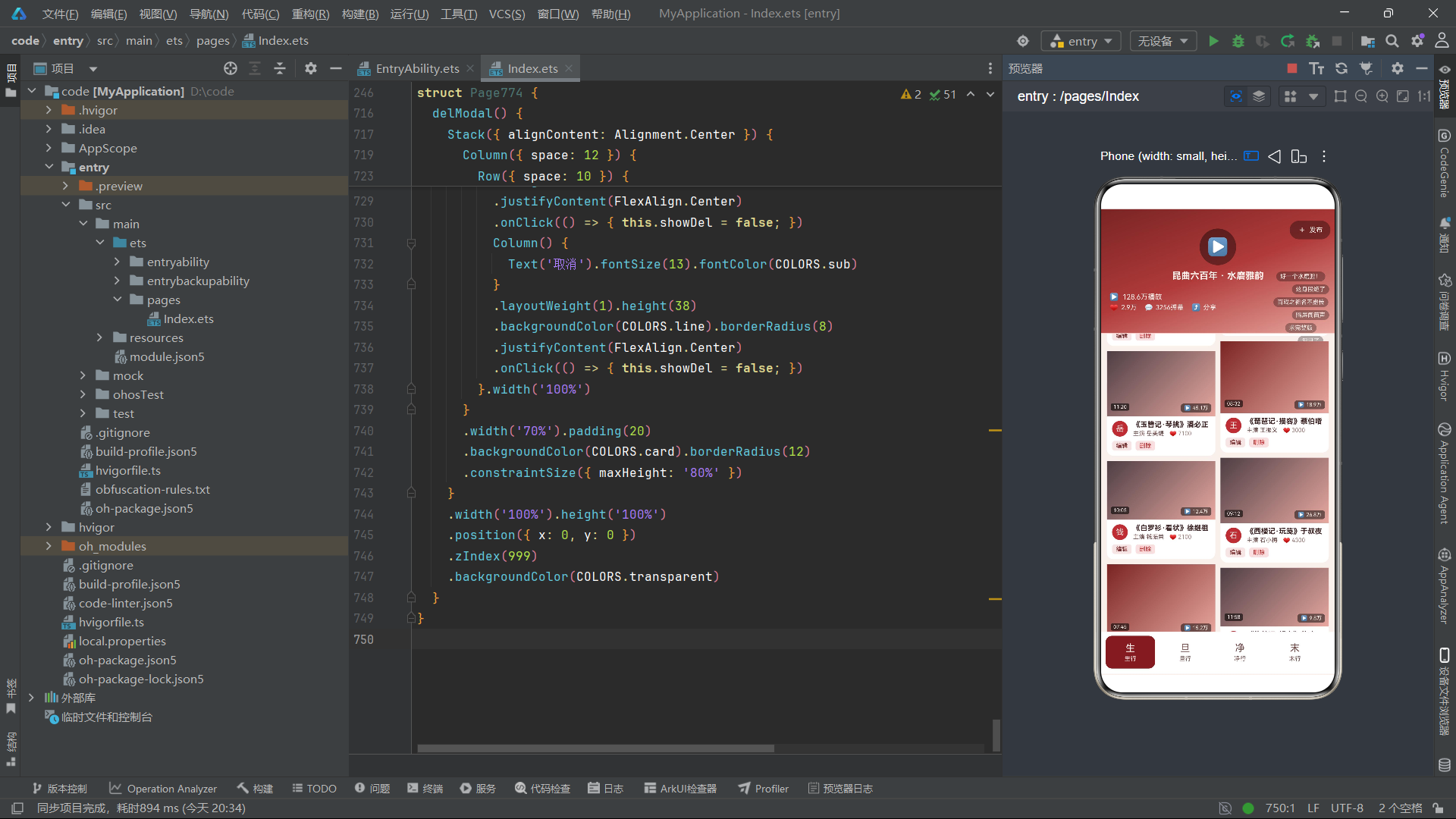
弹幕区域通过ForEach遍历DANMU_IDX渲染六条弹幕,每条弹幕是一个9号奶油色文字,黑色半透明背景、8圆角的胶囊形状。弹幕通过danmuShift函数实现交错布局——偶数索引不偏移,奇数索引向右偏移30,形成两列交错的排列效果。
每条弹幕绑定两个动画属性:opacity在breath为true时0.9、为false时0.5,实现透明度的交替闪烁;translate在breath为true时水平位移20、为false时不位移,实现水平方向的飘动效果。两个动画属性配合600毫秒持续时间和PlayMode.Alternate交替播放模式,弹幕会在透明度和水平位置之间持续变化,模拟了真实弹幕在视频画面上飘动的动感效果。
弹幕区域通过position绝对定位放置在头部右侧(x:190, y:96),constraintSize限制最大宽度150,确保弹幕不会溢出头部范围。ForEach键值使用'dm' + d。
7.4 发布按钮
      Row({ space: 4 }) {
        Text('+').fontSize(14).fontColor(COLORS.cream)
        Text('发布').fontSize(10).fontColor(COLORS.cream)
      }
      .padding({ left: 12, right: 12, top: 6, bottom: 6 })
      .backgroundColor('rgba(0,0,0,0.35)').borderRadius(14)
      .position({ x: 290, y: 18 })
      .onClick(() => { this.showAdd = true; })
发布按钮通过position绝对定位放置在头部右上角(x:290, y:18),使用黑色半透明背景和14圆角的胶囊形状,内部显示"+"号和"发布"文字。点击后触发showAdd为true,弹出发布视频的模态弹窗。这个设计完美复刻了短视频平台右上角的"发布/投稿"按钮,将短视频的创作发布交互映射到昆曲视频的管理录入流程中。
八、通用视频卡片构建器
  @Builder
  videoCard(title: string, actor: string, plays: string, duration: string, likes: number, idx: number, tab: number) {
    Column() {
      Stack({ alignContent: Alignment.BottomEnd }) {
        Column()
          .width('100%').height(coverHeight(idx))
          .linearGradient({
            angle: 135,
            colors: [[idx % 3 === 0 ? COLORS.crimsonD : COLORS.inkL, 0.0], [COLORS.pink, 1.0]]
          })
        Row({ space: 3 }) {
          Text('▶').fontSize(8).fontColor(COLORS.cream)
          Text(plays).fontSize(8).fontColor(COLORS.cream)
        }
        .backgroundColor('rgba(0,0,0,0.5)')
        .padding({ left: 5, right: 5, top: 2, bottom: 2 })
        .borderRadius(4)
        .margin({ right: 6, bottom: 6 })
        Text(duration)
          .fontSize(8).fontColor(COLORS.cream)
          .backgroundColor('rgba(0,0,0,0.6)')
          .padding({ left: 4, right: 4, top: 1, bottom: 1 })
          .borderRadius(3)
          .position({ x: 6, y: coverHeight(idx) - 20 })
      }.width('100%')
      Row({ space: 8 }) {
        Column() {
          Text(actor.charAt(0)).fontSize(12).fontColor(COLORS.cream)
        }
        .width(24).height(24)
        .backgroundColor(COLORS.crimson).borderRadius(12)
        .justifyContent(FlexAlign.Center)
        Column({ space: 2 }) {
          Text(title).fontSize(11).fontColor(COLORS.title).fontWeight(FontWeight.Bold)
            .maxLines(1).textOverflow({ overflow: TextOverflow.Ellipsis })
          Row({ space: 8 }) {
            Text('主演 ' + actor).fontSize(9).fontColor(COLORS.sub)
            Row({ space: 2 }) {
              Text('♥').fontSize(9).fontColor(COLORS.crimson)
              Text(likeText(likes)).fontSize(9).fontColor(COLORS.text3)
            }
          }
        }
        .layoutWeight(1).alignItems(HorizontalAlign.Start)
      }
      .width('100%').padding({ left: 8, right: 8, top: 6 })
      Row() {
        Text('编辑').fontSize(9).fontColor(COLORS.tabOn)
          .padding({ left: 6, right: 6, top: 2, bottom: 2 })
          .backgroundColor(COLORS.tagBg).borderRadius(4)
          .onClick(() => { this.editIdx = idx; this.showEdit = true; })
        Text('删除').fontSize(9).fontColor(COLORS.red)
          .padding({ left: 6, right: 6, top: 2, bottom: 2 })
          .backgroundColor('#F5E0E0').borderRadius(4)
          .margin({ left: 6 })
          .onClick(() => { this.delIdx = idx; this.showDel = true; })
        Column().layoutWeight(1)
      }
      .width('100%').padding({ left: 8, right: 8, top: 6, bottom: 8 })
    }
    .width('100%').backgroundColor(COLORS.card).borderRadius(10)
  }
videoCard是整个系统的核心通用构建器,接收七个参数:title(标题)、actor(主演)、plays(播放量)、duration(时长)、likes(点赞数)、idx(索引)、tab(Tab标识)。该构建器被五个行当Tab共享调用,是代码复用率最高的组件。
卡片整体为白底圆角Column,分为三个纵向区域:
封面区:使用Stack层叠布局,底层为通过coverHeight(idx)函数计算高度(90/100/110三值循环)的渐变色块——135度角从深胭脂红或浅墨色到粉红的渐变,模拟视频缩略图。封面上叠加播放量角标(右下角,黑色半透明背景+播放图标+播放量文字)和时长角标(左下角,黑色半透明背景+时长文字,通过position绝对定位)。
UP主信息行:左侧24x24的圆形头像(胭脂红背景,主演姓氏首字),右侧两行信息——标题(11号标题色加粗,maxLines(1)+省略号)和主演+点赞数的组合行(爱心图标+likeText格式化点赞数)。
操作行:"编辑"和"删除"两个胶囊按钮,分别使用半透明胭脂红和浅红背景,绑定编辑和删除弹窗。
九、Tab0:生行视频流(双列瀑布流)
  @Builder
  shengTab() {
    Column({ space: 8 }) {
      Text('🎬 生行 · 巾生冠生合集').fontSize(13).fontColor(COLORS.title).fontWeight(FontWeight.Bold)
        .width('100%').padding({ left: 4 })
      Row({ space: 8 }) {
        Column({ space: 8 }) {
          ForEach(this.shengList, (item: ShengVideoItem, idx: number) => {
            if (idx % 2 === 0) {
              this.videoCard(item.title, item.actor, item.plays, item.duration, item.likes, idx, 0)
            }
          }, (item: ShengVideoItem) => 'SL' + item.title)
        }.layoutWeight(1)
        Column({ space: 8 }) {
          ForEach(this.shengList, (item: ShengVideoItem, idx: number) => {
            if (idx % 2 === 1) {
              this.videoCard(item.title, item.actor, item.plays, item.duration, item.likes, idx, 0)
            }
          }, (item: ShengVideoItem) => 'SR' + item.title)
        }.layoutWeight(1)
      }.width('100%')
    }.width('100%')
  }
生行Tab是唯一采用双列瀑布流布局的Tab。通过两个等宽Column(各占layoutWeight(1))分别渲染偶数索引和奇数索引的视频卡片——左列通过if (idx % 2 === 0)筛选偶数项,右列通过if (idx % 2 === 1)筛选奇数项。配合coverHeight函数的三值循环高度(110/90/100),左右两列的卡片高度参差不齐,形成了典型短视频平台的"瀑布流"视觉效果。
两个ForEach的键值分别使用'SL'和'SR'前缀,确保左右列的键值不冲突。这种双列瀑布流设计在有限屏幕宽度内最大化了视频卡片的展示密度,用户可以在一屏内浏览到更多内容。
十、Tab1-4:旦/净/末/丑行视频流(单列大卡)
  @Builder
  danTab() {
    Column({ space: 8 }) {
      Text('🎬 旦行 · 闺门旦正旦合集').fontSize(13).fontColor(COLORS.title).fontWeight(FontWeight.Bold)
        .width('100%').padding({ left: 4 })
      ForEach(this.danList, (item: DanVideoItem, idx: number) => {
        this.videoCard(item.title, item.actor, item.plays, item.duration, item.likes, idx, 1)
      }, (item: DanVideoItem) => 'DN' + item.title)
    }.width('100%')
  }
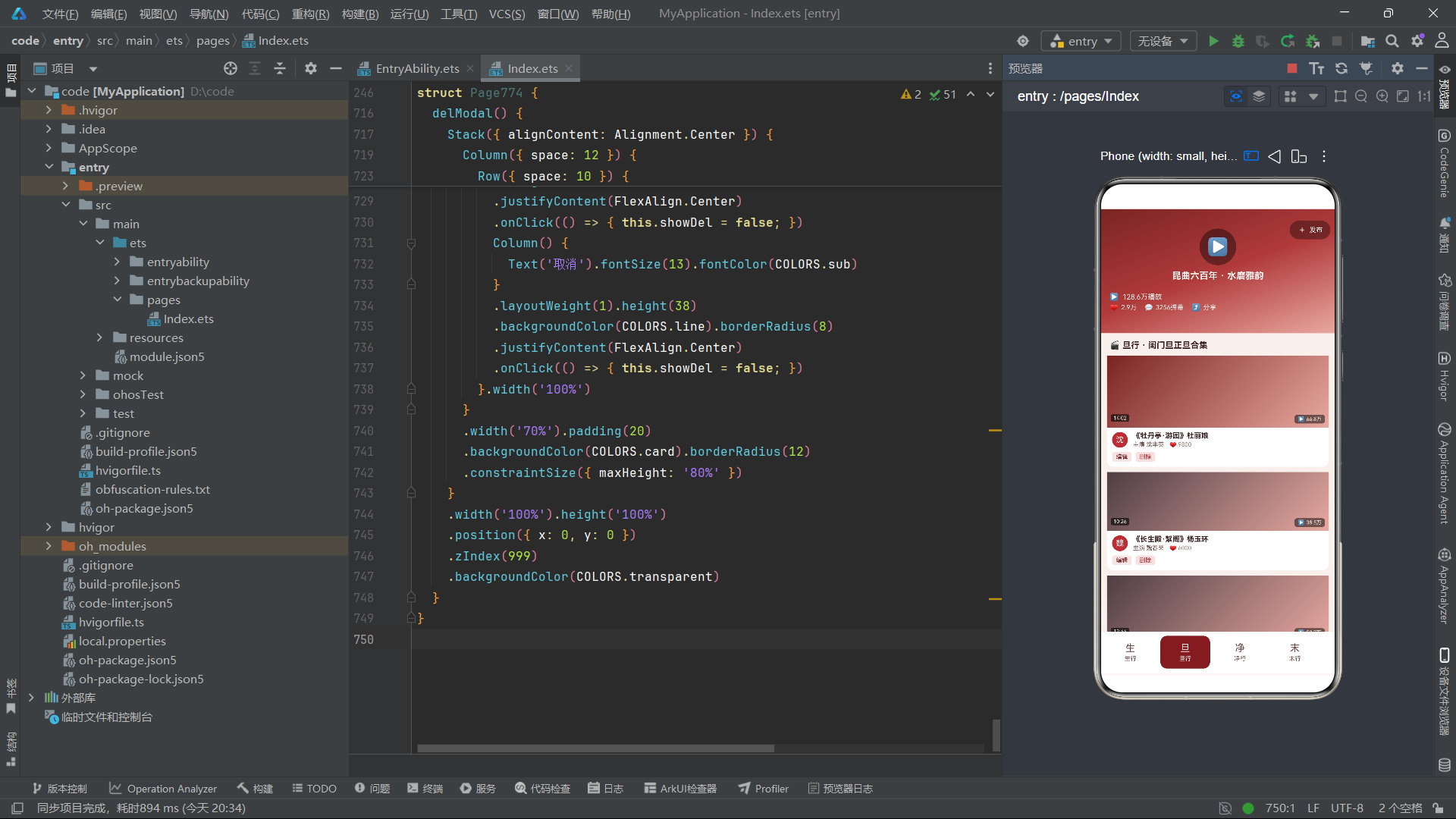
旦行、净行、末行、丑行四个Tab采用单列大卡布局,通过ForEach遍历对应数据集,每条数据调用通用videoCard构建器渲染。每个Tab顶部都有一个带🎬图标的标题行,标注行当名称和合集说明。ForEach键值分别使用'DN'、'JG'、'MO'、'CO'前缀。
十一、Tab5:行头(戏服清单样式)
  @Builder
  costumeTab() {
    Column({ space: 6 }) {
      Row() {
        Text('🛍️ 戏装行头 · 租售清单').fontSize(13).fontColor(COLORS.title).fontWeight(FontWeight.Bold)
        Column().layoutWeight(1)
        Text('+ 新增').fontSize(10).fontColor(COLORS.tabOn)
          .onClick(() => { this.showAdd = true; })
      }.width('100%').padding({ left: 4 })
      ForEach(this.costumeList, (item: CostumeItem, idx: number) => {
        Row() {
          Column() {
            Text(item.kind.charAt(0)).fontSize(13).fontColor(COLORS.cream).fontWeight(FontWeight.Bold)
          }
          .width(34).height(34)
          .backgroundColor(idx % 3 === 0 ? COLORS.crimson : idx % 3 === 1 ? COLORS.crimsonD : COLORS.inkL)
          .borderRadius(6).justifyContent(FlexAlign.Center)
          Column({ space: 3 }) {
            Text(item.name).fontSize(13).fontColor(COLORS.title).fontWeight(FontWeight.Bold)
            Text(item.kind + ' · ' + item.piece).fontSize(10).fontColor(COLORS.sub)
          }
          .layoutWeight(1).alignItems(HorizontalAlign.Start).padding({ left: 10 })
          Text('Y' + item.price).fontSize(12).fontColor(COLORS.crimson).fontWeight(FontWeight.Bold)
        }
        .width('100%').padding({ left: 10, right: 10, top: 8, bottom: 8 })
        .backgroundColor(idx % 2 === 0 ? COLORS.card : COLORS.paper)
        .borderRadius(8)
        .onClick(() => { this.editIdx = idx; this.showEdit = true; })
      }, (item: CostumeItem) => 'CS' + item.name)
    }.width('100%')
  }
行头Tab是非视频类Tab,采用电商商品列表样式。顶部标题行右侧有"+新增"按钮,点击触发新增弹窗。每条列表项分为三个区域:34x34的圆角方块图标(戏服类型首字,三色循环背景)、弹性信息区(名称+类型+材质)、右侧价格(胭脂红色加粗)。ForEach键值使用'CS' + item.name。
十二、月度播放量柱状图
  @Builder
  playChart() {
    Column({ space: 8 }) {
      Row() {
        Text('月度演出场次').fontSize(14).fontColor(COLORS.title).layoutWeight(1)
        Text('场').fontSize(11).fontColor(COLORS.text3)
      }.width('100%')
      Row({ space: 4 }) {
        ForEach(MONTH_IDX, (m: number) => {
          Column({ space: 4 }) {
            Text(PLAY_IDX[m].toString())
              .fontSize(9).fontColor(COLORS.sub)
            Column()
              .width(24)
              .height(PLAY_IDX[m] * 0.15)
              .backgroundColor(m % 2 === 0 ? COLORS.crimsonD : COLORS.crimsonL)
              .borderRadius(4)
            Text(MONTH_NAME[m])
              .fontSize(9)
              .fontColor(COLORS.text3)
          }
          .layoutWeight(1)
          .alignItems(HorizontalAlign.Center)
        }, (m: number) => 'pc' + m)
      }
      .width('100%').height(60)
      .alignItems(VerticalAlign.Bottom)
      Row() {
        ForEach(REC_IDX, (r: number) => {
          Text('♥').fontSize(11).fontColor(COLORS.pink)
            .opacity(this.breath ? 1.0 : 0.4)
            .animation({ duration: 600, iterations: -1, playMode: PlayMode.Alternate })
            .padding({ left: 4, right: 4 })
        }, (r: number) => 'rc' + r)
      }
      .width('100%').justifyContent(FlexAlign.Center)
    }
    .width('100%').padding(12)
    .backgroundColor(COLORS.card).borderRadius(10)
    .margin({ top: 10 })
  }
柱状图区域底部还附加了一行四颗爱心推荐图标,通过ForEach遍历REC_IDX渲染。每颗爱心绑定opacity到breath状态——true时1.0(完全不透明)、false时0.4(半透明),配合600毫秒PlayMode.Alternate动画,四颗爱心同步闪烁,为柱状图增添了动感装饰。ForEach键值使用'rc' + r。
十三、底部导航栏(6 Tab单排横向滚动)
  @Builder
  tabBar() {
    Scroll() {
      Row({ space: 8 }) {
        ForEach(TAB_IDX, (i: number) => {
          Column({ space: 2 }) {
            Text(TAB_LIST[i].icon).fontSize(15).fontColor(this.selTab === i ? COLORS.cream : COLORS.sub)
            Text(TAB_LIST[i].label).fontSize(9).fontColor(this.selTab === i ? COLORS.cream : COLORS.sub)
          }
          .width(76).height(50)
          .backgroundColor(this.selTab === i ? COLORS.crimsonD : COLORS.card)
          .borderRadius(10)
          .justifyContent(FlexAlign.Center)
          .onClick(() => { this.selTab = i; })
        }, (i: number) => 'tb' + i)
      }
      .padding({ left: 8, right: 8 })
    }
    .scrollable(ScrollDirection.Horizontal).scrollBar(BarState.Off)
    .width('100%')
    .backgroundColor(COLORS.card)
    .padding({ top: 6, bottom: 8 })
  }
底部导航栏使用横向Scroll容器,内部通过ForEach渲染六个Tab项。每个Tab项固定76宽50高,圆角10,选中状态为深胭脂红背景+奶油色文字,未选中状态为白色背景+副文色文字。横向滚动设计确保了六个Tab在小屏设备上也能完整展示,用户可以左右滑动浏览所有行当分类。ForEach键值使用'tb' + i。
十四、模态弹窗系统
14.1 新增弹窗
  @Builder
  addModal() {
    Stack({ alignContent: Alignment.Center }) {
      this.modalOverlay(() => { this.showAdd = false; })
      Column({ space: 12 }) {
        Text('+ 发布视频').fontSize(16).fontColor(COLORS.title)
        TextInput({ placeholder: '视频标题' })
          .fontSize(13).fontColor(COLORS.title)
          .backgroundColor(COLORS.paper).borderRadius(8)
        TextInput({ placeholder: '主演' })
          ...
        TextInput({ placeholder: '时长(如 10:36)' })
          ...
        TextInput({ placeholder: '标签' })
          ...
        Row({ space: 10 }) {
          Column() {
            Text('发布').fontSize(13).fontColor(COLORS.cream)
          }
          .layoutWeight(1).height(38)
          .backgroundColor(COLORS.crimsonD).borderRadius(8)
          ...
          Column() {
            Text('取消').fontSize(13).fontColor(COLORS.sub)
          }
          .layoutWeight(1).height(38)
          .backgroundColor(COLORS.line).borderRadius(8)
          ...
        }.width('100%')
      }
      ...
    }
    ...
  }
新增弹窗标题为"+ 发布视频",包含视频标题、主演、时长、标签四个输入框。"发布"按钮使用深胭脂红背景,延续了短视频平台"发布视频"的交互用语。
编辑弹窗标题动态显示"✏️ 编辑第 X 条",按钮文字为"保存"。删除弹窗宽度70%,红色"确认删除"按钮。
十五、系统架构总览流程图
十六、视频Feed视觉驱动流程图
十七、六大Tab布局风格对比总结表
| Tab序号 | 名称 | 布局风格 | 核心视觉元素 | 数据模型 | 特色交互 |
|---|---|---|---|---|---|
| 0 | 生行 | 双列瀑布流 | coverHeight三值循环+封面渐变 | ShengVideoItem | 编辑/删除按钮 |
| 1 | 旦行 | 单列大卡 | 全宽视频卡片+播放量角标 | DanVideoItem | 点击编辑 |
| 2 | 净行 | 单列大卡 | 全宽视频卡片+时长角标 | JingVideoItem | 点击编辑 |
| 3 | 末行 | 单列大卡 | 全宽视频卡片+UP主头像 | MoVideoItem | 点击编辑 |
| 4 | 丑行 | 单列大卡 | 全宽视频卡片+点赞数 | ChouVideoItem | 点击编辑 |
| 5 | 行头 | 电商商品列表 | 三色循环图标+价格标签 | CostumeItem | 新增+点击编辑 |
十八、技术特性对比总结表
| 技术特性 | 实现方式 | 应用场景 | 技术优势 |
|---|---|---|---|
| 线性渐变 | linearGradient 160°/135° | 头部背景/视频封面 | 无需图片即可模拟视频缩略图 |
| 呼吸动画 | setInterval 600ms + Alternate | 播放按钮/弹幕/爱心 | 多元素共享同一节奏 |
| 弹幕飘动 | opacity + translate双属性 | 弹幕滚动条 | 模拟真实弹幕飘动效果 |
| 封面高度循环 | coverHeight函数 110/90/100 | 双列瀑布流 | 参差不齐的视觉节奏 |
| 弹幕偏移 | danmuShift函数 0/30交错 | 弹幕布局 | 两列交错排列 |
| 点赞格式化 | likeText函数 ≥10000→万 | 播放量/点赞数 | 短视频风格数字展示 |
| 双列瀑布流 | idx % 2偶奇分列+layoutWeight | 生行Tab | 空间利用率高 |
| 通用视频卡 | @Builder videoCard七参数 | 五个行当Tab | 极高代码复用率 |
| 横向滚动Tab | Scroll + scrollable(Horizontal) | 底部导航 | 小屏设备完整展示 |
| 层叠角标 | Stack + position绝对定位 | 封面播放量/时长 | 角标精准定位 |
安装DevEco Studio程序
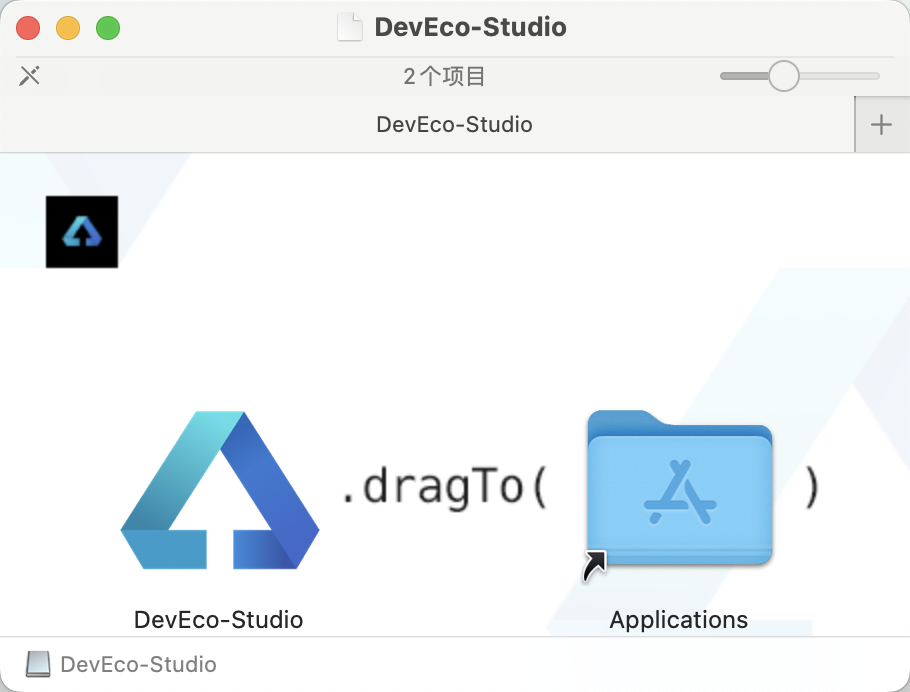
第一次打开需要点击同意一下:

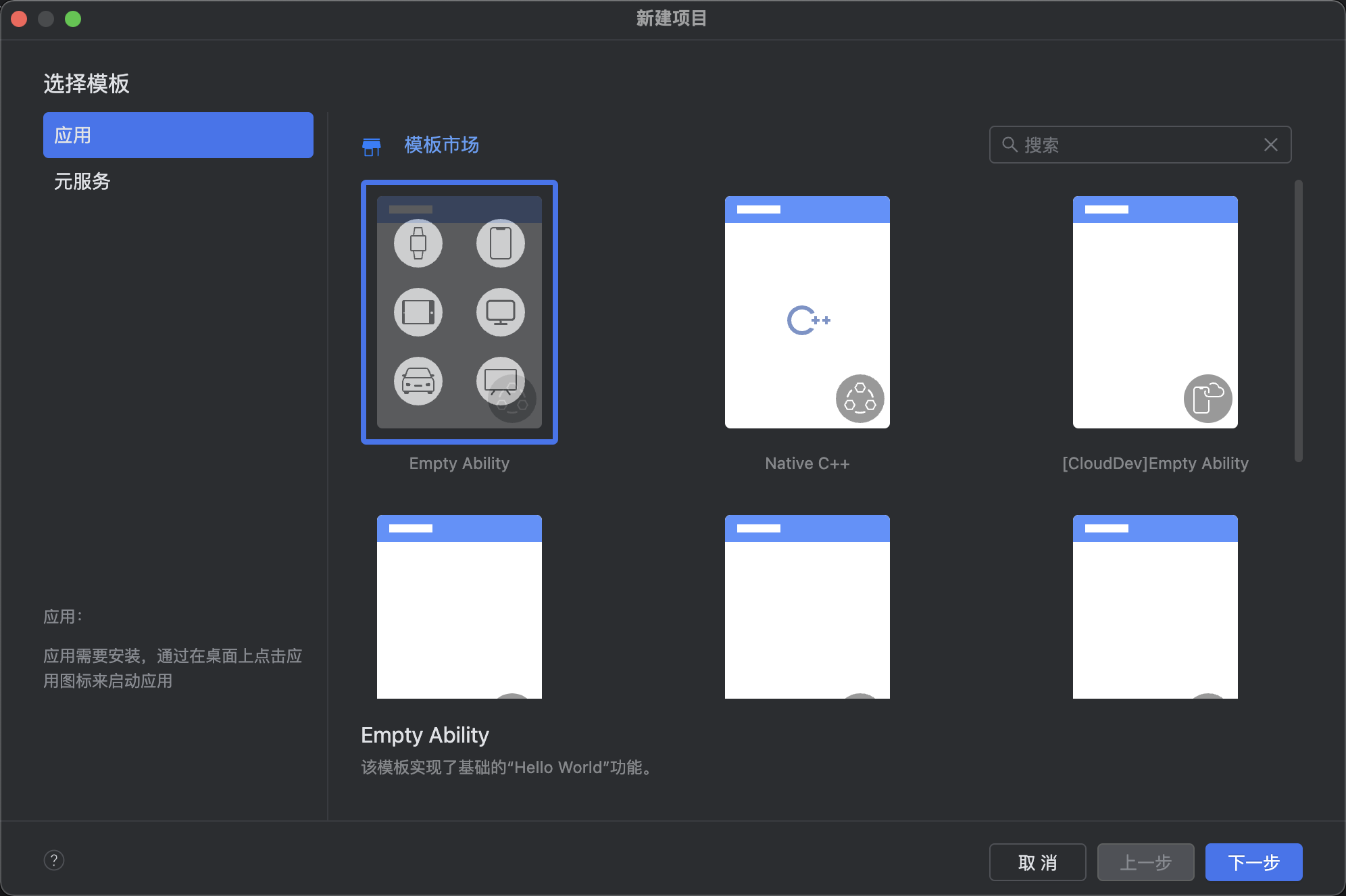
新建一个空白模板:
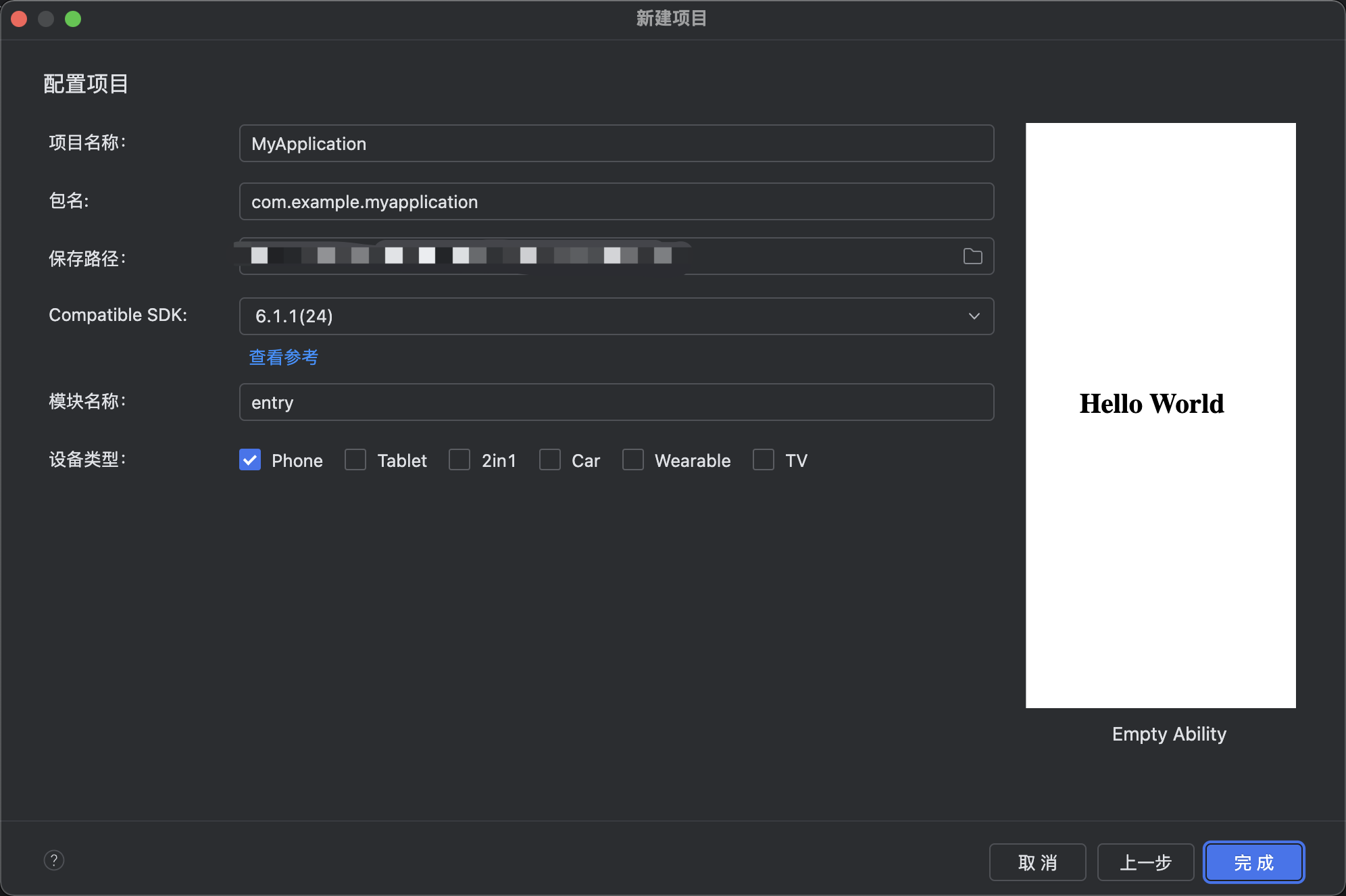
设置API为24的模板项目:
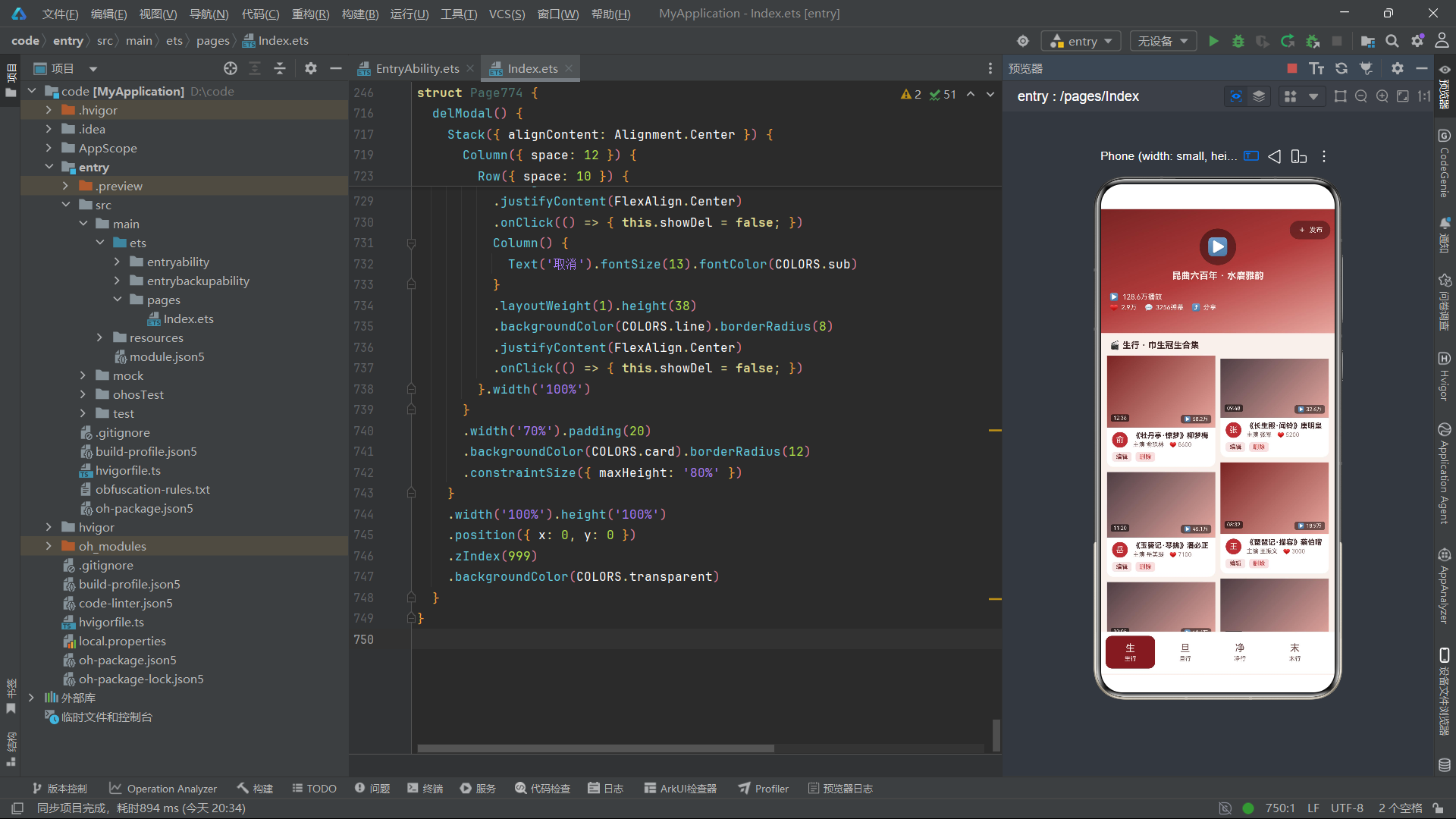
初始化项目,自动下载相关依赖:

完整代码:
// ============================================================
// 774 昆曲脸谱坊 · 粉墨登场
// 头部样式:视频feed风格(全屏渐变头 + 播放量浮层 + 弹幕滚动条 + 点赞栏)
// 布局风格:视频卡片流(大封面色块 + 时长角标 + UP主信息行 + 双列推荐)
// 底部 6 tab 单排(可横向滚动)
// ============================================================

interface ColorPalette {
  bg: string;
  card: string;
  paper: string;
  title: string;
  sub: string;
  text3: string;
  crimson: string;
  crimsonL: string;
  crimsonD: string;
  ink: string;
  inkL: string;
  pink: string;
  cream: string;
  red: string;
  green: string;
  blue: string;
  line: string;
  tabOn: string;
  mask: string;
  transparent: string;
  tagBg: string;
}

const COLORS: ColorPalette = {
  bg: '#F8F0EC',
  card: '#FFFFFF',
  paper: '#F2E4DE',
  title: '#3A2020',
  sub: '#6E4A48',
  text3: '#A38480',
  crimson: '#B03A3A',
  crimsonL: '#D07060',
  crimsonD: '#7A2424',
  ink: '#2C2226',
  inkL: '#4E3E44',
  pink: '#E8A8A0',
  cream: '#FBF2EE',
  red: '#C43030',
  green: '#3C8C50',
  blue: '#3A6AA8',
  line: '#E8D6D0',
  tabOn: '#7A2424',
  mask: 'rgba(0,0,0,0.5)',
  transparent: 'rgba(0,0,0,0)',
  tagBg: 'rgba(176,58,58,0.12)'
};

interface TabMeta {
  icon: string;
  label: string;
}

const TAB_LIST: TabMeta[] = [
  { icon: '生', label: '生行' },
  { icon: '旦', label: '旦行' },
  { icon: '净', label: '净行' },
  { icon: '末', label: '末行' },
  { icon: '丑', label: '丑行' },
  { icon: '行', label: '行头' }
];

const TAB_IDX: number[] = [0, 1, 2, 3, 4, 5];
const DANMU_LIST: string[] = ['好一个水磨腔!', '这身段绝了', '百戏之祖名不虚传', '隔屏闻笛声', '求完整版', '泪目了'];
const DANMU_IDX: number[] = [0, 1, 2, 3, 4, 5];
const REC_IDX: number[] = [0, 1, 2, 3];
const MONTH_IDX: number[] = [0, 1, 2, 3, 4, 5];
const MONTH_NAME: string[] = ['正月', '二月', '三月', '四月', '五月', '六月'];
const PLAY_IDX: number[] = [22, 35, 44, 58, 72, 54];

@Observed
export class ShengVideoItem {
  title: string;
  actor: string;
  plays: string;
  duration: string;
  likes: number;
  constructor(title: string, actor: string, plays: string, duration: string, likes: number) {
    this.title = title; this.actor = actor; this.plays = plays; this.duration = duration; this.likes = likes;
  }
}

@Observed
export class DanVideoItem {
  title: string;
  actor: string;
  plays: string;
  duration: string;
  likes: number;
  constructor(title: string, actor: string, plays: string, duration: string, likes: number) {
    this.title = title; this.actor = actor; this.plays = plays; this.duration = duration; this.likes = likes;
  }
}

@Observed
export class JingVideoItem {
  title: string;
  actor: string;
  plays: string;
  duration: string;
  likes: number;
  constructor(title: string, actor: string, plays: string, duration: string, likes: number) {
    this.title = title; this.actor = actor; this.plays = plays; this.duration = duration; this.likes = likes;
  }
}

@Observed
export class MoVideoItem {
  title: string;
  actor: string;
  plays: string;
  duration: string;
  likes: number;
  constructor(title: string, actor: string, plays: string, duration: string, likes: number) {
    this.title = title; this.actor = actor; this.plays = plays; this.duration = duration; this.likes = likes;
  }
}

@Observed
export class ChouVideoItem {
  title: string;
  actor: string;
  plays: string;
  duration: string;
  likes: number;
  constructor(title: string, actor: string, plays: string, duration: string, likes: number) {
    this.title = title; this.actor = actor; this.plays = plays; this.duration = duration; this.likes = likes;
  }
}

@Observed
export class CostumeItem {
  name: string;
  kind: string;
  piece: string;
  price: number;
  constructor(name: string, kind: string, piece: string, price: number) {
    this.name = name; this.kind = kind; this.piece = piece; this.price = price;
  }
}

const mockShengList: ShengVideoItem[] = [
  new ShengVideoItem('《牡丹亭·惊梦》柳梦梅', '俞玖林', '58.2万', '12:36', 8600),
  new ShengVideoItem('《长生殿·闻铃》唐明皇', '张军', '32.6万', '09:48', 5200),
  new ShengVideoItem('《玉簪记·琴挑》潘必正', '岳美缇', '45.1万', '11:20', 7100),
  new ShengVideoItem('《琵琶记·描容》蔡伯喈', '王振义', '18.9万', '08:32', 3000),
  new ShengVideoItem('《白罗衫·看状》徐继祖', '钱振荣', '12.4万', '10:05', 2100),
  new ShengVideoItem('《西楼记·玩笺》于叔夜', '石小梅', '26.8万', '09:12', 4300),
  new ShengVideoItem('《荆钗记·见娘》王十朋', '程敏', '15.2万', '07:45', 2500),
  new ShengVideoItem('《牧羊记·望乡》苏武', '周雪峰', '9.8万', '11:58', 1800),
  new ShengVideoItem('《千忠戮·惨睹》建文帝', '赵文林', '21.3万', '13:22', 3600),
  new ShengVideoItem('《邯郸梦·扫花》吕洞宾', '曾杰', '7.6万', '06:30', 1200)
];

const mockDanList: DanVideoItem[] = [
  new DanVideoItem('《牡丹亭·游园》杜丽娘', '沈丰英', '66.8万', '14:02', 9800),
  new DanVideoItem('《长生殿·絮阁》杨玉环', '魏春荣', '38.5万', '10:26', 6000),
  new DanVideoItem('《西厢记·佳期》红娘', '梁谷音', '52.7万', '12:44', 8200),
  new DanVideoItem('《玉簪记·秋江》陈妙常', '华文漪', '44.3万', '09:55', 6900),
  new DanVideoItem('《雷峰塔·断桥》白素贞', '王芳', '29.1万', '11:12', 4700),
  new DanVideoItem('《蝴蝶梦·说亲》田氏', '龚隐雷', '16.8万', '08:18', 2700),
  new DanVideoItem('《琵琶记·南浦》赵五娘', '徐云秀', '11.2万', '07:36', 1900),
  new DanVideoItem('《紫钗记·折柳》霍小玉', '单雯', '35.4万', '10:48', 5600),
  new DanVideoItem('《拜月亭·踏伞》王瑞兰', '张娴', '8.9万', '06:52', 1500),
  new DanVideoItem('《浣纱记·寄子》西施', '顾卫英', '13.7万', '09:20', 2200)
];

const mockJingList: JingVideoItem[] = [
  new JingVideoItem('《单刀会·训子》关羽', '侯永奎', '42.6万', '12:10', 6800),
  new JingVideoItem('《虎囊弹·山门》鲁智深', '方洋', '36.2万', '13:40', 5900),
  new JingVideoItem('《天下乐·嫁妹》钟馗', '刘异龙', '28.9万', '10:22', 4600),
  new JingVideoItem('《牡丹亭·冥判》胡判官', '王福寿', '19.5万', '08:44', 3100),
  new JingVideoItem('《九莲灯·火判》火判', '陈明正', '10.7万', '07:15', 1700),
  new JingVideoItem('《风云会·访普》赵匡胤', '张金魁', '14.8万', '09:36', 2400),
  new JingVideoItem('《慈悲愿·认子》回回国王', '吴双', '8.2万', '06:44', 1300),
  new JingVideoItem('《霄光剑·功宴》铁勒奴', '袁国良', '12.6万', '11:08', 2000),
  new JingVideoItem('《倒精忠·刺字》金兀术', '孙晖', '7.4万', '05:58', 1100),
  new JingVideoItem('《西川图·三闯》张飞', '安云武', '17.3万', '08:26', 2800)
];

const mockMoList: MoVideoItem[] = [
  new MoVideoItem('《浣纱记·寄子》伍子胥', '黄小午', '24.7万', '10:50', 3900),
  new MoVideoItem('《琵琶记·别坟》张广才', '白晓君', '18.3万', '09:04', 2900),
  new MoVideoItem('《荆钗记·开眼》钱流行', '徐拙', '9.1万', '07:22', 1500),
  new MoVideoItem('《精忠记·扫秦》疯僧', '李鸿良', '31.6万', '11:36', 5000),
  new MoVideoItem('《红梨记·醉皂》陆凤萱', '朱鸿', '13.9万', '06:48', 2200),
  new MoVideoItem('《白兔记·逼书》刘知远', '柯军', '22.5万', '10:12', 3500),
  new MoVideoItem('《八义记·观画》程婴', '赵坚', '11.8万', '08:56', 1900),
  new MoVideoItem('《一捧雪·祭姬》莫诚', '计灵', '6.7万', '05:32', 1000),
  new MoVideoItem('《鸣凤记·吃茶》杨继盛', '丛肇', '9.6万', '07:48', 1600),
  new MoVideoItem('《寻亲记·茶坊》周羽', '孙晶', '5.9万', '06:15', 900)
];

const mockChouList: ChouVideoItem[] = [
  new ChouVideoItem('《风筝误·惊丑》韩琦仲', '李鸿良', '48.7万', '11:26', 7600),
  new ChouVideoItem('《燕子笺·狗洞》鲜于佶', '刘异龙', '39.2万', '10:44', 6200),
  new ChouVideoItem('《连环记·问探》探子', '张寄蝶', '27.4万', '08:36', 4300),
  new ChouVideoItem('《跃鲤记·芦林》姜诗', '王世瑶', '15.6万', '07:12', 2500),
  new ChouVideoItem('《义侠记·戏叔》武大郎', '汤建华', '21.8万', '09:28', 3400),
  new ChouVideoItem('《孽海记·下山》本无', '吕佳', '33.5万', '12:06', 5300),
  new ChouVideoItem('《儿孙福·势僧》和尚', '侯哲', '12.9万', '06:54', 2000),
  new ChouVideoItem('《南西厢·游殿》法聪', '顾思', '9.3万', '05:40', 1400),
  new ChouVideoItem('《东窗事犯·扫秦》疯僧', '陈明卿', '17.6万', '08:02', 2800),
  new ChouVideoItem('《金锁记·羊肚》张母', '柳春林', '7.8万', '05:16', 1200)
];

const mockCostumeList: CostumeItem[] = [
  new CostumeItem('女帔·杜丽娘', '帔', '苏绣', 4800),
  new CostumeItem('官衣·柳梦梅', '官衣', '杭绸', 3600),
  new CostumeItem('褶子·潘必正', '褶子', '绫罗', 2800),
  new CostumeItem('蟒袍·唐明皇', '蟒', '织金缎', 12800),
  new CostumeItem('铠甲·关羽', '靠', '缂丝', 16800),
  new CostumeItem('坎肩·丑行', '坎肩', '绸缎', 1600),
  new CostumeItem('斗篷·白素贞', '斗篷', '绡纱', 3200),
  new CostumeItem('水袖一副', '配饰', '白绫', 380),
  new CostumeItem('厚底靴', '配饰', '缎面', 880),
  new CostumeItem('夫子盔', '盔头', '点翠', 5200),
  new CostumeItem('额子盔', '盔头', '银箔', 3600),
  new CostumeItem('网巾水纱', '配饰', '棉纱', 120)
];

function danmuShift(i: number): number {
  return i % 2 === 0 ? 0 : 30;
}

function coverHeight(i: number): number {
  return i % 3 === 0 ? 110 : i % 3 === 1 ? 90 : 100;
}

function likeText(n: number): string {
  if (n >= 10000) {
    return (n / 10000).toFixed(1) + '万';
  }
  return n.toString();
}

@Entry
@Component
struct Page774 {
  @State selTab: number = 0;
  @State breath: boolean = false;
  @State showAdd: boolean = false;
  @State showEdit: boolean = false;
  @State showDel: boolean = false;
  @State editIdx: number = 0;
  @State delIdx: number = 0;
  @State shengList: ShengVideoItem[] = mockShengList;
  @State danList: DanVideoItem[] = mockDanList;
  @State jingList: JingVideoItem[] = mockJingList;
  @State moList: MoVideoItem[] = mockMoList;
  @State chouList: ChouVideoItem[] = mockChouList;
  @State costumeList: CostumeItem[] = mockCostumeList;

  aboutToAppear() {
    setInterval(() => { this.breath = !this.breath; }, 600);
  }

  build() {
    Column() {
      this.headerType()
      Divider().strokeWidth(1).color(COLORS.line)
      Scroll() {
        Column() {
          if (this.selTab === 0) {
            this.shengTab()
          } else if (this.selTab === 1) {
            this.danTab()
          } else if (this.selTab === 2) {
            this.jingTab()
          } else if (this.selTab === 3) {
            this.moTab()
          } else if (this.selTab === 4) {
            this.chouTab()
          } else {
            this.costumeTab()
          }
          this.playChart()
        }.width('100%').padding({ left: 10, right: 10, top: 10, bottom: 100 })
      }.constraintSize({ maxHeight: '64%' }).scrollBar(BarState.Off)
      this.tabBar()
      if (this.showAdd) {
        this.addModal()
      }
      if (this.showEdit) {
        this.editModal()
      }
      if (this.showDel) {
        this.delModal()
      }
    }.width('100%').height('100%').backgroundColor(COLORS.bg)
  }

  // ============ 视频feed风格头部:全屏渐变 + 播放量浮层 + 弹幕条 ============
  @Builder
  headerType() {
    Stack({ alignContent: Alignment.TopStart }) {
      Column()
        .width('100%')
        .height(190)
        .linearGradient({
          angle: 160,
          colors: [[COLORS.crimsonD, 0.0], [COLORS.crimson, 0.5], [COLORS.pink, 1.0]]
        })
      // 封面中央播放按钮(呼吸动画)
      Column() {
        Column() {
          Text('▶').fontSize(26).fontColor(COLORS.cream)
        }
        .width(56).height(56)
        .backgroundColor('rgba(0,0,0,0.4)').borderRadius(28)
        .justifyContent(FlexAlign.Center)
        .animation({ duration: 600, iterations: -1, playMode: PlayMode.Alternate })
        Text('昆曲六百年 · 水磨雅韵').fontSize(14).fontColor(COLORS.cream)
          .fontWeight(FontWeight.Bold).margin({ top: 8 })
      }
      .width('100%').justifyContent(FlexAlign.Center)
      .padding({ top: 30 })
      // 播放量浮层(左下)
      Column({ space: 3 }) {
        Row({ space: 6 }) {
          Text('▶').fontSize(11).fontColor(COLORS.cream)
          Text('128.6万播放').fontSize(11).fontColor(COLORS.cream)
        }
        Row({ space: 12 }) {
          Row({ space: 4 }) {
            Text('♥').fontSize(11).fontColor(COLORS.pink)
            Text(likeText(28600)).fontSize(10).fontColor(COLORS.cream)
          }
          Row({ space: 4 }) {
            Text('💬').fontSize(10).fontColor(COLORS.cream)
            Text('3256弹幕').fontSize(10).fontColor(COLORS.cream)
          }
          Row({ space: 4 }) {
            Text('⤴').fontSize(11).fontColor(COLORS.cream)
            Text('分享').fontSize(10).fontColor(COLORS.cream)
          }
        }
      }
      .alignItems(HorizontalAlign.Start)
      .position({ x: 14, y: 128 })
      // 弹幕滚动条(透明度交替模拟飘动)
      Column({ space: 5 }) {
        ForEach(DANMU_IDX, (d: number) => {
          Text(DANMU_LIST[d])
            .fontSize(9).fontColor(COLORS.cream)
            .backgroundColor('rgba(0,0,0,0.3)')
            .padding({ left: 6, right: 6, top: 2, bottom: 2 })
            .borderRadius(8)
            .margin({ left: danmuShift(d) })
            .opacity(this.breath ? 0.9 : 0.5)
            .translate({ x: this.breath ? 20 : 0 })
            .animation({ duration: 600, iterations: -1, playMode: PlayMode.Alternate })
        }, (d: number) => 'dm' + d)
      }
      .position({ x: 190, y: 96 })
      .constraintSize({ maxWidth: 150 })
      // 发布按钮
      Row({ space: 4 }) {
        Text('+').fontSize(14).fontColor(COLORS.cream)
        Text('发布').fontSize(10).fontColor(COLORS.cream)
      }
      .padding({ left: 12, right: 12, top: 6, bottom: 6 })
      .backgroundColor('rgba(0,0,0,0.35)').borderRadius(14)
      .position({ x: 290, y: 18 })
      .onClick(() => { this.showAdd = true; })
    }
    .width('100%').height(190)
  }

  // ============ 视频卡片(通用)============
  @Builder
  videoCard(title: string, actor: string, plays: string, duration: string, likes: number, idx: number, tab: number) {
    Column() {
      Stack({ alignContent: Alignment.BottomEnd }) {
        Column()
          .width('100%').height(coverHeight(idx))
          .linearGradient({
            angle: 135,
            colors: [[idx % 3 === 0 ? COLORS.crimsonD : COLORS.inkL, 0.0], [COLORS.pink, 1.0]]
          })
        Row({ space: 3 }) {
          Text('▶').fontSize(8).fontColor(COLORS.cream)
          Text(plays).fontSize(8).fontColor(COLORS.cream)
        }
        .backgroundColor('rgba(0,0,0,0.5)')
        .padding({ left: 5, right: 5, top: 2, bottom: 2 })
        .borderRadius(4)
        .margin({ right: 6, bottom: 6 })
        Text(duration)
          .fontSize(8).fontColor(COLORS.cream)
          .backgroundColor('rgba(0,0,0,0.6)')
          .padding({ left: 4, right: 4, top: 1, bottom: 1 })
          .borderRadius(3)
          .position({ x: 6, y: coverHeight(idx) - 20 })
      }.width('100%')
      Row({ space: 8 }) {
        Column() {
          Text(actor.charAt(0)).fontSize(12).fontColor(COLORS.cream)
        }
        .width(24).height(24)
        .backgroundColor(COLORS.crimson).borderRadius(12)
        .justifyContent(FlexAlign.Center)
        Column({ space: 2 }) {
          Text(title).fontSize(11).fontColor(COLORS.title).fontWeight(FontWeight.Bold)
            .maxLines(1).textOverflow({ overflow: TextOverflow.Ellipsis })
          Row({ space: 8 }) {
            Text('主演 ' + actor).fontSize(9).fontColor(COLORS.sub)
            Row({ space: 2 }) {
              Text('♥').fontSize(9).fontColor(COLORS.crimson)
              Text(likeText(likes)).fontSize(9).fontColor(COLORS.text3)
            }
          }
        }
        .layoutWeight(1).alignItems(HorizontalAlign.Start)
      }
      .width('100%').padding({ left: 8, right: 8, top: 6 })
      Row() {
        Text('编辑').fontSize(9).fontColor(COLORS.tabOn)
          .padding({ left: 6, right: 6, top: 2, bottom: 2 })
          .backgroundColor(COLORS.tagBg).borderRadius(4)
          .onClick(() => { this.editIdx = idx; this.showEdit = true; })
        Text('删除').fontSize(9).fontColor(COLORS.red)
          .padding({ left: 6, right: 6, top: 2, bottom: 2 })
          .backgroundColor('#F5E0E0').borderRadius(4)
          .margin({ left: 6 })
          .onClick(() => { this.delIdx = idx; this.showDel = true; })
        Column().layoutWeight(1)
      }
      .width('100%').padding({ left: 8, right: 8, top: 6, bottom: 8 })
    }
    .width('100%').backgroundColor(COLORS.card).borderRadius(10)
  }

  // ============ Tab0:生行视频流(双列)============
  @Builder
  shengTab() {
    Column({ space: 8 }) {
      Text('🎬 生行 · 巾生冠生合集').fontSize(13).fontColor(COLORS.title).fontWeight(FontWeight.Bold)
        .width('100%').padding({ left: 4 })
      Row({ space: 8 }) {
        Column({ space: 8 }) {
          ForEach(this.shengList, (item: ShengVideoItem, idx: number) => {
            if (idx % 2 === 0) {
              this.videoCard(item.title, item.actor, item.plays, item.duration, item.likes, idx, 0)
            }
          }, (item: ShengVideoItem) => 'SL' + item.title)
        }.layoutWeight(1)
        Column({ space: 8 }) {
          ForEach(this.shengList, (item: ShengVideoItem, idx: number) => {
            if (idx % 2 === 1) {
              this.videoCard(item.title, item.actor, item.plays, item.duration, item.likes, idx, 0)
            }
          }, (item: ShengVideoItem) => 'SR' + item.title)
        }.layoutWeight(1)
      }.width('100%')
    }.width('100%')
  }

  // ============ Tab1:旦行视频流(单列大卡)============
  @Builder
  danTab() {
    Column({ space: 8 }) {
      Text('🎬 旦行 · 闺门旦正旦合集').fontSize(13).fontColor(COLORS.title).fontWeight(FontWeight.Bold)
        .width('100%').padding({ left: 4 })
      ForEach(this.danList, (item: DanVideoItem, idx: number) => {
        this.videoCard(item.title, item.actor, item.plays, item.duration, item.likes, idx, 1)
      }, (item: DanVideoItem) => 'DN' + item.title)
    }.width('100%')
  }

  // ============ Tab2:净行视频流(单列大卡)============
  @Builder
  jingTab() {
    Column({ space: 8 }) {
      Text('🎬 净行 · 大面花开合集').fontSize(13).fontColor(COLORS.title).fontWeight(FontWeight.Bold)
        .width('100%').padding({ left: 4 })
      ForEach(this.jingList, (item: JingVideoItem, idx: number) => {
        this.videoCard(item.title, item.actor, item.plays, item.duration, item.likes, idx, 2)
      }, (item: JingVideoItem) => 'JG' + item.title)
    }.width('100%')
  }

  // ============ Tab3:末行视频流(单列大卡)============
  @Builder
  moTab() {
    Column({ space: 8 }) {
      Text('🎬 末行 · 老外副末合集').fontSize(13).fontColor(COLORS.title).fontWeight(FontWeight.Bold)
        .width('100%').padding({ left: 4 })
      ForEach(this.moList, (item: MoVideoItem, idx: number) => {
        this.videoCard(item.title, item.actor, item.plays, item.duration, item.likes, idx, 3)
      }, (item: MoVideoItem) => 'MO' + item.title)
    }.width('100%')
  }

  // ============ Tab4:丑行视频流(单列大卡)============
  @Builder
  chouTab() {
    Column({ space: 8 }) {
      Text('🎬 丑行 · 副丑小丑合集').fontSize(13).fontColor(COLORS.title).fontWeight(FontWeight.Bold)
        .width('100%').padding({ left: 4 })
      ForEach(this.chouList, (item: ChouVideoItem, idx: number) => {
        this.videoCard(item.title, item.actor, item.plays, item.duration, item.likes, idx, 4)
      }, (item: ChouVideoItem) => 'CO' + item.title)
    }.width('100%')
  }

  // ============ Tab5:行头(戏服清单样式)============
  @Builder
  costumeTab() {
    Column({ space: 6 }) {
      Row() {
        Text('🛍️ 戏装行头 · 租售清单').fontSize(13).fontColor(COLORS.title).fontWeight(FontWeight.Bold)
        Column().layoutWeight(1)
        Text('+ 新增').fontSize(10).fontColor(COLORS.tabOn)
          .onClick(() => { this.showAdd = true; })
      }.width('100%').padding({ left: 4 })
      ForEach(this.costumeList, (item: CostumeItem, idx: number) => {
        Row() {
          Column() {
            Text(item.kind.charAt(0)).fontSize(13).fontColor(COLORS.cream).fontWeight(FontWeight.Bold)
          }
          .width(34).height(34)
          .backgroundColor(idx % 3 === 0 ? COLORS.crimson : idx % 3 === 1 ? COLORS.crimsonD : COLORS.inkL)
          .borderRadius(6).justifyContent(FlexAlign.Center)
          Column({ space: 3 }) {
            Text(item.name).fontSize(13).fontColor(COLORS.title).fontWeight(FontWeight.Bold)
            Text(item.kind + ' · ' + item.piece).fontSize(10).fontColor(COLORS.sub)
          }
          .layoutWeight(1).alignItems(HorizontalAlign.Start).padding({ left: 10 })
          Text('Y' + item.price).fontSize(12).fontColor(COLORS.crimson).fontWeight(FontWeight.Bold)
        }
        .width('100%').padding({ left: 10, right: 10, top: 8, bottom: 8 })
        .backgroundColor(idx % 2 === 0 ? COLORS.card : COLORS.paper)
        .borderRadius(8)
        .onClick(() => { this.editIdx = idx; this.showEdit = true; })
      }, (item: CostumeItem) => 'CS' + item.name)
    }.width('100%')
  }

  // ============ 月度播放量柱状图 ============
  @Builder
  playChart() {
    Column({ space: 8 }) {
      Row() {
        Text('月度演出场次').fontSize(14).fontColor(COLORS.title).layoutWeight(1)
        Text('场').fontSize(11).fontColor(COLORS.text3)
      }.width('100%')
      Row({ space: 4 }) {
        ForEach(MONTH_IDX, (m: number) => {
          Column({ space: 4 }) {
            Text(PLAY_IDX[m].toString())
              .fontSize(9).fontColor(COLORS.sub)
            Column()
              .width(24)
              .height(PLAY_IDX[m] * 0.15)
              .backgroundColor(m % 2 === 0 ? COLORS.crimsonD : COLORS.crimsonL)
              .borderRadius(4)
            Text(MONTH_NAME[m])
              .fontSize(9)
              .fontColor(COLORS.text3)
          }
          .layoutWeight(1)
          .alignItems(HorizontalAlign.Center)
        }, (m: number) => 'pc' + m)
      }
      .width('100%').height(60)
      .alignItems(VerticalAlign.Bottom)
      Row() {
        ForEach(REC_IDX, (r: number) => {
          Text('♥').fontSize(11).fontColor(COLORS.pink)
            .opacity(this.breath ? 1.0 : 0.4)
            .animation({ duration: 600, iterations: -1, playMode: PlayMode.Alternate })
            .padding({ left: 4, right: 4 })
        }, (r: number) => 'rc' + r)
      }
      .width('100%').justifyContent(FlexAlign.Center)
    }
    .width('100%').padding(12)
    .backgroundColor(COLORS.card).borderRadius(10)
    .margin({ top: 10 })
  }

  // ============ 底部 6 tab 单排横向滚动 ============
  @Builder
  tabBar() {
    Scroll() {
      Row({ space: 8 }) {
        ForEach(TAB_IDX, (i: number) => {
          Column({ space: 2 }) {
            Text(TAB_LIST[i].icon).fontSize(15).fontColor(this.selTab === i ? COLORS.cream : COLORS.sub)
            Text(TAB_LIST[i].label).fontSize(9).fontColor(this.selTab === i ? COLORS.cream : COLORS.sub)
          }
          .width(76).height(50)
          .backgroundColor(this.selTab === i ? COLORS.crimsonD : COLORS.card)
          .borderRadius(10)
          .justifyContent(FlexAlign.Center)
          .onClick(() => { this.selTab = i; })
        }, (i: number) => 'tb' + i)
      }
      .padding({ left: 8, right: 8 })
    }
    .scrollable(ScrollDirection.Horizontal).scrollBar(BarState.Off)
    .width('100%')
    .backgroundColor(COLORS.card)
    .padding({ top: 6, bottom: 8 })
  }

  // ============ 弹框 ============
  @Builder
  modalOverlay(onClose: () => void) {
    Column()
      .width('100%')
      .height('100%')
      .backgroundColor(COLORS.mask)
      .onClick(() => { onClose(); })
  }

  @Builder
  addModal() {
    Stack({ alignContent: Alignment.Center }) {
      this.modalOverlay(() => { this.showAdd = false; })
      Column({ space: 12 }) {
        Text('+ 发布视频').fontSize(16).fontColor(COLORS.title)
        TextInput({ placeholder: '视频标题' })
          .fontSize(13).fontColor(COLORS.title)
          .backgroundColor(COLORS.paper).borderRadius(8)
        TextInput({ placeholder: '主演' })
          .fontSize(13).fontColor(COLORS.title)
          .backgroundColor(COLORS.paper).borderRadius(8)
        TextInput({ placeholder: '时长(如 10:36)' })
          .fontSize(13).fontColor(COLORS.title)
          .backgroundColor(COLORS.paper).borderRadius(8)
        TextInput({ placeholder: '标签' })
          .fontSize(13).fontColor(COLORS.title)
          .backgroundColor(COLORS.paper).borderRadius(8)
        Row({ space: 10 }) {
          Column() {
            Text('发布').fontSize(13).fontColor(COLORS.cream)
          }
          .layoutWeight(1).height(38)
          .backgroundColor(COLORS.crimsonD).borderRadius(8)
          .justifyContent(FlexAlign.Center)
          .onClick(() => { this.showAdd = false; })
          Column() {
            Text('取消').fontSize(13).fontColor(COLORS.sub)
          }
          .layoutWeight(1).height(38)
          .backgroundColor(COLORS.line).borderRadius(8)
          .justifyContent(FlexAlign.Center)
          .onClick(() => { this.showAdd = false; })
        }.width('100%')
      }
      .width('80%').padding(20)
      .backgroundColor(COLORS.card).borderRadius(12)
      .constraintSize({ maxHeight: '80%' })
    }
    .width('100%').height('100%')
    .position({ x: 0, y: 0 })
    .zIndex(999)
    .backgroundColor(COLORS.transparent)
  }

  @Builder
  editModal() {
    Stack({ alignContent: Alignment.Center }) {
      this.modalOverlay(() => { this.showEdit = false; })
      Column({ space: 12 }) {
        Text('✏️ 编辑第 ' + (this.editIdx + 1) + ' 条').fontSize(16).fontColor(COLORS.title)
        TextInput({ placeholder: '视频标题' })
          .fontSize(13).fontColor(COLORS.title)
          .backgroundColor(COLORS.paper).borderRadius(8)
        TextInput({ placeholder: '主演' })
          .fontSize(13).fontColor(COLORS.title)
          .backgroundColor(COLORS.paper).borderRadius(8)
        TextInput({ placeholder: '时长' })
          .fontSize(13).fontColor(COLORS.title)
          .backgroundColor(COLORS.paper).borderRadius(8)
        TextInput({ placeholder: '标签' })
          .fontSize(13).fontColor(COLORS.title)
          .backgroundColor(COLORS.paper).borderRadius(8)
        Row({ space: 10 }) {
          Column() {
            Text('保存').fontSize(13).fontColor(COLORS.cream)
          }
          .layoutWeight(1).height(38)
          .backgroundColor(COLORS.crimsonD).borderRadius(8)
          .justifyContent(FlexAlign.Center)
          .onClick(() => { this.showEdit = false; })
          Column() {
            Text('取消').fontSize(13).fontColor(COLORS.sub)
          }
          .layoutWeight(1).height(38)
          .backgroundColor(COLORS.line).borderRadius(8)
          .justifyContent(FlexAlign.Center)
          .onClick(() => { this.showEdit = false; })
        }.width('100%')
      }
      .width('80%').padding(20)
      .backgroundColor(COLORS.card).borderRadius(12)
      .constraintSize({ maxHeight: '80%' })
    }
    .width('100%').height('100%')
    .position({ x: 0, y: 0 })
    .zIndex(999)
    .backgroundColor(COLORS.transparent)
  }

  @Builder
  delModal() {
    Stack({ alignContent: Alignment.Center }) {
      this.modalOverlay(() => { this.showDel = false; })
      Column({ space: 12 }) {
        Text('确认删除').fontSize(16).fontColor(COLORS.title)
        Text('删除第 ' + (this.delIdx + 1) + ' 条视频?').fontSize(13).fontColor(COLORS.sub)
        Text('删除后不可恢复,请谨慎操作。').fontSize(11).fontColor(COLORS.text3)
        Row({ space: 10 }) {
          Column() {
            Text('确认删除').fontSize(13).fontColor(COLORS.cream)
          }
          .layoutWeight(1).height(38)
          .backgroundColor(COLORS.red).borderRadius(8)
          .justifyContent(FlexAlign.Center)
          .onClick(() => { this.showDel = false; })
          Column() {
            Text('取消').fontSize(13).fontColor(COLORS.sub)
          }
          .layoutWeight(1).height(38)
          .backgroundColor(COLORS.line).borderRadius(8)
          .justifyContent(FlexAlign.Center)
          .onClick(() => { this.showDel = false; })
        }.width('100%')
      }
      .width('70%').padding(20)
      .backgroundColor(COLORS.card).borderRadius(12)
      .constraintSize({ maxHeight: '80%' })
    }
    .width('100%').height('100%')
    .position({ x: 0, y: 0 })
    .zIndex(999)
    .backgroundColor(COLORS.transparent)
  }
}
十九、深度总结
本文深度解析了一套以视频Feed流为视觉范式、以昆曲五大行当及戏服行头为业务核心的非遗数字化管理系统。该系统通过精巧的视觉设计和扎实的工程实现,将古老的昆曲视频资源管理提升到了短视频时代的数字化体验高度。
从视觉设计层面来看,系统创造性地将主流短视频平台的视觉语言——全屏渐变头、播放按钮呼吸动画、播放量浮层、弹幕飘动、双列瀑布流视频卡片、横向滚动底部导航——移植到了非遗戏曲管理领域。这种跨领域的视觉移植不仅为昆曲视频披上了短视频时代的时尚外衣,更重要的是通过沉浸式的浏览体验唤起了年轻一代对传统文化的探索欲望。色彩系统以胭脂红三色递进、墨色双级、粉红、奶油色为主色调,营造出浓郁的传统戏曲舞台氛围——胭脂红呼应脸谱的浓烈色彩,粉红模拟舞台灯光的柔和过渡,墨色对应戏服幕布的深沉底色。
从技术架构层面来看,系统充分运用了@Entry入口注册、@Component组件化、@State响应式状态、@Observed可观察对象、@Builder构建器函数、ForEach列表渲染、linearGradient三段线性渐变、setInterval定时器动画、PlayMode.Alternate交替播放、translate位移动画、opacity透明度动画、position绝对定位、Stack层叠布局、Scroll横向滚动等核心技术。十三个@State状态变量精准管理了Tab选中、呼吸动画、弹窗显隐、操作索引、六组业务数据等全部状态。六个@Observed数据模型类与六组模拟数据数组构成了完整的数据层。
从创新亮点层面来看,系统有几个特别值得称道的设计:其一是通用videoCard构建器接收七个参数,被五个行当Tab共享调用,是代码复用率最高的组件,体现了"一个构建器服务多个Tab"的工程理念;其二是弹幕通过opacity+translate双属性动画模拟飘动效果,配合danmuShift函数的交错偏移,在纯代码层面实现了弹幕社区的动感氛围;其三是coverHeight函数的三值循环高度配合双列idx % 2偶奇分列,实现了标准瀑布流的不规则视觉效果;其四是likeText函数的万级数字格式化,完美模拟了短视频平台的数字展示规范;其五是全局共享的breath状态变量同时驱动播放按钮呼吸、弹幕飘动和爱心闪烁三处动画,确保了全局动画节奏的协调统一。

讨论HarmonyOS开发技术,专注于API与组件、DevEco Studio、测试、元服务和应用上架分发等。
更多推荐
 10
10 0
0- 0


 已为社区贡献14条内容

所有评论(0)