HarmonyOS 手机PC协同实战——跨设备通知同步从原理到落地
文章目录

每日一句正能量
跌倒了不是失败,躺着不起来才是。
只要还在尝试,游戏就尚未结束。真正的积极从不是否认重力,而是在深知重力的情况下,依然练习飞翔的姿势。
摘要
摘要:在多设备协同办公时代,"手机收到通知、PC同步提醒"已成为提升生产力的刚需场景。本文基于 HarmonyOS 6(API 12+)最新技术规范,深入剖析跨设备通知同步的底层架构、分布式数据流转机制与完整开发流程,从 NotificationManager 到分布式 KVStore,从设备发现到数据冲突解决,手把手教你构建一套生产级的跨设备消息通知同步系统。
一、引言:当通知跨越设备边界
在万物互联的办公场景中,我们频繁遇到这样的痛点:手机收到一条重要的工作消息,但此时你正专注于 PC 屏幕前的代码编写;平板上的日程提醒响起,而你的手机却静音放在包里;智慧屏上的视频通话请求,你却在厨房无法及时响应……传统的单设备通知系统,将用户牢牢绑定在"消息到达的设备"上,严重制约了多设备协同效率。
HarmonyOS 的分布式通知同步能力,依托分布式软总线与分布式数据管理技术,将超级终端内所有设备虚拟化为一个统一的通知中心。当手机收到通知时,PC、平板、智慧屏等设备可以同步收到提醒;当用户在任一设备上处理通知后,其他设备的状态自动同步更新。这种"一处触发、多端感知"的协同体验,正是 HarmonyOS 全场景生态的核心竞争力。
本文将从技术架构、核心 API、开发实战、性能优化四个维度,系统讲解如何在 HarmonyOS 6 环境下实现手机与 PC 之间的跨设备通知同步。
二、跨设备通知同步技术架构与核心原理
2.1 核心技术栈
HarmonyOS 跨设备通知同步依赖以下关键技术组件协同工作:
| 技术组件 | 作用 | 关键 API |
|---|---|---|
| 分布式软总线 | 设备发现、认证、P2P 通道建立 | distributedDeviceManager |
| 分布式 KVStore | 跨设备键值对数据存储与同步 | @ohos.data.distributedData |
| NotificationManager | 本地通知发送与管理 | @kit.NotificationManagerKit |
| WantAgent | 通知点击跳转与交互响应 | @kit.AbilityKit |
| 数据冲突解决 | 多设备同时修改时的版本管理 | 时间戳 + 版本号策略 |
2.2 系统架构全景
跨设备通知同步的完整架构采用"通知源 → 分布式存储 → 多端消费"的三层模型:
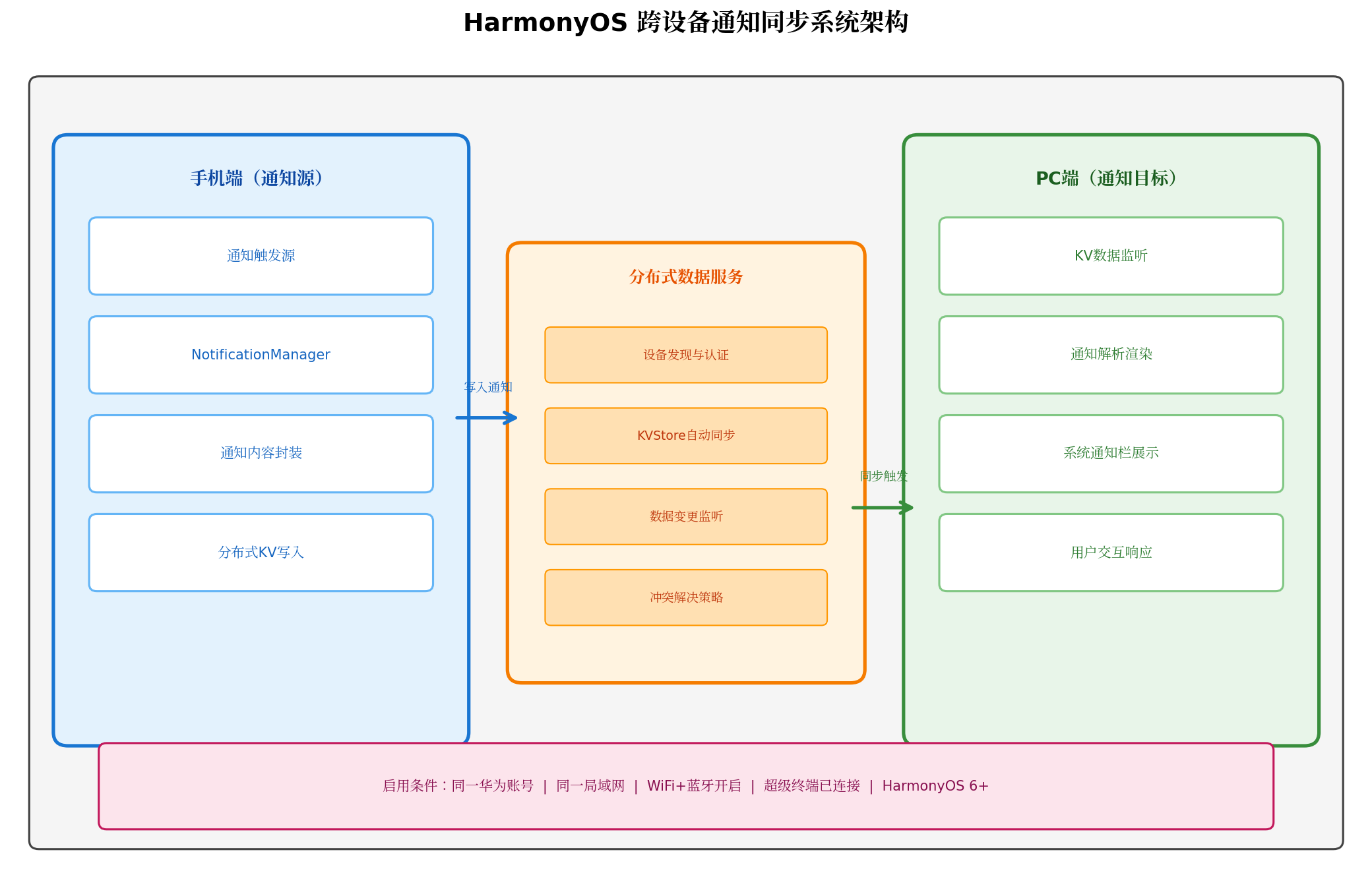
图1:HarmonyOS 跨设备通知同步系统架构——从手机端通知源到 PC 端通知目标的完整数据链路
架构分层解析:
(1)应用层(ArkUI + NotificationManager)
- 通知源设备:应用通过
NotificationManager.publish()发送本地通知,同时将通知数据序列化后写入分布式 KVStore - 通知目标设备:应用通过监听 KVStore 的
dataChange事件,在数据变更时调用NotificationManager.publish()展示同步通知
(2)框架层(分布式数据服务)
- KVManager:分布式数据管理的入口类,负责创建和管理 KVStore
- KVStore:支持
autoSync=true自动同步模式,数据变更后自动广播至超级终端内所有设备 - 冲突解决:基于时间戳和版本号的自动冲突解决策略
(3)传输层(分布式软总线)
- 小数据量通知走软总线消息通道,大数据量走 P2P 高速通道
- 数据大小建议控制在 100KB 以内,避免网络带宽占用过大
2.3 数据流转时序
跨设备通知同步的完整生命周期包含 9 个关键阶段:
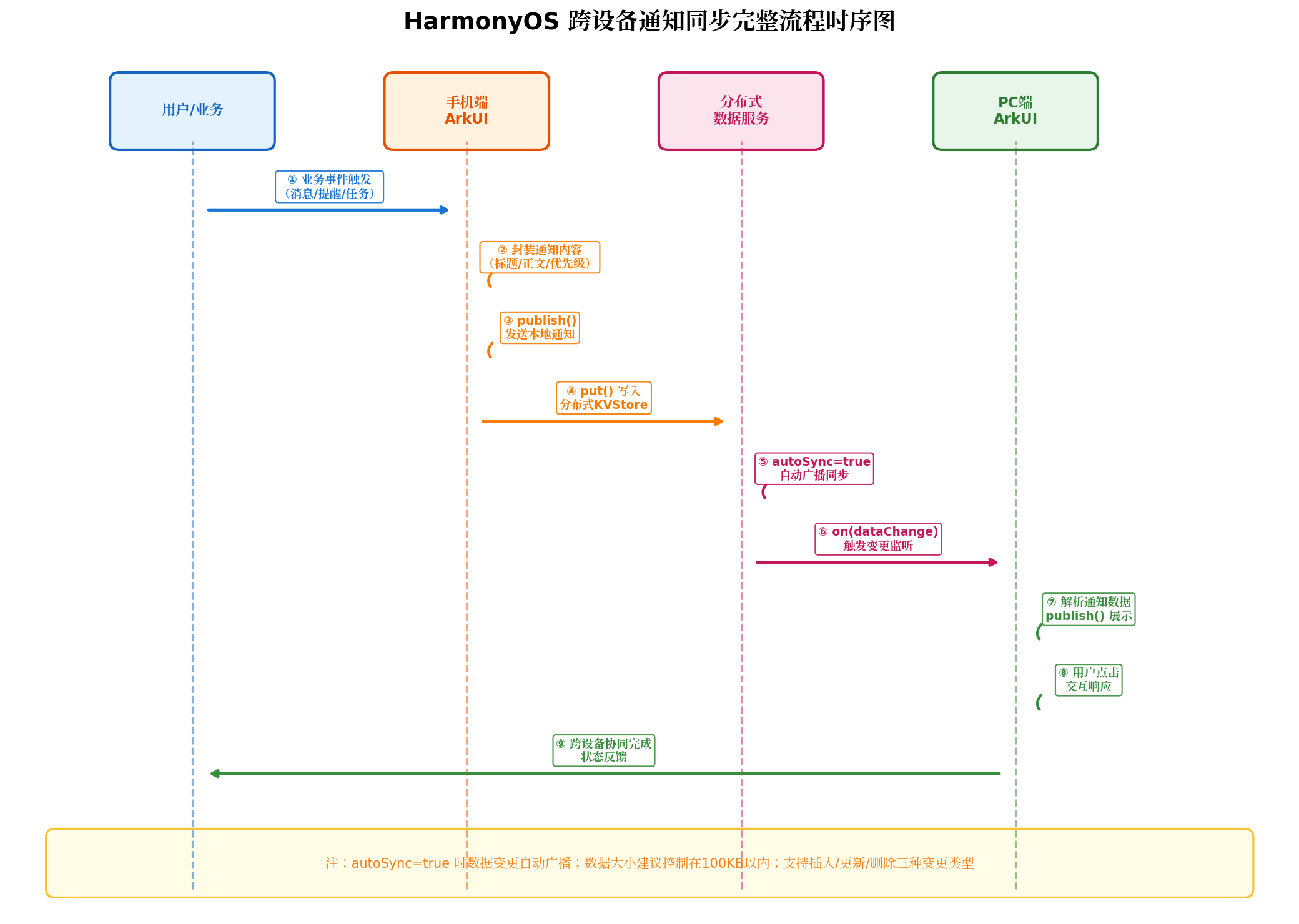
图2:跨设备通知同步完整流程时序图——从业务事件触发到多端协同完成的全链路交互
阶段详解:
- 业务事件触发:IM 消息到达、日程提醒触发、IoT 设备告警等业务事件产生
- 通知内容封装:应用将通知标题、正文、优先级、跳转目标等信息封装为结构化数据
- 本地通知发送:调用
NotificationManager.publish()在源设备展示本地通知 - 分布式数据写入:将通知数据序列化为 JSON,通过
kvStore.put()写入分布式 KVStore - 自动广播同步:
autoSync=true模式下,KVStore 自动将数据变更广播至所有已连接设备 - 变更事件触发:目标设备的 KVStore 监听器收到
dataChange事件 - 通知解析展示:目标设备解析通知数据,调用
NotificationManager.publish()展示同步通知 - 用户交互响应:用户点击通知后,通过
WantAgent跳转至对应页面或执行特定操作 - 状态反馈同步:通知处理状态(已读/已处理)通过 KVStore 反向同步至源设备
2.4 与传统通知系统的本质差异
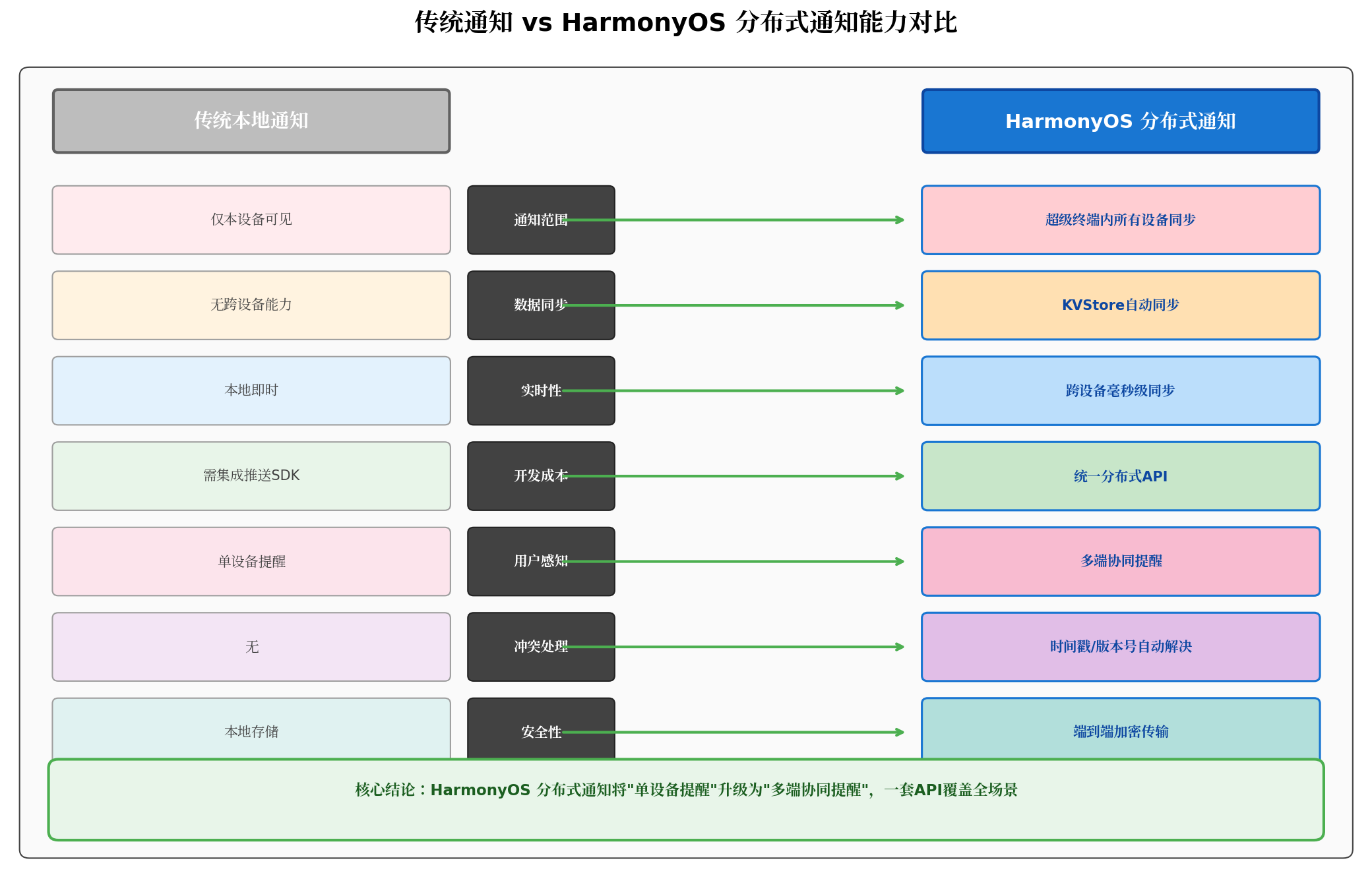
图3:传统通知 vs HarmonyOS 分布式通知能力对比——从单设备局限到多端协同的跨越
核心差异总结:
| 对比维度 | 传统本地通知 | HarmonyOS 分布式通知 |
|---|---|---|
| 通知范围 | 仅本设备可见 | 超级终端内所有设备同步 |
| 数据同步 | 无跨设备能力 | KVStore 自动同步 |
| 实时性 | 本地即时 | 跨设备毫秒级同步 |
| 开发成本 | 需集成推送 SDK | 统一分布式 API |
| 用户感知 | 单设备提醒 | 多端协同提醒 |
| 冲突处理 | 无 | 时间戳/版本号自动解决 |
三、核心 API 详解
3.1 分布式数据管理 API
HarmonyOS 6 为跨设备通知同步提供了完整的分布式数据管理 API:
| 类/接口 | 说明 | 核心方法 |
|---|---|---|
KVManager |
分布式数据管理入口 | createKVManager() / getKVStore() |
KVStore |
分布式键值存储 | put() / get() / delete() / on('dataChange') |
Options |
KVStore 配置选项 | autoSync / createIfMissing / securityLevel |
3.2 KVStore 自动同步机制
autoSync: true 是实现跨设备通知同步的核心配置。当该选项开启时,任何设备的 put() 操作都会自动触发数据广播,其他设备无需手动调用同步接口即可收到变更通知。
const options: distributedData.Options = {
  createIfMissing: true,    // 不存在时自动创建
  autoSync: true,           // 开启自动同步(核心!)
  encrypt: true,            // 数据加密存储
  kvStoreType: distributedData.KVStoreType.SINGLE_VERSION,
  securityLevel: distributedData.SecurityLevel.S2
};
3.3 数据变更监听
通过 kvStore.on('dataChange', ...) 注册监听器,可以实时感知跨设备数据变更:
kvStore.on('dataChange', distributedData.SubscribeType.SUBSCRIBE_TYPE_ALL, (data) => {
  // data.insertEntries: 新增的数据条目
  // data.updateEntries: 更新的数据条目
  // data.deleteEntries: 删除的数据条目
});
四、开发实战:构建跨设备消息通知同步系统
4.1 工程配置
在 module.json5 中声明所需权限:
{
  "module": {
    "requestPermissions": [
      {
        "name": "ohos.permission.DISTRIBUTED_DATASYNC",
        "reason": "$string:permission_distributed_reason"
      },
      {
        "name": "ohos.permission.GET_DISTRIBUTED_DEVICE_INFO",
        "reason": "$string:permission_device_info_reason"
      },
      {
        "name": "ohos.permission.NOTIFICATION",
        "reason": "$string:permission_notification_reason"
      }
    ]
  }
}
4.2 分布式数据服务封装
首先封装一个通用的分布式数据服务类,用于通知数据的跨设备同步:
// services/DistributedNotificationService.ets
import distributedData from '@ohos.data.distributedData';
import { BusinessError } from '@ohos.base';

export class DistributedNotificationService {
  private kvManager: distributedData.KVManager | null = null;
  private kvStore: distributedData.KVStore | null = null;
  private static instance: DistributedNotificationService;
  private changeListeners: Array<(data: distributedData.ChangeData[]) => void> = [];

  // 单例模式
  static getInstance(): DistributedNotificationService {
    if (!DistributedNotificationService.instance) {
      DistributedNotificationService.instance = new DistributedNotificationService();
    }
    return DistributedNotificationService.instance;
  }

  // 初始化分布式数据服务
  async initialize(context: Context): Promise<void> {
    try {
      const config: distributedData.KVManagerConfig = {
        bundleName: 'com.example.crossdevice.notification',
        context: context
      };

      // 创建 KVManager
      this.kvManager = await distributedData.createKVManager(config);

      // 配置 KVStore 选项
      const options: distributedData.Options = {
        createIfMissing: true,
        autoSync: true,           // 核心:开启自动同步
        encrypt: true,            // 数据加密
        backup: false,
        kvStoreType: distributedData.KVStoreType.SINGLE_VERSION,
        securityLevel: distributedData.SecurityLevel.S2
      };

      // 创建/获取 KVStore
      this.kvStore = await this.kvManager.getKVStore<distributedData.KVStore>('notification_sync', options);

      // 注册数据变更监听器
      await this.registerDataChangeListener();

      console.info('[DistributedService] 分布式通知服务初始化成功');
    } catch (error) {
      console.error('[DistributedService] 初始化失败:', (error as BusinessError).message);
      throw error;
    }
  }

  // 注册数据变更监听器
  private async registerDataChangeListener(): Promise<void> {
    if (!this.kvStore) return;

    try {
      await this.kvStore.on('dataChange', distributedData.SubscribeType.SUBSCRIBE_TYPE_ALL,
        (data: distributedData.ChangeData[]) => {
          console.info(`[DistributedService] 收到数据变更通知,共 ${data.length} 条`);
          // 通知所有注册的监听器
          this.changeListeners.forEach(listener => listener(data));
        });
      console.info('[DistributedService] 数据变更监听器注册成功');
    } catch (error) {
      console.error('[DistributedService] 监听器注册失败:', (error as BusinessError).message);
    }
  }

  // 写入通知数据到分布式存储
  async writeNotification(notification: CrossDeviceNotification): Promise<void> {
    if (!this.kvStore) {
      throw new Error('KVStore 未初始化');
    }

    try {
      const key = `notification_${notification.id}`;
      const value = new TextEncoder().encode(JSON.stringify(notification));

      await this.kvStore.put(key, value);
      console.info(`[DistributedService] 通知已写入分布式存储: ${notification.title}`);
    } catch (error) {
      console.error('[DistributedService] 写入通知失败:', (error as BusinessError).message);
      throw error;
    }
  }

  // 标记通知为已处理
  async markNotificationHandled(notificationId: string): Promise<void> {
    if (!this.kvStore) return;

    try {
      const key = `notification_${notificationId}`;
      const value = await this.kvStore.get(key);

      if (value) {
        const notification: CrossDeviceNotification = JSON.parse(new TextDecoder().decode(value));
        notification.status = 'handled';
        notification.handleTime = Date.now();
        notification.handleDevice = 'current_device'; // 实际应获取设备ID

        await this.kvStore.put(key, new TextEncoder().encode(JSON.stringify(notification)));
        console.info(`[DistributedService] 通知已标记为已处理: ${notificationId}`);
      }
    } catch (error) {
      console.error('[DistributedService] 标记处理状态失败:', (error as BusinessError).message);
    }
  }

  // 删除通知
  async deleteNotification(notificationId: string): Promise<void> {
    if (!this.kvStore) return;

    try {
      const key = `notification_${notificationId}`;
      await this.kvStore.delete(key);
      console.info(`[DistributedService] 通知已删除: ${notificationId}`);
    } catch (error) {
      console.error('[DistributedService] 删除通知失败:', (error as BusinessError).message);
    }
  }

  // 添加外部数据变更监听器
  addChangeListener(listener: (data: distributedData.ChangeData[]) => void): void {
    this.changeListeners.push(listener);
  }

  // 移除监听器
  removeChangeListener(listener: (data: distributedData.ChangeData[]) => void): void {
    const index = this.changeListeners.indexOf(listener);
    if (index > -1) {
      this.changeListeners.splice(index, 1);
    }
  }

  // 释放资源
  async release(): Promise<void> {
    if (this.kvStore) {
      await this.kvStore.off('dataChange');
      this.kvStore = null;
    }
    this.kvManager = null;
    this.changeListeners = [];
    console.info('[DistributedService] 资源已释放');
  }
}

// 跨设备通知数据模型
export interface CrossDeviceNotification {
  id: string;                    // 通知唯一ID
  title: string;                 // 通知标题
  content: string;               // 通知内容
  priority: 'high' | 'normal' | 'low';  // 优先级
  sourceDevice: string;          // 来源设备ID
  sourceDeviceName: string;      // 来源设备名称
  timestamp: number;             // 创建时间戳
  status: 'unread' | 'read' | 'handled';  // 状态
  readTime?: number;             // 阅读时间
  handleTime?: number;           // 处理时间
  handleDevice?: string;         // 处理设备
  actionType?: string;           // 操作类型
  actionPayload?: string;        // 操作载荷
}
4.3 源设备:手机端通知发送
手机端作为通知源,需要在业务事件触发时同时完成两件事:发送本地通知 + 写入分布式存储。
// PhoneNotificationSource.ets
import notificationManager from '@kit.NotificationManagerKit';
import wantAgent from '@kit.AbilityKit';
import { DistributedNotificationService, CrossDeviceNotification } from '../services/DistributedNotificationService';
import { BusinessError } from '@ohos.base';
import promptAction from '@ohos.promptAction';

@Entry
@Component
struct PhoneNotificationSourcePage {
  @State messageText: string = '';
  @State sendStatus: string = '输入消息后点击发送';
  private distributedService: DistributedNotificationService = DistributedNotificationService.getInstance();

  aboutToAppear(): void {
    // 初始化分布式服务
    this.distributedService.initialize(getContext(this));
  }

  aboutToDisappear(): void {
    this.distributedService.release();
  }

  // 发送跨设备通知
  private async sendCrossDeviceNotification(title: string, content: string, priority: 'high' | 'normal' | 'low'): Promise<void> {
    try {
      const notificationId = `msg_${Date.now()}_${Math.floor(Math.random() * 1000)}`;

      // Step 1: 创建 WantAgent(点击通知后的跳转目标)
      const wantAgentInfo: wantAgent.WantAgentInfo = {
        wants: [
          {
            deviceId: '',
            bundleName: 'com.example.crossdevice.notification',
            abilityName: 'EntryAbility',
            parameters: {
              notificationId: notificationId,
              source: 'cross_device_sync'
            }
          }
        ],
        operationType: wantAgent.OperationType.START_ABILITY
      };
      const agent = await wantAgent.getWantAgent(wantAgentInfo);

      // Step 2: 发送本地通知
      await notificationManager.publish({
        id: parseInt(notificationId.split('_')[1]) % 10000,
        content: {
          contentType: notificationManager.ContentType.NOTIFICATION_CONTENT_BASIC_TEXT,
          normal: {
            title: title,
            text: content,
            additionalText: '来自手机端'
          }
        },
        wantAgent: agent,
        slotType: notificationManager.SlotType.SOCIAL_COMMUNICATION
      });

      // Step 3: 构造跨设备通知数据
      const crossDeviceNotification: CrossDeviceNotification = {
        id: notificationId,
        title: title,
        content: content,
        priority: priority,
        sourceDevice: 'phone_device_id',  // 实际应通过设备管理API获取
        sourceDeviceName: '华为手机',
        timestamp: Date.now(),
        status: 'unread',
        actionType: 'open_message',
        actionPayload: JSON.stringify({ messageId: notificationId })
      };

      // Step 4: 写入分布式存储(自动同步至其他设备)
      await this.distributedService.writeNotification(crossDeviceNotification);

      this.sendStatus = '通知已发送至超级终端所有设备';
      promptAction.showToast({ message: '跨设备通知发送成功' });
      console.info(`[NotificationSource] 通知已同步: ${title}`);
    } catch (err) {
      let error = err as BusinessError;
      console.error(`[NotificationSource] 发送失败: ${error.code}, ${error.message}`);
      this.sendStatus = '发送失败';
      promptAction.showToast({ message: '发送失败' });
    }
  }

  // 模拟 IM 消息到达
  private async simulateIMMessage(): Promise<void> {
    const messages = [
      { title: '工作群消息', content: '项目经理:今晚8点线上评审会议,请准时参加', priority: 'high' as const },
      { title: '代码审查', content: '您的PR #2847 有新的评论需要处理', priority: 'normal' as const },
      { title: '系统告警', content: '生产环境CPU使用率超过90%,请及时处理', priority: 'high' as const }
    ];
    const msg = messages[Math.floor(Math.random() * messages.length)];
    await this.sendCrossDeviceNotification(msg.title, msg.content, msg.priority);
  }

  build() {
    Column({ space: 16 }) {
      Text('手机端 - 跨设备通知源')
        .fontSize(22)
        .fontWeight(FontWeight.Bold)
        .fontColor('#1565C0')
        .margin({ top: 24, bottom: 12 })

      Text(this.sendStatus)
        .fontSize(14)
        .fontColor('#757575')
        .margin({ bottom: 16 })

      // 消息输入区
      TextArea({ placeholder: '输入要跨设备同步的通知内容...', text: $$this.messageText })
        .width('90%')
        .height(100)
        .backgroundColor('#FFFFFF')
        .borderRadius(12)
        .border({ width: 1, color: '#E0E0E0' })
        .padding(12)

      // 优先级选择
      Row({ space: 12 }) {
        Button('高优先级')
          .backgroundColor('#F44336')
          .fontColor('#FFFFFF')
          .onClick(() => {
            this.sendCrossDeviceNotification('自定义通知', this.messageText, 'high');
          })

        Button('普通优先级')
          .backgroundColor('#1976D2')
          .fontColor('#FFFFFF')
          .onClick(() => {
            this.sendCrossDeviceNotification('自定义通知', this.messageText, 'normal');
          })
      }
      .width('90%')
      .justifyContent(FlexAlign.SpaceEvenly)

      // 模拟消息按钮
      Button('模拟IM消息到达')
        .width('90%')
        .height(48)
        .backgroundColor('#4CAF50')
        .fontColor('#FFFFFF')
        .fontSize(16)
        .borderRadius(24)
        .margin({ top: 8 })
        .onClick(() => {
          this.simulateIMMessage();
        })

      // 使用说明
      Column({ space: 6 }) {
        Text('使用说明')
          .fontSize(16)
          .fontWeight(FontWeight.Bold)
          .fontColor('#424242')
          .alignSelf(ItemAlign.Start)

        Text('1. 输入通知内容并选择优先级')
          .fontSize(13)
          .fontColor('#616161')
          .alignSelf(ItemAlign.Start)

        Text('2. 点击发送后,通知将同步至超级终端所有设备')
          .fontSize(13)
          .fontColor('#616161')
          .alignSelf(ItemAlign.Start)

        Text('3. PC端将自动收到并展示同步通知')
          .fontSize(13)
          .fontColor('#616161')
          .alignSelf(ItemAlign.Start)
      }
      .width('90%')
      .padding(16)
      .backgroundColor('#F5F5F5')
      .borderRadius(12)
      .margin({ top: 16 })
    }
    .width('100%')
    .height('100%')
    .backgroundColor('#FAFAFA')
  }
}
4.4 目标设备:PC 端通知接收
PC 端作为通知目标,需要监听分布式数据变更并展示同步通知。
// PCNotificationTarget.ets
import notificationManager from '@kit.NotificationManagerKit';
import wantAgent from '@kit.AbilityKit';
import { DistributedNotificationService, CrossDeviceNotification } from '../services/DistributedNotificationService';
import distributedData from '@ohos.data.distributedData';
import { BusinessError } from '@ohos.base';
import promptAction from '@ohos.promptAction';

@Entry
@Component
struct PCNotificationTargetPage {
  @State receivedNotifications: CrossDeviceNotification[] = [];
  @State syncStatus: string = '等待接收跨设备通知...';
  @State unreadCount: number = 0;
  private distributedService: DistributedNotificationService = DistributedNotificationService.getInstance();
  private changeListener: ((data: distributedData.ChangeData[]) => void) | null = null;

  aboutToAppear(): void {
    // 初始化分布式服务
    this.distributedService.initialize(getContext(this));

    // 注册数据变更监听器
    this.changeListener = (data: distributedData.ChangeData[]) => {
      this.handleDataChange(data);
    };
    this.distributedService.addChangeListener(this.changeListener);
  }

  aboutToDisappear(): void {
    // 注销监听器,防止内存泄漏
    if (this.changeListener) {
      this.distributedService.removeChangeListener(this.changeListener);
      this.changeListener = null;
    }
    this.distributedService.release();
  }

  // 处理分布式数据变更
  private async handleDataChange(data: distributedData.ChangeData[]): Promise<void> {
    for (const change of data) {
      if (change.key.startsWith('notification_')) {
        try {
          const notification: CrossDeviceNotification = JSON.parse(new TextDecoder().decode(change.value));

          // 过滤已处理的通知
          if (notification.status === 'handled') {
            // 从本地列表中移除已处理的通知
            this.receivedNotifications = this.receivedNotifications.filter(
              n => n.id !== notification.id
            );
            continue;
          }

          // 检查是否已存在
          const existingIndex = this.receivedNotifications.findIndex(n => n.id === notification.id);
          if (existingIndex >= 0) {
            // 更新现有通知
            this.receivedNotifications[existingIndex] = notification;
          } else {
            // 新增通知
            this.receivedNotifications.unshift(notification);
            this.unreadCount++;

            // 在PC端展示系统通知
            await this.showSystemNotification(notification);
          }

          this.syncStatus = `收到来自 ${notification.sourceDeviceName} 的通知: ${notification.title}`;
          console.info(`[NotificationTarget] 收到跨设备通知: ${notification.title}`);
        } catch (err) {
          console.error('[NotificationTarget] 解析通知数据失败:', err);
        }
      }
    }
  }

  // 在PC端展示系统通知
  private async showSystemNotification(notification: CrossDeviceNotification): Promise<void> {
    try {
      const wantAgentInfo: wantAgent.WantAgentInfo = {
        wants: [
          {
            deviceId: '',
            bundleName: 'com.example.crossdevice.notification',
            abilityName: 'EntryAbility',
            parameters: {
              notificationId: notification.id,
              source: 'cross_device_sync',
              action: 'show_detail'
            }
          }
        ],
        operationType: wantAgent.OperationType.START_ABILITY
      };
      const agent = await wantAgent.getWantAgent(wantAgentInfo);

      // 根据优先级设置通知样式
      const slotType = notification.priority === 'high'
        ? notificationManager.SlotType.SOCIAL_COMMUNICATION
        : notificationManager.SlotType.CONTENT_INFORMATION;

      await notificationManager.publish({
        id: parseInt(notification.id.split('_')[1]) % 10000,
        content: {
          contentType: notificationManager.ContentType.NOTIFICATION_CONTENT_BASIC_TEXT,
          normal: {
            title: `[${notification.sourceDeviceName}] ${notification.title}`,
            text: notification.content,
            additionalText: new Date(notification.timestamp).toLocaleTimeString()
          }
        },
        wantAgent: agent,
        slotType: slotType
      });

      promptAction.showToast({ message: `收到来自${notification.sourceDeviceName}的通知` });
    } catch (err) {
      console.error('[NotificationTarget] 展示系统通知失败:', err);
    }
  }

  // 标记通知为已读
  private async markAsRead(notification: CrossDeviceNotification): Promise<void> {
    notification.status = 'read';
    notification.readTime = Date.now();
    await this.distributedService.writeNotification(notification);
    this.unreadCount = Math.max(0, this.unreadCount - 1);
  }

  // 标记通知为已处理
  private async markAsHandled(notification: CrossDeviceNotification): Promise<void> {
    await this.distributedService.markNotificationHandled(notification.id);
    this.receivedNotifications = this.receivedNotifications.filter(n => n.id !== notification.id);
    this.unreadCount = Math.max(0, this.unreadCount - 1);
    promptAction.showToast({ message: '通知已处理,所有设备将同步更新' });
  }

  build() {
    Column({ space: 16 }) {
      Text('PC端 - 跨设备通知接收')
        .fontSize(22)
        .fontWeight(FontWeight.Bold)
        .fontColor('#2E7D32')
        .margin({ top: 24, bottom: 12 })

      Text(`${this.syncStatus} | 未读: ${this.unreadCount}`)
        .fontSize(14)
        .fontColor('#757575')
        .margin({ bottom: 16 })

      // 通知列表
      List() {
        ForEach(this.receivedNotifications, (notification: CrossDeviceNotification) => {
          ListItem() {
            Column({ space: 4 }) {
              Row() {
                Text(notification.title)
                  .fontSize(16)
                  .fontWeight(FontWeight.Bold)
                  .fontColor(notification.status === 'unread' ? '#1976D2' : '#757575')

                if (notification.priority === 'high') {
                  Text('高优')
                    .fontSize(10)
                    .fontColor('#FFFFFF')
                    .backgroundColor('#F44336')
                    .padding({ top: 2, bottom: 2, left: 6, right: 6 })
                    .borderRadius(4)
                }
              }
              .width('100%')
              .justifyContent(FlexAlign.SpaceBetween)

              Text(notification.content)
                .fontSize(14)
                .fontColor('#424242')
                .maxLines(2)
                .textOverflow({ overflow: TextOverflow.Ellipsis })

              Row() {
                Text(`来自: ${notification.sourceDeviceName}`)
                  .fontSize(12)
                  .fontColor('#9E9E9E')

                Text(new Date(notification.timestamp).toLocaleTimeString())
                  .fontSize(12)
                  .fontColor('#9E9E9E')
              }
              .width('100%')
              .justifyContent(FlexAlign.SpaceBetween)
              .margin({ top: 4 })

              // 操作按钮
              Row({ space: 8 }) {
                if (notification.status === 'unread') {
                  Button('标记已读')
                    .fontSize(12)
                    .height(28)
                    .backgroundColor('#E3F2FD')
                    .fontColor('#1976D2')
                    .onClick(() => this.markAsRead(notification))
                }

                Button('处理完成')
                  .fontSize(12)
                  .height(28)
                  .backgroundColor('#4CAF50')
                  .fontColor('#FFFFFF')
                  .onClick(() => this.markAsHandled(notification))
              }
              .width('100%')
              .justifyContent(FlexAlign.End)
              .margin({ top: 8 })
            }
            .width('100%')
            .padding(16)
            .backgroundColor(notification.status === 'unread' ? '#E3F2FD' : '#FFFFFF')
            .borderRadius(12)
            .border({ width: 1, color: '#E0E0E0' })
            .margin({ bottom: 8 })
          }
        })
      }
      .width('90%')
      .height(400)
      .layoutWeight(1)

      if (this.receivedNotifications.length === 0) {
        Column({ space: 8 }) {
          Text('暂无跨设备通知')
            .fontSize(16)
            .fontColor('#9E9E9E')
          Text('请在手机端发送通知,将自动同步到此处')
            .fontSize(12)
            .fontColor('#BDBDBD')
        }
        .width('100%')
        .height(200)
        .justifyContent(FlexAlign.Center)
      }
    }
    .width('100%')
    .height('100%')
    .backgroundColor('#FAFAFA')
  }
}
五、典型应用场景
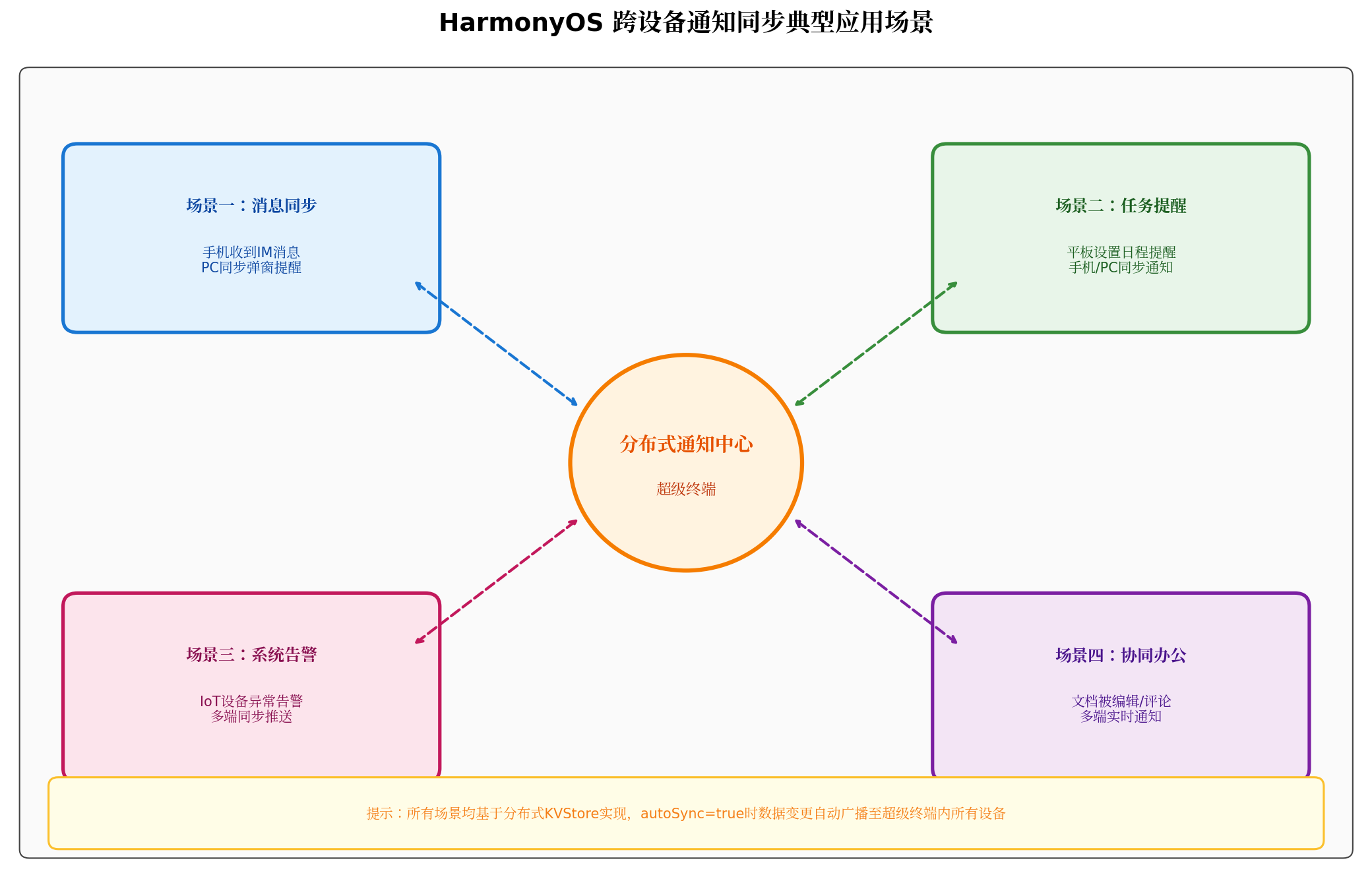
图4:HarmonyOS 跨设备通知同步典型应用场景——覆盖消息同步、任务提醒、系统告警、协同办公四大高频场景
场景一:消息同步
- 手机收到 IM 消息,PC 端同步弹窗提醒,用户无需拿起手机即可查看和回复
- 支持消息已读状态跨设备同步,避免多端重复提醒
场景二:任务提醒
- 平板设置日程提醒,手机/PC 同步收到通知
- 在任一设备上标记"完成",其他设备状态自动更新
场景三:系统告警
- IoT 设备异常告警(如温湿度传感器超限),多端同步推送
- 智慧屏展示告警详情,手机接收处理确认
场景四:协同办公
- 文档被编辑或评论时,多端实时通知协作者
- 审批流程状态变更,所有相关设备同步提醒
六、进阶优化:生产级跨设备通知同步的 5 个关键点
6.1 数据大小控制
分布式 KVStore 对单条数据大小有限制,建议通知数据控制在 100KB 以内:
private async writeNotification(notification: CrossDeviceNotification): Promise<void> {
  const data = JSON.stringify(notification);
  const sizeInKB = new TextEncoder().encode(data).length / 1024;

  if (sizeInKB > 100) {
    // 截断过长的内容
    notification.content = notification.content.substring(0, 500) + '...';
    console.warn('[DistributedService] 通知内容过长,已截断');
  }

  await this.kvStore?.put(key, new TextEncoder().encode(JSON.stringify(notification)));
}
6.2 通知去重与幂等性
跨设备同步可能出现重复通知,需要通过唯一 ID 实现去重:
private handleDataChange(data: distributedData.ChangeData[]): void {
  const processedIds = new Set<string>();

  for (const change of data) {
    const notification: CrossDeviceNotification = JSON.parse(new TextDecoder().decode(change.value));

    // 幂等性校验
    if (processedIds.has(notification.id)) {
      continue;
    }
    processedIds.add(notification.id);

    // 业务处理...
  }
}
6.3 冲突解决策略
多设备同时修改通知状态时,采用"时间戳优先"的冲突解决策略:
private async resolveConflict(key: string, localValue: Uint8Array, remoteValue: Uint8Array): Promise<Uint8Array> {
  const local = JSON.parse(new TextDecoder().decode(localValue));
  const remote = JSON.parse(new TextDecoder().decode(remoteValue));

  // 时间戳优先:取最新修改的版本
  if (local.timestamp > remote.timestamp) {
    return localValue;
  }
  return remoteValue;
}
6.4 通知生命周期管理
设置通知自动过期机制,避免 KVStore 数据无限增长:
// 定时清理已处理超过7天的通知
private async cleanupOldNotifications(): Promise<void> {
  const sevenDaysAgo = Date.now() - 7 * 24 * 60 * 60 * 1000;

  for (const notification of this.receivedNotifications) {
    if (notification.status === 'handled' && notification.handleTime && notification.handleTime < sevenDaysAgo) {
      await this.distributedService.deleteNotification(notification.id);
    }
  }
}
6.5 异常处理与降级策略
private async safeSyncNotification(notification: CrossDeviceNotification): Promise<void> {
  try {
    await this.distributedService.writeNotification(notification);
  } catch (err) {
    // 分布式同步失败时,降级为仅本地通知
    console.warn('[NotificationSource] 跨设备同步失败,降级为本地通知');
    await notificationManager.publish({
      id: Date.now(),
      content: {
        contentType: notificationManager.ContentType.NOTIFICATION_CONTENT_BASIC_TEXT,
        normal: {
          title: notification.title,
          text: notification.content,
          additionalText: '(仅本地,跨设备同步失败)'
        }
      }
    });
  }
}
七、调试与常见问题排查
| 问题现象 | 可能原因 | 解决方案 |
|---|---|---|
| 通知未跨设备同步 | autoSync未开启 | 检查 KVStore Options 中 autoSync 是否为 true |
| 数据变更监听未触发 | 监听器注册时机不对 | 确保在 KVStore 初始化完成后注册监听器 |
| 通知重复展示 | 未实现去重逻辑 | 使用 Set 对 notificationId 进行幂等性校验 |
| 数据同步延迟高 | 网络环境不稳定 | 确保双端在同一局域网,检查 WiFi 信号强度 |
| 冲突数据不一致 | 未实现冲突解决策略 | 添加时间戳/版本号比较逻辑 |
| 内存泄漏 | 监听器未注销 | 在 aboutToDisappear 中正确注销 dataChange 监听器 |
八、总结与展望
本文从 HarmonyOS 分布式架构出发,完整讲解了手机与 PC 之间跨设备通知同步的技术原理、核心 API 与生产级开发实践。通过分布式 KVStore 的 autoSync 自动同步机制,结合 NotificationManager 的通知管理能力,开发者可以在不感知底层网络细节的情况下,实现"一处触发、多端感知"的协同通知体验。
跨设备通知同步的价值不仅在于技术实现的简洁性,更在于其对用户注意力的深度解放——用户不再需要时刻关注所有设备,重要信息会自动出现在最合适的屏幕上。随着 HarmonyOS 生态的持续演进,跨设备通知同步将在以下方向进一步升级:
- 智能路由:系统根据用户当前使用的设备,智能选择通知展示的目标屏幕
- 优先级自适应:基于用户行为模式,自动调整不同场景下的通知优先级
- 实况窗跨设备:支持实况窗(Live View)在超级终端内所有设备间实时同步展示
掌握跨设备通知同步开发,意味着你的应用已经具备了 HarmonyOS 分布式体验的核心能力。希望本文能为开发者在全场景协同应用开发中提供有价值的参考。
转载自:https://blog.csdn.net/u014727709/article/details/164125842
欢迎 👍点赞✍评论⭐收藏,欢迎指正

讨论HarmonyOS开发技术,专注于API与组件、DevEco Studio、测试、元服务和应用上架分发等。
更多推荐

 2
2 0
0- 0


 已为社区贡献689条内容

所有评论(0)