HarmonyOS 6 ArkUI - ArkUI 动态样式绑定技巧:三元表达式驱动 backgroundColor/fontColor、百分比与 vp 单位字符串拼接及条件样式的性能考量
引言:把步频交给鼓点,把坚持交给热爱
跑步是一场与自己的对话。每一次落脚、每一次呼吸、每一次心跳,都在寻找那个让身体最舒服的节奏。180 BPM——跑步界公认的黄金步频,当音乐的鼓点与脚步完美同步,跑者会进入一种近乎冥想的心流状态,疲劳感被节奏稀释,距离感被旋律拉长。
节奏跑 RUNBEAT 正是为这种体验而生。它不是又一个跑步记录 App,而是一个以 BPM 步频音乐为核心驱动力的跑步社区平台——从按步频智能排序的歌单,到实时同步步频的播放控制;从详尽的跑步记录与分段配速分析,到线上挑战与排行榜激励;从专业运动装备商城,到跑者个人中心与目标管理。六大 Tab 构成完整的跑步生态闭环,让每一次奔跑都有音乐作证,每一步坚持都被社区看见。
本文将从设计理念、色彩系统、项目架构、数据模型、六大 Tab 页面、弹窗交互、动画效果、BPM 音乐系统、跑步数据分析、线上挑战、装备商城、跑者中心、开发环境等维度,对节奏跑 RUNBEAT 进行全方位深度解析。所有代码基于 HarmonyOS ArkTS 声明式 UI 框架,单文件约 2900 行,无外部依赖,可直接在 DevEco Studio 中运行预览。
第一章 项目概述与设计理念
1.1 项目定位
节奏跑 RUNBEAT 是一款面向跑步爱好者的 BPM 步频音乐 + 跑步记录 + 线上挑战 + 运动装备 综合社区应用。应用以"让每一步踩在鼓点上"为核心理念,通过 BPM 步频匹配技术,将音乐节奏与跑步步频实时同步,帮助跑者找到并维持最佳步频,提升跑步效率和体验。
与传统跑步 App 不同,节奏跑 RUNBEAT 将音乐置于核心位置——歌单按 BPM 区间分类(热身 140-152、巡航 156-164、节奏 165-175、冲刺 176-190),跑步时可按当前步频智能换歌,播放条实时显示当前 BPM 与步频匹配状态。音乐不再是跑步的背景音,而是驱动步伐的节拍器。
1.2 核心功能模块
应用包含六大核心功能模块,对应底部六个 Tab:
- 跑步 Tab:BPM 实时步频圆环 + 当前配速 + 已跑里程 + 音乐播放条 + 今日训练建议 + 开始跑步目标选择弹窗 + 按步频换歌抽屉
- 歌单 Tab:双列步频歌单网格(8 份歌单,按 BPM 区间分类)+ 新建歌单弹窗 + 歌单详情抽屉 + 删除歌单确认
- 记录 Tab:本周数据三卡片(公里/配速/次数)+ 最近跑步记录列表(12 次记录)+ 跑步详情弹窗(四数据 + 分段配速柱状图 + 分享战绩)
- 挑战 Tab:八月百公里进度卡 + 排名入口 + 进度条 + 全部挑战列表(10 个挑战)+ 挑战详情弹窗 + 报名/放弃确认 + 排行榜弹窗
- 装备 Tab:跑者装备节 banner + 明日达标识 + 口碑装备双列商品网格(12 件商品)+ 商品详情抽屉 + 购买确认弹窗(数量加减 + 合计金额)
- 我的 Tab:跑者资料卡(等级/坚持天数/徽章)+ 本周里程柱状图 + 目标进度(本月/年度/跑量等级)+ 资料编辑弹窗 + 关于 + 退出登录
1.3 设计理念
节奏跑 RUNBEAT 的设计遵循三个核心理念:
数据驱动,音乐为核:所有功能围绕跑步数据与音乐体验展开。BPM 步频是贯穿全应用的核心数据轴——歌单按 BPM 分类、跑步时按步频换歌、记录中展示平均步频、挑战中音乐加成奖励。音乐不是附加功能,而是跑步体验的核心驱动力。
活力运动,清爽通透:视觉设计采用活力运动风——浅灰白底(#F7F8F5)营造清爽通透感,荧光橙(#FF6B2C)作为主色传递运动活力与能量,薄荷绿(#00B27A)作为辅助色代表健康与成长,碳灰(#233329)作为文字主色保证可读性。整体视觉轻盈有活力,不压抑,适合运动场景。
社区激励,坚持可见:通过线上挑战、排行榜、完赛奖励、徽章体系、目标进度等机制,将个人跑步行为转化为社区互动与成就感。八月百公里挑战 12680 人参加、排行榜实时排名、完赛赠专属歌单——让每一次坚持都被社区看见,让每一个目标都有明确的里程碑。
第二章 色彩系统与视觉风格
2.1 主色调:荧光橙 #FF6B2C
荧光橙(#FF6B2C)是节奏跑 RUNBEAT 的主色调,也是整个应用最具辨识度的视觉符号。它出现在:Logo 背景、底部 Tab 选中态、BPM 圆环数字、开始跑步按钮、歌单 BPM 区间标签、挑战进度条、装备价格、目标进度条(70% 以上)等核心位置。
荧光橙传递运动活力、能量爆发、热情奔放的情感,与跑步运动的属性高度契合。在浅灰白底上,荧光橙具有极高的视觉冲击力,能瞬间吸引用户注意力到核心操作(开始跑步、购买、报名)和核心数据(BPM、配速、价格、进度)上。
2.2 辅助色:薄荷绿 #00B27A
薄荷绿(#00B27A)是应用的辅助色,代表健康、成长、自然、稳定。它出现在:本周平均配速卡片、训练建议图标背景、跑步详情步频数据、挑战可报名标签、歌单创建后提示、分享战绩按钮、目标进度条(70% 以下)、装备明日达标识等位置。
薄荷绿与荧光橙形成冷暖对比——橙色代表爆发与冲刺,绿色代表稳定与成长。二者搭配使用,既保持了运动活力,又不失健康稳重,符合跑步运动"冲刺与巡航交替"的节奏特征。
2.3 中性色体系
应用构建了完整的中性色体系,用于背景、卡片、文字、边框等:
- 背景色:#F7F8F5(浅灰白,全局背景)、#F2F5F0(微绿灰,头部背景/输入框背景)
- 卡片色:#FFFFFF(纯白,内容卡片)
- 文字主色:#233329(碳灰,标题/重要数据)
- 文字次色:#5B6572(中灰,正文/说明)
- 文字辅助色:#8A93A6(浅灰,次要信息/标签)
- 文字最弱色:#B8C0CC(极浅灰,占位符/装饰文字)
- 边框色:#E9ECEF(浅灰,卡片边框/分割线)
四级文字明度(碳灰/中灰/浅灰/极浅灰)构建了清晰的信息层级,用户可以快速区分标题、正文、次要信息和装饰信息。
2.4 心情色:BPM 分类色
应用为不同跑步心情/BPM 区间设计了专属颜色,通过 moodColor() 和 moodBg() 两个全局纯函数集中管理:
- 冲刺(176-190 BPM):#FF6B2C 荧光橙,背景 rgba(255,107,44,0.1)
- 节奏(165-175 BPM):#00B27A 薄荷绿,背景 rgba(0,178,122,0.1)
- 巡航(156-164 BPM):#2F8FED 蓝色,背景 rgba(47,143,237,0.1)
- 热身(140-152 BPM):#8A93A6 浅灰,背景 rgba(138,147,166,0.12)
- 放松(128-140 BPM):#7CB518 草绿
心情色系统让用户在歌曲列表和歌单中一眼识别歌曲的强度区间,快速找到适合当前跑步阶段的音乐。冲刺用橙、节奏用绿、巡航用蓝、热身用灰——颜色与运动强度的心理联想一致,降低认知负担。
2.5 视觉风格总结
节奏跑 RUNBEAT 的视觉风格可以概括为"活力运动风":浅灰白底营造清爽通透感,荧光橙主色传递运动能量,薄荷绿辅助色代表健康成长,碳灰文字保证可读性,心情色系统分类 BPM 强度。整体视觉轻盈有活力、信息层级清晰、色彩语义明确,既适合运动场景的活力需求,又满足数据展示的可读性要求。
第三章 项目架构与文件组织
3.1 单文件架构
节奏跑 RUNBEAT 采用 单文件架构,所有代码(类型定义、静态数据、工具函数、枚举、8 个组件)全部集中在一个 2135.ets 文件中,约 2900 行代码。这种架构的优势是:
- 零配置成本:无需配置路由、状态管理库、UI 组件库,将代码复制到
entry/src/main/ets/pages/Index.ets即可运行 - 低理解门槛:所有代码在一个文件中,开发者可以自上而下通读,快速理解整体逻辑
- 高内聚性:类型定义、数据、工具函数、组件紧密关联,修改时无需在多个文件间跳转
- 易于分享:单个文件即可完整分享整个应用,适合教学演示和原型验证
3.2 组件划分
应用通过 ArkTS 的 @Component 装饰器划分为 8 个独立组件,每个组件负责一个明确的功能模块:
| 组件名 | 职责 | 行数占比 |
|---|---|---|
RunBeatApp | 根入口组件,管理底部 Tab 切换,分发 6 个子页面 | ~5% |
RunBeatHeader | 顶部头部组件,Logo + 搜索栏 + 活动 banner(静态) | ~8% |
RunContent | 跑步 Tab,BPM 圆环 + 播放条 + 训练建议 + 开始弹窗 + 换歌抽屉 | ~18% |
PlaylistContent | 歌单 Tab,双列歌单网格 + 新建/详情/删除弹窗 | ~16% |
StatsContent | 记录 Tab,本周数据 + 跑步记录列表 + 详情弹窗 | ~12% |
ChallengeContent | 挑战 Tab,进度卡 + 挑战列表 + 详情/报名/放弃/排行榜弹窗 | ~18% |
GearContent | 装备 Tab,商品网格 + 详情抽屉 + 购买确认弹窗 | ~12% |
MeRunContent | 我的 Tab,资料卡 + 里程图 + 目标进度 + 编辑/关于/退出弹窗 | ~11% |
根组件 RunBeatApp 通过 @State activeTab 管理当前选中的 Tab,使用 @Builder contentArea() 根据 Tab 枚举值渲染对应的子组件。底部 Tab 栏通过 @Builder bottomTabItem() 封装可复用的 Tab 项,选中时图标 1.18 倍缩放 + 220ms 缓出动画,文字变为荧光橙。
3.3 弹窗实现模式
应用中所有弹窗(约 15 套)统一采用 Stack 叠加 + if 条件渲染 + 半透明遮罩 的实现模式:
Stack() {
  Scroll() { /* 页面主内容 */ }
  if (this.showXxx) {
    Column() {
      Column()  // 半透明可点击遮罩区域
        .layoutWeight(1)
        .onClick(() => { this.showXxx = false })
      this.xxxModal()  // 弹窗内容
    }
    .width('100%')
    .height('100%')
    .backgroundColor('rgba(35,51,41,0.5)')  // 半透明遮罩
  }
}
底部弹出式弹窗(换歌抽屉、歌单详情、装备详情)使用 constraintSize({ maxHeight: '78%-80%' }) 限制最大高度,防止内容过长溢出。居中弹窗(开始跑步、新建歌单、跑步详情、挑战详情、报名确认、购买确认、资料编辑等)通过 justifyContent(FlexAlign.Center) 实现居中显示。Toast 提示(换歌成功、报名成功、下单成功、资料保存)使用全屏居中 + 圆角胶囊 + 半透明背景 + 1.05 倍缩放动画。
3.4 目录结构
虽然应用为单文件架构,但在 DevEco Studio 项目中仍需遵循标准目录结构:
RunBeatApp/
├── AppScope/                    # 应用全局配置
│   └── app.json5               # 应用配置(包名、版本、图标)
├── entry/                       # 主模块
│   ├── src/main/
│   │   ├── ets/
│   │   │   ├── entryability/
│   │   │   │   └── EntryAbility.ets  # Ability 入口
│   │   │   └── pages/
│   │   │       └── Index.ets   # 主页面(替换为 2135.ets 完整源码)
│   │   ├── resources/           # 资源文件(字符串、颜色、媒体)
│   │   └── module.json5         # 模块配置(页面注册、权限)
│   └── build-profile.json5      # 构建配置
├── hvigor/                      # 构建工具
├── oh_modules/                  # 依赖模块
└── build-profile.json5          # 全局构建配置
第四章 数据模型与全局状态管理
4.1 类型定义
应用定义了 7 个接口(interface),覆盖所有业务数据模型:
RunTrack(跑步歌曲):id、title(歌名)、artist(歌手)、bpm(节拍数)、duration(时长)、mood(心情:冲刺/节奏/巡航/热身/放松)。14 首歌曲,BPM 从 140 到 190 覆盖全强度区间。
RunSession(跑步记录):id、date(日期)、distance(距离)、duration(用时)、pace(配速)、bpm(平均步频)、route(路线)。12 次记录,从 4.8km 恢复跑到 21.1km 半马,配速稳定在 5’39"-5’46"。
PlaylistSet(步频歌单):id、name(歌单名)、bpmRange(BPM 区间)、songs(歌曲数)、minutes(总时长)、hot(是否热门)。8 份歌单,从 128-140 放松到 184-190 冲刺。
ChallengeItem(线上挑战):id、name(挑战名)、days(剩余天数/状态)、joined(是否已报名)、people(参加人数)、reward(奖励)。10 个挑战,从八月百公里到年度千公里,参加人数从 2150 到 16730。
GearItem(运动装备):id、name(商品名)、price(现价)、origin(原价)、tag(标签)、sold(已售数量)。12 件商品,从 59 元折叠水壶到 1299 元碳板鞋。
MileDay(周日里程):day(星期)、km(公里数)。7 天数据,周二休息(0km),周六最高(15km)。
GoalRow(目标进度):name(目标名)、emoji(图标)、percent(完成百分比)、current(当前值)、target(目标值)。3 项目标:本月里程(78.6/100km,78%)、年度里程(623/1000km,62%)、跑量等级(LV5→LV6,55%)。
4.2 静态数据
所有数据以 const 常量数组形式定义在文件顶部,包括:RUN_TRACKS(14 首歌曲)、RUN_SESSIONS(12 次跑步记录)、PLAYLIST_SETS(8 份歌单)、CHALLENGE_LIST(10 个挑战)、GEAR_LIST(12 件装备)、MILE_WEEK(周日里程)、GOAL_ROWS(目标进度)、MOOD_FILTERS(心情筛选标签)。
静态数据设计注重真实性和多样性——歌曲名富有运动场景感(破晓冲刺、夜风巡航、终点前五百米),跑步记录配速稳定在 5’40" 左右(典型中级跑者水平),挑战参加人数合理(热门挑战万人级,小众挑战千人级),装备价格覆盖从几十到上千元的全价位段。
4.3 工具函数
应用定义了 4 个全局纯函数,集中管理可复用的计算逻辑:
- moodColor(m):根据心情返回对应颜色(冲刺橙/节奏绿/巡航蓝/热身灰/放松草绿)
- moodBg(m):根据心情返回对应半透明背景色
- gearDiscount(g):计算装备折扣率(price/origin × 10),返回字符串
- mileBar(km):计算里程柱状图高度(km × 3.6),返回 vp 数值
所有工具函数均为纯函数(输入相同则输出相同,无副作用),易于测试和维护。颜色相关函数集中管理,修改主题色时只需修改函数内部,无需在组件中逐个查找。
4.4 状态管理
应用采用 @State 局部状态管理,每个组件管理自己的状态,不使用全局状态管理库。状态主要包括:
- Tab 切换状态:
activeTab(根组件,枚举值) - 弹窗显示状态:
showStartModal、showSongSheet、showNewModal、showDetailSheet、showSessionDetail、showDetail、showJoinConfirm、showGearSheet、showBuyConfirm、showProfileEdit等(各组件内,布尔值) - 选中数据状态:
selected(当前选中的歌单/记录/挑战/装备,可空对象) - 列表状态:
playlists(歌单列表,支持增删)、joinedIds(已报名挑战 ID 列表)、buyCount(购买数量) - 输入状态:
newName、newBpm、nickName、goalIdx(目标选择索引)
状态变更通过直接赋值(this.showXxx = true)或数组方法(push、splice、filter)实现,ArkUI 框架自动检测状态变化并刷新 UI。Toast 提示通过全屏居中 + 点击关闭实现,2-3 秒后用户点击消失(演示版本为手动关闭,实际项目可使用定时器自动消失)。
第五章 六大 Tab 页面深度解析
5.1 跑步 Tab:BPM 圆环 + 播放条 + 训练建议
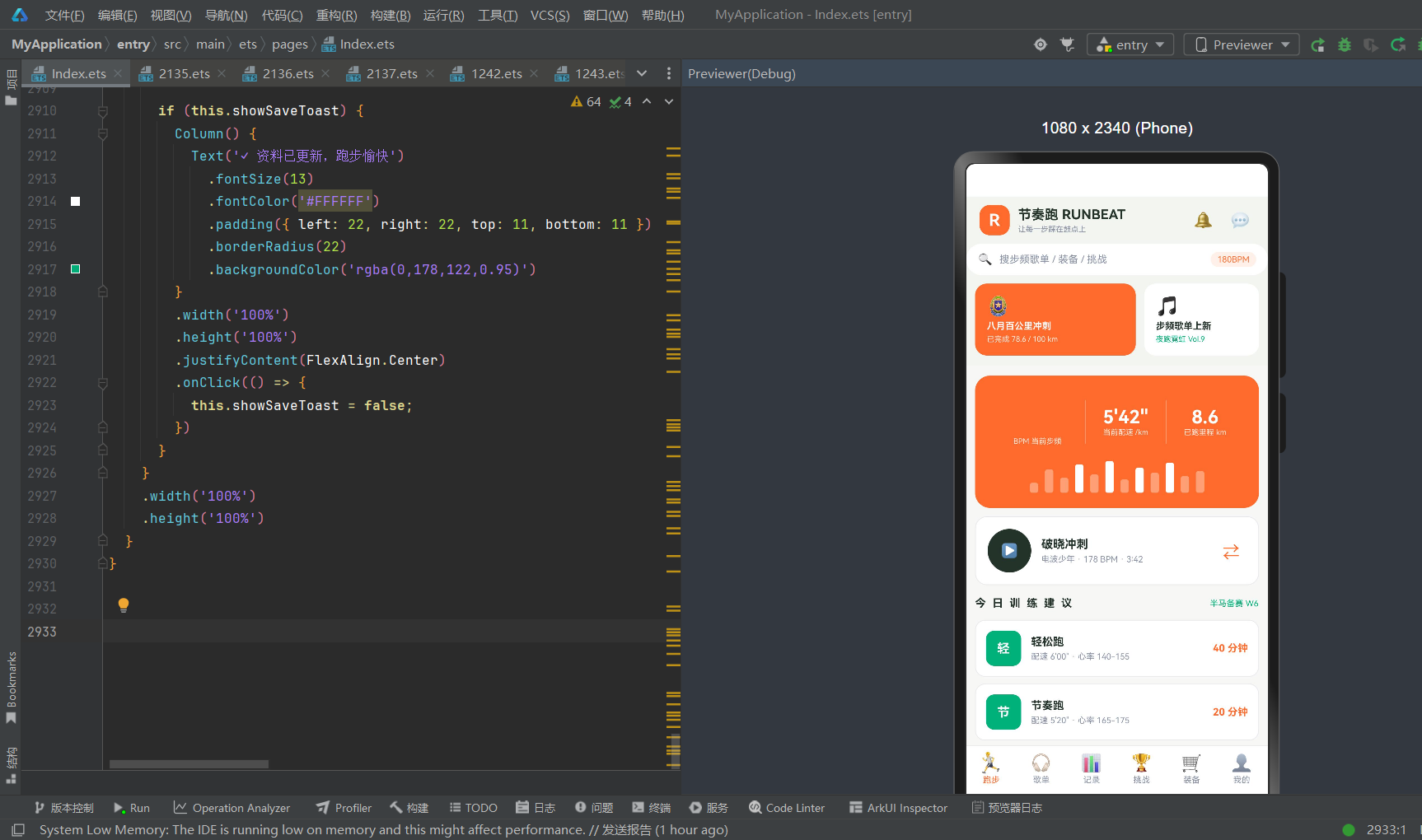
跑步 Tab 是应用的首页和核心入口,承担"实时步频监测 + 音乐播放控制 + 训练计划推荐"的核心功能。页面从上到下依次为:BPM 实时数据卡、音乐播放条、今日训练建议。
BPM 实时数据卡:荧光橙背景圆角卡片,横向三栏布局,通过垂直分割线(Divider vertical)分隔。第一栏显示当前步频"178 BPM"(荧光橙大字 40px + 白色小字说明),第二栏显示当前配速"5’42"“(白色 22px + 说明),第三栏显示已跑里程"8.6 km”(白色 22px + 说明)。下方为 12 根实时步频柱状图(高度 12-38px 随机,超过 28px 为白色实心、以下为半透明白色),模拟实时心率/步频波形的视觉效果。
音乐播放条:白色背景卡片,左侧为深碳灰圆形播放按钮(▶ 52px),中间为当前歌曲信息"破晓冲刺 / 电波少年 · 178 BPM · 3:42",右侧为荧光橙换歌按钮(⇄)。点击播放按钮弹出开始跑步目标选择弹窗,点击换歌按钮弹出按步频换歌抽屉。
今日训练建议:标题"今日训练建议"(碳灰粗体,字母间距 2)+“半马备赛 W6”(薄荷绿小字),下方为 3 条训练建议卡片(轻松跑 40 分钟配速 6’00" / 节奏跑 20 分钟配速 5’20" / 放松慢跑 10 分钟配速 6’30"),每条卡片左侧为薄荷绿圆形图标(首字)+训练名+配速心率说明,右侧为时长(荧光橙粗体)。底部装饰文字"今日宜节奏跑 · 风力 2 级"。
5.2 歌单 Tab:双列步频歌单网格 + 新建/详情/删除
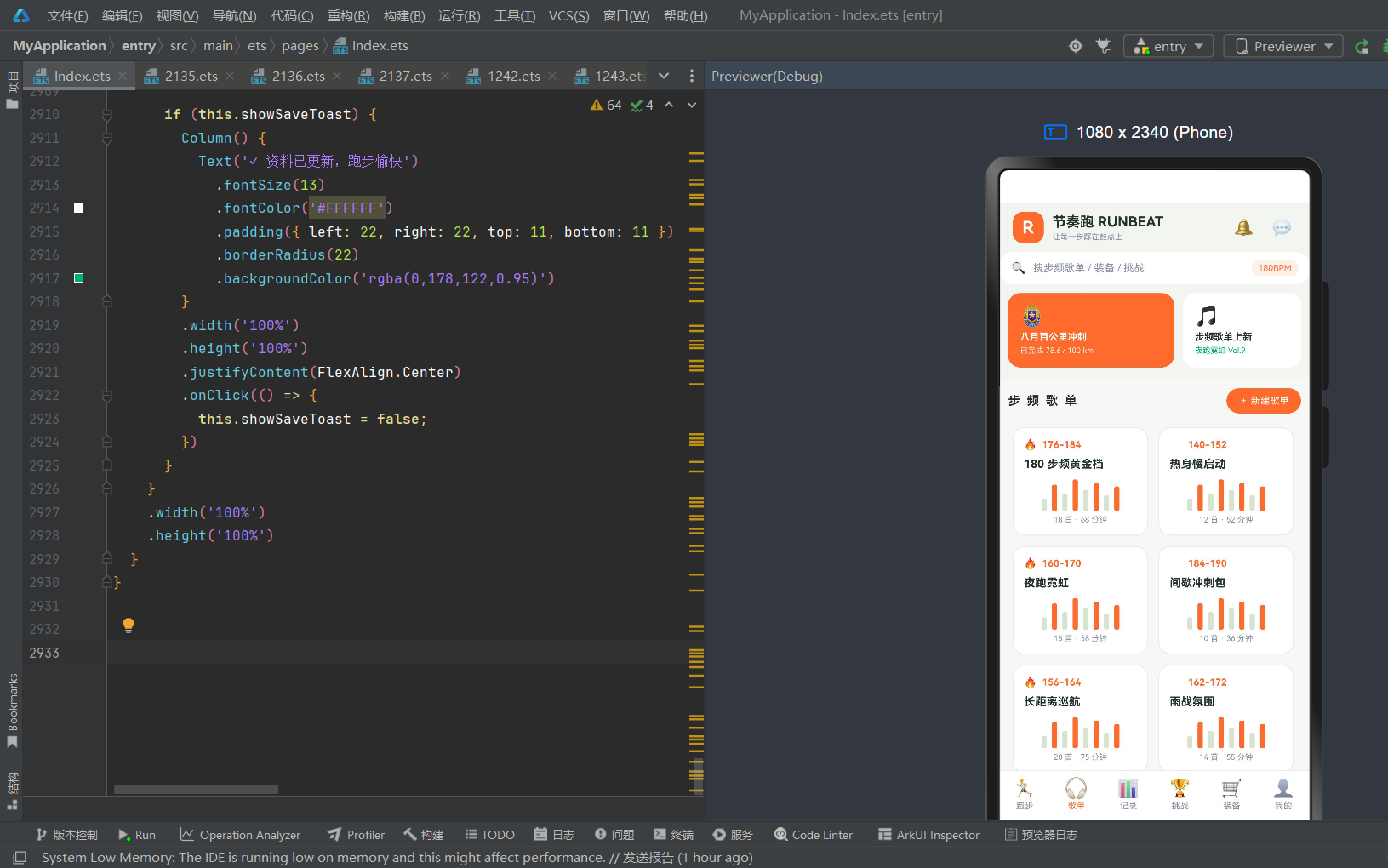
歌单 Tab 是应用的音乐库核心,按 BPM 区间分类管理步频歌单。页面从上到下依次为:标题栏+新建歌单按钮、双列歌单网格。
标题栏:左侧"步频歌单"(碳灰粗体,字母间距 2),右侧荧光橙"+ 新建歌单"按钮,点击弹出新建歌单弹窗。
双列歌单网格:使用 Flex({ wrap: FlexWrap.Wrap }) 实现双列自适应布局,8 份歌单,每张卡片宽度 46%,包含:BPM 区间标签(荧光橙粗体 + 热门🔥标识)、歌单名(碳灰粗体 13px)、8 根迷你柱状图(模拟歌单 BPM 分布,超过 26px 为荧光橙、以下为浅绿灰)、歌曲数+总时长(浅灰小字)。热门歌单(180步频黄金档、夜跑霓虹、长距离巡航)显示🔥标识。点击歌单卡片弹出歌单详情抽屉,选中时 1.02 倍缩放动画。
8 份歌单覆盖全 BPM 区间:180 步频黄金档(176-184,18首68分钟,热门)、热身慢启动(140-152,12首52分钟)、夜跑霓虹(160-170,15首58分钟,热门)、间歇冲刺包(184-190,10首36分钟)、长距离巡航(156-164,20首75分钟,热门)、雨战氛围(162-172,14首55分钟)、越野坡道(170-182,16首62分钟)、赛后拉伸放松(128-140,11首48分钟)。
5.3 记录 Tab:本周数据 + 跑步记录列表 + 详情
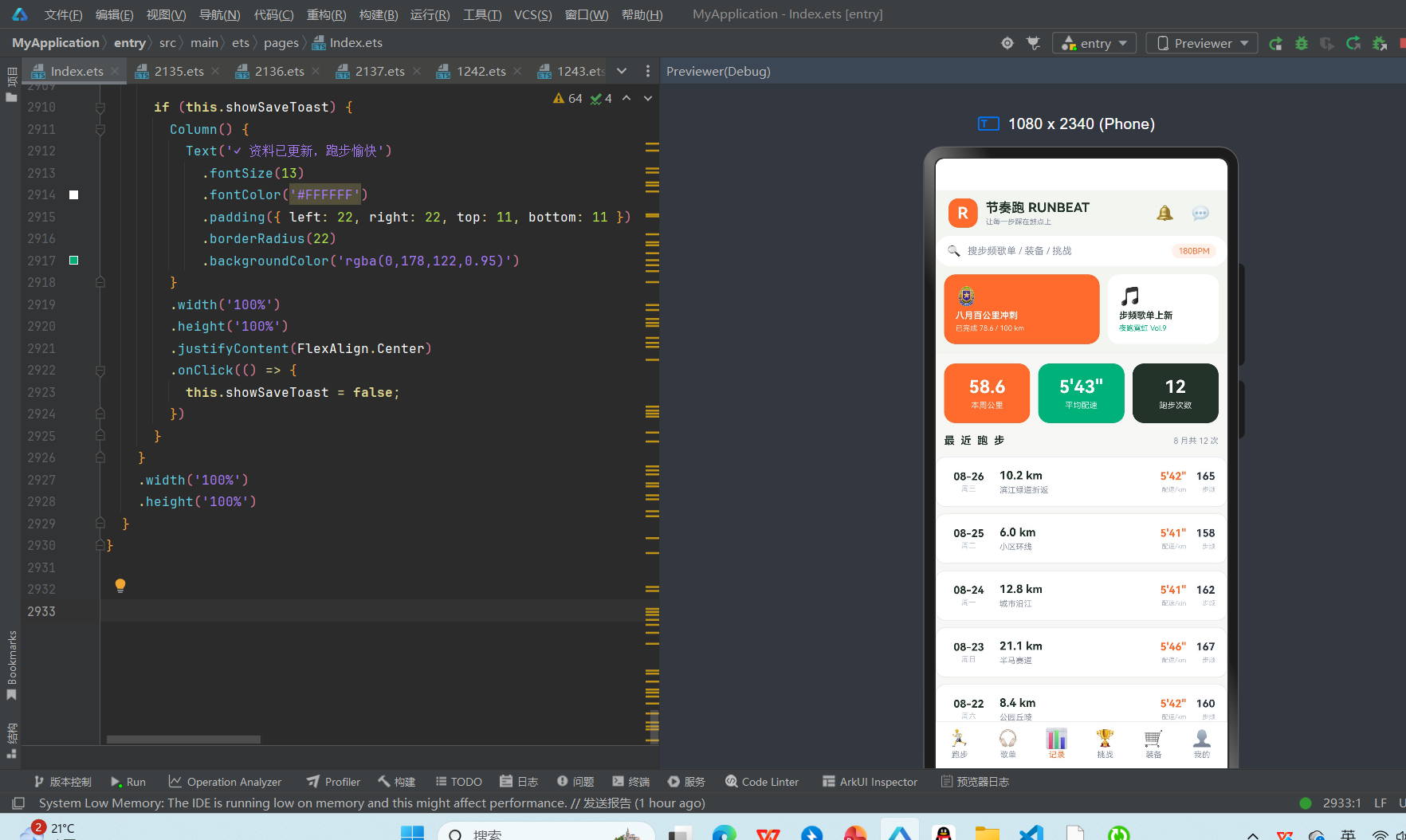
记录 Tab 是应用的数据分析核心,展示跑步历史与数据统计。页面从上到下依次为:本周数据三卡片、最近跑步记录列表。
本周数据三卡片:横向三栏等宽布局,荧光橙卡片(58.6 本周公里)、薄荷绿卡片(5’43" 平均配速)、深碳灰卡片(12 跑步次数),每张卡片数据为白色粗体 22px + 白色小字说明,圆角 14px。三卡片直观展示本周跑步核心指标。
最近跑步记录列表:标题"最近跑步"(碳灰粗体,字母间距 2)+“8 月共 12 次”(浅灰小字),下方为 12 条跑步记录卡片,每条为白色背景卡片,横向布局:日期(08-26 周三,碳灰粗体+浅灰星期)、距离+路线(10.2 km 碳灰粗体 + 滨江绿道折返 浅灰)、配速(5’42" 荧光橙粗体 + 配速/km 浅灰)、步频(165 碳灰粗体 + 步频 浅灰)。点击记录卡片弹出跑步详情弹窗。
12 条记录覆盖 8 月 15 日到 26 日,从 4.8km 恢复跑到 21.1km 半马,配速稳定在 5’39"-5’46",步频 152-167,路线包括滨江绿道、小区环线、城市沿江、半马赛道、公园丘陵、夜跑通勤、长距离拉练、郊野缓坡等,数据真实多样。
5.4 挑战 Tab:进度卡 + 排行榜 + 全部挑战列表
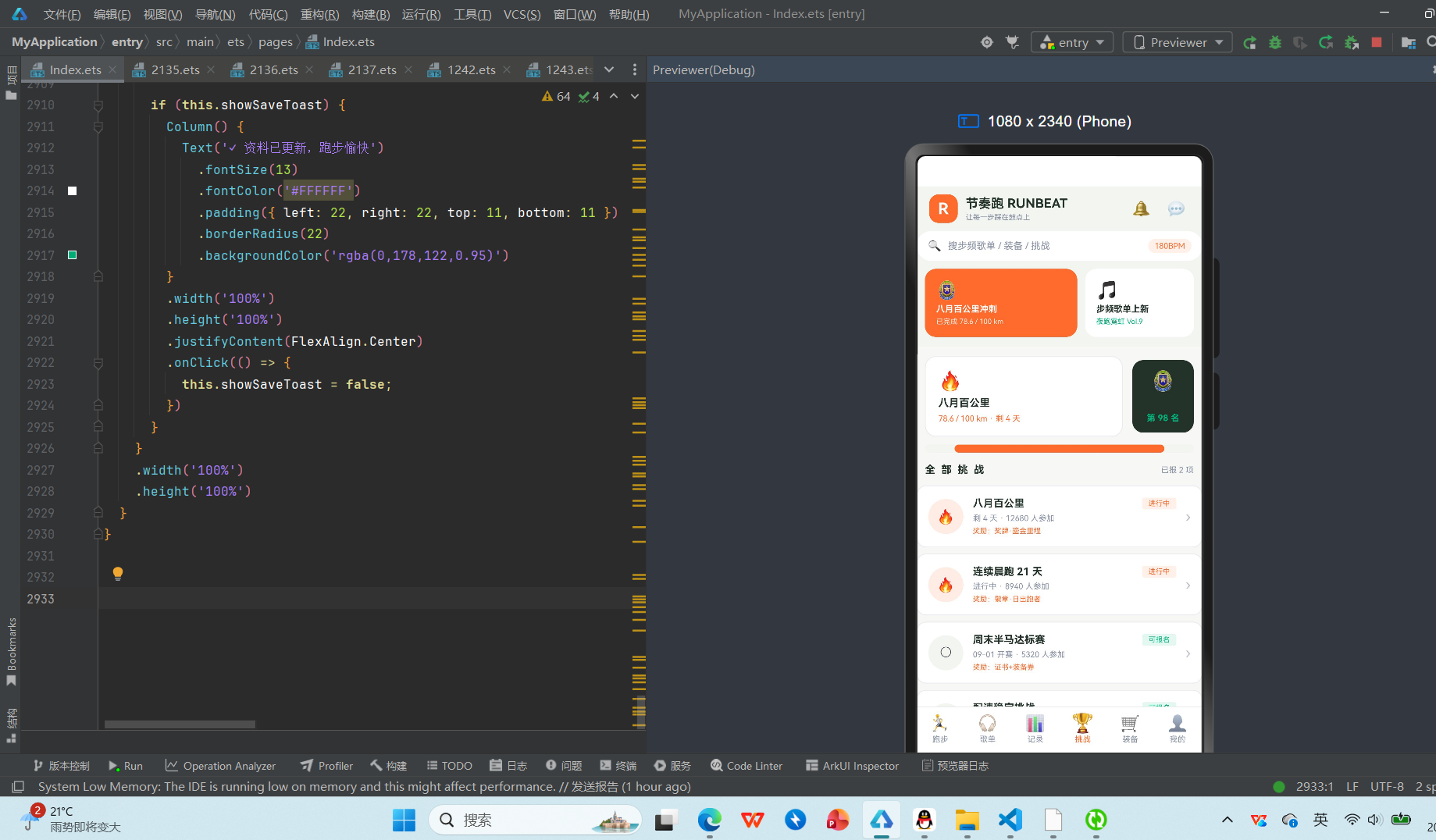
挑战 Tab 是应用的社区激励核心,通过线上挑战与排行榜激发跑者坚持。页面从上到下依次为:八月百公里进度卡+排名入口、进度条、全部挑战列表。
进度卡+排名入口:横向双栏布局,左侧白色卡片(🔥八月百公里 / 78.6 / 100 km · 剩 4 天,荧光橙进度文字),右侧深碳灰卡片(🏅排名 / 第 98 名,薄荷绿粗体),点击排名卡片弹出排行榜弹窗。
进度条:全宽进度条,背景浅绿灰,进度荧光橙(78% 宽度),400ms 缓出生长动画,直观展示八月百公里挑战完成进度。
全部挑战列表:标题"全部挑战"(碳灰粗体,字母间距 2)+“已报 2 项”(浅灰小字),下方为 10 个挑战卡片,每条为白色背景卡片,横向布局:状态图标(已报名🔥橙色圆形 / 未报名○灰色圆形)+挑战名(碳灰粗体)+状态标签(进行中荧光橙 / 可报名薄荷绿)+天数·参加人数(浅灰)+奖励(荧光橙小字)+箭头›。点击挑战卡片弹出挑战详情弹窗。
10 个挑战包括:八月百公里(剩4天,12680人,奖牌·鎏金里程,已报名)、连续晨跑21天(进行中,8940人,徽章·日出跑者,已报名)、周末半马达标赛(09-01开赛,5320人,证书+装备券)、配速稳定挑战(进行中,4180人,徽章·人肉节拍器)、九月破三训练营(09-05开营,2150人,全马破三奖牌)、夜跑城市点亮(进行中,16730人,限定头像框)、越野爬升挑战(10-01开赛,3260人,登山杖折扣券)、雨战勇士周(进行中,2740人,徽章·风雨无阻)、家庭亲子跑(09-12开赛,6890人,亲子奖牌一对)、年度千公里(剩126天,9820人,年度大满贯奖杯)。
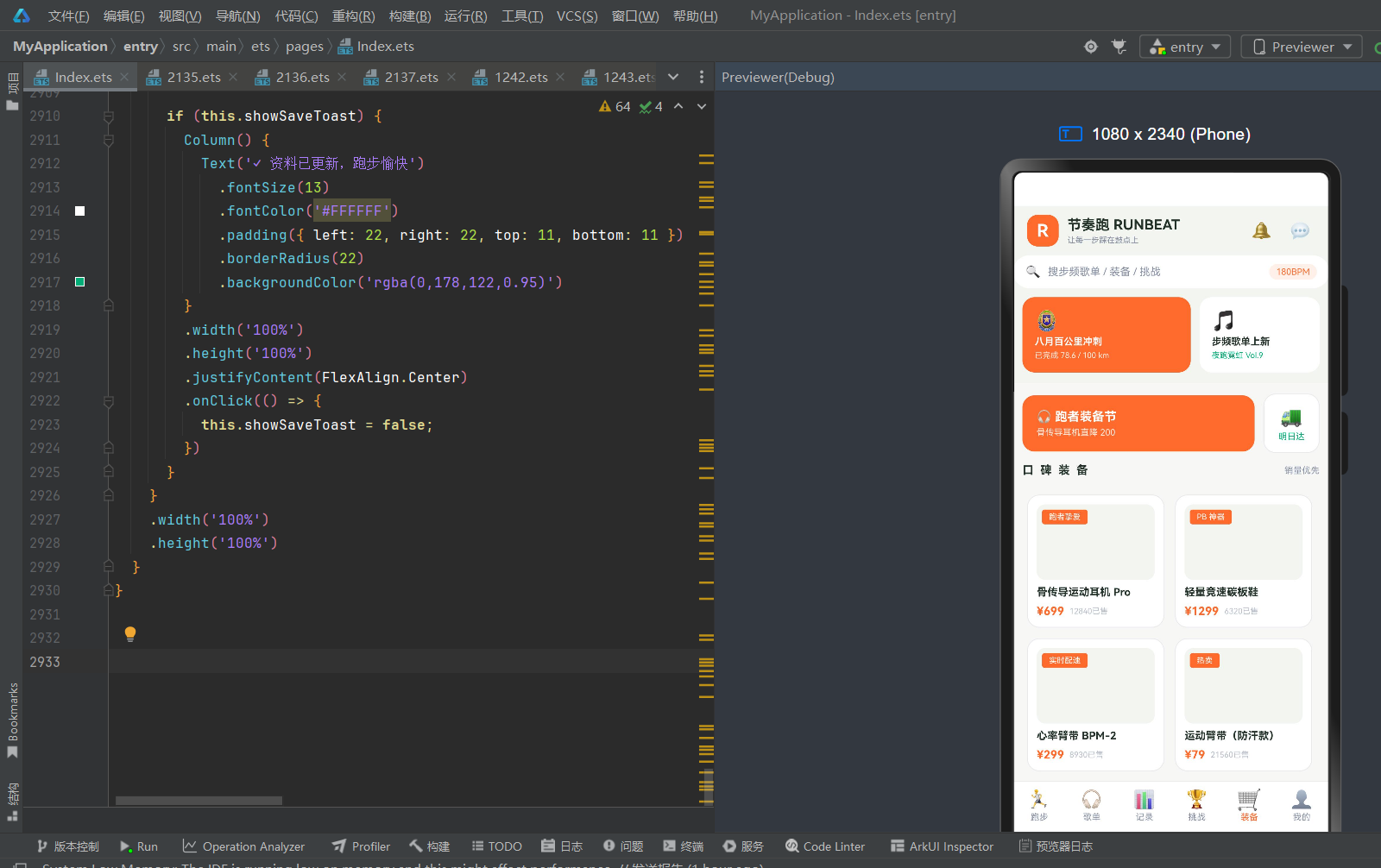
5.5 装备 Tab:装备节 banner + 双列商品网格 + 详情
装备 Tab 是应用的电商模块,为跑者提供专业运动装备。页面从上到下依次为:跑者装备节 banner+明日达、口碑装备双列商品网格。
装备节 banner+明日达:横向双栏布局,左侧荧光橙大卡片(🎧跑者装备节 / 骨传导耳机直降 200,白色文字),右侧白色小卡片(🚚 / 明日达,薄荷绿文字),营造促销氛围和物流信任感。
口碑装备双列网格:标题"口碑装备"(碳灰粗体,字母间距 2)+“销量优先”(浅灰小字),下方使用 Flex({ wrap: FlexWrap.Wrap }) 实现双列自适应布局,12 件商品,每张卡片宽度 46%,包含:商品图占位区(浅绿灰背景 86px + 左上角荧光橙标签)、商品名(碳灰粗体 12px,两行省略)、价格行(¥现价 荧光橙粗体 + 已售数量 浅灰)。点击商品卡片弹出商品详情抽屉。
12 件装备覆盖全品类:骨传导运动耳机 Pro(¥699,跑者挚爱,12840已售)、轻量竞速碳板鞋(¥1299,PB神器,6320已售)、心率臂带 BPM-2(¥299,实时配速,8930已售)、运动臂带防汗款(¥79,热卖,21560已售)、压缩小腿套(¥129,缓解震动,7420已售)、夜跑反光背心(¥99,安全必备,9870已售)、运动水壶腰包(¥159,新品,4310已售)、防风跑步眼镜(¥249,轻量21g,3650已售)、速干空顶帽(¥89,排汗快,8640已售)、羊毛跑步袜×3(¥119,不起球,15230已售)、折叠水壶350ml(¥59,轻若无物,11040已售)、马拉松能量胶×6(¥89,补给站,17890已售)。
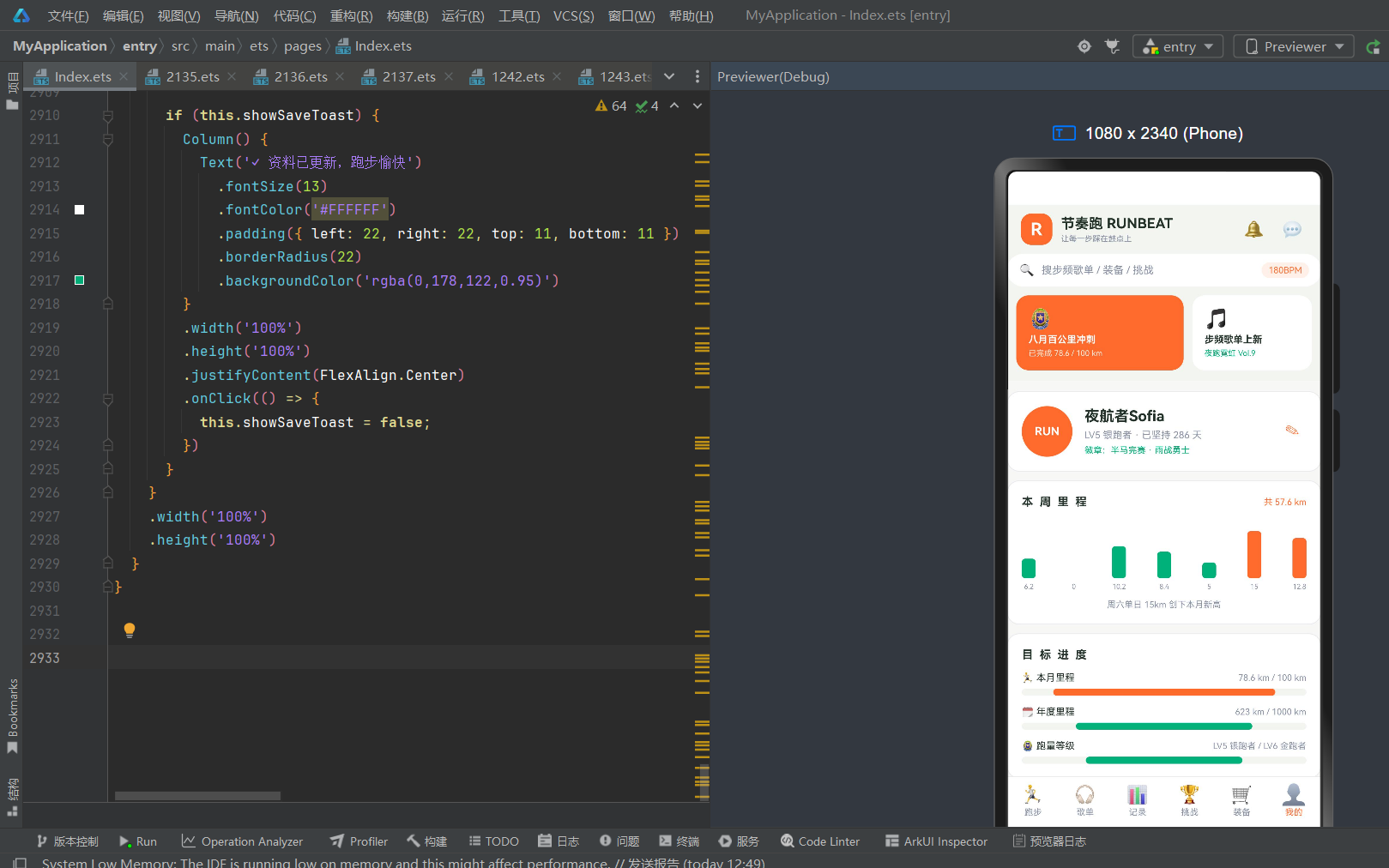
5.6 我的 Tab:跑者资料 + 周里程图 + 目标进度
我的 Tab 是个人中心,展示跑者信息、数据统计和目标管理。页面从上到下依次为:跑者资料卡、本周里程柱状图、目标进度、功能列表(关于/退出登录)。
跑者资料卡:白色背景卡片,左侧荧光橙圆形头像(RUN 白色文字 58px),中间为跑者名"夜航者Sofia"(碳灰粗体 17px)+“LV5 银跑者 · 已坚持 286 天”(浅灰 11px)+“徽章:半马完赛 · 雨战勇士”(薄荷绿 10px),右侧为编辑按钮✎(荧光橙),点击弹出资料编辑弹窗。
本周里程柱状图:白色背景卡片,标题"本周里程"(碳灰粗体,字母间距 2)+“共 57.6 km”(荧光橙小字),下方为 7 根柱状图(周一到周日),柱子高度通过 mileBar(d.km) 计算(km×3.6,最大约 54vp),周五周六周日为荧光橙(周末跑量高)、周一到周四为薄荷绿(工作日),周二休息(0km,透明度 0.3),底部为公里数标签(8px 浅灰)。底部说明"周六单日 15km 创下本月新高"(浅灰)。
目标进度:白色背景卡片,标题"目标进度"(碳灰粗体,字母间距 2),下方为 3 项目标进度条:本月里程🏃(78.6/100km,78%,荧光橙进度条)、年度里程🗓(623/1000km,62%,薄荷绿进度条)、跑量等级🏅(LV5银跑者→LV6金跑者,55%,薄荷绿进度条)。每项为 emoji+目标名+当前/目标+进度条(70%以上荧光橙/以下薄荷绿,400ms缓出生长动画)。
功能列表:关于节奏跑(中灰文字+箭头,点击弹出关于弹窗)、退出登录(红色文字按钮,白色背景+边框,点击弹出退出登录弹窗)。
第六章 弹窗交互体系深度解析
6.1 弹窗设计总览
节奏跑 RUNBEAT 共设计约 15 套弹窗组件,分布在 6 个 Tab 中,涵盖跑步启动、歌单管理、跑步详情、挑战报名、装备购买、个人资料六大类。所有弹窗统一采用"Stack 叠加 + if 条件渲染 + 半透明遮罩"的实现模式,底部弹出式弹窗使用半透明遮罩+底部内容(constraintSize 限高 78%-80%),居中弹窗使用半透明遮罩+居中内容,Toast 使用全屏居中+圆角胶囊。
半透明遮罩统一使用 rgba(35,51,41,0.5) 或 0.55(深碳绿灰色),与浅底应用形成柔和对比,不刺眼。弹窗内容统一使用白色背景+浅灰边框(#E9ECEF)+16px 圆角,保持视觉一致性。
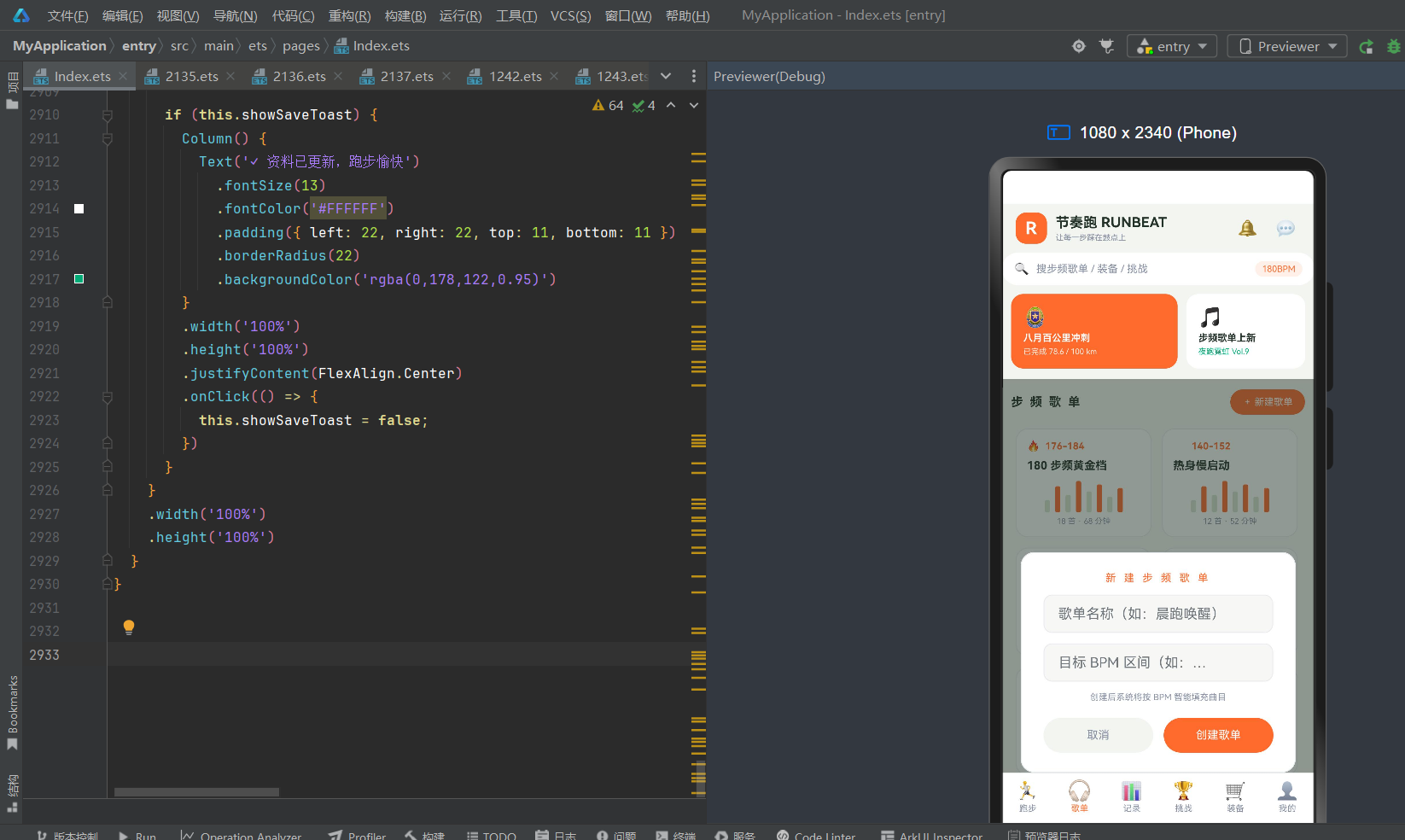
6.2 新建歌单弹窗:居中缩放式表单
新建歌单弹窗是歌单 Tab 的核心交互组件,采用居中缩放式设计。点击"+ 新建歌单"按钮后弹出,包含:
- 标题区:“新 建 步 频 歌 单”(荧光橙,字母间距 3,营造设计感)
- 歌单名称输入框:TextInput,占位符"歌单名称(如:晨跑唤醒)",浅灰背景+浅灰边框
- 目标 BPM 区间输入框:TextInput,占位符"目标 BPM 区间(如:165-175)",浅灰背景+浅灰边框
- 说明文字:“创建后系统将按 BPM 智能填充曲目”(浅灰 10px)
- 操作按钮:取消(浅灰背景)/ 创建歌单(荧光橙背景白色文字),横向等宽排列
创建后 push 新歌单到 playlists 数组(默认 12 首 48 分钟,非热门),清空输入框,关闭弹窗。
6.3 跑步详情弹窗:居中缩放式数据展示
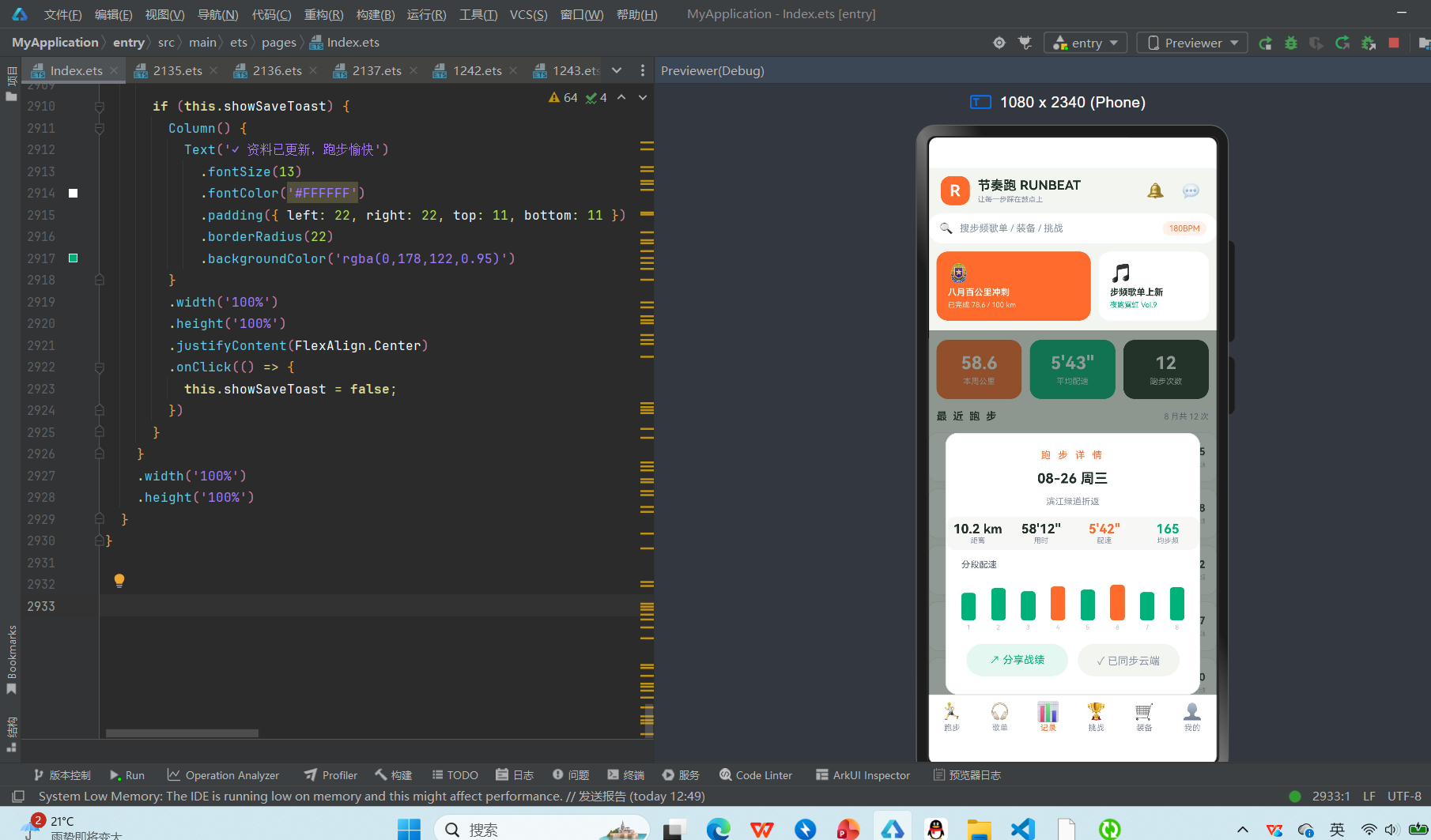
跑步详情弹窗是记录 Tab 的核心交互组件,采用居中缩放式设计。点击跑步记录卡片后弹出,包含:
- 标题区:“跑 步 详 情”(荧光橙,字母间距 3)
- 日期+路线:“08-26 周三”(碳灰粗体 17px)+“滨江绿道折返”(浅灰 11px)
- 四数据横排:距离 10.2km(碳灰)/ 用时 58’12"(碳灰)/ 配速 5’42"(荧光橙)/ 均步频 165(薄荷绿),每项为数据+说明小字,浅灰背景圆角卡片
- 分段配速柱状图:标题"分段配速"(中灰 11px)+ 8 根柱状图(第1-8公里,高度 34-44px,超过 42px 为荧光橙/以下为薄荷绿,底部公里数标签),直观展示每公里配速变化
- 操作按钮:↗ 分享战绩(薄荷绿文字+浅绿背景)/ ✓ 已同步云端(浅灰文字+浅灰背景),横向等宽排列。点击分享战绩关闭弹窗并弹出分享成功Toast
6.4 开始跑步弹窗:居中缩放式目标选择
开始跑步弹窗是跑步 Tab 的启动交互组件,采用居中缩放式设计。点击播放按钮后弹出,包含:
- 标题区:“今 天 跑 多 少”(荧光橙,字母间距 3)
- 目标选择标签:Flex wrap 布局,6 个目标标签(自由跑/5公里/10公里/间歇400×8/长距离16km/恢复跑),选中态荧光橙背景白色文字+1.06倍缩放动画,未选中浅绿灰背景中灰文字
- 设置信息:三行两端对齐(匹配步频 178 BPM·节奏档 薄荷绿 / 语音教练 每公里播报·开 / 安全提醒 心率超185将降速提示)
- 开始按钮:“▶ 开始跑步”(荧光橙背景白色文字 15px,70%宽度 46px高),点击关闭弹窗并弹出步频同步Toast
6.5 歌单详情抽屉 + 删除确认
歌单 Tab 提供歌单详情和删除组合交互:
- 歌单详情抽屉:底部弹出式(constraintSize 限高 80%),包含歌单信息(图标+歌单名+BPM区间+歌曲数+时长+关闭按钮)+ 8 首歌曲列表(歌名+BPM+时长,浅灰背景)+ 跑步时用这份(荧光橙)/ 删除歌单(红色文字浅红背景)两个按钮。点击删除歌单关闭抽屉并弹出删除确认弹窗。
- 删除确认弹窗:居中缩放式,⚠警告图标+“删除该歌单?”+歌单名+“歌单内曲目不受影响,仅移出列表”+保留(薄荷绿)/删除歌单(红色)按钮。确认后 splice 删除对应歌单。
6.6 挑战四弹窗:详情 + 报名 + 放弃 + 排行榜
挑战 Tab 提供完整的挑战管理弹窗组合:
- 挑战详情弹窗:居中缩放式,包含挑战名+天数·参加人数+分割线+三行信息(挑战奖励/打卡要求/音乐加成 薄荷绿)+ 查看排行榜(深碳灰)/挑战规则(薄荷绿)按钮 + 立即报名/已报名按钮。点击报名弹出报名确认,点击已报名弹出放弃确认,点击排行榜弹出排行榜弹窗。
- 报名确认弹窗:居中缩放式,"确 认 报 名"标题+挑战名+“报名即视为接受挑战规则”+取消/确认报名(荧光橙)按钮。确认后 push 挑战ID到 joinedIds,关闭弹窗并弹出报名成功Toast。
- 放弃确认弹窗:居中缩放式,⚠警告+“放弃该挑战?”+挑战名+“已获得的打卡天数将清零”(红色)+继续坚持(薄荷绿)/放弃挑战(红色)按钮。确认后 splice 移除挑战ID。
- 排行榜弹窗:居中缩放式,"排 行 榜 · 八月百公里"标题+ 7 条排名(前3名🥇🥈🥉+第4/5名+第98名"我"高亮荧光橙),每条为排名+昵称+里程,我的排名行荧光橙背景高亮。底部关闭排行榜按钮。
6.7 装备两弹窗:详情抽屉 + 购买确认
装备 Tab 提供商品详情和购买确认组合交互:
- 商品详情抽屉:底部弹出式,包含商品图占位+商品名+价格行(现价荧光橙粗体+原价删除线+折扣标签红色)+三行信息(已售/标签/配送)+跑步实测说明+加入购物车(荧光橙文字浅橙背景)/立即购买(荧光橙背景)按钮。点击立即购买关闭抽屉并弹出购买确认弹窗。
- 购买确认弹窗:居中缩放式,"确 认 订 单"标题+商品名+数量加减器(−/×数量/+,数量1-9)+合计金额(红色粗体)+取消/提交订单(荧光橙)按钮。提交后关闭弹窗并弹出下单成功Toast。
6.8 个人中心三弹窗:资料编辑 + 关于 + 退出登录
我的 Tab 提供个人中心弹窗组合:
- 资料编辑弹窗:居中缩放式,"编 辑 跑 者 资 料"标题+昵称输入框+三行信息(常用步频178 BPM/常跑区域滨江绿道/目标赛事11月城市半马)+取消/保存(荧光橙)按钮。保存后关闭弹窗并弹出资料更新Toast。
- 关于弹窗:居中缩放式,“节 奏 跑"大字(荧光橙,字母间距4)+版本 v4.1·处暑版+分割线+slogan"把步频交给鼓点,把坚持交给热爱”+版权信息。
- 退出登录弹窗:居中缩放式,👋挥手+“确定退出登录?”+“跑步记录与歌单将保留在云端”+再跑一会(薄荷绿)/退出(灰色)按钮。
第七章 动画与过渡效果
7.1 属性动画体系
项目使用 ArkTS 的 .animation() 属性动画实现多组交互动画:
- Tab 图标缩放:底部 Tab 选中时图标从1倍缩放至1.18倍,220ms缓出
- 目标标签缩放:开始跑步弹窗中目标标签选中时1.06倍缩放,200ms缓出
- 歌单卡片缩放:歌单Tab中选中歌单卡片1.02倍缩放,200ms缓出
- 进度条生长:挑战进度条(400ms缓出)、目标进度条(400ms缓出)、歌单迷你柱状图(静态)
- Toast缩放:换歌/报名/下单/保存Toast弹出时1.05倍缩放,240ms缓出
7.2 实时数据可视化动画
跑步 Tab 的 BPM 实时数据卡包含 12 根步频柱状图(高度 12-38px 随机),超过 28px 为白色实心、以下为半透明白色,模拟实时步频波形的动态视觉效果。虽然演示版本为静态数据,但实际项目中可通过定时器定时更新柱子高度,实现真正的实时波形动画。
歌单卡片中的 8 根迷你柱状图(高度 14-36px)模拟歌单 BPM 分布,超过 26px 为荧光橙、以下为浅绿灰,静态展示歌单的节奏强度分布。
7.3 半透明遮罩过渡
所有弹窗使用半透明深碳绿灰背景(rgba(35,51,41,0.5) 或 0.55),弹窗内容使用白色卡片背景+浅灰边框(#E9ECEF)+16px圆角,形成清晰的层次。底部弹出式弹窗通过 Stack 叠加+Column布局实现(上方透明可点击区域+下方弹窗内容),constraintSize 限高 78%-80% 防止内容溢出。居中弹窗通过 justifyContent(FlexAlign.Center) 实现。
7.4 动画设计原则
运动应用的动画设计遵循三个原则:
- 快速有力:所有动画时长在 180-400ms 之间,缓出曲线(Curve.EaseOut),不使用缓慢柔和的动画,符合运动场景的节奏感
- 缩放为主:主要使用缩放和透明度变化,避免位移动画造成视觉干扰
- 数据动效:进度条生长、柱状图、实时波形等数据可视化动效,让跑步数据"活"起来,增强运动氛围感
第八章 BPM 步频音乐系统
8.1 BPM 数据结构
节奏跑 RUNBEAT 的音乐库由 RUN_TRACKS 常量数组定义,包含 14 首歌曲,每首通过 RunTrack 接口描述 6 个字段:id、title(歌名)、artist(歌手)、bpm(节拍数)、duration(时长)、mood(心情)。
14 首歌曲覆盖全 BPM 区间(140-190),歌名富有运动场景感:破晓冲刺(178 BPM,冲刺)、夜风巡航(165,巡航)、心跳同步(172,节奏)、六分半(158,巡航)、风阻系数(180,冲刺)、绿道漫游(148,热身)、坡道警报(184,冲刺)、终点前五百米(190,冲刺)、晨跑电台(152,热身)、城市折返(166,节奏)、慢下来的云(140,放松)、配速机器(176,节奏)、雨战(170,节奏)、最后一公里(186,冲刺)。
8.2 心情分类与颜色系统
歌曲按 mood 字段分为 5 个心情/强度类别,每个类别对应专属颜色(通过 moodColor/moodBg 全局纯函数管理):
- 冲刺(176-190 BPM):荧光橙 #FF6B2C,代表高强度爆发
- 节奏(165-175 BPM):薄荷绿 #00B27A,代表稳定节奏跑
- 巡航(156-164 BPM):蓝色 #2F8FED,代表长距离匀速
- 热身(140-152 BPM):浅灰 #8A93A6,代表低强度热身
- 放松(128-140 BPM):草绿 #7CB518,代表赛后拉伸放松
心情色系统让用户在歌曲列表中一眼识别歌曲强度,快速找到适合当前跑步阶段的音乐。
8.3 步频歌单体系
应用按 BPM 区间组织 8 份步频歌单(PLAYLIST_SETS),每份歌单包含:name(歌单名)、bpmRange(BPM 区间)、songs(歌曲数)、minutes(总时长)、hot(是否热门)。
8 份歌单覆盖从热身到冲刺的全强度区间:
- 180 步频黄金档(176-184,18首68分钟,热门):跑步界公认黄金步频,适合大部分跑者
- 热身慢启动(140-152,12首52分钟):跑步前热身唤醒
- 夜跑霓虹(160-170,15首58分钟,热门):夜跑场景专属
- 间歇冲刺包(184-190,10首36分钟):间歇跑高强度冲刺
- 长距离巡航(156-164,20首75分钟,热门):半马/全马长距离匀速
- 雨战氛围(162-172,14首55分钟):雨天跑步氛围
- 越野坡道(170-182,16首62分钟):越野跑坡道爬升
- 赛后拉伸放松(128-140,11首48分钟):赛后恢复拉伸
8.4 按步频换歌机制
跑步 Tab 提供按步频换歌功能:点击播放条右侧的⇄换歌按钮,弹出底部换歌抽屉(songSheet),展示 14 首歌曲按 BPM 智能排序列表。每首歌曲显示:BPM 数字(心情色圆形背景)+歌名+心情标签+歌手·时长+⇄换歌按钮。点击换歌按钮关闭抽屉并弹出"已切换为同步步频歌单"Toast(薄荷绿背景)。
换歌抽屉标题"正在播放 · 按步频换歌",底部说明"已按 178 BPM 智能排序",constraintSize 限高 78% 防止歌曲列表溢出。实际项目中可根据当前实时步频动态排序歌曲,让音乐 BPM 始终与步频同步。
8.5 音乐加成激励
挑战 Tab 引入"音乐加成"机制:完赛挑战赠专属歌单,将音乐与挑战激励绑定。挑战详情中显示"音乐加成:完赛赠专属歌单"(薄荷绿),鼓励跑者通过完成挑战解锁专属音乐内容,增强音乐系统与挑战系统的联动。
第九章 跑步记录与数据分析
9.1 跑步记录数据结构
跑步记录由 RUN_SESSIONS 常量数组定义,包含 12 次记录,每次通过 RunSession 接口描述 7 个字段:id、date(日期)、distance(距离)、duration(用时)、pace(配速)、bpm(平均步频)、route(路线)。
12 条记录覆盖 8 月 15 日到 26 日,数据设计注重真实性:
- 距离多样:从 4.8km 恢复跑到 21.1km 半马,涵盖恢复跑、日常跑、长距离拉练、半马等多种距离
- 配速稳定:配速在 5’39"-5’46" 之间,典型中级跑者水平,波动小说明配速控制能力强
- 步频合理:步频 152-167,长距离步频偏高(163-167),恢复跑步频偏低(152-155)
- 路线丰富:滨江绿道、小区环线、城市沿江、半马赛道、公园丘陵、夜跑通勤、长距离拉练、郊野缓坡等 8 种路线
9.2 本周数据统计
记录 Tab 顶部展示本周核心数据三卡片:
- 本周公里:58.6 km(荧光橙卡片),本周总跑量
- 平均配速:5’43"(薄荷绿卡片),本周所有跑步的平均配速
- 跑步次数:12 次(深碳灰卡片),本周跑步总次数
三卡片横向等宽布局,数据为白色粗体 22px + 白色小字说明,直观展示本周跑步概览。实际项目中可根据当前周的 RUN_SESSIONS 数据动态计算。
9.3 分段配速分析
跑步详情弹窗提供分段配速柱状图,展示 8 公里每公里配速变化。柱子高度 34-44px,超过 42px 为荧光橙(配速较慢)、以下为薄荷绿(配速较快),底部为公里数标签(1-8)。
分段配速图让跑者直观看到每公里配速波动,分析跑步节奏:起跑是否过快、中途是否掉速、冲刺是否有力等。实际项目中可根据 GPS 记录的每公里数据动态生成分段配速图,并标注最快/最慢公里、平均配速线等。
9.4 本周里程柱状图
我的 Tab 提供本周里程柱状图(MILE_WEEK 数据),7 天里程:周一 6.2km、周二 0km(休息)、周三 10.2km、周四 8.4km、周五 5.0km、周六 15.0km、周日 12.8km,共 57.6km。
柱子高度通过 mileBar(km) 计算(km×3.6),周五周六周日为荧光橙(周末跑量高)、周一到周四为薄荷绿(工作日),周二休息透明度 0.3。底部说明"周六单日 15km 创下本月新高",帮助跑者发现自己的跑步规律(周末跑量高、周二固定休息)。
9.5 分享战绩功能
跑步详情弹窗提供"↗ 分享战绩"按钮,点击后弹出"✓ 战绩海报已生成,快去分享"Toast(薄荷绿背景)。实际项目中可生成包含跑步数据(距离、配速、步频、路线图、分段配速)的精美海报图片,支持分享到微信、朋友圈、微博等社交平台,增强社区传播力。
第十章 线上挑战与排行榜
10.1 挑战数据结构
线上挑战由 CHALLENGE_LIST 常量数组定义,包含 10 个挑战,每个通过 ChallengeItem 接口描述 6 个字段:id、name(挑战名)、days(剩余天数/状态)、joined(是否已报名)、people(参加人数)、reward(奖励)。
10 个挑战覆盖多种类型:
- 里程挑战:八月百公里(100km/月)、年度千公里(1000km/年)
- 连续打卡:连续晨跑21天、配速稳定挑战、夜跑城市点亮、雨战勇士周
- 赛事挑战:周末半马达标赛、九月破三训练营、家庭亲子跑
- 越野挑战:越野爬升挑战
挑战参加人数设计合理:热门挑战(夜跑城市点亮 16730人、八月百公里 12680人)万人级,中型挑战(连续晨跑 8940人、年度千公里 9820人)近万人,小众挑战(破三训练营 2150人、雨战勇士 2740人)数千人。
10.2 八月百公里进度追踪
挑战 Tab 顶部重点展示"八月百公里"挑战进度:
- 进度卡:白色卡片,🔥图标+“八月百公里”+“78.6 / 100 km · 剩 4 天”(荧光橙)
- 排名入口:深碳灰卡片,🏅图标+“排名”+“第 98 名”(薄荷绿粗体),点击弹出排行榜
- 进度条:全宽,荧光橙进度 78%,400ms 缓出生长动画
八月百公里是应用的核心月度挑战,12680 人参加,奖励"奖牌·鎏金里程"。用户已报名并完成 78.6km,排名第 98 位,剩 4 天冲刺。进度追踪让用户时刻关注挑战完成情况,激发坚持动力。
10.3 报名与放弃机制
挑战报名通过 joinedIds 数组管理(默认 [1,2],即八月百公里和连续晨跑21天已报名),isJoined© 方法判断挑战是否在已报名列表中。
- 报名流程:点击挑战卡片→弹出挑战详情→点击"立即报名"→弹出报名确认→确认后 push 挑战ID到 joinedIds→弹出"报名成功,明天开跑!"Toast(荧光橙背景)
- 放弃流程:已报名挑战详情中按钮变为"✓ 已报名 · 查看进度"→点击弹出放弃确认→确认后 splice 移除挑战ID→关闭弹窗
已报名挑战在列表中显示🔥图标和"进行中"荧光橙标签,未报名显示○图标和"可报名"薄荷绿标签,状态一目了然。
10.4 排行榜系统
挑战 Tab 提供排行榜功能,点击排名入口或挑战详情中的"查看排行榜"按钮弹出排行榜弹窗。排行榜展示前 5 名+用户自己的排名(第98名):
- 第1名:风一样的阿伦,142.6km,🥇
- 第2名:夜跑小鹿,138.2km,🥈
- 第3名:滨江李跑者,135.9km,🥉
- 第4名:清晨五点见,129.4km
- 第5名:碳板少女,126.0km
- 第98名:我(夜航者Sofia),78.6km(荧光橙背景高亮)
排行榜让用户看到自己与顶尖跑者的差距,激发竞争动力。用户排名行使用荧光橙背景高亮,方便快速定位。实际项目中可支持按里程/配速/步频等多维度排序,支持好友排行榜、城市排行榜等细分榜单。
10.5 奖励体系
每个挑战都有明确的奖励(reward 字段),奖励类型多样:
- 实体奖牌:八月百公里(奖牌·鎏金里程)、九月破三训练营(全马破三奖牌)
- 虚拟徽章:连续晨跑21天(徽章·日出跑者)、配速稳定挑战(徽章·人肉节拍器)、雨战勇士周(徽章·风雨无阻)
- 证书+装备券:周末半马达标赛
- 限定头像框:夜跑城市点亮
- 折扣券:越野爬升挑战(登山杖折扣券)
- 亲子奖牌:家庭亲子跑(亲子奖牌一对)
- 年度奖杯:年度千公里(年度大满贯奖杯)
奖励体系将挑战行为转化为可感知的成就感,实体奖牌和奖杯满足收藏需求,虚拟徽章和头像框满足社交展示需求,装备券和折扣券满足实际消费需求,多层次激励覆盖不同用户需求。
第十一章 运动装备商城
11.1 装备数据结构
运动装备由 GEAR_LIST 常量数组定义,包含 12 件商品,每件通过 GearItem 接口描述 6 个字段:id、name(商品名)、price(现价)、origin(原价)、tag(标签)、sold(已售数量)。
12 件装备覆盖跑步全品类:
- 电子设备:骨传导运动耳机 Pro(¥699)、心率臂带 BPM-2(¥299)
- 跑鞋:轻量竞速碳板鞋(¥1299)
- 穿戴配件:运动臂带防汗款(¥79)、压缩小腿套(¥129)、夜跑反光背心(¥99)、运动水壶腰包(¥159)、防风跑步眼镜(¥249)、速干空顶帽(¥89)、羊毛跑步袜×3(¥119)
- 补给装备:折叠水壶350ml(¥59)、马拉松能量胶×6(¥89)
价格覆盖从 59 元到 1299 元的全价位段,满足不同消费能力用户需求。
11.2 商品展示与标签系统
装备 Tab 使用双列商品网格展示 12 件商品,每张卡片包含:
- 商品图占位区:浅绿灰背景 86px,左上角荧光橙标签(跑者挚爱/PB神器/实时配速/热卖/缓解震动/安全必备/新品/轻量21g/排汗快/不起球/轻若无物/补给站)
- 商品名:碳灰粗体 12px,两行省略
- 价格行:¥现价(荧光橙粗体 13px)+ 已售数量(浅灰 9px)
标签系统快速传达商品卖点:跑者挚爱(高人气)、PB神器(竞速鞋)、实时配速(心率臂带)、热卖(臂带)、缓解震动(压缩腿套)、安全必备(反光背心)、新品(水壶腰包)、轻量21g(眼镜)、排汗快(空顶帽)、不起球(羊毛袜)、轻若无物(折叠水壶)、补给站(能量胶)。
11.3 折扣与价格展示
商品价格展示包含现价(荧光橙粗体)和原价(删除线,详情抽屉中),折扣率通过 gearDiscount(g) 函数计算(price/origin × 10)。例如骨传导耳机 Pro 现价 699、原价 899,折扣率约 7.8 折;碳板鞋现价 1299、原价 1599,折扣率约 8.1 折。
商品详情抽屉中价格行展示:¥现价(荧光橙粗体 16px)+ ¥原价(浅灰 11px 删除线)+ 折扣标签(红色 10px,浅红背景),清晰展示优惠力度。
11.4 商品详情与购买流程
点击商品卡片弹出商品详情抽屉(底部弹出式),包含:
- 商品信息:商品图占位(64px)+商品名+价格行(现价/原价/折扣)
- 商品属性:三行两端对齐(已售数量/标签/配送 明日达·支持退换)
- 跑步实测:“跑步实测:8.6km 长测无松动,配速无感佩戴”(浅灰 10px)
- 操作按钮:加入购物车(荧光橙文字浅橙背景)/立即购买(荧光橙背景白色文字)
点击"立即购买"关闭抽屉并弹出购买确认弹窗(居中缩放式),包含:
- 订单信息:商品名+数量加减器(−/×数量/+,数量1-9)
- 合计金额:¥(数量×单价),红色粗体 15px
- 操作按钮:取消/提交订单(荧光橙)
提交订单后关闭弹窗并弹出"✓ 已下单,装备明日出发"Toast(薄荷绿背景)。购买流程简洁,从商品浏览到下单仅需 3 次点击。
11.5 装备节促销与物流
装备 Tab 顶部展示"跑者装备节"促销 banner(荧光橙大卡片:🎧跑者装备节 / 骨传导耳机直降 200)和"明日达"物流标识(白色小卡片:🚚 / 明日达 薄荷绿)。
促销 banner 营造限时优惠氛围,明日达标识增强物流信任感,二者配合提升购买转化率。实际项目中可扩展为:限时秒杀、满减优惠、优惠券系统、会员专享价、拼团等电商营销功能。
第十二章 跑者中心与目标管理
12.1 跑者资料卡
我的 Tab 顶部展示跑者资料卡(白色背景卡片),包含:
- 头像:荧光橙圆形 58px,白色"RUN"文字
- 跑者名:“夜航者Sofia”(碳灰粗体 17px)
- 等级+坚持天数:“LV5 银跑者 · 已坚持 286 天”(浅灰 11px)
- 徽章:“徽章:半马完赛 · 雨战勇士”(薄荷绿 10px)
- 编辑按钮:✎(荧光橙 16px),点击弹出资料编辑弹窗
跑者资料卡是个人品牌的核心展示,头像+名字+等级+坚持天数+徽章形成完整的跑者身份标识。LV5 银跑者等级体系让用户有升级目标,286 天坚持天数展示用户毅力,徽章(半马完赛、雨战勇士)展示用户成就。
12.2 等级体系
应用设计了跑量等级体系(GOAL_ROWS 中的跑量等级目标):
- LV5 银跑者:当前等级
- LV6 金跑者:下一等级,完成进度 55%
等级体系基于累计跑量,用户通过持续跑步提升等级。实际项目中可设计完整的等级体系:LV1 初心跑者(0-50km)、LV2 青铜跑者(50-200km)、LV3 白银跑者(200-500km)、LV4 黄金跑者(500-1000km)、LV5 铂金跑者(1000-2000km)、LV6 钻石跑者(2000-5000km)、LV7 王者跑者(5000km+),每个等级对应专属头像框、徽章和特权。
12.3 目标管理系统
我的 Tab 提供三项目标进度管理(GOAL_ROWS):
- 本月里程🏃:当前 78.6km / 目标 100km,完成 78%(荧光橙进度条,70%以上用橙色)
- 年度里程🗓:当前 623km / 目标 1000km,完成 62%(薄荷绿进度条)
- 跑量等级🏅:当前 LV5 银跑者 / 目标 LV6 金跑者,完成 55%(薄荷绿进度条)
每项目标进度条使用嵌套 Column 实现:外层为背景(浅绿灰 #F2F5F0,高度 8px,圆角 4px),内层为进度(宽度 percent%,70%以上荧光橙/以下薄荷绿,高度 8px,圆角 4px,400ms 缓出生长动画)。
目标管理系统帮助用户设定明确的跑步目标,通过进度条实时展示完成情况,激发坚持动力。月度目标短期可及,年度目标长期导向,等级目标成就驱动,三层目标体系覆盖不同时间维度。
12.4 徽章体系
跑者资料卡展示用户获得的徽章:“半马完赛 · 雨战勇士”。徽章体系与挑战系统联动,完成挑战获得对应徽章:
- 半马完赛:完成半马赛事挑战
- 雨战勇士:完成雨战勇士周挑战
- 日出跑者:完成连续晨跑21天挑战
- 人肉节拍器:完成配速稳定挑战
- 风雨无阻:雨战勇士周徽章
- 鎏金里程:八月百公里完赛奖牌
徽章是跑者成就的可视化展示,可在个人主页、排行榜、社区帖子中展示,增强用户荣誉感和社交展示欲。实际项目中可设计徽章墙页面,按类别(里程/赛事/挑战/特殊)展示所有徽章,未获得徽章灰色锁定,获得后彩色点亮。
12.5 资料编辑与个人设置
我的 Tab 提供资料编辑功能,点击✎按钮弹出资料编辑弹窗(居中缩放式),包含:
- 昵称输入框:占位符"当前昵称:夜航者Sofia"
- 个人信息:三行两端对齐(常用步频 178 BPM / 常跑区域 滨江绿道 / 目标赛事 11月城市半马)
- 操作按钮:取消/保存(荧光橙)
保存后弹出"✓ 资料已更新,跑步愉快"Toast(薄荷绿背景)。实际项目中可扩展为:头像上传、个人简介、性别/年龄/体重/身高、跑步偏好(距离/配速/场景)、隐私设置、通知设置等完整个人设置体系。
十三、开发环境搭建
13.1 环境要求
DevEco Studio 5.0+(支持HarmonyOS 6.1.1)、HarmonyOS SDK API 24、Node.js 18+、至少8GB内存。
13.2 安装DevEco Studio
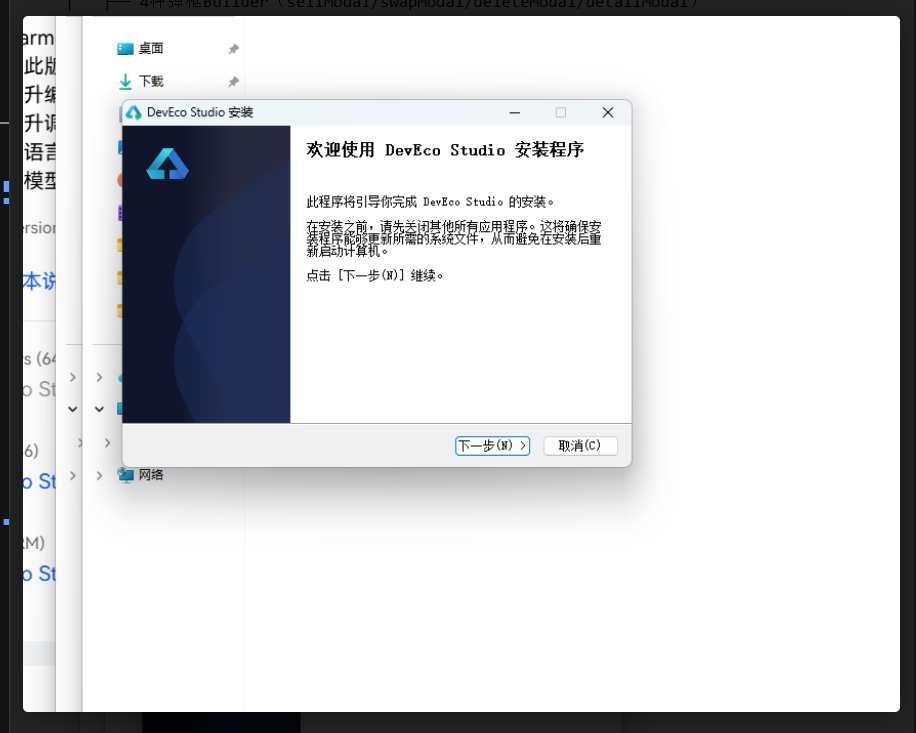
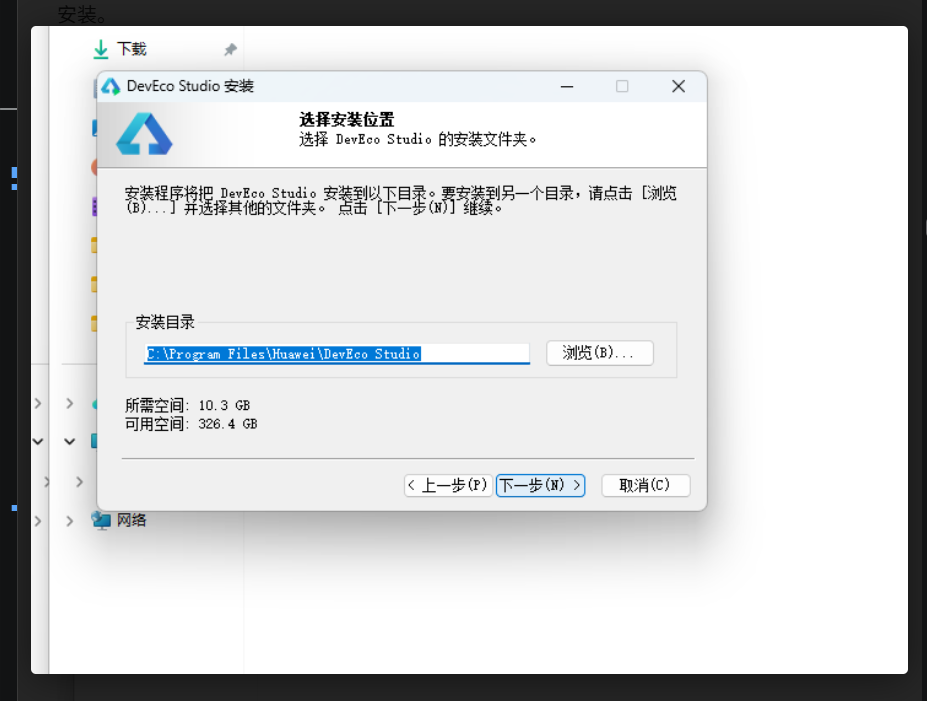
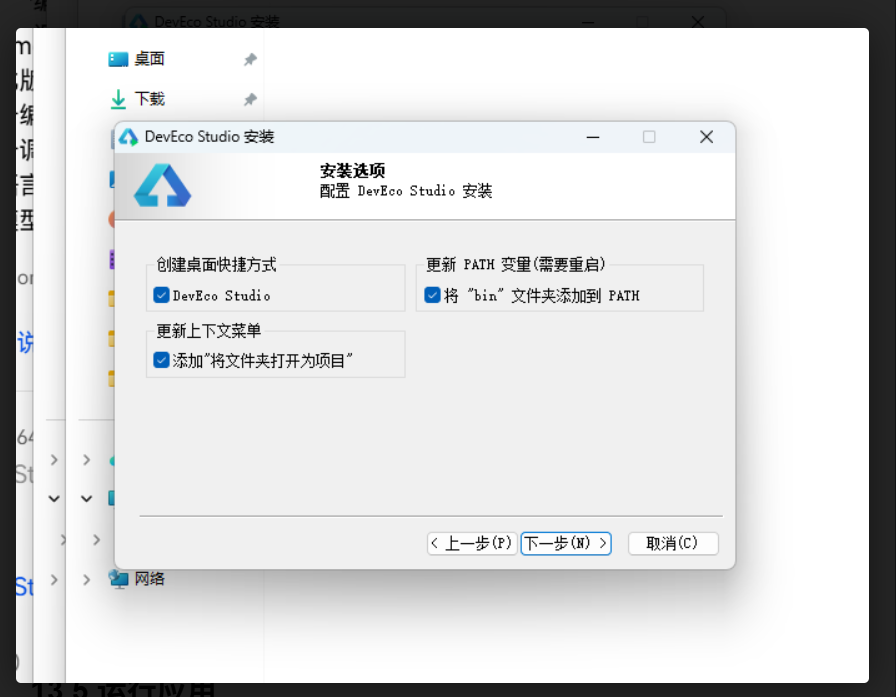
从华为开发者官网下载最新版本,运行安装包,选择安装路径,勾选创建桌面快捷方式,点击安装。
13.3 配置SDK
首次启动后进入File > Settings > HarmonyOS SDK,勾选API 24及以上版本,点击Apply等待下载完成。
13.4 创建项目
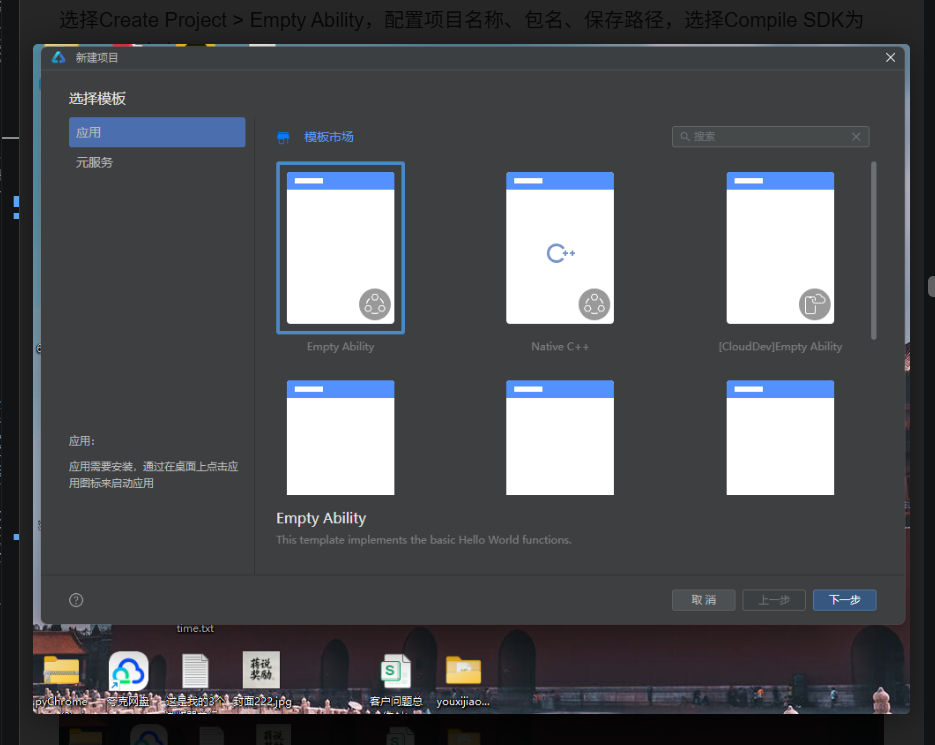
选择Create Project > Empty Ability,配置项目名称、包名、保存路径,选择Compile SDK为API 24,点击Finish。
13.5 运行应用
将1316.ets代码替换到entry/src/main/ets/pages/Index.ets,连接HarmonyOS设备或启动模拟器,点击运行按钮预览。
13.6 预览调试
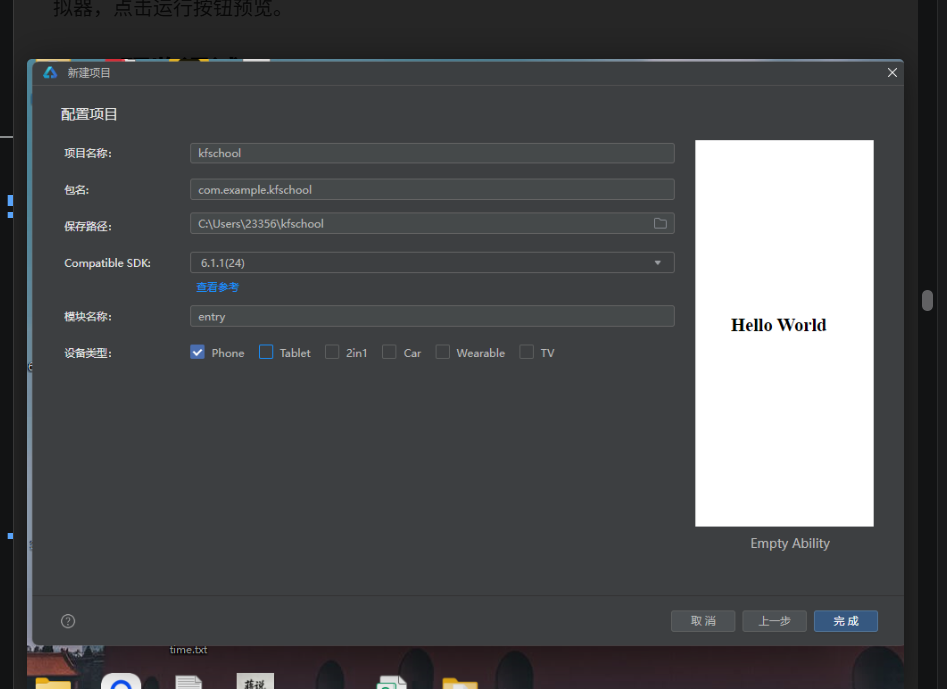
DevEco Studio提供实时预览功能,编辑器右侧打开Previewer面板,支持多设备尺寸预览、深色模式切换、组件树inspect等调试能力。
总结与展望
项目总结
节奏跑 RUNBEAT 是一款以 BPM 步频音乐为核心驱动力的跑步社区应用,基于 HarmonyOS ArkTS 声明式 UI 框架开发,单文件约 2900 行代码,无外部依赖。项目实现了 6 大 Tab 页面(跑步/歌单/记录/挑战/装备/我的)和约 15 套弹窗组件,完整覆盖 BPM 实时步频监测、按步频智能换歌、步频歌单管理、跑步记录与分段配速分析、线上挑战与排行榜、运动装备商城、跑者个人中心与目标管理等核心业务场景。
视觉设计上采用"活力运动风"——浅灰白底(#F7F8F5)营造清爽通透感,荧光橙(#FF6B2C)作为主色传递运动活力与能量,薄荷绿(#00B27A)作为辅助色代表健康与成长,碳灰(#233329)作为文字主色保证可读性,心情色系统(冲刺橙/节奏绿/巡航蓝/热身灰)分类 BPM 强度。整体视觉轻盈有活力、信息层级清晰、色彩语义明确,既适合运动场景的活力需求,又满足数据展示的可读性要求。
技术实现上严格遵循 ArkTS 规范:无 Blank 组件、无 UI 内变量声明、constraintSize 限高、单子组件 Scroll、接口约束全部对象字面量。采用单文件组件化架构,通过 @Component 划分为 8 个独立组件,@State 管理局部状态,@Builder 封装可复用 UI 和弹窗,Stack 叠加实现半透明遮罩弹窗,属性动画实现交互动效。
技术亮点
- BPM 步频音乐核心驱动:将音乐 BPM 与跑步步频实时同步,歌单按 BPM 区间分类(128-190 全覆盖),跑步时按步频智能换歌,音乐不再是背景音而是驱动步伐的节拍器
- 6 Tab + 15 弹窗完整生态闭环:从跑步监测到音乐管理、从记录分析到挑战激励、从装备购买到个人成长,形成完整的跑步生态闭环,每个业务场景都有对应的弹窗交互
- 活力运动风视觉体系:荧光橙主色+薄荷绿辅助色+碳灰文字+四级明度,心情色系统分类 BPM 强度,构建出统一、有活力、语义明确的运动视觉语言
- 分段配速数据可视化:跑步详情弹窗提供 8 公里分段配速柱状图,超过 42px 荧光橙(慢)/以下薄荷绿(快),直观展示每公里配速波动,帮助跑者分析跑步节奏
- 线上挑战+排行榜激励体系:10 个多样化挑战+实时排行榜+多层次奖励(实体奖牌/虚拟徽章/装备券/头像框),将个人跑步行为转化为社区互动与成就感
- 运动装备电商闭环:12 件全品类装备+双列商品网格+商品详情抽屉+购买确认(数量加减+合计金额),从浏览到下单仅需 3 次点击,购物流程简洁高效
- 三层目标管理体系:月度里程(短期可及)+年度里程(长期导向)+跑量等级(成就驱动),三层目标覆盖不同时间维度,进度条实时展示完成情况
扩展方向
节奏跑 RUNBEAT 作为演示项目,仍有多个可扩展方向:
- 实时步频监测:当前 BPM 数据为静态演示,可接入设备加速度传感器实时计算步频,实现真正的实时步频监测与音乐同步换歌
- GPS 跑步记录:当前跑步记录为静态数据,可接入 HarmonyOS 位置服务实现 GPS 轨迹记录,实时计算距离、配速、海拔、步频等数据,生成跑步路线图
- 音乐流媒体:当前歌曲为本地静态数据,可对接在线音乐 API(如华为音乐、网易云音乐),实现在线歌单、歌词显示、音质选择、下载缓存等完整音乐播放体验
- 社区互动:当前挑战和排行榜为基础功能,可扩展为完整社区:动态发布、点赞评论、关注粉丝、跑团、话题、直播等社交功能
- AI 跑步教练:可集成 AI 能力,实现个性化训练计划生成、配速建议、姿势分析、伤病预防、恢复指导等 AI 教练功能
- 智能设备联动:可对接华为手表、手环、心率带等智能穿戴设备,实时获取心率、步频、步幅、触地时间等专业跑步数据,提供更精准的跑步分析
- 赛事报名与成绩:可扩展为线上线下赛事报名平台,支持马拉松、越野跑等赛事报名、成绩查询、证书下载、赛事照片等完整赛事服务
- 数据导出与同步:可支持跑步数据导出为 TCX/GPX/FIT 等标准格式,同步到 Strava、Keep、咕咚等第三方跑步平台,实现多平台数据互通
节奏跑 RUNBEAT 展示了 HarmonyOS ArkTS 在运动健康类应用开发中的强大能力——声明式 UI 的简洁语法、@State 的高效状态管理、Stack 叠加弹窗的灵活实现、属性动画的流畅动效、Previewer 的实时预览,让开发者可以用较少的代码实现丰富的运动数据展示与交互体验。希望本文能为 HarmonyOS 开发者和运动健康产品从业者提供有价值的参考。
本文基于 HarmonyOS ArkTS 声明式 UI 框架实战项目撰写,所有代码和图片均来自节奏跑 RUNBEAT 项目。
附录:完整源码(2135.ets)
以下为节奏跑 RUNBEAT 应用的完整 ArkTS 源码,单文件约 2900 行,可直接复制到 DevEco Studio 的 Index.ets 中运行。
// 2135.ets 节奏跑 RUNBEAT —— BPM 步频音乐 / 跑步记录 / 线上挑战 / 运动装备
// 活力运动风:浅底 + 荧光橙 + 薄荷绿 + 碳灰
// 遵循要求.md:无 Blank、无 UI 内变量声明、constraintSize 限高、单子组件 Scroll、接口约束全部对象字面量
// ============ 类型定义 ============
interface RunTrack {
id: number;
title: string;
artist: string;
bpm: number;
duration: string;
mood: string;
}
interface RunSession {
id: number;
date: string;
distance: string;
duration: string;
pace: string;
bpm: string;
route: string;
}
interface PlaylistSet {
id: number;
name: string;
bpmRange: string;
songs: number;
minutes: string;
hot: boolean;
}
interface ChallengeItem {
id: number;
name: string;
days: string;
joined: boolean;
people: number;
reward: string;
}
interface GearItem {
id: number;
name: string;
price: number;
origin: number;
tag: string;
sold: number;
}
interface MileDay {
day: string;
km: number;
}
interface GoalRow {
name: string;
emoji: string;
percent: number;
current: string;
target: string;
}
// ============ 静态数据 ============
const RUN_TRACKS: RunTrack[] = [
{ id: 1, title: '破晓冲刺', artist: '电波少年', bpm: 178, duration: '3:42', mood: '冲刺' },
{ id: 2, title: '夜风巡航', artist: '灰港乐队', bpm: 165, duration: '4:08', mood: '巡航' },
{ id: 3, title: '心跳同步', artist: 'MOJI', bpm: 172, duration: '3:30', mood: '节奏' },
{ id: 4, title: '六分半', artist: '山路客', bpm: 158, duration: '3:55', mood: '巡航' },
{ id: 5, title: '风阻系数', artist: '电子羊', bpm: 180, duration: '4:21', mood: '冲刺' },
{ id: 6, title: '绿道漫游', artist: '晨雾组', bpm: 148, duration: '5:02', mood: '热身' },
{ id: 7, title: '坡道警报', artist: '鼓点工厂', bpm: 184, duration: '3:18', mood: '冲刺' },
{ id: 8, title: '终点前五百米', artist: '最后一圈', bpm: 190, duration: '2:56', mood: '冲刺' },
{ id: 9, title: '晨跑电台', artist: '清晨信号', bpm: 152, duration: '4:44', mood: '热身' },
{ id: 10, title: '城市折返', artist: '桥北', bpm: 166, duration: '3:36', mood: '节奏' },
{ id: 11, title: '慢下来的云', artist: '周日跑者', bpm: 140, duration: '5:28', mood: '放松' },
{ id: 12, title: '配速机器', artist: 'BPM实验室', bpm: 176, duration: '3:12', mood: '节奏' },
{ id: 13, title: '雨战', artist: '湿地跑团', bpm: 170, duration: '4:02', mood: '节奏' },
{ id: 14, title: '最后一公里', artist: '终点线合唱团', bpm: 186, duration: '3:26', mood: '冲刺' }
];
const RUN_SESSIONS: RunSession[] = [
{ id: 1, date: '08-26 周三', distance: '10.2 km', duration: "58'12\"", pace: "5'42\"", bpm: '165', route: '滨江绿道折返' },
{ id: 2, date: '08-25 周二', distance: '6.0 km', duration: "34'08\"", pace: "5'41\"", bpm: '158', route: '小区环线' },
{ id: 3, date: '08-24 周一', distance: '12.8 km', duration: "1:12'40\"", pace: "5'41\"", bpm: '162', route: '城市沿江' },
{ id: 4, date: '08-23 周日', distance: '21.1 km', duration: "2:01'35\"", pace: "5'46\"", bpm: '167', route: '半马赛道' },
{ id: 5, date: '08-22 周六', distance: '8.4 km', duration: "47'55\"", pace: "5'42\"", bpm: '160', route: '公园丘陵' },
{ id: 6, date: '08-21 周五', distance: '5.0 km', duration: "28'20\"", pace: "5'40\"", bpm: '155', route: '夜跑通勤' },
{ id: 7, date: '08-20 周四', distance: '15.0 km', duration: "1:26'30\"", pace: "5'46\"", bpm: '163', route: '长距离拉练' },
{ id: 8, date: '08-19 周三', distance: '10.1 km', duration: "57'48\"", pace: "5'43\"", bpm: '164', route: '滨江绿道折返' },
{ id: 9, date: '08-18 周二', distance: '6.2 km', duration: "35'30\"", pace: "5'44\"", bpm: '157', route: '小区环线' },
{ id: 10, date: '08-17 周一', distance: '13.5 km', duration: "1:16'55\"", pace: "5'41\"", bpm: '161', route: '城市沿江' },
{ id: 11, date: '08-16 周日', distance: '16.6 km', duration: "1:35'12\"", pace: "5'44\"", bpm: '166', route: '郊野缓坡' },
{ id: 12, date: '08-15 周六', distance: '4.8 km', duration: "27'06\"", pace: "5'39\"", bpm: '152', route: '恢复慢跑' }
];
const PLAYLIST_SETS: PlaylistSet[] = [
{ id: 1, name: '180 步频黄金档', bpmRange: '176-184', songs: 18, minutes: '68 分钟', hot: true },
{ id: 2, name: '热身慢启动', bpmRange: '140-152', songs: 12, minutes: '52 分钟', hot: false },
{ id: 3, name: '夜跑霓虹', bpmRange: '160-170', songs: 15, minutes: '58 分钟', hot: true },
{ id: 4, name: '间歇冲刺包', bpmRange: '184-190', songs: 10, minutes: '36 分钟', hot: false },
{ id: 5, name: '长距离巡航', bpmRange: '156-164', songs: 20, minutes: '75 分钟', hot: true },
{ id: 6, name: '雨战氛围', bpmRange: '162-172', songs: 14, minutes: '55 分钟', hot: false },
{ id: 7, name: '越野坡道', bpmRange: '170-182', songs: 16, minutes: '62 分钟', hot: false },
{ id: 8, name: '赛后拉伸放松', bpmRange: '128-140', songs: 11, minutes: '48 分钟', hot: false }
];
const CHALLENGE_LIST: ChallengeItem[] = [
{ id: 1, name: '八月百公里', days: '剩 4 天', joined: true, people: 12680, reward: '奖牌·鎏金里程' },
{ id: 2, name: '连续晨跑 21 天', days: '进行中', joined: true, people: 8940, reward: '徽章·日出跑者' },
{ id: 3, name: '周末半马达标赛', days: '09-01 开赛', joined: false, people: 5320, reward: '证书+装备券' },
{ id: 4, name: '配速稳定挑战', days: '进行中', joined: false, people: 4180, reward: '徽章·人肉节拍器' },
{ id: 5, name: '九月破三训练营', days: '09-05 开营', joined: false, people: 2150, reward: '全马破三奖牌' },
{ id: 6, name: '夜跑城市点亮', days: '进行中', joined: false, people: 16730, reward: '限定头像框' },
{ id: 7, name: '越野爬升挑战', days: '10-01 开赛', joined: false, people: 3260, reward: '登山杖折扣券' },
{ id: 8, name: '雨战勇士周', days: '进行中', joined: false, people: 2740, reward: '徽章·风雨无阻' },
{ id: 9, name: '家庭亲子跑', days: '09-12 开赛', joined: false, people: 6890, reward: '亲子奖牌一对' },
{ id: 10, name: '年度千公里', days: '剩 126 天', joined: false, people: 9820, reward: '年度大满贯奖杯' }
];
const GEAR_LIST: GearItem[] = [
{ id: 1, name: '骨传导运动耳机 Pro', price: 699, origin: 899, tag: '跑者挚爱', sold: 12840 },
{ id: 2, name: '轻量竞速碳板鞋', price: 1299, origin: 1599, tag: 'PB 神器', sold: 6320 },
{ id: 3, name: '心率臂带 BPM-2', price: 299, origin: 399, tag: '实时配速', sold: 8930 },
{ id: 4, name: '运动臂带(防汗款)', price: 79, origin: 99, tag: '热卖', sold: 21560 },
{ id: 5, name: '压缩小腿套', price: 129, origin: 169, tag: '缓解震动', sold: 7420 },
{ id: 6, name: '夜跑反光背心', price: 99, origin: 139, tag: '安全必备', sold: 9870 },
{ id: 7, name: '运动水壶腰包', price: 159, origin: 199, tag: '新品', sold: 4310 },
{ id: 8, name: '防风跑步眼镜', price: 249, origin: 329, tag: '轻量 21g', sold: 3650 },
{ id: 9, name: '速干空顶帽', price: 89, origin: 119, tag: '排汗快', sold: 8640 },
{ id: 10, name: '羊毛跑步袜×3', price: 119, origin: 149, tag: '不起球', sold: 15230 },
{ id: 11, name: '折叠水壶 350ml', price: 59, origin: 79, tag: '轻若无物', sold: 11040 },
{ id: 12, name: '马拉松能量胶×6', price: 89, origin: 108, tag: '补给站', sold: 17890 }
];
const MILE_WEEK: MileDay[] = [
{ day: '一', km: 6.2 },
{ day: '二', km: 0 },
{ day: '三', km: 10.2 },
{ day: '四', km: 8.4 },
{ day: '五', km: 5.0 },
{ day: '六', km: 15.0 },
{ day: '日', km: 12.8 }
];
const GOAL_ROWS: GoalRow[] = [
{ name: '本月里程', emoji: '🏃', percent: 78, current: '78.6 km', target: '100 km' },
{ name: '年度里程', emoji: '🗓', percent: 62, current: '623 km', target: '1000 km' },
{ name: '跑量等级', emoji: '🏅', percent: 55, current: 'LV5 银跑者', target: 'LV6 金跑者' }
];
const MOOD_FILTERS: string[] = ['全部', '热身', '巡航', '节奏', '冲刺', '放松'];
// ============ 工具函数 ============
function moodColor(m: string): string {
if (m === '冲刺') {
return '#FF6B2C';
}
if (m === '节奏') {
return '#00B27A';
}
if (m === '巡航') {
return '#2F8FED';
}
if (m === '热身') {
return '#8A93A6';
}
return '#7CB518';
}
function moodBg(m: string): string {
if (m === '冲刺') {
return 'rgba(255,107,44,0.1)';
}
if (m === '节奏') {
return 'rgba(0,178,122,0.1)';
}
if (m === '巡航') {
return 'rgba(47,143,237,0.1)';
}
return 'rgba(138,147,166,0.12)';
}
function gearDiscount(g: GearItem): string {
return Math.round(g.price / g.origin * 100) / 10 + '';
}
function mileBar(km: number): number {
return km * 3.6;
}
enum RunTab {
RUN,
PLAYLIST,
STATS,
CHALLENGE,
GEAR,
ME
}
// ============ 主入口 ============
@Entry
@Component
struct RunBeatApp {
@State activeTab: RunTab = RunTab.RUN
@Builder contentArea() {
if (this.activeTab === RunTab.RUN) {
RunContent()
} else if (this.activeTab === RunTab.PLAYLIST) {
PlaylistContent()
} else if (this.activeTab === RunTab.STATS) {
StatsContent()
} else if (this.activeTab === RunTab.CHALLENGE) {
ChallengeContent()
} else if (this.activeTab === RunTab.GEAR) {
GearContent()
} else {
MeRunContent()
}
}
@Builder bottomTabItem(icon: string, label: string, tab: RunTab) {
Column({ space: 3 }) {
Text(icon)
.fontSize(20)
.scale(this.activeTab === tab ? { x: 1.18, y: 1.18 } : { x: 1, y: 1 })
.animation({ duration: 220, curve: Curve.EaseOut })
Text(label)
.fontSize(10)
.fontColor(this.activeTab === tab ? '#FF6B2C' : '#8A93A6')
}
.alignItems(HorizontalAlign.Center)
.padding({ top: 8, bottom: 6 })
.width('16.6%')
.onClick(() => {
this.activeTab = tab;
})
}
build() {
Column() {
RunBeatHeader()
Column() {
this.contentArea()
}
.layoutWeight(1)
.width('100%')
Divider()
.color('#E9ECEF')
.strokeWidth(1)
Row() {
this.bottomTabItem('🏃', '跑步', RunTab.RUN)
this.bottomTabItem('🎧', '歌单', RunTab.PLAYLIST)
this.bottomTabItem('📊', '记录', RunTab.STATS)
this.bottomTabItem('🏆', '挑战', RunTab.CHALLENGE)
this.bottomTabItem('🛒', '装备', RunTab.GEAR)
this.bottomTabItem('👤', '我的', RunTab.ME)
}
.width('100%')
.backgroundColor('#FFFFFF')
.padding({ bottom: 6 })
}
.width('100%')
.height('100%')
.backgroundColor('#F7F8F5')
}
}
// ============ 头部(电商风·静态) ============
@Component
struct RunBeatHeader {
onSearchTap: () => void = () => {};
build() {
Column() {
Row({ space: 10 }) {
Column() {
Text('R')
.fontSize(20)
.fontWeight(FontWeight.Bold)
.fontColor('#FFFFFF')
}
.width(36)
.height(36)
.borderRadius(12)
.backgroundColor('#FF6B2C')
.justifyContent(FlexAlign.Center)
Column({ space: 3 }) {
Text('节奏跑 RUNBEAT')
.fontSize(16)
.fontWeight(FontWeight.Bold)
.fontColor('#233329')
Text('让每一步踩在鼓点上')
.fontSize(9)
.fontColor('#8A93A6')
}
.alignItems(HorizontalAlign.Start)
.layoutWeight(1)
Text('🔔')
.fontSize(19)
.padding(5)
Text('💬')
.fontSize(19)
.padding(5)
}
.width('100%')
.padding({ left: 16, right: 16, top: 10 })
Row({ space: 8 }) {
Text('🔍')
.fontSize(14)
Text('搜步频歌单 / 装备 / 挑战')
.fontSize(12)
.fontColor('#8A93A6')
.layoutWeight(1)
Text('180BPM')
.fontSize(10)
.fontColor('#FF6B2C')
.padding({ left: 8, right: 8, top: 3, bottom: 3 })
.borderRadius(10)
.backgroundColor('rgba(255,107,44,0.1)')
}
.width('100%')
.padding({ left: 14, right: 14, top: 10, bottom: 10 })
.borderRadius(20)
.backgroundColor('#FFFFFF')
.margin({ left: 16, right: 16, top: 10 })
.onClick(() => {
this.onSearchTap();
})
Row({ space: 10 }) {
Column({ space: 4 }) {
Text('🏅')
.fontSize(22)
Text('八月百公里冲刺')
.fontSize(11)
.fontWeight(FontWeight.Bold)
.fontColor('#FFFFFF')
Text('已完成 78.6 / 100 km')
.fontSize(9)
.fontColor('rgba(255,255,255,0.85)')
}
.alignItems(HorizontalAlign.Start)
.layoutWeight(1.4)
.padding(14)
.borderRadius(14)
.backgroundColor('#FF6B2C')
Column({ space: 4 }) {
Text('🎵')
.fontSize(22)
Text('步频歌单上新')
.fontSize(11)
.fontWeight(FontWeight.Bold)
.fontColor('#233329')
Text('夜跑霓虹 Vol.9')
.fontSize(9)
.fontColor('#00B27A')
}
.alignItems(HorizontalAlign.Start)
.layoutWeight(1)
.padding(14)
.borderRadius(14)
.backgroundColor('#FFFFFF')
}
.width('94%')
.margin({ top: 10, bottom: 12 })
}
.width('100%')
.backgroundColor('#F2F5F0')
}
}
// ============ 跑步 Tab(BPM 圆环 + 目标弹窗 + 换歌抽屉) ============
@Component
struct RunContent {
@State showStartModal: boolean = false
@State showSongSheet: boolean = false
@State showPaceToast: boolean = false
@State goalIdx: number = 0
@Builder modalOverlay(onClose: () => void) {
Column() {
Column()
.width('100%')
.layoutWeight(1)
.onClick(() => {
onClose();
})
Column() {
Text('🏃')
.fontSize(30)
.margin({ bottom: 8 })
Text('节奏跑')
.fontSize(12)
.fontColor('#8A93A6')
}
.width('100%')
}
.width('100%')
.height('100%')
}
@Builder startModal() {
Column({ space: 12 }) {
Text('今 天 跑 多 少')
.fontSize(12)
.fontColor('#FF6B2C')
.letterSpacing(3)
.margin({ top: 22 })
Flex({ wrap: FlexWrap.Wrap }) {
ForEach(['自由跑', '5 公里', '10 公里', '间歇 400×8', '长距离 16km', '恢复跑'], (g: string, i: number) => {
Text(g)
.fontSize(12)
.fontColor(this.goalIdx === i ? '#FFFFFF' : '#5B6572')
.padding({ left: 16, right: 16, top: 9, bottom: 9 })
.borderRadius(18)
.backgroundColor(this.goalIdx === i ? '#FF6B2C' : '#F2F5F0')
.margin({ right: 8, bottom: 8 })
.scale(this.goalIdx === i ? { x: 1.06, y: 1.06 } : { x: 1, y: 1 })
.animation({ duration: 200, curve: Curve.EaseOut })
.onClick(() => {
this.goalIdx = i;
})
}, (g: string) => g)
}
.width('88%')
Column({ space: 8 }) {
Row() {
Text('匹配步频')
.fontSize(11)
.fontColor('#8A93A6')
Text('178 BPM · 节奏档')
.fontSize(11)
.fontColor('#00B27A')
}
.width('84%')
.justifyContent(FlexAlign.SpaceBetween)
Row() {
Text('语音教练')
.fontSize(11)
.fontColor('#8A93A6')
Text('每公里播报 · 开')
.fontSize(11)
.fontColor('#233329')
}
.width('84%')
.justifyContent(FlexAlign.SpaceBetween)
Row() {
Text('安全提醒')
.fontSize(11)
.fontColor('#8A93A6')
Text('心率超 185 将降速提示')
.fontSize(11)
.fontColor('#233329')
}
.width('84%')
.justifyContent(FlexAlign.SpaceBetween)
}
.width('100%')
Button() {
Text('▶ 开始跑步')
.fontSize(15)
.fontColor('#FFFFFF')
}
.width('70%')
.height(46)
.backgroundColor('#FF6B2C')
.borderRadius(23)
.margin({ top: 6, bottom: 22 })
.onClick(() => {
this.showStartModal = false;
this.showPaceToast = true;
})
}
.width('88%')
.backgroundColor('#FFFFFF')
.borderRadius(16)
.alignItems(HorizontalAlign.Center)
.border({ width: 1, color: '#E9ECEF' })
}
@Builder songSheet() {
Column({ space: 10 }) {
Row() {
Text('正在播放 · 按步频换歌')
.fontSize(14)
.fontWeight(FontWeight.Bold)
.fontColor('#233329')
.layoutWeight(1)
Text('✕')
.fontSize(16)
.fontColor('#8A93A6')
.padding(8)
.onClick(() => {
this.showSongSheet = false;
})
}
.width('94%')
.margin({ top: 16 })
ForEach(RUN_TRACKS, (t: RunTrack) => {
Row({ space: 12 }) {
Column() {
Text(t.bpm.toString())
.fontSize(13)
.fontWeight(FontWeight.Bold)
.fontColor(moodColor(t.mood))
}
.width(42)
.height(42)
.borderRadius(10)
.backgroundColor(moodBg(t.mood))
.justifyContent(FlexAlign.Center)
Column({ space: 4 }) {
Row({ space: 6 }) {
Text(t.title)
.fontSize(13)
.fontWeight(FontWeight.Bold)
.fontColor('#233329')
.layoutWeight(1)
.maxLines(1)
.textOverflow({ overflow: TextOverflow.Ellipsis })
Text(t.mood)
.fontSize(9)
.fontColor(moodColor(t.mood))
.padding({ left: 7, right: 7, top: 2, bottom: 2 })
.borderRadius(3)
.backgroundColor(moodBg(t.mood))
}
.width('100%')
Text(t.artist + ' · ' + t.duration)
.fontSize(10)
.fontColor('#8A93A6')
}
.alignItems(HorizontalAlign.Start)
.layoutWeight(1)
Text('⇄')
.fontSize(16)
.fontColor('#B8C0CC')
.padding(6)
.onClick(() => {
this.showSongSheet = false;
this.showPaceToast = true;
})
}
.width('94%')
.padding({ top: 8, bottom: 8 })
}, (t: RunTrack) => t.id.toString())
Text('已按 178 BPM 智能排序')
.fontSize(10)
.fontColor('#B8C0CC')
.margin({ top: 6, bottom: 18 })
}
.width('100%')
.backgroundColor('#FFFFFF')
.borderRadius({ topLeft: 18, topRight: 18 })
.constraintSize({ maxHeight: '78%' })
.alignItems(HorizontalAlign.Center)
}
build() {
Stack() {
Scroll() {
Column() {
Column({ space: 8 }) {
Row({ space: 12 }) {
Column() {
Text('178')
.fontSize(40)
.fontWeight(FontWeight.Bold)
.fontColor('#FF6B2C')
Text('BPM 当前步频')
.fontSize(9)
.fontColor('rgba(255,255,255,0.85)')
}
.alignItems(HorizontalAlign.Center)
Divider()
.vertical(true)
.height(52)
.strokeWidth(1)
.color('rgba(255,255,255,0.3)')
Column() {
Text("5'42\"")
.fontSize(22)
.fontWeight(FontWeight.Bold)
.fontColor('#FFFFFF')
Text('当前配速 /km')
.fontSize(9)
.fontColor('rgba(255,255,255,0.85)')
}
.alignItems(HorizontalAlign.Center)
Divider()
.vertical(true)
.height(52)
.strokeWidth(1)
.color('rgba(255,255,255,0.3)')
Column() {
Text('8.6')
.fontSize(22)
.fontWeight(FontWeight.Bold)
.fontColor('#FFFFFF')
Text('已跑里程 km')
.fontSize(9)
.fontColor('rgba(255,255,255,0.85)')
}
.alignItems(HorizontalAlign.Center)
}
.width('100%')
.justifyContent(FlexAlign.SpaceEvenly)
.padding({ top: 8, bottom: 8 })
Row({ space: 4 }) {
ForEach([12, 28, 18, 34, 22, 38, 16, 30, 24, 36, 20, 26], (h: number) => {
Column()
.width(10)
.height(h)
.borderRadius(3)
.backgroundColor(h > 28 ? '#FFFFFF' : 'rgba(255,255,255,0.35)')
.margin({ left: 2, right: 2 })
}, (h: number) => h.toString())
}
.height(40)
.alignItems(VerticalAlign.Bottom)
}
.width('94%')
.padding(18)
.backgroundColor('#FF6B2C')
.borderRadius(18)
.margin({ top: 12 })
Row({ space: 12 }) {
Column() {
Text('▶')
.fontSize(16)
.fontColor('#FFFFFF')
}
.width(52)
.height(52)
.borderRadius(26)
.backgroundColor('#233329')
.justifyContent(FlexAlign.Center)
.onClick(() => {
this.showStartModal = true;
})
Column({ space: 4 }) {
Text('破晓冲刺')
.fontSize(14)
.fontWeight(FontWeight.Bold)
.fontColor('#233329')
Text('电波少年 · 178 BPM · 3:42')
.fontSize(10)
.fontColor('#8A93A6')
}
.alignItems(HorizontalAlign.Start)
.layoutWeight(1)
Text('⇄')
.fontSize(20)
.fontColor('#FF6B2C')
.padding(8)
.onClick(() => {
this.showSongSheet = true;
})
}
.width('94%')
.padding(14)
.backgroundColor('#FFFFFF')
.borderRadius(14)
.border({ width: 1, color: '#E9ECEF' })
.margin({ top: 10 })
Row() {
Text('今 日 训 练 建 议')
.fontSize(13)
.fontWeight(FontWeight.Bold)
.fontColor('#233329')
.letterSpacing(2)
.layoutWeight(1)
Text('半马备赛 W6')
.fontSize(10)
.fontColor('#00B27A')
}
.width('94%')
.margin({ top: 14, bottom: 4 })
ForEach([['轻松跑', '40 分钟', "配速 6'00\"", '140-155'], ['节奏跑', '20 分钟', "配速 5'20\"", '165-175'], ['放松慢跑', '10 分钟', "配速 6'30\"", '130-145']], (s: string[]) => {
Row({ space: 12 }) {
Column() {
Text(s[0].slice(0, 1))
.fontSize(15)
.fontWeight(FontWeight.Bold)
.fontColor('#FFFFFF')
}
.width(42)
.height(42)
.borderRadius(10)
.backgroundColor('#00B27A')
.justifyContent(FlexAlign.Center)
Column({ space: 4 }) {
Text(s[0])
.fontSize(13)
.fontWeight(FontWeight.Bold)
.fontColor('#233329')
Text(s[2] + ' · 心率 ' + s[3])
.fontSize(10)
.fontColor('#8A93A6')
}
.alignItems(HorizontalAlign.Start)
.layoutWeight(1)
Text(s[1])
.fontSize(12)
.fontWeight(FontWeight.Bold)
.fontColor('#FF6B2C')
}
.width('94%')
.padding(12)
.backgroundColor('#FFFFFF')
.borderRadius(12)
.border({ width: 1, color: '#E9ECEF' })
.margin({ top: 8 })
}, (s: string[]) => s[0])
Text('— 今日宜节奏跑 · 风力 2 级 —')
.fontSize(10)
.fontColor('#B8C0CC')
.margin({ top: 16, bottom: 24 })
}
.width('100%')
}
.scrollBar(BarState.Off)
.layoutWeight(1)
.width('100%')
if (this.showStartModal) {
Column() {
Column()
.width('100%')
.layoutWeight(1)
.onClick(() => {
this.showStartModal = false;
})
this.startModal()
}
.width('100%')
.height('100%')
.backgroundColor('rgba(35,51,41,0.55)')
}
if (this.showSongSheet) {
Column() {
Column()
.width('100%')
.layoutWeight(1)
.onClick(() => {
this.showSongSheet = false;
})
this.songSheet()
}
.width('100%')
.height('100%')
.backgroundColor('rgba(35,51,41,0.5)')
}
if (this.showPaceToast) {
Column() {
Text('🎵 已切换为同步步频歌单')
.fontSize(13)
.fontColor('#FFFFFF')
.padding({ left: 22, right: 22, top: 11, bottom: 11 })
.borderRadius(22)
.backgroundColor('rgba(0,178,122,0.95)')
.scale({ x: 1.05, y: 1.05 })
.animation({ duration: 240, curve: Curve.EaseOut })
}
.width('100%')
.height('100%')
.justifyContent(FlexAlign.Center)
.onClick(() => {
this.showPaceToast = false;
})
}
}
.width('100%')
.height('100%')
}
}
// ============ 歌单 Tab(双列网格 + 新建/删除歌单弹窗) ============
@Component
struct PlaylistContent {
@State showNewModal: boolean = false
@State showDeleteConfirm: boolean = false
@State showDetailSheet: boolean = false
@State selectedList: PlaylistSet | null = null
@State newName: string = ''
@State newBpm: string = ''
@State playlists: PlaylistSet[] = PLAYLIST_SETS
@Builder modalOverlay(onClose: () => void) {
Column() {
Column()
.width('100%')
.layoutWeight(1)
.onClick(() => {
onClose();
})
Column() {
Text('🎧')
.fontSize(30)
.margin({ bottom: 8 })
Text('步频歌单')
.fontSize(12)
.fontColor('#8A93A6')
}
.width('100%')
}
.width('100%')
.height('100%')
}
@Builder newModal() {
Column({ space: 12 }) {
Text('新 建 步 频 歌 单')
.fontSize(12)
.fontColor('#FF6B2C')
.letterSpacing(3)
.margin({ top: 22 })
TextInput({ placeholder: '歌单名称(如:晨跑唤醒)' })
.fontSize(13)
.fontColor('#233329')
.width('84%')
.height(44)
.backgroundColor('#F7F8F5')
.borderRadius(10)
.border({ width: 1, color: '#E9ECEF' })
.onChange((v: string) => {
this.newName = v;
})
TextInput({ placeholder: '目标 BPM 区间(如:165-175)' })
.fontSize(13)
.fontColor('#233329')
.width('84%')
.height(44)
.backgroundColor('#F7F8F5')
.borderRadius(10)
.border({ width: 1, color: '#E9ECEF' })
.onChange((v: string) => {
this.newBpm = v;
})
Text('创建后系统将按 BPM 智能填充曲目')
.fontSize(10)
.fontColor('#8A93A6')
Row({ space: 12 }) {
Button() {
Text('取消')
.fontSize(13)
.fontColor('#8A93A6')
}
.layoutWeight(1)
.height(40)
.backgroundColor('#F2F5F0')
.borderRadius(20)
.onClick(() => {
this.showNewModal = false;
})
Button() {
Text('创建歌单')
.fontSize(13)
.fontColor('#FFFFFF')
}
.layoutWeight(1)
.height(40)
.backgroundColor('#FF6B2C')
.borderRadius(20)
.onClick(() => {
this.playlists.push({
id: this.playlists.length + 1,
name: this.newName.length > 0 ? this.newName : '新建步频歌单',
bpmRange: this.newBpm.length > 0 ? this.newBpm : '160-170',
songs: 12,
minutes: '48 分钟',
hot: false
});
this.newName = '';
this.newBpm = '';
this.showNewModal = false;
})
}
.width('84%')
.margin({ top: 6, bottom: 22 })
}
.width('88%')
.backgroundColor('#FFFFFF')
.borderRadius(16)
.alignItems(HorizontalAlign.Center)
.border({ width: 1, color: '#E9ECEF' })
}
@Builder deleteConfirmModal() {
Column({ space: 12 }) {
Text('⚠')
.fontSize(34)
.margin({ top: 22 })
Text('删除该歌单?')
.fontSize(15)
.fontWeight(FontWeight.Bold)
.fontColor('#233329')
Text(this.selectedList!.name)
.fontSize(11)
.fontColor('#8A93A6')
Text('歌单内曲目不受影响,仅移出列表')
.fontSize(10)
.fontColor('#B8C0CC')
Row({ space: 12 }) {
Button() {
Text('保留')
.fontSize(13)
.fontColor('#00B27A')
}
.layoutWeight(1)
.height(40)
.backgroundColor('#F2F5F0')
.borderRadius(20)
.onClick(() => {
this.showDeleteConfirm = false;
})
Button() {
Text('删除歌单')
.fontSize(13)
.fontColor('#FFFFFF')
}
.layoutWeight(1)
.height(40)
.backgroundColor('#E5484D')
.borderRadius(20)
.onClick(() => {
this.playlists.splice(this.playlists.map((p: PlaylistSet) => p.id).indexOf(this.selectedList!.id), 1);
this.showDeleteConfirm = false;
})
}
.width('84%')
.margin({ top: 4, bottom: 22 })
}
.width('78%')
.backgroundColor('#FFFFFF')
.borderRadius(16)
.alignItems(HorizontalAlign.Center)
.border({ width: 1, color: '#E9ECEF' })
}
@Builder detailSheet() {
Column({ space: 10 }) {
Row({ space: 12 }) {
Column() {
Text('♪')
.fontSize(22)
.fontWeight(FontWeight.Bold)
.fontColor('#FFFFFF')
}
.width(48)
.height(48)
.borderRadius(12)
.backgroundColor('#FF6B2C')
.justifyContent(FlexAlign.Center)
Column({ space: 4 }) {
Text(this.selectedList!.name)
.fontSize(15)
.fontWeight(FontWeight.Bold)
.fontColor('#233329')
Text(this.selectedList!.bpmRange + ' BPM · ' + this.selectedList!.songs.toString() + ' 首 · ' + this.selectedList!.minutes)
.fontSize(10)
.fontColor('#8A93A6')
}
.alignItems(HorizontalAlign.Start)
.layoutWeight(1)
Text('✕')
.fontSize(16)
.fontColor('#8A93A6')
.padding(8)
.onClick(() => {
this.showDetailSheet = false;
})
}
.width('94%')
.margin({ top: 16 })
ForEach(RUN_TRACKS.slice(0, 8), (t: RunTrack) => {
Row({ space: 12 }) {
Text(t.title)
.fontSize(13)
.fontColor('#233329')
.layoutWeight(1)
.maxLines(1)
.textOverflow({ overflow: TextOverflow.Ellipsis })
Text(t.bpm.toString() + 'BPM')
.fontSize(10)
.fontColor(moodColor(t.mood))
Text(t.duration)
.fontSize(10)
.fontColor('#B8C0CC')
}
.width('94%')
.padding({ top: 10, bottom: 10 })
.borderRadius(10)
.backgroundColor('#F7F8F5')
.margin({ top: 4 })
}, (t: RunTrack) => t.id.toString())
Row({ space: 12 }) {
Button() {
Text('▶ 跑步时用这份')
.fontSize(13)
.fontColor('#FFFFFF')
}
.layoutWeight(1)
.height(42)
.backgroundColor('#FF6B2C')
.borderRadius(21)
Button() {
Text('🗑 删除歌单')
.fontSize(13)
.fontColor('#E5484D')
}
.layoutWeight(1)
.height(42)
.backgroundColor('rgba(229,72,77,0.08)')
.borderRadius(21)
.onClick(() => {
this.showDetailSheet = false;
this.showDeleteConfirm = true;
})
}
.width('94%')
.margin({ top: 10, bottom: 20 })
}
.width('100%')
.backgroundColor('#FFFFFF')
.borderRadius({ topLeft: 18, topRight: 18 })
.constraintSize({ maxHeight: '80%' })
.alignItems(HorizontalAlign.Center)
}
build() {
Stack() {
Scroll() {
Column() {
Row() {
Text('步 频 歌 单')
.fontSize(14)
.fontWeight(FontWeight.Bold)
.fontColor('#233329')
.letterSpacing(2)
.layoutWeight(1)
Text('+ 新建歌单')
.fontSize(11)
.fontColor('#FFFFFF')
.padding({ left: 14, right: 14, top: 8, bottom: 8 })
.borderRadius(16)
.backgroundColor('#FF6B2C')
.onClick(() => {
this.showNewModal = true;
})
}
.width('94%')
.margin({ top: 12 })
Flex({ wrap: FlexWrap.Wrap }) {
ForEach(this.playlists, (p: PlaylistSet) => {
Column({ space: 8 }) {
Row({ space: 6 }) {
Text('🔥')
.fontSize(12)
.opacity(p.hot ? 1 : 0)
Text(p.bpmRange)
.fontSize(11)
.fontWeight(FontWeight.Bold)
.fontColor('#FF6B2C')
.layoutWeight(1)
}
.width('100%')
Text(p.name)
.fontSize(13)
.fontWeight(FontWeight.Bold)
.fontColor('#233329')
.maxLines(1)
.textOverflow({ overflow: TextOverflow.Ellipsis })
.width('100%')
Column({ space: 5 }) {
Row({ space: 4 }) {
ForEach([14, 30, 20, 36, 24, 32, 18, 28], (h: number) => {
Column()
.width(6)
.height(h)
.borderRadius(2)
.backgroundColor(h > 26 ? '#FF6B2C' : '#D7E4D0')
.margin({ left: 1, right: 1 })
}, (h: number) => h.toString())
}
.height(38)
.alignItems(VerticalAlign.Bottom)
Text(p.songs.toString() + ' 首 · ' + p.minutes)
.fontSize(9)
.fontColor('#8A93A6')
}
.width('100%')
}
.width('46%')
.margin(6)
.padding(12)
.backgroundColor('#FFFFFF')
.borderRadius(14)
.border({ width: 1, color: '#E9ECEF' })
.scale(this.selectedList !== null && this.selectedList!.id === p.id ? { x: 1.02, y: 1.02 } : { x: 1, y: 1 })
.animation({ duration: 200, curve: Curve.EaseOut })
.onClick(() => {
this.selectedList = p;
this.showDetailSheet = true;
})
}, (p: PlaylistSet) => p.id.toString())
}
.width('100%')
.padding({ left: 10, right: 10, top: 10 })
Text('— 曲速与步频,此刻同频 —')
.fontSize(10)
.fontColor('#B8C0CC')
.margin({ top: 14, bottom: 24 })
}
.width('100%')
}
.scrollBar(BarState.Off)
.layoutWeight(1)
.width('100%')
if (this.showNewModal) {
Column() {
Column()
.width('100%')
.layoutWeight(1)
.onClick(() => {
this.showNewModal = false;
})
this.newModal()
}
.width('100%')
.height('100%')
.backgroundColor('rgba(35,51,41,0.5)')
}
if (this.showDetailSheet) {
Column() {
Column()
.width('100%')
.layoutWeight(1)
.onClick(() => {
this.showDetailSheet = false;
})
this.detailSheet()
}
.width('100%')
.height('100%')
.backgroundColor('rgba(35,51,41,0.5)')
}
if (this.showDeleteConfirm) {
Column() {
this.deleteConfirmModal()
}
.width('100%')
.height('100%')
.backgroundColor('rgba(35,51,41,0.55)')
.justifyContent(FlexAlign.Center)
}
}
.width('100%')
.height('100%')
}
}
// ============ 记录 Tab(跑步记录 + 详情弹窗 + 分段配速图) ============
@Component
struct StatsContent {
@State showSessionDetail: boolean = false
@State selectedSession: RunSession | null = null
@State showShareToast: boolean = false
@Builder modalOverlay(onClose: () => void) {
Column() {
Column()
.width('100%')
.layoutWeight(1)
.onClick(() => {
onClose();
})
Column() {
Text('📊')
.fontSize(30)
.margin({ bottom: 8 })
Text('跑步记录')
.fontSize(12)
.fontColor('#8A93A6')
}
.width('100%')
}
.width('100%')
.height('100%')
}
@Builder sessionDetailModal() {
Column({ space: 12 }) {
Text('跑 步 详 情')
.fontSize(12)
.fontColor('#FF6B2C')
.letterSpacing(3)
.margin({ top: 20 })
Text(this.selectedSession!.date)
.fontSize(17)
.fontWeight(FontWeight.Bold)
.fontColor('#233329')
Text(this.selectedSession!.route)
.fontSize(11)
.fontColor('#8A93A6')
Row({ space: 0 }) {
Column() {
Text(this.selectedSession!.distance)
.fontSize(16)
.fontWeight(FontWeight.Bold)
.fontColor('#233329')
Text('距离')
.fontSize(9)
.fontColor('#8A93A6')
}
.layoutWeight(1)
Column() {
Text(this.selectedSession!.duration)
.fontSize(16)
.fontWeight(FontWeight.Bold)
.fontColor('#233329')
Text('用时')
.fontSize(9)
.fontColor('#8A93A6')
}
.layoutWeight(1)
Column() {
Text(this.selectedSession!.pace)
.fontSize(16)
.fontWeight(FontWeight.Bold)
.fontColor('#FF6B2C')
Text('配速')
.fontSize(9)
.fontColor('#8A93A6')
}
.layoutWeight(1)
Column() {
Text(this.selectedSession!.bpm)
.fontSize(16)
.fontWeight(FontWeight.Bold)
.fontColor('#00B27A')
Text('均步频')
.fontSize(9)
.fontColor('#8A93A6')
}
.layoutWeight(1)
}
.width('100%')
.padding({ top: 6, bottom: 6 })
.backgroundColor('#F7F8F5')
.borderRadius(12)
Text('分段配速')
.fontSize(11)
.fontColor('#5B6572')
.width('88%')
Row() {
ForEach([34, 40, 36, 42, 38, 44, 35, 41], (h: number, i: number) => {
Column({ space: 4 }) {
Column()
.width(18)
.height(h)
.borderRadius(4)
.backgroundColor(h >= 42 ? '#FF6B2C' : '#00B27A')
Text((i + 1).toString())
.fontSize(8)
.fontColor('#B8C0CC')
}
.alignItems(HorizontalAlign.Center)
}, (h: number) => h.toString())
}
.width('88%')
.height(64)
.alignItems(VerticalAlign.Bottom)
.justifyContent(FlexAlign.SpaceBetween)
Row({ space: 12 }) {
Button() {
Text('↗ 分享战绩')
.fontSize(13)
.fontColor('#00B27A')
}
.layoutWeight(1)
.height(40)
.backgroundColor('rgba(0,178,122,0.1)')
.borderRadius(20)
.onClick(() => {
this.showSessionDetail = false;
this.showShareToast = true;
})
Button() {
Text('✓ 已同步云端')
.fontSize(13)
.fontColor('#8A93A6')
}
.layoutWeight(1)
.height(40)
.backgroundColor('#F2F5F0')
.borderRadius(20)
}
.width('84%')
.margin({ top: 4, bottom: 22 })
}
.width('88%')
.backgroundColor('#FFFFFF')
.borderRadius(16)
.alignItems(HorizontalAlign.Center)
.border({ width: 1, color: '#E9ECEF' })
}
build() {
Stack() {
Scroll() {
Column() {
Row({ space: 10 }) {
Column({ space: 4 }) {
Text('58.6')
.fontSize(22)
.fontWeight(FontWeight.Bold)
.fontColor('#FFFFFF')
Text('本周公里')
.fontSize(10)
.fontColor('rgba(255,255,255,0.85)')
}
.layoutWeight(1)
.padding({ top: 16, bottom: 16 })
.backgroundColor('#FF6B2C')
.borderRadius(14)
Column({ space: 4 }) {
Text("5'43\"")
.fontSize(22)
.fontWeight(FontWeight.Bold)
.fontColor('#FFFFFF')
Text('平均配速')
.fontSize(10)
.fontColor('rgba(255,255,255,0.85)')
}
.layoutWeight(1)
.padding({ top: 16, bottom: 16 })
.backgroundColor('#00B27A')
.borderRadius(14)
Column({ space: 4 }) {
Text('12')
.fontSize(22)
.fontWeight(FontWeight.Bold)
.fontColor('#FFFFFF')
Text('跑步次数')
.fontSize(10)
.fontColor('rgba(255,255,255,0.85)')
}
.layoutWeight(1)
.padding({ top: 16, bottom: 16 })
.backgroundColor('#233329')
.borderRadius(14)
}
.width('94%')
.margin({ top: 12 })
Row() {
Text('最 近 跑 步')
.fontSize(13)
.fontWeight(FontWeight.Bold)
.fontColor('#233329')
.letterSpacing(2)
.layoutWeight(1)
Text('8 月共 12 次')
.fontSize(10)
.fontColor('#8A93A6')
}
.width('94%')
.margin({ top: 14, bottom: 4 })
ForEach(RUN_SESSIONS, (s: RunSession) => {
Row({ space: 12 }) {
Column({ space: 2 }) {
Text(s.date.slice(0, 5))
.fontSize(13)
.fontWeight(FontWeight.Bold)
.fontColor('#233329')
Text(s.date.slice(6))
.fontSize(9)
.fontColor('#B8C0CC')
}
.width(52)
Column({ space: 4 }) {
Text(s.distance)
.fontSize(14)
.fontWeight(FontWeight.Bold)
.fontColor('#233329')
Text(s.route)
.fontSize(10)
.fontColor('#8A93A6')
.maxLines(1)
.textOverflow({ overflow: TextOverflow.Ellipsis })
}
.alignItems(HorizontalAlign.Start)
.layoutWeight(1)
Column({ space: 4 }) {
Text(s.pace)
.fontSize(13)
.fontWeight(FontWeight.Bold)
.fontColor('#FF6B2C')
Text('配速/km')
.fontSize(8)
.fontColor('#B8C0CC')
}
.alignItems(HorizontalAlign.End)
Column({ space: 4 }) {
Text(s.bpm)
.fontSize(13)
.fontWeight(FontWeight.Bold)
Text('步频')
.fontSize(8)
.fontColor('#B8C0CC')
}
.alignItems(HorizontalAlign.End)
}
.width('100%')
.padding(14)
.backgroundColor('#FFFFFF')
.borderRadius(12)
.border({ width: 1, color: '#E9ECEF' })
.margin({ left: 16, right: 16, top: 8 })
.onClick(() => {
this.selectedSession = s;
this.showSessionDetail = true;
})
}, (s: RunSession) => s.id.toString())
Text('— 每一步,都有音乐作证 —')
.fontSize(10)
.fontColor('#B8C0CC')
.margin({ top: 16, bottom: 24 })
}
.width('100%')
}
.scrollBar(BarState.Off)
.layoutWeight(1)
.width('100%')
if (this.showSessionDetail) {
Column() {
Column()
.width('100%')
.layoutWeight(1)
.onClick(() => {
this.showSessionDetail = false;
})
this.sessionDetailModal()
}
.width('100%')
.height('100%')
.backgroundColor('rgba(35,51,41,0.5)')
}
if (this.showShareToast) {
Column() {
Text('✓ 战绩海报已生成,快去分享')
.fontSize(13)
.fontColor('#FFFFFF')
.padding({ left: 22, right: 22, top: 11, bottom: 11 })
.borderRadius(22)
.backgroundColor('rgba(0,178,122,0.95)')
}
.width('100%')
.height('100%')
.justifyContent(FlexAlign.Center)
.onClick(() => {
this.showShareToast = false;
})
}
}
.width('100%')
.height('100%')
}
}
// ============ 挑战 Tab(挑战卡片 + 报名/放弃 + 排行榜弹窗) ============
@Component
struct ChallengeContent {
@State showDetail: boolean = false
@State showJoinConfirm: boolean = false
@State showQuitConfirm: boolean = false
@State showRank: boolean = false
@State showJoinToast: boolean = false
@State selected: ChallengeItem | null = null
@State joinedIds: number[] = [1, 2]
isJoined(c: ChallengeItem): boolean {
return this.joinedIds.indexOf(c.id) >= 0;
}
@Builder modalOverlay(onClose: () => void) {
Column() {
Column()
.width('100%')
.layoutWeight(1)
.onClick(() => {
onClose();
})
Column() {
Text('🏆')
.fontSize(30)
.margin({ bottom: 8 })
Text('线上挑战')
.fontSize(12)
.fontColor('#8A93A6')
}
.width('100%')
}
.width('100%')
.height('100%')
}
@Builder detailModal() {
Column({ space: 12 }) {
Text('挑 战 详 情')
.fontSize(12)
.fontColor('#FF6B2C')
.letterSpacing(3)
.margin({ top: 20 })
Text(this.selected!.name)
.fontSize(17)
.fontWeight(FontWeight.Bold)
.fontColor('#233329')
Text(this.selected!.days + ' · ' + this.selected!.people.toString() + ' 人参加')
.fontSize(11)
.fontColor('#8A93A6')
Divider()
.color('#E9ECEF')
.strokeWidth(1)
.width('84%')
Column({ space: 10 }) {
Row() {
Text('挑战奖励')
.fontSize(11)
.fontColor('#8A93A6')
Text(this.selected!.reward)
.fontSize(11)
.fontColor('#FF6B2C')
}
.width('84%')
.justifyContent(FlexAlign.SpaceBetween)
Row() {
Text('打卡要求')
.fontSize(11)
.fontColor('#8A93A6')
Text('每日一次,GPS 记录')
.fontSize(11)
.fontColor('#233329')
}
.width('84%')
.justifyContent(FlexAlign.SpaceBetween)
Row() {
Text('音乐加成')
.fontSize(11)
.fontColor('#8A93A6')
Text('完赛赠专属歌单')
.fontSize(11)
.fontColor('#00B27A')
}
.width('84%')
.justifyContent(FlexAlign.SpaceBetween)
}
.width('100%')
Row({ space: 10 }) {
Text('🏅 查看排行榜')
.fontSize(11)
.fontColor('#FFFFFF')
.padding({ left: 14, right: 14, top: 8, bottom: 8 })
.borderRadius(16)
.backgroundColor('#233329')
.onClick(() => {
this.showRank = true;
})
Text('📋 挑战规则')
.fontSize(11)
.fontColor('#00B27A')
.padding({ left: 14, right: 14, top: 8, bottom: 8 })
.borderRadius(16)
.backgroundColor('rgba(0,178,122,0.1)')
}
Button() {
Text(this.isJoined(this.selected!) ? '✓ 已报名 · 查看进度' : '立即报名')
.fontSize(14)
.fontColor('#FFFFFF')
}
.width('70%')
.height(42)
.backgroundColor(this.isJoined(this.selected!) ? '#B8C0CC' : '#FF6B2C')
.borderRadius(21)
.margin({ top: 4, bottom: 22 })
.onClick(() => {
this.showDetail = false;
if (this.isJoined(this.selected!)) {
this.showQuitConfirm = true;
} else {
this.showJoinConfirm = true;
}
})
}
.width('88%')
.backgroundColor('#FFFFFF')
.borderRadius(16)
.alignItems(HorizontalAlign.Center)
.border({ width: 1, color: '#E9ECEF' })
}
@Builder joinConfirmModal() {
Column({ space: 12 }) {
Text('确 认 报 名')
.fontSize(12)
.fontColor('#FF6B2C')
.letterSpacing(3)
.margin({ top: 20 })
Text(this.selected!.name)
.fontSize(15)
.fontWeight(FontWeight.Bold)
.fontColor('#233329')
Text('报名即视为接受挑战规则')
.fontSize(10)
.fontColor('#8A93A6')
Row({ space: 12 }) {
Button() {
Text('取消')
.fontSize(13)
.fontColor('#8A93A6')
}
.layoutWeight(1)
.height(40)
.backgroundColor('#F2F5F0')
.borderRadius(20)
.onClick(() => {
this.showJoinConfirm = false;
})
Button() {
Text('确认报名')
.fontSize(13)
.fontColor('#FFFFFF')
}
.layoutWeight(1)
.height(40)
.backgroundColor('#FF6B2C')
.borderRadius(20)
.onClick(() => {
this.joinedIds.push(this.selected!.id);
this.showJoinConfirm = false;
this.showJoinToast = true;
})
}
.width('80%')
.margin({ top: 4, bottom: 22 })
}
.width('78%')
.backgroundColor('#FFFFFF')
.borderRadius(16)
.alignItems(HorizontalAlign.Center)
.border({ width: 1, color: '#E9ECEF' })
}
@Builder quitConfirmModal() {
Column({ space: 12 }) {
Text('⚠')
.fontSize(34)
.margin({ top: 22 })
Text('放弃该挑战?')
.fontSize(15)
.fontWeight(FontWeight.Bold)
.fontColor('#233329')
Text(this.selected!.name)
.fontSize(11)
.fontColor('#8A93A6')
Text('已获得的打卡天数将清零')
.fontSize(10)
.fontColor('#E5484D')
Row({ space: 12 }) {
Button() {
Text('继续坚持')
.fontSize(13)
.fontColor('#00B27A')
}
.layoutWeight(1)
.height(40)
.backgroundColor('#F2F5F0')
.borderRadius(20)
.onClick(() => {
this.showQuitConfirm = false;
})
Button() {
Text('放弃挑战')
.fontSize(13)
.fontColor('#FFFFFF')
}
.layoutWeight(1)
.height(40)
.backgroundColor('#E5484D')
.borderRadius(20)
.onClick(() => {
this.joinedIds.splice(this.joinedIds.indexOf(this.selected!.id), 1);
this.showQuitConfirm = false;
})
}
.width('84%')
.margin({ top: 4, bottom: 22 })
}
.width('80%')
.backgroundColor('#FFFFFF')
.borderRadius(16)
.alignItems(HorizontalAlign.Center)
.border({ width: 1, color: '#E9ECEF' })
}
@Builder rankModal() {
Column({ space: 10 }) {
Text('排 行 榜 · 八月百公里')
.fontSize(14)
.fontWeight(FontWeight.Bold)
.fontColor('#233329')
.margin({ top: 20 })
ForEach([['1', '风一样的阿伦', '142.6 km', '🥇'], ['2', '夜跑小鹿', '138.2 km', '🥈'], ['3', '滨江李跑者', '135.9 km', '🥉'], ['4', '清晨五点见', '129.4 km', ''], ['5', '碳板少女', '126.0 km', ''], ['98', '我(夜航者Sofia)', '78.6 km', '']], (r: string[]) => {
Row({ space: 12 }) {
Text(r[3].length > 0 ? r[3] : r[0])
.fontSize(14)
.fontWeight(FontWeight.Bold)
.fontColor(r[0] === '98' ? '#FF6B2C' : '#5B6572')
.width(34)
.textAlign(TextAlign.Center)
Text(r[1])
.fontSize(13)
.fontColor(r[0] === '98' ? '#FF6B2C' : '#233329')
.fontWeight(r[0] === '98' ? FontWeight.Bold : FontWeight.Normal)
.layoutWeight(1)
.maxLines(1)
.textOverflow({ overflow: TextOverflow.Ellipsis })
Text(r[2])
.fontSize(12)
.fontColor('#8A93A6')
}
.width('88%')
.padding({ top: 9, bottom: 9 })
.borderRadius(10)
.backgroundColor(r[0] === '98' ? 'rgba(255,107,44,0.08)' : '#F7F8F5')
.margin({ top: 4 })
}, (r: string[]) => r[0])
Button() {
Text('关闭排行榜')
.fontSize(13)
.fontColor('#8A93A6')
}
.width('60%')
.height(38)
.backgroundColor('#F2F5F0')
.borderRadius(19)
.margin({ top: 8, bottom: 20 })
.onClick(() => {
this.showRank = false;
})
}
.width('86%')
.backgroundColor('#FFFFFF')
.borderRadius(16)
.alignItems(HorizontalAlign.Center)
.border({ width: 1, color: '#E9ECEF' })
}
build() {
Stack() {
Scroll() {
Column() {
Row({ space: 12 }) {
Column({ space: 6 }) {
Text('🔥')
.fontSize(24)
Text('八月百公里')
.fontSize(13)
.fontWeight(FontWeight.Bold)
.fontColor('#233329')
Text('78.6 / 100 km · 剩 4 天')
.fontSize(10)
.fontColor('#FF6B2C')
}
.alignItems(HorizontalAlign.Start)
.layoutWeight(1)
.padding(16)
.backgroundColor('#FFFFFF')
.borderRadius(14)
.border({ width: 1, color: '#E9ECEF' })
Column({ space: 6 }) {
Text('🏅')
.fontSize(24)
Text('排名')
.fontSize(12)
.fontColor('#233329')
Text('第 98 名')
.fontSize(11)
.fontWeight(FontWeight.Bold)
.fontColor('#00B27A')
}
.padding({ left: 18, right: 18, top: 12, bottom: 12 })
.backgroundColor('#233329')
.borderRadius(14)
.onClick(() => {
this.showRank = true;
})
}
.width('94%')
.margin({ top: 12 })
Column() {
Column()
.width('78%')
.height(10)
.borderRadius(5)
.backgroundColor('#FF6B2C')
.animation({ duration: 400, curve: Curve.EaseOut })
}
.width('94%')
.height(10)
.borderRadius(5)
.backgroundColor('#F2F5F0')
.margin({ top: 10 })
Row() {
Text('全 部 挑 战')
.fontSize(13)
.fontWeight(FontWeight.Bold)
.fontColor('#233329')
.letterSpacing(2)
.layoutWeight(1)
Text('已报 2 项')
.fontSize(10)
.fontColor('#8A93A6')
}
.width('94%')
.margin({ top: 14, bottom: 4 })
ForEach(CHALLENGE_LIST, (c: ChallengeItem) => {
Row({ space: 12 }) {
Column() {
Text(this.isJoined(c) ? '🔥' : '○')
.fontSize(18)
}
.width(44)
.height(44)
.borderRadius(22)
.backgroundColor(this.isJoined(c) ? 'rgba(255,107,44,0.12)' : '#F2F5F0')
.justifyContent(FlexAlign.Center)
Column({ space: 5 }) {
Row({ space: 6 }) {
Text(c.name)
.fontSize(13)
.fontWeight(FontWeight.Bold)
.fontColor('#233329')
.layoutWeight(1)
.maxLines(1)
.textOverflow({ overflow: TextOverflow.Ellipsis })
Text(this.isJoined(c) ? '进行中' : '可报名')
.fontSize(9)
.fontColor(this.isJoined(c) ? '#FF6B2C' : '#00B27A')
.padding({ left: 8, right: 8, top: 2, bottom: 2 })
.borderRadius(3)
.backgroundColor(this.isJoined(c) ? 'rgba(255,107,44,0.1)' : 'rgba(0,178,122,0.1)')
}
.width('100%')
Text(c.days + ' · ' + c.people.toString() + ' 人参加')
.fontSize(10)
.fontColor('#8A93A6')
Text('奖励:' + c.reward)
.fontSize(9)
.fontColor('#FF6B2C')
}
.alignItems(HorizontalAlign.Start)
.layoutWeight(1)
Text('›')
.fontSize(18)
.fontColor('#B8C0CC')
}
.width('100%')
.padding(14)
.backgroundColor('#FFFFFF')
.borderRadius(12)
.border({ width: 1, color: '#E9ECEF' })
.margin({ left: 16, right: 16, top: 8 })
.onClick(() => {
this.selected = c;
this.showDetail = true;
})
}, (c: ChallengeItem) => c.id.toString())
Text('— 完赛那一刻,音乐为你奏响 —')
.fontSize(10)
.fontColor('#B8C0CC')
.margin({ top: 16, bottom: 24 })
}
.width('100%')
}
.scrollBar(BarState.Off)
.layoutWeight(1)
.width('100%')
if (this.showDetail) {
Column() {
Column()
.width('100%')
.layoutWeight(1)
.onClick(() => {
this.showDetail = false;
})
this.detailModal()
}
.width('100%')
.height('100%')
.backgroundColor('rgba(35,51,41,0.5)')
}
if (this.showJoinConfirm) {
Column() {
this.joinConfirmModal()
}
.width('100%')
.height('100%')
.backgroundColor('rgba(35,51,41,0.5)')
.justifyContent(FlexAlign.Center)
}
if (this.showQuitConfirm) {
Column() {
this.quitConfirmModal()
}
.width('100%')
.height('100%')
.backgroundColor('rgba(35,51,41,0.55)')
.justifyContent(FlexAlign.Center)
}
if (this.showRank) {
Column() {
this.rankModal()
}
.width('100%')
.height('100%')
.backgroundColor('rgba(35,51,41,0.55)')
.justifyContent(FlexAlign.Center)
}
if (this.showJoinToast) {
Column() {
Text('✓ 报名成功,明天开跑!')
.fontSize(13)
.fontColor('#FFFFFF')
.padding({ left: 22, right: 22, top: 11, bottom: 11 })
.borderRadius(22)
.backgroundColor('rgba(255,107,44,0.95)')
.scale({ x: 1.05, y: 1.05 })
.animation({ duration: 240, curve: Curve.EaseOut })
}
.width('100%')
.height('100%')
.justifyContent(FlexAlign.Center)
.onClick(() => {
this.showJoinToast = false;
})
}
}
.width('100%')
.height('100%')
}
}
// ============ 装备 Tab(双列商品网格 + 商品详情抽屉 + 购买确认) ============
@Component
struct GearContent {
@State showGearSheet: boolean = false
@State showBuyConfirm: boolean = false
@State showCartToast: boolean = false
@State buyCount: number = 1
@State selected: GearItem | null = null
@Builder modalOverlay(onClose: () => void) {
Column() {
Column()
.width('100%')
.layoutWeight(1)
.onClick(() => {
onClose();
})
Column() {
Text('🛒')
.fontSize(30)
.margin({ bottom: 8 })
Text('运动装备')
.fontSize(12)
.fontColor('#8A93A6')
}
.width('100%')
}
.width('100%')
.height('100%')
}
@Builder gearSheet() {
Column({ space: 10 }) {
Row({ space: 12 }) {
Column() {
Text('🏃')
.fontSize(28)
}
.width(64)
.height(64)
.borderRadius(12)
.backgroundColor('#F2F5F0')
.justifyContent(FlexAlign.Center)
Column({ space: 4 }) {
Text(this.selected!.name)
.fontSize(15)
.fontWeight(FontWeight.Bold)
.fontColor('#233329')
Row({ space: 8 }) {
Text('¥' + this.selected!.price.toString())
.fontSize(16)
.fontWeight(FontWeight.Bold)
.fontColor('#FF6B2C')
Text('¥' + this.selected!.origin.toString())
.fontSize(11)
.fontColor('#B8C0CC')
.decoration({ type: TextDecorationType.LineThrough })
Text(' 折')
.fontSize(10)
.fontColor('#E5484D')
.padding({ left: 6, right: 6, top: 2, bottom: 2 })
.borderRadius(3)
.backgroundColor('rgba(229,72,77,0.1)')
}
}
.alignItems(HorizontalAlign.Start)
.layoutWeight(1)
Text('✕')
.fontSize(16)
.fontColor('#8A93A6')
.padding(8)
.onClick(() => {
this.showGearSheet = false;
})
}
.width('94%')
.margin({ top: 16 })
Column({ space: 10 }) {
Row() {
Text('已售')
.fontSize(11)
.fontColor('#8A93A6')
Text(this.selected!.sold.toString() + ' 件')
.fontSize(11)
.fontColor('#233329')
}
.width('94%')
.justifyContent(FlexAlign.SpaceBetween)
Row() {
Text('标签')
.fontSize(11)
.fontColor('#8A93A6')
Text(this.selected!.tag)
.fontSize(11)
.fontColor('#00B27A')
}
.width('94%')
.justifyContent(FlexAlign.SpaceBetween)
Row() {
Text('配送')
.fontSize(11)
Text('明日达 · 支持退换')
.fontSize(11)
.fontColor('#233329')
}
.width('94%')
.justifyContent(FlexAlign.SpaceBetween)
}
.width('100%')
Row({ space: 12 }) {
Text('跑步实测:8.6km 长测无松动,配速无感佩戴')
.fontSize(10)
.fontColor('#8A93A6')
}
.width('94%')
Row({ space: 12 }) {
Button() {
Text('🛒 加入购物车')
.fontSize(13)
.fontColor('#FF6B2C')
}
.layoutWeight(1)
.height(44)
.backgroundColor('rgba(255,107,44,0.1)')
.borderRadius(22)
.onClick(() => {
this.showGearSheet = false;
this.showCartToast = true;
})
Button() {
Text('立即购买')
.fontSize(13)
.fontColor('#FFFFFF')
}
.layoutWeight(1)
.height(44)
.backgroundColor('#FF6B2C')
.borderRadius(22)
.onClick(() => {
this.showGearSheet = false;
this.buyCount = 1;
this.showBuyConfirm = true;
})
}
.width('94%')
.margin({ top: 8, bottom: 20 })
}
.width('100%')
.backgroundColor('#FFFFFF')
.borderRadius({ topLeft: 18, topRight: 18 })
.alignItems(HorizontalAlign.Center)
}
@Builder buyConfirmModal() {
Column({ space: 12 }) {
Text('确 认 订 单')
.fontSize(12)
.fontColor('#FF6B2C')
.letterSpacing(3)
.margin({ top: 22 })
Text(this.selected!.name)
.fontSize(14)
.fontWeight(FontWeight.Bold)
.fontColor('#233329')
.maxLines(1)
.textOverflow({ overflow: TextOverflow.Ellipsis })
Row({ space: 16 }) {
Column() {
Text('−')
.fontSize(18)
.fontWeight(FontWeight.Bold)
.fontColor('#B8C0CC')
}
.width(34)
.height(34)
.borderRadius(17)
.backgroundColor('#F2F5F0')
.justifyContent(FlexAlign.Center)
.onClick(() => {
if (this.buyCount > 1) {
this.buyCount -= 1;
}
})
Text('×' + this.buyCount.toString())
.fontSize(16)
.fontWeight(FontWeight.Bold)
.fontColor('#233329')
Column() {
Text('+')
.fontSize(18)
.fontWeight(FontWeight.Bold)
.fontColor('#FF6B2C')
}
.width(34)
.height(34)
.borderRadius(17)
.backgroundColor('rgba(255,107,44,0.1)')
.justifyContent(FlexAlign.Center)
.onClick(() => {
if (this.buyCount < 9) {
this.buyCount += 1;
}
})
}
Text('合计 ¥' + (this.buyCount * this.selected!.price).toString())
.fontSize(15)
.fontWeight(FontWeight.Bold)
.fontColor('#E5484D')
Row({ space: 12 }) {
Button() {
Text('取消')
.fontSize(13)
.fontColor('#8A93A6')
}
.layoutWeight(1)
.height(40)
.backgroundColor('#F2F5F0')
.borderRadius(20)
.onClick(() => {
this.showBuyConfirm = false;
})
Button() {
Text('提交订单')
.fontSize(13)
.fontColor('#FFFFFF')
}
.layoutWeight(1)
.height(40)
.backgroundColor('#FF6B2C')
.borderRadius(20)
.onClick(() => {
this.showBuyConfirm = false;
this.showCartToast = true;
})
}
.width('80%')
.margin({ top: 4, bottom: 22 })
}
.width('78%')
.backgroundColor('#FFFFFF')
.borderRadius(16)
.alignItems(HorizontalAlign.Center)
.border({ width: 1, color: '#E9ECEF' })
}
build() {
Stack() {
Scroll() {
Column() {
Row({ space: 10 }) {
Column({ space: 4 }) {
Text('🎧 跑者装备节')
.fontSize(14)
.fontWeight(FontWeight.Bold)
.fontColor('#FFFFFF')
Text('骨传导耳机直降 200')
.fontSize(10)
.fontColor('rgba(255,255,255,0.85)')
}
.alignItems(HorizontalAlign.Start)
.layoutWeight(1)
.padding(16)
.backgroundColor('#FF6B2C')
.borderRadius(14)
Column({ space: 4 }) {
Text('🚚')
.fontSize(22)
Text('明日达')
.fontSize(10)
.fontColor('#00B27A')
}
.padding({ left: 16, right: 16, top: 12, bottom: 12 })
.backgroundColor('#FFFFFF')
.borderRadius(14)
.border({ width: 1, color: '#E9ECEF' })
}
.width('94%')
.margin({ top: 12 })
Row() {
Text('口 碑 装 备')
.fontSize(13)
.fontWeight(FontWeight.Bold)
.fontColor('#233329')
.letterSpacing(2)
.layoutWeight(1)
Text('销量优先')
.fontSize(10)
.fontColor('#8A93A6')
}
.width('94%')
.margin({ top: 12, bottom: 4 })
Flex({ wrap: FlexWrap.Wrap }) {
ForEach(GEAR_LIST, (g: GearItem) => {
Column({ space: 7 }) {
Column() {
Text(g.tag)
.fontSize(9)
.fontColor('#FFFFFF')
.padding({ left: 8, right: 8, top: 3, bottom: 3 })
.borderRadius(3)
.backgroundColor('#FF6B2C')
.margin(6)
}
.width('100%')
.height(86)
.borderRadius(10)
.backgroundColor('#F2F5F0')
.alignItems(HorizontalAlign.Start)
Text(g.name)
.fontSize(12)
.fontWeight(FontWeight.Bold)
.fontColor('#233329')
.maxLines(2)
.textOverflow({ overflow: TextOverflow.Ellipsis })
.width('100%')
Row({ space: 6 }) {
Text('¥' + g.price.toString())
.fontSize(13)
.fontWeight(FontWeight.Bold)
.fontColor('#FF6B2C')
Text(g.sold.toString() + '已售')
.fontSize(9)
.fontColor('#B8C0CC')
.layoutWeight(1)
}
.width('100%')
}
.width('46%')
.margin(6)
.padding(10)
.backgroundColor('#FFFFFF')
.borderRadius(14)
.border({ width: 1, color: '#E9ECEF' })
.onClick(() => {
this.selected = g;
this.showGearSheet = true;
})
}, (g: GearItem) => g.id.toString())
}
.width('100%')
.padding({ left: 10, right: 10, top: 10 })
Text('— 装备到位,只差开跑 —')
.fontSize(10)
.fontColor('#B8C0CC')
.margin({ top: 14, bottom: 24 })
}
.width('100%')
}
.scrollBar(BarState.Off)
.layoutWeight(1)
.width('100%')
if (this.showGearSheet) {
Column() {
Column()
.width('100%')
.layoutWeight(1)
.onClick(() => {
this.showGearSheet = false;
})
this.gearSheet()
}
.width('100%')
.height('100%')
.backgroundColor('rgba(35,51,41,0.5)')
}
if (this.showBuyConfirm) {
Column() {
this.buyConfirmModal()
}
.width('100%')
.height('100%')
.backgroundColor('rgba(35,51,41,0.55)')
.justifyContent(FlexAlign.Center)
}
if (this.showCartToast) {
Column() {
Text('✓ 已下单,装备明日出发')
.fontSize(13)
.fontColor('#FFFFFF')
.padding({ left: 22, right: 22, top: 11, bottom: 11 })
.borderRadius(22)
.backgroundColor('rgba(0,178,122,0.95)')
}
.width('100%')
.height('100%')
.justifyContent(FlexAlign.Center)
.onClick(() => {
this.showCartToast = false;
})
}
}
.width('100%')
.height('100%')
}
}
// ============ 我的 Tab(周里程图表 + 目标进度 + 资料编辑弹窗) ============
@Component
struct MeRunContent {
@State showProfileEdit: boolean = false
@State showAbout: boolean = false
@State showLogout: boolean = false
@State showSaveToast: boolean = false
@State nickName: string = ''
@Builder modalOverlay(onClose: () => void) {
Column() {
Column()
.width('100%')
.layoutWeight(1)
.onClick(() => {
onClose();
})
Column() {
Text('👤')
.fontSize(30)
.margin({ bottom: 8 })
Text('跑者中心')
.fontSize(12)
.fontColor('#8A93A6')
}
.width('100%')
}
.width('100%')
.height('100%')
}
@Builder profileEditModal() {
Column({ space: 12 }) {
Text('编 辑 跑 者 资 料')
.fontSize(12)
.fontColor('#FF6B2C')
.letterSpacing(3)
.margin({ top: 22 })
TextInput({ placeholder: '当前昵称:夜航者Sofia' })
.fontSize(13)
.fontColor('#233329')
.width('84%')
.height(44)
.backgroundColor('#F7F8F5')
.borderRadius(10)
.border({ width: 1, color: '#E9ECEF' })
.onChange((v: string) => {
this.nickName = v;
})
Column({ space: 8 }) {
Row() {
Text('常用步频')
.fontSize(11)
.fontColor('#8A93A6')
.layoutWeight(1)
Text('178 BPM')
.fontSize(11)
.fontColor('#233329')
}
.width('84%')
Row() {
Text('常跑区域')
.fontSize(11)
.fontColor('#8A93A6')
.layoutWeight(1)
Text('滨江绿道')
.fontSize(11)
.fontColor('#233329')
}
.width('84%')
Row() {
Text('目标赛事')
.fontSize(11)
.fontColor('#8A93A6')
.layoutWeight(1)
Text('11 月城市半马')
.fontSize(11)
.fontColor('#233329')
}
.width('84%')
}
.width('100%')
Row({ space: 12 }) {
Button() {
Text('取消')
.fontSize(13)
.fontColor('#8A93A6')
}
.layoutWeight(1)
.height(40)
.backgroundColor('#F2F5F0')
.borderRadius(20)
.onClick(() => {
this.showProfileEdit = false;
})
Button() {
Text('保存')
.fontSize(13)
.fontColor('#FFFFFF')
}
.layoutWeight(1)
.height(40)
.backgroundColor('#FF6B2C')
.borderRadius(20)
.onClick(() => {
this.nickName = '';
this.showProfileEdit = false;
this.showSaveToast = true;
})
}
.width('84%')
.margin({ top: 6, bottom: 22 })
}
.width('88%')
.backgroundColor('#FFFFFF')
.borderRadius(16)
.alignItems(HorizontalAlign.Center)
.border({ width: 1, color: '#E9ECEF' })
}
@Builder aboutModal() {
Column({ space: 10 }) {
Text('节 奏 跑')
.fontSize(20)
.fontWeight(FontWeight.Bold)
.fontColor('#FF6B2C')
.letterSpacing(4)
.margin({ top: 24 })
Text('v4.1 · 处暑版')
.fontSize(11)
.fontColor('#8A93A6')
Divider()
.color('#E9ECEF')
.strokeWidth(1)
.width('70%')
Text('把步频交给鼓点,')
.fontSize(12)
.fontColor('#5B6572')
Text('把坚持交给热爱。')
.fontSize(12)
.fontColor('#5B6572')
Text('© 2026 RUNBEAT 节奏跑')
.fontSize(10)
.fontColor('#B8C0CC')
.margin({ top: 8, bottom: 24 })
}
.width('78%')
.backgroundColor('#FFFFFF')
.borderRadius(16)
.alignItems(HorizontalAlign.Center)
.border({ width: 1, color: '#E9ECEF' })
}
@Builder logoutModal() {
Column({ space: 12 }) {
Text('👋')
.fontSize(34)
.margin({ top: 22 })
Text('确定退出登录?')
.fontSize(15)
.fontWeight(FontWeight.Bold)
.fontColor('#233329')
Text('跑步记录与歌单将保留在云端')
.fontSize(10)
.fontColor('#8A93A6')
Row({ space: 12 }) {
Button() {
Text('再跑一会')
.fontSize(13)
.fontColor('#00B27A')
}
.layoutWeight(1)
.height(40)
.backgroundColor('#F2F5F0')
.borderRadius(20)
.onClick(() => {
this.showLogout = false;
})
Button() {
Text('退出')
.fontSize(13)
.fontColor('#FFFFFF')
}
.layoutWeight(1)
.height(40)
.backgroundColor('#B8C0CC')
.borderRadius(20)
.onClick(() => {
this.showLogout = false;
})
}
.width('80%')
.margin({ top: 4, bottom: 22 })
}
.width('78%')
.backgroundColor('#FFFFFF')
.borderRadius(16)
.alignItems(HorizontalAlign.Center)
.border({ width: 1, color: '#E9ECEF' })
}
build() {
Stack() {
Scroll() {
Column() {
Row({ space: 14 }) {
Column() {
Text('RUN')
.fontSize(13)
.fontWeight(FontWeight.Bold)
.fontColor('#FFFFFF')
}
.width(58)
.height(58)
.borderRadius(29)
.backgroundColor('#FF6B2C')
.justifyContent(FlexAlign.Center)
Column({ space: 5 }) {
Text('夜航者Sofia')
.fontSize(17)
.fontWeight(FontWeight.Bold)
.fontColor('#233329')
Text('LV5 银跑者 · 已坚持 286 天')
.fontSize(11)
.fontColor('#8A93A6')
Text('徽章:半马完赛 · 雨战勇士')
.fontSize(10)
.fontColor('#00B27A')
}
.alignItems(HorizontalAlign.Start)
.layoutWeight(1)
Text('✎')
.fontSize(16)
.fontColor('#FF6B2C')
.padding(8)
.onClick(() => {
this.showProfileEdit = true;
})
}
.width('100%')
.padding(16)
.backgroundColor('#FFFFFF')
.borderRadius(14)
.border({ width: 1, color: '#E9ECEF' })
.margin({ left: 16, right: 16, top: 12 })
Column({ space: 10 }) {
Row() {
Text('本 周 里 程')
.fontSize(13)
.fontWeight(FontWeight.Bold)
.fontColor('#233329')
.letterSpacing(2)
.layoutWeight(1)
Text('共 57.6 km')
.fontSize(10)
.fontColor('#FF6B2C')
}
.width('100%')
Row() {
ForEach(MILE_WEEK, (d: MileDay, i: number) => {
Column({ space: 5 }) {
Column()
.width(16)
.height(mileBar(d.km))
.borderRadius(4)
.backgroundColor(i >= 5 ? '#FF6B2C' : '#00B27A')
.opacity(d.km === 0 ? 0.3 : 1)
Text(d.km.toString())
.fontSize(8)
.fontColor('#8A93A6')
}
.alignItems(HorizontalAlign.Center)
}, (d: MileDay) => d.day)
}
.width('100%')
.height(84)
.alignItems(VerticalAlign.Bottom)
.justifyContent(FlexAlign.SpaceBetween)
Text('周六单日 15km 创下本月新高')
.fontSize(10)
.fontColor('#8A93A6')
}
.width('100%')
.padding(16)
.backgroundColor('#FFFFFF')
.borderRadius(14)
.border({ width: 1, color: '#E9ECEF' })
.margin({ left: 16, right: 16, top: 10 })
Column({ space: 12 }) {
Text('目 标 进 度')
.fontSize(13)
.fontWeight(FontWeight.Bold)
.fontColor('#233329')
.letterSpacing(2)
.width('100%')
ForEach(GOAL_ROWS, (g: GoalRow) => {
Column({ space: 6 }) {
Row() {
Text(g.emoji + ' ' + g.name)
.fontSize(11)
.fontColor('#233329')
.layoutWeight(1)
Text(g.current + ' / ' + g.target)
.fontSize(10)
.fontColor('#8A93A6')
}
.width('100%')
Column() {
Column()
.width(g.percent + '%')
.height(8)
.borderRadius(4)
.backgroundColor(g.percent >= 70 ? '#FF6B2C' : '#00B27A')
.animation({ duration: 400, curve: Curve.EaseOut })
}
.width('100%')
.height(8)
.borderRadius(4)
.backgroundColor('#F2F5F0')
}
.width('100%')
}, (g: GoalRow) => g.name)
}
.width('100%')
.padding(16)
.backgroundColor('#FFFFFF')
.borderRadius(14)
.border({ width: 1, color: '#E9ECEF' })
.margin({ left: 16, right: 16, top: 10 })
Row({ space: 12 }) {
Text('ℹ 关于节奏跑')
.fontSize(13)
.fontColor('#5B6572')
.layoutWeight(1)
Text('›')
.fontSize(15)
.fontColor('#B8C0CC')
}
.width('100%')
.padding(16)
.backgroundColor('#FFFFFF')
.borderRadius(12)
.border({ width: 1, color: '#E9ECEF' })
.margin({ left: 16, right: 16, top: 12 })
.onClick(() => {
this.showAbout = true;
})
Text('退出登录')
.fontSize(13)
.fontColor('#E5484D')
.padding({ left: 32, right: 32, top: 12, bottom: 12 })
.borderRadius(22)
.backgroundColor('#FFFFFF')
.border({ width: 1, color: '#E9ECEF' })
.margin({ top: 14, bottom: 28 })
.onClick(() => {
this.showLogout = true;
})
}
.width('100%')
}
.scrollBar(BarState.Off)
.layoutWeight(1)
.width('100%')
if (this.showProfileEdit) {
Column() {
Column()
.width('100%')
.layoutWeight(1)
.onClick(() => {
this.showProfileEdit = false;
})
this.profileEditModal()
}
.width('100%')
.height('100%')
.backgroundColor('rgba(35,51,41,0.5)')
}
if (this.showAbout) {
Column() {
this.aboutModal()
}
.width('100%')
.height('100%')
.backgroundColor('rgba(35,51,41,0.5)')
.justifyContent(FlexAlign.Center)
}
if (this.showLogout) {
Column() {
this.logoutModal()
}
.width('100%')
.height('100%')
.backgroundColor('rgba(35,51,41,0.5)')
.justifyContent(FlexAlign.Center)
}
if (this.showSaveToast) {
Column() {
Text('✓ 资料已更新,跑步愉快')
.fontSize(13)
.fontColor('#FFFFFF')
.padding({ left: 22, right: 22, top: 11, bottom: 11 })
.borderRadius(22)
.backgroundColor('rgba(0,178,122,0.95)')
}
.width('100%')
.height('100%')
.justifyContent(FlexAlign.Center)
.onClick(() => {
this.showSaveToast = false;
})
}
}
.width('100%')
.height('100%')
}
}

讨论HarmonyOS开发技术,专注于API与组件、DevEco Studio、测试、元服务和应用上架分发等。
更多推荐



 7
7 0
0- 0


 已为社区贡献117条内容

所有评论(0)