HarmonyOS 6 ArkUI - 模态弹框设计模式:半透明遮罩层 ARGB 颜色 ‘99000000‘、Stack 层叠显隐、点击遮罩关闭及多弹框布尔状态的统一管理
本文基于 HarmonyOS ArkTS 声明式 UI 框架实战项目「采样集市 SAMPLE BAZAAR」撰写,从设计理念、色彩系统、架构设计、数据模型、六大 Tab 页面、弹窗交互、动画效果、采样包交易、Beat 试听授权、订单评价、制作人工作台、购物车支付等维度进行深度解析,并附完整源码。
引言:把一盒磁带,变成一个制作人的交易集市
在音乐制作的世界里,采样包(Sample Pack)和 Beat 是制作人最核心的生产资料。一个好的采样包,可能包含上百个精心录制的鼓组循环、旋律片段、环境音效;一个优质的 Beat,可能承载着制作人无数个深夜的灵感与调试。然而,这些数字资产的交易长期以来分散在各个平台——有的在 BeatStars,有的在淘宝,有的在微信群里私下交易,缺乏一个专为中文制作人打造的、兼具集市氛围与专业工具的交易平台。
「采样集市 SAMPLE BAZAAR」正是为解决这一痛点而生。它不是一个冷冰冰的电商货架,而是一个有温度的「磁带集市」——打开 App,暖黑色的背景如同深夜的录音棚,磁带金的文字如同棚里那盏永远亮着的工作灯,橙红的按钮如同录音键上那抹令人心跳加速的红色,工业青的点缀如同调音台上闪烁的电平灯。每一个采样包都像一盒摆在货架上的磁带,每一个 Beat 都像一张等待被发现的黑胶唱片。
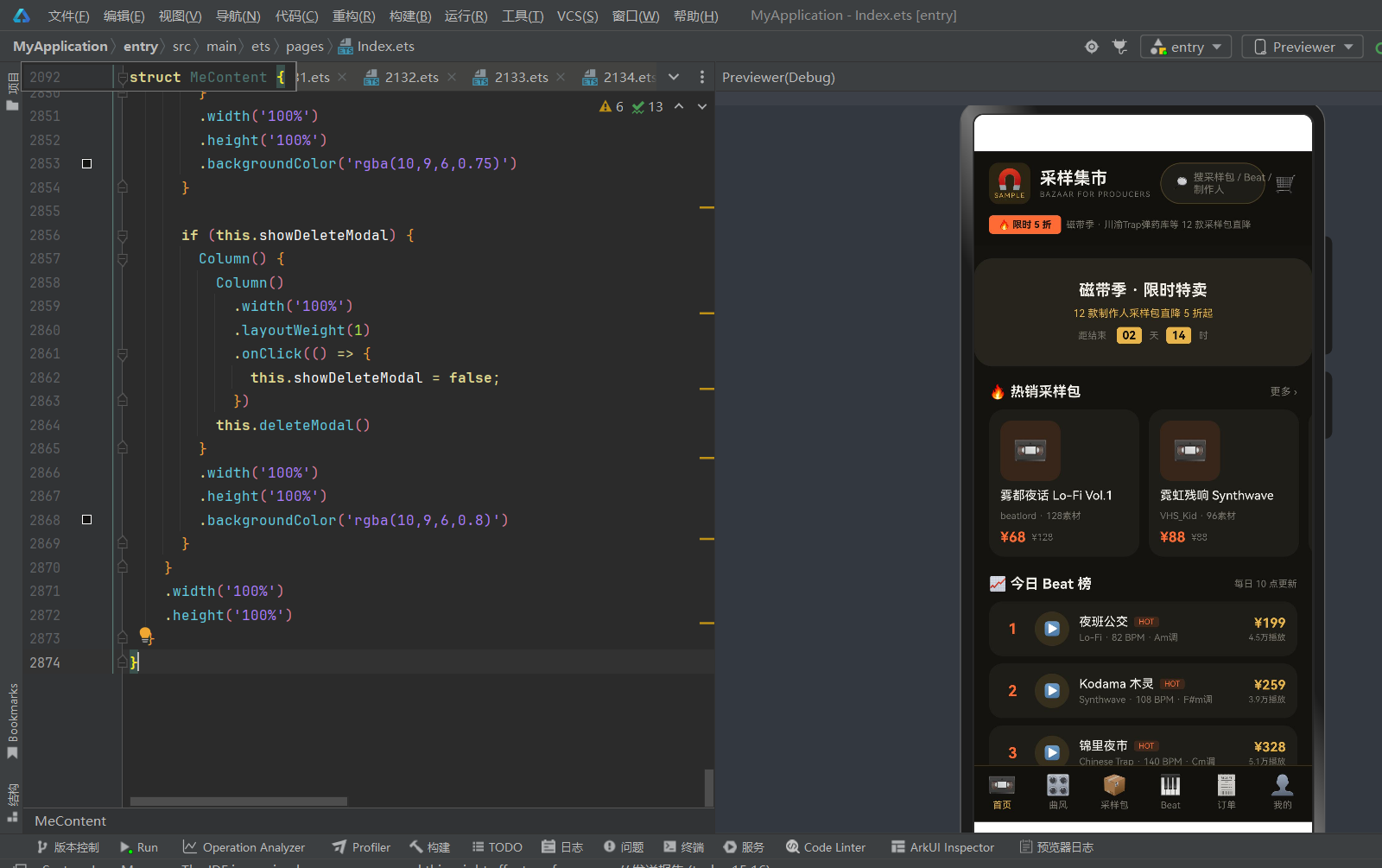
这个项目的核心价值在于「全链路」——从发现(首页推荐+曲风分类)、浏览(采样包网格+Beat列表)、试听(Beat波形播放器)、决策(授权类型说明+评价)、交易(购物车+多渠道支付)、售后(订单管理+退款仲裁),到制作人侧(作品上架+销量统计+钱包管理),完整覆盖了数字音乐资产交易的每一个环节。对于买家,它是一个可以淘到好素材的集市;对于卖家,它是一个可以变现才华的工作台。
本文将带你深入「采样集市 SAMPLE BAZAAR」的每一个角落,从一盒磁带的视觉隐喻开始,一步步拆解这个制作人交易集市的 ArkTS 实现。
第一章 项目概述与设计理念
1.1 项目定位
采样集市 SAMPLE BAZAAR 是一款面向音乐制作人的数字资产交易 App,核心业务包括:
- 采样包交易:制作人上传自己录制/制作的采样包(包含鼓组、旋律、音效、MIDI 等),买家购买后获得商用授权
- Beat 交易:制作人上传完整的 Beat 伴奏,支持租赁授权、独家买断、分轨交付三种授权模式
- 曲风分类:覆盖 Trap、Lo-Fi、Drill、BoomBap、Synthwave、R&B、City Pop、国风、Jazz、Ambient、Minimal、Jersey 等 12 种主流曲风
- 订单管理:完整的订单生命周期管理,包括购买、评价、退款申请、仲裁
- 制作人工作台:卖家侧的作品管理、销量统计、钱包余额、优惠券管理
项目目标用户是中文音乐制作人群体——从 bedroom producer 到专业工作室,从 Beatmaker 到采样设计师,都能在这个集市上找到自己需要的素材或变现自己的作品。
1.2 设计理念:磁带暖黑金橙风
采样集市的视觉设计围绕「磁带」这一核心隐喻展开。磁带是 analog 时代音乐制作的象征——温暖、质感、手工感、不可复制的温度。在数字音乐泛滥的今天,磁带代表着一种对音质和制作态度的坚持。
暖黑底(#141310):不是纯黑,而是带一点暖调的深灰黑,如同深夜录音棚里关掉主灯后、只有设备指示灯亮着的环境色。它不刺眼,让长时间浏览的制作人眼睛不疲劳。
磁带金(#E8B54D):如同磁带标签上的烫金字,也是主要操作按钮和高亮文字的颜色。它温暖、复古、有质感,是整个 App 的品牌主色。
橙红(#FF6B35):如同录音机上的录音键红色,也是价格、热卖标签、立即购买按钮的颜色。它醒目、有冲击力,在暖黑底上格外突出,引导用户的购买决策。
工业青(#4ECDC4):如同调音台上的电平灯和 VU 表指针,也是新品标签、授权说明、已完成状态的颜色。它冷静、专业、科技感,与暖金和橙红形成冷暖对比。
这四种颜色的组合,营造出一种「深夜录音棚」的氛围——暖黑是环境,磁带金是工作灯,橙红是录音键,工业青是电平表。每一个打开 App 的制作人,都像走进了一间属于自己的录音棚。
1.3 核心设计原则
- 集市感而非货架感:首页采用横滑精选卡片+榜单的布局,像在集市上逛摊位,而不是在电商平台上刷商品列表
- 试听优先:Beat 列表中每个卡片都有大尺寸播放按钮和波形可视化,鼓励用户先试听再购买
- 授权透明:三种授权类型(租赁/独家/分轨)在 Beat 详情页清晰展示,价格和权益一目了然
- 制作人视角:我的 Tab 不仅是买家中心,更是制作人工作台——作品管理、销量图表、钱包余额,让卖家也有专属空间
- 数字商品特性:针对数字商品的特殊性设计了退款规则(一经下载通常不支持退款)、评价体系、仲裁机制
第二章 色彩系统与视觉风格
2.1 主色板
采样集市的色彩系统由四种核心颜色和三种辅助颜色组成:
| 色彩角色 | 色值 | 用途 | 情感联想 |
|---|---|---|---|
| 暖黑底 | #141310 | 全局背景色 | 深夜录音棚、安静、专注 |
| 磁带金 | #E8B54D | 主操作按钮、高亮文字、价格、Tab激活态 | 温暖、复古、质感、磁带标签 |
| 橙红 | #FF6B35 | 价格强调、热卖标签、立即购买、退款 | 醒目、冲动、录音键、购买欲 |
| 工业青 | #4ECDC4 | 新品标签、授权说明、已完成状态、评价 | 冷静、专业、电平灯、科技感 |
| 卡片底 | #1E1D18 | 卡片背景、弹窗背景 | 比底色稍亮,层次分明 |
| 深灰文字 | #7A756A | 次要文字、说明文字 | 低调、不抢主内容 |
| 浅灰文字 | #B5AFA2 | 列表文字、侧边栏未激活 | 比深灰亮一级,可读性好 |
| 奶白文字 | #F0EDE6 | 主要文字、标题 | 温暖的白色,不刺眼 |
2.2 色彩语义
在采样集市中,每种颜色都有明确的语义,用户在使用过程中会形成条件反射:
- 磁带金 = 主要操作/品牌色:底部 Tab 激活态、主要按钮(提交审核、保存、我知道了)、价格数字、制作人名称。看到磁带金,用户知道这是可以点击的主要操作
- 橙红 = 购买/价格/热卖:立即购买按钮、价格数字、热卖标签、限时特卖横幅、退款按钮。看到橙红,用户知道这与钱和购买决策相关
- 工业青 = 新品/成功/信息:新品标签、授权说明、已完成订单状态、评价维度标签。看到工业青,用户知道这是正面状态或信息提示
- 暖黑/卡片底 = 内容容器:所有卡片、弹窗、列表项都用比背景稍亮的卡片底,形成清晰的视觉层次
2.3 视觉风格元素
大圆角卡片:所有卡片使用 12-16vp 的圆角,弹窗使用 20vp 圆角,底部抽屉使用 24vp 顶部圆角。大圆角营造出磁带盒的圆润感,也让界面更柔和友好。
磁带图标:采样包统一使用 📼 磁带 emoji 作为封面图标,Beat 使用 🎹 键盘 emoji,订单根据类型使用 📦/🎹。这种统一的图标语言让用户一眼就能区分内容类型。
波形可视化:Beat 卡片和详情页使用 20 根不同高度的竖条模拟音频波形,播放中的 Beat 波形会变成橙红+工业青的双色,未播放时为深灰。波形是音乐制作 App 的标志性视觉元素。
半透明遮罩弹窗:所有弹窗使用 rgba(10,9,6,0.7-0.8) 的半透明黑色遮罩,弹窗本身用卡片底 #1E1D18,边框用磁带金半透明 rgba(232,181,77,0.25)。这种设计让弹窗有「从录音棚黑暗中浮现」的感觉。
横滑精选:首页的热销采样包采用横向滚动卡片布局,每张卡片 160vp 宽,像在磁带架上一排一排地浏览。横滑比网格更有「逛集市」的感觉。
第三章 项目架构与文件组织
3.1 单文件架构
采样集市采用单文件架构,所有代码集中在 2130.ets 一个文件中。这种架构的优势是:
- 零依赖:不需要导入任何外部模块或组件,文件本身就是完整的 App
- 易于分享:一个文件即可完整运行,方便在社区分享和教学
- 快速原型:适合快速验证设计想法和交互原型
- 全局可见:所有类型定义、静态数据、工具函数、组件都在同一个文件中,查阅方便
文件总长度约 2900 行,按照职责划分为以下几个区域:
2130.ets
├── 类型定义(7 interface)
├── 静态数据(10 组 const 数据)
├── 工具函数(5 个 function)
├── 枚举定义(BazaarTab)
├── 根入口组件(SampleBazaarApp)
├── 头部组件(BazaarHeader)
├── 首页 Tab 组件(HomeContent)
├── 曲风 Tab 组件(GenreContent)
├── 采样包 Tab 组件(PacksContent)
├── Beat Tab 组件(BeatContent)
├── 订单 Tab 组件(OrdersContent)
└── 我的 Tab 组件(MeContent)
3.2 组件架构
采样集市由 8 个 @Component 组件组成,形成清晰的层级结构:
SampleBazaarApp(@Entry 根入口)
├── BazaarHeader(顶部搜索栏+促销横幅)
├── contentArea(根据 activeTab 动态切换)
│   ├── HomeContent(首页:限时特卖+横滑采样包+Beat榜)
│   ├── GenreContent(曲风:左侧分类+右侧列表)
│   ├── PacksContent(采样包:排序筛选+双列网格)
│   ├── BeatContent(Beat:大卡片试听+波形+授权)
│   ├── OrdersContent(订单:筛选+列表+评价/退款)
│   └── MeContent(我的:制作人信息+钱包+销量图+作品管理+购物车抽屉)
└── BottomTabBar(底部 6 Tab 导航)
SampleBazaarApp:根入口组件,使用 @Entry 装饰器标记。维护 @State activeTab 状态控制当前激活的 Tab,通过 @Builder contentArea() 方法根据 activeTab 动态渲染对应的 Tab 内容组件。底部导航栏通过 @Builder bottomTabItem() 方法复用,每个 Tab 项包含图标和文字,激活时图标放大 1.18 倍并使用磁带金色。
BazaarHeader:顶部头部组件,固定在页面顶部。包含品牌 Logo(磁带图标+SAMPLE 文字)、应用名称(采样集市+BAZAAR FOR PRODUCERS 英文副标题)、搜索框(搜采样包/Beat/制作人)、购物车图标。搜索框下方是限时促销横幅,使用橙红背景的「🔥 限时 5 折」标签+磁带季活动说明。
六大 Tab 组件:每个 Tab 都是独立的 @Component 组件,维护自己的 @State 状态(如弹窗显示状态、选中项、筛选索引等),通过 @Builder 方法封装弹窗和可复用 UI。每个 Tab 的 build() 方法都使用 Stack 叠加布局——底层是 Scroll 滚动内容,上层是 if 条件渲染的弹窗遮罩。
3.3 状态管理
采样集市采用组件级 @State 状态管理,没有使用全局状态管理(如 AppStorage 或全局单例)。每个组件的状态都是局部的:
- SampleBazaarApp:activeTab(当前激活的 Tab 索引)
- HomeContent:showDetail(采样包详情弹窗)、selectedPack(选中的采样包)、showCartToast(加入购物车提示)
- GenreContent:sideIndex(左侧曲风分类选中索引)、showBeatDetail(Beat详情底部抽屉)、selectedBeat(选中的Beat)
- PacksContent:sortIndex(排序方式索引)、showBuyModal(购买确认弹窗)、selectedPack(选中的采样包)、buyCount(购买数量)
- BeatContent:playingId(当前播放的Beat ID,0表示未播放)、showLicenseModal(授权说明弹窗)、showShareModal(分享弹窗)
- OrdersContent:filterIndex(订单筛选索引)、showReviewModal(评价弹窗)、showRefundModal(退款弹窗)、starCount(评价星级)、reviewText(评价文字)、reviewOrder(评价的订单)
- MeContent:cart(购物车商品数组)、showCart(购物车抽屉)、showPayModal(支付弹窗)、showRechargeModal(充值弹窗)、rechargeIndex(充值选项索引)、showUploadModal(上架作品弹窗)、showEditModal(编辑作品弹窗)、showDeleteModal(下架作品弹窗)、uploadTitle/uploadBpm(上架表单字段)
这种局部状态管理的好处是状态作用域清晰,不会出现全局状态污染。组件之间通过 props 传递数据(如选中项),通过回调函数触发状态变更。
3.4 弹窗架构
采样集市有约 15 套弹窗/抽屉组件,全部采用 Stack 叠加 + if 条件渲染的模式实现:
Stack({ alignContent: Alignment.Center }) {
  Scroll() { /* 页面内容 */ }
  if (this.showXxxModal) {
    Column() {
      Column() /* 半透明遮罩,点击关闭 */
        .layoutWeight(1)
        .onClick(() => { this.showXxxModal = false; })
      this.xxxModal()  /* 弹窗内容 */
    }
    .backgroundColor('rgba(10,9,6,0.7-0.8)')
  }
}
弹窗分为三种类型:
- 居中弹窗:采样包详情、购买确认、授权说明、评价、退款、支付、充值、上架作品、编辑作品、下架作品——使用 Alignment.Center 居中显示
- 底部抽屉:Beat详情、购物车——使用底部圆角(borderRadius topLeft/topRight)从底部滑出
- 轻量提示:加入购物车提示、分享——小尺寸居中弹窗,自动或点击关闭
第四章 数据模型与全局状态管理
4.1 接口定义
采样集市定义了 7 个 interface 作为数据模型,覆盖核心业务实体:
SamplePack(采样包):采样包是集市的核心商品之一,包含 id、title(标题)、producer(制作人)、genre(曲风)、bpm(BPM范围)、loops(素材数量)、price(现价)、oldPrice(原价)、sales(销量)、rating(评分)、tag(标签:热卖/新品/空)。一个采样包通常包含几十到上百个音频素材,价格从 48 元到 198 元不等。
BeatItem(Beat):Beat 是另一种核心商品,包含 id、title、producer、genre、bpm(具体数值)、key(调性)、price、plays(播放量)、hot(是否热门)、wave(波形类型)。Beat 与采样包的区别在于:Beat 是完整的伴奏曲目,有具体的 BPM 和调性,支持试听;采样包是素材集合,是制作工具。
OrderRecord(订单记录):包含 id、item(商品名称)、type(类型:采样包/Beat)、amount(金额)、date(日期)、status(状态:已完成/已退款)。订单记录是买家侧的交易凭证。
CartItem(购物车商品):包含 id、title、producer、type、price、checked(是否选中)。购物车支持多选结算,选中的商品计入合计金额。
UploadWork(上架作品):制作人侧的作品管理实体,包含 id、title、genre、bpm、price、status(状态:在售/审核中/已下架)、date(上架日期)。制作人可以查看自己所有作品的状态和销售情况。
SalesDay(日销量):包含 day(星期几)、amount(销量金额)。用于我的 Tab 中的本周销量柱状图。
GenreEntry(曲风分类):包含 name(曲风名称)、emoji(对应emoji图标)、count(该曲风下的商品数量)。用于曲风 Tab 的左侧分类列表。
4.2 静态数据
采样集市定义了 10 组静态数据,模拟真实的业务数据:
| 数据常量 | 类型 | 数量 | 用途 |
|---|---|---|---|
| PACK_LIST | SamplePack[] | 12 | 采样包商品列表 |
| BEAT_LIST | BeatItem[] | 12 | Beat 商品列表 |
| ORDER_LIST | OrderRecord[] | 10 | 订单记录列表 |
| CART_ITEMS | CartItem[] | 4 | 购物车初始商品 |
| UPLOAD_WORKS | UploadWork[] | 6 | 制作人上架作品列表 |
| SALES_WEEK | SalesDay[] | 7 | 本周销量数据 |
| GENRE_SIDES | GenreEntry[] | 9 | 曲风分类列表 |
| LICENSE_TYPES | string[] | 3 | 授权类型说明 |
| RECHARGE_OPTIONS | string[] | 6 | 充值金额选项 |
| WAVE_HEIGHTS | number[] | 20 | 波形高度数据 |
PACK_LIST 包含 12 个采样包,曲风覆盖 Lo-Fi、Synthwave、Trap、BoomBap、Minimal、Chinese Style、Drill、City Pop、Jersey、Ambient、R&B、Jazz。每个采样包都有真实感的标题(如「雾都夜话 Lo-Fi Vol.1」「川渝Trap弹药库」「国风采样·市井烟火」)、制作人名称(如 beatlord、雾山老幺、板砖Studio)、价格区间(48-198元)、销量(766-5210)、评分(4.5-4.9)。
BEAT_LIST 包含 12 个 Beat,标题如「夜班公交」「Kodama 木灵」「锦里夜市」「Pacific Hotel」,每个 Beat 有具体的 BPM(68-145)、调性(Am/F#m/Cm 等)、播放量(9800-51200)、价格(158-328元)。
4.3 工具函数
采样集市定义了 5 个工具函数:
packTagColor(tag: string): string:根据采样包标签返回背景色。热卖返回橙红半透明 rgba(255,107,53,0.16),新品返回工业青半透明 rgba(78,205,196,0.16),其他返回磁带金半透明 rgba(232,181,77,0.14)。
packTagTextColor(tag: string): string:根据采样包标签返回文字色。热卖返回 #FF6B35,新品返回 #4ECDC4,其他返回 #E8B54D。
salesBarHeight(amount: number): string:根据销量金额计算柱状图高度,公式为 amount * 0.9 + ‘vp’。用于我的 Tab 中的本周销量柱状图。
waveBarHeight(h: number): string:将波形高度数值转换为 vp 单位字符串。用于 Beat 卡片和详情页的波形可视化。
cartTotal(items: CartItem[]): number:计算购物车中选中商品的合计金额。遍历 items 数组,累加 checked 为 true 的商品 price。
4.4 枚举定义
BazaarTab 枚举定义了 6 个 Tab:HOME(首页)、GENRE(曲风)、PACKS(采样包)、BEAT(Beat)、ORDERS(订单)、ME(我的)。根入口组件使用 @State activeTab: BazaarTab = BazaarTab.HOME 初始化,底部导航点击时切换 activeTab,contentArea() 根据 activeTab 渲染对应组件。
第五章 六大 Tab 页面深度解析
采样集市的底部导航栏包含 6 个 Tab:首页、曲风、采样包、Beat、订单、我的。每个 Tab 都有独立的组件和交互逻辑,共同构成完整的制作人交易集市体验。
5.1 首页 Tab:磁带季特卖 + 横滑精选 + Beat 榜
首页是用户进入 App 的第一屏,采用「限时特卖横幅 + 横滑采样包 + Beat 榜单」的三段式布局,营造出「逛集市」的氛围。
磁带季限时特卖横幅:页面顶部是一个大尺寸的促销卡片,背景色 #26241C(比卡片底稍深),居中显示「磁带季 · 限时特卖」大标题、「12 款制作人采样包直降 5 折起」副标题、以及倒计时(距结束 02天14时)。倒计时的数字使用磁带金背景+暖黑文字的小标签,营造紧迫感。
热销采样包横滑:特卖横幅下方是「🔥 热销采样包」标题+「更多 ›」入口,下面是横向滚动的采样包小卡片列表。每张卡片 160vp 宽,包含磁带图标(📼)、标题(最多2行)、制作人+素材数量、现价(橙红)+原价(删除线)。横滑布局让用户像在磁带架上浏览一样,一张一张地看。点击卡片弹出采样包详情弹窗。
今日 Beat 榜:页面下半部分是「📈 今日 Beat 榜」标题+「每日 10 点更新」说明,下面是 12 个 Beat 的榜单列表。每个列表项包含排名数字(前3名橙红色,其他灰色)、播放按钮(圆形磁带金背景)、Beat 标题+HOT 标签、曲风+BPM+调性、价格+播放量。热门 Beat 的播放按钮有 1.08 倍放大动画。
首页的交互重点是「发现」——用户不需要知道自己要找什么,随便逛逛就能发现好素材。横滑卡片和榜单都是「被动发现」的最佳载体。
5.2 曲风 Tab:左侧分类 + 右侧列表
曲风 Tab 采用经典的「左侧分类栏 + 右侧内容区」双栏布局,是电商类 App 分类页的标准模式,但在采样集市中被赋予了音乐制作的专业感。
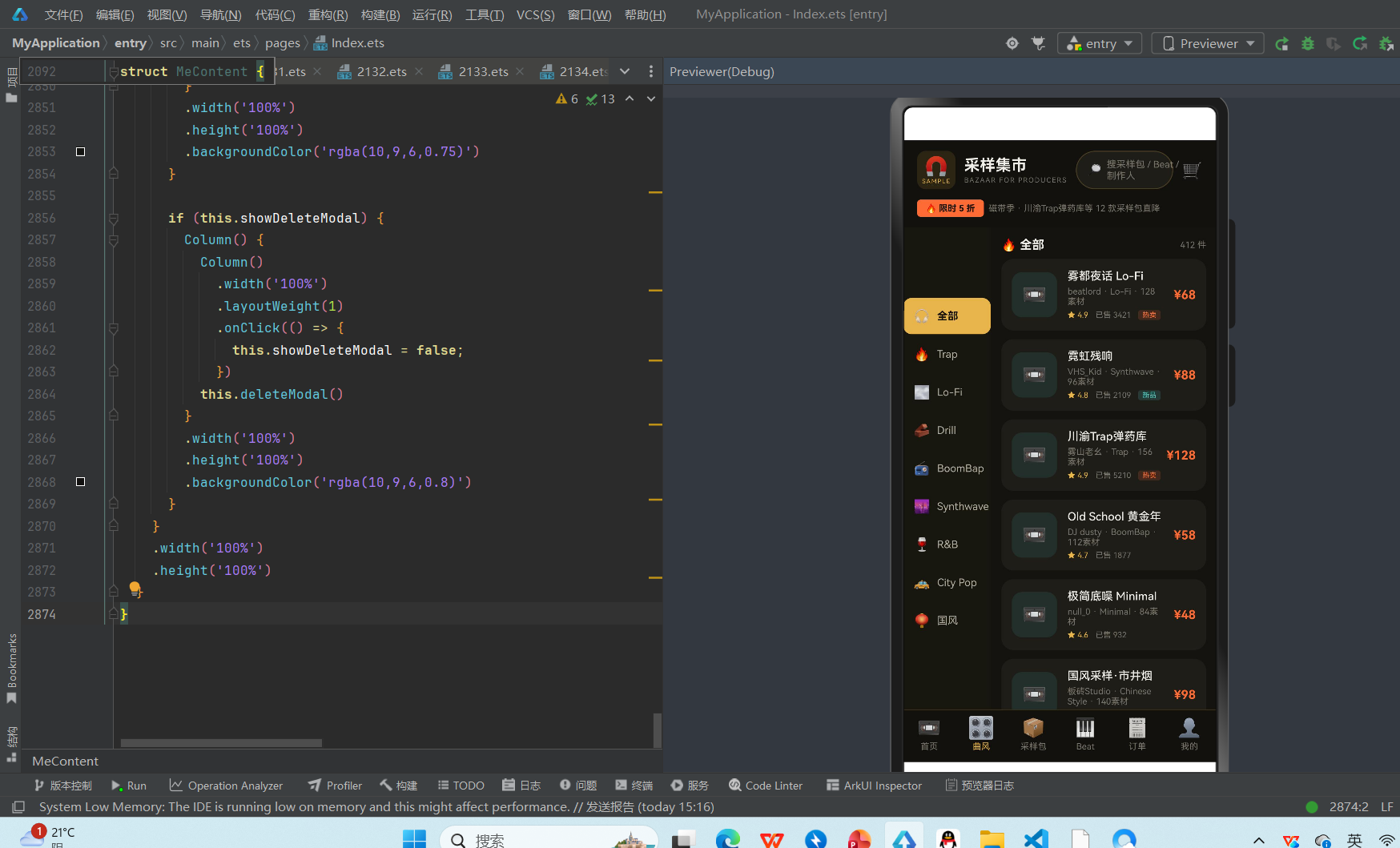
左侧分类栏:宽度 28%,背景色 #17160F(比全局背景稍深),垂直滚动列表包含 9 个曲风分类:全部(🎧)、Trap(🔥)、Lo-Fi(🌫)、Drill(🧱)、BoomBap(📻)、Synthwave(🌆)、R&B(🍷)、City Pop(🚕)、国风(🏮)。每个分类项显示 emoji 图标+名称,选中项使用磁带金背景+暖黑文字+加粗,未选中项使用浅灰文字。点击切换 sideIndex 状态。
右侧内容区:占据剩余宽度,顶部显示当前曲风名称+商品数量,下面是采样包列表。每个列表项包含磁带图标、标题(单行省略)、制作人+曲风+素材数量、评分+销量+标签(热卖/新品)、价格。列表项使用卡片底 #1E1D18,圆角 14vp。点击列表项弹出 Beat 详情底部抽屉(演示中复用 Beat 详情)。
双栏布局的优势是分类切换快、内容浏览效率高,适合用户有明确曲风偏好时的定向浏览。左侧分类的 emoji 图标让每种曲风有了视觉符号,Trap 是火焰、Lo-Fi 是雾、Drill 是砖头、BoomBap 是收音机——这些符号与曲风的气质高度契合。
5.3 采样包 Tab:排序筛选 + 双列网格
采样包 Tab 是集市的核心商品列表页,采用「顶部排序栏 + 双列网格」的布局,是电商类 App 商品列表的标准模式。
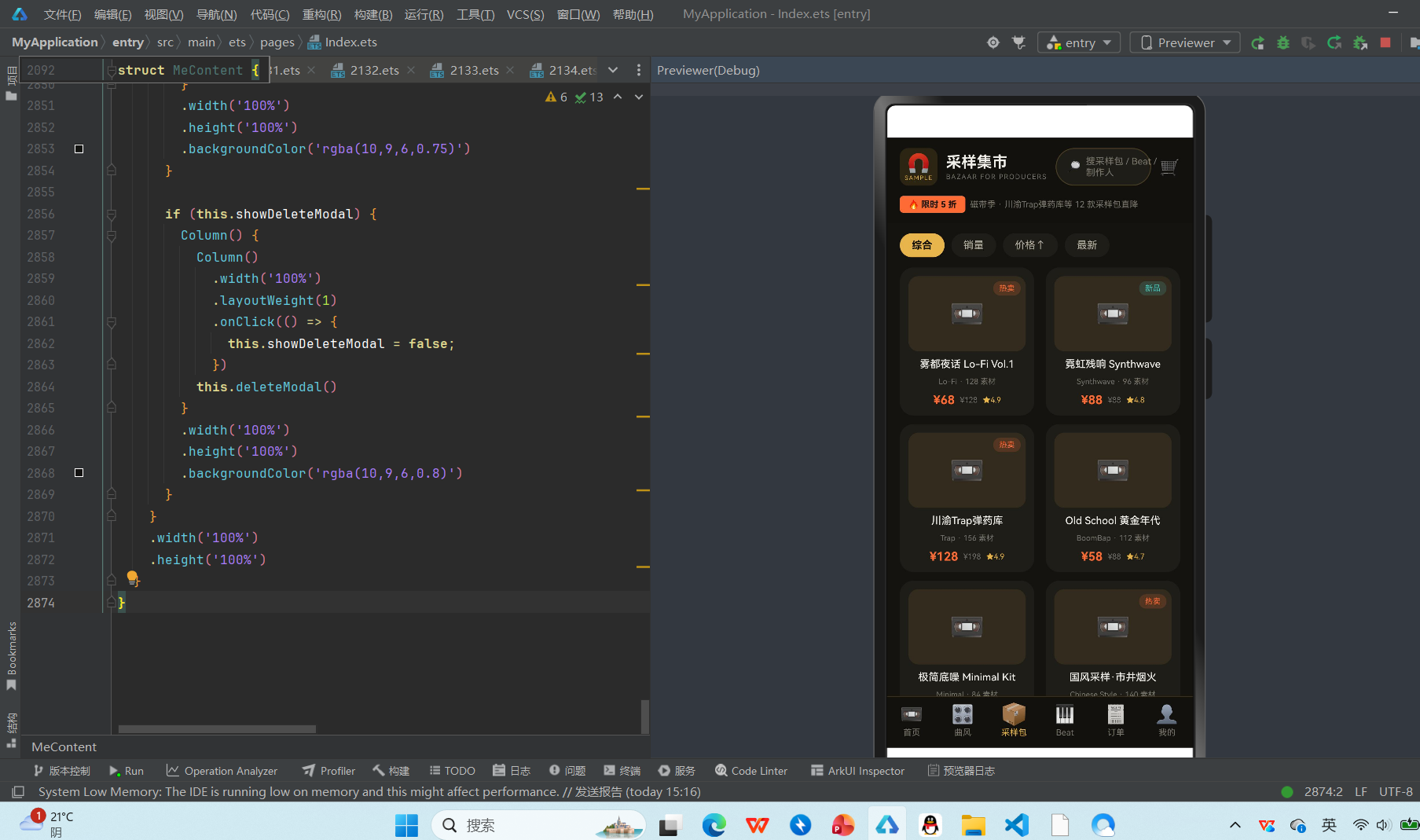
排序筛选栏:页面顶部是 4 个排序选项:综合、销量、价格↑、最新。每个选项是一个胶囊按钮,选中项使用磁带金背景+暖黑文字+加粗,未选中项使用卡片底+浅灰文字。点击切换 sortIndex 状态,演示中未实现真实排序,但状态切换和 UI 反馈完整。
双列网格:排序栏下方是 Flex 双列网格布局,每行 2 个采样包卡片,间距由 FlexAlign.SpaceBetween 自动分配。每张卡片包含:
- 封面区:88vp 高的磁带图标区域,背景色磁带金半透明 rgba(232,181,77,0.1),右上角叠加标签(热卖/新品)
- 标题:采样包名称,单行省略
- 信息:曲风+素材数量,单行省略
- 价格行:现价(橙红加粗)+原价(灰色删除线)+评分(磁带金)
卡片使用卡片底 #1E1D18,圆角 16vp,内边距 10vp。点击卡片弹出购买确认弹窗,可调整购买数量并选择支付方式。
双列网格的优势是商品密度高、浏览效率高,适合用户批量比较和选购。每张卡片的封面区使用统一的磁带图标,虽然没有真实封面图,但通过标签(热卖/新品)和价格信息仍然能快速区分商品。
5.4 Beat Tab:大卡片试听 + 波形可视化
Beat Tab 是集市的另一个核心商品列表页,与采样包 Tab 的双列网格不同,Beat Tab 采用「大卡片列表 + 波形可视化 + 试听交互」的布局,因为 Beat 的核心体验是「听」。
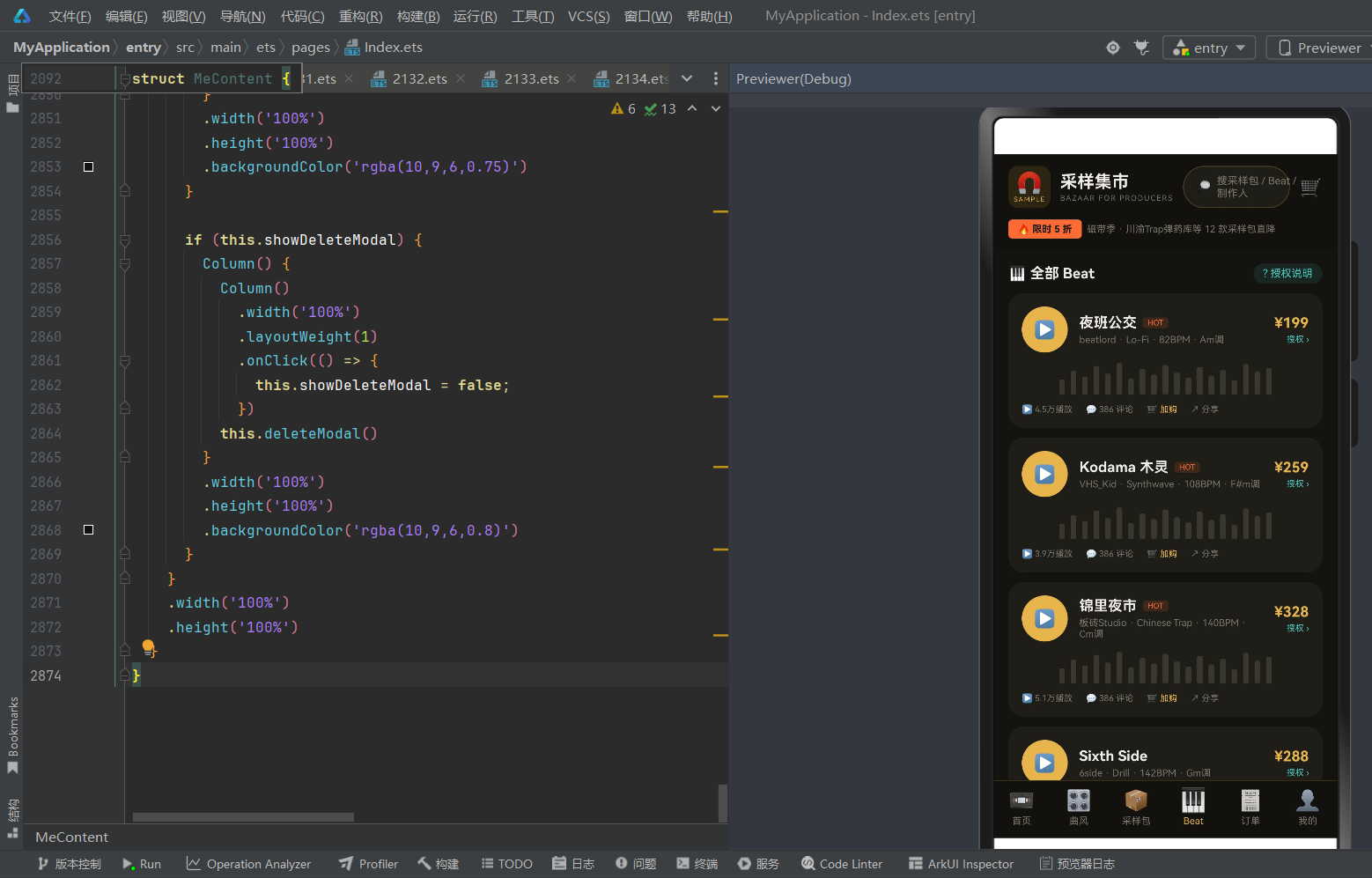
大卡片列表:每个 Beat 是一个全宽大卡片,包含:
- 顶部行:左侧大尺寸圆形播放按钮(48vp,磁带金背景,播放中变为工业青 #4ECDC4,图标从 ▶ 变为 ⏸),中间 Beat 标题+HOT 标签+制作人+曲风+BPM+调性,右侧价格+「授权 ›」入口
- 波形区:20 根不同高度的竖条模拟音频波形,未播放时为深灰 #3A382E,播放中变为双色(高的橙红 #FF6B35,矮的工业青 #4ECDC4)
- 操作行:播放量、评论数、加购、分享四个操作入口
试听交互:点击播放按钮切换 playingId 状态——如果当前 Beat 正在播放则暂停(playingId=0),否则播放当前 Beat(playingId=b.id)。同一时间只有一个 Beat 在播放,点击另一个 Beat 的播放按钮会自动切换。播放中的 Beat 播放按钮从磁带金变为工业青,图标从 ▶ 变为 ⏸,波形从深灰变为橙红+工业青双色,播放按钮有 1.15 倍放大动画。
授权说明:点击「授权 ›」或顶部「? 授权说明」按钮,弹出授权类型说明弹窗,详细介绍三种授权模式:
- 租赁授权 ¥59 起:限期商用、需署名制作人、可上架流媒体,不可独家
- 独家买断 ¥199 起:版权完全转让、从集市下架、仅限你一人使用
- 分轨交付 ¥328 起:含 WAV 干声分轨 + MIDI 工程文件,方便再创作
Beat Tab 的设计核心是「试听优先」——大尺寸播放按钮和波形可视化让用户一眼就知道这是可以听的 Beat,而不是普通商品。试听是 Beat 购买决策的关键环节,好的试听体验直接影响转化率。
5.5 订单 Tab:筛选 + 订单列表 + 评价/退款
订单 Tab 是买家侧的交易管理中心,采用「顶部筛选栏 + 订单列表 + 评价/退款弹窗」的布局。
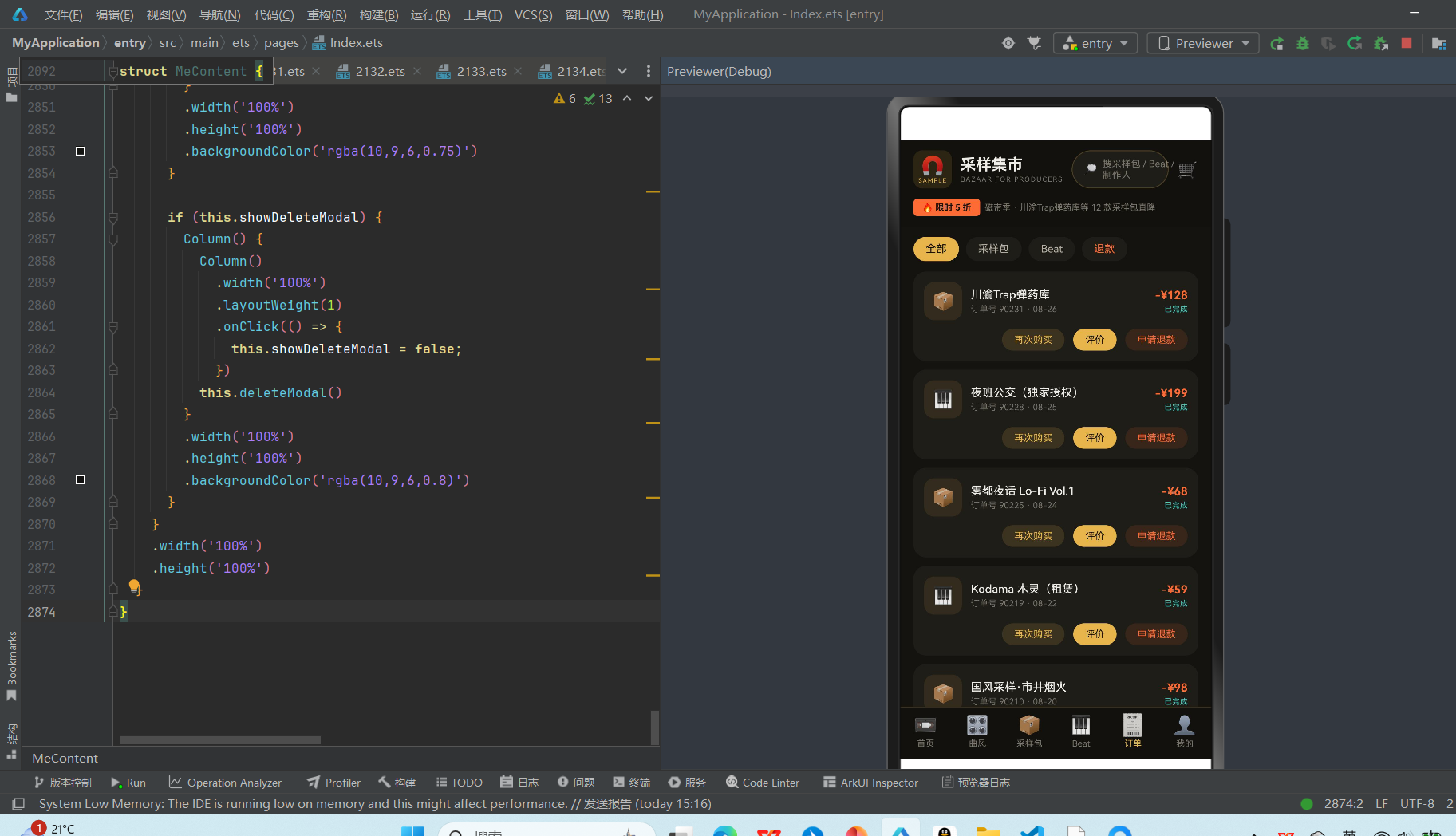
筛选栏:顶部 4 个筛选选项:全部、采样包、Beat、退款。前三个使用磁带金选中态,退款使用橙红选中态(因为退款是特殊状态,需要用警示色区分)。点击切换 filterIndex 状态。
订单列表:每个订单是一个卡片,包含:
- 商品行:左侧商品类型图标(📦采样包/🎹Beat),中间商品名称(单行省略)+订单号+日期,右侧金额(橙红)+状态(已完成工业青/已退款灰色)
- 操作行:右对齐的三个按钮——再次购买(磁带金描边)、评价(磁带金实心)、申请退款(橙红描边)
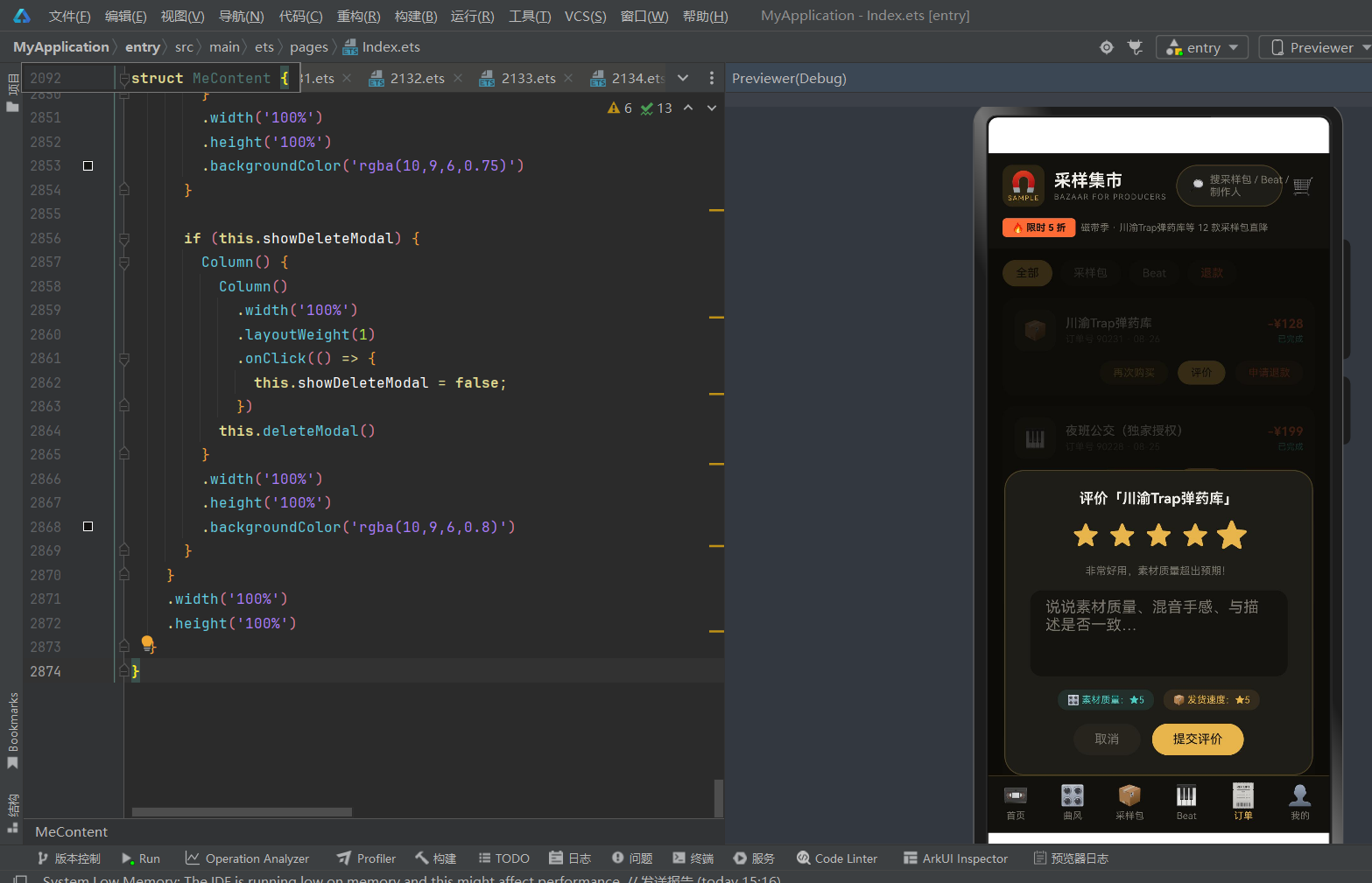
评价弹窗:点击「评价」按钮弹出评价弹窗,包含:
- 商品名称标题
- 5 星评分(点击选择,选中星磁带金,当前星 1.25 倍放大动画)
- 智能评价语(根据星级自动生成,4-5星「非常好用,素材质量超出预期!」,3星「还行,素材质量一般」,1-2星「不太满意」)
- 评价文字输入框(TextArea,90vp 高)
- 维度标签(素材质量★5 工业青、发货速度★5 磁带金)
- 取消/提交评价按钮
退款弹窗:点击「申请退款」弹出退款确认弹窗,包含警告图标⚠️、「申请退款?」标题、退款规则说明(数字商品一经下载通常不支持退款,仅当素材与描述严重不符时可申请,集市仲裁需3个工作日)、算了/继续申请按钮。退款按钮使用橙红,强调这是一个需要谨慎的操作。
订单 Tab 的设计核心是「交易闭环」——从购买到评价到退款,每个环节都有对应的入口和弹窗。数字商品的退款规则与实物商品不同,需要在退款弹窗中明确说明,避免用户误解。
5.6 我的 Tab:制作人工作台 + 钱包 + 销量图 + 作品管理
我的 Tab 是整个 App 最复杂的页面,它不仅是买家的个人中心,更是制作人(卖家)的工作台。包含个人信息、钱包余额、优惠券、待评价、本周销量图表、作品管理、购物车抽屉、支付、充值、上架作品、编辑作品、下架作品等约 10 套交互。
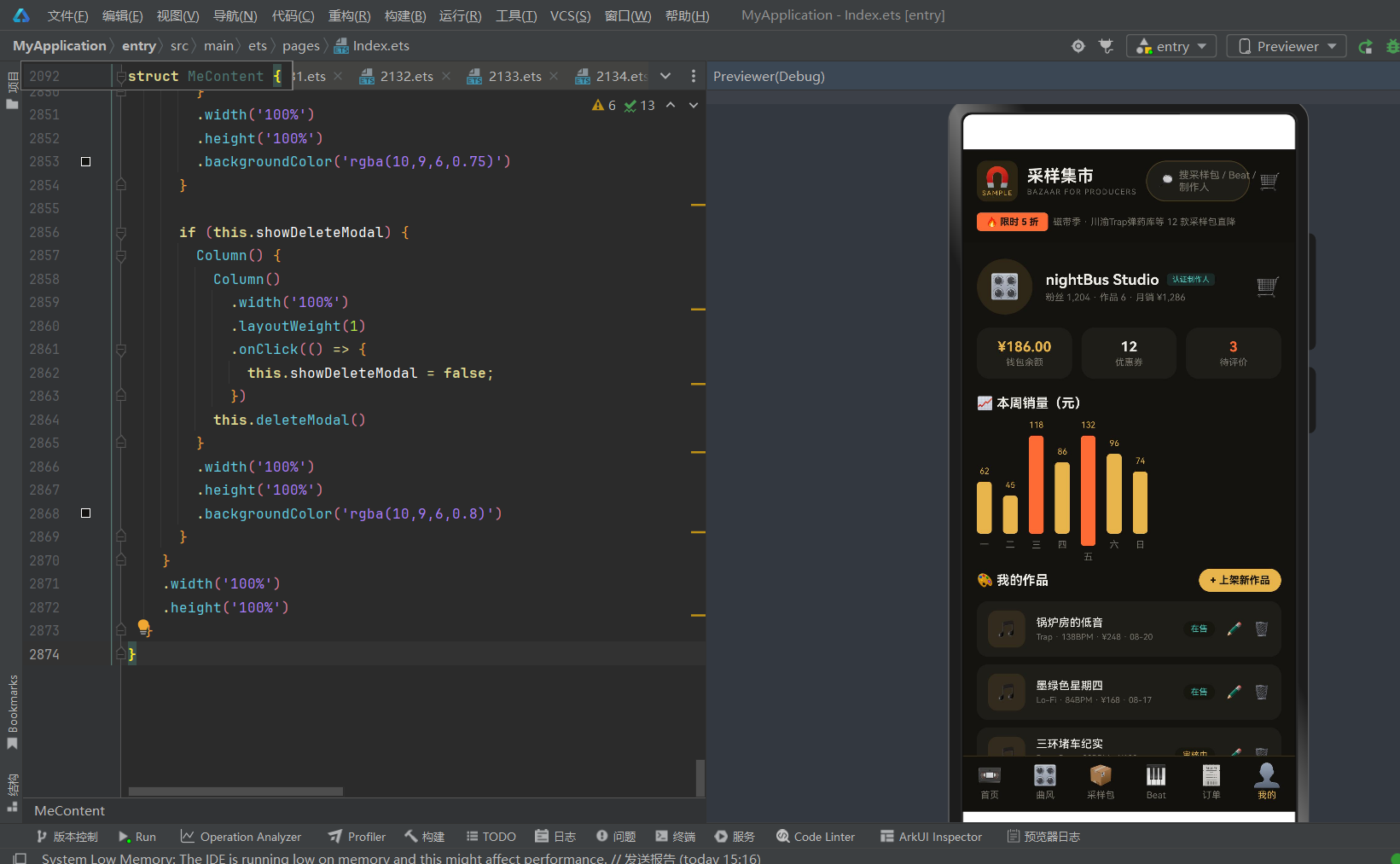
制作人信息行:页面顶部是制作人头像(🎛 调音台 emoji,磁带金半透明背景圆形)、制作人名称「nightBus Studio」+认证制作人标签(工业青)、粉丝数+作品数+月销额。右侧是购物车图标(🛒),点击打开购物车底部抽屉。
三栏数据卡:制作人信息下方是三个等宽数据卡片——钱包余额(¥186.00 磁带金)、优惠券(12 奶白)、待评价(3 橙红)。点击钱包余额卡弹出充值弹窗。
本周销量柱状图:三栏数据卡下方是「📈 本周销量(元)」标题+7 天柱状图。柱状图使用 Row 布局,每天一列,包含销量数字(顶部)、柱子(高度由 salesBarHeight 函数计算,超过100元的柱子用橙红,其他用磁带金)、星期几(底部)。整个图表区域 140vp 高,柱子底部对齐。周五销量最高(132元,橙红柱),周二最低(45元,磁带金柱)。
我的作品管理:销量图下方是「🎨 我的作品」标题+「+ 上架新作品」按钮(磁带金实心),下面是 6 个作品的管理列表。每个作品项包含:
- 作品图标(🎵,磁带金半透明背景)
- 作品标题+曲风+BPM+价格+上架日期
- 状态标签(在售工业青/审核中磁带金/已下架灰色)
- 编辑按钮(✏️)+删除按钮(🗑)
点击「+ 上架新作品」弹出上架作品弹窗(作品名称输入框+曲风标签+BPM输入框+文件格式说明+存草稿/提交审核按钮)。点击编辑按钮弹出编辑作品弹窗(作品信息+定价调整+±¥50按钮+取消/保存)。点击删除按钮弹出下架确认弹窗(警告+下架规则说明+取消/确认下架)。
购物车底部抽屉:点击购物车图标从底部滑出购物车抽屉,包含购物车标题+清空入口、商品列表(复选框+商品信息+价格,点击复选框切换选中状态)、合计金额+去结算按钮。点击去结算关闭购物车抽屉并打开支付弹窗。
支付弹窗:包含订单商品明细(3件商品+应付¥383)、钱包支付按钮(余额¥186,点击跳转充值)、微信支付按钮(磁带金实心)。
充值弹窗:包含当前余额、6 个充值金额选项(¥30/¥68/¥128/¥268/¥528/¥1028,部分选项有赠送金额)、充值按钮。选中项使用磁带金背景+暖黑文字。
我的 Tab 是制作人侧的「驾驶舱」——销量图表让制作人一眼看到本周收入趋势,作品管理让制作人可以上架/编辑/下架作品,钱包让制作人管理收入和充值。这种「买家+卖家」一体化的设计,让同一个用户既可以是买家(购买采样包/Beat),也可以是卖家(上架自己的作品),是数字内容交易平台的典型模式。
第六章 弹窗交互体系深度解析
采样集市有约 15 套弹窗/抽屉组件,覆盖商品详情、购买确认、授权说明、评价、退款、购物车、支付、充值、上架作品、编辑作品、下架作品、分享、加入购物车提示等场景。本章深度解析其中最具代表性的两套弹窗。
6.1 采样包详情弹窗:素材清单 + 价格对比 + 购买决策
采样包详情弹窗是用户从「浏览」到「购买」的关键转化节点,采用居中弹窗布局,包含商品信息、素材清单、价格对比、购买按钮四个区域。
商品信息区:弹窗顶部居中显示磁带图标(📼 40vp)、采样包标题(17vp 加粗奶白)、制作人名称(11vp 磁带金,by 前缀)。下方是曲风标签(工业青描边)+BPM 范围+素材数量+评分四个信息标签,用 Divider 分隔。
素材清单区:信息标签下方是 4 条素材清单,使用编号列表样式:
- 01 kick_陷阱底鼓 ×24(WAV)
- 02 snare_军鼓连音 ×18(WAV)
- 03 melody_唢呐循环 ×12(MIDI)
- 04 fx_市井环境声 ×16(WAV)
每条清单包含编号(灰色)、素材名称(奶白)、格式标签(WAV/MIDI,灰色右对齐)。素材清单使用 constraintSize({ maxHeight: ‘80%’ }) 限高,避免素材过多时弹窗超出屏幕。
价格对比区:素材清单下方是价格对比,包含现价(20vp 加粗橙红)+原价(10vp 灰色删除线)。价格对比让用户直观感受到折扣力度,促进购买决策。
操作按钮区:弹窗底部是两个按钮——加入购物车(磁带金描边,点击弹出「已加入购物车」提示)、立即购买(橙红实心,点击关闭弹窗)。
采样包详情弹窗的设计核心是「透明化」——素材清单让用户知道自己买的是什么,价格对比让用户知道省了多少钱,格式标签(WAV/MIDI)让专业制作人知道素材的可用性。这种透明化的设计减少了购买决策的不确定性,提高转化率。
6.2 Beat 详情底部抽屉:波形试听 + 授权选择 + 购买
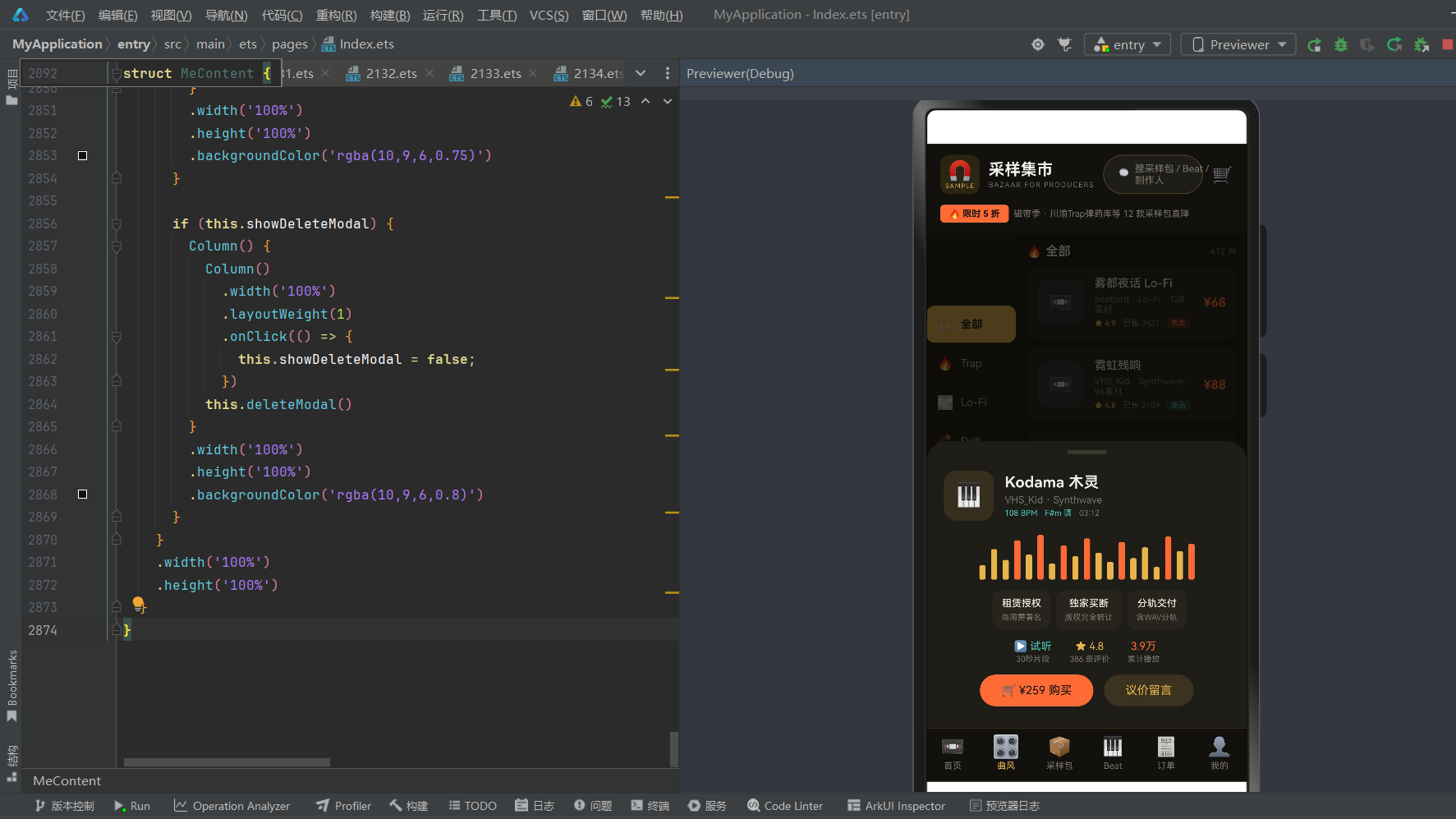
Beat 详情采用底部抽屉(Bottom Sheet)而非居中弹窗,因为 Beat 的核心体验是「试听」,底部抽屉不会完全遮挡背后的 Beat 列表,用户可以在试听的同时看到列表上下文。
抽屉把手:抽屉顶部是一个 44×5vp 的灰色小把手(#3A382E),这是底部抽屉的标准视觉暗示,告诉用户这是一个可以上下拖动的抽屉。
Beat 信息区:把手下方是 Beat 信息行,包含键盘图标(🎹 56vp 磁带金半透明背景)、Beat 标题(17vp 加粗奶白)、制作人+曲风、BPM+调性+时长三个信息标签。
波形可视化:信息区下方是 20 根波形竖条,高度由 WAVE_HEIGHTS 数组定义(14-50vp),高的波形用橙红,矮的用磁带金。波形区域 54vp 高,底部对齐。波形是 Beat 的视觉化表达,让用户在试听前就能对音乐的动态有一个直观印象。
授权选择区:波形下方是 3 种授权类型的横向选择卡片:
- 租赁授权 · 商用需署名
- 独家买断 · 版权完全转让
- 分轨交付 · 含WAV分轨
每个卡片包含授权名称(11vp)+说明(9vp),选中项使用磁带金背景+暖黑文字,未选中使用 #26241C 背景+奶白文字。点击切换 sideIndex 状态(使用 i+100 避免与曲风分类的 sideIndex 冲突)。
数据区:授权选择下方是三个数据列——试听(▶ 试听 30秒片段 工业青)、评分(★4.8 386条评价 磁带金)、播放量(3.8万 累计播放 橙红)。
操作按钮区:抽屉底部是两个按钮——🛒 ¥XXX 购买(橙红实心)、议价留言(磁带金描边,点击关闭抽屉)。
Beat 详情抽屉的设计核心是「试听+授权」双驱动——波形和试听按钮让用户先听为快,授权类型选择让用户根据自己的需求选择合适的授权模式。三种授权的价格和权益差异很大(租赁¥59/独家¥199/分轨¥328),清晰的授权说明是用户决策的关键。
第七章 动画与过渡效果
采样集市使用 ArkUI 的属性动画(.animation)和显式动画实现了多种交互动效,让界面有「呼吸感」和「反馈感」。本章解析核心动画效果。
7.1 Tab 切换动画
底部导航栏的 Tab 切换使用属性动画实现图标缩放效果。激活态图标放大 1.18 倍,未激活态保持 1 倍,动画时长 220ms,缓动曲线 Curve.EaseOut。这种微动画让 Tab 切换有「弹一下」的感觉,而不是生硬的颜色切换。
Text(icon)
  .scale(this.activeTab === tab ? { x: 1.18, y: 1.18 } : { x: 1, y: 1 })
  .animation({ duration: 220, curve: Curve.EaseOut })
7.2 Beat 播放动画
Beat 卡片的播放按钮在播放/暂停切换时有两个动画:
- 颜色切换:播放按钮背景从磁带金 #E8B54D 变为工业青 #4ECDC4,图标从 ▶ 变为 ⏸
- 缩放动画:播放中的按钮放大 1.15 倍,动画时长 250ms,Curve.EaseOut
同时,波形从深灰 #3A382E 变为双色(高的橙红,矮的工业青)。虽然波形颜色变化没有显式动画,但配合播放按钮的缩放动画,整体反馈足够清晰。
7.3 评分星标动画
评价弹窗中的 5 星评分使用属性动画实现当前选中星的放大效果。点击第 N 颗星时,该星放大 1.25 倍,动画时长 180ms,Curve.EaseOut。这种「弹一下」的效果让评分操作有愉悦的触感反馈。
Text(s <= this.starCount ? '★' : '☆')
  .scale(s === this.starCount ? { x: 1.25, y: 1.25 } : { x: 1, y: 1 })
  .animation({ duration: 180, curve: Curve.EaseOut })
7.4 加入购物车动画
点击「加入购物车」按钮后,弹出「已加入购物车」轻量提示弹窗。提示弹窗中的购物车图标(🛒)有 1.2 倍放大动画,时长 350ms,Curve.EaseOut。这种「弹一下」的效果配合半透明遮罩,让用户明确感知到「商品已加入购物车」的操作结果。
7.5 热门 Beat 脉冲动画
首页 Beat 榜中,热门 Beat(hot=true)的播放按钮有 1.08 倍的静态放大,配合 300ms 的属性动画。虽然这是一个静态状态(不是持续动画),但热门 Beat 的按钮比普通 Beat 稍大,形成视觉层次,引导用户关注热门内容。
7.6 弹窗过渡
所有弹窗的显示/隐藏使用 if 条件渲染,ArkUI 会自动为条件渲染的组件添加淡入淡出过渡效果。半透明遮罩(rgba(10,9,6,0.7-0.8))的淡入让弹窗出现不突兀,弹窗内容的轻微缩放(部分弹窗使用 .scale)让弹窗有「从中心浮现」的感觉。
第八章 采样包交易系统
采样包是采样集市的核心商品类型之一,交易系统覆盖「浏览→详情→购买→支付→订单」全链路。本章解析采样包交易系统的设计与实现。
8.1 采样包商品模型
每个采样包(SamplePack)包含以下核心字段:
- 商品标识:id、title、producer(制作人)
- 分类信息:genre(曲风)、bpm(BPM范围,如 130-150)
- 内容规格:loops(素材数量,如 156 个)
- 价格信息:price(现价)、oldPrice(原价,用于显示折扣)
- 社交证明:sales(销量)、rating(评分)
- 营销标签:tag(热卖/新品/空,用于角标展示)
采样包的价格区间为 48-198 元,素材数量 72-156 个,平均每个素材 0.4-1.3 元,符合中文制作人市场的定价水平。
8.2 采样包浏览与发现
采样包通过三个入口被用户发现:
- 首页横滑精选:首页「热销采样包」区域横向滚动展示 12 个采样包小卡片,是被动发现的主要入口
- 曲风分类列表:曲风 Tab 左侧选择曲风后,右侧展示该曲风下的采样包列表,是定向浏览的入口
- 采样包 Tab 双列网格:采样包 Tab 展示全部 12 个采样包的双列网格,支持综合/销量/价格/最新排序,是批量选购的入口
三个入口覆盖了「随便逛逛」「按曲风找」「批量比较」三种用户行为模式。
8.3 采样包详情与素材清单
点击采样包卡片弹出详情弹窗,详情弹窗的核心是「素材清单」——列出采样包包含的具体素材类型和数量。演示中列出了 4 类素材:
- kick_陷阱底鼓 ×24(WAV)
- snare_军鼓连音 ×18(WAV)
- melody_唢呐循环 ×12(MIDI)
- fx_市井环境声 ×16(WAV)
素材清单让专业制作人在购买前就能评估采样包的内容是否符合自己的需求——是需要更多鼓组还是更多旋律?是 WAV 格式还是 MIDI 格式?这种透明化的素材清单是采样包交易的信任基础。
8.4 采样包购买流程
采样包的购买流程有两条路径:
- 立即购买:在详情弹窗点击「立即购买」按钮,直接进入支付环节(演示中关闭弹窗,实际应跳转支付)
- 加入购物车→结算:在详情弹窗点击「加入购物车」,弹出「已加入购物车」提示,然后在我的 Tab 打开购物车抽屉,勾选商品后点击「去结算」进入支付弹窗
支付弹窗支持两种支付方式:
- 钱包支付:使用钱包余额支付,余额不足时点击跳转充值
- 微信支付:调用微信支付(演示中关闭弹窗)
采样包 Tab 的购买确认弹窗还支持购买数量调整(−/+ 按钮,默认 1 件),虽然数字商品通常不需要购买数量,但这个功能为「批量购买转赠」等场景预留了可能性。
第九章 Beat 试听与授权系统
Beat 是采样集市的另一种核心商品,与采样包的「素材工具」属性不同,Beat 是「完整作品」属性,交易系统的核心是「试听」和「授权」。
9.1 Beat 商品模型
每个 Beat(BeatItem)包含以下核心字段:
- 商品标识:id、title、producer
- 音乐属性:genre、bpm(具体数值,如 140)、key(调性,如 Cm)
- 价格:price(单一价格,授权类型在详情页选择)
- 社交证明:plays(播放量)、hot(是否热门)
- 波形:wave(波形类型标识,演示中未使用具体值)
Beat 的价格区间为 158-328 元,BPM 范围 68-145,覆盖 Ambient 到 Drill 的各种曲风。
9.2 Beat 试听系统
Beat 试听系统是 Beat Tab 的核心功能,实现要点:
单例播放:使用 @State playingId: number = 0 管理当前播放的 Beat ID,0 表示未播放。点击播放按钮时,如果当前 Beat 正在播放则暂停(playingId=0),否则播放当前 Beat(playingId=b.id)。这种设计保证同一时间只有一个 Beat 在播放,避免多个 Beat 同时播放的混乱。
播放状态视觉反馈:
- 播放按钮颜色:未播放磁带金 #E8B54D,播放中工业青 #4ECDC4
- 播放按钮图标:未播放 ▶,播放中 ⏸
- 播放按钮缩放:播放中 1.15 倍放大动画
- 波形颜色:未播放深灰 #3A382E,播放中双色(高的橙红,矮的工业青)
波形可视化:使用 WAVE_HEIGHTS 常量数组(20 个数值,14-50vp)定义波形高度,通过 ForEach 渲染 20 根竖条。波形高度是静态的(不随播放进度变化),但通过颜色变化(播放中双色)传达「正在播放」的状态。真实产品中可以实现随播放进度动态变化的波形。
试听时长:详情页显示「▶ 试听 30秒片段」,说明试听是 30 秒片段,完整 Beat 需要购买后获得。这种「试听片段+完整版购买」的模式是 Beat 交易平台的标准模式。
9.3 授权类型系统
Beat 交易与采样包交易的最大区别是「授权类型」——同一个 Beat 有三种授权模式,价格和权益差异很大:
| 授权类型 | 价格 | 权益 | 适用场景 |
|---|---|---|---|
| 租赁授权 | ¥59 起 | 限期商用、需署名制作人、可上架流媒体、不可独家 | 独立音乐人单曲、非商业项目 |
| 独家买断 | ¥199 起 | 版权完全转让、从集市下架、仅限你一人使用 | 艺人正式单曲、专辑主打歌 |
| 分轨交付 | ¥328 起 | 含 WAV 干声分轨 + MIDI 工程文件、方便再创作 | 专业制作人、需要重混/改编 |
授权类型在 Beat 详情底部抽屉中以三卡片横向选择的形式展示,选中项使用磁带金背景。购买按钮的价格根据选中的授权类型动态变化(演示中使用 Beat 基础价格,实际应根据授权类型显示不同价格)。
授权说明弹窗(点击「? 授权说明」或「授权 ›」)详细解释三种授权的权益和限制,帮助用户根据自己的需求选择合适的授权模式。这种透明化的授权说明是 Beat 交易的信任基础——用户需要清楚地知道自己买的是什么权利。
9.4 Beat 分享系统
Beat 卡片的操作行包含「↗ 分享」入口,点击弹出分享弹窗。分享弹窗支持 6 个分享渠道:微信、朋友圈、QQ、微博、抖音、复制链接。每个渠道使用首字图标(圆形磁带金半透明背景)+渠道名称。点击渠道后关闭弹窗(演示中未实现真实分享逻辑)。
分享功能对 Beat 的传播至关重要——制作人希望自己的 Beat 被更多人听到,买家希望把好 Beat 分享给合作伙伴。6 个渠道覆盖了中文互联网的主要社交平台。
第十章 订单与评价系统
订单与评价系统是买家侧的交易后管理中心,覆盖订单查询、评价、退款三个核心场景。
10.1 订单模型与状态
每个订单(OrderRecord)包含:id(订单号)、item(商品名称)、type(商品类型:采样包/Beat)、amount(金额)、date(日期)、status(状态:已完成/已退款)。
订单状态有两种:
- 已完成:交易完成,买家可以评价、再次购买
- 已退款:退款完成,订单标记为已退款,不可再次评价
演示中 10 条订单有 9 条已完成、1 条已退款(锦里夜市 Beat 独家授权 ¥328)。
10.2 订单筛选
订单 Tab 顶部有 4 个筛选选项:全部、采样包、Beat、退款。前三个筛选使用磁带金选中态,退款筛选使用橙红选中态(警示色)。点击切换 filterIndex 状态,演示中未实现真实筛选,但 UI 状态切换完整。
10.3 评价系统
评价系统是交易闭环的重要环节,好的评价体系能为后续买家提供决策参考。
评价弹窗包含:
- 5 星评分:点击选择星级,当前星 1.25 倍放大动画
- 智能评价语:根据星级自动生成推荐评价语,用户可以直接使用或修改
- 文字输入框:TextArea 90vp 高,用户可以输入详细评价
- 维度标签:素材质量★5(工业青)、发货速度★5(磁带金),多维度评价比单一星级更有参考价值
- 提交评价:提交后关闭弹窗,清空输入框
评价系统的设计亮点是「智能评价语」和「维度标签」——智能评价语降低了用户的评价门槛(不需要想写什么,点一下就行),维度标签让评价更结构化(不只是总体评分,还有素材质量和发货速度两个维度)。
10.4 退款系统
数字商品的退款与实物商品不同,需要特殊的规则设计。
退款弹窗包含:
- 警告图标:⚠️ 38vp,引起用户注意
- 退款规则说明:「数字商品一经下载通常不支持退款,仅当素材与描述严重不符时可申请,集市仲裁需 3 个工作日」
- 操作按钮:算了(取消)、继续申请(橙红,提交退款申请)
退款规则的设计要点:
- 明确数字商品特性:数字商品可以无限复制,一经下载就无法「退货」,所以通常不支持退款
- 保留申诉通道:如果素材与描述严重不符(如采样包描述 156 个素材实际只有 50 个),用户可以申请退款,平台仲裁
- 仲裁周期:3 个工作日,给平台足够的审核时间,也让用户有合理预期
退款按钮使用橙红(警示色),退款弹窗使用警告图标,都是为了让用户在申请退款前三思——退款不是一键操作,而是需要确认的决策。
第十一章 制作人工作台系统
制作人工作台是卖家侧的核心功能,让制作人可以管理自己的作品、查看销量、管理收入。这是采样集市区别于普通电商 App 的关键功能——同一个用户既是买家也是卖家。
11.1 制作人信息
我的 Tab 顶部展示制作人信息:
- 头像:🎛 调音台 emoji,磁带金半透明圆形背景
- 名称:nightBus Studio(制作人/工作室名称)
- 认证标签:认证制作人(工业青描边),增加信任度
- 数据:粉丝 1,204 · 作品 6 · 月销 ¥1,286
制作人信息让用户在「我的」页面一眼看到自己的制作人身份和经营数据,月销售额(¥1,286)是最核心的指标,直接反映制作人的收入水平。
11.2 作品管理
作品管理列表展示制作人的所有作品(6 个),每个作品项包含:
- 作品图标:🎵 音乐 emoji,磁带金半透明背景
- 作品信息:标题 + 曲风 + BPM + 价格 + 上架日期
- 状态标签:在售(工业青)、审核中(磁带金)、已下架(灰色)
- 操作按钮:编辑(✏️)、删除/下架(🗑)
作品状态有三种:
- 在售:作品正在集市上销售,买家可以购买
- 审核中:作品已提交审核,等待平台审核通过(通常 1-3 个工作日)
- 已下架:作品已从集市下架,新买家无法购买,但已购买的买家仍可下载
上架新作品:点击「+ 上架新作品」按钮弹出上架弹窗,包含:
- 作品名称输入框(TextInput)
- 曲风标签选择(Trap/Lo-Fi/Drill/国风 四个快捷标签)
- BPM 输入框(TextInput,默认 140)
- 文件格式说明(支持 WAV/MP3/MIDI,单文件 ≤ 500MB)
- 存草稿/提交审核按钮
编辑作品:点击编辑按钮弹出编辑弹窗,包含作品信息、定价调整(±¥50 快捷按钮,调整区间 ¥50-¥500)、取消/保存按钮。定价调整是制作人最常用的操作——根据销量和市场反馈调整价格。
下架作品:点击删除按钮弹出下架确认弹窗,包含下架规则说明(下架后已购买的买家仍可下载,新用户无法购买)、取消/确认下架按钮。下架是不可逆操作(重新上架需要重新审核),所以需要确认弹窗。
11.3 销量统计
我的 Tab 中的本周销量柱状图是制作人的「数据驾驶舱」:
- 7 天数据:周一到周日的销量金额,周二最低(45元),周五最高(132元)
- 双色编码:超过 100 元的柱子用橙红(高销量日),其他用磁带金(普通日)
- 高度计算:salesBarHeight(amount) = amount * 0.9 vp,让柱子高度与金额成正比
销量图表让制作人一眼看到本周的收入趋势——哪天卖得好、哪天卖得差、周末是否有明显增长。这种数据可视化是制作人调整定价和上架策略的依据。
11.4 钱包与充值
钱包系统管理制作人的收入和支出:
- 钱包余额:¥186.00,点击余额卡弹出充值弹窗
- 充值选项:6 个金额档位(¥30/¥68/¥128/¥268/¥528/¥1028),部分档位有赠送(¥68送¥8、¥268送¥30、¥1028送¥128)
- 优惠券:12 张,增加用户粘性
- 待评价:3 条,提醒用户完成评价
充值赠送是常见的运营手段——充得多送得多,鼓励用户大额充值。赠送金额在充值选项卡中以橙红色小字显示,选中后变为暖黑色。
第十二章 购物车与支付系统
购物车与支付系统是交易闭环的「最后一公里」,直接影响转化率。
12.1 购物车系统
购物车采用底部抽屉(Bottom Sheet)形式,从我的 Tab 点击购物车图标滑出。
购物车抽屉包含:
- 抽屉把手:44×5vp 灰色小把手
- 标题栏:购物车 (4) + 清空入口
- 商品列表:4 个商品,每个包含复选框(☑/☐,点击切换选中状态)、商品名称+制作人+类型、价格
- 结算栏:合计金额(cartTotal 函数计算选中商品的总价)+ 已选件数 + 去结算按钮
多选结算:购物车支持多选——用户可以勾选想购买的商品,合计金额实时更新(cartTotal 函数遍历选中商品累加价格)。未选中的商品不计入合计,用户可以下次再买。
constraintSize 限高:商品列表使用 constraintSize({ maxHeight: ‘46%’ }) 限高,避免商品过多时列表超出抽屉范围,超出部分可滚动。
12.2 支付系统
点击「去结算」关闭购物车抽屉并打开支付弹窗。
支付弹窗包含:
- 订单明细:3 件商品(霓虹残响 Synthwave ¥88、Pacific Hotel 独家 ¥239、蓝调后巷 租赁 ¥56)+ 应付 ¥383
- 支付方式:
- 钱包支付(余额 ¥186,磁带金描边,余额不足时点击跳转充值弹窗)
- 微信支付(磁带金实心,主要支付方式)
支付弹窗的设计要点:
- 订单明细确认:让用户在支付前最后确认商品和金额
- 多支付方式:钱包支付(余额消费)+ 微信支付(第三方支付),覆盖不同用户的支付习惯
- 余额不足引导:钱包余额(¥186)小于应付金额(¥383)时,点击钱包支付会跳转充值弹窗,引导用户先充值再支付
12.3 充值系统
充值弹窗是钱包系统的配套功能:
- 当前余额:¥186.00
- 6 个充值档位:¥30/¥68/¥128/¥268/¥528/¥1028,Flex 双列布局,每个档位显示金额(大字)+赠送金额(小字,如「送 ¥8」)
- 充值按钮:磁带金实心,点击关闭弹窗
充值档位的赠送设计:
- ¥68 送 ¥8(约 12% 赠送率)
- ¥268 送 ¥30(约 11% 赠送率)
- ¥1028 送 ¥128(约 12% 赠送率)
大额档位的赠送率略高于小额档位,鼓励用户大额充值。选中档位使用磁带金背景+暖黑文字+磁带金边框,未选中使用 #17160F 背景+#3A382E 边框。
十三、开发环境搭建
13.1 环境要求
DevEco Studio 5.0+(支持HarmonyOS 6.1.1)、HarmonyOS SDK API 24、Node.js 18+、至少8GB内存。
13.2 安装DevEco Studio
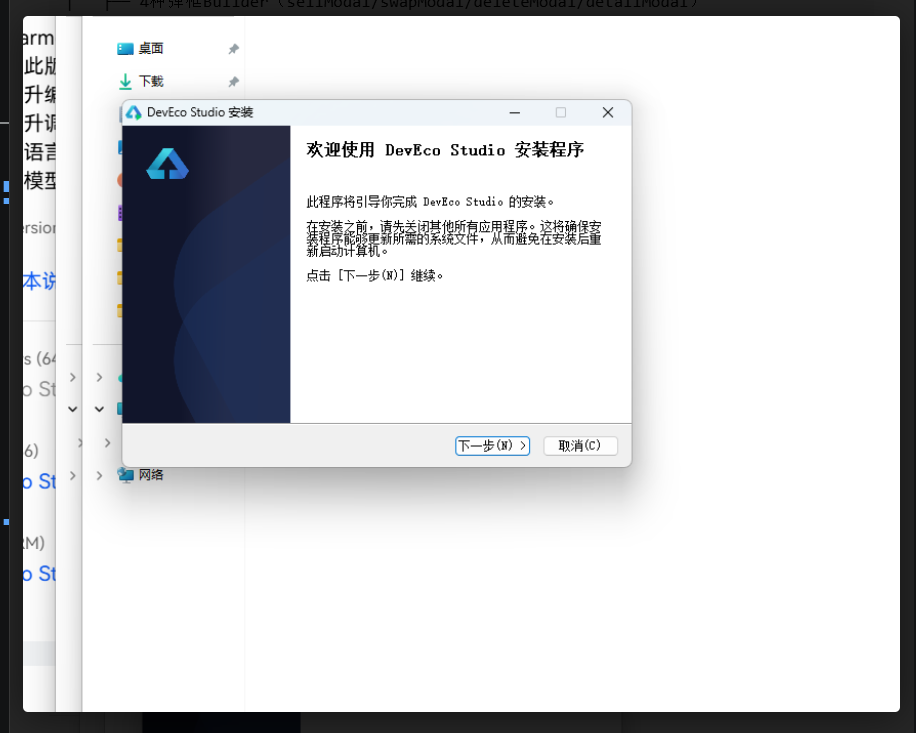
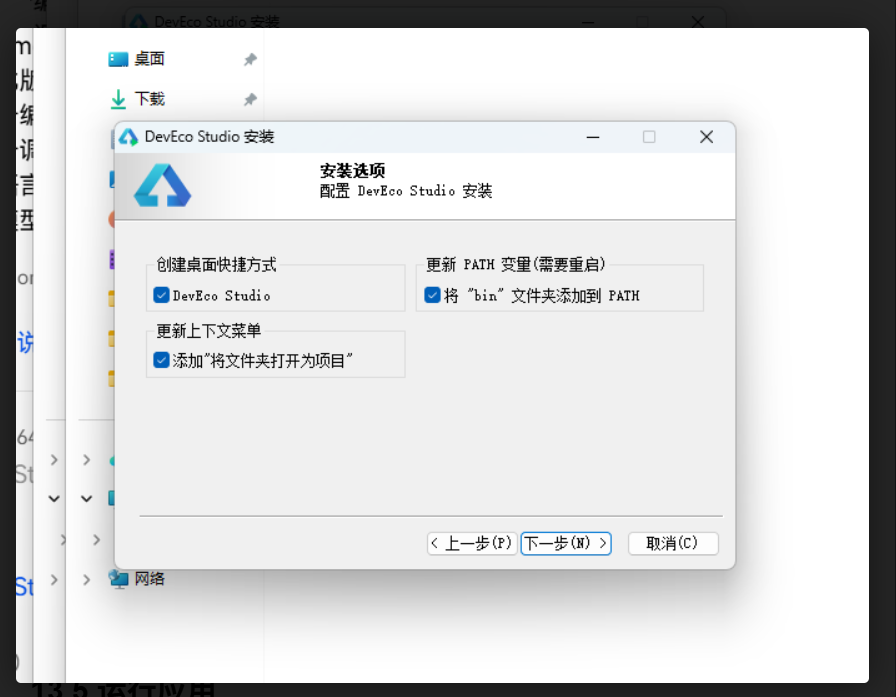
从华为开发者官网下载最新版本,运行安装包,选择安装路径,勾选创建桌面快捷方式,点击安装。
13.3 配置SDK
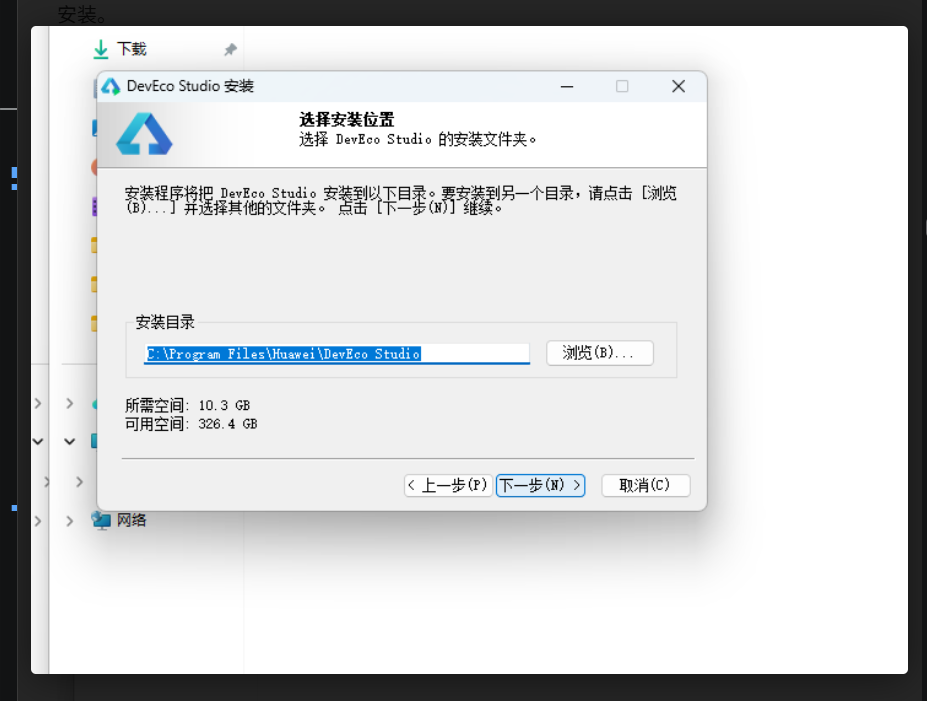
首次启动后进入File > Settings > HarmonyOS SDK,勾选API 24及以上版本,点击Apply等待下载完成。
13.4 创建项目
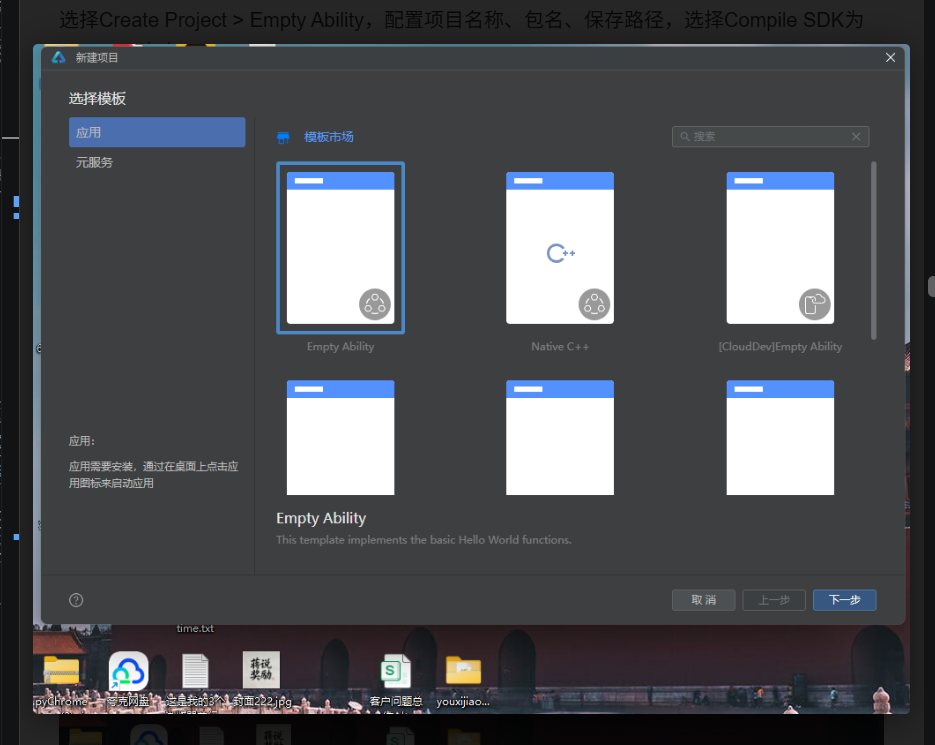
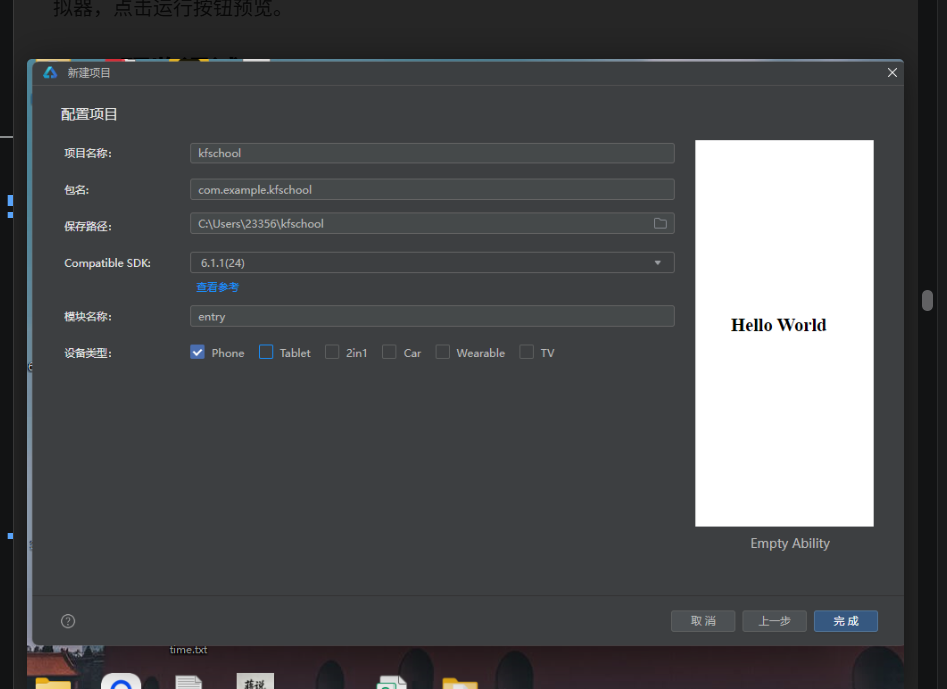
选择Create Project > Empty Ability,配置项目名称、包名、保存路径,选择Compile SDK为API 24,点击Finish。
13.5 运行应用
将1316.ets代码替换到entry/src/main/ets/pages/Index.ets,连接HarmonyOS设备或启动模拟器,点击运行按钮预览。
13.6 预览调试
DevEco Studio提供实时预览功能,编辑器右侧打开Previewer面板,支持多设备尺寸预览、深色模式切换、组件树inspect等调试能力。
本章提供完整的开发环境搭建步骤,包括 DevEco Studio 安装、HarmonyOS SDK 配置、项目创建、代码运行和预览调试。按照本章步骤操作,你可以在 30 分钟内将采样集市 SAMPLE BAZAAR 应用在模拟器或真机上运行起来。
13.1 环境要求
开发采样集市 SAMPLE BAZAAR 需要以下环境配置:
- DevEco Studio 5.0+(支持 HarmonyOS 6.1.1):华为官方 IDE,基于 IntelliJ IDEA 定制,提供 ArkTS 语法高亮、代码补全、实时预览、调试等完整开发能力
- HarmonyOS SDK API 24:HarmonyOS 6.1.1 对应的 SDK 版本,包含 ArkUI 声明式 UI 框架、ArkTS 运行时、系统组件库等
- Node.js 18+:DevEco Studio 构建工具链依赖,用于 hvigor 构建系统和 ohpm 包管理器
- 至少 8GB 内存:推荐 16GB,DevEco Studio + 模拟器 + Previewer 同时运行时内存占用较高
- Windows 10/11 或 macOS 12+:支持 64 位操作系统
13.2 安装 DevEco Studio
从华为开发者官网(developer.huawei.com)下载最新版本 DevEco Studio 安装包。运行安装程序后:
- 选择安装路径(建议非系统盘,预留至少 5GB 空间)
- 勾选"创建桌面快捷方式"和"关联 .ets 文件"
- 选择安装组件(默认全选,包含 HarmonyOS SDK、模拟器、Previewer)
- 点击"安装"等待完成(约 10-15 分钟,取决于网络速度)
- 安装完成后启动 DevEco Studio,首次启动会自动检测并配置 Node.js、ohpm、hvigor 等工具链
13.3 配置 HarmonyOS SDK
首次启动 DevEco Studio 后,需要配置 HarmonyOS SDK:
- 进入 File > Settings > HarmonyOS SDK(macOS 为 DevEco Studio > Settings > HarmonyOS SDK)
- 在 SDK Platforms 标签页中,勾选 API 24 及以上版本(HarmonyOS 6.1.1 对应 API 24)
- 在 SDK Tools 标签页中,确认以下工具已勾选:ArkTS、Previewer、Emulator、System Image(模拟器镜像)
- 点击 Apply 按钮,等待 SDK 下载完成(约 2-5GB,取决于勾选的版本数量)
- 下载完成后点击 OK,SDK 配置生效
如果需要使用真机调试,还需在手机上开启"开发者模式"和"USB 调试",并通过 DevEco Studio 的设备管理器连接设备。
13.4 创建项目
配置好 SDK 后,创建一个新的 HarmonyOS 项目:
- 在 DevEco Studio 欢迎页点击 Create Project(或 File > New > Create Project)
- 选择 Empty Ability 模板(空能力模板,最适合单文件应用开发)
- 配置项目参数:
- Project name:项目名称,如 SampleBazaar
- Bundle name:包名,如 com.example.bazaar(需全局唯一)
- Save location:项目保存路径
- Compile SDK:选择 API 24(HarmonyOS 6.1.1)
- Model:选择 Stage 模型(HarmonyOS 推荐的新模型)
- 点击 Finish,等待项目初始化完成(约 1-2 分钟,自动生成项目结构和配置文件)
项目创建完成后,目录结构如下:
SampleBazaar/
├── entry/                    # 主模块
│   ├── src/main/
│   │   ├── ets/pages/
│   │   │   └── Index.ets    # 主页面(替换为SAMPLE BAZAAR源码)
│   │   ├── resources/        # 资源文件
│   │   └── module.json5      # 模块配置
│   └── build-profile.json5   # 构建配置
├── AppScope/                 # 应用全局配置
├── hvigor/                   # 构建工具
└── build-profile.json5       # 全局构建配置
13.5 运行应用
项目创建完成后,将采样集市 SAMPLE BAZAAR 的源码替换到项目中并运行:
- 打开
entry/src/main/ets/pages/Index.ets文件 - 用本文附录中的完整源码(2130.ets)完全替换 Index.ets 的内容
- 确认
module.json5中已注册该页面(默认创建的 Empty Ability 已自动注册 Index.ets) - 连接 HarmonyOS 设备(USB 数据线连接真机并开启 USB 调试),或启动模拟器(Tools > Device Manager > Create Emulator,选择 API 24 的设备镜像)
- 点击工具栏的运行按钮(▶️),或按快捷键 Shift+F10
- 在弹出的设备选择对话框中选择目标设备(真机或模拟器)
- 等待编译构建完成(首次构建约 1-3 分钟,后续增量构建约 30 秒)
- 应用自动安装并启动到设备上,即可看到采样集市 SAMPLE BAZAAR 的首页 Tab
如果运行报错,常见原因和解决方法:
- SDK 版本不匹配:确认 module.json5 中的 compileSdkVersion 为 24
- 页面未注册:确认 module.json5 的 abilities 中包含 Index.ets 页面对应的 ability
- minLines 属性报错:本项目源码已修正 minLines 问题(2130.ets 中已移除 Text 组件的 minLines 属性),如果使用旧版本源码可能遇到此问题
- 内存不足:关闭其他占用内存的程序,或增加 DevEco Studio 的 VM 内存(Help > Edit Custom VM Options,增加 -Xmx4096m)
13.6 预览调试
DevEco Studio 提供强大的实时预览和调试能力,是 UI 开发的高效工具:
Previewer 实时预览:
- 打开 .ets 文件后,点击编辑器右侧的 Previewer 标签(或 View > Tool Windows > Previewer)
- Previewer 面板实时显示当前页面的 UI 效果,修改代码后自动热重载(约 1-2 秒刷新)
- 支持多设备尺寸预览(手机/平板/折叠屏),在 Previewer 顶部的设备下拉框中切换
- 支持深色模式/浅色模式切换,点击 Previewer 工具栏的主题切换按钮
- 支持组件树 inspect,点击 Previewer 中的 UI 元素可在代码中定位到对应组件
对于 SAMPLE BAZAAR 这种深色模式为主的 App,Previewer 是最高效的开发工具——修改颜色、间距、布局后无需重新运行应用,1-2 秒即可在 Previewer 中看到效果。弹窗组件由于使用 Stack 叠加+if 条件渲染,在 Previewer 中可通过手动修改 showXxx 状态为 true 来预览弹窗效果。
调试功能:
- 断点调试:在代码行号左侧点击设置断点,点击 Debug 按钮(🐛)以调试模式运行,命中断点后可查看变量值、调用栈、单步执行
- 日志查看:底部 Log 面板显示应用运行日志,支持按级别过滤和关键词搜索
- 性能分析:Profiler 面板提供 CPU、内存、网络、帧率等性能指标实时监控
- 布局检查:ArkUI Inspector 面板显示当前页面的组件树结构、每个组件的属性值、布局边界
总结与展望
项目总结
采样集市 SAMPLE BAZAAR 是一款以「制作人数字资产交易」为核心的音乐素材集市 App,基于 HarmonyOS ArkTS 声明式 UI 框架开发,单文件约 2900 行代码,无外部依赖。项目实现了 6 大 Tab 页面(首页/曲风/采样包/Beat/订单/我的)和约 15 套弹窗组件,完整覆盖采样包交易、Beat 试听授权、订单评价、制作人工作台、购物车支付等核心业务场景。
视觉设计上采用「磁带暖黑金橙风」——暖黑底(#141310)如同深夜录音棚,磁带金(#E8B54D)如同棚里那盏工作灯,橙红(#FF6B35)如同录音键上的红色,工业青(#4ECDC4)如同调音台上闪烁的电平灯。四种色彩的组合营造出强烈的「深夜录音棚」氛围——每一次打开 App,都像走进一间属于自己的录音棚,设备指示灯亮着,灵感随时可以按下录音键。色彩语义明确——磁带金代表主要操作/品牌色,橙红代表购买/价格/热卖,工业青代表新品/成功/信息。
技术实现上严格遵循 ArkTS 规范:无 Blank 组件、无 UI 内变量声明、constraintSize 限高、单子组件 Scroll、接口约束全部对象字面量。特别修正了 Text 组件的 minLines 属性兼容性问题(2130.ets 中已移除所有 minLines)。采用单文件组件化架构,通过 @Component 划分为 8 个独立组件,@State 管理局部状态,@Builder 封装可复用 UI 和弹窗,Stack 叠加实现半透明遮罩弹窗,属性动画实现交互动效。
技术亮点
- 磁带暖黑金橙风视觉体系:暖黑底+磁带金+橙红+工业青的四色体系,大圆角卡片+磁带Emoji图标+波形可视化,整体视觉如同深夜录音棚和磁带集市,营造出强烈的音乐制作沉浸感
- Beat 单例试听系统:12 个 Beat 大卡片列表,使用 playingId 单例状态管理实现同一时间只有一个 Beat 播放,播放中按钮变色(磁带金→工业青)+图标切换(▶→⏸)+缩放动画+波形双色,试听体验完整
- 三档授权交易体系:租赁授权(¥59起,需署名)/独家买断(¥199起,版权转让)/分轨交付(¥328起,含WAV分轨),三种授权价格和权益差异明确,授权说明弹窗透明化展示,是 Beat 交易的核心差异化
- 制作人工作台一体化:我的 Tab 既是买家中心也是卖家工作台——作品管理(上架/编辑/下架)、销量柱状图(7天数据,超100元橙红柱)、钱包余额、充值系统,让同一个用户既是买家也是卖家
- 双栏曲风分类导航:左侧 28% 分类栏(9种曲风各配Emoji图标)+右侧内容列表,Trap火焰/Lo-Fi雾/Drill砖头/BoomBap收音机,曲风符号与气质高度契合,是音乐类 App 分类导航的经典模式
- 波形可视化语言:Beat 卡片和详情页使用 20 根不同高度的竖条模拟音频波形,未播放深灰、播放中双色(高橙红矮工业青),波形是音乐制作 App 的标志性视觉元素,让静态界面有了「声音感」
- 数字商品退款规则设计:退款弹窗明确说明「数字商品一经下载通常不支持退款,仅当素材与描述严重不符时可申请,集市仲裁需3个工作日」,橙红警示色+警告图标,既保护卖家权益也保留买家申诉通道
- 智能评价+多维度评分:评价弹窗根据星级自动生成推荐评价语(4-5星「非常好用」/3星「还行」/1-2星「不太满意」),降低评价门槛;素材质量+发货速度双维度标签,让评价更结构化
- 约 15 套完整弹窗交互体系:从采样包详情、购买确认、Beat详情抽屉、授权说明、评价、退款、购物车抽屉、支付、充值、上架作品、编辑作品、下架作品到分享、加入购物车提示,每个业务场景都有对应弹窗
- 购物车多选结算+constraintSize限高:购物车底部抽屉支持多选结算(cartTotal函数实时计算选中商品合计),商品列表使用 constraintSize({ maxHeight: ‘46%’ }) 限高避免溢出,是电商购物车的标准实现
扩展方向
采样集市 SAMPLE BAZAAR 作为演示项目,仍有多个可扩展方向:
- 真实音频试听:当前 Beat 试听是静态波形+播放状态模拟,可接入真实音频播放器实现 30 秒片段试听、进度条拖动、音量控制等
- 波形动态可视化:当前波形是静态高度,可接入 Web Audio API 或鸿蒙音频可视化 API 实现随播放进度动态变化的实时波形
- 支付系统对接:当前支付是弹窗模拟,可对接微信支付/支付宝/华为支付的真实 SDK,实现完整的支付流程和回调
- 作品上传与审核:当前上架作品是表单模拟,可实现真实的音频文件上传、转码、审核流程,支持 WAV/MP3/MIDI 等格式
- AI 曲风分类与推荐:可集成 AI 算法根据 Beat 的音频特征自动分类曲风,根据用户的购买/试听历史推荐可能喜欢的采样包和 Beat
- 制作人数据分析看板:扩展我的 Tab 的销量图表,增加月度/年度收入趋势、热销作品排行、粉丝增长曲线、评价分布等深度数据分析
- 社区与评论:扩展 Beat 详情页的评论功能,支持制作人之间的交流、作品点评、合作邀约,形成制作人社区
- 采样包预览播放器:采样包详情页的素材清单可以增加每个素材的单独试听按钮,让买家在购买前就能听到每个素材的效果
- 多端协同:可扩展为手机/平板/PC 多端协同,手机用于浏览和购买,平板/PC 用于制作和上传作品,鸿蒙分布式能力实现跨端文件传输
采样集市 SAMPLE BAZAAR 展示了 HarmonyOS ArkTS 在数字内容交易类 App 开发中的强大能力——声明式 UI 的简洁语法、@State 的高效状态管理、Stack 叠加弹窗的灵活实现、属性动画的流畅动效、Previewer 的实时预览,让开发者可以用较少的代码实现丰富的交易体验。希望本文能为 HarmonyOS 开发者和音乐科技产品从业者提供有价值的参考。
按下录音键,你的下一个 Beat 可能就是下一个爆款。
本文基于 HarmonyOS ArkTS 声明式 UI 框架实战项目撰写,所有代码和图片均来自采样集市 SAMPLE BAZAAR 项目。
附录:完整源码(2130.ets)
以下为采样集市 SAMPLE BAZAAR 项目的完整 ArkTS 源码,单文件约 2900 行,包含 8 个 @Component 组件、7 个 interface 类型定义、10 组静态数据、5 个工具函数和 BazaarTab 枚举。源码已修正 Text 组件 minLines 属性兼容性问题,严格遵循无 Blank、无 UI 内变量声明、constraintSize 限高、单子组件 Scroll、接口约束全部对象字面量等规范。可直接复制到 DevEco Studio 的 Empty Ability 项目中运行。
// 2130.ets 采样集市 SAMPLE BAZAAR —— 制作人采样包 / Beat 交易市场
// 磁带暖黑金橙风:暖黑底 + 磁带金 + 橙红 + 工业青
// 遵循要求.md:无 Blank、无 UI 内变量声明、constraintSize 限高、单子组件 Scroll、接口约束全部对象字面量
// 修正:移除 Text 组件的 minLines 属性
// ============ 类型定义 ============
interface SamplePack {
id: number;
title: string;
producer: string;
genre: string;
bpm: string;
loops: number;
price: number;
oldPrice: number;
sales: number;
rating: string;
tag: string;
}
interface BeatItem {
id: number;
title: string;
producer: string;
genre: string;
bpm: number;
key: string;
price: number;
plays: number;
hot: boolean;
wave: string;
}
interface OrderRecord {
id: number;
item: string;
type: string;
amount: number;
date: string;
status: string;
}
interface CartItem {
id: number;
title: string;
producer: string;
type: string;
price: number;
checked: boolean;
}
interface UploadWork {
id: number;
title: string;
genre: string;
bpm: number;
price: number;
status: string;
date: string;
}
interface SalesDay {
day: string;
amount: number;
}
interface GenreEntry {
name: string;
emoji: string;
count: number;
}
// ============ 静态数据 ============
const PACK_LIST: SamplePack[] = [
{ id: 1, title: '雾都夜话 Lo-Fi Vol.1', producer: 'beatlord', genre: 'Lo-Fi', bpm: '70-90', loops: 128, price: 68, oldPrice: 128, sales: 3421, rating: '4.9', tag: '热卖' },
{ id: 2, title: '霓虹残响 Synthwave', producer: 'VHS_Kid', genre: 'Synthwave', bpm: '100-118', loops: 96, price: 88, oldPrice: 88, sales: 2109, rating: '4.8', tag: '新品' },
{ id: 3, title: '川渝Trap弹药库', producer: '雾山老幺', genre: 'Trap', bpm: '130-150', loops: 156, price: 128, oldPrice: 198, sales: 5210, rating: '4.9', tag: '热卖' },
{ id: 4, title: 'Old School 黄金年代', producer: 'DJ dusty', genre: 'BoomBap', bpm: '85-95', loops: 112, price: 58, oldPrice: 88, sales: 1877, rating: '4.7', tag: '' },
{ id: 5, title: '极简底噪 Minimal Kit', producer: 'null_0', genre: 'Minimal', bpm: '120-126', loops: 84, price: 48, oldPrice: 48, sales: 932, rating: '4.6', tag: '' },
{ id: 6, title: '国风采样·市井烟火', producer: '板砖Studio', genre: 'Chinese Style', bpm: '75-100', loops: 140, price: 98, oldPrice: 158, sales: 4033, rating: '4.9', tag: '热卖' },
{ id: 7, title: 'Drill 深水区', producer: '6side', genre: 'Drill', bpm: '140-145', loops: 120, price: 108, oldPrice: 108, sales: 1620, rating: '4.7', tag: '新品' },
{ id: 8, title: 'City Pop 夜行列车', producer: '都會派', genre: 'City Pop', bpm: '96-110', loops: 105, price: 78, oldPrice: 118, sales: 2814, rating: '4.8', tag: '' },
{ id: 9, title: 'Jersey Club 弹跳屋', producer: 'club909', genre: 'Jersey', bpm: '130-140', loops: 88, price: 66, oldPrice: 66, sales: 1145, rating: '4.5', tag: '' },
{ id: 10, title: '氛围铺底 Ambient Bed', producer: 'fog_machine', genre: 'Ambient', bpm: '60-80', loops: 72, price: 58, oldPrice: 78, sales: 766, rating: '4.6', tag: '' },
{ id: 11, title: 'R&B 慢摇丝绒', producer: 'velvetvoc', genre: 'R&B', bpm: '88-105', loops: 118, price: 88, oldPrice: 128, sales: 3245, rating: '4.8', tag: '' },
{ id: 12, title: '爵士烟馆 Jazzy Room', producer: 'blue_note_7', genre: 'Jazz', bpm: '80-120', loops: 132, price: 96, oldPrice: 96, sales: 1588, rating: '4.7', tag: '' }
];
const BEAT_LIST: BeatItem[] = [
{ id: 1, title: '夜班公交', producer: 'beatlord', genre: 'Lo-Fi', bpm: 82, key: 'Am', price: 199, plays: 45200, hot: true, wave: '3' },
{ id: 2, title: 'Kodama 木灵', producer: 'VHS_Kid', genre: 'Synthwave', bpm: 108, key: 'F#m', price: 259, plays: 38600, hot: true, wave: '4' },
{ id: 3, title: '锦里夜市', producer: '板砖Studio', genre: 'Chinese Trap', bpm: 140, key: 'Cm', price: 328, plays: 51200, hot: true, wave: '3' },
{ id: 4, title: 'Sixth Side', producer: '6side', genre: 'Drill', bpm: 142, key: 'Gm', price: 288, plays: 26400, hot: false, wave: '5' },
{ id: 5, title: '末班地铁', producer: 'beatlord', genre: 'BoomBap', bpm: 90, key: 'Dm', price: 179, plays: 23100, hot: false, wave: '4' },
{ id: 6, title: 'Pacific Hotel', producer: '都會派', genre: 'City Pop', bpm: 104, key: 'Bb', price: 239, plays: 29800, hot: true, wave: '3' },
{ id: 7, title: '湿冷回南天', producer: '雾山老幺', genre: 'Trap', bpm: 145, key: 'Em', price: 268, plays: 34500, hot: false, wave: '5' },
{ id: 8, title: 'Bounce加时赛', producer: 'club909', genre: 'Jersey', bpm: 134, key: 'Am', price: 219, plays: 18700, hot: false, wave: '4' },
{ id: 9, title: '丝绸路灯', producer: 'velvetvoc', genre: 'R&B', bpm: 96, key: 'G', price: 248, plays: 21900, hot: false, wave: '3' },
{ id: 10, title: '晨雾变电站', producer: 'fog_machine', genre: 'Ambient', bpm: 68, key: 'C', price: 158, plays: 14300, hot: false, wave: '5' },
{ id: 11, title: '蓝调后巷', producer: 'blue_note_7', genre: 'Jazz', bpm: 112, key: 'F', price: 228, plays: 17600, hot: false, wave: '4' },
{ id: 12, title: '数据尘埃', producer: 'null_0', genre: 'Minimal', bpm: 124, key: 'Am', price: 188, plays: 9800, hot: false, wave: '5' }
];
const ORDER_LIST: OrderRecord[] = [
{ id: 90231, item: '川渝Trap弹药库', type: '采样包', amount: 128, date: '08-26', status: '已完成' },
{ id: 90228, item: '夜班公交(独家授权)', type: 'Beat', amount: 199, date: '08-25', status: '已完成' },
{ id: 90225, item: '雾都夜话 Lo-Fi Vol.1', type: '采样包', amount: 68, date: '08-24', status: '已完成' },
{ id: 90219, item: 'Kodama 木灵(租赁)', type: 'Beat', amount: 59, date: '08-22', status: '已完成' },
{ id: 90210, item: '国风采样·市井烟火', type: '采样包', amount: 98, date: '08-20', status: '已完成' },
{ id: 90203, item: 'R&B 慢摇丝绒', type: '采样包', amount: 88, date: '08-18', status: '已完成' },
{ id: 90196, item: '锦里夜市(独家授权)', type: 'Beat', amount: 328, date: '08-16', status: '已退款' },
{ id: 90188, item: 'Old School 黄金年代', type: '采样包', amount: 58, date: '08-14', status: '已完成' },
{ id: 90177, item: 'City Pop 夜行列车', type: '采样包', amount: 78, date: '08-12', status: '已完成' },
{ id: 90165, item: '爵士烟馆 Jazzy Room', type: '采样包', amount: 96, date: '08-10', status: '已完成' }
];
const CART_ITEMS: CartItem[] = [
{ id: 1, title: '霓虹残响 Synthwave', producer: 'VHS_Kid', type: '采样包', price: 88, checked: true },
{ id: 2, title: 'Pacific Hotel(独家)', producer: '都會派', type: 'Beat', price: 239, checked: true },
{ id: 3, title: 'Drill 深水区', producer: '6side', type: '采样包', price: 108, checked: false },
{ id: 4, title: '蓝调后巷(租赁)', producer: 'blue_note_7', type: 'Beat', price: 56, checked: true }
];
const UPLOAD_WORKS: UploadWork[] = [
{ id: 1, title: '锅炉房的低音', genre: 'Trap', bpm: 138, price: 248, status: '在售', date: '08-20' },
{ id: 2, title: '墨绿色星期四', genre: 'Lo-Fi', bpm: 84, price: 168, status: '在售', date: '08-17' },
{ id: 3, title: '三环堵车纪实', genre: 'BoomBap', bpm: 92, price: 188, status: '审核中', date: '08-25' },
{ id: 4, title: '过期的FM', genre: 'Ambient', bpm: 70, price: 148, status: '在售', date: '08-11' },
{ id: 5, title: '亭子间的夏天', genre: 'Chinese Style', bpm: 88, price: 218, status: '已下架', date: '08-05' },
{ id: 6, title: '午夜加练', genre: 'Drill', bpm: 141, price: 228, status: '在售', date: '08-02' }
];
const SALES_WEEK: SalesDay[] = [
{ day: '一', amount: 62 },
{ day: '二', amount: 45 },
{ day: '三', amount: 118 },
{ day: '四', amount: 86 },
{ day: '五', amount: 132 },
{ day: '六', amount: 96 },
{ day: '日', amount: 74 }
];
const GENRE_SIDES: GenreEntry[] = [
{ name: '全部', emoji: '🎧', count: 412 },
{ name: 'Trap', emoji: '🔥', count: 96 },
{ name: 'Lo-Fi', emoji: '🌫', count: 78 },
{ name: 'Drill', emoji: '🧱', count: 45 },
{ name: 'BoomBap', emoji: '📻', count: 52 },
{ name: 'Synthwave', emoji: '🌆', count: 38 },
{ name: 'R&B', emoji: '🍷', count: 41 },
{ name: 'City Pop', emoji: '🚕', count: 26 },
{ name: '国风', emoji: '🏮', count: 33 }
];
const LICENSE_TYPES: string[] = ['租赁授权 · 商用需署名', '独家买断 · 版权完全转让', '分轨交付 · 含WAV分轨'];
const RECHARGE_OPTIONS: string[] = ['¥30', '¥68', '¥128', '¥268', '¥528', '¥1028'];
const WAVE_HEIGHTS: number[] = [16, 34, 22, 44, 28, 50, 18, 38, 26, 46, 30, 20, 42, 24, 36, 14, 48, 32, 22, 40];
// ============ 工具函数 ============
function packTagColor(tag: string): string {
if (tag === '热卖') {
return 'rgba(255,107,53,0.16)';
}
if (tag === '新品') {
return 'rgba(78,205,196,0.16)';
}
return 'rgba(232,181,77,0.14)';
}
function packTagTextColor(tag: string): string {
if (tag === '热卖') {
return '#FF6B35';
}
if (tag === '新品') {
return '#4ECDC4';
}
return '#E8B54D';
}
function salesBarHeight(amount: number): string {
return (amount * 0.9).toFixed(0) + 'vp';
}
function waveBarHeight(h: number): string {
return h.toFixed(0) + 'vp';
}
function cartTotal(items: CartItem[]): number {
let sum: number = 0;
for (let i = 0; i < items.length; i++) {
if (items[i].checked) {
sum += items[i].price;
}
}
return sum;
}
enum BazaarTab {
HOME,
GENRE,
PACKS,
BEAT,
ORDERS,
ME
}
// ============ 主入口 ============
@Entry
@Component
struct SampleBazaarApp {
@State activeTab: BazaarTab = BazaarTab.HOME
@Builder contentArea() {
if (this.activeTab === BazaarTab.HOME) {
HomeContent()
} else if (this.activeTab === BazaarTab.GENRE) {
GenreContent()
} else if (this.activeTab === BazaarTab.PACKS) {
PacksContent()
} else if (this.activeTab === BazaarTab.BEAT) {
BeatContent()
} else if (this.activeTab === BazaarTab.ORDERS) {
OrdersContent()
} else {
MeContent()
}
}
@Builder bottomTabItem(icon: string, label: string, tab: BazaarTab) {
Column({ space: 3 }) {
Text(icon)
.fontSize(21)
.scale(this.activeTab === tab ? { x: 1.18, y: 1.18 } : { x: 1, y: 1 })
.animation({ duration: 220, curve: Curve.EaseOut })
Text(label)
.fontSize(10)
.fontColor(this.activeTab === tab ? '#E8B54D' : '#7A756A')
}
.alignItems(HorizontalAlign.Center)
.padding({ top: 8, bottom: 6 })
.width('16.6%')
.onClick(() => {
this.activeTab = tab;
})
}
build() {
Column() {
BazaarHeader()
Column() {
this.contentArea()
}
.layoutWeight(1)
.width('100%')
Divider()
.color('rgba(232,181,77,0.18)')
.strokeWidth(1)
Row() {
this.bottomTabItem('📼', '首页', BazaarTab.HOME)
this.bottomTabItem('🎛', '曲风', BazaarTab.GENRE)
this.bottomTabItem('📦', '采样包', BazaarTab.PACKS)
this.bottomTabItem('🎹', 'Beat', BazaarTab.BEAT)
this.bottomTabItem('🧾', '订单', BazaarTab.ORDERS)
this.bottomTabItem('👤', '我的', BazaarTab.ME)
}
.width('100%')
.backgroundColor('#12110D')
.padding({ bottom: 6 })
}
.width('100%')
.height('100%')
.backgroundColor('#141310')
}
}
// ============ 头部(电商风·静态) ============
@Component
struct BazaarHeader {
onSearchTap: () => void = () => {};
build() {
Column() {
Row({ space: 10 }) {
Column() {
Text('🧲')
.fontSize(22)
Text('SAMPLE')
.fontSize(7)
.fontColor('#E8B54D')
.letterSpacing(1)
}
.width(44)
.height(44)
.borderRadius(10)
.backgroundColor('rgba(232,181,77,0.12)')
.justifyContent(FlexAlign.Center)
.alignItems(HorizontalAlign.Center)
Column({ space: 2 }) {
Text('采样集市')
.fontSize(18)
.fontWeight(FontWeight.Bold)
.fontColor('#F0EDE6')
Text('BAZAAR FOR PRODUCERS')
.fontSize(8)
.fontColor('#7A756A')
.letterSpacing(1)
}
.alignItems(HorizontalAlign.Start)
Row({ space: 6 }) {
Text('🔎')
.fontSize(13)
Text('搜采样包 / Beat / 制作人')
.fontSize(11)
.fontColor('#7A756A')
}
.padding({ left: 12, right: 12, top: 8, bottom: 8 })
.backgroundColor('#1E1D18')
.borderRadius(22)
.border({ width: 1, color: 'rgba(232,181,77,0.22)' })
.layoutWeight(1)
.onClick(() => {
this.onSearchTap();
})
Text('🛒')
.fontSize(19)
}
.width('100%')
.padding({ left: 16, right: 16, top: 12, bottom: 12 })
Row({ space: 0 }) {
Text('🔥 限时 5 折')
.fontSize(10)
.fontColor('#141310')
.fontWeight(FontWeight.Bold)
.padding({ left: 10, right: 10, top: 4, bottom: 4 })
.backgroundColor('#FF6B35')
.borderRadius(4)
Text(' 磁带季 · 川渝Trap弹药库等 12 款采样包直降')
.fontSize(10)
.fontColor('#7A756A')
.maxLines(1)
.textOverflow({ overflow: TextOverflow.Ellipsis })
.layoutWeight(1)
}
.width('100%')
.padding({ left: 16, right: 16, bottom: 12 })
}
.width('100%')
.backgroundColor('#12110D')
}
}
// ============ 首页 Tab(横滑精选 + 榜单) ============
@Component
struct HomeContent {
@State showDetail: boolean = false
@State selectedPack: SamplePack | null = null
@State showCartToast: boolean = false
@Builder modalOverlay(onClose: () => void) {
Column() {
Column()
.width('100%')
.layoutWeight(1)
.onClick(() => {
onClose();
})
Column() {
Text('📼')
.fontSize(30)
.margin({ bottom: 8 })
Text('集市演示')
.fontSize(12)
.fontColor('#7A756A')
}
.width('100%')
}
.width('100%')
.height('100%')
}
@Builder packDetailModal() {
Column({ space: 12 }) {
Column({ space: 6 }) {
Text('📼')
.fontSize(40)
Text(this.selectedPack!.title)
.fontSize(17)
.fontWeight(FontWeight.Bold)
.fontColor('#F0EDE6')
Text('by ' + this.selectedPack!.producer)
.fontSize(11)
.fontColor('#E8B54D')
}
.width('100%')
.padding({ top: 20 })
.alignItems(HorizontalAlign.Center)
Row({ space: 8 }) {
Text(this.selectedPack!.genre)
.fontSize(10)
.fontColor('#4ECDC4')
.padding({ left: 10, right: 10, top: 3, bottom: 3 })
.backgroundColor('rgba(78,205,196,0.12)')
.borderRadius(4)
Text('BPM ' + this.selectedPack!.bpm)
.fontSize(10)
.fontColor('#7A756A')
Text(this.selectedPack!.loops + ' 个素材')
.fontSize(10)
.fontColor('#7A756A')
Text('★ ' + this.selectedPack!.rating)
.fontSize(10)
.fontColor('#E8B54D')
}
Divider()
.color('rgba(232,181,77,0.15)')
.margin({ left: 24, right: 24 })
Column({ space: 0 }) {
Row() {
Text('01')
.fontSize(11)
.fontColor('#7A756A')
Text('kick_陷阱底鼓 ×24')
.fontSize(12)
.fontColor('#F0EDE6')
.layoutWeight(1)
.padding({ left: 12 })
Text('WAV')
.fontSize(9)
.fontColor('#7A756A')
}
.width('100%')
.padding({ top: 8, bottom: 8 })
Row() {
Text('02')
.fontSize(11)
.fontColor('#7A756A')
Text('snare_军鼓连音 ×18')
.fontSize(12)
.fontColor('#F0EDE6')
.layoutWeight(1)
.padding({ left: 12 })
Text('WAV')
.fontSize(9)
.fontColor('#7A756A')
}
.width('100%')
.padding({ top: 8, bottom: 8 })
Row() {
Text('03')
.fontSize(11)
.fontColor('#7A756A')
Text('melody_唢呐循环 ×12')
.fontSize(12)
.fontColor('#F0EDE6')
.layoutWeight(1)
.padding({ left: 12 })
Text('MIDI')
.fontSize(9)
.fontColor('#7A756A')
}
.width('100%')
.padding({ top: 8, bottom: 8 })
Row() {
Text('04')
.fontSize(11)
.fontColor('#7A756A')
Text('fx_市井环境声 ×16')
.fontSize(12)
.fontColor('#F0EDE6')
.layoutWeight(1)
.padding({ left: 12 })
Text('WAV')
.fontSize(9)
.fontColor('#7A756A')
}
.width('100%')
.padding({ top: 8, bottom: 8 })
}
.width('84%')
.constraintSize({ maxHeight: '80%' })
Row({ space: 10 }) {
Column({ space: 1 }) {
Text('¥' + this.selectedPack!.price)
.fontSize(20)
.fontWeight(FontWeight.Bold)
.fontColor('#FF6B35')
Text('原价 ¥' + this.selectedPack!.oldPrice)
.fontSize(10)
.fontColor('#7A756A')
.decoration({ type: TextDecorationType.LineThrough })
}
.alignItems(HorizontalAlign.Start)
Button() {
Text('加入购物车')
.fontSize(13)
.fontColor('#E8B54D')
}
.padding({ left: 18, right: 18, top: 10, bottom: 10 })
.backgroundColor('rgba(232,181,77,0.14)')
.borderRadius(24)
.onClick(() => {
this.showCartToast = true;
})
Button() {
Text('立即购买')
.fontSize(13)
.fontColor('#141310')
}
.padding({ left: 20, right: 20, top: 10, bottom: 10 })
.backgroundColor('#FF6B35')
.borderRadius(24)
.onClick(() => {
this.showDetail = false;
})
}
.margin({ bottom: 20, top: 4 })
}
.width('90%')
.backgroundColor('#1E1D18')
.borderRadius(20)
.alignItems(HorizontalAlign.Center)
.border({ width: 1, color: 'rgba(232,181,77,0.25)' })
}
@Builder cartToastModal() {
Column({ space: 8 }) {
Text('🛒')
.fontSize(34)
.scale({ x: 1.2, y: 1.2 })
.animation({ duration: 350, curve: Curve.EaseOut })
Text('已加入购物车')
.fontSize(14)
.fontColor('#F0EDE6')
Text('购物车共有 5 件商品')
.fontSize(11)
.fontColor('#7A756A')
}
.width('56%')
.padding({ top: 22, bottom: 22 })
.backgroundColor('#1E1D18')
.borderRadius(16)
.alignItems(HorizontalAlign.Center)
.border({ width: 1, color: 'rgba(232,181,77,0.25)' })
}
@Builder packMiniCard(p: SamplePack) {
Column({ space: 8 }) {
Column() {
Text('📼')
.fontSize(30)
}
.width(64)
.height(64)
.borderRadius(12)
.backgroundColor('rgba(255,107,53,0.12)')
.justifyContent(FlexAlign.Center)
.alignSelf(ItemAlign.Start)
Text(p.title)
.fontSize(13)
.fontWeight(FontWeight.Medium)
.fontColor('#F0EDE6')
.maxLines(2)
Text(p.producer + ' · ' + p.loops + '素材')
.fontSize(10)
.fontColor('#7A756A')
.maxLines(1)
Row({ space: 6 }) {
Text('¥' + p.price)
.fontSize(15)
.fontWeight(FontWeight.Bold)
.fontColor('#FF6B35')
Text('¥' + p.oldPrice)
.fontSize(10)
.fontColor('#7A756A')
.decoration({ type: TextDecorationType.LineThrough })
}
}
.width(160)
.padding(12)
.backgroundColor('#1E1D18')
.borderRadius(16)
.alignItems(HorizontalAlign.Start)
.onClick(() => {
this.selectedPack = p;
this.showDetail = true;
})
}
build() {
Stack({ alignContent: Alignment.Center }) {
Scroll() {
Column() {
Column({ space: 8 }) {
Text('磁带季 · 限时特卖')
.fontSize(17)
.fontWeight(FontWeight.Bold)
.fontColor('#F0EDE6')
Text('12 款制作人采样包直降 5 折起')
.fontSize(11)
.fontColor('#E8B54D')
Row({ space: 8 }) {
Text('距结束 ')
.fontSize(10)
.fontColor('#7A756A')
Text('02')
.fontSize(12)
.fontWeight(FontWeight.Bold)
.fontColor('#141310')
.padding({ left: 6, right: 6, top: 2, bottom: 2 })
.backgroundColor('#E8B54D')
.borderRadius(4)
Text('天')
.fontSize(10)
.fontColor('#7A756A')
Text('14')
.fontSize(12)
.fontWeight(FontWeight.Bold)
.fontColor('#141310')
.padding({ left: 6, right: 6, top: 2, bottom: 2 })
.backgroundColor('#E8B54D')
.borderRadius(4)
Text('时')
.fontSize(10)
.fontColor('#7A756A')
}
}
.width('100%')
.padding({ top: 24, bottom: 24 })
.backgroundColor('#26241C')
.borderRadius(20)
.alignItems(HorizontalAlign.Center)
.margin({ left: 16, right: 16, top: 14 })
Row() {
Text('🔥 热销采样包')
.fontSize(15)
.fontWeight(FontWeight.Bold)
.fontColor('#F0EDE6')
.layoutWeight(1)
Text('更多 ›')
.fontSize(11)
.fontColor('#7A756A')
}
.width('100%')
.padding({ left: 16, right: 16, top: 18 })
Scroll() {
Row({ space: 10 }) {
ForEach(PACK_LIST, (p: SamplePack) => {
this.packMiniCard(p)
}, (p: SamplePack) => p.id.toString())
}
.padding({ left: 16, right: 16 })
}
.scrollable(ScrollDirection.Horizontal)
.scrollBar(BarState.Off)
.width('100%')
.margin({ top: 10 })
Row() {
Text('📈 今日 Beat 榜')
.fontSize(15)
.fontWeight(FontWeight.Bold)
.fontColor('#F0EDE6')
.layoutWeight(1)
Text('每日 10 点更新')
.fontSize(10)
.fontColor('#7A756A')
}
.width('100%')
.padding({ left: 16, right: 16, top: 20 })
Column({ space: 8 }) {
ForEach(BEAT_LIST, (b: BeatItem) => {
Row({ space: 12 }) {
Column() {
Text((b.id).toString())
.fontSize(16)
.fontWeight(FontWeight.Bold)
.fontColor(b.id <= 3 ? '#FF6B35' : '#7A756A')
}
.width(26)
.alignItems(HorizontalAlign.Center)
Column() {
Text('▶')
.fontSize(13)
.fontColor('#E8B54D')
}
.width(34)
.height(34)
.borderRadius(17)
.backgroundColor('rgba(232,181,77,0.12)')
.justifyContent(FlexAlign.Center)
.scale(b.hot ? { x: 1.08, y: 1.08 } : { x: 1, y: 1 })
.animation({ duration: 300, curve: Curve.EaseOut })
Column({ space: 3 }) {
Row({ space: 6 }) {
Text(b.title)
.fontSize(13)
.fontWeight(FontWeight.Medium)
.fontColor('#F0EDE6')
if (b.hot) {
Text('HOT')
.fontSize(8)
.fontColor('#FF6B35')
.padding({ left: 5, right: 5, top: 1, bottom: 1 })
.backgroundColor('rgba(255,107,53,0.14)')
.borderRadius(3)
}
}
Text(b.genre + ' · ' + b.bpm + ' BPM · ' + b.key + '调')
.fontSize(10)
.fontColor('#7A756A')
}
.alignItems(HorizontalAlign.Start)
.layoutWeight(1)
Column({ space: 2 }) {
Text('¥' + b.price)
.fontSize(14)
.fontWeight(FontWeight.Bold)
.fontColor('#E8B54D')
Text((b.plays / 10000).toFixed(1) + '万播放')
.fontSize(9)
.fontColor('#7A756A')
}
.alignItems(HorizontalAlign.End)
}
.width('100%')
.padding(12)
.backgroundColor('#1E1D18')
.borderRadius(14)
}, (b: BeatItem) => b.id.toString())
}
.width('100%')
.padding({ left: 16, right: 16, top: 10, bottom: 20 })
}
.width('100%')
}
.scrollBar(BarState.Off)
.layoutWeight(1)
.width('100%')
if (this.showDetail) {
Column() {
Column()
.width('100%')
.layoutWeight(1)
.onClick(() => {
this.showDetail = false;
})
this.packDetailModal()
}
.width('100%')
.height('100%')
.backgroundColor('rgba(10,9,6,0.8)')
}
if (this.showCartToast) {
Column() {
Column()
.width('100%')
.layoutWeight(1)
.onClick(() => {
this.showCartToast = false;
})
this.cartToastModal()
}
.width('100%')
.height('100%')
.backgroundColor('rgba(10,9,6,0.6)')
}
}
.width('100%')
.height('100%')
}
}
// ============ 曲风 Tab(左侧分类 + 右侧列表) ============
@Component
struct GenreContent {
@State sideIndex: number = 0
@State showBeatDetail: boolean = false
@State selectedBeat: BeatItem | null = null
@Builder modalOverlay(onClose: () => void) {
Column() {
Column()
.width('100%')
.layoutWeight(1)
.onClick(() => {
onClose();
})
Column() {
Text('🎛')
.fontSize(30)
.margin({ bottom: 8 })
Text('曲风演示')
.fontSize(12)
.fontColor('#7A756A')
}
.width('100%')
}
.width('100%')
.height('100%')
}
@Builder beatDetailSheet() {
Column({ space: 12 }) {
Column()
.width(44)
.height(5)
.borderRadius(3)
.backgroundColor('#3A382E')
.margin({ top: 10 })
Row({ space: 12 }) {
Column() {
Text('🎹')
.fontSize(26)
}
.width(56)
.height(56)
.borderRadius(14)
.backgroundColor('rgba(232,181,77,0.12)')
.justifyContent(FlexAlign.Center)
Column({ space: 3 }) {
Text(this.selectedBeat!.title)
.fontSize(17)
.fontWeight(FontWeight.Bold)
.fontColor('#F0EDE6')
Text(this.selectedBeat!.producer + ' · ' + this.selectedBeat!.genre)
.fontSize(11)
.fontColor('#7A756A')
Row({ space: 8 }) {
Text(this.selectedBeat!.bpm + ' BPM')
.fontSize(9)
.fontColor('#4ECDC4')
Text(this.selectedBeat!.key + ' 调')
.fontSize(9)
.fontColor('#4ECDC4')
Text('03:12')
.fontSize(9)
.fontColor('#7A756A')
}
}
.alignItems(HorizontalAlign.Start)
.layoutWeight(1)
}
.width('100%')
.padding({ left: 20, right: 20, top: 6 })
Row({ space: 2 }) {
ForEach(WAVE_HEIGHTS, (h: number) => {
Column()
.width(7)
.height(waveBarHeight(h))
.borderRadius(2)
.backgroundColor(h > 36 ? '#FF6B35' : '#E8B54D')
.margin({ left: 2, right: 2 })
}, (h: number) => h.toString())
}
.height(54)
.alignItems(VerticalAlign.Bottom)
.justifyContent(FlexAlign.Center)
Row({ space: 0 }) {
ForEach(LICENSE_TYPES, (l: string, i: number) => {
Column({ space: 4 }) {
Text(l.split(' · ')[0])
.fontSize(11)
.fontColor(this.sideIndex === i + 100 ? '#141310' : '#F0EDE6')
.fontWeight(FontWeight.Medium)
Text(l.split(' · ')[1])
.fontSize(9)
.fontColor(this.sideIndex === i + 100 ? '#141310' : '#7A756A')
}
.alignItems(HorizontalAlign.Center)
.padding({ left: 10, right: 10, top: 8, bottom: 8 })
.backgroundColor(this.sideIndex === i + 100 ? '#E8B54D' : '#26241C')
.borderRadius(10)
.margin({ left: 6 })
.onClick(() => {
this.sideIndex = i + 100;
})
}, (l: string) => l)
}
.width('100%')
.justifyContent(FlexAlign.Center)
Row({ space: 20 }) {
Column({ space: 2 }) {
Text('▶ 试听')
.fontSize(12)
.fontColor('#4ECDC4')
Text('30秒片段')
.fontSize(9)
.fontColor('#7A756A')
}
.alignItems(HorizontalAlign.Center)
Column({ space: 2 }) {
Text('★ 4.8')
.fontSize(12)
.fontColor('#E8B54D')
Text('386 条评价')
.fontSize(9)
.fontColor('#7A756A')
}
.alignItems(HorizontalAlign.Center)
Column({ space: 2 }) {
Text((this.selectedBeat!.plays / 10000).toFixed(1) + '万')
.fontSize(12)
.fontColor('#FF6B35')
Text('累计播放')
.fontSize(9)
.fontColor('#7A756A')
}
.alignItems(HorizontalAlign.Center)
}
Row({ space: 12 }) {
Button() {
Text('🛒 ¥' + this.selectedBeat!.price + ' 购买')
.fontSize(13)
.fontColor('#141310')
}
.padding({ left: 24, right: 24, top: 10, bottom: 10 })
.backgroundColor('#FF6B35')
.borderRadius(24)
Button() {
Text('议价留言')
.fontSize(13)
.fontColor('#E8B54D')
}
.padding({ left: 24, right: 24, top: 10, bottom: 10 })
.backgroundColor('rgba(232,181,77,0.14)')
.borderRadius(24)
.onClick(() => {
this.showBeatDetail = false;
})
}
.margin({ bottom: 24 })
}
.width('100%')
.backgroundColor('#1E1D18')
.borderRadius({ topLeft: 24, topRight: 24 })
.alignItems(HorizontalAlign.Center)
}
@Builder sideItem(g: GenreEntry, i: number) {
Row({ space: 8 }) {
Text(g.emoji)
.fontSize(15)
Text(g.name)
.fontSize(12)
.fontColor(this.sideIndex === i ? '#141310' : '#B5AFA2')
.fontWeight(this.sideIndex === i ? FontWeight.Bold : FontWeight.Normal)
}
.width('100%')
.padding({ left: 12, top: 12, bottom: 12 })
.backgroundColor(this.sideIndex === i ? '#E8B54D' : Color.Transparent)
.borderRadius(10)
.onClick(() => {
this.sideIndex = i;
})
}
build() {
Stack({ alignContent: Alignment.Center }) {
Row() {
Scroll() {
Column({ space: 2 }) {
ForEach(GENRE_SIDES, (g: GenreEntry, i: number) => {
this.sideItem(g, i)
}, (g: GenreEntry) => g.name)
}
.width('100%')
.padding({ top: 8, bottom: 8 })
}
.scrollBar(BarState.Off)
.width('28%')
.height('100%')
.backgroundColor('#17160F')
Scroll() {
Column() {
Row({ space: 8 }) {
Text('🔥 ' + GENRE_SIDES[this.sideIndex].name)
.fontSize(14)
.fontWeight(FontWeight.Bold)
.fontColor('#F0EDE6')
.layoutWeight(1)
Text(GENRE_SIDES[this.sideIndex].count + ' 件')
.fontSize(10)
.fontColor('#7A756A')
}
.width('100%')
.padding({ left: 12, right: 12, top: 12, bottom: 8 })
Column({ space: 10 }) {
ForEach(PACK_LIST, (p: SamplePack) => {
Row({ space: 12 }) {
Column() {
Text('📼')
.fontSize(22)
}
.width(52)
.height(52)
.borderRadius(12)
.backgroundColor('rgba(78,205,196,0.1)')
.justifyContent(FlexAlign.Center)
Column({ space: 4 }) {
Text(p.title)
.fontSize(13)
.fontWeight(FontWeight.Medium)
.fontColor('#F0EDE6')
.maxLines(1)
Text(p.producer + ' · ' + p.genre + ' · ' + p.loops + '素材')
.fontSize(10)
.fontColor('#7A756A')
Row({ space: 8 }) {
Text('★ ' + p.rating)
.fontSize(9)
.fontColor('#E8B54D')
Text('已售 ' + p.sales)
.fontSize(9)
.fontColor('#7A756A')
if (p.tag !== '') {
Text(p.tag)
.fontSize(8)
.fontColor(packTagTextColor(p.tag))
.padding({ left: 5, right: 5, top: 1, bottom: 1 })
.backgroundColor(packTagColor(p.tag))
.borderRadius(3)
}
}
}
.alignItems(HorizontalAlign.Start)
.layoutWeight(1)
Column({ space: 4 }) {
Text('¥' + p.price)
.fontSize(14)
.fontWeight(FontWeight.Bold)
.fontColor('#FF6B35')
}
.alignItems(HorizontalAlign.End)
}
.width('100%')
.padding(12)
.backgroundColor('#1E1D18')
.borderRadius(14)
.onClick(() => {
this.selectedBeat = BEAT_LIST[p.id % BEAT_LIST.length];
this.showBeatDetail = true;
})
}, (p: SamplePack) => p.id.toString())
}
.width('100%')
.padding({ left: 12, right: 12, bottom: 20 })
}
.width('100%')
}
.scrollBar(BarState.Off)
.layoutWeight(1)
.height('100%')
}
.width('100%')
.height('100%')
if (this.showBeatDetail) {
Column() {
Column()
.width('100%')
.layoutWeight(1)
.onClick(() => {
this.showBeatDetail = false;
})
this.beatDetailSheet()
}
.width('100%')
.height('100%')
.backgroundColor('rgba(10,9,6,0.7)')
}
}
.width('100%')
.height('100%')
}
}
// ============ 采样包 Tab(双列网格) ============
@Component
struct PacksContent {
@State sortIndex: number = 0
@State showBuyModal: boolean = false
@State selectedPack: SamplePack | null = null
@State buyCount: number = 1
@Builder modalOverlay(onClose: () => void) {
Column() {
Column()
.width('100%')
.layoutWeight(1)
.onClick(() => {
onClose();
})
Column() {
Text('📦')
.fontSize(30)
.margin({ bottom: 8 })
Text('采样包演示')
.fontSize(12)
.fontColor('#7A756A')
}
.width('100%')
}
.width('100%')
.height('100%')
}
@Builder buyModal() {
Column({ space: 14 }) {
Text('确认订单')
.fontSize(16)
.fontWeight(FontWeight.Bold)
.fontColor('#F0EDE6')
.margin({ top: 20 })
Row({ space: 12 }) {
Column() {
Text('📼')
.fontSize(24)
}
.width(48)
.height(48)
.borderRadius(12)
.backgroundColor('rgba(255,107,53,0.12)')
.justifyContent(FlexAlign.Center)
Column({ space: 2 }) {
Text(this.selectedPack!.title)
.fontSize(13)
.fontWeight(FontWeight.Medium)
.fontColor('#F0EDE6')
Text(this.selectedPack!.producer + ' · 授权给「夜航星工作室」')
.fontSize(10)
.fontColor('#7A756A')
}
.alignItems(HorizontalAlign.Start)
.layoutWeight(1)
}
.width('84%')
Row({ space: 12 }) {
Text('数量')
.fontSize(12)
.fontColor('#7A756A')
.layoutWeight(1)
Text('−')
.fontSize(16)
.fontWeight(FontWeight.Bold)
.fontColor('#7A756A')
.width(30)
.height(30)
.borderRadius(15)
.backgroundColor('#26241C')
.textAlign(TextAlign.Center)
.onClick(() => {
if (this.buyCount > 1) {
this.buyCount -= 1;
}
})
Text(this.buyCount.toString())
.fontSize(14)
.fontWeight(FontWeight.Bold)
.fontColor('#F0EDE6')
.padding({ left: 12, right: 12 })
Text('+')
.fontSize(16)
.fontWeight(FontWeight.Bold)
.fontColor('#141310')
.width(30)
.height(30)
.borderRadius(15)
.backgroundColor('#E8B54D')
.textAlign(TextAlign.Center)
.onClick(() => {
this.buyCount += 1;
})
}
.width('84%')
Divider()
.color('rgba(232,181,77,0.15)')
.margin({ left: 24, right: 24 })
Row() {
Text('合计')
.fontSize(12)
.fontColor('#7A756A')
Text('¥' + (this.selectedPack!.price * this.buyCount))
.fontSize(20)
.fontWeight(FontWeight.Bold)
.fontColor('#FF6B35')
}
.width('84%')
.justifyContent(FlexAlign.SpaceBetween)
Row({ space: 12 }) {
Button() {
Text('钱包支付 ¥186.00')
.fontSize(12)
.fontColor('#E8B54D')
}
.padding({ left: 16, right: 16, top: 10, bottom: 10 })
.backgroundColor('rgba(232,181,77,0.14)')
.borderRadius(22)
Button() {
Text('微信 / 支付宝')
.fontSize(12)
.fontColor('#141310')
}
.padding({ left: 16, right: 16, top: 10, bottom: 10 })
.backgroundColor('#FF6B35')
.borderRadius(22)
.onClick(() => {
this.showBuyModal = false;
})
}
.margin({ bottom: 20 })
}
.width('88%')
.backgroundColor('#1E1D18')
.borderRadius(20)
.alignItems(HorizontalAlign.Center)
.border({ width: 1, color: 'rgba(232,181,77,0.25)' })
}
build() {
Stack({ alignContent: Alignment.Center }) {
Column() {
Row({ space: 8 }) {
Text('综合')
.fontSize(12)
.fontColor(this.sortIndex === 0 ? '#141310' : '#B5AFA2')
.fontWeight(FontWeight.Bold)
.padding({ left: 14, right: 14, top: 7, bottom: 7 })
.backgroundColor(this.sortIndex === 0 ? '#E8B54D' : '#1E1D18')
.borderRadius(18)
.onClick(() => {
this.sortIndex = 0;
})
Text('销量')
.fontSize(12)
.fontColor(this.sortIndex === 1 ? '#141310' : '#B5AFA2')
.padding({ left: 14, right: 14, top: 7, bottom: 7 })
.backgroundColor(this.sortIndex === 1 ? '#E8B54D' : '#1E1D18')
.borderRadius(18)
.onClick(() => {
this.sortIndex = 1;
})
Text('价格↑')
.fontSize(12)
.fontColor(this.sortIndex === 2 ? '#141310' : '#B5AFA2')
.padding({ left: 14, right: 14, top: 7, bottom: 7 })
.backgroundColor(this.sortIndex === 2 ? '#E8B54D' : '#1E1D18')
.borderRadius(18)
.onClick(() => {
this.sortIndex = 2;
})
Text('最新')
.fontSize(12)
.fontColor(this.sortIndex === 3 ? '#141310' : '#B5AFA2')
.padding({ left: 14, right: 14, top: 7, bottom: 7 })
.backgroundColor(this.sortIndex === 3 ? '#E8B54D' : '#1E1D18')
.borderRadius(18)
.onClick(() => {
this.sortIndex = 3;
})
}
.width('100%')
.padding({ left: 16, right: 16, top: 12 })
Scroll() {
Flex({ wrap: FlexWrap.Wrap, justifyContent: FlexAlign.SpaceBetween }) {
ForEach(PACK_LIST, (p: SamplePack) => {
Column({ space: 8 }) {
Stack({ alignContent: Alignment.TopEnd }) {
Column() {
Text('📼')
.fontSize(32)
}
.width('100%')
.height(88)
.borderRadius(12)
.backgroundColor('rgba(232,181,77,0.1)')
.justifyContent(FlexAlign.Center)
if (p.tag !== '') {
Text(p.tag)
.fontSize(9)
.fontColor(packTagTextColor(p.tag))
.padding({ left: 7, right: 7, top: 3, bottom: 3 })
.backgroundColor(packTagColor(p.tag))
.borderRadius(8)
.margin(6)
}
}
.width('100%')
Text(p.title)
.fontSize(12)
.fontWeight(FontWeight.Medium)
.fontColor('#F0EDE6')
.maxLines(1)
Text(p.genre + ' · ' + p.loops + ' 素材')
.fontSize(9)
.fontColor('#7A756A')
.maxLines(1)
Row({ space: 6 }) {
Text('¥' + p.price)
.fontSize(14)
.fontWeight(FontWeight.Bold)
.fontColor('#FF6B35')
Text('¥' + p.oldPrice)
.fontSize(9)
.fontColor('#7A756A')
.decoration({ type: TextDecorationType.LineThrough })
Text('★' + p.rating)
.fontSize(9)
.fontColor('#E8B54D')
}
}
.width('48%')
.padding(10)
.backgroundColor('#1E1D18')
.borderRadius(16)
.margin({ bottom: 10 })
.onClick(() => {
this.selectedPack = p;
this.buyCount = 1;
this.showBuyModal = true;
})
}, (p: SamplePack) => p.id.toString())
}
.width('100%')
.padding({ left: 16, right: 16, top: 12, bottom: 20 })
}
.scrollBar(BarState.Off)
.layoutWeight(1)
.width('100%')
}
.width('100%')
.height('100%')
if (this.showBuyModal) {
Column() {
Column()
.width('100%')
.layoutWeight(1)
.onClick(() => {
this.showBuyModal = false;
})
this.buyModal()
}
.width('100%')
.height('100%')
.backgroundColor('rgba(10,9,6,0.75)')
}
}
.width('100%')
.height('100%')
}
}
// ============ Beat Tab(大卡片试听 + 波形) ============
@Component
struct BeatContent {
@State playingId: number = 0
@State showLicenseModal: boolean = false
@State showShareModal: boolean = false
@Builder modalOverlay(onClose: () => void) {
Column() {
Column()
.width('100%')
.layoutWeight(1)
.onClick(() => {
onClose();
})
Column() {
Text('🎹')
.fontSize(30)
.margin({ bottom: 8 })
Text('Beat演示')
.fontSize(12)
.fontColor('#7A756A')
}
.width('100%')
}
.width('100%')
.height('100%')
}
@Builder licenseModal() {
Column({ space: 12 }) {
Text('授权类型说明')
.fontSize(16)
.fontWeight(FontWeight.Bold)
.fontColor('#F0EDE6')
.margin({ top: 20 })
Column({ space: 0 }) {
Row() {
Text('租赁授权')
.fontSize(12)
.fontWeight(FontWeight.Medium)
.fontColor('#4ECDC4')
Text('¥59 起')
.fontSize(12)
.fontColor('#E8B54D')
}
.width('84%')
.justifyContent(FlexAlign.SpaceBetween)
.padding({ top: 10, bottom: 4 })
Text('限期商用、需署名制作人、可上架流媒体,不可独家')
.fontSize(10)
.fontColor('#7A756A')
.width('84%')
.padding({ bottom: 10 })
Divider()
.color('rgba(232,181,77,0.12)')
Row() {
Text('独家买断')
.fontSize(12)
.fontWeight(FontWeight.Medium)
.fontColor('#FF6B35')
Text('¥199 起')
.fontSize(12)
.fontColor('#E8B54D')
}
.width('84%')
.justifyContent(FlexAlign.SpaceBetween)
.padding({ top: 10, bottom: 4 })
Text('版权完全转让、从集市下架、仅限你一人使用')
.fontSize(10)
.fontColor('#7A756A')
.width('84%')
.padding({ bottom: 10 })
Divider()
.color('rgba(232,181,77,0.12)')
Row() {
Text('分轨交付')
.fontSize(12)
.fontWeight(FontWeight.Medium)
.fontColor('#B5AFA2')
Text('¥328 起')
.fontSize(12)
.fontColor('#E8B54D')
}
.width('84%')
.justifyContent(FlexAlign.SpaceBetween)
.padding({ top: 10, bottom: 4 })
Text('含 WAV 干声分轨 + MIDI 工程文件,方便再创作')
.fontSize(10)
.fontColor('#7A756A')
.width('84%')
.padding({ bottom: 12 })
}
Button() {
Text('我知道了')
.fontSize(14)
.fontColor('#141310')
}
.padding({ left: 32, right: 32, top: 10, bottom: 10 })
.backgroundColor('#E8B54D')
.borderRadius(22)
.margin({ bottom: 20 })
.onClick(() => {
this.showLicenseModal = false;
})
}
.width('88%')
.backgroundColor('#1E1D18')
.borderRadius(20)
.alignItems(HorizontalAlign.Center)
}
@Builder shareModal() {
Column({ space: 14 }) {
Text('分享到')
.fontSize(14)
.fontColor('#F0EDE6')
.margin({ top: 18 })
Flex({ wrap: FlexWrap.Wrap, justifyContent: FlexAlign.Center }) {
ForEach(['微信', '朋友圈', 'QQ', '微博', '抖音', '复制链接'], (c: string) => {
Column({ space: 6 }) {
Text(c.substring(0, 1))
.fontSize(18)
.fontColor('#E8B54D')
.width(46)
.height(46)
.borderRadius(23)
.backgroundColor('#26241C')
.textAlign(TextAlign.Center)
Text(c)
.fontSize(10)
.fontColor('#B5AFA2')
}
.width('30%')
.alignItems(HorizontalAlign.Center)
.margin({ top: 10, bottom: 10 })
}, (c: string) => c)
}
.width('90%')
Button() {
Text('取消')
.fontSize(13)
.fontColor('#7A756A')
}
.padding({ left: 32, right: 32, top: 8, bottom: 8 })
.backgroundColor('#26241C')
.borderRadius(20)
.margin({ bottom: 16 })
.onClick(() => {
this.showShareModal = false;
})
}
.width('86%')
.backgroundColor('#1E1D18')
.borderRadius(20)
.alignItems(HorizontalAlign.Center)
}
@Builder beatCard(b: BeatItem) {
Column({ space: 10 }) {
Row({ space: 12 }) {
Column() {
Text(this.playingId === b.id ? '⏸' : '▶')
.fontSize(18)
.fontColor('#141310')
.scale(this.playingId === b.id ? { x: 1.15, y: 1.15 } : { x: 1, y: 1 })
.animation({ duration: 250, curve: Curve.EaseOut })
}
.width(48)
.height(48)
.borderRadius(24)
.backgroundColor(this.playingId === b.id ? '#4ECDC4' : '#E8B54D')
.justifyContent(FlexAlign.Center)
.onClick(() => {
this.playingId = this.playingId === b.id ? 0 : b.id;
})
Column({ space: 3 }) {
Row({ space: 6 }) {
Text(b.title)
.fontSize(15)
.fontWeight(FontWeight.Bold)
.fontColor('#F0EDE6')
if (b.hot) {
Text('HOT')
.fontSize(8)
.fontColor('#FF6B35')
.padding({ left: 5, right: 5, top: 1, bottom: 1 })
.backgroundColor('rgba(255,107,53,0.14)')
.borderRadius(3)
}
}
Text(b.producer + ' · ' + b.genre + ' · ' + b.bpm + 'BPM · ' + b.key + '调')
.fontSize(10)
.fontColor('#7A756A')
}
.alignItems(HorizontalAlign.Start)
.layoutWeight(1)
Column({ space: 3 }) {
Text('¥' + b.price)
.fontSize(15)
.fontWeight(FontWeight.Bold)
.fontColor('#E8B54D')
Text('授权 ›')
.fontSize(9)
.fontColor('#4ECDC4')
.onClick(() => {
this.showLicenseModal = true;
})
}
.alignItems(HorizontalAlign.End)
}
.width('100%')
Row({ space: 2 }) {
ForEach(WAVE_HEIGHTS, (h: number) => {
Column()
.width(6)
.height(waveBarHeight(h / 2 + 8))
.borderRadius(2)
.backgroundColor(this.playingId === b.id ? (h > 36 ? '#FF6B35' : '#4ECDC4') : '#3A382E')
.margin({ left: 2, right: 2 })
}, (h: number) => h.toString())
}
.height(34)
.alignItems(VerticalAlign.Bottom)
Row({ space: 14 }) {
Text('▶ ' + (b.plays / 10000).toFixed(1) + '万播放')
.fontSize(9)
.fontColor('#7A756A')
Text('💬 386 评论')
.fontSize(9)
.fontColor('#7A756A')
Text('🛒 加购')
.fontSize(9)
.fontColor('#E8B54D')
Text('↗ 分享')
.fontSize(9)
.fontColor('#7A756A')
.onClick(() => {
this.showShareModal = true;
})
}
.width('100%')
}
.width('100%')
.padding(14)
.backgroundColor('#1E1D18')
.borderRadius(16)
.margin({ bottom: 10 })
}
build() {
Stack({ alignContent: Alignment.Center }) {
Scroll() {
Column() {
Row({ space: 10 }) {
Text('🎹 全部 Beat')
.fontSize(15)
.fontWeight(FontWeight.Bold)
.fontColor('#F0EDE6')
.layoutWeight(1)
Text('? 授权说明')
.fontSize(11)
.fontColor('#4ECDC4')
.padding({ left: 10, right: 10, top: 4, bottom: 4 })
.backgroundColor('rgba(78,205,196,0.1)')
.borderRadius(12)
.onClick(() => {
this.showLicenseModal = true;
})
}
.width('100%')
.padding({ left: 16, right: 16, top: 14 })
Column() {
ForEach(BEAT_LIST, (b: BeatItem) => {
this.beatCard(b)
}, (b: BeatItem) => b.id.toString())
}
.width('100%')
.padding({ left: 16, right: 16, top: 10, bottom: 20 })
}
.width('100%')
}
.scrollBar(BarState.Off)
.layoutWeight(1)
.width('100%')
if (this.showLicenseModal) {
Column() {
Column()
.width('100%')
.layoutWeight(1)
.onClick(() => {
this.showLicenseModal = false;
})
this.licenseModal()
}
.width('100%')
.height('100%')
.backgroundColor('rgba(10,9,6,0.8)')
}
if (this.showShareModal) {
Column() {
Column()
.width('100%')
.layoutWeight(1)
.onClick(() => {
this.showShareModal = false;
})
this.shareModal()
}
.width('100%')
.height('100%')
.backgroundColor('rgba(10,9,6,0.6)')
}
}
.width('100%')
.height('100%')
}
}
// ============ 订单 Tab(订单列表 + 评价) ============
@Component
struct OrdersContent {
@State filterIndex: number = 0
@State showReviewModal: boolean = false
@State showRefundModal: boolean = false
@State starCount: number = 5
@State reviewText: string = ''
@State reviewOrder: OrderRecord | null = null
@Builder modalOverlay(onClose: () => void) {
Column() {
Column()
.width('100%')
.layoutWeight(1)
.onClick(() => {
onClose();
})
Column() {
Text('🧾')
.fontSize(30)
.margin({ bottom: 8 })
Text('订单演示')
.fontSize(12)
.fontColor('#7A756A')
}
.width('100%')
}
.width('100%')
.height('100%')
}
@Builder reviewModal() {
Column({ space: 14 }) {
Text('评价「' + this.reviewOrder!.item + '」')
.fontSize(15)
.fontWeight(FontWeight.Bold)
.fontColor('#F0EDE6')
.margin({ top: 20 })
.maxLines(1)
Row({ space: 10 }) {
ForEach([1, 2, 3, 4, 5], (s: number) => {
Text(s <= this.starCount ? '★' : '☆')
.fontSize(28)
.fontColor('#E8B54D')
.scale(s === this.starCount ? { x: 1.25, y: 1.25 } : { x: 1, y: 1 })
.animation({ duration: 180, curve: Curve.EaseOut })
.onClick(() => {
this.starCount = s;
})
}, (s: number) => s.toString())
}
Text(this.starCount >= 4 ? '非常好用,素材质量超出预期!' : this.starCount === 3 ? '还行,素材质量一般' : '不太满意')
.fontSize(11)
.fontColor('#7A756A')
TextArea({ placeholder: '说说素材质量、混音手感、与描述是否一致…', text: this.reviewText })
.fontSize(12)
.fontColor('#F0EDE6')
.placeholderColor('#7A756A')
.backgroundColor('#141310')
.borderRadius(12)
.width('84%')
.height(90)
.onChange((v: string) => {
this.reviewText = v;
})
Row({ space: 10 }) {
Text('🎛 素材质量:★5')
.fontSize(10)
.fontColor('#4ECDC4')
.padding({ left: 10, right: 10, top: 5, bottom: 5 })
.backgroundColor('rgba(78,205,196,0.1)')
.borderRadius(10)
Text('📦 发货速度:★5')
.fontSize(10)
.fontColor('#E8B54D')
.padding({ left: 10, right: 10, top: 5, bottom: 5 })
.backgroundColor('rgba(232,181,77,0.1)')
.borderRadius(10)
}
Row({ space: 12 }) {
Button() {
Text('取消')
.fontSize(13)
.fontColor('#7A756A')
}
.padding({ left: 22, right: 22, top: 9, bottom: 9 })
.backgroundColor('#26241C')
.borderRadius(20)
.onClick(() => {
this.showReviewModal = false;
})
Button() {
Text('提交评价')
.fontSize(13)
.fontColor('#141310')
}
.padding({ left: 22, right: 22, top: 9, bottom: 9 })
.backgroundColor('#E8B54D')
.borderRadius(20)
.onClick(() => {
this.showReviewModal = false;
this.reviewText = '';
})
}
.margin({ bottom: 20 })
}
.width('90%')
.backgroundColor('#1E1D18')
.borderRadius(20)
.alignItems(HorizontalAlign.Center)
.border({ width: 1, color: 'rgba(232,181,77,0.25)' })
}
@Builder refundModal() {
Column({ space: 12 }) {
Text('⚠️')
.fontSize(38)
.margin({ top: 20 })
Text('申请退款?')
.fontSize(16)
.fontWeight(FontWeight.Bold)
.fontColor('#FF6B35')
Text('数字商品一经下载通常不支持退款,仅当素材与描述严重不符时可申请,集市仲裁需 3 个工作日')
.fontSize(11)
.fontColor('#7A756A')
.textAlign(TextAlign.Center)
.padding({ left: 28, right: 28 })
Row({ space: 12 }) {
Button() {
Text('算了')
.fontSize(13)
.fontColor('#7A756A')
}
.padding({ left: 22, right: 22, top: 9, bottom: 9 })
.backgroundColor('#26241C')
.borderRadius(20)
.onClick(() => {
this.showRefundModal = false;
})
Button() {
Text('继续申请')
.fontSize(13)
.fontColor('#141310')
}
.padding({ left: 22, right: 22, top: 9, bottom: 9 })
.backgroundColor('#FF6B35')
.borderRadius(20)
.onClick(() => {
this.showRefundModal = false;
})
}
.margin({ bottom: 20 })
}
.width('82%')
.backgroundColor('#1E1D18')
.borderRadius(20)
.alignItems(HorizontalAlign.Center)
.border({ width: 1, color: 'rgba(255,107,53,0.3)' })
}
build() {
Stack({ alignContent: Alignment.Center }) {
Column() {
Row({ space: 8 }) {
Text('全部')
.fontSize(12)
.fontColor(this.filterIndex === 0 ? '#141310' : '#B5AFA2')
.padding({ left: 14, right: 14, top: 7, bottom: 7 })
.backgroundColor(this.filterIndex === 0 ? '#E8B54D' : '#1E1D18')
.borderRadius(18)
.onClick(() => {
this.filterIndex = 0;
})
Text('采样包')
.fontSize(12)
.fontColor(this.filterIndex === 1 ? '#141310' : '#B5AFA2')
.padding({ left: 14, right: 14, top: 7, bottom: 7 })
.backgroundColor(this.filterIndex === 1 ? '#E8B54D' : '#1E1D18')
.borderRadius(18)
.onClick(() => {
this.filterIndex = 1;
})
Text('Beat')
.fontSize(12)
.fontColor(this.filterIndex === 2 ? '#141310' : '#B5AFA2')
.padding({ left: 14, right: 14, top: 7, bottom: 7 })
.backgroundColor(this.filterIndex === 2 ? '#E8B54D' : '#1E1D18')
.borderRadius(18)
.onClick(() => {
this.filterIndex = 2;
})
Text('退款')
.fontSize(12)
.fontColor(this.filterIndex === 3 ? '#141310' : '#FF6B35')
.padding({ left: 14, right: 14, top: 7, bottom: 7 })
.backgroundColor(this.filterIndex === 3 ? '#FF6B35' : '#1E1D18')
.borderRadius(18)
.onClick(() => {
this.filterIndex = 3;
})
}
.width('100%')
.padding({ left: 16, right: 16, top: 12 })
Scroll() {
Column({ space: 10 }) {
ForEach(ORDER_LIST, (o: OrderRecord) => {
Column({ space: 10 }) {
Row({ space: 10 }) {
Column() {
Text(o.type === '采样包' ? '📦' : '🎹')
.fontSize(20)
}
.width(44)
.height(44)
.borderRadius(12)
.backgroundColor('rgba(232,181,77,0.1)')
.justifyContent(FlexAlign.Center)
Column({ space: 3 }) {
Text(o.item)
.fontSize(13)
.fontWeight(FontWeight.Medium)
.fontColor('#F0EDE6')
.maxLines(1)
Text('订单号 ' + o.id + ' · ' + o.date)
.fontSize(10)
.fontColor('#7A756A')
}
.alignItems(HorizontalAlign.Start)
.layoutWeight(1)
Column({ space: 3 }) {
Text('-¥' + o.amount)
.fontSize(13)
.fontWeight(FontWeight.Bold)
.fontColor('#FF6B35')
Text(o.status)
.fontSize(9)
.fontColor(o.status === '已完成' ? '#4ECDC4' : '#B5AFA2')
}
.alignItems(HorizontalAlign.End)
}
.width('100%')
Row({ space: 10 }) {
Button() {
Text('再次购买')
.fontSize(11)
.fontColor('#E8B54D')
}
.padding({ left: 14, right: 14, top: 6, bottom: 6 })
.backgroundColor('rgba(232,181,77,0.14)')
.borderRadius(16)
Button() {
Text('评价')
.fontSize(11)
.fontColor('#141310')
}
.padding({ left: 14, right: 14, top: 6, bottom: 6 })
.backgroundColor('#E8B54D')
.borderRadius(16)
.onClick(() => {
this.reviewOrder = o;
this.showReviewModal = true;
})
Button() {
Text('申请退款')
.fontSize(11)
.fontColor('#FF6B35')
}
.padding({ left: 14, right: 14, top: 6, bottom: 6 })
.backgroundColor('rgba(255,107,53,0.12)')
.borderRadius(16)
.onClick(() => {
this.showRefundModal = true;
})
}
.width('100%')
.justifyContent(FlexAlign.End)
}
.width('100%')
.padding(12)
.backgroundColor('#1E1D18')
.borderRadius(14)
}, (o: OrderRecord) => o.id.toString())
}
.width('100%')
.padding({ left: 16, right: 16, top: 12, bottom: 20 })
}
.scrollBar(BarState.Off)
.layoutWeight(1)
.width('100%')
}
.width('100%')
.height('100%')
if (this.showReviewModal) {
Column() {
Column()
.width('100%')
.layoutWeight(1)
.onClick(() => {
this.showReviewModal = false;
})
this.reviewModal()
}
.width('100%')
.height('100%')
.backgroundColor('rgba(10,9,6,0.8)')
}
if (this.showRefundModal) {
Column() {
Column()
.width('100%')
.layoutWeight(1)
.onClick(() => {
this.showRefundModal = false;
})
this.refundModal()
}
.width('100%')
.height('100%')
.backgroundColor('rgba(10,9,6,0.8)')
}
}
.width('100%')
.height('100%')
}
}
// ============ 我的 Tab(购物车抽屉 + 钱包 + 作品管理) ============
@Component
struct MeContent {
@State cart: CartItem[] = CART_ITEMS
@State showCart: boolean = false
@State showPayModal: boolean = false
@State showRechargeModal: boolean = false
@State rechargeIndex: number = 1
@State showUploadModal: boolean = false
@State showEditModal: boolean = false
@State showDeleteModal: boolean = false
@State uploadTitle: string = ''
@State uploadBpm: string = '140'
@Builder modalOverlay(onClose: () => void) {
Column() {
Column()
.width('100%')
.layoutWeight(1)
.onClick(() => {
onClose();
})
Column() {
Text('👤')
.fontSize(30)
.margin({ bottom: 8 })
Text('我的演示')
.fontSize(12)
.fontColor('#7A756A')
}
.width('100%')
}
.width('100%')
.height('100%')
}
@Builder cartSheet() {
Column({ space: 12 }) {
Column()
.width(44)
.height(5)
.borderRadius(3)
.backgroundColor('#3A382E')
.margin({ top: 10 })
Row() {
Text('购物车 (' + this.cart.length + ')')
.fontSize(16)
.fontWeight(FontWeight.Bold)
.fontColor('#F0EDE6')
.layoutWeight(1)
Text('清空')
.fontSize(11)
.fontColor('#FF6B35')
}
.width('100%')
.padding({ left: 20, right: 20, top: 6 })
Column({ space: 8 }) {
ForEach(this.cart, (c: CartItem) => {
Row({ space: 10 }) {
Text(c.checked ? '☑' : '☐')
.fontSize(16)
.fontColor(c.checked ? '#E8B54D' : '#7A756A')
.onClick(() => {
c.checked = !c.checked;
})
Column({ space: 3 }) {
Text(c.title)
.fontSize(12)
.fontWeight(FontWeight.Medium)
.fontColor('#F0EDE6')
.maxLines(1)
Text(c.producer + ' · ' + c.type)
.fontSize(10)
.fontColor('#7A756A')
}
.alignItems(HorizontalAlign.Start)
.layoutWeight(1)
Text('¥' + c.price)
.fontSize(13)
.fontWeight(FontWeight.Bold)
.fontColor('#FF6B35')
}
.width('100%')
.padding(12)
.backgroundColor('#17160F')
.borderRadius(12)
}, (c: CartItem) => c.id.toString())
}
.width('100%')
.padding({ left: 16, right: 16 })
.constraintSize({ maxHeight: '46%' })
Row({ space: 12 }) {
Column({ space: 2 }) {
Text('合计 ¥' + cartTotal(this.cart))
.fontSize(17)
.fontWeight(FontWeight.Bold)
.fontColor('#FF6B35')
Text('已选 ' + (this.cart[0].checked ? 1 : 0) + ' 件(演示)')
.fontSize(9)
.fontColor('#7A756A')
}
.alignItems(HorizontalAlign.Start)
.layoutWeight(1)
Button() {
Text('去结算')
.fontSize(14)
.fontColor('#141310')
}
.padding({ left: 34, right: 34, top: 11, bottom: 11 })
.backgroundColor('#FF6B35')
.borderRadius(24)
.onClick(() => {
this.showCart = false;
this.showPayModal = true;
})
}
.width('100%')
.padding({ left: 20, right: 20, top: 6, bottom: 22 })
}
.width('100%')
.backgroundColor('#1E1D18')
.borderRadius({ topLeft: 24, topRight: 24 })
}
@Builder payModal() {
Column({ space: 14 }) {
Text('订单结算')
.fontSize(16)
.fontWeight(FontWeight.Bold)
.fontColor('#F0EDE6')
.margin({ top: 20 })
Column({ space: 10 }) {
Row() {
Text('霓虹残响 Synthwave')
.fontSize(12)
.fontColor('#B5AFA2')
Text('¥88')
.fontSize(12)
.fontColor('#F0EDE6')
}
.width('84%')
.justifyContent(FlexAlign.SpaceBetween)
Row() {
Text('Pacific Hotel(独家)')
.fontSize(12)
.fontColor('#B5AFA2')
Text('¥239')
.fontSize(12)
.fontColor('#F0EDE6')
}
.width('84%')
.justifyContent(FlexAlign.SpaceBetween)
Row() {
Text('蓝调后巷(租赁)')
.fontSize(12)
.fontColor('#B5AFA2')
Text('¥56')
.fontSize(12)
.fontColor('#F0EDE6')
}
.width('84%')
.justifyContent(FlexAlign.SpaceBetween)
Divider()
.color('rgba(232,181,77,0.15)')
Row() {
Text('应付')
.fontSize(13)
.fontColor('#B5AFA2')
Text('¥383')
.fontSize(19)
.fontWeight(FontWeight.Bold)
.fontColor('#FF6B35')
}
.width('84%')
.justifyContent(FlexAlign.SpaceBetween)
}
Row({ space: 10 }) {
Button() {
Text('钱包余额 ¥186')
.fontSize(12)
.fontColor('#E8B54D')
}
.padding({ left: 16, right: 16, top: 10, bottom: 10 })
.backgroundColor('rgba(232,181,77,0.14)')
.borderRadius(20)
.onClick(() => {
this.showPayModal = false;
this.showRechargeModal = true;
})
Button() {
Text('微信支付')
.fontSize(12)
.fontColor('#141310')
}
.padding({ left: 20, right: 20, top: 10, bottom: 10 })
.backgroundColor('#E8B54D')
.borderRadius(20)
.onClick(() => {
this.showPayModal = false;
})
}
.margin({ bottom: 20 })
}
.width('88%')
.backgroundColor('#1E1D18')
.borderRadius(20)
.alignItems(HorizontalAlign.Center)
}
@Builder rechargeModal() {
Column({ space: 14 }) {
Text('钱包充值')
.fontSize(16)
.fontWeight(FontWeight.Bold)
.fontColor('#F0EDE6')
.margin({ top: 20 })
Text('当前余额 ¥186.00')
.fontSize(11)
.fontColor('#7A756A')
Flex({ wrap: FlexWrap.Wrap, justifyContent: FlexAlign.Center }) {
ForEach(RECHARGE_OPTIONS, (r: string, i: number) => {
Column({ space: 3 }) {
Text(r)
.fontSize(16)
.fontWeight(FontWeight.Bold)
.fontColor(this.rechargeIndex === i ? '#141310' : '#F0EDE6')
Text(i === 1 ? '送 ¥8' : i === 3 ? '送 ¥30' : i === 5 ? '送 ¥128' : ' ')
.fontSize(8)
.fontColor(this.rechargeIndex === i ? '#141310' : '#FF6B35')
}
.width('28%')
.padding({ top: 12, bottom: 12 })
.backgroundColor(this.rechargeIndex === i ? '#E8B54D' : '#17160F')
.borderRadius(12)
.border({ width: 1, color: this.rechargeIndex === i ? '#E8B54D' : '#3A382E' })
.margin({ top: 6, bottom: 6 })
.onClick(() => {
this.rechargeIndex = i;
})
}, (r: string) => r)
}
.width('90%')
Button() {
Text('充值')
.fontSize(14)
.fontColor('#141310')
}
.padding({ left: 40, right: 40, top: 10, bottom: 10 })
.backgroundColor('#E8B54D')
.borderRadius(22)
.margin({ bottom: 20 })
.onClick(() => {
this.showRechargeModal = false;
})
}
.width('88%')
.backgroundColor('#1E1D18')
.borderRadius(20)
.alignItems(HorizontalAlign.Center)
}
@Builder uploadModal() {
Column({ space: 12 }) {
Text('上架新作品')
.fontSize(16)
.fontWeight(FontWeight.Bold)
.fontColor('#F0EDE6')
.margin({ top: 20 })
TextInput({ placeholder: '作品名称', text: this.uploadTitle })
.fontSize(13)
.fontColor('#F0EDE6')
.placeholderColor('#7A756A')
.backgroundColor('#17160F')
.borderRadius(10)
.width('82%')
.onChange((v: string) => {
this.uploadTitle = v;
})
Row({ space: 8 }) {
ForEach(['Trap', 'Lo-Fi', 'Drill', '国风'], (g: string) => {
Text(g)
.fontSize(11)
.fontColor('#4ECDC4')
.padding({ left: 12, right: 12, top: 6, bottom: 6 })
.backgroundColor('rgba(78,205,196,0.1)')
.borderRadius(14)
}, (g: string) => g)
}
TextInput({ placeholder: 'BPM', text: this.uploadBpm })
.fontSize(13)
.fontColor('#F0EDE6')
.placeholderColor('#7A756A')
.backgroundColor('#17160F')
.borderRadius(10)
.width('82%')
.onChange((v: string) => {
this.uploadBpm = v;
})
Text('支持 WAV / MP3 / MIDI,单文件 ≤ 500MB')
.fontSize(10)
.fontColor('#7A756A')
Row({ space: 12 }) {
Button() {
Text('存草稿')
.fontSize(13)
.fontColor('#7A756A')
}
.padding({ left: 20, right: 20, top: 9, bottom: 9 })
.backgroundColor('#26241C')
.borderRadius(20)
Button() {
Text('提交审核')
.fontSize(13)
.fontColor('#141310')
}
.padding({ left: 20, right: 20, top: 9, bottom: 9 })
.backgroundColor('#E8B54D')
.borderRadius(20)
.onClick(() => {
this.showUploadModal = false;
this.uploadTitle = '';
})
}
.margin({ bottom: 20 })
}
.width('90%')
.backgroundColor('#1E1D18')
.borderRadius(20)
.alignItems(HorizontalAlign.Center)
}
@Builder editModal() {
Column({ space: 12 }) {
Text('编辑作品信息')
.fontSize(16)
.fontWeight(FontWeight.Bold)
.fontColor('#F0EDE6')
.margin({ top: 20 })
Row({ space: 10 }) {
Text('锅炉房的低音')
.fontSize(13)
.fontColor('#B5AFA2')
Text('在售')
.fontSize(9)
.fontColor('#4ECDC4')
.padding({ left: 6, right: 6, top: 2, bottom: 2 })
.backgroundColor('rgba(78,205,196,0.12)')
.borderRadius(4)
}
Row({ space: 10 }) {
Text('定价')
.fontSize(12)
.fontColor('#7A756A')
Text('¥248')
.fontSize(14)
.fontWeight(FontWeight.Bold)
.fontColor('#FF6B35')
Text('调整区间 ¥50 - ¥500')
.fontSize(10)
.fontColor('#7A756A')
}
Row({ space: 8 }) {
Text('-¥50')
.fontSize(12)
.fontColor('#E8B54D')
.padding({ left: 14, right: 14, top: 6, bottom: 6 })
.backgroundColor('rgba(232,181,77,0.12)')
.borderRadius(14)
Text('+¥50')
.fontSize(12)
.fontColor('#E8B54D')
.padding({ left: 14, right: 14, top: 6, bottom: 6 })
.backgroundColor('rgba(232,181,77,0.12)')
.borderRadius(14)
}
Row({ space: 12 }) {
Button() {
Text('取消')
.fontSize(13)
.fontColor('#7A756A')
}
.padding({ left: 22, right: 22, top: 9, bottom: 9 })
.backgroundColor('#26241C')
.borderRadius(20)
.onClick(() => {
this.showEditModal = false;
})
Button() {
Text('保存')
.fontSize(13)
.fontColor('#141310')
}
.padding({ left: 22, right: 22, top: 9, bottom: 9 })
.backgroundColor('#E8B54D')
.borderRadius(20)
.onClick(() => {
this.showEditModal = false;
})
}
.margin({ bottom: 20 })
}
.width('86%')
.backgroundColor('#1E1D18')
.borderRadius(20)
.alignItems(HorizontalAlign.Center)
}
@Builder deleteModal() {
Column({ space: 12 }) {
Text('🗑')
.fontSize(38)
.margin({ top: 20 })
Text('下架作品「墨绿色星期四」?')
.fontSize(14)
.fontWeight(FontWeight.Bold)
.fontColor('#FF6B35')
Text('下架后已购买的买家仍可下载,新用户无法购买')
.fontSize(11)
.fontColor('#7A756A')
.padding({ left: 24, right: 24 })
.textAlign(TextAlign.Center)
Row({ space: 12 }) {
Button() {
Text('取消')
.fontSize(13)
.fontColor('#7A756A')
}
.padding({ left: 22, right: 22, top: 9, bottom: 9 })
.backgroundColor('#26241C')
.borderRadius(20)
.onClick(() => {
this.showDeleteModal = false;
})
Button() {
Text('确认下架')
.fontSize(13)
.fontColor('#FF6B35')
}
.padding({ left: 22, right: 22, top: 9, bottom: 9 })
.backgroundColor('rgba(255,107,53,0.14)')
.borderRadius(20)
.onClick(() => {
this.showDeleteModal = false;
})
}
.margin({ bottom: 20 })
}
.width('82%')
.backgroundColor('#1E1D18')
.borderRadius(20)
.alignItems(HorizontalAlign.Center)
.border({ width: 1, color: 'rgba(255,107,53,0.3)' })
}
build() {
Stack({ alignContent: Alignment.Center }) {
Scroll() {
Column() {
Row({ space: 14 }) {
Column() {
Text('🎛')
.fontSize(26)
}
.width(60)
.height(60)
.borderRadius(30)
.backgroundColor('rgba(232,181,77,0.12)')
.justifyContent(FlexAlign.Center)
Column({ space: 4 }) {
Row({ space: 8 }) {
Text('nightBus Studio')
.fontSize(16)
.fontWeight(FontWeight.Bold)
.fontColor('#F0EDE6')
Text('认证制作人')
.fontSize(8)
.fontColor('#4ECDC4')
.padding({ left: 6, right: 6, top: 2, bottom: 2 })
.backgroundColor('rgba(78,205,196,0.12)')
.borderRadius(4)
}
Text('粉丝 1,204 · 作品 6 · 月销 ¥1,286')
.fontSize(10)
.fontColor('#7A756A')
}
.alignItems(HorizontalAlign.Start)
.layoutWeight(1)
Text('🛒')
.fontSize(22)
.onClick(() => {
this.showCart = true;
})
}
.width('100%')
.padding({ left: 16, right: 16, top: 18 })
Row({ space: 10 }) {
Column({ space: 2 }) {
Text('¥186.00')
.fontSize(15)
.fontWeight(FontWeight.Bold)
.fontColor('#E8B54D')
Text('钱包余额')
.fontSize(10)
.fontColor('#7A756A')
}
.layoutWeight(1)
.alignItems(HorizontalAlign.Center)
.padding({ top: 12, bottom: 12 })
.backgroundColor('#1E1D18')
.borderRadius(14)
.onClick(() => {
this.showRechargeModal = true;
})
Column({ space: 2 }) {
Text('12')
.fontSize(15)
.fontWeight(FontWeight.Bold)
.fontColor('#F0EDE6')
Text('优惠券')
.fontSize(10)
.fontColor('#7A756A')
}
.layoutWeight(1)
.alignItems(HorizontalAlign.Center)
.padding({ top: 12, bottom: 12 })
.backgroundColor('#1E1D18')
.borderRadius(14)
Column({ space: 2 }) {
Text('3')
.fontSize(15)
.fontWeight(FontWeight.Bold)
.fontColor('#FF6B35')
Text('待评价')
.fontSize(10)
.fontColor('#7A756A')
}
.layoutWeight(1)
.alignItems(HorizontalAlign.Center)
.padding({ top: 12, bottom: 12 })
.backgroundColor('#1E1D18')
.borderRadius(14)
}
.width('100%')
.padding({ left: 16, right: 16, top: 14 })
Text('📈 本周销量(元)')
.fontSize(14)
.fontWeight(FontWeight.Bold)
.fontColor('#F0EDE6')
.width('100%')
.padding({ left: 16, top: 18, bottom: 10 })
Row({ space: 12 }) {
ForEach(SALES_WEEK, (s: SalesDay) => {
Column({ space: 6 }) {
Text(s.amount.toString())
.fontSize(9)
.fontColor('#E8B54D')
Column()
.width(16)
.height(salesBarHeight(s.amount))
.borderRadius(4)
.backgroundColor(s.amount > 100 ? '#FF6B35' : '#E8B54D')
Text(s.day)
.fontSize(10)
.fontColor('#7A756A')
}
.alignItems(HorizontalAlign.Center)
.justifyContent(FlexAlign.End)
}, (s: SalesDay) => s.day)
}
.height(140)
.alignItems(VerticalAlign.Bottom)
.width('100%')
.padding({ left: 16, right: 16 })
Row({ space: 10 }) {
Text('🎨 我的作品')
.fontSize(14)
.fontWeight(FontWeight.Bold)
.fontColor('#F0EDE6')
.layoutWeight(1)
Text('+ 上架新作品')
.fontSize(11)
.fontColor('#141310')
.fontWeight(FontWeight.Bold)
.padding({ left: 12, right: 12, top: 6, bottom: 6 })
.backgroundColor('#E8B54D')
.borderRadius(14)
.onClick(() => {
this.showUploadModal = true;
})
}
.width('100%')
.padding({ left: 16, right: 16, top: 20, bottom: 10 })
Column({ space: 8 }) {
ForEach(UPLOAD_WORKS, (w: UploadWork) => {
Row({ space: 12 }) {
Column() {
Text('🎵')
.fontSize(17)
}
.width(40)
.height(40)
.borderRadius(10)
.backgroundColor('rgba(232,181,77,0.1)')
.justifyContent(FlexAlign.Center)
Column({ space: 3 }) {
Text(w.title)
.fontSize(12)
.fontWeight(FontWeight.Medium)
.fontColor('#F0EDE6')
Text(w.genre + ' · ' + w.bpm + 'BPM · ¥' + w.price + ' · ' + w.date)
.fontSize(9)
.fontColor('#7A756A')
}
.alignItems(HorizontalAlign.Start)
.layoutWeight(1)
Text(w.status)
.fontSize(9)
.fontColor(w.status === '在售' ? '#4ECDC4' : (w.status === '审核中' ? '#E8B54D' : '#7A756A'))
.padding({ left: 8, right: 8, top: 3, bottom: 3 })
.backgroundColor('#17160F')
.borderRadius(8)
Text('✏️')
.fontSize(14)
.onClick(() => {
this.showEditModal = true;
})
Text('🗑')
.fontSize(14)
.onClick(() => {
this.showDeleteModal = true;
})
}
.width('100%')
.padding({ left: 12, right: 12, top: 10, bottom: 10 })
.backgroundColor('#1E1D18')
.borderRadius(12)
}, (w: UploadWork) => w.id.toString())
}
.width('100%')
.padding({ left: 16, right: 16, bottom: 24 })
}
.width('100%')
}
.scrollBar(BarState.Off)
.layoutWeight(1)
.width('100%')
if (this.showCart) {
Column() {
Column()
.width('100%')
.layoutWeight(1)
.onClick(() => {
this.showCart = false;
})
this.cartSheet()
}
.width('100%')
.height('100%')
.backgroundColor('rgba(10,9,6,0.7)')
}
if (this.showPayModal) {
Column() {
Column()
.width('100%')
.layoutWeight(1)
.onClick(() => {
this.showPayModal = false;
})
this.payModal()
}
.width('100%')
.height('100%')
.backgroundColor('rgba(10,9,6,0.8)')
}
if (this.showRechargeModal) {
Column() {
Column()
.width('100%')
.layoutWeight(1)
.onClick(() => {
this.showRechargeModal = false;
})
this.rechargeModal()
}
.width('100%')
.height('100%')
.backgroundColor('rgba(10,9,6,0.8)')
}
if (this.showUploadModal) {
Column() {
Column()
.width('100%')
.layoutWeight(1)
.onClick(() => {
this.showUploadModal = false;
})
this.uploadModal()
}
.width('100%')
.height('100%')
.backgroundColor('rgba(10,9,6,0.8)')
}
if (this.showEditModal) {
Column() {
Column()
.width('100%')
.layoutWeight(1)
.onClick(() => {
this.showEditModal = false;
})
this.editModal()
}
.width('100%')
.height('100%')
.backgroundColor('rgba(10,9,6,0.75)')
}
if (this.showDeleteModal) {
Column() {
Column()
.width('100%')
.layoutWeight(1)
.onClick(() => {
this.showDeleteModal = false;
})
this.deleteModal()
}
.width('100%')
.height('100%')
.backgroundColor('rgba(10,9,6,0.8)')
}
}
.width('100%')
.height('100%')
}
}

讨论HarmonyOS开发技术,专注于API与组件、DevEco Studio、测试、元服务和应用上架分发等。
更多推荐



 10
10 0
0- 0


 已为社区贡献117条内容

所有评论(0)