HarmonyOS 6 ArkUI‑Slider 滑动进度条自定义滑块样式拖拽过程实时数值监听完整实现
一、技术背景与开发概述
鸿蒙HarmonyOS与ArkTS语言
鸿蒙HarmonyOS是华为推出的面向全场景的分布式操作系统,其设计理念是"一次开发,多端部署"。在鸿蒙生态中,应用开发框架经历了从Java UI到ArkUI声明式范式的演进。ArkTS是在TypeScript基础上扩展而来的编程语言,专为鸿蒙应用开发设计。它在TypeScript的类型系统之上增加了鸿蒙特有装饰器系统,包括@Component、@Entry、@State、@Builder、@Prop、@Link等,使开发者能够以声明式的方式构建用户界面。
ArkTS语言的核心优势在于其强类型系统与声明式UI范式的结合。强类型系统在编译期即可捕获大量潜在错误,如类型不匹配、空引用等问题。声明式UI则将界面的描述与逻辑分离,开发者只需声明"界面应该是什么样子",框架负责在状态变化时自动更新视图。这种范式大幅减少了传统命令式UI开发中大量的findViewById、setText、setVisibility等样板代码。
ArkUI声明式UI范式
ArkUI是鸿蒙的声明式UI开发框架,其核心思想借鉴了现代前端框架如SwiftUI和Jetpack Compose的设计理念。在ArkUI中,界面由一系列嵌套的组件构成,每个组件都是一个struct结构体,通过build()方法描述其UI结构。组件之间的数据流动通过装饰器实现:@State管理组件内部状态,@Prop接收父组件传递的只读数据,@Link建立父子组件间的双向绑定,@Builder定义可复用的UI片段。
ArkUI的布局系统提供了丰富的容器组件:Column用于垂直线性布局,Row用于水平线性布局,Stack用于层叠布局,Flex用于弹性布局,Scroll用于可滚动区域。这些容器可以任意嵌套组合,构建出复杂的界面结构。样式方法采用链式调用风格,如.width()、.height()、.padding()、.borderRadius()、.linearGradient()等,使得UI代码既直观又紧凑。
本文分析的应用场景
本文将深入解析一个人事管理App中的"入职橙"模块。该模块是一个完整的入职离职全流程管理系统,面向新员工从入职报到到试用期转正的全生命周期管理。应用采用底部五Tab导航架构,分别是"入职"(任务清单管理)、“材料”(入职材料提交与审核)、“流程”(入职流程跟踪与离职服务)、“伙伴”(入职伙伴网络与互动打卡)、“我的”(个人信息与成长计划)。
该模块的技术亮点包括:六组静态数据模型定义了入职任务、材料清单、流程步骤、伙伴信息、打卡记录等业务实体;五个子组件各自独立管理状态和弹窗逻辑;六种弹窗交互覆盖了任务确认、材料上传、离职申请、撤回警示、联系伙伴、信息编辑等核心业务场景;多种动画特效包括进度条动画、任务勾选缩放、柱状图动画、环形进度等。整体采用青蓝色清新视觉风格,通过linearGradient渐变和精心设计的配色方案营造出专业的企业应用氛围。
二、类型定义与数据模型分析
接口定义解析
本应用在文件顶部定义了五个interface接口,构建了完整的数据模型层。
interface OnboardTask {
  id: number
  title: string
  desc: string
  icon: string
  points: number
  done: boolean
  urgent: boolean
}

interface MaterialItem {
  id: number
  name: string
  icon: string
  status: string
  note: string
}

interface FlowStep {
  id: number
  title: string
  time: string
  operator: string
  state: string
}

interface BuddyItem {
  id: number
  name: string
  avatar: string
  dept: string
  duty: string
  intro: string
  contact: boolean
}

interface CheckinLog {
  id: number
  day: string
  times: number
}
在ArkTS中,interface用于定义对象的类型结构,这与TypeScript的接口语法一致。第一个接口OnboardTask定义了入职任务的数据结构,包含id唯一标识、title任务标题、desc任务描述、icon图标emoji、points完成积分、done完成状态标记、urgent紧急标记共七个字段。这七个字段覆盖了一个入职任务所需的全部信息维度。
MaterialItem定义了入职材料项的结构,status字段用字符串表示材料状态(如"已通过"、“审核中”、“未提交”),这种设计使得状态展示具有灵活性。FlowStep定义了流程步骤,包含time时间戳和operator操作人,用于构建入职流程的时间轴展示。BuddyItem定义了入职伙伴信息,contact布尔值标记是否可联系。CheckinLog是最简洁的接口,仅包含星期几和打卡次数两个字段。
这种将数据模型与UI组件分离的设计模式是ArkTS开发的最佳实践之一。通过在文件顶部集中定义所有接口,开发者可以在编写组件代码之前就明确业务数据的结构,避免在编码过程中频繁回头修改类型定义。
静态数据常量解析
定义接口之后,应用声明了五组const常量数组,作为模拟数据源。
const TASK_LIST: OnboardTask[] = [
  { id: 1, title: '完成入职信息登记', desc: '填写个人基本信息、银行卡、紧急联系人', icon: '📝', points: 10, done: true, urgent: false },
  { id: 2, title: '上传入职材料', desc: '身份证、学历证书、离职证明、体检报告', icon: '📄', points: 20, done: true, urgent: false },
  { id: 3, title: '签署电子劳动合同', desc: '在线阅读并签署三年期劳动合同', icon: '🖊️', points: 15, done: true, urgent: false },
  { id: 4, title: '领取办公设备', desc: '到 IT 服务台领取笔记本与外设套装', icon: '💻', points: 10, done: true, urgent: false },
  { id: 5, title: '开通账号权限', desc: '邮箱、内网、代码仓库、工单系统', icon: '🔑', points: 10, done: true, urgent: false },
  { id: 6, title: '参加入职培训', desc: '企业文化、信息安全、职业素养三堂课', icon: '🎓', points: 20, done: false, urgent: true },
  { id: 7, title: '完成导师破冰', desc: '与 Mentor 一对一沟通,制定 30 天成长计划', icon: '🤝', points: 10, done: false, urgent: false },
  { id: 8, title: '转正自评提交', desc: '三个月试用期满后填写自评表', icon: '📊', points: 5, done: false, urgent: false }
]
TASK_LIST数组包含八项入职任务,从信息登记到转正自评,覆盖了新员工入职的全流程。每个任务对象严格遵循OnboardTask接口定义,字段类型完全匹配。注意前五项的done为true(已完成),第六项urgent为true(今日必办),这种数据设计模拟了一位入职第七天的新员工状态,使应用展示更加真实可信。const关键字确保这些数组引用不可变,虽然在ArkTS中数组内容仍可修改,但使用const表达了这些数据作为静态数据源的意图。
类似地,MATERIAL_LIST定义了六项入职材料,FLOW_STEPS定义了六个流程步骤,BUDDY_LIST定义了六位入职伙伴,CHECKIN_LOG定义了七天打卡记录。这些数据在应用中被多个组件通过ForEach渲染,构成了整个应用的"数据骨架"。
Tab枚举与辅助函数
enum OnboardTab { TASK, MATERIAL, FLOW, BUDDY, MINE }

interface OnboardTabMeta {
  icon: string
  label: string
}

const ONBOARD_TABS: OnboardTabMeta[] = [
  { icon: '🧭', label: '入职' },
  { icon: '📄', label: '材料' },
  { icon: '🔀', label: '流程' },
  { icon: '🤝', label: '伙伴' },
  { icon: '👤', label: '我的' }
]
enum是ArkTS中的枚举类型,OnboardTab定义了五个Tab页的枚举值。枚举的成员从0开始自动递增(TASK=0, MATERIAL=1, FLOW=2, BUDDY=3, MINE=4),这种数值枚举在Tab切换逻辑中用于比较当前选中页。OnboardTabMeta接口定义了Tab的元数据结构,ONBOARD_TABS数组将枚举值与显示信息关联。这种设计将Tab的定义与渲染分离,使得添加或修改Tab只需修改数据数组,而无需改动渲染逻辑。
function getMatStatusColor(s: string): string {
  if (s === '已通过') {
    return '#00897B'
  } else if (s === '审核中') {
    return '#F9A825'
  } else {
    return '#EF6C00'
  }
}

function getFlowStateColor(s: string): string {
  if (s === '已完成') {
    return '#00838F'
  } else if (s === '进行中') {
    return '#F9A825'
  } else {
    return '#B0BEC5'
  }
}
两个全局纯函数getMatStatusColor和getFlowStateColor分别根据材料状态字符串和流程状态字符串返回对应的颜色值。纯函数是指输入相同参数必定返回相同结果且无副作用的函数,在ArkUI中,将颜色映射逻辑提取为纯函数有几个好处:避免在UI代码中嵌入大量条件判断、提高代码可读性、便于统一修改配色方案。这两个函数在ForEach渲染中被调用,实现了状态到颜色的动态映射。
三、核心组件逐段分析
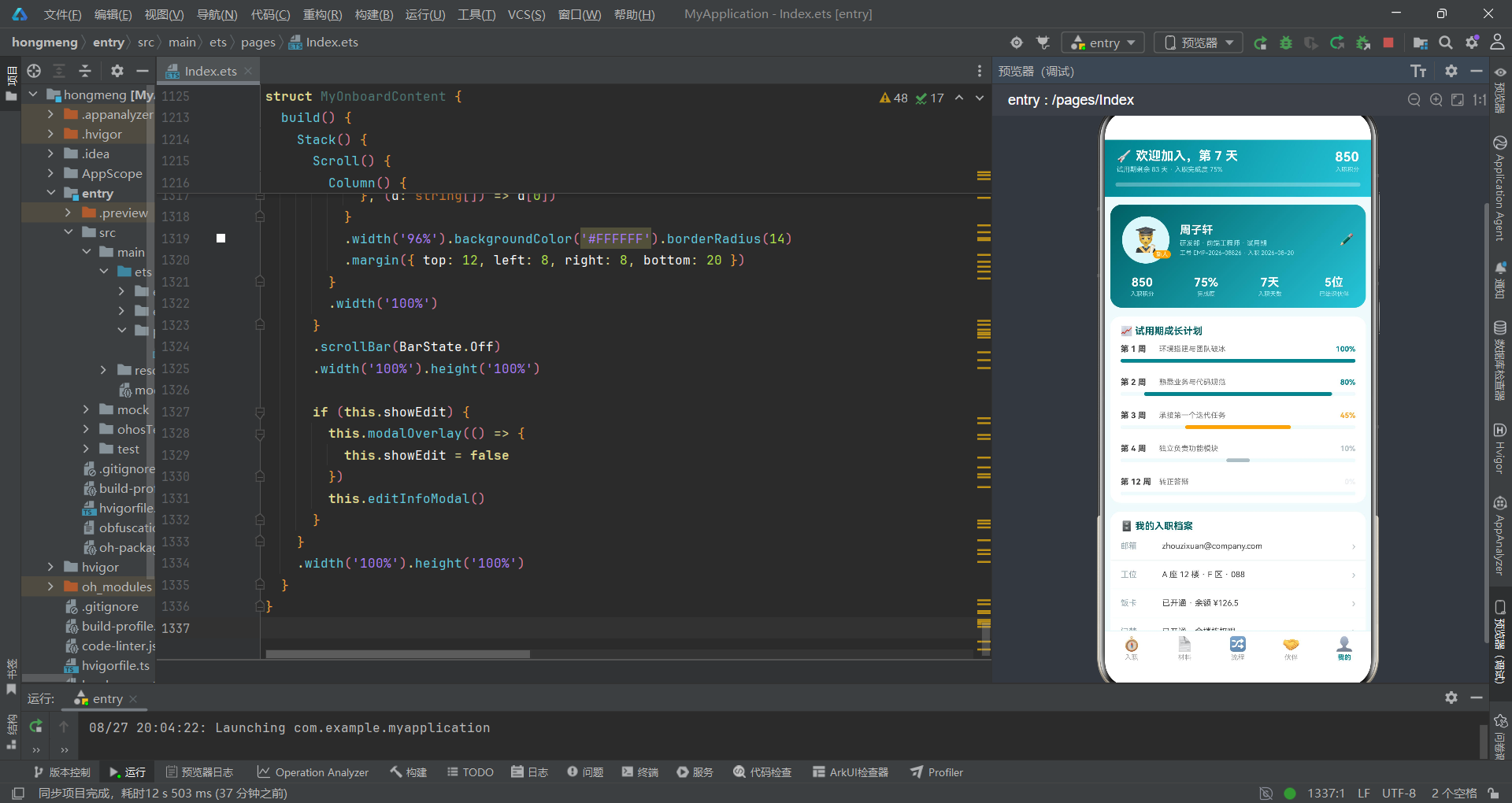
主入口组件 OnboardApp
@Entry装饰器标记OnboardApp为应用的根组件,即页面入口。@Component装饰器声明这是一个自定义组件。每个ArkTS页面有且仅有一个@Entry组件。
@Entry
@Component
struct OnboardApp {
  @State currentTab: OnboardTab = OnboardTab.TASK

  build() {
    Column() {
      // ===== 头部(电商风渐变:进度概览) =====
      Column() {
        Row() {
          Column() {
            Text('🚀 欢迎加入,第 7 天').fontSize(17).fontWeight(FontWeight.Bold).fontColor('#FFFFFF')
            Text('试用期剩余 83 天 · 入职完成度 75%').fontSize(9).fontColor('#B2EBF2').margin({ top: 3 })
          }
          .alignItems(HorizontalAlign.Start).layoutWeight(1)

          Column() {
            Text('850').fontSize(18).fontWeight(FontWeight.Bold).fontColor('#FFFFFF')
            Text('入职积分').fontSize(8).fontColor('#B2EBF2').margin({ top: 2 })
          }
          .alignItems(HorizontalAlign.End)
        }
        .width('100%').padding({ left: 16, right: 16, top: 12 })
        ...
      }
      .width('100%')
      .linearGradient({ angle: 120, colors: [['#00838F', 0], ['#26C6DA', 1]] }
@State装饰器声明了组件内部状态变量currentTab,初始值为OnboardTab.TASK。@State是ArkUI状态管理的核心,当被装饰的变量发生变化时,框架会自动触发build()方法的重新执行,更新依赖该状态的UI部分。这里currentTab控制着五个Tab页的切换,其值的改变会直接驱动内容区域的组件替换。
build()方法是每个组件必须实现的方法,返回该组件的UI结构。最外层的Column是垂直线性布局容器,将页面分为头部、内容区、底部Tab三个垂直区域。
头部区域是一个嵌套的Column,内部先放一个Row水平排列欢迎信息和积分信息。Row是ArkUI的水平布局容器,子元素默认从左到右排列。左侧Column使用alignItems(HorizontalAlign.Start)设置子元素左对齐,通过layoutWeight(1)占据剩余空间。右侧Column使用alignItems(HorizontalAlign.End)设置右对齐。Text组件的fontSize设置字体大小,fontWeight设置字重,fontColor设置文字颜色,margin设置外边距。
linearGradient是ArkUI的线性渐变样式方法,接受一个对象参数:angle指定渐变角度(120度),colors数组定义渐变颜色断点,['#00838F', 0]表示起点颜色为深青色,['#26C6DA', 1]表示终点颜色为亮青色。这种双色渐变营造了清新专业的视觉效果,符合企业人事应用的调性。
        // 入职进度条(动画特效)
        Column() {
          Column()
            .width(this.currentTab === OnboardTab.TASK ? '75%' : '0%')
            .height(6).backgroundColor('#FFFFFF').borderRadius(3)
            .animation({ duration: 1000, curve: Curve.EaseOut })
        }
        .width('92%').height(6).backgroundColor('rgba(255,255,255,0.3)').borderRadius(3)
        .margin({ top: 12, bottom: 14 })
这段代码实现了入职进度条动画。外层Column是进度条容器,宽度92%,高度6px,背景使用rgba半透明白色。内层Column是进度条填充部分,其宽度根据currentTab的值动态变化:当处于TASK页时显示75%宽度,其他页面显示0%宽度。animation方法为这个宽度变化添加了1000毫秒的缓出动画,Curve.EaseOut是缓出曲线,使得动画开始快、结束慢,给用户以柔和的视觉感受。
animation是ArkUI的属性动画方法,它作用于前一个属性变化。当width从'75%'变为'0%'或反向变化时,框架会以指定的时间和曲线自动插值,产生平滑的过渡效果。这种声明式动画的方式非常简洁,开发者只需声明起始和终止状态,动画过程由框架自动处理。
      // ===== 内容区 =====
      Column() {
        if (this.currentTab === OnboardTab.TASK) {
          TaskListContent()
        } else if (this.currentTab === OnboardTab.MATERIAL) {
          MaterialCheckContent()
        } else if (this.currentTab === OnboardTab.FLOW) {
          FlowTrackContent()
        } else if (this.currentTab === OnboardTab.BUDDY) {
          BuddyNetworkContent()
        } else {
          MyOnboardContent()
        }
      }
      .layoutWeight(1).width('100%')
内容区使用if-else条件渲染,根据currentTab的值决定渲染哪个子组件。这是ArkUI条件渲染的基本模式:在build()方法中使用if语句控制组件的创建和销毁。layoutWeight(1)使内容区占据头部和底部Tab之间的全部剩余空间。当currentTab变化时,框架会自动销毁旧组件、创建新组件,实现页面切换效果。
      // ===== 底部 Tab(5个单排) =====
      Divider().color('#E0F7FA').strokeWidth(1)

      Row() {
        ForEach(ONBOARD_TABS, (t: OnboardTabMeta, idx: number) => {
          Column() {
            Text(t.icon).fontSize(19)
              .animation({ duration: 200, curve: Curve.EaseOut })
            Text(t.label).fontSize(9)
              .fontColor(this.currentTab === idx ? '#00838F' : '#9E9E9E')
              .margin({ top: 2 })
              .fontWeight(this.currentTab === idx ? FontWeight.Bold : FontWeight.Normal)
          }
          .layoutWeight(1).alignItems(HorizontalAlign.Center)
          .padding({ top: 6, bottom: 6 })
          .onClick(() => {
            this.currentTab = idx as OnboardTab
          })
        }, (t: OnboardTabMeta) => t.label)
      }
      .width('100%').backgroundColor('#FFFFFF')
底部Tab栏使用Divider分隔线与内容区分隔。Divider是ArkUI的分割线组件,color设置颜色,strokeWidth设置线宽。
ForEach是ArkUI的循环渲染组件,其签名类似ForEach(arr, itemGenerator, keyGenerator)。第一个参数ONBOARD_TABS是数据源数组,第二个参数是项生成函数,接收每一项数据和索引idx,第三个参数是键值生成函数,用于框架的差分更新。这里使用t.label作为键值,确保Tab项的唯一标识。
每个Tab项是一个Column,包含图标Text和文字Text。图标添加了200毫秒的缓出动画,当Tab切换时图标会有轻微的过渡效果。文字颜色通过三元表达式this.currentTab === idx ? '#00838F' : '#9E9E9E'实现选中态和未选中态的颜色切换,选中时为深青色加粗,未选中时为灰色常规。onClick设置点击事件,将idx转换为OnboardTab枚举赋值给currentTab,触发页面切换。layoutWeight(1)使五个Tab等宽分布。
入职任务组件 TaskListContent
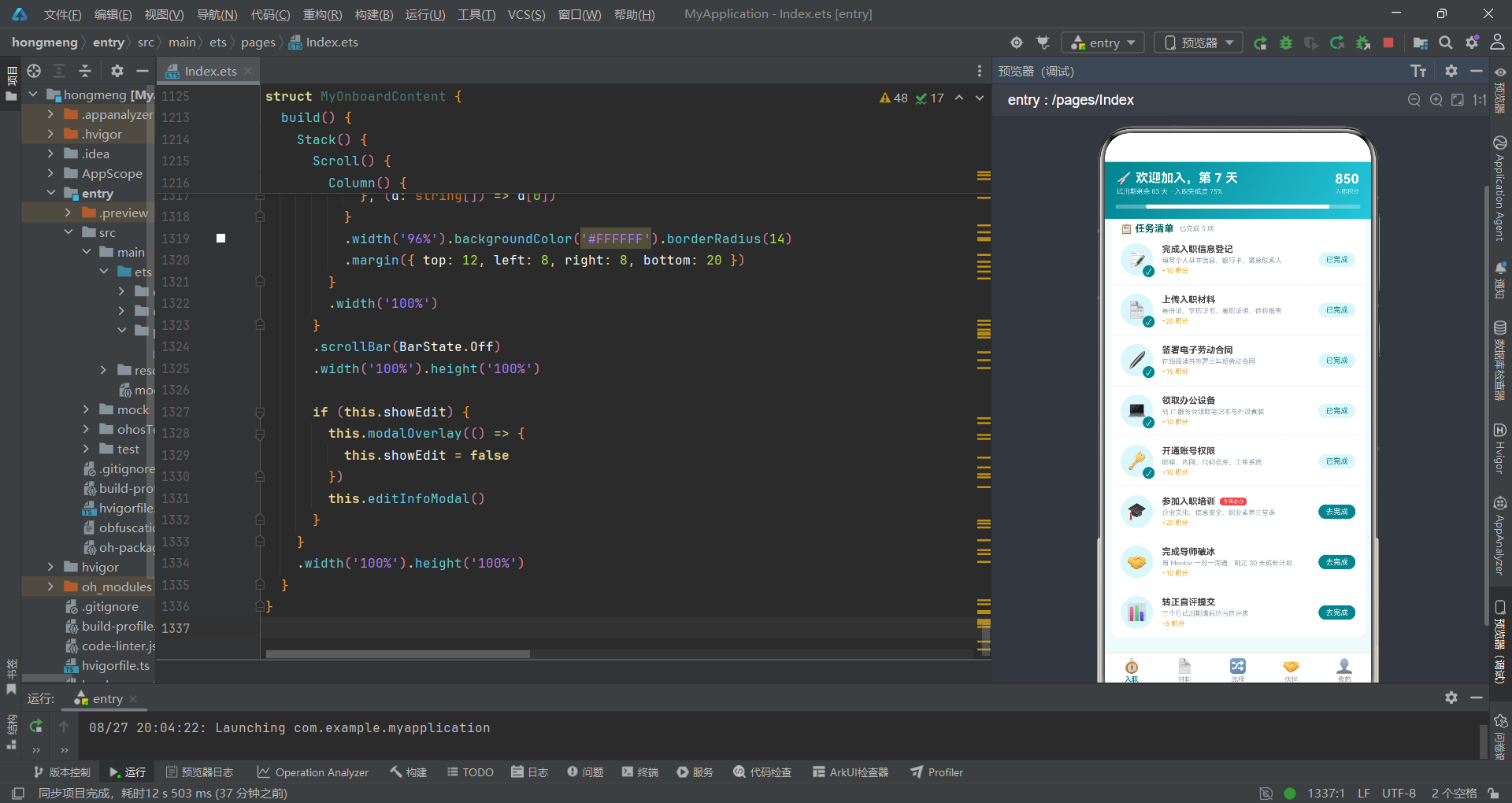
TaskListContent是入职Tab页的内容组件,负责展示入职任务清单、任务完成度、今日必办提示等功能。
@Component
struct TaskListContent {
  @State showConfirm: boolean = false
  @State taskTitle: string = '参加入职培训'
  @State taskDesc: string = '企业文化、信息安全、职业素养三堂课'
  @State taskIcon: string = '🎓'
  @State taskPoints: number = 20
  @State doneIds: number[] = [1, 2, 3, 4, 5]
  @State checkScale: number = 1.0
  @State barGrow: boolean = false
该组件声明了七个@State状态变量。showConfirm控制任务确认弹窗的显示与隐藏。taskTitle、taskDesc、taskIcon、taskPoints四个变量存储当前选中任务的信息,这些变量会在弹窗中动态显示。doneIds是一个数字数组,存储已完成任务的ID列表,初始值为[1, 2, 3, 4, 5],表示前五项任务已完成。checkScale用于任务勾选时的缩放动画。barGrow预留用于进度条动画触发。
  @Builder modalOverlay(onClose: () => void) {
    Column() {
      Column().width('100%').height('100%').backgroundColor('rgba(0,0,0,0.5)')
        .onClick(() => {
          onClose()
        })
    }
    .width('100%').height('100%').position({ x: 0, y: 0 }).zIndex(998)
  }
@Builder装饰器定义了一个可复用的UI构建方法。modalOverlay是弹窗遮罩层的通用模板,接收一个onClose回调函数参数。遮罩层是一个全屏Column,背景使用半透明黑色rgba(0,0,0,0.5),position设置为绝对定位覆盖全屏,zIndex(998)确保遮罩层位于内容之上但弹窗之下。点击遮罩层会触发onClose回调关闭弹窗。这种通过@Builder封装通用遮罩层的模式在应用的每个子组件中重复使用,保证了弹窗交互的一致性。
  // 弹框1:任务完成确认(清单勾选式)
  @Builder confirmTaskModal() {
    Column() {
      Column() {
        Row() {
          Text(this.taskIcon).fontSize(30).margin({ left: 16 })
          Column() {
            Text(this.taskTitle).fontSize(15).fontWeight(FontWeight.Bold).fontColor('#006064')
            Text('+' + this.taskPoints.toString() + ' 积分').fontSize(10).fontColor('#F9A825').margin({ top: 3 })
          }
          .alignItems(HorizontalAlign.Start).margin({ left: 10 })
        }
        .width('100%').padding({ top: 18 })

        Text(this.taskDesc).fontSize(11).fontColor('#757575')
          .width('100%').padding({ left: 16, top: 8 })
任务确认弹窗是一个居中卡片式弹窗。顶部Row水平排列任务图标和任务标题信息,图标使用fontSize(30)放大显示,标题下方显示可获得的积分值。this.taskPoints.toString()将数字转为字符串用于拼接显示,这是ArkTS中数字到字符串的常见转换方式。弹窗使用#006064(深青色)作为标题颜色,#F9A825(琥珀色)作为积分颜色,与整体青蓝配色方案保持一致。
        Column() {
          ForEach(['我已经完成该任务的全部要求', '相关证明材料已上传(如需)', '确认信息真实有效'], (r: string) => {
            Row() {
              Radio({ value: r, group: 'task' })
                .width(16).height(16)
              Text(r).fontSize(11).fontColor('#424242').margin({ left: 8 })
            }
            .width('100%').padding({ left: 16, top: 10 })
          }, (r: string) => r)
        }
        .width('100%')
弹窗中部使用ForEach渲染三个声明项,每项包含一个Radio单选按钮和对应的Text说明。Radio是ArkUI的单选框组件,value设置选项值,group设置单选组名,同一组内只能选中一个。这里将三个声明项放入同一个task组中,用户需要逐项确认。Radio的尺寸设置为16x16,与文字之间通过margin({ left: 8 })保持间距。
        Row() {
          Button() {
            Text('稍后再说').fontSize(13).fontColor('#616161')
          }
          .layoutWeight(1).height(38).backgroundColor('#ECEFF1').borderRadius(19)
          .onClick(() => {
            this.showConfirm = false
          })

          Button() {
            Text('✓ 确认完成').fontSize(13).fontColor('#FFFFFF')
          }
          .layoutWeight(1).height(38).backgroundColor('#00838F').borderRadius(19)
          .margin({ left: 12 })
          .onClick(() => {
            if (this.taskTitle === '参加入职培训') {
              this.doneIds = this.doneIds.concat([6])
            }
            this.checkScale = 1.4
            setTimeout(() => {
              this.checkScale = 1.0
            }, 200)
            this.showConfirm = false
          })
        }
        .width('88%').margin({ top: 20, bottom: 20 })
      }
      .width('90%').backgroundColor('#FFFFFF').borderRadius(16)
    }
    .width('100%').alignItems(HorizontalAlign.Center)
    .position({ y: '30%' }).zIndex(999)
弹窗底部是两个按钮的Row,使用layoutWeight(1)等宽分布。Button是ArkUI的按钮容器组件,内部包裹Text作为按钮文字。borderRadius(19)配合height(38)使按钮呈现胶囊形状。取消按钮使用灰色背景,确认按钮使用主题色#00838F背景。
确认按钮的onClick逻辑包含三个操作:首先检查当前任务标题是否为"参加入职培训",如果是则将任务ID 6添加到doneIds数组(使用concat方法返回新数组而非原地修改,这是ArkTS状态更新的推荐方式,确保框架能检测到变化);然后设置checkScale为1.4触发缩放动画,200毫秒后通过setTimeout恢复为1.0;最后关闭弹窗。
setTimeout在ArkTS中可用于延迟执行,配合animation属性可以实现"先放大再缩回"的弹性效果。整个弹窗使用position({ y: '30%' })垂直定位在屏幕30%处,zIndex(999)确保位于遮罩层之上。
  build() {
    Stack() {
      Scroll() {
        Column() {
          // 今日必办提示卡
          Row() {
            Text('⏰').fontSize(22)
            Column() {
              Text('今日必办').fontSize(12).fontWeight(FontWeight.Bold).fontColor('#FFFFFF')
              Text('「参加入职培训」 今天 16:00 · 3 号多功能厅').fontSize(9).fontColor('#B2EBF2').margin({ top: 3 })
            }
            .layoutWeight(1).alignItems(HorizontalAlign.Start).margin({ left: 10 })

            Text('去完成').fontSize(10).fontColor('#00838F').backgroundColor('#FFFFFF')
              .borderRadius(12).padding({ left: 12, right: 12, top: 5, bottom: 5 })
              .onClick(() => {
                this.taskTitle = '参加入职培训'
                this.taskDesc = '企业文化、信息安全、职业素养三堂课,完成全部课程并通过随堂测验'
                this.taskIcon = '🎓'
                this.taskPoints = 20
                this.showConfirm = true
              })
          }
          .width('96%').padding(14)
          .linearGradient({ angle: 135, colors: [['#006064', 0], ['#00ACC1', 1]] })
          .borderRadius(14).margin({ top: 10 })
build()方法使用Stack作为根容器。Stack是ArkUI的层叠布局容器,子元素可以重叠放置,后声明的子元素位于上层。这里使用Stack的目的是将弹窗层叠加在内容层之上。
Scroll是可滚动容器组件,当内容超出可视区域时用户可以滚动查看。scrollBar(BarState.Off)隐藏滚动条,使界面更简洁。
今日必办提示卡是一个Row,使用linearGradient渐变背景,从#006064(深青色)到#00ACC1(亮青色),135度渐变方向。左侧是闹钟emoji和任务信息,右侧是"去完成"按钮,使用白色背景和青色文字形成反差按钮效果。点击按钮时,将任务信息赋值到状态变量并打开确认弹窗,这种模式实现了任务信息的动态传递。
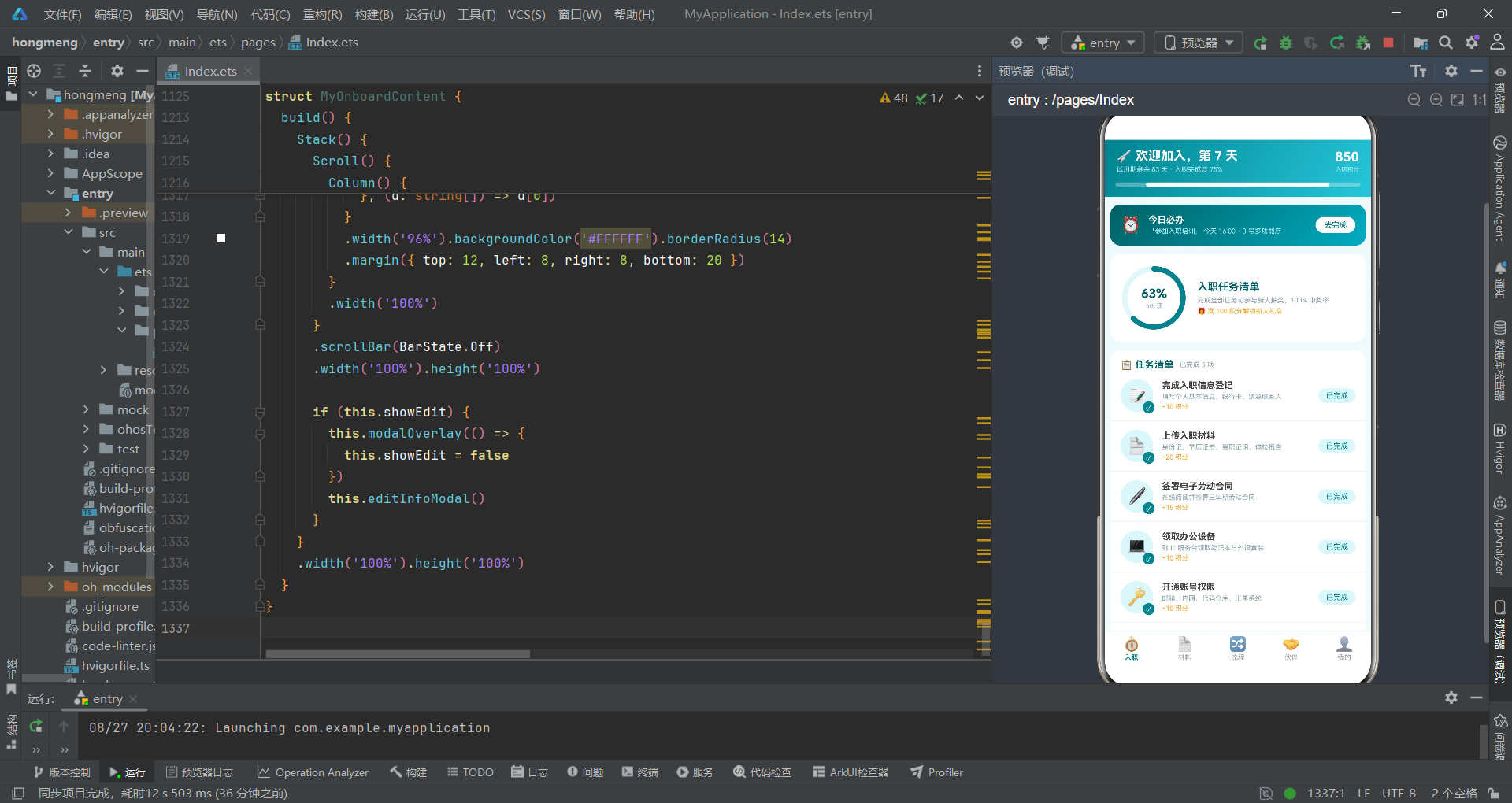
          // 任务完成度环
          Row() {
            Stack() {
              Progress({ value: this.doneIds.length, total: 8, type: ProgressType.Ring })
                .width(86).height(86)
                .color('#00838F').backgroundColor('#E0F7FA')
                .style({ strokeWidth: 7 })
                .animation({ duration: 900, curve: Curve.EaseOut })

              Column() {
                Text((this.doneIds.length / 8 * 100).toFixed(0) + '%').fontSize(17).fontWeight(FontWeight.Bold).fontColor('#006064')
                Text(this.doneIds.length + '/8 项').fontSize(8).fontColor('#90A4AE').margin({ top: 2 })
              }
            }
任务完成度环使用了Stack层叠布局,将Progress环形进度条和中心文字Column叠加在一起。Progress是ArkUI的进度组件,type: ProgressType.Ring指定为环形进度条,value为当前值(已完成任务数),total为总值(8项)。style({ strokeWidth: 7 })设置环形线条宽度。animation为进度变化添加900毫秒的缓出动画。
中心文字使用(this.doneIds.length / 8 * 100).toFixed(0)计算完成百分比,toFixed(0)将浮点数四舍五入为整数字符串。Stack的层叠特性使得中心文字完美居中在环形进度条内部,这是Stack组件最典型的使用场景——当需要将一个元素居中叠加在另一个元素之上时,Stack是最佳选择。
          // 任务列表
          Column() {
            Row() {
              Text('📋 任务清单').fontSize(13).fontWeight(FontWeight.Bold).fontColor('#006064')
              Text('已完成 ' + this.doneIds.length.toString() + ' 项').fontSize(9).fontColor('#90A4AE').margin({ left: 8 })
            }
            .width('100%').padding({ left: 14, right: 14, top: 12 })

            ForEach(TASK_LIST, (t: OnboardTask) => {
              Row() {
                Stack() {
                  Text(t.icon).fontSize(22)
                    .width(44).height(44).backgroundColor('#E0F7FA').borderRadius(22)
                    .textAlign(TextAlign.Center)
                  if (this.doneIds.indexOf(t.id) >= 0) {
                    Text('✓').fontSize(11).fontColor('#FFFFFF').backgroundColor('#00838F')
                      .width(16).height(16).borderRadius(8).textAlign(TextAlign.Center)
                      .animation({ duration: 150, curve: Curve.EaseOut })
                      .position({ x: 30, y: 30 })
                  }
                }
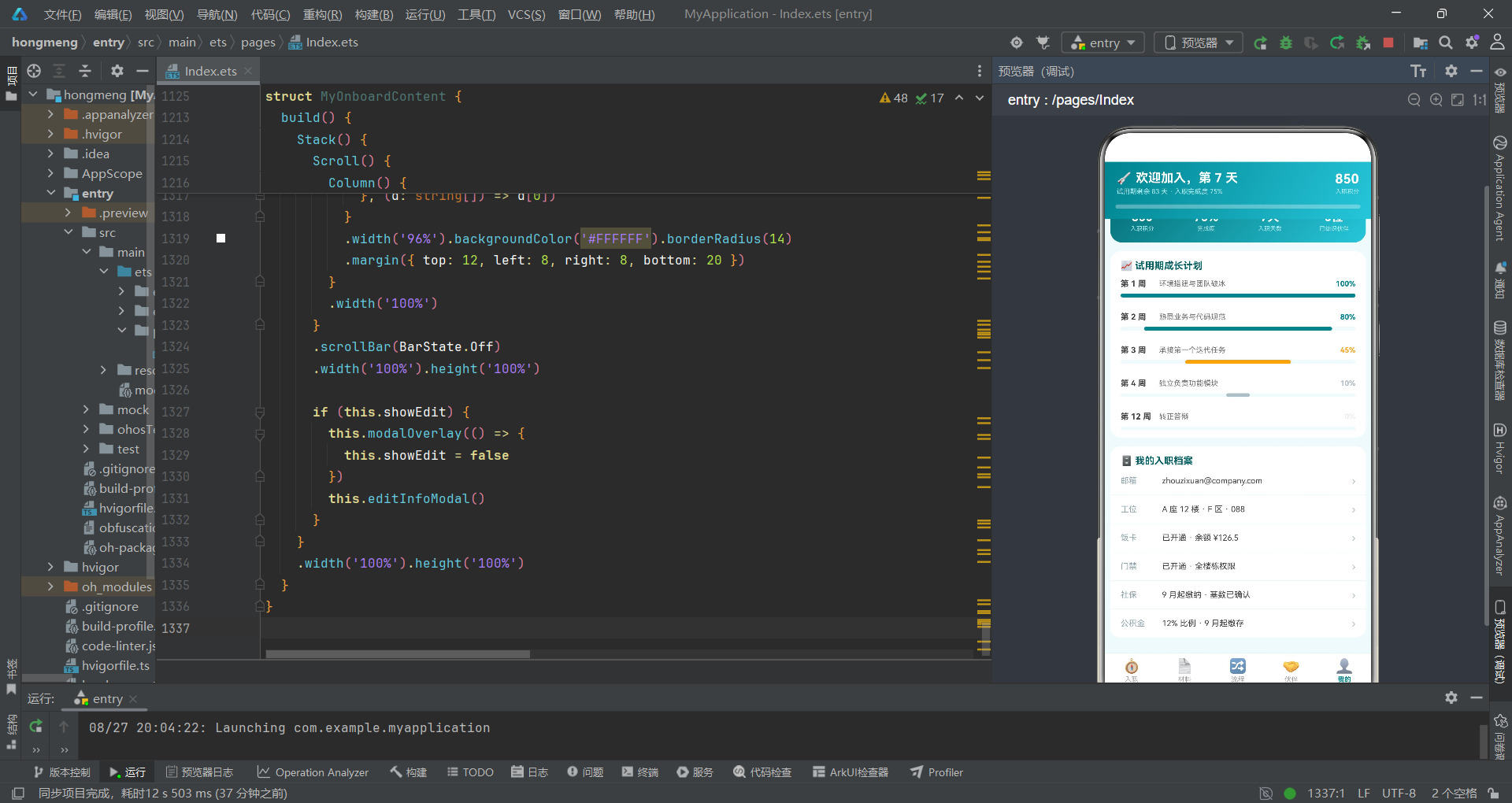
任务列表使用ForEach遍历TASK_LIST数组渲染每个任务项。每个任务项的左侧图标区域使用Stack层叠布局:底层是44x44的圆形背景Text,上层是已完成状态时的勾选标记。this.doneIds.indexOf(t.id)检查当前任务ID是否在已完成数组中,>= 0表示已找到(indexOf返回-1表示未找到)。勾选标记使用position({ x: 30, y: 30 })绝对定位在图标右下角,形成角标效果,并添加150毫秒的动画。
                Column() {
                  Row() {
                    Text(t.title).fontSize(12).fontWeight(FontWeight.Bold).fontColor('#424242')
                    if (t.urgent && this.doneIds.indexOf(t.id) < 0) {
                      Text('今日必办').fontSize(7).fontColor('#FFFFFF').backgroundColor('#EF5350')
                        .borderRadius(4).padding({ left: 4, right: 4, top: 1, bottom: 1 }).margin({ left: 6 })
                    }
                  }
                  Text(t.desc).fontSize(9).fontColor('#90A4AE').margin({ top: 3 })
                  Text('+' + t.points.toString() + ' 积分').fontSize(9).fontColor('#F9A825').margin({ top: 3 })
                }
                .layoutWeight(1).alignItems(HorizontalAlign.Start).margin({ left: 12 })
任务信息区域是一个Column,使用条件渲染if (t.urgent && this.doneIds.indexOf(t.id) < 0)判断是否显示"今日必办"红色标签。条件渲染中的两个条件通过&&逻辑与连接:任务本身标记为紧急且尚未完成时才显示标签。#EF5350是红色背景,fontSize(7)使标签文字小于标题文字,borderRadius(4)和padding使标签呈现小圆角矩形形态。
                if (this.doneIds.indexOf(t.id) >= 0) {
                  Text('已完成').fontSize(10).fontColor('#00838F').backgroundColor('#E0F7FA')
                    .borderRadius(10).padding({ left: 10, right: 10, top: 4, bottom: 4 })
                } else {
                  Text('去完成').fontSize(10).fontColor('#FFFFFF').backgroundColor('#00838F')
                    .borderRadius(10).padding({ left: 10, right: 10, top: 4, bottom: 4 })
                    .onClick(() => {
                      this.taskTitle = t.title
                      this.taskDesc = t.desc
                      this.taskIcon = t.icon
                      this.taskPoints = t.points
                      this.showConfirm = true
                    })
                }
任务右侧的操作按钮使用if-else条件渲染:已完成时显示灰底"已完成"标签,未完成时显示主题色"去完成"按钮。点击"去完成"按钮时,将当前任务的信息赋值到状态变量并打开确认弹窗。这种动态赋值的方式实现了弹窗内容的动态化——同一个弹窗模板可以根据不同的任务数据展示不同内容。
材料清单组件 MaterialCheckContent
MaterialCheckContent负责入职材料的提交、审核状态展示和材料上传功能。
@Component
struct MaterialCheckContent {
  @State showUpload: boolean = false
  @State matName: string = '银行卡复印件'
  @State uploadNote: string = ''
  @State uploadType: string = '原件拍照'
该组件管理四个状态变量。showUpload控制上传弹窗显示。matName存储当前操作的材料名称。uploadNote存储上传备注文本,初始为空字符串。uploadType存储上传方式选择,默认为"原件拍照"。这些状态变量在弹窗交互中被读取和修改,实现了表单数据的双向绑定。
  // 弹框2:材料上传(类型单选+备注+重新上传)
  @Builder uploadModal() {
    Column() {
      Column() {
        Text('📤 上传材料').fontSize(16).fontWeight(FontWeight.Bold).fontColor('#006064')
          .width('100%').padding({ top: 16, left: 16 })

        Row() {
          Text('材料名称').fontSize(11).fontColor('#757575').width(64)
          Text(this.matName).fontSize(12).fontWeight(FontWeight.Bold).fontColor('#424242')
        }
        .width('88%').margin({ top: 14 })

        Text('上传方式').fontSize(11).fontColor('#757575').width('88%').margin({ top: 14 })

        Row() {
          ForEach(['原件拍照', '扫描件', '电子档'], (t: string) => {
            Text(t).fontSize(11)
              .fontColor(this.uploadType === t ? '#FFFFFF' : '#00838F')
              .backgroundColor(this.uploadType === t ? '#00838F' : '#E0F7FA')
              .borderRadius(13).padding({ left: 14, right: 14, top: 6, bottom: 6 })
              .margin({ right: 10 })
              .onClick(() => {
                this.uploadType = t
              })
          }, (t: string) => t)
        }
        .width('88%').margin({ top: 8 })
上传弹窗中"上传方式"的选择使用了ForEach渲染三个选项的标签式选择器。每个选项的选中态通过三元表达式控制颜色和背景:选中时为白字青底,未选中时为青字浅底。点击选项时将值赋给uploadType状态变量,框架自动更新UI。这种标签式单选是移动端常见的选择交互模式,比传统的Radio单选按钮更直观美观。
        TextArea({ placeholder: '补充说明材料情况,如照片模糊原因等...', text: this.uploadNote })
          .fontSize(12).height(60)
          .width('88%').backgroundColor('#F0FAFB').borderRadius(8)
          .margin({ top: 6 })
          .onChange((v: string) => {
            this.uploadNote = v
          })
TextArea是ArkUI的多行文本输入组件,placeholder设置占位提示文字,text参数绑定初始文本内容。onChange是文本变化回调,参数v为当前文本值,在回调中将新值赋给uploadNote状态变量,实现数据的双向绑定。backgroundColor和borderRadius设置了输入区域的视觉样式,使其与弹窗整体风格协调。
        Row() {
          Text('📷').fontSize(30)
            .width(64).height(64).backgroundColor('#E0F7FA').borderRadius(10)
            .textAlign(TextAlign.Center)
          Text('🖼️').fontSize(30)
            .width(64).height(64).backgroundColor('#E0F7FA').borderRadius(10)
            .textAlign(TextAlign.Center).margin({ left: 10 })
          Text('+').fontSize(24).fontColor('#00838F')
            .width(64).height(64).backgroundColor('#F0FAFB').borderRadius(10)
            .border({ width: 1, color: '#B2EBF2' })
            .textAlign(TextAlign.Center).margin({ left: 10 })
        }
        .width('88%').margin({ top: 14 })
材料图片上传区域使用Row水平排列三个64x64的图标方块:已上传的两张图片以emoji形式展示,第三个是添加按钮,使用border设置虚线边框效果。border方法接受一个对象参数,width设置边框宽度,color设置边框颜色。这种设计虽然在真实应用中需要对接文件选择器,但在视觉原型层面完整地表达了交互意图。
  build() {
    Stack() {
      Scroll() {
        Column() {
          // 材料进度概览
          Row() {
            Column() {
              Text('4').fontSize(22).fontWeight(FontWeight.Bold).fontColor('#FFFFFF')
              Text('已通过').fontSize(8).fontColor('#B2EBF2').margin({ top: 2 })
            }
            .layoutWeight(1).alignItems(HorizontalAlign.Center)
            ...
          }
          .width('96%').padding({ top: 14, bottom: 14 })
          .linearGradient({ angle: 135, colors: [['#006064', 0], ['#00ACC1', 1]] })
          .borderRadius(14).margin({ top: 10 })
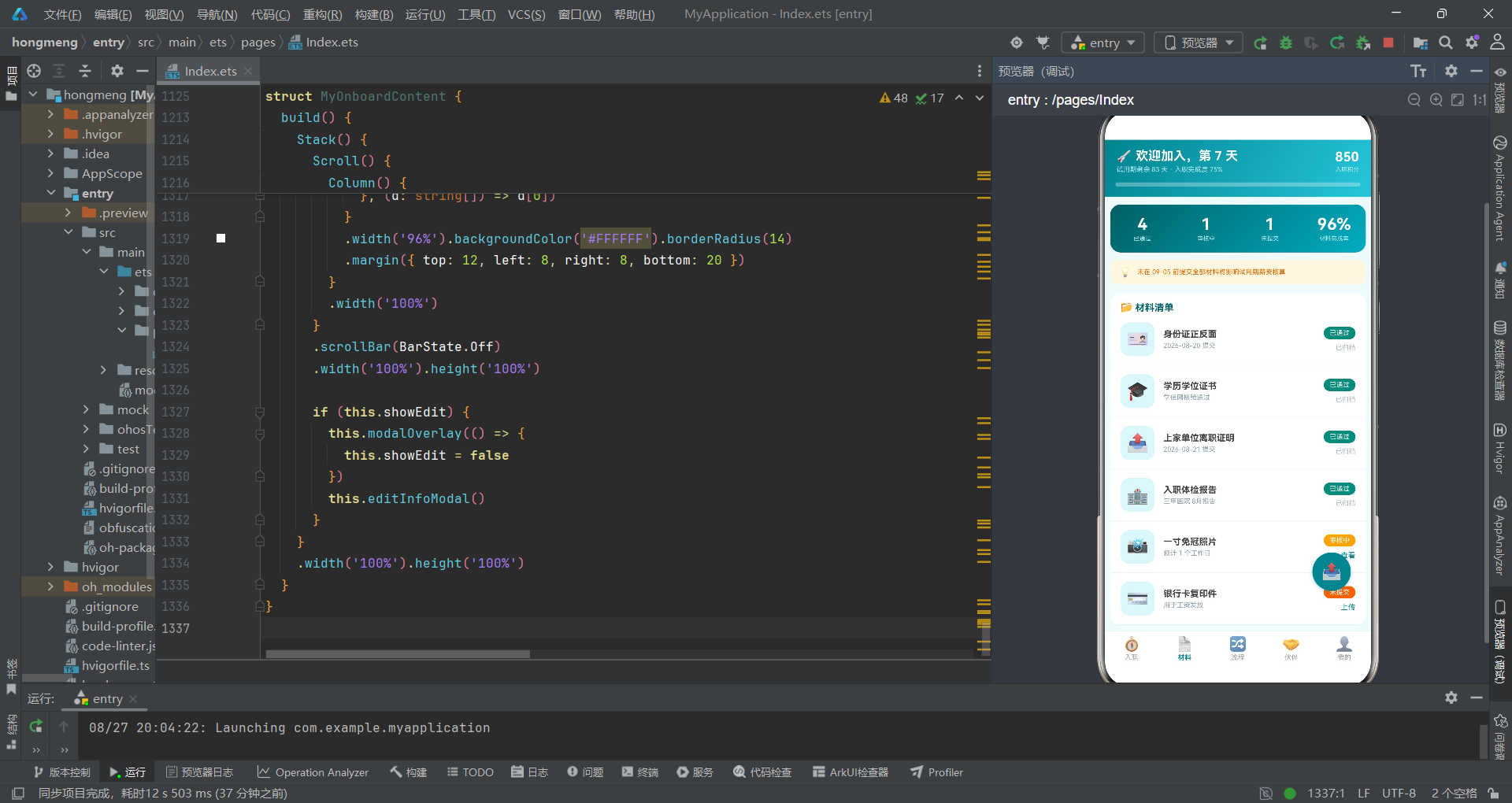
材料进度概览卡使用四个等宽Column(通过layoutWeight(1))分别展示已通过、审核中、未提交、完成率四项数据。渐变背景与头部一致,形成视觉统一性。alignItems(HorizontalAlign.Center)使每个数据块内部居中对齐。
          // 材料列表
          Column() {
            ForEach(MATERIAL_LIST, (m: MaterialItem) => {
              Row() {
                Text(m.icon).fontSize(24)
                  .width(46).height(46).backgroundColor('#E0F7FA').borderRadius(12)
                  .textAlign(TextAlign.Center)

                Column() {
                  Text(m.name).fontSize(12).fontWeight(FontWeight.Bold).fontColor('#424242')
                  Text(m.note).fontSize(9).fontColor('#90A4AE').margin({ top: 3 })
                }
                .layoutWeight(1).alignItems(HorizontalAlign.Start).margin({ left: 12 })

                Column() {
                  Text(m.status).fontSize(9).fontColor('#FFFFFF')
                    .backgroundColor(getMatStatusColor(m.status))
                    .borderRadius(9).padding({ left: 8, right: 8, top: 3, bottom: 3 })
                  if (m.status !== '已通过') {
                    Text(m.status === '审核中' ? '查看' : '上传').fontSize(10).fontColor('#00838F')
                      .margin({ top: 6 })
                      .onClick(() => {
                        this.matName = m.name
                        this.showUpload = true
                      })
                  } else {
                    Text('已归档').fontSize(9).fontColor('#B0BEC5').margin({ top: 6 })
                  }
                }
                .alignItems(HorizontalAlign.End)
              }
              .width('100%').padding({ left: 14, right: 14, top: 12, bottom: 12 })

              Divider().color('#E0F7FA')
            }, (m: MaterialItem) => m.id.toString())
          }
材料列表使用ForEach遍历MATERIAL_LIST渲染。每个材料项右侧使用getMatStatusColor(m.status)函数动态获取状态颜色,这是一种将逻辑与UI分离的良好实践。操作按钮根据状态动态变化:已通过显示"已归档"、审核中显示"查看"、未提交显示"上传"。每项之间使用Divider分割线分隔,Divider是ArkUI的分割线组件,color设置颜色。
      // 悬浮上传按钮
      Text('📤').fontSize(22)
        .width(52).height(52).backgroundColor('#00838F').borderRadius(26)
        .textAlign(TextAlign.Center)
        .shadow({ radius: 12, color: 'rgba(0,131,143,0.35)', offsetX: 0, offsetY: 4 })
        .position({ x: '78%', y: '82%' })
        .onClick(() => {
          this.matName = '银行卡复印件'
          this.showUpload = true
        })
悬浮上传按钮是一个52x52的圆形Text组件,使用shadow方法添加阴影效果实现浮动感。shadow方法接收对象参数:radius设置模糊半径,color设置阴影颜色(使用半透明青色),offsetX和offsetY设置阴影偏移量。position将按钮绝对定位到屏幕右下角区域(78%, 82%),这是Material Design中FAB(Floating Action Button)的经典位置。由于按钮声明在Stack内部,它可以叠加在Scroll内容之上,不随内容滚动而移动。
流程跟踪组件 FlowTrackContent
FlowTrackContent负责入职流程的跟踪展示和离职服务管理,是整个应用中弹窗逻辑最复杂的组件。
@Component
struct FlowTrackContent {
  @State showOffboard: boolean = false
  @State showCancel: boolean = false
  @State lastDay: string = '2026-11-20'
  @State offReason: string = '个人职业规划'
  @State handover: string = '王莉'
  @State showDeleteWarn: boolean = false
该组件管理六个状态变量,涉及两个弹窗和离职表单数据。showOffboard控制离职申请弹窗,showDeleteWarn控制撤回离职警示弹窗。lastDay、offReason、handover分别存储离职表单中的最后工作日、离职原因、交接人信息。
  // 弹框3:离职申请(底部抽屉:原因+最后工作日+交接人)
  @Builder offboardModal() {
    Column() {
      Column() {
        Row() {
          Text('🚪 离职申请').fontSize(16).fontWeight(FontWeight.Bold).fontColor('#B71C1C')
          Text('✕').fontSize(15).fontColor('#9E9E9E').margin({ left: 10 })
            .onClick(() => {
              this.showOffboard = false
            })
        }
        .width('100%').padding({ left: 16, right: 16, top: 16 })
离职申请弹窗采用底部抽屉式设计,使用borderRadius({ topLeft: 20, topRight: 20 })只设置上方圆角,模拟从底部滑入的抽屉效果。标题使用#B71C1C红色,与入职主题的青色形成对比,暗示这是一个严肃的操作。关闭按钮使用emoji"✕"实现,简洁有效。
        Column() {
          ForEach(['个人职业规划', '家庭因素', '健康原因', '继续深造', '其他'], (r: string) => {
            Row() {
              Radio({ value: r, group: 'offreason' })
                .checked(this.offReason === r)
                .width(15).height(15)
                .onChange((c: boolean) => {
                  if (c) {
                    this.offReason = r
                  }
                })
              Text(r).fontSize(11).fontColor('#424242').margin({ left: 8 })
            }
            .width('88%').padding({ top: 8 })
          }, (r: string) => r)
        }
离职原因使用Radio单选按钮组,五个选项通过ForEach渲染。checked方法设置选中状态,通过比较this.offReason === r判断当前选项是否被选中。onChange回调在选中状态变化时触发,参数c为布尔值表示是否被选中,当c为true时将选项值赋给offReason。这种模式比标签式选择器更传统,适合选项较多或文字较长的场景。
        Row() {
          Text('交接人').fontSize(11).fontColor('#757575').width(80)
          ForEach(['王莉', '陈默', '刘芳'], (h: string) => {
            Text(h).fontSize(10)
              .fontColor(this.handover === h ? '#FFFFFF' : '#00838F')
              .backgroundColor(this.handover === h ? '#00838F' : '#E0F7FA')
              .borderRadius(11).padding({ left: 12, right: 12, top: 4, bottom: 4 })
              .margin({ right: 8 })
              .onClick(() => {
                this.handover = h
              })
          }, (h: string) => h)
        }
        .width('88%').margin({ top: 14 })
交接人选择使用了与上传方式相同的标签式单选模式,三个候选人通过ForEach渲染。这种标签式选择器在移动端交互中体验优于传统的下拉列表,因为减少了操作层级(不需要展开列表)。
  // 弹框4:撤回离职申请(警示卡)
  @Builder cancelOffboardModal() {
    Column() {
      Column() {
        Text('⚠️').fontSize(34).margin({ top: 16 })
        Text('确认提交离职申请?').fontSize(15).fontWeight(FontWeight.Bold).fontColor('#B71C1C').margin({ top: 8 })
        Text('提交后将通知直属主管进行离职面谈,试用期离职需提前 3 天,正式员工需提前 30 天。').fontSize(10).fontColor('#757575')
          .textAlign(TextAlign.Center).margin({ top: 8 }).padding({ left: 24, right: 24 })

        Text('离职原因:' + this.offReason).fontSize(10).fontColor('#424242').margin({ top: 8 })
        Text('最后工作日:' + this.lastDay).fontSize(10).fontColor('#424242').margin({ top: 4 })
        Text('工作交接人:' + this.handover).fontSize(10).fontColor('#424242').margin({ top: 4 })
撤回离职警示弹窗是一个居中卡片式弹窗,使用警告emoji和红色文字营造严肃氛围。弹窗中回显了用户在离职申请表单中填写的信息(原因、最后工作日、交接人),让用户在最终确认前再次核对。这种"二次确认"模式在涉及不可逆操作的场景中是必要的安全措施。textAlign(TextAlign.Center)设置文字居中对齐,配合padding使文字两侧留出适当间距。
  build() {
    Stack() {
      Scroll() {
        Column() {
          // 横向步骤条
          Column() {
            Text('📍 当前流程位置').fontSize(13).fontWeight(FontWeight.Bold).fontColor('#006064')
              .width('100%').padding({ left: 14, top: 12 })

            Scroll() {
              Row() {
                ForEach(FLOW_STEPS, (s: FlowStep) => {
                  Column() {
                    Stack() {
                      Column()
                        .width(30).height(30).borderRadius(15)
                        .backgroundColor(s.state === '已完成' ? '#00838F' : (s.state === '进行中' ? '#F9A825' : '#ECEFF1'))
                      Text(s.state === '已完成' ? '✓' : s.id.toString())
                        .fontSize(12).fontWeight(FontWeight.Bold)
                        .fontColor(s.state === '已完成' ? '#FFFFFF' : (s.state === '进行中' ? '#FFFFFF' : '#90A4AE'))
                    }

                    Text(s.title).fontSize(8)
                      .fontColor(s.state === '进行中' ? '#F9A825' : '#90A4AE')
                      .margin({ top: 5 })

                    Column()
                      .width(s.id === 6 ? 0 : 24).height(2)
                      .backgroundColor(s.state === '已完成' ? '#00838F' : '#E0E0E0')
                      .margin({ top: 5 })
                  }
                  .alignItems(HorizontalAlign.Center)
                  .margin({ left: 8, right: 8 })
                }, (s: FlowStep) => s.id.toString())
              }
              .padding({ left: 10, right: 10 })
            }
            .scrollable(ScrollDirection.Horizontal).scrollBar(BarState.Off)
            .width('100%').margin({ top: 12, bottom: 14 })
          }
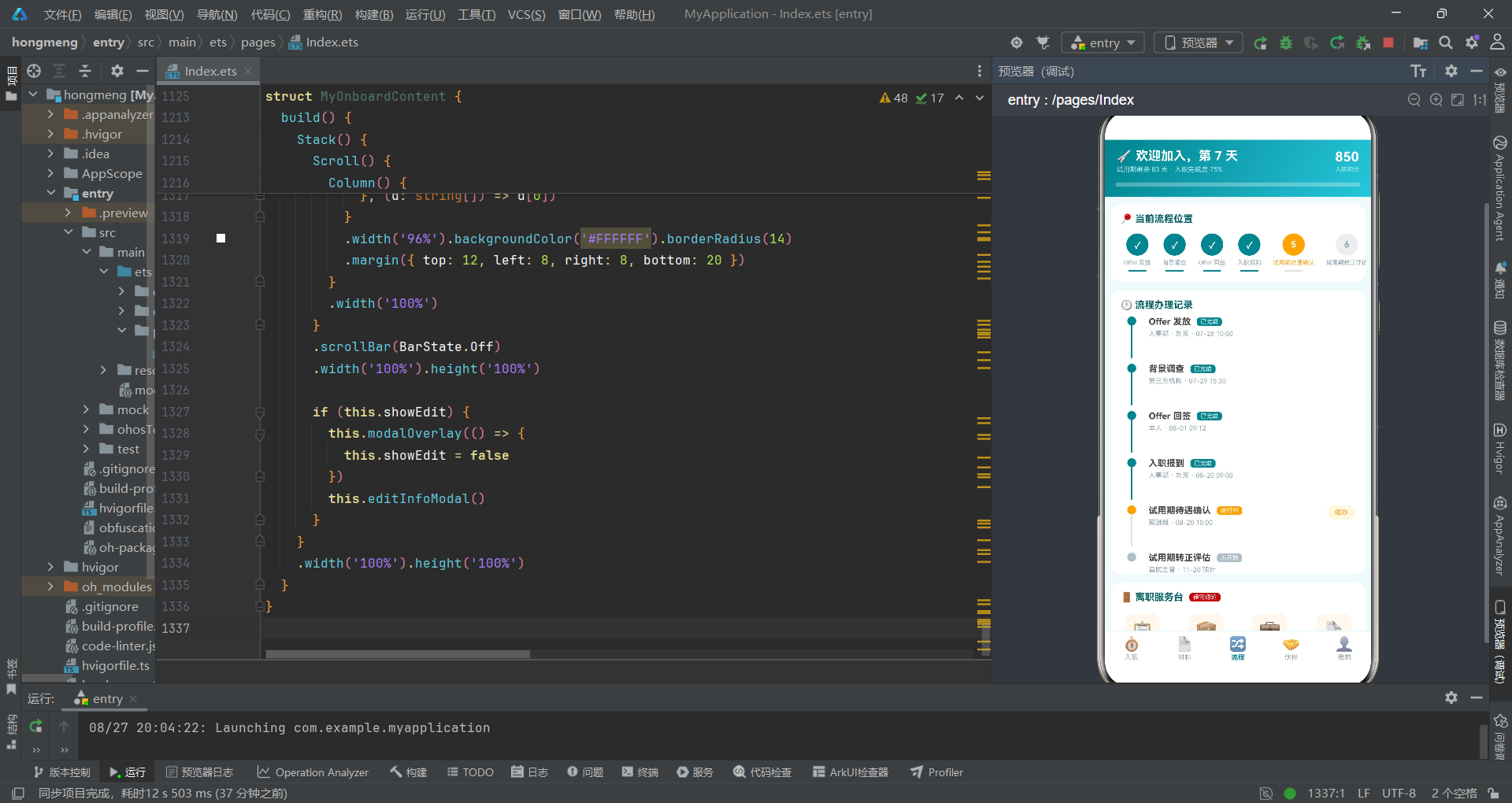
横向步骤条使用了嵌套Scroll(水平方向ScrollDirection.Horizontal)来展示六个流程步骤,解决步骤过多时屏幕宽度不足的问题。每个步骤由Stack(圆形节点+文字/勾选标记)、步骤标题Text、连接线Column三部分组成。Stack内的圆形节点使用三元嵌套表达式根据状态设置颜色:已完成为青色、进行中为琥珀色、未开始为浅灰色。最后一个步骤(id=6)不显示连接线,通过s.id === 6 ? 0 : 24将宽度设为0来隐藏。scrollable(ScrollDirection.Horizontal)设置水平滚动方向。
          // 垂直时间轴
          Column() {
            ForEach(FLOW_STEPS, (s: FlowStep) => {
              Row() {
                Column() {
                  Column()
                    .width(12).height(12).borderRadius(6)
                    .backgroundColor(getFlowStateColor(s.state))
                  if (s.id !== 6) {
                    Column()
                      .width(2).height(44)
                      .backgroundColor(s.state === '已完成' ? '#00838F' : '#E0E0E0')
                  }
                }
                .alignItems(HorizontalAlign.Center).width(30)

                Column() {
                  Row() {
                    Text(s.title).fontSize(12).fontWeight(FontWeight.Bold).fontColor('#424242')
                    Text(s.state).fontSize(8).fontColor('#FFFFFF')
                      .backgroundColor(getFlowStateColor(s.state))
                      .borderRadius(4).padding({ left: 5, right: 5, top: 1, bottom: 1 }).margin({ left: 8 })
                  }
                  Text(s.operator + ' · ' + s.time).fontSize(9).fontColor('#90A4AE').margin({ top: 4 })
                }
                .layoutWeight(1).alignItems(HorizontalAlign.Start).margin({ left: 8 })

                if (s.state === '进行中') {
                  Text('催办').fontSize(9).fontColor('#F9A825').backgroundColor('#FFF8E1')
                    .borderRadius(9).padding({ left: 10, right: 10, top: 4, bottom: 4 })
                }
              }
              .width('100%').alignItems(VerticalAlign.Top)
              .padding({ left: 14, right: 14, top: 8 })
            }, (s: FlowStep) => s.id.toString())
          }
垂直时间轴是横向步骤条的详细展开版本,使用ForEach遍历FLOW_STEPS渲染。每行左侧是一个Column包含圆点和连接线(类似时间轴的纵线),右侧是步骤详细信息。连接线高度44px,颜色根据状态动态变化。"进行中"状态的步骤右侧额外显示"催办"按钮,使用浅黄背景#FFF8E1和琥珀色文字。alignItems(VerticalAlign.Top)确保行内元素顶部对齐,使圆点与标题在同一水平线上。
          // 离职服务入口
          Column() {
            Row() {
              Text('🚪 离职服务台').fontSize(13).fontWeight(FontWeight.Bold).fontColor('#006064')
              Text('保密通道').fontSize(8).fontColor('#FFFFFF').backgroundColor('#B71C1C')
                .borderRadius(4).padding({ left: 5, right: 5, top: 1, bottom: 1 }).margin({ left: 8 })
            }

            Row() {
              ForEach([['📋', '离职申请', '提交离职意向'], ['📦', '交接清单', '工作交接模板'], ['💼', '社保转移', '公积金提取指引'], ['📄', '证明开具', '离职证明下载']], (e: string[]) => {
                Column() {
                  Text(e[0]).fontSize(24)
                    .width(48).height(48).backgroundColor('#FFF8F0').borderRadius(12)
                    .textAlign(TextAlign.Center)
                  Text(e[1]).fontSize(9).fontWeight(FontWeight.Bold).fontColor('#424242').margin({ top: 6 })
                  Text(e[2]).fontSize(7).fontColor('#90A4AE').margin({ top: 2 })
                }
                .layoutWeight(1).alignItems(HorizontalAlign.Center)
                .onClick(() => {
                  if (e[1] === '离职申请') {
                    this.showOffboard = true
                  }
                })
              }, (e: string[]) => e[1])
            }
          }
离职服务入口使用四列等宽网格(通过layoutWeight(1)),每个入口是emoji图标加标题加说明的三层结构。onClick中通过条件判断e[1] === '离职申请'决定点击行为,只有"离职申请"入口会触发离职弹窗,其他入口为视觉展示。这种设计将业务逻辑与数据驱动结合,ForEach的数据源是字符串数组的数组,每个子数组包含三个元素(emoji、标题、说明)。
入职伙伴组件 BuddyNetworkContent
@Component
struct BuddyNetworkContent {
  @State showCall: boolean = false
  @State buddyName: string = '王莉'
  @State buddyDuty: string = '入职 Buddy'
  @State askedIds: number[] = [1, 3, 6]
该组件管理四个状态:showCall控制联系弹窗,buddyName和buddyDuty存储当前选中的伙伴信息,askedIds数组记录已求助过的伙伴ID列表。
  // 弹框5:联系伙伴(底部抽屉:联系方式+留言)
  @Builder callBuddyModal() {
    Column() {
      Column() {
        Row() {
          Text('🤝 联系 ' + this.buddyName).fontSize(16).fontWeight(FontWeight.Bold).fontColor('#006064')
        }
        .width('100%').padding({ left: 16, top: 16 })

        Text('TA 的角色:' + this.buddyDuty).fontSize(10).fontColor('#90A4AE')
          .width('100%').padding({ left: 16, top: 6 })

        Row() {
          Text('📞').fontSize(20).width(40).height(40).backgroundColor('#E0F7FA').borderRadius(20).textAlign(TextAlign.Center)
          Text('电话 138****6688').fontSize(11).fontColor('#424242').margin({ left: 10 })
        }
        .width('88%').padding({ top: 14 })
联系伙伴弹窗是底部抽屉式设计,展示三种联系方式(电话、消息、邮箱)和留言区域。每种联系方式使用Row水平排列圆形emoji图标和说明文字,图标背景使用#E0F7FA浅青色保持一致性。电话号码使用脱敏格式138****6688,这在企业应用中是常见的隐私保护做法。
          // 伙伴打卡周报柱状图
          Column() {
            Text('📊 本周伙伴互动打卡').fontSize(13).fontWeight(FontWeight.Bold).fontColor('#006064')
              .width('100%').padding({ left: 14, top: 12 })

            Row() {
              ForEach(CHECKIN_LOG, (c: CheckinLog) => {
                Column() {
                  Column()
                    .width(14).height(c.times * 9)
                    .backgroundColor(c.times >= 6 ? '#00838F' : '#B2EBF2')
                    .borderRadius({ topLeft: 3, topRight: 3 })
                    .animation({ duration: 700, curve: Curve.EaseOut })
                  Text('周' + c.day).fontSize(8).fontColor('#90A4AE').margin({ top: 4 })
                }
                .alignItems(HorizontalAlign.Center).margin({ left: 10, right: 10 })
              }, (c: CheckinLog) => c.id.toString())
            }
            .width('100%').padding({ top: 14, bottom: 12 })
            .alignItems(VerticalAlign.Bottom).height(104)
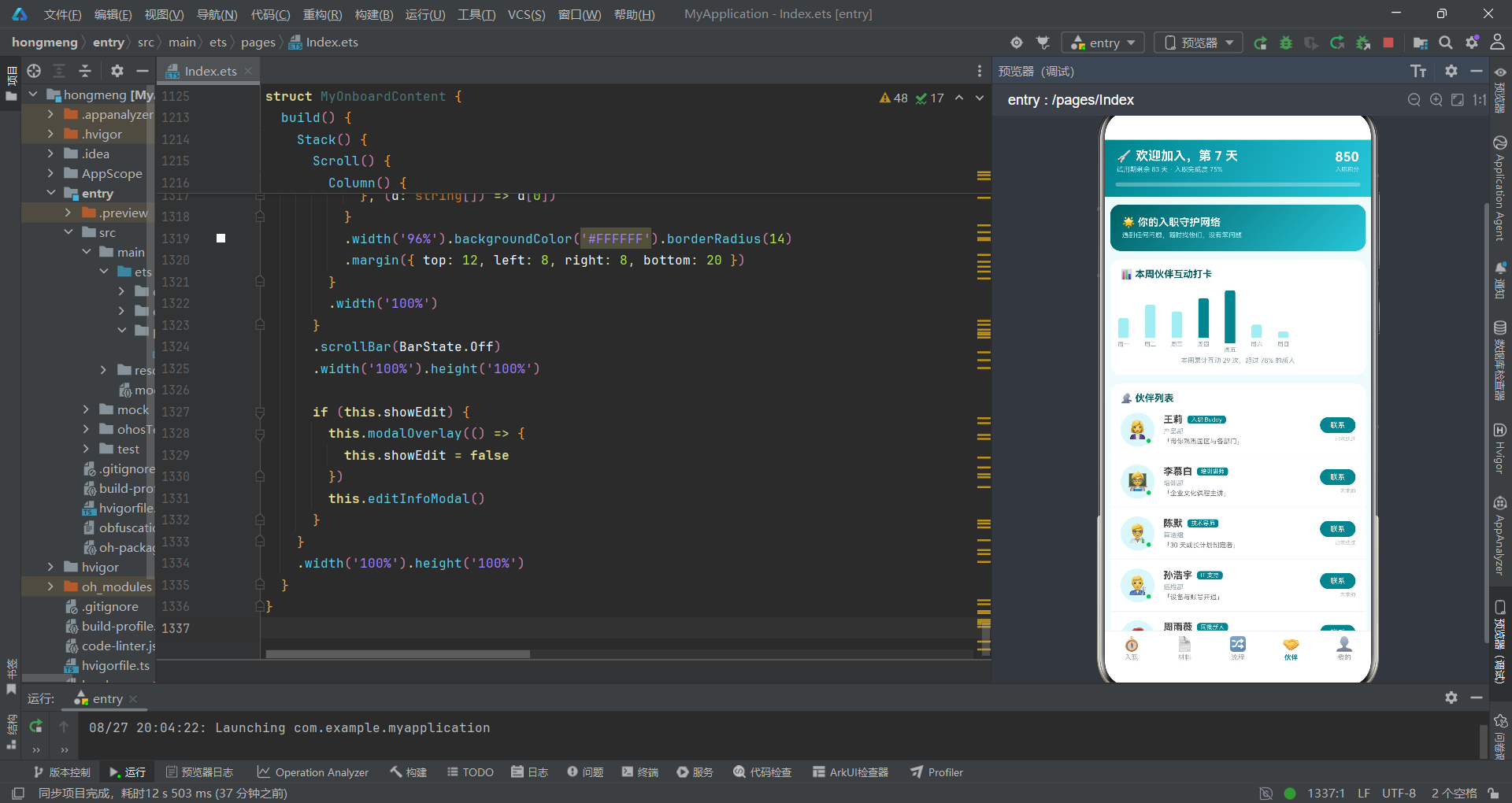
伙伴打卡周报柱状图是纯ArkUI实现的简易图表,使用ForEach遍历CHECKIN_LOG(七天数据)渲染七个柱子。每个柱子是一个Column,高度通过c.times * 9计算(打卡次数乘以9像素),颜色根据打卡次数动态选择:大于等于6次为深色#00838F,小于6次为浅色#B2EBF2。borderRadius({ topLeft: 3, topRight: 3 })只设置顶部圆角,模拟柱状图的视觉特征。animation为高度变化添加700毫秒的缓出动画,使柱子有"生长"效果。
Row的alignItems(VerticalAlign.Bottom)使所有柱子底部对齐,这是柱状图的基本要求——所有柱子从同一基线向上延伸。height(104)固定图表区域高度,确保布局稳定。
            // 伙伴卡片列表
            ForEach(BUDDY_LIST, (b: BuddyItem) => {
              Row() {
                Stack() {
                  Text(b.avatar).fontSize(24)
                    .width(46).height(46).backgroundColor('#E0F7FA').borderRadius(23)
                    .textAlign(TextAlign.Center)
                  if (b.contact) {
                    Text('●').fontSize(8).fontColor('#00C853')
                      .position({ x: 34, y: 34 })
                  }
                }

                Column() {
                  Row() {
                    Text(b.name).fontSize(13).fontWeight(FontWeight.Bold).fontColor('#424242')
                    Text(b.duty).fontSize(8).fontColor('#FFFFFF').backgroundColor('#00838F')
                      .borderRadius(4).padding({ left: 5, right: 5, top: 1, bottom: 1 }).margin({ left: 6 })
                  }
                  Text(b.dept).fontSize(9).fontColor('#90A4AE').margin({ top: 3 })
                  Text('「' + b.intro + '」').fontSize(9).fontColor('#757575').margin({ top: 3 })
                }
                .layoutWeight(1).alignItems(HorizontalAlign.Start).margin({ left: 12 })

                Column() {
                  Text('联系').fontSize(10).fontColor('#FFFFFF').backgroundColor('#00838F')
                    .borderRadius(11).padding({ left: 14, right: 14, top: 5, bottom: 5 })
                  Text(this.askedIds.indexOf(b.id) >= 0 ? '已求助过' : '未求助')
                    .fontSize(7).fontColor('#B0BEC5').margin({ top: 4 })
                }
                .alignItems(HorizontalAlign.End)
                .onClick(() => {
                  this.buddyName = b.name
                  this.buddyDuty = b.duty
                  if (this.askedIds.indexOf(b.id) < 0) {
                    this.askedIds = this.askedIds.concat([b.id])
                  }
                  this.showCall = true
                })
              }
伙伴卡片列表使用ForEach遍历BUDDY_LIST渲染。每个伙伴的左侧头像使用Stack层叠布局,头像背景上叠加一个绿色圆点●表示在线状态(b.contact为true时显示)。右侧操作区域显示"联系"按钮和求助状态标签。点击联系按钮时,将伙伴信息赋值到状态变量,如果该伙伴尚未被求助过则将其ID添加到askedIds数组(使用concat返回新数组),然后打开联系弹窗。indexOf(b.id) < 0检查表示尚未求助,concat([b.id])将新ID追加到数组末尾。
我的组件 MyOnboardContent
@Component
struct MyOnboardContent {
  @State showEdit: boolean = false
  @State phone: string = '138****6688'
  @State emergency: string = '母亲 139****2233'
  @State tshirt: string = 'L'
  @State ringAnim: boolean = false
该组件管理五个状态:编辑弹窗控制、手机号、紧急联系人、工服尺码、预留动画触发。
  // 弹框6:编辑个人信息(手机+紧急联系人+尺码)
  @Builder editInfoModal() {
    Column() {
      Column() {
        Text('✏️ 编辑个人信息').fontSize(15).fontWeight(FontWeight.Bold).fontColor('#006064')
          .width('100%').padding({ top: 16, left: 16 })

        Row() {
          Text('手机号码').fontSize(11).fontColor('#757575').width(80)
          TextInput({ text: this.phone })
            .fontSize(12).layoutWeight(1).height(38)
            .backgroundColor('#F0FAFB').borderRadius(8)
            .onChange((v: string) => {
              this.phone = v
            })
        }
        .width('88%').margin({ top: 14 })
编辑信息弹窗使用TextInput组件作为单行文本输入框,text参数绑定状态变量作为初始值,onChange回调实时更新状态。layoutWeight(1)使输入框占据标签之后的剩余宽度。height(38)和borderRadius(8)设置输入框尺寸和圆角。
        Row() {
          ForEach(['S', 'M', 'L', 'XL', 'XXL'], (s: string) => {
            Text(s).fontSize(12)
              .fontColor(this.tshirt === s ? '#FFFFFF' : '#00838F')
              .backgroundColor(this.tshirt === s ? '#00838F' : '#E0F7FA')
              .width(38).height(32).borderRadius(16)
              .textAlign(TextAlign.Center).margin({ right: 10 })
              .onClick(() => {
                this.tshirt = s
              })
          }, (s: string) => s)
        }
工服尺码选择器使用标签式单选,五个尺码通过ForEach渲染,选中态通过颜色对比体现。width(38).height(32).borderRadius(16)使每个标签呈圆角矩形,textAlign(TextAlign.Center)使文字居中。
build() {
Stack() {
Scroll() {
Column() {
// 个人信息卡
Column() {
Row() {
Stack() {
Text('🧑🎓').fontSize(32)
.width(64).height(64).backgroundColor('#E0F7FA').borderRadius(32)
.textAlign(TextAlign.Center)
Text('新人').fontSize(8).fontColor('#FFFFFF').backgroundColor('#F9A825')
.borderRadius(7).padding({ left: 4, right: 4, top: 1, bottom: 1 })
.position({ x: 42, y: 46 })
}
Column() {
Text('周子轩').fontSize(15).fontWeight(FontWeight.Bold).fontColor('#FFFFFF')
Text('研发部 · 前端工程师 · 试用期').fontSize(9).fontColor('#B2EBF2').margin({ top: 4 })
Text('工号 EMP-2026-08826 · 入职 2026-08-20').fontSize(8).fontColor('#B2EBF2').margin({ top: 3 })
}
.layoutWeight(1).alignItems(HorizontalAlign.Start).margin({ left: 14 })
Text('✏️').fontSize(16)
.onClick(() => {
this.showEdit = true
})
}
.width('100%').padding({ left: 16, right: 16, top: 16 })
个人信息卡使用渐变背景卡片,左侧头像使用Stack层叠一个64x64的圆形背景和一个"新人"角标。角标使用position({ x: 42, y: 46 })绝对定位在头像右下角,#F9A825琥珀色背景使其在青色渐变背景上醒目可见。右侧编辑按钮点击后打开编辑弹窗。
          // 试用期成长曲线
          Column() {
            ForEach([['第 1 周', '环境搭建与团队破冰', '100', '#00838F'], ['第 2 周', '熟悉业务与代码规范', '80', '#00838F'], ['第 3 周', '承接第一个迭代任务', '45', '#F9A825'], ['第 4 周', '独立负责功能模块', '10', '#B0BEC5'], ['第 12 周', '转正答辩', '0', '#ECEFF1']], (g: string[]) => {
              Column() {
                Row() {
                  Text(g[0]).fontSize(11).fontWeight(FontWeight.Bold).fontColor('#424242').width(52)
                  Text(g[1]).fontSize(10).fontColor('#757575').layoutWeight(1)
                  Text(g[2] + '%').fontSize(10).fontColor(g[3]).fontWeight(FontWeight.Bold)
                }
                .width('100%')

                Column() {
                  Column()
                    .width(g[2] + '%').height(5)
                    .backgroundColor(g[3]).borderRadius(3)
                    .animation({ duration: 700, curve: Curve.EaseOut })
                }
                .width('100%').height(5).backgroundColor('#F0FAFB').borderRadius(3)
                .margin({ top: 7 })
              }
              .width('100%').padding({ left: 14, right: 14, top: 10, bottom: 10 })
            }, (g: string[]) => g[0])
          }
试用期成长曲线使用字符串数组数据,每个子数组包含四个元素:周次、任务描述、进度百分比、进度条颜色。进度条使用嵌套Column实现:外层是灰色背景轨道,内层是彩色填充部分,宽度通过g[2] + '%'动态设置(字符串拼接生成如'100%')。animation为宽度变化添加动画效果。这种将多个属性值打包在数组中传递给ForEach的模式在ArkTS中很常见,适合简单的静态数据展示场景。
四、组件级技术要点总结
Stack层叠布局的运用
在本应用中,Stack组件被大量使用于以下场景:进度环与中心文字的叠加(任务完成度环)、头像与在线状态点的叠加(伙伴列表)、任务图标与勾选标记的叠加(任务列表)、头像与"新人"角标的叠加(个人信息卡)、悬浮按钮与角标的叠加(购物车)。Stack的特点是子元素默认居中叠放,可以通过position方法精确定位叠加元素的位置,是实现角标、徽章、浮动按钮等UI模式的理想容器。
@Builder方法的复用模式
每个子组件都定义了modalOverlay方法作为通用遮罩层,这是@Builder装饰器实现UI片段复用的典型应用。@Builder方法可以接收参数(如回调函数),使得同一构建方法在不同上下文中产生不同行为。在弹窗实现中,遮罩层+弹窗内容的组合模式统一了交互体验。
状态更新与不可变模式
在更新数组类型状态时,应用一致使用this.doneIds.concat([6])而非this.doneIds.push(6)。concat方法返回新数组而不修改原数组,这是ArkUI状态更新的推荐模式。由于@State的状态变化检测基于引用比较,直接修改数组内容(如push)可能不会被框架检测到,而创建新数组引用则能确保触发重新渲染。
五、组件功能对比表格
| 组件名 | 功能定位 | 状态变量数 | 弹窗数 | 核心UI技术 | 动画特效 |
|---|---|---|---|---|---|
| OnboardApp | 主入口/Tab导航 | 1 | 0 | 条件渲染+ForEach | 进度条动画 |
| TaskListContent | 任务清单管理 | 7 | 1 | Stack角标+Progress环 | 勾选缩放动画 |
| MaterialCheckContent | 材料提交审核 | 4 | 1 | FAB悬浮按钮+TextArea | 无 |
| FlowTrackContent | 流程跟踪与离职 | 6 | 2 | 横向Scroll步骤条+时间轴 | 无 |
| BuddyNetworkContent | 伙伴网络互动 | 4 | 1 | 柱状图+在线状态点 | 柱状图生长动画 |
| MyOnboardContent | 个人信息与成长 | 5 | 1 | 渐变卡片+进度条 | 进度条动画 |
| 弹窗名称 | 所在组件 | 弹窗类型 | 交互模式 | 按钮配置 |
|---|---|---|---|---|
| 任务完成确认 | TaskListContent | 居中卡片 | Radio单选声明 | 取消+确认 |
| 材料上传 | MaterialCheckContent | 居中卡片 | 标签单选+TextArea | 取消+提交 |
| 离职申请 | FlowTrackContent | 底部抽屉 | Radio+标签+TextArea | 取消+提交 |
| 撤回离职警示 | FlowTrackContent | 居中警示 | 信息回显只读 | 再想想+确认 |
| 联系伙伴 | BuddyNetworkContent | 底部抽屉 | 联系方式+留言 | 发送消息 |
| 编辑个人信息 | MyOnboardContent | 居中卡片 | TextInput+标签选择 | 取消+保存 |
安装DevEco Studio程序

选择目标安装目录:

设置环境变量,但是需要重启一下:

新建一个空白模板:

设置API为24的模板项目:

初始化项目,自动下载相关依赖:

完整代码:
// ============================================================
// 底部 5 Tab:入职/材料/流程/伙伴/我的(青蓝清新风)
// 弹框:材料上传 / 编辑个人信息 / 离职申请 / 撤回离职警示 / 任务完成确认
// 图表:伙伴打卡周报柱状图 | 特效:任务勾选缩放 / 入职进度条动画 / 步骤条
// ============================================================
// ============ 类型定义 ============
interface OnboardTask {
id: number
title: string
desc: string
icon: string
points: number
done: boolean
urgent: boolean
}
interface MaterialItem {
id: number
name: string
icon: string
status: string
note: string
}
interface FlowStep {
id: number
title: string
time: string
operator: string
state: string
}
interface BuddyItem {
id: number
name: string
avatar: string
dept: string
duty: string
intro: string
contact: boolean
}
interface CheckinLog {
id: number
day: string
times: number
}
// ============ 入职任务清单(8项) ============
const TASK_LIST: OnboardTask[] = [
{ id: 1, title: '完成入职信息登记', desc: '填写个人基本信息、银行卡、紧急联系人', icon: '📝', points: 10, done: true, urgent: false },
{ id: 2, title: '上传入职材料', desc: '身份证、学历证书、离职证明、体检报告', icon: '📄', points: 20, done: true, urgent: false },
{ id: 3, title: '签署电子劳动合同', desc: '在线阅读并签署三年期劳动合同', icon: '🖊️', points: 15, done: true, urgent: false },
{ id: 4, title: '领取办公设备', desc: '到 IT 服务台领取笔记本与外设套装', icon: '💻', points: 10, done: true, urgent: false },
{ id: 5, title: '开通账号权限', desc: '邮箱、内网、代码仓库、工单系统', icon: '🔑', points: 10, done: true, urgent: false },
{ id: 6, title: '参加入职培训', desc: '企业文化、信息安全、职业素养三堂课', icon: '🎓', points: 20, done: false, urgent: true },
{ id: 7, title: '完成导师破冰', desc: '与 Mentor 一对一沟通,制定 30 天成长计划', icon: '🤝', points: 10, done: false, urgent: false },
{ id: 8, title: '转正自评提交', desc: '三个月试用期满后填写自评表', icon: '📊', points: 5, done: false, urgent: false }
]
// ============ 材料清单(6项) ============
const MATERIAL_LIST: MaterialItem[] = [
{ id: 1, name: '身份证正反面', icon: '🪪', status: '已通过', note: '2026-08-20 提交' },
{ id: 2, name: '学历学位证书', icon: '🎓', status: '已通过', note: '学信网核验通过' },
{ id: 3, name: '上家单位离职证明', icon: '📤', status: '已通过', note: '2026-08-21 提交' },
{ id: 4, name: '入职体检报告', icon: '🏥', status: '已通过', note: '三甲医院 8月报告' },
{ id: 5, name: '一寸免冠照片', icon: '📸', status: '审核中', note: '预计 1 个工作日' },
{ id: 6, name: '银行卡复印件', icon: '💳', status: '未提交', note: '用于工资发放' }
]
// ============ 流程步骤(6步) ============
const FLOW_STEPS: FlowStep[] = [
{ id: 1, title: 'Offer 发放', time: '07-28 10:00', operator: '人事部 · 刘芳', state: '已完成' },
{ id: 2, title: '背景调查', time: '07-29 15:30', operator: '第三方机构', state: '已完成' },
{ id: 3, title: 'Offer 回签', time: '08-01 09:12', operator: '本人', state: '已完成' },
{ id: 4, title: '入职报到', time: '08-20 09:00', operator: '人事部 · 刘芳', state: '已完成' },
{ id: 5, title: '试用期待遇确认', time: '08-20 10:00', operator: '薪酬组', state: '进行中' },
{ id: 6, title: '试用期转正评估', time: '11-20 预计', operator: '直属主管', state: '未开始' }
]
// ============ 入职伙伴(6位) ============
const BUDDY_LIST: BuddyItem[] = [
{ id: 1, name: '王莉', avatar: '👩💼', dept: '产品部', duty: '入职 Buddy', intro: '带你熟悉园区与各部门', contact: true },
{ id: 2, name: '李慕白', avatar: '🧑🏫', dept: '培训部', duty: '培训讲师', intro: '企业文化课程主讲', contact: true },
{ id: 3, name: '陈默', avatar: '🧑🔬', dept: '算法组', duty: '技术导师', intro: '30 天成长计划制定者', contact: true },
{ id: 4, name: '孙浩宇', avatar: '👨🔧', dept: '运维部', duty: 'IT 支持', intro: '设备与账号开通', contact: true },
{ id: 5, name: '周雨薇', avatar: '👩🎨', dept: '设计部', duty: '同批新人', intro: '同期入职设计师', contact: false },
{ id: 6, name: '刘芳', avatar: '👩⚕️', dept: '人事部', duty: 'HRBP', intro: '入职全流程对接人', contact: true }
]
// ============ 伙伴打卡周报(7天) ============
const CHECKIN_LOG: CheckinLog[] = [
{ id: 1, day: '一', times: 3 },
{ id: 2, day: '二', times: 5 },
{ id: 3, day: '三', times: 4 },
{ id: 4, day: '四', times: 6 },
{ id: 5, day: '五', times: 8 },
{ id: 6, day: '六', times: 2 },
{ id: 7, day: '日', times: 1 }
]
// ============ Tab 定义 ============
enum OnboardTab { TASK, MATERIAL, FLOW, BUDDY, MINE }
interface OnboardTabMeta {
icon: string
label: string
}
const ONBOARD_TABS: OnboardTabMeta[] = [
{ icon: '🧭', label: '入职' },
{ icon: '📄', label: '材料' },
{ icon: '🔀', label: '流程' },
{ icon: '🤝', label: '伙伴' },
{ icon: '👤', label: '我的' }
]
// 全局纯函数:材料状态颜色
function getMatStatusColor(s: string): string {
if (s === '已通过') {
return '#00897B'
} else if (s === '审核中') {
return '#F9A825'
} else {
return '#EF6C00'
}
}
// 全局纯函数:流程状态颜色
function getFlowStateColor(s: string): string {
if (s === '已完成') {
return '#00838F'
} else if (s === '进行中') {
return '#F9A825'
} else {
return '#B0BEC5'
}
}
@Entry
@Component
struct OnboardApp {
@State currentTab: OnboardTab = OnboardTab.TASK
build() {
Column() {
// ===== 头部(电商风渐变:进度概览) =====
Column() {
Row() {
Column() {
Text('🚀 欢迎加入,第 7 天').fontSize(17).fontWeight(FontWeight.Bold).fontColor('#FFFFFF')
Text('试用期剩余 83 天 · 入职完成度 75%').fontSize(9).fontColor('#B2EBF2').margin({ top: 3 })
}
.alignItems(HorizontalAlign.Start).layoutWeight(1)
Column() {
Text('850').fontSize(18).fontWeight(FontWeight.Bold).fontColor('#FFFFFF')
Text('入职积分').fontSize(8).fontColor('#B2EBF2').margin({ top: 2 })
}
.alignItems(HorizontalAlign.End)
}
.width('100%').padding({ left: 16, right: 16, top: 12 })
// 入职进度条(动画特效)
Column() {
Column()
.width(this.currentTab === OnboardTab.TASK ? '75%' : '0%')
.height(6).backgroundColor('#FFFFFF').borderRadius(3)
.animation({ duration: 1000, curve: Curve.EaseOut })
}
.width('92%').height(6).backgroundColor('rgba(255,255,255,0.3)').borderRadius(3)
.margin({ top: 12, bottom: 14 })
}
.width('100%')
.linearGradient({ angle: 120, colors: [['#00838F', 0], ['#26C6DA', 1]] })
// ===== 内容区 =====
Column() {
if (this.currentTab === OnboardTab.TASK) {
TaskListContent()
} else if (this.currentTab === OnboardTab.MATERIAL) {
MaterialCheckContent()
} else if (this.currentTab === OnboardTab.FLOW) {
FlowTrackContent()
} else if (this.currentTab === OnboardTab.BUDDY) {
BuddyNetworkContent()
} else {
MyOnboardContent()
}
}
.layoutWeight(1).width('100%')
// ===== 底部 Tab(5个单排) =====
Divider().color('#E0F7FA').strokeWidth(1)
Row() {
ForEach(ONBOARD_TABS, (t: OnboardTabMeta, idx: number) => {
Column() {
Text(t.icon).fontSize(19)
.animation({ duration: 200, curve: Curve.EaseOut })
Text(t.label).fontSize(9)
.fontColor(this.currentTab === idx ? '#00838F' : '#9E9E9E')
.margin({ top: 2 })
.fontWeight(this.currentTab === idx ? FontWeight.Bold : FontWeight.Normal)
}
.layoutWeight(1).alignItems(HorizontalAlign.Center)
.padding({ top: 6, bottom: 6 })
.onClick(() => {
this.currentTab = idx as OnboardTab
})
}, (t: OnboardTabMeta) => t.label)
}
.width('100%').backgroundColor('#FFFFFF')
}
.width('100%').height('100%').backgroundColor('#F0FAFB')
}
}
// ============ 入职任务 Tab ============
@Component
struct TaskListContent {
@State showConfirm: boolean = false
@State taskTitle: string = '参加入职培训'
@State taskDesc: string = '企业文化、信息安全、职业素养三堂课'
@State taskIcon: string = '🎓'
@State taskPoints: number = 20
@State doneIds: number[] = [1, 2, 3, 4, 5]
@State checkScale: number = 1.0
@State barGrow: boolean = false
@Builder modalOverlay(onClose: () => void) {
Column() {
Column().width('100%').height('100%').backgroundColor('rgba(0,0,0,0.5)')
.onClick(() => {
onClose()
})
}
.width('100%').height('100%').position({ x: 0, y: 0 }).zIndex(998)
}
// 弹框1:任务完成确认(清单勾选式)
@Builder confirmTaskModal() {
Column() {
Column() {
Row() {
Text(this.taskIcon).fontSize(30).margin({ left: 16 })
Column() {
Text(this.taskTitle).fontSize(15).fontWeight(FontWeight.Bold).fontColor('#006064')
Text('+' + this.taskPoints.toString() + ' 积分').fontSize(10).fontColor('#F9A825').margin({ top: 3 })
}
.alignItems(HorizontalAlign.Start).margin({ left: 10 })
}
.width('100%').padding({ top: 18 })
Text(this.taskDesc).fontSize(11).fontColor('#757575')
.width('100%').padding({ left: 16, top: 8 })
Column() {
ForEach(['我已经完成该任务的全部要求', '相关证明材料已上传(如需)', '确认信息真实有效'], (r: string) => {
Row() {
Radio({ value: r, group: 'task' })
.width(16).height(16)
Text(r).fontSize(11).fontColor('#424242').margin({ left: 8 })
}
.width('100%').padding({ left: 16, top: 10 })
}, (r: string) => r)
}
.width('100%')
Row() {
Button() {
Text('稍后再说').fontSize(13).fontColor('#616161')
}
.layoutWeight(1).height(38).backgroundColor('#ECEFF1').borderRadius(19)
.onClick(() => {
this.showConfirm = false
})
Button() {
Text('✓ 确认完成').fontSize(13).fontColor('#FFFFFF')
}
.layoutWeight(1).height(38).backgroundColor('#00838F').borderRadius(19)
.margin({ left: 12 })
.onClick(() => {
if (this.taskTitle === '参加入职培训') {
this.doneIds = this.doneIds.concat([6])
}
this.checkScale = 1.4
setTimeout(() => {
this.checkScale = 1.0
}, 200)
this.showConfirm = false
})
}
.width('88%').margin({ top: 20, bottom: 20 })
}
.width('90%').backgroundColor('#FFFFFF').borderRadius(16)
}
.width('100%').alignItems(HorizontalAlign.Center)
.position({ y: '30%' }).zIndex(999)
}
build() {
Stack() {
Scroll() {
Column() {
// 今日必办提示卡
Row() {
Text('⏰').fontSize(22)
Column() {
Text('今日必办').fontSize(12).fontWeight(FontWeight.Bold).fontColor('#FFFFFF')
Text('「参加入职培训」 今天 16:00 · 3 号多功能厅').fontSize(9).fontColor('#B2EBF2').margin({ top: 3 })
}
.layoutWeight(1).alignItems(HorizontalAlign.Start).margin({ left: 10 })
Text('去完成').fontSize(10).fontColor('#00838F').backgroundColor('#FFFFFF')
.borderRadius(12).padding({ left: 12, right: 12, top: 5, bottom: 5 })
.onClick(() => {
this.taskTitle = '参加入职培训'
this.taskDesc = '企业文化、信息安全、职业素养三堂课,完成全部课程并通过随堂测验'
this.taskIcon = '🎓'
this.taskPoints = 20
this.showConfirm = true
})
}
.width('96%').padding(14)
.linearGradient({ angle: 135, colors: [['#006064', 0], ['#00ACC1', 1]] })
.borderRadius(14).margin({ top: 10 })
// 任务完成度环
Row() {
Stack() {
Progress({ value: this.doneIds.length, total: 8, type: ProgressType.Ring })
.width(86).height(86)
.color('#00838F').backgroundColor('#E0F7FA')
.style({ strokeWidth: 7 })
.animation({ duration: 900, curve: Curve.EaseOut })
Column() {
Text((this.doneIds.length / 8 * 100).toFixed(0) + '%').fontSize(17).fontWeight(FontWeight.Bold).fontColor('#006064')
Text(this.doneIds.length + '/8 项').fontSize(8).fontColor('#90A4AE').margin({ top: 2 })
}
}
Column() {
Text('入职任务清单').fontSize(14).fontWeight(FontWeight.Bold).fontColor('#006064')
Text('完成全部任务可参与新人抽奖,100% 中奖率').fontSize(9).fontColor('#90A4AE').margin({ top: 5 })
Text('🎁 满 100 积分解锁新人礼盒').fontSize(9).fontColor('#F9A825').margin({ top: 4 })
}
.alignItems(HorizontalAlign.Start).layoutWeight(1).margin({ left: 16 })
}
.width('96%').backgroundColor('#FFFFFF').borderRadius(14)
.padding(16).margin({ top: 12 }).alignItems(VerticalAlign.Center)
// 任务列表
Column() {
Row() {
Text('📋 任务清单').fontSize(13).fontWeight(FontWeight.Bold).fontColor('#006064')
Text('已完成 ' + this.doneIds.length.toString() + ' 项').fontSize(9).fontColor('#90A4AE').margin({ left: 8 })
}
.width('100%').padding({ left: 14, right: 14, top: 12 })
ForEach(TASK_LIST, (t: OnboardTask) => {
Row() {
Stack() {
Text(t.icon).fontSize(22)
.width(44).height(44).backgroundColor('#E0F7FA').borderRadius(22)
.textAlign(TextAlign.Center)
if (this.doneIds.indexOf(t.id) >= 0) {
Text('✓').fontSize(11).fontColor('#FFFFFF').backgroundColor('#00838F')
.width(16).height(16).borderRadius(8).textAlign(TextAlign.Center)
.animation({ duration: 150, curve: Curve.EaseOut })
.position({ x: 30, y: 30 })
}
}
Column() {
Row() {
Text(t.title).fontSize(12).fontWeight(FontWeight.Bold).fontColor('#424242')
if (t.urgent && this.doneIds.indexOf(t.id) < 0) {
Text('今日必办').fontSize(7).fontColor('#FFFFFF').backgroundColor('#EF5350')
.borderRadius(4).padding({ left: 4, right: 4, top: 1, bottom: 1 }).margin({ left: 6 })
}
}
Text(t.desc).fontSize(9).fontColor('#90A4AE').margin({ top: 3 })
Text('+' + t.points.toString() + ' 积分').fontSize(9).fontColor('#F9A825').margin({ top: 3 })
}
.layoutWeight(1).alignItems(HorizontalAlign.Start).margin({ left: 12 })
if (this.doneIds.indexOf(t.id) >= 0) {
Text('已完成').fontSize(10).fontColor('#00838F').backgroundColor('#E0F7FA')
.borderRadius(10).padding({ left: 10, right: 10, top: 4, bottom: 4 })
} else {
Text('去完成').fontSize(10).fontColor('#FFFFFF').backgroundColor('#00838F')
.borderRadius(10).padding({ left: 10, right: 10, top: 4, bottom: 4 })
.onClick(() => {
this.taskTitle = t.title
this.taskDesc = t.desc
this.taskIcon = t.icon
this.taskPoints = t.points
this.showConfirm = true
})
}
}
.width('100%').padding({ left: 14, right: 14, top: 12, bottom: 12 })
Divider().color('#E0F7FA')
}, (t: OnboardTask) => t.id.toString())
}
.width('96%').backgroundColor('#FFFFFF').borderRadius(14)
.margin({ top: 12, left: 8, right: 8, bottom: 20 })
}
.width('100%')
}
.scrollBar(BarState.Off)
.width('100%').height('100%')
if (this.showConfirm) {
this.modalOverlay(() => {
this.showConfirm = false
})
this.confirmTaskModal()
}
}
.width('100%').height('100%')
}
}
// ============ 材料清单 Tab ============
@Component
struct MaterialCheckContent {
@State showUpload: boolean = false
@State matName: string = '银行卡复印件'
@State uploadNote: string = ''
@State uploadType: string = '原件拍照'
@Builder modalOverlay(onClose: () => void) {
Column() {
Column().width('100%').height('100%').backgroundColor('rgba(0,0,0,0.5)')
.onClick(() => {
onClose()
})
}
.width('100%').height('100%').position({ x: 0, y: 0 }).zIndex(998)
}
// 弹框2:材料上传(类型单选+备注+重新上传)
@Builder uploadModal() {
Column() {
Column() {
Text('📤 上传材料').fontSize(16).fontWeight(FontWeight.Bold).fontColor('#006064')
.width('100%').padding({ top: 16, left: 16 })
Row() {
Text('材料名称').fontSize(11).fontColor('#757575').width(64)
Text(this.matName).fontSize(12).fontWeight(FontWeight.Bold).fontColor('#424242')
}
.width('88%').margin({ top: 14 })
Text('上传方式').fontSize(11).fontColor('#757575').width('88%').margin({ top: 14 })
Row() {
ForEach(['原件拍照', '扫描件', '电子档'], (t: string) => {
Text(t).fontSize(11)
.fontColor(this.uploadType === t ? '#FFFFFF' : '#00838F')
.backgroundColor(this.uploadType === t ? '#00838F' : '#E0F7FA')
.borderRadius(13).padding({ left: 14, right: 14, top: 6, bottom: 6 })
.margin({ right: 10 })
.onClick(() => {
this.uploadType = t
})
}, (t: string) => t)
}
.width('88%').margin({ top: 8 })
Text('备注说明(选填)').fontSize(11).fontColor('#757575').width('88%').margin({ top: 14 })
TextArea({ placeholder: '补充说明材料情况,如照片模糊原因等...', text: this.uploadNote })
.fontSize(12).height(60)
.width('88%').backgroundColor('#F0FAFB').borderRadius(8)
.margin({ top: 6 })
.onChange((v: string) => {
this.uploadNote = v
})
Row() {
Text('📷').fontSize(30)
.width(64).height(64).backgroundColor('#E0F7FA').borderRadius(10)
.textAlign(TextAlign.Center)
Text('🖼️').fontSize(30)
.width(64).height(64).backgroundColor('#E0F7FA').borderRadius(10)
.textAlign(TextAlign.Center).margin({ left: 10 })
Text('+').fontSize(24).fontColor('#00838F')
.width(64).height(64).backgroundColor('#F0FAFB').borderRadius(10)
.border({ width: 1, color: '#B2EBF2' })
.textAlign(TextAlign.Center).margin({ left: 10 })
}
.width('88%').margin({ top: 14 })
Text('支持 JPG/PNG/PDF,单文件不超过 10MB').fontSize(8).fontColor('#B0BEC5')
.width('88%').margin({ top: 8 })
Row() {
Button() {
Text('取消').fontSize(13).fontColor('#616161')
}
.layoutWeight(1).height(38).backgroundColor('#ECEFF1').borderRadius(19)
.onClick(() => {
this.showUpload = false
})
Button() {
Text('提交审核').fontSize(13).fontColor('#FFFFFF')
}
.layoutWeight(1).height(38).backgroundColor('#00838F').borderRadius(19)
.margin({ left: 12 })
.onClick(() => {
this.showUpload = false
})
}
.width('88%').margin({ top: 18, bottom: 20 })
}
.width('90%').backgroundColor('#FFFFFF').borderRadius(16)
}
.width('100%').alignItems(HorizontalAlign.Center)
.position({ y: '8%' }).zIndex(999)
}
build() {
Stack() {
Scroll() {
Column() {
// 材料进度概览
Row() {
Column() {
Text('4').fontSize(22).fontWeight(FontWeight.Bold).fontColor('#FFFFFF')
Text('已通过').fontSize(8).fontColor('#B2EBF2').margin({ top: 2 })
}
.layoutWeight(1).alignItems(HorizontalAlign.Center)
Column() {
Text('1').fontSize(22).fontWeight(FontWeight.Bold).fontColor('#FFFFFF')
Text('审核中').fontSize(8).fontColor('#B2EBF2').margin({ top: 2 })
}
.layoutWeight(1).alignItems(HorizontalAlign.Center)
Column() {
Text('1').fontSize(22).fontWeight(FontWeight.Bold).fontColor('#FFFFFF')
Text('未提交').fontSize(8).fontColor('#B2EBF2').margin({ top: 2 })
}
.layoutWeight(1).alignItems(HorizontalAlign.Center)
Column() {
Text('96%').fontSize(22).fontWeight(FontWeight.Bold).fontColor('#FFFFFF')
Text('材料完成率').fontSize(8).fontColor('#B2EBF2').margin({ top: 2 })
}
.layoutWeight(1).alignItems(HorizontalAlign.Center)
}
.width('96%').padding({ top: 14, bottom: 14 })
.linearGradient({ angle: 135, colors: [['#006064', 0], ['#00ACC1', 1]] })
.borderRadius(14).margin({ top: 10 })
// 温馨提示
Row() {
Text('💡').fontSize(13)
Text('未在 09-05 前提交全部材料将影响试用期薪资核算').fontSize(9).fontColor('#EF6C00')
.layoutWeight(1).margin({ left: 8 })
}
.width('96%').backgroundColor('#FFF8E1').borderRadius(10)
.padding({ left: 12, right: 12, top: 9, bottom: 9 }).margin({ top: 10 })
// 材料列表
Column() {
Text('📂 材料清单').fontSize(13).fontWeight(FontWeight.Bold).fontColor('#006064')
.width('100%').padding({ left: 14, top: 12 })
ForEach(MATERIAL_LIST, (m: MaterialItem) => {
Row() {
Text(m.icon).fontSize(24)
.width(46).height(46).backgroundColor('#E0F7FA').borderRadius(12)
.textAlign(TextAlign.Center)
Column() {
Text(m.name).fontSize(12).fontWeight(FontWeight.Bold).fontColor('#424242')
Text(m.note).fontSize(9).fontColor('#90A4AE').margin({ top: 3 })
}
.layoutWeight(1).alignItems(HorizontalAlign.Start).margin({ left: 12 })
Column() {
Text(m.status).fontSize(9).fontColor('#FFFFFF')
.backgroundColor(getMatStatusColor(m.status))
.borderRadius(9).padding({ left: 8, right: 8, top: 3, bottom: 3 })
if (m.status !== '已通过') {
Text(m.status === '审核中' ? '查看' : '上传').fontSize(10).fontColor('#00838F')
.margin({ top: 6 })
.onClick(() => {
this.matName = m.name
this.showUpload = true
})
} else {
Text('已归档').fontSize(9).fontColor('#B0BEC5').margin({ top: 6 })
}
}
.alignItems(HorizontalAlign.End)
}
.width('100%').padding({ left: 14, right: 14, top: 12, bottom: 12 })
Divider().color('#E0F7FA')
}, (m: MaterialItem) => m.id.toString())
}
.width('96%').backgroundColor('#FFFFFF').borderRadius(14)
.margin({ top: 12, left: 8, right: 8 })
// 常见问题
Column() {
Text('❓ 常见问题').fontSize(13).fontWeight(FontWeight.Bold).fontColor('#006064')
.width('100%').padding({ left: 14, top: 12 })
ForEach([['照片模糊被退回怎么办?', '重新拍照上传即可,无需联系人工'], ['学历证书丢失?', '可提交学信网电子备案表替代'], ['材料审核要多久?', '一般 1 个工作日,高峰期不超过 3 天']], (q: string[]) => {
Column() {
Text('Q:' + q[0]).fontSize(11).fontWeight(FontWeight.Bold).fontColor('#424242')
Text('A:' + q[1]).fontSize(10).fontColor('#757575').margin({ top: 5 })
}
.width('100%').padding({ left: 14, right: 14, top: 10, bottom: 10 })
.alignItems(HorizontalAlign.Start)
Divider().color('#E0F7FA')
}, (q: string[]) => q[0])
}
.width('96%').backgroundColor('#FFFFFF').borderRadius(14)
.margin({ top: 12, left: 8, right: 8, bottom: 20 })
}
.width('100%')
}
.scrollBar(BarState.Off)
.width('100%').height('100%')
// 悬浮上传按钮
Text('📤').fontSize(22)
.width(52).height(52).backgroundColor('#00838F').borderRadius(26)
.textAlign(TextAlign.Center)
.shadow({ radius: 12, color: 'rgba(0,131,143,0.35)', offsetX: 0, offsetY: 4 })
.position({ x: '78%', y: '82%' })
.onClick(() => {
this.matName = '银行卡复印件'
this.showUpload = true
})
if (this.showUpload) {
this.modalOverlay(() => {
this.showUpload = false
})
this.uploadModal()
}
}
.width('100%').height('100%')
}
}
// ============ 流程 Tab ============
@Component
struct FlowTrackContent {
@State showOffboard: boolean = false
@State showCancel: boolean = false
@State lastDay: string = '2026-11-20'
@State offReason: string = '个人职业规划'
@State handover: string = '王莉'
@State showDeleteWarn: boolean = false
@Builder modalOverlay(onClose: () => void) {
Column() {
Column().width('100%').height('100%').backgroundColor('rgba(0,0,0,0.5)')
.onClick(() => {
onClose()
})
}
.width('100%').height('100%').position({ x: 0, y: 0 }).zIndex(998)
}
// 弹框3:离职申请(底部抽屉:原因+最后工作日+交接人)
@Builder offboardModal() {
Column() {
Column() {
Row() {
Text('🚪 离职申请').fontSize(16).fontWeight(FontWeight.Bold).fontColor('#B71C1C')
Text('✕').fontSize(15).fontColor('#9E9E9E').margin({ left: 10 })
.onClick(() => {
this.showOffboard = false
})
}
.width('100%').padding({ left: 16, right: 16, top: 16 })
Text('请如实填写以下信息,提交后进入直属主管审批').fontSize(9).fontColor('#9E9E9E')
.width('100%').padding({ left: 16, top: 6 })
Text('离职原因').fontSize(11).fontColor('#757575').width('88%').margin({ top: 14 })
Column() {
ForEach(['个人职业规划', '家庭因素', '健康原因', '继续深造', '其他'], (r: string) => {
Row() {
Radio({ value: r, group: 'offreason' })
.checked(this.offReason === r)
.width(15).height(15)
.onChange((c: boolean) => {
if (c) {
this.offReason = r
}
})
Text(r).fontSize(11).fontColor('#424242').margin({ left: 8 })
}
.width('88%').padding({ top: 8 })
}, (r: string) => r)
}
.width('88%')
Row() {
Text('最后工作日').fontSize(11).fontColor('#757575').width(80)
Text(this.lastDay).fontSize(12).fontColor('#B71C1C').fontWeight(FontWeight.Bold)
Text('修改').fontSize(10).fontColor('#00838F').margin({ left: 10 })
}
.width('88%').margin({ top: 14 })
Row() {
Text('交接人').fontSize(11).fontColor('#757575').width(80)
ForEach(['王莉', '陈默', '刘芳'], (h: string) => {
Text(h).fontSize(10)
.fontColor(this.handover === h ? '#FFFFFF' : '#00838F')
.backgroundColor(this.handover === h ? '#00838F' : '#E0F7FA')
.borderRadius(11).padding({ left: 12, right: 12, top: 4, bottom: 4 })
.margin({ right: 8 })
.onClick(() => {
this.handover = h
})
}, (h: string) => h)
}
.width('88%').margin({ top: 14 })
TextArea({ placeholder: '补充说明(交接安排、未尽事宜...)' })
.fontSize(12).height(64)
.width('88%').backgroundColor('#FFF8F0').borderRadius(8)
.margin({ top: 14 })
Row() {
Button() {
Text('取消').fontSize(13).fontColor('#616161')
}
.layoutWeight(1).height(38).backgroundColor('#ECEFF1').borderRadius(19)
.onClick(() => {
this.showOffboard = false
})
Button() {
Text('提交申请').fontSize(13).fontColor('#FFFFFF')
}
.layoutWeight(1).height(38).backgroundColor('#B71C1C').borderRadius(19)
.margin({ left: 12 })
.onClick(() => {
this.showOffboard = false
this.showDeleteWarn = true
})
}
.width('88%').margin({ top: 16, bottom: 24 })
}
.width('100%').backgroundColor('#FFFFFF').borderRadius({ topLeft: 20, topRight: 20 })
}
.width('100%').position({ x: 0, y: 0 }).zIndex(999)
}
// 弹框4:撤回离职申请(警示卡)
@Builder cancelOffboardModal() {
Column() {
Column() {
Text('⚠️').fontSize(34).margin({ top: 16 })
Text('确认提交离职申请?').fontSize(15).fontWeight(FontWeight.Bold).fontColor('#B71C1C').margin({ top: 8 })
Text('提交后将通知直属主管进行离职面谈,试用期离职需提前 3 天,正式员工需提前 30 天。').fontSize(10).fontColor('#757575')
.textAlign(TextAlign.Center).margin({ top: 8 }).padding({ left: 24, right: 24 })
Text('离职原因:' + this.offReason).fontSize(10).fontColor('#424242').margin({ top: 8 })
Text('最后工作日:' + this.lastDay).fontSize(10).fontColor('#424242').margin({ top: 4 })
Text('工作交接人:' + this.handover).fontSize(10).fontColor('#424242').margin({ top: 4 })
Row() {
Button() {
Text('再想想').fontSize(13).fontColor('#616161')
}
.layoutWeight(1).height(36).backgroundColor('#ECEFF1').borderRadius(18)
.onClick(() => {
this.showDeleteWarn = false
})
Button() {
Text('确认提交').fontSize(13).fontColor('#FFFFFF')
}
.layoutWeight(1).height(36).backgroundColor('#B71C1C').borderRadius(18)
.margin({ left: 12 })
.onClick(() => {
this.showDeleteWarn = false
})
}
.width('86%').margin({ top: 18, bottom: 18 })
}
.width('80%').backgroundColor('#FFFFFF').borderRadius(16)
}
.width('100%').alignItems(HorizontalAlign.Center)
.position({ y: '32%' }).zIndex(999)
}
build() {
Stack() {
Scroll() {
Column() {
// 横向步骤条
Column() {
Text('📍 当前流程位置').fontSize(13).fontWeight(FontWeight.Bold).fontColor('#006064')
.width('100%').padding({ left: 14, top: 12 })
Scroll() {
Row() {
ForEach(FLOW_STEPS, (s: FlowStep) => {
Column() {
Stack() {
Column()
.width(30).height(30).borderRadius(15)
.backgroundColor(s.state === '已完成' ? '#00838F' : (s.state === '进行中' ? '#F9A825' : '#ECEFF1'))
Text(s.state === '已完成' ? '✓' : s.id.toString())
.fontSize(12).fontWeight(FontWeight.Bold)
.fontColor(s.state === '已完成' ? '#FFFFFF' : (s.state === '进行中' ? '#FFFFFF' : '#90A4AE'))
}
Text(s.title).fontSize(8)
.fontColor(s.state === '进行中' ? '#F9A825' : '#90A4AE')
.margin({ top: 5 })
Column()
.width(s.id === 6 ? 0 : 24).height(2)
.backgroundColor(s.state === '已完成' ? '#00838F' : '#E0E0E0')
.margin({ top: 5 })
}
.alignItems(HorizontalAlign.Center)
.margin({ left: 8, right: 8 })
}, (s: FlowStep) => s.id.toString())
}
.padding({ left: 10, right: 10 })
}
.scrollable(ScrollDirection.Horizontal).scrollBar(BarState.Off)
.width('100%').margin({ top: 12, bottom: 14 })
}
.width('96%').backgroundColor('#FFFFFF').borderRadius(14)
.margin({ top: 10 })
// 垂直时间轴
Column() {
Text('🕐 流程办理记录').fontSize(13).fontWeight(FontWeight.Bold).fontColor('#006064')
.width('100%').padding({ left: 14, top: 12 })
ForEach(FLOW_STEPS, (s: FlowStep) => {
Row() {
Column() {
Column()
.width(12).height(12).borderRadius(6)
.backgroundColor(getFlowStateColor(s.state))
if (s.id !== 6) {
Column()
.width(2).height(44)
.backgroundColor(s.state === '已完成' ? '#00838F' : '#E0E0E0')
}
}
.alignItems(HorizontalAlign.Center).width(30)
Column() {
Row() {
Text(s.title).fontSize(12).fontWeight(FontWeight.Bold).fontColor('#424242')
Text(s.state).fontSize(8).fontColor('#FFFFFF')
.backgroundColor(getFlowStateColor(s.state))
.borderRadius(4).padding({ left: 5, right: 5, top: 1, bottom: 1 }).margin({ left: 8 })
}
Text(s.operator + ' · ' + s.time).fontSize(9).fontColor('#90A4AE').margin({ top: 4 })
}
.layoutWeight(1).alignItems(HorizontalAlign.Start).margin({ left: 8 })
if (s.state === '进行中') {
Text('催办').fontSize(9).fontColor('#F9A825').backgroundColor('#FFF8E1')
.borderRadius(9).padding({ left: 10, right: 10, top: 4, bottom: 4 })
}
}
.width('100%').alignItems(VerticalAlign.Top)
.padding({ left: 14, right: 14, top: 8 })
}, (s: FlowStep) => s.id.toString())
}
.width('96%').backgroundColor('#FFFFFF').borderRadius(14)
.margin({ top: 12, left: 8, right: 8 })
// 离职服务入口
Column() {
Row() {
Text('🚪 离职服务台').fontSize(13).fontWeight(FontWeight.Bold).fontColor('#006064')
Text('保密通道').fontSize(8).fontColor('#FFFFFF').backgroundColor('#B71C1C')
.borderRadius(4).padding({ left: 5, right: 5, top: 1, bottom: 1 }).margin({ left: 8 })
}
.width('100%').padding({ left: 14, right: 14, top: 12 })
Row() {
ForEach([['📋', '离职申请', '提交离职意向'], ['📦', '交接清单', '工作交接模板'], ['💼', '社保转移', '公积金提取指引'], ['📄', '证明开具', '离职证明下载']], (e: string[]) => {
Column() {
Text(e[0]).fontSize(24)
.width(48).height(48).backgroundColor('#FFF8F0').borderRadius(12)
.textAlign(TextAlign.Center)
Text(e[1]).fontSize(9).fontWeight(FontWeight.Bold).fontColor('#424242').margin({ top: 6 })
Text(e[2]).fontSize(7).fontColor('#90A4AE').margin({ top: 2 })
}
.layoutWeight(1).alignItems(HorizontalAlign.Center)
.onClick(() => {
if (e[1] === '离职申请') {
this.showOffboard = true
}
})
}, (e: string[]) => e[1])
}
.width('100%').padding({ top: 14, bottom: 16 })
}
.width('96%').backgroundColor('#FFFFFF').borderRadius(14)
.margin({ top: 12, left: 8, right: 8, bottom: 20 })
}
.width('100%')
}
.scrollBar(BarState.Off)
.width('100%').height('100%')
if (this.showOffboard) {
this.modalOverlay(() => {
this.showOffboard = false
})
this.offboardModal()
}
if (this.showDeleteWarn) {
this.modalOverlay(() => {
this.showDeleteWarn = false
})
this.cancelOffboardModal()
}
}
.width('100%').height('100%')
}
}
// ============ 入职伙伴 Tab ============
@Component
struct BuddyNetworkContent {
@State showCall: boolean = false
@State buddyName: string = '王莉'
@State buddyDuty: string = '入职 Buddy'
@State askedIds: number[] = [1, 3, 6]
@Builder modalOverlay(onClose: () => void) {
Column() {
Column().width('100%').height('100%').backgroundColor('rgba(0,0,0,0.5)')
.onClick(() => {
onClose()
})
}
.width('100%').height('100%').position({ x: 0, y: 0 }).zIndex(998)
}
// 弹框5:联系伙伴(底部抽屉:联系方式+留言)
@Builder callBuddyModal() {
Column() {
Column() {
Row() {
Text('🤝 联系 ' + this.buddyName).fontSize(16).fontWeight(FontWeight.Bold).fontColor('#006064')
}
.width('100%').padding({ left: 16, top: 16 })
Text('TA 的角色:' + this.buddyDuty).fontSize(10).fontColor('#90A4AE')
.width('100%').padding({ left: 16, top: 6 })
Row() {
Text('📞').fontSize(20).width(40).height(40).backgroundColor('#E0F7FA').borderRadius(20).textAlign(TextAlign.Center)
Text('电话 138****6688').fontSize(11).fontColor('#424242').margin({ left: 10 })
}
.width('88%').padding({ top: 14 })
Row() {
Text('💬').fontSize(20).width(40).height(40).backgroundColor('#E0F7FA').borderRadius(20).textAlign(TextAlign.Center)
Text('内发消息(推荐)').fontSize(11).fontColor('#424242').margin({ left: 10 })
}
.width('88%').padding({ top: 10 })
Row() {
Text('📧').fontSize(20).width(40).height(40).backgroundColor('#E0F7FA').borderRadius(20).textAlign(TextAlign.Center)
Text('wangli@company.com').fontSize(11).fontColor('#424242').margin({ left: 10 })
}
.width('88%').padding({ top: 10 })
TextArea({ placeholder: '给 TA 留个言,说明你的问题...' })
.fontSize(12).height(70)
.width('88%').backgroundColor('#F0FAFB').borderRadius(8)
.margin({ top: 16 })
Button() {
Text('发送消息').fontSize(13).fontColor('#FFFFFF')
}
.width('88%').height(40).backgroundColor('#00838F').borderRadius(20)
.margin({ top: 16, bottom: 22 })
.onClick(() => {
this.showCall = false
})
}
.width('100%').backgroundColor('#FFFFFF').borderRadius({ topLeft: 20, topRight: 20 })
}
.width('100%').position({ x: 0, y: 0 }).zIndex(999)
}
build() {
Stack() {
Scroll() {
Column() {
// 伙伴网络说明卡
Column() {
Text('🌟 你的入职守护网络').fontSize(14).fontWeight(FontWeight.Bold).fontColor('#FFFFFF')
Text('遇到任何问题,随时找他们,没有笨问题').fontSize(9).fontColor('#B2EBF2').margin({ top: 4 })
}
.width('96%').padding(16)
.linearGradient({ angle: 135, colors: [['#006064', 0], ['#26C6DA', 1]] })
.borderRadius(14).margin({ top: 10 }).alignItems(HorizontalAlign.Start)
// 伙伴打卡周报柱状图
Column() {
Text('📊 本周伙伴互动打卡').fontSize(13).fontWeight(FontWeight.Bold).fontColor('#006064')
.width('100%').padding({ left: 14, top: 12 })
Row() {
ForEach(CHECKIN_LOG, (c: CheckinLog) => {
Column() {
Column()
.width(14).height(c.times * 9)
.backgroundColor(c.times >= 6 ? '#00838F' : '#B2EBF2')
.borderRadius({ topLeft: 3, topRight: 3 })
.animation({ duration: 700, curve: Curve.EaseOut })
Text('周' + c.day).fontSize(8).fontColor('#90A4AE').margin({ top: 4 })
}
.alignItems(HorizontalAlign.Center).margin({ left: 10, right: 10 })
}, (c: CheckinLog) => c.id.toString())
}
.width('100%').padding({ top: 14, bottom: 12 })
.alignItems(VerticalAlign.Bottom).height(104)
Text('本周累计互动 29 次,超过 78% 的新人').fontSize(9).fontColor('#90A4AE')
.margin({ bottom: 14 })
}
.width('96%').backgroundColor('#FFFFFF').borderRadius(14)
.margin({ top: 12, left: 8, right: 8 })
// 伙伴卡片列表
Column() {
Text('👥 伙伴列表').fontSize(13).fontWeight(FontWeight.Bold).fontColor('#006064')
.width('100%').padding({ left: 14, top: 12 })
ForEach(BUDDY_LIST, (b: BuddyItem) => {
Row() {
Stack() {
Text(b.avatar).fontSize(24)
.width(46).height(46).backgroundColor('#E0F7FA').borderRadius(23)
.textAlign(TextAlign.Center)
if (b.contact) {
Text('●').fontSize(8).fontColor('#00C853')
.position({ x: 34, y: 34 })
}
}
Column() {
Row() {
Text(b.name).fontSize(13).fontWeight(FontWeight.Bold).fontColor('#424242')
Text(b.duty).fontSize(8).fontColor('#FFFFFF').backgroundColor('#00838F')
.borderRadius(4).padding({ left: 5, right: 5, top: 1, bottom: 1 }).margin({ left: 6 })
}
Text(b.dept).fontSize(9).fontColor('#90A4AE').margin({ top: 3 })
Text('「' + b.intro + '」').fontSize(9).fontColor('#757575').margin({ top: 3 })
}
.layoutWeight(1).alignItems(HorizontalAlign.Start).margin({ left: 12 })
Column() {
Text('联系').fontSize(10).fontColor('#FFFFFF').backgroundColor('#00838F')
.borderRadius(11).padding({ left: 14, right: 14, top: 5, bottom: 5 })
Text(this.askedIds.indexOf(b.id) >= 0 ? '已求助过' : '未求助')
.fontSize(7).fontColor('#B0BEC5').margin({ top: 4 })
}
.alignItems(HorizontalAlign.End)
.onClick(() => {
this.buddyName = b.name
this.buddyDuty = b.duty
if (this.askedIds.indexOf(b.id) < 0) {
this.askedIds = this.askedIds.concat([b.id])
}
this.showCall = true
})
}
.width('100%').padding({ left: 14, right: 14, top: 12, bottom: 12 })
Divider().color('#E0F7FA')
}, (b: BuddyItem) => b.id.toString())
}
.width('96%').backgroundColor('#FFFFFF').borderRadius(14)
.margin({ top: 12, left: 8, right: 8, bottom: 20 })
}
.width('100%')
}
.scrollBar(BarState.Off)
.width('100%').height('100%')
if (this.showCall) {
this.modalOverlay(() => {
this.showCall = false
})
this.callBuddyModal()
}
}
.width('100%').height('100%')
}
}
// ============ 我的 Tab ============
@Component
struct MyOnboardContent {
@State showEdit: boolean = false
@State phone: string = '138****6688'
@State emergency: string = '母亲 139****2233'
@State tshirt: string = 'L'
@State ringAnim: boolean = false
@Builder modalOverlay(onClose: () => void) {
Column() {
Column().width('100%').height('100%').backgroundColor('rgba(0,0,0,0.5)')
.onClick(() => {
onClose()
})
}
.width('100%').height('100%').position({ x: 0, y: 0 }).zIndex(998)
}
// 弹框6:编辑个人信息(手机+紧急联系人+尺码)
@Builder editInfoModal() {
Column() {
Column() {
Text('✏️ 编辑个人信息').fontSize(15).fontWeight(FontWeight.Bold).fontColor('#006064')
.width('100%').padding({ top: 16, left: 16 })
Row() {
Text('手机号码').fontSize(11).fontColor('#757575').width(80)
TextInput({ text: this.phone })
.fontSize(12).layoutWeight(1).height(38)
.backgroundColor('#F0FAFB').borderRadius(8)
.onChange((v: string) => {
this.phone = v
})
}
.width('88%').margin({ top: 14 })
Row() {
Text('紧急联系人').fontSize(11).fontColor('#757575').width(80)
TextInput({ text: this.emergency })
.fontSize(12).layoutWeight(1).height(38)
.backgroundColor('#F0FAFB').borderRadius(8)
.onChange((v: string) => {
this.emergency = v
})
}
.width('88%').margin({ top: 12 })
Text('工服尺码(入职礼包)').fontSize(11).fontColor('#757575').width('88%').margin({ top: 14 })
Row() {
ForEach(['S', 'M', 'L', 'XL', 'XXL'], (s: string) => {
Text(s).fontSize(12)
.fontColor(this.tshirt === s ? '#FFFFFF' : '#00838F')
.backgroundColor(this.tshirt === s ? '#00838F' : '#E0F7FA')
.width(38).height(32).borderRadius(16)
.textAlign(TextAlign.Center).margin({ right: 10 })
.onClick(() => {
this.tshirt = s
})
}, (s: string) => s)
}
.width('88%').margin({ top: 8 })
Row() {
Button() {
Text('取消').fontSize(13).fontColor('#616161')
}
.layoutWeight(1).height(36).backgroundColor('#ECEFF1').borderRadius(18)
.onClick(() => {
this.showEdit = false
})
Button() {
Text('保存').fontSize(13).fontColor('#FFFFFF')
}
.layoutWeight(1).height(36).backgroundColor('#00838F').borderRadius(18)
.margin({ left: 12 })
.onClick(() => {
this.showEdit = false
})
}
.width('88%').margin({ top: 18, bottom: 20 })
}
.width('90%').backgroundColor('#FFFFFF').borderRadius(16)
}
.width('100%').alignItems(HorizontalAlign.Center)
.position({ y: '20%' }).zIndex(999)
}
build() {
Stack() {
Scroll() {
Column() {
// 个人信息卡
Column() {
Row() {
Stack() {
Text('🧑🎓').fontSize(32)
.width(64).height(64).backgroundColor('#E0F7FA').borderRadius(32)
.textAlign(TextAlign.Center)
Text('新人').fontSize(8).fontColor('#FFFFFF').backgroundColor('#F9A825')
.borderRadius(7).padding({ left: 4, right: 4, top: 1, bottom: 1 })
.position({ x: 42, y: 46 })
}
Column() {
Text('周子轩').fontSize(15).fontWeight(FontWeight.Bold).fontColor('#FFFFFF')
Text('研发部 · 前端工程师 · 试用期').fontSize(9).fontColor('#B2EBF2').margin({ top: 4 })
Text('工号 EMP-2026-08826 · 入职 2026-08-20').fontSize(8).fontColor('#B2EBF2').margin({ top: 3 })
}
.layoutWeight(1).alignItems(HorizontalAlign.Start).margin({ left: 14 })
Text('✏️').fontSize(16)
.onClick(() => {
this.showEdit = true
})
}
.width('100%').padding({ left: 16, right: 16, top: 16 })
Row() {
Column() {
Text('850').fontSize(16).fontWeight(FontWeight.Bold).fontColor('#FFFFFF')
Text('入职积分').fontSize(8).fontColor('#B2EBF2').margin({ top: 2 })
}
.layoutWeight(1).alignItems(HorizontalAlign.Center)
Column() {
Text('75%').fontSize(16).fontWeight(FontWeight.Bold).fontColor('#FFFFFF')
Text('完成度').fontSize(8).fontColor('#B2EBF2').margin({ top: 2 })
}
.layoutWeight(1).alignItems(HorizontalAlign.Center)
Column() {
Text('7天').fontSize(16).fontWeight(FontWeight.Bold).fontColor('#FFFFFF')
Text('入职天数').fontSize(8).fontColor('#B2EBF2').margin({ top: 2 })
}
.layoutWeight(1).alignItems(HorizontalAlign.Center)
Column() {
Text('5位').fontSize(16).fontWeight(FontWeight.Bold).fontColor('#FFFFFF')
Text('已结识伙伴').fontSize(8).fontColor('#B2EBF2').margin({ top: 2 })
}
.layoutWeight(1).alignItems(HorizontalAlign.Center)
}
.width('100%').padding({ top: 16, bottom: 14 })
}
.width('96%')
.linearGradient({ angle: 135, colors: [['#006064', 0], ['#26C6DA', 1]] })
.borderRadius(16).margin({ top: 10 })
// 试用期成长曲线
Column() {
Text('📈 试用期成长计划').fontSize(13).fontWeight(FontWeight.Bold).fontColor('#006064')
.width('100%').padding({ left: 14, top: 12 })
ForEach([['第 1 周', '环境搭建与团队破冰', '100', '#00838F'], ['第 2 周', '熟悉业务与代码规范', '80', '#00838F'], ['第 3 周', '承接第一个迭代任务', '45', '#F9A825'], ['第 4 周', '独立负责功能模块', '10', '#B0BEC5'], ['第 12 周', '转正答辩', '0', '#ECEFF1']], (g: string[]) => {
Column() {
Row() {
Text(g[0]).fontSize(11).fontWeight(FontWeight.Bold).fontColor('#424242').width(52)
Text(g[1]).fontSize(10).fontColor('#757575').layoutWeight(1)
Text(g[2] + '%').fontSize(10).fontColor(g[3]).fontWeight(FontWeight.Bold)
}
.width('100%')
Column() {
Column()
.width(g[2] + '%').height(5)
.backgroundColor(g[3]).borderRadius(3)
.animation({ duration: 700, curve: Curve.EaseOut })
}
.width('100%').height(5).backgroundColor('#F0FAFB').borderRadius(3)
.margin({ top: 7 })
}
.width('100%').padding({ left: 14, right: 14, top: 10, bottom: 10 })
}, (g: string[]) => g[0])
}
.width('96%').backgroundColor('#FFFFFF').borderRadius(14)
.margin({ top: 12, left: 8, right: 8 })
// 我的入职档案
Column() {
Text('🗄️ 我的入职档案').fontSize(13).fontWeight(FontWeight.Bold).fontColor('#006064')
.width('100%').padding({ left: 14, top: 12 })
ForEach([['邮箱', 'zhouzixuan@company.com'], ['工位', 'A 座 12 楼 · F 区 · 088'], ['饭卡', '已开通 · 余额 ¥126.5'], ['门禁', '已开通 · 全楼栋权限'], ['社保', '9 月起缴纳 · 基数已确认'], ['公积金', '12% 比例 · 9 月起缴存']], (d: string[]) => {
Row() {
Text(d[0]).fontSize(11).fontColor('#90A4AE').width(56)
Text(d[1]).fontSize(11).fontColor('#424242').layoutWeight(1)
Text('›').fontSize(14).fontColor('#B0BEC5')
}
.width('100%').padding({ left: 14, right: 14, top: 11, bottom: 11 })
Divider().color('#E0F7FA')
}, (d: string[]) => d[0])
}
.width('96%').backgroundColor('#FFFFFF').borderRadius(14)
.margin({ top: 12, left: 8, right: 8, bottom: 20 })
}
.width('100%')
}
.scrollBar(BarState.Off)
.width('100%').height('100%')
if (this.showEdit) {
this.modalOverlay(() => {
this.showEdit = false
})
this.editInfoModal()
}
}
.width('100%').height('100%')
}
}
六、总结
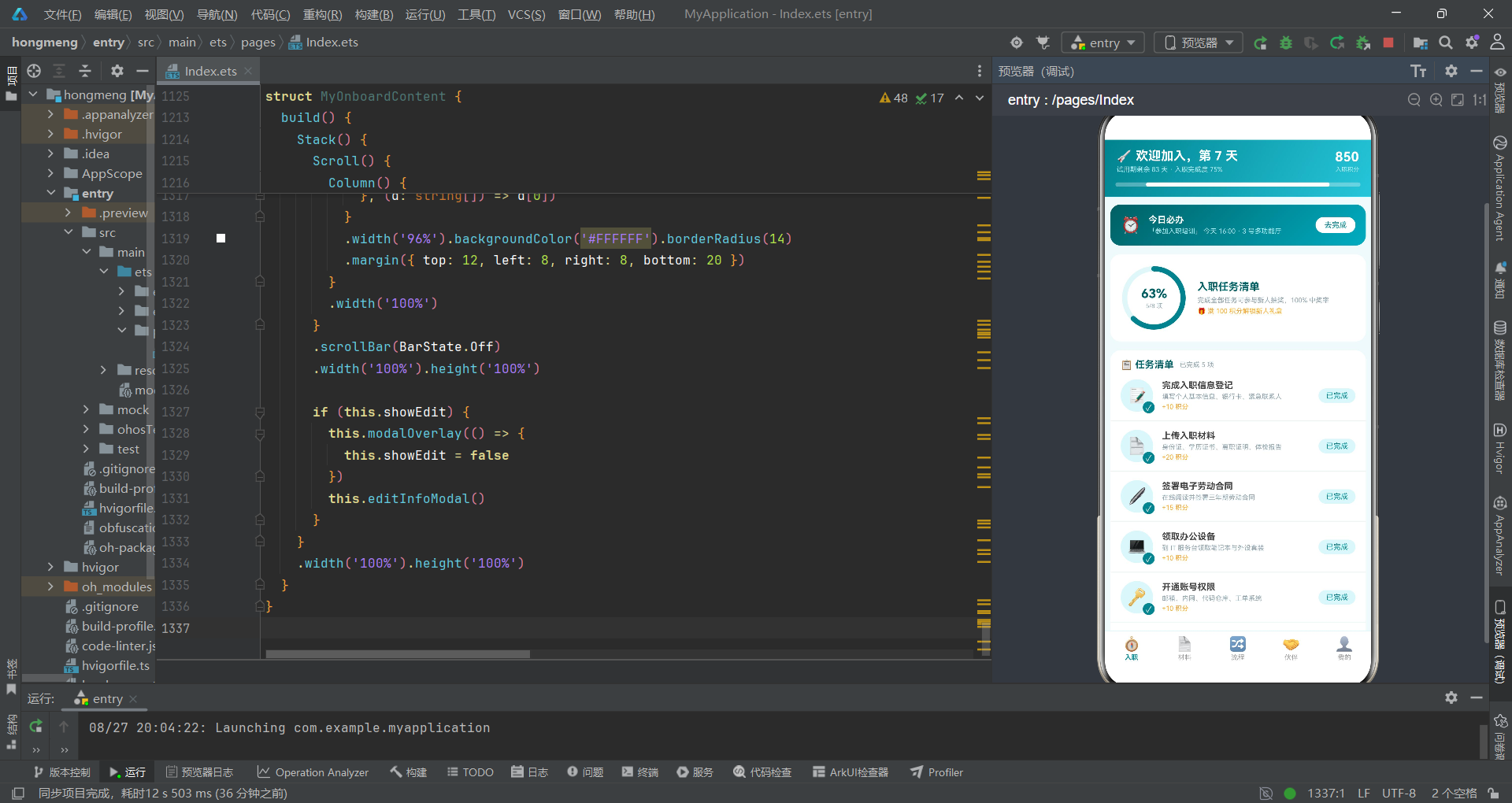
本文对一个人事管理App入职离职全流程模块进行了完整的代码级深度解析。从整体架构来看,该应用采用了清晰的分层设计:数据模型层由五个interface接口和五组const静态数组构成,定义了入职任务、材料清单、流程步骤、伙伴信息、打卡记录等业务实体的类型结构和初始数据。这些数据在多个组件间共享,构成了应用的"数据骨架"。导航层通过OnboardTab枚举和ONBOARD_TABS元数据数组实现了五个Tab页的定义和渲染,使用if-else条件渲染根据currentTab状态值动态切换内容组件。
在组件层面,@Entry装饰的OnboardApp作为根组件管理全局Tab状态,五个@Component子组件各自独立管理内部状态和弹窗逻辑。每个组件都遵循Stack(根容器)+ Scroll(可滚动内容)+ 条件弹窗的结构模式,保证了UI层级的清晰和交互的一致性。@State装饰器在七个组件中总共管理了27个状态变量,覆盖了弹窗开关控制、表单数据绑定、列表选中状态、动画参数控制等多种状态管理场景。状态更新采用不可变模式,使用concat方法返回新数组而非原地修改,确保框架能正确检测变化并触发重渲染。
在UI实现层面,应用大量运用了ArkUI的核心布局容器:Column用于垂直排列(如弹窗内容、卡片内部信息)、Row用于水平排列(如列表项、按钮组)、Stack用于层叠叠加(如进度环中心文字、头像角标、勾选标记)、Scroll用于可滚动区域(如内容列表、横向步骤条)、Flex用于弹性布局。ForEach作为循环渲染组件在所有列表场景中使用,其三个参数(数据源、项生成函数、键值生成函数)的设计兼顾了灵活性和差分更新效率。linearGradient渐变背景在头部、卡片、按钮等元素上广泛使用,通过双色渐变营造层次感。
在交互动画层面,animation方法配合Curve.EaseOut缓出曲线在进度条、柱状图、勾选标记、标签切换等场景中实现了平滑过渡效果。setTimeout用于实现"先放大再缩回"的弹性动画模式。Progress组件的ProgressType.Ring环形进度通过Stack叠加文字实现了完成度展示。shadow方法为悬浮按钮添加了阴影效果。position方法实现了绝对定位,用于角标、悬浮按钮、遮罩层等需要精确定位的元素。
在弹窗交互层面,应用通过@Builder装饰器定义了六种弹窗,涵盖居中卡片式(任务确认、材料上传、信息编辑、离职警示)和底部抽屉式(离职申请、联系伙伴)两种弹窗形态。每个弹窗都配合modalOverlay遮罩层使用,遮罩层使用半透明黑色背景和zIndex(998)确保层级关系正确。弹窗内容通过状态变量动态填充,实现了"一个模板多种内容"的复用模式。表单交互使用了Radio单选按钮、TextInput文本输入、TextArea多行文本输入、标签式选择器等多种输入组件,覆盖了企业应用中常见的表单场景。
辅助函数getMatStatusColor和getFlowStateColor作为全局纯函数,将业务状态到颜色的映射逻辑从UI代码中分离,提高了代码的可维护性和一致性。这种将展示逻辑提取为纯函数的做法在大型应用中尤为重要,使得配色方案的调整只需修改函数实现而无需遍历所有UI代码。整体应用通过青蓝色系(#00838F、#26C6DA、#E0F7FA等)的统一运用,辅以琥珀色(#F9A825)和红色(#B71C1C)的对比点缀,营造了清新专业又不失活力的视觉风格,符合企业人事管理应用的设计调性。

讨论HarmonyOS开发技术,专注于API与组件、DevEco Studio、测试、元服务和应用上架分发等。
更多推荐
 6
6 0
0- 0


 已为社区贡献43条内容

所有评论(0)