HarmonyOS 6 效果实现 objectFit 图片缩放模式图片裁剪铺满容器不变形显示效果开发攻略
一、技术背景与概述
鸿蒙HarmonyOS的开发生态
鸿蒙HarmonyOS作为华为面向万物互联时代打造的分布式操作系统,其应用开发体系经过多次迭代已经趋于成熟。在HarmonyOS的应用开发框架中,ArkTS语言和ArkUI声明式框架构成了最核心的开发工具链。ArkTS在TypeScript的基础上增加了对声明式UI的原生支持,通过一系列装饰器(如@Component、@Entry、@State、@Prop、@Builder等)将UI组件的声明、状态管理和生命周期管理有机整合在一起,开发者无需手动操作DOM或调用命令式API即可构建出响应式的用户界面。
对于门店管理类应用而言,ArkTS的强类型系统具有显著的工程价值。排班换班场景涉及大量结构化数据——班次元数据、换班需求、周班表、换班请求、历史记录、同事信息等,每种数据都有不同的字段结构。ArkTS的interface机制在编译期即可校验所有字段访问的类型安全性,避免了JavaScript中常见的undefined错误。同时,ArkTS对空安全的严格要求也确保了在处理可选字段(如备注note可能为空字符串)时不会出现空指针异常。
ArkUI声明式UI的核心机制
ArkUI的声明式UI范式有三个核心机制。第一是组件化,所有UI由struct组件构成,组件可以嵌套和复用。第二是状态驱动,通过@State等装饰器声明响应式变量,变量改变时引用它的UI自动刷新。第三是声明式构建,通过build()方法描述组件结构,方法体内的代码就是UI的"蓝图",框架负责将蓝图渲染为实际的界面元素。
在本篇分析的换班集市应用中,这些机制得到了充分运用。应用包含一个@Entry主组件ShiftSwapApp和五个@Componen子组件,通过currentTab状态变量控制Tab页面切换,通过多个布尔型show变量控制弹窗的显示隐藏,通过@Prop实现父到子的单向数据同步,通过@Builder封装可复用的遮罩层,通过ForEach渲染列表数据,通过animation实现交互动画。这些技术点将在后续章节中结合具体代码逐一讲解。
应用场景与功能概述
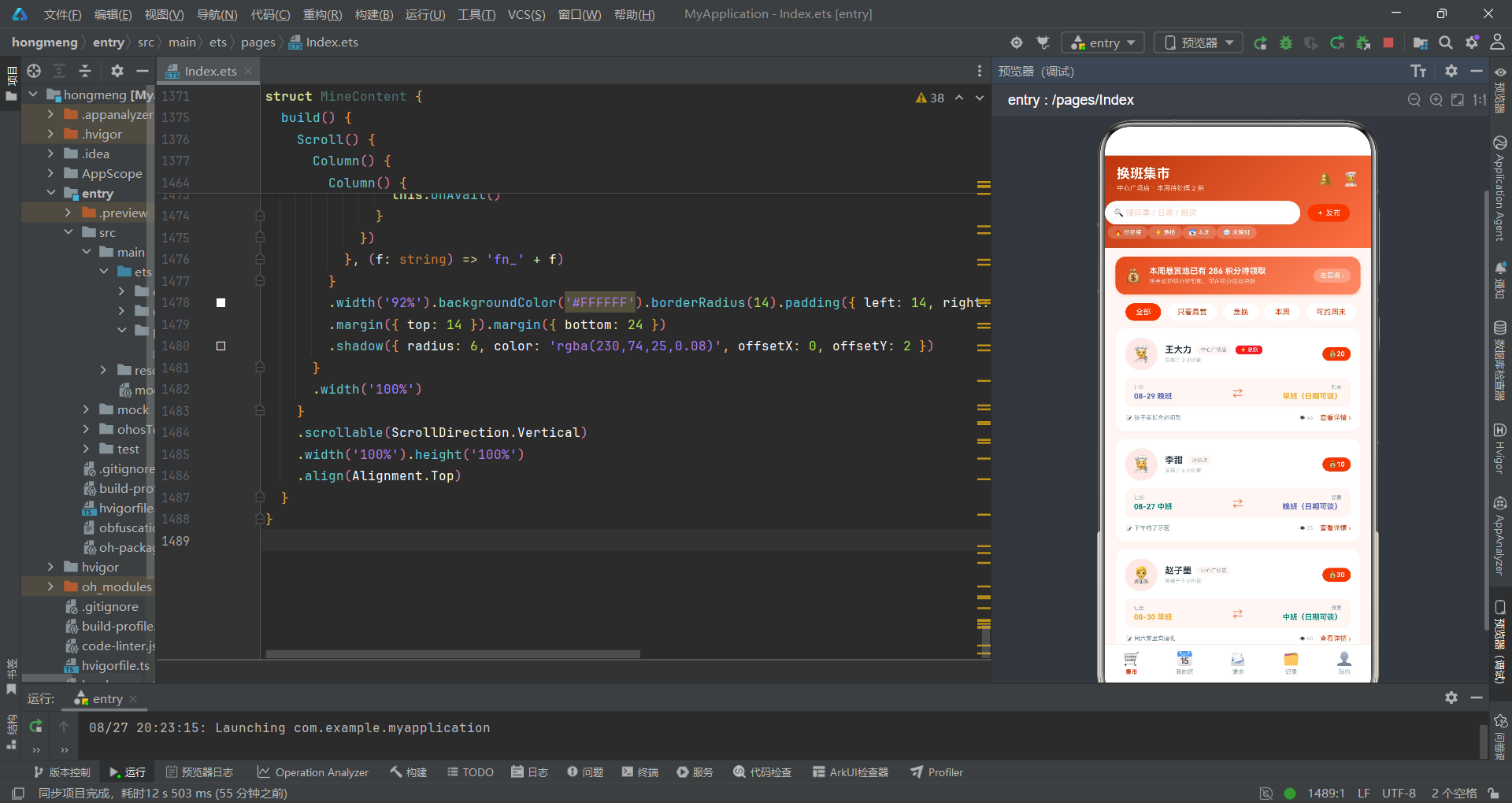
本文分析的是一个门店换班集市应用,它服务于门店一线员工的排班换班需求。应用模拟了一个连锁门店的换班交易市场,覆盖了中心广场店、万达店、高新园店、滨海店四个门店。应用的核心功能包括五大模块:换班需求集市(悬赏卡片流)、我的班表(周班表色块网格)、换班请求处理(接受/婉拒)、换班档案(成功率统计与历史记录)、个人中心(积分与偏好设置)。
从技术角度来看,这个应用展示了门店管理类应用的典型UI模式:日落橙红渐变主题、悬赏卡片瀑布流、周班表七日色块网格、条件匹配标签、婉拒原因单选列表、成功率环形进度图、柱状图数据可视化等。应用通过六个弹窗模块处理用户交互:换班详情查看、发布换班需求、接受确认、婉拒原因选择、班次详情、可换偏好多选设置。下面我们将逐段深入分析每一部分的技术实现。
二、类型定义与数据模型分析
ShiftMeta——班次元数据接口
interface ShiftMeta {
  key: string
  name: string
  time: string
  color: string
  bg: string
}
ShiftMeta定义了班次的基础信息模型。key字段是班次的唯一标识键(如’早班’、‘中班’、‘晚班’、‘全天’、‘休息’),用于在其他数据结构中引用班次类型。name字段是显示名称,与key在当前实现中相同,但分开定义是为了将来支持国际化——key保持不变,name可以切换为不同语言的显示文本。time字段存储班次的时间区间(如’07:00 - 15:00’),休息班次使用’—'作为占位符。color字段是该班次在UI中的主题色,bg字段是该班次在色块网格中的浅色背景色。
这种"一个班次对应两种颜色"的设计是为了在周班表网格中形成视觉层次——色块使用浅色背景(bg),文字使用深色主题色(color),让每个班次既有辨识度又不刺眼。例如早班用黄色系(color: #F9A825, bg: #FFFDE7),中班用绿色系(color: #00897B, bg: #E0F2F1),晚班用蓝紫色系(color: #5C6BC0, bg: #E8EAF6),全天班用玫红色系(color: #AD1457, bg: #F8BBD0),休息用灰色系(color: #B0BEC5, bg: #F5F5F5)。
SwapItem——换班需求接口
interface SwapItem {
  id: number
  publisher: string
  avatar: string
  store: string
  date: string
  myShift: string
  wantShift: string
  bounty: number
  reason: string
  urgent: boolean
  views: number
}
SwapItem定义了换班集市中一条换班需求的完整数据。publisher字段存储发布人姓名,avatar字段使用emoji作为头像,store字段记录门店名称,date字段格式为’08-29 周五’的日期字符串。myShift字段是发布人当前持有的班次(引用ShiftMeta的key),wantShift字段是期望换到的班次。bounty字段是悬赏积分,当值为0时表示纯互换无悬赏。reason字段是换班原因(如’孩子家长会必须到’),urgent字段标记是否紧急,views字段记录浏览次数。
urgent字段使用boolean类型是经过设计的——紧急状态只有是/否两种,不需要枚举更多状态。在UI渲染中,urgent为true时会显示红色"⚡ 急换"标签,吸引用户注意力。这种布尔标记字段在ArkTS中直接用于条件渲染,比字符串比较更高效。
DayShift——日班表接口
interface DayShift {
  day: string
  date: string
  shift: string
  note: string
}
DayShift定义了一天的班表信息。day字段是星期(如’周一’),date字段是日期(如’08-25’),shift字段引用班次key,note字段是当天备注(如’门店例会’、‘新品培训’、‘年假 1 天’)。note字段可能为空字符串,在UI渲染时通过d.note !== ''条件判断决定是否显示备注图标。
MY_WEEK和NEXT_WEEK两个常量数组存储了本周和下周各七天的班表数据。在MyShiftContent组件中,通过weekPick状态变量(0或1)选择展示哪一周的数据,实现周切换功能。
SwapRequest、HistoryItem与StoreMate接口
interface SwapRequest {
  id: number
  from: string
  avatar: string
  offerDate: string
  offerShift: string
  forDate: string
  forShift: string
  hoursAgo: number
  matched: boolean
}

interface HistoryItem {
  id: number
  partner: string
  avatar: string
  giveDate: string
  giveShift: string
  getDate: string
  getShift: string
  result: string
  color: string
}

interface StoreMate {
  id: number
  name: string
  avatar: string
  role: string
  swaps: number
  rating: string
  online: boolean
}
SwapRequest定义了收到的换班请求。offerDate和offerShift是对方愿意给出的班次,forDate和forShift是对方想要的班次。hoursAgo字段记录请求发出至今的小时数,matched字段标记是否条件匹配。HistoryItem定义了换班历史记录,result字段存储结果文案(如’换班成功’、‘对方爽约’、‘店长审批驳回’、‘已过期’),color字段存储结果对应的颜色。StoreMate定义了同事信息,rating字段使用string类型而非number,因为评分值在UI中直接显示,不需要进行数学运算。
三、写死数据与全局纯函数分析
班次定义SHIFTS
const SHIFTS: ShiftMeta[] = [
  { key: '早班', name: '早班', time: '07:00 - 15:00', color: '#F9A825', bg: '#FFFDE7' },
  { key: '中班', name: '中班', time: '11:00 - 19:00', color: '#00897B', bg: '#E0F2F1' },
  { key: '晚班', name: '晚班', time: '15:00 - 23:00', color: '#5C6BC0', bg: '#E8EAF6' },
  { key: '全天', name: '全天班', time: '09:00 - 21:00', color: '#AD1457', bg: '#F8BBD0' },
  { key: '休息', name: '休息', time: '—', color: '#B0BEC5', bg: '#F5F5F5' }
]
SHIFTS数组定义了门店的五种班次类型。const关键字声明确保该引用不可变。这个数组在整个应用中被多处引用——周班表网格通过shift key查找对应的颜色和时间信息,换班卡片的班次标签通过getShiftMeta函数获取显示文案和颜色。
换班需求SWAPS
const SWAPS: SwapItem[] = [
{ id: 1, publisher: '王大力', avatar: '🧑🍳', store: '中心广场店', date: '08-29 周五', myShift: '晚班', wantShift: '早班', bounty: 20, reason: '孩子家长会必须到', urgent: true, views: 46 },
// ... 更多需求
]
SWAPS数组存储了十条换班需求数据,涵盖了不同门店、不同班次组合、不同悬赏额度和不同紧急程度。数据设计上既有紧急换班(urgent: true)也有普通换班,既有悬赏换班(bounty > 0)也有纯互换(bounty: 0),既有高浏览量的热门需求也有低浏览量的新发布需求,为UI展示提供了丰富的数据样本。
全局纯函数
function getShiftMeta(key: string): ShiftMeta {
  for (let i = 0; i < SHIFTS.length; i++) {
    if (SHIFTS[i].key === key) {
      return SHIFTS[i]
    }
  }
  return SHIFTS[4]
}

function getHoursAgo(h: number): string {
  if (h < 24) {
    return h.toString() + ' 小时前'
  }
  return Math.floor(h / 24).toString() + ' 天前'
}
getShiftMeta函数通过班次key查找对应的ShiftMeta对象。使用for循环遍历SHIFTS数组,找到匹配的key则返回该元素,未找到则返回SHIFTS[4](休息班次)作为默认值。这种"查找函数带默认返回值"的设计确保了即使传入了未知的班次key,函数也能安全返回,不会抛出异常。
getHoursAgo函数将小时数转换为人类可读的时间描述。小于24小时显示"X 小时前",大于等于24小时显示"X 天前"(通过Math.floor取整)。这种相对时间显示在社交和即时通讯应用中非常常见,比绝对时间戳更符合用户的直觉认知。
四、主页面ShiftSwapApp逐段深度分析
状态变量声明
@Entry
@Component
struct ShiftSwapApp {
  @State currentTab: number = 0
  @State showSwapDetail: boolean = false
  @State showPost: boolean = false
  @State showAccept: boolean = false
  @State showDecline: boolean = false
  @State showShiftDetail: boolean = false
  @State showAvail: boolean = false
  @State selSwap: SwapItem = SWAPS[0]
  @State selReq: SwapRequest = SWAP_REQUESTS[0]
  @State selDay: DayShift = MY_WEEK[1]
  @State availShifts: string[] = ['早班', '晚班']
  @State postShift: string = '晚班'
  @State wantShift: string = '早班'
  @State bounty: number = 20
  @State declineReason: string = ''
  @State weekPick: number = 0
  @State cardTap: number = 1.0
  @State ringGrow: boolean = false
  @State takenIds: number[] = []
  @State declinedIds: number[] = []
ShiftSwapApp是应用的入口组件,声明了大量状态变量来管理应用的全部交互状态。六个布尔型show变量分别控制六个弹窗的显示隐藏——这种"一弹窗一开关"的模式简单直观,在弹窗数量不多时是ArkUI中实现模态层的推荐做法。
selSwap、selReq、selDay三个变量分别存储当前选中的换班需求、换班请求和日期班表,它们作为弹窗的数据源。当用户点击某个换班卡片时,将该SwapItem赋值给selSwap,然后设置showSwapDetail为true,弹窗就会显示这条需求的详情。
availShifts数组存储用户愿意接的班次列表(初始为[‘早班’, ‘晚班’]),在可换偏好弹窗中通过多选标签进行增删。postShift和wantShift存储发布换班需求时选择的让出班次和期望班次。bounty存储悬赏积分,通过Slider组件调整。declineReason存储婉拒原因,通过单选标签选择。
takenIds数组记录用户已接单的换班需求id,declinedIds数组记录已婉拒的换班请求id。这两个数组在子组件中通过@Prop接收,用于在列表中标记已处理的项目。ringGrow变量控制换班档案页面成功率环形进度的动画状态——初始为false(进度为0),点击后设置为true触发动画展开到71%。
build()方法——Stack层叠与整体结构
build() {
  Stack() {
    Column() {
      // 头部
      Column() { ... }
      // 内容区
      Stack() { ... }
      // 底部Tab
      Row() { ... }
    }
    .width('100%').height('100%').backgroundColor('#FDF6F4')

    // 弹窗1-6
    if (this.showSwapDetail) { ... }
    if (this.showPost) { ... }
    if (this.showAccept) { ... }
    if (this.showDecline) { ... }
    if (this.showShiftDetail) { ... }
    if (this.showAvail) { ... }
  }
  .width('100%').height('100%')
}
build()方法的整体结构与上一篇人脉图谱应用类似——最外层Stack容器实现弹窗层叠,内层Column纵向排列头部、内容区和底部Tab栏。不同之处在于主题色调——本应用使用日落橙红渐变(#BF360C到#FF7043),背景色为#FDF6F4(极浅的暖色调),与换班集市的"火热、紧迫"业务氛围相匹配。
头部渐变区域
Column() {
Row() {
Column() {
Text('换班集市').fontSize(18).fontWeight(FontWeight.Bold).fontColor('#FFFFFF')
Text('中心广场店 · 本周待处理 2 条').fontSize(9).fontColor('#FFCCBC').margin({ top: 4 })
}
.alignItems(HorizontalAlign.Start).layoutWeight(1)
Text('🔔').fontSize(18).margin({ right: 12 })
Text('🧑🍳').fontSize(18)
}
.width('100%').padding({ left: 16, right: 16, top: 14 })
Row() {
Text('🔍 搜同事 / 日期 / 班次').fontSize(11).fontColor('#FFCCBC')
.layoutWeight(1).height(32).backgroundColor('#FFFFFF')
.borderRadius(16).padding({ left: 12 }).textAlign(TextAlign.Start)
Text('+ 发布').fontSize(10).fontColor('#FFFFFF')
.backgroundColor('#E64A19').borderRadius(12)
.padding({ left: 12, right: 12, top: 6, bottom: 6 })
.margin({ left: 10 })
.animation({ duration: 150, curve: Curve.EaseOut })
.onClick(() => {
this.cardTap = 0.9
setTimeout(() => {
this.cardTap = 1.0
}, 150)
this.showPost = true
})
}
.width('92%').margin({ top: 12 })
Row() {
ForEach(['🔥 悬赏榜', '⚡ 急换', '📅 本周', '💬 求晚班'], (q: string) => {
Text(q).fontSize(8).fontColor('#FFFFFF')
.backgroundColor('rgba(255,255,255,0.20)').borderRadius(9)
.padding({ left: 9, right: 9, top: 4, bottom: 4 })
.margin({ right: 8 }).margin({ top: 2 })
.onClick(() => {
this.currentTab = 0
})
}, (q: string) => 'q_' + q)
}
.padding({ left: 4 }).margin({ top: 10 }).margin({ bottom: 12 })
}
.width('100%')
.linearGradient({ angle: 135, colors: [['#BF360C', 0], ['#FF7043', 1]] })
.alignItems(HorizontalAlign.Start)
头部区域的渐变从#BF360C(深橙红)到#FF7043(亮橙红),angle为135度(左上到右下方向)。这种日落色调与换班集市的交易氛围相呼应——暖色调传递出积极、活跃的情感暗示。
发布按钮使用了#E64A19(介于头部两种渐变色之间的橙红色)作为背景色,与头部渐变形成色彩呼应但又稍有区分,让按钮在渐变背景上足够醒目。按钮绑定了animation动画效果——点击时先将cardTap设为0.9(模拟按下缩放效果),通过setTimeout在150毫秒后恢复为1.0。这种"按压反馈"动画在移动端UI中非常常见,通过状态变量驱动缩放比例来模拟物理按键的触感。
setTimeout是JavaScript/ArkTS中的定时器API,在指定延迟后执行回调函数。这里使用setTimeout实现"按下-恢复"的两阶段动画,cardTap变量虽然声明了但在这个简化实现中未被直接用于样式绑定(scale方法未出现在代码中),实际效果依赖于animation方法对点击事件的过渡动画。
快捷标签栏渲染了四个筛选标签(悬赏榜、急换、本周、求晚班),每个标签点击后都会将currentTab设为0(跳转到集市Tab),在实际项目中可以扩展为更精细的筛选逻辑。标签背景使用rgba(255,255,255,0.20)——白色带20%透明度,在橙红渐变背景上形成半透明的玻璃质感效果。
内容区Tab切换与子组件通信
Stack() {
  if (this.currentTab === 0) {
    MarketContent({
      takenIds: this.takenIds,
      onDetail: (s: SwapItem) => {
        this.selSwap = s
        this.showSwapDetail = true
      }
    })
  } else if (this.currentTab === 1) {
    MyShiftContent({
      weekPick: this.weekPick,
      onWeek: (w: number) => {
        this.weekPick = w
      },
      onDay: (d: DayShift) => {
        this.selDay = d
        this.showShiftDetail = true
      },
      onAvail: () => {
        this.showAvail = true
      }
    })
  } else if (this.currentTab === 2) {
    RequestContent({
      declinedIds: this.declinedIds,
      onAccept: (r: SwapRequest) => {
        this.selReq = r
        this.showAccept = true
      },
      onDecline: (r: SwapRequest) => {
        this.selReq = r
        this.declineReason = ''
        this.showDecline = true
      }
    })
  } else if (this.currentTab === 3) {
    HistoryContent({
      ringGrow: this.ringGrow,
      onGrow: () => {
        this.ringGrow = false
        setTimeout(() => {
          this.ringGrow = true
        }, 100)
      }
    })
  } else {
    MineContent({
      onAvail: () => {
        this.showAvail = true
      }
    })
  }
}
.layoutWeight(1)
内容区通过if-else条件判断渲染五个Tab对应的子组件。每个子组件通过参数传递实现父子通信。MarketContent接收takenIds(已接单id数组)和onDetail回调;MyShiftContent接收weekPick(周选择)和三个回调onWeek、onDay、onAvail;RequestContent接收declinedIds(已婉拒id数组)和onAccept、onDecline两个回调;HistoryContent接收ringGrow(环形动画状态)和onGrow回调;MineContent接收onAvail回调。
HistoryContent的onGrow回调实现了一个"先归零再展开"的动画触发模式——先将ringGrow设为false(进度归零),通过setTimeout在100毫秒后设为true(展开到目标值)。这种模式确保即使连续点击,动画也能从头开始播放,而不是停在终态不动。
底部Tab栏
Divider().color('#FBE9E7').strokeWidth(1)
Row() {
  ForEach(['🛒', '📅', '📨', '🗂️', '👤'], (icon: string, i: number) => {
    Column() {
      Text(icon).fontSize(18)
        .animation({ duration: 180, curve: Curve.EaseOut })
      Text(['集市', '我的班', '请求', '记录', '我的'][i]).fontSize(8)
        .fontColor(this.currentTab === i ? '#D84315' : '#90A4AE')
        .fontWeight(this.currentTab === i ? FontWeight.Bold : FontWeight.Normal)
        .margin({ top: 3 })
    }
    .layoutWeight(1).height(50).justifyContent(FlexAlign.Center)
    .onClick(() => {
      this.currentTab = i
    })
  }, (icon: string) => 'tab_' + icon)
}
.width('100%').backgroundColor('#FFFFFF')
底部Tab栏的结构与人脉图谱应用类似,但有两处差异。第一是Tab项高度为50vp(人脉图谱为48vp),稍高的高度提供了更大的触摸区域。第二是选中色为#D84315(深橙色),与日落橙红主题保持一致。Divider分隔线颜色为#FBE9E7(浅橙色),比纯白色更柔和,与暖色调主题融合自然。
弹窗1:换班详情(居中卡片)
if (this.showSwapDetail) {
  this.modalOverlay(() => {
    this.showSwapDetail = false
  })
  Column() {
    Row() {
      Text(this.selSwap.avatar).fontSize(30)
        .width(52).height(52).backgroundColor('#FBE9E7').borderRadius(26)
        .textAlign(TextAlign.Center)
      Column() {
        Row() {
          Text(this.selSwap.publisher).fontSize(13).fontWeight(FontWeight.Bold).fontColor('#37474F')
          if (this.selSwap.urgent) {
            Text('⚡ 急').fontSize(7).fontColor('#FFFFFF').backgroundColor('#E53935')
              .borderRadius(6).padding({ left: 6, right: 6, top: 2, bottom: 2 }).margin({ left: 6 })
          }
        }
        Text(this.selSwap.store + ' · ' + this.selSwap.views.toString() + ' 次浏览')
          .fontSize(8).fontColor('#90A4AE').margin({ top: 3 })
      }
      .alignItems(HorizontalAlign.Start).layoutWeight(1).margin({ left: 10 })

      Text('✕').fontSize(13).fontColor('#90A4AE')
        .onClick(() => {
          this.showSwapDetail = false
        })
    }
    .width('100%').padding({ left: 16, right: 16, top: 16 })

    Row() {
      Column() {
        Text('TA 让出').fontSize(8).fontColor('#90A4AE')
        Text(this.selSwap.date).fontSize(9).fontColor('#37474F').margin({ top: 4 })
        Text(getShiftMeta(this.selSwap.myShift).name).fontSize(13).fontWeight(FontWeight.Bold)
          .fontColor(getShiftMeta(this.selSwap.myShift).color).margin({ top: 4 })
        Text(getShiftMeta(this.selSwap.myShift).time).fontSize(8).fontColor('#90A4AE').margin({ top: 3 })
      }
      .layoutWeight(1).alignItems(HorizontalAlign.Center)

      Text('⇄').fontSize(20).fontColor('#FF7043')

      Column() {
        Text('TA 想要').fontSize(8).fontColor('#90A4AE')
        Text('可商议日期').fontSize(9).fontColor('#37474F').margin({ top: 4 })
        Text(getShiftMeta(this.selSwap.wantShift).name).fontSize(13).fontWeight(FontWeight.Bold)
          .fontColor(getShiftMeta(this.selSwap.wantShift).color).margin({ top: 4 })
        Text(getShiftMeta(this.selSwap.wantShift).time).fontSize(8).fontColor('#90A4AE').margin({ top: 3 })
      }
      .layoutWeight(1).alignItems(HorizontalAlign.Center)
    }
    .width('88%').backgroundColor('#FDF6F4').borderRadius(12).padding({ top: 12, bottom: 12 })
    .margin({ top: 14 })

    Row() {
      Text('💰 悬赏').fontSize(9).fontColor('#90A4AE').width(52)
      Text(this.selSwap.bounty > 0 ? this.selSwap.bounty.toString() + ' 积分' : '纯互换 · 无悬赏')
        .fontSize(10).fontWeight(FontWeight.Bold)
        .fontColor(this.selSwap.bounty > 0 ? '#E64A19' : '#78909C')
        .layoutWeight(1)
      Text('接单可得').fontSize(8).fontColor('#90A4AE')
    }
    .width('88%').margin({ top: 12 })
    .padding({ left: 12, right: 12, top: 9, bottom: 9 })
    .backgroundColor(this.selSwap.bounty > 0 ? '#FBE9E7' : '#F5F5F5').borderRadius(9)

    Row() {
      Text('📝 原因').fontSize(9).fontColor('#90A4AE').width(52)
      Text(this.selSwap.reason).fontSize(9).fontColor('#5D4037').layoutWeight(1)
    }
    .width('88%').margin({ top: 8 })

    Text('换班需双方确认后提交店长审批,工时与薪资按实际排班结算。')
      .fontSize(7).fontColor('#B0BEC5').margin({ top: 8 }).textAlign(TextAlign.Center)

    Row() {
      Button() {
        Text('和他聊聊').fontSize(11).fontColor('#D84315')
      }
      .backgroundColor('#FBE9E7').borderRadius(17).layoutWeight(1)
      .padding({ top: 9, bottom: 9 })
      .onClick(() => {
        this.showSwapDetail = false
      })

      Button() {
        Text(this.takenIds.indexOf(this.selSwap.id) >= 0 ? '✓ 已接单' : '我要接单').fontSize(11)
          .fontColor('#FFFFFF')
      }
      .backgroundColor(this.takenIds.indexOf(this.selSwap.id) >= 0 ? '#FFAB91' : '#E64A19')
      .borderRadius(17).layoutWeight(1).padding({ top: 9, bottom: 9 }).margin({ left: 10 })
      .onClick(() => {
        if (this.takenIds.indexOf(this.selSwap.id) < 0) {
          this.takenIds = this.takenIds.concat([this.selSwap.id])
          this.showSwapDetail = false
        }
      })
    }
    .width('88%').margin({ top: 14 }).margin({ bottom: 18 })
  }
  .width('86%').backgroundColor('#FFFFFF').borderRadius(18)
  .alignItems(HorizontalAlign.Start)
  .shadow({ radius: 22, color: 'rgba(191,54,12,0.28)', offsetX: 0, offsetY: 8 })
}
换班详情弹窗是一个居中卡片,展示了换班需求的完整信息。弹窗内容分为四个部分:发布人信息行、班次对比卡、悬赏与原因、操作按钮。
班次对比卡是弹窗的视觉核心,使用Row容器横向排列两个Column——左侧"TA让出"、右侧"TA想要",中间用⇄符号连接。每个Column展示日期、班次名称(通过getShiftMeta函数获取)和时间区间。班次名称的fontColor使用getShiftMeta返回的color值,让每个班次以自己的主题色显示,用户一眼就能识别班次类型。
紧急标签通过if (this.selSwap.urgent)条件渲染——当urgent为true时显示红色"⚡ 急"标签。这种条件渲染不会影响非紧急需求的卡片布局,因为if为false时该Text不会生成任何UI元素。
悬赏信息行的样式根据bounty值动态变化——有悬赏时背景为浅橙色#FBE9E7,文字为#E64A19;无悬赏时背景为浅灰色#F5F5F5,文字为#78909C。这种差异化样式让用户快速区分有偿换班和无偿互换。
接单按钮的文案和颜色根据takenIds是否包含当前需求id动态变化。未接单时显示"我要接单"(橙红色背景),已接单时显示"✓ 已接单"(浅橙色背景,不可再次点击)。点击接单通过concat将需求id加入takenIds数组,然后关闭弹窗。
弹窗2:发布换班需求(底部抽屉)
if (this.showPost) {
  this.modalOverlay(() => {
    this.showPost = false
  })
  Column() {
    Row() {
      Column() {
        Text('发布换班需求').fontSize(15).fontWeight(FontWeight.Bold).fontColor('#BF360C')
        Text('发布后 24 小时内无人接单可追加悬赏').fontSize(8).fontColor('#90A4AE').margin({ top: 3 })
      }
      .alignItems(HorizontalAlign.Start).layoutWeight(1)

      Text('✕').fontSize(14).fontColor('#90A4AE')
        .onClick(() => {
          this.showPost = false
        })
    }
    .width('100%').padding({ left: 18, right: 18, top: 16 })

    Divider().color('#FBE9E7').margin({ top: 12 })

    Text('我要让出的班次').fontSize(11).fontWeight(FontWeight.Bold).fontColor('#BF360C')
      .margin({ top: 14 }).padding({ left: 18 })

    Scroll() {
      Row() {
        ForEach(['08-27 周三·晚班', '08-29 周五·早班', '08-30 周六·全天', '08-31 周日·晚班', '09-02 周二·中班'], (d: string) => {
          Text(d).fontSize(9).fontColor(d === '08-27 周三·晚班' ? '#FFFFFF' : '#D84315')
            .backgroundColor(d === '08-27 周三·晚班' ? '#E64A19' : '#FBE9E7')
            .borderRadius(10).padding({ left: 10, right: 10, top: 6, bottom: 6 })
            .margin({ left: 8 })
        }, (d: string) => 'gd_' + d)
      }
      .padding({ left: 10 })
    }
    .scrollable(ScrollDirection.Horizontal)
    .width('90%').margin({ top: 8 })

    Text('期望换到的班次').fontSize(11).fontWeight(FontWeight.Bold).fontColor('#BF360C')
      .margin({ top: 14 }).padding({ left: 18 })

    Row() {
      ForEach(['早班', '中班', '晚班', '休息'], (s: string, i: number) => {
        Column() {
          Text(getShiftMeta(s).name).fontSize(10)
            .fontColor(this.wantShift === s ? '#FFFFFF' : '#D84315')
          Text(getShiftMeta(s).time).fontSize(6)
            .fontColor(this.wantShift === s ? '#FFCCBC' : '#B0BEC5').margin({ top: 2 })
        }
        .backgroundColor(this.wantShift === s ? '#E64A19' : '#FBE9E7')
        .borderRadius(10).padding({ left: 14, right: 14, top: 7, bottom: 7 })
        .margin({ left: i === 0 ? 18 : 8 })
        .onClick(() => {
          this.wantShift = s
        })
      }, (s: string) => 'ws_' + s)
    }
    .margin({ top: 8 })

    Text('悬赏积分(对方接单成功即到账)').fontSize(11).fontWeight(FontWeight.Bold).fontColor('#BF360C')
      .margin({ top: 14 }).padding({ left: 18 })

    Row() {
      Slider({ value: this.bounty, min: 0, max: 100, step: 5 })
        .layoutWeight(1)
        .selectedColor('#E64A19').trackColor('#FBE9E7')
        .blockColor('#BF360C')
        .onChange((v: number) => {
          this.bounty = Math.round(v)
        })
      Text('💰 ' + this.bounty.toString()).fontSize(13).fontWeight(FontWeight.Bold).fontColor('#E64A19')
        .width(64).textAlign(TextAlign.End)
    }
    .width('88%').margin({ top: 8 }).padding({ left: 18 })

    Text('换班原因(店长可见)').fontSize(11).fontWeight(FontWeight.Bold).fontColor('#BF360C')
      .margin({ top: 14 }).padding({ left: 18 })

    TextArea({ placeholder: '简单说明情况,更容易被人接单...' })
      .fontSize(10).fontColor('#37474F').placeholderColor('#B0BEC5')
      .backgroundColor('#FDF6F4').borderRadius(10)
      .width('88%').height(64).margin({ top: 8 })

    Row() {
      Text('当前余额 120 积分').fontSize(8).fontColor('#90A4AE').layoutWeight(1)
      Text('发布后同事将收到推送').fontSize(8).fontColor('#B0BEC5')
    }
    .width('88%').margin({ top: 8 })

    Button() {
      Text('确认发布到集市').fontSize(12).fontColor('#FFFFFF')
    }
    .backgroundColor('#E64A19').borderRadius(20)
    .width('88%').padding({ top: 10, bottom: 10 })
    .margin({ top: 12 }).margin({ bottom: 16 })
    .onClick(() => {
      this.showPost = false
    })
  }
  .width('100%').backgroundColor('#FFFFFF').borderRadius({ topLeft: 22, topRight: 22 })
  .alignItems(HorizontalAlign.Start)
  .constraintSize({ maxHeight: '82%' })
  .shadow({ radius: 20, color: 'rgba(191,54,12,0.22)', offsetX: 0, offsetY: -6 })
}
发布换班需求弹窗是一个底部抽屉,包含四个交互区域:让出班次选择(横滑标签)、期望班次选择(四选一标签组)、悬赏积分滑块(Slider)、换班原因输入(TextArea)。
让出班次选择使用Scroll容器包裹Row,实现横向滚动。每个标签通过d === '08-27 周三·晚班'字符串完全匹配判断选中态——第一个标签默认选中。这种用字符串值判断选中态的方式在静态列表中可行,但在动态数据场景下应使用索引或id来判断更安全。
期望班次选择渲染四个班次标签,每个标签通过this.wantShift === s判断选中态。选中时白字橙红底,未选中时橙红字浅橙底。每个标签是一个Column,包含班次名称和时间两行文字——时间通过getShiftMeta函数获取,字号很小(6vp),作为辅助信息。margin的left值通过i === 0 ? 18 : 8条件判断——第一个标签左边距18vp(与标题对齐),后续标签左边距8vp(标签间距)。这种条件margin在ArkUI中是常见的对齐技巧。
Slider是ArkUI的滑块组件,通过value、min、max、step参数配置滑块范围。selectedColor设置已选区域的颜色,trackColor设置轨道颜色,blockColor设置滑块颜色。onChange事件在用户拖动滑块时触发,回调参数v是当前滑块值(浮点数),通过Math.round取整后赋值给bounty状态变量。bounty值的变化会实时反映在右侧的💰 20文字显示中——这是ArkUI状态驱动的典型体现,@State变量改变后引用它的Text会自动刷新。
TextArea是ArkUI的多行文本输入组件,通过placeholder参数设置占位提示文本,placeholderColor设置占位文本颜色。height(64)提供了足够的输入区域。
弹窗3-6补充分析
弹窗3:接受确认
接受确认弹窗是一个居中警示卡片,展示换班请求的详细信息——对方姓名、你获得的班次、你让出的班次、后续流程。弹窗底部"再想想"和"确认接受"两个按钮,确认接受后关闭弹窗并跳转到换班档案Tab(currentTab = 3)。
Text('⚠️ 确认后 4 小时内不可撤销,请再次核对个人日程').fontSize(8).fontColor('#EF5350')
  .margin({ top: 10 })
警示文案使用红色#EF5350显示,提醒用户操作的不可逆性。这种在确认操作前提供警示信息的设计模式在企业应用中很重要——防止用户误操作导致的排班冲突。
弹窗4:婉拒原因(底部抽屉)
ForEach(DECLINE_REASONS, (r: string) => {
  Row() {
    Circle({ width: 14, height: 14 })
      .fill(this.declineReason === r ? '#E64A19' : '#FFFFFF')
      .stroke(this.declineReason === r ? '#E64A19' : '#FFCCBC').strokeWidth(1.5)
    Text(r).fontSize(11)
      .fontColor(this.declineReason === r ? '#BF360C' : '#546E7A')
      .margin({ left: 12 }).layoutWeight(1)
    if (this.declineReason === r) {
      Text('✓').fontSize(11).fontColor('#E64A19')
    }
  }
  .width('88%').padding({ top: 13, bottom: 13 })
  .onClick(() => {
    this.declineReason = r
  })
}, (r: string) => 'dr_' + r)
婉拒原因列表使用ForEach渲染DECLINE_REASONS数组(六个预设原因),通过Circle组件绘制单选圆点。选中态通过this.declineReason === r判断——选中时圆点填充橙色#E64A19、文字颜色为深橙#BF360C、右侧显示✓勾号;未选中时圆点填充白色、描边浅橙色、文字灰色。这是ArkUI中自定义单选列表的典型实现方式——使用Circle组件替代Radio组件,可以获得更灵活的样式控制。
发送婉拒按钮在declineReason为空时显示"请选择婉拒原因"且背景为浅橙色(禁用态),有值时显示"发送婉拒"且背景为橙红色(启用态)。点击发送后通过concat将请求id加入declinedIds数组,关闭弹窗。
弹窗5:班次详情(底部抽屉)
班次详情弹窗展示某一天的详细班次信息,包括班次名称、时间段、备注、门店地址、着装要求、同班同事等。同班同事使用Scroll容器横向滚动展示MATES数组中的同事头像列。
弹窗6:可换偏好(多选设置)
Flex({ wrap: FlexWrap.Wrap }) {
  ForEach(['早班', '中班', '晚班', '全天', '周末班', '节假日班'], (s: string) => {
    Text(s).fontSize(10)
      .fontColor(this.availShifts.indexOf(s) >= 0 ? '#FFFFFF' : '#D84315')
      .backgroundColor(this.availShifts.indexOf(s) >= 0 ? '#E64A19' : '#FBE9E7')
      .borderRadius(12).padding({ left: 13, right: 13, top: 6, bottom: 6 })
      .margin({ right: 8 })
      .margin({ top: 8 })
      .onClick(() => {
        if (this.availShifts.indexOf(s) >= 0) {
          this.availShifts = this.availShifts.filter((x: string) => x !== s)
        } else {
          this.availShifts = this.availShifts.concat([s])
        }
      })
  }, (s: string) => 'av_' + s)
}
.width('88%').margin({ top: 4 })
可换偏好弹窗使用Flex容器渲染多选标签。与单选不同,多选使用availShifts数组存储所有选中的值,通过indexOf判断某项是否已选中。点击标签时,如果已选中则filter移除,未选中则concat添加。这种"数组toggle"模式在ArkTS中处理多选场景时非常常用。
Toggle组件用于推送提醒开关,type设为ToggleType.Switch(开关样式),selectedColor设为主题色#E64A19。
@Builder modalOverlay——遮罩层
@Builder modalOverlay(onClose: () => void) {
  Column() {
    Text(' ').fontSize(1)
  }
  .width('100%').height('100%')
  .backgroundColor('rgba(60,22,12,0.55)')
  .onClick(() => {
    onClose()
  })
}
遮罩层使用rgba(60,22,12,0.55)——深棕色带55%透明度,与橙红主题色调一致。点击遮罩层调用onClose回调关闭弹窗。这个@Builder在六个弹窗中都被调用,实现了遮罩逻辑的代码复用。
五、子组件MarketContent——换班集市卡片流
@Component
struct MarketContent {
  @Prop takenIds: number[]
  @State filterPick: string = '全部'
  @State cardScale: number = 1.0
  onDetail: (s: SwapItem) => void = () => {}

  build() {
    Scroll() {
      Column() {
        Row() {
          Text('💰').fontSize(18)
          Column() {
            Text('本周悬赏池已有 286 积分待领取').fontSize(11).fontWeight(FontWeight.Bold).fontColor('#FFFFFF')
            Text('接单成功积分秒到账,可在积分商城兑换').fontSize(8).fontColor('#FFCCBC').margin({ top: 3 })
          }
          .alignItems(HorizontalAlign.Start).layoutWeight(1).margin({ left: 10 })
          Text('去围观 ›').fontSize(9).fontColor('#FFFFFF')
            .backgroundColor('rgba(255,255,255,0.25)').borderRadius(10)
            .padding({ left: 9, right: 9, top: 4, bottom: 4 })
        }
        .width('92%').padding(13)
        .linearGradient({ angle: 135, colors: [['#E64A19', 0], ['#FF8A65', 1]] })
        .borderRadius(14).margin({ top: 12 })
        .shadow({ radius: 10, color: 'rgba(230,74,25,0.28)', offsetX: 0, offsetY: 4 })

        Scroll() {
          Row() {
            ForEach(['全部', '只看悬赏', '急换', '本周', '可约周末'], (f: string) => {
              Text(f).fontSize(10)
                .fontColor(this.filterPick === f ? '#FFFFFF' : '#D84315')
                .backgroundColor(this.filterPick === f ? '#E64A19' : '#FFFFFF')
                .borderRadius(13).padding({ left: 14, right: 14, top: 6, bottom: 6 })
                .margin({ left: 8 })
                .onClick(() => {
                  this.filterPick = f
                })
            }, (f: string) => 'mf_' + f)
          }
          .padding({ left: 14, right: 14 })
        }
        .scrollable(ScrollDirection.Horizontal)
        .width('100%').margin({ top: 12 })

        ForEach(SWAPS, (s: SwapItem) => {
          Column() {
            Row() {
              Text(s.avatar).fontSize(22)
                .width(44).height(44).backgroundColor('#FBE9E7').borderRadius(22)
                .textAlign(TextAlign.Center)

              Column() {
                Row() {
                  Text(s.publisher).fontSize(12).fontWeight(FontWeight.Bold).fontColor('#37474F')
                  Text(s.store).fontSize(7).fontColor('#90A4AE')
                    .backgroundColor('#FDF6F4').borderRadius(6)
                    .padding({ left: 6, right: 6, top: 2, bottom: 2 }).margin({ left: 6 })
                  if (s.urgent) {
                    Text('⚡ 急换').fontSize(7).fontColor('#FFFFFF').backgroundColor('#E53935')
                      .borderRadius(6).padding({ left: 6, right: 6, top: 2, bottom: 2 }).margin({ left: 6 })
                  }
                }
                Text('发布于 ' + getHoursAgo(s.id * 3)).fontSize(7).fontColor('#B0BEC5').margin({ top: 3 })
              }
              .alignItems(HorizontalAlign.Start).layoutWeight(1).margin({ left: 10 })

              if (s.bounty > 0) {
                Text('💰' + s.bounty.toString()).fontSize(9).fontWeight(FontWeight.Bold).fontColor('#FFFFFF')
                  .backgroundColor('#E64A19').borderRadius(10)
                  .padding({ left: 8, right: 8, top: 4, bottom: 4 })
              }
            }
            .width('100%')

            Row() {
              Column() {
                Text('让出').fontSize(7).fontColor('#90A4AE')
                Text(s.date.split(' ')[0] + ' ' + getShiftMeta(s.myShift).name).fontSize(10).fontWeight(FontWeight.Bold)
                  .fontColor(getShiftMeta(s.myShift).color).margin({ top: 2 })
              }
              .alignItems(HorizontalAlign.Start).layoutWeight(1)

              Text('⇄').fontSize(14).fontColor('#FF7043')

              Column() {
                Text('想要').fontSize(7).fontColor('#90A4AE')
                Text(getShiftMeta(s.wantShift).name + '(日期可谈)').fontSize(10).fontWeight(FontWeight.Bold)
                  .fontColor(getShiftMeta(s.wantShift).color).margin({ top: 2 })
              }
              .alignItems(HorizontalAlign.End).layoutWeight(1)
            }
            .width('100%').backgroundColor('#FDF6F4').borderRadius(10)
            .padding({ left: 12, right: 12, top: 9, bottom: 9 })
            .margin({ top: 10 })

            Row() {
              Text('📝 ' + s.reason).fontSize(8).fontColor('#78909C').layoutWeight(1)
              Text('👁 ' + s.views.toString()).fontSize(7).fontColor('#B0BEC5')

              Text(this.takenIds.indexOf(s.id) >= 0 ? '✓ 已被接单' : '查看详情 ›').fontSize(9)
                .fontColor(this.takenIds.indexOf(s.id) >= 0 ? '#9E9E9E' : '#E64A19')
                .margin({ left: 10 })
                .onClick(() => {
                  this.onDetail(s)
                })
            }
            .width('100%').margin({ top: 9 })
          }
          .width('92%').backgroundColor('#FFFFFF').borderRadius(14).padding(13)
          .margin({ top: 10 })
          .animation({ duration: 150, curve: Curve.EaseOut })
          .onClick(() => {
            this.onDetail(s)
          })
          .shadow({ radius: 6, color: 'rgba(230,74,25,0.08)', offsetX: 0, offsetY: 2 })
        }, (s: SwapItem) => 'swap_' + s.id.toString())

        Text('已加载全部 10 条需求 · 每 5 分钟刷新').fontSize(8).fontColor('#B0BEC5')
          .margin({ top: 14 }).margin({ bottom: 20 })
      }
      .width('100%')
    }
    .scrollable(ScrollDirection.Vertical)
    .width('100%').height('100%')
    .align(Alignment.Top)
  }
}
MarketContent是换班集市的核心页面组件。它接收@Prop takenIds(父组件同步的已接单id数组),维护@State filterPick(当前筛选标签)和cardScale(卡片缩放比例),通过onDetail回调通知父组件打开详情弹窗。
悬赏横幅使用linearGradient设置橙红渐变背景,展示本周悬赏池总额和兑换说明。这个横幅既有信息展示功能(告知悬赏池总额),又有激励功能(鼓励用户接单赚取积分)。
筛选栏使用Scroll容器横向滚动展示五个筛选标签。filterPick是组件内部的状态,初始为’全部’,点击标签时更新值,触发标签样式的刷新。这里筛选功能目前只更新了视觉状态,实际的数据过滤逻辑需要根据filterPick值对SWAPS数组进行筛选——在实际项目中可以通过computed属性或filter函数实现。
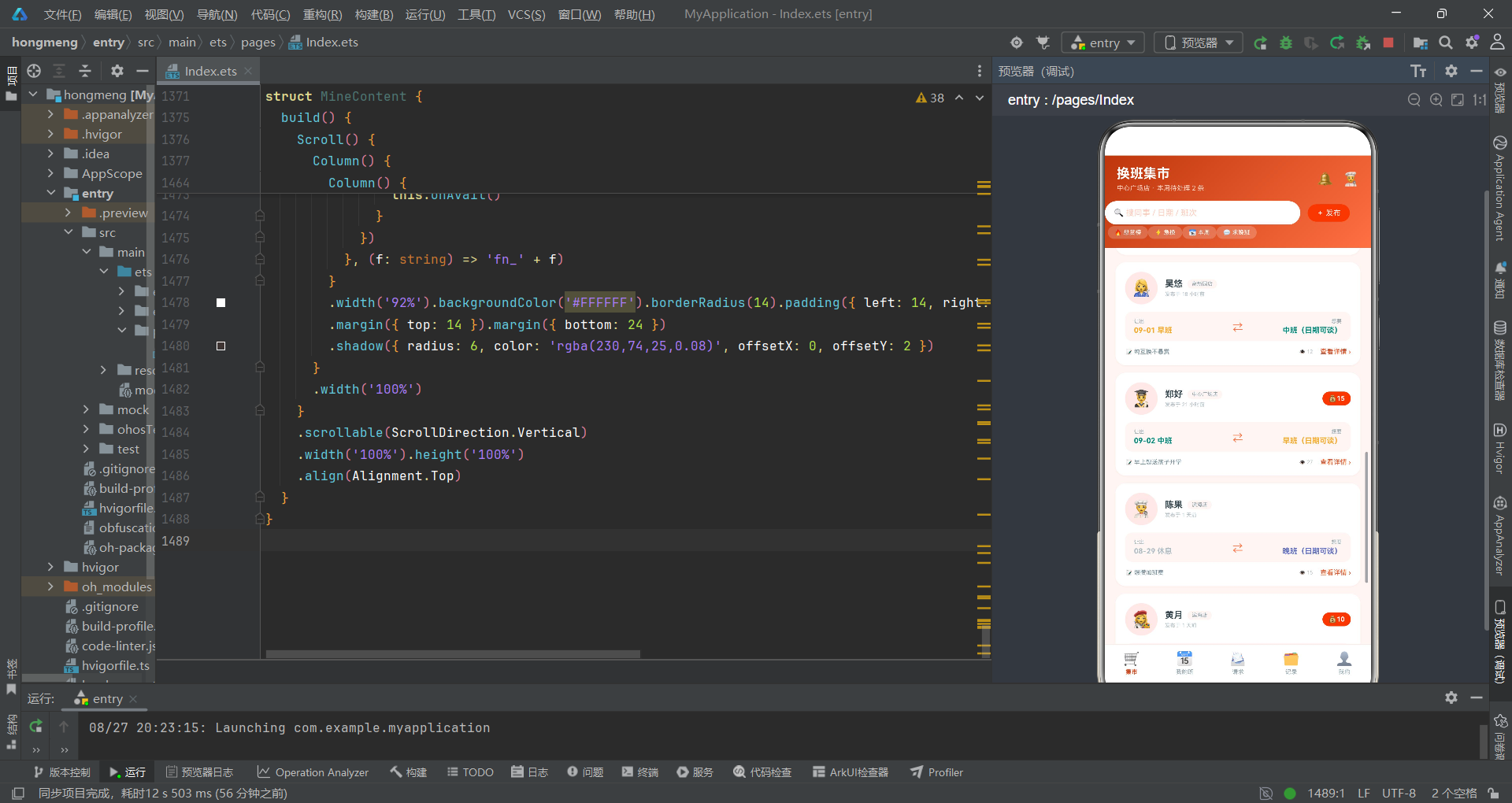
换班卡片流是页面的主体,使用ForEach遍历SWAPS数组渲染十条换班需求卡片。每张卡片是一个Column,包含三行内容:发布人信息行、班次交换展示条、底部操作行。
发布人信息行使用Row横向排列头像、发布人信息(姓名+门店标签+急换标签)和悬赏徽章。急换标签通过if (s.urgent)条件渲染,红色背景的"⚡ 急换"标签。悬赏徽章通过if (s.bounty > 0)条件渲染——只有有悬赏时才显示积分徽章。发布时间通过getHoursAgo(s.id * 3)计算——用需求id乘以3作为小时数的模拟值,id越大发布越晚。
班次交换展示条是卡片的核心视觉元素,使用Row横向排列"让出"和"想要"两个信息块,中间用⇄符号连接。让出信息块使用HorizontalAlign.Start左对齐,想要信息块使用HorizontalAlign.End右对齐,形成对称的视觉布局。班次名称的fontColor通过getShiftMeta函数获取主题色,让用户通过颜色识别班次类型。日期通过s.date.split(' ')[0]提取——将’08-29 周五’按空格分割取第一部分’08-29’。
底部操作行展示换班原因、浏览次数和查看详情链接。查看详情链接的文案根据takenIds是否包含该需求id动态变化——已接单显示灰色"✓ 已被接单",未接单显示橙红色"查看详情 ›"。整个卡片也绑定了onClick事件,点击卡片任意位置都会调用onDetail回调打开详情弹窗。
卡片设置了animation动画,时长150毫秒,EaseOut缓动曲线。当卡片属性变化时(如接单后样式变化),会有平滑的过渡效果。
六、子组件MyShiftContent——周班表色块网格
@Component
struct MyShiftContent {
  @Prop weekPick: number
  onWeek: (w: number) => void = () => {}
  onDay: (d: DayShift) => void = () => {}
  onAvail: () => void = () => {}

  build() {
    Scroll() {
      Column() {
        Row() {
          Column() {
            Text('168').fontSize(15).fontWeight(FontWeight.Bold).fontColor('#E64A19')
            Text('本月工时(h)').fontSize(7).fontColor('#90A4AE').margin({ top: 2 })
          }
          .layoutWeight(1)
          // ... 其他统计项
        }
        .width('92%').backgroundColor('#FFFFFF').borderRadius(13).padding({ top: 12, bottom: 12 })
        .margin({ top: 12 })
        .shadow({ radius: 6, color: 'rgba(230,74,25,0.08)', offsetX: 0, offsetY: 2 })

        Row() {
          Text('◀').fontSize(12).fontColor('#FF7043').onClick(() => {
            if (this.weekPick > 0) {
              this.onWeek(this.weekPick - 1)
            }
          })
          Text(this.weekPick === 0 ? '本周(08-25 ~ 08-31)' : '下周(09-01 ~ 09-07)')
            .fontSize(12).fontWeight(FontWeight.Bold).fontColor('#BF360C')
            .layoutWeight(1).textAlign(TextAlign.Center)
          Text('▶').fontSize(12).fontColor(this.weekPick === 0 ? '#FF7043' : '#B0BEC5').onClick(() => {
            if (this.weekPick < 1) {
              this.onWeek(this.weekPick + 1)
            }
          })
        }
        .width('92%').margin({ top: 14 })

        Row() {
          ForEach(this.weekPick === 0 ? MY_WEEK : NEXT_WEEK, (d: DayShift) => {
            Column() {
              Text(d.day).fontSize(9).fontWeight(FontWeight.Bold).fontColor('#546E7A')
              Text(d.date).fontSize(7).fontColor('#B0BEC5').margin({ top: 2 })

              Column() {
                Text(getShiftMeta(d.shift).name).fontSize(9).fontWeight(FontWeight.Bold)
                  .fontColor(getShiftMeta(d.shift).color)
                Text(getShiftMeta(d.shift).time).fontSize(6).fontColor('#90A4AE').margin({ top: 3 })
                if (d.note !== '') {
                  Text('📌').fontSize(8).margin({ top: 3 })
                }
              }
              .width('100%').backgroundColor(getShiftMeta(d.shift).bg)
              .borderRadius(10).padding({ top: 10, bottom: 10 })
              .margin({ top: 8 })

              Text(' ').fontSize(6)
            }
            .layoutWeight(1).margin({ left: 3 }).margin({ right: 3 })
            .onClick(() => {
              this.onDay(d)
            })
          }, (d: DayShift) => 'wk_' + this.weekPick.toString() + '_' + d.date)
        }
        .width('94%').margin({ top: 10 })

        Row() {
          ForEach(SHIFTS, (s: ShiftMeta) => {
            Row() {
              Circle({ width: 7, height: 7 }).fill(s.color)
              Text(s.name).fontSize(7).fontColor('#78909C').margin({ left: 3 })
            }
            .margin({ left: 8 })
          }, (s: ShiftMeta) => 'lg_' + s.key)
        }
        .margin({ top: 10 })
        // ... 可换偏好入口和班次定义
      }
      .width('100%')
    }
    .scrollable(ScrollDirection.Vertical)
    .width('100%').height('100%')
    .align(Alignment.Top)
  }
}
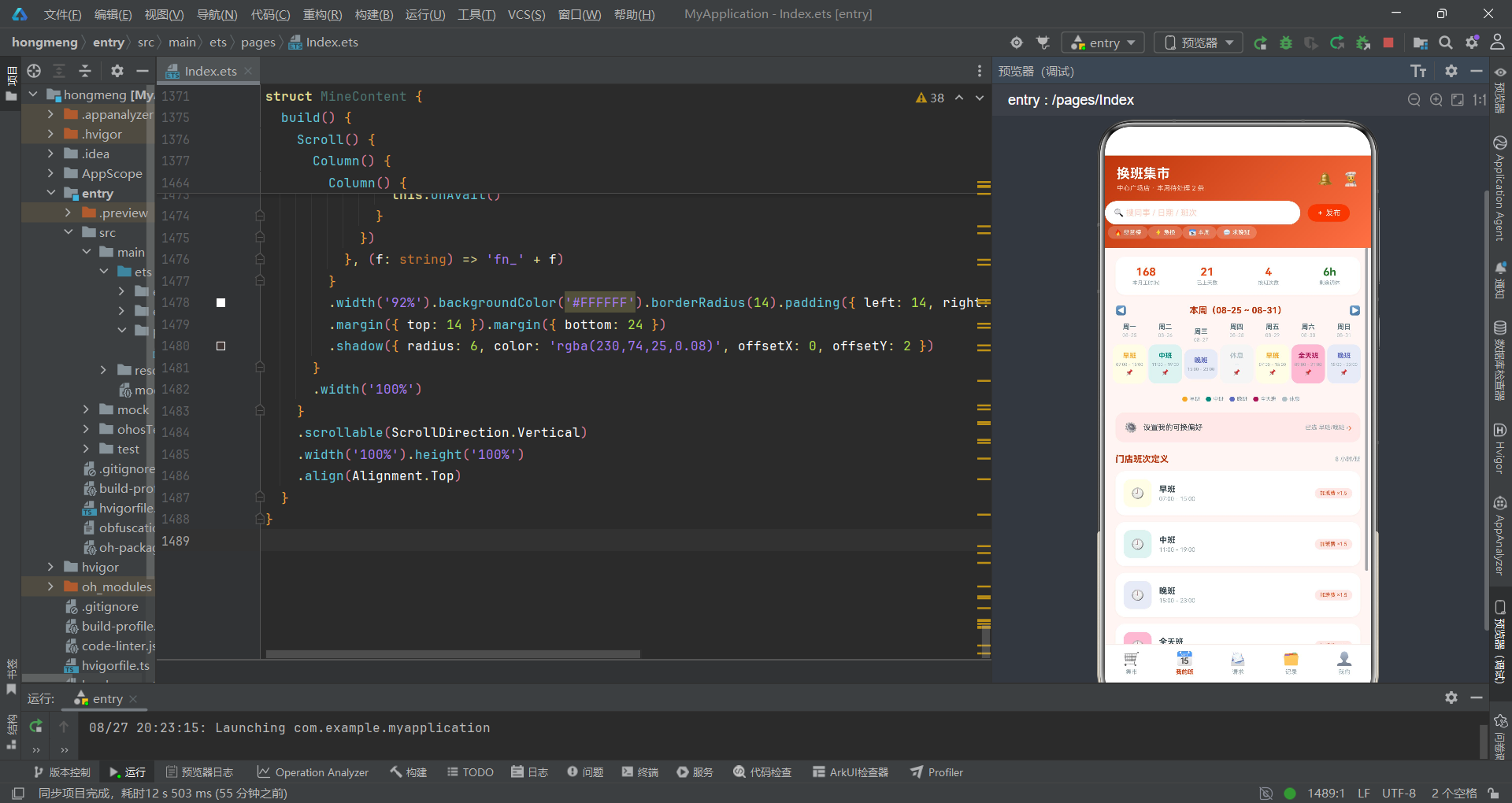
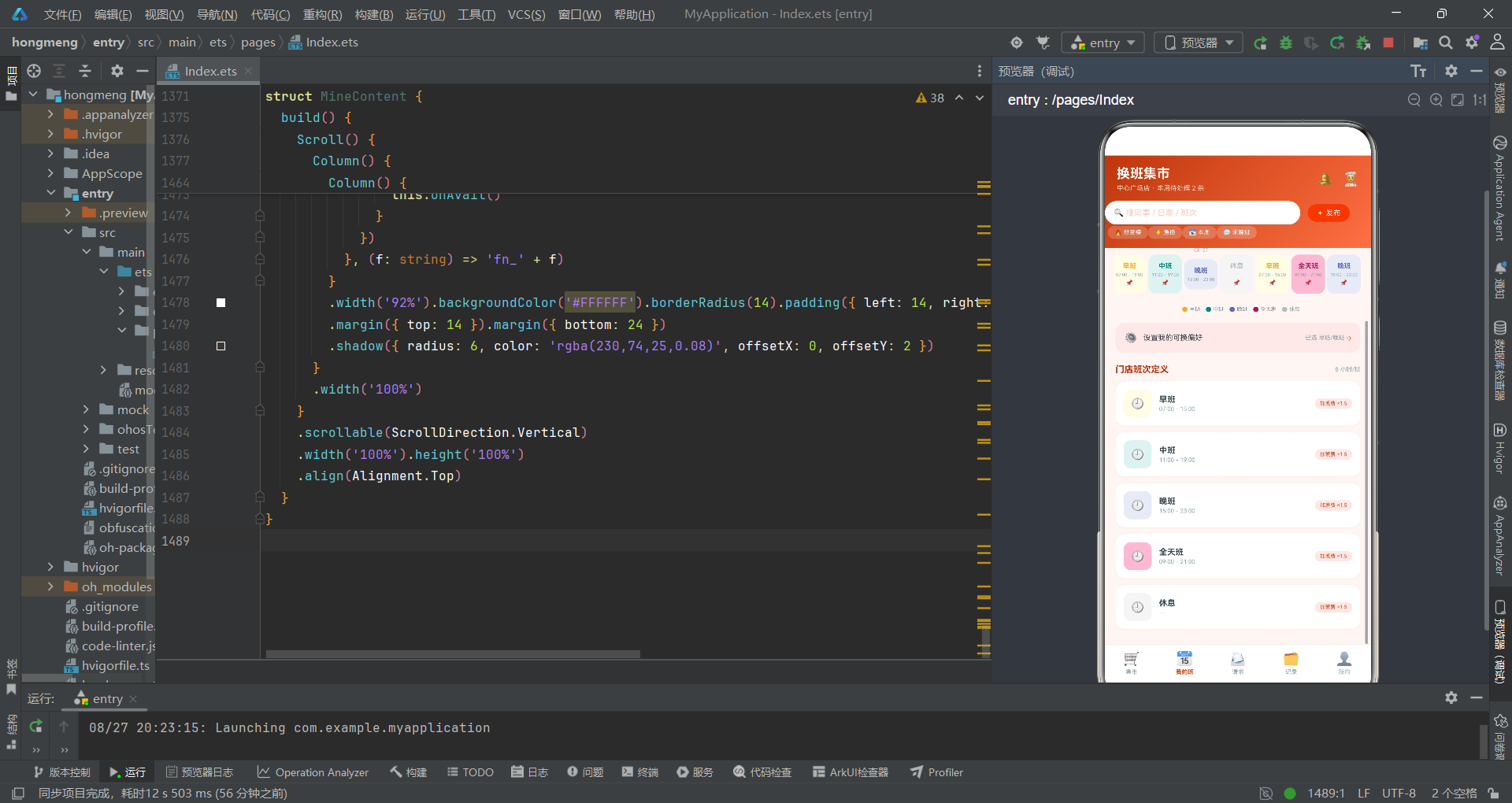
MyShiftContent组件展示个人周班表。它接收@Prop weekPick(当前周选择,0=本周,1=下周)和三个回调函数。weekPick使用@Prop是因为它由父组件控制,子组件需要响应其变化来切换显示的数据源。
周班表网格是本组件的核心,使用Row容器横向排列七天,每天是一个Column(layoutWeight(1)平均分配宽度)。数据源通过三元运算符选择:this.weekPick === 0 ? MY_WEEK : NEXT_WEEK。ForEach的key生成函数包含weekPick值'wk_' + this.weekPick.toString() + '_' + d.date,确保切换周时key发生变化,触发框架重新渲染所有天卡片——这是ArkUI中利用key控制渲染的重要技巧。
每天卡片内部包含星期、日期、班次色块三个部分。班次色块使用getShiftMeta(d.shift).bg作为背景色,色块内显示班次名称(getShiftMeta(d.shift).color为文字颜色)和时间。当d.note不为空时显示📌图标提示有备注。这种"色块+图标"的设计让用户在七天网格中快速扫描班次安排,颜色辨识度极高。
图例使用ForEach渲染SHIFTS数组,每个图例项是一个Row(圆点+文字),Circle组件填充对应班次的color值。图例帮助用户理解色块颜色的含义。
可换偏好入口行展示当前已选偏好'已选 早班/晚班 ›',点击触发onAvail回调打开偏好设置弹窗。班次定义列表使用ForEach渲染SHIFTS数组,展示每个班次的名称、时间和加班费信息。
七、子组件RequestContent——换班请求处理
@Component
struct RequestContent {
  @Prop declinedIds: number[]
  onAccept: (r: SwapRequest) => void = () => {}
  onDecline: (r: SwapRequest) => void = () => {}

  build() {
    Scroll() {
      Column() {
        Row() {
          Text('📨 收到的换班请求').fontSize(13).fontWeight(FontWeight.Bold).fontColor('#BF360C').layoutWeight(1)
          Text('待处理 ' + (SWAP_REQUESTS.length - this.declinedIds.length).toString() + ' 条').fontSize(8).fontColor('#E64A19')
        }
        .width('92%').margin({ top: 12 })

        ForEach(SWAP_REQUESTS, (r: SwapRequest) => {
          Column() {
            Row() {
              Text(r.avatar).fontSize(22)
                .width(44).height(44).backgroundColor('#FBE9E7').borderRadius(22)
                .textAlign(TextAlign.Center)

              Column() {
                Row() {
                  Text(r.from).fontSize(12).fontWeight(FontWeight.Bold).fontColor('#37474F')
                  if (r.matched) {
                    Text('✓ 条件匹配').fontSize(7).fontColor('#2E7D32').backgroundColor('#E8F5E9')
                      .borderRadius(6).padding({ left: 6, right: 6, top: 2, bottom: 2 }).margin({ left: 6 })
                  }
                }
                Text(getHoursAgo(r.hoursAgo) + ' · ' + r.from + ' 想和你换班').fontSize(7).fontColor('#B0BEC5').margin({ top: 3 })
              }
              .alignItems(HorizontalAlign.Start).layoutWeight(1).margin({ left: 10 })
            }
            .width('100%')

            Row() {
              Column() {
                Text('TA 给你的班').fontSize(7).fontColor('#90A4AE')
                Text(r.offerDate).fontSize(8).fontColor('#37474F').margin({ top: 2 })
                Text(getShiftMeta(r.offerShift).name).fontSize(11).fontWeight(FontWeight.Bold)
                  .fontColor(getShiftMeta(r.offerShift).color).margin({ top: 2 })
              }
              .alignItems(HorizontalAlign.Start).layoutWeight(1)

              Text('⇄').fontSize(13).fontColor('#FF7043')

              Column() {
                Text('TA 要你的班').fontSize(7).fontColor('#90A4AE')
                Text(r.forDate).fontSize(8).fontColor('#37474F').margin({ top: 2 })
                Text(getShiftMeta(r.forShift).name).fontSize(11).fontWeight(FontWeight.Bold)
                  .fontColor(getShiftMeta(r.forShift).color).margin({ top: 2 })
              }
              .alignItems(HorizontalAlign.End).layoutWeight(1)
            }
            .width('100%').backgroundColor('#FDF6F4').borderRadius(10)
            .padding({ left: 12, right: 12, top: 9, bottom: 9 }).margin({ top: 10 })

            if (this.declinedIds.indexOf(r.id) < 0) {
              Row() {
                Button() {
                  Text('婉拒').fontSize(10).fontColor('#D84315')
                }
                .backgroundColor('#FBE9E7').borderRadius(14)
                .padding({ left: 18, right: 18, top: 7, bottom: 7 })
                .onClick(() => {
                  this.onDecline(r)
                })

                Text('回复对方').fontSize(10).fontColor('#78909C').margin({ left: 12 }).layoutWeight(1)

                Button() {
                  Text('接受换班').fontSize(10).fontColor('#FFFFFF')
                }
                .backgroundColor('#E64A19').borderRadius(14)
                .padding({ left: 18, right: 18, top: 7, bottom: 7 })
                .onClick(() => {
                  this.onAccept(r)
                })
              }
              .width('100%').margin({ top: 11 })
            } else {
              Row() {
                Text('已婉拒 · 对方已收到你的原因').fontSize(9).fontColor('#9E9E9E').layoutWeight(1)
                Text('撤回').fontSize(9).fontColor('#90A4AE').margin({ left: 10 })
              }
              .width('100%').margin({ top: 11 })
            }
          }
          .width('92%').backgroundColor('#FFFFFF').borderRadius(14).padding(13)
          .margin({ top: 10 })
          .shadow({ radius: 6, color: 'rgba(230,74,25,0.08)', offsetX: 0, offsetY: 2 })
        }, (r: SwapRequest) => 'req_' + r.id.toString())

        Row() {
          Text('🔥 店内换班活跃榜').fontSize(13).fontWeight(FontWeight.Bold).fontColor('#BF360C').layoutWeight(1)
          Text('近 90 天').fontSize(8).fontColor('#90A4AE')
        }
        .width('92%').margin({ top: 18 })

        ForEach(MATES, (m: StoreMate, i: number) => {
          Row() {
            Text(i < 3 ? ['🥇', '🥈', '🥉'][i] : (i + 1).toString()).fontSize(12)
              .width(26).textAlign(TextAlign.Center)
              .fontColor('#546E7A')
            Text(m.avatar).fontSize(18)
              .width(34).height(34).backgroundColor('#FBE9E7').borderRadius(17)
              .textAlign(TextAlign.Center)
            Column() {
              Text(m.name + ' · ' + m.role).fontSize(10).fontWeight(FontWeight.Bold).fontColor('#37474F')
              Text('累计换班 ' + m.swaps.toString() + ' 次 · 信用 ' + m.rating).fontSize(8).fontColor('#90A4AE').margin({ top: 2 })
            }
            .alignItems(HorizontalAlign.Start).layoutWeight(1).margin({ left: 10 })
            Text(m.online ? '● 在线' : '● 离开').fontSize(8)
              .fontColor(m.online ? '#2E7D32' : '#B0BEC5')
          }
          .width('92%').backgroundColor('#FFFFFF').borderRadius(12).padding({ left: 12, right: 12, top: 10, bottom: 10 })
          .margin({ top: 8 })
          .shadow({ radius: 6, color: 'rgba(230,74,25,0.08)', offsetX: 0, offsetY: 2 })
        }, (m: StoreMate) => 'rank_' + m.id.toString())
      }
      .width('100%')
    }
    .scrollable(ScrollDirection.Vertical)
    .width('100%').height('100%')
    .align(Alignment.Top)
  }
}
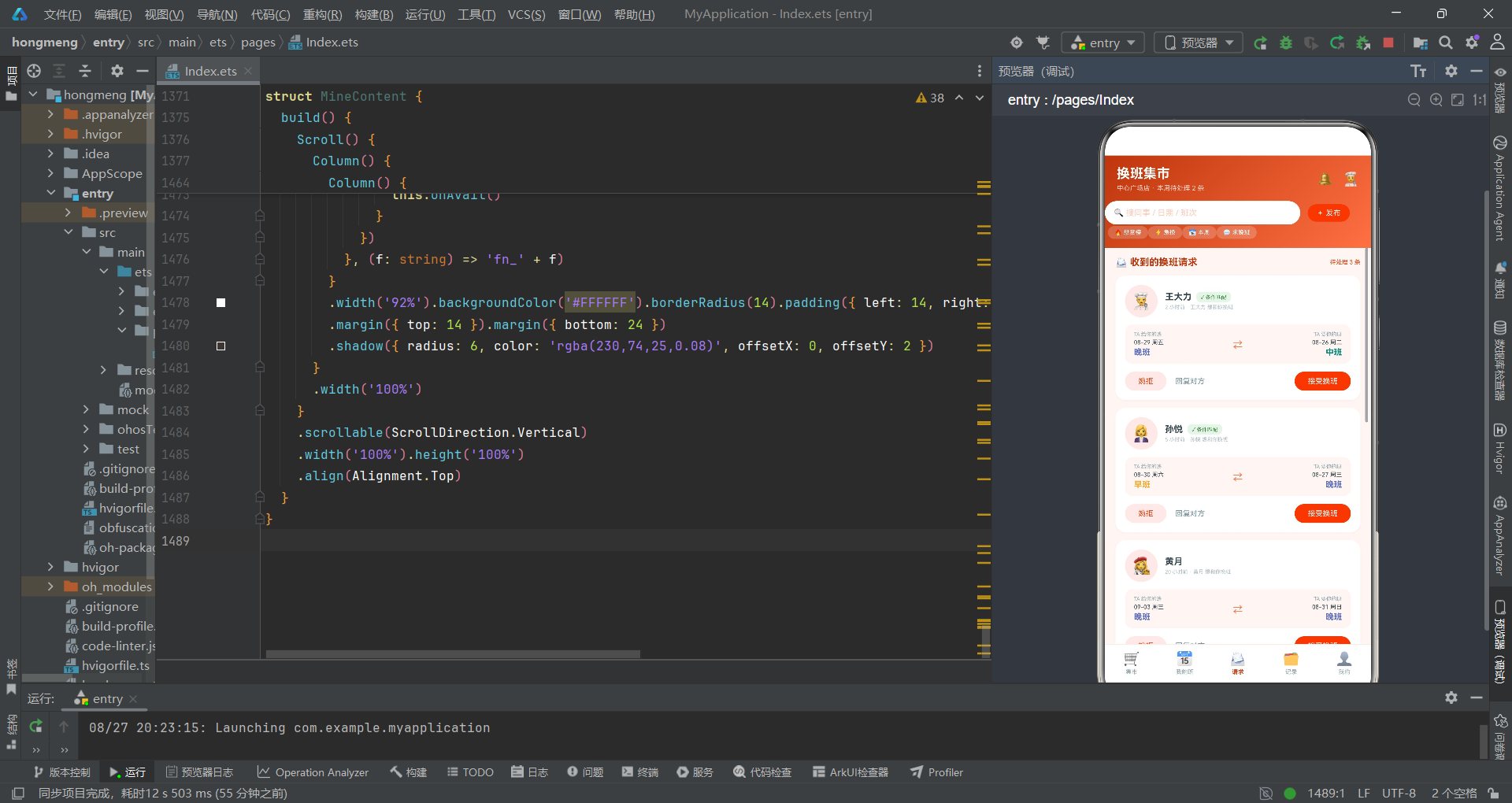
RequestContent组件展示收到的换班请求和店内换班活跃榜。@Prop declinedIds从父组件同步已婉拒的请求id数组,用于控制每条请求的操作区域显示状态。
待处理数量通过SWAP_REQUESTS.length - this.declinedIds.length计算——总请求数减去已婉拒数即为待处理数。这种基于数组长度差值的计算方式简单有效。
每条请求卡片的操作区域通过if (this.declinedIds.indexOf(r.id) < 0)条件渲染——未婉拒时显示"婉拒"和"接受换班"两个按钮,已婉拒时显示"已婉拒 · 对方已收到你的原因"文案和"撤回"链接。这种条件渲染让已处理和未处理的请求在视觉上明确区分。
换班活跃榜使用ForEach渲染MATES数组,前三名使用奖牌emoji(🥇🥈🥉),第四名及以后显示数字排名。排名标识通过i < 3 ? ['🥇', '🥈', '🥉'][i] : (i + 1).toString()条件判断——索引小于3时从奖牌数组取对应emoji,否则显示排名数字(i+1因为索引从0开始)。在线状态通过m.online ? '● 在线' : '● 离开'显示,颜色用绿色#2E7D32和灰色#B0BEC5区分。
八、子组件HistoryContent——换班档案与数据可视化
@Component
struct HistoryContent {
  @Prop ringGrow: boolean
  onGrow: () => void = () => {}

  build() {
    Scroll() {
      Column() {
        Column() {
          Text('我的换班档案').fontSize(13).fontWeight(FontWeight.Bold).fontColor('#BF360C')

          Row() {
            Stack() {
              Progress({ value: this.ringGrow ? 71 : 0, total: 100, type: ProgressType.Ring })
                .color('#E64A19').backgroundColor('#FBE9E7')
                .style({ strokeWidth: 9 })
                .width(84).height(84)
                .animation({ duration: 600, curve: Curve.EaseOut })
              Column() {
                Text('71%').fontSize(16).fontWeight(FontWeight.Bold).fontColor('#E64A19')
                Text('成功率').fontSize(7).fontColor('#90A4AE').margin({ top: 2 })
              }
            }

            Column() {
              Row() {
                Text('· 累计发起').fontSize(9).fontColor('#78909C')
                Text('14 次').fontSize(11).fontWeight(FontWeight.Bold).fontColor('#37474F').margin({ left: 8 })
              }
              .margin({ top: 4 })
              Row() {
                Text('· 成功').fontSize(9).fontColor('#78909C')
                Text('10 次').fontSize(11).fontWeight(FontWeight.Bold).fontColor('#2E7D32').margin({ left: 8 })
              }
              .margin({ top: 8 })
              Row() {
                Text('· 爽约/驳回').fontSize(9).fontColor('#78909C')
                Text('4 次').fontSize(11).fontWeight(FontWeight.Bold).fontColor('#C62828').margin({ left: 8 })
              }
              .margin({ top: 8 })
              Row() {
                Text('· 换班积分收支').fontSize(9).fontColor('#78909C')
                Text('+86').fontSize(11).fontWeight(FontWeight.Bold).fontColor('#E64A19').margin({ left: 8 })
              }
              .margin({ top: 8 })
            }
            .alignItems(HorizontalAlign.Start).layoutWeight(1).margin({ left: 20 })
          }
          .width('100%').margin({ top: 14 })
        }
        .width('92%').backgroundColor('#FFFFFF').borderRadius(14).padding(14)
        .margin({ top: 12 })
        .shadow({ radius: 8, color: 'rgba(230,74,25,0.10)', offsetX: 0, offsetY: 3 })
        .onClick(() => {
          this.onGrow()
        })

        Column() {
          Text('本周班次构成').fontSize(12).fontWeight(FontWeight.Bold).fontColor('#BF360C')
          Text('休息 2 天 · 满勤 5 天').fontSize(8).fontColor('#90A4AE').margin({ top: 3 })

          Row() {
            ForEach(WEEK_COUNT, (v: number, i: number) => {
              Column() {
                Text(v.toString()).fontSize(7).fontColor('#E64A19')
                Column() {
                  Text(' ')
                }
                .width(16).height(v * 9)
                .linearGradient({ angle: 180, colors: [['#E64A19', 0], ['#FFCCBC', 1]] })
                .borderRadius(4)
                Text(['一', '二', '三', '四', '五', '六', '日'][i]).fontSize(7).fontColor('#78909C').margin({ top: 4 })
              }
              .layoutWeight(1).alignItems(HorizontalAlign.Center).margin({ top: 8 })
            }, (v: number, i: number) => 'wc_' + i.toString())
          }
          .width('100%').margin({ top: 10 }).height(110)
          .justifyContent(FlexAlign.End)
        }
        .width('92%').backgroundColor('#FFFFFF').borderRadius(14).padding(14)
        .margin({ top: 12 })
        .shadow({ radius: 8, color: 'rgba(230,74,25,0.10)', offsetX: 0, offsetY: 3 })

        Row() {
          Text('换班历史记录').fontSize(13).fontWeight(FontWeight.Bold).fontColor('#BF360C').layoutWeight(1)
          Text('近 3 个月').fontSize(8).fontColor('#90A4AE')
        }
        .width('92%').margin({ top: 16 })

        ForEach(HISTORIES, (h: HistoryItem) => {
          Column() {
            Row() {
              Text(h.avatar).fontSize(18)
                .width(38).height(38).backgroundColor('#FBE9E7').borderRadius(19)
                .textAlign(TextAlign.Center)
              Column() {
                Text('与 ' + h.partner + ' 的换班').fontSize(11).fontWeight(FontWeight.Bold).fontColor('#37474F')
                Text('让出 ' + h.giveDate + ' ' + h.giveShift + ' ⇄ 换入 ' + h.getDate + ' ' + h.getShift)
                  .fontSize(8).fontColor('#78909C').margin({ top: 3 })
              }
              .alignItems(HorizontalAlign.Start).layoutWeight(1).margin({ left: 10 })
              Text(h.result).fontSize(8)
                .fontColor(h.color).border({ width: 1, color: h.color })
                .borderRadius(8).padding({ left: 8, right: 8, top: 3, bottom: 3 })
            }
            .width('100%')
          }
          .width('92%').backgroundColor('#FFFFFF').borderRadius(13).padding(12)
          .margin({ top: 9 })
          .shadow({ radius: 6, color: 'rgba(230,74,25,0.08)', offsetX: 0, offsetY: 2 })
        }, (h: HistoryItem) => 'hi_' + h.id.toString())
      }
      .width('100%').margin({ bottom: 20 })
    }
    .scrollable(ScrollDirection.Vertical)
    .width('100%').height('100%')
    .align(Alignment.Top)
  }
}
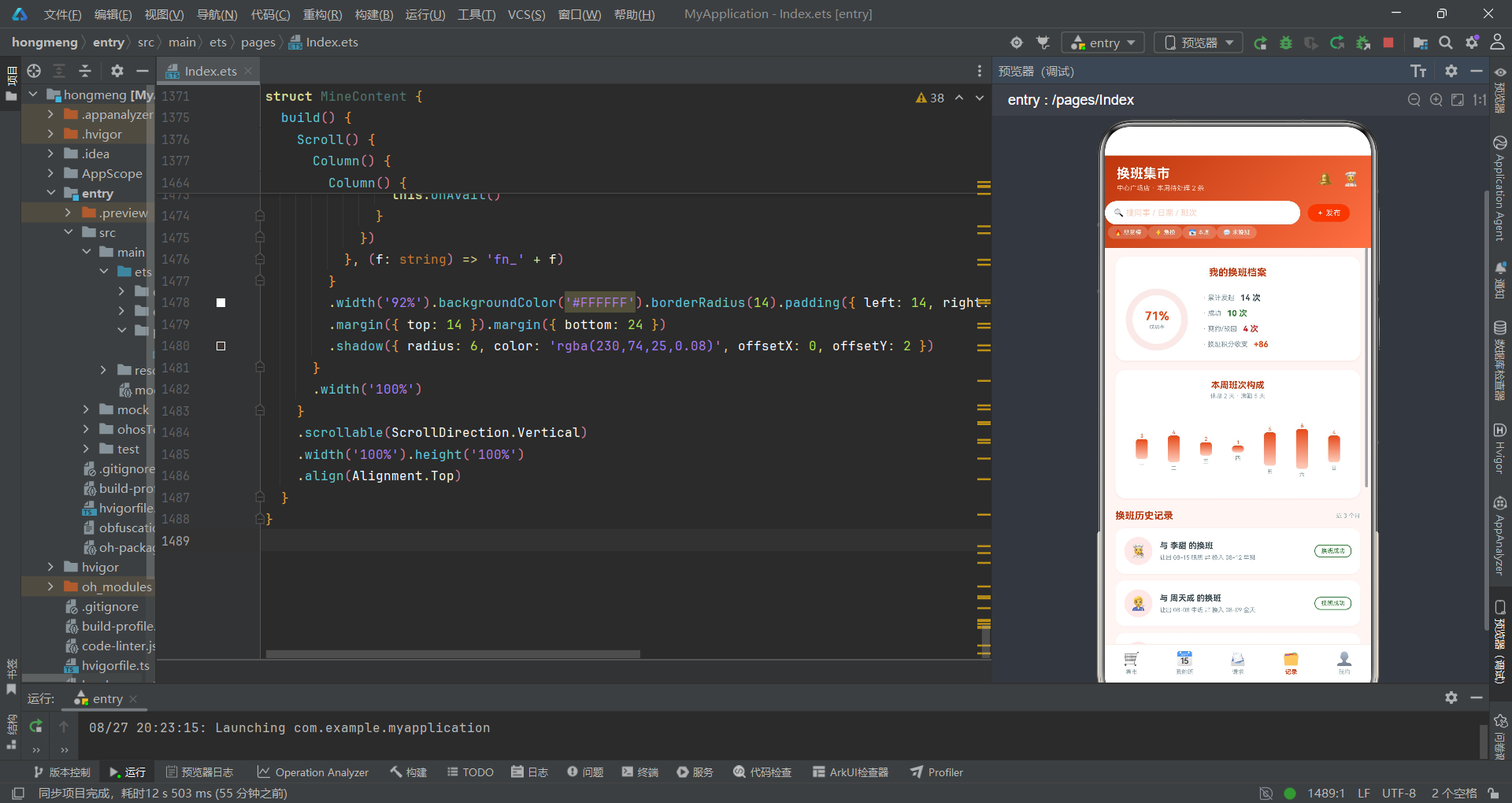
HistoryContent组件展示换班档案,包含三个数据可视化模块:成功率环形进度图、本周班次构成柱状图、换班历史时间轴。
成功率环形图使用Stack容器叠放Progress组件和文字层。Progress组件是ArkUI内置的进度组件,type设为ProgressType.Ring(环形),value通过this.ringGrow ? 71 : 0动态设置——ringGrow为true时进度值为71%,为false时为0。animation方法添加600毫秒的EaseOut动画,当ringGrow从false变为true时,环形进度会从0动画增长到71%,形成"进度环生长"的视觉效果。文字层居中显示"71%"和"成功率"文案,叠放在环形进度之上。
点击档案卡片触发onGrow回调,父组件将ringGrow先设为false再设为true(通过setTimeout延迟100毫秒),实现动画的重复播放。这种"重置-触发"模式是ArkUI中控制动画重复播放的常用技巧。
柱状图使用ForEach渲染WEEK_COUNT数组(七个数字代表每天班次数),每根柱子是一个Column,高度通过v * 9计算(v为班次数,9为每单位高度的像素值)。柱子使用linearGradient设置从上到下(angle: 180)的橙红渐变,从深色#E64A19到浅色#FFCCBC。柱子顶部显示数字,底部显示星期缩写。Row容器设置justifyContent(FlexAlign.End)使柱子从底部对齐,形成典型的柱状图效果。
换班历史记录使用ForEach渲染HISTORIES数组,每条记录展示对方头像、换班描述和结果标签。结果标签使用border方法设置描边边框,颜色与result对应——成功为绿色、爽约为红色、驳回为橙色、过期为灰色。这种用颜色编码结果状态的设计让用户在浏览历史记录时可以快速筛选关注的结果类型。
九、子组件MineContent——个人中心
@Component
struct MineContent {
@State btnTap: number = 1.0
onAvail: () => void = () => {}
build() {
Scroll() {
Column() {
Row() {
Text('🧑🍳').fontSize(26)
.width(58).height(58).backgroundColor('#FBE9E7').borderRadius(29)
.textAlign(TextAlign.Center)
Column() {
Text('张小灶').fontSize(15).fontWeight(FontWeight.Bold).fontColor('#BF360C')
Text('中心广场店 · 凉菜岗 · 工号 LC-0668').fontSize(9).fontColor('#90A4AE').margin({ top: 4 })
Row() {
Text('信用分 98').fontSize(7).fontColor('#FFFFFF').backgroundColor('#2E7D32')
.borderRadius(7).padding({ left: 7, right: 7, top: 3, bottom: 3 })
Text('换班达人 Lv.4').fontSize(7).fontColor('#FFFFFF').backgroundColor('#E64A19')
.borderRadius(7).padding({ left: 7, right: 7, top: 3, bottom: 3 }).margin({ left: 6 })
}
.margin({ top: 6 })
}
.alignItems(HorizontalAlign.Start).layoutWeight(1).margin({ left: 12 })
Text('✏️').fontSize(15)
}
.width('92%').backgroundColor('#FFFFFF').borderRadius(14).padding(14)
.margin({ top: 12 })
.shadow({ radius: 8, color: 'rgba(230,74,25,0.10)', offsetX: 0, offsetY: 3 })
Row() {
Column() {
Text('💰 积分余额').fontSize(9).fontColor('#FFCCBC')
Text('120').fontSize(22).fontWeight(FontWeight.Bold).fontColor('#FFFFFF').margin({ top: 4 })
}
.alignItems(HorizontalAlign.Start).layoutWeight(1)
Text('去兑换 ›').fontSize(10).fontColor('#FFFFFF')
.backgroundColor('rgba(255,255,255,0.25)').borderRadius(13)
.padding({ left: 12, right: 12, top: 7, bottom: 7 })
.animation({ duration: 150, curve: Curve.EaseOut })
.onClick(() => {
this.btnTap = 0.9
setTimeout(() => {
this.btnTap = 1.0
}, 150)
})
}
.width('92%').padding(15)
.linearGradient({ angle: 135, colors: [['#D84315', 0], ['#FF8A65', 1]] })
.borderRadius(14).margin({ top: 12 })
.shadow({ radius: 10, color: 'rgba(216,67,21,0.28)', offsetX: 0, offsetY: 4 })
Row() {
Text('🛒 我发布的换班').fontSize(13).fontWeight(FontWeight.Bold).fontColor('#BF360C').layoutWeight(1)
Text('1 条进行中').fontSize(8).fontColor('#E64A19')
}
.width('92%').margin({ top: 16 })
ForEach([['08-31 周日', '晚班', '休息', '等接单中 · 12 人看过', '#E64A19']], (m: string[]) => {
Column() {
Row() {
Column() {
Text(m[0]).fontSize(10).fontWeight(FontWeight.Bold).fontColor('#37474F')
Text('悬赏 40 积分 · 原因:月底回老家').fontSize(8).fontColor('#90A4AE').margin({ top: 3 })
}
.alignItems(HorizontalAlign.Start).layoutWeight(1)
Text(m[4]).fontSize(8).fontColor(m[4])
.border({ width: 1, color: m[4] }).borderRadius(8)
.padding({ left: 8, right: 8, top: 3, bottom: 3 })
}
.width('100%')
Row() {
Text('让出 ' + m[1]).fontSize(9).fontColor('#5C6BC0')
.backgroundColor('#E8EAF6').borderRadius(8).padding({ left: 8, right: 8, top: 4, bottom: 4 })
Text('⇄').fontSize(10).fontColor('#FF7043').margin({ left: 8 })
Text('想要 ' + m[2]).fontSize(9).fontColor('#B0BEC5')
.backgroundColor('#F5F5F5').borderRadius(8).padding({ left: 8, right: 8, top: 4, bottom: 4 })
.margin({ left: 8 })
Text(m[3]).fontSize(7).fontColor('#B0BEC5').layoutWeight(1)
.textAlign(TextAlign.End)
}
.width('100%').margin({ top: 10 })
}
.width('92%').backgroundColor('#FFFFFF').borderRadius(13).padding(12)
.margin({ top: 10 })
.shadow({ radius: 6, color: 'rgba(230,74,25,0.08)', offsetX: 0, offsetY: 2 })
}, (m: string[]) => 'mine_pub_' + m[0])
Column() {
ForEach(['⚙️ 我的可换偏好设置', '🔔 换班请求提醒', '⭐ 我的信用分明细', '🧾 工时与调休余额', '📞 联系店长 / 排班主管', 'ℹ️ 关于换班集市 v2.8'], (f: string) => {
Row() {
Text(f).fontSize(10).fontColor('#37474F').layoutWeight(1)
Text('›').fontSize(14).fontColor('#B0BEC5')
}
.width('100%').padding({ top: 12, bottom: 12 })
.onClick(() => {
if (f.indexOf('偏好') >= 0) {
this.onAvail()
}
})
}, (f: string) => 'fn_' + f)
}
.width('92%').backgroundColor('#FFFFFF').borderRadius(14).padding({ left: 14, right: 14, top: 6, bottom: 6 })
.margin({ top: 14 }).margin({ bottom: 24 })
.shadow({ radius: 6, color: 'rgba(230,74,25,0.08)', offsetX: 0, offsetY: 2 })
}
.width('100%')
}
.scrollable(ScrollDirection.Vertical)
.width('100%').height('100%')
.align(Alignment.Top)
}
}
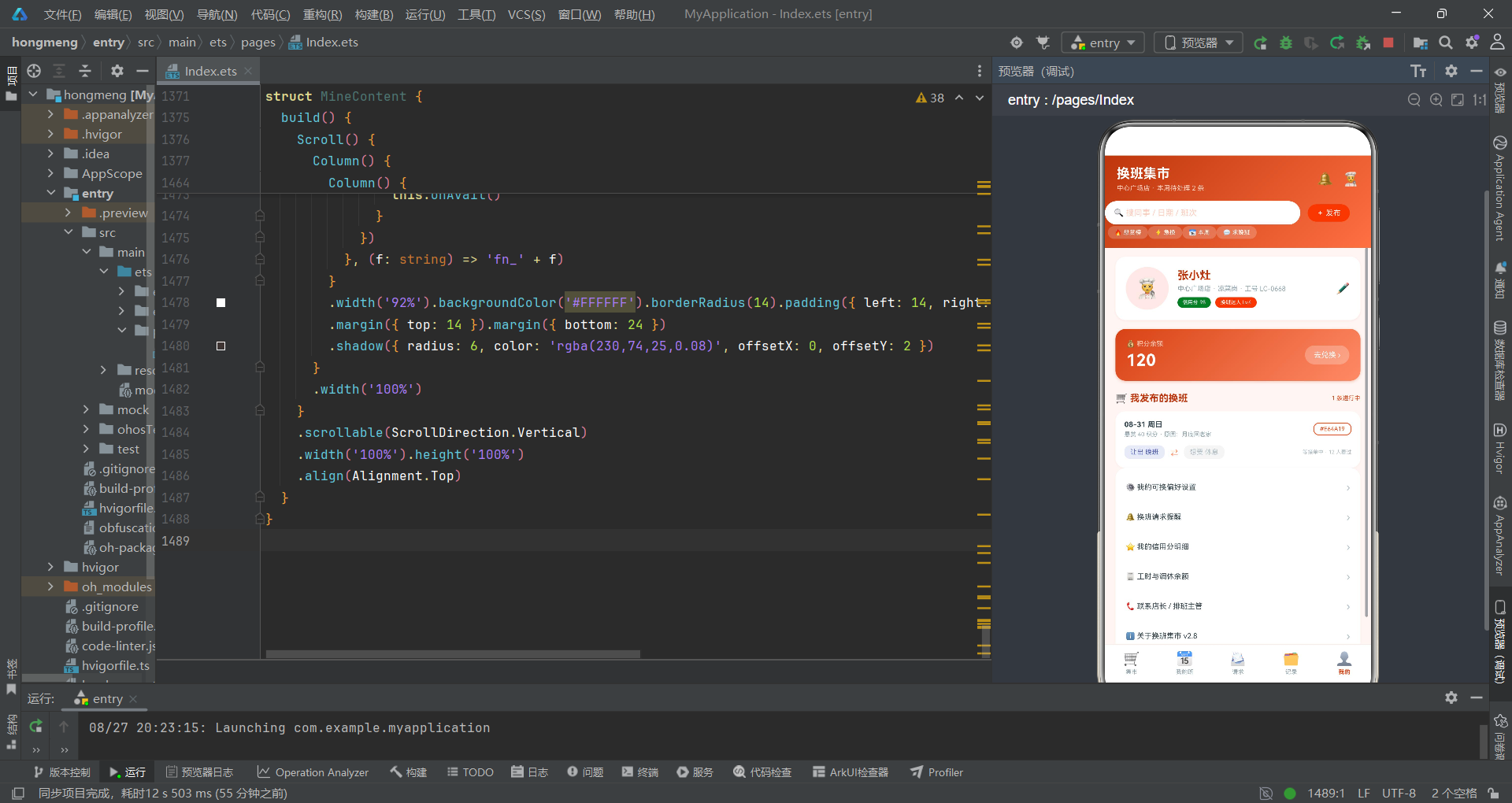
MineContent组件展示个人中心信息。个人卡使用白底卡片展示头像、姓名、岗位和标签(信用分、换班达人等级)。信用分标签使用绿色背景#2E7D32,换班达人标签使用橙红背景#E64A19,两种颜色的对比让用户的信用资质和换班成就同时突出。
积分卡使用linearGradient设置从#D84315到#FF8A65的渐变背景,白色文字显示积分余额"120"。积分是换班集市的核心激励货币,使用大字号(22vp)和加粗字重突出显示。"去兑换"按钮绑定了animation动画和btnTap状态变量,实现按压缩放反馈。
我发布的换班使用ForEach渲染一条发布记录(数组只有一个元素),展示日期、悬赏积分、原因、让出班次、想要班次和当前状态。班次标签使用不同背景色区分——让出班次用蓝紫色#E8EAF6,想要班次用灰色#F5F5F5。状态标签"等接单中 · 12 人看过"右对齐显示。
功能列表使用ForEach渲染六个设置项,每项通过f.indexOf('偏好') >= 0判断是否为偏好设置项——如果是则点击触发onAvail回调打开偏好弹窗。这种通过字符串内容判断点击行为的方式在简单场景下可用,但在更复杂的应用中应使用枚举或id来路由行为。
十、技术要点总结对比
| 技术要点 | 使用场景 | 代码示例 | 作用说明 |
|---|---|---|---|
| @Entry | 主入口组件 | @Entry struct ShiftSwapApp | 标记页面入口 |
| @State | 组件内状态 | @State bounty: number = 20 | 悬赏滑块值变化触发UI刷新 |
| @Prop | 父到子单向同步 | @Prop takenIds: number[] | 已接单id同步到集市组件 |
| @Builder | 可复用UI片段 | @Builder modalOverlay(onClose) | 六个弹窗共用遮罩层 |
| Stack | 层叠布局 | Stack() { Progress() Column() } | 环形进度叠加文字 |
| linearGradient | 线性渐变 | .linearGradient({ angle: 135, colors: [['#BF360C', 0], ['#FF7043', 1]] }) | 头部和积分卡渐变 |
| Progress | 进度组件 | Progress({ value: 71, type: ProgressType.Ring }) | 成功率环形图 |
| Slider | 滑块组件 | Slider({ value: this.bounty, min: 0, max: 100, step: 5 }) | 悬赏积分调节 |
| TextArea | 多行输入 | TextArea({ placeholder: '...' }) | 换班原因输入 |
| Toggle | 开关组件 | Toggle({ type: ToggleType.Switch, isOn: true }) | 推送提醒开关 |
| Circle | 圆形图形 | Circle({ width: 14, height: 14 }).fill(color) | 单选圆点、图例圆点 |
| animation | 属性动画 | .animation({ duration: 600, curve: Curve.EaseOut }) | 环形进度生长动画 |
| Flex | 弹性换行 | Flex({ wrap: FlexWrap.Wrap }) | 可换偏好多选标签 |
| constraintSize | 约束尺寸 | .constraintSize({ maxHeight: '82%' }) | 限制弹窗高度 |
| border | 描边边框 | .border({ width: 1, color: h.color }) | 历史结果标签描边 |
| setTimeout | 定时器 | setTimeout(() => { this.ringGrow = true }, 100) | 动画重置触发 |
| ForEach | 列表渲染 | ForEach(SWAPS, (s: SwapItem) => {...}, key) | 换班卡片流渲染 |
| Scroll | 滚动容器 | Scroll() { Column() {...} }.scrollable(ScrollDirection.Vertical) | 页面垂直滚动 |
安装DevEco Studio程序

选择目标安装目录:

设置环境变量,但是需要重启一下:

新建一个空白模板:

设置API为24的模板项目:

初始化项目,自动下载相关依赖:

完整代码:
// ============================================================
// 换班集市 —— 门店一线员工排班换班交易市场
// 场景:换班需求大厅 / 我的班表 / 请求处理 / 换班档案
// 布局风格:日落橙红渐变 · 周班表色块网格 · 悬赏卡片流
// ============================================================
// ============ 类型定义 ============
interface ShiftMeta {
key: string
name: string
time: string
color: string
bg: string
}
interface SwapItem {
id: number
publisher: string
avatar: string
store: string
date: string
myShift: string
wantShift: string
bounty: number
reason: string
urgent: boolean
views: number
}
interface DayShift {
day: string
date: string
shift: string
note: string
}
interface SwapRequest {
id: number
from: string
avatar: string
offerDate: string
offerShift: string
forDate: string
forShift: string
hoursAgo: number
matched: boolean
}
interface HistoryItem {
id: number
partner: string
avatar: string
giveDate: string
giveShift: string
getDate: string
getShift: string
result: string
color: string
}
interface StoreMate {
id: number
name: string
avatar: string
role: string
swaps: number
rating: string
online: boolean
}
// ============ 写死数据 ============
const SHIFTS: ShiftMeta[] = [
{ key: '早班', name: '早班', time: '07:00 - 15:00', color: '#F9A825', bg: '#FFFDE7' },
{ key: '中班', name: '中班', time: '11:00 - 19:00', color: '#00897B', bg: '#E0F2F1' },
{ key: '晚班', name: '晚班', time: '15:00 - 23:00', color: '#5C6BC0', bg: '#E8EAF6' },
{ key: '全天', name: '全天班', time: '09:00 - 21:00', color: '#AD1457', bg: '#F8BBD0' },
{ key: '休息', name: '休息', time: '—', color: '#B0BEC5', bg: '#F5F5F5' }
]
const SWAPS: SwapItem[] = [
{ id: 1, publisher: '王大力', avatar: '🧑🍳', store: '中心广场店', date: '08-29 周五', myShift: '晚班', wantShift: '早班', bounty: 20, reason: '孩子家长会必须到', urgent: true, views: 46 },
{ id: 2, publisher: '李甜', avatar: '👩🍳', store: '万达店', date: '08-27 周三', myShift: '中班', wantShift: '晚班', bounty: 10, reason: '下午约了牙医', urgent: false, views: 23 },
{ id: 3, publisher: '赵子墨', avatar: '🧑💼', store: '中心广场店', date: '08-30 周六', myShift: '早班', wantShift: '中班', bounty: 30, reason: '周六家里有婚礼', urgent: false, views: 68 },
{ id: 4, publisher: '孙悦', avatar: '👩💼', store: '高新园店', date: '08-28 周四', myShift: '全天', wantShift: '晚班', bounty: 25, reason: '全天班太累想换半场', urgent: false, views: 31 },
{ id: 5, publisher: '周天成', avatar: '🧑🔧', store: '万达店', date: '08-31 周日', myShift: '晚班', wantShift: '休息', bounty: 40, reason: '月底要回老家一趟', urgent: true, views: 92 },
{ id: 6, publisher: '吴悠', avatar: '👩🔧', store: '高新园店', date: '09-01 周一', myShift: '早班', wantShift: '中班', bounty: 0, reason: '纯互换不悬赏', urgent: false, views: 12 },
{ id: 7, publisher: '郑好', avatar: '🧑🎓', store: '中心广场店', date: '09-02 周二', myShift: '中班', wantShift: '早班', bounty: 15, reason: '早上想送孩子开学', urgent: false, views: 27 },
{ id: 8, publisher: '陈果', avatar: '👨🍳', store: '滨海店', date: '08-29 周五', myShift: '休息', wantShift: '晚班', bounty: 0, reason: '想攒加班费', urgent: false, views: 15 },
{ id: 9, publisher: '黄月', avatar: '👩🎨', store: '滨海店', date: '09-03 周三', myShift: '晚班', wantShift: '中班', bounty: 10, reason: '晚上有网课考试', urgent: false, views: 19 },
{ id: 10, publisher: '林峰', avatar: '🧑🚀', store: '高新园店', date: '09-05 周五', myShift: '早班', wantShift: '晚班', bounty: 20, reason: '和朋友的演唱会', urgent: false, views: 44 }
]
const MY_WEEK: DayShift[] = [
{ day: '周一', date: '08-25', shift: '早班', note: '门店例会' },
{ day: '周二', date: '08-26', shift: '中班', note: '新品培训' },
{ day: '周三', date: '08-27', shift: '晚班', note: '' },
{ day: '周四', date: '08-28', shift: '休息', note: '年假 1 天' },
{ day: '周五', date: '08-29', shift: '早班', note: '周五大促' },
{ day: '周六', date: '08-30', shift: '全天', note: '周末高峰' },
{ day: '周日', date: '08-31', shift: '晚班', note: '盘点加班' }
]
const NEXT_WEEK: DayShift[] = [
{ day: '周一', date: '09-01', shift: '中班', note: '' },
{ day: '周二', date: '09-02', shift: '休息', note: '' },
{ day: '周三', date: '09-03', shift: '早班', note: '月度盘点' },
{ day: '周四', date: '09-04', shift: '晚班', note: '' },
{ day: '周五', date: '09-05', shift: '中班', note: '会员日' },
{ day: '周六', date: '09-06', shift: '全天', note: '周末高峰' },
{ day: '周日', date: '09-07', shift: '早班', note: '' }
]
const SWAP_REQUESTS: SwapRequest[] = [
{ id: 1, from: '王大力', avatar: '🧑🍳', offerDate: '08-29 周五', offerShift: '晚班', forDate: '08-26 周二', forShift: '中班', hoursAgo: 2, matched: true },
{ id: 2, from: '孙悦', avatar: '👩💼', offerDate: '08-30 周六', offerShift: '早班', forDate: '08-27 周三', forShift: '晚班', hoursAgo: 5, matched: true },
{ id: 3, from: '黄月', avatar: '👩🎨', offerDate: '09-03 周三', offerShift: '晚班', forDate: '08-31 周日', forShift: '晚班', hoursAgo: 20, matched: false }
]
const HISTORIES: HistoryItem[] = [
{ id: 1, partner: '李甜', avatar: '👩🍳', giveDate: '08-15', giveShift: '晚班', getDate: '08-12', getShift: '早班', result: '换班成功', color: '#2E7D32' },
{ id: 2, partner: '周天成', avatar: '🧑🔧', giveDate: '08-08', giveShift: '中班', getDate: '08-09', getShift: '全天', result: '换班成功', color: '#2E7D32' },
{ id: 3, partner: '吴悠', avatar: '👩🔧', giveDate: '08-01', giveShift: '早班', getDate: '08-02', getShift: '中班', result: '对方爽约', color: '#C62828' },
{ id: 4, partner: '郑好', avatar: '🧑🎓', giveDate: '07-26', giveShift: '晚班', getDate: '07-27', getShift: '休息', result: '店长审批驳回', color: '#EF6C00' },
{ id: 5, partner: '陈果', avatar: '👨🍳', giveDate: '07-19', giveShift: '休息', getDate: '07-20', getShift: '晚班', result: '换班成功', color: '#2E7D32' },
{ id: 6, partner: '林峰', avatar: '🧑🚀', giveDate: '07-12', giveShift: '早班', getDate: '07-13', getShift: '早班', result: '换班成功', color: '#2E7D32' },
{ id: 7, partner: '赵子墨', avatar: '🧑💼', giveDate: '07-05', giveShift: '中班', getDate: '07-06', getShift: '中班', result: '已过期', color: '#9E9E9E' }
]
const MATES: StoreMate[] = [
{ id: 1, name: '王大力', avatar: '🧑🍳', role: '主厨', swaps: 18, rating: '5.0', online: true },
{ id: 2, name: '李甜', avatar: '👩🍳', role: '烘焙师', swaps: 12, rating: '4.9', online: true },
{ id: 3, name: '赵子墨', avatar: '🧑💼', role: '值班经理', swaps: 9, rating: '4.8', online: false },
{ id: 4, name: '孙悦', avatar: '👩💼', role: '收银组长', swaps: 15, rating: '5.0', online: true },
{ id: 5, name: '周天成', avatar: '🧑🔧', role: '设备维护', swaps: 6, rating: '4.6', online: false },
{ id: 6, name: '吴悠', avatar: '👩🔧', role: '服务员', swaps: 11, rating: '4.7', online: true },
{ id: 7, name: '郑好', avatar: '🧑🎓', role: '兼职', swaps: 4, rating: '4.5', online: false },
{ id: 8, name: '陈果', avatar: '👨🍳', role: '凉菜师', swaps: 8, rating: '4.8', online: true },
{ id: 9, name: '黄月', avatar: '👩🎨', role: '甜品师', swaps: 10, rating: '4.9', online: false },
{ id: 10, name: '林峰', avatar: '🧑🚀', role: '外卖调度', swaps: 7, rating: '4.6', online: true }
]
const DECLINE_REASONS: string[] = ['那天我也有事', '班次时间对不上', '距离太远不方便', '已有其他换班约定', '健康原因无法上晚班', '其他原因']
const WEEK_COUNT: number[] = [3, 4, 2, 1, 5, 6, 4]
// ============ 全局纯函数 ============
function getShiftMeta(key: string): ShiftMeta {
for (let i = 0; i < SHIFTS.length; i++) {
if (SHIFTS[i].key === key) {
return SHIFTS[i]
}
}
return SHIFTS[4]
}
function getHoursAgo(h: number): string {
if (h < 24) {
return h.toString() + ' 小时前'
}
return Math.floor(h / 24).toString() + ' 天前'
}
// ============ 主页面 ============
@Entry
@Component
struct ShiftSwapApp {
@State currentTab: number = 0
@State showSwapDetail: boolean = false
@State showPost: boolean = false
@State showAccept: boolean = false
@State showDecline: boolean = false
@State showShiftDetail: boolean = false
@State showAvail: boolean = false
@State selSwap: SwapItem = SWAPS[0]
@State selReq: SwapRequest = SWAP_REQUESTS[0]
@State selDay: DayShift = MY_WEEK[1]
@State availShifts: string[] = ['早班', '晚班']
@State postShift: string = '晚班'
@State wantShift: string = '早班'
@State bounty: number = 20
@State declineReason: string = ''
@State weekPick: number = 0
@State cardTap: number = 1.0
@State ringGrow: boolean = false
@State takenIds: number[] = []
@State declinedIds: number[] = []
build() {
Stack() {
Column() {
// ===== 头部(电商风渐变,无动画) =====
Column() {
Row() {
Column() {
Text('换班集市').fontSize(18).fontWeight(FontWeight.Bold).fontColor('#FFFFFF')
Text('中心广场店 · 本周待处理 2 条').fontSize(9).fontColor('#FFCCBC').margin({ top: 4 })
}
.alignItems(HorizontalAlign.Start).layoutWeight(1)
Text('🔔').fontSize(18).margin({ right: 12 })
Text('🧑🍳').fontSize(18)
}
.width('100%').padding({ left: 16, right: 16, top: 14 })
Row() {
Text('🔍 搜同事 / 日期 / 班次').fontSize(11).fontColor('#FFCCBC')
.layoutWeight(1).height(32).backgroundColor('#FFFFFF')
.borderRadius(16).padding({ left: 12 }).textAlign(TextAlign.Start)
Text('+ 发布').fontSize(10).fontColor('#FFFFFF')
.backgroundColor('#E64A19').borderRadius(12)
.padding({ left: 12, right: 12, top: 6, bottom: 6 })
.margin({ left: 10 })
.animation({ duration: 150, curve: Curve.EaseOut })
.onClick(() => {
this.cardTap = 0.9
setTimeout(() => {
this.cardTap = 1.0
}, 150)
this.showPost = true
})
}
.width('92%').margin({ top: 12 })
Row() {
ForEach(['🔥 悬赏榜', '⚡ 急换', '📅 本周', '💬 求晚班'], (q: string) => {
Text(q).fontSize(8).fontColor('#FFFFFF')
.backgroundColor('rgba(255,255,255,0.20)').borderRadius(9)
.padding({ left: 9, right: 9, top: 4, bottom: 4 })
.margin({ right: 8 }).margin({ top: 2 })
.onClick(() => {
this.currentTab = 0
})
}, (q: string) => 'q_' + q)
}
.padding({ left: 4 }).margin({ top: 10 }).margin({ bottom: 12 })
}
.width('100%')
.linearGradient({ angle: 135, colors: [['#BF360C', 0], ['#FF7043', 1]] })
.alignItems(HorizontalAlign.Start)
// ===== 内容区 =====
Stack() {
if (this.currentTab === 0) {
MarketContent({
takenIds: this.takenIds,
onDetail: (s: SwapItem) => {
this.selSwap = s
this.showSwapDetail = true
}
})
} else if (this.currentTab === 1) {
MyShiftContent({
weekPick: this.weekPick,
onWeek: (w: number) => {
this.weekPick = w
},
onDay: (d: DayShift) => {
this.selDay = d
this.showShiftDetail = true
},
onAvail: () => {
this.showAvail = true
}
})
} else if (this.currentTab === 2) {
RequestContent({
declinedIds: this.declinedIds,
onAccept: (r: SwapRequest) => {
this.selReq = r
this.showAccept = true
},
onDecline: (r: SwapRequest) => {
this.selReq = r
this.declineReason = ''
this.showDecline = true
}
})
} else if (this.currentTab === 3) {
HistoryContent({
ringGrow: this.ringGrow,
onGrow: () => {
this.ringGrow = false
setTimeout(() => {
this.ringGrow = true
}, 100)
}
})
} else {
MineContent({
onAvail: () => {
this.showAvail = true
}
})
}
}
.layoutWeight(1)
// ===== 底部 Tab(5 个单排) =====
Divider().color('#FBE9E7').strokeWidth(1)
Row() {
ForEach(['🛒', '📅', '📨', '🗂️', '👤'], (icon: string, i: number) => {
Column() {
Text(icon).fontSize(18)
.animation({ duration: 180, curve: Curve.EaseOut })
Text(['集市', '我的班', '请求', '记录', '我的'][i]).fontSize(8)
.fontColor(this.currentTab === i ? '#D84315' : '#90A4AE')
.fontWeight(this.currentTab === i ? FontWeight.Bold : FontWeight.Normal)
.margin({ top: 3 })
}
.layoutWeight(1).height(50).justifyContent(FlexAlign.Center)
.onClick(() => {
this.currentTab = i
})
}, (icon: string) => 'tab_' + icon)
}
.width('100%').backgroundColor('#FFFFFF')
}
.width('100%').height('100%').backgroundColor('#FDF6F4')
// ============ 弹框 1:换班详情(居中卡) ============
if (this.showSwapDetail) {
this.modalOverlay(() => {
this.showSwapDetail = false
})
Column() {
Row() {
Text(this.selSwap.avatar).fontSize(30)
.width(52).height(52).backgroundColor('#FBE9E7').borderRadius(26)
.textAlign(TextAlign.Center)
Column() {
Row() {
Text(this.selSwap.publisher).fontSize(13).fontWeight(FontWeight.Bold).fontColor('#37474F')
if (this.selSwap.urgent) {
Text('⚡ 急').fontSize(7).fontColor('#FFFFFF').backgroundColor('#E53935')
.borderRadius(6).padding({ left: 6, right: 6, top: 2, bottom: 2 }).margin({ left: 6 })
}
}
Text(this.selSwap.store + ' · ' + this.selSwap.views.toString() + ' 次浏览').fontSize(8).fontColor('#90A4AE').margin({ top: 3 })
}
.alignItems(HorizontalAlign.Start).layoutWeight(1).margin({ left: 10 })
Text('✕').fontSize(13).fontColor('#90A4AE')
.onClick(() => {
this.showSwapDetail = false
})
}
.width('100%').padding({ left: 16, right: 16, top: 16 })
// 班次对比卡
Row() {
Column() {
Text('TA 让出').fontSize(8).fontColor('#90A4AE')
Text(this.selSwap.date).fontSize(9).fontColor('#37474F').margin({ top: 4 })
Text(getShiftMeta(this.selSwap.myShift).name).fontSize(13).fontWeight(FontWeight.Bold)
.fontColor(getShiftMeta(this.selSwap.myShift).color).margin({ top: 4 })
Text(getShiftMeta(this.selSwap.myShift).time).fontSize(8).fontColor('#90A4AE').margin({ top: 3 })
}
.layoutWeight(1).alignItems(HorizontalAlign.Center)
Text('⇄').fontSize(20).fontColor('#FF7043')
Column() {
Text('TA 想要').fontSize(8).fontColor('#90A4AE')
Text('可商议日期').fontSize(9).fontColor('#37474F').margin({ top: 4 })
Text(getShiftMeta(this.selSwap.wantShift).name).fontSize(13).fontWeight(FontWeight.Bold)
.fontColor(getShiftMeta(this.selSwap.wantShift).color).margin({ top: 4 })
Text(getShiftMeta(this.selSwap.wantShift).time).fontSize(8).fontColor('#90A4AE').margin({ top: 3 })
}
.layoutWeight(1).alignItems(HorizontalAlign.Center)
}
.width('88%').backgroundColor('#FDF6F4').borderRadius(12).padding({ top: 12, bottom: 12 })
.margin({ top: 14 })
// 悬赏与原因
Row() {
Text('💰 悬赏').fontSize(9).fontColor('#90A4AE').width(52)
Text(this.selSwap.bounty > 0 ? this.selSwap.bounty.toString() + ' 积分' : '纯互换 · 无悬赏').fontSize(10)
.fontWeight(FontWeight.Bold).fontColor(this.selSwap.bounty > 0 ? '#E64A19' : '#78909C')
.layoutWeight(1)
Text('接单可得').fontSize(8).fontColor('#90A4AE')
}
.width('88%').margin({ top: 12 })
.padding({ left: 12, right: 12, top: 9, bottom: 9 })
.backgroundColor(this.selSwap.bounty > 0 ? '#FBE9E7' : '#F5F5F5').borderRadius(9)
Row() {
Text('📝 原因').fontSize(9).fontColor('#90A4AE').width(52)
Text(this.selSwap.reason).fontSize(9).fontColor('#5D4037').layoutWeight(1)
}
.width('88%').margin({ top: 8 })
Text('换班需双方确认后提交店长审批,工时与薪资按实际排班结算。')
.fontSize(7).fontColor('#B0BEC5').margin({ top: 8 }).textAlign(TextAlign.Center)
Row() {
Button() {
Text('和他聊聊').fontSize(11).fontColor('#D84315')
}
.backgroundColor('#FBE9E7').borderRadius(17).layoutWeight(1)
.padding({ top: 9, bottom: 9 })
.onClick(() => {
this.showSwapDetail = false
})
Button() {
Text(this.takenIds.indexOf(this.selSwap.id) >= 0 ? '✓ 已接单' : '我要接单').fontSize(11)
.fontColor('#FFFFFF')
}
.backgroundColor(this.takenIds.indexOf(this.selSwap.id) >= 0 ? '#FFAB91' : '#E64A19')
.borderRadius(17).layoutWeight(1).padding({ top: 9, bottom: 9 }).margin({ left: 10 })
.onClick(() => {
if (this.takenIds.indexOf(this.selSwap.id) < 0) {
this.takenIds = this.takenIds.concat([this.selSwap.id])
this.showSwapDetail = false
}
})
}
.width('88%').margin({ top: 14 }).margin({ bottom: 18 })
}
.width('86%').backgroundColor('#FFFFFF').borderRadius(18)
.alignItems(HorizontalAlign.Start)
.shadow({ radius: 22, color: 'rgba(191,54,12,0.28)', offsetX: 0, offsetY: 8 })
}
// ============ 弹框 2:发布换班需求(底部抽屉) ============
if (this.showPost) {
this.modalOverlay(() => {
this.showPost = false
})
Column() {
Row() {
Column() {
Text('发布换班需求').fontSize(15).fontWeight(FontWeight.Bold).fontColor('#BF360C')
Text('发布后 24 小时内无人接单可追加悬赏').fontSize(8).fontColor('#90A4AE').margin({ top: 3 })
}
.alignItems(HorizontalAlign.Start).layoutWeight(1)
Text('✕').fontSize(14).fontColor('#90A4AE')
.onClick(() => {
this.showPost = false
})
}
.width('100%').padding({ left: 18, right: 18, top: 16 })
Divider().color('#FBE9E7').margin({ top: 12 })
Text('我要让出的班次').fontSize(11).fontWeight(FontWeight.Bold).fontColor('#BF360C')
.margin({ top: 14 }).padding({ left: 18 })
Scroll() {
Row() {
ForEach(['08-27 周三·晚班', '08-29 周五·早班', '08-30 周六·全天', '08-31 周日·晚班', '09-02 周二·中班'], (d: string) => {
Text(d).fontSize(9).fontColor(d === '08-27 周三·晚班' ? '#FFFFFF' : '#D84315')
.backgroundColor(d === '08-27 周三·晚班' ? '#E64A19' : '#FBE9E7')
.borderRadius(10).padding({ left: 10, right: 10, top: 6, bottom: 6 })
.margin({ left: 8 })
}, (d: string) => 'gd_' + d)
}
.padding({ left: 10 })
}
.scrollable(ScrollDirection.Horizontal)
.width('90%').margin({ top: 8 })
Text('期望换到的班次').fontSize(11).fontWeight(FontWeight.Bold).fontColor('#BF360C')
.margin({ top: 14 }).padding({ left: 18 })
Row() {
ForEach(['早班', '中班', '晚班', '休息'], (s: string, i: number) => {
Column() {
Text(getShiftMeta(s).name).fontSize(10)
.fontColor(this.wantShift === s ? '#FFFFFF' : '#D84315')
Text(getShiftMeta(s).time).fontSize(6)
.fontColor(this.wantShift === s ? '#FFCCBC' : '#B0BEC5').margin({ top: 2 })
}
.backgroundColor(this.wantShift === s ? '#E64A19' : '#FBE9E7')
.borderRadius(10).padding({ left: 14, right: 14, top: 7, bottom: 7 })
.margin({ left: i === 0 ? 18 : 8 })
.onClick(() => {
this.wantShift = s
})
}, (s: string) => 'ws_' + s)
}
.margin({ top: 8 })
Text('悬赏积分(对方接单成功即到账)').fontSize(11).fontWeight(FontWeight.Bold).fontColor('#BF360C')
.margin({ top: 14 }).padding({ left: 18 })
Row() {
Slider({ value: this.bounty, min: 0, max: 100, step: 5 })
.layoutWeight(1)
.selectedColor('#E64A19').trackColor('#FBE9E7')
.blockColor('#BF360C')
.onChange((v: number) => {
this.bounty = Math.round(v)
})
Text('💰 ' + this.bounty.toString()).fontSize(13).fontWeight(FontWeight.Bold).fontColor('#E64A19')
.width(64).textAlign(TextAlign.End)
}
.width('88%').margin({ top: 8 }).padding({ left: 18 })
Text('换班原因(店长可见)').fontSize(11).fontWeight(FontWeight.Bold).fontColor('#BF360C')
.margin({ top: 14 }).padding({ left: 18 })
TextArea({ placeholder: '简单说明情况,更容易被人接单...' })
.fontSize(10).fontColor('#37474F').placeholderColor('#B0BEC5')
.backgroundColor('#FDF6F4').borderRadius(10)
.width('88%').height(64).margin({ top: 8 })
Row() {
Text('当前余额 120 积分').fontSize(8).fontColor('#90A4AE').layoutWeight(1)
Text('发布后同事将收到推送').fontSize(8).fontColor('#B0BEC5')
}
.width('88%').margin({ top: 8 })
Button() {
Text('确认发布到集市').fontSize(12).fontColor('#FFFFFF')
}
.backgroundColor('#E64A19').borderRadius(20)
.width('88%').padding({ top: 10, bottom: 10 })
.margin({ top: 12 }).margin({ bottom: 16 })
.onClick(() => {
this.showPost = false
})
}
.width('100%').backgroundColor('#FFFFFF').borderRadius({ topLeft: 22, topRight: 22 })
.alignItems(HorizontalAlign.Start)
.constraintSize({ maxHeight: '82%' })
.shadow({ radius: 20, color: 'rgba(191,54,12,0.22)', offsetX: 0, offsetY: -6 })
}
// ============ 弹框 3:接受确认(警示卡) ============
if (this.showAccept) {
this.modalOverlay(() => {
this.showAccept = false
})
Column() {
Text('🤝').fontSize(38).margin({ top: 20 })
Text('确认接受这次换班?').fontSize(14).fontWeight(FontWeight.Bold).fontColor('#BF360C')
.margin({ top: 10 })
Column() {
Row() {
Text('对方').fontSize(9).fontColor('#90A4AE').width(40)
Text(this.selReq.from + '(' + this.selReq.avatar + ')').fontSize(10).fontColor('#37474F')
}
.margin({ top: 8 })
Row() {
Text('你获得').fontSize(9).fontColor('#90A4AE').width(40)
Text(this.selReq.offerDate + ' ' + this.selReq.offerShift).fontSize(10).fontColor('#2E7D32')
}
.margin({ top: 6 })
Row() {
Text('你让出').fontSize(9).fontColor('#90A4AE').width(40)
Text(this.selReq.forDate + ' ' + this.selReq.forShift).fontSize(10).fontColor('#E64A19')
}
.margin({ top: 6 })
Row() {
Text('后续').fontSize(9).fontColor('#90A4AE').width(40)
Text('自动提交店长审批(1 个工作日内)').fontSize(10).fontColor('#37474F')
}
.margin({ top: 6 })
}
.width('84%').backgroundColor('#FDF6F4').borderRadius(12).padding(12)
.alignItems(HorizontalAlign.Start).margin({ top: 14 })
Text('⚠️ 确认后 4 小时内不可撤销,请再次核对个人日程').fontSize(8).fontColor('#EF5350')
.margin({ top: 10 })
Row() {
Button() {
Text('再想想').fontSize(11).fontColor('#D84315')
}
.backgroundColor('#FBE9E7').borderRadius(16).layoutWeight(1)
.padding({ top: 9, bottom: 9 })
.onClick(() => {
this.showAccept = false
})
Button() {
Text('确认接受').fontSize(11).fontColor('#FFFFFF')
}
.backgroundColor('#E64A19').borderRadius(16).layoutWeight(1)
.padding({ top: 9, bottom: 9 }).margin({ left: 10 })
.onClick(() => {
this.showAccept = false
this.currentTab = 3
})
}
.width('84%').margin({ top: 14 }).margin({ bottom: 20 })
}
.width('78%').backgroundColor('#FFFFFF').borderRadius(18)
.alignItems(HorizontalAlign.Center)
.shadow({ radius: 20, color: 'rgba(191,54,12,0.25)', offsetX: 0, offsetY: 6 })
}
// ============ 弹框 4:婉拒原因(底部抽屉) ============
if (this.showDecline) {
this.modalOverlay(() => {
this.showDecline = false
})
Column() {
Row() {
Column() {
Text('婉拒 ' + this.selReq.from + ' 的请求').fontSize(15).fontWeight(FontWeight.Bold).fontColor('#BF360C')
Text('选择原因将同步给对方(不显示给其他人)').fontSize(8).fontColor('#90A4AE').margin({ top: 3 })
}
.alignItems(HorizontalAlign.Start).layoutWeight(1)
Text('✕').fontSize(14).fontColor('#90A4AE')
.onClick(() => {
this.showDecline = false
})
}
.width('100%').padding({ left: 18, right: 18, top: 16 })
Divider().color('#FBE9E7').margin({ top: 12 })
Column() {
ForEach(DECLINE_REASONS, (r: string) => {
Row() {
Circle({ width: 14, height: 14 })
.fill(this.declineReason === r ? '#E64A19' : '#FFFFFF')
.stroke(this.declineReason === r ? '#E64A19' : '#FFCCBC').strokeWidth(1.5)
Text(r).fontSize(11)
.fontColor(this.declineReason === r ? '#BF360C' : '#546E7A')
.margin({ left: 12 }).layoutWeight(1)
if (this.declineReason === r) {
Text('✓').fontSize(11).fontColor('#E64A19')
}
}
.width('88%').padding({ top: 13, bottom: 13 })
.onClick(() => {
this.declineReason = r
})
}, (r: string) => 'dr_' + r)
}
.margin({ top: 6 })
Button() {
Text(this.declineReason === '' ? '请选择婉拒原因' : '发送婉拒').fontSize(12).fontColor('#FFFFFF')
}
.backgroundColor(this.declineReason === '' ? '#FFAB91' : '#E64A19').borderRadius(20)
.width('88%').padding({ top: 10, bottom: 10 })
.margin({ top: 10 }).margin({ bottom: 18 })
.onClick(() => {
if (this.declineReason !== '') {
this.declinedIds = this.declinedIds.concat([this.selReq.id])
this.showDecline = false
}
})
}
.width('100%').backgroundColor('#FFFFFF').borderRadius({ topLeft: 22, topRight: 22 })
.alignItems(HorizontalAlign.Start)
.shadow({ radius: 20, color: 'rgba(191,54,12,0.22)', offsetX: 0, offsetY: -6 })
}
// ============ 弹框 5:班次详情(底部抽屉) ============
if (this.showShiftDetail) {
this.modalOverlay(() => {
this.showShiftDetail = false
})
Column() {
Row() {
Column() {
Text(this.selDay.date + ' ' + this.selDay.day + ' · ' + getShiftMeta(this.selDay.shift).name)
.fontSize(15).fontWeight(FontWeight.Bold).fontColor('#BF360C')
Text(getShiftMeta(this.selDay.shift).time + ' · 共 8 小时').fontSize(9).fontColor('#90A4AE').margin({ top: 4 })
}
.alignItems(HorizontalAlign.Start).layoutWeight(1)
Text('✕').fontSize(14).fontColor('#90A4AE')
.onClick(() => {
this.showShiftDetail = false
})
}
.width('100%').padding({ left: 18, right: 18, top: 16 })
Divider().color('#FBE9E7').margin({ top: 12 })
Row() {
Column() {
Text('当天班次信息').fontSize(11).fontWeight(FontWeight.Bold).fontColor('#BF360C')
Text(this.selDay.note === '' ? '无特殊安排' : '📌 ' + this.selDay.note).fontSize(9).fontColor('#78909C')
.margin({ top: 6 })
Text('门店:中心广场店(地铁 2 号线 世纪站 B 口)').fontSize(9).fontColor('#78909C').margin({ top: 5 })
Text('着装:全套工装 + 健康证在上岗位').fontSize(9).fontColor('#78909C').margin({ top: 5 })
}
.alignItems(HorizontalAlign.Start).layoutWeight(1)
}
.width('88%').margin({ top: 14 })
Text('同班同事').fontSize(11).fontWeight(FontWeight.Bold).fontColor('#BF360C')
.margin({ top: 14 }).padding({ left: 18 })
Scroll() {
Row() {
ForEach(MATES, (m: StoreMate) => {
Column() {
Text(m.avatar).fontSize(20)
.width(42).height(42).backgroundColor('#FBE9E7').borderRadius(21)
.textAlign(TextAlign.Center)
Text(m.name).fontSize(7).fontColor('#546E7A').margin({ top: 4 })
Text(m.role).fontSize(6).fontColor('#B0BEC5').margin({ top: 2 })
}
.margin({ left: m.id === 1 ? 0 : 12 })
}, (m: StoreMate) => 'sm_' + m.id.toString())
}
.padding({ left: 18 })
}
.scrollable(ScrollDirection.Horizontal)
.width('100%').margin({ top: 10 })
Row() {
Button() {
Text('申请调班').fontSize(11).fontColor('#D84315')
}
.backgroundColor('#FBE9E7').borderRadius(16).layoutWeight(1)
.padding({ top: 9, bottom: 9 })
.onClick(() => {
this.showShiftDetail = false
this.showPost = true
})
Button() {
Text('关闭').fontSize(11).fontColor('#78909C')
}
.backgroundColor('#F5F5F5').borderRadius(16).layoutWeight(1)
.padding({ top: 9, bottom: 9 }).margin({ left: 10 })
.onClick(() => {
this.showShiftDetail = false
})
}
.width('88%').margin({ top: 16 }).margin({ bottom: 18 })
}
.width('100%').backgroundColor('#FFFFFF').borderRadius({ topLeft: 22, topRight: 22 })
.alignItems(HorizontalAlign.Start)
.shadow({ radius: 20, color: 'rgba(191,54,12,0.22)', offsetX: 0, offsetY: -6 })
}
// ============ 弹框 6:可换偏好(多选卡) ============
if (this.showAvail) {
this.modalOverlay(() => {
this.showAvail = false
})
Column() {
Text('⚙️ 我的可换偏好').fontSize(15).fontWeight(FontWeight.Bold).fontColor('#BF360C')
.margin({ top: 16 })
Text('开启后,匹配的换班需求会主动推给你').fontSize(8).fontColor('#90A4AE').margin({ top: 5 })
Text('愿意接的班次(多选)').fontSize(11).fontWeight(FontWeight.Bold).fontColor('#BF360C')
.margin({ top: 14 }).padding({ left: 18 })
Flex({ wrap: FlexWrap.Wrap }) {
ForEach(['早班', '中班', '晚班', '全天', '周末班', '节假日班'], (s: string) => {
Text(s).fontSize(10)
.fontColor(this.availShifts.indexOf(s) >= 0 ? '#FFFFFF' : '#D84315')
.backgroundColor(this.availShifts.indexOf(s) >= 0 ? '#E64A19' : '#FBE9E7')
.borderRadius(12).padding({ left: 13, right: 13, top: 6, bottom: 6 })
.margin({ right: 8 })
.margin({ top: 8 })
.onClick(() => {
if (this.availShifts.indexOf(s) >= 0) {
this.availShifts = this.availShifts.filter((x: string) => x !== s)
} else {
this.availShifts = this.availShifts.concat([s])
}
})
}, (s: string) => 'av_' + s)
}
.width('88%').margin({ top: 4 })
Text('偏好时段').fontSize(11).fontWeight(FontWeight.Bold).fontColor('#BF360C')
.margin({ top: 14 }).padding({ left: 18 })
Row() {
ForEach(['不限', '工作日', '周末'], (t: string, i: number) => {
Text(t).fontSize(10)
.fontColor(i === 0 ? '#FFFFFF' : '#D84315')
.backgroundColor(i === 0 ? '#E64A19' : '#FBE9E7')
.borderRadius(12).padding({ left: 13, right: 13, top: 6, bottom: 6 })
.margin({ left: i === 0 ? 18 : 8 })
}, (t: string) => 'pref_' + t)
}
.margin({ top: 8 })
Row() {
Text('推送提醒').fontSize(10).fontColor('#546E7A').layoutWeight(1)
Toggle({ type: ToggleType.Switch, isOn: true })
.selectedColor('#E64A19').width(40).height(22)
}
.width('88%').margin({ top: 16 })
Row() {
Button() {
Text('取消').fontSize(11).fontColor('#78909C')
}
.backgroundColor('#F5F5F5').borderRadius(16).layoutWeight(1)
.padding({ top: 9, bottom: 9 })
.onClick(() => {
this.showAvail = false
})
Button() {
Text('保存偏好').fontSize(11).fontColor('#FFFFFF')
}
.backgroundColor('#E64A19').borderRadius(16).layoutWeight(1)
.padding({ top: 9, bottom: 9 }).margin({ left: 10 })
.onClick(() => {
this.showAvail = false
})
}
.width('88%').margin({ top: 16 }).margin({ bottom: 18 })
}
.width('86%').backgroundColor('#FFFFFF').borderRadius(18)
.alignItems(HorizontalAlign.Start)
.shadow({ radius: 22, color: 'rgba(191,54,12,0.25)', offsetX: 0, offsetY: 8 })
}
}
.width('100%').height('100%')
}
// ============ 遮罩 ============
@Builder modalOverlay(onClose: () => void) {
Column() {
Text(' ').fontSize(1)
}
.width('100%').height('100%')
.backgroundColor('rgba(60,22,12,0.55)')
.onClick(() => {
onClose()
})
}
}
// ============ Tab 1:换班集市 ============
@Component
struct MarketContent {
@Prop takenIds: number[]
@State filterPick: string = '全部'
@State cardScale: number = 1.0
onDetail: (s: SwapItem) => void = () => {}
build() {
Scroll() {
Column() {
// 悬赏横幅
Row() {
Text('💰').fontSize(18)
Column() {
Text('本周悬赏池已有 286 积分待领取').fontSize(11).fontWeight(FontWeight.Bold).fontColor('#FFFFFF')
Text('接单成功积分秒到账,可在积分商城兑换').fontSize(8).fontColor('#FFCCBC').margin({ top: 3 })
}
.alignItems(HorizontalAlign.Start).layoutWeight(1).margin({ left: 10 })
Text('去围观 ›').fontSize(9).fontColor('#FFFFFF')
.backgroundColor('rgba(255,255,255,0.25)').borderRadius(10)
.padding({ left: 9, right: 9, top: 4, bottom: 4 })
}
.width('92%').padding(13)
.linearGradient({ angle: 135, colors: [['#E64A19', 0], ['#FF8A65', 1]] })
.borderRadius(14).margin({ top: 12 })
.shadow({ radius: 10, color: 'rgba(230,74,25,0.28)', offsetX: 0, offsetY: 4 })
// 筛选
Scroll() {
Row() {
ForEach(['全部', '只看悬赏', '急换', '本周', '可约周末'], (f: string) => {
Text(f).fontSize(10)
.fontColor(this.filterPick === f ? '#FFFFFF' : '#D84315')
.backgroundColor(this.filterPick === f ? '#E64A19' : '#FFFFFF')
.borderRadius(13).padding({ left: 14, right: 14, top: 6, bottom: 6 })
.margin({ left: 8 })
.onClick(() => {
this.filterPick = f
})
}, (f: string) => 'mf_' + f)
}
.padding({ left: 14, right: 14 })
}
.scrollable(ScrollDirection.Horizontal)
.width('100%').margin({ top: 12 })
// 换班卡片流
ForEach(SWAPS, (s: SwapItem) => {
Column() {
Row() {
Text(s.avatar).fontSize(22)
.width(44).height(44).backgroundColor('#FBE9E7').borderRadius(22)
.textAlign(TextAlign.Center)
Column() {
Row() {
Text(s.publisher).fontSize(12).fontWeight(FontWeight.Bold).fontColor('#37474F')
Text(s.store).fontSize(7).fontColor('#90A4AE')
.backgroundColor('#FDF6F4').borderRadius(6)
.padding({ left: 6, right: 6, top: 2, bottom: 2 }).margin({ left: 6 })
if (s.urgent) {
Text('⚡ 急换').fontSize(7).fontColor('#FFFFFF').backgroundColor('#E53935')
.borderRadius(6).padding({ left: 6, right: 6, top: 2, bottom: 2 }).margin({ left: 6 })
}
}
Text('发布于 ' + getHoursAgo(s.id * 3)).fontSize(7).fontColor('#B0BEC5').margin({ top: 3 })
}
.alignItems(HorizontalAlign.Start).layoutWeight(1).margin({ left: 10 })
if (s.bounty > 0) {
Text('💰' + s.bounty.toString()).fontSize(9).fontWeight(FontWeight.Bold).fontColor('#FFFFFF')
.backgroundColor('#E64A19').borderRadius(10)
.padding({ left: 8, right: 8, top: 4, bottom: 4 })
}
}
.width('100%')
// 班次交换展示条
Row() {
Column() {
Text('让出').fontSize(7).fontColor('#90A4AE')
Text(s.date.split(' ')[0] + ' ' + getShiftMeta(s.myShift).name).fontSize(10).fontWeight(FontWeight.Bold)
.fontColor(getShiftMeta(s.myShift).color).margin({ top: 2 })
}
.alignItems(HorizontalAlign.Start).layoutWeight(1)
Text('⇄').fontSize(14).fontColor('#FF7043')
Column() {
Text('想要').fontSize(7).fontColor('#90A4AE')
Text(getShiftMeta(s.wantShift).name + '(日期可谈)').fontSize(10).fontWeight(FontWeight.Bold)
.fontColor(getShiftMeta(s.wantShift).color).margin({ top: 2 })
}
.alignItems(HorizontalAlign.End).layoutWeight(1)
}
.width('100%').backgroundColor('#FDF6F4').borderRadius(10)
.padding({ left: 12, right: 12, top: 9, bottom: 9 })
.margin({ top: 10 })
Row() {
Text('📝 ' + s.reason).fontSize(8).fontColor('#78909C').layoutWeight(1)
Text('👁 ' + s.views.toString()).fontSize(7).fontColor('#B0BEC5')
Text(this.takenIds.indexOf(s.id) >= 0 ? '✓ 已被接单' : '查看详情 ›').fontSize(9)
.fontColor(this.takenIds.indexOf(s.id) >= 0 ? '#9E9E9E' : '#E64A19')
.margin({ left: 10 })
.onClick(() => {
this.onDetail(s)
})
}
.width('100%').margin({ top: 9 })
}
.width('92%').backgroundColor('#FFFFFF').borderRadius(14).padding(13)
.margin({ top: 10 })
.animation({ duration: 150, curve: Curve.EaseOut })
.onClick(() => {
this.onDetail(s)
})
.shadow({ radius: 6, color: 'rgba(230,74,25,0.08)', offsetX: 0, offsetY: 2 })
}, (s: SwapItem) => 'swap_' + s.id.toString())
Text('已加载全部 10 条需求 · 每 5 分钟刷新').fontSize(8).fontColor('#B0BEC5')
.margin({ top: 14 }).margin({ bottom: 20 })
}
.width('100%')
}
.scrollable(ScrollDirection.Vertical)
.width('100%').height('100%')
.align(Alignment.Top)
}
}
// ============ Tab 2:我的班表(周网格) ============
@Component
struct MyShiftContent {
@Prop weekPick: number
onWeek: (w: number) => void = () => {}
onDay: (d: DayShift) => void = () => {}
onAvail: () => void = () => {}
build() {
Scroll() {
Column() {
// 本月工时统计
Row() {
Column() {
Text('168').fontSize(15).fontWeight(FontWeight.Bold).fontColor('#E64A19')
Text('本月工时(h)').fontSize(7).fontColor('#90A4AE').margin({ top: 2 })
}
.layoutWeight(1)
Column() {
Text('21').fontSize(15).fontWeight(FontWeight.Bold).fontColor('#E64A19')
Text('已上天数').fontSize(7).fontColor('#90A4AE').margin({ top: 2 })
}
.layoutWeight(1)
Column() {
Text('4').fontSize(15).fontWeight(FontWeight.Bold).fontColor('#E64A19')
Text('换班次数').fontSize(7).fontColor('#90A4AE').margin({ top: 2 })
}
.layoutWeight(1)
Column() {
Text('6h').fontSize(15).fontWeight(FontWeight.Bold).fontColor('#2E7D32')
Text('剩余调休').fontSize(7).fontColor('#90A4AE').margin({ top: 2 })
}
.layoutWeight(1)
}
.width('92%').backgroundColor('#FFFFFF').borderRadius(13).padding({ top: 12, bottom: 12 })
.margin({ top: 12 })
.shadow({ radius: 6, color: 'rgba(230,74,25,0.08)', offsetX: 0, offsetY: 2 })
// 周切换
Row() {
Text('◀').fontSize(12).fontColor('#FF7043').onClick(() => {
if (this.weekPick > 0) {
this.onWeek(this.weekPick - 1)
}
})
Text(this.weekPick === 0 ? '本周(08-25 ~ 08-31)' : '下周(09-01 ~ 09-07)')
.fontSize(12).fontWeight(FontWeight.Bold).fontColor('#BF360C')
.layoutWeight(1).textAlign(TextAlign.Center)
Text('▶').fontSize(12).fontColor(this.weekPick === 0 ? '#FF7043' : '#B0BEC5').onClick(() => {
if (this.weekPick < 1) {
this.onWeek(this.weekPick + 1)
}
})
}
.width('92%').margin({ top: 14 })
}
}
十一、总结
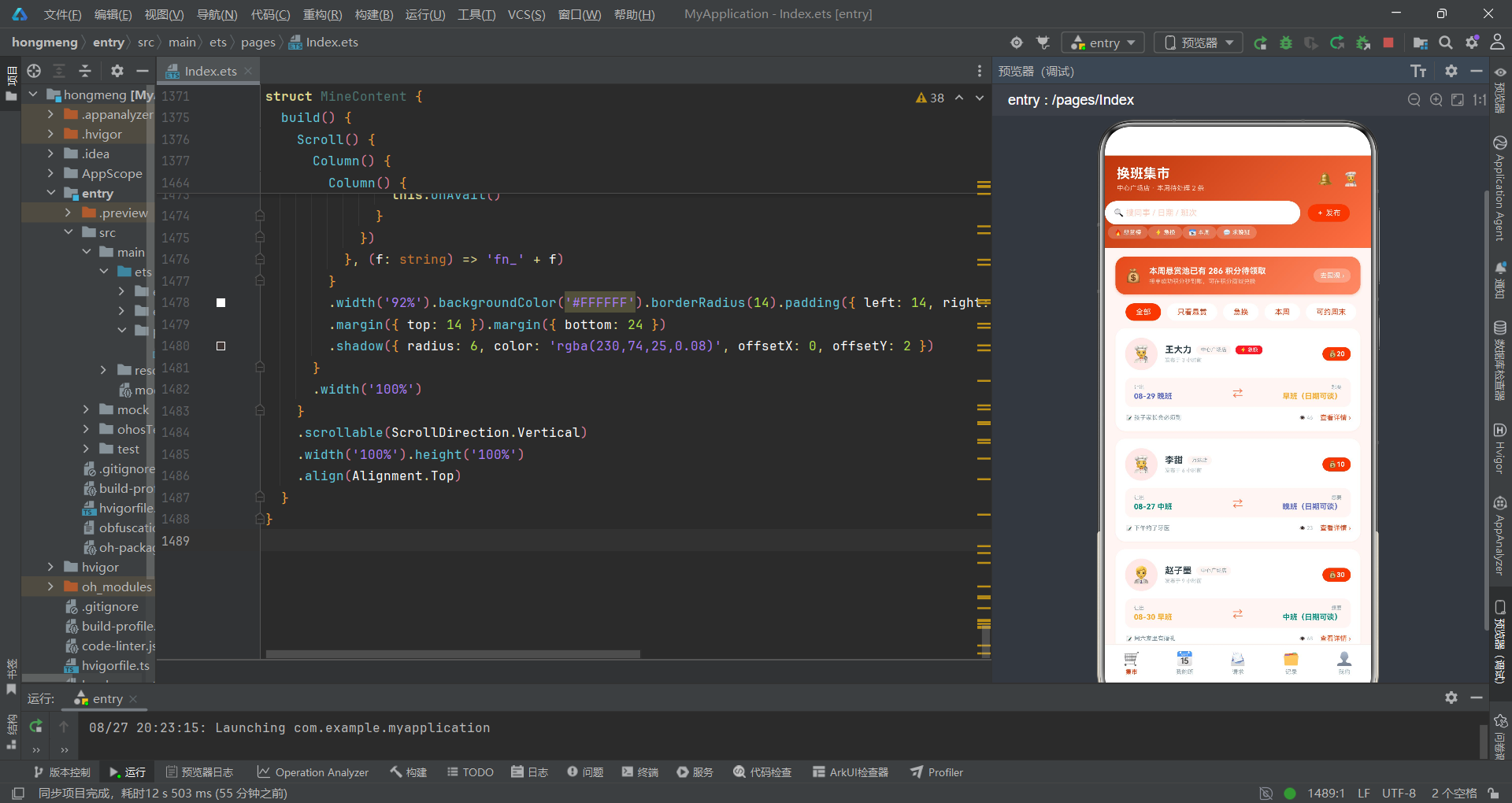
本文深入分析了鸿蒙HarmonyOS平台上一个门店换班集市应用的完整ArkTS源码。从类型定义到数据模型,从全局纯函数到主入口组件,从五个子组件到六个弹窗模块,我们对每一部分的技术实现进行了详尽的拆解。
在类型系统层面,应用定义了六个interface(ShiftMeta、SwapItem、DayShift、SwapRequest、HistoryItem、StoreMate),通过强类型约束确保排班换班数据的编译期安全。班次元数据采用"双颜色"设计(color用于文字、bg用于背景),让周班表色块网格中的每个班次既有辨识度又不刺眼。两个全局纯函数getShiftMeta和getHoursAgo分别处理班次查找和时间格式化,将工具逻辑与UI逻辑分离。
在UI架构层面,应用采用了一个@Entry主组件加五个@Component子组件的架构。主组件通过Stack容器实现弹窗层叠,通过if-else条件渲染实现Tab页面切换,通过回调函数实现父子组件通信。五个子组件分别负责换班集市、我的班表、换班请求、换班档案和个人中心,每个子组件通过@Prop接收父组件同步的状态数据,通过回调函数向父组件传递用户交互。
在布局技术层面,应用综合运用了Column、Row、Stack、Flex、Scroll等容器组件。头部使用linearGradient实现日落橙红渐变,卡片使用borderRadius和shadow实现圆角和阴影效果。周班表网格使用Row横向排列七天的Column色块,每个色块通过getShiftMeta获取班次颜色。换班卡片流使用ForEach渲染悬赏卡片,每张卡片包含发布人信息、班次交换展示条和操作行三层结构。可换偏好使用Flex容器实现多选标签的自动换行布局。
在数据可视化层面,换班档案页面展示了两种纯ArkUI数据可视化方案。环形进度图使用Progress组件(ProgressType.Ring)配合animation方法实现进度生长动画——通过@Prop ringGrow状态控制进度值从0到71的动画切换,点击卡片通过"先归零再展开"的setTimeout模式实现动画重复播放。柱状图使用ForEach渲染七根柱子,每根柱子高度通过数据值乘以单位像素计算,使用linearGradient设置从上到下的颜色渐变,Row的justifyContent设为End使柱子底部对齐。
在交互设计层面,发布换班需求弹窗集成了Scroll横滑标签选择、班次四选一标签组、Slider悬赏积分滑块、TextArea原因输入等多种交互组件。婉拒原因弹窗使用Circle组件自定义单选列表,比内置Radio组件提供更灵活的样式控制。接受确认弹窗使用红色警示文案提醒操作不可逆性。可换偏好弹窗使用Flex容器实现多选标签,通过availShifts数组的indexOf/filter/concat操作实现toggle切换。
在状态管理层面,@State变量管理Tab切换、弹窗显示、周选择、悬赏积分、婉拒原因、可换班次、已接单id、已婉拒id、环形动画等全部交互状态。takenIds和declinedIds两个数组在父组件中维护,通过@Prop同步到子组件,用于在列表中标记已处理的项目。数组更新采用concat和filter的不可变模式。ringGrow动画状态通过@Prop从父组件传递到HistoryContent子组件,通过onGrow回调实现父子双向通信——子组件触发回调,父组件更新状态后通过@Prop同步回子组件。
整体而言,这个应用展示了ArkTS/ArkUI在门店管理类应用开发中的完整能力:Slider滑块、Toggle开关、TextArea多行输入等表单组件的集成使用,Progress进度组件和手绘柱状图的数据可视化方案,Circle图形组件的自定义单选列表,animation属性动画和setTimeout定时器的动画控制,Flex弹性换行和Scroll横滑标签的灵活布局。这些技术点的组合运用,为鸿蒙平台上的门店一线员工排班管理应用开发提供了可参考的实践范例。

讨论HarmonyOS开发技术,专注于API与组件、DevEco Studio、测试、元服务和应用上架分发等。
更多推荐
 5
5 0
0- 0


 已为社区贡献43条内容

所有评论(0)