HarmonyOS 相机 + 文字识别实现拍照识字 30 图像 Component 与 JPEG 数据获取
30 图像 Component 与 JPEG 数据获取
引言
相机拍照后,图像数据不是直接"啪"地一下给你一整张图,而是以 Component(组件) 的形式挂在 camera.Photo 上:主图是 photo.main,通过 getComponent(ComponentType.JPEG, callback) 异步取回 JPEG 数据组件,再读 component.byteBuffer 拿到原始字节。本工程的识别链路第一棒就是这段回调(源码参考:entry/src/main/ets/common/utils/Camera.ets)。本文对这段回调逐行拆解,讲透 Component 模型、ComponentType.JPEG、异步回调与错误码处理,并给出健壮写法。 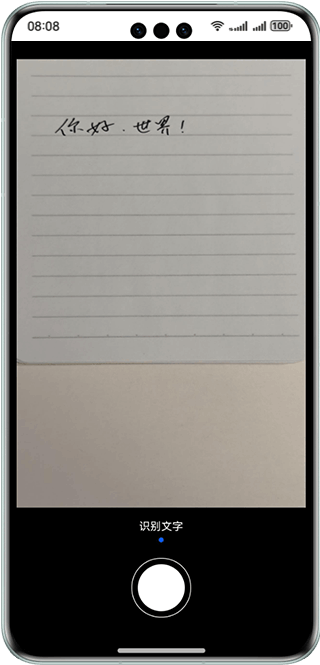
正文知识点
1. image.Component 与 ComponentType.JPEG
在相机输出的数据模型中,一张照片(camera.Photo)可以拆成多个组件:
photo.main:主图像(image.Image对象),代表整张照片的像素数据入口;Component:照片的一个可获取的数据单元,承载"编码格式 + 字节数据";image.ComponentType:组件类型枚举,最常用的是ComponentType.JPEG(JPEG 编码数据),还有ComponentType.YUV等(具体支持类型与设备/场景相关)。
getComponent(ComponentType.JPEG) 的含义是:请给我这份照片的 JPEG 编码 数据组件,以便后续解码、压缩或识别。
2. photo.main.getComponent(ComponentType.JPEG, callback) 异步回调
getComponent 是异步回调式接口,结果通过 callback 返回:
(imageObj: image.Image).getComponent(image.ComponentType.JPEG, (errCode, component) => { ... })回调签名:(errCode: BusinessError, component: image.Component) => void。
- 成功时
errCode为 undefined/null,component为有效对象; - 失败时
errCode携带错误码与信息,此时component通常为 undefined; - 回调是异步的,不能在
getComponent调用后立刻访问component,只能在回调体内使用。
3. component.byteBuffer 提取原始数据
component.byteBuffer 是 JPEG 编码后的完整字节(ArrayBuffer),可直接用于:
- 保存文件(
fileIo.write); - 直接解码:
image.createImageSource(component.byteBuffer); - 网络上传。
recognizeImage(源码参考:entry/src/main/ets/common/utils/Camera.ets):
let buffer: ArrayBuffer;
buffer = component.byteBuffer;
this.result = await this.recognizeImage(buffer);需要注意:byteBuffer 的生命周期与 component 一致,如果在回调之外异步使用,应先拷贝(buffer.slice(0))再做耗时操作,避免数据被回收或复用。
4. 错误码处理
回调第一参数是错误信息,必须显式处理。常见两类错误:
- 回调 errCode 非空:例如组件类型不支持、获取失败(错误码与 message 在
BusinessError中,用err.code/err.message打印定位); - component 为空:即使 errCode 为 undefined,也要判
component === undefined,防止空指针。
if (errCode || component === undefined) {
  return; // 直接退出,避免对空对象取 byteBuffer 导致异常
}
此外,外层 photoAvailable 与 initCamera 都包了 try-catch + hilog.error,形成"事件层判空 + 方法层兜底"的双保险。
代码示例
工程 photoAvailable 回调逐行解析(源码参考:entry/src/main/ets/common/utils/Camera.ets):
this.photoOutput.on('photoAvailable', (errCode: BusinessError, photo: camera.Photo): void => {
  // ① 事件回调:拍照完成,返回 Photo 对象
  let imageObj = photo.main;                                   // ② 取主图像
  imageObj.getComponent(image.ComponentType.JPEG, async (errCode: BusinessError,
      component: image.Component) => {                        // ③ 异步取 JPEG 组件
    if (errCode || component === undefined) {                  // ④ 判空/判错,双保险
      return;
    }
    let buffer: ArrayBuffer;
    buffer = component.byteBuffer                             // ⑤ 提取 JPEG 字节
    this.result = await this.recognizeImage(buffer);          // ⑥ 交给识别(解码+OCR)
  })
})
健壮增强版(增加错误打印与 photo 释放):
this.photoOutput.on('photoAvailable', (errCode: BusinessError, photo: camera.Photo): void => {
  if (errCode) {
    hilog.error(0x0000, TAG, `photoAvailable error. code=${errCode.code}, message=${errCode.message}`);
    return;
  }
  try {
    const imageObj: image.Image = photo.main;
    imageObj.getComponent(image.ComponentType.JPEG, async (err: BusinessError,
        component: image.Component) => {
      if (err || !component) {
        hilog.error(0x0000, TAG, `getComponent failed. code=${err?.code}, message=${err?.message}`);
        return;
      }
      // 拷贝后再异步识别,避免 byteBuffer 生命周期问题
      const buffer: ArrayBuffer = component.byteBuffer.slice(0);
      this.result = await this.recognizeImage(buffer);
    });
  } catch (error) {
    const e = error as BusinessError;
    hilog.error(0x0000, TAG, `handle photo failed. code=${e.code}, message=${e.message}`);
  } finally {
    photo.release(); // 及时归还 Photo 资源(视业务需要,确认用完后释放)
  }
});
运行效果与注意事项
- 正常运行:点击拍照 →
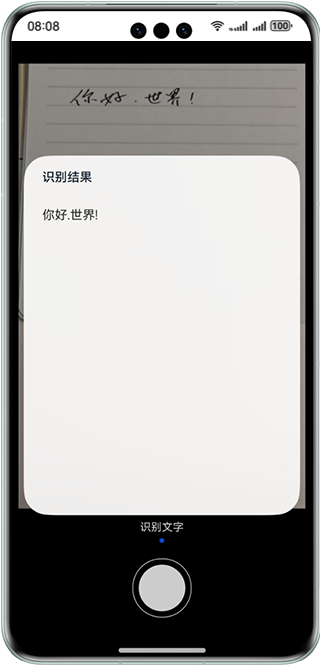
photoAvailable触发 → 拿到byteBuffer→ 识别结果通过@State联动弹出对话框(工程Index.ets的watchedCamera监听camera.result变化后dialogController.open())。 getComponent是异步回调,不要在回调外读取component;回调内做耗时识别时先slice(0)拷贝字节更稳妥。photo(以及photo.main)占用相机侧资源,长时间不释放会积压内存;业务确认用完后调用photo.release(),但先释放 photo 再取 byteBuffer 会失败,注意时序。- 连续拍照时,每个
photoAvailable回调对应一帧数据,避免在上一帧识别未结束时复用同一组件对象。 - 若设备/场景不支持 JPEG 组件(errCode 非空),可降级尝试其他 ComponentType 或改用 ImageReceiver 接收路径(对应工程
getImageReceiverSurfaceId与IMAGE_RECEIVER_WIDTH/HEIGHT/CAPACITY常量的使用场景)。
总结
Component 模型把"一张照片"拆成"可分别获取的编码组件",photo.main.getComponent(image.ComponentType.JPEG, callback) 用异步回调交出 JPEG 字节,component.byteBuffer 是后续所有处理(落盘、解码、OCR)的原材料。逐行守住"回调判空、字节拷贝、photo 释放、错误打印"四个细节,就抓住了从相机到识别引擎之间的数据咽喉,让 JPEG 数据安全、高效地流动起来。

讨论HarmonyOS开发技术,专注于API与组件、DevEco Studio、测试、元服务和应用上架分发等。
更多推荐

 0
0 0
0- 0


 已为社区贡献20条内容

所有评论(0)