HarmonyOS 7 新特性(二十五)|智慧手势:意图识别与误触治理
HarmonyOS 7(API 26)Beta2 新增智慧手势场景指南:系统可根据用户手势意图推断目标组件,并执行选中、点击、滚动、翻页和返回等默认动作;开发者也可以接收默认处理并进行受控干预。
传统手势开发关注“轨迹是什么”,智慧手势更关注“用户想做什么”。同一个挥动或指向动作,在阅读器里可能代表翻页,在相册里可能代表切换,在表单里则不应触发任何危险操作。系统推断可以降低接入成本,但应用仍要负责语义边界、误触治理和无障碍回退。
本文以电子书阅读器为例,设计从意图接收、目标校验、动作映射到审计测试的完整链路。
一、先建立允许动作白名单
不要对所有默认动作照单全收。按页面和业务状态建立白名单:阅读页允许翻页、滚动和返回目录;支付确认页只允许浏览,不允许手势直接提交;输入页在键盘打开时暂停全局翻页。
type SmartGestureAction = 'select' | 'click' | 'scroll' | 'page' | 'back'

interface GesturePolicy {
  route: string
  allowed: SmartGestureAction[]
  requireVisibleTarget: boolean
  cooldownMs: number
}

const READER_POLICY: GesturePolicy = {
  route: 'reader',
  allowed: ['scroll', 'page', 'back'],
  requireVisibleTarget: true,
  cooldownMs: 500
}
白名单应由领域策略产生,而不是散落在多个组件回调里。
二、把系统推断当作候选动作
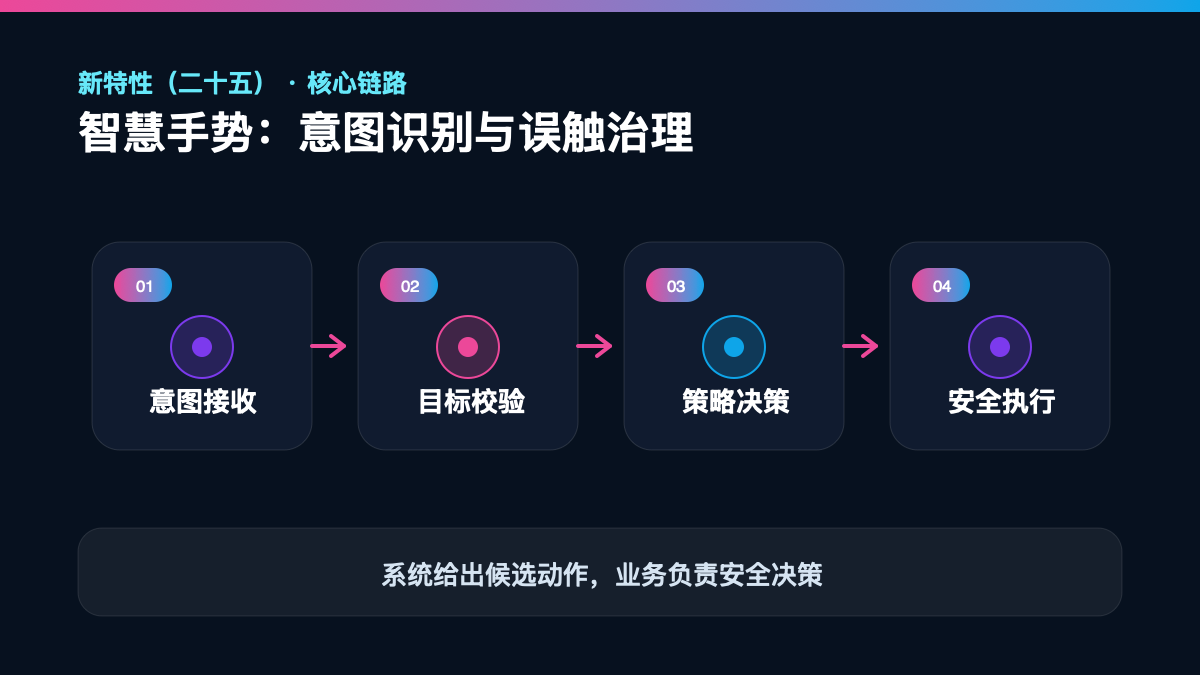
系统返回的默认动作是一条强提示,但不是最终业务命令。应用还要检查当前路由、弹窗、焦点、滚动边界、内容加载状态和是否处于动画中。
interface GestureIntent {
  action: SmartGestureAction
  targetId?: string
  direction?: 'left' | 'right' | 'up' | 'down'
  confidence?: number
  receivedAt: number
}

type GestureDecision =
  | { kind: 'accept'; command: ReaderCommand }
  | { kind: 'ignore'; reason: string }
  | { kind: 'confirm'; command: ReaderCommand }
这样可以在日志中区分“系统没有识别”和“应用策略拒绝”。
三、目标组件必须稳定可识别
列表重用、动态布局和弹窗切换会改变组件实例。目标应使用稳定业务 ID,并在执行前确认组件仍可见、未禁用且属于当前窗口。不能缓存坐标后延迟点击,因为布局可能已经变化。
function resolveTarget(intent: GestureIntent, ui: UiSnapshot): UiTarget | null {
  if (!intent.targetId) return null
  const target = ui.targets.get(intent.targetId)
  if (!target || !target.visible || !target.enabled) return null
  if (target.windowId !== ui.activeWindowId) return null
  return target
}
对滚动和翻页这类容器动作,可以绑定语义容器 ID,而不是具体子项。
四、动作映射要考虑上下文
阅读器横向模式中左右动作对应翻页,纵向模式中上下动作对应滚动;右到左语言的页面方向可能相反;用户若开启“自然方向”设置,还要遵循个人偏好。
function toReaderCommand(intent: GestureIntent, ctx: ReaderContext): ReaderCommand | null {
  if (intent.action === 'back') return { type: 'OPEN_CATALOG' }
  if (intent.action === 'page' && intent.direction) {
    const forward = ctx.rtl ? intent.direction === 'left' : intent.direction === 'right'
    return { type: forward ? 'NEXT_PAGE' : 'PREVIOUS_PAGE' }
  }
  if (intent.action === 'scroll') return { type: 'SCROLL', direction: intent.direction }
  return null
}
动作语义集中在映射器中,便于多语言和不同阅读模式测试。
五、用冷却时间抑制连续误触
连续识别可能在一次手势中生成多个事件。为不可叠加动作设置冷却窗口,并在页面动画完成前拒绝下一次翻页。快速连续翻页可以进入有上限队列,而不是无限累积动画。
class GestureGate {
  private lastAt = new Map<string, number>()

  allow(key: string, now: number, cooldownMs: number): boolean {
    const previous = this.lastAt.get(key) ?? 0
    if (now - previous < cooldownMs) return false
    this.lastAt.set(key, now)
    return true
  }
}
被冷却拒绝的动作不弹错误提示,避免干扰用户。
六、高风险动作需要显式确认
删除、发送、支付、公开发布、授权和退出编辑等动作,不应由一次智慧手势直接完成。可以用手势打开确认界面,但最终提交仍需明确点击或系统确认。
这条规则要写进统一策略,不能只依赖设计师记得添加弹窗。
七、加载、弹窗和多窗状态
内容加载中时翻页应合并为最后一次目标;系统弹窗、权限弹窗或业务模态框出现时,页面级智慧手势暂停;多窗场景只处理当前获得焦点的窗口。
function decide(intent: GestureIntent, state: AppState): GestureDecision {
  if (!state.windowFocused) return { kind: 'ignore', reason: 'window-not-focused' }
  if (state.modalOpen) return { kind: 'ignore', reason: 'modal-open' }
  if (state.animationRunning) return { kind: 'ignore', reason: 'transition-running' }
  const command = toReaderCommand(intent, state.reader)
  return command ? { kind: 'accept', command } : { kind: 'ignore', reason: 'unsupported' }
}
八、提供等价的触控和键盘入口
智慧手势是增强入口,不应成为唯一入口。所有动作仍需支持触控、键盘、鼠标和读屏语义。关闭摄像头相关权限或设备不支持时,应用主流程必须完整。
同时提供开关、教学页和“恢复默认”设置。用户不需要知道底层识别模型,只需要知道哪些动作可用以及如何关闭。
九、隐私与日志
业务日志记录意图类别、决策结果、页面和耗时即可,不记录原始图像或可识别用户的视频内容。若系统能力涉及传感器或摄像头权限,必须解释用途并遵循最小授权。
十、测试矩阵
describe('gesture policy', () => {
  it('blocks publish in a high-risk screen', () => {
    const result = decide(publishGesture, paymentState)
    expect(result.kind).toBe('ignore')
  })

  it('ignores gestures when a modal is open', () => {
    expect(decide(nextPageGesture, modalState).kind).toBe('ignore')
  })
})
真机覆盖不同身高、左右手、光线、横竖屏、分屏、滚动边界、快速连续动作和设备不支持回退。验收指标包括识别成功率、误触率、撤销率和完成任务时间。
十一、上线清单
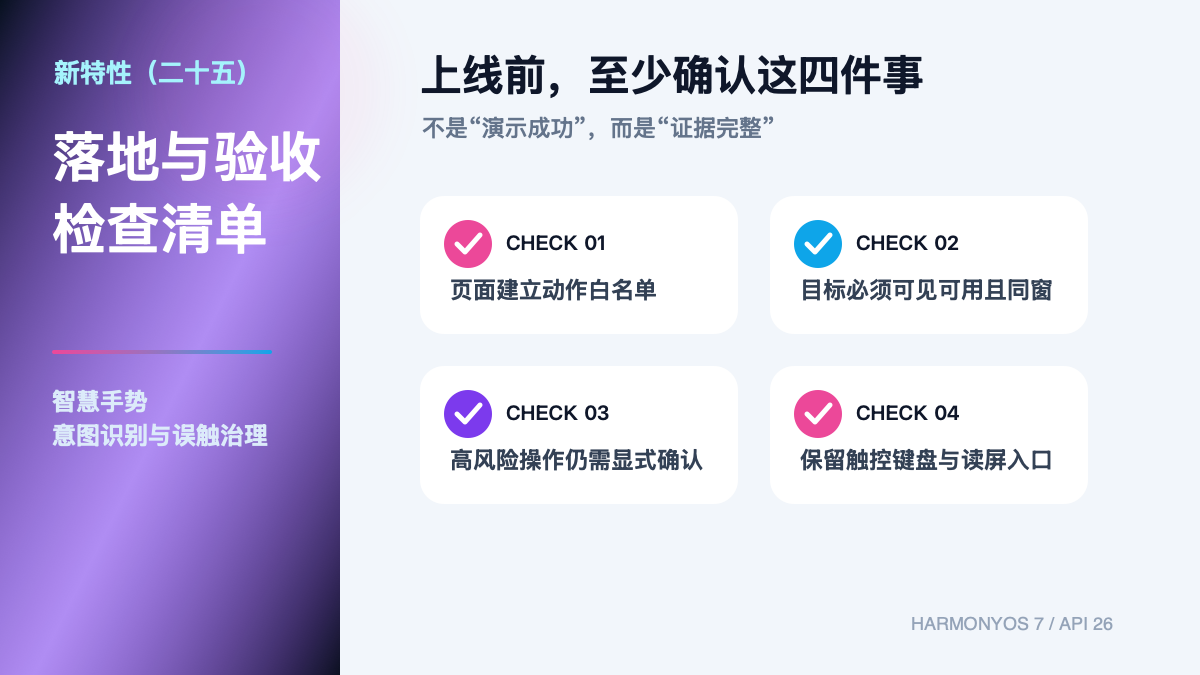
- 页面级动作白名单已经评审;
- 系统默认动作在执行前再次校验上下文;
- 目标使用稳定 ID 且必须可见、可用;
- 连续动作有冷却、队列和动画门禁;
- 高风险操作永远需要显式确认;
- 弹窗、失焦与加载状态会暂停处理;
- 触控、键盘和读屏具有等价入口;
- 日志不保存原始感知数据。
结语
智慧手势把“轨迹识别”推进到“意图执行”,同时也把更多责任交给业务。把系统结果视为候选,用白名单、上下文校验和高风险确认把它转成安全命令,才能让免接触交互真正提高效率,而不是制造新的误触入口。
官方参考
- 2026 年 7 月开发者月刊:https://developer.huawei.com/consumer/cn/monthly/202607
- HarmonyOS 7 新能力一览:https://developer.huawei.com/consumer/cn/features/

讨论HarmonyOS开发技术,专注于API与组件、DevEco Studio、测试、元服务和应用上架分发等。
更多推荐
 0
0 0
0- 0


 已为社区贡献45条内容

所有评论(0)