【共创稿事节】 HarmonyOS7 AR Engine 人脸表情识别:BlendShape 到稳定判定
前言
人脸表情识别这个需求,乍一看挺唬人——得先检测人脸、提取面部特征、再映射到具体表情。但 HarmonyOS 的 AR Engine 把最难的部分(人脸检测和 BlendShape 提取)都封装好了,开发者真正要做的就是三件事:拿数据、做平滑、判表情。
这篇文章会围绕一个完整案例,把从 AR Engine 初始化到表情锁定判定的整条链路拆开讲。每个环节的代码我都会说明"为什么这样写",而不是只贴一行结果。文末有完整源码,可以直接取用。
效果预览

主要流程
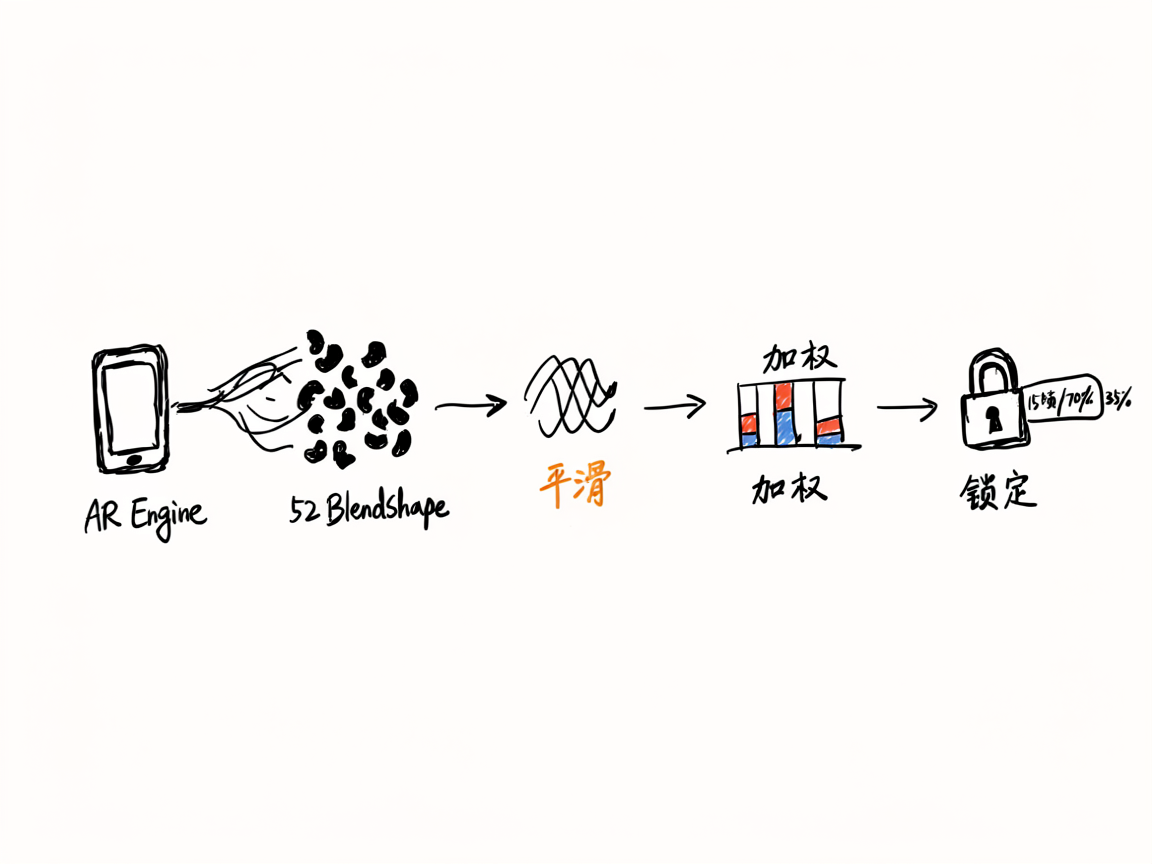
- 初始化 AR Engine:配置人脸跟踪模式,创建
ARViewContext。 - 每帧回调拿 BlendShape:通过
onFrameUpdate获取 52 个人脸混合形状系数。 - 指数平滑去抖:用
SmoothedBlendShapes对原始系数做低通滤波,消除帧间抖动。 - 多表情加权判定:
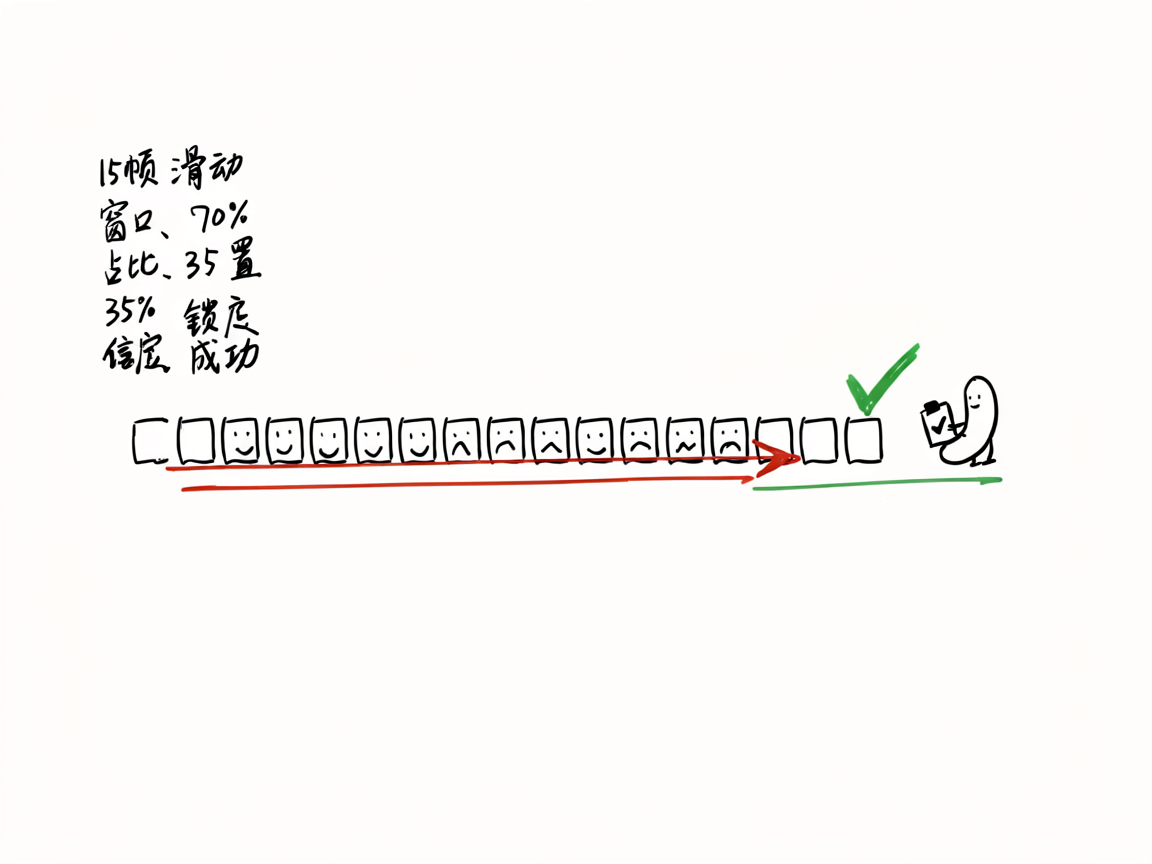
ExpressionRecognizer用加权公式计算各表情得分,按阈值筛选候选。 - 稳定性锁定:连续 15 帧中同一表情占比 ≥ 70% 且置信度 ≥ 35%,才锁定为最终结果。
后面所有代码,都是围绕这条链路展开的。
开始之前:导入和权限
AR Engine 需要从 @kit.AREngine 导入核心模块,3D 场景从 @kit.ArkGraphics3D 导入:
import { arEngine, ARView, arViewController } from '@kit.AREngine';
import { BusinessError } from '@kit.BasicServicesKit';
import { hilog } from '@kit.PerformanceAnalysisKit';
import { Scene, Node } from '@kit.ArkGraphics3D';
权限方面,AR Engine 的人脸跟踪需要摄像头权限。在 module.json5 的 requestPermissions 里加上:
{
  "name": "ohos.permission.CAMERA",
  "reason": "$string:camera_reason",
  "usedScene": {
    "abilities": ["EntryAbility"],
    "when": "inuse"
  }
}
CAMERA 属于用户授权权限,声明之后还要在运行时动态申请。此外案例还声明了 GYROSCOPE 和 ACCELEROMETER,这是 AR Engine 底层姿态估计所需的传感器权限。
初始化 AR Engine
AR Engine 的初始化分两步:先检查设备是否支持人脸跟踪能力,再加载 3D 场景并创建 AR 上下文。
检查设备能力
不是所有设备都支持 AR 人脸跟踪,初始化前必须先检查:
private initARView(): void {
  try {
    let supported: boolean = arViewController.isARTypeSupported(
      arEngine.ARFeatureType.ARENGINE_FEATURE_TYPE_FACE
    );
    if (!supported) {
      hilog.error(DOMAIN, TAG, 'AR Face is not supported on this device');
      return;
    }
  } catch (error) {
    let err: BusinessError = error as BusinessError;
    hilog.error(DOMAIN, TAG, `isARTypeSupported error: ${err.code} ${err.message}`);
    return;
  }
  // ...后续初始化
}
isARTypeSupported 是静态检查,不依赖任何运行时状态。如果设备不支持,后续的 context.init() 一定会失败,所以提前拦截比事后处理更稳。
加载场景并创建 AR 上下文
AR Engine 的渲染依赖 3D 场景,必须先 Scene.load() 加载场景,再创建 ARViewContext:
Scene.load().then(async (scene: Scene) => {
  try {
    let context: arViewController.ARViewContext = new arViewController.ARViewContext();
    context.scene = scene;
    context.callback = this.callback;

    let config: arEngine.ARConfig = {
      type: arEngine.ARType.FACE,
      planeFindingMode: arEngine.ARPlaneFindingMode.DISABLED,
      powerMode: arEngine.ARPowerMode.NORMAL,
      focusMode: arEngine.ARFocusMode.AUTO,
      cameraLensFacing: arEngine.ARCameraLensFacing.FRONT,
      multiFaceMode: arEngine.ARMultiFaceMode.MULTIFACE_ENABLE
    };
    context.config = config;
    await context.init();
    this.arContext = context;
  } catch (error) {
    let err: BusinessError = error as BusinessError;
    hilog.error(DOMAIN, TAG, `init error: ${err.code} ${err.message}`);
  }
}).catch((error: BusinessError) => {
  hilog.error(DOMAIN, TAG, `Scene.load error: ${error.code} ${error.message}`);
});
这里有几个关键配置:
| 配置项 | 设值 | 说明 |
|---|---|---|
type | ARType.FACE | 人脸跟踪模式,必须设这个才能拿到 BlendShape |
planeFindingMode | DISABLED | 人脸场景不需要平面检测,关掉省性能 |
cameraLensFacing | FRONT | 用前置摄像头,表情识别都是自拍场景 |
multiFaceMode | MULTIFACE_ENABLE | 支持多人脸,案例中遍历所有人脸取第一个追踪中的 |
Scene.load() 和 context.init() 都是异步操作,必须等它们完成后再把 arContext 赋值给 @State,否则 ARView 组件拿不到有效上下文会白屏。
每帧回调拿 BlendShape 数据
AR Engine 的帧回调机制是整个案例的数据入口。通过继承 arViewController.ARViewCallback,在 onFrameUpdate 里拿到每一帧的人脸数据。
FaceExpressionCallback 的结构
class FaceExpressionCallback extends arViewController.ARViewCallback {
  private onExpressionUpdate: (expressions: ExpressionResult[], hasFace: boolean) => void = () => {};
  private smoothedShapes: SmoothedBlendShapes = new SmoothedBlendShapes();

  setCallback(cb: (expressions: ExpressionResult[], hasFace: boolean) => void): void {
    this.onExpressionUpdate = cb;
  }

  resetSmooth(): void {
    this.smoothedShapes.reset();
  }

  onAnchorAdd(ctx: arViewController.ARViewContext, node: Node, anchor: arEngine.ARAnchor): void {}

  onAnchorUpdate(ctx: arViewController.ARViewContext, node: Node, anchor: arEngine.ARAnchor): void {}

  async onFrameUpdate(ctx: arViewController.ARViewContext, sysBootTs: number): Promise<void> {
    // ...核心逻辑
  }
}
onAnchorAdd 和 onAnchorUpdate 是 AR 锚点回调,本案例不需要处理 3D 节点渲染,所以留空。真正有用的是 onFrameUpdate——它每帧触发一次,是获取人脸数据的唯一入口。
onExpressionUpdate 是一个自定义回调,用于把处理后的表情结果抛给 UI 层。这样做的目的是把 AR 逻辑和 UI 逻辑解耦:Callback 只管数据处理,UI 组件只管展示。
从 ARFace 提取 BlendShape
onFrameUpdate 的核心逻辑:
async onFrameUpdate(ctx: arViewController.ARViewContext, sysBootTs: number): Promise<void> {
  if (!ctx.session) {
    return;
  }
  let session: arEngine.ARSession = ctx.session;
  try {
    let trackables: arEngine.ARTrackable[] = session.getAllTrackables(
      arEngine.ARTrackableType.FACE
    );
    if (trackables.length === 0) {
      this.onExpressionUpdate([], false);
      return;
    }

    let foundTracking: boolean = false;
    for (let i = 0; i < trackables.length; i++) {
      if (trackables[i].state !== arEngine.ARTrackingState.TRACKING) {
        continue;
      }
      foundTracking = true;
      let face: arEngine.ARFace = trackables[i] as arEngine.ARFace;
      let blendShapes: arEngine.ARBlendShapes = face.getBlendShapes();
      if (blendShapes.count === 0) {
        continue;
      }

      let types: Array<arEngine.ARBlendShapeType> = blendShapes.getTypes();
      let dataBuffer: ArrayBuffer = blendShapes.getData();
      let values: Float32Array = new Float32Array(dataBuffer);

      this.smoothedShapes.update(types, values);

      let recognizer: ExpressionRecognizer = new ExpressionRecognizer(this.smoothedShapes);
      let expressions: ExpressionResult[] = recognizer.recognize();
      this.onExpressionUpdate(expressions, true);
    }

    if (!foundTracking) {
      this.onExpressionUpdate([], false);
    }
  } catch (error) {
    let err: BusinessError = error as BusinessError;
    hilog.error(DOMAIN, TAG, `onFrameUpdate error: ${err.code} ${err.message}`);
  }
}
这段代码做了四件事:
- 获取所有人脸追踪对象:
getAllTrackables(FACE)返回当前帧检测到的所有人脸。多人脸场景下,可能同时有多个ARTrackable。 - 过滤追踪状态:只处理
TRACKING状态的人脸。PAUSED或STOPPED的人脸数据不可靠,直接跳过。 - 提取 BlendShape 数据:
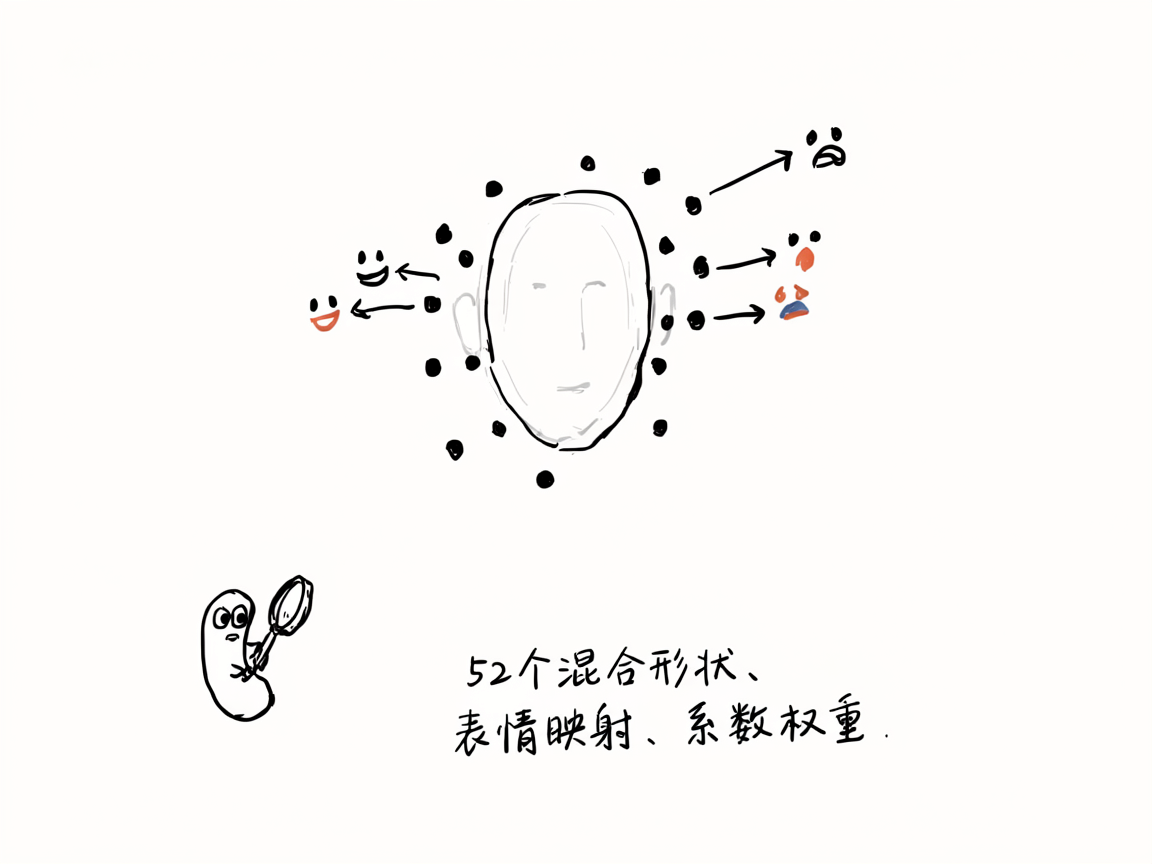
face.getBlendShapes()返回 52 个混合形状系数。getTypes()拿到类型数组,getData()拿到原始ArrayBuffer,转成Float32Array后就是 0~1 之间的浮点值。 - 先平滑再识别:原始值先交给
SmoothedBlendShapes做平滑,再由ExpressionRecognizer判定表情。
特别注意 ARFace 的类型转换:trackables[i] as arEngine.ARFace。getAllTrackables 返回的是通用 ARTrackable,要转成 ARFace 才能调用 getBlendShapes()。
指数平滑去抖——为什么不能直接用原始值
AR Engine 返回的 BlendShape 值是每帧独立的,帧间抖动非常明显。你可能在第 1 帧拿到 smile = 0.6,第 2 帧变成 smile = 0.3,第 3 帧又跳到 0.7。直接用原始值做表情判定,结果会像开关一样在"微笑"和"无表情"之间疯狂切换。
SmoothedBlendShapes 的实现
class SmoothedBlendShapes {
  private smoothed: Map<arEngine.ARBlendShapeType, number> = new Map();

  update(types: Array<arEngine.ARBlendShapeType>, values: Float32Array): void {
    let newValues: Map<arEngine.ARBlendShapeType, number> = new Map();
    for (let i = 0; i < types.length && i < values.length; i++) {
      newValues.set(types[i], values[i]);
    }

    let activeKeys: Set<arEngine.ARBlendShapeType> = new Set();
    newValues.forEach((_v: number, k: arEngine.ARBlendShapeType) => { activeKeys.add(k); });
    this.smoothed.forEach((_v: number, k: arEngine.ARBlendShapeType) => { activeKeys.add(k); });

    activeKeys.forEach((k: arEngine.ARBlendShapeType) => {
      let newVal: number = newValues.get(k) ?? 0;
      let oldVal: number = this.smoothed.get(k) ?? 0;
      this.smoothed.set(k, oldVal * (1 - SMOOTH_FACTOR) + newVal * SMOOTH_FACTOR);
    });
  }

  get(type: arEngine.ARBlendShapeType): number {
    return this.smoothed.get(type) ?? 0;
  }

  avg(a: arEngine.ARBlendShapeType, b: arEngine.ARBlendShapeType): number {
    return (this.get(a) + this.get(b)) / 2;
  }

  reset(): void {
    this.smoothed.clear();
  }
}
核心就是这一行:
this.smoothed.set(k, oldVal * (1 - SMOOTH_FACTOR) + newVal * SMOOTH_FACTOR);
SMOOTH_FACTOR = 0.35,意思是当前帧的新值占 35%,历史平滑值占 65%。这是一个低通滤波器:高频抖动被抑制,低频信号(真正的表情变化)被保留。
为什么选 0.35?这个值是经验值。太小(比如 0.1)响应太慢,用户微笑半天才识别出来;太大(比如 0.7)平滑效果不够,抖动仍然明显。0.3~0.4 是实测下来比较好的区间。
还有一个细节:activeKeys 的合并。当前帧可能没有某些 BlendShape 类型(比如闭眼时 EYE_BLINK 值可能是 0,但不会从 types 里消失)。把新旧 key 合并后统一处理,确保不会因为某帧缺少某个 key 而丢失历史数据。
多表情加权判定——52 个系数怎么映射到 15 种表情
BlendShape 一共 52 个系数,但表情的判定不是看单个系数,而是多个系数的组合。比如"大笑"需要嘴巴张开(JAW_OPEN)+ 嘴角上扬(MOUTH_SMILE_LEFT/RIGHT)+ 腮部收缩(CHEEK_SQUINT_LEFT/RIGHT),缺一个都不像。
ExpressionRecognizer 的核心逻辑
class ExpressionRecognizer {
  private bs: SmoothedBlendShapes;

  constructor(bs: SmoothedBlendShapes) {
    this.bs = bs;
  }

  recognize(): ExpressionResult[] {
    let candidates: ExpressionResult[] = [];

    // 先提取各基础特征值(左右取平均)
    let smileL = this.bs.get(arEngine.ARBlendShapeType.MOUTH_SMILE_LEFT);
    let smileR = this.bs.get(arEngine.ARBlendShapeType.MOUTH_SMILE_RIGHT);
    let smile = (smileL + smileR) / 2;
    let jawOpen = this.bs.get(arEngine.ARBlendShapeType.JAW_OPEN);
    // ...其他特征提取省略

    // 大笑:微笑 + 张嘴 + 腮部收缩
    let laughScore = smile * 0.5 + jawOpen * 0.3 + cheekSquint * 0.2;
    if (laughScore > 0.3 && smile > 0.3 && jawOpen > 0.2) {
      candidates.push({ name: '大笑', emoji: '😆', score: laughScore });
    }

    // 微笑:嘴角上扬为主,不能有皱眉
    let smileScore = smile * 0.6 + cheekSquint * 0.2 + (1 - Math.max(frown, browDown)) * 0.2;
    if (smileScore > 0.25 && smile > 0.2 && frown < 0.1) {
      candidates.push({ name: '微笑', emoji: '😊', score: smileScore });
    }

    // 惊讶:眼睛睁大 + 张嘴 + 眉毛上扬
    let surpriseScore = eyeWide * 0.35 + jawOpen * 0.3 + browUp * 0.35;
    if (surpriseScore > 0.3 && eyeWide > 0.15 && browUp > 0.1) {
      candidates.push({ name: '惊讶', emoji: '😲', score: surpriseScore });
    }

    // 生气:眉毛下压 + 皱眉 + 眯眼
    let angryScore = browDown * 0.4 + frown * 0.3 + squint * 0.2 + (1 - smile) * 0.1;
    if (angryScore > 0.3 && browDown > 0.15 && smile < 0.1) {
      candidates.push({ name: '生气', emoji: '😠', score: angryScore });
    }

    // ...其他表情判定省略

    candidates.sort((a: ExpressionResult, b: ExpressionResult) => b.score - a.score);
    return candidates;
  }
}
判定公式的设计思路
每种表情都由两部分组成:加权得分和门控条件。
加权得分决定"像不像这个表情"。比如"大笑"的得分公式:
let laughScore = smile * 0.5 + jawOpen * 0.3 + cheekSquint * 0.2;
smile权重最高(0.5),因为大笑首先是笑jawOpen其次(0.3),大笑必然张嘴cheekSquint辅助(0.2),腮部收缩是大笑的典型特征
权重之和为 1.0,所以得分范围是 0~1。
门控条件决定"够不够格成为这个表情"。只有得分超过阈值还不够,关键特征也必须达标:
if (laughScore > 0.3 && smile > 0.2 && jawOpen > 0.2)
这三个条件缺一不可:
laughScore > 0.3:综合得分达标smile > 0.2:嘴角必须上扬到一定程度jawOpen > 0.2:嘴巴必须张开
门控条件的核心作用是排除误判。比如 cheekSquint 和 jawOpen 都很高但 smile 很低,得分可能过 0.3,但这不是大笑,门控条件里的 smile > 0.2 就把它拦住了。
左右取平均
人脸不是完全对称的,同一种表情左右两侧的 BlendShape 值可能有差异。案例中对左右对称的特征统一取平均:
let smile = (smileL + smileR) / 2;
let eyeWide = (eyeWideL + eyeWideR) / 2;
let blink = (blinkL + blinkR) / 2;
取平均比取最大值更稳——取最大值容易被一侧的噪声拉高,取平均则更接近真实表情强度。
15 种表情的完整列表
案例支持识别 15 种表情,每种表情的判定公式都遵循"加权得分 + 门控条件"的模式:
| 表情 | 核心特征 | Emoji |
|---|---|---|
| 大笑 | smile + jawOpen + cheekSquint | 😆 |
| 微笑 | smile + cheekSquint + 无frown | 😊 |
| 惊讶 | eyeWide + jawOpen + browUp | 😲 |
| 生气 | browDown + frown + squint | 😠 |
| 悲伤 | frown + browInnerUp + mouthRollLower | 😢 |
| 恐惧 | eyeWide + browInnerUp + mouthPress | 😨 |
| 厌恶 | noseUp + squint + browDown | 🤢 |
| 眨眼 | blink(单一特征) | 😉 |
| 眯眼 | squint + cheekSquint | 😏 |
| 张嘴 | jawOpen + 无smile | 😮 |
| 嘟嘴 | mouthPucker + mouthFunnel | 😙 |
| 鼓腮 | cheekPuff(单一特征) | 😤 |
| 挑眉 | browUp + 无browDown | 🤨 |
| 伸舌 | tongueOut(单一特征) | 😛 |
| 皱鼻 | noseUp + 无browDown和frown | 🤧 |
其中"眨眼"、“鼓腮”、"伸舌"这类由单一特征决定的表情,门控条件只有得分阈值,不需要额外的特征约束。
稳定性锁定——为什么不能只看一帧
即使做了指数平滑,单帧的表情判定结果仍然可能跳变。比如用户在微笑时,某帧的 smile 系数刚好掉到阈值以下,判定结果就变成了"无表情",下一帧又变回"微笑"。
案例的解决方案是:连续帧一致性检查。
锁定条件
private stableCount: number = 0;
private lastExpressionName: string = '';
private historyNames: string[] = [];

// 在回调中
this.historyNames.push(dominant.name);
if (this.historyNames.length > STABLE_FRAMES) {
  this.historyNames.shift();
}

let sameCount: number = 0;
for (let i = 0; i < this.historyNames.length; i++) {
  if (this.historyNames[i] === dominant.name) {
    sameCount++;
  }
}

let stability: number = sameCount / this.historyNames.length;
if (this.historyNames.length >= STABLE_FRAMES && stability >= 0.7 && dominant.score >= LOCK_THRESHOLD) {
  this.resultEmoji = dominant.emoji;
  this.resultName = dominant.name;
  this.resultConfidence = dominant.score;
  this.isLocked = true;
  this.statusText = '识别完成,点击按钮可重新识别';
}
三个条件同时满足才锁定:
historyNames.length >= STABLE_FRAMES:至少积累了 15 帧历史。STABLE_FRAMES = 15,AR Engine 通常跑在 30fps,15 帧就是 0.5 秒。stability >= 0.7:最近 15 帧中,至少 70%(约 11 帧)的判定结果是同一个表情。这个阈值允许偶尔的跳帧——10 帧里的 7 帧正确就够了,不需要 100% 一致。dominant.score >= LOCK_THRESHOLD:当前帧的主导表情得分 ≥ 0.35。防止在表情微弱时(比如面部放松状态)误锁定。
为什么用滑动窗口而不是简单计数
historyNames 是一个长度上限为 15 的滑动窗口,新帧进来时 push,超长时 shift。这比简单计数 stableCount++ 好在:
- 简单计数只记录"连续多少帧是同一个表情",一旦中间有一帧跳变,计数器就归零。滑动窗口允许中间有偶尔的跳帧,只要总体一致性够高就行。
- 现实场景中,0.5 秒内偶尔有一两帧识别错误很正常,但用户的表情意图没有变。滑动窗口的容错性更贴近真实使用。
锁定后的行为
if (this.isLocked || !this.isDetecting) {
  return;
}
一旦 isLocked = true,后续帧的回调直接跳过处理。用户必须手动点击"重新识别"按钮,才会重置所有状态重新开始检测:
private handleButtonClick(): void {
  this.isLocked = false;
  this.resultEmoji = '';
  this.resultName = '';
  this.resultConfidence = 0;
  this.stableCount = 0;
  this.lastExpressionName = '';
  this.detectingName = '';
  this.detectingConfidence = 0;
  this.historyNames = [];
  this.callback.resetSmooth();
  this.isDetecting = true;
  this.statusText = '正在识别人脸表情...';
}
callback.resetSmooth() 很重要——重置平滑状态后,下一轮识别不会受上一轮的历史平滑值影响,确保每次识别都是独立起步。
UI 层:状态管理和布局
状态定义
@State arContext: arViewController.ARViewContext | undefined = undefined;
@State resultEmoji: string = '';
@State resultName: string = '';
@State resultConfidence: number = 0;
@State statusText: string = '点击下方按钮开始识别表情';
@State isDetecting: boolean = false;
@State isLocked: boolean = false;
@State hasFace: boolean = false;
@State detectingName: string = '';
@State detectingConfidence: number = 0;
这些状态分三类:
- 结果状态(
resultEmoji、resultName、resultConfidence):锁定后的最终结果 - 过程状态(
detectingName、detectingConfidence、hasFace):实时检测中的中间状态,用于 UI 提示 - 控制状态(
isDetecting、isLocked):流程控制
回调注册
aboutToAppear(): void {
  this.callback.setCallback((expressions: ExpressionResult[], hasFace: boolean) => {
    this.hasFace = hasFace;

    if (this.isLocked || !this.isDetecting) {
      return;
    }

    if (!hasFace) {
      this.statusText = '未检测到人脸,请正对摄像头';
      this.stableCount = 0;
      this.lastExpressionName = '';
      this.historyNames = [];
      return;
    }

    if (expressions.length === 0) {
      this.statusText = '正在捕捉表情,请做出表情...';
      this.stableCount = 0;
      this.lastExpressionName = '';
      return;
    }

    let dominant: ExpressionResult = expressions[0];
    this.detectingName = dominant.name;
    this.detectingConfidence = dominant.score;
    this.statusText = `识别中: ${dominant.name} ${Math.round(dominant.score * 100)}%`;

    // ...稳定性检查逻辑
  });
}
三个分支处理三种情况:
- 未检测到人脸:清空所有历史状态,提示用户正对摄像头
- 有人脸但无表情:面部放松时所有 BlendShape 值都很低,
recognize()返回空数组 - 有表情候选:取
expressions[0](得分最高的),进入稳定性检查
布局结构
页面分为上下两部分:上方是 AR 预览区,下方是控制区。
build() {
  Column() {
    Stack() {
      if (this.arContext) {
        ARView({ context: this.arContext })
          .width('100%')
          .height('100%')
      } else {
        Column() {
          Text('正在初始化AR引擎...')
            .fontSize(18)
            .fontColor('#FFFFFF')
        }
        .width('100%')
        .height('100%')
        .justifyContent(FlexAlign.Center)
        .backgroundColor('#1A1A2E')
      }

      if (this.isLocked && this.resultEmoji !== '') {
        Column() {
          Text(this.resultEmoji)
            .fontSize(88)
          Text(this.resultName)
            .fontSize(36)
            .fontWeight(FontWeight.Bold)
            .fontColor('#FFFFFF')
            .margin({ top: 12 })
          Text(`置信度 ${Math.round(this.resultConfidence * 100)}%`)
            .fontSize(16)
            .fontColor('#CCCCCC')
            .margin({ top: 6 })
        }
        .width('100%')
        .height('100%')
        .justifyContent(FlexAlign.Center)
        .backgroundColor('#0D0D0DBB')
      }
    }
    .width('100%')
    .layoutWeight(1)

    Column() {
      Text(this.statusText)
        .fontSize(16)
        .fontColor('#DDDDDD')
        .width('100%')
        .textAlign(TextAlign.Center)
        .padding({ top: 20, bottom: 8 })

      if (this.isDetecting && !this.isLocked && this.detectingName !== '') {
        Row() {
          Text('当前捕捉: ')
            .fontSize(14)
            .fontColor('#999999')
          Text(this.detectingName)
            .fontSize(14)
            .fontColor('#4CAF50')
            .fontWeight(FontWeight.Medium)
          Text(` ${Math.round(this.detectingConfidence * 100)}%`)
            .fontSize(14)
            .fontColor('#999999')
        }
        .margin({ bottom: 8 })
      }

      if (this.isLocked && this.resultName !== '') {
        Row() {
          Column() {
            Text(this.resultEmoji)
              .fontSize(56)
            Text(this.resultName)
              .fontSize(22)
              .fontWeight(FontWeight.Bold)
              .fontColor('#FFFFFF')
              .margin({ top: 6 })
            Text(`置信度 ${Math.round(this.resultConfidence * 100)}%`)
              .fontSize(13)
              .fontColor('#AAAAAA')
              .margin({ top: 4 })
          }
          .alignItems(HorizontalAlign.Center)
          .padding({ left: 32, right: 32, top: 16, bottom: 16 })
          .backgroundColor('#2A2A4A')
          .borderRadius(16)
        }
        .margin({ bottom: 16 })
      }

      Button(this.getButtonText())
        .width('80%')
        .height(48)
        .fontSize(18)
        .fontColor('#FFFFFF')
        .backgroundColor(this.getButtonBgColor())
        .borderRadius(24)
        .enabled(!this.isDetecting || this.isLocked)
        .onClick(() => {
          this.handleButtonClick();
        })

      Text('请正对摄像头做出表情,保持片刻')
        .fontSize(12)
        .fontColor('#666666')
        .margin({ top: 14, bottom: 20 })
    }
    .width('100%')
    .backgroundColor('#16162A')
    .borderRadius({ topLeft: 20, topRight: 20 })
    .padding({ left: 16, right: 16 })
  }
  .width('100%')
  .height('100%')
  .backgroundColor('#0D0D1A')
  .onAppear(() => {
    this.initARView();
  })
  .onDisAppear(() => {
    this.stopARView();
  })
}
几个设计要点:
- AR 预览区用 Stack 叠放:底层是
ARView,锁定结果半透明覆盖层叠在上面。backgroundColor('#0D0D0DBB')的BB是透明度,让用户仍然能看到自己的脸。 - 按钮状态动态变化:
getButtonText()和getButtonBgColor()根据当前状态返回不同的文字和颜色——"开始识别"蓝色、"识别中…"灰色、"重新识别"橙色。 - 按钮可用性控制:
enabled(!this.isDetecting || this.isLocked)——正在识别且未锁定时按钮不可点,防止重复触发。 - 生命周期管理:
onAppear初始化 AR Engine,onDisAppear释放资源。
资源释放
private async stopARView(): Promise<void> {
  if (!this.arContext) {
    return;
  }
  try {
    await this.arContext.destroy();
    this.arContext = undefined;
  } catch (error) {
    let err: BusinessError = error as BusinessError;
    hilog.error(DOMAIN, TAG, `destroy error: ${err.code} ${err.message}`);
  }
}
AR Engine 是系统级资源,页面销毁时必须 destroy()。不释放的话,摄像头流不会关闭,其他应用无法使用摄像头,下次进入页面也可能初始化失败。
完整源码
import { arEngine, ARView, arViewController } from '@kit.AREngine';
import { BusinessError } from '@kit.BasicServicesKit';
import { hilog } from '@kit.PerformanceAnalysisKit';
import { Scene, Node } from '@kit.ArkGraphics3D';

const DOMAIN = 0x0000;
const TAG = 'FaceExpression';
const SMOOTH_FACTOR = 0.35;
const STABLE_FRAMES = 15;
const LOCK_THRESHOLD = 0.35;

interface ExpressionResult {
  name: string;
  emoji: string;
  score: number;
}

class SmoothedBlendShapes {
  private smoothed: Map<arEngine.ARBlendShapeType, number> = new Map();

  update(types: Array<arEngine.ARBlendShapeType>, values: Float32Array): void {
    let newValues: Map<arEngine.ARBlendShapeType, number> = new Map();
    for (let i = 0; i < types.length && i < values.length; i++) {
      newValues.set(types[i], values[i]);
    }

    let activeKeys: Set<arEngine.ARBlendShapeType> = new Set();
    newValues.forEach((_v: number, k: arEngine.ARBlendShapeType) => { activeKeys.add(k); });
    this.smoothed.forEach((_v: number, k: arEngine.ARBlendShapeType) => { activeKeys.add(k); });

    activeKeys.forEach((k: arEngine.ARBlendShapeType) => {
      let newVal: number = newValues.get(k) ?? 0;
      let oldVal: number = this.smoothed.get(k) ?? 0;
      this.smoothed.set(k, oldVal * (1 - SMOOTH_FACTOR) + newVal * SMOOTH_FACTOR);
    });
  }

  get(type: arEngine.ARBlendShapeType): number {
    return this.smoothed.get(type) ?? 0;
  }

  avg(a: arEngine.ARBlendShapeType, b: arEngine.ARBlendShapeType): number {
    return (this.get(a) + this.get(b)) / 2;
  }

  reset(): void {
    this.smoothed.clear();
  }
}

class ExpressionRecognizer {
  private bs: SmoothedBlendShapes;

  constructor(bs: SmoothedBlendShapes) {
    this.bs = bs;
  }

  recognize(): ExpressionResult[] {
    let candidates: ExpressionResult[] = [];

    let smileL = this.bs.get(arEngine.ARBlendShapeType.MOUTH_SMILE_LEFT);
    let smileR = this.bs.get(arEngine.ARBlendShapeType.MOUTH_SMILE_RIGHT);
    let smile = (smileL + smileR) / 2;
    let jawOpen = this.bs.get(arEngine.ARBlendShapeType.JAW_OPEN);
    let frownL = this.bs.get(arEngine.ARBlendShapeType.MOUTH_FROWN_LEFT);
    let frownR = this.bs.get(arEngine.ARBlendShapeType.MOUTH_FROWN_RIGHT);
    let frown = (frownL + frownR) / 2;
    let eyeWideL = this.bs.get(arEngine.ARBlendShapeType.EYE_WIDE_LEFT);
    let eyeWideR = this.bs.get(arEngine.ARBlendShapeType.EYE_WIDE_RIGHT);
    let eyeWide = (eyeWideL + eyeWideR) / 2;
    let blinkL = this.bs.get(arEngine.ARBlendShapeType.EYE_BLINK_LEFT);
    let blinkR = this.bs.get(arEngine.ARBlendShapeType.EYE_BLINK_RIGHT);
    let blink = (blinkL + blinkR) / 2;
    let squintL = this.bs.get(arEngine.ARBlendShapeType.EYE_SQUINT_LEFT);
    let squintR = this.bs.get(arEngine.ARBlendShapeType.EYE_SQUINT_RIGHT);
    let squint = (squintL + squintR) / 2;
    let browDownL = this.bs.get(arEngine.ARBlendShapeType.BROW_DOWN_LEFT);
    let browDownR = this.bs.get(arEngine.ARBlendShapeType.BROW_DOWN_RIGHT);
    let browDown = (browDownL + browDownR) / 2;
    let browInnerUp = this.bs.get(arEngine.ARBlendShapeType.BROW_INNER_UP);
    let browOuterUpL = this.bs.get(arEngine.ARBlendShapeType.BROW_OUTER_UP_LEFT);
    let browOuterUpR = this.bs.get(arEngine.ARBlendShapeType.BROW_OUTER_UP_RIGHT);
    let browUp = (browInnerUp + browOuterUpL + browOuterUpR) / 3;
    let cheekPuff = this.bs.get(arEngine.ARBlendShapeType.CHEEK_PUFF);
    let cheekSquintL = this.bs.get(arEngine.ARBlendShapeType.CHEEK_SQUINT_LEFT);
    let cheekSquintR = this.bs.get(arEngine.ARBlendShapeType.CHEEK_SQUINT_RIGHT);
    let cheekSquint = (cheekSquintL + cheekSquintR) / 2;
    let mouthFunnel = this.bs.get(arEngine.ARBlendShapeType.MOUTH_FUNNEL);
    let mouthPucker = this.bs.get(arEngine.ARBlendShapeType.MOUTH_PUCKER);
    let mouthPress = (this.bs.get(arEngine.ARBlendShapeType.MOUTH_STRETCH_LEFT) +
      this.bs.get(arEngine.ARBlendShapeType.MOUTH_STRETCH_RIGHT)) / 2;
    let noseUp = this.bs.get(arEngine.ARBlendShapeType.FROWN_NOSE_MOUTH_UP);
    let tongueOut = this.bs.get(arEngine.ARBlendShapeType.TONGUE_OUT_SLIGHT);
    let mouthRollLower = this.bs.get(arEngine.ARBlendShapeType.MOUTH_ROLL_LOWER);
    let mouthRollUpper = this.bs.get(arEngine.ARBlendShapeType.MOUTH_ROLL_UPPER);

    let laughScore = smile * 0.5 + jawOpen * 0.3 + cheekSquint * 0.2;
    if (laughScore > 0.3 && smile > 0.3 && jawOpen > 0.2) {
      candidates.push({ name: '大笑', emoji: '😆', score: laughScore });
    }

    let smileScore = smile * 0.6 + cheekSquint * 0.2 + (1 - Math.max(frown, browDown)) * 0.2;
    if (smileScore > 0.25 && smile > 0.2 && frown < 0.1) {
      candidates.push({ name: '微笑', emoji: '😊', score: smileScore });
    }

    let surpriseScore = eyeWide * 0.35 + jawOpen * 0.3 + browUp * 0.35;
    if (surpriseScore > 0.3 && eyeWide > 0.15 && browUp > 0.1) {
      candidates.push({ name: '惊讶', emoji: '😲', score: surpriseScore });
    }

    let angryScore = browDown * 0.4 + frown * 0.3 + squint * 0.2 + (1 - smile) * 0.1;
    if (angryScore > 0.3 && browDown > 0.15 && smile < 0.1) {
      candidates.push({ name: '生气', emoji: '😠', score: angryScore });
    }

    let sadScore = frown * 0.35 + browInnerUp * 0.25 + mouthRollLower * 0.15 + (1 - smile) * 0.15 + (1 - cheekSquint) * 0.1;
    if (sadScore > 0.3 && frown > 0.15 && smile < 0.1) {
      candidates.push({ name: '悲伤', emoji: '😢', score: sadScore });
    }

    let fearScore = eyeWide * 0.3 + browInnerUp * 0.3 + (1 - squint) * 0.2 + mouthPress * 0.2;
    if (fearScore > 0.3 && eyeWide > 0.15 && browInnerUp > 0.15 && browDown < 0.1) {
      candidates.push({ name: '恐惧', emoji: '😨', score: fearScore });
    }

    let disgustScore = noseUp * 0.3 + squint * 0.2 + browDown * 0.2 + frown * 0.15 + mouthPress * 0.15;
    if (disgustScore > 0.3 && noseUp > 0.15) {
      candidates.push({ name: '厌恶', emoji: '🤢', score: disgustScore });
    }

    let blinkScore = blink;
    if (blinkScore > 0.55) {
      candidates.push({ name: '眨眼', emoji: '😉', score: blinkScore });
    }

    let squintScore = squint * 0.6 + cheekSquint * 0.4;
    if (squintScore > 0.3 && squint > 0.15 && smile < 0.15) {
      candidates.push({ name: '眯眼', emoji: '😏', score: squintScore });
    }

    let openMouthScore = jawOpen * 0.7 + (1 - smile) * 0.3;
    if (openMouthScore > 0.3 && jawOpen > 0.25 && smile < 0.15) {
      candidates.push({ name: '张嘴', emoji: '😮', score: openMouthScore });
    }

    let puckerScore = (mouthPucker + mouthFunnel) / 2;
    if (puckerScore > 0.3 && jawOpen < 0.15) {
      candidates.push({ name: '嘟嘴', emoji: '😙', score: puckerScore });
    }

    let puffScore = cheekPuff;
    if (puffScore > 0.3) {
      candidates.push({ name: '鼓腮', emoji: '😤', score: puffScore });
    }

    let browUpScore = browUp;
    if (browUpScore > 0.3 && browDown < 0.1) {
      candidates.push({ name: '挑眉', emoji: '🤨', score: browUpScore });
    }

    let tongueScore = tongueOut;
    if (tongueScore > 0.3) {
      candidates.push({ name: '伸舌', emoji: '😛', score: tongueScore });
    }

    let noseScore = noseUp;
    if (noseScore > 0.3 && browDown < 0.1 && frown < 0.1) {
      candidates.push({ name: '皱鼻', emoji: '🤧', score: noseScore });
    }

    let poutScore = mouthRollLower * 0.6 + mouthRollUpper * 0.4;
    if (poutScore > 0.3 && smile < 0.1) {
      candidates.push({ name: '抿嘴', emoji: '😣', score: poutScore });
    }

    candidates.sort((a: ExpressionResult, b: ExpressionResult) => b.score - a.score);
    return candidates;
  }
}

class FaceExpressionCallback extends arViewController.ARViewCallback {
  private onExpressionUpdate: (expressions: ExpressionResult[], hasFace: boolean) => void = () => {};
  private smoothedShapes: SmoothedBlendShapes = new SmoothedBlendShapes();

  setCallback(cb: (expressions: ExpressionResult[], hasFace: boolean) => void): void {
    this.onExpressionUpdate = cb;
  }

  resetSmooth(): void {
    this.smoothedShapes.reset();
  }

  onAnchorAdd(ctx: arViewController.ARViewContext, node: Node, anchor: arEngine.ARAnchor): void {}

  onAnchorUpdate(ctx: arViewController.ARViewContext, node: Node, anchor: arEngine.ARAnchor): void {}

  async onFrameUpdate(ctx: arViewController.ARViewContext, sysBootTs: number): Promise<void> {
    if (!ctx.session) {
      return;
    }
    let session: arEngine.ARSession = ctx.session;
    try {
      let trackables: arEngine.ARTrackable[] = session.getAllTrackables(arEngine.ARTrackableType.FACE);
      if (trackables.length === 0) {
        this.onExpressionUpdate([], false);
        return;
      }

      let foundTracking: boolean = false;
      for (let i = 0; i < trackables.length; i++) {
        if (trackables[i].state !== arEngine.ARTrackingState.TRACKING) {
          continue;
        }
        foundTracking = true;
        let face: arEngine.ARFace = trackables[i] as arEngine.ARFace;
        let blendShapes: arEngine.ARBlendShapes = face.getBlendShapes();
        if (blendShapes.count === 0) {
          continue;
        }

        let types: Array<arEngine.ARBlendShapeType> = blendShapes.getTypes();
        let dataBuffer: ArrayBuffer = blendShapes.getData();
        let values: Float32Array = new Float32Array(dataBuffer);

        this.smoothedShapes.update(types, values);

        let recognizer: ExpressionRecognizer = new ExpressionRecognizer(this.smoothedShapes);
        let expressions: ExpressionResult[] = recognizer.recognize();
        this.onExpressionUpdate(expressions, true);
      }

      if (!foundTracking) {
        this.onExpressionUpdate([], false);
      }
    } catch (error) {
      let err: BusinessError = error as BusinessError;
      hilog.error(DOMAIN, TAG, `onFrameUpdate error: ${err.code} ${err.message}`);
    }
  }
}

@Entry
@Component
struct Index {
  @State arContext: arViewController.ARViewContext | undefined = undefined;
  @State resultEmoji: string = '';
  @State resultName: string = '';
  @State resultConfidence: number = 0;
  @State statusText: string = '点击下方按钮开始识别表情';
  @State isDetecting: boolean = false;
  @State isLocked: boolean = false;
  @State hasFace: boolean = false;
  @State detectingName: string = '';
  @State detectingConfidence: number = 0;
  @State historyNames: string[] = [];
  private callback: FaceExpressionCallback = new FaceExpressionCallback();
  private stableCount: number = 0;
  private lastExpressionName: string = '';

  aboutToAppear(): void {
    this.callback.setCallback((expressions: ExpressionResult[], hasFace: boolean) => {
      this.hasFace = hasFace;

      if (this.isLocked || !this.isDetecting) {
        return;
      }

      if (!hasFace) {
        this.statusText = '未检测到人脸,请正对摄像头';
        this.stableCount = 0;
        this.lastExpressionName = '';
        this.historyNames = [];
        return;
      }

      if (expressions.length === 0) {
        this.statusText = '正在捕捉表情,请做出表情...';
        this.stableCount = 0;
        this.lastExpressionName = '';
        return;
      }

      let dominant: ExpressionResult = expressions[0];
      this.detectingName = dominant.name;
      this.detectingConfidence = dominant.score;
      this.statusText = `识别中: ${dominant.name} ${Math.round(dominant.score * 100)}%`;

      this.historyNames.push(dominant.name);
      if (this.historyNames.length > STABLE_FRAMES) {
        this.historyNames.shift();
      }

      let sameCount: number = 0;
      for (let i = 0; i < this.historyNames.length; i++) {
        if (this.historyNames[i] === dominant.name) {
          sameCount++;
        }
      }

      let stability: number = sameCount / this.historyNames.length;
      if (this.historyNames.length >= STABLE_FRAMES && stability >= 0.7 && dominant.score >= LOCK_THRESHOLD) {
        this.resultEmoji = dominant.emoji;
        this.resultName = dominant.name;
        this.resultConfidence = dominant.score;
        this.isLocked = true;
        this.statusText = '识别完成,点击按钮可重新识别';
      }
    });
  }

  aboutToDisappear(): void {
    this.stopARView();
  }

  private initARView(): void {
    try {
      let supported: boolean = arViewController.isARTypeSupported(arEngine.ARFeatureType.ARENGINE_FEATURE_TYPE_FACE);
      hilog.info(DOMAIN, TAG, `AR Face supported: ${supported}`);
      if (!supported) {
        hilog.error(DOMAIN, TAG, 'AR Face is not supported on this device');
        return;
      }
    } catch (error) {
      let err: BusinessError = error as BusinessError;
      hilog.error(DOMAIN, TAG, `isARTypeSupported error: ${err.code} ${err.message}`);
      return;
    }

    Scene.load().then(async (scene: Scene) => {
      try {
        let context: arViewController.ARViewContext = new arViewController.ARViewContext();
        context.scene = scene;
        context.callback = this.callback;
        let config: arEngine.ARConfig = {
          type: arEngine.ARType.FACE,
          planeFindingMode: arEngine.ARPlaneFindingMode.DISABLED,
          powerMode: arEngine.ARPowerMode.NORMAL,
          focusMode: arEngine.ARFocusMode.AUTO,
          cameraLensFacing: arEngine.ARCameraLensFacing.FRONT,
          multiFaceMode: arEngine.ARMultiFaceMode.MULTIFACE_ENABLE
        };
        context.config = config;
        await context.init();
        this.arContext = context;
        hilog.info(DOMAIN, TAG, 'AR context initialized');
      } catch (error) {
        let err: BusinessError = error as BusinessError;
        hilog.error(DOMAIN, TAG, `init error: ${err.code} ${err.message}`);
      }
    }).catch((error: BusinessError) => {
      hilog.error(DOMAIN, TAG, `Scene.load error: ${error.code} ${error.message}`);
    });
  }

  private async stopARView(): Promise<void> {
    if (!this.arContext) {
      return;
    }
    try {
      await this.arContext.destroy();
      this.arContext = undefined;
    } catch (error) {
      let err: BusinessError = error as BusinessError;
      hilog.error(DOMAIN, TAG, `destroy error: ${err.code} ${err.message}`);
    }
  }

  private handleButtonClick(): void {
    this.isLocked = false;
    this.resultEmoji = '';
    this.resultName = '';
    this.resultConfidence = 0;
    this.stableCount = 0;
    this.lastExpressionName = '';
    this.detectingName = '';
    this.detectingConfidence = 0;
    this.historyNames = [];
    this.callback.resetSmooth();
    this.isDetecting = true;
    this.statusText = '正在识别人脸表情...';
  }

  private getButtonText(): string {
    if (this.isLocked) {
      return '重新识别';
    }
    if (this.isDetecting) {
      return '识别中...';
    }
    return '开始识别';
  }

  private getButtonBgColor(): ResourceStr {
    if (this.isLocked) {
      return '#FF6B35';
    }
    if (this.isDetecting) {
      return '#555555';
    }
    return '#4A90D9';
  }

  build() {
    Column() {
      Stack() {
        if (this.arContext) {
          ARView({ context: this.arContext })
            .width('100%')
            .height('100%')
        } else {
          Column() {
            Text('正在初始化AR引擎...')
              .fontSize(18)
              .fontColor('#FFFFFF')
          }
          .width('100%')
          .height('100%')
          .justifyContent(FlexAlign.Center)
          .backgroundColor('#1A1A2E')
        }

        if (this.isLocked && this.resultEmoji !== '') {
          Column() {
            Text(this.resultEmoji)
              .fontSize(88)
            Text(this.resultName)
              .fontSize(36)
              .fontWeight(FontWeight.Bold)
              .fontColor('#FFFFFF')
              .margin({ top: 12 })
            Text(`置信度 ${Math.round(this.resultConfidence * 100)}%`)
              .fontSize(16)
              .fontColor('#CCCCCC')
              .margin({ top: 6 })
          }
          .width('100%')
          .height('100%')
          .justifyContent(FlexAlign.Center)
          .backgroundColor('#0D0D0DBB')
        }
      }
      .width('100%')
      .layoutWeight(1)

      Column() {
        Text(this.statusText)
          .fontSize(16)
          .fontColor('#DDDDDD')
          .width('100%')
          .textAlign(TextAlign.Center)
          .padding({ top: 20, bottom: 8 })

        if (this.isDetecting && !this.isLocked && this.detectingName !== '') {
          Row() {
            Text('当前捕捉: ')
              .fontSize(14)
              .fontColor('#999999')
            Text(this.detectingName)
              .fontSize(14)
              .fontColor('#4CAF50')
              .fontWeight(FontWeight.Medium)
            Text(` ${Math.round(this.detectingConfidence * 100)}%`)
              .fontSize(14)
              .fontColor('#999999')
          }
          .margin({ bottom: 8 })
        }

        if (this.isLocked && this.resultName !== '') {
          Row() {
            Column() {
              Text(this.resultEmoji)
                .fontSize(56)
              Text(this.resultName)
                .fontSize(22)
                .fontWeight(FontWeight.Bold)
                .fontColor('#FFFFFF')
                .margin({ top: 6 })
              Text(`置信度 ${Math.round(this.resultConfidence * 100)}%`)
                .fontSize(13)
                .fontColor('#AAAAAA')
                .margin({ top: 4 })
            }
            .alignItems(HorizontalAlign.Center)
            .padding({ left: 32, right: 32, top: 16, bottom: 16 })
            .backgroundColor('#2A2A4A')
            .borderRadius(16)
          }
          .margin({ bottom: 16 })
        }

        Button(this.getButtonText())
          .width('80%')
          .height(48)
          .fontSize(18)
          .fontColor('#FFFFFF')
          .backgroundColor(this.getButtonBgColor())
          .borderRadius(24)
          .enabled(!this.isDetecting || this.isLocked)
          .onClick(() => {
            this.handleButtonClick();
          })

        Text('请正对摄像头做出表情,保持片刻')
          .fontSize(12)
          .fontColor('#666666')
          .margin({ top: 14, bottom: 20 })
      }
      .width('100%')
      .backgroundColor('#16162A')
      .borderRadius({ topLeft: 20, topRight: 20 })
      .padding({ left: 16, right: 16 })
    }
    .width('100%')
    .height('100%')
    .backgroundColor('#0D0D1A')
    .onAppear(() => {
      this.initARView();
    })
    .onDisAppear(() => {
      this.stopARView();
    })
  }
}
总结
这个案例的核心不是某一个 API,而是整条数据处理链路的设计:
- AR Engine 只负责原始数据采集——每帧给你 52 个 BlendShape 系数,但它不管这些系数怎么用。
- 指数平滑是必须的——不做平滑直接用原始值,表情判定结果会像开关一样跳变。0.35 的平滑因子是实测下来的平衡点。
- 表情判定是"加权得分 + 门控条件"的组合——不是看单个系数,而是多个系数的组合特征。门控条件用来排除误判,防止"看着像但实际不是"的情况。
- 稳定性锁定是最后一道保险——0.5 秒内 70% 一致性 + 置信度达标,三重条件缺一不可。滑动窗口比简单计数更容错。
如果你要做自己的表情识别应用,可以直接在这个基础上改:调整权重和阈值适配你的场景,增减表情种类,或者把判定结果对接到其他业务逻辑上。BlendShape 数据本身的精度是够的,关键在于怎么把 52 个系数映射到你的业务语义。

讨论HarmonyOS开发技术,专注于API与组件、DevEco Studio、测试、元服务和应用上架分发等。
更多推荐


 5
5 0
0- 0


 已为社区贡献401条内容

所有评论(0)