基于 HarmonyOS NEXT 的智慧充电桩 App:端云协同、AI 识别与地图服务
一、项目内容
1.1 项目概述
本项目是基于 HarmonyOS NEXT(API 6.1.1)开发的智慧充电桩移动端应用,使用 ArkTS 声明式 UI 构建,打通 "端 — 云 — 桩" 全链路:
-
云端:接入华为云 IoTDA,通过设备影子轮询获取充电桩实时状态(功率、时长、温度、湿度、超声波距离、星闪连接),并下发充电 / 停止指令与车牌绑定指令;
-
端侧:ArkUI 实现四 Tab 主框架(首页 / 地图 / AI 识别 / 我的),配合登录注册、充电记录、AI 助手等二级页面;
-
AI 能力:百度 OCR 车牌识别(拍照 / 相册 → 识别 → 比对 → 联动充电)+ DeepSeek 大模型充电助手(设备实时状态注入 system prompt);
-
地图服务:WebView 加载高德地图 JS API,支持内置 / 自定义桩位、系统定位(WGS84→GCJ-02 坐标转换)、长按新增桩位、搜索定位联动。
1.2 项目目录结构
SmartChargingPile/
├── build-profile.json5 # 工程构建配置(targetSdkVersion 6.1.1(24))
├── oh-package.json5 # 工程依赖声明(hypium / hamock 测试库)
├── AppScope/ # 应用级配置与资源
└── entry/src/main/
├── module.json5 # 模块配置:权限申请(网络/相机/相册/定位)
├── resources/
│ ├── base/
│ │ ├── element/ # 颜色、字符串资源
│ │ ├── media/ # 应用图标资源
│ │ └── profile/main_pages.json # 页面路由表
│ └── rawfile/map.html # 高德地图 Web 页面(WebView 加载)
└── ets/
├── entryability/
│ └── EntryAbility.ets # Ability 入口:全局初始化 + 设备轮询 + 会话恢复
├── entrybackupability/
│ └── EntryBackupAbility.ets # 系统备份/恢复扩展
├── pages/ # 页面级组件
│ ├── LoginPage.ets # 登录/注册页
│ ├── HomePage.ets # 主页面(四 Tab + 顶栏 + AI 悬浮按钮)
│ ├── LLMAgent.ets # AI 助手页(DeepSeek 对话)
│ ├── SearchPage.ets # 充电站搜索页
│ └── ChargeRecordsPage.ets # 充电记录列表页
├── views/ # Tab 视图组件
│ ├── Dashboard.ets # 首页仪表盘(功率曲线/传感器/充电控制)
│ ├── MapPage.ets # 地图页(WebView + 定位)
│ ├── AICamera.ets # AI 车牌识别页
│ └── ProfilePage.ets # 我的页
├── components/ # 通用弹窗组件
│ ├── BindPlateDialog.ets # 绑定车牌弹窗(手动输入/拍照识别)
│ └── OcrConfigDialog.ets # 百度 OCR 密钥配置弹窗
└── utils/ # 工具与业务逻辑
├── GlobalState.ets # 全局状态 + 用户/车牌本地存储
├── IoTDAService.ets # 华为云 IoTDA 服务(核心)
├── DeviceState.ets # 设备状态轮询与状态仲裁
├── ChargeSimulator.ets # 本地充电功率模拟器
├── ChargeRecordStore.ets # 充电记录会话录制器
└── PlateRecognizer.ets # 车牌识别核心(图片压缩 + OCR)
1.3 开发环境与技术栈
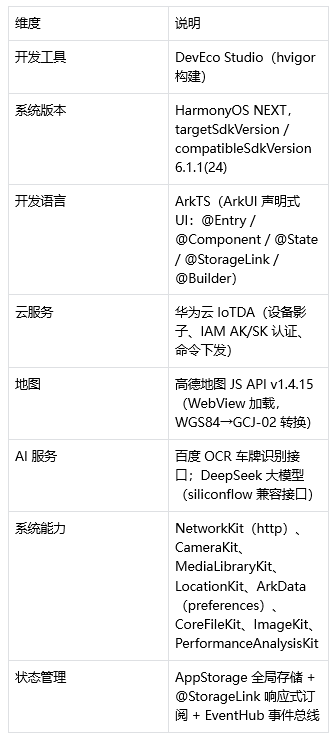
1.4 功能清单
- 登录注册:本地用户管理(preferences 持久化),注册校验(用户名非空 / 密码≥4 位 / 两次一致 / 用户名查重),密码明文切换;
- 首页仪表盘:充电状态大卡片(充电中 / 空闲 / 故障三态)、温度 / 湿度 / 超声波距离 / 车位状态四张传感器卡片、Canvas 实时功率折线图、充电 / 停止控制(乐观更新 + 云端下发 + 回滚)、星闪连接状态徽章、车牌绑定入口;
- 地图找桩:WebView 加载高德地图,内置 4 个西安充电桩,长按地图新增自定义桩位(localStorage 持久化)、详情卡查看、自定义桩位删除、系统定位(WGS84→GCJ-02)显示 "我的位置";
- 充电站搜索:按桩位编号 / 地址模糊搜索(内置 + 自定义合并),点击结果跳回地图并定位到该桩位;
- AI 车牌识别:拍照 / 相册选择图片,百度 OCR 识别车牌,与绑定车牌比对;一致则联动启动本地模拟充电;OCR 密钥支持应用内动态配置;
- AI 智能助手:DeepSeek 对话页面,将设备实时状态(充电状态 / 星闪 / 温度 / 湿度)注入 system prompt,支持快捷提问;
- 充电记录:会话录制器记录每次充电(开始时间 / 时长 / 峰值功率 / 车牌 / 是否正常结束),列表页展示汇总(充电次数 / 累计时长)与 "充电中" 实时卡片,支持清空;
- 我的页:车牌展示与绑定、最近 3 条充电记录、充电记录入口、退出登录。
二、项目亮点
2.1 亮点一:端云协同的充电远程控制
核心服务 IoTDAService 封装了完整的华为云 IoTDA 调用链路:
- IAM Token 认证:用 AK/SK 换取 x-subject-token,带 Token 访问设备影子与命令接口;
- Token 缓存与并发去重:cachedToken 复用 + tokenFetching 标志防止并发重复获取;
- 设备影子轮询:GET /v5/iot/{project_id}/devices/{device_id}/shadow 拉取设备上报属性;
- 命令下发:start_charge / stop_charge / plateNumber 三条命令,JSON 结构(service_id + command_name + paras)与设备端对齐;
- 错误码友好化:常见 IoTDA 错误码映射为中文提示(如 IOTDA.014016 → "设备离线:请保持设备在线后再操作");
- 网络抖动重试:请求超时 / 断连时自动重试一次,仍失败则给出明确中文原因。
// 下发充电指令:OK 则返回成功;失败时提取 error_code 映射为中文提示
const parseResult = (code: number, bodyStr: string): CommandResult => {
    if (code === 201) return { ok: true, reason: '' };
    ...
    const friendly = COMMAND_ERROR_MAP[errorCode];
    return {
        ok: false,
        reason: friendly ?? (errorMsg ? `${errorMsg}(${errorCode})` : `HTTP ${code}`)
    };
};
// 网络层错误自动重试一次
let result = await requestOnce();
if (result === null) { result = await requestOnce(); }
2.2 亮点二:乐观更新 + 回滚的即时交互
用户点击 "充电 / 停止" 后,界面立即切换状态并启动功率动画,不等云端响应;指令下发失败时按场景回滚或保持本地状态,保证交互零等待:
// 乐观更新:点击后立即切换顶栏「充电/停止」状态并实时驱动功率显示,
// 指令下发失败时回滚
AppStorage.set('pileStatus', targetStatus);
if (targetStatus === '1') {
    startChargeSimulation();
    await beginChargeSession(plate);
} else {
    stopChargeSimulation();
    AppStorage.set('powerKw', 0.0);
}
const res = await sendChargeCommand(...);
2.3 亮点三:三层机制保障本地 / 云端状态一致性
项目用三个 "状态标记" 解决本地乐观状态与云端设备影子的竞态问题(对应三个真实 bug 的修复):
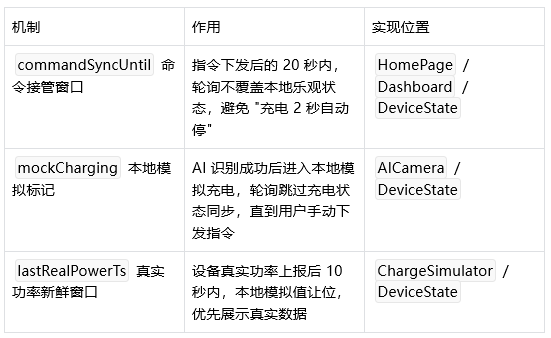
// 设备轮询中的状态仲裁核心逻辑
const mockCharging = AppStorage.get<boolean>('mockCharging') ?? false;
const syncHoldUntil = AppStorage.get<number>('commandSyncUntil') ?? 0;
const inSyncHold = new Date().getTime() < syncHoldUntil;
if (!mockCharging && !inSyncHold) {
    AppStorage.set('pileStatus', String(props.pile_status));
    ...
}
2.4 亮点四:充电会话录制器 —— 防丢失的完整数据链路
ChargeRecordStore 把一次充电建模为 "会话",从开始到结束全链路落盘:
- 开始:记录开始时间、车牌,并把活跃会话标记写入 preferences(防 App 被杀丢失);
- 进行中:trackChargePower 实时跟踪峰值功率;
- 结束:生成记录(时长 / 峰值 / 车牌 / 是否正常结束)追加到历史列表,上限 200 条;
- 启动恢复:restoreActiveSessionOnLaunch 恢复上次未闭合会话;
- 设备对账:轮询发现设备已空闲时,reconcileSessionWithDevice 自动把未闭合会话记为 "异常结束",保证数据闭环。
2.5 亮点五:AI 能力双集成
车牌识别(PlateRecognizer):
- 图片读取 → 解码压缩(长边 1280、JPEG 质量 90,满足 OCR 接口 4MB 限制)→ base64 → 百度 OCR 车牌识别接口;
- 结果归一化(去掉 ·、-、空格等分隔符并统一大写),用于与绑定车牌精确比对;
- 密钥动态配置:OCR 密钥存入 preferences,应用内右上角 ⚙ 即可配置,免重新编译;未配置时给出明确引导。
// 车牌归一化:如 "鲁H·S6S88" → "鲁HS6S88"
export function normalizePlate(input: string): string {
    ...
    if (ch === ' ' || ch === '·' || ch === '•' || ch === '-' || ch === '_' || ch === '.' || ch === ',') {
        continue;
    }
    out += ch.toUpperCase();
}
const requestMessages: ChatRequestMessage[] = [
    { role: 'system', content: getDeviceStatePrompt() } as ChatRequestMessage,
    ...this.messages.map(...)
];
// getDeviceStatePrompt 输出示例:
// 你是智慧充电桩AI助手,回答简洁友好,不超过80字。当前设备实时状态:
// - 充电状态:充电中,已充 23 分钟,当前功率 6.5 kW
// - 星闪连接:已连接
// - 温度:26.5℃ / 湿度:48%
2.6 亮点六:WebView 地图的双向通信与坐标转换
MapPage 通过 WebView 加载 map.html(高德 JS API),实现原生 ArkTS 与 Web 页面双向通信:
- 原生 → Web:controller.runJavaScript('focusPile(lng, lat)') 定位桩位、locateUser(lng, lat) 显示 "我的位置";
- Web → 原生:runJavaScript 回调读取 localStorage 中自定义桩位,同步到 AppStorage('customPiles') 供搜索页查询;
- 坐标转换:系统定位返回 WGS84 坐标,页面内实现 WGS84→GCJ-02 转换后渲染到高德地图;
- 页面联动:搜索页通过 eventHub.emit('mapFocus', lng, lat) 通知地图页定位,EventHub 事件总线贯穿多个页面。
2.7 亮点七:ArkUI 响应式工程化设计
- 全局状态:GlobalContext.init() 统一初始化 AppStorage 键值,@StorageLink 实现多组件响应式订阅(顶栏徽章、仪表盘、AI 页共享充电状态);
- 组件化:四个 Tab 视图独立封装为 Dashboard / MapPage / AICamera / ProfilePage,弹窗独立为 BindPlateDialog / OcrConfigDialog;
- Canvas 可视化:PowerLineChart 用 CanvasRenderingContext2D 每 1 秒重绘一次实时功率折线图(带虚线网格);
- 页面通信:EventHub 注册 / 注销成对使用,aboutToAppear / aboutToDisappear 生命周期管理规范。
三、项目难点
3.1 难点一:本地乐观状态与云端设备影子的竞态
设备轮询每 5 秒把云端影子同步到本地,而用户点击充电后本地立即乐观更新。若不加保护,轮询会拿 "云端旧状态" 覆盖 "本地新状态"—— 这正是代码注释中记录的 "充电 2 秒自动停" 现象的根因。
解决思路:引入 "接管窗口 + 模拟标记" 双层机制(见 2.3),在窗口期和模拟期内轮询跳过充电状态同步,窗口结束后再以设备上报为准自动收敛。
3.2 难点二:IAM Token 生命周期管理
IoTDA 接口全部需要 Token 认证,而 Token 有过期时间、获取耗时(可能 60 秒超时)、多个页面会并发发起请求。难点在于:
- Token 未过期时不能重复获取(浪费且慢);
- 多个并发请求不能各自去拿 Token(风暴);
- Token 失效(HTTP 401)后必须清除缓存、下次自动重取。
解决思路:cachedToken 缓存 + tokenFetching 标志去重(并发请求轮询等待第一个请求完成)+ 所有接口 401 时清缓存。
3.3 难点三:原生 ArkTS 与 Web 地图页的数据互通
WebView 中的 map.html 与原生页面是两套运行环境,但业务上需要:地图数据(自定义桩位)流向原生搜索页、搜索页选中结果反向定位地图。难点在于:
- runJavaScript 的返回值类型与 JSON 编码行为特殊(字符串会被多包一层引号,见问题 4.5);
- 页面加载完成时机(onPageEnd)与原生调用时机需对齐;
- 页面销毁后定时器与事件监听必须清理,避免泄漏。
3.4 难点四:真实数据与模拟数据的优先级仲裁
演示场景下设备可能离线,但界面仍需 "充电中 + 实时功率"。项目用本地模拟器补位,又不能让模拟值覆盖设备真实上报值。难点在于设计一套明确的优先级:
设备真实功率(10 秒新鲜窗口内) > 本地模拟功率 > 归零
同时状态联动:未处于充电状态时立即停止模拟并归零,避免残留功率数据。
3.6 难点六:多页面共享状态的响应式同步
充电状态、功率、车牌、星闪状态被顶栏、仪表盘、AI 页、我的页多处展示,且需要实时联动。难点在于选择正确的状态机制:
- 跨页面共享用 AppStorage + @StorageLink(一处修改,多处刷新);
- 一次性事件(跳 Tab、地图定位)用 EventHub(发布 / 订阅);
- 退出登录时不能 delete AppStorage 键(会导致 @StorageLink 订阅者报错),只能 setOrCreate 重置。
四、问题与解决
4.1 问题一:AI 识别成功后状态被轮询覆盖
现象:AI 识别车牌匹配成功、启动本地模拟充电后,几秒内又被云端空闲状态覆盖。
原因:本地模拟充电没有真实设备上报,轮询无条件用云端状态覆盖本地。
解决:引入 mockCharging 标记,AI 识别成功时置为 true,轮询检测到该标记后跳过充电状态同步;用户手动下发充电指令时清除标记,交还云端接管:
// AICamera:识别成功驱动本地状态
AppStorage.set('mockCharging', true);
AppStorage.set('pileStatus', '1');
startChargeSimulation();

// 用户手动控制充电后,退出 AI 识别的本地 mock 状态,由云端状态接管
AppStorage.set('mockCharging', false);
4.2 问题二:本地模拟功率覆盖设备真实功率
现象:设备真实上报功率(如 6.2kW)被本地模拟器的随机波动值覆盖,显示不准确。
原因:模拟器每秒更新功率,未区分数据来源。
解决:记录设备真实功率最近上报时间戳,10 秒新鲜窗口内模拟器让位:
// 模拟器:真实功率新鲜窗口内不覆盖真实值
const lastRealTs = AppStorage.get<number>('lastRealPowerTs') ?? 0;
if (new Date().getTime() - lastRealTs < REAL_FRESH_MS) return;
const p = nextPower();
AppStorage.set('powerKw', p);
4.3 问题三:停止充电后功率残留
现象:停止充电后,界面仍短暂显示非零功率。
原因:模拟器定时器未停止或真实功率未归零。
解决:模拟器每个 tick 检查状态,非充电状态立即停止模拟并归零;轮询发现设备空闲时也强制功率归零:
// 状态联动:未处于充电状态时停止模拟并归零,避免残留功率
const status = AppStorage.get<string>('pileStatus') ?? '0';
if (status !== '1') {
    stopChargeSimulation();
    AppStorage.set('powerKw', 0.0);
    return;
}
4.4 问题四:runJavaScript 返回字符串被 "多包一层引号"
现象:从 map.html 读取自定义桩位同步到 AppStorage 后,解析得到的是字符串而非数组,导致搜索页 customPiles 一直为空、map 报 TypeError 被静默吞掉。
原因:runJavaScript 对字符串返回值会再做一次 JSON 编码(外层多包一对引号),原生端 JSON.parse 后得到的仍是字符串。
解决:在 JS 端先把 localStorage 的 JSON 字符串 parse 成数组再返回;原生端再做 "双重 parse 兜底":
const script = "(function(){ try { var v = localStorage.getItem('customPiles') || '[]'; return JSON.parse(v); } catch(e) { return []; } })()"
...
let parsed: object = JSON.parse(result);
if (typeof parsed === 'string') {   // 兜底:兼容 result 被多包一层引号的情况
    parsed = JSON.parse(parsed);
}
4.5 问题五:自定义桩位在地图上可见、搜索却搜不到
现象:地图上长按新增的桩位显示正常,但搜索页搜不到。
原因:自定义桩位只存在 map.html 的 localStorage 中,原生搜索页无法直接访问;且同步逻辑存在 4.5 的解析缺陷。
解决:地图页 onPageEnd 后启动 2 秒定时同步(syncCustomPiles),跳转搜索页前再同步一次;配合 4.5 的解析兜底,保证搜索页拿到最新桩位:
// 页面就绪后:定位用户位置 + 同步自定义桩位
this.syncCustomPiles();
if (this.syncTimer === -1) {
    this.syncTimer = setInterval(() => { this.syncCustomPiles() }, 2000);
}
4.6 问题六:Token 失效(401)导致接口持续失败
现象:Token 过期后,设备查询 / 命令下发全部返回 401。
原因:缓存的 Token 未失效处理。
解决:所有接口检测到 401 时清除 cachedToken,下次调用自动重新获取:
if (data.responseCode === 401) { cachedToken = ''; resolve(null); return; }
五、代码文件、
5.1 module.json5
{
  "module": {
    "name": "entry",
    "type": "entry",
    "description": "$string:module_desc",
    "mainElement": "EntryAbility",
    "deviceTypes": [
      "phone"
    ],
    "deliveryWithInstall": true,
    "installationFree": false,
    "pages": "$profile:main_pages",
    "abilities": [
      {
        "name": "EntryAbility",
        "srcEntry": "./ets/entryability/EntryAbility.ets",
        "description": "$string:EntryAbility_desc",
        "icon": "$media:layered_image",
        "label": "$string:EntryAbility_label",
        "startWindowIcon": "$media:startIcon",
        "startWindowBackground": "$color:start_window_background",
        "exported": true,
        "skills": [
          {
            "entities": [
              "entity.system.home"
            ],
            "actions": [
              "ohos.want.action.home"
            ]
          }
        ]
      }
    ],
    "extensionAbilities": [
      {
        "name": "EntryBackupAbility",
        "srcEntry": "./ets/entrybackupability/EntryBackupAbility.ets",
        "type": "backup",
        "exported": false,
        "metadata": [
          {
            "name": "ohos.extension.backup",
            "resource": "$profile:backup_config"
          }
        ],
      }
    ],
    "requestPermissions": [
      {
        "name": "ohos.permission.INTERNET"
      },
      {
        "name": "ohos.permission.GET_NETWORK_INFO"
      },
      {
        "name": "ohos.permission.CAMERA",
        "reason": "$string:camera_reason",
        "usedScene": {
          "abilities": ["EntryAbility"],
          "when": "inuse"
        }
      },
      {
        "name": "ohos.permission.READ_MEDIA",
        "reason": "$string:gallery_reason",
        "usedScene": {
          "abilities": ["EntryAbility"],
          "when": "inuse"
        }
      },
      {
        "name": "ohos.permission.APPROXIMATELY_LOCATION",
        "reason": "$string:location_reason",
        "usedScene": {
          "abilities": ["EntryAbility"],
          "when": "inuse"
        }
      },
      {
        "name": "ohos.permission.LOCATION",
        "reason": "$string:location_reason",
        "usedScene": {
          "abilities": ["EntryAbility"],
          "when": "inuse"
        }
      }    ]
  }
}
5.2 components
5.2.1 BindPlateDialog.ets
// 导入当前页面依赖的组件、状态工具和系统能力。
import { promptAction } from '@kit.ArkUI';
import { camera, cameraPicker } from '@kit.CameraKit';
import { common } from '@kit.AbilityKit';
import { photoAccessHelper } from '@kit.MediaLibraryKit';
import { recognizePlate, normalizePlate } from '../utils/PlateRecognizer';
import { PlateStore } from '../utils/GlobalState';

// 使用装饰器声明页面、组件或构建器,供界面树和框架生命周期识别。
@CustomDialog
export struct BindPlateDialog {
  controller: CustomDialogController
  // 这里集中定义组件状态、共享状态以及界面控制器。
  @State inputPlate: string = ''
  @State isRecognizing: boolean = false;
  @StorageLink('plateNumber') plateNumber: string = '未绑定'
  private context = getContext(this) as common.UIAbilityContext;

  // 这个异步方法负责处理耗时任务,并在完成后回写界面状态。
  async takePhoto() {
    try {
      // 先声明模块级常量、缓存或定时器句柄,方便多个方法共享。
      const result = await cameraPicker.pick(
        this.context,
        [cameraPicker.PickerMediaType.PHOTO],
        { cameraPosition: camera.CameraPosition.CAMERA_POSITION_BACK }
      );
      // 根据当前业务状态走不同分支,保证页面反馈和数据流一致。
      if (result.resultCode === 0 && result.resultUri) {
        this.doRecognize(result.resultUri);
      }
    } catch (e) {
      try { promptAction.showToast({ message: '相机启动失败' }); } catch (_) {}
    }
  }

  // 这个异步方法负责处理耗时任务,并在完成后回写界面状态。
  async pickFromGallery() {
    try {
      const photoSelectOptions = new photoAccessHelper.PhotoSelectOptions();
      photoSelectOptions.MIMEType = photoAccessHelper.PhotoViewMIMETypes.IMAGE_TYPE;
      photoSelectOptions.maxSelectNumber = 1;
      const photoPicker = new photoAccessHelper.PhotoViewPicker();
      const result = await photoPicker.select(photoSelectOptions);
      // 根据当前业务状态走不同分支,保证页面反馈和数据流一致。
      if (result.photoUris && result.photoUris.length > 0) {
        this.doRecognize(result.photoUris[0]);
      }
    } catch (e) {
      try { promptAction.showToast({ message: '相册选择失败' }); } catch (_) {}
    }
  }

  // 这个异步方法负责处理耗时任务,并在完成后回写界面状态。
  async doRecognize(imagePath: string) {
    this.isRecognizing = true;
    try {
      const plate = await recognizePlate(this.context, imagePath);
      this.inputPlate = plate;
      try { promptAction.showToast({ message: `识别到车牌:${plate}` }); } catch (_) {}
    } catch (e) {
      const msg = (e as Error).message ?? '';
      try {
        if (msg === 'OCR_KEY_NOT_CONFIGURED') {
          promptAction.showToast({ message: 'OCR密钥未配置,请手动输入' });
        } else if (msg === 'NO_PLATE_FOUND') {
          promptAction.showToast({ message: '未识别到车牌,请手动输入' });
        } else {
          promptAction.showToast({ message: '识别失败,请手动输入' });
        }
      } catch (_) {}
    }
    this.isRecognizing = false;
  }

  // build 方法负责组织页面布局,并把交互控件拼装成完整界面。
  build() {
    Column({ space: 15 }) {
      Text('绑定车辆')
        .fontSize(20).fontWeight(FontWeight.Bold).margin({ top: 10, bottom: 10 })

      TextInput({ placeholder: '手动输入车牌号 (例: 粤B12345)', text: this.inputPlate })
        .onChange((value: string) => { this.inputPlate = value; })
        .width('90%').height(45)

      Text('—————  或拍照识别  —————')
        .fontSize(12).fontColor('#CCCCCC').margin({ top: 5 })

      // 识别中状态
      if (this.isRecognizing) {
        Row({ space: 8 }) {
          LoadingProgress().width(20).height(20).color('#007DFF')
          Text('正在识别...').fontSize(14).fontColor('#666666')
        }.height(45)
      } else {
        Row({ space: 12 }) {
          Button('📷 拍照', { type: ButtonType.Capsule })
            .layoutWeight(1).height(42)
            .backgroundColor('#007DFF')
            .onClick(() => { this.takePhoto(); })
          Button('🖼️ 相册', { type: ButtonType.Capsule })
            .layoutWeight(1).height(42)
            .backgroundColor('#4CAF50')
            .onClick(() => { this.pickFromGallery(); })
        }.width('90%')
      }

      Row({ space: 20 }) {
        Button('取消')
          .width('40%').backgroundColor(Color.Transparent).fontColor('#999999')
          .onClick(() => { this.controller.close(); })
        Button('确定')
          .width('40%').backgroundColor('#007DFF')
          .onClick(async () => {
            const plate = normalizePlate(this.inputPlate.trim());
            // 根据当前业务状态走不同分支,保证页面反馈和数据流一致。
            if (plate !== '') {
              // 写 preferences 落盘
              await PlateStore.savePlate(this.context, plate);
              // 更新 AppStorage,触发所有 @StorageLink('plateNumber') 组件刷新
              this.plateNumber = plate;
              promptAction.showToast({ message: `成功绑定车牌: ${plate}` });
              this.controller.close();
            } else {
              promptAction.showToast({ message: '车牌号不能为空' });
            }
          })
      }.margin({ top: 20, bottom: 10 })
    }
    .padding(20).backgroundColor(Color.White).borderRadius(4).width('85%')
  }
}
5.2.2 OcrConfigDialog.ets
// 百度 OCR 密钥配置弹窗
// 在 AI 识别页右上角 ⚙ 打开,配置后无需重新编译即可生效。
import { promptAction } from '@kit.ArkUI';
import { common } from '@kit.AbilityKit';
import { OcrConfig, OcrKeys } from '../utils/PlateRecognizer';

@CustomDialog
export struct OcrConfigDialog {
  controller: CustomDialogController
  @State apiKey: string = ''
  @State secretKey: string = ''
  @State isLoading: boolean = true;
  private context = getContext(this) as common.UIAbilityContext;

  aboutToAppear() {
    OcrConfig.getKeys(this.context).then((keys: OcrKeys) => {
      this.apiKey = keys.apiKey;
      this.secretKey = keys.secretKey;
      this.isLoading = false;
    }).catch(() => {
      this.isLoading = false;
    });
  }

  async save() {
    const ak = this.apiKey.trim();
    const sk = this.secretKey.trim();
    if (ak === '' || sk === '') {
      promptAction.showToast({ message: 'API Key 和 Secret Key 不能为空' });
      return;
    }
    await OcrConfig.saveKeys(this.context, ak, sk);
    promptAction.showToast({ message: 'OCR 密钥已保存,可直接识别' });
    this.controller.close();
  }

  build() {
    Column({ space: 14 }) {
      Text('百度 OCR 密钥配置')
        .fontSize(18).fontWeight(FontWeight.Bold).margin({ top: 6, bottom: 2 })

      Text('在百度智能云控制台开通「车牌识别」后,创建应用获取 API Key 与 Secret Key(免费额度 1000 次/月)。')
        .fontSize(12).fontColor('#666666').lineHeight(18)

      TextInput({ placeholder: 'API Key', text: this.apiKey })
        .onChange((value: string) => { this.apiKey = value; })
        .width('100%').height(44).fontSize(14)

      TextInput({ placeholder: 'Secret Key', text: this.secretKey })
        .onChange((value: string) => { this.secretKey = value; })
        .width('100%').height(44).fontSize(14)

      Row({ space: 20 }) {
        Button('取消')
          .width('40%').backgroundColor(Color.Transparent).fontColor('#999999')
          .onClick(() => { this.controller.close(); })
        Button(this.isLoading ? '加载中...' : '保存')
          .width('40%').backgroundColor('#007DFF')
          .enabled(!this.isLoading)
          .onClick(() => { this.save(); })
      }.margin({ top: 10, bottom: 6 })
    }
    .padding(20)
    .backgroundColor(Color.White)
    .borderRadius(4)
    .width('85%')
  }
}
5.3 entryability
5.3.1 entryability.ets
// 导入当前页面依赖的组件、状态工具和系统能力。
import { AbilityConstant, ConfigurationConstant, UIAbility, Want } from '@kit.AbilityKit';
import { hilog } from '@kit.PerformanceAnalysisKit';
import { window } from '@kit.ArkUI';
import { GlobalContext, PlateStore } from '../utils/GlobalState';
import { startDevicePolling, stopDevicePolling } from '../utils/DeviceState';
import { initChargeRecorder, restoreActiveSessionOnLaunch } from '../utils/ChargeRecordStore';

// 先声明模块级常量、缓存或定时器句柄,方便多个方法共享。
const DOMAIN = 0x0000;

export default class EntryAbility extends UIAbility {
  // 这里定义一个独立方法,用来封装当前模块的关键业务逻辑。
  onCreate(want: Want, launchParam: AbilityConstant.LaunchParam): void {
    GlobalContext.init();
    // 注入充电记录上下文并恢复上次未闭合会话
    initChargeRecorder(this.context);
    restoreActiveSessionOnLaunch();

    // 从 preferences 读取上次保存的车牌,同步到 AppStorage
    // 这里定义一个独立方法,用来封装当前模块的关键业务逻辑。
    PlateStore.getPlate(this.context).then((plate: string) => {
      AppStorage.set('plateNumber', plate);
    });
    startDevicePolling();
    try {
      this.context.getApplicationContext().setColorMode(ConfigurationConstant.ColorMode.COLOR_MODE_NOT_SET);
      // 这里定义一个独立方法,用来封装当前模块的关键业务逻辑。
    } catch (err) {
      hilog.error(DOMAIN, 'testTag', 'Failed to set colorMode: %{public}s', JSON.stringify(err));
    }
  }

  // 这里定义一个独立方法,用来封装当前模块的关键业务逻辑。
  onWindowStageCreate(windowStage: window.WindowStage): void {
    windowStage.loadContent('pages/LoginPage', (err) => {
      // 根据当前业务状态走不同分支,保证页面反馈和数据流一致。
      if (err.code) {
        hilog.error(DOMAIN, 'testTag', 'Failed to load content: %{public}s', JSON.stringify(err));
      }
    });
  }

  onDestroy(): void {
    stopDevicePolling();
  }
  onWindowStageDestroy(): void {}
  onForeground(): void {}
  onBackground(): void {
    stopDevicePolling();
  }
}
5.4 entrybackupability
5.4.1 EntryBackupAbility.ets
import { hilog } from '@kit.PerformanceAnalysisKit';
import { BackupExtensionAbility, BundleVersion } from '@kit.CoreFileKit';

const DOMAIN = 0x0000;

export default class EntryBackupAbility extends BackupExtensionAbility {
  async onBackup() {
    hilog.info(DOMAIN, 'testTag', 'onBackup ok');
    await Promise.resolve();
  }

  async onRestore(bundleVersion: BundleVersion) {
    hilog.info(DOMAIN, 'testTag', 'onRestore ok %{public}s', JSON.stringify(bundleVersion));
    await Promise.resolve();
  }
}
5.5 pages
5.5.1 ChargeRecordsPage.ets
// 充电记录列表页:展示当前用户在主页发起的全部充电记录,最新在前。
// 数据源:ChargeRecordStore(preferences 持久化)。

import { router, promptAction } from '@kit.ArkUI';
import { ChargeRecord, getChargeRecords, clearChargeRecords, getActiveSession } from '../utils/ChargeRecordStore';

function pad(n: number): string {
  return n < 10 ? '0' + n : '' + n;
}

function fmtDateTime(ts: number): string {
  const d = new Date(ts);
  return `${d.getFullYear()}-${pad(d.getMonth() + 1)}-${pad(d.getDate())} ${pad(d.getHours())}:${pad(d.getMinutes())}`;
}

function fmtDuration(min: number): string {
  if (min < 60) {
    return `${min} 分钟`;
  }
  const h = Math.floor(min / 60);
  const m = min % 60;
  return m > 0 ? `${h} 小时 ${m} 分` : `${h} 小时`;
}

@Component
struct RecordCard {
  @Prop record: ChargeRecord = {
    id: 0, startTime: 0, endTime: 0, durationMin: 0, peakKw: 0, plate: '未绑定', closedNormally: true
  };

  build() {
    Column({ space: 8 }) {
      Row() {
        Column({ space: 2 }) {
          Text(fmtDateTime(this.record.startTime)).fontSize(15).fontColor('#222222').fontWeight(FontWeight.Medium)
          Text(`车牌:${this.record.plate}`).fontSize(12).fontColor('#999999')
        }
        .alignItems(HorizontalAlign.Start)
        Blank()
        if (!this.record.closedNormally) {
          Text('异常结束').fontSize(11).fontColor('#FA5151')
            .padding({ left: 8, right: 8, top: 2, bottom: 2 })
            .backgroundColor('rgba(250,81,81,0.1)').borderRadius(8)
        }
      }
      .width('100%')

      Divider().color('#F0F0F0').strokeWidth(1)

      Row() {
        Column({ space: 2 }) {
          Text('时长').fontSize(12).fontColor('#999999')
          Text(fmtDuration(this.record.durationMin)).fontSize(16).fontColor('#007DFF').fontWeight(FontWeight.Bold)
        }
        Column({ space: 2 }) {
          Text('峰值功率').fontSize(12).fontColor('#999999')
          Text(`${this.record.peakKw.toFixed(1)} kW`).fontSize(16).fontColor('#222222').fontWeight(FontWeight.Bold)
        }
        Blank()
        Text(`${fmtDateTime(this.record.endTime)} 结束`).fontSize(11).fontColor('#BBBBBB')
      }
      .width('100%')
    }
    .width('100%').padding(16).backgroundColor('#FFFFFF').borderRadius(12)
    .shadow({ radius: 6, color: '#0F000000', offsetX: 0, offsetY: 2 })
  }
}

@Entry
@Component
struct ChargeRecordsPage {
  @State records: ChargeRecord[] = [];
  @State loading: boolean = true;
  @State activeStart: number = 0;
  @State activePlate: string = '';
  @State activePeak: number = 0;
  private refreshTimer: number = -1;
  private destroyed: boolean = false;

  async reload() {
    try {
      this.loading = true;
      this.records = await getChargeRecords();
      if (this.destroyed) return;
      const act = getActiveSession();
      if (act) {
        this.activeStart = act.startTime;
        this.activePlate = act.plate;
        this.activePeak = act.peakKw;
      } else {
        this.activeStart = 0;
        this.activePlate = '';
        this.activePeak = 0;
      }
      this.loading = false;
    } catch (e) {
      if (!this.destroyed) this.loading = false;
    }
  }

  aboutToAppear() {
    this.destroyed = false;
    this.reload();
    // 每 3 秒刷新一次,让"充电中"卡片和列表实时更新
    this.refreshTimer = setInterval(() => { this.reload(); }, 3000);
  }

  aboutToDisappear() {
    this.destroyed = true;
    if (this.refreshTimer !== -1) {
      clearInterval(this.refreshTimer);
      this.refreshTimer = -1;
    }
  }

  private totalCount(): number {
    return this.records.length;
  }

  private totalMinutes(): number {
    let s = 0;
    for (const r of this.records) {
      s += r.durationMin;
    }
    return s;
  }

  async onClear() {
    try {
      await clearChargeRecords();
      this.records = [];
      promptAction.showToast({ message: '已清空' });
    } catch (e) {}
  }

  build() {
    Column() {
      // 顶部导航
      Row() {
        Text('< 返回').fontSize(15).fontColor('#FFFFFF').onClick(() => { router.back(); })
        Blank()
        Text('充电记录').fontSize(17).fontWeight(FontWeight.Bold).fontColor('#FFFFFF')
        Blank()
        Text('清空').fontSize(13).fontColor('#FFFFFF')
          .opacity(this.records.length > 0 ? 1 : 0.4)
          .onClick(() => {
            if (this.records.length === 0) return;
            this.onClear();
          })
      }
      .width('100%').height(48).padding({ left: 14, right: 14 })
      .linearGradient({ angle: 90, colors: [['#007DFF', 0], ['#0057CC', 1]] })

      // 汇总条
      Row({ space: 24 }) {
        Column({ space: 2 }) {
          Text(`${this.totalCount()}`).fontSize(20).fontWeight(FontWeight.Bold).fontColor('#007DFF')
          Text('充电次数').fontSize(12).fontColor('#999999')
        }
        Column({ space: 2 }) {
          Text(fmtDuration(this.totalMinutes())).fontSize(20).fontWeight(FontWeight.Bold).fontColor('#007DFF')
          Text('累计时长').fontSize(12).fontColor('#999999')
        }
      }
      .width('100%').padding({ top: 16, bottom: 16 }).backgroundColor('#FFFFFF')

      // 进行中的充电会话卡片
      if (this.activeStart > 0) {
        Column({ space: 8 }) {
          Row() {
            Circle({ width: 8, height: 8 }).fill('#00E676')
              .margin({ right: 6 })
            Text('充电中').fontSize(15).fontColor('#00C853').fontWeight(FontWeight.Medium)
            Blank()
            Text(fmtDateTime(this.activeStart) + ' 开始')
              .fontSize(12).fontColor('#999999')
          }.width('100%')
          Row() {
            Text(`车牌:${this.activePlate}`).fontSize(13).fontColor('#666666')
            Blank()
            Text(`峰值 ${this.activePeak.toFixed(1)} kW`).fontSize(13).fontColor('#007DFF')
          }.width('100%')
        }
        .width('100%').padding(16).backgroundColor('rgba(0,200,83,0.08)').borderRadius(12)
        .margin({ left: 14, right: 14, top: 12 })
      }

      if (this.records.length === 0 && this.activeStart === 0) {
        Column({ space: 12 }) {
          Text('🔌').fontSize(48)
          Text(this.loading ? '加载中...' : '暂无充电记录')
            .fontSize(15).fontColor('#999999')
          if (!this.loading) {
            Text('在首页点击「充电」开始一次充电后,记录会显示在这里')
              .fontSize(12).fontColor('#BBBBBB').textAlign(TextAlign.Center)
              .padding({ left: 32, right: 32 })
          }
        }
        .width('100%').layoutWeight(1).justifyContent(FlexAlign.Center)
      } else {
        List({ space: 12 }) {
          ForEach(this.records, (item: ChargeRecord) => {
            ListItem() {
              RecordCard({ record: item })
            }
          }, (item: ChargeRecord) => '' + item.id)
        }
        .layoutWeight(1).width('100%').padding({ left: 14, right: 14, top: 12, bottom: 12 })
        .scrollBar(BarState.Off)
      }
    }
    .width('100%').height('100%').backgroundColor('#F5F7F9')
  }
}
5.5.2 HomePage.ets
import router from '@ohos.router'
import { promptAction } from '@kit.ArkUI'
import { Dashboard } from '../views/Dashboard'
import { MapPage } from '../views/MapPage'
import { AICamera } from '../views/AICamera'
import { ProfilePage } from '../views/ProfilePage'
import { sendChargeCommand } from '../utils/IoTDAService'
import { startChargeSimulation, stopChargeSimulation } from '../utils/ChargeSimulator'
import { beginChargeSession, endChargeSession, abortChargeSession } from '../utils/ChargeRecordStore'

@Entry
@Component
struct MainPage {
  @State currentIndex: number = 0

  // IoT 实时状态(用于顶栏徽章展示)
  @StorageLink('pileStatus') pileStatus: string = '0'
  @StorageLink('powerKw') powerKw: number = 0.0
  @StorageLink('durationMin') durationMin: number = 0
  @StorageLink('nearlinkStatus') nearlinkStatus: boolean = false

  @State chargingLoading: boolean = false

  private titles: string[] = ['首页', '地图', 'AI识别', '我的']
  private tabIcons: string[] = ['🏠', '🗺️', '📷', '👤']
  private readonly SWITCH_TAB_EVENT = 'switchTab'

  private showTip(msg: string) {
    try { promptAction.showToast({ message: msg }) } catch (_e) {}
  }

  private async toggleCharge() {
    if (this.chargingLoading) return
    this.chargingLoading = true
    const prevStatus = this.pileStatus
    const targetStatus = prevStatus === '1' ? '0' : '1'
    const stopDuration = this.durationMin
    try {
      // 用户手动控制充电后,退出 AI 识别的本地 mock 状态,由云端状态接管
      AppStorage.set('mockCharging', false)
      // 乐观更新:点击后立即切换顶栏「充电/停止」状态并实时驱动功率显示,
      // 让用户可以随时自主选择结束充电;指令下发失败时回滚
      AppStorage.set('pileStatus', targetStatus)
      if (targetStatus === '1') {
        startChargeSimulation()
        // 用户点了"充电"就立刻开始记录会话;start 命令若失败回滚,再 abort
        const plate = AppStorage.get<string>('plateNumber') ?? '未绑定'
        await beginChargeSession(plate)
      } else {
        stopChargeSimulation()
        AppStorage.set('powerKw', 0.0)
        AppStorage.set('durationMin', 0)
      }
      // 立即进入轮询接管窗口,避免 await 下发期间被云端旧影子覆盖(充电 2 秒自动停)
      AppStorage.set('commandSyncUntil', new Date().getTime() + 20000)
      const res = await sendChargeCommand(targetStatus === '1' ? 'start_charge' : 'stop_charge')
      if (res.ok) {
        if (targetStatus === '1') {
          this.showTip('启动充电指令已下发')
        } else {
          await endChargeSession(stopDuration, true)
          this.showTip('停止充电指令已下发')
        }
      } else if (targetStatus === '0') {
        await endChargeSession(stopDuration, false)
        this.showTip("停止指令未被设备确认:" + res.reason)
      } else {
        // start 失败:不回滚、不 abort,保持本地乐观充电状态
        // (演示场景下设备常离线,用户看到"充电中"就应能在停止后生成记录)
        this.showTip("启动未被设备确认:" + res.reason)
      }
    } catch (e) {
      if (targetStatus === '1') {
        // start 网络异常:保持本地充电状态,不 abort
        this.showTip('网络异常,本地仍保持充电状态')
      } else {
        await endChargeSession(stopDuration, false);
        this.showTip('网络异常')
      }
    } finally {
      this.chargingLoading = false
    }
  }

  aboutToAppear() {
    // 用 EventHub 监听外部 Tab 跳转请求(ArkTS 正确方式)
    try {
      getContext(this).eventHub.on(this.SWITCH_TAB_EVENT, (index: number) => {
        if (index >= 0 && index < 4 && index !== this.currentIndex) {
          this.currentIndex = index
        }
      })
    } catch (e) {
      console.error('EventHub 注册失败:', JSON.stringify(e))
    }
  }

  aboutToDisappear() {
    try {
      getContext(this).eventHub.off(this.SWITCH_TAB_EVENT)
    } catch (e) {
      console.error('EventHub 注销失败:', JSON.stringify(e))
    }
  }

  private exitLogin() {
    // 重置登录相关状态(不 delete,避免 @StorageLink 订阅者报错)
    try {
      AppStorage.setOrCreate('pileStatus', '0')
      AppStorage.setOrCreate('durationMin', 0)
      AppStorage.setOrCreate('powerKw', 0.0)
      AppStorage.setOrCreate('mockCharging', false)
      stopChargeSimulation()
    } catch (_e) {}
    try {
      router.replaceUrl({ url: 'pages/LoginPage' })
    } catch (e) {
      console.error('退出登录失败:', JSON.stringify(e))
    }
  }

  @Builder
  TabBar() {
    Row() {
      ForEach(this.titles, (title: string, idx: number) => {
        Column() {
          Text(this.tabIcons[idx]).fontSize(22)
          Text(title)
            .fontSize(11).margin({ top: 2 })
            .fontColor(this.currentIndex === idx ? '#007DFF' : '#999999')
            .fontWeight(this.currentIndex === idx ? FontWeight.Medium : FontWeight.Normal)
        }
        .layoutWeight(1).height(56).justifyContent(FlexAlign.Center)
        .onClick(() => { this.currentIndex = idx })
      }, (_title: string, idx: number) => 'tab_' + idx)
    }
    .width('100%').height(56)
    .backgroundColor('#FFFFFF')
    .shadow({ radius: 4, color: '#11000000', offsetY: -2 })
  }

  @Builder
  TopTitleBar() {
    Row() {
      Text('⚡ 智慧充电桩')
        .fontSize(18)
        .fontWeight(FontWeight.Bold)
        .fontColor('#FFFFFF')

      // IoT 实时状态徽章
      if (this.pileStatus === '1') {
        Row({ space: 4 }) {
          Circle({ width: 6, height: 6 }).fill('#00E676')
          Text(`充电中 ${this.powerKw.toFixed(1)}kW`)
            .fontSize(11).fontColor('#FFFFFF').opacity(0.9)
        }
        .padding({ left: 8, right: 8, top: 3, bottom: 3 })
        .backgroundColor('rgba(0, 230, 118, 0.25)')
        .borderRadius(10)
        .margin({ left: 8 })
      } else if (this.pileStatus === '2') {
        Row({ space: 4 }) {
          Circle({ width: 6, height: 6 }).fill('#FF5252')
          Text('故障').fontSize(11).fontColor('#FFFFFF').opacity(0.9)
        }
        .padding({ left: 8, right: 8, top: 3, bottom: 3 })
        .backgroundColor('rgba(255, 82, 82, 0.35)')
        .borderRadius(10)
        .margin({ left: 8 })
      } else {
        Row({ space: 4 }) {
          Circle({ width: 6, height: 6 }).fill('#FFFFFF').opacity(0.6)
          Text('空闲').fontSize(11).fontColor('#FFFFFF').opacity(0.75)
        }
        .margin({ left: 8 })
      }

      Blank()

      // 快速充电按钮
      if (this.pileStatus !== '2') {
        Row({ space: 4 }) {
          Text(this.pileStatus === '1' ? '⏹ 停止' : '▶ 充电')
            .fontSize(12)
            .fontColor('#FFFFFF')
        }
        .padding({ left: 10, right: 10, top: 4, bottom: 4 })
        .backgroundColor(this.pileStatus === '1' ? '#E53935' : '#00C853')
        .borderRadius(12)
        .margin({ right: 10 })
        .opacity(this.chargingLoading ? 0.6 : 1)
        .enabled(!this.chargingLoading)
        .onClick(() => { this.toggleCharge() })
      }

      // 星闪连接状态指示
      Row({ space: 4 }) {
        Circle({ width: 6, height: 6 }).fill(this.nearlinkStatus ? '#00E676' : '#FF9800')
        Text(this.nearlinkStatus ? '星闪' : '离线').fontSize(11).fontColor('#FFFFFF').opacity(0.8)
      }
      .margin({ right: 12 })

      Text('退出')
        .fontSize(13)
        .fontColor('#FFFFFF')
        .padding({ left: 10, right: 10, top: 4, bottom: 4 })
        .backgroundColor('rgba(255,255,255,0.2)')
        .borderRadius(12)
        .onClick(() => { this.exitLogin() })
    }
    .width('100%')
    .height(48)
    .padding({ left: 14, right: 14 })
    .linearGradient({
      angle: 90,
      colors: [['#007DFF', 0], ['#0057CC', 1]]
    })
  }

  build() {
    Stack({ alignContent: Alignment.BottomEnd }) {
      Column() {
        this.TopTitleBar()
        Stack() {
          if (this.currentIndex === 0) { Column() { Dashboard() } }
          if (this.currentIndex === 1) { Column() { MapPage() } }
          if (this.currentIndex === 2) { Column() { AICamera() } }
          if (this.currentIndex === 3) { Column() { ProfilePage() } }
        }
        .width('100%').layoutWeight(1)
        this.TabBar()
      }
      .width('100%')
      .height('100%')

      // 右下角 AI 悬浮按钮(在 AI识别 Tab 自动隐藏,避免遮挡内容)
      if (this.currentIndex !== 2) {
        Column() {
          Text('🤖')
            .fontSize(28)
          Text('AI')
            .fontSize(10)
            .fontColor('#FFFFFF')
            .margin({ top: 2 })
        }
        .width(60)
        .height(60)
        .borderRadius(30)
        .linearGradient({
          angle: 135,
          colors: [['#FF6B6B', 0], ['#C44569', 1]]
        })
        .justifyContent(FlexAlign.Center)
        .alignItems(HorizontalAlign.Center)
        .shadow({ radius: 8, color: '#44000000', offsetX: 0, offsetY: 4 })
        .margin({ right: 20, bottom: 70 })
        .onClick(() => {
          try {
            router.pushUrl({ url: 'pages/LLMAgent' })
          } catch (e) {
            console.error('跳转LLMAgent失败:', JSON.stringify(e))
            this.showTip('AI页面跳转失败')
          }
        })
      }
    }
    .width('100%')
    .height('100%')
  }
}
5.5.3 LLMAgent.ets
//-----------------------------------------------连接DeepSeek-------------------------------------------------------

// pages/LLMAgent.ets
// 导入当前页面依赖的组件、状态工具和系统能力。
import { router } from '@kit.ArkUI';
import { http } from '@kit.NetworkKit';
import { getDeviceStatePrompt } from '../utils/DeviceState';

// 先声明模块级常量、缓存或定时器句柄,方便多个方法共享。
const DEEPSEEK_API_KEY = 'sk';
const DEEPSEEK_URL = 'api';

interface Message {
  role: 'user' | 'assistant';
  content: string;
}
interface ChatRequestMessage {
  role: string;
  content: string;
}
interface DeepSeekMessage {
  role: string;
  content: string;
}

interface DeepSeekChoice {
  message: DeepSeekMessage;
}

interface DeepSeekResponse {
  choices: DeepSeekChoice[];
}
// 使用装饰器声明页面、组件或构建器,供界面树和框架生命周期识别。
@Entry
  // 使用装饰器声明页面、组件或构建器,供界面树和框架生命周期识别。
@Component
struct LLMAgent {
  // 这里集中定义组件状态、共享状态以及界面控制器。
  @State messages: Message[] = [];
  @State inputText: string = '';
  @State isLoading: boolean = false;
  private scroller: Scroller = new Scroller();

  // 快捷提问列表
  private quickQuestions: string[] = [
    '现在这辆车充了多久了?',
    '当前温度和湿度是多少?',
    '充电桩现在是什么状态?',
  ];

  // 这个异步方法负责处理耗时任务,并在完成后回写界面状态。
  async sendMessage(userText: string) {
    // 根据当前业务状态走不同分支,保证页面反馈和数据流一致。
    if (!userText.trim() || this.isLoading) return;

    // 加入用户消息
    this.messages = [...this.messages, { role: 'user', content: userText }];
    this.inputText = '';
    this.isLoading = true;
    this.scrollToBottom();
    let reply: string = '';
    try {
      // 构建发送给 DeepSeek 的消息,注入设备状态作为 system prompt
      const requestMessages: ChatRequestMessage[] = [
        { role: 'system', content: getDeviceStatePrompt() } as ChatRequestMessage,
        // 这里定义一个独立方法,用来封装当前模块的关键业务逻辑。
        ...this.messages.map((m: Message): ChatRequestMessage => ({
          role: m.role,
          content: m.content
        }))
      ];

      const httpRequest = http.createHttp();
      const response = await httpRequest.request(DEEPSEEK_URL, {
        method: http.RequestMethod.POST,
        header: {
          'Content-Type': 'application/json',
          'Authorization': `Bearer ${DEEPSEEK_API_KEY}`
        },
        extraData: JSON.stringify({
          model: 'deepseek-ai/DeepSeek-V4-Flash',
          messages: requestMessages,
          max_tokens: 200,
          temperature: 0.7
        }),
        connectTimeout: 10000,
        readTimeout: 15000
      });
      console.log(response.result.toString())
      // 根据当前业务状态走不同分支,保证页面反馈和数据流一致。
      if (response.responseCode === 200) {
        const resultStr: string = (response.result as object).toString();
        const result = JSON.parse(resultStr) as DeepSeekResponse;
        reply = result.choices[0].message.content;
      } else if(response.responseCode === 402) {
        reply = '账户余额/可用调用额度耗尽。';
      }else{
        reply = '请求失败,请检查网络连接。';
      }
      httpRequest.destroy();
      // 这里定义一个独立方法,用来封装当前模块的关键业务逻辑。
    } catch (e) {
      reply = '网络异常,请稍后重试。';  // ← 改成只赋值,不再单独更新消息
    }
    this.messages = [...this.messages, { role: 'assistant', content: reply }];
    this.isLoading = false;
    this.scrollToBottom();
  }
  // 这里定义一个独立方法,用来封装当前模块的关键业务逻辑。
  scrollToBottom() {
    // 把状态映射和格式化逻辑封装成独立方法,便于页面直接调用。
    setTimeout(() => {
      this.scroller.scrollEdge(Edge.Bottom);
    }, 100);
  }

  // 消息气泡
  // 使用装饰器声明页面、组件或构建器,供界面树和框架生命周期识别。
  @Builder
  // 这里定义一个独立方法,用来封装当前模块的关键业务逻辑。
  MessageBubble(msg: Message) {
    Row() {
      // 根据当前业务状态走不同分支,保证页面反馈和数据流一致。
      if (msg.role === 'user') {
        Blank()
        Text(msg.content)
          .fontSize(15)
          .fontColor(Color.White)
          .backgroundColor('#007DFF')
          .padding({ left: 14, right: 14, top: 10, bottom: 10 })
          .borderRadius({ topLeft: 16, topRight: 4, bottomLeft: 16, bottomRight: 16 })
          .constraintSize({ maxWidth: '70%' })
          .margin({ right: 12 })
      } else {
        Text(msg.content)
          .fontSize(15)
          .fontColor('#333333')
          .backgroundColor('#FFFFFF')
          .padding({ left: 14, right: 14, top: 10, bottom: 10 })
          .borderRadius({ topLeft: 4, topRight: 16, bottomLeft: 16, bottomRight: 16 })
          .constraintSize({ maxWidth: '70%' })
          .margin({ left: 12 })
          .shadow({ radius: 4, color: '#11000000', offsetX: 0, offsetY: 2 })
        Blank()
      }
    }
    .width('100%')
    .margin({ top: 8, bottom: 8 })
  }

  // build 方法负责组织页面布局,并把交互控件拼装成完整界面。
  build() {
    Column() {
      // 顶部导航栏
      Row() {
        Text('< 返回')
          .fontSize(16)
          .fontColor('#007DFF')
          .onClick(() => { router.back(); })
        Blank()
        Text('AI 助手')
          .fontSize(18)
          .fontWeight(FontWeight.Bold)
          .fontColor('#333333')
        Blank()
        Text('      ')
      }
      .width('100%')
      .padding({ left: 16, right: 16, top: 12, bottom: 12 })
      .backgroundColor('#FFFFFF')
      .shadow({ radius: 4, color: '#11000000', offsetX: 0, offsetY: 2 })

      // 对话区域
      // 这里定义一个独立方法,用来封装当前模块的关键业务逻辑。
      Scroll(this.scroller) {
        Column() {
          // 欢迎语
          // 根据当前业务状态走不同分支,保证页面反馈和数据流一致。
          if (this.messages.length === 0) {
            Column({ space: 8 }) {
              Text('👋 你好!我是充电桩AI助手')
                .fontSize(15)
                .fontColor('#666666')
                .margin({ top: 30 })
              Text('可以问我设备状态、充电情况等问题')
                .fontSize(13)
                .fontColor('#999999')
            }.width('100%').alignItems(HorizontalAlign.Center)
          }

          // 消息列表
          // 这里定义一个独立方法,用来封装当前模块的关键业务逻辑。
          ForEach(this.messages, (msg: Message) => {
            this.MessageBubble(msg)
          })

          // 加载中动画
          // 根据当前业务状态走不同分支,保证页面反馈和数据流一致。
          if (this.isLoading) {
            Row({ space: 6 }) {
              Text('AI 正在思考')
                .fontSize(13)
                .fontColor('#999999')
                .margin({ left: 12 })
              LoadingProgress()
                .width(20)
                .height(20)
                .color('#007DFF')
            }
            .width('100%')
            .margin({ top: 8, bottom: 8 })
          }
        }
        .width('100%')
        .padding({ left: 8, right: 8, bottom: 16 })
      }
      .layoutWeight(1)
      .backgroundColor('#F5F7F9')
      .scrollBar(BarState.Off)

      // 快捷提问
      // 这里定义一个独立方法,用来封装当前模块的关键业务逻辑。
      Scroll() {
        Row({ space: 8 }) {
          // 这里定义一个独立方法,用来封装当前模块的关键业务逻辑。
          ForEach(this.quickQuestions, (q: string) => {
            Text(q)
              .fontSize(12)
              .fontColor('#007DFF')
              .padding({ left: 12, right: 12, top: 6, bottom: 6 })
              .backgroundColor('#EBF4FF')
              .borderRadius(16)
              .onClick(() => { this.sendMessage(q); })
          })
        }
        .padding({ left: 12, right: 12 })
      }
      .scrollable(ScrollDirection.Horizontal)
      .scrollBar(BarState.Off)
      .width('100%')
      .height(44)
      .backgroundColor('#FFFFFF')

      // 输入框
      Row({ space: 10 }) {
        TextInput({ placeholder: '输入消息...', text: this.inputText })
          .layoutWeight(1)
          .height(44)
          .backgroundColor('#F5F7F9')
          .borderRadius(22)
          .padding({ left: 16, right: 16 })
          .onChange((v: string) => { this.inputText = v; })
          .onSubmit(() => { this.sendMessage(this.inputText); })

        Button('发送', { type: ButtonType.Capsule })
          .height(44)
          .width(70)
          .fontSize(15)
          .backgroundColor(this.inputText.trim() ? '#007DFF' : '#CCCCCC')
          .onClick(() => { this.sendMessage(this.inputText); })
      }
      .width('100%')
      .padding({ left: 12, right: 12, top: 10, bottom: 10 })
      .backgroundColor('#FFFFFF')
    }
    .width('100%')
    .height('100%')
  }
}
5.5.4 LoginPage.ets
import router from '@ohos.router'
import { promptAction } from '@kit.ArkUI'
import { UserStore, UserAccount } from '../utils/GlobalState'
import { common } from '@kit.AbilityKit'

@Entry
@Component
struct LoginPage {
  // 用户名输入
  @State username: string = ''
  // 密码输入
  @State password: string = ''
  // 提示信息
  @State tipMessage: string = ''
  // 密码是否隐藏
  @State isPasswordHidden: boolean = true

  @State regUsername: string = ''
  @State regPassword: string = ''
  @State regConfirm: string = ''

  private dialogController: CustomDialogController = new CustomDialogController({
    builder: () => { this.RegisterDialogBuilder() },
    alignment: DialogAlignment.Bottom,
    customStyle: true,
    autoCancel: true,
    offset: { dx: 0, dy: 0 }
  })

  private context = getContext(this) as common.UIAbilityContext

  private readonly DEFAULT_USERNAME: string = '梨梨'
  private readonly DEFAULT_PASSWORD: string = '123456'

  private async getAllUsers(): Promise<UserAccount[]> {
    try {
      const users = await UserStore.getUsers(this.context)
      if (users.length > 0) return users
    } catch (e) {
      console.error('读取用户失败:', JSON.stringify(e))
    }
    return [{ username: this.DEFAULT_USERNAME, password: this.DEFAULT_PASSWORD }]
  }

  private verifyLogin(username: string, password: string, users: UserAccount[]): boolean {
    for (const u of users) {
      if (u.username === username && u.password === password) return true
    }
    return false
  }

  build() {
    Column() {
      // 顶部装饰区域
      Column() {
        // 充电桩图标
        Text('⚡')
          .fontSize(60)
          .margin({ bottom: 10 })
        // 应用名
        Text('智慧充电桩')
          .fontSize(32)
          .fontWeight(FontWeight.Bold)
          .fontColor('#FFFFFF')
        // 副标题
        Text('绿色出行 · 便捷充电')
          .fontSize(14)
          .fontColor('#E0E0E0')
          .margin({ top: 8 })
      }
      .width('100%')
      .padding({ top: 80, bottom: 60 })
      .linearGradient({
        angle: 135,
        colors: [['#1E88E5', 0], ['#1565C0', 1]]
      })

      // 表单区域
      Column({ space: 20 }) {
        // 用户名输入框
        Row() {
          Text('👤')
            .fontSize(20)
            .margin({ right: 12 })
          TextInput({ placeholder: '请输入用户名', text: this.username })
            .type(InputType.Normal)
            .onChange((value: string) => {
              this.username = value
              this.tipMessage = ''
            })
            .layoutWeight(1)
        }
        .width('100%')
        .padding(16)
        .backgroundColor('#F5F5F5')
        .borderRadius(12)

        // 密码输入框
        Row() {
          Text('🔒')
            .fontSize(20)
            .margin({ right: 12 })
          TextInput({ placeholder: '请输入密码', text: this.password })
            .type(this.isPasswordHidden ? InputType.Password : InputType.Normal)
            .onChange((value: string) => {
              this.password = value
              this.tipMessage = ''
            })
            .layoutWeight(1)
          // 密码显示/隐藏按钮
          Text(this.isPasswordHidden ? '👁️' : '🙈')
            .fontSize(20)
            .onClick(() => {
              this.isPasswordHidden = !this.isPasswordHidden
            })
        }
        .width('100%')
        .padding(16)
        .backgroundColor('#F5F5F5')
        .borderRadius(12)

        // 提示信息
        if (this.tipMessage !== '') {
          Text(this.tipMessage)
            .fontSize(14)
            .fontColor('#FF5722')
            .width('100%')
            .textAlign(TextAlign.Center)
        }

        // 登录按钮
        Button() {
          Text('登 录')
            .fontSize(18)
            .fontWeight(FontWeight.Bold)
            .fontColor('#FFFFFF')
        }
        .width('100%')
        .height(50)
        .backgroundColor('#1E88E5')
        .borderRadius(25)
        .margin({ top: 10 })
        .onClick(() => {
          this.handleLogin()
        })

        // 立即注册
        Row() {
          Blank()
          Text('还没有账号?').fontSize(13).fontColor('#999999')
          Text('立即注册').fontSize(13).fontColor('#1E88E5')
            .fontWeight(FontWeight.Bold).margin({ left: 4 })
            .onClick(() => {
              this.regUsername = ''
              this.regPassword = ''
              this.regConfirm = ''
              try { this.dialogController.open() } catch (_e) {}
            })
          Blank()
        }
        .width('100%').margin({ top: 16 })

        // 提示账号
        Column() {
          Text('测试账号: 梨梨  /  密码: 123456')
            .fontSize(12).fontColor('#999999')
        }
        .margin({ top: 20 })
      }
      .width('85%').margin({ top: 40 })

      Blank()
    }
    .width('100%').height('100%').backgroundColor('#FFFFFF')
  }

  // 注册弹窗
  @Builder
  RegisterDialogBuilder() {
    Column({ space: 18 }) {
      Text('创建账号').fontSize(22).fontWeight(FontWeight.Bold).fontColor('#333333').margin({ top: 20 })
      Text('请填写注册信息').fontSize(14).fontColor('#999999')

      Row() {
        Text('👤').fontSize(20).margin({ right: 12 })
        TextInput({ placeholder: '请输入用户名', text: this.regUsername })
          .type(InputType.Normal).layoutWeight(1)
          .onChange((v: string) => { this.regUsername = v })
      }.width('100%').padding(16).backgroundColor('#F5F5F5').borderRadius(12)

      Row() {
        Text('🔒').fontSize(20).margin({ right: 12 })
        TextInput({ placeholder: '请输入密码', text: this.regPassword })
          .type(InputType.Password).layoutWeight(1)
          .onChange((v: string) => { this.regPassword = v })
      }.width('100%').padding(16).backgroundColor('#F5F5F5').borderRadius(12)

      Row() {
        Text('🔒').fontSize(20).margin({ right: 12 })
        TextInput({ placeholder: '请再次输入密码', text: this.regConfirm })
          .type(InputType.Password).layoutWeight(1)
          .onChange((v: string) => { this.regConfirm = v })
      }.width('100%').padding(16).backgroundColor('#F5F5F5').borderRadius(12)

      Row({ space: 16 }) {
        Button('取消').layoutWeight(1).height(48).backgroundColor('#F5F5F5')
          .fontColor('#666666').borderRadius(24)
          .onClick(() => { try { this.dialogController.close() } catch (_e) {} })
        Button('注册').layoutWeight(1).height(48).backgroundColor('#1E88E5')
          .fontColor('#FFFFFF').borderRadius(24)
          .onClick(() => { this.handleRegister() })
      }.width('100%').margin({ top: 10 })
    }
    .width('85%').alignItems(HorizontalAlign.Center).margin({ top: 30 })
    .padding({ bottom: 30 })
    .backgroundColor('#FFFFFF')
    .borderRadius({ topLeft: 24, topRight: 24 })
  }

  private showTip(msg: string) {
    try { promptAction.showToast({ message: msg }) } catch (_e) {}
  }

  private async handleRegister() {
    const u = this.regUsername.trim()
    const p = this.regPassword.trim()
    const c = this.regConfirm.trim()
    if (u === '') { this.showTip('请输入用户名'); return }
    if (p === '') { this.showTip('请输入密码'); return }
    if (p.length < 4) { this.showTip('密码至少4位'); return }
    if (p !== c) { this.showTip('两次密码不一致'); return }
    try {
      const existing = await UserStore.getUsers(this.context)
      // 检查用户名是否已存在
      for (const e of existing) {
        if (e.username === u) {
          this.showTip('用户名已被注册')
          return
        }
      }
      existing.push({ username: u, password: p })
      await UserStore.saveUsers(this.context, existing)
      this.showTip('注册成功,请登录')
      try { this.dialogController.close() } catch (_e) {}
      this.username = u
      this.password = ''
    } catch (e) {
      this.showTip('注册失败,请重试')
    }
  }

  private async handleLogin() {
    if (this.username.trim() === '') { this.tipMessage = '请输入用户名'; return }
    if (this.password.trim() === '') { this.tipMessage = '请输入密码'; return }
    const users = await this.getAllUsers()
    if (this.verifyLogin(this.username, this.password, users)) {
      try {
        router.replaceUrl({ url: 'pages/HomePage' })
      } catch (e) {
        console.error('跳转失败:', JSON.stringify(e))
        this.showTip('页面跳转失败,请重试')
      }
    } else {
      this.tipMessage = '账号或密码错误'
    }
  }
}
5.5.5 SearchPage.ets
// 搜索页:按桩位编号 / 地址搜索充电桩(内置桩位 + 用户自定义桩位),
// 自定义桩位由地图页从 map.html 的 localStorage 同步到 AppStorage('customPiles')
// 点击结果后跳回地图并定位到对应桩位
import router from '@ohos.router'

// 自定义桩位数据结构(与 map.html localStorage 及地图页同步字段对齐)
interface CustomPile {
  id: string
  lng: number
  lat: number
  address: string
}

// 搜索结果显示的桩位信息
class PileInfo {
  id: string
  address: string
  lng: number
  lat: number
  statusText: string
  statusColor: string

  constructor(id: string, address: string, lng: number, lat: number, statusText: string, statusColor: string) {
    this.id = id
    this.address = address
    this.lng = lng
    this.lat = lat
    this.statusText = statusText
    this.statusColor = statusColor
  }
}

@Entry
@Component
struct SearchPage {
  @State keyword: string = ''
  @State results: PileInfo[] = []
  @StorageLink('customPiles') customPiles: CustomPile[] = []

  // 与 map.html 内置桩位保持一致(西安市,GCJ-02 坐标)
  private builtinPiles: PileInfo[] = [
    new PileInfo('CP-001', '雁塔区大雁塔南广场', 108.9647, 34.2186, '空闲', '#4CAF50'),
    new PileInfo('CP-002', '雁塔区大唐不夜城步行街', 108.9570, 34.2140, '充电中', '#2196F3'),
    new PileInfo('CP-003', '雁塔区曲江池遗址公园', 108.9910, 34.1950, '已完成', '#9E9E9E'),
    new PileInfo('CP-004', '碑林区钟楼商圈', 108.9468, 34.2613, '空闲', '#4CAF50')
  ]

  // 内置桩位 + 用户自定义桩位合并为完整可搜索列表
  private buildAllPiles(): PileInfo[] {
    const customList: PileInfo[] = this.customPiles.map((c: CustomPile) =>
      new PileInfo(c.id, c.address || '自定义位置', c.lng, c.lat, '自定义', '#FF9800')
    )
    return this.builtinPiles.concat(customList)
  }

  aboutToAppear() {
    // 进入页面默认展示全部桩位(含自定义)
    this.results = this.buildAllPiles()
  }

  private filter(keyword: string) {
    const kw = keyword.trim()
    const upper = kw.toUpperCase()
    const all = this.buildAllPiles()
    if (!kw) {
      this.results = all
      return
    }
    this.results = all.filter((p: PileInfo) =>
      p.id.toUpperCase().includes(upper) || p.address.includes(kw)
    )
  }

  // 点击结果:通知地图页定位,然后返回地图
  private onPick(p: PileInfo) {
    try {
      getContext(this).eventHub.emit('mapFocus', p.lng, p.lat)
    } catch (e) {
      console.error('mapFocus 发送失败:', JSON.stringify(e))
    }
    try {
      router.back()
    } catch (e) {
      console.error('返回地图失败:', JSON.stringify(e))
    }
  }

  build() {
    Column() {
      // 顶部蓝条
      Row() {
        Text('←')
          .fontSize(22)
          .fontColor('#FFFFFF')
          .padding({ left: 4, right: 12, top: 4, bottom: 4 })
          .onClick(() => {
            try { router.back() } catch (e) { console.error('返回失败:', JSON.stringify(e)) }
          })
        Text('搜索充电站')
          .fontSize(16)
          .fontColor('#FFFFFF')
      }
      .width('100%')
      .height(48)
      .padding({ left: 12, right: 14 })
      .linearGradient({
        angle: 90,
        colors: [['#007DFF', 0], ['#0057CC', 1]]
      })

      // 搜索输入框(自动聚焦弹出键盘)
      Row() {
        Text('🔍')
          .fontSize(15)
          .margin({ right: 8 })
        TextInput({ placeholder: '输入桩位编号或地址,如 CP-001 / 天河路' })
          .layoutWeight(1)
          .fontSize(14)
          .defaultFocus(true)
          .onChange((value: string) => {
            this.keyword = value
            this.filter(value)
          })
      }
      .width('100%')
      .margin({ left: 16, right: 16, top: 12 })
      .padding({ left: 14, right: 14, top: 4, bottom: 4 })
      .backgroundColor('#FFFFFF')
      .borderRadius(20)
      .alignItems(VerticalAlign.Center)

      // 结果列表 / 空态
      if (this.results.length === 0) {
        Column() {
          Text('未找到匹配的充电桩')
            .fontSize(14)
            .fontColor('#999999')
        }
        .width('100%')
        .layoutWeight(1)
        .justifyContent(FlexAlign.Center)
      } else {
        List({ space: 10 }) {
          ForEach(this.results, (p: PileInfo) => {
            ListItem() {
              Row() {
                // 状态圆标
                Column() {
                  Text('⚡')
                    .fontSize(14)
                    .fontColor('#FFFFFF')
                }
                .width(32)
                .height(32)
                .borderRadius(16)
                .backgroundColor(p.statusColor)
                .justifyContent(FlexAlign.Center)

                Column() {
                  Row() {
                    Text(p.id)
                      .fontSize(15)
                      .fontWeight(FontWeight.Bold)
                      .fontColor('#333333')
                    Text(p.statusText)
                      .fontSize(11)
                      .fontColor(p.statusColor)
                      .margin({ left: 8 })
                      .padding({ left: 8, right: 8, top: 2, bottom: 2 })
                      .backgroundColor(`${p.statusColor}1A`)
                      .borderRadius(10)
                  }
                  Text(p.address)
                    .fontSize(13)
                    .fontColor('#888888')
                    .margin({ top: 4 })
                }
                .alignItems(HorizontalAlign.Start)
                .layoutWeight(1)
                .margin({ left: 12 })

                Text('定位 ›')
                  .fontSize(13)
                  .fontColor('#007DFF')
              }
              .width('100%')
              .padding(14)
              .backgroundColor('#FFFFFF')
              .borderRadius(12)
              .onClick(() => this.onPick(p))
            }
          }, (p: PileInfo) => p.id)
        }
        .width('100%')
        .layoutWeight(1)
        .margin({ top: 12 })
        .padding({ left: 16, right: 16 })
      }
    }
    .width('100%')
    .height('100%')
    .backgroundColor('#F5F5F5')
  }
}
5.6 utils
5.6.1 ChargeRecordStore.ets
// 充电记录存储与会话录制器。
// - 充电开始:beginChargeSession() 记录开始时间、车牌,并落盘活跃会话标记(防 App 被杀丢失)
// - 充电进行:trackChargePower() 实时跟踪峰值功率
// - 充电结束:endChargeSession() 生成一条记录并追加到历史列表(preferences 持久化)
// - 应用启动:restoreActiveSessionOnLaunch() 恢复上次未闭合会话;轮询发现设备已空闲时由 reconcile 自动闭合

import { preferences } from '@kit.ArkData';
import { common } from '@kit.AbilityKit';

export interface ChargeRecord {
  id: number;            // = startTime,作为唯一 id
  startTime: number;     // 开始时间 ms
  endTime: number;       // 结束时间 ms
  durationMin: number;   // 时长(分钟)
  peakKw: number;        // 峰值功率 kW
  plate: string;         // 当时车牌
  closedNormally: boolean; // true=用户主动停止;false=异常结束(设备掉线/启动未生效等)
}

// 进行中会话的快照(用于 UI 展示"充电中"卡片)
export interface ActiveSessionInfo {
  startTime: number;
  plate: string;
  peakKw: number;
}

const PREF_NAME = 'chargeRecordStore';
const KEY_RECORDS = 'records';
const KEY_ACTIVE = 'activeSession';
const MAX_RECORDS = 200;

// 内存中的进行中会话
let activeStart: number = 0;
let activePeak: number = 0;
let activePlate: string = '';
let appContext: common.Context | null = null;

interface ActiveMarker {
  startTime: number;
  peakKw: number;
  plate: string;
}

// 在 EntryAbility.onCreate 中调用一次,注入上下文
export function initChargeRecorder(ctx: common.Context): void {
  appContext = ctx;
}

async function getPref(): Promise<preferences.Preferences | null> {
  if (!appContext) return null;
  try {
    return await preferences.getPreferences(appContext, PREF_NAME);
  } catch (e) {
    return null;
  }
}

async function readList(pref: preferences.Preferences): Promise<ChargeRecord[]> {
  const raw = await pref.get(KEY_RECORDS, '[]') as string;
  try {
    return JSON.parse(raw) as ChargeRecord[];
  } catch (e) {
    return [];
  }
}

// 开始一段充电会话(在 start_charge 指令被 IoTDA 接受后调用)
export async function beginChargeSession(plate: string): Promise<void> {
  activeStart = new Date().getTime();
  activePeak = 0;
  activePlate = plate;
  const pref = await getPref();
  if (!pref) return;
  const marker: ActiveMarker = { startTime: activeStart, peakKw: 0, plate: activePlate };
  try {
    await pref.put(KEY_ACTIVE, JSON.stringify(marker));
    await pref.flush();
  } catch (e) {}
}

// 实时记录功率(每秒由模拟器/设备轮询调用)
export function trackChargePower(p: number): void {
  if (activeStart > 0 && p > activePeak) {
    activePeak = p;
  }
}

// 放弃当前会话(start 命令失败、状态回滚时调用),不生成记录
export async function abortChargeSession(): Promise<void> {
  activeStart = 0;
  activePeak = 0;
  activePlate = '';
  const pref = await getPref();
  if (!pref) return;
  try {
    await pref.delete(KEY_ACTIVE);
    await pref.flush();
  } catch (e) {}
}

// 结束充电会话,生成一条记录并落盘。durationMin 优先用设备上报值,缺省则按起止时间计算。
// closedNormally: 用户主动点停止=true;设备侧异常掉电/启动未生效=false。
export async function endChargeSession(durationMin: number, closedNormally: boolean): Promise<ChargeRecord | null> {
  if (activeStart <= 0) return null;
  const endTime = new Date().getTime();
  const realMinutes = (endTime - activeStart) / 60000;
  let dur: number;
  let peak: number;
  if (realMinutes < 5) {
    // 演示模式:真实只充了几秒~几分钟,模拟成一次完整充电
    // 时长 45~90 分钟随机,峰值功率 5.5~7.0kW 随机
    dur = 45 + Math.floor(Math.random() * 46);
    peak = Math.round((5.5 + Math.random() * 1.5) * 10) / 10;
  } else {
    dur = Math.floor(durationMin);
    if (!dur || dur <= 0) {
      dur = Math.max(1, Math.round(realMinutes));
    }
    peak = Math.round(activePeak * 10) / 10;
  }
  const rec: ChargeRecord = {
    id: activeStart,
    startTime: activeStart,
    endTime: endTime,
    durationMin: dur,
    peakKw: peak,
    plate: activePlate || '未绑定',
    closedNormally: closedNormally
  };
  activeStart = 0;
  activePeak = 0;
  activePlate = '';

  const pref = await getPref();
  if (pref) {
    try {
      const list = await readList(pref);
      list.unshift(rec);
      if (list.length > MAX_RECORDS) {
        list.length = MAX_RECORDS;
      }
      await pref.put(KEY_RECORDS, JSON.stringify(list));
      await pref.delete(KEY_ACTIVE);
      await pref.flush();
    } catch (e) {}
  }
  return rec;
}

// 查询全部记录(最新在前)
export async function getChargeRecords(): Promise<ChargeRecord[]> {
  const pref = await getPref();
  if (!pref) return [];
  try {
    return await readList(pref);
  } catch (e) {
    return [];
  }
}

// 清空记录
export async function clearChargeRecords(): Promise<void> {
  const pref = await getPref();
  if (!pref) return;
  try {
    await pref.put(KEY_RECORDS, '[]');
    await pref.flush();
  } catch (e) {}
}

// 应用启动时调用:把上次未闭合的活跃会话恢复到内存,让峰值跟踪继续。
// 是否真的结束由后续设备轮询 reconcile 决定(避免误判)。
export async function restoreActiveSessionOnLaunch(): Promise<void> {
  const pref = await getPref();
  if (!pref) return;
  try {
    const raw = await pref.get(KEY_ACTIVE, '') as string;
    if (!raw) return;
    const marker = JSON.parse(raw) as ActiveMarker;
    activeStart = marker.startTime || 0;
    activePeak = marker.peakKw || 0;
    activePlate = marker.plate || '';
  } catch (e) {}
}

// 由设备轮询在拿到 pile_status 后调用:
// - 若有活跃会话但设备已上报空闲(pile_status='0'),说明设备侧已停止(或启动未真正生效),闭合为异常记录
// - 设备仍在充电则保持会话继续跟踪
export async function reconcileSessionWithDevice(pileStatus: string, durationMin: number): Promise<void> {
  if (activeStart <= 0) return;
  if (pileStatus !== '0') return;
  await endChargeSession(durationMin, false);
}

// 当前是否有进行中的会话(供 UI 展示)
export function hasActiveSession(): boolean {
  return activeStart > 0;
}

// 获取进行中会话的快照(用于在记录页/我的页顶部显示"充电中"卡片)
export function getActiveSession(): ActiveSessionInfo | null {
  if (activeStart <= 0) return null;
  const info: ActiveSessionInfo = {
    startTime: activeStart,
    plate: activePlate || '未绑定',
    peakKw: Math.round(activePeak * 10) / 10
  };
  return info;
}
5.6.2 ChargeSimulator.ets
// 本地充电功率模拟器:充电状态下驱动功率实时变化(从 0 爬升到约 6.5kW 后小幅波动),
// 保证界面在设备真实功率未上报时也能实时显示充电功率;
// 当设备真实上报功率(power_kw > 0)在新鲜窗口内时,以真实值为准,模拟值让位。
// 使用方式:开始充电时调用 startChargeSimulation(),结束充电时调用 stopChargeSimulation()。

import { trackChargePower } from './ChargeRecordStore';

// 真实功率新鲜窗口(毫秒):窗口内展示设备实际功率,不覆盖
const REAL_FRESH_MS = 10000;
// 模拟功率峰值(kW)
const PEAK_POWER = 6.5;
// 模拟功率波动区间下限(kW)
const WAVE_LOW = 6.0;
// 模拟功率波动区间上限(kW)
const WAVE_HIGH = 7.0;

let simTimer: number = -1;
let basePower: number = 0.0;

function nextPower(): number {
  if (basePower < PEAK_POWER) {
    basePower = Math.min(PEAK_POWER, basePower + 0.55);
  } else {
    basePower = WAVE_LOW + Math.random() * (WAVE_HIGH - WAVE_LOW);
  }
  return Math.round(basePower * 10) / 10;
}

// 开始本地功率模拟:仅在未运行时启动,从当前功率继续爬升
export function startChargeSimulation(): void {
  if (simTimer !== -1) return;
  const curPower = AppStorage.get<number>('powerKw') ?? 0.0;
  basePower = curPower > 0 && curPower < PEAK_POWER ? curPower : 0.0;
  const tick = () => {
    // 状态联动:未处于充电状态时停止模拟并归零,避免残留功率
    const status = AppStorage.get<string>('pileStatus') ?? '0';
    if (status !== '1') {
      stopChargeSimulation();
      AppStorage.set('powerKw', 0.0);
      return;
    }
    // 设备真实功率新鲜窗口内不覆盖真实值
    const lastRealTs = AppStorage.get<number>('lastRealPowerTs') ?? 0;
    if (new Date().getTime() - lastRealTs < REAL_FRESH_MS) return;
    const p = nextPower();
    AppStorage.set('powerKw', p);
    trackChargePower(p);
  };
  tick();
  simTimer = setInterval(tick, 1000);
}

// 停止本地功率模拟并清除真实功率时间戳,保证下次充电从 0 重新爬升
export function stopChargeSimulation(): void {
  if (simTimer !== -1) {
    clearInterval(simTimer);
    simTimer = -1;
  }
  AppStorage.setOrCreate('lastRealPowerTs', 0);
}
5.6.3 DeviceState.ets
// 导入当前页面依赖的组件、状态工具和系统能力。
import { queryDeviceProperties } from './IoTDAService';
import { trackChargePower, reconcileSessionWithDevice } from './ChargeRecordStore';

// 先声明模块级常量、缓存或定时器句柄,方便多个方法共享。
let pollTimer: number = -1;

// 这里定义一个独立方法,用来封装当前模块的关键业务逻辑。
export function startDevicePolling(): void {
  // 根据当前业务状态走不同分支,保证页面反馈和数据流一致。
  if (pollTimer !== -1) return;

  // 这里定义一个独立方法,用来封装当前模块的关键业务逻辑。
  const poll = async () => {
    try {
      const props = await queryDeviceProperties();
      if (props) {
        AppStorage.set('temperature', props.temperature);
        AppStorage.set('humidity', props.humidity);
        AppStorage.set('nearlinkStatus', String(props.nearlink_status).toLowerCase() === 'true');
        AppStorage.set('distance', props.distance);
        // AI 识别成功后进入本地 mock 充电:不再用云端状态覆盖充电状态,
        // 直到用户在首页/仪表盘手动下发充电指令(此时 mockCharging 会被清除)
        const mockCharging = AppStorage.get<boolean>('mockCharging') ?? false;
        // 指令下发后的短时接管窗口:轮询不覆盖充电状态,让本地乐观更新先展示,
        // 窗口结束后以设备上报(影子)为准自动收敛
        const syncHoldUntil = AppStorage.get<number>('commandSyncUntil') ?? 0;
        const inSyncHold = new Date().getTime() < syncHoldUntil;
        if (!mockCharging && !inSyncHold) {
          const pileStatus = String(props.pile_status);
          AppStorage.set('pileStatus', pileStatus);
          AppStorage.set('durationMin', parseInt(props.duration_min) || 0);
          if (pileStatus === '0') {
            // 设备未充电:功率强制归零,避免设备残留功率数据显示
            AppStorage.set('powerKw', 0.0);
            AppStorage.set('lastRealPowerTs', 0);
          } else {
            const realPower = parseFloat(props.power_kw) || 0.0;
            AppStorage.set('powerKw', realPower);
            trackChargePower(realPower);
            // 记录真实功率新鲜时间:窗口内本地模拟值让位,优先展示设备实际充电功率
            if (realPower > 0) {
              AppStorage.set('lastRealPowerTs', new Date().getTime());
            }
          }
          // 充电会话与设备状态对账:在充会话但设备已空闲 → 闭合异常记录
          reconcileSessionWithDevice(pileStatus, parseInt(props.duration_min) || 0);
        }
      }
    } catch (e) {
      // 网络请求异常静默忽略,避免刷屏
      // 生产环境可按需上报
    }
  };

  poll();
  pollTimer = setInterval(poll, 5000);
}

// 这里定义一个独立方法,用来封装当前模块的关键业务逻辑。
export function stopDevicePolling(): void {
  // 根据当前业务状态走不同分支,保证页面反馈和数据流一致。
  if (pollTimer !== -1) {
    clearInterval(pollTimer);
    pollTimer = -1;
  }
}

// 这里定义一个独立方法,用来封装当前模块的关键业务逻辑。
export function getDeviceStatePrompt(): string {
  const pileStatus = AppStorage.get<string>('pileStatus') ?? '0';
  const duration = AppStorage.get<number>('durationMin') ?? 0;
  const temperature = AppStorage.get<string>('temperature') ?? '--';
  const humidity = AppStorage.get<string>('humidity') ?? '--';
  const nearlinkStatus = AppStorage.get<boolean>('nearlinkStatus') ?? false;
  const powerKw = AppStorage.get<number>('powerKw') ?? 0.0;
  const statusText =
    pileStatus === '1' ? `充电中,已充 ${duration} 分钟,当前功率 ${powerKw.toFixed(1)} kW` :
      pileStatus === '2' ? '设备故障' : '空闲';

  return `你是智慧充电桩AI助手,回答简洁友好,不超过80字。当前设备实时状态:
- 充电状态:${statusText}
- 星闪连接:${nearlinkStatus ? '已连接' : '未连接'}
- 温度:${temperature}℃
- 湿度:${humidity}%`;
}
5.6.4 GlobalState.ets
// 导入当前页面依赖的组件、状态工具和系统能力。
import { preferences } from '@kit.ArkData';
import { common } from '@kit.AbilityKit';

export interface UserAccount {
  username: string;
  password: string;
}

export class UserStore {
  // 这里集中定义组件状态、共享状态以及界面控制器。
  private static readonly PREF_NAME = 'userStore';
  private static readonly KEY = 'userList';

  // 这里定义一个独立方法,用来封装当前模块的关键业务逻辑。
  static async getUsers(context: common.UIAbilityContext): Promise<UserAccount[]> {
    // 先声明模块级常量、缓存或定时器句柄,方便多个方法共享。
    const pref = await preferences.getPreferences(context, UserStore.PREF_NAME);
    const json = await pref.get(UserStore.KEY, '[]') as string;
    try {
      return JSON.parse(json) as UserAccount[];
    } catch {
      return [];
    }
  }

  // 这里定义一个独立方法,用来封装当前模块的关键业务逻辑。
  static async saveUsers(context: common.UIAbilityContext, users: UserAccount[]): Promise<void> {
    const pref = await preferences.getPreferences(context, UserStore.PREF_NAME);
    await pref.put(UserStore.KEY, JSON.stringify(users));
    await pref.flush();
  }
}

export class PlateStore {
  private static readonly PREF_NAME = 'plateStore';
  private static readonly KEY = 'plateNumber';

  // 这里定义一个独立方法,用来封装当前模块的关键业务逻辑。
  static async getPlate(context: common.UIAbilityContext): Promise<string> {
    const pref = await preferences.getPreferences(context, PlateStore.PREF_NAME);
    return await pref.get(PlateStore.KEY, '未绑定') as string;
  }

  // 这里定义一个独立方法,用来封装当前模块的关键业务逻辑。
  static async savePlate(context: common.UIAbilityContext, plate: string):
    Promise<void> {
    const pref = await preferences.getPreferences(context, PlateStore.PREF_NAME);
    await pref.put(PlateStore.KEY, plate);
    await pref.flush();
  }
}

export class GlobalContext {
  // 这里定义一个独立方法,用来封装当前模块的关键业务逻辑。
  static init(): void {
    AppStorage.setOrCreate('plateNumber', '未绑定');
    AppStorage.setOrCreate('isNearLinkConnected', true);
    AppStorage.setOrCreate('currentPower', 0.0);
    AppStorage.setOrCreate('pileStatus', '0');
    AppStorage.setOrCreate('durationMin', 0);
    AppStorage.setOrCreate('temperature', '26.5');
    AppStorage.setOrCreate('humidity', '48');
    AppStorage.setOrCreate('nearlinkStatus', true);
    AppStorage.setOrCreate('distance', '35');
    AppStorage.setOrCreate('powerKw', 0.0);
    // lastRealPowerTs:设备真实功率最近上报时间戳,用于判断本地模拟值是否让位
    AppStorage.setOrCreate('lastRealPowerTs', 0);
    // mockCharging:AI 识别成功后驱动的本地模拟充电标记,
    // 为 true 时设备轮询不再用云端状态覆盖本地充电状态(实验1-4 mock 链路)
    AppStorage.setOrCreate('mockCharging', false);
    AppStorage.setOrCreate('commandSyncUntil', 0);
    AppStorage.setOrCreate('switchTab', -1);
  }
}
5.6.5 IoTDAService.ets
import { http } from '@kit.NetworkKit';
import { hilog } from '@kit.PerformanceAnalysisKit';

export const TAG = 'IoTDAService';
export const DOMAIN = 0x0002;

// ===== 配置1 =====
// ===== 配置 =====
const AK = '请配置';
const SK = '请配置';
export const PROJECT_ID = '请配置';
export const DEVICE_ID = '请配置';
const REGION = '请配置';
export const ENDPOINT = '请配置';
const IAM_URL = `请配置`;
export const SERVICE_ID = '请配置';


// ===== 数据结构 =====
export interface DeviceProperties {
  temperature: string;
  humidity: string;
  nearlink_status: string;
  pile_status: string;
  duration_min: string;
  power_kw: string;
  distance: string;
}

interface ReportedData {
  properties: DeviceProperties;
}

interface ShadowItem {
  service_id: string;
  reported: ReportedData;
}

interface ShadowResponse {
  shadow: ShadowItem[];
}

// 显式声明各请求的 Header 结构,避免索引签名
interface JsonHeader {
  'Content-Type': string;
}

export interface AuthHeader {
  'Content-Type': string;
  'X-Auth-Token': string;
}

// 命令参数结构(与设备端对齐)
export interface CommandParas {
  onoff?: string;    // charge 命令:ON / OFF
  Number?: string;  // plateNumber 命令:车牌后5位
}

export interface CommandBody {
  service_id: string;
  command_name: string;
  paras: CommandParas;
}

// 下发命令结果:ok 是否被 IoTDA 接受,reason 为失败时的具体原因(中文友好提示)
export interface CommandResult {
  ok: boolean;
  reason: string;
}

// 常见 IoTDA 错误码 → 用户可读提示
const COMMAND_ERROR_MAP: Record<string, string> = {
  'IOTDA.014016': '设备离线:请保持设备在线(MQTTX 已连接并订阅命令)后再操作',
  'IOTDA.014111': '设备未在规定时间内响应命令,请确认设备在线并已订阅命令响应后重试',
  'IOTDA.000004': '命令不存在或参数错误,请核对产品模型',
  'IOTDA.000006': '请求参数错误',
  'IOTDA.001000': '设备不存在',
  'IOTDA.001002': '产品不存在',
  'IOTDA.000005': '认证失败,请检查 AK/SK 配置',
};

interface CommandErrorBody {
  error_code?: string;
  error_msg?: string;
}

// ===== Token 缓存 =====
let cachedToken: string = '';
let tokenFetching: boolean = false;

// ===== 获取 IAM Token =====
function fetchToken(): Promise<string> {
  const body =
    `{"auth":{"identity":{"methods":["hw_ak_sk"],"hw_ak_sk":{"access":{"key":"${AK}"},"secret":{"key":"${SK}"}}},"scope":{"project":{"name":"${REGION}"}}}}`;

  return new Promise<string>((resolve, reject) => {
    const req = http.createHttp();
    const header: JsonHeader = { 'Content-Type': 'application/json' };
    req.request(IAM_URL, {
      method: http.RequestMethod.POST,
      header: header,
      extraData: body,
      connectTimeout: 60000,
      readTimeout: 60000
    }, (err, data) => {
      req.destroy();
      if (err) { reject(new Error(`Token 请求失败: ${err.message}`)); return; }
      if (data.responseCode < 200 || data.responseCode >= 300) {
        reject(new Error(`IAM HTTP ${data.responseCode}`)); return;
      }
      const headers = data.header as Record<string, string>;
      const token = headers['x-subject-token'] ?? headers['X-Subject-Token'] ?? '';
      if (!token) { reject(new Error('未获取到 x-subject-token')); return; }
      hilog.info(DOMAIN, TAG, 'Token 获取成功,长度=%{public}d', token.length);
      resolve(token);
    });
  });
}

export function clearCachedToken(): void {
  cachedToken = '';
}

export async function ensureToken(): Promise<string> {
  if (cachedToken) return cachedToken;
  if (tokenFetching) {
    for (let i = 0; i < 20; i++) {
      await new Promise<void>(r => { setTimeout(r, 500); });
      if (cachedToken) return cachedToken;
    }
    throw new Error('等待 Token 超时');
  }
  tokenFetching = true;
  try {
    cachedToken = await fetchToken();
    return cachedToken;
  } finally {
    tokenFetching = false;
  }
}

// ===== 查询设备影子数据 =====
export async function queryDeviceProperties(): Promise<DeviceProperties | null> {
  const token = await ensureToken();
  const url = `${ENDPOINT}/v5/iot/${PROJECT_ID}/devices/${DEVICE_ID}/shadow`;
  const header: AuthHeader = { 'Content-Type': 'application/json', 'X-Auth-Token': token };

  return new Promise<DeviceProperties | null>((resolve) => {
    const req = http.createHttp();
    req.request(url, {
      method: http.RequestMethod.GET,
      header: header,
      connectTimeout: 10000,
      readTimeout: 10000
    }, (err, data) => {
      req.destroy();
      if (err) {
        hilog.error(DOMAIN, TAG, 'queryDeviceProperties failed: %{public}d %{public}s', err.code, err.message);
        resolve(null); return;
      }
      hilog.info(DOMAIN, TAG, 'shadow HTTP %{public}d', data.responseCode);
      if (data.responseCode === 401) { cachedToken = ''; resolve(null); return; }
      try {
        const body = JSON.parse(data.result as string) as ShadowResponse;
        const svc = body.shadow?.find(s => s.service_id === SERVICE_ID);
        const props = svc?.reported?.properties ?? null;
        hilog.info(DOMAIN, TAG, 'props: %{public}s', JSON.stringify(props));
        resolve(props);
      } catch (e) {
        hilog.error(DOMAIN, TAG, 'JSON 解析失败: %{public}s', (e as Error).message);
        resolve(null);
      }
    });
  });
}

// ===== 下发车牌号(后5位)=====
export async function sendPlateCommand(plateCode: string): Promise<boolean> {
  const token = await ensureToken();
  const url = `${ENDPOINT}/v5/iot/${PROJECT_ID}/devices/${DEVICE_ID}/commands`;
  const header: AuthHeader = { 'Content-Type': 'application/json', 'X-Auth-Token': token };

  const paras: CommandParas = { Number: plateCode };
  const cmdBody: CommandBody = {
    service_id: SERVICE_ID,
    command_name: 'plateNumber',
    paras: paras
  };

  return new Promise<boolean>((resolve) => {
    const req = http.createHttp();
    req.request(url, {
      method: http.RequestMethod.POST,
      header: header,
      extraData: JSON.stringify(cmdBody),
      connectTimeout: 10000,
      readTimeout: 10000
    }, (err, data) => {
      req.destroy();
      if (err) {
        hilog.error(DOMAIN, TAG, 'sendPlateCommand failed: %{public}s', err.message);
        resolve(false); return;
      }
      if (data.responseCode === 401) { cachedToken = ''; }
      hilog.info(DOMAIN, TAG, 'sendPlateCommand [%{public}s] -> HTTP %{public}d', plateCode, data.responseCode);
      resolve(data.responseCode === 201);
    });
  });
}

// ===== 下发充电指令 =====
export async function sendChargeCommand(action: 'start_charge' | 'stop_charge'): Promise<CommandResult> {
  const token = await ensureToken();
  const url = `${ENDPOINT}/v5/iot/${PROJECT_ID}/devices/${DEVICE_ID}/commands`;
  const header: AuthHeader = {
    'Content-Type': 'application/json',
    'X-Auth-Token': token,
    // 基础版不传 Instance-Id
  };

  const paras: CommandParas = action === 'start_charge'
    ? { onoff: 'ON' }
    : { onoff: 'OFF' };

  const cmdBody: CommandBody = {
    service_id: SERVICE_ID,
    command_name: 'charge',
    paras: paras,
  };

  // 解析 IoTDA 响应体:成功 201 Created;失败时提取 error_code/error_msg 并映射为中文提示
  const parseResult = (code: number, bodyStr: string): CommandResult => {
    if (code === 201) return { ok: true, reason: '' };
    let errorCode = '';
    let errorMsg = '';
    try {
      const parsed = JSON.parse(bodyStr) as CommandErrorBody;
      errorCode = parsed.error_code ?? '';
      errorMsg = parsed.error_msg ?? '';
    } catch (_e) {
      // body 不是 JSON 时保留默认提示
    }
    const friendly = COMMAND_ERROR_MAP[errorCode];
    return {
      ok: false,
      reason: friendly ?? (errorMsg ? `${errorMsg}(${errorCode})` : `HTTP ${code}`)
    };
  };

  // 单次请求:网络层错误返回 null,交由上层自动重试;HTTP 响应直接解析
  const requestOnce = (): Promise<CommandResult | null> => {
    return new Promise<CommandResult | null>((resolve) => {
      const req = http.createHttp();
      req.request(url, {
        method: http.RequestMethod.POST,
        header: header,
        extraData: JSON.stringify(cmdBody),
        connectTimeout: 30000,
        readTimeout: 30000,
      }, (err, data) => {
        req.destroy();
        if (err) {
          hilog.error(DOMAIN, TAG, 'sendChargeCommand failed: %{public}s', err.message);
          resolve(null);
          return;
        }
        if (data.responseCode === 401) cachedToken = '';
        const body = typeof data.result === 'string'
          ? data.result
          : JSON.stringify(data.result ?? '');
        hilog.info(DOMAIN, TAG, 'sendChargeCommand %{public}s -> %{public}d body=%{public}s',
          action, data.responseCode, body);
        resolve(parseResult(data.responseCode, body));
      });
    });
  };

  // 网络错误(超时/断连等)自动重试一次,避免瞬时抖动导致下发失败
  let result = await requestOnce();
  if (result === null) {
    result = await requestOnce();
  }
  if (result === null) {
    return {
      ok: false,
      reason: '网络超时:请检查手机网络,并确认设备(MQTTX)已保持在线并订阅命令后重试'
    };
  }
  return result;
}
5.6.6 PlateRecognizer.ets
// 车牌识别核心工具模块
// 负责:图片读取与压缩、百度 OCR 接口调用、车牌结果解析与归一化。
// 页面层只需要关心"传入图片、拿回车牌",识别逻辑与界面交互分离。
import { http } from '@kit.NetworkKit';
import { fileIo } from '@kit.CoreFileKit';
import { util } from '@kit.ArkTS';
import { image } from '@kit.ImageKit';
import { hilog } from '@kit.PerformanceAnalysisKit';
import { preferences } from '@kit.ArkData';
import { common } from '@kit.AbilityKit';

const DOMAIN = 0x0001;
const TAG = 'PlateRecognizer';

// ===== 百度 OCR 密钥 =====
// 方式一(推荐):在应用内 AI 识别页右上角 ⚙ 配置,无需重新编译。
// 方式二:直接修改下面两个常量并重新编译。
// 申请地址:https://cloud.baidu.com/  → 人工智能 → 文字识别 OCR → 车牌识别
const BAIDU_API_KEY = '请配置';
const BAIDU_SECRET_KEY = '请配置';

// 图片压缩参数:百度 OCR 要求图片 base64 后不超过 4MB,压缩到长边 1280、质量 90
const MAX_IMAGE_DIMENSION = 1280;
const JPEG_QUALITY = 90;

export interface OcrKeys {
  apiKey: string;
  secretKey: string;
}

export class OcrConfig {
  private static readonly PREF_NAME = 'ocrConfig';
  private static readonly KEY_API = 'baiduApiKey';
  private static readonly KEY_SECRET = 'baiduSecretKey';

  static async getKeys(context: common.UIAbilityContext): Promise<OcrKeys> {
    const pref = await preferences.getPreferences(context, OcrConfig.PREF_NAME);
    const apiKey = await pref.get(OcrConfig.KEY_API, '') as string;
    const secretKey = await pref.get(OcrConfig.KEY_SECRET, '') as string;
    return { apiKey: apiKey, secretKey: secretKey };
  }

  static async saveKeys(context: common.UIAbilityContext, apiKey: string, secretKey: string): Promise<void> {
    const pref = await preferences.getPreferences(context, OcrConfig.PREF_NAME);
    await pref.put(OcrConfig.KEY_API, apiKey);
    await pref.put(OcrConfig.KEY_SECRET, secretKey);
    await pref.flush();
  }

  // 取生效密钥:优先使用应用内保存的,否则回退到代码常量
  static async getEffectiveKeys(context: common.UIAbilityContext): Promise<OcrKeys> {
    const saved = await OcrConfig.getKeys(context);
    const apiKey = saved.apiKey !== '' ? saved.apiKey : BAIDU_API_KEY;
    const secretKey = saved.secretKey !== '' ? saved.secretKey : BAIDU_SECRET_KEY;
    return { apiKey: apiKey, secretKey: secretKey };
  }

  // 判断密钥是否还是占位符/未填写
  static isPlaceholder(key: string): boolean {
    return key === '' || key.indexOf('请替换') >= 0;
  }
}

interface TokenResponse {
  access_token: string;
}

interface PlateWordsResult {
  number: string;
}

interface PlateResponse {
  words_result: PlateWordsResult;
  error_code?: number;
  error_msg?: string;
}

// 车牌号归一化:去掉分隔符(·、-、空格、点等),统一大写。
// 例如 "鲁H·S6S88" → "鲁HS6S88",便于与绑定车牌精确比对。
export function normalizePlate(input: string): string {
  if (!input) {
    return '';
  }
  let out = '';
  for (let i = 0; i < input.length; i++) {
    const ch = input.charAt(i);
    if (ch === ' ' || ch === '·' || ch === '•' || ch === '-' || ch === '_' || ch === '.' || ch === ',') {
      continue;
    }
    out += ch.toUpperCase();
  }
  return out;
}

// 获取百度 access_token
async function getAccessToken(context: common.UIAbilityContext): Promise<string> {
  const keys = await OcrConfig.getEffectiveKeys(context);
  if (OcrConfig.isPlaceholder(keys.apiKey) || OcrConfig.isPlaceholder(keys.secretKey)) {
    throw new Error('OCR_KEY_NOT_CONFIGURED');
  }

  hilog.info(DOMAIN, TAG, 'Requesting Baidu access token...');
  const url = `https://aip.baidubce.com/oauth/2.0/token` +
    `?grant_type=client_credentials` +
    `&client_id=${keys.apiKey}` +
    `&client_secret=${keys.secretKey}`;

  const req = http.createHttp();
  try {
    const response = await req.request(url, {
      method: http.RequestMethod.POST,
      connectTimeout: 10000,
      readTimeout: 15000
    });
    hilog.info(DOMAIN, TAG, 'Token response code: %{public}d', response.responseCode);

    const bodyStr = (response.result as object).toString();
    const result = JSON.parse(bodyStr) as TokenResponse;
    if (!result.access_token) {
      hilog.error(DOMAIN, TAG, 'Token response body: %{public}s', bodyStr);
      throw new Error('access_token 为空,请检查 API Key 和 Secret Key');
    }
    hilog.info(DOMAIN, TAG, 'Access token obtained successfully');
    return result.access_token;
  } catch (e) {
    hilog.error(DOMAIN, TAG, 'getAccessToken failed: %{public}s', (e as Error).message);
    throw new Error(`获取百度Token失败:${(e as Error).message}`);
  } finally {
    req.destroy();
  }
}

// 读取图片文件为 base64(先压缩,保证体积符合 OCR 接口限制且识别更快)
async function compressImageToBase64(imagePath: string): Promise<string> {
  hilog.info(DOMAIN, TAG, 'Reading image URI: %{public}s', imagePath);

  const file = await fileIo.open(imagePath, fileIo.OpenMode.READ_ONLY);
  const fd: number = file.fd;
  try {
    // 1) 尝试解码并压缩为 JPEG
    const packed = await decodeAndCompress(fd);
    if (packed.byteLength > 0) {
      const base64Helper = new util.Base64Helper();
      const base64Str = base64Helper.encodeToStringSync(new Uint8Array(packed));
      hilog.info(DOMAIN, TAG, 'Compressed base64 length: %{public}d', base64Str.length);
      if (base64Str.length > 0) {
        return base64Str;
      }
    }
  } catch (e) {
    hilog.warn(DOMAIN, TAG, 'Image compress failed, fallback to raw: %{public}s', (e as Error).message);
  } finally {
    try { await fileIo.close(fd); } catch (_e) {}
  }

  // 2) 兜底:直接读取原始文件(重新打开,避免与解码共用句柄)
  const rawFile = await fileIo.open(imagePath, fileIo.OpenMode.READ_ONLY);
  try {
    const stat = await fileIo.stat(rawFile.fd);
    hilog.info(DOMAIN, TAG, 'Image file size: %{public}d bytes', stat.size);
    const buffer = new ArrayBuffer(stat.size);
    await fileIo.read(rawFile.fd, buffer);

    const base64Helper = new util.Base64Helper();
    const base64Str = base64Helper.encodeToStringSync(new Uint8Array(buffer));
    hilog.info(DOMAIN, TAG, 'Raw base64 length: %{public}d', base64Str.length);
    return base64Str;
  } finally {
    try { await fileIo.close(rawFile.fd); } catch (_e) {}
  }
}

// 解码并按目标尺寸压缩为 JPEG ArrayBuffer
async function decodeAndCompress(fd: number): Promise<ArrayBuffer> {
  const src = image.createImageSource(fd);
  let pixelMap: image.PixelMap | undefined = undefined;
  let packer: image.ImagePacker | undefined = undefined;
  try {
    const info = await src.getImageInfo();
    const srcWidth = info.size.width;
    const srcHeight = info.size.height;

    let targetW = srcWidth;
    let targetH = srcHeight;
    if (srcWidth > MAX_IMAGE_DIMENSION || srcHeight > MAX_IMAGE_DIMENSION) {
      const scale = srcWidth >= srcHeight
        ? MAX_IMAGE_DIMENSION / srcWidth
        : MAX_IMAGE_DIMENSION / srcHeight;
      targetW = Math.max(1, Math.round(srcWidth * scale));
      targetH = Math.max(1, Math.round(srcHeight * scale));
    }

    if (targetW !== srcWidth || targetH !== srcHeight) {
      const opts: image.DecodingOptions = { desiredSize: { width: targetW, height: targetH } };
      pixelMap = await src.createPixelMap(opts);
    } else {
      pixelMap = await src.createPixelMap();
    }

    packer = image.createImagePacker();
    const outBuf: ArrayBuffer = await packer.packToData(pixelMap, {
      format: 'image/jpeg',
      quality: JPEG_QUALITY
    });
    hilog.info(DOMAIN, TAG, 'Compressed size: %{public}d, %{public}dx%{public}d',
      outBuf.byteLength, targetW, targetH);
    return outBuf;
  } finally {
    try { src.release(); } catch (_e) {}
    if (pixelMap !== undefined) {
      try { pixelMap.release(); } catch (_e) {}
    }
    if (packer !== undefined) {
      try { packer.release(); } catch (_e) {}
    }
  }
}

/**
 * 识别图片中的车牌号
 * @param context 页面上下文(用于读取密钥配置)
 * @param imagePath 图片路径(支持 file:// URI 或绝对路径)
 * @returns 识别到的车牌号,失败时抛出带中文说明的错误
 */
export async function recognizePlate(context: common.UIAbilityContext, imagePath: string): Promise<string> {
  hilog.info(DOMAIN, TAG, '====== recognizePlate START ======');
  hilog.info(DOMAIN, TAG, 'Input imagePath: %{public}s', imagePath);

  let base64Str: string = '';
  try {
    base64Str = await compressImageToBase64(imagePath);
  } catch (e) {
    hilog.error(DOMAIN, TAG, 'Failed to read image: %{public}s', (e as Error).message);
    throw new Error(`图片读取失败:${(e as Error).message}`);
  }

  let token: string = '';
  try {
    token = await getAccessToken(context);
  } catch (e) {
    const msg = (e as Error).message;
    if (msg === 'OCR_KEY_NOT_CONFIGURED') {
      throw new Error('OCR_KEY_NOT_CONFIGURED');
    }
    throw new Error(msg);
  }

  hilog.info(DOMAIN, TAG, 'Calling Baidu OCR license plate API...');
  const req = http.createHttp();
  try {
    const response = await req.request(
      `https://aip.baidubce.com/rest/2.0/ocr/v1/license_plate?access_token=${token}`,
      {
        method: http.RequestMethod.POST,
        header: { 'Content-Type': 'application/x-www-form-urlencoded' },
        extraData: `image=${encodeURIComponent(base64Str)}`,
        connectTimeout: 10000,
        readTimeout: 20000
      }
    );

    hilog.info(DOMAIN, TAG, 'OCR response code: %{public}d', response.responseCode);
    const bodyStr = (response.result as object).toString();
    hilog.info(DOMAIN, TAG, 'OCR response body: %{public}s', bodyStr);

    const result = JSON.parse(bodyStr) as PlateResponse;

    if (result.error_code) {
      hilog.error(DOMAIN, TAG, 'OCR error_code: %{public}d, msg: %{public}s',
        result.error_code, result.error_msg ?? '');
      throw new Error(`识别失败(${result.error_code}):${result.error_msg ?? '未知错误'}`);
    }

    const plateNumber = result.words_result?.number ?? '';
    const normalized = normalizePlate(plateNumber);
    if (normalized === '') {
      throw new Error('NO_PLATE_FOUND');
    }
    hilog.info(DOMAIN, TAG, 'Recognized plate: %{public}s', normalized);
    hilog.info(DOMAIN, TAG, '====== recognizePlate END ======');
    return normalized;
  } catch (e) {
    const msg = (e as Error).message;
    if (msg === 'NO_PLATE_FOUND') {
      throw new Error('NO_PLATE_FOUND');
    }
    hilog.error(DOMAIN, TAG, 'OCR request failed: %{public}s', msg);
    throw new Error(msg);
  } finally {
    req.destroy();
  }
}
5.7 views
5.7.1 AICamera.ets
// AI 车牌识别页:图片来源选择 → OCR 识别 → 结果展示 → 车牌绑定 → 本地 mock 充电联动
import { promptAction } from '@kit.ArkUI';
import { camera, cameraPicker } from '@kit.CameraKit';
import { common } from '@kit.AbilityKit';
import { photoAccessHelper } from '@kit.MediaLibraryKit';
import { recognizePlate, normalizePlate, OcrConfig, OcrKeys } from '../utils/PlateRecognizer';
import { startChargeSimulation } from '../utils/ChargeSimulator';
import { PlateStore } from '../utils/GlobalState';
import { OcrConfigDialog } from '../components/OcrConfigDialog';
import { BindPlateDialog } from '../components/BindPlateDialog';

@Component
export struct AICamera {
  @StorageLink('plateNumber') plateNumber: string = '未绑定';
  @State recognizedPlate: string = '';
  @State isRecognizing: boolean = false;
  @State resultState: 'none' | 'match' | 'mismatch' | 'unbound' | 'error' = 'none';
  @State errorMsg: string = '';
  @State imagePath: string = '';
  @State ocrConfigured: boolean = true;
  private context = getContext(this) as common.UIAbilityContext;

  private ocrDialogController: CustomDialogController = new CustomDialogController({
    builder: OcrConfigDialog(),
    alignment: DialogAlignment.Center,
    autoCancel: true
  });

  private bindDialogController: CustomDialogController = new CustomDialogController({
    builder: BindPlateDialog(),
    alignment: DialogAlignment.Center,
    autoCancel: true
  });

  aboutToAppear() {
    // 检查密钥是否已配置,未配置时在页面上给出明确提示
    OcrConfig.getEffectiveKeys(this.context).then((keys: OcrKeys) => {
      this.ocrConfigured = !OcrConfig.isPlaceholder(keys.apiKey) && !OcrConfig.isPlaceholder(keys.secretKey);
    }).catch(() => {
      this.ocrConfigured = false;
    });
  }

  async takePhoto() {
    try {
      const result = await cameraPicker.pick(
        this.context,
        [cameraPicker.PickerMediaType.PHOTO],
        { cameraPosition: camera.CameraPosition.CAMERA_POSITION_BACK }
      );
      if (result.resultCode === 0 && result.resultUri) {
        this.imagePath = result.resultUri;
        this.doRecognize();
      }
    } catch (e) {
      promptAction.showToast({ message: '相机启动失败' });
    }
  }

  async pickFromGallery() {
    try {
      const photoSelectOptions = new photoAccessHelper.PhotoSelectOptions();
      photoSelectOptions.MIMEType = photoAccessHelper.PhotoViewMIMETypes.IMAGE_TYPE;
      photoSelectOptions.maxSelectNumber = 1;
      const photoPicker = new photoAccessHelper.PhotoViewPicker();
      const result = await photoPicker.select(photoSelectOptions);
      if (result.photoUris && result.photoUris.length > 0) {
        this.imagePath = result.photoUris[0];
        this.doRecognize();
      }
    } catch (e) {
      promptAction.showToast({ message: '相册选择失败' });
    }
  }

  async doRecognize() {
    if (this.plateNumber === '未绑定') {
      this.resultState = 'unbound';
      return;
    }
    this.isRecognizing = true;
    this.recognizedPlate = '';
    this.errorMsg = '';
    this.resultState = 'none';
    try {
      const plate = await recognizePlate(this.context, this.imagePath);
      this.recognizedPlate = plate;
      this.ocrConfigured = true;
      this.evaluateResult(plate);
    } catch (e) {
      const msg = (e as Error).message ?? '';
      if (msg === 'OCR_KEY_NOT_CONFIGURED') {
        this.ocrConfigured = false;
        this.errorMsg = '尚未配置百度OCR密钥:请点击右上角 ⚙ 配置(百度智能云免费开通车牌识别)';
      } else if (msg === 'NO_PLATE_FOUND') {
        this.errorMsg = '未识别到车牌:请确保车牌清晰、完整、无遮挡后重试';
      } else {
        this.errorMsg = msg;
      }
      this.resultState = 'error';
    }
    this.isRecognizing = false;
  }

  // 识别结果与绑定车牌比对,并联动本地 mock 充电状态
  private evaluateResult(plate: string) {
    const normPlate = normalizePlate(plate);
    if (normPlate !== '' && normPlate === normalizePlate(this.plateNumber)) {
      this.resultState = 'match';
      // 本地 mock:识别成功先驱动本地状态,实验1-5再替换为真实充电指令
      AppStorage.set('mockCharging', true);
      AppStorage.set('pileStatus', '1');
      AppStorage.set('durationMin', 0);
      // 启动本地功率模拟,让充电中界面实时显示充电功率
      startChargeSimulation();
      promptAction.showToast({ message: '车牌匹配成功,已启动本地模拟充电' });
    } else {
      this.resultState = 'mismatch';
    }
  }

  // 把识别结果一键绑定为当前车牌,绑定后重新比对
  async bindRecognizedPlate() {
    const plate = this.recognizedPlate;
    if (plate === '') {
      return;
    }
    try {
      const normalized = normalizePlate(plate);
      await PlateStore.savePlate(this.context, normalized);
      this.plateNumber = normalized;
      promptAction.showToast({ message: `车牌绑定成功:${normalized}` });
      this.evaluateResult(normalized);
    } catch (e) {
      promptAction.showToast({ message: '绑定失败,请重试' });
    }
  }

  getResultCardColor(): string {
    if (this.resultState === 'match') return '#E8F5E9';
    if (this.resultState === 'mismatch') return '#FFEBEE';
    if (this.resultState === 'unbound') return '#FFF8E1';
    if (this.resultState === 'error') return '#FFEBEE';
    return '#F5F5F5';
  }

  getResultIcon(): string {
    if (this.resultState === 'match') return '✅';
    if (this.resultState === 'mismatch') return '❌';
    if (this.resultState === 'unbound') return '⚠️';
    if (this.resultState === 'error') return '⚠️';
    return '';
  }

  getResultText(): string {
    if (this.resultState === 'match') {
      return this.recognizedPlate !== ''
        ? `识别车牌 ${this.recognizedPlate},与绑定车牌一致,已启动本地模拟充电`
        : '与绑定车牌一致,已启动本地模拟充电';
    }
    if (this.resultState === 'mismatch') return `识别车牌:${this.recognizedPlate}(与已绑定 ${this.plateNumber} 不一致)`;
    if (this.resultState === 'unbound') return '请先绑定车牌,再使用 AI 识别';
    if (this.resultState === 'error') return '车牌识别失败';
    return '';
  }

  build() {
    Column() {
      Row() {
        Text('AI 车牌识别').fontSize(18).fontWeight(FontWeight.Bold).fontColor('#333333')
        Blank()
        Text(this.plateNumber === '未绑定' ? '未绑定车牌' : `已绑定 ${this.plateNumber}`)
          .fontSize(13)
          .fontColor(this.plateNumber === '未绑定' ? '#FF9800' : '#4CAF50')
          .padding({ left: 10, right: 10, top: 4, bottom: 4 })
          .backgroundColor(this.plateNumber === '未绑定' ? '#FFF3E0' : '#E8F5E9')
          .borderRadius(10)
          .onClick(() => { try { this.bindDialogController.open(); } catch (_e) {} })

        Text('⚙')
          .fontSize(20)
          .fontColor('#888888')
          .padding({ left: 10, right: 6 })
          .onClick(() => { try { this.ocrDialogController.open(); } catch (_e) {} })
      }
      .width('100%')
      .padding({ left: 20, right: 14, top: 16, bottom: 16 })
      .backgroundColor(Color.White)

      // 密钥未配置提示条
      if (!this.ocrConfigured) {
        Row({ space: 6 }) {
          Text('⚠️').fontSize(14)
          Text('OCR 密钥未配置,识别会失败,点击右上角 ⚙ 配置')
            .fontSize(12).fontColor('#C77700')
          Blank()
        }
        .width('100%')
        .padding({ left: 16, right: 16, top: 8, bottom: 8 })
        .backgroundColor('#FFF8E1')
      }

      Stack({ alignContent: Alignment.Center }) {
        if (this.imagePath !== '') {
          Image(this.imagePath)
            .width('100%')
            .height('100%')
            .objectFit(ImageFit.Contain)
        } else {
          Column({ space: 12 }) {
            Text('📲').fontSize(56)
            Text('拍照或从相册选择图片').fontSize(15).fontColor('#999999')
            Text('系统将自动识别车牌').fontSize(13).fontColor('#BBBBBB')
          }
        }

        if (this.isRecognizing) {
          Column({ space: 12 }) {
            LoadingProgress().width(48).height(48).color('#007DFF')
            Text('正在识别车牌...').fontSize(15).fontColor(Color.White)
          }
          .width('100%')
          .height('100%')
          .justifyContent(FlexAlign.Center)
          .backgroundColor('#80000000')
        }
      }
      .width('100%')
      .layoutWeight(1)
      .backgroundColor('#F0F0F0')

      // 结果卡片
      if (this.resultState !== 'none' && !this.isRecognizing) {
        Column({ space: 8 }) {
          Row({ space: 12 }) {
            Text(this.getResultIcon()).fontSize(22)
            Column({ space: 4 }) {
              Text(this.getResultText()).fontSize(14).fontColor('#333333')
              if (this.resultState === 'error' && this.errorMsg !== '') {
                Text(this.errorMsg)
                  .fontSize(12).fontColor('#C62828').lineHeight(18)
              }
              if (this.resultState === 'match') {
                Text('返回首页即可查看本地模拟充电状态').fontSize(12).fontColor('#999999')
              }
            }.alignItems(HorizontalAlign.Start).layoutWeight(1)
          }
          .width('100%')

          // 操作按钮:不一致时可一键绑定识别结果;未绑定时引导去绑定
          if (this.resultState === 'mismatch') {
            Button('绑定识别车牌 ' + this.recognizedPlate, { type: ButtonType.Capsule })
              .width('100%').height(40).fontSize(14)
              .backgroundColor('#007DFF')
              .onClick(() => { this.bindRecognizedPlate(); })
          } else if (this.resultState === 'unbound') {
            Button('去绑定车牌', { type: ButtonType.Capsule })
              .width('100%').height(40).fontSize(14)
              .backgroundColor('#FF9800')
              .onClick(() => { try { this.bindDialogController.open(); } catch (_e) {} })
          }
        }
        .width('100%')
        .padding(16)
        .backgroundColor(this.getResultCardColor())
        .border({ width: { bottom: 1 }, color: '#EEEEEE' })
      }

      Column({ space: 12 }) {
        Row({ space: 12 }) {
          Button('📷 拍照', { type: ButtonType.Capsule })
            .layoutWeight(1)
            .height(52)
            .fontSize(15)
            .backgroundColor('#007DFF')
            .onClick(() => { this.takePhoto(); })
          Button('🖼️ 相册', { type: ButtonType.Capsule })
            .layoutWeight(1)
            .height(52)
            .fontSize(15)
            .backgroundColor('#4CAF50')
            .onClick(() => { this.pickFromGallery(); })
        }.width('85%')

        if (this.resultState === 'match') {
          Button('前往首页查看充电状态', { type: ButtonType.Normal })
            .width('85%')
            .height(44)
            .fontSize(14)
            .backgroundColor(Color.Transparent)
            .fontColor('#007DFF')
            .border({ width: 1, color: '#007DFF' })
            .borderRadius(22)
            .onClick(() => { getContext(this).eventHub.emit('switchTab', 0); })
        }
      }
      .width('100%')
      .padding({ top: 20, bottom: 36 })
      .alignItems(HorizontalAlign.Center)
      .backgroundColor(Color.White)
    }
    .width('100%')
    .height('100%')
    .backgroundColor('#F5F7F9')
  }
}
5.7.1 Dashboard.ets
import { promptAction } from '@kit.ArkUI';
import { BindPlateDialog } from '../components/BindPlateDialog';
import { sendChargeCommand } from '../utils/IoTDAService';
import { startChargeSimulation, stopChargeSimulation } from '../utils/ChargeSimulator';
import { beginChargeSession, endChargeSession, abortChargeSession } from '../utils/ChargeRecordStore';

// ================= 实时功率折线图 =================
@Component
struct PowerLineChart {
  @Prop isCharging: boolean;
  @StorageLink('powerKw') powerKw: number = 0.0;
  private settings: RenderingContextSettings = new RenderingContextSettings(true);
  private context: CanvasRenderingContext2D = new CanvasRenderingContext2D(this.settings);
  @State powerData: number[] = new Array(20).fill(0);
  private timer: number = -1;

  aboutToAppear() {
    this.powerData = new Array(20).fill(this.isCharging ? this.powerKw : 0.0);
    this.timer = setInterval(() => {
      this.powerData = [...this.powerData.slice(-19), this.isCharging ? this.powerKw : 0.0];
      setTimeout(() => { this.drawChart(); }, 50);
    }, 1000);
  }

  aboutToDisappear() { clearInterval(this.timer); }

  drawChart() {
    if (!this.context) return;
    const width = 300;
    const height = 120;
    const maxPower = 10;
    this.context.clearRect(0, 0, width, height);
    this.context.setLineDash([4, 4]);
    this.context.strokeStyle = '#E8EDF5';
    this.context.lineWidth = 1;
    for (let i = 1; i < 4; i++) {
      this.context.beginPath();
      this.context.moveTo(0, height - (i * height / 4));
      this.context.lineTo(width, height - (i * height / 4));
      this.context.stroke();
    }
    this.context.setLineDash([]);
    this.context.beginPath();
    this.context.strokeStyle = '#007DFF';
    this.context.lineWidth = 2.5;
    const stepX = width / (this.powerData.length - 1);
    for (let i = 0; i < this.powerData.length; i++) {
      const x = i * stepX;
      const y = height - (this.powerData[i] / maxPower) * height;
      if (i === 0) { this.context.moveTo(x, y); }
      else { this.context.lineTo(x, y); }
    }
    this.context.stroke();
  }

  build() {
    Column({ space: 12 }) {
      Row() {
        Text('实时充电功率').fontSize(15).fontColor('#666666')
        Blank()
        Row({ space: 4 }) {
          Text((this.isCharging ? this.powerData[this.powerData.length - 1] : 0.0).toFixed(1))
            .fontSize(28).fontWeight(FontWeight.Bold)
            .fontColor(this.isCharging ? '#007DFF' : '#BBBBBB')
          Text('kW').fontSize(14).fontColor('#999999').margin({ top: 10 })
        }
      }.width('100%')
      Canvas(this.context).width('100%').height(120).onReady(() => { this.drawChart(); })
    }
    .width('100%').padding({ left: 20, right: 20, top: 18, bottom: 18 })
    .backgroundColor('#FFFFFF').borderRadius(16)
    .shadow({ radius: 8, color: '#0F000000', offsetX: 0, offsetY: 2 })
  }
}

// ================= 传感器数值卡片 =================
@Component
struct SensorCard {
  @Prop icon: string = '';
  @Prop label: string = '';
  @Prop value: string = '';
  @Prop unit: string = '';
  @Prop highlight: boolean = false;

  build() {
    Column({ space: 6 }) {
      Text(this.icon).fontSize(28)
      Text(this.value)
        .fontSize(32).fontWeight(FontWeight.Bold)
        .fontColor(this.highlight ? '#007DFF' : '#222222')
      Text(this.unit).fontSize(13).fontColor('#999999')
      Text(this.label).fontSize(13).fontColor('#888888')
    }
    .layoutWeight(1).height(150).padding({ top: 20, bottom: 20 })
    .backgroundColor('#FFFFFF').borderRadius(16)
    .alignItems(HorizontalAlign.Center)
    .shadow({ radius: 8, color: '#0F000000', offsetX: 0, offsetY: 2 })
  }
}

// ================= 主面板 =================
@Component
export struct Dashboard {
  @StorageLink('plateNumber') plateNumber: string = '未绑定';
  @StorageLink('nearlinkStatus') nearlinkStatus: boolean = false;
  @StorageLink('pileStatus') pileStatus: string = '0';
  @StorageLink('durationMin') durationMin: number = 0;
  @StorageLink('temperature') temperature: string = '--';
  @StorageLink('humidity') humidity: string = '--';
  @StorageLink('distance') distance: string = '--';

  private lastClickTime: number = 0;

  private dialogController: CustomDialogController = new CustomDialogController({
    builder: BindPlateDialog(),
    alignment: DialogAlignment.Center,
    autoCancel: true
  });

  private showTip(msg: string) {
    try { promptAction.showToast({ message: msg }) } catch (_e) {}
  }

  getStatusColor(): string {
    if (this.pileStatus === '1') return '#007DFF';
    if (this.pileStatus === '2') return '#F44336';
    return '#4CAF50';
  }

  getStatusText(): string {
    if (this.pileStatus === '1') return `充电中 · 已充 ${this.durationMin} 分钟`;
    if (this.pileStatus === '2') return '⚠️ 设备故障';
    return '设备空闲';
  }

  // 统一应用充电状态:切换充电状态并启停本地功率模拟(设备真实功率上报后自动让位)
  private applyChargingState(status: string) {
    AppStorage.set('pileStatus', status);
    if (status === '1') {
      startChargeSimulation();
    } else {
      stopChargeSimulation();
      AppStorage.set('powerKw', 0.0);
      AppStorage.set('durationMin', 0);
    }
  }

  async handleMainButtonClick() {
    const now = new Date().getTime();
    if (now - this.lastClickTime < 1000) {
      this.showTip('操作过快,请稍后再试');
      return;
    }
    this.lastClickTime = now;
    if (this.pileStatus === '2') {
      this.showTip('设备故障,请检查硬件');
      return;
    }
    const prevStatus = this.pileStatus;
    const targetStatus = prevStatus === '1' ? '0' : '1';
    const stopDuration = this.durationMin;
    // 手动控制充电时退出本地 mock 状态,由云端状态接管
    AppStorage.set('mockCharging', false);
    // 乐观更新:点击后立即切换按钮为「停止充电/开始充电」并实时显示充电功率,
    // 让用户可以随时自主选择结束充电;指令下发失败时回滚状态
    this.applyChargingState(targetStatus);
    if (targetStatus === '1') {
      await beginChargeSession(this.plateNumber);
    }
    // 关键:立即进入轮询接管窗口,而不是等 await sendChargeCommand 成功后再设。
    // 否则在 HTTP 下发等待设备响应期间,每 5s 的设备轮询会用云端旧影子
    // (pile_status=0) 把刚乐观设成 '1' 的状态覆盖回去,表现为"充电 2 秒就自动停"。
    AppStorage.set('commandSyncUntil', new Date().getTime() + 20000);
    try {
      const res = await sendChargeCommand(targetStatus === '1' ? 'start_charge' : 'stop_charge');
      if (res.ok) {
        if (targetStatus === '1') {
          this.showTip('启动充电指令已下发');
        } else {
          await endChargeSession(stopDuration, true);
          this.showTip('停止充电指令已下发');
        }
      } else if (targetStatus === '0') {
        await endChargeSession(stopDuration, false);
        this.showTip("停止指令未被设备确认:" + res.reason);
      } else {
        // start 失败:不回滚、不 abort,保持本地乐观充电状态
        this.showTip("启动未被设备确认:" + res.reason);
      }
    } catch (e) {
      console.error('发送充电指令失败:', JSON.stringify(e));
      if (targetStatus === '0') {
        await endChargeSession(stopDuration, false);
        this.showTip("停止指令未被设备确认,请检查设备在线");
      } else {
        // start 网络异常:保持本地充电状态
        this.showTip('网络异常,本地仍保持充电状态');
      }
    }
  }

  build() {
    Scroll() {
      Column({ space: 16 }) {

        // ── 顶部:星闪状态 + 车牌 ──
        Row() {
          Row({ space: 6 }) {
            Circle({ width: 8, height: 8 }).fill(this.nearlinkStatus ? '#4CAF50' : '#9E9E9E')
            Text(this.nearlinkStatus ? '星闪已连通' : '星闪未连接')
              .fontSize(13).fontColor(this.nearlinkStatus ? '#4CAF50' : '#9E9E9E')
          }
          Blank()
          Text(this.plateNumber === '未绑定' ? '绑定车牌 >' : this.plateNumber)
            .fontSize(15).fontWeight(FontWeight.Medium)
            .fontColor('#007DFF')
            .onClick(() => { try { this.dialogController.open(); } catch (_e) {} })
        }
        .width('100%')
        .padding({ left: 20, right: 20, top: 20, bottom: 4 })

        // ── 充电状态大卡片 ──
        Column({ space: 10 }) {
          Text(this.pileStatus === '1' ? '🚗' : this.pileStatus === '2' ? '⚠️' : '🅿️')
            .fontSize(48)
          Text(this.pileStatus === '1' ? '车辆充电中' : this.pileStatus === '2' ? '设备故障' : '车位空置')
            .fontSize(26).fontWeight(FontWeight.Bold).fontColor(Color.White)
          Text(this.getStatusText())
            .fontSize(16).fontColor('#FFFFFFCC')
        }
        .width('100%').padding({ top: 36, bottom: 36 })
        .backgroundColor(this.getStatusColor())
        .borderRadius(20).alignItems(HorizontalAlign.Center)
        .margin({ left: 16, right: 16 })
        .shadow({ radius: 12, color: '#33000000', offsetX: 0, offsetY: 4 })


        // ── 4 个传感器卡片 2×2 ──
        Column({ space: 12 }) {
          Row({ space: 12 }) {
            SensorCard({
              icon: '🌡️', label: '环境温度',
              value: this.temperature, unit: '°C'
            })
            SensorCard({
              icon: '💧', label: '环境湿度',
              value: this.humidity, unit: '%'
            })
          }.width('100%')

          Row({ space: 12 }) {
            SensorCard({
              icon: '📡', label: '超声波距离',
              value: this.distance, unit: 'cm'
            })
            SensorCard({
              icon: this.pileStatus !== '0' ? '🚗' : '🅿️',
              label: '车位状态',
              value: this.pileStatus !== '0' ? '有车' : '空置',
              unit: '',
              highlight: this.pileStatus !== '0'
            })
          }.width('100%')
        }
        .width('100%').padding({ left: 16, right: 16 })
        .margin({ top: 4 })


        // ── 功率折线图 ──
        PowerLineChart({ isCharging: this.pileStatus === '1' })
          .margin({ left: 16, right: 16 })

        // ── 充电控制按钮 ──
        Button(this.pileStatus === '1' ? '停止充电' : '开始充电', { type: ButtonType.Capsule })
          .width('88%').height(54).fontSize(17).fontWeight(FontWeight.Medium)
          .backgroundColor(this.pileStatus === '1' ? '#F44336' : '#007DFF')
          .enabled(this.pileStatus !== '2')
          .shadow({ radius: 10, color: '#33007DFF', offsetX: 0, offsetY: 4 })
          .onClick(() => { this.handleMainButtonClick(); })
          .margin({ bottom: 40 })

      }.width('100%')
    }
    .width('100%').height('100%').backgroundColor('#F0F4FA').scrollBar(BarState.Auto)
  }
}
5.7.1 MapPage.ets
// 地图页:通过 WebView 加载 rawfile 下的高德地图页面(map.html)
// 支持从搜索页跳转回来定位到指定桩位(eventHub 'mapFocus' 事件)
// 打开地图时使用系统定位获取用户实际位置,经 WGS84→GCJ-02 转换后显示「我的位置」并居中
// 自定义桩位保存在 map.html 的 localStorage 中,本页定时同步到 AppStorage('customPiles'),
// 供搜索页合并查询(内置 + 自定义充电桩)
import router from '@ohos.router'
import { webview } from '@kit.ArkWeb'
import { geoLocationManager } from '@kit.LocationKit'
import { common, abilityAccessCtrl, Permissions } from '@kit.AbilityKit'

// 自定义桩位数据结构(与 map.html localStorage 中的字段对齐)
class CustomPileData {
  id: string
  lng: number
  lat: number
  address: string

  constructor(id: string, lng: number, lat: number, address: string) {
    this.id = id
    this.lng = lng
    this.lat = lat
    this.address = address
  }
}

@Component
export struct MapPage {
  // WebView 控制器,负责加载/刷新地图页
  private controller: webview.WebviewController = new webview.WebviewController()
  // 页面(map.html)是否已加载完成
  private mapReady: boolean = false
  // 待定位桩位 "lng,lat",地图就绪后执行
  private pendingFocus: string = ''
  // 待定位用户位置 "lng,lat",地图就绪后执行
  private pendingLocation: string = ''
  // 自定义桩位同步定时器
  private syncTimer: number = -1

  aboutToAppear() {
    // 监听搜索页发来的定位请求
    try {
      getContext(this).eventHub.on('mapFocus', (lng: number, lat: number) => {
        this.pendingFocus = `${lng},${lat}`
        this.applyFocus()
      })
    } catch (e) {
      console.error('mapFocus 注册失败:', JSON.stringify(e))
    }
    // 进入地图页时请求定位权限并获取用户位置
    this.requestAndLocate()
  }

  aboutToDisappear() {
    try {
      getContext(this).eventHub.off('mapFocus')
    } catch (e) {
      console.error('mapFocus 注销失败:', JSON.stringify(e))
    }
    // 停止同步定时器,避免页面销毁后继续执行
    if (this.syncTimer !== -1) {
      clearInterval(this.syncTimer)
      this.syncTimer = -1
    }
  }

  // 地图就绪后调用页面内的 focusPile(lng, lat) 定位
  private applyFocus() {
    if (!this.pendingFocus || !this.mapReady) {
      return
    }
    const target = this.pendingFocus
    this.pendingFocus = ''
    try {
      this.controller.runJavaScript(`focusPile(${target})`)
    } catch (e) {
      console.error('定位执行失败:', JSON.stringify(e))
    }
  }

  // 请求定位权限,授权后获取当前位置;拒绝或失败则保持地图默认中心(西安)
  private requestAndLocate() {
    try {
      const context = getContext(this) as common.UIAbilityContext
      const atManager = abilityAccessCtrl.createAtManager()
      const permissions: Array<Permissions> = [
        'ohos.permission.APPROXIMATELY_LOCATION',
        'ohos.permission.LOCATION'
      ]
      atManager.requestPermissionsFromUser(context, permissions).then(() => {
        this.getCurrentLocation()
      }).catch(() => {
        console.error('用户未授权定位权限,保持默认中心')
      })
    } catch (e) {
      console.error('定位权限请求失败:', JSON.stringify(e))
    }
  }

  // 获取当前定位(GPS WGS84),成功后通知地图页显示「我的位置」
  private getCurrentLocation() {
    try {
      const request: geoLocationManager.CurrentLocationRequest = {
        'priority': geoLocationManager.LocationRequestPriority.FIRST_FIX,
        'scenario': geoLocationManager.LocationRequestScenario.UNSET,
        'maxAccuracy': 200,
        'timeoutMs': 5000
      }
      geoLocationManager.getCurrentLocation(request, (err: BusinessError, location: geoLocationManager.Location) => {
        if (err || !location) {
          console.error('获取定位失败:', JSON.stringify(err))
          return
        }
        this.pendingLocation = `${location.longitude},${location.latitude}`
        this.applyLocate()
      })
    } catch (e) {
      console.error('获取定位异常:', JSON.stringify(e))
    }
  }

  // 地图就绪后调用页面内的 locateUser(lng, lat) 显示用户位置
  private applyLocate() {
    if (!this.pendingLocation || !this.mapReady) {
      return
    }
    const target = this.pendingLocation
    this.pendingLocation = ''
    try {
      this.controller.runJavaScript(`locateUser(${target})`)
    } catch (e) {
      console.error('定位执行失败:', JSON.stringify(e))
    }
  }

  // 从 map.html 读取自定义桩位并同步到 AppStorage,供搜索页查询
  // 使用内联脚本直接读 localStorage,不依赖页面是否包含 getCustomPiles(),
  // 即使 WebView 缓存了旧版 map.html 也能正常同步
  private syncCustomPiles() {
    // 在 JS 端把 localStorage 里的 JSON 字符串先 parse 成数组再返回。
    // 关键:runJavaScript 对"字符串"返回值会再做一次 JSON 编码(外层多包一对引号),
    // 若直接 return localStorage.getItem 的字符串,原生端 JSON.parse 后得到的仍是字符串,
    // 后续 .map 会抛 TypeError 并被 catch 静默吞掉,导致 AppStorage('customPiles') 一直为空——
    // 这就是"自定义桩在地图上可见、搜索却搜不到"的根因。
    const script = "(function(){ try { var v = localStorage.getItem('customPiles') || '[]'; return JSON.parse(v); } catch(e) { return []; } })()"
    try {
      this.controller.runJavaScript(script, (error: Error, result: string) => {
        if (error || typeof result !== 'string') {
          console.error('同步自定义桩位失败:', JSON.stringify(error ?? 'result is not string'))
          return
        }
        try {
          // 兜底:兼容 result 被多包一层引号的情况
          let parsed: object = JSON.parse(result)
          if (typeof parsed === 'string') {
            parsed = JSON.parse(parsed)
          }
          const arr = parsed as CustomPileData[]
          const list: CustomPileData[] = arr.map((p: CustomPileData) =>
            new CustomPileData(p.id, p.lng, p.lat, p.address)
          )
          AppStorage.setOrCreate<CustomPileData[]>('customPiles', list)
        } catch (e) {
          console.error('解析自定义桩位失败:', JSON.stringify(e))
        }
      })
    } catch (e) {
      console.error('同步自定义桩位失败:', JSON.stringify(e))
    }
  }

  build() {
    Column() {
      // 真实地图:WebView 加载 rawfile/map.html,由高德 JS API 渲染瓦片与桩位
      Web({ src: $rawfile('map.html'), controller: this.controller })
        .width('100%')
        .layoutWeight(1)
        // 允许页面执行 JavaScript(高德 JS API 必需)
        .javaScriptAccess(true)
        // 允许 localStorage,用于保存自定义桩位
        .domStorageAccess(true)
        // 允许页面加载网络图片(地图瓦片)
        .onlineImageAccess(true)
        // 允许读取本地资源文件
        .fileAccess(true)
        // 兼容页面中的 http/https 混载资源
        .mixedMode(MixedMode.All)
        .onPageEnd(() => {
          this.mapReady = true
          // 页面就绪后:定位用户位置 + 同步自定义桩位
          this.applyLocate()
          this.syncCustomPiles()
          if (this.syncTimer === -1) {
            this.syncTimer = setInterval(() => { this.syncCustomPiles() }, 2000)
          }
          this.applyFocus()
        })

      // 底部搜索栏
      this.SearchBar()
    }
    .width('100%')
    .height('100%')
    .backgroundColor('#F5F5F5')
  }

  // 搜索栏
  @Builder
  SearchBar() {
    Row({ space: 10 }) {
      Row() {
        Text('🔍')
          .fontSize(16)
          .margin({ right: 6 })
        Text('搜索充电站、地址...')
          .fontSize(13)
          .fontColor('#BBBBBB')
        Blank()
      }
      .layoutWeight(1)
      .padding({ left: 14, right: 14, top: 8, bottom: 8 })
      .backgroundColor('#FFFFFF')
      .borderRadius(18)
      // 点击搜索框跳转搜索页(跳转前先同步一次,保证最新自定义桩位可被搜索)
      .onClick(() => {
        this.syncCustomPiles()
        try {
          router.pushUrl({ url: 'pages/SearchPage' })
        } catch (e) {
          console.error('跳转搜索页失败:', JSON.stringify(e))
        }
      })

      Text('筛选')
        .fontSize(13)
        .fontColor('#FFFFFF')
        .padding({ left: 12, right: 12, top: 8, bottom: 8 })
        .backgroundColor('#1E88E5')
        .borderRadius(18)
    }
    .width('100%')
    .padding({ left: 16, right: 16, top: 8, bottom: 8 })
    .backgroundColor('#FFFFFF')
  }
}
5.7.1 ProfilePage.ets
// 导入当前页面依赖的组件、状态工具和系统能力。
import { promptAction, router } from '@kit.ArkUI';
import { BindPlateDialog } from '../components/BindPlateDialog';
import { ChargeRecord, getChargeRecords, getActiveSession } from '../utils/ChargeRecordStore';

// 使用装饰器声明页面、组件或构建器,供界面树和框架生命周期识别。
@Component
struct ProfileMenuItem {
  // 这里集中定义组件状态、共享状态以及界面控制器。
  @Prop title: string = '';
  @Prop value: string = '';
  onItemClick: () => void = () => {};

  // build 方法负责组织页面布局,并把交互控件拼装成完整界面。
  build() {
    Row() {
      Text(this.title).fontSize(16).fontColor('#333333')
      Blank()
      Text(this.value).fontSize(14).fontColor(this.value === '未绑定' ? '#999999' : '#007DFF')
      Text(' >').fontSize(16).fontColor('#CCCCCC').margin({ left: 10 })
    }
    .width('100%').height(60).padding({ left: 20, right: 20 })
    .onClick(() => { this.onItemClick(); })
  }
}

function pad(n: number): string {
  return n < 10 ? '0' + n : '' + n;
}

function fmtTime(ts: number): string {
  const d = new Date(ts);
  return `${d.getFullYear()}-${pad(d.getMonth() + 1)}-${pad(d.getDate())} ${pad(d.getHours())}:${pad(d.getMinutes())}`;
}

function fmtDuration(min: number): string {
  if (min < 60) {
    return `${min} 分钟`;
  }
  const h = Math.floor(min / 60);
  const m = min % 60;
  return m > 0 ? `${h}小时${m}分` : `${h}小时`;
}

@Component
struct RecentRecordRow {
  @Prop record: ChargeRecord = {
    id: 0, startTime: 0, endTime: 0, durationMin: 0, peakKw: 0, plate: '未绑定', closedNormally: true
  };

  build() {
    Row() {
      Column({ space: 3 }) {
        Text(fmtTime(this.record.startTime)).fontSize(14).fontColor('#333333')
        Text(`车牌 ${this.record.plate}`).fontSize(12).fontColor('#999999')
      }
      .alignItems(HorizontalAlign.Start)
      Blank()
      Column({ space: 3 }) {
        Text(fmtDuration(this.record.durationMin)).fontSize(14).fontColor('#007DFF').fontWeight(FontWeight.Medium)
        Text(`${this.record.peakKw.toFixed(1)} kW`).fontSize(12).fontColor('#999999')
      }
      .alignItems(HorizontalAlign.End)
    }
    .width('100%').padding({ top: 12, bottom: 12 })
  }
}

// 使用装饰器声明页面、组件或构建器,供界面树和框架生命周期识别。
@Component
export struct ProfilePage {
  @StorageLink('plateNumber') plateNumber: string = '未绑定';
  @State username: string = 'admin';
  @State recentRecords: ChargeRecord[] = [];
  @State activeStart: number = 0;
  @State activePlate: string = '';
  private refreshTimer: number = -1;
  private destroyed: boolean = false;

  dialogController: CustomDialogController = new CustomDialogController({
    builder: BindPlateDialog({}),
    alignment: DialogAlignment.Center,
    autoCancel: true
  })

  async reloadRecords() {
    try {
      const all = await getChargeRecords();
      if (this.destroyed) return;
      this.recentRecords = all.slice(0, 3);
      const act = getActiveSession();
      if (act) {
        this.activeStart = act.startTime;
        this.activePlate = act.plate;
      } else {
        this.activeStart = 0;
        this.activePlate = '';
      }
    } catch (e) {}
  }

  aboutToAppear() {
    this.destroyed = false;
    this.reloadRecords();
    this.refreshTimer = setInterval(() => { this.reloadRecords(); }, 3000);
  }

  aboutToDisappear() {
    this.destroyed = true;
    if (this.refreshTimer !== -1) {
      clearInterval(this.refreshTimer);
      this.refreshTimer = -1;
    }
  }

  // build 方法负责组织页面布局,并把交互控件拼装成完整界面。
  build() {
    Scroll() {
      Column() {
        Column({ space: 10 }) {
          Rect({ width: 70, height: 70 }).fill('#E5E5E5').radius(4)
          Text(this.username).fontSize(20).fontWeight(FontWeight.Bold).fontColor('#333333')
        }
        .width('100%').padding({ top: 60, bottom: 40 }).backgroundColor('#FFFFFF')

      Column() {
        ProfileMenuItem({
          title: '我的车牌', value: this.plateNumber,
          onItemClick: () => { this.dialogController.open(); }
        })
        Divider().color('#F0F0F0').strokeWidth(1).margin({ left: 20, right: 20 })

        ProfileMenuItem({
          title: '充电记录', value: '查看全部',
          onItemClick: () => {
            try { router.pushUrl({ url: 'pages/ChargeRecordsPage' }); } catch (e) {}
          }
        })
        Divider().color('#F0F0F0').strokeWidth(1).margin({ left: 20, right: 20 })

        ProfileMenuItem({
          title: '系统设置', value: '',
          onItemClick: () => { try { promptAction.showToast({ message: '设置' }); } catch (e) {} }
        })
      }
      .width('100%').backgroundColor('#FFFFFF').margin({ top: 20 })

      // 最近充电记录:直接在"我的"页展示最近 3 条,点"充电记录"看全部
      Column() {
        Row() {
          Text('最近充电').fontSize(15).fontWeight(FontWeight.Medium).fontColor('#333333')
          Blank()
          Text('查看全部 >').fontSize(12).fontColor('#007DFF')
            .onClick(() => {
              try { router.pushUrl({ url: 'pages/ChargeRecordsPage' }); } catch (e) {}
            })
        }
        .width('100%').margin({ bottom: 4 })

        if (this.activeStart > 0) {
          Row() {
            Circle({ width: 8, height: 8 }).fill('#00E676')
            Column({ space: 3 }) {
              Text(fmtTime(this.activeStart) + ' 开始')
                .fontSize(14).fontColor('#333333')
              Text('充电中 · 车牌 ' + this.activePlate)
                .fontSize(12).fontColor('#00C853')
            }.margin({ left: 8 })
            Blank()
            Text('充电中').fontSize(12).fontColor('#00C853')
          }
          .width('100%').padding({ top: 12, bottom: 12 })
          Divider().color('#F0F0F0').strokeWidth(1)
        }

        if (this.recentRecords.length === 0 && this.activeStart === 0) {
          Text('暂无充电记录,去首页开始一次充电吧')
            .fontSize(13).fontColor('#999999').padding({ top: 16, bottom: 16 })
            .width('100%').textAlign(TextAlign.Center)
        } else if (this.recentRecords.length > 0) {
          ForEach(this.recentRecords, (item: ChargeRecord) => {
            RecentRecordRow({ record: item })
            Divider().color('#F0F0F0').strokeWidth(1)
          }, (item: ChargeRecord) => '' + item.id)
        }
      }
      .width('100%').padding({ left: 20, right: 20, top: 16, bottom: 16 })
      .backgroundColor('#FFFFFF').margin({ top: 12 })

      Button('退出登录', { type: ButtonType.Normal })
        .width('90%').height(50).margin({ top: 40 }).backgroundColor('#FFFFFF')
        .fontColor('#FA5151').border({ width: 1, color: '#F0F0F0' }).borderRadius(4)
      // 这里定义一个独立方法,用来封装当前模块的关键业务逻辑。
        .onClick(() => {
          try {
            promptAction.showToast({ message: '已安全退出' });
            router.replaceUrl({ url: 'pages/LoginPage' });
          } catch (e) {}
        })
      }
      .width('100%')
    }
    .width('100%').height('100%').backgroundColor('#F5F7F9')
    .scrollBar(BarState.Off)
  }
}
六、总结
本项目以 HarmonyOS NEXT 为底座,完整实践了移动端 "端 — 云 — 桩" 应用开发的典型链路:
- 云侧集成:华为云 IoTDA 设备影子 + IAM 认证 + 命令下发,含错误码友好化与网络重试;
- 状态管理:乐观更新 + 三层状态仲裁机制,解决真实项目中 "轮询覆盖本地状态" 的经典竞态;
- AI 落地:百度 OCR 车牌识别(图片压缩、密钥动态配置)+ DeepSeek 大模型设备问答;
- 混合开发:WebView 加载高德地图 + 原生 / Web 双向通信 + 坐标转换 + 页面事件总线联动;
- 数据可靠性:充电会话录制器的落盘、恢复、对账闭环,保证数据不丢不重。

讨论HarmonyOS开发技术,专注于API与组件、DevEco Studio、测试、元服务和应用上架分发等。
更多推荐

 2
2 0
0- 0


 已为社区贡献1条内容

所有评论(0)