HarmonyOS 7 音频与媒体控制实战 01:从零实现应用内录音功能
做一个语音笔记应用,最基础的功能就是录音。听起来很简单——按个按钮录,再按一下停,存成文件就行。真做的时候才发现,录音这件事细节特别多:权限怎么申请、采样率选多少、录到一半暂停了怎么处理、录音文件存哪、录到一半来电了怎么办。
这篇是音频系列的第一篇,就从最基础的应用内录音开始讲。我们用 AudioCapturer 实现一个完整的录音功能,从权限申请到状态管理,把踩过的坑都记下来。
一、真实开发中遇到的问题
最开始写了个 Demo,申请录音权限,点开始录音,点停止保存。跑通了以为完事了。真放到项目里测,问题一堆:
第一,录音权限申请时机不对。一进页面就弹权限申请,用户懵了——还没看到功能呢就让我授权?应该在用户第一次点"开始录音"的时候再申请。
第二,录音参数不知道选什么。采样率 44100 还是 48000?声道数单声道还是立体声?比特率多少?参数选错了,录出来的声音要么太小、要么有杂音。
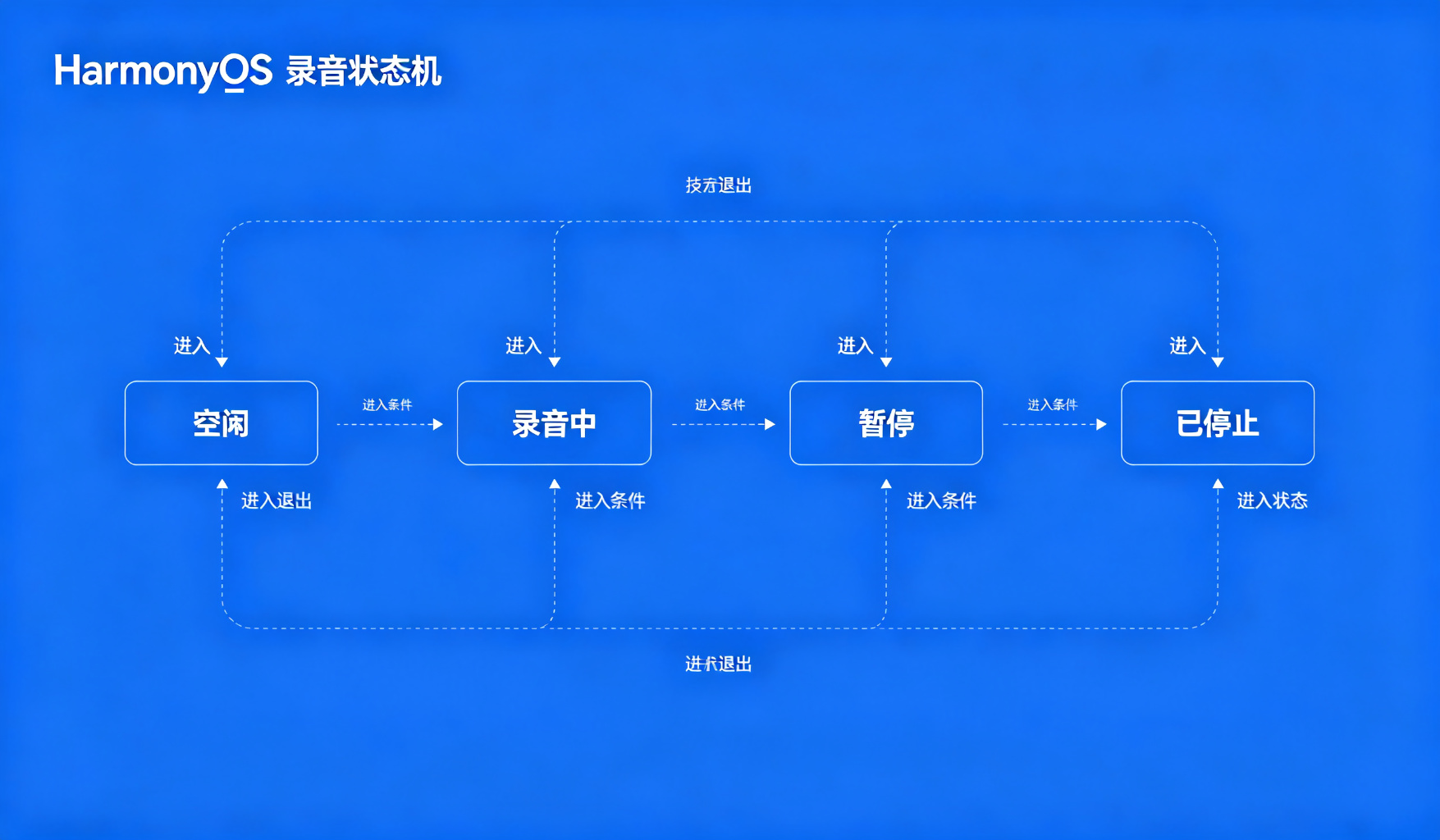
第三,录音状态管理混乱。录音中、暂停中、已停止,这几个状态怎么切换?用户快速点开始/停止按钮会不会出问题?
第四,录音中断处理。录到一半来电了、或者用户切到后台了,录音是继续还是停?停了的话已经录的内容要不要保留?
二、这个能力怎么接入
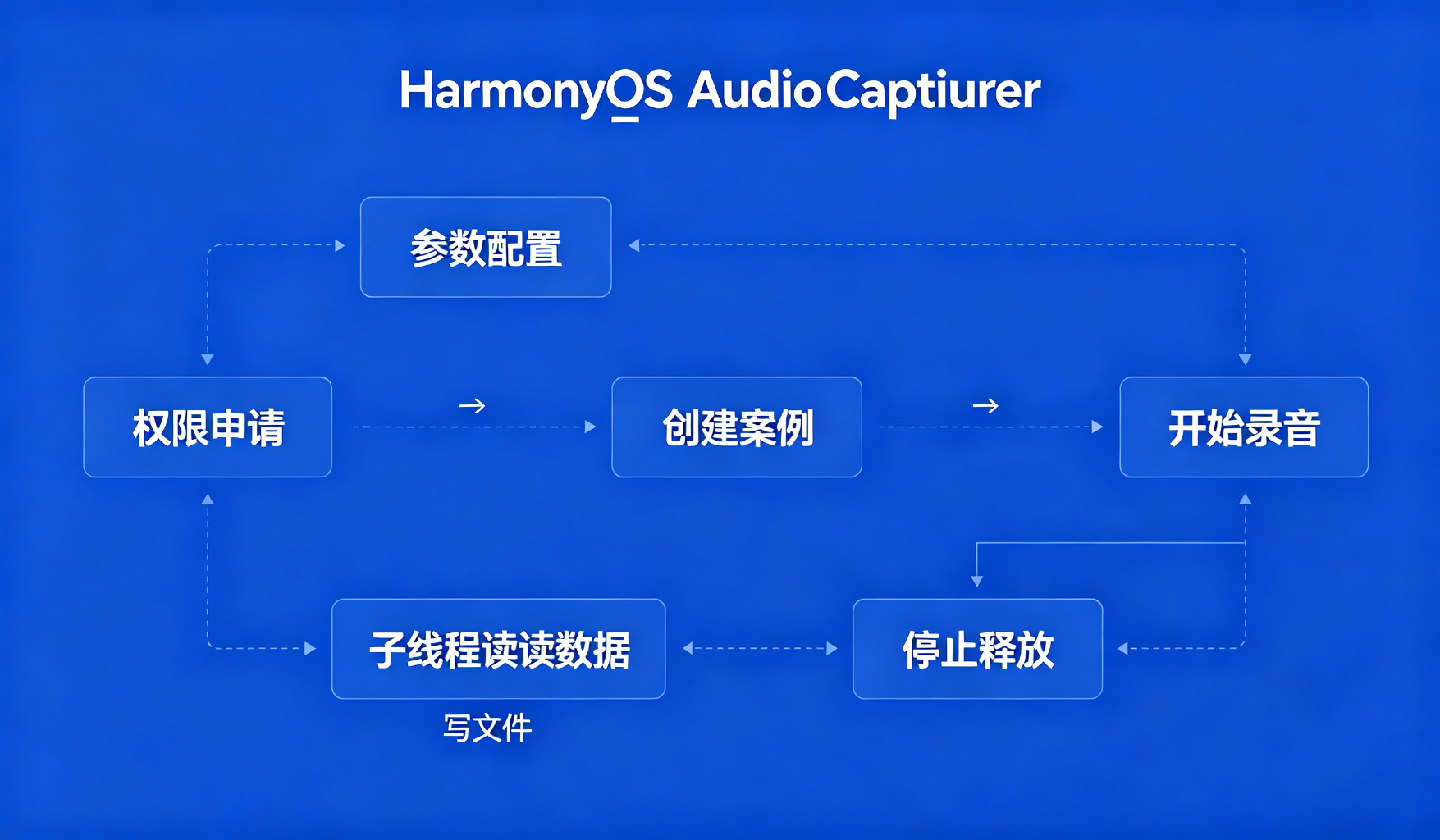
HarmonyOS 的录音能力在 AudioCapturer 里,属于 AudioKit。整个流程分几步:
1. 申请权限:在 module.json5 里声明 ohos.permission.MICROPHONE 权限,运行时动态申请。
2. 配置录音参数:采样率、声道数、编码格式、音频源类型。我们用的是语音笔记场景,选 16kHz 单声道 PCM 就够了,文件小、音质够。
3. 创建 AudioCapturer 实例:传入参数,初始化。
4. 开始录音:调用 start(),然后在子线程循环读音频数据,写入文件。
5. 暂停/恢复/停止:pause()、resume()、stop(),状态切换要注意顺序。
6. 释放资源:录音完了要 release(),不然麦克风一直被占用。
三、关键代码怎么写
下面是封装的录音管理器,文件位置在 entry/src/main/ets/utils/AudioRecorder.ets:
import { audio } from '@kit.AudioKit';
import { fileIo as fs } from '@kit.CoreFileKit';

export class AudioRecorder {
  private capturer: audio.AudioCapturer | null = null;
  private fileFd: fs.File | null = null;
  private isRecording: boolean = false;
  private isPaused: boolean = false;
  private readThread: Thread | null = null;

  // 初始化录音器
  async initRecorder(): Promise<void> {
    const audioCapturerInfo: audio.AudioCapturerInfo = {
      source: audio.SourceType.SOURCE_TYPE_MIC,
      capturerFlags: 0
    };

    const audioStreamInfo: audio.AudioStreamInfo = {
      samplingRate: audio.AudioSamplingRate.SAMPLE_RATE_16000,
      channels: audio.AudioChannel.CHANNEL_1,
      sampleFormat: audio.AudioSampleFormat.SAMPLE_FORMAT_S16LE,
      encodingType: audio.AudioEncodingType.ENCODING_TYPE_RAW
    };

    const capturerOptions: audio.AudioCapturerOptions = {
      streamInfo: audioStreamInfo,
      capturerInfo: audioCapturerInfo
    };

    this.capturer = await audio.createAudioCapturer(capturerOptions);
  }

  // 开始录音
  async startRecording(filePath: string): Promise<void> {
    if (!this.capturer) {
      await this.initRecorder();
    }

    // 打开输出文件
    this.fileFd = fs.openSync(filePath, fs.OpenMode.READ_WRITE | fs.OpenMode.CREATE);

    this.isRecording = true;
    this.isPaused = false;

    // 开始录制
    await this.capturer!.start();

    // 子线程读取音频数据
    this.readThread = new Thread(() => {
      const bufferSize = this.capturer!.getBufferSize();
      const buffer = new ArrayBuffer(bufferSize);

      while (this.isRecording) {
        if (this.isPaused) {
          Thread.sleep(100);
          continue;
        }

        const bytesRead = this.capturer!.read(buffer, bufferSize);
        if (bytesRead > 0 && this.fileFd) {
          fs.writeSync(this.fileFd.fd, buffer);
        }
      }
    });
    this.readThread.start();
  }

  // 暂停录音
  async pauseRecording(): Promise<void> {
    if (this.capturer && this.isRecording && !this.isPaused) {
      await this.capturer.pause();
      this.isPaused = true;
    }
  }

  // 恢复录音
  async resumeRecording(): Promise<void> {
    if (this.capturer && this.isRecording && this.isPaused) {
      await this.capturer.resume();
      this.isPaused = false;
    }
  }

  // 停止录音
  async stopRecording(): Promise<void> {
    this.isRecording = false;
    this.isPaused = false;

    if (this.capturer) {
      await this.capturer.stop();
    }

    if (this.fileFd) {
      fs.closeSync(this.fileFd);
      this.fileFd = null;
    }
  }

  // 释放资源
  async release(): Promise<void> {
    await this.stopRecording();
    if (this.capturer) {
      await this.capturer.release();
      this.capturer = null;
    }
  }
}
这段代码的核心:AudioCapturer 配置了 16kHz 单声道 16bit PCM,适合语音场景。startRecording 启动后开一个子线程循环读音频数据写文件,pause/resume 控制读取线程的状态。
页面里怎么调用?文件位置 pages/RecorderPage.ets:
@Entry
@Component
struct RecorderPage {
  @State isRecording: boolean = false;
  @State isPaused: boolean = false;
  @State recordTime: number = 0;
  private recorder: AudioRecorder = new AudioRecorder();
  private timer: number = 0;

  // 请求录音权限
  async requestMicPermission(): Promise<boolean> {
    try {
      const atManager = abilityAccessCtrl.createAtManager();
      const result = await atManager.requestPermissionsFromUser(
        getContext(this),
        ['ohos.permission.MICROPHONE']
      );
      return result.authResults[0] === 0;
    } catch (e) {
      console.error('Permission denied: ' + e.message);
      return false;
    }
  }

  // 开始录音
  async onStartRecord() {
    const hasPermission = await this.requestMicPermission();
    if (!hasPermission) {
      prompt.showToast({ message: '需要录音权限才能使用' });
      return;
    }

    const filePath = getContext(this).filesDir + '/record_' + Date.now() + '.pcm';
    await this.recorder.startRecording(filePath);

    this.isRecording = true;
    this.recordTime = 0;
    this.timer = setInterval(() => {
      this.recordTime++;
    }, 1000);
  }

  // 暂停/恢复
  async onPauseResume() {
    if (this.isPaused) {
      await this.recorder.resumeRecording();
      this.isPaused = false;
    } else {
      await this.recorder.pauseRecording();
      this.isPaused = true;
    }
  }

  // 停止录音
  async onStopRecord() {
    await this.recorder.stopRecording();
    this.isRecording = false;
    this.isPaused = false;
    clearInterval(this.timer);
  }

  build() {
    Column() {
      // 录音时长显示
      Text(this.formatTime(this.recordTime))
        .fontSize(48)
        .fontWeight(FontWeight.Bold)

      // 控制按钮
      Row({ space: 32 }) {
        Button(this.isRecording ? '停止' : '开始')
          .onClick(() => {
            if (this.isRecording) this.onStopRecord();
            else this.onStartRecord();
          })

        if (this.isRecording) {
          Button(this.isPaused ? '恢复' : '暂停')
            .onClick(() => this.onPauseResume())
        }
      }
      .margin({ top: 48 })
    }
    .width('100%')
    .height('100%')
    .justifyContent(FlexAlign.Center)
  }

  private formatTime(seconds: number): string {
    const min = Math.floor(seconds / 60);
    const sec = seconds % 60;
    return min.toString().padStart(2, '0') + ':' + sec.toString().padStart(2, '0');
  }
}
四、运行过程中怎么处理异常
录音的异常场景比想象中多:
1. 权限被拒绝:用户第一次点拒绝了,下次再点开始录音,直接提示"请在设置中开启录音权限",不要重复弹申请。
2. 录音中断:来电、其他应用抢了音频焦点,录音会被中断。要监听 audioInterrupt 事件,中断的时候自动停止录音,提示用户"录音已中断"。
3. 存储空间不足:录久了文件很大,磁盘满了写不进去。写文件的时候要 catch 异常,提示用户存储空间不足。
4. 快速连续点击:用户快速点开始/停止,可能状态混乱。按钮点击要防抖,或者在状态切换的时候禁用按钮。
5. 应用退到后台:纯后台录音需要声明后台任务,不然系统会杀掉。语音笔记场景一般是前台录音,用户切走了就停。
五、实际开发中容易忽略的问题
1. PCM 文件不是 MP3:我们录的是原始 PCM 数据,不是压缩格式。文件很大,16kHz 单声道一分钟大概 2MB。如果要存成 MP3,得自己编码或者用媒体库接口。
2. 采样率选对场景:语音笔记用 16kHz 够了,音乐录制用 44.1kHz 或 48kHz。采样率越高文件越大,音质越好。
3. 子线程读取音频数据:read() 是阻塞的,必须在子线程调用,不能卡 UI 线程。
4. 资源释放要彻底:页面退出的时候一定要 release(),不然麦克风一直被占用,其他应用也用不了。
5. 录音焦点:开始录音的时候要请求音频焦点,不然和别的应用冲突。我们的场景简单,没做这个,但如果是复杂音频应用要考虑。
应用内录音是音频开发的基础。看起来就是个"开始/停止"按钮,但背后的权限、参数、状态管理、异常处理,真做起来细节不少。下一篇讲系统音频内录,和应用内录音思路不一样,有授权流程的坑。

讨论HarmonyOS开发技术,专注于API与组件、DevEco Studio、测试、元服务和应用上架分发等。
更多推荐


 0
0 0
0- 0


 已为社区贡献67条内容

所有评论(0)