HarmonyOS 7 Inspector 组件树里全是 Text?用 inspectorLabel 精准定位节点
HarmonyOS 7 Inspector 组件树里全是 Text?用 inspectorLabel 给关键节点起一个能搜索的名字
调试复杂页面时,最费时间的往往不是修改属性,而是在 Inspector 组件树里找到真正出问题的那个节点。页面里有十几个 Text、Button 和 Column,仅靠组件类型逐层展开,很容易点错;列表复用后,节点层级还会变化,昨天记住的路径今天未必仍然有效。
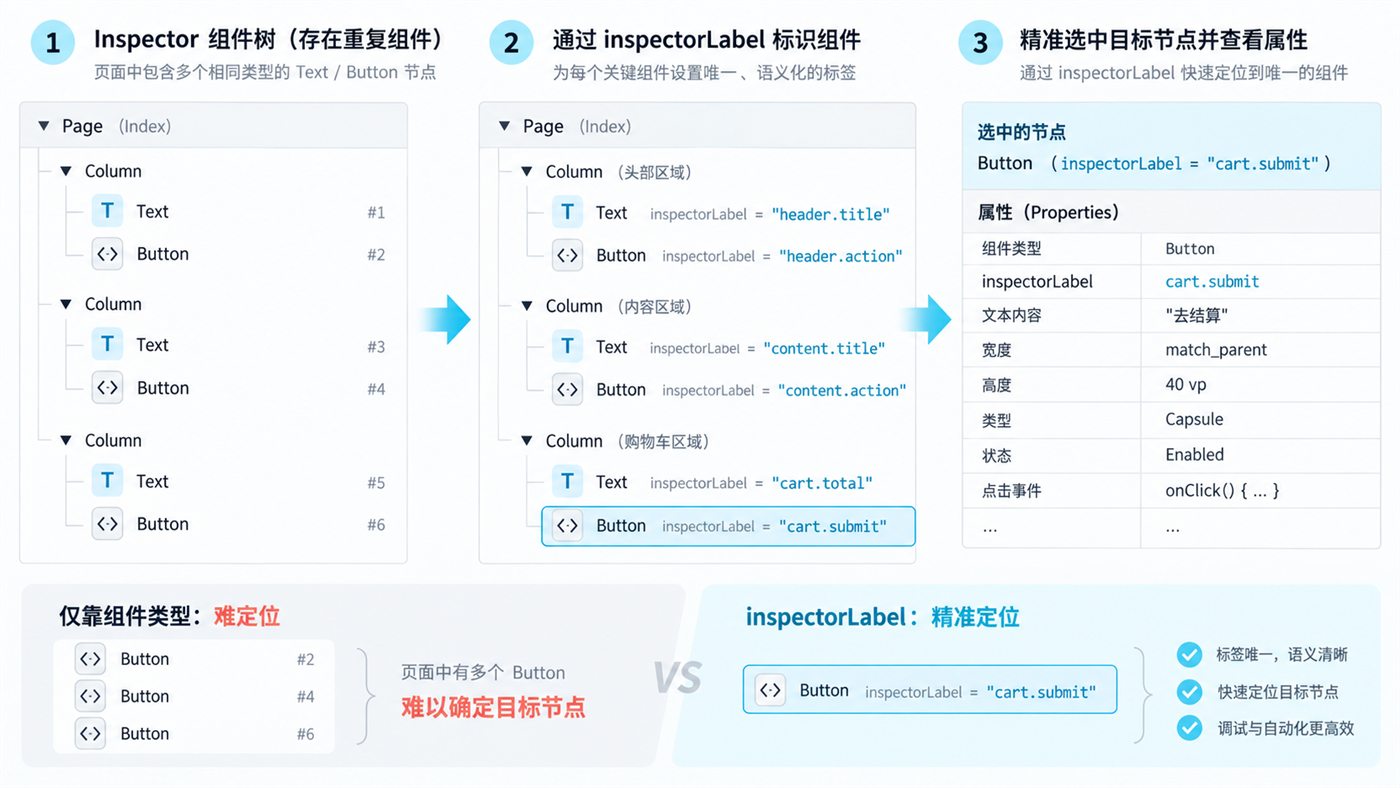
HarmonyOS 7 对应的 API 26 新增了通用属性 inspectorLabel。它不会改变页面显示,也不会参与业务逻辑,而是给组件节点增加一个仅用于调测的语义标签。标签会展示在 DevEco Studio 的 Inspector 组件树中,适合定位同类组件、核对布局属性和建立稳定的调试约定。
先明确它解决什么,不解决什么
inspectorLabel(label: string | undefined) 从 API 26.0.0 开始提供,Stage 模型可用。官方要求标签在整个应用内保持唯一;同一组件多次设置时,后一次覆盖前一次;传入 undefined 会清除标签。
它适合解决三类问题:
- 同一页面存在大量同类型节点,Inspector 中难以快速区分。
- 组件封装层级较深,调试人员需要从业务含义而不是节点序号寻找目标。
- 自动化排查记录需要一个稳定的“节点名字”,避免只写“第三个 Button”这种容易失效的描述。
它不等于组件 id,不能替代路由标识、数据主键或自动化测试协议。标签只是调测信息,业务代码不应依赖它判断状态。
案例一:重复组件导致定位错误
下面的页面有三个信息区,每个区都有标题和按钮。若只看组件类型,Inspector 中会连续出现多个 Text 和 Button。
@Entry
@Component
struct InspectorLabelDemo {
  @State message: string = '等待操作'

  build() {
    Column({ space: 18 }) {
      this.section('header', '页面头部', '刷新')
      this.section('content', '内容区域', '重新加载')
      this.section('cart', '购物车', '去结算')

      Text(this.message)
        .fontSize(16)
        .fontColor('#334155')
        .inspectorLabel('debug.message')
    }
    .width('100%')
    .padding(24)
  }

  @Builder
  private section(prefix: string, title: string, action: string) {
    Column({ space: 10 }) {
      Text(title)
        .fontSize(20)
        .fontWeight(FontWeight.Bold)
        .inspectorLabel(`${prefix}.title`)

      Button(action)
        .onClick(() => {
          this.message = `点击了:${action}`
        })
        .inspectorLabel(`${prefix}.action`)
    }
    .width('100%')
    .alignItems(HorizontalAlign.Start)
  }
}
运行后在 Inspector 中不再只看到“Button #2、Button #4、Button #6”,而能看到 header.action、content.action 和 cart.action。当“去结算”按钮宽度异常时,排查记录可以直接写“检查 cart.action 的约束”,不必依赖容易变化的层级序号。
这里最容易犯的错
不要把循环下标直接当作长期标签:
// 不推荐:排序变化后,item.0 可能指向另一条数据
.inspectorLabel(`item.${index}`)
列表插入、筛选或排序后,下标会变化。更稳妥的做法是使用稳定业务键,并加上组件职责:
.inspectorLabel(`order.${item.orderId}.amount`)
案例二:封装组件怎样避免标签冲突
可复用组件最常见的问题,是每个实例内部都写死同一个标签。官方要求标签在整个应用内保持唯一,所以调用方应传入稳定前缀。
@Component
struct MetricCard {
  @Require labelPrefix: string
  @Require title: string
  @Require value: string

  build() {
    Column({ space: 8 }) {
      Text(this.title)
        .fontSize(14)
        .fontColor('#64748B')
        .inspectorLabel(`${this.labelPrefix}.title`)

      Text(this.value)
        .fontSize(28)
        .fontWeight(FontWeight.Bold)
        .inspectorLabel(`${this.labelPrefix}.value`)
    }
    .padding(16)
    .borderRadius(12)
    .backgroundColor('#F8FAFC')
    .inspectorLabel(`${this.labelPrefix}.root`)
  }
}

@Entry
@Component
struct DashboardPage {
  build() {
    Row({ space: 12 }) {
      MetricCard({
        labelPrefix: 'dashboard.cpu',
        title: 'CPU',
        value: '36%'
      })
      MetricCard({
        labelPrefix: 'dashboard.memory',
        title: '内存',
        value: '512 MB'
      })
    }
    .padding(20)
  }
}
这种封装有三个好处:组件内部命名规则统一;实例之间不会冲突;查看问题截图时,可以从标签反推出页面区域和组件职责。
标签命名建议
| 场景 | 推荐格式 | 示例 |
|---|---|---|
| 页面固定节点 | 页面.区域.职责 | profile.header.avatar |
| 列表稳定节点 | 页面.实体键.职责 | order.20260919.amount |
| 可复用组件 | 调用方前缀.内部节点 | dashboard.cpu.value |
| 临时排查节点 | debug.问题号.职责 | debug.482.scrollHost |
标签应短、稳定、可搜索。不要写用户姓名、手机号、订单内容等敏感数据,也不要把动态展示文案直接拼进标签。
怎样验证这段代码
- 工程使用 API 26 SDK,运行页面并连接 DevEco Studio Inspector。
- 在组件树中搜索
cart.action,确认只命中一个 Button。 - 选择该节点,核对宽高、边距和点击回调信息。
- 修改代码,将同一组件连续设置两个
inspectorLabel,验证后设置的标签覆盖前值。 - 临时传入
undefined,确认该节点标签被清除。 - 对列表做插入和排序,确认使用稳定业务键的标签仍能指向同一条数据。
是否值得封装
可以封装“标签生成规则”,但不建议为了一个链式属性再套一层 UI 组件。更实用的方式是统一前缀规范,并在代码评审中检查唯一性和敏感信息。例如:
class InspectorLabels {
  static page(page: string, area: string, role: string): string {
    return `${page}.${area}.${role}`
  }

  static entity(page: string, key: string, role: string): string {
    return `${page}.${key}.${role}`
  }
}
使用时仍然保持属性位置清晰:
Button('提交')
  .inspectorLabel(
    InspectorLabels.entity('order', orderId, 'submit')
  )
最后的判断
inspectorLabel 的价值不在于多了一个字符串属性,而在于把“靠眼睛猜节点”改成“按语义找节点”。页面越复杂、复用组件越多、多人共同排障越频繁,这个小属性越能节省时间。
官方依据:HarmonyOS API 参考《节点调测标签》,文档更新时间为 2026-08-29,接口起始版本为 26.0.0:
https://developer.huawei.com/consumer/cn/doc/doccenter-references/api/ts-universal-attributes-inspector-label

讨论HarmonyOS开发技术,专注于API与组件、DevEco Studio、测试、元服务和应用上架分发等。
更多推荐
 0
0 0
0- 0


 已为社区贡献852条内容

所有评论(0)