
OffscreenCanvasRenderingContext2D对象和CanvasRenderingContext2D对象提供了大量的属性和方法,可以用来绘制文本、图形,处理像素等,是Canvas组件的核心。有没有相关介绍这个问题的呢?
 guorongcui 2026-06-28 00:17:43
  47
47
 评论
评论
 分享
分享
harmonyos
常用接口有fill(对封闭路径进行填充)、clip(设置当前路径为剪切路径)、stroke(进行边框绘制操作)等等,同时提供了fillStyle(指定绘制的填充色)、globalAlpha(设置透明度)与strokeStyle(设置描边的颜色)等属性修改绘制内容的样式。我在学习鸿蒙中,遇到了一个问题怎么理解呢?
您需要先 登录 才能评论/回答
 写回答
写回答
全部评论(1)
画布组件常用方法
OffscreenCanvasRenderingContext2D对象和CanvasRenderingContext2D对象提供了大量的属性和方法,可以用来绘制文本、图形,处理像素等,是Canvas组件的核心。常用接口有fill(对封闭路径进行填充)、clip(设置当前路径为剪切路径)、stroke(进行边框绘制操作)等等,同时提供了fillStyle(指定绘制的填充色)、globalAlpha(设置透明度)与strokeStyle(设置描边的颜色)等属性修改绘制内容的样式。将通过以下几个方面简单介绍画布组件常见使用方法:
-
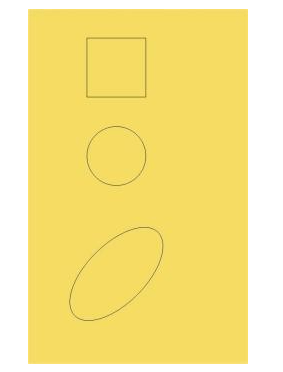
绘制基础形状。
-
Canvas(this.context)
  .width('100%')
  .height('100%')
  .backgroundColor('#F5DC62')
  .onReady(() => {
    // 绘制矩形
    this.context.beginPath();
    this.context.rect(100, 50, 100, 100);
    this.context.stroke();
    // 绘制圆形
    this.context.beginPath();
    this.context.arc(150, 250, 50, 0, 6.28);
    this.context.stroke();
    // 绘制椭圆
    this.context.beginPath();
    this.context.ellipse(150, 450, 50, 100, Math.PI * 0.25, Math.PI * 0, Math.PI * 2);
    this.context.stroke();
  })
-
绘制文本。
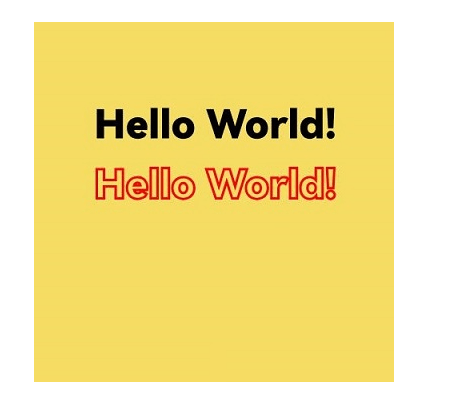
可以通过fillText(文本填充)、strokeText(文本描边)等接口进行文本绘制,示例中设置了font为50像素高加粗的"sans-serif"字体,然后调用fillText方法在(50, 100)处绘制文本"Hello World!",设置strokeStyle为红色,lineWidth为2,font为50像素高加粗的"sans-serif"字体,然后调用strokeText方法在(50, 150)处绘制文本"Hello World!"的轮廓。
-
Canvas(this.context)
  .width('100%')
  .height('100%')
  .backgroundColor('#F5DC62')
  .onReady(() => {
    // 文本填充
    this.context.font = '50px bolder sans-serif';
    this.context.fillText('Hello World!', 50, 100);
    // 文本描边
    this.context.strokeStyle = '#ff0000';
    this.context.lineWidth = 2;
    this.context.font = '50px bolder sans-serif';
    this.context.strokeText('Hello World!', 50, 150);
  })
 赞
赞
2026-06-28 00:18:50