鸿蒙应用集成 DeepSeek API 完整开发教程
无论你是鸿蒙应用开发者还是 AI 技术爱好者,都可以通过本教程快速掌握集成方法。hilog.info(0x0000, 'testTag', '完整响应: %{public}s', JSON.stringify(response));hilog.error(0x0000, 'testTag', 'API错误: %{public}s', response.error.message);"https:/
鸿蒙应用集成 DeepSeek API 完整开发教程
前言
在 AI 应用开发领域,DeepSeek 作为先进的大语言模型提供了强大的自然语言处理能力。本文将详细介绍如何在鸿蒙操作系统中集成 DeepSeek API,实现 AI 对话功能。无论你是鸿蒙应用开发者还是 AI 技术爱好者,都可以通过本教程快速掌握集成方法。
环境准备
开发工具
DevEco Studio 3.1 及以上版本(鸿蒙应用开发官方 IDE)
鸿蒙 SDK API 9 及以上版本
账号准备
访问 DeepSeek 官方平台(https://api.deepseek.com)
注册开发者账号并创建应用
在控制台获取 API 密钥(sk-xxx 格式)
核心代码实现
项目结构说明
首先在鸿蒙项目中创建工具类文件夹,本文示例结构如下:
plaintext
src/main/ets/
├── utils/
│ └── AIRequest_Util.ts # API请求工具类
├── pages/
│ └── testHttp.ets # 测试页面组件
└── entry/
└── main_pages.json # 路由配置
完整代码实现
1. AI 请求工具类实现(AIRequest_Util.ts)
typescript
import http from '@ohos.net.http';
import hilog from '@ohos.hilog';
/**
* DeepSeek AI API请求工具类
* 封装HTTP请求逻辑与响应处理
*/
export class AIRequest_Util {
/**
* 发送AI请求
* @param question 提问内容
* @param callback 响应回调函数
*/
request(question: string, callback: (text: string) => void) {
hilog.info(0x0000, 'testTag', 'ALiYunHttpUtils request invoke. question: %{public}s', question);
// 1. 创建HTTP请求实例
let httpRequest = http.createHttp();
// 2. 构建请求数据(符合DeepSeek API格式)
const requestData = {
model: "deepseek-chat", // 使用对话模型
messages: [
{ role: "system", content: "你是人工智能AI" }, // 系统提示
{ role: "user", content: question } // 用户提问
],
"stream": false // 关闭流式响应
};
// 3. 发起POST请求
httpRequest.request(
"https://api.deepseek.com/chat/completions", // DeepSeek API地址
{
method: http.RequestMethod.POST, // 请求方法
header: {
"Content-Type": "application/json", // 内容类型
"Authorization": "Bearer sk-3e4695d9f07c454c8cb9d59822d27987" // API密钥(需替换为实际密钥)
},
extraData: JSON.stringify(requestData), // 请求体序列化
readTimeout: 60000, // 读取超时时间
connectTimeout: 60000, // 连接超时时间
usingProtocol: http.HttpProtocol.HTTP1_1 // 使用HTTP协议
}, (err, data: http.HttpResponse) => {
// 4. 错误处理
if (err) {
hilog.error(0x0000, 'testTag', '请求失败: %{public}s', JSON.stringify(err));
httpRequest.destroy();
callback("请求失败,请检查网络");
return;
}
try {
// 5. 解析响应数据
const response = JSON.parse(data.result as string);
hilog.info(0x0000, 'testTag', '完整响应: %{public}s', JSON.stringify(response));
// 检查API错误
if (response.error) {
hilog.error(0x0000, 'testTag', 'API错误: %{public}s', response.error.message);
callback(`API错误: ${response.error.message}`);
return;
}
// 提取AI回答内容
if (response.choices && response.choices.length > 0) {
const content = response.choices[0].message.content;
if (content) {
hilog.info(0x0000, 'testTag', '提取到的文本: %{public}s', content);
callback(content);
return;
}
}
throw new Error("未找到有效响应内容");
} catch (e) {
hilog.error(0x0000, 'testTag', '解析失败: %{public}s', e.message);
callback("解析响应失败");
} finally {
// 释放资源
httpRequest.destroy();
}
}
)
}
}
// 导出单例对象
export const DeepSeek = new AIRequest_Util();
2. 页面组件实现(testHttp.ets)
typescript
import { DeepSeek } from '../utils/AIRequest_Util'; // 导入工具类
@Entry
@Component
struct testHttp {
@State answer: string = '' // 存储AI回答
build() {
Column() {
// 交互按钮
Button('click')
.width('50%')
.onClick(() => {
// 调用DeepSeek API
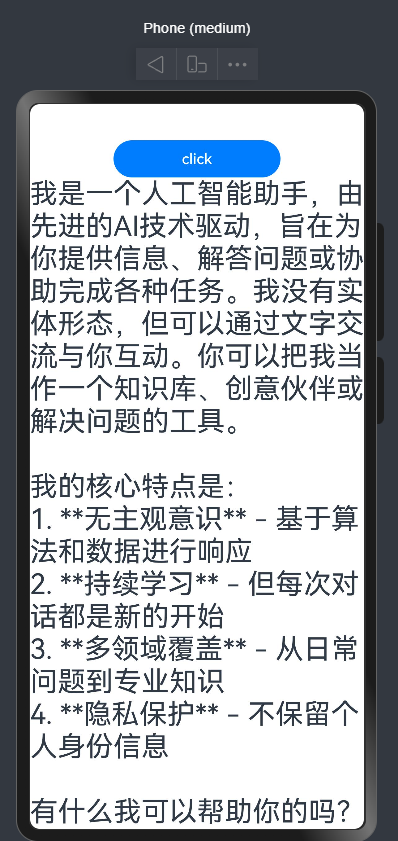
DeepSeek.request("你是谁", (answer) => {
// 更新UI显示回答
this.answer = answer
})
})
// 显示回答内容
Text(this.answer)
.fontSize(30)
.margin({ top: 20 })
}
.height('100%')
.width('100%')
.justifyContent(FlexAlign.Center)
.alignItems(HorizontalAlign.Center)
}
}
3. 配置路由(main_pages.json)
json
{
"src": [
{
"pages": [
"pages/testHttp"
],
"name": "entry",
"window": {
"designWidth": 720,
"autoDesignWidth": true
}
}
]
功能模块解析
1. API 请求核心流程
DeepSeek API 调用遵循以下步骤:
创建 HTTP 请求实例
构建符合 OpenAI 格式的请求体(DeepSeek 兼容 OpenAI 接口规范)
设置请求头(包含 API 密钥和内容类型)
发送 POST 请求到 DeepSeek API 端点
处理响应数据并提取 AI 回答
2. 请求参数说明
参数名 类型 说明
model string 模型名称,deepseek-chat为对话模型
messages array 消息数组,包含系统提示和用户提问
messages.role string 消息角色,system为系统提示,user为用户输入,assistant为 AI 回答
messages.content string 消息内容
stream boolean 是否启用流式响应,false为关闭(本示例使用)
3. 错误处理机制
代码中实现了三层错误处理:
网络请求错误(如超时、连接失败)
API 接口错误(如认证失败、参数错误)
响应解析错误(如数据格式异常)
实现效果:
可能遇到的问题:
05-31 23:37:56.504 40524-28380 A00000/testTag E API错误: Insufficient Balance
API密钥余额不足,去官网充钱

讨论HarmonyOS开发技术,专注于API与组件、DevEco Studio、测试、元服务和应用上架分发等。
更多推荐
 24
24 0
0- 0


 已为社区贡献2条内容

所有评论(0)