鸿蒙HarmonyOS NEXT开发:简易2048小游戏的实现
效果图:
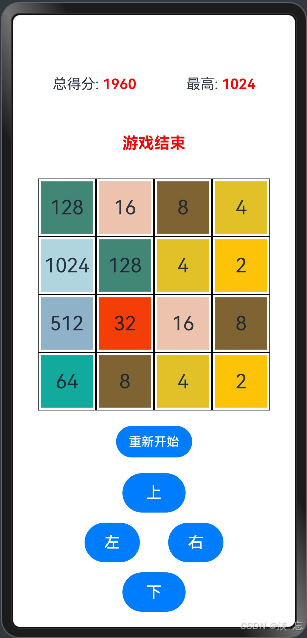
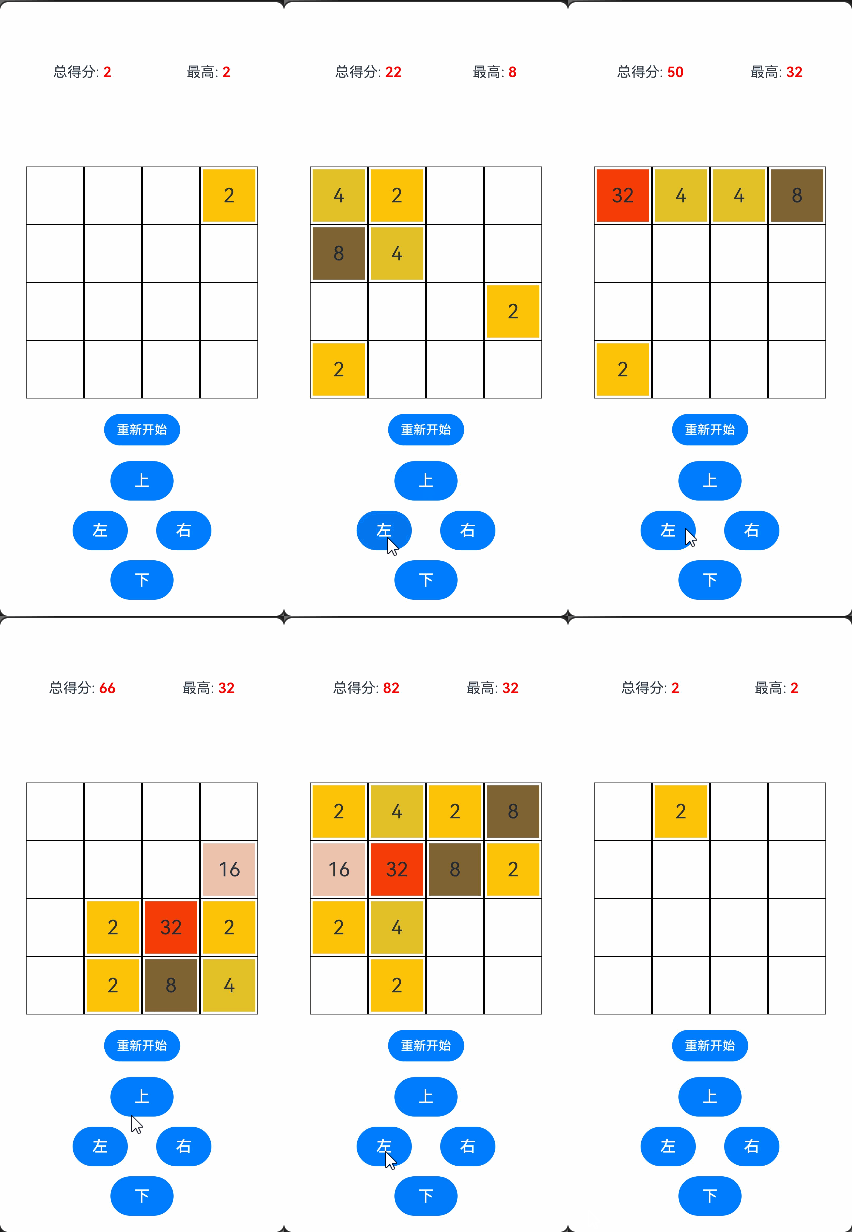
为何使用全局变量而不直接在状态变量中使用二维数组:
在ArkTS中,使用@State修饰器,二维数组中的某个数字发生改变时,UI是无法监听到的,导致不能实时渲染,因此定义一个二维的全局变量arr[][]作为"中介",操作时是对arr[][]进行操作,操作后对每一行进行赋值,即可让UI监听到。若要UI监听到二维数组的变化,则需使用@Observed和@ObjectLink配合使用,可参考简易五子棋小游戏的实现 https://blog.csdn.net/weixin_63484971/article/details/141223205?spm=1001.2014.3001.5502。
1.定义个全局变量表示16宫格的数字 0 不显示
let arr:number[][]=[]2.状态变量定义模块:
@State row1 到 @State row4 这四个状态变量分别代表了游戏棋盘的四行数字状态。初始时,每行都被初始化为包含四个 0 的数组,表示棋盘上的初始位置均为空。
@State text 用于存储游戏过程中的提示信息,例如“游戏结束”等。
@State colors 定义了不同数字所对应的背景颜色。这样,在游戏界面中,根据数字的大小可以为其显示相应的背景颜色,增强视觉效果。
@State maxScore 用于记录游戏过程中出现的最高分数。
@State totalScore 则用于累计游戏中的总得分。
  //  每一行 共四行
  @State row1:number[] = [0, 0, 0, 0]
  @State row2:number[] = [0, 0, 0, 0]
  @State row3:number[] = [0, 0, 0, 0]
  @State row4:number[] = [0, 0, 0, 0]

  @State text:string = ''
  // 背景颜色 不同的数字不同的背景颜色
  @State colors:ResourceColor[]=[Color.Transparent,'#fcc307','#e2c027','#806332', '#edc3ae',
    '#f43e06', '#12aa9c','#428675','#d2d97a','#8fb2c9',
    '#b0d5df','#2e317c','#983680']
  // 最大分
  @State maxScore:number = 0
  // 总分
@State totalScore:number = 03.函数定义模块:
updateArr 函数的作用是将四个表示行的状态变量组合成一个二维数组 arr 。这样在后续的游戏逻辑处理中,可以更方便地对整个棋盘进行统一的操作和判断。
  // 更新全局的arr 用二维数组表示4乘4
  updateArr(){
    arr=[]
    arr.push(this.row1)
    arr.push(this.row2)
    arr.push(this.row3)
    arr.push(this.row4)
  }
updateRows 函数的功能与 updateArr 相反,它将全局的二维数组 arr 的内容更新到四个行状态变量中,以实现游戏界面的同步渲染。
  // 更新每一行的渲染
  updateRows(){
    this.row1 = arr[0]
    this.row2 = arr[1]
    this.row3 = arr[2]
    this.row4 = arr[3]
  }
haveZeros 函数用于检查 arr 数组中是否还存在值为 0 的元素。通过两层循环遍历整个数组,如果找到任何一个 0 元素,立即返回 true ,表示还有可操作的空间;如果循环结束都没有找到 0 元素,则返回 false ,意味着游戏可能已经无法继续。
  // 是否还有0
  haveZeros(){
    for(let i:number = 0;i<4;i++){
      for(let j:number = 0;j<4;j++){
        if(arr[i][j]==0) return true
      }
    }
    // 循环完还为发现0 则游戏结束
    return false
  }
gameOver 函数用于判断游戏是否结束。首先检查是否存在 0 元素,如果有则游戏未结束,返回 false 。然后通过两层循环检查每个位置的数字是否与其相邻位置(上、下、左、右)的数字相同。如果存在相同的情况,游戏也未结束,返回 false 。如果整个循环结束都没有满足上述未结束的条件,则表示游戏结束,返回 true 。
  gameOver(){
    //还有0或者存相邻的数是一样的 说明游戏未结束
    if(this.haveZeros()) return false
    for(let i:number = 0;i<4;i++){
      for(let j:number = 0;j<4;j++){
        // 利用 逻辑中断做判断
        if(arr[i][j]==( ((i-1)>=0?1:0) && arr[i-1][j] ) ||
        arr[i][j]==( ((i+1)<=3?1:0) && arr[i+1][j] ) ||
        arr[i][j]==( ((j-1)>=0?1:0) && arr[i][j-1] ) ||
        arr[i][j]==( ((j+1)<=3?1:0) && arr[i][j+1] )
        ) return false
      }
    }
    // 循环完还为发现0 则游戏结束
    return true
  }
firstNonZero 函数根据给定的坐标 (x, y) 和移动方向 direction ,查找该方向上的下一个非零数字的坐标和值。例如,当 direction 为 1 表示向上移动时,从给定坐标开始向下查找,直到找到第一个非零数字,并返回其值、横坐标和纵坐标。如果在指定方向上没有找到非零数字,则返回 [-1, 0, 0] 作为标识。
  // 坐标x,y的下一个非零的坐标以及值  direction 1、2、3、4 分别为上、下、左、右
  firstNonZero(x:number, y:number, direction:number){
    // 向上移动则要向下寻找 (反向) 下面同理
    if(direction==1){
      y++
      while(y<=3){
        if(arr[y][x]!=0) {
          return [arr[y][x],x,y]
        }
        y++
      }
      // 没有非零的 返回一个标识
      return [-1,0,0]
    }
    else if(direction==2){
      y--
      while(y>=0){
        if(arr[y][x]!=0) {
          return [arr[y][x],x,y]
        }
        y--
      }
      return [-1,0,0]
    }
    else if(direction==3){
      x++
      while(x<=3){
        if(arr[y][x]!=0) {
          return [arr[y][x],x,y]
        }
        x++
      }
      return [-1,0,0]
    }
    else if(direction==4){
      x--
      while(x>=0){
        if(arr[y][x]!=0) {
          return [arr[y][x],x,y]
        }
        x--
      }
      return [-1,0,0]
    }
    return [-1,0,0]
  }
f 函数用于根据指定的方向对某一列或某一行进行处理。以向上移动为例,如果当前位置为 0 ,则与找到的下一个非零数字交换位置,并递归处理当前位置;如果当前位置数字不为 0 且与找到的下一个非零数字相同,则将当前数字乘以 2 ,并将找到的位置置为 0 ,然后继续处理下一个位置。其他方向(下、左、右)的处理逻辑类似。
  // 处理每一列或每一行
  f(x:number, y:number, direction:number){
    // 向上移 以此为例 (下、左、右) 同理
    if(direction==1){
      // 若找不到坐标x,y的下一个非零的坐标 则说明这一列已处理完成
      if(this.firstNonZero(x,y, direction)[0]==-1) return;
      // 若找到坐标x,y的下一个非零的坐标 则需要进行处理
      //  如果本身为0 则和找到的坐标交换 再在原来的坐标再继续执行 此方法this.f向下处理即可
      if(arr[y][x]==0) {
        arr[y][x] = this.firstNonZero(x,y, direction)[0]
        arr[this.firstNonZero(x,y, direction)[2]] [this.firstNonZero(x,y, direction)[1]] = 0
        this.f(x, y, direction)
      }else{
        // 如果本身不为0 而且本身和找到的数相同 则需要合并 即 本身乘2 找到的位置变为0
        if(arr[y][x] == this.firstNonZero(x,y, direction)[0]){
          arr[y][x]*=2
          arr[this.firstNonZero(x,y, direction)[2]] [this.firstNonZero(x,y, direction)[1]] = 0
        }
        // 处理完一个位置 则继续往下执行
        y++
        this.f(x, y, direction)
      }
    }
    else if(direction==2){
      if(this.firstNonZero(x,y, direction)[0]==-1) return
      if(arr[y][x]==0) {
        arr[y][x] = this.firstNonZero(x,y, direction)[0]
        arr[this.firstNonZero(x,y, direction)[2]] [this.firstNonZero(x,y, direction)[1]] = 0
        this.f(x, y, direction)
      }else{
        if(arr[y][x] == this.firstNonZero(x,y, direction)[0]){
          arr[y][x]*=2
          arr[this.firstNonZero(x,y, direction)[2]] [this.firstNonZero(x,y, direction)[1]] = 0
        }
        y--
        this.f(x, y, direction)
      }
    }
    else if(direction==3){
      if(this.firstNonZero(x,y, direction)[0]==-1) return
      if(arr[y][x]==0) {
        arr[y][x] = this.firstNonZero(x,y, direction)[0]
        arr[this.firstNonZero(x,y, direction)[2]] [this.firstNonZero(x,y, direction)[1]] = 0
        this.f(x, y, direction)
      }else{
        if(arr[y][x] == this.firstNonZero(x,y, direction)[0]){
          arr[y][x]*=2
          arr[this.firstNonZero(x,y, direction)[2]] [this.firstNonZero(x,y, direction)[1]] = 0
        }
        x++
        this.f(x, y, direction)
      }
    }
    else if(direction==4){
      if(this.firstNonZero(x,y, direction)[0]==-1) return
      if(arr[y][x]==0) {
        arr[y][x] = this.firstNonZero(x,y, direction)[0]
        arr[this.firstNonZero(x,y, direction)[2]] [this.firstNonZero(x,y, direction)[1]] = 0
        this.f(x, y, direction)
      }else{
        if(arr[y][x] == this.firstNonZero(x,y, direction)[0]){
          arr[y][x]*=2
          arr[this.firstNonZero(x,y, direction)[2]] [this.firstNonZero(x,y, direction)[1]] = 0
        }
        x--
        this.f(x, y, direction)
      }
    }
  }
generateNumber 函数用于在游戏棋盘的空白位置(值为 0 )随机生成一个新的数字 2 或 4 。首先生成一个随机数决定是 2 还是 4 ,然后通过不断随机生成坐标,直到找到一个值为 0 的位置,将新数字放置在该位置,并根据所在行更新相应的行状态变量。
  // 生成 在坐标为0的坐标一个新的数字2或4
  generateNumber(){
    //生成数字2或4
    let num:number = (Math.floor(Math.random()*10)%2+1)*2
    // 更新arr
    this.updateArr()
    //  如果没有0了 则不用生成数字
    if(!this.haveZeros()) return false
    while (true){
      //生成x y的坐标
      let x:number = Math.floor(Math.random()*4)
      let y:number = Math.floor(Math.random()*4)

      if(arr[y][x] == 0){
        switch (y){
          case 0:this.row1[x] = num;
          break;
          case 1:this.row2[x] = num;
          break;
          case 2:this.row3[x] = num;
          break;
          case 3:this.row4[x] = num;
          break;
        }
        return true;
      }
    }
  }
score 函数用于计算游戏的最高分和总分。通过两层循环遍历整个棋盘数组 arr ,更新最高分 maxScore 和总分 totalScore ,并将结果更新到相应的状态变量中。
  //计算最高分和总分
  score(){
    let maxScore:number = 0
    let totalScore:number = 0
    for (let i:number = 0; i < 4; i++ ){
      for(let j:number = 0; j < 4; j++){
        if(maxScore < arr[i][j]) maxScore = arr[i][j]
        totalScore+=arr[i][j]
      }
    }
    this.totalScore = totalScore
    this.maxScore = maxScore
  }
aboutToAppear 函数在游戏开始时被调用。它首先调用 generateNumber 函数在棋盘上生成一个初始数字,然后调用 score 函数计算初始的最高分和总分,为游戏的开始做好准备。
  // 进入游戏先在一个坐标上生成一个数 并且计算最高分和总分
  aboutToAppear(): void {
    this.generateNumber()
    this.score()
  }
4.构建界面模块:
在 build 方法中,整体构建了 2048 游戏的界面和交互逻辑。
首先,创建了一个 Column 布局,并设置了间距为 20 。
-
分数信息展示部分:
- 包含一个
Row布局,用于展示总得分和最高分的相关信息。 - 对于总得分,通过
Span组件显示文本“总得分: ”,后面紧跟总得分的数值,使用红色字体和 600 的字重进行突出显示。 - 对于最高分,同样通过
Span组件显示文本“最高: ”,后面紧跟最高分的数值,同样使用红色字体和 600 的字重。 - 整个
Row布局设置了宽度为 100%,高度为 60 ,并通过justifyContent(FlexAlign.SpaceAround)使文本在水平方向上均匀分布。
- 包含一个
-
结束提示部分:
- 一个
Text组件用于显示游戏结束的提示信息。 - 字体大小为 20 ,高度为 50 ,字体颜色为红色,字重为 700 ,以突出显示提示的重要性。
- 一个
-
四乘四宫格部分:
- 一个
Column布局用于容纳四行的棋盘展示。 - 对于每一行(如第一行):
- 使用
Row布局,并通过ForEach循环遍历当前行的数字状态。 - 对于每个数字:
- 使用
Stack容器实现背景颜色不占满整个格子。 - 内部的
Column组件设置宽度为 90%,宽高比为 1 ,并设置背景颜色。 - 显示数字的
Text组件,根据数字是否为 0 决定是否显示,并设置文本对齐方式为居中,字体大小为 25 ,宽高比为 1 ,边框宽度为 1 。
- 使用
- 每个格子的宽度设置为 23%,宽高比为 1 。
- 使用
- 一个
-
重新开始按钮部分:
- 一个
Button组件,显示文本为“重新开始”。 - 点击该按钮时,将四行状态变量(
row1到row4)重置为全 0 数组,并调用generateNumber函数生成一个新的初始数字。
- 一个
-
操作按钮区域部分:
- 一个
Stack布局,用于放置上、下、左、右四个方向的操作按钮。 - 以“上”按钮为例:
- 字体大小为 20 ,高度为 50 ,宽度为 80 。
- 通过
position和translate属性设置其在顶部居中的位置。 - 点击时,执行一系列操作,包括更新
arr数组、处理每一列的数字移动和合并、更新行状态变量、生成新数字、判断游戏是否结束以及计算分数等。
- 其他方向(下、左、右)的按钮设置类似,只是在处理数字移动和合并时的方向不同。
- 一个
  build() {
    Column({space:20}) {
      // 分数信息
      Row(){
        Text(){
          Span('总得分: ')
          Span(this.totalScore.toString())
            .fontColor(Color.Red)
            .fontWeight(600)
        }
        .fontSize(18)
        Text(){
          Span('最高: ')
          Span(this.maxScore.toString())
            .fontColor(Color.Red)
            .fontWeight(600)
        }
        .fontSize(18)
      }
      .justifyContent(FlexAlign.SpaceAround)
      .width('100%')
      .height(60)
      // 结束提示
      Text(this.text)
        .fontSize(20)
        .height(50)
        .fontColor(Color.Red)
        .fontWeight(700)
      // 四乘四 宫格
      Column(){
        // 第一行
        Row(){
          ForEach(this.row1,(item:number)=>{
            // 使用Stack容器实现背景颜色不占满整个格子
            Stack(){
              Column()
                .width('90%')
                .aspectRatio(1)
                .backgroundColor(this.colors[Math.log(item)/Math.log(2)])
              Text(item==0?'':item.toString())
                .textAlign(TextAlign.Center)
                .fontSize(25)
                .width('100%')
                .aspectRatio(1)
                .borderWidth(1)
            }
            .width('23%')
            .aspectRatio(1)
          })
        }
        // 第二行
        Row(){
          ForEach(this.row2,(item:number)=>{
            Stack(){
              Column()
                .width('90%')
                .aspectRatio(1)
                .backgroundColor(this.colors[Math.log(item)/Math.log(2)])
              Text(item==0?'':item.toString())
                .textAlign(TextAlign.Center)
                .fontSize(25)
                .width('100%')
                .aspectRatio(1)
                .borderWidth(1)
            }
            .width('23%')
            .aspectRatio(1)
          })
        }
        // 第三行
        Row(){
          ForEach(this.row3,(item:number)=>{
            Stack(){
              Column()
                .width('90%')
                .aspectRatio(1)
                .backgroundColor(this.colors[Math.log(item)/Math.log(2)])
              Text(item==0?'':item.toString())
                .textAlign(TextAlign.Center)
                .fontSize(25)
                .width('100%')
                .aspectRatio(1)
                .borderWidth(1)
            }
            .width('23%')
            .aspectRatio(1)
          })
        }
        // 第四行
        Row(){
          ForEach(this.row4,(item:number)=>{
            Stack(){
              Column()
                .width('90%')
                .aspectRatio(1)
                .backgroundColor(this.colors[Math.log(item)/Math.log(2)])
              Text(item==0?'':item.toString())
                .textAlign(TextAlign.Center)
                .fontSize(25)
                .width('100%')
                .aspectRatio(1)
                .borderWidth(1)
            }
            .width('23%')
            .aspectRatio(1)
          })
        }
      }

      Button('重新开始')
        .onClick(()=>{
          this.row1 = [0, 0, 0, 0]
          this.row2 = [0, 0, 0, 0]
          this.row3 = [0, 0, 0, 0]
          this.row4 = [0, 0, 0, 0]
          this.generateNumber()
          this.score()
        })
      Stack(){
        // 上、下、左、右 逻辑一样   以"上"操作为例
        Button('上')
          .fontSize(20)
          .height(50)
          .width(80)
          .position({top:0, left:'50%'})
          .translate({x:'-50%'})
          .onClick(()=>{
            //  更新Arr
            this.updateArr()
            // 处理Arr
            this.f(0,0,1)   // 第一列
            this.f(1,0,1)   // 第二列
            this.f(2,0,1)   // 第三列
            this.f(3,0,1)   // 第四列
            //  更新row1、row2、row3、row4 渲染出来
            this.updateRows()
            //  生成新的数字
            this.generateNumber()
            //  游戏是否结束
            this.text = this.gameOver()?'游戏结束':''
            //  计算分数
            this.score()
          })
        Button('下')
          .fontSize(20)
          .height(50)
          .width(80)
          .position({bottom:0, left:'50%'})
          .translate({x:'-50%'})
          .onClick(()=>{
            this.updateArr()
            this.f(0,3,2)
            this.f(1,3,2)
            this.f(2,3,2)
            this.f(3,3,2)
            this.updateRows()
            this.generateNumber()
            this.text = this.gameOver()?'游戏结束':''
            this.score()
          })
        Button('左')
          .fontSize(20)
          .height(50)
          .width(70)
          .position({left:0, top:'50%'})
          .translate({y:'-50%'})
          .offset({left:0})
          .onClick(()=>{
            this.updateArr()
            this.f(0,0,3)
            this.f(0,1,3)
            this.f(0,2,3)
            this.f(0,3,3)
            this.updateRows()
            this.generateNumber()
            this.text = this.gameOver()?'游戏结束':''
            this.score()
          })
        Button('右')
          .fontSize(20)
          .height(50)
          .width(70)
          .position({right:0, top:'50%'})
          .translate({y:'-50%'})
          .onClick(()=>{
            this.updateArr()
            this.f(3,0,4)
            this.f(3,1,4)
            this.f(3,2,4)
            this.f(3,3,4)
            this.updateRows()
            this.generateNumber()
            this.text = this.gameOver()?'游戏结束':''
            this.score()
          })
      }
      .width('55%')
      .aspectRatio(1)
    }
    .padding(20)
    .height('100%')
    .width('100%')
  }
完整代码:
// 表示16宫格的数字 0 不显示
let arr:number[][]=[]

@Entry
@Component
struct Index {
  //  每一行 共四行
  @State row1:number[] = [0, 0, 0, 0]
  @State row2:number[] = [0, 0, 0, 0]
  @State row3:number[] = [0, 0, 0, 0]
  @State row4:number[] = [0, 0, 0, 0]

  @State text:string = ''
  // 背景颜色 不同的数字不同的背景颜色
  @State colors:ResourceColor[]=[Color.Transparent,'#fcc307','#e2c027','#806332', '#edc3ae',
    '#f43e06', '#12aa9c','#428675','#d2d97a','#8fb2c9',
    '#b0d5df','#2e317c','#983680']
  // 最大分
  @State maxScore:number = 0
  // 总分
  @State totalScore:number = 0

  // 更新全局的arr 用二维数组表示4乘4
  updateArr(){
    arr=[]
    arr.push(this.row1)
    arr.push(this.row2)
    arr.push(this.row3)
    arr.push(this.row4)
  }
  // 更新每一行的渲染
  updateRows(){
    this.row1 = arr[0]
    this.row2 = arr[1]
    this.row3 = arr[2]
    this.row4 = arr[3]
  }

  // 是否还有0
  haveZeros(){
    for(let i:number = 0;i<4;i++){
      for(let j:number = 0;j<4;j++){
        if(arr[i][j]==0) return true
      }
    }
    // 循环完还为发现0 则游戏结束
    return false
  }

  gameOver(){
    //还有0或者存相邻的数是一样的 说明游戏未结束
    if(this.haveZeros()) return false
    for(let i:number = 0;i<4;i++){
      for(let j:number = 0;j<4;j++){
        // 利用 逻辑中断做判断
        if(arr[i][j]==( ((i-1)>=0?1:0) && arr[i-1][j] ) ||
        arr[i][j]==( ((i+1)<=3?1:0) && arr[i+1][j] ) ||
        arr[i][j]==( ((j-1)>=0?1:0) && arr[i][j-1] ) ||
        arr[i][j]==( ((j+1)<=3?1:0) && arr[i][j+1] )
        ) return false
      }
    }
    // 循环完还为发现0 则游戏结束
    return true
  }

  // 坐标x,y的下一个非零的坐标以及值  direction 1、2、3、4 分别为上、下、左、右
  firstNonZero(x:number, y:number, direction:number){
    // 向上移动则要向下寻找 (反向) 下面同理
    if(direction==1){
      y++
      while(y<=3){
        if(arr[y][x]!=0) {
          return [arr[y][x],x,y]
        }
        y++
      }
      // 没有非零的 返回一个标识
      return [-1,0,0]
    }
    else if(direction==2){
      y--
      while(y>=0){
        if(arr[y][x]!=0) {
          return [arr[y][x],x,y]
        }
        y--
      }
      return [-1,0,0]
    }
    else if(direction==3){
      x++
      while(x<=3){
        if(arr[y][x]!=0) {
          return [arr[y][x],x,y]
        }
        x++
      }
      return [-1,0,0]
    }
    else if(direction==4){
      x--
      while(x>=0){
        if(arr[y][x]!=0) {
          return [arr[y][x],x,y]
        }
        x--
      }
      return [-1,0,0]
    }
    return [-1,0,0]
  }

  // 处理每一列或每一行
  f(x:number, y:number, direction:number){
    // 向上移 以此为例 (下、左、右) 同理
    if(direction==1){
      // 若找不到坐标x,y的下一个非零的坐标 则说明这一列已处理完成
      if(this.firstNonZero(x,y, direction)[0]==-1) return;
      // 若找到坐标x,y的下一个非零的坐标 则需要进行处理
      //  如果本身为0 则和找到的坐标交换 再在原来的坐标再继续执行 此方法this.f向下处理即可
      if(arr[y][x]==0) {
        arr[y][x] = this.firstNonZero(x,y, direction)[0]
        arr[this.firstNonZero(x,y, direction)[2]] [this.firstNonZero(x,y, direction)[1]] = 0
        this.f(x, y, direction)
      }else{
        // 如果本身不为0 而且本身和找到的数相同 则需要合并 即 本身乘2 找到的位置变为0
        if(arr[y][x] == this.firstNonZero(x,y, direction)[0]){
          arr[y][x]*=2
          arr[this.firstNonZero(x,y, direction)[2]] [this.firstNonZero(x,y, direction)[1]] = 0
        }
        // 处理完一个位置 则继续往下执行
        y++
        this.f(x, y, direction)
      }
    }
    else if(direction==2){
      if(this.firstNonZero(x,y, direction)[0]==-1) return
      if(arr[y][x]==0) {
        arr[y][x] = this.firstNonZero(x,y, direction)[0]
        arr[this.firstNonZero(x,y, direction)[2]] [this.firstNonZero(x,y, direction)[1]] = 0
        this.f(x, y, direction)
      }else{
        if(arr[y][x] == this.firstNonZero(x,y, direction)[0]){
          arr[y][x]*=2
          arr[this.firstNonZero(x,y, direction)[2]] [this.firstNonZero(x,y, direction)[1]] = 0
        }
        y--
        this.f(x, y, direction)
      }
    }
    else if(direction==3){
      if(this.firstNonZero(x,y, direction)[0]==-1) return
      if(arr[y][x]==0) {
        arr[y][x] = this.firstNonZero(x,y, direction)[0]
        arr[this.firstNonZero(x,y, direction)[2]] [this.firstNonZero(x,y, direction)[1]] = 0
        this.f(x, y, direction)
      }else{
        if(arr[y][x] == this.firstNonZero(x,y, direction)[0]){
          arr[y][x]*=2
          arr[this.firstNonZero(x,y, direction)[2]] [this.firstNonZero(x,y, direction)[1]] = 0
        }
        x++
        this.f(x, y, direction)
      }
    }
    else if(direction==4){
      if(this.firstNonZero(x,y, direction)[0]==-1) return
      if(arr[y][x]==0) {
        arr[y][x] = this.firstNonZero(x,y, direction)[0]
        arr[this.firstNonZero(x,y, direction)[2]] [this.firstNonZero(x,y, direction)[1]] = 0
        this.f(x, y, direction)
      }else{
        if(arr[y][x] == this.firstNonZero(x,y, direction)[0]){
          arr[y][x]*=2
          arr[this.firstNonZero(x,y, direction)[2]] [this.firstNonZero(x,y, direction)[1]] = 0
        }
        x--
        this.f(x, y, direction)
      }
    }
  }

  // 生成 在坐标为0的坐标一个新的数字2或4
  generateNumber(){
    //生成数字2或4
    let num:number = (Math.floor(Math.random()*10)%2+1)*2
    // 更新arr
    this.updateArr()
    //  如果没有0了 则不用生成数字
    if(!this.haveZeros()) return false
    while (true){
      //生成x y的坐标
      let x:number = Math.floor(Math.random()*4)
      let y:number = Math.floor(Math.random()*4)

      if(arr[y][x] == 0){
        switch (y){
          case 0:this.row1[x] = num;
          break;
          case 1:this.row2[x] = num;
          break;
          case 2:this.row3[x] = num;
          break;
          case 3:this.row4[x] = num;
          break;
        }
        return true;
      }
    }
  }

  //计算最高分和总分
  score(){
    let maxScore:number = 0
    let totalScore:number = 0
    for (let i:number = 0; i < 4; i++ ){
      for(let j:number = 0; j < 4; j++){
        if(maxScore < arr[i][j]) maxScore = arr[i][j]
        totalScore+=arr[i][j]
      }
    }
    this.totalScore = totalScore
    this.maxScore = maxScore
  }

  // 进入游戏先在一个坐标上生成一个数 并且计算最高分和总分
  aboutToAppear(): void {
    this.generateNumber()
    this.score()
  }

  build() {
    Column({space:20}) {
      // 分数信息
      Row(){
        Text(){
          Span('总得分: ')
          Span(this.totalScore.toString())
            .fontColor(Color.Red)
            .fontWeight(600)
        }
        .fontSize(18)
        Text(){
          Span('最高: ')
          Span(this.maxScore.toString())
            .fontColor(Color.Red)
            .fontWeight(600)
        }
        .fontSize(18)
      }
      .justifyContent(FlexAlign.SpaceAround)
      .width('100%')
      .height(60)
      // 结束提示
      Text(this.text)
        .fontSize(20)
        .height(50)
        .fontColor(Color.Red)
        .fontWeight(700)
      // 四乘四 宫格
      Column(){
        // 第一行
        Row(){
          ForEach(this.row1,(item:number)=>{
            // 使用Stack容器实现背景颜色不占满整个格子
            Stack(){
              Column()
                .width('90%')
                .aspectRatio(1)
                .backgroundColor(this.colors[Math.log(item)/Math.log(2)])
              Text(item==0?'':item.toString())
                .textAlign(TextAlign.Center)
                .fontSize(25)
                .width('100%')
                .aspectRatio(1)
                .borderWidth(1)
            }
            .width('23%')
            .aspectRatio(1)
          })
        }
        // 第二行
        Row(){
          ForEach(this.row2,(item:number)=>{
            Stack(){
              Column()
                .width('90%')
                .aspectRatio(1)
                .backgroundColor(this.colors[Math.log(item)/Math.log(2)])
              Text(item==0?'':item.toString())
                .textAlign(TextAlign.Center)
                .fontSize(25)
                .width('100%')
                .aspectRatio(1)
                .borderWidth(1)
            }
            .width('23%')
            .aspectRatio(1)
          })
        }
        // 第三行
        Row(){
          ForEach(this.row3,(item:number)=>{
            Stack(){
              Column()
                .width('90%')
                .aspectRatio(1)
                .backgroundColor(this.colors[Math.log(item)/Math.log(2)])
              Text(item==0?'':item.toString())
                .textAlign(TextAlign.Center)
                .fontSize(25)
                .width('100%')
                .aspectRatio(1)
                .borderWidth(1)
            }
            .width('23%')
            .aspectRatio(1)
          })
        }
        // 第四行
        Row(){
          ForEach(this.row4,(item:number)=>{
            Stack(){
              Column()
                .width('90%')
                .aspectRatio(1)
                .backgroundColor(this.colors[Math.log(item)/Math.log(2)])
              Text(item==0?'':item.toString())
                .textAlign(TextAlign.Center)
                .fontSize(25)
                .width('100%')
                .aspectRatio(1)
                .borderWidth(1)
            }
            .width('23%')
            .aspectRatio(1)
          })
        }
      }

      Button('重新开始')
        .onClick(()=>{
          this.row1 = [0, 0, 0, 0]
          this.row2 = [0, 0, 0, 0]
          this.row3 = [0, 0, 0, 0]
          this.row4 = [0, 0, 0, 0]
          this.generateNumber()
          this.score()
        })
      Stack(){
        // 上、下、左、右 逻辑一样   以"上"操作为例
        Button('上')
          .fontSize(20)
          .height(50)
          .width(80)
          .position({top:0, left:'50%'})
          .translate({x:'-50%'})
          .onClick(()=>{
            //  更新Arr
            this.updateArr()
            // 处理Arr
            this.f(0,0,1)   // 第一列
            this.f(1,0,1)   // 第二列
            this.f(2,0,1)   // 第三列
            this.f(3,0,1)   // 第四列
            //  更新row1、row2、row3、row4 渲染出来
            this.updateRows()
            //  生成新的数字
            this.generateNumber()
            //  游戏是否结束
            this.text = this.gameOver()?'游戏结束':''
            //  计算分数
            this.score()
          })
        Button('下')
          .fontSize(20)
          .height(50)
          .width(80)
          .position({bottom:0, left:'50%'})
          .translate({x:'-50%'})
          .onClick(()=>{
            this.updateArr()
            this.f(0,3,2)
            this.f(1,3,2)
            this.f(2,3,2)
            this.f(3,3,2)
            this.updateRows()
            this.generateNumber()
            this.text = this.gameOver()?'游戏结束':''
            this.score()
          })
        Button('左')
          .fontSize(20)
          .height(50)
          .width(70)
          .position({left:0, top:'50%'})
          .translate({y:'-50%'})
          .offset({left:0})
          .onClick(()=>{
            this.updateArr()
            this.f(0,0,3)
            this.f(0,1,3)
            this.f(0,2,3)
            this.f(0,3,3)
            this.updateRows()
            this.generateNumber()
            this.text = this.gameOver()?'游戏结束':''
            this.score()
          })
        Button('右')
          .fontSize(20)
          .height(50)
          .width(70)
          .position({right:0, top:'50%'})
          .translate({y:'-50%'})
          .onClick(()=>{
            this.updateArr()
            this.f(3,0,4)
            this.f(3,1,4)
            this.f(3,2,4)
            this.f(3,3,4)
            this.updateRows()
            this.generateNumber()
            this.text = this.gameOver()?'游戏结束':''
            this.score()
          })
      }
      .width('55%')
      .aspectRatio(1)
    }
    .padding(20)
    .height('100%')
    .width('100%')
  }
}
讨论HarmonyOS开发技术,专注于API与组件、DevEco Studio、测试、元服务和应用上架分发等。
更多推荐


 69
69 0
0- 0


 已为社区贡献9条内容

所有评论(0)