鸿蒙API13开发【@ohos.promptAction (弹窗)】UI界面API
创建并显示文本提示框。
导入模块
import { promptAction } from '@kit.ArkUI';
promptAction.showToast
showToast(options: ShowToastOptions): void
创建并显示文本提示框。
元服务API: 从API version 11开始,该接口支持在元服务中使用。
系统能力: SystemCapability.ArkUI.ArkUI.Full
参数:
| 参数名 | 类型 | 必填 | 说明 |
|---|---|---|---|
| options | [ShowToastOptions] | 是 | 文本弹窗选项。 |
| 错误码ID | 错误信息 |
|---|---|
| 401 | Parameter error. Possible causes: 1. Mandatory parameters are left unspecified; 2.Incorrect parameters types; 3. Parameter verification failed. |
| 100001 | Internal error. |
示例:
import { promptAction } from '@kit.ArkUI'
import { BusinessError } from '@kit.BasicServicesKit';

@Entry
@Component
struct toastExample {
  build() {
    Column() {
      Button('Show toast').fontSize(20)
        .onClick(() => {
          try {
            promptAction.showToast({
              message: 'Hello World',
              duration: 2000
            });
          } catch (error) {
            let message = (error as BusinessError).message
            let code = (error as BusinessError).code
            console.error(`showToast args error code is ${code}, message is ${message}`);
          };
        })
    }.height('100%').width('100%').justifyContent(FlexAlign.Center)
  }
}
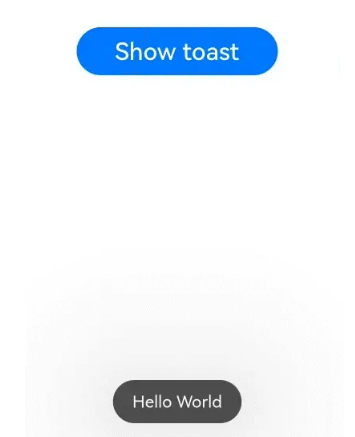
API version 11及之前Toast样式。
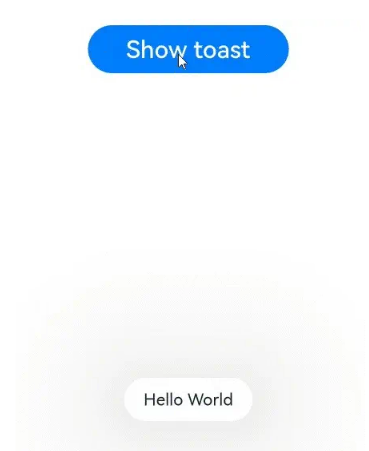
API version 12及之后Toast样式。
promptAction.showDialog
showDialog(options: ShowDialogOptions): Promise
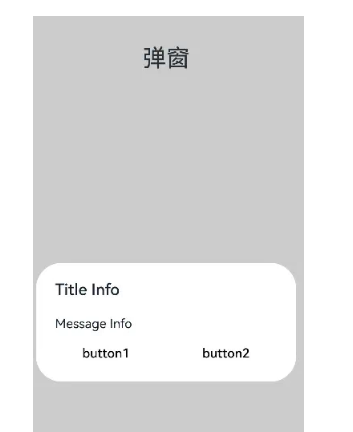
创建并显示对话框,对话框响应后异步返回结果。
元服务API: 从API version 11开始,该接口支持在元服务中使用。
系统能力: SystemCapability.ArkUI.ArkUI.Full
参数:
| 参数名 | 类型 | 必填 | 说明 |
|---|---|---|---|
| options | [ShowDialogOptions] | 是 | 对话框选项。 |
返回值:
| 类型 | 说明 |
|---|---|
| Promise<[ShowDialogSuccessResponse]> | 对话框响应结果。 |
| 错误码ID | 错误信息 |
|---|---|
| 401 | Parameter error. Possible causes: 1. Mandatory parameters are left unspecified; 2.Incorrect parameters types; 3. Parameter verification failed. |
| 100001 | Internal error. |
示例:
import { promptAction } from '@kit.ArkUI'
import { BusinessError } from '@kit.BasicServicesKit';

try {
  promptAction.showDialog({
    title: 'Title Info',
    message: 'Message Info',
    buttons: [
      {
        text: 'button1',
        color: '#000000'
      },
      {
        text: 'button2',
        color: '#000000'
      }
    ],
  })
    .then(data => {
      console.info('showDialog success, click button: ' + data.index);
    })
    .catch((err:Error) => {
      console.info('showDialog error: ' + err);
    })
} catch (error) {
  let message = (error as BusinessError).message
  let code = (error as BusinessError).code
  console.error(`showDialog args error code is ${code}, message is ${message}`);
};
promptAction.showDialog
showDialog(options: ShowDialogOptions, callback: AsyncCallback):void
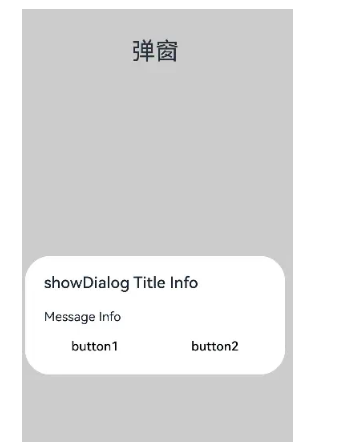
创建并显示对话框,对话框响应结果异步返回。
元服务API: 从API version 11开始,该接口支持在元服务中使用。
系统能力: SystemCapability.ArkUI.ArkUI.Full
参数:
| 参数名 | 类型 | 必填 | 说明 |
|---|---|---|---|
| options | [ShowDialogOptions] | 是 | 页面显示对话框信息描述。 |
| callback | AsyncCallback<[ShowDialogSuccessResponse]> | 是 | 对话框响应结果回调。 |
| 错误码ID | 错误信息 |
|---|---|
| 401 | Parameter error. Possible causes: 1. Mandatory parameters are left unspecified; 2.Incorrect parameters types; 3. Parameter verification failed. |
| 100001 | Internal error. |
示例:
import { promptAction } from '@kit.ArkUI';
import { BusinessError } from '@kit.BasicServicesKit';

try {
  promptAction.showDialog({
    title: 'showDialog Title Info',
    message: 'Message Info',
    buttons: [
      {
        text: 'button1',
        color: '#000000'
      },
      {
        text: 'button2',
        color: '#000000'
      }
    ]
  }, (err, data) => {
    if (err) {
      console.info('showDialog err: ' + err);
      return;
    }
    console.info('showDialog success callback, click button: ' + data.index);
  });
} catch (error) {
  let message = (error as BusinessError).message
  let code = (error as BusinessError).code
  console.error(`showDialog args error code is ${code}, message is ${message}`);
};
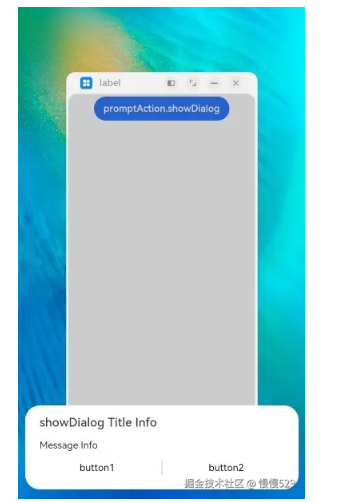
当弹窗的showInSubWindow属性为true时,弹窗可显示在窗口外。
import { promptAction } from '@kit.ArkUI';
import { BusinessError } from '@kit.BasicServicesKit';

try {
  promptAction.showDialog({
    title: 'showDialog Title Info',
    message: 'Message Info',
    isModal: true,
    showInSubWindow: true,
    buttons: [
      {
        text: 'button1',
        color: '#000000'
      },
      {
        text: 'button2',
        color: '#000000'
      }
    ]
  }, (err, data) => {
    if (err) {
      console.info('showDialog err: ' + err);
      return;
    }
    console.info('showDialog success callback, click button: ' + data.index);
  });
} catch (error) {
  let message = (error as BusinessError).message
  let code = (error as BusinessError).code
  console.error(`showDialog args error code is ${code}, message is ${message}`);
};
promptAction.showActionMenu
showActionMenu(options: ActionMenuOptions, callback: AsyncCallback):void
创建并显示操作菜单,菜单响应结果异步返回。
元服务API: 从API version 11开始,该接口支持在元服务中使用。
系统能力: SystemCapability.ArkUI.ArkUI.Full。
参数:
| 参数名 | 类型 | 必填 | 说明 |
|---|---|---|---|
| options | [ActionMenuOptions] | 是 | 操作菜单选项。 |
| callback | AsyncCallback<[ActionMenuSuccessResponse]> | 是 | 菜单响应结果回调。 |
| 错误码ID | 错误信息 |
|---|---|
| 401 | Parameter error. Possible causes: 1. Mandatory parameters are left unspecified; 2.Incorrect parameters types; 3. Parameter verification failed. |
| 100001 | Internal error. |
示例:
import { promptAction } from '@kit.ArkUI';
import { BusinessError } from '@kit.BasicServicesKit';

try {
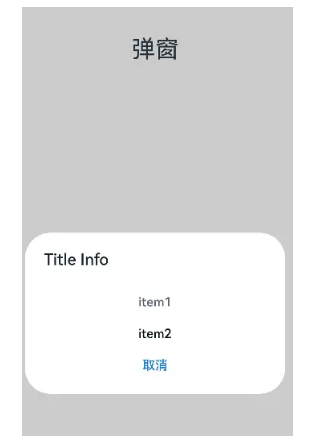
  promptAction.showActionMenu({
    title: 'Title Info',
    buttons: [
      {
        text: 'item1',
        color: '#666666'
      },
      {
        text: 'item2',
        color: '#000000'
      },
    ]
  }, (err, data) => {
    if (err) {
      console.info('showActionMenu err: ' + err);
      return;
    }
    console.info('showActionMenu success callback, click button: ' + data.index);
  })
} catch (error) {
  let message = (error as BusinessError).message
  let code = (error as BusinessError).code
  console.error(`showActionMenu args error code is ${code}, message is ${message}`);
};
promptAction.showActionMenu
showActionMenu(options: ActionMenuOptions): Promise
创建并显示操作菜单,菜单响应后异步返回结果。
元服务API: 从API version 11开始,该接口支持在元服务中使用。
系统能力: SystemCapability.ArkUI.ArkUI.Full
参数:
| 参数名 | 类型 | 必填 | 说明 |
|---|---|---|---|
| options | [ActionMenuOptions] | 是 | 操作菜单选项。 |
返回值:
| 类型 | 说明 |
|---|---|
| Promise<[ActionMenuSuccessResponse]> | 菜单响应结果。 |
| 错误码ID | 错误信息 |
|---|---|
| 401 | Parameter error. Possible causes: 1. Mandatory parameters are left unspecified; 2.Incorrect parameters types; 3. Parameter verification failed. |
| 100001 | Internal error. |
示例:
import { promptAction } from '@kit.ArkUI';
import { BusinessError } from '@kit.BasicServicesKit';

try {
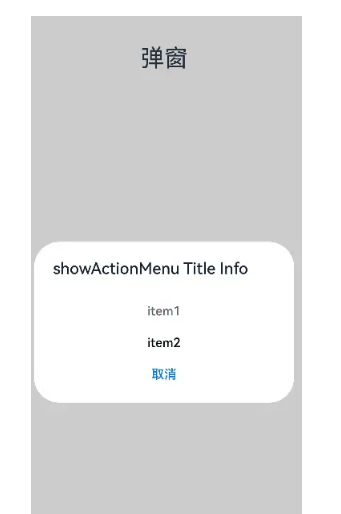
  promptAction.showActionMenu({
    title: 'showActionMenu Title Info',
    buttons: [
      {
        text: 'item1',
        color: '#666666'
      },
      {
        text: 'item2',
        color: '#000000'
      },
    ]
  })
    .then(data => {
      console.info('showActionMenu success, click button: ' + data.index);
    })
    .catch((err:Error) => {
      console.info('showActionMenu error: ' + err);
    })
} catch (error) {
  let message = (error as BusinessError).message
  let code = (error as BusinessError).code
  console.error(`showActionMenu args error code is ${code}, message is ${message}`);
};
promptAction.openCustomDialog11+
openCustomDialog(options: CustomDialogOptions): Promise
打开自定义弹窗。
暂不支持isModal = true与showInSubWindow = true同时使用。
弹窗宽度在设备竖屏时默认为 所在窗口宽度 - 左右margin(16vp,设备为2in1时为40vp),最大默认宽度为400vp。
元服务API: 从API version 12开始,该接口支持在元服务中使用。
系统能力: SystemCapability.ArkUI.ArkUI.Full
参数:
| 参数名 | 类型 | 必填 | 说明 |
|---|---|---|---|
| options | [CustomDialogOptions] | 是 | 自定义弹窗的内容。 |
返回值:
| 类型 | 说明 |
|---|---|
| Promise | 返回供closeCustomDialog使用的对话框id。 |
| 错误码ID | 错误信息 |
|---|---|
| 401 | Parameter error. Possible causes: 1. Mandatory parameters are left unspecified; 2.Incorrect parameters types; 3. Parameter verification failed. |
| 100001 | Internal error. |
示例:
import { promptAction } from '@kit.ArkUI'

@Entry
@Component
struct Index {
  private customDialogComponentId: number = 0

  @Builder customDialogComponent() {
    Column() {
      Text('弹窗').fontSize(30)
      Row({ space: 50 }) {
        Button("确认").onClick(() => {
          promptAction.closeCustomDialog(this.customDialogComponentId)
        })
        Button("取消").onClick(() => {
          promptAction.closeCustomDialog(this.customDialogComponentId)
        })
      }
    }.height(200).padding(5).justifyContent(FlexAlign.SpaceBetween)
  }

  build() {
    Row() {
      Column({ space: 20 }) {
        Text('组件内弹窗')
          .fontSize(30)
          .onClick(() => {
            promptAction.openCustomDialog({
              builder: () => {
                this.customDialogComponent()
              },
              onWillDismiss: (dismissDialogAction: DismissDialogAction) => {
                console.info("reason" + JSON.stringify(dismissDialogAction.reason))
                console.log("dialog onWillDismiss")
                if (dismissDialogAction.reason == DismissReason.PRESS_BACK) {
                  dismissDialogAction.dismiss()
                }
                if (dismissDialogAction.reason == DismissReason.TOUCH_OUTSIDE) {
                  dismissDialogAction.dismiss()
                }
              }
            }).then((dialogId: number) => {
              this.customDialogComponentId = dialogId
            })
          })
      }
      .width('100%')
    }
    .height('100%')
  }
}
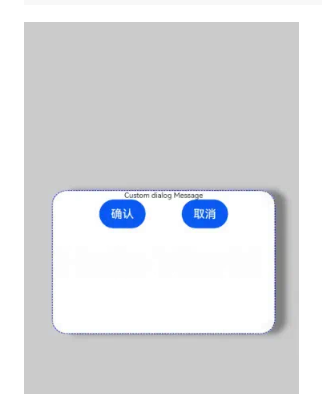
该示例定义了弹窗样式,如宽度、高度、背景色、阴影等等。
import { promptAction } from '@kit.ArkUI'

let customDialogId: number = 0

@Builder
function customDialogBuilder() {
  Column() {
    Text('Custom dialog Message').fontSize(10)
    Row() {
      Button("确认").onClick(() => {
        promptAction.closeCustomDialog(customDialogId)
      })
      Blank().width(50)
      Button("取消").onClick(() => {
        promptAction.closeCustomDialog(customDialogId)
      })
    }
  }
}

@Entry
@Component
struct Index {
  @State message: string = 'Hello World'

  @Builder
  customDialogComponent() {
    customDialogBuilder()
  }

  build() {
    Row() {
      Column() {
        Text(this.message)
          .fontSize(50)
          .fontWeight(FontWeight.Bold)
          .onClick(() => {
            promptAction.openCustomDialog({
              builder: () => {
                this.customDialogComponent()
              },
              keyboardAvoidMode: KeyboardAvoidMode.NONE,
              showInSubWindow: false,
              offset: { dx: 5, dy: 5 },
              backgroundColor: 0xd9ffffff,
              cornerRadius: 20,
              width: '80%',
              height: 200,
              borderWidth: 1,
              borderStyle: BorderStyle.Dashed, //使用borderStyle属性,需要和borderWidth属性一起使用
              borderColor: Color.Blue, //使用borderColor属性,需要和borderWidth属性一起使用
              shadow: ({
                radius: 20,
                color: Color.Grey,
                offsetX: 50,
                offsetY: 0
              }),
            }).then((dialogId: number) => {
              customDialogId = dialogId
            })
          })
      }
      .width('100%')
    }
    .height('100%')
  }
}
promptAction.closeCustomDialog11+
closeCustomDialog(dialogId: number): void
关闭自定义弹窗。
元服务API: 从API version 12开始,该接口支持在元服务中使用。
系统能力: SystemCapability.ArkUI.ArkUI.Full
参数:
| 参数名 | 类型 | 必填 | 说明 |
|---|---|---|---|
| dialogId | number | 是 | openCustomDialog返回的对话框id。 |
| 错误码ID | 错误信息 |
|---|---|
| 401 | Parameter error. Possible causes: 1. Mandatory parameters are left unspecified; 2.Incorrect parameters types; 3. Parameter verification failed. |
| 100001 | Internal error. |
ShowToastOptions
文本提示框的选项。
系统能力: SystemCapability.ArkUI.ArkUI.Full
| 名称 | 类型 | 必填 | 说明 |
|---|---|---|---|
| message | string | [Resource] | 是 |
| duration | number | 否 | 默认值1500ms,取值区间:1500ms-10000ms。若小于1500ms则取默认值,若大于10000ms则取上限值10000ms。元服务API: 从API version 11开始,该接口支持在元服务中使用。 |
| bottom | string | number | 否 |
| showMode11+ | [ToastShowMode] | 否 | 设置弹窗是否显示在应用之上。默认值:ToastShowMode.DEFAULT,默认显示在应用内。元服务API: 从API version 12开始,该接口支持在元服务中使用。 |
| alignment12+ | [Alignment] | 否 | 对齐方式。默认值:undefined,默认底部偏上位置。元服务API: 从API version 12开始,该接口支持在元服务中使用。 |
| offset12+ | [Offset] | 否 | 在对齐方式上的偏移。默认值:{ dx: 0, dy: 0 },默认没有偏移。**说明:**只支持设置px类型的数值,如需设置vp,可以将vp改成px传入。元服务API: 从API version 12开始,该接口支持在元服务中使用。 |
| backgroundColor12+ | [ResourceColor] | 否 | 文本提示框背板颜色默认值:Color.Transparent**说明:**当设置了backgroundColor为非透明色时,backgroundBlurStyle需要设置为BlurStyle.NONE,否则颜色显示将不符合预期效果。元服务API: 从API version 12开始,该接口支持在元服务中使用。 |
| textColor12+ | [ResourceColor] | 否 | 文本提示框文本颜色默认值:Color.Black元服务API: 从API version 12开始,该接口支持在元服务中使用。 |
| backgroundBlurStyle12+ | [BlurStyle] | 否 | 文本提示框背板模糊材质默认值:BlurStyle.COMPONENT_ULTRA_THICK**说明:**设置为BlurStyle.NONE即可关闭背景虚化。当设置了backgroundBlurStyle为非NONE值时,则不要设置backgroundColor,否则颜色显示将不符合预期效果。元服务API: 从API version 12开始,该接口支持在元服务中使用。 |
| shadow12+ | [ShadowOptions] | [ShadowStyle] | 否 |
ToastShowMode11+
设置弹窗显示模式,默认显示在应用内,支持显示在应用之上。
元服务API: 从API version 12开始,该接口支持在元服务中使用。
系统能力: SystemCapability.ArkUI.ArkUI.Full
| 名称 | 值 | 说明 |
|---|---|---|
| DEFAULT | 0 | Toast 显示在应用内。 |
| TOP_MOST | 1 | Toast 显示在应用之上。 |
ShowDialogOptions
对话框的选项。
系统能力: SystemCapability.ArkUI.ArkUI.Full
| 名称 | 类型 | 必填 | 说明 |
|---|---|---|---|
| title | string | [Resource] | 否 |
| message | string | [Resource] | 否 |
| buttons | Array<[Button]> | 否 | 对话框中按钮的数组,结构为:{text:‘button’, color: ‘#666666’},支持大于1个按钮。元服务API: 从API version 11开始,该接口支持在元服务中使用。 |
| alignment10+ | [DialogAlignment] | 否 | 弹窗在竖直方向上的对齐方式。默认值:DialogAlignment.Default说明:若在UIExtension中设置showInSubWindow为true, 弹窗将基于UIExtension的宿主窗口对齐。元服务API: 从API version 11开始,该接口支持在元服务中使用。 |
| offset10+ | [Offset] | 否 | 弹窗相对alignment所在位置的偏移量。默认值:{ dx: 0 , dy: 0 }元服务API: 从API version 11开始,该接口支持在元服务中使用。 |
| maskRect10+ | [Rectangle] | 否 | 弹窗遮蔽层区域,在遮蔽层区域内的事件不透传,在遮蔽层区域外的事件透传。默认值:{ x: 0, y: 0, width: ‘100%’, height: ‘100%’ }**说明:**showInSubWindow为true时,maskRect不生效。元服务API: 从API version 11开始,该接口支持在元服务中使用。 |
| showInSubWindow11+ | boolean | 否 | 某弹框需要显示在主窗口之外时,是否在子窗口显示此弹窗。默认值:false,弹窗显示在应用内,而非独立子窗口。说明:showInSubWindow为true的弹窗无法触发显示另一个showInSubWindow为true的弹窗。元服务API: 从API version 12开始,该接口支持在元服务中使用。 |
| isModal11+ | boolean | 否 | 弹窗是否为模态窗口,模态窗口有蒙层,非模态窗口无蒙层。默认值:true,此时弹窗有蒙层。元服务API: 从API version 12开始,该接口支持在元服务中使用。 |
| backgroundColor12+ | [ResourceColor] | 否 | 弹窗背板颜色。默认值:Color.Transparent**说明:**当设置了backgroundColor为非透明色时,backgroundBlurStyle需要设置为BlurStyle.NONE,否则颜色显示将不符合预期效果。元服务API: 从API version 12开始,该接口支持在元服务中使用。 |
| backgroundBlurStyle12+ | [BlurStyle] | 否 | 弹窗背板模糊材质。默认值:BlurStyle.COMPONENT_ULTRA_THICK**说明:**设置为BlurStyle.NONE即可关闭背景虚化。当设置了backgroundBlurStyle为非NONE值时,则不要设置backgroundColor,否则颜色显示将不符合预期效果。元服务API: 从API version 12开始,该接口支持在元服务中使用。 |
| shadow12+ | [ShadowOptions] | [ShadowStyle] | 否 |
ShowDialogSuccessResponse
对话框的响应结果。
元服务API: 从API version 11开始,该接口支持在元服务中使用。
系统能力: SystemCapability.ArkUI.ArkUI.Full
| 名称 | 类型 | 必填 | 说明 |
|---|---|---|---|
| index | number | 是 | 选中按钮在buttons数组中的索引。 |
ActionMenuOptions
操作菜单的选项。
系统能力: SystemCapability.ArkUI.ArkUI.Full
| 名称 | 类型 | 必填 | 说明 |
|---|---|---|---|
| title | string | [Resource] | 否 |
| buttons | [[Button],[Button]?,[Button]?,[Button]?,[Button]?,[Button]?] | 是 | 菜单中菜单项按钮的数组,结构为:{text:‘button’, color: ‘#666666’},支持1-6个按钮。按钮数量大于6个时,仅显示前6个按钮,之后的按钮不显示。元服务API: 从API version 11开始,该接口支持在元服务中使用。 |
| showInSubWindow11+ | boolean | 否 | 某弹框需要显示在主窗口之外时,是否在子窗口显示此弹窗。默认值:false,在子窗口不显示弹窗。说明:- showInSubWindow为true的弹窗无法触发显示另一个showInSubWindow为true的弹窗。- 若在UIExtension中设置showInSubWindow为true, 弹窗将基于UIExtension的宿主窗口对齐。元服务API: 从API version 12开始,该接口支持在元服务中使用。 |
| isModal11+ | boolean | 否 | 弹窗是否为模态窗口,模态窗口有蒙层,非模态窗口无蒙层。默认值:true,此时弹窗有蒙层。元服务API: 从API version 12开始,该接口支持在元服务中使用。 |
ActionMenuSuccessResponse
操作菜单的响应结果。
元服务API: 从API version 11开始,该接口支持在元服务中使用。
系统能力: SystemCapability.ArkUI.ArkUI.Full
| 名称 | 类型 | 必填 | 说明 |
|---|---|---|---|
| index | number | 是 | 选中按钮在buttons数组中的索引,从0开始。 |
CustomDialogOptions11+
自定义弹窗的内容,继承自[BaseDialogOptions]
元服务API: 从API version 12开始,该接口支持在元服务中使用。
系统能力: SystemCapability.ArkUI.ArkUI.Full
| 名称 | 类型 | 必填 | 说明 |
|---|---|---|---|
| builder | [CustomBuilder] | 是 | 设置自定义弹窗的内容。**说明:**builder需要赋值为箭头函数,格式如下:() => { this.XXX() },其中XXX是内部builder名。如果是全局builder需要在组件内部创建一个builder,在内部builder中调用全局builder。builder根节点宽高百分比相对弹框容器大小。builder非根节点宽高百分比相对父节点大小。元服务API: 从API version 12开始,该接口支持在元服务中使用。 |
| backgroundColor 12+ | [ResourceColor] | 否 | 设置弹窗背板颜色。默认值:Color.Transparent**说明:**当设置了backgroundColor为非透明色时,backgroundBlurStyle需要设置为BlurStyle.NONE,否则颜色显示将不符合预期效果。 |
| cornerRadius12+ | [Dimension] | [BorderRadiuses] | 否 |
| borderWidth12+ | [Dimension] | [EdgeWidths] | 否 |
| borderColor12+ | [ResourceColor] | [EdgeColors] | 否 |
| borderStyle12+ | [BorderStyle] | [EdgeStyles] | 否 |
| width12+ | [Dimension] | 否 | 设置弹窗背板的宽度。说明:- 弹窗宽度默认最大值:400vp。- 百分比参数方式:弹窗参考宽度为所在窗口的宽度,在此基础上调小或调大。 |
| height12+ | [Dimension] | 否 | 设置弹窗背板的高度。说明:- 弹窗高度默认最大值:0.9 *(窗口高度 - 安全区域)。- 百分比参数方式:弹窗参考高度为(窗口高度 - 安全区域),在此基础上调小或调大。 |
| shadow12+ | [ShadowOptions] | [ShadowStyle] | 否 |
| backgroundBlurStyle12+ | [BlurStyle] | 否 | 弹窗背板模糊材质。默认值:BlurStyle.COMPONENT_ULTRA_THICK**说明:**设置为BlurStyle.NONE即可关闭背景虚化。当设置了backgroundBlurStyle为非NONE值时,则不要设置backgroundColor,否则颜色显示将不符合预期效果。 |
BaseDialogOptions11+
弹窗的选项。
元服务API: 从API version 12开始,该接口支持在元服务中使用。
系统能力: SystemCapability.ArkUI.ArkUI.Full
| 名称 | 类型 | 必填 | 说明 |
|---|---|---|---|
| maskRect | [Rectangle] | 否 | 弹窗遮蔽层区域。默认值:{ x: 0, y: 0, width: ‘100%’, height: ‘100%’ }**说明:**showInSubWindow为true时,maskRect不生效。 |
| alignment | [DialogAlignment] | 否 | 弹窗在竖直方向上的对齐方式。默认值:DialogAlignment.Default说明:若在UIExtension中设置showInSubWindow为true, 弹窗将基于UIExtension的宿主窗口对齐。 |
| offset | [Offset] | 否 | 弹窗相对alignment所在位置的偏移量。默认值:{ dx: 0 , dy: 0 } |
| isModal | boolean | 否 | 弹窗是否为模态窗口,模态窗口有蒙层,非模态窗口无蒙层。默认值:true,此时弹窗有蒙层。 |
| showInSubWindow | boolean | 否 | 某弹框需要显示在主窗口之外时,是否在子窗口显示此弹窗。默认值:false,弹窗显示在应用内,而非独立子窗口。 |
| onWillDismiss12+ | Callback<[DismissDialogAction]> | 否 | 交互式关闭回调函数。**说明:**1.当用户执行点击遮障层关闭、左滑/右滑、三键back、键盘ESC关闭交互操作时,如果注册该回调函数,则不会立刻关闭弹窗。在回调函数中可以通过reason得到阻拦关闭弹窗的操作类型,从而根据原因选择是否能关闭弹窗。当前组件返回的reason中,暂不支持CLOSE_BUTTON的枚举值。2.在onWillDismiss回调中,不能再做onWillDismiss拦截。 |
| autoCancel12+ | boolean | 否 | 点击遮障层时,是否关闭弹窗,true表示关闭弹窗。false表示不关闭弹窗。默认值:true |
| maskColor12+ | [ResourceColor] | 否 | 自定义蒙层颜色。默认值: 0x33000000 |
| transition12+ | [TransitionEffect] | 否 | 设置弹窗显示和退出的过渡效果。**说明:**1.如果不设置,则使用默认的显示/退出动效。2.显示动效中按back键,打断显示动效,执行退出动效,动画效果为显示动效与退出动效的曲线叠加后的效果。3.退出动效中按back键,不会打断退出动效,退出动效继续执行,继续按back键退出应用。 |
| onDidAppear12+ | () => void | 否 | 弹窗弹出时的事件回调。**说明:**1.正常时序依次为:onWillAppear>>onDidAppear>>(onDateAccept/onCancel/onDateChange)>>onWillDisappear>>onDidDisappear。2.在onDidAppear内设置改变弹窗显示效果的回调事件,二次弹出生效。3.快速点击弹出,消失弹窗时,存在onWillDisappear在onDidAppear前生效。4. 当弹窗入场动效未完成时关闭弹窗,该回调不会触发。 |
| onDidDisappear12+ | () => void | 否 | 弹窗消失时的事件回调。**说明:**正常时序依次为:onWillAppear>>onDidAppear>>(onDateAccept/onCancel/onDateChange)>>onWillDisappear>>onDidDisappear。 |
| onWillAppear12+ | () => void | 否 | 弹窗显示动效前的事件回调。**说明:**1.正常时序依次为:onWillAppear>>onDidAppear>>(onDateAccept/onCancel/onDateChange)>>onWillDisappear>>onDidDisappear。2.在onWillAppear内设置改变弹窗显示效果的回调事件,二次弹出生效。 |
| onWillDisappear12+ | () => void | 否 | 弹窗退出动效前的事件回调。**说明:**1.正常时序依次为:onWillAppear>>onDidAppear>>(onDateAccept/onCancel/onDateChange)>>onWillDisappear>>onDidDisappear。2.快速点击弹出,消失弹窗时,存在onWillDisappear在onDidAppear前生效。 |
| keyboardAvoidMode12+ | [KeyboardAvoidMode] | 否 | 用于设置弹窗是否在拉起软键盘时进行自动避让。默认值:KeyboardAvoidMode.DEFAULT元服务API: 从API version 12开始,该接口支持在元服务中使用。 |
DismissDialogAction12+
Dialog关闭的信息。
元服务API: 从API version 12开始,该接口支持在元服务中使用。
系统能力: SystemCapability.ArkUI.ArkUI.Full
属性
| 名称 | 类型 | 可读 | 可写 | 说明 |
|---|---|---|---|---|
| dismiss | Callback | 否 | 否 | Dialog关闭回调函数。开发者需要退出时调用,不需要退出时无需调用。 |
| reason | [DismissReason] | 否 | 否 | Dialog无法关闭原因。根据开发者需要选择不同操作下,Dialog是否需要关闭。 |
DismissReason12+枚举说明
元服务API: 从API version 12开始,该接口支持在元服务中使用。
系统能力: SystemCapability.ArkUI.ArkUI.Full
| 名称 | 值 | 描述 |
|---|---|---|
| PRESS_BACK | 0 | 点击三键back、左滑/右滑、键盘ESC。 |
| TOUCH_OUTSIDE | 1 | 点击遮障层时。 |
| CLOSE_BUTTON | 2 | 点击关闭按钮。 |
| SLIDE_DOWN | 3 | 下拉关闭。**说明:**该接口仅支持在[半模态转场]中使用。 |
KeyboardAvoidMode12+枚举说明
元服务API: 从API version 12开始,该接口支持在元服务中使用。
系统能力: SystemCapability.ArkUI.ArkUI.Full
| 名称 | 值 | 说明 |
|---|---|---|
| DEFAULT | 0 | 默认避让软键盘并在到达极限高度之后进行高度压缩。 |
| NONE | 1 | 不避让软键盘。 |
Button
菜单中的菜单项按钮。
系统能力: SystemCapability.ArkUI.ArkUI.Full
| 名称 | 类型 | 必填 | 说明 |
|---|---|---|---|
| text | string | [Resource] | 是 |
| color | string | [Resource] | 是 |
| primary12+ | boolean | 否 | 在弹窗获焦且未进行tab键走焦时,按钮是否默认响应Enter键。多个Button时,只允许一个Button的该字段配置为true,否则所有Button均不响应。多重弹窗可自动获焦连续响应。元服务API: 从API version 12开始,该接口支持在元服务中使用。 |

讨论HarmonyOS开发技术,专注于API与组件、DevEco Studio、测试、元服务和应用上架分发等。
更多推荐
 12
12 0
0- 0


 已为社区贡献1211条内容

所有评论(0)