鸿蒙Harmony OS Next原生开发声明式UI渲染控制
鸿蒙初开,开天辟地
渲染控制
条件渲染
根据应用的不同状态可以实现渲染不同的UI界面,例如前面的开关灯案例部分,都是使用条件渲染来实现的
前面的开关灯案例就是通过状态变量isOn来实现条件渲染,而条件渲染是可以有多个状态的
if(this.isOn){
        Image("https://i-blog.csdnimg.cn/direct/0c036d7e107647e2805c83cff6586391.jpeg")
          .height(500).width(300);
      }
      else{
        Image("https://i-blog.csdnimg.cn/direct/9ed16dcd083d4e70a240adba82a6e8d4.png")
          .height(500).width(300);
      }
循环渲染
循环渲染可以使用ForEach语句基于一个数组来快速渲染出一个组件列表,类似MVVM里面的v-for(VUE框架)
循环渲染需要一个数据源,必须为数组类型,得是可以遍历的对象
ItemGenerator组件生成函数
@Component
export default struct See {
  @State options:string[] = ["JAVA","Python","C#","Golang"];
  @State answer:string = "____";
  build() {
    Column({space:20}){
      Row(){
        Text("江河浩瀚,胡生可安").fontSize(25).fontWeight(FontWeight.Bold);
        Text(this.answer).fontSize(25).fontWeight(FontWeight.Bold);
      }
      ForEach(this.options,(item:string) => {
        Button(item).width(100).backgroundColor(Color.Red).onClick(()=>{
          this.answer = item;
        });
      });
    }
  }
}
@Component
export default struct See {
@State options:string[] = ["JAVA","Python","C#","Golang"];
@State answer:string = "____";
build() {
Column({space:20}){
Row(){
Text("江河浩瀚,胡生可安").fontSize(25).fontWeight(FontWeight.Bold);
Text(this.answer).fontSize(25).fontWeight(FontWeight.Bold);
}
ForEach(this.options,(item:string) => {
Button(item).width(100).backgroundColor(Color.Red).onClick(()=>{
this.answer = item;
});
});
}
}
}
ForEach循环渲染需要传入循环渲染的数据源,必须为数组类型的和组件生成的回调函数
用于为数组每个元素创建对应的组件,函数接收两个参数,分别是数据源和index索引
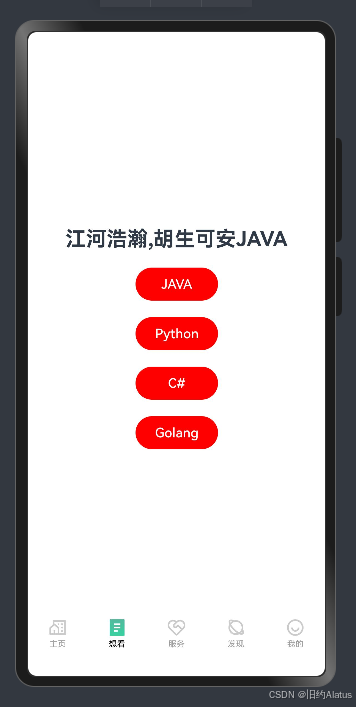
渲染效果
ForEach在数组发生变化时会动态监听到数组的变化,这里包括数组元素修改,数组元素增加或删除
都会重新渲染组件列表,重新渲染时,它会尽可能复用原来的组件对象,而不是整个重新渲染(听起来很像VUE的虚拟DOM和Diff算法),key的作用就是辅助ForEach完成组件对象复用
@Component
export default struct See {
  @State options:string[] = ["JAVA","Python","C#","Golang"];
  @State answer:string = "____";
  build() {
    Column({space:20}){
      Row(){
        Text("江河浩瀚,胡生可安").fontSize(25).fontWeight(FontWeight.Bold);
        Text(this.answer).fontSize(25).fontWeight(FontWeight.Bold);
      };
      Button({type:ButtonType.Circle}){
        Text("ArkTS")
      }.onClick(()=>{
        this.options = ["JAVA","Python","C#","Golang","ArkTs"];
      }).width(50).height(50);
      ForEach(this.options,(item:string) => {
        Button(item).width(100).backgroundColor(Color.Red).onClick(()=>{
          this.answer = item;
        });
      });
    }
  }
}
@Component
export default struct See {
@State options:string[] = ["JAVA","Python","C#","Golang"];
@State answer:string = "____";
build() {
Column({space:20}){
Row(){
Text("江河浩瀚,胡生可安").fontSize(25).fontWeight(FontWeight.Bold);
Text(this.answer).fontSize(25).fontWeight(FontWeight.Bold);
};
Button({type:ButtonType.Circle}){
Text("ArkTS")
}.onClick(()=>{
this.options = ["JAVA","Python","C#","Golang","ArkTs"];
}).width(50).height(50);
ForEach(this.options,(item:string) => {
Button(item).width(100).backgroundColor(Color.Red).onClick(()=>{
this.answer = item;
});
});
}
}
}
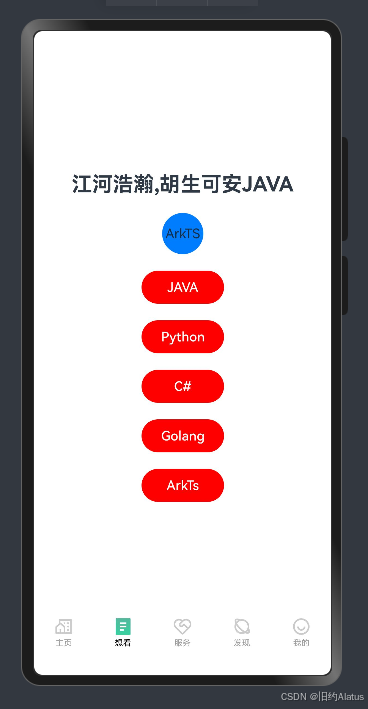
添加元素重新渲染
KeyGenerator函数如果没有定义规则,系统会使用默认的key生成函数
在某些情况下默认的key生成函数会导致界面渲染效率低下,可以考虑使用自定义生成函数的逻辑
比如这个案例下,我们只需要保证文本内容一致,其实就实现了生成不同key的效果
@Component
export default struct See {
  @State options:string[] = ["JAVA","Python","C#","Golang"];
  @State answer:string = "____";
  build() {
    Column({space:20}){
      Row(){
        Text("江河浩瀚,胡生可安").fontSize(25).fontWeight(FontWeight.Bold);
        Text(this.answer).fontSize(25).fontWeight(FontWeight.Bold);
      };
      Button({type:ButtonType.Circle}){
        Text("ArkTS")
      }.onClick(()=>{
        // this.options = ["JAVA","Python","C#","Golang","ArkTs"];
        this.options.push("ArkTs");
      }).width(50).height(50);
      ForEach(this.options,(item:string) => {
        Button(item).width(100).backgroundColor(Color.Red).onClick(()=>{
          this.answer = item;
        });
      },((item:string)=>
          JSON.stringify(item)
      ));
    }
  }
}
@Component
export default struct See {
@State options:string[] = ["JAVA","Python","C#","Golang"];
@State answer:string = "____";
build() {
Column({space:20}){
Row(){
Text("江河浩瀚,胡生可安").fontSize(25).fontWeight(FontWeight.Bold);
Text(this.answer).fontSize(25).fontWeight(FontWeight.Bold);
};
Button({type:ButtonType.Circle}){
Text("ArkTS")
}.onClick(()=>{
// this.options = ["JAVA","Python","C#","Golang","ArkTs"];
this.options.push("ArkTs");
}).width(50).height(50);
ForEach(this.options,(item:string) => {
Button(item).width(100).backgroundColor(Color.Red).onClick(()=>{
this.answer = item;
});
},((item:string)=>
JSON.stringify(item)
));
}
}
}
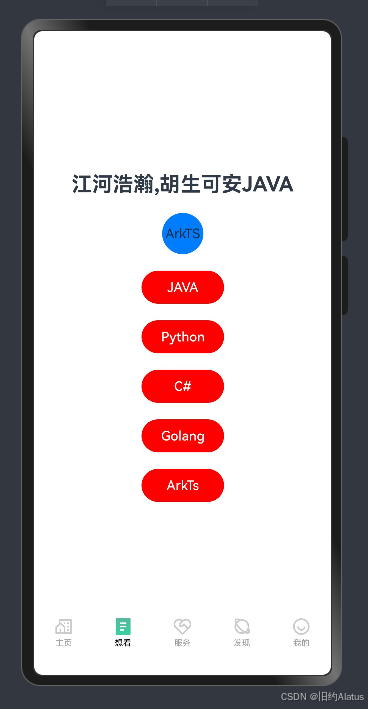
最终效果

讨论HarmonyOS开发技术,专注于API与组件、DevEco Studio、测试、元服务和应用上架分发等。
更多推荐

 27
27 0
0- 0



 已为社区贡献5条内容

所有评论(0)