Kubernetes 容器之rkt
kubernets支持容器进行部署,其所支持的容器不只是仅仅局限于docker,CoreOS的rkt也是容器玩家之一,虽然跟docker比起来还是明显处于绝对下风,但是有竞争是一件非常好的事情,本文将会对如何简单使用rkt进行介绍,同时对于涉及到的容器标准诸如APPC/OCI/CNCF也进行说明。

kubernets支持容器进行部署,其所支持的容器不只是仅仅局限于docker,CoreOS的rkt也是容器玩家之一,虽然跟docker比起来还是明显处于绝对下风,但是有竞争是一件非常好的事情,本文将会对如何简单使用rkt进行介绍,同时对于涉及到的容器标准诸如APPC/OCI/CNCF也进行说明。
基本概念
| 概念 | 缩写 |
|---|---|
| APPC | App Container |
| OCI | Open Container Initialtive |
| CNCF | Clound Native Computing Foundation |
APPC是由CentOS主导,得到了Redhat/Google/Vmware等的大力支持推行的开放式容器标准,其在开放式容器标准和容器安全性等发出了清晰的声音。
OCI则是基本在docker的基础上,Redhat/google/Vmware等等参与形成的一个组织,基本目的大致相同,没有办法,Docker和CoreOS的友谊小船翻了之后再也回不到从前了,Docker在未来如果说它向下可以完全做到CoreOS作的东西,CoreOS如果说它的容器标准比docker更安全和开放,都是完全可能的。google等公司表示乐见两家公司吵个不停,基本上就是这么无聊。
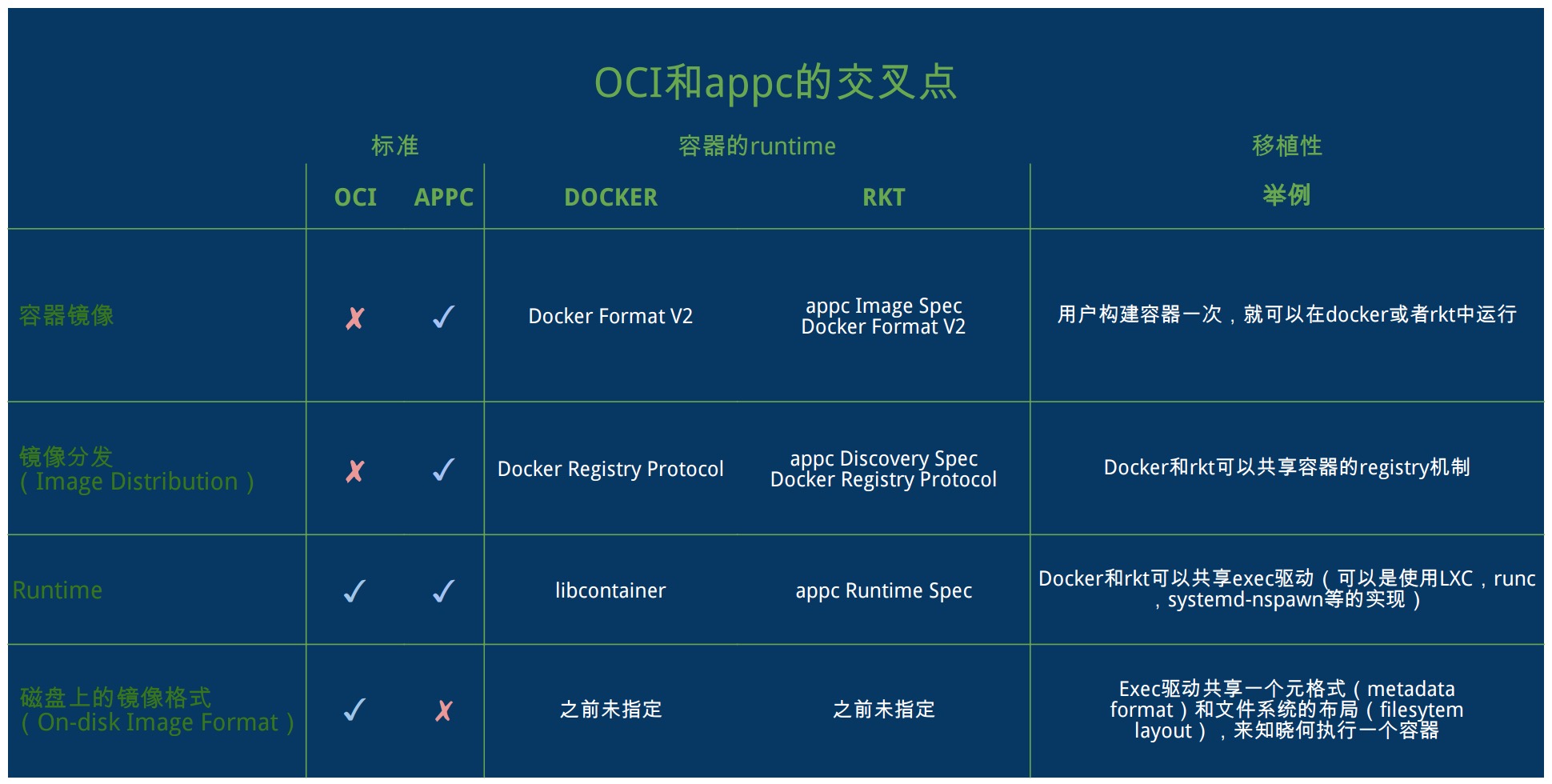
CNCF的初衷则是围绕容器和微服务进行设计的这样一种思路。而关于APPC/OCI/Docker/Rkt等,下图则是较好的一个总结。
rkt基本信息
| Item | 详细信息 |
|---|---|
| 项目详细 | https://github.com/coreos/rkt |
| 最新版本 | 1.13.0 |
| 下载地址 | https://github.com/coreos/rkt/releases |
| https://github.com/coreos/rkt/releases/download/v1.13.0/rkt-v1.13.0.tar.gz |
下载 && 安装
下载
将tar.gz文件下载到/tmp下。
cd /tmp
wget https://github.com/coreos/rkt/releases/download/v1.13.0/rkt-v1.13.0.tar.gz[root@host34 tmp]# ls /tmp/rkt-v1.13.0.tar.gz
/tmp/rkt-v1.13.0.tar.gz
[root@host34 tmp]#安装
纯绿色安装,安装基本上不会遇到任何障碍,下载下来解压而已。
# mkdir -p /usr/local/coreos
# cd /usr/local/coreos
# tar xvpf /tmp/rkt-v1.13.0.tar.gz
# mv rkt-v1.13.0 rkt
安装后确认
设定环境变量
# export PATH=$PATH:/usr/local/coreos/rkt以上方式只是在当前终端起效,如果想以后一直起效,将其加入到各种profile文件中,最粗暴的方法是加入到/etc/profile中,
简单快捷有效,但是在生产环境中一定要切记权限最小限设定和放出的基本职业素养。
确认版本
[root@host34 tmp]# rkt version
rkt Version: 1.13.0
appc Version: 0.8.6
Go Version: go1.6.3
Go OS/Arch: linux/amd64
Features: -TPM +SDJOURNAL
[root@host34 tmp]#
基本命令
| 命令 | 详细解释 |
|---|---|
| api-service | Run API service (experimental) |
| cat-manifest | Inspect and print the pod manifest |
| config | Print configuration for each stage in JSON format |
| enter | Enter the namespaces of an app within a rkt pod |
| export | Export an app from an exited pod to an ACI file |
| fetch | Fetch image(s) and store them in the local store |
| gc | Garbage collect rkt pods no longer in use |
| image cat-manifest | Inspect and print the image manifest |
| image export | Export a stored image to an ACI file |
| image extract | Extract a stored image to a directory |
| image gc | Garbage collect local store |
| image list | List images in the local store |
| image render | Render a stored image to a directory with all its dependencies |
| image rm | Remove image(s) with the given ID(s) or name(s) from the local store |
| list | List pods |
| metadata-service | Run metadata service |
| prepare | Prepare to run image(s) in a pod in rkt |
| rm | Remove all files and resources associated with an exited pod |
| run | Run image(s) in a pod in rkt |
| run-prepared | Run a prepared application pod in rkt |
| status | Check the status of a rkt pod |
| stop | Stop a pod |
| trust | Trust a key for image verification |
| version | Print the version and exit |
| help | Help about any command |
从这里能我们能看出什么,至少有如下几个方面。
1. 跟docker相比,功能性相差的不是一个级别的,docker的cli已经分为9类,从卷操作到network以及集群处理无所不包,自身生态基本已经形成。
2. rkt跟kubernetes很亲,可以看到其基本上是直接使用pod的概念,跟kubernetes无缝连接,作为google的小弟,相信rkt不会像docker那样把类似swarm的功能集成到基本功能里面以叫板k8s和mesos吧。
下载一个镜像
由于rkt自身远远没有像docker那样完备的镜像相关的生态圈,想找个镜像都不是那么方便。
rkt很自觉地提供了功能可以直接使用docker的镜像。完全忘记了友谊的小船已经翻过了。
下面来看一下如何下载ubuntu的官方docker镜像。
–insecure-options=image必须使用,不使用就会有如下提示:
[root@host34 tmp]# rkt fetch docker://ubuntu
image: remote fetching from URL "docker://ubuntu"
fetch: signature verification for docker images is not supported (try --insecure-options=image)
[root@host34 tmp]#
这样刺果果地说docker没有signature verification总是觉得有点酸,不管怎样,还是能下载下来。
[root@host34 tmp]# rkt fetch --insecure-options=image docker://ubuntu
image: remote fetching from URL "docker://ubuntu"
Downloading sha256:01193a8f3d8 [=============================]     682 B / 682 B
Downloading sha256:2f0243478e1 [=============================] 49.7 MB / 49.7 MB
Downloading sha256:d8909ae8846 [=============================]     823 B / 823 B
Downloading sha256:820f09abed2 [=============================]     445 B / 445 B
sha512-9c18d25b9a6b8cb6cda8902227449e4f
[root@host34 tmp]#
查询一下刚刚下载的镜像
[root@host34 tmp]# rkt image list
ID                      NAME                                            SIZE    IMPORT TIME     LAST USED
sha512-9c18d25b9a6b     registry-1.docker.io/library/ubuntu:latest      217MiB  6 minutes ago   6 minutes ago
[root@host34 tmp]#
查询pods信息
[root@host34 tmp]# rkt list
UUID            APP     IMAGE NAME                                      STATE   CREATED         STARTED         NETWORKS
a369d5ba        ubuntu  registry-1.docker.io/library/ubuntu:latest      exited  2 minutes ago   2 minutes ago
[root@host34 tmp]#
虽然功能还有很多,但鉴于使用起来还不是那么方便,以及没有需求去用于实际的项目,暂时失去了继续研究的动力,但是作为docker的一个竞争对手的存在,我们广大群众表示还是系统rkt能够继续发展下去,促进容器技术的良性发展。

讨论HarmonyOS开发技术,专注于API与组件、DevEco Studio、测试、元服务和应用上架分发等。
更多推荐

 2
2 0
0- 0


 已为社区贡献2条内容

所有评论(0)