linux标准输出和标准错误重定向
List:command > output.txtThe standard output stream will be redirected to the file only, it will not be visible in the terminal. If the file already exists, it gets overwritten.command >&...
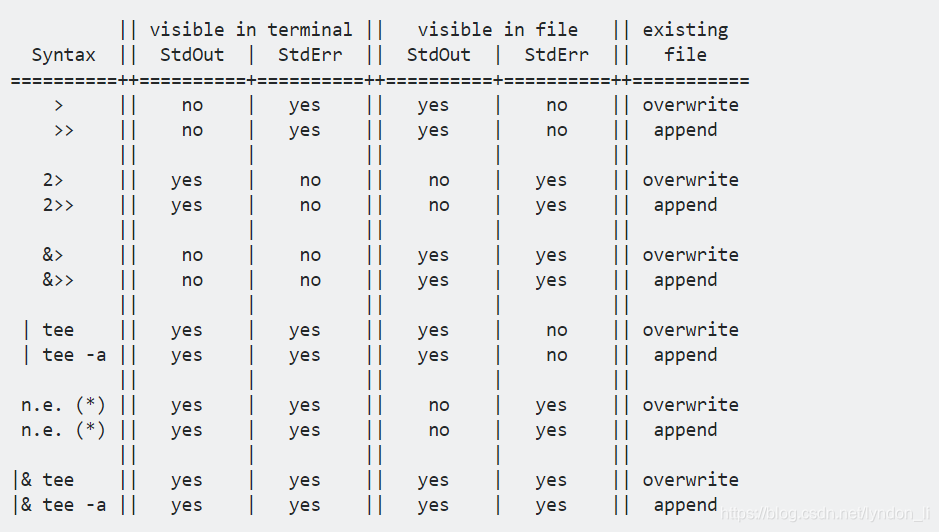
List:
command > output.txt
The standard output stream will be redirected to the file only, it will not be visible in the terminal. If the file already exists, it gets overwritten.
command >> output.txt
The standard output stream will be redirected to the file only, it will not be visible in the terminal. If the file already exists, the new data will get appended to the end of the file.
command 2> output.txt
The standard error stream will be redirected to the file only, it will not be visible in the terminal. If the file already exists, it gets overwritten.
command 2>> output.txt
The standard error stream will be redirected to the file only, it will not be visible in the terminal. If the file already exists, the new data will get appended to the end of the file.
command &> output.txt
Both the standard output and standard error stream will be redirected to the file only, nothing will be visible in the terminal. If the file already exists, it gets overwritten.
command &>> output.txt
Both the standard output and standard error stream will be redirected to the file only, nothing will be visible in the terminal. If the file already exists, the new data will get appended to the end of the file…
command | tee output.txt
The standard output stream will be copied to the file, it will still be visible in the terminal. If the file already exists, it gets overwritten.
command | tee -a output.txt
The standard output stream will be copied to the file, it will still be visible in the terminal. If the file already exists, the new data will get appended to the end of the file.
(*)
Bash has no shorthand syntax that allows piping only StdErr to a second command, which would be needed here in combination with tee again to complete the table. If you really need something like that, please look at “How to pipe stderr, and not stdout?” on Stack Overflow for some ways how this can be done e.g. by swapping streams or using process substitution.
command |& tee output.txt
Both the standard output and standard error streams will be copied to the file while still being visible in the terminal. If the file already exists, it gets overwritten.
command |& tee -a output.txt
Both the standard output and standard error streams will be copied to the file while still being visible in the terminal. If the file already exists, the new data will get appended to the end of the file.
转载自:https://askubuntu.com/questions/420981/how-do-i-save-terminal-output-to-a-file
参考:https://segmentfault.com/a/1190000015143583

讨论HarmonyOS开发技术,专注于API与组件、DevEco Studio、测试、元服务和应用上架分发等。
更多推荐



 1
1 0
0- 0


 已为社区贡献1条内容

所有评论(0)