HarmonyOS
学习总结博客
HarmonyOS
第一章
了解鸿蒙
鸿蒙操作系统(HarmonyOS)是华为公司发布的一款智能终端系统,是一款基于微内核的面向全场景的分布式操作系统。以下是关于鸿蒙系统的一些详细信息:
发展历程
系统的萌芽:华为从 2012 年开始规划自有操作系统,2016 年 5 月,华为消费者 BG 软件部开始立项研发分布式操作系统 1.0 版本,2018 年初,消费者软件部认为需要打造全场景时代的软件底座,把华为的系统装载到各种设备上,这一思路得到任正非认可。2018 年 5 月,自研分布式操作系统获得华为消费者 BG 投资,成为正式项目。
系统正式诞生:2019 年 8 月 9 日,在开发者大会上发布 EMUI 10 的同时宣告了 HarmonyOS 1.0 的诞生,当时 HarmonyOS 1.0 只搭载在家用电器上,第一个落地产品是华为旗下荣耀的智慧屏。
正式进入市场:2021 年 6 月 2 日,华为 Harmony 鸿蒙发布会启动,HarmonyOS 2.0 正式发布,正式覆盖手机等移动终端,标志着该系统正式进入市场。
打造万物互联:2022 年 7 月,HarmonyOS 3.0 正式发布,万物互联成为其新标签,华为首次提出围绕五大场景及创新技术的 “鸿蒙世界” 概念。
原生应用启动:2023 年 8 月 4 日,HarmonyOS 4.0 操作系统正式发布,具备元服务、分布式万物互联、大智慧、更安全、更个性等特点。此外,华为还推出了面向开发者的 HarmonyOS NEXT 预览版,其系统底座由华为全线自研,去掉了 Linux 内核以及 AOSP 等代码,仅支持鸿蒙内核和鸿蒙系统的应用,标志着鸿蒙原生应用全面启动。
系统特点
- 分布式架构:可以让多种设备通过系统直接连通,不需要用 App 整合,意味着基于 HarmonyOS 的应用程序可以同时运行在华为手机、平板电脑、电视、智能手表、智能家电等多种设备上,实现跨终端无缝协同体验。
统一 OS。 - 弹性部署:一套操作系统可以满足不同能力的设备需求,实现统一 OS,弹性部署,小到耳机,大到车机、智慧屏、手机等设备,都能使用同一语言无缝沟通。
硬件互助。 - 资源共享:搭载 HarmonyOS 的每个设备都不是孤立的,在系统层让多终端融为一体,成为 “超级终端”,终端之间能力互助共享,带来无缝协同体验。
- 一次开发,多端部署:开发者基于分布式应用框架,写一次逻辑代码,就可以部署在多种终端上,降低了开发成本和难度。
系统优势
- 用户体验一致:通过分布式架构,能在不同设备间实现无缝切换,为用户提供一致的体验。
- 安全性高:采用微内核设计,减少了攻击面,提高了系统的安全性。
- 硬件适应性强:模块化设计使其能兼容多种设备,适应不同硬件平台的需求。
- 开发效率提升:提供全面的开发框架,助力开发者更高效地进行应用开发。
- 生态系统开放:采取开源策略,鼓励全球开发者参与,共同推动鸿蒙生态的发展。
- 物联网优化:支持大量设备连接和智能交互,适用于物联网场景,推动万物互联的发展。
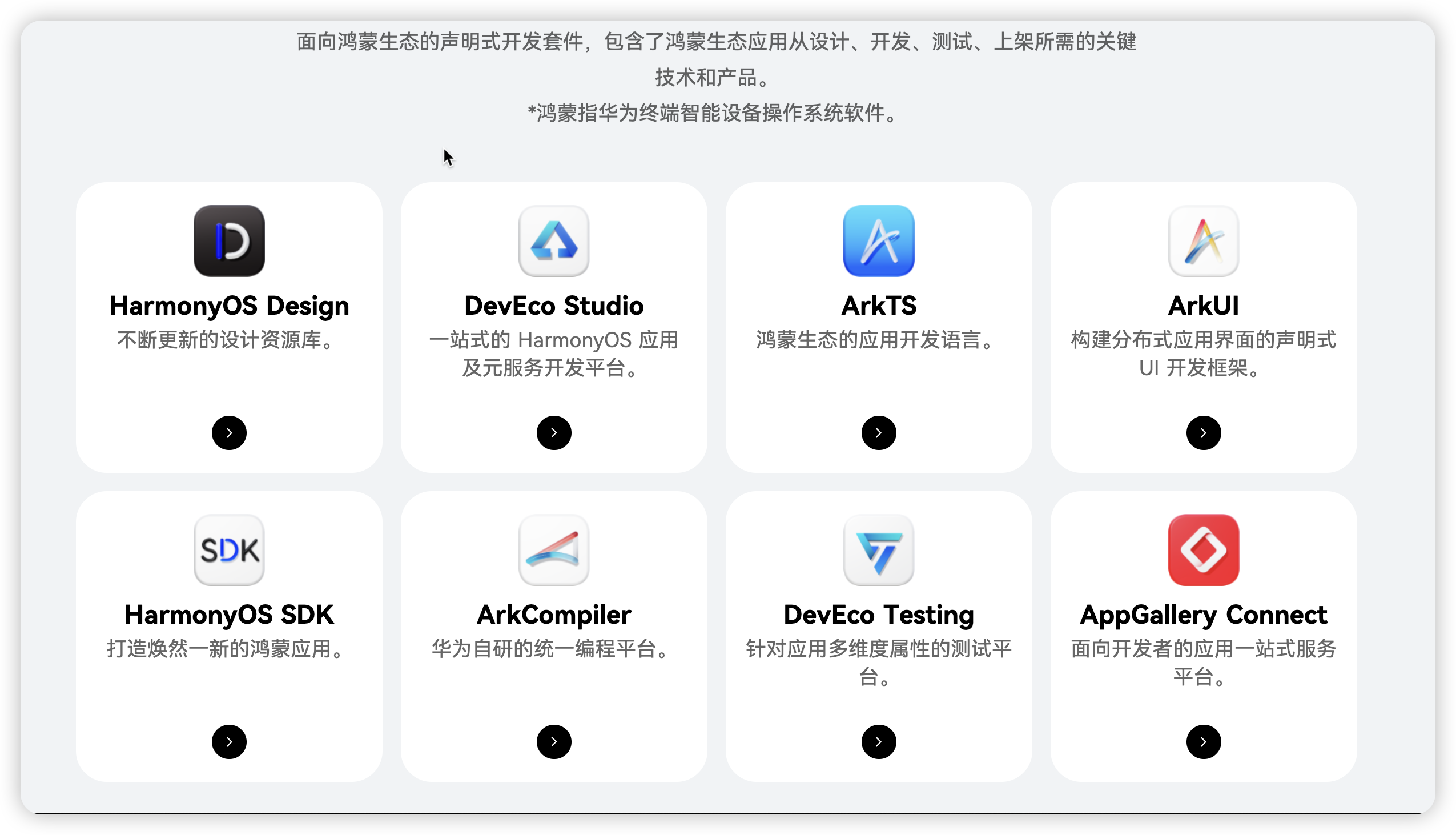
开发模式
- 基于ArkTS语言来进行声明式的ui开发规范。
- 类web的开发模式 :采用传统的html+css+js的开发模式。适用于有web开发经验的开发者快速上手的开发模式。
官方主推采用ArkTS语言的开发模式。后期也有可能采用仓颉语言。
开发准备
建议参考官方的开发文档
开发文档:
https://developer.huawei.com/consumer/cn/doc/harmonyos-guides/application-dev-guide
下载DevEcoStudio
DevEco Studio支持Windows和macOS系统,下面将针对两种操作系统的软件安装方式分别进行介绍。
Windows环境
为保证DevEco Studio正常运行,建议电脑配置满足如下要求:
- 操作系统:Windows10 64位、Windows11 64位
- 内存:16GB及以上
- 硬盘:100GB及以上
- 分辨率:1280*800像素及以上
macOS环境
为保证DevEco Studio正常运行,建议电脑配置满足如下要求:
- 操作系统:macOS(X86) 11/12/13/14 macOS(ARM) 12/13/14
- 内存:8GB及以上
- 硬盘:100GB及以上
- 分辨率:1280*800像素及以上
诊断开发环境:
也可以在菜单栏单击Help > Diagnostic Tools > Diagnose Development Environment进行诊断。
启用中文插件:
单击File > Settings (macOS为DevEco Studio > Preferences )> Plugins,选择Installed页签,在搜索框输入“Chinese”,搜索结果里将出现Chinese(Simplified),在右侧单击Enable,单击OK。
创建项目
打开DevEco Studio,在欢迎页单击Create Project,创建一个新工程。
根据工程创建向导,选择创建Application或Atomic Service。选择Empty Ability模板,然后单击Next。关于工程模板的介绍和支持的设备类型,请参考工程模板介绍。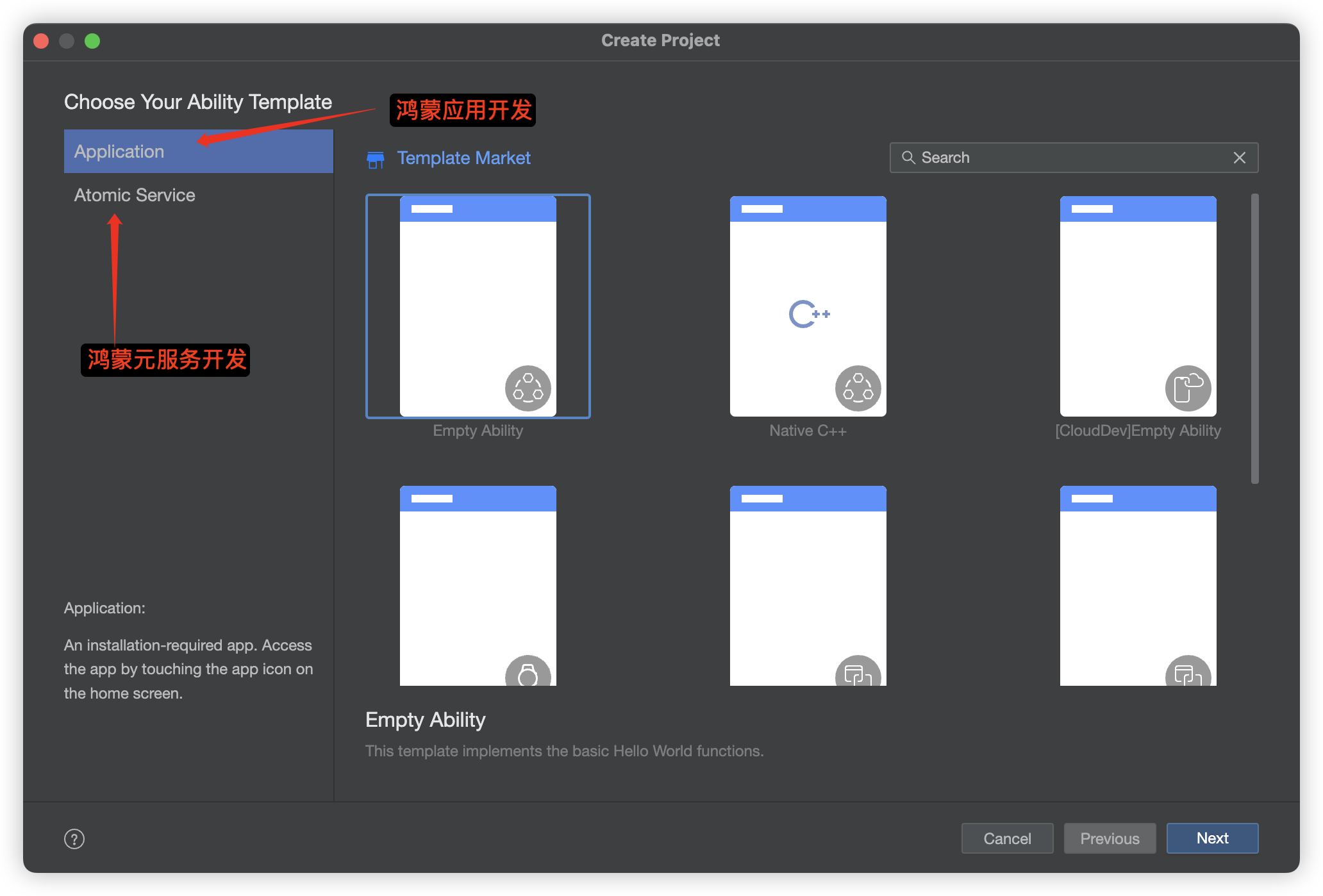
填写工程相关信息,单击Finish。关于各个参数的详细介绍,请参考创建一个新的工程。
工程创建完成后,DevEco Studio会自动进行工程的同步。
运行Hello World
项目结构介绍
ArkTS工程目录结构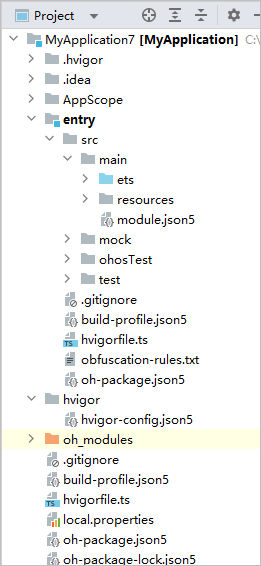
AppScope > app.json5:应用的全局配置信息。
AppScope目录由DevEco Studio自动生成,不可更改。
Module目录名称可以由DevEco Studio自动生成(比如entry、library等),也可以自定义。
entry:应用/元服务模块,编译构建生成一个HAP。src > main > ets:用于存放ArkTS源码。
src > main > ets > entryability:应用/元服务的入口。
src > main > ets > pages:应用/元服务包含的页面。
src > main > resources:用于存放应用/元服务模块所用到的资源文件,如图形、多媒体、字符串、布局文件等。
src > main > module.json5:Stage模型模块配置文件,主要包含HAP的配置信息、应用在具体设备上的配置信息以及应用的全局配置信息。具体请参考module.json5配置文件。
build-profile.json5:当前的模块信息、编译信息配置项,包括buildOption、targets配置等。
hvigorfile.ts:模块级编译构建任务脚本。
oh-package.json5:描述三方包的包名、版本、入口文件(类型声明文件)和依赖项等信息。
oh_modules:用于存放三方库依赖信息,包含应用/元服务所依赖的第三方库文件。
build-profile.json5:应用级配置信息,包括签名、产品配置等。
hvigorfile.ts:应用级编译构建任务脚本。
oh-package.json5:描述全局配置,如:依赖覆盖(overrides)、依赖关系重写(overrideDependencyMap)和参数化配置(parameterFile)等。
C++工程目录结构(Stage模型)与 JS工程目录结构(FA模型)参考:
https://developer.huawei.com/consumer/cn/doc/harmonyos-guides/ide-project-structure
第二章
了解ArkTS语言
ArkTS是一种为构建高性能应用而设计的编程语言。ArkTS在继承TypeScript语法的基础上进行了优化,以提供更高的性能和开发效率。目前流行的编程语言TypeScript是在JavaScript基础上通过添加类型定义扩展而来的,而ArkTS则是TypeScript的进一步扩展。
参考手册
ArkTS 作为 HarmonyOS 的专用开发语言,在很多方面提供了比传统 HTML/CSS/JS 更简洁、更高效的实现方式。特别是在组件化、状态管理和布局系统方面,ArkTS 的声明式语法大大减少了样板代码。
但本质上,ArkTS 的 UI 组件最终还是会被编译为原生组件或 Web 组件,因此与 HTML/CSS/JS 存在着对应关系。理解这种对应关系有助于从 Web 开发过渡到 HarmonyOS 应用开发。
以下对ArkTS语法和web开发的语法作一下对比,大家可以参考:
ArkTS 与 HTML/CSS/JS 完整对照表
一、基础组件对照表
| ArkTS 组件 | HTML/CSS/JS 对应 | 说明 |
|---|---|---|
Text('内容') |
<span class="text">内容</span> |
文本显示,需配合 CSS 样式 |
Button('按钮') |
<button class="button">按钮</button> |
按钮,需配合 CSS 样式 |
Image($r('app.media.logo')) |
<img src="logo.png" alt="Logo" class="image"> |
图片显示,需资源引用 |
Input() |
<input type="text" class="input"> |
输入框,需配合 CSS 样式 |
Checkbox() |
<input type="checkbox" class="checkbox"> |
复选框,需配合 CSS 样式 |
Radio() |
<input type="radio" name="group" class="radio"> |
单选按钮,需配合 CSS 样式 |
Select() |
<select class="select"> |
下拉选择框,需配合 CSS 样式 |
Option() |
<option value="value">选项</option> |
下拉选项 |
Slider() |
<input type="range" min="0" max="100" class="slider"> |
滑块组件,需配合 CSS 样式 |
Progress() |
<progress value="50" max="100" class="progress"> |
进度条,需配合 CSS 样式 |
Switch() |
<label class="switch"><input type="checkbox"><span class="slider round"></span></label> |
开关组件,需自定义 CSS 实现 |
Divider() |
<hr class="divider"> |
分隔线,需配合 CSS 样式 |
Badge() |
<span class="badge">1</span> |
徽章组件,需配合 CSS 样式 |
SearchInput() |
<input type="search" class="search-input"> |
搜索框,需配合 CSS 样式 |
TextArea() |
<textarea class="textarea"></textarea> |
多行文本输入,需配合 CSS 样式 |
二、容器组件对照表
| ArkTS 组件 | HTML/CSS/JS 对应 | 说明 |
|---|---|---|
Column() |
<div class="column"></div> |
垂直布局,需配合 CSS display: flex; flex-direction: column |
Row() |
<div class="row"></div> |
水平布局,需配合 CSS display: flex; flex-direction: row |
Stack() |
<div class="stack"></div> |
层叠布局,需配合 CSS position: relative |
Flex() |
<div class="flex"></div> |
弹性布局,需配合 CSS display: flex |
Grid() |
<div class="grid"></div> |
网格布局,需配合 CSS display: grid |
List() |
<ul class="list"></ul> |
列表组件,需配合 CSS 样式 |
ListItem() |
<li class="list-item"></li> |
列表项,需配合 CSS 样式 |
TabBar() |
<div class="tab-bar"></div> |
标签栏,需自定义 CSS 和 JS 实现切换逻辑 |
TabContent() |
<div class="tab-content"></div> |
标签内容,需自定义 CSS 和 JS 实现切换逻辑 |
ScrollView() |
<div class="scroll-view" style="overflow: auto;"></div> |
滚动视图,需配合 CSS 样式 |
Popup() |
<div class="popup"></div> |
弹出层,需自定义 CSS 和 JS 实现显示/隐藏逻辑 |
Dialog() |
<div class="dialog"></div> |
对话框,需自定义 CSS 和 JS 实现显示/隐藏逻辑 |
Drawer() |
<div class="drawer"></div> |
抽屉组件,需自定义 CSS 和 JS 实现滑动逻辑 |
三、属性与样式对照表
1. 尺寸与位置
| ArkTS 属性 | HTML/CSS 对应 |
|---|---|
.width(100) |
style="width: 100px" 或 .class { width: 100px; } |
.height(50) |
style="height: 50px" 或 .class { height: 50px; } |
.minWidth(50) |
style="min-width: 50px" 或 .class { min-width: 50px; } |
.maxWidth(200) |
style="max-width: 200px" 或 .class { max-width: 200px; } |
.minHeight(30) |
style="min-height: 30px" 或 .class { min-height: 30px; } |
.maxHeight(150) |
style="max-height: 150px" 或 .class { max-height: 150px; } |
.margin(10) |
style="margin: 10px" 或 .class { margin: 10px; } |
.marginLeft(5) |
style="margin-left: 5px" 或 .class { margin-left: 5px; } |
.marginTop(8) |
style="margin-top: 8px" 或 .class { margin-top: 8px; } |
.marginRight(12) |
style="margin-right: 12px" 或 .class { margin-right: 12px; } |
.marginBottom(15) |
style="margin-bottom: 15px" 或 .class { margin-bottom: 15px; } |
.padding(10) |
style="padding: 10px" 或 .class { padding: 10px; } |
.paddingLeft(5) |
style="padding-left: 5px" 或 .class { padding-left: 5px; } |
.paddingTop(8) |
style="padding-top: 8px" 或 .class { padding-top: 8px; } |
.paddingRight(12) |
style="padding-right: 12px" 或 .class { padding-right: 12px; } |
.paddingBottom(15) |
style="padding-bottom: 15px" 或 .class { padding-bottom: 15px; } |
.position(Position.Absolute) |
style="position: absolute" 或 .class { position: absolute; } |
.position(Position.Relative) |
style="position: relative" 或 .class { position: relative; } |
.position(Position.Fixed) |
style="position: fixed" 或 .class { position: fixed; } |
.position(Position.Static) |
style="position: static" 或 .class { position: static; } |
.left(20) |
style="left: 20px" 或 .class { left: 20px; } |
.top(30) |
style="top: 30px" 或 .class { top: 30px; } |
.right(15) |
style="right: 15px" 或 .class { right: 15px; } |
.bottom(25) |
style="bottom: 25px" 或 .class { bottom: 25px; } |
2. 文本样式
| ArkTS 属性 | HTML/CSS 对应 |
|---|---|
.fontSize(16) |
style="font-size: 16px" 或 .class { font-size: 16px; } |
.fontColor('#333333') |
style="color: #333333" 或 .class { color: #333333; } |
.fontWeight(FontWeight.Bold) |
style="font-weight: bold" 或 .class { font-weight: bold; } |
.fontWeight(FontWeight.Normal) |
style="font-weight: normal" 或 .class { font-weight: normal; } |
.fontStyle(FontStyle.Italic) |
style="font-style: italic" 或 .class { font-style: italic; } |
.fontStyle(FontStyle.Normal) |
style="font-style: normal" 或 .class { font-style: normal; } |
.textAlign(TextAlign.Center) |
style="text-align: center" 或 .class { text-align: center; } |
.textAlign(TextAlign.Left) |
style="text-align: left" 或 .class { text-align: left; } |
.textAlign(TextAlign.Right) |
style="text-align: right" 或 .class { text-align: right; } |
.textDecoration(TextDecoration.Underline) |
style="text-decoration: underline" 或 .class { text-decoration: underline; } |
.textDecoration(TextDecoration.LineThrough) |
style="text-decoration: line-through" 或 .class { text-decoration: line-through; } |
.textDecoration(TextDecoration.None) |
style="text-decoration: none" 或 .class { text-decoration: none; } |
.fontFamily('Arial') |
style="font-family: Arial" 或 .class { font-family: Arial; } |
.letterSpacing(2) |
style="letter-spacing: 2px" 或 .class { letter-spacing: 2px; } |
.lineHeight(1.5) |
style="line-height: 1.5" 或 .class { line-height: 1.5; } |
.textOverflow(TextOverflow.Ellipsis) |
style="white-space: nowrap; overflow: hidden; text-overflow: ellipsis" |
.maxLines(2) |
style="display: -webkit-box; -webkit-line-clamp: 2; -webkit-box-orient: vertical; overflow: hidden" |
3. 背景与边框
| ArkTS 属性 | HTML/CSS 对应 |
|---|---|
.backgroundColor('#F5F5F5') |
style="background-color: #F5F5F5" 或 .class { background-color: #F5F5F5; } |
.backgroundImage($r('app.media.bg')) |
style="background-image: url('bg.png')" 或 .class { background-image: url('bg.png'); } |
.backgroundRepeat(BackgroundRepeat.NoRepeat) |
style="background-repeat: no-repeat" 或 .class { background-repeat: no-repeat; } |
.backgroundSize(BackgroundSize.Cover) |
style="background-size: cover" 或 .class { background-size: cover; } |
.backgroundPosition(BackgroundPosition.Center) |
style="background-position: center" 或 .class { background-position: center; } |
.borderRadius(8) |
style="border-radius: 8px" 或 .class { border-radius: 8px; } |
.borderWidth(2) |
style="border-width: 2px" 或 .class { border-width: 2px; } |
.borderColor('#CCCCCC') |
style="border-color: #CCCCCC" 或 .class { border-color: #CCCCCC; } |
.borderStyle(BorderStyle.Solid) |
style="border-style: solid" 或 .class { border-style: solid; } |
.borderStyle(BorderStyle.Dashed) |
style="border-style: dashed" 或 .class { border-style: dashed; } |
.borderStyle(BorderStyle.Dotted) |
style="border-style: dotted" 或 .class { border-style: dotted; } |
.opacity(0.7) |
style="opacity: 0.7" 或 .class { opacity: 0.7; } |
.shadow({ blurRadius: 10, offsetX: 2, offsetY: 2, color: '#00000029' }) |
style="box-shadow: 2px 2px 10px rgba(0, 0, 0, 0.16)" |
.elevation(5) |
style="box-shadow: 0 5px 10px rgba(0, 0, 0, 0.1)" 或 .class { box-shadow: 0 5px 10px rgba(0, 0, 0, 0.1); } |
4. 交互属性
| ArkTS 属性 | HTML/CSS/JS 对应 |
|---|---|
.enabled(false) |
disabled 属性 或 style="pointer-events: none; opacity: 0.5" |
.focusable(true) |
tabindex="0" 或 style="outline: none" |
.clickable(false) |
style="pointer-events: none" 或 .class { pointer-events: none; } |
.longPressable(true) |
需通过 JavaScript 实现长按事件监听 |
.draggable(true) |
draggable="true" 或通过 JavaScript 实现拖拽逻辑 |
.scrollable() |
style="overflow: auto" 或 .class { overflow: auto; } |
.scrollBarEnabled(false) |
style="scrollbar-width: none" 或 .class { scrollbar-width: none; } |
.onTouch(() => {...}) |
addEventListener('touchstart', ...) |
.onTouchMove(() => {...}) |
addEventListener('touchmove', ...) |
.onTouchEnd(() => {...}) |
addEventListener('touchend', ...) |
.onKeyEvent(() => {...}) |
addEventListener('keydown', ...) |
.onKeyUp(() => {...}) |
addEventListener('keyup', ...) |
.onFocus(() => {...}) |
addEventListener('focus', ...) |
.onBlur(() => {...}) |
addEventListener('blur', ...) |
四、事件处理对照表
| ArkTS 事件 | HTML/JS 对应 |
|---|---|
.onClick(() => {...}) |
onclick="..." 或 addEventListener('click', ...) |
.onDoubleClick(() => {...}) |
ondblclick="..." 或 addEventListener('dblclick', ...) |
.onLongClick(() => {...}) |
通过 JavaScript 实现长按事件监听 |
.onChange((value) => {...}) |
onchange="..." 或 addEventListener('change', ...) |
.onInput((text) => {...}) |
oninput="..." 或 addEventListener('input', ...) |
.onSubmit(() => {...}) |
onsubmit="..." 或 addEventListener('submit', ...) |
.onScroll(() => {...}) |
addEventListener('scroll', ...) |
.onAppear(() => {...}) |
通过 Intersection Observer API 或 DOMContentLoaded 事件实现 |
.onDisAppear(() => {...}) |
通过 Intersection Observer API 或元素移除事件实现 |
.onTouchStart(() => {...}) |
addEventListener('touchstart', ...) |
.onTouchMove(() => {...}) |
addEventListener('touchmove', ...) |
.onTouchEnd(() => {...}) |
addEventListener('touchend', ...) |
.onKeyDown(() => {...}) |
addEventListener('keydown', ...) |
.onKeyUp(() => {...}) |
addEventListener('keyup', ...) |
.onFocus(() => {...}) |
addEventListener('focus', ...) |
.onBlur(() => {...}) |
addEventListener('blur', ...) |
.onSwipe(() => {...}) |
通过 JavaScript 实现滑动手势监听 |
.onPinch(() => {...}) |
通过 JavaScript 实现缩放手势监听 |
.onRotate(() => {...}) |
通过 JavaScript 实现旋转手势监听 |
五、特殊组件对照表
| ArkTS 组件 | HTML/CSS/JS 对应 | 说明 |
|---|---|---|
Web() |
<iframe src="https://example.com" class="web-view"></iframe> |
网页视图,需配合 CSS 样式 |
Video() |
<video controls class="video-player"><source src="video.mp4" type="video/mp4"></video> |
视频播放,需配合 CSS 样式 |
Audio() |
<audio controls class="audio-player"><source src="audio.mp3" type="audio/mpeg"></audio> |
音频播放,需配合 CSS 样式 |
Map() |
<div id="map-container" class="map"></div> |
地图组件,需集成第三方地图 API(如高德、百度地图) |
Calendar() |
<div class="calendar"></div> |
日历组件,需自定义实现或使用第三方库 |
DatePicker() |
<input type="date" class="date-picker"> |
日期选择器,需配合 CSS 样式 |
TimePicker() |
<input type="time" class="time-picker"> |
时间选择器,需配合 CSS 样式 |
DateTimePicker() |
<input type="datetime-local" class="datetime-picker"> |
日期时间选择器,需配合 CSS 样式 |
ColorPicker() |
<input type="color" class="color-picker"> |
颜色选择器,需配合 CSS 样式 |
Toast() |
<div class="toast">消息</div> |
提示框,需自定义 CSS 和 JS 实现显示/隐藏逻辑 |
Dialog() |
<div class="dialog"><div class="dialog-content">内容</div></div> |
对话框,需自定义 CSS 和 JS 实现显示/隐藏逻辑 |
Menu() |
<div class="menu"><ul class="menu-items"><li>菜单项</li></ul></div> |
菜单组件,需自定义 CSS 和 JS 实现展开/收起逻辑 |
ActionSheet() |
<div class="action-sheet"><ul class="action-items"><li>操作项</li></ul></div> |
操作表,需自定义 CSS 和 JS 实现显示/隐藏逻辑 |
ProgressBar() |
<div class="progress-bar"><div class="progress-value" style="width: 50%"></div></div> |
进度条,需自定义 CSS 样式 |
Slider() |
<input type="range" min="0" max="100" value="50" class="slider"> |
滑块,需配合 CSS 样式 |
Switch() |
<label class="switch"><input type="checkbox"><span class="slider round"></span></label> |
开关,需自定义 CSS 样式 |
Rating() |
<div class="rating"><span class="star">★</span><span class="star">★</span><span class="star">★</span></div> |
评分组件,需自定义 CSS 和 JS 实现 |
六、状态管理对照表
| ArkTS 装饰器/方法 | HTML/JS 实现方式 | 说明 |
|---|---|---|
@State |
手动管理变量 + DOM 更新 | 组件内状态,变化时触发 UI 更新 |
@Link |
父组件传递引用 + 回调更新 | 双向数据绑定 |
@Prop |
父组件传递属性 | 单向数据流 |
@Provide |
全局状态管理对象 | 提供数据供子孙组件使用 |
@Consume |
从全局状态获取数据 | 消费由 Provide 提供的数据 |
@StorageLink |
localStorage + 手动监听变化 |
持久化存储状态 |
@ObjectLink |
手动管理对象引用 + 深拷贝 | 对象类型的双向数据绑定 |
@ObservedObject |
手动监听对象属性变化 | 观察对象属性变化并触发更新 |
@StateProp |
结合 @State 和 @Prop 的特性 |
可内部修改的外部传入属性 |
setState(() => {...}) |
手动更新状态并触发重渲染 | 更新状态的函数式方式 |
七、生命周期方法对照表
| ArkTS 方法 | HTML/JS 对应 | 说明 |
|---|---|---|
aboutToAppear() |
componentWillMount (React) 或 document.addEventListener('DOMContentLoaded', ...) |
组件即将渲染时调用 |
build() |
渲染函数(如 React 的 render 方法) | 构建 UI 界面 |
aboutToDisappear() |
componentWillUnmount (React) 或元素移除前的清理逻辑 |
组件即将销毁时调用 |
onPageShow() |
window.addEventListener('pageshow', ...) |
页面显示时调用 |
onPageHide() |
window.addEventListener('pagehide', ...) |
页面隐藏时调用 |
onDestroy() |
自定义清理函数,在元素移除前调用 | 组件销毁时调用 |
onReady() |
document.addEventListener('DOMContentLoaded', ...) |
组件准备好时调用 |
onShow() |
window.addEventListener('focus', ...) |
组件显示时调用 |
onHide() |
window.addEventListener('blur', ...) |
组件隐藏时调用 |
八、动画与过渡对照表
| ArkTS API | HTML/CSS/JS 对应 |
|---|---|
.animateTo({ opacity: 0.5, duration: 300 }) |
CSS 过渡:transition: opacity 0.3s 或 Web Animations API |
.rotation(45) |
style="transform: rotate(45deg)" 或 .class { transform: rotate(45deg); } |
.scale(1.2) |
style="transform: scale(1.2)" 或 .class { transform: scale(1.2); } |
.translate({ x: 10, y: 20 }) |
style="transform: translate(10px, 20px)" 或 .class { transform: translate(10px, 20px); } |
.skew({ x: 10, y: 20 }) |
style="transform: skew(10deg, 20deg)" 或 .class { transform: skew(10deg, 20deg); } |
.blur(5) |
style="filter: blur(5px)" 或 .class { filter: blur(5px); } |
.brightness(0.8) |
style="filter: brightness(0.8)" 或 .class { filter: brightness(0.8); } |
.saturate(1.5) |
style="filter: saturate(150%)" 或 .class { filter: saturate(150%); } |
.grayscale(0.5) |
style="filter: grayscale(50%)" 或 .class { filter: grayscale(50%); } |
.sepia(0.7) |
style="filter: sepia(70%)" 或 .class { filter: sepia(70%); } |
.hueRotate(90) |
style="filter: hue-rotate(90deg)" 或 .class { filter: hue-rotate(90deg); } |
.invert(0.5) |
style="filter: invert(50%)" 或 .class { filter: invert(50%); } |
.dropShadow({ blurRadius: 5, color: '#000000' }) |
style="filter: drop-shadow(0 0 5px #000000)" |
.animation({ duration: 1000, curve: Curve.EaseInOut }) |
CSS 动画:@keyframes 或 Web Animations API |
.fadeIn() |
opacity: 0 到 opacity: 1 的过渡动画 |
.fadeOut() |
opacity: 1 到 opacity: 0 的过渡动画 |
.slideIn({ direction: Direction.Right }) |
从右侧滑入的动画,需自定义 CSS |
.slideOut({ direction: Direction.Bottom }) |
向底部滑出的动画,需自定义 CSS |
.scaleIn() |
从缩小到正常大小的动画,需自定义 CSS |
.scaleOut() |
从正常大小到缩小的动画,需自定义 CSS |
九、布局属性对照表
| ArkTS 属性 | HTML/CSS 对应 |
|---|---|
.alignItems(HorizontalAlign.Center) |
style="align-items: center" 或 .class { align-items: center; } |
.alignItems(HorizontalAlign.Start) |
style="align-items: flex-start" 或 .class { align-items: flex-start; } |
.alignItems(HorizontalAlign.End) |
style="align-items: flex-end" 或 .class { align-items: flex-end; } |
.justifyContent(FlexAlign.SpaceAround) |
style="justify-content: space-around" 或 .class { justify-content: space-around; } |
.justifyContent(FlexAlign.SpaceBetween) |
style="justify-content: space-between" 或 .class { justify-content: space-between; } |
.justifyContent(FlexAlign.SpaceEvenly) |
style="justify-content: space-evenly" 或 .class { justify-content: space-evenly; } |
.justifyContent(FlexAlign.Start) |
style="justify-content: flex-start" 或 .class { justify-content: flex-start; } |
.justifyContent(FlexAlign.End) |
style="justify-content: flex-end" 或 .class { justify-content: flex-end; } |
.flexGrow(1) |
style="flex-grow: 1" 或 .class { flex-grow: 1; } |
.flexShrink(0) |
style="flex-shrink: 0" 或 .class { flex-shrink: 0; } |
.flexBasis('50%') |
style="flex-basis: 50%" 或 .class { flex-basis: 50%; } |
.order(2) |
style="order: 2" 或 .class { order: 2; } |
.gridTemplateColumns('1fr 2fr') |
style="grid-template-columns: 1fr 2fr" 或 .class { grid-template-columns: 1fr 2fr; } |
.gridTemplateRows('auto 100px') |
style="grid-template-rows: auto 100px" 或 .class { grid-template-rows: auto 100px; } |
.gridGap(10) |
style="grid-gap: 10px" 或 .class { grid-gap: 10px; } |
.gridColumnStart(2) |
style="grid-column-start: 2" 或 .class { grid-column-start: 2; } |
.gridRowStart(3) |
style="grid-row-start: 3" 或 .class { grid-row-start: 3; } |
.aspectRatio(16/9) |
style="aspect-ratio: 16/9" 或 .class { aspect-ratio: 16/9; } |
.zIndex(10) |
style="z-index: 10" 或 .class { z-index: 10; } |
十、资源引用对照表
| ArkTS 方式 | HTML/CSS/JS 对应 |
|---|---|
$r('app.media.image') |
<img src="images/image.png" alt="Image"> |
$r('app.string.hello') |
硬编码字符串或通过 i18n 库实现国际化 |
$r('app.color.primary') |
CSS 变量:var(--primary-color) 或硬编码颜色值 |
$r('app.font.myfont') |
@font-face { font-family: 'MyFont'; src: url('fonts/myfont.ttf'); } |
$r('app.media.sound') |
<audio src="sounds/sound.mp3" controls></audio> |
$r('app.media.video') |
<video src="videos/video.mp4" controls></video> |
$r('app.profile.config') |
通过 JavaScript 加载配置文件 |
$r('app.media.svg') |
<svg xmlns="http://www.w3.org/2000/svg" viewBox="0 0 100 100">...</svg> |
$r('app.i18n.en_US') |
通过 i18n 库加载对应语言包 |
十一、权限与系统能力对照表
| ArkTS API | HTML/JS 对应 | 说明 |
|---|---|---|
requestPermissions() |
navigator.permissions.request() |
请求用户权限 |
getLocation() |
navigator.geolocation.getCurrentPosition() |
获取地理位置 |
takePhoto() |
<input type="file" accept="image/*"> |
拍照或选择图片 |
recordVideo() |
<input type="file" accept="video/*"> |
录制视频或选择视频文件 |
playAudio() |
<audio src="audio.mp3" controls></audio> 或通过 JavaScript 控制 |
播放音频 |
vibrate() |
navigator.vibrate() |
触发设备振动 |
share() |
Web Share API 或自定义分享组件 | 分享内容到其他应用 |
getBatteryInfo() |
navigator.getBattery() |
获取电池信息 |
getNetworkType() |
navigator.connection.type |
获取网络类型 |
getSystemInfo() |
window.navigator 对象 |
获取系统信息 |
getAppInfo() |
通过应用上下文获取应用信息(Web 中需自定义) | 获取应用信息 |
getClipboard() |
navigator.clipboard.readText() |
读取剪贴板内容 |
setClipboard() |
navigator.clipboard.writeText() |
设置剪贴板内容 |
openUrl() |
window.open(url) |
打开 URL |
sendSms() |
window.location.href = 'sms:' + phoneNumber |
发送短信 |
makeCall() |
window.location.href = 'tel:' + phoneNumber |
拨打电话 |
十二、路由与导航对照表
| ArkTS API | HTML/JS 对应 |
|---|---|
router.pushUrl({ url: 'pages/Detail' }) |
window.location.href = 'detail.html' 或通过前端路由库(如 React Router)实现 |
router.replaceUrl({ url: 'pages/Login' }) |
window.location.replace('login.html') 或通过前端路由库实现 |
router.back() |
window.history.back() 或通过前端路由库实现 |
router.backTo({ url: 'pages/Home' }) |
通过 JavaScript 计算历史记录并跳转 |
router.clear() |
window.history.go(-window.history.length) 或通过前端路由库实现 |
router.getParams() |
new URLSearchParams(window.location.search) 或通过前端路由库获取 |
router.getUrl() |
window.location.pathname 或通过前端路由库获取 |
TabRouter |
自定义标签页切换逻辑或使用前端路由库实现 |
router.onUrlChange(() => {...}) |
window.addEventListener('popstate', ...) 或通过前端路由库监听 |
router.navigateTo({ uri: 'pages/About', params: { id: 1 } }) |
window.location.href = 'about.html?id=1' 或通过前端路由库实现 |
router.navigateBack() |
window.history.back() 或通过前端路由库实现 |
十三、数据存储对照表
| ArkTS API | HTML/JS 对应 |
|---|---|
@StorageLink |
localStorage.getItem(key) 和 localStorage.setItem(key, value) |
@StorageProp |
sessionStorage.getItem(key) 和 sessionStorage.setItem(key, value) |
preferences |
localStorage 或 IndexedDB |
fileIO |
File API 或 IndexedDB |
database |
IndexedDB 或 Web SQL |
cache |
Cache API |
getAppStoragePath() |
浏览器中无法直接获取,需通过自定义方式实现 |
saveFile() |
File API 或 IndexedDB |
readFile() |
File API 或 IndexedDB |
deleteFile() |
File API 或 IndexedDB |
listFiles() |
File API 或 IndexedDB |
十四、网络请求对照表
| ArkTS API | HTML/JS 对应 |
|---|---|
fetch() |
fetch() API |
httpRequest() |
XMLHttpRequest 或 fetch() API |
uploadFile() |
FormData 和 fetch() API |
downloadFile() |
fetch() API 或 <a download> |
websocket() |
WebSocket API |
subscribePush() |
Web Push API |
unsubscribePush() |
Web Push API |
getNetworkType() |
navigator.connection.type |
onNetworkStateChange() |
window.addEventListener('online', ...) 和 window.addEventListener('offline', ...) |
十五、多线程与后台任务对照表
| ArkTS API | HTML/JS 对应 |
|---|---|
worker() |
Web Workers API |
asyncTask() |
Promise 或 async/await |
timer() |
setTimeout() 和 setInterval() |
backgroundTask() |
Service Workers API |
jobScheduler() |
Web Workers API 或 Service Workers API |
cancelTimer() |
clearTimeout() 和 clearInterval() |
postMessage() |
Web Workers 的 postMessage() 方法 |
onMessage() |
Web Workers 的 onmessage 事件 |
这个对照表涵盖了 ArkTS 和 HTML/CSS/JS 几乎所有方面的对应关系,包括基础组件、容器组件、属性样式、事件处理、特殊组件、状态管理、生命周期、动画过渡、布局属性、资源引用、权限系统、路由导航、数据存储、网络请求以及多线程与后台任务等。每个对应关系都提供了详细的实现方式和说明,便于开发者在两种技术栈之间进行转换和参考。

讨论HarmonyOS开发技术,专注于API与组件、DevEco Studio、测试、元服务和应用上架分发等。
更多推荐
 25
25 0
0- 0


 已为社区贡献2条内容

所有评论(0)