【仓颉开发HarmonyOS系列】仓颉网络请求功能封装
摘要:本文介绍了在HarmonyOS中使用仓颉网络请求的方法和工具封装。重点讲解了net.http和ohos.net.http模块,前者支持客户端/服务端编程,后者提供了HTTP请求功能。文章通过示例代码展示了如何构建HTTP服务、发起POST请求等操作,并详细说明了HttpRequestOptions类的配置参数。该工具封装了网络请求的核心流程,包括请求构造、响应处理和异常管理,为Harmony
背景
在万物互联的智能时代,应用的核心价值往往依赖于与外部世界的实时交互:社交软件需要通过网络同步消息,电商应用依赖接口获取商品与订单数据,智能助手依靠API调用大模型能力,甚至系统级的设备协同也需通过网络传递指令。可以说,网络接口是连接应用与外部服务的“数字神经”,其稳定性、效率与易用性直接影响用户体验与开发效率。从技术角度看,网络接口是应用与远程服务器(或本地网络服务)交换数据的标准化通道,承载着数据请求(如GET/POST)、响应处理(如JSON/XML解析)、状态管理(如超时/重试)等关键功能。无论是简单的天气查询(调用气象API)、复杂的分布式任务调度(跨设备数据同步),还是用户身份认证(Token校验)、文件上传下载(如图片/视频传输),本质上都是通过网络接口完成“请求-响应”的闭环。本文介绍在HarmonyOS 场景中仓颉网络请求的使用和工具的封装。
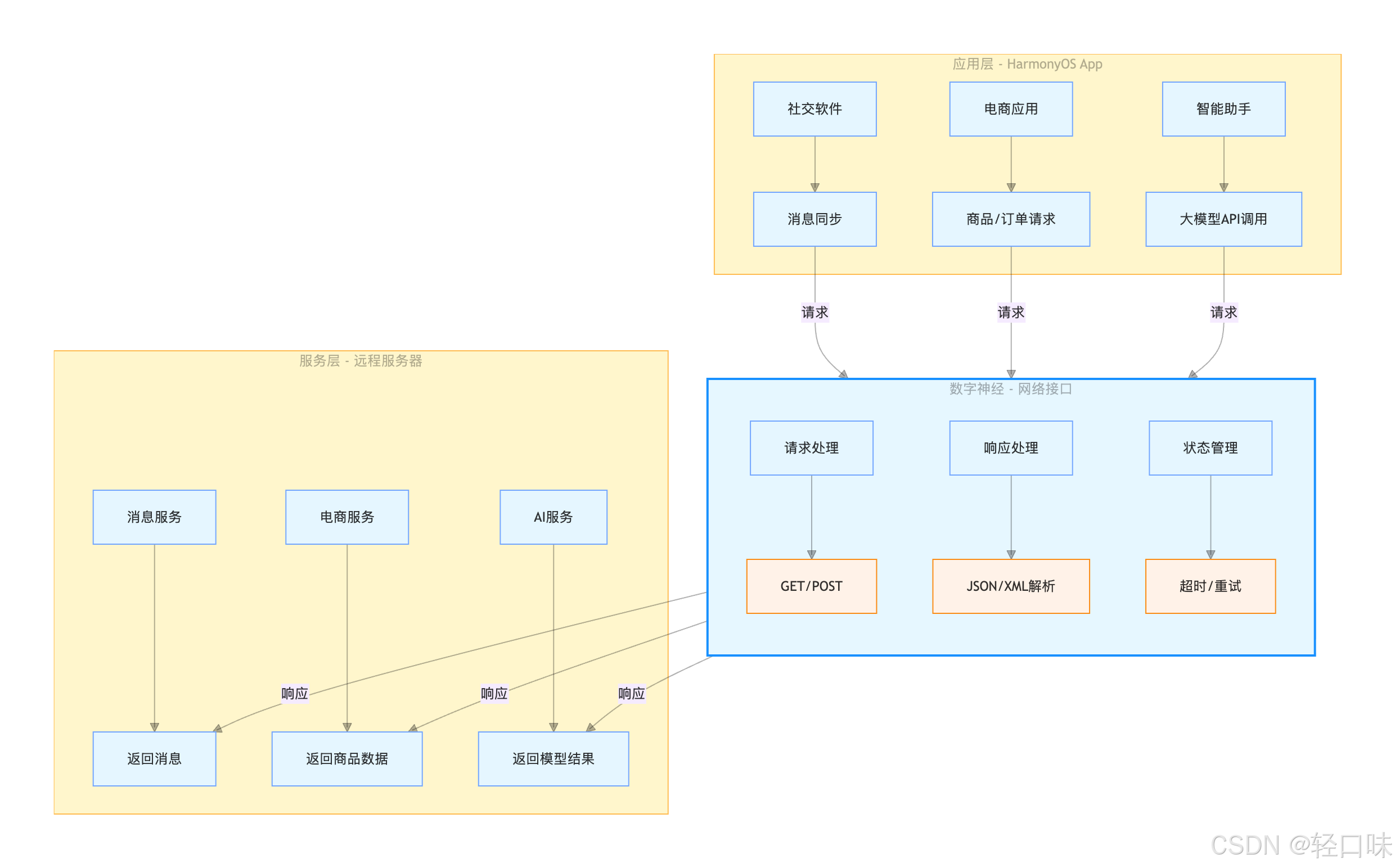
仓颉网络请求API介绍
net.http.*模块介绍
仓颉网络编程提供了Socket、HTTP、WebSocket等通信方式,在net.http.*包下提供,不仅支持客户端请求,还支持创建HTTP服务。以下示例展示了如何使用仓颉进行客户端和服务端编程:
import net.http.*
import std.time.*
import std.sync.*
import std.log.LogLevel

// 1. 构建 Server 实例
let server = ServerBuilder()
    .addr("127.0.0.1")
    .port(8080)//监听8080端口
    .build()

func startServer(): Unit {
    // 2. 注册请求处理逻辑
    server.distributor.register("/test", {httpContext =>
        httpContext.responseBuilder.body("Cangjie Success!")
    })
    server.logger.level = OFF
    // 3. 启动服务
    server.serve()
}

func startClient(): Unit {
    // 1. 构建 client 实例
    let client = ClientBuilder().build()
    // 2. 发送 request
    let response = client.get("http://127.0.0.1:8080/test")
    // 3. 读取response body
    let buffer = Array<Byte>(32, item: 0)
    let length = response.body.read(buffer)
    println(String.fromUtf8(buffer[..length]))
    // 4. 关闭连接
    client.close()
}

main () {
    spawn {
        startServer()
    }
    sleep(Duration.second)
    startClient()
}
上面示例搭建了一个简单的http服务,监听本地地址和8080端口,接口路径为test,客户端请求时返回“Cangjie Success!”。
ohos.net.http模块介绍
HarmonyOS 场景下仓颉API提供了ohos.net.http模块发起网络请求,应用可以使用该模块通过HTTP发起一个数据请求,支持常见的GET、POST、OPTIONS、HEAD、PUT、DELETE、TRACE、CONNECT方法。
在该模块下,通过HttpRequest类发起网络请求,支持普通请求和流式请求。通过HttpRequestOptions构造请求方式、请求Header等。接下来介绍使用步骤。
首先申请网络请求权限,导入模块:import ohos.net.http.*
接下来通过public func createHttp(): HttpRequest构造HttpRequest
接着构造HttpRequestOptions,然后通过public func request(url: String, callback: (?BusinessException, ?HttpResponse) -> Unit, options!: ?HttpRequestOptions = None): Unit发起网络请求,在callback中处理服务端响应事件。
最后销毁HttpRequest。
HttpRequestOptions类的构造函数如下:
public class HttpRequestOptions {
    public HttpRequestOptions(
        public let method!: RequestMethod = RequestMethod.GET,
        public let extraData!: ?HttpData = None,
        public let expectDataType!: ?HttpDataType = None,
        public let usingCache!: Bool = true,
        public let priority!: UInt32 = 1,
        public let header!: ?HashMap<String, String> = None,
        public let readTimeout!: UInt32 = 60000,
        public let connectTimeout!: UInt32 = 60000,
        public let usingProtocol!: ?HttpProtocol = None,
        public let usingProxy!: UsingProxy = USE_DEFAULT,
        public let caPath!: ?String = None,
        public let resumeFrom!: ?Int64 = None,
        public let resumeTo!: ?Int64 = None,
        public let clientCert!: ?ClientCert = None,
        public let dnsOverHttps!: ?String = None,
        public let dnsServers!: ?Array<String> = None,
        public let maxLimit!: UInt32 = 5 * 1024 * 1024,
        public let multiFormDataList!: ?Array<MultiFormData> = None
    ) {}
}
包含了请求方式,header,超时时间配置,ca证书路径等,都有默认的值。
下面介绍post请求发送Json数据示例。
var authorization: String = ""
func getHeaderMethod():HashMap<String, String>{
     if(CollectionUtils.isEmpty<String>(this.authorization)){
         LogUtil.d(TAG, "header===: Empty-cookieValue=${authorization}")
         return HashMap<String, String>([("content-type", "application/json")])
     } else {
         //var cookie:String = AppStorage.get<String>("Cookie").getOrThrow()
         LogUtil.d(TAG, "header===: Value-cookieValue=${authorization}")
         return  HashMap<String, String>([("content-type", "application/json"),("authorization",authorization)])
     }
}

//post请求
public func httpRequestPost<E>(callback: (data:BaseResponse<E>)->Unit) where E <: Serializable<E> {
    let option = HttpRequestOptions(
        method: RequestMethod.POST, // 可选,默认为http.RequestMethod.GET
        usingCache: true, // 可选,默认为true
        extraData: HttpData.STRING_DATA("{\"email\":\"${phoneNum}\"}"),
        expectDataType: HttpDataType.STRING, // 可选,指定返回数据的类型
        // 开发者根据自身业务需要添加header字段
        header:getHeaderMethod(),
        readTimeout: 60000, // 可选,默认为60000ms
        connectTimeout: 60000, // 可选,默认为60000ms
        usingProxy: UsingProxy.NOT_USE, //可选,默认不使用网络代理,自API 10开始支持该属性
    )
    let httpRequest = createHttp();
    // 用于订阅HTTP响应头,此接口会比request请求先返回。可以根据业务需要订阅此消息
    httpRequest.onHeadersReceive({header: HashMap<String, String> =>
        LogUtil.d(TAG, "resp===: header: ${header}")
    })
    try {
        httpRequest.request(http://qignkouwei.com/api/auth/send-code,{ err, resp =>
                var responseResult = Option<BaseResponse<E>>.None
                if (let Some(e) <- err) {
                    LogUtil.d(TAG, "exception: ${e.message}")
                    var jo = JsonUtil.String2JsonObject(NetUtil.getResult(400, e.message, ""))
                    responseResult = JsonUtil.JsonObject2ResponseResult<E>(jo)
                }
                if (let Some(r) <- resp) {
                    LogUtil.d(TAG, "resp===: data:${r.result}")
                    //数据类解析
                    var jo = JsonUtil.String2JsonObject(r.result.toString())
                    responseResult = JsonUtil.JsonObject2ResponseResult<E>(jo)
                } else {
                    LogUtil.d(TAG, "response is none")
                    var jo = JsonUtil.String2JsonObject(NetUtil.getResult(404, "response is none", ""))
                    responseResult = JsonUtil.JsonObject2ResponseResult<E>(jo)
                }
                callback(responseResult.getOrThrow())
                httpRequest.destroy()
            },
            options: option
        )
    } catch (exception: Exception) {
        var jo = JsonUtil.String2JsonObject(NetUtil.getResult(500, "${exception.message}", "出错了"))
        var responseResult = JsonUtil.JsonObject2ResponseResult<E>(jo)
        callback(responseResult)
    } finally {
    }
	}
}
示例中通过header增加了token身份校验。
网络请求封装
上面看起来每次操作都有很多代码,非常繁琐,一般的做法是把网络请求封装成工具,在使用的地方直接调用。
public class HttpService{
    let TAG:String = "HttpService"
    var authorization: String = ""

    //单例
    private HttpService() {}
    private static var instance: HttpService = HttpService()
    public static func getInstance(): HttpService {
        return instance
    }
    public func setAuthorization(token:String){
        LogUtil.d(TAG, "setAuthorization:${token}")
        this.authorization = "Bearer ${token}";
    }
   func getHeaderMethod():HashMap<String, String>{
        if(CollectionUtils.isEmpty<String>(this.authorization)){
            LogUtil.d(TAG, "header===: Empty-cookieValue=${authorization}")
            return HashMap<String, String>([("content-type", "application/json")])
        } else {
            //var cookie:String = AppStorage.get<String>("Cookie").getOrThrow()
            LogUtil.d(TAG, "header===: Value-cookieValue=${authorization}")
            return  HashMap<String, String>([("content-type", "application/json"),("authorization",authorization)])
        }
   }
    //get请求
    func httpRequestGet<E>(url: String, callback: (data:BaseResponse<E>)->Unit) where E <: Serializable<E> {

        let option = HttpRequestOptions(
            method: RequestMethod.GET, // 可选,默认为http.RequestMethod.GET
            expectDataType: HttpDataType.STRING, // 可选,指定返回数据的类型
            usingCache: true, // 可选,默认为true
            priority: 1, // 可选,默认为1
            // 开发者根据自身业务需要添加header字段
            header:getHeaderMethod(),
            readTimeout: 60000, // 可选,默认为60000ms
            connectTimeout: 60000, // 可选,默认为60000ms
            usingProtocol: HttpProtocol.HTTP1_1, // 可选,协议类型默认值由系统自动指定
            usingProxy: UsingProxy.NOT_USE, //可选,默认不使用网络代理,自API 10开始支持该属性
        )
        return httpRequest(url, option, callback)
    }
    //post请求
    public func httpRequestPost<E>(url: String, params: String, callback: (data:BaseResponse<E>)->Unit) where E <: Serializable<E> {
        let option = HttpRequestOptions(
            method: RequestMethod.POST, // 可选,默认为http.RequestMethod.GET
            usingCache: true, // 可选,默认为true
            extraData: HttpData.STRING_DATA(params),
            expectDataType: HttpDataType.STRING, // 可选,指定返回数据的类型
            // 开发者根据自身业务需要添加header字段
            header:getHeaderMethod(),
            readTimeout: 60000, // 可选,默认为60000ms
            connectTimeout: 60000, // 可选,默认为60000ms
            usingProxy: UsingProxy.NOT_USE, //可选,默认不使用网络代理,自API 10开始支持该属性
        )
        return httpRequest(url, option, callback)
    }
    //put请求
    public func httpRequestPut<E>(url: String, params: String, callback: (data:BaseResponse<E>)->Unit) where E <: Serializable<E> {
        let option = HttpRequestOptions(
            method: RequestMethod.PUT, // 可选,默认为http.RequestMethod.GET
            usingCache: true, // 可选,默认为true
            extraData: HttpData.STRING_DATA(params),
            expectDataType: HttpDataType.STRING, // 可选,指定返回数据的类型
            // 开发者根据自身业务需要添加header字段
            header:getHeaderMethod(),
            readTimeout: 60000, // 可选,默认为60000ms
            connectTimeout: 60000, // 可选,默认为60000ms
            usingProxy: UsingProxy.NOT_USE, //可选,默认不使用网络代理,自API 10开始支持该属性
        )
        return httpRequest(url, option, callback)
    }
    public func httpRequestDelete<E>(url: String, params: String, callback: (data:BaseResponse<E>)->Unit) where E <: Serializable<E> {
        let option = HttpRequestOptions(
            method: RequestMethod.DELETE, // 可选,默认为http.RequestMethod.GET
            usingCache: true, // 可选,默认为true
            extraData: HttpData.STRING_DATA(params),
            expectDataType: HttpDataType.STRING, // 可选,指定返回数据的类型
            // 开发者根据自身业务需要添加header字段
            header:getHeaderMethod(),
            readTimeout: 60000, // 可选,默认为60000ms
            connectTimeout: 60000, // 可选,默认为60000ms
            usingProxy: UsingProxy.NOT_USE, //可选,默认不使用网络代理,自API 10开始支持该属性
        )
        return httpRequest(url, option, callback)
    }
    func httpRequest<E>(url: String, option: HttpRequestOptions, callback: (data:BaseResponse<E>)->Unit) where E <: Serializable<E>{
        let httpRequest = createHttp();
        // 用于订阅HTTP响应头,此接口会比request请求先返回。可以根据业务需要订阅此消息
        httpRequest.onHeadersReceive({header: HashMap<String, String> =>
            LogUtil.d(TAG, "resp===: header: ${header}")
        })
        try {
            httpRequest.request(url,{ err, resp =>
                    var responseResult = Option<BaseResponse<E>>.None
                    if (let Some(e) <- err) {
                        LogUtil.d(TAG, "exception: ${e.message}")
                        var jo = JsonUtil.String2JsonObject(NetUtil.getResult(400, e.message, ""))
                        responseResult = JsonUtil.JsonObject2ResponseResult<E>(jo)
                    }
                    if (let Some(r) <- resp) {
                        LogUtil.d(TAG, "resp===: data:${r.result}")
                        //数据类解析
                        var jo = JsonUtil.String2JsonObject(r.result.toString())
                        responseResult = JsonUtil.JsonObject2ResponseResult<E>(jo)
                    } else {
                        LogUtil.d(TAG, "response is none")
                        var jo = JsonUtil.String2JsonObject(NetUtil.getResult(404, "response is none", ""))
                        responseResult = JsonUtil.JsonObject2ResponseResult<E>(jo)
                    }
                    callback(responseResult.getOrThrow())
                    httpRequest.destroy()
                },
                options: option
            )
        } catch (exception: Exception) {
            var jo = JsonUtil.String2JsonObject(NetUtil.getResult(500, "${exception.message}", "出错了"))
            var responseResult = JsonUtil.JsonObject2ResponseResult<E>(jo)
            callback(responseResult)
        } finally {
        }
    }
}
一般一个APP的和服务端通信,有一些公共的协议字段放在请求header中,比如标识用户身份的token,UA等,这里面封装了获取通用header的方法getHeaderMethod。
接着把不同请求方式的请求封装成GET、POST、DELETE方法,最后在httpRequest发起真正的请求。返回的数据类型是Json,这里做了统一的String到对象的转换。
有了底层请求工具,可以封装不同的请求方法了:
public interface  NetApi {
     //发送验证码
      static func sendLoginCode(params:String, callback:(data:BaseResponse<String>)->Unit){
        return HttpService.getInstance().httpRequestPost<String>('http://qingkouwei.com/api/auth/send-code', params, callback)
      }
       //验证码登录
	static func doCodeLogin(params:String, callback:(data:BaseResponse<String>)->Unit){
	  return HttpService.getInstance().httpRequestPost<String>('http://qingkouwei.com/api/auth/login-code', params, callback)
	}
  }
使用注意
在实际使用时,HttpRequest请求时启动了子线程,callback回调也在子线程,所以要更新UI需要切换到主线程。
let todosListCallback = {data: BaseResponse<Array<TodoGroupBean>> =>
    LogUtil.d(TAG, "getTodosList response")
    launch{
        if(data.errno == 0){
            try{
                let todoGroupResponse = data.data.getOrThrow()
            }catch (e: NoneValueException) {
                PromptAction.showToast(message: "获取列表失败,请稍后重试")
            }
        }else{
            PromptAction.showToast(message: "获取列表失败,请稍后重试")
        }

        isShowLoading = false
    }
}
NetApi.getTodosList(todosListCallback)
在callback中通过launch切换到主线程更新状态变量更新UI。整体使用流程图如下: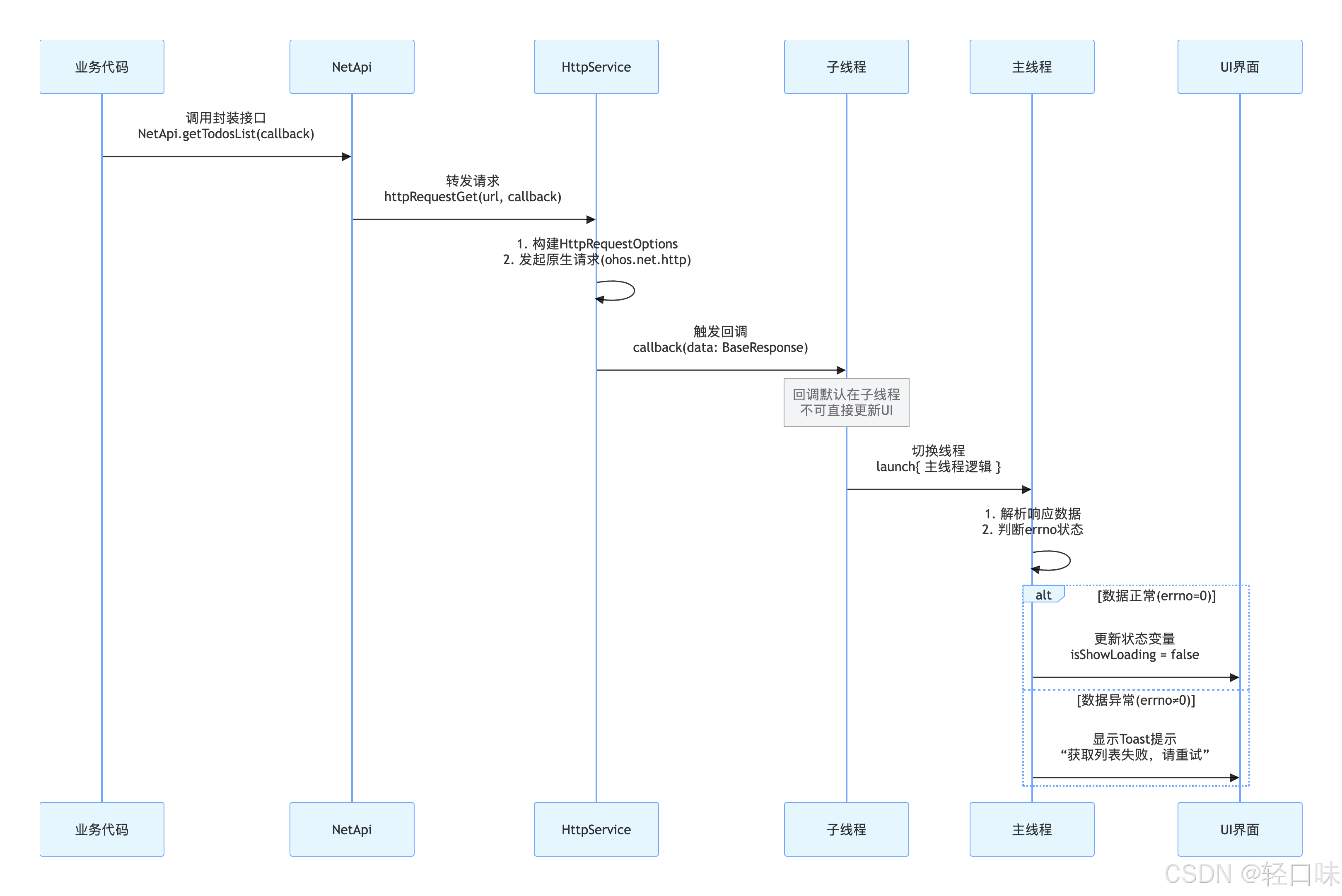
总结
网络接口是应用与外部服务的“数字神经”,决定着稳定性、效率与易用性。在HarmonyOS中,仓颉通过**net.http.***与ohos.net.http提供从Socket/HTTP/WebSocket到HttpRequest的完整能力,支持GET/POST/PUT/DELETE等常用方法、请求头与超时配置、JSON解析及token鉴权;同时可通过onHeadersReceive订阅响应头、在回调中切换主线程更新UI。为降低样板代码,文中封装了HttpService与NetApi,统一header、timeout、JSON转换与错误处理,使接口调用更简洁、可维护性更高。

讨论HarmonyOS开发技术,专注于API与组件、DevEco Studio、测试、元服务和应用上架分发等。
更多推荐



 16
16 0
0- 0


 已为社区贡献51条内容

所有评论(0)