HarmonyOS应用开发——网络管理
1.应用权限2. HTTP请求
1.应用权限
ATM (AccessTokenManager) 是HarmonyOS上基于AccessToken构建的统一的应用权限管理能力。
应用权限保护的对象可以分为数据和功能:
(1)数据包含了个人数据(如照片、通讯录、日历、位置等)、设备数据(如设备标识、相机、麦克风等)、应用数据。
(2)功能则包括了设备功能(如打电话、发短信、联网等)、应用功能(如弹出悬浮框、创建快捷方式等)等。
根据授权方式的不同,权限类型可分为system_grant(系统授权)和user_grant(用户授权)。
(1)配置文件权限声明
(2)向用户申请授权
例如:访问网络需要联网权限:
ohos.permission.USE_BLUETOOTH
允许应用查看蓝牙的配置。
权限级别:normal
授权方式:system_grang
ACL使能:TRUE
修改module.json5文件,如图所示。
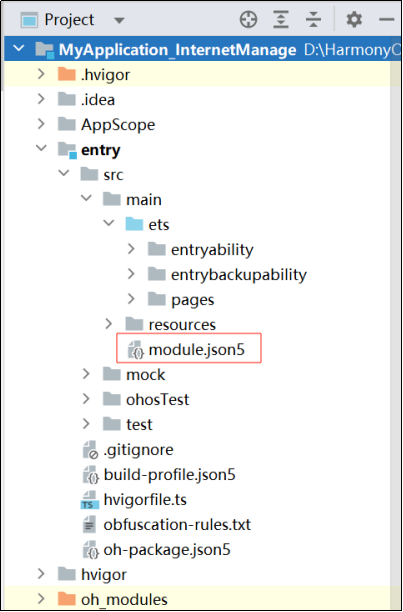
配置如下:
{
"module" : {
// ...
"requestPermissions":[
{
"name" : "ohos.permission.INTERNET"
}
]
}
}
2. HTTP请求
例如,XX商城接口地址如下: http://106.52.75.114/api/v2/home/navs。
使用 @ohos.net.http 模块发请求,调用数据,代码如下。
import http from '@ohos.net.http'
interface IData {
isShow: boolean
list: INavItemModel[]
}
interface IResponse {
status: number
msg: string
data: IData
}
interface INavItem {
img: string,
title: string,
url: string,
}
export class INavItemModel implements INavItem {
img: string = ''
title: string = ''
url: string = ''
constructor(model: INavItem) {
this.img = model.img
this.title = model.title
this.url = model.url
}
}
@Entry
@Component
struct Index {
@State
navList: INavItem[] = []
aboutToAppear() {
this.getNavListApi()
}
async getNavListApi() {
try {
const xhr = http.createHttp();
const url = 'http://106.52.75.114/api/v2/home/navs'
const response = await xhr.request(url)
console.log('api', JSON.stringify(response))
// AlertDialog.show({message: response.result as string})
this.navList = (JSON.parse(response.result as string) as IResponse).data.list
} catch (e) {
AlertDialog.show({ message: e })
}
}
build() {
Column() {
Button('获取数据').onClick(async (event: ClickEvent) => {
this.getNavListApi()
})
Divider()
Flex({ wrap: FlexWrap.Wrap }) {
ForEach(this.navList, (item: INavItem) => {
Column() {
Image(item.img)
.width(80)
.aspectRatio(1)
.borderRadius(40)
.margin({ bottom: 10 })
Text(item.title)
}
.width('25%')
.margin({ bottom: 10 })
})
}
}
.width('100%')
.height('100%')
}
}
实现效果,如图所示。

欢迎加入课程班级,考取鸿蒙认证:
https://developer.huawei.com/consumer/cn/training/classDetail/d43582bb30b34f548c16c127cb3be104?type=1?ha_source=hmosclass&ha_sourceId=89000248

讨论HarmonyOS开发技术,专注于API与组件、DevEco Studio、测试、元服务和应用上架分发等。
更多推荐



 20
20 0
0- 0


 已为社区贡献27条内容

所有评论(0)