【鸿蒙之路】利用OH_Drawing_Bitmap将文本渲染成OpenGL纹理
·
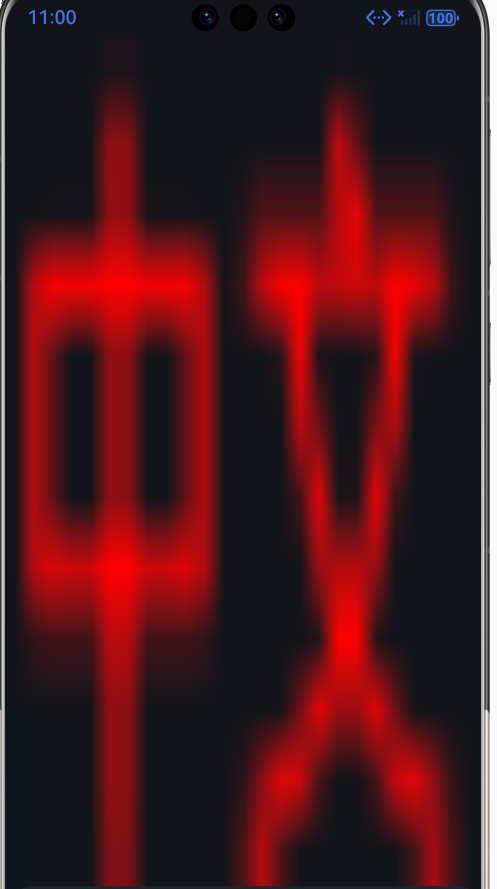
最终效果
完整代码
	// 1. 创建字体 + TextBlob
    OH_Drawing_Font *font = OH_Drawing_FontCreate();	// 使用系统默认字体
    const std::string chinese("中文");

    // 注意:第三个参数必须是 TEXT_ENCODING_UTF8,否则中文会乱码
    OH_Drawing_TextBlob *textBlob = OH_Drawing_TextBlobCreateFromString(chinese.data(), font, TEXT_ENCODING_UTF8);

	// 2. 测量文字边界
    OH_Drawing_Rect *textRect = OH_Drawing_RectCreate(0, 0, 0, 0);
    OH_Drawing_TextBlobGetBounds(textBlob, textRect);

    struct Rect {
        float left;  float top; float right; float bottom;
    };

    Rect rect{
    		OH_Drawing_RectGetLeft(textRect),
    		OH_Drawing_RectGetTop(textRect),
    		OH_Drawing_RectGetRight(textRect),
         	OH_Drawing_RectGetBottom(textRect)
   	};

    LOGI("中文矩形 { %{public}.2f, %{public}.2f, %{public}.2f, %{public}.2f}", rect.left, rect.top, rect.right, rect.bottom);

    // 注意:OH_Drawing 的坐标系 Y 向下,top 为负值
    int bitmapWidth = rect.left + rect.right;
    int bitmapHeight = rect.bottom - rect.top;

    // 3. 创建 Bitmap + Canvas 并绘制
	OH_Drawing_Bitmap* bitmap = OH_Drawing_BitmapCreate();
    OH_Drawing_BitmapFormat format{COLOR_FORMAT_RGBA_8888, ALPHA_FORMAT_UNPREMUL};
    OH_Drawing_BitmapBuild(bitmap, bitmapWidth, bitmapHeight, &format);
    OH_Drawing_Canvas* canvas = OH_Drawing_CanvasCreate();
    OH_Drawing_CanvasBind(canvas, bitmap);

    // 把文字往右下偏移,让左上角对齐 (0,0)
    OH_Drawing_CanvasDrawTextBlob(canvas, textBlob, 0, abs(rect.top));

    // 4. 生成 OpenGL 纹理
	core_->makeCurrent();	// EGLContext 当前化
    textures.resize(1);
    glGenTextures(1, textures.data());
    glBindTexture(GL_TEXTURE_2D, textures[0]);
    glTexParameteri(GL_TEXTURE_2D, GL_TEXTURE_MIN_FILTER, GL_LINEAR);
    glTexParameteri(GL_TEXTURE_2D, GL_TEXTURE_MAG_FILTER, GL_LINEAR);
    glTexParameteri(GL_TEXTURE_2D, GL_TEXTURE_WRAP_S, GL_CLAMP_TO_EDGE);
    glTexParameteri(GL_TEXTURE_2D, GL_TEXTURE_WRAP_T, GL_CLAMP_TO_EDGE);

    void *pixels = OH_Drawing_BitmapGetPixels(bitmap);
    glTexImage2D(GL_TEXTURE_2D, 0, GL_RGBA, bitmapWidth, bitmapHeight, 0, GL_RGBA, GL_UNSIGNED_BYTE, pixels);
    glBindTexture(GL_TEXTURE_2D, 0);
    core_->doneCurrent();

    // 5. 销毁 OH_Drawing 对象(纹理已经上传到 GPU,bitmap 可以扔了)
    OH_Drawing_BitmapDestroy(bitmap);
    OH_Drawing_CanvasDestroy(canvas);
    OH_Drawing_RectDestroy(textRect);
    OH_Drawing_FontDestroy(font);

讨论HarmonyOS开发技术,专注于API与组件、DevEco Studio、测试、元服务和应用上架分发等。
更多推荐

 7
7 0
0- 0


 已为社区贡献3条内容

所有评论(0)