【江鸟中原】华为云书签
异常处理:添加全面的错误捕获和处理逻辑默认数据:提供合理的默认数据回退机制数据验证:在读写时进行数据有效性检查本文通过一个完整的云书签应用开发案例,展示了HarmonyOS应用开发的核心技术和最佳实践。该项目采用了现代化的UI设计,实现了完整的书籍管理功能,并通过Preferences实现了可靠的数据持久化。开发者可以基于此项目继续扩展功能,打造更完善的电子书管理解决方案。项目源码已开源,欢迎开发
·
目录
引言
在数字化阅读时代,电子书管理已成为阅读爱好者的重要需求。本文将分享一个基于HarmonyOS的云书签应用开发实践,该应用实现了书籍管理、进度跟踪、阅读状态标记等核心功能,采用ArkUI框架构建现代化UI界面,并使用Preferences实现数据持久化存储。
项目功能亮点
核心功能模块
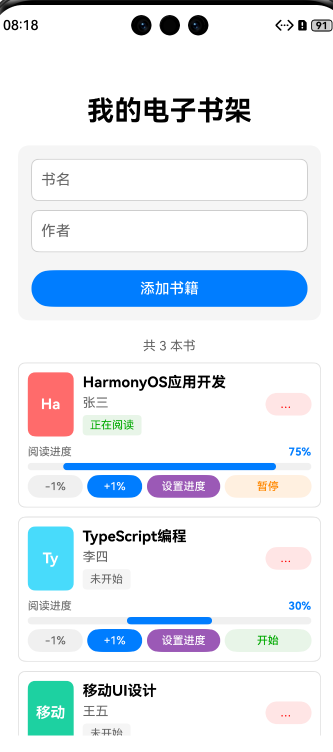
- 书籍管理
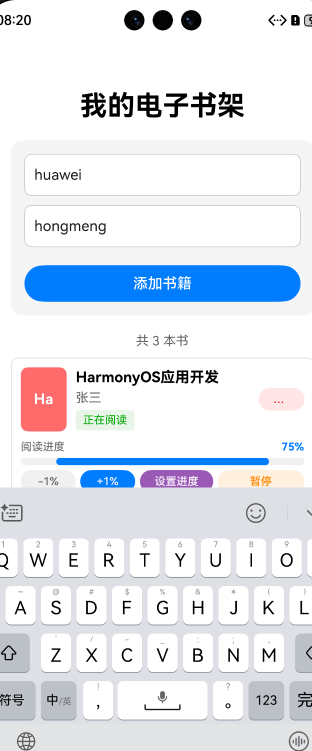
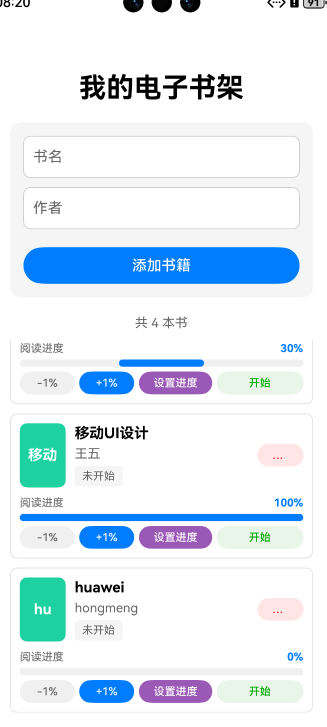
- 添加/删除书籍
- 随机封面颜色生成
- 书籍信息展示(书名、作者)
- 图片展示
- 阅读进度跟踪
- 进度条可视化展示
- 精细进度调整(±1%步长)
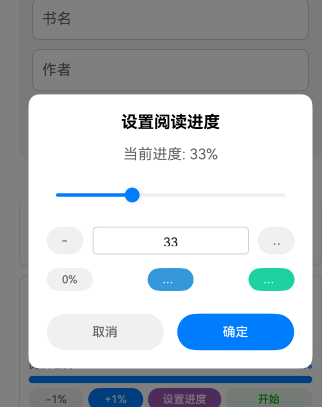
- 直接进度设置
- 阅读状态管理
- 开始/暂停阅读状态切换
- 状态可视化标识
- 数据持久化
- 自动保存书籍数据
- 应用重启后数据恢复
技术实现详解
1. 数据模型设计
typescript
interface BookItem {
  id: number;
  title: string;
  author: string;
  progress: number;
  color: string;
  isReading: boolean;
}
2. 数据持久化实现
使用@ohos.data.preferences实现数据存储:
typescript
// 初始化存储
async aboutToAppear() {
  try {
    const prefInstance = await preferences.getPreferences(getContext(this), 'book_storage')
    this.pref = prefInstance
    const savedBooks = await this.pref.get(this.STORAGE_KEY, '[]') as string
    const parsedBooks = JSON.parse(savedBooks) as BookItem[]
    if (Array.isArray(parsedBooks)) {
      this.books = parsedBooks.length > 0 ? parsedBooks : this.getDefaultBooks()
    }
  } catch (err) {
    console.error(`初始化失败: ${(err as BusinessError).message}`)
    this.books = this.getDefaultBooks() // 回退到默认数据
  }
}

// 保存数据
async saveBooks() {
  if (!this.pref) return
  try {
    await this.pref.put(this.STORAGE_KEY, JSON.stringify(this.books))
    await this.pref.flush()
  } catch (err) {
    console.error(`保存失败: ${(err as BusinessError).message}`)
  }
}
3. 核心功能实现
书籍添加功能
typescript
async addBook() {
  if (!this.newTitle.trim() || !this.newAuthor.trim()) return

  const colors = ['#FF6B6B', '#48DBFB', '#1DD1A1', '#FF9F43', '#9B59B6', '#3498DB']
  const newBook: BookItem = {
    id: new Date().getTime(),
    title: this.newTitle.trim(),
    author: this.newAuthor.trim(),
    progress: 0,
    color: colors[Math.floor(Math.random() * colors.length)],
    isReading: false
  }

  this.books = [...this.books, newBook]
  this.newTitle = ''
  this.newAuthor = ''
  await this.saveBooks()
}
进度调整功能
typescript
// 精细调整(±1%)
async updateProgress(id: number, delta: number) {
  this.books = this.books.map(book =>
    book.id === id ? {
      ...book,
      progress: Math.max(0, Math.min(100, book.progress + delta))
    } : book
  )
  await this.saveBooks()
}

// 直接设置进度
async setProgress(id: number, progress: number) {
  const validProgress = Math.max(0, Math.min(100, progress))
  this.books = this.books.map(book =>
    book.id === id ? {...book, progress: validProgress} : book
  )
  await this.saveBooks()
}
阅读状态切换
typescript
async toggleReadingStatus(id: number) {
  this.books = this.books.map(book =>
    book.id === id ? {...book, isReading: !book.isReading} : book
  )
  await this.saveBooks()
}
4. UI组件设计
书籍列表项布局
typescript
Column({ space: 10 }) {
  Row() {
    // 封面颜色块
    Column() {
      Text(book.title.substring(0, 2))
        .fontSize(16)
        .fontWeight(FontWeight.Bold)
    }
    .width(50).height(70)
    .backgroundColor(book.color)

    // 书籍信息
    Column({ space: 5 }) {
      Text(book.title).fontSize(16).fontWeight(FontWeight.Bold)
      Text(book.author).fontSize(14).fontColor('#666666')
      Text(book.isReading ? '正在阅读' : '未开始')
        .fontSize(12)
        .fontColor(book.isReading ? '#00AA00' : '#666666')
    }
    .margin({ left: 10 })

    // 删除按钮
    Button('删除')
      .onClick(() => this.deleteBook(book.id))
      .fontSize(12)
      .fontColor('#FF0000')
  }

  // 进度条组件
  Column({ space: 5 }) {
    Row() {
      Text('阅读进度').fontSize(12).fontColor('#666666')
      Text(`${book.progress}%`).fontSize(12).fontColor('#007DFF')
    }

    Stack() {
      Row().width('100%').height(8).backgroundColor('#F0F0F0')
      Row().width(`${book.progress}%`).height(8).backgroundColor('#007DFF')
    }
  }
}
进度设置对话框
typescript
if (this.showProgressDialog) {
  Column()
    .width('100%').height('100%')
    .backgroundColor('rgba(0,0,0,0.5)')
    .onClick(() => this.closeProgressDialog())

  Column() {
    Text('设置阅读进度').fontSize(18).fontWeight(FontWeight.Bold)

    Slider({
      value: this.newProgress,
      min: 0,
      max: 100,
      step: 1,
      style: SliderStyle.OutSet
    })
    .width('100%')
    .onChange(value => this.newProgress = Math.round(value))

    Row({ space: 10 }) {
      Button('-1').onClick(() => this.newProgress = Math.max(0, this.newProgress - 1))
      TextInput({
        text: this.newProgress.toString(),
        type: InputType.Number
      })
      .onChange(value => {
        const num = parseInt(value)
        if (!isNaN(num)) this.newProgress = Math.max(0, Math.min(100, num))
      })
      Button('+1').onClick(() => this.newProgress = Math.min(100, this.newProgress + 1))
    }

    Row({ space: 15 }) {
      Button('取消').onClick(() => this.closeProgressDialog())
      Button('确定').onClick(() => this.confirmSetProgress())
    }
  }
  .width('80%').padding(20)
  .backgroundColor('#FFFFFF')
  .borderRadius(12)
}
开发经验总结
1. 数据持久化最佳实践
- 异常处理:添加全面的错误捕获和处理逻辑
- 默认数据:提供合理的默认数据回退机制
- 数据验证:在读写时进行数据有效性检查
2. UI开发技巧
- 响应式布局:使用百分比宽度和弹性布局
- 状态管理:合理使用
@State装饰器管理组件状态 - 交互优化:
- 添加适当的动画效果
- 实现防抖处理高频操作
- 提供明确的操作反馈
3. 性能优化建议
- 批量更新:合并多次状态更新操作
- 虚拟滚动:对于长列表考虑实现虚拟滚动
- 图片优化:使用矢量图形或适当压缩图片资源
扩展功能建议
- 云同步功能:集成华为云服务实现多设备同步
- 阅读统计:添加阅读时长、阅读速度等统计功能
- 书籍分类:支持按类型/标签管理书籍
- 导入导出:支持JSON格式的数据导入导出
- 主题切换:实现暗黑模式等主题切换功能
结语
本文通过一个完整的云书签应用开发案例,展示了HarmonyOS应用开发的核心技术和最佳实践。该项目采用了现代化的UI设计,实现了完整的书籍管理功能,并通过Preferences实现了可靠的数据持久化。开发者可以基于此项目继续扩展功能,打造更完善的电子书管理解决方案。
项目源码已开源,欢迎开发者朋友们交流学习,共同推动HarmonyOS生态发展!

讨论HarmonyOS开发技术,专注于API与组件、DevEco Studio、测试、元服务和应用上架分发等。
更多推荐
 5
5 0
0- 0


 已为社区贡献1条内容

所有评论(0)