鸿蒙API13开发【空白与分隔之Divider】ArkTS组件
提供分隔器组件,分隔不同内容块/内容元素。
提供分隔器组件,分隔不同内容块/内容元素。
说明
该组件从API Version 7开始支持。后续版本如有新增内容,则采用上角标单独标记该内容的起始版本。
子组件
无
接口
Divider()
卡片能力: 从API version 9开始,该接口支持在ArkTS卡片中使用。
元服务API: 从API version 11开始,该接口支持在元服务中使用。
系统能力: SystemCapability.ArkUI.ArkUI.Full
属性
除支持[通用属性]外,还支持以下属性:
vertical
vertical(value: boolean)
设置分割线的方向。
卡片能力: 从API version 9开始,该接口支持在ArkTS卡片中使用。
元服务API: 从API version 11开始,该接口支持在元服务中使用。
系统能力: SystemCapability.ArkUI.ArkUI.Full
参数:
| 参数名 | 类型 | 必填 | 说明 |
|---|---|---|---|
| value | boolean | 是 | 使用水平分割线还是垂直分割线。false:水平分割线;true:垂直分割线。默认值:false |
color
color(value: ResourceColor)
设置分割线的颜色。
卡片能力: 从API version 9开始,该接口支持在ArkTS卡片中使用。
元服务API: 从API version 11开始,该接口支持在元服务中使用。
系统能力: SystemCapability.ArkUI.ArkUI.Full
参数:
| 参数名 | 类型 | 必填 | 说明 |
|---|---|---|---|
| value | [ResourceColor] | 是 | 分割线颜色。默认值:'#33182431’支持通过[WithTheme]设置通用分割线颜色 |
strokeWidth
strokeWidth(value: number | string)
设置分割线的宽度。
卡片能力: 从API version 9开始,该接口支持在ArkTS卡片中使用。
元服务API: 从API version 11开始,该接口支持在元服务中使用。
系统能力: SystemCapability.ArkUI.ArkUI.Full
参数:
| 参数名 | 类型 | 必填 | 说明 |
|---|---|---|---|
| value | number | string | 是 |
lineCap
lineCap(value: LineCapStyle)
设置分割线的端点样式。
卡片能力: 从API version 9开始,该接口支持在ArkTS卡片中使用。
元服务API: 从API version 11开始,该接口支持在元服务中使用。
系统能力: SystemCapability.ArkUI.ArkUI.Full
参数:
| 参数名 | 类型 | 必填 | 说明 |
|---|---|---|---|
| value | [LineCapStyle] | 是 | 分割线的端点样式。默认值:LineCapStyle.Butt |
示例
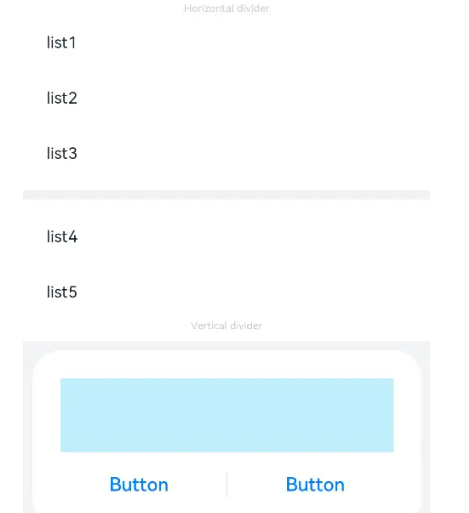
定义了Divider的样式,如方向、颜色及宽度。
// xxx.ets
@Entry
@Component
struct DividerExample {
  build() {
    Column() {
      // 使用横向分割线场景
      Text('Horizontal divider').fontSize(9).fontColor(0xCCCCCC)
      List() {
        ForEach([1, 2, 3], (item: number) => {
          ListItem() {
            Text('list' + item).width('100%').fontSize(14).fontColor('#182431').textAlign(TextAlign.Start)
          }.width(244).height(48)
        }, (item: number) => item.toString())
      }.padding({ left: 24, bottom: 8 })

      Divider().strokeWidth(8).color('#F1F3F5')
      List() {
        ForEach([4, 5], (item: number) => {
          ListItem() {
            Text('list' + item).width('100%').fontSize(14).fontColor('#182431').textAlign(TextAlign.Start)
          }.width(244).height(48)
        }, (item: number) => item.toString())
      }.padding({ left: 24, top: 8 })

      // 使用纵向分割线场景
      Text('Vertical divider').fontSize(9).fontColor(0xCCCCCC)
      Column() {
        Column() {
          Row().width(288).height(64).backgroundColor('#30C9F0').opacity(0.3)
          Row() {
            Button('Button')
              .width(136)
              .height(22)
              .fontSize(16)
              .fontColor('#007DFF')
              .fontWeight(500)
              .backgroundColor(Color.Transparent)
            Divider().vertical(true).height(22).color('#182431').opacity(0.6).margin({ left: 8, right: 8 })
            Button('Button')
              .width(136)
              .height(22)
              .fontSize(16)
              .fontColor('#007DFF')
              .fontWeight(500)
              .backgroundColor(Color.Transparent)
          }.margin({ top: 17 })
        }
        .width(336)
        .height(152)
        .backgroundColor('#FFFFFF')
        .borderRadius(24)
        .padding(24)
      }
      .width('100%')
      .height(168)
      .backgroundColor('#F1F3F5')
      .justifyContent(FlexAlign.Center)
      .margin({ top: 8 })
    }.width('100%').padding({ top: 24 })
  }
}

讨论HarmonyOS开发技术,专注于API与组件、DevEco Studio、测试、元服务和应用上架分发等。
更多推荐



 11
11 0
0- 0


 已为社区贡献822条内容

所有评论(0)