【鸿蒙HarmonyOS开发笔记】开发小技巧之Blank组件与layoutWeight属性的使用
配置该属性后,子组件沿主轴方向的尺寸设置(该组件不显示任何内容,并且会。其作用是配置子组件在。主轴方向上的尺寸权重。
·
Blank组件
Blank可作为Column和Row容器的子组件
该组件不显示任何内容,并且会始终充满容器主轴方向上的剩余空间,效果如下: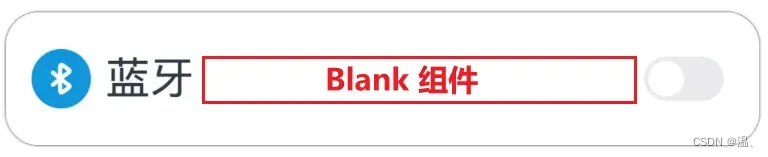
@Entry
@Component
struct BlankPage {
  build() {
    Column({ space: 50 }) {
      Row() {
        Image($r('app.media.icon_bluetooth'))
          .width(30)
          .height(30)
        Text('蓝牙')
          .fontSize(20)
          .margin({ left: 5 })
        Blank()
        Toggle({ type: ToggleType.Switch })
      }
      .width('90%')
      .height(60)
      .backgroundColor(Color.White)
      .padding({ left: 10, right: 10 })
      .borderRadius(15)
      .shadow({ radius: 10 })
    }.width('100%')
    .height('100%')
    .justifyContent(FlexAlign.Center)
    .backgroundColor('#f2f2f2')
  }
}
layoutWeight属性
layoutWeight属性可用于Column和Row容器的子组件
其作用是配置子组件在主轴方向上的尺寸权重。配置该属性后,子组件沿主轴方向的尺寸设置(width或height)将失效,具体尺寸根据权重进行计算,计算规则如下图所示:
示例
@Entry
@Component
struct LayoutWeightPage {
  build() {
    Column() {
      //Header:高度60vp
      Row() {
        Text('Header')
          .fontSize(30)
      }.backgroundColor('#66008000')
      .justifyContent(FlexAlign.Center)
      .height(60)
      .width('100%')
      //Content:充满剩余空间
      Row() {
        Text('Content')
          .fontSize(30)
      }.backgroundColor('#66ffa200')
      .justifyContent(FlexAlign.Center)
      .width('100%')
      .layoutWeight(3)
      // Footer:高度60vp
      Row() {
        Text('Footer')
          .fontSize(30)
      }.backgroundColor('#660e9fba')
      .justifyContent(FlexAlign.Center)
      .width('100%')
      .height(60)

    }.width('100%')
    .height('100%')
    .justifyContent(FlexAlign.Center)
    .backgroundColor('#f2f2f2')
  }
}

讨论HarmonyOS开发技术,专注于API与组件、DevEco Studio、测试、元服务和应用上架分发等。
更多推荐


 7
7 0
0- 0


 已为社区贡献5条内容

所有评论(0)