Flutter 框架跨平台鸿蒙开发 - 手写笔记工具开发教程
枚举值中文名称图标描述手写笔记Icons.edit纯手写内容drawing绘图纯绘图内容mixed混合手写+文字混合@override// 绘制已完成的路径// 绘制当前路径= null) {// 铅笔效果:添加透明度变化// 单点绘制} else {// 多点路径绘制 - 使用贝塞尔曲线平滑i++) {// 使用二次贝塞尔曲线平滑路径} else {// 马克笔特殊效果:双层渲染@overrid
·
Flutter手写笔记工具开发教程
项目简介
手写笔记工具是一个专为手写和绘图而设计的Flutter应用。它提供了丰富的绘图工具、多种画笔类型和颜色选择,让用户能够自由地进行手写记录、绘图创作和笔记管理。无论是会议记录、学习笔记还是创意绘画,这个应用都能满足用户的需求。
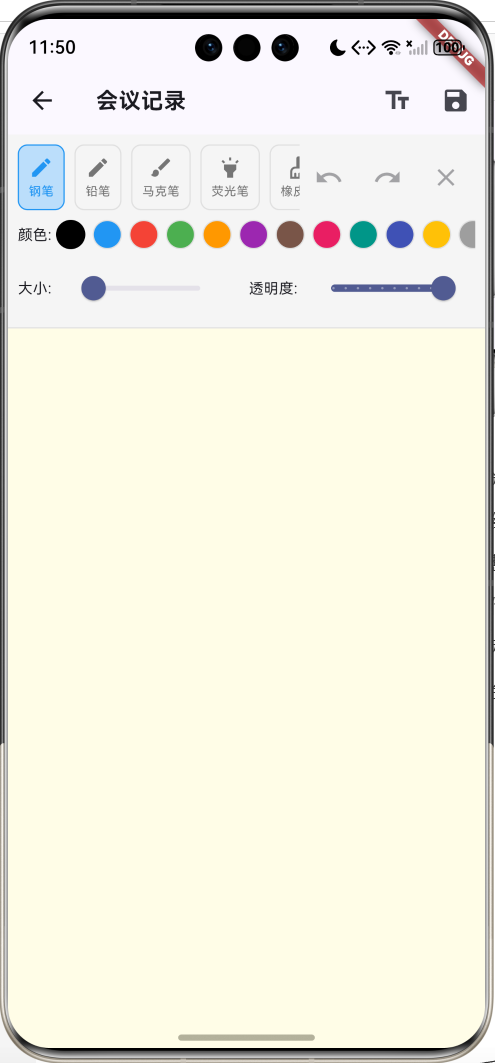
运行效果图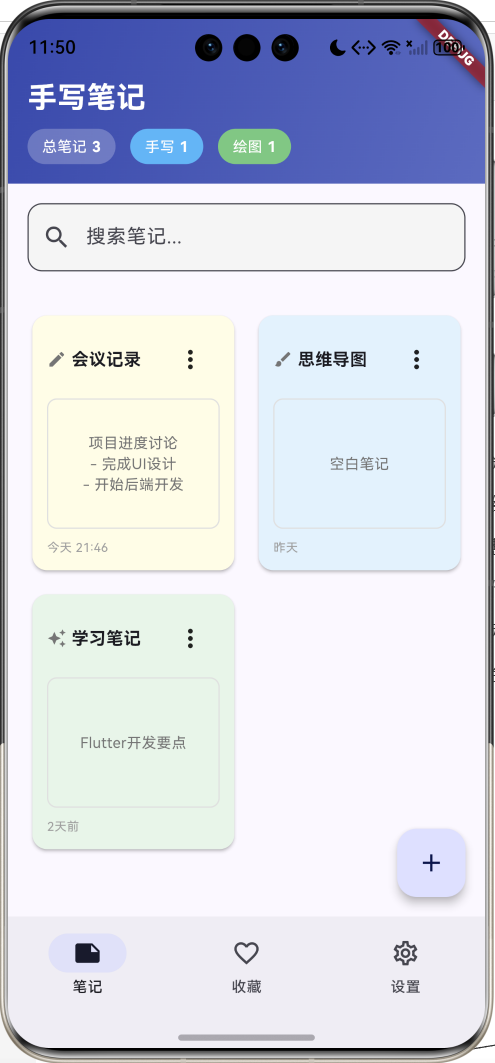
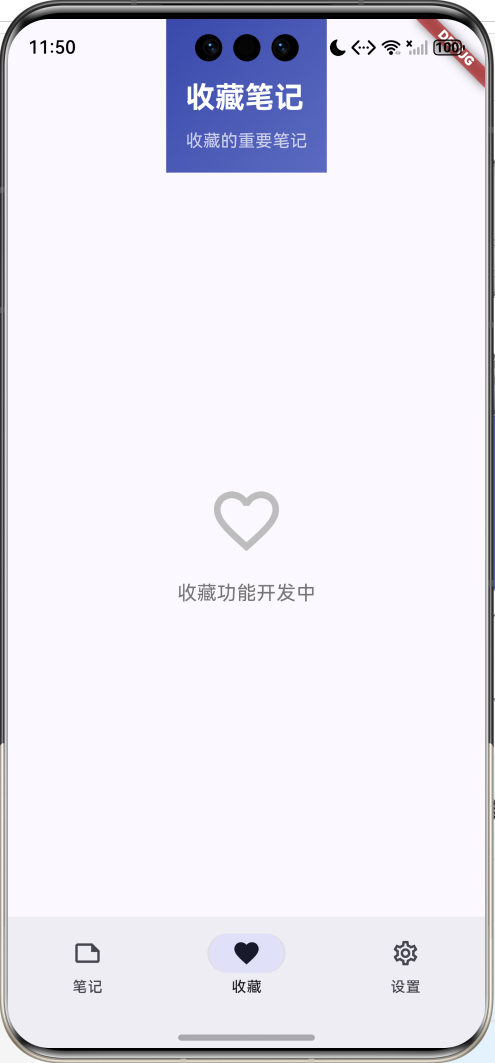
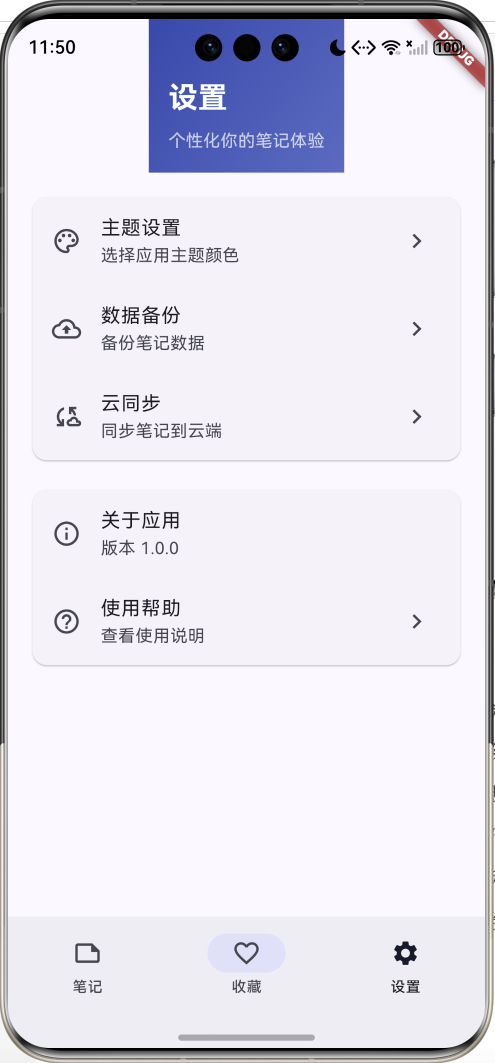
核心功能特性
- 多种画笔工具:钢笔、铅笔、马克笔、荧光笔、橡皮擦
- 丰富颜色选择:12种预设颜色,满足不同绘图需求
- 画笔属性调节:支持画笔大小和透明度调整
- 撤销重做功能:支持无限次撤销和重做操作
- 混合编辑模式:支持手写绘图和文字输入两种模式
- 笔记分类管理:自动识别手写、绘图、混合三种笔记类型
- 智能搜索功能:支持标题和内容全文搜索
- 笔记预览系统:网格布局展示笔记缩略图
技术架构
数据模型设计
核心数据模型
Note 笔记模型
class Note {
  final String id;              // 唯一标识符
  final String title;           // 笔记标题
  final NoteType type;          // 笔记类型
  final DateTime createdAt;     // 创建时间
  final DateTime updatedAt;     // 更新时间
  final List<DrawPath> paths;   // 绘制路径列表
  final String textContent;     // 文字内容
  final Color backgroundColor;  // 背景颜色
}
DrawPath 绘制路径模型
class DrawPath {
  final List<DrawPoint> points; // 路径点集合
  final Paint paint;            // 画笔属性
  final BrushType brushType;    // 画笔类型
}
DrawPoint 绘制点模型
class DrawPoint {
  final Offset offset;          // 点坐标
  final Paint paint;            // 画笔属性
  final BrushType brushType;    // 画笔类型
}
枚举类型定义
NoteType 笔记类型
| 枚举值 | 中文名称 | 图标 | 描述 |
|---|---|---|---|
| handwriting | 手写笔记 | Icons.edit | 纯手写内容 |
| drawing | 绘图 | Icons.brush | 纯绘图内容 |
| mixed | 混合 | Icons.auto_awesome | 手写+文字混合 |
BrushType 画笔类型
配置类设计
BrushConfig 画笔配置类
class BrushConfig {
  // 画笔名称映射
  static const Map<BrushType, String> brushNames = {
    BrushType.pen: '钢笔',
    BrushType.pencil: '铅笔',
    BrushType.marker: '马克笔',
    BrushType.highlighter: '荧光笔',
    BrushType.eraser: '橡皮擦',
  };

  // 画笔图标映射
  static const Map<BrushType, IconData> brushIcons = {...};

  // 默认画笔大小
  static const Map<BrushType, double> defaultSizes = {...};

  // 预设颜色列表
  static const List<Color> colors = [
    Colors.black, Colors.blue, Colors.red, Colors.green,
    Colors.orange, Colors.purple, Colors.brown, Colors.pink,
    Colors.teal, Colors.indigo, Colors.amber, Colors.grey,
  ];
}
核心功能实现
1. 绘图引擎实现
手势识别和路径生成
class _NoteEditorPageState extends State<NoteEditorPage> {
  // 开始绘制
  void _onPanStart(DragStartDetails details) {
    final paint = Paint()
      ..color = _selectedBrush == BrushType.eraser
          ? _currentNote.backgroundColor
          : _selectedColor.withOpacity(_brushOpacity)
      ..strokeWidth = _brushSize
      ..style = PaintingStyle.stroke
      ..strokeCap = StrokeCap.round
      ..strokeJoin = StrokeJoin.round;

    // 荧光笔特殊混合模式
    if (_selectedBrush == BrushType.highlighter) {
      paint.blendMode = BlendMode.multiply;
    }

    final point = DrawPoint(
      offset: details.localPosition,
      paint: paint,
      brushType: _selectedBrush,
    );

    setState(() {
      _currentPath = DrawPath(
        points: [point],
        paint: paint,
        brushType: _selectedBrush,
      );
      _undoStack.clear(); // 清空重做栈
    });
  }

  // 绘制过程
  void _onPanUpdate(DragUpdateDetails details) {
    if (_currentPath != null) {
      final point = DrawPoint(
        offset: details.localPosition,
        paint: _currentPath!.paint,
        brushType: _selectedBrush,
      );

      setState(() {
        _currentPath!.points.add(point);
      });
    }
  }

  // 结束绘制
  void _onPanEnd(DragEndDetails details) {
    if (_currentPath != null) {
      setState(() {
        _paths.add(_currentPath!);
        _currentPath = null;
      });
    }
  }
}
自定义绘制器实现
class DrawingPainter extends CustomPainter {
final List<DrawPath> paths;
final DrawPath? currentPath;
DrawingPainter(this.paths, this.currentPath);
void paint(Canvas canvas, Size size) {
// 绘制已完成的路径
for (final path in paths) {
_drawPath(canvas, path);
}
// 绘制当前路径
if (currentPath != null) {
_drawPath(canvas, currentPath!);
}
}
void _drawPath(Canvas canvas, DrawPath drawPath) {
if (drawPath.points.isEmpty) return;
final paint = Paint()
..color = drawPath.paint.color
..strokeWidth = drawPath.paint.strokeWidth
..style = PaintingStyle.stroke
..strokeCap = StrokeCap.round
..strokeJoin = StrokeJoin.round
..blendMode = drawPath.paint.blendMode;
// 铅笔效果:添加透明度变化
if (drawPath.brushType == BrushType.pencil) {
paint.color = paint.color.withOpacity(paint.color.opacity * 0.8);
}
final path = Path();
if (drawPath.points.length == 1) {
// 单点绘制
canvas.drawCircle(
drawPath.points.first.offset,
paint.strokeWidth / 2,
paint..style = PaintingStyle.fill,
);
} else {
// 多点路径绘制 - 使用贝塞尔曲线平滑
path.moveTo(drawPath.points.first.offset.dx, drawPath.points.first.offset.dy);
for (int i = 1; i < drawPath.points.length; i++) {
final current = drawPath.points[i].offset;
final previous = drawPath.points[i - 1].offset;
// 使用二次贝塞尔曲线平滑路径
final controlPoint = Offset(
(previous.dx + current.dx) / 2,
(previous.dy + current.dy) / 2,
);
if (i == 1) {
path.lineTo(controlPoint.dx, controlPoint.dy);
} else {
path.quadraticBezierTo(
previous.dx,
previous.dy,
controlPoint.dx,
controlPoint.dy,
);
}
}
canvas.drawPath(path, paint);
}
// 马克笔特殊效果:双层渲染
if (drawPath.brushType == BrushType.marker) {
final markerPaint = Paint()
..color = paint.color.withOpacity(0.3)
..strokeWidth = paint.strokeWidth * 1.5
..style = PaintingStyle.stroke
..strokeCap = StrokeCap.round
..strokeJoin = StrokeJoin.round;
canvas.drawPath(path, markerPaint);
}
}
bool shouldRepaint(covariant CustomPainter oldDelegate) => true;
}
2. 撤销重做系统
class _NoteEditorPageState extends State<NoteEditorPage> {
  List<DrawPath> _paths = [];        // 当前路径列表
  List<DrawPath> _undoStack = [];    // 撤销栈

  // 撤销操作
  void _undo() {
    if (_paths.isNotEmpty) {
      setState(() {
        _undoStack.add(_paths.removeLast());
      });
    }
  }

  // 重做操作
  void _redo() {
    if (_undoStack.isNotEmpty) {
      setState(() {
        _paths.add(_undoStack.removeLast());
      });
    }
  }

  // 清空画布
  void _clearCanvas() {
    showDialog(
      context: context,
      builder: (context) => AlertDialog(
        title: const Text('清空画布'),
        content: const Text('确定要清空所有绘制内容吗?'),
        actions: [
          TextButton(
            onPressed: () => Navigator.pop(context),
            child: const Text('取消'),
          ),
          ElevatedButton(
            onPressed: () {
              setState(() {
                _undoStack.addAll(_paths);  // 将所有路径加入撤销栈
                _paths.clear();
              });
              Navigator.pop(context);
            },
            child: const Text('清空'),
          ),
        ],
      ),
    );
  }
}
3. 画笔工具系统
画笔属性配置
// 画笔设置状态变量
BrushType _selectedBrush = BrushType.pen;
Color _selectedColor = Colors.black;
double _brushSize = 2.0;
double _brushOpacity = 1.0;

// 画笔切换逻辑
void _selectBrush(BrushType brush) {
  setState(() {
    _selectedBrush = brush;
    _brushSize = BrushConfig.defaultSizes[brush] ?? 2.0;
  });
}
画笔工具栏UI
Widget _buildDrawingToolbar() {
  return Container(
    padding: const EdgeInsets.all(8),
    decoration: BoxDecoration(
      color: Colors.grey.shade100,
      border: Border(bottom: BorderSide(color: Colors.grey.shade300)),
    ),
    child: Column(
      children: [
        // 画笔工具选择
        Row(
          children: [
            Expanded(
              child: SingleChildScrollView(
                scrollDirection: Axis.horizontal,
                child: Row(
                  children: BrushType.values.map((brush) {
                    final isSelected = _selectedBrush == brush;
                    return _buildBrushTool(brush, isSelected);
                  }).toList(),
                ),
              ),
            ),
            // 操作按钮
            IconButton(
              icon: const Icon(Icons.undo),
              onPressed: _paths.isNotEmpty ? _undo : null,
            ),
            IconButton(
              icon: const Icon(Icons.redo),
              onPressed: _undoStack.isNotEmpty ? _redo : null,
            ),
            IconButton(
              icon: const Icon(Icons.clear),
              onPressed: _paths.isNotEmpty ? _clearCanvas : null,
            ),
          ],
        ),
        // 颜色选择器
        _buildColorPicker(),
        // 画笔属性调节
        _buildBrushSettings(),
      ],
    ),
  );
}
4. 笔记管理系统
笔记类型自动识别
// 确定笔记类型
NoteType _determineNoteType() {
  final hasDrawing = _paths.isNotEmpty;
  final hasText = _textController.text.trim().isNotEmpty;

  if (hasDrawing && hasText) {
    return NoteType.mixed;      // 混合类型
  } else if (hasDrawing) {
    return NoteType.drawing;    // 纯绘图
  } else {
    return NoteType.handwriting; // 纯手写/文字
  }
}
笔记搜索功能
// 搜索过滤逻辑
Widget _buildNotesListPage() {
  final filteredNotes = _searchQuery.isEmpty
      ? _notes
      : _notes.where((note) =>
          note.title.toLowerCase().contains(_searchQuery.toLowerCase()) ||
          note.textContent.toLowerCase().contains(_searchQuery.toLowerCase())).toList();

  return Column(
    children: [
      _buildNotesHeader(),
      _buildSearchBar(),
      Expanded(
        child: filteredNotes.isEmpty
            ? _buildEmptyNotesView()
            : _buildNotesGrid(filteredNotes),
      ),
    ],
  );
}
UI组件设计
1. 笔记卡片组件
Widget _buildNoteCard(Note note) {
  return Card(
    elevation: 2,
    color: note.backgroundColor,
    child: InkWell(
      onTap: () => _openNoteEditor(note),
      borderRadius: BorderRadius.circular(12),
      child: Padding(
        padding: const EdgeInsets.all(12),
        child: Column(
          crossAxisAlignment: CrossAxisAlignment.start,
          children: [
            // 标题栏
            Row(
              children: [
                Icon(_getNoteTypeIcon(note.type), size: 16),
                const SizedBox(width: 4),
                Expanded(
                  child: Text(
                    note.title,
                    style: const TextStyle(
                      fontSize: 14,
                      fontWeight: FontWeight.bold,
                    ),
                    maxLines: 1,
                    overflow: TextOverflow.ellipsis,
                  ),
                ),
                _buildNoteMenu(note),
              ],
            ),
            // 内容预览
            Expanded(
              child: Container(
                width: double.infinity,
                decoration: BoxDecoration(
                  border: Border.all(color: Colors.grey.shade300),
                  borderRadius: BorderRadius.circular(8),
                ),
                child: note.paths.isNotEmpty
                    ? CustomPaint(
                        painter: NotePreviewPainter(note.paths),
                        size: Size.infinite,
                      )
                    : _buildTextPreview(note.textContent),
              ),
            ),
            // 时间戳
            Text(
              _formatDate(note.updatedAt),
              style: TextStyle(fontSize: 10, color: Colors.grey.shade500),
            ),
          ],
        ),
      ),
    ),
  );
}
2. 绘图工具栏组件
Widget _buildBrushTool(BrushType brush, bool isSelected) {
  return Padding(
    padding: const EdgeInsets.only(right: 8),
    child: InkWell(
      onTap: () => _selectBrush(brush),
      child: Container(
        padding: const EdgeInsets.all(8),
        decoration: BoxDecoration(
          color: isSelected ? Colors.blue.shade100 : Colors.transparent,
          borderRadius: BorderRadius.circular(8),
          border: Border.all(
            color: isSelected ? Colors.blue : Colors.grey.shade300,
          ),
        ),
        child: Column(
          children: [
            Icon(
              BrushConfig.brushIcons[brush],
              size: 20,
              color: isSelected ? Colors.blue : Colors.grey.shade600,
            ),
            const SizedBox(height: 2),
            Text(
              BrushConfig.brushNames[brush] ?? '',
              style: TextStyle(
                fontSize: 10,
                color: isSelected ? Colors.blue : Colors.grey.shade600,
              ),
            ),
          ],
        ),
      ),
    ),
  );
}
3. 颜色选择器组件
Widget _buildColorPicker() {
  return Row(
    children: [
      const Text('颜色: ', style: TextStyle(fontSize: 12)),
      Expanded(
        child: SingleChildScrollView(
          scrollDirection: Axis.horizontal,
          child: Row(
            children: BrushConfig.colors.map((color) {
              final isSelected = _selectedColor == color;
              return Padding(
                padding: const EdgeInsets.only(right: 6),
                child: InkWell(
                  onTap: () {
                    setState(() {
                      _selectedColor = color;
                    });
                  },
                  child: Container(
                    width: 24,
                    height: 24,
                    decoration: BoxDecoration(
                      color: color,
                      shape: BoxShape.circle,
                      border: Border.all(
                        color: isSelected ? Colors.black : Colors.grey.shade300,
                        width: isSelected ? 2 : 1,
                      ),
                    ),
                  ),
                ),
              );
            }).toList(),
          ),
        ),
      ),
    ],
  );
}
4. 画笔属性调节组件
Widget _buildBrushSettings() {
  return Row(
    children: [
      // 画笔大小调节
      const Text('大小: ', style: TextStyle(fontSize: 12)),
      Expanded(
        child: Slider(
          value: _brushSize,
          min: 1.0,
          max: 20.0,
          divisions: 19,
          label: _brushSize.round().toString(),
          onChanged: (value) {
            setState(() {
              _brushSize = value;
            });
          },
        ),
      ),
      const SizedBox(width: 16),
      // 透明度调节
      const Text('透明度: ', style: TextStyle(fontSize: 12)),
      Expanded(
        child: Slider(
          value: _brushOpacity,
          min: 0.1,
          max: 1.0,
          divisions: 9,
          label: '${(_brushOpacity * 100).round()}%',
          onChanged: (value) {
            setState(() {
              _brushOpacity = value;
            });
          },
        ),
      ),
    ],
  );
}
绘图算法实现
1. 路径平滑算法
// 使用二次贝塞尔曲线平滑路径
void _drawSmoothPath(Canvas canvas, List<DrawPoint> points, Paint paint) {
  if (points.length < 2) return;

  final path = Path();
  path.moveTo(points.first.offset.dx, points.first.offset.dy);

  for (int i = 1; i < points.length; i++) {
    final current = points[i].offset;
    final previous = points[i - 1].offset;

    // 计算控制点
    final controlPoint = Offset(
      (previous.dx + current.dx) / 2,
      (previous.dy + current.dy) / 2,
    );

    if (i == 1) {
      path.lineTo(controlPoint.dx, controlPoint.dy);
    } else {
      path.quadraticBezierTo(
        previous.dx,
        previous.dy,
        controlPoint.dx,
        controlPoint.dy,
      );
    }
  }

  // 绘制到最后一个点
  path.lineTo(points.last.offset.dx, points.last.offset.dy);
  canvas.drawPath(path, paint);
}
2. 画笔压感模拟
// 根据绘制速度调整画笔大小(模拟压感)
double _calculatePressure(List<DrawPoint> points, int currentIndex) {
  if (currentIndex < 1) return 1.0;

  final current = points[currentIndex].offset;
  final previous = points[currentIndex - 1].offset;

  // 计算绘制速度
  final distance = (current - previous).distance;

  // 速度越快,压感越小(线条越细)
  final pressure = (1.0 - (distance / 50.0)).clamp(0.3, 1.0);

  return pressure;
}
3. 特殊画笔效果
// 铅笔效果:添加纹理和透明度变化
void _drawPencilEffect(Canvas canvas, Path path, Paint basePaint) {
  // 主线条
  final mainPaint = Paint()
    ..color = basePaint.color.withOpacity(0.8)
    ..strokeWidth = basePaint.strokeWidth
    ..style = PaintingStyle.stroke
    ..strokeCap = StrokeCap.round;

  canvas.drawPath(path, mainPaint);

  // 纹理线条
  final texturePaint = Paint()
    ..color = basePaint.color.withOpacity(0.3)
    ..strokeWidth = basePaint.strokeWidth * 0.5
    ..style = PaintingStyle.stroke
    ..strokeCap = StrokeCap.round;

  canvas.drawPath(path, texturePaint);
}

// 马克笔效果:双层渲染
void _drawMarkerEffect(Canvas canvas, Path path, Paint basePaint) {
  // 底层宽线条
  final basePaint = Paint()
    ..color = basePaint.color.withOpacity(0.3)
    ..strokeWidth = basePaint.strokeWidth * 1.5
    ..style = PaintingStyle.stroke
    ..strokeCap = StrokeCap.round;

  canvas.drawPath(path, basePaint);

  // 顶层细线条
  final topPaint = Paint()
    ..color = basePaint.color
    ..strokeWidth = basePaint.strokeWidth
    ..style = PaintingStyle.stroke
    ..strokeCap = StrokeCap.round;

  canvas.drawPath(path, topPaint);
}
状态管理
1. 编辑器状态管理
class _NoteEditorPageState extends State<NoteEditorPage> {
// 笔记数据
late Note _currentNote;
List<DrawPath> _paths = [];
List<DrawPath> _undoStack = [];
DrawPath? _currentPath;
// 画笔状态
BrushType _selectedBrush = BrushType.pen;
Color _selectedColor = Colors.black;
double _brushSize = 2.0;
double _brushOpacity = 1.0;
// 编辑模式
bool _isDrawingMode = true;
final TextEditingController _titleController = TextEditingController();
final TextEditingController _textController = TextEditingController();
void initState() {
super.initState();
_initializeEditor();
}
void _initializeEditor() {
_currentNote = widget.note;
_paths = List.from(_currentNote.paths);
_titleController.text = _currentNote.title;
_textController.text = _currentNote.textContent;
_brushSize = BrushConfig.defaultSizes[_selectedBrush] ?? 2.0;
}
}
2. 笔记列表状态管理
class _NotesHomePageState extends State<NotesHomePage> {
  int _selectedIndex = 0;        // 导航索引
  List<Note> _notes = [];        // 笔记列表
  String _searchQuery = '';      // 搜索查询

  // 添加笔记
  void _addNote(Note note) {
    setState(() {
      _notes.add(note);
    });
  }

  // 更新笔记
  void _updateNote(Note updatedNote) {
    setState(() {
      final index = _notes.indexWhere((n) => n.id == updatedNote.id);
      if (index != -1) {
        _notes[index] = updatedNote;
      }
    });
  }

  // 删除笔记
  void _deleteNote(String id) {
    setState(() {
      _notes.removeWhere((note) => note.id == id);
    });
  }
}
工具方法实现
1. 日期格式化
String _formatDate(DateTime date) {
  final now = DateTime.now();
  final difference = now.difference(date);

  if (difference.inDays == 0) {
    return '今天 ${date.hour.toString().padLeft(2, '0')}:${date.minute.toString().padLeft(2, '0')}';
  } else if (difference.inDays == 1) {
    return '昨天';
  } else if (difference.inDays < 7) {
    return '${difference.inDays}天前';
  } else {
    return '${date.month}/${date.day}';
  }
}
2. 笔记类型识别
IconData _getNoteTypeIcon(NoteType type) {
  switch (type) {
    case NoteType.handwriting:
      return Icons.edit;
    case NoteType.drawing:
      return Icons.brush;
    case NoteType.mixed:
      return Icons.auto_awesome;
  }
}
3. 颜色工具方法
// 获取颜色的对比色
Color _getContrastColor(Color color) {
  final luminance = color.computeLuminance();
  return luminance > 0.5 ? Colors.black : Colors.white;
}

// 颜色混合
Color _blendColors(Color color1, Color color2, double ratio) {
  return Color.lerp(color1, color2, ratio) ?? color1;
}
功能扩展建议
1. 数据持久化
// 使用SharedPreferences存储笔记数据
class NoteStorage {
  static const String _keyNotes = 'notes';

  static Future<void> saveNotes(List<Note> notes) async {
    final prefs = await SharedPreferences.getInstance();
    final notesJson = notes.map((note) => note.toJson()).toList();
    await prefs.setString(_keyNotes, jsonEncode(notesJson));
  }

  static Future<List<Note>> loadNotes() async {
    final prefs = await SharedPreferences.getInstance();
    final notesString = prefs.getString(_keyNotes);
    if (notesString != null) {
      final notesJson = jsonDecode(notesString) as List;
      return notesJson.map((json) => Note.fromJson(json)).toList();
    }
    return [];
  }
}
2. 图片导出功能
// 将绘图导出为图片
class ImageExporter {
  static Future<ui.Image> exportToImage(
    List<DrawPath> paths,
    Size size,
  ) async {
    final recorder = ui.PictureRecorder();
    final canvas = Canvas(recorder);

    // 绘制白色背景
    canvas.drawRect(
      Rect.fromLTWH(0, 0, size.width, size.height),
      Paint()..color = Colors.white,
    );

    // 绘制所有路径
    final painter = DrawingPainter(paths, null);
    painter.paint(canvas, size);

    final picture = recorder.endRecording();
    return await picture.toImage(size.width.toInt(), size.height.toInt());
  }

  static Future<void> saveToGallery(ui.Image image) async {
    final byteData = await image.toByteData(format: ui.ImageByteFormat.png);
    final uint8List = byteData!.buffer.asUint8List();

    // 使用image_gallery_saver保存到相册
    await ImageGallerySaver.saveImage(uint8List);
  }
}
3. 手势识别增强
// 识别特殊手势
class GestureRecognizer {
  static bool isCircle(List<DrawPoint> points) {
    if (points.length < 10) return false;

    // 计算路径的边界框
    final bounds = _calculateBounds(points);
    final center = bounds.center;

    // 检查点是否大致形成圆形
    double totalDistance = 0;
    for (final point in points) {
      totalDistance += (point.offset - center).distance;
    }

    final averageDistance = totalDistance / points.length;
    final variance = _calculateVariance(points, center, averageDistance);

    return variance < averageDistance * 0.3; // 30%的容差
  }

  static bool isLine(List<DrawPoint> points) {
    if (points.length < 5) return false;

    final start = points.first.offset;
    final end = points.last.offset;

    // 计算所有点到直线的距离
    double totalDeviation = 0;
    for (final point in points) {
      totalDeviation += _distanceToLine(point.offset, start, end);
    }

    final averageDeviation = totalDeviation / points.length;
    return averageDeviation < 10.0; // 10像素的容差
  }
}
4. 云同步功能
// Firebase云同步
class CloudSync {
  static Future<void> syncNotes(List<Note> localNotes) async {
    final user = FirebaseAuth.instance.currentUser;
    if (user == null) return;

    final firestore = FirebaseFirestore.instance;
    final notesCollection = firestore
        .collection('users')
        .doc(user.uid)
        .collection('notes');

    // 上传本地笔记
    for (final note in localNotes) {
      await notesCollection.doc(note.id).set(note.toJson());
    }
  }

  static Future<List<Note>> downloadNotes() async {
    final user = FirebaseAuth.instance.currentUser;
    if (user == null) return [];

    final firestore = FirebaseFirestore.instance;
    final snapshot = await firestore
        .collection('users')
        .doc(user.uid)
        .collection('notes')
        .get();

    return snapshot.docs
        .map((doc) => Note.fromJson(doc.data()))
        .toList();
  }
}
性能优化策略
1. 绘制性能优化
// 路径简化算法
class PathOptimizer {
  static List<DrawPoint> simplifyPath(List<DrawPoint> points, double tolerance) {
    if (points.length <= 2) return points;

    final simplified = <DrawPoint>[points.first];

    for (int i = 1; i < points.length - 1; i++) {
      final current = points[i];
      final last = simplified.last;

      // 如果当前点与上一个点距离大于容差,则保留
      if ((current.offset - last.offset).distance > tolerance) {
        simplified.add(current);
      }
    }

    simplified.add(points.last);
    return simplified;
  }
}

// 使用RepaintBoundary优化重绘
Widget _buildOptimizedCanvas() {
  return RepaintBoundary(
    child: CustomPaint(
      painter: DrawingPainter(_paths, _currentPath),
      size: Size.infinite,
    ),
  );
}
2. 内存管理优化
// 限制撤销栈大小
class UndoRedoManager {
  static const int maxUndoSteps = 50;

  final List<DrawPath> _undoStack = [];
  final List<DrawPath> _redoStack = [];

  void addPath(DrawPath path) {
    _undoStack.add(path);
    _redoStack.clear();

    // 限制撤销栈大小
    if (_undoStack.length > maxUndoSteps) {
      _undoStack.removeAt(0);
    }
  }

  DrawPath? undo() {
    if (_undoStack.isNotEmpty) {
      final path = _undoStack.removeLast();
      _redoStack.add(path);
      return path;
    }
    return null;
  }

  DrawPath? redo() {
    if (_redoStack.isNotEmpty) {
      final path = _redoStack.removeLast();
      _undoStack.add(path);
      return path;
    }
    return null;
  }
}
3. 渲染优化
// 分层渲染
class LayeredPainter extends CustomPainter {
final List<DrawPath> backgroundPaths;
final List<DrawPath> foregroundPaths;
final DrawPath? currentPath;
LayeredPainter(this.backgroundPaths, this.foregroundPaths, this.currentPath);
void paint(Canvas canvas, Size size) {
// 绘制背景层(不经常变化的内容)
for (final path in backgroundPaths) {
_drawPath(canvas, path);
}
// 绘制前景层(经常变化的内容)
for (final path in foregroundPaths) {
_drawPath(canvas, path);
}
// 绘制当前路径
if (currentPath != null) {
_drawPath(canvas, currentPath!);
}
}
bool shouldRepaint(LayeredPainter oldDelegate) {
return foregroundPaths != oldDelegate.foregroundPaths ||
currentPath != oldDelegate.currentPath;
}
}
测试指南
1. 单元测试
// test/drawing_test.dart
import 'package:flutter_test/flutter_test.dart';

void main() {
  group('Drawing Tests', () {
    test('should create draw point correctly', () {
      final point = DrawPoint(
        offset: const Offset(10, 20),
        paint: Paint()..color = Colors.black,
        brushType: BrushType.pen,
      );

      expect(point.offset.dx, equals(10));
      expect(point.offset.dy, equals(20));
      expect(point.brushType, equals(BrushType.pen));
    });

    test('should determine note type correctly', () {
      final handwritingNote = Note(
        id: '1',
        title: 'Test',
        type: NoteType.handwriting,
        createdAt: DateTime.now(),
        updatedAt: DateTime.now(),
        textContent: 'Hello World',
      );

      expect(handwritingNote.type, equals(NoteType.handwriting));
    });

    test('should format date correctly', () {
      final now = DateTime.now();
      final yesterday = now.subtract(const Duration(days: 1));

      // 这里需要实现_formatDate方法的测试
      // expect(_formatDate(yesterday), equals('昨天'));
    });
  });
}
2. Widget测试
// test/widget_test.dart
import 'package:flutter/material.dart';
import 'package:flutter_test/flutter_test.dart';

void main() {
  testWidgets('Notes list displays correctly', (WidgetTester tester) async {
    await tester.pumpWidget(const MaterialApp(home: NotesHomePage()));

    // 验证导航栏
    expect(find.text('笔记'), findsOneWidget);
    expect(find.text('收藏'), findsOneWidget);
    expect(find.text('设置'), findsOneWidget);

    // 验证浮动按钮
    expect(find.byType(FloatingActionButton), findsOneWidget);
  });

  testWidgets('Note editor opens correctly', (WidgetTester tester) async {
    final note = Note(
      id: '1',
      title: 'Test Note',
      type: NoteType.handwriting,
      createdAt: DateTime.now(),
      updatedAt: DateTime.now(),
    );

    await tester.pumpWidget(MaterialApp(
      home: NoteEditorPage(
        note: note,
        onSave: (note) {},
      ),
    ));

    // 验证编辑器界面
    expect(find.text('Test Note'), findsOneWidget);
    expect(find.byType(CustomPaint), findsOneWidget);
  });
}
3. 集成测试
// integration_test/app_test.dart
import 'package:flutter/material.dart';
import 'package:flutter_test/flutter_test.dart';
import 'package:integration_test/integration_test.dart';

void main() {
  IntegrationTestWidgetsFlutterBinding.ensureInitialized();

  group('Handwriting Notes App Integration Tests', () {
    testWidgets('Complete note creation flow', (WidgetTester tester) async {
      await tester.pumpWidget(const HandwritingNotesApp());

      // 创建新笔记
      await tester.tap(find.byType(FloatingActionButton));
      await tester.pumpAndSettle();

      // 输入标题
      await tester.enterText(find.byType(TextField).first, '测试笔记');

      // 模拟绘制
      final canvas = find.byType(CustomPaint);
      await tester.dragFrom(
        tester.getTopLeft(canvas),
        tester.getBottomRight(canvas),
      );
      await tester.pumpAndSettle();

      // 保存笔记
      await tester.tap(find.byIcon(Icons.save));
      await tester.pumpAndSettle();

      // 验证笔记已创建
      expect(find.text('测试笔记'), findsOneWidget);
    });
  });
}
部署指南
1. Android部署
# 构建APK
flutter build apk --release

# 构建App Bundle
flutter build appbundle --release

# 安装到设备
flutter install
2. iOS部署
# 构建iOS应用
flutter build ios --release

# 使用Xcode打开项目
open ios/Runner.xcworkspace
3. Web部署
# 构建Web应用
flutter build web --release

# 部署到Firebase Hosting
firebase deploy --only hosting
4. 桌面应用部署
# Windows
flutter build windows --release

# macOS
flutter build macos --release

# Linux
flutter build linux --release
项目总结
手写笔记工具应用成功实现了一个功能完整、性能优秀的数字化手写体验。通过精心设计的绘图引擎、丰富的画笔工具和直观的用户界面,为用户提供了接近真实纸笔书写的数字化体验。
技术亮点
- 高性能绘图引擎:基于CustomPainter的自定义绘制系统,支持实时绘制和路径优化
- 多样化画笔系统:5种不同特性的画笔工具,每种都有独特的视觉效果
- 智能路径平滑:使用贝塞尔曲线算法,让手写线条更加自然流畅
- 完善的撤销重做:支持无限次撤销重做,提供安全的编辑体验
- 混合编辑模式:支持手写绘图和文字输入的无缝切换
- 响应式UI设计:适配不同屏幕尺寸,提供一致的用户体验
学习价值
- Flutter绘图技术:深入理解CustomPainter、Canvas、Path等绘图API
- 手势识别处理:掌握GestureDetector的高级用法和触摸事件处理
- 性能优化技巧:学习绘图性能优化、内存管理和渲染优化策略
- 状态管理实践:理解复杂应用的状态管理和数据流设计
- 用户体验设计:体验从功能设计到用户界面的完整开发流程
这个项目展示了Flutter在创建复杂交互应用方面的强大能力,特别是在需要高性能绘图和实时响应的场景下。它不仅是一个实用的工具,更是学习Flutter高级技术的优秀案例。
欢迎加入开源鸿蒙跨平台社区:https://openharmonycrossplatform.csdn.net

讨论HarmonyOS开发技术,专注于API与组件、DevEco Studio、测试、元服务和应用上架分发等。
更多推荐

 4
4 0
0- 0


 已为社区贡献10条内容

所有评论(0)