Flutter 框架跨平台鸿蒙开发 - 在线小说阅读器开发教程
在线小说阅读器应用实现了完整的小说阅读功能,从书架管理到沉浸式阅读体验,为用户提供了舒适的阅读环境。应用采用Material Design 3设计规范,界面简洁美观,功能完善实用,是学习Flutter应用开发的优秀案例。欢迎加入开源鸿蒙跨平台社区:https://openharmonycrossplatform.csdn.net。
·
Flutter在线小说阅读器开发教程
项目简介
在线小说阅读器是一个功能完整的Flutter阅读应用,提供小说浏览、分类筛选、书架管理和沉浸式阅读体验。应用采用Material Design 3设计规范,界面简洁美观,交互流畅自然。
运行效果图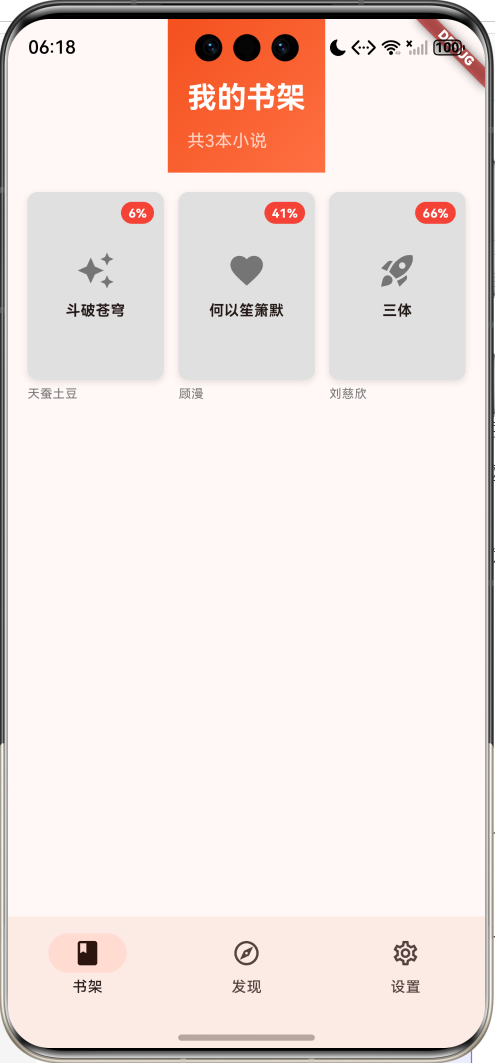
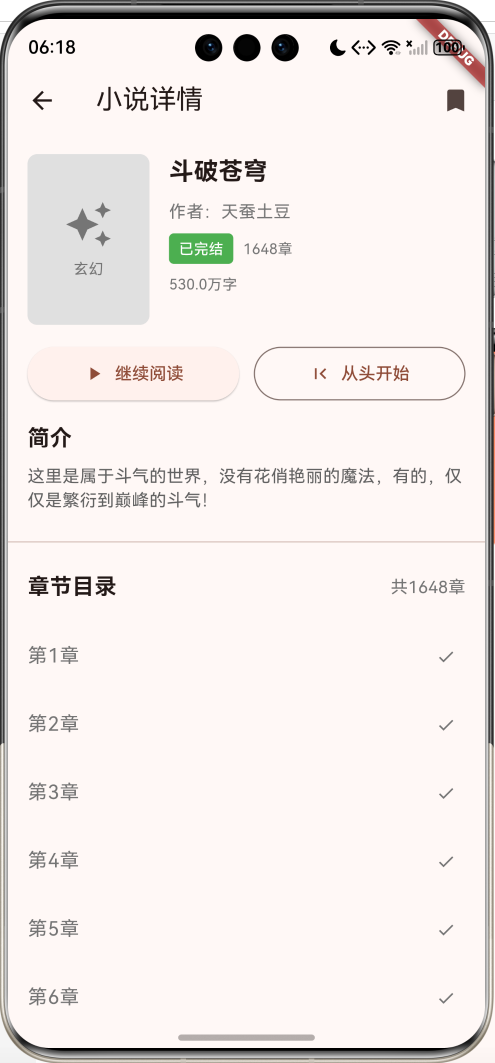
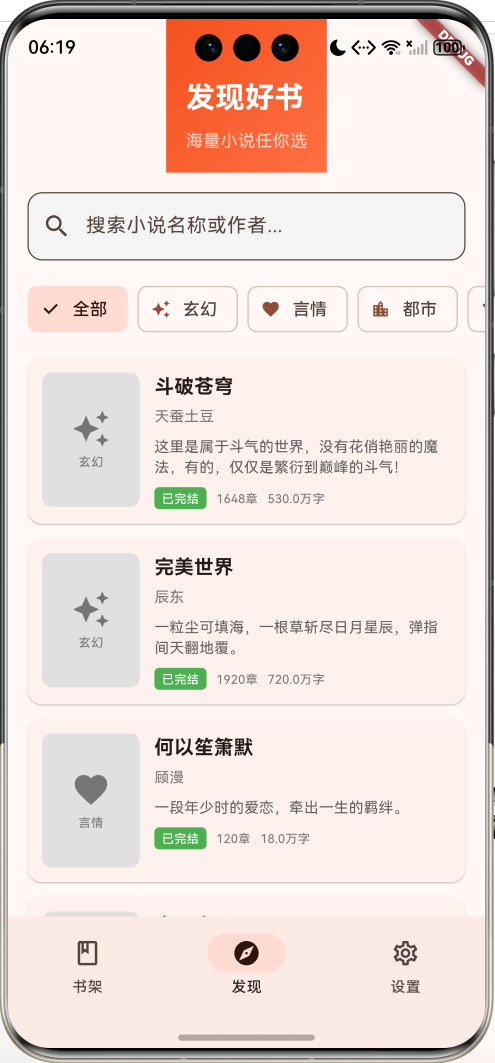
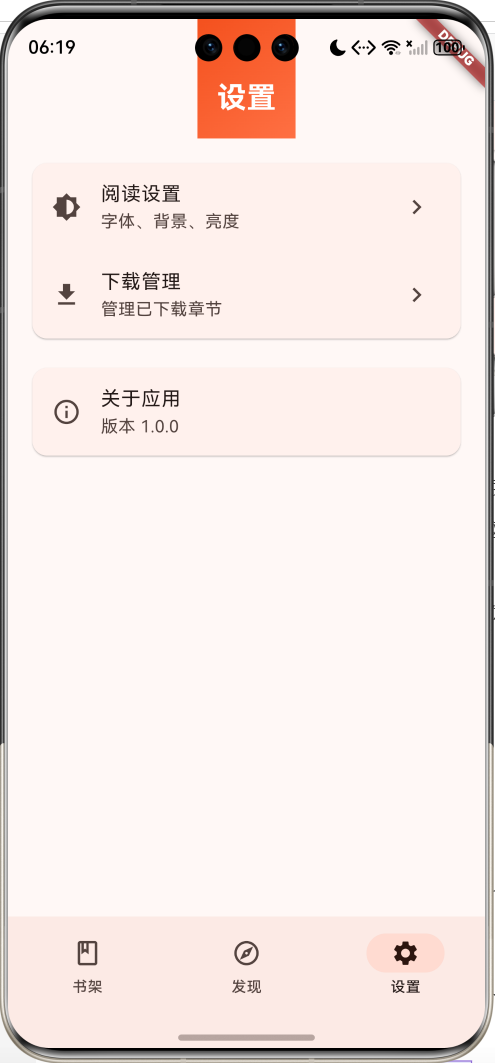
核心功能
- 书架管理:收藏喜欢的小说,记录阅读进度
- 分类浏览:6种小说分类,快速找到感兴趣的内容
- 搜索功能:支持按书名和作者搜索
- 阅读器:沉浸式阅读体验,支持翻页、字体调节、主题切换
- 章节管理:完整的章节目录,快速跳转
- 阅读设置:字体大小、背景颜色自定义
技术架构
数据模型设计
Novel 小说模型
class Novel {
  final String id;              // 唯一标识
  final String title;           // 小说标题
  final String author;          // 作者
  final String cover;           // 封面图
  final NovelCategory category; // 分类
  final NovelStatus status;     // 状态
  final String description;     // 简介
  final int totalChapters;      // 总章节数
  final int wordCount;          // 总字数
  final List<Chapter> chapters; // 章节列表
  final bool isInBookshelf;     // 是否在书架
  final int lastReadChapter;    // 最后阅读章节
}
Chapter 章节模型
class Chapter {
  final String id;              // 章节ID
  final String title;           // 章节标题
  final String content;         // 章节内容
  final int chapterNumber;      // 章节序号
  final DateTime publishTime;   // 发布时间
}
枚举类型
NovelCategory 小说分类
| 分类 | 名称 | 图标 |
|---|---|---|
| fantasy | 玄幻 | Icons.auto_awesome |
| romance | 言情 | Icons.favorite |
| urban | 都市 | Icons.location_city |
| history | 历史 | Icons.history_edu |
| scifi | 科幻 | Icons.rocket_launch |
| game | 游戏 | Icons.sports_esports |
NovelStatus 小说状态
- serializing: 连载中(蓝色)
- completed: 已完结(绿色)
核心功能实现
1. 书架管理
Widget _buildBookCover(Novel novel) {
  final progress = novel.lastReadChapter / novel.totalChapters;

  return InkWell(
    onTap: () => _openNovelDetail(novel),
    child: Column(
      children: [
        // 书籍封面
        Container(
          decoration: BoxDecoration(
            color: Colors.grey.shade300,
            borderRadius: BorderRadius.circular(8),
          ),
          child: Stack(
            children: [
              // 封面内容
              Center(child: Text(novel.title)),
              // 阅读进度标识
              if (novel.lastReadChapter > 0)
                Positioned(
                  top: 8,
                  right: 8,
                  child: Container(
                    padding: EdgeInsets.all(4),
                    decoration: BoxDecoration(
                      color: Colors.red,
                      borderRadius: BorderRadius.circular(10),
                    ),
                    child: Text('${(progress * 100).toInt()}%'),
                  ),
                ),
            ],
          ),
        ),
        // 作者信息
        Text(novel.author),
      ],
    ),
  );
}
2. 搜索和筛选
List<Novel> _getFilteredNovels() {
  return _novels.where((novel) {
    // 搜索匹配
    final matchesSearch = _searchQuery.isEmpty ||
        novel.title.toLowerCase().contains(_searchQuery.toLowerCase()) ||
        novel.author.toLowerCase().contains(_searchQuery.toLowerCase());

    // 分类匹配
    final matchesCategory = _filterCategory == null ||
        novel.category == _filterCategory;

    return matchesSearch && matchesCategory;
  }).toList();
}
3. 阅读器实现
PageView翻页控制
class _ReaderPageState extends State<ReaderPage> {
late PageController _pageController;
int _currentChapterIndex = 0;
void initState() {
super.initState();
_pageController = PageController(
initialPage: widget.startChapter,
);
}
Widget build(BuildContext context) {
return PageView.builder(
controller: _pageController,
itemCount: widget.novel.chapters.length,
onPageChanged: (index) {
setState(() {
_currentChapterIndex = index;
});
},
itemBuilder: (context, index) {
return _buildChapterContent(
widget.novel.chapters[index],
);
},
);
}
}
章节内容渲染
Widget _buildChapterContent(Chapter chapter) {
  return SafeArea(
    child: SingleChildScrollView(
      padding: const EdgeInsets.all(20),
      child: Column(
        crossAxisAlignment: CrossAxisAlignment.start,
        children: [
          // 章节标题
          Text(
            chapter.title,
            style: TextStyle(
              fontSize: _fontSize + 4,
              fontWeight: FontWeight.bold,
            ),
          ),
          const SizedBox(height: 20),
          // 章节内容
          Text(
            chapter.content,
            style: TextStyle(
              fontSize: _fontSize,
              height: 1.8, // 行高
            ),
          ),
          // 上下章按钮
          Row(
            mainAxisAlignment: MainAxisAlignment.spaceBetween,
            children: [
              if (_currentChapterIndex > 0)
                TextButton(
                  onPressed: _previousChapter,
                  child: const Text('上一章'),
                ),
              if (_currentChapterIndex < widget.novel.chapters.length - 1)
                TextButton(
                  onPressed: _nextChapter,
                  child: const Text('下一章'),
                ),
            ],
          ),
        ],
      ),
    ),
  );
}
4. 阅读设置
字体大小调节
void _showFontSettings() {
  showModalBottomSheet(
    context: context,
    builder: (context) => Container(
      padding: const EdgeInsets.all(16),
      child: Column(
        mainAxisSize: MainAxisSize.min,
        children: [
          const Text('字体大小'),
          Row(
            children: [
              const Text('A-'),
              Expanded(
                child: Slider(
                  value: _fontSize,
                  min: 14.0,
                  max: 28.0,
                  divisions: 7,
                  onChanged: (value) {
                    setState(() {
                      _fontSize = value;
                    });
                  },
                ),
              ),
              const Text('A+'),
            ],
          ),
        ],
      ),
    ),
  );
}
主题切换
void _showThemeSettings() {
  showModalBottomSheet(
    context: context,
    builder: (context) => Container(
      padding: const EdgeInsets.all(16),
      child: Column(
        mainAxisSize: MainAxisSize.min,
        children: [
          const Text('背景颜色'),
          Wrap(
            spacing: 16,
            children: [
              _buildThemeOption(Colors.white, '默认'),
              _buildThemeOption(Color(0xFFF5E6D3), '护眼'),
              _buildThemeOption(Color(0xFF2C2C2C), '夜间'),
              _buildThemeOption(Colors.blue.shade50, '蓝色'),
            ],
          ),
        ],
      ),
    ),
  );
}

Widget _buildThemeOption(Color color, String label) {
  return InkWell(
    onTap: () {
      setState(() {
        _backgroundColor = color;
      });
      Navigator.pop(context);
    },
    child: Column(
      children: [
        Container(
          width: 60,
          height: 60,
          decoration: BoxDecoration(
            color: color,
            border: Border.all(color: Colors.grey),
            borderRadius: BorderRadius.circular(8),
          ),
        ),
        Text(label),
      ],
    ),
  );
}
UI组件设计
1. 书架网格布局
使用GridView展示书架中的小说,3列布局,显示封面和阅读进度。
2. 小说卡片
横向布局展示小说信息,包括封面、标题、作者、简介、状态等。
3. 阅读器菜单
顶部菜单显示书名和章节标题,底部菜单提供章节列表、主题设置、字体调节等功能。
4. 章节目录
使用ModalBottomSheet展示章节列表,支持快速跳转。
功能扩展建议
1. 数据持久化
// 使用SharedPreferences保存阅读进度
class ReadingProgress {
  static Future<void> saveProgress(String novelId, int chapter) async {
    final prefs = await SharedPreferences.getInstance();
    await prefs.setInt('progress_$novelId', chapter);
  }

  static Future<int> loadProgress(String novelId) async {
    final prefs = await SharedPreferences.getInstance();
    return prefs.getInt('progress_$novelId') ?? 0;
  }
}
2. 在线API接入
// 从API获取小说数据
class NovelApi {
  static Future<List<Novel>> fetchNovels() async {
    final response = await http.get(
      Uri.parse('https://api.example.com/novels'),
    );

    if (response.statusCode == 200) {
      final List data = jsonDecode(response.body);
      return data.map((json) => Novel.fromJson(json)).toList();
    }
    throw Exception('Failed to load novels');
  }
}
3. 离线下载
// 下载章节到本地
class ChapterDownloader {
  static Future<void> downloadChapter(Chapter chapter) async {
    final dir = await getApplicationDocumentsDirectory();
    final file = File('${dir.path}/chapter_${chapter.id}.txt');
    await file.writeAsString(chapter.content);
  }

  static Future<String?> loadLocalChapter(String chapterId) async {
    final dir = await getApplicationDocumentsDirectory();
    final file = File('${dir.path}/chapter_$chapterId.txt');
    if (await file.exists()) {
      return await file.readAsString();
    }
    return null;
  }
}
4. 书签功能
// 添加书签
class Bookmark {
  final String novelId;
  final int chapterIndex;
  final int position;
  final String note;

  const Bookmark({
    required this.novelId,
    required this.chapterIndex,
    required this.position,
    this.note = '',
  });
}
5. 夜间模式自动切换
// 根据时间自动切换夜间模式
class AutoNightMode {
  static bool shouldUseNightMode() {
    final hour = DateTime.now().hour;
    return hour >= 22 || hour < 6;
  }
}
性能优化
1. 章节懒加载
// 只加载当前章节和前后各一章
class LazyChapterLoader {
  static List<Chapter> loadVisibleChapters(
    List<Chapter> allChapters,
    int currentIndex,
  ) {
    final start = (currentIndex - 1).clamp(0, allChapters.length);
    final end = (currentIndex + 2).clamp(0, allChapters.length);
    return allChapters.sublist(start, end);
  }
}
2. 图片缓存
// 使用cached_network_image缓存封面图
Widget _buildCoverImage(String url) {
  return CachedNetworkImage(
    imageUrl: url,
    placeholder: (context, url) => CircularProgressIndicator(),
    errorWidget: (context, url, error) => Icon(Icons.error),
  );
}
3. 文本渲染优化
// 使用RepaintBoundary优化文本渲染
Widget _buildOptimizedText(String content) {
  return RepaintBoundary(
    child: Text(
      content,
      style: TextStyle(fontSize: _fontSize, height: 1.8),
    ),
  );
}
测试指南
单元测试
测试数据模型、筛选逻辑等核心功能。
Widget测试
测试UI组件的渲染和交互。
集成测试
测试完整的阅读流程。
部署指南
# Android
flutter build apk --release

# iOS
flutter build ios --release

# Web
flutter build web --release
项目总结
在线小说阅读器应用实现了完整的小说阅读功能,从书架管理到沉浸式阅读体验,为用户提供了舒适的阅读环境。应用采用Material Design 3设计规范,界面简洁美观,功能完善实用,是学习Flutter应用开发的优秀案例。
欢迎加入开源鸿蒙跨平台社区:https://openharmonycrossplatform.csdn.net

讨论HarmonyOS开发技术,专注于API与组件、DevEco Studio、测试、元服务和应用上架分发等。
更多推荐


 3
3 0
0- 0


 已为社区贡献10条内容

所有评论(0)