Flutter 框架跨平台鸿蒙开发 - 城市文创打卡:探索城市文化创意之旅
命名规范_placesMAX_PLACES文件组织注释规范/// 文创场所模型////// 包含场所的基本信息、地理位置、评分等数据/// 场所唯一标识/// 场所名称// 更多字段...Flutter跨平台一套代码多端运行高性能渲染丰富的组件库热重载开发统一的设计语言丰富的交互组件优雅的动画效果响应式布局数据模型设计清晰的数据结构完善的序列化计算属性优化类型安全用户体验流畅的交互即时的反馈友好的
Flutter城市文创打卡:探索城市文化创意之旅
项目概述
在文化创意产业蓬勃发展的今天,城市中涌现出越来越多的文创空间、艺术展览、创意市集和特色店铺。这些文创场所不仅是城市文化的重要载体,更是年轻人社交、打卡、分享的热门目的地。然而,面对分散在城市各处的文创场所,如何发现、记录和分享这些精彩的文创体验,成为文创爱好者的一大需求。
本项目开发了一款基于Flutter的城市文创打卡应用,帮助用户发现城市中的文创场所,记录打卡足迹,分享文创体验,构建属于自己的城市文创地图。应用不仅提供场所信息浏览和导航功能,还支持打卡记录、照片分享、评价互动等社交功能,让文创探索之旅更加有趣和有意义。
运行效果图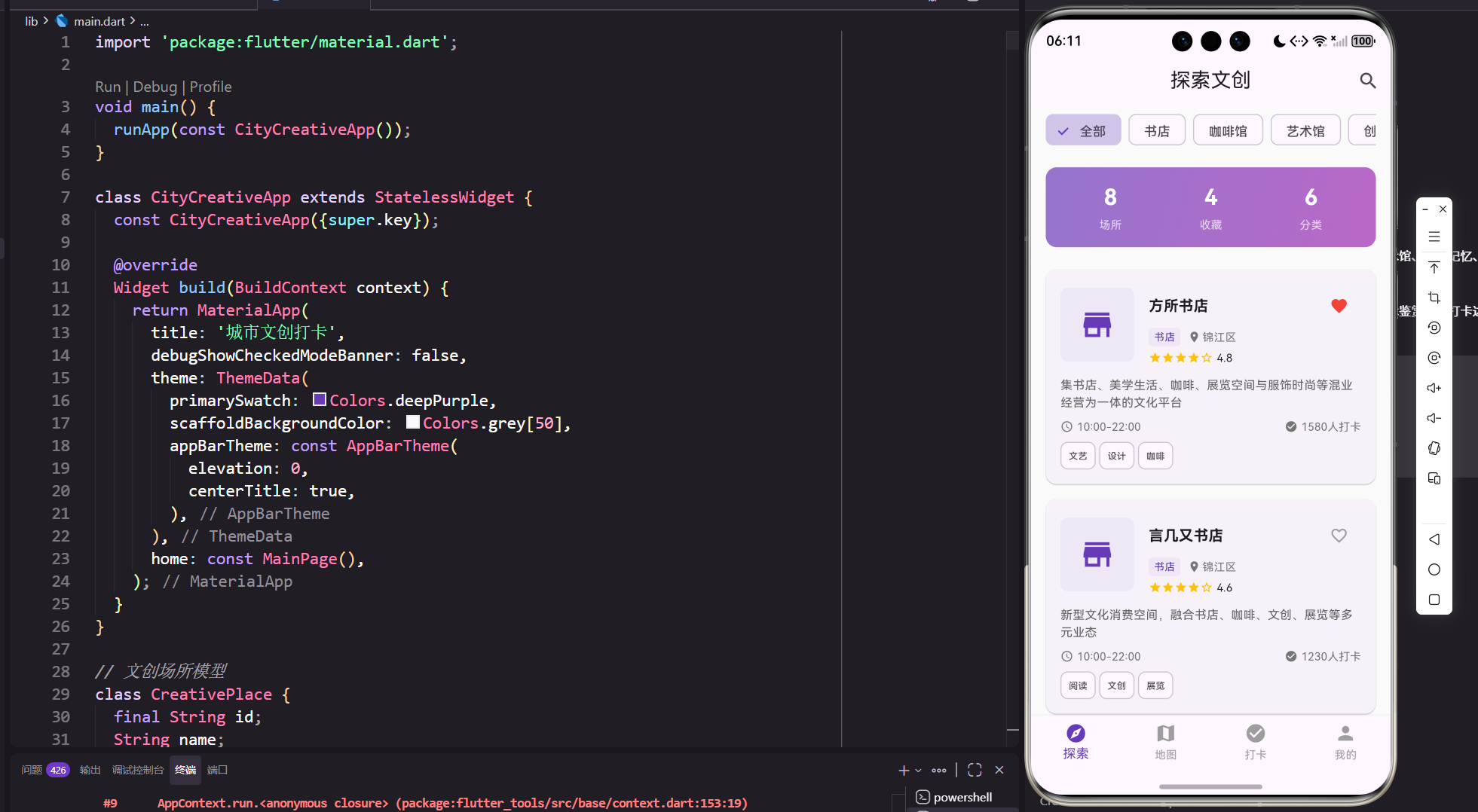
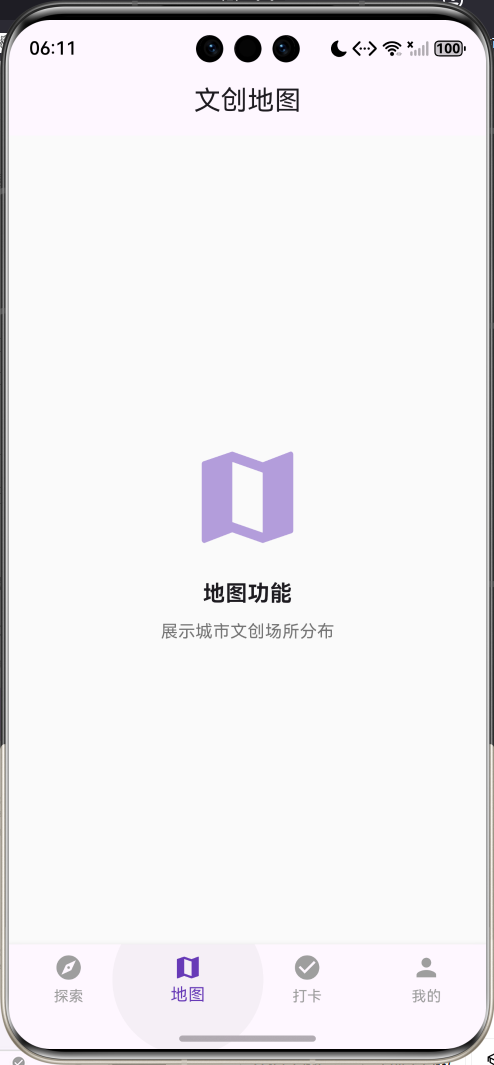
核心功能特性
- 文创地图:地图展示城市文创场所,支持分类筛选和搜索
- 场所详情:查看文创场所详细信息、照片、评价和导航
- 打卡记录:记录打卡时间、地点、照片和心情感受
- 打卡足迹:可视化展示个人打卡历史和统计数据
- 分类浏览:按类型浏览文创场所(书店、咖啡馆、艺术馆等)
- 收藏管理:收藏喜欢的文创场所,方便下次访问
- 评价分享:对场所进行评分和评价,分享打卡体验
- 成就系统:完成打卡任务获得成就徽章
- 社交互动:查看其他用户的打卡动态和推荐
应用价值
- 文化探索:发现城市隐藏的文创宝藏,丰富文化生活
- 记录分享:记录文创打卡足迹,分享美好体验
- 社交互动:结识志同道合的文创爱好者
- 城市导览:为游客提供特色文创场所导览
- 商业推广:为文创场所提供展示和推广平台
开发环境配置
系统要求
开发本应用需要满足以下环境要求:
- 操作系统:Windows 10/11、macOS 10.14+、或 Ubuntu 18.04+
- Flutter SDK:3.0.0 或更高版本
- Dart SDK:2.17.0 或更高版本
- 开发工具:Android Studio、VS Code 或 IntelliJ IDEA
- 设备要求:Android 5.0+ 或 iOS 11.0+
Flutter环境搭建
1. 安装Flutter SDK
# Windows
# 下载flutter_windows_3.x.x-stable.zip并解压

# macOS
curl -O https://storage.googleapis.com/flutter_infra_release/releases/stable/macos/flutter_macos_3.x.x-stable.zip
unzip flutter_macos_3.x.x-stable.zip

# Linux
wget https://storage.googleapis.com/flutter_infra_release/releases/stable/linux/flutter_linux_3.x.x-stable.tar.xz
tar xf flutter_linux_3.x.x-stable.tar.xz
2. 配置环境变量
# Windows (系统环境变量)
C:\flutter\bin

# macOS/Linux (添加到~/.bashrc或~/.zshrc)
export PATH="$PATH:/path/to/flutter/bin"
3. 验证安装
flutter doctor
确保所有检查项都通过。
项目初始化
1. 创建项目
flutter create city_creative_checkin
cd city_creative_checkin
2. 配置依赖
编辑pubspec.yaml文件:
name: city_creative_checkin
description: 城市文创打卡应用

publish_to: 'none'

version: 1.0.0+1

environment:
  sdk: '>=3.0.0 <4.0.0'

dependencies:
  flutter:
    sdk: flutter
  cupertino_icons: ^1.0.2

dev_dependencies:
  flutter_test:
    sdk: flutter
  flutter_lints: ^2.0.0

flutter:
  uses-material-design: true
3. 安装依赖
flutter pub get
核心数据模型设计
CreativePlace 文创场所模型
文创场所模型是应用的核心数据结构,包含场所的详细信息:
class CreativePlace {
  final String id;              // 场所唯一标识
  String name;                  // 场所名称
  String category;              // 场所类型
  String address;               // 详细地址
  String district;              // 所在区域
  double latitude;              // 纬度
  double longitude;             // 经度
  String description;           // 场所描述
  List<String> tags;            // 标签列表
  List<String> images;          // 图片列表
  String openTime;              // 营业时间
  String phone;                 // 联系电话
  double rating;                // 平均评分
  int checkInCount;             // 打卡次数
  bool isFavorite;              // 是否收藏

  CreativePlace({
    required this.id,
    required this.name,
    required this.category,
    required this.address,
    required this.district,
    required this.latitude,
    required this.longitude,
    required this.description,
    required this.tags,
    required this.images,
    required this.openTime,
    required this.phone,
    this.rating = 0.0,
    this.checkInCount = 0,
    this.isFavorite = false,
  });

  // 计算属性:是否热门
  bool get isPopular => checkInCount > 100;

  // 计算属性:评分等级
  String get ratingLevel {
    if (rating >= 4.5) return '优秀';
    if (rating >= 4.0) return '很好';
    if (rating >= 3.5) return '不错';
    if (rating >= 3.0) return '一般';
    return '待改进';
  }

  // JSON序列化
  Map<String, dynamic> toJson() => {
        'id': id,
        'name': name,
        'category': category,
        'address': address,
        'district': district,
        'latitude': latitude,
        'longitude': longitude,
        'description': description,
        'tags': tags,
        'images': images,
        'openTime': openTime,
        'phone': phone,
        'rating': rating,
        'checkInCount': checkInCount,
        'isFavorite': isFavorite,
      };

  // JSON反序列化
  factory CreativePlace.fromJson(Map<String, dynamic> json) => CreativePlace(
        id: json['id'],
        name: json['name'],
        category: json['category'],
        address: json['address'],
        district: json['district'],
        latitude: json['latitude'],
        longitude: json['longitude'],
        description: json['description'],
        tags: List<String>.from(json['tags']),
        images: List<String>.from(json['images']),
        openTime: json['openTime'],
        phone: json['phone'],
        rating: json['rating'] ?? 0.0,
        checkInCount: json['checkInCount'] ?? 0,
        isFavorite: json['isFavorite'] ?? false,
      );
}
设计要点:
- 使用final修饰id确保场所标识不可变
- 支持JSON序列化,便于数据持久化和网络传输
- 包含地理位置信息,支持地图展示和导航
- 计算属性自动判断热门程度和评分等级
- 支持多图片展示,丰富场所信息
CheckInRecord 打卡记录模型
打卡记录模型用于记录用户的打卡历史:
class CheckInRecord {
  final String id;              // 记录唯一标识
  final String placeId;         // 关联场所ID
  final String placeName;       // 场所名称
  final String placeCategory;   // 场所类型
  final DateTime checkInTime;   // 打卡时间
  final List<String> photos;    // 打卡照片
  final String mood;            // 心情表情
  final int rating;             // 评分(1-5)
  final String? review;         // 评价内容
  final List<String> tags;      // 打卡标签

  CheckInRecord({
    required this.id,
    required this.placeId,
    required this.placeName,
    required this.placeCategory,
    required this.checkInTime,
    required this.photos,
    required this.mood,
    required this.rating,
    this.review,
    required this.tags,
  });

  // 计算属性:打卡日期
  String get dateString {
    return '${checkInTime.year}-${checkInTime.month.toString().padLeft(2, '0')}-${checkInTime.day.toString().padLeft(2, '0')}';
  }

  // 计算属性:打卡时间
  String get timeString {
    return '${checkInTime.hour.toString().padLeft(2, '0')}:${checkInTime.minute.toString().padLeft(2, '0')}';
  }

  // 计算属性:相对时间
  String get relativeTime {
    final now = DateTime.now();
    final diff = now.difference(checkInTime);

    if (diff.inMinutes < 60) {
      return '${diff.inMinutes}分钟前';
    } else if (diff.inHours < 24) {
      return '${diff.inHours}小时前';
    } else if (diff.inDays < 7) {
      return '${diff.inDays}天前';
    } else {
      return dateString;
    }
  }

  // JSON序列化
  Map<String, dynamic> toJson() => {
        'id': id,
        'placeId': placeId,
        'placeName': placeName,
        'placeCategory': placeCategory,
        'checkInTime': checkInTime.toIso8601String(),
        'photos': photos,
        'mood': mood,
        'rating': rating,
        'review': review,
        'tags': tags,
      };

  // JSON反序列化
  factory CheckInRecord.fromJson(Map<String, dynamic> json) => CheckInRecord(
        id: json['id'],
        placeId: json['placeId'],
        placeName: json['placeName'],
        placeCategory: json['placeCategory'],
        checkInTime: DateTime.parse(json['checkInTime']),
        photos: List<String>.from(json['photos']),
        mood: json['mood'],
        rating: json['rating'],
        review: json['review'],
        tags: List<String>.from(json['tags']),
      );
}
设计要点:
- 关联场所信息,建立完整的打卡关系
- 支持多张照片上传,记录精彩瞬间
- 心情表情和评分,表达打卡感受
- 可选的评价内容,分享详细体验
- 相对时间显示,提升用户体验
Achievement 成就模型
成就模型用于激励用户探索更多文创场所:
class Achievement {
  final String id;              // 成就唯一标识
  String name;                  // 成就名称
  String description;           // 成就描述
  String icon;                  // 成就图标
  int targetCount;              // 目标数量
  int currentCount;             // 当前进度
  bool isUnlocked;              // 是否解锁
  DateTime? unlockTime;         // 解锁时间

  Achievement({
    required this.id,
    required this.name,
    required this.description,
    required this.icon,
    required this.targetCount,
    this.currentCount = 0,
    this.isUnlocked = false,
    this.unlockTime,
  });

  // 计算属性:完成百分比
  double get progress => currentCount / targetCount;

  // 计算属性:进度文本
  String get progressText => '$currentCount/$targetCount';

  // JSON序列化
  Map<String, dynamic> toJson() => {
        'id': id,
        'name': name,
        'description': description,
        'icon': icon,
        'targetCount': targetCount,
        'currentCount': currentCount,
        'isUnlocked': isUnlocked,
        'unlockTime': unlockTime?.toIso8601String(),
      };

  // JSON反序列化
  factory Achievement.fromJson(Map<String, dynamic> json) => Achievement(
        id: json['id'],
        name: json['name'],
        description: json['description'],
        icon: json['icon'],
        targetCount: json['targetCount'],
        currentCount: json['currentCount'] ?? 0,
        isUnlocked: json['isUnlocked'] ?? false,
        unlockTime: json['unlockTime'] != null
            ? DateTime.parse(json['unlockTime'])
            : null,
      );
}
设计要点:
- 目标和进度追踪,激励用户完成任务
- 解锁状态和时间记录,展示成就历程
- 进度百分比计算,可视化展示进度
- 图标和描述,增强成就感
应用架构设计
整体架构
应用采用四标签页的架构设计,每个标签页专注于特定功能模块:
MainPage (主页面)
├── ExplorePage (探索页)
│   ├── 分类筛选
│   ├── 场所列表
│   └── 搜索功能
├── MapPage (地图页)
│   ├── 地图展示
│   ├── 场所标记
│   └── 导航功能
├── CheckInPage (打卡页)
│   ├── 打卡记录
│   ├── 足迹统计
│   └── 成就展示
└── ProfilePage (我的)
    ├── 个人信息
    ├── 收藏管理
    └── 设置中心
页面层级结构
-
探索页(ExplorePage)
- 分类标签:快速筛选不同类型的文创场所
- 推荐卡片:展示热门和推荐场所
- 场所列表:展示所有文创场所
- 搜索功能:按名称或标签搜索
-
地图页(MapPage)
- 地图视图:展示城市文创场所分布
- 场所标记:在地图上标记场所位置
- 详情弹窗:点击标记查看场所信息
- 导航功能:一键导航到目标场所
-
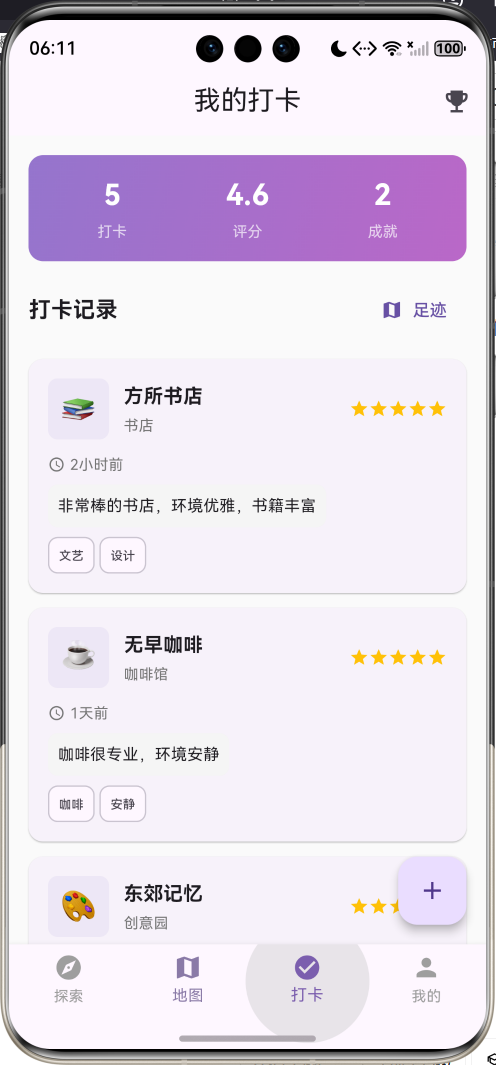
打卡页(CheckInPage)
- 打卡记录:展示个人打卡历史
- 统计卡片:展示打卡数据统计
- 足迹地图:可视化打卡足迹
- 成就墙:展示获得的成就徽章
-
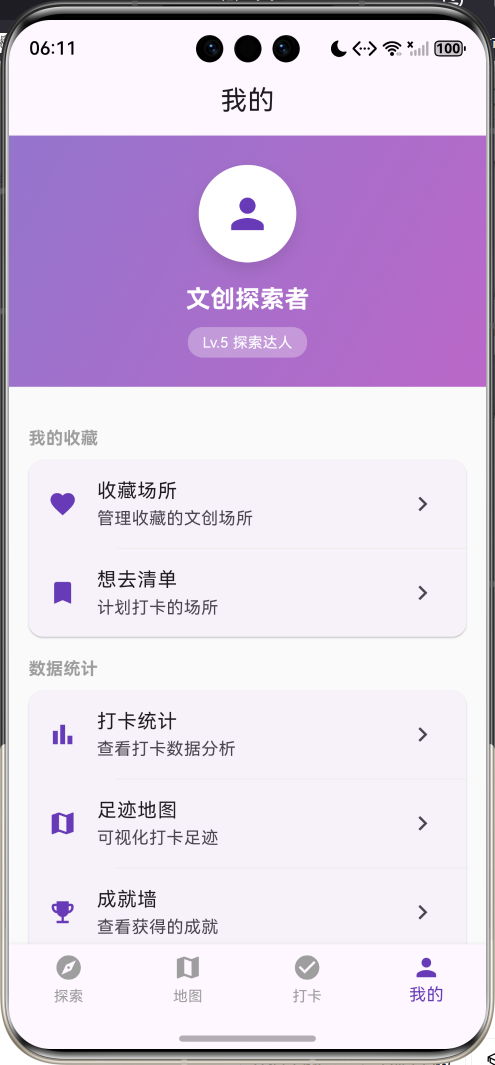
我的(ProfilePage)
- 个人信息:头像、昵称、等级
- 收藏管理:管理收藏的场所
- 设置中心:应用设置和偏好
- 关于应用:版本信息和帮助
状态管理
应用使用StatefulWidget进行状态管理:
class _ExplorePageState extends State<ExplorePage> {
List<CreativePlace> _places = []; // 场所列表
List<CheckInRecord> _records = []; // 打卡记录
List<Achievement> _achievements = []; // 成就列表
String _selectedCategory = '全部'; // 选中的分类
void initState() {
super.initState();
_loadData(); // 加载数据
}
}
用户界面实现
主界面布局
主界面采用Scaffold + BottomNavigationBar的经典布局:
class MainPage extends StatefulWidget {
const MainPage({super.key});
State<MainPage> createState() => _MainPageState();
}
class _MainPageState extends State<MainPage> {
int _currentIndex = 0;
final List<Widget> _pages = [
const ExplorePage(),
const MapPage(),
const CheckInPage(),
const ProfilePage(),
];
Widget build(BuildContext context) {
return Scaffold(
body: _pages[_currentIndex],
bottomNavigationBar: BottomNavigationBar(
currentIndex: _currentIndex,
onTap: (index) => setState(() => _currentIndex = index),
type: BottomNavigationBarType.fixed,
selectedItemColor: Colors.deepPurple,
unselectedItemColor: Colors.grey,
items: const [
BottomNavigationBarItem(
icon: Icon(Icons.explore),
label: '探索',
),
BottomNavigationBarItem(
icon: Icon(Icons.map),
label: '地图',
),
BottomNavigationBarItem(
icon: Icon(Icons.check_circle),
label: '打卡',
),
BottomNavigationBarItem(
icon: Icon(Icons.person),
label: '我的',
),
],
),
);
}
}
探索页设计
探索页是用户发现文创场所的主要入口:
分类筛选
Widget _buildCategoryFilter() {
  final categories = ['全部', '书店', '咖啡馆', '艺术馆', '创意园', '市集', '其他'];

  return Container(
    height: 50,
    padding: const EdgeInsets.symmetric(horizontal: 16),
    child: ListView.builder(
      scrollDirection: Axis.horizontal,
      itemCount: categories.length,
      itemBuilder: (context, index) {
        final category = categories[index];
        final isSelected = _selectedCategory == category;

        return Padding(
          padding: const EdgeInsets.only(right: 8),
          child: FilterChip(
            label: Text(category),
            selected: isSelected,
            onSelected: (selected) {
              setState(() => _selectedCategory = category);
            },
            selectedColor: Colors.deepPurple[100],
            checkmarkColor: Colors.deepPurple,
          ),
        );
      },
    ),
  );
}
场所卡片
Widget _buildPlaceCard(CreativePlace place) {
  return Card(
    margin: const EdgeInsets.symmetric(horizontal: 16, vertical: 8),
    clipBehavior: Clip.antiAlias,
    child: InkWell(
      onTap: () => _showPlaceDetail(place),
      child: Column(
        crossAxisAlignment: CrossAxisAlignment.start,
        children: [
          // 场所图片
          Container(
            height: 180,
            width: double.infinity,
            color: Colors.deepPurple[50],
            child: place.images.isNotEmpty
                ? Image.network(
                    place.images.first,
                    fit: BoxFit.cover,
                    errorBuilder: (context, error, stackTrace) {
                      return const Center(
                        child: Icon(Icons.image, size: 60, color: Colors.grey),
                      );
                    },
                  )
                : const Center(
                    child: Icon(Icons.store, size: 60, color: Colors.grey),
                  ),
          ),

          // 场所信息
          Padding(
            padding: const EdgeInsets.all(16),
            child: Column(
              crossAxisAlignment: CrossAxisAlignment.start,
              children: [
                Row(
                  children: [
                    Expanded(
                      child: Text(
                        place.name,
                        style: const TextStyle(
                          fontSize: 18,
                          fontWeight: FontWeight.bold,
                        ),
                      ),
                    ),
                    IconButton(
                      icon: Icon(
                        place.isFavorite ? Icons.favorite : Icons.favorite_border,
                        color: place.isFavorite ? Colors.red : Colors.grey,
                      ),
                      onPressed: () => _toggleFavorite(place),
                    ),
                  ],
                ),
                const SizedBox(height: 8),
                Row(
                  children: [
                    Container(
                      padding: const EdgeInsets.symmetric(
                        horizontal: 8,
                        vertical: 4,
                      ),
                      decoration: BoxDecoration(
                        color: Colors.deepPurple[50],
                        borderRadius: BorderRadius.circular(4),
                      ),
                      child: Text(
                        place.category,
                        style: TextStyle(
                          fontSize: 12,
                          color: Colors.deepPurple[700],
                        ),
                      ),
                    ),
                    const SizedBox(width: 8),
                    Icon(Icons.location_on, size: 16, color: Colors.grey[600]),
                    const SizedBox(width: 4),
                    Expanded(
                      child: Text(
                        place.district,
                        style: TextStyle(fontSize: 12, color: Colors.grey[600]),
                      ),
                    ),
                  ],
                ),
                const SizedBox(height: 8),
                Row(
                  children: [
                    ...List.generate(
                      5,
                      (i) => Icon(
                        i < place.rating.floor()
                            ? Icons.star
                            : Icons.star_border,
                        size: 16,
                        color: Colors.amber,
                      ),
                    ),
                    const SizedBox(width: 8),
                    Text(
                      place.rating.toStringAsFixed(1),
                      style: const TextStyle(fontSize: 14),
                    ),
                    const Spacer(),
                    Icon(Icons.check_circle, size: 16, color: Colors.grey[600]),
                    const SizedBox(width: 4),
                    Text(
                      '${place.checkInCount}人打卡',
                      style: TextStyle(fontSize: 12, color: Colors.grey[600]),
                    ),
                  ],
                ),
                if (place.tags.isNotEmpty) ...[
                  const SizedBox(height: 8),
                  Wrap(
                    spacing: 4,
                    runSpacing: 4,
                    children: place.tags.take(3).map((tag) {
                      return Chip(
                        label: Text(tag, style: const TextStyle(fontSize: 10)),
                        padding: EdgeInsets.zero,
                        materialTapTargetSize: MaterialTapTargetSize.shrinkWrap,
                        visualDensity: VisualDensity.compact,
                      );
                    }).toList(),
                  ),
                ],
              ],
            ),
          ),
        ],
      ),
    ),
  );
}
打卡页设计
打卡页展示用户的打卡历史和成就系统:
统计卡片
Widget _buildStatsCard() {
  final totalCount = _records.length;
  final avgRating = _records.isEmpty
      ? 0.0
      : _records.fold<int>(0, (sum, r) => sum + r.rating) / _records.length;
  final unlockedCount = _achievements.where((a) => a.isUnlocked).length;

  return Container(
    margin: const EdgeInsets.all(16),
    padding: const EdgeInsets.all(16),
    decoration: BoxDecoration(
      gradient: LinearGradient(
        colors: [Colors.deepPurple.shade300, Colors.purple.shade300],
        begin: Alignment.topLeft,
        end: Alignment.bottomRight,
        ),
      borderRadius: BorderRadius.circular(12),
    ),
    child: Row(
      mainAxisAlignment: MainAxisAlignment.spaceAround,
      children: [
        _buildStatItem('打卡', '$totalCount'),
        _buildStatItem('评分', avgRating.toStringAsFixed(1)),
        _buildStatItem('成就', '$unlockedCount'),
      ],
    ),
  );
}
打卡记录卡片
Widget _buildRecordCard(CheckInRecord record) {
  return Card(
    margin: const EdgeInsets.only(bottom: 12),
    child: InkWell(
      onTap: () => _showRecordDetail(record),
      borderRadius: BorderRadius.circular(12),
      child: Padding(
        padding: const EdgeInsets.all(16),
        child: Column(
          crossAxisAlignment: CrossAxisAlignment.start,
          children: [
            Row(
              children: [
                // 心情图标
                Container(
                  width: 50,
                  height: 50,
                  decoration: BoxDecoration(
                    color: Colors.deepPurple[50],
                    borderRadius: BorderRadius.circular(8),
                  ),
                  child: Center(
                    child: Text(
                      record.mood,
                      style: const TextStyle(fontSize: 24),
                    ),
                  ),
                ),
                const SizedBox(width: 12),
                // 场所信息
                Expanded(
                  child: Column(
                    crossAxisAlignment: CrossAxisAlignment.start,
                    children: [
                      Text(
                        record.placeName,
                        style: const TextStyle(
                          fontSize: 16,
                          fontWeight: FontWeight.bold,
                        ),
                      ),
                      const SizedBox(height: 4),
                      Text(
                        record.placeCategory,
                        style: TextStyle(
                          fontSize: 12,
                          color: Colors.grey[600],
                        ),
                      ),
                    ],
                  ),
                ),
                // 评分
                Row(
                  children: List.generate(
                    5,
                    (i) => Icon(
                      i < record.rating ? Icons.star : Icons.star_border,
                      size: 16,
                      color: Colors.amber,
                    ),
                  ),
                ),
              ],
            ),
            const SizedBox(height: 12),
            // 打卡时间
            Row(
              children: [
                Icon(Icons.access_time, size: 14, color: Colors.grey[600]),
                const SizedBox(width: 4),
                Text(
                  _formatTime(record.checkInTime),
                  style: TextStyle(fontSize: 12, color: Colors.grey[600]),
                ),
              ],
            ),
            // 评价内容
            if (record.review != null) ...[
              const SizedBox(height: 8),
              Container(
                padding: const EdgeInsets.all(8),
                decoration: BoxDecoration(
                  color: Colors.grey[100],
                  borderRadius: BorderRadius.circular(8),
                ),
                child: Text(
                  record.review!,
                  style: const TextStyle(fontSize: 13),
                ),
              ),
            ],
            // 标签
            if (record.tags.isNotEmpty) ...[
              const SizedBox(height: 8),
              Wrap(
                spacing: 4,
                children: record.tags.map((tag) {
                  return Chip(
                    label: Text(tag, style: const TextStyle(fontSize: 10)),
                    padding: EdgeInsets.zero,
                    materialTapTargetSize: MaterialTapTargetSize.shrinkWrap,
                    visualDensity: VisualDensity.compact,
                  );
                }).toList(),
              ),
            ],
          ],
        ),
      ),
    ),
  );
}
成就系统
void _showAchievements() {
  showDialog(
    context: context,
    builder: (context) => AlertDialog(
      title: const Text('我的成就'),
      content: SizedBox(
        width: double.maxFinite,
        child: ListView.builder(
          shrinkWrap: true,
          itemCount: _achievements.length,
          itemBuilder: (context, index) {
            final achievement = _achievements[index];
            return ListTile(
              leading: Text(
                achievement.icon,
                style: TextStyle(
                  fontSize: 32,
                  color: achievement.isUnlocked ? null : Colors.grey,
                ),
              ),
              title: Text(
                achievement.name,
                style: TextStyle(
                  color: achievement.isUnlocked ? null : Colors.grey,
                ),
              ),
              subtitle: Column(
                crossAxisAlignment: CrossAxisAlignment.start,
                children: [
                  Text(achievement.description),
                  const SizedBox(height: 4),
                  LinearProgressIndicator(
                    value: achievement.progress,
                    backgroundColor: Colors.grey[200],
                  ),
                  const SizedBox(height: 2),
                  Text(
                    '${achievement.currentCount}/${achievement.targetCount}',
                    style: const TextStyle(fontSize: 12),
                  ),
                ],
              ),
            );
          },
        ),
      ),
      actions: [
        TextButton(
          onPressed: () => Navigator.pop(context),
          child: const Text('关闭'),
        ),
      ],
    ),
  );
}
设计亮点:
- 统计卡片展示关键数据
- 打卡记录包含完整信息
- 成就系统激励用户探索
- 进度条可视化展示进度
个人中心设计
个人中心提供用户信息和应用设置:
Widget _buildUserHeader() {
  return Container(
    width: double.infinity,
    padding: const EdgeInsets.all(24),
    decoration: BoxDecoration(
      gradient: LinearGradient(
        colors: [Colors.deepPurple.shade300, Colors.purple.shade300],
        begin: Alignment.topLeft,
        end: Alignment.bottomRight,
      ),
    ),
    child: Column(
      children: [
        Container(
          width: 80,
          height: 80,
          decoration: BoxDecoration(
            color: Colors.white,
            shape: BoxShape.circle,
            boxShadow: [
              BoxShadow(
                color: Colors.black.withOpacity(0.1),
                blurRadius: 10,
                offset: const Offset(0, 5),
              ),
            ],
          ),
          child: const Center(
            child: Icon(Icons.person, size: 40, color: Colors.deepPurple),
          ),
        ),
        const SizedBox(height: 16),
        const Text(
          '文创探索者',
          style: TextStyle(
            color: Colors.white,
            fontSize: 20,
            fontWeight: FontWeight.bold,
          ),
        ),
        const SizedBox(height: 8),
        Container(
          padding: const EdgeInsets.symmetric(horizontal: 12, vertical: 4),
          decoration: BoxDecoration(
            color: Colors.white.withOpacity(0.3),
            borderRadius: BorderRadius.circular(12),
          ),
          child: const Text(
            'Lv.5 探索达人',
            style: TextStyle(color: Colors.white, fontSize: 12),
          ),
        ),
      ],
    ),
  );
}
核心功能实现
场所筛选功能
支持按类型筛选文创场所:
List<CreativePlace> get _filteredPlaces {
  if (_selectedCategory == '全部') return _places;
  return _places.where((p) => p.category == _selectedCategory).toList();
}
收藏功能
用户可以收藏喜欢的文创场所:
void _toggleFavorite(CreativePlace place) {
  setState(() {
    place.isFavorite = !place.isFavorite;
  });

  ScaffoldMessenger.of(context).showSnackBar(
    SnackBar(
      content: Text(
        place.isFavorite ? '已添加到收藏' : '已取消收藏',
      ),
    ),
  );
}
打卡记录功能
记录用户的打卡体验:
void _addCheckInRecord(CreativePlace place) {
  final record = CheckInRecord(
    id: DateTime.now().millisecondsSinceEpoch.toString(),
    placeId: place.id,
    placeName: place.name,
    placeCategory: place.category,
    checkInTime: DateTime.now(),
    photos: [],
    mood: '😊',
    rating: 5,
    tags: [],
  );

  setState(() {
    _records.insert(0, record);
    place.checkInCount++;
  });

  _checkAchievements();
}
成就解锁功能
自动检查并解锁成就:
void _checkAchievements() {
  for (var achievement in _achievements) {
    if (!achievement.isUnlocked) {
      // 更新进度
      if (achievement.id == '2') {
        // 文创探索者:打卡5个不同场所
        final uniquePlaces = _records.map((r) => r.placeId).toSet().length;
        achievement.currentCount = uniquePlaces;
      } else if (achievement.id == '6') {
        // 打卡达人:累计打卡10次
        achievement.currentCount = _records.length;
      }

      // 检查是否解锁
      if (achievement.currentCount >= achievement.targetCount) {
        achievement.isUnlocked = true;
        achievement.unlockTime = DateTime.now();

        _showAchievementUnlocked(achievement);
      }
    }
  }
}

void _showAchievementUnlocked(Achievement achievement) {
  showDialog(
    context: context,
    builder: (context) => AlertDialog(
      title: const Text('🎉 成就解锁'),
      content: Column(
        mainAxisSize: MainAxisSize.min,
        children: [
          Text(
            achievement.icon,
            style: const TextStyle(fontSize: 60),
          ),
          const SizedBox(height: 16),
          Text(
            achievement.name,
            style: const TextStyle(
              fontSize: 20,
              fontWeight: FontWeight.bold,
            ),
          ),
          const SizedBox(height: 8),
          Text(achievement.description),
        ],
      ),
      actions: [
        TextButton(
          onPressed: () => Navigator.pop(context),
          child: const Text('太棒了!'),
        ),
      ],
    ),
  );
}
时间格式化功能
智能显示相对时间:
String _formatTime(DateTime dt) {
  final now = DateTime.now();
  final diff = now.difference(dt);

  if (diff.inMinutes < 60) {
    return '${diff.inMinutes}分钟前';
  } else if (diff.inHours < 24) {
    return '${diff.inHours}小时前';
  } else if (diff.inDays < 7) {
    return '${diff.inDays}天前';
  } else {
    return '${dt.month}月${dt.day}日';
  }
}
数据管理
内置示例数据
应用包含丰富的示例数据,方便用户快速体验:
文创场所数据
void _loadPlaces() {
  _places = [
    CreativePlace(
      id: '1',
      name: '方所书店',
      category: '书店',
      address: '太古里B1层',
      district: '锦江区',
      description: '集书店、美学生活、咖啡、展览空间与服饰时尚等混业经营为一体的文化平台',
      tags: ['文艺', '设计', '咖啡'],
      openTime: '10:00-22:00',
      rating: 4.8,
      checkInCount: 1580,
      isFavorite: true,
    ),
    // 更多场所数据...
  ];
}
打卡记录数据
void _loadRecords() {
  _records = [
    CheckInRecord(
      id: '1',
      placeName: '方所书店',
      placeCategory: '书店',
      checkInTime: DateTime.now().subtract(const Duration(hours: 2)),
      mood: '📚',
      rating: 5,
      review: '非常棒的书店,环境优雅,书籍丰富',
      tags: ['文艺', '设计'],
    ),
    // 更多记录数据...
  ];
}
成就数据
void _loadAchievements() {
  _achievements = [
    Achievement(
      id: '1',
      name: '初次打卡',
      description: '完成第一次打卡',
      icon: '🎉',
      targetCount: 1,
      currentCount: 1,
      isUnlocked: true,
    ),
    Achievement(
      id: '2',
      name: '文创探索者',
      description: '打卡5个不同场所',
      icon: '🔍',
      targetCount: 5,
      currentCount: 5,
      isUnlocked: true,
    ),
    // 更多成就数据...
  ];
}
性能优化
列表优化
使用ListView.builder实现懒加载,提升大列表性能:
ListView.builder(
  itemCount: _filteredPlaces.length,
  itemBuilder: (context, index) {
    return _buildPlaceCard(_filteredPlaces[index]);
  },
)
图片加载优化
使用占位符和错误处理,提升图片加载体验:
Image.network(
  place.images.first,
  fit: BoxFit.cover,
  loadingBuilder: (context, child, loadingProgress) {
    if (loadingProgress == null) return child;
    return Center(
      child: CircularProgressIndicator(
        value: loadingProgress.expectedTotalBytes != null
            ? loadingProgress.cumulativeBytesLoaded /
                loadingProgress.expectedTotalBytes!
            : null,
      ),
    );
  },
  errorBuilder: (context, error, stackTrace) {
    return const Center(
      child: Icon(Icons.image, size: 60, color: Colors.grey),
    );
  },
)
状态管理优化
合理使用setState,避免不必要的重建:
// 只更新需要变化的部分
void _toggleFavorite(CreativePlace place) {
  setState(() {
    place.isFavorite = !place.isFavorite;
  });
}
用户体验优化
交互反馈
提供即时的用户反馈:
// SnackBar提示
ScaffoldMessenger.of(context).showSnackBar(
  const SnackBar(
    content: Text('操作成功'),
    duration: Duration(seconds: 2),
  ),
);

// 对话框确认
showDialog(
  context: context,
  builder: (context) => AlertDialog(
    title: const Text('确认操作'),
    content: const Text('确定要执行此操作吗?'),
    actions: [
      TextButton(
        onPressed: () => Navigator.pop(context),
        child: const Text('取消'),
      ),
      TextButton(
        onPressed: () {
          Navigator.pop(context);
          // 执行操作
        },
        child: const Text('确定'),
      ),
    ],
  ),
);
加载状态
显示加载指示器:
bool _isLoading = false;
Future<void> _loadData() async {
setState(() => _isLoading = true);
try {
// 加载数据
await Future.delayed(const Duration(seconds: 1));
_loadPlaces();
} finally {
setState(() => _isLoading = false);
}
}
Widget build(BuildContext context) {
if (_isLoading) {
return const Center(child: CircularProgressIndicator());
}
return ListView.builder(
itemCount: _places.length,
itemBuilder: (context, index) {
return _buildPlaceCard(_places[index]);
},
);
}
空状态处理
优雅处理空数据状态:
Widget build(BuildContext context) {
  if (_filteredPlaces.isEmpty) {
    return Center(
      child: Column(
        mainAxisAlignment: MainAxisAlignment.center,
        children: [
          Icon(Icons.search_off, size: 80, color: Colors.grey[300]),
          const SizedBox(height: 16),
          Text(
            '暂无相关场所',
            style: TextStyle(fontSize: 16, color: Colors.grey[600]),
          ),
          const SizedBox(height: 8),
          TextButton(
            onPressed: () {
              setState(() => _selectedCategory = '全部');
            },
            child: const Text('查看全部'),
          ),
        ],
      ),
    );
  }

  return ListView.builder(
    itemCount: _filteredPlaces.length,
    itemBuilder: (context, index) {
      return _buildPlaceCard(_filteredPlaces[index]);
    },
  );
}
测试与调试
单元测试
测试数据模型和业务逻辑:
import 'package:flutter_test/flutter_test.dart';

void main() {
  group('CreativePlace Tests', () {
    test('isPopular should return true when checkInCount > 100', () {
      final place = CreativePlace(
        id: '1',
        name: 'Test Place',
        category: '书店',
        address: 'Test Address',
        district: 'Test District',
        description: 'Test Description',
        tags: [],
        openTime: '10:00-22:00',
        checkInCount: 150,
      );

      expect(place.isPopular, true);
    });

    test('ratingLevel should return correct level', () {
      final place = CreativePlace(
        id: '1',
        name: 'Test Place',
        category: '书店',
        address: 'Test Address',
        district: 'Test District',
        description: 'Test Description',
        tags: [],
        openTime: '10:00-22:00',
        rating: 4.8,
      );

      expect(place.ratingLevel, '优秀');
    });
  });

  group('Achievement Tests', () {
    test('progress should calculate correctly', () {
      final achievement = Achievement(
        id: '1',
        name: 'Test Achievement',
        description: 'Test Description',
        icon: '🎉',
        targetCount: 10,
        currentCount: 5,
      );

      expect(achievement.progress, 0.5);
    });
  });
}
Widget测试
测试UI组件:
import 'package:flutter/material.dart';
import 'package:flutter_test/flutter_test.dart';

void main() {
  testWidgets('ExplorePage should display places', (WidgetTester tester) async {
    await tester.pumpWidget(
      const MaterialApp(
        home: ExplorePage(),
      ),
    );

    // 等待数据加载
    await tester.pump();

    // 验证场所卡片存在
    expect(find.text('方所书店'), findsOneWidget);
    expect(find.text('言几又书店'), findsOneWidget);
  });

  testWidgets('Category filter should work', (WidgetTester tester) async {
    await tester.pumpWidget(
      const MaterialApp(
        home: ExplorePage(),
      ),
    );

    await tester.pump();

    // 点击书店分类
    await tester.tap(find.text('书店'));
    await tester.pump();

    // 验证只显示书店
    expect(find.text('方所书店'), findsOneWidget);
    expect(find.text('无早咖啡'), findsNothing);
  });
}
调试技巧
使用Flutter DevTools进行调试:
import 'dart:developer' as developer;

void _debugPrint(String message) {
  developer.log(message, name: 'city_creative');
}

void _loadPlaces() {
  _debugPrint('Loading places...');

  _places = [
    // 场所数据
  ];

  _debugPrint('Loaded ${_places.length} places');
  setState(() {});
}
应用发布
Android打包
# 生成签名密钥
keytool -genkey -v -keystore ~/key.jks -keyalg RSA -keysize 2048 -validity 10000 -alias key

# 配置签名(android/app/build.gradle)
signingConfigs {
    release {
        storeFile file("~/key.jks")
        storePassword "password"
        keyAlias "key"
        keyPassword "password"
    }
}

# 构建APK
flutter build apk --release

# 构建App Bundle
flutter build appbundle --release
iOS打包
# 配置签名(Xcode)
# 1. 打开ios/Runner.xcworkspace
# 2. 配置Team和Bundle Identifier
# 3. 配置Signing & Capabilities

# 构建IPA
flutter build ios --release
鸿蒙打包
# 进入鸿蒙目录
cd ohos

# 构建HAP
hvigorw assembleHap

# 输出文件
# ohos/build/ohos/hap/entry-default-signed.hap
最佳实践总结
代码规范
-
命名规范
- 类名使用大驼峰:
CreativePlace - 变量名使用小驼峰:
checkInCount - 私有变量使用下划线前缀:
_places - 常量使用全大写:
MAX_PLACES
- 类名使用大驼峰:
-
文件组织
- 模型类单独文件:
models/creative_place.dart - 页面组件单独文件:
pages/explore_page.dart - 工具函数单独文件:
utils/time_formatter.dart - 常量单独文件:
constants/app_constants.dart
- 模型类单独文件:
-
注释规范
/// 文创场所模型
///
/// 包含场所的基本信息、地理位置、评分等数据
class CreativePlace {
  /// 场所唯一标识
  final String id;

  /// 场所名称
  String name;

  // 更多字段...
}
性能优化建议
-
列表优化
- 使用
ListView.builder实现懒加载 - 避免在
build方法中创建大量对象 - 使用
const构造函数
- 使用
-
图片优化
- 使用缓存机制
- 压缩图片尺寸
- 使用占位符和渐进式加载
-
状态管理
- 合理使用
setState - 避免不必要的重建
- 考虑使用Provider或Riverpod
- 合理使用
-
内存管理
- 及时释放资源
- 避免内存泄漏
- 使用
dispose方法清理
用户体验建议
-
交互设计
- 提供即时反馈
- 使用动画过渡
- 支持手势操作
-
视觉设计
- 统一的配色方案
- 清晰的信息层级
- 合理的留白空间
-
错误处理
- 友好的错误提示
- 提供重试机制
- 记录错误日志
-
无障碍支持
- 添加语义标签
- 支持屏幕阅读器
- 提供键盘导航
安全建议
-
数据安全
- 敏感数据加密存储
- 使用HTTPS通信
- 验证用户输入
-
权限管理
- 最小权限原则
- 动态申请权限
- 说明权限用途
-
隐私保护
- 遵守隐私政策
- 用户数据可删除
- 透明的数据使用
功能扩展建议
短期扩展
-
地图功能
- 集成地图SDK(高德、百度)
- 显示场所位置标记
- 提供导航功能
- 支持路线规划
-
社交功能
- 用户关注系统
- 打卡动态分享
- 评论和点赞
- 私信功能
-
搜索功能
- 关键词搜索
- 标签搜索
- 地理位置搜索
- 搜索历史
-
推荐系统
- 基于位置推荐
- 基于兴趣推荐
- 热门场所推荐
- 个性化推荐
中期扩展
-
活动功能
- 文创活动发布
- 活动报名
- 活动提醒
- 活动签到
-
优惠券系统
- 场所优惠券
- 打卡奖励
- 积分兑换
- 会员权益
-
内容社区
- 攻略分享
- 游记发布
- 话题讨论
- 用户UGC
-
数据分析
- 打卡趋势分析
- 场所热度分析
- 用户行为分析
- 数据可视化
长期扩展
-
AI功能
- 智能推荐
- 图像识别
- 语音导览
- 聊天机器人
-
AR功能
- AR导航
- AR打卡
- AR互动
- AR展示
-
多城市支持
- 城市切换
- 多语言支持
- 本地化内容
- 跨城市数据
-
商业化
- 广告系统
- 会员订阅
- 商家入驻
- 电商功能
项目总结
技术亮点
-
Flutter跨平台
- 一套代码多端运行
- 高性能渲染
- 丰富的组件库
- 热重载开发
-
Material Design
- 统一的设计语言
- 丰富的交互组件
- 优雅的动画效果
- 响应式布局
-
数据模型设计
- 清晰的数据结构
- 完善的序列化
- 计算属性优化
- 类型安全
-
用户体验
- 流畅的交互
- 即时的反馈
- 友好的提示
- 美观的界面
应用价值
-
用户价值
- 发现城市文创场所
- 记录打卡足迹
- 分享文创体验
- 获得成就激励
-
商业价值
- 为文创场所引流
- 提供营销平台
- 收集用户数据
- 创造商业机会
-
社会价值
- 推广文化创意
- 促进文化消费
- 丰富城市生活
- 传播城市文化
学习收获
通过本项目,你将学会:
-
Flutter开发
- 组件化开发
- 状态管理
- 路由导航
- 数据持久化
-
UI设计
- 布局设计
- 交互设计
- 视觉设计
- 动画设计
-
功能实现
- 列表展示
- 筛选搜索
- 数据统计
- 成就系统
-
工程实践
- 代码规范
- 性能优化
- 测试调试
- 应用发布
结语
城市文创打卡应用是一个集探索、记录、分享于一体的综合性应用,通过Flutter技术实现了跨平台开发,为用户提供了流畅的使用体验。本项目不仅展示了Flutter的强大功能,更体现了移动应用开发的最佳实践。
应用的核心价值在于:
- 实用性:解决用户发现和记录文创场所的需求
- 趣味性:通过成就系统激励用户探索
- 社交性:支持分享和互动功能
- 扩展性:清晰的架构便于功能扩展
无论你是Flutter初学者还是有经验的开发者,都能从本项目中获得启发和学习价值。希望这个项目能够帮助你:
- 掌握Flutter跨平台开发技术
- 理解移动应用设计原则
- 学习最佳实践和优化技巧
- 提升应用开发能力
让我们一起用技术探索城市文化,用代码记录美好生活!
欢迎加入开源鸿蒙跨平台社区:https://openharmonycrossplatform.csdn.net

讨论HarmonyOS开发技术,专注于API与组件、DevEco Studio、测试、元服务和应用上架分发等。
更多推荐

 12
12 0
0- 0



 已为社区贡献31条内容

所有评论(0)