Flutter 插件适配 HarmonyOS 实战:以屏幕方向控制为例
随着 HarmonyOS 生态的快速发展,越来越多的 Flutter 开发者希望将自己的插件适配到 HarmonyOS 平台。本文将以插件为例,详细介绍如何将 Android 平台的 Flutter 插件适配到 HarmonyOS,帮助开发者快速掌握适配技巧。是一个用于控制设备屏幕方向的 Flutter 插件,支持 Android、iOS 和 HarmonyOS 平台。本文重点介绍如何参考 And
Flutter 插件适配 HarmonyOS 实战:以屏幕方向控制为例
前言
随着 HarmonyOS 生态的快速发展,越来越多的 Flutter 开发者希望将自己的插件适配到 HarmonyOS 平台。本文将以 flutter_orientation 插件为例,详细介绍如何将 Android 平台的 Flutter 插件适配到 HarmonyOS,帮助开发者快速掌握适配技巧。
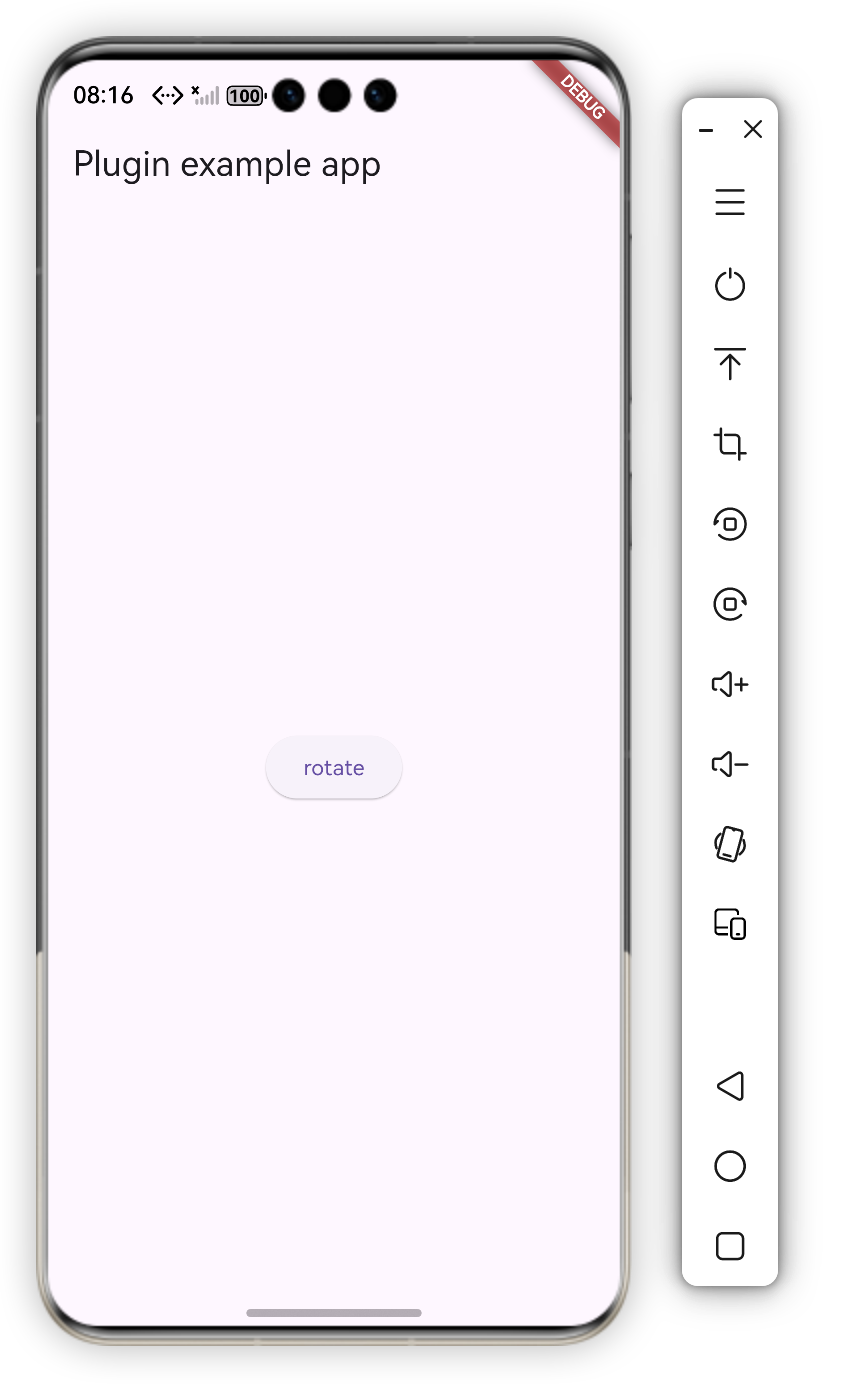
效果展示
一、背景介绍
1.1 插件概述
flutter_orientation 是一个用于控制设备屏幕方向的 Flutter 插件,支持 Android、iOS 和 HarmonyOS 平台。本文重点介绍如何参考 Android 实现,完成 HarmonyOS 平台的适配工作。
1.2 插件功能
- ✅ 设置设备屏幕方向(竖屏、横屏、倒置竖屏、倒置横屏)
- ✅ 跨平台统一的 API 接口
- ✅ 支持动态切换屏幕方向
- ✅ 完善的错误处理机制
1.3 适配目标
本文的目标是帮助开发者:
- 理解 HarmonyOS Flutter 插件的架构设计
- 掌握从 Android 到 HarmonyOS 的适配流程
- 学会处理平台差异和常见问题
- 建立完整的适配知识体系
二、环境准备与项目初始化
2.1 环境要求
在开始适配之前,确保已安装以下工具:
| 工具 | 版本要求 | 说明 |
|---|---|---|
| Flutter SDK | 3.35.8-ohos-0.0.2+ | 支持 HarmonyOS 的 Flutter 版本 |
| Dart SDK | 3.9.2+ | 随 Flutter SDK 一起安装 |
| DevEco Studio | 6.1.0+ | HarmonyOS 官方 IDE |
| HarmonyOS SDK | 5.1.0(18)+ | HarmonyOS 开发工具包 |
2.2 创建 HarmonyOS 平台支持
如果项目还没有 HarmonyOS 平台支持,可以通过以下命令创建:
flutter create . --template=plugin --platforms=ohos
执行后会产生以下目录结构:
项目根目录/
├── ohos/                                    # 插件原生实现目录
│   ├── src/main/ets/components/plugin/
│   │   └── FlutterOrientationPlugin.ets    # 主要实现文件
│   ├── src/main/module.json5               # HAR 模块配置
│   ├── index.ets                            # 模块入口
│   ├── oh-package.json5                     # 包配置
│   └── build-profile.json5                  # 构建配置
└── example/
    └── ohos/                                 # 示例项目目录
        └── entry/                            # 示例应用入口
2.3 配置 pubspec.yaml
在 pubspec.yaml 中添加 HarmonyOS 平台配置:
flutter:
  plugin:
    platforms:
      android:
        package: com.chavesgu.flutter_orientation
        pluginClass: FlutterOrientationPlugin
      ios:
        pluginClass: FlutterOrientationPlugin
      ohos:
        pluginClass: FlutterOrientationPlugin
然后执行:
flutter pub get
注意事项:
pluginClass必须与实现类名完全一致- 确保类实现了
getUniqueClassName()方法并返回正确的类名
三、HarmonyOS Flutter 插件架构
3.1 插件生命周期
HarmonyOS Flutter 插件需要实现以下三个核心接口:
| 接口 | 作用 | 对应 Android 接口 |
|---|---|---|
FlutterPlugin |
管理插件与 Flutter Engine 的绑定 | FlutterPlugin |
MethodCallHandler |
处理方法调用,实现 Flutter 与原生通信 | MethodCallHandler |
AbilityAware |
获取 UIAbility 生命周期,访问窗口和上下文 | ActivityAware |
3.2 关键接口详解
FlutterPlugin 接口
负责插件的初始化和销毁:
interface FlutterPlugin {
  // 绑定到 Flutter Engine,创建 MethodChannel
  onAttachedToEngine(binding: FlutterPluginBinding): void;

  // 解绑 Flutter Engine,清理资源
  onDetachedFromEngine(binding: FlutterPluginBinding): void;
}
调用时机:
onAttachedToEngine: Flutter Engine 启动时调用onDetachedFromEngine: Flutter Engine 销毁时调用
MethodCallHandler 接口
处理来自 Flutter 层的方法调用:
interface MethodCallHandler {
  // 处理方法调用
  onMethodCall(call: MethodCall, result: MethodResult): void;
}
参数说明:
call.method: 方法名称(String)call.args: 方法参数(任意类型)result: 用于返回结果或错误
AbilityAware 接口
获取 UIAbility 实例,这是访问窗口和上下文的关键:
interface AbilityAware {
  // 绑定到 UIAbility,获取 ability 实例
  onAttachedToAbility(binding: AbilityPluginBinding): void;

  // 解绑 UIAbility,清理引用
  onDetachedFromAbility(): void;
}
重要提示:
onAttachedToAbility在onAttachedToEngine之后调用- 只有实现了
AbilityAware接口,才能访问窗口 API - 必须在
ability不为 null 时才能调用窗口相关方法
四、Android vs HarmonyOS 实现对比
4.1 架构差异对比
| 特性 | Android | HarmonyOS | 说明 |
|---|---|---|---|
| 生命周期接口 | ActivityAware |
AbilityAware |
概念相似,但实现不同 |
| 上下文对象 | Activity |
UIAbility |
HarmonyOS 的 Ability 概念更广泛 |
| 窗口管理 | Activity.setRequestedOrientation() |
Window.setPreferredOrientation() |
HarmonyOS 需要先获取 Window 对象 |
| 编程语言 | Java/Kotlin | ArkTS (TypeScript) | ArkTS 是 TypeScript 的超集 |
| 异步处理 | 同步方法 | Promise/async-await | HarmonyOS 窗口操作是异步的 |
| 空值处理 | 可选 | 必须显式处理 | TypeScript 的类型系统要求更严格 |
4.2 代码结构对比
Android 实现(Java)
public class FlutterOrientationPlugin implements
    FlutterPlugin, MethodCallHandler, ActivityAware {

    private MethodChannel channel;
    private Activity activity;

    @Override
    public void onAttachedToEngine(@NonNull FlutterPluginBinding binding) {
        channel = new MethodChannel(
            binding.getBinaryMessenger(),
            "chavesgu/orientation"
        );
        channel.setMethodCallHandler(this);
    }

    @Override
    public void onAttachedToActivity(@NonNull ActivityPluginBinding binding) {
        activity = binding.getActivity();
    }

    @Override
    public void onMethodCall(@NonNull MethodCall call, @NonNull Result result) {
        if (call.method.equals("setOrientation")) {
            String orientation = (String) call.arguments;
            // 同步设置屏幕方向
            activity.setRequestedOrientation(getOrientation(orientation));
            result.success(null);
        } else {
            result.notImplemented();
        }
    }

    private int getOrientation(String orientation) {
        // 方向映射逻辑
        if (orientation.equals("DeviceOrientation.portraitUp")) {
            return ActivityInfo.SCREEN_ORIENTATION_PORTRAIT;
        }
        // ... 其他映射
        return ActivityInfo.SCREEN_ORIENTATION_UNSPECIFIED;
    }
}
HarmonyOS 实现(ArkTS)
export default class FlutterOrientationPlugin implements
    FlutterPlugin, MethodCallHandler, AbilityAware {

    private channel: MethodChannel | null = null;
    private ability: UIAbility | null = null;

    onAttachedToEngine(binding: FlutterPluginBinding): void {
        this.channel = new MethodChannel(
            binding.getBinaryMessenger(),
            "chavesgu/orientation"
        );
        this.channel.setMethodCallHandler(this);
    }

    onAttachedToAbility(binding: AbilityPluginBinding): void {
        this.ability = binding.getAbility();
    }

    onMethodCall(call: MethodCall, result: MethodResult): void {
        if (call.method == "setOrientation") {
            this.setOrientation(call, result);
        } else {
            result.notImplemented();
        }
    }

    private setOrientation(call: MethodCall, result: MethodResult): void {
        // 异步获取窗口并设置方向
        // 需要处理 Promise 和错误情况
    }
}
4.3 关键差异总结
- 异步操作:HarmonyOS 的窗口操作是异步的,必须使用 Promise 或 async-await
- 空值安全:TypeScript 的类型系统要求显式处理 null 值
- 窗口获取:需要先通过
window.getLastWindow()获取窗口对象 - 错误处理:异步操作需要完善的错误处理机制
五、核心实现详解
5.1 完整的 HarmonyOS 实现
以下是完整的插件实现代码,包含详细的注释说明:
import {
  FlutterPlugin,
  FlutterPluginBinding,
  MethodCall,
  MethodCallHandler,
  MethodChannel,
  MethodResult,
  AbilityAware,
  AbilityPluginBinding,
} from '@ohos/flutter_ohos';
import { window } from '@kit.ArkUI';
import { UIAbility } from '@kit.AbilityKit';

/**
 * FlutterOrientationPlugin
 *
 * 屏幕方向控制插件的 HarmonyOS 平台实现
 * 实现 FlutterPlugin、MethodCallHandler 和 AbilityAware 三个接口
 */
export default class FlutterOrientationPlugin
    implements FlutterPlugin, MethodCallHandler, AbilityAware {

  // MethodChannel 用于 Flutter 与原生平台通信
  private channel: MethodChannel | null = null;

  // UIAbility 实例,用于访问窗口和上下文
  private ability: UIAbility | null = null;

  /**
   * 返回插件的唯一类名
   * 必须与 pubspec.yaml 中的 pluginClass 一致
   */
  getUniqueClassName(): string {
    return "FlutterOrientationPlugin"
  }

  /**
   * 1. 绑定到 Flutter Engine
   * 在 Flutter Engine 启动时调用,创建 MethodChannel
   */
  onAttachedToEngine(binding: FlutterPluginBinding): void {
    this.channel = new MethodChannel(
      binding.getBinaryMessenger(),  // 二进制消息传递器
      "chavesgu/orientation"          // 通道名称,必须与 Flutter 端一致
    );
    this.channel.setMethodCallHandler(this);
  }

  /**
   * 2. 解绑 Flutter Engine
   * 在 Flutter Engine 销毁时调用,清理资源
   */
  onDetachedFromEngine(binding: FlutterPluginBinding): void {
    if (this.channel != null) {
      this.channel.setMethodCallHandler(null);
      this.channel = null;
    }
  }

  /**
   * 3. 绑定到 UIAbility(关键步骤)
   * 在 onAttachedToEngine 之后调用
   * 只有实现了 AbilityAware 接口才能访问窗口 API
   */
  onAttachedToAbility(binding: AbilityPluginBinding): void {
    this.ability = binding.getAbility();
  }

  /**
   * 4. 解绑 UIAbility
   * 在 Ability 销毁时调用,清理引用
   */
  onDetachedFromAbility(): void {
    this.ability = null;
  }

  /**
   * 5. 处理方法调用
   * Flutter 层调用 MethodChannel 方法时会触发此方法
   */
  onMethodCall(call: MethodCall, result: MethodResult): void {
    if (call.method == "setOrientation") {
      this.setOrientation(call, result);
    } else {
      result.notImplemented();
    }
  }

  /**
   * 6. 设置屏幕方向的核心方法
   *
   * 实现流程:
   * 1. 解析 Flutter 传入的方向字符串
   * 2. 映射到 HarmonyOS 的方向枚举
   * 3. 检查 ability 是否可用
   * 4. 异步获取窗口对象
   * 5. 设置窗口方向
   * 6. 返回结果或错误
   */
  private setOrientation(call: MethodCall, result: MethodResult): void {
    // 获取 Flutter 传入的方向参数
    const orientation = call.args as string;
    let targetOrientation: window.Orientation;

    // 方向映射:Flutter DeviceOrientation -> HarmonyOS window.Orientation
    if (orientation === "DeviceOrientation.portraitUp") {
      targetOrientation = window.Orientation.PORTRAIT;
    } else if (orientation === "DeviceOrientation.portraitDown") {
      targetOrientation = window.Orientation.PORTRAIT_INVERTED;
    } else if (orientation === "DeviceOrientation.landscapeLeft") {
      targetOrientation = window.Orientation.LANDSCAPE_INVERTED;
    } else if (orientation === "DeviceOrientation.landscapeRight") {
      targetOrientation = window.Orientation.LANDSCAPE;
    } else {
      targetOrientation = window.Orientation.UNSPECIFIED;
    }

    // 安全检查:确保 ability 已初始化
    if (!this.ability) {
      result.error(
        "NO_ABILITY",
        "Ability is null, plugin may not be properly initialized",
        null
      );
      return;
    }

    // 异步获取窗口对象
    window.getLastWindow(this.ability.context)
      .then((windowClass) => {
        // 设置窗口方向
        windowClass.setPreferredOrientation(targetOrientation)
          .then(() => {
            // 成功:返回 null 表示操作成功
            result.success(null);
          })
          .catch((err: Error) => {
            // 设置方向失败
            result.error(
              "SET_ORIENTATION_ERROR",
              `Failed to set orientation: ${err.message}`,
              null
            );
          });
      })
      .catch((err: Error) => {
        // 获取窗口失败
        result.error(
          "GET_WINDOW_ERROR",
          `Failed to get window: ${err.message}`,
          null
        );
      });
  }
}
5.2 关键实现点深度解析
5.2.1 实现 AbilityAware 接口(核心步骤)
这是 HarmonyOS 适配的最关键步骤。与 Android 的 ActivityAware 类似,AbilityAware 接口允许插件获取 UIAbility 实例,从而访问窗口和上下文信息。
为什么需要 AbilityAware?
- HarmonyOS 的窗口 API 需要通过
UIAbility.context访问 - 只有在
onAttachedToAbility之后,ability才会被正确初始化 - 没有
ability实例,无法调用window.getLastWindow()
实现要点:
onAttachedToAbility(binding: AbilityPluginBinding): void {
  // 保存 ability 引用,后续用于获取窗口
  this.ability = binding.getAbility();

  // 注意:此时可以安全地使用 this.ability
  // 但在 onAttachedToEngine 中还不能使用
}
调用顺序:
onAttachedToEngine()
  ↓
onAttachedToAbility()  ← ability 在这里才可用
  ↓
onMethodCall()          ← 可以安全使用 ability
5.2.2 方向映射关系
Flutter 的方向枚举需要精确映射到 HarmonyOS 的窗口方向:
| Flutter 方向 | HarmonyOS 方向 | 说明 |
|---|---|---|
DeviceOrientation.portraitUp |
window.Orientation.PORTRAIT |
竖屏(正向) |
DeviceOrientation.portraitDown |
window.Orientation.PORTRAIT_INVERTED |
竖屏(倒置) |
DeviceOrientation.landscapeLeft |
window.Orientation.LANDSCAPE_INVERTED |
横屏(左侧) |
DeviceOrientation.landscapeRight |
window.Orientation.LANDSCAPE |
横屏(右侧) |
重要提示:
- 映射一致性:
landscapeLeft对应LANDSCAPE_INVERTED,landscapeRight对应LANDSCAPE,这与 Android 的实现保持一致 - 方向定义:HarmonyOS 的方向定义基于设备旋转角度,需要理解其物理含义
- 默认值处理:未知方向应映射到
UNSPECIFIED,让系统自动处理
优化建议:
可以使用 Map 或 switch 语句优化映射逻辑:
private getHarmonyOSOrientation(flutterOrientation: string): window.Orientation {
  const orientationMap: Map<string, window.Orientation> = new Map([
    ["DeviceOrientation.portraitUp", window.Orientation.PORTRAIT],
    ["DeviceOrientation.portraitDown", window.Orientation.PORTRAIT_INVERTED],
    ["DeviceOrientation.landscapeLeft", window.Orientation.LANDSCAPE_INVERTED],
    ["DeviceOrientation.landscapeRight", window.Orientation.LANDSCAPE],
  ]);

  return orientationMap.get(flutterOrientation) ?? window.Orientation.UNSPECIFIED;
}
5.2.3 获取窗口实例(异步操作)
HarmonyOS 需要通过 window.getLastWindow() 异步获取窗口实例,然后调用 setPreferredOrientation() 设置方向。
为什么是异步的?
- 窗口对象可能还未完全初始化
- 异步操作避免阻塞主线程
- 符合 HarmonyOS 的异步编程模型
实现要点:
// 方式一:使用 Promise 链式调用
window.getLastWindow(this.ability.context)
  .then((windowClass) => {
    return windowClass.setPreferredOrientation(targetOrientation);
  })
  .then(() => {
    result.success(null);
  })
  .catch((err: Error) => {
    result.error("ERROR", err.message, null);
  });

// 方式二:使用 async-await(推荐,更清晰)
private async setOrientationAsync(
  call: MethodCall,
  result: MethodResult
): Promise<void> {
  try {
    const windowClass = await window.getLastWindow(this.ability.context);
    await windowClass.setPreferredOrientation(targetOrientation);
    result.success(null);
  } catch (err) {
    result.error("ERROR", (err as Error).message, null);
  }
}
注意事项:
- 必须确保
ability.context不为 null - 窗口操作可能失败,需要捕获异常
- 异步操作不会阻塞 Flutter 线程
5.2.4 完善的错误处理
完善的错误处理机制确保插件在各种异常情况下都能正常工作:
错误处理层次:
-
参数验证
if (!call.args || typeof call.args !== 'string') { result.error("INVALID_ARGUMENT", "Orientation must be a string", null); return; } -
Ability 检查
if (!this.ability) { result.error("NO_ABILITY", "Ability is null", null); return; } -
窗口获取错误
window.getLastWindow(this.ability.context) .catch((err: Error) => { result.error("GET_WINDOW_ERROR", err.message, null); }); -
方向设置错误
windowClass.setPreferredOrientation(targetOrientation)
  .catch((err: Error) => {
    result.error("SET_ORIENTATION_ERROR", err.message, null);
  });
错误码规范:
| 错误码 | 说明 | 可能原因 |
|---|---|---|
NO_ABILITY |
Ability 未初始化 | 插件未正确绑定到 Ability |
GET_WINDOW_ERROR |
获取窗口失败 | 窗口未创建或已销毁 |
SET_ORIENTATION_ERROR |
设置方向失败 | 设备不支持该方向或权限不足 |
INVALID_ARGUMENT |
参数无效 | Flutter 传入的参数格式错误 |
六、适配步骤总结
6.1 完整适配 Checklist
按照以下步骤逐一完成适配工作:
阶段一:项目初始化
- 创建 HarmonyOS 平台支持:
flutter create . --template=plugin --platforms=ohos - 检查生成的目录结构是否正确
- 在
pubspec.yaml中添加ohos平台配置 - 执行
flutter pub get验证配置
阶段二:接口实现
- 实现
FlutterPlugin接口-
onAttachedToEngine: 创建 MethodChannel -
onDetachedFromEngine: 清理资源
-
- 实现
MethodCallHandler接口-
onMethodCall: 处理方法调用
-
- 实现
AbilityAware接口(如需要访问窗口/上下文)-
onAttachedToAbility: 保存 UIAbility 引用 -
onDetachedFromAbility: 清理引用
-
阶段三:核心功能实现
- 实现
getUniqueClassName()方法 - 创建 MethodChannel 并设置处理器
- 在
onAttachedToAbility中保存UIAbility引用 - 实现方法调用处理逻辑
- 映射 Flutter 枚举到 HarmonyOS 枚举
- 实现异步窗口操作(如需要)
阶段四:错误处理和优化
- 添加参数验证
- 添加 Ability 空值检查
- 添加窗口操作错误处理
- 添加详细的错误信息
- 优化代码结构和注释
阶段五:测试和验证
- 在真机上测试基本功能
- 测试各种异常情况
- 验证错误处理是否正确
- 检查内存泄漏
6.2 pubspec.yaml 配置详解
确保在 pubspec.yaml 中正确配置 HarmonyOS 平台:
flutter:
  plugin:
    platforms:
      android:
        package: com.chavesgu.flutter_orientation
        pluginClass: FlutterOrientationPlugin
      ios:
        pluginClass: FlutterOrientationPlugin
      ohos:
        pluginClass: FlutterOrientationPlugin  # 必须与 getUniqueClassName() 返回值一致
配置要点:
- pluginClass 命名:必须与实现类名完全一致(区分大小写)
- 唯一性:每个平台的
pluginClass可以相同,因为它们在各自的命名空间中 - 验证方法:执行
flutter pub get后检查是否有错误提示
6.3 适配流程图
开始适配
    ↓
创建 ohos 平台支持
    ↓
配置 pubspec.yaml
    ↓
实现 FlutterPlugin 接口
    ↓
实现 MethodCallHandler 接口
    ↓
实现 AbilityAware 接口(如需要)
    ↓
实现核心业务逻辑
    ↓
添加错误处理
    ↓
测试验证
    ↓
完成适配
七、常见问题与解决方案
7.1 问题:无法获取窗口实例
错误信息:
Error: Ability is null, plugin may not be properly initialized
可能原因:
- 未实现
AbilityAware接口 onAttachedToAbility未被调用- 在
onAttachedToEngine中过早使用ability
解决方案:
// ❌ 错误:在 onAttachedToEngine 中使用 ability
onAttachedToEngine(binding: FlutterPluginBinding): void {
  this.channel = new MethodChannel(...);
  // 此时 ability 还是 null!
  window.getLastWindow(this.ability.context); // 会报错
}

// ✅ 正确:在 onAttachedToAbility 中保存引用
onAttachedToAbility(binding: AbilityPluginBinding): void {
  this.ability = binding.getAbility(); // 在这里保存
}

// ✅ 正确:在使用前检查
private setOrientation(call: MethodCall, result: MethodResult): void {
  if (!this.ability) {
    result.error("NO_ABILITY", "Ability is null", null);
    return;
  }
  // 现在可以安全使用 this.ability
}
调试技巧:
- 添加日志确认
onAttachedToAbility是否被调用 - 检查插件是否正确注册到 Flutter Engine
7.2 问题:方向设置不生效
错误信息:
Error: Failed to set orientation: ...
可能原因:
- 方向映射错误
- 设备不支持该方向
- 应用配置限制了方向
- 窗口获取失败
解决方案:
1. 检查方向映射:
// 添加日志验证映射是否正确
console.log(`Flutter orientation: ${orientation}`);
console.log(`HarmonyOS orientation: ${targetOrientation}`);
2. 检查设备支持:
- 在系统设置中确认设备允许屏幕旋转
- 某些设备可能不支持倒置方向
3. 检查应用配置:
检查 module.json5 中的方向配置:
{
  "module": {
    "abilities": [{
      "orientation": "unspecified"  // 确保不是固定方向
    }]
  }
}
4. 添加重试机制:
private async setOrientationWithRetry(
  orientation: window.Orientation,
  retries: number = 3
): Promise<void> {
  for (let i = 0; i < retries; i++) {
    try {
      const windowClass = await window.getLastWindow(this.ability.context);
      await windowClass.setPreferredOrientation(orientation);
      return;
    } catch (err) {
      if (i === retries - 1) throw err;
      await new Promise(resolve => setTimeout(resolve, 100)); // 等待100ms重试
    }
  }
}
7.3 问题:插件未注册或找不到
错误信息:
Plugin not found: FlutterOrientationPlugin
可能原因:
pubspec.yaml配置错误pluginClass名称不匹配getUniqueClassName()返回值错误- 未执行
flutter pub get
解决方案:
1. 检查配置一致性:
# pubspec.yaml
ohos:
  pluginClass: FlutterOrientationPlugin  # 必须一致
// FlutterOrientationPlugin.ets
getUniqueClassName(): string {
  return "FlutterOrientationPlugin"  // 必须一致
}
2. 清理并重新构建:
flutter clean
flutter pub get
flutter run
3. 检查文件路径:
确保插件文件在正确的位置:
ohos/src/main/ets/components/plugin/FlutterOrientationPlugin.ets
7.4 问题:异步操作未正确处理
错误信息:
Unhandled promise rejection
可能原因:
- Promise 链中缺少 catch 处理
- 异步操作未等待完成
解决方案:
// ❌ 错误:缺少错误处理
window.getLastWindow(this.ability.context)
  .then((windowClass) => {
    windowClass.setPreferredOrientation(targetOrientation);
    // 缺少 catch,错误会被吞掉
  });

// ✅ 正确:完整的错误处理
window.getLastWindow(this.ability.context)
  .then((windowClass) => {
    return windowClass.setPreferredOrientation(targetOrientation);
  })
  .then(() => {
    result.success(null);
  })
  .catch((err: Error) => {
    result.error("ERROR", err.message, null);
  });
7.5 问题:TypeScript 类型错误
错误信息:
Type 'null' is not assignable to type 'UIAbility'
解决方案:
// ✅ 使用联合类型
private ability: UIAbility | null = null;

// ✅ 使用可选链
this.ability?.context

// ✅ 使用类型断言(谨慎使用)
const ability = this.ability as UIAbility;
7.6 问题:性能问题
表现:
- 方向切换延迟
- 应用卡顿
优化建议:
- 避免频繁切换:
private lastOrientation: window.Orientation | null = null;

private setOrientation(call: MethodCall, result: MethodResult): void {
  const targetOrientation = this.getHarmonyOSOrientation(...);

  // 如果方向相同,直接返回
  if (this.lastOrientation === targetOrientation) {
    result.success(null);
    return;
  }

  this.lastOrientation = targetOrientation;
  // ... 执行设置
}
- 使用防抖:
private debounceTimer: number | null = null;

private setOrientationDebounced(orientation: window.Orientation): void {
  if (this.debounceTimer) {
    clearTimeout(this.debounceTimer);
  }

  this.debounceTimer = setTimeout(() => {
    // 执行设置
  }, 300);
}
八、最佳实践与开发建议
8.1 代码组织最佳实践
8.1.1 模块化设计
将功能拆分为独立的方法,提高代码可维护性:
export default class FlutterOrientationPlugin
    implements FlutterPlugin, MethodCallHandler, AbilityAware {

  // 核心方法:设置方向
  private setOrientation(call: MethodCall, result: MethodResult): void {
    const orientation = this.parseOrientation(call.args as string);
    this.applyOrientation(orientation, result);
  }

  // 辅助方法:解析方向
  private parseOrientation(flutterOrientation: string): window.Orientation {
    // 解析逻辑
  }

  // 辅助方法:应用方向
  private applyOrientation(
    orientation: window.Orientation,
    result: MethodResult
  ): void {
    // 应用逻辑
  }
}
8.1.2 类型安全
充分利用 TypeScript 的类型系统:
// ✅ 使用明确的类型
private ability: UIAbility | null = null;
private channel: MethodChannel | null = null;

// ✅ 使用类型别名
type OrientationString =
  | "DeviceOrientation.portraitUp"
  | "DeviceOrientation.portraitDown"
  | "DeviceOrientation.landscapeLeft"
  | "DeviceOrientation.landscapeRight";

// ✅ 使用枚举映射
private readonly orientationMap: Map<string, window.Orientation>;
8.1.3 注释规范
添加清晰的注释说明:
/**
 * 设置设备屏幕方向
 *
 * @param call - 方法调用对象,包含方向参数
 * @param result - 结果回调对象
 *
 * @remarks
 * - 必须在 ability 初始化后调用
 * - 方向设置是异步操作
 * - 需要处理各种错误情况
 */
private setOrientation(call: MethodCall, result: MethodResult): void {
  // ...
}
8.2 错误处理最佳实践
8.2.1 分层错误处理
private setOrientation(call: MethodCall, result: MethodResult): void {
  // 第一层:参数验证
  if (!this.validateArguments(call, result)) {
    return;
  }

  // 第二层:状态检查
  if (!this.checkAbilityState(result)) {
    return;
  }

  // 第三层:业务逻辑(带错误处理)
  this.executeSetOrientation(call, result);
}
8.2.2 统一的错误码
定义错误码常量:
private static readonly ERROR_CODES = {
  NO_ABILITY: "NO_ABILITY",
  GET_WINDOW_ERROR: "GET_WINDOW_ERROR",
  SET_ORIENTATION_ERROR: "SET_ORIENTATION_ERROR",
  INVALID_ARGUMENT: "INVALID_ARGUMENT",
} as const;
8.3 性能优化建议
8.3.1 避免不必要的操作
private lastOrientation: window.Orientation | null = null;

private setOrientation(call: MethodCall, result: MethodResult): void {
  const targetOrientation = this.getHarmonyOSOrientation(...);

  // 如果方向未改变,直接返回
  if (this.lastOrientation === targetOrientation) {
    result.success(null);
    return;
  }

  this.lastOrientation = targetOrientation;
  // 执行设置...
}
8.3.2 资源管理
及时清理资源,避免内存泄漏:
onDetachedFromEngine(binding: FlutterPluginBinding): void {
  if (this.channel != null) {
    this.channel.setMethodCallHandler(null);
    this.channel = null;  // 清理引用
  }
}

onDetachedFromAbility(): void {
  this.ability = null;  // 清理引用
}
8.4 测试建议
8.4.1 单元测试
测试核心逻辑:
// 测试方向映射
describe('Orientation Mapping', () => {
  it('should map portraitUp correctly', () => {
    const result = getHarmonyOSOrientation("DeviceOrientation.portraitUp");
    expect(result).toBe(window.Orientation.PORTRAIT);
  });
});
8.4.2 集成测试
在真机上测试完整流程:
- 测试正常的方向切换
- 测试异常情况(ability 为 null)
- 测试边界情况(无效参数)
- 测试性能(频繁切换)
8.5 调试技巧
8.5.1 添加日志
private setOrientation(call: MethodCall, result: MethodResult): void {
  console.log(`[FlutterOrientation] Setting orientation: ${call.args}`);

  // ... 实现逻辑

  console.log(`[FlutterOrientation] Orientation set successfully`);
}
8.5.2 使用断点调试
在 DevEco Studio 中设置断点,逐步调试:
- 在
onAttachedToAbility设置断点,确认 ability 初始化 - 在
setOrientation设置断点,检查参数和流程 - 在错误处理处设置断点,捕获异常
九、总结
通过本文的详细介绍,我们全面了解了如何将 Android 平台的 Flutter 插件适配到 HarmonyOS。整个适配过程可以总结为以下几个关键步骤:
9.1 核心要点回顾
-
理解架构差异
- Android 使用
Activity,HarmonyOS 使用UIAbility - Android 的窗口操作是同步的,HarmonyOS 是异步的
- HarmonyOS 需要实现
AbilityAware接口才能访问窗口
- Android 使用
-
实现生命周期接口
FlutterPlugin: 管理插件生命周期MethodCallHandler: 处理方法调用AbilityAware: 获取 UIAbility 实例(关键步骤)
-
映射平台 API
- 理解 Flutter 和 HarmonyOS 的方向枚举差异
- 正确映射方向值,保持与 Android 一致的行为
-
处理异步操作
- 使用 Promise 或 async-await 处理窗口操作
- 完善的错误处理机制
-
完善错误处理
- 参数验证
- 状态检查
- 异常捕获
- 有意义的错误信息
9.2 适配价值
完成 HarmonyOS 适配后,插件将具备:
- ✅ 跨平台能力:一套代码,支持 Android、iOS、HarmonyOS
- ✅ 统一 API:开发者无需关心平台差异
- ✅ 生态扩展:支持 HarmonyOS 庞大的设备生态
- ✅ 未来保障:为 HarmonyOS 生态发展做好准备
9.3 后续建议
- 持续优化:根据实际使用反馈不断改进
- 文档完善:保持文档与代码同步更新
- 社区贡献:分享适配经验,帮助其他开发者
- 关注更新:及时跟进 HarmonyOS SDK 的更新
9.4 学习资源
希望本文能够帮助更多开发者快速完成 Flutter 插件到 HarmonyOS 的适配工作,共同推动 HarmonyOS 生态的发展。如果在适配过程中遇到问题,欢迎在 开源鸿蒙跨平台社区 交流讨论。

讨论HarmonyOS开发技术,专注于API与组件、DevEco Studio、测试、元服务和应用上架分发等。
更多推荐
 14
14 0
0- 0


 已为社区贡献66条内容

所有评论(0)