鸿蒙_ArkUI组件同时支持双击和单击事件
手势实现,那么如果一个组件同时需要支持单击和双击,则需要使用。我们常用的点击事件是onClick,想要实现双击需要用。
·
我们常用的点击事件是onClick,想要实现双击需要用TapGesture手势实现,那么如果一个组件同时需要支持单击和双击,则需要使用GestureGroup,我们新建一个页面来测试一下:
@Entry
@Component
struct TestDoubleClick {
  @State message: string = '请点击上方文字';

  build() {
    Column() {
      Text('请双击这里')
        .fontSize(33)
        .fontWeight(FontWeight.Bold)
        .margin({ bottom: 20 })
        /*.onClick(() => {
          this.message = 'Welcome';
        })*/
        .gesture(
          TapGesture({ count: 2 })
            .onAction(() => {
              this.message = 'Double Click';
            })
        )

      Text('单击和双击')
        .fontSize(33)
        .fontWeight(FontWeight.Bold)
        .margin({ bottom: 20 })
        .gesture(
          GestureGroup(
            //GestureMode.Exclusive, //互斥模式
            GestureMode.Parallel, //并行模式(推荐)
            TapGesture({ count: 1 })
              .onAction(() => {
                this.message = 'Single Click';
              }),
            TapGesture({ count: 2 })
              .onAction(() => {
                this.message = 'Double Click';
              })
          ))

      Text("输出结果:" + this.message).fontColor(Color.Red)
        .fontSize(22)
    }
    .height('100%')
    .width('100%')
  }
}
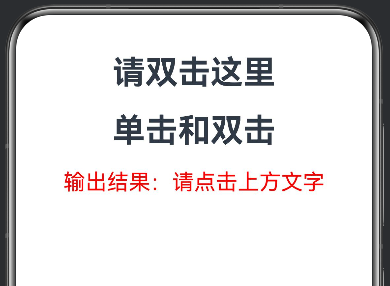
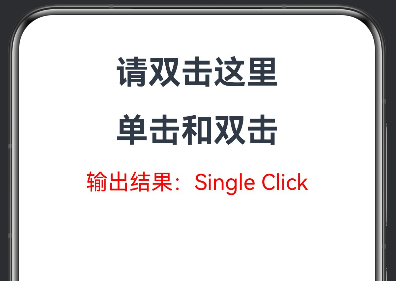
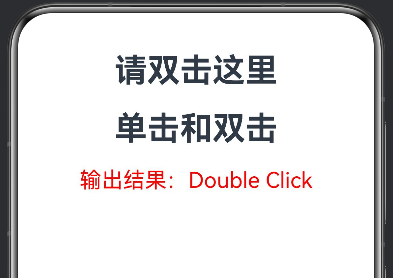
运行效果如下:

讨论HarmonyOS开发技术,专注于API与组件、DevEco Studio、测试、元服务和应用上架分发等。
更多推荐
 0
0 0
0- 0


 已为社区贡献15条内容

所有评论(0)