HarmonyOS4+NEXT星河版入门与项目实战(23)------组件转场动画
·
1、控件图解
这里我们用一张完整的图来汇整 组件转场动画的用法格式、属性和事件,如下所示:
2、案例实现
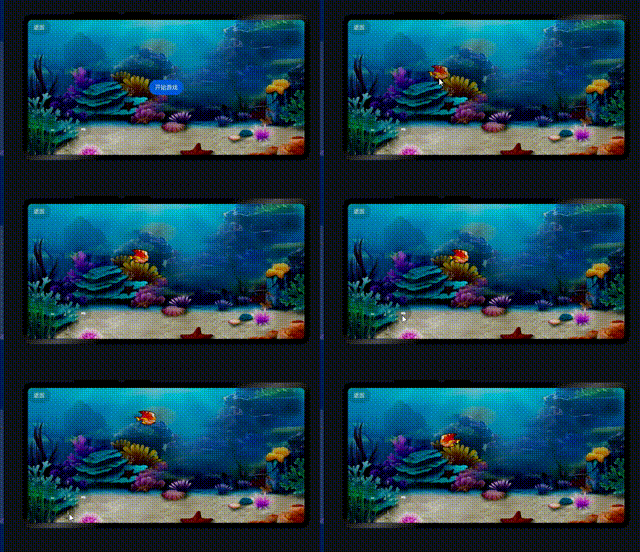
这里我们对上一节小鱼游戏进行改造,让小鱼在游戏开始的时候增加一个转场动画,让小鱼自己从屏幕左侧游到起始位置
1、代码实现
代码如下(示例):
import router from '@ohos.router'
import { ResizeDirection } from '@ohos.UiTest'

@Entry
@Component
struct AnimateFishPage {
  //游戏中鱼的图片
  @State fishImage: Resource = $r('app.media.fish_Right')
  //小鱼起始的坐标
  @State fishX: number = 300
  @State fishY: number = 140
  //小鱼图片角度
  @State fishAngle: number = 0
  //游戏状态
  @State isStartGame: boolean = false

  build() {
    Row() {
      Stack() {
        //返回按钮
        Button('返回')
          .position({ x: 0, y: 0 })
          .backgroundColor('#20101010')
          .onClick(() => {
            //返回上一页
            router.back()
          })
        if (!this.isStartGame) {
          //显示开始按钮
          Button('开始游戏')
            .onClick(() => {
              animateTo(
                { duration:1000 },
                ()=>{
                  //开始游戏后加载小鱼
                  this.isStartGame = true
              })
            })
        }
        else {
          //小鱼图片
          Image(this.fishImage)
            .position({ x: this.fishX - 20, y: this.fishY - 20 })
            .rotate({ angle: this.fishAngle, centerX: '50%', centerY: '50%' })
            .width(60)
            .height(40)
          .transition({
            type:TransitionType.Insert,
            opacity:0,
            translate:{x:-250}
          })
        }
        //操作按钮区域
        Row() {
          Button('⬅').backgroundColor('#20101010')
            .onClick(() => {
              animateTo(
                { duration: 500 },
                () => {
                  this.fishX -= 20
                  this.fishImage = $r('app.media.fish_Left')
                }
              )
            })
          Column({ space: 40 }) {
            Button('⬆').backgroundColor('#20101010')
              .onClick(() => {
                animateTo(
                  { duration: 500 },
                  () => {
                    this.fishY -= 20
                  }
                )
              })
            Button('⬇').backgroundColor('#20101010')
              .onClick(() => {
                animateTo(
                  { duration: 500 },
                  () => {
                    this.fishY += 20
                  }
                )
              })
          }

          Button('➡').backgroundColor('#20101010')
            .onClick(() => {
              animateTo(
                { duration: 500 },
                () => {
                  this.fishX += 20
                  this.fishImage = $r('app.media.fish_Right')
                }
              )
            })
        }
        .height(240)
        .width(240)
        .margin({ left: -450, top: 170 })
      }
      .height('100%')
      .width('100%')
    }
    .height('100%')
    .width('100%')
    .backgroundImage($r('app.media.bg_fish'))
    .backgroundImageSize({ height: '100%', width: '100%' })
  }
}
2、代码解释
核心改造区域代码
        if (!this.isStartGame) {
          //显示开始按钮
          Button('开始游戏')
            .onClick(() => {
              animateTo(
                { duration:1000 },
                ()=>{
                  //开始游戏后加载小鱼
                  this.isStartGame = true
              })
            })
        }
        else {
          //小鱼图片
          Image(this.fishImage)
            .position({ x: this.fishX - 20, y: this.fishY - 20 })
            .rotate({ angle: this.fishAngle, centerX: '50%', centerY: '50%' })
            .width(60)
            .height(40)
          .transition({
            type:TransitionType.Insert,
            opacity:0,
            translate:{x:-250}
          })
        }
3、实现效果
4、总结
以上就是本节内容,简单介绍了组件转场动画的使用,对小鱼游戏进行改造,实现 小鱼入场的动画过渡。

讨论HarmonyOS开发技术,专注于API与组件、DevEco Studio、测试、元服务和应用上架分发等。
更多推荐
 0
0 0
0- 0


 已为社区贡献27条内容

所有评论(0)