HarmonyOS开发 - 最原始简易的瀑布流
·
众所周知,照片墙的实现已经是很多应用的需求,如果将照片墙的照片固定宽高,会导致图片自动拉伸或者模糊或者展示不全,所以需要用到瀑布流,话不多说直接上最简洁的实现代码:
WaterFlow({ scroller: this.scroller }) {
  LazyForEach(this.dataSource, (item: SwiperList, index: number) => {
    FlowItem() {
      Column() {
        //想要显示标题或者文字可以注释下面一段自行修改
        // Text(String(index + 1)).fontSize(12)
        // 存在对应的jpg文件才会显示图片
        Image(item.src)
          .objectFit(ImageFit.Cover)
          .width('100%')
          .layoutWeight(1)
          .onComplete((e) => {
            //设置每一个item的高度
            item.height = e?.height
          })
      }
    }
    .onAppear(() => {
      // 即将触底时提前增加数据
      this.swiperListMode.addPictureList()
    })
    .width('100%')
    // .height(item.height ? item.height : this.itemHeightArray[index % 100])
    .height(item.height ? item.height : 0)
    .backgroundColor(this.colors[index % 5])
  }, (item: string) => item)
}
.columnsTemplate("1fr 1fr")
.columnsGap(0)
.rowsGap(0)
.backgroundColor(0xFAEEE0)
.width('100%')
.height('100%')
.onReachStart(() => {
  this.showReturnTop = false
  console.info('waterFlow reach start')
})
.onScrollStart(() => {
  console.info('waterFlow scroll start')
  this.showReturnTop = true
})
.onScrollStop(() => {
  console.info('waterFlow scroll stop')
})
.onScrollFrameBegin((offset: number, state: ScrollState) => {
  // console.info('waterFlow scrollFrameBegin offset: ' + offset + ' state: ' + state.toString())
  return { offsetRemain: offset }
})
.columnsTemplate("1fr 1fr") 是去展示几列,可以自己定个变量去修改,这里只是简单演示一下。
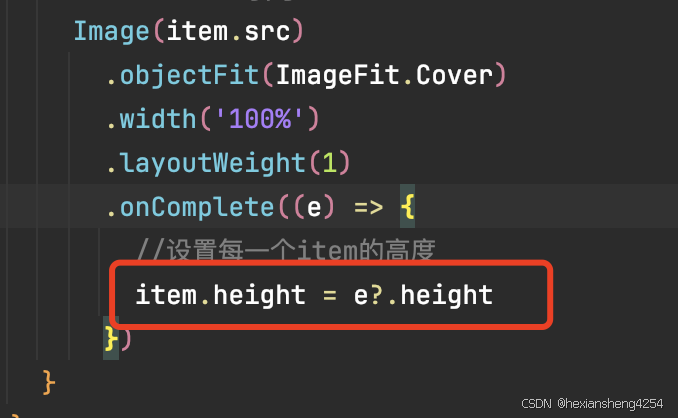
这个一定要设置,不然图片可能高度为0
onAppear:滚动到底部触发,可以去调接口增加数据
onReachStart、onScrollStart、onScrollStop、onScrollFrameBegin这些都不用多说吧。
直接上效果图:

最后贴上整个代码(主要是实现瀑布流,具体细节还要自己去封装):
import { DynamicItemMode, DynamicItem } from '../../models/DynamicMode'
import { SwiperListMode, DataSource, SwiperList } from '../../models/Common'
import display from '@ohos.display';

@Component
export struct PictureCard {
  @State minSize: number = 80
  @State maxSize: number = 180
  @State fontSize: number = 24
  @State colors: number[] = [0xFFC0CB, 0xDA70D6, 0x6B8E23, 0x6A5ACD, 0x00FFFF, 0x00FF7F]
  scroller: Scroller = new Scroller()
  swiperListMode: SwiperListMode = new SwiperListMode()
  @State dataSource: DataSource = this.swiperListMode.getPictureCardList()
  @State returnTopX: number = 0
  @State returnTopY: number = 0
  @State showReturnTop: boolean = false

  aboutToAppear() {
    try {
      this.returnTopX = display.getDefaultDisplaySync().width
      this.returnTopY = display.getDefaultDisplaySync().height
      console.log(JSON.stringify(display.getDefaultDisplaySync()))
    } catch (exception) {
      console.error('Failed to obtain the default display object. Code: ' + JSON.stringify(exception))
    }
  }

  @Builder
  itemFoot() {
    Column() {
      Text(`Footer`)
        .fontSize(10)
        .backgroundColor(Color.Red)
        .width(50)
        .height(50)
        .align(Alignment.Center)
        .margin({ top: 2 })
    }
  }

  build() {
    Column({ space: 0 }) {
      Row() {
        Image($r('app.media.return_top'))
          .width($r('app.float.return_top_width'))
          .height($r('app.float.return_top_height'))

      }.position({ right: 10, bottom: 10 })
      .zIndex(2)
      .visibility(this.showReturnTop ? Visibility.Visible : Visibility.Hidden)
      .onClick(() => {
        this.scroller.scrollTo({ xOffset: 0, yOffset: 0 })
      })

      // .backgroundColor('#fff')

      WaterFlow({ scroller: this.scroller }) {
        LazyForEach(this.dataSource, (item: SwiperList, index: number) => {
          FlowItem() {
            Column() {
              //想要显示标题或者文字可以注释下面一段自行修改
              // Text(String(index + 1)).fontSize(12)
              // 存在对应的jpg文件才会显示图片
              Image(item.src)
                .objectFit(ImageFit.Cover)
                .width('100%')
                .layoutWeight(1)
                .onComplete((e) => {
                  //设置每一个item的高度
                  item.height = e?.height
                })
            }
          }
          .onAppear(() => {
            // 即将触底时提前增加数据
            this.swiperListMode.addPictureList()
          })
          .width('100%')
          // .height(item.height ? item.height : this.itemHeightArray[index % 100])
          .height(item.height ? item.height : 0)
          .backgroundColor(this.colors[index % 5])
        }, (item: string) => item)
      }
      .columnsTemplate("1fr 1fr")
      .columnsGap(0)
      .rowsGap(0)
      .backgroundColor(0xFAEEE0)
      .width('100%')
      .height('100%')
      .onReachStart(() => {
        this.showReturnTop = false
        console.info('waterFlow reach start')
      })
      .onScrollStart(() => {
        console.info('waterFlow scroll start')
        this.showReturnTop = true
      })
      .onScrollStop(() => {
        console.info('waterFlow scroll stop')
      })
      .onScrollFrameBegin((offset: number, state: ScrollState) => {
        // console.info('waterFlow scrollFrameBegin offset: ' + offset + ' state: ' + state.toString())
        return { offsetRemain: offset }
      })
    }
  }
}
讨论HarmonyOS开发技术,专注于API与组件、DevEco Studio、测试、元服务和应用上架分发等。
更多推荐


 8
8 0
0- 0


 已为社区贡献9条内容

所有评论(0)