HarmonyOS界面渲染
·
1. 渲染-条件渲染
在ArkTS中 我们要根据某个状态来控制元素或者组件的显示隐藏 可以采用条件渲染。
● if/else(创建销毁元素)
● 元素高宽-透明度-位置控制 (属性控制)
● visibility属性控制
使用if/else。
通过一个switch开关来控制图片的显示隐藏。
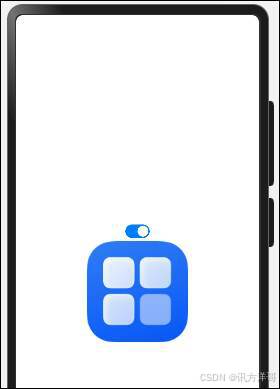
代码如下:
@Entry

@Component

struct Index {

  @State showImg: boolean = false


  build() {

    Row() {

      Column() {

        Toggle({

          type: ToggleType.Switch,

          isOn: this.showImg

        })

          .onChange((isON) => {

            this.showImg = isON

          })

        if(this.showImg) {

          Image('/assets/startIcon.png')

            .width(150)

            .height(150)

        }

      }

      .width('100%')

    }

    .width('100%')

    .height('100%')

  }

}
多种条件控制
interface  ICity{

  value: string

}


export class ICityModel implements ICity {

  value: string = ''


  constructor(model: ICity) {

    this.value = model.value

  }

}


@Entry

@Component

struct IfElseCase {


  @State

  cityList: ICityModel[] = [

    new ICityModel({value: '北京'}),

    new ICityModel({value: '广州'}),

    new ICityModel({value: '深圳'}),

    new ICityModel({value: '上海'}),

  ]


  @State

  selectIndex:number = 0


  build() {

    Row(){

      Select(this.cityList)

        .value(this.cityList[this.selectIndex].value)

        .onSelect(index => {

          this.selectIndex = index

        })


      if( this.selectIndex == 0){

        Text('北京')

      }else if (this.selectIndex == 1){

        Text('广州')

      }else if( this.selectIndex == 2){

        Text('深圳')

      }else{

        Text('上海')

      }

    }

    .width('100%')

    .height('100%')

  }

}
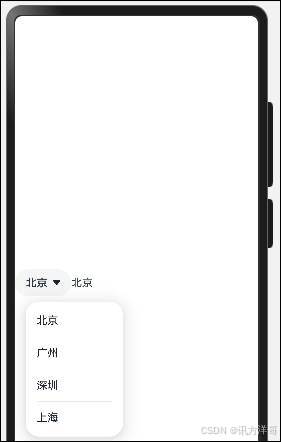
运行结果:
控制元素高宽。
Image($r('app.media.startIcon.png'))

        .width(this.isOn ? 100 : 0)

        .height(this.isOn ? 100 : 0)

        .borderRadius(8)
控制visibility属性- Hidden和None两种。
Image($r('app.media.startIcon.png '))

        .width(100)

        .height(100)

        .borderRadius(8)

        .visibility(this.isOn ? Visibility.Visible: Visibility.Hidden)


Image($r('app.media.startIcon.png '))

        .width(100)

        .height(100)

        .borderRadius(8)

        .visibility(this.isOn ? Visibility.Visible: Visibility.None)
visibility的1Hidden会占位,元素隐藏,Node隐藏且不占位。
案例-实现加载数据的loading效果。
在页面加载后,三秒钟之后才显示数据,之前显示loading进度条。
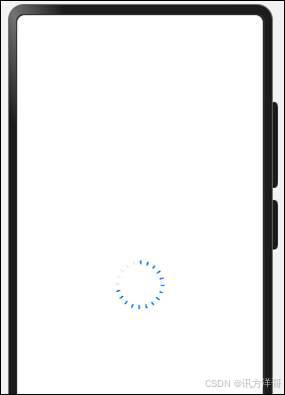
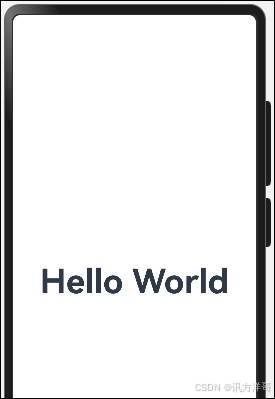
封装loading组件。
代码如下:
@Entry

@Component

struct LoadingCase {

  @State message: string = 'Hello World'

  @State showLoading: boolean = false

  // 初始化执行的回调函数

  aboutToAppear() {

    this.showLoading = true

    setTimeout(() => {

      this.showLoading = false

    }, 3000)

  }


  build() {

    Row() {

      Column() {

        if(this.showLoading) {

          HmLoading()

        }else {

          Text(this.message)

            .fontSize(50)

            .fontWeight(FontWeight.Bold)

        }

      }

      .width('100%')

    }

    .height('100%')

  }

}


@Component

struct HmLoading {

  @State count: number = 0


  aboutToAppear() {

    setInterval(() => {

      if(this.count  === 100) {

        this.count = 0

      }

      this.count++

    }, 10)

  }

  build() {

    Progress({

      value: this.count,

      total: 100,

      type: ProgressType.ScaleRing

    }).style({

      strokeWidth: 6,

      scaleCount: 20,

    })

  }

}
2. 渲染-循环渲染
循环渲染使用 ForEach方法来进行。
ForEach 接口基于数组类型数据来进行循环渲染,需要与容器组件配合使用。
ForEach(

  // 数据源

  arr: Array,

  // 组件生成函数

  itemGenerator: (item: Array, index?: number) => void,

  // 键值生成函数

  keyGenerator?: (item: Array, index?: number): string => string

)
例如购物商城的网站

新建一个 IGoodsItem 类型数据,进行循环。
interface IGoodsItem {

  id: number

  store_name: string

  image: string

  isSelected: boolean

  sku: string

  price: number

  cart_num: number

}

export class IGoodsItemModel implements IGoodsItem {

  id: number = 0

  store_name: string = ''

  image: string = ''

  isSelected: boolean = false

  sku: string = ''

  price: number = 0

  cart_num: number = 0


  constructor(model: IGoodsItem) {

    this.id = model.id

    this.store_name = model.store_name

    this.image = model.image

    this.isSelected = model.isSelected

    this.sku = model.sku

    this.price = model.price

    this.cart_num = model.cart_num

  }

}
声明数据
@State

  cartList: IGoodsItemModel[] = [

    new IGoodsItemModel({

      id: 1,

      store_name: 'Apple MacBook Air 13.3 新款8核M1芯片(7核图形处理器) 8G 256G SSD 银色 笔记本电脑 MGN93CH/A',

      image: 'http://106.52.75.114/uploads/attach/2023/06/20230625/small_c6fe8fcd0d93751037ff443ffc31854c.png',

      isSelected: false,

      sku: '金色,新款八核M1芯片8G 256G',

      price: 719.9,

      cart_num: 2,

    }),

    new IGoodsItemModel({

      id: 2,

      store_name: 'Apple MacBook Air 13.3 新款8核M1芯片(7核图形处理器) 8G 256G SSD 银色 笔记本电脑 MGN93CH/A',

      image: 'http://106.52.75.114/uploads/attach/2023/06/20230625/small_c5fc73a69789277fe45c989d14e98d9f.jpg',

      isSelected: true,

      sku: '银色,新款八核M1芯片16G 256G',

      price: 822.5,

      cart_num: 4,

    }),

    new IGoodsItemModel({

      id: 3,

      store_name: '麦穗抓夹优雅气质大号发夹女后脑勺夹子头饰春夏季鲨鱼夹',

      image: 'http://106.52.75.114/uploads/attach/2023/06/20230607/small_2a033d103871eec4a3bdc4d4ad5f7b3b.jpg',

      isSelected: false,

      sku: '默认',

      price: 289,

      cart_num: 3,

    }),

    new IGoodsItemModel({

      id: 4,

      store_name: '9999足银满天星手镯可拉伸实心纯银镯子手环女友闺蜜生日礼物',

      image: 'http://106.52.75.114/uploads/attach/2023/06/20230607/small_6076b07eeb8097e8a02796baa7cbb6fc.jpg',

      isSelected: true,

      sku: '默认',

      price: 321,

      cart_num: 96,

    })

  ]
使用 ForEach 遍历
代码如下:
interface IGoodsItem {

  id: number

  store_name: string

  image: string

  isSelected: boolean

  sku: string

  price: number

  cart_num: number

}

export class IGoodsItemModel implements IGoodsItem {

  id: number = 0

  store_name: string = ''

  image: string = ''

  isSelected: boolean = false

  sku: string = ''

  price: number = 0

  cart_num: number = 0


  constructor(model: IGoodsItem) {

    this.id = model.id

    this.store_name = model.store_name

    this.image = model.image

    this.isSelected = model.isSelected

    this.sku = model.sku

    this.price = model.price

    this.cart_num = model.cart_num

  }

}

@Entry

@Component

struct LoopCase {

  @State

  cartList: IGoodsItemModel[] = [

    new IGoodsItemModel({

      id: 1,

      store_name: 'Apple MacBook Air 13.3 新款8核M1芯片(7核图形处理器) 8G 256G SSD 银色 笔记本电脑 MGN93CH/A',

      image: 'http://106.52.75.114/uploads/attach/2023/06/20230625/small_c6fe8fcd0d93751037ff443ffc31854c.png',

      isSelected: false,

      sku: '金色,新款八核M1芯片8G 256G',

      price: 719.9,

      cart_num: 2,

    }),

    new IGoodsItemModel({

      id: 2,

      store_name: 'Apple MacBook Air 13.3 新款8核M1芯片(7核图形处理器) 8G 256G SSD 银色 笔记本电脑 MGN93CH/A',

      image: 'http://106.52.75.114/uploads/attach/2023/06/20230625/small_c5fc73a69789277fe45c989d14e98d9f.jpg',

      isSelected: true,

      sku: '银色,新款八核M1芯片16G 256G',

      price: 822.5,

      cart_num: 4,

    }),

    new IGoodsItemModel({

      id: 3,

      store_name: '麦穗抓夹优雅气质大号发夹女后脑勺夹子头饰春夏季鲨鱼夹',

      image: 'http://106.52.75.114/uploads/attach/2023/06/20230607/small_2a033d103871eec4a3bdc4d4ad5f7b3b.jpg',

      isSelected: false,

      sku: '默认',

      price: 289,

      cart_num: 3,

    }),

    new IGoodsItemModel({

      id: 4,

      store_name: '9999足银满天星手镯可拉伸实心纯银镯子手环女友闺蜜生日礼物',

      image: 'http://106.52.75.114/uploads/attach/2023/06/20230607/small_6076b07eeb8097e8a02796baa7cbb6fc.jpg',

      isSelected: true,

      sku: '默认',

      price: 321,

      cart_num: 96,

    })

  ]


  build() {

    Column(){


      ForEach(this.cartList, (item: IGoodsItemModel) => {

        Row(){

          Image(item.image)

            .width(100)

            .height(100)

            .borderRadius(10)


          Text(item.store_name).maxLines(1).textOverflow({overflow: TextOverflow.Ellipsis}).layoutWeight(1).margin({left: 10})

        }

        .margin({bottom: 10})

        .justifyContent(FlexAlign.SpaceBetween)

        .width('100%')

      })

    }

    .width('100%')

    .height('100%')

  }

}
运行效果:


讨论HarmonyOS开发技术,专注于API与组件、DevEco Studio、测试、元服务和应用上架分发等。
更多推荐


 4
4 0
0- 0


 已为社区贡献58条内容

所有评论(0)